EP1607850B1 - Vehicle-mounted apparatus and method for providing recorded information therefor - Google Patents
Vehicle-mounted apparatus and method for providing recorded information therefor Download PDFInfo
- Publication number
- EP1607850B1 EP1607850B1 EP05011728.2A EP05011728A EP1607850B1 EP 1607850 B1 EP1607850 B1 EP 1607850B1 EP 05011728 A EP05011728 A EP 05011728A EP 1607850 B1 EP1607850 B1 EP 1607850B1
- Authority
- EP
- European Patent Office
- Prior art keywords
- screen
- user
- display
- application program
- map
- Prior art date
- Legal status (The legal status is an assumption and is not a legal conclusion. Google has not performed a legal analysis and makes no representation as to the accuracy of the status listed.)
- Expired - Lifetime
Links
Images





Classifications
-
- G—PHYSICS
- G06—COMPUTING OR CALCULATING; COUNTING
- G06F—ELECTRIC DIGITAL DATA PROCESSING
- G06F3/00—Input arrangements for transferring data to be processed into a form capable of being handled by the computer; Output arrangements for transferring data from processing unit to output unit, e.g. interface arrangements
- G06F3/01—Input arrangements or combined input and output arrangements for interaction between user and computer
- G06F3/048—Interaction techniques based on graphical user interfaces [GUI]
- G06F3/0481—Interaction techniques based on graphical user interfaces [GUI] based on specific properties of the displayed interaction object or a metaphor-based environment, e.g. interaction with desktop elements like windows or icons, or assisted by a cursor's changing behaviour or appearance
- G06F3/0482—Interaction with lists of selectable items, e.g. menus
-
- B—PERFORMING OPERATIONS; TRANSPORTING
- B60—VEHICLES IN GENERAL
- B60K—ARRANGEMENT OR MOUNTING OF PROPULSION UNITS OR OF TRANSMISSIONS IN VEHICLES; ARRANGEMENT OR MOUNTING OF PLURAL DIVERSE PRIME-MOVERS IN VEHICLES; AUXILIARY DRIVES FOR VEHICLES; INSTRUMENTATION OR DASHBOARDS FOR VEHICLES; ARRANGEMENTS IN CONNECTION WITH COOLING, AIR INTAKE, GAS EXHAUST OR FUEL SUPPLY OF PROPULSION UNITS IN VEHICLES
- B60K35/00—Instruments specially adapted for vehicles; Arrangement of instruments in or on vehicles
- B60K35/10—Input arrangements, i.e. from user to vehicle, associated with vehicle functions or specially adapted therefor
-
- B—PERFORMING OPERATIONS; TRANSPORTING
- B60—VEHICLES IN GENERAL
- B60K—ARRANGEMENT OR MOUNTING OF PROPULSION UNITS OR OF TRANSMISSIONS IN VEHICLES; ARRANGEMENT OR MOUNTING OF PLURAL DIVERSE PRIME-MOVERS IN VEHICLES; AUXILIARY DRIVES FOR VEHICLES; INSTRUMENTATION OR DASHBOARDS FOR VEHICLES; ARRANGEMENTS IN CONNECTION WITH COOLING, AIR INTAKE, GAS EXHAUST OR FUEL SUPPLY OF PROPULSION UNITS IN VEHICLES
- B60K35/00—Instruments specially adapted for vehicles; Arrangement of instruments in or on vehicles
- B60K35/20—Output arrangements, i.e. from vehicle to user, associated with vehicle functions or specially adapted therefor
- B60K35/21—Output arrangements, i.e. from vehicle to user, associated with vehicle functions or specially adapted therefor using visual output, e.g. blinking lights or matrix displays
- B60K35/22—Display screens
-
- B—PERFORMING OPERATIONS; TRANSPORTING
- B60—VEHICLES IN GENERAL
- B60K—ARRANGEMENT OR MOUNTING OF PROPULSION UNITS OR OF TRANSMISSIONS IN VEHICLES; ARRANGEMENT OR MOUNTING OF PLURAL DIVERSE PRIME-MOVERS IN VEHICLES; AUXILIARY DRIVES FOR VEHICLES; INSTRUMENTATION OR DASHBOARDS FOR VEHICLES; ARRANGEMENTS IN CONNECTION WITH COOLING, AIR INTAKE, GAS EXHAUST OR FUEL SUPPLY OF PROPULSION UNITS IN VEHICLES
- B60K35/00—Instruments specially adapted for vehicles; Arrangement of instruments in or on vehicles
- B60K35/20—Output arrangements, i.e. from vehicle to user, associated with vehicle functions or specially adapted therefor
- B60K35/26—Output arrangements, i.e. from vehicle to user, associated with vehicle functions or specially adapted therefor using acoustic output
-
- B—PERFORMING OPERATIONS; TRANSPORTING
- B60—VEHICLES IN GENERAL
- B60K—ARRANGEMENT OR MOUNTING OF PROPULSION UNITS OR OF TRANSMISSIONS IN VEHICLES; ARRANGEMENT OR MOUNTING OF PLURAL DIVERSE PRIME-MOVERS IN VEHICLES; AUXILIARY DRIVES FOR VEHICLES; INSTRUMENTATION OR DASHBOARDS FOR VEHICLES; ARRANGEMENTS IN CONNECTION WITH COOLING, AIR INTAKE, GAS EXHAUST OR FUEL SUPPLY OF PROPULSION UNITS IN VEHICLES
- B60K35/00—Instruments specially adapted for vehicles; Arrangement of instruments in or on vehicles
- B60K35/20—Output arrangements, i.e. from vehicle to user, associated with vehicle functions or specially adapted therefor
- B60K35/28—Output arrangements, i.e. from vehicle to user, associated with vehicle functions or specially adapted therefor characterised by the type of the output information, e.g. video entertainment or vehicle dynamics information; characterised by the purpose of the output information, e.g. for attracting the attention of the driver
-
- B—PERFORMING OPERATIONS; TRANSPORTING
- B60—VEHICLES IN GENERAL
- B60K—ARRANGEMENT OR MOUNTING OF PROPULSION UNITS OR OF TRANSMISSIONS IN VEHICLES; ARRANGEMENT OR MOUNTING OF PLURAL DIVERSE PRIME-MOVERS IN VEHICLES; AUXILIARY DRIVES FOR VEHICLES; INSTRUMENTATION OR DASHBOARDS FOR VEHICLES; ARRANGEMENTS IN CONNECTION WITH COOLING, AIR INTAKE, GAS EXHAUST OR FUEL SUPPLY OF PROPULSION UNITS IN VEHICLES
- B60K35/00—Instruments specially adapted for vehicles; Arrangement of instruments in or on vehicles
- B60K35/50—Instruments characterised by their means of attachment to or integration in the vehicle
-
- B—PERFORMING OPERATIONS; TRANSPORTING
- B60—VEHICLES IN GENERAL
- B60K—ARRANGEMENT OR MOUNTING OF PROPULSION UNITS OR OF TRANSMISSIONS IN VEHICLES; ARRANGEMENT OR MOUNTING OF PLURAL DIVERSE PRIME-MOVERS IN VEHICLES; AUXILIARY DRIVES FOR VEHICLES; INSTRUMENTATION OR DASHBOARDS FOR VEHICLES; ARRANGEMENTS IN CONNECTION WITH COOLING, AIR INTAKE, GAS EXHAUST OR FUEL SUPPLY OF PROPULSION UNITS IN VEHICLES
- B60K35/00—Instruments specially adapted for vehicles; Arrangement of instruments in or on vehicles
- B60K35/80—Arrangements for controlling instruments
-
- B—PERFORMING OPERATIONS; TRANSPORTING
- B60—VEHICLES IN GENERAL
- B60K—ARRANGEMENT OR MOUNTING OF PROPULSION UNITS OR OF TRANSMISSIONS IN VEHICLES; ARRANGEMENT OR MOUNTING OF PLURAL DIVERSE PRIME-MOVERS IN VEHICLES; AUXILIARY DRIVES FOR VEHICLES; INSTRUMENTATION OR DASHBOARDS FOR VEHICLES; ARRANGEMENTS IN CONNECTION WITH COOLING, AIR INTAKE, GAS EXHAUST OR FUEL SUPPLY OF PROPULSION UNITS IN VEHICLES
- B60K35/00—Instruments specially adapted for vehicles; Arrangement of instruments in or on vehicles
- B60K35/90—Calibration of instruments, e.g. setting initial or reference parameters; Testing of instruments, e.g. detecting malfunction
-
- G—PHYSICS
- G06—COMPUTING OR CALCULATING; COUNTING
- G06F—ELECTRIC DIGITAL DATA PROCESSING
- G06F3/00—Input arrangements for transferring data to be processed into a form capable of being handled by the computer; Output arrangements for transferring data from processing unit to output unit, e.g. interface arrangements
- G06F3/01—Input arrangements or combined input and output arrangements for interaction between user and computer
- G06F3/017—Gesture based interaction, e.g. based on a set of recognized hand gestures
-
- G—PHYSICS
- G06—COMPUTING OR CALCULATING; COUNTING
- G06F—ELECTRIC DIGITAL DATA PROCESSING
- G06F3/00—Input arrangements for transferring data to be processed into a form capable of being handled by the computer; Output arrangements for transferring data from processing unit to output unit, e.g. interface arrangements
- G06F3/01—Input arrangements or combined input and output arrangements for interaction between user and computer
- G06F3/048—Interaction techniques based on graphical user interfaces [GUI]
- G06F3/0481—Interaction techniques based on graphical user interfaces [GUI] based on specific properties of the displayed interaction object or a metaphor-based environment, e.g. interaction with desktop elements like windows or icons, or assisted by a cursor's changing behaviour or appearance
- G06F3/04817—Interaction techniques based on graphical user interfaces [GUI] based on specific properties of the displayed interaction object or a metaphor-based environment, e.g. interaction with desktop elements like windows or icons, or assisted by a cursor's changing behaviour or appearance using icons
-
- G—PHYSICS
- G06—COMPUTING OR CALCULATING; COUNTING
- G06F—ELECTRIC DIGITAL DATA PROCESSING
- G06F3/00—Input arrangements for transferring data to be processed into a form capable of being handled by the computer; Output arrangements for transferring data from processing unit to output unit, e.g. interface arrangements
- G06F3/01—Input arrangements or combined input and output arrangements for interaction between user and computer
- G06F3/048—Interaction techniques based on graphical user interfaces [GUI]
- G06F3/0484—Interaction techniques based on graphical user interfaces [GUI] for the control of specific functions or operations, e.g. selecting or manipulating an object, an image or a displayed text element, setting a parameter value or selecting a range
-
- G—PHYSICS
- G06—COMPUTING OR CALCULATING; COUNTING
- G06F—ELECTRIC DIGITAL DATA PROCESSING
- G06F3/00—Input arrangements for transferring data to be processed into a form capable of being handled by the computer; Output arrangements for transferring data from processing unit to output unit, e.g. interface arrangements
- G06F3/01—Input arrangements or combined input and output arrangements for interaction between user and computer
- G06F3/048—Interaction techniques based on graphical user interfaces [GUI]
- G06F3/0484—Interaction techniques based on graphical user interfaces [GUI] for the control of specific functions or operations, e.g. selecting or manipulating an object, an image or a displayed text element, setting a parameter value or selecting a range
- G06F3/0485—Scrolling or panning
-
- G—PHYSICS
- G06—COMPUTING OR CALCULATING; COUNTING
- G06F—ELECTRIC DIGITAL DATA PROCESSING
- G06F3/00—Input arrangements for transferring data to be processed into a form capable of being handled by the computer; Output arrangements for transferring data from processing unit to output unit, e.g. interface arrangements
- G06F3/01—Input arrangements or combined input and output arrangements for interaction between user and computer
- G06F3/048—Interaction techniques based on graphical user interfaces [GUI]
- G06F3/0487—Interaction techniques based on graphical user interfaces [GUI] using specific features provided by the input device, e.g. functions controlled by the rotation of a mouse with dual sensing arrangements, or of the nature of the input device, e.g. tap gestures based on pressure sensed by a digitiser
- G06F3/0488—Interaction techniques based on graphical user interfaces [GUI] using specific features provided by the input device, e.g. functions controlled by the rotation of a mouse with dual sensing arrangements, or of the nature of the input device, e.g. tap gestures based on pressure sensed by a digitiser using a touch-screen or digitiser, e.g. input of commands through traced gestures
-
- G—PHYSICS
- G06—COMPUTING OR CALCULATING; COUNTING
- G06F—ELECTRIC DIGITAL DATA PROCESSING
- G06F3/00—Input arrangements for transferring data to be processed into a form capable of being handled by the computer; Output arrangements for transferring data from processing unit to output unit, e.g. interface arrangements
- G06F3/01—Input arrangements or combined input and output arrangements for interaction between user and computer
- G06F3/048—Interaction techniques based on graphical user interfaces [GUI]
- G06F3/0487—Interaction techniques based on graphical user interfaces [GUI] using specific features provided by the input device, e.g. functions controlled by the rotation of a mouse with dual sensing arrangements, or of the nature of the input device, e.g. tap gestures based on pressure sensed by a digitiser
- G06F3/0488—Interaction techniques based on graphical user interfaces [GUI] using specific features provided by the input device, e.g. functions controlled by the rotation of a mouse with dual sensing arrangements, or of the nature of the input device, e.g. tap gestures based on pressure sensed by a digitiser using a touch-screen or digitiser, e.g. input of commands through traced gestures
- G06F3/04883—Interaction techniques based on graphical user interfaces [GUI] using specific features provided by the input device, e.g. functions controlled by the rotation of a mouse with dual sensing arrangements, or of the nature of the input device, e.g. tap gestures based on pressure sensed by a digitiser using a touch-screen or digitiser, e.g. input of commands through traced gestures for inputting data by handwriting, e.g. gesture or text
-
- H—ELECTRICITY
- H04—ELECTRIC COMMUNICATION TECHNIQUE
- H04N—PICTORIAL COMMUNICATION, e.g. TELEVISION
- H04N21/00—Selective content distribution, e.g. interactive television or video on demand [VOD]
- H04N21/40—Client devices specifically adapted for the reception of or interaction with content, e.g. set-top-box [STB]; Operations thereof
- H04N21/47—End-user applications
- H04N21/478—Supplemental services, e.g. displaying phone caller identification, shopping application
-
- B—PERFORMING OPERATIONS; TRANSPORTING
- B60—VEHICLES IN GENERAL
- B60K—ARRANGEMENT OR MOUNTING OF PROPULSION UNITS OR OF TRANSMISSIONS IN VEHICLES; ARRANGEMENT OR MOUNTING OF PLURAL DIVERSE PRIME-MOVERS IN VEHICLES; AUXILIARY DRIVES FOR VEHICLES; INSTRUMENTATION OR DASHBOARDS FOR VEHICLES; ARRANGEMENTS IN CONNECTION WITH COOLING, AIR INTAKE, GAS EXHAUST OR FUEL SUPPLY OF PROPULSION UNITS IN VEHICLES
- B60K2360/00—Indexing scheme associated with groups B60K35/00 or B60K37/00 relating to details of instruments or dashboards
- B60K2360/11—Instrument graphical user interfaces or menu aspects
-
- B—PERFORMING OPERATIONS; TRANSPORTING
- B60—VEHICLES IN GENERAL
- B60K—ARRANGEMENT OR MOUNTING OF PROPULSION UNITS OR OF TRANSMISSIONS IN VEHICLES; ARRANGEMENT OR MOUNTING OF PLURAL DIVERSE PRIME-MOVERS IN VEHICLES; AUXILIARY DRIVES FOR VEHICLES; INSTRUMENTATION OR DASHBOARDS FOR VEHICLES; ARRANGEMENTS IN CONNECTION WITH COOLING, AIR INTAKE, GAS EXHAUST OR FUEL SUPPLY OF PROPULSION UNITS IN VEHICLES
- B60K2360/00—Indexing scheme associated with groups B60K35/00 or B60K37/00 relating to details of instruments or dashboards
- B60K2360/143—Touch sensitive instrument input devices
Definitions
- the present invention relates to a vehicle-mounted apparatus, an information providing method for use with the vehicle-mounted apparatus, and an information providing method program for use with the vehicle-mounted apparatus. More particularly, the invention relates to a vehicle-mounted apparatus which has navigation and content reproduction capabilities and which is structured to have its displays switched in menu-based fashion upon input of fingertip gestures made by a user on a touch-sensitive panel, whereby the user's ease of operation is enhanced.
- vehicle-mounted car navigation apparatuses were designed to display hierarchically structured menus that were selected by manual input through a touch-sensitive panel or the like, as disclosed illustratively in Japanese Patent Laid-open No. Hei 10-141974 .
- Vehicle-mounted car navigation apparatuses of another type such as one disclosed in Japanese Patent Laid-open No. Hei 11-85398 were designed to admit the input of line drawings through a touch-sensitive panel.
- DE 197 53 742 A1 discloses a device for inputting operating commands in an electronic device in a motor vehicle, wherein an operating command of a first group of operating commands is input by touching a predetermined area of a touch-sensitive screen surface and an operating command of a second group of operating commands is input by a movement of a finger along a predetermined path on the screen surface.
- EP 1 081 669 A2 discloses a display unit representing a section of a digital road map, the displayed section being movable by a user via a control element by means of which direction of movement of the section can be entered.
- JP 11 085398 A discloses a command input device for a touch panel display comprising a line drawing recognition means for recognizing a line drawing input by a user on the touch panel display and command execution means for executing a command corresponding to the recognized line drawing input.
- US 6 157 372 A is directed to an apparatus and a method for controlling a plurality of controllable devices located within a vehicle in response to manual inputs from a vehicle occupant on a touch pad.
- the touch pad has an array of manually touchable areas and provides signals indicative of manual touches to the areas, the array being arranged such that various swiping and non-swiping manual touch patterns to the array can be accomplished.
- JP 7 230374 A relates to an information processing apparatus using a multi-window system and more particularly to an apparatus for creating a window having a desired size by drawing the image of the window in a new window generation position on a display device and designating the display position and the size of the window to be newly generated.
- WO 02/25420 A1 provides a views management system presenting a computer display which provides a hideable view bar having pane splitting controls and a list of open views. Through selection of specific ones of the pane splitting controls, a user can configure the display to show any number and arrangement of tiled views, and through selection of one of the open views, the user can assign that view to the pane currently having focus. The contents of pairs of panes can be swapped by a click-drag-drop operation input.
- vehicle-mounted apparatuses of yet another type which have their navigation capabilities supplemented with audio and video reproduction functions. These vehicle-mounted apparatus are characterized by an excellent space-saving feature. They take up far less space than a car navigation device, a car audio device and other equipment mounted individually on the vehicle.
- the present invention has been made in view of the above circumstances and proposes a vehicle-mounted apparatus, an information providing method for use with the vehicle-mounted apparatus, and an information providing method program for use with the vehicle-mounted apparatus with a view to improving the user's ease of operation.
- a vehicle-mounted apparatus according to claim 1.
- an information providing method for use with a vehicle-mounted apparatus according to claim 5.
- a recording medium on which is recorded an information providing method program for use with a vehicle-mounted apparatus according to claim 9.
- the displaying device displays the menu screen based on what is input through the inputting unit. Displays are switched on the displaying unit in keeping with menus selected on the menu screen. As when a particular menu is selected on the menu screen, the displays are switched on the displaying device in response to a fingertip gesture made by the user for detection on the touch-sensitive panel. That is, a single gesture is sufficient for displaying the menu screen and executing a display switchover-operations accomplished traditionally by selecting menus on the menu screen.
- the setup contributes to improving the user's ease of operation by reducing the number of operations to be performed by the user and by alleviating the user's need to rely on his or her memorized operating procedures. Because there is no need to display menus on the display screen, complexities on the display screen are diminished, which also adds to the user's ease of operation.
- fingertip gestures made on the touch-sensitive panel are accepted to implement display switchovers, whereby the user's ease of operation is improved.
- the novice user can get a child screen displayed, a 2-D display called up, or other display switchovers executed with ease and reliability.
- the inventive apparatus when the display switchovers executed as described above provide changes of map display or reproduced content display, the inventive apparatus further adds to the user's ease of operation.
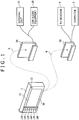
- FIG. 1 is a perspective view of a vehicle-mounted apparatus 1 constituting a content providing system embodying this invention.
- the vehicle-mounted apparatus 1 is a multimedia terminal that functions both as a car navigation device and as a content providing device capable of audio and video reproduction.
- the apparatus is a board-shaped unit with a certain thickness. As indicated by an arrow A, the apparatus 1 is set upon use into an onboard cradle 2A attached to the center console of the vehicle.
- the vehicle-mounted apparatus 1 has terminals and ports furnished on its underside for data input and output and for other purposes.
- the apparatus 1 When placed into the onboard cradle 2A, the apparatus 1 is powered through its underside terminals plugged into the cradle.
- the vehicle-mounted apparatus 1 permits input and output of diverse kinds of data.
- the vehicle-mounted apparatus 1 may be detached from the onboard cradle 2A and brought illustratively to the user's household. In that case, as indicated by an arrow B, the apparatus 1 may be placed into a home cradle 2B through which the apparatus is connected to a computer 3 and a TV receiver 4.
- the vehicle-mounted apparatus 1 is used as a multimedia terminal for uploading and downloading various files.
- the computer 3 starts up an application program compatible with the vehicle-mounted apparatus 1.
- the application program thus activated allows the computer 3 to upload and download files to and from the apparatus 1 via the home cradle 2B.
- These files include audio and video content files, electronic mail files, and map files for navigation purposes.
- the AV content files are made up of movie and TV program files as well as music files.
- the vehicle-mounted apparatus 1 During connection with the TV receiver 4 via the home cradle 2B, the vehicle-mounted apparatus 1 is used as a multimedia terminal for presenting the user with diverse kinds of content on a TV screen. In addition, the apparatus 1 may carry out its car navigation functions such as searches for routes while displaying maps on the TV receiver 4.
- the vehicle-mounted apparatus 1 When placed on board the vehicle, the vehicle-mounted apparatus 1 has a display screen 11 oriented to the front, the screen displaying content and other information. In the top right corner of the display screen 11 is a power switch 12. On the left of the display screen 11 is a control panel equipped with controls 13P through 18P arranged from the top down to perform source, program, menu, display, map, and audio volume adjustments respectively.
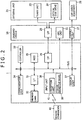
- FIG. 2 is a block diagram outlining the vehicle-mounted apparatus 1 with its related structures.
- the apparatus 1 is connected to an external unit 21 via the onboard cradle 2A.
- the external unit 21 is located illustratively under the vehicle seat and includes a tuner unit 23 and an optical disk drive 24.
- the tuner unit 23 Under control of the vehicle-mounted apparatus 1, the tuner unit 23 receives TV broadcast waves and traffic information from VICS (Vehicle Information and Communication System) and outputs the received video data, audio data, and traffic information to the onboard cradle 2A. In turn, the vehicle-mounted apparatus 1 placed in the onboard cradle 2A presents the user with TV broadcasts and traffic information.
- VICS Vehicle Information and Communication System
- the optical disk drive 24 under control of the vehicle-mounted apparatus 1 plays optical disks such as DVD (digital versatile disk) or CD (compact disc) and outputs the reproduced video and audio data to the onboard cradle 2A.
- optical disks such as DVD (digital versatile disk) or CD (compact disc)
- the vehicle-mounted apparatus 1 sets in the onboard cradle 2A, the vehicle-mounted apparatus 1 then presents the user with AV content coming through an auxiliary input port from the loaded optical disk.
- the onboard cradle 2A includes a GPS unit 22 and an audio output unit 27.
- the GPS unit 22 is a device that detects and outputs the current location of the vehicle based on GPS (Global Positioning System) under control of the vehicle-mounted apparatus 1. Placed in the onboard cradle 2A, the apparatus 1 carries out navigation processes in keeping with current position information detected by the GPS unit 22.
- GPS Global Positioning System
- the output unit 27 acquires audio and sound data from the vehicle-mounted apparatus 1, converts the acquired data into an analog signal, and outputs the signal on FM broadcast waves or through an external output terminal.
- the vehicle-mounted apparatus 1 receives the audio output in wired or wireless fashion from the output unit 27 and forwards the acquired audio and sound signal to car audio equipment 28 of the vehicle.
- the car audio equipment 28 outputs the audio and sound signal.
- a similar output unit is also provided in the home cradle 2B so that such audio, sound and video signals may be output therefrom.
- the vehicle-mounted apparatus 1 When placed in the home cradle 2B, the vehicle-mounted apparatus 1 can present the user with various kinds of AV content on the TV receiver 4.
- the interface 26 functions under control of a controller 33. With the vehicle-mounted apparatus 1 set in the onboard cradle 2A, the interface 26 outputs and inputs data to and from the external unit 21, and transmits and receives the input and output data onto and from a bus in the apparatus 1. When the vehicle-mounted apparatus 1 is placed in the home cradle 2B, the interface 26 outputs and inputs upload and download data to and from the computer 3.
- An interface 31 of the vehicle-mounted apparatus 1 under control of the controller 33 outputs and inputs data to and from a memory card 32 inserted through a card slot located on one side of the apparatus 1, and transmits and receives the input and output data to and from the bus.
- the vehicle-mounted apparatus 1 can acquire from the memory card 32 still images taken by an electronic still camera, and can record the acquired still images to the memory card 32.
- a communication unit 34 is a transmission and reception device that operates on a wireless LAN (local area network). Under control of the controller 33, the communication unit 34 outputs data from the bus onto the network or acquires desired data from the network and outputs the acquired data onto the bus. Operating as it does, the communication unit 34 allows the vehicle-mounted apparatus 1 to connect to the Internet and to send and receive electronic mail.
- a wireless LAN local area network
- a hard disk drive (HDD) 35 holds programs and content data for use by the vehicle-mounted apparatus 1 and outputs the data onto the bus under control of the controller 33.
- the hard disk drive 35 retains file data received from an external device through the interface 26 or 31, data acquired through the communication unit 34, data to be transmitted to external devices, and electronic mail data. The data thus retained can be output from the hard disk drive 35 onto the bus as needed. It is assumed that the programs held on the hard disk drive 35 have been installed there beforehand. Alternatively, the programs may be downloaded from a suitable recording medium through the interface 26 or 31 or from the network via the communication unit 34 before they are recorded to the hard disk drive 35.
- the recording medium may be any one of diverse media including optical disks, memory cards, or magnetic tapes.
- a display unit 37 is illustratively a liquid crystal display device constituting the display screen 11 mentioned above in reference to FIG. 1 .
- the display unit 37 displays diverse kinds of content, maps and other information under control of the controller 33.
- An input unit 38 is constituted by a touch-sensitive panel 39, a reception unit 41, and an interface.
- the touch-sensitive panel 39 mounted on the display screen 11 detects fingertip operations performed on its surface.
- the reception unit 41 receives a remote control signal outputted from a remote commander 40.
- the interface detects operations carried out on the controls 13P through 18P for control over sources, programs and others resources. The user's operations detected by these units are reported to the controller 33. With such components in place, the vehicle-mounted apparatus 1 executes operation switchovers in response to the operations performed on the controls 13P through 18P on the side of the display screen 11, on the touch-sensitive panel 39 on the display screen 11, or on the remote commander 40.
- the remote commander 40 is furnished with controls equivalent to those on the vehicle-mounted apparatus 1 such as the controls 13P through 18P, as well as to menu-based scrolls on the display screen 11. When any of its controls is manipulated, the remote commander 40 outputs a corresponding infrared remote control signal.
- the controller 33 is an arithmetic processing device. In response to the operations on the remote commander 35 or on other controls following their detection through the input unit 38, the controller 33 executes relevant programs held on the hard disk drive 35. This permits execution of navigation-related processing reflecting the user's operations and presents the user with various kinds of content.
- the controller 33 forwards the instructions through the interfaces 26 and 25 to the tuner unit 23 and causes the tuner to switch received channels as instructed by the user.
- the video and audio data thus received by the tuner unit 23 is input through the interface 26.
- the video data is displayed on the display unit 37 while the audio data is output to the car audio equipment 28 via the output unit 27. In this manner, TV broadcast content is provided to the user.
- the controller 33 causes the hard disk drive 35 to reproduce relevant video content files. In the same manner as when TV broadcasts are received, the video and audio data output from the hard disk drive 35 is provided to the user. If the user gives instructions to reproduce audio content from the hard disk drive 35, the controller 33 likewise causes the hard disk drive 35 to output relevant audio data through the output unit 27. If the user instructs items of content to be switched during the reproduction, the corresponding files are switched upon retrieval from the hard disk drive 35, and the relevant processes are repeated.
- the controller 33 acquires current position information from the GPS unit 22, loads relevant map data from the hard disk drive 35 based on the acquired information, and causes the display unit 37 to display the map using the loaded map data. If the user gives instructions to watch or listen to content through the auxiliary input, the controller 33 controls the optical disk drive 24 through the interface 26 so as to acquire video and audio content data from the drive 24. The video and audio content data thus obtained is processed by the applicable components before being provided to the user. The acquired content may be recorded to the hard disk drive 35 if so instructed by the user.
- the controller 33 starts up browser software causing the communication unit 34 to connect to the Internet. Following data acquisition via the communication unit 34, video data is displayed on the display unit 37 and audio data is output through the output unit 27. If instructions are given to handle electronic mail, the controller 33 starts up a mailer to get electronic mail displayed on the display unit 37 upon retrieval from the hard disk drive 35 or to acquire such mail through the communication unit 34. Electronic mail entered by the user is accepted and transmitted to its destination through the communication unit 34.
- the controller 33 accesses either the memory card 32 or the hard disk drive 35 through the interface 31 so as to acquire the relevant still image files, and causes the acquired photo files to be displayed on the display unit 37.
- the still image files may be exchanged between the memory card 32 and the hard disk drive 35 or may be deleted from these components.
- the controller 33 receives destination and other related information from the user, obtains current position information from the GPS unit 22, and initiates route searches based on the acquired information.
- the controller 33 having detected an appropriate route to the destination, causes diverse kinds of information to be output as specified by the user for guidance.
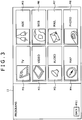
- FIG. 3 is a plan view of a program menu screen displayed on the touch-sensitive panel 39 of the display screen 11 under control of the controller 33.
- the program menu screen of FIG. 3 provides a menu suitable for operations on the touch-sensitive panel 39.
- the embodiment provides a program menu screen for use with the remote commander 40.
- This program menu screen provides functional providing which are equivalent to those of the touch-sensitive menu screen but which are adapted specifically to the operations of the remote commander 40.
- the controller 33 causes the touch-sensitive program menu screen to be displayed; if the user's operation giving instructions to display the program menu screen is found involving the use of the remote commander 40, then the controller 33 causes the program menu screen for use with the remote commander 40 to be displayed.
- the menu options M1 through M8 for selecting applications are all in boxes of the same size, with the exception of the menu M11.
- the menu options M1 through M8 carry no cursors representative of a focus, and are neatly arranged on display so that the user watching the screen may feel ready to select any of them by operating the touch-sensitive panel 39.
- the controller 33 causes all components involved to carry out the relevant process. If the user operates the menu option M11 on the program menu screen, the controller 33 switches to the immediately preceding display.
- the program menu screen for use with the remote commander 40 has the same menu option layout as that shown in FIG. 3 but is adapted to the operations of the remote commander 40.
- the controller 33 switches focuses in response to the user's operations.
- the controller 33 also carries out the application related to the currently focused menu option while providing overall performance control.
- the controller 33 also starts up selectively the application program relative to the menu option M1, M2 or M3.
- the controller 33 references the most recent settings in what may be called a last-state memory in selectively activating the application program associated with the menu option M1, M2 or M3. For example, if a TV program was being watched when power was last turned off, then operating the source control 13P or its equivalent remote commander key causes the TV broadcast in question to start getting received again.
- the controller 33 also starts up selectively the application program relative to the menu option M4.
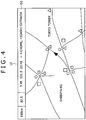
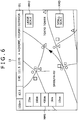
- FIG. 4 is a plan view of a map display screen. If the menu option M4 for map display is selected on the program menu screen, or if the map control 17P on the control panel or a corresponding key on the remote commander 40 is operated, the controller 33 displays a map showing the surroundings of the current position. At the top of the screen, a belt-shaped area indicates information D1 relative to the map display. If the user has given instructions in advance to proceed with navigation processing, the belt-shaped area also displays navigation-related information.
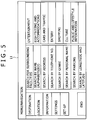
- Such advance settings are made on a hierarchically structured menu screen in FIG. 5 , displayed by operating the menu control 15P on the control panel or a corresponding key on the remote commander 40.
- the top layer menu options for destination entry are displayed on the left. Selecting one of the top layer menu options causes a corresponding lower layer menu to be displayed at the center. When one of the center menu options is selected, a corresponding still-lower layer menu is displayed on the right.
- FIG. 4 shows a typical state attained when a "location" option is selected in the top layer menu, followed by the selection of a "genre” option in the corresponding lower layer menu.
- the controller 33 accepts entry of a given destination, searches for a suitable route from the current position to the specified destination, and provides the user with relevant guidance until the destination is reached.
- the vehicle-mounted apparatus 1 allows the user to specify whether or not to display the belt-shaped area and to designate a two-screen display, the split ratio for the two-screen display, 2-D or 3-D map display, and other map-related display settings.
- the display example in FIG. 4 applies to a case where navigation processing is being executed based on the menu screen settings.
- the controller 33 indicates the scale of the currently displayed map in the leftmost position of the belt-shaped area at the top of the map display screen. Also indicated in that area, side by side with the current time of day, is the currently established reception frequency at which to receive traffic information from VICS. Shown further to the right is navigation-related information including the distance to the destination and an estimated time of arrival. Also indicated is current position information made up of a crossing mark and an address of the current location. Where navigation processing is not specified, the belt-shaped area does not indicate any navigation-related information.
- the controller 33 displays information D1 related to map display. If the scale indication (shown as "100 km") is touched on the touch-sensitive panel 39, the controller 33 displays a switchable scale menu option MM1, a large-scale menu option MM2, and a small-scale menu option MM3. If the scale menu option MM1 is selected by operation of the touch-sensitive panel 39, scales for map display are switched. If the large-scale or small-scale menu option MM2 or MM3 is selected, the scale in effect is changed in increments of the setting to the scale menu MM1. That is, the controller 33, having displayed relevant menu options reflecting the operation on the touch-sensitive panel 39, varies the scale for map display as instructed. By contrast, if the remote commander 40 is operated for zoom-in or zoom-out, the controller 33 switches the scale in increments in the same manner as when the small-scale or large-scale menu option MM2 or MM3 is selected.
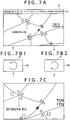
- the controller 33 enlarges the scale of map display for switchover from FIG. 7A to FIG. 7C , as when the scale menu option MM1 is selected followed by selection of the large-scale menu option MM3 for enlarged map display. If the user is detected drawing a circular arc counterclockwise on the screen as indicated by reference character B in FIG. 7B1 , then the controller 33 reduces the scale of map display for switchover from FIG. 7C to FIG. 7A , as when the scale menu option MM1 is selected followed by selection of the small-scale menu option MM2 for reduced-scale map display.
- the controller 33 thus allows the user to change the scale of map display by operating the touch-sensitive panel 39 in an intuitive manner, which enhances the user's ease of operation.
- the controller 33 displays the scale menu options MM2 and MM3 on different scales for a predetermined time period, not shown in any of FIGS. 7, 7B1, 7B2 and 7C . This arrangement is intended to retain display consistency with the menu-based scale change so that the user will not be confused.
- the controller 33 displays on the current map a child screen centering on the approximate center of the rectangular locus. If a 2-D map is currently displayed by the controller 33 executing only the map-related application program, then a 3-D map is shown in the child screen. Conversely, if a 3-D map is currently displayed by the controller 33 executing only the map-related application program, then a 2-D map is shown in the child screen. If the controller 33 is concurrently executing a video content-related application program illustratively for TV broadcast reception, a display associated with the ongoing program is shown in the child screen.
- Two-dimensional (2-D) display unit an ordinary plan-view display of land given when the land is viewed directly from above, while three-dimensional (3-D) display signifies a bird's-eye view display of land in effect when the land is viewed from a viewpoint high enough to recognize the undulations of roads and different heights of buildings.
- the child screen is to be displayed by operation of menu options, it involves displaying the hierarchically structured menu screen such as that of FIG. 5 to let the user select the top to lower-level menu options.
- hierarchically structured menu operations may be replaced by the user's drawing of suitable loci on the touch-sensitive panel 39 to input an approximate external shape of the child screen desired to be used.
- the operation is interpreted as the input of a rectangle-shaped child screen. That is the user's gesture entered through the touch-sensitive panel 39 to request display of a specific child screen. Given such a fingertip gesture onto the touch-sensitive panel 39, this embodiment provides the same display switchover as when the menu screen is displayed and suitable menu options are selected, whereby the user's ease of operation is improved. Gestures are made by the user employing his or her fingertips or some other suitable object to draw loci on the touch-sensitive panel 39. In the above example, the user's gesture has resulted in the switching of displays on the screen.
- the user may be detected drawing on the touch-sensitive panel 39 a locus going out of the display area of the display screen 11 showing the parent or child screen, as indicated by reference characters D1, D2, D3 and D4 in FIG. 8B .
- display of the applicable parent or child screen is discontinued.
- the parent screen display is stopped, the child screen is displayed all over the screen. If the application program for displaying the parent screen is not the same as the application program for display of the child screen, then the application program whose window is discontinued is allowed to run in the background.
- this embodiment would also involve the user carrying out the hierarchically structured menu operations as discussed above with reference to FIG. 5 .
- the discontinuation of the display is accomplished by the user drawing on the display screen 11 a locus going out of the display area for the parent or child screen.
- This is a fingertip gesture that may be regarded as one for removing the touched parent or child screen from the display screen.
- the embodiment thus allows the user to execute intuitively the display switchover as envisaged by the user, with a simple fingertip gesture entered through the touch-sensitive panel 39 whereby the user's ease of operation is enhanced. This gesture by the user designates a display transition on the display screen.
- the controller 33 switches what is being displayed between the parent screen and the child screen, as shown in FIG. 8C in contrast to FIG. 8B .
- this embodiment would also involve the user carrying out the hierarchically structured menu operations as discussed above with reference to FIG. 5 .
- the locus drawn by the user from the child screen into the parent screen represents the user's intention to bring by fingertips what is being displayed from the child screen into the parent screen; the locus drawn conversely from the parent screen into the child screen denotes the user's intention to move by fingertips what is being displayed from the parent screen into the child screen.
- These are fingertip gestures that may be regarded as ones for switching what is being displayed between the parent screen and the child screen.
- the embodiment thus allows the user to execute intuitively the display switchover as envisaged by the user, with simple fingertip gestures entered through the touch-sensitive panel 39 whereby the user's ease of operation is improved. These gestures by the user result in the desired display transitions on the display screen.
- this embodiment would also involve the user carrying out the hierarchically structured menu operations as discussed above with reference to FIG. 5 .
- the display switchover is accomplished by the user drawing on the touch-sensitive panel 39 the appropriate numerals requesting 2-D or 3-D display. These are fingertip gestures that may be regarded as ones replacing the corresponding menu options.
- the embodiment thus allows the user to execute intuitively the display switchover as envisaged by the user, with simple fingertip gestures entered through the touch-sensitive panel 39 whereby the user's ease of operation is enhanced. These gestures by the user result in the desired display switchovers on the display screen.
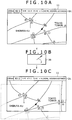
- the user is detected drawing on the touch-sensitive panel 39 a locus of a substantially straight line from the approximate center of the screen toward its outer frame, the user being detected keeping a press onto the panel surface at the end of the locus, as indicated by reference character F in FIG. 10B .
- the displayed map is scrolled in the direction of the locus as shown in FIG. 10C in contrast to FIG. 10A .
- the controller 33 keeps the display scrolled as long as the user maintains the press on the touch-sensitive panel 39.
- the locus entered by the user through the touch-sensitive panel 39 is interpreted as a gesture for requesting movement of the viewpoint.
- the embodiment thus allows the user to execute intuitively the display switchover as envisaged by the user, with a simple fingertip gesture entered through the touch-sensitive panel 39 whereby the user's ease of operation is boosted.
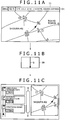
- the user may be detected drawing on the touch-sensitive panel 39 a locus of a straight line approximately splitting the screen into the right-hand and left-hand half, as indicated by reference character G in FIG. 11B .
- the screen is divided in two, with the right-hand half displaying a map as shown in FIG. 11C in contrast to FIG. 11A .
- the left-hand half of the screen gives traffic information which, in the example of FIG. 11C , successively indicates landmarks along the route.
- this embodiment would also involve the user carrying out the hierarchically structured menu operations as discussed above with reference to FIG. 5 .
- the split-window display is accomplished by the user drawing on the touch-sensitive panel 39 the suitable fingertip locus which requests division of the window and which replaces the corresponding menu options.
- the embodiment thus allows the user to execute intuitively the display switchover as envisaged by the user, with a simple fingertip gesture entered through the touch-sensitive panel 39 whereby the user's ease of operation is improved.
- the controller 33 detects in either window the clockwise or counterclockwise circular locus as discussed above with reference to FIGS. 8A, 8B and 8C , or the scroll-prompting locus as described with reference to FIGS. 10A, 10B and 10C . In such cases, the controller 33 changes the scale of the map or scrolls the display in the applicable window. This is another feature adding to the user's ease of operation.
- the belt-shaped display area indicating a number of menu options related to the current application along with information about the image being displayed.
- the belt-shaped display area is called the control bar hereunder. More specifically, the control bar B1 shows in its leftmost position an "OFF" menu option M21 that doubles as an end key and a back key. When the "OFF" menu option M21 is operated on the touch-sensitive panel 39, the controller 33 terminates this application and switches to the touch-sensitive program menu screen.
- a content title i.e., attribute information about the currently displayed content.
- Other menu options are shown right-justified on the control bar B1.
- the controller 33 switches the entire display to a list menu screen shown in FIG. 12B .
- This list menu screen lists content items selectable by the user.
- a title that identifies the current application.
- a menu option M275 for making various settings regarding this application.
- On the left-hand side of the screen are a "back" menu option M271, a "cabinets” menu option M272, a "playlists” menu option M273, and a "video capsules” menu option M274.
- the selectable content item list is displayed on the right when the menu option M273 is selected.
- the "video capsules” menu option M274 is used to designate display of a thumbnail image of any one of the content items being listed on display.
- the middle of the list menu screen is an area allocated to display a thumbnail image. If the "video capsules" menu option M274 is not selected, this area displays the currently reproduced content.
- To the right of the thumbnail display area on the list screen appear lower-layer menu options corresponding to the upper-layer menu options M271 through M274 located on the left. More specifically, a list of content items and folders is shown corresponding to the user-selected menu option from among the options M271 through M274.
- a list appears which includes the menu of the content item being reproduced at present.
- the list display is constituted by content titles and by the names of the folders involved.
- the example of FIG. 12B shows a list of content items associated with the "playlists" menu option M273.
- hidden content items or folders may be scrolled into view.
- the directions in which scrolls are available are indicated by arrows on the left-hand side of the list.
- an upward-directed arrow and a downward-directed arrow are shown, indicating that the content list may be scrolled up or down for more available items that are currently hidden from view.
- the controller 33 When any one of the menu options M271 through M275 or of the menu options on the control bar B1 is selected by the user through the touch-sensitive panel 39, the controller 33 causes the relevant components to change the list display accordingly. More specifically, when the user selects one of the items on the list display via the touch-sensitive panel 39, the controller 33 sets the user-selected content item for reproduction and returns to the initial display screen ( FIG. 12A ). At this point, if the "video capsules" menu option M274 is being selected by the user, a still image of the user-selected content item is displayed in the thumbnail display area.
- the controller 33 sets the user-selected content item for reproduction and returns to the initial display screen. If the user performs similar operations on the touch-sensitive panel 39, the controller 33 displays a list of content items retrieved from the user-selected folder provided the "playlists" menu option M273 is selected.
- the list display is scrolled accordingly. Specifically, operating the menu option MU for upward scroll causes the list display to scroll up; operating the menu option MD for downward scroll causes the list display to scroll down. If a drag operation on the scroll bar B2 is detected on the touch-sensitive panel 39 as indicated by an arrow H, the list display is scrolled in the direction of the drag. As described, even when upper-layer and lower-layer menu options are displayed concurrently so that not all menu options can be accommodated in a single window, desired menu options can still be reached and selected unfailingly. With the available screen size limited on the vehicle-mounted apparatus 1, a growing number of content items may not be contained within a single display at a time. In such a case, the ability to scroll the display as desired contributes to improving the user's ease of operation.
- the controller 33 gives a display of the menu option shown slightly projected to the left (i.e., focused option).
- the controller 33 causes the focused menu to scroll in keeping with the list display being scrolled.
- the controller 33 may stop list display scroll and concentrate instead on focus scroll.
- the touch-sensitive panel 39 or the remote commander 40 is operated by the user keeping track of the hierarchically structured menu options so as to reach the desired content item.
- the content item thus selected is retrieved from the video content items stored on the hard disk drive 35 and reproduced for the user's enjoyment.
- the controller 33 switches from the current content item to the next item on the content list display for reproduction. Conversely, if the user is detected drawing a downward-directed straight-line locus as indicated by reference character A2, then the controller 33 switches the current content item to the immediately preceding item on the content display list for reproduction.
- the user may draw a left-to-right straight-line locus crossing the middle of the screen as indicated by reference character B1, which may be interpreted as the instruction to switch to the next content item for reproduction.
- the user may also draw a right-to-left straight-line locus crossing the middle of the screen as indicated by reference character B2, which may be interpreted as the instruction to switch to the immediately preceding content item for reproduction.
- this embodiment would also involve the user carrying out the hierarchically structured menu operations as discussed above with reference to FIG. 5 .
- the display switchover is accomplished by the user drawing on the touch-sensitive panel 39 the suitable fingertip loci for moving the menu forward or backward.
- the embodiment allows the user to execute intuitively the desired display switchover, with simple fingertip gestures entered through the touch-sensitive panel 39 whereby the user's ease of operation is enhanced.
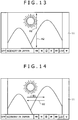
- the controller 33 switches content reproduction to slow-motion reproduction. If the user is detected drawing a rightward-directed long straight-line locus on the right-hand half of the screen, as indicated by reference character C2 in FIG. 15 , the controller 33 switches content reproduction to fast-forward reproduction. If the user is detected drawing a leftward-directed short straight-line locus on the left-hand half of the screen, as indicated by reference character C3 in FIG. 15 , the controller 33 switches content reproduction to slow-motion reverse reproduction. If the user is detected drawing a leftward-directed long straight-line locus on the left-hand half of the screen, as indicated by reference character C4 in FIG. 15 , the controller 33 switches content reproduction to fast-reverse reproduction.
- the controller 33 switches content reproduction to normal reproduction.
- the embodiment thus allows the user to specify the desired display switchover through the input of an intuitively performed fingertip gesture onto the touch-sensitive panel 39. This contributes to enhancing the user's ease of operation.
- the controller 33 displays the menu screen shown in FIG. 12B .
- the controller 33 turns off display of the control bar B1 and causes the content image to appear magnified. If the user is detected drawing another clockwise circular arc locus on the touch-sensitive panel 39, the content image is shown magnified in such a manner that the horizontal direction of the content display turns into the horizontal direction of the display screen. Conversely, if the user is detected drawing a counterclockwise circular arc locus as indicated by reference character D2, the controller 33 gradually reduces the magnification of the image display in contrast to the case where clockwise circular loci are drawn.
- the embodiment thus allows the user to specify the desired display switchover through the input of intuitively performed fingertip gestures onto the touch-sensitive panel 39. This further contributes to improving the user's ease of operation.
- the user has selected the menu option M1 for designating reception of TV broadcasts.
- the content and control bar displays are made in keeping with the most-recent settings in the last-state memory.
- TV broadcast content items may also be switched as instructed by the user.
- the control bar gives menu options used to change channels up or down and to display a list of available content items based on an electronic program guide (EPG), along with a current content title.
- EPG electronic program guide
- the available content items are listed on the basis of the electronic program guide acquired through the communication unit 34.
- the display screen is structured in the same manner as the above-described display screen for displaying video content. For that reason, TV broadcast reception is discussed below with reference to FIGS. 12A through 16 as needed.
- the controller 33 In displaying TV broadcasts, the controller 33 displays the control bar on/off menu option in response to the user's operations on the touch-sensitive panel 39 or remote commander 40. Depending on the settings of the on/off menu option or on the menu operations performed on the menu screen, the controller 33 turns off the control bar display.
- the controller 33 may further change channels up or down or seek out receivable channels in accordance with the operations on the control bar.
- the controller 33 moves channels up. Conversely, if the user is detected drawing a downward-directed straight-line locus as indicated by reference character A2, then the controller 33 moves channels down.
- the user may draw a left-to-right straight-line locus crossing the middle of the screen as indicated by reference character B1, which may be interpreted as the instruction to change channels up.
- the user may also draw a right-to-left straight-line locus crossing the middle of the screen as indicated by reference character B2, which may be interpreted as the instruction to change channels down.
- control bar B1 would have to be used. However, the control bar B1 may not be on display because it may have been turned off. In that case, the control bar B1 needs to be displayed again before the menu options can be selected. Alternatively, the user may draw the appropriate loci on the touch-sensitive panel 39 for input, thereby changing channels up or down for TV broadcast reception.
- the embodiment thus allows the user to specify the desired display switchover through the input of intuitively made fingertip gestures on the touch-sensitive panel 39. This also contributes to enhancing the user's ease of operation.
- the controller 33 performs a channel seek process to capture receivable channels by moving channels up.
- the controller 33 carries out the channel seek process to detect receivable channels by moving channels down.
- the controller 33 displays thumbnail images S of still images in matrix as shown in FIG. 17 . If there are too many still images to be accommodated in a single screen, the right-hand and bottom edges of the screen indicate scroll bars together with bar operation menu options.
- the controller 33 highlights the focused thumbnail image by bordering it with thick lines.
- the controller 33 accepts the user's selection for focus change. Specifically, focus is changed when drag operations are detected on the scroll bars as indicated by reference characters E1 and E2. If not all thumbnail images S can be displayed within a single screen, then focus is switched from one image to another by scrolling the thumbnails in matrix. This arrangement makes it possible to select the desired still image easily and reliably. With the available screen size limited on the vehicle-mounted apparatus 1, a growing number of content items may not be contained within a single display at a time. In such a case, the ability to scroll thumbnail images as described above contributes to improving the user's ease of operation.
- the controller 33 moves focus upward. If there are too many thumbnail images S to be included within a single screen, focus is moved upward by scrolling down the thumbnail images in matrix. Conversely, if the user is detected drawing on the touch-sensitive panel 39 a downward-directed straight-line locus as indicated by reference character F2, the controller 33 moves focus downward. If there are too many thumbnail images S to be included within a single screen, focus is moved downward by scrolling up the thumbnail images in matrix.
- the controller 33 moves the focus rightward or leftward. If there are too many thumbnail images S to be included within a single screen, focus is moved right or left by scrolling the thumbnail images in matrix in the crosswise direction.
- the controller 33 displays the corresponding still image.
- Still photo display may be carried out using the control bar menu options displayed simultaneously, as in the example discussed above with reference to FIGS. 12A and 12B . For that reason, how still image display takes place is discussed below with reference to FIGS. 13 , 15 and other figures in conjunction with FIGS. 12A and 12B .
- the controller 33 changes the photo being displayed in response to the user's control bar operations.
- the controller 33 calls up, as the object for display, the still image of a thumbnail image in a row above the thumbnail image of the currently displayed still image in the thumbnail image display in matrix. Conversely, if the user is detected drawing on the touch-sensitive panel 39 a downward-directed straight-line locus indicated by reference character A2 in FIG. 13 , the controller 33 calls up as the object for display the still image of a thumbnail image in a row below the thumbnail image of the currently displayed still image in the thumbnail image display in matrix.
- the controller 33 calls up as the object for display the still image of a thumbnail image in a column to the right or left of the thumbnail image of the currently displayed still image in the thumbnail image display in matrix. If the user is detected drawing on the touch-sensitive panel 39 a clockwise or counterclockwise circular arc locus as indicated by reference characters D1 and D2 in FIG. 16 , the controller 33 magnifies or reduces the still image being displayed.
- Such display switchovers may also be accomplished by carrying out relevant control bar operations. However, if the control bar has been turned off, it needs to be displayed again before the menu options can be selected.
- the locus-drawing gestures are interpreted to mean the above-described display switchovers in different directions as well as display magnification and reduction. The embodiment thus allows the user to specify the desired display switchovers through the input of intuitively made fingertip gestures on the touch-sensitive panel 39. This also contributes to enhancing the user's ease of operation.
- the controller 33 displays the corresponding display screen along with the control bar. The controller 33 then accepts control bar operations by the user having selected the desired menu option.
- the user may also be detected drawing the loci indicated by reference characters C1 and C3 in FIG. 15 or the loci indicated by reference characters A1 and A2 in FIG. 13 .
- the controller 33 then switches the displayed pages accordingly.
- the user is thus allowed to enter intuitively made fingertip gestures through the touch-sensitive panel 39 to accomplish the display switchovers as envisaged by the user. This also adds to the user's ease of operation.
- the audio content items recorded on the hard disk drive 35 are categorized illustratively by tune name, genre, artist, play list, and album title.
- the controller 33 gives a list of the audio content items grouped by the user-specified attribute and available from the hard disk drive 35.
- the controller 33 allows the list display to scroll in the directions indicated by arrows to the left of the list.
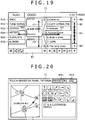
- the example of FIG. 19 shows an upward arrow and a downward arrow, indicating that more content items are hidden from view outside the display area in the vertical direction.
- the controller 33 displays the scroll bar B2 to the right of the list display, as well as menu options BU and BD at the top and the bottom of the scroll bar B2 indicating the availability of upward and downward scrolls respectively.
- the control bar B1 appears at the bottom of this list display.
- the currently focused menu option is shown slightly projected to the left.
- the controller 33 changes the content item being reproduced in accordance with the user's operations, as discussed above in connection with FIG. 12B .
- control bar B1 At the bottom of the list screen, the control bar B1 is displayed.
- the control bar B1 shows in its leftmost position a "visualizer" menu option for changing moving-picture wallpapers in the "artists" display area.
- a menu option for designating shuffle reproduction On the right of the shuffle menu option is a "repeat reproduction” menu option.
- the controller 33 displays a content list about the audio content items being provided to the user such as the title of the album in which the items in question are included.
- the controller 33 may switch focus from the current menu option on the control bar B1 to any of the menu options M31 through M36 as instructed by the user. If another menu option is selected by the user on the control bar B1, the controller 33 switches its mode to the corresponding operation.
- the controller 33 changes focus on the list screen accordingly. If not all items of the list can be included within a single screen, the controller 33 changes focus by allowing the list display to scroll.
- the controller 33 calls up, as the object for display, the next album title, artist, or genre. Conversely, if the user is detected drawing a downward-directed locus as indicated by reference character H2, the controller 33 calls up as the object for display the immediately preceding album, artist, or genre. If a rightward-directed locus is detected as indicated by reference character H3, the controller 33 calls up the next tune as the object for reproduction. Conversely, if a leftward-directed locus is detected as indicated by reference character H4, the controller 33 calls up the immediately receding tune as the object for reproduction.
- Such audio content switchovers may be accomplished by the user drawing on the touch-sensitive panel 39 fingertip gestures intuitively for input. This also contributes to improving the user's ease of operation.
- the controller 33 prompts the user to select the tutorial menu option by keeping track of the hierarchically structured menu operations on the menu screen discussed above in connection with FIG. 13 and other figures. With the tutorial display screen of FIG. 20 displayed, the controller 33 guides the user in the fingertip drawing of acceptable loci.
- a belt-shaped region indicating the title of the display screen to the left.
- a menu option MT1 for application program switchover in connection with the tutorial and a menu option MT2 for ending the tutorial.
- the controller 33 switches cyclically the application programs corresponding to the menu options M1 through M8 on the program menu screen.
- the controller 33 terminates the tutorial.
- the area under the belt-shaped region at the top of the display screen is split into a left-hand and a right-hand half.
- the left-hand side area is a tutorial input area.
- the right-hand side area is divided into an upper and a lower half.
- the upper-half area displays diverse loci which, when drawn on the touch-sensitive panel 39, are recognized by the vehicle-mounted apparatus 1. Of the displayed loci, those not recognized by the tutorial application program are shown at a reduced level of brightness.
- the example of FIG. 20 shows that a total of 16 loci can be recognized by the vehicle-mounted apparatus 1.
- the example also shows that 14 loci are recognized by the map display application program that takes over from the tutorial application program.
- the user may select any one of these loci.
- the lower-half area of the screen explains in text form what is input by the selected locus. While the example of FIG. 20 shows 16 loci, the display screen obviously accepts the above-described rectangular locus as well.
- the controller 33 accepts the user's input through the tutorial input area. Given such input, the controller 33 switches displays in the input area. This embodiment thus allows the user to verify how input is made through fingertip gestures.
- the apparatus 1 When the vehicle-mounted apparatus 1 of the above-described structure (shown in FIGS. 1 and 2 ) is attached to the onboard cradle 2A installed inside the vehicle, the apparatus 1 is powered from the power source of the vehicle. Via the onboard cradle 2A, the vehicle-mounted apparatus 1 is connected to the external unit 21 and car audio equipment 28 set up in the vehicle interior. The setup renders the apparatus 1 usable by passengers of the vehicle. Operating the power switch 12 turns on the vehicle-mounted apparatus 1. The apparatus 1 then functions as a car navigation device, as a content providing device which reproduces audio and video content from the hard disk drive 35 or displays TV broadcasts, or as a GPS unit that informs the user of the current geographical position of the vehicle.
- a car navigation device as a content providing device which reproduces audio and video content from the hard disk drive 35 or displays TV broadcasts, or as a GPS unit that informs the user of the current geographical position of the vehicle.
- the vehicle-mounted apparatus 1 used for content reproduction, current position verification and other purposes may be operated using the remote commander 40 or the touch-sensitive panel 39 on the display screen.
- the user's appropriate operations cause the program menu screen ( FIG. 3 ) to appear together with menu options for selecting available applications. Selecting one of the menu options on the program menu screen starts up a desired application program such as one for enjoying TV broadcast content. It is also possible to activate a plurality of applications so that the user may illustratively get a map displayed and verify the current position of the vehicle while listening to music.
- the main screen of each application displays the menu options for calling up the list screen for content selection or content reproduction and other features. Any of these menu options may be selected for content switchover and other operations by the user operating the touch-sensitive panel 39 or the remote commander 40.
- menu screen operations are necessarily complicated because they require the user to get the menu screen displayed and to select desired menu options.
- multifunctional equipment such as the vehicle-mounted apparatus 1
- the number of menu option layers involved tends to grow.
- the increased number of added operations resulting from the boosted functionality detracts from the user's ease of operation.
- growing functions entail a larger number of menu options working against the user's ease in selecting some of them.
- vehicle-mounted apparatus needs to be operated precisely in a limited time period such as during a temporary stop at traffic lights. Growing complexities of onboard device operation can be detrimental to safe driving.
- the user draws on the touch-sensitive panel 39 a rectangle-shaped locus similar to the contour of the desired child screen.
- the vehicle-mounted apparatus then proceeds to form the child screen based on the user-drawn locus for display switchover ( FIGS. 8A and 8B ).
- the apparatus may also provide a 2-D display, a 3-D display or a split-window display ( FIGS. 9A, 9B1, 9B2 and 9C ; FIGS. 11A, 11B and 1C ) as envisaged and instructed by the user, whereby the user's easy of operation is enhanced.
- the user may draw on the touch-sensitive panel 39 suitable loci in the upward, downward, rightward, or leftward direction for switching the speed and direction of reproduction as well as for changing the content item being provided to the user ( FIGS. 13 through 19 ), whereby the user's ease of operation is further boosted.
- Suitable fingertip gestures input by the user are also accepted to call up the tutorial screen ( FIG. 20 ). This is a screen that allows the novice user to gain knowledge of apparatus operations with ease. This is another ease-of-use feature for the user's benefit.
Landscapes
- Engineering & Computer Science (AREA)
- General Engineering & Computer Science (AREA)
- Theoretical Computer Science (AREA)
- Chemical & Material Sciences (AREA)
- Mechanical Engineering (AREA)
- Transportation (AREA)
- Combustion & Propulsion (AREA)
- General Physics & Mathematics (AREA)
- Physics & Mathematics (AREA)
- Human Computer Interaction (AREA)
- Signal Processing (AREA)
- Multimedia (AREA)
- Navigation (AREA)
- Position Input By Displaying (AREA)
- User Interface Of Digital Computer (AREA)
- Fittings On The Vehicle Exterior For Carrying Loads, And Devices For Holding Or Mounting Articles (AREA)
Applications Claiming Priority (2)
| Application Number | Priority Date | Filing Date | Title |
|---|---|---|---|
| JP2004160528A JP4855654B2 (ja) | 2004-05-31 | 2004-05-31 | 車載装置、車載装置の情報提供方法、車載装置の情報提供方法のプログラム及び車載装置の情報提供方法のプログラムを記録した記録媒体 |
| JP2004160528 | 2004-05-31 |
Publications (3)
| Publication Number | Publication Date |
|---|---|
| EP1607850A2 EP1607850A2 (en) | 2005-12-21 |
| EP1607850A3 EP1607850A3 (en) | 2012-02-08 |
| EP1607850B1 true EP1607850B1 (en) | 2019-11-06 |
Family
ID=35134100
Family Applications (1)
| Application Number | Title | Priority Date | Filing Date |
|---|---|---|---|
| EP05011728.2A Expired - Lifetime EP1607850B1 (en) | 2004-05-31 | 2005-05-31 | Vehicle-mounted apparatus and method for providing recorded information therefor |
Country Status (4)
| Country | Link |
|---|---|
| US (5) | US8151210B2 (enExample) |
| EP (1) | EP1607850B1 (enExample) |
| JP (1) | JP4855654B2 (enExample) |
| CN (1) | CN100336003C (enExample) |
Families Citing this family (211)
| Publication number | Priority date | Publication date | Assignee | Title |
|---|---|---|---|---|
| US20070177804A1 (en) * | 2006-01-30 | 2007-08-02 | Apple Computer, Inc. | Multi-touch gesture dictionary |
| JP2006059096A (ja) * | 2004-08-19 | 2006-03-02 | Sony Corp | 情報処理装置及び情報処理装置における処理プログラム |
| JP4493451B2 (ja) * | 2004-09-16 | 2010-06-30 | クラリオン株式会社 | 車載装置 |
| JP4640046B2 (ja) | 2005-08-30 | 2011-03-02 | 株式会社日立製作所 | デジタルコンテンツ再生装置 |
| JP5049477B2 (ja) * | 2005-09-05 | 2012-10-17 | クラリオン株式会社 | ナビゲーション装置 |
| US7697827B2 (en) | 2005-10-17 | 2010-04-13 | Konicek Jeffrey C | User-friendlier interfaces for a camera |
| JP4624930B2 (ja) * | 2006-01-19 | 2011-02-02 | パナソニック株式会社 | リモコン信号使用装置、リモコン信号使用方法、カーナビゲーション装置、及び表示装置 |
| JP4700539B2 (ja) * | 2006-03-22 | 2011-06-15 | パナソニック株式会社 | 表示装置 |
| US7773075B2 (en) * | 2006-03-22 | 2010-08-10 | Panasonic Corporation | Display apparatus |
| DE102006037156A1 (de) * | 2006-03-22 | 2007-09-27 | Volkswagen Ag | Interaktive Bedienvorrichtung und Verfahren zum Betreiben der interaktiven Bedienvorrichtung |
| US20070097096A1 (en) * | 2006-03-25 | 2007-05-03 | Outland Research, Llc | Bimodal user interface paradigm for touch screen devices |
| US20070097151A1 (en) * | 2006-04-07 | 2007-05-03 | Outland Research, Llc | Behind-screen zoom for handheld computing devices |
| JP5015499B2 (ja) * | 2006-06-15 | 2012-08-29 | 株式会社デンソー | 車両用表示制御システム |
| JP5028038B2 (ja) * | 2006-07-06 | 2012-09-19 | クラリオン株式会社 | 車載表示装置および車載表示装置の表示方法 |
| GB2440958A (en) * | 2006-08-15 | 2008-02-20 | Tomtom Bv | Method of correcting map data for use in navigation systems |
| US8106856B2 (en) | 2006-09-06 | 2012-01-31 | Apple Inc. | Portable electronic device for photo management |
| US9304675B2 (en) | 2006-09-06 | 2016-04-05 | Apple Inc. | Portable electronic device for instant messaging |
| US8564544B2 (en) | 2006-09-06 | 2013-10-22 | Apple Inc. | Touch screen device, method, and graphical user interface for customizing display of content category icons |
| KR100817315B1 (ko) * | 2006-09-25 | 2008-03-27 | 삼성전자주식회사 | 터치 스크린을 갖는 디지털 방송 수신용 휴대 단말기 및그의 pip 화면 제어 방법 |
| JP2008090569A (ja) * | 2006-10-02 | 2008-04-17 | Sony Corp | 電子機器及び電子機器の冷却方法 |
| KR101304461B1 (ko) * | 2006-12-04 | 2013-09-04 | 삼성전자주식회사 | 제스처 기반 사용자 인터페이스 방법 및 장치 |
| JP2008152362A (ja) | 2006-12-14 | 2008-07-03 | Konami Digital Entertainment:Kk | ゲームプログラム、ゲーム装置及びゲーム制御方法 |
| KR100856222B1 (ko) * | 2007-01-04 | 2008-09-03 | 삼성전자주식회사 | 이동 단말기의 데이터 스크롤링 장치 및 방법 |
| US20080168402A1 (en) | 2007-01-07 | 2008-07-10 | Christopher Blumenberg | Application Programming Interfaces for Gesture Operations |
| US7844915B2 (en) | 2007-01-07 | 2010-11-30 | Apple Inc. | Application programming interfaces for scrolling operations |
| US20080168478A1 (en) | 2007-01-07 | 2008-07-10 | Andrew Platzer | Application Programming Interfaces for Scrolling |
| KR100837166B1 (ko) * | 2007-01-20 | 2008-06-11 | 엘지전자 주식회사 | 전자기기의 정보 표시 방법 및 그 전자기기 |
| TWI337321B (en) | 2007-05-15 | 2011-02-11 | Htc Corp | Electronic device with switchable user interface and accessable touch operation |
| TWI357012B (en) * | 2007-05-15 | 2012-01-21 | Htc Corp | Method for operating user interface and recording |
| US9109904B2 (en) | 2007-06-28 | 2015-08-18 | Apple Inc. | Integration of map services and user applications in a mobile device |
| US9066199B2 (en) | 2007-06-28 | 2015-06-23 | Apple Inc. | Location-aware mobile device |
| US8385946B2 (en) | 2007-06-28 | 2013-02-26 | Apple Inc. | Disfavored route progressions or locations |
| US8108144B2 (en) | 2007-06-28 | 2012-01-31 | Apple Inc. | Location based tracking |
| US8762056B2 (en) | 2007-06-28 | 2014-06-24 | Apple Inc. | Route reference |
| US8290513B2 (en) | 2007-06-28 | 2012-10-16 | Apple Inc. | Location-based services |
| WO2009018314A2 (en) * | 2007-07-30 | 2009-02-05 | Perceptive Pixel, Inc. | Graphical user interface for large-scale, multi-user, multi-touch systems |
| US20110018818A1 (en) * | 2007-07-31 | 2011-01-27 | Clarion Co., Ltd. | Map Display Device |
| US20090040186A1 (en) * | 2007-08-07 | 2009-02-12 | Esenther Alan W | Method and System for Displaying Multiple Synchronized Images |
| DE102007039446A1 (de) * | 2007-08-21 | 2009-02-26 | Volkswagen Ag | Verfahren zum Anzeigen von Informationen in einem Kraftfahrzeug mit veränderbarem Maßstab und Anzeigeeinrichtung |
| DE102007039444A1 (de) * | 2007-08-21 | 2009-02-26 | Volkswagen Ag | Verfahren zum Anzeigen von Informationen in einem Kraftfahrzeug und Anzeigeeinrichtung für ein Kraftfahrzeug |
| US20090099725A1 (en) * | 2007-09-12 | 2009-04-16 | Pesch Michael R | Electronic mileage logger |
| DE102007043935A1 (de) * | 2007-09-12 | 2009-03-19 | Volkswagen Ag | Fahrzeugsystem mit Hilfefunktionalität |
| US8487881B2 (en) * | 2007-10-17 | 2013-07-16 | Smart Technologies Ulc | Interactive input system, controller therefor and method of controlling an appliance |
| KR101417808B1 (ko) * | 2007-12-06 | 2014-07-09 | 삼성전자주식회사 | 디지털 촬영장치, 그 제어방법 및 제어방법을 실행시키기위한 프로그램을 저장한 기록매체 |
| JP4605214B2 (ja) * | 2007-12-19 | 2011-01-05 | ソニー株式会社 | 情報処理装置、情報処理方法及びプログラム |
| JP5239328B2 (ja) * | 2007-12-21 | 2013-07-17 | ソニー株式会社 | 情報処理装置及びタッチ動作認識方法 |
| JP5034932B2 (ja) * | 2007-12-26 | 2012-09-26 | ソニー株式会社 | 表示装置、プログラム、及び記録媒体 |
| JP5034931B2 (ja) * | 2007-12-26 | 2012-09-26 | ソニー株式会社 | 表示装置、プログラム、及び記録媒体 |
| US8355862B2 (en) * | 2008-01-06 | 2013-01-15 | Apple Inc. | Graphical user interface for presenting location information |
| US8677285B2 (en) * | 2008-02-01 | 2014-03-18 | Wimm Labs, Inc. | User interface of a small touch sensitive display for an electronic data and communication device |
| US8803737B2 (en) * | 2008-02-29 | 2014-08-12 | Apple Inc. | Location determination |
| US8416196B2 (en) | 2008-03-04 | 2013-04-09 | Apple Inc. | Touch event model programming interface |
| US8645827B2 (en) | 2008-03-04 | 2014-02-04 | Apple Inc. | Touch event model |
| US8717305B2 (en) | 2008-03-04 | 2014-05-06 | Apple Inc. | Touch event model for web pages |
| JP2009252250A (ja) * | 2008-04-01 | 2009-10-29 | Alpine Electronics Inc | コンテンツ再生装置およびコンテンツ再生方法 |
| DE102008017716A1 (de) * | 2008-04-07 | 2009-10-08 | Volkswagen Ag | Anzeige- und Bedienvorrichtung für ein Kraftfahrzeug sowie Verfahren zum Betreiben einer solchen |
| DE102008021183B4 (de) * | 2008-04-28 | 2021-12-30 | Volkswagen Ag | Verfahren und Vorrichtung zum Anzeigen von Informationen in einem Fahrzeug |
| DE102008021185A1 (de) * | 2008-04-28 | 2009-10-29 | Volkswagen Ag | Verfahren und Vorrichtung zum Darstellen von Listeneinträgen auf einer Anzeigeeinrichtung in einem Fahrzeug |
| US9250092B2 (en) | 2008-05-12 | 2016-02-02 | Apple Inc. | Map service with network-based query for search |
| US8644843B2 (en) | 2008-05-16 | 2014-02-04 | Apple Inc. | Location determination |
| JP2010015238A (ja) | 2008-07-01 | 2010-01-21 | Sony Corp | 情報処理装置、及び補助情報の表示方法 |
| KR101417090B1 (ko) * | 2008-07-29 | 2014-07-09 | 현대자동차주식회사 | 차량용 통합 스위치 조작 방법 |
| US8250366B2 (en) * | 2008-09-09 | 2012-08-21 | International Business Machines Corporation | Method and system for electronic vehicle document display |
| US8547347B2 (en) | 2008-09-26 | 2013-10-01 | Htc Corporation | Method for generating multiple windows frames, electronic device thereof, and computer program product using the method |
| EP2169523A1 (en) | 2008-09-26 | 2010-03-31 | HTC Corporation | Method for generating multiple windows frames, electronic device thereof, and computer program product using the method |
| JP5470798B2 (ja) * | 2008-10-07 | 2014-04-16 | 日本電気株式会社 | ファイル閲覧装置およびファイル閲覧用制御プログラムとファイル閲覧方法 |
| JP4683110B2 (ja) * | 2008-10-17 | 2011-05-11 | ソニー株式会社 | 表示装置、表示方法及びプログラム |
| JP4853507B2 (ja) | 2008-10-30 | 2012-01-11 | ソニー株式会社 | 情報処理装置、情報処理方法およびプログラム |
| JP4752897B2 (ja) | 2008-10-31 | 2011-08-17 | ソニー株式会社 | 画像処理装置、画像表示方法および画像表示プログラム |
| KR101531192B1 (ko) * | 2008-11-14 | 2015-06-25 | 엘지전자 주식회사 | 이동 단말기 및 이를 이용한 맵 표시 방법 |
| JP4811452B2 (ja) * | 2008-11-19 | 2011-11-09 | ソニー株式会社 | 画像処理装置、画像表示方法および画像表示プログラム |
| JP4752900B2 (ja) * | 2008-11-19 | 2011-08-17 | ソニー株式会社 | 画像処理装置、画像表示方法および画像表示プログラム |
| JP5093080B2 (ja) * | 2008-12-05 | 2012-12-05 | 富士通モバイルコミュニケーションズ株式会社 | 携帯端末 |
| JP5178484B2 (ja) * | 2008-12-08 | 2013-04-10 | キヤノン株式会社 | 情報処理装置及び情報処理方法 |
| JP4683311B2 (ja) * | 2009-01-27 | 2011-05-18 | ソニー株式会社 | ナビゲーション装置 |
| CN102150114B (zh) * | 2009-02-06 | 2014-01-22 | 松下电器产业株式会社 | 图像显示设备 |
| JP5267229B2 (ja) | 2009-03-09 | 2013-08-21 | ソニー株式会社 | 情報処理装置、情報処理方法及び情報処理プログラム |
| US8566045B2 (en) | 2009-03-16 | 2013-10-22 | Apple Inc. | Event recognition |
| US9311112B2 (en) | 2009-03-16 | 2016-04-12 | Apple Inc. | Event recognition |
| US9684521B2 (en) | 2010-01-26 | 2017-06-20 | Apple Inc. | Systems having discrete and continuous gesture recognizers |
| US8285499B2 (en) | 2009-03-16 | 2012-10-09 | Apple Inc. | Event recognition |
| US8493339B1 (en) * | 2009-03-25 | 2013-07-23 | Ami Entertainment Network, Inc. | Multi-region interactive display |
| JP4840620B2 (ja) | 2009-04-30 | 2011-12-21 | 株式会社デンソー | 車載用電子機器操作装置 |
| DE102009019560A1 (de) * | 2009-04-30 | 2010-11-04 | Volkswagen Ag | Verfahren und Vorrichtung zum Anzeigen von in Listen geordneter Information |
| US9477400B2 (en) | 2009-06-11 | 2016-10-25 | Alpine Electronics, Inc. | Method and apparatus for navigation system for selecting icons and application area by hand drawing on map image |
| US20100315349A1 (en) * | 2009-06-12 | 2010-12-16 | Dave Choi | Vehicle commander control switch, system and method |
| EP3855297A3 (en) | 2009-09-22 | 2021-10-27 | Apple Inc. | Device method and graphical user interface for manipulating user interface objects |
| US9310907B2 (en) | 2009-09-25 | 2016-04-12 | Apple Inc. | Device, method, and graphical user interface for manipulating user interface objects |
| FR2953590B1 (fr) * | 2009-12-03 | 2012-08-03 | Mobile Devices Ingenierie | Dispositif d'information pour conducteur de vehicule et procede pour commander un tel dispositif. |
| DE102009058145A1 (de) * | 2009-12-12 | 2011-06-16 | Volkswagen Ag | Bedienverfahren für eine Anzeigevorrichtung eines Fahrzeugs |
| US8698762B2 (en) | 2010-01-06 | 2014-04-15 | Apple Inc. | Device, method, and graphical user interface for navigating and displaying content in context |
| US9841293B2 (en) | 2010-01-26 | 2017-12-12 | Calrion Co., Ltd. | In-vehicle display system for navigation and additional functions |
| WO2011092746A1 (ja) * | 2010-01-29 | 2011-08-04 | 三菱電機株式会社 | 地図情報処理装置 |
| US9104468B2 (en) * | 2010-02-17 | 2015-08-11 | Sony Corporation | Terminal apparatus and method of controlling terminal apparatus with multi-tasking features |
| DE102010011039A1 (de) * | 2010-03-11 | 2011-09-15 | Volkswagen Ag | Verfahren und Vorrichtung zum Betreiben einer Benutzerschnittstelle |
| JP6016322B2 (ja) * | 2010-03-19 | 2016-10-26 | ソニー株式会社 | 情報処理装置、情報処理方法、およびプログラム |
| JP5805974B2 (ja) | 2010-03-31 | 2015-11-10 | ティーケー ホールディングス,インコーポレーテッド | ステアリングホイールセンサ |
| FR2958421B1 (fr) * | 2010-03-31 | 2013-04-12 | Valeo Systemes Thermiques | Interface homme/machine destinee a etre integree dans une structure d'accueil |
| DE102011006344B4 (de) | 2010-03-31 | 2020-03-12 | Joyson Safety Systems Acquisition Llc | Insassenmesssystem |
| JP5759230B2 (ja) | 2010-04-02 | 2015-08-05 | ティーケー ホールディングス,インコーポレーテッド | 手センサを有するステアリング・ホイール |
| JP5115767B2 (ja) * | 2010-04-05 | 2013-01-09 | 株式会社デンソー | 車両用入力システム |
| US8489331B2 (en) * | 2010-04-29 | 2013-07-16 | Microsoft Corporation | Destination maps user interface |
| JP4680319B1 (ja) * | 2010-05-31 | 2011-05-11 | エンパイア テクノロジー ディベロップメント エルエルシー | 座標情報更新装置および座標情報生成装置 |
| US10216408B2 (en) | 2010-06-14 | 2019-02-26 | Apple Inc. | Devices and methods for identifying user interface objects based on view hierarchy |
| JP2012033059A (ja) | 2010-07-30 | 2012-02-16 | Sony Corp | 情報処理装置、情報処理方法及び情報処理プログラム |
| JP2012038271A (ja) * | 2010-08-11 | 2012-02-23 | Kyocera Corp | 電子機器及びその制御方法 |
| JP5546637B2 (ja) * | 2010-08-25 | 2014-07-09 | 三菱電機株式会社 | ナビゲーション装置 |
| JP5672862B2 (ja) * | 2010-08-27 | 2015-02-18 | ソニー株式会社 | 撮像装置、撮像システム及び撮像方法 |
| DE102010045974A1 (de) | 2010-09-18 | 2012-03-22 | Volkswagen Ag | Anzeige- und Bedienvorrichtung in einem Kraftfahrzeug |
| JP5607487B2 (ja) * | 2010-10-13 | 2014-10-15 | アルパイン株式会社 | 車載装置 |
| US9026359B2 (en) * | 2010-11-01 | 2015-05-05 | Nokia Corporation | Visually representing a three-dimensional environment |
| FR2969781B1 (fr) * | 2010-12-22 | 2013-07-05 | Peugeot Citroen Automobiles Sa | Interface homme machine comprenant une surface tactile de commande sensible a des glissements pour faire defiler les elements d'une liste |
| US9298363B2 (en) | 2011-04-11 | 2016-03-29 | Apple Inc. | Region activation for touch sensitive surface |
| JP5311080B2 (ja) * | 2011-05-23 | 2013-10-09 | 株式会社デンソー | 車載用電子機器操作装置 |
| JP2012256099A (ja) | 2011-06-07 | 2012-12-27 | Sony Corp | 情報処理端末および方法、プログラム、並びに記録媒体 |
| JP5811603B2 (ja) | 2011-06-07 | 2015-11-11 | ソニー株式会社 | 情報処理端末および方法、プログラム、並びに記録媒体 |
| EP2730466B1 (en) * | 2011-07-08 | 2018-01-03 | Nissan Motor Co., Ltd | Information display device for vehicle |
| US9354809B2 (en) * | 2011-10-03 | 2016-05-31 | Furuno Electric Co., Ltd. | Display device, display program and display method |
| JP5482766B2 (ja) * | 2011-11-07 | 2014-05-07 | 株式会社デンソー | 車両用ナビゲーション装置 |
| JP5547216B2 (ja) * | 2012-01-06 | 2014-07-09 | 株式会社東芝 | 電子機器及び表示制御方法 |
| TWI475473B (zh) * | 2012-02-17 | 2015-03-01 | Mitac Int Corp | 根據觸控手勢產生分割畫面之方法 |
| USD715819S1 (en) | 2012-02-23 | 2014-10-21 | Microsoft Corporation | Display screen with graphical user interface |
| USD708196S1 (en) | 2012-02-23 | 2014-07-01 | Microsoft Corporation | Display screen with graphical user interface |
| USD708198S1 (en) | 2012-02-23 | 2014-07-01 | Microsoft Corporation | Display screen with graphical user interface |
| USD708197S1 (en) | 2012-02-23 | 2014-07-01 | Microsoft Corporation | Display screen with graphical user interface |
| DE102012004793B4 (de) * | 2012-03-07 | 2018-03-22 | Audi Ag | Kraftfahrzeug mit einem elektronischen Rückspiegel |
| WO2013140731A1 (ja) * | 2012-03-19 | 2013-09-26 | パナソニック株式会社 | 車載装置 |
| US9620033B2 (en) * | 2012-03-23 | 2017-04-11 | Nokia Technologies Oy | Map |
| WO2013154720A1 (en) | 2012-04-13 | 2013-10-17 | Tk Holdings Inc. | Pressure sensor including a pressure sensitive material for use with control systems and methods of using the same |
| US9482296B2 (en) | 2012-06-05 | 2016-11-01 | Apple Inc. | Rendering road signs during navigation |
| US9367959B2 (en) * | 2012-06-05 | 2016-06-14 | Apple Inc. | Mapping application with 3D presentation |
| US8983778B2 (en) | 2012-06-05 | 2015-03-17 | Apple Inc. | Generation of intersection information by a mapping service |
| US9418672B2 (en) | 2012-06-05 | 2016-08-16 | Apple Inc. | Navigation application with adaptive instruction text |
| TWI550568B (zh) * | 2012-06-05 | 2016-09-21 | 蘋果公司 | 具三度空間呈現之地圖繪製應用程式 |
| US8965696B2 (en) | 2012-06-05 | 2015-02-24 | Apple Inc. | Providing navigation instructions while operating navigation application in background |
| US9886794B2 (en) | 2012-06-05 | 2018-02-06 | Apple Inc. | Problem reporting in maps |
| US9230556B2 (en) | 2012-06-05 | 2016-01-05 | Apple Inc. | Voice instructions during navigation |
| US9997069B2 (en) | 2012-06-05 | 2018-06-12 | Apple Inc. | Context-aware voice guidance |
| US10176633B2 (en) | 2012-06-05 | 2019-01-08 | Apple Inc. | Integrated mapping and navigation application |
| USD689079S1 (en) * | 2012-06-14 | 2013-09-03 | Microsoft Corporation | Display screen with animated graphical user interface |
| USD689080S1 (en) * | 2012-06-14 | 2013-09-03 | Microsoft Corporation | Display screen with animated graphical user interface |
| USD689084S1 (en) * | 2012-07-10 | 2013-09-03 | Microsoft Corporation | Display screen with animated graphical user interface |
| USD689085S1 (en) * | 2012-07-10 | 2013-09-03 | Microsoft Corporation | Display screen with animated graphical user interface |
| USD689083S1 (en) * | 2012-07-10 | 2013-09-03 | Microsoft Corporation | Display screen with animated graphical user interface |
| US20140055339A1 (en) * | 2012-08-22 | 2014-02-27 | David Stanasolovich | Adaptive visual output based on motion compensation of a mobile device |
| US9690334B2 (en) | 2012-08-22 | 2017-06-27 | Intel Corporation | Adaptive visual output based on change in distance of a mobile device to a user |
| CN102815273B (zh) * | 2012-09-11 | 2015-01-28 | 上海德科电子仪表有限公司 | 车辆的功能按键配置方法及系统 |
| DE112013004512T5 (de) | 2012-09-17 | 2015-06-03 | Tk Holdings Inc. | Einzelschicht-Kraftsensor |
| TWI517992B (zh) * | 2012-11-13 | 2016-01-21 | 義晶科技股份有限公司 | 車用影像系統及其影像之顯示控制方法 |
| US20140184535A1 (en) * | 2012-12-27 | 2014-07-03 | Agilent Technologies, Inc. | Method for Displaying Children Components in a Display that Operates at Different Screen Parameters and Orientations |
| JP6212918B2 (ja) * | 2013-04-18 | 2017-10-18 | オムロン株式会社 | 遊技機 |
| JP6011452B2 (ja) * | 2013-05-14 | 2016-10-19 | 株式会社デンソー | 表示制御装置、及び、プログラム |
| CN105452992B (zh) | 2013-05-30 | 2019-03-08 | Tk控股公司 | 多维触控板 |
| TWI547626B (zh) | 2013-05-31 | 2016-09-01 | 原相科技股份有限公司 | 具有手勢感測器的裝置 |
| US9733716B2 (en) | 2013-06-09 | 2017-08-15 | Apple Inc. | Proxy gesture recognizer |
| CN109240506A (zh) * | 2013-06-13 | 2019-01-18 | 原相科技股份有限公司 | 具有手势感测器的装置 |
| CN104423988B (zh) * | 2013-09-02 | 2019-02-05 | 联想(北京)有限公司 | 一种信息处理方法及电子设备 |
| KR101491324B1 (ko) * | 2013-10-08 | 2015-02-06 | 현대자동차주식회사 | 차량용 영상 획득 장치 |
| WO2015054364A1 (en) * | 2013-10-08 | 2015-04-16 | Tk Holdings Inc. | Self-calibrating tactile haptic multi-touch, multifunction switch panel |
| JP5767303B2 (ja) * | 2013-11-25 | 2015-08-19 | 利仁 曽根 | リサイズ要求判定方法 |
| KR20150072719A (ko) * | 2013-12-20 | 2015-06-30 | 삼성전자주식회사 | 디스플레이장치 및 그 제어방법 |
| WO2015103457A2 (en) * | 2014-01-03 | 2015-07-09 | Google Inc. | Input/output functions related to a portable device in an automotive environment |
| JP5924355B2 (ja) * | 2014-02-10 | 2016-05-25 | トヨタ自動車株式会社 | 車両用情報表示装置 |
| GB201402879D0 (en) * | 2014-02-18 | 2014-04-02 | Zero360 Inc | Display Control |
| KR101575650B1 (ko) * | 2014-03-11 | 2015-12-08 | 현대자동차주식회사 | 단말기, 그를 가지는 차량 및 그 제어 방법 |
| US9477316B2 (en) * | 2014-03-24 | 2016-10-25 | Intel Corporation | Interaction with a computing device via movement of a portion of a user interface |
| US10466657B2 (en) | 2014-04-03 | 2019-11-05 | Honda Motor Co., Ltd. | Systems and methods for global adaptation of an implicit gesture control system |
| US10409382B2 (en) | 2014-04-03 | 2019-09-10 | Honda Motor Co., Ltd. | Smart tutorial for gesture control system |
| JP2015196495A (ja) * | 2014-04-03 | 2015-11-09 | 株式会社デンソー | 車両用入力装置 |
| US9342797B2 (en) | 2014-04-03 | 2016-05-17 | Honda Motor Co., Ltd. | Systems and methods for the detection of implicit gestures |
| US10402053B2 (en) | 2014-04-24 | 2019-09-03 | Hyundai Motor Company | Display system |
| JP6201261B2 (ja) * | 2014-05-16 | 2017-09-27 | 株式会社ドワンゴ | 端末装置、制御方法、およびプログラム |
| JP6379822B2 (ja) * | 2014-08-01 | 2018-08-29 | ヤマハ株式会社 | 入力装置及び電子機器 |
| USD799436S1 (en) * | 2014-09-26 | 2017-10-10 | Home Depot Product Authority, LLP | Remote controller |
| US10466826B2 (en) | 2014-10-08 | 2019-11-05 | Joyson Safety Systems Acquisition Llc | Systems and methods for illuminating a track pad system |
| KR102310870B1 (ko) | 2015-01-12 | 2021-10-12 | 삼성전자주식회사 | 디스플레이 장치 및 그 제어 방법 |
| CN104571823B (zh) * | 2015-01-12 | 2015-12-02 | 济南大学 | 一种基于智能电视的非接触式虚拟人机交互方法 |
| US20180107320A1 (en) * | 2015-05-08 | 2018-04-19 | Lg Electronics Inc. | Center fascia and controlling method thereof |
| JP6114792B2 (ja) * | 2015-09-16 | 2017-04-12 | Kddi株式会社 | 接触度合いによるスクロール制御が可能なユーザインタフェース装置、画像スクロール方法及びプログラム |
| CN105760096A (zh) * | 2016-01-04 | 2016-07-13 | 钟林 | 一种支持盲操作的汽车中控台方位手势操控方法及装置 |
| US10354609B2 (en) | 2016-03-02 | 2019-07-16 | Samsung Electronics Co., Ltd. | Functional mode aware resource management |
| KR20170104819A (ko) * | 2016-03-08 | 2017-09-18 | 삼성전자주식회사 | 제스처를 가이드하는 전자 장치 및 그의 제스처 가이드 방법 |
| US10234568B2 (en) * | 2016-05-12 | 2019-03-19 | GM Global Technology Operations LLC | GNSS vehicle location involving overlapping roads |
| DK201670608A1 (en) | 2016-06-12 | 2018-01-02 | Apple Inc | User interfaces for retrieving contextually relevant media content |
| AU2017100670C4 (en) | 2016-06-12 | 2019-11-21 | Apple Inc. | User interfaces for retrieving contextually relevant media content |
| US10324973B2 (en) | 2016-06-12 | 2019-06-18 | Apple Inc. | Knowledge graph metadata network based on notable moments |
| JP6234521B2 (ja) * | 2016-08-12 | 2017-11-22 | キヤノン株式会社 | 表示制御装置、表示制御装置の制御方法およびプログラム |
| CN108961464A (zh) * | 2017-05-18 | 2018-12-07 | 佛山市顺德区顺达电脑厂有限公司 | 行车记录仪及其执行特定功能的方法 |
| US20180365400A1 (en) * | 2017-06-19 | 2018-12-20 | Brennan T. Lopez-Hinojosa | Biometric authentication for connected vehicles including autonomous vehicles |
| CN109491625B (zh) * | 2017-09-11 | 2024-02-02 | 上海博泰悦臻网络技术服务有限公司 | 车载系统的终端同步显示方法及装置、存储介质和车机 |
| CN110389800A (zh) * | 2018-04-23 | 2019-10-29 | 广州小鹏汽车科技有限公司 | 一种车载大屏上显示内容处理方法、装置、介质和设备 |
| DK180171B1 (en) | 2018-05-07 | 2020-07-14 | Apple Inc | USER INTERFACES FOR SHARING CONTEXTUALLY RELEVANT MEDIA CONTENT |
| US11086935B2 (en) | 2018-05-07 | 2021-08-10 | Apple Inc. | Smart updates from historical database changes |
| US11243996B2 (en) | 2018-05-07 | 2022-02-08 | Apple Inc. | Digital asset search user interface |
| JP7146473B2 (ja) * | 2018-06-20 | 2022-10-04 | キヤノン株式会社 | 通信装置、通信方法、およびプログラム |
| JP7118764B2 (ja) | 2018-06-20 | 2022-08-16 | キヤノン株式会社 | 通信装置、制御方法、およびプログラム |
| JP7154833B2 (ja) | 2018-06-20 | 2022-10-18 | キヤノン株式会社 | 通信装置、通信方法、およびプログラム |
| JP7129248B2 (ja) * | 2018-07-05 | 2022-09-01 | フォルシアクラリオン・エレクトロニクス株式会社 | 情報制御装置、及び表示変更方法 |
| US10824296B2 (en) * | 2018-08-22 | 2020-11-03 | International Business Machines Corporation | Configuring an application for launching |
| US10846343B2 (en) | 2018-09-11 | 2020-11-24 | Apple Inc. | Techniques for disambiguating clustered location identifiers |
| US10803135B2 (en) | 2018-09-11 | 2020-10-13 | Apple Inc. | Techniques for disambiguating clustered occurrence identifiers |
| CN111284325B (zh) * | 2018-12-10 | 2022-04-15 | 博泰车联网科技(上海)股份有限公司 | 车辆、车机设备及其车辆沿途对象详尽信息显示方法 |
| KR102717063B1 (ko) * | 2018-12-24 | 2024-10-15 | 삼성전자주식회사 | 전자 장치 및 전자 장치의 제어 방법 |
| US11126282B2 (en) * | 2019-03-29 | 2021-09-21 | Honda Motor Co., Ltd. | System and method for touchpad display interaction with interactive and non-interactive regions |
| DK201970535A1 (en) | 2019-05-06 | 2020-12-21 | Apple Inc | Media browsing user interface with intelligently selected representative media items |
| JP6883769B1 (ja) * | 2019-08-01 | 2021-06-09 | パナソニックIpマネジメント株式会社 | 電子機器 |
| CN115176216B (zh) | 2019-12-30 | 2025-10-31 | 乔伊森安全系统收购有限责任公司 | 用于智能波形中断的系统和方法 |
| DK202070613A1 (en) | 2020-02-14 | 2021-10-15 | Apple Inc | User interfaces for workout content |
| CN111625155A (zh) * | 2020-04-28 | 2020-09-04 | 思特沃克软件技术(北京)有限公司 | 车载界面展示方法、车载界面展示装置及存储介质 |
| JP2022114165A (ja) * | 2021-01-26 | 2022-08-05 | 株式会社デンソー | 車両用装置 |
| US11573676B2 (en) * | 2021-03-30 | 2023-02-07 | Honda Motor Co., Ltd. | Method and system for managing contextual views within a user interface |
Citations (1)
| Publication number | Priority date | Publication date | Assignee | Title |
|---|---|---|---|---|
| WO2002025420A1 (en) * | 2000-09-18 | 2002-03-28 | International Business Machines Corporation | Method, system and computer program for managing views at a computer display |
Family Cites Families (70)
| Publication number | Priority date | Publication date | Assignee | Title |
|---|---|---|---|---|
| US4532605A (en) * | 1982-04-12 | 1985-07-30 | Tektronix, Inc. | True zoom of a displayed image |
| JPS6414974A (en) * | 1987-07-08 | 1989-01-19 | Mitsubishi Electric Corp | Inverse conductive solar battery cell |
| US5327161A (en) * | 1989-08-09 | 1994-07-05 | Microtouch Systems, Inc. | System and method for emulating a mouse input device with a touchpad input device |
| US5467444A (en) * | 1990-11-07 | 1995-11-14 | Hitachi, Ltd. | Method of three-dimensional display of object-oriented figure information and system thereof |
| US7084859B1 (en) * | 1992-09-18 | 2006-08-01 | Pryor Timothy R | Programmable tactile touch screen displays and man-machine interfaces for improved vehicle instrumentation and telematics |
| EP0609030B1 (en) * | 1993-01-26 | 1999-06-09 | Sun Microsystems, Inc. | Method and apparatus for browsing information in a computer database |
| JPH06242885A (ja) * | 1993-02-16 | 1994-09-02 | Hitachi Ltd | 文書編集方法 |
| JPH07230374A (ja) * | 1994-02-17 | 1995-08-29 | Fujitsu Ltd | マルチウィンドウシステムにおける新規ウィンドウ作成方法及び装置 |
| JPH07306637A (ja) * | 1994-05-12 | 1995-11-21 | Sony Corp | 複合電子装置 |
| US5682196A (en) * | 1995-06-22 | 1997-10-28 | Actv, Inc. | Three-dimensional (3D) video presentation system providing interactive 3D presentation with personalized audio responses for multiple viewers |
| JPH0950235A (ja) | 1995-08-10 | 1997-02-18 | Zanavy Informatics:Kk | 車載情報装置 |
| JPH09231393A (ja) | 1996-02-23 | 1997-09-05 | Fuji Xerox Co Ltd | 命令入力装置 |
| JPH09257499A (ja) | 1996-03-19 | 1997-10-03 | Casio Comput Co Ltd | カーナビゲーション装置 |
| JPH09292830A (ja) | 1996-04-25 | 1997-11-11 | Hitachi Ltd | 電子地図表示方法及び電子地図表示装置 |
| JPH10141974A (ja) | 1996-11-12 | 1998-05-29 | Sony Corp | カーナビゲーション装置およびその操作方法 |
| US6275231B1 (en) * | 1997-08-01 | 2001-08-14 | American Calcar Inc. | Centralized control and management system for automobiles |
| US6157372A (en) * | 1997-08-27 | 2000-12-05 | Trw Inc. | Method and apparatus for controlling a plurality of controllable devices |
| JPH1185398A (ja) | 1997-09-11 | 1999-03-30 | Kenwood Corp | タッチパネルディスプレー用コマンド入力装置 |
| DE19753742A1 (de) * | 1997-12-04 | 1999-06-10 | Grundig Ag | Berührungssensitiver Flachbildschirm für ein Kraftfahrzeug |
| US6313853B1 (en) * | 1998-04-16 | 2001-11-06 | Nortel Networks Limited | Multi-service user interface |
| US20020018051A1 (en) * | 1998-09-15 | 2002-02-14 | Mona Singh | Apparatus and method for moving objects on a touchscreen display |
| JP2000137555A (ja) | 1998-11-02 | 2000-05-16 | Sony Corp | 情報処理装置及び方法並びに記録媒体 |
| US6335745B1 (en) * | 1999-02-24 | 2002-01-01 | International Business Machines Corporation | Method and system for invoking a function of a graphical object in a graphical user interface |
| JP2001005599A (ja) * | 1999-06-22 | 2001-01-12 | Sharp Corp | 情報処理装置及び情報処理方法並びに情報処理プログラムを記録した記録媒体 |
| JP4206571B2 (ja) | 1999-08-02 | 2009-01-14 | ソニー株式会社 | 地図表示装置、ナビゲーション装置、及び地図表示方法 |
| US7050606B2 (en) * | 1999-08-10 | 2006-05-23 | Cybernet Systems Corporation | Tracking and gesture recognition system particularly suited to vehicular control applications |
| DE19941961B4 (de) * | 1999-09-03 | 2008-10-23 | Volkswagen Ag | Navigationssystem |
| KR20070046106A (ko) * | 1999-10-19 | 2007-05-02 | 아메리칸 캘카어 인코포레이티드 | 사용자 선호도에 기초한 효과적인 내비게이션 기술 |
| US7454439B1 (en) * | 1999-11-24 | 2008-11-18 | At&T Corp. | System and method for large-scale data visualization |
| JP2001265481A (ja) * | 2000-03-21 | 2001-09-28 | Nec Corp | ページ情報表示方法及び装置並びにページ情報表示用プログラムを記憶した記憶媒体 |
| US7187947B1 (en) * | 2000-03-28 | 2007-03-06 | Affinity Labs, Llc | System and method for communicating selected information to an electronic device |
| US20010030667A1 (en) * | 2000-04-10 | 2001-10-18 | Kelts Brett R. | Interactive display interface for information objects |
| EP1297693B1 (en) * | 2000-06-19 | 2017-01-11 | TP Vision Holding B.V. | Method of automatic execution, receiving station |
| JP4696339B2 (ja) | 2000-07-11 | 2011-06-08 | マツダ株式会社 | 車両の制御装置 |
| JP2002049451A (ja) * | 2000-08-03 | 2002-02-15 | Fujitsu Ltd | 情報処理装置、メニュー表示方法及びメニュー処理プログラムを格納したコンピュータ可読の記憶媒体 |
| DE10039432C1 (de) * | 2000-08-11 | 2001-12-06 | Siemens Ag | Bedieneinrichtung |
| US6562929B2 (en) * | 2000-08-30 | 2003-05-13 | Jsr Corporation | Conjugated diene-based rubber and method of producing the same, oil extended rubber and rubber composition containing the same |
| JP2002091688A (ja) | 2000-09-12 | 2002-03-29 | Fuji Xerox Co Ltd | ストロークコマンドの入力支援方法および装置 |
| US6915490B1 (en) * | 2000-09-29 | 2005-07-05 | Apple Computer Inc. | Method for dragging and dropping between multiple layered windows |
| US20020082730A1 (en) * | 2000-12-21 | 2002-06-27 | Microsoft Corporation | Universal media player |
| JP2002296051A (ja) | 2001-03-29 | 2002-10-09 | Mitsubishi Electric Corp | カーナビゲーション表示システム |
| JP2002303518A (ja) * | 2001-04-05 | 2002-10-18 | Matsushita Electric Ind Co Ltd | カーナビゲーション装置 |
| US20020191028A1 (en) * | 2001-06-19 | 2002-12-19 | Senechalle David A. | Window manager user interface |
| JP3774389B2 (ja) | 2001-09-18 | 2006-05-10 | 株式会社 エイチ・シー・エックス | 車載装置、情報提供装置および情報提供方法 |
| JP2003166843A (ja) * | 2001-11-30 | 2003-06-13 | Fujitsu Ten Ltd | ナビゲ−ション装置 |
| US7289132B1 (en) * | 2003-12-19 | 2007-10-30 | Apple Inc. | Method and apparatus for image acquisition, organization, manipulation, and publication |
| JP2003296015A (ja) * | 2002-01-30 | 2003-10-17 | Casio Comput Co Ltd | 電子機器 |
| JP4031255B2 (ja) | 2002-02-13 | 2008-01-09 | 株式会社リコー | ジェスチャコマンド入力装置 |
| US6484094B1 (en) * | 2002-02-19 | 2002-11-19 | Alpine Electronics, Inc. | Display method and apparatus for navigation system |
| US20030210286A1 (en) * | 2002-02-26 | 2003-11-13 | George Gerpheide | Touchpad having fine and coarse input resolution |
| JP2003344087A (ja) | 2002-05-28 | 2003-12-03 | Sony Corp | カーナビゲーション装置、カーナビゲーション装置における画像表示方法、画像表示方法のプログラム、画像表示方法のプログラムを記録した記録媒体 |
| JP2004028646A (ja) * | 2002-06-21 | 2004-01-29 | Aisin Aw Co Ltd | 地図表示装置、地図表示方法及びナビゲーション装置 |
| US20040175764A1 (en) * | 2003-01-06 | 2004-09-09 | Hiroto Nishiyama | Image processing apparatus, image processing program, recording medium, and image processing method |
| US20050278698A1 (en) * | 2003-02-03 | 2005-12-15 | John Verco | Multi-window based graphical user interface (GUI) for web applications |
| US20040155909A1 (en) * | 2003-02-07 | 2004-08-12 | Sun Microsystems, Inc. | Scroll tray mechanism for cellular telephone |
| US8065614B2 (en) * | 2003-04-09 | 2011-11-22 | Ati Technologies, Inc. | System for displaying video and method thereof |
| US7571393B2 (en) * | 2003-04-15 | 2009-08-04 | Microsoft Corporation | Method for navigation between elements on a page of content in a handheld device |
| US7102626B2 (en) * | 2003-04-25 | 2006-09-05 | Hewlett-Packard Development Company, L.P. | Multi-function pointing device |
| US7149961B2 (en) * | 2003-04-30 | 2006-12-12 | Hewlett-Packard Development Company, L.P. | Automatic generation of presentations from “path-enhanced” multimedia |
| US8601396B2 (en) * | 2003-05-08 | 2013-12-03 | Hillcrest Laboratories, Inc. | Systems and methods for node tracking and notification in a control framework including a zoomable graphical user interface |
| US7159189B2 (en) * | 2003-06-13 | 2007-01-02 | Alphabase Systems, Inc. | Method and system for controlling cascaded windows on a GUI desktop on a computer |
| JP2005084862A (ja) | 2003-09-08 | 2005-03-31 | Digital Electronics Corp | 表示装置、そのカスタマイズ方法及びカスタマイズプログラムが記録されたコンピュータ読み取り可能な記録媒体 |
| US20050060299A1 (en) * | 2003-09-17 | 2005-03-17 | George Filley | Location-referenced photograph repository |
| US7594194B2 (en) * | 2003-09-24 | 2009-09-22 | Nokia Corporation | Portrayal of navigation objects |
| US7698654B2 (en) * | 2004-01-05 | 2010-04-13 | Microsoft Corporation | Systems and methods for co-axial navigation of a user interface |
| GB0402637D0 (en) * | 2004-02-06 | 2004-03-10 | Nokia Corp | Mobile telecommunications apparatus |
| US8842070B2 (en) * | 2004-03-17 | 2014-09-23 | Intel Corporation | Integrated tracking for on screen navigation with small hand held devices |
| US7301526B2 (en) * | 2004-03-23 | 2007-11-27 | Fujitsu Limited | Dynamic adaptation of gestures for motion controlled handheld devices |
| JP5034932B2 (ja) | 2007-12-26 | 2012-09-26 | ソニー株式会社 | 表示装置、プログラム、及び記録媒体 |
| JP5034931B2 (ja) | 2007-12-26 | 2012-09-26 | ソニー株式会社 | 表示装置、プログラム、及び記録媒体 |
-
2004
- 2004-05-31 JP JP2004160528A patent/JP4855654B2/ja not_active Expired - Fee Related
-
2005
- 2005-05-20 US US11/133,344 patent/US8151210B2/en not_active Expired - Fee Related
- 2005-05-31 EP EP05011728.2A patent/EP1607850B1/en not_active Expired - Lifetime
- 2005-05-31 CN CNB2005100733022A patent/CN100336003C/zh not_active Expired - Fee Related
-
2010
- 2010-09-14 US US12/881,872 patent/US8458618B2/en not_active Expired - Fee Related
-
2013
- 2013-05-03 US US13/887,162 patent/US9285955B2/en active Active
- 2013-05-03 US US13/887,175 patent/US20130246961A1/en not_active Abandoned
-
2014
- 2014-09-25 US US14/496,740 patent/US10503358B2/en active Active
Patent Citations (1)
| Publication number | Priority date | Publication date | Assignee | Title |
|---|---|---|---|---|
| WO2002025420A1 (en) * | 2000-09-18 | 2002-03-28 | International Business Machines Corporation | Method, system and computer program for managing views at a computer display |
Also Published As
| Publication number | Publication date |
|---|---|
| JP4855654B2 (ja) | 2012-01-18 |
| EP1607850A3 (en) | 2012-02-08 |
| JP2005339420A (ja) | 2005-12-08 |
| US20050267676A1 (en) | 2005-12-01 |
| US20130246961A1 (en) | 2013-09-19 |
| US10503358B2 (en) | 2019-12-10 |
| US20150012941A1 (en) | 2015-01-08 |
| US8151210B2 (en) | 2012-04-03 |
| US8458618B2 (en) | 2013-06-04 |
| US20130246918A1 (en) | 2013-09-19 |
| CN100336003C (zh) | 2007-09-05 |
| US20110004822A1 (en) | 2011-01-06 |
| EP1607850A2 (en) | 2005-12-21 |
| US9285955B2 (en) | 2016-03-15 |
| CN1704886A (zh) | 2005-12-07 |
Similar Documents
| Publication | Publication Date | Title |
|---|---|---|
| EP1607850B1 (en) | Vehicle-mounted apparatus and method for providing recorded information therefor | |
| JP4026071B2 (ja) | 車載装置及びコンテンツ提供方法 | |
| EP2273235B1 (en) | In-vehicle apparatus and control method of in-vehicle apparatus | |
| EP1748439A1 (en) | Playback apparatus, menu display method, and recording medium recording program implementing menu display method | |
| CN102080965A (zh) | 车载显示系统 | |
| JP4665384B2 (ja) | 車載装置及び画像表示方法 | |
| JP2010157252A (ja) | 車載装置、車載装置の情報提供方法、車載装置の情報提供方法のプログラム及び車載装置の情報提供方法のプログラムを記録した記録媒体 | |
| HK1080885B (zh) | 车载设备和内容提供方法 |
Legal Events
| Date | Code | Title | Description |
|---|---|---|---|
| PUAI | Public reference made under article 153(3) epc to a published international application that has entered the european phase |
Free format text: ORIGINAL CODE: 0009012 |
|
| AK | Designated contracting states |
Kind code of ref document: A2 Designated state(s): AT BE BG CH CY CZ DE DK EE ES FI FR GB GR HU IE IS IT LI LT LU MC NL PL PT RO SE SI SK TR |
|
| AX | Request for extension of the european patent |
Extension state: AL BA HR LV MK YU |
|
| PUAL | Search report despatched |
Free format text: ORIGINAL CODE: 0009013 |
|
| RIC1 | Information provided on ipc code assigned before grant |
Ipc: G06F 3/033 20060101AFI20111212BHEP |
|
| AK | Designated contracting states |
Kind code of ref document: A3 Designated state(s): AT BE BG CH CY CZ DE DK EE ES FI FR GB GR HU IE IS IT LI LT LU MC NL PL PT RO SE SI SK TR |
|
| AX | Request for extension of the european patent |
Extension state: AL BA HR LV MK YU |
|
| 17P | Request for examination filed |
Effective date: 20120704 |
|
| 17Q | First examination report despatched |
Effective date: 20120820 |
|
| AKX | Designation fees paid |
Designated state(s): DE FR GB |
|
| REG | Reference to a national code |
Ref country code: DE Ref legal event code: R079 Ref document number: 602005056381 Country of ref document: DE Free format text: PREVIOUS MAIN CLASS: G06F0003033000 Ipc: G06F0003048800 |
|
| GRAP | Despatch of communication of intention to grant a patent |
Free format text: ORIGINAL CODE: EPIDOSNIGR1 |
|
| RIC1 | Information provided on ipc code assigned before grant |
Ipc: B60K 37/06 20060101ALI20190429BHEP Ipc: G06F 3/0488 20130101AFI20190429BHEP Ipc: B60K 35/00 20060101ALI20190429BHEP Ipc: G06F 3/0482 20130101ALI20190429BHEP |
|
| INTG | Intention to grant announced |
Effective date: 20190520 |
|
| GRAJ | Information related to disapproval of communication of intention to grant by the applicant or resumption of examination proceedings by the epo deleted |
Free format text: ORIGINAL CODE: EPIDOSDIGR1 |
|
| GRAR | Information related to intention to grant a patent recorded |
Free format text: ORIGINAL CODE: EPIDOSNIGR71 |
|
| GRAS | Grant fee paid |
Free format text: ORIGINAL CODE: EPIDOSNIGR3 |
|
| GRAA | (expected) grant |
Free format text: ORIGINAL CODE: 0009210 |
|
| INTC | Intention to grant announced (deleted) | ||
| INTG | Intention to grant announced |
Effective date: 20190926 |
|
| AK | Designated contracting states |
Kind code of ref document: B1 Designated state(s): DE FR GB |
|
| REG | Reference to a national code |
Ref country code: GB Ref legal event code: FG4D |
|
| REG | Reference to a national code |
Ref country code: DE Ref legal event code: R096 Ref document number: 602005056381 Country of ref document: DE |
|
| REG | Reference to a national code |
Ref country code: DE Ref legal event code: R097 Ref document number: 602005056381 Country of ref document: DE |
|
| PLBE | No opposition filed within time limit |
Free format text: ORIGINAL CODE: 0009261 |
|
| STAA | Information on the status of an ep patent application or granted ep patent |
Free format text: STATUS: NO OPPOSITION FILED WITHIN TIME LIMIT |
|
| 26N | No opposition filed |
Effective date: 20200807 |
|
| REG | Reference to a national code |
Ref country code: GB Ref legal event code: 746 Effective date: 20211108 |
|
| PGFP | Annual fee paid to national office [announced via postgrant information from national office to epo] |
Ref country code: GB Payment date: 20220426 Year of fee payment: 18 Ref country code: FR Payment date: 20220421 Year of fee payment: 18 Ref country code: DE Payment date: 20220420 Year of fee payment: 18 |
|
| REG | Reference to a national code |
Ref country code: DE Ref legal event code: R119 Ref document number: 602005056381 Country of ref document: DE |
|
| GBPC | Gb: european patent ceased through non-payment of renewal fee |
Effective date: 20230531 |
|
| PG25 | Lapsed in a contracting state [announced via postgrant information from national office to epo] |
Ref country code: DE Free format text: LAPSE BECAUSE OF NON-PAYMENT OF DUE FEES Effective date: 20231201 Ref country code: GB Free format text: LAPSE BECAUSE OF NON-PAYMENT OF DUE FEES Effective date: 20230531 |
|
| PG25 | Lapsed in a contracting state [announced via postgrant information from national office to epo] |
Ref country code: FR Free format text: LAPSE BECAUSE OF NON-PAYMENT OF DUE FEES Effective date: 20230531 |