EP2290519B1 - Bilderzeugungsvorrichtung, computerlesbares Speichermedium für ein Computerprogramm und Ansteuerungsverfahren dafür - Google Patents
Bilderzeugungsvorrichtung, computerlesbares Speichermedium für ein Computerprogramm und Ansteuerungsverfahren dafür Download PDFInfo
- Publication number
- EP2290519B1 EP2290519B1 EP10173824.3A EP10173824A EP2290519B1 EP 2290519 B1 EP2290519 B1 EP 2290519B1 EP 10173824 A EP10173824 A EP 10173824A EP 2290519 B1 EP2290519 B1 EP 2290519B1
- Authority
- EP
- European Patent Office
- Prior art keywords
- document
- user
- pages
- suspended
- Prior art date
- Legal status (The legal status is an assumption and is not a legal conclusion. Google has not performed a legal analysis and makes no representation as to the accuracy of the status listed.)
- Active
Links
Images











Classifications
-
- G—PHYSICS
- G06—COMPUTING OR CALCULATING; COUNTING
- G06F—ELECTRIC DIGITAL DATA PROCESSING
- G06F3/00—Input arrangements for transferring data to be processed into a form capable of being handled by the computer; Output arrangements for transferring data from processing unit to output unit, e.g. interface arrangements
- G06F3/12—Digital output to print unit, e.g. line printer, chain printer
- G06F3/1201—Dedicated interfaces to print systems
- G06F3/1278—Dedicated interfaces to print systems specifically adapted to adopt a particular infrastructure
- G06F3/1285—Remote printer device, e.g. being remote from client or server
-
- G—PHYSICS
- G03—PHOTOGRAPHY; CINEMATOGRAPHY; ANALOGOUS TECHNIQUES USING WAVES OTHER THAN OPTICAL WAVES; ELECTROGRAPHY; HOLOGRAPHY
- G03G—ELECTROGRAPHY; ELECTROPHOTOGRAPHY; MAGNETOGRAPHY
- G03G15/00—Apparatus for electrographic processes using a charge pattern
- G03G15/50—Machine control of apparatus for electrographic processes using a charge pattern, e.g. regulating differents parts of the machine, multimode copiers, microprocessor control
- G03G15/5016—User-machine interface; Display panels; Control console
- G03G15/502—User-machine interface; Display panels; Control console relating to the structure of the control menu, e.g. pop-up menus, help screens
-
- G—PHYSICS
- G03—PHOTOGRAPHY; CINEMATOGRAPHY; ANALOGOUS TECHNIQUES USING WAVES OTHER THAN OPTICAL WAVES; ELECTROGRAPHY; HOLOGRAPHY
- G03G—ELECTROGRAPHY; ELECTROPHOTOGRAPHY; MAGNETOGRAPHY
- G03G15/00—Apparatus for electrographic processes using a charge pattern
- G03G15/50—Machine control of apparatus for electrographic processes using a charge pattern, e.g. regulating differents parts of the machine, multimode copiers, microprocessor control
- G03G15/5075—Remote control machines, e.g. by a host
- G03G15/5091—Remote control machines, e.g. by a host for user-identification or authorisation
-
- G—PHYSICS
- G06—COMPUTING OR CALCULATING; COUNTING
- G06F—ELECTRIC DIGITAL DATA PROCESSING
- G06F3/00—Input arrangements for transferring data to be processed into a form capable of being handled by the computer; Output arrangements for transferring data from processing unit to output unit, e.g. interface arrangements
- G06F3/12—Digital output to print unit, e.g. line printer, chain printer
- G06F3/1201—Dedicated interfaces to print systems
- G06F3/1202—Dedicated interfaces to print systems specifically adapted to achieve a particular effect
- G06F3/1203—Improving or facilitating administration, e.g. print management
- G06F3/1204—Improving or facilitating administration, e.g. print management resulting in reduced user or operator actions, e.g. presetting, automatic actions, using hardware token storing data
-
- G—PHYSICS
- G06—COMPUTING OR CALCULATING; COUNTING
- G06F—ELECTRIC DIGITAL DATA PROCESSING
- G06F3/00—Input arrangements for transferring data to be processed into a form capable of being handled by the computer; Output arrangements for transferring data from processing unit to output unit, e.g. interface arrangements
- G06F3/12—Digital output to print unit, e.g. line printer, chain printer
- G06F3/1201—Dedicated interfaces to print systems
- G06F3/1202—Dedicated interfaces to print systems specifically adapted to achieve a particular effect
- G06F3/1222—Increasing security of the print job
-
- G—PHYSICS
- G06—COMPUTING OR CALCULATING; COUNTING
- G06F—ELECTRIC DIGITAL DATA PROCESSING
- G06F3/00—Input arrangements for transferring data to be processed into a form capable of being handled by the computer; Output arrangements for transferring data from processing unit to output unit, e.g. interface arrangements
- G06F3/12—Digital output to print unit, e.g. line printer, chain printer
- G06F3/1201—Dedicated interfaces to print systems
- G06F3/1223—Dedicated interfaces to print systems specifically adapted to use a particular technique
- G06F3/1229—Printer resources management or printer maintenance, e.g. device status, power levels
- G06F3/1234—Errors handling and recovery, e.g. reprinting
-
- G—PHYSICS
- G06—COMPUTING OR CALCULATING; COUNTING
- G06F—ELECTRIC DIGITAL DATA PROCESSING
- G06F3/00—Input arrangements for transferring data to be processed into a form capable of being handled by the computer; Output arrangements for transferring data from processing unit to output unit, e.g. interface arrangements
- G06F3/12—Digital output to print unit, e.g. line printer, chain printer
- G06F3/1201—Dedicated interfaces to print systems
- G06F3/1223—Dedicated interfaces to print systems specifically adapted to use a particular technique
- G06F3/1237—Print job management
- G06F3/1239—Restricting the usage of resources, e.g. usage or user levels, credit limit, consumables, special fonts
-
- G—PHYSICS
- G06—COMPUTING OR CALCULATING; COUNTING
- G06F—ELECTRIC DIGITAL DATA PROCESSING
- G06F3/00—Input arrangements for transferring data to be processed into a form capable of being handled by the computer; Output arrangements for transferring data from processing unit to output unit, e.g. interface arrangements
- G06F3/12—Digital output to print unit, e.g. line printer, chain printer
- G06F3/1201—Dedicated interfaces to print systems
- G06F3/1223—Dedicated interfaces to print systems specifically adapted to use a particular technique
- G06F3/1237—Print job management
- G06F3/1253—Configuration of print job parameters, e.g. using UI at the client
- G06F3/1258—Configuration of print job parameters, e.g. using UI at the client by updating job settings at the printer
-
- G—PHYSICS
- G03—PHOTOGRAPHY; CINEMATOGRAPHY; ANALOGOUS TECHNIQUES USING WAVES OTHER THAN OPTICAL WAVES; ELECTROGRAPHY; HOLOGRAPHY
- G03G—ELECTROGRAPHY; ELECTROPHOTOGRAPHY; MAGNETOGRAPHY
- G03G2215/00—Apparatus for electrophotographic processes
- G03G2215/00025—Machine control, e.g. regulating different parts of the machine
- G03G2215/00109—Remote control of apparatus, e.g. by a host
Definitions
- the present invention relates to an image forming apparatus having a document editing function, a computer-readable storage medium storing a computer program for the image forming apparatus, and a control method for controlling the image forming apparatus.
- Multifunction devices are one example of information equipment that is used for business purposes and called Office Automation (OA) equipment.
- Such multifunction devices have recently been known as Multi-Function Peripherals (MFPs) providing functions such as image inputting, fax communication, electronic mail communication, document storage in addition to a basic function as an image forming apparatus such as copying and printing.
- MFPs Multi-Function Peripherals
- Such multifunction devices are connected to networks of business offices, and operate in response to input operation through an operational panel provided in the multifunction device or in response to access from computers connected to the networks.
- a multifunction device verifies a user ID and password entered by a user for using the device against user IDs and passwords registered in advance. When the verification is successful, then the user is authenticated. The authenticated user is allowed to provide a variety of jobs such as a print job to the multifunction device.
- the multifunction device automatically suspends the execution of the print job when it encounters such a trouble as paper shortage or paper jams, or an interruption of another job. If power is kept turned on during the suspension, the print job is maintained. When the trouble is cleared or the interruption of another job completes, the suspended print job is resumed, and remaining unprinted pages will be printed.
- JP-2008-158194A proposes a technique to hold a print job even if power is shut off.
- a job in execution and the job information indicating the progress of the job in execution are stored in a non-volatile memory.
- the job information is read from the non-volatile memory and loaded into a volatile memory (RAM) used for control, and the suspended job is resumed.
- RAM volatile memory
- JP-2006-35533A also proposes another technique in which a "Suspend/End” key and a "Reprint” key are provided on an operation panel of a printer.
- the printer stops paper feeding operation and stores data that is mapped in a page buffer into a non-volatile memory.
- the printer reads the data from the non-volatile memory and prints the data.
- the multifunction device is provided with a box used for storing and temporarily storing documents.
- the box is a non-volatile memory area provided in a large-capacity storage device such as a hard disk drive (HDD).
- the box may be provided for each user or each user group, or provided in such a way that it can be accessed by all users.
- Documents that are stored in the box are printed, transmitted by fax, transmitted to another device via a network, edited, or deleted according to individual jobs.
- JP-2008-219802A proposes a technique intended to share information among a plurality of users with respect to editing and deletion of documents stored in a box.
- the apparatus determines whether all the plurality of users have accessed the document before it is edited.
- the unedited document is stored until all the plurality of users access the document.
- an edited document is made available for access in place of the unedited document.
- the document is deleted when all the plurality of users have accessed the document.
- the job may also be canceled in a case where the user is unable to continue the intended printing if paper runs out and no replenishing stock is available.
- the user can leave the multifunction device unattended without canceling the printing. However, such a decision leaves the printed sheets of paper unattended, which impairs the security of information.
- the user suspends the printing and allows the multifunction device to hold the job, other print jobs can not be executed, causing troubles to other users.
- Cancellation of the print job entails cancellation of print data bitmapped from a document and job management information indicating progress of a job execution such as completed pages. This means that a new print job should be provided to the multifunction device if the same document is to be printed.
- a user When a print job is provided, a user specifies pages to be printed as required. When a document whose printing has been discontinued by cancellation is reprinted, the user who wishes to print only those pages that remain unprinted is required to check the printed pages to find unprinted pages in order to specify the pages to be printed. This requires the user to do a laborious work. It may be possible for the user to specify all pages to skip the laborious work. In that case, however, pages that have been already printed will be printed again, leading to a waste of paper unnecessarily.
- US 2008/304104 A1 relates to an image processing apparatus and to a related method.
- a first job is interrupted. Because the printing of the fifteenth page of the image information read by the scanner is in progress, the printing controller 55 controls the printer to halt the printing at the end of the fifteenth page. Then, the printing controller 55 saves the image information for the sixteenth to twentieth pages of the original into a memory device.
- the job execution section 53 then requests the reading controller 54 and the printing controller 55 of the re-execution of the interrupted job.
- the printing controller 55 reads the image information on the sixteenth to twentieth pages that had been saved on the memory device, and then resumes the printing of the interrupted job.
- US 2008/055622 A1 relates to an apparatus for modifying attributes of a cancelled print job.
- the local user interface unit prompts a change job attributes operation window on a display unit.
- a selection menu enables the modification of the image processing attributes of the print job.
- the selection key 140 enables the user to input a modification of the print quality
- the key 142 enables the user to input a modification of the colour mode
- the key 144 enables the user to input a modification of the type of print media.
- a command to activate a print process of the print job with the modified image processing attributes can be issued automatically by the CPU on completion of converting the job with the modified image processing attributes into a raster image.
- JP 5 210673 A stored contents of the last editing date and hour storage part are updated at each time of document editing processing, and stored contents of the last print date and hour storage part are updated at each time of printing the generated document.
- print of only updated pages is designated, the final editing date and hour and the final print date and hour of each page are compared with each other, and only pages for which last editing dates and hours are later are successively printed.
- US 2007/121164 A1 relates to an image forming apparatus.
- the page layout for the remaining output pages will be corrected.
- the correct output pages can be obtained faster if only the error pages are re-printed than if the print job in the erroneous page layout is interrupted and then entire print job is re-printed all over again in the correct page layout.
- a multifunction device is taken, hereinafter, as an example of an image forming apparatus that prints document onto recording paper.
- the multifunction device taken as an example includes an editing function for updating document data stored in a box.
- a user of the multifunction device causes the multifunction device to perform a print job and edit job by way of operation on an operation panel provided in the multifunction device or remote operation through a network.
- a multifunction device 2 is included in an information processing system 1.
- the information processing system 1 also includes a Local Area Network (LAN) provided in business offices or offices of a similar organization.
- the LAN is connected to a public line 7 through the multifunction device 2 and to the Internet 8 through a router 6.
- the multifunction device 2 and a plurality of personal computers 3 and 4 can communicate with each other. Further, the personal computers 3 and 4 can access the multifunction device 2 by using Web tools including Web applications.
- Fig. 2 illustrates a hardware configuration of the multifunction device 2.
- the multifunction device 2 is provided with an operation panel 20, an image scanner 21, a printer 22, a paper deck 23, a power circuit 24, a control circuit 25, an image processing circuit 26, a facsimile communication modem 27, an external interface 28, and a storage 29.
- the operation panel 20 is provided with a Liquid Crystal Display (LCD) as a display 201 for displaying an operation screen.
- a touch panel is laid on the display 201 to operate buttons arranged in the operation screen.
- the image scanner 21 is capable of reading a color document.
- the printer 22 is provided with a paper discharge unit 22A that can sort sheets of printed paper for discharge.
- the printer 22 prints, through the electrophotographic method, a black and white image or a color image on a single side or double sides of a sheet of paper fed from the multi-deck paper deck 23.
- the power circuit 24 supplies power to various power requiring portions of the multifunction device 2.
- the control circuit 25 includes a Read-Only Memory (ROM) 251 storing therein a control program, a Central Processing Unit (CPU) 252 executing the control program, and a Random Access Memory (RAM) 253 used as a work area when the program is executed.
- the image processing circuit 26 performs various processes including mapping data in a bitmap form for copying or printing.
- the facsimile communication modem 27 is used for fax communication through the public line.
- the external interface 28 is used for connecting to a LAN cable.
- the storage 29 in this example is a hard disk drive (HDD) having a large capacity of more than tens of gigabytes of a non-volatile storage area.
- HDD hard disk drive
- the storage 29 is provided with, in addition to a storage area for storing data for controlling the multifunction device 2, a box that is a storage area for storing various types of document data and images.
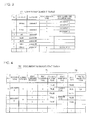
- the data stored in the storage area for performing control includes a user management table T1 and a document management table T2. These tables T1 and T2 are loaded in the RAM 252 as required.
- a shared box 51 is illustrated to represent the boxes.
- the shared box 51 is shared by a plurality of users.
- the user management table T1 stores therein a user name and a password for user authentication in association with each other.
- "print suspended document name” and "suspended box name” are associated with the user. For example, a file name of a print suspended document whose print has not been completed is recorded as the print suspended document name, and identification information of a box storing therein the print suspended document is recorded as the suspended box name.
- data stored in the document management table T2 includes print management information 70 and edit management information 75.
- the print management information 70 relates to the suspension of printing and includes data having items of "print suspended operator", “print suspended page”, “total number of pages print flag", and "print suspended time".
- the print suspended operator indicates a user who performs operation for instructing suspension of print in the middle of printing. In the illustrated example, the print suspended operators are indicated in order of registration in the user management table T1.
- the print suspended page indicates a page number which was being printed when the printing was suspended and signifies which pages of the print suspended document are unprinted.
- the total number of page print flag indicates presence or absence of designation indicating whether the number of pages (number of total pages) is printed or not when print is performed.
- the print suspended time indicates a date and time at which the print is suspended.
- the edit management information 75 relates to editing of the document and includes items of "edit flag" and "printed and edited page".
- the edit flag indicates whether or not the document whose printing was suspended has been edited or not.
- the printed and edited page indicates a page, in the suspended print job, that had been printed before printing was suspended and that has been updated by editing thereafter.
- Fig. 5 illustrates a functional configuration of a principal portion relating to the suspension of print in the multifunction device 2.
- the multifunction device 2 is provided with an input portion 31, a user identification portion 32, a print management portion 33, an edit management portion 34, a determination portion 35, a page extraction portion 36, a print control portion 37, a document management portion 38, a suspension information display portion 41, and an edit information display portion 42.
- These functional elements (portions) are implemented by the control computer program and the CPU 252 that executes the program as a computer.
- the input portion 31 receives different types of operation performed by a user.
- the input portion 31 transfers data indicated by the operation performed through the operation panel 20 to a predetermined functional element that performs a process according to the data. For example, when the user identification screen is operated and a password is entered, the input portion 31 transfers the entered password to the user identification portion 32.
- the input portion 31 also transfers, to a predetermined functional element that performs the process accordingly, data that is received through the external interface 28 and that represents the operation originated from the personal computer 3 or 4, or other external devices.
- the user identification portion 32 identifies a user who performed some type of operation on the multifunction device 2.
- the identification thus performed in response to the operation through the operation panel 20 is based on user information that is entered through user log-in operation performed by the user when he or she uses the multifunction device 2.
- the user management table T1 is referred to. Any operation performed through the operation panel 20 once a user is successfully authenticated as a log-in user is considered as operation performed by the log-in user.
- the user identification portion 32 considers the current log-in user as a user who performs the operation.
- the identification made in response to the operation through an external device including the personal computers 3 and 4 is based on the user information entered in the process of user identification. This means that any operation through the external device which is in a log-in state and allowed for access is considered as the operation performed by the user who has been authenticated in the log-in process.
- the print management portion 33 updates the print management information 70 in the document management table T2.
- the print management information 70 signifies unprinted pages and indicates a user who performs suspension operation as described above.
- the edit management portion 34 updates the edit management information 75 in the document management table T2.
- the edit management information 75 indicates the presence or absence of editing and a page that was printed before the suspension of the printing and edited thereafter as described above.
- the determination portion 35 determines whether or not the user identified by the user identification portion 32 is a user who suspended the printing. Specifically, the determination portion 35 determines whether such a user is recorded as "print suspended operator" in the print management information 70.
- the "print suspended operator” is a user who has performed operation to suspend printing of a document midway through printing but has not performed reprinting operation thereafter for the same document.
- the record in the print management information 70 indicating the print suspended operator is deleted when printing in response to the reprinting operation is completed. Consequently, it is possible to find out whether a log-in user at a given time corresponds to the print suspended operator or not if the print management information 70 is referred to.
- the page extraction portion 36 extracts pages required to be reprinted from a document to be printed in the printing process in response to the reprinting operation.
- the pages required to be reprinted are those pages that have been updated after printing and therefore may include information that has not been printed.
- the page extraction portion 36 refers to the print management information 70 and the edit management information 75, and extracts those pages that were actually printed when the printing was suspended and have been updated thereafter.
- the print control portion 37 controls operation of the printer 22 and the paper deck 23.
- the print control portion 37 in corporation with the document management portion 38, provides print data of a document to be printed to the printer 22 in a print job in which a document 91 in the shared box 51 or a document in another box is printed.
- the print control portion 37 makes the printer 22 print at least unprinted pages and the pages extracted by the page extraction portion 36 of the document to be processed.
- the document management portion 38 manages documents in the shared box 51 or another box.
- the document management portion 38 edits or deletes the document to be targeted according to the instructions by a user.
- the suspension information display portion 41 informs a user that there exists a print suspended document that is a candidate for reprinting. To be more specific, if a log-in user is the print suspended operator, the suspension information display portion 41 displays information indicating the existence of a print suspended document whose printing was once suspended by the log-in user. The displayed information is, for example, a file name of the document and information that the printing of the document was suspended. When operation is performed through the operation panel 20, then the display 201 of the operation panel 20 displays the information. When the operation is performed through the network, then the information is displayed on a display of an external device which accesses the multifunction device 2.
- the edit information display portion 42 informs that a document whose printing was suspended has been updated thereafter. If a log-in user is the print suspended operator, and, at the same time, if the print suspended document specified as a document to be reprinted has been updated after the suspension of the printing, the edit information display portion 42 displays information indicating the pages extracted by the page extraction portion 36. Such a display of the information is performed on the display 201 of the operation panel 20 or on a display of an external device according to how the operation is performed.
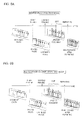
- the multifunction device 2 configured as described above is provided with three printing modes for reprinting as illustrated in Figs. 6A-6C.
- Figs. 6A-6C illustrate examples in which printing of a document consisting of eight pages was suspended when the sixth page was being printed, and reprinting is performed thereafter. In actual cases, it is unlikely to suspend the printing if a document consists of a smaller number of pages, and many of the cases where the printing is suspended involve the number of pages more than 10. However, this is not limited in the multifunction device 2, and the number of pages is arbitrarily decided.
- unprinted pages each of which was not successfully printed and pages that have been updated by editing performed after the print suspension will be printed in response to reprinting operation performed to instruct the resumption of the printing.
- the unprinted pages are the sixth, seventh, and eighth pages
- the pages updated after the print suspension are the second, fourth, and seventh pages with hatching in the illustrations.
- Pages that will be reprinted are the second, fourth, sixth pages, and onward.
- the edited page printing mode is for printing only those pages that have not been printed from the updated document, and is a mode that does not produce unedited duplicated pages between the printing before and after the suspension.
- a response to the reprinting operation performed to instruct resuming of the printing entails printing of a page having the smallest page number and pages onward therefrom among unprinted pages when printing was suspended and those pages printed before the printing was suspended but updated thereafter.
- the page having the smallest page number among those pages printed before the printing was suspended and updated thereafter is the second page. Therefore, the second page and onward therefrom, i.e., the second to eighth pages, will be printed.
- the second to eighth pages that will be printed include the unprinted pages, i.e., the sixth to eighth pages.
- the edited page onward printing mode provides advantages in which a sorting work is made easier than that in the edited page printing mode described above. In this case, the sorting work involves arranging sheets of paper printed before and after the suspension of the printing in order of page numbers.
- a user specifies one of the three printing modes. However, this may be selected automatically. In implementing the automatic selection of the modes, for example, as a basic way, the edited page printing mode or the edited page onward printing mode is selected first, and then the entire page printing mode is selected only when the total number of pages has changed and at the same time the total number of pages needs to be printed.
- Fig. 7 depicts outlines of a first operation example of the multifunction device 2.
- the multifunction device 2 executes, in accordance with the operation performed by a user, printing, editing, deletion, or other operation.
- the user who wishes to use the multifunction device 2 should be subjected to a user authentication by performing user log-in operation.
- the authenticated log-in user further performs predetermined box log-in operation to be thereby allowed to access documents stored in the shared box 51 or other boxes.
- the multifunction device 2 thus authenticated the user executes a user notification 1 process (#1, #2).
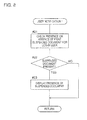
- the details of the user notification 1 process are depicted in Fig. 8 .
- the user identification portion 32 refers to the user management table T1 and checks for the presence or absence of a print suspended document corresponding to the log-in user (#21). This checking corresponds to checking whether the log-in user is the print suspended operator or not. If the print suspended document corresponding to the log-in user is present, the suspension information display portion 41 shows a display to notify the log-in user of the presence of the print suspended document as described before (#22, #23). If the print suspended document corresponding to the log-in user is not found, i.e., the log-in user is not the print suspended operator, then such a display is not shown.
- the user notification 1 process reminds such a user of the print suspended document.
- the log-in user who has recalled the print suspended document corresponding to the user determines whether reprinting is necessary or not, and performs operation for reprinting if it is necessary. On the other hand, if the user has performed the log-in operation for the purpose of reprinting, the log-in user can confirm the existence of the print suspended document through the display performed in the user notification 1 process.
- the multifunction device 2 when the log-in user performs box log-in operation (#3) and further selects a document to be processed from among the documents in a list display format (#4), the multifunction device 2 performs the user notification 2 process (#5).
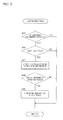
- the details of the user notification 2 process are depicted in Fig. 9 . If the log-in user is not the print suspended operator, the user notification 2 process is substantially bypassed (#25). If the log-in user is the print suspended operator, then the edit information display portion 42 searches through the edit management information 75 in the document management table T2 and checks the state of the edit flag for the document to be processed that is selected by the log-in user.
- the edit information display portion 42 displays a message notifying that there is a page that was edited by another user (#27). Additionally, with instructions provided by the log-in user, the edit information display portion 42 displays information useful for determining a printing mode for reprinting, such as which page has been edited (#28, #29).
- the multifunction device 2 performs a document printing routine. If editing is specified, a document editing routine is performed (#6-#10). If deletion is specified, a document deletion routine is performed, if another operation is specified, another process routine is performed (#11-#13).
- Fig. 10 illustrates details of the document printing routine in step #8 in Fig. 7 .
- the multifunction device 2 performs an ordinary printing subroutine if the log-in user is not the print suspended operator (#31, #32). If the log-in user is the print suspended operator, then the multifunction device 2 performs any one of reprinting 1-reprinting 4 subroutines according to the selected printing mode and the state of the edit flag (#33-#40).
- the reprinting 1 subroutine (#37) is performed.
- the reprinting 2 subroutine (#38), the reprinting 3 subroutine (#39), and the reprinting 4 subroutine (#40) are performed in the entire page printing mode, the edited page onward printing mode, and the edited page printing mode, respectively.
- Fig. 11 illustrates details of the ordinary printing subroutine in step #32 in Fig. 10 .
- the print control portion 37 sets, at the outset of the routine, values for "last page E" and "print page P" which are control parameters (#51).
- the value of the last page E is made equal to the total number of pages of the document to be processed stored in the document management table T2.
- a value "1" a default value, is set to the print page P.
- the page having a page number indicated by the print page P is printed, and the value of the print page P is incremented by "1".
- this process is repeated until the value of the print page P reaches the value of the last page E (#52-#55). In this way, the entire pages of the document to be processed are printed.
- the print control portion 37 suspends the printing. Then, the print management portion 33 registers the log-in user in the print management information 70 of the document management table T2 as a print suspended operator (#56). At the same time, the print management information 70 records therein the value of the print page P as a print suspended page, necessity (TRUE or FALSE) to print the total number of pages indicated by metadata of the document to be processed as a total number of pages print flag, and the current date and time indicated by the system clock as print suspended time.
- necessity TRUE or FALSE
- the print suspending operation is the operation to cancel a print job.
- the print suspending operation performed through the operation panel 20 is exemplified by pressing a cancel key B5c in a job list L1 on an operation screen Q2 illustrated in Fig. 12 .
- the job list L1 indicates active jobs J1 and J2 which are jobs in execution or in queue.
- a user can select a job by pressing an arrow key B5a or B5b arranged in a bottom portion of the job list L1. It is also possible to display detail information such as the number of sets to print and settings for sorting in the print job by operating a job detail key B6.
- the execution of a job selected in the job list L1 is canceled, and this job is deleted from the job list L1.
- the job is a print job
- data for printing in a form of bitmapped data obtained by analyzing document data will be deleted.
- the user is required to provide a print job anew.
- the print management information 70 for reprinting is recorded as described previously. Accordingly, the user can print unprinted pages without specifying any specific pages.
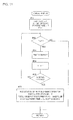
- Fig. 13 depicts the details of the reprinting 1 subroutine in step #37 depicted in Fig. 10 .
- This subroutine is almost the same as the ordinary printing subroutine.
- Control parameters are set (#61), and processes for printing a page indicated by the print page P and incrementing the print page P are repeated until the value of the print page P reaches the value of the last page E (#62-#65). Through these processes, entire pages of the document to be processed are printed.
- What is different from the ordinary printing subroutine is that, when the printing is completed, the verification that the log-in user is the print suspended operator is released (#67).
- the data such as the print suspended page, the total number of pages print flag, and the print suspended time which have been recorded and kept in the print management information 70 since the printing was suspended the last time is updated by the data corresponding to the print suspension this time (66).
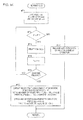
- Fig. 14 depicts the details of the reprinting 2 subroutine in step #38 depicted in Fig. 10 .
- the processes (#71-#75, #77) performed when the printing is not suspended are identical with the processes (#61-#65, #67) of the reprinting 1 subroutine.
- the print management information 70 is updated, and the edit management information 75 is updated (#76) as in the case of the reprinting 1 subroutine.
- the edit flag indicating that editing has been performed after the print suspension is reset to "FALSE", and the data of the printed and edited page is deleted.
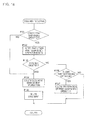
- Fig. 15 depicts the details of the reprinting 3 subroutine in step #39 depicted in Fig. 10 .
- the processes (#82-#87) excluding the process for setting the initial control parameters are identical with the processes (#72-#77) of the reprinting 2 subroutine.
- the value of the print page P is not set to "1" but set to a page number of a page having the smallest page number (hereinafter, referred to as "printed and edited top page") among the printed and edited pages recorded in the edit management information 75 (#81).
- printed and edited top page a page number of a page having the smallest page number
- the printed and edited top page is the 2nd page. If the total number of pages is eight, the printed and edited page and onward includes the 2nd to 8th pages.
- the printed and edited page and onward includes the 2nd to 8th pages.
- pages consisting of the printed and edited top page and onward include all pages that were not printed when printing was suspended.
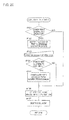
- Fig. 16 depicts the details of the reprinting 4 subroutine in step #40 depicted in Fig. 10 .
- the control parameters are set (#91) in a similar manner as in the reprinting 3 subroutine.
- the print control portion 37 checks whether or not all the printed and edited pages are printed, and then the printed and edited page are printed sequentially (#92-#95, #99).
- the value of the printed page P is set to a page number of the print suspended page (#96, #97), a page having a page number indicated by the print page P is printed, and the print page P is incremented by "1" (#93, #99, #92-#94, #96).
- the verification that the log-in user is the print suspended operator is released (#101) as in the cases of the reprinting 1-3 subroutines. If operation to suspend printing is performed during printing, the print management information 70 and the edit management information 75 are updated (#100) as in the cases of the reprinting 2-3 subroutines.
- Fig. 17 depicts the details of the document editing routine in step #10 depicted in Fig. 7 .
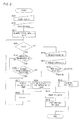
- the document management portion 38 finds out the number of print suspended operators N related to the document to be processed and sets a value of a counter j that counts up the number of print suspended operators to a default value of "1" (#112). Subsequently, the document management portion 38 finds out whether the total number of pages of the document to be processed has increased or decreased as a result of editing (#113).
- the document management portion 38 updates the number of pages registered in the document management table T2 (#114), and checks the total number of pages print flag in the print management information 70.
- the document management portion 38 deletes N number of print suspended operators registered in the print management information 70 one by one (#115-#118). The following is the reason why the registration of the print suspended operators is deleted. In printing a document whose total number of pages is specified to be printed together, it is a common practice to print again the pages that have been printed before the print suspension. This means that it is not necessary to determine whether the document to be processed has been once suspended or not in printing.
- the edit management portion 34 upon receiving a notification from the document management portion 38, sets the edit flag to "TRUE" (#119).
- the edit management portion 34 also updates the information about the print suspended page included in the print management information 70. This updating of the information becomes necessary as the total number of pages changes and is performed by the edit management portion 34 along with the updating of information about the printed and edited page included in the edit management information (#120).
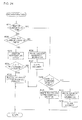
- Fig. 18 depicts the details of the document deletion routine in step #12 depicted in Fig. 7 .
- the multifunction device by referring to the print management information 70, checks whether or not any print suspended operator who does not correspond to the log-in user is recorded for a document selected by the log-in user (#131). If there is any of such a print suspended operator, the multifunction device 2 displays indicating this (#132). If the log-in user performs operation to allow deletion of the document despite the fact that there is such a print suspended operator who is not the log-in user, or if there is no print suspended operator who is not the log-in user, then the multifunction device 2 deletes the management information of the document to be processed and the document itself in the box (#133-#135).
- the log-in user does not perform operation to allow the deletion while the log-in user himself or herself is the print suspended operator, the registration of the print suspended operator corresponding to the log-in user is deleted (#136, #137). In this case, the deletion of the registration is deemed to cause no problem. Because, it can be assumed that it is hardly possible for the user who provided a job for deleting the print suspended document relating to himself or herself will provide instructions for reprinting the print suspended document.
- Fig. 19 depicts a first modified example of the document deletion routine in step #12 depicted in Fig. 7 .
- the multifunction device 2 checks whether or not any print suspended operator who is not a log-in user is recorded for a document selected by the log-in user (#141). If there is any of such a print suspended operator, the multifunction device 2 compares an elapsed time from the print suspended time corresponding to such a print suspended operator with a reference time. If the elapsed time is larger than the reference time, it is assumed that the print suspended operator has no intension to reprint the document. Accordingly, when the elapsed time is larger than the reference time and there is no print suspended operator who is not the log-in user, the multifunction device 2 deletes the management information of the document to be processed and the document itself in the box (#141-#144).
- the reference time may be set to any desired length of time. For example, it is possible to use 24 hours or one week. It is also possible to set an identical reference time to all boxes or, alternatively, set different lengths of reference time to different boxes individually.
- the setting of the reference time is performed by an administrator on an operation screen used for maintenance.
- the multifunction device 2 displays a message notifying the log-in user of the fact that the deletion is prohibited (#145). Then, if the log-in user is the print suspended operator, the registration of the print suspended operator corresponding to the log-in user is deleted (#146, #147).
- Fig. 20 depicts a second modified example of the document deletion routine in step #12 depicted in Fig. 7 .
- the multifunction device 2 checks whether or not any print suspended operator who does not correspond to the log-in user is recorded for a document to be processed selected by the log-in user (#151). If there is any of such a print suspended operator, the multifunction device 2 displays a message informing to that effect (#152). At the same time, the multifunction device 2 asks the log-in user for his or her intention about printing unprinted pages of the print suspended document related to other users. When the log-in user performs operation to allow printing (#153, #154), the multifunction device 2 prints unprinted pages if the document to be processed is a print suspended document (#155). Thereafter, the multifunction device 2 deletes the management information of the document to be processed and the document itself in the box (#156-#157).
- Fig. 21 depicts outlines of a second operation example of the multifunction device 2.
- the document management portion 38 checks the number of documents D in the log-in box and sets a value of a counter k that counts the number of processed documents to a default value of "1" (#203). Then, the document management portion 38 repeats a series of processes of controlling displaying each document and incrementing the value of the counter k until the value of the counter k becomes higher than the number of documents D (#204-#209).
- the document management portion 38 checks a deletion reserved flag for the k-th document (#205) and displays the k-th document (#207) as a candidate for specifying it as a document to be processed if the deletion reserved flag is set to "TRUE" and, at the same time, the log-in user is the print suspended operator of the k-th document (#206). In contrast, if the log-in user is not the print suspended operator, the document management portion 38 does not display the k-th document as a candidate (#209). This means that the log-in user is not allowed to specify the k-th document as a document to be processed.
- the deletion reserved flag is data under an item 69 which is managed together with the print management information 70 and the edit management information 75 in the document management table T2b illustrated in Fig. 22 .
- the deletion reserved flag is set when delete operation instructions are provided to the multifunction device 2 as described later. For those documents to which the deletion reserved flag is set, reprinting by the print suspended operator is not prohibited. However, printing and editing by a user other than the print suspended operator are prohibited.
- the multifunction device 2 When display or non-display of the entire documents stored in the box into which the user logs is completed (#204), the multifunction device 2 receives designation of a document to be processed (selection of a document) and designation of job (#201, #211) by the log-in user. If the designation involves printing, the multifunction device 2 executes the document printing routine and a post-printing process routine sequentially (#212-#214). If the designation involves deletion, the multifunction device 2 executes a document deletion 2 routine (#212, #215). The details of the document printing routine in step #213 are the same as the details of the document printing routine in step #8 depicted in Fig. 7 .
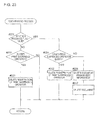
- Fig. 23 depicts the details of the post-printing process routine in step #214 depicted in Fig. 21 .
- the document management portion 38 deletes, as the post-printing process, the registration of the print suspended operator corresponding to the log-in user for the document to be processed (#221-#223). If the deletion reserved flag is set and at the same time a print suspended operator who does not coincide with the log-in user for the document to be processed, the document management portion 38 deletes the registration of the print suspended operator corresponding to the log-in user for the document to be processed (#224, #225). If a print suspended operator who does not correspond to the log-in user is not registered, the document management portion 38 deletes the management information of the document to be processed and the document to be processed itself in the box (#224, #226-#227).
- Fig. 24 depicts the details of the document deletion 2 routine in step #215 depicted in Fig. 21 .
- the deletion reserved flag is not set to "TRUE” and at the same time a print suspended operator who is not the log-in user is registered for the document to be processed, the deletion reserved flag is set to "TRUE" (#231-#233). This means that the deletion of the document to be processed is put on hold at this moment.
- the log-in user is the print suspended operator, the registration of the print suspended operator corresponding to the log-in user is deleted (#234, #235).
- the management information of the document to be processed and the document itself in the box are deleted (#232, #236-#237).
- deletion reserved flag is set and at the same time a print suspended operator who is not the log-in user for the document to be processed is recorded, the registration of the print suspended operator corresponding to the log-in user is deleted (#238, #239). If the print suspended operator who is not the log-in user is not registered, the management information of the document to be processed and the document itself in the box are deleted (#238, #240-#241).
- These portions can be implemented by an appropriate program and the CPU 252 that executes such a program.
Landscapes
- Engineering & Computer Science (AREA)
- Theoretical Computer Science (AREA)
- Physics & Mathematics (AREA)
- General Physics & Mathematics (AREA)
- Human Computer Interaction (AREA)
- General Engineering & Computer Science (AREA)
- Computer Security & Cryptography (AREA)
- Microelectronics & Electronic Packaging (AREA)
- Accessory Devices And Overall Control Thereof (AREA)
- Facsimiles In General (AREA)
- Record Information Processing For Printing (AREA)
- Document Processing Apparatus (AREA)
Claims (13)
- Bilderzeugungsvorrichtung (2), die einen Speicherbereich (51) zum Speichern eines Dokuments (91) darin umfasst und das im Speicherbereich 51) gespeicherte Dokument (91) druckt und bearbeitet, wobei die Bilderzeugungsvorrichtung umfasst:einen Benutzeridentifikationsabschnitt (32), der einen Benutzer identifiziert, der die Bilderzeugungsvorrichtung (2) bedient;einen Druckverwaltungsabschnitt (33), der, wenn ein Abbruchvorgang für gegebene Anweisungen zum Unterbrechen eines Druckvorgangs durchgeführt wird, während das Dokument (91) gedruckt wird, Druckverwaltungsinformationen (70) aufzeichnet, welche ungedruckte Seiten und einen Benutzer angeben, der den Abbruchvorgang durchführt und durch den Benutzeridentifikationsabschnitt (32) identifiziert wird,dadurch gekennzeichnet, dass sie ferner umfasst:einen Bearbeitungsverwaltungsabschnitt (34), der, wenn das Dokument (91) gemäß einem Bearbeitungsvorgang aktualisiert wird, Bearbeitungsverwaltungsinformationen (75) aufzeichnet, die eine aktualisierte Seite angeben;einen Bestimmungsabschnitt (35), der basierend auf den Druckverwaltungsinformationen (70) bestimmt, ob der Benutzer, der durch den Benutzeridentifikationsabschnitt (32) identifiziert wird, ein Druckunterbrechungsbediener ist, der zuvor den Abbruchvorgang durchgeführt hat, oder nicht;einen Seitenextraktionsabschnitt (36), der, wenn durch den Bestimmungsabschnitt (35) bestimmt wird, dass ein Benutzer der Druckunterbrechungsbediener ist und einen Neudruckvorgang für gegebene Anweisungen zum Drucken des Dokuments (91) durchführt, das aktualisiert wurde, auf die Druckverwaltungsinformationen (70) und die Bearbeitungsverwaltungsinformationen (70) Bezug nimmt und Seiten des Dokuments (91) extrahiert, die erfolgreich gedruckt wurden, als das Drucken des Dokuments (91) unterbrochen wurde, und die danach gleichzeitig aktualisiert wurden; undeine Drucksteuerung (37), welche die Bilderzeugungsvorrichtung (2) derart steuert, dass die Bilderzeugungsvorrichtung (2) in Reaktion auf den Neudruckvorgang ungedruckte Seiten des Dokuments (91) und die durch den Seitenextraktionsabschnitt (36) extrahierten Seiten druckt.
- Bilderzeugungsvorrichtung (2) nach Anspruch 1, wobei die Drucksteuerung (37) die Bilderzeugungsvorrichtung (2) derart steuert, dass die Bilderzeugungsvorrichtung (2) eine niedrigstnummerierte Seite und Seiten vorwärts davon druckt, wobei die niedrigstnummerierte Seite eine Seite mit der niedrigsten Seitennummer unter den ungedruckten Seiten des Dokuments (91) und den durch den Seitenextraktionsabschnitt (36) extrahierten Seiten ist.
- Bilderzeugungsvorrichtung (2) nach Anspruch 1,
wobei der Bearbeitungsverwaltungsabschnitt (34) als Teil der Bearbeitungsverwaltungsinformationen (75) aufzeichnet, ob eine Änderung der Gesamtanzahl von Seiten des Dokuments (91) als Ergebnis des Aktualisierens des Dokuments (91) vorliegt, und
die Drucksteuerung (37) die Bilderzeugungsvorrichtung (2) veranlasst, alle Seiten des Dokuments (91) zu drucken, deren Druck unterbrochen wurde und die danach aktualisiert wurden, wenn ein Drucken eines Symbols, das die Gesamtanzahl von Seiten angibt, spezifiziert wird, und gleichzeitig die Änderung der Gesamtanzahl von Seiten vorliegt. - Bilderzeugungsvorrichtung (2) nach einem der Ansprüche 1 bis 3, ferner umfassend einen Bearbeitungsinformationsanzeigeabschnitt (42), der Informationen anzeigt, welche die durch den Seitenextraktionsabschnitt (36) extrahierten Seiten angeben, wenn der Druckunterbrechungsbediener das Dokument (91) als ein Ziel für den Vorgang spezifiziert.
- Bilderzeugungsvorrichtung (2) nach einem der Ansprüche 1 bis 4, ferner umfassend einen Unterbrechungsinformationsanzeigeabschnitt, der, wenn der durch den Benutzeridentifikationsabschnitt identifizierte Benutzer der Druckunterbrechungsbediener ist, Informationen anzeigt, welche das Vorhandensein des Dokuments angeben, dessen Druck durch den Druckunterbrechungsbediener unterbrochen wurde.
- Bilderzeugungsvorrichtung (2) nach einem der Ansprüche 1 bis 5, ferner umfassend einen Benachrichtigungsabschnitt, der in Reaktion auf einen von einem Benutzer durchgeführten Löschvorgang für gegebene Anweisungen zum Löschen des Dokuments (91) auf die Druckverwaltungsinformationen (70) Bezug nimmt und, wenn der Druckunterbrechungsbediener für das Dokument (91) gefunden wird, den Benutzer, der den Löschvorgang durchführte, von der Tatsache benachrichtigt, dass der Druckunterbrechungsbediener für das Dokument (91) gefunden ist.
- Bilderzeugungsvorrichtung (2) nach einem der Ansprüche 1 bis 5, ferner umfassend einen Dokumentenverwaltungsabschnitt (38), der in Reaktion auf einen von einem Benutzer durchgeführten Löschvorgang für gegebene Anweisungen zum Löschen des Dokuments (91) auf die Druckverwaltungsinformationen (70) Bezug nimmt und, wenn der Druckunterbrechungsbediener für das Dokument (91) gefunden wird, Löschreservierungseinstellungen vornimmt, durch welche der Zugriff auf das Dokument (91) auf den Druckunterbrechungsbediener beschränkt wird,
wobei der Druckverwaltungsabschnitt (38) das Dokument (91) löscht, nachdem der Druckvorgang, der dem Neudruckvorgang entspricht, der das Dokument (91) als ein zu druckendes Ziel umfasst, erfolgreich abgeschlossen wurde. - Bilderzeugungsvorrichtung (2) nach einem der Ansprüche 1 bis 5,
wobei, wenn der Abbruchvorgang durchgeführt wird, der Druckverwaltungsabschnitt (33) eine Abbruchzeit als Teil der Druckverwaltungsinformationen (70) aufzeichnet, und
der Druckverwaltungsabschnitt (33) das Dokument (91) löscht, wenn der Löschvorgang für gegebene Anweisungen zum Löschen des Dokuments (91) durchgeführt wird, nachdem eine vorbestimmte Zeitdauer oder mehr seit der Abbruchzeit vergangen ist. - Bilderzeugungsvorrichtung (2) nach einem der Ansprüche 1 bis 3,
wobei der Bearbeitungsverwaltungsabschnitt (34) Bearbeitungsverwaltungsinformationen (75) aufzeichnet, welche eine aktualisierte Seite angeben, wenn das Dokument (91), das durch den Druckunterbrechungsbediener unterbrochen wurde, gemäß einem Bearbeitungsvorgang durch einen anderen Benutzer aktualisiert wird; und
der Seitenextraktionsabschnitt (36) Seiten des Dokuments (91) extrahiert, die erfolgreich gedruckt wurden, als das Drucken des Dokuments (91) durch den Druckunterbrechungsbediener unterbrochen wurde, und die danach gleichzeitig durch den anderen Benutzer aktualisiert wurden. - Computerlesbares Speichermedium, das ein Computerprogramm darauf speichert, das in einem Computer (252) verwendet wird, der in einer Bilderzeugungsvorrichtung (2) enthalten ist, die eine Funktion zum Drucken und Bearbeiten eines Dokuments (91) aufweist, das in einem Speicherbereich (51) zum Speichern von Dokumenten gespeichert ist, wobei das Computerprogramm den Computer (252) veranlasst zum Ausführen von:einem Benutzeridentifikationsschritt, der einen Benutzer identifiziert, der die Bilderzeugungsvorrichtung (2) bedient;einem Druckverwaltungsschritt, der, wenn ein Abbruchvorgang für gegebene Anweisungen zum Unterbrechen eines Druckvorgangs durchgeführt wird, während das Dokument (91) gedruckt wird, Druckverwaltungsinformationen (70) aufzeichnet, welche ungedruckte Seiten und einen Benutzer angeben, der den Abbruchvorgang durchführt und im Benutzeridentifikationsschritt identifiziert wird,dadurch gekennzeichnet, dass das Computerprogramm den Computer (252) veranlasst zum Ausführen von:einem Bearbeitungsverwaltungsschritt, der, wenn das Dokument (91) gemäß einem Bearbeitungsvorgang aktualisiert wird, Bearbeitungsverwaltungsinformationen (75) aufzeichnet, die eine aktualisierte Seite angeben;einem Bestimmungsschritt, der basierend auf den Druckverwaltungsinformationen (70) bestimmt, ob der Benutzer, der im Benutzeridentifikationsschritt identifiziert wird, ein Druckunterbrechungsbediener ist, der zuvor den Abbruchvorgang durchgeführt hat, oder nicht;einem Seitenextraktionsschritt, der, wenn durch den Bestimmungsschritt bestimmt wird, dass ein Benutzer der Druckunterbrechungsbediener ist und einen Neudruckvorgang für gegebene Anweisungen zum Drucken des Dokuments (91) durchführt, das aktualisiert wurde, auf die Druckverwaltungsinformationen (70) und die Bearbeitungsverwaltungsinformationen (75) Bezug nimmt und Seiten des Dokuments (91) extrahiert, die erfolgreich gedruckt wurden, als das Drucken des Dokuments (91) unterbrochen wurde, und die danach gleichzeitig aktualisiert wurden; undeinem Drucksteuerungsschritt, der die Bilderzeugungsvorrichtung (2) derart steuert, dass die Bilderzeugungsvorrichtung (2) in Reaktion auf den Neudruckvorgang ungedruckte Seiten des Dokuments (91) und die im Seitenextraktionsschritt extrahierten Seiten druckt.
- Computerlesbares Speichermedium nach Anspruch 10, wobei das Computerprogramm den Computer (252) ferner veranlasst zum Ausführen von:Aufzeichnen beim Bearbeitungsverwaltungsschritt von Bearbeitungsverwaltungsinformationen (75), welche eine aktualisierte Seite angeben, wenn das Dokument (91), das durch den Druckunterbrechungsbediener unterbrochen wurde, gemäß einem Bearbeitungsvorgang durch einen anderen Benutzer aktualisiert wird; undExtrahieren beim Seitenextraktionsschritt von Seiten des Dokuments (91), die erfolgreich gedruckt wurden, als das Drucken des Dokuments (91) durch den Druckunterbrechungsbediener unterbrochen wurde, und die danach gleichzeitig durch den anderen Benutzer aktualisiert wurden.
- Verfahren zur Steuerung einer Bilderzeugungsvorrichtung (2), die einen Speicherbereich (51) zum Speichern eines Dokuments (91) darin umfasst und das im Speicherbereich (51) gespeicherte Dokument (91) druckt und bearbeitet, wobei das Verfahren umfasst:einen Schritt des Identifizierens eines Benutzers, der die Bilderzeugungsvorrichtung (2) bedient;einen Schritt des Aufzeichnens, wenn ein Abbruchvorgang für gegebene Anweisungen zum Unterbrechen eines Druckvorgangs durchgeführt wird, während das Dokument (91) gedruckt wird, von Druckverwaltungsinformationen (70), welche ungedruckte Seiten und einen Benutzer angeben, der den Abbruchvorgang durchführt; gekennzeichnet durcheinen Schritt des Registrierens von Bearbeitungsverwaltungsinformationen (75), die eine aktualisierte Seite angeben, wenn das Dokument (91) gemäß einem Bearbeitungsvorgang aktualisiert wird;einen Schritt des Bestimmens basierend auf den Druckverwaltungsinformationen (70), ob der Benutzer, der die Druckerzeugungsvorrichtung (2) bedient, ein Druckunterbrechungsbediener ist, der zuvor den Abbruchvorgang durchgeführt hat, oder nicht;einen Schritt des Bezugnehmens auf die Druckverwaltungsinformationen (70) und die Bearbeitungsverwaltungsinformationen (75) und Extrahierens von Seiten des Dokuments (91), die erfolgreich gedruckt wurden, als das Drucken des Dokuments (91) unterbrochen wurde, und die danach gleichzeitig aktualisiert wurden, wenn durch den Bestimmungsschritt bestimmt wird, dass ein Benutzer der Druckunterbrechungsbediener ist und einen Neudruckvorgang für gegebene Anweisungen zum Drucken des Dokuments (91) durchführt, das aktualisiert wurde; undeinen Schritt des derartigen Steuerns der Bilderzeugungsvorrichtung (2), dass sie ungedruckte Seiten des Dokuments (91) und die extrahierten Seiten druckt.
- Verfahren zur Steuerung einer Bilderzeugungsvorrichtung nach Anspruch 12, gekennzeichnet durch:Aufzeichnen beim Bearbeitungsverwaltungsschritt von Bearbeitungsverwaltungsinformationen (75), welche eine aktualisierte Seite angeben, wenn das Dokument (91), das durch den Druckunterbrechungsbediener unterbrochen wurde, gemäß einem Bearbeitungsvorgang durch einen anderen Benutzer aktualisiert wird; undExtrahieren beim Seitenextraktionsschritt von Seiten des Dokuments (91), die erfolgreich gedruckt wurden, als das Drucken des Dokuments (91) durch den Druckunterbrechungsbediener unterbrochen wurde, und die danach gleichzeitig durch den anderen Benutzer aktualisiert wurden.
Applications Claiming Priority (1)
| Application Number | Priority Date | Filing Date | Title |
|---|---|---|---|
| JP2009193797A JP4826664B2 (ja) | 2009-08-25 | 2009-08-25 | 画像形成装置 |
Publications (3)
| Publication Number | Publication Date |
|---|---|
| EP2290519A2 EP2290519A2 (de) | 2011-03-02 |
| EP2290519A3 EP2290519A3 (de) | 2012-01-25 |
| EP2290519B1 true EP2290519B1 (de) | 2015-04-15 |
Family
ID=42799825
Family Applications (1)
| Application Number | Title | Priority Date | Filing Date |
|---|---|---|---|
| EP10173824.3A Active EP2290519B1 (de) | 2009-08-25 | 2010-08-24 | Bilderzeugungsvorrichtung, computerlesbares Speichermedium für ein Computerprogramm und Ansteuerungsverfahren dafür |
Country Status (4)
| Country | Link |
|---|---|
| US (1) | US9052860B2 (de) |
| EP (1) | EP2290519B1 (de) |
| JP (1) | JP4826664B2 (de) |
| CN (1) | CN101998020B (de) |
Families Citing this family (10)
| Publication number | Priority date | Publication date | Assignee | Title |
|---|---|---|---|---|
| JP2012086449A (ja) * | 2010-10-19 | 2012-05-10 | Canon Inc | 画像形成装置、ジョブ管理方法、及びプログラム |
| US8266245B1 (en) * | 2011-10-17 | 2012-09-11 | Google Inc. | Systems and methods for incremental loading of collaboratively generated presentations |
| US10430388B1 (en) | 2011-10-17 | 2019-10-01 | Google Llc | Systems and methods for incremental loading of collaboratively generated presentations |
| JP2013168705A (ja) * | 2012-02-14 | 2013-08-29 | Canon Inc | 画像形成装置、画像形成装置の制御方法、及びプログラム |
| US8913269B2 (en) * | 2012-09-28 | 2014-12-16 | Konica Minolta Laboratory U.S.A., Inc. | Method for printing PDF files containing corrupted pages |
| JP2014121843A (ja) * | 2012-12-21 | 2014-07-03 | Canon Inc | 画像形成装置、画像形成方法、コンピュータプログラム |
| JP6191396B2 (ja) * | 2013-10-30 | 2017-09-06 | 富士ゼロックス株式会社 | データ処理装置、印刷システム及びプログラム |
| JP6838970B2 (ja) * | 2017-01-05 | 2021-03-03 | キヤノン株式会社 | 画像形成装置、画像形成システム、制御方法及びプログラム |
| CN111316221A (zh) | 2017-11-07 | 2020-06-19 | 惠普发展公司,有限责任合伙企业 | 恢复打印操作 |
| JP7279544B2 (ja) * | 2019-06-28 | 2023-05-23 | 富士フイルムビジネスイノベーション株式会社 | 印刷管理装置及び印刷管理プログラム |
Citations (2)
| Publication number | Priority date | Publication date | Assignee | Title |
|---|---|---|---|---|
| JPH05210673A (ja) * | 1991-03-12 | 1993-08-20 | Toshiba Corp | 文書作成装置 |
| US20070121164A1 (en) * | 2005-11-21 | 2007-05-31 | Oki Data Corporation | Image forming apparatus |
Family Cites Families (75)
| Publication number | Priority date | Publication date | Assignee | Title |
|---|---|---|---|---|
| US3940746A (en) * | 1971-09-29 | 1976-02-24 | Ing. C. Olivetti & C., S.P.A. | System for automatically processing and printing the contents and the format of a text |
| JPH02255973A (ja) * | 1989-01-20 | 1990-10-16 | Toshiba Corp | 文書作成装置 |
| JPH04193573A (ja) * | 1990-11-28 | 1992-07-13 | Hitachi Ltd | 印字確認訂正方式およびプリンタ |
| EP0653700B1 (de) * | 1993-11-16 | 2002-01-30 | Fujitsu Limited | Netzwerkdrucker |
| US5625757A (en) * | 1993-12-24 | 1997-04-29 | Hitachi, Ltd. | Printing system |
| JP3580060B2 (ja) * | 1996-05-09 | 2004-10-20 | 富士ゼロックス株式会社 | 印刷制御装置及び方法 |
| DE69729169T2 (de) * | 1996-12-27 | 2005-06-09 | Canon K.K. | Drucksystem |
| JP3710580B2 (ja) * | 1997-01-20 | 2005-10-26 | 株式会社東芝 | 画像形成装置と画像形成方法 |
| JP3997504B2 (ja) * | 1998-05-29 | 2007-10-24 | リコープリンティングシステムズ株式会社 | 文書印刷方法、文書処理方法及びプリンタ |
| JP2000022951A (ja) * | 1998-07-02 | 2000-01-21 | Canon Inc | 画像処理方法及び装置 |
| AUPP702498A0 (en) * | 1998-11-09 | 1998-12-03 | Silverbrook Research Pty Ltd | Image creation method and apparatus (ART77) |
| US6707563B1 (en) * | 1999-01-11 | 2004-03-16 | T/R Systems | Multiple print engine with error handling capability |
| US6853464B1 (en) * | 1999-03-24 | 2005-02-08 | Brother Kogyo Kabushiki Kaisha | Calibration data setting device |
| US6466935B1 (en) * | 1999-06-04 | 2002-10-15 | International Business Machines Corporation | Applying relational database technology to process control in manufacturing processes |
| JP4497597B2 (ja) * | 1999-10-05 | 2010-07-07 | キヤノン株式会社 | 画像処理装置および画像処理方法 |
| US7864346B2 (en) * | 2000-05-16 | 2011-01-04 | Xerox Corporation | Apparatus and method for describing, planning and automatically programming complex finishing tasks |
| JP2002029072A (ja) * | 2000-07-14 | 2002-01-29 | Canon Inc | インクジェット記録装置及びその方法、コンピュータ可読メモリ |
| US6873430B2 (en) * | 2000-12-22 | 2005-03-29 | Xerox Corporation | Knowledge management system and method |
| US6877833B2 (en) * | 2001-01-31 | 2005-04-12 | Canon Kabushiki Kaisha | Printing data producing method for printing apparatus |
| JP4343481B2 (ja) * | 2001-02-06 | 2009-10-14 | キヤノン株式会社 | インクジェット記録装置及びインクジェット記録方法 |
| JP3634342B2 (ja) * | 2001-07-23 | 2005-03-30 | セイコーエプソン株式会社 | プリントシステム及びプリント方法 |
| JP2003066781A (ja) * | 2001-08-23 | 2003-03-05 | Ricoh Co Ltd | カラープリンタ装置 |
| JP4756796B2 (ja) * | 2001-09-14 | 2011-08-24 | キヤノン株式会社 | 情報処理装置、情報処理方法、プログラム及び記憶媒体 |
| JP2003092689A (ja) * | 2001-09-18 | 2003-03-28 | Brother Ind Ltd | 画像形成装置及び画像形成プログラム |
| US6843546B2 (en) * | 2002-01-22 | 2005-01-18 | Seiko Epson Corporation | Draft printing with multiple same-hue ink nozzles |
| US7564588B2 (en) * | 2002-01-24 | 2009-07-21 | Ricoh Company, Ltd. | Image forming device, image forming method, and recording medium that provide multi-level error diffusion |
| JP4155494B2 (ja) * | 2002-01-29 | 2008-09-24 | 株式会社リコー | 画像形成装置 |
| JP4393076B2 (ja) * | 2002-02-20 | 2010-01-06 | キヤノン株式会社 | 画像処理方法及びその装置 |
| JP4014083B2 (ja) * | 2002-03-06 | 2007-11-28 | 株式会社リコー | 画像形成装置 |
| JP4027135B2 (ja) * | 2002-03-25 | 2007-12-26 | キヤノン株式会社 | インクジェット記録装置 |
| JP4314052B2 (ja) * | 2002-04-26 | 2009-08-12 | キヤノン株式会社 | 情報処理装置、印刷処理方法、及びプログラム |
| JP3854941B2 (ja) * | 2002-05-31 | 2006-12-06 | キヤノン株式会社 | 印刷制御方法、ホストコンピュータ、プログラム及び記憶媒体 |
| JP3840144B2 (ja) * | 2002-06-11 | 2006-11-01 | 株式会社リコー | 閾値マトリクス、画像処理装置、画像形成装置及びプリンタドライバ |
| JP2004017546A (ja) * | 2002-06-19 | 2004-01-22 | Ricoh Co Ltd | 画像形成装置、画像処理装置、プリンタドライバ及び画像処理方法 |
| CA2495115A1 (en) * | 2002-09-13 | 2004-03-25 | Southern California Edison Company | Calibration process management system and method |
| JP4185761B2 (ja) * | 2002-12-06 | 2008-11-26 | キヤノン株式会社 | 印刷システムおよびその制御方法、記憶媒体 |
| JP2004220565A (ja) * | 2002-12-27 | 2004-08-05 | Seiko Epson Corp | 分散印刷システム及び分散印刷方法、分散印刷プログラム、並びにプリンタ及びプリンタ管理サーバ |
| JP4186657B2 (ja) * | 2003-03-12 | 2008-11-26 | セイコーエプソン株式会社 | 印刷ジョブ作成装置およびジョブ管理装置並びにこれらを備える印刷ジョブ管理システム |
| JP4300512B2 (ja) * | 2003-03-20 | 2009-07-22 | 富士ゼロックス株式会社 | 画像処理装置およびその方法 |
| US7561289B2 (en) * | 2003-11-20 | 2009-07-14 | Hewlett-Packard Development Company, L.P. | Method for editing a printed page |
| JP2005165722A (ja) * | 2003-12-03 | 2005-06-23 | Canon Inc | 情報媒体発行システムおよび発行処理方法およびコンピュータが読み取り可能なプログラムを格納した記憶媒体およびプログラム |
| JP4405793B2 (ja) * | 2003-12-12 | 2010-01-27 | キヤノン株式会社 | 文書管理システム及びその制御方法並びに記録媒体 |
| US20050168767A1 (en) * | 2004-02-02 | 2005-08-04 | International Business Machines Corporation | Method and system for reprinting pages |
| JP4592081B2 (ja) * | 2004-04-28 | 2010-12-01 | キヤノン株式会社 | 印刷スケジュール制御装置及び印刷スケジュール制御方法並びにプログラム |
| JP2006035533A (ja) | 2004-07-23 | 2006-02-09 | Ricoh Co Ltd | 画像形成装置 |
| US7428076B2 (en) * | 2004-08-02 | 2008-09-23 | Seiko Epson Corporation | Smart copying for variable cost, editable printouts |
| JP4311389B2 (ja) * | 2004-12-13 | 2009-08-12 | セイコーエプソン株式会社 | 印刷装置、印刷装置制御プログラム及び印刷装置制御方法、並びに印刷用データ生成装置、印刷用データ生成プログラム及び印刷用データ生成方法 |
| JP2006198901A (ja) * | 2005-01-20 | 2006-08-03 | Ricoh Co Ltd | 画像情報装置および画像データ処理方法 |
| US8154769B2 (en) * | 2005-02-15 | 2012-04-10 | Ricoh Co. Ltd | Systems and methods for generating and processing evolutionary documents |
| JP4736766B2 (ja) * | 2005-03-29 | 2011-07-27 | セイコーエプソン株式会社 | 印刷装置、印刷プログラム、印刷方法および画像処理装置、画像処理プログラム、画像処理方法、並びに前記プログラムを記録した記録媒体 |
| KR100648665B1 (ko) * | 2005-07-26 | 2006-11-24 | 삼성전자주식회사 | 화상형성장치 및 화상형성장치 제어방법 |
| US7839521B2 (en) * | 2005-08-09 | 2010-11-23 | Global Print Systems, Inc. | Methods and systems for print job management and printing |
| JP2007069534A (ja) * | 2005-09-08 | 2007-03-22 | Canon Inc | 画像形成装置 |
| JP4630800B2 (ja) * | 2005-11-04 | 2011-02-09 | キヤノン株式会社 | 印刷管理システムおよび印刷管理方法とプログラム |
| JP4689453B2 (ja) * | 2005-12-02 | 2011-05-25 | キヤノン株式会社 | 情報処理装置、データ処理方法、及びプログラム |
| JP2007168382A (ja) * | 2005-12-26 | 2007-07-05 | Canon Inc | 印刷装置、印刷システム、印刷方法、及びそのプログラム、記憶媒体 |
| US7933029B2 (en) * | 2006-02-24 | 2011-04-26 | Canon Kabushiki Kaisha | Printing system and printing apparatus |
| JP4646832B2 (ja) * | 2006-03-02 | 2011-03-09 | キヤノン株式会社 | 印刷装置及びそれらの制御方法、印刷管理システム、プログラム |
| JP4693669B2 (ja) * | 2006-03-23 | 2011-06-01 | キヤノン株式会社 | 画像形成装置、画像処理装置、画像形成方法、画像処理方法、プログラム、記憶媒体 |
| US7929165B2 (en) * | 2006-05-10 | 2011-04-19 | Xerox Corporation | Method and system for controlling printer utilization in a networked environment |
| JP4771537B2 (ja) * | 2006-07-13 | 2011-09-14 | 京セラミタ株式会社 | 画像形成装置 |
| US20080055622A1 (en) | 2006-08-31 | 2008-03-06 | Oce-Technology B.V. | Method, apparatus and computer program product for modifying attributes of a cancelled print job |
| JP4924001B2 (ja) * | 2006-12-14 | 2012-04-25 | セイコーエプソン株式会社 | 印刷システム及び印刷システムにおける印刷制御方法 |
| JP5433924B2 (ja) | 2006-12-22 | 2014-03-05 | コニカミノルタ株式会社 | 画像形成装置 |
| JP4311462B2 (ja) | 2007-03-07 | 2009-08-12 | コニカミノルタビジネステクノロジーズ株式会社 | 画像処理装置、画像処理方法及び画像処理プログラム |
| JP4763640B2 (ja) * | 2007-03-27 | 2011-08-31 | ブラザー工業株式会社 | 印刷装置、制御プログラム及び印刷システム |
| JP4445520B2 (ja) * | 2007-06-08 | 2010-04-07 | 株式会社沖データ | 画像処理装置及び画像処理方法 |
| JP5005460B2 (ja) * | 2007-07-30 | 2012-08-22 | 株式会社リコー | 画像形成装置、画像形成方法および画像形成プログラム |
| GB2454032A (en) * | 2007-10-24 | 2009-04-29 | Plastic Logic Ltd | Edgeless document viewer |
| JP5020781B2 (ja) * | 2007-11-05 | 2012-09-05 | キヤノン株式会社 | 設定引継ぎシステム、および設定引継ぎ方法 |
| JP5247177B2 (ja) * | 2008-02-08 | 2013-07-24 | キヤノン株式会社 | 文書管理装置、文書管理方法およびプログラム |
| US20110099251A1 (en) * | 2008-05-12 | 2011-04-28 | Creative Link Corporation | Method of creating web page, web page creating system, linkage server apparatus, and computer program |
| JP4569671B2 (ja) * | 2008-06-20 | 2010-10-27 | コニカミノルタビジネステクノロジーズ株式会社 | 画像処理装置、画像処理方法、およびコンピュータプログラム |
| US20100174615A1 (en) * | 2009-01-05 | 2010-07-08 | Richard Haralson Weaver | System and Method for Processing Orders for the Procurement of Reprints |
| JP5230472B2 (ja) * | 2009-02-12 | 2013-07-10 | キヤノン株式会社 | Webサーバ、処理方法、プログラム |
-
2009
- 2009-08-25 JP JP2009193797A patent/JP4826664B2/ja not_active Expired - Fee Related
-
2010
- 2010-08-20 US US12/859,809 patent/US9052860B2/en active Active
- 2010-08-24 EP EP10173824.3A patent/EP2290519B1/de active Active
- 2010-08-25 CN CN201010266261XA patent/CN101998020B/zh active Active
Patent Citations (2)
| Publication number | Priority date | Publication date | Assignee | Title |
|---|---|---|---|---|
| JPH05210673A (ja) * | 1991-03-12 | 1993-08-20 | Toshiba Corp | 文書作成装置 |
| US20070121164A1 (en) * | 2005-11-21 | 2007-05-31 | Oki Data Corporation | Image forming apparatus |
Also Published As
| Publication number | Publication date |
|---|---|
| CN101998020A (zh) | 2011-03-30 |
| EP2290519A3 (de) | 2012-01-25 |
| CN101998020B (zh) | 2013-01-30 |
| JP2011049618A (ja) | 2011-03-10 |
| EP2290519A2 (de) | 2011-03-02 |
| JP4826664B2 (ja) | 2011-11-30 |
| US9052860B2 (en) | 2015-06-09 |
| US20110051158A1 (en) | 2011-03-03 |
Similar Documents
| Publication | Publication Date | Title |
|---|---|---|
| EP2290519B1 (de) | Bilderzeugungsvorrichtung, computerlesbares Speichermedium für ein Computerprogramm und Ansteuerungsverfahren dafür | |
| JP5234016B2 (ja) | 画像形成装置及び画像形成方法 | |
| JP4125269B2 (ja) | ジョブ処理システム及びその制御方法 | |
| US8508802B2 (en) | Printing control apparatus and printing control method | |
| JP5004320B2 (ja) | ジョブ処理装置、ジョブ処理方法及びプログラム | |
| US8601478B2 (en) | Division, linking and sequential execution of workflows based on the fewest number of divided partitions | |
| JP4572918B2 (ja) | 印刷システム、印刷装置、印刷枚数管理装置、およびプログラム | |
| JP4372175B2 (ja) | 印刷処理システム、制御装置およびその制御方法、記録媒体 | |
| EP1785840A2 (de) | Drucksystem, Auftragsverarbeitungsverfahren und Druckvorrichtung | |
| JP4667210B2 (ja) | 情報処理装置、印刷装置及びそれらの制御方法、印刷システム | |
| US7847968B2 (en) | Image processing apparatus and method for bookbinding processing | |
| US20090260017A1 (en) | Workflow execution device and workflow execution method | |
| JP2007062105A (ja) | 画像形成システム、印刷装置、画像処理装置及びそれらの制御方法、プログラム | |
| US20120300240A1 (en) | Image processing device receiving request to stop active job | |
| US7777904B2 (en) | Coordinated concurrent printing of print jobs containing pages that are incompatible with a single printer | |
| US9019534B2 (en) | Image forming apparatus and image forming method involving reuse function | |
| US7706013B2 (en) | Image forming system | |
| US20080100861A1 (en) | Image processing apparatus, image processing method, and storage medium | |
| JP5402344B2 (ja) | 画像処理装置、画像出力管理方法及びプログラム | |
| US8498006B2 (en) | Data processing apparatus including external memory storage of designation information | |
| US20110022954A1 (en) | Image processing apparatus and control method thereof | |
| JP4652920B2 (ja) | ジョブ処理方法、画像形成装置 | |
| JP2007076130A (ja) | 画像形成方法および画像形成装置並びにプログラム | |
| JP4435192B2 (ja) | プリンタドライバ、プログラム及び記録媒体 | |
| JP2011100197A (ja) | 画像処理装置 |
Legal Events
| Date | Code | Title | Description |
|---|---|---|---|
| PUAI | Public reference made under article 153(3) epc to a published international application that has entered the european phase |
Free format text: ORIGINAL CODE: 0009012 |
|
| AK | Designated contracting states |
Kind code of ref document: A2 Designated state(s): AL AT BE BG CH CY CZ DE DK EE ES FI FR GB GR HR HU IE IS IT LI LT LU LV MC MK MT NL NO PL PT RO SE SI SK SM TR |
|
| AX | Request for extension of the european patent |
Extension state: BA ME RS |
|
| PUAL | Search report despatched |
Free format text: ORIGINAL CODE: 0009013 |
|
| AK | Designated contracting states |
Kind code of ref document: A3 Designated state(s): AL AT BE BG CH CY CZ DE DK EE ES FI FR GB GR HR HU IE IS IT LI LT LU LV MC MK MT NL NO PL PT RO SE SI SK SM TR |
|
| AX | Request for extension of the european patent |
Extension state: BA ME RS |
|
| RIC1 | Information provided on ipc code assigned before grant |
Ipc: G06F 3/12 20060101AFI20111220BHEP |
|
| 17P | Request for examination filed |
Effective date: 20120724 |
|
| 17Q | First examination report despatched |
Effective date: 20130124 |
|
| REG | Reference to a national code |
Ref country code: DE Ref legal event code: R079 Ref document number: 602010023918 Country of ref document: DE Free format text: PREVIOUS MAIN CLASS: G06F0003120000 Ipc: G03G0015000000 |
|
| RIC1 | Information provided on ipc code assigned before grant |
Ipc: G03G 15/00 20060101AFI20140805BHEP Ipc: G06F 3/12 20060101ALI20140805BHEP |
|
| GRAP | Despatch of communication of intention to grant a patent |
Free format text: ORIGINAL CODE: EPIDOSNIGR1 |
|
| INTG | Intention to grant announced |
Effective date: 20141204 |
|
| GRAS | Grant fee paid |
Free format text: ORIGINAL CODE: EPIDOSNIGR3 |
|
| GRAA | (expected) grant |
Free format text: ORIGINAL CODE: 0009210 |
|
| AK | Designated contracting states |
Kind code of ref document: B1 Designated state(s): AL AT BE BG CH CY CZ DE DK EE ES FI FR GB GR HR HU IE IS IT LI LT LU LV MC MK MT NL NO PL PT RO SE SI SK SM TR |
|
| REG | Reference to a national code |
Ref country code: GB Ref legal event code: FG4D Ref country code: CH Ref legal event code: EP |
|
| REG | Reference to a national code |
Ref country code: IE Ref legal event code: FG4D |
|
| REG | Reference to a national code |
Ref country code: AT Ref legal event code: REF Ref document number: 722311 Country of ref document: AT Kind code of ref document: T Effective date: 20150515 |
|
| REG | Reference to a national code |
Ref country code: DE Ref legal event code: R096 Ref document number: 602010023918 Country of ref document: DE Effective date: 20150528 |
|
| REG | Reference to a national code |
Ref country code: NL Ref legal event code: VDEP Effective date: 20150415 |
|
| REG | Reference to a national code |
Ref country code: AT Ref legal event code: MK05 Ref document number: 722311 Country of ref document: AT Kind code of ref document: T Effective date: 20150415 |
|
| REG | Reference to a national code |
Ref country code: LT Ref legal event code: MG4D |
|
| PG25 | Lapsed in a contracting state [announced via postgrant information from national office to epo] |
Ref country code: NL Free format text: LAPSE BECAUSE OF FAILURE TO SUBMIT A TRANSLATION OF THE DESCRIPTION OR TO PAY THE FEE WITHIN THE PRESCRIBED TIME-LIMIT Effective date: 20150415 |
|
| PG25 | Lapsed in a contracting state [announced via postgrant information from national office to epo] |
Ref country code: NO Free format text: LAPSE BECAUSE OF FAILURE TO SUBMIT A TRANSLATION OF THE DESCRIPTION OR TO PAY THE FEE WITHIN THE PRESCRIBED TIME-LIMIT Effective date: 20150715 Ref country code: PT Free format text: LAPSE BECAUSE OF FAILURE TO SUBMIT A TRANSLATION OF THE DESCRIPTION OR TO PAY THE FEE WITHIN THE PRESCRIBED TIME-LIMIT Effective date: 20150817 Ref country code: ES Free format text: LAPSE BECAUSE OF FAILURE TO SUBMIT A TRANSLATION OF THE DESCRIPTION OR TO PAY THE FEE WITHIN THE PRESCRIBED TIME-LIMIT Effective date: 20150415 Ref country code: FI Free format text: LAPSE BECAUSE OF FAILURE TO SUBMIT A TRANSLATION OF THE DESCRIPTION OR TO PAY THE FEE WITHIN THE PRESCRIBED TIME-LIMIT Effective date: 20150415 Ref country code: LT Free format text: LAPSE BECAUSE OF FAILURE TO SUBMIT A TRANSLATION OF THE DESCRIPTION OR TO PAY THE FEE WITHIN THE PRESCRIBED TIME-LIMIT Effective date: 20150415 Ref country code: HR Free format text: LAPSE BECAUSE OF FAILURE TO SUBMIT A TRANSLATION OF THE DESCRIPTION OR TO PAY THE FEE WITHIN THE PRESCRIBED TIME-LIMIT Effective date: 20150415 |
|
| PG25 | Lapsed in a contracting state [announced via postgrant information from national office to epo] |
Ref country code: GR Free format text: LAPSE BECAUSE OF FAILURE TO SUBMIT A TRANSLATION OF THE DESCRIPTION OR TO PAY THE FEE WITHIN THE PRESCRIBED TIME-LIMIT Effective date: 20150716 Ref country code: LV Free format text: LAPSE BECAUSE OF FAILURE TO SUBMIT A TRANSLATION OF THE DESCRIPTION OR TO PAY THE FEE WITHIN THE PRESCRIBED TIME-LIMIT Effective date: 20150415 Ref country code: AT Free format text: LAPSE BECAUSE OF FAILURE TO SUBMIT A TRANSLATION OF THE DESCRIPTION OR TO PAY THE FEE WITHIN THE PRESCRIBED TIME-LIMIT Effective date: 20150415 Ref country code: IS Free format text: LAPSE BECAUSE OF FAILURE TO SUBMIT A TRANSLATION OF THE DESCRIPTION OR TO PAY THE FEE WITHIN THE PRESCRIBED TIME-LIMIT Effective date: 20150815 |
|
| REG | Reference to a national code |
Ref country code: DE Ref legal event code: R097 Ref document number: 602010023918 Country of ref document: DE |
|
| PG25 | Lapsed in a contracting state [announced via postgrant information from national office to epo] |
Ref country code: EE Free format text: LAPSE BECAUSE OF FAILURE TO SUBMIT A TRANSLATION OF THE DESCRIPTION OR TO PAY THE FEE WITHIN THE PRESCRIBED TIME-LIMIT Effective date: 20150415 Ref country code: DK Free format text: LAPSE BECAUSE OF FAILURE TO SUBMIT A TRANSLATION OF THE DESCRIPTION OR TO PAY THE FEE WITHIN THE PRESCRIBED TIME-LIMIT Effective date: 20150415 |
|
| PLBE | No opposition filed within time limit |
Free format text: ORIGINAL CODE: 0009261 |
|
| STAA | Information on the status of an ep patent application or granted ep patent |
Free format text: STATUS: NO OPPOSITION FILED WITHIN TIME LIMIT |
|
| PG25 | Lapsed in a contracting state [announced via postgrant information from national office to epo] |
Ref country code: PL Free format text: LAPSE BECAUSE OF FAILURE TO SUBMIT A TRANSLATION OF THE DESCRIPTION OR TO PAY THE FEE WITHIN THE PRESCRIBED TIME-LIMIT Effective date: 20150415 Ref country code: RO Free format text: LAPSE BECAUSE OF NON-PAYMENT OF DUE FEES Effective date: 20150415 Ref country code: CZ Free format text: LAPSE BECAUSE OF FAILURE TO SUBMIT A TRANSLATION OF THE DESCRIPTION OR TO PAY THE FEE WITHIN THE PRESCRIBED TIME-LIMIT Effective date: 20150415 Ref country code: SK Free format text: LAPSE BECAUSE OF FAILURE TO SUBMIT A TRANSLATION OF THE DESCRIPTION OR TO PAY THE FEE WITHIN THE PRESCRIBED TIME-LIMIT Effective date: 20150415 |
|
| 26N | No opposition filed |
Effective date: 20160118 |
|
| PG25 | Lapsed in a contracting state [announced via postgrant information from national office to epo] |
Ref country code: MC Free format text: LAPSE BECAUSE OF FAILURE TO SUBMIT A TRANSLATION OF THE DESCRIPTION OR TO PAY THE FEE WITHIN THE PRESCRIBED TIME-LIMIT Effective date: 20150415 Ref country code: LU Free format text: LAPSE BECAUSE OF FAILURE TO SUBMIT A TRANSLATION OF THE DESCRIPTION OR TO PAY THE FEE WITHIN THE PRESCRIBED TIME-LIMIT Effective date: 20150824 |
|
| REG | Reference to a national code |
Ref country code: CH Ref legal event code: PL |
|
| PG25 | Lapsed in a contracting state [announced via postgrant information from national office to epo] |
Ref country code: CH Free format text: LAPSE BECAUSE OF NON-PAYMENT OF DUE FEES Effective date: 20150831 Ref country code: IT Free format text: LAPSE BECAUSE OF FAILURE TO SUBMIT A TRANSLATION OF THE DESCRIPTION OR TO PAY THE FEE WITHIN THE PRESCRIBED TIME-LIMIT Effective date: 20150415 Ref country code: LI Free format text: LAPSE BECAUSE OF NON-PAYMENT OF DUE FEES Effective date: 20150831 |
|
| PG25 | Lapsed in a contracting state [announced via postgrant information from national office to epo] |
Ref country code: SI Free format text: LAPSE BECAUSE OF FAILURE TO SUBMIT A TRANSLATION OF THE DESCRIPTION OR TO PAY THE FEE WITHIN THE PRESCRIBED TIME-LIMIT Effective date: 20150415 |
|
| REG | Reference to a national code |
Ref country code: IE Ref legal event code: MM4A |
|
| REG | Reference to a national code |
Ref country code: FR Ref legal event code: PLFP Year of fee payment: 7 |
|
| PG25 | Lapsed in a contracting state [announced via postgrant information from national office to epo] |
Ref country code: IE Free format text: LAPSE BECAUSE OF NON-PAYMENT OF DUE FEES Effective date: 20150824 |
|
| PG25 | Lapsed in a contracting state [announced via postgrant information from national office to epo] |
Ref country code: BE Free format text: LAPSE BECAUSE OF FAILURE TO SUBMIT A TRANSLATION OF THE DESCRIPTION OR TO PAY THE FEE WITHIN THE PRESCRIBED TIME-LIMIT Effective date: 20150415 |
|
| PG25 | Lapsed in a contracting state [announced via postgrant information from national office to epo] |
Ref country code: MT Free format text: LAPSE BECAUSE OF FAILURE TO SUBMIT A TRANSLATION OF THE DESCRIPTION OR TO PAY THE FEE WITHIN THE PRESCRIBED TIME-LIMIT Effective date: 20150415 |
|
| PG25 | Lapsed in a contracting state [announced via postgrant information from national office to epo] |
Ref country code: SM Free format text: LAPSE BECAUSE OF FAILURE TO SUBMIT A TRANSLATION OF THE DESCRIPTION OR TO PAY THE FEE WITHIN THE PRESCRIBED TIME-LIMIT Effective date: 20150415 Ref country code: BG Free format text: LAPSE BECAUSE OF FAILURE TO SUBMIT A TRANSLATION OF THE DESCRIPTION OR TO PAY THE FEE WITHIN THE PRESCRIBED TIME-LIMIT Effective date: 20150415 Ref country code: HU Free format text: LAPSE BECAUSE OF FAILURE TO SUBMIT A TRANSLATION OF THE DESCRIPTION OR TO PAY THE FEE WITHIN THE PRESCRIBED TIME-LIMIT; INVALID AB INITIO Effective date: 20100824 |
|
| PG25 | Lapsed in a contracting state [announced via postgrant information from national office to epo] |
Ref country code: SE Free format text: LAPSE BECAUSE OF FAILURE TO SUBMIT A TRANSLATION OF THE DESCRIPTION OR TO PAY THE FEE WITHIN THE PRESCRIBED TIME-LIMIT Effective date: 20150415 Ref country code: CY Free format text: LAPSE BECAUSE OF FAILURE TO SUBMIT A TRANSLATION OF THE DESCRIPTION OR TO PAY THE FEE WITHIN THE PRESCRIBED TIME-LIMIT Effective date: 20150415 |
|
| REG | Reference to a national code |
Ref country code: FR Ref legal event code: PLFP Year of fee payment: 8 |
|
| PG25 | Lapsed in a contracting state [announced via postgrant information from national office to epo] |
Ref country code: TR Free format text: LAPSE BECAUSE OF FAILURE TO SUBMIT A TRANSLATION OF THE DESCRIPTION OR TO PAY THE FEE WITHIN THE PRESCRIBED TIME-LIMIT Effective date: 20150415 |
|
| PG25 | Lapsed in a contracting state [announced via postgrant information from national office to epo] |
Ref country code: MK Free format text: LAPSE BECAUSE OF FAILURE TO SUBMIT A TRANSLATION OF THE DESCRIPTION OR TO PAY THE FEE WITHIN THE PRESCRIBED TIME-LIMIT Effective date: 20150415 |
|
| REG | Reference to a national code |
Ref country code: FR Ref legal event code: PLFP Year of fee payment: 9 |
|
| PG25 | Lapsed in a contracting state [announced via postgrant information from national office to epo] |
Ref country code: AL Free format text: LAPSE BECAUSE OF FAILURE TO SUBMIT A TRANSLATION OF THE DESCRIPTION OR TO PAY THE FEE WITHIN THE PRESCRIBED TIME-LIMIT Effective date: 20150415 |
|
| P01 | Opt-out of the competence of the unified patent court (upc) registered |
Effective date: 20230510 |
|
| PGFP | Annual fee paid to national office [announced via postgrant information from national office to epo] |
Ref country code: DE Payment date: 20240702 Year of fee payment: 15 |
|
| PGFP | Annual fee paid to national office [announced via postgrant information from national office to epo] |
Ref country code: GB Payment date: 20240701 Year of fee payment: 15 |
|
| PGFP | Annual fee paid to national office [announced via postgrant information from national office to epo] |
Ref country code: FR Payment date: 20240702 Year of fee payment: 15 |
|
| REG | Reference to a national code |
Ref country code: DE Ref legal event code: R119 Ref document number: 602010023918 Country of ref document: DE |