WO2016110923A1 - 表示制御装置、表示制御方法 - Google Patents
表示制御装置、表示制御方法 Download PDFInfo
- Publication number
- WO2016110923A1 WO2016110923A1 PCT/JP2015/006429 JP2015006429W WO2016110923A1 WO 2016110923 A1 WO2016110923 A1 WO 2016110923A1 JP 2015006429 W JP2015006429 W JP 2015006429W WO 2016110923 A1 WO2016110923 A1 WO 2016110923A1
- Authority
- WO
- WIPO (PCT)
- Prior art keywords
- screen
- displayed
- display
- button
- focus
- Prior art date
- Legal status (The legal status is an assumption and is not a legal conclusion. Google has not performed a legal analysis and makes no representation as to the accuracy of the status listed.)
- Ceased
Links
Images





Classifications
-
- G—PHYSICS
- G06—COMPUTING OR CALCULATING; COUNTING
- G06F—ELECTRIC DIGITAL DATA PROCESSING
- G06F3/00—Input arrangements for transferring data to be processed into a form capable of being handled by the computer; Output arrangements for transferring data from processing unit to output unit, e.g. interface arrangements
- G06F3/01—Input arrangements or combined input and output arrangements for interaction between user and computer
- G06F3/048—Interaction techniques based on graphical user interfaces [GUI]
- G06F3/0481—Interaction techniques based on graphical user interfaces [GUI] based on specific properties of the displayed interaction object or a metaphor-based environment, e.g. interaction with desktop elements like windows or icons, or assisted by a cursor's changing behaviour or appearance
-
- G—PHYSICS
- G06—COMPUTING OR CALCULATING; COUNTING
- G06F—ELECTRIC DIGITAL DATA PROCESSING
- G06F3/00—Input arrangements for transferring data to be processed into a form capable of being handled by the computer; Output arrangements for transferring data from processing unit to output unit, e.g. interface arrangements
- G06F3/01—Input arrangements or combined input and output arrangements for interaction between user and computer
- G06F3/048—Interaction techniques based on graphical user interfaces [GUI]
- G06F3/0481—Interaction techniques based on graphical user interfaces [GUI] based on specific properties of the displayed interaction object or a metaphor-based environment, e.g. interaction with desktop elements like windows or icons, or assisted by a cursor's changing behaviour or appearance
- G06F3/0483—Interaction with page-structured environments, e.g. book metaphor
-
- G—PHYSICS
- G06—COMPUTING OR CALCULATING; COUNTING
- G06F—ELECTRIC DIGITAL DATA PROCESSING
- G06F3/00—Input arrangements for transferring data to be processed into a form capable of being handled by the computer; Output arrangements for transferring data from processing unit to output unit, e.g. interface arrangements
- G06F3/01—Input arrangements or combined input and output arrangements for interaction between user and computer
- G06F3/048—Interaction techniques based on graphical user interfaces [GUI]
- G06F3/0484—Interaction techniques based on graphical user interfaces [GUI] for the control of specific functions or operations, e.g. selecting or manipulating an object, an image or a displayed text element, setting a parameter value or selecting a range
-
- G—PHYSICS
- G09—EDUCATION; CRYPTOGRAPHY; DISPLAY; ADVERTISING; SEALS
- G09G—ARRANGEMENTS OR CIRCUITS FOR CONTROL OF INDICATING DEVICES USING STATIC MEANS TO PRESENT VARIABLE INFORMATION
- G09G5/00—Control arrangements or circuits for visual indicators common to cathode-ray tube indicators and other visual indicators
-
- G—PHYSICS
- G09—EDUCATION; CRYPTOGRAPHY; DISPLAY; ADVERTISING; SEALS
- G09G—ARRANGEMENTS OR CIRCUITS FOR CONTROL OF INDICATING DEVICES USING STATIC MEANS TO PRESENT VARIABLE INFORMATION
- G09G5/00—Control arrangements or circuits for visual indicators common to cathode-ray tube indicators and other visual indicators
- G09G5/36—Control arrangements or circuits for visual indicators common to cathode-ray tube indicators and other visual indicators characterised by the display of a graphic pattern, e.g. using an all-points-addressable [APA] memory
- G09G5/37—Details of the operation on graphic patterns
- G09G5/377—Details of the operation on graphic patterns for mixing or overlaying two or more graphic patterns
-
- G—PHYSICS
- G09—EDUCATION; CRYPTOGRAPHY; DISPLAY; ADVERTISING; SEALS
- G09G—ARRANGEMENTS OR CIRCUITS FOR CONTROL OF INDICATING DEVICES USING STATIC MEANS TO PRESENT VARIABLE INFORMATION
- G09G5/00—Control arrangements or circuits for visual indicators common to cathode-ray tube indicators and other visual indicators
- G09G5/36—Control arrangements or circuits for visual indicators common to cathode-ray tube indicators and other visual indicators characterised by the display of a graphic pattern, e.g. using an all-points-addressable [APA] memory
- G09G5/38—Control arrangements or circuits for visual indicators common to cathode-ray tube indicators and other visual indicators characterised by the display of a graphic pattern, e.g. using an all-points-addressable [APA] memory with means for controlling the display position
Definitions
- This disclosure relates to a display control device and a display control method.
- an operation target such as an operation button displayed on the screen
- a focus symbol such as a pointer indicating the selected operation button is operated on the transition destination screen.
- a user who handles the apparatus for the first time usually grasps the position of the focus symbol on the transition source screen and tries to move the focus symbol from the grasped position on the transition destination screen. Therefore, if the position of the focus symbol is changed even though the user is not performing the moving operation, it is necessary to find out where the focus symbol is displayed on the transition destination screen, and the user may be confused. . That is, as a result of improving the convenience during operation, the visibility of the focus symbol may be reduced.
- the present disclosure is intended to provide a display control device and a display control method capable of suppressing a decrease in visibility of a focus symbol while improving convenience during operation.
- a display control device includes an input unit that inputs an operation signal from an operation unit operated by a user, an operation target displayed on the display unit, and the display based on the operation signal input to the input unit
- a control unit that controls transition of the screen of the unit, and a storage unit that stores the position of the operation target displayed on the display unit by the control unit.
- the control unit displays a focus symbol indicating that the operation target is a selection target for the operation target selected by the user among the operation targets displayed on the display unit.
- the position of the focus symbol on the transition source screen is stored in the storage unit as the transition source position, and the operation target displayed at the position closest to the transition source position on the transition destination screen is stored. In contrast, the focus symbol is displayed.
- the display control method indicates that the operation target is a selection target with respect to the operation target selected by the user among the operation targets displayed on the display unit.
- the position of the focus symbol on the transition source screen is stored in the storage section as the transition source position, and the transition destination position is Specifying an operation target displayed at a close position and displaying a focus symbol for the operation target displayed at a position closest to the transition source position on the transition destination screen.
- the display control device and the display control method even if the screen changes, the user can grasp the position of the focus symbol without moving the line of sight greatly, and the visibility of the focus symbol can be prevented from being lowered. Since the focus symbol is automatically moved to the operation target to be selected on the transition destination screen, the operability and convenience during the operation can be improved. That is, it is possible to achieve both improvement in operability and convenience and suppression of reduction in visibility.
- FIG. 1 is a diagram schematically illustrating an electrical configuration of a display control apparatus according to an embodiment.
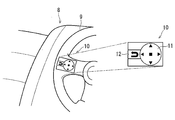
- FIG. 2 is a diagram schematically illustrating an example of a steering switch.
- FIG. 3 is a diagram showing the flow of display control processing.
- FIG. 4 is a diagram showing the flow of the focus movement process.
- FIG. 5 is a diagram schematically showing an example of a display screen during normal operation.
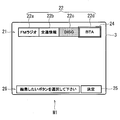
- FIG. 6 is a diagram schematically illustrating an example of an edit start screen when editing an operation button.
- FIG. 7 is a diagram schematically showing the movement mode of the focus frame on the edit start screen.
- FIG. 1 is a diagram schematically illustrating an electrical configuration of a display control apparatus according to an embodiment.
- FIG. 2 is a diagram schematically illustrating an example of a steering switch.
- FIG. 3 is a diagram showing the flow of display control processing.
- FIG. 4 is a diagram showing the flow of the focus movement process.
- FIG. 5 is a diagram schematically showing an example of
- FIG. 8 is a diagram schematically showing an example of the editing screen.
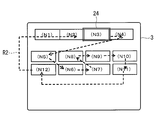
- FIG. 9 is a diagram showing an example of the movement order of the focus frame on the editing screen.
- FIG. 10 is a diagram schematically showing the movement mode of the focus frame on the editing screen.
- FIG. 11 is a diagram showing the focus position when the editing screen changes to the editing start screen.
- FIG. 12 is a diagram schematically showing a method for specifying a focus position.
- FIG. 13 is a diagram schematically showing a method for specifying a focus position.
- FIG. 14 is a diagram showing an example of the movement order of the focus frame on the editing screen.
- FIG. 15 is a diagram schematically illustrating another example of the focus symbol.
- the display control apparatus 1 of the present embodiment includes a control unit 2, a display unit 3, an input unit 4, an operation unit 5, a storage unit 6, and an external interface (shown as an external I / F 7 in FIG. 1). ) Etc.
- the display control device 1 is mounted on a vehicle 8 (see FIG. 2) in the present embodiment. At this time, the display control device 1 may be fixedly provided on the vehicle 8 or may be detachably provided. In addition, the display control device 1 may be configured as a single device, or may be configured as a navigation device mounted on the vehicle 8 (see FIG. 2), for example. Further, the display control device 1 may be used for purposes other than the vehicle 8.
- the control unit 2 is configured by a microcomputer having a CPU, a ROM, a RAM, and the like (not shown), and controls the entire display control device 1 according to a program stored in the storage unit 6 or the like. Although details will be described later, the control unit 2 displays the operation buttons (corresponding to the operation target; see FIG. 5 and the like) on the display unit 3 and the screen transition of the display unit 3 (see FIGS. 7 and 8 and the like). Control.
- the display unit 3 is composed of, for example, a liquid crystal panel or an organic EL panel, and displays operation buttons and the like according to the control of the control unit 2.
- the display unit 3 is provided integrally with the display control device 1, but the display unit 3 may be provided separately from the display control device 1. That is, this indication is applicable also when controlling the display part externally connected by the control part.
- the input unit 4 inputs an operation signal from the operation unit 5 operated by the user. Based on the operation signal input to the input unit 4, the control unit 2 controls the display screen of the display unit 3 in accordance with a user operation.
- the operation unit 5 is a mechanical or electrical operation unit that is operated by a user in order to input an operation to the display control device 1.
- Examples of the operation unit include a touch panel provided corresponding to the display screen of the display unit 3 and mechanical switches provided around the display screen.
- a steering switch 10 provided on the steering 9 of the vehicle 8 or a haptic device (also referred to as a force sense presentation device) provided on the center control of the vehicle 8 although not shown.
- a haptic device also referred to as a force sense presentation device
- the like correspond to an example of the operation unit together with the operation unit 5. That is, the operation unit 5 may be provided integrally with the display control device 1 or may be provided separately.
- the steering switch 10 is a multi-directional switch 11 that can be tilted up and down, left and right, pushed, and rotated in the circumferential direction, and performs operations such as returning the display screen to the previous screen and exiting the menu screen. It consists of a switch 12 and the like.
- the configuration of the steering switch 10 is an example, and other configurations may be used as long as the same operation can be performed.
- the storage unit 6 is composed of, for example, a semiconductor memory such as SD, a USB memory, or a hard disk drive.
- the storage unit 6 stores a computer program executed by the control unit 2 and various setting data.
- the storage unit 6 corresponds to a display position of an operation button (to be described later) (coordinate values on the screen of the display unit 3; see FIGS. 12 and 13) and a position of the focus frame 24 (see FIG. 6 and the like) (corresponding to a transition source position). ) Is also memorized.
- the external I / F 7 is, for example, a wired communication function such as USB (registered trademark), a wireless communication function such as Bluetooth (registered trademark) or a wireless LAN, a communication function with an in-vehicle LAN such as CAN (Controller Area Network), and an external memory Provides a connection function between the display control device 1 and an external device or device, such as a connector function.
- BT Bluetooth is referred to as BT for convenience. Note that it is not necessary to provide all of these functions in the display control device 1 as long as the necessary functions can be provided.
- a wired connection type portable music player connected by USB or a dedicated standard is referred to as a media player for convenience, and a portable music player connected by BT or the like. Is referred to as BTA (see FIG. 5 etc.) for convenience.
- the external I / F 7 functions as an input unit for inputting an operation signal from the operation unit, for example, when the above-described steering switch 10 is connected via the in-vehicle LAN.
- the external I / F 7 also functions as an input unit when the display control device 1 is connected to a controller connected to the BT, a portable music playback device, or the like.
- audio output to an audio output unit such as a speaker is also performed via the external I / F 7.
- a video signal may be output via the external I / F 7.
- the display control device 1 executes the display control process shown in FIG. 3 and the focus movement process shown in FIG.
- the flow of these processes will be described together with the transition states of the screens shown in FIGS.
- the display control process shown in FIG. 3 and the focus movement process shown in FIG. 4 are executed by the control unit 2, but in the following, the display control apparatus 1 will be mainly described for the sake of simplicity.
- the display unit 3 of the display control device 1 normally displays an operation screen 20 as shown in FIG.
- the favorite display unit 21 is basically displayed at all times when the display control apparatus 1 is operating.
- the favorite display unit 21 displays a favorite button 22 for executing a function registered in one operation without following a hierarchical structure such as an operation menu.
- the favorite button 22 displays a plurality of buttons such as four first buttons 22a, second buttons 22b, third buttons 22c, and fourth buttons 22d.
- the favorite button 22 including the first button 22a to the fourth button 22d corresponds to an operation button.
- a function for receiving FM radio is registered in the first button 22a
- a function for receiving traffic information is registered in the second button 22b
- a medium is received in the third button 22c.
- a function for operating the player is registered, and a function for operating the BTA is registered in the fourth button 22d.
- the number of favorite buttons 22 and registered function names shown in FIG. 5 are examples.
- the edit button 23 is a button for editing the favorite button 22.
- the edit button 23 is a button for editing the favorite button 22.
- the display control device 1 executes the display control process shown in FIG. 3 when the edit button 23 is operated by the user.
- the display control process and the focus movement process shown in FIG. 4 to be described later are realized by a computer program executed by the control unit 2.
- the display control device 1 first displays an edit start screen M1 as shown in FIG. (S1).
- This edit start screen M1 is a screen for starting editing to replace the favorite button 22.
- a focus frame 24 for performing a selection operation for selecting a favorite button 22 to be edited
- a determination button 25 for inputting a determination operation for determining a button to be edited
- a message display The part 26 and the like are displayed.
- the focus frame 24 indicates that the operation button (the first button 22a in FIG. 6) on which the focus frame 24 is displayed is identifiable, and corresponds to a focus symbol.
- the focus frame 24 is displayed slightly larger than the operation buttons to be overlapped, and the inside of the frame is transparent or transparent, and even if the operation buttons overlap, Visible characters.
- the first button 22a is a selection target. Note that if the focus frame 24 is simply displayed in an overlapping manner, the operation button is a selection target (selection candidate), and has not yet been selected.
- the focus frame 24 moves according to the operation of the multidirectional switch 11 of the steering switch 10 by the user.
- the multi-directional switch 11 When the multi-directional switch 11 is pushed by the user, for example, it is considered that the determination button 25 has been operated, and the operation button on which the focus frame 24 is displayed is selected.
- an operation of moving the focus frame 24, that is, an operation of selecting an operation button is referred to as a selection operation for convenience.
- an operation for bringing the selected operation button into a selected state is referred to as a determination operation for convenience.
- the message display unit 26 displays a message for prompting the user to perform an operation.
- a message “Please select the button you want to edit” is displayed.
- the display control device 1 may prompt the operation by outputting a message by voice from a speaker or the like.
- the operation using the steering switch 10 is taken as an example, but it goes without saying that the display control apparatus 1 can be operated in the same manner even when a touch panel, a mechanical switch, or a haptic device is used.
- the display control device 1 focuses the button to be selected in the display control process shown in FIG. 3 (S2).
- the operation button is a selection target (selection operation target) for the operation button selected by the user. This corresponds to a display step of displaying the focus frame 24 indicating that the image can be identified.
- the display control device 1 determines whether or not the button to be changed has been determined (S3). If the button to be changed has not been determined (S3: NO), the display control device 1 proceeds to S2 and performs the user's determination operation. stand by. At this time, when the selection operation is performed by the user, that is, when the movement operation of the focus frame 24 is performed, the display control device 1 focuses the button to be selected in S2.
- the display control device 1 sets the focus frame 24 as shown in FIG. Move to 3 button 22c.
- the display control apparatus 1 may notify the user of a function name or the like registered in the operation button that is newly selected as the focus frame 24 moves by voice output.
- the display control device 1 when the user performs a determination operation to determine a button to be changed (S3: YES), the display control device 1 highlights the determined button so that it can be identified (S4). ). Specifically, when the determination operation is performed in a state where the third button 22c is a selection target as illustrated in FIG. 7, the display control device 1 emphasizes the third button 22c as illustrated in FIG. indicate. That is, the display control device 1 displays the operation buttons in different display modes when the operation buttons are displayed as the operation target and when selected by the user to be in the selected state, and the focus button 24 is displayed with the operation buttons. The display mode is different from the display mode in the selected state.
- the fact that the third button 22 c is in a selected state is schematically shown by hatching.
- the highlighting mode may be reversed display, display in a different display color from other buttons, or display with a symbol indicating that the operation button has been selected.
- the display control device 1 displays the candidate button 27 (see FIG. 8) in the display control process shown in FIG. 3 (S5).
- the order of S4 and S5 may be switched.
- a plurality of candidate buttons 27, that is, a plurality of operation buttons indicating candidate function names for replacing the registered favorite button 22 are displayed.
- the state in which the candidate button 27 as shown in FIG. 8 is displayed corresponds to the editing-in-progress screen M ⁇ b> 2 during editing that replaces the favorite button 22. That is, the display control device 1 changes the screen from the editing start screen M1 to the editing screen M2 in S5.
- a message such as “Please select the button you want to add / change” is displayed in the message display section 26 because it is being edited.
- the determination button 25 is operated to determine a candidate button 27 to be replaced with the favorite button 22.
- the operation for determining the replacement candidate button 27 is also included in the determination operation.
- buttons indicating FM radio, traffic information, media player, and BTA are already registered as registered favorite buttons 22. Are grayed out and excluded from replacement candidates.
- the state of being grayed out is schematically shown by hatching.
- the display control device 1 focuses the button to be selected in the display control process shown in FIG. 3 (S6). In this case, as shown in FIG. 8, the third button 22c of the favorite button 22 is focused.
- the favorite button 22 including the third button 22c focused on the edit start screen M1 includes a transition source screen (in this case, the edit start screen M1) and a transition destination screen (in this case, the editing in progress screen M2). In both cases, the display position is displayed without change and is displayed as a selection target by the user.
- the display control apparatus 1 determines whether the candidate button 27 has been determined (S7). If not determined (S7: NO), the display control device 1 proceeds to S6 and waits for the determination of the candidate button 27. To do. At this time, the display control unit focuses the button that is the selection target in accordance with the selection operation by the user. At this time, the focus frame 24 can be edited by the user continuously pressing the multi-directional switch 11 of the steering switch 10 in one direction, for example, in the right direction, or repeatedly, as shown by a locus R1 in FIG. The operation buttons displayed on the middle screen M2 are moved in order. When the multi-directional switch 11 is operated in the up / down direction, the position of the focus frame 24 may be moved up / down, for example, from BTA to DISC by one operation.
- the focus frame 24 positioned on the third button 22c moves to the fourth button 22d when the user operates the multidirectional switch 11 once in the right direction.
- the focus frame 24 moves to the upper left of the candidate button 27.
- the FM radio candidate button 27 is not a replacement candidate, it moves to the AM radio candidate button 27 located on the right side thereof.
- the focus frame 24 is basically moved from the left side of the screen toward the right side with respect to the displayed operation buttons arranged on the screen, and when the right end is reached, the focus frame 24 is arranged one step below. Move to the current operation button.
- the determination operation is performed by the user in a state where the DISC candidate button 27 is selected as a candidate for replacing the third button 22c.
- the display control device 1 executes the focus movement process (S8).
- the display control device 1 of the present embodiment transitions the screen between the editing start screen M1 and the editing-in-progress screen M2 as described above. Then, when the determination operation is performed on the editing screen M2, the display control device 1 transitions to the editing start screen M1.
- This focus movement process is performed when the screen is changed from the editing-in-progress screen M2 (here, corresponding to the transition source screen) to the editing start screen M1 (here, corresponding to the transition destination screen). In which position 24 is displayed is specified.
- the display control device 1 acquires the position of the focused candidate button 27 in the focus movement process shown in FIG. 4 (T1).
- the candidate button 27 in focus is DISC
- the position of the DISC candidate button 27 is acquired here.
- the acquired position of the candidate button 27 is stored in the storage unit with the position of the focus frame 24 on the transition source screen as the transition source position.
- the process of T1 corresponds to a storing step of storing the position of the focus frame 24 on the transition source screen in the storage unit 6 as the transition source position when the screen of the display unit 3 is transitioned.
- the control device acquires the position of the button displayed on the transition destination screen (in this case, the edit start screen M1) (T2), The button closest to the original position is identified (T3).
- This T3 corresponds to a specifying step of specifying an operation button displayed at a position closest to the transition source position on the transition destination screen.
- the screen of the display unit 3 has an origin coordinate (0, 0) in the upper left, an X coordinate in the right direction, and a Y coordinate in the lower direction. Then, at T2, the display control device 1 acquires the center coordinates (Xa, Ya) as the position of the focus frame 24 (shown by a solid line in FIG. 11) at the current time (that is, the transition source screen). To do. Since the position of the focus frame 24 substantially coincides with the center coordinates of the currently focused button Ba, the center coordinates of the button Ba can be used as the focus position.
- the storage unit 6 also stores the center coordinates of buttons B1 to B4 (corresponding to operation buttons) displayed as selection targets on the transition destination screen. Therefore, the display control device 1 calculates the distance from the position of the focus frame 24 to the positions of the buttons B1 to B4 at T3, and displays the button B4 displayed at the shortest distance La on the transition source screen. The button is specified as the button closest to the current position of the focus frame 24. Then, on the transition destination screen, the focus frame 24 is displayed on the button B4 as indicated by a broken line in FIG.
- the control device changes the screen after replacing the candidate button 27 because the specified button is one in this example (T4: YES) ( T5)
- the specified button is focused (T6).
- the focus frame 24 is displayed on the fourth button 22d closest to the position of the focus frame 24 (shown by a solid line in FIG. 11) on the transition source screen (screen M2 being edited).
- the display control device 1 moves the focus frame 24 to an operation button that is assumed to have the least movement of the line of sight from the position of the focus frame 24 on the transition source screen.
- the process of T6 corresponds to a redisplay step of displaying the focus frame 24 for the operation button displayed at the position closest to the transition source position on the transition destination screen.
- buttons B2, B3, and B5 closest to the position (Xb, Yb) of the focus frame 24 on the transition source screen. That is, it is assumed that the distance Lb1 between the focus frame 24 and the button B2, the distance Lb2 between the focus frame 24 and the button B3, and the distance Lb3 between the focus frame 24 and the button B5 are equal.
- Button B5 also corresponds to an example of an operation button.
- the control device should display the focus frame 24 based on a predetermined priority order. Is specified (T7).
- the display control device 1 sets a higher priority as it is arranged on the left side of the screen of the display unit 3, and sets a higher priority as it is arranged on the upper side in the display unit 3. is doing.
- B2 has a higher priority in the buttons B2 and B3 having the same Y coordinate. Further, among the buttons B2 and B5 having the same X coordinate, B2 has a higher priority. Therefore, in the case of FIG. 13, the button B2 is specified as the operation button displayed at the position closest to the transition source position. It should be noted that priorities are also assigned to the X and Y coordinates, and if the X coordinates are the same, the lower the Y coordinate, that is, the higher the priority placed on the upper side of the screen. Good.
- the display control device 1 displays the focus frame 24 at the closest position when the screen is changed.
- the display control device 1 is a focus that identifiable that the operation button is a selection target with respect to the operation button selected by the user among the operation buttons displayed on the display unit 3 (display unit).
- the frame 24 focus symbol
- the position of the focus frame 24 on the transition source screen is stored as the transition source position, and the transition source position is displayed on the transition destination screen.
- the focus frame 24 is displayed with respect to the operation button displayed at the closest position.
- the user can quickly grasp the position of the focus frame 24 without moving the line of sight even if the screen transitions. be able to. Therefore, it is possible to prevent the visibility of the focus frame 24 from being lowered.
- the focus frame 24 is automatically moved to the operation button to be selected. Therefore, even when a screen transition on which a plurality of operation buttons are displayed is performed, Usability and convenience can be improved. That is, it is possible to achieve both improvement in operability and convenience and suppression of reduction in visibility.
- the display control apparatus 1 has an editing function for replacing the favorite button 22 (operation button), and an editing start screen M1 for starting editing for replacing the favorite button 22 and the favorite button 22 being edited.
- the screen transitions between the editing screen M2 and when the transition from the editing screen M2 to the editing start screen M1, the position of the focus frame 24 on the editing screen M2 is stored as a transition source position.
- the focus frame 24 is displayed for the favorite button 22 displayed at the position closest to the transition source position. Thereby, it can prevent that the visibility of the focus frame 24 falls.
- the display control device 1 displays the focus frame 24 according to a preset priority order.
- the favorite button 22 to be specified is specified. Thereby, even when a plurality of operation buttons are displayed on the transition destination screen, the position of the focus frame 24 can be easily grasped.
- the display control method including the display step, the storage step, the specifying step, and the redisplay step described above can achieve both improvement in operability and convenience and suppression of reduction in visibility. The effect of can be obtained.
- the transition of the screen when editing the favorite button 22 is exemplified, but the effect described in the embodiment can be obtained by performing the same processing even if the transition is another screen.
- the present invention can also be applied to screen transition when replacing the candidate button 27.
- the focus frame 24 is displayed on the favorite button 22 (the third button 22c in FIG. 8) in the selected state when the editing start screen M1 transits to the editing screen M2. This is because the operation button closest to the selection target on the screen after the transition is the third button 22c in the selected state.
- the favorite button 22 is not included in the selection target on the editing screen M2
- the most likely candidate button 27 operation button to be selected.
- the focus frame 24 may be displayed on a close button.
- a message for prompting an operation or the like is displayed on the message display unit 26.
- the message does not necessarily have to be displayed.
- the display control device 1 does not necessarily notify the user of the function name or the like registered in the operation button newly selected as the focus frame 24 moves by voice output. .
- the center position of the operation button or the focus frame 24 is acquired, but may be, for example, the coordinates of the upper left vertex on the screen as long as it is a rectangle.
- each operation button may be provided with a number (a number assigned at the time of design) in advance, and the focus frame 24 may be moved along the locus R2 in order from the smallest number. Also in this case, it may be possible to move in the vertical direction. Of course, priorities may be set by other procedures.
- the focus frame 24 is exemplified as the focus symbol.
- the focus symbol may be a focus region 30 that fills the whole with a transparent color instead of the frame.
- the focus area 30 may be displayed in a color different from that of the selected button (media player in FIG. 15).
- the focus symbol such as the focus frame 24 in a display mode different from the display mode when the operation button is selected, that is, by making the selected portion and the focus portion separate, Makes it easier to visually recognize the selected portion, and the subsequent selection action is easy to understand and smooth.
- FIG. 15 the state of being filled with a transparent color is schematically shown by hatching.
- the focus frame 24 is displayed slightly larger than the operation button on which the focus frame 24 can be superimposed.
- the focus frame 24 may be designed to be displayed in accordance with the size of the operation button.
- the operation button is exemplified as the operation target.
- the operation button is not limited thereto, and may be a display frame or an image that does not have a touch button function (touch operation function by the touch panel). In that case, it can be operated by the steering switch 10 or the like.
- the display control device 1 and the display control method are used in the vehicle 8 .
- portable terminals such as a personal computer, a mobile phone, a smart phone, and a tablet device are conceivable.
- each step is expressed as, for example, S1 or T1. Further, each step can be divided into a plurality of sub-steps, while a plurality of steps can be combined into one step.
Landscapes
- Engineering & Computer Science (AREA)
- Theoretical Computer Science (AREA)
- Physics & Mathematics (AREA)
- General Physics & Mathematics (AREA)
- General Engineering & Computer Science (AREA)
- Computer Hardware Design (AREA)
- Human Computer Interaction (AREA)
- User Interface Of Digital Computer (AREA)
- Controls And Circuits For Display Device (AREA)
Abstract
表示制御装置は、操作部からの操作信号を入力する入力部と、表示部への操作対象の表示および当該表示部の画面の遷移を制御する制御部と、操作対象の位置を記憶する記憶部と、を備える。制御部は、表示部に表示されている操作対象のうち、ユーザによって選択対象とされた操作対象に対して当該操作対象が選択対象であることを識別可能に示すフォーカスシンボルを表示するとともに、表示部の画面を遷移するとき、遷移元の画面におけるフォーカスシンボルの位置を遷移元位置として記憶部に記憶しておき、遷移先の画面において、遷移元位置から最も近い位置に表示される操作対象に対してフォーカスシンボルを表示する。
Description
本出願は、2015年1月8日に出願された日本国特許出願2015-2363号に基づくものであり、ここにその記載内容を参照により援用する。
本開示は、表示制御装置、表示制御方法に関する。
従来、画面に表示される操作ボタン等の操作対象の位置を予め記憶しておき、画面を遷移したときに、選択されている操作ボタンを示すポインタ等のフォーカスシンボルを、遷移先の画面における操作ボタンの位置に移動させるものがある(例えば、特許文献1参照)。
さて、特許文献1のような構成の場合、画面が遷移すると選択対象となる操作ボタンの位置に自動的にフォーカスシンボルが移動することから、そのような動作が行われることを知っているユーザにとっては、便利であると考えられる。
しかしながら、初めて装置を扱うようなユーザは、通常、遷移元の画面においてフォーカスシンボルの位置を把握しておき、遷移先の画面においては、把握している位置からフォーカスシンボルを動かそうとする。そのため、ユーザが移動操作を行っていないにも関わらずフォーカスシンボルの位置が変更されると、遷移先の画面においてフォーカスシンボルがどこに表示されているかを探す必要があり、ユーザは困惑するおそれがある。すなわち、操作時の利便性を向上させようとした結果、フォーカスシンボルの視認性が低下するおそれがある。
本開示は、操作時の利便性を向上させつつも、フォーカスシンボルの視認性が低下することを抑制できる表示制御装置、表示制御方法を提供することを目的とする。
本開示の一例による表示制御装置は、ユーザが操作する操作部からの操作信号を入力する入力部と、入力部に入力された操作信号に基づいて、表示部への操作対象の表示および当該表示部の画面の遷移を制御する制御部と、制御部によって表示部に表示される操作対象の位置を記憶する記憶部と、を備える。制御部は、表示部に表示されている操作対象のうち、ユーザによって選択対象とされた操作対象に対して当該操作対象が選択対象であることを識別可能に示すフォーカスシンボルを表示するとともに、表示部の画面を遷移するとき、遷移元の画面におけるフォーカスシンボルの位置を遷移元位置として記憶部に記憶しておき、遷移先の画面において、遷移元位置から最も近い位置に表示される操作対象に対してフォーカスシンボルを表示する。
本開示の別の一例による表示制御方法は、表示部に表示されている操作対象のうち、ユーザによって選択対象とされた操作対象に対して当該操作対象が選択対象であることを識別可能に示すフォーカスシンボルを表示することと、表示部の画面を遷移するとき、遷移元の画面におけるフォーカスシンボルの位置を遷移元位置として記憶部に記憶することと、遷移先の画面において、遷移元位置から最も近い位置に表示される操作対象を特定することと、遷移先の画面において、遷移元位置から最も近い位置に表示される操作対象に対してフォーカスシンボルを表示することと、を含む。
表示制御装置および表示制御方法によれば、ユーザは、画面が遷移したとしても視線を大きく動かすことなくフォーカスシンボルの位置を把握することができ、フォーカスシンボルの視認性が低下することを防止できる。そして、遷移先の画面では、選択対象となる操作対象にフォーカスシンボルが自動で移動するので、操作時の操作性や利便性を向上させることができる。すなわち、操作性や利便性の向上と、視認性低下の抑制とを両立することができる。
本開示についての上記および他の目的、特徴や利点は、添付図面を参照した下記詳細な説明から、より明確になる。添付図面において
図1は、実施形態の表示制御装置の電気的構成を模式的に示す図であり、
図2は、ステアリングスイッチの一例を模式的に示す図であり、
図3は、表示制御処理の流れを示す図であり、
図4は、フォーカス移動処理の流れを示す図であり、
図5は、通常動作時の表示画面の一例を模式的に示す図であり、
図6は、操作ボタンを編集する際の編集開始画面の一例を模式的に示す図であり、
図7は、編集開始画面におけるフォーカス枠の移動態様を模式的に示す図であり、
図8は、編集中画面の一例を模式的に示す図であり、
図9は、編集中画面におけるフォーカス枠の移動順序の一例を示す図であり、
図10は、編集中画面におけるフォーカス枠の移動態様を模式的に示す図であり、
図11は、編集中画面から編集開始画面に遷移したときのフォーカス位置を示す図であり、
図12は、フォーカス位置の特定方法を模式的に示す図であり、
図13は、フォーカス位置の特定方法を模式的に示す図であり、
図14は、編集中画面におけるフォーカス枠の移動順序の一例を示す図であり、
図15は、フォーカスシンボルの他の例を模式的に示す図である。
以下、本開示の一実施形態について、図1から図15を参照しながら説明する。
図1に示すように、本実施形態の表示制御装置1は、制御部2、表示部3、入力部4、操作部5、記憶部6、および外部インターフェース(図1では外部I/F7として示す)等を有している。この表示制御装置1は、本実施形態では車両8(図2参照)に搭載されている。このとき、表示制御装置1は、車両8に固定的に設けられていてもよいし、着脱可能に設けられていてもよい。また、表示制御装置1は、単体の装置として構成としてもよいし、例えば車両8(図2参照)に搭載されているナビゲーション装置等と兼用する構成としてもよい。また、表示制御装置1は、車両8以外の用途に用いられるものであってもよい。
制御部2は、図示しないCPU、ROMおよびRAM等を有するマイクロコンピュータにより構成されており、記憶部6等に記憶されているプログラムにしたがって、表示制御装置1の全体を制御する。この制御部2は、詳細は後述するが、表示部3への操作ボタン(操作対象に相当。図5等参照)の表示、および表示部3の画面の遷移(図7、8等参照)を制御する。
表示部3は、例えば液晶パネルや有機ELパネル等で構成されており、制御部2の制御にしたがって操作ボタン等を表示する。なお、本実施形態では表示部3を表示制御装置1と一体に設けているが、表示部3を表示制御装置1と別体に設けてもよい。すなわち、本開示は、制御部によって外部接続された表示部を制御する場合にも適用することができる。
入力部4は、ユーザが操作する操作部5からの操作信号を入力する。制御部2は、この入力部4に入力された操作信号に基づいて、ユーザの操作に応じて表示部3の表示画面を制御する。
操作部5は、表示制御装置1に対する操作を入力するためにユーザが操作する機械的あるいは電気的な操作部である。操作部としては、例えば、表示部3の表示画面に対応して設けられているタッチパネルや表示画面の周囲に設けられる機械スイッチ類がある。また、図2に示すように、車両8のステアリング9に設けられたステアリングスイッチ10、あるいは、図示は省略するが、車両8のセンターコントロール等に設けられたハプティックデバイス(力覚提示デバイスとも呼ぶ)等は、操作部5とともに、操作部の一例に相当する。つまり、操作部5は、表示制御装置1に一体的に設けられているものであってもよいし、別体で設けられているものであってもよい。
ステアリングスイッチ10は、上下左右への傾動操作、プッシュ操作、周方向への回転操作が可能な多方向スイッチ11と、表示画面を前画面に戻したりメニュー画面から抜けたりする等の操作を行う戻るスイッチ12等で構成されている。なお、ステアリングスイッチ10の構成は一例であり、同様の操作を行うことができれば、他の構成であってもよい。
記憶部6は、例えばSD等の半導体メモリ、USBメモリあるいはハードディスクドライブ等で構成されている。この記憶部6は、制御部2で実行されるコンピュータプログラムや各種の設定データ等を記憶している。また、記憶部6は、後述する操作ボタンの表示位置(表示部3の画面上における座標値。図12、13参照)や、フォーカス枠24(図6等参照)の位置(遷移元位置に相当)も記憶する。
外部I/F7は、例えばUSB(登録商標)等による有線通信機能、Bluetooth(登録商標)やワイヤレスLAN等による無線通信機能、CAN(Controller Area Network)等の車載LANとの通信機能、外部メモリ用のコネクタ機能等、表示制御装置1と外部の装置や機器との接続機能を提供する。以下、Bluetoothは便宜的にBTと称する。なお、表示制御装置1にはこれらの機能を全て設ける必要はなく、必要とされる機能を提供できればよい。なお、本実施形態では、後述するように、USBや専用規格等で接続された有線接続型の携帯型音楽再生装置を便宜的にメディアプレイヤーと称し、BTで接続される携帯型音楽再生装置等を便宜的にBTA(図5等参照)と称する。
また、外部I/F7は、例えば上記したステアリングスイッチ10が車載LAN経由で接続されている場合には、操作部からの操作信号を入力する入力部として機能する。また、外部I/F7は、表示制御装置1がBTで接続されるコントローラや携帯型音楽再生装置等と接続される場合等にも、入力部として機能する。また、スピーカ等の音声出力部(図示省略)への音声出力も外部I/F7を介して行われる。なお、外部接続された表示部を用いる場合、外部I/F7を介して映像信号を出力する構成としてもよい。
次に、上記した構成の作用について説明する。
表示制御装置1は、図3に示す表示制御処理および図4に示すフォーカス移動処理を実行する。以下、これらの処理の流れを、図5から図15に示す画面の遷移状態とともに説明する。なお、図3に示す表示制御処理および図4に示すフォーカス移動処理は制御部2によって実行されるものであるが、以下では、説明の簡略化のため、表示制御装置1を主体として説明する。
表示制御装置1の表示部3には、通常、図5に示すような動作画面20が表示されている。この動作画面20には、表示制御装置1の動作時には基本的に常に、お気に入り表示部21が表示される。このお気に入り表示部21は、操作メニュー等の階層構造をたどること無く、一度の操作で登録されている機能を実行するためのお気に入りボタン22が表示される。お気に入りボタン22は、図5の場合、例えば4個の第1ボタン22a、第2ボタン22b、第3ボタン22c、第4ボタン22d等、複数個のボタンが表示されている。これら第1ボタン22a~第4ボタン22dを含むお気に入りボタン22は、操作ボタンに相当する。
本実施形態では、第1ボタン22aにはFMラジオを受信する機能が登録されており、第2ボタン22bには、交通情報を受信する機能が登録されており、第3ボタン22cには、メディアプレイヤーを操作する機能が登録されており、第4ボタン22dには、BTAを操作する機能が登録されている。なお、図5に示したお気に入りボタン22の数や登録される機能名は一例である。
また、表示部3には、編集ボタン23が表示されている。この編集ボタン23は、お気に入りボタン22を編集するためのボタンである。ユーザは、お気に入りボタン22を編集したい場合、つまり、お気に入りボタン22に登録する機能を変更したい場合に、この編集ボタン23を操作する。
表示制御装置1は、ユーザによって編集ボタン23が操作されると、図3に示す表示制御処理を実行する。なお、この表示制御処理、および後述する図4に示すフォーカス移動処理は、制御部2によって実行されるコンピュータプログラムによって実現されている。
表示制御装置1は、表示制御処理において、まず、図6に示すような編集開始画面M1を表示する。(S1)。この編集開始画面M1は、お気に入りボタン22を置き換える編集を開始する際の画面である。編集開始画面M1には、図6に示すように、編集するお気に入りボタン22を選択する選択操作を行うためのフォーカス枠24、編集するボタン決定する決定操作を入力する決定ボタン25、および、メッセージ表示部26等が表示される。
フォーカス枠24は、フォーカス枠24が重ねて表示されている操作ボタン(図6では、第1ボタン22a)が選択対象であることを識別可能に示すものであり、フォーカスシンボルに相当する。本実施形態では、フォーカス枠24は、重ねられる操作ボタンよりも若干大きく表示されており、その枠内が透明あるいは透過色となっており、操作ボタンに重なった状態であっても、操作ボタンの文字を視認できる。図6の場合、第1ボタン22aが選択対象となっている。なお、フォーカス枠24が重ねて表示されているだけでは、その操作ボタンは、選択の対象(選択の候補)となっている状態であり、まだ選択された状態とはなっていない。
このフォーカス枠24は、ユーザによるステアリングスイッチ10の多方向スイッチ11の操作に応じて移動する。また、ユーザにより多方向スイッチ11が例えばプッシュ操作されると、決定ボタン25が操作されたと見なされて、フォーカス枠24が表示されている操作ボタンが選択状態となる。以下、フォーカス枠24を移動させる操作、つまり、操作ボタンを選択する操作を便宜的に選択操作と称する。また、選択した操作ボタンを選択状態にする操作を便宜的に決定操作と称する。
メッセージ表示部26は、ユーザに操作を促すためのメッセージを表示する。図6の場合、「編集したいボタンを選択して下さい」というメッセージが表示されている。このとき、表示制御装置1は、メッセージをスピーカ等から音声出力して操作を促すようにしてもよい。なお、本実施形態では、ステアリングスイッチ10による操作を例にしているが、当然のことながら、タッチパネルや機械スイッチあるいはハプティックデバイスを使用する場合であっても同様に表示制御装置1を操作できる。
編集開始画面M1を表示すると、表示制御装置1は、図3に示す表示制御処理において、選択対象のボタンをフォーカスする(S2)。このS2および後述するS6の処理は、表示部3に表示されている操作ボタンのうち、ユーザによって選択対象とされた操作ボタンに対して当該操作ボタンが選択対象(選択操作の対象)であることを識別可能に示すフォーカス枠24を表示する表示工程に相当する。
続いて、表示制御装置1は、変更するボタンが決定されたかを判定し(S3)、変更するボタンが決定されていない場合には(S3:NO)、S2に移行してユーザの決定操作を待機する。このとき、表示制御装置1は、ユーザによって選択操作が行われると、つまり、フォーカス枠24の移動操作が行われると、S2において選択対象のボタンをフォーカスする。
具体的には、表示制御装置1は、図6に示すように例えば第1ボタン22aが選択対象となっている状態で選択操作が行われると、図7に示すようにフォーカス枠24を例えば第3ボタン22cに移動する。このとき、表示制御装置1は、フォーカス枠24の移動に併せて、新たに選択対象となった操作ボタンに登録される機能名等を音声出力によりユーザに通知するとよい。
表示制御装置1は、図3に示す表示制御処理において、ユーザにより決定操作が行われて変更するボタンが決定されると(S3:YES)、決定されたボタンを識別可能に強調表示する(S4)。具体的には、表示制御装置1は、図7に示すように第3ボタン22cが選択対象となっている状態で決定操作が行われると、図8に示すように、第3ボタン22cを強調表示する。すなわち、表示制御装置1は、操作ボタンを、操作対象として表示されている場合とユーザによって選択されて選択状態になった場合とにおいて異なる表示態様で表示するとともに、フォーカス枠24を、操作ボタンが選択状態になった場合の表示態様とは異なる表示態様で表示する。
図8の場合、では、第3ボタン22cが選択状態にあることを、ハッチングにより模式的に示している。なお、強調表示の態様としては、反転表示や他のボタンと異なる表示色での表示、あるいは操作ボタンに選択されたことを示す記号を付加する表示等が考えられる。
続いて、表示制御装置1は、図3に示す表示制御処理において、候補ボタン27(図8参照)を表示する(S5)。なお、実際の制御上は、S4とS5とはほぼ同時に行われるため、S4とS5の順序が入れ替わっていてもよい。図8の場合、複数の候補ボタン27、すなわち、登録済みのお気に入りボタン22を置き換える候補の機能名を示す複数の操作ボタンが表示されている。この図8に示すような候補ボタン27が表示されている状態が、お気に入りボタン22を置き換える編集をしている最中の編集中画面M2に相当する。すなわち、表示制御装置1は、S5において、編集開始画面M1から編集中画面M2に画面を遷移している。
このとき、メッセージ表示部26には、編集中になったことから、例えば「追加・変更したいボタンを選択して下さい」といったメッセージが表示される。また、編集中画面M2では、決定ボタン25は、お気に入りボタン22と置き換える候補ボタン27を決定するために操作される。この置き換える候補ボタン27を決定する操作も決定操作に含まれる。
なお、図8の場合、画面に表示される候補ボタン27のうち、本実施形態ではFMラジオ、交通情報、メディアプレイヤー、およびBTAを示すボタンについては、既に登録お気に入りボタン22として登録されていることから、グレーアウト表示されており、置き換えの候補から外されている。図8では、グレーアウト表示されている状態を、ハッチングにより模式的に示している。
編集中画面M2を表示すると、表示制御装置1は、図3に示す表示制御処理において、選択対象のボタンをフォーカスする(S6)。この場合、図8に示すように、お気に入りボタン22の第3ボタン22cがフォーカスされている。
さて、この編集中画面M2では、他のお気に入りボタン22を選択することができる。このため、誤ってメディアプレイヤーを選択してしまい、例えばBTAを選択し直したい場合には、図8に示されている状態からフォーカス枠24をBTA(第4ボタン22d)に移動させて決定操作を行うことで、BTAを置き換え対象に選択することができる。つまり、編集開始画面M1においてフォーカスされていた第3ボタン22cを含むお気に入りボタン22は、遷移元の画面(この場合、編集開始画面M1)と遷移先の画面(この場合、編集中画面M2)との双方において、その表示位置が変化せずに表示されるとともに、且つ、ユーザによる選択対象として表示される。
続いて、表示制御装置1は、候補ボタン27が決定されたかを判定し(S7)、決定されていなければ(S7:NO)、S6に移行して、候補ボタン27が決定されるのを待機する。このとき、表示制御部は、ユーザによる選択操作に応じて、選択対象となったボタンをフォーカスする。このとき、フォーカス枠24は、ユーザがステアリングスイッチ10の多方向スイッチ11を一方向、例えば右方向に押し続けることにより、あるいは、繰り返し押すことにより、図9に軌跡R1にて示すように、編集中画面M2に表示されている操作ボタンを順番に移動する。なお、多方向スイッチ11を上下方向に操作した場合には、フォーカス枠24の位置を上下に移動するようにし、例えばBTAからDISCに1回の操作で移動できるようにしてもよい。
具体的には、図9に示すように第3ボタン22cに位置しているフォーカス枠24は、ユーザが多方向スイッチ11を右方向に1回操作すると、第4ボタン22dに移動する。そして、ユーザが右方向にさらに1回操作すると、フォーカス枠24は、候補ボタン27の一番左上に移動する。ただし、図9に示すようにFMラジオの候補ボタン27が置き換え候補では無い場合、その右側に位置するAMラジオの候補ボタン27に移動する。つまり、フォーカス枠24は、画面上に配置されている表示される操作ボタンに対して、基本的には画面の左側から右側に向かって移動するとともに、右端に達すると、一段下側に配置されている操作ボタンに移動する。
さて、図10に示すように、第3ボタン22cを置き換える候補としてDISCの候補ボタン27が選択された状態で、ユーザにより決定操作が行われたとする。このとき、表示制御装置1は、図3に示す表示制御処理において、候補ボタン27が決定されたことから(S7:YES)、フォーカス移動処理を実行する(S8)。
ここで、本実施形態の表示制御装置1は、上記したように編集開始画面M1と編集中画面M2との間で画面を遷移する。そして、表示制御装置1は、編集中画面M2において決定操作が行われると編集開始画面M1に遷移する。そして、このフォーカス移動処理は、編集中画面M2(ここで、遷移元の画面に相当する)から編集開始画面M1(ここでは、遷移先の画面に相当する)に画面を遷移する際、フォーカス枠24をどの位置に表示するかが特定されている。
表示制御装置1は、図4に示すフォーカス移動処理において、フォーカス中の候補ボタン27の位置を取得する(T1)。図10の場合、フォーカス中の候補ボタン27はDISCであるため、ここではDISCの候補ボタン27の位置が取得される。取得された候補ボタン27の位置は、遷移元の画面におけるフォーカス枠24の位置を遷移元位置として記憶部に記憶される。このT1の処理が、表示部3の画面を遷移するとき、遷移元の画面におけるフォーカス枠24の位置を遷移元位置として記憶部6に記憶する記憶工程に相当する。
続いて、制御装置は、図4に示すフォーカス移動処理において、遷移先の画面(この場合、編集開始画面M1)で表示されるボタンの位置を取得し(T2)、遷移先の画面において、遷移元位置から最も近いボタンを特定する(T3)。このT3は、遷移先の画面において、遷移元位置から最も近い位置に表示される操作ボタンを特定する特定工程に相当する。
ここで、特定工程についてより詳細に説明する。
図11に示すように、表示部3の画面は、その左上を原点座標(0,0)とし、右方向にX座標、下方向にY座標を取っている。そして、表示制御装置1は、T2では、現時点(つまり、遷移元の画面)におけるフォーカス枠24の位置(図11には実線にて示す)の位置として、その中心座標(Xa,Ya)を取得する。なお、フォーカス枠24の位置は、現時点においてフォーカスされているボタンBaの中心座標にほぼ一致するため、このボタンBaの中心座標をフォーカス位置として利用することもできる。
また、記憶部6には、遷移先の画面において選択対象として表示されるボタンB1~B4(操作ボタンに相当する)の中心座標も記憶されている。そのため、表示制御装置1は、T3において、フォーカス枠24の位置と各ボタンB1~B4の位置までの距離をそれぞれ計算し、最も短い距離Laに表示されるボタンB4を、遷移元の画面において、現時点でのフォーカス枠24の位置から最も近いボタンとして特定する。そして、遷移先の画面では、図11に破線にて示すように、ボタンB4にフォーカス枠24が表示されることになる。
具体的には、制御装置は、図4に示すフォーカス移動処理において、特定されたボタンが今回の例では1つであるので(T4:YES)、候補ボタン27を入れ替えた後に画面を遷移し(T5)、特定したボタンをフォーカスする(T6)。これにより、図12に示すように、遷移元の画面(編集中画面M2)においてフォーカス枠24(図11では実線にて示す)の位置から最も近い第4ボタン22dに、フォーカス枠24が表示される。
すなわち、表示制御装置1は、画面を遷移する際、遷移元の画面におけるフォーカス枠24の位置から最も視線の移動が少ないと想定される操作ボタンに、フォーカス枠24を移動させる。このT6の処理が、遷移先の画面において、遷移元位置から最も近い位置に表示される操作ボタンに対してフォーカス枠24を表示する再表示工程に相当する。
さて、図13に示すように、遷移元の画面におけるフォーカス枠24の位置(Xb,Yb)に対して、最も近い操作ボタンがB2、B3、B5のように複数個あったとする。つまり、フォーカス枠24とボタンB2までの距離Lb1と、フォーカス枠24とボタンB3までの距離Lb2と、フォーカス枠24とボタンB5までの距離Lb3とが等しかったとする。ボタンB5もまた操作ボタンの一例に相当する。
このとき、制御装置は、図4に示すフォーカス移動処理において、特定されたボタンが複数であるので(T4:NO)、予め定められている優先順位に基づいて、フォーカス枠24を表示すべきボタンを特定する(T7)。本実施形態の場合、表示制御装置1は、表示部3の画面において左側に配置されているほど優先順位を高く設定し、且つ、表示部3において上側に配置されているほど優先順位を高く設定している。
このため、図13の場合、Y座標が同じボタンB2とボタンB3とでは、B2の方が優先順位は高い。また、X座標が同じボタンB2とボタンB5とでは、B2の方が優先順位は高い。そのため、この図13の場合には、ボタンB2が、遷移元位置から最も近い位置に表示される操作ボタンとして特定される。なお、X座標とY座標にも優先順位を付け、仮にX座標が同じであったとすればY座標が小さいほど、つまり、画面の上側に配置されているほど優先順位を高くするようにしてもよい。
そして、表示制御装置1は、図4に示すフォーカス移動処理からリターンすると、編集が完了した旨を示す操作が入力されるのを待機した後、編集が完了した旨がユーザにより示されると、表示制御処理、つまり、お気に入りボタン22を編集する処理を終了する。
このように、表示制御装置1は、画面を遷移する際、最も近い位置にフォーカス枠24を表示させている。
以上説明した実施形態によれば、次のような効果を得ることができる。
表示制御装置1は、表示部3(表示部)に表示されている操作ボタンのうち、ユーザによって選択対象とされた操作ボタンに対して当該操作ボタンが選択対象であることを識別可能に示すフォーカス枠24(フォーカスシンボル)を表示するとともに、表示部3の画面を遷移するとき、遷移元の画面におけるフォーカス枠24の位置を遷移元位置として記憶しておき、遷移先の画面において、遷移元位置から最も近い位置に表示される操作ボタンに対してフォーカス枠24を表示する。
このような構成により、遷移元の画面におけるフォーカス枠24がどのような位置であったとしても、ユーザは、画面が遷移したとしても視線を大きく動かすことなく、素早くフォーカス枠24の位置を把握することができる。したがって、フォーカス枠24の視認性が低下することを防止できる。そして、遷移先の画面では、選択対象となる操作ボタンにフォーカス枠24が自動で移動するので、複数の操作ボタンが表示される画面の遷移が行われるような場合であっても、操作時の操作性や利便性を向上させることができる。すなわち、操作性や利便性の向上と、視認性低下の抑制とを両立することができる。
表示制御装置1は、お気に入りボタン22(操作ボタン)を置き換える編集機能を有し、お気に入りボタン22を置き換える編集を開始する際の編集開始画面M1と、当該お気に入りボタン22を編集している最中の編集中画面M2との間で画面を遷移するものであり、編集中画面M2から編集開始画面M1に遷移するときに、編集中画面M2におけるフォーカス枠24の位置を遷移元位置として記憶し、遷移後の編集開始画面M1において、遷移元位置から最も近い位置に表示されるお気に入りボタン22に対してフォーカス枠24を表示する。これにより、フォーカス枠24の視認性が低下することを防止できる。
表示制御装置1は、遷移先の画面において遷移元位置から最も近い位置に表示されるお気に入りボタン22(操作ボタン)が複数存在する場合、予め設定されている優先順位にしたがって、フォーカス枠24を表示するお気に入りボタン22を特定する。これにより、遷移先の画面において複数の操作ボタンが表示される場合であっても、フォーカス枠24の位置を容易に把握できるようになる。
上記した表示工程、記憶工程、特定工程、および再表示工程を含む表示制御方法により、操作性や利便性の向上と視認性低下の抑制とを両立することができる等、表示制御装置1と同様の効果を得ることができる。
本開示は、上記した実施形態にて例示したものに限定されることなく、その範囲を逸脱しない範囲で任意に変形あるいは拡張することができる。
実施形態ではお気に入りボタン22を編集する際の画面の遷移を例示したが、他の画面の遷移であっても同様の処理を行うことで、実施形態で説明した効果を得ることができる。例えば、候補ボタン27を置き換える際の画面の遷移にも適用できる。
実施形態では、編集開始画面M1から編集中画面M2に遷移する際、フォーカス枠24を、選択状態にあるお気に入りボタン22(図8では第3ボタン22c)に表示した。これは、遷移後の画面において最も近い選択対象とある操作ボタンが、選択状態にある第3ボタン22cであったためである。しかし、例えば編集中画面M2においてはお気に入りボタン22が選択対象に含まれていない構成の場合には、編集中画面M2に遷移した際に、候補ボタン27(選択対象となる操作ボタン)のうち最も近いボタンにフォーカス枠24を表示すればよい。
実施形態ではメッセージ表示部26に操作を促す等のメッセージを表示しているが、ユーザによっては煩わしく感じることもあるため、必ずしもメッセージを表示しなければいけないわけではない。
また、同様な理由から、表示制御装置1は、フォーカス枠24の移動に併せて新たに選択対象となった操作ボタンに登録される機能名等を音声出力によりユーザに必ずしも通知しなくてもよい。
実施形態では操作ボタンやフォーカス枠24の中心位置を取得したが、四角形であれば例えば画面上の左上の頂点の座標等であってもよい。
実施形態では、操作スイッチに対して一方向への操作入力が繰り返された場合には図9に示すように軌跡R1に沿ってフォーカス枠24を移動させる例を示したが、図14に示すように、各操作ボタンに予め番号(設計時に割り振る番号)を設け、番号の小さいものから順に軌跡R2に沿ってフォーカス枠24を移動させるようにしてもよい。この場合にも、上下方向へ移動できるようにしてもよい。勿論、他の手順で優先順位を設定してもよい。
実施形態ではフォーカスシンボルとしてフォーカス枠24を例示したが、フォーカスシンボルは、図15に示すように、枠では無く、全体を透過色で塗りつぶすようなフォーカス領域30であってもよい。この場合、選択状態にあるボタン(図15では、メディアプレイヤー)とは異なる色でフォーカス領域30を表示するとよい。
このようにフォーカス枠24等のフォーカスシンボルを操作ボタンが選択状態になった場合の表示態様とは異なる表示態様で表示することにより、つまり、選択部分とフォーカス部分とを別々にすることにより、ユーザは選択部分を視認しやすくなり、その後に行う選択行動がわかりやすく円滑に行えるという効果を発揮する。なお、図15では、透過色で塗りつぶされた状態をハッチングにて模式的に示している。
また、実施形態ではフォーカス枠24を重ねられる操作ボタンよりも若干大きく表示した例を示したが、フォーカス枠24は、操作ボタンの大きさに合わせて表示する設計としてもよい。
実施形態では、操作対象として操作ボタンを例示したが、これに限定されず、タッチボタン機能(タッチパネルによるタッチ操作の機能)を持たない表示枠や画像であってもよい。その場合、ステアリングスイッチ10等にて操作することができる。
実施形態では表示制御装置1および表示制御方法を車両8で利用する場合の例を示したが、本開示は、画面の遷移が行われる装置一般にも適用することができる。車両8以外の用途では、例えばパーソナルコンピュータ、携帯電話機、スマートホン、タブレット型装置等の携帯端末が考えられる。
なお、本出願に記載されるフローチャート、あるいは、フローチャートの処理は、複数のステップ(あるいはセクションとも言及される)から構成され、各ステップは、たとえば、S1やT1と表現される。さらに、各ステップは、複数のサブステップに分割されることができる、一方、複数のステップが合わさって一つのステップにすることも可能である。
以上、本開示に係る表示制御装置、表示制御方法の実施形態および構成を例示したが、本開示に係る実施の形態および構成は、上述した各実施の形態および各構成に限定されるものではない。異なる実施の形態および構成にそれぞれ開示された技術的要素を適宜組み合わせて得られる実施の形態および構成についても本開示に係る実施の形態および構成の範囲に含まれる。
Claims (5)
- ユーザが操作する操作部(5、10)からの操作信号を入力する入力部(4)と、
前記入力部(4)に入力された操作信号に基づいて、表示部(3)への操作対象の表示および当該表示部(3)の画面の遷移を制御する制御部(2)と、
前記制御部(2)によって前記表示部(3)に表示される前記操作対象(22、27、B1~B5)の位置を記憶する記憶部(6)と、を備え、
前記制御部(2)は、前記表示部(3)に表示されている前記操作対象(22、27、B1~B5)のうち、ユーザによって選択対象とされた前記操作対象(22、27、B1~B5)に対して当該操作対象(22、27、B1~B5)が選択対象であることを識別可能に示すフォーカスシンボル(24、30)を表示するとともに、前記表示部(3)の画面を遷移するとき、遷移元の画面における前記フォーカスシンボル(24、30)の位置を遷移元位置として前記記憶部(6)に記憶しておき、遷移先の画面において、前記遷移元位置から最も近い位置に表示される前記操作対象(22、27、B1~B5)に対して前記フォーカスシンボル(24、30)を表示する表示制御装置。 - 前記制御部(2)は、前記操作対象(22、27、B1~B5)を置き換える編集機能を有し、前記操作対象(22、27、B1~B5)を置き換える編集を開始する際の編集開始画面(M1)と当該操作対象(22、27、B1~B5)を編集している最中の編集中画面(M2)との間で画面を遷移するものであり、前記編集中画面(M2)から前記編集開始画面(M1)に遷移するときに、前記編集中画面(M2)における前記フォーカスシンボル(24)の位置を前記遷移元位置として記憶し、遷移後の前記編集開始画面(M1)において、前記遷移元位置から最も近い位置に表示される前記操作対象(22、27、B1~B5)に対して前記フォーカスシンボル(24、30)を表示する請求項1記載の表示制御装置。
- 前記制御部(2)は、前記操作対象(22、27、B1~B5)を、操作対象として表示されている場合とユーザによって選択されて選択状態になった場合とにおいて異なる表示態様で表示するとともに、前記フォーカスシンボル(24、30)を、前記操作対象(22、27、B1~B5)が選択状態になった場合の表示態様とは異なる表示態様で表示する請求項1または2記載の表示制御装置。
- 前記制御部(2)は、遷移先の画面において前記遷移元位置から最も近い位置に表示される前記操作対象(22、27、B1~B5)が複数存在する場合、予め設定されている優先順位にしたがって前記フォーカスシンボル(24、30)を表示する前記操作対象(22、27、B1~B5)を特定する請求項1から3のいずれか一項記載の表示制御装置。
- 表示部(3)に表示されている操作対象(22、27、B1~B5)のうち、ユーザによって選択対象とされた前記操作対象(22、27、B1~B5)に対して当該操作対象(22、27、B1~B5)が選択対象であることを識別可能に示すフォーカスシンボル(24、30)を表示することと、
前記表示部(3)の画面を遷移するとき、遷移元の画面における前記フォーカスシンボル(24、30)の位置を遷移元位置として記憶部(6)に記憶することと、
遷移先の画面において、前記遷移元位置から最も近い位置に表示される前記操作対象(22、27、B1~B5)を特定することと、
遷移先の画面において、前記遷移元位置から最も近い位置に表示される前記操作対象(22、27、B1~B5)に対して前記フォーカスシンボル(24、30)を表示することと、
を含む表示制御方法。
Applications Claiming Priority (2)
| Application Number | Priority Date | Filing Date | Title |
|---|---|---|---|
| JP2015-002363 | 2015-01-08 | ||
| JP2015002363A JP2016126708A (ja) | 2015-01-08 | 2015-01-08 | 表示制御装置、表示制御方法 |
Publications (1)
| Publication Number | Publication Date |
|---|---|
| WO2016110923A1 true WO2016110923A1 (ja) | 2016-07-14 |
Family
ID=56355651
Family Applications (1)
| Application Number | Title | Priority Date | Filing Date |
|---|---|---|---|
| PCT/JP2015/006429 Ceased WO2016110923A1 (ja) | 2015-01-08 | 2015-12-24 | 表示制御装置、表示制御方法 |
Country Status (2)
| Country | Link |
|---|---|
| JP (1) | JP2016126708A (ja) |
| WO (1) | WO2016110923A1 (ja) |
Families Citing this family (3)
| Publication number | Priority date | Publication date | Assignee | Title |
|---|---|---|---|---|
| EP3476338A4 (en) | 2016-06-27 | 2019-08-14 | A-Traction Inc. | SURGERY ASSISTANCE DEVICE, METHOD AND PROGRAM FOR CONTROLLING THEREOF AND SURGICAL ASSISTANCE SYSTEM |
| JP6677131B2 (ja) * | 2016-09-05 | 2020-04-08 | コニカミノルタ株式会社 | 画像形成装置、方法およびプログラム |
| JP2024006477A (ja) * | 2022-07-01 | 2024-01-17 | キヤノン株式会社 | 情報処理装置、情報処理装置の制御方法、及びプログラム |
Citations (3)
| Publication number | Priority date | Publication date | Assignee | Title |
|---|---|---|---|---|
| JPH09190287A (ja) * | 1996-01-09 | 1997-07-22 | Canon Inc | カーソル制御方法及びそれを実現する情報処理装置 |
| JP2011159134A (ja) * | 2010-02-01 | 2011-08-18 | Canon Inc | 表示制御装置、表示制御方法、プログラム及び記録媒体 |
| JP2013159273A (ja) * | 2012-02-07 | 2013-08-19 | Denso Corp | 車載操作装置 |
Family Cites Families (10)
| Publication number | Priority date | Publication date | Assignee | Title |
|---|---|---|---|---|
| JP3060113B2 (ja) * | 1990-09-19 | 2000-07-10 | 株式会社日立製作所 | コマンド表示選択装置 |
| JPH0511925A (ja) * | 1991-06-28 | 1993-01-22 | Toshiba Corp | 情報処理装置 |
| JP2004314184A (ja) * | 2003-04-11 | 2004-11-11 | Star Seiki Co Ltd | 成形品取出機における取出しデータ入力メニューの設定方法 |
| JP4619836B2 (ja) * | 2005-03-11 | 2011-01-26 | 京セラ株式会社 | 携帯端末およびその制御方法 |
| KR20120121149A (ko) * | 2011-04-26 | 2012-11-05 | 삼성전자주식회사 | 터치스크린 단말기에서 아이콘 배치 방법 및 장치 |
| JP5558418B2 (ja) * | 2011-06-02 | 2014-07-23 | 株式会社東海理化電機製作所 | 表示入力装置 |
| JP2013073479A (ja) * | 2011-09-28 | 2013-04-22 | Konami Digital Entertainment Co Ltd | 項目選択装置、項目選択方法、および、プログラム |
| CN104246677A (zh) * | 2012-04-20 | 2014-12-24 | 索尼公司 | 信息处理设备、信息处理方法和程序 |
| JP2014067247A (ja) * | 2012-09-26 | 2014-04-17 | Kyocera Corp | 電子機器、制御方法、及び制御プログラム |
| JP6102267B2 (ja) * | 2013-01-11 | 2017-03-29 | 日産自動車株式会社 | 車載装置作動制御システム |
-
2015
- 2015-01-08 JP JP2015002363A patent/JP2016126708A/ja active Pending
- 2015-12-24 WO PCT/JP2015/006429 patent/WO2016110923A1/ja not_active Ceased
Patent Citations (3)
| Publication number | Priority date | Publication date | Assignee | Title |
|---|---|---|---|---|
| JPH09190287A (ja) * | 1996-01-09 | 1997-07-22 | Canon Inc | カーソル制御方法及びそれを実現する情報処理装置 |
| JP2011159134A (ja) * | 2010-02-01 | 2011-08-18 | Canon Inc | 表示制御装置、表示制御方法、プログラム及び記録媒体 |
| JP2013159273A (ja) * | 2012-02-07 | 2013-08-19 | Denso Corp | 車載操作装置 |
Also Published As
| Publication number | Publication date |
|---|---|
| JP2016126708A (ja) | 2016-07-11 |
Similar Documents
| Publication | Publication Date | Title |
|---|---|---|
| JP5859163B2 (ja) | 車載情報システム、アプリケーションマネージャプログラム | |
| JP5823041B2 (ja) | 情報表示装置、表示切替方法および表示切替プログラム | |
| JP2012098873A (ja) | 車載機器、及び、車載機器の制御方法 | |
| JP2007179544A (ja) | 回転可能な入力ボタンを備えた携帯用装置及びその操作方法 | |
| EP3054672A2 (en) | Display apparatus and ui displaying method thereof | |
| US20170123610A1 (en) | User terminal, electronic device, and control method thereof | |
| WO2016110923A1 (ja) | 表示制御装置、表示制御方法 | |
| JP2008085546A (ja) | 映像出力装置 | |
| JP5420081B2 (ja) | ナビゲーション装置 | |
| JP5546637B2 (ja) | ナビゲーション装置 | |
| KR101871751B1 (ko) | 디스플레이 디바이스 및 그 제어 방법 | |
| JP2012099941A (ja) | 映像信号処理装置及びその制御方法 | |
| JP2016103047A (ja) | 電子機器、該電子機器を備えた車載機器及び該電子機器を用いて実行すべき処理の指示方法 | |
| JP6410580B2 (ja) | 操作受付システム、方法およびプログラム | |
| JP2018106597A (ja) | 表示制御装置およびその制御方法 | |
| JP4626466B2 (ja) | 画像合成装置、画像合成方法、および画像合成プログラム | |
| JP2018092522A (ja) | 入力システム、入力プログラム | |
| JP6345033B2 (ja) | 表示制御システムおよび表示制御方法 | |
| JP2022100096A (ja) | 情報処理装置及び表示制御方法 | |
| JP2012238236A (ja) | 電子機器、電子機器の制御方法、プログラムおよび記録媒体 | |
| CN115691085A (zh) | 显示装置及其控制方法、遥控器、显示系统 | |
| JP2016091291A (ja) | 選択受付システム、方法およびプログラム | |
| JP2007219604A (ja) | 操作支援付電子機器および操作支援方法 | |
| KR20060128461A (ko) | 카오디오의 기능키 모드세팅방법 | |
| JP2013128171A (ja) | Av装置及びav装置の動作プログラム |
Legal Events
| Date | Code | Title | Description |
|---|---|---|---|
| 121 | Ep: the epo has been informed by wipo that ep was designated in this application |
Ref document number: 15876802 Country of ref document: EP Kind code of ref document: A1 |
|
| NENP | Non-entry into the national phase |
Ref country code: DE |
|
| 122 | Ep: pct application non-entry in european phase |
Ref document number: 15876802 Country of ref document: EP Kind code of ref document: A1 |