EP1501008B1 - Datenverarbeitungsgerät, Informationsverarbeitungsverfahren, Programm sowie durch Rechner lesbares Speichermedium - Google Patents
Datenverarbeitungsgerät, Informationsverarbeitungsverfahren, Programm sowie durch Rechner lesbares Speichermedium Download PDFInfo
- Publication number
- EP1501008B1 EP1501008B1 EP04254359.5A EP04254359A EP1501008B1 EP 1501008 B1 EP1501008 B1 EP 1501008B1 EP 04254359 A EP04254359 A EP 04254359A EP 1501008 B1 EP1501008 B1 EP 1501008B1
- Authority
- EP
- European Patent Office
- Prior art keywords
- printer
- status
- job
- monitoring
- default
- Prior art date
- Legal status (The legal status is an assumption and is not a legal conclusion. Google has not performed a legal analysis and makes no representation as to the accuracy of the status listed.)
- Expired - Lifetime
Links
Images








Classifications
-
- G—PHYSICS
- G06—COMPUTING OR CALCULATING; COUNTING
- G06F—ELECTRIC DIGITAL DATA PROCESSING
- G06F3/00—Input arrangements for transferring data to be processed into a form capable of being handled by the computer; Output arrangements for transferring data from processing unit to output unit, e.g. interface arrangements
- G06F3/12—Digital output to print unit, e.g. line printer, chain printer
- G06F3/1201—Dedicated interfaces to print systems
- G06F3/1202—Dedicated interfaces to print systems specifically adapted to achieve a particular effect
- G06F3/1218—Reducing or saving of used resources, e.g. avoiding waste of consumables or improving usage of hardware resources
- G06F3/122—Reducing or saving of used resources, e.g. avoiding waste of consumables or improving usage of hardware resources with regard to computing resources, e.g. memory, CPU
-
- G—PHYSICS
- G06—COMPUTING OR CALCULATING; COUNTING
- G06F—ELECTRIC DIGITAL DATA PROCESSING
- G06F3/00—Input arrangements for transferring data to be processed into a form capable of being handled by the computer; Output arrangements for transferring data from processing unit to output unit, e.g. interface arrangements
- G06F3/12—Digital output to print unit, e.g. line printer, chain printer
- G06F3/1201—Dedicated interfaces to print systems
- G06F3/1202—Dedicated interfaces to print systems specifically adapted to achieve a particular effect
- G06F3/1203—Improving or facilitating administration, e.g. print management
- G06F3/1204—Improving or facilitating administration, e.g. print management resulting in reduced user or operator actions, e.g. presetting, automatic actions, using hardware token storing data
-
- G—PHYSICS
- G06—COMPUTING OR CALCULATING; COUNTING
- G06F—ELECTRIC DIGITAL DATA PROCESSING
- G06F3/00—Input arrangements for transferring data to be processed into a form capable of being handled by the computer; Output arrangements for transferring data from processing unit to output unit, e.g. interface arrangements
- G06F3/12—Digital output to print unit, e.g. line printer, chain printer
- G06F3/1201—Dedicated interfaces to print systems
- G06F3/1223—Dedicated interfaces to print systems specifically adapted to use a particular technique
- G06F3/1229—Printer resources management or printer maintenance, e.g. device status, power levels
-
- G—PHYSICS
- G06—COMPUTING OR CALCULATING; COUNTING
- G06F—ELECTRIC DIGITAL DATA PROCESSING
- G06F3/00—Input arrangements for transferring data to be processed into a form capable of being handled by the computer; Output arrangements for transferring data from processing unit to output unit, e.g. interface arrangements
- G06F3/12—Digital output to print unit, e.g. line printer, chain printer
- G06F3/1201—Dedicated interfaces to print systems
- G06F3/1223—Dedicated interfaces to print systems specifically adapted to use a particular technique
- G06F3/1237—Print job management
- G06F3/126—Job scheduling, e.g. queuing, determine appropriate device
- G06F3/1261—Job scheduling, e.g. queuing, determine appropriate device by using alternate printing
-
- G—PHYSICS
- G06—COMPUTING OR CALCULATING; COUNTING
- G06F—ELECTRIC DIGITAL DATA PROCESSING
- G06F3/00—Input arrangements for transferring data to be processed into a form capable of being handled by the computer; Output arrangements for transferring data from processing unit to output unit, e.g. interface arrangements
- G06F3/12—Digital output to print unit, e.g. line printer, chain printer
- G06F3/1201—Dedicated interfaces to print systems
- G06F3/1278—Dedicated interfaces to print systems specifically adapted to adopt a particular infrastructure
- G06F3/1284—Local printer device
-
- G—PHYSICS
- G06—COMPUTING OR CALCULATING; COUNTING
- G06F—ELECTRIC DIGITAL DATA PROCESSING
- G06F3/00—Input arrangements for transferring data to be processed into a form capable of being handled by the computer; Output arrangements for transferring data from processing unit to output unit, e.g. interface arrangements
- G06F3/12—Digital output to print unit, e.g. line printer, chain printer
- G06F3/1201—Dedicated interfaces to print systems
- G06F3/1278—Dedicated interfaces to print systems specifically adapted to adopt a particular infrastructure
- G06F3/1285—Remote printer device, e.g. being remote from client or server
- G06F3/1286—Remote printer device, e.g. being remote from client or server via local network
Definitions
- the present invention relates to an information processing apparatus and information processing method, which monitor printer status and, more particularly, to an information processing apparatus and information processing method, which monitor the status of a printer connected to a network, and execute various processes on the basis of the monitoring result.
- monitor utilities which monitor the status of jobs in each printer device and that of the printer devices in a host computer are known. Also, a monitor utility that utilizes a browser or the like is known.
- the status of a printer device is often reflected on an icon on a desktop.
- the status data of a plurality of printers are graphically displayed using icons, and the user can issue a sleep start instruction or sleep cancel instruction to these icons via a mouse.
- the monitor utility When the monitor utility runs all the time, it may partially conceal display of another application window (e.g., a document processing application) on a limited display unit.
- another application window e.g., a document processing application
- monitor utility when the monitor utility runs all the time, it may increase not only the network load but also the processing load on a computer.
- the monitor utility When the monitor utility is automatically launched to monitor the status of jobs and devices in response to a document print request, the user can recognize that the device suffers a paper jam or out-of-paper state. However, the user has already issued the print request in such state, and must re-issue a print request to another printer, resulting in inefficient print jobs.
- EP 0 943 987 discloses an information-processing system comprising workstations and at least one printer interconnected by a digital network in which the current state of the printer or printers is presented on the screen of a workstation in the form of an icon.
- the present invention has been made to solve the aforementioned problems individually or together, and has as its object to provide an information processing apparatus and information processing method, which implement a job or printer device monitor scheme that allows the user to easily detect the status of a printer device in advance.
- the present invention provides an information processing apparatus as claimed in claim 1 and an information processing method as claimed in claim 13.
- a default printer means a logical printer
- a device means a physical printer device which is actually connected to a client computer via, e.g., a network.
- the logical printer is a software expression of a physical printer, and a plurality of logical printers can be created for one physical printer.
- Each logical printer undergoes various default print setups (e.g., the type of output port used to transmit data to a physical printer (including output destination information such as an IP address or the like), a default paper size, and the like).
- This logical printer is also called a printer object or the like.
- Fig. 1 is a block diagram for explaining the arrangement of an information processing system to which the present invention can be applied. Assume that one or a plurality of client computers are connected in this system.
- reference numerals 102, 103, and 104 denote information processing apparatuses which serve as client computers (clients), and are connected to a network 106 via a network cable such as Ethernet® or the like.
- clients can execute various programs such as application programs and the like, and is installed with a printer driver which converts print data into a printer language that is supported or can be interpreted by a printer.
- printer driver in the present invention supports a plurality of printer drivers, as will be described in detail later.
- Reference numeral 101 denotes an information processing apparatus which serves as a server of this embodiment (to be referred to as a print server hereinafter) and is connected to the network 106 via the network cable.
- the print server stores files used on the network and monitors the use state of the network 106.
- the print server 101 has a function of monitoring a plurality of printers connected to the network 106.
- the clients 102 to 104 and print server 101 are general information processing apparatuses, and each client and print server executably store print control programs that implement different or associated control processes.
- the print server 101 is a general information processing apparatus and can also have the functions of the clients 102 to 104.
- software that implements the functions of the print server 101 is installed in each of the clients 102 to 104, this embodiment can be achieved without any physical, independent print server 101.
- the print server 101 in this embodiment also has a function of storing and printing print jobs that include print data corresponding to print requests issued from the client computers 102, 103, and 104, a function of receiving only job information that does not include any print data from the client computers 102, 103, and 104, managing the print order of print data to be output from the client computers 102, 103, and 104 to the printer, and sending a transmission permission message of a print job including print data to a client that reaches its print order, and a function of acquiring status of the network printer 105 and various kinds of information of print jobs, and notifying the client computers 102, 103, and 104 of them.
- Reference numeral 105 denotes a network computer which serves as a print control apparatus, and is connected to the network 106 via a network interface (not shown).
- the network printer interprets a print job that includes print data and is transmitted from the client computer or print server 101, so as to convert the print job into dot image data, and prints page by page.
- Reference numeral 106 denotes a network which connects the client computers 102, 103, and 104, server 101, network printer 105, and the like so as to allow them to make communications.
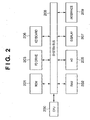
- Fig. 2 is a block diagram for explaining an information processing apparatus according to the present invention.
- the client computers 102, 103, and 104 as information processing apparatuses have the same arrangement, and the server 101 also has the same or equivalent hardware arrangement.
- Fig. 2 will be explained as a block diagram used to explain the arrangement of the client and server.
- reference numeral 200 denotes a CPU as control means of the information processing apparatus.
- the CPU 200 makes control to execute an application program, printer driver program, OS, network printer control program of the present invention, and the like, which are stored in a hard disk (HD) 205, and to temporarily store information, files, and the like required to execute programs on a RAM 202.
- HD hard disk
- Reference numeral 201 denotes a ROM as storage means.
- the ROM 201 stores programs such as a basic I/O program and the like, and various data such as font data, template data, and the like used in a document process.
- Reference numeral 202 denotes a RAM as temporary storage means, which serves as a main memory, work area, and the like of the CPU 200.
- Reference numeral 203 denotes a floppy® disk (FD) drive as storage medium load means.
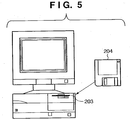
- a program stored in an FD 204 as a storage medium can be loaded onto the computer system of this embodiment via the FD drive 203, as shown in Fig. 5 (to be described later).
- the storage medium is not limited to the FD, and various other storage media such as a CD-ROM, CD-R, CD-RW, PC card, DVD, IC memory card, MO, memory stick, and the like may be arbitrarily used.
- Reference numeral 204 denotes a floppy disk (FD) as a storage medium, which stores a computer-readable program.
- FD floppy disk
- Reference numeral 205 denotes a hard disk (HD) which is one of external storage means, and serves as a large-capacity memory.
- the HD 205 stores an application program, printer driver program, OS, network printer control program, associated programs, and the like. Furthermore, a spooler as spool means is assured on the HD 205.
- the spool means corresponds to a client spooler on the client, or a server spooler on the print server. In the print server, a table used to store job information received from the client and to make order control is generated and stored in this external storage means.
- Reference numeral 206 denotes a keyboard as instruction input means (pointing device). With the keyboard 206, the user inputs commands such as a device control command and the like to the client computer, or an operator or administrator inputs such commands to the print server. As the pointing device, a keyboard & mouse, liquid crystal touch panel, and the like may be applied.
- Reference numeral 207 denotes a display as display means, which displays commands input from the keyboard 206, the status of the printer, and the like.
- Reference numeral 208 denotes a system bus which controls the flows of data in the computer as the client or print server.
- Reference numeral 209 denotes an interface as input/output means.
- the information processing apparatus exchanges data with an external apparatus via the interface 209.
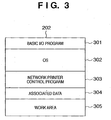
- Fig. 3 shows an example of the memory map of the RAM 202 shown in Fig. 2 , i.e., the memory map in the state wherein the network printer control program is loaded from the FD 204 onto the RAM 202 and is ready to run.
- the network printer control program and associated data are directly loaded from the FD 204 onto the RAM 202 when they are executed.
- every time the network printer control program is launched from the FD 204 it may be loaded from the HD 205 on which the network printer control program has already been installed onto the RAM 202.
- a CD-ROM, CD-R, PC card, DVD, IC memory card, and the like may be used in addition to the FD as long as they can store information.
- the network printer control program of this embodiment may be stored in the ROM 201 to form the memory map, and may be directly executed by the CPU 200.
- the network printer control program will also be simply referred to as a print control program.
- the print control program includes a program which makes control for instructing to change the print destination of a print job and instructing to change the print order at the client, and a program for making the order control of print jobs, and notifying a print end, print destination change request, and the like of a print job.
- the print control program of the present invention which makes such control may be divided into modules to be installed in the client and those to be installed in the print server, or a single print control program may serve as that for a client or print server depending on its execution environment. Also, modules having functions for a client and those having functions for a print server may be installed in a single computer, and may run at the same time or may run time-divisionally to attain pseudo parallel operations.
- Reference numeral 301 denotes a basic I/O program, which is an area that stores a program having an IPL (initial program loading) function which loads an OS from the HD 205 onto the RAM 202 when the power switch of this control apparatus is turned on and starts the operation of the OS, and the like.
- IPL initial program loading
- Reference numeral 302 denotes an operating system (OS); and 303, a network printer control program which is stored in an area assured on the RAM 202.
- Reference numeral 304 denotes associated data which is stored in an area assured on the RAM 202.
- Reference numeral 305 denotes a work area which is assured by the CPU 200 to execute the printer control program.
- Fig. 4 shows an example of the memory map of the FD 204 shown in Fig. 2 .
- reference numeral 400 denotes the data contents of the FD 204; 401, volume information indicating information of data; 402, directory information; 403, a network printer control program as a print control program to be explained in this embodiment; and 404, associated data of the program.
- the network printer control program 403 is programmed based on the flowcharts described in this embodiment, and has the same configuration for both the client and server in this embodiment.
- Fig. 5 shows the relationship with the FD 204 to be inserted into the FD drive 203 shown in Fig. 2 , and the same reference numerals in Fig. 5 denote the same parts as in Fig. 2 .
- the FD 204 stores the network printer control program and associated data described in this embodiment.
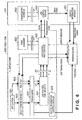
- Fig. 6 is a diagram showing how to process a print job issued by a general application (e.g., Microsoft Word®) by a print job control system in this system.
- reference numeral 600 denotes a client machine, which indicates a machine on which a client module of the print job control system runs.
- the client machine 600 corresponds to one of the clients 102 to 104 shown in Fig. 1 .
- an application program When a print instruction is issued, an application program generates a series of rendering commands (GDI) via the mechanism of the OS, and passes them to a Windows Spooler via a printer driver.
- the Windows Spooler passes print job data to a port monitor selected by the user and controls it to transmit the data to a printer device.
- This processing sequence corresponds to the processing route of 604 and 625 in Fig. 6 .
- print routes to be described below are assumed.
- the user designates a logical printer, which is associated in advance with a port monitor 621 for the print job control system (to be simply referred to as a job control port monitor hereinafter in this embodiment), and issues a print instruction.
- an application program 601 generates a series of rendering commands.
- a group printer driver 603 Upon reception of these rendering commands, a group printer driver 603 generates a versatile print file, and transmits print job data to the job control port monitor 621 in place of a port monitor that transmits print job data to a printer device.
- the job control port monitor 621 transfers the print job data to a print service 622 for the print job control system (to be simply referred to as a job control print service hereinafter in this embodiment) in place of a printer device 650 (105).
- the group printer driver 603 converts a series of rendering commands generated by the application program into a versatile print file as a file of an intermediate format which is independent from the types of printer devices, OSs, and the like. The configuration of the versatile print file will be described later.
- This versatile print file is sent from the Windows Spooler 604 to the job control print service 622 (b) via the job control port monitor 621 (a).
- the job control print service 622 generates rendering commands on the basis of the versatile print file in accordance with the type of job control to be applied to this print job (c).
- a PDL driver 602 converts these rendering commands into a PDL file that can be interpreted by the printer device 650.
- the job control print service 622 executes job control that divides the print job into two jobs, i.e., it generates two member jobs, as indicated by two arrows (c).
- the PDL file generated by the PDL driver 602 is passed to the job control print service 622 again (e) via the Windows Spooler 604 and the job control port monitor 621 (d).
- the job control print service 622 transmits the PDL print job data to the printer device 650 in accordance with an instruction of a job control server 630 (f).
- the job control print service 622 logically divides one versatile print file into a plurality of print jobs in accordance with an instruction of a print instruction in the versatile print file, and transmits these jobs to different printer devices, or re-transmits a print job that has been transmitted once to another printer device. Note that (c), (d), (e), and (f) in Fig. 6 indicate routes of print job data in such case.
- the application software As another print route, a case may be assumed wherein the application software generates a versatile print file, and directly throws it in that versatile print file as a print job.
- the way information is passed to the group printer driver 603 and the processing contents in the group printer driver 603 are different from those of a general application.
- the general application passes rendering information to the group printer driver 603, it calls a Windows GDI function as in a normal printer driver, and the group printer driver 603 generates a versatile print file according to that function.
- the group printer driver 603 In case of an application that directly generates a versatile print file, the application already has a versatile print file, and supplies it to the group printer driver 603.
- the group printer driver 603 rewrites the contents of a print instruction in the versatile print file on the basis of a print method, which is set in advance, as needed, and sends that file to the Windows Spooler 604.
- a case may be assumed wherein a print instruction is issued without designating the job control port monitor 621, and a job is thrown into the printer device 650 without generating any versatile print file.
- rendering commands generated via the OS are passed to the printer (PDL) driver 602 in place of the group printer driver 603 (601 ⁇ 602), and print data generated by the printer driver 602 is thrown into the printer device 650 via the Windows Spooler 604, job control port monitor 621, and job control print service 622.
- the job control print service 622 transmits print data on the basis of an IP address, printer name, and MAC address, which are associated in advance with the logical printer of the printer driver 602.
- the job control print service 622 applies a print job control process (to be described later) to print job data.
- a print manager 623 for the print job control system (to be simply referred to as a job control print manager hereinafter in this embodiment) is a program that provides a user interface (UI) that allows the user to check the status of a print job in the job control print service 622 and to manipulate the print job.
- UI user interface
- the job control print manager 623 exchanges information and instructions with the job control print service 622 via an interface (API) of software of the job control print service 622.
- API interface
- the job control print manager 623 is illustrated in distinction from the job control print service 622, but may be included in the functions of the job control print service 622.
- a system server 630 for the print job control system (to be simply referred to as a job control server hereinafter in this embodiment) makes central control (scheduling) of transmission timings of print job data from the job control print service 622 on each individual client 600 to the printer device 650.
- 101 in Fig. 6 corresponds to the print server 101.
- print job data are scheduled by each individual client machine.
- a management console 633 for the print job control system exchanges information and instructions with the job control server 630 via an API required for software of the job control server 630 to access, thus monitoring the whole print job control system.
- the job control server 630 communicates with each printer device 650 using a device information control module 631 to acquire information associated with a print job in that printer and the operation state of the printer, and to make various operations such as a job cancel operation and the like.
- the job control server 630 can pass the acquired information to the job control print service 622 on the client 600 side.
- the job control print service 622 itself acquires information associated with a print job in that printer and the operation state of the printer, and makes various operations such as a job cancel operation and the like.
- a device information control module 625 in Fig. 6 runs when a job is transmitted to the printer device 650 without the intervention of the job control port monitor.
- the basic function of the module 625 is the same as that of the device information control module 631, and a detailed description thereof will be omitted.
- Fig. 8 shows an example of the configuration of a versatile print file.
- the versatile print file used in this embodiment includes a print instruction field 8a and document data field 8b.
- the print instruction field describes information of a document and a print instruction.
- Document data is obtained by converting data of a document generated by an application into data of a versatile format such as PDF (trademark of Adobe Systems Corporation) or the like, and has a data format which is independent from a printer language.
- the print instruction field 8a includes a header field 801, page information field 802, document attribute field 803, print style instruction field 804, output method designation field 805, member printer count 806, group printer driver setup information field 807, member printer driver names 808, and the like.
- the header field 801 stores information such as version identification data, file information, and the like of this file.
- the page information field 802 stores information such as the number of pages, each page size, and the like of document data in the document data field 8b.
- the print style instruction field 804 stores information associated with an output style such as a print page range, the number of copies to be printed, imposition information (N-UP, booklet print, or the like) of document data, a staple instruction, punch instruction, and the like.
- the output method designation field 805 stores information such as distributed print, color-monochrome distributed print, substitutional print, multicasting print, and the like as an output method.
- the member printer count 806 stores the number of member printers associated with the group printer driver.
- the group printer driver setup information field 807 stores setup information of a UI of the group printer driver (to be described later).
- the group printer driver setup information field stores DEVMODE information as setup information of a driver UI of each member printer.
- the member printer driver name 808 stores a printer driver name of each member printer.
- the member printer driver name 808 and group printer driver setup information field 807 have storage areas in correspondence with the number of member printers stored in the member printer count.
- the group printer driver 603 described using Fig. 6 above records setups on a group printer driver GUI in the print instruction field 8a upon generation of the versatile print file.
- the group printer driver 603 converts data received as GDI data into versatile data, and records the converted data in the document data field of the versatile print file as document data.
- this file may include the print instruction field 8a and document data field 8b as independent files.
- the print instruction field is present as a print instruction file
- the document data field is present as a document data file.
- Fig. 7 is a functional block diagram for explaining details of the job control print service 622 and print manager 623 in Fig. 6 .
- Blocks 604, 622, 623, and 650 in Fig. 7 are basically equivalent to those denoted by the same reference numerals in Fig. 6 .
- the two-way arrows in Fig. 7 indicate the state wherein respective modules exchange information with each other.
- the modules exchange information via the mechanism of the OS in practice.
- the mechanism of the OS an OS call, call back, and the like may be used.
- a module 704 corresponds to the arrangement of the print manager 623 in Fig. 6 , which has a function of monitoring to an input to a resident icon 702 via the pointing device. Also, the module 704 serves as control means that makes a display instruction to a resident display on the basis of the monitoring result.
- an icon displayed on a task tray of the Windows is known.
- the task tray displays icons of various kinds of software, which may trouble the user if they quit all of a sudden.
- An icon displayed on the task tray as the resident icon will be exemplified below.
- the resident icon is not limited to this.
- the default printer monitor module 704 determines the type of an instruction to the resident icon, which is detected via the mechanism of the OS. This printer monitor module 704 controls a function of recognizing information provided by a device information control module 706 that monitors the status of the printer, and displaying a result based on the recognition as a resident display. Since the default printer is set as an object to be monitored, the status of the printer which is most frequently used by the user can be easily monitored without selecting a printer to be monitored in each process. Since the default printer, which is most frequently used by the user, is set as the object to be monitored in place of a plurality of printers, the status of the printer can be reflected on the display of the limited task tray icon.
- a job control print core module 705 and the device information control module 706 correspond to the arrangement of the job control print service 622 in Fig. 6 .
- Fig. 7 shows the state wherein the status of the printer device 650 is acquired via this device information control module 706.
- the printer device 650 in Fig. 7 may be replaced by the job control server 630 in Fig. 6 .
- the core module 705 has a function of acquiring the status data of the printer device and those of jobs in the printer device via the device information control module 706, and notifying the default printer monitor module 704 (print manager 623) of the acquired information.
- the default printer monitor module 704 controls to make a status display on the resident icon 702 in correspondence with the received information. Note that the process of the default printer monitor module 704 will be described in detail later.
- Blocks 604 and 701 indicate the OS (operating system) modules on which this print control system runs, and these OS modules exchange various kinds of information with the job control print service 622 and print manager 623.
- the core module 705 of the job control print service 622 acquires information of a printer, which is set as the default printer, from the OS module (Windows Spooler) 604.
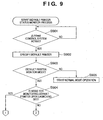
- Fig. 9 is a flowchart showing a process executed upon launching a program module that reflects the status of the default printer. In this embodiment, this process corresponds to a process executed at a launch timing of the print manager 623 in Fig. 6 .
- step S901 the print manager 623 checks if the job control print service 622 (print control system) has been launched. If it is determined that the job control print service 622 has been launched (YES in step S901), the control enters a process for displaying the resident icon. If it is determined that the job control print service 622 has not been launched yet (NO in step S901), the control returns to the process for checking if the job control print service 622 has been launched. In this embodiment, since the print manager 623 utilizes the function of acquiring various status data of the printer device of the job control print service 622, it is confirmed in step S901 if the job control print service 622 has been launched. However, if the print manager 623 itself can acquire various status data of the printer device, the process in step S901 may be omitted.
- a printer which is currently set as the default printer is specified via the mechanism of the OS in step S902, and that information is saved in a predetermined internal storage area in a format that can be referred to by the print manager 623.
- the default printer to be monitored can be acquired using a "GetDefaultPrinter()" function in the Windows NT/2000/XP®.
- the default printer to be specified in step S902 is also changed accordingly. In other words, even when the user has changed the default printer in the operating system, the monitoring process of the new default printer is guaranteed in correspondence with that change.
- the default printer can be changed via a UI of a control panel.
- the default printer corresponds to a printer which is set as a default upon making a print process via, e.g., document creation software.
- the print manager 623 specifies the default printer in step S902, and sets it in its internal default printer information.
- the print manager 623 acquires various kinds of information of the default printer in, e.g., the flowcharts of Figs. 12 and 13 , it acquires status information in association with the printer which is set and stored in the default printer information.
- step S903 It is checked in step S903 if the current operation mode of the resident icon is a default printer monitor mode.
- This process corresponds to a process for checking if a radio button 1002 in Fig. 10 is checked, as will be described in detail later. If YES in step S903, the control enters a process for displaying a default printer monitor mode resident icon indicating the status of the default printer on the task tray on the client screen. In this way, since the resident icon is displayed on the task tray, the monitor result of the default printer can be displayed without concealing display of other applications. In addition, since that monitor result is displayed as an icon which allows the user to intuitively understand its meaning, the user can easily recognize the monitor result. The types and contents of the icons will be described later using Figs. 15A to 15C .
- resident display of an icon in this embodiment means that an icon is always displayed on the task tray of the computer display screen upon starting up the client computer so as to be able to receive a user's instruction, and its display pattern can be changed in response to a user's instruction to that icon during icon display.
- an icon is displayed on the task tray.
- the present invention is not limited to the task tray, and an icon may be displayed on a fixed region other than an application display region on the computer screen.
- a bar display (bar length or the like) indicating one application does not change depending on the number of tasks unlike a task bar, and the display position or order, the display size, and the like of the resident icon on the fixed region always remain the same.
- the resident icon is characterized by reflecting the monitor result of the monitor module of jobs and devices, which is launched in response to an instruction to the resident icon, on the display of the resident icon, unlike a shortcut icon which is used to launch a predetermined application.
- the Windows XP can partially hide and display the task tray.
- the task tray in such display mode can also be applied as resident display in this embodiment.
- Fig. 11 shows the state wherein the default printer monitor mode resident icon is displayed on the task tray of the client screen as an example of the resident icon.
- reference numeral 1101 denotes an edit window of document processing software, which runs on the client.
- Reference numeral 1102 denotes a task tray.
- Reference numeral 1103 denotes a resident icon.
- the resident icon 1103 is switched to a default printer monitor mode resident icon or a normal mode resident icon with a fixed display pattern, which is used to directly launch a detailed status application of each device and job, in accordance with the operation mode set using items 1002 and 1003 in Fig. 10 mentioned above.
- a normal monitor utility that displays device information and job information in more detail than the resident display in this embodiment is launched.
- Reference numeral 1104 denotes a job status monitor icon displayed upon issuing a print request in this embodiment.
- step S903 i.e., if the current mode of the resident icon is not the default printer monitor mode but the normal mode, the flow advances to step S905 to display the normal mode resident icon on the task tray of the client screen.
- step S904 If it is determined in step S903 that the current operation mode is the default printer monitor mode, it is checked in step S904 if a mode for monitoring the default printer upon launching is selected. That is, it is checked if an item 1006 in Fig. 10 is checked, as will be described later. If YES in step S904, the flowchart in Fig. 13 is executed to display the default printer monitor mode resident icon 1103, and to start monitoring of the status of the default printer at the same time, thus reflecting the status on the icon display. The flow then advances to step S1301 in Fig. 13 . If NO in step S904, the control enters the process in the flowchart shown in Fig. 12 , and monitoring of the status of the default printer is not immediately started.
- the default printer as a logical printer is monitored.
- the status of a physical printer which links the logical printer is indirectly monitored via the logical printer.
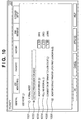
- Fig. 10 shows the display state of a user interface used to make setups which are to be referred to in steps S903 and S904 in the flowchart of Fig. 9 .
- setups have predetermined initial setup contents in a default state.
- the user wants to change these setups he or she selects "property" from a menu displayed by right-clicking the resident icon by the pointing device, thus displaying this user interface on the screen.
- a "normal" mode setup item 1001 is selected when the print manager 623 is used in the normal mode, and the aforementioned normal mode resident icon is displayed.
- a "default printer monitor mode" setup item 1002 is selected when the print manager 632 is used in the default printer monitor mode. When this setup is enabled, the default printer status monitor icon is displayed upon launching this print system.
- setup items 1001 and 1002 are realized using radio buttons, and the normal mode and default printer monitor mode are exclusively selected. These items are used to set the mode to be referred to in step S903 by the user.
- a "monitor period" setup item 1003 is used to set a period for monitoring the status of the default printer in response to a predetermined launch instruction to the resident display icon. Since this period can be set, monitoring operation can be performed during a predetermined period before and after the user requires the status of the printer to be monitored. Hence, information that the user wants can be sufficiently provided, and the network load can be reduced compared to a case wherein the default printer is to be monitored all the time.
- a "polling interval" setup item 1004 is used to set an acquisition interval of the number of jobs in a device so as to detect the degree of congestion of the device when the default printer status monitor icon monitors the status of the default printer. By setting a long interval of the item 1004, the network communication load can be reduced.
- a "congestion determination job count” setup item 1005 is used to set the number of jobs in the device required to determine "congestion". For example, a user who handles jobs with large sizes, and a user who handles jobs with small sizes may set different numbers of jobs for congestion determination. However, by providing this setup item 1005, users of various print business formats can be supported. This setup value is reflected in a display process in step S1302 in Fig. 13 .
- monitoring of the default printer automatically starts from a switching timing of the default printer status monitor mode (upon first launching or upon switching this setup).
- YES is determined in step S903 in Fig. 9 .
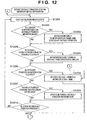
- step S904 If it is determined in step S904 above that "monitor default printer upon first launching" setup is not enabled, an instruction for displaying the default printer status monitor mode resident icon 1103 in a non-monitor state is issued in step S1201.
- the print manager 623 displays the resident icon on the task tray using, e.g., a Shell_NotifyIcon() function of the Windows API.
- steps S1202, S1204, and S1206 processes for switching processing operations to be executed are done in accordance with the types of instructions to the resident icon (resident display). This instruction corresponds to an input 703 via the pointing device in Fig. 7 .
- the print manager 623 receives that event information from the resident icon 702 in step S1203, and tooltip-displays the name and status of the default printer as text. Since such display is allowed, the user can easily visually recognize the name and status of the default printer by only superposing the cursor on the icon, resulting in convenience.
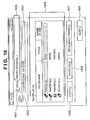
- Fig. 16 shows details of the default printer status dialog 1600.
- the dialog shown in Fig. 16 is active parallel to the default printer monitor mode resident icon 1103 after it is opened until a "close" button 1609 is pressed. Note that control is made to inhibit two or more default printer status dialogs 1600 from displaying at the same time. In this manner, the status dialog can be opened by double-clicking the icon to easily switch the default printer. Since the monitor operation of the default printer and the switching operation of the default printer can be parallelly done, if the resident icon is changed to an error display state, an old default printer can be smoothly switched to a new default printer.
- the print manager 623 stores the time of this event in step S1208, and starts status monitoring of the default printer according to the setups via the setup dialog in Fig. 10 (the control advances to 1 in Fig. 13 ). In this manner, by left-single-clicking the icon by the mouse device, the non-monitor state of the default printer can be easily switched to the monitor state.
- step S1207 It is checked in step S1207 if an instruction for changing the default printer is issued via the dialog opened in step S1205. If such instruction is issued, the internal default printer information of the print manager 623 is updated in step S1209.
- step S1210 It is checked in step S1210 if a job which has been issued to the default printer and is in a state before completion is found. If such job is found, status monitoring of the default printer is started (the control advances to step S1301 in Fig. 13 ). If such job is not found, the flow returns to step S1201 to display the default printer monitor mode resident icon 1103 in the non-monitor state.
- the presence/absence of a job in step S1210 can be checked by recognizing whether or not a job of the user who operates this print job control system to the default printer is stored in a print spooler. The same applies to step S1311 to be described later.
- the default printer can be controlled to make various operations in accordance with the mouse device operations on the resident icon, the need for inputting an instruction by purposely opening a control panel for each desired operation can be obviated for the user unlike the prior art, thus providing a very user-friendly user interface.
- the resident icon is displayed on the task bar region and the user can give an instruction to the icon displayed there, the default printer can be controlled to make various operations without disturbing display of Microsoft Word used to create a document to be printed itself and other applications.
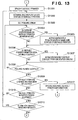
- Fig. 13 shows a series of processes after step S904 in Fig. 9 or step S1210 in Fig. 12 .
- step S1301 the default printer is specified in step S1301.
- the process in step S1301 may be attained either by a process for referring to the default printer information held in the predetermined storage area, which has been explained in the process in step S902 above, or by repeating the process in step S902.
- Physical printer information corresponding to the default logical printer set as an object to be monitored is acquired via MIB (Management Information Base) or a predetermined unique protocol in step S1302. More specifically, the print manager 623 requests to acquire status information of the default printer via the core module 705 of the job control print service 622, and updates the display state of the default printer monitor mode resident icon 1103 on the basis of information returned from the core module 705, as shown in Fig. 7 .
- the information returned from the core module 705 to the print manager 623 includes status information of the device and jobs acquired by the core module 705 from the printer device 650 via the device information control module 706.
- the information acquired in step S1302 considers not only jobs of the client (user) that executes the flowchart in Fig. 13 but also jobs of other clients.
- monitoring of the default printer starts and/or ends on the basis of the presence of a job of the self client (self user) in step S1210 in Fig. 12 or step S1311, and the status of the default printer reflected on the resident display in step S1201 is that of the physical printer corresponding to the default printer based on jobs of other clients (other users). Hence, whether or not jobs of other users must be considered can be efficiently selected.
- a polling timer is set to update the default printer monitor mode resident icon 1103 at a predetermined time interval.
- the time interval set in the timer is a value which is set using the "polling interval" item 1004 in Fig. 10 .
- the polling interval is set as an acquisition interval of the number of jobs in a device so as to detect the degree of congestion of the device when the default printer status monitor icon monitors the status of the default printer. By setting a long polling interval, the network communication load can be reduced. Therefore, when congestion is predicted to some extent (time band or device), a long polling interval is set.
- steps S1304 and S1306 processes for switching processing operations to be executed are performed in accordance with the types of instructions to the resident icon (resident display) as in steps S1202, S1204, and S1206 in Fig. 12 .
- step S1304 i.e., if the user moves the mouse cursor and superposes it on the default printer status monitor icon displayed in the non-monitor state
- the print manager 623 receives that event information from the resident icon 702 in step S1305, and tooltip-displays the name and status of the default printer as text. Since such display is allowed, the user can easily visually recognize the name and status of the default printer by only superposing the cursor on the icon, resulting in convenience.
- step S1306 i.e., if the user double-clicks the default printer status monitor mode resident icon 1103 displayed in the non-monitor state, the print manager 623 opens and displays the default printer status dialog 1600 in step S1307.
- the dialog is active parallel to the default printer monitor mode resident icon 1103 after it is opened until the "close" button 1609 is pressed. In this manner, the status dialog can be opened by left-double-clicking the icon to easily switch the default printer. Since the monitor operation of the default printer and the switching operation of the default printer can be parallelly carried out, if the resident icon is changed to an error display state, an old default printer can be smoothly switched to a new default printer.
- step S1308 the timer set in step S1303 is checked to see if the polling period has elapsed. If the polling period has not elapsed yet (NO in step S1308), the flow returns to step S1304. If the polling period has elapsed (YES in step S1308), the flow advances to step S1309.
- step S1309 It is checked in step S1309 if an instruction for changing the default printer is issued. If such instruction is issued, the internal default printer information of the print manager 623 is updated in step S1312, and the control advances to step S1208 in Fig. 12 -. If no such change instruction is issued, the flow advances to step S1310.
- step S1310 It is checked in step S1310 with reference to the time stored in step S1206 in Fig. 12 if a default printer monitor period has elapsed.
- the default printer monitor period uses a value set using the "monitor period" item 1003 on the dialog shown in Fig. 10 . If the monitor period has not elapsed yet (NO in step S1310), the flow returns to step S1302. If the monitor period has elapsed, the flow advances to step S1311. In this manner, since the monitor period is assured and can be set by the user, information that the user wants can be sufficiently provided, and the network load can be reduced compared to a case wherein the printer is to be monitored all the time.
- step S1311 It is checked in step S1311 if a job which has been issued to the default printer and is in a state before completion is found. If such job is found (YES in step S1311), the flow returns to step S1302. If such job is not found, the flow advances to step S1201 in Fig. 12 . If a job to be monitored still remains even after the monitor period has elapsed, monitoring is continued. Hence, if any abnormality occurs during processing of the remaining job, that abnormality can be immediately found. The user can immediately take a measure against such abnormality, and the flexibility of the device processing control can be improved.
- the user can easily confirm the status of the printer by inputting an instruction to the resident display on the task tray before he or she issues a print job to the default printer. Since the status of the default printer to be monitored is reflected on the resident display on the task tray in accordance with a confirmation instruction, the status of the printer can be efficiently confirmed without disturbing display of other applications. Even if an error has occurred in the default printer upon confirmation, the user can smoothly make a series of operations, i.e., can change the default printer to another printer free from any error and issue a print job.
- the monitor mode is launched by single-clicking the resident icon, and the monitor state can be started not only when a print request is issued but also when no print request is issued, resulting in very high convenience for the user.
- Fig. 14 shows the correspondence between the types of input instructions to the default printer monitor mode resident icon 1103 in steps S1202, S1204, and S1206 in Fig. 12 and steps S1304 and S1306 in Fig. 13 , and the processing operation contents of this print system. That is, when the user left-double-clicks the default printer monitor mode resident icon 1103, the status dialog is displayed. When the user right-single-clicks the icon 1103 by the mouse, a popup menu including items shown in Fig. 14 is displayed. In this case, if "display printer list”, “individual printer”, or “display job list” is selected from the displayed menu, the aforementioned normal monitor utility is launched with a different default display dialog depending on the selected contents.
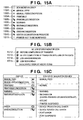
- the default printer status monitor icon will be described below using Figs. 15A to 15C .
- Fig. 15A shows the correspondence between the printer to be monitored and the display patterns of the resident icon based on information acquired from the printer device in step S1302 in Fig. 13 .
- these display patterns are used to display the resident icon in step S1302.
- the respective display patterns of the resident icon shown in Fig. 15A represent the states of the physical printer corresponding to the default printer in consideration of jobs of other clients (users).
- a non-monitor status icon 1501 indicates a state wherein the default printer is not monitored.
- a manual feed icon 1502 indicates a "waiting state" of user's manual feed.
- a manual feed/congestion icon 1503 means a "waiting state" of user's manual feed and "congestion state”.
- An icon 1504 indicates a printable state.
- An icon 1505 indicates a printable but congestion state.
- An icon 1506 indicates a warning state, and an icon 1507 indicates a warning state and congestion state.
- An icon 1508 indicates an error state, and an icon 1509 indicates an error state and congestion state.
- a status acquisition icon 1510 indicates that acquisition of the printer status is in progress.
- An icon 1511 indicates a printer which is not to be monitored.
- Fig. 15C shows the correspondence between the display patterns of the default printer status monitor icon and queue/port/device state of the printer.
- the contents of the right column in Fig. 15C correspond to status information which is acquired by the print manager 623 from the printer device 650 via the job control print service 622. This status information is acquired via MIB or a status acquisition unique protocol, as described above.
- “Manual feed” means a “waiting state” of user's manual feed.
- “Normal” means a printable state (including not only an idle state but also a printing state) without any special event.
- "Warning” is a generic term of printable states suffering some problems (e.g., the toner remaining amount is small).
- “Information” is a generic term of unprintable states free from any error (e.g., a warming-up state of a printer engine).
- “Offline” means a state wherein a communication channel for transmitting print data to the printer is disconnected.
- Print suspended corresponds a state wherein the Windows “printer” is suspended, i.e., a state wherein transfer of print data stored in the Windows spooler to an external module (621, 605, or the like) is suspended.
- Decorator call is a state wherein the printer requires user's operation
- device service call is a state wherein the printer requires maintenance.
- port error corresponds to a state wherein the job control print service 622 cannot communicate with the job control server 630 via a communication port, and cannot consequently acquire various kinds of information of the printer device 650 via the job control server 630.
- Port suspended corresponds to a state wherein spooled print data cannot be transmitted to the printer device via a job transmission port, as indicated by (f) in Fig. 6 .
- Fig. 15B shows the display patterns of a job status monitor icon, which indicate the status of a job of a given user of the printer which is being monitored. These display patterns are applied not only to jobs to the default printer.
- the job status monitor icon When a job of the given user is input to the printer which is being monitored, the job status monitor icon is added to the task tray, and the status of that job is monitored from that timing until the job ends. After all jobs end, the icon is deleted from the task tray. When this job status monitor icon is double-clicked, a list of jobs issued by the given user is displayed.
- An icon 1512 indicates a completion state of transfer of a job to the printer, and an icon 1513 means a state immediately after transfer of a job until end of the process, i.e., that a job process is in progress.
- An icon 1514 indicates a state wherein an error has occurred in a job, and an icon 1515 indicates a state wherein a job process is suspended.
- Fig. 16 shows the display state of the default printer status dialog which is displayed in accordance with the processes in steps S1205 in Fig. 12 and step S1307, as described above.
- a default printer icon 1601 is an icon (32*32) of the default printer, and allows to discriminate an LBP machine, MFP machine, machine of another company, color/monochrome, and the like.
- a default printer status icon 1602 is an icon (16*16) indicating the status of the default printer, and represents the same status as that of the default printer status monitor icon.
- a default printer name 1603 indicates the printer name of the default printer.
- a Device panel character string 1604 displays the same contents as those of a character string displayed on an LCD panel of the default printer device. Even when the LCD panel displays the character string in two lines, it is displayed in one line.
- the panel character string can be acquired from only a printer which supports a panel character string acquisition command from a remote machine. Hence, when a model that does not support this command is the default printer, the panel character string display area itself is not displayed.
- a printer status list 1605 displays the status icons, printer names, and the numbers of jobs in devices of respective printers. This list displays status data acquired at the time of displaying the status display UI. Printers displayed in this list are logical printers registered in the print system having the job control print service of the client machine 600 as a core.
- a device job display button 1608 is used to display a list of jobs in the device of the printer selected from the printer status list. For example, when this button is clicked, a Web browser is launched to display a job list of a remote UI.
- Fig. 17 is a flowchart showing a job detection process executed by the job control print service 622 in Fig. 6 , i.e., the process for displaying the icon 1104 in Fig. 11 . Also, this flowchart corresponds to the one for generating information to be referred to by the print manager 623 in step S1210 or S1311 described above. Note that the flowchart in Fig. 17 is asynchronously executed parallel to Figs. 12 and 13 .
- a job status monitor program function starts in response to issuance of a print job while the print manager 623 is active.
- step S1701 It is checked in step S1701 if incomplete jobs issued by the self user are present. This checking process is attained by sending an inquiry from the print manager 623 to the job control print service 622 in Fig. 7 . At this time, not only the default printer but also all logical printers registered in the print system having the job control print service of the client machine 600 as a core are checked. If NO in step S1701, the job status monitor icon 1104, which is displayed unnecessarily, is cleared in step S1708. If no such icon is displayed, that state is held. The job status monitor icon 1104 is unnecessarily displayed when the polling period has elapsed in step S1707 and no incomplete jobs are found. If YES in step S1701, the flow advances to step S1702.
- step S1702 status data of respective incomplete jobs are acquired. This process is implemented by sending an inquiry from the print manager 623 to the job control print service 622 in Fig. 7 .
- step S1703 It is checked in step S1703 on the basis of the status information of the incomplete jobs acquired in step S1702 if these incomplete jobs include ones in a state before transfer to the device. If YES in step S1703, a pre-device transfer icon is displayed on the task tray as a resident display in step S1704. If NO in step S1703, a device processing icon is in progress is displayed on the task tray as a resident display in step S1705.
- step S1706 the update interval of the job status monitor icon is set in the polling timer.
- step S1707 the polling timer is checked to see if the update period has elapsed. If the update period has elapsed (YES in step S1707), the flow returns to step S1701. If the update period has not elapsed yet (NO in step S1707), the flow returns to step S1707.
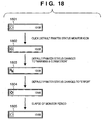
- a state 1801 in Fig. 18 indicates an initial display state when the operation mode is the default printer monitor mode in Fig. 9 , and the mode that does not monitor the default printer upon launching is set. Therefore, an icon in the state 1801 indicates a non-monitor state, as indicated by 1501 in Fig. 15A .
- a state 1802 corresponds to the display state of the latest status of the default printer in step S1302 in Fig. 13 via step S1208 in Fig. 12 since the default printer monitor mode resident icon 1103 is left-single-clicked in step S1206 in Fig. 12 .
- the default printer monitor mode resident icon in this state indicates a printable state, as indicated by 1504 in Fig. 15A .
- a state 1803 indicates that the display state of the default printer monitor mode resident icon is updated in step S1302 in Fig. 13 before it is determined in step S1310 in Fig. 13 that the default printer monitor period has elapsed, a predetermined number or more of jobs from other users are transferred to the device at that time, and a warning state is generated.
- the default printer monitor mode icon in this state indicates a warning & congestion state, as indicated by 1507 in Fig. 15A .
- a state 1804 indicates that the display state of the default printer monitor mode resident icon is updated, and the device suffers an error state (error state icon: 1508) at that time.
- a state 1805 indicates that it is determined in step S1310 that the default printer monitor period has elapsed, and since the user of interest does not input any job, NO is determined in step S1311 and the flow advances to step S1201 in Fig. 12 to set a non-monitor state (non-monitor state icon: 1501).
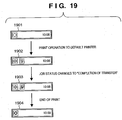
- a state 1901 in Fig. 19 indicates an initial display state when the operation mode is the default printer monitor mode in Fig. 9 , and the mode that does not monitor the default printer upon launching is set, as in Fig. 18 . Therefore, an icon in the initial state indicates a non-monitor state, as indicated by 1501 in Fig. 15A .
- a state 1902 indicates that YES is determined in step S1210 and the flow advances to step S1302 in Fig. 13 to display the state (printable) of the default printer.
- the flow advances to step S1704 via step S1703, and a pre-device transfer icon is displayed as the job status monitor icon. Therefore, in the state 1902, the icon 1504 indicating "printable” and the icon 1512 indicating "before completion of transfer” are displayed.
- the aforementioned normal monitor utility is launched.
- the normal monitor utility that allows the user to browse information in more detail than the resident display at the issuance timing of a job can be launched.
- a device processing icon is in progress (the icon 1513 shown in Fig. 15B ) is displayed.
- "Process in progress” of the device processing icon is in progress in the state 1903 means “after completion of transfer until end of process”.
- "End” corresponds to reception of an end message from a device which supports a predetermined control language (e.g., LIPS of CANON Inc.), and means that the timing after transfer matches the end timing for devices which do not support such control language.
- a predetermined control language e.g., LIPS of CANON Inc.
- step S1311 As for default printer status monitoring operation, since the job of the user of interest is not completed, YES is determined in step S1311, and the flow returns to step S1302, thus continuing the status display.
- the printable state remains unchanged, since the device status remains the same.
- step S1701 NO is determined in step S1701.
- step S1708 the job status monitor icon 1104 is cleared in step S1708. Since the default printer monitor period has elapsed, the flow advances from step S1310 to step S1201 via step S1311. In the state 1904, the default printer monitor mode resident icon 1103 is set in a non-monitor state.
- a state 2001 in Fig. 20 indicates an initial display state when the operation mode is the default printer monitor mode in Fig. 9 , and the mode that does not monitor the default printer upon launching is set, as in Figs. 18 and 19 .
- step S1206 the flow advances from step S1206 to step S1208, and then reaches step S1302.
- step S1302. the status of the default printer is displayed.
- step S1306 the default printer monitor mode resident icon 1103
- the flow advances from step S1306 to step S1307.
- the default printer status display dialog is displayed.
- a change instruction to a printer which is printable and is not congested as the default printer is issued in response to an instruction via the pointing device.
- step S1309 Since the user has changed the default printer on the default printer status display dialog, YES is determined in step S1309, and the flow advances to step S1208. After the default printer monitor start time is updated in step S1208, the status of the new default printer is displayed in step S1302. A state 2004 indicates this state.
- the job status monitor icon is added in a state 2005. Since this job is not transferred to the device yet, the flow advances from step S1703 to step S1704, and a pre-device transfer icon is displayed in the state 2005.
- the user every time the user wants to detect the status of jobs and printer devices, he or she need not launch a monitor utility application, and can detect the status of jobs and printer devices by a monitor instruction to the resident display.
- the resident display can be displayed on a limited small display region. Therefore, a monitoring scheme that can greatly improve convenience compared to the conventional monitor utility that simultaneously manages status data of a plurality of printers can be implemented.
- the monitor module that acquires job and device status data is launched using the resident display icon on, e.g., the task tray, and the status data acquired by the monitor module is reflected on the resident display.
- display of other application windows such as a document processing application and the like will never be hidden upon monitoring. Since the job status and device status can be monitored without disturbing display of other application windows, monitoring of jobs and devices before issuance of an arbitrary job can be promoted.
- the default printer monitoring process at a timing which is not related to a print request is omitted to reduce the network load. Also, the processing load on the printer and client (or server) can be reduced.
- monitoring of the default printer is not stopped unconditionally, but monitoring is stopped under the condition that jobs of the self user for the default printer are complete.
- the user need not input a monitor instruction of the default printer again, and an unwanted process, i.e., monitoring which is continued even after the print job process of the self user is complete, can be avoided.
- the conventional normal monitor utility that allows the user to browse information of the device and jobs in more detail than the resident display can be launched in addition to the resident display on the task tray, a scheme that can meet the demand of the user who wants to detect detailed information can be provided.
- the device in a paper jam or out-of-paper state can be easily recognized in advance, and the control can prompt the user to set another printer as the default printer. Therefore, a print operation with poor efficiency, i.e., re-issuance of a print request to another printer by the user, can be prevented.
- the functions of the aforementioned embodiments can also be achieved by supplying a storage medium, which records a program code of a software program to the system or apparatus, and reading out and executing the program code stored in the storage medium by a computer (or a CPU or MPU) of the system or apparatus.
- the program code itself read out from the storage medium implements the functions of the above-mentioned embodiments, and the storage medium which stores the program code constitutes the present invention.
- the storage medium for supplying the program code for example, a floppy disk, hard disk, optical disk, magneto-optical disk, CD-ROM, CD-R, magnetic tape, nonvolatile memory card, ROM, and the like may be used.
- the functions of the above-mentioned embodiments may be implemented not only by executing the readout program code by the computer but also by some or all of actual processing operations executed by an OS (operating system) running on the computer on the basis of an instruction of the program code.
- OS operating system
- the functions of the above-mentioned embodiments may be implemented by some or all of actual processing operations executed by a CPU or the like arranged in a function extension board or a function extension unit, which is inserted in or connected to the computer, after the program code read out from the storage medium is written in a memory of the extension board or unit.
- the present invention is not limited to such specific example, and the plurality of printers may include a local computer.
- the network may be a wireless network such as a wireless LAN.
- the default printer is selected as an object to be monitored, the status of a device corresponding to the default printer is monitored, and the result based on monitoring is displayed as a resident display.
- the resident display can be displayed on a limited display region, i.e., the task tray of the Windows, and does not disturb other document creation application windows.
- a job or printer device monitoring scheme which is very convenient for the user, can be implemented.
Landscapes
- Engineering & Computer Science (AREA)
- Theoretical Computer Science (AREA)
- Physics & Mathematics (AREA)
- Human Computer Interaction (AREA)
- General Engineering & Computer Science (AREA)
- General Physics & Mathematics (AREA)
- Mathematical Physics (AREA)
- Accessory Devices And Overall Control Thereof (AREA)
- User Interface Of Digital Computer (AREA)
Claims (22)
- Informationsverarbeitungsvorrichtung mit einer
Druckverarbeitungsfunktion, umfassend:eine Standarddrucker-Spezifizierungseinrichtung (623) zum Spezifizieren eines Standarddruckers, der in einem Betriebssystem als Standard verwendet werden soll;eine Überwachungseinrichtung (706) zum Überwachen eines Status eines ersten Druckers, der als der Standarddrucker spezifiziert ist; sowieeine Steuerungseinrichtung (704) zum Durchführen einer Steuerung, um ein auf Überwachen durch die Überwachungseinrichtung basierendes Ergebnis auf einer Anzeigeeinheit als eine Anzeige vor Ort anzuzeigen,wobei die Überwachungseinrichtung (706) konfiguriert ist, einen Status eines als der Standarddrucker spezifizierten zweiten Druckers zu überwachen, wenn die Standarddrucker-Spezifizierungseinrichtung spezifiziert, dass der Standarddrucker sich vom ersten Drucker zum zweiten Drucker geändert hat, unddie Steuerungseinrichtung (704) konfiguriert ist, eine Steuerung durchzuführen, um ein auf dem Überwachen des Status des zweiten Druckers durch die Überwachungseinrichtung basierendes Ergebnis auf der Anzeigeeinheit als die Anzeige vor Ort anzuzeigen,dadurch gekennzeichnet, dassdie Überwachungseinrichtung weiterhin konfiguriert ist, den Standarddrucker für eine vorbestimmte Zeitspanne zu überwachen, wenn für die Anzeige vor Ort eine erste Anweisung gegeben wird;die Informationsverarbeitungsvorrichtung weiterhin eine Bestimmungseinrichtung umfasst, um basierend auf einem Nichtvorhandensein oder Fehlen eines Auftrags zu bestimmen, ob das Überwachen als Antwort auf ein Ablaufen der vorbestimmten Zeitspanne enden soll oder nicht; undwobei das Überwachen des Standarddruckers basierend auf dem Bestimmungsergebnis durch die Bestimmungseinrichtung endet. - Vorrichtung nach Anspruch 1,
wobei der Standarddrucker ein logischer Drucker ist, und die Überwachungseinrichtung einen dem logischen Drucker entsprechenden physischen Drucker überwacht. - Vorrichtung nach Anspruch 1 oder 2,
weiterhin umfassend eine Prozessumschalteinrichtung zum Umschalten von Verarbeitungsvorgängen, die als Antwort auf Typen von Anweisungen an die Anzeige vor Ort ausgeführt werden sollen. - Vorrichtung nach Anspruch 3,
wobei die Verarbeitungsvorgänge einen Standarddruckeränderungseinstellfenster-Anzeigeprozess sowie einen Standarddrucker-Überwachungsprozess beinhalten. - Vorrichtung nach einem der Ansprüche 1 bis 4,
wobei die Überwachungseinrichtung einen Status des Standarddruckers nach Inbetriebnahme als Antwort auf eine Änderung vom ersten Drucker zum zweiten Drucker überwacht. - Vorrichtung nach Ansprüche 1 bis 5,
wobei das Nichtvorhandensein oder Fehlens eines Auftrags auf einem Auftrag eines ersten Benutzers basiert, und der auf der Anzeige vor Ort widergespiegelte Status des Standarddruckers ein auf Aufträgen eines zweiten Benutzers basierender Status eines dem Standarddrucker entsprechenden physischen Druckers ist. - Vorrichtung nach einem der Ansprüche 1 bis 6,
wobei Überwachen des Standarddruckers basierend auf einem Auftrag eines ersten Benutzers beginnt und/oder endet, und der auf der Anzeige vor Ort widergespiegelte Status des Standarddruckers ein auf einem Auftrag eines zweiten Benutzers basierender Status eines dem Standarddrucker entsprechenden physischen Druckers ist. - Vorrichtung nach einem der Ansprüche 1 bis 7,
wobei die Überwachungseinrichtung unabhängig vom Nichtvorhandensein oder Fehlen einer Druckanforderung in Betrieb genommen werden kann. - Vorrichtung nach einem der Ansprüche 1 bis 8,
wobei die Steuerungseinrichtung ein Überwachungshilfsprogramm in Betrieb nimmt, das Statusdaten mehrerer Drucker sowie Statusdaten von Aufträgen in jedem Drucker zusätzlich zur Anzeige vor Ort anzeigen kann. - Vorrichtung nach einem der Ansprüche 1 bis 9,
weiterhin umfassend eine Auftragsstatus-Überwachungseinrichtung zum Bestimmen des Nichtvorhandenseins oder Fehlens eines Auftrags, der im Standarddrucker gerade einem Druckprozess unterzogen wird, sowie, wenn bestimmt wird, dass der Auftrag vorhanden ist, zum Anzeigen eines einen Status des Auftrags angebenden Auftragsicons als eine weitere Anzeige vor Ort auf der Anzeigeeinheit parallel zur Anzeige vor Ort. - Informationsverarbeitungsverfahren für eine Informationsverarbeitungsvorrichtung mit einer Druckverarbeitungsfunktion, das umfasst:einen Standarddrucker-Spezifizierungsschritt (S902) zum Spezifizieren eines Standarddruckers, der in einem Betriebssystem als Standard verwendet werden soll;einen Überwachungsschritt zum Überwachen eines Status eines ersten Druckers, der als der Standarddrucker spezifiziert ist;einen ersten Steuerungsschritt zum Durchführen einer Steuerung, um ein auf Überwachen im Überwachungsschritt basierendes Ergebnis auf einer Anzeigeeinheit als eine Anzeige vor Ort anzuzeigen;einen Überprüfungsschritt (S1207, S1309) zum Überprüfen, ob der im Betriebssystem spezifizierte Standarddrucker sich vom ersten Drucker zu einem zweiten Drucker geändert hat;einen Änderungsschritt (S1209, S1312), um das Überwachen von Überwachen des Status des ersten Druckers zu Überwachen des Status des zweiten Druckers zu ändern, wenn im Überprüfungsschritt bestimmt wird, dass der Standarddrucker sich zum zweiten Drucker geändert hat;sowieeinen zweiten Steuerungsschritt (S1302) zum Durchführen einer Steuerung, um ein auf dem Überwachen des Status des zweiten Druckers basierendes Ergebnis auf der Anzeigeeinheit als die Anzeige vor Ort anzuzeigen; unddadurch gekennzeichnet, dass das Verfahren weiterhin umfasst:ein Überwachen des Standarddruckers für eine vorbestimmte Zeitspanne, wenn für die Anzeige vor Ort eine erste Anweisung gegeben wird;einen Bestimmungsschritt, um basierend auf einem Nichtvorhandensein oder Fehlen eines Auftrags zu bestimmen, ob das Überwachen als Antwort auf ein Ablaufen der vorbestimmten Zeitspanne enden soll oder nicht; undwobei der Überwachungsschritt einen Schritt beinhaltet, um basierend auf dem Bestimmungsergebnis im Bestimmungsschritt das Überwachen des Standarddruckers zu beenden.
- Verfahren nach Anspruch 11,
wobei der Standarddrucker ein logischer Drucker ist, und der Überwachungsschritt einen Schritt zum Überwachen eines dem logischen Drucker entsprechenden physischen Druckers beinhaltet. - Verfahren nach Anspruch 11,
weiterhin umfassend einen Prozessumschaltschritt zum Umschalten von Verarbeitungsvorgängen, die in Entsprechung zu Typen von Anweisungen an die Anzeige vor Ort ausgeführt werden sollen. - Verfahren nach Anspruch 13,
wobei die Verarbeitungsvorgänge einen Standarddruckeränderungseinstellfenster-Anzeigeprozess sowie einen Standarddrucker-Überwachungsprozess beinhalten. - Verfahren nach Anspruch 11,
wobei der Überwachungsschritt einen Schritt zum Überwachen eines Status des Standarddruckers bei Inbetriebnahme als Antwort auf eine Änderung vom ersten Drucker zum zweiten Drucker beinhaltet. - Verfahren nach den Ansprüchen 11 bis 15,
wobei das Nichtvorhandensein oder Fehlen eines Auftrags auf einem Auftrag eines ersten Benutzers basiert, und der auf der Anzeige vor Ort widergespiegelte Status des Standarddruckers der auf einem Auftrag eines zweiten Benutzers basierende Status eines dem Standarddrucker entsprechenden physischen Druckers ist. - Verfahren nach Anspruch 11,
wobei das Überwachen des Standarddruckers basierend auf einem Auftrag eines ersten Benutzers beginnt und/oder endet, und der auf der Anzeige vor Ort widergespiegelte Status des Standarddruckers der auf einem Auftrag eines zweiten Benutzers basierende Status eines dem Standarddrucker entsprechenden physischen Druckers ist. - Verfahren nach Anspruch 11,
wobei der Überwachungsvorgang im Überwachungsschritt unabhängig vom Nichtvorhandensein oder Fehlen einer Druckanforderung in Betrieb genommen werden kann. - Verfahren nach Anspruch 11,
wobei der Steuerungsschritt einen Schritt zur Inbetriebnahme eines Überwachungshilfsprogramms beinhaltet, das Statusdaten mehrerer Drucker sowie Statusdaten von Aufträgen in jedem Drucker zusätzlich zur Anzeige vor Ort anzeigen kann. - Verfahren nach Anspruch 11,
dadurch gekennzeichnet, dass das Verfahren ferner umfasst: einen Auftragsstatus-Überwachungsschritt zum Bestimmen des Nichtvorhandenseins oder Fehlens eines Auftrags, der im Standarddrucker gerade einem Druckprozess unterzogen wird, sowie, wenn bestimmt wird, dass der Auftrag vorhanden ist, zum Anzeigen eines einen Status des Auftrags angebenden Auftragsicons als eine weitere Anzeige vor Ort auf der Anzeigeeinheit parallel zur Anzeige vor Ort. - Computerprogramm, das bei Ausführung durch einen Computer das Informationsverarbeitungsverfahren nach einem der Ansprüche 11 bis 20 implementiert.
- Computerlesbares Speichermedium, das das Computerprogramm nach Anspruch 21 speichert.
Applications Claiming Priority (2)
| Application Number | Priority Date | Filing Date | Title |
|---|---|---|---|
| JP2003201930 | 2003-07-25 | ||
| JP2003201930A JP3944133B2 (ja) | 2003-07-25 | 2003-07-25 | 情報処理装置及び情報処理方法及びプログラム並びにコンピュータ読み取り可能な記憶媒体 |
Publications (3)
| Publication Number | Publication Date |
|---|---|
| EP1501008A2 EP1501008A2 (de) | 2005-01-26 |
| EP1501008A3 EP1501008A3 (de) | 2008-09-24 |
| EP1501008B1 true EP1501008B1 (de) | 2017-12-27 |
Family
ID=33487669
Family Applications (1)
| Application Number | Title | Priority Date | Filing Date |
|---|---|---|---|
| EP04254359.5A Expired - Lifetime EP1501008B1 (de) | 2003-07-25 | 2004-07-21 | Datenverarbeitungsgerät, Informationsverarbeitungsverfahren, Programm sowie durch Rechner lesbares Speichermedium |
Country Status (4)
| Country | Link |
|---|---|
| US (1) | US7804608B2 (de) |
| EP (1) | EP1501008B1 (de) |
| JP (1) | JP3944133B2 (de) |
| CN (1) | CN1307525C (de) |
Families Citing this family (49)
| Publication number | Priority date | Publication date | Assignee | Title |
|---|---|---|---|---|
| JP2003108448A (ja) * | 2001-07-16 | 2003-04-11 | Canon Inc | ネットワークデバイスの管理装置、管理方法及び管理プログラム |
| JP4541803B2 (ja) * | 2004-08-30 | 2010-09-08 | キヤノン株式会社 | 文書管理サーバ |
| JP4561254B2 (ja) * | 2004-09-03 | 2010-10-13 | セイコーエプソン株式会社 | デバイス管理システム |
| JP4360359B2 (ja) * | 2004-10-29 | 2009-11-11 | セイコーエプソン株式会社 | 印刷管理装置、印刷管理機能付印刷装置、印刷管理機能付情報処理装置、印刷システム、印刷装置、印刷管理プログラム、印刷管理機能付印刷装置制御プログラム、印刷管理機能付情報処理装置制御プログラム、印刷装置制御プログラム、印刷管理方法、印刷管理機能付印刷装置制御方法、印刷管理機能付情報処理装置制御方法及び印刷装置制御方法 |
| JP4470693B2 (ja) * | 2004-11-02 | 2010-06-02 | セイコーエプソン株式会社 | プリンタホスト、印刷装置状態情報表示プログラムおよびプリンタホストにおける印刷装置の状態情報表示方法 |
| RU2004133946A (ru) * | 2004-11-23 | 2006-05-10 | Самсунг Электроникс Ко., Лтд. (KR) | Способ формирования адаптивной контекстной справки |
| JP4403997B2 (ja) * | 2005-03-30 | 2010-01-27 | ブラザー工業株式会社 | レイアウト表示システム、レイアウト表示装置、およびレイアウト表示プログラム |
| JP5019817B2 (ja) * | 2005-08-15 | 2012-09-05 | 株式会社リコー | 情報処理装置、情報処理方法、情報処理プログラム、及び記録媒体 |
| JP2007058332A (ja) * | 2005-08-22 | 2007-03-08 | Canon Inc | オブジェクト操作装置及びオブジェクト操作方法 |
| JP4625383B2 (ja) | 2005-08-25 | 2011-02-02 | 株式会社リコー | ジョブ情報表示制御装置、ジョブ情報表示制御システム、ジョブ情報表示制御方法、ジョブ情報表示制御プログラム及び記録媒体 |
| US20070136095A1 (en) * | 2005-12-09 | 2007-06-14 | Arizona Board Of Regents On Behalf Of The University Of Arizona | Icon Queues for Workflow Management |
| US8468496B2 (en) * | 2006-04-07 | 2013-06-18 | Ricoh Production Print Solutions LLC | Flexible attribute management in workflow processing systems |
| JP4827615B2 (ja) * | 2006-05-29 | 2011-11-30 | キヤノン株式会社 | 情報処理装置、印刷システム、監視方法、プログラム及び記憶媒体 |
| JP4137144B2 (ja) * | 2006-07-07 | 2008-08-20 | キヤノン株式会社 | データ処理装置およびその制御方法 |
| JP2008071010A (ja) * | 2006-09-13 | 2008-03-27 | Sharp Corp | 印刷機器監視方法及び印刷機器監視システム並びにそのプログラム |
| JP2008078815A (ja) * | 2006-09-19 | 2008-04-03 | Ricoh Co Ltd | 画像形成装置、機器管理装置、機器管理システム、状態取得方法、機器管理方法およびプログラム |
| JP4924048B2 (ja) * | 2007-01-16 | 2012-04-25 | ブラザー工業株式会社 | プログラム、情報処理装置、および印刷装置 |
| US20080184152A1 (en) * | 2007-01-26 | 2008-07-31 | Marianne Kodimer | System and method for historical task sequence progress tracking |
| US20080246988A1 (en) * | 2007-04-09 | 2008-10-09 | Anthony Arnol Ashton | Adaptive printer pools |
| JP4780049B2 (ja) * | 2007-06-29 | 2011-09-28 | 富士ゼロックス株式会社 | 情報処理システム及び情報処理プログラム |
| KR20090113013A (ko) * | 2008-04-25 | 2009-10-29 | 삼성전자주식회사 | 인쇄 제어 방법 및 인쇄 제어 단말장치 |
| JP5279516B2 (ja) * | 2009-01-09 | 2013-09-04 | キヤノン株式会社 | 情報処理装置、表示制御方法及びプログラム |
| JP4826655B2 (ja) * | 2009-06-02 | 2011-11-30 | コニカミノルタビジネステクノロジーズ株式会社 | 画像印刷システム、画像形成装置、プリンタ選択装置、端末装置及びプリンタドライバ |
| JP5167219B2 (ja) * | 2009-09-08 | 2013-03-21 | シャープ株式会社 | 画像処理装置、印刷制御方法、及び印刷制御プログラム |
| EP2402860B1 (de) | 2010-06-29 | 2020-10-07 | Brother Kogyo Kabushiki Kaisha | Datenverarbeitungsvorrichtung |
| US10868926B2 (en) | 2010-06-29 | 2020-12-15 | Brother Kogyo Kabushiki Kaisha | Display of two functions of device used with data processing apparatus |
| JP2012022576A (ja) | 2010-07-15 | 2012-02-02 | Brother Ind Ltd | 情報処理プログラム |
| JP5868024B2 (ja) * | 2011-05-19 | 2016-02-24 | キヤノン株式会社 | 情報処理装置、情報処理方法、及びプログラム |
| JP5929210B2 (ja) | 2011-06-24 | 2016-06-01 | ブラザー工業株式会社 | 情報処理プログラム、情報処理装置および情報処理装置の制御方法 |
| JP6136620B2 (ja) | 2013-06-18 | 2017-05-31 | ブラザー工業株式会社 | 情報処理プログラム、情報処理装置および情報処理装置の制御方法 |
| JP6136619B2 (ja) | 2013-06-18 | 2017-05-31 | ブラザー工業株式会社 | 情報処理プログラム、情報処理装置および情報処理装置の制御方法 |
| US10289368B2 (en) | 2013-06-18 | 2019-05-14 | Brother Kogyo Kabushiki Kaisha | Non-transitory computer-readable storage medium storing computer-readable instructions for causing information processing device to select communication destination device, with which information processing device communicates |
| JP6347146B2 (ja) | 2014-04-30 | 2018-06-27 | ブラザー工業株式会社 | 画像記録装置、記録システム、及びプログラム |
| JP6464573B2 (ja) | 2014-05-30 | 2019-02-06 | ブラザー工業株式会社 | 情報処理プログラム、情報処理装置および情報処理装置の制御方法 |
| JP6357918B2 (ja) | 2014-06-27 | 2018-07-18 | ブラザー工業株式会社 | 情報処理プログラム、情報処理装置および情報処理装置の制御方法 |
| JP6609140B2 (ja) * | 2015-08-25 | 2019-11-20 | キヤノン株式会社 | 情報処理装置とその制御方法、及びデバイスアプリケーションとプログラム |
| JP6597432B2 (ja) * | 2016-03-18 | 2019-10-30 | 株式会社リコー | 情報処理装置、情報処理方法およびプログラム |
| JP6805721B2 (ja) * | 2016-10-25 | 2020-12-23 | 富士ゼロックス株式会社 | 情報処理装置及び情報処理プログラム |
| JP6849905B2 (ja) * | 2016-10-31 | 2021-03-31 | キヤノンマーケティングジャパン株式会社 | 情報処理装置とその処理方法及びプログラム |
| KR20190058132A (ko) * | 2017-11-21 | 2019-05-29 | 에이치피프린팅코리아 유한회사 | 롱폴링 연결 유지를 위한 응답 지연 시간 결정 |
| JP7112206B2 (ja) * | 2018-02-19 | 2022-08-03 | キヤノン株式会社 | 印刷制御装置、制御方法およびプログラム |
| WO2020100271A1 (ja) * | 2018-11-16 | 2020-05-22 | 三菱電機株式会社 | 情報処理装置、情報処理方法及び情報処理プログラム |
| CN109542372B (zh) * | 2018-12-05 | 2023-04-07 | 珠海奔图电子有限公司 | 图标显示控制方法、图标显示控制装置及电子设备 |
| JP7375310B2 (ja) * | 2019-03-14 | 2023-11-08 | ブラザー工業株式会社 | 情報処理プログラム及び情報処理方法 |
| JP7533070B2 (ja) * | 2020-09-25 | 2024-08-14 | ブラザー工業株式会社 | 端末装置のためのアプリケーションプログラム |
| JP7726085B2 (ja) * | 2022-01-27 | 2025-08-20 | ブラザー工業株式会社 | サポートプログラム |
| JP7585249B2 (ja) * | 2022-02-09 | 2024-11-18 | キヤノン株式会社 | プログラム、情報処理装置および制御方法 |
| JP7753951B2 (ja) * | 2022-03-30 | 2025-10-15 | ブラザー工業株式会社 | サポートプログラム |
| JP7902052B2 (ja) * | 2022-08-24 | 2026-08-10 | シャープ株式会社 | 出力システム |
Family Cites Families (16)
| Publication number | Priority date | Publication date | Assignee | Title |
|---|---|---|---|---|
| JPH07104951A (ja) | 1993-10-01 | 1995-04-21 | Canon Inc | 情報処理システム及びその制御方法 |
| JPH11134142A (ja) * | 1997-10-31 | 1999-05-21 | Minolta Co Ltd | プリントシステム |
| DE59801557D1 (de) * | 1997-12-29 | 2001-10-25 | Oce Printing Systems Gmbh | Verfahren und system zum steuern einer bedieneroberfläche mit grafik und texte enthaltenden anzeigefeldern |
| JP4817474B2 (ja) | 1998-03-17 | 2011-11-16 | キヤノン株式会社 | データ処理装置およびデ―タ処理方法およびコンピュ―タが読み出し可能なプログラムを格納した記憶媒体 |
| NL1008659C2 (nl) | 1998-03-20 | 1999-09-21 | Oce Tech Bv | Statuspresentatie van printers in een informatieverwerkings-systeem. |
| US6453268B1 (en) * | 1999-07-07 | 2002-09-17 | International Business Machines Corporation | Method, system, and program for monitoring a device with a computer using user selected monitoring settings |
| US7016060B1 (en) * | 1999-12-08 | 2006-03-21 | International Business Machines Corporation | Method, system, and program for reconfiguring logical printers in a network printing system |
| JP3449958B2 (ja) * | 2000-01-18 | 2003-09-22 | 理想科学工業株式会社 | 印刷システム、印刷方法および印刷プログラムを格納したコンピュータ読取り可能な記録媒体 |
| JP2001309104A (ja) | 2000-04-18 | 2001-11-02 | Matsushita Graphic Communication Systems Inc | ステータス監視装置 |
| JP4194252B2 (ja) * | 2000-06-21 | 2008-12-10 | キヤノン株式会社 | 印刷制御装置、制御方法ならびにプログラム |
| JP4092068B2 (ja) * | 2000-11-10 | 2008-05-28 | 株式会社リコー | 印刷制御装置、印刷装置、印刷システムおよび印刷制御用記録媒体 |
| US8456665B2 (en) * | 2001-01-11 | 2013-06-04 | Sharp Laboratories Of America, Inc. | Methods and systems for printing error recovery |
| JP2003058352A (ja) * | 2001-08-17 | 2003-02-28 | Daiwa Securities Group Inc | プリンタ監視システム、プリンタ監視方法及びプログラム |
| JP3932875B2 (ja) * | 2001-11-28 | 2007-06-20 | 富士ゼロックス株式会社 | 印刷制御方法および印刷システム |
| JP3774658B2 (ja) * | 2001-11-30 | 2006-05-17 | キヤノン株式会社 | 印刷制御装置及び印刷制御システム及び印刷制御方法 |
| US7102781B2 (en) * | 2002-07-03 | 2006-09-05 | Hewlett-Packard Development Company, L.P. | Apparatus and method for initiating a printing operation from a printer |
-
2003
- 2003-07-25 JP JP2003201930A patent/JP3944133B2/ja not_active Expired - Fee Related
-
2004
- 2004-07-20 US US10/894,018 patent/US7804608B2/en not_active Expired - Fee Related
- 2004-07-21 EP EP04254359.5A patent/EP1501008B1/de not_active Expired - Lifetime
- 2004-07-26 CN CNB2004100710098A patent/CN1307525C/zh not_active Expired - Fee Related
Non-Patent Citations (1)
| Title |
|---|
| None * |
Also Published As
| Publication number | Publication date |
|---|---|
| EP1501008A2 (de) | 2005-01-26 |
| JP3944133B2 (ja) | 2007-07-11 |
| CN1577244A (zh) | 2005-02-09 |
| US20050018236A1 (en) | 2005-01-27 |
| EP1501008A3 (de) | 2008-09-24 |
| US7804608B2 (en) | 2010-09-28 |
| JP2005044080A (ja) | 2005-02-17 |
| CN1307525C (zh) | 2007-03-28 |
Similar Documents
| Publication | Publication Date | Title |
|---|---|---|
| US7804608B2 (en) | Information processing apparatus, information processing method, program, and computer-readable storage medium | |
| JP3793197B2 (ja) | 情報処理装置、情報処理方法、情報処理プログラム並びに記憶媒体 | |
| JP3634784B2 (ja) | 情報処理方法及び印刷制御装置 | |
| JP4420421B2 (ja) | 情報処理装置およびその制御方法 | |
| US7312886B2 (en) | Printer control method, information processing apparatus, program, and storage medium | |
| US7852497B2 (en) | Method of controlling printing control apparatus | |
| JP5383254B2 (ja) | 情報処理装置及びその制御方法、並びにプログラム | |
| JP4847212B2 (ja) | 情報処理装置、印刷制御方法、プログラム及びコンピュータ可読の記憶媒体 | |
| RU2560793C2 (ru) | Аппарат обработки информации, способ управления и носитель информации | |
| JP5537240B2 (ja) | 情報処理装置及びその制御方法 | |
| JP3639821B2 (ja) | 印刷制御方法及び印刷制御装置及び情報処理装置が実行可能な印刷制御プログラム並びにコンピュータが読み出し可能なプログラムを格納した記憶媒体 | |
| JP2003337679A (ja) | プログラム、記憶媒体、情報処理装置並びに印刷データ処理方法 | |
| JP2002182878A (ja) | 印刷制御装置および方法および印刷システムおよびコンピュータプログラムとその記録媒体 | |
| JP2009123075A (ja) | 印刷制御装置、および印刷制御方法、ならびに記憶媒体 | |
| JP3880575B2 (ja) | 印刷設定方法及びコンピュータ | |
| JP2008059372A (ja) | 印刷制御装置およびその方法 | |
| JP2006189920A (ja) | ユーザインタフェース装置、ユーザインタフェースの表示方法及びプログラム | |
| JP4401640B2 (ja) | プリンタ管理方法、情報処理装置、プログラム及び記憶媒体 | |
| JP2006301860A (ja) | 情報処理装置 | |
| JP2003084942A (ja) | 印刷制御方法及び印刷制御装置及びコンピュータが実行可能な印刷データ処理を行う印刷制御プログラム並びにコンピュータが読み出し可能な記憶媒体 | |
| JP2003157174A (ja) | ネットワークシステム、情報処理装置、方法、及び制御プログラム | |
| JP4323982B2 (ja) | 情報処理方法、及び、情報処理装置、及び、プログラム、並びに、記憶媒体 | |
| JP4110021B2 (ja) | 部門管理を伴う印刷処理を行う印刷処理プログラム及び情報処理装置及び情報処理方法並びに記憶媒体 | |
| JP3884949B2 (ja) | ジョブ管理方法及び情報処理装置及びプログラム並びに記憶媒体 | |
| JP2006072526A (ja) | 情報処理装置およびセットアッププログラム |
Legal Events
| Date | Code | Title | Description |
|---|---|---|---|
| PUAI | Public reference made under article 153(3) epc to a published international application that has entered the european phase |
Free format text: ORIGINAL CODE: 0009012 |
|
| AK | Designated contracting states |
Kind code of ref document: A2 Designated state(s): AT BE BG CH CY CZ DE DK EE ES FI FR GB GR HU IE IT LI LU MC NL PL PT RO SE SI SK TR |
|
| AX | Request for extension of the european patent |
Extension state: AL HR LT LV MK |
|
| PUAL | Search report despatched |
Free format text: ORIGINAL CODE: 0009013 |
|
| AK | Designated contracting states |
Kind code of ref document: A3 Designated state(s): AT BE BG CH CY CZ DE DK EE ES FI FR GB GR HU IE IT LI LU MC NL PL PT RO SE SI SK TR |
|
| AX | Request for extension of the european patent |
Extension state: AL HR LT LV MK |
|
| 17P | Request for examination filed |
Effective date: 20090324 |
|
| 17Q | First examination report despatched |
Effective date: 20090424 |
|
| AKX | Designation fees paid |
Designated state(s): DE ES FR GB IT |
|
| GRAP | Despatch of communication of intention to grant a patent |
Free format text: ORIGINAL CODE: EPIDOSNIGR1 |
|
| INTG | Intention to grant announced |
Effective date: 20170725 |
|
| GRAS | Grant fee paid |
Free format text: ORIGINAL CODE: EPIDOSNIGR3 |
|
| GRAA | (expected) grant |
Free format text: ORIGINAL CODE: 0009210 |
|
| AK | Designated contracting states |
Kind code of ref document: B1 Designated state(s): DE ES FR GB IT |
|
| REG | Reference to a national code |
Ref country code: GB Ref legal event code: FG4D |
|
| REG | Reference to a national code |
Ref country code: DE Ref legal event code: R096 Ref document number: 602004052216 Country of ref document: DE |
|
| PG25 | Lapsed in a contracting state [announced via postgrant information from national office to epo] |
Ref country code: ES Free format text: LAPSE BECAUSE OF FAILURE TO SUBMIT A TRANSLATION OF THE DESCRIPTION OR TO PAY THE FEE WITHIN THE PRESCRIBED TIME-LIMIT Effective date: 20171227 |
|
| PG25 | Lapsed in a contracting state [announced via postgrant information from national office to epo] |
Ref country code: IT Free format text: LAPSE BECAUSE OF FAILURE TO SUBMIT A TRANSLATION OF THE DESCRIPTION OR TO PAY THE FEE WITHIN THE PRESCRIBED TIME-LIMIT Effective date: 20171227 |
|
| REG | Reference to a national code |
Ref country code: DE Ref legal event code: R097 Ref document number: 602004052216 Country of ref document: DE |
|
| PLBE | No opposition filed within time limit |
Free format text: ORIGINAL CODE: 0009261 |
|
| STAA | Information on the status of an ep patent application or granted ep patent |
Free format text: STATUS: NO OPPOSITION FILED WITHIN TIME LIMIT |
|
| PGFP | Annual fee paid to national office [announced via postgrant information from national office to epo] |
Ref country code: GB Payment date: 20180731 Year of fee payment: 15 |
|
| 26N | No opposition filed |
Effective date: 20180928 |
|
| PGFP | Annual fee paid to national office [announced via postgrant information from national office to epo] |
Ref country code: DE Payment date: 20180928 Year of fee payment: 15 |
|
| PG25 | Lapsed in a contracting state [announced via postgrant information from national office to epo] |
Ref country code: FR Free format text: LAPSE BECAUSE OF NON-PAYMENT OF DUE FEES Effective date: 20180731 |
|
| REG | Reference to a national code |
Ref country code: DE Ref legal event code: R119 Ref document number: 602004052216 Country of ref document: DE |
|
| GBPC | Gb: european patent ceased through non-payment of renewal fee |
Effective date: 20190721 |
|
| PG25 | Lapsed in a contracting state [announced via postgrant information from national office to epo] |
Ref country code: DE Free format text: LAPSE BECAUSE OF NON-PAYMENT OF DUE FEES Effective date: 20200201 Ref country code: GB Free format text: LAPSE BECAUSE OF NON-PAYMENT OF DUE FEES Effective date: 20190721 |