EP2597855B1 - Data communication apparatus, control method therefor, and storage medium storing control program therefor - Google Patents
Data communication apparatus, control method therefor, and storage medium storing control program therefor Download PDFInfo
- Publication number
- EP2597855B1 EP2597855B1 EP12193404.6A EP12193404A EP2597855B1 EP 2597855 B1 EP2597855 B1 EP 2597855B1 EP 12193404 A EP12193404 A EP 12193404A EP 2597855 B1 EP2597855 B1 EP 2597855B1
- Authority
- EP
- European Patent Office
- Prior art keywords
- authentication information
- transmission
- user
- file
- transmission destination
- Prior art date
- Legal status (The legal status is an assumption and is not a legal conclusion. Google has not performed a legal analysis and makes no representation as to the accuracy of the status listed.)
- Active
Links
Images



Classifications
-
- H—ELECTRICITY
- H04—ELECTRIC COMMUNICATION TECHNIQUE
- H04N—PICTORIAL COMMUNICATION, e.g. TELEVISION
- H04N1/00—Scanning, transmission or reproduction of documents or the like, e.g. facsimile transmission; Details thereof
- H04N1/44—Secrecy systems
- H04N1/4406—Restricting access, e.g. according to user identity
-
- G—PHYSICS
- G06—COMPUTING OR CALCULATING; COUNTING
- G06F—ELECTRIC DIGITAL DATA PROCESSING
- G06F21/00—Security arrangements for protecting computers, components thereof, programs or data against unauthorised activity
- G06F21/30—Authentication, i.e. establishing the identity or authorisation of security principals
- G06F21/31—User authentication
-
- G—PHYSICS
- G06—COMPUTING OR CALCULATING; COUNTING
- G06F—ELECTRIC DIGITAL DATA PROCESSING
- G06F21/00—Security arrangements for protecting computers, components thereof, programs or data against unauthorised activity
- G06F21/60—Protecting data
- G06F21/606—Protecting data by securing the transmission between two devices or processes
-
- H—ELECTRICITY
- H04—ELECTRIC COMMUNICATION TECHNIQUE
- H04L—TRANSMISSION OF DIGITAL INFORMATION, e.g. TELEGRAPHIC COMMUNICATION
- H04L63/00—Network architectures or network communication protocols for network security
- H04L63/08—Network architectures or network communication protocols for network security for authentication of entities
- H04L63/083—Network architectures or network communication protocols for network security for authentication of entities using passwords
-
- G—PHYSICS
- G06—COMPUTING OR CALCULATING; COUNTING
- G06F—ELECTRIC DIGITAL DATA PROCESSING
- G06F21/00—Security arrangements for protecting computers, components thereof, programs or data against unauthorised activity
- G06F21/30—Authentication, i.e. establishing the identity or authorisation of security principals
-
- G—PHYSICS
- G06—COMPUTING OR CALCULATING; COUNTING
- G06F—ELECTRIC DIGITAL DATA PROCESSING
- G06F21/00—Security arrangements for protecting computers, components thereof, programs or data against unauthorised activity
- G06F21/30—Authentication, i.e. establishing the identity or authorisation of security principals
- G06F21/45—Structures or tools for the administration of authentication
- G06F21/46—Structures or tools for the administration of authentication by designing passwords or checking the strength of passwords
Definitions
- the present invention relates to a data communication apparatus, a control method therefor, and a storage medium storing control program therefor.
- multifunction printers also known as multifunctional peripheral devices
- a facsimile function a network scan function
- a print function in addition to a copy function
- multifunction printer is provided with an operation panel having a touch screen function and an operation unit having hard keys.
- a user calls a desired function from a function list, and operates the apparatus.
- User authentication may be required for retaining security and charging for services (and consumable goods) when a user uses the apparatus.
- the device performs a user authentication based on input information from a touch panel or a card, and the apparatus becomes available when the authentication is successful.
- the user When a user uses a network scan function of which the destination apparatus is a file server, the user designates an IP address or a host name of the file server, a destination folder, a user name and a password of the login user, as transmission destination information.
- the user sets 300*300 dpi as a reading resolution, A4 as a reading size, and PDF as a file format, for example, as setting items for reading.
- a color mode for reading an original, a transmitting document name, etc. may be set.
- the multifunction printer reads an original according to the settings and transmits the read image to the designated destination using the designated communication method.
- the authentication information for logging in to the file server tends to relate to the user who is operating the apparatus. Accordingly, there is a known technique for using the authentication information that was used when a user uses an apparatus as the authentication information for logging in to the file server without making a user input it again.
- the transmitting processes that a user (or a plurality of users) performs most often are finite, and there is a known technique that saves transmission destinations, settings for reading, etc., which were once inputted, as settings that are frequently used.
- the user can call a setting when depressing a predetermined button to which the saved content is assigned, and this makes a user's transmission-setting operation easy.
- the user wants to save the transmission setting to the file server, the user can save the transmission setting as a usual setting to the apparatus by operating a menu displayed on the operation panel after the transmission setting is completed (for example as a "favourite" setting).
- the settings saved in the apparatus are not always valid when the settings will be called.
- the password to the file server may be invalid when the settings will be called. In such a case, if the user calls and transmits the setting saved in the apparatus, a transmission error will arise.
- a user is not required to perform a setting operation again when a usual setting saved in an apparatus is called, in order to simplify a user's setting operation.
- a user is required to input authentication information that is not saved as a usual setting whenever the setting is called.
- Prior art is known from documents EP 2 381 387 A2 , US 2009/201557 A1 and JP 2003 037686 A .
- the present invention provides a data communication apparatus, a control method therefor, and a storage medium storing a control program therefor, which may be capable of improving operability when inputting authentication information used to transmit data to another apparatus.
- the present invention provides a data communication apparatus according to one of claims 1 through 4.
- the present invention provides a control method for a data communication apparatus according to claims 5 to 9.
- the present invention provides a storage medium storing a control program for a data communication apparatus according to claim 10.
- the data communication apparatus, the control method therefor, and the storage medium storing a control program therefor which are capable of improving operability when inputting authentication information used to transmit data to another apparatus can be provided.
- FIG. 1 is a block diagram schematically showing a configuration of an image processing apparatus according to a first embodiment of the present invention.
- the image processing apparatus 100 is provided with an image forming unit 101 that forms an image on a recording sheet with an electrophotography system, and a control unit 102 that controls the image processing apparatus 100.
- the image processing apparatus 100 is provided with a finisher 103 that performs post-processes such as a staple process, a scanner unit 104 that reads an original image, and an operation unit 105 through which various kinds of data and commands are inputted.
- the image processing apparatus 100 is further provided with a network interface 106 that transmits and receives image data through a network, a facsimile interface 107 that transmits and receives facsimile data, and a card reader 110 that authenticates a user who uses the apparatus.
- the image forming unit 101, the finisher 103, the scanner unit 104, the operation unit 105, the network interface 106, and the facsimile interface 107 are connected to the control unit 102 each with a dedicated interface.
- the main part of the control unit 102 consists of a CPU(central processing unit) 108 and a memory (storage means) 109.
- the memory 109 stores control programs that enable methods corresponding to methods shown in the flowcharts shown in FIG. 9 , FIG. 11 , FIG. 13 , and FIG. 14 , control programs for displaying setting dialog boxes shown in FIGS. 4 through 7 , FIG.10 , and FIG. 12 , contents that describe operation screen information, etc.
- FIG. 2 is a block diagram schematically showing a software configuration of the image processing apparatus 100 shown in FIG. 1 .
- a UI (user interface) control module 201 shown in FIG. 2 displays an operation screen on a touch panel of the operation unit 105, and controls a user interface through which user's operations are received.
- a scanning control module 202 controls the scanner unit 104, and controls a process for reading an original image.
- a transmission control module 203 controls a process for transmitting the image data read by the scanning control module 202 to a destination designated by a user using the network interface 106.
- a facsimile control module 204 controls transmission and reception of a facsimile using the facsimile interface 107.
- a job management module 205 manages a user's transmission request that is accepted by the UI control module 201 and its running state.
- An image management module 206 manages management information about the image read by the scanner unit 104.
- a transmission setting management module 207 manages the transmission setting that is saved in the apparatus or is read from the apparatus according to a user's instruction.
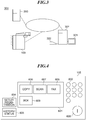
- FIG. 3 is a view showing an image processing system 300 to which the embodiment is applied.
- the above-mentioned image processing apparatus 100, a server computer 302, and an authentication server 303 are shown in FIG. 3 .
- the server computer 302 corresponds to another apparatus that transmits image data obtained by scanning an original.
- a display unit 321 and an input device 322 are connected to the server computer 302.
- the authentication server 303 authenticates a user when the user uses the image processing apparatus 100 and the server computer 302. These are connected to the network via respective network interfaces.
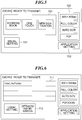
- FIG. 4 is a plan view showing the operation unit 105 shown in FIG. 1 .
- application selection buttons that call operation screens for desired functions are displayed on the touch panel 601 of the operation unit 105.
- a "COPY” button 606, a "SCAN” button 607, a "FAX” button 608, and a "BOX” button 609 that call operation screens for a copy function, a network scan function, a facsimile function, and a box function, respectively, are displayed.
- a ten-key pad 602 that directs to start a job, a "SETUP/REGISTRATION” screen call button 604 that calls a device setup screen, and a "HISTORY/STATUS” button 605 that calls a job history/status screen are arranged on the operation unit 105.
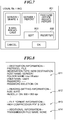
- FIG. 5 is a view showing an example of a first scan operation screen displayed on the touch panel 601 of the operation unit 105 shown in FIG. 4 .
- the first scan operation screen in FIG. 5 is displayed on the touch panel 601 of the operation unit 105 when a user depresses the "scan" button 607 shown in FIG. 4 .
- a destination-input-button group 701 that allows the designation of a transmission destination is displayed.
- a destination can be inputted by any methods of an "address book”, a "one-touch", and a “new destination”.
- a transmission-setting-button group 702 is used when setting up transmission settings, such as a reading resolution and a reading color mode.
- An application setting button 703 is used when calling various detailed settings about reading and transmitting.
- a "usual setting" button 704 that calls saved transmission settings is also displayed.
- the first scan operation screen enables an e-mail transmission and a file transmission.
- a specified setting enables a facsimile transmission.
- FIG. 6 is a view showing an example of a second scan operation screen displayed on the touch panel 601 of the operation unit 105 shown in FIG. 4 .
- the second scanning operation screen in FIG. 6 is displayed when a user performs a transmission setting, for example, when a user designates a transmission destination.
- the transmission destination "Host.myFolder" designated by the user is displayed in a transmission destination list 711.
- a detailed information button 712 for displaying details of a transmission destination is also displayed.
- a set value is reflected to the transmission setting button and a caption of a file type button is PDF (OCR) (Portable Document Format (Adobe Acrobat) (Optical Character Recognition)).
- OCR Portable Document Format
- Adobe Acrobat Optical Character Recognition
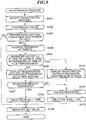
- FIG. 7 is a view showing an example of the usual setting screen displayed on the touch panel 601 of the operation unit 105 shown in FIG. 4 .
- the usual setting screen is displayed on the touch panel 601 of the operation unit 105 when a user depresses the "usual setting" button 704 in FIG. 4 .
- a "usual setting" button group 801 that is registered by the user, a registration button 802 that newly registers the current transmission setting, and an edit button 803 that edits the existing buttons are displayed on the usual setting screen.
- the "usual setting" button group 801 of the example in FIG. 7 includes buttons for "SERVER 1/SHARE 1", “SERVER 1/REPORT”, “FAX/HEAD OFFICE WEEKLY REPORT”, and "E-MAIL/BROADCAST".
- the setting information that is related to the button is called and is reflected to the transmission setting.
- the registration button 802 the transmission setting can be registered.
- FIG. 8 is a view showing an example of usual setting information (transmission setting information) that is stored in a history on the memory 109 shown in FIG. 1 .
- the usual setting information comprises destination information 811, reading setting information 812, file format information 813, and additional information 814.
- the destination information 811 corresponds to a transmission protocol.
- the protocol is a "FILE" and the destination information 811 is required for the file transmission.
- the destination information 811 contains a password as authentication information that is used for authentication in another apparatus.
- the reading setting information 812 shows size and resolution.
- the reading size is "AUTO" and the reading resolution is 300*300 dpi (dots per inch).
- the file format information 813 shows a format of a file.
- FIG. 8 shows the format that uses high compression PDF and OCR.
- the additional information 814 is information other than the above-mentioned information, and is a transmitting file name in FIG. 8 .
- FIG. 9 is a flowchart showing a registration process executed by the CPU 108 shown in FIG. 1 .
- FIG. 9 shows the process for registering the current transmission setting as a usual setting, and the program therefor is stored in the memory 109.
- the UI control module 201 accepts a registration request by a user (step S401). Specifically, the user performs a desired transmission setting by operating buttons in the destination-input-button group 701 and transmission-setting-button group 702 on the scan operation screen, and opens the usual setting screen by depressing the "usual setting" button 704, and then, the user can request to save the setting by depressing the registration button 802.
- the UI control module 201 confirms the set value of the transmission setting corresponding to the registration request (step S402). Then, the UI control module 201 determines whether the transmission destination included in the transmission setting in the confirmed set value is a new destination of a file transmission (step S403) .
- the UI control module 201 Since the password is not included in the transmission setting when the transmission destination is not a new destination (NO in the step S403), the UI control module 201 leaves the process to the transmission setting management module 207, registers the set value as-is (step S409), and finishes the process.
- the UI control module 201 specifically passes the registration request of the transmission setting accepted in the step S401 to the transmission setting management module 207. Then, the transmission setting management module 207 saves the set value in a predetermined area of the memory 109.
- the UI control module 201 acquires attribute information about the password included in the transmission setting accepted in the step S401 (step S404), and determines whether the password accepted when the user logged in to the image processing apparatus 100 is used as a password that is required at the time of file transmission (step S405).
- the memory 109 stores the password that was used for the authentication when the user logged in to the image processing apparatus 100.
- the determination result in the step S405 becomes YES.
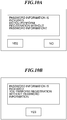
- the registration-with/without-password selection screen is displayed (step S406) in order to make the user determine whether to register this as the usual setting. That is, the authentication information required at the time of file transmission can be registered in addition to the transmission destination of the file. The details of the registration-with/without-password selection screen will be described later.
- step S407 it is determined whether the user selected the registration with a password (step S407).
- the UI control module 201 registers the password, sets a password deletion flag that is registered as the usual setting to OFF (step S408), and proceeds with the process to the step S409.
- the UI control module 201 deletes the password included in the transmission setting accepted in the step S401 (step S411).
- the UI control module 201 sets the password deletion flag that is registered as the usual setting to ON (step S412), and proceeds with the process to the step S409.
- the determination result in the step S405 is YES, it is not preferable to register the password as the usual setting, because the password is valid only when the user is logging in to the image processing apparatus 100 and is not permanent.
- the UI control module 201 displays the registration-without-password confirmation screen (step S410) in order to prohibit the registration of the authentication information with the transmission destination of the file, and proceeds with the process to the step S411.
- the details of the registration-without-password confirmation screen will be described later.
- the registration process can be performed appropriately depending on the setting of whether the password accepted at the time of login is used as a password when transmitting a file.
- FIG. 10A shows an example of the registration-with/without-password selection screen
- FIG. 10B shows an example of the registration-without-password confirmation screen.
- the registration-with/without-password selection screen and the registration-without-password confirmation screen may be displayed as pop-up screens.
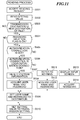
- FIG. 11 is a flowchart showing a reading process executed by the CPU 108 shown in FIG. 1 .
- FIG. 11 shows the process for reading a set value registered as the usual setting, and the program therefor is stored in the memory 109.
- the UI control module 201 accepts a reading request by a user (step S501). Specifically, the user can request reading by depressing a desired button in the "usual setting" button group 801 that is displayed on the usual setting screen.
- the UI control module 201 passes the accepted reading request to the transmission setting management module 207.
- the transmission setting management module 207 reads the transmission setting related to the accepted usual setting from the predetermined area of the memory 109 (step S502).
- the UI control module 201 determines whether the transmission destination included in the read transmission setting is a new destination of a file transmission (step S503).
- the transmission destination When the transmission destination is not a new destination (NO in the step S503), the transmission destination may be read as-is because it does not include a password. Then, the UI control module 201 sets the transmission setting read in the step S502 as the current transmission setting (step S510), and finishes the process.
- the UI control module 201 checks the password deletion flag included in the set value read in the step S502, and determines whether the flag is ON (step S504).
- the UI control module 201 sets the user name and password that are included in the set value read in the step S502 as the user name and password of the transmission destination (step S509), and proceeds with the process to the step S510.
- the UI control module 201 refers to the settings of the apparatus and determines whether an authentication connection is set (step S505).
- the authentication information related to the user who is specified using the user authentication function can be used as the authentication information at the time of transmission.
- the UI control module 201 determines whether the authentication connection setting is a login information connection (step S506).
- the authentication connection setting is a login information connection (YES in the step S506)
- the authentication information used when the user used the apparatus earlier can be used at the time of transmission.
- the UI control module 201 refers to the login information that is the authentication information used when the user used the apparatus using the card reader 110 (step S507), acquires the user name and password (step S508), and proceeds with the process to the step S509.
- the authentication information related to the user uses information that the user registered to a keyring.
- a keyring is a bundle of encryption keys that are used in message authentication code, for example.
- the UI control module 201 refers to the authentication information related to the user who is specified by the user authentication function by referring to the keyring (step S511), acquires a user name and a password (step S512), and proceeds with the process to the step S509. That is, when the authentication information is not registered at the time of transmitting data to another apparatus again, the UI control module 201 reflects the authentication information registered into the keyring related to the user who operates the image processing apparatus 100 to the transmission setting information.
- the UI control module 201 displays a destination input screen in order to prompt a user to input (step S513).
- the destination input screen will be described below.
- the UI control module 201 acquires the password that the user inputted into a password input field 1004 (step S514), and proceeds with the process to the step S509.
- the process shown in FIG. 11 is applicable to other passwords included in the transmission setting in addition to the password included in the file destination.
- a format in which a file-operating permission acquired from a file-operating-permission-management server is added to the file may be designated as the transmission file format.
- the transmission setting that is registered or is read may include a password for accessing the file-operating-permission-management server.
- the UI control module 201 determines whether the transmission setting includes a password for accessing the file-operating-permission-management server in the step S403. In the step S503, the UI control module 201 determines whether the file format included in the read transmission setting handles the file operating permission.
- the UI control module 201 determines whether the authentication information required by another apparatus at the time of a file transmission is permanent information that can be used when transmitting data to another apparatus again (the step S405). Then, when the authentication information is permanent, it is registered (the step S408). Next, as shown in FIG. 11 , when the authentication information is registered at the time of transmitting data to another apparatus again, the UI control module 201 reflects the authentication information concerned to the transmission setting information (step S509). As a result, the operability for inputting the authentication information that is used to transmit data to another apparatus is improved.
- FIG. 12 is a view showing an example of the file-destination input screen that the UI control module 201 displays on the touch panel 601 of the operation unit 105.
- a host name input field 1001 a folder name input field 1002, a user name input field 1003, and a password input field 1004 are displayed. Then, a user inputs data into these fields.
- the configuration of the image forming apparatus in the second embodiment is similar to the configuration of the image forming apparatus 100 in the first embodiment, and its description is omitted.
- the first embodiment determines whether the password is permanent or not by referring to the attribute information of the password for the file transmission to a new destination.
- a destination of file transmission is registered in an address book, a user may designate to input a password each time on the assumption that a password is frequently changed.
- the password is not permanent.
- FIG. 13 is a flowchart showing a registration process according to the second embodiment.
- FIG. 13 shows the process for registering the current transmission setting as a usual setting, and the program therefor is stored in the memory 109 and is executed by the CPU 108.
- the UI control module 201 accepts a registration request that a user designates to register a transmission setting as a usual setting (step S1101), and confirms the set value of the transmission setting corresponding to the accepted registration request (step S1102).
- the UI control module 201 determines whether the transmission destination included in the transmission setting in the confirmed set value is a destination of a file transmission in an address book (step S1103).
- the UI control module 201 passes the transmission setting corresponding to the accepted saving request to the transmission setting management module 207 because such a setting is permitted to register as-is.
- the transmission setting management module 207 registers the set value into a predetermined area of the memory 109 (step S1109), and finishes the process.
- the password may be required to input each time, and the password may not be permanent.
- the UI control module 201 acquires the attribute of the destination in the address book of the transmission destination included in the transmission setting corresponding to the accepted registration request (step S1104), and determines whether the password should be inputted each time (step S1105).
- the password is required to input each time (YES in the step S1105), the password is not permanent, and it is not preferred to register it as the usual setting.
- the UI control module 201 displays the registration-without-password confirmation screen shown in the FIG. 10B , and notifies the user of deleting the password (step S1106).
- the UI control module 201 deletes the password inputted each time that is included in the transmission setting corresponding to the accepted registration request (step S1107), sets the password deletion flag saved as the usual setting to ON (step S1108), and proceeds with the process to the step S1109.
- the reading process in the second embodiment is identical to the reading process shown in FIG. 11 except the process in the step S503.
- the UI control module 201 determines the transmission destination included in the read transmission setting is a destination of a file transmission in the address book in the step S503.
- the configuration of the image forming apparatus in the third embodiment is similar to the configuration of the image forming apparatus 100 in the first embodiment, and its description is omitted.
- the user name and the password at the time of calling are set instead of that at the time of registration.
- a setting of an apparatus can restrict the destination of the file transmission to a specific folder related to an individual user from the point of view of security.
- the host name and the folder name of the transmission destination that are related to the user are effective only when the user is logged in, and are not permanent.
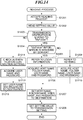
- FIG. 14 is a flowchart showing a reading process according to the third embodiment.
- FIG. 14 shows the process for registering the current transmission setting as a usual setting, and the program therefor is stored in the memory 109 and is executed by the CPU 108.
- the UI control module 201 accepts a reading request by a user (step S1201). Specifically, the user can request reading by pressing a desired button in the "usual setting" button group 801 that is displayed on the usual setting screen.
- the UI control module 201 passes the accepted reading request to the transmission setting management module 207.
- the transmission setting management module 207 reads the transmission setting related to the accepted usual setting from the predetermined area of the memory 109 (step S1202).
- the UI control module 201 determines whether a file transmission destination is limited to a "MyFolder" related to the user with reference to the setting of the apparatus (step S1203).
- the UI control module 201 refers to the setting of the apparatus. Then, the UI control module 201 checks an authentication connection setting (step S1211), and acquires a user name and a password (step S1212).
- the UI control module 201 sets the acquired user name and password to the transmission destination (S1213), sets them together with the other transmission settings read in the step S1202 as the current transmission setting (step S1208), and finishes the process.
- the process in the steps S1211 through S1213 corresponds to the process in the steps S505 through S509 in the flowchart in FIG. 11 .
- the UI control module 201 refers to the setting of the apparatus. Then, the UI control module 201 determines whether the "MyFolder" information related to the user is managed by the authentication server (step S1204).
- the UI control module 201 refers to the login information acquired at the time of the authentication for operating the apparatus by the user (step S1205).
- the UI control module 201 acquires a host name, a folder name, a user name, and a password that are related to the user and are managed by the authentication server (step S1206).
- the UI control module 201 sets the host name, the folder name, the user name, and the password that are acquired in the step S1206 to the transmission destination (step S1207), and proceeds with the process to the step S1208.
- the UI control module 201 refers to the keyring (step S1209). Then, the UI control module 201 acquires a host name, a folder name, a user name, and a password that are related to the registered user (step S1210), and proceeds with the process to the step S1207.
- aspects of the present invention can also be realized by a computer of a system or apparatus (or devices such as a CPU or MPU) that reads out and executes a program recorded on a memory device to perform the functions of the above-described embodiment(s), and by a method, the steps of which are performed by a computer of a system or apparatus by, for example, reading out and executing a program recorded on a memory device to perform the functions of the above-described embodiment(s).
- the program is provided to the computer for example via a network or from a recording medium of various types serving as the memory device (e.g., computer-readable medium).
Landscapes
- Engineering & Computer Science (AREA)
- Computer Security & Cryptography (AREA)
- Theoretical Computer Science (AREA)
- Computer Hardware Design (AREA)
- General Engineering & Computer Science (AREA)
- Signal Processing (AREA)
- Software Systems (AREA)
- Physics & Mathematics (AREA)
- General Physics & Mathematics (AREA)
- Multimedia (AREA)
- General Health & Medical Sciences (AREA)
- Bioethics (AREA)
- Health & Medical Sciences (AREA)
- Computing Systems (AREA)
- Computer Networks & Wireless Communication (AREA)
- Facsimiles In General (AREA)
- Information Transfer Between Computers (AREA)
- Telephonic Communication Services (AREA)
- Storage Device Security (AREA)
- Data Exchanges In Wide-Area Networks (AREA)
- Facsimile Transmission Control (AREA)
Applications Claiming Priority (1)
| Application Number | Priority Date | Filing Date | Title |
|---|---|---|---|
| JP2011255056A JP2013109631A (ja) | 2011-11-22 | 2011-11-22 | データ通信装置及びその制御方法、並びにプログラム |
Publications (3)
| Publication Number | Publication Date |
|---|---|
| EP2597855A2 EP2597855A2 (en) | 2013-05-29 |
| EP2597855A3 EP2597855A3 (en) | 2017-01-18 |
| EP2597855B1 true EP2597855B1 (en) | 2020-01-08 |
Family
ID=47355815
Family Applications (1)
| Application Number | Title | Priority Date | Filing Date |
|---|---|---|---|
| EP12193404.6A Active EP2597855B1 (en) | 2011-11-22 | 2012-11-20 | Data communication apparatus, control method therefor, and storage medium storing control program therefor |
Country Status (6)
| Country | Link |
|---|---|
| US (5) | US9131185B2 (enExample) |
| EP (1) | EP2597855B1 (enExample) |
| JP (1) | JP2013109631A (enExample) |
| CN (2) | CN103139195B (enExample) |
| BR (1) | BR102012029760B1 (enExample) |
| RU (1) | RU2566971C2 (enExample) |
Families Citing this family (10)
| Publication number | Priority date | Publication date | Assignee | Title |
|---|---|---|---|---|
| JP2013109631A (ja) * | 2011-11-22 | 2013-06-06 | Canon Inc | データ通信装置及びその制御方法、並びにプログラム |
| JP6160374B2 (ja) * | 2013-09-06 | 2017-07-12 | コニカミノルタ株式会社 | 画像形成装置およびプログラム |
| CN103607426B (zh) * | 2013-10-25 | 2019-04-09 | 中兴通讯股份有限公司 | 安全服务订制方法和装置 |
| JP6344303B2 (ja) * | 2015-05-18 | 2018-06-20 | 京セラドキュメントソリューションズ株式会社 | 画像形成装置 |
| EP3533214A1 (en) * | 2016-11-29 | 2019-09-04 | Y Soft Scanning Solutions s.r.o. | System for distributing image scanning tasks to networked devices |
| JP6966849B2 (ja) * | 2017-03-02 | 2021-11-17 | キヤノン株式会社 | 画像形成装置、方法、プログラム、並びにシステム |
| JP7187145B2 (ja) * | 2017-11-02 | 2022-12-12 | キヤノン株式会社 | 画像送信装置、画像送信装置の制御方法、及びプログラム |
| JP7158845B2 (ja) * | 2017-11-30 | 2022-10-24 | キヤノン株式会社 | 画像読取装置、画像読取装置の制御方法、及びプログラム |
| US20210144195A1 (en) * | 2018-04-02 | 2021-05-13 | Sony Corporation | Information processing apparatus, information processing method, and program |
| WO2021230851A1 (en) * | 2020-05-11 | 2021-11-18 | Hewlett-Packard Development Company, L.P. | Payload authentication prior to completion of payload fulfillment |
Family Cites Families (32)
| Publication number | Priority date | Publication date | Assignee | Title |
|---|---|---|---|---|
| JPH09212397A (ja) * | 1996-01-31 | 1997-08-15 | Toshiba Corp | ファイル読み出し方法 |
| US6208436B1 (en) * | 1998-02-09 | 2001-03-27 | Hewlett-Packard Company | Use of a header page to provide scan control information for a scan |
| JP4497608B2 (ja) | 1999-12-08 | 2010-07-07 | シャープ株式会社 | 認証情報設定装置及び認証情報設定方法 |
| JP4722336B2 (ja) * | 2001-07-25 | 2011-07-13 | コニカミノルタビジネステクノロジーズ株式会社 | データ送信装置、データ送信先登録方法ならびにデータ送信先登録プログラムおよびこれを記録したコンピュータ読み取り可能な記録媒体 |
| JP2004102417A (ja) | 2002-09-05 | 2004-04-02 | Ricoh Co Ltd | 情報処理装置および宛先指定方法およびプログラムおよび記録媒体 |
| JP4444554B2 (ja) * | 2002-09-19 | 2010-03-31 | 富士通株式会社 | パスワード保存制限方法 |
| US7400421B2 (en) * | 2002-12-12 | 2008-07-15 | Seiko Epson Corporation | Image processing method and image processing system using the same |
| US7353536B1 (en) * | 2003-09-23 | 2008-04-01 | At&T Delaware Intellectual Property, Inc | Methods of resetting passwords in network service systems including user redirection and related systems and computer-program products |
| JP4576132B2 (ja) | 2004-02-25 | 2010-11-04 | 株式会社リコー | 認証方法及び認証装置 |
| JP4902981B2 (ja) | 2004-10-05 | 2012-03-21 | 株式会社リコー | サービス提供システム及びサービス提供方法 |
| WO2006095875A1 (ja) * | 2005-03-10 | 2006-09-14 | Nippon Telegraph And Telephone Corporation | ネットワークシステム、ストレージ装置へのアクセス制御方法、管理サーバ、ストレージ装置、ログイン制御方法、ネットワークブートシステムおよび単位記憶ユニットのアクセス方法 |
| JP2007026203A (ja) * | 2005-07-19 | 2007-02-01 | Toshiba Corp | 情報処理装置および認証処理方法 |
| JP4501864B2 (ja) * | 2006-02-08 | 2010-07-14 | 村田機械株式会社 | 通信端末装置 |
| US8769127B2 (en) * | 2006-02-10 | 2014-07-01 | Northrop Grumman Systems Corporation | Cross-domain solution (CDS) collaborate-access-browse (CAB) and assured file transfer (AFT) |
| US7904572B2 (en) * | 2006-11-10 | 2011-03-08 | Canon Denshi Kabushiki Kaisha | Method, apparatus, and medium for controlling access to and setting for features of an imaging processing device |
| JP2007133886A (ja) * | 2006-11-22 | 2007-05-31 | Konica Minolta Business Technologies Inc | 画像データ配信システム |
| JP2008258892A (ja) * | 2007-04-04 | 2008-10-23 | Sharp Corp | 画像データ送信装置、サーバ装置、画像データ送信システム、及びプログラム |
| JP2008257581A (ja) | 2007-04-06 | 2008-10-23 | Ricoh Co Ltd | 文書管理システム、画像形成装置、文書データ配信方法、文書データ配信プログラム |
| JP5090834B2 (ja) * | 2007-09-11 | 2012-12-05 | 株式会社リコー | 情報処理装置及び認証制御プログラム |
| JP4553017B2 (ja) * | 2008-02-05 | 2010-09-29 | コニカミノルタビジネステクノロジーズ株式会社 | 情報処理装置およびプログラム |
| US7979658B2 (en) * | 2008-03-25 | 2011-07-12 | Spansion Llc | Secure management of memory regions in a memory |
| JP5052417B2 (ja) * | 2008-05-30 | 2012-10-17 | 株式会社リコー | 画像形成装置、外部デバイス管理方法及びプログラム |
| JP2010147633A (ja) | 2008-12-17 | 2010-07-01 | Oki Data Corp | 画像処理装置 |
| JP5247540B2 (ja) | 2009-03-02 | 2013-07-24 | キヤノン株式会社 | 情報処理システム及びその制御方法、プログラム |
| JP5448539B2 (ja) | 2009-04-13 | 2014-03-19 | キヤノン株式会社 | 情報処理装置及び方法、並びにプログラム |
| JP5277145B2 (ja) | 2009-12-01 | 2013-08-28 | 京セラドキュメントソリューションズ株式会社 | 画像処理装置及び画像処理方法 |
| JP5562068B2 (ja) | 2010-03-02 | 2014-07-30 | キヤノン株式会社 | 画像処理装置、画像処理装置の制御方法及びプログラム |
| JP5355487B2 (ja) * | 2010-04-26 | 2013-11-27 | キヤノン株式会社 | 画像送信装置、画像送信装置の認証方法 |
| JP5595106B2 (ja) | 2010-04-27 | 2014-09-24 | キヤノン株式会社 | 画像送信装置、画像送信装置の制御方法 |
| JP2011242949A (ja) * | 2010-05-17 | 2011-12-01 | Fujitsu Ltd | ファイル管理プログラム、ファイル管理方法、及び情報処理装置 |
| JP2013109631A (ja) * | 2011-11-22 | 2013-06-06 | Canon Inc | データ通信装置及びその制御方法、並びにプログラム |
| US20140012616A1 (en) * | 2012-07-04 | 2014-01-09 | EHSolution.com | Systems and methods for new location task completion and enterprise-wide project initiative tracking |
-
2011
- 2011-11-22 JP JP2011255056A patent/JP2013109631A/ja active Pending
-
2012
- 2012-11-19 CN CN201210475748.8A patent/CN103139195B/zh not_active Expired - Fee Related
- 2012-11-19 CN CN201710083792.7A patent/CN106657712B9/zh not_active Expired - Fee Related
- 2012-11-20 EP EP12193404.6A patent/EP2597855B1/en active Active
- 2012-11-21 US US13/682,851 patent/US9131185B2/en active Active
- 2012-11-21 RU RU2012149621/08A patent/RU2566971C2/ru active
- 2012-11-22 BR BR102012029760-4A patent/BR102012029760B1/pt active IP Right Grant
-
2015
- 2015-07-10 US US14/796,124 patent/US10110779B2/en active Active
-
2018
- 2018-08-29 US US16/115,680 patent/US10609253B2/en active Active
-
2020
- 2020-02-21 US US16/797,425 patent/US11128779B2/en not_active Ceased
-
2022
- 2022-07-29 US US17/876,996 patent/USRE50224E1/en active Active
Non-Patent Citations (1)
| Title |
|---|
| None * |
Also Published As
| Publication number | Publication date |
|---|---|
| CN106657712A (zh) | 2017-05-10 |
| BR102012029760B1 (pt) | 2021-12-28 |
| US10110779B2 (en) | 2018-10-23 |
| CN106657712B (zh) | 2019-10-15 |
| JP2013109631A (ja) | 2013-06-06 |
| US20190028609A1 (en) | 2019-01-24 |
| US20130132716A1 (en) | 2013-05-23 |
| US10609253B2 (en) | 2020-03-31 |
| US11128779B2 (en) | 2021-09-21 |
| US20150319339A1 (en) | 2015-11-05 |
| RU2566971C2 (ru) | 2015-10-27 |
| RU2012149621A (ru) | 2014-05-27 |
| BR102012029760A2 (pt) | 2013-12-17 |
| US9131185B2 (en) | 2015-09-08 |
| EP2597855A2 (en) | 2013-05-29 |
| CN103139195A (zh) | 2013-06-05 |
| USRE50224E1 (en) | 2024-11-26 |
| CN103139195B (zh) | 2017-04-12 |
| CN106657712B9 (zh) | 2020-01-17 |
| EP2597855A3 (en) | 2017-01-18 |
| US20200195812A1 (en) | 2020-06-18 |
Similar Documents
| Publication | Publication Date | Title |
|---|---|---|
| USRE50224E1 (en) | Data communication apparatus, control method therefor, and storage medium storing control program therefor | |
| EP2546734B1 (en) | Printing apparatus, method for controlling printing apparatus, and storage medium | |
| JP6966849B2 (ja) | 画像形成装置、方法、プログラム、並びにシステム | |
| US8339624B2 (en) | Image processing apparatus, and method of displaying messages in plural languages | |
| JP5713580B2 (ja) | 通信装置及びその制御方法、並びにプログラム | |
| JP5419501B2 (ja) | 情報処理システム及びその処理方法 | |
| US20100332624A1 (en) | Information processing apparatus for managing address book data, control method therefor, and storage medium storing control program therefor | |
| US7984481B2 (en) | Image processing system, image processing apparatus and image processing method | |
| JP5435992B2 (ja) | 情報処理システム | |
| JP4775456B2 (ja) | 表示管理システム | |
| CN111464712B (zh) | 图像处理设备和方法 | |
| JP4827869B2 (ja) | 記憶手段管理装置、画像処理装置およびその制御方法、ならびにコンピュータプログラム | |
| JP4221030B2 (ja) | 画像読取システム | |
| JP6576407B2 (ja) | データ送信装置及びその制御方法、並びにプログラム | |
| JP6227074B2 (ja) | データ送信装置及びその制御方法、並びにプログラム | |
| JP2021048446A (ja) | 画像形成装置、その制御方法およびプログラム | |
| JP2008142900A (ja) | 画像形成装置 | |
| JP4143476B2 (ja) | データ通信方法 | |
| JP2018148391A (ja) | 画像通信装置及び、制御方法 | |
| JP2012213021A (ja) | 画像処理装置 |
Legal Events
| Date | Code | Title | Description |
|---|---|---|---|
| PUAI | Public reference made under article 153(3) epc to a published international application that has entered the european phase |
Free format text: ORIGINAL CODE: 0009012 |
|
| AK | Designated contracting states |
Kind code of ref document: A2 Designated state(s): AL AT BE BG CH CY CZ DE DK EE ES FI FR GB GR HR HU IE IS IT LI LT LU LV MC MK MT NL NO PL PT RO RS SE SI SK SM TR |
|
| AX | Request for extension of the european patent |
Extension state: BA ME |
|
| PUAL | Search report despatched |
Free format text: ORIGINAL CODE: 0009013 |
|
| AK | Designated contracting states |
Kind code of ref document: A3 Designated state(s): AL AT BE BG CH CY CZ DE DK EE ES FI FR GB GR HR HU IE IS IT LI LT LU LV MC MK MT NL NO PL PT RO RS SE SI SK SM TR |
|
| AX | Request for extension of the european patent |
Extension state: BA ME |
|
| RIC1 | Information provided on ipc code assigned before grant |
Ipc: H04N 1/44 20060101AFI20161214BHEP |
|
| STAA | Information on the status of an ep patent application or granted ep patent |
Free format text: STATUS: REQUEST FOR EXAMINATION WAS MADE |
|
| 17P | Request for examination filed |
Effective date: 20170718 |
|
| RBV | Designated contracting states (corrected) |
Designated state(s): AL AT BE BG CH CY CZ DE DK EE ES FI FR GB GR HR HU IE IS IT LI LT LU LV MC MK MT NL NO PL PT RO RS SE SI SK SM TR |
|
| GRAP | Despatch of communication of intention to grant a patent |
Free format text: ORIGINAL CODE: EPIDOSNIGR1 |
|
| STAA | Information on the status of an ep patent application or granted ep patent |
Free format text: STATUS: GRANT OF PATENT IS INTENDED |
|
| INTG | Intention to grant announced |
Effective date: 20190705 |
|
| GRAS | Grant fee paid |
Free format text: ORIGINAL CODE: EPIDOSNIGR3 |
|
| GRAA | (expected) grant |
Free format text: ORIGINAL CODE: 0009210 |
|
| STAA | Information on the status of an ep patent application or granted ep patent |
Free format text: STATUS: THE PATENT HAS BEEN GRANTED |
|
| AK | Designated contracting states |
Kind code of ref document: B1 Designated state(s): AL AT BE BG CH CY CZ DE DK EE ES FI FR GB GR HR HU IE IS IT LI LT LU LV MC MK MT NL NO PL PT RO RS SE SI SK SM TR |
|
| REG | Reference to a national code |
Ref country code: GB Ref legal event code: FG4D |
|
| REG | Reference to a national code |
Ref country code: CH Ref legal event code: EP |
|
| REG | Reference to a national code |
Ref country code: DE Ref legal event code: R096 Ref document number: 602012067067 Country of ref document: DE |
|
| REG | Reference to a national code |
Ref country code: IE Ref legal event code: FG4D |
|
| REG | Reference to a national code |
Ref country code: AT Ref legal event code: REF Ref document number: 1224141 Country of ref document: AT Kind code of ref document: T Effective date: 20200215 |
|
| REG | Reference to a national code |
Ref country code: NL Ref legal event code: MP Effective date: 20200108 |
|
| REG | Reference to a national code |
Ref country code: LT Ref legal event code: MG4D |
|
| PG25 | Lapsed in a contracting state [announced via postgrant information from national office to epo] |
Ref country code: NO Free format text: LAPSE BECAUSE OF FAILURE TO SUBMIT A TRANSLATION OF THE DESCRIPTION OR TO PAY THE FEE WITHIN THE PRESCRIBED TIME-LIMIT Effective date: 20200408 Ref country code: NL Free format text: LAPSE BECAUSE OF FAILURE TO SUBMIT A TRANSLATION OF THE DESCRIPTION OR TO PAY THE FEE WITHIN THE PRESCRIBED TIME-LIMIT Effective date: 20200108 Ref country code: LT Free format text: LAPSE BECAUSE OF FAILURE TO SUBMIT A TRANSLATION OF THE DESCRIPTION OR TO PAY THE FEE WITHIN THE PRESCRIBED TIME-LIMIT Effective date: 20200108 Ref country code: PT Free format text: LAPSE BECAUSE OF FAILURE TO SUBMIT A TRANSLATION OF THE DESCRIPTION OR TO PAY THE FEE WITHIN THE PRESCRIBED TIME-LIMIT Effective date: 20200531 Ref country code: RS Free format text: LAPSE BECAUSE OF FAILURE TO SUBMIT A TRANSLATION OF THE DESCRIPTION OR TO PAY THE FEE WITHIN THE PRESCRIBED TIME-LIMIT Effective date: 20200108 Ref country code: FI Free format text: LAPSE BECAUSE OF FAILURE TO SUBMIT A TRANSLATION OF THE DESCRIPTION OR TO PAY THE FEE WITHIN THE PRESCRIBED TIME-LIMIT Effective date: 20200108 |
|
| PG25 | Lapsed in a contracting state [announced via postgrant information from national office to epo] |
Ref country code: HR Free format text: LAPSE BECAUSE OF FAILURE TO SUBMIT A TRANSLATION OF THE DESCRIPTION OR TO PAY THE FEE WITHIN THE PRESCRIBED TIME-LIMIT Effective date: 20200108 Ref country code: GR Free format text: LAPSE BECAUSE OF FAILURE TO SUBMIT A TRANSLATION OF THE DESCRIPTION OR TO PAY THE FEE WITHIN THE PRESCRIBED TIME-LIMIT Effective date: 20200409 Ref country code: IS Free format text: LAPSE BECAUSE OF FAILURE TO SUBMIT A TRANSLATION OF THE DESCRIPTION OR TO PAY THE FEE WITHIN THE PRESCRIBED TIME-LIMIT Effective date: 20200508 Ref country code: BG Free format text: LAPSE BECAUSE OF FAILURE TO SUBMIT A TRANSLATION OF THE DESCRIPTION OR TO PAY THE FEE WITHIN THE PRESCRIBED TIME-LIMIT Effective date: 20200408 Ref country code: LV Free format text: LAPSE BECAUSE OF FAILURE TO SUBMIT A TRANSLATION OF THE DESCRIPTION OR TO PAY THE FEE WITHIN THE PRESCRIBED TIME-LIMIT Effective date: 20200108 Ref country code: SE Free format text: LAPSE BECAUSE OF FAILURE TO SUBMIT A TRANSLATION OF THE DESCRIPTION OR TO PAY THE FEE WITHIN THE PRESCRIBED TIME-LIMIT Effective date: 20200108 |
|
| REG | Reference to a national code |
Ref country code: DE Ref legal event code: R097 Ref document number: 602012067067 Country of ref document: DE |
|
| PG25 | Lapsed in a contracting state [announced via postgrant information from national office to epo] |
Ref country code: CZ Free format text: LAPSE BECAUSE OF FAILURE TO SUBMIT A TRANSLATION OF THE DESCRIPTION OR TO PAY THE FEE WITHIN THE PRESCRIBED TIME-LIMIT Effective date: 20200108 Ref country code: ES Free format text: LAPSE BECAUSE OF FAILURE TO SUBMIT A TRANSLATION OF THE DESCRIPTION OR TO PAY THE FEE WITHIN THE PRESCRIBED TIME-LIMIT Effective date: 20200108 Ref country code: RO Free format text: LAPSE BECAUSE OF FAILURE TO SUBMIT A TRANSLATION OF THE DESCRIPTION OR TO PAY THE FEE WITHIN THE PRESCRIBED TIME-LIMIT Effective date: 20200108 Ref country code: SM Free format text: LAPSE BECAUSE OF FAILURE TO SUBMIT A TRANSLATION OF THE DESCRIPTION OR TO PAY THE FEE WITHIN THE PRESCRIBED TIME-LIMIT Effective date: 20200108 Ref country code: EE Free format text: LAPSE BECAUSE OF FAILURE TO SUBMIT A TRANSLATION OF THE DESCRIPTION OR TO PAY THE FEE WITHIN THE PRESCRIBED TIME-LIMIT Effective date: 20200108 Ref country code: DK Free format text: LAPSE BECAUSE OF FAILURE TO SUBMIT A TRANSLATION OF THE DESCRIPTION OR TO PAY THE FEE WITHIN THE PRESCRIBED TIME-LIMIT Effective date: 20200108 Ref country code: SK Free format text: LAPSE BECAUSE OF FAILURE TO SUBMIT A TRANSLATION OF THE DESCRIPTION OR TO PAY THE FEE WITHIN THE PRESCRIBED TIME-LIMIT Effective date: 20200108 |
|
| PLBE | No opposition filed within time limit |
Free format text: ORIGINAL CODE: 0009261 |
|
| STAA | Information on the status of an ep patent application or granted ep patent |
Free format text: STATUS: NO OPPOSITION FILED WITHIN TIME LIMIT |
|
| REG | Reference to a national code |
Ref country code: AT Ref legal event code: MK05 Ref document number: 1224141 Country of ref document: AT Kind code of ref document: T Effective date: 20200108 |
|
| 26N | No opposition filed |
Effective date: 20201009 |
|
| PG25 | Lapsed in a contracting state [announced via postgrant information from national office to epo] |
Ref country code: AT Free format text: LAPSE BECAUSE OF FAILURE TO SUBMIT A TRANSLATION OF THE DESCRIPTION OR TO PAY THE FEE WITHIN THE PRESCRIBED TIME-LIMIT Effective date: 20200108 Ref country code: IT Free format text: LAPSE BECAUSE OF FAILURE TO SUBMIT A TRANSLATION OF THE DESCRIPTION OR TO PAY THE FEE WITHIN THE PRESCRIBED TIME-LIMIT Effective date: 20200108 |
|
| PG25 | Lapsed in a contracting state [announced via postgrant information from national office to epo] |
Ref country code: PL Free format text: LAPSE BECAUSE OF FAILURE TO SUBMIT A TRANSLATION OF THE DESCRIPTION OR TO PAY THE FEE WITHIN THE PRESCRIBED TIME-LIMIT Effective date: 20200108 Ref country code: SI Free format text: LAPSE BECAUSE OF FAILURE TO SUBMIT A TRANSLATION OF THE DESCRIPTION OR TO PAY THE FEE WITHIN THE PRESCRIBED TIME-LIMIT Effective date: 20200108 |
|
| PG25 | Lapsed in a contracting state [announced via postgrant information from national office to epo] |
Ref country code: MC Free format text: LAPSE BECAUSE OF FAILURE TO SUBMIT A TRANSLATION OF THE DESCRIPTION OR TO PAY THE FEE WITHIN THE PRESCRIBED TIME-LIMIT Effective date: 20200108 |
|
| REG | Reference to a national code |
Ref country code: CH Ref legal event code: PL |
|
| PG25 | Lapsed in a contracting state [announced via postgrant information from national office to epo] |
Ref country code: LU Free format text: LAPSE BECAUSE OF NON-PAYMENT OF DUE FEES Effective date: 20201120 |
|
| REG | Reference to a national code |
Ref country code: BE Ref legal event code: MM Effective date: 20201130 |
|
| PG25 | Lapsed in a contracting state [announced via postgrant information from national office to epo] |
Ref country code: LI Free format text: LAPSE BECAUSE OF NON-PAYMENT OF DUE FEES Effective date: 20201130 Ref country code: CH Free format text: LAPSE BECAUSE OF NON-PAYMENT OF DUE FEES Effective date: 20201130 |
|
| PG25 | Lapsed in a contracting state [announced via postgrant information from national office to epo] |
Ref country code: IE Free format text: LAPSE BECAUSE OF NON-PAYMENT OF DUE FEES Effective date: 20201120 |
|
| PG25 | Lapsed in a contracting state [announced via postgrant information from national office to epo] |
Ref country code: TR Free format text: LAPSE BECAUSE OF FAILURE TO SUBMIT A TRANSLATION OF THE DESCRIPTION OR TO PAY THE FEE WITHIN THE PRESCRIBED TIME-LIMIT Effective date: 20200108 Ref country code: MT Free format text: LAPSE BECAUSE OF FAILURE TO SUBMIT A TRANSLATION OF THE DESCRIPTION OR TO PAY THE FEE WITHIN THE PRESCRIBED TIME-LIMIT Effective date: 20200108 Ref country code: CY Free format text: LAPSE BECAUSE OF FAILURE TO SUBMIT A TRANSLATION OF THE DESCRIPTION OR TO PAY THE FEE WITHIN THE PRESCRIBED TIME-LIMIT Effective date: 20200108 |
|
| PG25 | Lapsed in a contracting state [announced via postgrant information from national office to epo] |
Ref country code: MK Free format text: LAPSE BECAUSE OF FAILURE TO SUBMIT A TRANSLATION OF THE DESCRIPTION OR TO PAY THE FEE WITHIN THE PRESCRIBED TIME-LIMIT Effective date: 20200108 Ref country code: AL Free format text: LAPSE BECAUSE OF FAILURE TO SUBMIT A TRANSLATION OF THE DESCRIPTION OR TO PAY THE FEE WITHIN THE PRESCRIBED TIME-LIMIT Effective date: 20200108 |
|
| PG25 | Lapsed in a contracting state [announced via postgrant information from national office to epo] |
Ref country code: BE Free format text: LAPSE BECAUSE OF NON-PAYMENT OF DUE FEES Effective date: 20201130 |
|
| PGFP | Annual fee paid to national office [announced via postgrant information from national office to epo] |
Ref country code: DE Payment date: 20251022 Year of fee payment: 14 |
|
| PGFP | Annual fee paid to national office [announced via postgrant information from national office to epo] |
Ref country code: GB Payment date: 20251023 Year of fee payment: 14 |
|
| PGFP | Annual fee paid to national office [announced via postgrant information from national office to epo] |
Ref country code: FR Payment date: 20251022 Year of fee payment: 14 |