WO2013145490A1 - 電子会議システム - Google Patents
電子会議システム Download PDFInfo
- Publication number
- WO2013145490A1 WO2013145490A1 PCT/JP2012/083985 JP2012083985W WO2013145490A1 WO 2013145490 A1 WO2013145490 A1 WO 2013145490A1 JP 2012083985 W JP2012083985 W JP 2012083985W WO 2013145490 A1 WO2013145490 A1 WO 2013145490A1
- Authority
- WO
- WIPO (PCT)
- Prior art keywords
- conference
- memo
- mobile terminal
- management server
- terminal
- Prior art date
- Legal status (The legal status is an assumption and is not a legal conclusion. Google has not performed a legal analysis and makes no representation as to the accuracy of the status listed.)
- Ceased
Links
Images





Classifications
-
- G—PHYSICS
- G06—COMPUTING OR CALCULATING; COUNTING
- G06F—ELECTRIC DIGITAL DATA PROCESSING
- G06F21/00—Security arrangements for protecting computers, components thereof, programs or data against unauthorised activity
- G06F21/60—Protecting data
- G06F21/62—Protecting access to data via a platform, e.g. using keys or access control rules
- G06F21/6218—Protecting access to data via a platform, e.g. using keys or access control rules to a system of files or objects, e.g. local or distributed file system or database
-
- G—PHYSICS
- G06—COMPUTING OR CALCULATING; COUNTING
- G06F—ELECTRIC DIGITAL DATA PROCESSING
- G06F21/00—Security arrangements for protecting computers, components thereof, programs or data against unauthorised activity
- G06F21/60—Protecting data
- G06F21/606—Protecting data by securing the transmission between two devices or processes
-
- G—PHYSICS
- G06—COMPUTING OR CALCULATING; COUNTING
- G06F—ELECTRIC DIGITAL DATA PROCESSING
- G06F21/00—Security arrangements for protecting computers, components thereof, programs or data against unauthorised activity
- G06F21/60—Protecting data
- G06F21/62—Protecting access to data via a platform, e.g. using keys or access control rules
-
- G—PHYSICS
- G06—COMPUTING OR CALCULATING; COUNTING
- G06Q—INFORMATION AND COMMUNICATION TECHNOLOGY [ICT] SPECIALLY ADAPTED FOR ADMINISTRATIVE, COMMERCIAL, FINANCIAL, MANAGERIAL OR SUPERVISORY PURPOSES; SYSTEMS OR METHODS SPECIALLY ADAPTED FOR ADMINISTRATIVE, COMMERCIAL, FINANCIAL, MANAGERIAL OR SUPERVISORY PURPOSES, NOT OTHERWISE PROVIDED FOR
- G06Q10/00—Administration; Management
- G06Q10/10—Office automation; Time management
- G06Q10/103—Workflow collaboration or project management
-
- H—ELECTRICITY
- H04—ELECTRIC COMMUNICATION TECHNIQUE
- H04L—TRANSMISSION OF DIGITAL INFORMATION, e.g. TELEGRAPHIC COMMUNICATION
- H04L63/00—Network architectures or network communication protocols for network security
- H04L63/10—Network architectures or network communication protocols for network security for controlling access to devices or network resources
- H04L63/104—Grouping of entities
-
- G—PHYSICS
- G06—COMPUTING OR CALCULATING; COUNTING
- G06F—ELECTRIC DIGITAL DATA PROCESSING
- G06F2221/00—Indexing scheme relating to security arrangements for protecting computers, components thereof, programs or data against unauthorised activity
- G06F2221/21—Indexing scheme relating to G06F21/00 and subgroups addressing additional information or applications relating to security arrangements for protecting computers, components thereof, programs or data against unauthorised activity
- G06F2221/2121—Chip on media, e.g. a disk or tape with a chip embedded in its case
-
- H—ELECTRICITY
- H04—ELECTRIC COMMUNICATION TECHNIQUE
- H04L—TRANSMISSION OF DIGITAL INFORMATION, e.g. TELEGRAPHIC COMMUNICATION
- H04L65/00—Network arrangements, protocols or services for supporting real-time applications in data packet communication
- H04L65/40—Support for services or applications
- H04L65/403—Arrangements for multi-party communication, e.g. for conferences
Definitions
- the present invention relates to a conference using an electronic computer, and in particular, it is possible for a participant himself / herself to distribute the distribution of materials after the conference to an arbitrary e-mail address according to each participant's notes and conference materials.
- an electronic conference system related to an electronic conference system.
- the conference management system disclosed in Patent Document 1 stores conference materials used for a conference in a storage device of a server that allows access to a presentation terminal installed at a conference holding location through a network. If a conference catalog with hyperlinks is stored at the stored storage address and the conference catalog can be accessed by the conference participant's terminal and the presentation terminal installed at the conference venue, the conference participant can join the conference anytime, anywhere. Necessary materials can be freely referred to, and presentations can be made without distributing paper-based conference materials at the conference venue.
- the conference information regarding the conference held in the conference space after the conference ends
- the electronic blackboard printer Generates a composite minutes (composite information) by combining the minutes information output and read to each attendee, makes the contents different, and distributes the composite minutes from the information processing device to each attendee
- the invention to be distributed is disclosed. Synthetic minutes can be generated for each attendee so that each participant's needs can be met.
- the minutes information is described on the electronic blackboard 2, and in order to save it as electronic data, an electronic blackboard is required as hardware.
- the minutes information is not created by each participant, but is used exclusively by the moderator using the electronic blackboard. Therefore, the memos and the like written by each participant had to be written separately on the paper by the participant himself / herself, or created and stored electronically by himself / herself.
- the memorandum of the conference material created by the participant during the conference that does not have banding restrictions can be sent to any e-mail address by the participant himself / herself at the end of the meeting, and has a banding restriction.
- the meeting materials prepared by the organizer can be distributed to participants after returning to the organizer once at the end of the meeting and then obtaining permission from the organizer (such as URL access restrictions).
- the electronic conference system of the present invention is a conference system comprising a management server, a presentation terminal, a portable terminal and a network device, wherein the management server has a carry-out restriction stored in the management server.
- a document is transferred to the mobile terminal that is permitted to connect, the presentation terminal and the mobile terminal display the document on the screen of the presentation terminal and the mobile terminal, and the mobile terminal.
- the user of the machine inputs the memo in a format superimposed on the material on the screen of the portable terminal, creates memo data as data different from the material, and the portable terminal Only the memo data is transferred from the portable terminal to the management server and the memo data is deleted from the portable terminal.
- the management server distributes the memo data
- a composite material is created by combining the memo data and the fee, and stored in a predetermined storage location.
- the management server transmits to the address.
- the composite material has a restriction on taking out from the conference by the portable terminal, and the participant is based on the storage location information by the electronic mail after the conference ends. It can be downloaded from the storage location and acquired.
- the memo data is a first memo by handwriting input, a second memo by a sticky note function, and a text sentence input to the document displayed on the screen of the portable terminal. It consists of 3 memos.
- the composite material is created by combining the first memo and the second memo of the memo data in a form superimposed on the material, the third memo is edited, and the material It is synthesized at the end of.
- the electronic conference system of the present invention is a conference system comprising a management server, a presentation terminal, a mobile terminal, and a network device, wherein the management server connects a material with restrictions on taking-out stored in the management server.
- the management server connects a material with restrictions on taking-out stored in the management server.
- Transfer to the authorized mobile terminal, the presentation terminal and the mobile terminal display the document on the screen of the presentation terminal and the mobile terminal, the user of the mobile terminal, A memo is input in a format superimposed on the document on the screen of the portable terminal, and memo data is created as data separate from the document.
- the portable terminal receives only the memo data at the end of the conference.
- the memo data is transferred from the terminal to the management server and the memo data is deleted from the portable terminal.
- the management server sends the memo data and the material distributed by the organizer. Combined to create a composite article, to any email address that the user inputs from said portable terminal, said management server, and transmits attach the composite article to an e-mail
- the conference material is downloaded to the mobile terminal, and the conference material can be viewed during the conference.
- the risk of information leakage is reduced.
- the conference material is deleted from the portable terminal after the conference ends, a paperless conference that can further reduce the risk of information leakage from the portable terminal can be realized.
- the conference material is stored centrally in the management server, it is easy to manage and is suitable for preventing unauthorized access from the outside and strengthening security.
- memo data (first and second memos) in which a memo is overwritten on the conference material displayed on the mobile terminal during the conference, and the conference material and the first 1.
- Composing the second memo to create a composite material storing it in a predetermined storage location on the server, and sending an email describing the storage location to the email address of the conference participant, Later, the composite material can be downloaded from the storage location. Since it is possible to distribute meeting materials as electronic data, a paperless meeting can be realized.
- the meeting material can be distributed as electronic data, so a paperless conference can be realized.
- the conference material, the first memo to the third memo, and the composite material are deleted from the portable terminal and the management server by a deletion instruction by the administrator or determination of the elapse of the specified date, etc.
- the risk of spillage can be reduced.
- the composite material limits the period during which participants can download from the management server according to the download deadline specified at the time of registration of the conference, there is a problem that the composite material can remain in the management server. Can be solved.
- the composite material can be deleted by the participant himself / herself after downloading from the management server, and the convenience of the participant can be improved.
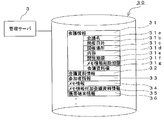
- FIG. 1 is an overall configuration diagram of an electronic conference system. It is a conceptual diagram which shows the management server and database of an electronic conference system.
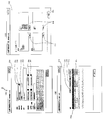
- 3A to 3C are diagrams showing registration information registration screens of the electronic conference system.
- FIG. 4A is a diagram showing a screen for setting the presentation terminal of the electronic conference system
- FIG. 4B is a diagram showing a screen for authorizing a presentation applicant in the presentation terminal. It is a figure which shows the portable terminal device of an electronic conference system. It is a figure which shows the example of input of the 1st memo (handwritten memo) and the 2nd memo (tag) of the electronic conference system. It is a figure which shows the example of input of the 3rd memo (text memo) of an electronic conference system.
- FIG. 1 is a diagram showing an overview of the entire system of the present invention.
- a management server 3, a presentation terminal 5, and a wireless router 7 are configured from a network 2.
- the mobile terminal 10 is prepared in a state where it can be connected to the network 2.
- the network 2 may use the Internet, but it can also be used in an in-house LAN (Local Area Network) or a stand-alone network independent from the outside. This is because an independent network has high confidentiality and can prevent intrusion from outside or leakage or destruction of information.
- LAN Local Area Network
- the management server 3 controls the operation of the conference system 1, stores conference material 20, registers / deletes participant information, manages individual setting information of the mobile terminal 10, etc., and stores these various types of information 30 (see FIG. 2).
- the presentation terminal 5 is a terminal used by the presenter during the conference. It has functions such as the start and end of the conference, the control of the conference material 20 during the conference, and the instruction to delete the material in the portable terminal 10.
- the wireless router 7 has a function of communication connection between the network 2 and the mobile terminal 10.
- the communication method may be a wireless connection such as Bluetooth (registered trademark), Wi-Fi (wireless fidelity: registered trademark), IrDA (Infrared Data Association), or a wired connection such as a coaxial or optical cable using Ethernet (registered trademark). It is sufficient that the network 2 and the mobile terminal 10 have a configuration capable of transmitting and receiving data between each other.
- the mobile terminal 10 is a terminal used by participants of the conference. It has a function of browsing the conference material 20 and creating a memo during the conference.
- the management server 3 has a built-in or external storage area, and an application for the management server 3 is installed in the storage area to control the entire conference system 1.
- a database 30 relating to the conference system 1 is constructed in the storage area (see FIG. 2).
- an application for the management server 3 is started, and commands are transmitted to and received from the application for the presentation terminal 5 and the application for the mobile terminal 10, and processing is performed. Since the application for the management server 3 transmits and receives commands to and from the plurality of applications for the presentation terminal 5 and the application for the mobile terminal 10 during activation, an event-driven type is preferable.
- Event-driven is a program execution format that performs processing in response to an event (operation) executed by a user or another program. When the user is not performing an operation, the program waits for execution of the operation. Therefore, the user can operate other programs while waiting for the program. This is an execution method widely used in programs having a GUI (Graphical User Interface) user interface.
- the database 30 includes information on the conference system 1 as conference information 31, conference material information 32, participant information 33, portable terminal information 36, memo information 34, memo material download deadline 31f, memo.
- Each table includes information additional meeting material information 35, portable terminal information 36, and the like. Input / output and access to the database 30 are executed by the management server 3 application.
- the management server 3 manages the mobile terminal 10. By performing setting registration / deletion or the like in the portable terminal information 36 of the database 30, it is managed whether or not the portable terminal 10 can be used in the conference system 1. As shown in FIG. 3A, on the new conference information creation screen (basic information) 31A, the conference name 31a, the date 31b, the date 31c, the content 31d, the contents 31d, the expiry date 31e, and the memo material It has a function to register and change the download deadline 31f and the like.
- FIG. 3B displays the material list 31g of the conference material 20 used for the conference on the conference information new creation screen (material) 31B.
- the management server receives the conference material 20 used in the conference from the presenter and the participant and stores it in a predetermined location in the storage area.
- the administrator converts the received conference material 20 into a file format that can be browsed by this system, and stores it again in a predetermined location in the storage area of the management server.
- the converted file format uses a PDF (Portable Document Format: registered trademark) format.
- FIG. 3B has buttons for material addition 31h, replacement 31i, deletion 31j, and preview 31k for operating the material information.
- FIG. 3C shows the participant / presenter information for the conference on the new conference information creation screen (participant) 31C, and operations for deleting the participant information 33 31l, adding 31m, and registering 31n. Has a button.
- the management server 3 acquires the memo information data 41 created by each participant during the conference from each mobile terminal 10 and stores it in a storage location in the management server 3.
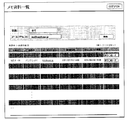
- the memo information data 41 can be confirmed with a memo material list shown in FIG.
- a memo information-added conference material 42 that is a composite of the memo information 34 and the conference material 20 is created and stored in the database 30.
- the management server 3 acquires the email address of the participant who created the memo information data 41 from the participant information 33, or the participant himself / herself inputs the email address directly when sending the email, and sends the email to the participant.
- the storage location of the memo information additional meeting material 42 is described and transmitted to the participants. Each participant accesses the storage location described in the e-mail and downloads the memo information-added meeting material 42.
- the presentation terminal 5 is a terminal that is operated by a presenter in a conference.
- the presentation terminal 5 can be used by changing the setting of the mobile terminal 10.
- the mobile terminal 10 used by the presenter displays the mobile terminal setting screen 37, selects “ON” in the “presenter” switching setting 38, and presenter authority Can be used as the presentation terminal 5.
- the presenter can be a person who has previously registered “presenter” in the conference participant information 33.
- the presenter gives permission, and the participant's mobile terminal 10 is used as a presentation terminal 5 ′ that has been given the authority of a temporary presenter. I can do it.
- the following is the procedure for granting authority for the temporary presenter.
- the presenter application screen 39 is displayed on the presenting terminal 5 ( (See FIG. 4B).
- the presenter presses “permit” on the presenter application screen 39 a notification is given to the portable terminal 10 of the participant who wants to present the temporary presenter, and the presenter terminal 5 Can be used as'.
- the presentation terminal 5 ′ may be limited in the functions used in comparison with the presentation terminal 5. Further, the presenter and the presentation terminal 5 can forcibly restrict and release the temporary presenter authority of the presentation terminal 5 ′.
- the presentation terminal 5 has the same application as that of the mobile terminal 10, access authority and operation to the management server 3 differ depending on the presenter authority.
- access authority and operation to the management server 3 differ depending on the presenter authority.
- the presenter operates the application, and the application for the presentation terminal 5 directly accesses the database 30 and information.
- the extracted information is displayed on the screen of the presentation terminal 5, so that the presenter of the presentation terminal 5 can browse the information in the database 30.
- processing such as transmission / reception of commands to / from the presentation terminal 5, the management server 3, and the portable terminal 10 is actually performed by operating an application.
- application is omitted, and “announcement” Terminal 5 ”is described as operation.
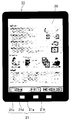
- a mobile terminal 10 shown in FIG. 5 is a device for a conference participant to browse the conference material 20 during the conference and to input a memo related to the conference material 20.
- the mobile terminal 10 has a storage device inside or outside, and an environment in which an application for the mobile terminal 10 is installed in the storage area or an online program created in a script language or the like can be executed. have.
- the conference material 20 transferred from the management server is stored, and the conference participant displays the conference material 20 on the screen of the portable terminal 10 during the conference.
- the participant has an input device that can be operated, and the participant can write a memo so as to be overwritten on the conference material 20.
- a memo input selection button 21 (21a to 21d) is provided.
- the created memo is stored in the storage area.
- the conference material 20 can display an arbitrary page by a participant during the conference.
- a “synchronization” button (not shown), the same page as the page displayed on the presentation terminal 5 can be opened.
- the mobile terminal 10 displays the next meeting material information 32 after the memo is transferred to the management server and the instruction from the presentation terminal 5 by the presenter or the browsing time limit 31e elapses.
- the conference material 20 stored in the mobile terminal 10 is deleted.
- the conference participant may use the participant's own mobile terminal by registering it with the management server.
- the portable terminal 10 can be a desktop personal computer, a notebook personal computer, a PDA (Personal Digital Assistant) as long as an application dedicated to the portable terminal 10 or an online program created in a script language can be operated and the conference material 20 can be viewed.
- the OS Operaation system
- the input device may be any device such as a mouse, a tablet, or a touch panel that can be operated by a user and input to the terminal.
- a portable terminal having a small and portable touch panel input format will be described as an example.
- processing such as transmission / reception of commands between the mobile terminal 10 and the management server 3 and the presentation terminal 5 is actually performed by operating an application for the mobile terminal 10. Omitted, and “mobile terminal 10” is described as operation.
- the memo function of the present invention will be described with reference to FIGS. Since the conference material 20 viewed by the participant during the conference is electronic data, the present invention has a memo function so that the participant can mark the material or make a memorandum. Improves sex. There are three types of memos created by the memo function: a first memo, a second memo, and a third memo.
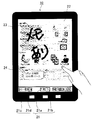
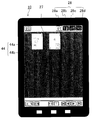
- FIG. 6 is a diagram illustrating input of a first memo (handwritten memo) and a second memo (sticky note)
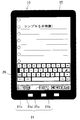
- FIG. 7 is a diagram illustrating input of a third memo (text memo)
- FIG. 8 is a diagram illustrating a memo list screen.
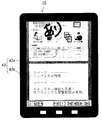
- FIG. 9 is a diagram showing a screen for displaying the state after the memo composition.
- the participant starts the memo input during the conference, so that the memo input selection button 21 (“handwritten memo” mode button 21a, “text memo” mode button 21b) of the portable terminal 10 is used.
- the memo function can be used for the conference material 20 displayed on the screen.
- the first memo is a function of “handwritten memo”. For example, like the handwritten memo 23, the first memo is superimposed on the conference material 20 being displayed on the mobile terminal 10 and placed at an arbitrary position on the screen. You can write in any size and color.
- the “handwritten memo” mode button 21a the state changes to a state where a memo can be input. Since a touch panel is used in this embodiment, handwriting input can be performed with a finger, a stylus pen, or the like. Moreover, you may input with a mouse
- the second memo is a function of a so-called “sticky note”, and a character or the like is input to a range of a small piece of graphic (for example, a sticky note 24) and is superimposed on the conference material 20 being displayed on the mobile terminal 10, An object to be placed at an arbitrary position on the screen.
- a sticky note By pressing the “sticky note” mode button 21d, the state transitions to a state in which the sticky note 24 can be input.
- handwriting input with a finger, stylus pen, etc., or input with a mouse, keyboard, etc. may be used.
- the sticky note part can be placed on a conference material 20 being displayed on the mobile terminal 10 and placed at an arbitrary position, and the placement position can be easily moved with a mouse, keyboard, etc., and placed at a new position. is there. Moreover, it is not necessary to input characters or the like in the tag part, and it is also possible to give a tag as a mere mark.
- the third memo is a function of “text memo”, and when the “text memo” mode button 21b is pressed, the screen shifts to a dedicated text memo input screen 25 (see FIG. 7).
- characters are input on the screen by a pseudo keyboard 26 by software or a keyboard as an input device.
- software that inputs characters with a finger, a stylus pen, etc., automatically converts characters, and inputs characters on a text memo input screen may be installed.
- the page, position, size, etc. of the conference material 20 on which the memo is written are recorded in the memo information data 41 and stored in the storage area of the portable terminal 10. Is done.
- the memo information data 41 once created, even if the page of the conference material 20 is turned, when the page number is displayed again, as shown in FIG. 6, the conference material 20 and the handwritten memo 23 and the tag 24 are displayed in an overlapping manner. It appears as if it were written on actual paper material.
- the information of the inputted third memo is edited by automatically inserting the page number of the conference material 20 on which the memo is written into the third memo and editing it as text memo information data (not shown). It is recorded in the information data 41 and stored in the storage area of the mobile terminal 10.
- the present invention has a display function of the memo information data 41.
- the participant presses the “memo list” screen button 21 c while displaying the conference material 20 to display the memo list screen 27 as shown in FIG. 8 and stored in the memo information data 41.
- the contents of the first memo to the third memo can be displayed as a thumbnail 44 for confirmation.
- the “all” button 28a is pressed on the memo list screen 27, all memos from the first memo to the third memo are displayed.
- the “handbook” button 28b is pressed, a screen showing a list of contents of the first memo is displayed.
- the “sticky note” button 28c is pressed, a screen showing a list of contents of the second memo is displayed.
- the “text” button 28d is pressed, a screen showing a list of contents of only the third memo is displayed. In this way, it is possible to display the contents of the memo data corresponding to each button extracted from the memo data.
- the first thumbnail 44 a and the second thumbnail 44 b are displayed on the memo list screen 27.
- the first thumbnail 44a is displayed so that the page number, the first memo (handwriting), and the second memo (sticky note) are present.
- the second thumbnail 44b is displayed with an icon indicating that a third memo (text memo) exists.
- the first thumbnail 44a and the second thumbnail 44b can be enlarged and displayed by double-clicking or tapping each.
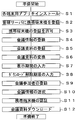
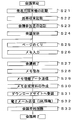
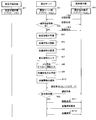
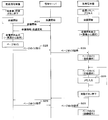
- FIGS. 12 to 15. show preparations for the conference such as setting of each device and information registration in the database 30 when the conference is held, and FIGS. 14 and 15 show processing from the start to the end of the conference.
- FIGS. 12 and 14 will be described.
- Applications are installed in the management server 3 and the mobile terminal 10 (presentation terminal 5), respectively (step S1).
- the administrator needs to set each terminal to be registered in the conference system.
- the administrator is a person who performs management and maintenance related to the conference system 1.
- the terminal information registration items are a terminal ID, an identifier (administrative name), and the like.
- the terminal ID is, for example, a Mac address (Media Access Control address), a UDID (Unique Device Identifier), an Android ID, or the like. It may be a unique identification number that can be identified by the mobile terminal 10.
- the administrator selects a terminal from a list of registered mobile terminals (not shown) and presses an approval button to permit connection of the terminal. Authentication is rejected for portable terminals that are not approved by the management server 3 (step S3).
- the management server 3 since only registered terminals can log in to the conference system 1, access from unapproved and unknown portable terminals 10 can be restricted, and security is enhanced.
- Conference information registration Next, the conference information is registered.
- the administrator displays a new conference information creation screen (basic information) 31A shown in FIG. 3A on the management server 3 and registers various conference information (step S4).
- the contents of registration include a meeting name 31a, a date and time 31b, a holding location 31c, a content 31d, a browsing deadline 31e, a memo material download deadline (memo information deletion deadline) 31f, and the like.
- the conference material 20 is stored in the storage area in the management server and is associated with the conference information 31 (step S5).
- the conference material 20 is delivered from the presenter to the manager.
- the delivery means may be any means as long as security problems do not occur, such as those stored in a medium, attached to an e-mail, or via a network such as an in-house LAN.
- the administrator presses the material addition button 31h on the conference information new creation screen (material) 31B shown in FIG. 3B and designates the delivered conference material 20 to register the information in the database 30. (Step S5).
- the file name, presentation material name, conversion result, etc. are displayed in the conference material column 31g of the screen.
- One or more meeting materials 20 may be used in one meeting. In the case of a plurality, the step S5 is repeated for the number of meeting materials.
- step S6 a process of converting to the file format specified by the conference system is performed.
- the file name of the registered conference material is displayed in the conference material column 31g shown in FIG. 3B, the file format can be determined from the extension.
- the conference material is converted into a PDF format file.
- the meeting material column 31g is updated and displayed with the file name after conversion and the conversion result.
- File conversion may be performed for each file or for a plurality of files at once.
- the browsing deadline 31e for the conference material 20 is input (step S7).
- the browsing deadline sets a final date and time when the conference material 20 can be browsed on the mobile terminal 10.
- the mobile terminal 10 confirms the browsing deadline 31e of the conference material 20 stored in the mobile terminal 10 at the time of activation, and deletes the conference material 20 when the browsing deadline 31e has elapsed. It is preferable to set it after the scheduled end time (year / month / day / hour / minute) of the conference.
- the download deadline (memo information deletion deadline) 31f of the conference material 20 (memo information addition conference material 42) after the conference is ended is set (step S8).
- Each participant accesses the storage location described in the e-mail at the end of the conference and downloads the memo information-added conference material 42.
- the memo material download deadline (memo information deletion deadline) 31f is input to determine the due date.
- the memo information addition meeting material 42 which passed the download time limit (memo information deletion time limit) 31f is completely deleted.
- participant information 33 of the database 30 the information on the participants of the conference is registered in the participant information 33 of the database 30 (step S9).
- the administrator inputs the participant data of the conference from the registration screen (not shown) of the participant in the management server 3 and registers it as participant information 33.
- the data to be registered includes name, title, affiliation, e-mail address, ID, password, presenter authority, and the like.
- the ID and password are used for authentication of login to the conference system, and do not limit the participants for each conference.
- a participant is registered, it is recorded in the database 30 and displayed in a list (not shown) on the participant management screen.
- the registered participant data is valid until the administrator deletes it, and can be used for multiple meetings.
- the conference to be held is selected (activated) from the conference management screen (not shown) of the management server 3 (step S10).
- the meeting becomes an object to be held.
- the mobile terminal 10 is activated and a conference selection screen (not shown) is displayed. On the conference selection screen, the URL of the conference distributed in advance to the application is input. Then, the mobile terminal 10 transmits a connection permission request to the management server 3. The portable terminal 10 communicates with the wireless router 7 via a wireless LAN, and sends a request to the management server 3 via the network 2. Since the management server 3 is an event-driven system, it continues to wait for commands from the mobile terminal 10 and the presentation terminal 5. The management server 3 returns a response to the command.
- the management server 3 sends back a response indicating that the authentication is successful, thereby connecting the mobile terminal 10 (step S 11).
- the management server 3 transmits the conference information 31 selected in step S10 and the conference material 20 of the conference to the mobile terminal 10 (step S12). ).
- the mobile terminal 10 stores the conference material 20 in the storage area.
- the process ends when the mobile terminal 10 determines that all of the plurality of conference materials 20 have been downloaded to the mobile terminal 10. To do.
- the conference may be an environment that can be connected to the network 2 even in a remote place such as a conference room where the network 2 is constructed, or a corporate head office and branch office.
- the conference is started when the presenter's mobile terminal 10 can be used as the presentation terminal 5 by setting the “presenter” switching setting 38 to “ON” as described above. (Step S21). At this point, the mobile terminal 10 accessing the conference URL starts participating in the conference.
- Participants of the conference should either lend the mobile terminal 10 used in the conference at the conference venue or bring their own mobile terminal 10 registered in the mobile terminal information 36 to the conference venue for use. Can do.
- the mobile terminal 10 is activated, performs authentication communication with the management server 3, and the mobile terminal 10 stores the mobile terminal information 36. If registered, it is determined that authentication is normal, and a “participant authentication screen” (not shown) is displayed. If the mobile terminal 10 is not registered in the mobile terminal information 36, the administrator can use the mobile terminal 10 by registering the mobile terminal 10 in the management server 3.
- the ID and password of the participant who uses the portable terminal 10 are input and collated with information registered in the participant information 33 of the database 30 (step) S23). If it is determined by verification that the ID and password are correct, the participant is authenticated and can log in to the management server 3. Log in to the management server 3 to display a conference selection screen (not shown). On the conference selection screen, the URL of the conference distributed in advance to the application is input. When the mobile terminal 10 accesses the conference URL and the presenter's presentation terminal 5 starts using the conference terminal, participation in the conference starts (step S24).
- the presenter turns the page of the conference material 20 displayed on the presentation terminal 5 by operating the input device in accordance with the progress of the conference (step S25).
- the operation method at this time is referred to as an “automatic operation” mode (see FIG. 17).
- the presentation terminal 5 transmits a “page turning” command to the management server 3.
- the management server 3 receives the command and transfers the “page turning” command to the mobile terminal 10.
- the mobile terminal 10 receives the command, the page of the conference material 20 is displayed so that the page described in the command is displayed, and the presentation material 5 and the conference material 20 of the mobile terminal 10 are synchronized and the same.
- the page will be displayed (hereinafter referred to as “synchronize”).
- the participant can change the operation method to “manual operation”, so that the conference material 20 displayed on the mobile terminal 10 can be changed to an arbitrary page of the participant.
- a restriction that cannot be changed may be provided on the pages other than those where the presenter gave a lecture at the conference.
- a “page turning” command is received from the presentation terminal 5 during “manual operation”, if an arbitrary page is displayed, the command does not need to be ignored and synchronized.
- there are a plurality of conference materials 20 other materials can be browsed.
- the mobile terminal 10 is provided with a “synchronization” button (not shown), and the conference material 20 of the presentation terminal 5 and the display page can be synchronized by pressing the button. At this time, the operation method is switched to “automatic operation”. Further, a button such as “forced synchronization” may be provided on the presentation terminal 5 and the pages of all the mobile terminals 10 may be forcibly synchronized by pressing the button.
- the first memo (handwritten memo) and the second memo (sticky note) are created as a memo information data 41 in a file different from the conference material 20, and are superimposed on the conference material 20, so that an arbitrary position on the screen is obtained. In addition, it can be written in any size and color. Since a touch panel is used in this embodiment, handwriting input can be performed with a finger, a stylus pen, or the like. Further, input may be performed with a mouse, a keyboard, or the like as an input device.
- the third memo (text memo) transitions to a dedicated text memo input screen 25 when the “text memo” mode button 21b is pressed (see FIG. 7). On the text memo input screen 25, characters are input on the screen by a pseudo keyboard 26 by software or a keyboard as an input device. Alternatively, software that inputs characters with a finger, a stylus pen, etc., automatically converts characters, and inputs characters on a text memo input screen may be installed.
- the memo list screen 27 is displayed as shown in FIG. 8, and the first memo stored in the memo information data 41 is displayed.
- the contents of the third memo are displayed as thumbnails 44 or enlarged, so that the contents of the memo inputted by the participant can be confirmed.
- the conference end process will be described with reference to FIGS. 13 and 16.
- the end of the conference is determined to be ended when the participant ends the application of his / her portable terminal 10 and all the participants and the presenters leave the conference (step S27). At this time, even if some of the participants and presenters leave the conference first, it does not affect the participants and presenters in other conferences.
- the participant's mobile terminal 10 When the participant's mobile terminal 10 terminates the application, the participant's mobile terminal 10 confirms the presence or absence of the memo information data 41. If the memo information data 41 exists, as shown in FIG. 29 is displayed (step S28). When the participant desires to leave the memo data input by himself / herself, he / she inputs an e-mail address for receiving an e-mail notifying the storage location of the conference material 20 and the memo data (memo information-added conference material 42). Alternatively, instead of input, an e-mail address may be automatically acquired from the participant information 33 and displayed in the dialog 29.
- the management server 3 receives the memo information data 41, stores it in the storage area, and updates the information of the memo information 34 in the database 30.
- the memo information 34 is registered in the database 30 as the memo information 34 based on the name, title, affiliation, e-mail address of the participant information 33, and the conference name 31a and the conference material 31g of the conference information 31. The In this way, information is stored so that the creator of the memo information data 41 and the meeting name can be identified.
- step S28 if the participant does not save the memo data (No in step S28), the memo information data 41 is discarded and the conference ends.
- the management server 3 combines the memo information data 41 and the conference material 20 to create a memo information-added conference material 42 (step S30).
- the memo information data 41 and the conference material 20 are separate files, but they are superimposed and combined to form a single electronic file, as if the memo information was entered on the screen, directly participating in the conference material 20 Created as if written by the author.
- the first memo and the second memo are at the position where the memo of the conference material 20 was made (handwritten memo information additional conference material 42a), and the third memo is the memo information additional conference. Edited together with the end of the material 42 (text memo information additional meeting material 42b) and attached.
- the memo information addition meeting material 42 is preferably a file format that cannot be changed such as PDF, and may be subjected to measures such as digital watermarking to detect unauthorized copying or data tampering.
- the material synthesized in this way and synthesized as an electronic file is stored in the storage area (download site) of the management server 3 as the memo information addition conference material 42 (step S31).
- the URL (Uniform Resource Locator) of the download site is transmitted to the e-mail address designated by the participant in step S28 (step S32).
- the participant can obtain the memo information-added conference material 42 obtained by synthesizing his memo with the conference material 20 by accessing the URL notified by e-mail and downloading the memo information-added conference material 42.
- the participant can delete the memo information addition conference material 42 from the download site after downloading the memo information addition conference material 42.
- the presenter deletes the conference material 20 and the memo information data 41 stored in the mobile terminal 10 by pressing the “delete material” button on the presentation terminal 5 (step S33). This is to prevent information leakage by deleting various materials in the portable terminal 10.
- the memo information data 41 can also be deleted by the administrator.
- the presentation terminal 5 transmits a “deletion of document” command to the management server 3 when “deletion of document” is performed.
- the management server 3 receives the command and transmits a “delete material” command to the mobile terminal 10.
- the portable terminal 10 deletes all the conference material 20 and the memo information data 41 from the storage area. If the mobile terminal 10 fails to receive a “deletion of material” command such as when the power is off or the connection is released from the network 2, the next meeting material information 32 is obtained from the management server 3 and the mobile terminal 10. At the time of display, it is deleted from the storage area of the mobile terminal 10. If the power is turned off at the corresponding time, the conference material 20 is deleted when the first conference material list is displayed after the next power-on of the mobile terminal 10.
- the administrator operates the “conference information / registration screen” shown in FIG. 3, selects the material from the conference material column 31g, and presses the material deletion 31j.
- the conference material 20 is manually deleted from the conference information 31.
- an instruction for investigating whether the conference material 20 remains in the mobile terminal 10 is transmitted from the management server 3 to the mobile terminal 10, and the conference material If 20 remains, the conference material 20 of the mobile terminal 10 is deleted.
- participant can use the portable terminal 10 without taking in and deleting the conference material 20 in the portable terminal 10 before and after the conference, the burden on the participant is reduced.
- the conference system stores the above-mentioned memo information-added conference material 42 in the storage area (download site) of the management server 3 (step S31), and sets the URL of the download site to the e-mail address designated by the participant.
- the memo information addition meeting material 42 is downloaded and obtained from the URL by transmitting by e-mail (step S32), the memo information addition meeting is added to the e-mail. It is also possible to send the document 42 attached to the participant and obtain it.
- the processing of the second embodiment is shown below.
- the management server 3 combines the memo information data 41 and the conference material 20 to create a memo information-added conference material 42 (step S30).
- the management server transmits the memo information addition conference material 42 to the mobile terminal 10, and the mobile terminal 10 temporarily stores the transmitted memo information addition conference material 42.
- the participant transmits the memo information-added meeting material 42 attached to the email address designated by the participant in step S28 as an e-mail.
- the memo information addition meeting material 42 is automatically or manually deleted after the transmission of the e-mail.
- the participant can obtain the memo information-added conference material 42 obtained by synthesizing his memo with the conference material 20 after the conference is completed.
- the download site is not necessary, and the load on the management server 3 is reduced.
- the participant does not need to download at a later date, and convenience is improved.
- the conference system according to the present invention may implement the following functions in addition to the above embodiment.
- the conference material 20 may use not only text and PDF data but also moving image / audio material.
- the moving image file format may be any format such as QuickTime (registered trademark) or MPEG (Moving Picture Experts Group) as long as it can be played back by the presentation terminal 5 and the mobile terminal 10.
- a questionnaire voting function may be implemented in the mobile terminal 10.
- a function may be provided that allows the management server 3 or the announcement terminal 5 to aggregate immediately after voting and the results can be aggregated.
- the conference material is downloaded to the mobile terminal only when there is authentication from the mobile terminal registered in advance in the management server. Can be browsed during the meeting, the risk of information leakage is reduced by not downloading to unclear terminals that are not pre-registered.
- the conference material is deleted from the portable terminal after the conference ends, a paperless conference that can further reduce the risk of information leakage from the portable terminal can be realized.
- the conference material is stored centrally in the management server, it is easy to manage, and is suitable for preventing access from the outside and strengthening security.
- memo data (first and second memos) in which a memo is overwritten on the conference material displayed on the mobile terminal during the conference, and the conference material and the first 1.
- Combining the second and second memos to create a composite document storing it in a predetermined location on the server, and sending an e-mail describing the storage location of the server to the email address of the conference participant. Can download the composite material from the storage location at a later date. Since it is possible to distribute meeting materials as electronic data, a paperless meeting can be realized.
- the conference material can be distributed as electronic data, so a paperless conference can be realized.
- the conference material, the first memo and the third memo are deleted from the portable terminal and the management server after the conference is ended by a deletion instruction by the administrator or determination of the elapse of the specified date, there is a risk of information leakage, etc. Can be reduced.
Landscapes
- Engineering & Computer Science (AREA)
- Business, Economics & Management (AREA)
- Theoretical Computer Science (AREA)
- Strategic Management (AREA)
- Human Resources & Organizations (AREA)
- Physics & Mathematics (AREA)
- General Physics & Mathematics (AREA)
- General Engineering & Computer Science (AREA)
- Computer Security & Cryptography (AREA)
- Entrepreneurship & Innovation (AREA)
- Computer Hardware Design (AREA)
- General Health & Medical Sciences (AREA)
- Health & Medical Sciences (AREA)
- Software Systems (AREA)
- Bioethics (AREA)
- Operations Research (AREA)
- Quality & Reliability (AREA)
- Data Mining & Analysis (AREA)
- General Business, Economics & Management (AREA)
- Economics (AREA)
- Marketing (AREA)
- Tourism & Hospitality (AREA)
- Signal Processing (AREA)
- Computing Systems (AREA)
- Computer Networks & Wireless Communication (AREA)
- Databases & Information Systems (AREA)
- Information Transfer Between Computers (AREA)
- Management, Administration, Business Operations System, And Electronic Commerce (AREA)
- Telephonic Communication Services (AREA)
Priority Applications (2)
| Application Number | Priority Date | Filing Date | Title |
|---|---|---|---|
| CN201280072183.7A CN104205120B (zh) | 2012-03-30 | 2012-12-27 | 电子会议系统 |
| HK15104087.9A HK1203661B (en) | 2012-03-30 | 2012-12-27 | Electronic conference system |
Applications Claiming Priority (2)
| Application Number | Priority Date | Filing Date | Title |
|---|---|---|---|
| JP2012-081491 | 2012-03-30 | ||
| JP2012081491A JP6108679B2 (ja) | 2012-03-30 | 2012-03-30 | 電子会議システム |
Publications (1)
| Publication Number | Publication Date |
|---|---|
| WO2013145490A1 true WO2013145490A1 (ja) | 2013-10-03 |
Family
ID=49258819
Family Applications (1)
| Application Number | Title | Priority Date | Filing Date |
|---|---|---|---|
| PCT/JP2012/083985 Ceased WO2013145490A1 (ja) | 2012-03-30 | 2012-12-27 | 電子会議システム |
Country Status (3)
| Country | Link |
|---|---|
| JP (1) | JP6108679B2 (enExample) |
| CN (1) | CN104205120B (enExample) |
| WO (1) | WO2013145490A1 (enExample) |
Cited By (2)
| Publication number | Priority date | Publication date | Assignee | Title |
|---|---|---|---|---|
| JP2016170614A (ja) * | 2015-03-12 | 2016-09-23 | 株式会社リコー | 伝送システム、情報処理装置、プログラムおよび情報処理方法 |
| CN109246386A (zh) * | 2018-11-22 | 2019-01-18 | 湖北安心智能科技有限公司 | 一种无纸化数字会议系统及控制方法 |
Families Citing this family (10)
| Publication number | Priority date | Publication date | Assignee | Title |
|---|---|---|---|---|
| JP5935786B2 (ja) * | 2013-11-21 | 2016-06-15 | キヤノンマーケティングジャパン株式会社 | 情報処理装置、情報処理システム、その制御方法及びプログラム |
| CN108122087A (zh) * | 2016-11-28 | 2018-06-05 | 深圳市鸿合创新信息技术有限责任公司 | 一种会议资料即时存储的方法 |
| JP7075108B2 (ja) * | 2016-12-28 | 2022-05-25 | 国立大学法人 鹿児島大学 | 携帯情報端末 |
| CN106888269B (zh) * | 2017-03-30 | 2020-09-29 | 成都伟德利普信息技术有限公司 | 一种基于电子白板的会议纪要追踪方法 |
| JP7059756B2 (ja) * | 2018-03-30 | 2022-04-26 | 株式会社リコー | 会議装置、会議システム、情報処理方法およびプログラム |
| JP7043932B2 (ja) * | 2018-03-30 | 2022-03-30 | 株式会社リコー | 会議装置、会議システム、情報処理方法およびプログラム |
| JP7339620B2 (ja) * | 2019-11-01 | 2023-09-06 | 株式会社ネオジャパン | 資料配付装置、資料配付システム、及びプログラム |
| CN114969580B (zh) * | 2021-02-25 | 2025-03-14 | 广州视源电子科技股份有限公司 | 会议内容记录方法、装置、会议系统和存储介质 |
| JP7724146B2 (ja) * | 2021-12-13 | 2025-08-15 | 株式会社内田洋行 | プログラム、情報処理方法及び情報処理装置 |
| JP7826738B2 (ja) * | 2022-02-28 | 2026-03-10 | 富士フイルムビジネスイノベーション株式会社 | 情報処理装置、情報処理システム及び情報処理プログラム |
Citations (4)
| Publication number | Priority date | Publication date | Assignee | Title |
|---|---|---|---|---|
| JP2003009107A (ja) * | 2001-06-22 | 2003-01-10 | Fuji Electric Co Ltd | 電子会議用端末、電子会議システム、電子会議方法、及び電子会議用プログラム |
| JP2007214882A (ja) * | 2006-02-09 | 2007-08-23 | Fuji Xerox Co Ltd | 電子会議システム、電子会議支援プログラム及び方法、会議参加者端末装置 |
| JP2011065288A (ja) * | 2009-09-15 | 2011-03-31 | Ricoh Co Ltd | 会合システム、表示制御方法、プログラム |
| JP2011138438A (ja) * | 2009-12-29 | 2011-07-14 | Sharp Corp | 電子会議システム、情報処理装置、情報処理方法及びプログラム |
Family Cites Families (7)
| Publication number | Priority date | Publication date | Assignee | Title |
|---|---|---|---|---|
| JPH09200350A (ja) * | 1996-01-12 | 1997-07-31 | Hitachi Inf Syst Ltd | 電子会議システム |
| CN1374583A (zh) * | 2001-03-12 | 2002-10-16 | 掌幄科技股份有限公司 | 可携式装置群体即时互动式会议系统 |
| JP2004328588A (ja) * | 2003-04-28 | 2004-11-18 | Minolta Co Ltd | 多地点間会議システム |
| JP2005130257A (ja) * | 2003-10-24 | 2005-05-19 | Nec Fielding Ltd | 会議支援システム、及び会議支援サーバー、並びに会議支援用コンピュータプログラム |
| JP4735384B2 (ja) * | 2006-04-11 | 2011-07-27 | 富士ゼロックス株式会社 | 電子会議システム、電子会議用端末、電子会議システムの制御方法及び電子会議用端末の制御プログラム |
| JP2010049456A (ja) * | 2008-08-21 | 2010-03-04 | Canon Inc | データ処理装置、データ処理方法、会議システム、記憶媒体及びプログラム |
| JP2011199549A (ja) * | 2010-03-19 | 2011-10-06 | Konica Minolta Business Technologies Inc | 遠隔会議システム、送信装置および受信装置 |
-
2012
- 2012-03-30 JP JP2012081491A patent/JP6108679B2/ja not_active Expired - Fee Related
- 2012-12-27 WO PCT/JP2012/083985 patent/WO2013145490A1/ja not_active Ceased
- 2012-12-27 CN CN201280072183.7A patent/CN104205120B/zh not_active Expired - Fee Related
Patent Citations (4)
| Publication number | Priority date | Publication date | Assignee | Title |
|---|---|---|---|---|
| JP2003009107A (ja) * | 2001-06-22 | 2003-01-10 | Fuji Electric Co Ltd | 電子会議用端末、電子会議システム、電子会議方法、及び電子会議用プログラム |
| JP2007214882A (ja) * | 2006-02-09 | 2007-08-23 | Fuji Xerox Co Ltd | 電子会議システム、電子会議支援プログラム及び方法、会議参加者端末装置 |
| JP2011065288A (ja) * | 2009-09-15 | 2011-03-31 | Ricoh Co Ltd | 会合システム、表示制御方法、プログラム |
| JP2011138438A (ja) * | 2009-12-29 | 2011-07-14 | Sharp Corp | 電子会議システム、情報処理装置、情報処理方法及びプログラム |
Non-Patent Citations (2)
| Title |
|---|
| "ConforMeeting/e Paperless Yakuin Kaigi System", C&C USER FORUM & IEXP02011, 10 November 2011 (2011-11-10) * |
| "Enkaku Communication Shien Software ConforMeeting/c", C&C USER FORUM & IEXP02010, 11 November 2010 (2010-11-11) * |
Cited By (3)
| Publication number | Priority date | Publication date | Assignee | Title |
|---|---|---|---|---|
| JP2016170614A (ja) * | 2015-03-12 | 2016-09-23 | 株式会社リコー | 伝送システム、情報処理装置、プログラムおよび情報処理方法 |
| CN109246386A (zh) * | 2018-11-22 | 2019-01-18 | 湖北安心智能科技有限公司 | 一种无纸化数字会议系统及控制方法 |
| CN109246386B (zh) * | 2018-11-22 | 2020-12-01 | 湖北安心智能科技有限公司 | 一种无纸化数字会议系统及控制方法 |
Also Published As
| Publication number | Publication date |
|---|---|
| CN104205120A (zh) | 2014-12-10 |
| JP6108679B2 (ja) | 2017-04-05 |
| HK1203661A1 (en) | 2015-10-30 |
| JP2013210898A (ja) | 2013-10-10 |
| CN104205120B (zh) | 2017-11-28 |
Similar Documents
| Publication | Publication Date | Title |
|---|---|---|
| JP6108679B2 (ja) | 電子会議システム | |
| JP2013210898A5 (enExample) | ||
| US11150859B2 (en) | Method and system for facilitating collaboration sessions | |
| JP2012133493A (ja) | 電子会議システム | |
| TWI693523B (zh) | 線上合作系統及方法 | |
| JP5759329B2 (ja) | 会議関連コンテンツの伝送経路を指定するための方法およびシステム | |
| JP6357760B2 (ja) | 端末装置、プログラム、画面共有方法及び画面共有システム | |
| US20120150577A1 (en) | Meeting lifecycle management | |
| JP7147301B2 (ja) | 情報処理サーバー及びプログラム | |
| JP2019179536A (ja) | 通信システム、通信方法、情報処理装置、プログラム | |
| JP2006092242A (ja) | 遠隔会議システム、拠点サーバ、管理サーバ、遠隔会議管理方法及びプログラム | |
| JP6120433B2 (ja) | グループ討議システム | |
| TW201533674A (zh) | 存取與配置會議屬性 | |
| JP2019036155A (ja) | 情報処理装置、情報処理システム、その制御方法、及びプログラム | |
| JP2007213467A (ja) | 会議支援装置 | |
| US9692608B2 (en) | Communication management apparatus, program, communication management method, and communication management system | |
| JP2022036753A (ja) | サーバーシステム及びサーバーシステムの制御方法 | |
| JP2015043149A (ja) | 操作端末、プログラム及び情報処理システム | |
| JP7534191B2 (ja) | 朝礼支援装置、及びプログラム | |
| JP7039903B2 (ja) | 情報処理システム、情報処理装置、プログラム及び画面共有端末制御方法 | |
| JP4696480B2 (ja) | 遠隔会議システム、拠点サーバ及びプログラム | |
| JP2010278656A (ja) | 画像編集システムおよび画像編集方法 | |
| JP7339620B2 (ja) | 資料配付装置、資料配付システム、及びプログラム | |
| JP2013232123A (ja) | 電子会議システム、端末、およびファイル提供サーバ | |
| JP5088153B2 (ja) | 会議タスク支援方法、会議タスク支援システム、ユーザインタフェース装置、及びプログラム |
Legal Events
| Date | Code | Title | Description |
|---|---|---|---|
| 121 | Ep: the epo has been informed by wipo that ep was designated in this application |
Ref document number: 12872460 Country of ref document: EP Kind code of ref document: A1 |
|
| NENP | Non-entry into the national phase |
Ref country code: DE |
|
| 122 | Ep: pct application non-entry in european phase |
Ref document number: 12872460 Country of ref document: EP Kind code of ref document: A1 |