EP3757762B1 - Elektronisches gerät, informationsverarbeitungssystem und informationsverarbeitungsverfahren - Google Patents
Elektronisches gerät, informationsverarbeitungssystem und informationsverarbeitungsverfahren Download PDFInfo
- Publication number
- EP3757762B1 EP3757762B1 EP20178088.9A EP20178088A EP3757762B1 EP 3757762 B1 EP3757762 B1 EP 3757762B1 EP 20178088 A EP20178088 A EP 20178088A EP 3757762 B1 EP3757762 B1 EP 3757762B1
- Authority
- EP
- European Patent Office
- Prior art keywords
- function
- firmware
- unit
- screen
- electronic apparatus
- Prior art date
- Legal status (The legal status is an assumption and is not a legal conclusion. Google has not performed a legal analysis and makes no representation as to the accuracy of the status listed.)
- Active
Links
Images






Classifications
-
- G—PHYSICS
- G06—COMPUTING OR CALCULATING; COUNTING
- G06F—ELECTRIC DIGITAL DATA PROCESSING
- G06F8/00—Arrangements for software engineering
- G06F8/60—Software deployment
-
- G—PHYSICS
- G06—COMPUTING OR CALCULATING; COUNTING
- G06F—ELECTRIC DIGITAL DATA PROCESSING
- G06F8/00—Arrangements for software engineering
- G06F8/60—Software deployment
- G06F8/65—Updates
-
- G—PHYSICS
- G06—COMPUTING OR CALCULATING; COUNTING
- G06F—ELECTRIC DIGITAL DATA PROCESSING
- G06F3/00—Input arrangements for transferring data to be processed into a form capable of being handled by the computer; Output arrangements for transferring data from processing unit to output unit, e.g. interface arrangements
- G06F3/01—Input arrangements or combined input and output arrangements for interaction between user and computer
- G06F3/048—Interaction techniques based on graphical user interfaces [GUI]
- G06F3/0481—Interaction techniques based on graphical user interfaces [GUI] based on specific properties of the displayed interaction object or a metaphor-based environment, e.g. interaction with desktop elements like windows or icons, or assisted by a cursor's changing behaviour or appearance
- G06F3/0482—Interaction with lists of selectable items, e.g. menus
-
- H—ELECTRICITY
- H04—ELECTRIC COMMUNICATION TECHNIQUE
- H04N—PICTORIAL COMMUNICATION, e.g. TELEVISION
- H04N1/00—Scanning, transmission or reproduction of documents or the like, e.g. facsimile transmission; Details thereof
- H04N1/0035—User-machine interface; Control console
- H04N1/00405—Output means
- H04N1/00408—Display of information to the user, e.g. menus
- H04N1/00411—Display of information to the user, e.g. menus the display also being used for user input, e.g. touch screen
-
- H—ELECTRICITY
- H04—ELECTRIC COMMUNICATION TECHNIQUE
- H04N—PICTORIAL COMMUNICATION, e.g. TELEVISION
- H04N1/00—Scanning, transmission or reproduction of documents or the like, e.g. facsimile transmission; Details thereof
- H04N1/00962—Input arrangements for operating instructions or parameters, e.g. updating internal software
- H04N1/00973—Input arrangements for operating instructions or parameters, e.g. updating internal software from a remote device, e.g. receiving via the internet instructions input to a computer terminal
-
- G—PHYSICS
- G06—COMPUTING OR CALCULATING; COUNTING
- G06F—ELECTRIC DIGITAL DATA PROCESSING
- G06F2203/00—Indexing scheme relating to G06F3/00 - G06F3/048
- G06F2203/048—Indexing scheme relating to G06F3/048
- G06F2203/04803—Split screen, i.e. subdividing the display area or the window area into separate subareas
Definitions
- This disclosure relates to an electronic apparatus, an information processing system, and an information processing method.
- MFP multifunction peripheral
- JP-2016-212855-A when an application is to be installed on an MFP from an application market site, which is a web site for distributing applications, the required firmware can be automatically updated.
- firmware is automatically updated, the function of firmware may be changed irrespective of the user intention, and it is difficult to understand for users how the function has changed.
- an electronic apparatus installable with firmware updatable via a network is devised, in accordance with claim 1. Further aspects and preferred embodiments are set out in claim 2 et seq.
- the electronic apparatus includes an input unit configured to receive an operation performed by a user; a display control unit configured to display, on a display, a first screen for displaying a first function of firmware that can be installed on the electronic apparatus, and a second screen for displaying a second function of the firmware, the second function including a plurality of second functions and the second screen including a plurality of second screens prepared for each one of the plurality of second functions; a first enablement unit configured to enable the first function in response to an operation for the first function displayed on the first screen input via the input unit; and a second enablement unit configured to enable the second function in response to an operation for the second function displayed on the second screen input via the input unit.
- the second enablement unit enables one or more of the second functions selected from the plurality of second functions respectively displayed on the plurality of second screens.
- the information processing system includes a server; and an electronic apparatus connectable with the server via a network, the electronic apparatus installable with firmware updatable via the network.
- the server includes a storage unit configured to store one or more firmwares to be supplied to the electronic apparatus; and a transmission unit configured to transmit information of a first screen or information of a second screen for displaying one or more firmwares installable on the electronic apparatus, the first screen or the second screen is to be displayed on a display.
- the electronic apparatus includes an input unit configured to receive an operation performed by a user; a display control unit configured to display, on the display, the first screen for displaying a first function of firmware that can be installed on the electronic apparatus, and the second screen for displaying a second function of the firmware, the second function including a plurality of second functions and the second screen including a plurality of second screens prepared for each one of the plurality of second functions; a first enablement unit configured to enable the first function in response to an operation for the first function displayed on the first screen input via the input unit; and a second enablement unit configured to enable the second function in response to an operation for the second function displayed on the second screen input via the input unit, wherein the second enablement unit enables one or more of the second functions selected from the plurality of second functions respectively displayed on the plurality of second screens.
- the method includes receiving an operation performed by a user; displaying, on a display, a first screen for displaying a first function of firmware that can be installed on the electronic apparatus, and a second screen for displaying a second function of the firmware, the second function including a plurality of second functions and the second screen including a plurality of second screens prepared for each one of the plurality of second functions; enabling the first function in response to an operation for the first function displayed on the first screen; and enabling the second function in response to an operation for the second function displayed on the second screen.
- the enabling enables one or more of the second functions selected from the plurality of second functions respective displayed on the plurality of second screens.
- the function of the firmware to be updated can be validated according to a user consent.
- first, second, etc. may be used herein to describe various elements, components, regions, layers and/or units, it should be understood that such elements, components, regions, layers and/or units are not limited thereby because such terms are relative, that is, used only to distinguish one element, component, region, layer or unit from another region, layer or unit.
- a first element, component, region, layer or unit discussed below could be termed a second element, component, region, layer or unit without departing from the teachings of the present inventions.
- computer software is a program related to computer operation, and information which is used for processing by computer, equivalent to the program (hereinafter, computer software is referred to as software).
- An application software is a generic name for software that is used to perform specific tasks, in software classification.
- An operating system (OS) is software for controlling computers and used for enabling application software to use computer resources. The operating system controls the basic management and control of computers, such as input and output control, memory and hard disk management, process management, and so on.
- the application software works with the functions provided by the operating system.
- a program is consisted with computer instructions that are combined to obtain computing results.
- the information equivalent to the program is not a program that directly instructs to the computer, but is similar to the program because the information equivalent to the program defines a computer processing.
- a data structure (a logical structure of data, represented by a correlation between data elements) corresponds to the information equivalent to the program.
- multifunctional peripheral apparatus which is an example of image forming apparatus, but is not limited thereto.
- the electronic apparatus can be information processing apparatus, such as smartphone, portable telephone, and personal computer (PC), consumer electronics, industrial machine, built-in machine, medical device, or the like.
- the multifunction peripheral apparatus is an apparatus having a plurality of different functions, such as copying function, scanner function, printer function, and facsimile function.
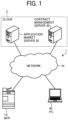
- FIG. 1 illustrates an example of configuration of an information processing system 1 according to an embodiment.
- a description is given of a configuration of the information processing system 1 with reference to FIG. 1 .
- the information processing system 1 includes, for example, a multifunction peripheral apparatus (MFP) 10, an application market server 20 (an example of server), a contract management server 30 (an example of another server), and a personal computer (PC) 40 (an example of information processing apparatus), which are communicatively connected to each other via a network N.
- MFP multifunction peripheral apparatus
- the application market server 20 and the contract management server 30 are included in cloud C as the servers for providing cloud services.
- the MFP 10 is an image forming apparatus, which is an example of electronic apparatus capable of performing various functions, such as copying function, scanner function, facsimile function, printer function, or the like.
- the application market server 20 is a server that provides cloud services, which provides a list screen of one or more programs of application and one or more programs of firmware that can be installed on the MFP 10, and has an application market site, from which one or more programs of application and/or one or more programs of firmware selected by the user can be downloaded and installed on the MFP 10.
- application may mean one or more programs of application
- firmware may mean one or more programs of firmware.
- the contract management server 30 is a server that provides cloud services of purchase site, which is used to make a purchase contract for a user who has logged in to a charged application and charged firmware, and manages a purchase contract status in association with tenant identification (ID), user ID, and device ID.
- ID tenant identification
- user ID user ID
- device ID device ID
- the PC 40 is an information processing apparatus that communicates with the contract management server 30 via the network N to make a purchase contract of charged application or firmware to be installed on the MFP 10.
- the service provided by the application market site is not limited to being implemented by the application market server 20 alone, but can be implemented by, for example, using a plurality of servers. The same applies to a purchase site of the contract management server 30.
- FIG. 2 is an example of a block diagram of a hardware configuration of the MFP 10 according to the embodiment. Hereinafter, a description is given of a hardware configuration of the MFP 10 with reference to FIG. 2 .
- the MFP 10 includes, for example, an operation unit 11, and a main unit 12.
- the operation unit 11 is configured to receive an user operation
- the main unit 12 is configured to implement various image forming functions, such as scanner function, and printer function.
- the receiving of user operation includes a process of receiving specific information input by the user operation (including a signal indicating coordinate values on screen).
- the operation unit 11 and the main unit 12 are communicatively connected to each other via a communication path 13 dedicated for communication.
- the communication path 13 employs, for example, universal serial bus (USB) standard, but is not limited thereto.
- USB universal serial bus
- the communication path 13 can employ any standards, such as wired or wireless standards.
- the main unit 12 performs an operation corresponding to an operation received by the operation unit 11, which may be performed by a user or others. Further, the main unit 12 can also communicate with an external device, and can perform an operation corresponding to an instruction received from the external device.
- the operation unit 11 includes, for example, a central processing unit (CPU) 811, a read only memory (ROM) 812, a random access memory (RAM) 813, a flash memory 814, an operation panel 815, a connection interface (I/F) 816, a communication interface (I/F) 817, and bus 818.
- CPU central processing unit
- ROM read only memory
- RAM random access memory
- flash memory 814
- I/F connection interface
- I/F communication interface
- bus 818 bus 818.
- the CPU 811 is a computing device that controls operations of the operation unit 11 entirely.
- the CPU 811 controls the operation of the operation unit 11 entirely by executing programs stored in the ROM 812 or flash memory 814 using the RAM 813 as a work area.
- the CPU 811 implements various functions, such as displaying information (e.g., image) corresponding to the input received from a user on the operation panel 815.
- the ROM 812 is a nonvolatile memory that stores basic input/output system (BIOS), various settings, or the like that are executed at the time of activating the operation unit 11.
- the RAM 813 is a volatile memory that is used as a work area of the CPU 811.
- the flash memory 814 is a nonvolatile storage device for storing, for example, operating system (OS), application programs, and various data.
- the operation panel 815 is a device having a function that receives various inputs corresponding to the user operation, and having an input function and a display function for displaying various information (e.g., information corresponding to received operation, information indicating operation state of the MFP 10, setting information).
- the operation panel 815 includes, for example, a liquid crystal display (LCD) device equipped with a touch panel function.
- the operation panel 815 is not limited to the liquid crystal display device, but can be made of, for example, an organic electro-luminescence (OEL) display device equipped with a touch panel function.
- the operation panel 815 may include an operation unit such as a hardware key or a display unit such as a lamp, in addition to or in place of the touch panel function.
- connection I/F 816 is an interface for communicating with the main unit 12 via the communication path 13.
- the communication I/F 817 is a network interface for connecting the operation unit 11 to the network N and communicating with an external device connected to the network N.
- the communication I/F 817 corresponds to, for example, Ethernet (registered trademark), and is an interface capable of communication conforming to transmission control protocol/internet protocol (TCP/IP) or the like.
- the bus 818 is a transmission path that connects each of the above-described components to each other, and transmits address signals, data signals, and various control signals.
- the hardware configuration of the operation unit 11 illustrated in FIG. 2 is just one example, and may include components other than the components illustrated in FIG. 2 .
- the main unit 12 includes, for example, a CPU 821, a ROM 822, a RAM 823, a storage 824, a scanner engine 825, a printer engine 826, a connection I/F 827, a communication I/F 828, and a bus 829.
- the CPU 821 is a computing device that controls operations of the main unit 12 entirely.
- the CPU 821 controls the operation of the main unit 12 entirely by executing programs stored in the ROM 822 or the storage 824 using the RAM 823 as a work area.
- the CPU 821 implements various functions, such as copy function, scanner function, facsimile function, and printer function.
- the ROM 822 is a nonvolatile memory that stores BIOS, various settings, or the like that are executed when activating the main unit 12.
- the RAM 823 is a volatile memory that is used as a work area of the CPU 821.
- the storage 824 is a nonvolatile storage device that stores, for example, operating system (OS), various application programs, and various data.
- the storage 824 can be, for example, a hard disk drive (HDD), a solid state drive (SSD) or the like.
- the scanner engine 825 is a hardware that performs a scanner function to scan and read one or more documents as images, among the image forming functions, which is other than general purpose information processing and processing communication.
- the printer engine 826 is a hardware that performs a printer function of printing on a print medium such as paper or the like, among the image forming functions, which is other than general purpose information processing and processing communication.
- connection I/F 827 is an interface for communicating with the operation unit 11 via the communication path 13.
- the communication I/F 828 is a network interface for connecting the main unit 12 to the network N and communicating with an external device connected to the network N.
- the communication I/F 828 is an interface that corresponds to, for example, Ethernet and that is capable of communication conforming to TCP/IP or the like.
- the bus 829 is a transmission path that connects each of the above-described components to each other, and transmits address signals, data signals, and various control signals.
- the main unit 12 may include components other than those illustrated in FIG. 2 .
- the main unit 12 may include a finisher that sorts printed media, or a particular option such as auto document feeder (ADF) which automatically feeds documents.
- ADF auto document feeder
- FIG. 3 illustrates an example of a block diagram of a hardware configuration of the application market server 20 according to the embodiment.
- a description is given of a hardware configuration of the application market server 20 with reference to FIG. 3 .
- the application market server 20 includes, for example, a CPU 901, a ROM 902, a RAM 903, an auxiliary storage device 905, a media drive 907, a display 908, a network I/F 909, a keyboard 911, a mouse 912, and a digital versatile disc (DVD) drive 914.
- a CPU 901 a ROM 902, a RAM 903, an auxiliary storage device 905, a media drive 907, a display 908, a network I/F 909, a keyboard 911, a mouse 912, and a digital versatile disc (DVD) drive 914.
- the CPU 901 is a computing device that controls operations of the application market server 20 entirely.
- the ROM 902 is a nonvolatile storage device that stores programs for the application market server 20.
- the RAM 903 is a volatile storage device used as a work area of the CPU 901.
- the auxiliary storage device 905 is a storage device such as HDD or SSD, which stores images scanned by the MFP 10 by performing the scanning function.
- the media drive 907 is a device that controls reading and writing of data to a recording medium 906, such as flash memory, under the control of the CPU 901.
- the display 908 is a display device composed of a liquid crystal or an organic electro-luminescence (OEL) that displays various information, such as cursor, menu, window, characters, images, or the like.
- OEL organic electro-luminescence
- the network I/F 909 is an interface for communicating data with an external device such as MFP 10 using network N.
- the network I/F 909 is, for example, a network interface card (NIC) conforming to Ethernet, which is compatible with TCP/IP for communication.
- NIC network interface card
- the keyboard 911 is an input device used for selecting characters, numbers, various instructions, and a cursor movement.
- the mouse 912 is an input device for selecting and executing various instructions, selecting an object to be processed, and moving the cursor.
- the DVD drive 914 is a device for controlling reading and writing of data to the DVD 913 such as DVD-ROM or digital versatile disk recordable (DVD-R) used as an example of removable storage medium.
- DVD-R digital versatile disk recordable
- the CPU 901, ROM 902, RAM 903, auxiliary storage 905, media drive 907, display 908, network I/F 909, keyboard 911, mouse 912 and DVD drive 914, as described above, are communicatively connected to each other by a bus line 910 such as an address bus and a data bus.
- a bus line 910 such as an address bus and a data bus.
- the hardware configuration of the application market server 20 illustrated in FIG. 3 is just one example, and it is not required to include all of the components illustrated in FIG. 3 , or may include any other components.
- FIG. 3 is described as the hardware configuration of the application market server 20, the hardware configuration of the contract management server 30 and the PC 40 is also corresponding to the hardware configuration illustrated in FIG. 3 .
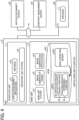
- FIG. 4 is an example of software configuration of the information processing system 1 according to the embodiment.
- FIG. 5 is an example of function configuration of firmware to be updated.
- a description is given of a software configuration of the information processing system 1 with reference to FIGs. 4 and 5 .
- the operation unit 11 includes, for example, an application market application 51, a browser 52, and an operation unit system 53.
- the application market application 51 is an application that communicates with an application market site provided by the application market server 20 to download application or firmware corresponding to a user operation via the browser 52.
- the browser 52 is software that implements functions, such as web applications, by acquiring web contents (e.g., hypertext markup language (HTML), cascading style sheets (CSS), JavaScript (registered trademark), and various electronic files from the application market server 20.
- web contents e.g., hypertext markup language (HTML), cascading style sheets (CSS), JavaScript (registered trademark), and various electronic files from the application market server 20.
- the operation unit system 53 is software that controls operations of the operation unit 11 other than the function implemented by the browser 52.
- the main unit 12 includes, for example, a main unit system 61, an image generation engine 62, and an image generation application 63.
- the main unit system 61 is a software that controls the operation of the main unit 12.
- the image generation engine 62 corresponds to the scanner engine 825 and the printer engine 826 described above.
- the image generation application 63 is an application that controls the operations of the image generation engine 62.
- the image generation application 63 includes copy application, scanner application, facsimile application, printer application, or the like.
- the ROM 822 includes an in-operation region 822a and a non-operation region 822b.
- the non-operation region 822b is used to temporarily store a firmware downloaded from the application market server 20 and retaining the firmware at a non-executed state.
- the in-operation region 822a is used to store a firmware that actually controls the operation of the operation unit 11 and the main unit 12.
- a software that implements an addable function is referred to as an addable function 64
- a software that implements a changeable function is referred to as a changeable function 65.
- the addable function is a function that does not cause any effect to user operability of the MFP 10 among the functions provided by the firmware.
- the addable function includes, for example, a reservation function of copy operation, and an interrupt function during the copying operation.
- the changeable function is a function that causes some effect to user operability of the MFP 10 among the functions provided by the firmware, such as a function of changing user interface (UI) of the operation screen displayed on the display unit 112.
- the changeable function includes, for example, an initial setting function accompanied by changing of user interface (UI).
- the addable function may be a new function firstly provided by a firmware having a specific version, and a function of adding a value for user by updating a firmware, which may be used as a function having a greater value for user.
- the changeable function may be a function of changing or modifying the firmware function of previous version.
- the addable function can be displayed with the function description at the time of selection as new function or primary function of the selected version of firmware, and the users can collectively recognize the addable function.
- the changeable function changes the previous functional unit that may cause a sudden change to the user and may reduce user convenience, and thereby the changeable function is required to be selected one by one.
- the firmware stored in the ROM 822 (in-operation region 822a) has a functional configuration as illustrated in FIG. 5 . That is, in an example case of FIG. 5 , the functions newly provided by the firmware having the function version of "V1.0" include addable functions (1), (2), ... and changeable functions (1), (2), (3), ....
- the addable function is displayed to a user using a dialog box to describe the function collectively, and the user can select whether to activate the addable function.
- the changeable function is displayed to a user using a dialog box to describe or explain description of each changeable function one by one, and the user can select whether or not to enable the changeable function one by one.
- the operation of enabling the addable function and changeable function will be described later.
- the enabling of function, such as addable function and changeable function, of firmware that is installed (or updated) may be also referred to as the activation of function.
- the PC 40 includes, for example, a browser 71.
- the browser 71 is software that implements functions, such as web applications by obtaining web contents (e.g., HTML, CSS, JavaScript, various electronic files) from the contract management server 30.
- web contents e.g., HTML, CSS, JavaScript, various electronic files
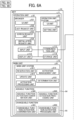
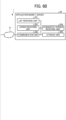
- FIGs. 6A and 6B illustrate an example of a block diagram of a functional configuration of the information processing system 1 according to the embodiment.
- a description is given of a functional configuration of the information processing system 1 with reference to FIGs. 6A and 6B .
- the operation unit 11 of the MFP 10 includes, for example, the browser 52 and the operation unit system 53, an input unit 111, a display unit 112, a communication unit 113, and a storage unit 114.
- the browser 52 includes, for example, a user interface (UI) unit 521 (an example of display control unit), a list request unit 522, a screen request unit 523, an installation request unit 524.
- the operation unit system 53 includes, for example, a UI unit 531 (an example of display control unit), and a setting unit 532.
- the UI unit 521 is a functional that displays a web page or the like corresponding to specific content, acquired from the application market server 20, using the display unit 112. Further, the UI unit 521 receives various operations (e.g., press for link) on the web page according to an inputting operation by a user to the input unit 111.
- the UI unit 521 is implemented by executing the browser 52 by the CPU 811 of the operation unit 11 illustrated in FIG. 2 .
- the list request unit 522 is a functional unit that requests a list of application and/or firmware installable on the MFP 10 to the application market server 20, in response to an inputting operation performed by a user to the input unit 111.
- the list request unit 522 is implemented by executing the browser 52 by the CPU 811 of the operation unit 11 illustrated in FIG. 2 .
- the screen request unit 523 is a functional unit that requests information on various screens, to be displayed using the display unit 112, to the application market server 20 in response to an inputting operation performed by a user to the input unit 111.
- the screen request unit 523 is implemented by executing the browser 52 by the CPU 811 of the operation unit 11 illustrated in FIG. 2 .
- the installation request unit 524 is a functional unit that requests the application market server 20 for installing a designated firmware in response to an inputting operation performed by a user to the input unit 111.
- the "installation" of firmware means that a firmware is stored (updated) in the ROM 822 (specifically, the non-operation region 822b), a firmware is stored in the in-operation region 822a and is in an executable state, and activating the function (addable function, changeable function) of the executable firmware, or the like.
- the installation request unit 524 is implemented by executing the browser 52 by the CPU 811 of the operation unit 11 illustrated in FIG. 2 .
- the UI unit 531 is a functional unit that displays a screen (e.g., home screen, to be described later) used for performing various operations of the MFP 10, using the display unit 112.
- the UI unit 531 is implemented by executing the operation unit system 53 by the CPU 811 of the operation unit 11 illustrated in FIG. 2 .
- the setting unit 532 is a functional unit that sets various settings, in response to an inputting operation performed by a user to the input unit 111 on various setting screens (e.g., automatic update setting screen, automatic activation setting screen, to be described later) displayed using the display unit 112.
- the setting unit 532 is implemented by executing the operation unit system 53 by the CPU 811 of the operation unit 11 illustrated in FIG. 2 .
- the input unit 111 is a functional unit that receives an inputting operation performed by a user.
- the input unit 111 is implemented by an input function of the operation panel 815 illustrated in FIG. 2 .
- the display unit 112 is a functional unit that displays various information in accordance with the instructions of the UI unit 521 and the UI unit 531.
- the display unit 112 is implemented by a display function of the operation panel 815 illustrated in FIG. 2 .
- the communication unit 113 is a functional unit that performs data communication with the application market server 20 via the network N in under the control of the browser 52.
- the communication unit 113 is implemented by the communication I/F 817 and executing the program by the CPU 811 illustrated in FIG. 2 .
- the storage unit 114 is a functional unit that stores various data.
- the storage unit 114 stores setting information set on an automatic update setting screen, an automatic activation setting screen, and an entire function enabling setting screen, to be described later.
- the storage unit 114 is implemented by the RAM 813 or flash memory 814 illustrated in FIG. 2 .
- the main unit 12 of the MFP 10 includes, for example, a reservation unit 611, an update unit 612, a activation processing unit 613 (main activation processing unit), an activation management unit 614, a determination unit 615, an addable function activation confirmation unit 641 (first activation confirmation unit, first enablement confirmation unit), an addable function activation processing unit 642 (an example of enablement unit, first enablement unit), an changeable function activation confirmation unit 651 (second activation confirmation unit, second enablement confirmation unit), and an changeable function activation processing unit 652 (an example of enablement unit, second enablement unit).
- a reservation unit 611 for example, a reservation unit 611, an update unit 612, a activation processing unit 613 (main activation processing unit), an activation management unit 614, a determination unit 615, an addable function activation confirmation unit 641 (first activation confirmation unit, first enablement confirmation unit), an addable function activation processing unit 642 (an example of enablement unit, first enablement unit), an changeable function
- the reservation unit 611 reserves an enabling of the addable function corresponding to the specific function version after updating the designated specific firmware.
- the information of function corresponding to the specific function version reserved by the reservation unit 611 may be temporarily stored, for example, in the RAM 823 or storage 824 illustrated in FIG. 2 .
- the reservation unit 611 is implemented by executing the main unit system 61 by the CPU 821 of the main unit 12 illustrated in FIG. 2 .
- the update unit 612 is a functional unit that updates the specific firmware downloaded from the application market server 20 via the communication unit 113 into the non-operation region 822b of the ROM 822 (an example of storage unit) illustrated in FIG. 4 .
- the update unit 612 is implemented by executing the main unit system 61 by the CPU 821 of the main unit 12 illustrated in FIG. 2 .
- the activation processing unit 613 is a functional unit that copies the specific firmware updated in the non-operation region 822b of the ROM 822 by the update unit 612 to the in-operation region 822a of the ROM 822, and executes the specific firmware when the MFP 10 is activated (booted) or rebooted. As to be described later, even if a specific or particular firmware stored in the operation region 822a is to be executed by the activation processing unit 613, the addable function and changeable function included in the specific or particular firmware can be executed only if a user performs the installation operation (operation for activation) to enable the specific function, such as the addable function and changeable function.
- each function is in the executable state for the first time.
- the activation processing unit 613 is implemented by the main unit system 61 executed by the CPU 821 of the main unit 12 illustrated in FIG. 2 .
- setting information for determining whether or not to execute the function actually can be further provided.
- the changeable function is activated, if the setting information for the changeable function is set not to execute, the changeable function is not be executed, in which the changeable function can be executed for the first time if the setting information is set to execute.
- the activation management unit 614 is a functional unit that manages the maximum function version of addable function that can be activated using currently installed and executable firmware (hereinafter, referred to as the maximum function version), and the function version of addable function being activated using currently installed and executable firmware (hereinafter, referred to as current function version).
- firmware function version is "V1.0”
- the function version of the addable function is also referred to as “V1.0”
- the function version of the changeable function is also referred to as "V1.0.”
- the maximum function version becomes “V1.2.” That is, the firmware of "FW V1.2” has a function version of "V1.2,” and if the addable function of "V1.2” is activated, the function version corresponding to the activated addable function is "V1.2,” and "V1.2" becomes the maximum function version.
- the activation management unit 614 also manages which changeable function of which function version is activated.
- the activation management unit 614 is implemented by executing the main unit system 61 by the CPU 821 of the main unit 12 illustrated in FIG. 2 .
- the determination unit 615 compares a function version of a firmware designated by a user, the maximum function version, and a current function version to determine which function is greater.
- the determination unit 615 is implemented by executing the main unit system 61 by the CPU 821 of the main unit 12 illustrated in FIG. 2 .
- the addable function activation confirmation unit 641 is a functional unit that checks or confirms whether an activation is instructed to the current function version at a particular time of the MFP 10, and an activation is instructed to the addable function included in a particular function version that is greater than the current function version.
- the addable function activation confirmation unit 641 is implemented by executing the addable function 64 of the firmware that is installed in the executable sate on the main unit 12 illustrated in FIG. 2 .
- the addable function activation processing unit 642 activates an addable function of a designated particular firmware having a particular function version in accordance with an installation operation (activation operation) to the input unit 111 by a user.
- the addable function activation processing unit 642 is implemented by executing the addable function 64 of the firmware that is installed in the executable sate on the main unit 12 illustrated in FIG. 2 .
- the changeable function activation confirmation unit 651 is a functional unit that checks or confirms a currently-activated changeable function and a function version of the currently-activated changeable function, and an activation state of the changeable function corresponding to the function version of the newly activated addable function.
- the changeable function activation confirmation unit 651 is implemented by executing the changeable function 65 of the firmware that is installed in the executable sate on the main unit 12 illustrated in FIG. 2 .
- the changeable function activation processing unit 652 is a functional unit that activates each changeable function of a designated particular firmware having a particular function version in accordance with an installation operation (activation operation) to the input unit 111 by a user.
- the changeable function activation processing unit 652 is implemented by executing the changeable function 65 of the firmware that is installed in the executable sate on the main unit 12 illustrated in FIG. 2 .
- the latest function can be added to the electronic apparatus.
- This technology is referred to as “always current technology (ACT)" in the embodiment.
- the electronic equipment equipped with the ACT function can acquire, via the network N, the latest function that was not installed at the time of purchase as a firmware package, and can add the latest function as the function.
- the firmware package for adding the function via the network N becomes public at a given time on the application market server 20 that is an acquisition destination of firmware. Therefore, the time lag between the development of the function to be added to the electronic equipment and the installation of the function can be reduced, and thereby the new function can be added to the electronic apparatus in a timely manner. Further, conventionally, a user may buy the electronic apparatus for utilizing new function. In the embodiment, since the user is not required to buy the electronic apparatus itself for utilizing the new function, the cost of user can be reduced.
- the functional units of the operation unit 11 and the main unit 12 of the MFP 10 illustrated in FIGs. 6A and 6B are conceptually illustrated, and are not limited to the configuration of the FIGs. 6A and 6B .
- a plurality of functional units of the MFP 10 illustrated in FIGs. 6A and 6B as independent functional units may be configured as one functional unit.
- the function of one functional unit of the MFP 10 illustrated in FIGs. 6A and 6B may be divided into a plurality of functions, and a plurality of functional units may be formed.
- the functional unit implemented by the browser 52 and the functional unit implemented by the operation unit system 53 do not need to be clearly distinguished from each other, and the functional unit implemented by the browser 52 may be implemented by the operation unit system 53, and vice versa. Further, a software different from the browser 52 and the operation unit system 53 may implement the function of each functional unit.
- the addable function activation confirmation unit 641 and the addable function activation processing unit 642 are functions that are implemented by the addable function 64, but is not limited thereto.
- a software e.g., main unit system 61
- main unit system 61 different from the addable function 64 may have functions of the addable function activation confirmation unit 641 and the addable function activation processing unit 642.
- the application market server 20 includes, for example, a list response unit 201, a screen response unit 202, a designated version response unit 204, a communication unit 205 (transmission unit), and a storage unit 206.
- the list response unit 201 is a functional unit that generates a list of application and/or firmware installable on the MFP 10, and transmits the list of application and/or firmware to the MFP 10 via the communication unit 205, in response to a request of the list request unit 522 of the MFP 10.
- the list response unit 201 is implemented by executing the program by the CPU 901 illustrated in FIG. 3 .
- the screen response unit 202 is a functional unit that transmits information on various screens (e.g., home screen) to the MFP 10 via the communication unit 205, in response to a request of the screen request unit 523 of the MFP 10.
- the screen response unit 202 is implemented by executing the program by the CPU 901 illustrated in FIG. 3 .
- the designated version response unit 204 is a functional unit that responds to the main unit system 61 of the MFP 10, a specific function version of a specific firmware which is requested to be installed by the installation request unit 524 of the MFP 10.
- the designated version response unit 204 is implemented by executing the program by the CPU 901 illustrated in FIG. 3 .
- the communication unit 205 is a functional unit that performs data communication with the MFP 10 and the contract management server 30 via the network N.
- the communication unit 205 is implemented by the network I/F 909 and executing the program by the CPU 901 illustrated in FIG. 3 .
- the storage unit 206 is a functional unit that stores various programs, such as application, firmware and packages combining one or more programs of application and/or firmware.
- the storage unit 206 is implemented by the auxiliary storage device 905 illustrated in FIG. 3 .
- the functional units of the application market server 20 illustrated in FIGs. 6A and 6B are conceptually illustrated, and are not limited to the configuration of the FIGs. 6A and 6B .
- a plurality of functional units of the application market server 20 illustrated in FIGs. 6A and 6B as independent functional units may be configured as one functional unit.
- the function of one functional unit of the application market server 20 illustrated in FIGs. 6A and 6B may be divided into a plurality of functions, and a plurality of functional units may be formed.
- the functional units of the MFP 10, and the application market server 20 illustrated in FIGs. 6A and 6B may be implemented by executing various software, but is not limited thereto.
- at least any functional units may be implemented by a dedicated hardware circuit, such as an integrated circuit.
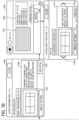
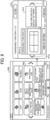
- FIGs. 7 to 9 illustrate examples of screen transition.
- FIG. 10 illustrates an example of home screen.
- FIG. 11 illustrates an example of list screen of application and firmware, which displays target application and firmware that can be installed from an application site.
- FIG. 12 illustrates an example of installation screen used for installing a firmware.
- FIG. 13 illustrates an example of installation screen used for an already installed firmware.
- a description is given of a screen displayed on the MFP 10 and a flow of screen transition with reference to FIGs. 7 to 13 .
- the home screen 1000 being displayed using the display unit 112 of the MFP 10 includes, for example, an application site button 1002 used for displaying a list screen of application and firmware (to be described later) that can be installed on the MFP 10, and a widget 1003.
- the widget 1003 is a display area and button displaying the latest information on the MFP 10.
- the widget 1003 displays a message indicating that the "latest information: received latest information of software update" and informs a user that a software can be updated.
- the home screen 1000 includes, for example, the application site button 1002, the widget 1003, a copy button 1004a used for performing copy processing, a scanner button 1004b used for performing scanning processing, and a facsimile button 1004c used for performing facsimile processing.
- the UI unit 531 instructs the display unit 112 to display a notification dialog box 1500 (an example of first screen) illustrated in FIG. 7B .
- the notification dialog box 1500 is a screen used for displaying which firmware can be installed (or activated) specifically.
- the notification dialog box 1500 is a screen used for installing (or activating) a firmware having the latest function version.
- the notification dialog box 1500 includes, for example, a screen shot display section 1501, a description display section 1502, and a detail button 1503.
- the notification dialog box 1500 displays the firmware of "FW V1.2.”
- the screen shot display section 1501 is a section used for displaying an operation state of the concerned firmware being displayed by the notification dialog box 1500 as a screen shot.
- the description display section 1502 is a display section used for describing the operation of the concerned firmware.
- the detail button 1503 is a button used for displaying an installation screen used for performing an installation (activation) operation of the concerned firmware.
- the UI unit 521 instructs the display unit 112 to display the installation screen 1300 (an example of first screen) used for installing the concerned firmware.
- the installation screen 1300 displays a screen shot display section 1301 used for displaying an operation state of the concerned firmware, a description display section 1302 used for describing a specific function (addable function, changeable function) of the concerned firmware, a detail link section 1303 used for shifting or transitioning to a screen displaying details of the function of the concerned firmware, and an installation button 1304 used for performing an installation processing (or activation processing).
- a user can confirm the contents of function (addable function, changeable function) of the concerned firmware described on each screen by checking the contents of the notification dialog box 1500 and the installation screen 1300. Then, after the confirmation, the user can decide whether to activate the addable function of the concerned firmware.
- the addable function activation processing unit 642 activates the addable function of the concerned firmware, and then the UI unit 531 instructs the display unit 112 to display a changeable function dialog box 1510 (an example of second screen) used for activating each changeable function. That is, the user can select whether to activate the addable function of the concerned firmware, being displayed, by performing an operation on the installation screen 1300.
- the addable function activation processing unit 642 does not activate the addable function, and then the UI unit 531 may instruct the display unit 112 to display the changeable function dialog box 1510.
- the changeable function dialog box 1510 is a screen used for activating the changeable function of the concerned firmware introduced in the notification dialog box 1500 and the installation screen 1300, one by one.
- the changeable function dialog box 1510 includes, for example, a screen shot display section 1511, a description display section 1512, a return button 1513a, a proceed button 1513b, and an installation button 1514.
- the screen shot display section 1511 is a section used for displaying an operation state of the changeable function of the concerned firmware introduced by the notification dialog box 1500 as a screen shot.
- the description display section 1512 is a display section used for describing the operation of the changeable function of the concerned firmware.
- the return button 1513a is a button used for returning to a display of changeable function dialog box of a particular changeable function that was displayed most recently, for one or more changeable functions of the concerned firmware.
- the proceed button 1513b is a button used for proceeding to a display of a particular changeable function dialog box to be displayed next, for one or more changeable functions of the concerned firmware.
- the installation button 1514 is a button used for activating the changeable function displayed in the changeable function dialog box 1510.
- the user can check the specific contents of the changeable function included in the concerned firmware by checking the changeable function dialog box 1510. Then, after the confirmation, the user can decide whether to activate each changeable function of the concerned firmware.
- the changeable function activation processing unit 652 activates the changeable function of the concerned firmware. That is, the user can select whether or not to activate each changeable function by selecting any one of changeable functions included in the concerned firmware by performing an operation to the changeable function dialog box 1510. For example, if the user is to activate only a target changeable function among the changeable functions, the changeable function dialog box corresponding to the target changeable function is displayed, and the installation button is pressed to activate the target changeable function. As to the changeable function that is not to be activated, the user press the close button (see FIGs. 7A and 7B ) without performing the above operation to close the changeable function dialog box.
- the notification dialog box 1500 describing the latest firmware that can be installed (or activated) is displayed, with which the user can check the contents of the concerned firmware, and then the use can activate the addable function and the selected target function individually, and the installation operation can be easily performed.
- the UI unit 531 skips the notification dialog box 1500 and the installation screen 1300 of FIGs. 7A and 7B , and displays the changeable function dialog box 1510 for the changeable function of the latest firmware that has not been activated yet.
- an activation operation can be easily performed for a particular changeable function that has not been yet activated.
- the UI unit 521 instructs the display unit 112 to display a list of a plurality of applications and firmwares that can be installed on the MFP 10 on the display unit. 1200.
- the list screen 1200 is a screen used for displaying a list of a plurality of applications and firmwares installable on the MFP 10.
- the list screen 1200 displays a list of button icons used for installing each application, and a list of button icons used for installing each firmware.
- the "installable application” is not limited to an application that is not currently installed or activated, but includes an application that have already been installed or activated. That is, the list screen 1200 displays the list of application and firmware.
- the application includes one or more programs of application that can be updated, and one or more programs of application that are already installed.
- the firmware includes one or more programs of firmware that can be updated, one or more programs of firmware that are already installed and function of the one or more programs of firmware can be activated, and one or more programs of firmware that are already installed and a function of the one or more programs of firmware are already activated.
- the list screen 1200 includes buttons corresponding to firmwares, such as, a firmware button 1201a corresponding to "FW V1.0,” a firmware button 1201b corresponding to “FW V1.1,” a firmware button 1201c corresponding to “FW V1.2,” and a firmware button 1201d corresponding to "FW V1.3.” Further, the list screen 1200 includes, for example, an application button 1202a corresponding to "App A” and an application button 1202b corresponding to "App B" as buttons for applications. Further, the list screen 1200 includes, for example, a management button 1203 for setting various settings.
- list screen 1200 may display only one or more programs of the application and firmware not yet installed, or only a list of one or more programs of firmware having one or more of the function versions that are not yet activated.
- the user presses a button of firmware or a button of application, desired to be installed by the user.
- a button of firmware or a button of application desired to be installed by the user.
- the UI unit 521 instructs the display unit 112 to display the installation screen 1300 used for installing the firmware of "FW V1.2.”
- the layout and function of the installation screen 1300 are as described above. For example, as illustrated in FIGs. 9A and 9B , if a user touches the detail link section 1303, the UI unit 521 instructs the display unit 112 to display a detail screen 1400 used for displaying one or more functions of the concerned firmware in detail.
- the detail screen 1400 is a screen used for displaying a detailed description of the newly added function for the firmware of "FW V1.2.”
- an installation screen 1320 of the firmware of "FW V1.0” is displayed as illustrated in FIG. 13 .
- the installation screen 1320 includes, for example, a screen shot display section 1321, a description display section 1322, a detail link section 1323, and an installed display section 1324.
- the functions of the screen shot display section 1321, the description display section 1322, and the detail link section 1323 are similar to those of the screen shot display section 1301, the description display section 1302, and the detail link section 1303 of the installation screen 1300 described above.
- the maximum function version is "V1.0,” and the current function version is also "V1.0.” Since all of the changeable functions of "V1.0" have been activated already, there is no need to install the firmware having the function version of "V1.0,” and a message of "installed” is displayed on the installed display section 1324 instead of the installation button 1304 of FIG. 12 . Therefore, the user can recognize that the concerned firmware selected on the list screen 1200 has already been installed, and the function (addable function, changeable function) of the function version of the concerned firmware has already been activated.
- the displaying of the widget 1003 for a longer period of time may have some problem. Therefore, it can be configured that, within a certain period of time (e.g., one week) after the latest firmware is displayed on the widget 1003, if the activation of any one of the addable function and changeable function is not yet completed, the notification dialog box 1500 or the changeable function dialog box 1510 may be displayed by touching the widget 1003 by a user. Then, when the certain period of time elapses, even if all of the functions of the latest firmware are not yet activated, , the notification dialog box 1500 or the changeable function dialog box 1510 may not be displayed by touching the widget 1003 by the user.
- a certain period of time e.g., one week
- FIG. 14 illustrates an example of automatic update setting screen.
- FIG. 15 illustrates an example of automatic activation setting screen.
- FIG. 16 illustrates an example of entire function enabling setting screen.
- the UI unit 531 instructs the display unit 112 to display an automatic update setting screen 1600 illustrated in FIG. 14 , an automatic activation setting screen 1610 illustrated in FIG. 15 , or an entire function enabling setting screen 1620 illustrated in FIG. 16 .
- the list screen 1200 may include management buttons, respectively used for displaying the automatic update setting screen 1600, the automatic activation setting screen 1610, and the entire function enabling setting screen 1620. Further, when the management button 1203 is pressed, the automatic update setting screen 1600, the automatic activation setting screen 1610 or the entire function enabling setting screen 1620 is displayed, and then the automatic update setting screen 1600, the automatic activation setting screen 1610, and the entire function enabling setting screen 1620 may be freely transitioned.
- the automatic update setting screen 1600 (see FIG. 14 ) is a screen used for determining whether the MFP 10 downloads a concerned new firmware from the application market server 20 and then to install (update) the concerned new firmware in a case of upgrading the firmware currently installed on the MFP 10 to the concerned new firmware when the new firmware is released from the application market server 20.
- the setting unit 532 After a user sets ON/OFF on the automatic update setting screen 1600 and then presses OK button 1601, the setting unit 532 stores the concerned setting information in the storage unit 114.
- the installation request unit 524 of the MFP 10 receives a notice of releasing of a version-upgraded firmware from the application market server 20 via the communication unit 113
- the installation request unit 524 automatically transmits an installation request of the version-upgraded firmware to the application market server 20.
- the update unit 612 automatically downloads the version-upgraded firmware from the application market server 20 via the communication unit 113, and then updates and store the version-upgraded firmware in the non-operation region 822b of the ROM 822.
- the automatic activation setting screen 1610 (see FIG. 15 ) is a screen used for determining whether to set the automatic activation for the addable function of the concerned firmware at the time of installing the version-upgraded firmware on the MFP 10. After a user sets ON/OFF on the automatic activation setting screen 1610 and then presses OK button 1611, the setting unit 532 stores the concerned setting information in the storage unit 114.
- the addable function activation processing unit 642 performs the activation process of the function of the concerned firmware only.
- the update unit 612 automatically downloads the concerned firmware and updates the concerned firmware in the non-operation region 822b of the ROM 822, and then the addable function activation processing unit 642 automatically performs the activation process of the function of the concerned firmware.
- the entire function enabling setting screen 1620 (see FIG. 16 ) is a screen used for setting whether all of the changeable functions of the concerned firmware are to be activated automatically at the time when the addable function of the concerned firmware is activated. After the user sets ON/OFF on the entire function enabling setting screen 1620 and then presses OK button 1621, the setting unit 532 stores the concerned setting information in the storage unit 114.
- the changeable function activation processing unit 652 automatically performs the activation processing for all of the changeable functions.
- FIG. 17 is an example of sequence diagram illustrating operation when to install a software program.
- FIG. 17 a description is given of a flowchart of firmware installation operation and firmware activation operation in the information processing system 1.
- Steps S11, S12, S13 For example, when the MFP 10 is activated or booted, the addable function activation confirmation unit 641, implemented by the addable function 64 of the firmware being installed at the time of the booting of the MFP 10, checks or confirms whether an activation instruction of the current function version at the time of the booting of the MFP 10 is issued to the activation management unit 614, and an activation instruction of the addable function corresponding to the function version greater than the current function version is issued to the activation management unit 614.
- the addable function activation confirmation unit 641 confirms that the current function version at the time of the booting of the MFP 10 is "V1.0," and the activation instruction of the addable function corresponding to the function version greater than the current function version is not issued. That is, the addable function activation confirmation unit 641 checks or confirms that the addable function corresponding to the function version greater than the current function version (e.g., "V1.1") is disabled, that is the function version greater than the current function version is not activated.
- the addable function corresponding to the function version greater than the current function version e.g., "V1.1
- Steps S14, S15 A user touches the widget 1003 on the home screen 1000 using the input unit 111 of the MFP 10 to display the notification dialog box 1500, and then the user presses the detail button 1503 to display the installation screen 1300 of the firmware having the function version of "V1.1” introduced in the notification dialog box 1500. Then, the screen request unit 523 of the MFP 10 transmits a display request of an installation screen of the firmware having the function version of "V1.1” to the application market server 20 via the communication unit 113.
- Step S16 In response to receiving the display request of the installation screen from the MFP 10, the screen response unit 202 of the application market server 20 transmits information of installation screen (installation screen information) of the firmware having the function version of "V1.1” to the MFP 10 via the communication unit 205. Then, the UI unit 521 of the MFP 10 displays the installation screen of the firmware having the function version of "V1.1” using the display unit 112 based on the installation screen information received from the application market server 20.
- Steps S17, S18 If the user presses the installation button on the installation screen via the input unit 111, the installation request unit 524 of the MFP 10 transmits an installation instruction (including activation) for requesting the designated firmware to the application market server 20 via the communication unit 113. Thus, when the user presses the installation button on the installation screen, it becomes clear that the user wants to use the function of firmware having the function version confirmed by the user.
- Steps S19, S20, S21, S22 the determination unit 615 of the MFP 10 compares the function version of the designated firmware (i.e., designated function version of "V1.1") and the maximum function version of the currently-installed firmware to determine which function version is greater.
- the function version of the designated firmware i.e., designated function version of "V1.1”
- the maximum function version of the currently-installed firmware is "V1.0.”
- the firmware currently installed cannot support the addable function corresponding to the function version of the designated firmware, and thereby the firmware is required to be updated with the designated firmware.
- the designated version response unit 204 of the application market server 20 transmits the function version of "V1.1" of the designated firmware to the MFP 10 via the communication unit 205. Then, as to the function version of "V1.1”of the firmware designated by the user, the reservation unit 611 of the MFP 10 makes a reservation for activating the addable function corresponding to the function version of "V1.1” after updating the firmware designated by the user.
- the information of function version reserved by the reservation unit 611 is temporarily stored, for example, in the RAM 823 or the storage 824 illustrated in FIG. 2 .
- the update unit 612 of the MFP 10 downloads the designated firmware having the function version of "V1.1" from the application market server 20 via the communication unit 113, and updates and stores the designated firmware in the non-operation region 822b of the ROM 822. Then, after the updating unit 612 updates the designated firmware in the non-operation region 822b, the activation processing unit 613 of the MFP 10 reboots the MFP 10.
- Steps S23, S24, S25 the activation processing unit 613 copies the firmware, updated in the non-operation region 822b of the ROM 822 by the update unit 612, into the in-operation region 822a at the rebooting time, and performs the processing for executing the firmware. That is, the activation processing unit 613 activates the addable function 64 and the changeable function 65 of the firmware copied to the in-operation region 822a.
- the addable function provided by the addable function 64, and the changeable function provided by the changeable function 65 are not executable if the addable function provided by the addable function 64 and the changeable function provided by the changeable function 65 are not activated, at this stage, the functions of the addable function 64 and the changeable function 65 are not yet in the executable state.
- Steps S26, S27,S28, S29 the addable function activation confirmation unit 641, implemented by the addable function 64 of the installed firmware, checks or confirms to the activation management unit 614 whether an activation (enabling) instruction of the addable function corresponding to the function version greater than the current function version of "V1.0" is issued.
- the addable function activation confirmation unit 641 implemented by the addable function 64 of the installed firmware, checks or confirms to the activation management unit 614 whether an activation (enabling) instruction of the addable function corresponding to the function version greater than the current function version of "V1.0" is issued.
- the addable function activation confirmation unit 641 confirms that the current function version of the MFP 10 is "V1.0" at this stage, and the addable function activation confirmation unit 641 confirms that the activation instruction of addable function corresponding to the function version of "V1.1,” greater than the current function version of "V1.0,” is issued (e.g., the addable function activation confirmation unit 641 confirms based on the activation instruction to the addable function 64 in step S24).
- the addable function activation processing unit 642 activates or enables the addable function that is to be implemented by the addable function 64.
- the automatic update is turned “ON” on the automatic update setting screen 1600 and the automatic activation is turned “ON” on the automatic activation setting screen 1610
- the latest firmware is updated in the ROM822
- the addable function is automatically activated.
- the user presses the installation button on the install screen in step S17 at least the processing of steps S20 to S29 can be skipped.
- Steps S30, S31 the changeable function activation confirmation unit 651, implemented by the changeable function 65 of the installed firmware, checks or confirms to the activation management unit 614, that the changeable function is not activated at this stage, such as not only the function version of "V1.1” but also the changeable function having the function version older than the function version of "V1.1.”
- Step S32 In this example case, it is assumed that the changeable function activation confirmation unit 651 has confirmed that all of the changeable functions of the firmware having the function version of "V1.1" are not yet activated (invalid) as a result of confirmation to the activation management unit 614.
- Step S33 If the changeable function activation confirmation unit 651 has confirmed that the changeable function corresponding to the function version of "V1.1" are not yet activated, the changeable function activation processing unit 652 transmits a display instruction of the changeable function dialog box (second screen), such as the changeable function dialog box 1510, corresponding to the changeable function that is not yet activated, to the UI unit 531. Then, the UI unit 531 instructs the display unit 112 to display the changeable function dialog box in accordance with the display instruction.
- a display instruction of the changeable function dialog box second screen
- Steps S34, S35 If the user presses the installation button on the changeable function dialog box via the input unit 111, the installation request unit 524 of the MFP 10 transmits, to the changeable function activation confirmation unit 651, an activation instruction for requesting an activation of the changeable function of the designated firmware.
- the installation button on the changeable function dialog box it becomes clear that the user wants to use the changeable function of the firmware having the function version confirmed by the user.
- the activation of the changeable function displayed on the changeable function dialog box by pressing the installation button is not always required.
- the changeable function dialog box can be closed by performing a given operation by the user, or the user can select not to activate the changeable function by operating a cancel button or the like. In this case, the processing of steps S35 to S37 is skipped.
- Steps S36, S37 In response receiving the activation instruction, the changeable function activation confirmation unit 651 confirms that the activation (enablement) of the changeable function having the function version of "V1.1" displayed on the changeable function dialog box is instructed. Then, the changeable function activation processing unit 652 activates (enables) the changeable function to be implemented by the changeable function 65.
- step S32 if the entire function enabling setting is turned “ON" on the entire function enabling setting screen 1620 and an existence of changeable function not yet activated is confirmed in step S32, the processing of steps S33 to S36 can be skipped, and then the changeable function activation processing unit 652 activates all of the confirmed changeable functions in step S37.
- steps S33 to S37 is repeated for the number of the changeable functions that are confirmed not yet activated in step S32 (not only the function version of "V1.1” but also the changeable function having the function version older than the function version of "V1.1").
- the firmware installation operation and firmware activation operation can be performed using the above described sequence of steps S11 to S37.
- the information processing system 1 displays, to a user, screens displaying the function of the firmware to be updated for the electronic apparatus (e.g., MFP 10) used by the user, such as the notification dialog box 1500, the installation screen 1300, and the changeable function dialog box 1510, so that the user can recognize each function, such as addable function and changeable function. Then, each function can be activated by receiving an installation (including activation) instruction from the user on the screen.
- the function of the firmware to be updated can be validated according to a user consent, so that a situation in which the function is changed irrespective to the user intention can be prevented.
- the automatic update setting, the automatic activation setting, and the entire function enabling setting can be set. Therefore, depending on a usage style desired by the user, the firmware can be automatically updated, the addable function can be automatically activated when the firmware is updated, and all of the changeable functions can be automatically activated when the addable function is activated. As a result, user convenience can be improved.
- the period of time displaying the firmware, which is not yet updated or activated, on the widget 1003 or the notification dialog box 1500 can be set to a fixed period, such as one week. With this configuration, the user annoyance can be reduced.
- the function of the firmware to be updated can be validated according to a user consent.
- the processing circuitry includes a programmed processor, as a processor includes circuitry.
- a processing circuit also includes devices such as an application specific integrated circuit (ASIC), digital signal processor (DSP), field programmable gate array (FPGA), system on a chip (SOC), graphics processing unit (GPU), and conventional circuit components arranged to perform the recited functions.
- ASIC application specific integrated circuit
- DSP digital signal processor
- FPGA field programmable gate array
- SOC system on a chip
- GPU graphics processing unit
- conventional circuit components arranged to perform the recited functions.
- the application market server 20 when at least any functional units of the MFP 10, the application market server 20, the contract management server 30 and the PC 40 are implemented by executing one or more programs, the programs are provided in advance by storing the programs in the ROM or the like.
- the programs executed by the MFP 10, the application market server 20, the contract management server 30 and the PC 40 may be configured to be recorded on a computer-readable recoding medium, such as compact disk read only memory (CD-ROM), flexible disk (FD), compact disk-recordable (CD-R), digital versatile disc (DVD) or secure digital (SD) card, as files in an installable format or executable format.
- a computer-readable recoding medium such as compact disk read only memory (CD-ROM), flexible disk (FD), compact disk-recordable (CD-R), digital versatile disc (DVD) or secure digital (SD) card, as files in an installable format or executable format.
- the programs executed by the MFP 10, the application market server 20, the contract management server 30 and the PC 40 may be configured to be stored in one or more computers connected to a network, such as the Internet, and downloaded via the network.
- the programs executed by the MFP 10, the application market server 20, the contract management server 30 and the PC 40 according to the above-described embodiment may be configured to be provided or distributed over a network, such as the Internet.
- the programs executed by the MFP 10, the application market server 20, the contract management server 30 and the PC 40 according to the above-described embodiment can be implemented as one or more modules including at least any of the functional units described above, and as the actual hardware configuration, the CPU reads and executes the programs from the above-described storage device or apparatus to load and implement the above-described functional units on the main storage device.
- the present invention can be implemented in any convenient form, for example using dedicated hardware, or a mixture of dedicated hardware and software.
- the present invention may be implemented as computer software implemented by one or more networked processing apparatuses.
- the network can comprise any conventional terrestrial or wireless communications network, such as the Internet.
- the processing apparatuses can compromise any suitably programmed apparatuses such as a general purpose computer, personal digital assistant, mobile telephone (such as a WAP or 3G-compliant phone) and so on. Since the present invention can be implemented as software, each and every aspect of the present invention thus encompasses computer software implementable on a programmable device.
- the computer software can be provided to the programmable device using any conventional carrier medium.
- the carrier medium can compromise a transient carrier medium such as an electrical, optical, microwave, acoustic or radio frequency signal carrying the computer code.
- a transient carrier medium such as an electrical, optical, microwave, acoustic or radio frequency signal carrying the computer code.
- An example of such a transient medium is a TCP/IP signal carrying computer code over an IP network, such as the Internet.
- the carrier medium can also comprise a storage medium for storing processor readable code such as a floppy disk, hard disk, CD ROM, magnetic tape device or solid state memory device.
- the hardware platform includes any desired kind of hardware resources including, for example, a central processing unit (CPU), a random access memory (RAM), and a hard disk drive (HDD).
- the CPU may be implemented by any desired kind of any desired number of processor.
- the RAM may be implemented by any desired kind of volatile or non-volatile memory.
- the HDD may be implemented by any desired kind of non-volatile memory capable of storing a large amount of data.
- the hardware resources may additionally include an input device, an output device, or a network device, depending on the type of the apparatus. Alternatively, the HDD may be provided outside the apparatus as long as the HDD is accessible.
- the CPU such as a cashe memory of the CPU
- the RAM may function as a physical memory or a primary memory of the apparatus, while the HDD may function as a secondary memory of the apparatus.
Landscapes
- Engineering & Computer Science (AREA)
- General Engineering & Computer Science (AREA)
- Theoretical Computer Science (AREA)
- Software Systems (AREA)
- Physics & Mathematics (AREA)
- General Physics & Mathematics (AREA)
- Signal Processing (AREA)
- Multimedia (AREA)
- Human Computer Interaction (AREA)
- Computer Security & Cryptography (AREA)
- Stored Programmes (AREA)
- Facsimiles In General (AREA)
- Accessory Devices And Overall Control Thereof (AREA)
- Information Transfer Between Computers (AREA)
Claims (14)
- Elektronisches Gerät (10), auf dem Firmware vorinstalliert ist, die über ein Netzwerk aktualisiert werden kann, Folgendes umfassend:eine Eingabeeinheit (111), die konfiguriert ist, um eine von einem Benutzer durchgeführte Operation zu empfangen;eine Anzeigesteuereinheit (521, 531), die konfiguriert ist, um auf einer Anzeige Folgendes anzuzeigen:einen ersten Bildschirm zum Angeben einer ersten Freigabeeinheit (642) zum Aktivieren einer ersten Funktion, die in der Firmware eingeschlossen ist, undeinen zweiten Bildschirm zum Angeben einer zweiten Freigabeeinheit (652) zum Aktivieren einer zweiten Funktion, die in der Firmware eingeschlossen ist, wobei die zweite Funktion in einer Vielzahl von zweiten Funktionen enthalten ist, und wobei der zweite Bildschirm eine Vielzahl von zweiten Bildschirmen einschließt, die für jede einzelne der Vielzahl von zweiten Funktionen vorbereitet sind;wobei die erste Freigabeeinheit (642) konfiguriert ist, um die erste Funktion, die in der spezifizierten Firmware eingeschlossen ist, als Reaktion auf eine zweite Operation für die erste Funktion zu aktivieren, die auf dem ersten Bildschirm angezeigt wird, die über die Eingabeeinheit (111) eingegeben wird, wobei die erste Freigabeeinheit (642) konfiguriert ist, um eine Vielzahl von ersten Funktionen kollektiv zu aktivieren; unddie zweite Freigabeeinheit (652) konfiguriert ist, um eine oder mehrere der zweiten Funktionen zu aktivieren, die in der spezifizierten Firmware eingeschlossen sind, ausgewählt aus der Vielzahl von zweiten Funktionen, als Reaktion auf eine dritte Operation für die zweite Funktion, die auf dem zweiten Bildschirm angezeigt wird, die über die Eingabeeinheit (111) eingegeben wird.
- Elektronisches Gerät (10) nach Anspruch 1, wobei die erste Funktion eine Funktion unter den Funktionen ist, die durch die Firmware bereitgestellt werden, die keine Auswirkung auf eine Bedienbarkeit des elektronischen Geräts (10) durch den Benutzer hat.
- Elektronisches Gerät (10) nach Anspruch 1 oder 2, wobei die zweite Funktion eine Funktion unter den Funktionen ist, die durch die Firmware bereitgestellt werden, die eine gewisse Auswirkung auf eine Bedienbarkeit des elektronischen Geräts (10) durch den Benutzer hat.
- Elektronisches Gerät (10) nach einem der vorhergehenden Ansprüche, wobei die erste Funktion eine Funktion ist, die dem elektronischen Gerät (10) neu hinzuzufügen ist, und die zweite Funktion eine Funktion zum Ändern der Funktion des elektronischen Geräts (10) ist.
- Elektronisches Gerät (10) nach einem der vorhergehenden Ansprüche, wobei die Anzeigesteuereinheit (521, 531) den zweiten Bildschirm auf der Anzeige als Reaktion auf das Aktivieren der ersten Funktion durch die erste Freigabeeinheit (642) auf der Grundlage der zweiten Operation, die auf dem ersten Bildschirm durchgeführt wird, anzeigt.
- Elektronisches Gerät (10) nach einem der vorherigen Ansprüche, ferner Folgendes umfassend:eine Bestimmungseinheit (615), die konfiguriert ist, um eine Funktionsversion einer bezeichneten Firmware, die über die Eingabeeinheit (111) bezeichnet wird, und eine Funktionsversion, die der maximalen Funktionsversion der ersten Funktion entspricht, die unter Verwendung einer bereits auf dem elektronischen Gerät installierten Firmware aktivierbar ist, zu vergleichen, um zu bestimmen, welche Funktionsversion größer ist; undeine Aktualisierungseinheit (612), die konfiguriert ist, um als Reaktion auf die zweite Operation, die an der auf dem ersten Bildschirm angezeigten Funktion über die Eingabeeinheit (111) durchgeführt wird, und eine Bestimmung durch die Bestimmungseinheit (615), dass die Funktionsversion der bezeichneten Firmware größer als die maximale Funktionsversion ist, die auf dem ersten Bildschirm angezeigte Firmware von einem Server (20) herunterzuladen und die Firmware in einer Speichereinheit (114) mit der heruntergeladenen Firmware zu aktualisieren;wobei die erste Freigabeeinheit (642) die erste Funktion der durch die Aktualisierungseinheit (612) aktualisierten Firmware aktiviert.
- Elektronisches Gerät (10) nach Anspruch 6, wobei als Reaktion auf die zweite Operation, die an der auf dem ersten Bildschirm angezeigten Funktion über die Eingabeeinheit (111) durchgeführt wird, und eine Bestimmung durch die Bestimmungseinheit (615), dass die Funktionsversion der bezeichneten Firmware gleich groß wie oder kleiner als die maximale Funktionsversion ist, die erste Aktivierungseinheit (642) die erste Funktion der Firmware aktiviert, die bereits auf dem elektronischen Gerät (10) installiert ist.
- Elektronisches Gerät (10) nach Anspruch 6 oder Anspruch 7, ferner Folgendes umfassend:eine Einstelleinheit (532), die konfiguriert ist, um einzustellen, ob eine Firmware, die eine Upgrade-Funktion aufweist, automatisch herunterzuladen und zu aktualisieren ist oder nicht, wenn die Firmware, welche die Upgrade-Funktion aufweist, vom Server (20) als Reaktion auf eine vierte Operation an der Eingabeeinheit (111) zur Verfügung gestellt wird,wobei, wenn ein automatisches Herunterladen und Aktualisieren der Firmware, welche die Upgrade-Funktion aufweist, durch die Einstelleinheit (532) eingestellt werden und die Firmware, welche die Upgrade-Funktion aufweist, von dem Server (20) zur Verfügung gestellt wird, die Aktualisierungseinheit (612) automatisch die Firmware, welche die Upgrade-Funktion aufweist, von dem Server (20) herunterlädt und die Firmware, welche die Upgrade-Funktion aufweist, in der Speichereinheit (114) aktualisiert.
- Elektronisches Gerät (10) nach Anspruch 8,wobei die Einstelleinheit (532) einstellt, ob die erste Funktion der Firmware, welche die Upgrade-Funktion aufweist, automatisch zu einem Zeitpunkt des Installierens der Firmware, welche die Upgrade-Funktion aufweist, auf dem elektronischen Gerät (10) als Reaktion auf eine fünfte Operation an der Eingabeeinheit (111) zu aktivieren ist,wobei, wenn die Einstelleinheit (532) einstellt, dass die erste Funktion der Firmware, welche die Upgrade-Funktion aufweist, automatisch zum Zeitpunkt des Installierens der Firmware, welche die Upgrade-Funktion aufweist, auf dem elektronischen Gerät (10) zu aktivieren ist, die erste Freigabeeinheit (642) automatisch die erste Funktion der Firmware, welche die Upgrade-Funktion aufweist, aktiviert, wenn die Firmware, welche die Upgrade-Funktion aufweist, auf dem elektronischen Gerät (10) installiert ist.
- Elektronisches Gerät (10) nach Anspruch 8 oder Anspruch 9,wobei die Einstelleinheit (532) einstellt, ob die eine oder die mehreren zweiten Funktionen der Firmware automatisch zu einem Zeitpunkt des Aktivierens der ersten Funktion der auf dem elektronischen Gerät (10) installierten Firmware als Reaktion auf eine sechste Operation an der Eingabeeinheit (111) zu aktivieren ist/sind, wobei die eine oder die mehreren zweiten Funktionen eine Auswirkung auf eine Bedienbarkeit des elektronischen Geräts (10) haben, die sich von der ersten Funktion unterscheidet,wobei, wenn die Einstelleinheit (532) einstellt, dass die eine oder die mehreren zweiten Funktionen der Firmware automatisch zum Zeitpunkt des Aktivierens der ersten Funktion der auf dem elektronischen Gerät (10) installierten Firmware zu aktivieren ist/sind, die zweite Freigabeeinheit (652) automatisch die eine oder die mehreren zweiten Funktionen der Firmware aktiviert, wenn die auf dem elektronischen Gerät (10) installierte Firmware aktiviert wird.
- Elektronisches Gerät (10) nach einem der Ansprüche 6 bis 10,wobei die Aktualisierungseinheit (612) die vom Server (20) heruntergeladene Firmware in einem Nicht-Operationsbereich (822b) der Speichereinheit (114) speichert,wobei das elektronische Gerät (10) ferner Folgendes umfasst:
eine Aktivierungsverarbeitungseinheit (613), die konfiguriert ist, um, wenn das elektronische Gerät (10) hochgefahren oder neu hochgefahren wird, die in dem Nicht-Operationsbereich (822b) gespeicherte Firmware durch die Aktualisierungseinheit (612) an einen Operationsbereich (822a) der Speichereinheit (114) zu übertragen, und die in dem Operationsbereich (822a) gespeicherte Firmware auszuführen. - Elektronisches Gerät (10) nach einem der vorhergehenden Ansprüche, wobei die Anzeigesteuereinheit (521, 531) den ersten Bildschirm der Firmware auf der Anzeige für einen gegebenen Zeitraum anzeigt, beginnend mit einem Zeitpunkt des Zurverfügungstellens einer auf dem elektronischen Gerät (10) installierbaren Firmware.
- Informationsverarbeitungssystem, Folgendes umfassend:einen Server (20); undein elektronisches Gerät (10) nach Anspruch 1, das über ein Netzwerk mit dem Server (20) verbunden werden kann,wobei der Server Folgendes einschließt:eine Speichereinheit (206), die konfiguriert ist, um eine oder mehrere Firmwares zu speichern, die dem elektronischen Gerät (10) zuzuführen ist/sind, undeine Übertragungseinheit (205), die konfiguriert ist, um Informationen des ersten Bildschirms oder Informationen des zweiten Bildschirms zum Anzeigen einer oder mehrerer Firmwares auf dem elektronischen Gerät (10) zu übertragen, wobei der erste Bildschirm oder der zweite Bildschirm auf einer Anzeige anzuzeigen is.
- Verfahren zum Verarbeiten von Informationen zum Aktualisieren einer vorinstallierten Firmware eines elektronischen Geräts (10) über ein Netzwerk, wobei das Verfahren Folgendes umfasst:Empfangen einer Operation, die von einem Benutzer durchgeführt wird;Anzeigen eines ersten Bildschirms auf einer Anzeige zum Angeben einer ersten Freigabeeinheit zum Aktivieren einer ersten Funktion, die in der Firmware eingeschlossen ist, und eines zweiten Bildschirms zum Angeben einer zweiten Freigabeeinheit zum Aktivieren einer zweiten Funktion, die in der Firmware eingeschlossen ist, wobei die zweite Funktion in einer Vielzahl von zweiten Funktionen enthalten ist und der zweite Bildschirm eine Vielzahl von zweiten Bildschirmen einschließt, die für jede einzelne der Vielzahl von zweiten Funktionen vorbereitet sind;Aktivieren der ersten Funktion, die in der spezifizierten Firmware eingeschlossen ist, als Reaktion auf eine zweite Operation für die erste Funktion, die auf dem ersten Bildschirm angezeigt wird, wobei eine Vielzahl von ersten Funktionen kollektiv aktiviert werden; undAktivieren einer oder mehrerer der zweiten Funktionen, die in der spezifizierten Firmware eingeschlossen ist/sind, ausgewählt aus der Vielzahl von zweiten Funktionen, als Reaktion auf eine dritte Operation für die zweite Funktion, die auf dem zweiten Bildschirm angezeigt wird.
Priority Applications (1)
| Application Number | Priority Date | Filing Date | Title |
|---|---|---|---|
| EP24207997.8A EP4474980A3 (de) | 2019-06-28 | 2020-06-03 | Elektronische vorrichtung, informationsverarbeitungssystem und informationsverarbeitungsverfahren |
Applications Claiming Priority (1)
| Application Number | Priority Date | Filing Date | Title |
|---|---|---|---|
| JP2019121884A JP7408931B2 (ja) | 2019-06-28 | 2019-06-28 | 電子機器、情報処理システム、情報処理方法およびプログラム |
Related Child Applications (1)
| Application Number | Title | Priority Date | Filing Date |
|---|---|---|---|
| EP24207997.8A Division EP4474980A3 (de) | 2019-06-28 | 2020-06-03 | Elektronische vorrichtung, informationsverarbeitungssystem und informationsverarbeitungsverfahren |
Publications (2)
| Publication Number | Publication Date |
|---|---|
| EP3757762A1 EP3757762A1 (de) | 2020-12-30 |
| EP3757762B1 true EP3757762B1 (de) | 2024-10-23 |
Family
ID=70977463
Family Applications (2)
| Application Number | Title | Priority Date | Filing Date |
|---|---|---|---|
| EP24207997.8A Pending EP4474980A3 (de) | 2019-06-28 | 2020-06-03 | Elektronische vorrichtung, informationsverarbeitungssystem und informationsverarbeitungsverfahren |
| EP20178088.9A Active EP3757762B1 (de) | 2019-06-28 | 2020-06-03 | Elektronisches gerät, informationsverarbeitungssystem und informationsverarbeitungsverfahren |
Family Applications Before (1)
| Application Number | Title | Priority Date | Filing Date |
|---|---|---|---|
| EP24207997.8A Pending EP4474980A3 (de) | 2019-06-28 | 2020-06-03 | Elektronische vorrichtung, informationsverarbeitungssystem und informationsverarbeitungsverfahren |
Country Status (3)
| Country | Link |
|---|---|
| US (3) | US11593087B2 (de) |
| EP (2) | EP4474980A3 (de) |
| JP (3) | JP7408931B2 (de) |
Families Citing this family (5)
| Publication number | Priority date | Publication date | Assignee | Title |
|---|---|---|---|---|
| US11902652B1 (en) * | 2020-10-21 | 2024-02-13 | Gopro, Inc. | User-linked features for image capture device |
| JP2022145185A (ja) | 2021-03-19 | 2022-10-03 | 株式会社リコー | プログラム、設定方法、電子機器、及び情報処理システム |
| JP7797930B2 (ja) * | 2022-03-18 | 2026-01-14 | 株式会社リコー | 画像形成装置、表示制御方法およびプログラム |
| JP2024064350A (ja) * | 2022-10-28 | 2024-05-14 | キヤノン株式会社 | アプリケーションプログラムおよび情報処理システム |
| JP2024075257A (ja) | 2022-11-22 | 2024-06-03 | 株式会社リコー | 情報処理装置、情報処理システム、情報処理方法及びプログラム |
Family Cites Families (58)
| Publication number | Priority date | Publication date | Assignee | Title |
|---|---|---|---|---|
| JPH11282653A (ja) * | 1998-03-31 | 1999-10-15 | Matsushita Electric Works Ltd | インストールプログラムを記録した記録媒体 |
| JP3880407B2 (ja) * | 2002-01-25 | 2007-02-14 | キヤノン株式会社 | 情報処理装置およびユーザインターフェースを制御する方法 |
| JP4409970B2 (ja) * | 2003-01-29 | 2010-02-03 | 株式会社リコー | 画像形成装置、及び認証プログラム |
| US7624239B2 (en) * | 2005-11-14 | 2009-11-24 | Sandisk Corporation | Methods for the management of erase operations in non-volatile memories |
| JP2008077474A (ja) * | 2006-09-22 | 2008-04-03 | Kyocera Mita Corp | ファームウェア更新方法、電子機器、ファームウェア更新プログラム |
| US20080127159A1 (en) * | 2006-10-02 | 2008-05-29 | Mark Van Regenmorter | Multi-function peripheral device capable of independent firmware updating |
| JP4999507B2 (ja) * | 2007-03-19 | 2012-08-15 | 株式会社リコー | 情報処理装置、情報処理システム、インストール制御方法、インストール制御プログラム及びコンピュータ読み取り可能な記録媒体 |
| JP2008276555A (ja) * | 2007-04-27 | 2008-11-13 | Toshiba Corp | 情報処理装置、およびファームウェア更新方法 |
| KR20090012755A (ko) * | 2007-07-31 | 2009-02-04 | 삼성전자주식회사 | 이동단말에서 패킷 데이터 프로토콜 콘텍스트 관리 방법 |
| US20090063612A1 (en) * | 2007-08-30 | 2009-03-05 | Kiyohiro Hyo | Image forming apparatus and image forming system |
| JP5159466B2 (ja) * | 2008-06-24 | 2013-03-06 | キヤノン株式会社 | 画像処理装置、その制御方法、プログラム及び記憶媒体 |
| US8914783B2 (en) * | 2008-11-25 | 2014-12-16 | Fisher-Rosemount Systems, Inc. | Software deployment manager integration within a process control system |
| JP4894912B2 (ja) * | 2009-12-29 | 2012-03-14 | コニカミノルタビジネステクノロジーズ株式会社 | 画像処理装置及び同装置の機能ボタンの表示制御方法並びに表示制御プログラム |
| JP2011170465A (ja) * | 2010-02-16 | 2011-09-01 | Ricoh Co Ltd | ソフトウェア配信システム、ソフトウェア配信方法およびプログラム |
| JP2011170793A (ja) * | 2010-02-22 | 2011-09-01 | Ricoh Co Ltd | 情報処理装置 |
| KR101327680B1 (ko) * | 2011-11-07 | 2013-11-08 | 엘에스산전 주식회사 | 전력량계의 펌웨어 업그레이드 장치, 시스템 및 방법 |
| JP5843637B2 (ja) * | 2012-02-01 | 2016-01-13 | キヤノン株式会社 | 画像形成装置、画像形成装置の制御方法、及びプログラム |
| JP6051715B2 (ja) * | 2012-09-14 | 2016-12-27 | 株式会社リコー | 画像処理システムおよび権限判断方法 |
| JP5984621B2 (ja) * | 2012-10-22 | 2016-09-06 | キヤノン株式会社 | 画像形成装置、情報処理方法及びプログラム |
| EP2930879B1 (de) * | 2012-12-05 | 2021-02-24 | LG Electronics Inc. | Verfahren und vorrichtung zur authentifizierung einer zugriffsberechtigung in einem drahtlosen kommunikationssystem |
| US11455664B2 (en) * | 2012-12-12 | 2022-09-27 | Saankhya Labs Private Limited | System and method for enabling and performing services and functionalities across device types and service providers within a communication device |
| US9804831B2 (en) * | 2012-12-20 | 2017-10-31 | Nec Display Solutions, Ltd. | Control device, display device, firmware updating method, and firmware updating program |
| US20140215450A1 (en) * | 2013-01-31 | 2014-07-31 | Trane International Inc. | System and method for updating software |
| KR101992680B1 (ko) * | 2013-02-05 | 2019-06-25 | 휴렛-팩커드 디벨롭먼트 컴퍼니, 엘.피. | 화상형성장치, 추적장치, 관리장치 및 화상형성장치의 펌웨어 업데이트 방법 |
| JP6149418B2 (ja) * | 2013-02-13 | 2017-06-21 | 株式会社リコー | 画像処理装置の制御システム及び画像処理装置の制御プログラム |
| JP6171422B2 (ja) * | 2013-03-11 | 2017-08-02 | 株式会社リコー | 画像処理システム、制御方法及び制御プログラム |
| JP6135208B2 (ja) * | 2013-03-12 | 2017-05-31 | 株式会社リコー | 画像処理装置の制御システム及び制御用プログラム |
| JP2014215788A (ja) * | 2013-04-25 | 2014-11-17 | 株式会社リコー | 情報処理システム、情報処理方法及びプログラム |
| JP2014232512A (ja) | 2013-05-30 | 2014-12-11 | キヤノン株式会社 | 印刷システム、印刷サービス装置、画像形成装置、制御方法およびコンピュータプログラム |
| JP6524620B2 (ja) * | 2013-09-11 | 2019-06-05 | 株式会社リコー | 情報処理システム、情報処理装置、情報処理方法およびプログラム |
| JP6351245B2 (ja) * | 2013-12-03 | 2018-07-04 | キヤノン株式会社 | 画像形成装置及びその制御方法、並びにプログラム |
| JP6299200B2 (ja) * | 2013-12-16 | 2018-03-28 | 株式会社リコー | 機器、情報処理システム、制御方法、及びプログラム |
| US9838250B1 (en) * | 2014-04-04 | 2017-12-05 | Seagate Technology Llc | Recipient-specific feature activation |
| JP2015205499A (ja) * | 2014-04-23 | 2015-11-19 | キヤノン株式会社 | 画像処理装置、画像処理装置の制御方法およびプログラム |
| US9811250B2 (en) * | 2014-05-31 | 2017-11-07 | Apple Inc. | Device, method, and graphical user interface for displaying widgets |
| JP2016058952A (ja) | 2014-09-11 | 2016-04-21 | セイコーエプソン株式会社 | 電子機器、及び電子機器における表示制御方法 |
| US9742946B2 (en) * | 2014-11-20 | 2017-08-22 | Ricoh Company, Ltd. | System and method for shifting electric power modes in an image forming system |
| JP6645341B2 (ja) | 2015-05-11 | 2020-02-14 | 株式会社リコー | 情報処理システム、情報処理装置および情報処理方法 |
| US9762766B2 (en) * | 2015-05-11 | 2017-09-12 | Ricoh Company, Ltd. | Information processing system, information processing apparatus, and information processing method |
| JP6520457B2 (ja) * | 2015-06-24 | 2019-05-29 | 株式会社リコー | 情報処理システム、操作対象機器及び情報処理プログラム |
| EP3128383B1 (de) * | 2015-08-03 | 2020-06-03 | Schneider Electric Industries SAS | Feldgerät |
| US20170163826A1 (en) * | 2015-12-07 | 2017-06-08 | Ricoh Company, Ltd. | Information processing apparatus, image processing apparatus, information processing system, and screen display method |
| US9854654B2 (en) * | 2016-02-03 | 2017-12-26 | Pqj Corp | System and method of control of a programmable lighting fixture with embedded memory |
| CN109073619A (zh) * | 2016-02-12 | 2018-12-21 | 德康有限公司 | 无线气体检测传感器 |
| JP6661409B2 (ja) * | 2016-03-01 | 2020-03-11 | キヤノン株式会社 | 自動設置システム、情報処理装置、情報処理装置の制御方法、及びプログラム |
| JP6740791B2 (ja) * | 2016-08-04 | 2020-08-19 | セイコーエプソン株式会社 | プログラム、制御装置、及び、制御装置の制御方法 |
| CN107797811B (zh) * | 2016-08-30 | 2021-05-07 | 京瓷办公信息系统株式会社 | 电子设备、版本检查系统及记录介质 |
| JP2018097774A (ja) * | 2016-12-16 | 2018-06-21 | コニカミノルタ株式会社 | 情報処理システム、サーバー装置及びプログラム |
| JP6737169B2 (ja) * | 2016-12-26 | 2020-08-05 | 京セラドキュメントソリューションズ株式会社 | バージョンチェックシステム及びバージョンチェック方法 |
| JP2018157504A (ja) * | 2017-03-21 | 2018-10-04 | 株式会社リコー | 画像処理装置及び画像処理プログラム |
| JP2018170568A (ja) * | 2017-03-29 | 2018-11-01 | ブラザー工業株式会社 | 画像処理装置、制御プログラム、および通信システム |
| JP6881028B2 (ja) * | 2017-05-24 | 2021-06-02 | 株式会社リコー | 画像形成装置、システムおよび制御方法 |
| JP7077565B2 (ja) * | 2017-09-29 | 2022-05-31 | ブラザー工業株式会社 | 制御プログラム、情報処理装置、及び、制御方法 |
| JP7110637B2 (ja) * | 2018-03-19 | 2022-08-02 | 株式会社リコー | 表示入力装置、画像形成装置、画面表示方法およびプログラム |
| JP7231807B2 (ja) * | 2018-04-27 | 2023-03-02 | 日本電信電話株式会社 | 通信装置及び情報処理方法 |
| US10990373B2 (en) * | 2018-05-18 | 2021-04-27 | Nutanix, Inc. | Service managers and firmware version selections in distributed computing systems |
| TWI689818B (zh) * | 2018-08-28 | 2020-04-01 | 其陽科技股份有限公司 | 可變式電子裝置 |
| JP7238643B2 (ja) * | 2019-06-28 | 2023-03-14 | 株式会社リコー | 電子機器、情報処理システムおよび情報処理方法 |
-
2019
- 2019-06-28 JP JP2019121884A patent/JP7408931B2/ja active Active
-
2020
- 2020-06-03 EP EP24207997.8A patent/EP4474980A3/de active Pending
- 2020-06-03 EP EP20178088.9A patent/EP3757762B1/de active Active
- 2020-06-09 US US16/896,223 patent/US11593087B2/en active Active
-
2023
- 2023-01-05 US US18/093,345 patent/US12045604B2/en active Active
- 2023-12-19 JP JP2023213607A patent/JP7662018B2/ja active Active
-
2024
- 2024-06-11 US US18/739,762 patent/US20240329974A1/en active Pending
-
2025
- 2025-04-03 JP JP2025061702A patent/JP2025100577A/ja active Pending
Also Published As
| Publication number | Publication date |
|---|---|
| EP4474980A2 (de) | 2024-12-11 |
| US20230153098A1 (en) | 2023-05-18 |
| JP2024040145A (ja) | 2024-03-25 |
| JP7662018B2 (ja) | 2025-04-15 |
| JP7408931B2 (ja) | 2024-01-09 |
| US12045604B2 (en) | 2024-07-23 |
| US11593087B2 (en) | 2023-02-28 |
| US20240329974A1 (en) | 2024-10-03 |
| JP2025100577A (ja) | 2025-07-03 |
| EP4474980A3 (de) | 2025-02-26 |
| EP3757762A1 (de) | 2020-12-30 |
| US20200409684A1 (en) | 2020-12-31 |
| JP2021009479A (ja) | 2021-01-28 |
Similar Documents
| Publication | Publication Date | Title |
|---|---|---|
| JP7524990B2 (ja) | 電子機器、情報処理システムおよび情報処理方法 | |
| EP3757762B1 (de) | Elektronisches gerät, informationsverarbeitungssystem und informationsverarbeitungsverfahren | |
| JP5724344B2 (ja) | 画像形成装置、カスタマイズ制御方法及びカスタマイズ制御プログラム | |
| US10630857B2 (en) | Electronic apparatus and method to update firmware of the electronic apparatus when adding a web application to the electronic apparatus | |
| KR101456624B1 (ko) | 화상형성장치, 및 웹 어플리케이션 설치 방법 | |
| US9417862B2 (en) | Information processing apparatus, function extension method for information processing apparatus, and non-transitory computer-readable storage medium | |
| US8776045B2 (en) | Device, method and program for creating installer | |
| US9395976B2 (en) | Information processing apparatus, firmware renewing method, and computer program | |
| JP7439501B2 (ja) | 電子機器、情報処理システム、情報処理方法およびプログラム | |
| US9612818B2 (en) | Information processing apparatus, program management method for information processing apparatus, and non-transitory computer-readable storage medium | |
| US10866795B2 (en) | Information processing apparatus and information display method | |
| JP6927276B2 (ja) | 情報処理システム、情報処理装置、情報処理方法およびプログラム | |
| US8301808B2 (en) | Information processing apparatus, peripheral device control method, and storage medium | |
| EP4060488B1 (de) | Einstellungsverfahren, trägermedium, elektronische vorrichtung und informationsverarbeitungssystem | |
| JP6024782B2 (ja) | 画像形成装置、カスタマイズ制御方法及びカスタマイズ制御プログラム | |
| CN108124068B (zh) | 信息处理装置以及安装于信息处理装置的程序 | |
| JP2021033709A (ja) | 情報処理システム、情報処理装置、情報処理方法およびプログラム | |
| US20180115666A1 (en) | Application store for multifunction peripherals |
Legal Events
| Date | Code | Title | Description |
|---|---|---|---|
| PUAI | Public reference made under article 153(3) epc to a published international application that has entered the european phase |
Free format text: ORIGINAL CODE: 0009012 |
|
| STAA | Information on the status of an ep patent application or granted ep patent |
Free format text: STATUS: REQUEST FOR EXAMINATION WAS MADE |
|
| 17P | Request for examination filed |
Effective date: 20200603 |
|
| AK | Designated contracting states |
Kind code of ref document: A1 Designated state(s): AL AT BE BG CH CY CZ DE DK EE ES FI FR GB GR HR HU IE IS IT LI LT LU LV MC MK MT NL NO PL PT RO RS SE SI SK SM TR |
|
| AX | Request for extension of the european patent |
Extension state: BA ME |
|
| STAA | Information on the status of an ep patent application or granted ep patent |
Free format text: STATUS: EXAMINATION IS IN PROGRESS |
|
| 17Q | First examination report despatched |
Effective date: 20220406 |
|
| GRAP | Despatch of communication of intention to grant a patent |
Free format text: ORIGINAL CODE: EPIDOSNIGR1 |
|
| STAA | Information on the status of an ep patent application or granted ep patent |
Free format text: STATUS: GRANT OF PATENT IS INTENDED |
|
| INTG | Intention to grant announced |
Effective date: 20240531 |
|
| GRAS | Grant fee paid |
Free format text: ORIGINAL CODE: EPIDOSNIGR3 |
|
| GRAA | (expected) grant |
Free format text: ORIGINAL CODE: 0009210 |
|
| STAA | Information on the status of an ep patent application or granted ep patent |
Free format text: STATUS: THE PATENT HAS BEEN GRANTED |
|
| AK | Designated contracting states |
Kind code of ref document: B1 Designated state(s): AL AT BE BG CH CY CZ DE DK EE ES FI FR GB GR HR HU IE IS IT LI LT LU LV MC MK MT NL NO PL PT RO RS SE SI SK SM TR |
|
| REG | Reference to a national code |
Ref country code: GB Ref legal event code: FG4D |
|
| REG | Reference to a national code |
Ref country code: CH Ref legal event code: EP |
|
| P01 | Opt-out of the competence of the unified patent court (upc) registered |
Free format text: CASE NUMBER: APP_53474/2024 Effective date: 20240926 |
|
| REG | Reference to a national code |
Ref country code: DE Ref legal event code: R096 Ref document number: 602020039789 Country of ref document: DE |
|
| REG | Reference to a national code |
Ref country code: IE Ref legal event code: FG4D |
|
| REG | Reference to a national code |
Ref country code: NL Ref legal event code: FP |
|
| REG | Reference to a national code |
Ref country code: LT Ref legal event code: MG9D |
|
| REG | Reference to a national code |
Ref country code: AT Ref legal event code: MK05 Ref document number: 1735390 Country of ref document: AT Kind code of ref document: T Effective date: 20241023 |
|
| PG25 | Lapsed in a contracting state [announced via postgrant information from national office to epo] |
Ref country code: IS Free format text: LAPSE BECAUSE OF FAILURE TO SUBMIT A TRANSLATION OF THE DESCRIPTION OR TO PAY THE FEE WITHIN THE PRESCRIBED TIME-LIMIT Effective date: 20250223 Ref country code: HR Free format text: LAPSE BECAUSE OF FAILURE TO SUBMIT A TRANSLATION OF THE DESCRIPTION OR TO PAY THE FEE WITHIN THE PRESCRIBED TIME-LIMIT Effective date: 20241023 Ref country code: PT Free format text: LAPSE BECAUSE OF FAILURE TO SUBMIT A TRANSLATION OF THE DESCRIPTION OR TO PAY THE FEE WITHIN THE PRESCRIBED TIME-LIMIT Effective date: 20250224 |
|
| PG25 | Lapsed in a contracting state [announced via postgrant information from national office to epo] |
Ref country code: FI Free format text: LAPSE BECAUSE OF FAILURE TO SUBMIT A TRANSLATION OF THE DESCRIPTION OR TO PAY THE FEE WITHIN THE PRESCRIBED TIME-LIMIT Effective date: 20241023 |
|
| PG25 | Lapsed in a contracting state [announced via postgrant information from national office to epo] |
Ref country code: BG Free format text: LAPSE BECAUSE OF FAILURE TO SUBMIT A TRANSLATION OF THE DESCRIPTION OR TO PAY THE FEE WITHIN THE PRESCRIBED TIME-LIMIT Effective date: 20241023 |
|
| PG25 | Lapsed in a contracting state [announced via postgrant information from national office to epo] |
Ref country code: ES Free format text: LAPSE BECAUSE OF FAILURE TO SUBMIT A TRANSLATION OF THE DESCRIPTION OR TO PAY THE FEE WITHIN THE PRESCRIBED TIME-LIMIT Effective date: 20241023 |
|
| PG25 | Lapsed in a contracting state [announced via postgrant information from national office to epo] |
Ref country code: NO Free format text: LAPSE BECAUSE OF FAILURE TO SUBMIT A TRANSLATION OF THE DESCRIPTION OR TO PAY THE FEE WITHIN THE PRESCRIBED TIME-LIMIT Effective date: 20250123 |
|
| PG25 | Lapsed in a contracting state [announced via postgrant information from national office to epo] |
Ref country code: AT Free format text: LAPSE BECAUSE OF FAILURE TO SUBMIT A TRANSLATION OF THE DESCRIPTION OR TO PAY THE FEE WITHIN THE PRESCRIBED TIME-LIMIT Effective date: 20241023 Ref country code: GR Free format text: LAPSE BECAUSE OF FAILURE TO SUBMIT A TRANSLATION OF THE DESCRIPTION OR TO PAY THE FEE WITHIN THE PRESCRIBED TIME-LIMIT Effective date: 20250124 Ref country code: LV Free format text: LAPSE BECAUSE OF FAILURE TO SUBMIT A TRANSLATION OF THE DESCRIPTION OR TO PAY THE FEE WITHIN THE PRESCRIBED TIME-LIMIT Effective date: 20241023 |
|
| PG25 | Lapsed in a contracting state [announced via postgrant information from national office to epo] |
Ref country code: PL Free format text: LAPSE BECAUSE OF FAILURE TO SUBMIT A TRANSLATION OF THE DESCRIPTION OR TO PAY THE FEE WITHIN THE PRESCRIBED TIME-LIMIT Effective date: 20241023 |
|
| PG25 | Lapsed in a contracting state [announced via postgrant information from national office to epo] |
Ref country code: RS Free format text: LAPSE BECAUSE OF FAILURE TO SUBMIT A TRANSLATION OF THE DESCRIPTION OR TO PAY THE FEE WITHIN THE PRESCRIBED TIME-LIMIT Effective date: 20250123 |
|
| PG25 | Lapsed in a contracting state [announced via postgrant information from national office to epo] |
Ref country code: SM Free format text: LAPSE BECAUSE OF FAILURE TO SUBMIT A TRANSLATION OF THE DESCRIPTION OR TO PAY THE FEE WITHIN THE PRESCRIBED TIME-LIMIT Effective date: 20241023 |
|
| PGFP | Annual fee paid to national office [announced via postgrant information from national office to epo] |
Ref country code: DE Payment date: 20250618 Year of fee payment: 6 |
|
| PG25 | Lapsed in a contracting state [announced via postgrant information from national office to epo] |
Ref country code: DK Free format text: LAPSE BECAUSE OF FAILURE TO SUBMIT A TRANSLATION OF THE DESCRIPTION OR TO PAY THE FEE WITHIN THE PRESCRIBED TIME-LIMIT Effective date: 20241023 |
|
| PGFP | Annual fee paid to national office [announced via postgrant information from national office to epo] |
Ref country code: GB Payment date: 20250618 Year of fee payment: 6 |
|
| PGFP | Annual fee paid to national office [announced via postgrant information from national office to epo] |
Ref country code: NL Payment date: 20250618 Year of fee payment: 6 |
|
| PG25 | Lapsed in a contracting state [announced via postgrant information from national office to epo] |
Ref country code: EE Free format text: LAPSE BECAUSE OF FAILURE TO SUBMIT A TRANSLATION OF THE DESCRIPTION OR TO PAY THE FEE WITHIN THE PRESCRIBED TIME-LIMIT Effective date: 20241023 |
|
| PGFP | Annual fee paid to national office [announced via postgrant information from national office to epo] |
Ref country code: FR Payment date: 20250626 Year of fee payment: 6 |
|
| PG25 | Lapsed in a contracting state [announced via postgrant information from national office to epo] |
Ref country code: RO Free format text: LAPSE BECAUSE OF FAILURE TO SUBMIT A TRANSLATION OF THE DESCRIPTION OR TO PAY THE FEE WITHIN THE PRESCRIBED TIME-LIMIT Effective date: 20241023 |
|
| REG | Reference to a national code |
Ref country code: DE Ref legal event code: R097 Ref document number: 602020039789 Country of ref document: DE |
|
| PG25 | Lapsed in a contracting state [announced via postgrant information from national office to epo] |
Ref country code: SK Free format text: LAPSE BECAUSE OF FAILURE TO SUBMIT A TRANSLATION OF THE DESCRIPTION OR TO PAY THE FEE WITHIN THE PRESCRIBED TIME-LIMIT Effective date: 20241023 |
|
| PG25 | Lapsed in a contracting state [announced via postgrant information from national office to epo] |
Ref country code: CZ Free format text: LAPSE BECAUSE OF FAILURE TO SUBMIT A TRANSLATION OF THE DESCRIPTION OR TO PAY THE FEE WITHIN THE PRESCRIBED TIME-LIMIT Effective date: 20241023 |
|
| PG25 | Lapsed in a contracting state [announced via postgrant information from national office to epo] |
Ref country code: IT Free format text: LAPSE BECAUSE OF FAILURE TO SUBMIT A TRANSLATION OF THE DESCRIPTION OR TO PAY THE FEE WITHIN THE PRESCRIBED TIME-LIMIT Effective date: 20241023 |
|
| PLBE | No opposition filed within time limit |
Free format text: ORIGINAL CODE: 0009261 |
|
| STAA | Information on the status of an ep patent application or granted ep patent |
Free format text: STATUS: NO OPPOSITION FILED WITHIN TIME LIMIT |
|
| PG25 | Lapsed in a contracting state [announced via postgrant information from national office to epo] |
Ref country code: SE Free format text: LAPSE BECAUSE OF FAILURE TO SUBMIT A TRANSLATION OF THE DESCRIPTION OR TO PAY THE FEE WITHIN THE PRESCRIBED TIME-LIMIT Effective date: 20241023 |
|
| 26N | No opposition filed |
Effective date: 20250724 |
|
| REG | Reference to a national code |
Ref country code: CH Ref legal event code: H13 Free format text: ST27 STATUS EVENT CODE: U-0-0-H10-H13 (AS PROVIDED BY THE NATIONAL OFFICE) Effective date: 20260127 |
|
| PG25 | Lapsed in a contracting state [announced via postgrant information from national office to epo] |
Ref country code: MC Free format text: LAPSE BECAUSE OF FAILURE TO SUBMIT A TRANSLATION OF THE DESCRIPTION OR TO PAY THE FEE WITHIN THE PRESCRIBED TIME-LIMIT Effective date: 20241023 |
|
| PG25 | Lapsed in a contracting state [announced via postgrant information from national office to epo] |
Ref country code: LU Free format text: LAPSE BECAUSE OF NON-PAYMENT OF DUE FEES Effective date: 20250603 |
|
| REG | Reference to a national code |
Ref country code: BE Ref legal event code: MM Effective date: 20250630 |
|
| PG25 | Lapsed in a contracting state [announced via postgrant information from national office to epo] |
Ref country code: IE Free format text: LAPSE BECAUSE OF NON-PAYMENT OF DUE FEES Effective date: 20250603 |
|
| PG25 | Lapsed in a contracting state [announced via postgrant information from national office to epo] |
Ref country code: BE Free format text: LAPSE BECAUSE OF NON-PAYMENT OF DUE FEES Effective date: 20250630 |