EP1367478A2 - Informationsverarbeitungsgerät mit Zeigereinrichtungfunktion - Google Patents
Informationsverarbeitungsgerät mit Zeigereinrichtungfunktion Download PDFInfo
- Publication number
- EP1367478A2 EP1367478A2 EP03010060A EP03010060A EP1367478A2 EP 1367478 A2 EP1367478 A2 EP 1367478A2 EP 03010060 A EP03010060 A EP 03010060A EP 03010060 A EP03010060 A EP 03010060A EP 1367478 A2 EP1367478 A2 EP 1367478A2
- Authority
- EP
- European Patent Office
- Prior art keywords
- display
- operation screen
- information processing
- processing apparatus
- main display
- Prior art date
- Legal status (The legal status is an assumption and is not a legal conclusion. Google has not performed a legal analysis and makes no representation as to the accuracy of the status listed.)
- Withdrawn
Links
Images




Classifications
-
- G—PHYSICS
- G06—COMPUTING OR CALCULATING; COUNTING
- G06F—ELECTRIC DIGITAL DATA PROCESSING
- G06F3/00—Input arrangements for transferring data to be processed into a form capable of being handled by the computer; Output arrangements for transferring data from processing unit to output unit, e.g. interface arrangements
- G06F3/01—Input arrangements or combined input and output arrangements for interaction between user and computer
- G06F3/048—Interaction techniques based on graphical user interfaces [GUI]
- G06F3/0487—Interaction techniques based on graphical user interfaces [GUI] using specific features provided by the input device, e.g. functions controlled by the rotation of a mouse with dual sensing arrangements, or of the nature of the input device, e.g. tap gestures based on pressure sensed by a digitiser
- G06F3/0488—Interaction techniques based on graphical user interfaces [GUI] using specific features provided by the input device, e.g. functions controlled by the rotation of a mouse with dual sensing arrangements, or of the nature of the input device, e.g. tap gestures based on pressure sensed by a digitiser using a touch-screen or digitiser, e.g. input of commands through traced gestures
- G06F3/04886—Interaction techniques based on graphical user interfaces [GUI] using specific features provided by the input device, e.g. functions controlled by the rotation of a mouse with dual sensing arrangements, or of the nature of the input device, e.g. tap gestures based on pressure sensed by a digitiser using a touch-screen or digitiser, e.g. input of commands through traced gestures by partitioning the display area of the touch-screen or the surface of the digitising tablet into independently controllable areas, e.g. virtual keyboards or menus
-
- G—PHYSICS
- G06—COMPUTING OR CALCULATING; COUNTING
- G06F—ELECTRIC DIGITAL DATA PROCESSING
- G06F1/00—Details not covered by groups G06F3/00 - G06F13/00 and G06F21/00
- G06F1/16—Constructional details or arrangements
- G06F1/1613—Constructional details or arrangements for portable computers
- G06F1/1615—Constructional details or arrangements for portable computers with several enclosures having relative motions, each enclosure supporting at least one I/O or computing function
- G06F1/1616—Constructional details or arrangements for portable computers with several enclosures having relative motions, each enclosure supporting at least one I/O or computing function with folding flat displays, e.g. laptop computers or notebooks having a clamshell configuration, with body parts pivoting to an open position around an axis parallel to the plane they define in closed position
-
- G—PHYSICS
- G06—COMPUTING OR CALCULATING; COUNTING
- G06F—ELECTRIC DIGITAL DATA PROCESSING
- G06F1/00—Details not covered by groups G06F3/00 - G06F13/00 and G06F21/00
- G06F1/16—Constructional details or arrangements
- G06F1/1613—Constructional details or arrangements for portable computers
- G06F1/1633—Constructional details or arrangements of portable computers not specific to the type of enclosures covered by groups G06F1/1615 - G06F1/1626
- G06F1/1684—Constructional details or arrangements related to integrated I/O peripherals not covered by groups G06F1/1635 - G06F1/1675
- G06F1/169—Constructional details or arrangements related to integrated I/O peripherals not covered by groups G06F1/1635 - G06F1/1675 the I/O peripheral being an integrated pointing device, e.g. trackball in the palm rest area, mini-joystick integrated between keyboard keys, touch pads or touch stripes
-
- G—PHYSICS
- G06—COMPUTING OR CALCULATING; COUNTING
- G06F—ELECTRIC DIGITAL DATA PROCESSING
- G06F1/00—Details not covered by groups G06F3/00 - G06F13/00 and G06F21/00
- G06F1/16—Constructional details or arrangements
- G06F1/1613—Constructional details or arrangements for portable computers
- G06F1/1633—Constructional details or arrangements of portable computers not specific to the type of enclosures covered by groups G06F1/1615 - G06F1/1626
- G06F1/1684—Constructional details or arrangements related to integrated I/O peripherals not covered by groups G06F1/1635 - G06F1/1675
- G06F1/169—Constructional details or arrangements related to integrated I/O peripherals not covered by groups G06F1/1635 - G06F1/1675 the I/O peripheral being an integrated pointing device, e.g. trackball in the palm rest area, mini-joystick integrated between keyboard keys, touch pads or touch stripes
- G06F1/1692—Constructional details or arrangements related to integrated I/O peripherals not covered by groups G06F1/1635 - G06F1/1675 the I/O peripheral being an integrated pointing device, e.g. trackball in the palm rest area, mini-joystick integrated between keyboard keys, touch pads or touch stripes the I/O peripheral being a secondary touch screen used as control interface, e.g. virtual buttons or sliders
-
- G—PHYSICS
- G06—COMPUTING OR CALCULATING; COUNTING
- G06F—ELECTRIC DIGITAL DATA PROCESSING
- G06F3/00—Input arrangements for transferring data to be processed into a form capable of being handled by the computer; Output arrangements for transferring data from processing unit to output unit, e.g. interface arrangements
- G06F3/01—Input arrangements or combined input and output arrangements for interaction between user and computer
- G06F3/048—Interaction techniques based on graphical user interfaces [GUI]
- G06F3/0481—Interaction techniques based on graphical user interfaces [GUI] based on specific properties of the displayed interaction object or a metaphor-based environment, e.g. interaction with desktop elements like windows or icons, or assisted by a cursor's changing behaviour or appearance
Definitions
- the present invention relates generally to an information processing apparatus including a pointer indicator function, and more particularly to an information processing apparatus having a plurality of display screens for displaying operation screens and a method for providing notification when an operation screen is changed.
- a pointing device for a portable computer is a tablet device which includes a touch pad as described in Jpn. Pat. Appln. KOKAI Publication No. 8-44493 and which has been broadly used.
- pointing operations such as a touch movement operation and tap operation are performed on this tablet device, various screen operations are possible such as controlling movement of a mouse pointer displayed on a display device and selection of a display button.
- this type of portable personal computer includes various functions for enhancing the operability.
- One such function is a two-screen cooperation function of displaying a plurality of operation screens at the same time and reflecting the operation of one of the operation screens in another operation screen so that two-screen parallel operation is possible.
- a technique comprising: performing a touch operation in a position corresponding to an input field in a displayed application screen on a display screen to which a touch panel is attached to display a software keypad in one corner on the display screen.
- the computer system described in the above-described prior-art document is constituted such that two screens to be operated in conjunction with each other are displayed on a single display (device).
- one device includes two displays (devices).
- One display is used for main operation (main display), and the other . display is used for sub-operation (sub-display).
- the main display and sub-display are provided, and an operable screen is displayed on each display.
- the operator looks at the main display. Therefore, the operator is apt to neglect the screen operation confirmation of the sub-display, and there are problems that erroneous operation is caused and that operability is impaired.
- an information processing apparatus and method provides a main display for displaying a first operation screen used to perform a first operation and a sub-display separate from the main display for displaying a second operation screen used to perform a second operation.
- the sub-display is integral with a touch pad pointing device.
- a processor of the information processing apparatus is programmed to provide notification when the second operation screen is opened or changed.
- the notification may be selectively provided on the main display such that a user performing touch operation on the sub-display while viewing the main display is notified that the second operation screen has been opened or changed.
- the notification may be visual, audible or tactile.
- the second operation may be executed in parallel with the first operation or independently of the first operation.
- the first operation screen and the second operation screen may be simultaneously displayed.
- a pointing device with an integral display is provided in an information processing device.
- a display panel such as an LCD and a touch pad or tablet integral with the sub-display are provided separately from a display device (main display) in which a mouse pointer is displayed.
- the present embodiment is characterized in that various setting screens and operation screens are set and operated in this device.
- a display-equipped pointing device that is available is the cPadTM by Synaptics, Inc., 2381 Bering Dr., San Jose, CA 95131. (see http://www.synaptics.com/products/cpad.cfm).
- the cPadTM device hereinafter referred to as the cPadTM device
- the cPadTM device is used in the pointing device of the display united type.
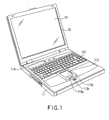
- FIG. 1 is a diagram showing an appearance of an information processing apparatus in the present embodiment. Here, an example of a notebook-size personal computer will be described.
- the computer As shown in FIG. 1, the computer according to the present embodiment is constituted of a computer main body 11 and display unit 12.
- a display screen (main display) 121 including an LCD is incorporated.
- the display unit 12 is attached to the computer main body 11 so that the unit can rotate between a released position and closed position.
- the computer main body 11 includes a thin box-shaped housing, a keyboard 111 is disposed in a housing upper surface, and the upper surface of a housing portion in front of the keyboard 111 forms an arm rest.
- a cPadTM device 112 which is used as the pointing device of the display united type as described above according to the present invention is disposed together with a left button 113a, right button 113b, and middle button 113c included in the cPadTM device.
- a power button 114 is disposed to turn on/off a power supply of the computer main body 11.
- FIG. 2 is a block diagram showing a constitution of the computer system of the present embodiment.
- this computer includes a CPU 201, host bridge 202, main memory 203, graphics controller 204, PCI-ISA bridge 206, I/O controller 207, hard disk drive (HDD) 208, CD-ROM drive 209, USB controller 210, embedded controller/keyboard controller IC (EC/KBC) 211, and power supply controller 213.
- a PCI bus 1 connected between the host bridge 202 and PCI-ISA bridge 206 is connected to various controllers such as the I/O controller 207, USB controller 210, and sound controller 106.
- the cPadTM device 112 and a USB port 228 are connected to the USB controller 210.
- the cPadTM device 112 includes a touch pad 112a, display portion 112b, and backlight 112c which are united, and also includes the left button 113a, right button 113b, and middle button 113c.
- the sound controller 106 is connected to a sound output portion 107 such as a speaker and beeper.
- the CPU 201 is disposed to control the operation of the present computer, and executes an operating system and application program/utility program loaded in the main memory 203 from the hard disk drive (HDD) 208.
- HDD hard disk drive
- the application program related to the operation of the cPadTM device 112 is executed as shown in FIGS. 9 and 10. An execution process of the application program will be described later.
- the host bridge 202 is a bridge device for bi-directionally connecting a local bus of the CPU 201 to the PCI bus 1.
- the graphics controller 204 controls the main display 121 which is used as a display monitor of the present computer. Moreover, when an external display is connected to a connection port for the external display, the graphics controller 204 controls the external display.
- the I/O controller 207 controls the hard disk drive (HDD) 208, and CD-ROM drive 209.
- the PCI-ISA bridge 206 is a bridge device for bi-directionally connecting the PCI bus 1 to an ISA bus 2, and includes various system devices such as a system timer, DMA controller, and interrupt controller.
- the embedded controller/keyboard controller IC (EC/KBC) 211 is a one-chip microcomputer in which an embedded controller (EC) for managing power and a keyboard controller (KBC) for controlling the keyboard 111 are integrated.
- This embedded controller/keyboard controller IC (EC/KBC) 211 has a function of cooperating with the power supply controller 213 to turn on/off power in response to the user's operation of the power button 114.
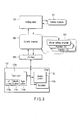
- FIG. 3 is a block diagram showing the main part of the system in the present embodiment.
- constituting elements include: a setting table 301 for setting the function of the cPadTM device 112; a control program 302 for controlling the function of the cPadTM device 112 in accordance with the content of the setting table 301; an interface 303 for controlling input/output of information exchanged between the cPadTM device 112 and control program 302; a setting program 311 for preparing the setting table 301 by GUI; execution means 312 for executing various processes in accordance with the instruction of the control program 302; and the cPadTM device 112.
- FIG. 4 is a diagram showing one example of display on the main display 121. There are displayed a tray icon (cPadTM property icon) 411 concerning the operation of the cPadTM device 112, and a pull-down menu 412 opened when the cPadTM property icon 411 is clicked/operated.
- cPadTM property icon displayed on the main display 121.
- FIG. 5 is a diagram showing the display of FIG. 4 in an enlarged size. That is, there are also displayed the cPadTM property icon 411 on the main display 121, and the pull-down menu 412 opened when the cPadTM property icon 411 is selected/clicked/operated with a mouse pointer (MC).
- MC mouse pointer
- enable cPadTM function items 415 are disposed to provide various functions such as, but not limited to, functions for setting a changeover operation screen and for setting the display and operation of the operation screen operated by the cPadTM device 112 to be valid/invalid.
- a changeover operation screen changeover menu screen
- an operation screen 432 changed (selected) in the changeover menu screen 431 in the main display 121 for example as shown in FIG. 7.
- this function can be set to be invalid.
- FIG. 6 is a diagram showing an exemplary changeover menu screen 431 displayed on the main display 121 and operated by the cPadTM device 112.
- the changeover menu screen 431 to be operated by the cPadTM device 112 is displayed in the vicinity of a pointing region being operated on the main display 121.
- selection buttons (icons) Ia, Ib, ... of various operation screens to be operated by the cPadTM device 112, such as, but not limited to, numeric keys, calculator, memo, image drawing, and property are disposed.
- FIG. 7 is a diagram showing one example of an operation screen 432 displayed on the main display 121 and operated by the cPadTM device 112. For example, when the selection button Ib of the calculator is clicked on the changeover menu screen 431 shown in FIG. 6, an operation screen of a calculator is displayed, as shown in FIG. 7, and calculation is possible using the calculator on the operation screen.
- FIG. 8 shows a temporary shape change of the mouse pointer displayed on the main display 121. That is, the shape temporarily changes at the display start and changeover times of the screen operated by the cPadTM device 112.
- the mouse pointer on the main display 121 temporarily changes from the mouse pointer (MC) having a first shape, for example, the shape shown on the left side of FIG. 8 to a mouse pointer (TD) having the second shape, for example, the shown on the right side of FIG. 8.
- the user is notified of the start and changeover of the display of the screen operated by the cPadTM device 112.
- the shape of the mouse pointer is changed.
- the user may also be notified, for example, by changing the color of the mouse pointer, by a flashing display or by any other suitable visual method.
- the user may be notified tactilely by, for example, a vibration of some portion of the information processing apparatus.
- the cPadTM device 112 when any operation screen is not selected on the changeover menu screen 431, the cPadTM device 112 is used as a pointing device equal to the mouse. Therefore, although the pointer on the main display 121 operated with the cPadTM device 112 may be referred to as a mouse pointer, operating as a mouse pointer is only one function of the pointer.
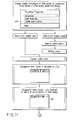
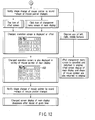
- FIGS. 9 to 12 are flowcharts showing a procedure of an operation process of the present embodiment.
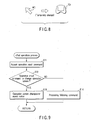
- FIG. 9 is a flowchart showing the procedure of the operation input process of the cPadTM device 112, which is executed by the control program 302 to control the cPadTM device 112.
- FIG. 10 is a flowchart showing the procedure of the operation process of the cPadTM device 112, which is executed by the main CPU 201.
- FIGS. 11 and 12 are flowcharts showing the procedure of the operation process in cPadTM screen processing.
- an operation input mode is obtained in which the cPadTM device 112 reflects the pointing operation of the cPadTM device 112 in the mouse pointer displayed on the main display 121.
- the cPadTM device 112 functions as a usual mouse pointing operation screen.
- the middle button 113c disposed in the cPadTM device 112 is operated, and a selection operation (operation for changing the operation screen) of another function mode of the cPadTM device 112 is performed.
- the changeover menu screen is displayed in the display portion 112b of the cPadTM device 112 in the same manner as for the changeover menu screen 431 shown in FIG. 6.
- the selection button Ib of the calculator is clicked on the changeover menu screen 431
- the operation screen of the calculator is displayed in the same manner as in the operation screen 432 shown in FIG. 7, and the calculation using the calculator is possible on the operation screen.
- an operation input command following the operation on the cPadTM device 112 is accepted on the control program 302 of the cPadTM device 112 (step S11).
- it is judged whether or not the operation input command is an operation input command for changing the operation screen (step S12).
- the processing is executed in accordance with the command (step S14).
- an event indicating that the operation screen be changed is issued (step S13). This event is notified to the main CPU 201 via the USB controller 210. Therefore, when the main display 121 is visually checked and touch operation is performed, and even when the operation for changing the cPadTM operation screen is performed by mistake on the cPadTM device 112, the above-described event is notified to the main CPU 201.
- the pull-down menu 412 is displayed.
- the enable cPadTM function items 415 is operated on the pull-down menu 412, it is possible to operate the screens (the changeover menu screen 431, operation screen 432) to be operated by the cPadTM device 112 on the main display 121.
- a changeover operation screen display flag is set which is managed by the main CPU 201 and which is included in a cPadTM device management flag. Furthermore, items such as, but not limited to, "perform/not perform sound notification” and “change/ not change pointer display” are opened under the enable cPadTM function items 415. When settings are performed to "perform sound notification” or “change display of the pointer” on the items, a sound notification flag or a pointer display change flag included in the cPadTM device management flags are set. These cPadTM device management flags are not shown in the drawings.
- the main CPU 201 accepts an event notice to change the screen of the cPadTM from the control program 302 of the cPadTM device 112 via the USB controller 210 (step S21). In response to this notice, it is judged by the setting of the enable cPadTM function items 415 whether or not the sound notification flag is raised (set) (step S22). When the sound notification flag is raised, the sound controller 106 is started, and it is notified that the screen of cPadTM is changed (step S23). This notification may be given through any of a beep sound and sound message. When the notification by sound is unnecessary (obtrusive), the sound notification flag is set to "not perform sound notification", and the notification by the sound may be invalidated.
- step S24 it is judged whether or not a changeover operation screen display flag is raised (set) in the setting of the enable cPadTM function items 415 (step S24).
- a changeover operation screen display flag is raised, a display area of the changeover menu screen 431 is secured in the vicinity of the mouse pointer (MC) displayed on the main display 121 (step S25). Furthermore, the changeover menu screen 431 to be operated by the cPadTM device 112 is displayed in the secured area (step S26).
- the operator when visually checking the main display 121 and performing the touch operation, the operator can change the operation screen of the cPadTM device 112 without visually checking the cPadTM device 112, and can smoothly and efficiently execute the touch operation. Moreover, for example, when the operation screen is changed by mistake on the cPadTM device 112, the mistake can instantly be noticed, and destruction of the data by an erroneous cPadTM operation, input mistake, and/or wasted operations can securely be prevented.
- a pointer display change flag is raised (set) in the setting of the enable cPadTM function items 415 (step S27).
- the mouse pointer (MC) is changed to a pointer (TD) having, for example, the shape shown on the right side in FIG. 8 for a predetermined time, and the user is notified of the changeover of the cPadTM screen with the mouse pointer (step S28).
- the selection button of the operation screen to be operated e.g., the selection button Ib of the calculator
- the selection buttons (icons) Ia, Ib, ... of various operation screens on the changeover menu screen 431 step S29.
- the operation screen 432 of the calculator is temporarily displayed as shown in FIG. 7 following the selection operation (steps S30, S31).
- the operation screen 432 subjected to a changeover operation (selected) is confirmed, and the visual observation on the main display 121 and the touch operation can be continued.
- the operation screen may be returned to the original, and the touch operation can be continued as such.
- the operation screen 432 is displayed continuously, not temporarily. After the operation ends on the operation screen 432, the operation screen 432 can also be deleted from the main display 121. This function is realized, for example, by disposing selection item "operate/not operate operation screen 432 to be operated by cPadTM device 112 on main display 121" in the pull-down menu 412.
- this function can also be realized by: displaying the operation screen 432 continuously, not temporarily; and deleting the operation screen 432 from the main display 121, when the operation ends on the operation screen 432 and there is a predetermined button operation (e.g., simultaneous operation of two buttons disposed in the cPadTM device 112).
- a predetermined button operation e.g., simultaneous operation of two buttons disposed in the cPadTM device 112
- the changeover operation screen display flag is raised (set) in the setting of the enable cPadTM function items 415 on the above-described pull-down menu 412, that is, when the display of the cPadTM screen becomes valid on the main display 121 as shown in FIG. 11, the sound notification flag and pointer display change flag, for example, are raised (set).
- the changeover menu screen 431 is displayed as shown in FIG. 12, a cPadTM screen change is notified to the user by a sound (beep sound or sound message) and mouse pointer shape (or color, display mode) change.
- the changed operation screen can be displayed in the cPadTM device 112.
- the changed operation screen 432 can be displayed in the cPadTM device 112.
- the cPadTM screen change is notified to the user by the sound and the shape change of the mouse pointer.
- the operation screen 432 is displayed for the predetermined time for which the visual confirmation is possible, and subsequently deleted.
- the operation screen 432 subjected to the changeover operation (selected) is confirmed, and the visual observation on the main display 121 and the touch operation can be continued.
- the operation screen is changed by mistake on the cPadTM device 112
- the user may return the operation screen to the original, and the touch operation can be continued as such.
- a predetermined button is depressed among three buttons disposed in the cPadTM device 112.
- the changeover menu screen 431 displayed in the cPadTM device 112 and main display 121 is deleted, and the mouse pointer returns to its original shape.
- a mechanism to confirm and change the cPadTM screen without visually checking the cPadTM device 112 is disposed, and thereby the erroneous operation can be prevented.
- the user may return the operation screen to the original without visually checking the cPadTM device 112.
- the changeover of the cPadTM screen can be permitted/ prohibited without visually checking the cPadTM device 112.
- the changeover of the cPad screen is displayed in the main display 121, and can further be notified by outputting a sound. Therefore, the stage after the changeover of the cPadTM screen can securely be confirmed without visually checking the cPadTM device 112.
- the state of the screen display of the cPadTM device 112 can always be confirmed by the touch operation while visually checking the main display 121. Therefore, the touch operation can smoothly and efficiently be executed.
- the computer system and operation method of the computer in which the erroneous operation is prevented in advance and touch operation can be smoothly performed in the constitution including two display devices to display the operation screen on each display device.
Landscapes
- Engineering & Computer Science (AREA)
- Theoretical Computer Science (AREA)
- General Engineering & Computer Science (AREA)
- Computer Hardware Design (AREA)
- Physics & Mathematics (AREA)
- Human Computer Interaction (AREA)
- General Physics & Mathematics (AREA)
- Mathematical Physics (AREA)
- User Interface Of Digital Computer (AREA)
- Controls And Circuits For Display Device (AREA)
- Digital Computer Display Output (AREA)
Applications Claiming Priority (2)
| Application Number | Priority Date | Filing Date | Title |
|---|---|---|---|
| JP2002159988 | 2002-05-31 | ||
| JP2002159988A JP3892760B2 (ja) | 2002-05-31 | 2002-05-31 | 情報処理装置 |
Publications (2)
| Publication Number | Publication Date |
|---|---|
| EP1367478A2 true EP1367478A2 (de) | 2003-12-03 |
| EP1367478A3 EP1367478A3 (de) | 2008-11-05 |
Family
ID=29417267
Family Applications (1)
| Application Number | Title | Priority Date | Filing Date |
|---|---|---|---|
| EP03010060A Withdrawn EP1367478A3 (de) | 2002-05-31 | 2003-05-02 | Informationsverarbeitungsgerät mit Zeigereinrichtungfunktion |
Country Status (3)
| Country | Link |
|---|---|
| US (1) | US7154453B2 (de) |
| EP (1) | EP1367478A3 (de) |
| JP (1) | JP3892760B2 (de) |
Cited By (1)
| Publication number | Priority date | Publication date | Assignee | Title |
|---|---|---|---|---|
| CN102088454A (zh) * | 2009-12-04 | 2011-06-08 | 夏普株式会社 | 网络系统、内容提供及取得方法、服务器和通信终端 |
Families Citing this family (31)
| Publication number | Priority date | Publication date | Assignee | Title |
|---|---|---|---|---|
| US20050134569A1 (en) * | 2003-12-23 | 2005-06-23 | Marcus Grindstaff | Accelerated dual-display |
| CN101095185A (zh) * | 2004-02-09 | 2007-12-26 | 直觉控制系统公司 | 折叠电子显示器 |
| JP4134008B2 (ja) * | 2004-11-19 | 2008-08-13 | 任天堂株式会社 | 画像処理装置および画像処理プログラム |
| KR101122233B1 (ko) * | 2004-12-23 | 2012-03-19 | 삼성전자주식회사 | 감지 소자를 내장한 표시 장치 |
| JP2006279325A (ja) * | 2005-03-28 | 2006-10-12 | Fuji Xerox Co Ltd | 画像処理装置、その方法及びプログラム |
| DE102005017850B4 (de) * | 2005-04-18 | 2014-08-21 | Siemens Aktiengesellschaft | Verfahren zur Integration vektorieller und/oder tensorieller Messdaten in eine Darstellung einer anatomischen Bildaufnahme |
| TWI265447B (en) * | 2005-06-06 | 2006-11-01 | Asustek Comp Inc | Electronic device with an auxiliary display apparatus |
| CN100511090C (zh) * | 2005-06-13 | 2009-07-08 | 华硕电脑股份有限公司 | 具备触控显示装置的电子设备 |
| US10133317B2 (en) * | 2007-04-27 | 2018-11-20 | Hewlett-Packard Development Company, L.P. | Computing device with multiple displays |
| JP2010086064A (ja) * | 2008-09-29 | 2010-04-15 | Toshiba Corp | 情報処理装置、文字入力方法及びプログラム |
| JP5540344B2 (ja) | 2008-10-30 | 2014-07-02 | シャープ株式会社 | 電子機器、メニューの選択方法、メニューの選択プログラム |
| JP2010108448A (ja) * | 2008-10-31 | 2010-05-13 | Sharp Corp | データ送信支援装置、電子機器、及びデータ送信支援装置の制御方法 |
| JP5154368B2 (ja) * | 2008-10-31 | 2013-02-27 | シャープ株式会社 | 通信装置およびその制御方法 |
| US8427438B2 (en) * | 2009-03-26 | 2013-04-23 | Apple Inc. | Virtual input tools |
| CN102414649B (zh) | 2009-04-30 | 2015-05-20 | 辛纳普蒂克斯公司 | 按照多个规则集合来操作触摸屏控制系统 |
| US20110012838A1 (en) * | 2009-07-14 | 2011-01-20 | Apple Inc. | Computer input device including a display device |
| JP5691464B2 (ja) * | 2010-12-09 | 2015-04-01 | ソニー株式会社 | 情報処理装置 |
| KR101160681B1 (ko) | 2011-10-19 | 2012-06-28 | 배경덕 | 이동 통신 단말기의 활성화 시에 특정 동작이 수행되도록 하기 위한 방법, 이동 통신 단말기 및 컴퓨터 판독 가능 기록 매체 |
| US10776103B2 (en) | 2011-12-19 | 2020-09-15 | Majen Tech, LLC | System, method, and computer program product for coordination among multiple devices |
| US20140327619A1 (en) * | 2013-05-02 | 2014-11-06 | Dexin Corporation | Inputting apparatus for reacting to an operation state and method thereof |
| CN111488112B (zh) * | 2014-01-23 | 2024-03-08 | 苹果公司 | 虚拟计算机键盘 |
| US11914419B2 (en) | 2014-01-23 | 2024-02-27 | Apple Inc. | Systems and methods for prompting a log-in to an electronic device based on biometric information received from a user |
| AU2017100879B4 (en) | 2016-07-29 | 2017-09-28 | Apple Inc. | Systems, devices, and methods for dynamically providing user interface controls at touch-sensitive secondary display |
| JP6303078B1 (ja) | 2017-06-19 | 2018-03-28 | 日清工業有限公司 | ストロボ装置 |
| US11366531B2 (en) * | 2020-04-29 | 2022-06-21 | Science House LLC | Systems, methods, and apparatus for enhanced peripherals |
| US11899923B1 (en) | 2022-08-31 | 2024-02-13 | Dell Products L.P. | Information handling system collaborative touchpad cursor over control icons |
| US11842043B1 (en) * | 2022-08-31 | 2023-12-12 | Dell Products L.P. | Information handling system collaborative touchpad and multizone touch rejection |
| US11893960B1 (en) | 2022-08-31 | 2024-02-06 | Dell Products L.P. | Information handling system collaborative touchpad display brightness management |
| US11977733B2 (en) | 2022-08-31 | 2024-05-07 | Dell Products L.P. | Information handling system collaborative touchpad dynamic scaling |
| US11983399B2 (en) | 2022-08-31 | 2024-05-14 | Dell Products L.P. | Information handling system collaborative touchpad gesture activation and management |
| US12032759B2 (en) | 2022-08-31 | 2024-07-09 | Dell Products L.P. | Information handling system collaborative touchpad display hardware device coordination |
Family Cites Families (13)
| Publication number | Priority date | Publication date | Assignee | Title |
|---|---|---|---|---|
| US5543588A (en) | 1992-06-08 | 1996-08-06 | Synaptics, Incorporated | Touch pad driven handheld computing device |
| JPH0713676A (ja) | 1993-06-28 | 1995-01-17 | Sony Corp | 手書き情報入力装置 |
| JPH07146754A (ja) | 1993-11-19 | 1995-06-06 | Tatsutaka Fujie | リモート情報処理装置 |
| JPH0836479A (ja) | 1994-07-22 | 1996-02-06 | Canon Inc | 表示装置及び表示装置のポインティング処理方法 |
| JPH10269012A (ja) * | 1997-03-28 | 1998-10-09 | Yazaki Corp | タッチパネルコントローラ及びこれを用いた情報表示装置 |
| JPH1165759A (ja) | 1997-08-21 | 1999-03-09 | Sharp Corp | 情報入力装置 |
| US6429846B2 (en) * | 1998-06-23 | 2002-08-06 | Immersion Corporation | Haptic feedback for touchpads and other touch controls |
| JP2000339097A (ja) * | 1998-12-16 | 2000-12-08 | Sony Corp | 情報処理装置およびその制御方法、並びに記録媒体 |
| JP3817385B2 (ja) | 1999-03-11 | 2006-09-06 | インターナショナル・ビジネス・マシーンズ・コーポレーション | マウスポインタの表示方法 |
| KR100648231B1 (ko) * | 1999-10-19 | 2006-11-24 | 삼성전자주식회사 | 터치 스크린을 갖는 보조 액정디스플레이 패널을 이용한 포인팅 장치를 구비하는 휴대용 컴퓨터 및 그 방법 |
| JP3670192B2 (ja) | 2000-03-30 | 2005-07-13 | 京セラ株式会社 | 携帯無線機および表示内容変更方法 |
| US20050024341A1 (en) * | 2001-05-16 | 2005-02-03 | Synaptics, Inc. | Touch screen with user interface enhancement |
| JP2004030535A (ja) * | 2002-06-28 | 2004-01-29 | Toshiba Corp | 情報処理装置および同装置で使用される入力支援方法 |
-
2002
- 2002-05-31 JP JP2002159988A patent/JP3892760B2/ja not_active Expired - Fee Related
-
2003
- 2003-05-02 EP EP03010060A patent/EP1367478A3/de not_active Withdrawn
- 2003-05-09 US US10/434,854 patent/US7154453B2/en not_active Expired - Lifetime
Cited By (1)
| Publication number | Priority date | Publication date | Assignee | Title |
|---|---|---|---|---|
| CN102088454A (zh) * | 2009-12-04 | 2011-06-08 | 夏普株式会社 | 网络系统、内容提供及取得方法、服务器和通信终端 |
Also Published As
| Publication number | Publication date |
|---|---|
| JP3892760B2 (ja) | 2007-03-14 |
| EP1367478A3 (de) | 2008-11-05 |
| US20040004604A1 (en) | 2004-01-08 |
| US7154453B2 (en) | 2006-12-26 |
| JP2004005212A (ja) | 2004-01-08 |
Similar Documents
| Publication | Publication Date | Title |
|---|---|---|
| US7154453B2 (en) | Information processing apparatus with pointer indicator function | |
| JP3788942B2 (ja) | 情報処理装置およびコンピュータの操作支援方法 | |
| US7944437B2 (en) | Information processing apparatus and touch pad control method | |
| KR100648231B1 (ko) | 터치 스크린을 갖는 보조 액정디스플레이 패널을 이용한 포인팅 장치를 구비하는 휴대용 컴퓨터 및 그 방법 | |
| JP4166229B2 (ja) | タッチパネルを備えた表示装置 | |
| JP2004070492A (ja) | タッチパネルを備えた表示装置及び情報処理方法 | |
| JP2009509235A (ja) | タッチスクリーン型ユーザ・インターフェース上への仮想入力装置の配置 | |
| JP2003330591A (ja) | 情報処理装置およびコンピュータの操作方法 | |
| JP2005092703A (ja) | 情報処理装置 | |
| US20050138575A1 (en) | Information processing apparatus with display | |
| JP2003345483A (ja) | 情報処理装置および同装置で使用されるウィンドウサイズ制御方法 | |
| JP2003248550A (ja) | 情報処理装置およびコンピュータの操作機能拡張方法 | |
| JP6039151B1 (ja) | 入力装置及び情報処理装置 | |
| JP4653561B2 (ja) | 情報処理装置および表示制御方法 | |
| JP4892068B2 (ja) | 情報処理装置及び画像表示方法 | |
| JP2010231626A (ja) | 情報処理装置 | |
| EP1443388A2 (de) | Informationsverarbeitungsgerät und Verfahren zur Darstellung eines Bedienungsfenster | |
| CN101211242A (zh) | 信息处理设备和信息处理方法 | |
| JP4266158B2 (ja) | 情報処理装置および表示制御方法 | |
| US20070070048A1 (en) | Method and apparatus for controlling input devices in computer system with tablet device | |
| JP2007233504A (ja) | 情報処理装置及び光投射制御方法 | |
| WO2007082290A2 (en) | User interface for a touch-screen based computing device and method therefor | |
| JPH1153165A (ja) | マンマシンインタフェース装置 | |
| EP1367477A2 (de) | Informationsverarbeitungsgerät | |
| JP4607991B2 (ja) | 情報処理装置 |
Legal Events
| Date | Code | Title | Description |
|---|---|---|---|
| PUAI | Public reference made under article 153(3) epc to a published international application that has entered the european phase |
Free format text: ORIGINAL CODE: 0009012 |
|
| 17P | Request for examination filed |
Effective date: 20030502 |
|
| AK | Designated contracting states |
Kind code of ref document: A2 Designated state(s): AT BE BG CH CY CZ DE DK EE ES FI FR GB GR HU IE IT LI LU MC NL PT RO SE SI SK TR |
|
| AX | Request for extension of the european patent |
Extension state: AL LT LV MK |
|
| PUAL | Search report despatched |
Free format text: ORIGINAL CODE: 0009013 |
|
| AK | Designated contracting states |
Kind code of ref document: A3 Designated state(s): AT BE BG CH CY CZ DE DK EE ES FI FR GB GR HU IE IT LI LU MC NL PT RO SE SI SK TR |
|
| AX | Request for extension of the european patent |
Extension state: AL LT LV MK |
|
| AKX | Designation fees paid |
Designated state(s): DE FR GB |
|
| 17Q | First examination report despatched |
Effective date: 20100706 |
|
| STAA | Information on the status of an ep patent application or granted ep patent |
Free format text: STATUS: THE APPLICATION IS DEEMED TO BE WITHDRAWN |
|
| 18D | Application deemed to be withdrawn |
Effective date: 20101117 |