WO2019003650A1 - 印刷システム、印刷装置と情報処理装置とその制御方法、及び記憶媒体 - Google Patents
印刷システム、印刷装置と情報処理装置とその制御方法、及び記憶媒体 Download PDFInfo
- Publication number
- WO2019003650A1 WO2019003650A1 PCT/JP2018/017915 JP2018017915W WO2019003650A1 WO 2019003650 A1 WO2019003650 A1 WO 2019003650A1 JP 2018017915 W JP2018017915 W JP 2018017915W WO 2019003650 A1 WO2019003650 A1 WO 2019003650A1
- Authority
- WO
- WIPO (PCT)
- Prior art keywords
- printing
- information
- setting
- processing apparatus
- Prior art date
- Legal status (The legal status is an assumption and is not a legal conclusion. Google has not performed a legal analysis and makes no representation as to the accuracy of the status listed.)
- Ceased
Links
Images









Classifications
-
- B—PERFORMING OPERATIONS; TRANSPORTING
- B41—PRINTING; LINING MACHINES; TYPEWRITERS; STAMPS
- B41J—TYPEWRITERS; SELECTIVE PRINTING MECHANISMS, i.e. MECHANISMS PRINTING OTHERWISE THAN FROM A FORME; CORRECTION OF TYPOGRAPHICAL ERRORS
- B41J29/00—Details of, or accessories for, typewriters or selective printing mechanisms not otherwise provided for
- B41J29/38—Drives, motors, controls or automatic cut-off devices for the entire printing mechanism
- B41J29/393—Devices for controlling or analysing the entire machine ; Controlling or analysing mechanical parameters involving printing of test patterns
-
- G—PHYSICS
- G06—COMPUTING OR CALCULATING; COUNTING
- G06F—ELECTRIC DIGITAL DATA PROCESSING
- G06F3/00—Input arrangements for transferring data to be processed into a form capable of being handled by the computer; Output arrangements for transferring data from processing unit to output unit, e.g. interface arrangements
- G06F3/12—Digital output to print unit, e.g. line printer, chain printer
- G06F3/1201—Dedicated interfaces to print systems
- G06F3/1202—Dedicated interfaces to print systems specifically adapted to achieve a particular effect
- G06F3/1203—Improving or facilitating administration, e.g. print management
- G06F3/1204—Improving or facilitating administration, e.g. print management resulting in reduced user or operator actions, e.g. presetting, automatic actions, using hardware token storing data
-
- B—PERFORMING OPERATIONS; TRANSPORTING
- B41—PRINTING; LINING MACHINES; TYPEWRITERS; STAMPS
- B41J—TYPEWRITERS; SELECTIVE PRINTING MECHANISMS, i.e. MECHANISMS PRINTING OTHERWISE THAN FROM A FORME; CORRECTION OF TYPOGRAPHICAL ERRORS
- B41J29/00—Details of, or accessories for, typewriters or selective printing mechanisms not otherwise provided for
- B41J29/38—Drives, motors, controls or automatic cut-off devices for the entire printing mechanism
-
- G—PHYSICS
- G06—COMPUTING OR CALCULATING; COUNTING
- G06F—ELECTRIC DIGITAL DATA PROCESSING
- G06F3/00—Input arrangements for transferring data to be processed into a form capable of being handled by the computer; Output arrangements for transferring data from processing unit to output unit, e.g. interface arrangements
- G06F3/12—Digital output to print unit, e.g. line printer, chain printer
-
- G—PHYSICS
- G06—COMPUTING OR CALCULATING; COUNTING
- G06F—ELECTRIC DIGITAL DATA PROCESSING
- G06F3/00—Input arrangements for transferring data to be processed into a form capable of being handled by the computer; Output arrangements for transferring data from processing unit to output unit, e.g. interface arrangements
- G06F3/12—Digital output to print unit, e.g. line printer, chain printer
- G06F3/1201—Dedicated interfaces to print systems
-
- G—PHYSICS
- G06—COMPUTING OR CALCULATING; COUNTING
- G06F—ELECTRIC DIGITAL DATA PROCESSING
- G06F3/00—Input arrangements for transferring data to be processed into a form capable of being handled by the computer; Output arrangements for transferring data from processing unit to output unit, e.g. interface arrangements
- G06F3/12—Digital output to print unit, e.g. line printer, chain printer
- G06F3/1201—Dedicated interfaces to print systems
- G06F3/1223—Dedicated interfaces to print systems specifically adapted to use a particular technique
- G06F3/1224—Client or server resources management
- G06F3/1226—Discovery of devices having required properties
-
- G—PHYSICS
- G06—COMPUTING OR CALCULATING; COUNTING
- G06F—ELECTRIC DIGITAL DATA PROCESSING
- G06F3/00—Input arrangements for transferring data to be processed into a form capable of being handled by the computer; Output arrangements for transferring data from processing unit to output unit, e.g. interface arrangements
- G06F3/12—Digital output to print unit, e.g. line printer, chain printer
- G06F3/1201—Dedicated interfaces to print systems
- G06F3/1223—Dedicated interfaces to print systems specifically adapted to use a particular technique
- G06F3/1224—Client or server resources management
- G06F3/1228—Printing driverless or using generic drivers
-
- G—PHYSICS
- G06—COMPUTING OR CALCULATING; COUNTING
- G06F—ELECTRIC DIGITAL DATA PROCESSING
- G06F3/00—Input arrangements for transferring data to be processed into a form capable of being handled by the computer; Output arrangements for transferring data from processing unit to output unit, e.g. interface arrangements
- G06F3/12—Digital output to print unit, e.g. line printer, chain printer
- G06F3/1201—Dedicated interfaces to print systems
- G06F3/1223—Dedicated interfaces to print systems specifically adapted to use a particular technique
- G06F3/1229—Printer resources management or printer maintenance, e.g. device status, power levels
- G06F3/1232—Transmitting printer device capabilities, e.g. upon request or periodically
-
- G—PHYSICS
- G06—COMPUTING OR CALCULATING; COUNTING
- G06F—ELECTRIC DIGITAL DATA PROCESSING
- G06F3/00—Input arrangements for transferring data to be processed into a form capable of being handled by the computer; Output arrangements for transferring data from processing unit to output unit, e.g. interface arrangements
- G06F3/12—Digital output to print unit, e.g. line printer, chain printer
- G06F3/1201—Dedicated interfaces to print systems
- G06F3/1223—Dedicated interfaces to print systems specifically adapted to use a particular technique
- G06F3/1237—Print job management
- G06F3/1253—Configuration of print job parameters, e.g. using UI at the client
- G06F3/1255—Settings incompatibility, e.g. constraints, user requirements vs. device capabilities
-
- G—PHYSICS
- G06—COMPUTING OR CALCULATING; COUNTING
- G06F—ELECTRIC DIGITAL DATA PROCESSING
- G06F3/00—Input arrangements for transferring data to be processed into a form capable of being handled by the computer; Output arrangements for transferring data from processing unit to output unit, e.g. interface arrangements
- G06F3/12—Digital output to print unit, e.g. line printer, chain printer
- G06F3/1201—Dedicated interfaces to print systems
- G06F3/1223—Dedicated interfaces to print systems specifically adapted to use a particular technique
- G06F3/1237—Print job management
- G06F3/1253—Configuration of print job parameters, e.g. using UI at the client
- G06F3/1257—Configuration of print job parameters, e.g. using UI at the client by using pre-stored settings, e.g. job templates, presets, print styles
-
- G—PHYSICS
- G06—COMPUTING OR CALCULATING; COUNTING
- G06F—ELECTRIC DIGITAL DATA PROCESSING
- G06F3/00—Input arrangements for transferring data to be processed into a form capable of being handled by the computer; Output arrangements for transferring data from processing unit to output unit, e.g. interface arrangements
- G06F3/12—Digital output to print unit, e.g. line printer, chain printer
- G06F3/1201—Dedicated interfaces to print systems
- G06F3/1223—Dedicated interfaces to print systems specifically adapted to use a particular technique
- G06F3/1237—Print job management
- G06F3/1253—Configuration of print job parameters, e.g. using UI at the client
- G06F3/1258—Configuration of print job parameters, e.g. using UI at the client by updating job settings at the printer
-
- G—PHYSICS
- G06—COMPUTING OR CALCULATING; COUNTING
- G06F—ELECTRIC DIGITAL DATA PROCESSING
- G06F3/00—Input arrangements for transferring data to be processed into a form capable of being handled by the computer; Output arrangements for transferring data from processing unit to output unit, e.g. interface arrangements
- G06F3/12—Digital output to print unit, e.g. line printer, chain printer
- G06F3/1201—Dedicated interfaces to print systems
- G06F3/1278—Dedicated interfaces to print systems specifically adapted to adopt a particular infrastructure
- G06F3/1285—Remote printer device, e.g. being remote from client or server
-
- G—PHYSICS
- G06—COMPUTING OR CALCULATING; COUNTING
- G06F—ELECTRIC DIGITAL DATA PROCESSING
- G06F3/00—Input arrangements for transferring data to be processed into a form capable of being handled by the computer; Output arrangements for transferring data from processing unit to output unit, e.g. interface arrangements
- G06F3/12—Digital output to print unit, e.g. line printer, chain printer
- G06F3/1201—Dedicated interfaces to print systems
- G06F3/1278—Dedicated interfaces to print systems specifically adapted to adopt a particular infrastructure
- G06F3/1292—Mobile client, e.g. wireless printing
Definitions
- the present invention relates to a printing system, a printing apparatus, an information processing apparatus, a control method thereof, and a storage medium.
- a printing apparatus which is connected to a network and receives printing data from an information processing apparatus via the network and performs printing.
- the information processing apparatus it is conventionally known to generate print data to be transmitted to a printing apparatus using a printer driver (or print application) designed to use individual printing apparatuses.
- print data is generated by a general-purpose print service provided as a function of an operating system (OS) of an information processing apparatus or a general-purpose print service provided by a print server on a cloud, etc.
- OS operating system
- a network protocol IPP: Internet Printing Protocol
- Printing is realized by performing communication.
- Patent Document 1 when an image is selected on the screen of the portable communication terminal apparatus and printing is instructed, a nearby MFP is searched by NFC communication, and a list of the searched MFPs is displayed. It is described that a protocol suitable for transmission of image data is selected based on protocol information from the selected MFP to transmit image data for printing.
- a print server and an information processing apparatus that provide a general-purpose print service in compliance with a standard such as IPP be compatible with various types of printing apparatuses. Therefore, in order to correspond to different functions and specifications for each printing apparatus, an information processing apparatus that uses a general-purpose print service needs to manage configuration information of the printing apparatus.
- the print data is generated based on configuration information of the printing apparatus.
- a general-purpose print service such as IPP
- print settings are performed on a print job setting screen that is shared among different types of printers. For this reason, the user may not necessarily be able to make print settings that he / she wants to use.
- finishing processes individually provided by the printer vendor for example, the puncher standard with a unique color for each area, the standard for folding processing, the standard for special binding processing, etc.
- the print setting screen provided by general-purpose print service.
- the object of the present invention is to solve at least one of the problems of the prior art.
- An object of the present invention is to provide a mechanism for enhancing the convenience in the case of printing via a general-purpose print service.
- a printing apparatus has the following configuration. That is, A registration unit that registers setting information related to printing; Transmitting means for transmitting identification information of the setting information registered in the registration means to the information processing apparatus in response to an acquisition request from the information processing apparatus; A print control unit configured to print setting information corresponding to the identification information in the print setting of the print job when printing the print job including the identification information is received from the information processing apparatus; .
- FIG. 1 is a view for explaining the arrangement of a printing system according to the first embodiment of the present invention.
- FIG. 2 is a block diagram for explaining the hardware configuration of the MFP according to the first embodiment.
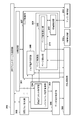
- FIG. 2 is a functional block diagram for explaining the software configuration of the MFP according to the first embodiment.
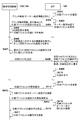
- FIG. 6 is a sequence diagram for explaining the processing procedure when causing the MFP to print from the information processing apparatus in the printing system according to the first embodiment.
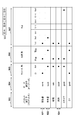
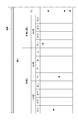
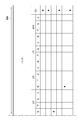
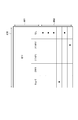
- FIG. 8 is a view for explaining a specific example of a print preset management table stored by the print preset storage unit of the MFP according to the first embodiment.
- FIG. 1 is a view for explaining the arrangement of a printing system according to the first embodiment of the present invention.
- FIG. 2 is a block diagram for explaining the hardware configuration of the MFP according to the first embodiment.
- FIG. 2 is a functional block diagram for explaining the software configuration of the MFP according to the first embodiment.
- FIG. 6 is a sequence diagram for explaining the processing procedure when causing the
- FIG. 8 is a view for explaining a specific example of a print preset management table stored by the print preset storage unit of the MFP according to the first embodiment.
- FIG. 8 is a view for explaining a specific example of a print preset management table stored by the print preset storage unit of the MFP according to the first embodiment.
- FIG. 8 is a view for explaining a specific example of a print preset management table stored by the print preset storage unit of the MFP according to the first embodiment.
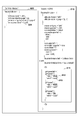
- FIG. 8 is a diagram for explaining an example of a request for acquiring printer capability information between the information processing apparatus and the MFP according to the first embodiment and information on an identifier of a print preset and a response example thereof.
- FIG. 8 is a diagram for explaining an example of a request for acquiring printer capability information between the information processing apparatus and the MFP according to the first embodiment and information on an identifier of a print preset and a response example thereof.
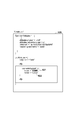
- FIG. 5 is a view showing an example of print job data generated by the information processing apparatus according to the first embodiment and transmitted to the MFP.
- FIG. 6 is a view showing an example of a UI screen when registering a print preset in the MFP according to the first embodiment.
- FIG. 6 is a view showing an example of a UI screen when registering a print preset in the MFP according to the first embodiment.
- FIG. 6 is a view showing an example of a UI screen when registering a print preset in the MFP according to the first embodiment.
- FIG. 6 is a view showing an example of a UI screen when registering a print preset in the MFP according to the first embodiment.
- FIG. 6 is a view showing an example of a UI screen when registering a print preset in the MFP according to the first embodiment.
- FIGS. 7A to 7H are flowcharts illustrating MFP processing for storing a print preset input to the MFP by the user of the information processing apparatus by operating the UI screens of FIGS. 7A to 7H.
- FIGS. 7A to 7H are flowcharts illustrating MFP processing for storing a print preset input to the MFP by the user of the information processing apparatus by operating the UI screens of FIGS. 7A to 7H.
- FIG. 6 is a view showing an example of a print setting screen displayed by the information processing apparatus according to the first embodiment.
- FIG. 6 is a flowchart illustrating processing for receiving and printing a print job by the MFP according to the first embodiment.
- FIG. 11 is a flowchart illustrating processing for reflecting the print preset in step S1006 of FIG. 10 on print data.
- FIG. FIG. 8 is a view showing an example of a print setting screen displayed by the information processing apparatus according to the second embodiment.
- FIG. 1 is a view for explaining the arrangement of a printing system according to the first embodiment of the present invention.
- a multifunction peripheral (MFP: Multifunction Peripheral) 101 and an AP (Access Point) 102 are communicably connected to each other.
- MFP Multifunction Peripheral
- AP Access Point
- an MFP 101 having a scan function, a print function, a facsimile transmission / reception function, a box function, and the like will be described as an example of the printing apparatus.
- mobile terminals 103 and 104 such as a tablet and a smartphone will be described as an example.
- the tablet 103 and the smartphone 104 are generically referred to as an information processing apparatus.
- the information processing apparatus can communicate with the MFP 101 on the LAN 100 via the AP 102.
- the present invention is not limited to this, and at least one or more information processing apparatuses and a printing apparatus are connected via a network. It may be connected communicably.
- the network may be wireless or wired.
- the MFP 101 has a reading function of reading an image on a document, and a printing function of printing an image on a sheet (recording medium).
- the MFP 101 can execute print processing based on print data received via the network.
- FIG. 2 is a block diagram for explaining the hardware configuration of the MFP 101 according to the first embodiment.
- the MFP 101 has a reading function of reading an image on a sheet, and a printing function of printing an image on a sheet.
- the MFP 101 has a file transmission function for transmitting an image to an external information processing apparatus.
- the MFP 101 will be described as an example of the printing apparatus, but the present invention is not limited to this.
- a printing device such as an SFP (Single Function Peripheral) that does not have a reading function may be used.
- a control unit 210 including a CPU (central processing unit) 211 controls the overall operation of the MFP 101.
- the CPU 211 loads a program stored in a ROM (Read Only Memory) 212 or a storage 214 in the RAM 213 and executes the program to perform various controls such as print control and read control.
- the ROM 212 stores control programs and boot programs that can be executed by the CPU 211.
- a random access memory (RAM) 213 is a main storage memory of the CPU 211, and is used as a work area or a temporary storage area for developing various control programs.
- the storage 214 stores print data, image data, various programs, and various setting information.
- an auxiliary storage device such as a hard disk drive (HDD) is assumed as the storage 214, but a non-volatile memory such as a solid state drive (SSD) may be used.
- HDD hard disk drive
- SSD solid state drive
- one CPU 211 executes each process shown in the flowchart to be described later using one memory (RAM 213), but another mode may be used.
- RAM 213 random access memory
- a plurality of CPUs, RAMs, ROMs, and storages may be cooperated to execute each process shown in the flowchart to be described later.
- a part of the processing may be performed using a hardware circuit such as an application specific integrated circuit (ASIC) or a field-programmable gate array (FPGA).
- ASIC application specific integrated circuit
- FPGA field-programmable gate array
- An operation unit interface (I / F) 215 connects the operation unit 216 and the control unit 210.
- the operation unit 216 includes a display unit having a touch panel function, various hard keys, and the like, and functions as a display unit that displays information and a reception unit that receives a user's instruction.
- the reading unit I / F 217 connects the reading unit (scanner) 218 and the control unit 210.
- the reading unit 218 reads an original and generates image data.
- the generated image data is stored in the storage 214 or the RAM 213.
- the image data generated by the reading unit 218 is transmitted to the information processing apparatus or used to print an image on a sheet.
- the printing unit I / F 219 connects the printing unit (printer engine) 220 and the control unit 210.
- Image data generated by analyzing a print job received from the information processing apparatus is transferred from the control unit 210 to the printing unit 220 via the printing unit I / F 219.
- the printing unit 220 receives a control command and a print job to be printed via the control unit 210, and prints an image on a sheet fed from a sheet feeding cassette (not shown) based on the print job.
- the printing method of the printing unit 220 may be an electrophotographic method or an inkjet method. Other printing methods such as a thermal transfer method can also be applied.
- the control unit 210 is also connected to the LAN 100 via the communication unit I / F 223.
- a communication unit I / F 223 transmits image data and information to an information processing apparatus on the LAN 100, and receives a print job and information from the information processing apparatus on the LAN 100.
- the image processing unit 224 has a function of a RIP (Raster Image Processor) which develops a print job received via the LAN 100 and generates image data used for printing.
- the image processing unit 224 can also perform resolution conversion and correction processing of image data obtained by expanding a print job.
- the image processing unit 224 is realized by a hardware circuit (ASIC, FPGA or the like), but the present invention is not limited to this.
- the MFP 101 may further include a processor for image processing applications, and the processor may execute an image processing program to realize image processing and expansion processing to print data.
- the processor and the CPU 211 cooperate to realize a flowchart to be described later.
- the CPU 211 may execute a program for performing image processing, and perform image processing and print data expansion processing. Further, image processing may be performed by any combination of these.
- the sheet processing unit I / F 221 connects the control unit 210 and the sheet processing unit 222.
- the sheet processing unit 222 receives a control command from the control unit 210, and performs post-processing on the sheet printed by the printing unit 220 according to the control command. For example, post-processing such as aligning a plurality of sheets, punching holes in sheets, binding a plurality of sheets, and the like is performed.
- the sheet processing unit 222 according to the first embodiment can perform two types of binding processing. One is a binding process (hereinafter, needle binding) in which sheets are bound using a needle, and in this needle binding, a plurality of sheets can be bound using a needle.
- the other is a binding process (hereinafter, needleless binding) in which sheets are bound without using a needle.
- needleless binding a binding process in which sheets are bound without using a needle.
- a special blade is pressed against a sheet to crimp a plurality of sheets, thereby binding a plurality of sheets, making a hole in a plurality of sheet bundles, and folding back and binding.
- the stapleless binding process does not require consumables such as needles, the binding process can be performed without being aware of the cost of the consumables.
- the upper limit number of sheets that can be stapled is smaller (for example, about 5 to 10 sheets) as compared to the binding process in which sheets are stapled using a staple.
- the post-processing functions and post-processing capabilities of the sheet processing unit 222 are notified to the control unit 210 via the sheet processing unit I / F 221 in advance (for example, when the MFP 101 is activated), and stored in the storage 214 or RAM 213 Ru.
- FIG. 3 is a functional block diagram for explaining the software configuration of the MFP 101 according to the first embodiment.
- each functional block shown in FIG. 3 is achieved by the CPU 211 executing a program developed in the RAM 213.
- the IPP print service control unit 315 combines information of a search identifier for searching for a print preset stored in the print preset storage unit 304 and printer configuration information acquired from the engine control unit 314 as “printer information” and stores the information. Notify the processing device.
- the print preset includes print specifications such as color, monochrome, single-sided / double-sided, and N-up, and specifications of post-processing such as binding, punching, and folding.
- the search identifier is an identifier (owner identification information) of the user who registered the print preset in the MFP 101.
- the printer configuration information is function information of the printer (here, the MFP 101).
- the IPP print service control unit 315 receives a print job based on the IPP standard from the information processing apparatus via the network, the IPP print service control unit 315 passes the print job to the print job generation unit 302.
- the UI control unit 301 displays a print preset registration UI screen described later with reference to FIGS. 7A to 7H. Then, after the user logs in, the user can save desired print preset information in the print preset storage unit 304, display, edit, delete, and the like. Also, the UI control unit 301 acquires, from the job control unit 307, information regarding the status of the print job being processed, and displays the processing status of the print job on the UI screen.
- the print job generation unit 302 receives a print job from the information processing apparatus via the IPP print service control unit 315, writes it in the data reception control unit 305, registers a job as a new job in the job control unit 307, and performs print processing Request a start of If the received print job is an IPP print job, the print job generation unit 302 passes the print setting information to be applied to the print job to the job attribute storage unit 308 via the mobile job setting update unit 303. The print job generation unit 302 directly writes data of print jobs other than IPP in the job attribute storage unit 308.
- the mobile job setting update unit 303 is called via the print job generation unit 302, and searches for an identifier of a print preset included in the IPP header of the received print job. If a print preset identifier is embedded in the IPP header, the data in the print preset storage unit 304 is searched using the identifier, and a print preset corresponding to the identifier is acquired. Upon acquiring the corresponding print setting information from the identifier of the print preset, the mobile job setting update unit 303 sets the acquired print preset in the job attribute storage unit 308.
- the print preset storage unit 304 stores, in the storage 214, the print presets set by the user of the information processing apparatus through the UI screens of FIGS. 7A to 7H. If the stored print preset is updated, the updated content is notified to the IPP print service control unit 315. When the IPP print service control unit 315 receives the print preset update notification, the IPP print service control unit 315 notifies the information processing apparatus on the network of the update of the printer information (print preset and preset identifier) by the IPP protocol.
- the data reception control unit 305 is a buffer area of the print job received by the print job generation unit 302, and temporarily stores the print job in the storage 214.
- the job control unit 307 instructs the PDL analysis unit 306 to perform PDL analysis processing of a print job
- the PDL analysis unit 306 requests the data reception control unit 305 for the print job.
- the data reception control unit 305 transfers the data of the print job to the PDL analysis unit 306.
- the job control storage unit 308 stores attribute information of the print job.
- the job control unit 307 instructs the PDL analysis unit 306 to analyze the print job, and causes the page control unit 309 and the page attribute storage unit 311 to store page data in page units.
- the page data generated by the PDL analysis unit 306 is sequentially stored in the page control unit 309 and the page attribute storage unit 311 for each page.
- the job attribute storage unit 308 stores attribute information of the print job.
- This attribute information is set as an IPP job attribute such as “number of copies”, “Nup (aggregate printing)”, “print side (single side / double side) setting”, “color / monochrome mode”, “finishing setting”, etc. Including those set based on print presets.
- the PDL analysis unit 306 such as information of text objects in a page. These are all managed in association with the job ID by the job attribute storage unit 308.
- the page control unit 309 controls page analysis processing of the PDL analysis unit 306, RIP processing of the RIP control unit 313, and print control processing of the print control unit 312.
- the print control unit 312 acquires RIP-completed image data from the page storage unit 310, separates the image data into CMYK, and transfers the color separation data to the engine control unit 314.
- the engine control unit 314 receives the image data for each CMYK in page units from the print control unit 312, and controls the printing unit 220 to print each page.
- FIG. 4 is a sequence diagram for explaining the processing procedure for causing the information processing apparatus to print on the MFP 101 in the printing system according to the first embodiment.
- step S401 the user of the information processing apparatus registers a print preset via the UI screen (FIGS. 7A to 7H) of the operation unit 216 of the MFP 101.
- a print preset via the UI screen (FIGS. 7A to 7H) of the operation unit 216 of the MFP 101.
- an individual print preset can be registered for each user.
- the registered contents at this time are stored in the print preset storage unit 304 together with an owner name (owner identification information) for identifying the user.
- owner name owner identification information
- the search request includes owner identification information (601 in FIG. 6A) that is an identifier of the user.
- step S403 the MFP 101 searches for registered print presets using the owner identification information included in the search request. Then, in step S404, the MFP 101 sends back the search result (the identifier of the print preset whose owner identification information matches) and the configuration information of the MFP 101 to the information processing apparatus by the IPP protocol (610 in FIG. 6A). As a result, in step S405, the information processing apparatus holds an identifier of an individual print preset and printer configuration information for each user transmitted from the MFP 101 by the IPP protocol. The details will be described later with reference to FIGS. 6A and 6B.
- step S407 the user of the information processing apparatus selects the print preset identifier registered in the MFP 101 and presses the print button (905 in FIG. 9).
- the information processing apparatus transmits a print job with a print preset identifier to the MFP 101 in step S408.
- step S409 the MFP 101 acquires setting information of the print preset registered in step S401 from the identifier of the print preset assigned to the print job, and obtains print settings of the print job according to the setting information of the print preset. Then, in step S410, printing based on the print job is executed according to the print setting.
- S411 to S417 show processing steps when the user of the information processing apparatus updates the print preset of the MFP 101 after a predetermined time.
- the MFP 101 detects that the print preset has been updated by the user in step S411, the MFP 101 transmits an update notification of the print preset including the owner identifier to the information processing apparatus in step S412.
- the information processing apparatus compares the owner identification information of the updated print preset with the owner information of the information processing apparatus. If the owner identification information of the updated print preset matches the owner information of the information processing apparatus, the process advances to step S414.
- the owner identification information of the updated print preset and the owner information of the information processing apparatus do not match, the information processing apparatus determines that the update is not directed to itself and does not perform the update processing of the print preset.
- step S414 the information processing apparatus transmits, to the MFP 101, a request for acquiring the identifier of the print preset.
- the acquisition request includes the owner identifier of the information processing apparatus.
- step S415 the MFP 101 that has received the request for acquiring the identifier of the print preset searches for a print preset corresponding to the owner identifier included in the request for acquiring the identifier of the print preset.
- step S416 the MFP 101 transmits the identifier of the print preset corresponding to the owner identifier found in the search in step S415 to the information processing apparatus.
- the information processing apparatus updates the identifier of the print preset stored as the print setting with the identifier of the print preset received from the MFP 101.
- the MFP 101 When the print preset is updated in the MFP 101 by the processing of S411 to S417 described above, the MFP 101 notifies the information processing apparatus of the update. Then, when the general-purpose print service of the information processing apparatus determines that the updated print preset is a print preset required by itself, the print preset can be reacquired.
- 5A to 5D are diagrams for explaining specific examples of print presets stored in the storage 214 by the print preset storage unit 304 of the MFP 101 according to the first embodiment.
- An item 501 is an identifier of the print preset, and includes “estimate sheet”, “report”, “accounting”, “drawing”, “catalog”, and “DM (direct mail)” here.
- Reference numeral 502 denotes owner identification information (owner name) that registered the print preset.
- setting information such as color / monochrome printing, printing side (one side / both sides), Nup, presence of binding (needle binding, needleless binding), punching, folding, etc. is included as a print preset.
- the type includes Nup
- the binding position includes each binding position
- the punch includes the presence or absence of the punch
- the fold includes the presence or absence of the fold, the type of the fold, and the like.
- the settings shown in 505 to 510 in FIGS. 5A to 5D are merely examples, and can be appropriately changed based on the printing capability and the post-processing capability of the MFP 101. For example, in the case of a monochrome MFP, it is possible not to register a color as a print preset.
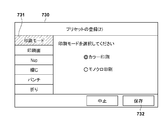
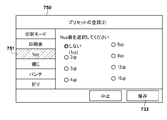
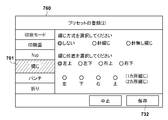
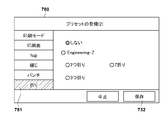
- FIGS. 7A to 7H are diagrams showing an example of a UI screen when registering a print preset in the MFP 101 according to the first embodiment. This screen is displayed on the screen of the operation unit 216 by the UI control unit 301, and the value set by the user is acquired via the screen.
- a process when a user registers a print preset in the MFP 101 will be described.
- a login screen 700 where the user presses the login button 712 is displayed on the operation unit 216.
- the user inputs the user name 701 and the password 702 via this screen and presses the OK button 703. If the information input here matches the information registered in advance in the MFP 101, the user can log in to the MFP 101.
- the user can add, edit, and delete print presets via the list screen 710.
- the print preset registered after the user logs in is the owner of the print preset and the print preset can be used only by the owner from the information processing apparatus.
- the owner name of the print preset is held in the owner identifier 504 of the table of FIGS. 5A to 5D.
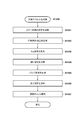
- FIG. 8 is a flowchart for explaining processing of the MFP 101 for storing the print preset input to the MFP 101 by the user of the information processing apparatus by operating the UI screens of FIGS. 7A to 7H.
- the process shown in the flowchart is achieved by the CPU 211 executing a program developed in the RAM 213. Therefore, in the following description of FIG. 8, the subject of each process is described as the CPU 211.
- a list screen 710 of FIG. 7A is a screen for displaying a list of print setting presets.
- step S801 when the CPU 211 detects that the user has pressed the add button 711 on the list screen 710, the process advances to step S802, and the CPU 211 displays the preset registration screen 720 in FIG. 7A on the operation unit 216.
- the preset registration screen 720 is a screen for inputting a “registered name” which is an identifier of a print preset. In the case of a print preset shared by all users, the user inputs a registered name and presses a “next” button 721.
- the print preset name and the user identification information input on the preset registration screen 720 correspond to the preset identifier 503 and the owner identifier 504 in the management table of FIGS. 5A to 5D.
- step S803 the process advances to step S803, and the CPU 211 displays the preset registration screen 730 of FIGS. 7B to 7H on the operation unit 216.
- the following processing of S803 to S810 is processing for acquiring the setting contents of each item of the print preset selected by the user via the preset registration screens 730, 740, 750, 760, 770, and 780 of FIGS. 7B to 7H.
- step S 803 the preset registration screen 730 when the print mode 731 is selected is displayed on the operation unit 216.
- the print mode of color printing or monochrome printing selected by the user on the preset registration screen 730 is acquired.
- the setting values of the printing mode selected here correspond to the color printing 505 of the management table of FIGS. 5A to 5D.
- step S804 when the printing surface 741 is selected, the process advances to step S804, and the CPU 211 displays a preset registration screen 740 on the operation unit 216.
- the preset registration screen 740 either single-sided printing or double-sided printing can be selected as the setting of the printing side, and the CPU 211 acquires the setting value of the printing side selected here. This setting value corresponds to the printing surface 506 of the management table.
- step S805 the process advances to step S805, and the CPU 211 displays a preset registration screen 750 on the operation unit 216. Then, the CPU 211 acquires the Nup setting, which is set on the preset registration screen 750 and indicates how many pages the print page is to be reduced and printed on one sheet of paper. This setting value corresponds to Nup 507 of the management table.
- binding setting is performed.
- the user can select whether the binding process is performed by stapleless binding or staple binding, or the binding position and the number of bindings.
- the process advances to step S806, and the CPU 211 displays a preset registration screen 760 on the operation unit 216.
- the preset registration screen 760 it is possible to select whether or not to perform binding, and when performing binding, it is possible to select staple binding or stapleless binding.
- the closed position can be selected, for example, upper left, lower left, upper right, lower right, etc., and the CPU 211 acquires those setting values. This setting value corresponds to the binding 508 in the management table.
- step S806 If needle binding is selected in S806, the process advances to S807, the CPU 211 acquires the needle binding selected by the user and the binding position, and advances the process to S809. On the other hand, when stapleless binding is selected in S806, the process advances to S808, the CPU 211 acquires the stapleless binding selected by the user and the closed position thereof, and advances the process to S809. These setting values correspond to the binding 508 in the management table. Although not shown in the flowchart, when the user selects not to perform binding, the process advances from step S806 to step S809.
- the CPU 211 displays a preset registration screen 770 on the operation unit 216 in S809.
- the user can specify whether or not to punch, and when punching, the number and position of the holes.
- the CPU 211 acquires setting information set on the preset registration screen 770.
- the value set here corresponds to the punch 509 of the management table.
- the CPU 211 displays a preset registration screen 780 on the operation unit 216 in S810.
- the user can set whether or not to fold, and the type of folding.
- the CPU 211 acquires the set folding information.
- the value set here corresponds to the fold 510 of the management table.
- step S803 to S810 the processing of S803 to S810 can be freely transferred during setting by pressing the tab buttons 731, 741, 751, 761, 771 and 781 of the preset registration screen.
- the process proceeds to step S811, and the CPU 211 performs an exclusion check on the setting items. If there is no problem in the exclusion check, the process advances to step S812, and the CPU 211 saves the setting values in the management tables (stored in the storage 214) of FIGS. 5A to 5D. If there is a problem in the exclusion check in S811, the fact is displayed like a preset registration error screen 790.
- 6A and 6B are diagrams for explaining an acquisition request for information on the capability information of the printer between the information processing apparatus according to the first embodiment and the MFP 101 and the identifier of the print preset, and an example of the response thereof.
- the acquisition request message 600 transmitted from the information processing apparatus to the MFP 101 it is desired to acquire only information related to the identifier of the print preset registered by the user of the information processing apparatus that has issued the request. Therefore, as the owner of the print preset, information regarding the owner identifier 601 representing the user of the information processing apparatus is included.
- This message 600 requests information on the identifier of the print preset corresponding to the owner identifier “suzuki”.
- the message 610 includes the capability response of the printer, which is transmitted from the MFP 101 to the information processing apparatus, and information on the identifier of the print preset, which is included in the capability response.
- Reference numeral 611 denotes a plurality of print presets in a list structure, including an identifier 612 of each print preset and owner information 613 of the print preset.
- Message 610 illustrates the capability response to message 600.
- three print presets designated by the owner identifier "suzuki" are registered in the MFP 101, and the identifiers of each print preset are "estimate", "application”, and “drawing”. Recognize.
- a message 620 shows an example of print job data generated by the information processing apparatus and transmitted to the MFP 101.
- the job attribute includes the print preset identifier 621 and the print preset owner identifier 622.
- the mobile job setting update unit 303 of the MFP 101 searches the print preset storage unit 304 using this print preset identifier 621 as a search key, and the preset identifier 621 whose owner identifier is "suzuki" (here Then, print processing is performed by obtaining a print preset corresponding to the “quotation”.
- this estimate is printed in color in 1-in-1 on one side, and the upper left of the printed sheet is staplelessly stapled, and it is discharged without punching or folding. It will be paper.
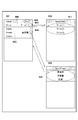
- FIG. 9 is a view showing an example of a print setting screen displayed by the information processing apparatus according to the first embodiment.
- a screen 901 shows a print dialog called from the application of the information processing apparatus. Since the printer (MFP) to be used for printing is not selected when the screen 901 is initially displayed, the contents of the printer display field 906 and the identifier 902 of the print preset are not displayed. Next, when the user presses the printer search button 903 on this screen, the screen changes to a printing apparatus selection screen 910. While the selection screen 910 is displayed, the information processing apparatus transmits a search packet for searching for a printing apparatus (MFP) on the LAN 100 (S402 in FIG. 4). Here, when the MFP 101 returns a response in S404 of FIG. 4, information of the MFP 101 that has returned the response (S404) to the information processing apparatus is displayed on the screen of the information processing apparatus. Screen 910 illustrates the case where three printing devices are found. Here, it is assumed that 911 is a printing apparatus corresponding to the MFP 101 for explanation.
- the screen When the user selects one of the printing apparatuses (here, “Printer (1)”) via the selection screen 910, the screen returns to the screen 901, and the printer identifier “Printer (1)” is displayed in the printer display section 906. . Further, based on the information of the identifier of the print preset received from the MFP 101, the guidance button 904 to the identifier selection screen 920 is displayed (S405 / 406). Then, when the guidance button 904 is pressed on the selection screen 901, the screen changes to a screen 920, and a list 921 of identifiers of print presets that can be used by the selected printing apparatus (MFP) is displayed.
- MFP selected printing apparatus
- the owner identifier 504 stored in the management table (FIGS. 5A to 5D) of the print preset storage unit 304 is "suzuki” as a print preset of "suzuki” 521, “report” “522”, “drawing” 524 is saved. Accordingly, as shown by the list 921 of the print preset selection screen 920 using the preset identifier, "quotation”, "report”, and “drawing” are displayed.
- the user selects one print preset identifier (here, “estimate”) on the print preset selection screen 920 (S 407), and the screen of the information processing apparatus returns to the screen 901.
- the printer display field 906 displays the identifier "Printer (1)" of the selected printer and "Estimate” as a print preset.
- the print button 905 displays the print job in which the identifier of the print preset is embedded as a print preset.
- the print button 905 displays the print job in which the identifier of the print preset is embedded is transmitted from the information processing apparatus to the MFP 101 (S408).
- the estimate sheet is printed on one side in color, 1 in 1, and the upper left of the printed sheet is stapled without staples, and is discharged without punching or folding.
- FIG. 10 is a flowchart for describing processing for the MFP 101 according to the first embodiment to receive and print a print job.
- the process shown in the flowchart is achieved by the CPU 211 executing a program developed in the RAM 213. Therefore, in the following description of FIG. 8, the subject of each process is described as the CPU 211.
- step S1001 the CPU 211 receives a print job transmitted from the information processing apparatus, and stores the received print job in the storage 214 in step S1002.
- step S1003 the CPU 211 analyzes the IPP header of the print job, and determines whether the print preset identifier is included. If it is determined that the print preset identifier is included, the process advances to step S1004; otherwise, the process advances to step S1007.
- step S1004 the CPU 211 is registered in, for example, the management tables illustrated in FIGS. 5A to 5D registered in the storage 214 based on the print preset identifier included in the print job and the owner identification information of the print job. Search for print presets.
- step S1005 the CPU 211 determines whether a print preset that matches the print preset identifier included in the print job and the owner identification information of the print job is registered. If it is determined that a matching print preset is registered, the process advances to step S1006; otherwise, the process advances to step S1010, performs error processing, and ends this process. In this error processing, for example, a message indicating that the corresponding print preset does not exist is displayed on the operation unit 216, and an error response is returned to the information processing apparatus that is the sender of the print job.
- step S1006 the CPU 211 generates print setting information reflecting the matching print preset. This process will be described later with reference to the flowchart of FIG.
- step S1007 the CPU 211 analyzes PDL data included in the print job, and executes RIP processing in step S1008 to expand it into bitmap data. Then, in step S1009, the expanded page data is output to the printing unit 220 and printing is performed. In this printing process, printing is performed in accordance with the print specification reflecting the print preset in S1006. Then, in step S1010, the CPU 211 determines whether printing up to the final page is completed. The process returns to step S1007, which is not completed, and the above-described processing is repeated. Thus, when the printing of the print data designated by the print job is completed, this process is ended.
- the CPU 211 executes the post-processing on the printed sheet in addition to the printing process of the process of S1009. .
- the CPU 211 cooperates with the printing unit 220 and the sheet processing unit 222 to execute post-processing on the sheet.
- FIG. 11 is a flow chart for explaining the process of reflecting the print preset in S1006 of FIG. 10 on print data.
- step S1101 the CPU 211 reflects color print settings 505 (FIGS. 5A to 5D) corresponding to the owner identification information and the identifier of the print preset. For example, in the case where the identifier of the print preset is “estimate” and the owner identification information is “suzuki”, "color” is set from FIGS. 5A to 5D.
- step S1102 the CPU 211 reflects the printing surface setting 506 corresponding to the owner identification information and the identifier of the print preset. For example, in the case where the identifier of the print preset is “estimate” and the owner identification information is “suzuki”, “one side” is set from FIGS. 5A to 5D.
- step S 1103 the CPU 211 reflects the Nup setting 507 corresponding to the owner identification information and the identifier of the print preset. For example, in the case where the identifier of the print preset is “estimate sheet” and the owner identification information is “suzuki”, “1 in 1” is set from FIGS. 5A to 5D.
- step S1104 the CPU 211 reflects the binding setting 508 corresponding to the owner identification information and the print preset identifier. For example, when the identifier of the print preset is “estimate sheet” and the owner identification information is “suzuki”, the binding position is set to “upper left” in “stitch-less binding” in FIGS. 5A to 5D.
- step S1105 the CPU 211 reflects the punch setting 509 corresponding to the owner identification information and the identifier of the print preset. For example, when the identifier of the print preset is "estimate” and the owner identification information is “suzuki", "no punch” is set from FIGS. 5A to 5D.
- step S1106 the CPU 211 reflects the fold setting 510 corresponding to the owner identification information and the print preset identifier. For example, when the identifier of the print preset is "estimate” and the owner identification information is "suzuki”, "no folding" is set from FIGS. 5A to 5D.
- step S1107 the CPU 211 checks whether there is a mismatch between the combination of the IPP job setting value such as the number of print copies and the setting value overwritten by the print preset, and if there is no problem, the updated printing The setting is overwritten and stored in the storage 214. Here, if there is a mismatch, this may be displayed on the operation unit 216 or notified to the information processing apparatus of the transmission source.
- the user previously registers a print preset in the MFP 101, and operates the identifier of the registered print preset together with the printer capability information of the IPP protocol. Notify the information processing apparatus in question.
- the user of the information processing apparatus can reflect on the print job and set the print without setting a complicated print preset simply by selecting the print preset identifier from the UI screen and issuing a print instruction.
- the MFP 101 in addition to the identifier of the print preset, notifies the information processing apparatus of information (also referred to as print attribute) indicating print settings corresponding to the preset illustrated in FIGS. 5A to 5D. . Further, when the identifier of the print preset is selected from the print dialog, the information processing apparatus reflects information indicating the content of the preset in the current print setting.
- information also referred to as print attribute
- the printing system provides a mechanism for reflecting the content corresponding to the preset on the print setting screen on the information processing apparatus side in response to the reception of the user operation for selecting the preset via the print dialog. Do. By this processing, the contents of the print preset can be confirmed from the print dialog on the information processing apparatus.
- the hardware configuration of the device to be a premise is the same as that of the first embodiment. About the same composition as Embodiment 1, detailed explanation is omitted.
- the MFP 101 When transmitting the capability response including the configuration information and the identification information exemplified in S404 of FIG. 4 to the information processing apparatus, the MFP 101 adds the print setting (also referred to as a printing attribute) corresponding to the identification information of the preset. Send a capability response.
- the print setting also referred to as a printing attribute
- the MFP 101 notifies the information processing apparatus of a print preset including the print attribute of each preset illustrated in FIGS. 5A to 5D, in addition to the identifier 612 of the print preset and the owner information 613 of the print preset. That is, the attributes “color, 1 in 1, single-sided printing, stapleless binding on the upper left of the sheet” illustrated in 521 of FIGS. 5A to 5D are added to the print preset having the name “estimate sheet”. Further, the print preset having the name “application” is to be added with attributes such as “monochrome, 2 in 1, double-sided printing” described with reference to 522 in FIGS. 5A to 5D. In addition, attributes such as “monochrome, 1 in 1, single-sided, one-sided binding of paper, two-place binding on the left of the sheet, Z-fold” will be added to the print preset having the name “drawing”. .
- FIG. 12 illustrates an example of a screen displayed by the processor of the information processing apparatus 103 or 104 on the operation unit of the information processing apparatus.
- a screen 1210 shows a print dialog called from the application of the information processing apparatus.
- the processing at the time of printer search and print button depression is the same as the processing described in FIG.
- Print (1) is selected by the user operation for explanation, a case where the print preset is not selected will be described as an example.
- the processor of the information processing device displays a guidance button 1211 on the screen 1210.
- the processor of the information processing device causes the screen displayed on the operation unit of the information processing device to transition to the screen 1230.
- the screen 1230 is a screen similar to the screen 910 in the first embodiment, and is a screen for selecting a preset to be used from a list of presets.
- the processor of the information processing device causes the screen displayed on the operation unit of the information processing device to transition to the screen 1240.
- the processor of the information processing apparatus changes the print setting displayed on the print dialog based on the attributes “monochrome, 1 in 1, single-sided printing, binding left on paper in two places, Z-folding” corresponding to the print preset of “drawing” Do.
- the processor of the information processing apparatus displays information 1241 indicating that the print setting based on the preset is reflected on the screen 1240.
- the information 1241 is displayed for a predetermined time (for example, 5 seconds) after transition to the screen 1240.
- the processor causes the display of the information 1241 to fade out of the screen 1240 when the predetermined time has elapsed.
- the option button 1242 is a button used to confirm or change the current print setting.
- the processor of the information processing device causes the screen displayed on the operation unit of the information processing device to transition to the setting screen 1250.
- An area 1251 of the setting screen 1250 is an area for checking and changing the current print setting.
- print settings reflecting the print preset of “drawing” are illustrated.
- monochrome is set in the color mode setting 1252
- OFF is set in the duplex printing setting 1253.
- 1 in 1 is set in the Nup setting 1254, and double indicating two-point binding is set in the binding setting 1255.
- OFF is set in the punch setting 1256, and ON is set in the folding setting 1257.
- the second embodiment it is possible to provide a mechanism in which the content of the preset selected by the user is reflected in the print setting, and the user can confirm the setting content of the preset. Since the print processing after the preset is selected is the same as S407 to S410 in FIG. 4 in the first embodiment, the description will be omitted.
- the second embodiment exemplifies the case where the print setting reflected based on the print preset selected by the user operation via the area 1251 can be changed.
- the present invention is not limited to this.
- the information processing apparatus may prohibit the change of the print setting.
- attribute information indicating whether or not to allow setting change for each print preset can be added.
- the CPU 211 of the MFP 101 stores the print preset added with information indicating that setting change is not permitted.
- a print preset including the above-described information is transmitted also to the capability response to the information processing apparatus.
- the processor of the information processing apparatus changes the setting via the area 1251 when the print preset is designated and the setting for not changing the setting preset in the print preset is not permitted. Ban.
- the processor of the information processing device controls so as to accept the setting change via the area 1251.
- ⁇ Modification> In the above embodiment, an example has been described in which printing can be realized with print settings desired by the user even from a general-purpose print service by registering the print preset and its identifier in advance in the MFP.
- the present invention is not limited to this.
- the "folder name" of the hot folder is sent to the identifier of the printer capability response included in the message 610 of FIG. 6A.
- You may In this case, when it is determined that the print job received by the IPP includes the identifier of the hot folder, the MFP stores the received print job in the hot folder specified by the identifier. Then, the MFP may execute the print processing of S1007 and subsequent steps after overwriting the print settings set in the hot folder in which the print job is stored in the print settings of the print job.
- printer capability notification when the printer capability notification is performed by the general-purpose print service described in S402 to S404 in FIG. 4, narrowing down of the print preset is performed based on the owner identification information received from the general-purpose print service in S402. It has been described in the example to be performed. However, the present invention is not limited to this. For example, a printer capability response may be returned that includes the identifiers of all registered print presets. In this case, in order to suppress the display of a large number of print presets on the print preset selection screen 920 of FIG. good.
- the present invention can also be applied to the case where the owner identification information transmitted by the general-purpose print service is different from the identification information of the user who registers the print preset (information for identifying the user of the MFP).
- the administrator of the MFP registers the correspondence between the owner identification information transmitted by the general-purpose print service and the identification information of the user who uses the MFP 101 via a user management screen (not shown).
- the correspondence registered via the user management screen is stored in a user DB, a table or the like.
- the general-purpose print service uses a unique identifier (for example, a device serial number or a wireless LAN MAC address) possessed by the information processing apparatus instead of the owner identification information transmitted to the MFP in S402 or S413. Send.
- the MFP 101 identifies the user of the MFP 101 associated with the unique identifier received from the information processing apparatus using the correspondence stored in the user DB or the table in the processing of S403 and S415.
- the MFP 101 returns, to the information processing apparatus, a list of print preset identifiers registered by the specified user.
- the general-purpose print service of the above-described embodiment is assumed to be, for example, a print service conforming to IPP, or a print service to which a unique extension based on the mechanism of IPP is added.
- the present invention can be applied to a general-purpose print application and print service installed on the OS of the information processing apparatus. Further, for example, the present invention can be applied to a print service that supports printing apparatuses of multiple vendors, a print application, and the like.
- Print settings can also be configured to be overriden by comparing the attributes of the corresponding print preset with the print settings included in the received print job. For example, even if single-sided printing is set as an attribute of a print preset selected by the user, double-sided printing specified by the user if it is explicitly specified that double-sided printing is performed via the print dialog. Control can also be made to give priority to printing. In this case, in the reflection processing described in S1101 to S1106, if there is a print setting explicitly designated in the print job, the print setting may be prioritized.
- the present invention supplies a program that implements one or more functions of the above-described embodiments to a system or apparatus via a network or storage medium, and one or more processors in a computer of the system or apparatus read and execute the program. Can also be realized. It can also be implemented by a circuit (eg, an ASIC) that implements one or more functions.
- a circuit eg, an ASIC
Landscapes
- Engineering & Computer Science (AREA)
- Theoretical Computer Science (AREA)
- Human Computer Interaction (AREA)
- Physics & Mathematics (AREA)
- General Engineering & Computer Science (AREA)
- General Physics & Mathematics (AREA)
- Computer Networks & Wireless Communication (AREA)
- Accessory Devices And Overall Control Thereof (AREA)
- Facsimiles In General (AREA)
- Control Or Security For Electrophotography (AREA)
- Record Information Processing For Printing (AREA)
Priority Applications (9)
| Application Number | Priority Date | Filing Date | Title |
|---|---|---|---|
| CN202211194260.8A CN115366548A (zh) | 2017-06-27 | 2018-05-09 | 打印设备及其控制方法 |
| KR1020197038310A KR102395521B1 (ko) | 2017-06-27 | 2018-05-09 | 인쇄장치, 정보 처리장치, 및 인쇄장치의 제어방법 |
| EP25151950.0A EP4530818A3 (en) | 2017-06-27 | 2018-05-09 | Printing system, method of controlling a printing system, and computer program product |
| KR1020227014958A KR102495800B1 (ko) | 2017-06-27 | 2018-05-09 | 인쇄장치, 정보 처리장치 및 인쇄 시스템 |
| CN201880043851.0A CN110831771B (zh) | 2017-06-27 | 2018-05-09 | 打印系统及设备、信息处理设备、其控制方法和存储介质 |
| EP18824198.8A EP3626467B1 (en) | 2017-06-27 | 2018-05-09 | Printing system, printing device and information processing device and method for controlling same, and storage medium |
| US16/720,773 US11099793B2 (en) | 2017-06-27 | 2019-12-19 | Information processing device, printing device and method of controlling the same |
| US17/316,790 US11520534B2 (en) | 2017-06-27 | 2021-05-11 | Information processing device, printing device and method of controlling the same |
| US17/984,439 US20230072984A1 (en) | 2017-06-27 | 2022-11-10 | Information processing device, printing device and method of controlling the same |
Applications Claiming Priority (4)
| Application Number | Priority Date | Filing Date | Title |
|---|---|---|---|
| JP2017125594 | 2017-06-27 | ||
| JP2017-125594 | 2017-06-27 | ||
| JP2017198755A JP7022558B2 (ja) | 2017-06-27 | 2017-10-12 | 印刷システム、印刷装置と情報処理装置とその制御方法、及びプログラム |
| JP2017-198755 | 2017-10-12 |
Related Child Applications (1)
| Application Number | Title | Priority Date | Filing Date |
|---|---|---|---|
| US16/720,773 Continuation US11099793B2 (en) | 2017-06-27 | 2019-12-19 | Information processing device, printing device and method of controlling the same |
Publications (1)
| Publication Number | Publication Date |
|---|---|
| WO2019003650A1 true WO2019003650A1 (ja) | 2019-01-03 |
Family
ID=65027351
Family Applications (1)
| Application Number | Title | Priority Date | Filing Date |
|---|---|---|---|
| PCT/JP2018/017915 Ceased WO2019003650A1 (ja) | 2017-06-27 | 2018-05-09 | 印刷システム、印刷装置と情報処理装置とその制御方法、及び記憶媒体 |
Country Status (6)
| Country | Link |
|---|---|
| US (3) | US11099793B2 (enExample) |
| EP (2) | EP4530818A3 (enExample) |
| JP (5) | JP7022558B2 (enExample) |
| KR (2) | KR102395521B1 (enExample) |
| CN (2) | CN115366548A (enExample) |
| WO (1) | WO2019003650A1 (enExample) |
Families Citing this family (24)
| Publication number | Priority date | Publication date | Assignee | Title |
|---|---|---|---|---|
| JP7022558B2 (ja) * | 2017-06-27 | 2022-02-18 | キヤノン株式会社 | 印刷システム、印刷装置と情報処理装置とその制御方法、及びプログラム |
| JP7512007B2 (ja) * | 2017-12-28 | 2024-07-08 | キヤノン株式会社 | 画像形成装置、通信装置、制御方法及びプログラム |
| JP7497135B2 (ja) | 2018-01-12 | 2024-06-10 | キヤノン株式会社 | 画像形成装置、該画像形成装置の制御方法 |
| JP7214358B2 (ja) | 2018-03-29 | 2023-01-30 | キヤノン株式会社 | 印刷処理システム、および制御方法 |
| JP7169838B2 (ja) * | 2018-10-04 | 2022-11-11 | キヤノン株式会社 | 印刷装置、その制御方法、及びプログラム |
| JP2020154450A (ja) * | 2019-03-18 | 2020-09-24 | キヤノン株式会社 | 情報処理装置およびその制御方法、並びにプログラム |
| JP7282576B2 (ja) * | 2019-04-09 | 2023-05-29 | キヤノン株式会社 | 印刷システム、印刷装置と情報処理装置の制御方法、及びプログラム |
| JP7370732B2 (ja) * | 2019-05-23 | 2023-10-30 | キヤノン株式会社 | 画像形成装置と通信する情報処理装置とその制御方法、及びプログラム |
| JP7375407B2 (ja) * | 2019-09-20 | 2023-11-08 | 沖電気工業株式会社 | プリセット情報の表示方法および情報処理装置 |
| JP7388218B2 (ja) | 2020-02-05 | 2023-11-29 | ブラザー工業株式会社 | プリンタ及びプリンタのためのコンピュータプログラム |
| JP7647129B2 (ja) | 2020-02-05 | 2025-03-18 | ブラザー工業株式会社 | プリンタ及びプリンタのためのコンピュータプログラム |
| US11494141B2 (en) * | 2020-02-28 | 2022-11-08 | Ricoh Company, Ltd. | Configuring printing devices using a mobile device that receives and display data that identifies a plurality of configurations for a printing device and indicates that the current configuration of the printing device has changed from a prior configuration |
| US11200009B2 (en) | 2020-02-28 | 2021-12-14 | Ricoh Company, Ltd. | Managing the configurations of printing devices |
| US11947851B2 (en) | 2020-02-28 | 2024-04-02 | Ricoh Company, Ltd. | Configuring printing devices |
| US11233916B2 (en) | 2020-03-27 | 2022-01-25 | Brother Kogyo Kabushiki Kaisha | Printer and non-transitory computer-readable recording medium storing computer readable instructions for printer |
| US11442673B2 (en) | 2020-03-31 | 2022-09-13 | Brother Kogyo Kabushiki Kaisha | Image processing device configured to send setting data to a terminal device |
| JP7630916B2 (ja) | 2020-04-30 | 2025-02-18 | キヤノン株式会社 | 画像形成装置と画像形成装置の制御方法、及びプログラム |
| JP7409611B2 (ja) * | 2020-04-30 | 2024-01-09 | キヤノン株式会社 | 画像形成装置と画像形成装置の制御方法、及びプログラム |
| JP7683337B2 (ja) | 2020-06-26 | 2025-05-27 | ブラザー工業株式会社 | 画像処理装置 |
| JP2023021755A (ja) * | 2021-08-02 | 2023-02-14 | 富士フイルムビジネスイノベーション株式会社 | 情報処理装置、印刷システム及びプログラム |
| CN113986154A (zh) * | 2021-10-15 | 2022-01-28 | 深圳市印点点科技有限公司 | 打印机连接和文件打印方法、系统及存储介质 |
| CN113986155A (zh) * | 2021-10-15 | 2022-01-28 | 深圳市印点点科技有限公司 | 打印机信息查询和打印方法、终端设备及存储介质 |
| WO2024043924A1 (en) * | 2022-08-22 | 2024-02-29 | Hewlett-Packard Development Company, L.P. | Presets for image generation devices |
| JP2024057979A (ja) * | 2022-10-13 | 2024-04-25 | キヤノン株式会社 | 情報処理装置と、情報処理装置に接続されているデバイスをサーバに登録する方法、及びプログラム |
Citations (11)
| Publication number | Priority date | Publication date | Assignee | Title |
|---|---|---|---|---|
| JP2009296474A (ja) * | 2008-06-06 | 2009-12-17 | Konica Minolta Business Technologies Inc | 画像処理装置、画像処理方法及び画像処理プログラム |
| US20120038948A1 (en) * | 2010-08-13 | 2012-02-16 | Electronics And Telecommunications Research Institute | Method and system for printing target files in mobile terminal |
| US20130141747A1 (en) * | 2011-12-06 | 2013-06-06 | Ricoh Americas Corporation | Mobile terminal apparatus and mobile print application |
| JP2013187571A (ja) | 2012-03-05 | 2013-09-19 | Canon Inc | 記録システム、情報処理装置、記録装置、及び通信方法 |
| JP2014089714A (ja) * | 2012-10-29 | 2014-05-15 | Samsung Electronics Co Ltd | 電子装置及びその印刷制御方法 |
| JP2014164421A (ja) * | 2013-02-22 | 2014-09-08 | Canon Inc | 情報処理装置、印刷装置、情報処理装置の制御方法、印刷装置の制御方法、及びプログラム |
| JP2014219784A (ja) * | 2013-05-07 | 2014-11-20 | 株式会社リコー | 印刷システム、画像形成装置、端末装置及び印刷処理方法 |
| JP2015032027A (ja) * | 2013-07-31 | 2015-02-16 | ブラザー工業株式会社 | 端末装置とプリンタ |
| JP2016068312A (ja) * | 2014-09-29 | 2016-05-09 | 株式会社沖データ | 画像形成装置及び画像形成方法 |
| JP2017125594A (ja) | 2016-01-15 | 2017-07-20 | 株式会社シマノ | 自転車用ディスクブレーキローター |
| JP2017198755A (ja) | 2016-04-25 | 2017-11-02 | 日本電産コパル株式会社 | 撮像装置 |
Family Cites Families (49)
| Publication number | Priority date | Publication date | Assignee | Title |
|---|---|---|---|---|
| JP3337871B2 (ja) * | 1995-06-08 | 2002-10-28 | キヤノン株式会社 | 情報処理装置および印刷装置および印刷システムおよび情報処理方法および印刷制御方法 |
| JP3408124B2 (ja) * | 1997-11-06 | 2003-05-19 | シャープ株式会社 | コンピュータシステムを利用した印刷処理装置 |
| US6940614B2 (en) * | 2000-01-05 | 2005-09-06 | Hewlett-Packard Development Company, L.P. | Method for defining printer driver settings |
| US7148989B2 (en) * | 2001-01-16 | 2006-12-12 | Canon Kabushiki Kaisha | Information processing apparatus, print management apparatus, print management system and method, memory medium storing computer-readable program therein, and print control program |
| JP2003046690A (ja) * | 2001-07-31 | 2003-02-14 | Canon Inc | 印刷装置及びその制御方法 |
| JP3634783B2 (ja) * | 2001-09-14 | 2005-03-30 | キヤノン株式会社 | 印刷システム及び印刷データ処理方法 |
| JP2005228243A (ja) | 2004-02-16 | 2005-08-25 | Canon Inc | 情報処理装置及びその制御方法、プログラム |
| JP2006344081A (ja) * | 2005-06-10 | 2006-12-21 | Canon Inc | 情報処理装置、印刷処理方法、コンピュータが読み取り可能なプログラムを格納した記憶媒体およびプログラム |
| JP5105855B2 (ja) * | 2006-12-19 | 2012-12-26 | キヤノン株式会社 | 情報処理装置及びその制御方法、コンピュータプログラム |
| JP4944630B2 (ja) | 2007-01-30 | 2012-06-06 | キヤノン株式会社 | 印刷装置および印刷制御装置および制御方法および制御プログラム、印刷システム |
| JP5076534B2 (ja) * | 2007-02-13 | 2012-11-21 | 富士ゼロックス株式会社 | 情報処理装置、情報処理システム及びプログラム |
| JP4834571B2 (ja) * | 2007-02-26 | 2011-12-14 | キヤノン株式会社 | 画像形成システム及びその制御方法、並びに情報処理装置 |
| JP2010152642A (ja) * | 2008-12-25 | 2010-07-08 | Brother Ind Ltd | 情報処理装置及び印刷制御プログラム |
| KR101612757B1 (ko) * | 2009-12-17 | 2016-04-26 | 삼성전자주식회사 | 인쇄 제어 단말장치 및 xps 파일 인쇄방법 |
| JP5521573B2 (ja) | 2010-01-22 | 2014-06-18 | セイコーエプソン株式会社 | 検索プログラムおよび検索方法 |
| JP2011164713A (ja) | 2010-02-04 | 2011-08-25 | Canon Inc | 情報処理装置、制御方法、及びプログラム |
| JP5537240B2 (ja) * | 2010-04-19 | 2014-07-02 | キヤノン株式会社 | 情報処理装置及びその制御方法 |
| JP5704834B2 (ja) | 2010-05-17 | 2015-04-22 | キヤノン株式会社 | 情報処理装置および制御方法およびプログラム |
| JP2012048582A (ja) | 2010-08-27 | 2012-03-08 | Canon Inc | 印刷ジョブ管理システムおよびその制御方法、情報処理装置、印刷サーバ |
| JP5201188B2 (ja) * | 2010-09-30 | 2013-06-05 | ブラザー工業株式会社 | デバイス制御プログラム、及び、印刷プログラム |
| JP5683205B2 (ja) * | 2010-10-18 | 2015-03-11 | キヤノン株式会社 | 情報処理装置、情報処理装置を制御する制御方法、およびそのプログラム |
| JP5717407B2 (ja) * | 2010-11-15 | 2015-05-13 | キヤノン株式会社 | 印刷中継システム、画像形成装置、システムの制御方法、およびプログラム |
| JP5721409B2 (ja) * | 2010-12-02 | 2015-05-20 | キヤノン株式会社 | 印刷システム、画像形成装置、印刷方法、及び、プログラム |
| JP5759196B2 (ja) * | 2011-02-09 | 2015-08-05 | キヤノン株式会社 | 情報処理装置、情報処理装置の制御方法及びコンピュータプログラム |
| JP5619649B2 (ja) * | 2011-02-17 | 2014-11-05 | シャープ株式会社 | 情報処理装置、画像出力システム、プログラムおよび記録媒体 |
| JP2012226664A (ja) * | 2011-04-21 | 2012-11-15 | Canon Inc | 情報処理装置、印刷設定方法、及びプログラム |
| JP5921165B2 (ja) * | 2011-11-29 | 2016-05-24 | キヤノン株式会社 | 印刷システム、中継サーバ、印刷システムの制御方法、およびコンピュータプログラム |
| JP5899919B2 (ja) * | 2011-12-27 | 2016-04-06 | 富士ゼロックス株式会社 | 画像形成装置及びプログラム |
| JP5333880B1 (ja) | 2012-02-01 | 2013-11-06 | Dic株式会社 | 液晶表示装置 |
| JP5299534B2 (ja) * | 2012-03-07 | 2013-09-25 | 富士ゼロックス株式会社 | 印刷システム、管理装置、画像形成装置及びプログラム |
| JP6008657B2 (ja) | 2012-08-27 | 2016-10-19 | キヤノン株式会社 | 情報処理装置およびその制御方法、並びに情報処理プログラム |
| JP5962391B2 (ja) * | 2012-09-27 | 2016-08-03 | ブラザー工業株式会社 | 印刷制御プログラム、及び、印刷制御装置 |
| JP6188334B2 (ja) * | 2013-01-31 | 2017-08-30 | キヤノン株式会社 | 画像形成装置及びその制御方法、画像形成システム、並びにプログラム |
| KR20150019511A (ko) * | 2013-08-14 | 2015-02-25 | 삼성전자주식회사 | 인쇄 제어방법, 인쇄 제어 단말장치 및 컴퓨터 판독가능 기록매체 |
| JP6242178B2 (ja) * | 2013-11-19 | 2017-12-06 | キヤノン株式会社 | 情報処理装置及びその制御方法、並びにプログラム |
| JP6296765B2 (ja) * | 2013-11-20 | 2018-03-20 | キヤノン株式会社 | 情報処理装置および制御方法およびプログラム |
| US9665314B2 (en) * | 2014-04-03 | 2017-05-30 | Canon Kabushiki Kaisha | Methods and systems for managing a print-setting user interface |
| JP2016074522A (ja) * | 2014-10-07 | 2016-05-12 | キヤノン株式会社 | 画像処理装置、画像処理装置の制御方法、及びプログラム |
| JP6191634B2 (ja) * | 2015-02-24 | 2017-09-06 | コニカミノルタ株式会社 | プリンタドライバプログラム、印刷システム、サーバ、サーバプログラム、クライアント端末、クライアントプログラム |
| JP2016184360A (ja) * | 2015-03-26 | 2016-10-20 | 株式会社沖データ | 画像形成システム |
| JP6838286B2 (ja) * | 2016-05-11 | 2021-03-03 | コニカミノルタ株式会社 | 情報処理装置、インストーラー及びプリンタドライバ |
| JP6801401B2 (ja) * | 2016-11-28 | 2020-12-16 | ブラザー工業株式会社 | 端末装置 |
| JP2018099840A (ja) | 2016-12-21 | 2018-06-28 | キヤノン株式会社 | 画像形成装置、給紙制御方法、及びプログラム |
| JP2018129714A (ja) * | 2017-02-09 | 2018-08-16 | 株式会社東芝 | プログラム及び情報処理装置 |
| JP2019003491A (ja) * | 2017-06-16 | 2019-01-10 | 富士ゼロックス株式会社 | 情報処理装置及びプログラム |
| JP7022558B2 (ja) * | 2017-06-27 | 2022-02-18 | キヤノン株式会社 | 印刷システム、印刷装置と情報処理装置とその制御方法、及びプログラム |
| JP7057642B2 (ja) | 2017-10-27 | 2022-04-20 | キヤノン株式会社 | 情報処理装置とその制御方法、及びプログラム |
| JP7175618B2 (ja) | 2018-03-27 | 2022-11-21 | キヤノン株式会社 | 印刷システム、印刷装置とその制御方法、及びプログラム |
| JP7214358B2 (ja) * | 2018-03-29 | 2023-01-30 | キヤノン株式会社 | 印刷処理システム、および制御方法 |
-
2017
- 2017-10-12 JP JP2017198755A patent/JP7022558B2/ja active Active
-
2018
- 2018-05-09 WO PCT/JP2018/017915 patent/WO2019003650A1/ja not_active Ceased
- 2018-05-09 KR KR1020197038310A patent/KR102395521B1/ko active Active
- 2018-05-09 KR KR1020227014958A patent/KR102495800B1/ko active Active
- 2018-05-09 EP EP25151950.0A patent/EP4530818A3/en active Pending
- 2018-05-09 EP EP18824198.8A patent/EP3626467B1/en active Active
- 2018-05-09 CN CN202211194260.8A patent/CN115366548A/zh active Pending
- 2018-05-09 CN CN201880043851.0A patent/CN110831771B/zh active Active
-
2019
- 2019-12-19 US US16/720,773 patent/US11099793B2/en active Active
-
2021
- 2021-05-11 US US17/316,790 patent/US11520534B2/en active Active
- 2021-11-26 JP JP2021192464A patent/JP7195401B2/ja active Active
-
2022
- 2022-11-10 US US17/984,439 patent/US20230072984A1/en not_active Abandoned
- 2022-12-12 JP JP2022198088A patent/JP7361875B2/ja active Active
-
2023
- 2023-10-03 JP JP2023172127A patent/JP7645956B2/ja active Active
-
2025
- 2025-03-03 JP JP2025033157A patent/JP2025081737A/ja active Pending
Patent Citations (11)
| Publication number | Priority date | Publication date | Assignee | Title |
|---|---|---|---|---|
| JP2009296474A (ja) * | 2008-06-06 | 2009-12-17 | Konica Minolta Business Technologies Inc | 画像処理装置、画像処理方法及び画像処理プログラム |
| US20120038948A1 (en) * | 2010-08-13 | 2012-02-16 | Electronics And Telecommunications Research Institute | Method and system for printing target files in mobile terminal |
| US20130141747A1 (en) * | 2011-12-06 | 2013-06-06 | Ricoh Americas Corporation | Mobile terminal apparatus and mobile print application |
| JP2013187571A (ja) | 2012-03-05 | 2013-09-19 | Canon Inc | 記録システム、情報処理装置、記録装置、及び通信方法 |
| JP2014089714A (ja) * | 2012-10-29 | 2014-05-15 | Samsung Electronics Co Ltd | 電子装置及びその印刷制御方法 |
| JP2014164421A (ja) * | 2013-02-22 | 2014-09-08 | Canon Inc | 情報処理装置、印刷装置、情報処理装置の制御方法、印刷装置の制御方法、及びプログラム |
| JP2014219784A (ja) * | 2013-05-07 | 2014-11-20 | 株式会社リコー | 印刷システム、画像形成装置、端末装置及び印刷処理方法 |
| JP2015032027A (ja) * | 2013-07-31 | 2015-02-16 | ブラザー工業株式会社 | 端末装置とプリンタ |
| JP2016068312A (ja) * | 2014-09-29 | 2016-05-09 | 株式会社沖データ | 画像形成装置及び画像形成方法 |
| JP2017125594A (ja) | 2016-01-15 | 2017-07-20 | 株式会社シマノ | 自転車用ディスクブレーキローター |
| JP2017198755A (ja) | 2016-04-25 | 2017-11-02 | 日本電産コパル株式会社 | 撮像装置 |
Also Published As
| Publication number | Publication date |
|---|---|
| JP7195401B2 (ja) | 2022-12-23 |
| JP7645956B2 (ja) | 2025-03-14 |
| JP7022558B2 (ja) | 2022-02-18 |
| EP3626467A1 (en) | 2020-03-25 |
| CN110831771A (zh) | 2020-02-21 |
| US20210263688A1 (en) | 2021-08-26 |
| US11099793B2 (en) | 2021-08-24 |
| KR20200015590A (ko) | 2020-02-12 |
| JP2019006099A (ja) | 2019-01-17 |
| CN110831771B (zh) | 2022-10-14 |
| EP3626467B1 (en) | 2025-02-19 |
| JP7361875B2 (ja) | 2023-10-16 |
| US11520534B2 (en) | 2022-12-06 |
| CN115366548A (zh) | 2022-11-22 |
| JP2025081737A (ja) | 2025-05-27 |
| JP2022028875A (ja) | 2022-02-16 |
| JP2023036689A (ja) | 2023-03-14 |
| US20230072984A1 (en) | 2023-03-09 |
| EP4530818A2 (en) | 2025-04-02 |
| KR102495800B1 (ko) | 2023-02-06 |
| EP4530818A3 (en) | 2025-07-02 |
| KR20220065076A (ko) | 2022-05-19 |
| KR102395521B1 (ko) | 2022-05-09 |
| JP2023182730A (ja) | 2023-12-26 |
| US20200125301A1 (en) | 2020-04-23 |
| EP3626467A4 (en) | 2021-03-03 |
Similar Documents
| Publication | Publication Date | Title |
|---|---|---|
| JP7361875B2 (ja) | 印刷システムとコンピュータプログラム | |
| US20240201918A1 (en) | Image forming apparatus having print setting value, printing system, control method, and storage medium | |
| US11886758B2 (en) | Printing system, printing apparatus, method of controlling printing apparatus and information processing apparatus, and storage medium for determining a setting to use for a print job | |
| JP2019123106A (ja) | 画像形成装置、該画像形成装置の制御方法 | |
| JP2025159171A (ja) | 情報処理装置、情報処理装置の制御方法ならびにプログラム | |
| JP7022519B2 (ja) | 携帯端末とその制御方法、及び記憶媒体 | |
| JP7370732B2 (ja) | 画像形成装置と通信する情報処理装置とその制御方法、及びプログラム | |
| JP7362384B2 (ja) | 情報処理装置、その制御方法、及びプログラム | |
| JP2023086048A (ja) | 印刷システム、印刷装置、情報処理装置、印刷装置の制御方法、情報処理装置の制御方法およびプログラム | |
| JP7324009B2 (ja) | 情報処理装置、印刷装置、それらの制御方法、及びプログラム | |
| JP2025008189A (ja) | 印刷装置、印刷装置の制御方法およびプログラム | |
| JP2023082317A (ja) | 画像処理装置、画像処理装置の制御方法及びプログラム | |
| JP2025002363A (ja) | 印刷装置、印刷装置の制御方法およびプログラム |
Legal Events
| Date | Code | Title | Description |
|---|---|---|---|
| 121 | Ep: the epo has been informed by wipo that ep was designated in this application |
Ref document number: 18824198 Country of ref document: EP Kind code of ref document: A1 |
|
| ENP | Entry into the national phase |
Ref document number: 20197038310 Country of ref document: KR Kind code of ref document: A |
|
| NENP | Non-entry into the national phase |
Ref country code: DE |
|
| ENP | Entry into the national phase |
Ref document number: 2018824198 Country of ref document: EP Effective date: 20191218 |