EP2537088B1 - Off-screen gestures to create on-screen input - Google Patents
Off-screen gestures to create on-screen input Download PDFInfo
- Publication number
- EP2537088B1 EP2537088B1 EP11745193.0A EP11745193A EP2537088B1 EP 2537088 B1 EP2537088 B1 EP 2537088B1 EP 11745193 A EP11745193 A EP 11745193A EP 2537088 B1 EP2537088 B1 EP 2537088B1
- Authority
- EP
- European Patent Office
- Prior art keywords
- bezel
- gesture
- menu
- input
- functionality
- Prior art date
- Legal status (The legal status is an assumption and is not a legal conclusion. Google has not performed a legal analysis and makes no representation as to the accuracy of the status listed.)
- Not-in-force
Links
Images










Classifications
-
- G—PHYSICS
- G06—COMPUTING OR CALCULATING; COUNTING
- G06F—ELECTRIC DIGITAL DATA PROCESSING
- G06F3/00—Input arrangements for transferring data to be processed into a form capable of being handled by the computer; Output arrangements for transferring data from processing unit to output unit, e.g. interface arrangements
- G06F3/01—Input arrangements or combined input and output arrangements for interaction between user and computer
- G06F3/048—Interaction techniques based on graphical user interfaces [GUI]
- G06F3/0481—Interaction techniques based on graphical user interfaces [GUI] based on specific properties of the displayed interaction object or a metaphor-based environment, e.g. interaction with desktop elements like windows or icons, or assisted by a cursor's changing behaviour or appearance
- G06F3/0483—Interaction with page-structured environments, e.g. book metaphor
-
- G—PHYSICS
- G06—COMPUTING OR CALCULATING; COUNTING
- G06F—ELECTRIC DIGITAL DATA PROCESSING
- G06F3/00—Input arrangements for transferring data to be processed into a form capable of being handled by the computer; Output arrangements for transferring data from processing unit to output unit, e.g. interface arrangements
- G06F3/01—Input arrangements or combined input and output arrangements for interaction between user and computer
- G06F3/048—Interaction techniques based on graphical user interfaces [GUI]
- G06F3/0487—Interaction techniques based on graphical user interfaces [GUI] using specific features provided by the input device, e.g. functions controlled by the rotation of a mouse with dual sensing arrangements, or of the nature of the input device, e.g. tap gestures based on pressure sensed by a digitiser
- G06F3/0488—Interaction techniques based on graphical user interfaces [GUI] using specific features provided by the input device, e.g. functions controlled by the rotation of a mouse with dual sensing arrangements, or of the nature of the input device, e.g. tap gestures based on pressure sensed by a digitiser using a touch-screen or digitiser, e.g. input of commands through traced gestures
- G06F3/04883—Interaction techniques based on graphical user interfaces [GUI] using specific features provided by the input device, e.g. functions controlled by the rotation of a mouse with dual sensing arrangements, or of the nature of the input device, e.g. tap gestures based on pressure sensed by a digitiser using a touch-screen or digitiser, e.g. input of commands through traced gestures for inputting data by handwriting, e.g. gesture or text
-
- G—PHYSICS
- G06—COMPUTING OR CALCULATING; COUNTING
- G06F—ELECTRIC DIGITAL DATA PROCESSING
- G06F2203/00—Indexing scheme relating to G06F3/00 - G06F3/048
- G06F2203/033—Indexing scheme relating to G06F3/033
- G06F2203/0339—Touch strips, e.g. orthogonal touch strips to control cursor movement or scrolling; single touch strip to adjust parameter or to implement a row of soft keys
-
- G—PHYSICS
- G06—COMPUTING OR CALCULATING; COUNTING
- G06F—ELECTRIC DIGITAL DATA PROCESSING
- G06F2203/00—Indexing scheme relating to G06F3/00 - G06F3/048
- G06F2203/048—Indexing scheme relating to G06F3/048
- G06F2203/04808—Several contacts: gestures triggering a specific function, e.g. scrolling, zooming, right-click, when the user establishes several contacts with the surface simultaneously; e.g. using several fingers or a combination of fingers and pen
Definitions
- US 2006/0238517 A1 discloses an electronic device having a display and a surrounding touch sensitive bezel for user interface and control.
- WO 2009/137419 A2 discloses an extended touch-sensitive control area for an electronic device.
- Bezel gestures for touch displays are described.
- the bezel of a device is used to extend functionality that is accessible through the use of so-called bezel gestures.
- off-screen motion can be used, by virtue of the bezel, to create screen input through a bezel gesture.
- Bezel gestures can include single-finger bezel gestures, multiple-finger/same-hand bezel gestures, and/or multiple-finger, different-hand bezel gestures.
- Bezel gestures for touch displays are described.
- the bezel of a device is used to extend functionality that is accessible through the use of so-called bezel gestures.
- off-screen motion can be used, by virtue of the bezel, to create screen input through a bezel gesture.
- Bezel gestures can include single-finger bezel gestures, multiple-finger/same-hand bezel gestures, and/or multiple-finger, different-hand bezel gestures.
- an example environment is first described that is operable to employ the gesture techniques described herein.
- Example illustrations of the gestures and procedures are then described, which may be employed in the example environment, as well as in other environments. Accordingly, the example environment is not limited to performing the example gestures and the gestures are not limited to implementation in the example environment.
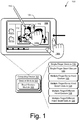
- FIG. 1 is an illustration of an environment 100 in an example implementation that is operable to employ bezel gestures and other techniques described herein.
- the illustrated environment 100 includes an example of a computing device 102 that may be configured in a variety of ways.
- the computing device 102 may be configured as a traditional computer (e.g., a desktop personal computer, laptop computer, and so on), a mobile station, an entertainment appliance, a set-top box communicatively coupled to a television, a wireless phone, a netbook, a game console, a handheld device, and so forth as further described in relation to FIG. 2 .
- the computing device 102 may range from full resource devices with substantial memory and processor resources (e.g., personal computers, game consoles) to a low-resource device with limited memory and/or processing resources (e.g., traditional set-top boxes, hand-held game consoles).
- the computing device 102 also includes software that causes the computing device 102 to perform one or more operations as described below.
- Computing device 102 includes a bezel 103 that forms part of the device's housing.
- the bezel is made up of the frame structure adjacent the device's display, also referred to as display device 108 below.
- Computing device 102 includes a gesture module 104 and a bezel gesture module 105 that forms part of the gesture module 104.
- the gesture modules can be implemented in connection with any suitable type of hardware, software, firmware or combination thereof. In at least some embodiments, the gesture modules are implemented in software that resides on some type of tangible, computer-readable medium examples of which are provided below.
- Gesture module 104 and bezel gesture module 105 are representative of functionality that recognizes gestures and bezel gestures, respectively, and causes operations to be performed that correspond to the gestures.
- the gestures may be recognized by modules 104, 105 in a variety of different ways.
- the gesture module 104 may be configured to recognize a touch input, such as a finger of a user's hand 106a as proximal to display device 108 of the computing device 102 using touchscreen functionality.
- bezel gesture module 105 can be configured to recognize a touch input, such as a finger of a user's hand 106b, that initiates a gesture on or adjacent bezel 103 and proceeds onto display device 108. Any suitable technology can be utilized to sense an input on or adjacent bezel 103.
- the digitizer or sensing elements associated with display device 108 can extend underneath bezel 103.
- technologies such as capacitive field technologies, as well as others, can be utilized to sense the user's input on or adjacent to the bezel 103.
- bezel gesture module 105 can detect the changing contact profile of the user's finger as it emerges onto display device 108 from bezel 103.
- approaches that utilize the centroid of the user's touch profile can be utilized to detect a changing centroid contact profile that is suggestive of a bezel gesture.
- techniques for fingerprint sensing can be employed. Specifically, if the sensing substrate is sensitive enough to determine ridges of the finger or fingers contacting the display, then the orientation of the finger(s) as well as the fact that the fingerprint is clipped by the bezel can be detected.
- any number of different techniques can be utilized to sense a user's input relative to the bezel 103.
- the touch input may also be recognized as including attributes (e.g., movement, selection point, etc.) that are usable to differentiate the touch input from other touch inputs recognized by the gesture modules 104, 105. This differentiation may then serve as a basis to identify a gesture from the touch inputs and consequently an operation that is to be performed based on identification of the gesture.
- normal direct manipulative gestures even for objects near the screen boundaries, are still possible and do not interfere with bezel gestures and vice versa.
- a finger of the user's hand 106a is illustrated as selecting 110 an image 112 displayed by the display device 108.
- Selection 110 of the image 112 and subsequent movement of the finger of the user's hand 106a may be recognized by the gesture module 104.
- the gesture module 104 may then identify this recognized movement as indicating a "drag and drop" operation to change a location of the image 112 to a point in the display at which the finger of the user's hand 106a was lifted away from the display device 108.
- recognition of the touch input that describes selection of the image, movement of the selection point to another location, and then lifting of the finger of the user's hand 106a may be used to identify a gesture (e.g., drag-and-drop gesture) that is to initiate the drag-and-drop operation.
- a gesture e.g., drag-and-drop gesture
- gestures may be recognized by the gesture modules 104, 105 such as gestures that are recognized from a single type of input (e.g., touch gestures such as the previously described drag-and-drop gesture) as well as gestures involving multiple types of inputs.
- modules 104, 105 can be utilized to recognize single-finger gestures and bezel gestures, multiple-finger/same-hand gestures and bezel gestures, and/or multiple-finger/different-hand gestures and bezel gestures.
- the computing device 102 may be configured to detect and differentiate between a touch input (e.g., provided by one or more fingers of the user's hand 106a, 106b) and a stylus input (e.g., provided by a stylus 116).
- the differentiation may be performed in a variety of ways, such as by detecting an amount of the display device 108 that is contacted by the finger of the user's hand 106 versus an amount of the display device 108 that is contacted by the stylus 116.
- the gesture modules 104, 105 may support a variety of different gesture techniques through recognition and leverage of a division between stylus and touch inputs, as well as different types of touch inputs.
- the gesture modules 104, 105 may support a variety of different gestures.
- Examples of gestures described herein include a single-finger gesture 118, a single-finger bezel gesture 120, a multiple-finger/same-hand gesture 122, a multiple-finger/same-hand bezel gesture 124, a multiple-finger/different hand gesture 126, and a multiple-finger/different-hand bezel gesture 128.
- a single-finger gesture 118 a single-finger bezel gesture 120
- a multiple-finger/same-hand gesture 122 a multiple-finger/same-hand bezel gesture 124
- a multiple-finger/different hand gesture 126 a multiple-finger/different hand bezel gesture 128.
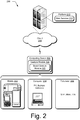
- FIG. 2 illustrates an example system showing the gesture module 104 and bezel gesture module 105 of FIG. 1 as being implemented in an environment where multiple devices are interconnected through a central computing device.
- the central computing device may be local to the multiple devices or may be located remotely from the multiple devices.
- the central computing device is a "cloud" server farm, which comprises one or more server computers that are connected to the multiple devices through a network or the Internet or other means.
- this interconnection architecture enables functionality to be delivered across multiple devices to provide a common and seamless experience to the user of the multiple devices.
- Each of the multiple devices may have different physical requirements and capabilities, and the central computing device uses a platform to enable the delivery of an experience to the device that is both tailored to the device and yet common to all devices.
- a "class" of target device is created and experiences are tailored to the generic class of devices.
- a class of device may be defined by physical features or usage or other common characteristics of the devices.
- the computing device 102 may be configured in a variety of different ways, such as for mobile 202, computer 204, and television 206 uses.
- Each of these configurations has a generally corresponding screen size and thus the computing device 102 may be configured as one of these device classes in this example system 200.
- the computing device 102 may assume the mobile 202 class of device which includes mobile telephones, music players, game devices, and so on.
- the computing device 102 may also assume a computer 204 class of device that includes personal computers, laptop computers, netbooks, and so on.
- the television 206 configuration includes configurations of device that involve display in a casual environment, e.g., televisions, set-top boxes, game consoles, and so on.
- the techniques described herein are may be supported by these various configurations of the computing device 102 and are not limited to the specific examples described in the following sections.
- Cloud 208 is illustrated as including a platform 210 for web services 212.
- the platform 210 abstracts underlying functionality of hardware (e.g., servers) and software resources of the cloud 208 and thus may act as a "cloud operating system.”
- the platform 210 may abstract resources to connect the computing device 102 with other computing devices.
- the platform 210 may also serve to abstract scaling of resources to provide a corresponding level of scale to encountered demand for the web services 212 that are implemented via the platform 210.
- a variety of other examples are also contemplated, such as load balancing of servers in a server farm, protection against malicious parties (e.g., spam, viruses, and other malware), and so on.
- the cloud 208 is included as a part of the strategy that pertains to software and hardware resources that are made available to the computing device 102 via the Internet or other networks.
- the gesture modules 104, 105 may be implemented in part on the computing device 102 as well as via a platform 210 that supports web services 212.
- the gesture techniques supported by the gesture modules may be detected using touchscreen functionality in the mobile configuration 202, track pad functionality of the computer 204 configuration, detected by a camera as part of support of a natural user interface (NUI) that does not involve contact with a specific input device, and so on. Further, performance of the operations to detect and recognize the inputs to identify a particular gesture may be distributed throughout the system 200, such as by the computing device 102 and/or the web services 212 supported by the platform 210 of the cloud 208.
- NUI natural user interface
- any of the functions described herein can be implemented using software, firmware, hardware (e.g., fixed logic circuitry), manual processing, or a combination of these implementations.
- the terms “module,” “functionality,” and “logic” as used herein generally represent software, firmware, hardware, or a combination thereof.
- the module, functionality, or logic represents program code that performs specified tasks when executed on a processor (e.g., CPU or CPUs).
- the program code can be stored in one or more computer readable memory devices.
- a first section entitled “Use of Bezel as an Input Mechanism” describes embodiments in which a computing device's bezel can be used as an input mechanism. Following this, a section entitled “Using Off-Screen Motion to Create On-Screen Input” describes how a motion away from a device's screen can be utilized, through gestures, to create on-screen input. Next, a section entitled “Use of Multiple Fingers for Gesturing” describes how multiple fingers can be utilized to provide gestural input. Following this section, a section entitled “Radial Menus” describes embodiments in which radial menus can be utilized to provide a robust collection of input options.
- Example Device describes aspects of an example device that can be utilized to implement one or more embodiments.
- the bezel of a device can be utilized as an input mechanism.
- a user's finger or other input mechanism can be sensed when it hovers over or physically engages the bezel.
- the bezel can include sensing mechanisms, such as infrared mechanisms as well as others, that sense a user's finger or other input mechanism hovering over or physically engaging the bezel. Any combination of inputs relative to the bezel can be used.
- the bezel can be tapped one or more times, held, slid over, hovered over and/or any combination of these or other inputs.
- FIG. 3 illustrates an example environment 300 that includes a computing device 302 having a bezel 303 and a display device 308. In this instance, a finger on user's hand 306a is tapping on bezel 303.
- an associated functionality that is mapped to the input can be provided.
- such functionality might deselect all objects appearing on display device 308.
- input can be received at different locations on the bezel and can be mapped to different functionality. For example, input received on the right side of the bezel might be mapped to a first functionality; input received on the left side of the bezel might be mapped to a second functionality and so on.
- input received in different regions of a bezel side might be mapped to different functionality or to no functionality at all depending on the orientation of the device and how the user is holding it.
- Some bezel edges may be left unassigned or may be insensitive to touch-and-hold, so that inadvertent operations will not be triggered.
- any one particular side of the bezel might be utilized to receive input and, accordingly map that input to different functionality depending on what region of the bezel receives the input.
- input received via the bezel can be received independent of any input received via hardware input devices, such as buttons, track balls, and other instrumentalities that might be located on an associated device.
- input received via the bezel can be the only user input that is utilized to ascertain and access a particular functionality. For example, input received solely on the bezel can provide the basis by which device functionality can be accessed.
- orientation sensors e.g. accelerometers
- a visual affordance can be utilized to provide a hint or indication of accessible functionality associated with the bezel.
- a visual affordance can be utilized to indicate functionality that is accessible by virtue of a bezel gesture.
- Any suitable type of visual affordance can be utilized.
- a visual affordance in the form of a semi-transparent strip 304 provides an indication that additional functionality can be accessed through utilization of a bezel gesture.
- the visual affordance can take any suitable form and can be located at any suitable location on display device 308.
- the visual affordance can be exposed in any suitable way. For example, in at least some embodiments, input received via the bezel can be used to expose or display the visual affordance.
- a "peek out” visual affordance can be presented responsive to detecting a hover over, or a physical engagement of the device's bezel.
- the "peek out” visual affordance can, in at least some embodiments, be deselected by the user such that the "peek out” is hidden.
- the additional functionality associated with semi-transparent strip 304 resides in the form of a so-called bezel menu which is accessible using a bezel gesture.
- the bezel menu can be accessed through a gesture in which a finger of user's hand 306b touches the bezel and then moves across the bezel and onto the display device 308 in the direction of the illustrated arrow. This can allow the bezel menu to be dropped down as will be described in more detail below.
- various embodiments can use the bezel itself as an input mechanism, as in the first example above.
- various other embodiments can use the bezel in connection with a visual affordance that provides a clue to the user that additional functionality can be accessed by virtue of a bezel gesture.
- FIG. 4 is a flow diagram that describes steps in a method in accordance with one or more embodiments.
- the method can be implemented in connection with any suitable hardware, software, firmware, or combination thereof.
- the method can be implemented in connection with a system such as those systems that are described above and below.
- Step 400 receives an input associated with a bezel. Any suitable type of input can be received, examples of which are provided above. Step 402 accesses functionality associated with the received input. Any suitable type of functionality can be accessed. By virtue of providing a variety of different types of recognizable inputs (e.g., taps, tap combinations, tap/hold combinations, slides, etc), and mapping those recognizable inputs to different types of functionalities, a robust collection of user input mechanisms can be provided.
- recognizable inputs e.g., taps, tap combinations, tap/hold combinations, slides, etc
- FIG. 5 is a flow diagram that describes steps in a method in accordance with one or more embodiments.
- the method can be implemented in connection with any suitable hardware, software, firmware, or combination thereof.
- the method can be implemented in connection with a system such as those systems that are described above and below.
- Step 500 displays a visual affordance on a display device associated with a computing device. Any suitable type of visual affordance can be utilized, an example of which is provided above.
- Step 502 receives a bezel gesture input relative to the visual affordance. Any suitable type of bezel gesture input can be utilized.
- Step 504 accesses functionality associated with the received bezel gesture input. Any suitable type of functionality can be accessed, an example of which is provided above and described in more detail below.
- off-screen to on-screen motion can be utilized as a mechanism to expose a menu or to access some other type of functionality.
- the off-screen motion or input can be provided, as indicated above, relative to the device's bezel.
- Any suitable type of bezel gesture input can be provided in order to effectuate the off-screen to on-screen motion.
- bezel gestures or inputs can, by way of example and not limitation, start or end on the bezel, cross or recross the bezel, cross at different locations of the bezel (e.g., the corners, or particular ranges of coordinates along a particular edge), and/or occur on one or more bezels associated with multiple screens (with the possibility of different semantics depending on the screen or edge thereof).
- bezel inputs can include, by way of example and not limitation, a single-contact drag (finger or pen), two-contact drag (two fingers), and/or a hand-contact drag (multiple fingers/whole hand/multiple or single fingers on different hands).
- pinch gestures from off-screen space i.e. originating on the bezel
- bezel gestures with multiple contacts entering from different edges of the screen can have different semantics.
- two fingers entering from adjacent edges of the bezel i.e. spanning a corner
- Two fingers entering from opposite edges, with either one hand (if the screen is small enough), or two hands (one finger from each hand) can be mapped to a different functionality.
- Multiple fingers entering on one edge of the bezel and one finger entering from an adjacent or opposite edge of the bezel might be mapped to a different functionality. Additionally, multiple fingers entering from two or more edges can further be mapped to additional functionality.
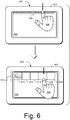
- device 602 includes a bezel 603 and a visual affordance 604 that is rendered on display device 608.
- visual affordance 604 in the form of a semi-transparent strip, can be utilized to provide a hint or indication of accessible functionality, in this case a bezel menu, associated with the bezel.
- the bezel menu can be accessed through a bezel gesture in which a finger of user's hand 606 touches the bezel and then moves across the bezel and onto the display device 608 in the direction of the illustrated arrow. This can allow bezel menu 610 to be dropped down at which time it can become fully opaque.
- bezel menu 610 includes multiple selectable icons or slots 612, 614, 616, 618, and 620.
- Each of the icons or slots is associated with a different functionality such as, for example, paint functionality, pen functionality, note functionality, object creation, object editing, and the like. It is to be appreciated and understood, that any type of functionality can be associated with the icons or slots.
- bezel menu 610 can enable a user to access and activate commands, tools, and objects.
- the bezel menu can be configured to respond to both touch input and pen input. Alternately or additionally, the bezel menu can be configured to respond only to touch input.
- gestural modes can be utilized to access functionality associated with the bezel menu 610.
- one gestural mode can be a novice mode
- another gestural mode can be an expert mode.
- the user can lift their finger, whereupon the bezel menu can remain open for a configurable interval (or indefinitely).
- the user may then tap on a desired item associated with one of the icons or slots 612, 614, 616, 618, and 620.
- the functionality associated with a particular icon or slot can be accessed. For example, tapping on a particular icon or slot may cause an object to be created on the canvas associated with display device 608.
- objects that are accessed from the bezel menu appear in default locations on the canvas.
- the user may close the bezel menu by sliding it back off of the screen (an on-screen-to-offscreen gesture) or by tapping outside of the bezel menu, without activating any function.
- the user can perform a continuous finger-drag that crosses through the slot or icon and onto the canvas to create and drag an associated object (or tool, or interface mode) to a specific desired position or path, in a single transaction. The user can then let go of the object and interact with it.
- FIG. 7 the user has performed a bezel gesture that has dragged across icon or slot 614 to access functionality associated with a post-it note and has positioned the corresponding note on the canvas as indicated.
- the user can lift a finger and annotate the digital post-it as desired using an associated pen.
- the bezel menu 610 may or may not remain fully open after a particular functionality has been accessed.
- the bezel menu in the expert mode, may not necessarily be revealed at all in order to access functionality associated with an icon or slot. Rather, a bezel gesture that crosses the visual affordance at a location that corresponds to a particular icon or slot may access functionality associated with the icon or slot.
- FIG. 8 There, visual affordance 604 is illustrated. Notice that the bezel gesture crosses over a portion of the visual affordance that corresponds to icon or slot 614 ( FIG. 7 ). Notice also that by virtue of this bezel gesture, a corresponding post-it note has been accessed. This feature can be implemented by using a time delay, e.g.
- the bezel menu remains closed but the function indicated by the slot that was crossed is activated, e.g. a post-it is created and starts following the user's finger.
- This is the expert mode described above.
- An implementation consideration is that the slot that is selected by the expert mode gesture can be determined by the location at which the finger crosses the screen edge.
- the bezel menu can be scrollable in order to provide access to the additional functionality.
- the bezel menu can have left and right arrows on either side to enable scrollability.
- a single or multi-finger drag that is orthogonal to the opening direction of the bezel menu can scroll it, without the need for any arrows.
- the bezel menu can create space for additional slots or icons. For example, by reducing the width of slots or icons that appear at the edge of the bezel menu, additional slots or icons can be added. As an example, consider FIG. 9 .
- a device includes a bezel 903 and a bezel menu 910 that appears on display device 908. Additional slots or icons 912, 914 appear in the bezel menu 910. Notice that the slots or icons 912, 914 have a reduced width relative to other slots or icons. In this example, the width is reduced by about one half.
- a bezel gesture can be used that drags over the slot or icon from the side of the device as shown.
- the corner slots or icons can have a special status. For example, the corner slots or icons may be permanently assigned to a particular functionality and may not be customizable.
- bezel menus can be used to expose functionality to a user in a manner that does not permanently cause screen real estate to be occupied or require the use of a dedicated hardware button.
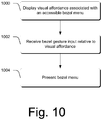
- FIG. 10 is a flow diagram that describes steps in a method in accordance with one or more embodiments.
- the method can be implemented in connection with any suitable hardware, software, firmware, or combination thereof.
- the method can be implemented in connection with a system such as those systems that are described above and below.
- Step 1000 displays a visual affordance associated with an accessible bezel menu.
- a visual affordance is given above.
- Step 1002 receives a bezel gesture input relative to the visual affordance. Any suitable bezel gesture can be utilized, an example of which is provided above.
- Step 1004 presents, responsive to receiving the bezel gesture input, a bezel menu. Any suitable bezel menu can be utilized. In at least some embodiments, the bezel menu can be presented simply by virtue of receiving a bezel gesture without necessarily displaying a visual affordance. Alternately or additionally, the visual affordance may fade in when the user's finger or pen hovers above an associated bezel edge.
- FIG. 11 is a flow diagram that describes steps in a method in accordance with one or more embodiments.
- the method can be implemented in connection with any suitable hardware, software, firmware, or combination thereof.
- the method can be implemented in connection with a system such as those systems that are described above and below.
- Step 1100 receives a gesture input.
- the input can be received relative to a bezel menu or a visual affordance associated with a bezel menu. Any suitable gesture input can be received.
- the gesture input can comprise an input that does not use or incorporate the bezel. An example of this was provided above in the discussion of FIG. 6 relative to a user tapping on an exposed portion of the bezel menu. Alternately or additionally, the gesture input can comprise a bezel gesture input. An example of this was provided above in the discussion of FIGS. 7-9 .
- Step 1102 ascertains a functionality associated with the gesture input.
- Step 1104 accesses the functionality that was ascertained in step 1102. Examples of how this can be done are provided above.
- gestures including bezel gestures that utilize a single finger.
- more than one finger can be utilized in connection with gestures including bezel gestures.
- multiple fingers can be utilized for gesturing, including bezel gesturing.
- the multiple fingers can reside on one hand or, collectively, on both hands.
- the use of multiple fingers can enable multiple numbers of touches to be mapped to different functionalities or objects associated with functionalities. For example, a two-finger gesture or bezel gesture might be mapped to a first functionality or a first object associated therewith, and a three-finger gesture or bezel gesture might be mapped to a second functionality or a second object associated therewith. As an example, consider FIG. 12 .
- device 1202 includes a bezel 1203 and a visual affordance 1204 that is rendered on the display device.
- visual affordance 1204 in the form of a semi-transparent strip, can be utilized to provide a hint or indication of accessible functionality, in this case a bezel menu 1210, associated with the bezel.
- the bezel menu 1210 can be accessed through a bezel gesture in which a finger of the user's hand touches the bezel and then moves across the bezel and onto the display device to drag the bezel menu down.
- bezel menu 1210 can be exposed and further extended into a drawer illustrated at 1212.
- the following bezel gesture can be used to expose drawer 1212.
- a user touches down with one or more fingers on or near the bezel 1203. This is illustrated in the top-most portion of FIG. 12 . From there, the user can drag multiple fingers onto the display device as illustrated in the bottom-most portion of FIG. 12 , thereby exposing drawer 1212.
- no objects are created, by default, when multiple fingers simultaneously cross the bezel menu. That is, in these embodiments, a multi-finger gesture as described above indicates that the drawer 1212 is being accessed.
- Drawer 1212 can have additional objects such as those that are illustrated.
- drawer 1212 can be utilized to store and/or arrange various items. Items can be arranged or rearranged in any suitable way such as, by direct manipulation by the user, e.g. by dragging and dropping an object within the drawer.
- lifting the hand may leave the drawer open until it is later closed by way of a similar gesture in the opposite direction.
- bezel menu 1210 can be customized using, for example, contents from drawer 1212. As an example, consider FIG. 13 .
- a user can change the default assignment of tools and/or objects to the main bezel menu slots via a drag and drop operation. For example, in the top-most portion of FIG. 13 , a user touches down on a new tool 1300. The user then proceeds to drag tool 1300 into or onto one of the slots of bezel menu 1210. This gesture causes the object previously associated with the slot to be replaced with the new object dropped by the user.
- the user can also drag content from the page or canvas into the drawer 1212.
- the user has touched down on an object 1400 on the page or canvas and has dragged the object into drawer 1212. By lifting the finger, the object 1400 is deposited into the drawer 1212.
- the drawers for each screen edge may be identical or may be differentiated.
- the multiple drawers may also be accessed on each screen edge by sliding orthogonal to the direction that the drawer is opened. This can be done either by a single touch, and/or multiple touches. If the bezel menu extends all the way to the screen edges, it can also be done by a bezel gesture from the orthogonal edge.
- multiple touches were used to access drawer 1212. Specifically, as illustrated in FIG. 12 , three touches were used to access the illustrated drawer.
- different numbers of touches can be utilized to access different drawers. For example, two touches can be mapped to a first drawer, three touches can be mapped to a second drawer, four touches can be mapped to a third drawer, and so on.
- the spacing between multiple touches and variances there between can be mapped to different functionalities. For example, a two-finger touch with a first spacing might be mapped to a first functionality; and, a two-finger touch with a second, greater spacing might be mapped to a second different functionality.
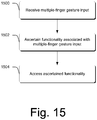
- FIG. 15 is a flow diagram that describes steps in a method in accordance with one or more embodiments.
- the method can be implemented in connection with any suitable hardware, software, firmware, or combination thereof.
- the method can be implemented in connection with a system such as those systems that are described above and below.
- Step 1500 receives multiple-finger gesture input. Any suitable type of gesture can be utilized including, by way of example and not limitation, bezel gesture input such as that described above.
- Step 1502 ascertains a functionality associated with the multiple-finger gesture input. Examples of functionalities are described above.
- Step 1504 accesses the ascertained functionality. Examples of how this can be done are described above.
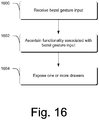
- FIG. 16 is a flow diagram that describes steps in a method in accordance with one or more embodiments.
- the method can be implemented in connection with any suitable hardware, software, firmware, or combination thereof.
- the method can be implemented in connection with a system such as those systems that are described above and below.
- Step 1600 receives a bezel gesture input. Examples of bezel gesture inputs are described above.
- Step 1602 ascertains a functionality associated with the bezel gesture input.
- the functionality associated with the bezel gesture input is one that is associated with accessing one or more drawers.
- Step 1604 exposes one or more drawers for the user. Examples of how this can be done are described above.
- radial menus can be utilized in connection with menus such as bezel menus.
- radial menus are described, other types of menus can be used without departing from the scope of the claimed subject matter.
- pull down menus can be used in conjunction with bezel menus.
- One of the general ideas associated with radial menus is that a user can touch down at a certain location and stroke or slide their finger a certain direction to access and implement a particular functionality or menu command.
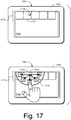
- the presence of a radial menu can be indicated by a small icon associated with a larger icon or slot of the bezel menu. As an example, consider FIG. 17 .
- device 1702 includes a bezel 1703 and a bezel menu 1710 that has been exposed on display device 1708 as described above.
- bezel menu 1710 includes multiple selectable icons or slots, one of which is designated at 1712.
- Each of the icons or slots is associated with a different functionality such as, for example, paint functionality, pen functionality, note functionality, object creation, object editing, and the like. It is to be appreciated and understood, that any type of functionality can be associated with the icons or slots.
- bezel menu 1710 can enable a user to access and activate commands, tools, and objects.
- the bezel menu can be configured to respond to both touch input and pen input. Alternately or additionally, the bezel menu can be configured to respond only to touch input.
- icon or slot 1712 includes a radial menu icon 1714 that gives a clue to the user that one or more radial menus, for example radial menu 1715, is associated with this particular icon or slot.
- the radial menu 1715 can be accessed in any suitable way, e.g. through a pen or touch.
- the radial menu 1715 can be accessed by hovering a pen over or near radial menu icon 1714.
- a pen or finger can be used to pull down the radial menu 1715.
- the radial menus 1715 can be accessed through a tap-and-hold of the pen or finger on or near the radial menu icon 1714.
- tapping on the radial menu icon triggers a default action which may or may not be different than the action associated with tapping on the bezel menu slot.
- each direction corresponds to a different functionality or command.
- Each functionality or command is represented, in the drawing, by a cross-hatched square.
- each icon or slot 1712 has a default functionality or command. By selecting a particular radial menu functionality or command, the default functionality or command may be replaced by the selected functionality or command.
- the number of options presented by a radial menu can change depending on the location of the corresponding slot or icon with which the radial menu is associated.
- slot or icon 1712 includes five options for the user.
- Radial menus associated with slots or icons that appear at the ends of the bezel menu 1710 may have fewer options due to spacing constraints. Alternately or additionally, radial menus associated with slots or icons that appear as part of an exposed drawer may have more selectable options.
- radial menus can be implemented to include both a novice mode and an expert mode.
- the radial menu can be fully exposed to enable users who are unfamiliar with its accessible functionalities or commands to be visually guided through the selection process.
- the expert mode intended for users who are familiar with the content and behavior of radial menus, the radial menu might not be exposed at all. Rather, a quick touch-and-stroke gesture associated with an icon or slot, such as icon 1712, may enable the radial menu's functionality or command to be accessed directly.
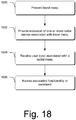
- FIG. 18 is a flow diagram that describes steps in a method in accordance with one or more embodiments.
- the method can be implemented in connection with any suitable hardware, software, firmware, or combination thereof.
- the method can be implemented in connection with a system such as those systems that are described above and below.
- Step 1800 presents a bezel menu. Examples of bezel menus are provided above.
- Step 1802 provides an indication of one or more radial menus associated with the bezel menu. In the illustrated and described embodiment, the indication resides in the form of a radial menu icon that appears on a slot or icon of the bezel menu.
- Step 1804 receives user input associated with one of the radial menus. Examples of how this can be done are provided above. For example, in at least some embodiments, a radial menu can be visually presented to the user so that the user can then touch and stroke in a particular direction to provide the input. Alternately or additionally, a radial menu need not necessarily be visually presented. Rather, a user who is familiar with the radial menu's content and behavior can correspondingly gesture, as described above, to provide the input.
- Step 1806 accesses, responsive to the received user input, and the associated functionality or command.
- the bezel menu may or may not be rotated when the screen orientation is rotated.
- bezel menus can be customizable per screen orientation to enable different numbers of slots to be used on the long and short edges of the screen.
- some edges of the screen may be left without bezel items depending on the screen orientation. For example, the left and bottom edges, for a right-handed individual, may be more likely to be swiped by accident, and may be left without bezel menus if desired.
- on and off screen gesture combinations can be utilized to manipulate pages and/or other objects.
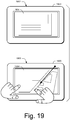
- combinations of on and off screen gestures can include gestures in which input is received on the screen relative to an object using one hand, and additional input in the form of a bezel gesture is received relative to the object using the same or a different hand. Any suitable type of gesture combinations can be used. As an example, consider FIG. 19 .
- a device 1902 includes a bezel 1903.
- a page 1904 is displayed on the display device (not designated).
- a tear operation is performed using a combination of on and off screen gestures. Specifically, in the bottommost portion of FIG. 19 , a user's left hand or left index finger holds an object which, in this example, comprises page 1904. Using the right hand, the user initiates a bezel gesture starting on bezel 1903 and moving in the direction of the indicated arrow through a portion of page 1904. By virtue of using a single finger to indicate the tear operation, a partial tear of the page is performed.
- a tear operation can be implemented by creating a bitmap of the portion of the page that has been torn away and rendering only that portion of the page that was not torn away.
- an object can be created to represent the torn-away portion.
- objects appearing in the torn-away portion can be created to represent items appearing on the page.
- a tear operation can be implemented using multiple fingers.
- the multiple finger input can be mapped to an operation that completely tears a page out of the canvas or book in which the page appears.
- the direction of tearing can carry with it different semantics. For example, a top-to-bottom tear may tear out and delete a page. A bottom-to-top tear may tear out and allow dragging of the page to a new location.
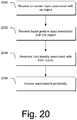
- FIG. 20 is a flow diagram that describes steps in a method in accordance with one or more embodiments.
- the method can be implemented in connection with any suitable hardware, software, firmware, or combination thereof.
- the method can be implemented in connection with a system such as those systems that are described above and below.
- Step 2000 receives on-screen input associated with an object. Any suitable type of on-screen input can be received including, by way of example and not limitation, single-finger input and/or multiple-finger input.
- Step 2002 receives a bezel gesture input associated with the object. Any suitable type of bezel gesture input can be received including, by way of example and not limitation, single-finger input and/or multiple-finger input.
- Step 2004 ascertains functionality associated with both inputs.
- Step 2006 accesses the associated functionality. Any suitable type of functionality can be associated with the combination of on-screen and bezel gesture inputs, an example of which is provided above.
- page manipulations can be provided through the use of gestures, including bezel gestures.
- page flipping and page saving also termed “page pocketing” can be provided as described below.
- a device 2102 includes a bezel 2103 and a page 2104.
- a user can flip to a previous page by using a bezel gesture that starts on bezel 2103 and proceeds rightward across the screen in the direction of the arrow. Doing so reveals the previous page 2106.
- a user would utilize a similar bezel gesture, but only in the opposite direction.
- the user's finger can lift at any suitable location on the screen.
- the semantics of page flipping gestures can vary from that described above. For example, in some instances a page flipping gesture can be initiated as described above. However, if the user pauses with their finger on the screen, multiple pages can be flipped through. Alternately or additionally, pausing the finger on the screen in the middle of a page flipping gesture can cause additional controls, such as section tabs, command palettes, or a bezel menu to appear.
- the further a user's finger progresses across the screen the more pages can be flipped.
- multiple pages can be flipped by initiating the page flipping gesture as described above, and then moving the finger in a circular motion, either clockwise or counterclockwise.
- clockwise motion would represent forward flipping
- counterclockwise motion would represent backwards flipping.
- a circle may be fitted to the last N samples of motion. The speed of motion can be a function of the diameter of the circle. Note that in this implementation, the user does not have to circle around any particular location on the screen, or even to draw a well formed circle at all. Rather, any curvilinear motion can get mapped to page flipping in an intuitive manner, while also allowing the user to easily stop and reverse course to flip in the opposite direction.
- a similar gesture can be used to save or "pocket" a page.
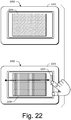
- the gesture can terminate on a bezel portion or other structure that lies across the screen from where the gesture originated. As an example, consider FIGS. 22 and 23 .
- a device 2202 includes a bezel 2203 and a page 2204.
- a user can save or pocket a page by using a bezel gesture that starts on bezel 2203 and proceeds rightward across the screen in the direction of the arrow to a bezel portion that lies opposite of where the gesture originated. Doing so reveals another page 2206.
- a distance threshold can be defined such that, prior to the threshold, the page flipping experience, such as that described and shown in FIG. 21 can be provided. After the defined distance threshold, a different page-saving or page-pocketing experience can be provided. For example, in the FIG. 22 illustration, page 2204 has been reduced to a thumbnail.
- the page-saving or page-pocketing experience can be provided by a combination of passing the minimum distance threshold after a minimum timeout, such as 1/3 second, when most page flipping gestures would have been completed.
- a minimum timeout such as 1/3 second
- Fig. 23 illustrates a device 2302 that includes a bezel 2303 and two separate display screens 2304, 2306 separated by a spine 2308.
- Spine 2308 can be considered as comprising part of the bezel or physical structure of the device.
- a page 2310 is illustrated as being displayed on display screen 2304.
- a user can save or pocket a page by using a bezel gesture that starts on bezel 2303 and proceeds rightward across the screen in the direction of the arrow to spine 2308 that lies across the screen 2304 from where the gesture originated. Doing so reveals another page 2312.
- a distance threshold can be defined such that, prior to the threshold, the page flipping experience, such as that described and shown in FIG. 21 can be provided. After the defined distance threshold, a different page-saving or page-pocketing experience can be provided. For example, in the FIG. 23 illustration, page 2310 has been reduced to a thumbnail.
- the page-saving or page-pocketing experience can be provided after a minimum timeout, such as 1/3 second, when most page flipping gestures would have been completed.
- a minimum timeout such as 1/3 second
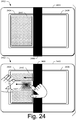
- portions of pages can be saved or pocketed.
- a device 2402 includes a bezel 2403 and two separate display screens 2404, 2406 separated by a spine 2408.
- Spine 2408 can be considered as comprising part of the bezel or physical structure of the device.
- a page 2410 is illustrated as being displayed on display screen 2404.
- a user can save or pocket a portion of the page by using a bezel gesture.
- two fingers of a user's hand (in this case the left hand) sweep onto the screen from the bezel.
- the user's left-hand initiates the bezel gesture from the spine 2408 and moves in the direction of the top-most arrow.
- the region between the fingers - here illustrated at 2412 - is then highlighted.
- the user's other hand can then sweep across the highlighted area to tear out the highlighted portion of the page and pocket or save the highlighted portion as shown.
- this gesture can be supported on any of the four edges of the screen, thus allowing horizontal or vertical strips to be torn from either screen by either right-handed or left-handed users.
- the torn portion of the page can have two torn edges and two clean-cut edges to distinguish it from pocketed pages or other pocketed objects.
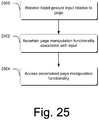
- FIG. 25 is a flow diagram that describes steps in a method in accordance with one or more embodiments.
- the method can be implemented in connection with any suitable hardware, software, firmware, or combination thereof.
- the method can be implemented in connection with a system such as those systems that are described above and below.
- Step 2500 receives bezel gesture input relative to a page.
- Step 2502 ascertains page manipulation functionality associated with the input. Any suitable type of page manipulation functionality can be ascertained, examples of which are provided above.
- Step 2504 accesses the ascertained page manipulation functionality.
- FIG. 26 is a flow diagram that describes steps in a method in accordance with one or more embodiments.
- the method can be implemented in connection with any suitable hardware, software, firmware, or combination thereof.
- the method can be implemented in connection with a system such as those systems that are described above and below.
- Step 2600 receives on-screen input relative to a page. Any suitable type of input can be received.
- the received screen input comprises a touch input or a stylus input.
- Step 2602 receives a bezel gesture input relative to the page. Any suitable type of bezel gesture input can be received, examples of which are provided above.
- Step 2604 ascertains page manipulation functionality associated with the combined input. Examples of page manipulation functionality are provided above.
- Step 2606 accesses the ascertained page manipulation functionality for purposes of implementing the functionality relative to the page.
- page flipping and page saving operations can be unified through the use of bezel gestures that included at least some common aspects. Unification of these two operations yields simplicity and facilitates discoverability for users.
- a device 2702 includes a bezel 2703.
- a page 2704 is displayed on the display device (not designated).
- a bookmark tab can be created through the use of a bezel gesture.
- a bookmark tab 2706 can be created by initiating a gesture on the bezel 2703 and moving on to page 2704.
- the bezel gesture that creates the bookmark tab originates on a corner of the bezel as shown. Any suitable location on the bezel can be utilized for creating a bookmark tab.
- bezel gestures can be utilized to dog-ear a page.
- a device 2802 includes a bezel 2803.
- a page 2804 is displayed on the display device (not designated).
- a dog-ear can be created through the use of a bezel gesture.
- a dog-ear 2806 can be created by initiating a gesture on the bezel 2803 and moving onto page 2804 and then exiting the page in an opposite direction as illustrated by the arrows.
- the bezel gesture that creates the dog-ear originates on a corner of the bezel as shown. Any suitable location on the bezel can be utilized for creating a dog-ear.
- a dog-ear can be created through a bezel gesture that cuts across a corner of the page.
- gestures can be utilized to expose tabs such as user-created or predefined tabs in a document.
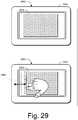
- a device 2902 includes a bezel 2903.
- a page 2904 is displayed on the display device (not designated).
- tabs can be exposed by utilizing a bezel gesture that pulls at the edge of page 2904 as shown to expose a tab structure 2906.
- the bezel gesture moves onto the screen, the page is pulled slightly to the right to expose tab structure 2906.
- the gesture includes two or more fingers that are held together as shown, rather than with a gap there between.
- continuing to drag the page can reveal further structure. For example, continuing to drag the page can expose a table organizational view to the left of page 2904. In at least some embodiments, continuing the gesture across the entire page can save or pocket the entire page as described above.
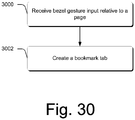
- FIG. 30 is a flow diagram that describes steps in a method in accordance with one or more embodiments.
- the method can be implemented in connection with any suitable hardware, software, firmware, or combination thereof.
- the method can be implemented in connection with a system such as those systems that are described above and below.
- Step 3000 receives a bezel gesture input relative to a page.
- Step 3002 creates a bookmark tab relative to the page, responsive to receiving the bezel gesture input. Examples of how this can be done are provided above.
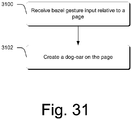
- FIG. 31 is a flow diagram that describes steps in a method in accordance with one or more embodiments.
- the method can be implemented in connection with any suitable hardware, software, firmware, or combination thereof.
- the method can be implemented in connection with a system such as those systems that are described above and below.
- Step 3100 receives a bezel gesture input relative to a page.
- Step 3102 creates a dog-ear on the page, responsive to receiving the bezel gesture input. Examples of how this can be done are provided above.
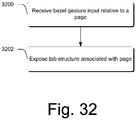
- FIG. 32 is a flow diagram that describes steps in a method in accordance with one or more embodiments.
- the method can be implemented in connection with any suitable hardware, software, firmware, or combination thereof.
- the method can be implemented in connection with a system such as those systems that are described above and below.
- Step 3200 receives a bezel gesture input relative to a page.
- Step 3202 exposes tab structure associated with the page. Examples of how this can be done are provided above.
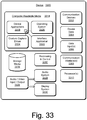
- FIG. 33 illustrates various components of an example device 3300 that can be implemented as any type of portable and/or computer device as described with reference to FIGS. 1 and 2 to implement embodiments of the gesture techniques described herein.
- Device 3300 includes communication devices 3302 that enable wired and/or wireless communication of device data 3304 (e.g., received data, data that is being received, data scheduled for broadcast, data packets of the data, etc.).
- the device data 3304 or other device content can include configuration settings of the device, media content stored on the device, and/or information associated with a user of the device.
- Media content stored on device 3300 can include any type of audio, video, and/or image data.
- Device 3300 includes one or more data inputs 3306 via which any type of data, media content, and/or inputs can be received, such as user-selectable inputs, messages, music, television media content, recorded video content, and any other type of audio, video, and/or image data received from any content and/or data source.
- any type of data, media content, and/or inputs can be received, such as user-selectable inputs, messages, music, television media content, recorded video content, and any other type of audio, video, and/or image data received from any content and/or data source.
- Device 3300 also includes communication interfaces 3308 that can be implemented as any one or more of a serial and/or parallel interface, a wireless interface, any type of network interface, a modem, and as any other type of communication interface.
- the communication interfaces 3308 provide a connection and/or communication links between device 3300 and a communication network by which other electronic, computing, and communication devices communicate data with device 3300.
- Device 3300 includes one or more processors 3310 (e.g., any of microprocessors, controllers, and the like) which process various computer-executable or readable instructions to control the operation of device 3300 and to implement the gesture embodiments described above.
- processors 3310 e.g., any of microprocessors, controllers, and the like
- device 3300 can be implemented with any one or combination of hardware, firmware, or fixed logic circuitry that is implemented in connection with processing and control circuits which are generally identified at 3312.
- device 3300 can include a system bus or data transfer system that couples the various components within the device.
- a system bus can include any one or combination of different bus structures, such as a memory bus or memory controller, a peripheral bus, a universal serial bus, and/or a processor or local bus that utilizes any of a variety of bus architectures.
- Device 3300 also includes computer-readable media 3314, such as one or more memory components, examples of which include random access memory (RAM), non-volatile memory (e.g., any one or more of a read-only memory (ROM), flash memory, EPROM, EEPROM, etc.), and a disk storage device.
- RAM random access memory
- non-volatile memory e.g., any one or more of a read-only memory (ROM), flash memory, EPROM, EEPROM, etc.
- a disk storage device may be implemented as any type of magnetic or optical storage device, such as a hard disk drive, a recordable and/or rewriteable compact disc (CD), any type of a digital versatile disc (DVD), and the like.
- Device 3300 can also include a mass storage media device 3316.
- Computer-readable media 3314 provides data storage mechanisms to store the device data 3304, as well as various device applications 3318 and any other types of information and/or data related to operational aspects of device 3300.
- an operating system 3320 can be maintained as a computer application with the computer-readable media 3314 and executed on processors 3310.
- the device applications 3318 can include a device manager (e.g., a control application, software application, signal processing and control module, code that is native to a particular device, a hardware abstraction layer for a particular device, etc.).
- the device applications 3318 also include any system components or modules to implement embodiments of the gesture techniques described herein.
- the device applications 3318 include an interface application 3322 and a gesture-capture driver 3324 that are shown as software modules and/or computer applications.
- the gesture-capture driver 3324 is representative of software that is used to provide an interface with a device configured to capture a gesture, such as a touchscreen, track pad, camera, and so on.
- a device configured to capture a gesture
- the interface application 3322 and the gesture-capture driver 3324 can be implemented as hardware, software, firmware, or any combination thereof.
- Device 3300 also includes an audio and/or video input-output system 3326 that provides audio data to an audio system 3328 and/or provides video data to a display system 3330.
- the audio system 3328 and/or the display system 3330 can include any devices that process, display, and/or otherwise render audio, video, and image data.
- Video signals and audio signals can be communicated from device 3300 to an audio device and/or to a display device via an RF (radio frequency) link, S-video link, composite video link, component video link, DVI (digital video interface), analog audio connection, or other similar communication link.
- the audio system 3328 and/or the display system 3330 are implemented as external components to device 3300.
- the audio system 3328 and/or the display system 3330 are implemented as integrated components of example device 3300.
- Bezel gestures for touch displays have been described.
- the bezel of a device is used to extend functionality that is accessible through the use of bezel gestures.
- off-screen motion can be used, by virtue of the bezel, to create screen input through a bezel gesture.
- Bezel gestures can include single-finger bezel gestures, multiple-finger/same-hand bezel gestures, and/or multiple-finger, different-hand bezel gestures.
Landscapes
- Engineering & Computer Science (AREA)
- General Engineering & Computer Science (AREA)
- Theoretical Computer Science (AREA)
- Human Computer Interaction (AREA)
- Physics & Mathematics (AREA)
- General Physics & Mathematics (AREA)
- User Interface Of Digital Computer (AREA)
- Position Input By Displaying (AREA)
Applications Claiming Priority (2)
| Application Number | Priority Date | Filing Date | Title |
|---|---|---|---|
| US12/709,204 US9274682B2 (en) | 2010-02-19 | 2010-02-19 | Off-screen gestures to create on-screen input |
| PCT/US2011/025131 WO2011103218A2 (en) | 2010-02-19 | 2011-02-17 | Off-screen gestures to create on-screen input |
Publications (3)
| Publication Number | Publication Date |
|---|---|
| EP2537088A2 EP2537088A2 (en) | 2012-12-26 |
| EP2537088A4 EP2537088A4 (en) | 2016-03-09 |
| EP2537088B1 true EP2537088B1 (en) | 2017-06-21 |
Family
ID=44476093
Family Applications (1)
| Application Number | Title | Priority Date | Filing Date |
|---|---|---|---|
| EP11745193.0A Not-in-force EP2537088B1 (en) | 2010-02-19 | 2011-02-17 | Off-screen gestures to create on-screen input |
Country Status (6)
| Country | Link |
|---|---|
| US (1) | US9274682B2 (enExample) |
| EP (1) | EP2537088B1 (enExample) |
| JP (1) | JP5883400B2 (enExample) |
| CN (1) | CN102884498B (enExample) |
| CA (1) | CA2788137C (enExample) |
| WO (1) | WO2011103218A2 (enExample) |
Families Citing this family (164)
| Publication number | Priority date | Publication date | Assignee | Title |
|---|---|---|---|---|
| US8018440B2 (en) | 2005-12-30 | 2011-09-13 | Microsoft Corporation | Unintentional touch rejection |
| JP2010191892A (ja) * | 2009-02-20 | 2010-09-02 | Sony Corp | 情報処理装置、表示制御方法、及びプログラム |
| US8803474B2 (en) * | 2009-03-25 | 2014-08-12 | Qualcomm Incorporated | Optimization of wireless power devices |
| US8836648B2 (en) | 2009-05-27 | 2014-09-16 | Microsoft Corporation | Touch pull-in gesture |
| US8239785B2 (en) | 2010-01-27 | 2012-08-07 | Microsoft Corporation | Edge gestures |
| US9411504B2 (en) | 2010-01-28 | 2016-08-09 | Microsoft Technology Licensing, Llc | Copy and staple gestures |
| US8261213B2 (en) * | 2010-01-28 | 2012-09-04 | Microsoft Corporation | Brush, carbon-copy, and fill gestures |
| US9519356B2 (en) | 2010-02-04 | 2016-12-13 | Microsoft Technology Licensing, Llc | Link gestures |
| US20110209098A1 (en) * | 2010-02-19 | 2011-08-25 | Hinckley Kenneth P | On and Off-Screen Gesture Combinations |
| US9310994B2 (en) | 2010-02-19 | 2016-04-12 | Microsoft Technology Licensing, Llc | Use of bezel as an input mechanism |
| US9367205B2 (en) | 2010-02-19 | 2016-06-14 | Microsoft Technolgoy Licensing, Llc | Radial menus with bezel gestures |
| US8799827B2 (en) | 2010-02-19 | 2014-08-05 | Microsoft Corporation | Page manipulations using on and off-screen gestures |
| US9965165B2 (en) | 2010-02-19 | 2018-05-08 | Microsoft Technology Licensing, Llc | Multi-finger gestures |
| US8751970B2 (en) | 2010-02-25 | 2014-06-10 | Microsoft Corporation | Multi-screen synchronous slide gesture |
| US8473870B2 (en) | 2010-02-25 | 2013-06-25 | Microsoft Corporation | Multi-screen hold and drag gesture |
| US8707174B2 (en) | 2010-02-25 | 2014-04-22 | Microsoft Corporation | Multi-screen hold and page-flip gesture |
| US9454304B2 (en) | 2010-02-25 | 2016-09-27 | Microsoft Technology Licensing, Llc | Multi-screen dual tap gesture |
| US8539384B2 (en) * | 2010-02-25 | 2013-09-17 | Microsoft Corporation | Multi-screen pinch and expand gestures |
| US9075522B2 (en) * | 2010-02-25 | 2015-07-07 | Microsoft Technology Licensing, Llc | Multi-screen bookmark hold gesture |
| KR20110121125A (ko) * | 2010-04-30 | 2011-11-07 | 삼성전자주식회사 | 인터랙티브 디스플레이 장치 및 이의 동작 방법 |
| US20110296351A1 (en) * | 2010-05-26 | 2011-12-01 | T-Mobile Usa, Inc. | User Interface with Z-axis Interaction and Multiple Stacks |
| US20120050183A1 (en) | 2010-08-27 | 2012-03-01 | Google Inc. | Switching display modes based on connection state |
| JP5001412B2 (ja) * | 2010-09-03 | 2012-08-15 | 株式会社コナミデジタルエンタテインメント | ゲーム装置、ゲーム制御方法、ならびに、プログラム |
| GB2496803A (en) | 2010-09-24 | 2013-05-22 | Research In Motion Ltd | Transitional view on a portable electronic device |
| US20120154303A1 (en) * | 2010-09-24 | 2012-06-21 | Research In Motion Limited | Method for conserving power on a portable electronic device and a portable electronic device configured for the same |
| DE112011103202T8 (de) | 2010-09-24 | 2013-09-19 | Qnx Software Systems Ltd. | Tragbare elektronische Vorrichtung und Verfahren zu deren Steuerung |
| CN103154875B (zh) | 2010-09-24 | 2018-05-29 | 2236008安大略有限公司 | 便携式电子设备的告警显示 |
| US8823640B1 (en) | 2010-10-22 | 2014-09-02 | Scott C. Harris | Display reconfiguration and expansion across multiple devices |
| US20120159395A1 (en) | 2010-12-20 | 2012-06-21 | Microsoft Corporation | Application-launching interface for multiple modes |
| US8612874B2 (en) | 2010-12-23 | 2013-12-17 | Microsoft Corporation | Presenting an application change through a tile |
| US8689123B2 (en) | 2010-12-23 | 2014-04-01 | Microsoft Corporation | Application reporting in an application-selectable user interface |
| US8446363B1 (en) | 2010-12-30 | 2013-05-21 | Google Inc. | Enhanced input using touch screen |
| JP5197777B2 (ja) * | 2011-02-01 | 2013-05-15 | 株式会社東芝 | インターフェイス装置、方法、およびプログラム |
| US20120256829A1 (en) * | 2011-04-05 | 2012-10-11 | Qnx Software Systems Limited | Portable electronic device and method of controlling same |
| WO2012159254A1 (en) * | 2011-05-23 | 2012-11-29 | Microsoft Corporation | Invisible control |
| US9104440B2 (en) | 2011-05-27 | 2015-08-11 | Microsoft Technology Licensing, Llc | Multi-application environment |
| US9158445B2 (en) | 2011-05-27 | 2015-10-13 | Microsoft Technology Licensing, Llc | Managing an immersive interface in a multi-application immersive environment |
| US9104307B2 (en) | 2011-05-27 | 2015-08-11 | Microsoft Technology Licensing, Llc | Multi-application environment |
| US8893033B2 (en) | 2011-05-27 | 2014-11-18 | Microsoft Corporation | Application notifications |
| US9658766B2 (en) | 2011-05-27 | 2017-05-23 | Microsoft Technology Licensing, Llc | Edge gesture |
| WO2012167735A1 (zh) * | 2011-06-07 | 2012-12-13 | 联想(北京)有限公司 | 电子设备、触摸输入方法和控制方法 |
| US9202297B1 (en) * | 2011-07-12 | 2015-12-01 | Domo, Inc. | Dynamic expansion of data visualizations |
| US9792017B1 (en) | 2011-07-12 | 2017-10-17 | Domo, Inc. | Automatic creation of drill paths |
| US9454299B2 (en) * | 2011-07-21 | 2016-09-27 | Nokia Technologies Oy | Methods, apparatus, computer-readable storage mediums and computer programs for selecting functions in a graphical user interface |
| US9417754B2 (en) | 2011-08-05 | 2016-08-16 | P4tents1, LLC | User interface system, method, and computer program product |
| US20130057587A1 (en) | 2011-09-01 | 2013-03-07 | Microsoft Corporation | Arranging tiles |
| US8743069B2 (en) * | 2011-09-01 | 2014-06-03 | Google Inc. | Receiving input at a computing device |
| US9146670B2 (en) | 2011-09-10 | 2015-09-29 | Microsoft Technology Licensing, Llc | Progressively indicating new content in an application-selectable user interface |
| US10318146B2 (en) * | 2011-09-12 | 2019-06-11 | Microsoft Technology Licensing, Llc | Control area for a touch screen |
| US8810535B2 (en) | 2011-10-18 | 2014-08-19 | Blackberry Limited | Electronic device and method of controlling same |
| JP5816516B2 (ja) | 2011-10-24 | 2015-11-18 | 京セラ株式会社 | 電子機器、制御プログラム及び処理実行方法 |
| US9990119B2 (en) * | 2011-12-15 | 2018-06-05 | Blackberry Limited | Apparatus and method pertaining to display orientation |
| US20130154959A1 (en) * | 2011-12-20 | 2013-06-20 | Research In Motion Limited | System and method for controlling an electronic device |
| US9030407B2 (en) * | 2011-12-21 | 2015-05-12 | Nokia Technologies Oy | User gesture recognition |
| US9250768B2 (en) * | 2012-02-13 | 2016-02-02 | Samsung Electronics Co., Ltd. | Tablet having user interface |
| US9594499B2 (en) * | 2012-02-21 | 2017-03-14 | Nokia Technologies Oy | Method and apparatus for hover-based spatial searches on mobile maps |
| US9778706B2 (en) * | 2012-02-24 | 2017-10-03 | Blackberry Limited | Peekable user interface on a portable electronic device |
| US20130222272A1 (en) * | 2012-02-28 | 2013-08-29 | Research In Motion Limited | Touch-sensitive navigation in a tab-based application interface |
| CN105404465A (zh) * | 2012-02-29 | 2016-03-16 | 中兴通讯股份有限公司 | 一种触摸操作的处理方法及移动终端 |
| WO2012097759A2 (zh) * | 2012-03-06 | 2012-07-26 | 华为终端有限公司 | 一种触摸屏的操作方法和终端 |
| US10078420B2 (en) * | 2012-03-16 | 2018-09-18 | Nokia Technologies Oy | Electronic devices, associated apparatus and methods |
| FR2990020B1 (fr) * | 2012-04-25 | 2014-05-16 | Fogale Nanotech | Dispositif de detection capacitive avec arrangement de pistes de liaison, et procede mettant en oeuvre un tel dispositif. |
| US9395852B2 (en) * | 2012-05-07 | 2016-07-19 | Cirque Corporation | Method for distinguishing between edge swipe gestures that enter a touch sensor from an edge and other similar but non-edge swipe actions |
| WO2013169877A2 (en) | 2012-05-09 | 2013-11-14 | Yknots Industries Llc | Device, method, and graphical user interface for selecting user interface objects |
| KR101823288B1 (ko) | 2012-05-09 | 2018-01-29 | 애플 인크. | 제스처에 응답하여 디스플레이 상태들 사이를 전이하기 위한 디바이스, 방법, 및 그래픽 사용자 인터페이스 |
| WO2013169853A1 (en) | 2012-05-09 | 2013-11-14 | Industries Llc Yknots | Device, method, and graphical user interface for providing tactile feedback for operations performed in a user interface |
| WO2013169843A1 (en) | 2012-05-09 | 2013-11-14 | Yknots Industries Llc | Device, method, and graphical user interface for manipulating framed graphical objects |
| WO2013169845A1 (en) | 2012-05-09 | 2013-11-14 | Yknots Industries Llc | Device, method, and graphical user interface for scrolling nested regions |
| AU2013259614B2 (en) | 2012-05-09 | 2016-08-25 | Apple Inc. | Device, method, and graphical user interface for providing feedback for changing activation states of a user interface object |
| WO2013169851A2 (en) | 2012-05-09 | 2013-11-14 | Yknots Industries Llc | Device, method, and graphical user interface for facilitating user interaction with controls in a user interface |
| WO2013169849A2 (en) | 2012-05-09 | 2013-11-14 | Industries Llc Yknots | Device, method, and graphical user interface for displaying user interface objects corresponding to an application |
| WO2013169865A2 (en) | 2012-05-09 | 2013-11-14 | Yknots Industries Llc | Device, method, and graphical user interface for moving a user interface object based on an intensity of a press input |
| EP3264252B1 (en) | 2012-05-09 | 2019-11-27 | Apple Inc. | Device, method, and graphical user interface for performing an operation in accordance with a selected mode of operation |
| US10108265B2 (en) | 2012-05-09 | 2018-10-23 | Apple Inc. | Calibration of haptic feedback systems for input devices |
| EP3401773A1 (en) | 2012-05-09 | 2018-11-14 | Apple Inc. | Device, method, and graphical user interface for displaying additional information in response to a user contact |
| CN104395860B (zh) | 2012-05-09 | 2018-06-22 | 苹果公司 | 用于确定计算设备中的反馈的阈值 |
| WO2013169842A2 (en) | 2012-05-09 | 2013-11-14 | Yknots Industries Llc | Device, method, and graphical user interface for selecting object within a group of objects |
| WO2013169875A2 (en) | 2012-05-09 | 2013-11-14 | Yknots Industries Llc | Device, method, and graphical user interface for displaying content associated with a corresponding affordance |
| CN111178332A (zh) * | 2012-05-18 | 2020-05-19 | 苹果公司 | 用于操纵用户界面的设备、方法和图形用户界面 |
| WO2013188307A2 (en) | 2012-06-12 | 2013-12-19 | Yknots Industries Llc | Haptic electromagnetic actuator |
| CN102830901A (zh) * | 2012-06-29 | 2012-12-19 | 鸿富锦精密工业(深圳)有限公司 | 办公装置 |
| US8994678B2 (en) * | 2012-07-18 | 2015-03-31 | Samsung Electronics Co., Ltd. | Techniques for programmable button on bezel of mobile terminal |
| US9886116B2 (en) * | 2012-07-26 | 2018-02-06 | Apple Inc. | Gesture and touch input detection through force sensing |
| US20140055369A1 (en) * | 2012-08-22 | 2014-02-27 | Qualcomm Innovation Center, Inc. | Single-gesture mobile computing device operations |
| EP3182261A1 (en) | 2012-09-17 | 2017-06-21 | Huawei Device Co., Ltd. | Touch operation processing method and terminal device |
| US10976922B2 (en) | 2013-02-17 | 2021-04-13 | Benjamin Firooz Ghassabian | Data entry systems |
| US9411461B2 (en) * | 2012-10-17 | 2016-08-09 | Adobe Systems Incorporated | Moveable interactive shortcut toolbar and unintentional hit rejecter for touch input devices |
| TWI493386B (zh) * | 2012-10-22 | 2015-07-21 | Elan Microelectronics Corp | 游標控制裝置及利用其啟動作業系統功能選單的控制方法 |
| US9542018B2 (en) * | 2012-11-12 | 2017-01-10 | Htc Corporation | Touch panel and electronic apparatus |
| US9582122B2 (en) | 2012-11-12 | 2017-02-28 | Microsoft Technology Licensing, Llc | Touch-sensitive bezel techniques |
| EP2926236A1 (en) | 2012-11-27 | 2015-10-07 | Thomson Licensing | Adaptive virtual keyboard |
| EP2926220A1 (en) | 2012-11-27 | 2015-10-07 | Thomson Licensing | Adaptive virtual keyboard |
| JP2014127103A (ja) * | 2012-12-27 | 2014-07-07 | Brother Ind Ltd | 資料共有プログラム、端末装置、資料共有方法 |
| WO2014105279A1 (en) | 2012-12-29 | 2014-07-03 | Yknots Industries Llc | Device, method, and graphical user interface for switching between user interfaces |
| KR101958582B1 (ko) | 2012-12-29 | 2019-07-04 | 애플 인크. | 터치 입력에서 디스플레이 출력으로의 관계들 사이에서 전환하기 위한 디바이스, 방법, 및 그래픽 사용자 인터페이스 |
| KR102301592B1 (ko) | 2012-12-29 | 2021-09-10 | 애플 인크. | 사용자 인터페이스 계층을 내비게이션하기 위한 디바이스, 방법 및 그래픽 사용자 인터페이스 |
| AU2013368441B2 (en) | 2012-12-29 | 2016-04-14 | Apple Inc. | Device, method, and graphical user interface for forgoing generation of tactile output for a multi-contact gesture |
| AU2013368445B8 (en) | 2012-12-29 | 2017-02-09 | Apple Inc. | Device, method, and graphical user interface for determining whether to scroll or select contents |
| WO2014105277A2 (en) | 2012-12-29 | 2014-07-03 | Yknots Industries Llc | Device, method, and graphical user interface for moving a cursor according to a change in an appearance of a control icon with simulated three-dimensional characteristics |
| CN103076959A (zh) * | 2013-02-06 | 2013-05-01 | 华为终端有限公司 | 电子设备及其屏幕解锁方法 |
| US9304587B2 (en) | 2013-02-13 | 2016-04-05 | Apple Inc. | Force sensing mouse |
| US10578499B2 (en) | 2013-02-17 | 2020-03-03 | Microsoft Technology Licensing, Llc | Piezo-actuated virtual buttons for touch surfaces |
| US20140232679A1 (en) * | 2013-02-17 | 2014-08-21 | Microsoft Corporation | Systems and methods to protect against inadvertant actuation of virtual buttons on touch surfaces |
| CN104035694B (zh) * | 2013-03-04 | 2018-11-09 | 观致汽车有限公司 | 车用多媒体交互方法及装置 |
| CN103150095B (zh) * | 2013-03-07 | 2015-12-23 | 东莞宇龙通信科技有限公司 | 终端和终端操控方法 |
| US20140282240A1 (en) * | 2013-03-15 | 2014-09-18 | William Joseph Flynn, III | Interactive Elements for Launching from a User Interface |
| CN104063037B (zh) * | 2013-03-18 | 2017-03-29 | 联想(北京)有限公司 | 一种操作命令识别方法、装置和穿戴式电子设备 |
| US9063576B1 (en) * | 2013-04-04 | 2015-06-23 | Amazon Technologies, Inc. | Managing gesture input information |
| KR102157270B1 (ko) | 2013-04-26 | 2020-10-23 | 삼성전자주식회사 | 펜을 이용하는 사용자 단말 장치 및 그 제어 방법 |
| US20140347326A1 (en) * | 2013-05-21 | 2014-11-27 | Samsung Electronics Co., Ltd. | User input using hovering input |
| US10481769B2 (en) * | 2013-06-09 | 2019-11-19 | Apple Inc. | Device, method, and graphical user interface for providing navigation and search functionalities |
| JP2015005182A (ja) * | 2013-06-21 | 2015-01-08 | カシオ計算機株式会社 | 入力装置、入力方法及びプログラム並びに電子機器 |
| WO2015020639A1 (en) * | 2013-08-06 | 2015-02-12 | Intel Corporation | Dual screen visibility with virtual transparency |
| US9423946B2 (en) * | 2013-08-12 | 2016-08-23 | Apple Inc. | Context sensitive actions in response to touch input |
| GB2519558A (en) | 2013-10-24 | 2015-04-29 | Ibm | Touchscreen device with motion sensor |
| CN105940385B (zh) * | 2013-11-07 | 2021-06-25 | 英特尔公司 | 从单个触摸屏控制主显示器和次级显示器 |
| EP2916206B1 (en) * | 2013-12-30 | 2019-03-13 | Huawei Technologies Co., Ltd. | Sidebar menu display method, device and terminal |
| US9448631B2 (en) | 2013-12-31 | 2016-09-20 | Microsoft Technology Licensing, Llc | Input device haptics and pressure sensing |
| US9600172B2 (en) * | 2014-01-03 | 2017-03-21 | Apple Inc. | Pull down navigation mode |
| US20150242037A1 (en) | 2014-01-13 | 2015-08-27 | Apple Inc. | Transparent force sensor with strain relief |
| CN103793055A (zh) * | 2014-01-20 | 2014-05-14 | 华为终端有限公司 | 一种手势响应方法及终端 |
| US9477337B2 (en) | 2014-03-14 | 2016-10-25 | Microsoft Technology Licensing, Llc | Conductive trace routing for display and bezel sensors |
| US20170024124A1 (en) * | 2014-04-14 | 2017-01-26 | Sharp Kabushiki Kaisha | Input device, and method for controlling input device |
| JP6237890B2 (ja) * | 2014-04-18 | 2017-11-29 | 株式会社村田製作所 | 表示装置及びプログラム |
| US9798399B2 (en) | 2014-06-02 | 2017-10-24 | Synaptics Incorporated | Side sensing for electronic devices |
| US10297119B1 (en) | 2014-09-02 | 2019-05-21 | Apple Inc. | Feedback device in an electronic device |
| US20160077793A1 (en) * | 2014-09-15 | 2016-03-17 | Microsoft Corporation | Gesture shortcuts for invocation of voice input |
| US9939901B2 (en) | 2014-09-30 | 2018-04-10 | Apple Inc. | Haptic feedback assembly |
| KR102327146B1 (ko) * | 2014-11-06 | 2021-11-16 | 삼성전자주식회사 | 전자 장치 및 전자 장치의 디스플레이 장치 화면 제어방법 |
| US10048767B2 (en) * | 2014-11-06 | 2018-08-14 | Samsung Electronics Co., Ltd. | Electronic apparatus and method of controlling multi-vision screen including a plurality of display apparatuses |
| CN104503682A (zh) * | 2014-11-07 | 2015-04-08 | 联发科技(新加坡)私人有限公司 | 一种屏幕显示窗口的处理方法以及移动终端 |
| CN105759950B (zh) * | 2014-12-18 | 2019-08-02 | 宇龙计算机通信科技(深圳)有限公司 | 移动终端信息输入方法及移动终端 |
| US9798409B1 (en) | 2015-03-04 | 2017-10-24 | Apple Inc. | Multi-force input device |
| US10095396B2 (en) | 2015-03-08 | 2018-10-09 | Apple Inc. | Devices, methods, and graphical user interfaces for interacting with a control object while dragging another object |
| US9645732B2 (en) | 2015-03-08 | 2017-05-09 | Apple Inc. | Devices, methods, and graphical user interfaces for displaying and using menus |
| US9990107B2 (en) | 2015-03-08 | 2018-06-05 | Apple Inc. | Devices, methods, and graphical user interfaces for displaying and using menus |
| US10048757B2 (en) | 2015-03-08 | 2018-08-14 | Apple Inc. | Devices and methods for controlling media presentation |
| US9632664B2 (en) | 2015-03-08 | 2017-04-25 | Apple Inc. | Devices, methods, and graphical user interfaces for manipulating user interface objects with visual and/or haptic feedback |
| US9785305B2 (en) | 2015-03-19 | 2017-10-10 | Apple Inc. | Touch input cursor manipulation |
| US9639184B2 (en) | 2015-03-19 | 2017-05-02 | Apple Inc. | Touch input cursor manipulation |
| US10152208B2 (en) | 2015-04-01 | 2018-12-11 | Apple Inc. | Devices and methods for processing touch inputs based on their intensities |
| US20170045981A1 (en) | 2015-08-10 | 2017-02-16 | Apple Inc. | Devices and Methods for Processing Touch Inputs Based on Their Intensities |
| US10346030B2 (en) | 2015-06-07 | 2019-07-09 | Apple Inc. | Devices and methods for navigating between user interfaces |
| US10200598B2 (en) | 2015-06-07 | 2019-02-05 | Apple Inc. | Devices and methods for capturing and interacting with enhanced digital images |
| US9674426B2 (en) | 2015-06-07 | 2017-06-06 | Apple Inc. | Devices and methods for capturing and interacting with enhanced digital images |
| US9830048B2 (en) | 2015-06-07 | 2017-11-28 | Apple Inc. | Devices and methods for processing touch inputs with instructions in a web page |
| US9860451B2 (en) | 2015-06-07 | 2018-01-02 | Apple Inc. | Devices and methods for capturing and interacting with enhanced digital images |
| US9891811B2 (en) | 2015-06-07 | 2018-02-13 | Apple Inc. | Devices and methods for navigating between user interfaces |
| US10248308B2 (en) | 2015-08-10 | 2019-04-02 | Apple Inc. | Devices, methods, and graphical user interfaces for manipulating user interfaces with physical gestures |
| US9880735B2 (en) | 2015-08-10 | 2018-01-30 | Apple Inc. | Devices, methods, and graphical user interfaces for manipulating user interface objects with visual and/or haptic feedback |
| US10416800B2 (en) | 2015-08-10 | 2019-09-17 | Apple Inc. | Devices, methods, and graphical user interfaces for adjusting user interface objects |
| US10235035B2 (en) | 2015-08-10 | 2019-03-19 | Apple Inc. | Devices, methods, and graphical user interfaces for content navigation and manipulation |
| US10430051B2 (en) * | 2015-12-29 | 2019-10-01 | Facebook, Inc. | Multi-user content presentation system |
| US9454259B2 (en) | 2016-01-04 | 2016-09-27 | Secugen Corporation | Multi-level command sensing apparatus |
| DE102016208575A1 (de) * | 2016-05-19 | 2017-11-23 | Heidelberger Druckmaschinen Ag | Touchpad mit Gestensteuerung für Wallscreen |
| CN109804339B (zh) * | 2016-10-11 | 2021-01-01 | 华为技术有限公司 | 识别操作的方法、装置及移动终端 |
| JP6511499B2 (ja) * | 2017-10-18 | 2019-05-15 | 華為技術有限公司Huawei Technologies Co.,Ltd. | サイドメニュー表示方法、装置及び端末 |
| KR102442457B1 (ko) | 2017-11-10 | 2022-09-14 | 삼성전자주식회사 | 전자 장치 및 그 제어 방법 |
| USD875740S1 (en) * | 2018-03-14 | 2020-02-18 | Google Llc | Display screen with graphical user interface |
| USD879114S1 (en) * | 2018-03-29 | 2020-03-24 | Google Llc | Display screen with graphical user interface |
| CN111433723A (zh) * | 2018-06-27 | 2020-07-17 | 华为技术有限公司 | 一种快捷按键的控制方法及终端 |
| JP6686084B2 (ja) * | 2018-08-31 | 2020-04-22 | レノボ・シンガポール・プライベート・リミテッド | 電子機器 |
| JP7382863B2 (ja) * | 2020-03-16 | 2023-11-17 | 株式会社ワコム | ポインタの位置検出方法及びセンサコントローラ |
| US11409410B2 (en) | 2020-09-14 | 2022-08-09 | Apple Inc. | User input interfaces |
Family Cites Families (271)
| Publication number | Priority date | Publication date | Assignee | Title |
|---|---|---|---|---|
| US4686332A (en) | 1986-06-26 | 1987-08-11 | International Business Machines Corporation | Combined finger touch and stylus detection system for use on the viewing surface of a visual display device |
| US4843538A (en) | 1985-04-30 | 1989-06-27 | Prometrix Corporation | Multi-level dynamic menu which suppresses display of items previously designated as non-selectable |
| US6167439A (en) | 1988-05-27 | 2000-12-26 | Kodak Limited | Data retrieval, manipulation and transmission with facsimile images |
| US5231578A (en) | 1988-11-01 | 1993-07-27 | Wang Laboratories, Inc. | Apparatus for document annotation and manipulation using images from a window source |
| US5237647A (en) | 1989-09-15 | 1993-08-17 | Massachusetts Institute Of Technology | Computer aided drawing in three dimensions |
| US5898434A (en) | 1991-05-15 | 1999-04-27 | Apple Computer, Inc. | User interface system having programmable user interface elements |
| US5349658A (en) | 1991-11-01 | 1994-09-20 | Rourke Thomas C O | Graphical user interface |
| US5351995A (en) | 1992-01-29 | 1994-10-04 | Apple Computer, Inc. | Double-sided, reversible electronic paper |
| US5661773A (en) | 1992-03-19 | 1997-08-26 | Wisconsin Alumni Research Foundation | Interface for radiation therapy machine |
| US5821930A (en) | 1992-08-23 | 1998-10-13 | U S West, Inc. | Method and system for generating a working window in a computer system |
| US6097392A (en) | 1992-09-10 | 2000-08-01 | Microsoft Corporation | Method and system of altering an attribute of a graphic object in a pen environment |
| US5463725A (en) | 1992-12-31 | 1995-10-31 | International Business Machines Corp. | Data processing system graphical user interface which emulates printed material |
| EP0622722B1 (en) | 1993-04-30 | 2002-07-17 | Xerox Corporation | Interactive copying system |
| EP0626635B1 (en) | 1993-05-24 | 2003-03-05 | Sun Microsystems, Inc. | Improved graphical user interface with method for interfacing to remote devices |
| US5583984A (en) | 1993-06-11 | 1996-12-10 | Apple Computer, Inc. | Computer system with graphical user interface including automated enclosures |
| US5497776A (en) | 1993-08-05 | 1996-03-12 | Olympus Optical Co., Ltd. | Ultrasonic image diagnosing apparatus for displaying three-dimensional image |
| US5596697A (en) | 1993-09-30 | 1997-01-21 | Apple Computer, Inc. | Method for routing items within a computer system |
| US5664133A (en) | 1993-12-13 | 1997-09-02 | Microsoft Corporation | Context sensitive menu system/menu behavior |
| US5491783A (en) | 1993-12-30 | 1996-02-13 | International Business Machines Corporation | Method and apparatus for facilitating integrated icon-based operations in a data processing system |
| JPH086707A (ja) | 1993-12-30 | 1996-01-12 | Xerox Corp | スクリーン指向ディスプレー処理システム |
| US5555369A (en) | 1994-02-14 | 1996-09-10 | Apple Computer, Inc. | Method of creating packages for a pointer-based computer system |
| US5664128A (en) * | 1995-02-23 | 1997-09-02 | Apple Computer, Inc. | Object storage apparatus for use with data sets in computer applications |
| JPH0926769A (ja) | 1995-07-10 | 1997-01-28 | Hitachi Ltd | 画像表示装置 |
| US5694150A (en) | 1995-09-21 | 1997-12-02 | Elo Touchsystems, Inc. | Multiuser/multi pointing device graphical user interface system |
| US6029214A (en) | 1995-11-03 | 2000-02-22 | Apple Computer, Inc. | Input tablet system with user programmable absolute coordinate mode and relative coordinate mode segments |
| US5761485A (en) | 1995-12-01 | 1998-06-02 | Munyan; Daniel E. | Personal electronic book system |
| JPH10192A (ja) | 1996-04-15 | 1998-01-06 | Olympus Optical Co Ltd | 超音波画像診断装置 |
| US5969720A (en) | 1997-03-07 | 1999-10-19 | International Business Machines Corporation | Data processing system and method for implementing an informative container for a file system |
| US6920619B1 (en) | 1997-08-28 | 2005-07-19 | Slavoljub Milekic | User interface for removing an object from a display |
| US6310610B1 (en) | 1997-12-04 | 2001-10-30 | Nortel Networks Limited | Intelligent touch display |
| WO1999028811A1 (en) | 1997-12-04 | 1999-06-10 | Northern Telecom Limited | Contextual gesture interface |
| US6037937A (en) | 1997-12-04 | 2000-03-14 | Nortel Networks Corporation | Navigation tool for graphical user interface |
| US20010047263A1 (en) | 1997-12-18 | 2001-11-29 | Colin Donald Smith | Multimodal user interface |
| KR100595926B1 (ko) | 1998-01-26 | 2006-07-05 | 웨인 웨스터만 | 수동 입력 통합 방법 및 장치 |
| US7800592B2 (en) | 2005-03-04 | 2010-09-21 | Apple Inc. | Hand held electronic device with multiple touch sensing devices |
| US9292111B2 (en) | 1998-01-26 | 2016-03-22 | Apple Inc. | Gesturing with a multipoint sensing device |
| US7760187B2 (en) | 2004-07-30 | 2010-07-20 | Apple Inc. | Visual expander |
| US8479122B2 (en) | 2004-07-30 | 2013-07-02 | Apple Inc. | Gestures for touch sensitive input devices |
| US7663607B2 (en) | 2004-05-06 | 2010-02-16 | Apple Inc. | Multipoint touchscreen |
| US20070177804A1 (en) | 2006-01-30 | 2007-08-02 | Apple Computer, Inc. | Multi-touch gesture dictionary |
| US6639577B2 (en) | 1998-03-04 | 2003-10-28 | Gemstar-Tv Guide International, Inc. | Portable information display device with ergonomic bezel |
| US6239798B1 (en) | 1998-05-28 | 2001-05-29 | Sun Microsystems, Inc. | Methods and apparatus for a window access panel |
| US6337698B1 (en) | 1998-11-20 | 2002-01-08 | Microsoft Corporation | Pen-based interface for a notepad computer |
| US6507352B1 (en) | 1998-12-23 | 2003-01-14 | Ncr Corporation | Apparatus and method for displaying a menu with an interactive retail terminal |
| US6545669B1 (en) | 1999-03-26 | 2003-04-08 | Husam Kinawi | Object-drag continuity between discontinuous touch-screens |
| US6396523B1 (en) | 1999-07-29 | 2002-05-28 | Interlink Electronics, Inc. | Home entertainment device remote control |
| US6992687B1 (en) | 1999-12-07 | 2006-01-31 | Microsoft Corporation | Bookmarking and placemarking a displayed document in a computer system |
| US6957233B1 (en) | 1999-12-07 | 2005-10-18 | Microsoft Corporation | Method and apparatus for capturing and rendering annotations for non-modifiable electronic content |
| JP4803883B2 (ja) | 2000-01-31 | 2011-10-26 | キヤノン株式会社 | 位置情報処理装置及びその方法及びそのプログラム。 |
| US6859909B1 (en) | 2000-03-07 | 2005-02-22 | Microsoft Corporation | System and method for annotating web-based documents |
| JP2001265523A (ja) | 2000-03-21 | 2001-09-28 | Sony Corp | 情報入出力システム及び情報入出力方法、並びにプログラム記憶媒体 |
| US7290285B2 (en) | 2000-06-30 | 2007-10-30 | Zinio Systems, Inc. | Systems and methods for distributing and viewing electronic documents |
| JP2002055753A (ja) | 2000-08-10 | 2002-02-20 | Canon Inc | 情報処理装置、機能一覧表表示方法、及び記憶媒体 |
| JP2004525675A (ja) | 2001-01-24 | 2004-08-26 | インターリンク エレクトロニクス インコーポレイテッド | ゲーム及びホーム・エンターテイメント・デバイス遠隔制御 |
| US20020101457A1 (en) | 2001-01-31 | 2002-08-01 | Microsoft Corporation | Bezel interface for small computing devices |
| US20020116421A1 (en) | 2001-02-17 | 2002-08-22 | Fox Harold L. | Method and system for page-like display, formating and processing of computer generated information on networked computers |
| US6961912B2 (en) | 2001-07-18 | 2005-11-01 | Xerox Corporation | Feedback mechanism for use with visual selection methods |
| US7085274B1 (en) | 2001-09-19 | 2006-08-01 | Juniper Networks, Inc. | Context-switched multi-stream pipelined reorder engine |
| US6762752B2 (en) | 2001-11-29 | 2004-07-13 | N-Trig Ltd. | Dual function input device and method |
| JP2003195998A (ja) | 2001-12-26 | 2003-07-11 | Canon Inc | 情報処理装置及び情報処理装置の制御方法及び情報処理装置の制御プログラム及び記憶媒体 |
| JP2003296015A (ja) | 2002-01-30 | 2003-10-17 | Casio Comput Co Ltd | 電子機器 |
| US20030179541A1 (en) | 2002-03-21 | 2003-09-25 | Peter Sullivan | Double screen portable computer |
| US7158675B2 (en) | 2002-05-14 | 2007-01-02 | Microsoft Corporation | Interfacing with ink |
| CA2390506C (en) | 2002-06-12 | 2013-04-02 | Smart Technologies Inc. | System and method for recognizing connector gestures |
| US7023427B2 (en) | 2002-06-28 | 2006-04-04 | Microsoft Corporation | Method and system for detecting multiple touches on a touch-sensitive screen |
| US7656393B2 (en) * | 2005-03-04 | 2010-02-02 | Apple Inc. | Electronic device having display and surrounding touch sensitive bezel for user interface and control |
| US20090143141A1 (en) | 2002-08-06 | 2009-06-04 | Igt | Intelligent Multiplayer Gaming System With Multi-Touch Display |
| US9756349B2 (en) | 2002-12-10 | 2017-09-05 | Sony Interactive Entertainment America Llc | User interface, system and method for controlling a video stream |
| US7895536B2 (en) | 2003-01-08 | 2011-02-22 | Autodesk, Inc. | Layer editor system for a pen-based computer |
| US7372455B2 (en) | 2003-02-10 | 2008-05-13 | N-Trig Ltd. | Touch detection for a digitizer |
| US7159189B2 (en) | 2003-06-13 | 2007-01-02 | Alphabase Systems, Inc. | Method and system for controlling cascaded windows on a GUI desktop on a computer |
| JP4161814B2 (ja) | 2003-06-16 | 2008-10-08 | ソニー株式会社 | 入力方法および入力装置 |
| KR100580245B1 (ko) | 2003-06-26 | 2006-05-16 | 삼성전자주식회사 | 동시화면을 디스플레이 하는 장치 및 방법 |
| JP2005026834A (ja) | 2003-06-30 | 2005-01-27 | Minolta Co Ltd | 注釈付与装置および注釈付与プログラム |
| WO2005008444A2 (en) | 2003-07-14 | 2005-01-27 | Matt Pallakoff | System and method for a portbale multimedia client |
| JP2005122271A (ja) | 2003-10-14 | 2005-05-12 | Sony Ericsson Mobilecommunications Japan Inc | 携帯型電子装置 |
| US20050101864A1 (en) | 2003-10-23 | 2005-05-12 | Chuan Zheng | Ultrasound diagnostic imaging system and method for 3D qualitative display of 2D border tracings |
| US7532196B2 (en) | 2003-10-30 | 2009-05-12 | Microsoft Corporation | Distributed sensing techniques for mobile devices |
| JP2005149279A (ja) | 2003-11-18 | 2005-06-09 | Matsushita Electric Ind Co Ltd | 情報処理装置およびプログラム |
| TWI275041B (en) | 2003-12-10 | 2007-03-01 | Univ Nat Chiao Tung | System and method for constructing large-scaled drawings of similar objects |
| JP4239090B2 (ja) | 2004-01-08 | 2009-03-18 | 富士フイルム株式会社 | ファイル管理プログラム |
| US7197502B2 (en) | 2004-02-18 | 2007-03-27 | Friendly Polynomials, Inc. | Machine-implemented activity management system using asynchronously shared activity data objects and journal data items |
| WO2005082060A2 (en) | 2004-02-25 | 2005-09-09 | Xplore Technologies Corporation | Apparatus providing multi-mode digital input |
| US7995036B2 (en) | 2004-02-27 | 2011-08-09 | N-Trig Ltd. | Noise reduction in digitizer system |
| US7383500B2 (en) | 2004-04-30 | 2008-06-03 | Microsoft Corporation | Methods and systems for building packages that contain pre-paginated documents |
| JP4148187B2 (ja) | 2004-06-03 | 2008-09-10 | ソニー株式会社 | 携帯型電子機器、入力操作制御方法及びそのプログラム |
| US7743348B2 (en) | 2004-06-30 | 2010-06-22 | Microsoft Corporation | Using physical objects to adjust attributes of an interactive display application |
| WO2006006174A2 (en) | 2004-07-15 | 2006-01-19 | N-Trig Ltd. | A tracking window for a digitizer system |
| EP1787281A2 (en) | 2004-07-15 | 2007-05-23 | N-Trig Ltd. | Automatic switching for a dual mode digitizer |
| US8381135B2 (en) | 2004-07-30 | 2013-02-19 | Apple Inc. | Proximity detector in handheld device |
| US7454717B2 (en) | 2004-10-20 | 2008-11-18 | Microsoft Corporation | Delimiters for selection-action pen gesture phrases |
| US20060092177A1 (en) | 2004-10-30 | 2006-05-04 | Gabor Blasko | Input method and apparatus using tactile guidance and bi-directional segmented stroke |
| US7925996B2 (en) | 2004-11-18 | 2011-04-12 | Microsoft Corporation | Method and system for providing multiple input connecting user interface |
| KR102095691B1 (ko) | 2005-03-04 | 2020-03-31 | 애플 인크. | 다기능 휴대용 장치 |
| US7489324B2 (en) | 2005-03-07 | 2009-02-10 | Vistaprint Technologies Limited | Automated image processing |
| US20060241864A1 (en) | 2005-04-22 | 2006-10-26 | Outland Research, Llc | Method and apparatus for point-and-send data transfer within an ubiquitous computing environment |
| JP4603931B2 (ja) | 2005-05-16 | 2010-12-22 | 任天堂株式会社 | オブジェクト移動制御装置およびオブジェクト移動制御プログラム |
| US20060262105A1 (en) | 2005-05-18 | 2006-11-23 | Microsoft Corporation | Pen-centric polyline drawing tool |
| US20060262188A1 (en) | 2005-05-20 | 2006-11-23 | Oded Elyada | System and method for detecting changes in an environment |
| US7676767B2 (en) | 2005-06-15 | 2010-03-09 | Microsoft Corporation | Peel back user interface to show hidden functions |
| US8161415B2 (en) | 2005-06-20 | 2012-04-17 | Hewlett-Packard Development Company, L.P. | Method, article, apparatus and computer system for inputting a graphical object |
| US7734654B2 (en) | 2005-08-16 | 2010-06-08 | International Business Machines Corporation | Method and system for linking digital pictures to electronic documents |
| JP4394057B2 (ja) | 2005-09-21 | 2010-01-06 | アルプス電気株式会社 | 入力装置 |
| CN100583013C (zh) | 2005-09-23 | 2010-01-20 | 鸿富锦精密工业(深圳)有限公司 | 用户操作控制装置及其方法 |
| US7574628B2 (en) | 2005-11-14 | 2009-08-11 | Hadi Qassoudi | Clickless tool |
| US7868874B2 (en) | 2005-11-15 | 2011-01-11 | Synaptics Incorporated | Methods and systems for detecting a position-based attribute of an object using digital codes |
| US7636071B2 (en) | 2005-11-30 | 2009-12-22 | Hewlett-Packard Development Company, L.P. | Providing information in a multi-screen device |
| US7603633B2 (en) | 2006-01-13 | 2009-10-13 | Microsoft Corporation | Position-based multi-stroke marking menus |
| JP5092255B2 (ja) | 2006-03-09 | 2012-12-05 | カシオ計算機株式会社 | 表示装置 |
| US20070097096A1 (en) | 2006-03-25 | 2007-05-03 | Outland Research, Llc | Bimodal user interface paradigm for touch screen devices |
| US20070236468A1 (en) | 2006-03-30 | 2007-10-11 | Apaar Tuli | Gesture based device activation |
| US20100045705A1 (en) | 2006-03-30 | 2010-02-25 | Roel Vertegaal | Interaction techniques for flexible displays |
| KR100672605B1 (ko) | 2006-03-30 | 2007-01-24 | 엘지전자 주식회사 | 아이템 선택 방법 및 이를 위한 단말기 |
| US8587526B2 (en) | 2006-04-12 | 2013-11-19 | N-Trig Ltd. | Gesture recognition feedback for a dual mode digitizer |
| US20090278806A1 (en) * | 2008-05-06 | 2009-11-12 | Matias Gonzalo Duarte | Extended touch-sensitive control area for electronic device |
| US20070262951A1 (en) | 2006-05-09 | 2007-11-15 | Synaptics Incorporated | Proximity sensor device and method with improved indication of adjustment |
| KR100897806B1 (ko) | 2006-05-23 | 2009-05-15 | 엘지전자 주식회사 | 아이템 선택 방법 및 이를 위한 단말기 |
| US8086971B2 (en) | 2006-06-28 | 2011-12-27 | Nokia Corporation | Apparatus, methods and computer program products providing finger-based and hand-based gesture commands for portable electronic device applications |
| US7880728B2 (en) | 2006-06-29 | 2011-02-01 | Microsoft Corporation | Application switching via a touch screen interface |
| CN101496404A (zh) | 2006-07-31 | 2009-07-29 | 株式会社爱可信 | 电子设备、显示系统、显示方法以及程序 |
| DE202007018940U1 (de) | 2006-08-15 | 2009-12-10 | N-Trig Ltd. | Bewegungserkennung für einen Digitalisierer |
| US7813774B2 (en) | 2006-08-18 | 2010-10-12 | Microsoft Corporation | Contact, motion and position sensing circuitry providing data entry associated with keypad and touchpad |
| US8106856B2 (en) | 2006-09-06 | 2012-01-31 | Apple Inc. | Portable electronic device for photo management |
| US8564544B2 (en) | 2006-09-06 | 2013-10-22 | Apple Inc. | Touch screen device, method, and graphical user interface for customizing display of content category icons |
| US7831727B2 (en) | 2006-09-11 | 2010-11-09 | Apple Computer, Inc. | Multi-content presentation of unassociated content types |
| US8564543B2 (en) | 2006-09-11 | 2013-10-22 | Apple Inc. | Media player with imaged based browsing |
| US20080084400A1 (en) | 2006-10-10 | 2008-04-10 | Outland Research, Llc | Touch-gesture control of video media play on handheld media players |
| DE202007014957U1 (de) | 2007-01-05 | 2007-12-27 | Apple Inc., Cupertino | Multimediakommunikationseinrichtung mit Berührungsbildschirm, der auf Gesten zur Steuerung, Manipulierung und Editierung von Mediendateien reagiert |
| US8963842B2 (en) * | 2007-01-05 | 2015-02-24 | Visteon Global Technologies, Inc. | Integrated hardware and software user interface |
| US7956847B2 (en) | 2007-01-05 | 2011-06-07 | Apple Inc. | Gestures for controlling, manipulating, and editing of media files using touch sensitive devices |
| US8970503B2 (en) | 2007-01-05 | 2015-03-03 | Apple Inc. | Gestures for devices having one or more touch sensitive surfaces |
| US7877707B2 (en) | 2007-01-06 | 2011-01-25 | Apple Inc. | Detecting and interpreting real-world and security gestures on touch and hover sensitive devices |
| US8607167B2 (en) | 2007-01-07 | 2013-12-10 | Apple Inc. | Portable multifunction device, method, and graphical user interface for providing maps and directions |
| US8665225B2 (en) | 2007-01-07 | 2014-03-04 | Apple Inc. | Portable multifunction device, method, and graphical user interface for interpreting a finger gesture |
| US10437459B2 (en) | 2007-01-07 | 2019-10-08 | Apple Inc. | Multitouch data fusion |
| US7978182B2 (en) | 2007-01-07 | 2011-07-12 | Apple Inc. | Screen rotation gestures on a portable multifunction device |
| US8519963B2 (en) | 2007-01-07 | 2013-08-27 | Apple Inc. | Portable multifunction device, method, and graphical user interface for interpreting a finger gesture on a touch screen display |
| US8368653B2 (en) | 2007-01-31 | 2013-02-05 | Perceptive Pixel, Inc. | Methods of interfacing with multi-point input devices and multi-point input systems employing interfacing techniques |
| JP4973245B2 (ja) | 2007-03-08 | 2012-07-11 | 富士ゼロックス株式会社 | 表示装置及びプログラム |
| US8347206B2 (en) | 2007-03-15 | 2013-01-01 | Microsoft Corporation | Interactive image tagging |
| US20080249682A1 (en) | 2007-04-06 | 2008-10-09 | Visteon Global Technologies, Inc. | Touch control bezel for display devices |
| US20080278455A1 (en) | 2007-05-11 | 2008-11-13 | Rpo Pty Limited | User-Defined Enablement Protocol |
| TWM325544U (en) | 2007-05-15 | 2008-01-11 | High Tech Comp Corp | Electronic device with switchable user interface and electronic device with accessable touch operation |
| JP2008305036A (ja) | 2007-06-06 | 2008-12-18 | Hitachi Displays Ltd | タッチパネル付表示装置 |
| JP2008305087A (ja) | 2007-06-06 | 2008-12-18 | Toshiba Matsushita Display Technology Co Ltd | 表示装置 |
| US20090019188A1 (en) | 2007-07-11 | 2009-01-15 | Igt | Processing input for computing systems based on the state of execution |
| JP2010533914A (ja) | 2007-07-19 | 2010-10-28 | ホン・カー・チョイ | デュアル・スクリーン・プレゼンテーション・ノートパソコン |
| US8181122B2 (en) | 2007-07-30 | 2012-05-15 | Perceptive Pixel Inc. | Graphical user interface for large-scale, multi-user, multi-touch systems |
| US20090033632A1 (en) | 2007-07-30 | 2009-02-05 | Szolyga Thomas H | Integrated touch pad and pen-based tablet input system |
| KR20090013927A (ko) | 2007-08-03 | 2009-02-06 | 에스케이 텔레콤주식회사 | 전자책 뷰어화면 상에서의 메모 실행 방법 및 이에적용되는 장치 |
| US20090054107A1 (en) | 2007-08-20 | 2009-02-26 | Synaptics Incorporated | Handheld communication device and method for conference call initiation |
| US7778118B2 (en) | 2007-08-28 | 2010-08-17 | Garmin Ltd. | Watch device having touch-bezel user interface |
| US7941758B2 (en) | 2007-09-04 | 2011-05-10 | Apple Inc. | Animation of graphical objects |
| US8122384B2 (en) | 2007-09-18 | 2012-02-21 | Palo Alto Research Center Incorporated | Method and apparatus for selecting an object within a user interface by performing a gesture |
| US20090079699A1 (en) | 2007-09-24 | 2009-03-26 | Motorola, Inc. | Method and device for associating objects |
| KR101386473B1 (ko) | 2007-10-04 | 2014-04-18 | 엘지전자 주식회사 | 휴대 단말기 및 그 메뉴 표시 방법 |
| DE202008018283U1 (de) | 2007-10-04 | 2012-07-17 | Lg Electronics Inc. | Menüanzeige für ein mobiles Kommunikationsendgerät |
| KR100869557B1 (ko) | 2007-10-18 | 2008-11-27 | 김종대 | 무체인 자전거용 동력전달장치 |
| KR100930563B1 (ko) | 2007-11-06 | 2009-12-09 | 엘지전자 주식회사 | 휴대 단말기 및 그 휴대 단말기의 방송채널 또는 방송채널 리스트 전환 방법 |
| TW200921478A (en) | 2007-11-06 | 2009-05-16 | Giga Byte Comm Inc | A picture-page scrolling control method of touch panel for hand-held electronic device and device thereof |
| US8294669B2 (en) | 2007-11-19 | 2012-10-23 | Palo Alto Research Center Incorporated | Link target accuracy in touch-screen mobile devices by layout adjustment |
| US20090153289A1 (en) | 2007-12-12 | 2009-06-18 | Eric James Hope | Handheld electronic devices with bimodal remote control functionality |
| US8154523B2 (en) | 2007-12-13 | 2012-04-10 | Eastman Kodak Company | Electronic device, display and touch-sensitive user interface |
| US8395584B2 (en) | 2007-12-31 | 2013-03-12 | Sony Corporation | Mobile terminals including multiple user interfaces on different faces thereof configured to be used in tandem and related methods of operation |
| US20090167702A1 (en) | 2008-01-02 | 2009-07-02 | Nokia Corporation | Pointing device detection |
| CN101482790B (zh) | 2008-01-09 | 2012-03-14 | 宏达国际电子股份有限公司 | 可于两显示元件上转移对象的电子装置及其控制方法 |
| AU2009203914A1 (en) | 2008-01-09 | 2009-07-16 | Smart Technologies Ulc | Multi-page organizing and manipulating electronic documents |
| US9154606B2 (en) | 2008-01-30 | 2015-10-06 | Google Inc. | Notification of mobile device events |
| KR100981268B1 (ko) | 2008-02-15 | 2010-09-10 | 한국표준과학연구원 | 촉각센서를 이용한 터치스크린장치 |
| US8555207B2 (en) | 2008-02-27 | 2013-10-08 | Qualcomm Incorporated | Enhanced input using recognized gestures |
| TW200943140A (en) | 2008-04-02 | 2009-10-16 | Asustek Comp Inc | Electronic apparatus and control method thereof |
| US8289289B2 (en) | 2008-04-03 | 2012-10-16 | N-trig, Ltd. | Multi-touch and single touch detection |
| KR20090106755A (ko) | 2008-04-07 | 2009-10-12 | 주식회사 케이티테크 | 메모 입력 기능을 제공하는 방법, 단말 및 그 방법을실행하는 프로그램이 기록된 기록매체 |
| US20090276701A1 (en) | 2008-04-30 | 2009-11-05 | Nokia Corporation | Apparatus, method and computer program product for facilitating drag-and-drop of an object |
| TWI364699B (en) | 2008-05-07 | 2012-05-21 | Acer Inc | Synchronous operating method of remote systems and synchronous operating method of local touch screens |
| US20090282332A1 (en) | 2008-05-12 | 2009-11-12 | Nokia Corporation | Apparatus, method and computer program product for selecting multiple items using multi-touch |
| US20090284478A1 (en) | 2008-05-15 | 2009-11-19 | Microsoft Corporation | Multi-Contact and Single-Contact Input |
| JP5164675B2 (ja) | 2008-06-04 | 2013-03-21 | キヤノン株式会社 | ユーザインターフェースの制御方法及び情報処理装置及びプログラム |
| TW200951783A (en) | 2008-06-06 | 2009-12-16 | Acer Inc | Electronic device and controlling method thereof |
| CN101566865A (zh) | 2008-06-08 | 2009-10-28 | 许文武 | 多工作模式双屏笔记本电脑系统及操作控制方法 |
| US8245156B2 (en) | 2008-06-28 | 2012-08-14 | Apple Inc. | Radial menu selection |
| JP2010015238A (ja) | 2008-07-01 | 2010-01-21 | Sony Corp | 情報処理装置、及び補助情報の表示方法 |
| WO2010005423A1 (en) | 2008-07-07 | 2010-01-14 | Hewlett-Packard Development Company, L.P. | Tablet computers having an internal antenna |
| JP2010019643A (ja) | 2008-07-09 | 2010-01-28 | Toyota Motor Corp | 情報端末、ナビゲーション装置、選択肢表示方法 |
| JP5606669B2 (ja) | 2008-07-16 | 2014-10-15 | 任天堂株式会社 | 3次元パズルゲーム装置、ゲームプログラム、3次元パズルゲームシステムおよびゲーム制御方法 |
| US8159455B2 (en) | 2008-07-18 | 2012-04-17 | Apple Inc. | Methods and apparatus for processing combinations of kinematical inputs |
| JP5670016B2 (ja) | 2008-07-22 | 2015-02-18 | レノボ・イノベーションズ・リミテッド(香港) | 表示装置、通信端末、表示装置の表示方法、および表示制御用プログラム |
| US8390577B2 (en) | 2008-07-25 | 2013-03-05 | Intuilab | Continuous recognition of multi-touch gestures |
| US8924892B2 (en) | 2008-08-22 | 2014-12-30 | Fuji Xerox Co., Ltd. | Multiple selection on devices with many gestures |
| KR101529916B1 (ko) * | 2008-09-02 | 2015-06-18 | 엘지전자 주식회사 | 휴대 단말기 |
| KR100969790B1 (ko) | 2008-09-02 | 2010-07-15 | 엘지전자 주식회사 | 이동단말기 및 그 컨텐츠 합성방법 |
| WO2010030984A1 (en) | 2008-09-12 | 2010-03-18 | Gesturetek, Inc. | Orienting a displayed element relative to a user |
| KR101548958B1 (ko) | 2008-09-18 | 2015-09-01 | 삼성전자주식회사 | 휴대단말기의 터치스크린 동작 제어 방법 및 장치 |
| US8547347B2 (en) * | 2008-09-26 | 2013-10-01 | Htc Corporation | Method for generating multiple windows frames, electronic device thereof, and computer program product using the method |
| US8600446B2 (en) | 2008-09-26 | 2013-12-03 | Htc Corporation | Mobile device interface with dual windows |
| JP5362307B2 (ja) | 2008-09-30 | 2013-12-11 | 富士フイルム株式会社 | ドラッグアンドドロップ制御装置、方法、及びプログラム、並びにコンピュータ端末 |
| US9250797B2 (en) | 2008-09-30 | 2016-02-02 | Verizon Patent And Licensing Inc. | Touch gesture interface apparatuses, systems, and methods |
| US8284170B2 (en) | 2008-09-30 | 2012-10-09 | Apple Inc. | Touch screen device, method, and graphical user interface for moving on-screen objects without using a cursor |
| KR101586627B1 (ko) | 2008-10-06 | 2016-01-19 | 삼성전자주식회사 | 멀티 터치를 이용한 리스트 관리 방법 및 장치 |
| KR101503835B1 (ko) | 2008-10-13 | 2015-03-18 | 삼성전자주식회사 | 멀티터치를 이용한 오브젝트 관리 방법 및 장치 |
| JP4683110B2 (ja) | 2008-10-17 | 2011-05-11 | ソニー株式会社 | 表示装置、表示方法及びプログラム |
| US20100107067A1 (en) * | 2008-10-27 | 2010-04-29 | Nokia Corporation | Input on touch based user interfaces |
| KR20100050103A (ko) | 2008-11-05 | 2010-05-13 | 엘지전자 주식회사 | 맵 상에서의 3차원 개체 제어방법과 이를 이용한 이동 단말기 |
| CN201298220Y (zh) | 2008-11-26 | 2009-08-26 | 陈伟山 | 基于lcd液晶显示屏的红外反射多点触摸装置 |
| KR101544475B1 (ko) * | 2008-11-28 | 2015-08-13 | 엘지전자 주식회사 | 터치를 통한 입출력 제어 |
| JP5268595B2 (ja) | 2008-11-28 | 2013-08-21 | ソニー株式会社 | 画像処理装置、画像表示方法及び画像表示プログラム |
| US20100185949A1 (en) | 2008-12-09 | 2010-07-22 | Denny Jaeger | Method for using gesture objects for computer control |
| US8749497B2 (en) | 2008-12-12 | 2014-06-10 | Apple Inc. | Multi-touch shape drawing |
| TWI381305B (zh) | 2008-12-25 | 2013-01-01 | Compal Electronics Inc | 使用者介面的顯示與操作方法以及電子裝置 |
| US9864513B2 (en) * | 2008-12-26 | 2018-01-09 | Hewlett-Packard Development Company, L.P. | Rendering a virtual input device upon detection of a finger movement across a touch-sensitive display |
| US20100164878A1 (en) | 2008-12-31 | 2010-07-01 | Nokia Corporation | Touch-click keypad |
| US8330733B2 (en) | 2009-01-21 | 2012-12-11 | Microsoft Corporation | Bi-modal multiscreen interactivity |
| US8279184B2 (en) | 2009-01-27 | 2012-10-02 | Research In Motion Limited | Electronic device including a touchscreen and method |
| JP4771183B2 (ja) | 2009-01-30 | 2011-09-14 | 株式会社デンソー | 操作装置 |
| US8219937B2 (en) | 2009-02-09 | 2012-07-10 | Microsoft Corporation | Manipulation of graphical elements on graphical user interface via multi-touch gestures |
| TWI370473B (en) | 2009-02-20 | 2012-08-11 | Wistron Corp | Switch structure mounted on the sidewall of circuit boards for electronic devices and manufacturing methods of the circuit boards thereof |
| US8453253B2 (en) | 2009-02-23 | 2013-05-28 | Provo Craft And Novelty, Inc. | Controller device |
| US9250788B2 (en) | 2009-03-18 | 2016-02-02 | IdentifyMine, Inc. | Gesture handlers of a gesture engine |
| US20100251112A1 (en) | 2009-03-24 | 2010-09-30 | Microsoft Corporation | Bimodal touch sensitive digital notebook |
| US8134539B2 (en) | 2009-03-30 | 2012-03-13 | Eastman Kodak Company | Digital picture frame having near-touch and true-touch |
| US8370762B2 (en) | 2009-04-10 | 2013-02-05 | Cellco Partnership | Mobile functional icon use in operational area in touch panel devices |
| JP5229083B2 (ja) | 2009-04-14 | 2013-07-03 | ソニー株式会社 | 情報処理装置、情報処理方法及びプログラム |
| US8212788B2 (en) | 2009-05-07 | 2012-07-03 | Microsoft Corporation | Touch input to modulate changeable parameter |
| TW201040823A (en) | 2009-05-11 | 2010-11-16 | Au Optronics Corp | Multi-touch method for resistive touch panel |
| US8169418B2 (en) | 2009-05-12 | 2012-05-01 | Sony Ericsson Mobile Communications Ab | Displays for electronic devices that detect and respond to the size and/or angular orientation of user input objects |
| CN101551728A (zh) | 2009-05-21 | 2009-10-07 | 友达光电股份有限公司 | 电阻式触控式面板的多点触控方法 |
| US8269736B2 (en) | 2009-05-22 | 2012-09-18 | Microsoft Corporation | Drop target gestures |
| US8836648B2 (en) | 2009-05-27 | 2014-09-16 | Microsoft Corporation | Touch pull-in gesture |
| US8549432B2 (en) | 2009-05-29 | 2013-10-01 | Apple Inc. | Radial menus |
| US9405456B2 (en) | 2009-06-08 | 2016-08-02 | Xerox Corporation | Manipulation of displayed objects by virtual magnetism |
| CN101576789B (zh) | 2009-06-16 | 2011-07-27 | 广东威创视讯科技股份有限公司 | 拼墙定位系统中跨屏书写笔画属性的保持和更改方法 |
| US9152317B2 (en) | 2009-08-14 | 2015-10-06 | Microsoft Technology Licensing, Llc | Manipulation of graphical elements via gestures |
| US20110055753A1 (en) | 2009-08-31 | 2011-03-03 | Horodezky Samuel J | User interface methods providing searching functionality |
| US9262063B2 (en) | 2009-09-02 | 2016-02-16 | Amazon Technologies, Inc. | Touch-screen user interface |
| US9274699B2 (en) | 2009-09-03 | 2016-03-01 | Obscura Digital | User interface for a large scale multi-user, multi-touch system |
| US20110072036A1 (en) | 2009-09-23 | 2011-03-24 | Microsoft Corporation | Page-based content storage system |
| US20110117526A1 (en) | 2009-11-16 | 2011-05-19 | Microsoft Corporation | Teaching gesture initiation with registration posture guides |
| US20110126094A1 (en) | 2009-11-24 | 2011-05-26 | Horodezky Samuel J | Method of modifying commands on a touch screen user interface |
| US20110143769A1 (en) | 2009-12-16 | 2011-06-16 | Microsoft Corporation | Dual display mobile communication device |
| US20110167336A1 (en) | 2010-01-04 | 2011-07-07 | Hit Development Llc | Gesture-based web site design |
| JP2011150413A (ja) | 2010-01-19 | 2011-08-04 | Sony Corp | 情報処理装置、操作入力方法及び操作入力プログラム |
| US8239785B2 (en) | 2010-01-27 | 2012-08-07 | Microsoft Corporation | Edge gestures |
| US9411504B2 (en) | 2010-01-28 | 2016-08-09 | Microsoft Technology Licensing, Llc | Copy and staple gestures |
| US20110185299A1 (en) | 2010-01-28 | 2011-07-28 | Microsoft Corporation | Stamp Gestures |
| US20110185320A1 (en) | 2010-01-28 | 2011-07-28 | Microsoft Corporation | Cross-reference Gestures |
| US8261213B2 (en) | 2010-01-28 | 2012-09-04 | Microsoft Corporation | Brush, carbon-copy, and fill gestures |
| US20110191704A1 (en) | 2010-02-04 | 2011-08-04 | Microsoft Corporation | Contextual multiplexing gestures |
| US9519356B2 (en) | 2010-02-04 | 2016-12-13 | Microsoft Technology Licensing, Llc | Link gestures |
| US20110191719A1 (en) | 2010-02-04 | 2011-08-04 | Microsoft Corporation | Cut, Punch-Out, and Rip Gestures |
| US20110199386A1 (en) | 2010-02-12 | 2011-08-18 | Honeywell International Inc. | Overlay feature to provide user assistance in a multi-touch interactive display environment |
| US20110231796A1 (en) | 2010-02-16 | 2011-09-22 | Jose Manuel Vigil | Methods for navigating a touch screen device in conjunction with gestures |
| US9367205B2 (en) | 2010-02-19 | 2016-06-14 | Microsoft Technolgoy Licensing, Llc | Radial menus with bezel gestures |
| US9310994B2 (en) | 2010-02-19 | 2016-04-12 | Microsoft Technology Licensing, Llc | Use of bezel as an input mechanism |
| US20110209098A1 (en) | 2010-02-19 | 2011-08-25 | Hinckley Kenneth P | On and Off-Screen Gesture Combinations |
| US8799827B2 (en) | 2010-02-19 | 2014-08-05 | Microsoft Corporation | Page manipulations using on and off-screen gestures |
| US9965165B2 (en) | 2010-02-19 | 2018-05-08 | Microsoft Technology Licensing, Llc | Multi-finger gestures |
| US8751970B2 (en) | 2010-02-25 | 2014-06-10 | Microsoft Corporation | Multi-screen synchronous slide gesture |
| US9454304B2 (en) | 2010-02-25 | 2016-09-27 | Microsoft Technology Licensing, Llc | Multi-screen dual tap gesture |
| US8707174B2 (en) | 2010-02-25 | 2014-04-22 | Microsoft Corporation | Multi-screen hold and page-flip gesture |
| US20110209101A1 (en) | 2010-02-25 | 2011-08-25 | Hinckley Kenneth P | Multi-screen pinch-to-pocket gesture |
| US8539384B2 (en) | 2010-02-25 | 2013-09-17 | Microsoft Corporation | Multi-screen pinch and expand gestures |
| US8473870B2 (en) | 2010-02-25 | 2013-06-25 | Microsoft Corporation | Multi-screen hold and drag gesture |
| US20110209089A1 (en) | 2010-02-25 | 2011-08-25 | Hinckley Kenneth P | Multi-screen object-hold and page-change gesture |
| US9075522B2 (en) | 2010-02-25 | 2015-07-07 | Microsoft Technology Licensing, Llc | Multi-screen bookmark hold gesture |
| US20110209058A1 (en) | 2010-02-25 | 2011-08-25 | Microsoft Corporation | Multi-screen hold and tap gesture |
| US20110291964A1 (en) | 2010-06-01 | 2011-12-01 | Kno, Inc. | Apparatus and Method for Gesture Control of a Dual Panel Electronic Device |
| USD631043S1 (en) | 2010-09-12 | 2011-01-18 | Steven Kell | Electronic dual screen personal tablet computer with integrated stylus |
| EP2437153A3 (en) | 2010-10-01 | 2016-10-05 | Samsung Electronics Co., Ltd. | Apparatus and method for turning e-book pages in portable terminal |
| US8495522B2 (en) | 2010-10-18 | 2013-07-23 | Nokia Corporation | Navigation in a display |
| US8640047B2 (en) | 2011-06-01 | 2014-01-28 | Micorsoft Corporation | Asynchronous handling of a user interface manipulation |
| US8810533B2 (en) | 2011-07-20 | 2014-08-19 | Z124 | Systems and methods for receiving gesture inputs spanning multiple input devices |
-
2010
- 2010-02-19 US US12/709,204 patent/US9274682B2/en active Active
-
2011
- 2011-02-17 JP JP2012554008A patent/JP5883400B2/ja not_active Expired - Fee Related
- 2011-02-17 WO PCT/US2011/025131 patent/WO2011103218A2/en not_active Ceased
- 2011-02-17 CN CN201180009579.2A patent/CN102884498B/zh not_active Expired - Fee Related
- 2011-02-17 EP EP11745193.0A patent/EP2537088B1/en not_active Not-in-force
- 2011-02-17 CA CA2788137A patent/CA2788137C/en active Active
Also Published As
| Publication number | Publication date |
|---|---|
| CN102884498A (zh) | 2013-01-16 |
| JP2013520727A (ja) | 2013-06-06 |
| CA2788137C (en) | 2017-12-05 |
| US20110205163A1 (en) | 2011-08-25 |
| JP5883400B2 (ja) | 2016-03-15 |
| WO2011103218A2 (en) | 2011-08-25 |
| EP2537088A2 (en) | 2012-12-26 |
| US9274682B2 (en) | 2016-03-01 |
| CA2788137A1 (en) | 2011-08-25 |
| CN102884498B (zh) | 2016-07-06 |
| EP2537088A4 (en) | 2016-03-09 |
| WO2011103218A3 (en) | 2012-01-05 |
Similar Documents
| Publication | Publication Date | Title |
|---|---|---|
| US10268367B2 (en) | Radial menus with bezel gestures | |
| US9274682B2 (en) | Off-screen gestures to create on-screen input | |
| US9310994B2 (en) | Use of bezel as an input mechanism | |
| US8799827B2 (en) | Page manipulations using on and off-screen gestures | |
| US9965165B2 (en) | Multi-finger gestures | |
| US20110209098A1 (en) | On and Off-Screen Gesture Combinations | |
| EP2539801B1 (en) | Multi-screen dual tap gesture | |
| EP2539803B1 (en) | Multi-screen hold and page-flip gesture | |
| EP2539802B1 (en) | Multi-screen hold and tap gesture | |
| AU2007100826A4 (en) | Multimedia communication device with touch screen responsive to gestures for controlling, manipulating, and editing of media files | |
| CN104750440B (zh) | 多屏幕的窗口管理方法、电子装置与计算机程序产品 | |
| EP2673701B1 (en) | Information display apparatus having at least two touch screens and information display method thereof | |
| US20110209039A1 (en) | Multi-screen bookmark hold gesture | |
| JP2006179006A (ja) | カーソルを用いて入力を制御する入力制御方法 | |
| HK1178285A (en) | Off-screen gestures to create on-screen input | |
| HK1178285B (en) | Off-screen gestures to create on-screen input | |
| HK1178619A (en) | Multi-screen pinch and expand gestures | |
| HK1178619B (en) | Multi-screen pinch and expand gestures | |
| HK1178621A (en) | Multi-screen hold and tap gesture | |
| HK1178621B (en) | Multi-screen hold and tap gesture |
Legal Events
| Date | Code | Title | Description |
|---|---|---|---|
| PUAI | Public reference made under article 153(3) epc to a published international application that has entered the european phase |
Free format text: ORIGINAL CODE: 0009012 |
|
| 17P | Request for examination filed |
Effective date: 20120725 |
|
| AK | Designated contracting states |
Kind code of ref document: A2 Designated state(s): AL AT BE BG CH CY CZ DE DK EE ES FI FR GB GR HR HU IE IS IT LI LT LU LV MC MK MT NL NO PL PT RO RS SE SI SK SM TR |
|
| DAX | Request for extension of the european patent (deleted) | ||
| REG | Reference to a national code |
Ref country code: HK Ref legal event code: DE Ref document number: 1178285 Country of ref document: HK |
|
| RAP1 | Party data changed (applicant data changed or rights of an application transferred) |
Owner name: MICROSOFT TECHNOLOGY LICENSING, LLC |
|
| RIC1 | Information provided on ipc code assigned before grant |
Ipc: G06F 3/0488 20130101ALI20160128BHEP Ipc: G06F 3/0483 20130101ALI20160128BHEP Ipc: G06F 3/048 20060101AFI20160128BHEP |
|
| A4 | Supplementary search report drawn up and despatched |
Effective date: 20160204 |
|
| 17Q | First examination report despatched |
Effective date: 20160610 |
|
| GRAP | Despatch of communication of intention to grant a patent |
Free format text: ORIGINAL CODE: EPIDOSNIGR1 |
|
| INTG | Intention to grant announced |
Effective date: 20170224 |
|
| GRAS | Grant fee paid |
Free format text: ORIGINAL CODE: EPIDOSNIGR3 |
|
| GRAA | (expected) grant |
Free format text: ORIGINAL CODE: 0009210 |
|
| AK | Designated contracting states |
Kind code of ref document: B1 Designated state(s): AL AT BE BG CH CY CZ DE DK EE ES FI FR GB GR HR HU IE IS IT LI LT LU LV MC MK MT NL NO PL PT RO RS SE SI SK SM TR |
|
| REG | Reference to a national code |
Ref country code: GB Ref legal event code: FG4D |
|
| REG | Reference to a national code |
Ref country code: CH Ref legal event code: EP |
|
| REG | Reference to a national code |
Ref country code: IE Ref legal event code: FG4D |
|
| REG | Reference to a national code |
Ref country code: AT Ref legal event code: REF Ref document number: 903491 Country of ref document: AT Kind code of ref document: T Effective date: 20170715 |
|
| REG | Reference to a national code |
Ref country code: DE Ref legal event code: R096 Ref document number: 602011038927 Country of ref document: DE |
|
| REG | Reference to a national code |
Ref country code: NL Ref legal event code: FP |
|
| PG25 | Lapsed in a contracting state [announced via postgrant information from national office to epo] |
Ref country code: FI Free format text: LAPSE BECAUSE OF FAILURE TO SUBMIT A TRANSLATION OF THE DESCRIPTION OR TO PAY THE FEE WITHIN THE PRESCRIBED TIME-LIMIT Effective date: 20170621 Ref country code: GR Free format text: LAPSE BECAUSE OF FAILURE TO SUBMIT A TRANSLATION OF THE DESCRIPTION OR TO PAY THE FEE WITHIN THE PRESCRIBED TIME-LIMIT Effective date: 20170922 Ref country code: HR Free format text: LAPSE BECAUSE OF FAILURE TO SUBMIT A TRANSLATION OF THE DESCRIPTION OR TO PAY THE FEE WITHIN THE PRESCRIBED TIME-LIMIT Effective date: 20170621 Ref country code: NO Free format text: LAPSE BECAUSE OF FAILURE TO SUBMIT A TRANSLATION OF THE DESCRIPTION OR TO PAY THE FEE WITHIN THE PRESCRIBED TIME-LIMIT Effective date: 20170921 Ref country code: LT Free format text: LAPSE BECAUSE OF FAILURE TO SUBMIT A TRANSLATION OF THE DESCRIPTION OR TO PAY THE FEE WITHIN THE PRESCRIBED TIME-LIMIT Effective date: 20170621 |
|
| REG | Reference to a national code |
Ref country code: LT Ref legal event code: MG4D |
|
| REG | Reference to a national code |
Ref country code: AT Ref legal event code: MK05 Ref document number: 903491 Country of ref document: AT Kind code of ref document: T Effective date: 20170621 |
|
| PG25 | Lapsed in a contracting state [announced via postgrant information from national office to epo] |
Ref country code: BG Free format text: LAPSE BECAUSE OF FAILURE TO SUBMIT A TRANSLATION OF THE DESCRIPTION OR TO PAY THE FEE WITHIN THE PRESCRIBED TIME-LIMIT Effective date: 20170921 Ref country code: LV Free format text: LAPSE BECAUSE OF FAILURE TO SUBMIT A TRANSLATION OF THE DESCRIPTION OR TO PAY THE FEE WITHIN THE PRESCRIBED TIME-LIMIT Effective date: 20170621 Ref country code: SE Free format text: LAPSE BECAUSE OF FAILURE TO SUBMIT A TRANSLATION OF THE DESCRIPTION OR TO PAY THE FEE WITHIN THE PRESCRIBED TIME-LIMIT Effective date: 20170621 Ref country code: RS Free format text: LAPSE BECAUSE OF FAILURE TO SUBMIT A TRANSLATION OF THE DESCRIPTION OR TO PAY THE FEE WITHIN THE PRESCRIBED TIME-LIMIT Effective date: 20170621 |
|
| REG | Reference to a national code |
Ref country code: FR Ref legal event code: PLFP Year of fee payment: 8 |
|
| PG25 | Lapsed in a contracting state [announced via postgrant information from national office to epo] |
Ref country code: CZ Free format text: LAPSE BECAUSE OF FAILURE TO SUBMIT A TRANSLATION OF THE DESCRIPTION OR TO PAY THE FEE WITHIN THE PRESCRIBED TIME-LIMIT Effective date: 20170621 Ref country code: AT Free format text: LAPSE BECAUSE OF FAILURE TO SUBMIT A TRANSLATION OF THE DESCRIPTION OR TO PAY THE FEE WITHIN THE PRESCRIBED TIME-LIMIT Effective date: 20170621 Ref country code: SK Free format text: LAPSE BECAUSE OF FAILURE TO SUBMIT A TRANSLATION OF THE DESCRIPTION OR TO PAY THE FEE WITHIN THE PRESCRIBED TIME-LIMIT Effective date: 20170621 Ref country code: RO Free format text: LAPSE BECAUSE OF FAILURE TO SUBMIT A TRANSLATION OF THE DESCRIPTION OR TO PAY THE FEE WITHIN THE PRESCRIBED TIME-LIMIT Effective date: 20170621 Ref country code: EE Free format text: LAPSE BECAUSE OF FAILURE TO SUBMIT A TRANSLATION OF THE DESCRIPTION OR TO PAY THE FEE WITHIN THE PRESCRIBED TIME-LIMIT Effective date: 20170621 |
|
| PG25 | Lapsed in a contracting state [announced via postgrant information from national office to epo] |
Ref country code: ES Free format text: LAPSE BECAUSE OF FAILURE TO SUBMIT A TRANSLATION OF THE DESCRIPTION OR TO PAY THE FEE WITHIN THE PRESCRIBED TIME-LIMIT Effective date: 20170621 Ref country code: PL Free format text: LAPSE BECAUSE OF FAILURE TO SUBMIT A TRANSLATION OF THE DESCRIPTION OR TO PAY THE FEE WITHIN THE PRESCRIBED TIME-LIMIT Effective date: 20170621 Ref country code: IS Free format text: LAPSE BECAUSE OF FAILURE TO SUBMIT A TRANSLATION OF THE DESCRIPTION OR TO PAY THE FEE WITHIN THE PRESCRIBED TIME-LIMIT Effective date: 20171021 Ref country code: SM Free format text: LAPSE BECAUSE OF FAILURE TO SUBMIT A TRANSLATION OF THE DESCRIPTION OR TO PAY THE FEE WITHIN THE PRESCRIBED TIME-LIMIT Effective date: 20170621 Ref country code: IT Free format text: LAPSE BECAUSE OF FAILURE TO SUBMIT A TRANSLATION OF THE DESCRIPTION OR TO PAY THE FEE WITHIN THE PRESCRIBED TIME-LIMIT Effective date: 20170621 |
|
| REG | Reference to a national code |
Ref country code: HK Ref legal event code: GR Ref document number: 1178285 Country of ref document: HK |
|
| REG | Reference to a national code |
Ref country code: DE Ref legal event code: R097 Ref document number: 602011038927 Country of ref document: DE |
|
| PLBE | No opposition filed within time limit |
Free format text: ORIGINAL CODE: 0009261 |
|
| STAA | Information on the status of an ep patent application or granted ep patent |
Free format text: STATUS: NO OPPOSITION FILED WITHIN TIME LIMIT |
|
| PG25 | Lapsed in a contracting state [announced via postgrant information from national office to epo] |
Ref country code: DK Free format text: LAPSE BECAUSE OF FAILURE TO SUBMIT A TRANSLATION OF THE DESCRIPTION OR TO PAY THE FEE WITHIN THE PRESCRIBED TIME-LIMIT Effective date: 20170621 |
|
| 26N | No opposition filed |
Effective date: 20180322 |
|
| PG25 | Lapsed in a contracting state [announced via postgrant information from national office to epo] |
Ref country code: SI Free format text: LAPSE BECAUSE OF FAILURE TO SUBMIT A TRANSLATION OF THE DESCRIPTION OR TO PAY THE FEE WITHIN THE PRESCRIBED TIME-LIMIT Effective date: 20170621 |
|
| REG | Reference to a national code |
Ref country code: CH Ref legal event code: PL |
|
| PG25 | Lapsed in a contracting state [announced via postgrant information from national office to epo] |
Ref country code: MC Free format text: LAPSE BECAUSE OF FAILURE TO SUBMIT A TRANSLATION OF THE DESCRIPTION OR TO PAY THE FEE WITHIN THE PRESCRIBED TIME-LIMIT Effective date: 20170621 |
|
| REG | Reference to a national code |
Ref country code: BE Ref legal event code: MM Effective date: 20180228 |
|
| PG25 | Lapsed in a contracting state [announced via postgrant information from national office to epo] |
Ref country code: CH Free format text: LAPSE BECAUSE OF NON-PAYMENT OF DUE FEES Effective date: 20180228 Ref country code: LU Free format text: LAPSE BECAUSE OF NON-PAYMENT OF DUE FEES Effective date: 20180217 Ref country code: LI Free format text: LAPSE BECAUSE OF NON-PAYMENT OF DUE FEES Effective date: 20180228 |
|
| REG | Reference to a national code |
Ref country code: IE Ref legal event code: MM4A |
|
| PG25 | Lapsed in a contracting state [announced via postgrant information from national office to epo] |
Ref country code: IE Free format text: LAPSE BECAUSE OF NON-PAYMENT OF DUE FEES Effective date: 20180217 |
|
| PG25 | Lapsed in a contracting state [announced via postgrant information from national office to epo] |
Ref country code: BE Free format text: LAPSE BECAUSE OF NON-PAYMENT OF DUE FEES Effective date: 20180228 |
|
| REG | Reference to a national code |
Ref country code: DE Ref legal event code: R082 Ref document number: 602011038927 Country of ref document: DE |
|
| PG25 | Lapsed in a contracting state [announced via postgrant information from national office to epo] |
Ref country code: MT Free format text: LAPSE BECAUSE OF NON-PAYMENT OF DUE FEES Effective date: 20180217 |
|
| PG25 | Lapsed in a contracting state [announced via postgrant information from national office to epo] |
Ref country code: TR Free format text: LAPSE BECAUSE OF FAILURE TO SUBMIT A TRANSLATION OF THE DESCRIPTION OR TO PAY THE FEE WITHIN THE PRESCRIBED TIME-LIMIT Effective date: 20170621 |
|
| PG25 | Lapsed in a contracting state [announced via postgrant information from national office to epo] |
Ref country code: PT Free format text: LAPSE BECAUSE OF FAILURE TO SUBMIT A TRANSLATION OF THE DESCRIPTION OR TO PAY THE FEE WITHIN THE PRESCRIBED TIME-LIMIT Effective date: 20170621 Ref country code: HU Free format text: LAPSE BECAUSE OF FAILURE TO SUBMIT A TRANSLATION OF THE DESCRIPTION OR TO PAY THE FEE WITHIN THE PRESCRIBED TIME-LIMIT; INVALID AB INITIO Effective date: 20110217 |
|
| PG25 | Lapsed in a contracting state [announced via postgrant information from national office to epo] |
Ref country code: CY Free format text: LAPSE BECAUSE OF FAILURE TO SUBMIT A TRANSLATION OF THE DESCRIPTION OR TO PAY THE FEE WITHIN THE PRESCRIBED TIME-LIMIT Effective date: 20170621 Ref country code: MK Free format text: LAPSE BECAUSE OF NON-PAYMENT OF DUE FEES Effective date: 20170621 |
|
| PG25 | Lapsed in a contracting state [announced via postgrant information from national office to epo] |
Ref country code: AL Free format text: LAPSE BECAUSE OF FAILURE TO SUBMIT A TRANSLATION OF THE DESCRIPTION OR TO PAY THE FEE WITHIN THE PRESCRIBED TIME-LIMIT Effective date: 20170621 |
|
| P01 | Opt-out of the competence of the unified patent court (upc) registered |
Effective date: 20230501 |
|
| PGFP | Annual fee paid to national office [announced via postgrant information from national office to epo] |
Ref country code: NL Payment date: 20240123 Year of fee payment: 14 |
|
| PGFP | Annual fee paid to national office [announced via postgrant information from national office to epo] |
Ref country code: DE Payment date: 20240123 Year of fee payment: 14 Ref country code: GB Payment date: 20240123 Year of fee payment: 14 |
|
| PGFP | Annual fee paid to national office [announced via postgrant information from national office to epo] |
Ref country code: FR Payment date: 20240123 Year of fee payment: 14 |
|
| REG | Reference to a national code |
Ref country code: DE Ref legal event code: R119 Ref document number: 602011038927 Country of ref document: DE |
|
| REG | Reference to a national code |
Ref country code: NL Ref legal event code: MM Effective date: 20250301 |
|
| GBPC | Gb: european patent ceased through non-payment of renewal fee |
Effective date: 20250217 |
|
| PG25 | Lapsed in a contracting state [announced via postgrant information from national office to epo] |
Ref country code: NL Free format text: LAPSE BECAUSE OF NON-PAYMENT OF DUE FEES Effective date: 20250301 |
|
| PG25 | Lapsed in a contracting state [announced via postgrant information from national office to epo] |
Ref country code: DE Free format text: LAPSE BECAUSE OF NON-PAYMENT OF DUE FEES Effective date: 20250902 |
|
| PG25 | Lapsed in a contracting state [announced via postgrant information from national office to epo] |
Ref country code: GB Free format text: LAPSE BECAUSE OF NON-PAYMENT OF DUE FEES Effective date: 20250217 |
|
| PG25 | Lapsed in a contracting state [announced via postgrant information from national office to epo] |
Ref country code: FR Free format text: LAPSE BECAUSE OF NON-PAYMENT OF DUE FEES Effective date: 20250228 |