EP1672471A1 - Content playback device with touch screen - Google Patents
Content playback device with touch screen Download PDFInfo
- Publication number
- EP1672471A1 EP1672471A1 EP04447275A EP04447275A EP1672471A1 EP 1672471 A1 EP1672471 A1 EP 1672471A1 EP 04447275 A EP04447275 A EP 04447275A EP 04447275 A EP04447275 A EP 04447275A EP 1672471 A1 EP1672471 A1 EP 1672471A1
- Authority
- EP
- European Patent Office
- Prior art keywords
- display
- touch
- sensitive surface
- content
- content playback
- Prior art date
- Legal status (The legal status is an assumption and is not a legal conclusion. Google has not performed a legal analysis and makes no representation as to the accuracy of the status listed.)
- Withdrawn
Links
Images
Classifications
-
- G—PHYSICS
- G06—COMPUTING OR CALCULATING; COUNTING
- G06F—ELECTRIC DIGITAL DATA PROCESSING
- G06F3/00—Input arrangements for transferring data to be processed into a form capable of being handled by the computer; Output arrangements for transferring data from processing unit to output unit, e.g. interface arrangements
- G06F3/01—Input arrangements or combined input and output arrangements for interaction between user and computer
- G06F3/048—Interaction techniques based on graphical user interfaces [GUI]
- G06F3/0487—Interaction techniques based on graphical user interfaces [GUI] using specific features provided by the input device, e.g. functions controlled by the rotation of a mouse with dual sensing arrangements, or of the nature of the input device, e.g. tap gestures based on pressure sensed by a digitiser
- G06F3/0488—Interaction techniques based on graphical user interfaces [GUI] using specific features provided by the input device, e.g. functions controlled by the rotation of a mouse with dual sensing arrangements, or of the nature of the input device, e.g. tap gestures based on pressure sensed by a digitiser using a touch-screen or digitiser, e.g. input of commands through traced gestures
- G06F3/04883—Interaction techniques based on graphical user interfaces [GUI] using specific features provided by the input device, e.g. functions controlled by the rotation of a mouse with dual sensing arrangements, or of the nature of the input device, e.g. tap gestures based on pressure sensed by a digitiser using a touch-screen or digitiser, e.g. input of commands through traced gestures for inputting data by handwriting, e.g. gesture or text
-
- G—PHYSICS
- G06—COMPUTING OR CALCULATING; COUNTING
- G06F—ELECTRIC DIGITAL DATA PROCESSING
- G06F3/00—Input arrangements for transferring data to be processed into a form capable of being handled by the computer; Output arrangements for transferring data from processing unit to output unit, e.g. interface arrangements
- G06F3/01—Input arrangements or combined input and output arrangements for interaction between user and computer
- G06F3/03—Arrangements for converting the position or the displacement of a member into a coded form
- G06F3/041—Digitisers, e.g. for touch screens or touch pads, characterised by the transducing means
-
- G—PHYSICS
- G06—COMPUTING OR CALCULATING; COUNTING
- G06F—ELECTRIC DIGITAL DATA PROCESSING
- G06F3/00—Input arrangements for transferring data to be processed into a form capable of being handled by the computer; Output arrangements for transferring data from processing unit to output unit, e.g. interface arrangements
- G06F3/01—Input arrangements or combined input and output arrangements for interaction between user and computer
- G06F3/03—Arrangements for converting the position or the displacement of a member into a coded form
- G06F3/041—Digitisers, e.g. for touch screens or touch pads, characterised by the transducing means
- G06F3/0412—Digitisers structurally integrated in a display
-
- G—PHYSICS
- G06—COMPUTING OR CALCULATING; COUNTING
- G06F—ELECTRIC DIGITAL DATA PROCESSING
- G06F3/00—Input arrangements for transferring data to be processed into a form capable of being handled by the computer; Output arrangements for transferring data from processing unit to output unit, e.g. interface arrangements
- G06F3/01—Input arrangements or combined input and output arrangements for interaction between user and computer
- G06F3/048—Interaction techniques based on graphical user interfaces [GUI]
- G06F3/0481—Interaction techniques based on graphical user interfaces [GUI] based on specific properties of the displayed interaction object or a metaphor-based environment, e.g. interaction with desktop elements like windows or icons, or assisted by a cursor's changing behaviour or appearance
-
- G—PHYSICS
- G06—COMPUTING OR CALCULATING; COUNTING
- G06F—ELECTRIC DIGITAL DATA PROCESSING
- G06F3/00—Input arrangements for transferring data to be processed into a form capable of being handled by the computer; Output arrangements for transferring data from processing unit to output unit, e.g. interface arrangements
- G06F3/01—Input arrangements or combined input and output arrangements for interaction between user and computer
- G06F3/048—Interaction techniques based on graphical user interfaces [GUI]
- G06F3/0484—Interaction techniques based on graphical user interfaces [GUI] for the control of specific functions or operations, e.g. selecting or manipulating an object, an image or a displayed text element, setting a parameter value or selecting a range
-
- G—PHYSICS
- G06—COMPUTING OR CALCULATING; COUNTING
- G06F—ELECTRIC DIGITAL DATA PROCESSING
- G06F3/00—Input arrangements for transferring data to be processed into a form capable of being handled by the computer; Output arrangements for transferring data from processing unit to output unit, e.g. interface arrangements
- G06F3/14—Digital output to display device ; Cooperation and interconnection of the display device with other functional units
-
- G—PHYSICS
- G11—INFORMATION STORAGE
- G11B—INFORMATION STORAGE BASED ON RELATIVE MOVEMENT BETWEEN RECORD CARRIER AND TRANSDUCER
- G11B20/00—Signal processing not specific to the method of recording or reproducing; Circuits therefor
- G11B20/10—Digital recording or reproducing
Definitions
- the invention concerns a media player device, such as a handheld personal audio and/or video player/recorder with incorporated display, and methods for controlling the playback of audio/video programs and/or slideshows on and from this device.
- the device and methods can be employed in particular within a wireless environment, such as a wireless local network; it is however not limited to this context.
- the versatility of mobile devices grows with the availability of more storage capacity, greater bandwidth and adapted displays.
- Optical disk or hard disk based portable media players are now available on the consumer electronics market, integrating LCD displays.
- the display is integrated into a hinged flap with can be folded over the device's main body for transportation.
- the device comprises a number of buttons and controls to enable the user to command a number of different functions related to the audio/video program and/or slideshow playback. For cost reasons and limitation of available space, it is usually desirable to limit the number of buttons and controls.
- mobile devices have to take into account a number of constraints. One of these is the limited autonomy of the portable power source, such as a rechargeable battery. E.g. a portable personal computer will switch off or switch to a low-power mode certain modules such as the hard disk after a certain time in order to save energy.
- the invention concerns a content playback device comprising a display and a touch-sensitive surface for providing device controls characterized in that the display and the touch-sensitive surface are superposed; and in that the device further comprises control means for disabling the display while input using the touch-sensitive surface is enabled.
- the device comprises an output to a second display; wherein said control means are programmed to disable the first display when the output to the second display is enabled.
- the second display may be a television or monitor for displaying visual content provided by the inventive device.
- This visual content may be provided directly under the form of an analog or digital video signal, but also under other appropriate forms, such as compressed video.
- Visual content control functions include e.g. pause/play, next chapter/picture/movie/video file, previous chapter/picture/movie/video file, fast forward, fast reverse etc.
- Visual content may comprise video programmes per se (movies, TV show, personal video%) with or without associated audio, or slideshows, or individual pictures etc.
- the input required to select a given control function is independent of the position of the user's input on the screen, whether the device's display is enabled or not, when visual content (such as a video, a slideshow, pictures etc8) is displayed on any display.
- the selection independent of the position of the input is activated when the device's own display is disabled.
- the invention also concerns a method for controlling a content playback device comprising a display and a touch-sensitive surface for content playback control, characterized in that, the display and the touch-sensitive surface being superposed, the method comprises the steps of:
- the invention concerns a method for controlling a content playback device comprising a display and a touch-sensitive surface, characterized in that, the display and the touch-sensitive surface being superposed, the method comprises the steps of:
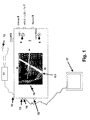
- FIG. 1 is a schematic representation of a portable video player 1.
- the device comprises an LCD screen 2 covered by a transparent touch-sensitive surface 3, a wireless connection push button 4 ('Wifi') for triggering a wireless network search, a menu push button 5 for calling the top-level control menu on the display, a volume control 8, a three-position sliding button HOLD/LCD/TV 7 the use of which will be explained later on, a record push button 6 as well as a power on/off button 9.
- the device furthermore comprises a headset plug 10 for connecting a remote control 11 and a headset proper 12, a video in plug 13, a video out plug 14, and a Universal Serial Bus (USB) plug 15. The placing of the different buttons, connectors and controls is indicative only.
- USB Universal Serial Bus
- the device includes a touch sensitive surface for allowing flexible user input while reducing the overall number of buttons.
- the touch sensitive surface is in itself known, and can be manufactured according to a number of technologies, among which resistive technologies and capacitive technologies. Resistive technologies typically respond to pressure exerted on the sensitive surface by any type of object (finger, gloved finger, plastic stylus), while capacitive technologies will respond to finger contact, or contact with specially designed styli. Other technologies are also known, such as surface acoustic wave (SAW) technologies.
- SAW surface acoustic wave
- the sensitive touch screen will provide the device with whether the surface is touched and with the coordinates of the point of the surface touched by the user, or with the series of coordinates if the user moves his finger or an appropriate object over the screen.
- Adapted processing means can derive from this information the duration of the touch, and the direction and path of the movement of the object on the surface.
- screen 2 Around screen 2 are arranged a number of stylized drawings such as 16 for reminding the user of the actions to be carried out in order to trigger certain control functions.
- the functions illustrated on each of the four sides of the screen are fast forward on the right, fast reverse on the left, next chapter (or movie) on the top, previous chapter (or movie) under the bottom. How these indications are related to the movements to be carried out on the sensitive surface will be explained below.
- the device comprises a processor for controlling the device's modules, as well as for handling input to and output from the device.
- the processor in particular handles user input and controls the device's modules and functions in response to this input.
- the device comprises a mass storage module in the form of a hard disk drive, which is able to store compressed digital audio and/or video programs, for example programs compressed according to the MPEG 2 or MPEG 4 standards.
- the device further comprises appropriate audio/video decompression circuitry, as well as video signal processing circuits for controlling either the LCD screen 2 or an external display 17.
- the user can select among two outputs for video programs: either the integrated display, or an external display.
- the integrated display When the external display is enabled, the integrated display is switched off, in order to save battery life.
- certain control functions can still be activated through the touch-sensitive surface even when the integrated display is disabled. These functions are preferably activated in the same way, whether the integrated display is used for displaying a video, or whether the output to the external display is activated.
- the device displays, on its integrated screen 2, the top level of the hierarchical menu used to control the device.
- the user may access the content selection mode, used for selecting content to be reproduced, from this main menu.
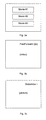
- Figure 3a illustrates an example of a video content selection menu as displayed.
- Other content selection screens concern e.g. music content and still pictures.
- Content may be sorted by the user, organized into playlists etc... in conventional manner. The corresponding filtering and ordering functions will not be explained in detail.
- the default order is that of the directory containing the videos, pictures or audio files. According to the present embodiment, the menu content selection simply lists available movies.
- the content selection mode is available only when the integrated display is enabled.
- the user In order to enter the content selection mode when video content is displayed on the external display and the integrated display is disabled, the user first has to enable the integrated display by toggling the video output back to that display, using the HOLD-LCD-TV button. The external display is then disabled.
- the device enters into content playing mode.
- content playing mode For control of the content display or playback, five different functions may be activated by the user, each function corresponding to a specific movement or gesture with regard to the touch-sensitive surface. The functions differ according to the context. However, the five movements or gestures remain the same.
- the different gestures are as follows:
- the movements can be performed using the finger or an appropriate object with regard to the particular technology used for the touch-sensitive surface.
- the gestures can be performed anywhere on the touch-sensitive surface.
- the user consequently does not need to see icons displayed on the integrated display to active the functions - which is of importance if the display is disabled.
- the touch controls are not correlated with items (icons, menu items%) displayed on the integrated screen, whereas this is not the case in the content selection mode.
- the touch-screen gestures are used to navigate through the video programme. Feedback on the selected control function is given by overlaying an on-screen display message on the displayed video, as illustrated by figure 3b.
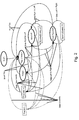
- Figure 2 is a state diagram illustrating the behaviour of the device in response to the user's inputs through the touch-sensitive surface.
- the gestures are used to control a slideshow. Feedback is given by overlaying an on-screen display message on the displayed pictures, as illustrated by figure 3c.
- the integrated display is disabled to save battery life.
- the gestures are used to navigate through the song directory/playlist or within a song.
- the LCD screen is turned off, and the video programme is displayed on the external device.
- the touch-sensitive surface remains powered and the user uses the same gestures as in (a) to trigger control functions.
- the stylized drawings 16 are placed so as to remind the user of the gesture associated with each control function.
- the fast forward drawing is placed to the right of the screen to indicate that the gesture required for activating that function comprises moving from the left to the right, while the next track drawing is placed below the screen to indicate that the user has to slide downwards on the screen.
- the invention also applies to the case where the device comprises a display which may be disabled or enabled by the user or automatically, even if it does not possess a connector to an external display. This may be the case for an audio player, where the display is switched off to save power.
- the display may be used in conjunction with the touch screen when certain menu input requires a display (e.g. icons), while the display is switched off during playback per se, the touch screen controls then being active for basic playback control functions.
Landscapes
- Engineering & Computer Science (AREA)
- Theoretical Computer Science (AREA)
- General Engineering & Computer Science (AREA)
- Human Computer Interaction (AREA)
- Physics & Mathematics (AREA)
- General Physics & Mathematics (AREA)
- Signal Processing (AREA)
- User Interface Of Digital Computer (AREA)
- Position Input By Displaying (AREA)
- Control Of Indicators Other Than Cathode Ray Tubes (AREA)
- Indexing, Searching, Synchronizing, And The Amount Of Synchronization Travel Of Record Carriers (AREA)
- Devices For Indicating Variable Information By Combining Individual Elements (AREA)
Priority Applications (7)
| Application Number | Priority Date | Filing Date | Title |
|---|---|---|---|
| EP04447275A EP1672471A1 (en) | 2004-12-14 | 2004-12-14 | Content playback device with touch screen |
| CNA2005800426840A CN101076773A (zh) | 2004-12-14 | 2005-12-07 | 具有触摸屏的内容回放设备 |
| JP2007546025A JP2008530634A (ja) | 2004-12-14 | 2005-12-07 | タッチスクリーンを有するコンテンツ再生装置 |
| US11/793,196 US20080225013A1 (en) | 2004-12-14 | 2005-12-07 | Content Playback Device With Touch Screen |
| EP05813385A EP1825353A1 (en) | 2004-12-14 | 2005-12-07 | Content playback device with touch screen |
| PCT/EP2005/056587 WO2006063960A1 (en) | 2004-12-14 | 2005-12-07 | Content playback device with touch screen |
| KR1020077012084A KR20070089681A (ko) | 2004-12-14 | 2005-12-07 | 터치 스크린을 구비한 콘텐츠 재생 디바이스 |
Applications Claiming Priority (1)
| Application Number | Priority Date | Filing Date | Title |
|---|---|---|---|
| EP04447275A EP1672471A1 (en) | 2004-12-14 | 2004-12-14 | Content playback device with touch screen |
Publications (1)
| Publication Number | Publication Date |
|---|---|
| EP1672471A1 true EP1672471A1 (en) | 2006-06-21 |
Family
ID=34933127
Family Applications (2)
| Application Number | Title | Priority Date | Filing Date |
|---|---|---|---|
| EP04447275A Withdrawn EP1672471A1 (en) | 2004-12-14 | 2004-12-14 | Content playback device with touch screen |
| EP05813385A Withdrawn EP1825353A1 (en) | 2004-12-14 | 2005-12-07 | Content playback device with touch screen |
Family Applications After (1)
| Application Number | Title | Priority Date | Filing Date |
|---|---|---|---|
| EP05813385A Withdrawn EP1825353A1 (en) | 2004-12-14 | 2005-12-07 | Content playback device with touch screen |
Country Status (6)
| Country | Link |
|---|---|
| US (1) | US20080225013A1 (enExample) |
| EP (2) | EP1672471A1 (enExample) |
| JP (1) | JP2008530634A (enExample) |
| KR (1) | KR20070089681A (enExample) |
| CN (1) | CN101076773A (enExample) |
| WO (1) | WO2006063960A1 (enExample) |
Cited By (4)
| Publication number | Priority date | Publication date | Assignee | Title |
|---|---|---|---|---|
| EP1956601A3 (en) * | 2007-02-08 | 2008-08-20 | Samsung Electronics Co., Ltd. | Method and terminal for playing and displaying music |
| EP1993097A1 (en) * | 2007-05-18 | 2008-11-19 | LG Electronics Inc. | Mobile communication device and method of controlling the same |
| WO2010085503A1 (en) * | 2009-01-20 | 2010-07-29 | Neil Young | High definition and high resolution music and/or video applications and methods of use thereof |
| CN105898514A (zh) * | 2015-12-15 | 2016-08-24 | 乐视网信息技术(北京)股份有限公司 | 视频播放方法和系统 |
Families Citing this family (56)
| Publication number | Priority date | Publication date | Assignee | Title |
|---|---|---|---|---|
| US7509588B2 (en) | 2005-12-30 | 2009-03-24 | Apple Inc. | Portable electronic device with interface reconfiguration mode |
| US20070097096A1 (en) * | 2006-03-25 | 2007-05-03 | Outland Research, Llc | Bimodal user interface paradigm for touch screen devices |
| US20070097151A1 (en) * | 2006-04-07 | 2007-05-03 | Outland Research, Llc | Behind-screen zoom for handheld computing devices |
| TW200745894A (en) * | 2006-06-05 | 2007-12-16 | Dotop Technology Inc | External storage device |
| US8564544B2 (en) | 2006-09-06 | 2013-10-22 | Apple Inc. | Touch screen device, method, and graphical user interface for customizing display of content category icons |
| US10313505B2 (en) | 2006-09-06 | 2019-06-04 | Apple Inc. | Portable multifunction device, method, and graphical user interface for configuring and displaying widgets |
| US8564543B2 (en) | 2006-09-11 | 2013-10-22 | Apple Inc. | Media player with imaged based browsing |
| US8736557B2 (en) * | 2006-09-11 | 2014-05-27 | Apple Inc. | Electronic device with image based browsers |
| US20080084400A1 (en) * | 2006-10-10 | 2008-04-10 | Outland Research, Llc | Touch-gesture control of video media play on handheld media players |
| US20080143873A1 (en) * | 2006-12-15 | 2008-06-19 | Darren Neuman | Tv user interface and processing for personal video players |
| US9001047B2 (en) | 2007-01-07 | 2015-04-07 | Apple Inc. | Modal change based on orientation of a portable multifunction device |
| US9772751B2 (en) | 2007-06-29 | 2017-09-26 | Apple Inc. | Using gestures to slide between user interfaces |
| US11126321B2 (en) * | 2007-09-04 | 2021-09-21 | Apple Inc. | Application menu user interface |
| US9619143B2 (en) | 2008-01-06 | 2017-04-11 | Apple Inc. | Device, method, and graphical user interface for viewing application launch icons |
| US8619038B2 (en) | 2007-09-04 | 2013-12-31 | Apple Inc. | Editing interface |
| US8327272B2 (en) | 2008-01-06 | 2012-12-04 | Apple Inc. | Portable multifunction device, method, and graphical user interface for viewing and managing electronic calendars |
| WO2009142345A1 (en) * | 2008-05-23 | 2009-11-26 | Atlab Inc. | Touch sensor device and the method of switching operation mode thereof |
| JP5292948B2 (ja) * | 2008-06-30 | 2013-09-18 | 富士通株式会社 | 表示及び入力機能を備えた装置 |
| JP4666053B2 (ja) * | 2008-10-28 | 2011-04-06 | ソニー株式会社 | 情報処理装置、情報処理方法およびプログラム |
| CN101770795B (zh) * | 2009-01-05 | 2013-09-04 | 联想(北京)有限公司 | 一种计算设备及视频播放控制方法 |
| KR101544364B1 (ko) | 2009-01-23 | 2015-08-17 | 삼성전자주식회사 | 듀얼 터치 스크린을 구비한 휴대 단말기 및 그 컨텐츠 제어방법 |
| US8689128B2 (en) | 2009-03-16 | 2014-04-01 | Apple Inc. | Device, method, and graphical user interface for moving a current position in content at a variable scrubbing rate |
| US8407623B2 (en) * | 2009-06-25 | 2013-03-26 | Apple Inc. | Playback control using a touch interface |
| TWI414935B (zh) * | 2009-08-25 | 2013-11-11 | Benq Corp | 雙螢幕顯示裝置進入省電模式之控制方法 |
| US8736561B2 (en) | 2010-01-06 | 2014-05-27 | Apple Inc. | Device, method, and graphical user interface with content display modes and display rotation heuristics |
| KR20120020247A (ko) * | 2010-08-27 | 2012-03-08 | 삼성전자주식회사 | 컨텐츠 재생 장치 및 방법, 컨텐츠 재생을 위한 휴대용 전자 장치 |
| US9430128B2 (en) | 2011-01-06 | 2016-08-30 | Tivo, Inc. | Method and apparatus for controls based on concurrent gestures |
| JP6115728B2 (ja) * | 2011-01-06 | 2017-04-19 | ティヴォ ソリューションズ インコーポレイテッド | ジェスチャに基づく制御方法および装置 |
| KR20120095034A (ko) * | 2011-02-18 | 2012-08-28 | 삼성전자주식회사 | 휴대단말기의 터치패드 구동 방법 및 장치 |
| US9746995B2 (en) * | 2011-07-14 | 2017-08-29 | Microsoft Technology Licensing, Llc | Launcher for context based menus |
| KR20130024615A (ko) * | 2011-08-31 | 2013-03-08 | 주식회사 케이티 | 외부 디바이스와 결합하는 휴대 단말 및 그 제어 방법 |
| US20130135227A1 (en) * | 2011-11-28 | 2013-05-30 | Qualcomm Innovation Center, Inc. | Touch screen operation |
| KR101474927B1 (ko) | 2011-12-22 | 2014-12-31 | 주식회사 케이티 | 외부 디스플레이 기기로의 영상 송출 방법 및 그 단말 |
| KR101522399B1 (ko) | 2011-12-23 | 2015-05-22 | 주식회사 케이티 | 휴대 단말에서 외부 디스플레이 기기로의 화면 표출 방법 및 그 휴대 단말 |
| KR101546407B1 (ko) | 2011-12-23 | 2015-08-24 | 주식회사 케이티 | 어플리케이션 실행 제어 방법 및 장치 |
| KR101504655B1 (ko) | 2011-12-26 | 2015-03-23 | 주식회사 케이티 | 어플리케이션 실행 제어 방법 및 장치 |
| US8949735B2 (en) | 2012-11-02 | 2015-02-03 | Google Inc. | Determining scroll direction intent |
| TWI585581B (zh) * | 2012-11-14 | 2017-06-01 | 瑞軒科技股份有限公司 | 影音播放系統之控制方法 |
| CN103197886B (zh) * | 2013-03-13 | 2015-12-09 | 小米科技有限责任公司 | 视频切换的方法及终端 |
| US9454251B1 (en) * | 2013-06-26 | 2016-09-27 | Google Inc. | Methods, systems, and media for controlling a remote device using a touch screen of a mobile device in a display inhibited state |
| US10084869B2 (en) * | 2013-10-04 | 2018-09-25 | Verto Analytics Oy | Metering user behaviour and engagement with user interface in terminal devices |
| AU2015276995B2 (en) * | 2014-06-18 | 2020-08-27 | Google Llc | Methods, systems and media for controlling playback of video using a touchscreen |
| CN110072131A (zh) | 2014-09-02 | 2019-07-30 | 苹果公司 | 音乐用户界面 |
| US20160210109A1 (en) * | 2015-01-19 | 2016-07-21 | Mediatek Inc. | Method for controlling audio playing of an electronic device, and associated apparatus and associated computer program product |
| DK201770423A1 (en) | 2016-06-11 | 2018-01-15 | Apple Inc | Activity and workout updates |
| US10332523B2 (en) | 2016-11-18 | 2019-06-25 | Google Llc | Virtual assistant identification of nearby computing devices |
| US11431836B2 (en) | 2017-05-02 | 2022-08-30 | Apple Inc. | Methods and interfaces for initiating media playback |
| US10992795B2 (en) | 2017-05-16 | 2021-04-27 | Apple Inc. | Methods and interfaces for home media control |
| US10928980B2 (en) | 2017-05-12 | 2021-02-23 | Apple Inc. | User interfaces for playing and managing audio items |
| CN119576267A (zh) | 2017-05-16 | 2025-03-07 | 苹果公司 | 用于家庭媒体控制的方法和界面 |
| US12526361B2 (en) | 2017-05-16 | 2026-01-13 | Apple Inc. | Methods for outputting an audio output in accordance with a user being within a range of a device |
| KR101963849B1 (ko) * | 2017-06-21 | 2019-03-29 | 삼성전자주식회사 | 휴대단말기의 터치패드 구동 방법 및 장치 |
| US10996917B2 (en) | 2019-05-31 | 2021-05-04 | Apple Inc. | User interfaces for audio media control |
| US11620103B2 (en) | 2019-05-31 | 2023-04-04 | Apple Inc. | User interfaces for audio media control |
| US11392291B2 (en) | 2020-09-25 | 2022-07-19 | Apple Inc. | Methods and interfaces for media control with dynamic feedback |
| CN117174009B (zh) * | 2022-05-27 | 2025-09-30 | 荣耀终端股份有限公司 | 一种屏幕驱动电路、屏幕刷新方法及电子设备 |
Citations (4)
| Publication number | Priority date | Publication date | Assignee | Title |
|---|---|---|---|---|
| US6313853B1 (en) * | 1998-04-16 | 2001-11-06 | Nortel Networks Limited | Multi-service user interface |
| US6396523B1 (en) * | 1999-07-29 | 2002-05-28 | Interlink Electronics, Inc. | Home entertainment device remote control |
| US20020118131A1 (en) * | 2001-02-23 | 2002-08-29 | Yates William Allen | Transformer remote control |
| US20030025678A1 (en) * | 2001-08-04 | 2003-02-06 | Samsung Electronics Co., Ltd. | Apparatus with touch screen and method for displaying information through external display device connected thereto |
Family Cites Families (16)
| Publication number | Priority date | Publication date | Assignee | Title |
|---|---|---|---|---|
| US5818425A (en) * | 1996-04-03 | 1998-10-06 | Xerox Corporation | Mapping drawings generated on small mobile pen based electronic devices onto large displays |
| JPH10191142A (ja) * | 1996-12-20 | 1998-07-21 | Nikon Corp | 画像処理装置 |
| JPH11175205A (ja) * | 1997-12-15 | 1999-07-02 | Toshiba Corp | コンピュータシステムおよびそのパワーダウン制御方法 |
| JP2000156839A (ja) * | 1998-11-19 | 2000-06-06 | Hitachi Ltd | ディジタル映像記録再生装置 |
| JP2000333277A (ja) * | 1999-05-25 | 2000-11-30 | Oki Electric Ind Co Ltd | 遠隔操作装置 |
| JP2000341572A (ja) * | 1999-05-31 | 2000-12-08 | Ricoh Co Ltd | デジタルカメラ |
| US6489932B1 (en) * | 1999-09-30 | 2002-12-03 | Prasanna R. Chitturi | Display device including an integral docking station for a palm sized computing device |
| WO2001026090A1 (en) * | 1999-10-07 | 2001-04-12 | Interlink Electronics, Inc. | Home entertainment device remote control |
| JP2001142563A (ja) * | 1999-11-09 | 2001-05-25 | Internatl Business Mach Corp <Ibm> | 機能補完型携帯情報装置 |
| JP2002271715A (ja) * | 2001-03-09 | 2002-09-20 | Denon Ltd | Av装置 |
| TW508526B (en) * | 2001-06-15 | 2002-11-01 | Compal Electronics Inc | Personal digital assistant with a power-saving external image output port |
| US6798647B2 (en) * | 2001-07-16 | 2004-09-28 | Hewlett-Packard Development Company, L.P. | Portable computer with integrated PDA I/O docking cradle |
| DE10229068B3 (de) * | 2002-06-28 | 2004-02-05 | Fujitsu Siemens Computers Gmbh | PDA (Personal Digital Assistant) mit Touch-Screen Display |
| US20040019724A1 (en) * | 2002-07-24 | 2004-01-29 | Singleton, Charles W. | Computer system with docking port for a handheld computing device |
| US7643731B2 (en) * | 2004-01-23 | 2010-01-05 | Osamu Kobayashi | Low power DVD playback in a portable computing system |
| JP2005318321A (ja) * | 2004-04-28 | 2005-11-10 | Sharp Corp | 映像表示装置 |
-
2004
- 2004-12-14 EP EP04447275A patent/EP1672471A1/en not_active Withdrawn
-
2005
- 2005-12-07 US US11/793,196 patent/US20080225013A1/en not_active Abandoned
- 2005-12-07 EP EP05813385A patent/EP1825353A1/en not_active Withdrawn
- 2005-12-07 WO PCT/EP2005/056587 patent/WO2006063960A1/en not_active Ceased
- 2005-12-07 KR KR1020077012084A patent/KR20070089681A/ko not_active Withdrawn
- 2005-12-07 JP JP2007546025A patent/JP2008530634A/ja active Pending
- 2005-12-07 CN CNA2005800426840A patent/CN101076773A/zh active Pending
Patent Citations (4)
| Publication number | Priority date | Publication date | Assignee | Title |
|---|---|---|---|---|
| US6313853B1 (en) * | 1998-04-16 | 2001-11-06 | Nortel Networks Limited | Multi-service user interface |
| US6396523B1 (en) * | 1999-07-29 | 2002-05-28 | Interlink Electronics, Inc. | Home entertainment device remote control |
| US20020118131A1 (en) * | 2001-02-23 | 2002-08-29 | Yates William Allen | Transformer remote control |
| US20030025678A1 (en) * | 2001-08-04 | 2003-02-06 | Samsung Electronics Co., Ltd. | Apparatus with touch screen and method for displaying information through external display device connected thereto |
Cited By (6)
| Publication number | Priority date | Publication date | Assignee | Title |
|---|---|---|---|---|
| EP1956601A3 (en) * | 2007-02-08 | 2008-08-20 | Samsung Electronics Co., Ltd. | Method and terminal for playing and displaying music |
| US8146019B2 (en) | 2007-02-08 | 2012-03-27 | Samsung Electronics Co., Ltd. | Method and terminal for playing and displaying music |
| EP1993097A1 (en) * | 2007-05-18 | 2008-11-19 | LG Electronics Inc. | Mobile communication device and method of controlling the same |
| WO2010085503A1 (en) * | 2009-01-20 | 2010-07-29 | Neil Young | High definition and high resolution music and/or video applications and methods of use thereof |
| US8923996B2 (en) | 2009-01-20 | 2014-12-30 | Neil Young | High definition and high resolution music and/or video applications and methods of use thereof |
| CN105898514A (zh) * | 2015-12-15 | 2016-08-24 | 乐视网信息技术(北京)股份有限公司 | 视频播放方法和系统 |
Also Published As
| Publication number | Publication date |
|---|---|
| JP2008530634A (ja) | 2008-08-07 |
| US20080225013A1 (en) | 2008-09-18 |
| EP1825353A1 (en) | 2007-08-29 |
| KR20070089681A (ko) | 2007-08-31 |
| CN101076773A (zh) | 2007-11-21 |
| WO2006063960A1 (en) | 2006-06-22 |
Similar Documents
| Publication | Publication Date | Title |
|---|---|---|
| US20080225013A1 (en) | Content Playback Device With Touch Screen | |
| JP4179269B2 (ja) | 携帯型電子機器、表示方法、そのプログラム及び表示操作装置 | |
| JP4148187B2 (ja) | 携帯型電子機器、入力操作制御方法及びそのプログラム | |
| JP5398719B2 (ja) | ユーザ命令の入力方法及びこれを適用した映像機器と入力機器 | |
| JP5586680B2 (ja) | コンテンツ内の現在の位置を可変スクラブ速度で移動するデバイス、方法、およびグラフィカルユーザインタフェース | |
| US20060015826A1 (en) | Hard disk multimedia player and method | |
| EP1962177A1 (en) | Electronic device to input user command | |
| EP2487580A1 (en) | Menu overlay including context dependent menu icon | |
| US20120042246A1 (en) | Content gestures | |
| JP2010026710A (ja) | 情報処理装置、情報処理方法及び情報処理プログラム | |
| EP2191365A1 (en) | Method for inputting user command using user's motion and multimedia apparatus thereof | |
| JP2010152859A (ja) | ユーザインタフェースの表示及び操作方法と電子デバイス | |
| KR20090029135A (ko) | 플레이리스트 편집 방법 및 이를 적용한 멀티미디어재생장치 | |
| US20060015808A1 (en) | Hard disk multimedia player and method | |
| JP4792366B2 (ja) | 画面表示方法 | |
| US20060012564A1 (en) | Hard disk multimedia player and method | |
| CN100432912C (zh) | 便携式电子设备及其显示方法和图形用户接口装置 | |
| JP4470608B2 (ja) | 再生装置 | |
| US20060012565A1 (en) | Hard disk multimedia player and method | |
| JP4649870B2 (ja) | 携帯型電子機器 | |
| US20060051050A1 (en) | Module and method for controlling a portable multimedia audio and video recorder/player | |
| US20070040808A1 (en) | User configurable button | |
| JP2001346280A (ja) | リモートコントロール装置 | |
| JP2007156922A (ja) | 処理指示受付方法、電子機器、及びコンピュータプログラム | |
| JP2007095185A (ja) | 電子機器、電子機器の制御方法及びプログラム |
Legal Events
| Date | Code | Title | Description |
|---|---|---|---|
| PUAI | Public reference made under article 153(3) epc to a published international application that has entered the european phase |
Free format text: ORIGINAL CODE: 0009012 |
|
| AK | Designated contracting states |
Kind code of ref document: A1 Designated state(s): AT BE BG CH CY CZ DE DK EE ES FI FR GB GR HU IE IS IT LI LT LU MC NL PL PT RO SE SI SK TR |
|
| AX | Request for extension of the european patent |
Extension state: AL BA HR LV MK YU |
|
| AKX | Designation fees paid | ||
| REG | Reference to a national code |
Ref country code: DE Ref legal event code: 8566 |
|
| STAA | Information on the status of an ep patent application or granted ep patent |
Free format text: STATUS: THE APPLICATION IS DEEMED TO BE WITHDRAWN |
|
| 18D | Application deemed to be withdrawn |
Effective date: 20061222 |