EP1471445A1 - Multimedia document sharing method and apparatus - Google Patents
Multimedia document sharing method and apparatus Download PDFInfo
- Publication number
- EP1471445A1 EP1471445A1 EP04001199A EP04001199A EP1471445A1 EP 1471445 A1 EP1471445 A1 EP 1471445A1 EP 04001199 A EP04001199 A EP 04001199A EP 04001199 A EP04001199 A EP 04001199A EP 1471445 A1 EP1471445 A1 EP 1471445A1
- Authority
- EP
- European Patent Office
- Prior art keywords
- collection
- information
- user
- coversheet
- action
- Prior art date
- Legal status (The legal status is an assumption and is not a legal conclusion. Google has not performed a legal analysis and makes no representation as to the accuracy of the status listed.)
- Withdrawn
Links
Images











Classifications
-
- G—PHYSICS
- G06—COMPUTING OR CALCULATING; COUNTING
- G06F—ELECTRIC DIGITAL DATA PROCESSING
- G06F16/00—Information retrieval; Database structures therefor; File system structures therefor
- G06F16/90—Details of database functions independent of the retrieved data types
- G06F16/95—Retrieval from the web
- G06F16/955—Retrieval from the web using information identifiers, e.g. uniform resource locators [URL]
-
- G—PHYSICS
- G06—COMPUTING OR CALCULATING; COUNTING
- G06F—ELECTRIC DIGITAL DATA PROCESSING
- G06F16/00—Information retrieval; Database structures therefor; File system structures therefor
- G06F16/90—Details of database functions independent of the retrieved data types
- G06F16/95—Retrieval from the web
- G06F16/958—Organisation or management of web site content, e.g. publishing, maintaining pages or automatic linking
Definitions
- the present invention relates generally to document management and more specifically to access and dissemination of collections of multimedia documents.
- PDAs Personal data assistants
- PDAs such as Palm Pilot® by 3Comm, Inc., and similar hand held devices
- PDAs are not universal. While many document formats exist for representing information, not all devices have all the software needed to read all documents. Worse yet, PDA documents typically use formats that are not readily available on a desktop or laptop PC. Usually, documents have to be converted between formats. Paper remains the simplest way in many situations for storing information (e.g., record keeping), distributing information, and controlling access to information.
- Paper has been an integral component of civilization for thousands of years. Its replacement is not likely to occur soon, if ever, despite the ubiquity of computer-based technology. Electronic information almost invariably is reduced, at least in part, to paper. Perhaps then, the role of the computer is not to achieve a paperless society. Instead, the role of the computer may be as a tool to reduce the amount of paperwork; i.e., to achieve a "less paper" environment rather than a paperless environment. Generally, there is a need to use computers to more effectively share information and to provide access to that information. In addition, the information should not be limited to any particular mode of expression, allowing for all forms of communication media.
- documents can be organized into one or more collections.
- Information can be added to the collection, thus creating different layers (versions) of collections.
- a collection overview representative of the collection can be printed on a suitable medium, such as paper for example.
- This collection "coversheet" can provide access to the collection. In this way, documents in the collection can be shared by distributing copies of the coversheet to recipients.
- a collection coversheet can be used to browse a collection and to direct actions on elements in the collection.
- Annotative information can be used to facilitate navigation of the collection.
- Annotative information can be use to specify actions to be performed on elements in the collection.
- Collections of paper documents are used for many purposes. Many people keep folders of documents on their desks or in their file system which are related to a particular task or to a particular person.
- a law firm keeps a "docket" of papers for a specific case or client.
- a medical office keeps at least one file of papers for each patient who uses that office. It is important to keep those papers together to facilitate work tasks related to those papers. For instance, in a medical office, if a doctor wishes to review a patient's medical history, she can flip through that patient's folder and look at what tests have been performed or what illnesses the patient has suffered in the past.
- paper As used in this application are intended to refer to any tangible medium on which information can be formed whether by a printing process, written, drawn, imprinted, embossed, etc.
- printing is intended to encompass all manner of forming images on an image-bearing medium whether by optical, mechanical, thermal, or electrical methods, or combinations thereof.
- Collections in this specification have a specific meaning.
- a "collection" can include one or more groups of electronic documents or media which might include digital images, audio recordings, scanned images from pages of a document, files like a Microsoft Word documents or Microsoft Excel spreadsheets. Collections can also contain pointers to other collections. Collections can include user-provided markings, annotations, and such. Collections can also include metadata representing related information such as date of creation, modification date, access permissions, and so on.
- a collection is stored on a collection server and has a specific address or identifier, similar to a URL or uniform resource locater, which identifier is unique and provides a pointer to the collection.
- a collection has a coversheet which displays a representation of the contents of the collection with an overview image showing thumbnails which represent all of the documents in the collection. More details about collections will be described in another part of this specification.
- a multifunction peripheral (MFP) 100 is provided for scanning documents 102 and 104 and to serve as a source of electronic information. Additional capture devices are provided, including but not limited to microphones 110, digital cameras 112, video cameras 114, memory cards and other removable media 116 as well as additional devices connected to the network that may not be near or in the same room with the MFP 100.
- the MFP 100 is connected through a network 200 to a collection server 108 which allows the MFP to create, store, and modify collections of media that will be described in more detail later in this specification.
- Each MFP 100 has a control panel 106 which provides methods of controlling the MFP 100 through various means including but not limited to keypads 118, buttons and touchscreen displays 120.
- the control panel 106 also provides feedback to the user through the display 120 and indicator lights 122. The feedback might indicate the current state of the MFP or might indicate the task being completed by the MFP.
- FIG. 1 Also shown in Fig. 1 are documents 104 and a special document 102 called a collection coversheet.
- a collection coversheet 102 can be used with the MFP to carry out the methods of the present invention.
- the MFP 100 includes the capability of scanning single or multiple pages in sequence and storing those internally or performing imaging operations on those pages.
- the MFP 100 also has the ability to print images either from its internal storage 316 or from memory 318 or from other capture devices.
- Other captures devices including but not limited to a microphone 110, a digital camera 112, a video camera 114 or other devices can be provided to record media such as audio or activity such as a meeting, surveillance activity, and so on.
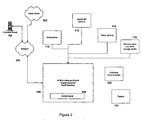
- Fig. 3 is an illustrative example of a device embodying various aspects of the present invention.
- a typical multifunction peripheral (MFP) 100 is made up of various components that are shown in Fig. 3, some of which are not required in the operation of this invention.
- the MFP 100 has a scanner 302 which can image pages of a document and in conjunction with the automatic document feeder 308 can image multiple pages rapidly. Images of pages can be stored in a non-volatile storage area 316 which might be a disk drive or in any other memory storage area like the memory 318.
- the MFP 100 also contains a printer mechanism 304 which can retrieve paper from the paper supply 306 and print images which are stored in the memory 318, storage 316, obtained directly from the scanner 302, obtained from the processor 322 or from the network interface card 320 which can receive image print requests and images from the external network 200. Images to be printed can also come from the memory card reader 314, media capture devices 326 and 328 through a media capture port 310 or a USB or other port 312. Images can also be received or sent out through the fax interface 324.
- the MFP can access other forms of media through electronic data input peripherals which may include magnetic media readers for magnetic media such as floppy disks, magnetic tape, fixed hard disks, removable hard disks, memory cards, and so on. Peripherals may also include optical media readers for optical storage media such as CDs, DVDs, magneto-optical disks, and the like. Information obtained from these peripherals can be incorporated or otherwise associated with scanned-in documents to enhance the document content.
- magnetic media readers for magnetic media such as floppy disks, magnetic tape, fixed hard disks, removable hard disks, memory cards, and so on.
- Peripherals may also include optical media readers for optical storage media such as CDs, DVDs, magneto-optical disks, and the like. Information obtained from these peripherals can be incorporated or otherwise associated with scanned-in documents to enhance the document content.
- the processor 322 controls the operation of the MFP components shown in Fig. 3.
- the control panel 106 can be used to instruct the processor 322 to use the components of the MFP 100 to make copies, scan documents or print faxes.
- MFPs are available from many companies, including Ricoh Company Ltd in Tokyo, Japan which makes a programmable MFP called the Aficio 1045 which contains many of the components shown in Fig 3. Any suitably equipped MFP could be used in practicing this invention.
- the memory 318 of the MFP contains modules which allow the operation of the MFP as well as the practice of the present invention.
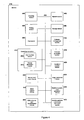
- Fig. 4 is a high level representation of various program modules resident in memory 318 for operating the MFP in accordance with the different aspects of the present invention.
- the scanning module 400 contains the instructions that the processor 322 in combination with the scanner 302 can use to scan pages of documents 104.
- the printing module 404 contains control instructions for receiving an image or a description of an image and driving the printer 304 causing the image to be printed on a piece of paper. MFPs are known in the art and made by many different companies so a complete description of the operation of the MFP is not necessary.
- the fax 408, network 402, storage 406, image conversion 424, memory card reader 422, media capture 426, USB and other port 430 modules will not be described because their purpose and function is well understood.
- a collection management module 410 must be available which tells the processor how to communicate with the collection server and how to create and modify collections.
- a thumbnail creation module 420 can create thumbnail representations of media, including a smaller version of an image, a single-frame from a video or even a waveform from a stored audio signal. These thumbnails are used at least by the overview generation module 410 which is used to create an overview of a collection. The overview is described in detail later and the overview generation module puts together the thumbnails representing the documents and media into a single image that can be displayed or printed and used for accessing the documents and media.
- the machine readable code generation module 428 provides the MFP with the ability to create machine-readable codes like barcodes which represent specific collections.
- the machine-readable code locator/reader module can be used to find and decode machine-readable codes on collection coversheets in order to determine which coversheet was scanned by the scanning mechanism 302.
- machine-readable codes are barcodes, though there are many ways of creating machine-readable indicia. Barcodes are robust and take up little space and are easily decoded using standard hardware and software. On company that sells software for locating and decoding a variety of barcodes is Axtel Applied Technology of Vista California USA. Decoding machine-readable codes is well known in the industry.
- the control panel is controlled by the processor 322 using information from the user interface module 414 and the display generation module 416 which are part of the control panel module 412.
- Fig. 5A shows an example collection coversheet 500 from an empty collection.
- An empty collection contains no media or documents. It is really just a placeholder for storing documents in the future.
- Fig. 5B shows a collection coversheet 102 with eight documents. Three of those documents are images from a digital camera, four documents are scanned pages from the MFP, and the bottom left document is a pointer to another collection which contains two documents. The collection overview is used as the thumbnail representation of the collection.
- a collection coversheet 102 is a paper which represents a collection and is made up of a header 502, a string of text printed in a machine-readable format 504, a collection overview image 506, optionally, an area in which notes may be written 508, and optionally a human-readable version 510 of the text encoded in the machine-readable code 504.
- the header 502 contains printed information about the collection, including the author of the collection, a list of zero, one or more people who will be notified if the collection is modified, time and date information about when the collection was last modified or when this coversheet was printed out, and an optional collection topic or subject.
- the machine-readable code 504 contains an encoded version of a unique pointer to the collection on the collection server.
- This same pointer when presented in human-readable form 510 might be similar to a uniform resource locator or URL used in the world wide web and is called a collection identifier, distributed resource identifier, or DRI.
- the preferred implementation of the collection server uses these "distributed resource identifiers" or DRIs as unique collection pointers. DRIs are globally unique, difficult to guess, and can provide access to collections from anywhere on the internet.
- the pointer data stored in the barcode or written in human-readable form is the DRI.
- the barcode is just a machine-readable version of that DRI.
- the terms "collection identifier”, “distributed resource identifier”, and “DRI” will be used interchangeably and should be understood to mean the same thing - a unique identifier that points to a collection of media and documents stored on a collection server. In some cases, multiple identifiers point to the exact same collection in order to provide different ways of accessing that collection, but never will one identifier point to multiple collections. Also, the identifier might be written in human-readable form or machine-readable form. Both printed forms represent the same identifier and point to the same collection even though they look unlike each other.
- the bar code representation 504 of a DRI allows for automated access to the collection without requiring the user to manually enter the location. It can be appreciated of course that any machine-readable indicium can be used instead of a bar code system, including optical character recognition (OCR) of the human-readable 510 DRI.
- OCR optical character recognition
- a bar code 504 and a corresponding human-readable DRI (distributed resource identifier) 510 are elements of the coversheet which indicate the location of the collection.
- a 2-D bar code format is used.
- the DRI used for a collection points to a directory which contains the collection of documents as well as information used to build the collection overview and some additional metadata. DRIs can also point directly to an individual file the same way that a URL can point to either a directory or a file.
- the DRI is often a directory reference rather than a reference to a particular file.
- the DRI can be a directory reference such as /usr/collection.
- the DRI can refer to a file which in turn leads to an identification of the constituent elements of a collection.
- the DRI can be a reference to a database that stores the collection. It can be appreciated that still other alternatives for storing collections of information may be suitable.
- the text of the DRI 510 may be made up of a string of characters which includes a random text component. This randomly (and thus, unguessable) generated text serves to prevent access to a collection because it is virtually impossible to guess. Identifying a collection with an identifier that has no correlation to the content of the collection may present a strong impediment to hacking attempts; the hacker simply has no idea where the collection may be located, or that the collection even exists. ,
- the example DRI "/root/usr/collection" assumes a single-machine architecture.
- the DRI can include a machine name component.
- a more accessible format such as the URL (universal resource locator) format for identifying world wide web (WWW) pages might be suitable.
- the DRI constitutes the path portion of the URL.
- the path portion uses the following naming format according to a particular embodiment of this aspect of the present invention: .../-DDS-/ORIGIN/..., where DDS is the name of a particular repository of collections, and ORIGIN is the fully-qualified hostname of the origin server for the collection identified by the DRI.
- the collection shown in the example above is stored in a directory called: "/2002/1022/398hy9y8h8#$30er#/1/.”
- the pathname portion "/2002/1022” represents a date; e.g., date of creation of the collection.
- the string "398hy9y8h8#$30er#” represents randomly generated text.
- the directory represented by the terminal pathname "/1/" refers to the first (initial, original, base, etc.) version of the collection.
- both the host machine (“machine1”) and the origin machine (“machine2”) use the following directory structure and URL naming structure.
- the host machine has a directory called "-msg-” contained in its respective "root” directory for storing collections.
- the "-msg-” directory has a sub-directory called “machine2.com” which contains all the collections originating on “machine2.com.”
- a sub-directory is provided for each machine that can be an originator of a collection.
- a DRI represents a collection by providing a unique, secure pointer to a directory or to a file within that directory on a collection server. A person or machine given the DRI will have enough information to access the collection in order to add to or modify the collection.
- scalable vector graphics files or SVG files are used to represent the collection overview and annotations 506.
- SVG files are a standard way of creating a visual representation on the World Wide Web and there are many, viewers and tools for creating SVG.
- a collection preferably includes a specially named SVG file which can be used to construct an overview image 506 for the coversheet 102 or any display.
- the SVG file includes information for displaying the thumbnails of individual documents and media stored in the collection. It also keeps track of annotations or sketch marks that are not part of any individual document. For instance, in a collection overview, the creator of the collection might want to indicate an association between two media files or documents by drawing a circle enclosing both files or drawing a line between them. The circle or line is only stored in the collection overview in the SVG file and is not part of either document.
- Annotations can include circles, sketch marks, transparent highlighting, text labels, or anything supported by the SVG graphics format:
- Metadata about the individual files in the collection and their relationship to other files in the collection is stored preferably in an XML (extensible markup language) file.
- This information typically includes image width and height, links between images and their thumbnails and links between a document and an image representing that document.
- the exact format is unimportant as long as the collection server understands how to read and write the format.
- Additional information related to the collection as a whole can also be stored in the metadata file. This information might include the time at which the message was created, the subject of the message, the name of the author of the collection, and contact information such as email addresses, fax numbers, etc. belonging to those who should be notified when a collection is altered.
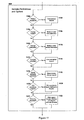
- Fig. 6 is a flow chart which shows the steps and information flow of the subject invention.
- MFP MFP and methods and apparatus described in this invention.
- a new, empty collection can be created.
- a new non-empty collection can be created using available documents and media.
- Electronic media and paper documents can be added to existing collections.
- a collection can be printed.
- the media in a collection can be explored or perused on the display 120 of the MFP 100.
- Special coversheets can be created which allow only certain operations on collections, including read-only coversheets where the media can be printed or viewed, but the collection cannot be modified in any way.
- Collections can be merged. Collections can be forwarded to additional email addresses. Also, actions can be taken on individual media in a collection using notes or actions written on the coversheet.
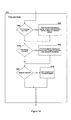
- Figs. 7 through 14 show more detail for the method and process of this invention.
- a new empty collection can be created in the following manner. No existing DRI or collection will be needed for the new empty collection, so in Fig. 7 at block 700, the "No" branch is taken. At 712, no additional documents are needed and then at the following block 716, no digital objects are created and the process moves to block 800 in Fig. 8.
- the user chooses the "Create Empty Collection" selector to initiate the creation of a new empty collection.
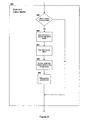
- the system then moves to block 900 in Fig. 9 and determines whether or not media is required for this process. Since an empty collection requires no media, the rest of block 604 is skipped entirely.
- the decision in block 900 could be driven by the absence of media rather than a decision based on the chosen task. Notice that the difference between creating a new empty collection and creating a new non-empty collection is simply that in the first case, no documents are put in the automatic document feeder of the MFP 100 and no electronic media is made available to the MFP 100 in block 600. In other words, the system could use a single button labeled "Create New Collection" to initiate both tasks and complete the task in different ways based on whether or not any documents or media were available to the MFP 100. Decision 900 would then be relabeled "Media available?"
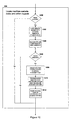
- Block 1000 in Fig. 10 shows the next decision point.
- no media is available so blocks 1002, 1004, 1006, 1008, 1010 and 1012 are skipped.
- blocks 1100, 1104, 1108, 1112, 1116, 1124, and 1120 are all decisions made by either the user or made by the MFP 100.
- the user can select options preferably through the control panel 106 of the MFP 100.
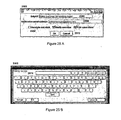
- the dialog box 2500 shown in Fig. 25A and the virtual keyboard 2502 input shown in Fig. 25B could be used for entering collection subjects 2506 or email addresses 2508 while performing the steps indicated inside the preferences and options block 608.
- Fig. 25A shows an example of a dialog box 2500 that could be used for requesting some information from the user of the MFP 100.
- Fig. 25B shows a screen shot of a virtual keyboard 2502 displayed on the touchscreen of a Ricoh Aficio 1045 MFP 100 which is available for capturing information from the user of the MFP 100. This type of interaction is well understood and known in the art.
- the MFP 100 at step 1102 stores an indicator that a printout of the coversheet should be performed.
- the indicator can be stored in memory or another appropriate place using means well understood in the art. If the user does not request a coversheet printout, the user and MFP move to the next step, block 1104.
- the user can choose to type in a subject in the subject box 2506, type in an email address in the email box 2508, or select annotate, modify, or print by checking the appropriate checkbox 2504.
- she can press a button 2512, either the "OK” button to record the options or the "Cancel” button to cancel the selected options.
- the options shown in blocks 1100, 1104, 1108, and 1112 should be presented in some form to the user. If any of those options are selected, then the corresponding steps 1102, 1106, 1110, 1114 should be taken. In the case of a new collection, one of printing out the coversheet or faxing or emailing the collection identifier/DRI should be done. If the user indicates not to print at 1100 and provides no contact information at 1108, the MFP 100 should either print the coversheet anyway or let the user know that an email address is required. Without one of these options being activated, it is not necessary to complete the rest of the task because the collection will not be available to anyone.
- Step 1116 is ignored and skipped when creating a new collection because there is no layout to modify. However, it is possible to annotate a new empty collection by adding sketch marks or annotations which are stored in the SVG file as noted previously. If the user chooses to annotate a new empty collection at 1112, then the MFP stores an indicator so that at the appropriate time later in the process the user is given the option of adding annotations.
- Step 1124 is not skipped because it is possible to establish all of or a portion of a new empty collection as "add-only".
- a new "add-only" collection would be analogous to an anonymous ftp site which allows uploads but not directory listings. Such an ftp site is frequently used to allow many people to add documents to a directory where only a few people have permission to view the documents in that directory.
- Step 1120 is skipped when creating a new empty collection because it is impossible to browse an empty collection.
- the MFP 100 contacts the collection server 108 through the network 200 to request a new collection identifier or DRI. It should be understood that it is possible for the MFP to request identifiers in advance so that if the collection server is busy or temporarily offline, the MFP 100 can still create new collections. Preferably, the collection server is available during the operation of this invention.
- the MFP 100 can present a canvas and drawing tools like those found in any drawing program.
- a pen tool and a text tool would be provided to the user to allow her to sketch or draw on the empty canvas or add text notes or labels. Interfaces for drawing or adding text to a blank canvas are well known.
- the MFP 100 can convert the sketch marks and text into valid SVG elements and store those in the SVG file representing the new empty collection.
- a regional sales manager wanted all of her salespeople to submit sales figures electronically using the present invention. She could create a collection which has a text note containing instructions for adding sales data to the collection. She could then create a "add-only” version of that collection. Using the "add-only" version of the collection, all the sales people could use the same collection coversheet to add pages of sales information to a collection without being able to access the sales information from other salespeople. The regional sales manager would retain the full permission collection coversheet so that she could access all of the information from the reporting salespeople.
- a "read-only” collection By creating a "read-only” or locked collection, it is possible to give many people access to a collection of documents or media while preventing them from modifying it in any way.
- a "read-only” collection might have an underlying full-permission collection.
- the user would probably not want to create a read-only collection because there is nothing to read when creating an empty collection. However, it is possible to create an empty "add-only" collection and if the user has selected that option in step 608 while indicating options and preferences, an add-only collection is created.
- the overview of the collection is displayed preferably on the MFPs control panel display 120 and the user is provided with a set of tools which can be used to draw the boundaries of restricted permission regions.
- These tools could be like the selection tools found in Adobe Corporations Photoshop. Such selection tools and techniques are well known.
- a permission could be established including "full-permission” or “read-write” which is the default, “read-only”, or “add-only”. Additional different permissions could be assigned as well and are considered to fall within the scope of this invention.
- Such permission regions could be noted in some metadata file within the collection, including either the main metadata file or a special metadata file which is specific to the permissions.
- the "No" path is taken because the collection is only browsed during the "Print Collection” or "Browse Collection Contents” task.
- the SVG file is created and stored in the collection server at the directory pointed to by the collection identifier or DRI. Also, metadata files are uploaded if necessary.
- the MFP 100 composes a coversheet 102.
- a header block 502 is created including at least the date and time of the creation of the new collection.
- the DRI or identifier obtained from the collection server is added to the coversheet at the bottom in human-readable form 510 and then encoded in a industry standard two dimensional PDF417 type barcode 504 in the preferred embodiment and added to the upper right-hand comer of the coversheet.
- the SVG representing the overview 506 is converted to image form and added to the appropriate place in the coversheet. Additional information might also be added as deemed appropriate.
- the composition of the coversheet described here is one preferred possibility but anyone skilled in the art will recognize that there are many ways to lay out or compose a coversheet which are within the scope of this invention.
- the coversheet 102 is composed it is printed using the printer 304 of the MFP 100.
- the "No" branch of the decision at block 1404 is taken since this collection is empty and there is nothing to print out other than the coversheet. If an email address was supplied in block 1110, the "Yes" branch of decision 1408 is taken and a notification is now sent at block 1410 to the email recipients specified and the task is complete 616. The user can pick up the printed coversheet from the printer if a coversheet was requested and the recipients of the email notification can check their email for the notification.
- the collection server 108 is responsible for sending the email notification once the collection has been uploaded and put in place.
- the specific contents of the email is not important as long as a DRI is provided to the recipient so that the recipient can access the collection.
- the collection server must be running some type of server like a web server that provides access to the collection once it is uploaded. This is well known and understood in the computing field so no additional explanation is required.
- Block 602 shown in Fig. 6 and in detail in Fig. 8 shows more than 10 tasks that can be performed using the present invention.
- One task, that of creating a new empty collection has been described.
- the other additional tasks follow essentially the same path through the flow diagram of Fig. 6 but take different actions in each of the detailed flow diagrams depending on the task. Where necessary, some of the additional tasks will be explained in detail, but many of the operations are easily understood by those skilled in the art and will not be explained exhaustively.
- each collection identifier represents a single collection but collections can change over time. Each time a collection changes, the last path element in the DRI is modified. Those who have access to a single collection are thereby easily given access to all versions of that collection.
- the version name or final pathname of /0/ has a special significance and means the "latest" or "most recently created” version.
- pathname /1/ indicates the first version of the collection, /2/ represents the second version, etc.
- a new directory using the next integer is created.
- the next collection after /2/ would preferably be called /3/.
- the version number cannot be created by the MFP because multiple MFPs might generate a number at the same time and choose the same name. Instead, the MFPs create a collection and upload it to a temporary directory on the collection server and when everything is uploaded, the collection server moves it into place and assigns the final pathname.
- 21 shows collection 2102 which is a new version of collection 2100 and 2002 which is a new version of 2100 also. It is easy to imagine two separate MFPs creating new versions of the /1/ collection 2100 simultaneously. If they could each choose a version number, they might both choose /2/. Instead, the MFPs preferably indicate to the collection server the collection on which the new version of the collections are based and the collection server assigns the new version numbers and prevents naming collisions.
- the /0/ pathname is chosen to signify the latest or most recent version of a collection. /0/ always indicates that any operation take place on the most recent version or latest version available. For instance, if someone creates a new collection it will be labeled /1/. After five modifications, the DRI of the latest version ends in /6/ in the preferred embodiment. The original creator of the collection might not have a collection coversheet with the DRI of the latest version on it.
- Using a coversheet which is labeled /0/ for any of the operations enumerated in block 800 indicates to the MFP that the latest version should be used for the operation. For instance, when a printout of a collection is requested, the MFP would normally print out the version specified in the DRI. If the DPI has a /0/ at the end, this would tell the MFP to print the most recent version of the collection that it can access on the collection server. Of course, it's possible to ask the MFP 100 to print out the most recent version even with a coversheet with a DRI that doesn't end in /0/.
- the MFP 100 gives the option to the user to print either the version on the coversheet or the latest version, the user can indicate her preference using the control panel 106 on the MFP 100. In each instance of an operation made possible by this invention, it is clear that the MFP could ask the user whether to use the given or latest version of the collection for the operation.
- the user has additional paper documents 104 at decision point 712, they can be placed on the automatic document feeder 308 at step 714. If the user has images or other documents in a memory card or some other media 116, the media 116 can be placed in the appropriate reader 310 312 or 314 during step 714. If there are no existing documents or media to add to the new collection, block 714 can be bypassed.
- step 718 is where the user records audio, video, still images, or other electronic media using any of the microphone 110 digital camera 112, video camera 114, or other media capturing device. If no new media is required, block 718 can be bypassed.
- Block 900 in Fig. 9 directs the flow along the "Yes" path since media is required for a new non-empty collection.
- Steps 902, 904, 906, and 908 are taken to retrieve any media paced on or in the MFP 100 by the user or recorded by the user.
- Those skilled in the art will understand that it is possible to find media by checking sensors, activating scanners, or searching file systems on connected memory cards. If the MFP 100 recorded audio or images using any of the recording devices 110, 112, or 114, it would have kept a pointer to that new media, perhaps in memory 318 or on an internal storage device 316 and the MFP 100 would select the newly created media as well.
- the MFP 100 could ask the user if she would like to create a new empty collection. If the response was affirmative, the remainder of the path through the flow charts in Figs. 6-14 would be the same as creating a new empty collection which has already be described. In fact, it will be clear that it is not necessary for the user to differentiate between creating an empty collection and creating a new non-empty collection because the decisions on which path to take through the task flow charts are the same for both tasks except for a few key places. In those places, when there is media available, one path is taken and when there is not media available another path is taken. The user could just press a button labeled ''New Collection" and if no media was available a new empty collection could be created and if there was media, a new collection with media could be created instead.
- the "Yes" path is chosen because there is media available when creating a non-empty collection.
- the MFP 100 searches through images - the scanned documents 104 and captured images from a digital cameras 112, 114 or memory card 116 to find machine readable indicia containing DRIs 504. Techniques for locating barcodes in images is known in the art and available from a variety of sources.
- the MFP 100 can search for "action requests" or written instructions to perform some action on a particular document in the collection. In the case of creating a new collection, no action requests are handled and so it is not necessary to look for them in block 1002. Action requests will be described in detail when discussing the "Perform noted actions" task from block 800.
- each DRI is associated with the page of the document or image in which it was found. Since a new collection is being created, a DRI is not needed. However, the MFP 100 can recognize that a page containing a DRI represents a collection. Putting a page with a DRI into any collection, new or existing, could be understood as a request to add that collection to the new collection. In other words, the page containing the DRI represents a request to add the collection pointed to by that DRI to the new collection. The overview image of that collection will be retrieved and added as a thumbnail to the new collection and the subject of that collection will be used as the title for the thumbnail.
- the "No" branch is taken because no action requests will be fulfilled in the creation of a new collection.
- Block 1116 represents the inquiry of the user about her preference and block 1118 indicates that the MFP 100 will store the preference for later recall at the appropriate time.
- Block 1120 and 1122 are primarily related to the "Browse Collection" task and will be explained in more detail when that task is described.
- Blocks 1124 and 1126 are applicable to new non-empty collections.
- the "Yes" path is taken to block 1202 because this is a new collection.
- One or more new identification numbers are requested and received from the collection server 108.
- a single collection identifier is needed for a new collection.
- more than a single collection ID might be needed.
- two collection identifiers are needed. Both collection identifiers will point to the same collection.
- One identifier will allow the user only to add documents or media to the collection and not allow the user to access the documents in the collection. The other identifier will allow full read-write access to the collection. If only a single collection ID had been acquired, there would be no way to access the contents of the collection, only add to it. Permission-based collection ID's will be discussed in detail later in the specification.
- each document or page which was found to contain a DRI in machine-readable form is replaced with an image representing the collection pointed to by that DRI.
- Blocks 1210 and 1212 are concerned with action requests and are not applicable to the current task of creating a new non-empty collection. Block 1214 applies only to tasks concerning restricted collections and is also skipped.
- a thumbnail is created for each page or document or other media.
- the thumbnail is preferably a smaller version of the page that is similar in appearance but smaller in storage size and in number of pixels.
- a thumbnail is just a representation of the audio and could be a waveform or even an standard computer icon representing the audio.
- the audio could be displayed as a rectangle containing a waveform whose shape is based on the audio content and whose length corresponds to the duration of the audio recording.
- a video thumbnail could be a single frame or a small number of representative frames from the video composited into a single small image.
- each collection coversheet was replaced with a collection overview image which is now reduced to form a thumbnail.
- All of the media and documents for the new collection are now added to the collection at block 1218 which means that they are uploaded to the collection server 108 and placed in the directory pointed to by the DRI of the new collection.
- There are many well known protocols for uploading files to a server including ftp, scp, http PUT.
- the HTTP PUT protocol is used which allows the MFP 100 to specify the location and contents of each media file as it is being uploaded.
- the thumbnails representing the new media items are arranged in the collection overview.
- the thumbnails are placed in an appropriate manner within the overview, expanding the overview size if necessary.
- the SVG file representing the overview is written and uploaded to the collection server 108 and all of the thumbnails are uploaded also at block 1222.
- thumbnails in the overview are shown in a flow chart in Fig. 18 and shown in a pictorial representation in Fig. 19.
- One preferred method for placing thumbnails is to find a place in the overview image where the thumbnail can be positioned where it will not overlap any other thumbnail.
- An exhaustive search - moving the thumbnail to different positions within the overview and looking for overlaps with other thumbnails - is too slow.
- Another approach and the preferred method is to reduce the problem to that of placing a single point. This can be done by reducing the size of the overview by the width and height of the thumbnail to be placed and enlarging the existing thumbnails by the same dimensions.
- the origin of the new thumbnail can be placed anywhere within the remaining space in the overview without overlapping existing thumbnails.
- thumbnail sizes are usually measured in pixels. Often thumbnails are chosen to be some standard size -chosen so that they neither the width nor height is larger than a certain maximum size - perhaps 150 pixels for standard display resolutions or two inches for printed thumbnails. Since some images might have a very large or very small aspect ratio, it might be more appropriate to limit the thumbnail to a maximum area - square pixels or square inches - rather than a maximum width and height.
- an image that is 1000x20 pixels (width x height) would be 150 x 3 if made into a thumbnail based on a 150 x 150 pixel maximum size.
- a thumbnail that is only 3 pixels in height is not very useful.
- a thumbnail that is 150 pixels by 150 pixels would have an area of 22,500 total square pixels. If, alternatively, each image was scaled so that it contained at most 22,500 pixels, then the same 1000 x 20 image, already having only 20,000 pixels, would not be reduced in size and the original image would be used as the thumbnail. An image having 500 x 80 pixels would have 40,000 pixels and would be reduced to 325 x 60 pixels totaling 22,500 pixels and maintaining the original aspect ratio.
- Scaling an image so that it contains no more than some total number of pixels instead of restricting the width and height to be less than some maximum improves the overall appearance of the thumbnails and is the preferred method of selecting a thumbnail size.
- any method for choosing thumbnail sizes can be used for the present invention.
- a ''bounding box is determined for all the thumbnails and annotations in the current overview of the collection.
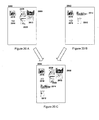
- Picture 1902 shows the calculated bounding box 1904 completely covering all of the thumbnails in the overview. The calculation of a bounding box is well known in the art.
- the available area of the overview for thumbnail placement is reduced by the width and height of the thumbnail to be added.
- Picture 1906 shows this reduction by the area 1908.
- the bounding box of the existing thumbnails is enlarged by the width and height of the chosen thumbnail.
- the new bounding box extends above and to the right of the overview and the extension beyond the boundaries of the overview are ignored.
- the new bounding box 1912 is shown in picture 1910.
- the available open space is calculated and then at 1810 a point is chosen which will be the origin or upper-left comer position of the thumbnail.
- the preferred point is shown in picture 1914 at point 1916.
- Picture 1918 shows the final overview with the thumbnail placed at 1920.
- a single bounding box for all the thumbnails previously placed on the overview was calculated and the origin of the new thumbnail was placed outside of that bounding box. It is also possible and understood by extension that instead of calculating just a single bounding box, an individual bounding box for each thumbnail may be calculated and extended so that the new thumbnail can be placed in any available position in the overview. This is well understood by those experienced with path planning algorithms and would be analogous to allowing a machine to travel between obstacles instead of requiring the robot to go around all the obstacles.
- Adding a second new thumbnail now to the overview shown in 1918 could be accomplished using the steps shown in Fig. 18.
- This box is calculated to be the size of the newly added thumbnail and then is extended up and to the left by the width and height of the thumbnail to be added, just like the first bounding box.
- the advantage of adding a new additional bounding box instead of redoing all the steps shown in Fig. 18 is that the next thumbnails can be added alongside the one that was just added. If a new overall bounding box was created instead, there would be a tendency for all new thumbnails to be placed below the one just added leaving a large amount of open space in the message.
- Fig. 13 since this is not a read-only collection, the "No" path from block 1300 is taken to block 1302. If the user has requested that she be able to modify the overview, at 1304 the overview could be displayed on the MFPs control panel display 120 and the user could move or resize thumbnails of the newly added documents. The user could also remove objects from the collection if so desired.
- the "Yes" path would be followed from block 1306 and the user could add annotations at step 1308 on the same overview display 120.
- Modifying the overview and adding annotations could be accomplished using an object-based drawing tool like those available in Microsoft's PowerPoint software or Adobe Illustrator or similar tools. These tools and techniques are well understood by those skilled in the art.
- the new annotations would be converted to the appropriate SVG elements and stored in the collection overview file.
- the overview could be displayed and selection tools could be presented to the user which allows the selection of regions of a variety of shapes on the overview. "Read-write”, “read-only”, or “add-only” permissions could be applied to each drawn or selected shape on the overview. Documents beneath a "read-only” selection region would be fixed and unchangeable in future interactions with the collection. Documents covered by an "add-only” region would not be seen in the "restricted" coversheet printed at block 1406 and could not be accessed using restricted collection identifiers or DRIs.
- all modified information is sent to the collection server, including the metadata files, SVG overview file, and any changes in the collection.
- This coversheet 102 preferably includes the elements shown in Fig. 5B as described for new empty collections with the exception that the overview area 506 is not empty but shows the thumbnails of the media and documents including any annotations and modifications made by the user. If the user has requested a collection with at least one add-only region, then two coversheets should be printed.
- One printed coversheet is a normal collection coversheet with no permission restrictions.
- the DRI encoded in the barcode on the coversheet is associated with the full-permission collection containing all of the media and documents. Using the full-permission coversheet, it is possible to access all of the documents stored in the collection including documents added in the future. It is important to have available a coversheet without restrictions. If only the restricted coversheet was available for an "add-only" collection, then documents could be added but never retrieved.
- the other printed coversheet will be the one for the restricted collection.
- the collection identifier or DRI printed on the restricted coversheet will point to a restricted collection and can be used only in the manner allowed in the restrictions. For instance, the add-only coversheet of a collection would only allow the user to add documents and not to see documents that have been added.
- the "No" path from block 1404 is taken since the user has not selected the "Print collection” task. If email addresses have been specified in block 608, then the collection identifiers and optionally an overview image are emailed to the people who are supposed to be notified. In the case of restricted collections, there might be two sets of email addresses - those who are to receive the restricted collection identifier and those who are to receive the full-permission identifier. All email recipients are notified appropriately at block 1410.
- Fig. 14 it is possible to notify by fax as well as email. Many other methods of notifying recipients of an available collection will be known to those skilled in the art and recognized as falling within the scope of this invention. For instance, if a fax number were supplied by the user of the invention and a faxed notification were requested, the MFP 100 could fax the appropriate coversheet to the number specified.
- This task corresponds to the "Add to Existing Collection" task shown in block 800.
- the user brings media to the MFP 100 or creates it using media recording devices 110, 112, 114, and 116 or the like connected to the MFP 100 or to the network 200.
- Creating or collecting documents and media was explained in conjunction with the "Create New Collection Task". The main difference between creating a collection and adding to a collection is that the MFP needs to know to which collection to add new media.
- the advantage of having a machine-readable collection identifier on a coversheet is that the MFP or any device which can locate and decode machine-readable codes can determine which collection is represented by the coversheet.
- the "Yes" path is followed from block 700 for the "Add to Collection” task.
- the user can indicate which collection the new media will be added to by typing in a collection identifier or DRI but this can be a difficult task because DRIs tend to be long random strings of characters.
- DRI's can be located and decoded from a scanned image or read using handheld barcode scanners if they are encoded in barcode format. Handheld scanners which read many different types of one and two dimensional barcodes are available from many companies like Hewlett-Packard Company of Palo Alto, California, USA.
- the coversheet should be placed on the MFP where it can be scanned, either in the automatic document feeder 308 or directly on the glass platen 309.
- the barcode can be scanned using a handheld scanner 710. If the barcode has been captured in a digital image, perhaps using the digital camera 112, the camera 112 can be directly connected to the MFP 100 or the memory card 116 from the camera can be plugged into the card reader 314.
- the present invention conveniently prints out a machine-readable DRI as part of the coversheet of the collection.
- the DRI is contained in a PDF417 format two-dimensional barcode on the coversheet and the coversheet is placed on the automatic document feeder 308 of the MFP 100. Additional documents or pages to be added to the collection are placed behind the coversheet.
- the additional pages can be any document pages or they can be coversheets of other messages.
- the user can indicate a desire to "Add to Existing Collection". Since at block 900, media is required for the process, any documents placed in the automatic document feeder (ADF) 308 are processed and scanned and the images from those documents are stored in the storage 316 of the MFP 100 for more processing. Any documents on the platen 309 are also scanned and media from the memory cards 116 and other devices is retrieved at block 906 and 908. These media and documents will be added to the designated collection.
- ADF automatic document feeder
- the "Yes" path from block 1000 is followed because there is media available.
- Each of the documents and media is searched for a machine-readable DRI.
- the DRI can be stored in the memory 318 of the MFP 100 so that it can be accessed when it is time to determine which collection to add the new media to. If the ADF 318 or platen 309 has been used to scan in a coversheet or if the DRI is contained in an image from the digital camera, the DRI will have to be read from the scanned or captured image in this step 1002.
- Either source of a DRI is acceptable and typically, if there is no DRI held in memory 318 due to hand scanning of a coversheet, the first scanned sheet or first image will contain the DRI.
- the DRI is acceptable and typically, if there is no DRI held in memory 318 due to hand scanning of a coversheet, the first scanned sheet or first image will contain the DRI.
- Those skilled in the art will recognize that there are many ways of providing the DRI to the MFP 100 an exhaustive list need not be provided.
- the "existing collection" DRI is taken from either the first scanned image or the first digital image. If a DRI is not found, the user can be asked if she wants to create a new collection. If a DRI is found in more than one place, either the user can be asked which to use as the existing collection, or one location can be given a higher priority and used first.
- step 1206 If the DRI found in step 1206 turns out to be a read-only collection, no documents can be added. In that case, some indication or error message should be displayed on the control panel 106 of the MFP 100 to indicate that a collection cannot be modified and the task is complete.
- step 1204 is taken. All of the image media including images which are scans of document pages is searched for machine-readable codes in step 1002. Typically, when adding a page or document to a collection, the image of that page is added to the collection storage area and a thumbnail is added to the overview. If that page happens to contain a machine-readable DRI then based on the users preference, instead of adding the page to the collection, the collection that the DRI represents can be added to the collection. In step 1204, for each page or image containing a DRI, the "page add" request is converted into a "collection add” request with the appropriate DRI representing the collection.
- Block 1210 represents the results of an action request and will not be discussed here because the block is passed over for the "Add to Existing Collection" task.
- Block 1212 indicates that annotations found on the coversheet should be added to the existing collection. In other words, if it is discovered by the MFP 100 that the collection overview has been modified, the marks made on the collection overview should be added to the collection overview when the new media is added.
- Locating marks on a collection overview can be done in many different ways. One way will be described in detail. Suppose that a collection coversheet is printed out on a black and white or grayscale printer. Marks can be made on the overview part of that coversheet using a red pen. Those marks can easily be separated from the original image using colored filters. For instance, most digital cameras use arrays of red green and blue filters over their image sensing elements. If all of the pixels which contain some red are separated into a separate image, that image can be used as an overlay where non-red pixels are transparent and red pixels are painted on top of the original overview.
- the overview is defined programmatically in the SVG file, it is also possible to construct an expected overview image for a collection and the expected image can be compared to the scanned or photographed image to look for differences.
- all the pixels of the actual image should be adjusted equally to match the overall contrast and brightness of the captured image.
- all significantly different pixels could be extracted - for instance, pixels that originally appeared white but are now black could be separated and considered a new annotation.
- annotations can be converted into a semitransparent overlay on top of the original overview or converted into lines and other shapes and inserted as annotations into the SVG file.
- Block 1214 does not apply to the present task and so block 1216 is entered.
- thumbnails are created for all of the new images, documents, pages, and media. For those pages which represent other collections, thumbnails are made for the collections instead of the page.
- all collected media is uploaded to the collection server.
- Step 1202 was skipped because a new collection identifier was not needed. However, it is important that the existing collection be changed in a way that makes the current state or version of the collection available at a later time. The new media should not be placed in the same storage area as the existing collection. Someone else might modify the same collection and try to access information or media that is no longer there.
- collections can have multiple versions.
- the first version of a collection might end with the /1/ pathname.
- the second version might end with the /2/ pathname, etc.
- the collection retains most of the same DRI, but has a different final pathname to indicate that it is a different version of the collection. This allows older versions of the collection to be available even as the collection is modified.
- new media and thumbnails in a collection are uploaded to a staging area on the collection server.
- the staging area is associated with the collection identifier but doesn't have a permanent final pathname.
- the collection server moves the collection into a final directory or storage area with a permanent final pathname.
- the permanent final pathname is usually the next integer after the most recently uploaded collection.
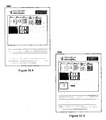
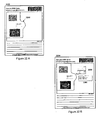
- FIGs. 16A and 16B show an example of a coversheet before and after a new document is added.
- Fig 16A the before picture 1600, contains seven thumbnails representing a combination of scanned pages and digital images.
- Fig 16B the after picture 1602, includes a thumbnail 1604 representing a collection that has been added to the collection.
- the thumbnail 1604 is a small version of the overview of the added collection.
- Block 1300 represents changes to both the overview and the collection itself. Documents can be removed from the collection in 1304. At 1308, annotations may be added or erased from the collection overview. This block 1308 only represents changes made to annotations or things that appear in the overview SVG file.
- block 1314 is where those modifications are made and possible modifications have been described when detailing other tasks so they will not be repeated here.
- Permissions are preferably handled and differentiated using collection identifiers.
- the collection server 108 should know that a single collection can be accessed using different pointers or identifiers and the identifiers indicate which permissions are allowed.
- This is analogous to Unix file system permissions and symbolic links.
- Each data file in a Unix file system has at least one pointer to the file stored in a directory. Links can be created which exist in other directories or perhaps in the same directory but with a different name. These links point to the exact same data on the disk as the original file, but have different metadata. That metadata includes the filename and full pathname, as well as file permissions.
- Unix files can be given restricted access which limits or allows certain individuals to read or write the file.
- a file can be set up so that it can be read, written, or deleted by anyone.
- the same file, through a link, can be given a more restrictive set of permissions, perhaps only letting one or a few people read the file and letting no one delete it. Even though the same data is pointed to by the two different pointers, what can be done with that data depends on the restrictions specified on the pointers, not on the data.
- a collection server 108 can keep a mapping of collection identifiers to collection directories and keep track of which identifiers have read and write permission.
- an MFP 100 makes modification requests to a collection server, if the identifier used to make the request is restricted in a way that doesn't permit that type of modification, the collection server can respond negatively.
- Figs. 24A and 24B Two possible options for maintaining permission information are shown in Figs. 24A and 24B.
- the permissions metadata can be kept in the directory containing the documents in the collection. This requires no duplication of data and only a single directory for each version of a collection.
- Fig. 24B shows an equally useful alternative where the directories are distinct but one uses links between the data files to avoid duplication of data.
- the permissions information is kept only in the directory where there are permission restrictions.
- a coversheet is to be printed, it is printed at block 1402 as before described. In some cases, multiple coversheets might be printed so that a full permission coversheet is available as well as a restricted permission coversheet.
- the "No" path is taken from block 1404 because this is not a printing task.
- the existing collection had contact information already associated with it and those were not removed by the user or if a list of recipients was given by the user at 1110, those recipients are notified by the appropriate method, including but not limited to email or fax.
- Modify Existing Collection is essentially the same as “Add to Existing Collection” where what is added is nothing. The differences between the two tasks are described here briefly. The “No” paths are followed from blocks 712 and 716 since no additional media is needed or expected. "Modify Existing Collection” is selected at block 800. However, if “Add to Existing Collection” was selected but the only media made available to the MFP 100 was the coversheet of the collection to be modified, it would fall back to "Modify Existing Collection” allowing a new version without new media to be modified and annotated and then forward optionally to a different group of recipients.
- the "Perform Noted Actions" task is driven by annotations on a coversheet. Multiple coversheets can be marked up and all actions performed in sequence if all the coversheets are put into the ADF 308 at once.
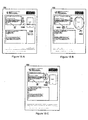
- Figs. 15A, 15B, and 15C show various marks that might be made on the overview part of a collection coversheet.
- Fig. 15A shows a coversheet 102 with an F! mark and a number drawn at 1500 near a circled document.
- a note "Keep me informed” has been written on the overview. Neither of these marks are part of the original coversheet.
- Marks on a coversheet can be extracted in a variety of ways at block 1008. If a special pen color such as red is used, that color could be detected in a color scan or image of the coversheet and all instances of that color in an image would be considered part of the marks made by the user. An alternative would be to compare the overview with an image based on the overview SVG file as previously described. Differences would be considered marks.
- action marks which include, for instance, "F!, "E!, "P!, or "G!”. These marks stand for “fax”, “email”, “print”, and “group” and represent actions that can be taken on one or more documents or media in a collection. It will be recognized that this is not an exhaustive list of possibilities but a representative list of things that might be done with documents or media.
- Circled regions could be identified using a variety of known techniques. Many companies, such as Arbor Image Corporation in Ann Arbor, Michigan, USA and Arc En Ciel Ltd based in London, England have raster to vector conversion tools. These tools can recognize circles in raster images. Such tools could be used to find circled documents.
- Circled documents will need to have an action command near them. Some commands require additional information like a fax number or email address. If action commands are ambiguous, feedback can be provided to the user and the user can disambiguate the action request either using the MFP control panel 106.
- Figs. 15A, 15B, and 15C give some examples of action requests.
- the user in Fig.. 15A put an "F! mark and a number drawn at 1500 near a circled document on coversheet 102.
- the number by the "F! is the requested fax number and "F! indicates that the document indicated by the circle should be faxed.
- Multiple documents can be enclosed within a single circle indicating that the action should be performed on all the documents.
- a note "Keep me informed" has been written on the overview. Since there is no action request, the marks are added to the overview as an annotation.
- Fig. 15B shows two circles and two action commands.
- One document is circled and an "E! and an email address is written near the circle at 1502.
- another document is circled and a "P! action command indicates the users request for a printout.
- Fig. 15C shows a grouping request at 1506 where multiple documents are circled and a "G! is written.
- the grouping operation consists of creating a new collection, moving the two documents or media into the new collection by adding them to the new collection and deleting them from the old collection. The new collection is then added to the old collection in approximately the same location as the original files.
- the "Print Collection" task is different than most of the other tasks because no new collection or version is made. Multiple collections can be printed at once by providing the MFP 100 with multiple coversheets either in digital images or in the ADF 308. For each DRI found in an image or scan, the MFP 100 contacts the collection server 108 and retrieves documents and media.
- the user provides the MFP with one or more DRIs of collections to be printed using the methods previously described for other tasks.
- "Print Collection” is chosen.
- some media must be provided through the ADF 308, on the platen 309 or through some other device 112, 114, or 116.
- the machine-readable code must be located and decoded in 1002.
- Some print actions might be driven by action requests as discussed in the "Perform Noted Actions" section. Those action requests are discovered in block 1002 and associated with the appropriate document in 1004.
- the current chosen task might have action requests that need to be discovered, for instance "Modify Existing Collection"
- the "Yes" path is taken and the marks are extracted 1008, analyzed 1010, and retained 1012 for later operation on the collection.
- step 608 moving through step 1200 along the "No" path to 1206, the DRI associated with the coversheet is used to access the collection to be printed on the collection server 108. At 1208, the "Yes" path is taken since this is a print request.
- block 612 some modification of the message might be allowed as in other tasks, but if this is strictly a printing task, block 612 can be bypassed with no modifications and no upload of a new collection version.
- the "Yes" path is taken to block 1318 and the user can browse the collection using the control panel 106 on the MFP 100. Browsing a collection of documents is similar to browsing on the World Wide Web. If a media document is shown in a collection and can be printed, then the user could be permitted to select the document and choose print. There are many examples of browsing styles using either direct manipulation with a mouse or using the cursor and tab keys to move between selectable objects like documents.
- Figs. 17A, 17B, and 17C show a collection being browsed as it might appear on display 120 of the MFP control panel 106.
- Fig. 17A shows a collection coversheet 1700.
- the overview 1702 from the coversheet 1700 is displayed on the MFP 100 display 120.
- the collection shown contains one text box and seven collections.
- One collection 1704 is selected and expanded and the overview 1706 from that collection is displayed on the MFP 100 display 120.
- the newly displayed overview 1706 shows that the collection contains two collections, a text note, and one page of a document.
- FIG. 20A, 20B, 20C, and 21 show a special case of merging of different versions of a collection but the technique is applicable to merging any group of collections.
- the task when merging is to place all of the documents and media into a single collection on the collection server.
- an overview should be created which contains all of the thumbnails of the media.
- some media might be redundant in that it is contained in both versions of the collection and only some media is only contained in one.
- FIG. 21 the overviews of five different versions of a collection are shown 2100, 2002, 2102, 2000, and 2004. Versions 2 2102 and 3 2002 were both based on version 1 2100 and therefore have some common documents. Version 4 2000 is based on version 3 2002. Version 5 2004 will represents the new merged version is based on version 4 2000 because version 4 of the collection contains more unique documents or perhaps was created most recently of all the versions.
- the user could take the coversheet for any existing version of the collection and place it in the ADF 308 and select "Merge Collections". Since there is only one coversheet, the MFP 100 could try to merge the terminal versions of the collection indicated and could begin by verifying that the user wanted to merge the various versions of the collection into a single collection. If the user indicated in the affirmative, then the MFP 100 could gather information about all the versions of this collection 2100, 2002, 2102, and 2000 represented by the DRI on the coversheet and begin to merge the versions. In all cases, only the terminal versions of the collection need to be merged. Another way to say it is that if the version hierarchy forms a graph where version 1 2100 is the root of the tree, the only leaves of the graph are version 4 2000 and version 3 2002. By looking at the hierarchy of the collection, only version 4 2000 and version 3 2002 have not been used to create on of the other versions of the message.
- Figs. 20A, 20B, and 20C show a more detailed view of the merging operation.
- the first task when merging is to compare the collections and find all of the documents and media that are in both collections or both versions.
- Figs. 20A and 20B only the image in the upper left of the overview 2016 and the audio directly below the image 2018 are in both collections.
- the remaining documents and media 2008, 2010, 2012, 2020, and 2022 are only in one version of the collection.
- the unique documents and media from one of the collections is placed in the new collection or new version.
- version 4 2000 is chosen because it contains more documents than version 3 2002.
- each document is copied to the collection server 108 and the thumbnails are added to the collection overview as shown in Figs. 18 and 19.
- the remaining documents could be added to the new version in their current configuration below the bounding box of the common documents.
- FIG. 20C shows the end result of the version merge where all media and documents are now contained in a single version of the collection, version 5, whose overview 2004 is shown in Fig. 20C and Fig. 21.
- the annotations from both collections or both versions of the collection are also transferred. Annotations which have endpoints on documents or cross documents will be kept with the documents and other annotations will be placed where appropriate.
- the new collection could be presented for modification in block 612 and annotations could be redrawn or deleted and the document and media thumbnails could be moved or resized, even deleted if so desired.
- the newly merged collection coversheet could be printed. If there were email addresses or contact information associated with the collection, the contact information could be merged in a similar manner so that everyone listed as a recipient of notification in both collections would be added to the new collection.
- Version 3 2002 and version 4 2000 are from the same collection but contain different media and were created from different versions of the collection.
- the user might want to always add information to the most recent version of a collection instead of adding it to the version.
- the version which ends in /0/ is a special version which means "the latest" version. Whenever the user uses the /0/ DRI in an operation at the MFP 100, the MFP tries to base the operation on the latest version of the collection in the collection server.
- One task available to users of the present invention is to print out the /0/ version of the coversheet given any other version.
- the user presents any version of a coversheet to the MFP 100 in any of the aforementioned ways, indicates to the MFP at block 800 on the control panel 106 that the /0/ coversheet should be printed.
- the MFP 100 talks to the collection server 108 to retrieve the latest version of the collection.
- the machine-readable 504 and human-readable 510 DRIs both end in /0/ and whenever that coversheet is used to modify a collection, the modifications are made to the most recently uploaded collection.
- the MFP 100 would present the collection overview in block 1312 after following the flow of the invention appropriately through Figs. 7-13 as has been described for other related tasks.
- the user would be permitted to draw or sketch regions and assign permissions to those regions in order to restrict the operations on each of the documents and media in the collection.
- Fig. 22A the user can sketch a region 2202 which protects the part of the overview she would like to remain static, leaving the remaining overview region available for adding notes, annotations and other media.
- FIGs. 23A and 23B A second example is shown in Figs. 23A and 23B where there are 3 regions defined. Regions 2302 and 2304 on coversheet 2300 are both read-only. Only region 2306 has both read and write permissions. After using the coversheet 2300 to add some documents to the collection, the coversheet looks like it does in Fig. 23B where documents 2308 and 2310 have been added. Another person might have a coversheet where 2304 has full permission but 2302 and 2306 are restricted as read-only. That person can only add and modify things in region 2304. This provides a shared space where each coversheet represents an area which can be modified and at the same time providing access to information added to other regions.
- An "Add-only" coversheet can be made using the same technique as the read-only coversheet only the restriction is that people can add documents to the add-only region but not see what has been added.
Landscapes
- Engineering & Computer Science (AREA)
- Databases & Information Systems (AREA)
- Theoretical Computer Science (AREA)
- Data Mining & Analysis (AREA)
- Physics & Mathematics (AREA)
- General Engineering & Computer Science (AREA)
- General Physics & Mathematics (AREA)
- Facsimiles In General (AREA)
- Processing Or Creating Images (AREA)
- Information Retrieval, Db Structures And Fs Structures Therefor (AREA)
- Storing Facsimile Image Data (AREA)
- Storage Device Security (AREA)
Applications Claiming Priority (2)
| Application Number | Priority Date | Filing Date | Title |
|---|---|---|---|
| US404927 | 1989-09-08 | ||
| US10/404,927 US7739583B2 (en) | 2003-03-31 | 2003-03-31 | Multimedia document sharing method and apparatus |
Publications (1)
| Publication Number | Publication Date |
|---|---|
| EP1471445A1 true EP1471445A1 (en) | 2004-10-27 |
Family
ID=32962385
Family Applications (1)
| Application Number | Title | Priority Date | Filing Date |
|---|---|---|---|
| EP04001199A Withdrawn EP1471445A1 (en) | 2003-03-31 | 2004-01-21 | Multimedia document sharing method and apparatus |
Country Status (4)
| Country | Link |
|---|---|
| US (1) | US7739583B2 (https=) |
| EP (1) | EP1471445A1 (https=) |
| JP (1) | JP4572084B2 (https=) |
| CN (1) | CN1314226C (https=) |
Cited By (2)
| Publication number | Priority date | Publication date | Assignee | Title |
|---|---|---|---|---|
| EP1583348A1 (en) | 2004-03-31 | 2005-10-05 | Ricoh Co., Ltd. | Check boxes for identifying and processing stored documents, and action stickers for identifying and processing stored documents |
| CN102147684A (zh) * | 2010-11-30 | 2011-08-10 | 广东威创视讯科技股份有限公司 | 一种触摸屏屏幕扫描方法及其系统 |
Families Citing this family (57)
| Publication number | Priority date | Publication date | Assignee | Title |
|---|---|---|---|---|
| US7703002B2 (en) * | 2003-03-31 | 2010-04-20 | Ricoh Company, Ltd. | Method and apparatus for composing multimedia documents |
| US7536638B2 (en) | 2003-03-31 | 2009-05-19 | Ricoh Co., Ltd. | Action stickers for identifying and processing stored documents |
| US7509569B2 (en) * | 2003-03-31 | 2009-03-24 | Ricoh Co., Ltd. | Action stickers for nested collections |
| US7757162B2 (en) | 2003-03-31 | 2010-07-13 | Ricoh Co. Ltd. | Document collection manipulation |
| US7489417B2 (en) * | 2003-09-30 | 2009-02-10 | Toshiba Corporation | USB print |
| US20050080932A1 (en) * | 2003-10-09 | 2005-04-14 | Pao-Kang Liu | New generation fax machine |
| US7536636B2 (en) * | 2004-04-26 | 2009-05-19 | Kodak Graphic Communications Canada Company | Systems and methods for comparing documents containing graphic elements |
| US7580164B2 (en) * | 2004-12-22 | 2009-08-25 | Ricoh Co., Ltd. | Document separator pages |
| AU2006214511A1 (en) | 2005-02-12 | 2006-08-24 | Teresis Media Management, Inc. | Methods and apparatuses for assisting the production of media works and the like |
| JP4960609B2 (ja) * | 2005-07-15 | 2012-06-27 | 株式会社リコー | 取引書類管理システム |
| US7809156B2 (en) | 2005-08-12 | 2010-10-05 | Ricoh Company, Ltd. | Techniques for generating and using a fingerprint for an article |
| US20070061319A1 (en) * | 2005-09-09 | 2007-03-15 | Xerox Corporation | Method for document clustering based on page layout attributes |
| US7840898B2 (en) * | 2005-11-01 | 2010-11-23 | Microsoft Corporation | Video booklet |
| US20070198569A1 (en) * | 2005-12-07 | 2007-08-23 | The Regents Of The University Of California | Counterfeit detection |
| JP2007235699A (ja) * | 2006-03-02 | 2007-09-13 | Murata Mach Ltd | 通信装置 |
| US8689102B2 (en) * | 2006-03-31 | 2014-04-01 | Ricoh Company, Ltd. | User interface for creating and using media keys |
| US8554690B2 (en) * | 2006-03-31 | 2013-10-08 | Ricoh Company, Ltd. | Techniques for using media keys |
| US20070229678A1 (en) * | 2006-03-31 | 2007-10-04 | Ricoh Company, Ltd. | Camera for generating and sharing media keys |
| US9525547B2 (en) | 2006-03-31 | 2016-12-20 | Ricoh Company, Ltd. | Transmission of media keys |
| US20070233612A1 (en) * | 2006-03-31 | 2007-10-04 | Ricoh Company, Ltd. | Techniques for generating a media key |
| JP2007323544A (ja) * | 2006-06-05 | 2007-12-13 | Sony Corp | 情報処理システム、情報処理装置、および方法、並びにコンピュータ・プログラム |
| JP4795133B2 (ja) * | 2006-06-23 | 2011-10-19 | キヤノン株式会社 | 画像形成装置、画像処理方法、該方法を実行する制御プログラム |
| US20080005239A1 (en) * | 2006-06-28 | 2008-01-03 | Brian Podl | System and method for capturing collaborative data at a multi-function peripheral (MFP) |
| JP2008052710A (ja) * | 2006-07-27 | 2008-03-06 | Ricoh Co Ltd | スキャン文書管理方法 |
| US9356935B2 (en) * | 2006-09-12 | 2016-05-31 | Adobe Systems Incorporated | Selective access to portions of digital content |
| US20080243702A1 (en) * | 2007-03-30 | 2008-10-02 | Ricoh Company, Ltd. | Tokens Usable in Value-Based Transactions |
| US8756673B2 (en) | 2007-03-30 | 2014-06-17 | Ricoh Company, Ltd. | Techniques for sharing data |
| US20090100134A1 (en) * | 2007-10-12 | 2009-04-16 | Sony Ericsson Mobile Communications Ab | System and Method for Customized Sharing of Multimedia Content in a Communications Network |
| JP4871841B2 (ja) * | 2007-11-08 | 2012-02-08 | キヤノン株式会社 | 印刷制御装置および印刷制御方法ならびにそのプログラムおよび記憶媒体 |
| JP5065075B2 (ja) * | 2008-02-12 | 2012-10-31 | 株式会社リコー | 情報処理装置、情報処理方法、及びプログラム |
| US8312376B2 (en) * | 2008-04-03 | 2012-11-13 | Microsoft Corporation | Bookmark interpretation service |
| US20090262385A1 (en) * | 2008-04-16 | 2009-10-22 | Samsung Electronics Co., Ltd. | System and method for saving and loading user configurations for a multi-function peripheral (mfp) |
| US8285811B2 (en) * | 2008-04-17 | 2012-10-09 | Eloy Technology, Llc | Aggregating media collections to provide a primary list and sorted sub-lists |
| US8613108B1 (en) * | 2009-03-26 | 2013-12-17 | Adobe Systems Incorporated | Method and apparatus for location-based digital rights management |
| US8289418B2 (en) | 2009-06-30 | 2012-10-16 | Sandisk Technologies Inc. | Removable data storage device with interface to receive image content from a camera |
| US20110085205A1 (en) * | 2009-10-14 | 2011-04-14 | Kabushiki Kaisha Toshiba | Image forming apparatus and processing control method |
| US20110231930A1 (en) * | 2010-03-17 | 2011-09-22 | Cisco Technology, Inc. | Incorporating visual aspects to identify permissions and security levels in aggregated content |
| WO2012118512A1 (en) * | 2011-03-03 | 2012-09-07 | Hewlett-Packard Development Company, L.P. | Records management system |
| US9317861B2 (en) * | 2011-03-30 | 2016-04-19 | Information Resources, Inc. | View-independent annotation of commercial data |
| US8996350B1 (en) | 2011-11-02 | 2015-03-31 | Dub Software Group, Inc. | System and method for automatic document management |
| US8867106B1 (en) * | 2012-03-12 | 2014-10-21 | Peter Lancaster | Intelligent print recognition system and method |
| US9015582B2 (en) * | 2012-05-01 | 2015-04-21 | Kabushiki Kaisha Toshiba | User interface for reordering thumbnails |
| US20130316773A1 (en) * | 2012-05-28 | 2013-11-28 | Ian A. R. Boyd | System and method for the creation of an enhanced multi-dimensional pictogame using pictooverlay technology |
| EP3066636A4 (en) * | 2013-11-06 | 2017-04-26 | Intel Corporation | Unifying interface for cloud content sharing services |
| US10546149B2 (en) | 2013-12-10 | 2020-01-28 | Early Warning Services, Llc | System and method of filtering consumer data |
| US10769296B2 (en) | 2013-12-10 | 2020-09-08 | Early Warning Services, Llc | System and method of permission-based data sharing |
| US9552342B2 (en) * | 2014-01-09 | 2017-01-24 | Microsoft Technology Licensing, Llc | Generating a collage for rendering on a client computing device |
| WO2015183294A1 (en) * | 2014-05-30 | 2015-12-03 | Hewlett-Packard Development Company, L.P. | Media table for a digital document |
| US10182099B2 (en) * | 2015-04-09 | 2019-01-15 | Omron Corp. | Web enabled interface for an embedded server |
| US20190087060A1 (en) * | 2017-09-19 | 2019-03-21 | Sling Media Inc. | Dynamic adjustment of media thumbnail image size based on touchscreen pressure |
| US11257491B2 (en) | 2018-11-29 | 2022-02-22 | Adobe Inc. | Voice interaction for image editing |
| SG10202001898SA (en) | 2020-03-03 | 2021-01-28 | Gerard Lancaster Peter | Method and system for digital marketing and the provision of digital content |
| US11301906B2 (en) | 2020-03-03 | 2022-04-12 | BrandActif Ltd. | Method and system for digital marketing and the provision of digital content |
| US11593843B2 (en) | 2020-03-02 | 2023-02-28 | BrandActif Ltd. | Sponsor driven digital marketing for live television broadcast |
| US11854047B2 (en) | 2020-03-03 | 2023-12-26 | BrandActif Ltd. | Method and system for digital marketing and the provision of digital content |
| US12321963B2 (en) | 2020-03-03 | 2025-06-03 | Brandactif, Ltd. | Method and system for digital marketing and the provision of digital content |
| CN113568690B (zh) * | 2021-02-05 | 2026-02-27 | 腾讯科技(深圳)有限公司 | 数据共享方法和装置 |
Citations (2)
| Publication number | Priority date | Publication date | Assignee | Title |
|---|---|---|---|---|
| US6466329B1 (en) * | 1997-03-28 | 2002-10-15 | International Business Machines Corporation | Method and apparatus for managing copy quality in the hardcopy or softcopy reproduction of either original pages or extrinsically received electronic page images |
| US20020163653A1 (en) * | 2001-05-07 | 2002-11-07 | Struble Christian L. | Method and system for fit-to-form scanning with a scanning device |
Family Cites Families (201)
| Publication number | Priority date | Publication date | Assignee | Title |
|---|---|---|---|---|
| US4417239A (en) | 1980-12-24 | 1983-11-22 | International Business Machines Corp. | Interactive combination display |
| FR2544114A1 (fr) | 1983-04-08 | 1984-10-12 | Gavilan Computer Corp | Procede et dispositif pour l'affichage avec un effet de zoom sur un terminal d'ordinateur |
| JPH0677192B2 (ja) | 1984-02-23 | 1994-09-28 | キヤノン株式会社 | 文字データ表示方法 |
| JPS6324419A (ja) | 1986-07-17 | 1988-02-01 | Toshiba Corp | 複合文書処理装置 |
| JPH01237757A (ja) * | 1987-12-23 | 1989-09-22 | Internatl Business Mach Corp <Ibm> | 情報処理システム中の文書オブジエクトを検索する方法 |
| US5060135A (en) * | 1988-09-16 | 1991-10-22 | Wang Laboratories, Inc. | Apparatus for manipulating documents in a data processing system utilizing reduced images of sheets of information which are movable |
| EP0374241B1 (en) | 1988-05-27 | 1997-08-27 | Kodak Limited | Document annotation and manipulation in a data processing system |
| EP0394379B1 (en) | 1988-05-27 | 1998-01-07 | Kodak Limited | Document folder icon for display in a data processing system |
| US5247575A (en) | 1988-08-16 | 1993-09-21 | Sprague Peter J | Information distribution system |
| US4907973A (en) | 1988-11-14 | 1990-03-13 | Hon David C | Expert system simulator for modeling realistic internal environments and performance |
| US4998215A (en) | 1989-02-01 | 1991-03-05 | Hewlett-Packard Company | Apparatus and method for converting video information for printing by a standard printer |
| US5191611A (en) | 1989-04-03 | 1993-03-02 | Lang Gerald S | Method and apparatus for protecting material on storage media and for transferring material on storage media to various recipients |
| GB2234609A (en) | 1989-07-29 | 1991-02-06 | Ibm | Information handling system |
| US4987447A (en) * | 1989-09-18 | 1991-01-22 | Eastman Kodak Company | Control sheet generation for copiers and printers |
| EP0434588A3 (en) * | 1989-12-20 | 1993-01-20 | International Business Machines Corporation | Method of expanding user access to a library of shared electronic documents |
| JPH03196266A (ja) | 1989-12-25 | 1991-08-27 | Toshiba Corp | 画像形成記憶装置 |
| US5339391A (en) | 1990-05-14 | 1994-08-16 | Microelectronics And Computer Technology Corporation | Computer display unit with attribute enhanced scroll bar |
| US5153831A (en) | 1990-05-29 | 1992-10-06 | Franklin Electronic Publishers, Incorporated | Electronic text |
| US5761655A (en) | 1990-06-06 | 1998-06-02 | Alphatronix, Inc. | Image file storage and retrieval system |
| US5255389A (en) * | 1990-06-21 | 1993-10-19 | International Business Machines Corporation | Document interchange replace option via a copy command |
| US5404295A (en) | 1990-08-16 | 1995-04-04 | Katz; Boris | Method and apparatus for utilizing annotations to facilitate computer retrieval of database material |
| US5309359A (en) | 1990-08-16 | 1994-05-03 | Boris Katz | Method and apparatus for generating and utlizing annotations to facilitate computer text retrieval |
| US5161037A (en) * | 1990-10-10 | 1992-11-03 | Fuji Xerox Corporation, Ltd. | Image processing system and method for processing documents in accordance with a job control sheet |
| US5168371A (en) * | 1990-12-14 | 1992-12-01 | Fuji Xerox Co., Ltd. | Image processing system for generating, storing, and transmitting image datafiles associated with enciphered identification information |
| US5225900A (en) * | 1990-12-31 | 1993-07-06 | Xerox Corporation | Method of storing information within a reproduction system |
| US5142579A (en) | 1991-01-29 | 1992-08-25 | Anderson Walter M | Public key cryptographic system and method |
| US5258855A (en) * | 1991-03-20 | 1993-11-02 | System X, L. P. | Information processing methodology |
| CA2045907C (en) * | 1991-06-28 | 1998-12-15 | Gerald B. Anderson | A method for storing and retrieving annotations and redactions in final form documents |
| US5265065A (en) | 1991-10-08 | 1993-11-23 | West Publishing Company | Method and apparatus for information retrieval from a database by replacing domain specific stemmed phases in a natural language to create a search query |
| US5349658A (en) | 1991-11-01 | 1994-09-20 | Rourke Thomas C O | Graphical user interface |
| CA2078423C (en) | 1991-11-19 | 1997-01-14 | Per-Kristian Halvorsen | Method and apparatus for supplementing significant portions of a document selected without document image decoding with retrieved information |
| US5267303A (en) * | 1992-03-20 | 1993-11-30 | Xerox Corporation | Using a form to request automatic creation of form with fields for requesting operations in relation to items |
| US5448375A (en) * | 1992-03-20 | 1995-09-05 | Xerox Corporation | Method and system for labeling a document for storage, manipulation, and retrieval |
| US5999173A (en) | 1992-04-03 | 1999-12-07 | Adobe Systems Incorporated | Method and apparatus for video editing with video clip representations displayed along a time line |
| US5499108C1 (en) * | 1992-07-29 | 2001-01-16 | Primax Electronics Ltd | Document-driven scanning input device communicating with a computer |
| JP3450382B2 (ja) | 1992-09-24 | 2003-09-22 | 株式会社東芝 | 画像処理装置 |
| EP0996083B1 (en) | 1992-09-28 | 2003-03-26 | Olympus Optical Co., Ltd. | Information reproducing system for optically reading a dot code from a recording medium |
| US5371551A (en) | 1992-10-29 | 1994-12-06 | Logan; James | Time delayed digital video system using concurrent recording and playback |
| US5444476A (en) | 1992-12-11 | 1995-08-22 | The Regents Of The University Of Michigan | System and method for teleinteraction |
| US5243381A (en) * | 1993-01-04 | 1993-09-07 | Xerox Corporation | Method for compiling multiple jobs with job reference sheets |
| US5596700A (en) | 1993-02-17 | 1997-01-21 | International Business Machines Corporation | System for annotating software windows |
| US5490217A (en) | 1993-03-05 | 1996-02-06 | Metanetics Corporation | Automatic document handling system |
| JP2962961B2 (ja) | 1993-03-19 | 1999-10-12 | シャープ株式会社 | イメージ情報処理装置 |
| JP3689127B2 (ja) | 1993-04-22 | 2005-08-31 | ゼロックス コーポレイション | 文書処理システムと文書処理方法 |
| US5638543A (en) | 1993-06-03 | 1997-06-10 | Xerox Corporation | Method and apparatus for automatic document summarization |
| US5384703A (en) | 1993-07-02 | 1995-01-24 | Xerox Corporation | Method and apparatus for summarizing documents according to theme |
| US5481666A (en) | 1993-08-25 | 1996-01-02 | Taligent, Inc. | Object-oriented navigation system |
| US5689641A (en) | 1993-10-01 | 1997-11-18 | Vicor, Inc. | Multimedia collaboration system arrangement for routing compressed AV signal through a participant site without decompressing the AV signal |
| JP3475468B2 (ja) | 1993-10-29 | 2003-12-08 | カシオ計算機株式会社 | 物体画像出力装置及び物体画像出力方法 |
| SE501105C2 (sv) | 1993-11-17 | 1994-11-14 | Telub Teknik Ab | System för läsning av krypterad information samt en enhet för användning i ett sådant system |
| US5400177A (en) | 1993-11-23 | 1995-03-21 | Petitto; Tony | Technique for depth of field viewing of images with improved clarity and contrast |
| US5414644A (en) | 1993-11-24 | 1995-05-09 | Ethnographics, Inc. | Repetitive event analysis system |
| US5459307A (en) * | 1993-11-30 | 1995-10-17 | Xerox Corporation | System for storage and retrieval of digitally encoded information on a medium |
| NZ329891A (en) | 1994-01-13 | 2000-01-28 | Certco Llc | Method of upgrading firmware of trusted device using embedded key |
| DE4404105A1 (de) * | 1994-02-09 | 1995-08-10 | Liu Ming Jen | Leuchte |
| US5661799A (en) | 1994-02-18 | 1997-08-26 | Infosafe Systems, Inc. | Apparatus and storage medium for decrypting information |
| US5468371A (en) | 1994-04-11 | 1995-11-21 | Texaco Inc. | Catalyst for residual conversion demonstrating reduced toluene insolubles |
| US5690496A (en) | 1994-06-06 | 1997-11-25 | Red Ant, Inc. | Multimedia product for use in a computer for music instruction and use |
| US5864332A (en) | 1994-06-29 | 1999-01-26 | Canon Business Machines, Inc. | Scalable edit window and displayable position indicators for an electronic typewriter |
| US5508734A (en) | 1994-07-27 | 1996-04-16 | International Business Machines Corporation | Method and apparatus for hemispheric imaging which emphasizes peripheral content |
| US5715381A (en) * | 1994-08-08 | 1998-02-03 | Xerox Corporation | Method of creating and managing packages, including multiple documents, in a printing system |
| US5903646A (en) | 1994-09-02 | 1999-05-11 | Rackman; Michael I. | Access control system for litigation document production |
| US5481353A (en) | 1994-10-31 | 1996-01-02 | Xerox Corporation | Apparatus for producing variable feature presentation sets |
| US5758257A (en) * | 1994-11-29 | 1998-05-26 | Herz; Frederick | System and method for scheduling broadcast of and access to video programs and other data using customer profiles |
| US5903538A (en) | 1994-12-14 | 1999-05-11 | Matsushita Electric Industrial Co., Ltd. | Automatic disk change apparatus and disk tray for the apparatus |
| US5946678A (en) | 1995-01-11 | 1999-08-31 | Philips Electronics North America Corporation | User interface for document retrieval |
| US5694559A (en) | 1995-03-07 | 1997-12-02 | Microsoft Corporation | On-line help method and system utilizing free text query |
| US5870552A (en) * | 1995-03-28 | 1999-02-09 | America Online, Inc. | Method and apparatus for publishing hypermedia documents over wide area networks |
| US5717940A (en) | 1995-04-28 | 1998-02-10 | Ricoh Company, Ltd. | Method of selecting a target document using features of an example page |
| US5990934A (en) | 1995-04-28 | 1999-11-23 | Lucent Technologies, Inc. | Method and system for panoramic viewing |
| US5832298A (en) * | 1995-05-30 | 1998-11-03 | Canon Kabushiki Kaisha | Adaptive graphical user interface for a network peripheral |
| US5870770A (en) | 1995-06-07 | 1999-02-09 | Wolfe; Mark A. | Document research system and method for displaying citing documents |
| US5754308A (en) * | 1995-06-27 | 1998-05-19 | Panasonic Technologies, Inc. | System and method for archiving digital versions of documents and for generating quality printed documents therefrom |
| US5778397A (en) | 1995-06-28 | 1998-07-07 | Xerox Corporation | Automatic method of generating feature probabilities for automatic extracting summarization |
| US5838317A (en) | 1995-06-30 | 1998-11-17 | Microsoft Corporation | Method and apparatus for arranging displayed graphical representations on a computer interface |
| US5734753A (en) | 1995-08-31 | 1998-03-31 | Hewlett-Packard Company | Partial pixel encoding and decoding method |
| US5781785A (en) | 1995-09-26 | 1998-07-14 | Adobe Systems Inc | Method and apparatus for providing an optimized document file of multiple pages |
| US5737599A (en) | 1995-09-25 | 1998-04-07 | Rowe; Edward R. | Method and apparatus for downloading multi-page electronic documents with hint information |
| JP2000500887A (ja) | 1995-09-25 | 2000-01-25 | アドビ システムズ インコーポレイテッド | 電子文書への最適アクセス |
| JP2960340B2 (ja) | 1995-10-20 | 1999-10-06 | 富士ゼロックス株式会社 | データ検索方法及び装置 |
| US5710874A (en) * | 1995-10-25 | 1998-01-20 | Xerox Corporation | System for managing printing system memory with machine readable code |
| US5760767A (en) | 1995-10-26 | 1998-06-02 | Sony Corporation | Method and apparatus for displaying in and out points during video editing |
| US5717879A (en) | 1995-11-03 | 1998-02-10 | Xerox Corporation | System for the capture and replay of temporal data representing collaborative activities |
| US20020002562A1 (en) | 1995-11-03 | 2002-01-03 | Thomas P. Moran | Computer controlled display system using a graphical replay device to control playback of temporal data representing collaborative activities |
| US5751287A (en) | 1995-11-06 | 1998-05-12 | Documagix, Inc. | System for organizing document icons with suggestions, folders, drawers, and cabinets |
| JP3606401B2 (ja) | 1995-11-30 | 2005-01-05 | 富士通株式会社 | 文書検索装置および方法 |
| US5793365A (en) | 1996-01-02 | 1998-08-11 | Sun Microsystems, Inc. | System and method providing a computer user interface enabling access to distributed workgroup members |
| CA2242596C (en) | 1996-01-11 | 2012-06-19 | Mrj, Inc. | System for controlling access and distribution of digital property |
| US5832474A (en) | 1996-02-26 | 1998-11-03 | Matsushita Electric Industrial Co., Ltd. | Document search and retrieval system with partial match searching of user-drawn annotations |
| US5809471A (en) | 1996-03-07 | 1998-09-15 | Ibm Corporation | Retrieval of additional information not found in interactive TV or telephony signal by application using dynamically extracted vocabulary |
| GB9604987D0 (en) * | 1996-03-08 | 1996-05-08 | Ibm | Data management system and method for replicated data |
| US5982507A (en) | 1996-03-15 | 1999-11-09 | Novell, Inc. | Method and system for generating in a headerless apparatus a communications header for use in routing of a message |
| US5666414A (en) | 1996-03-21 | 1997-09-09 | Micali; Silvio | Guaranteed partial key-escrow |
| JPH09265363A (ja) | 1996-03-28 | 1997-10-07 | Fuji Xerox Co Ltd | 印刷処理装置および方法 |
| US5873107A (en) | 1996-03-29 | 1999-02-16 | Apple Computer, Inc. | System for automatically retrieving information relevant to text being authored |
| US5721897A (en) | 1996-04-09 | 1998-02-24 | Rubinstein; Seymour I. | Browse by prompted keyword phrases with an improved user interface |
| US5933841A (en) | 1996-05-17 | 1999-08-03 | Ameritech Corporation | Structured document browser |
| US5761686A (en) * | 1996-06-27 | 1998-06-02 | Xerox Corporation | Embedding encoded information in an iconic version of a text image |
| US5751283A (en) | 1996-07-17 | 1998-05-12 | Microsoft Corporation | Resizing a window and an object on a display screen |
| US6021403A (en) | 1996-07-19 | 2000-02-01 | Microsoft Corporation | Intelligent user assistance facility |
| US5765176A (en) * | 1996-09-06 | 1998-06-09 | Xerox Corporation | Performing document image management tasks using an iconic image having embedded encoded information |
| US5812664A (en) | 1996-09-06 | 1998-09-22 | Pitney Bowes Inc. | Key distribution system |
| US5802175A (en) | 1996-09-18 | 1998-09-01 | Kara; Salim G. | Computer file backup encryption system and method |
| US5734752A (en) | 1996-09-24 | 1998-03-31 | Xerox Corporation | Digital watermarking using stochastic screen patterns |
| US6026409A (en) | 1996-09-26 | 2000-02-15 | Blumenthal; Joshua O. | System and method for search and retrieval of digital information by making and scaled viewing |
| US5892536A (en) | 1996-10-03 | 1999-04-06 | Personal Audio | Systems and methods for computer enhanced broadcast monitoring |
| US5986692A (en) | 1996-10-03 | 1999-11-16 | Logan; James D. | Systems and methods for computer enhanced broadcast monitoring |
| US5943679A (en) | 1996-10-30 | 1999-08-24 | Xerox Corporation | Multi-page document viewer having a focus image and recursively nested images of varying resolutions less than the resolution of the focus image |
| EP1012694A4 (en) | 1996-11-08 | 2005-04-06 | Neomedia Tech Inc | AUTOMATIC ACCESS TO ELECTRONIC INFORMATION USING MACHINE-READABLE CODES PRINTED ON DOCUMENTS |
| US5978477A (en) | 1996-11-21 | 1999-11-02 | Ricoh Company Limited | Automatic and transparent document archiving |
| US6545687B2 (en) | 1997-01-09 | 2003-04-08 | Canon Kabushiki Kaisha | Thumbnail manipulation using fast and aspect ratio zooming, compressing and scaling |
| US6006218A (en) | 1997-02-28 | 1999-12-21 | Microsoft | Methods and apparatus for retrieving and/or processing retrieved information as a function of a user's estimated knowledge |
| JP3625983B2 (ja) | 1997-03-12 | 2005-03-02 | 三菱商事株式会社 | データ管理システム |
| US5960085A (en) | 1997-04-14 | 1999-09-28 | De La Huerga; Carlos | Security badge for automated access control and secure data gathering |
| US6028601A (en) | 1997-04-01 | 2000-02-22 | Apple Computer, Inc. | FAQ link creation between user's questions and answers |
| US6106457A (en) | 1997-04-04 | 2000-08-22 | Welch Allyn, Inc. | Compact imaging instrument system |
| US5784616A (en) | 1997-05-02 | 1998-07-21 | Microsoft Corporation | Apparatus and methods for optimally using available computer resources for task execution during idle-time for future task instances exhibiting incremental value with computation |
| US5987454A (en) | 1997-06-09 | 1999-11-16 | Hobbs; Allen | Method and apparatus for selectively augmenting retrieved text, numbers, maps, charts, still pictures and/or graphics, moving pictures and/or graphics and audio information from a network resource |
| DE69724947T2 (de) | 1997-07-31 | 2004-05-19 | Siemens Ag | Rechnersystem und Verfahren zur Sicherung einer Datei |
| JP3747589B2 (ja) | 1997-09-17 | 2006-02-22 | コニカミノルタビジネステクノロジーズ株式会社 | 画像特徴量比較装置および画像特徴量比較プログラムを記録した記録媒体 |
| US6301586B1 (en) | 1997-10-06 | 2001-10-09 | Canon Kabushiki Kaisha | System for managing multimedia objects |
| US6820094B1 (en) | 1997-10-08 | 2004-11-16 | Scansoft, Inc. | Computer-based document management system |
| US6009442A (en) * | 1997-10-08 | 1999-12-28 | Caere Corporation | Computer-based document management system |
| US5986655A (en) | 1997-10-28 | 1999-11-16 | Xerox Corporation | Method and system for indexing and controlling the playback of multimedia documents |
| US6055542A (en) | 1997-10-29 | 2000-04-25 | International Business Machines Corporation | System and method for displaying the contents of a web page based on a user's interests |
| US7954056B2 (en) | 1997-12-22 | 2011-05-31 | Ricoh Company, Ltd. | Television-based visualization and navigation interface |
| US7596755B2 (en) | 1997-12-22 | 2009-09-29 | Ricoh Company, Ltd. | Multimedia visualization and integration environment |
| JP4183311B2 (ja) | 1997-12-22 | 2008-11-19 | 株式会社リコー | 文書の注釈方法、注釈装置および記録媒体 |
| AU2471399A (en) | 1998-01-27 | 1999-08-09 | Sun Microsystems, Inc. | Importing and exporting file system entities from a browser |
| US6101503A (en) | 1998-03-02 | 2000-08-08 | International Business Machines Corp. | Active markup--a system and method for navigating through text collections |
| US6330976B1 (en) | 1998-04-01 | 2001-12-18 | Xerox Corporation | Marking medium area with encoded identifier for producing action through network |
| US6373585B1 (en) | 1998-08-26 | 2002-04-16 | International Business Machines Corporation | Load balancing for processing a queue of print jobs |
| US7263671B2 (en) | 1998-09-09 | 2007-08-28 | Ricoh Company, Ltd. | Techniques for annotating multimedia information |
| US6582475B2 (en) | 1998-09-09 | 2003-06-24 | Ricoh Company Limited | Automatic adaptive document printing help system |
| US6369811B1 (en) | 1998-09-09 | 2002-04-09 | Ricoh Company Limited | Automatic adaptive document help for paper documents |
| JP4207099B2 (ja) | 1998-09-29 | 2009-01-14 | ソニー株式会社 | 画像編集装置及びその方法 |
| US6535298B2 (en) | 1998-10-15 | 2003-03-18 | Hewlett-Packard Company | Storing and retrieving digital camera images via a user-completed proof sheet |
| JP4486193B2 (ja) | 1998-11-13 | 2010-06-23 | ゼロックス コーポレイション | 文書処理方法 |
| US6470096B2 (en) | 1998-11-13 | 2002-10-22 | Xerox Corporation | Method for locating user interface tags in a document processing system |
| US6298145B1 (en) | 1999-01-19 | 2001-10-02 | Hewlett-Packard Company | Extracting image frames suitable for printing and visual presentation from the compressed image data |
| AU2076199A (en) | 1999-01-29 | 2000-08-18 | Mitsubishi Denki Kabushiki Kaisha | Method of image feature encoding and method of image search |
| KR100671098B1 (ko) | 1999-02-01 | 2007-01-17 | 주식회사 팬택앤큐리텔 | 모양정보를 이용한 멀티미디어 데이터의 검색 방법 및 장치 |
| US6529920B1 (en) | 1999-03-05 | 2003-03-04 | Audiovelocity, Inc. | Multimedia linking device and method |
| US6538665B2 (en) | 1999-04-15 | 2003-03-25 | Apple Computer, Inc. | User interface for presenting media information |
| US7430714B1 (en) * | 1999-04-30 | 2008-09-30 | Ricoh Company, Ltd. | Document storage system including a user interface for associating documents into groups |
| AUPQ439299A0 (en) | 1999-12-01 | 1999-12-23 | Silverbrook Research Pty Ltd | Interface system |
| US6289450B1 (en) | 1999-05-28 | 2001-09-11 | Authentica, Inc. | Information security architecture for encrypting documents for remote access while maintaining access control |
| JP2001005805A (ja) | 1999-06-21 | 2001-01-12 | Matsushita Electric Ind Co Ltd | 文書管理装置、文書管理システム、及び文書管理方法 |
| HK1047669A1 (zh) | 1999-06-30 | 2003-02-28 | Silverbrook Research Pty. Limited | 用於獲得與視頻相關的文檔的方法和系統 |
| US6657702B1 (en) | 1999-08-31 | 2003-12-02 | Shutterfly, Inc. | Facilitating photographic print re-ordering |
| US7108192B2 (en) | 1999-09-17 | 2006-09-19 | Silverbrook Research Pty Ltd | Rotationally symmetric tags |
| US6466534B2 (en) | 1999-10-04 | 2002-10-15 | Hewlett-Packard Company | Orientation of drive mechanics to allow for disc loading in an off-axis position |
| US6724494B1 (en) | 1999-11-03 | 2004-04-20 | Toshiba Tech Corp | Error management for a tandem printing system |
| US6687383B1 (en) | 1999-11-09 | 2004-02-03 | International Business Machines Corporation | System and method for coding audio information in images |
| US7080386B2 (en) | 2000-01-25 | 2006-07-18 | Texas Instruments Incorporated | Architecture with digital signal processor plug-ins for general purpose processor media frameworks |
| JP4192383B2 (ja) | 2000-02-24 | 2008-12-10 | ソニー株式会社 | デジタル放送受信システム、デジタル放送受信装置、並びにデジタル放送印刷装置 |
| KR100523684B1 (ko) | 2000-03-23 | 2005-10-26 | 미쓰비시덴키 가부시키가이샤 | 화상 검색 분배 시스템 및 화상 검색 분배 방법 |
| US6674923B1 (en) | 2000-03-28 | 2004-01-06 | Eastman Kodak Company | Method and system for locating and accessing digitally stored images |
| US6409401B1 (en) | 2000-03-30 | 2002-06-25 | Zih Corp. | Portable printer with RFID encoder |
| US6775651B1 (en) | 2000-05-26 | 2004-08-10 | International Business Machines Corporation | Method of transcribing text from computer voice mail |
| JP2002041576A (ja) | 2000-07-31 | 2002-02-08 | Fuji Photo Film Co Ltd | コンテンツ管理サーバおよびサーバ・システムならびにそれらの動作制御方法 |
| US6735324B1 (en) | 2000-07-31 | 2004-05-11 | Digimarc Corporation | Digital watermarks and trading cards |
| US6947557B1 (en) | 2000-08-14 | 2005-09-20 | International Business Machines Corporation | Method and program product for maintaining security of publicly distributed information |
| US7002700B1 (en) | 2000-09-14 | 2006-02-21 | Electronics For Imaging, Inc. | Method and system for merging scan files into a color workflow |
| US9742614B2 (en) | 2000-09-28 | 2017-08-22 | Wellogix Technology Licensing, Llc | Data-type definition driven dynamic business component instantiation and execution framework |
| US7165268B1 (en) | 2000-10-17 | 2007-01-16 | Moore Keith E | Digital signatures for tangible medium delivery |
| JP2002157240A (ja) | 2000-11-20 | 2002-05-31 | J Link Inc | フォーム文書編集装置、ファクシミリ・カバーシート編集装置、フォーム文書編集方法、ファクシミリ・カバーシート編集方法、及びこれら方法をコンピュータ上で実行するためのプログラムがコンピュータ読取可能に記録された情報記録媒体 |
| JP2002207579A (ja) | 2001-01-09 | 2002-07-26 | Canon Inc | 印刷システム、印刷制御装置、管理装置、ファイル貼り付け制御方法、カバーシート選定方法及び記憶媒体 |
| US7496767B2 (en) * | 2001-01-19 | 2009-02-24 | Xerox Corporation | Secure content objects |
| US6833927B2 (en) | 2001-01-23 | 2004-12-21 | Xerox Corporation | Method and apparatus for automatically detecting a paper user interface |
| JP3841645B2 (ja) * | 2001-02-01 | 2006-11-01 | 株式会社リコー | 文書データ入出力装置 |
| JP3962562B2 (ja) * | 2001-08-09 | 2007-08-22 | キヤノン株式会社 | データ処理装置、データ処理方法、及びプログラム |
| JP4366023B2 (ja) | 2001-03-16 | 2009-11-18 | インターナショナル・ビジネス・マシーンズ・コーポレーション | ビデオ・イメージの部分イメージ領域抽出方法、部分イメージ領域抽出システム、部分イメージ領域抽出のためのプログラム、抽出されたビデオ・イメージの配信方法およびコンテンツ作成方法 |
| US6965450B2 (en) | 2001-03-19 | 2005-11-15 | Xerox Corporation | Method for imaging multiple sets of an electronic document on one or more image forming devices |
| JP2002295557A (ja) | 2001-03-29 | 2002-10-09 | Tokico Ltd | ブレーキ摩擦材の製造方法および製造装置 |
| US6892193B2 (en) * | 2001-05-10 | 2005-05-10 | International Business Machines Corporation | Method and apparatus for inducing classifiers for multimedia based on unified representation of features reflecting disparate modalities |
| JP2003036152A (ja) | 2001-05-17 | 2003-02-07 | Matsushita Electric Ind Co Ltd | 情報印刷システム |
| CA2449171C (en) | 2001-06-06 | 2009-08-11 | Spectra Systems Corporation | Marking and authenticating articles |
| US20030088582A1 (en) | 2001-07-05 | 2003-05-08 | Pflug J. Robert | Visual history multi-media database software |
| US6751732B2 (en) | 2001-07-12 | 2004-06-15 | Pitney Bowes Inc. | Method and system for secure delivery and printing of documents via a network device |
| JP2003085015A (ja) | 2001-09-11 | 2003-03-20 | Nippon Telegr & Teleph Corp <Ntt> | 共有ファイルの版管理方法及びシステム並びにプログラム、共有ファイルの版管理プログラムを記録した記録媒体 |
| JP2003091527A (ja) * | 2001-09-14 | 2003-03-28 | Canon Inc | 情報処理装置及び方法 |
| US20030084462A1 (en) | 2001-10-26 | 2003-05-01 | Junichi Kubota | Digital boradcast reception device and method thereof, and printing device and method thereof |
| US7131061B2 (en) | 2001-11-30 | 2006-10-31 | Xerox Corporation | System for processing electronic documents using physical documents |
| US7565683B1 (en) | 2001-12-12 | 2009-07-21 | Weiqing Huang | Method and system for implementing changes to security policies in a distributed security system |
| US7305702B2 (en) | 2002-01-09 | 2007-12-04 | Xerox Corporation | Systems and methods for distributed administration of public and private electronic markets |
| US6740096B2 (en) * | 2002-01-16 | 2004-05-25 | Scimed Life Systems, Inc. | Treatment and removal of objects in anatomical lumens |
| US20030137545A1 (en) | 2002-01-18 | 2003-07-24 | Eastman Kodak Copmany | Method for displaying photo pages on the internet |
| US7451236B2 (en) | 2002-02-26 | 2008-11-11 | Ricoh Company, Ltd. | Document distribution and storage system |
| KR100866869B1 (ko) | 2002-02-27 | 2008-11-04 | 주식회사 엘지이아이 | 디지털 티브이의 부가 서비스 시스템 |
| AU2003279994A1 (en) | 2002-10-21 | 2004-05-13 | John P. Sinisi | System and method for mobile data collection |
| US20070050696A1 (en) | 2003-03-31 | 2007-03-01 | Piersol Kurt W | Physical key for accessing a securely stored digital document |
| US7536638B2 (en) | 2003-03-31 | 2009-05-19 | Ricoh Co., Ltd. | Action stickers for identifying and processing stored documents |
| US7757162B2 (en) | 2003-03-31 | 2010-07-13 | Ricoh Co. Ltd. | Document collection manipulation |
| US7703002B2 (en) | 2003-03-31 | 2010-04-20 | Ricoh Company, Ltd. | Method and apparatus for composing multimedia documents |
| US7509569B2 (en) | 2003-03-31 | 2009-03-24 | Ricoh Co., Ltd. | Action stickers for nested collections |
| US20040240541A1 (en) | 2003-05-29 | 2004-12-02 | International Business Machines Corporation | Method and system for direct ingest and storage of digital video content with immediate access to content for browsing and editing |
| US7313340B2 (en) | 2004-12-17 | 2007-12-25 | Ricoh Co., Ltd. | Paper control of document processing |
| US7580164B2 (en) | 2004-12-22 | 2009-08-25 | Ricoh Co., Ltd. | Document separator pages |
| US7596751B2 (en) | 2005-04-22 | 2009-09-29 | Hewlett-Packard Development Company, L.P. | Contact sheet based image management |
| US7702110B2 (en) | 2005-06-02 | 2010-04-20 | Xerox Corporation | Electronic document protection system and method |
-
2003
- 2003-03-31 US US10/404,927 patent/US7739583B2/en not_active Expired - Fee Related
-
2004
- 2004-01-21 EP EP04001199A patent/EP1471445A1/en not_active Withdrawn
- 2004-03-30 JP JP2004100682A patent/JP4572084B2/ja not_active Expired - Fee Related
- 2004-03-31 CN CNB2004100319916A patent/CN1314226C/zh not_active Expired - Fee Related
Patent Citations (2)
| Publication number | Priority date | Publication date | Assignee | Title |
|---|---|---|---|---|
| US6466329B1 (en) * | 1997-03-28 | 2002-10-15 | International Business Machines Corporation | Method and apparatus for managing copy quality in the hardcopy or softcopy reproduction of either original pages or extrinsically received electronic page images |
| US20020163653A1 (en) * | 2001-05-07 | 2002-11-07 | Struble Christian L. | Method and system for fit-to-form scanning with a scanning device |
Non-Patent Citations (1)
| Title |
|---|
| LUTZ R: "BrowseFax Initiative", MPFA INFORMATION SITE, 13 May 2001 (2001-05-13), XP002280300, Retrieved from the Internet <URL:http://www.mtpa.org/pub/browsefax_wp.htm> [retrieved on 20040514] * |
Cited By (4)
| Publication number | Priority date | Publication date | Assignee | Title |
|---|---|---|---|---|
| EP1583348A1 (en) | 2004-03-31 | 2005-10-05 | Ricoh Co., Ltd. | Check boxes for identifying and processing stored documents, and action stickers for identifying and processing stored documents |
| EP1583348B1 (en) * | 2004-03-31 | 2014-01-22 | Ricoh Company, Ltd. | Check boxes for identifying and processing stored documents |
| CN102147684A (zh) * | 2010-11-30 | 2011-08-10 | 广东威创视讯科技股份有限公司 | 一种触摸屏屏幕扫描方法及其系统 |
| CN102147684B (zh) * | 2010-11-30 | 2014-04-23 | 广东威创视讯科技股份有限公司 | 一种触摸屏屏幕扫描方法及其系统 |
Also Published As
| Publication number | Publication date |
|---|---|
| JP2004318867A (ja) | 2004-11-11 |
| JP4572084B2 (ja) | 2010-10-27 |
| CN1538658A (zh) | 2004-10-20 |
| US7739583B2 (en) | 2010-06-15 |
| CN1314226C (zh) | 2007-05-02 |
| US20040193571A1 (en) | 2004-09-30 |
Similar Documents
| Publication | Publication Date | Title |
|---|---|---|
| US7739583B2 (en) | Multimedia document sharing method and apparatus | |
| US7703002B2 (en) | Method and apparatus for composing multimedia documents | |
| US7552381B2 (en) | Check boxes for identifying and processing stored documents | |
| US7315391B2 (en) | Managing digital images | |
| US7580164B2 (en) | Document separator pages | |
| CN101090437B (zh) | 图像读取系统 | |
| JP2006120125A (ja) | ドキュメント画像情報管理装置及びドキュメント画像情報管理プログラム | |
| CN102037450A (zh) | 内容管理装置和内容管理方法 | |
| US7546528B2 (en) | Stamp sheets | |
| JP4572136B2 (ja) | 文書管理方法 | |
| JP4729879B2 (ja) | 情報管理方法および情報管理装置 | |
| WO2005039170A2 (en) | Active images | |
| JP2004214991A (ja) | 文書画像データ管理システム、文書画像データ管理プログラム、文書画像データ管理装置及び文書画像データ管理方法 | |
| JP2009140311A (ja) | 文書処理装置および文書処理方法 | |
| JP7154982B2 (ja) | 情報処理装置、制御方法、及びプログラム | |
| JP4910593B2 (ja) | 文書管理装置、文書管理方法、及びプログラム | |
| CN113378610A (zh) | 信息处理装置以及计算机可读介质 | |
| JPH07114610A (ja) | 情報処理システムの入力装置及び情報処理システムの入力方法 | |
| JP3480889B2 (ja) | 文書情報管理システムおよび媒体用紙の識別方法 | |
| JP2763113B2 (ja) | 情報記憶処理装置 | |
| JPH0793320A (ja) | 画像情報処理装置 |
Legal Events
| Date | Code | Title | Description |
|---|---|---|---|
| PUAI | Public reference made under article 153(3) epc to a published international application that has entered the european phase |
Free format text: ORIGINAL CODE: 0009012 |
|
| 17P | Request for examination filed |
Effective date: 20040121 |
|
| AK | Designated contracting states |
Kind code of ref document: A1 Designated state(s): AT BE BG CH CY CZ DE DK EE ES FI FR GB GR HU IE IT LI LU MC NL PT RO SE SI SK TR |
|
| AX | Request for extension of the european patent |
Extension state: AL LT LV MK |
|
| 17Q | First examination report despatched |
Effective date: 20050428 |
|
| AKX | Designation fees paid |
Designated state(s): DE ES FR GB IT NL |
|
| STAA | Information on the status of an ep patent application or granted ep patent |
Free format text: STATUS: THE APPLICATION HAS BEEN WITHDRAWN |
|
| 18W | Application withdrawn |
Effective date: 20090525 |