EP1387286A2 - Datenverarbeitungsgerät, -verfahren und -programm und Speichermittel für das Programm - Google Patents
Datenverarbeitungsgerät, -verfahren und -programm und Speichermittel für das Programm Download PDFInfo
- Publication number
- EP1387286A2 EP1387286A2 EP03015311A EP03015311A EP1387286A2 EP 1387286 A2 EP1387286 A2 EP 1387286A2 EP 03015311 A EP03015311 A EP 03015311A EP 03015311 A EP03015311 A EP 03015311A EP 1387286 A2 EP1387286 A2 EP 1387286A2
- Authority
- EP
- European Patent Office
- Prior art keywords
- data
- calendar
- displaying
- link information
- information
- Prior art date
- Legal status (The legal status is an assumption and is not a legal conclusion. Google has not performed a legal analysis and makes no representation as to the accuracy of the status listed.)
- Withdrawn
Links
Images





Classifications
-
- G—PHYSICS
- G06—COMPUTING OR CALCULATING; COUNTING
- G06Q—INFORMATION AND COMMUNICATION TECHNOLOGY [ICT] SPECIALLY ADAPTED FOR ADMINISTRATIVE, COMMERCIAL, FINANCIAL, MANAGERIAL OR SUPERVISORY PURPOSES; SYSTEMS OR METHODS SPECIALLY ADAPTED FOR ADMINISTRATIVE, COMMERCIAL, FINANCIAL, MANAGERIAL OR SUPERVISORY PURPOSES, NOT OTHERWISE PROVIDED FOR
- G06Q10/00—Administration; Management
- G06Q10/10—Office automation; Time management
- G06Q10/109—Time management, e.g. calendars, reminders, meetings or time accounting
Definitions
- the handwriting note attachment function simulates a state where an actual hand writing note is attached to a schedule book. Specifically, the function allows creation of an arbitrary handwriting note with a handwriting note application provided in the image processing device so as to be attached to an arbitrary schedule. Then the attached handwriting note can be referred as necessary.
- This prior art can be found in Japanese Laid-Open Patent Application Tokukaisho 62-260264/1987 (published on November 12, 1987).
- an information processing device of the present invention may include: data storing means for storing file data at least including date information; and calendar displaying means for displaying a calendar, link information creating means for creating link information based on the file data stored in the data storing means, so as to display the file data by being related to the calendar displayed by the calendar displaying means, the information processing device displaying the link information created by the link information creating means by relating the link information to the calendar.
- an information processing device of the present invention may include: data receiving means for receiving the file data from the other information device; calendar displaying means for displaying a calendar; and link information creating means for creating link information based on the file data received by the data receiving means, so as to display the file data by being related to the calendar displayed by the calendar displaying means, the information processing device displaying the link information created by the link creating means by relating the link information to the calendar displayed by the calendar displaying means.
- an information processing device of the present invention may include: data receiving means for receiving the file data from the other information device; schedule storing means for storing a schedule for a day; and schedule displaying means for displaying the schedule, the information processing device displaying the file data received by the data receiving means by relating the file data to the schedule displayed by the schedule displaying means.
- an information processing device of the present invention may include: date changing calendar displaying means for displaying a date changing calendar which allows, when the file data is displayed by being related to the calendar by the calendar displaying means, a user to change a date related to the calendar, when the user instructs to change the date related to the calendar by selecting a different date in the date changing calendar displayed by the date changing calendar displaying means, the calendar displaying means displaying the calendar with the date which has been changed.
- an information processing device of the present invention may be arranged so that: the data storing means separately stores the data file by type of data.
- an information processing device of the present invention may be arranged so that: the link information storing means stores a date, a folder name indicating a type of the data, and a file name of the data.
- an information processing method of the present invention may include : the steps of: (a) receiving file data from other information device; (b) storing file data which has been received; (c) creating link information based on such as date information included in the file data which has been stored; (d) displaying a calendar; (e) displaying related information in the calendar with respect to a date corresponding to a date in the link information which has been created.
- the present invention can be realized as a medium.
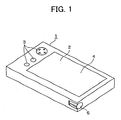
- Figure 1 is one embodiment of an information processing device according to the present invention.
- the figure shows the appearance of a PDA as the information processing device of the present invention.
- 1 denotes the main body of the PDA
- 2 denotes a display section
- 3 denotes plural operation keys such as a cursor key.
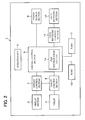
- FIG. 2 is a block diagram showing the whole system of the information processing device 1 according to the present invention.
- 6 denotes a central control section for carrying out input/output control based on various instructions.
- the periphery of the central control section 6 is arranged as follows.
- the display section 2 is connected to the central control section 6 via a display control section 7.
- the display section 2 is typically made of a liquid crystal display device or the like; however, as long as the device is capable of data display, any kinds of display device may be used.
- 3 denotes an operation key
- 9 denotes a power source section.
- the power source section 9 supplies power to the central control section 6 when a power source key (not shown) of the operation key 3 is turned on.
- 10 denotes a data receiving section for receiving data transmitted from external information devices.
- This data receiving may be performed via a cable or by wireless communication. Further, infrared communication may also be used for this data receiving operation.
- 11 denotes a data receiving control section for controlling the data receiving section.
- ROM Read Only Memory
- programs etc. such as various application programs compatible with the information processing device 1, or programs for controlling the respective systems connected to the central control section 6, such as a display section, or a tablet.
- RAM Random Access Memory
- FIG. 3 is a drawing showing the detail of the ROM 12.
- a control program 21 denotes a control program for controlling the respective systems of the PDA.
- a control program designates a program for carrying out such as display control, tablet control, or control of the data receiving section.
- Various application programs designate programs for a schedule function and/or a phone book function, and a program for displaying image data transmitted from external information devices such as a personal computer. Further, these application programs may be added as required.
- the ROM 12 also stores data to be used in the respective application programs.
- an icon storage section 23 denotes an icon storage section for storing, for example, icons used in an application program having a schedule function.
- the icons stored in the icon storage section 23 are appropriately displayed in a calendar.
- FIG. 4 is a drawing showing the details of the RAM 13.
- the folder storage section 32 denotes a folder storage section for storing data in the separate folders.
- the folder storage section 32 stores the file data transmitted from external information devices for each type of the data.
- link information storage section 33 denotes a link information storage section for storing link information which is created to relate the data stored in the folder storage section 32 to a calendar at the time of display. The details of this section will be described later.
- the RAM 13 also stores data created by the various application programs.
- the present: invention particularly deals with a calendar display function and a schedule function.
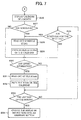
- Step S1 the device receives file data transmitted from a personal computer.
- the received data is stored in the received data temporary storage section 31.
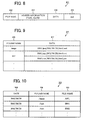
- the file data refers to image data created by the personal computer or captured via the Internet. More specifically, as shown in Figure 8, the file data 41 is in a format constituted of a file name 42, header information 43 including the type of file and date information such as the date created, data 44, and an end 45 for indicating the end of the file data 41.
- Step S2 the device discriminates the type of the file based on file type information included in the header information 43 of the received file data 41. More specifically, the type of the transmitted file is discriminated by a file discrimination section 14 provided in the central control section 6.
- Step S3 the file data is stored in the folder storage section 32 of the RAM 13 in different folders for each file type discriminated in Step S2.
- FIG 9 shows one example of the folder storage section 32 in detail.
- the folder storage section 32 is in the form of a table, and the folder name 46 is given for each type of the file data.
- the "image” folder stores image data
- the "text” folder stores text file data made up of characters etc.
- the data 47 stores file data.
- Each file data is stored in the file data format of Figure 8.
- the file name "A001”, the header information "jpeg” for showing the type of data, the date information "2002/06/28", and data and end information are stored.
- Step S4 the device selects the calendar function.
- the information processing device 1 is provided with plural functions apart from the calendar function.
- the calendar function can be selected by selecting a calendar icon displayed in a screen (not shown) of the information processing device.
- the calendar icon is stored in the icon storage section 23 of the ROM 12.
- Step S5 the link information is created and stored.
- the creation of the link information is carried out by a link information creation program 24, and the created link information is stored in the link information storage section 33 of the RAM 13.
- Figure 10 shows the details of such link information.
- the link information storage section 33 is made of a table including items of a date 48, a folder name 49, and a file name 50.
- Figure 10 shows that one item of data link information is stored on June 28, 2002, and two items of data link information are stored on June 29, 2002.
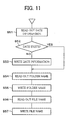
- Figure 11 is a flow chart showing creation and storage procedures of link information.
- Step S51 the device reads out date information corresponding to one item of data stored in the folder storage section 32 of the RAM 13.
- Step S52 the device judges that whether or not the date information read out in Step S51 is already stored in the date 48 of the link information storage section 33.
- Step S54 the device reads out the folder name of the data corresponding to the date information which has already been stored.
- the folder name is then written to the link information storage section 33 in Step S56.
- the file name of the data is read out in Step S56, and the file name is written to the link information storage section 33 in Step 57 so as to complete the link information.
- Step S52 when the date read out in Step S52 is not stored, the read out date is written to the date 48 of the link information storage section 33 as new date information (Step S53), and then the sequence goes to the operations of Step S54 and later operations, i.e., writings of the folder name and the file name are sequentially carried out, thus completing link information.
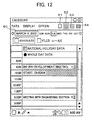
- Figure 12 shows a screen displayed in the display section 2 of the information processing device 1.
- the characters and icons displayed in this concrete screen example are all can operate as keys or input buttons.
- Figure 12 shows the state where the schedules of March 6, 2002 are displayed by being selected with a date button 60.
- the date button 60 may carry out calendar display (not shown) by being pressed with a pen 5, so as to allow the user to change the display of the schedules to an arbitrary day. In the figure, plural schedules are already inputted for the day.
- the display may be changed by using a new data storing button 61, a day schedule display button 62, a week schedule display button 63, and a month schedule display button 64 and a file button 65.
- This display changing operation will be described in the explanations for Step S27 and later steps.
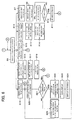
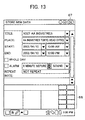
- Step S7 By pressing the new data storing button 61 of Figure 12 in Step S7, the display section 2 changes its display from the today's schedule to an input screen for storing a new schedule (Step S8).
- Step S9 a new schedule is inputted in Step S9. More specifically, this input of a new schedule is carried out with the new schedule input screen shown in Figure 13, which allows the user to input the title, the place, and the start and end times. Note that, text input is performed by a text input section 66 as required.
- Step S 10 When a OK button 67 is pressed in Step S 10, the sequence goes to Step S11 so as to store the inputted schedule in a schedule storage section 34 of the RAM 13, and then goes back to Step S6. Note that, when the OK button 67 is not pressed in Step S10, the schedule input may be carried on as required.
- Step S12 by pressing the week schedule display button 63 of Figure 12 in Step S12, the display section 2 changes its display from the today's schedule display to week schedule display (Step S13).
- a concrete example of this display is shown in Figure 14.
- the inputted schedules are displayed as a bar graph. Further, as with the display of Figure 12, this display also has the new data storing button 61, the day schedule display button 62, the week schedule display button 63, and the month schedule display button 64. Further, the display can be changed to schedules of a certain day by specifying the day by the date button 68 (Step S14).
- Step S15 by pressing the month schedule display button 64 of Figure 12 in Step S15, the display section 2 changes its display from the week schedule display to month schedule display. This operation will be described in detail later.
- Step S16 by selecting an arbitrary schedule from plural schedules displayed in Figure 12 in Step S16, the display section 2 changes its display from the today's schedule to display for details of each schedule (Step S17).
- Figure 15 shows the details of a schedule as a concrete example.
- Step S20 the display section 2 displays a list of files attached to the schedules for the day.
- Figure 16 shows a list of plural attachments as a concrete example. The list of Figure 16 is displayed by referring to the link information storage section 33 of the RAM 13.
- the device starts up an application program corresponding to the type of the selected file (Step S22) and displays the data of the file (Step S23).
- the application program is one of the various application programs stored in the ROM 12.
- the display of attachment is finished by pressing an end button (not shown) (Step S24) provided in the application program, and the sequence goes back to Step S20.
- the display of the attachment list can be changed to other display by using any desired buttons shown in Figure 16 (Step S25).
- the foregoing sequence is procedures for a single day, and in this case, the sequence goes to Step S35 for finding the schedule for the next day and checking if there is any link information.
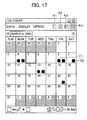
- Figure 17 is a drawing showing a concrete example of a calendar for a month, which is displayed during the operations shown in Figure 7.
- " ⁇ " is displayed as a schedule icon 70
- "•" is displayed as a file icon 71.
- the file icon 71 is displayed in March 4, 2002, which means there is an attachment file for the day.
- both the schedule icon 70 and the file icon 71 are displayed, which means there is a schedule, and an attachment file for the day.
- the device when the device receives file data transmitted from external information devices, the device displays an icon in the calendar according to the date information included in the data file, thus easily carrying out file data arrangement.
- the file data arrangement can be carried out with a small memory capacity.
- the device when displaying the file data transmitted from external information devices, the device relates the file data to the calendar as link information, according to the date information of the file data; however, the information processing device of the present invention also is provided with a function for changing the date information to a different date and displaying the file data by relating the new date information to the calendar. This function allows the user to change the date of the file data, which has been stored in the device, and store the file data to be used for other schedules.
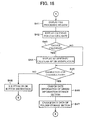
- Figure 16 is a drawing showing a concrete example of display of a list of files attached to a schedule. The date changing operation of the file data is performed with this display. More specifically, the operation is carried out based on the flow chart shown in Figure 18.
- Step S21 of Figure 6 there are two ways for specifying an arbitrary file.
- the user touches the displayed file with the input pen 5 so that the sequence goes to Step S22.
- the user keeps touching the displayed file for a while.
- the following will explain with reference to Figure 18 this case, i.e., the case when the user keeps touching the displayed file for a while with the input pen 5.
- Step S42 When the user keeps touching the displayed file in Step S41, a file processing window 72 appears on the screen, which is specifically shown in Figure 19. Then, when the user moves the input pen 5 to "Date Jump" in the file processing window 72, a calendar for changing the date of the file data appears (Step S42).
- This calendar display corresponds to the year and the month of the date information of the file data.
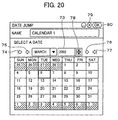
- Figure 20 shows a concrete example of this calendar display. Since the file data specified in Step S41 includes the date information of March 6, 2002, the 6th of the month is outlined with a bold frame in the calendar of figure 20.
- step S44 is instruction for displaying the calendar of an arbitrate date. More specifically, the user instructs the device to display an arbitrary calendar by using a button 74 for displaying the calendar of January of the year displayed in a year display 73, a button 75 for displaying the previous month, a button 76 for displaying the next month, a button 77 for displaying the calendar of December of the year displayed in the year display 73, a button 78 for changing the year displayed in the year display 73 (Step S44).
- Step S45 so as to instruct the device to change the date. More specifically, the user selects an arbitrary day of the month with the input pen 5.
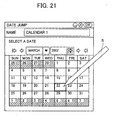
- Figure 21 shows the case when the user selects the 22nd of the month with the input pen 5, so that the 22nd is outlined with a bold frame in the calendar in this figure, as with Figure 20 where the 6th of the month is outlined with a bold frame.
- Step S43 when the user does not change the calendar display in Step S43, i.e., the user only changes the day with the same year and month of the file data, the calendar is not required to be changed and therefore the sequence goes to step S45.
- Step S45 When the user instructs to change the day in Step S45, the date 48 of the link information storage section 33 in the RAM 13 is changed in Step S46, and then also the date data in the data 47 stored in the folder storage section 32 of the RAM 13 is changed in Step S47.
- Step S47 When the operation of Step S47 is carried out, the sequence goes back to Step S20 of Figure 6; however, the data file whose date has been changed in the foregoing operation is excluded in the list.
- Step S45 when the user does not intend to change the day in Step S45, the user finishes the calendar display by using the x button 79 or the OK button 80 of Figure 20 (Step S48), and the sequence goes back to the operation of Step S20 of Figure 6.
- a typical information processing device is generally provided with a function for creating file data therein.
- the function is realized by, for example, application programs for creating documents or table data, or an application program for saving and storing image data obtained through the Internet.
- the present invention may be such a program itself, or a storage medium having the program therein.
- the storage medium may be any media readable and executable by a computer or a PDA, for example, a floppy disk®, a PC card, a compact flash®, or a CD-ROM.
- the information processing device displays an icon in the calendar for indicating the presence of an attachment, the user can easily find out that there is an attachment data file in the schedule.
- the present invention also allows the user to change the date of the file data related to the calendar by selecting an arbitrary date in a date changing calendar, so that the file data can easily be displayed in a different date.
Landscapes
- Business, Economics & Management (AREA)
- Human Resources & Organizations (AREA)
- Engineering & Computer Science (AREA)
- Strategic Management (AREA)
- Entrepreneurship & Innovation (AREA)
- Operations Research (AREA)
- General Business, Economics & Management (AREA)
- Marketing (AREA)
- Data Mining & Analysis (AREA)
- Quality & Reliability (AREA)
- Tourism & Hospitality (AREA)
- Physics & Mathematics (AREA)
- Economics (AREA)
- General Physics & Mathematics (AREA)
- Theoretical Computer Science (AREA)
- Calculators And Similar Devices (AREA)
- Management, Administration, Business Operations System, And Electronic Commerce (AREA)
- User Interface Of Digital Computer (AREA)
- Information Retrieval, Db Structures And Fs Structures Therefor (AREA)
Applications Claiming Priority (2)
| Application Number | Priority Date | Filing Date | Title |
|---|---|---|---|
| JP2002199574 | 2002-07-09 | ||
| JP2002199574A JP2004046317A (ja) | 2002-07-09 | 2002-07-09 | 情報処理装置、情報処理方法、情報処理プログラム、及び、情報処理プログラムを記録した記録媒体 |
Publications (2)
| Publication Number | Publication Date |
|---|---|
| EP1387286A2 true EP1387286A2 (de) | 2004-02-04 |
| EP1387286A3 EP1387286A3 (de) | 2004-09-29 |
Family
ID=30112472
Family Applications (1)
| Application Number | Title | Priority Date | Filing Date |
|---|---|---|---|
| EP03015311A Withdrawn EP1387286A3 (de) | 2002-07-09 | 2003-07-07 | Datenverarbeitungsgerät, -verfahren und -programm und Speichermittel für das Programm |
Country Status (4)
| Country | Link |
|---|---|
| US (1) | US20040113928A1 (de) |
| EP (1) | EP1387286A3 (de) |
| JP (1) | JP2004046317A (de) |
| CN (1) | CN1288574C (de) |
Cited By (3)
| Publication number | Priority date | Publication date | Assignee | Title |
|---|---|---|---|---|
| EP1675052A3 (de) * | 2004-12-21 | 2008-04-02 | Samsung Electronics Co., Ltd. | Vorrichtung und Verfahren zur Verarbeitung eines planbezogenen Ereignisses in einem drahtlosen Endgerät |
| DE202008004540U1 (de) * | 2008-03-25 | 2009-08-06 | Bankwitz, Fritz U., Dipl.-Ing. (FH) | Elektronischer Wand-/Standkalender |
| US8010579B2 (en) * | 2003-11-17 | 2011-08-30 | Nokia Corporation | Bookmarking and annotating in a media diary application |
Families Citing this family (42)
| Publication number | Priority date | Publication date | Assignee | Title |
|---|---|---|---|---|
| US7003720B1 (en) * | 2000-01-07 | 2006-02-21 | Abf Freight Sysems. Inc. | Electronic shipment planner |
| US7263661B2 (en) * | 2003-04-28 | 2007-08-28 | Lexmark International, Inc. | Multi-function device having graphical user interface incorporating customizable icons |
| KR100651367B1 (ko) | 2005-04-01 | 2006-11-29 | 삼성전자주식회사 | 휴대단말기의 이벤트정보 관리 장치 및 방법 |
| KR100617805B1 (ko) * | 2005-05-27 | 2006-08-28 | 삼성전자주식회사 | 이동통신 단말기에서 이벤트 디스플레이 방법 |
| USD561778S1 (en) * | 2005-06-07 | 2008-02-12 | Ids Scheer Aktiengesellschaft | Icon for a display screen |
| JP4353933B2 (ja) * | 2005-10-11 | 2009-10-28 | ソニー・エリクソン・モバイルコミュニケーションズ株式会社 | 通信装置およびコンピュータプログラム |
| USD567250S1 (en) * | 2005-12-06 | 2008-04-22 | Samsung Electronics Co., Ltd. | Television receiver having indicated image design displayed thereon |
| JP4062707B2 (ja) | 2006-05-01 | 2008-03-19 | ソニー・エリクソン・モバイルコミュニケーションズ株式会社 | 情報処理装置、情報処理方法、情報処理プログラム、及び携帯端末装置 |
| JP2008165459A (ja) | 2006-12-28 | 2008-07-17 | Sony Corp | コンテンツ表示方法、コンテンツ表示装置、及びコンテンツ表示プログラム |
| FI20070310L (fi) * | 2007-04-20 | 2008-10-21 | Rocky Advertising Oy | Ajanvalvontasovellus |
| CN101436127B (zh) * | 2007-11-15 | 2012-11-21 | 北大方正集团有限公司 | 一种选择日期的方法及装置 |
| USD619615S1 (en) * | 2007-12-14 | 2010-07-13 | Hella Kgaa Hueck & Co | Headlight indicating icon for portion of a vehicle display panel |
| JP4989500B2 (ja) * | 2008-02-06 | 2012-08-01 | キヤノン株式会社 | コンテンツ表示装置及びその制御方法 |
| US20100153851A1 (en) * | 2008-12-12 | 2010-06-17 | Microsoft Corporation | Rendering rss subscriptions on a calendar |
| KR20110003947A (ko) * | 2009-07-07 | 2011-01-13 | 삼성전자주식회사 | 데이터 처리 장치 및 방법 |
| CN101938560A (zh) * | 2010-09-02 | 2011-01-05 | 惠州Tcl移动通信有限公司 | 移动通信终端消息管理方法及移动通信终端 |
| USD703236S1 (en) * | 2012-01-06 | 2014-04-22 | Samsung Electronics Co., Ltd. | Display screen or portion thereof with graphical user interface |
| CN103106574A (zh) * | 2013-02-25 | 2013-05-15 | 广东欧珀移动通信有限公司 | 在电子设备的日历中提供视频链接的方法及系统 |
| USD753140S1 (en) * | 2013-10-23 | 2016-04-05 | Ares Trading S.A. | Display screen with graphical user interface |
| USD753135S1 (en) * | 2014-04-04 | 2016-04-05 | Adp, Llc | Display screen or portion thereof with graphical user interface |
| JP6508200B2 (ja) * | 2014-05-15 | 2019-05-08 | ソニー株式会社 | 情報処理装置、表示制御方法およびプログラム |
| US10614445B1 (en) | 2014-06-04 | 2020-04-07 | Square, Inc. | Proximity-based payments |
| CN105279634A (zh) * | 2014-06-20 | 2016-01-27 | 鸿合科技有限公司 | 一种日程计划实现方法及装置 |
| USD789402S1 (en) | 2014-09-01 | 2017-06-13 | Apple Inc. | Display screen or portion thereof with graphical user interface |
| US10963868B1 (en) | 2014-09-09 | 2021-03-30 | Square, Inc. | Anonymous payment transactions |
| USD759057S1 (en) * | 2014-09-11 | 2016-06-14 | Korean Airlines Co., Ltd. | Display screen with graphical user interface |
| CN104238889A (zh) * | 2014-09-19 | 2014-12-24 | 联想(北京)有限公司 | 一种显示方法及电子设备 |
| USD792889S1 (en) * | 2014-10-07 | 2017-07-25 | Slide Rule Software | Display screen or portion thereof with graphical user interface |
| US20160125371A1 (en) * | 2014-10-31 | 2016-05-05 | Square, Inc. | Money transfer using canonical url |
| CN105868090A (zh) * | 2015-01-21 | 2016-08-17 | 中兴通讯股份有限公司 | 一种对终端操作记录的管理方法及装置 |
| USD783648S1 (en) * | 2015-04-12 | 2017-04-11 | Adp, Llc | Display screen with graphical user interface |
| USD764543S1 (en) * | 2015-04-16 | 2016-08-23 | Nasdaq, Inc. | Display screen or portion thereof with animated graphical user interface |
| USD786821S1 (en) * | 2015-05-18 | 2017-05-16 | Gecko Health Innovations, Inc. | Display screen or portion thereof with graphical user interface |
| CN105847518B (zh) * | 2016-04-28 | 2019-09-10 | 北京小米移动软件有限公司 | 信息显示方法及装置 |
| USD841041S1 (en) * | 2017-12-13 | 2019-02-19 | Adp, Llc | Display screen with a transitional graphical user interface |
| USD848468S1 (en) * | 2017-12-13 | 2019-05-14 | Adp, Llc | Display screen with a transitional graphical user interface |
| JP6821095B2 (ja) * | 2019-02-12 | 2021-01-27 | 株式会社メディパルホールディングス | スケジュール算出装置、スケジュール管理システム、及びスケジュール算出方法 |
| JP7318248B2 (ja) * | 2019-03-20 | 2023-08-01 | 富士フイルムビジネスイノベーション株式会社 | 情報処理装置及び情報処理プログラム |
| USD924265S1 (en) * | 2019-11-18 | 2021-07-06 | Citrix Systems, Inc. | Display screen with transitional graphical user interface |
| USD983831S1 (en) * | 2021-04-26 | 2023-04-18 | The Boeing Company | Display screen or portion thereof with animated graphical user interface |
| USD1117215S1 (en) * | 2022-02-01 | 2026-03-10 | Truist Bank | Electronic device display screen or portion thereof with a graphical user interface for date selection |
| USD1122263S1 (en) * | 2023-02-15 | 2026-04-14 | Amadeus S.A.S. | Display screen with animated graphical user interface |
Family Cites Families (16)
| Publication number | Priority date | Publication date | Assignee | Title |
|---|---|---|---|---|
| JP3128276B2 (ja) * | 1991-07-29 | 2001-01-29 | 株式会社リコー | 情報検索装置 |
| JP3254268B2 (ja) * | 1992-11-13 | 2002-02-04 | シャープ株式会社 | 携帯型電子機器 |
| US5649182A (en) * | 1995-03-17 | 1997-07-15 | Reitz; Carl A. | Apparatus and method for organizing timeline data |
| US6085205A (en) * | 1997-11-12 | 2000-07-04 | Ricoh Company Limited | Calendar incorporating document retrieval interface |
| JPH11353318A (ja) * | 1998-06-05 | 1999-12-24 | Casio Comput Co Ltd | 表示制御装置、表示制御方法、及び表示制御プログラムを記録した記録媒体 |
| JP2000090156A (ja) * | 1998-09-14 | 2000-03-31 | Ibm Japan Ltd | スケジュール表示方法、スケジュール変更方法、スケジュール管理システム、スケジュール管理プログラムを格納した記憶媒体 |
| JP3284543B2 (ja) * | 1999-04-23 | 2002-05-20 | ソニー株式会社 | 情報処理装置、情報処理方法、およびプログラム格納媒体 |
| US6385591B1 (en) * | 1999-05-11 | 2002-05-07 | Jeffrey W. Mankoff | Method and system for electronic organization of coupons |
| WO2000072113A2 (en) * | 1999-05-21 | 2000-11-30 | Holcorp | Coupon calendar system and method |
| US6868426B1 (en) * | 1999-07-07 | 2005-03-15 | Jeffrey W. Mankoff | Virtual document organizer system and method |
| KR20020063556A (ko) * | 2000-07-03 | 2002-08-03 | 엔티티 도꼬모 인코퍼레이티드 | 업무 스케줄에 관한 정보를 표시하는 장치 및 방법 |
| US6828989B2 (en) * | 2000-12-29 | 2004-12-07 | Microsoft Corporation | Graphically represented dynamic time strip for displaying user-accessible time-dependent data objects |
| US7003735B2 (en) * | 2001-03-29 | 2006-02-21 | International Business Machines Corporation | Calendar desktop graphical user interface (GUI) for computer workstations, personal computers, and personal digital assistants |
| JP2003203084A (ja) * | 2001-06-29 | 2003-07-18 | Hitachi Ltd | 情報端末装置、サーバ、情報配信装置及び情報配信方法 |
| AU2002330911B2 (en) * | 2001-07-20 | 2007-01-04 | Aderant Compulaw, Llc | Method and apparatus for management of court schedules |
| US20030171970A1 (en) * | 2002-03-11 | 2003-09-11 | Robert Kinsella | Project scheduler interface |
-
2002
- 2002-07-09 JP JP2002199574A patent/JP2004046317A/ja active Pending
-
2003
- 2003-07-07 EP EP03015311A patent/EP1387286A3/de not_active Withdrawn
- 2003-07-09 CN CNB031524621A patent/CN1288574C/zh not_active Expired - Fee Related
- 2003-07-09 US US10/614,972 patent/US20040113928A1/en not_active Abandoned
Cited By (3)
| Publication number | Priority date | Publication date | Assignee | Title |
|---|---|---|---|---|
| US8010579B2 (en) * | 2003-11-17 | 2011-08-30 | Nokia Corporation | Bookmarking and annotating in a media diary application |
| EP1675052A3 (de) * | 2004-12-21 | 2008-04-02 | Samsung Electronics Co., Ltd. | Vorrichtung und Verfahren zur Verarbeitung eines planbezogenen Ereignisses in einem drahtlosen Endgerät |
| DE202008004540U1 (de) * | 2008-03-25 | 2009-08-06 | Bankwitz, Fritz U., Dipl.-Ing. (FH) | Elektronischer Wand-/Standkalender |
Also Published As
| Publication number | Publication date |
|---|---|
| CN1288574C (zh) | 2006-12-06 |
| JP2004046317A (ja) | 2004-02-12 |
| CN1495626A (zh) | 2004-05-12 |
| US20040113928A1 (en) | 2004-06-17 |
| EP1387286A3 (de) | 2004-09-29 |
Similar Documents
| Publication | Publication Date | Title |
|---|---|---|
| EP1387286A2 (de) | Datenverarbeitungsgerät, -verfahren und -programm und Speichermittel für das Programm | |
| AU2007201241B2 (en) | Mobile communication terminal and information display method thereof | |
| US20030154207A1 (en) | Information processing system | |
| US5847707A (en) | Icon menu display devices and methods | |
| US20040222975A1 (en) | Personal digital assistant and program used therefor | |
| JP3262465B2 (ja) | スケジュール管理装置 | |
| KR100425831B1 (ko) | 개인정보 단말기에서의 데이터 저장방법 | |
| KR20040030980A (ko) | 타임라인 디스플레이 장치 | |
| US20040139435A1 (en) | Associating appointments and tasks on a computer device | |
| EP4318299A1 (de) | Dokumenterzeugungsverfahren und -vorrichtung und elektronische vorrichtung | |
| JP2006172086A (ja) | 情報表示装置 | |
| US20070076229A1 (en) | Image forming device and printing system having selective printing function of address book and printing method thereof | |
| US20120131071A1 (en) | Apparatus and method for providing e-note function in mobile terminal | |
| JPH01290070A (ja) | 情報処理用電子機器 | |
| JPH06149745A (ja) | 電子手帳 | |
| JP2004302540A (ja) | 携帯情報端末 | |
| JP2657095B2 (ja) | データ処理装置 | |
| EP2096587A1 (de) | Kalender zum Expandieren und Kollabieren zwischen einer Kompakt- und einer Detailansicht | |
| JP2003316626A (ja) | 情報機器 | |
| JP2971086B2 (ja) | 文書作成装置 | |
| JP2001117882A (ja) | スケジュール管理装置 | |
| JPH09107306A (ja) | 携帯無線機 | |
| JPS60171523A (ja) | 電子伝言板 | |
| JPH0359710A (ja) | リソース管理装置 | |
| JPH03233771A (ja) | 文書作成装置 |
Legal Events
| Date | Code | Title | Description |
|---|---|---|---|
| PUAI | Public reference made under article 153(3) epc to a published international application that has entered the european phase |
Free format text: ORIGINAL CODE: 0009012 |
|
| AK | Designated contracting states |
Kind code of ref document: A2 Designated state(s): AT BE BG CH CY CZ DE DK EE ES FI FR GB GR HU IE IT LI LU MC NL PT RO SE SI SK TR |
|
| AX | Request for extension of the european patent |
Extension state: AL LT LV MK |
|
| PUAL | Search report despatched |
Free format text: ORIGINAL CODE: 0009013 |
|
| AK | Designated contracting states |
Kind code of ref document: A3 Designated state(s): AT BE BG CH CY CZ DE DK EE ES FI FR GB GR HU IE IT LI LU MC NL PT RO SE SI SK TR |
|
| AX | Request for extension of the european patent |
Extension state: AL LT LV MK |
|
| RIC1 | Information provided on ipc code assigned before grant |
Ipc: 7G 06F 17/60 B Ipc: 7G 06F 15/02 A |
|
| 17P | Request for examination filed |
Effective date: 20041124 |
|
| 17Q | First examination report despatched |
Effective date: 20050316 |
|
| AKX | Designation fees paid |
Designated state(s): DE FR GB |
|
| STAA | Information on the status of an ep patent application or granted ep patent |
Free format text: STATUS: THE APPLICATION HAS BEEN WITHDRAWN |
|
| 18W | Application withdrawn |
Effective date: 20070601 |