WO2014188703A1 - 項目選択装置、および項目選択方法 - Google Patents
項目選択装置、および項目選択方法 Download PDFInfo
- Publication number
- WO2014188703A1 WO2014188703A1 PCT/JP2014/002634 JP2014002634W WO2014188703A1 WO 2014188703 A1 WO2014188703 A1 WO 2014188703A1 JP 2014002634 W JP2014002634 W JP 2014002634W WO 2014188703 A1 WO2014188703 A1 WO 2014188703A1
- Authority
- WO
- WIPO (PCT)
- Prior art keywords
- operation unit
- displayed
- item
- selection
- items
- Prior art date
- Legal status (The legal status is an assumption and is not a legal conclusion. Google has not performed a legal analysis and makes no representation as to the accuracy of the status listed.)
- Ceased
Links
Images




Classifications
-
- G—PHYSICS
- G06—COMPUTING OR CALCULATING; COUNTING
- G06F—ELECTRIC DIGITAL DATA PROCESSING
- G06F3/00—Input arrangements for transferring data to be processed into a form capable of being handled by the computer; Output arrangements for transferring data from processing unit to output unit, e.g. interface arrangements
- G06F3/01—Input arrangements or combined input and output arrangements for interaction between user and computer
- G06F3/048—Interaction techniques based on graphical user interfaces [GUI]
- G06F3/0481—Interaction techniques based on graphical user interfaces [GUI] based on specific properties of the displayed interaction object or a metaphor-based environment, e.g. interaction with desktop elements like windows or icons, or assisted by a cursor's changing behaviour or appearance
- G06F3/0482—Interaction with lists of selectable items, e.g. menus
-
- B—PERFORMING OPERATIONS; TRANSPORTING
- B60—VEHICLES IN GENERAL
- B60K—ARRANGEMENT OR MOUNTING OF PROPULSION UNITS OR OF TRANSMISSIONS IN VEHICLES; ARRANGEMENT OR MOUNTING OF PLURAL DIVERSE PRIME-MOVERS IN VEHICLES; AUXILIARY DRIVES FOR VEHICLES; INSTRUMENTATION OR DASHBOARDS FOR VEHICLES; ARRANGEMENTS IN CONNECTION WITH COOLING, AIR INTAKE, GAS EXHAUST OR FUEL SUPPLY OF PROPULSION UNITS IN VEHICLES
- B60K35/00—Instruments specially adapted for vehicles; Arrangement of instruments in or on vehicles
- B60K35/10—Input arrangements, i.e. from user to vehicle, associated with vehicle functions or specially adapted therefor
-
- B—PERFORMING OPERATIONS; TRANSPORTING
- B60—VEHICLES IN GENERAL
- B60K—ARRANGEMENT OR MOUNTING OF PROPULSION UNITS OR OF TRANSMISSIONS IN VEHICLES; ARRANGEMENT OR MOUNTING OF PLURAL DIVERSE PRIME-MOVERS IN VEHICLES; AUXILIARY DRIVES FOR VEHICLES; INSTRUMENTATION OR DASHBOARDS FOR VEHICLES; ARRANGEMENTS IN CONNECTION WITH COOLING, AIR INTAKE, GAS EXHAUST OR FUEL SUPPLY OF PROPULSION UNITS IN VEHICLES
- B60K35/00—Instruments specially adapted for vehicles; Arrangement of instruments in or on vehicles
- B60K35/20—Output arrangements, i.e. from vehicle to user, associated with vehicle functions or specially adapted therefor
- B60K35/21—Output arrangements, i.e. from vehicle to user, associated with vehicle functions or specially adapted therefor using visual output, e.g. blinking lights or matrix displays
- B60K35/22—Display screens
-
- G—PHYSICS
- G06—COMPUTING OR CALCULATING; COUNTING
- G06F—ELECTRIC DIGITAL DATA PROCESSING
- G06F3/00—Input arrangements for transferring data to be processed into a form capable of being handled by the computer; Output arrangements for transferring data from processing unit to output unit, e.g. interface arrangements
- G06F3/01—Input arrangements or combined input and output arrangements for interaction between user and computer
- G06F3/03—Arrangements for converting the position or the displacement of a member into a coded form
- G06F3/033—Pointing devices displaced or positioned by the user, e.g. mice, trackballs, pens or joysticks; Accessories therefor
- G06F3/0362—Pointing devices displaced or positioned by the user, e.g. mice, trackballs, pens or joysticks; Accessories therefor with detection of one-dimensional [1D] translations or rotations of an operating part of the device, e.g. scroll wheels, sliders, knobs, rollers or belts
-
- G—PHYSICS
- G06—COMPUTING OR CALCULATING; COUNTING
- G06F—ELECTRIC DIGITAL DATA PROCESSING
- G06F3/00—Input arrangements for transferring data to be processed into a form capable of being handled by the computer; Output arrangements for transferring data from processing unit to output unit, e.g. interface arrangements
- G06F3/01—Input arrangements or combined input and output arrangements for interaction between user and computer
- G06F3/048—Interaction techniques based on graphical user interfaces [GUI]
- G06F3/0484—Interaction techniques based on graphical user interfaces [GUI] for the control of specific functions or operations, e.g. selecting or manipulating an object, an image or a displayed text element, setting a parameter value or selecting a range
- G06F3/04842—Selection of displayed objects or displayed text elements
-
- G—PHYSICS
- G06—COMPUTING OR CALCULATING; COUNTING
- G06F—ELECTRIC DIGITAL DATA PROCESSING
- G06F3/00—Input arrangements for transferring data to be processed into a form capable of being handled by the computer; Output arrangements for transferring data from processing unit to output unit, e.g. interface arrangements
- G06F3/01—Input arrangements or combined input and output arrangements for interaction between user and computer
- G06F3/048—Interaction techniques based on graphical user interfaces [GUI]
- G06F3/0484—Interaction techniques based on graphical user interfaces [GUI] for the control of specific functions or operations, e.g. selecting or manipulating an object, an image or a displayed text element, setting a parameter value or selecting a range
- G06F3/04847—Interaction techniques to control parameter settings, e.g. interaction with sliders or dials
-
- G—PHYSICS
- G06—COMPUTING OR CALCULATING; COUNTING
- G06F—ELECTRIC DIGITAL DATA PROCESSING
- G06F3/00—Input arrangements for transferring data to be processed into a form capable of being handled by the computer; Output arrangements for transferring data from processing unit to output unit, e.g. interface arrangements
- G06F3/01—Input arrangements or combined input and output arrangements for interaction between user and computer
- G06F3/048—Interaction techniques based on graphical user interfaces [GUI]
- G06F3/0484—Interaction techniques based on graphical user interfaces [GUI] for the control of specific functions or operations, e.g. selecting or manipulating an object, an image or a displayed text element, setting a parameter value or selecting a range
- G06F3/0485—Scrolling or panning
-
- B—PERFORMING OPERATIONS; TRANSPORTING
- B60—VEHICLES IN GENERAL
- B60K—ARRANGEMENT OR MOUNTING OF PROPULSION UNITS OR OF TRANSMISSIONS IN VEHICLES; ARRANGEMENT OR MOUNTING OF PLURAL DIVERSE PRIME-MOVERS IN VEHICLES; AUXILIARY DRIVES FOR VEHICLES; INSTRUMENTATION OR DASHBOARDS FOR VEHICLES; ARRANGEMENTS IN CONNECTION WITH COOLING, AIR INTAKE, GAS EXHAUST OR FUEL SUPPLY OF PROPULSION UNITS IN VEHICLES
- B60K2360/00—Indexing scheme associated with groups B60K35/00 or B60K37/00 relating to details of instruments or dashboards
- B60K2360/11—Instrument graphical user interfaces or menu aspects
-
- B—PERFORMING OPERATIONS; TRANSPORTING
- B60—VEHICLES IN GENERAL
- B60K—ARRANGEMENT OR MOUNTING OF PROPULSION UNITS OR OF TRANSMISSIONS IN VEHICLES; ARRANGEMENT OR MOUNTING OF PLURAL DIVERSE PRIME-MOVERS IN VEHICLES; AUXILIARY DRIVES FOR VEHICLES; INSTRUMENTATION OR DASHBOARDS FOR VEHICLES; ARRANGEMENTS IN CONNECTION WITH COOLING, AIR INTAKE, GAS EXHAUST OR FUEL SUPPLY OF PROPULSION UNITS IN VEHICLES
- B60K2360/00—Indexing scheme associated with groups B60K35/00 or B60K37/00 relating to details of instruments or dashboards
- B60K2360/11—Instrument graphical user interfaces or menu aspects
- B60K2360/113—Scrolling through menu items
-
- B—PERFORMING OPERATIONS; TRANSPORTING
- B60—VEHICLES IN GENERAL
- B60K—ARRANGEMENT OR MOUNTING OF PROPULSION UNITS OR OF TRANSMISSIONS IN VEHICLES; ARRANGEMENT OR MOUNTING OF PLURAL DIVERSE PRIME-MOVERS IN VEHICLES; AUXILIARY DRIVES FOR VEHICLES; INSTRUMENTATION OR DASHBOARDS FOR VEHICLES; ARRANGEMENTS IN CONNECTION WITH COOLING, AIR INTAKE, GAS EXHAUST OR FUEL SUPPLY OF PROPULSION UNITS IN VEHICLES
- B60K2360/00—Indexing scheme associated with groups B60K35/00 or B60K37/00 relating to details of instruments or dashboards
- B60K2360/126—Rotatable input devices for instruments
Definitions
- This disclosure relates to an item selection device that allows a user to select an item. More specifically, the present disclosure relates to a technique for selecting a predetermined item from a plurality of items displayed on a display screen such as a display.
- An apparatus having a function of displaying a plurality of items on a display screen and allowing a user to select a desired item is known.
- an audio device that displays a plurality of song titles and selects a desired song therefrom
- a navigation device that displays a plurality of place names and selects a desired place name therefrom.
- the items are classified into a plurality of grooves under a predetermined condition (for example, for each first character of the item name), and the plurality of displayed groups are sequentially displayed as selection candidates one by one.
- a predetermined selection operation for example, the group being displayed is selected as a selection candidate, and a plurality of items classified in the group are displayed.
- a predetermined scroll operation is performed in a state where the items in the group are displayed in this manner, the items in the group are scrolled and the plurality of displayed items are sequentially displayed as selection candidates. In this way, even if the number of items increases, the user can find and select a desired item without hesitation (see Patent Document 1).
- the inventors of the present application have found the following.
- the burden on the user when selecting an item is not sufficiently reduced. This is because there is an operation for changing an object (group or item) to be displayed as a selection candidate between “an operation for displaying a group as a selection candidate in order” and “an operation for displaying an item as a selection candidate in order”. This is because this operation may be troublesome for the user.
- This disclosure is intended to provide a technology that can reduce the burden on the user when the user selects an item.
- a plurality of items are classified and stored in a plurality of groups, and the plurality of items are displayed on the display screen and the group in which the items are displayed is changed. As a result, a desired item is selected on the display screen.
- the item selection device and the item selection method display the selection candidate items among the plurality of items displayed on the display screen in a manner different from other items, and the operation unit is displaced from the reference position
- the selection candidate item displayed on the display screen is changed at a speed according to a displacement amount from the reference position, and a predetermined determination operation is performed in a state where the operation unit is at the reference position
- the selection candidate item is determined as the selected item, and when the displacement amount of the operation unit from the reference position exceeds a predetermined threshold displacement amount, the plurality of items are displayed on the display screen. Change the group.
- the change speed of the “selection item” can be increased, and the displacement amount of the operation unit is eventually reduced.
- the predetermined threshold displacement amount is exceeded, the “group in which a plurality of items are displayed on the display screen” is changed. Therefore, the user simply selects the “candidate of selection” as the target of the change without intervening other operations by simply continuing the operation of increasing the change speed of the selection candidate (the operation of increasing the displacement amount of the operation unit).
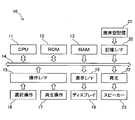
- FIG. 1 is an explanatory diagram showing the configuration of the item selection device
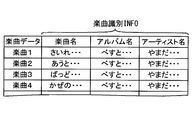
- FIG. 2 is an explanatory diagram conceptually showing music data stored in a portable storage medium.
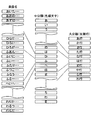
- FIG. 3A is an explanatory diagram conceptually showing hierarchical data generated by a CPU.
- FIG. 3B is a first explanatory diagram in which the hierarchical structure in which the song names are classified into the middle category and the major category shows the hierarchy data.
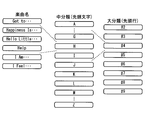
- FIG. 3C is a second explanatory diagram in which the hierarchical structure in which the song names are classified into the middle category and the major category shows the hierarchy data.
- FIG. 4 is a perspective view showing the selection operation unit.
- FIG. 4 is a perspective view showing the selection operation unit.
- FIG. 5 is an explanatory diagram illustrating the content displayed on the display.
- FIG. 6 is a flowchart showing an item selection process executed by the CPU.
- FIG. 7 is a flowchart showing the scroll display stop process executed by the CPU.
- FIG. 8 is an explanatory diagram showing the rotation angle of the selection operation unit.
- FIG. 9 is an explanatory diagram illustrating a state in which “Song Title” is scroll-displayed on the display.
- FIG. 10 is a flowchart showing the “music title” scrolling display process executed by the CPU.
- FIG. 11 is an explanatory diagram illustrating a state where “medium classification (first character)” is scroll-displayed on the display;
- FIG. 12 is a flowchart showing the “middle classification” scroll display process executed by the CPU.
- FIG. 13 is an explanatory diagram illustrating a state in which “major classification (first line)” is scroll-displayed on the display. It is a flowchart which shows the process during "
- the item selection device 10 is a device that is provided in a vehicle and has a function of reproducing music, and allows the user to select “music name”.
- FIG. 1 shows the configuration of the item selection device 10.
- the item selection device 10 according to the present embodiment is a ROM 12 in which programs executed by the CPU 11 are stored with the CPU 11 as a center, a work area of the CPU 11, and “hierarchical data” described later.
- a RAM 13 and the like are connected via a bus 14.
- a reproduction operation unit 17 and a selection operation unit 16 are connected to the bus 14 via an operation unit interface 15.
- the playback operation unit 17 is a push button type operation unit for allowing the user to specify the start or stop of the playback of the music
- the selection operation unit 16 is rotatable to allow the user to select a music name. It is an operation unit.
- the selection operation unit 16 will be described in detail later.
- a display 19 is connected to the bus 14 via a display interface 18.
- the display 19 displays information for allowing the user to select a song name, the name of the song being played, and the like.
- a storage medium interface 20 is connected to the bus 14, and a portable storage medium 21 such as a portable media player is connected to the storage medium interface 20.
- the portable storage medium 21 stores a plurality of pieces of music data in a predetermined compression format in advance, and is connected to the storage medium interface 20 by a user (for example, a driver).
- a music playback unit 22 is connected to the bus 14, and a speaker 23 is connected to the output destination.
- the music playback unit 22 is configured by a DSP, a DAC, or the like, and plays back music by expanding the music data stored in the portable storage medium 21 and D / A converting the data and sequentially outputting it to the speaker 23.
- FIG. 2 conceptually shows music data stored in the portable storage medium 21.
- Each piece of music data stored in the portable storage medium 21 stores music identification information indicating a music name, an album name, and an artist name in association with each other as illustrated.
- the CPU 11 When the portable storage medium 21 is connected to the storage medium interface 20 by the user, the CPU 11 generates “hierarchical data” and stores it at a predetermined address in the RAM 13.
- the “hierarchical data” is data for causing the display 19 to display the music names that can be selected by the user and the classification to which the music names belong (corresponding to the group of the present disclosure).
- 3A, 3B, and 3C conceptually show the hierarchical data generated by the CPU 11.
- the CPU 11 first reads the song name from the song identification information (see FIG. 2) stored in the portable storage medium 21.
- medium classification information and large classification information are matched and memorize
- the medium classification information and the large classification information are data for classifying the song names into the medium classification and the large classification.
- the “first character” of the song name is set as the middle category
- the “row (first row)” of the Japanese syllabary to which the first character of the song name belongs is set as the major category.
- FIG. 3C shows an example in which medium classification information and large classification information are stored in association with each song name using alphabets.
- the alphabet classification found in the telephone key layout is shown as an example.
- the mode of setting the middle class and the large class is not limited to the format shown in this embodiment.
- the hierarchy may be set as appropriate according to each language system.
- FIG. 4 shows a perspective view of the selection operation unit 16.
- the selection operation unit 16 is an operation unit that is operated when the user selects a song name.
- the selection operation unit 16 can turn a disk-shaped movable unit and is provided around the driver's seat of the vehicle. With this selection operation unit 16, when the user operates the selection operation unit 16, the amount of displacement (for example, the rotation angle) of the selection operation unit 16 can be made to correspond to the amount of wrist twist. Compared to a case where the operation unit is simply moved linearly, it becomes easier to feel the displacement (rotation angle) of the selection operation unit 16.
- a part of the upper surface of the selection operation unit 16 is provided with a push type determination button 16a that is operated when the selection of the music title is confirmed.
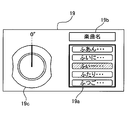
- FIG. 5 illustrates the contents displayed on the display 19.
- the item selection device 10 scrolls and displays any of the above-described music title, middle category (first character), and major category (first line) according to the rotation angle of the selection operation unit 16. Therefore, on the display 19, an area 19a for scrolling and displaying any of the music title, middle category, and major category (corresponding to the scroll display area) 19a, and an area for displaying the hierarchy being scrolled (corresponding to the hierarchy display area) 19b is set.
- FIG. 6 is a flowchart showing an item selection process executed by the CPU 11. The item selection process is started after the hierarchical data illustrated in FIGS. 3A, 3B, and 3C is generated, and is executed as a timer interrupt process every predetermined time (for example, 4 milliseconds).
- the CPU 11 When the CPU 11 starts the item selection process, the CPU 11 first determines whether or not the “music title” scroll display is in operation (S100).
- S100 the “music title” scroll display is in operation
- the scroll display of “music title” is not operating (S100: no)
- a process for stopping the scroll display is performed.
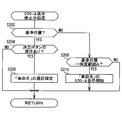
- FIG. 7 is a flowchart showing the scroll display stop process.
- the CPU 11 starts the scroll display stop process, the CPU 11 first determines whether or not the selection operation unit 16 is at the reference position (S202). As a result, if the selection operation unit 16 is at the reference position, it is determined whether or not the enter button 16a has been operated (S204). When the enter button 16a is operated (S204: yes), the selection of the “music name” being displayed as a selection candidate is confirmed (S206).
- the enter button 16a is operated (S204: yes)
- the selection of the “music name” being displayed as a selection candidate is confirmed (S206).
- the item selection device 10 of the present embodiment when the scroll display of “song name” is stopped, as shown by hatching in FIG. By making the color of the “music title” different from the others, the “music title” is displayed as a selection candidate. In the process of S206, the selection of the “music title” being displayed (selection candidate) as the selection candidate is thus determined.
- the item selection device 1 when the determination button 16a is operated when the selection operation unit 16 is at the reference position, the selection of the “music title” as a selection candidate is confirmed.
- the CPU 11 transmits the “music name” to the music reproduction unit 22.
- the music reproducing section 22 reads out the music data corresponding to the “music name” from the portable storage medium 21, decompresses and amplifies the music data, and outputs it from the speaker 23. , Play music.
- the CPU 11 determines in the determination process of S202 that the selection operation unit 16 is not at the reference position (S202: no)
- the CPU 11 determines whether or not the selection operation unit 16 has been rotated from the reference position to the angle range A. Is determined (S208).
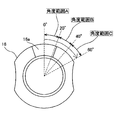
- FIG. 8 is an explanatory diagram showing the rotation angle of the selection operation unit 16.
- the selection operation unit 16 can be rotated from the reference position (0 degree) to 60 degrees. Then, the CPU 11 determines that the rotation angle of the selection operation unit 16 is in the range of greater than the reference position (0 degree) and less than 20 degrees (corresponding to the angle range A) or in the range of 20 degrees to less than 40 degrees (angle range). It is possible to determine whether it is within the range of 40 degrees or more and 60 degrees or less (corresponding to the angle range C).
- FIG. 9 illustrates a state in which “Song Title” is scroll-displayed on the display 19.
- the “music name” scroll display is performed in the scroll display area 19a, and the hierarchy “music name” being scrolled is displayed in the hierarchy display area 19b.
- the “song name” displayed in the scroll display area 19b is sequentially changed. Therefore, the “song name” (“song name” indicated by hatching) displayed as a selection candidate is displayed. ) Is also changed sequentially.
- the display 19 displays an image 19c indicating that the rotation angle of the selection operation unit 16 is in the angle range A.
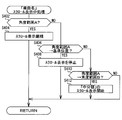
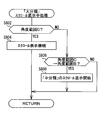
- FIG. 10 is a flowchart showing the “music title” scrolling display process.
- the CPU 11 first determines whether or not the selection operation unit 16 is in the angle range A (S402).
- the scroll display of “music title” is continued (S404).
- the speed of the scroll display at this time is set to a speed corresponding to the rotation angle (displacement amount) of the selection operation unit 16. That is, when the selection operation unit 16 is in the angle range A, the scrolling speed of the “music title” increases as the rotation angle of the selection operation unit 16 increases, and the rotation angle of the selection operation unit 16 decreases. Indeed, the speed of the scroll display of “music title” is reduced. Then, the user starts scroll display of “Song Title” by rotating the selection operation unit 16 from the reference position, and the scroll display speed of “Song Title” is increased as the rotation angle is increased. The scrolling speed of the “music title” can be reduced as the rotation angle is reduced.
- the CPU 11 determines whether the selection operation unit 16 has been returned from the angle range A to the reference position. Is determined (S406). As a result, when the selection operation unit 16 is returned from the angle range A to the reference position (S406: yes), the scroll display of “music title” is stopped (S408). At this time, in a state where one “music title” is displayed as a selection candidate (see hatched hatching in FIG. 5), the scroll display of “music title” is stopped.
- the user returns the selection operation unit 16 from the angle range A to the reference position (decreases the rotation angle), thereby reducing the scrolling speed of the “music title”.
- the scroll display of “music title” can be stopped in a state where one “music title” is displayed as a selection candidate.
- the determination button 16a is operated in a state where the scroll display is stopped, the selection of the “music title” displayed as the selection candidate is confirmed.
- the selection operation unit 16 is not returned from the angle range A to the reference position (S406: no), this time, the selection operation unit 16 is further rotated from the angle range A to the angle range. It is determined whether or not B has been reached (S410). As a result, when the selection operation unit 16 reaches the angle range B (S410: yes), the scroll display of the “music title” that has been performed is terminated, and the “medium classification (first character)” scroll is terminated. Display is started (S412). When the predetermined “music name” is displayed as a selection candidate and the “music name” scrolling display is ended and the “middle classification (first character)” scrolling display is started, the predetermined “music name” is displayed.
- Scroll display of “medium category (first character)” is started from a state where “medium category (first character)” corresponding to (belongs to) is displayed as a selection candidate. For example, when the “music title” starting from “fu” is displayed as a selection candidate and the “music title” scrolling display is terminated, “fu (first character)” is displayed as a selection candidate from the “ Scroll display of “Middle category (first character)” is started.
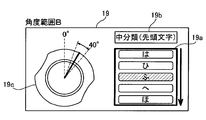
- FIG. 11 illustrates a state where “middle classification (first character)” is scroll-displayed on the display 19.
- the scroll display area 19a performs the scroll display of “medium category (first character)”
- the hierarchical display region 19b is scrolling.
- the hierarchy “medium category (first character)” is displayed.
- by changing the color of one “middle category (first character)” of the “middle category (first character)” being displayed the “middle category (first character)” is changed.
- “First character)” is displayed as a selection candidate. In this way, the user can easily determine the “medium category (first character)” being displayed as a selection candidate.
- “middle category (first character)” displayed in the scroll display area 19b is sequentially changed, so that “middle category (first character)” displayed as a selection candidate is displayed. Character) ”is also changed sequentially.
- the display 19 displays an image 19c indicating that the rotation angle of the selection operation unit 16 is in the angle range B.
- the item selection device 10 increases the rotation angle of the selection operation unit 16 within the angle range A, thereby speeding up the scroll display of the “music title” (the selection candidate “ The speed of changing the “music title” can be increased, and when the rotation angle of the selection operation unit 16 eventually reaches the angle range B, a scroll display of “middle classification (first character)” (selection of “middle classification”) (Change of “first character”) is started.
- the user can continue the operation of increasing the scroll display speed (the operation of rotating the selection operation unit 16), and the target of the scroll display can be changed from “song name” to “ “Middle category (first character)” can be switched to, and the scroll display of "Middle category (first character)" is started in the process of increasing the scrolling speed of "Song title” to the user. You can make it feel like
- the target of scroll display is switched from “music name” to “medium classification (first character)” in a state where the predetermined “music name” is displayed as a selection candidate, it corresponds to the predetermined “music name”.
- the scroll display of “middle category (first character)” is started from the state where “middle category (first character)” is displayed as a selection candidate. Accordingly, the user can feel that the scroll display of “medium category (first character)” starts more smoothly in the process of increasing the speed of the scroll display of “music title”. .
- the CPU 11 determines whether the “medium classification (first character)” is being scroll-displayed (S500). .
- the item selection device 10 of the present embodiment starts scroll display of “medium classification (first character)”. While the selection operation unit 16 is in the angle range B, the scroll display of “medium classification (first character)” is continued.
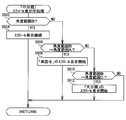
- FIG. 12 is a flowchart showing the “medium category” scroll display process.
- the CPU 11 first determines whether or not the selection operation unit 16 is in the angle range B (S602).
- the scroll display of “medium classification (first character)” is continued (S604).
- the speed of the scroll display at this time is set to a speed corresponding to the rotation angle (displacement amount) of the selection operation unit 16. That is, when the selection operation unit 16 is in the angle range B, the speed of the “middle classification (first character)” scroll display increases as the rotation angle of the selection operation unit 16 increases, and the selection operation unit 16 The smaller the rotation angle, the lower the scroll display speed of “medium classification (first character)”.
- the user starts scroll display of “medium classification (first character)” by rotating the selection operation unit 16 to the angle range B, and as the rotation angle is increased within the angle range B, “ It is possible to increase the scroll display speed of the “middle classification (first character)” and to decrease the scroll display speed of the “middle classification (first character)” as the rotation angle is reduced within the angle range B. it can.
- the predetermined “middle category (first character)” is displayed as a selection candidate and the target of scroll display is switched from “middle category (first character)” to “song name”
- the predetermined “ Scroll display of “music” is started from the state where “music name” corresponding to (belonging to) “medium classification (first character)” is displayed as a selection candidate.
- “fu (first character)” is displayed as a selection candidate and the scroll display target is switched from “medium classification (first character)” to “music name”
- “music name” starting with “fu” "Song name” starts scrolling from the state where "" is displayed as a selection candidate.
- the “music title” scrolls immediately. Instead of starting the display, after maintaining the state where the first “song name” of the “song name” corresponding to the predetermined “medium category (first character)” is displayed as a selection candidate for a predetermined time (scrolling) After the display is paused), scroll display of “Song Title” is started. In this way, even if the user desires to select the “music name” displayed as a selection candidate immediately after the “music name” scroll display is started, the “music name” is selected. Since the state displayed as a candidate is maintained for a predetermined time, the “music title” can be easily selected.
- the item selection device 10 reduces the rotation angle of the selection operation unit 16 from the angle range B, so that the “middle classification (first character)” scroll display speed (selection)
- the candidate “middle classification (first character)” can be reduced in speed
- the rotation angle of the selection operation unit 16 is eventually returned to the angle range A
- the scroll display of“ Song name ” is started in the process of reducing the scroll display speed of“ Middle category (first character) ”to the user. You can make it feel like
- Scroll display of “major category (first line)” is started from a state where “major category (first line)” corresponding to (belonging to) a predetermined “medium category (first character)” is displayed as a selection candidate.
- “F (first character)” is displayed as a selection candidate
- the scroll display target is switched from “medium classification (first character)” to “major classification (first line)”
- “ The scroll display of “major category (first line)” is started from the state where “first line)” is displayed as a selection candidate.
- FIG. 13 illustrates a state in which “large classification (first line)” is scroll-displayed on the display 19.
- the scroll display area 19a performs the scroll display of “major classification (first line)”
- the hierarchical display area 19b displays the scroll display.
- the hierarchy “major classification (first line)” is displayed.
- First line) is displayed as a selection candidate. In this way, the user can easily determine the “major classification (first line)” being displayed as a selection candidate.
- the “major category (first row)” displayed in the scroll display area 19b is sequentially changed.
- (First line) is also changed sequentially.
- the display 19 displays an image 19c indicating that the rotation angle of the selection operation unit 16 is in the angle range C.
- the item selection device 10 increases the rotation angle of the selection operation unit 16 within the angle range B, so that the scrolling speed of “medium classification (first character)” ( The speed of changing the “middle classification (first character)” of the selection candidate can be increased, and when the rotation angle of the selection operation unit 16 reaches the angle range C, the “large classification (first line)” scroll Display (change of “large classification (first row)” of selection candidates) is started. Therefore, the user can continue the operation of increasing the speed of scroll display (the operation of rotating the selection operation unit 16), and the target of the scroll display can be “middle class (first character) without intervening other operations. ) ”To“ Large classification (first line) ”and in the process of increasing the scroll display speed of“ medium classification (first line) ”to the user, ) "Scroll display can be started.
- the CPU 11 determines whether the “major category (first line)” is being scrolled. (S700). As described above, when the selection operation unit 16 is rotated to the angle range C, the item selection device 10 according to the present embodiment starts scroll display of “major classification (first row)”. While the selection operation unit 16 is in the angle range C, the scroll display of “major classification (first line)” is continued.
- FIG. 14 is a flowchart showing the “major category” scroll display process.
- the scroll display of “major classification (first line)” is continued (S804).
- the speed of the scroll display at this time is set to a speed corresponding to the rotation angle (displacement amount) of the selection operation unit 16. That is, when the selection operation unit 16 is in the angle range C, the larger the rotation angle of the selection operation unit 16 is, the higher the speed of the “large classification (first line)” scroll display is. As the rotation angle becomes smaller, the scroll display speed of the “large classification (first line)” becomes smaller.
- the user rotates the selection operation unit 16 to the angle range C to start the scroll display of “major classification (first line)”, and as the rotation angle increases within the angle range C, the “ The scroll display speed of the “large classification (first line)” can be increased, and the scroll display speed of the “large classification (first line)” can be decreased as the rotation angle is reduced within the angle range C. it can.
- Scroll display of “medium category (first character)” is started from the state where “medium category (first character)” corresponding to (belonging to) the predetermined “major category (first line)” is displayed as a selection candidate.
- “ha line (first line)” is displayed as a selection candidate and the scroll display target is switched from “major classification (first line)” to “medium classification (first line)”
- “ha ( The scroll display of “medium category (first character)” is started from the state where “first character)” is displayed as a selection candidate.
- the “middle classification (first character)” is immediately displayed.
- the first “middle category (first character)” of the “middle category (first character)” corresponding to the predetermined “major category (first line)” is displayed as a selection candidate.
- the scroll display of “medium classification (first character)” is started.
- the item selection device 10 reduces the rotation angle of the selection operation unit 16 from the angle range C, thereby increasing the scroll display speed (selection of “large classification (first line)”).
- the speed of changing the candidate “major classification (first line)” can be reduced, and when the rotation angle of the selection operation unit 16 is eventually returned to the angle range B, the “medium classification (first character)” scroll Display (change of “music title” as a selection candidate) is started.
- the user can continue the operation of reducing the speed of scroll display (the operation of rotating the selection operation unit 16), and the target of the scroll display can be classified into “major classification (first line) without intervening other operations.
- the item selection device 10 of this embodiment scrolls and displays “music name”, “first character”, and “line”, “music name”, “first character”, and “line” that can be selection candidates are displayed. 19, even if the number of “music titles”, “first characters”, and “lines” that can be selection candidates increases, these are displayed on the display 19 in a size that can be easily confirmed by the user. Is possible.
- the item selection device 10 of this embodiment stores hierarchical data in which a plurality of “music titles” (items) are classified into a plurality of “medium classification (first character)” (group), and a display 19 (display)
- a “medium category (first character)” (corresponding to a group of the present disclosure) in which a plurality of “music titles” (items) are displayed on the screen and the “music name” (corresponding to an item of the present disclosure) is displayed. Is changed to a desired “music title” (item) on the display 19 (display screen).
- the selection operation unit 16 of the present embodiment has a predetermined reference position, and rotates (displaces) from the reference position by receiving a rotation operation (predetermined operation).
- the selection operation unit 16 of this embodiment corresponds to an “operation unit” in the present disclosure.
- the CPU 11 converts “song name” (item) as a selection candidate from among a plurality of “song names” (items) displayed on the display 19 (display screen) into another “song name” ( Item) is displayed in a different mode.
- the display 19 of this embodiment corresponds to a “display screen”.
- the CPU 11 and S200 of this embodiment correspond to the “selection candidate display unit (or means)” in the present disclosure.
- the selection operation unit 16 rotates (displaces) from the reference position
- the CPU 11 according to the present embodiment displays the selection candidate “music name” (item) displayed on the display 19 (display screen).
- the speed is changed according to the rotation angle (displacement amount) from the reference position.
- the music name in the present embodiment corresponds to an item in the present disclosure
- the rotation angle corresponds to the amount of displacement. Therefore, the CPU 11 and S400 of the present embodiment correspond to the “selection candidate changing unit (or means)” in the present disclosure.
- the determination button 16a is operated in a state where the selection operation unit 16 (operation unit) is at the reference position (when a predetermined determination operation is performed)
- the CPU 11 according to the present embodiment selects “music name” of the selection candidate. "(Item)" is determined as the "music title" (item) whose selection is confirmed (selected).
- the CPU 11 and S204 of this embodiment correspond to the “determination unit (or means)” in the present disclosure.
- the CPU 11 of the present embodiment While changing the “middle category (first character)” (group) in which a plurality of “music titles” (items) are displayed on the display 19 (display screen), the “middle category (first character)” (group) is changed. It is displayed in a color (mode) different from other “medium classification (first character)” (group). “Medium classification (first character)” in the present embodiment corresponds to a group in the present disclosure.
- the CPU 11 and S600 of the present embodiment correspond to the “group changing unit (or means)” in the present disclosure.
- the CPU 11 of this embodiment displays a plurality of “music titles” (items) on the display 19 (display screen) while scrolling. Therefore, the CPU 11 and S300 of the present embodiment correspond to the “scroll unit (or means)” in the present disclosure.
- Modification 1 Modification 1
- the item selection device 10 of the above-described embodiment stops the scroll display of the “music title” and determines in this state.
- the button 16a is operated, the selection of the “music name” being displayed as a selection candidate is confirmed.
- the selection operation unit 16 when the selection operation unit 16 is returned to the reference position during the scroll display of “music name”, the scroll display of the “music name” is stopped and “music name” being displayed as a selection candidate is displayed. The selection may be confirmed. That is, even if the determination button 16a is not operated, the selection of the “music name” may be confirmed when the selection operation unit 16 is returned to the reference position.
- the “Artist name” category having two layers when the “Artist name” category having two layers is selected, the “Artist name” is scrolled when the rotation angle is greater than 0 degrees and less than 30 degrees, and when the rotation angle is between 30 degrees and 60 degrees Scroll to “Large classification (music genre)”.
- the “Album name” category having four layers when the “Album name” category having four layers is selected, the “Album name” is scrolled when the rotation angle is greater than 0 degrees and less than 15 degrees, and when the rotation angle is between 15 degrees and less than 30 degrees.
- “Small category (first character)” is scrolled
- “Medium category (first line)” is scrolled when it is 30 degrees or more and less than 45 degrees
- “Major category (music) is displayed when it is 45 degrees or more and 60 degrees or less” "Genre)”.
- the item selection device 10 has been described above, but the present disclosure is not limited to the above-described embodiment and the modification, and can be implemented in various modes without departing from the gist thereof. .
- the rotatable selection operation unit 16 is provided as an operation unit for selecting an item.
- a swingable operation unit such as a joystick or a slide switch or the like is provided.
- a possible operation unit may be provided.
- each layer is scroll-displayed.
- items or groups that can be selection candidates can be displayed in the display area of the display 19 at a time, there is no need to perform scroll-display.
- items and groups may be displayed as selection candidates while sequentially switching.
- the “major category (first row) being displayed as a selection candidate is selected by returning the rotation angle of the selection operation unit 16 from the angle range C to the angle range B, the“ major category (first row) is selected. Only the “medium category (first character)” belonging to “)” may be scroll-displayed.
- the “middle category (first character)” being displayed is selected as a selection candidate by returning the rotation angle of the selection operation unit 16 from the angle range B to the angle range A, the “middle category (first character)” is selected. Only the “music title” starting with “character” may be scrolled.
- the scroll display target is the music title, the first character, and the line.
- various items and groups can be the scroll display target.
- addresses, telephone numbers, e-mail addresses, facility names, etc. stored in various devices such as GPS devices and mobile phones can be targeted.
- the item selection device and the item selection method according to the present disclosure display selection candidate items among a plurality of items displayed on the display screen in a manner different from other items.
- the selection candidate item is determined as the selected item.
- the selection candidate item displayed on the display screen is changed at a speed corresponding to the displacement amount from the reference position, and the displacement amount from the reference position of the operation unit is a predetermined amount.
- the threshold displacement amount is exceeded, the group in which a plurality of items are displayed on the display screen is changed.
- a plurality of items are classified and stored in a plurality of groups, and the plurality of items are displayed on the display screen and the group in which the items are displayed is changed, thereby
- An item selection device for selecting a desired item on a display screen, which has a predetermined reference position and is displaced from the reference position by receiving a predetermined operation, and the display unit displayed on the display screen
- a selection candidate display unit that displays a selection candidate item in a plurality of items in a manner different from other items, and when the operation unit is displaced from the reference position, the selection candidate displayed on the display screen
- a selection candidate changing unit that changes an item at a speed according to the amount of displacement from the reference position, and when a predetermined determination operation is performed in a state where the operation unit is at the reference position, the item of the selection candidate is Selected items and And a group for changing the group in which the plurality of items are displayed on the display screen when a displacement amount from the reference position of the operation unit exceeds a predetermined threshold displacement amount
- a plurality of items are classified and stored in a plurality of groups, and the display is performed by changing the group in which the plurality of items are displayed and the items are displayed on the display screen.
- An item selection method for selecting a desired item on a screen wherein a selection candidate item among the plurality of items displayed on the display screen is displayed in a manner different from other items, and an operation When the unit is displaced from the reference position, the selection candidate item displayed on the display screen is changed at a speed corresponding to the amount of displacement from the reference position, and the operation unit is in the reference position.
- the step of determining the selection candidate item as a selected item, and a displacement amount from the reference position of the operation unit exceeds a predetermined threshold displacement amount The display screen Item selection method and a step of changing the group to which the plurality of items are displayed is provided.
- the item selection device or the item selection method of the present disclosure by increasing the displacement amount of the operation unit, it is possible to increase the change speed of the “selected candidate item”, and eventually the displacement amount of the operation unit is reduced.
- the predetermined threshold displacement amount is exceeded, the “group in which a plurality of items are displayed on the display screen” is changed.
- the user simply selects the “candidate of selection” as the target of the change without intervening other operations by simply continuing the operation of increasing the change speed of the selection candidate (the operation of increasing the displacement amount of the operation unit).
- the displacement amount of the operation unit exceeds the threshold displacement amount, a group in which a plurality of items are displayed on the display screen is displayed in a manner different from other groups. It is good.
- the user can easily identify “a group in which a plurality of items are displayed on the display screen”, and can further reduce the burden on the user when selecting an item.
- the group in which a plurality of items are displayed on the display screen may be changed at a higher speed as the displacement amount of the operation unit becomes larger than the threshold displacement amount.
- the user can increase the change speed of the “group in which multiple items are displayed on the display screen” by continuing the operation of increasing the displacement amount of the operation unit even after the displacement amount exceeds the threshold displacement amount.
- the “group in which a plurality of items are displayed on the display screen” is changed and the speed of the change Can be felt to become larger.
- the “group in which a plurality of items are displayed on the display screen” can be changed smoothly and intuitively, and the burden on the user when selecting an item can be further reduced.
- a plurality of items may be displayed on the display screen while scrolling.
- the operation unit may be rotatably provided, and the operation unit may be displaced from the reference position by rotating.
- the displacement amount (rotation angle) of the operation unit can be made to correspond to the amount of twist of the wrist. This makes it easier to experience the amount of displacement of the part. As a result, it is possible to further reduce the burden on the user when selecting an item.
- each section is expressed as S100, for example.
- each section can be divided into a plurality of subsections, while a plurality of sections can be combined into one section.
- each section configured in this manner can be referred to as a device, module, or means.
Landscapes
- Engineering & Computer Science (AREA)
- General Engineering & Computer Science (AREA)
- Theoretical Computer Science (AREA)
- Human Computer Interaction (AREA)
- Physics & Mathematics (AREA)
- General Physics & Mathematics (AREA)
- Mechanical Engineering (AREA)
- Transportation (AREA)
- Chemical & Material Sciences (AREA)
- Combustion & Propulsion (AREA)
- User Interface Of Digital Computer (AREA)
- Electrophonic Musical Instruments (AREA)
- Position Input By Displaying (AREA)
Priority Applications (3)
| Application Number | Priority Date | Filing Date | Title |
|---|---|---|---|
| DE112014002504.6T DE112014002504T5 (de) | 2013-05-23 | 2014-05-20 | Elementauswahlvorrichtung und Elementauswahlverfahren |
| CN201480029068.0A CN105229587A (zh) | 2013-05-23 | 2014-05-20 | 项目选择装置、以及项目选择方法 |
| US14/892,503 US20160124591A1 (en) | 2013-05-23 | 2014-05-20 | Item selection apparatus and item selection method |
Applications Claiming Priority (2)
| Application Number | Priority Date | Filing Date | Title |
|---|---|---|---|
| JP2013109181A JP2014229132A (ja) | 2013-05-23 | 2013-05-23 | 項目選択装置、および項目選択方法 |
| JP2013-109181 | 2013-05-23 |
Publications (1)
| Publication Number | Publication Date |
|---|---|
| WO2014188703A1 true WO2014188703A1 (ja) | 2014-11-27 |
Family
ID=51933270
Family Applications (1)
| Application Number | Title | Priority Date | Filing Date |
|---|---|---|---|
| PCT/JP2014/002634 Ceased WO2014188703A1 (ja) | 2013-05-23 | 2014-05-20 | 項目選択装置、および項目選択方法 |
Country Status (5)
| Country | Link |
|---|---|
| US (1) | US20160124591A1 (enExample) |
| JP (1) | JP2014229132A (enExample) |
| CN (1) | CN105229587A (enExample) |
| DE (1) | DE112014002504T5 (enExample) |
| WO (1) | WO2014188703A1 (enExample) |
Families Citing this family (8)
| Publication number | Priority date | Publication date | Assignee | Title |
|---|---|---|---|---|
| EP3252587B1 (en) * | 2016-06-02 | 2020-08-26 | Unify Patente GmbH & Co. KG | Method and system for scrolling visual page content |
| JP2018120262A (ja) * | 2017-01-23 | 2018-08-02 | 株式会社東海理化電機製作所 | 電子機器 |
| EP3783903B1 (en) * | 2018-04-27 | 2025-11-26 | Spotify AB | Media playback actions based on knob rotation |
| JP7159707B2 (ja) * | 2018-09-04 | 2022-10-25 | 富士フイルムビジネスイノベーション株式会社 | 表示装置及びプログラム |
| TWI728361B (zh) * | 2019-05-15 | 2021-05-21 | 和碩聯合科技股份有限公司 | 用於一電子裝置的快速資料瀏覽方法 |
| JP7465836B2 (ja) * | 2021-03-09 | 2024-04-11 | ヤンマーホールディングス株式会社 | 操作装置及び建設機械 |
| US12340021B2 (en) * | 2022-03-09 | 2025-06-24 | Beijing Boe Technology Development Co., Ltd. | Method and device for synchronizing haptic feedback and visual feedback |
| JP2025008036A (ja) * | 2023-07-04 | 2025-01-20 | キヤノン株式会社 | 情報処理システム、情報処理システムの制御方法、およびプログラム |
Citations (3)
| Publication number | Priority date | Publication date | Assignee | Title |
|---|---|---|---|---|
| JP2001136259A (ja) * | 1999-11-02 | 2001-05-18 | Nec Corp | 携帯電話端末の表示画面制御装置 |
| JP2003084881A (ja) * | 2001-06-28 | 2003-03-19 | Matsushita Electric Ind Co Ltd | 情報表示装置および情報表示方法 |
| WO2012164988A1 (ja) * | 2011-05-30 | 2012-12-06 | 本田技研工業株式会社 | 入力装置 |
Family Cites Families (11)
| Publication number | Priority date | Publication date | Assignee | Title |
|---|---|---|---|---|
| US20030001865A1 (en) * | 2001-06-28 | 2003-01-02 | Matsushita Electric Industrial Co., Ltd. | Information display device and method for displaying information |
| US8004496B2 (en) * | 2002-01-08 | 2011-08-23 | Koninklijke Philips Electronics N.V. | User interface for electronic devices for controlling the displaying of long sorted lists |
| JP4145868B2 (ja) * | 2004-12-03 | 2008-09-03 | 株式会社ソニー・コンピュータエンタテインメント | マルチメディア再生装置およびメニュー画面表示方法 |
| JP4738296B2 (ja) * | 2006-09-15 | 2011-08-03 | アルパイン株式会社 | 入力装置 |
| JP5137188B2 (ja) * | 2008-02-08 | 2013-02-06 | アルパイン株式会社 | 情報検索方法及び装置 |
| US9201582B2 (en) * | 2008-11-11 | 2015-12-01 | Canon Kabushiki Kaisha | Display control apparatus and display control method |
| JP2011111061A (ja) * | 2009-11-27 | 2011-06-09 | Fujitsu Ten Ltd | 車載表示システム |
| JP5921122B2 (ja) * | 2011-09-22 | 2016-05-24 | キヤノン株式会社 | 表示制御装置、表示制御方法、およびプログラム |
| JP5925024B2 (ja) * | 2012-04-06 | 2016-05-25 | キヤノン株式会社 | 表示制御装置、表示制御方法、およびプログラム |
| JP2014010777A (ja) * | 2012-07-02 | 2014-01-20 | Fujitsu Ltd | 表示プログラム、表示方法、及び情報処理装置 |
| JP5770770B2 (ja) * | 2013-03-25 | 2015-08-26 | 本田技研工業株式会社 | 入力装置 |
-
2013
- 2013-05-23 JP JP2013109181A patent/JP2014229132A/ja active Pending
-
2014
- 2014-05-20 WO PCT/JP2014/002634 patent/WO2014188703A1/ja not_active Ceased
- 2014-05-20 US US14/892,503 patent/US20160124591A1/en not_active Abandoned
- 2014-05-20 DE DE112014002504.6T patent/DE112014002504T5/de not_active Withdrawn
- 2014-05-20 CN CN201480029068.0A patent/CN105229587A/zh active Pending
Patent Citations (3)
| Publication number | Priority date | Publication date | Assignee | Title |
|---|---|---|---|---|
| JP2001136259A (ja) * | 1999-11-02 | 2001-05-18 | Nec Corp | 携帯電話端末の表示画面制御装置 |
| JP2003084881A (ja) * | 2001-06-28 | 2003-03-19 | Matsushita Electric Ind Co Ltd | 情報表示装置および情報表示方法 |
| WO2012164988A1 (ja) * | 2011-05-30 | 2012-12-06 | 本田技研工業株式会社 | 入力装置 |
Also Published As
| Publication number | Publication date |
|---|---|
| US20160124591A1 (en) | 2016-05-05 |
| DE112014002504T5 (de) | 2016-02-25 |
| CN105229587A (zh) | 2016-01-06 |
| JP2014229132A (ja) | 2014-12-08 |
Similar Documents
| Publication | Publication Date | Title |
|---|---|---|
| JP2014229132A (ja) | 項目選択装置、および項目選択方法 | |
| KR101453914B1 (ko) | 복수의 리스트를 표시하기 위한 gui 제공방법 및 이를적용한 멀티미디어 기기 | |
| WO2009084185A1 (ja) | 情報端末装置、情報処理方法、および、情報処理プログラム | |
| JPWO2007066662A1 (ja) | コンテンツ検索装置、コンテンツ検索システム、コンテンツ検索システム用サーバ装置、コンテンツ検索方法及びコンピュータプログラム並びに検索機能付きコンテンツ出力装置 | |
| US20100188351A1 (en) | Apparatus and method for playing of multimedia item | |
| CN102622194B (zh) | 显示控制设备、显示控制方法 | |
| CN102080965A (zh) | 车载显示系统 | |
| JP2010026985A (ja) | 情報処理装置及び情報処理方法 | |
| JP2008071419A (ja) | 楽曲再生装置、プログラム、及び楽曲再生装置における楽曲再生方法 | |
| JP5323660B2 (ja) | スクロール表示装置 | |
| JPWO2007066663A1 (ja) | コンテンツ検索装置、コンテンツ検索システム、コンテンツ検索システム用サーバ装置、コンテンツ検索方法及びコンピュータプログラム並びに検索機能付きコンテンツ出力装置 | |
| JP3876671B2 (ja) | 入力装置およびこれを備える情報処理装置ならびにカーソル表示制御方法 | |
| JP2010152970A (ja) | 階層メニューによるコンテンツの検索装置および検索方法、コンテンツ再生装置 | |
| JP6069927B2 (ja) | コンテンツ表示装置、コンテンツ表示方法およびプログラム | |
| JP5050460B2 (ja) | インタフェース装置、インタフェースプログラム、及びインタフェース方法 | |
| JP2015133008A (ja) | 表示装置、車載機器、表示装置の制御方法、プログラム | |
| JP6474197B2 (ja) | 表示制御装置、表示制御方法及び表示制御プログラム | |
| JP2009181464A (ja) | 情報端末装置、情報端末装置の情報処理方法、および、情報処理プログラム | |
| JP2008071118A (ja) | インタフェース装置、楽曲再生装置、インタフェースプログラム、及びインタフェース方法 | |
| US20090327968A1 (en) | Apparatus and method for enabling user input | |
| JP4885752B2 (ja) | オーディオ装置 | |
| JP5028922B2 (ja) | 楽曲再生装置、楽曲再生プログラム、及び楽曲再生方法 | |
| JP7483775B2 (ja) | アプリケーションプログラム、端末装置の制御方法、コンテンツ提供装置、およびコンテンツ提供方法 | |
| JP5723308B2 (ja) | 端末装置及び楽曲再生装置 | |
| US20080262847A1 (en) | User positionable audio anchors for directional audio playback from voice-enabled interfaces |
Legal Events
| Date | Code | Title | Description |
|---|---|---|---|
| WWE | Wipo information: entry into national phase |
Ref document number: 201480029068.0 Country of ref document: CN |
|
| 121 | Ep: the epo has been informed by wipo that ep was designated in this application |
Ref document number: 14800725 Country of ref document: EP Kind code of ref document: A1 |
|
| WWE | Wipo information: entry into national phase |
Ref document number: 14892503 Country of ref document: US |
|
| WWE | Wipo information: entry into national phase |
Ref document number: 112014002504 Country of ref document: DE |
|
| 122 | Ep: pct application non-entry in european phase |
Ref document number: 14800725 Country of ref document: EP Kind code of ref document: A1 |