JP7591069B2 - Biometric authentication - Google Patents
Biometric authentication Download PDFInfo
- Publication number
- JP7591069B2 JP7591069B2 JP2023009554A JP2023009554A JP7591069B2 JP 7591069 B2 JP7591069 B2 JP 7591069B2 JP 2023009554 A JP2023009554 A JP 2023009554A JP 2023009554 A JP2023009554 A JP 2023009554A JP 7591069 B2 JP7591069 B2 JP 7591069B2
- Authority
- JP
- Japan
- Prior art keywords
- electronic device
- biometric
- indication
- user
- error condition
- Prior art date
- Legal status (The legal status is an assumption and is not a legal conclusion. Google has not performed a legal analysis and makes no representation as to the accuracy of the status listed.)
- Active
Links
Images




























































Classifications
-
- G—PHYSICS
- G06—COMPUTING OR CALCULATING; COUNTING
- G06F—ELECTRIC DIGITAL DATA PROCESSING
- G06F21/00—Security arrangements for protecting computers, components thereof, programs or data against unauthorised activity
- G06F21/30—Authentication, i.e. establishing the identity or authorisation of security principals
- G06F21/31—User authentication
- G06F21/32—User authentication using biometric data, e.g. fingerprints, iris scans or voiceprints
-
- G—PHYSICS
- G06—COMPUTING OR CALCULATING; COUNTING
- G06F—ELECTRIC DIGITAL DATA PROCESSING
- G06F21/00—Security arrangements for protecting computers, components thereof, programs or data against unauthorised activity
- G06F21/30—Authentication, i.e. establishing the identity or authorisation of security principals
- G06F21/31—User authentication
- G06F21/316—User authentication by observing the pattern of computer usage, e.g. typical user behaviour
-
- G—PHYSICS
- G06—COMPUTING OR CALCULATING; COUNTING
- G06F—ELECTRIC DIGITAL DATA PROCESSING
- G06F21/00—Security arrangements for protecting computers, components thereof, programs or data against unauthorised activity
- G06F21/30—Authentication, i.e. establishing the identity or authorisation of security principals
- G06F21/31—User authentication
- G06F21/36—User authentication by graphic or iconic representation
-
- G—PHYSICS
- G06—COMPUTING OR CALCULATING; COUNTING
- G06F—ELECTRIC DIGITAL DATA PROCESSING
- G06F21/00—Security arrangements for protecting computers, components thereof, programs or data against unauthorised activity
- G06F21/30—Authentication, i.e. establishing the identity or authorisation of security principals
- G06F21/45—Structures or tools for the administration of authentication
-
- G—PHYSICS
- G06—COMPUTING OR CALCULATING; COUNTING
- G06F—ELECTRIC DIGITAL DATA PROCESSING
- G06F3/00—Input arrangements for transferring data to be processed into a form capable of being handled by the computer; Output arrangements for transferring data from processing unit to output unit, e.g. interface arrangements
- G06F3/01—Input arrangements or combined input and output arrangements for interaction between user and computer
- G06F3/03—Arrangements for converting the position or the displacement of a member into a coded form
- G06F3/041—Digitisers, e.g. for touch screens or touch pads, characterised by the transducing means
-
- G—PHYSICS
- G06—COMPUTING OR CALCULATING; COUNTING
- G06F—ELECTRIC DIGITAL DATA PROCESSING
- G06F3/00—Input arrangements for transferring data to be processed into a form capable of being handled by the computer; Output arrangements for transferring data from processing unit to output unit, e.g. interface arrangements
- G06F3/01—Input arrangements or combined input and output arrangements for interaction between user and computer
- G06F3/048—Interaction techniques based on graphical user interfaces [GUI]
- G06F3/0484—Interaction techniques based on graphical user interfaces [GUI] for the control of specific functions or operations, e.g. selecting or manipulating an object, an image or a displayed text element, setting a parameter value or selecting a range
-
- G—PHYSICS
- G06—COMPUTING OR CALCULATING; COUNTING
- G06V—IMAGE OR VIDEO RECOGNITION OR UNDERSTANDING
- G06V40/00—Recognition of biometric, human-related or animal-related patterns in image or video data
- G06V40/10—Human or animal bodies, e.g. vehicle occupants or pedestrians; Body parts, e.g. hands
- G06V40/16—Human faces, e.g. facial parts, sketches or expressions
- G06V40/161—Detection; Localisation; Normalisation
- G06V40/166—Detection; Localisation; Normalisation using acquisition arrangements
-
- G—PHYSICS
- G06—COMPUTING OR CALCULATING; COUNTING
- G06V—IMAGE OR VIDEO RECOGNITION OR UNDERSTANDING
- G06V40/00—Recognition of biometric, human-related or animal-related patterns in image or video data
- G06V40/60—Static or dynamic means for assisting the user to position a body part for biometric acquisition
- G06V40/67—Static or dynamic means for assisting the user to position a body part for biometric acquisition by interactive indications to the user
Landscapes
- Engineering & Computer Science (AREA)
- Theoretical Computer Science (AREA)
- Computer Security & Cryptography (AREA)
- General Engineering & Computer Science (AREA)
- Physics & Mathematics (AREA)
- General Physics & Mathematics (AREA)
- Computer Hardware Design (AREA)
- Software Systems (AREA)
- Human Computer Interaction (AREA)
- Health & Medical Sciences (AREA)
- General Health & Medical Sciences (AREA)
- Social Psychology (AREA)
- Multimedia (AREA)
- Oral & Maxillofacial Surgery (AREA)
- User Interface Of Digital Computer (AREA)
- Measurement Of The Respiration, Hearing Ability, Form, And Blood Characteristics Of Living Organisms (AREA)
- Collating Specific Patterns (AREA)
- Controls And Circuits For Display Device (AREA)
- Measuring Pulse, Heart Rate, Blood Pressure Or Blood Flow (AREA)
- Studio Devices (AREA)
- Telephone Function (AREA)
Description
(関連出願の相互参照)
本出願は、2019年3月29日に出願され、「生体認証の実施」と題する米国特許出願第16/369,355号、2018年10月29日に出願され、「生体認証の実施」と題する米国特許出願第62/752,234号、及び2018年6月3日に出願され、「生体認証の実施」と題する米国特許出願第62/679,955号に対する優先権を主張する。
CROSS-REFERENCE TO RELATED APPLICATIONS
This application claims priority to U.S. patent application Ser. No. 16/369,355, filed March 29, 2019, entitled "Biometric Implementations," U.S. patent application Ser. No. 62/752,234, filed October 29, 2018, entitled "Biometric Implementations," and U.S. patent application Ser. No. 62/679,955, filed June 3, 2018, entitled "Biometric Implementations."
[技術分野]
本開示は、一般に、生体認証に関し、より詳細には、バイオメトリック特徴の登録及び認証のためのインタフェース及び技法に関する。
[Technical field]
The present disclosure relates generally to biometric authentication, and more particularly, to interfaces and techniques for enrollment and authentication of biometric characteristics.
電子デバイスを使用する、例えば、顔、虹彩、又は指紋の生体認証は、電子デバイスのユーザを認証する便利かつ効率的な方法である。生体認証により、デバイスが任意の数のユーザの識別情報を迅速かつ容易に検証することが可能になる。 Biometric authentication using an electronic device, for example face, iris, or fingerprint, is a convenient and efficient way to authenticate a user of the electronic device. Biometric authentication allows the device to quickly and easily verify the identity of any number of users.
しかしながら、電子デバイスを使用して生体認証を実施するいくつかの技法は、概して煩雑である。ユーザが生体認証のためのバイオメトリック特徴を登録できないか、又は生体認証を実行できないとき、ユーザは、多くの場合、失敗の根底にある原因を認識しない。したがって、ユーザは、生体認証を使用することを完全に妨げられる可能性がある。更に、ユーザがバイオメトリック特徴を登録するか、又は失敗後に生体認証を行う更なる試みを実行するとき、ユーザは、多くの場合、失敗の根底にある原因を修正する知識をもたずに生体認証を行う。上記の欠点に鑑みて、既存の技法には必要以上の時間がかかり、ユーザの時間とデバイスのエネルギーの両方が無駄になる。この後者の問題は、バッテリ動作デバイスの動作において特に重大である。 However, some techniques for implementing biometric authentication using electronic devices are generally cumbersome. When a user is unable to enroll a biometric feature for biometric authentication or is unable to perform biometric authentication, the user is often unaware of the underlying cause of the failure. Thus, the user may be prevented from using biometric authentication altogether. Furthermore, when a user enrolls a biometric feature or performs a further attempt to perform biometric authentication after a failure, the user often performs the biometric authentication without the knowledge of how to correct the underlying cause of the failure. In view of the above shortcomings, existing techniques take longer than necessary, wasting both the user's time and the device's energy. This latter problem is particularly critical in the operation of battery-operated devices.
したがって、本技法は、生体認証を実施するより高速でより効率的な方法及びインタフェースを有する電子デバイスを提供する。そのような方法及びインタフェースは、任意選択的に、生体認証を実施する他の方法を補完し又はそれに取って代わる。そのような方法及びインタフェースは、ユーザにかかる認識的負担を低減し、より効率的なヒューマン-マシンインタフェースを作成する。バッテリ動作コンピューティングデバイスの場合、そのような方法及びインタフェースは、電力を節約し、バッテリ充電の間隔を長くする。そのような方法及びインタフェースはまた、スマートフォン及びスマートウォッチなどのコンピューティングデバイスで要求される無駄な、余分の、又は繰り返しの入力の数を低減する。 The present techniques thus provide electronic devices with faster and more efficient methods and interfaces for performing biometric authentication. Such methods and interfaces, optionally, complement or replace other methods for performing biometric authentication. Such methods and interfaces reduce the cognitive burden on the user and create a more efficient human-machine interface. For battery-operated computing devices, such methods and interfaces conserve power and extend the time between battery charges. Such methods and interfaces also reduce the number of unnecessary, redundant, or repetitive inputs required in computing devices such as smartphones and smartwatches.
いくつかの実施例によれば、方法が説明され、方法は、ディスプレイ及び1つ以上の入力デバイスを有する電子デバイスにおいて、1つ以上の入力デバイスを介して、認証を必要とする動作を実行する要求を受信することと、認証を必要とする動作を実行する要求に応答して、認証が成功したという判定に従って、動作を実行することと、認証が成功しなかった、かつ1組のエラー状態基準が満たされたという判定に従って、エラー状態のインジケーションをディスプレイに表示することであって、インジケーションがエラー状態の原因に関する情報を含む、ことと、動作を実行することを見送ることとを含む。 According to some embodiments, a method is described that includes, at an electronic device having a display and one or more input devices, receiving a request via the one or more input devices to perform an operation requiring authentication; in response to the request to perform the operation requiring authentication, performing the operation in accordance with a determination that the authentication is successful; and, in accordance with a determination that the authentication is not successful and a set of error condition criteria is met, displaying an indication of an error condition on the display, the indication including information regarding a cause of the error condition; and forgoing performing the operation.
いくつかの実施例によれば、非一時的コンピュータ可読媒体が説明され、非一時的コンピュータ可読記憶媒体は、ディスプレイ及び1つ以上の入力デバイスを有する電子デバイスの1つ以上のプロセッサによって実行されるように構成された1つ以上のプログラムを備え、1つ以上のプログラムは、1つ以上の入力デバイスを介して、認証を必要とする動作を実行する要求を受信することと、認証を必要とする動作を実行する要求に応答して、認証が成功したという判定に従って、動作を実行することと、認証が成功しなかった、かつ1組のエラー状態基準が満たされたという判定に従って、エラー状態のインジケーションをディスプレイに表示することであって、インジケーションがエラー状態の原因に関する情報を含む、ことと、動作を実行することを見送ることとを行う命令を含む。 According to some embodiments, a non-transitory computer-readable medium is described, the non-transitory computer-readable storage medium comprising one or more programs configured to be executed by one or more processors of an electronic device having a display and one or more input devices, the one or more programs including instructions for receiving, via the one or more input devices, a request to perform an operation requiring authentication; performing the operation in response to the request to perform the operation requiring authentication, in accordance with a determination that the authentication is successful; displaying, on the display, an indication of an error condition in accordance with a determination that the authentication is not successful and a set of error condition criteria is met, the indication including information regarding a cause of the error condition; and forgoing performing the operation.
いくつかの実施例によれば、一時的コンピュータ可読媒体が説明され、一時的コンピュータ可読記憶媒体は、ディスプレイ及び1つ以上の入力デバイスを有する電子デバイスの1つ以上のプロセッサによって実行されるように構成された1つ以上のプログラムを備え、1つ以上のプログラムは、1つ以上の入力デバイスを介して、認証を必要とする動作を実行する要求を受信することと、認証を必要とする動作を実行する要求に応答して、認証が成功したという判定に従って、動作を実行することと、認証が成功しなかった、かつ1組のエラー状態基準が満たされたという判定に従って、エラー状態のインジケーションをディスプレイに表示することであって、インジケーションがエラー状態の原因に関する情報を含む、ことと、動作を実行することを見送ることとを行う命令を含む。 According to some embodiments, a temporary computer-readable medium is described, the temporary computer-readable storage medium comprising one or more programs configured to be executed by one or more processors of an electronic device having a display and one or more input devices, the one or more programs including instructions for receiving, via the one or more input devices, a request to perform an operation requiring authentication; performing the operation in response to the request to perform the operation requiring authentication, in accordance with a determination that the authentication is successful; displaying, on the display, an indication of an error condition in accordance with a determination that the authentication is not successful and a set of error condition criteria is met, the indication including information regarding a cause of the error condition; and forgoing performing the operation.
いくつかの実施例によれば、電子デバイスが説明され、電子デバイスは、1つ以上の入力デバイスと、ディスプレイと、1つ以上のプロセッサと、1つ以上のプロセッサによって実行されるように構成された1つ以上のプログラムを記憶するメモリとを備え、1つ以上のプログラムは、1つ以上の入力デバイスを介して、認証を必要とする動作を実行する要求を受信することと、認証を必要とする動作を実行する要求に応答して、認証が成功したという判定に従って、動作を実行することと、認証が成功しなかった、かつ1組のエラー状態基準が満たされたという判定に従って、エラー状態のインジケーションをディスプレイに表示することであって、インジケーションがエラー状態の原因に関する情報を含む、ことと、動作を実行することを見送ることとを行う命令を含む。 According to some embodiments, an electronic device is described, the electronic device comprising one or more input devices, a display, one or more processors, and a memory storing one or more programs configured to be executed by the one or more processors, the one or more programs including instructions for receiving, via the one or more input devices, a request to perform an operation requiring authentication; performing the operation in response to the request to perform the operation requiring authentication, in accordance with a determination that the authentication is successful; displaying, on the display, an indication of an error condition in accordance with a determination that the authentication is not successful and a set of error condition criteria is met, the indication including information regarding a cause of the error condition; and forgoing performing the operation.
いくつかの実施例によれば、電子デバイスが説明され、電子デバイスは、1つ以上の入力デバイスと、ディスプレイと、1つ以上の入力デバイスを介して、認証を必要とする動作を実行する要求を受信する手段と、認証を必要とする動作を実行する要求に応答して、認証が成功したという判定に従って、動作を実行することと、認証が成功しなかった、かつ1組のエラー状態基準が満たされたという判定に従って、エラー状態のインジケーションをディスプレイに表示することであって、インジケーションがエラー状態の原因に関する情報を含む、ことと、動作を実行することを見送ることとを行う手段とを備える。 According to some embodiments, an electronic device is described, the electronic device comprising one or more input devices, a display, means for receiving, via the one or more input devices, a request to perform an operation requiring authentication, and means for, in response to the request to perform the operation requiring authentication, performing the operation in accordance with a determination that the authentication is successful, and for displaying, in accordance with a determination that the authentication is not successful and a set of error condition criteria is met, an indication of an error condition on the display, the indication including information regarding a cause of the error condition, and forgoing performing the operation.
いくつかの実施例によれば、方法が説明され、方法は、ディスプレイ及び電子デバイスの第1の部分にある生体センサを有する電子デバイスにおいて、デバイスのユーザに関する生体情報を生体センサが取得することを妨げるエラー状態の存在を検出することと、エラー状態の存在を検出したことに応答して、エラーインジケーションをディスプレイに表示することであって、エラーインジケーションが、電子デバイスの第1の部分に近接する位置に表示され、電子デバイスのユーザインタフェースが生体センサに対して第1の向きにあるという判定に従って、電子デバイスの第1の部分に近接するユーザインタフェース内の第1の位置にエラーインジケーションを表示することと、電子デバイスのユーザインタフェースが生体センサに対して第2の向きにあるという判定に従って、電子デバイスの第1の部分に近接するユーザインタフェース内の第2の位置にエラーインジケーションを表示することとを含み、第1の向きが第2の向きとは異なる、こととを含む。 According to some embodiments, a method is described, the method including: detecting, in an electronic device having a display and a biometric sensor at a first portion of the electronic device, the presence of an error condition that prevents the biometric sensor from acquiring biometric information about a user of the device; and displaying an error indication on the display in response to detecting the presence of the error condition, the error indication being displayed at a location proximate to the first portion of the electronic device, the error indication including displaying the error indication at a first location within a user interface proximate to the first portion of the electronic device in accordance with a determination that a user interface of the electronic device is in a first orientation relative to the biometric sensor; and displaying the error indication at a second location within a user interface proximate to the first portion of the electronic device in accordance with a determination that a user interface of the electronic device is in a second orientation relative to the biometric sensor, the first orientation being different from the second orientation.
いくつかの実施例によれば、非一時的コンピュータ可読媒体が説明され、非一時的コンピュータ可読記憶媒体は、ディスプレイ及び電子デバイスの第1の部分にある生体センサを有する電子デバイスの1つ以上のプロセッサによって実行されるように構成された1つ以上のプログラムを備え、1つ以上のプログラムは、デバイスのユーザに関する生体情報を生体センサが取得することを妨げるエラー状態の存在を検出することと、エラー状態の存在を検出したことに応答して、エラーインジケーションをディスプレイに表示することであって、エラーインジケーションが、電子デバイスの第1の部分に近接する位置に表示され、電子デバイスのユーザインタフェースが生体センサに対して第1の向きにあるという判定に従って、電子デバイスの第1の部分に近接するユーザインタフェース内の第1の位置にエラーインジケーションを表示することと、電子デバイスのユーザインタフェースが生体センサに対して第2の向きにあるという判定に従って、電子デバイスの第1の部分に近接するユーザインタフェース内の第2の位置にエラーインジケーションを表示することとを含み、第1の向きが第2の向きとは異なる、こととを行う命令を含む。 According to some embodiments, a non-transitory computer-readable medium is described, the non-transitory computer-readable storage medium comprising one or more programs configured to be executed by one or more processors of an electronic device having a display and a biometric sensor at a first portion of the electronic device, the one or more programs including instructions for detecting the presence of an error condition that prevents the biometric sensor from acquiring biometric information about a user of the device, and displaying an error indication on the display in response to detecting the presence of the error condition, the error indication being displayed at a location proximate to the first portion of the electronic device, including displaying the error indication at a first location within the user interface proximate to the first portion of the electronic device in accordance with a determination that the user interface of the electronic device is in a first orientation relative to the biometric sensor, and displaying the error indication at a second location within the user interface proximate to the first portion of the electronic device in accordance with a determination that the user interface of the electronic device is in a second orientation relative to the biometric sensor, the first orientation being different from the second orientation.
いくつかの実施例によれば、一時的コンピュータ可読媒体が説明され、一時的コンピュータ可読記憶媒体は、ディスプレイ及び電子デバイスの第1の部分にある生体センサを有する電子デバイスの1つ以上のプロセッサによって実行されるように構成された1つ以上のプログラムを備え、1つ以上のプログラムは、デバイスのユーザに関する生体情報を生体センサが取得することを妨げるエラー状態の存在を検出することと、エラー状態の存在を検出したことに応答して、エラーインジケーションをディスプレイに表示することであって、エラーインジケーションが、電子デバイスの第1の部分に近接する位置に表示され、電子デバイスのユーザインタフェースが生体センサに対して第1の向きにあるという判定に従って、電子デバイスの第1の部分に近接するユーザインタフェース内の第1の位置にエラーインジケーションを表示することと、電子デバイスのユーザインタフェースが生体センサに対して第2の向きにあるという判定に従って、電子デバイスの第1の部分に近接するユーザインタフェース内の第2の位置にエラーインジケーションを表示することとを含み、第1の向きが第2の向きとは異なる、こととを行う命令を含む。 According to some embodiments, a temporary computer readable medium is described, the temporary computer readable storage medium comprising one or more programs configured to be executed by one or more processors of an electronic device having a display and a biometric sensor at a first portion of the electronic device, the one or more programs including instructions for: detecting the presence of an error condition that prevents the biometric sensor from acquiring biometric information about a user of the device; and displaying an error indication on the display in response to detecting the presence of the error condition, the error indication being displayed at a location proximate to the first portion of the electronic device, including displaying the error indication at a first location within the user interface proximate to the first portion of the electronic device in accordance with a determination that the user interface of the electronic device is in a first orientation relative to the biometric sensor; and displaying the error indication at a second location within the user interface proximate to the first portion of the electronic device in accordance with a determination that the user interface of the electronic device is in a second orientation relative to the biometric sensor, the first orientation being different from the second orientation.
いくつかの実施例によれば、電子デバイスが説明され、電子デバイスは、電子デバイスの第1の部分にある生体センサと、ディスプレイと、1つ以上のプロセッサと、1つ以上のプロセッサによって実行されるように構成された1つ以上のプログラムを記憶するメモリとを備え、1つ以上のプログラムは、デバイスのユーザに関する生体情報を生体センサが取得することを妨げるエラー状態の存在を検出することと、エラー状態の存在を検出したことに応答して、エラーインジケーションをディスプレイに表示することであって、エラーインジケーションが、電子デバイスの第1の部分に近接する位置に表示され、電子デバイスのユーザインタフェースが生体センサに対して第1の向きにあるという判定に従って、電子デバイスの第1の部分に近接するユーザインタフェース内の第1の位置にエラーインジケーションを表示することと、電子デバイスのユーザインタフェースが生体センサに対して第2の向きにあるという判定に従って、電子デバイスの第1の部分に近接するユーザインタフェース内の第2の位置にエラーインジケーションを表示することとを含み、第1の向きが第2の向きとは異なる、こととを行う命令を含む。 According to some embodiments, an electronic device is described, the electronic device comprising a biometric sensor at a first portion of the electronic device, a display, one or more processors, and a memory storing one or more programs configured to be executed by the one or more processors, the one or more programs including instructions for detecting the presence of an error condition that prevents the biometric sensor from acquiring biometric information about a user of the device, and displaying an error indication on the display in response to detecting the presence of the error condition, the error indication being displayed at a location proximate to the first portion of the electronic device, including displaying the error indication at a first location within the user interface proximate to the first portion of the electronic device in accordance with a determination that the user interface of the electronic device is in a first orientation relative to the biometric sensor, and displaying the error indication at a second location within the user interface proximate to the first portion of the electronic device in accordance with a determination that the user interface of the electronic device is in a second orientation relative to the biometric sensor, the first orientation being different from the second orientation.
いくつかの実施例によれば、電子デバイスが説明され、電子デバイスは、電子デバイスの第1の部分にある生体センサと、ディスプレイと、デバイスのユーザに関する生体情報を生体センサが取得することを妨げるエラー状態の存在を検出する手段と、エラー状態の存在を検出したことに応答して、エラーインジケーションをディスプレイに表示することであって、エラーインジケーションが、電子デバイスの第1の部分に近接する位置に表示され、電子デバイスのユーザインタフェースが生体センサに対して第1の向きにあるという判定に従って、電子デバイスの第1の部分に近接するユーザインタフェース内の第1の位置にエラーインジケーションを表示することと、電子デバイスのユーザインタフェースが生体センサに対して第2の向きにあるという判定に従って、電子デバイスの第1の部分に近接するユーザインタフェース内の第2の位置にエラーインジケーションを表示することとを含み、第1の向きが第2の向きとは異なる、こととを行う手段とを備える。 According to some embodiments, an electronic device is described that includes a biometric sensor at a first portion of the electronic device, a display, means for detecting the presence of an error condition that prevents the biometric sensor from acquiring biometric information about a user of the device, and means for displaying an error indication on the display in response to detecting the presence of the error condition, the error indication being displayed at a location proximate to the first portion of the electronic device, including displaying the error indication at a first location within a user interface proximate to the first portion of the electronic device in accordance with a determination that a user interface of the electronic device is in a first orientation relative to the biometric sensor, and displaying the error indication at a second location within a user interface proximate to the first portion of the electronic device in accordance with a determination that a user interface of the electronic device is in a second orientation relative to the biometric sensor, the first orientation being different from the second orientation.
いくつかの実施例によれば、方法が説明され、方法は、ディスプレイ及び1つ以上の生体センサを有する電子デバイスにおいて、1つ以上の生体センサへの生体登録を開始する生体登録ユーザインタフェースをディスプレイに表示することと、生体登録ユーザインタフェースを表示している間に、生体登録を開始する要求に対応する入力を受け取ることと、入力を受け取ったことに応答して、電子デバイスの向きが1組の登録基準を満たしているという判定に従って、1つ以上の生体センサにバイオメトリック特徴を登録するプロセスを開始することと、電子デバイスの向きが1組の登録基準を満たしていないという判定に従って、電子デバイスの向きを1組の登録基準を満たしている異なる向きに変更するように1つ以上のプロンプトを出力することとを含む。 According to some embodiments, a method is described, the method including, in an electronic device having a display and one or more biometric sensors, displaying a biometric enrollment user interface on the display to initiate biometric enrollment on the one or more biometric sensors, receiving an input corresponding to a request to initiate biometric enrollment while displaying the biometric enrollment user interface, in response to receiving the input, initiating a process of enrolling a biometric feature on the one or more biometric sensors in accordance with a determination that an orientation of the electronic device meets a set of enrollment criteria, and outputting one or more prompts to change the orientation of the electronic device to a different orientation that meets the set of enrollment criteria in accordance with a determination that an orientation of the electronic device does not meet the set of enrollment criteria.
いくつかの実施例によれば、非一時的コンピュータ可読媒体が説明され、非一時的コンピュータ可読記憶媒体は、ディスプレイ及び1つ以上の生体センサを有する電子デバイスの1つ以上のプロセッサによって実行されるように構成された1つ以上のプログラムを備え、1つ以上のプログラムは、1つ以上の生体センサへの生体登録を開始する生体登録ユーザインタフェースをディスプレイに表示することと、生体登録ユーザインタフェースを表示している間に、生体登録を開始する要求に対応する入力を受け取ることと、入力を受け取ったことに応答して、電子デバイスの向きが1組の登録基準を満たしているという判定に従って、1つ以上の生体センサにバイオメトリック特徴を登録するプロセスを開始することと、電子デバイスの向きが1組の登録基準を満たしていないという判定に従って、電子デバイスの向きを1組の登録基準を満たしている異なる向きに変更するように1つ以上のプロンプトを出力することとを行う命令を含む。 According to some embodiments, a non-transitory computer-readable medium is described, the non-transitory computer-readable storage medium comprising one or more programs configured to be executed by one or more processors of an electronic device having a display and one or more biometric sensors, the one or more programs including instructions for: displaying a biometric enrollment user interface on the display to initiate biometric enrollment on the one or more biometric sensors; receiving an input corresponding to a request to initiate biometric enrollment while displaying the biometric enrollment user interface; in response to receiving the input, initiating a process of enrolling a biometric feature on the one or more biometric sensors according to a determination that an orientation of the electronic device meets a set of enrollment criteria; and, in accordance with a determination that an orientation of the electronic device does not meet the set of enrollment criteria, outputting one or more prompts to change the orientation of the electronic device to a different orientation that meets the set of enrollment criteria.
いくつかの実施例によれば、一時的コンピュータ可読媒体が説明され、一時的コンピュータ可読記憶媒体は、ディスプレイ及び1つ以上の生体センサを有する電子デバイスの1つ以上のプロセッサによって実行されるように構成された1つ以上のプログラムを備え、1つ以上のプログラムは、1つ以上の生体センサへの生体登録を開始する生体登録ユーザインタフェースをディスプレイに表示することと、生体登録ユーザインタフェースを表示している間に、生体登録を開始する要求に対応する入力を受け取ることと、入力を受け取ったことに応答して、電子デバイスの向きが1組の登録基準を満たしているという判定に従って、1つ以上の生体センサにバイオメトリック特徴を登録するプロセスを開始することと、電子デバイスの向きが1組の登録基準を満たしていないという判定に従って、電子デバイスの向きを1組の登録基準を満たしている異なる向きに変更するように1つ以上のプロンプトを出力することとを行う命令を含む。 According to some embodiments, a temporary computer-readable medium is described, the temporary computer-readable storage medium comprising one or more programs configured to be executed by one or more processors of an electronic device having a display and one or more biometric sensors, the one or more programs including instructions for: displaying a biometric enrollment user interface on the display to initiate biometric enrollment on the one or more biometric sensors; receiving an input corresponding to a request to initiate biometric enrollment while displaying the biometric enrollment user interface; in response to receiving the input, initiating a process of enrolling a biometric feature on the one or more biometric sensors according to a determination that an orientation of the electronic device meets a set of enrollment criteria; and, in accordance with a determination that an orientation of the electronic device does not meet the set of enrollment criteria, outputting one or more prompts to change the orientation of the electronic device to a different orientation that meets the set of enrollment criteria.
いくつかの実施例によれば、電子デバイスが説明され、電子デバイスは、1つ以上の生体センサと、ディスプレイと、1つ以上のプロセッサと、1つ以上のプロセッサによって実行されるように構成された1つ以上のプログラムを記憶するメモリとを備え、1つ以上のプログラムは、1つ以上の生体センサへの生体登録を開始する生体登録ユーザインタフェースをディスプレイに表示することと、生体登録ユーザインタフェースを表示している間に、生体登録を開始する要求に対応する入力を受け取ることと、入力を受け取ったことに応答して、電子デバイスの向きが1組の登録基準を満たしているという判定に従って、1つ以上の生体センサにバイオメトリック特徴を登録するプロセスを開始することと、電子デバイスの向きが1組の登録基準を満たしていないという判定に従って、電子デバイスの向きを1組の登録基準を満たしている異なる向きに変更するように1つ以上のプロンプトを出力することとを行う命令を含む。 According to some embodiments, an electronic device is described, the electronic device comprising one or more biometric sensors, a display, one or more processors, and a memory storing one or more programs configured to be executed by the one or more processors, the one or more programs including instructions for: displaying a biometric enrollment user interface on the display to initiate biometric enrollment on the one or more biometric sensors; receiving an input corresponding to a request to initiate biometric enrollment while displaying the biometric enrollment user interface; in response to receiving the input, initiating a process of enrolling a biometric feature on the one or more biometric sensors according to a determination that an orientation of the electronic device meets a set of enrollment criteria; and, in accordance with a determination that an orientation of the electronic device does not meet the set of enrollment criteria, outputting one or more prompts to change the orientation of the electronic device to a different orientation that meets the set of enrollment criteria.
いくつかの実施例によれば、電子デバイスが説明され、電子デバイスは、1つ以上の生体センサと、ディスプレイと、1つ以上の生体センサへの生体登録を開始する生体登録ユーザインタフェースをディスプレイに表示する手段と、生体登録ユーザインタフェースを表示している間に、生体登録を開始する要求に対応する入力を受け取る手段と、入力を受け取ったことに応答して、電子デバイスの向きが1組の登録基準を満たしているという判定に従って、1つ以上の生体センサにバイオメトリック特徴を登録するプロセスを開始することと、電子デバイスの向きが1組の登録基準を満たしていないという判定に従って、電子デバイスの向きを1組の登録基準を満たしている異なる向きに変更するように1つ以上のプロンプトを出力することとを行う手段とを備える。 According to some embodiments, an electronic device is described that includes one or more biometric sensors, a display, means for displaying a biometric enrollment user interface on the display for initiating biometric enrollment on the one or more biometric sensors, means for receiving an input corresponding to a request to initiate biometric enrollment while displaying the biometric enrollment user interface, and means for, in response to receiving the input, initiating a process of enrolling a biometric feature on the one or more biometric sensors according to a determination that an orientation of the electronic device meets a set of enrollment criteria, and outputting one or more prompts to change the orientation of the electronic device to a different orientation that meets the set of enrollment criteria according to a determination that an orientation of the electronic device does not meet the set of enrollment criteria.
いくつかの実施例によれば、方法が記載され、方法は、生体センサ及びタッチ感知ディスプレイを有する電子デバイスにおいて、生体センサにおいて生体情報を検出するためのエラー状態の発生を検出することと、エラー状態の発生を検出したことに応答して、電子デバイス上の生体センサの位置のインジケーションをタッチ感知ディスプレイに表示することと、電子デバイス上の生体センサの位置のインジケーションを表示している間に、生体センサを使用して電子デバイスをロック解除する要求を検出することと、生体センサを使用して電子デバイスをロック解除する要求を検出したことに応答して、電子デバイスをロック解除する要求を検出した後に生じるそれぞれの時間においてエラー状態がまだ発生しているという判定に従って、生体センサの位置のインジケーションの表示を中止することと、タッチベースの認証情報を入力するためのタッチベースのユーザインタフェースを表示することと、エラー状態がもはや発生していないという判定に従って、生体センサを使用して電子デバイスをロック解除しようと試みることとを含む。 According to some embodiments, a method is described, the method including, in an electronic device having a biometric sensor and a touch-sensitive display, detecting an occurrence of an error condition for detecting biometric information in the biometric sensor, displaying an indication of a location of the biometric sensor on the electronic device on the touch-sensitive display in response to detecting the occurrence of the error condition, detecting a request to unlock the electronic device using the biometric sensor while displaying the indication of the location of the biometric sensor on the electronic device, in response to detecting the request to unlock the electronic device using the biometric sensor, ceasing to display the indication of the location of the biometric sensor in accordance with a determination that the error condition is still occurring at each time occurring after detecting the request to unlock the electronic device, displaying a touch-based user interface for entering touch-based authentication information, and in accordance with a determination that the error condition is no longer occurring, attempting to unlock the electronic device using the biometric sensor.
いくつかの実施例によれば、非一時的コンピュータ可読媒体が説明され、非一時的コンピュータ可読記憶媒体は、生体センサ及びタッチ感知ディスプレイを有する電子デバイスの1つ以上のプロセッサによって実行されるように構成された1つ以上のプログラムを備え、1つ以上のプログラムは、生体センサにおいて生体情報を検出するためのエラー状態の発生を検出することと、エラー状態の発生を検出したことに応答して、電子デバイス上の生体センサの位置のインジケーションをタッチ感知ディスプレイに表示することと、電子デバイス上の生体センサの位置のインジケーションを表示している間に、生体センサを使用して電子デバイスをロック解除する要求を検出することと、生体センサを使用して電子デバイスをロック解除する要求を検出したことに応答して、電子デバイスをロック解除する要求を検出した後に生じるそれぞれの時間においてエラー状態がまだ発生しているという判定に従って、生体センサの位置のインジケーションの表示を中止することと、タッチベースの認証情報を入力するためのタッチベースのユーザインタフェースを表示することと、エラー状態がもはや発生していないという判定に従って、生体センサを使用して電子デバイスをロック解除しようと試みることとを行う命令を含む。 According to some embodiments, a non-transitory computer-readable medium is described, the non-transitory computer-readable storage medium comprising one or more programs configured to be executed by one or more processors of an electronic device having a biometric sensor and a touch-sensitive display, the one or more programs including instructions for detecting an occurrence of an error condition for detecting biometric information at a biometric sensor, displaying an indication of a location of the biometric sensor on the electronic device on the touch-sensitive display in response to detecting the occurrence of the error condition, detecting a request to unlock the electronic device using the biometric sensor while displaying the indication of the location of the biometric sensor on the electronic device, in response to detecting the request to unlock the electronic device using the biometric sensor, ceasing to display the indication of the location of the biometric sensor in accordance with a determination that the error condition is still occurring at each time occurring after detecting the request to unlock the electronic device, displaying a touch-based user interface for entering touch-based authentication information, and in accordance with a determination that the error condition is no longer occurring, attempting to unlock the electronic device using the biometric sensor.
いくつかの実施例によれば、一時的コンピュータ可読媒体が説明され、一時的コンピュータ可読記憶媒体は、生体センサ及びタッチ感知ディスプレイを有する電子デバイスの1つ以上のプロセッサによって実行されるように構成された1つ以上のプログラムを備え、1つ以上のプログラムは、生体センサにおいて生体情報を検出するためのエラー状態の発生を検出することと、エラー状態の発生を検出したことに応答して、電子デバイス上の生体センサの位置のインジケーションをタッチ感知ディスプレイに表示することと、電子デバイス上の生体センサの位置のインジケーションを表示している間に、生体センサを使用して電子デバイスをロック解除する要求を検出することと、生体センサを使用して電子デバイスをロック解除する要求を検出したことに応答して、電子デバイスをロック解除する要求を検出した後に生じるそれぞれの時間においてエラー状態がまだ発生しているという判定に従って、生体センサの位置のインジケーションの表示を中止することと、タッチベースの認証情報を入力するためのタッチベースのユーザインタフェースを表示することと、エラー状態がもはや発生していないという判定に従って、生体センサを使用して電子デバイスをロック解除しようと試みることとを行う命令を含む。 According to some embodiments, a temporary computer-readable medium is described, the temporary computer-readable storage medium comprising one or more programs configured to be executed by one or more processors of an electronic device having a biometric sensor and a touch-sensitive display, the one or more programs including instructions for detecting an occurrence of an error condition for detecting biometric information at a biometric sensor, displaying an indication of a location of the biometric sensor on the electronic device on the touch-sensitive display in response to detecting the occurrence of the error condition, detecting a request to unlock the electronic device using the biometric sensor while displaying the indication of the location of the biometric sensor on the electronic device, in response to detecting the request to unlock the electronic device using the biometric sensor, ceasing to display the indication of the location of the biometric sensor in accordance with a determination that the error condition is still occurring at each time occurring after detecting the request to unlock the electronic device, displaying a touch-based user interface for entering touch-based authentication information, and in accordance with a determination that the error condition is no longer occurring, attempting to unlock the electronic device using the biometric sensor.
いくつかの実施例によれば、電子デバイスが説明され、電子デバイスは、生体センサと、タッチ感知ディスプレイと、1つ以上のプロセッサと、1つ以上のプロセッサによって実行されるように構成された1つ以上のプログラムを記憶するメモリとを備え、1つ以上のプログラムは、生体センサにおいて生体情報を検出するためのエラー状態の発生を検出することと、エラー状態の発生を検出したことに応答して、電子デバイス上の生体センサの位置のインジケーションをタッチ感知ディスプレイに表示することと、電子デバイス上の生体センサの位置のインジケーションを表示している間に、生体センサを使用して電子デバイスをロック解除する要求を検出することと、生体センサを使用して電子デバイスをロック解除する要求を検出したことに応答して、電子デバイスをロック解除する要求を検出した後に生じるそれぞれの時間においてエラー状態がまだ発生しているという判定に従って、生体センサの位置のインジケーションの表示を中止することと、タッチベースの認証情報を入力するためのタッチベースのユーザインタフェースを表示することと、エラー状態がもはや発生していないという判定に従って、生体センサを使用して電子デバイスをロック解除しようと試みることとを行う命令を含む。 According to some embodiments, an electronic device is described, the electronic device comprising a biometric sensor, a touch-sensitive display, one or more processors, and a memory storing one or more programs configured to be executed by the one or more processors, the one or more programs including instructions for detecting an occurrence of an error condition at the biometric sensor for detecting biometric information, displaying an indication of a location of the biometric sensor on the electronic device on the touch-sensitive display in response to detecting the occurrence of the error condition, detecting a request to unlock the electronic device using the biometric sensor while displaying the indication of the location of the biometric sensor on the electronic device, in response to detecting the request to unlock the electronic device using the biometric sensor, ceasing to display the indication of the location of the biometric sensor pursuant to a determination that the error condition is still occurring at each time occurring after detecting the request to unlock the electronic device, displaying a touch-based user interface for entering touch-based authentication information, and pursuant to a determination that the error condition is no longer occurring, attempting to unlock the electronic device using the biometric sensor.
いくつかの実施例によれば、電子デバイスが説明され、電子デバイスは、生体センサと、タッチ感知ディスプレイと、生体センサにおいて生体情報を検出するためのエラー状態の発生を検出する手段と、エラー状態の発生を検出したことに応答して、電子デバイス上の生体センサの位置のインジケーションをタッチ感知ディスプレイに表示する手段と、電子デバイス上の生体センサの位置のインジケーションを表示している間に、生体センサを使用して電子デバイスをロック解除する要求を検出する手段と、生体センサを使用して電子デバイスをロック解除する要求を検出したことに応答して、電子デバイスをロック解除する要求を検出した後に生じるそれぞれの時間においてエラー状態がまだ発生しているという判定に従って、生体センサの位置のインジケーションの表示を中止することと、タッチベースの認証情報を入力するためのタッチベースのユーザインタフェースを表示することと、エラー状態がもはや発生していないという判定に従って、生体センサを使用して電子デバイスをロック解除しようと試みることとを行う手段とを備える。 According to some embodiments, an electronic device is described that includes a biometric sensor, a touch-sensitive display, and means for detecting the occurrence of an error condition for detecting biometric information at the biometric sensor, means for displaying an indication of a location of the biometric sensor on the electronic device on the touch-sensitive display in response to detecting the occurrence of the error condition, means for detecting a request to unlock the electronic device using the biometric sensor while displaying the indication of the location of the biometric sensor on the electronic device, and means for, in response to detecting the request to unlock the electronic device using the biometric sensor, ceasing to display the indication of the location of the biometric sensor in accordance with a determination that the error condition is still occurring at each time occurring after detecting the request to unlock the electronic device, displaying a touch-based user interface for entering touch-based authentication information, and, in accordance with a determination that the error condition is no longer occurring, attempting to unlock the electronic device using the biometric sensor.
これらの機能を実行する実行可能命令は、任意選択的に、1つ以上のプロセッサによって実行されるために構成された非一時的コンピュータ可読記憶媒体又は他のコンピュータプログラム製品内に含まれる。これらの機能を実行する実行可能命令は、任意選択的に、1つ以上のプロセッサによって実行されるために構成された一時的コンピュータ可読記憶媒体又は他のコンピュータプログラム製品内に含まれる。 Executable instructions to perform these functions are optionally included in a non-transitory computer-readable storage medium or other computer program product configured for execution by one or more processors. Executable instructions to perform these functions are optionally included in a transitory computer-readable storage medium or other computer program product configured for execution by one or more processors.
したがって、生体認証を実施するより高速でより効率的な方法及びインタフェースを有するデバイスが提供され、それにより、そのようなデバイスによる有効性、効率、及びユーザ満足度が増大する。そのような方法及びインタフェースは、任意選択的に、生体認証を実施する他の方法を補完し又はそれに取って代わる。 Thus, devices are provided that have faster and more efficient methods and interfaces for performing biometric authentication, thereby increasing the effectiveness, efficiency, and user satisfaction with such devices. Such methods and interfaces, optionally, complement or replace other methods of performing biometric authentication.
説明される様々な実施例をより良く理解するために、以下の図面と併せて、以下の発明を実施するための形態が参照されるべきであり、同様の参照番号は図全体を通して対応する部分を指す。 For a better understanding of the various embodiments described, reference should be made to the following detailed description taken in conjunction with the following drawings, in which like reference numerals refer to corresponding parts throughout:
以下の説明は、例示的な方法、パラメータなどについて記載する。しかしながら、そのような説明は、本開示の範囲に対する限定として意図されるものではなく、代わりに例示的な実施形態の説明として提供されることを認識されたい。 The following description describes example methods, parameters, and the like. It should be recognized, however, that such description is not intended as a limitation on the scope of the present disclosure, but is instead provided as a description of example embodiments.
バイオメトリック特徴の生体認証を実施する効率的な方法及びインタフェースを提供する電子デバイスが必要とされている。例えば、バイオメトリック特徴の1つ以上の部分を登録する便利で効率的な方法を提供する電子デバイスが必要とされている。別の例では、生体認証に従ってセキュアデータに選択的にアクセスする素早く直感的な技法を提供する電子デバイスが必要とされている。別の例では、生体認証に従ってデバイスの機能を有効にする素早く直感的な技法を提供する電子デバイスが必要とされている。そのような技法は、バイオメトリック特徴の登録及び/又はデバイスによる生体認証を行うユーザにかかる認識的負担を低減し、それにより、全体的な生産性を向上させることができる。更に、そのような技法は、普通なら冗長なユーザ入力に浪費されるプロセッサ及びバッテリの電力を低減することができる。 There is a need for electronic devices that provide efficient methods and interfaces for performing biometric authentication of biometric features. For example, there is a need for electronic devices that provide a convenient and efficient method for enrolling one or more portions of a biometric feature. In another example, there is a need for electronic devices that provide quick and intuitive techniques for selectively accessing secure data in accordance with a biometric authentication. In another example, there is a need for electronic devices that provide quick and intuitive techniques for enabling device functionality in accordance with a biometric authentication. Such techniques can reduce the cognitive burden on a user enrolling a biometric feature and/or performing a biometric authentication with the device, thereby improving overall productivity. Furthermore, such techniques can reduce processor and battery power that would otherwise be wasted on redundant user input.
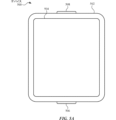
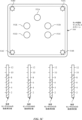
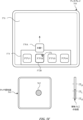
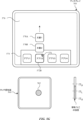
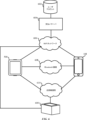
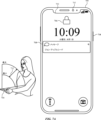
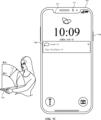
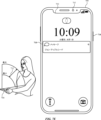
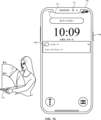
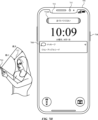
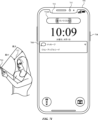
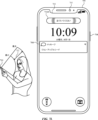
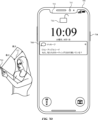
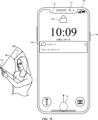
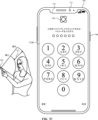
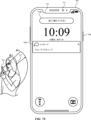
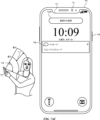
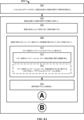
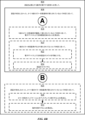
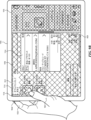
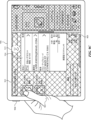
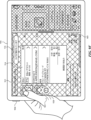
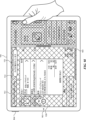
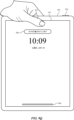
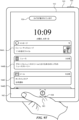
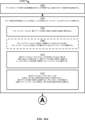
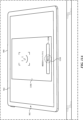
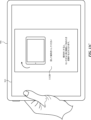
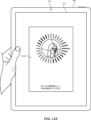
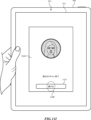
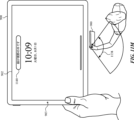
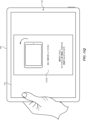
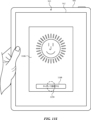
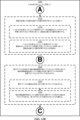
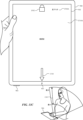
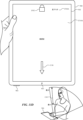
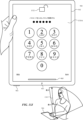
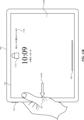
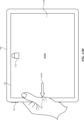
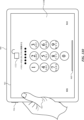
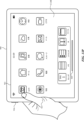
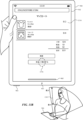
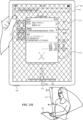
以下、図1A~1C、図2、図3、図4A~図4B、及び図5A~図5Hは、生体認証を実施する技法を実行する例示的なデバイスの説明を提供する。図6は、いくつかの実施形態に係る、1つ以上の通信チャネルを介して接続された例示的なデバイスを示す。図7A~図7ADは、生体認証中にエラー状態のインジケーションを提供する例示的なユーザインタフェースを示す。図8A~図8Bは、生体認証中にエラー状態のインジケーションを提供する方法を示すフロー図である。図7A~図7ADのユーザインタフェースは、図8A~図8Bのプロセスを含む、後述するプロセスを示すために使用される。図9A~図9Uは、生体認証中に生体センサに関するインジケーションを提供する例示的なユーザインタフェースを示す。図10A~図10Cは、生体認証中に生体センサに関するインジケーションを提供する方法を示すフロー図である。図9A~図9Uのユーザインタフェースは、図10A~図10Cのプロセスを含む、後述するプロセスを示すために使用される。図11A~図11Sは、バイオメトリック特徴を登録するためにデバイスを正しい方向に向ける例示的なユーザインタフェースを示す。図12A~図12Cは、バイオメトリック特徴を登録するためにデバイスを正しい方向に向ける方法を示すフロー図である。図11A~図11Sのユーザインタフェースは、図12A~図12Cのプロセスを含む、後述するプロセスを示すために使用される。図13A~図13Zは、検出されたエラー状態を修正するために生体センサの位置のインジケーションを提供する例示的なユーザインタフェースを示す。図14A~図14Bは、検出されたエラー状態を修正するために生体センサの位置のインジケーションを提供する方法を示すフロー図である。図13A~図13Zのユーザインタフェースは、図14A~図14Bのプロセスを含む、後述するプロセスを示すために使用される。 1A-1C, 2, 3, 4A-4B, and 5A-5H provide a description of an exemplary device that performs a technique for implementing biometric authentication. FIG. 6 illustrates an exemplary device connected via one or more communication channels, according to some embodiments. FIGS. 7A-7AD illustrate an exemplary user interface that provides an indication of an error condition during biometric authentication. FIGS. 8A-8B are flow diagrams illustrating a method of providing an indication of an error condition during biometric authentication. The user interfaces of FIGS. 7A-7AD are used to illustrate the processes described below, including the processes of FIGS. 8A-8B. FIGS. 9A-9U illustrate an exemplary user interface that provides an indication regarding a biometric sensor during biometric authentication. FIGS. 10A-10C are flow diagrams illustrating a method of providing an indication regarding a biometric sensor during biometric authentication. The user interfaces of FIGS. 9A-9U are used to illustrate the processes described below, including the processes of FIGS. 10A-10C. FIGS. 11A-11S illustrate an exemplary user interface that orients the device to register a biometric feature. 12A-12C are flow diagrams illustrating a method for orienting a device to enroll a biometric feature. The user interfaces of FIGS. 11A-11S are used to illustrate the processes described below, including the processes of FIGS. 12A-12C. FIGS. 13A-13Z illustrate example user interfaces that provide an indication of the position of a biometric sensor to correct a detected error condition. FIGS. 14A-14B are flow diagrams illustrating a method for providing an indication of the position of a biometric sensor to correct a detected error condition. The user interfaces of FIGS. 13A-13Z are used to illustrate the processes described below, including the processes of FIGS. 14A-14B.
以下の説明では、様々な要素について説明するために、「第1の」、「第2の」などの用語を使用するが、これらの要素は、それらの用語によって限定されるべきではない。これらの用語は、ある要素を別の要素と区別するためにのみ使用される。例えば、記載する様々な実施形態の範囲から逸脱することなく、第1のタッチを第2のタッチと呼ぶこともでき、同様に第2のタッチを第1のタッチと呼ぶこともできる。第1のタッチ及び第2のタッチはどちらもタッチであるが、これらは同じタッチではない。 In the following description, terms such as "first" and "second" are used to describe various elements, but these elements should not be limited by these terms. These terms are used only to distinguish one element from another. For example, a first touch can be called a second touch, and a second touch can be called a first touch, without departing from the scope of the various embodiments described. Although a first touch and a second touch are both touches, they are not the same touch.
本明細書に記載する様々な実施形態の説明で使用される術語は、特定の実施形態を説明することのみを目的とし、限定的であることは意図されていない。記載する様々な実施形態の説明及び添付の特許請求の範囲では、単数形の「a(1つ、一)」、「an(1つ、一)」、及び「the(その、この)」は、文脈上別途明白に記載しない限り、複数形も同様に含むことが意図される。また、本明細書で使用されるとき、用語「及び/又は」は、関連する列挙された項目のうちの1つ以上のいずれか及び全ての考えられる組合せを指し、かつこれを含むことを理解されたい。用語「includes(含む)」、「including(含む)」、「comprises(含む、備える)」、及び/又は「comprising(含む、備える)」は、本明細書で使用する場合、述べられた特徴、整数、ステップ、動作、要素、及び/又は構成要素の存在を指定するが、1つ以上の他の特徴、整数、ステップ、動作、要素、構成要素、及び/又はそれらのグループの存在又は追加を除外しないことが更に理解されるであろう。 The terminology used in the description of the various embodiments described herein is for the purpose of describing particular embodiments only and is not intended to be limiting. In the description of the various embodiments described and in the appended claims, the singular forms "a," "an," and "the" are intended to include the plural forms as well, unless the context clearly dictates otherwise. It should also be understood that as used herein, the term "and/or" refers to and includes any and all possible combinations of one or more of the associated listed items. It will be further understood that the terms "includes," "including," "comprises," and/or "comprising," as used herein, specify the presence of stated features, integers, steps, operations, elements, and/or components, but do not exclude the presence or addition of one or more other features, integers, steps, operations, elements, components, and/or groups thereof.
「~の場合(if)」という用語は、任意選択的に、文脈に応じて、「~とき(when)」若しくは「~とき(upon)」、又は「~と判定したことに応答して(in response to determining)」若しくは「~を検出したことに応答して(in response to detecting)」を意味すると解釈される。同様に、「~と判定された場合(if it is determined)」又は「[記載の状態又はイベント]が検出された場合(if[a stated condition or event]is detected)」という語句は、任意選択的に、文脈に応じて、「~と判定したとき(upon determining)」若しくは「~と判定したことに応答して(in response to determining)」、又は「[記載の状態又はイベント]を検出したとき(upon detecting[the stated condition or event])」若しくは「[記載の状態又はイベント]を検出したことに応答して(in response to detecting[the stated condition or event])」を意味すると解釈される。 The term "if" is, optionally, interpreted to mean "when" or "upon" or "in response to determining" or "in response to detecting", depending on the context. Similarly, the phrases "if it is determined" or "if [a stated condition or event] is detected" are, optionally, interpreted to mean "upon determining" or "in response to determining", or "upon detecting [the stated condition or event]" or "in response to detecting [the stated condition or event]", depending on the context.
電子デバイス、そのようなデバイス用のユーザインタフェース、及びそのようなデバイスを使用する関連するプロセスの実施形態が説明される。いくつかの実施形態では、デバイスは、PDA機能及び/又は音楽プレーヤ機能などの他の機能も含む、携帯電話などのポータブル通信デバイスである。ポータブル多機能デバイスの例示的な実施形態としては、カリフォルニア州クパチーノのApple Inc.からのiPhone(登録商標)、iPod Touch(登録商標)、及びiPad(登録商標)のデバイスが挙げられるが、これらに限定されない。任意選択的に、タッチ感知面(例えば、タッチスクリーンディスプレイ及び/又はタッチパッド)を有するラップトップ又はタブレットコンピュータなどの他のポータブル電子デバイスも使用される。また、いくつかの実施形態では、デバイスはポータブル通信デバイスではなく、タッチ感知面(例えば、タッチスクリーンディスプレイ及び/又はタッチパッド)を有するデスクトップコンピュータであることも理解されたい。 Embodiments of electronic devices, user interfaces for such devices, and associated processes for using such devices are described. In some embodiments, the device is a portable communication device, such as a mobile phone, that also includes other functions, such as a PDA function and/or a music player function. Exemplary embodiments of portable multifunction devices include, but are not limited to, the iPhone®, iPod Touch®, and iPad® devices from Apple Inc. of Cupertino, Calif. Optionally, other portable electronic devices, such as laptops or tablet computers having a touch-sensitive surface (e.g., a touchscreen display and/or a touchpad), are also used. It should also be understood that in some embodiments, the device is not a portable communication device, but rather a desktop computer having a touch-sensitive surface (e.g., a touchscreen display and/or a touchpad).
以下の論考では、ディスプレイ及びタッチ感知面を含む電子デバイスについて説明する。しかしながら、電子デバイスは、任意選択的に、物理キーボード、マウス、及び/又はジョイスティックなどの1つ以上の他の物理ユーザインタフェースデバイスを含むことを理解されたい。 The following discussion describes an electronic device that includes a display and a touch-sensitive surface. However, it should be understood that the electronic device optionally includes one or more other physical user-interface devices, such as a physical keyboard, a mouse, and/or a joystick.
デバイスは、通常、描画アプリケーション、プレゼンテーションアプリケーション、ワードプロセッシングアプリケーション、ウェブサイト作成アプリケーション、ディスクオーサリングアプリケーション、スプレッドシートアプリケーション、ゲームアプリケーション、電話アプリケーション、テレビ会議アプリケーション、電子メールアプリケーション、インスタントメッセージングアプリケーション、トレーニングサポートアプリケーション、写真管理アプリケーション、デジタルカメラアプリケーション、デジタルビデオカメラアプリケーション、ウェブブラウジングアプリケーション、デジタル音楽プレーヤアプリケーション、及び/又はデジタルビデオプレーヤアプリケーションのうちの1つ以上などの様々なアプリケーションをサポートする。 The device typically supports a variety of applications, such as one or more of drawing applications, presentation applications, word processing applications, website creation applications, disc authoring applications, spreadsheet applications, gaming applications, telephony applications, videoconferencing applications, email applications, instant messaging applications, training support applications, photo management applications, digital camera applications, digital video camera applications, web browsing applications, digital music player applications, and/or digital video player applications.
本デバイス上で実行される様々なアプリケーションは、タッチ感知面などの、少なくとも1つの共通の物理ユーザインタフェースデバイスを、任意選択的に使用する。タッチ感知面の1つ以上の機能、並びにデバイスに表示される対応する情報は、アプリケーションごとに、及び/又はそれぞれのアプリケーション内で、任意選択的に、調整及び/又は変更される。このように、デバイスの共通の物理アーキテクチャ(タッチ感知面など)は、任意選択的に、ユーザにとって直観的かつ透明なユーザインタフェースを備える様々なアプリケーションをサポートする。 The various applications executing on the device optionally use at least one common physical user interface device, such as a touch-sensitive surface. One or more features of the touch-sensitive surface and corresponding information displayed on the device are optionally adjusted and/or changed for each application and/or within each application. In this manner, the common physical architecture of the device (such as the touch-sensitive surface) optionally supports various applications with user interfaces that are intuitive and transparent to the user.
ここで、タッチ感知ディスプレイを備えるポータブルデバイスの実施形態に注意を向ける。図1Aは、いくつかの実施形態に係る、タッチ感知ディスプレイシステム112を有するポータブル多機能デバイス100を示すブロック図である。タッチ感知ディスプレイ112は、便宜上「タッチスクリーン」と呼ばれることがあり、「タッチ感知ディスプレイシステム」として知られている又は呼ばれることがある。デバイス100は、メモリ102(任意選択的に、1つ以上のコンピュータ可読記憶媒体を含む)、メモリコントローラ122、1つ以上の処理ユニット(CPU)120、周辺機器インタフェース118、RF回路108、オーディオ回路110、スピーカ111、マイクロフォン113、入出力(I/O)サブシステム106、他の入力コントロールデバイス116、及び外部ポート124を含む。デバイス100は、任意選択的に、1つ以上の光センサ164を含む。デバイス100は、任意選択的に、デバイス100上の接触の強度を検出する1つ以上の接触強度センサ165(例えば、デバイス100のタッチ感知ディスプレイシステム112などのタッチ感知面)を含む。デバイス100は、任意選択的に、デバイス100上で触知出力を生成する(例えばデバイス100のタッチ感知ディスプレイシステム112又はデバイス300のタッチパッド355などのタッチ感知面上で触知出力を生成する)1つ以上の触知出力生成器167を含む。これらの構成要素は、任意選択的に、1つ以上の通信バス又は信号ライン103を介して通信する。
Attention is now directed to an embodiment of a portable device with a touch-sensitive display. FIG. 1A is a block diagram illustrating a
本明細書及び特許請求の範囲では、タッチ感知面上の接触の「強度」という用語は、タッチ感知面上の接触(例えば、指の接触)の力若しくは圧力(単位面積当たりの力)、又はタッチ感知面上の接触の力若しくは圧力に対する代理(プロキシ)を指す。接触の強度は、少なくとも4つの別個の値を含み、より典型的に、数百の(例えば、少なくとも256の)別個の値を含む、値の範囲を有する。接触の強度は、任意選択的に、様々な手法、及び様々なセンサ又はセンサの組合せを使用して、判定(又は測定)される。例えば、タッチ感知面の下又はそれに隣接する1つ以上の力センサは、任意選択的に、タッチ感知面上の様々なポイントにおける力を測定するために使用される。いくつかの実装形態では、複数の力センサからの力測定値は、接触の推定される力を判定するために組み合わされる(例えば、加重平均される)。同様に、スタイラスの感圧性先端部は、任意選択的に、タッチ感知面上のスタイラスの圧力を判定するために使用される。あるいは、タッチ感知面上で検出される接触エリアのサイズ及び/若しくはその変化、接触に近接するタッチ感知面の電気容量及び/若しくはその変化、並びに/又は、接触に近接するタッチ感知面の抵抗及び/若しくはその変化は、任意選択的に、タッチ感知面上の接触の力又は圧力の代替物として使用される。いくつかの実装形態では、接触力又は圧力のための代替測定値は、強度閾値を超えているかどうかを判定するために直接使用される(例えば、強度閾値は、代替測定値に対応する単位で記述される)。いくつかの実装形態では、接触力又は圧力に対する代理測定値は、推定される力又は圧力に変換され、推定される力又は圧力は、強度閾値を超えているかどうかを判定するために使用される(例えば、強度閾値は、圧力の単位で測定される圧力閾値である)。ユーザ入力の属性として接触の強度を使用することで、いくつかの状況では、アフォーダンスの表示(例えば、タッチ感知ディスプレイ上)、及び/又はユーザ入力の受信(例えば、タッチ感知ディスプレイ、タッチ感知面、若しくはノブ若しくはボタンなどの物理/機械的コントロールを介する)のために、制限された面積を有するサイズが低減されたデバイス上でユーザが普通ならアクセスできない追加のデバイス機能性に対するユーザアクセスを可能にする。 As used herein and in the claims, the term "intensity" of a contact on a touch-sensitive surface refers to the force or pressure (force per unit area) of a contact (e.g., a finger contact) on the touch-sensitive surface, or a proxy for the force or pressure of a contact on the touch-sensitive surface. The intensity of a contact has a range of values including at least four distinct values, and more typically including hundreds (e.g., at least 256) distinct values. The intensity of a contact is optionally determined (or measured) using various techniques and various sensors or combinations of sensors. For example, one or more force sensors under or adjacent to the touch-sensitive surface are optionally used to measure the force at various points on the touch-sensitive surface. In some implementations, the force measurements from multiple force sensors are combined (e.g., weighted averaged) to determine an estimated force of the contact. Similarly, a pressure-sensitive tip of a stylus is optionally used to determine the pressure of the stylus on the touch-sensitive surface. Alternatively, the size and/or change in the contact area detected on the touch-sensitive surface, the capacitance and/or change in the touch-sensitive surface proximate the contact, and/or the resistance and/or change in the touch-sensitive surface proximate the contact are optionally used as a surrogate for the force or pressure of the contact on the touch-sensitive surface. In some implementations, the surrogate measurement for the contact force or pressure is used directly to determine whether an intensity threshold is exceeded (e.g., the intensity threshold is described in units corresponding to the surrogate measurement). In some implementations, the surrogate measurement for the contact force or pressure is converted to an estimated force or pressure, and the estimated force or pressure is used to determine whether an intensity threshold is exceeded (e.g., the intensity threshold is a pressure threshold measured in units of pressure). Using the intensity of the contact as an attribute of the user input may, in some circumstances, enable a user access to additional device functionality that would not otherwise be accessible to a user on a reduced-size device having a limited area for displaying affordances (e.g., on a touch-sensitive display) and/or receiving user input (e.g., via a touch-sensitive display, touch-sensitive surface, or physical/mechanical controls such as knobs or buttons).
本明細書及び特許請求の範囲で使用されるように、用語「触知出力」は、ユーザの触覚でユーザによって検出されることになる、デバイスの従前の位置に対するそのデバイスの物理的変位、デバイスの構成要素(例えば、タッチ感知面)の、そのデバイスの別の構成要素(例えば、筐体)に対する物理的変位、又は、デバイスの質量中心に対する構成要素の変位を指す。例えば、デバイス又はデバイスの構成要素が、タッチに敏感なユーザの表面(例えば、ユーザの手の指、手のひら、又は他の部分)に接触している状況では、物理的変位によって生成された触知出力は、そのデバイス又はデバイスの構成要素の物理的特性の認識される変化に相当する触感として、ユーザによって解釈されることになる。例えば、タッチ感知面(例えば、タッチ感知ディスプレイ又はトラックパッド)の移動は、ユーザによって、物理アクチュエータボタンの「ダウンクリック」又は「アップクリック」として、任意選択的に解釈される。場合によっては、ユーザの動作により物理的に押された(例えば、変位された)タッチ感知面に関連付けられた物理アクチュエータボタンの移動がないときでさえ、ユーザは「ダウンクリック」又は「アップクリック」などの触感を感じる。別の例として、タッチ感知面の移動は、タッチ感知面の平滑度に変化がない場合であっても、ユーザによって、そのタッチ感知面の「粗さ」として、任意選択的に解釈又は感知される。そのようなユーザによるタッチの解釈は、ユーザの個人的な感覚認知に左右されるが、大多数のユーザに共通する、多くのタッチの感覚認知が存在する。したがって、触知出力が、ユーザの特定の感覚認知(例えば、「アップクリック」「ダウンクリック」、「粗さ」)に対応するものと記述される場合、別途記載のない限り、生成された触知出力は、典型的な(又は、平均的な)ユーザの記述された感覚認知を生成するデバイス、又はデバイスの構成要素の物理的変位に対応する。触知出力を使用して触覚フィードバックをユーザに提供することにより、デバイスの操作性が向上し、(例えば、デバイスを動作させ/デバイスと相互作用するとき、ユーザが適切な入力を提供するのを助け、ユーザの誤りを低減することにより)ユーザとデバイスのインタフェースがより効率的になり、加えて、ユーザがデバイスをより迅速かつ効率的に使用することを可能にすることにより、電力使用を低減し、デバイスのバッテリ寿命を改善する。 As used herein and in the claims, the term "tactile output" refers to a physical displacement of a device relative to a previous position of the device, a physical displacement of a component of the device (e.g., a touch-sensitive surface) relative to another component of the device (e.g., a housing), or a displacement of a component relative to the center of mass of the device, that is detected by a user with the user's sense of touch. For example, in a situation where a device or a component of a device is in contact with a touch-sensitive surface of a user (e.g., a finger, palm, or other part of a user's hand), the tactile output generated by the physical displacement will be interpreted by the user as a tactile sensation corresponding to a perceived change in a physical property of the device or a component of the device. For example, movement of a touch-sensitive surface (e.g., a touch-sensitive display or trackpad) is optionally interpreted by the user as a "down-click" or "up-click" of a physical actuator button. In some cases, the user feels a tactile sensation such as a "down-click" or "up-click" even when there is no movement of a physical actuator button associated with the touch-sensitive surface that is physically pressed (e.g., displaced) by the user's action. As another example, movement of a touch-sensitive surface is optionally interpreted or sensed by a user as "roughness" of the touch-sensitive surface, even when there is no change in the smoothness of the touch-sensitive surface. Such user interpretation of touch depends on the user's personal sensory perception, but there are many sensory perceptions of touch that are common to a majority of users. Thus, when a tactile output is described as corresponding to a particular sensory perception of a user (e.g., "up click," "down click," "roughness"), unless otherwise noted, the generated tactile output corresponds to a physical displacement of the device, or a component of the device, that produces the described sensory perception of a typical (or average) user. Using tactile output to provide tactile feedback to a user can improve the usability of the device, provide a more efficient user-device interface (e.g., by helping the user provide appropriate inputs and reducing user errors when operating/interacting with the device), and also reduce power usage and improve the device's battery life by allowing the user to use the device more quickly and efficiently.
いくつかの実施形態では、触知出力パターンは、触知出力の振幅、触知出力の動き波形の形状、触知出力の周波数、及び/又は触知出力の持続時間などの触知出力の特性を指定する。 In some embodiments, the tactile output pattern specifies characteristics of the tactile output, such as the amplitude of the tactile output, the shape of the movement waveform of the tactile output, the frequency of the tactile output, and/or the duration of the tactile output.
異なる触知出力パターンを有する触知出力が、デバイスによって生成される(例えば、可動質量を動かして触知出力を生成する1つ以上の触知出力生成器を介して)とき、触知出力は、デバイスを保持又はタッチしているユーザに異なる触感を引き起こすことができる。ユーザの感覚は、触知出力のユーザの知覚に基づいているとき、ほとんどのユーザは、デバイスによって生成される触知出力の波形、周波数、及び振幅の変化を識別することが可能である。したがって、波形、周波数、及び振幅を調整して、異なる動作が実行されたことをユーザに示すことができる。したがって、いくつかの状況では、所与の環境(例えば、グラフィカル特徴及びオブジェクトを含むユーザインタフェース、仮想の境界及び仮想のオブジェクトを有するシミュレートされた物理的環境、物理的な境界及び物理的な物体を有する実際の物理的環境、並びに/又は上記の任意の組合せ)において、物体の特性(例えば、サイズ、材料、重量、剛性、平滑度、など)、挙動(例えば、振動、変位、加速、回転、膨張など)、及び/又は相互作用(例えば、衝突、粘着、反発、吸引、摩擦など)をシミュレートするように設計、選択、及び/又は開発された触知出力パターンを有する触知出力は、入力エラーを低減し、デバイスのユーザの動作の効率を増大させる有用なフィードバックをユーザに提供する。加えて、触知出力は、任意選択的に、入力閾値又はオブジェクトの選択などのシミュレートされた物理的特性に関係ないフィードバックに対応するように生成される。いくつかの状況では、そのような触知出力は、入力エラーを低減し、デバイスのユーザの動作の効率を増大させる有用なフィードバックをユーザに提供する。 When tactile outputs having different tactile output patterns are generated by the device (e.g., via one or more tactile output generators that move a movable mass to generate tactile outputs), the tactile outputs can induce different tactile sensations to a user holding or touching the device. When the user's sensations are based on the user's perception of the tactile output, most users are able to discern changes in waveform, frequency, and amplitude of the tactile output generated by the device. Thus, the waveform, frequency, and amplitude can be adjusted to indicate to the user that different actions have been performed. Thus, in some circumstances, tactile output having a tactile output pattern designed, selected, and/or developed to simulate the properties (e.g., size, material, weight, stiffness, smoothness, etc.), behaviors (e.g., vibration, displacement, acceleration, rotation, expansion, etc.), and/or interactions (e.g., collision, adhesion, repulsion, attraction, friction, etc.) of objects in a given environment (e.g., a user interface including graphical features and objects, a simulated physical environment having virtual boundaries and virtual objects, an actual physical environment having physical boundaries and physical objects, and/or any combination of the above) provides a user with useful feedback that reduces input errors and increases the efficiency of a user's operation of the device. In addition, the tactile output is optionally generated to correspond to feedback unrelated to simulated physical properties, such as input thresholds or object selection. In some circumstances, such tactile output provides a user with useful feedback that reduces input errors and increases the efficiency of a user's operation of the device.
いくつかの実施形態では、適した触知出力パターンを有する触知出力は、ユーザインタフェース内又はデバイス内のシーンの後ろにおける対象イベントの出現に対する合図として働く。対象となるイベントの例としては、デバイス上又はユーザインタフェース内で提供されるアフォーダンス(例えば、実ボタン若しくは仮想ボタン、又はトグルスイッチ)のアクティブ化、要求された動作の成功又は失敗、ユーザインタフェース内の境界に到達すること又は超えること、新たな状態に入ること、オブジェクト間の入力の焦点を切り替えること、新たなモードのアクティブ化、入力閾値に到達すること又は超えること、入力又はジェスチャのタイプの検出又は認識などが挙げられる。いくつかの実施形態では、触知出力は、リダイレクション又は中断入力が時宜を得て検出されない限り発生する、近いうちに起こるイベント又は結果に対する警告又はアラートしての役割を果たすように提供される。触知出力はまた、他の文脈で、ユーザエクスペリエンスの向上、視覚若しくは運動の障害又は他のアクセシビリティに関する必要を有するユーザに対するデバイスのアクセシビリティの改善、並びに/あるいはユーザインタフェース及び/又はデバイスの効率及び機能性の改善のために使用される。触知出力は、任意選択的に、オーディオ出力及び/又は可視のユーザインタフェースの変化を伴い、ユーザがユーザインタフェース及び/又はデバイスと対話するときのユーザの体験を更に向上させ、ユーザインタフェース及び/又はデバイスの状態に関する情報のより良好な伝達を容易にし、入力エラーを低減し、デバイスのユーザの動作の効率を増大させる。 In some embodiments, the tactile output with a suitable tactile output pattern serves as a cue to the appearance of an event of interest behind the scenes in the user interface or device. Examples of events of interest include activation of an affordance (e.g., a real or virtual button, or a toggle switch) provided on the device or in the user interface, success or failure of a requested action, reaching or crossing a boundary in the user interface, entering a new state, switching input focus between objects, activating a new mode, reaching or crossing an input threshold, detection or recognition of a type of input or gesture, etc. In some embodiments, the tactile output is provided to act as a warning or alert to an impending event or outcome that will occur unless a redirection or interrupt input is detected in a timely manner. Tactile output is also used in other contexts to improve the user experience, improve the accessibility of the device to users with visual or motor impairments or other accessibility needs, and/or improve the efficiency and functionality of the user interface and/or device. The tactile output, optionally accompanied by an audio output and/or a change in the visible user interface, further enhances the user's experience when interacting with the user interface and/or device, facilitates better communication of information regarding the state of the user interface and/or device, reduces input errors, and increases the efficiency of the user's operation of the device.
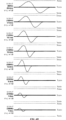
図4C~4Eは、上述したもの並びに本明細書に論じるユーザインタフェース及び方法に関して記載したものなどの様々なシナリオ及び様々な目的で適した触覚フィードバックを作成するために、そのまま、又は1つ以上の変形(例えば、変調、増幅、打切りなど)を介して、個々に又は組合せで使用することができる1組のサンプル触知出力パターンを提供する。触知出力のパレットのこの例は、触知出力パターンのアレイを作成するために、1組の3つの波形及び8つの周波数をどのように使用することができるかを示す。この図に示す触知出力パターンに加えて、これらの触知出力パターンはそれぞれ、任意選択的に、例えば図4F~4Hに1.0、0.75、0.5、及び0.25のゲインを有する変形形態によってそれぞれ示すフルタップ(FullTap)80Hz、フルタップ200Hz、ミニタップ(MiniTap)80Hz、ミニタップ200Hz、マイクロタップ(MicroTap)80Hz、及びマイクロタップ200Hzに対して示すように、触知出力パターンに対するゲイン値を変化させることによって、振幅が調整される。図4F~4Hに示すように、触知出力パターンのゲインを変化させることで、パターンの周波数又は波形の形状を変化させることなく、パターンの振幅を変化させる。いくつかの実施形態では、可動質量にどれだけの力を印加することができるかによって、いくつかの触知出力生成器が制限されるため、触知出力パターンの周波数を変化させることで、振幅がより低くなり、したがって質量の周波数の動きが大きければ大きいほど、より低い振幅に制約され、波形を作成するために必要とされる加速が、触知出力生成器の動作力の範囲外の力を必要としないことが確実になる(例えば、230Hz、270Hz、及び300Hzにおけるフルタップのピーク振幅は、80Hz、100Hz、125Hz、及び200Hzにおけるフルタップの振幅より低い)。 4C-4E provide a set of sample tactile output patterns that can be used individually or in combination, either as is or through one or more variations (e.g., modulation, amplification, truncation, etc.), to create tactile feedback suitable for a variety of scenarios and purposes, such as those described above and with respect to the user interfaces and methods discussed herein. This example palette of tactile outputs shows how a set of three waveforms and eight frequencies can be used to create an array of tactile output patterns. In addition to the tactile output patterns shown in this figure, each of these tactile output patterns is optionally adjusted in amplitude by varying the gain values for the tactile output patterns, as shown, for example, in Figures 4F-4H for FullTap 80Hz, FullTap 200Hz, MiniTap 80Hz, MiniTap 200Hz, MicroTap 80Hz, and MicroTap 200Hz, shown in variations with gains of 1.0, 0.75, 0.5, and 0.25, respectively. As shown in Figures 4F-4H, varying the gain of the tactile output pattern varies the amplitude of the pattern without changing the frequency of the pattern or the shape of the waveform. In some embodiments, varying the frequency of the tactile output pattern results in lower amplitudes because some tactile output generators are limited by how much force they can apply to a moving mass, so the greater the frequency movement of the mass, the lower the amplitude is constrained to ensure that the acceleration required to create the waveform does not require forces outside the operating force range of the tactile output generator (e.g., the peak amplitudes of full taps at 230 Hz, 270 Hz, and 300 Hz are lower than the amplitudes of full taps at 80 Hz, 100 Hz, 125 Hz, and 200 Hz).
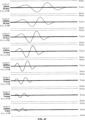
図4C~4Hは、特定の波形を有する触知出力パターンを示す。触知出力パターンの波形は、中立位置(例えば、xzero)に対する物理的変位と、その触知出力パターンを有する触知出力を生成するために可動質量が通る時間との関係を示すパターンを表す。例えば、図4Cに示す第1の組の触知出力パターン(例えば、「フルタップ」の触知出力パターン)はそれぞれ、2つの完全なサイクルを有する振動(例えば、中立位置で開始及び終了し、中立位置を3回交差する振動)を含む波形を有する。図4Dに示す第2の組の触知出力パターン(例えば、「ミニタップ」の触知出力パターン)はそれぞれ、1つの完全なサイクルを含む振動(例えば、中立位置で開始及び終了し、中立位置を1回交差する振動)を含む波形を有する。図4Eに示す第3の組の触知出力パターン(例えば、「マイクロタップ」の触知出力パターン)はそれぞれ、完全なサイクルの2分の1を含む振動(例えば、中立位置で開始及び終了し、中立位置を交差しない振動)を含む波形を有する。触知出力パターンの波形はまた、触知出力の開始及び終了時の可動質量の漸進的な加速及び減速を表す開始バッファ及び終了バッファを含む。図4C~4Hに示す波形の例には、可動質量の最大及び最小の動き範囲を表すxmin及びxmaxの値が挙げられる。より大きい可動質量を有するより大きい電子デバイスの場合、質量のより大きい又はより小さい最小及び最大の動き範囲が存在することができる。図4C~4Hに示す例は、1次元における質量の動きについて説明しているが、類似の原理は、2次元又は3次元における可動質量の動きにも当てはまるはずである。 4C-4H show tactile output patterns having particular waveforms. The waveforms of the tactile output patterns represent patterns that show the relationship between the physical displacement relative to a neutral position (e.g., xzero) and the time that the moving mass passes to generate a tactile output having that tactile output pattern. For example, a first set of tactile output patterns (e.g., "full tap" tactile output patterns) shown in FIG. 4C each have a waveform that includes a vibration having two complete cycles (e.g., a vibration that starts and ends at a neutral position and crosses the neutral position three times). A second set of tactile output patterns (e.g., "mini tap" tactile output patterns) shown in FIG. 4D each have a waveform that includes a vibration that includes one complete cycle (e.g., a vibration that starts and ends at a neutral position and crosses the neutral position once). A third set of tactile output patterns (e.g., "microtap" tactile output patterns) shown in FIG. 4E each have waveforms that include oscillations that include one-half of a complete cycle (e.g., oscillations that start and end at a neutral position and do not cross the neutral position). The waveforms of the tactile output patterns also include start and end buffers that represent the gradual acceleration and deceleration of the moving mass at the start and end of the tactile output. The example waveforms shown in FIGS. 4C-4H include values of xmin and xmax that represent the maximum and minimum ranges of motion of the moving mass. For larger electronic devices with larger moving masses, there may be larger or smaller minimum and maximum ranges of motion of the mass. Although the examples shown in FIGS. 4C-4H describe the movement of the mass in one dimension, similar principles should apply to the movement of the moving mass in two or three dimensions.
図4C~4Eに示すように、各触知出力パターンはまた、その特性周波数を有する触知出力からユーザが感じる触覚の「ピッチ」に影響を及ぼす対応する特性周波数を有する。連続する触知出力の場合、特性周波数は、触知出力生成器の可動質量によって所与の時間期間内に完了されるサイクルの数(例えば、1秒当たりのサイクル)を表す。個別の触知出力の場合、個別の出力信号(例えば、0.5、1、又は2回のサイクルを有する)が生成され、特性周波数値は、その特性周波数を有する触知出力を生成するために可動質量がどれだけ速く動く必要があるかを指定する。図4C~4Hに示すように、(例えば、フルタップ、ミニタップ、又はマイクロタップなどの、それぞれの波形によって画定される)各タイプの触知出力に対して、より高い周波数値は、可動質量によるより速い移動に対応し、したがって、概して、触知出力を完成させるより短い時間(例えば、個別の触知出力に対して必要とされる数のサイクルを完成させる時間と、開始及び終了バッファ時間との和を含む)に対応する。例えば、80Hzの特性周波数を有するフルタップは、100Hzの特性周波数を有するフルタップより、完成させるのに長くかかる(例えば、図4Cの35.4msと28.3ms)。加えて、所与の周波数に対して、それぞれの周波数においてその波形でより多くのサイクルを有する触知出力は、同じそれぞれの周波数においてその波形でより少ないサイクルを有する触知出力より、完成させるのに長くかかる。例えば、150Hzにおけるフルタップは、150Hzにおけるミニタップより、完成させるのに長くかかり(例えば、19.4msと12.8ms)、150Hzにおけるミニタップは、150Hzにおけるマイクロタップより、完成させるのに長くかかる(例えば、12.8msと9.4ms)。しかし、異なる周波数を有する触知出力パターンの場合、この規則は当てはまらない可能性がある(例えば、より多くのサイクルを有するが、より高い周波数を有する触知出力は、より少ないサイクルを有するがより低い周波数を有する触知出力より、完成させるのに短い時間量がかかる可能性があり、逆も同様である)。例えば、300Hzにおいて、フルタップは、ミニタップと同じだけ長くかかる(例えば、9.9ms)。 As shown in Figures 4C-4E, each tactile output pattern also has a corresponding characteristic frequency that affects the tactile "pitch" felt by the user from a tactile output having that characteristic frequency. For continuous tactile outputs, the characteristic frequency represents the number of cycles (e.g., cycles per second) completed by the moving mass of the tactile output generator in a given time period. For individual tactile outputs, individual output signals (e.g., having 0.5, 1, or 2 cycles) are generated, and the characteristic frequency value specifies how fast the moving mass must move to generate a tactile output having that characteristic frequency. As shown in Figures 4C-4H, for each type of tactile output (defined by a respective waveform, e.g., full tap, mini tap, or micro tap), a higher frequency value corresponds to a faster movement by the moving mass and therefore generally corresponds to a shorter time to complete the tactile output (e.g., including the time to complete the number of cycles required for an individual tactile output plus the start and end buffer times). For example, a full tap with a characteristic frequency of 80 Hz takes longer to complete than a full tap with a characteristic frequency of 100 Hz (e.g., 35.4 ms vs. 28.3 ms in FIG. 4C). In addition, for a given frequency, a tactile output with more cycles in its waveform at each frequency takes longer to complete than a tactile output with fewer cycles in its waveform at the same respective frequency. For example, a full tap at 150 Hz takes longer to complete than a mini-tap at 150 Hz (e.g., 19.4 ms vs. 12.8 ms), which takes longer to complete than a micro-tap at 150 Hz (e.g., 12.8 ms vs. 9.4 ms). However, for tactile output patterns with different frequencies, this rule may not hold true (e.g., a tactile output with more cycles but a higher frequency may take a shorter amount of time to complete than a tactile output with fewer cycles but a lower frequency, and vice versa). For example, at 300 Hz, a full tap takes just as long as a mini tap (e.g., 9.9 ms).
図4C~4Eに示すように、触知出力パターンはまた、触知信号内に含まれるエネルギーの量、又はその特性振幅を有する触知出力によってユーザが感じることができる触覚の「強度」に影響を及ぼす特性振幅を有する。いくつかの実施形態では、触知出力パターンの特性振幅は、触知出力を生成するときの中立位置からの可動質量の最大変位を表す絶対値又は正規化値を指す。いくつかの実施形態では、触知出力パターンの特性振幅は、例えば、様々な状態(例えば、ユーザインタフェースのコンテキスト及び挙動に基づいてカスタマイズされる)に従って、固定された若しくは動的に決定されたゲイン係数(例えば、0~1の値)、並びに/又は事前設定されたメトリック(例えば、入力ベースのメトリック、及び/若しくはユーザインタフェースベースのメトリック)によって、調整可能である。いくつかの実施形態では、入力ベースのメトリック(例えば、強度変化メトリック又は入力速度メトリック)は、入力の特性(例えば、触知出力の生成をトリガする入力中の押下入力における接触の特性強度の変化速度、又はタッチ感知面における接触の動き速度)を示す。いくつかの実施形態では、ユーザインタフェースベースのメトリック(例えば、境界横断速度メトリック)は、触知出力の生成をトリガするユーザインタフェースの変化中のユーザインタフェース要素の特性(例えば、ユーザインタフェース内で隠された又は可視の境界を越える要素の動き速度)を示す。いくつかの実施形態では、触知出力パターンの特性振幅は、「包絡線」によって変調させることができ、隣接するサイクルのピークは、異なる振幅を有することができ、上記に示す波形のうちの1つは、触知出力が生成されるにつれて触知出力の部分の振幅を時間とともに漸進的に調整するために、時間とともに(例えば、0から1に)変化する包絡線パラメータによる乗算によって更に修正される。 As shown in FIGS. 4C-4E, the tactile output pattern also has a characteristic amplitude that affects the amount of energy contained in the tactile signal, or the tactile "intensity" that a user may feel due to a tactile output having that characteristic amplitude. In some embodiments, the characteristic amplitude of the tactile output pattern refers to an absolute or normalized value that represents the maximum displacement of the moving mass from a neutral position when generating a tactile output. In some embodiments, the characteristic amplitude of the tactile output pattern is adjustable, for example, by a fixed or dynamically determined gain factor (e.g., a value between 0 and 1) and/or a pre-set metric (e.g., an input-based metric and/or a user interface-based metric) according to various conditions (e.g., customized based on the context and behavior of the user interface). In some embodiments, the input-based metric (e.g., an intensity change metric or an input velocity metric) indicates a characteristic of the input (e.g., a rate of change in a characteristic intensity of a contact in a press input during input that triggers the generation of a tactile output, or a rate of movement of a contact on a touch-sensitive surface). In some embodiments, a user interface-based metric (e.g., a boundary crossing velocity metric) indicates a characteristic of a user interface element during a change in the user interface that triggers the generation of a tactile output (e.g., the velocity of an element's movement across a hidden or visible boundary in the user interface). In some embodiments, the characteristic amplitude of the tactile output pattern can be modulated by an "envelope", where the peaks of adjacent cycles can have different amplitudes, and one of the waveforms shown above is further modified by multiplication by an envelope parameter that changes over time (e.g., from 0 to 1) to progressively adjust the amplitude of portions of the tactile output over time as the tactile output is generated.
図4C~4Eには、例示を目的として、サンプル触知出力パターン内の特有の周波数、振幅、及び波形が表されているが、類似の目的で、他の周波数、振幅、及び波形を有する触知出力パターンを使用することもできる。例えば、0.5~4回のサイクルを有する波形を使用することができる。60Hz~400Hzの範囲内の他の周波数も同様に使用することができる。表1は、特定の触覚フィードバックの挙動、構成の例、及びそれらの使用例を提供する。 Although specific frequencies, amplitudes, and waveforms in sample tactile output patterns are depicted in Figures 4C-4E for illustrative purposes, tactile output patterns having other frequencies, amplitudes, and waveforms can be used for similar purposes. For example, a waveform having 0.5 to 4 cycles can be used. Other frequencies in the range of 60 Hz to 400 Hz can be used as well. Table 1 provides examples of certain tactile feedback behaviors, configurations, and their uses.
デバイス100は、ポータブル多機能デバイスの一例に過ぎず、デバイス100は、任意選択的に、示されているものよりも多くの構成要素又は少ない構成要素を有するものであり、任意選択的に、2つ以上の構成要素を組み合わせるものであり、又は、任意選択的に、それらの構成要素の異なる構成若しくは配置を有するものであることを理解されたい。図1Aに示す様々な構成要素は、1つ以上の信号処理回路及び/又は特定用途向け集積回路を含む、ハードウェア、ソフトウェア、又はハードウェアとソフトウェアの両方の組合せに実装される。
It should be understood that
メモリ102は、任意選択的に、高速ランダムアクセスメモリを含み、また任意選択的に、1つ以上の磁気ディスク記憶デバイス、フラッシュメモリデバイス、又は他の不揮発性ソリッドステートメモリデバイスなどの不揮発性メモリを含む。メモリコントローラ122は、任意選択的に、デバイス100の他の構成要素によるメモリ102へのアクセスを制御する。
Memory 102 optionally includes high-speed random access memory, and optionally includes non-volatile memory, such as one or more magnetic disk storage devices, flash memory devices, or other non-volatile solid-state memory devices.
周辺機器インタフェース118は、デバイスの入力及び出力周辺機器をCPU120及びメモリ102に結合するために使用することができる。1つ以上のプロセッサ120は、メモリ102に記憶された様々なソフトウェアプログラム及び/又は命令セットを動作させる又は実行して、デバイス100のための様々な機能を実行し、データを処理する。いくつかの実施形態では、周辺機器インタフェース118、CPU120、及びメモリコントローラ122は、任意選択的に、チップ104などの単一のチップ上で実施される。いくつかの他の実施形態では、それらは別々のチップ上に任意選択的に実装される。
The
RF(radio frequency)(無線周波数)回路108は、電磁信号とも呼ばれるRF信号を送受信する。RF回路108は、電気信号を電磁信号に、又は電磁信号を電気信号に変換し、電磁信号を介して通信ネットワーク及び他の通信デバイスと通信する。RF回路108は、任意選択的に、これらの機能を実行するための周知の回路を含み、それらの回路としては、限定するものではないが、アンテナシステム、RF送受信機、1つ以上の増幅器、同調器、1つ以上の発振器、デジタル信号プロセッサ、CODECチップセット、加入者識別モジュール(subscriber identity module、SIM)カード、メモリなどが挙げられる。RF回路108は、任意選択的に、ワールドワイドウェブ(World Wide Web、WWW)とも呼ばれるインターネット、イントラネット、並びに/又はセルラー電話ネットワーク、無線ローカルエリアネットワーク(local area network、LAN)及び/若しくはメトロポリタンエリアネットワーク(metropolitan area network、MAN)などの無線ネットワークなどのネットワークと、また他のデバイスと、無線通信によって通信する。RF回路108は、任意選択的に、短距離通信無線機などによって近距離通信(near field Communication、NFC)フィールドを検出するよく知られている回路を含む。無線通信は、任意選択的に、それだけに限定されるものではないが、モバイル通信用グローバルシステム(Global System for Mobile Communications、GSM)、拡張データGSM環境(Enhanced Data GSM Environment、EDGE)、高速ダウンリンクパケットアクセス(high-speed downlink packet access、HSDPA)、高速アップリンクパケットアクセス(high-speed uplink packet access、HSUPA)、エボリューションデータオンリ(Evolution,Data-Only、EV-DO)、HSPA、HSPA+、デュアルセルHSPA(Dual-Cell HSPA、DC-HSPDA)、ロングタームエボリューション(long term evolution、LTE)、近距離通信(NFC)、広帯域符号分割多元接続(wideband code division multiple access、W-CDMA)、符号分割多元接続(code division multiple access、CDMA)、時分割多元接続(time division multiple access、TDMA)、Bluetooth(登録商標)、Bluetoothローエネルギー(Bluetooth Low Energy、BTLE(登録商標))、ワイヤレスフィデリティ(Wireless Fidelity、Wi-Fi(登録商標))(例えば、IEEE802.11a、IEEE802.11b、IEEE802.11g、IEEE802.11n、及び/若しくはIEEE802.11ac)、ボイスオーバインターネットプロトコル(voice over Internet Protocol、VoIP)、Wi-MAX(登録商標)、電子メール用プロトコル(例えば、インターネットメッセージアクセスプロトコル(Internet message access protocol、IMAP)及び/若しくはポストオフィスプロトコル(post office protocol、POP))、インスタントメッセージング(例えば、拡張可能なメッセージング及びプレゼンスプロトコル(extensible messaging and presence protocol、XMPP)、インスタントメッセージング及びプレゼンスレベレイジングエクステンション用のセッション開始プロトコル(Session Initiation Protocol for Instant Messaging and Presence Leveraging Extensions、SIMPLE)、インスタントメッセージング及びプレゼンスサービス(Instant Messaging and Presence Service、IMPS))、並びに/若しくはショートメッセージサービス(Short Message Service、SMS)、又は本明細書の出願日の時点でまだ開発されていない通信プロトコルを含む任意の他の適切な通信プロトコルを含む、複数の通信規格、プロトコル、及び技術のうちのいずれかを使用する。
The radio frequency (RF)
オーディオ回路110、スピーカ111、及びマイクロフォン113は、ユーザとデバイス100との間のオーディオインタフェースを提供する。オーディオ回路110は、周辺機器インタフェース118からオーディオデータを受信し、オーディオデータを電気信号に変換し、電気信号をスピーカ111に送信する。スピーカ111は、電気信号を人間の可聴音波に変換する。また、オーディオ回路110は、マイクロフォン113によって音波から変換された電気信号を受信する。オーディオ回路110は、電気信号をオーディオデータに変換し、オーディオデータを処理のために周辺機器インタフェース118に送信する。オーディオデータは、任意選択的に、周辺機器インタフェース118によって、メモリ102及び/若しくはRF回路108から取得され、かつ/又はメモリ102及び/若しくはRF回路108に送信される。いくつかの実施形態では、オーディオ回路110はまた、ヘッドセットジャック(例えば、図2の212)を含む。ヘッドセットジャックは、オーディオ回路110と、出力専用ヘッドホン又は出力(例えば片耳又は両耳用のヘッドホン)及び入力(例えばマイクロフォン)の両方を備えるヘッドセットなどの着脱可能なオーディオ入出力周辺機器との間のインタフェースを提供する。
The
I/Oサブシステム106は、タッチスクリーン112及び他の入力コントロールデバイス116などのデバイス100上の入出力周辺機器を、周辺機器インタフェース118に結合する。I/Oサブシステム106は、任意選択的に、ディスプレイコントローラ156、光センサコントローラ158、強度センサコントローラ159、触覚フィードバックコントローラ161、深度カメラコントローラ169、及び他の入力又は制御デバイス用の1つ以上の入力コントローラ160を含む。1つ以上の入力コントローラ160は、他の入力コントロールデバイス116からの電気信号の受信/他の入力コントロールデバイス116への電気信号の送信を行う。他の入力コントロールデバイス116は、任意選択的に、物理ボタン(例えば、プッシュボタン、ロッカボタンなど)、ダイヤル、スライダスイッチ、ジョイスティック、クリックホイールなどを含む。いくつかの代替的な実施形態では、入力コントローラ160は、任意選択的に、キーボード、赤外線ポート、USBポート、及びマウスなどのポインタデバイスのうちのいずれかに結合される(又はいずれにも結合されない)。1つ以上のボタン(例えば、図2の208)は、任意選択的に、スピーカ111及び/又はマイクロフォン113の音量コントロールのための上下ボタンを含む。1つ以上のボタンは、任意選択的に、プッシュボタン(例えば、図2の206)を含む。
The I/
全体として参照により本明細書に組み込まれている、2005年12月23日出願の米国特許出願第11/322,549号、「Unlocking a Device by Performing Gestures on an Unlock Image」、米国特許第7,657,849号に記載されているように、プッシュボタンの素早い押下は、任意選択的に、タッチスクリーン112のロックを解放し、又は任意選択的に、タッチスクリーン上のジェスチャを使用してデバイスをロック解除するプロセスを開始する。プッシュボタン(例えば、206)のより長い押下は、任意選択的に、デバイス100への電力をオン又はオフにする。ボタンのうちの1つ以上の機能性は、任意選択的に、ユーザによってカスタマイズ可能である。タッチスクリーン112は、仮想又はソフトボタン及び1つ以上のソフトキーボードを実装するために使用される。
As described in U.S. Patent Application Serial No. 11/322,549, "Unlocking a Device by Performing Gestures on an Unlock Image," U.S. Patent No. 7,657,849, filed December 23, 2005, which is incorporated herein by reference in its entirety, a quick press of the push button optionally unlocks the
タッチ感知ディスプレイ112は、デバイスとユーザとの間の入力インタフェース及び出力インタフェースを提供する。ディスプレイコントローラ156は、タッチスクリーン112からの電気信号の受信、及び/又はタッチスクリーン112への電気信号の送信を行う。タッチスクリーン112は、ユーザに対して視覚出力を表示する。この視覚出力は、グラフィック、テキスト、アイコン、ビデオ、及びそれらの任意の組合せ(「グラフィック」と総称される)を任意選択的に含む。いくつかの実施形態では、視覚出力の一部又は全ては、任意選択的に、ユーザインタフェースオブジェクトに対応する。
The touch-
タッチスクリーン112は、触覚及び/又は触知接触に基づくユーザからの入力を受け入れるタッチ感知面、センサ、又はセンサのセットを有する。タッチスクリーン112及びディスプレイコントローラ156は、(メモリ102内の任意の関連モジュール及び/又は命令セットとともに)、タッチスクリーン112上で接触(及び任意の接触の移動又は中断)を検出し、検出された接触をタッチスクリーン112に表示されたユーザインタフェースオブジェクト(例えば、1つ以上のソフトキー、アイコン、ウェブページ、又は画像)との対話に変換する。例示的な実施形態では、タッチスクリーン112とユーザとの間の接触点は、ユーザの指に対応する。
The
タッチスクリーン112は、任意選択的に、LCD(液晶ディスプレイ)技術、LPD(発光ポリマーディスプレイ)技術、又はLED(発光ダイオード)技術を使用するが、他の実施形態では、他のディスプレイ技術も使用される。タッチスクリーン112及びディスプレイコントローラ156は、任意選択的に、それだけに限定されるものではないが、容量性、抵抗性、赤外線、及び表面音波の技術、並びにタッチスクリーン112との1つ以上の接触点を判定する他の近接センサアレイ又は他の要素を含む、現在知られている又は今後開発される複数のタッチ感知技術のうちのいずれかを使用して、接触及びそのあらゆる動き又は中断を検出する。例示的な実施形態では、カリフォルニア州クパチーノのApple Inc.からのiPhone(登録商標)及びiPod Touch(登録商標)に見られるものなどの、投影型相互静電容量感知技術が使用される。
タッチスクリーン112のいくつかの実施形態におけるタッチ感知ディスプレイは、任意選択的に、それぞれ全体として参照により本明細書に組み込まれている、米国特許第6,323,846号(Westermanら)、第6,570,557号(Westermanら)、及び/若しくは第6,677,932号(Westerman)、並びに/又は米国特許公報第2002/0015024(A1)号という米国特許に記載されているマルチタッチ感知タッチパッドに類似している。しかし、タッチスクリーン112はデバイス100からの視覚出力を表示するのに対して、タッチ感知タッチパッドは視覚出力を提供しない。
The touch-sensitive display in some embodiments of
タッチスクリーン112のいくつかの実施形態におけるタッチ感知ディスプレイは、(1)2006年5月2日出願の米国特許出願第11/381,313号、「Multipoint Touch Surface Controller」、(2)2004年5月6日出願の米国特許出願第10/840,862号、「Multipoint Touchscreen」、(3)2004年7月30日出願の米国特許出願第10/903,964号、「Gestures For Touch Sensitive Input Devices」、(4)2005年1月31日出願の米国特許出願第11/048,264号、「Gestures For Touch Sensitive Input Devices」、(5)2005年1月18日出願の米国特許出願第11/038,590号、「Mode-Based Graphical User Interfaces For Touch Sensitive Input Devices」、(6)2005年9月16日出願の米国特許出願第11/228,758号、「Virtual Input Device Placement On A Touch Screen User Interface」、(7)2005年9月16日出願の米国特許出願第11/228,700号、「Operation Of A Computer With A Touch Screen Interface」、(8)2005年9月16日出願の米国特許出願第11/228,737号、「Activating Virtual Keys Of A Touch-Screen Virtual Keyboard」、及び(9)2006年3月3日出願の米国特許出願第11/367,749号、「Multi-Functional Hand-Held Device」という出願に記載されている。これらの出願は全て、全体として参照により本明細書に組み込まれている。
The touch-sensitive display in some embodiments of the
タッチスクリーン112は、任意選択的に、100dpiを超えるビデオ解像度を有する。いくつかの実施形態では、タッチスクリーンは、約160dpiのビデオ解像度を有する。ユーザは、任意選択的に、スタイラス、指などの任意の適した物体又は付属物を使用して、タッチスクリーン112に接触する。いくつかの実施形態では、ユーザインタフェースは、指ベースの接触及びジェスチャを主に扱うように設計されるが、これは、タッチスクリーン上の指の接触面積がより大きいため、スタイラスベースの入力ほど精密でない可能性がある。いくつかの実施形態では、デバイスは、指による粗い入力を、ユーザによって所望されているアクションを実行するための、正確なポインタ/カーソルの位置又はコマンドに変換する。
The
いくつかの実施形態では、タッチスクリーンに加えて、デバイス100は、任意選択的に、特定の機能をアクティブ化又は非アクティブ化するためのタッチパッドを含む。いくつかの実施形態では、タッチパッドは、タッチスクリーンとは異なり、視覚出力を表示しないデバイスのタッチ感知エリアである。タッチパッドは、任意選択的に、タッチスクリーン112又はタッチスクリーンによって形成されるタッチ感知面の拡張部とは別個のタッチ感知面である。
In some embodiments, in addition to the touchscreen,
デバイス100は、様々な構成要素に電力を供給する電力システム162も含む。電力システム162は、任意選択的に、電力管理システム、1つ以上の電源(例えば、バッテリ、交流(AC))、再充電システム、停電検出回路、電力コンバータ又はインバータ、電力状態インジケータ(例えば、発光ダイオード(LED))、並びにポータブルデバイス内での電力の生成、管理、及び分配に関連付けられた任意の他の構成要素を含む。
The
また、デバイス100は、任意選択的に、1つ以上の光センサ164を含む。図1Aは、I/Oサブシステム106内の光センサコントローラ158に結合された光センサを示す。光センサ164は、任意選択的に、電荷結合デバイス(charge-coupled device、CCD)又は相補的金属酸化物半導体(complementary metal-oxide semiconductor、CMOS)フォトトランジスタを含む。光センサ164は、1つ以上のレンズを通って投影された環境からの光を受信し、その光を、画像を表すデータに変換する。光センサ164は、撮像モジュール143(カメラモジュールとも呼ばれる)と連携して、任意選択的に、静止画像又はビデオをキャプチャする。いくつかの実施形態では、光センサは、デバイスの前面にあるタッチスクリーンディスプレイ112とは反対に、デバイス100の裏面に位置し、したがってタッチスクリーンディスプレイは、静止画像及び/又はビデオ画像の取得のためのビューファインダとして使用することが可能である。いくつかの実施形態では、ユーザは他のテレビ会議参加者をタッチスクリーンディスプレイ上で見ている間に、ユーザの画像が、任意選択的に、テレビ会議のために入手されるように、光センサはデバイスの前面に配置される。いくつかの実施形態では、光センサ164の位置は、ユーザによって(例えば、デバイス筐体内でレンズ及びセンサを回転させることによって)変更することができ、したがって単一の光センサ164が、タッチスクリーンディスプレイとともに、テレビ会議にも静止画像及び/又はビデオ画像の取得にも使用される。
デバイス100はまた、任意選択的に、1つ以上の接触強度センサ165を含む。図1Aは、I/Oサブシステム106内の強度センサコントローラ159に結合された接触強度センサを示す。接触強度センサ165は、任意選択的に、1つ以上のピエゾ抵抗ひずみゲージ、容量性力センサ、電気力センサ、圧電力センサ、光学力センサ、容量性タッチ感知面、又は他の強度センサ(例えば、タッチ感知面上の接触の力(若しくは圧力)を測定するために使用されるセンサ)を含む。接触強度センサ165は、接触強度情報(例えば、圧力情報、又は圧力情報に対するプロキシ)を環境から受信する。いくつかの実施形態では、少なくとも1つの接触強度センサは、タッチ感知面(例えばタッチ感知ディスプレイシステム112)と並置される、又はそれに近接される。いくつかの実施形態では、少なくとも1つの接触強度センサは、デバイス100の前面に配置されたタッチスクリーンディスプレイ112の反対側である、デバイス100の背面に配置される。
また、デバイス100は、任意選択的に、1つ以上の近接センサ166を含む。図1Aは、周辺機器インタフェース118に結合された近接センサ166を示す。代わりに、近接センサ166は、任意選択的に、I/Oサブシステム106内の入力コントローラ160に結合される。近接センサ166は、任意選択的に、全体として参照により本明細書に組み込まれている、米国特許出願第11/241,839号、「Proximity Detector In Handheld Device」、第11/240,788号、「Proximity Detector In Handheld Device」、第11/620,702号、「Using Ambient Light Sensor To Augment Proximity Sensor Output」、第11/586,862号、「Automated Response To And Sensing Of User Activity In Portable Devices」、及び第11/638,251号、「Methods And Systems For Automatic Configuration Of Peripherals」で記載されているように機能する。いくつかの実施形態では、多機能デバイスが、ユーザの耳の近くに配置される場合(例えば、ユーザが電話通話を行っている場合)、近接センサは、タッチスクリーン112をオフにして無効化する。
また、デバイス100は、任意選択的に、1つ以上の触知出力生成器167を含む。図1Aは、I/Oサブシステム106内の触覚フィードバックコントローラ161に結合された触知出力生成器を示す。触知出力生成器167は、任意選択的に、スピーカ若しくは他のオーディオ構成要素などの1つ以上の電気音響デバイス、及び/又はモータ、ソレノイド、電気活性ポリマー、圧電アクチュエータ、静電アクチュエータ、若しくは他の触知出力生成構成要素(例えば、デバイス上で電気信号を触知出力に変換する構成要素)などのエネルギーを直線の動きに変換する電気機械デバイスを含む。接触強度センサ165は、触覚フィードバックモジュール133から触知フィードバック生成命令を受信し、デバイス100のユーザが感知することが可能な触知出力をデバイス100上に生成する。いくつかの実施形態では、少なくとも1つの触知出力生成器は、タッチ感知面(例えば、タッチ感知ディスプレイシステム112)と並置される、又はそれに近接しており、任意選択的に、タッチ感知面を垂直方向(例えば、デバイス100の表面の内/外)に、又は水平方向(例えば、デバイス100の表面と同じ平面内の前後)に移動させることによって、触知出力を生成する。いくつかの実施形態では、少なくとも1つの触知出力生成器センサは、デバイス100の前面に配置されたタッチスクリーンディスプレイ112の反対側である、デバイス100の背面に配置される。
また、デバイス100は、任意選択的に、1つ以上の加速度計168を含む。図1Aは、周辺機器インタフェース118に結合された加速度計168を示す。あるいは、加速度計168は、任意選択的に、I/Oサブシステム106内の入力コントローラ160に結合される。加速度計168は、任意選択的に、どちらも全体として参照により本明細書に組み込まれている、米国特許公開第20050190059号、「Acceleration-based Theft Detection System for Portable Electronic Devices」、及び米国特許公開第20060017692号、「Methods And Apparatuses For Operating A Portable Device Based On An Accelerometer」に記載されているように機能する。いくつかの実施形態では、情報は、1つ以上の加速度計から受信したデータの分析に基づいて、ポートレートビュー又はランドスケープビューでタッチスクリーンディスプレイに表示される。デバイス100は、加速度計168に加えて、磁気計並びにデバイス100の場所及び向き(例えば、縦方向又は横方向)に関する情報を取得するためのGPS(又はGLONASS又は他のグローバルナビゲーションシステム)受信機を任意選択的に含む。
いくつかの実施形態では、デバイス100はまた、1つ以上の指紋センサを含む(又はそれと通信する)。1つ以上の指紋センサは、周辺機器インタフェース118に結合される。あるいは、1つ以上の指紋センサは、任意選択的に、I/Oサブシステム106内の入力コントローラ160に結合される。しかし、1つの一般的な実施形態では、指紋識別動作は、1つ以上の指紋センサによって判定される指紋情報のセキュリティを向上させるために追加のセキュリティ特徴を有する固定の専用コンピューティングハードウェア(例えば、1つ以上のプロセッサ、メモリ、及び/又は通信バス)を使用して実行される。本明細書では、指紋センサは、人間の手指及び足指などの皮膚の隆線及び谷の指紋特徴(「ミニシュア特徴」と呼ばれることがある)を区別することが可能なセンサである。指紋センサは、それだけに限定されるものではないが、光学指紋撮像、超音波指紋撮像、能動的容量指紋撮像、及び受動的容量指紋撮像を含む、指紋特徴を区別する様々な技法のうちのいずれかを使用することができる。指紋の中の指紋特徴を区別することに加えて、いくつかの実施形態では、1つ以上の指紋センサは、指紋特徴の動きを時間とともに追跡し、それによって1つ以上の指紋センサ上の指紋の動きを時間とともに判定する/特徴付けることが可能である。1つ以上の指紋センサは、タッチ感知面(例えば、タッチ感知ディスプレイシステム112)とは別個であり得るが、いくつかの実装形態では、タッチ感知面(例えば、タッチ感知ディスプレイシステム112)は、個々の指紋の隆線によって形成される指紋特徴を検出するのに十分高い空間解像度を有し、1つ以上の指紋センサの代わりに、又は1つ以上の指紋センサに加えて、指紋センサとして使用されることを理解されたい。いくつかの実施形態では、デバイス100は、デバイス上又はそれに近接する指又は手の向き(例えば、1つ以上の指紋センサ上にある指の向き)を判定するために使用される1組の1つ以上の方向センサを含む。加えて、いくつかの実施形態では、1組の1つ以上の方向センサは、指紋センサに加えて、又は指紋センサの代わりに、デバイスと対話している接触の回転を検出するために使用される(例えば、後述する方法のうちの1つ以上では、指紋/接触の回転を検出するために指紋センサを使用するのではなく、1組の1つ以上の方向センサは、指紋の特徴を検出するか否かにかかわらず、指紋を含む接触の回転を検出するために使用される)。
In some embodiments,
いくつかの実施形態では、プロセッサ120とは別個の固定の専用コンピューティングハードウェア(例えば、1つ以上のプロセッサ、メモリ、及び/又は通信バス)によって、1つ以上の指紋センサによって生成、記憶、及び処理される指紋データのセキュリティを改善するために、指紋の特徴、及び検出された指紋の特徴と記憶された指紋の特徴との間の比較が実行される。いくつかの実施形態では、指紋の特徴、及び検出された指紋の特徴と登録された指紋の特徴との間の比較は、プロセッサ120によって指紋分析モジュールを使用して実行される。
In some embodiments, fingerprint features and comparisons between detected and stored fingerprint features are performed by fixed, dedicated computing hardware (e.g., one or more processors, memory, and/or communications buses) separate from
いくつかの実施形態では、登録プロセス中、デバイス(例えば、1つ以上の指紋センサと通信する指紋分析モジュール又は別個のセキュアモジュール)は、ユーザの1つ以上の指紋に関する生体情報を収集する(例えば、ユーザの指紋の中で複数のミニシュア点の相対的な場所を識別する)。登録プロセスが完了した後、生体情報は、検出された指紋を認証する際に後で使用するために、デバイス(例えば、セキュア指紋モジュール内)に記憶される。いくつかの実施形態では、デバイスに記憶される生体情報は、指紋の画像を除外し、また指紋の画像を復元することができる情報を除外し、したがって指紋の画像は、デバイスのセキュリティが損なわれた場合に意図せずに利用可能になることはない。いくつかの実施形態では、認証プロセス中、デバイス(例えば、1つ以上の指紋センサと通信する指紋分析モジュール又は別個のセキュアモジュール)は、1つ以上の指紋センサ上で検出された指紋に関する生体情報を収集し(例えば、1つ以上の指紋センサ上で検出された指紋の中で複数のミニシュア点の相対的な場所を識別し)、検出された指紋に対応する生体情報を登録された指紋に対応する生体情報と比較することにより、1つ以上の指紋センサによって検出された指入力が、以前に登録された指紋と一致する指紋を含むかどうかを判定する。いくつかの実施形態では、検出された指紋に対応する生体情報を、登録された指紋に対応する生体情報と比較することは、検出された指紋に対応する生体情報内のミニシュア点のタイプ及び場所を、登録された指紋に対応する生体情報内のミニシュア点のタイプ及び場所と比較することを含む。しかし、指入力が、デバイスに登録されている以前に登録された指紋と一致する指紋を含むか否かに関する判定は、任意選択的に、検出された指紋が登録された指紋と一致するかどうかを判定する複数のよく知られている指紋認証技法のうちのいずれかを使用して実行される。 In some embodiments, during the enrollment process, the device (e.g., a fingerprint analysis module or a separate secure module in communication with one or more fingerprint sensors) collects biometric information about one or more fingerprints of the user (e.g., identifies the relative locations of multiple minisure points in the user's fingerprint). After the enrollment process is completed, the biometric information is stored on the device (e.g., in a secure fingerprint module) for later use in authenticating the detected fingerprint. In some embodiments, the biometric information stored on the device excludes the image of the fingerprint and excludes information from which the image of the fingerprint can be restored, so that the image of the fingerprint is not unintentionally available if the security of the device is compromised. In some embodiments, during the authentication process, the device (e.g., a fingerprint analysis module or a separate secure module in communication with one or more fingerprint sensors) collects biometric information about fingerprints detected on one or more fingerprint sensors (e.g., identifies the relative locations of multiple minisure points in the fingerprint detected on one or more fingerprint sensors) and compares the biometric information corresponding to the detected fingerprint with the biometric information corresponding to the enrolled fingerprint to determine whether the finger input detected by the one or more fingerprint sensors includes a fingerprint that matches a previously enrolled fingerprint. In some embodiments, comparing the biometric information corresponding to the detected fingerprint with the biometric information corresponding to the enrolled fingerprint includes comparing the type and location of minisure points in the biometric information corresponding to the detected fingerprint with the type and location of minisure points in the biometric information corresponding to the enrolled fingerprint. However, the determination as to whether the finger input includes a fingerprint that matches a previously enrolled fingerprint that is enrolled on the device is optionally performed using any of a number of well-known fingerprint authentication techniques that determine whether the detected fingerprint matches the enrolled fingerprint.
デバイス100は、任意選択的に、1つ以上の深度カメラセンサ175も含む。図1Aは、I/Oサブシステム106内の深度カメラコントローラ169に結合された深度カメラセンサを示す。深度カメラセンサ175は、環境からデータを受信して、視点(例えば、深度カメラセンサ)からのシーン内の対象物(例えば、顔面)の3次元モデルを作成する。いくつかの実施形態では、撮像モジュール143(カメラモジュールとも呼ばれる)と連携して、深度カメラセンサ175は、任意選択的に、撮像モジュール143によってキャプチャされた画像の種々の部分の深度マップを決定するために使用される。いくつかの実施形態では、ユーザが他のテレビ会議参加者をタッチスクリーンディスプレイ上で見ている間に、深度情報を有するユーザの画像が、任意選択的に、テレビ会議のために取得されるように、かつ深度マップデータを有する自撮り画像をキャプチャするように、深度カメラセンサは、デバイス100の前面に配置される。いくつかの実施形態では、深度カメラセンサ175は、デバイスの背面に、あるいはデバイス100の背面及び前面に配置される。いくつかの実施形態では、深度カメラセンサ175の位置は、ユーザによって(例えば、デバイスハウジング内でレンズ及びセンサを回転させることによって)変更することができ、したがって深度カメラセンサ175が、タッチスクリーンディスプレイとともに、テレビ会議にも静止画像及び/又はビデオ画像の取得にも使用される。
Optionally,
いくつかの実施形態では、メモリ102内に記憶されているソフトウェア構成要素は、オペレーティングシステム126、通信モジュール(又は命令セット)128、接触/動きモジュール(又は命令セット)130、グラフィックモジュール(又は命令セット)132、テキスト入力モジュール(又は命令セット)134、全地球測位システム(Global Positioning System、GPS)モジュール(又は命令セット)135、及びアプリケーション(又は命令セット)136を含む。更に、いくつかの実施形態では、メモリ102(図1A)又は370(図3)は、図1A及び図3に示すように、デバイス/グローバル内部状態157を記憶する。デバイス/グローバル内部状態157は、現在アクティブ状態のアプリケーションがある場合に、どのアプリケーションがアクティブであるかを示すアクティブアプリケーション状態、何のアプリケーション、ビュー、又は他の情報がタッチスクリーンディスプレイ112の様々な領域を占めているかを示す表示状態、デバイスの様々なセンサ及び入力コントロールデバイス116から取得した情報を含むセンサ状態、並びにデバイスの位置、及び/又は姿勢に関する位置情報のうちの1つ以上を含む。
In some embodiments, the software components stored in memory 102 include an
オペレーティングシステム126(例えば、Darwin(登録商標)、RTXC(登録商標)、LINUX(登録商標)、UNIX(登録商標)、OS X(登録商標)、iOS(登録商標)、WINDOWS(登録商標)、又はVxWorks(登録商標)などの組込み型オペレーティングシステム)は、一般的なシステムタスク(例えば、メモリ管理、記憶装置制御、電力管理など)を制御及び管理する様々なソフトウェア構成要素及び/又はドライバを含み、様々なハードウェア構成要素とソフトウェア構成要素との間の通信を容易にする。 Operating system 126 (e.g., Darwin®, RTXC®, LINUX®, UNIX®, OS X®, iOS®, WINDOWS®, or an embedded operating system such as VxWorks®) includes various software components and/or drivers that control and manage common system tasks (e.g., memory management, storage control, power management, etc.) and facilitate communication between various hardware and software components.
通信モジュール128は、1つ以上の外部ポート124を介して他のデバイスとの通信を容易にし、RF回路108及び/又は外部ポート124が受信したデータを処理するための様々なソフトウェア構成要素も含む。外部ポート124(例えば、ユニバーサルシリアルバス(Universal Serial Bus、USB)、FIREWIRE(登録商標)など)は、直接的に、又はネットワーク(例えばインターネット、無線LANなど)を介して間接的に、他のデバイスに結合するように適合されている。いくつかの実施形態では、外部ポートは、iPod(登録商標)(Apple Inc.の商標)デバイス上で使用される30ピンコネクタと同じ若しくは同様であり、かつ/又はそれに適合しているマルチピン(例えば、30ピン)コネクタである。
The
接触/動きモジュール130は、任意選択的に、タッチスクリーン112(ディスプレイコントローラ156と連携して)及び他のタッチ感知デバイス(例えば、タッチパッド又は物理クリックホイール)との接触を検出する。接触/動きモジュール130は、接触が生じたか否かを判定すること(例えば、指を下ろすイベントを検出すること)、接触の強度(例えば、接触の力若しくは圧力、又は接触の力若しくは圧力の代替物)を判定すること、接触の移動が存在するか否かを判定し、タッチ感知面を横断する移動を追跡すること(例えば、指をドラッグする1つ以上のイベントを検出すること)、及び接触が停止したか否かを判定すること(例えば、指を上げるイベント又は接触の中断を検出すること)などの、接触の検出に関する様々な動作を実行するための、様々なソフトウェア構成要素を含む。接触/動きモジュール130は、タッチ感知面から接触データを受信する。一連の接触データによって表される接触点の移動を判定することは、任意選択的に、接触点の速さ(大きさ)、速度(大きさ及び方向)、並びに/又は加速度(大きさ及び/若しくは方向の変化)を判定することを含む。これらの動作は、任意選択的に、単一の接触(例えば、1本の指の接触)又は複数の同時接触(例えば、「マルチタッチ」/複数の指の接触)に適用される。いくつかの実施形態では、接触/動きモジュール130及びディスプレイコントローラ156は、タッチパッド上の接触を検出する。
Contact/
いくつかの実施形態では、接触/動きモジュール130は、ユーザによって動作が実行されたか否かを判定するための(例えば、ユーザがアイコン上で「クリック」したか否かを判定するための)1つ以上の強度閾値のセットを使用する。いくつかの実施形態では、強度閾値の少なくとも1つのサブセットは、ソフトウェアパラメータに従って判定される(例えば、強度閾値は、特定の物理アクチュエータのアクティブ化閾値によって判定されるのではなく、デバイス100の物理ハードウェアを変化させることなく調整することができる)。例えば、トラックパッド又はタッチスクリーンディスプレイのマウス「クリック」閾値は、トラックパッド又はタッチスクリーンディスプレイハードウェアを変化させることなく、広範囲の既定閾値のうちのいずれかに設定することができる。加えて、いくつかの実装形態では、デバイスのユーザは、(例えば、システムレベルのクリック「強度」パラメータによって、個々の強度閾値を調整すること、及び/又は複数の強度閾値を一度に調整することによって)強度閾値のセットのうちの1つ以上を調整するソフトウェア設定が提供される。
In some embodiments, the contact/
接触/動きモジュール130は、任意選択的に、ユーザによるジェスチャ入力を検出する。タッチ感知面上の異なるジェスチャは、異なる接触パターンを有する(例えば検出される接触の動き、タイミング、及び/又は強度が異なる)。したがって、ジェスチャは、任意選択的に、特定の接触パターンを検出することによって検出される。例えば、指タップジェスチャを検出することは、指ダウンイベントを検出し、それに続いて指ダウンイベントと同じ位置(又は実質的に同じ位置)(例えば、アイコンの位置)で指アップ(リフトオフ)イベントを検出することを含む。別の例として、タッチ感知面上で指スワイプジェスチャを検出することは、指ダウンイベントを検出し、それに続いて1つ以上の指ドラッグイベントを検出し、その後それに続いて指アップ(リフトオフ)イベントを検出することを含む。
Contact/
グラフィックモジュール132は、表示されるグラフィックの視覚的な影響(例えば、輝度、透明度、彩度、コントラスト、又は他の視覚的特性)を変化させる構成要素を含む、タッチスクリーン112又は他のディスプレイ上にグラフィックをレンダリング及び表示する様々な既知のソフトウェア構成要素を含む。本明細書では、「グラフィック」という用語は、それだけに限定されるものではないが、文字、ウェブページ、アイコン(ソフトキーを含むユーザインタフェースオブジェクトなど)、デジタル画像、ビデオ、アニメーションなどを含む、ユーザに表示することができる任意のオブジェクトを含む。
いくつかの実施形態では、グラフィックモジュール132は、使用されることになるグラフィックを表すデータを記憶する。各グラフィックには、任意選択的に、対応するコードが割り当てられる。グラフィックモジュール132は、アプリケーションなどから、必要に応じて、座標データ及び他のグラフィック特性データとともに、表示されることになるグラフィックを指定する1つ以上のコードを受信し、次にディスプレイコントローラ156に出力する画面の画像データを生成する。
In some embodiments,
触覚フィードバックモジュール133は、デバイス100とのユーザ対話に応答して、デバイス100上の1つ以上の位置で触知出力を生成するために、触知出力生成器167によって使用される命令を生成するための様々なソフトウェア構成要素を含む。
The
テキスト入力モジュール134は、任意選択的に、グラフィックモジュール132の構成要素であり、様々なアプリケーション(例えば、連絡先137、電子メール140、IM141、ブラウザ147、及びテキスト入力を必要とする任意の他のアプリケーション)においてテキストを入力するためのソフトキーボードを提供する。
GPSモジュール135は、デバイスの位置を特定し、この情報を様々なアプリケーションで使用するために(例えば、位置に基づくダイヤル発呼で使用するために電話138に、写真/ビデオのメタデータとしてカメラ143に、並びに、天気ウィジェット、地域のイエローページウィジェット、及び地図/ナビゲーションウィジェットなどの位置に基づくサービスを提供するアプリケーションに)提供する。
The
アプリケーション136は、任意選択的に、以下のモジュール(若しくは命令セット)、又はそれらのサブセット若しくはスーパーセットを含む。
●連絡先モジュール137(アドレス帳又は連絡先リストと呼ばれることもある)、
●電話モジュール138、
●テレビ会議モジュール139、
●電子メールクライアントモジュール140、
●インスタントメッセージング(Instant messaging、IM)モジュール141、
●トレーニングサポートモジュール142、
●静止画像及び/又はビデオ画像用のカメラモジュール143、
●画像管理モジュール144、
●ビデオプレーヤモジュール、
●音楽プレーヤモジュール、
●ブラウザモジュール147、
●カレンダモジュール148、
●任意選択的に、天気ウィジェット149-1、株価ウィジェット149-2、計算機ウィジェット149-3、目覚まし時計ウィジェット149-4、辞書ウィジェット149-5、及びユーザによって入手された他のウィジェット、並びにユーザ作成ウィジェット149-6のうちの1つ以上を含むウィジェットモジュール149、
●ユーザ作成ウィジェット149-6を作成するためのウィジェットクリエータモジュール150、
●検索モジュール151、
●ビデオプレーヤモジュール及び音楽プレーヤモジュールを一体化したビデオ及び音楽プレーヤモジュール152、
●メモモジュール153、
●地図モジュール154、並びに/又は、
●オンラインビデオモジュール155。
Contacts module 137 (sometimes called an address book or contact list);
●
●
●
Instant messaging (IM)
A
●Video player module,
●Music player module,
●
• A
A
A video and
●
任意選択的に、メモリ102に記憶される他のアプリケーション136の例としては、他のワードプロセッシングアプリケーション、他の画像編集アプリケーション、描画アプリケーション、プレゼンテーションアプリケーション、JAVA(登録商標)対応アプリケーション、暗号化、デジタル著作権管理、音声認識、及び音声複製が挙げられる。
Optionally, examples of
タッチスクリーン112、ディスプレイコントローラ156、接触/動きモジュール130、グラフィックモジュール132、及びテキスト入力モジュール134と連携して、連絡先モジュール137は、任意選択的に、アドレス帳に名前を追加すること、アドレス帳から名前を削除すること、電話番号、電子メールアドレス、実際の住所、又は他の情報を名前に関連付けること、画像を名前に関連付けること、名前を分類して並べ替えること、電話番号又は電子メールアドレスを提供して、電話138、テレビ会議モジュール139、電子メール140、又はIM141による通信を開始及び/又は促進することなどを含む、(例えば、メモリ102又はメモリ370内の連絡先モジュール137のアプリケーション内部状態192内に記憶される)アドレス帳又は連絡先リストを管理するために使用される。
In conjunction with the
RF回路108、オーディオ回路110、スピーカ111、マイクロフォン113、タッチスクリーン112、ディスプレイコントローラ156、接触/動きモジュール130、グラフィックモジュール132、及びテキスト入力モジュール134と連携して、電話モジュール138は、任意選択的に、電話番号に対応する文字シーケンスの入力、連絡先モジュール137内の1つ以上の電話番号へのアクセス、入力された電話番号の修正、それぞれの電話番号のダイヤル、会話の実施、会話が終了したときの通話停止又はハングアップのために使用される。前述したように、無線通信は、任意選択的に、複数の通信規格、プロトコル、及び技術のうちのいずれかを使用する。
In conjunction with the
RF回路108、オーディオ回路110、スピーカ111、マイクロフォン113、タッチスクリーン112、ディスプレイコントローラ156、光センサ164、光センサコントローラ158、接触/動きモジュール130、グラフィックモジュール132、テキスト入力モジュール134、連絡先モジュール137、及び電話モジュール138と連携して、テレビ会議モジュール139は、ユーザの指示に従ってユーザと1人以上の他の参加者との間のテレビ会議を開始、実行、及び終了するための実行可能な命令を含む。
In conjunction with the
RF回路108、タッチスクリーン112、ディスプレイコントローラ156、接触/動きモジュール130、グラフィックモジュール132、及びテキスト入力モジュール134と連携して、電子メールクライアントモジュール140は、ユーザの指示に応答して電子メールを作成、送信、受信、及び管理するための実行可能な命令を含む。画像管理モジュール144と連携して、電子メールクライアントモジュール140は、カメラモジュール143で撮影された静止画像又はビデオ画像を有する電子メールの作成及び送信を非常に容易にする。
In conjunction with the
RF回路108、タッチスクリーン112、ディスプレイコントローラ156、接触/動きモジュール130、グラフィックモジュール132、及びテキスト入力モジュール134と連携して、インスタントメッセージングモジュール141は、インスタントメッセージに対応する文字シーケンスの入力、以前に入力された文字の修正、(例えば、電話通信ベースのインスタントメッセージ向けのショートメッセージサービス(Short Message Service、SMS)若しくはマルチメディアメッセージサービス(Multimedia Message Service、MMS)プロトコル、又はインターネットベースのインスタントメッセージ向けのXMPP、SIMPLE、若しくはIMPSを使用する)それぞれのインスタントメッセージの送信、インスタントメッセージの受信、及び受信したインスタントメッセージの閲覧のための実行可能な命令を含む。いくつかの実施形態では、送信及び/又は受信されるインスタントメッセージは、任意選択的に、MMS及び/又は拡張メッセージングサービス(Enhanced Messaging Service、EMS)でサポートされるグラフィック、写真、オーディオファイル、ビデオファイル、及び/又は他の添付ファイルを含む。本明細書では、「インスタントメッセージング」とは、電話通信ベースのメッセージ(例えば、SMS又はMMSを使用して送信されるメッセージ)と、インターネットベースのメッセージ(例えば、XMPP、SIMPLE、又はIMPSを使用して送信されるメッセージ)との両方を指す。
In cooperation with the
RF回路108、タッチスクリーン112、ディスプレイコントローラ156、接触/動きモジュール130、グラフィックモジュール132、テキスト入力モジュール134、GPSモジュール135、地図モジュール154、及び音楽プレーヤモジュールと連携して、トレーニングサポートモジュール142は、トレーニング(例えば、時間、距離、及び/又はカロリー燃焼目標を有する)を作成し、トレーニングセンサ(スポーツデバイス)と通信し、トレーニングセンサデータを受信し、トレーニングをモニタするために使用されるセンサを較正し、トレーニングのための音楽を選択及び再生し、並びに、トレーニングデータを表示、記憶、及び送信するための実行可能な命令を含む。
In conjunction with the
タッチスクリーン112、ディスプレイコントローラ156、光センサ164、光センサコントローラ158、接触/動きモジュール130、グラフィックモジュール132、及び画像管理モジュール144と連携して、カメラモジュール143は、静止画像若しくは(ビデオストリームを含む)ビデオのキャプチャ及びメモリ102内への記憶、静止画像若しくはビデオの特性の修正、又はメモリ102からの静止画像若しくはビデオの削除のための実行可能な命令を含む。
In conjunction with the
タッチスクリーン112、ディスプレイコントローラ156、接触/動きモジュール130、グラフィックモジュール132、テキスト入力モジュール134、及びカメラモジュール143と連携して、画像管理モジュール144は、静止画像及び/若しくはビデオ画像の配置、修正(例えば、編集)、又はその他の操作、ラベル付け、削除、(例えば、デジタルスライドショー若しくはアルバムにおける)提示、及び記憶のための実行可能な命令を含む。
In conjunction with the
RF回路108、タッチスクリーン112、ディスプレイコントローラ156、接触/動きモジュール130、グラフィックモジュール132、及びテキスト入力モジュール134と連携して、ブラウザモジュール147は、ウェブページ又はその一部分、並びにウェブページにリンクされた添付ファイル及び他のファイルの検索、リンク、受信、及び表示を含む、ユーザの指示に従ってインターネットをブラウジングするための実行可能な命令を含む。
In conjunction with the
RF回路108、タッチスクリーン112、ディスプレイコントローラ156、接触/動きモジュール130、グラフィックモジュール132、テキスト入力モジュール134、電子メールクライアントモジュール140、及びブラウザモジュール147と連携して、カレンダモジュール148は、ユーザの指示に従って、カレンダ及びカレンダに関連付けられたデータ(例えば、カレンダアイテム、to-doリストなど)を作成、表示、修正、及び記憶するための実行可能な命令を含む。
In conjunction with the
RF回路108、タッチスクリーン112、ディスプレイコントローラ156、接触/動きモジュール130、グラフィックモジュール132、テキスト入力モジュール134、及びブラウザモジュール147と連携して、ウィジェットモジュール149は、任意選択的に、ユーザによってダウンロード及び使用されるミニアプリケーション(例えば、天気ウィジェット149-1、株価ウィジェット149-2、計算機ウィジェット149-3、目覚まし時計ウィジェット149-4、及び辞書ウィジェット149-5)、又はユーザによって作成されたミニアプリケーション(例えば、ユーザ作成ウィジェット149-6)である。いくつかの実施形態では、ウィジェットは、HTML(Hypertext Markup Language、ハイパーテキストマークアップ言語)ファイル、CSS(Cascading Style Sheets、カスケーディングスタイルシート)ファイル、及びJavaScriptファイルを含む。いくつかの実施形態では、ウィジェットは、XML(Extensible Markup Language、拡張可能マークアップ言語)ファイル及びJavaScriptファイル(例えば、Yahoo!ウィジェット)を含む。
In conjunction with the
RF回路108、タッチスクリーン112、ディスプレイコントローラ156、接触/動きモジュール130、グラフィックモジュール132、テキスト入力モジュール134、及びブラウザモジュール147と連携して、ウィジェットクリエータモジュール150は、任意選択的に、ウィジェットを作成する(例えば、ウェブページのユーザ指定部分をウィジェットにする)ために、ユーザによって使用される。
In conjunction with the
タッチスクリーン112、ディスプレイコントローラ156、接触/動きモジュール130、グラフィックモジュール132、及びテキスト入力モジュール134と連携して、検索モジュール151は、ユーザの指示に従って1つ以上の検索基準(例えば、1つ以上のユーザ指定検索語)と一致するメモリ102内の文字、音楽、サウンド、画像、ビデオ、及び/又は他のファイルを検索するための実行可能な命令を含む。
In cooperation with the
タッチスクリーン112、ディスプレイコントローラ156、接触/動きモジュール130、グラフィックモジュール132、オーディオ回路110、スピーカ111、RF回路108、及びブラウザモジュール147と連携して、ビデオ及び音楽プレーヤモジュール152は、MP3又はAACファイルなどの1つ以上のファイル形式で記憶された録音済みの音楽及び他のサウンドファイルをユーザがダウンロード及び再生できるようにする実行可能な命令、並びにビデオを(例えば、タッチスクリーン112上又は外部ポート124を介して接続された外部のディスプレイ上に)表示、提示、又は別の方法で再生するための実行可能な命令を含む。いくつかの実施形態では、デバイス100は、任意選択的に、iPod(Apple Inc.の商標)などのMP3プレーヤの機能を含む。
In conjunction with the
タッチスクリーン112、ディスプレイコントローラ156、接触/動きモジュール130、グラフィックモジュール132、及びテキスト入力モジュール134と連携して、メモモジュール153は、ユーザの指示に従ってメモ、to-doリストなどを作成及び管理するための実行可能な命令を含む。
In conjunction with the
RF回路108、タッチスクリーン112、ディスプレイコントローラ156、接触/動きモジュール130、グラフィックモジュール132、テキスト入力モジュール134、GPSモジュール135、及びブラウザモジュール147と連携して、地図モジュール154は、任意選択的に、ユーザの指示に従って、地図及び地図に関連付けられたデータ(例えば、運転方向、特定の場所又はその付近の店舗及び他の対象地点に関するデータ、並びに他の場所ベースのデータ)を受信、表示、修正、及び記憶するために使用される。
In conjunction with the
タッチスクリーン112、ディスプレイコントローラ156、接触/動きモジュール130、グラフィックモジュール132、オーディオ回路110、スピーカ111、RF回路108、テキスト入力モジュール134、電子メールクライアントモジュール140、及びブラウザモジュール147と連携して、オンラインビデオモジュール155は、ユーザが特定のオンラインビデオへのアクセス、特定のオンラインビデオのブラウジング、(例えば、ストリーミング及び/又はダウンロードによる)受信、(例えば、タッチスクリーン上又は外部ポート124を介して接続された外部ディスプレイ上の)再生、特定のオンラインビデオへのリンクを有する電子メールの送信、並びにH.264などの1つ以上のファイル形式のオンラインビデオの他の管理を行うことを可能にする命令を含む。いくつかの実施形態では、特定のオンラインビデオへのリンクを送信するために、電子メールクライアントモジュール140ではなく、インスタントメッセージングモジュール141が使用される。オンラインビデオアプリケーションについての追加の説明は、その内容が全体として参照により本明細書に組み込まれている、2007年6月20日出願の米国仮特許出願第60/936,562号、「Portable Multifunction Device,Method,and Graphical User Interface for Playing Online Videos」、及び2007年12月31日出願の米国特許出願第11/968,067号、「Portable Multifunction Device,Method,and Graphical User Interface for Playing Online Videos」において見ることができる。
In conjunction with
上記で特定したモジュール及びアプリケーションはそれぞれ、前述した1つ以上の機能及び本出願に記載する方法(例えば、本明細書に記載するコンピュータにより実装される方法及び他の情報処理方法)を実行する実行可能な命令のセットに対応する。これらのモジュール(例えば、命令セット)は、別個のソフトウェアプログラム、手順、又はモジュールとして実施する必要はなく、したがって、様々な実施形態において、これらのモジュールの様々なサブセットが、任意選択的に、組み合わされ、又は他の形で再構成される。例えば、ビデオプレーヤモジュールは、任意選択的に、音楽プレーヤモジュールと組み合わされて、単一のモジュール(例えば、図1Aのビデオ及び音楽プレーヤモジュール152)にされる。いくつかの実施形態では、メモリ102は、任意選択的に、上記で特定されたモジュール及びデータ構造のサブセットを記憶する。更に、メモリ102は、上記で説明されていない追加のモジュール及びデータ構造を任意選択的に記憶する。
Each of the modules and applications identified above corresponds to a set of executable instructions that perform one or more of the functions and methods described herein (e.g., the computer-implemented methods and other information processing methods described herein). These modules (e.g., sets of instructions) need not be implemented as separate software programs, procedures, or modules, and thus, in various embodiments, various subsets of these modules are optionally combined or otherwise reconfigured. For example, a video player module is optionally combined with a music player module into a single module (e.g., video and
いくつかの実施形態では、デバイス100は、そのデバイスにおける既定の機能のセットの動作がタッチスクリーン及び/又はタッチパッドのみを介して実行されるデバイスである。デバイス100が動作するための主要な入力コントロールデバイスとしてタッチスクリーン及び/又はタッチパッドを使用することにより、任意選択的に、デバイス100上の物理的な入力コントロールデバイス(プッシュボタン、ダイヤルなど)の数が削減される。
In some embodiments,
タッチスクリーン及び/又はタッチパッドを介してのみ実行される既定の機能のセットは、任意選択的に、ユーザインタフェース間のナビゲーションを含む。いくつかの実施形態では、タッチパッドは、ユーザによってタッチされたときに、デバイス100に表示される任意のユーザインタフェースから、メインメニュー、ホームメニュー、又はルートメニューにデバイス100をナビゲートする。そのような実施形態では、「メニューボタン」は、タッチパッドを使用して実装される。いくつかの他の実施形態では、メニューボタンは、タッチパッドではなく、物理プッシュボタン又はその他の物理入力コントロールデバイスである。
The set of default functions performed solely via the touchscreen and/or touchpad optionally includes navigation between user interfaces. In some embodiments, the touchpad, when touched by a user, navigates
図1Bは、いくつかの実施形態に係る、イベント処理のための例示的な構成要素を示すブロック図である。いくつかの実施形態では、メモリ102(図1A)又は370(図3)は、イベントソータ170(例えば、オペレーティングシステム126内)と、それぞれのアプリケーション136-1(例えば、前述のアプリケーション137~151、155、380~390のうちのいずれか)とを含む。 FIG. 1B is a block diagram illustrating example components for event processing, according to some embodiments. In some embodiments, memory 102 (FIG. 1A) or 370 (FIG. 3) includes an event sorter 170 (e.g., in operating system 126) and a respective application 136-1 (e.g., any of applications 137-151, 155, 380-390 described above).
イベントソータ170は、イベント情報を受信し、イベント情報を配信するアプリケーション136-1及びアプリケーション136-1のアプリケーションビュー191を決定する。イベントソータ170は、イベントモニタ171及びイベントディスパッチャモジュール174を含む。いくつかの実施形態では、アプリケーション136-1は、アプリケーションがアクティブ又は実行中であるときにタッチ感知ディスプレイ112に表示される現在のアプリケーションビューを示すアプリケーション内部状態192を含む。いくつかの実施形態では、デバイス/グローバル内部状態157は、どのアプリケーションが現在アクティブであるかを判定するためにイベントソータ170によって使用され、アプリケーション内部状態192は、イベント情報を配信するアプリケーションビュー191を決定するためにイベントソータ170によって使用される。
いくつかの実施形態では、アプリケーション内部状態192は、アプリケーション136-1が実行を再開するときに使用するべき再開情報、アプリケーション136-1によって表示されている情報を示す又は表示する準備ができたユーザインタフェース状態情報、ユーザがアプリケーション136-1の前の状態又はビューに戻ることを可能にする状態キュー、及びユーザによって行われた前のアクションのリドゥ/アンドゥキューのうちの1つ以上などの追加の情報を含む。 In some embodiments, application internal state 192 includes additional information such as one or more of resume information to be used when application 136-1 resumes execution, user interface state information indicating or ready to display information being displayed by application 136-1, state cues that allow the user to return to a previous state or view of application 136-1, and redo/undo cues of previous actions taken by the user.
イベントモニタ171は、周辺機器インタフェース118からイベント情報を受信する。イベント情報は、サブイベント(例えば、マルチタッチジェスチャの一部としてのタッチ感知ディスプレイ112上のユーザタッチ)に関する情報を含む。周辺機器インタフェース118は、I/Oサブシステム106、又は近接センサ166、加速度計168、及び/若しくは(オーディオ回路110を介した)マイクロフォン113などのセンサから受信する情報を送信する。周辺機器インタフェース118がI/Oサブシステム106から受信する情報は、タッチ感知ディスプレイ112又はタッチ感知面からの情報を含む。
いくつかの実施形態では、イベントモニタ171は、所定の間隔で周辺機器インタフェース118に要求を送信する。それに応答して、周辺機器インタフェース118は、イベント情報を送信する。他の実施形態では、周辺機器インタフェース118は、重要なイベント(例えば、所定のノイズ閾値を上回る及び/又は所定の持続時間を超える入力の受信)があるときのみイベント情報を送信する。 In some embodiments, event monitor 171 sends a request to peripherals interface 118 at predetermined intervals. In response, peripherals interface 118 transmits the event information. In other embodiments, peripherals interface 118 transmits the event information only when there is a significant event (e.g., receipt of an input above a predetermined noise threshold and/or for a predetermined duration).
いくつかの実施形態では、イベントソータ170はまた、ヒットビュー判定モジュール172及び/又はアクティブイベント認識部判定モジュール173を含む。
In some embodiments,
ヒットビュー判定モジュール172は、タッチ感知ディスプレイ112が2つ以上のビューを表示するとき、サブイベントが1つ以上のビュー内のどこで行われたかを判定するソフトウェア手順を提供する。ビューは、ユーザがディスプレイ上で見ることができる制御装置及び他の要素から構成される。
Hit
アプリケーションに関連付けられたユーザインタフェースの別の態様は、本明細書ではアプリケーションビュー又はユーザインタフェースウインドウと呼ばれることもあるビューのセットであり、その中で情報が表示され、タッチに基づくジェスチャが生じる。タッチが検出される(それぞれのアプリケーションの)アプリケーションビューは、任意選択的に、アプリケーションのプログラム階層又はビュー階層内のプログラムレベルに対応する。例えば、タッチが検出される最下位レベルビューは、任意選択的に、ヒットビューと呼ばれ、また、適切な入力として認識されるイベントのセットは、任意選択的に、タッチによるジェスチャを開始する初期タッチのヒットビューに少なくとも部分的に基づいて決定される。 Another aspect of a user interface associated with an application is the set of views, sometimes referred to herein as application views or user interface windows, in which information is displayed and touch-based gestures occur. The application view (of the respective application) in which the touch is detected optionally corresponds to a programmatic level within the programmatic or view hierarchy of the application. For example, the lowest level view in which the touch is detected is optionally referred to as a hit view, and the set of events that are recognized as suitable inputs is optionally determined based at least in part on the hit view of the initial touch that initiates the touch gesture.
ヒットビュー判定モジュール172は、タッチに基づくジェスチャのサブイベントに関連する情報を受信する。アプリケーションが階層状に構成された複数のビューを有するとき、ヒットビュー判定モジュール172は、サブイベントを処理するべき階層内の最下位のビューとして、ヒットビューを特定する。ほとんどの状況では、ヒットビューは、開始サブイベント(例えば、イベント又は潜在的イベントを形成するサブイベントシーケンス内の第1のサブイベント)が行われる最も低いレベルのビューである。ヒットビューがヒットビュー判定モジュール172によって特定されると、ヒットビューは、通常、ヒットビューとして特定されたものと同じタッチ又は入力ソースに関係する全てのサブイベントを受信する。
Hit
アクティブイベント認識部判定モジュール173は、ビュー階層内のどのビューがサブイベントの特定のシーケンスを受信するべきかを判定する。いくつかの実施形態では、アクティブイベント認識部判定モジュール173は、ヒットビューのみがサブイベントの特定のシーケンスを受信するべきであると判定する。他の実施形態では、アクティブイベント認識部判定モジュール173は、サブイベントの物理位置を含む全てのビューがアクティブに関わりがあるビューであると判定し、したがって、全てのアクティブに関わりがあるビューが、サブイベントの特定のシーケンスを受信するべきであると判定する。他の実施形態では、タッチサブイベントが1つの特定のビューに関連付けられたエリアに完全に限定された場合でも、階層内の上位のビューは、依然アクティブに関わりがあるビューであり続ける。
Active event
イベントディスパッチャモジュール174は、イベント情報をイベント認識部(例えばイベント認識部180)にディスパッチする。アクティブイベント認識部判定モジュール173を含む実施形態では、イベントディスパッチャモジュール174は、アクティブイベント認識部判定モジュール173によって判定されたイベント認識部にイベント情報を配信する。いくつかの実施形態では、イベントディスパッチャモジュール174は、それぞれのイベント受信部182によって取得されるイベント情報をイベントキューに記憶する。
いくつかの実施形態では、オペレーティングシステム126は、イベントソータ170を含む。あるいは、アプリケーション136-1がイベントソータ170を含む。更に他の実施形態では、イベントソータ170は、独立型モジュールであるか、又は接触/動きモジュール130などのメモリ102内に記憶された別のモジュールの一部である。
In some embodiments,
いくつかの実施形態では、アプリケーション136-1は、それぞれがアプリケーションのユーザインタフェースのそれぞれのビュー内で発生するタッチイベントを処理するための命令を含む、複数のイベント処理部190及び1つ以上のアプリケーションビュー191を含む。アプリケーション136-1の各アプリケーションビュー191は、1つ以上のイベント認識部180を含む。通常、それぞれのアプリケーションビュー191は、複数のイベント認識部180を含む。他の実施形態では、イベント認識部180のうちの1つ以上は、ユーザインタフェースキット、又は、アプリケーション136-1が方法及び他の属性を継承する上位レベルのオブジェクトなどの、別個のモジュールの一部である。いくつかの実施形態では、それぞれのイベント処理部190は、データ更新部176、オブジェクト更新部177、GUI更新部178、及び/又はイベントソータ170から受信されたイベントデータ179のうちの1つ以上を含む。イベント処理部190は、任意選択的に、データ更新部176、オブジェクト更新部177、又はGUI更新部178を利用し又は呼び出して、アプリケーション内部状態192を更新する。あるいは、アプリケーションビュー191のうちの1つ以上が、1つ以上のそれぞれのイベント処理部190を含む。また、いくつかの実施形態では、データ更新部176、オブジェクト更新部177、及びGUI更新部178のうちの1つ以上は、それぞれのアプリケーションビュー191に含まれる。
In some embodiments, application 136-1 includes
それぞれのイベント認識部180は、イベントソータ170からイベント情報(例えば、イベントデータ179)を受信し、イベント情報からイベントを特定する。イベント認識部180は、イベント受信部182及びイベント比較部184を含む。いくつかの実施形態では、イベント認識部180はまた、メタデータ183及びイベント配信命令188(任意選択的にサブイベント配信命令を含む)の少なくともサブセットも含む。
Each
イベント受信部182は、イベントソータ170からイベント情報を受信する。イベント情報は、サブイベント、例えば、タッチ又はタッチの移動についての情報を含む。サブイベントに応じて、イベント情報はまた、サブイベントの位置などの追加の情報を含む。サブイベントがタッチの動きに関わるとき、イベント情報はまた任意選択的に、サブイベントの速さ及び方向を含む。いくつかの実施形態では、イベントは、1つの向きから別の向きへの(例えば、縦向きから横向きへ、又はその逆の)デバイスの回転を含み、イベント情報は、デバイスの現在の向き(デバイスの姿勢とも呼ばれる)に関する対応する情報を含む。
イベント比較部184は、イベント情報を定義済みのイベント又はサブイベントの定義と比較し、比較に基づいて、イベント若しくはサブイベントを判定するか、又はイベント若しくはサブイベントの状態を判定若しくは更新する。いくつかの実施形態では、イベント比較部184は、イベント定義186を含む。イベント定義186は、例えばイベント1(187-1)及びイベント2(187-2)などのイベント(例えば、既定のサブイベントのシーケンス)の定義を含む。いくつかの実施形態では、イベント(187)内のサブイベントは、例えば、タッチの開始、タッチの終了、タッチの移動、タッチの取り消し、及び複数のタッチを含む。一実施例では、イベント1(187-1)についての定義は、表示されたオブジェクト上のダブルタップである。ダブルタップは、例えば、所定の段階に対する表示オブジェクト上の第1のタッチ(タッチ開始)、所定の段階に対する第1のリフトオフ(タッチ終了)、所定の段階に対する表示オブジェクト上の第2のタッチ(タッチ開始)、及び所定の段階に対する第2のリフトオフ(タッチ終了)を含む。別の実施例では、イベント2(187-2)の定義は、表示されたオブジェクト上のドラッグである。ドラッグは、例えば、所定の段階に対する表示オブジェクト上のタッチ(又は接触)、タッチ感知ディスプレイ112にわたるタッチの移動、及びタッチのリフトオフ(タッチ終了)を含む。いくつかの実施形態では、イベントは、1つ以上の関連付けられたイベント処理部190に関する情報も含む。
The
いくつかの実施形態では、イベント定義187は、それぞれのユーザインタフェースオブジェクトについてのイベントの定義を含む。いくつかの実施形態では、イベント比較部184は、どのユーザインタフェースオブジェクトがサブイベントに関連付けられているかを判定するヒットテストを実行する。例えば、タッチ感知ディスプレイ112に3つのユーザインタフェースオブジェクトが表示されているアプリケーションビュー内で、タッチ感知ディスプレイ112上でタッチが検出されたとき、イベント比較部184は、ヒットテストを実行して、3つのユーザインタフェースオブジェクトのうちのどれがタッチ(サブイベント)に関連付けられているかを判定する。表示された各オブジェクトが、それぞれのイベント処理部190に関連付けられている場合、イベント比較部は、ヒットテストの結果を使用して、どのイベント処理部190をアクティブ化するべきかを判定する。例えば、イベント比較部184は、ヒットテストをトリガするサブイベント及びオブジェクトに関連付けられたイベント処理部を選択する。
In some embodiments, event definition 187 includes a definition of the event for each user interface object. In some embodiments,
いくつかの実施形態では、それぞれのイベント187の定義は、サブイベントのシーケンスがイベント認識部のイベントタイプに対応するか否かが判定されるまで、イベント情報の配信を遅らせる遅延アクションも含む。 In some embodiments, the definition of each event 187 also includes a delay action that delays delivery of the event information until it is determined whether the sequence of sub-events corresponds to the event type of the event recognizer.
それぞれのイベント認識部180が、一連のサブイベントがイベント定義186のイベントのいずれとも一致しないと判定した場合、それぞれのイベント認識部180は、イベント不可能、イベント失敗、又はイベント終了の状態に入り、その後、タッチに基づくジェスチャの次のサブイベントを無視する。この状況では、ヒットビューについてアクティブのままである他のイベント認識部があれば、そのイベント認識部は、進行中のタッチによるジェスチャのサブイベントの追跡及び処理を続行する。
If the
いくつかの実施形態では、それぞれのイベント認識部180は、イベント配信システムがどのようにサブイベント配信を実行するべきかをアクティブに関与しているイベント認識部に示す構成可能なプロパティ、フラグ、及び/又はリストを有するメタデータ183を含む。いくつかの実施形態では、メタデータ183は、イベント認識部が互いにどのように対話するか、又はイベント認識部が互いにどのように対話することが可能となるかを示す構成可能なプロパティ、フラグ、及び/又はリストを含む。いくつかの実施形態では、メタデータ183は、サブイベントがビュー階層又はプログラム階層における多様なレベルに配信されるかを示す構成可能なプロパティ、フラグ、及び/又はリストを含む。
In some embodiments, each
いくつかの実施形態では、それぞれのイベント認識部180は、イベントの1つ以上の特定のサブイベントが認識されるときに、イベントに関連付けられたイベント処理部190をアクティブ化する。いくつかの実施形態では、それぞれのイベント認識部180は、イベントに関連付けられたイベント情報をイベント処理部190に配信する。イベント処理部190をアクティブ化することは、それぞれのヒットビューにサブイベントを送信する(及び、送信を延期する)こととは別個である。いくつかの実施形態では、イベント認識部180は、認識したイベントに関連付けられたフラグを投入し、そのフラグに関連付けられたイベント処理部190は、そのフラグを捕らえ、既定のプロセスを実行する。
In some embodiments, each
いくつかの実施形態では、イベント配信命令188は、イベント処理部をアクティブ化することなくサブイベントについてのイベント情報を配信するサブイベント配信命令を含む。代わりに、サブイベント配信命令は、一連のサブイベントと関連付けられたイベント処理部に、又はアクティブに関与しているビューにイベント情報を配信する。一連のサブイベント又はアクティブに関与しているビューと関連付けられたイベント処理部は、イベント情報を受信し、所定の処理を実行する。
In some embodiments, the
いくつかの実施形態では、データ更新部176は、アプリケーション136-1で使用されるデータを作成及び更新する。例えば、データ更新部176は、連絡先モジュール137で使用される電話番号を更新し、又はビデオプレーヤモジュールで使用されるビデオファイルを記憶する。いくつかの実施形態では、オブジェクト更新部177は、アプリケーション136-1で使用されるオブジェクトを作成及び更新する。例えば、オブジェクト更新部177は、新たなユーザインタフェースオブジェクトを作成し、又はユーザインタフェースオブジェクトの位置を更新する。GUI更新部178は、GUIを更新する。例えば、GUI更新部178は、表示情報を準備し、タッチ感知ディスプレイに表示するために表示情報をグラフィックモジュール132に送る。
In some embodiments,
いくつかの実施形態では、イベント処理部190は、データ更新部176、オブジェクト更新部177、及びGUI更新部178を含むか、又はそれらにアクセスする。いくつかの実施形態では、データ更新部176、オブジェクト更新部177、及びGUI更新部178は、それぞれのアプリケーション136-1又はアプリケーションビュー191の単一モジュールに含まれる。他の実施形態では、それらは、2つ以上のソフトウェアモジュールに含まれる。
In some embodiments, the
図1Cは、いくつかの実施形態に係る、触知出力モジュールを示すブロック図である。いくつかの実施形態では、I/Oサブシステム106(例えば、触覚フィードバックコントローラ161(図1A)及び/又は他の入力コントローラ160(図1A))は、図1Cに示す例示的な構成要素のうちの少なくともいくつかを含む。いくつかの実施形態では、周辺機器インタフェース118は、図1Cに示す構成要素例のうちの少なくともいくつかを含む。 1C is a block diagram illustrating a tactile output module, according to some embodiments. In some embodiments, I/O subsystem 106 (e.g., haptic feedback controller 161 (FIG. 1A) and/or other input controller 160 (FIG. 1A)) includes at least some of the example components shown in FIG. 1C. In some embodiments, peripherals interface 118 includes at least some of the example components shown in FIG. 1C.
いくつかの実施形態では、触知出力モジュールは、触覚フィードバックモジュール133を含む。いくつかの実施形態では、触覚フィードバックモジュール133は、電子デバイス上のソフトウェアアプリケーションからのユーザインタフェースフィードバック(例えば、表示ユーザインタフェースに対応するユーザ入力、並びに電子デバイスのユーザインタフェースにおける動作の実行又はイベントの出現を示す警報及び他の通知に応答するフィードバック)に対する触知出力を集約し組み合わせる。触覚フィードバックモジュール133は、波形モジュール123(触知出力を生成するために使用される波形を提供する)、ミキサ125(異なるチャネルの波形などの波形を混合する)、コンプレッサ127(波形のダイナミックレンジを低減又は圧縮する)、ローパスフィルタ129(波形内の高周波信号成分をフィルタリングする)、及び熱コントローラ131(熱状態に従って波形を調整する)のうちの1つ以上を含む。いくつかの実施形態では、触覚フィードバックモジュール133は、触覚フィードバックコントローラ161(図1A)に含まれる。いくつかの実施形態では、触覚フィードバックモジュール133の別個のユニット(又は触覚フィードバックモジュール133の)別個の実装形態も、オーディオコントローラ(例えば、図1Aのオーディオ回路110)に含まれ、オーディオ信号を生成するために使用される。いくつかの実施形態では、単一の触覚フィードバックモジュール133が、オーディオ信号及び触知出力に対する波形を生成するために使用される。
In some embodiments, the tactile output module includes a
いくつかの実施形態では、触覚フィードバックモジュール133はまた、トリガモジュール121(例えば、ソフトウェアアプリケーション、オペレーティングシステム、又は生成するべき触知出力を判定して対応する触知出力を生成するプロセスを開始する他のソフトウェアモジュール)を含む。いくつかの実施形態では、トリガモジュール121は、(例えば、波形モジュール123による)波形の生成を開始するトリガ信号を生成する。例えば、トリガモジュール121は、事前設定されたタイミング基準に基づいて、トリガ信号を生成する。いくつかの実施形態では、トリガモジュール121は、ユーザインタフェース要素(例えば、アプリケーション内のアプリケーションアイコン若しくはアフォーダンス)又はハードウェア入力デバイス(例えば、ホームボタン若しくは強度感知タッチスクリーンなどの強度感知入力面)のアクティブ化に基づいて、触覚フィードバックモジュール133の外からトリガ信号を受信し(例えば、いくつかの実施形態では、触覚フィードバックモジュール133は、触覚フィードバックモジュール133の外に位置するハードウェア入力処理モジュール146からトリガ信号を受信する)、触覚フィードバックモジュール133内の他の構成要素(例えば、波形モジュール123)又は(例えば、トリガモジュール121によって)動作をトリガするソフトウェアアプリケーションに、それらのトリガ信号を中継する。いくつかの実施形態では、トリガモジュール121はまた、触知フィードバック生成命令(例えば、図1A及び図3の触覚フィードバックモジュール133から)を受信する。いくつかの実施形態では、トリガモジュール121は、触覚フィードバックモジュール133(又は触覚フィードバックモジュール133内のトリガモジュール121)が(例えば、図1A及び図3の触覚フィードバックモジュール133から)触知フィードバック命令を受信したことに応答して、トリガ信号を生成する。
In some embodiments, the
波形モジュール123は、(例えば、トリガモジュール121から)トリガ信号を入力として受信し、トリガ信号を受信したことに応答して、1つ以上の触知出力の生成のための波形(例えば、図4C~4Dを参照して以下により詳細に説明する波形などの、波形モジュール123による使用のために指定された所定の1組の波形から選択された波形)を提供する。
The
ミキサ125は、(例えば、波形モジュール123から)波形を入力として受信し、波形を一緒に混ぜ合わせる。例えば、ミキサ125が2つ以上の波形(例えば、第1のチャネルの第1の波形及び第1の波形と少なくとも部分的に重複する第2のチャネルの第2の波形)を受信したとき、ミキサ125は、2つ以上の波形の和に対応する組み合わされた波形を出力する。いくつかの実施形態では、ミキサ125はまた、2つ以上の波形のうちの1つ以上の波形を修正し、(例えば、特定の波形の縮尺の増大及び/又は波形のうちの残りの縮尺の減少によって)2つ以上の波形のうちの残りに比べて特定の波形を強調する。いくつかの状況では、ミキサ125は、組み合わされた波形から除去するべき1つ以上の波形を選択する(例えば、触知出力生成器167によって同時に出力することが要求された4つ以上のソースからの波形があるとき、最も古いソースからの波形が落とされる)。
The mixer 125 receives waveforms as inputs (e.g., from the waveform module 123) and mixes the waveforms together. For example, when the mixer 125 receives two or more waveforms (e.g., a first waveform in a first channel and a second waveform in a second channel that at least partially overlaps with the first waveform), the mixer 125 outputs a combined waveform that corresponds to the sum of the two or more waveforms. In some embodiments, the mixer 125 also modifies one or more of the two or more waveforms to emphasize a particular waveform relative to the rest of the two or more waveforms (e.g., by increasing the scale of the particular waveform and/or decreasing the scale of the rest of the waveforms). In some circumstances, the mixer 125 selects one or more waveforms to remove from the combined waveform (e.g., when there are waveforms from four or more sources requested to be output simultaneously by the
コンプレッサ127は、波形(例えば、ミキサ125からの合成波形)を入力として受信し、波形を変更する。いくつかの実施形態では、コンプレッサ127は、(例えば、触知出力生成器167(図1A)又は357(図3)の物理仕様に従って)波形を低減し、その結果、波形に対応する触知出力が低減される。いくつかの実施形態では、コンプレッサ127は、波形に対する所定の最大振幅を強制することなどによって波形を制限する。例えば、コンプレッサ127は、波形のうち所定の振幅閾値を超える部分の振幅を低減しながら、波形のうち所定の振幅閾値を超えない部分の振幅を維持する。いくつかの実施形態では、コンプレッサ127は、波形のダイナミックレンジを低減する。いくつかの実施形態では、コンプレッサ127は、波形のダイナミックレンジを動的に低減し、その結果、組み合わされた波形は、触知出力生成器167の性能仕様(例えば、力及び/又は可動質量の変位限界)の範囲内に留まる。
The compressor 127 receives as input a waveform (e.g., the composite waveform from the mixer 125) and modifies the waveform. In some embodiments, the compressor 127 reduces the waveform (e.g., in accordance with the physical specifications of the tactile output generator 167 (FIG. 1A) or 357 (FIG. 3)) such that the tactile output corresponding to the waveform is reduced. In some embodiments, the compressor 127 limits the waveform, such as by enforcing a predetermined maximum amplitude for the waveform. For example, the compressor 127 reduces the amplitude of portions of the waveform that exceed a predetermined amplitude threshold while maintaining the amplitude of portions of the waveform that do not exceed a predetermined amplitude threshold. In some embodiments, the compressor 127 reduces the dynamic range of the waveform. In some embodiments, the compressor 127 dynamically reduces the dynamic range of the waveform such that the combined waveform remains within the performance specifications (e.g., force and/or displacement limits of the moving mass) of the
ローパスフィルタ129は、波形(例えば、コンプレッサ127からの圧縮された波形)を入力として受信し、これらの波形をフィルタリング(例えば、平滑化)する(例えば、波形内の高周波信号成分を除去又は低減する)。例えば、場合によっては、触知出力が圧縮された波形に従って生成されるとき、コンプレッサ127は、圧縮された波形内に、触知出力の生成に干渉し、かつ/又は触知出力生成器167の性能仕様を超える外生信号(例えば、高周波信号成分)を含む。ローパスフィルタ129は、波形内のそのような外生信号を低減又は除去する。
Low pass filter 129 receives waveforms (e.g., compressed waveforms from compressor 127) as inputs and filters (e.g., smooths) these waveforms (e.g., removes or reduces high frequency signal components in the waveform). For example, in some cases, when a tactile output is generated according to a compressed waveform, compressor 127 includes extraneous signals (e.g., high frequency signal components) in the compressed waveform that interfere with the generation of the tactile output and/or exceed the performance specifications of
熱コントローラ131は、波形(例えば、ローパスフィルタ129からのフィルタリングされた波形)を入力として受信し、デバイス100の熱状態に従ってこれらの波形を調整する(例えば、触覚フィードバックコントローラ161の温度などのデバイス100内で検出される内部温度、及び/又はデバイス100によって検出される外部温度に基づく)。例えば、場合によっては、触覚フィードバックコントローラ161の出力は、温度に応じて変動する(例えば、触覚フィードバックコントローラ161は、同じ波形を受信したことに応答して、触覚フィードバックコントローラ161が第1の温度であるときは、第1の触知出力を生成し、触覚フィードバックコントローラ161が第1の温度とは異なる第2の温度であるときは、第2の触知出力を生成する)。例えば、触知出力の大きさ(又は振幅)は、温度に応じて変動することができる。温度変動の影響を低減するために、波形が修正される(例えば、温度に基づいて波形の振幅が増大又は減少する)。
Thermal controller 131 receives waveforms (e.g., filtered waveforms from low pass filter 129) as inputs and adjusts these waveforms according to the thermal state of device 100 (e.g., based on an internal temperature detected within
いくつかの実施形態では、触覚フィードバックモジュール133(例えば、トリガモジュール121)は、ハードウェア入力処理モジュール146に結合される。いくつかの実施形態では、図1Aの他の入力コントローラ160は、ハードウェア入力処理モジュール146を含む。いくつかの実施形態では、ハードウェア入力処理モジュール146は、ハードウェア入力デバイス145(例えば、ホームボタンなどの図1Aの他の入力若しくは制御デバイス116、又は強度感知タッチスクリーンなどの強度感知入力面)からの入力を受信する。いくつかの実施形態では、ハードウェア入力デバイス145は、タッチ感知ディスプレイシステム112(図1A)、キーボード/マウス350(図3)、タッチパッド355(図3)、他の入力若しくは制御デバイス116(図1A)のうちの1つ、又は強度感知ホームボタンなどの、本明細書に記載する任意の入力デバイスである。いくつかの実施形態では、ハードウェア入力デバイス145は、タッチ感知ディスプレイシステム112(図1A)、キーボード/マウス350(図3)、又はタッチパッド355(図3)ではなく、強度感知ホームボタンからなる。いくつかの実施形態では、ハードウェア入力デバイス145(例えば、強度感知ホームボタン又はタッチスクリーン)からの入力に応答して、ハードウェア入力処理モジュール146は、ホームボタンの「クリック」(例えば、「ダウンクリック」又は「アップクリック」)に対応する入力などの所定の入力基準を満足させるユーザ入力が検出されたことを示すために、1つ以上のトリガ信号を触覚フィードバックモジュール133に提供する。いくつかの実施形態では、触覚フィードバックモジュール133は、ホームボタンの「クリック」に対応する入力に応答して、ホームボタンの「クリック」に対応する波形を提供し、物理ホームボタンを押下する触覚フィードバックをシミュレートする。
In some embodiments, the haptic feedback module 133 (e.g., the trigger module 121) is coupled to the hardware input processing module 146. In some embodiments, the other input controller 160 of FIG. 1A includes the hardware input processing module 146. In some embodiments, the hardware input processing module 146 receives input from a hardware input device 145 (e.g., other input or
いくつかの実施形態では、触知出力モジュールは、触知出力の生成を制御する触覚フィードバックコントローラ161(例えば、図1Aの触覚フィードバックコントローラ161)を含む。いくつかの実施形態では、触覚フィードバックコントローラ161は、複数の触知出力生成器に結合されており、複数の触知出力生成器のうちの1つ以上の触知出力生成器を選択し、触知出力を生成する選択された1つ以上の触知出力生成器へ波形を送信する。いくつかの実施形態では、触覚フィードバックコントローラ161は、ハードウェア入力デバイス145のアクティブ化に対応する触知出力要求、及びソフトウェアイベントに対応する触知出力要求(例えば、触覚フィードバックモジュール133からの触知出力要求)を統合し、2つ以上の波形のうちの1つ以上の波形を修正し、(例えば、ソフトウェアイベントに対応する触知出力よりハードウェア入力デバイス145のアクティブ化に対応する触知出力に優先順位を付けるためなどの、特定の波形の縮尺の増大及び/又は波形のうちの残りの縮尺の減少によって)2つ以上の波形のうちの残りに比べて特定の波形を強調する。
In some embodiments, the tactile output module includes a haptic feedback controller 161 (e.g.,
いくつかの実施形態では、図1Cに示すように、触覚フィードバックコントローラ161の出力は、デバイス100のオーディオ回路(例えば、図1Aのオーディオ回路110)に結合され、デバイス100のオーディオ回路にオーディオ信号を提供する。いくつかの実施形態では、触覚フィードバックコントローラ161は、触知出力を生成するために使用される波形と、触知出力の生成と連動してオーディオ出力を提供するために使用されるオーディオ信号との両方を提供する。いくつかの実施形態では、触覚フィードバックコントローラ161は、オーディオ信号及び/又は(触知出力を生成するために使用される)波形を修正し、その結果、(例えば、オーディオ信号及び/又は波形を遅延させることによって)オーディオ出力及び触知出力が同期される。いくつかの実施形態では、触覚フィードバックコントローラ161は、デジタル波形をアナログ信号に変換するために使用されるデジタルアナログ変換器を含み、アナログ信号は、増幅器163及び/又は触知出力生成器167によって受信される。
In some embodiments, as shown in FIG. 1C, the output of the
いくつかの実施形態では、触知出力モジュールは、増幅器163を含む。いくつかの実施形態では、増幅器163は、(例えば、触覚フィードバックコントローラ161から)波形を受信し、波形を増幅してから、増幅された波形を触知出力生成器167(例えば、触知出力生成器167(図1A)又は357(図3)のうちのいずれか)に送信する。例えば、増幅器163は、触知出力生成器167の物理仕様に従う信号レベル(例えば、触知出力生成器167に送信された信号が、触覚フィードバックコントローラ161から受信した波形に対応する触知出力を生成するように、触知出力生成器167によって必要とされる電圧及び/又は電流)まで受信した波形を増幅し、増幅された波形を触知出力生成器167に送信する。それに応答して、触知出力生成器167は、(例えば、可動質量の中立位置に対して可動質量を1つ以上の次元で前後にシフトさせることによって)触知出力を生成する。
In some embodiments, the tactile output module includes an
いくつかの実施形態では、触知出力モジュールは、触知出力生成器167に結合されたセンサ169を含む。センサ169は、触知出力生成器167又は触知出力生成器167の1つ以上の構成要素(例えば、触知出力を生成するために使用される膜などの1つ以上の動き部分)の状態又は状態変化(例えば、機械的位置、物理的変位、及び/又は動き)を検出する。いくつかの実施形態では、センサ169は、磁界センサ(例えば、ホール効果センサ)又は他の変位及び/若しくは動きセンサである。いくつかの実施形態では、センサ169は、情報(例えば、触知出力生成器167内の1つ以上の部分の位置、変位、及び/又は動き)を触覚フィードバックコントローラ161に提供し、触知出力生成器167の状態に関するセンサ169によって提供された情報に従って、触覚フィードバックコントローラ161は、触覚フィードバックコントローラ161から出力される波形(例えば、任意選択的に増幅器163を介して触知出力生成器167に送信される波形)を調整する。
In some embodiments, the tactile output module includes a
タッチ感知ディスプレイ上のユーザのタッチのイベント処理に関する前述の記載は、入力デバイスを用いて多機能デバイス100を動作させるための他の形態のユーザ入力にも適用されるが、それらの全てがタッチスクリーン上で開始されるわけではないことを理解されたい。例えば、キーボードの単一又は複数の押圧若しくは保持と任意選択的に連携される、マウスの移動及びマウスボタンの押圧、タッチパッド上のタップ、ドラッグ、スクロールなどの接触の移動、ペンスタイラス入力、デバイスの移動、口頭による命令、検出された眼球運動、バイオメトリック入力、並びに/又はそれらの任意の組合せを、任意選択的に認識するイベントを定義するサブイベントに対応する入力として利用する。
It should be understood that the foregoing description of event processing of a user's touch on a touch-sensitive display also applies to other forms of user input for operating
図2は、いくつかの実施形態に係る、タッチスクリーン112を有するポータブル多機能デバイス100を示す。タッチスクリーンは、任意選択的に、ユーザインタフェース(user interface、UI)200内に1つ以上のグラフィックを表示する。本実施形態、並びに以下で説明される他の実施形態では、ユーザは、例えば、1本以上の指202(図には正確な縮尺では描かれていない)又は1つ以上のスタイラス203(図には正確な縮尺では描かれていない)を使用して、グラフィック上でジェスチャを実施することによって、それらのグラフィックのうちの1つ以上を選択することが可能となる。いくつかの実施形態では、1つ以上のグラフィックの選択は、ユーザが、1つ以上のグラフィックとの接触を中断する場合に実施される。いくつかの実施形態では、ジェスチャは、1回以上のタップ、1回以上のスワイプ(左から右へ、右から左へ、上向きに及び/若しくは下向きに)、並びに/又は、デバイス100と接触した指のローリング(右から左へ、左から右へ、上向きに及び/若しくは下向きに)を、任意選択的に含む。いくつかの実装形態又は状況では、グラフィックとの不注意な接触は、そのグラフィックを選択するものではない。例えば、選択に対応するジェスチャがタップである場合、アプリケーションアイコンの上をスイープするスワイプジェスチャは、任意選択的に、対応するアプリケーションを選択するものではない。
FIG. 2 illustrates a
デバイス100はまた、任意選択的に、「ホーム」ボタン又はメニューボタン204などの1つ以上の物理ボタンを含む。前述したように、メニューボタン204は、任意選択的にデバイス100上で実行される1組のアプリケーション内の任意のアプリケーション136にナビゲートするために、任意選択的に使用される。あるいは、いくつかの実施形態では、メニューボタンは、タッチスクリーン112に表示されるGUI内のソフトキーとして実装される。
いくつかの実施形態では、デバイス100は、タッチスクリーン112、メニューボタン204、デバイスの電源をオン/オフにしてデバイスをロックするプッシュボタン206、音量調整ボタン208、加入者識別モジュール(SIM)カードスロット210、ヘッドセットジャック212、及びドッキング/充電用外部ポート124を含む。プッシュボタン206は、任意選択的に、ボタンを押し下げて、所定の時間間隔にわたってボタンを押し下げた状態に保持することによって、デバイスの電源をオン/オフするため、ボタンを押し下げて、所定の時間間隔が経過する前にボタンを解放することによってデバイスをロックするため、及び/又はデバイスをロック解除する、若しくはロック解除プロセスを開始するために使用される。代替の実施形態では、デバイス100はまた、マイクロフォン113を介して、いくつかの機能をアクティブ化又は非アクティブ化するための口頭入力も受け入れる。デバイス100はまた、任意選択的に、タッチスクリーン112上の接触の強度を検出する1つ以上の接触強度センサ165、及び/又はデバイス100のユーザに対する触知出力を生成する1つ以上の触知出力生成器167を含む。
In some embodiments,
図3は、いくつかの実施形態に係る、ディスプレイ及びタッチ感知面を有する例示的な多機能デバイスのブロック図である。デバイス300は、ポータブルである必要はない。いくつかの実施形態では、デバイス300は、ラップトップコンピュータ、デスクトップコンピュータ、タブレットコンピュータ、マルチメディアプレーヤデバイス、ナビゲーションデバイス、教育用デバイス(子供の学習玩具など)、ゲームシステム、又は制御デバイス(例えば、家庭用若しくは業務用コントローラ)である。デバイス300は、通常、1つ以上の処理ユニット(CPU)310、1つ以上のネットワーク又は他の通信インタフェース360、メモリ370、及びこれらの構成要素を相互接続する1つ以上の通信バス320を含む。通信バス320は、任意選択的に、システム構成要素間の通信を相互接続及び制御する回路(チップセットと呼ばれることもある)を含む。デバイス300は、ディスプレイ340を含む入出力(I/O)インタフェース330を含み、ディスプレイ340は、通常、タッチスクリーンディスプレイである。I/Oインタフェース330はまた、任意選択的に、キーボード及び/又はマウス(若しくは他のポインティングデバイス)350と、タッチパッド355と、デバイス300上に触知出力を生成する触知出力生成器357(例えば、図1Aを参照して前述した触知出力生成器167に類似している)と、センサ359(例えば、図1Aを参照して前述した接触強度センサ165に類似している光、加速度、近接、タッチ感知、及び/又は接触強度センサ)とを含む。メモリ370は、DRAM、SRAM、DDR RAM、又は他のランダムアクセスソリッドステートメモリデバイスなどの高速ランダムアクセスメモリを含み、任意選択的に、1つ以上の磁気ディスク記憶デバイス、光ディスク記憶デバイス、フラッシュメモリデバイス、又は他の不揮発性ソリッドステート記憶デバイスなどの不揮発性メモリを含む。メモリ370は、任意選択的に、CPU310から離れて位置する1つ以上の記憶デバイスを含む。いくつかの実施形態では、メモリ370は、ポータブル多機能デバイス100(図1A)のメモリ102内に記憶されているプログラム、モジュール、及びデータ構造に類似したプログラム、モジュール、及びデータ構造、又はそのサブセットを記憶する。更に、メモリ370は、任意選択的に、ポータブル多機能デバイス100のメモリ102内に存在しない追加のプログラム、モジュール、及びデータ構造を記憶する。例えば、デバイス300のメモリ370は、任意選択的に、描画モジュール380、プレゼンテーションモジュール382、ワードプロセッシングモジュール384、ウェブサイト作成モジュール386、ディスクオーサリングモジュール388、及び/又はスプレッドシートモジュール390を記憶するのに対して、ポータブル多機能デバイス100(図1A)のメモリ102は、任意選択的に、これらのモジュールを記憶しない。
FIG. 3 is a block diagram of an exemplary multifunction device having a display and a touch-sensitive surface, according to some embodiments. Device 300 need not be portable. In some embodiments, device 300 is a laptop computer, a desktop computer, a tablet computer, a multimedia player device, a navigation device, an educational device (such as a child's learning toy), a gaming system, or a control device (e.g., a home or commercial controller). Device 300 typically includes one or more processing units (CPUs) 310, one or more network or
図3の上記で特定した要素はそれぞれ、任意選択的に、前述したメモリデバイスのうちの1つ以上の中に記憶される。上記で特定したモジュールはそれぞれ、前述した機能を実行する命令セットに対応する。上記で特定したモジュール又はプログラム(例えば、命令セット)は、別個のソフトウェアプログラム、手順、又はモジュールとして実施する必要はなく、したがって様々な実施形態では、これらのモジュールの様々なサブセットは、任意選択的に、組み合わされ、又は他の形で再構成される。いくつかの実施形態では、メモリ370は、任意選択的に、上記で特定されたモジュール及びデータ構造のサブセットを記憶する。更に、メモリ370は、上記で説明されていない追加のモジュール及びデータ構造を任意選択的に記憶する。 Each of the above-identified elements of FIG. 3 is optionally stored in one or more of the memory devices described above. Each of the above-identified modules corresponds to an instruction set that performs the functions described above. The above-identified modules or programs (e.g., instruction sets) need not be implemented as separate software programs, procedures, or modules, and thus in various embodiments, various subsets of these modules are optionally combined or otherwise reconfigured. In some embodiments, memory 370 optionally stores a subset of the above-identified modules and data structures. Additionally, memory 370 optionally stores additional modules and data structures not described above.
次に、任意選択的に、例えばポータブル多機能デバイス100に実装されるユーザインタフェースの実施形態に注意を向ける。
Attention is then optionally directed to embodiments of a user interface that may be implemented, for example, on
図4Aは、いくつかの実施形態に係る、ポータブル多機能デバイス100上のアプリケーションのメニューの例示的なユーザインタフェースを示す。同様のユーザインタフェースは、デバイス300上に任意選択的に実装される。いくつかの実施形態では、ユーザインタフェース400は、以下の要素、又はそれらのサブセット若しくはスーパーセットを含む。
●セルラー信号及びWi-Fi(登録商標)信号などの無線通信用の信号強度インジケータ402、
●時刻404、
●Bluetooth(登録商標)インジケータ405、
●バッテリ状態インジケータ406、
●以下のような、頻繁に使用されるアプリケーション用のアイコンを有するトレイ408、
○不在着信又はボイスメールメッセージの数のインジケータ414を任意選択的に含む、「電話」とラベル付けされた電話モジュール138用のアイコン416、
○未読電子メールの数のインジケータ410を任意選択的に含む、「メール」とラベル付けされた電子メールクライアントモジュール140用のアイコン418、
○「ブラウザ」とラベル付けされた、ブラウザモジュール147用のアイコン420、及び
○「iPod」とラベル付けされた、iPod(Apple Inc.の商標)モジュール152とも呼ばれる、ビデオ及び音楽プレーヤモジュール152用のアイコン422、並びに
●以下のような、他のアプリケーション用のアイコン、
○「メッセージ」とラベル付けされた、IMモジュール141用のアイコン424、
○「カレンダ」とラベル付けされた、カレンダモジュール148用のアイコン426、
○「写真」とラベル付けされた、画像管理モジュール144用のアイコン428、
○「カメラ」とラベル付けされた、カメラモジュール143用のアイコン430
○「オンラインビデオ」とラベル付けされた、オンラインビデオモジュール155用のアイコン432、
○「株価」とラベル付けされた、株価ウィジェット149-2用のアイコン434
○「地図」とラベル付けされた、地図モジュール154用のアイコン436、
○「天気」とラベル付けされた、天気ウィジェット149-1用のアイコン438
○「時計」とラベル付けされた、目覚まし時計ウィジェット149-4用のアイコン440、
○「トレーニングサポート」とラベル付けされた、トレーニングサポートモジュール142用のアイコン442、
○「メモ」とラベル付けされた、メモモジュール153用のアイコン444、及び
○デバイス100及びその様々なアプリケーション136についての設定へのアクセスを提供する、「設定」とラベル付けされた、設定アプリケーション又はモジュール用のアイコン446。
4A shows an exemplary user interface for a menu of applications on
-
●
●
A
○ An icon 416 for the
○ An icon 418 for the
○ An icon 420 for the
○ An
○ An
○ An
○ An
○ An
○
○ An
○ An
○ An
○ An icon 442 for the
o An
図4Aに示すアイコンラベルは、単なる例示であることに留意されたい。例えば、ビデオ及び音楽プレーヤモジュール152用のアイコン422は、「音楽」又は「音楽プレーヤ」とラベル付けされる、他のラベルが、様々なアプリケーションアイコンのために、任意選択的に使用される。いくつかの実施形態では、それぞれのアプリケーションアイコン用のラベルは、それぞれのアプリケーションアイコンに対応するアプリケーションの名前を含む。いくつかの実施形態では、特定のアプリケーションアイコン用のラベルは、その特定のアプリケーションアイコンに対応するアプリケーションの名前とは異なる。
Note that the icon labels shown in FIG. 4A are merely exemplary. For example,
図4Bは、ディスプレイ450(例えば、タッチスクリーンディスプレイ112)とは別個のタッチ感知面451(例えば、図3のタブレット又はタッチパッド355)を有するデバイス(例えば、図3のデバイス300)上の例示的なユーザインタフェースを示す。デバイス300はまた、任意選択的に、タッチ感知面451上の接触の強度を検出する1つ以上の接触強度センサ(例えば、センサ359のうちの1つ以上)、及び/又はデバイス300のユーザに対する触知出力を生成する1つ以上の触知出力生成器357を含む。
4B illustrates an exemplary user interface on a device (e.g., device 300 of FIG. 3) having a touch-sensitive surface 451 (e.g., tablet or
以下の例のうちのいくつかは、タッチスクリーンディスプレイ112(タッチ感知面及びディスプレイが組み合わされている)上の入力を参照して与えられるが、いくつかの実施形態では、デバイスは、図4Bに示すディスプレイとは別個のタッチ感知面上の入力を検出する。いくつかの実施形態では、タッチ感知面(例えば、図4Bの451)は、ディスプレイ(例えば、450)上の1次軸(例えば、図4Bの453)に対応する1次軸(例えば、図4Bの452)を有する。これらの実施形態によれば、デバイスは、ディスプレイ上のそれぞれの位置に対応する位置(例えば、図4Bでは、460は468に対応し、462は470に対応する)で、タッチ感知面451との接触(例えば、図4Bの460及び462)を検出する。このようにして、タッチ感知面(例えば、図4Bの451)上でデバイスによって検出されるユーザ入力(例えば、接触460及び462、並びにこれらの動き)は、タッチ感知面がディスプレイとは別個であるとき、多機能デバイスのディスプレイ(例えば、図4Bの450)上のユーザインタフェースを操作するために、デバイスによって使用される。同様の方法が、本明細書に記載の他のユーザインタフェースに任意選択的に使用されることを理解されたい。
Although some of the following examples are given with reference to input on touch screen display 112 (where the touch-sensitive surface and display are combined), in some embodiments the device detects input on a touch-sensitive surface that is separate from the display shown in FIG. 4B. In some embodiments, the touch-sensitive surface (e.g., 451 in FIG. 4B) has a primary axis (e.g., 452 in FIG. 4B) that corresponds to a primary axis (e.g., 453 in FIG. 4B) on the display (e.g., 450). According to these embodiments, the device detects contact with touch-sensitive surface 451 (e.g., 460 and 462 in FIG. 4B) at locations that correspond to respective locations on the display (e.g., in FIG. 4B, 460 corresponds to 468 and 462 corresponds to 470). In this manner, user input (e.g.,
加えて、以下の例は、主に指入力(例えば、指接触、指タップジェスチャ、指スワイプジェスチャ)を参照して与えられるが、いくつかの実施形態では、指入力のうちの1つ以上は、別の入力デバイスからの入力(例えば、マウスベースの入力又はスタイラス入力)に置き換えられることを理解されたい。例えば、スワイプジェスチャは、任意選択的に、(例えば、接触の代わりの)マウスクリックに続く、(例えば、接触の移動の代わりの)スワイプの経路に沿ったカーソルの移動と置き換えられる。別の例として、タップジェスチャは、任意選択的に、(例えば、接触を検出して、それに続いて接触の検出を停止する代わりに)カーソルがタップジェスチャの場所の上に位置する間マウスクリックと置き換えられる。同様に、複数のユーザ入力が同時に検出されるとき、複数のコンピュータマウスが任意選択的に同時に使用され、又はマウス及び指の接触が任意選択的に同時に使用されることを理解されたい。 In addition, while the following examples are given primarily with reference to finger input (e.g., finger contacts, finger tap gestures, finger swipe gestures), it should be understood that in some embodiments, one or more of the finger inputs are replaced with input from another input device (e.g., mouse-based input or stylus input). For example, a swipe gesture is optionally replaced with a mouse click (e.g., instead of a contact) followed by movement of a cursor along the path of the swipe (e.g., instead of a contact movement). As another example, a tap gesture is optionally replaced with a mouse click while the cursor is positioned over the location of the tap gesture (e.g., instead of detecting a contact and then ceasing to detect the contact). Similarly, it should be understood that when multiple user inputs are detected simultaneously, multiple computer mice are optionally used simultaneously, or mice and finger contacts are optionally used simultaneously.
図5Aは、例示的なパーソナル電子デバイス500を示す。デバイス500は、本体502を含む。いくつかの実施形態では、デバイス500は、デバイス100及び300(例えば、図1A~図4B)に関して説明された特徴のうちのいくつか又は全てを含むことができる。いくつかの実施形態では、デバイス500は、タッチ感知ディスプレイスクリーン504、以下ではタッチスクリーン504、を有する。あるいは、又はタッチスクリーン504に加えて、デバイス500は、ディスプレイ及びタッチ感知面を有する。デバイス100及び300と同様に、いくつかの実施形態では、タッチスクリーン504(又はタッチ感知面)は、任意選択的に、加えられている接触(例えば、タッチ)の強度を検出する1つ以上の強度センサを含む。タッチスクリーン504(又はタッチ感知面)の1つ以上の強度センサは、タッチの強度を表す出力データを提供することができる。デバイス500のユーザインタフェースは、タッチの強度に基づいてタッチに応答することができ、これは、異なる強度のタッチが、デバイス500上で異なるユーザインタフェース動作を呼び出すことができることを意味する。
5A illustrates an exemplary personal
タッチ強度を検出及び処理する例示的な技法は、例えば、それぞれ全体として参照により本明細書に組み込まれている、国際特許第WO/2013/169849号として公開された、2013年5月8日出願の国際特許出願第PCT/US2013/040061号、「Device,Method,and Graphical User Interface for Displaying User Interface Objects Corresponding to an Application」、及び国際特許第WO/2014/105276号として公開された、2013年11月11日出願の国際特許出願第PCT/US2013/069483号、「Device,Method,and Graphical User Interface for Transitioning Between Touch Input to Display Output Relationships」という関連出願に見られる。 Exemplary techniques for detecting and processing touch intensity are described, for example, in International Patent Application No. PCT/US2013/040061, filed May 8, 2013, published as International Patent Application No. WO/2013/169849, entitled "Device, Method, and Graphical User Interface for Displaying User Interface Objects Corresponding to an Application," and International Patent Application No. PCT/US2013/069483, filed November 11, 2013, published as International Patent Application No. WO/2014/105276, entitled "Device, Method, and Graphical User Interface for Displaying User Interface Objects Corresponding to an Application," each of which is incorporated herein by reference in its entirety. This can be seen in the related application "Graphical User Interface for Transitioning Between Touch Input to Display Output Relationships."
いくつかの実施形態では、デバイス500は、1つ以上の入力機構506及び508を有する。入力機構506及び508は、含まれる場合、物理的であり得る。物理的入力機構の例としては、プッシュボタン及び回転可能機構が挙げられる。いくつかの実施形態では、デバイス500は、1つ以上のアタッチメント機構を有する。そのようなアタッチメント機構は、含まれる場合、例えば帽子、アイウェア、イアリング、ネックレス、シャツ、ジャケット、ブレスレット、腕時計のバンド、チェーン、ズボン、ベルト、靴、財布、バックパックなどにデバイス500を取り付けることを可能にすることができる。これらのアタッチメント機構は、ユーザがデバイス500を着用することを可能にする。
In some embodiments,
図5Bは、例示的なパーソナル電子デバイス500を示す。いくつかの実施形態では、デバイス500は、図1A、図1B、及び図3に関して説明した構成要素のうちのいくつか又は全てを含むことができる。デバイス500は、I/Oセクション514を1つ以上のコンピュータプロセッサ516及びメモリ518に動作可能に結合するバス512を有する。I/Oセクション514は、ディスプレイ504に接続することができ、ディスプレイ504は、タッチ感知構成要素522と、任意選択的に強度センサ524(例えば、接触強度センサ)とを有することができる。加えて、I/Oセクション514は、Wi-Fi、Bluetooth(登録商標)、近距離通信(NFC)、セルラー、及び/又は他の無線通信技法を使用してアプリケーション及びオペレーティングシステムデータを受信する通信ユニット530に接続することができる。デバイス500は、入力機構506及び/又は508を含むことができる。入力機構506は、任意選択的に、例えば回転可能入力デバイス又は押下可能及び回転可能入力デバイスである。いくつかの例では、入力機構508は、任意選択的にボタンである。
5B illustrates an exemplary personal
いくつかの例では、入力機構508は、任意選択的にマイクロフォンである。パーソナル電子デバイス500は、任意選択的に、GPSセンサ532、加速度計534、方向センサ540(例えば、コンパス)、ジャイロスコープ536、動きセンサ538、及び/又はそれらの組合せなどの様々なセンサを含み、それらは全て、I/Oセクション514に動作可能に接続することができる。
In some examples, the
パーソナル電子デバイス500のメモリ518は、コンピュータ実行可能命令を記憶するための1つ以上の非一時的コンピュータ可読記憶媒体を含むことができ、命令は、1つ以上のコンピュータプロセッサ516によって実行されると、例えば、コンピュータプロセッサに、プロセス800、1000、1200、及びプロセス1400(図8、図10、図12、及び図14)を含む、以下に説明する技法を実行させることができる。コンピュータ可読記憶媒体は、命令実行システム、装置、若しくはデバイスによって使用するための、又は命令実行システム、装置、若しくはデバイスに接続されているコンピュータ実行可能命令を、有形に含み又は記憶することができる任意の媒体であり得る。いくつかの実施例では、記憶媒体は、一時的コンピュータ可読記憶媒体である。いくつかの実施例では、記憶媒体は、非一時的コンピュータ可読記憶媒体である。非一時的コンピュータ可読記憶媒体は、それらに限定されるものではないが、磁気、光学、及び/又は半導体記憶装置を含むことができる。そのような記憶装置の例としては、磁気ディスク、CD、DVD、又はBlu-ray技術に基づく光学ディスク、並びにフラッシュ、ソリッドステートドライブなどの常駐ソリッドステートメモリなどが挙げられる。パーソナル電子デバイス500は、図5Bの構成要素及び構成に限定されるものではなく、他の又は追加の構成要素を複数の構成で含むことができる。
The
本明細書で使用される「アフォーダンス」という用語は、任意選択的に、デバイス100、300、及び/又は500(図1A、図3、及び図5A~図5B)のディスプレイスクリーンに表示されるユーザ対話グラフィカルユーザインタフェースオブジェクトを指す。例えば、画像(例えば、アイコン)、ボタン、及び文字(例えば、ハイパーリンク)はそれぞれ、任意選択的に、アフォーダンスを構成する。
As used herein, the term "affordance" optionally refers to a user-interactive graphical user interface object displayed on a display screen of
本明細書で使用される「フォーカスセレクタ」という用語は、ユーザが対話しているユーザインタフェースの現在の部分を示す入力要素を指す。カーソル又は他の位置マーカを含むいくつかの実装形態では、カーソルが「フォーカスセレクタ」として作用し、したがってカーソルが特定のユーザインタフェース要素(例えば、ボタン、ウインドウ、スライダ、又は他のユーザインタフェース要素)の上に位置する間に、タッチ感知面(例えば、図3のタッチパッド355又は図4Bのタッチ感知面451)上で入力(例えば、押下入力)が検出されたとき、特定のユーザインタフェース要素が、検出された入力に従って調整される。タッチスクリーンディスプレイ上のユーザインタフェース要素との直接対話を可能にするタッチスクリーンディスプレイ(例えば、図1Aのタッチ感知ディスプレイシステム112又は図4Aのタッチスクリーン112)を含むいくつかの実装形態では、タッチスクリーン上の検出された接触が「フォーカスセレクタ」として作用し、したがってタッチスクリーンディスプレイ上の特定のユーザインタフェース要素(例えば、ボタン、ウインドウ、スライダ、又は他のユーザインタフェース要素)の位置で入力(例えば、接触による押下入力)が検出されたとき、特定のユーザインタフェース要素が、検出された入力に従って調整される。いくつかの実装形態では、(例えば、フォーカスを1つのボタンから別のボタンへ動かすためにタブキー又は矢印キーを使用することによる)タッチスクリーンディスプレイ上の対応するカーソルの移動又は接触の移動なしに、フォーカスがユーザインタフェースの1つの領域からユーザインタフェースの別の領域に動かされ、これらの実装形態では、フォーカスセレクタは、ユーザインタフェースの様々な領域間でのフォーカスの移動に従って移動する。フォーカスセレクタがとる特有の形態にかかわらず、フォーカスセレクタは、概して、ユーザインタフェース要素(又はタッチスクリーンディスプレイ上の接触)であり、ユーザが意図する対話をユーザインタフェースによって通信するように、(例えば、ユーザが対話することを意図しているユーザインタフェースの要素をデバイスに示すことにより)ユーザによって制御される。例えば、タッチ感知面(例えば、タッチパッド又はタッチスクリーン)上で押圧入力が検出されている間の、それぞれのボタンの上のフォーカスセレクタ(例えば、カーソル、接触、又は選択ボックス)の位置は、(そのデバイスのディスプレイ上に示される他のユーザインタフェース要素ではなく)それぞれのボタンをアクティブ化することをユーザが意図していることを示す。
As used herein, the term "focus selector" refers to an input element that indicates the current portion of the user interface with which the user is interacting. In some implementations involving a cursor or other position marker, the cursor acts as the "focus selector" such that when an input (e.g., a press input) is detected on a touch-sensitive surface (e.g.,
本明細書及び特許請求の範囲で使用される、接触の「特性強度」という用語は、接触の1つ以上の強度に基づく、その接触の特性を指す。いくつかの実施形態では、特性強度は複数の強度サンプルに基づく。特性強度は、任意選択的に、所定の数の強度サンプル、すなわち、所定のイベント(例えば、接触を検出した後、接触のリフトオフを検出する前、接触の移動の開始を検出する前若しくは後、接触の終了を検出する前、接触の強度の増大を検出する前若しくは後、及び/又は、接触の強度の減少を検出する前若しくは後の)に関連する既定の期間(例えば、0.05、0.1、0.2、0.5、1、2、5、10秒)の間に収集された強度サンプルのセットに基づく。接触の特性強度は、任意選択的に、接触の強度の最大値、接触の強度の平均(mean)値、接触の強度の平均(average)値、接触の強度の上位10パーセンタイル値、接触の強度の最大の2分の1の値、接触の強度の最大の90パーセントの値などのうちの1つ以上に基づいている。いくつかの実施形態では、特性強度を判定する際に(例えば、特性強度が経時的な接触の強度の平均であるときに)、接触の持続期間が使用される。いくつかの実施形態では、特性強度は、ユーザによって動作が実行されたかどうかを判定するために、1つ以上の強度閾値のセットと比較される。例えば、1組の1つ以上の強度閾値は、任意選択的に、第1の強度閾値及び第2の強度閾値を含む。この例では、第1の閾値を超えない特性強度を有する接触は第1の動作をもたらし、第1の強度閾値を超えるが第2の強度閾値を超えない特性強度を有する接触は第2の動作をもたらし、第2の閾値を超える特性強度を有する接触は第3の動作をもたらす。いくつかの実施形態では、特性強度と1つ以上の閾値との間の比較は、第1の動作を実行するべきか、それとも第2の動作を実行するべきかを判定するために使用されるのではなく、1つ以上の動作を実行するべきか否か(例えば、それぞれの動作を実行するべきか、それともそれぞれの動作を実行するのを見送るべきか)を判定するために使用される。 As used herein and in the claims, the term "characteristic intensity" of a contact refers to a characteristic of that contact based on one or more intensities of the contact. In some embodiments, the characteristic intensity is based on a plurality of intensity samples. The characteristic intensity is optionally based on a predetermined number of intensity samples, i.e., a set of intensity samples collected during a predefined time period (e.g., 0.05, 0.1, 0.2, 0.5, 1, 2, 5, 10 seconds) associated with a predefined event (e.g., after detecting a contact, before detecting a lift-off of the contact, before or after detecting the start of movement of the contact, before detecting the end of the contact, before or after detecting an increase in the intensity of the contact, and/or before or after detecting a decrease in the intensity of the contact). The characteristic intensity of the contact is optionally based on one or more of the following: a maximum value of the intensity of the contact, a mean value of the intensity of the contact, an average value of the intensity of the contact, a top 10th percentile value of the intensity of the contact, a half maximum value of the intensity of the contact, a 90th percentile value of the intensity of the contact, or the like. In some embodiments, the duration of the contact is used in determining the characteristic intensity (e.g., when the characteristic intensity is an average of the intensity of the contact over time). In some embodiments, the characteristic intensity is compared to a set of one or more intensity thresholds to determine whether an action is performed by the user. For example, the set of one or more intensity thresholds optionally includes a first intensity threshold and a second intensity threshold. In this example, a contact having a characteristic intensity that does not exceed the first threshold results in a first action, a contact having a characteristic intensity that exceeds the first intensity threshold but not the second intensity threshold results in a second action, and a contact having a characteristic intensity that exceeds the second threshold results in a third action. In some embodiments, the comparison between the characteristic intensity and the one or more thresholds is not used to determine whether the first action or the second action should be performed, but rather is used to determine whether one or more actions should be performed (e.g., whether to perform the respective action or to forgo performing the respective action).
図5Cは、複数の強度センサ524A~524Dによってタッチ感知ディスプレイスクリーン504上で複数の接触552A~552Eを検出することを示す。図5Cは、更に、強度単位を基準にして強度センサ524A~524Dの現在の強度測定値を示す強度ダイアグラムを含む。この例では、強度センサ524A及び524Dの強度測定値はそれぞれ9強度単位であり、強度センサ524B及び524Cの強度測定値はそれぞれ7強度単位である。いくつかの実装形態では、集約強度は、複数の強度センサ524A~524Dの強度測定値の和であり、この例では32強度単位である。いくつかの実施形態では、各接触に、集約強度の一部分であるそれぞれの強度が割り当てられる。図5Dは、力の中心554からの距離に基づいて、集約強度を接触552A~552Eに割り当てることを示す。この例では、接触552A、552B、及び552Eのそれぞれに、集約強度の8強度単位の接触の強度が割り当てられ、接触552C及び552Dのそれぞれに、集約強度の4強度単位の接触の強度が割り当てられる。より一般的には、いくつかの実装形態では、各接触jは、所定の数学関数Ij=A・(Dj/ΣDi)に従って、合計の強度Aの一部分である、それぞれの強度Ijが割り当てられ、ここで、Djは力の中心からそれぞれの接触jまでの距離であり、ΣDiは力の中心から全てのそれぞれの接触(例えば、i=1~最後)までの距離の和である。図5C~図5Dを参照して説明される動作は、デバイス100、300又は500と同様若しくは同一の電子デバイスを使用して行うことができる。いくつかの実施形態では、接触の特性強度は、接触の1つ以上の強度に基づいている。いくつかの実施形態では、強度センサは、単一の特性強度(例えば、単一の接触の単一の特性強度)を判定するために使用される。強度ダイアグラムは、表示ユーザインタフェースの一部ではなく、読み手の助けになるように図5C~図5Dに含まれていることに留意されたい。
FIG. 5C illustrates detecting
いくつかの実施形態では、特性強度を判定する目的のために、ジェスチャの一部分が特定される。例えば、タッチ感知面は、任意選択的に、開始位置から遷移して終了位置に到達する連続するスワイプ接触を受信し、その時点で接触の強度が増大する。この例では、終了位置での接触の特性強度は、任意選択的に、スワイプ接触全体ではなく、連続するスワイプ接触の一部分のみ(例えば、スワイプ接触のうち終了位置の部分のみ)に基づいている。いくつかの実施形態では、任意選択的に、接触の特性強度を判定する前に、平滑化アルゴリズムがスワイプ接触の強度に適用される。例えば、平滑化アルゴリズムは、任意選択的に、非加重移動平均平滑化アルゴリズム、三角平滑化アルゴリズム、中央値フィルタ平滑化アルゴリズム、及び/又は指数平滑化アルゴリズムのうちの1つ以上を含む。いくつかの状況では、これらの平滑化アルゴリズムは、特性強度を判定する目的のために、スワイプ接触の強度の小幅な上昇又は降下を排除する。 In some embodiments, a portion of the gesture is identified for purposes of determining the characteristic intensity. For example, the touch-sensitive surface optionally receives successive swipe contacts that transition from a start position to an end position, at which point the intensity of the contacts increases. In this example, the characteristic intensity of the contacts at the end position is optionally based on only a portion of the successive swipe contacts (e.g., only the portion of the swipe contacts at the end position) rather than the entire swipe contact. In some embodiments, a smoothing algorithm is optionally applied to the intensity of the swipe contacts prior to determining the characteristic intensity of the contacts. For example, the smoothing algorithm optionally includes one or more of an unweighted moving average smoothing algorithm, a triangular smoothing algorithm, a median filter smoothing algorithm, and/or an exponential smoothing algorithm. In some circumstances, these smoothing algorithms eliminate small increases or decreases in the intensity of the swipe contacts for purposes of determining the characteristic intensity.
タッチ感知面上の接触の強度は、任意選択的に、接触検出強度閾値、軽い押下の強度閾値、深い押下の強度閾値、及び/又は1つ以上の他の強度閾値などの1つ以上の強度閾値に対して特徴付けられる。いくつかの実施形態では、軽い押圧強度閾値は、通常、物理マウスのボタン又はトラックパッドをクリックすることに関連付けられた動作をデバイスが実行する強度に相当する。いくつかの実施形態では、深い押圧強度閾値は、通常、物理マウスのボタン又はトラックパッドをクリックすることに関連付けられた動作とは異なる動作をデバイスが実行する強度に相当する。いくつかの実施形態では、軽い押圧強度閾値を下回る(例えば、かつそれを下回ると接触が検出されなくなる公称接触検出強度閾値を上回る)特性強度を有する接触が検出されたとき、デバイスは、軽い押圧強度閾値又は深い押圧強度閾値に関連付けられた動作を実行することなく、タッチ感知面上の接触の移動に従ってフォーカスセレクタを動かす。一般に、特に明記しない限り、これらの強度閾値は、ユーザインタフェース図の様々なセットの間で一貫している。 The intensity of the contact on the touch-sensitive surface is optionally characterized against one or more intensity thresholds, such as a contact-detection intensity threshold, a light press intensity threshold, a deep press intensity threshold, and/or one or more other intensity thresholds. In some embodiments, the light press intensity threshold corresponds to an intensity at which the device performs an action typically associated with clicking a physical mouse button or trackpad. In some embodiments, the deep press intensity threshold corresponds to an intensity at which the device performs an action different from an action typically associated with clicking a physical mouse button or trackpad. In some embodiments, when a contact is detected having a characteristic intensity below the light press intensity threshold (e.g., and above a nominal contact-detection intensity threshold below which the contact is not detected), the device moves the focus selector in accordance with the movement of the contact on the touch-sensitive surface without performing an action associated with the light press intensity threshold or the deep press intensity threshold. In general, unless otherwise specified, these intensity thresholds are consistent among the various sets of user interface diagrams.
軽い押圧強度閾値を下回る強度から、軽い押圧強度閾値と深い押圧強度閾値との間の強度への、接触の特性強度の増大は、「軽い押圧」の入力と呼ばれることがある。深い押圧強度閾値を下回る強度から、深い押圧強度閾値を上回る強度への、接触の特性強度の増大は、「深い押圧」の入力と呼ばれることがある。接触検出強度閾値を下回る強度から、接触検出強度閾値と軽い押圧強度閾値との間の強度への、接触の特性強度の増大は、タッチ面上の接触の検出と呼ばれることがある。接触検出強度閾値を上回る強度から、接触検出強度閾値を下回る強度への、接触の特性強度の減少は、タッチ面からの接触のリフトオフの検出と呼ばれることがある。いくつかの実施形態では、接触検出強度閾値はゼロである。いくつかの実施形態では、接触検出強度閾値はゼロより大きい。 An increase in the characteristic intensity of a contact from an intensity below the light pressure intensity threshold to an intensity between the light pressure intensity threshold and the deep pressure intensity threshold may be referred to as inputting a "light press." An increase in the characteristic intensity of a contact from an intensity below the deep pressure intensity threshold to an intensity above the deep pressure intensity threshold may be referred to as inputting a "deep press." An increase in the characteristic intensity of a contact from an intensity below the contact detection intensity threshold to an intensity between the contact detection intensity threshold and the light pressure intensity threshold may be referred to as detection of a contact on the touch surface. A decrease in the characteristic intensity of a contact from an intensity above the contact detection intensity threshold to an intensity below the contact detection intensity threshold may be referred to as detection of a lift-off of the contact from the touch surface. In some embodiments, the contact detection intensity threshold is zero. In some embodiments, the contact detection intensity threshold is greater than zero.
本明細書に記載するいくつかの実施形態では、それぞれの押圧入力を含むジェスチャを検出したことに応答して、又はそれぞれの接触(若しくは複数の接触)によって実行されたそれぞれの押圧入力を検出したことに応答して、1つ以上の動作が実行され、それぞれの押圧入力は、押圧入力強度閾値を上回る接触(又は複数の接触)の強度の増大を検出したことに少なくとも部分的に基づいて検出される。いくつかの実施形態では、それぞれの動作は、押圧入力強度閾値を上回るそれぞれの接触の強度の増大(例えば、それぞれの押圧入力の「ダウンストローク」)を検出したことに応答して実行される。いくつかの実施形態では、押圧入力は、押圧入力強度閾値を上回るそれぞれの接触の強度の増大、及びそれに続く押圧入力強度閾値を下回る接触の強度の減少を含み、それぞれの動作は、それに続く押圧入力閾値を下回るそれぞれの接触の強度の減少(例えば、それぞれの押圧入力の「アップストローク」)を検出したことに応答して実行される。 In some embodiments described herein, one or more actions are performed in response to detecting a gesture including a respective press input or in response to detecting a respective press input performed by a respective contact (or contacts), where the respective press input is detected based at least in part on detecting an increase in intensity of the contact (or contacts) above a press input intensity threshold. In some embodiments, the respective actions are performed in response to detecting an increase in intensity of the respective contact above a press input intensity threshold (e.g., a "downstroke" of the respective press input). In some embodiments, the press input includes an increase in intensity of the respective contact above a press input intensity threshold followed by a decrease in intensity of the respective contact below the press input intensity threshold, where the respective actions are performed in response to detecting a decrease in intensity of the respective contact below the press input intensity threshold (e.g., an "upstroke" of the respective press input).
図5E~5Hは、図5Eの軽い押下の強度閾値(例えば、「ITL」)を下回る強度から、図5Hの深い押下の強度閾値(例えば、「ITD」)を上回る強度への、接触562の強度の増大に対応する押下入力を含むジェスチャの検出を示す。接触562によって実行されるジェスチャは、タッチ感知面560上で検出され、所定の領域574内に表示されたアプリケーションアイコン572A~572Dを含む表示ユーザインタフェース570上では、アプリ2に対応するアプリケーションアイコン572Bの上にカーソル576が表示される。いくつかの実施形態では、ジェスチャは、タッチ感知ディスプレイ504上に検出される。強度センサは、タッチ感知面560上の接触の強度を検出する。デバイスは、接触562の強度が深い押下の強度閾値(例えば、「ITD」)を上回ってピークに達したと判定する。接触562は、タッチ感知面560上で維持される。ジェスチャの検出に応答して、ジェスチャ中に深い押下の強度閾値(例えば、「ITD」)を上回る強度を有する接触562に従って、図5F~5Hに示すように、アプリ2に対して最近開かれた文書の縮小された表現578A~578C(例えば、サムネイル)が表示される。いくつかの実施形態では、1つ以上の強度閾値と比較されるこの強度は、接触の特性強度である。接触562に対する強度ダイアグラムは、表示ユーザインタフェースの一部ではなく、読み手の助けになるように図5E~5Hに含まれていることに留意されたい。
5E-5H illustrate detection of a gesture including a press input corresponding to an increase in the intensity of
いくつかの実施形態では、表現578A~578Cの表示は、アニメーションを含む。例えば、図5Fに示すように、表現578Aが、アプリケーションアイコン572Bに近接して最初に表示される。アニメーションが進むにつれて、図5Gに示すように、表現578Aは上方へ動き、表現578Bが、アプリケーションアイコン572Bに近接して表示される。次いで、図5Hに示すように、表現578Aが上方へ動き、表現578Bが表現578Aに向かって上方へ動き、表現578Cが、アプリケーションアイコン572Bに近接して表示される。表現578A~578Cは、アイコン572Bの上にアレイを形成する。いくつかの実施形態では、アニメーションは、図5F~5Gに示すように、接触562の強度に従って進行し、接触562の強度が深い押下の強度閾値(例えば、「ITD」)に向かって増大するにつれて、表現578A~578Cが現れ、上方へ動く。いくつかの実施形態では、アニメーションの進行が基づいている強度は、接触の特性強度である。図5E~5Hを参照して説明する動作は、デバイス100、300、又は500と同様又は同一の電子デバイスを使用して実行することができる。
In some embodiments, the display of
いくつかの実施形態では、デバイスは、「ジッタ」と呼ばれる場合がある偶発的な入力を回避するために強度ヒステリシスを採用し、デバイスは、押圧入力強度閾値との所定の関係を有するヒステリシス強度閾値を定義又は選択する(例えば、ヒステリシス強度閾値は、押圧入力強度閾値よりも低いX強度単位であり、又はヒステリシス強度閾値は、押圧入力強度閾値の75%、90%、若しくは何らかの妥当な割合である)。したがって、いくつかの実施形態では、押圧入力は、押圧入力強度閾値を上回るそれぞれの接触の強度の増大、及びそれに続く押圧入力強度閾値に対応するヒステリシス強度閾値を下回る接触の強度の減少を含み、それぞれの動作は、それに続くヒステリシス強度閾値を下回るそれぞれの接触の強度の減少(例えば、それぞれの押圧入力の「アップストローク」)を検出したことに応答して実行される。同様に、いくつかの実施形態では、押圧入力は、デバイスが、ヒステリシス強度閾値以下の強度から押圧入力強度閾値以上の強度への接触の強度の増大、及び任意選択的に、その後のヒステリシス強度以下の強度への接触の強度の減少を検出するときにのみ検出され、それぞれの動作は、押圧入力(例えば、状況に応じて、接触の強度の増大又は接触の強度の減少)を検出したことに応答して実行される。 In some embodiments, the device employs intensity hysteresis to avoid accidental inputs, sometimes referred to as "jitter," and the device defines or selects a hysteresis intensity threshold that has a predetermined relationship to the press input intensity threshold (e.g., the hysteresis intensity threshold is X intensity units below the press input intensity threshold, or the hysteresis intensity threshold is 75%, 90%, or some reasonable percentage of the press input intensity threshold). Thus, in some embodiments, the press input includes an increase in the intensity of each contact above the press input intensity threshold, followed by a decrease in the intensity of the contact below the hysteresis intensity threshold corresponding to the press input intensity threshold, and a respective action is performed in response to detecting a subsequent decrease in the intensity of each contact below the hysteresis intensity threshold (e.g., an "upstroke" of each press input). Similarly, in some embodiments, a pressure input is detected only when the device detects an increase in the intensity of the contact from an intensity below the hysteresis intensity threshold to an intensity above the pressure input intensity threshold, and optionally a subsequent decrease in the intensity of the contact to an intensity below the hysteresis intensity, and a respective action is performed in response to detecting the pressure input (e.g., an increase in the intensity of the contact or a decrease in the intensity of the contact, as the case may be).
説明を容易にするために、押圧入力強度閾値に関連付けられた押圧入力、又は押圧入力を含むジェスチャに応答して実行される動作の説明は、任意選択的に、押圧入力強度閾値を上回る接触の強度の増大、ヒステリシス強度閾値を下回る強度から押圧入力強度閾値を上回る強度への接触の強度の増大、押圧入力強度閾値を下回る接触の強度の減少、及び/又は押圧入力強度閾値に対応するヒステリシス強度閾値を下回る接触の強度の減少のいずれかを検出したことに応答してトリガされる。更に、押圧入力強度閾値を下回る接触の強度の減少を検出したことに応答して実行されるように動作が記載される例では、動作は、任意選択的に、押圧入力強度閾値に対応し、かつそれよりも低いヒステリシス強度閾値を下回る接触の強度の減少を検出したことに応答して実行される。 For ease of explanation, the description of the operations performed in response to a press input associated with a press input intensity threshold, or a gesture including a press input, is optionally triggered in response to detecting either an increase in the intensity of the contact above the press input intensity threshold, an increase in the intensity of the contact from an intensity below the hysteresis intensity threshold to an intensity above the press input intensity threshold, a decrease in the intensity of the contact below the press input intensity threshold, and/or a decrease in the intensity of the contact below a hysteresis intensity threshold corresponding to the press input intensity threshold. Further, in examples where an operation is described as being performed in response to detecting a decrease in the intensity of the contact below a press input intensity threshold, the operation is optionally performed in response to detecting a decrease in the intensity of the contact below a hysteresis intensity threshold corresponding to and lower than the press input intensity threshold.
本明細書で使用される「インストールされたアプリケーション」は、電子デバイス(例えば、デバイス100、300、及び/又は500)にダウンロードされ、デバイス上で起動する準備ができた(例えば、開かれた)ソフトウェアアプリケーションを指す。いくつかの実施形態では、ダウンロードされたアプリケーションは、ダウンロードされたパッケージからプログラム部分を抽出し、抽出された部分をコンピュータシステムのオペレーティングシステムと統合するインストールプログラムによって、インストールされたアプリケーションになる。
As used herein, an "installed application" refers to a software application that has been downloaded to an electronic device (e.g.,
本明細書で使用される「開いているアプリケーション」又は「実行中のアプリケーション」という用語は、(例えば、デバイス/グローバル内部状態157及び/又はアプリケーション内部状態192の一部として)保持された状態情報を有するソフトウェアアプリケーションを指す。開いている又は実行中のアプリケーションは、任意選択的に、以下のタイプのアプリケーションのうちのいずれか1つである。
●アプリケーションが使用されているデバイスのディスプレイスクリーンに現在表示されているアクティブなアプリケーション、
●現在表示されていないが、アプリケーションに対する1つ以上のプロセスが1つ以上のプロセッサによって処理されている背景アプリケーション(又は背景プロセス)、並びに
●稼働していないが、(それぞれ、揮発性及び不揮発性の)メモリに記憶されており、かつアプリケーションの実行を再開するために使用することができる状態情報を有する、中断又は休止状態のアプリケーション。
As used herein, the terms "open application" or "running application" refer to a software application that has state information maintained (e.g., as part of device/global
● the active application currently displayed on the display screen of the device on which the application is being used;
- Background applications (or background processes) that are not currently displayed but one or more processes for the application are being processed by one or more processors; and - Suspended or hibernated applications that are not running but have state information stored in memory (volatile and non-volatile, respectively) that can be used to resume execution of the application.
本明細書で使用される「閉じているアプリケーション」という用語は、保持された状態情報を有していないソフトウェアアプリケーションを指す(例えば、閉じているアプリケーションについての状態情報はデバイスのメモリに記憶されていない)。したがって、アプリケーションを閉じることは、アプリケーションのためのアプリケーションプロセスを停止及び/又は除去し、アプリケーションについての状態情報をデバイスのメモリから除去することを含む。概して、第1のアプリケーション中に第2のアプリケーションを開いても、第1のアプリケーションは閉じない。第2のアプリケーションが表示されており、かつ第1のアプリケーションが表示を終了したとき、第1のアプリケーションは背景アプリケーションになる。 As used herein, the term "closed application" refers to a software application that does not have retained state information (e.g., no state information for a closed application is stored in the device's memory). Thus, closing an application includes stopping and/or removing the application process for the application and removing state information for the application from the device's memory. Generally, opening a second application during a first application does not close the first application. When the second application is displayed and the first application ceases to be displayed, the first application becomes a background application.
次に、ポータブル多機能デバイス100、デバイス300、又はデバイス500などの電子デバイスに実装されるユーザインタフェース(「UI」)及び関連プロセスの実施形態に注意を向ける。
Attention is now directed to embodiments of user interfaces ("UIs") and associated processes implemented in an electronic device such as
図6は、いくつかの実施形態に係る、取引に関与するために1つ以上の通信チャネルを介して接続された例示的なデバイスを示す。1つ以上の例示的な電子デバイス(例えば、デバイス100、300、及び500)は、任意選択的に入力(例えば、特定のユーザ入力、NFCフィールド)を検出し、任意選択的に支払い情報を送信する(例えば、NFCを使用する)ように構成される。1つ以上の電子デバイスは、任意選択的に、NFCハードウェアを含み、NFC対応になるように構成される。
FIG. 6 illustrates exemplary devices connected via one or more communication channels to engage in a transaction, according to some embodiments. One or more exemplary electronic devices (e.g.,
電子デバイス(例えば、デバイス100、300、及び500)は、任意選択的に、1つ以上の支払いアカウントのそれぞれに関連付けられた支払いアカウント情報を記憶するように構成される。支払いアカウント情報は、例えば、個人名又は会社名、請求先住所、ログイン、パスワード、アカウント番号、有効期限、セキュリティコード、電話番号、支払いアカウントに関連付けられた銀行(例えば、発行銀行)、及びカードネットワーク識別子のうちの1つ以上を含む。いくつかの例では、支払いアカウント情報は、(例えば、デバイスによって撮影及び/又はデバイスで受信された)支払いカードの写真などの画像を含む。いくつかの例では、電子デバイスは、少なくとも何らかの支払いアカウント情報を含むユーザ入力を受信する(例えば、ユーザが入力したクレジット、デビット、アカウント、又はギフトカードの番号及び有効期限を受信する)。いくつかの例では、電子デバイスは、(例えば、デバイスのカメラセンサによってキャプチャされた支払いカードの)画像から少なくとも何らかの支払いアカウント情報を検出する。いくつかの例では、電子デバイスは、別のデバイス(例えば、別のユーザデバイス又はサーバ)から少なくとも何らかかの支払いアカウント情報を受信する。いくつかの例では、電子デバイスは、ユーザ若しくはユーザデバイス又は特定された支払いアカウントデータに対するアカウントが以前に購入を行った別のサービス(例えば、オーディオ及び/又はビデオファイルのレンタル又は販売用のアプリ)に関連付けられたサーバから支払いアカウント情報を受信する。
The electronic device (e.g.,
いくつかの実施形態では、電子デバイス(例えば、デバイス100、300、及び500)に支払いアカウントが追加され、それにより、支払いアカウント情報は電子デバイス上に安全に記憶される。いくつかの例では、ユーザがそのようなプロセスを開始した後、電子デバイスは、支払いアカウントについての情報を取引協調サーバに送信し、次いで取引協調サーバは、アカウントに対して支払いネットワークによって動作するサーバ(例えば、支払いサーバ)と通信して、情報の有効性を確保する。電子デバイスは、任意選択的に、電子デバイスがアカウントについての支払い情報をセキュア要素上にプログラムすることを可能にするスクリプトをサーバから受信するように構成される。
In some embodiments, a payment account is added to an electronic device (e.g.,
いくつかの実施形態では、電子デバイス100、300、及び500間の通信は、取引(例えば、一般的な又は特有の取引)を容易にする。例えば、第1の電子デバイス(例えば、100)は、プロビジョニングデバイス又は管理デバイスとして働くことができ、新しい又は更新された支払いアカウントデータ(例えば、新しいアカウントについての情報、既存のアカウントについての更新された情報、及び/又は既存のアカウントに対する警報)の通知を第2の電子デバイス(例えば、500)に送信することができる。別の例では、第1の電子デバイス(例えば、100)は、第2の電子デバイスにデータを送信することができ、データは、第1の電子デバイスで促進された支払い取引に関する情報を反映する。情報は、任意選択的に、支払い額、使用されるアカウント、購入時間、及びデフォルトのアカウントが変更されたかどうかのうちの1つ以上を含む。第2のデバイス(例えば、500)は、任意選択的に、そのような情報を使用して、(例えば、学習アルゴリズム又は明示的なユーザ入力に基づいて)デフォルトの支払いアカウントを更新する。
In some embodiments, communication between
電子デバイス(例えば、100、300、500)は、様々なネットワークのうちのいずれかを介して互いに通信するように構成される。例えば、デバイスは、(例えば、従来のBluetooth接続若しくはBluetoothローエネルギー接続を含む)Bluetooth接続608又はWiFiネットワーク606を使用して通信する。ユーザデバイス間の通信は、任意選択的に、情報をデバイス間で不適当に共有する可能性を低減するように調整される。例えば、支払い情報に関する通信は、通信デバイスがペアリングされる(例えば、明示的なユーザ対話を介して互いに関連付けられる)こと、又は同じユーザアカウントに関連付けられることを必要とする。
The electronic devices (e.g., 100, 300, 500) are configured to communicate with each other over any of a variety of networks. For example, the devices communicate using a Bluetooth connection 608 (including, for example, a conventional Bluetooth connection or a Bluetooth low energy connection) or a
いくつかの実施形態では、電子デバイス(例えば、100、300、500)は、任意選択的にNFC対応である販売時点(point-of-sale、POS)支払い端末600と通信するために使用される。この通信は、任意選択的に、様々な通信チャネル及び/又は技術を使用して行われる。いくつかの例では、電子デバイス(例えば、100、300、500)は、NFCチャネル610を使用して支払い端末600と通信する。いくつかの例では、支払い端末600は、ピアツーピアNFCモードを使用して電子デバイス(例えば、100、300、500)と通信する。電子デバイス(例えば、100、300、500)は、任意選択的に、支払いアカウント(例えば、デフォルトのアカウント又は特定の取引に対して選択されたアカウント)に対する支払い情報を含む信号を支払い端末600に送信するように構成される。
In some embodiments, the electronic device (e.g., 100, 300, 500) is used to communicate with a point-of-sale (POS)
いくつかの実施形態では、取引を進めることは、支払いアカウントなどのアカウントについての支払い情報を含む信号を送信することを含む。いくつかの実施形態では、取引を進めることは、NFC対応の非接触支払いカードなどの非接触支払いカードとして応答するように電子デバイス(例えば、100、300、500)を再構成し、次いでNFCを介して支払い端末600などにアカウントのクレデンシャルを送信することを含む。いくつかの実施形態では、NFCを介してアカウントのクレデンシャルを送信した後、電子デバイスは、非接触支払いカードとして応答しないように再構成する(例えば、NFCを介して非接触支払いカードとして応答するようにもう一度再構成する前に認可を必要とする)。
In some embodiments, proceeding with the transaction includes transmitting a signal including payment information for an account, such as a payment account. In some embodiments, proceeding with the transaction includes reconfiguring the electronic device (e.g., 100, 300, 500) to respond as a contactless payment card, such as an NFC-enabled contactless payment card, and then transmitting the account credentials via NFC to a
いくつかの実施形態では、信号の生成及び/又は送信は、電子デバイス(例えば、100、300、500)内のセキュア要素によって制御される。セキュア要素は、任意選択的に、支払い情報を公開する前に、特定のユーザ入力を必要とする。例えば、セキュア要素は、任意選択的に、電子デバイスが着用されていることの検出、ボタン押下の検出、パスコードの入力の検出、タッチの検出、(例えば、アプリケーションとの対話中に受信される)1つ以上のオプション選択の検出、指紋署名の検出、音声若しくは音声コマンドの検出、及び/又はジェスチャ若しくは動き(例えば、回転若しくは加速)の検出を必要とする。いくつかの例では、別のデバイス(例えば、支払い端末600)との通信チャネル(例えば、NFC通信チャネル)が、入力の検出から定義された期間内に確立された場合、セキュア要素は、他方のデバイス(例えば、支払い端末600)に送信するべき支払い情報を公開する。いくつかの例では、セキュア要素は、セキュア情報の公開を制御するハードウェア構成要素である。いくつかの例では、セキュア要素は、セキュア情報の公開を制御するソフトウェア構成要素である。 In some embodiments, the generation and/or transmission of the signal is controlled by a secure element in the electronic device (e.g., 100, 300, 500). The secure element optionally requires a specific user input before releasing the payment information. For example, the secure element optionally requires detection of the electronic device being worn, detection of a button press, detection of the entry of a passcode, detection of a touch, detection of the selection of one or more options (e.g., received during an interaction with an application), detection of a fingerprint signature, detection of a voice or voice command, and/or detection of a gesture or movement (e.g., rotation or acceleration). In some examples, if a communication channel (e.g., an NFC communication channel) with another device (e.g., a payment terminal 600) is established within a defined period of time from the detection of the input, the secure element releases the payment information to be transmitted to the other device (e.g., a payment terminal 600). In some examples, the secure element is a hardware component that controls the release of the secure information. In some examples, the secure element is a software component that controls the release of the secure information.
いくつかの実施形態では、取引の関与に関係するプロトコルは、例えば、デバイスタイプに依存する。例えば、支払い情報を生成及び/又は送信する状態は、ウェアラブルデバイス(例えば、デバイス500)及び電話(例えば、デバイス100)にとって異なる可能性がある。例えば、ウェアラブルデバイスに対する生成及び/又は送信状態は、(例えば、セキュリティ検証後に)ボタンが押下されたことを検出することを含み、電話に対応する状態は、ボタン押下を必要としないが、代わりにアプリケーションとの特定の対話の検出を必要とする。いくつかの例では、支払い情報を送信及び/又は公開する状態は、複数のデバイスのそれぞれで特定の入力を受信することを含む。例えば、支払い情報の公開は、任意選択的に、デバイス(例えば、デバイス100)での指紋及び/又はパスコードの検出と、別のデバイス(例えば、デバイス500)上での機械入力(例えば、ボタン押下)の検出とを必要とする。 In some embodiments, the protocols involved in engaging in a transaction depend, for example, on the device type. For example, the generating and/or transmitting state for a wearable device (e.g., device 500) and a phone (e.g., device 100) may be different. For example, the generating and/or transmitting state for a wearable device may include detecting a button press (e.g., after security verification), while a corresponding state for a phone may not require a button press, but instead detection of a specific interaction with an application. In some examples, the transmitting and/or publishing state for a payment information may include receiving a specific input at each of a plurality of devices. For example, publishing the payment information may optionally require detection of a fingerprint and/or passcode on a device (e.g., device 100) and detection of a mechanical input (e.g., a button press) on another device (e.g., device 500).
支払い端末600は、任意選択的に、支払い情報を使用して、支払いが認可されたかどうかを判定するために支払いサーバ604に送信する信号を生成する。支払いサーバ604は、任意選択的に、支払いアカウントに関連付けられた支払い情報を受信し、提案された購入が認可されるかどうかを判定するように構成された任意のデバイス又はシステムを含む。いくつかの例では、支払いサーバ604は、発行銀行のサーバを含む。支払い端末600は、直接、又は1つ以上の他のデバイス若しくはシステム(例えば、取得バンクのサーバ及び/若しくはカードネットワークのサーバ)を介して間接的に、支払いサーバ604と通信する。
The
支払いサーバ604は、任意選択的に、支払い情報の少なくともいくつかを使用して、ユーザアカウントのデータベース(例えば、602)の中からユーザアカウントを識別する。例えば、各ユーザアカウントは、支払い情報を含む。アカウントは、任意選択的に、POS通信からの支払い情報と一致する特定の支払い情報を有するアカウントを特定することによって特定される。いくつかの例では、提供された支払い情報が一致しない(例えば、有効期限がクレジット、デビット、若しくはギフトカードの番号に対応しない)とき、又はPOS通信からの支払い情報と一致する支払い情報を含むアカウントがないとき、支払いは拒否される。
The
いくつかの実施形態では、ユーザアカウントについてのデータは、1つ以上の制限(例えば、クレジット限度)、現在若しくは以前の残高、以前の取引日、場所、及び/若しくは額、アカウント状態(例えば、アクティブ若しくは凍結)、並びに/又は認可命令を更に特定する。いくつかの例では、支払いサーバ(例えば、604)は、そのようなデータを使用して、支払いを認可するかどうかを判定する。例えば、現在の残高に購入額が追加されるとアカウント限度を超えるとき、アカウントが凍結されているとき、以前の取引額が閾値を超えているとき、又は以前の取引回数若しくは頻度が閾値を超えているとき、支払いサーバは支払いを拒否する。 In some embodiments, the data about the user account further identifies one or more limits (e.g., credit limit), current or previous balance, previous transaction date, location, and/or amount, account status (e.g., active or frozen), and/or authorization instructions. In some examples, the payment server (e.g., 604) uses such data to determine whether to authorize a payment. For example, the payment server denies a payment when the purchase amount added to the current balance would exceed an account limit, when the account is frozen, when the amount of previous transactions exceeds a threshold, or when the number or frequency of previous transactions exceeds a threshold.
いくつかの実施形態では、支払いサーバ604は、提案された購入が認可されたか、又は拒否されたかに関するインジケーションによって、POS支払い端末600に応答する。いくつかの例では、POS支払い端末600は、結果を識別するための信号を電子デバイス(例えば、100、300、500)に送信する。例えば、POS支払い端末600は、購入が認可されたとき、(例えば、ユーザデバイス上の取引アプリを管理する取引協調サーバを介して)電子デバイス(例えば、100、300、500)に領収書を送信する。場合によっては、POS支払い端末600は、結果を示す出力(例えば、視覚出力又はオーディオ出力)を提示する。支払いは、認可プロセスの一部として小売商に送信することができ、又は後で送信することができる。
In some embodiments, the
いくつかの実施形態では、電子デバイス(例えば、100、300、500)は、POS支払い端末600の介入なしに完了する取引に関与する。例えば、機械入力が受信されたことを検出すると、電子デバイス(例えば、100、300、500)内のセキュア要素は、支払い情報を公開し、電子デバイス上のアプリケーションが情報にアクセスすること(例えば、その情報をアプリケーションに関連付けられたサーバに送信すること)を可能にする。
In some embodiments, the electronic device (e.g., 100, 300, 500) participates in a transaction that is completed without the intervention of the
いくつかの実施形態では、電子デバイス(例えば、100、300、500)は、ロック状態又はロック解除状態にある。ロック状態では、電子デバイスは電源が投入されて動作可能であるが、ユーザ入力に応答して所定の1組の動作を実行することが防止される。所定の1組の動作は、任意選択的に、ユーザインタフェース間のナビゲーション、所定の1組の機能のアクティブ化又は非アクティブ化、及び特定のアプリケーションのアクティブ化又は非アクティブ化を含む。ロック状態は、電子デバイスの何らかの機能の意図しない若しくは無認可の使用、又は電子デバイス上のいくつかの機能のアクティブ化若しくは非アクティブ化を防止するために使用することができる。ロック解除状態では、電子デバイス100は電源が投入されて動作可能であり、ロック状態では実行できない所定の1組の動作の少なくとも一部分を実行することが防止されない。
In some embodiments, the electronic device (e.g., 100, 300, 500) is in a locked or unlocked state. In the locked state, the electronic device is powered on and operable but is prevented from performing a predetermined set of operations in response to user input. The predetermined set of operations optionally includes navigation between user interfaces, activation or deactivation of a predetermined set of functions, and activation or deactivation of certain applications. The locked state can be used to prevent unintended or unauthorized use of any functionality of the electronic device or activation or deactivation of some functions on the electronic device. In the unlocked state, the
デバイスがロック状態にあるとき、デバイスはロックされていると言われる。いくつかの実施形態では、ロック状態のデバイスは、任意選択的に、デバイスをロック解除状態から遷移させようとする試行に対応する入力、又はデバイスの電源をオフにすることに対応する入力を含む、限定された1組のユーザ入力に応答する。 When a device is in a locked state, the device is said to be locked. In some embodiments, a device in a locked state is responsive to a limited set of user inputs, optionally including inputs corresponding to an attempt to transition the device from an unlocked state or inputs corresponding to powering off the device.
いくつかの例では、セキュア要素(例えば、115)は、データ又はアルゴリズムを安全に記憶するように構成されたハードウェア構成要素(例えば、セキュアマイクロコントローラチップ)であり、それにより、安全に記憶されたデータは、デバイスのユーザからの適切な認証情報を有していないデバイスによってアクセスできなくなる。デバイス上の他の記憶装置とは別個のセキュア要素内で安全に記憶されたデータを保持することにより、(例えば、悪意あるコード又はデバイス上に記憶された情報を損なおうとする他の試行によって)デバイス上の他の記憶場所が損なわれた場合でも、安全に記憶されたデータへのアクセスが防止される。いくつかの例では、セキュア要素は、支払い情報(例えば、アカウント番号及び/又は取引特有の動的セキュリティコード)を提供(又は公開)する。いくつかの例では、セキュア要素は、ユーザ認証などの認証をデバイスが受信したことに応答して、支払い情報を提供(又は公開)する(例えば、指紋認証、パスコード認証、デバイスがロック解除状態にあるとき、及び任意選択的に、認証クレデンシャルをデバイスに提供することによってデバイスがロック解除されてからデバイスが連続してユーザの手首上にあるときに、ハードウェアボタンの2回押下を検出すること、デバイスがユーザの手首上に連続して存在することは、デバイスがユーザの皮膚に接触していることを定期的に検査することによって判定される)。例えば、デバイスは、デバイスの指紋センサ(例えば、ボタンに組み込まれた指紋センサ)で指紋を検出する。デバイスは、この指紋が登録された指紋と一致しているかどうかを判定する。指紋が登録された指紋と一致しているという判定に従って、セキュア要素は、支払い情報を提供(又は公開)する。指紋が登録された指紋と一致していないという判定に従って、セキュア要素は、支払い情報の提供(又は公開)を見送る。 In some examples, the secure element (e.g., 115) is a hardware component (e.g., a secure microcontroller chip) configured to securely store data or algorithms such that the securely stored data cannot be accessed by a device that does not have proper authentication information from a user of the device. By keeping the securely stored data in the secure element separate from other storage on the device, access to the securely stored data is prevented even if other storage locations on the device are compromised (e.g., by malicious code or other attempts to compromise information stored on the device). In some examples, the secure element provides (or reveals) payment information (e.g., account number and/or transaction-specific dynamic security code). In some examples, the secure element provides (or releases) the payment information in response to the device receiving authentication, such as a user authentication (e.g., fingerprint authentication, passcode authentication, detecting a double press of a hardware button when the device is in an unlocked state and, optionally, when the device is continuously on the user's wrist since the device was unlocked by providing authentication credentials to the device; the continuous presence of the device on the user's wrist is determined by periodically checking that the device is in contact with the user's skin). For example, the device detects a fingerprint with a fingerprint sensor of the device (e.g., a fingerprint sensor integrated into a button). The device determines whether the fingerprint matches a registered fingerprint. In accordance with a determination that the fingerprint matches a registered fingerprint, the secure element provides (or releases) the payment information. In accordance with a determination that the fingerprint does not match a registered fingerprint, the secure element refrains from providing (or releasing) the payment information.
次に、ポータブル多機能デバイス100、デバイス300、又はデバイス500などの電子デバイス上で実施されるユーザインタフェース(「UI」)及び関連プロセスの実施形態に注意を向ける。
Attention is now directed to embodiments of user interfaces ("UI") and associated processes implemented on an electronic device, such as
図7A~図7ADは、いくつかの実施例に係る、生体認証中にエラー状態のインジケーションを提供する例示的なユーザインタフェースを示す図である。これらの図におけるユーザインタフェースは、図8A~図8Bにおけるプロセスを含む、以下で説明するプロセスを例示するために使用される。 FIGS. 7A-7AD are diagrams illustrating example user interfaces that provide an indication of an error condition during biometric authentication, according to some embodiments. The user interfaces in these figures are used to illustrate the processes described below, including the processes in FIGS. 8A-8B.
図7Aは、電子デバイス700(例えば、ポータブル多機能デバイス100、デバイス300、又はデバイス500)を示す。図7A~図7ADに示される例示的な実施例では、電子デバイス700はスマートフォンである。他の実施例では、電子デバイス700は、タブレット(例えば、電子デバイス900)などの異なるタイプの電子デバイスであり得る。電子デバイス700は、ディスプレイ702、1つ以上の入力デバイス(例えば、ディスプレイ702のタッチスクリーン、ボタン704、及びマイクロフォン)、無線通信機、並びに生体センサ703を含む。電子デバイス700は、生体センサ703を含む。いくつかの実施例では、生体センサ703は、深度カメラ(例えば、赤外線カメラ)、サーモグラフィックカメラ、又はそれらの組合せなどのカメラを含むことができる1つ以上の生体センサを含む。いくつかの実施例では、生体センサ703は、あらゆる目的のためにそれらの全体が参照により本明細書に組み込まれる、米国特許出願第14/341,860号、「Overlapping Pattern Projector」、2014年7月14日出願、米国特許公開第2016/0025993号、及び米国特許出願第13/810,451号、「Scanning Projects and Image Capture Modules For 3D Mapping」、米国特許第9,098,931号に記載されているものなどの生体センサ(例えば、顔認識センサ)を含む。いくつかの実施例では、生体センサ703は、1つ以上の指紋センサ(例えば、ボタンに組み込まれた指紋センサ)を含む。いくつかの実施例では、電子デバイス700は、IRフラッド光、構造化光プロジェクタ、又はそれらの組合せなどの発光デバイス(例えば、光プロジェクタ)を更に含む。発光デバイスは、任意選択的に、生体センサ703によるバイオメトリック特徴の生体データのキャプチャ中にバイオメトリック特徴(例えば、顔)を照らすために使用される。いくつかの実施例では、電子デバイス700は、生体センサ703とは別個の複数のカメラを含む。いくつかの実施例では、電子デバイス700は、生体センサ703とは別個の1つのカメラのみを含む。
7A illustrates an electronic device 700 (e.g.,
図7Aにおいて、ユーザは、自分がジョン・アップルシードからのメッセージを受信したことを通知708から知る。ユーザは、通知708の制限付きコンテンツ(例えば、ジョン・アップルシードからのメッセージ)を視ることを望むが、電子デバイス700は現在ロック状態にあるため、これを行うことはできない。電子デバイス700は、ロックアイコン706を有するロック状態のユーザインタフェース(UI)を表示し、ロックアイコン706は、電子デバイス700がロック状態にあるというインジケーションを提供する。通知708の制限付きコンテンツを視るために、認証の成功(例えば、生体センサ703を使用して取得されたバイオメトリック特徴に関する情報(又はデータ)が、記憶された認可されたクレデンシャルに対応している(又はこれと一致している)という判定)が必要である。通知708の制限付きコンテンツを視るために、ユーザは、電子デバイス700を(例えば、ほぼ水平な向きから図7Aのユーザの手の中に描写されているようなデバイスの向きに)持ち上げる(又は起こす)。電子デバイス700は、電子デバイス700の向きの変化を検出し、それに応答して、生体認証を開始する。いくつかの実施例では、電子デバイス700は、生体認証が開始された後、生体認証が成功したと判定する。いくつかの実施例では、電子デバイス700は、生体認証が成功したと判定すると、ロック状態からロック解除状態に遷移し、通知708の制限付きコンテンツを表示する。
In FIG. 7A, the user learns from
電子デバイス700は、生体認証を開始した後(例えば、認証成功前)に、生体センサ703によって顔が検出されたかどうかを判定する。図7Bにおいて、顔が検出されたと判定すると、電子デバイス700は、球状に回転する複数のリングを含む認証グリフ710を表示する。認証グリフ710は、生体認証が実行されているというインジケーションを提供する。いくつかの実施例では、電子デバイス700は、ロックアイコン706が認証グリフ710にモーフィングするアニメーションを表示する。いくつかの実施例では、生体センサ703を使用して顔が検出されないと判定すると、電子デバイス700は、ロック状態を維持し、認証グリフ710を表示しない。
After initiating biometric authentication (e.g., before successful authentication), the
顔の存在を検出した後、電子デバイス700は、生体センサ703を使用してユーザの顔に関する十分な情報を取得することに失敗したことによって認証に失敗したと判定する。具体的には、図7Bに示すように、生体センサ703が、(例えば、最大閾値範囲を超えて)許容距離範囲712の外に位置付けられ、ユーザの顔に関する十分な情報を取得できない結果をもたらす。電子デバイス700は、ユーザの顔が許容距離範囲712の外にあることに起因して生体認証が失敗したと判定すると、デバイスをロック状態に維持し、通知708の制限付きコンテンツを表示しない。いくつかの実施例では、電子デバイス700は、認証が失敗し、エラー状態が存在しないと判定すると、デバイスをロック状態に維持し、通知708の制限付きコンテンツを表示しない。いくつかの実施例では、(例えば、キャプチャされた生体情報が、認可された生体情報プロファイル(例えば、記憶された認可されたクレデンシャル)と一致しないことによって)認証が失敗したこと、及びエラー状態が存在しない(例えば、十分な生態情報のキャプチャを妨げる状態がない)ことを判定すると、電子デバイス700は、ロック状態を維持し、生体認証を自動的にリトライする。いくつかの実施例では、生体認証をリトライしている間、電子デバイス700は、図7Bの認証グリフ710の表示を継続する。
After detecting the presence of a face, the
図7C~図7Gに示すように、ユーザの顔が許容距離範囲712の外にあることによって生体認証が失敗したと判定すると、電子デバイス700は、認証グリフ710の表示をエラーインジケーション714Aと置き換えるような、認証グリフ710がエラーインジケーション714Aにモーフィングするアニメーションを表示する。図7Gにおいて、電子デバイス700は、エラーインジケーション714Aを表示し、エラーインジケーション714Aは、エラーインジケーション714Aの下にあるエラー状態を修正するためのアクションをとるようにユーザを促す。具体的には、ユーザインジケーション714Aは、生体センサ703に顔を近づけるようにユーザを促す。エラーインジケーション714Aはまた、エラーインジケーション714Aの原因である、ユーザの顔が生体センサ703から離れ過ぎていることをユーザに示唆する。ユーザの顔が許容距離範囲712の外にある限り、電子デバイス700は、エラーインジケーション714Aが存在すると判定し続けることになる。エラーインジケーション714Aがまだ存在すると判定すると、電子デバイス700は、生体認証のリトライを試みない。電子デバイス700は、図7Aのロックアイコン706の場所と一致する場所にエラーインジケーション714Aを表示することに留意されたい。更に、電子デバイス700は、生体センサ703に隣接するディスプレイ702の一部にエラーインジケーション714Aを表示して、エラーインジケーション714Aが生体センサ703に関連する(又は対応する)ことをユーザに示唆する。
7C-7G, when the
図7Hに示すように、エラーインジケーション714Aを修正するように促された後、ユーザは、ユーザの顔が許容距離範囲712内にあるように、ユーザの顔を生体センサ703に近づける。図7Hにおいて、電子デバイスは、エラーインジケーション714Aがもはや存在しないと判定する。エラーインジケーション714Aがもはや存在しないと判定すると、電子デバイス700は、デバイスでの生体認証を可能にし、生体センサ703を使用して生体認証を自動的にリトライする。
As shown in FIG. 7H, after being prompted to correct the
自動的に生体認証をリトライしたことに応答して、電子デバイス700は、シマー効果(例えば、エラーインジケーションの1つ以上の部分が左右に移動して、エラーインジケーションが輝いて見える効果を生み出すように、エラーインジケーションをアニメーション化すること)を有するエラーインジケーション714Aを表示して、電子デバイス700が再びユーザを生体認証しようとしていることを示す。図7H~図7Lは、シマー効果を有するエラーインジケーション714Aのアニメーションを描写する。いくつかの実施例では、電子デバイス700は、シマー効果を有するエラーインジケーション714Aを表示する代わりに、電子デバイス700がユーザを再び生体認証しようとしていることを示す認証グリフ710を表示する(例えば、エラーインジケーション714Aの表示を認証グリフ710と置き換える)。したがって、いくつかの実施例では、電子デバイス700は、エラーインジケーション714Aがロックアイコン706にモーフィングする代わりに、認証グリフ710がロックアイコン706にモーフィングするアニメーションを表示する。
In response to automatically retrying the biometric authentication, the
図7Lにおいて、生体認証をリトライした後、電子デバイス700はユーザの生体認証に成功する。電子デバイス700は、生体認証の成功に応答して、デバイスをロック状態からロック解除状態に遷移させる。ロック状態からロック解除状態に遷移している間、電子デバイス700は、図7L~図7Nに描写するように、エラーインジケーション714Aがロックアイコン706にモーフィングするアニメーションを表示する。電子デバイス700は、エラーインジケーション714Aがロックアイコン706にモーフィングするアニメーションを表示した後、図7N~図7Oに描写するように、ロックアイコン706がロック解除アイコン716に遷移するアニメーションを表示する。ロック解除アイコン716は、電子デバイス700がロック解除状態にあることを示すインジケーションを提供する。更に、図7Oに描写するように、電子デバイス700は、生体認証が成功したことに応答して、通知708の制限付きコンテンツ(例えば、「ねえ、私たちのミーティングはまだ続いている?」)を表示する。
In FIG. 7L, after retrying the biometric authentication, the
図7Pにおいて、電子デバイス700は、図7Bに関して前述したようにユーザの顔が許容距離範囲712の外にあると判定する代わりに、生体認証がこのデバイス上で使用可能でないと判定する。生体認証が使用可能でないと判定すると、電子デバイス700は、図7Pのエラーインジケーション714Bを表示し、デバイス上で生体認証が現在使用可能でないというインジケーションを提供する。生体認証は、最後の認証成功以後に所定の回数(例えば、5、10、15回)より多く生体認証が失敗したことを含む、様々な理由で使用不可能になり得る。
In FIG. 7P, instead of determining that the user's face is outside of the
生体認証が使用できないことにより、ユーザは、ユーザを認証するための代替方法を使用しなければならない。例えば、ユーザは、電子デバイス700でパスコードを入力することによって認証することができる。図7Pのエラーインジケーション714Bを表示している間に、電子デバイス700は、エラーインジケーション714Bにおいて入力720を受け取る。
With biometric authentication unavailable, the user must use an alternative method to authenticate the user. For example, the user may authenticate by entering a passcode on the
図7Qにおいて、エラーインジケーション714Bにおいて入力720を受け取ったことに応答して、電子デバイス700は、パスコード(又はパスワード)を入力する複数の入力アフォーダンスを有するパスコード入力UI722Aを表示する。
In FIG. 7Q, in response to receiving
いくつかの実施例では、図7L~図7Oに関して上記で説明したように、生体認証のリトライの結果として認証が成功したと判定する代わりに、電子デバイス700は、認証に失敗したと判定する。いくつかの実施例では、電子デバイス700は、認証に失敗したと判定すると、ロック状態を維持し、図7Rのロックアイコン706が異なる位置の間で往復して「シェイク」効果を模擬するアニメーションを表示する。シェイクアニメーションは、生体認証が失敗したこと、及び電子デバイス700がロック状態のままであるというインジケーションをユーザに提供する。
In some examples, instead of determining that authentication was successful as a result of a biometric authentication retry as described above with respect to FIGS. 7L-7O, the
認証が失敗したと判定した後、ユーザは、生体認証のリトライをトリガするために、電子デバイス700においてアクションを実行することができる。図7Sにおいて、ユーザは、ディスプレイ702の底縁部に近い領域から開始する上向きのスワイプによって、生体認証のリトライをトリガする。電子デバイス700は、入力724を受け取り、それに応答して、生体認証をリトライする。いくつかの実施例では、生体認証をリトライした後、電子デバイス700は、認証が成功したと判定する。いくつかの実施例では、生体認証のリトライの結果として認証が成功したと判定すると、電子デバイス700は、ロック状態からロック解除状態に遷移する。
After determining that the authentication has failed, the user may perform an action on the
図7S~図7Tにおいて、電子デバイス700は、入力724に応答して、生体認証のリトライの結果として認証が失敗したと判定する。生体認証のリトライの結果として認証が失敗したと判定すると、電子デバイス700は、図7Tのパスコード入力UI722Bを表示する。
In Figures 7S-7T, in response to
図7Uにおいて、電子デバイス700は、パスコード入力UI722Bにおける生体認証のリトライの結果として認証が成功したと判定する。認証が成功したと判定すると、電子デバイスは、図7U~図7Wに描写するように、ロック状態からロック解除状態に遷移する。いくつかの実施例では、図7Uにおいて、電子デバイスは、パスコード入力UI722Bにおける生体認証のリトライの結果として認証が成功しなかったと判定する。いくつかの実施例では、この判定を行うと、電子デバイスはロック状態を維持する。
In FIG. 7U, the
図7X~図7ADは、電子デバイス700がユーザの生体認証を試みている間に検出することができる、様々なエラー状態を示す。図7Gに関して前述したようにエラーインジケーション714Aを表示する代わりに、電子デバイス700は、後述のエラーインジケーション(例えば、エラーインジケーション714C~I)のうちのいずれか1つを表示することができる。図7X~図7ADはまた、電子デバイス700がユーザの生体認証をリトライすることができるように、検出されたエラー状態を修正するためのアクションをとるように電子デバイス700が(例えば、エラーインジケーション714C~Iを介して)ユーザを指導することを描写する。
7X-7AD illustrate various error conditions that the
図7Xにおいて、ユーザの顔は生体センサ703に近過ぎる位置にある。その結果、電子デバイス700は、ユーザの顔が許容距離範囲712の外(例えば、最小閾値範囲未満)に位置すると判定する。ユーザの顔が許容距離範囲712の外に位置すると判定すると、電子デバイス700は、生体センサ703からユーザの顔を離すようにユーザを促すエラーインジケーション714Cを表示する。エラーインジケーション714Cはまた、エラー状態の原因のインジケーション(例えば、ユーザの顔が生体センサ703に近過ぎるというインジケーション)を提供する。
7X, the user's face is positioned too close to the
図7Yにおいて、ユーザの手が生体センサ703を覆っている。その結果、電子デバイス700は、ユーザの顔に関する情報をセンサが取得できないようにオブジェクト(例えば、ユーザの手)が生体センサ703を覆っていると判定する。オブジェクトが生体センサ703を覆っていると判定すると、電子デバイス700は、その手を生体センサ703から離すようにユーザを促すエラーインジケーション714Dを表示する。エラーインジケーション714Dはまた、エラー状態の原因のインジケーション(例えば、生体センサ703が覆われているというインジケーション)を提供する。
In FIG. 7Y, the user's hand is covering the
図7Zにおいて、ユーザは電子デバイス700を見ていない。その結果、電子デバイス700は、ユーザの目がデバイスを見ていないと判定する。ユーザの目がデバイスを見ていないと判定すると、電子デバイス700は、デバイスを見てエラー状態を修正するようにユーザを促すエラーインジケーション714Eを表示する。エラーインジケーション714Eはまた、エラー状態の原因のインジケーション(例えば、ユーザがデバイスを見ていないというインジケーション)を提供する。
In FIG. 7Z, the user is not looking at the
図7AAにおいて、ユーザの顔は視野728内にあるが、ユーザは帽子を着用している。その結果、電子デバイス700は、ユーザの顔の一部が不明瞭である(又は塞がれている)と判定する。例えば、電子デバイス700は、生体センサ703を使用してユーザの顔に関する部分的情報を取得し、部分的情報は、記憶された認可されたクレデンシャルと比較するために必要とされる閾値量未満である。ユーザの顔の一部が不明瞭であると判定すると、電子デバイス700は、帽子を取るようにユーザを促すエラーインジケーション714Fを表示する。エラーインジケーション714Fはまた、エラー状態の原因のインジケーション(例えば、ユーザの顔の一部が不明瞭であるというインジケーション)を提供する。
In FIG. 7AA, the user's face is within the field of
図7ABにおいて、ユーザの顔は生体センサ703の視野728の外にある。その結果、電子デバイス700は、ユーザの顔が生体センサ703の視野728の外にあると判定する。いくつかの実施例では、ユーザの顔は、顔の閾値部分より多くが視野外にある場合に、視野728の外にある。いくつかの実施例では、ユーザの顔は、視野内で顔が検出されない場合に視野728の外にある。ユーザの顔が視野728の外にあると判定すると、電子デバイス700は、その顔を視野728内に動かすようにユーザを促すエラーインジケーション714Gを表示する。エラーインジケーション714Gはまた、エラー状態の原因のインジケーション(例えば、ユーザの顔が視野728の外にあるというインジケーション)を提供する。
In FIG. 7AB, the user's face is outside the field of
図7ACにおいて、ユーザの顔は、視野728内にあるが、生体センサ703の方を向いていない。その結果、電子デバイス700は、ユーザの顔が生体センサ703の方を向いていないと判定する。ユーザの顔が生体センサ703の方を向いていないと判定すると、電子デバイス700は、センサの方に顔を向けるようにユーザを促すエラーインジケーション714Hを表示する。エラーインジケーション714Hはまた、エラー状態の原因のインジケーション(例えば、ユーザの顔が生体センサ703の方を向いていないというインジケーション)を提供する。
In FIG. 7AC, the user's face is within the field of
図7ADにおいて、ユーザの顔は、生体センサ703の視野内及び許容距離範囲内に適切に位置付けられている。しかし、ユーザが位置する環境の照明条件は、生体認証を行うのに適切でない。具体的には、光量が多過ぎて、生体認証の実行を妨げている。その結果、電子デバイス700は、(例えば、1つ以上の周囲光センサを介して)光量が既定の閾値を超えていると判定する。光量が閾値を超えていると判定すると、電子デバイス700は、より少ない光量を有する改善された照明条件を求めるようにユーザを促すエラーインジケーション714Iを表示する。エラーインジケーション714Iはまた、エラー状態の原因のインジケーション(例えば、光状態が生体認証を実行するのに適切でないというインジケーション)を提供する。
In FIG. 7AD, the user's face is properly positioned within the field of view and within the acceptable distance range of the
図8A~図8Bは、いくつかの実施例に係る、生体認証中にエラー状態のインジケーションを提供する方法を示すフロー図である。方法800は、ディスプレイ(例えば、702)及び1つ以上の入力デバイス(例えば、加速度計(例えば、168)、ディスプレイ(例えば、702)のタッチスクリーン)を有する電子デバイス(例えば、100、300、500、700)において実行される。いくつかの実施例では、電子デバイスは、1つ以上の生体センサ(例えば、指紋センサ、非接触生体センサ(例えば、熱式又は光学式顔認識センサなどの、物理接触を必要としない生体センサ)、虹彩スキャナ)を含む。いくつかの実施例では、1つ以上の生体センサは、1つ以上のカメラを含む。方法800のいくつかの動作は任意選択的に組み合わされ、いくつかの動作の順序は任意選択的に変更され、いくつかの動作は任意選択的に省略される。
8A-8B are flow diagrams illustrating a method for providing an indication of an error condition during biometric authentication, according to some embodiments.
後述するように、方法800は、生体認証中にエラー状態のインジケーションを提供する直観的な方法を提供する。方法は、生体認証を実行するユーザの認識的負担を軽減し、それにより、より効率的なヒューマンマシンインタフェースが作成される。バッテリ動作コンピューティングデバイスでは、生体認証をユーザがより迅速かつ効率的に実行できるようにすることで、電力を節約し、バッテリ充電の間隔が延びる。
As described below,
電子デバイス(例えば、100、300、500、700)は、1つ以上の入力デバイス(例えば、加速度計(例えば、168)、ディスプレイ(例えば、702)のタッチスクリーンを介して、認証(例えば、生体認証)を必要とする動作を実行する要求を受け取る(802)。いくつかの実施例では、認証を必要とする動作を実行する要求は、デバイスをロック解除する要求(例えば、所定の位置でのスワイプ)を含む。いくつかの実施例では、要求は、デバイスをほぼ水平な位置から持ち上げることによってトリガされる。 The electronic device (e.g., 100, 300, 500, 700) receives (802) a request to perform an action requiring authentication (e.g., biometric authentication) via one or more input devices (e.g., an accelerometer (e.g., 168), a touchscreen on a display (e.g., 702). In some examples, the request to perform an action requiring authentication includes a request to unlock the device (e.g., a swipe in place). In some examples, the request is triggered by lifting the device from a substantially horizontal position.
認証(例えば、生体認証)を必要とする動作を実行する要求に応答して(804)、かつ認証(例えば、生体認証)が成功したという判定に従って(806)、電子デバイスは、その動作を実行する。いくつかの実施例では、ユーザ入力(例えば、ユーザのバイオメトリック特徴(例えば、顔、指)に対応する1つ以上の生体センサから取得されたデータ、パスコード)が認可されたクレデンシャル(例えば、登録済みの指紋、顔、又はパスコード)に対応する(例えば、一致する)とき、認証は成功する。いくつかの実施例では、ユーザ入力が認可されたクレデンシャルと一致するとき、ユーザ入力は認可されたクレデンシャルに対応する。 In response to a request to perform an operation requiring authentication (e.g., biometric authentication) (804), and pursuant to a determination that the authentication (e.g., biometric authentication) is successful (806), the electronic device performs the operation. In some embodiments, authentication is successful when a user input (e.g., data obtained from one or more biometric sensors corresponding to a biometric feature of a user (e.g., face, finger), passcode) corresponds to (e.g., matches) an authorized credential (e.g., a registered fingerprint, face, or passcode). In some embodiments, when the user input matches an authorized credential, the user input corresponds to the authorized credential.
認証(例えば、生体認証)を必要とする動作を実行する要求に応答して(804)、認証(例えば、生体認証)が成功しなかった、かつ1組のエラー状態基準が満たされている(例えば、エラー状態が存在する)という判定に従って(808)、電子デバイス(例えば、100、300、500、700)は、(例えば、1組のエラー状態基準の)エラー状態のインジケーション(例えば、714A~I)をディスプレイ(例えば、702)に表示し(810)、その動作を実行することを見送る(816)。インジケーションは、エラー状態の原因に関する情報を含む(812)。いくつかの実施例では、ユーザ入力(例えば、ユーザのバイオメトリック特徴(例えば、顔、指)に対応する1つ以上の生体センサから取得されたデータ、パスコード)が、認可されたクレデンシャル(例えば、登録済みの指紋、顔、又はパスコード)に対応(例えば、一致)しないとき、認証は成功しない。いくつかの実施例では、ユーザ入力が認可されたクレデンシャルと一致しないとき、ユーザ入力は認可されたクレデンシャルに対応しない。いくつかの実施例では、1組のエラー状態基準は1つの基準のみを含む。エラー状態のインジケーションを表示することにより、デバイスの現在の状態に関する(例えば、エラー状態が生体認証の成功を妨げているという)フィードバックをユーザに提供し、エラー状態を修正するための更なるアクションをとるようにユーザを促す。改良されたフィードバックをユーザに提供することにより、デバイスの操作性を向上させ、(例えば、デバイスを操作する/デバイスと対話するときに適切な入力を提供するようにユーザを支援し、ユーザの誤りを削減することによって)ユーザとデバイスのインタフェースをより効率的にし、加えて、ユーザがデバイスをより迅速かつ効率的に使用できるようにすることにより、電力使用量を削減し、デバイスのバッテリ寿命を改善する。また、生体認証が失敗してエラー状態が検出されたときに動作を実行することを見送ることで、セキュリティを向上させ、エラー状態に起因して失敗すると考えられる生体認証の複数のリソース集約的な再試行のインスタンスを減らす。改良されたセキュリティを提供することにより、デバイスの操作性を向上させ、(例えば、無認可アクセスを制限することによって)ユーザとデバイスのインタフェースをより効率的にし、加えて、制限付き動作の実行を制限することによって電力使用量を減少させ、デバイスのバッテリ寿命を改善する。 In response to a request to perform an operation requiring authentication (e.g., biometric authentication) (804), and pursuant to a determination that the authentication (e.g., biometric authentication) was not successful and a set of error condition criteria is met (e.g., an error condition exists) (808), the electronic device (e.g., 100, 300, 500, 700) displays (810) an indication (e.g., 714A-I) of the error condition (e.g., of the set of error condition criteria) on a display (e.g., 702) and forgoes performing the operation (816). The indication includes information regarding the cause of the error condition (812). In some embodiments, authentication is not successful when the user input (e.g., data obtained from one or more biometric sensors corresponding to a user's biometric features (e.g., face, finger), passcode) does not correspond to (e.g., matches) an authorized credential (e.g., a registered fingerprint, face, or passcode). In some embodiments, the user input does not correspond to an authorized credential when the user input does not match the authorized credential. In some embodiments, the set of error condition criteria includes only one criterion. Displaying an indication of the error condition provides the user with feedback regarding the current state of the device (e.g., that an error condition is preventing successful biometric authentication) and prompts the user to take further action to correct the error condition. Providing improved feedback to the user improves device usability, provides a more efficient user-device interface (e.g., by assisting the user in providing appropriate inputs when operating/interacting with the device and reducing user errors), and allows the user to use the device more quickly and efficiently, thereby reducing power usage and improving device battery life. Forgoing performing an action when a biometric authentication fails and an error condition is detected also improves security, reducing instances of multiple resource-intensive retries of a biometric authentication that may fail due to an error condition. Providing improved security improves device usability, provides a more efficient user-device interface (e.g., by restricting unauthorized access), and reduces power usage and improves device battery life by restricting the execution of restricted actions.
いくつかの実施例では、認証を必要とする動作を実行する要求に応答して(804)、認証(例えば、生体認証)が成功しなかった、かつ1組のエラー状態基準が満たされていないという判定に従って(826)、電子デバイス(例えば、100、300、500、700)は、エラー状態のインジケーションのディスプレイ(例えば、702)上の表示を見送り(828)、動作を実行することを見送る(830)。 In some embodiments, in response to a request to perform an operation requiring authentication (804), and following a determination that the authentication (e.g., biometric authentication) was not successful and a set of error condition criteria has not been met (826), the electronic device (e.g., 100, 300, 500, 700) forgoes displaying (828) an indication of the error condition on a display (e.g., 702) and forgoes performing the operation (830).
いくつかの実施例では、エラー状態のインジケーション(例えば、714A~I)は、(例えば、次の認証を試みるために)エラー状態を修正するために実行することができるユーザアクションのインジケーション(例えば、可視インジケーション(例えば、グラフィック又はテキスト)を含む(814)。いくつかの実施例では、ユーザアクションのインジケーションは、次の認証の試みのためにエラー状態を修正する方法を示す。エラー状態を修正するために実行可能なユーザアクションのインジケーションを表示することにより、その後の認証の試みにおいてユーザが生体認証することができるようにどのようなアクションをとるべきかについて、ユーザにフィードバックを提供する。改善された視覚的フィードバックをユーザに提供することにより、デバイスの操作性を向上させ、(例えば、デバイスを操作する/デバイスと対話するときに適切な入力を提供するようにユーザを支援し、ユーザの誤りを削減することによって)ユーザとデバイスのインタフェースをより効率的にし、加えて、ユーザがデバイスをより迅速かつ効率的に使用できるようにすることにより、電力使用量を削減し、デバイスのバッテリ寿命を改善する。いくつかの実施例では、生体認証中にインジケータは表示されない。 In some embodiments, the indication of the error condition (e.g., 714A-I) includes an indication (e.g., a visual indication (e.g., graphic or text) of a user action that can be taken to correct the error condition (e.g., for a next authentication attempt) (814). In some embodiments, the indication of the user action indicates how to correct the error condition for a next authentication attempt. Displaying an indication of a user action that can be taken to correct the error condition provides feedback to the user as to what action to take so that the user can biometrically authenticate in a subsequent authentication attempt. Providing improved visual feedback to the user improves usability of the device, makes the user-device interface more efficient (e.g., by assisting the user in providing appropriate inputs when operating/interacting with the device and reducing user errors), and also reduces power usage and improves device battery life by allowing the user to use the device more quickly and efficiently. In some embodiments, no indicator is displayed during biometric authentication.
いくつかの実施例では、エラー状態のインジケーション(例えば、714A~I)は、エラー状態の原因に関する情報(例えば、ユーザのアクション及び/又はデバイスの状態のインジケーション、可視インジケーション(例えば、グラフィック又はテキスト))を含む。エラー状態の原因のインジケーションを表示することにより、その後の認証の試みにおいてユーザが生体認証することができるようにどのようなアクションをとるべきかについて、ユーザにフィードバックを提供する。改善された視覚的フィードバックをユーザに提供することにより、デバイスの操作性を向上させ、(例えば、デバイスを操作する/デバイスと対話するときに適切な入力を提供するようにユーザを支援し、ユーザの誤りを削減することによって)ユーザとデバイスのインタフェースをより効率的にし、加えて、ユーザがデバイスをより迅速かつ効率的に使用できるようにすることにより、電力使用量を削減し、デバイスのバッテリ寿命を改善する。いくつかの実施例では、生体認証中にインジケータは表示されない。 In some examples, the indication of the error condition (e.g., 714A-I) includes information about the cause of the error condition (e.g., an indication of a user action and/or a device state, a visual indication (e.g., graphical or textual)). Displaying an indication of the cause of the error condition provides feedback to the user as to what action to take to enable the user to biometrically authenticate in a subsequent authentication attempt. Providing the user with improved visual feedback improves device usability, provides a more efficient user-device interface (e.g., by assisting the user in providing appropriate inputs when operating/interacting with the device and reducing user errors), and also reduces power usage and improves device battery life by allowing the user to use the device more quickly and efficiently. In some examples, no indicator is displayed during biometric authentication.
いくつかの実施例では、1組のエラー状態基準は、第1のタイプ(例えば、認可されたバイオメトリック特徴に対応するタイプ)のバイオメトリック特徴(例えば、指紋、顔)が電子デバイスの1つ以上の生体センサ(例えば、703)を使用して検出された場合に満たされる要件を含む。いくつかの実施例では、潜在的に有効なバイオメトリック特徴が検出されない(例えば、ユーザがデバイスに現在関わっていないことを示す)場合、エラー状態のインジケーション(例えば、714A~I)は表示されない。バイオメトリック特徴が検出されない場合、ユーザは生体認証を行おうとしていないと考えられるので、バイオメトリック特徴が検出されないときにエラー状態のインジケーションの表示を見送ることにより、ユーザを潜在的に混乱させることを防ぐ。したがって、このシナリオにおいてインジケーションの表示を見送ることにより、(例えば、デバイスを操作する/デバイスと対話するときに適切な入力を提供するようにユーザを支援し、ユーザの誤りを削減することによって)ユーザとデバイスのインタフェースをより効率的にし、加えて、ユーザがデバイスをより迅速かつ効率的に使用できるようにすることにより、電力使用量を削減し、デバイスのバッテリ寿命を改善する。 In some examples, the set of error condition criteria includes a requirement that is met if a biometric feature (e.g., a fingerprint, face) of a first type (e.g., a type corresponding to an authorized biometric feature) is detected using one or more biometric sensors (e.g., 703) of the electronic device. In some examples, if a potentially valid biometric feature is not detected (e.g., indicating that the user is not currently engaged with the device), no error condition indication (e.g., 714A-I) is displayed. Since it is assumed that the user is not attempting biometric authentication if no biometric feature is detected, forgoing display of an error condition indication when no biometric feature is detected avoids potentially confusing the user. Thus, forgoing display of an indication in this scenario allows for a more efficient user-device interface (e.g., by assisting the user in providing appropriate inputs when operating/interacting with the device and reducing user errors) as well as reducing power usage and improving the device's battery life by allowing the user to use the device more quickly and efficiently.
いくつかの実施例では、電子デバイス(例えば、100、300、500、700)は、認証(例えば、生体認証)が成功したという判定に従って、エラー状態のインジケーション(例えば、714A~I)をディスプレイ(例えば、702)に表示することを見送る。 In some embodiments, the electronic device (e.g., 100, 300, 500, 700) refrains from displaying an indication of an error condition (e.g., 714A-I) on a display (e.g., 702) following a determination that the authentication (e.g., biometric authentication) was successful.
いくつかの実施例では、エラー状態のインジケーション(例えば、714A~I)を表示した後、1組のエラー状態基準が継続して満たされているという判定に従って、電子デバイス(例えば、100、300、500、700)は、電子デバイス上で生体認証を試みることを見送る(818)(かつ、任意選択的に、生体認証の更なる試みを無効にする)(例えば、1組のエラー状態が満たされている間、生体認証機能はデバイス上で使用不可能である)。いくつかの実施例では、エラー状態のインジケーションを表示した後、1組のエラー状態基準がもはや満たされていないという判定に従って、電子デバイスは、電子デバイスの生体認証のリトライを可能にする(822)(例えば、エラー状態はもはや存在しない(例えば、(例えば、エラー状態を修正するアクションをユーザがとることによって)修正されている))。1組のエラー状態基準がもはや満たされていない場合に生体認証を自動的にリトライすることにより、ユーザが生体認証を明示的に要求する必要なしに、ユーザが自分で生体認証を素早く試行することを可能にする。更なるユーザ入力を必要とせずに1組の状態が満たされた場合に最適化された動作を実行することにより、デバイスの操作性を向上させ、(例えば、デバイスを操作する/デバイスと対話するときに適切な入力を提供するようにユーザを支援し、ユーザの誤りを削減することによって)ユーザとデバイスのインタフェースをより効率的にし、加えて、ユーザがデバイスをより迅速かつ効率的に使用できるようにすることにより、電力使用量を削減し、デバイスのバッテリ寿命を改善する。 In some embodiments, after displaying an indication of the error condition (e.g., 714A-I), in accordance with a determination that the set of error condition criteria continues to be satisfied, the electronic device (e.g., 100, 300, 500, 700) forgoes (818) attempting biometric authentication on the electronic device (and, optionally, disables further attempts of biometric authentication) (e.g., biometric authentication functionality is disabled on the device while the set of error condition is satisfied). In some embodiments, after displaying an indication of the error condition, in accordance with a determination that the set of error condition criteria is no longer satisfied, the electronic device enables (822) a retry of biometric authentication on the electronic device (e.g., the error condition no longer exists (e.g., has been corrected (e.g., by the user taking an action that corrects the error condition)). Automatically retrying biometric authentication when the set of error condition criteria is no longer satisfied allows a user to quickly attempt biometric authentication on their own without the user having to explicitly request biometric authentication. By performing an optimized action when a set of conditions are met without requiring further user input, it improves usability of the device, makes the user interface with the device more efficient (e.g., by assisting the user in providing appropriate inputs when operating/interacting with the device and reducing user errors), and also reduces power usage and improves the battery life of the device by allowing the user to use the device more quickly and efficiently.
いくつかの実施例では、エラー状態のインジケーションを表示した後、1組のエラー状態基準がもはや満たされていないという判定に応答して、電子デバイスは、認証(例えば、生体認証)をリトライする(824)(例えば、自動的に認証をリトライする)。いくつかの実施例では、認証をリトライすることは、1つ以上の生体センサによって取得した生体情報を認可されたクレデンシャル(例えば、生体認証での使用を認可された記憶されたデータ)と照合しようと試みることを含む。いくつかの実施例では、エラー状態が満たされていないという判定は、エラー状態を修正するための入力を受け取った後に(又は受け取りに応答して)生じる。いくつかの実施例では、エラー状態を満たされないようにさせるユーザ入力を検出することによるエラー状態が満たされていないという判定に従って、認証のリトライは生じる(又は、この判定に従ってのみ生じる)。 In some embodiments, after displaying the indication of the error condition, the electronic device retries (824) the authentication (e.g., biometric authentication) in response to a determination that the set of error condition criteria is no longer satisfied (e.g., automatically retries the authentication). In some embodiments, retrying the authentication includes attempting to match biometric information acquired by one or more biometric sensors against authorized credentials (e.g., stored data authorized for use in the biometric authentication). In some embodiments, the determination that the error condition is not satisfied occurs after (or in response to) receiving input to correct the error condition. In some embodiments, the authentication retry occurs pursuant to (or occurs only pursuant to) a determination that the error condition is not satisfied by detecting user input that causes the error condition to not be satisfied.
いくつかの実施例では、1組のエラー状態基準がもはや満たされていないという判定(例えば、エラー状態が修正されたことを検出すること)に続いて、電子デバイス(例えば、100、300、500、700)は、1つ以上の入力デバイスを介して、認証をリトライする要求に対応する入力(例えば、724、726)を受け取る。いくつかの実施例では、この入力は、タッチジェスチャ入力(例えば、タップ、スワイプ(例えば、上向きのスワイプ))又はハードウェアボタン(例えば、電源ボタン)のアクティブ化である。いくつかの実施例では、認証をリトライする要求に対応する入力を受け取ったことに応答して、電子デバイスは、認証(例えば、生体認証)をリトライする(例えば、自動的に認証をリトライする)。いくつかの実施例では、認証をリトライすることは、1つ以上の生体センサによって取得した生体情報を認可されたクレデンシャル(例えば、生体認証での使用を認可された記憶されたデータ)と照合しようと試みることを含む。いくつかの実施例では、認証をリトライすることは、1つ以上の生体センサを使用してユーザのバイオメトリック特徴(例えば、顔、指紋)のデータを取得することを含む。 In some examples, following a determination that a set of error condition criteria is no longer satisfied (e.g., detecting that the error condition has been corrected), the electronic device (e.g., 100, 300, 500, 700) receives an input (e.g., 724, 726) via one or more input devices corresponding to a request to retry authentication. In some examples, the input is a touch gesture input (e.g., a tap, a swipe (e.g., an upward swipe)) or activation of a hardware button (e.g., a power button). In some examples, in response to receiving the input corresponding to the request to retry authentication, the electronic device retries the authentication (e.g., biometric authentication) (e.g., automatically retries the authentication). In some examples, retrying the authentication includes attempting to match biometric information acquired by one or more biometric sensors with authorized credentials (e.g., stored data authorized for use in biometric authentication). In some examples, retrying the authentication includes acquiring biometric feature (e.g., face, fingerprint) data of the user using one or more biometric sensors.
いくつかの実施例では、エラー状態のインジケーション(例えば、714A~I)の表示は、認証の試みが進行中であることを示すアニメーション(例えば、揺らぎ)を含む。いくつかの実施例では、認証の試みは、1つ以上の生体センサを使用して生体情報を検出しようと試みることを含む。認証の試みが進行中であることを示す揺らぎアニメーションを表示することにより、デバイスの現在の状態に関するユーザに対するフィードバック、及び更なるアクションが現時点で必要ないというフィードバックを提供する。改善された視覚的フィードバックをユーザに提供することにより、デバイスの操作性を向上させ、(例えば、デバイスを操作する/デバイスと対話するときに適切な入力を提供するようにユーザを支援し、ユーザの誤りを削減することによって)ユーザとデバイスのインタフェースをより効率的にし、加えて、ユーザがデバイスをより迅速かつ効率的に使用できるようにすることにより、電力使用量を削減し、デバイスのバッテリ寿命を改善する。いくつかの実施例では、生体認証中にインジケータは表示されない。 In some examples, the display of the error condition indication (e.g., 714A-I) includes an animation (e.g., a rocking motion) indicating that an authentication attempt is in progress. In some examples, the authentication attempt includes attempting to detect biometric information using one or more biometric sensors. Displaying the rocking motion animation indicating that an authentication attempt is in progress provides feedback to the user regarding the current state of the device and that no further action is currently required. Providing improved visual feedback to the user improves usability of the device, provides a more efficient user-device interface (e.g., by assisting the user in providing appropriate inputs when operating/interacting with the device and reducing user errors), and also reduces power usage and improves device battery life by allowing the user to use the device more quickly and efficiently. In some examples, no indicator is displayed during biometric authentication.
いくつかの実施例では、認証を必要とする動作を実行する要求を受け取った後(又は、これに応答して)、かつエラー状態のインジケーション(例えば、714A~I)を表示する前に、電子デバイス(例えば、100、300、500、700)は認証を実行する。いくつかの実施例では、認証を実行している間、電子デバイス700は、電子デバイスが電子デバイスの1つ以上の生体センサ(例えば、703)を使用してバイオメトリック特徴に関する情報を取得しているという第1のインジケーション(例えば、710、714A~I)(例えば、球体の周りを回転するリング、エラー状態のインジケーションを含む揺らぐユーザインタフェースオブジェクト)をディスプレイ(例えば、702)に表示する。いくつかの実施例では、エラー状態のインジケーションを表示することは、第1のインジケーションの表示をエラー状態のインジケーションの表示と置き換えることを含む。生体認証が発生しているというインジケーションを表示することで、デバイスの現在の状態(例えば、生体認証が実行されている)に関するフィードバック、及びユーザが現時点でアクションをとる必要はないというフィードバックをユーザに提供する。改良されたフィードバックをユーザに提供することにより、デバイスの操作性を向上させ、(例えば、デバイスを操作する/デバイスと対話するときに適切な入力を提供するようにユーザを支援し、ユーザの誤りを削減することによって)ユーザとデバイスのインタフェースをより効率的にし、加えて、ユーザがデバイスをより迅速かつ効率的に使用できるようにすることにより、電力使用量を削減し、デバイスのバッテリ寿命を改善する。
In some examples, after receiving (or in response to) a request to perform an operation requiring authentication, and before displaying an indication of an error condition (e.g., 714A-I), the electronic device (e.g., 100, 300, 500, 700) performs the authentication. In some examples, while performing the authentication, the
いくつかの実施例では、認証を実行している間、電子デバイス(例えば、100、300、500、700)は、第1のロックアイコン(例えば、706)(例えば、電子デバイスのロック状態を示すアイコン)と、第1のロックアイコンから第1のインジケーションに遷移する第1のアニメーションとをディスプレイ(例えば、702)に表示する。いくつかの実施例では、エラー状態のインジケーションを表示した後(例えば、かつ認証が成功したという判定に従って)、かつ第1のアニメーションを表示した後、電子デバイスは、エラー状態のインジケーションからロック解除アイコン(例えば716)に遷移する第2のアニメーション(例えば、電子デバイスのロック状態のアイコンインジケーション)をディスプレイ(例えば、702)に表示する。いくつかの実施例では、第1のアニメーション及び第2のアニメーションは、1つのオブジェクトから次のオブジェクトへのモーフィングを示す。いくつかの実施例では、第2のアニメーションは、エラー状態のインジケーションの後であり、かつロック解除アイコンの前に、第1のロックアイコンを表示することを含む。 In some examples, while performing the authentication, the electronic device (e.g., 100, 300, 500, 700) displays on a display (e.g., 702) a first lock icon (e.g., 706) (e.g., an icon indicating a locked state of the electronic device) and a first animation transitioning from the first lock icon to a first indication. In some examples, after displaying an indication of an error state (e.g., and pursuant to a determination that the authentication is successful) and after displaying the first animation, the electronic device displays on the display (e.g., 702) a second animation (e.g., an icon indication of a locked state of the electronic device) transitioning from the indication of the error state to an unlocked icon (e.g., 716). In some examples, the first animation and the second animation depict a morphing from one object to a next object. In some examples, the second animation includes displaying the first lock icon after the indication of the error state and before the unlocked icon.
いくつかの実施例では、エラー状態のインジケーションを表示した後、電子デバイスは、エラー状態のインジケーションから第2のロックアイコン(例えば、706)に、又は電子デバイスが電子デバイスの1つ以上の生体センサを使用してバイオメトリック特徴に関する情報を取得しているという第2のインジケーション(例えば、710、714A~I)(例えば、球体の周りを回転するリング)から第2のロックアイコン(例えば、電子デバイスのロック状態を示すアイコン)に遷移するアニメーションをディスプレイ(例えば、702)に表示する。いくつかの実施例では、第2のロックアイコンは、第1のロックアイコンである。いくつかの実施例では、第2のインジケーションは、第1のインジケーションである。 In some examples, after displaying the indication of the error condition, the electronic device displays an animation on the display (e.g., 702) transitioning from the indication of the error condition to a second lock icon (e.g., 706) or from a second indication (e.g., 710, 714A-I) that the electronic device is acquiring information about the biometric feature using one or more biometric sensors of the electronic device (e.g., a ring rotating around a sphere) to a second lock icon (e.g., an icon indicating a locked state of the electronic device). In some examples, the second lock icon is the first lock icon. In some examples, the second indication is the first indication.
いくつかの実施例では、認証をリトライしている間に、エラー状態のインジケーションを表示した後、エラー状態がないという判定に従って、電子デバイスは、電子デバイスが電子デバイスの1つ以上の生体センサを使用してバイオメトリック特徴に関する情報を取得しているという第3のインジケーション(例えば、710、714A~I)(例えば、球体の周りを回転するリング、エラー状態のインジケーションを含む揺らぎユーザインタフェースオブジェクト)をディスプレイに表示する。いくつかの実施例では、第3のインジケーションは、第1のインジケーションである。 In some embodiments, after displaying the indication of the error condition during the authentication retry, pursuant to a determination that there is no error condition, the electronic device displays a third indication (e.g., 710, 714A-I) on the display that the electronic device is acquiring information about the biometric feature using one or more biometric sensors of the electronic device (e.g., a ring rotating around a sphere, a flickering user interface object including an indication of the error condition). In some embodiments, the third indication is the first indication.
いくつかの実施例では、エラー状態のインジケーションを表示する前に、電子デバイス(例えば、100、300、500、700)は、ディスプレイ上の位置にある第3のロックアイコン(例えば、706)(例えば、電子デバイスのロック状態を示すアイコン)をディスプレイ(例えば、702)に表示する。いくつかの実施例では、エラー状態のインジケーション(例えば、714A~I)は、ディスプレイ上の位置に近接して(例えば、その位置の近くに、その位置に隣接して、その位置において、その位置から所定の距離内に)表示される。いくつかの実施例では、第3のロックアイコンは、第1のロックアイコン及び/又は第2のロックアイコンである。 In some embodiments, prior to displaying the indication of the error condition, the electronic device (e.g., 100, 300, 500, 700) displays a third lock icon (e.g., 706) (e.g., an icon indicating a locked state of the electronic device) on the display (e.g., 702) at a location on the display. In some embodiments, the indication of the error condition (e.g., 714A-I) is displayed proximate to (e.g., near, adjacent, at, within a predetermined distance of) the location on the display. In some embodiments, the third lock icon is the first lock icon and/or the second lock icon.
いくつかの実施例では、認証を必要とする動作を実行する要求を受け取っている間に電子デバイスがロック状態にある場合、認証が成功したという判定に従って、電子デバイス(例えば、100、300、500、700)は、ロック状態からロック解除状態に遷移する。いくつかの実施例では、認証を必要とする動作は、電子デバイスをロック状態からロック解除状態に遷移させることである。いくつかの実施例では、認証を必要とする動作を実行する要求を受け取っている間に電子デバイスがロック状態にある場合に、認証が成功しなかったという判定に従って、電子デバイスはロック状態を維持する。認証が成功しなかった場合にデバイスをロック状態に維持することにより、デバイスへの不正及び/又は無認可アクセスを防止し、デバイスのセキュリティを向上させる。デバイスのセキュリティ対策を改善することにより、コンテンツへの無認可アクセス及び動作を防ぐことにより、デバイスの操作性を向上させ、加えて、ユーザがデバイスをより効率的に使用できるようにすることにより、電力使用量を削減し、デバイスのバッテリ寿命を改善する。 In some embodiments, if the electronic device is in a locked state while receiving a request to perform an operation requiring authentication, the electronic device (e.g., 100, 300, 500, 700) transitions from a locked state to an unlocked state pursuant to a determination that authentication is successful. In some embodiments, the operation requiring authentication transitions the electronic device from a locked state to an unlocked state. In some embodiments, if the electronic device is in a locked state while receiving a request to perform an operation requiring authentication, the electronic device remains in a locked state pursuant to a determination that authentication is not successful. By maintaining the device in a locked state if authentication is not successful, fraudulent and/or unauthorized access to the device is prevented and security of the device is improved. Improving the security measures of the device improves usability of the device by preventing unauthorized access to content and operations, as well as reducing power usage and improving battery life of the device by allowing a user to use the device more efficiently.
いくつかの実施例では、認証を必要とする動作を実行する要求を受け取っている間に電子デバイスがロック状態にある場合、認証が成功しなかったという判定に従って、電子デバイス(例えば、100、300、500、700)は、ロック状態を維持し、認証(例えば、生体認証)をリトライする(例えば、自動的に認証をリトライする)。いくつかの実施例では、認証をリトライすることは、電子デバイスの1つ以上の生体センサを使用してバイオメトリック特徴(例えば、顔、指紋)に関する情報を取得しようと試みることを含む。いくつかの実施例では、認証をリトライすることは、1つ以上の生体センサによって取得した生体情報を認可されたクレデンシャル(例えば、生体認証での使用を認可された記憶されたデータ)と照合しようと試みることを含む。いくつかの実施例では、認証をリトライした後、認証のリトライの結果として生じた認証が成功したという判定に従って、電子デバイスは、ロック状態からロック解除状態に遷移する。いくつかの実施例では、認証をリトライした後、認証のリトライの結果として生じた認証が成功しなかったという判定に従って、電子デバイスは、ロック状態を維持する。 In some embodiments, if the electronic device is in a locked state while receiving a request to perform an operation requiring authentication, the electronic device (e.g., 100, 300, 500, 700) maintains the locked state and retries the authentication (e.g., biometric authentication) (e.g., automatically retries the authentication) in accordance with a determination that the authentication was not successful. In some embodiments, retrying the authentication includes attempting to obtain information about a biometric feature (e.g., face, fingerprint) using one or more biometric sensors of the electronic device. In some embodiments, retrying the authentication includes attempting to match the biometric information obtained by the one or more biometric sensors with authorized credentials (e.g., stored data authorized for use in biometric authentication). In some embodiments, after retrying the authentication, in accordance with a determination that the authentication resulting from the authentication retry was successful, the electronic device transitions from the locked state to an unlocked state. In some embodiments, after retrying the authentication, in accordance with a determination that the authentication resulting from the authentication retry was not successful, the electronic device maintains the locked state.
いくつかの実施例では、電子デバイス(例えば、100、300、500、700)は、認証を必要とする動作を実行する要求を受け取った後(又は、これに応答して)、認証(例えば、生体認証)を試みる。いくつかの実施例では、認証を試みている間、電子デバイスは、電子デバイスが電子デバイスの1つ以上の生体センサを使用してバイオメトリック特徴(例えば、顔、指紋)に関する情報を取得しているという第3のインジケーション(例えば、710、714A~I)(例えば、球体の周りを回転するリング)をディスプレイ(例えば、702)に表示する。いくつかの実施例では、このインジケーションは、スキャンするアニメーションである。いくつかの実施例では、第3のインジケーションは、第1のインジケーション及び/又は第2のインジケーションである。いくつかの実施例では、認証をリトライしている間、電子デバイスは、ディスプレイ(例えば、702)上の第3のインジケーションの表示を維持する。 In some embodiments, the electronic device (e.g., 100, 300, 500, 700) attempts authentication (e.g., biometric authentication) after receiving (or in response to) a request to perform an operation that requires authentication. In some embodiments, while attempting authentication, the electronic device displays a third indication (e.g., 710, 714A-I) (e.g., a ring rotating around a sphere) on the display (e.g., 702) that the electronic device is acquiring information about a biometric feature (e.g., face, fingerprint) using one or more biometric sensors of the electronic device. In some embodiments, the indication is a scanning animation. In some embodiments, the third indication is the first indication and/or the second indication. In some embodiments, while retrying authentication, the electronic device maintains the display of the third indication on the display (e.g., 702).
いくつかの実施例では、認証のリトライによって生じた認証が成功しなかったという判定に従って、電子デバイスは、第1の位置と第2の位置との間を往復するロックアイコン(例えば、706)(例えば、電子デバイスのロック状態を示すアイコン)を有するアニメーションをディスプレイ(例えば、702)に表示し、第2の位置は第1の位置とは異なる。いくつかの実施例では、ロックアイコンを有するアニメーションは、ロックアイコンが揺れる(例えば、左右に、前後に回転する)アニメーションである。いくつかの実施例では、電子デバイスは、生体認証に失敗したことを示すためにロックアイコンを含むアニメーションを表示する。いくつかの実施例では、触知出力が揺れるロックアイコンと組合せて提供される。いくつかの実施例では、触知出力は提供されない。いくつかの実施例では、電子デバイス(例えば、100、300、500、700)は、1つ以上の生体センサを使用してキャプチャされた生体情報が認可されたクレデンシャルと対応しない又は一致しないという判定に従って、電子デバイスのロック状態を維持する。ロックアイコンが揺れるアニメーションを表示することにより、デバイスの現在の状態に関する(例えば、生体認証が失敗したという)フィードバックをユーザに提供し、更なるアクションをとるようにユーザを促す。改良されたフィードバックをユーザに提供することにより、デバイスの操作性を向上させ、(例えば、デバイスを操作する/デバイスと対話するときに適切な入力を提供するようにユーザを支援し、ユーザの誤りを削減することによって)ユーザとデバイスのインタフェースをより効率的にし、加えて、ユーザがデバイスをより迅速かつ効率的に使用できるようにすることにより、電力使用量を削減し、デバイスのバッテリ寿命を改善する。 In some examples, pursuant to a determination that authentication was unsuccessful resulting from an authentication retry, the electronic device displays an animation on the display (e.g., 702) having a lock icon (e.g., 706) (e.g., an icon indicating a locked state of the electronic device) reciprocating between a first position and a second position, the second position being different from the first position. In some examples, the animation with the lock icon is an animation of the lock icon shaking (e.g., rotating back and forth, side to side). In some examples, the electronic device displays an animation including the lock icon to indicate that the biometric authentication failed. In some examples, a tactile output is provided in combination with the shaking lock icon. In some examples, no tactile output is provided. In some examples, the electronic device (e.g., 100, 300, 500, 700) maintains a locked state of the electronic device pursuant to a determination that biometric information captured using one or more biometric sensors does not correspond or match an authorized credential. Displaying the animation of the shaking lock icon provides feedback to the user regarding the current state of the device (e.g., that biometric authentication failed) and prompts the user to take further action. Providing improved feedback to the user improves usability of the device, makes the user interface with the device more efficient (e.g., by assisting the user in providing appropriate inputs when operating/interacting with the device and reducing user errors), and also reduces power usage and improves the battery life of the device by allowing the user to use the device more quickly and efficiently.
いくつかの実施例では、電子デバイス(例えば、100、300、500、700)は、生体センサ(例えば、703)を含み、1組のエラー状態基準は、以下のエラー状態基準のうちの1つ以上を含む。
●生体センサからバイオメトリック特徴の距離が、第1の所定の閾値距離を超える(例えば、バイオメトリック特徴(例えば、顔)が、生体センサから遠過ぎる)、又は距離範囲(例えば、712)の最大を超える。いくつかの実施例では、第1の所定の閾値又は距離範囲の最大を超えることは、生体センサによって取得されたバイオメトリック特徴に関する情報の精度の低下又は低減と相関性が高い。いくつかの実施例では、ユーザは、ユーザの顔を生体センサに近づけることによって、このエラー状態を修正することができる。
●生体センサからのバイオメトリック特徴の距離が、第2の所定の閾値距離未満である(例えば、バイオメトリック特徴(例えば、顔)が、生体センサに近過ぎる)、又は距離範囲(例えば、712)の最小を下回る。いくつかの実施例では、第2の所定の閾値又は距離範囲の最小を下回ることは、生体センサによって取得されたバイオメトリック特徴に関する情報の精度の低下又は低減と相関性が高い。いくつかの実施例では、ユーザは、ユーザの顔を生体センサから更に遠くに離すことによって、このエラー状態を修正することができる。
●生体センサ(例えば、703)が塞がれている(例えば、部分的に塞がれている、完全に塞がれている、センサの動作を阻害するのに十分な程度に塞がれている)(例えば、電子デバイスと対話している間に、ユーザの一部分(例えば、手)によって塞がれている)。いくつかの実施例では、ユーザは、生体センサから手を離すことによって、このエラー状態を修正することができる。
●検出されたバイオメトリック特徴の副部分(例えば、検出された顔の目)が、生体センサに向けられていない(例えば、1つ以上の目が電子デバイス(例えば、生体センサ)に焦点が合っていない)。いくつかの実施例では、ユーザは、ユーザの目を開く、又は電子デバイス(例えば、生体センサ)を見ることによって、このエラー状態を修正することができる。
●検出されたバイオメトリック特徴の少なくとも一部分が塞がれている(例えば、部分的に塞がれている、完全に塞がれている、バイオメトリック特徴に関する不完全な情報をもたらすのに十分な程度に塞がれている)。いくつかの実施例では、ユーザは、アクセサリ(例えば、サングラス)又はユーザの顔を遮っている衣類(例えば、スカーフ、帽子)を取り除くことによって、このエラー状態を修正することができる。
●生体センサの視野(例えば、728)内でバイオメトリック特徴が検出されない。
●検出されたバイオメトリック特徴の姿勢(例えば、生体センサに対する向き)が閾値範囲を超えている(例えば、バイオメトリック特徴(例えば、顔)が生体センサの方を向いていない)。いくつかの実施例では、閾値範囲を超えることは、生体センサによって取得されたバイオメトリック特徴に関する情報の精度の低下又は低減と相関性が高い。いくつかの実施例では、ユーザは、ユーザの顔を電子デバイス(例えば、生体センサ)の方に向けることによって、このエラー状態を修正することができる。
●電子デバイスが、所定の光閾値を超える光量(例えば、周囲光)を(例えば、1つ以上の周囲光センサを介して)検出する(例えば、所定の光閾値を超えることは、生体センサによって取得されるバイオメトリック特徴に関する情報の精度の低下又は低減と相関性が高い)。いくつかの実施例では、ユーザは、電子デバイスによって検出される光の量を減少させるように、又は周囲光がより少ない新しい位置(例えば、屋内)に移動するように、ユーザの背を太陽に向けさせることによって、このエラー状態を修正することができる。
In some examples, the electronic device (eg, 100, 300, 500, 700) includes a biosensor (eg, 703) and the set of error condition criteria includes one or more of the following error condition criteria:
The distance of the biometric feature from the biometric sensor exceeds a first predetermined threshold distance (e.g., the biometric feature (e.g., face) is too far from the biometric sensor) or exceeds a maximum distance range (e.g., 712). In some examples, exceeding the first predetermined threshold or maximum distance range correlates with a decrease or reduction in the accuracy of the information about the biometric feature acquired by the biometric sensor. In some examples, the user can correct this error condition by moving the user's face closer to the biometric sensor.
The distance of the biometric feature from the biometric sensor is less than a second predetermined threshold distance (e.g., the biometric feature (e.g., face) is too close to the biometric sensor) or falls below a minimum distance range (e.g., 712). In some examples, falling below the second predetermined threshold or minimum distance range correlates with a decrease or reduction in the accuracy of the information about the biometric feature acquired by the biometric sensor. In some examples, the user can correct this error condition by moving the user's face further away from the biometric sensor.
The biometric sensor (e.g., 703) is occluded (e.g., partially occluded, completely occluded, occluded enough to inhibit operation of the sensor) (e.g., occluded by a part of the user (e.g., hand) while interacting with the electronic device). In some examples, the user can correct this error condition by removing their hand from the biometric sensor.
A sub-portion of the detected biometric feature (e.g., the eyes of a detected face) is not pointed towards the biometric sensor (e.g., one or more eyes are not focused on the electronic device (e.g., the biometric sensor)). In some examples, the user can correct this error condition by opening the user's eyes or looking at the electronic device (e.g., the biometric sensor).
At least a portion of the detected biometric feature is occluded (e.g., partially occluded, completely occluded, occluded sufficiently to result in incomplete information about the biometric feature). In some embodiments, the user can correct this error condition by removing accessories (e.g., sunglasses) or clothing (e.g., scarf, hat) that are obscuring the user's face.
No biometric feature is detected within the field of view (eg, 728) of the biometric sensor.
● The pose (e.g., orientation relative to the biometric sensor) of the detected biometric feature is outside a threshold range (e.g., the biometric feature (e.g., face) is not facing towards the biometric sensor). In some examples, exceeding the threshold range correlates with a decrease or reduction in the accuracy of the information about the biometric feature acquired by the biometric sensor. In some examples, the user can correct this error condition by orienting the user's face towards the electronic device (e.g., the biometric sensor).
● The electronic device detects (e.g., via one or more ambient light sensors) an amount of light (e.g., ambient light) that exceeds a predetermined light threshold (e.g., exceeding the predetermined light threshold is highly correlated with a decrease or reduction in accuracy of information about the biometric feature obtained by the biometric sensor). In some examples, the user can correct this error condition by turning their back to the sun to reduce the amount of light detected by the electronic device or by moving to a new location (e.g., indoors) where there is less ambient light.
いくつかの実施例では、1組のエラー状態基準は、上記のエラー状態の第1のサブセットであり得る。例えば、第1のサブセットは、バイオメトリック特徴の距離が第1の所定の閾値距離を超えること、バイオメトリック特徴の距離が第2の所定の閾値距離未満であること、バイオメトリック特徴が生体センサの視野の外にあること、及びバイオメトリック特徴の姿勢が閾値範囲を超えることからなる群から選択された1つ以上のエラー状態基準を含むことができる。第1のサブセットは、顔の位置決め及び/又は向きを含むエラー状態を修正するようにユーザを導くことに焦点を合わせる。更なる一実施例として、第2のサブセットは、生体センサが塞がれていること、及びバイオメトリック特徴が生体センサの視野内で検出されないことからなる群から選択された1つ以上のエラー状態基準を含むことができる。第2のサブセットは、生体センサがユーザのバイオメトリック特徴に関する情報を取得することができないエラー状態を修正するようにユーザを導くことに焦点を合わせる。別の実施例で、第3のサブセットは、検出されたバイオメトリック特徴の姿勢が閾値範囲を超えていること、及び生体センサが塞がれていることからなる群から選択された1つ以上のエラー状態基準を含むことができる。第3のサブセットは、ある特定のフォームファクタ/サイズのデバイス(例えば、タブレットデバイス(例えば、iPad))について生じやすいエラー状態に焦点を合わせる。 In some examples, the set of error condition criteria may be a first subset of the error conditions described above. For example, the first subset may include one or more error condition criteria selected from the group consisting of a biometric feature distance exceeding a first predetermined threshold distance, a biometric feature distance less than a second predetermined threshold distance, a biometric feature being outside the field of view of a biometric sensor, and a pose of a biometric feature exceeding a threshold range. The first subset focuses on guiding the user to correct an error condition involving facial positioning and/or orientation. As a further example, the second subset may include one or more error condition criteria selected from the group consisting of a biometric sensor being occluded and a biometric feature not being detected within the field of view of a biometric sensor. The second subset focuses on guiding the user to correct an error condition in which the biometric sensor is unable to obtain information about the user's biometric feature. In another example, the third subset may include one or more error condition criteria selected from the group consisting of a pose of a detected biometric feature exceeding a threshold range and a biometric sensor being occluded. The third subset focuses on error conditions that are likely to occur on devices of a particular form factor/size (e.g., tablet devices (e.g., iPad)).
いくつかの実施例では、電子デバイス(例えば、100、300、500、700)は、電子デバイスの一部分(例えば、位置)(例えば、ディスプレイ上ではない一部分)にある生体センサ(例えば、703)を含む。いくつかの実施例では、認証を必要とする動作を実行する要求に応答して、電子デバイスは、ディスプレイ(例えば、702)上で、エラー状態のインジケーションを含む進度インジケータ(例えば、714A~I)を電子デバイスのその部分に近接して(例えば、その部分に隣接して、その部分の近くに、その部分から所定の距離内に)表示する。生体センサの近くに進度インジケータを表示することにより、デバイスにおいて行われるプロセス(例えば、試行される認証)との生体センサの関連付けに関するフィードバックをユーザに提供する。具体的には、生体認証中にユーザが生体センサを意識するようになるので、ユーザが生体センサと干渉するアクションを実行する可能性が低くなるように、又は別法として、修正アクションをとるようにユーザを促す。改良されたフィードバックをユーザに提供することにより、デバイスの操作性を向上させ、(例えば、デバイスを操作する/デバイスと対話するときに適切な入力を提供するようにユーザを支援し、ユーザの誤りを削減することによって)ユーザとデバイスのインタフェースをより効率的にし、加えて、ユーザがデバイスをより迅速かつ効率的に使用できるようにすることにより、電力使用量を削減し、デバイスのバッテリ寿命を改善する。 In some examples, an electronic device (e.g., 100, 300, 500, 700) includes a biometric sensor (e.g., 703) at a portion (e.g., location) of the electronic device (e.g., a portion not on the display). In some examples, in response to a request to perform an operation requiring authentication, the electronic device displays a progress indicator (e.g., 714A-I) on the display (e.g., 702) proximate to (e.g., adjacent to, near, within a predetermined distance of) the portion of the electronic device, the progress indicator including an indication of an error condition. Displaying the progress indicator proximate to the biometric sensor provides feedback to the user regarding the association of the biometric sensor with a process (e.g., authentication being attempted) taking place on the device. In particular, the user becomes aware of the biometric sensor during biometric authentication so that the user is less likely to perform actions that interfere with the biometric sensor, or alternatively, prompts the user to take corrective action. Providing improved feedback to the user improves usability of the device, makes the user interface with the device more efficient (e.g., by assisting the user in providing appropriate inputs when operating/interacting with the device and reducing user errors), and also reduces power usage and improves battery life of the device by allowing the user to use the device more quickly and efficiently.
いくつかの実施例では、エラー状態のインジケーション(例えば、714B)は、生体認証が電子デバイス上で現在可能でないという判定に従って、生体認証が電子デバイス上で現在可能でないというインジケーションを含む。いくつかの実施例では、以下の状態:電子デバイスがオンにされるか又は再起動されてから認証が成功していないこと、電子デバイスが、所定の時間(例えば、48時間)を超えてロック解除されていないこと、所定の時間(例えば、156時間)を超えてデバイスをロック解除するためにパスコードが使用されていないこと、所定の時間(例えば、4時間)を超えてデバイスをロック解除するためにバイオメトリック特徴(例えば、顔、指紋)を用いた生体認証が使用されていないこと、電子デバイスが遠隔ロックコマンドを受信したこと、デバイスでの最後の認証成功以後に所定の回数(例えば、5、10、15回)を超えて生体認証が失敗したこと、電子デバイスが、電源オフ及び/又は緊急SOSコマンドを受信して、生体認証を不可能にするためのユーザによる明示的な要求が検出されたことのうちの1つ以上が満たされている場合、生体認証は使用不可能になり得る(又は、電子デバイス上で可能にすることができない)。生体認証が現在可能でないというインジケーションを表示することにより、デバイスの現在の状態のフィードバックをユーザに提供し、ユーザを認証するための代替方法を追求するようにユーザを促す。改良されたフィードバックをユーザに提供することにより、デバイスの操作性を向上させ、(例えば、デバイスを操作する/デバイスと対話するときに適切な入力を提供するようにユーザを支援し、ユーザの誤りを削減することによって)ユーザとデバイスのインタフェースをより効率的にし、加えて、ユーザがデバイスをより迅速かつ効率的に使用できるようにすることにより、電力使用量を削減し、デバイスのバッテリ寿命を改善する。 In some examples, the indication of the error condition (e.g., 714B) includes an indication that biometric authentication is not currently enabled on the electronic device according to a determination that biometric authentication is not currently enabled on the electronic device. In some examples, biometric authentication may be disabled (or may not be enabled on the electronic device) if one or more of the following conditions are met: no successful authentication has occurred since the electronic device was turned on or rebooted; the electronic device has not been unlocked for more than a predetermined time (e.g., 48 hours); no passcode has been used to unlock the device for more than a predetermined time (e.g., 156 hours); no biometric authentication using a biometric feature (e.g., face, fingerprint) has been used to unlock the device for more than a predetermined time (e.g., 4 hours); the electronic device has received a remote lock command; biometric authentication has failed more than a predetermined number of times (e.g., 5, 10, 15) since the last successful authentication on the device; the electronic device has received a power off and/or emergency SOS command to detect an explicit request by a user to disable biometric authentication. Displaying an indication that biometric authentication is not currently possible provides feedback to the user of the device's current state and prompts the user to pursue alternative methods for authenticating the user. Providing improved feedback to the user improves usability of the device, makes the user-device interface more efficient (e.g., by assisting the user in providing appropriate inputs when operating/interacting with the device and reducing user errors), and also reduces power usage and improves the device's battery life by allowing the user to use the device more quickly and efficiently.
いくつかの実施例では、生体認証が現在可能でないというインジケーションは、アフォーダンス(例えば、714B)を含む(例えば、そのインジケーションはアフォーダンスである)。いくつかの実施例では、電子デバイス(例えば、100、300、500、700)は、アフォーダンスに対応する入力(例えば、720)を受け取り、アフォーダンスに対応する入力を受け取ったことに応答して、電子デバイス(例えば、100、300、500、700)は、複数の文字入力キーを有するクレデンシャル入力ユーザインタフェース(例えば、722A)をディスプレイ(例えば、702)に表示する。いくつかの実施例では、クレデンシャル入力ユーザインタフェースは、仮想キーパッド又は仮想キーボードを含む。いくつかの実施例では、仮想キーパッド又は仮想キーボードは、複数の文字入力キーを含む。 In some examples, the indication that biometric authentication is not currently possible includes an affordance (e.g., 714B) (e.g., the indication is an affordance). In some examples, the electronic device (e.g., 100, 300, 500, 700) receives an input (e.g., 720) corresponding to the affordance, and in response to receiving the input corresponding to the affordance, the electronic device (e.g., 100, 300, 500, 700) displays a credential entry user interface (e.g., 722A) having a plurality of character input keys on a display (e.g., 702). In some examples, the credential entry user interface includes a virtual keypad or virtual keyboard. In some examples, the virtual keypad or virtual keyboard includes a plurality of character input keys.
いくつかの実施例では、電子デバイス(例えば、100、300、500、700)は、認証(例えば、生体認証)の試みをトリガする状態を検出する。いくつかの実施例では、認証を必要とする動作を実行する要求は、デバイスをロック解除する要求(例えば、既定の位置でのスワイプ)を含む。いくつかの実施例では、認証(例えば、生体認証)の試みをトリガする状態を検出したことに応答して、かつバイオメトリック特徴が1つ以上の生体センサによる検出のために利用可能である(例えば、深度カメラなどの1つ以上の顔検出センサの視野内で顔が検出される)間に、(例えば、ユーザ入力の検出以外の基準の達成に基づいて)デバイスに向けられたユーザ入力なしにデバイスによって生成されたアラート(例えば、708)にその状態が対応しているという判定に従って、電子デバイスは、電子デバイスが電子デバイスの1つ以上の生体センサを使用してバイオメトリック特徴に関する情報を取得しているという第5のインジケーション(例えば、710)(例えば、球体の周りを回転するリング)を表示する。いくつかの実施例では、バイオメトリック特徴が1つ以上の生体センサによる検出のために使用可能でない(例えば、深度カメラなどの1つ以上の顔検出センサの視野内で顔が検出されない)間に、(例えば、ユーザ入力の検出以外の基準の達成に基づいて)デバイスに向けられたユーザ入力なしにデバイスによって生成されたアラートにその状態が対応しているという判定に従って、電子デバイスは、電子デバイスが電子デバイスの1つ以上の生体センサを使用してバイオメトリック特徴に関する情報を取得しているという第5のインジケーション(例えば、球体の周りを回転するリング)の表示を見送る。いくつかの実施例では、デバイスに向けられたユーザ入力(例えば、通知に関連しない要求、タッチジェスチャ入力(例えば、タップ、スワイプ(例えば、724)(例えば、上向きのスワイプ)又はハードウェアボタン(例えば、電源ボタン)のアクティブ化)である要求)にその条件が対応しているという判定に従って、電子デバイスは、(例えば、バイオメトリック特徴が1つ以上の生体センサによる検出に使用可能かどうかにかかわらず)電子デバイスが電子デバイスの1つ以上の生体センサを使用してバイオメトリック特徴に関する情報を取得しているという、第5のインジケーションを表示する。バイオメトリック特徴が検出されない場合に、ユーザは生体認証の開始を意図していない可能性が高いので、顔が検出されない場合にインジケーションを表示することを見送ることにより、ユーザを潜在的に混乱させることを防ぐ。したがって、このシナリオにおいてインジケーションの表示を見送るにより、(例えば、デバイスを操作する/デバイスと対話するときに適切な入力を提供するようにユーザを支援し、ユーザの誤りを削減することによって)ユーザとデバイスのインタフェースをより効率的にし、加えて、ユーザがデバイスをより迅速かつ効率的に使用できるようにすることにより、電力使用量を削減し、デバイスのバッテリ寿命を改善する。 In some examples, an electronic device (e.g., 100, 300, 500, 700) detects a condition that triggers an authentication (e.g., biometric) attempt. In some examples, the request to perform an operation requiring authentication includes a request to unlock the device (e.g., swiping at a predefined position). In some examples, in response to detecting the condition that triggers an authentication (e.g., biometric) attempt, and pursuant to a determination that the condition corresponds to an alert (e.g., 708) generated by the device without user input directed at the device (e.g., based on the fulfillment of a criterion other than detection of the user input) while the biometric feature is available for detection by one or more biometric sensors (e.g., a face is detected within the field of view of one or more face detection sensors, such as a depth camera), the electronic device displays a fifth indication (e.g., 710) (e.g., a ring rotating around a sphere) that the electronic device is acquiring information regarding the biometric feature using one or more biometric sensors of the electronic device. In some examples, pursuant to a determination that the condition corresponds to an alert generated by the device without user input directed to the device (e.g., based on fulfillment of a criterion other than detection of a user input) while the biometric feature is not available for detection by one or more biometric sensors (e.g., no face is detected within the field of view of one or more face detection sensors, such as a depth camera), the electronic device forgoes displaying a fifth indication (e.g., a ring rotating around a sphere) that the electronic device is obtaining information regarding the biometric feature using one or more biometric sensors of the electronic device. In some examples, pursuant to a determination that the condition corresponds to user input directed to the device (e.g., a request that is not related to a notification, a request that is a touch gesture input (e.g., a tap, a swipe (e.g., 724) (e.g., an upward swipe), or activation of a hardware button (e.g., a power button)), the electronic device displays a fifth indication (e.g., regardless of whether the biometric feature is available for detection by the one or more biometric sensors) that the electronic device is obtaining information regarding the biometric feature using one or more biometric sensors of the electronic device. Forgoing displaying an indication when a face is not detected avoids potentially confusing the user, since the user likely does not intend to initiate biometric authentication when no biometric features are detected. Thus, forgoing displaying an indication in this scenario provides a more efficient user-device interface (e.g., by assisting the user in providing appropriate inputs when operating/interacting with the device and reducing user errors) as well as allowing the user to use the device more quickly and efficiently, thereby reducing power usage and improving the device's battery life.
方法800(例えば、図8A~C)に関して上述したプロセスの詳細は、後述する方法にも同様に当てはまることに留意されたい。例えば、方法1000、方法1200、及び/又は方法1400は、方法800に関して上述した様々な方法の特性のうちの1つ以上を任意選択的に含む。例えば、方法800に関して記載されたエラーインジケーション(例えば、714A~I)は、方法1000、方法1200及び方法1400に関して記載されたプロセスにおいて実行される生体認証中のエラー状態のインジケーションを提供するために使用することができる。簡潔にするために、これらの詳細は、以下で繰り返さない。
It should be noted that the process details described above with respect to method 800 (e.g., FIGS. 8A-C) apply equally to the methods described below. For example,
図9A~図9Uは、いくつかの実施例に係る、生体認証中に生体センサに関するインジケーションを提供する例示的なユーザインタフェースを示す。これらの図におけるユーザインタフェースは、図10A~図10Cにおけるプロセスを含む、以下で説明するプロセスを例示するために使用される。 FIGS. 9A-9U show example user interfaces that provide indications regarding biometric sensors during biometric authentication, according to some embodiments. The user interfaces in these figures are used to illustrate the processes described below, including the processes in FIGS. 10A-10C.
図9Aは、電子デバイス900(例えば、ポータブル多機能デバイス100、デバイス300、デバイス500)を示す。図9A~図9Uに示す例示的な実施例では、電子デバイス900はタブレットコンピュータである。他の実施例では、電子デバイス900は、スマートフォン(例えば、電子デバイス700)などの異なるタイプの電子デバイスであり得る。電子デバイス900は、ディスプレイ902、1つ以上の入力デバイス(例えば、ディスプレイ902のタッチスクリーン、ボタン904、及びマイクロフォン)、無線通信機、及び生体センサ903を含む。電子デバイス900は、生体センサ903を含む。いくつかの実施例では、生体センサ903は、赤外線カメラ、サーモグラフィックカメラ、又はそれらの組合せなどのカメラを含むことができる1つ以上の生体センサを含む。いくつかの実施例では、生体センサ903は、生体センサ703の特徴の一部又は全てを含む。いくつかの実施例では、生体センサ903は、1つ以上の指紋センサ(例えば、ボタンに組み込まれた指紋センサ)を含む。いくつかの実施例では、電子デバイス900は、IRフラッド光、構造化光プロジェクタ、又はそれらの組合せなどの発光デバイス(例えば、光プロジェクタ)を更に含む。発光デバイスは、任意選択的に、生体センサ903によるバイオメトリック特徴の生体データのキャプチャ中にバイオメトリック特徴(例えば、顔)を照らすために使用される。いくつかの実施例では、電子デバイス900は、生体センサ903とは別個の複数のカメラを含む。いくつかの実施例では、電子デバイス900は、生体センサ903とは別個の1つのカメラのみを含む。
9A illustrates an electronic device 900 (e.g.,
図9Aにおいて、ユーザは、電子デバイス900に記憶された支払い情報を使用する商品の購入を希望する。図9Aに描写するように、電子デバイス900は、分割画面(例えば、マルチタスク)モードにある。分割画面モードにあるとき、電子デバイス900は、ディスプレイ902の左側領域907にアプリストアユーザインタフェース(UI)906を、ディスプレイ902の右側領域909にブラウザUI908を同時に表示する。アプリストアUI906及びブラウザUI908を同時に表示している間に、電子デバイス900は、購入アフォーダンス912において入力910を受け取る。
In FIG. 9A, a user wishes to purchase an item using payment information stored on the
図9Bにおいて、購入アフォーダンス912において入力910を受け取ったことに応答して、電子デバイス900は、ディスプレイ902の左側領域907及び右側領域909に表示中のアプリケーションを入れ替える。具体的には、電子デバイス900は、左側領域907にブラウザUI908を表示し、右側領域909にアプリストアUI906を表示する。電子デバイス900は、購入している商品に関連付けられたアプリケーションを生体センサ903に近い領域に配置するために、これらのアプリケーションを入れ替える。電子デバイス900は、左側領域907にブラウザUI908を配置することにより、商品を購入するための支払いを認可する前にユーザを認証するために使用される、生体センサ903の位置のインジケーションをユーザに提供する。図9Bに示すように、アプリケーションを入れ替えることにより、また、購入している商品に関連付けられたアプリケーションをボタン904により近い領域に配置する。いくつかの実施例では、ボタン904及び生体センサ903が近接していない(例えば、同じ側にない)場合、電子デバイス900は、必要に応じて、アプリケーションを入れ替えて、生体センサ903により近い領域に購入している商品に関連付けられたアプリケーションを配置する。いくつかの実施例では、ボタン904及び生体センサ903が近接していない(例えば、同じ側にない)場合、電子デバイス900は、必要に応じて、アプリケーションを入れ替えて、ボタン904により近い領域に購入している商品に関連付けられたアプリケーションを配置する。
In FIG. 9B, in response to receiving an
また、図9Bに示すように、購入アフォーダンス912において入力910を受け取ったことに応答して、電子デバイス900は、ブラウザUI908を暗くし、その一方で、ブラウザUI908よりもアプリストアUI906を更に暗くする。電子デバイス900は、アプリストアUI906よりもブラウザUI908を暗くしないことにより、どのアプリケーションが支払いシートインタフェース914及びユーザが購入を希望する商品と関連付けられているかをユーザに示す。
9B , in response to receiving
更に、購入アフォーダンス912において入力910を受け取ったことに応答して、電子デバイス900は、購入している商品に関する情報を有する支払いシートインタフェース914と、ボタン904をダブルクリックして商品の支払いを認可するプロセスを開始するようにユーザを促すプロンプト916とを同時に表示する。更に、購入アフォーダンス912において入力910を受け取ったことに応答して、電子デバイス900は、動的インジケーション918を表示してボタン904の位置を強調する。支払いシートインタフェース914を表示している間に、電子デバイスは、ボタン904において入力920(例えば、ボタン904の二重押し)を受け取る。プロンプト916は、ボタン904の1つ以上のアクティブ化(例えば、ボタン904の二重押し)を提供するようにユーザに指示する。いくつかの実施例では、プロンプト916は、(支払い用シートインタフェース914上の)1つ以上の他の表示されたオブジェクトと比べて強調される。いくつかの実施例では、動的インジケーション918は、ディスプレイ上のボタン904の位置に隣接してサイズを連続的に変更する(例えば、幅が広くなるか、狭くなるか、又は別法でサイズが連続的に変化することを連続的に繰り返す)ことによって、デバイス上のボタン904の位置を強調し、それにより、ユーザは、プロンプト916の要求に対応するボタンの位置をより容易に特定することができる。いくつかの実施例では、支払いシートインタフェース914は、それが対応するアプリケーションの名称(例えば、支払いを認可するプロセスをユーザが開始したアプリケーションの名称)を含む。
Further, in response to receiving the
図9Cにおいて、ボタン904において入力920を受け取ったことに応答して、電子デバイス900は、商品の支払いを認可するプロセスを開始する。商品に対する支払いを認可することは、ユーザの認証が成功することを必要とする。その結果、入力920を受け取ったことに応答して、電子デバイス900は、生体センサ903を使用して生体認証を開始する。生体認証を開始した後、電子デバイス900は顔グリフ922を表示し、顔グリフ922は、電子デバイス900が生体認証をしようとしている(例えば、生体センサ903を使用してユーザに関する生体情報を取得しようとしている)というインジケーションを提供する。いくつかの実施例では、顔グリフ922は、バイオメトリック特徴の表現のシミュレーションを含む。いくつかの実施例では、ボタン904において入力920を受け取ったことに応答して、電子デバイスは、図9Cに描写するように、顔グリフ922がプロンプト916の位置から顔グリフ922の位置に移動するアニメーションを表示する。いくつかの実施例では、アニメーションは、顔グリフ922がプロンプト916からスライドして出るように見える。
9C, in response to receiving
図9Dにおいて、顔グリフ922を表示した後、電子デバイスは認証グリフ924の表示に遷移し、顔グリフ922は、電子デバイス900が生体認証をしようと試みている(例えば、生体情報を取得する試みを続けている、取得した情報を記憶された認可されたクレデンシャルと照合しようと試みている)というインジケーションを提供する。認証グリフ924は、球状に回転する複数のリングを含む。いくつかの実施例では、認証グリフ924は、生体データが処理されている(例えば、記憶された認可されたクレデンシャルと比較されている)というインジケーションを提供する。
In FIG. 9D, after displaying
認証グリフ924を表示している間に、電子デバイス900は、エラー状態(例えば、生体センサ903がユーザの顔に関する十分な情報を取得することができない状態)が存在することを検出する。具体的には、電子デバイス900は、生体センサ903が物理的オブジェクト(例えば、ユーザの手)によって覆われていることを検出する。いくつかの実施例では、電子デバイス900は、エラー状態を検出せず、ユーザの顔に関する十分な情報を取得することができる。いくつかの実施例では、ユーザの顔に関する十分な情報を取得した後に、電子デバイス900は、認証グリフ924を表示している間に、取得した情報が生体認証基準を満たしているかどうかを判定する(例えば、取得した生体情報が、閾値内で、ユーザに関連する生体テンプレート(例えば、記憶された認可されたクレデンシャル)と一致するかどうかを判定する)。いくつかの実施例では、生体認証が成功した(例えば、生体認証基準が満たされている)と判定すると、電子デバイス900は、ロック解除状態に遷移する。
While displaying the
図9Eにおいて、エラー状態が存在することを検出したことに応答して、電子デバイス900は、(例えば、地面に対して、ユーザに対して)ディスプレイ902の上部の位置にエラーインジケーション926を表示する。エラーインジケーション926は、現在存在するエラー状態のインジケーションを提供する。更に、エラー状態が存在することを検出したことに応答して、電子デバイス900は、生体センサ903に隣接するディスプレイ902の位置にエラーアイコン928を表示し、それにより、生体センサ903の位置のインジケーションを提供する。生体センサ903の位置のインジケーションを提供することにより、エラーアイコン928はエラー状態の原因をユーザに示唆する。いくつかの実施例では、エラー状態が存在することを検出したことに応答して、電子デバイス900は、生体センサ903に隣接する位置にエラーインジケーション926を表示する。いくつかの実施例では、エラーインジケーション926は、シマー効果を含むエラーインジケーション714Aの特徴の一部又は全てを含む。
9E, in response to detecting that an error condition exists, the
図9Fにおいて、エラー状態が存在することを検出したことに更に応答して、電子デバイス900は、支払いシートインタフェース914が図9Eにおけるその初期位置から生体センサ903により近い図9Fにおける位置に移動するアニメーションを表示する。支払いシートインタフェースを生体センサ903の方に移動させることにより、電子デバイス900は、生体センサ903の位置を示すことに加えて、エラーアイコン928の存在をユーザに示す(こうして、エラー状態の原因をユーザに示唆する)。
In FIG. 9F, further responsive to detecting that an error condition exists, the
いくつかの実施例では、エラーアイコン928は、ディスプレイ902上のユーザの手の位置決めに応じて、ディスプレイ902の異なる位置に表示される。図9Fに示すように、ユーザの手は、生体センサ903に隣接するディスプレイ902の一部分を覆っている。ユーザの手がディスプレイ902に接触している間、電子デバイス900は、ユーザの手との接触の結果として入力を検出する。この入力を検出したことに応答して、電子デバイス900は、入力が検出されていない位置にエラーアイコン928を表示する。別の実施例として、図9Gにおいて、ユーザの手は、図9Fにおけるユーザの手よりもディスプレイ902を少なく覆っている。いくつかの実施例では、図9Gにおいてユーザの手の入力を検出したことに応答して、電子デバイス900は、図9Fにおける位置とは異なる位置にエラーアイコン928を表示し、図9Gにおける位置は図9Fの位置よりも生体センサ903に近い。更に別の実施例として、図9Hにおいて、ユーザの手は、ディスプレイ902の左上側の大部分を覆っている。いくつかの実施例では、図9Hにおいてユーザの手の入力を検出したことに応答して、電子デバイス900は、図9F~図9Gにおける位置とは異なる位置にエラーアイコン928を表示する。具体的には、いくつかの実施例では、電子デバイス900は、ユーザの手の入力を検出した位置ではなく、生体センサ903に近接する(又は十分に近い)位置にエラーアイコン928を表示する。
In some examples, the
図9Iにおいて、ユーザは、生体センサ903をもはや覆わないようにその手を離す。電子デバイス900は、エラーアイコン926及びエラーアイコン928を表示している間に、エラー状態がもはや存在しないことを検出する。
In FIG. 9I, the user removes their hand so that it no longer covers the
図9Jにおいて、エラー状態がもはや存在しないことを検出したことに応答して、電子デバイス900は、生体認証を自動的にリトライする。生体認証をリトライしている間に、電子デバイス900は認証グリフ924を表示する。認証グリフ924を表示している間に、電子デバイス900はユーザを生体認証しようと試みる。具体的には、電子デバイス900は、生体センサ903を使用してユーザの顔に関する情報を取得し、生体認証が成功した(例えば、取得した情報が記憶された認可されたクレデンシャルと一致している)かどうかを判定する。
9J, in response to detecting that the error condition no longer exists, the
生体認証をリトライしている間に、電子デバイス900は、生体認証が成功したと判定する。図9Kにおいて、生体認証が成功したと判定すると、電子デバイス900は成功グリフ930を表示し、成功グリフ930は生体認証が成功したというインジケーションを提供する。いくつかの例では、成功グリフ930は認証グリフ924を置き換える。
During the biometric authentication retry, the
図9Lにおいて、生体認証が成功したと判定したことに更に応答して、電子デバイス900は処理インジケータ932を表示し、処理インジケータ932は、支払い取引が処理中である(例えば、電子デバイス900が支払いを認可するために支払い情報(例えば、クレデンシャル)を外部デバイス(例えばサーバ)に送信している)というインジケーションを提供する。いくつかの実施例では、処理インジケータ932は、認証グリフ924と同様又は同一のパターンを有する。
9L, further in response to determining that the biometric authentication was successful, the
図9Mにおいて、支払いが完了した(例えば、認可された)というインジケーションを受け取ると、電子デバイス900は完了インジケーション934を表示し、完了インジケーション934は支払いが完了したというインジケーションを提供する。完了インジケーション934は、完了を示すチェックマークを含む。
In FIG. 9M, upon receiving an indication that the payment is complete (e.g., authorized), the
図9N~図9Sは、エラーインジケーション926及びエラーアイコン928がほぼ同じ位置に表示されようとするときに、エラーインジケーション926及びエラーアイコン928を表示する技法を示す。図9Nにおいて、ユーザは、デバイスをロック解除して制限付きコンテンツ(例えば、ホーム画面、直近に使用されたアプリケーション)にアクセスすることを望む。図9Nは、ユーザがその手で生体センサ903を覆っている、地面に対して縦向きにある電子デバイス900を示す。更に、電子デバイス900は、ロックアイコン938を有するロック状態UI936を表示する。ロックアイコン938は、電子デバイス900がロック状態にあるというインジケーションを提供する。
9N-9S illustrate a technique for displaying an
ロック状態UI936を表示している間に、電子デバイス900は、デバイスをロック解除する要求を受け取る。例えば、電子デバイス900は、ユーザがデバイスをほぼ水平な位置から持ち上げたことを検出する。
While displaying the
図9Oにおいて、電子デバイス900は、デバイスをロック解除する要求を受け取ったことに応答して、ユーザを生体認証しようと試みる。ユーザを生体認証しようと試みている間に、電子デバイス900は、認証グリフ924を表示する。更に、ユーザを生体認証しようと試みている間に、電子デバイス900は、エラー状態(例えば、生体センサ903がユーザの顔に関する十分な情報を取得することができない状態)が存在することを検出する。具体的には、電子デバイス900は、生体センサ903が物理的オブジェクト(例えば、ユーザの手)によって覆われていることを検出する。
9O, in response to receiving a request to unlock the device, the
図9Pにおいて、エラー状態が存在することを検出したことに応答して、電子デバイス900は、生体センサ903の近くにあるディスプレイ902の位置に(例えば、ディスプレイ902の上部に)エラーアイコン928を表示する。エラー状態が存在することを検出したことに更に応答して、電子デバイス900は、エラーアイコン928とほぼ同じ位置にエラーインジケーション926を表示することを決定する。ほぼ同じ位置にエラーインジケーション926を表示することを決定すると、電子デバイス900は、直ちにエラーインジケーション926を表示せず、代わりに、図9Q~図9Rに関して後述するように、エラーアイコン928からエラーインジケーション926に遷移するアニメーションの一部としてエラーインジケーション926をロックアイコン938に表示する。
9P, in response to detecting that an error condition exists, the
図9Qにおいて、エラーアイコン928を表示した後、電子デバイス900は、エラーインジケーション926を表示し(例えば、エラーアイコン928の表示をこれと置き換え)、前述のように、エラーインジケーション926はエラー状態の原因のインジケーションを提供する。
In FIG. 9Q, after displaying the
エラーインジケーション926を表示している間に、ユーザは、その手が生体センサ903をもはや覆わないように生体センサ903から手を離す。エラー状態がもはや存在しないことを検出したことに応答して、電子デバイス900は、生体認証を自動的にリトライする。
While displaying the
図9R~図9Sにおいて、生体認証のリトライの結果として認証が成功したと判定すると、電子デバイス900は、ロック状態からロック解除状態に遷移する。具体的には、電子デバイス900は、ロックアイコン938がロック解除アイコン940に遷移するアニメーションを表示し(例えば、エラーインジケーション926の表示をこれと置き換え)、電子デバイス900がロック解除状態に遷移したというインジケーションをユーザに提供する。いくつかの実施例では、電子デバイス900は、生体認証の成功ではなく、生体認証のリトライの結果として認証に失敗したと判定する。いくつかの実施例では、認証に失敗したと判定すると、電子デバイス900は、アクティブ化されると生体認証のリトライをトリガするアフォーダンスを有するパスコード入力UIを表示する。いくつかの実施例では、生体認証をリトライしている間に、電子デバイス900は、生体認証のリトライに関連付けられたユーザインタフェースを除いてディスプレイ902の全ての部分を暗くする。
9R-9S, upon determining that the authentication is successful as a result of the biometric authentication retry, the
図9Tは、表示中の通知(例えば、944A~D)のうちの1つとほぼ同じ位置にエラーアイコン928が表示されることになる場合に、エラーアイコン928を表示する技法を示す。いくつかの実施例では、ユーザは、電子デバイス900がロック状態にある間に表示される通知(例えば、944A~D)のうちの1つ以上の制限付きコンテンツを視ることを望む。図9Tに示すように、生体センサ903はデバイスの底部近くに位置しており、電子デバイスが縦向きのときにユーザはその手で生体センサ903を覆っている。いくつかの実施例では、通知の制限付きコンテンツにアクセスするためにユーザを生体認証しようと試みている間に、電子デバイス900は、ユーザがその手で生体センサ903を覆っている結果としてエラー状態が存在することを検出する。エラー状態が存在することを検出したことに応答して、電子デバイス900は、通知(例えば、944A~D)のうちの1つとほぼ同じ位置にエラーアイコン928を表示することを決定する。この決定を行うと、エラー状態が存在することを検出したことに応答して、電子デバイス900は、エラーアイコン928の表示をその上に重ね合わせる背景を提供するために、エラーアイコン928と同時にUI要素942(例えば、背景)を表示する。図9Tに示すように、UI要素942は、エラーアイコン928が重ね合わされた通知(例えば、944D)がユーザから見えないように不透明である。いくつかの実施例では、UI要素942は、エラーアイコン928が重ね合わされた通知がユーザに見えるように透明である。
FIG. 9T illustrates a technique for displaying an
図9Tはまた、エラーアイコン928がロック解除インジケーション905とほぼ同じ位置に表示されようとする場合に、図9Uのロック解除インジケーション905を隠す技法を示す。いくつかの実施例では、電子デバイス900は、ロック解除インジケーション905を表示し、ロック解除インジケーション905は、生体認証を開始するための上向きのスワイプをユーザが開始することができるディスプレイ902上の近似位置のインジケーションを提供する。いくつかの実施例では、ロック解除インジケーション905を表示している間に、電子デバイス900は、ユーザがその手で生体センサ903を覆っている結果としてエラー状態が存在することを検出する。いくつかの実施例では、エラー状態が存在することを検出したことに応答して、電子デバイス900は、エラーアイコン928がロック解除インジケーション905とほぼ同じ位置に表示されるべきことを決定する。いくつかの実施例では、この決定を行うと、エラー状態が存在することを検出したことに応答して、電子デバイス900は、ロック解除インジケーション905を表示することを中止し、ロック解除インジケーション905が表示された位置とほぼ同じ位置にエラーアイコン928を表示する。
FIG. 9T also illustrates a technique for hiding the
エラーアイコン928を表示している間に、電子デバイス900は、(例えば、ユーザが生体センサ903から手を離したことによって)エラー状態がもはや存在しないことを検出する。図9Uに示すように、ユーザはその手を生体センサ903から離している。図9Uにおいて、エラー状態がもはや存在しないことを検出すると、電子デバイス900は、エラーアイコン928の表示を中止し、ロック解除インジケーション905をそれが前に表示されていた位置に再表示する。
While displaying the
図10A~図10Cは、いくつかの実施例に係る、生体認証中に生体センサに関するインジケーションを提供する方法を示すフロー図である。方法1000は、ディスプレイ(例えば、902)、及び電子デバイスの第1の部分(例えば、ディスプレイの一部ではない部分)にある生体センサ(例えば、903)(例えば、複数の生体センサを有するデバイスの第1の生体センサ)(例えば、指紋センサ、非接触生体センサ(例えば、熱式又は光学式顔認識センサなどの物理的接触を必要としない生体センサ)、虹彩スキャナ)を有する電子デバイス(例えば、100、300、500、900)において実行される。いくつかの実施例では、生体センサは、1つ以上のカメラを含む。方法1000のいくつかの動作は、任意選択的に組み合わされ、いくつかの動作の順序は、任意選択的に変更され、いくつかの動作は、任意選択的に省略される。
10A-10C are flow diagrams illustrating a method for providing an indication regarding a biometric sensor during biometric authentication, according to some embodiments. The
後述のように、方法1000は、生体認証中に生体センサに関するインジケーションを提供する直観的な方法を提供する。方法は、生体認証を実行するユーザの認識的負担を軽減し、それにより、より効率的なヒューマンマシンインタフェースが作成される。バッテリ動作コンピューティングデバイスでは、生体認証をユーザがより迅速かつ効率的に実行できるようにすることで、電力を節約し、バッテリ充電の間隔が延びる。
As described below,
電子デバイス(例えば、100、300、500、900)は、デバイスのユーザに関する生体情報を生体センサが取得することを妨げるエラー状態(例えば、熱式又は光学式顔認識センサなど非接触生体センサが塞がれている(例えば、部分的に塞がれている、完全に塞がれている、センサの動作を阻害するのに十分な程度に塞がれている)(例えば、電子デバイスと対話している間に、ユーザの一部分(例えば、手)によって塞がれている)の存在を検出する(1002)(例えば、認証を必要とする動作を実行する要求に応答して検出する)。 The electronic device (e.g., 100, 300, 500, 900) detects (1002) the presence of an error condition that prevents the biometric sensor from acquiring biometric information about a user of the device (e.g., a non-contact biometric sensor, such as a thermal or optical facial recognition sensor, is occluded (e.g., partially occluded, completely occluded, occluded sufficiently to inhibit operation of the sensor) (e.g., occluded by a portion of the user (e.g., hand) while interacting with the electronic device) (e.g., in response to a request to perform an operation requiring authentication).
エラー状態の存在を検出したことに応答して(1004)、電子デバイス(例えば、100、300、500、900)は、エラーインジケーション(例えば、928)(例えば、グラフィカルアイコン)をディスプレイ(例えば、902)に表示する。いくつかの実施例では、エラーインジケーションは、(例えば、センサが塞がれていることを示す)テキストを含む。いくつかの実施例では、エラーインジケーションは、テキストを含まない。エラーインジケーションは、電子デバイスの第1の部分に近接する位置に表示される(1006)。いくつかの実施例では、位置は、生体センサ(例えば、903)の位置に最も近いディスプレイの一部分又はその近くにある。エラーインジケーションを表示することにより、デバイスの現在の状態に関する(例えば、エラー状態が生体認証の成功を妨げているという)フィードバックをユーザに提供し、エラー状態を修正するための更なるアクションをとるようにユーザを促す。改良されたフィードバックをユーザに提供することにより、デバイスの操作性を向上させ、(例えば、デバイスを操作する/デバイスと対話するときに適切な入力を提供するようにユーザを支援し、ユーザの誤りを削減することによって)ユーザとデバイスのインタフェースをより効率的にし、加えて、ユーザがデバイスをより迅速かつ効率的に使用できるようにすることにより、電力使用量を削減し、デバイスのバッテリ寿命を改善する。生体センサの近くにエラーインジケーションを表示することにより、デバイスにおいて行われるプロセス(例えば、認証の試み)との生体センサの関連付けに関するフィードバックをユーザに提供する。具体的には、生体認証中にユーザが生体センサを意識するようになるので、ユーザが生体センサと干渉するアクションを実行する可能性が低くなるように、又は別法として、修正アクションをとるようにユーザを促す。改良されたフィードバックをユーザに提供することにより、デバイスの操作性を向上させ、(例えば、デバイスを操作する/デバイスと対話するときに適切な入力を提供するようにユーザを支援し、ユーザの誤りを削減することによって)ユーザとデバイスのインタフェースをより効率的にし、加えて、ユーザがデバイスをより迅速かつ効率的に使用できるようにすることにより、電力使用量を削減し、デバイスのバッテリ寿命を改善する。 In response to detecting the presence of an error condition (1004), the electronic device (e.g., 100, 300, 500, 900) displays an error indication (e.g., 928) (e.g., a graphical icon) on the display (e.g., 902). In some examples, the error indication includes text (e.g., indicating that the sensor is blocked). In some examples, the error indication does not include text. The error indication is displayed (1006) at a location proximate to a first portion of the electronic device. In some examples, the location is at or near a portion of the display closest to the location of the biometric sensor (e.g., 903). Displaying the error indication provides feedback to the user regarding the current state of the device (e.g., that an error condition is preventing successful biometric authentication) and prompts the user to take further action to correct the error condition. Providing improved feedback to the user improves device usability, makes the user-device interface more efficient (e.g., by assisting the user to provide appropriate inputs when operating/interacting with the device and reducing user errors), and also allows the user to use the device more quickly and efficiently, thereby reducing power usage and improving the device's battery life. Displaying an error indication near the biometric sensor provides the user with feedback regarding the association of the biometric sensor with a process (e.g., an authentication attempt) taking place on the device. Specifically, the user becomes aware of the biometric sensor during biometric authentication, so that the user is less likely to perform actions that interfere with the biometric sensor, or alternatively, prompts the user to take corrective action. Providing improved feedback to the user improves device usability, makes the user-device interface more efficient (e.g., by assisting the user to provide appropriate inputs when operating/interacting with the device and reducing user errors), and also allows the user to use the device more quickly and efficiently, thereby reducing power usage and improving the device's battery life.
いくつかの実施例では、エラーインジケーション(例えば、928)は、生体センサ閉塞アイコン及びレチクルを含み(1008)、エラーインジケーションは、生体センサが塞がれているというインジケーションを提供する。いくつかの実施例では、エラーインジケーションは、生体認証を実行する(例えば、生体センサを使用してバイオメトリック特徴(例えば、顔、指紋)に関する生体情報を取得する)電子デバイスに関連付けられている。生体センサが塞がれているというインジケーションを提供することにより、デバイスの現在の状態に関する(例えば、生体センサが塞がれているという)フィードバックをユーザに提供し、エラー状態を修正するための更なるアクションをとるようにユーザを促す。したがって、バイオメトリック特徴の適切な動きの命令を有する改善されたフィードバックを提供することにより、デバイスの操作性を向上させ、(例えば、デバイスを操作する/デバイスと対話するときに適切な入力を提供するようにユーザを支援し、ユーザの誤りを削減することによって)ユーザとデバイスのインタフェースをより効率的にし、加えて、ユーザがデバイスをより迅速かつ効率的に使用できるようにすることにより、電力使用量を削減し、デバイスのバッテリ寿命を改善する。 In some embodiments, the error indication (e.g., 928) includes a biometric sensor occlusion icon and reticle (1008), where the error indication provides an indication that the biometric sensor is occluded. In some embodiments, the error indication is associated with an electronic device that performs biometric authentication (e.g., using a biometric sensor to obtain biometric information related to a biometric feature (e.g., face, fingerprint)). Providing an indication that the biometric sensor is occluded provides feedback to the user regarding the current state of the device (e.g., that the biometric sensor is occluded) and prompts the user to take further action to correct the error condition. Thus, providing improved feedback with instructions for appropriate movements of the biometric feature improves device usability, makes the user-device interface more efficient (e.g., by assisting the user in providing appropriate inputs when operating/interacting with the device and reducing user errors), and also reduces power usage and improves device battery life by allowing the user to use the device more quickly and efficiently.
電子デバイスのユーザインタフェースが生体センサに対して第1の向きにあるという判定に従って(1010)、電子デバイス(例えば、100、300、500、900)は、電子デバイスの第1の部分に近接する(例えば、第1の部分に隣接する、第1の部分に近い、第1の部分から所定の距離内の)ユーザインタフェース内の第1の位置にエラーインジケーションを表示する。 In response to a determination that the user interface of the electronic device is in a first orientation relative to the biosensor (1010), the electronic device (e.g., 100, 300, 500, 900) displays an error indication at a first location within the user interface proximate to (e.g., adjacent to, near, within a predetermined distance of) a first portion of the electronic device.
電子デバイスのユーザインタフェースが生体センサに対して第2の向きにあるという判定に従って(1012)、電子デバイス(例えば、100、300、500、900)は、電子デバイスの第1の部分に近接する(例えば、第1の部分に隣接する、第1の部分に近い、第1の部分から所定の距離内の)ユーザインタフェース内の第2の位置にエラーインジケーション(例えば、928)を表示し、第1の向きは第2の向きとは異なる。 In accordance with a determination that the user interface of the electronic device is in a second orientation relative to the biosensor (1012), the electronic device (e.g., 100, 300, 500, 900) displays an error indication (e.g., 928) at a second location within the user interface proximate to (e.g., adjacent to, near, within a predetermined distance of) a first portion of the electronic device, the first orientation being different from the second orientation.
いくつかの実施例では、生体センサ(例えば、903)を使用して生体情報を取得することを試みている間に(1014)、電子デバイス(例えば、100、300、500、900)は、第1の進度インジケータ(例えば、924、926、938、940)をディスプレイ(例えば、902)に表示する(1016)。いくつかの実施例では、第1の進度インジケータは、電子デバイスの現在の状態(例えば、ロック状態、ロック解除状態、生体認証を実行している、エラーステート、エラー状態)のインジケーションを提供する。いくつかの実施例では、電子デバイスのユーザインタフェース(例えば、906、908)が生体センサに対して第3の向きにあり、第3の向きにあるユーザインタフェースが第1の上辺を有するという判定に従って(1018)、電子デバイスは、第3の向きにあるユーザインタフェースの第1の上辺に近接して(例えば、第1の上辺に隣接して、第1の上辺の近くに、第1の上辺から所定の距離内に)第1の進度インジケータを表示する。いくつかの実施例では、電子デバイスのユーザインタフェースが生体センサに対して第4の向きにあり、第4の向きにあるユーザインタフェースが第2の上辺を有するという判定に従って(1020)、電子デバイスは、第4の向きにあるユーザインタフェースの第2の上辺に近接して(例えば、第2の上辺に隣接して、第2の上辺の近くに、第2の上辺から所定の距離内に)第1の進度インジケータを表示し、第3の向きは第4の向きとは異なる。いくつかの実施例では、第1の進度インジケータは、生体センサに最も近い又は近接する(例えば、生体センサに隣接する、生体センサに近い、生体センサから所定の距離内の)位置においてディスプレイに表示される。向きにかかわらずディスプレイの最上部の近くに第1の進度インジケータを表示することにより、ユーザに提供されたフィードバック(例えば、進度インジケータ)をユーザがより認識しやすくなることを確実にする。改善された視覚的フィードバックをユーザに提供することにより、デバイスの操作性を向上させ、(例えば、デバイスを操作する/デバイスと対話するときに適切な入力を提供するようにユーザを支援し、ユーザの誤りを削減することによって)ユーザとデバイスのインタフェースをより効率的にし、加えて、ユーザがデバイスをより迅速かつ効率的に使用できるようにすることにより、電力使用量を削減し、デバイスのバッテリ寿命を改善する。いくつかの実施例では、生体認証中にインジケータは表示されない。 In some examples, while attempting to acquire biometric information using the biometric sensor (e.g., 903) (1014), the electronic device (e.g., 100, 300, 500, 900) displays (1016) a first progress indicator (e.g., 924, 926, 938, 940) on the display (e.g., 902). In some examples, the first progress indicator provides an indication of a current state of the electronic device (e.g., locked, unlocked, performing biometric authentication, error state, error state). In some examples, pursuant to a determination that a user interface (e.g., 906, 908) of the electronic device is in a third orientation relative to the biometric sensor and the user interface in the third orientation has a first top edge (1018), the electronic device displays the first progress indicator proximate to (e.g., adjacent to, near, within a predetermined distance of) a first top edge of the user interface in the third orientation. In some examples, pursuant to determining 1020 that a user interface of the electronic device is in a fourth orientation relative to the biometric sensor and that the user interface in the fourth orientation has a second top edge, the electronic device displays a first progress indicator proximate to the second top edge of the user interface in the fourth orientation (e.g., adjacent to the second top edge, near the second top edge, within a predetermined distance from the second top edge), and the third orientation is different from the fourth orientation. In some examples, the first progress indicator is displayed on the display at a location closest or proximate to the biometric sensor (e.g., adjacent to the biometric sensor, close to the biometric sensor, within a predetermined distance from the biometric sensor). Displaying the first progress indicator near the top of the display regardless of orientation ensures that the feedback (e.g., progress indicator) provided to the user is more easily discerned by the user. Providing improved visual feedback to the user improves usability of the device, makes the user interface with the device more efficient (e.g., by assisting the user in providing appropriate inputs when operating/interacting with the device and reducing user errors), and allows the user to use the device more quickly and efficiently, thereby reducing power usage and improving the device's battery life. In some embodiments, no indicator is displayed during biometric authentication.
いくつかの実施例では、電子デバイス(例えば、100、300、500、900)は、電子デバイスの第2の進度インジケータ(例えば、924、926、938、940)をディスプレイ(例えば、902)に表示する。いくつかの実施例では、第2の進度インジケータは、電子デバイスの現在の状態(例えば、ロック状態、ロック解除状態、生体認証を実行している、エラーステート)のインジケーションを提供する。いくつかの実施例では、第1の進度インジケータは、第2の進度インジケータである。いくつかの実施例では、第2の進度インジケータは、第1の部分(例えば、電子デバイスは生体センサ(例えば、924)を使用して生体認証を実行しているというインジケーション(例えば、回転するリング))と、第1の部分とは異なる第2の部分(例えば、エラー状態又はエラーステートのインジケーション(例えば、926)、電子デバイスの現在のロック又はロック解除状態のインジケーション(例えば、ロックアイコン(例えば、938)、ロック解除アイコン(例えば、940)))とを有するアニメーションである。いくつかの実施例では、第2の進度インジケータが電子デバイスの第1の部分に近接する位置に表示されているという判定に従って、電子デバイスは、第1の部分の後に、かつ第2の部分の前に、アニメーションの一部としてエラーインジケーション(例えば、928)を表示する。 In some examples, the electronic device (e.g., 100, 300, 500, 900) displays a second progress indicator (e.g., 924, 926, 938, 940) of the electronic device on a display (e.g., 902). In some examples, the second progress indicator provides an indication of a current state of the electronic device (e.g., locked state, unlocked state, performing biometric authentication, error state). In some examples, the first progress indicator is the second progress indicator. In some examples, the second progress indicator is an animation having a first portion (e.g., an indication that the electronic device is performing biometric authentication using a biometric sensor (e.g., 924) (e.g., a rotating ring)) and a second portion different from the first portion (e.g., an indication of an error state or error state (e.g., 926), an indication of a current locked or unlocked state of the electronic device (e.g., a lock icon (e.g., 938), an unlock icon (e.g., 940))). In some examples, pursuant to a determination that the second progress indicator is displayed in a location proximate to the first portion of the electronic device, the electronic device displays an error indication (e.g., 928) as part of the animation after the first portion and before the second portion.
いくつかの実施例では、電子デバイス(例えば、100、300、500、900)は、ディスプレイ(例えば、902)上で、ホームアフォーダンス(例えば、905)(例えば、ディスプレイの縁部からの上向きのスワイプのジェスチャ又はアフォーダンス上のタップジェスチャなどの、実行されるとホーム画面の表示をもたらすジェスチャの位置のインジケーション)をユーザインタフェース内の第3の位置(例えば、ユーザインタフェースの縁(例えば、底部)に近接する位置)に表示する。いくつかの実施例では、エラーインジケーション(例えば、928)が第3の位置に表示されているという判定に従って、電子デバイスは、第3の位置にエラーインジケーションを表示している間、ホームアフォーダンス(例えば、905)の表示を中止する。エラーインジケーションを表示している間、ホームアフォーダンスの表示を中止することにより、エラーが存在するためホームアフォーダンスは、アクセス可能でないことにユーザが迅速に気が付くことを可能にし、エラー状態を修正するための更なるアクションをとるようにユーザを促す。改善された視覚的フィードバックをユーザに提供することにより、デバイスの操作性を向上させ、(例えば、デバイスを操作する/デバイスと対話するときに適切な入力を提供するようにユーザを支援し、ユーザの誤りを削減することによって)ユーザとデバイスのインタフェースをより効率的にし、加えて、ユーザがデバイスをより迅速かつ効率的に使用できるようにすることにより、電力使用量を削減し、デバイスのバッテリ寿命を改善する。いくつかの実施例では、生体認証中にインジケータは表示されない。 In some examples, an electronic device (e.g., 100, 300, 500, 900) displays a home affordance (e.g., 905) on a display (e.g., 902) (e.g., an indication of a location of a gesture that, when performed, results in the display of a home screen, such as an upward swipe gesture from an edge of the display or a tap gesture on the affordance) at a third location within the user interface (e.g., a location proximate an edge (e.g., bottom) of the user interface). In some examples, pursuant to a determination that an error indication (e.g., 928) is displayed at the third location, the electronic device ceases displaying the home affordance (e.g., 905) while displaying the error indication at the third location. Ceasing display of the home affordance while displaying the error indication allows a user to quickly become aware that the home affordance is not accessible because an error exists and prompts the user to take further action to correct the error condition. Providing improved visual feedback to the user improves usability of the device, makes the user interface with the device more efficient (e.g., by assisting the user in providing appropriate inputs when operating/interacting with the device and reducing user errors), and allows the user to use the device more quickly and efficiently, thereby reducing power usage and improving the device's battery life. In some embodiments, no indicator is displayed during biometric authentication.
いくつかの実施例では、ホームアフォーダンス(例えば、905)を表示することを中止した後、電子デバイス(例えば、100、300、500、900)は、デバイスのユーザに関する生体情報を生体センサ(例えば、903)が取得することを妨げるエラー状態の修正を検出する。いくつかの実施例では、電子デバイスは、第3の位置にエラーインジケーション(例えば、928)を表示した後にエラー状態がないことを検出する。いくつかの実施例では、エラー状態の修正を検出したことに応答して、電子デバイスは、ディスプレイ(例えば、902)上で、ユーザインタフェース内の第3の位置にホームアフォーダンスを表示する(例えば、かつエラーインジケーション(例えば、928)の表示を中止する)。 In some examples, after ceasing to display the home affordances (e.g., 905), the electronic device (e.g., 100, 300, 500, 900) detects a correction of an error condition that prevents the biometric sensor (e.g., 903) from acquiring biometric information about a user of the device. In some examples, the electronic device detects the absence of the error condition after displaying the error indication (e.g., 928) at a third location. In some examples, in response to detecting the correction of the error condition, the electronic device displays the home affordances on the display (e.g., 902) at a third location within the user interface (e.g., and ceasing to display the error indication (e.g., 928)).
いくつかの実施例では、電子デバイス(例えば、100、300、500、900)は、電子デバイスの第1の部分に近接する(例えば、第1の部分に隣接する、第1の部分に近い、第1の部分から所定の距離内の)位置において入力(例えば、掌、指)を検出する。いくつかの実施例では、電子デバイスの第1の部分に近接する位置において入力を検出したことに応答して、電子デバイスは、ディスプレイ上で、異なる位置にエラーインジケーション(例えば、928)を表示する。いくつかの実施例では、異なる位置は、入力が検出されていない位置である。いくつかの実施例では、電子デバイスは、新しい位置にエラーインジケーションを表示する前に、ディスプレイに対して入力の位置に基づく異なる位置を決定する。いくつかの実施例では、異なる位置は、電子デバイスの第1の部分に近接する位置に近接する。いくつかの実施例では、エラーインジケーションは、電子デバイスの第1の部分に近接する第1の位置に最初に表示された後に、異なる位置に移動される。いくつかの実施例では、エラーインジケーションは、塞がれている(例えば、検出されたタッチ入力によって塞がれている)ことが知られているディスプレイのいずれの領域からも離れるように選択された位置に最初に表示される。エラーインジケーションを入力の位置(例えば、ユーザの手)に応じて異なる位置に表示することにより、デバイスの現在の状態に関する(例えば、エラー状態が生体認証の成功を妨げているという)フィードバックをユーザに提供し、エラー状態を修正するための更なるアクションをとるようにユーザを促す。更に、位置を調整することにより、デバイスは、エラーインジケーションがユーザに見えることを確実にし、それにより、ユーザがデバイスにおいて修正アクションを更にとりやすくする。改良されたフィードバックをユーザに提供することにより、デバイスの操作性を向上させ、(例えば、デバイスを操作する/デバイスと対話するときに適切な入力を提供するようにユーザを支援し、ユーザの誤りを削減することによって)ユーザとデバイスのインタフェースをより効率的にし、加えて、ユーザがデバイスをより迅速かつ効率的に使用できるようにすることにより、電力使用量を削減し、デバイスのバッテリ寿命を改善する。 In some examples, an electronic device (e.g., 100, 300, 500, 900) detects an input (e.g., palm, finger) at a location proximate (e.g., adjacent to, close to, within a predetermined distance of) a first portion of the electronic device. In some examples, in response to detecting the input at a location proximate to the first portion of the electronic device, the electronic device displays an error indication (e.g., 928) at a different location on the display. In some examples, the different location is a location where no input is detected. In some examples, the electronic device determines a different location based on the location of the input relative to the display before displaying the error indication at the new location. In some examples, the different location is proximate to a location proximate to the first portion of the electronic device. In some examples, the error indication is moved to the different location after initially being displayed at a first location proximate to the first portion of the electronic device. In some examples, the error indication is initially displayed at a location selected to be away from any area of the display known to be occluded (e.g., occluded by the detected touch input). Displaying the error indication at different locations depending on the location of the input (e.g., the user's hand) provides the user with feedback regarding the current state of the device (e.g., that an error condition is preventing successful biometric authentication) and prompts the user to take further action to correct the error condition. Furthermore, by adjusting the location, the device ensures that the error indication is visible to the user, thereby making it easier for the user to take corrective action at the device. Providing improved feedback to the user improves usability of the device, makes the user-device interface more efficient (e.g., by assisting the user in providing appropriate inputs when operating/interacting with the device and reducing user errors), and also reduces power usage and improves the device's battery life by allowing the user to use the device more quickly and efficiently.
いくつかの実施例では、電子デバイス(例えば、100、300、500、900)は、ディスプレイ(例えば、902)上で、第1の取引インタフェース(例えば、914)(例えば、ユーザインタフェースとは別個であり(又はその上に重ね合わされており)、クレジットカード番号、請求先住所などの取引情報を含む、取引(又は支払い)インタフェース)を電子デバイスの第1の部分に近接する(例えば、第1の部分に隣接する、第1の部分に近い、第1の部分から所定の距離内の)位置に表示する。いくつかの実施例では、第1の取引インタフェースは、ユーザインタフェース(例えば、908)のアフォーダンス(例えば、912)(例えば、支払いを行う又は取引を完了するアフォーダンス)に対応する入力(例えば、910)を受け取ったことに応答して表示される。 In some examples, an electronic device (e.g., 100, 300, 500, 900) displays a first transaction interface (e.g., 914) (e.g., a transaction (or payment) interface that is separate from (or superimposed on) the user interface and includes transaction information such as a credit card number, a billing address, etc.) on a display (e.g., 902) in proximity to (e.g., adjacent to, near, within a predetermined distance of) a first portion of the electronic device. In some examples, the first transaction interface is displayed in response to receiving an input (e.g., 910) that corresponds to an affordance (e.g., 912) of the user interface (e.g., an affordance for making a payment or completing a transaction).
いくつかの実施例では、第1の取引インタフェース(例えば、914)を表示することは、第1の取引インタフェースがディスプレイに対してほぼ中心にある初期位置から、電子デバイスの第1の部分に近接する位置に遷移(例えば、並進移動)するアニメーションを表示することを含む。いくつかの実施例では、このアニメーションは、初期位置から電子デバイスの第1の部分に近接する位置に第1の取引インタフェースが遷移(例えば、並列移動)する間に、第1の取引インタフェースを表示すること(例えば、その表示を維持すること)を含む。いくつかの実施例では、このアニメーションは、第1の取引インタフェースが遷移している間に浮かんでいるように見える、視覚的効果を含む。 In some examples, displaying the first trading interface (e.g., 914) includes displaying an animation of the first trading interface transitioning (e.g., translating) from an initial position that is approximately centered with respect to the display to a position proximate the first portion of the electronic device. In some examples, the animation includes displaying (e.g., maintaining the display of) the first trading interface while the first trading interface transitions (e.g., translates) from the initial position to a position proximate the first portion of the electronic device. In some examples, the animation includes a visual effect that appears to float while the first trading interface transitions.
いくつかの実施例では、電子デバイス(例えば、100、300、500、900)は、電子デバイスのハードウェアボタン(例えば、904)の1つ以上のアクティブ化を行うためのプロンプト(例えば、916)をディスプレイ(例えば、902)に表示する。いくつかの実施例では、電子デバイスは、「ダブルクリックしてApple Pay」を表示することによってユーザを促す。いくつかの実施例では、プロンプトは、ボタンに隣接して表示される。いくつかの実施例では、デバイスが取引ユーザインタフェース領域(例えば914)を表示しているが、取引端末が近隣にあって取引クレデンシャルを要求しているというインジケーションを受け取っていない場合に、プロンプトが表示される(例えば、ボタンの1つ以上のアクティブ化を行うためのプロンプトが、支払い情報を要求しているNFCリーダのNFCフィールドにデバイスが配置される前に表示される)。いくつかの実施例では、ハードウェアボタンは、機械式ボタン又は固体ボタンである。いくつかの実施例では、ボタンは、スイッチ又は任意の他の型のトグルである。いくつかの実施例では、電子デバイスがボタンの位置に基づいてプロンプトを表示し得るように、ボタンは、電子デバイスに対して、特に電子デバイスのディスプレイに対して、固定された位置を有する。いくつかの実施例では、ボタンは、容量性及び/若しくは抵抗性のタッチに応じて動作する、並びに/又は、押されるとボタンをアクティブ化する機械式スイッチをもたずに入力の強度の変化に応答して、固体ボタンのアクティブ化に対応する強度閾値を入力の強度が超えているかどうかを監視する、固体ボタンである。いくつかの実施例では、電子デバイス(例えば、100、300、500、900)は、電子デバイスのハードウェアボタンの1つ以上のアクティブ化(例えば、920)を受信し、ハードウェアボタンの1つ以上のアクティブ化を受信したことに応答して、電子デバイスは、認証進度インジケータ(例えば、922、924、930、932、934)をディスプレイ(例えば、902)に表示する。いくつかの実施例では、認証進度インジケータを表示することは、認証進度インジケータがプロンプト(例えば、916)の位置から認証進度インジケータの最終位置まで遷移するアニメーションを表示することを含む。いくつかの実施例では、認証インジケータは、認証の状況(例えば、進行中、成功、失敗)を提供する。いくつかの実施例では、アニメーションは、認証進度インジケータがプロンプトの場所から最終位置まで遷移(並列移動)する間に認証進度インジケータを表示すること(例えば、その表示を維持すること)を含む。いくつかの実施例では、アニメーションは、認証進度インジケータがプロンプトからスライドして出るように見える視覚的効果を含む。いくつかの実施例では、認証進度インジケータは、ユーザインタフェース(例えば、914)(又は、取引ユーザインタフェース領域)とともに(又は、その上に重ねて)表示される。ハードウェアボタンをアクティブ化するようにユーザを促すことにより、取引を完了するためにデバイスにおいてアクションを実行するようにユーザを導く。このようにユーザを促すことにより、デバイスの操作性を向上させ、(例えば、デバイスを操作する/デバイスと対話するときに適切な入力を提供するようにユーザを支援し、ユーザの誤りを削減することによって)ユーザとデバイスのインタフェースをより効率的にし、加えて、ユーザがデバイスをより迅速かつ効率的に使用できるようにすることにより、電力使用量を削減し、デバイスのバッテリ寿命を改善する。認証進度インジケータを表示することにより、認証の状況に関するフィードバックをユーザに提供する。改善されたフィードバックにより、デバイスの操作性を向上させ、(例えば、デバイスを操作する/デバイスと対話するときに適切な入力を提供するようにユーザを支援し、ユーザの誤りを削減することによって)ユーザとデバイスのインタフェースをより効率的にし、加えて、ユーザがデバイスをより迅速かつ効率的に使用できるようにすることにより、電力使用量を削減し、デバイスのバッテリ寿命を改善する。 In some embodiments, an electronic device (e.g., 100, 300, 500, 900) displays a prompt (e.g., 916) on a display (e.g., 902) to activate one or more hardware buttons (e.g., 904) of the electronic device. In some embodiments, the electronic device prompts the user by displaying "Double Click to Apple Pay." In some embodiments, the prompt is displayed adjacent to the button. In some embodiments, the prompt is displayed when the device is displaying a transaction user interface area (e.g., 914) but has not received an indication that a transaction terminal is nearby and requesting transaction credentials (e.g., the prompt to activate one or more buttons is displayed before the device is placed in the NFC field of an NFC reader requesting payment information). In some embodiments, the hardware button is a mechanical or solid button. In some embodiments, the button is a switch or any other type of toggle. In some embodiments, the button has a fixed location relative to the electronic device, and in particular relative to the display of the electronic device, such that the electronic device may display the prompt based on the location of the button. In some examples, the button is a solid-state button that operates in response to capacitive and/or resistive touch and/or that responds to changes in intensity of the input without having a mechanical switch that activates the button when pressed, monitoring whether the intensity of the input exceeds an intensity threshold corresponding to activation of the solid-state button. In some examples, an electronic device (e.g., 100, 300, 500, 900) receives one or more activations (e.g., 920) of a hardware button of the electronic device, and in response to receiving the one or more activations of the hardware button, the electronic device displays an authentication progress indicator (e.g., 922, 924, 930, 932, 934) on a display (e.g., 902). In some examples, displaying the authentication progress indicator includes displaying an animation of the authentication progress indicator transitioning from a position of the prompt (e.g., 916) to a final position of the authentication progress indicator. In some examples, the authentication indicator provides a status of the authentication (e.g., in progress, successful, failed). In some examples, the animation includes displaying (e.g., maintaining display of) the authentication progress indicator while it transitions (parallels) from the prompt location to the final location. In some examples, the animation includes a visual effect in which the authentication progress indicator appears to slide out of the prompt. In some examples, the authentication progress indicator is displayed along with (or overlaid on) the user interface (e.g., 914) (or a transaction user interface region). Prompting the user to activate a hardware button guides the user to perform an action at the device to complete the transaction. Prompting the user in this manner improves device usability, makes the user-device interface more efficient (e.g., by assisting the user in providing appropriate inputs when operating/interacting with the device and reducing user errors), and also reduces power usage and improves device battery life by allowing the user to use the device more quickly and efficiently. Displaying the authentication progress indicator provides feedback to the user regarding the status of the authentication. The improved feedback may improve usability of the device, provide a more efficient user-device interface (e.g., by assisting the user in providing appropriate inputs when operating/interacting with the device and reducing user errors), and allow the user to use the device more quickly and efficiently, thereby reducing power usage and improving the device's battery life.
いくつかの実施例では、電子デバイス(例えば、100、300、500、900)は、第1の領域(例えば907、909)内の(例えば、906、908に対応する)第1のアプリケーションと、第2の領域(例えば907、909)内の(例えば、906、908に対応する)第2のアプリケーションとをディスプレイ(例えば、902)に同時に表示し(1022)、第2のアプリケーションは第1のアプリケーションに隣接する(例えば、第1のアプリケーションの隣にある、第1のアプリケーションに近接する、第1のアプリケーションから所定の距離内にある)。いくつかの実施例では、電子デバイスは、第2の取引インタフェース(例えば、914)をディスプレイに表示する(1024)。いくつかの実施例では、第2の取引インタフェースは、第1の取引インタフェースである。いくつかの実施例では、第2の取引インタフェースは、第1のアプリケーション及び/又は第2のアプリケーションの上に重ねて表示される。いくつかの実施例では、第2の取引インタフェースが第1のアプリケーションに対応しているという判定に従って(1026)、電子デバイスは、第1のアプリケーションの第1の視覚特性を修正する(例えば、不明瞭化する、暗くする、ぼやかす)。いくつかの実施例では、第1のアプリケーションが第2の取引インタフェースを使用して(又は介して)購入(又は完了)している商品又はサービス(若しくは取引)に関する情報を含む場合、第2の取引インタフェースは第1のアプリケーションに対応している。いくつかの実施例では、この判定は、第2取引インタフェースを表示している間に行われる。いくつかの実施例では、第2の取引インタフェースが第2のアプリケーションに対応しているという判定に従って(1030)、電子デバイス(例えば、100、300、500、900)は、第2のアプリケーションの第1の視覚特性を修正する(例えば、不明瞭化する、暗くする、ぼやかす)。いくつかの実施例では、第1のアプリケーションが第2の取引インタフェースを使用して(又は介して)購入(又は完了)している商品又はサービス(若しくは取引)に関する情報を含む場合、第2の取引インタフェースは第1のアプリケーションに対応している。いくつかの実施例では、この判定は、第2取引インタフェースを表示している間に行われる。 In some examples, an electronic device (e.g., 100, 300, 500, 900) simultaneously displays (1022) on a display (e.g., 902) a first application (e.g., corresponding to 906, 908) in a first region (e.g., 907, 909) and a second application (e.g., corresponding to 906, 908) in a second region (e.g., 907, 909), the second application being adjacent to the first application (e.g., next to, proximate to, within a predetermined distance of the first application). In some examples, the electronic device displays (1024) a second trading interface (e.g., 914) on the display. In some examples, the second trading interface is the first trading interface. In some examples, the second trading interface is overlaid on top of the first application and/or the second application. In some embodiments, in response to a determination that the second trading interface corresponds to the first application (1026), the electronic device modifies (e.g., obscures, dims, blurs) a first visual characteristic of the first application. In some embodiments, the second trading interface corresponds to the first application if the first application includes information regarding a product or service (or transaction) being purchased (or completed) using (or via) the second trading interface. In some embodiments, this determination is made while displaying the second trading interface. In some embodiments, in response to a determination that the second trading interface corresponds to the second application (1030), the electronic device (e.g., 100, 300, 500, 900) modifies (e.g., obscures, dims, blurs) a first visual characteristic of the second application. In some embodiments, the second trading interface corresponds to the first application if the first application includes information regarding a product or service (or transaction) being purchased (or completed) using (or via) the second trading interface. In some embodiments, this determination is made while displaying the second trading interface.
いくつかの実施例では、第1のアプリケーションの第1の視覚特性を修正することは、第2のアプリケーションの第2の視覚特性を修正することを含む。いくつかの実施例では、第2のアプリケーションの第2の視覚的特性を修正することは、第1のアプリケーションに関してよりも大きな度合(又は量)で第2のアプリケーションに適用される暗化を増やすこと及び/又はぼかし効果のぼかし半径を増やすことを含む。いくつかの実施例では、第2のアプリケーションの第1の視覚特性を修正することは、第1のアプリケーションの第2の視覚特性を修正することを含む。いくつかの実施例では、第1のアプリケーションの第2の視覚特性を修正することは、第2のアプリケーションに関してよりも大きな度合(又は量)で第1のアプリケーションに適用される暗化を増やすこと及び/又はぼかし効果のぼかし半径を増やすことを含む。一方のアプリケーションの視覚特性をもう1つのアプリケーションに関してよりも大きな度合で修正することにより、その時点でどのアプリケーションがより関連しているかに関してユーザにフィードバックを提供する。改善された視覚的フィードバックをユーザに提供することにより、デバイスの操作性を向上させ、(例えば、デバイスを操作する/デバイスと対話するときに適切な入力を提供するようにユーザを支援し、ユーザの誤りを削減することによって)ユーザとデバイスのインタフェースをより効率的にし、加えて、ユーザがデバイスをより迅速かつ効率的に使用できるようにすることにより、電力使用量を削減し、デバイスのバッテリ寿命を改善する。いくつかの実施例では、生体認証中にインジケータは表示されない。 In some examples, modifying the first visual characteristic of the first application includes modifying the second visual characteristic of the second application. In some examples, modifying the second visual characteristic of the second application includes increasing the darkening and/or increasing a blur radius of a blur effect applied to the second application to a greater degree (or amount) than with respect to the first application. In some examples, modifying the first visual characteristic of the second application includes modifying the second visual characteristic of the first application. In some examples, modifying the second visual characteristic of the first application includes increasing the darkening and/or increasing a blur radius of a blur effect applied to the first application to a greater degree (or amount) than with respect to the second application. Modifying the visual characteristic of one application to a greater degree than with respect to the other application provides feedback to the user as to which application is more relevant at the time. Providing improved visual feedback to the user improves usability of the device, makes the user interface with the device more efficient (e.g., by assisting the user in providing appropriate inputs when operating/interacting with the device and reducing user errors), and allows the user to use the device more quickly and efficiently, thereby reducing power usage and improving the device's battery life. In some embodiments, no indicator is displayed during biometric authentication.
いくつかの実施例では、第1のアプリケーションの第1の視覚特性を修正することは、第2の領域が第1の領域よりも電子デバイスの第1の部分(例えば、生体センサ)に近い(例えば、接近している)という判定に従って第2の領域において第1のアプリケーションを表示すること(1028)を含む。いくつかの実施例では、第2の領域において第1のアプリケーションを表示することは、第1の領域において第1のアプリケーションの表示を中止することを含む。いくつかの実施例では、第2のアプリケーションの第1の視覚特性を修正することは、第1の領域が第2の領域よりも電子デバイスの第1の部分(例えば、生体センサ)に近い(例えば、接近している)という判定に従って第1の領域に第2のアプリケーションを表示すること(1032)を含む。いくつかの実施例では、第1の領域において第2のアプリケーションを表示することは、第2の領域において第2のアプリケーションの表示を中止することを含む。いくつかの実施例では、電子デバイスは、第1のアプリケーションが第2のアプリケーションと場所を交換するアニメーションを表示する。 In some examples, modifying the first visual characteristic of the first application includes displaying the first application in the second region according to a determination that the second region is closer (e.g., closer) to the first portion of the electronic device (e.g., a biometric sensor) than the first region (1028). In some examples, displaying the first application in the second region includes ceasing to display the first application in the first region. In some examples, modifying the first visual characteristic of the second application includes displaying the second application in the first region according to a determination that the first region is closer (e.g., closer) to the first portion of the electronic device (e.g., a biometric sensor) than the second region (1032). In some examples, displaying the second application in the first region includes ceasing to display the second application in the second region. In some examples, the electronic device displays an animation of the first application exchanging places with the second application.
いくつかの実施例では、第2の取引インタフェース(例えば、914)が第1のアプリケーションに対応しているという判定に従って、第2の取引インタフェースは、第1のアプリケーションのインジケーション(例えば、第1のアプリケーションの名称)を含む。いくつかの実施例では、第2の取引インタフェースが第2のアプリケーションに対応しているという判定に従って、第2の取引インタフェースは、第2のアプリケーションのインジケーション(例えば、第2のアプリケーションの名称)を含む。 In some embodiments, pursuant to a determination that the second trading interface (e.g., 914) corresponds to the first application, the second trading interface includes an indication of the first application (e.g., a name of the first application). In some embodiments, pursuant to a determination that the second trading interface corresponds to the second application, the second trading interface includes an indication of the second application (e.g., a name of the second application).
方法1000に関して前述したプロセス(例えば、図10A~図10C)の詳細はまた、後述する/前述した方法に類似の方式で適用可能であることに留意されたい。例えば、方法800、方法1200、及び/又は方法1400は、方法1000に関して前述した様々な方法の特性のうちの1つ以上を任意選択的に含む。例えば、方法1000に記載されてたエラーアイコン928は、方法800、方法1200、及び方法1400に関して記載したプロセスにおいて生体認証が実行されるときに生体センサが塞がれていることを示すために使用することができる。簡潔にするために、これらの詳細は、以下で繰り返さない。
It should be noted that details of the processes described above with respect to method 1000 (e.g., FIGS. 10A-10C) are also applicable in a similar manner to the methods described below/above. For example,
図11A~図11Sは、いくつかの実施例に係る、バイオメトリック特徴(例えば、生体認証において後で使用する顔)を登録するためにデバイスを正しい方向に向けるための例示的なユーザインタフェースを示す。これらの図におけるユーザインタフェースは、図12A~図12Cにおける処理を含む、以下で説明する処理を例示するために使用される。 11A-11S show example user interfaces for orienting a device to enroll a biometric feature (e.g., a face for later use in biometric authentication) according to some embodiments. The user interfaces in these figures are used to illustrate the processes described below, including the processes in FIGS. 12A-12C.
図11Aは、電子デバイス900(例えば、ポータブル多機能デバイス100、デバイス300、デバイス500)を示す。図11A~図11Sに示す例示的な実施例では、電子デバイス900はタブレットコンピュータである。他の実施例では、電子デバイス900は、スマートフォン(例えば、電子デバイス700)などの異なるタイプの電子デバイスであり得る。電子デバイス900は、ディスプレイ902、1つ以上の入力デバイス(例えば、ディスプレイ902のタッチスクリーン、ボタン904、及びマイクロフォン)、無線通信機、及び生体センサ903を含む。電子デバイス900は、生体センサ903を含む。いくつかの実施例では、生体センサ903は、赤外線カメラ、サーモグラフィックカメラ、又はそれらの組合せなどのカメラを含むことができる1つ以上の生体センサを含む。いくつかの実施例では、生体センサ903は、生体センサ703の特徴の一部又は全てを含む。いくつかの実施例では、生体センサ903は、1つ以上の指紋センサ(例えば、ボタンに組み込まれた指紋センサ)を含む。いくつかの実施例では、電子デバイス900は、IRフラッド光、構造化光プロジェクタ、又はそれらの組合せなどの発光デバイス(例えば、光プロジェクタ)を更に含む。発光デバイスは、任意選択的に、生体センサ903によるバイオメトリック特徴の生体データのキャプチャ中にバイオメトリック特徴(例えば、顔)を照らすために使用される。いくつかの実施例では、電子デバイス900は、生体センサ903とは別個の複数のカメラを含む。いくつかの実施例では、電子デバイス900は、生体センサ903とは別個の1つのカメラのみを含む。
11A illustrates an electronic device 900 (e.g.,
図11Aにおいて、ユーザは、電子デバイス900上で生体(例えば顔)認証をセットアップすることを望む。デバイス上での生体認証のセットアップに成功することにより、ユーザは、生体認証のためにユーザの顔を提示することによって、認証を必要とするデバイス上の動作(例えば、デバイスのロック解除)を実行することができる。電子デバイス上で生体認証をセットアップするために、ユーザはユーザの顔を先ず登録しなければならない。顔を登録するプロセスは、図11A~11Oの特徴(又はプロセス)の一部又は全てを含むことができる。
In FIG. 11A, a user wishes to set up biometric (e.g., facial) authentication on
図11Aに示すように、電子デバイス900は、開始アフォーダンス1108を有する導入ユーザインタフェース(UI)1106を表示する。電子デバイス900は、開始アフォーダンス1108において入力1110を受け取って、生体認証用にユーザの顔を登録するプロセスを開始する。
As shown in FIG. 11A, the
図11Bにおいて、開始アフォーダンス1108において入力1110を受け取ったことに応答して、電子デバイス900は、デバイスの向きがユーザの顔の登録に適していないと判定する。いくつかの実施例では、ユーザの顔を登録するための適切な向きは、直立(例えば、垂直)である縦向きであり、縦向きは、生体センサ903がデバイスの最上部(例えば、地面から最も離れたデバイスの縁)にあるような向きである。電子デバイス900は、デバイスの向きがユーザの顔を登録するのに適していないと判定したことに応答して、電子デバイス900を適切な向きに向けるようにユーザを促す1つ以上のプロンプトを表示する(例えば、導入UI1106の表示をこれと置き換える)。より具体的には、電子デバイス900は、電子デバイス900がほぼ水平向きである(例えば、地面とほぼ平行である)と判定する。その結果、図11Bに示すように、電子デバイス900は、電子デバイス900を直立位置に持ち上げるようにユーザを促すために、プロンプト1112Aを表示する。
11B, in response to receiving
いくつかの実施例では、開始アフォーダンス1108において入力1110を受け取ったことに応答して、電子デバイスは、デバイスの向きがユーザの顔の登録に適していると判定する。いくつかの実施例では、電子デバイス900は、その向きがユーザの顔の登録に適していると判定すると、図11Dに関して後述するように、ユーザの顔を登録するプロセスを自動的に開始する。
In some examples, in response to receiving
図11Cにおいて、電子デバイス900は、電子デバイス900が直立位置にあるが縦向きではない(例えば、ユーザが、プロンプト1112Aに応答してテーブルからデバイスを持ち上げた)と判定したことに応答して、電子デバイス900を縦向きに(例えば、生体センサ903が最上部にあるように)回転させるようにユーザを促すために、プロンプト1112Bを表示する(例えば、プロンプト1112Aの表示をこれと置き換える)。具体的には、プロンプト1112Bは、所望の(又は適切な)向きを達成するために最小限度の回転が必要とされるような特定の方向に回転させるように(例えば、テキスト及び/又は矢印を使用して)ユーザを促す。例えば、プロンプト1112Bは、時計回りに回転させることがデバイスを反時計回りに回転させるよりも所望の向きを達成するために少ない回転で済むので、電子デバイス900を時計回りに回転させるようにユーザを促す。いくつかの実施例では、プロンプト1112Bは、ユーザの顔を登録するのに適切な向きにデバイスを向けるために必要なアクションをユーザに指示するために、電子デバイス900が時計回りに90度回転する表現のアニメーションを含む。
11C, in response to determining that the
いくつかの実施例では、電子デバイス900は、デバイスの向きに基づいて異なるプロンプトを表示する。例えば、生体センサ903が(例えば、ユーザに対して)デバイスの右縁部に隣接して位置する場合、電子デバイス900は、図11Qにおいてプロンプト1112Cを表示する。いくつかの実施例では、プロンプト1112Cは、(例えば、デバイスを回転させる方向のテキスト及び/又は絵図を介して)デバイスを反時計回りに回転させるようにユーザを促す。いくつかの実施例では、プロンプト1112Cは、ユーザの顔を登録するのに適切な向きにデバイスを向けるために必要なアクションをユーザに指示するために、電子デバイス900が反時計回りに90度回転する表現のアニメーションを含む。別の例として、生体センサ903が(例えば、ユーザに対して)デバイスの底縁部に隣接して位置する場合、電子デバイス900は、図11Rにおいてプロンプト1112Dを表示する。いくつかの実施例では、プロンプト1112Dは、(例えば、デバイスを回転させる方向のテキスト及び/又は絵図を介して)デバイスを180度回転させるようにユーザを促す。いくつかの実施例では、プロンプト1112Dは、ユーザの顔を登録するのに適切な向きにデバイスを向けるために必要なアクションをユーザに指示するために、電子デバイス900が時計回り又は反時計回りに180度回転する表現のアニメーションを含む。
In some examples, the
図11Dにおいて、電子デバイス900が適切な向きにあると判定したことに応答して、電子デバイス900は、ユーザの顔を登録するプロセスを自動的に開始する。図11D~図11Fに示すように、ユーザの顔を登録するプロセスを開始した後に、電子デバイス900は、顔登録UI1114を表示する。顔登録UI1114は、ユーザの顔画像を含む。いくつかの実施例では、顔画像は、デバイス900上の1つ以上のカメラによってキャプチャされたユーザの画像である。例えば、顔画像は、任意選択的に、1つ以上のカメラ(例えば、デジタルビューファインダ)によってキャプチャされ、カメラの視野及び/又は視野のコンテンツが変化するにつれて連続して更新される画像データのライブプレビューである。いくつかの実施例では、顔画像内にユーザの顔のみが見えるように、背景コンテンツは除去される。顔登録UI1114はまた、任意選択的に、顔画像上に重ね合わされた(例えば、オーバーレイされた)向きガイドを含む。向きガイドは、任意選択的に、仮想z次元に(例えば、ディスプレイの平面に対して法線方向の軸に沿って)延在し、顔画像の中心を横切る1組の曲線である。したがって、向きガイドの曲線は、ディスプレイ902の平面に対して外側に膨らむように見え、3次元空間におけるユーザの頭の位置の感覚を与える。
In FIG. 11D, in response to determining that the
顔登録UI1114はまた、登録進度計を含む。登録進度計は、顔画像及び向きガイドの周囲に配置された1組の表示要素(例えば、進度要素)を含む。図11Dの例では、進度要素は、円形のパターンで配置された顔画像から放射状に外側に延在する1組の線である。いくつかの実施例では、進度要素は、対応する顔の特徴を登録するために必要なユーザの顔の向きを示す。例えば、登録進度計の上部部分内の進度要素は、任意選択的に、ユーザの頭が上方へ傾斜したときに動き、塗りつぶされ、伸長し、かつ/又は色を変化させ、デバイス900上の1つ以上のカメラがユーザの顔の下側の画像データをキャプチャすることを可能にする。いくつかの実施例では、デバイス900は、未登録状態の登録進度計内の進度要素を表示する(例えば、進度要素が灰色になり、変更されない)。
The
顔登録UI1114はまた、登録プロセス中に自分の頭を円形運動で動かす(例えば、回転及び/又は傾斜させる)ようにユーザに指示する文字プロンプトを含む。いくつかの実施例では、文字プロンプトは、任意選択的に、デバイス設定及び/又はユーザ選択に応じて触知及び/又は聴覚プロンプトを伴う。いくつかの実施例では、デバイス900は、顔登録プロセスを介して登録インタフェース1114上に文字プロンプトを表示する。
The
いくつかの実施例では、ユーザの顔を登録するプロセスを自動的に開始する(かつ、顔登録UI1114を表示する)代わりに、電子デバイス900は、電子デバイス900が適切な向きにあると判定したことに応答して、図11Sにおいて登録導入UI1146を表示する。登録導入UI1146は、顔グリフ(例えば、バイオメトリック特徴(例えば、顔)の表現)、及び登録進度計を含む。登録進度計は、グリフの周囲に配置された1組の表示要素(例えば、進度要素)を含む。いくつかの実施例では、進度要素は、図11Dに関して上述した進度要素の特徴の一部又は全てを含む。いくつかの実施例では、顔登録UI1114の表示をトリガし、ユーザの顔の登録を続行するために、ユーザは、登録導入UI1146上で継続アフォーダンス1148をアクティブ化する。例えば、図11Sに示すように、電子デバイス900は、入力1150(例えば、タップジェスチャ)を介して、継続アフォーダンス1148のアクティブ化(例えば、選択)を検出する。いくつかの実施例では、継続アフォーダンス1148のアクティブ化を検出したことに応答して、電子デバイス900は、図11Dに関して上述したように、ユーザの顔を登録するためのプロセスを開始する。
In some examples, instead of automatically initiating the process of registering the user's face (and displaying the face registration UI 1114), the
図11Gにおいて、電子デバイス900は、ユーザの顔の登録を無事に完了した後に、継続アフォーダンス1118を含むスキャン完了インタフェース1116を表示する(例えば、顔登録UI1114の表示をこれと置き換える)。スキャン完了インタフェース1116は、顔画像及び成功状態計を含む。図11Gの例では、顔画像は、顔スキャンの一部として追加の画像データが収集されていないことを示すために、ぼかされ、退色され、暗色にされ、又は他の方法で不明瞭化される。いくつかの実施例では、成功状態計は、顔画像を取り囲む実線の連続する緑色の円であり、第1のスキャンが完了したという視覚的なインジケーションを提供する。更なる視覚的な通知を提供するために、スキャン完了インタフェース1116はまた、文字プロンプト(例えば、完了メッセージ)を含む。
In FIG. 11G, the
ユーザの顔の登録が完了した後、登録プロセスの第2の反復が、ユーザがデバイスを再び向ける必要なしに、実行される。図11Gに示すように、スキャン完了インタフェース1116を表示している間に、電子デバイス900は、継続アフォーダンス1118において入力1120を受け取って登録プロセスの第2の反復を開始する。
After registration of the user's face is complete, a second iteration of the registration process is performed without the user having to re-point the device. As shown in FIG. 11G, while displaying the scan
図11Hにおいて、継続アフォーダンス1118において入力1120を受け取ったことに応答して、電子デバイス900は、図11D~図11Fに関して前述したプロセスに類似した登録プロセスの第2の反復を開始する。電子デバイス900は、その現在の向きとは異なる向きにデバイスを再び向けるようにユーザを促すことなく、第2の反復を開始する。登録プロセスの第2の反復を開始することは、第2の顔登録UI1122を表示することを含む。第2の顔登録UI1122は、顔登録UI1114の特徴の一部又は全てを含む。
In FIG. 11H, in response to receiving
図11Iにおいて、登録プロセスの第2の反復を無事完了した後に、電子デバイス900は、継続アフォーダンス1126を含む、第2のスキャン完了インタフェース1124を表示する(例えば、第2の顔登録UI1122の表示をこれと置き換える)。第2のスキャン完了インタフェース1124は、スキャン完了インタフェース1116の特徴の一部又は全てを含む。図11Iに示すように、電子デバイス900は、継続アフォーダンス1126において入力1128を受け取る。
11I, after successfully completing the second iteration of the registration process, the
図11Jにおいて、継続アフォーダンス1126において入力1128を受け取ったことに応答して、電子デバイス900は、生体認証が電子デバイス900上で無事にセットアップされたというインジケーションをユーザに提供する登録完了インタフェース1130を表示する(例えば、第2のスキャン完了インタフェース1124の表示をこれと置き換える)。登録完了インタフェース1130は、生体認証グリフを含む。例えば、生体認証グリフは、任意選択的に、顔の全て又は一部の線画(例えば、図案化した顔グラフィック)である。図11Jの実施例では、登録完了インタフェース1130は、登録処理が完了し、デバイスでの顔認証がセットアップ及び/又は有効化されたことを示す文字プロンプトも含む。いくつかの実施例では、登録完了インタフェース1130は完了アフォーダンスも含み、完了アフォーダンスをアクティブ化することでデバイス900が顔認証セットアップから抜け出る。いくつかの実施例では、登録完了インタフェース1130は、登録プロセスが完了したという視覚的なインジケーション(例えば、チェックマーク)を含む。
11J, in response to receiving the
図11Kにおいて、生体認証を電子デバイス900にセットアップした後、ユーザは、生体センサ903にユーザの顔を提示することにより、生体認証を使用して電子デバイス900をロック解除(例えば、ロック状態からロック解除状態にデバイスを遷移)することができる。いくつかの実施例では、ユーザは、電子デバイス900を(例えば、ほぼ水平の向きから)持ち上げる(又は起こす)ことにより、生体認証を開始してデバイスをロック解除する。電子デバイス900が持ち上げられる間に、電子デバイス900はデバイスの向きの変化を検出し、それに応答して、生体認証を開始してデバイスをロック解除する。電子デバイス900がロック状態にある間、電子デバイス900は、生体センサ903の場所のインジケーションをユーザに提供する生体センサインジケータ1134と、電子デバイス900がロック状態にあるというインジケーションを提供するロックアイコン1136とを含む、ロック状態インタフェース1132を表示することに留意されたい。いくつかの実施例では、電子デバイス900は、電子デバイス900がロック状態にある間、生体センサインジケータ1134を表示しない。
11K, after biometric authentication is set up on the
図11Lに描写するように、電子デバイス900が生体認証を開始するとき、ユーザは、ユーザの顔が生体センサ903の視野1138の外にあるように電子デバイス900を保持している。いくつかの実施例では、ユーザの顔は、閾値部分より多くの顔が視野外にある場合に、視野1138の外にある。いくつかの実施例では、ユーザの顔は、視野内で顔が検出されない場合に、視野1138の外にある。ユーザの顔の生体認証を試みている間に、電子デバイス900は、生体センサ903を使用してユーザの顔に関する十分な情報を取得することができない。その結果、電子デバイス900は、図11D~図11Jに関して前述した登録プロセスから生成された、記憶された認可されたクレデンシャルと比較する十分な情報を有していない。
11L, when the
図11Mにおいて、ユーザの顔が視野1138の外にあると判定すると、電子デバイス900は、視野1138の外にユーザの顔があるというインジケーションをユーザに提供するエラーインジケーション1140を表示する。(エラーインジケーション1140は、エラーインジケーション714Gの特徴の一部又は全てを含む。)更に、電子デバイス900は、ユーザの顔が視野1138の外にあると判定すると、認証を自動的にリトライしない。いくつかの実施例では、電子デバイス900は生体センサインジケータ1134も表示する。いくつかの実施例では、十分な情報が取得されていたにもかかわらず認証に失敗した(例えば、取得された情報が記憶された認可されたクレデンシャルと一致しない)場合、電子デバイス900は生体認証を自動的にリトライする。
11M, upon determining that the user's face is outside of the field of
図11Nに描写するように、ユーザの顔が生体センサ903の視野1138の外にあることをエラーインジケーション1140から知った後、ユーザは、ユーザの顔が視野1138内にあるように、ユーザの顔を視野1138内に動かす。エラーインジケーション1140の原因が修正されたことを検出した(例えば、閾値量より多くのユーザの顔を検出した)ことに応答して、電子デバイス900は、生体認証を自動的にリトライする。生体認証のリトライの結果として認証が成功した(例えば、生体センサ903を使用して取得された情報が、記憶された認可されたクレデンシャルと一致した)と判定すると、電子デバイス900は、ロック状態からロック解除状態に遷移する。ロック解除状態に遷移した後、電子デバイスは、ロック解除状態インタフェース1142を表示する。
As depicted in FIG. 11N, after learning from the
いくつかの実施例では、ロック解除状態インタフェース1142を表示している間に、電子デバイス900は、デバイス上の制限付きコンテンツ(例えば、図11Oのホーム画面1144、直近に使用されたアプリケーション)にアクセスする要求(例えば、ディスプレイ902の底縁部に隣接する領域内から開始する上向きのスワイプ)を受け取る。制限付きコンテンツにアクセスする要求を受け取ったことに応答して、電子デバイス900は、アクティブ化されるとアクティブ化されたアイコンに対応するアプリケーションの起動をもたらす複数のアイコンを含む、ホーム画面1144を表示する。いくつかの実施例では、電子デバイス900は、ホーム画面1144を表示する代わりに、直近に使用されたアプリケーション(例えば、アプリケーションのユーザインタフェース)を表示する。図11K~図11Oに関して前述した上記のプロセスは、電子デバイス900が横向きのときに実行されることに留意されたい。しかしながら、いくつかの実施例では、図11K~図11Nに関して前述したプロセスのいくつか又は全ては、電子デバイス900が縦向きのときに実行することができる。 11O 的处理的应用应用应用。 11K-11O 中的方法处理。 11K-11N ...
いくつかの実施例では、図11Nに関して前述したようにロック解除状態に遷移する代わりに、電子デバイス900は、取得された情報が記憶された認可されたクレデンシャルと一致しない場合、ロック状態を維持する。いくつかの実施例では、図11Pに描写するように、電子デバイス900は、記憶された認可されたクレデンシャルと取得した情報が一致しないと判定すると、ロックアイコン1136の位置をそれが「シェイク」効果を模擬するように交互に入れ替えながらロック状態インタフェース1132を表示し、それにより、電子デバイス900がロック状態のままであるというインジケーションをユーザに提供する。
11N,
図12A~図12Cは、いくつかの実施例に係る、バイオメトリック特徴(例えば、生体認証において後で使用する顔)を登録するためにデバイスの向きを正しい方向に向ける方法を説明するフロー図である。方法1200は、ディスプレイ(例えば、902)及び1つ以上の生体センサ(例えば、903)(例えば、複数の生体センサを有するデバイスの生体センサ)(例えば、指紋センサ、非接触生体センサ(例えば、熱式又は光学式顔認識センサなどの、物理的接触を必要としない生体センサ)、虹彩スキャナ)を有する電子デバイス(例えば、100、300、500、900)において実行される。いくつかの実施例では、1つ以上の生体センサは、1つ以上のカメラを含む。方法1200のいくつかの動作は、任意選択的に組み合わされ、いくつかの動作の順序は、任意選択的に変更され、いくつかの動作は、任意選択的に省略される。
12A-12C are flow diagrams illustrating a method for orienting a device to enroll a biometric feature (e.g., a face for later use in biometric authentication) according to some embodiments.
後述するように、方法1200は、バイオメトリック特徴を登録するためにデバイスの向きを正しい方向に向けるようにユーザを促す直感的方法を提供する。方法は、バイオメトリック特徴(例えば、生体認証において後で使用する顔)を登録するユーザの認識的負担を減らし、それにより、より効率的なヒューマンマシンインタフェースを作り出す。バッテリ動作コンピューティングデバイスの場合、ユーザがバイオメトリック特徴をより迅速にかつより効率的に登録することを可能にすることで、電力が節約され、バッテリ充電の間隔が長くなる。
As described below,
電子デバイス(例えば、100、300、500、900)は、1つ以上の生体センサへの生体登録を開始する生体登録ユーザインタフェース(例えば、1106)をディスプレイ(例えば、902)に表示する(1202)。 The electronic device (e.g., 100, 300, 500, 900) displays (1202) a biometric registration user interface (e.g., 1106) on a display (e.g., 902) that initiates biometric registration on one or more biometric sensors.
生体登録ユーザインタフェースを表示している間に(1204)、電子デバイスは、生体登録を開始する要求に対応する入力(例えば、1110)(例えば、タッチジェスチャ(例えば、タップ)、ユーザ発話入力)を受け取る。 While displaying the biometric enrollment user interface (1204), the electronic device receives input (e.g., 1110) corresponding to a request to initiate biometric enrollment (e.g., a touch gesture (e.g., a tap), user speech input).
入力(例えば、1110)を受け取ったことに応答して(1206)、電子デバイスの向き(例えば、現在の向き、入力時の(又はその近くの)電子デバイスの向き)が1組の登録基準を満たしているという判定に従って(1208)、電子デバイスは、1つ以上の生体センサ(例えば、903)を用いてバイオメトリック特徴を登録するプロセスを開始する。いくつかの実施例では、1組の登録基準は、電子デバイスが基準枠(例えば、地表、地面)に対して縦向きに向けられているかどうか、1つ以上の生体センサが縦向きの電子デバイスの特定の側(例えば、地表からより離れた側)に向けられている(若しくは置かれている)かどうか、又は、電子デバイスが、それが地面に対してほぼ平行にならないように向けられているかどうかを含む。いくつかの実施例では、1組の登録基準は、電子デバイスがバイオメトリック特徴(例えば、顔)に対してある特定の(例えば、適切な)向きにある(例えば、デバイスの基本面(例えば、デバイスのディスプレイによって画定される面)がバイオメトリック特徴に対向している)かどうかを含む。いくつかの実施例では、バイオメトリック特徴を登録するプロセスを開始することは、1つ以上の生体センサを使用してユーザの顔に対応するデータをキャプチャすることを含む。いくつかの実施例では、1組の登録基準は、デバイスが生体認証のためのバイオメトリック特徴を登録するのに適した向きにあるという要件を含む。いくつかの実施例では、バイオメトリック特徴を登録するプロセスを開始することは、バイオメトリック特徴に関する情報をキャプチャする登録ユーザインタフェース(例えば、1114)を表示することを含む(又はトリガする)。 In response to receiving the input (e.g., 1110) (1206), the electronic device initiates a process of enrolling a biometric feature using one or more biometric sensors (e.g., 903) in accordance with a determination that the orientation of the electronic device (e.g., current orientation, orientation of the electronic device at or near the time of the input) meets a set of enrollment criteria (1208). In some embodiments, the set of enrollment criteria includes whether the electronic device is oriented vertically relative to a frame of reference (e.g., the earth's surface, ground), whether one or more biometric sensors are oriented (or placed) on a particular side of the vertically oriented electronic device (e.g., the side further from the earth's surface), or whether the electronic device is oriented such that it is not approximately parallel to the ground. In some embodiments, the set of enrollment criteria includes whether the electronic device is in a particular (e.g., appropriate) orientation with respect to the biometric feature (e.g., face) (e.g., the primary surface of the device (e.g., the surface defined by the device's display) faces the biometric feature). In some examples, initiating the process of enrolling the biometric feature includes capturing data corresponding to a user's face using one or more biometric sensors. In some examples, the set of enrollment criteria includes a requirement that the device be in a suitable orientation to enroll the biometric feature for biometric authentication. In some examples, initiating the process of enrolling the biometric feature includes displaying (or triggering) an enrollment user interface (e.g., 1114) that captures information about the biometric feature.
入力(例えば、1110)を受け取ったことに応答して(1206)、かつ電子デバイスの向きが1組の登録基準を満たしていないという判定に従って(1222)、1組の登録基準を満たしている異なる向きに電子デバイスの向きを変更するための1つ以上のプロンプト(例えば、1112A~B)(例えば、視覚、音声及び/又は触覚プロンプト)を出力する。1組の登録基準が満たされていない場合に1つ以上のプロンプトを出力することにより、バイオメトリック特徴の登録を継続するためにどのような修正アクションをとるべきかに関するフィードバックをユーザに提供する。改良されたフィードバックをユーザに提供することにより、デバイスの操作性を向上させ、(例えば、デバイスを操作する/デバイスと対話するときに適切な入力を提供するようにユーザを支援し、ユーザの誤りを削減することによって)ユーザとデバイスのインタフェースをより効率的にし、加えて、ユーザがデバイスをより迅速かつ効率的に使用できるようにすることにより、電力使用量を削減し、デバイスのバッテリ寿命を改善する。いくつかの実施例では、生体認証中にインジケータは表示されない。 In response to receiving (1206) the input (e.g., 1110) and in accordance with a determination (1222) that the orientation of the electronic device does not meet the set of enrollment criteria, output one or more prompts (e.g., 1112A-B) (e.g., visual, audio, and/or tactile prompts) to reorient the electronic device to a different orientation that meets the set of enrollment criteria. Outputting one or more prompts when the set of enrollment criteria is not met provides feedback to the user regarding what corrective action to take to continue enrolling the biometric feature. Providing improved feedback to the user improves usability of the device, provides a more efficient user-device interface (e.g., by assisting the user in providing appropriate inputs when operating/interacting with the device and reducing user errors), and also reduces power usage and improves device battery life by allowing the user to use the device more quickly and efficiently. In some examples, no indicator is displayed during biometric authentication.
いくつかの実施例では、1つ以上のプロンプトを出力することは、電子デバイスを最初の向きに向けるための第1のプロンプト(例えば、1112A)を出力すること(1224)を含む。いくつかの実施例では、最初の向きは、電子デバイスが地面に対してほぼ平行にはないような向きである。いくつかの実施例では、最初の向きは、電子デバイスが重力とほぼ平行であるような向きである。いくつかの実施例では、1組の登録基準は、デバイスのディスプレイがほぼ垂直であるようにデバイスの基本面が所定の面(例えば、地面に対してほぼ垂直な面)と実質的に位置合わせされているという要件を含む。いくつかの実施例では、1組の登録基準は、バイオメトリック特徴の登録を試みている間にデバイスが水平面上で静止していないようにデバイスの基本面が(第2の)所定の面(例えば、地面に対してほぼ平行な面)と実質的に位置合わせされていないという要件を含む。いくつかの実施例では、1つ以上のプロンプトを出力することは、第1のプロンプト(例えば、1112A)を出力した後、1組の登録基準を満たしている異なる向きに電子デバイスを向けるための第2のプロンプト(例えば、1112B)を出力すること(1226)を含み、第1のプロンプトは第2のプロンプトとは異なる。いくつかの実施例では、電子デバイスは、第2のプロンプトを出力することなく第1のプロンプトを出力する。いくつかの実施例では、電子デバイスは、電子デバイスの向きが最初の向きに変化したときに、第1のプロンプトの出力を中止する。いくつかの実施例では、電子デバイスは、電子デバイスの向きが最初の向きに変化したときに、第2のプロンプトを出力する。いくつかの実施例では、電子デバイスは、(例えば、電子デバイスが既に最初の向きにあるときに)第1のプロンプトを出力することなく第2のプロンプトを出力する。いくつかの実施例では、1組の登録基準は、電子デバイスが、基準枠(例えば、地表、地面)に対して縦向きに向けられているかどうか、1つ以上の生体センサが縦向きの電子デバイスの特定の側(例えば、地表からより離れた側)に向けられている(若しくは置かれている)かどうか、又は、電子デバイスが、それが地面に対してほぼ平行にならないように向けられているかどうかを含む。第2のプロンプトを出力することなく第1のプロンプトを出力することは、ユーザがバイオメトリック特徴の登録をトリガするために修正アクションをとっているときに混乱する機会を低減するので、ユーザに改善されたフィードバックを提供する。改善された視覚的フィードバックをユーザに提供することにより、デバイスの操作性を向上させ、(例えば、デバイスを操作する/デバイスと対話するときに適切な入力を提供するようにユーザを支援し、ユーザの誤りを削減することによって)ユーザとデバイスのインタフェースをより効率的にし、加えて、ユーザがデバイスをより迅速かつ効率的に使用できるようにすることにより、電力使用量を削減し、デバイスのバッテリ寿命を改善する。いくつかの実施例では、生体認証中にインジケータは表示されない。 In some examples, outputting the one or more prompts includes outputting a first prompt (e.g., 1112A) to orient the electronic device in an initial orientation (1224). In some examples, the initial orientation is such that the electronic device is not approximately parallel to the ground. In some examples, the initial orientation is such that the electronic device is approximately parallel to gravity. In some examples, the set of enrollment criteria includes a requirement that the base surface of the device is substantially aligned with a predetermined surface (e.g., a surface approximately perpendicular to the ground) such that a display of the device is approximately vertical. In some examples, the set of enrollment criteria includes a requirement that the base surface of the device is substantially not aligned with a (second) predetermined surface (e.g., a surface approximately parallel to the ground) such that the device is not resting on a horizontal surface while attempting to enroll the biometric feature. In some examples, outputting the one or more prompts includes outputting (1226) a second prompt (e.g., 1112B) for orienting the electronic device to a different orientation that meets a set of enrollment criteria after outputting a first prompt (e.g., 1112A), where the first prompt is different from the second prompt. In some examples, the electronic device outputs the first prompt without outputting the second prompt. In some examples, the electronic device ceases outputting the first prompt when the orientation of the electronic device changes to the initial orientation. In some examples, the electronic device outputs the second prompt when the orientation of the electronic device changes to the initial orientation. In some examples, the electronic device outputs the second prompt without outputting the first prompt (e.g., when the electronic device is already in the initial orientation). In some examples, the set of enrollment criteria includes whether the electronic device is oriented vertically relative to a frame of reference (e.g., the earth's surface, ground), whether one or more biometric sensors are oriented (or placed) on a particular side of the vertical electronic device (e.g., the side further from the earth's surface), or whether the electronic device is oriented such that it is not approximately parallel to the ground. Outputting the first prompt without outputting the second prompt provides improved feedback to the user, as it reduces the opportunity for the user to become confused when taking corrective action to trigger enrollment of the biometric feature. Providing improved visual feedback to the user improves device usability, makes the user-device interface more efficient (e.g., by assisting the user in providing appropriate inputs when operating/interacting with the device and reducing user errors), and also reduces power usage and improves device battery life by allowing the user to use the device more quickly and efficiently. In some examples, no indicator is displayed during biometric authentication.
いくつかの実施例では、1つ以上のプロンプトを出力することは、1組の登録基準を満たしている異なる向きに電子デバイスを(例えば、電子デバイスに垂直な軸を中心に)回転させるための第3のプロンプト(例えば、1112B)を出力することを含み、第3のプロンプトは入力を受信している間の電子デバイスの向きに基づく。いくつかの実施例では、第3のプロンプトは、第2のプロンプトである。いくつかの実施例では、電子デバイスの向きが第1の向きにあるという判定に従って、電子デバイスは、1組の登録基準を満たしている異なる向きに電子デバイスを回転させるための第1の回転プロンプトを出力する。いくつかの実施例では、電子デバイスの向きが第1の向きとは異なる第2の向きにあるという判定に従って、電子デバイスは、1組の登録基準を満たしている異なる向きに電子デバイスを回転させるための第2の回転プロンプトを出力し、第2の回転プロンプトは第1の回転プロンプトとは異なる。いくつかの実施例では、第1の回転プロンプト又は第2の回転プロンプトは、第2のプロンプトである。いくつかの実施例では、1組の登録基準は、電子デバイスが、基準枠(例えば、地表、地面)に対して縦向きに向けられているかどうか、1つ以上の生体センサが縦向きの電子デバイスの特定の側(例えば、地表からより離れた側)に向けられている(若しくは置かれている)かどうか、又は、電子デバイスが、それが地面に対してほぼ平行にならないように向けられているかどうかを含む。デバイスの向きに基づいてプロンプトを出力することは、バイオメトリック特徴を登録するデバイスの適切な向きを実現する効率的なプロセスに関してユーザにフィードバックを提供する。改良されたフィードバックをユーザに提供することにより、デバイスの操作性を向上させ、(例えば、デバイスを操作する/デバイスと対話するときに適切な入力を提供するようにユーザを支援し、ユーザの誤りを削減することによって)ユーザとデバイスのインタフェースをより効率的にし、加えて、ユーザがデバイスをより迅速かつ効率的に使用できるようにすることにより、電力使用量を削減し、デバイスのバッテリ寿命を改善する。 In some examples, outputting the one or more prompts includes outputting a third prompt (e.g., 1112B) for rotating the electronic device (e.g., about an axis perpendicular to the electronic device) to a different orientation that satisfies the set of registration criteria, the third prompt being based on an orientation of the electronic device while receiving the input. In some examples, the third prompt is the second prompt. In some examples, in accordance with a determination that the orientation of the electronic device is in the first orientation, the electronic device outputs a first rotation prompt for rotating the electronic device to a different orientation that satisfies the set of registration criteria. In some examples, in accordance with a determination that the orientation of the electronic device is in a second orientation that is different from the first orientation, the electronic device outputs a second rotation prompt for rotating the electronic device to a different orientation that satisfies the set of registration criteria, the second rotation prompt being different from the first rotation prompt. In some examples, the first rotation prompt or the second rotation prompt is the second prompt. In some embodiments, the set of enrollment criteria includes whether the electronic device is oriented vertically relative to a frame of reference (e.g., the earth's surface, ground), whether one or more biometric sensors are oriented (or placed) on a particular side of the vertical electronic device (e.g., the side further from the earth's surface), or whether the electronic device is oriented such that it is not approximately parallel to the ground. Outputting the prompt based on the device's orientation provides feedback to the user regarding an efficient process of achieving a proper orientation of the device to enroll biometric features. Providing improved feedback to the user improves device usability, makes the user-device interface more efficient (e.g., by assisting the user in providing proper inputs when operating/interacting with the device and reducing user errors), and also reduces power usage and improves device battery life by allowing the user to use the device more quickly and efficiently.
いくつかの実施例では、1つ以上のプロンプトを出力することは、1組の登録基準を満たしている異なる向きに(例えば、電子デバイスに垂直な軸の周りに)電子デバイスを(例えば、デバイスの基本面(例えば、デバイスのディスプレイによって画定される面)に平行な軸に沿って)回転させるための第4のプロンプト(例えば、1112B)を出力することを含み、第4のプロンプトは、所定の面(例えば、地面に対してほぼ垂直な面、地面に対してほぼ平行な面)に対するデバイスの基本面(例えば、デバイスのディスプレイによって画定される面)の位置調整に基づく。いくつかの実施例では、電子デバイスは、電子デバイスが地面に対してほぼ平行に向けられているという判定に従って、第4のプロンプトを出力する。いくつかの実施例では、1組の登録基準は、デバイスのディスプレイがほぼ垂直であるようにデバイスの基本面が所定の面(例えば、地面に対してほぼ垂直な面)と実質的に位置合わせされているという要件を含む。いくつかの実施例では、1組の登録基準は、バイオメトリック特徴の登録を試みる間にデバイスが水平面上で静止していないようにデバイスの基本面が(第2の)所定の面(例えば、地面に対してほぼ平行な面)と実質的に位置合わせされていないという要件を含む。 In some examples, outputting the one or more prompts includes outputting a fourth prompt (e.g., 1112B) to rotate the electronic device (e.g., along an axis parallel to a primary plane of the device (e.g., a plane defined by a display of the device)) to a different orientation that satisfies a set of enrollment criteria, the fourth prompt being based on an alignment of the primary plane of the device (e.g., a plane defined by a display of the device) with respect to a predetermined plane (e.g., a plane approximately perpendicular to the ground, a plane approximately parallel to the ground). In some examples, the electronic device outputs the fourth prompt in accordance with a determination that the electronic device is oriented approximately parallel to the ground. In some examples, the set of enrollment criteria includes a requirement that the primary plane of the device is substantially aligned with the predetermined plane (e.g., a plane approximately perpendicular to the ground) such that the display of the device is approximately vertical. In some examples, the set of enrollment criteria includes a requirement that the primary plane of the device is substantially not aligned with a (second) predetermined plane (e.g., a plane approximately parallel to the ground) such that the device is not resting on a horizontal plane while attempting to enroll the biometric feature.
いくつかの実施例では、電子デバイス(例えば、900)の向きは、1つ以上の生体センサ(例えば、903)が(例えば、電子デバイスの中心の右に(実質的に)位置する)電子デバイスの右側の近くに(又は隣接して)(実質的に)位置することを向きがもたらすので、1組の登録基準を満たさない。いくつかの実施例では、生体センサの位置はユーザに対する位置である。いくつかの実施例では、1つ以上のプロンプト(例えば、1112C)は、第1の方向に第1の量より少なく(例えば、反時計回りに(例えば左に)約90度)回転するデバイスの表現のアニメーションを含む。いくつかの実施例では、アニメーションは、表現が表現の上面の近くに位置する生体センサの表現と縦向きで終了するように、反時計回りに回転する表現を示す。いくつかの実施例では、1つ以上のプロンプトは、デバイスを回転させる方向(及び/又は量(例えば、度))のテキストインジケーション及び/又は絵図を含む。デバイスの回転の表現のアニメーションを表示することは、バイオメトリック特徴を登録し続けるためにどの是正措置を講じるかに関するフィードバックをユーザに提供する。改良されたフィードバックをユーザに提供することにより、デバイスの操作性を向上させ、(例えば、デバイスを操作する/デバイスと対話するときに適切な入力を提供するようにユーザを支援し、ユーザの誤りを削減することによって)ユーザとデバイスのインタフェースをより効率的にし、加えて、ユーザがデバイスをより迅速かつ効率的に使用できるようにすることにより、電力使用量を削減し、デバイスのバッテリ寿命を改善する。 In some examples, the orientation of the electronic device (e.g., 900) does not meet a set of enrollment criteria because the orientation results in one or more biometric sensors (e.g., 903) being located (substantially) near (or adjacent) the right side of the electronic device (e.g., located (substantially) to the right of the center of the electronic device). In some examples, the location of the biometric sensor is a location relative to the user. In some examples, the one or more prompts (e.g., 1112C) include an animation of a representation of the device rotating less than a first amount in a first direction (e.g., approximately 90 degrees counterclockwise (e.g., to the left)). In some examples, the animation shows the representation rotating counterclockwise such that the representation ends in a portrait orientation with the representation of the biometric sensor located near the top surface of the representation. In some examples, the one or more prompts include a textual indication and/or a pictorial representation of the direction (and/or amount (e.g., degrees)) to rotate the device. Displaying the animation of the representation of the device rotating provides feedback to the user regarding which corrective action to take to continue enrolling the biometric feature. Providing improved feedback to the user improves usability of the device, makes the user interface with the device more efficient (e.g., by assisting the user in providing appropriate inputs when operating/interacting with the device and reducing user errors), and also reduces power usage and improves the battery life of the device by allowing the user to use the device more quickly and efficiently.
いくつかの実施例では、電子デバイス(例えば、900)の向きは、1つ以上の生体センサ(例えば、903)が(例えば、電子デバイスの中心の左に(実質的に)位置する)電子デバイスの左側の近くに(又は隣接して)(実質的に)位置することを向きがもたらすので、1組の登録基準を満たさない。いくつかの実施例では、生体センサの位置はユーザに対する位置である。いくつかの実施例では、1つ以上のプロンプト(例えば、1112B)は、第1の方向とは異なる第2の方向に第1の量より少なく(例えば、時計回りに(例えば右に)約90度)回転するデバイスの表現のアニメーションを含む。いくつかの実施例では、アニメーションは、表現が表現の上面の近くに位置する生体センサの表現と縦向きで終了するように、時計回りに回転する表現を示す。いくつかの実施例では、1つ以上のプロンプトは、デバイスを回転させる方向(及び/又は量(例えば、度))のテキストインジケーション及び/又は絵図を含む。 In some examples, the orientation of the electronic device (e.g., 900) does not meet a set of enrollment criteria because the orientation results in one or more biometric sensors (e.g., 903) being located (substantially) near (or adjacent) the left side of the electronic device (e.g., located (substantially) to the left of the center of the electronic device). In some examples, the location of the biometric sensor is a location relative to the user. In some examples, the one or more prompts (e.g., 1112B) include an animation of a representation of the device rotating less than a first amount (e.g., about 90 degrees clockwise (e.g., to the right)) in a second direction different from the first direction. In some examples, the animation shows the representation rotating clockwise such that the representation ends in portrait orientation with the representation of the biometric sensor located near the top surface of the representation. In some examples, the one or more prompts include a textual indication and/or a pictorial representation of the direction (and/or amount (e.g., degrees)) to rotate the device.
いくつかの実施例では、電子デバイス(例えば、900)の向きは、1つ以上の生体センサ(例えば、903)が(例えば、電子デバイスの中心の下に(実質的に)位置する)電子デバイスの底側の近くに(又は隣接して)(実質的に)位置することを向きがもたらすので、1組の登録基準を満たさない。いくつかの実施例では、生体センサの位置はユーザに対する位置である。いくつかの実施例では、1つ以上のプロンプト(例えば、1112D)は、第1の量より多く(例えば、上下逆さまに、又は時計回り若しくは反時計回りに(例えば右若しくは左に)約180度)回転するデバイスの表現のアニメーションを含む。いくつかの実施例では、アニメーションは、表現が表現の上面の近くに位置する生体センサの表現と縦向きで終了するように、時計回り又は反時計回りに180度回転する表現を示す。いくつかの実施例では、1つ以上のプロンプトは、デバイスを回転させる方向(及び/又は量(例えば、度))のテキストインジケーション及び/又は絵図を含む。 In some examples, the orientation of the electronic device (e.g., 900) does not meet a set of enrollment criteria because the orientation results in one or more biometric sensors (e.g., 903) being located (substantially) near (or adjacent) the bottom side of the electronic device (e.g., located (substantially) below the center of the electronic device). In some examples, the location of the biometric sensor is a location relative to the user. In some examples, the one or more prompts (e.g., 1112D) include an animation of a representation of the device rotating more than a first amount (e.g., upside down, or clockwise or counterclockwise (e.g., to the right or left) approximately 180 degrees). In some examples, the animation shows the representation rotating 180 degrees clockwise or counterclockwise such that the representation ends in portrait orientation with a representation of the biometric sensor located near the top surface of the representation. In some examples, the one or more prompts include a textual indication and/or a pictorial representation of the direction (and/or amount (e.g., degrees)) to rotate the device.
いくつかの実施例では、1つ以上のプロンプト(例えば、1112B~D)を出力して電子デバイスの向きを1組の登録基準を満たしている異なる向きに変更した後、電子デバイスは、電子デバイスの向きにおける変化を検出する。いくつかの実施例では、電子デバイスの向きにおける変化を検出したことに応答して、電子デバイスの向きが1組の登録基準をまだ満たしていないという判定に従って、電子デバイスは、1組の登録基準を満たしている異なる向きに電子デバイスの向きを変更するための1つ以上の新しいプロンプト(例えば、1112B~D)を出力する。いくつかの実施例では、1つ以上の新しいプロンプト(例えば、1112B~D)は、上述の1つ以上のプロンプトとは異なる。いくつかの実施例では、1つ以上の新しいプロンプト(例えば、1112B~D)は、上述のアニメーション(例えば、時計回りに回転する、反時計回りに回転する、180度回転する)のうちの任意の1つを含むことができる。いくつかの実施例では、電子デバイスの向きにおける変化を検出したことに応答して、電子デバイスの向きが1組の登録基準を満たしているという判定に従って、電子デバイスは、生体登録導入インタフェース(例えば、1146)を表示することなどにより、バイオメトリック特徴を1つ以上の生体センサに登録するプロセスを開始する。 In some examples, after outputting one or more prompts (e.g., 1112B-D) to change the orientation of the electronic device to a different orientation that meets the set of registration criteria, the electronic device detects a change in the orientation of the electronic device. In some examples, in response to detecting the change in the orientation of the electronic device, and in accordance with a determination that the orientation of the electronic device does not yet meet the set of registration criteria, the electronic device outputs one or more new prompts (e.g., 1112B-D) to change the orientation of the electronic device to a different orientation that meets the set of registration criteria. In some examples, the one or more new prompts (e.g., 1112B-D) are different from the one or more prompts described above. In some examples, the one or more new prompts (e.g., 1112B-D) can include any one of the animations described above (e.g., rotate clockwise, rotate counterclockwise, rotate 180 degrees). In some examples, in response to detecting a change in the orientation of the electronic device, and in accordance with a determination that the orientation of the electronic device meets a set of enrollment criteria, the electronic device initiates a process to enroll the biometric feature in one or more biometric sensors, such as by displaying a biometric enrollment introduction interface (e.g., 1146).
いくつかの実施例では、バイオメトリック特徴を登録するプロセスを開始した後(例えば、バイオメトリック特徴の登録の成功の後)、電子デバイス(例えば、100、300、500、900)は、認証を必要とする動作を実行する要求(例えば、デバイスをロック解除する(例えば、既定の場所でスワイプを実行する)要求)を受け取る。いくつかの実施例では、電子デバイスは、生体登録の実行(又は完了)の後に認証を必要とする動作を実行する要求を受け取る。いくつかの実施例では、電子デバイスは、1組の登録基準を満たしている異なる向きに電子デバイスの向きを変更するための1つ以上のプロンプト(例えば、1112A~B)(例えば、視覚、音声及び/又は触覚プロンプト)を出力した後に、認証を必要とする動作を実行する要求を受け取る。いくつかの実施例では、認証を必要とする動作を実行する要求を受信したことに応答して、電子デバイスは、(例えば、1つ以上の生体センサによってデータを取得することを含む)1つ以上の生体センサ(例えば、903)を使用して認証を試みる。いくつかの実施例では、1つ以上の生体センサを使用して認証を試みた(例えば、試みて失敗した)後、(例えば、顔が視野(例えば、1138)の外にあることが原因で)1つ以上の生体センサによって取得されたデータがバイオメトリック特徴の閾値量(例えば、顔/指紋の部分、顔/指紋全体ではない)未満に相当するという判定に従って、電子デバイスは認証のリトライを見送る。いくつかの実施例では、電子デバイスは、自動的な認証のリトライを見送る。いくつかの実施例では、電子デバイスは、1つ以上の生体センサを使用して認証を試みた後、最後にデバイスで認証が成功してから所定の回数(例えば、5、10、15回)を超えて生体認証が失敗したことにより認証のリトライを見送る。いくつかの実施例では、電子デバイスは、認証を必要とする動作を実行する明示的要求(例えば、デバイスをロック解除する(例えば、既定の場所でスワイプを実行する)要求)なしに、認証のリトライを見送る。いくつかの実施例では、認証時の最初の試行が成功しなかった後、電子デバイスは、1つ以上の生体センサによって取得されたデータがバイオメトリック特徴の一部分のみに相当するという判定が行われない場合、生体認証をリトライする。閾値量未満のバイオメトリック特徴が取得された場合に認証のリトライを見送ることにより、要求の繰り返し(同タイプの要求の繰り返し)の試行の許可された回数をユーザが消費することを回避し、それにより、生体認証を必要とする他の動作の要求の少なくとも1回の試行を節約する。少なくとも1回の試行を節約することにより、(例えば、繰り返される、類似の要求の認証の試行を使い果たすことを回避することによって)デバイスの操作性を向上させ、ユーザとデバイスのインタフェースをより効率的にし、加えて、ユーザがデバイスをより迅速かつ効率的に使用できるようにすることにより、電力使用量を削減し、デバイスのバッテリ寿命を改善する。 In some examples, after initiating a process to enroll a biometric feature (e.g., after successful enrollment of the biometric feature), the electronic device (e.g., 100, 300, 500, 900) receives a request to perform an operation that requires authentication (e.g., a request to unlock the device (e.g., perform a swipe at a predefined location)). In some examples, the electronic device receives the request to perform an operation that requires authentication after performing (or completing) a biometric enrollment. In some examples, the electronic device receives the request to perform an operation that requires authentication after outputting one or more prompts (e.g., 1112A-B) (e.g., visual, audio, and/or tactile prompts) to reorient the electronic device to a different orientation that meets a set of enrollment criteria. In some examples, in response to receiving the request to perform an operation that requires authentication, the electronic device attempts authentication using one or more biometric sensors (e.g., 903) (e.g., including acquiring data by one or more biometric sensors). In some examples, after attempting (e.g., unsuccessfully attempting) authentication using one or more biometric sensors, the electronic device foregoes retrying authentication pursuant to a determination that the data acquired by the one or more biometric sensors corresponds to less than a threshold amount of a biometric feature (e.g., a portion of the face/fingerprint, but not the entire face/fingerprint) (e.g., due to the face being outside the field of view (e.g., 1138)). In some examples, the electronic device foregoes automatic authentication retries. In some examples, after attempting authentication using one or more biometric sensors, the electronic device forgoes authentication retries due to biometric authentication failing more than a predetermined number of times (e.g., 5, 10, 15) since the last successful authentication on the device. In some examples, the electronic device forgoes authentication retries without an explicit request to perform an action requiring authentication (e.g., a request to unlock the device (e.g., perform a swipe in a predefined location)). In some examples, after an initial unsuccessful attempt at authentication, the electronic device retries biometric authentication unless a determination is made that the data acquired by the one or more biometric sensors corresponds to only a portion of a biometric feature. Forgoing authentication retries when less than a threshold amount of biometric features are acquired avoids the user from using up the permitted number of attempts for a repeated request (repeated requests of the same type), thereby saving at least one attempt for a request for another operation that requires biometric authentication. Saving at least one attempt improves device usability (e.g., by avoiding using up authentication attempts for repeated, similar requests), makes the user-device interface more efficient, and also reduces power usage and improves device battery life by allowing the user to use the device more quickly and efficiently.
いくつかの実施例では、1つ以上の生体センサを使用して認証を試みた(例えば、試みて失敗した)後、1つ以上の生体センサによって取得されたデータがバイオメトリック特徴の閾値量以上(例えば、より多く)に相当するという判定に従って、電子デバイスは認証をリトライする。閾値量のバイオメトリック特徴が取得された場合に認証を自動的にリトライすることにより、ユーザが認証のリトライを明示的に要求する必要なしに条件が適切である場合に認証を試みる能力をユーザに提供する。更なるユーザ入力を必要とせずに、1組の条件が満たされている場合に動作を実行することにより、デバイスの操作性を向上させ(例えば、認証成功の可能性が増加し)、(例えば、デバイスを操作する/デバイスと対話するときに適切な入力を提供するようにユーザを支援し、ユーザの誤りを削減することによって)ユーザとデバイスのインタフェースをより効率的にし、加えて、ユーザがデバイスをより迅速かつ効率的に使用できるようにすることにより、電力使用量を削減し、デバイスのバッテリ寿命を改善する。 In some examples, after attempting (e.g., unsuccessfully attempting) authentication using one or more biometric sensors, the electronic device retries authentication pursuant to a determination that data acquired by the one or more biometric sensors corresponds to equal to or greater than (e.g., greater than) a threshold amount of biometric features. Automatically retrying authentication when a threshold amount of biometric features is acquired provides the user with the ability to attempt authentication when conditions are appropriate without the user having to explicitly request an authentication retry. Performing an action when a set of conditions is met without requiring further user input improves device usability (e.g., increases the likelihood of successful authentication), provides a more efficient user-device interface (e.g., by assisting the user in providing appropriate inputs when operating/interacting with the device and reducing user errors), and also reduces power usage and improves device battery life by allowing the user to use the device more quickly and efficiently.
いくつかの実施例では、認証のリトライの結果としての認証が成功したという判定に従って、電子デバイス(例えば、100、300、500、900)は、要求に対応する動作を実行する。いくつかの実施例では、認証のリトライの結果としての認証が成功しなかったという判定に従って、電子デバイスは、要求に対応する動作を実行することを見送る。いくつかの実施例では、1つ以上の生体センサを使用してキャプチャされた生体情報が認可されたクレデンシャル(例えば、生体認証における使用を認可されたバイオメトリック特徴(例えば、顔、指紋)に関する記憶された情報)に対応する(又は一致する)場合、認証は成功である。いくつかの実施例では、1つ以上の生体センサを使用してキャプチャされた生体情報が認可されたクレデンシャル(例えば、生体認証における使用を認可されたバイオメトリック特徴(例えば、顔、指紋)に関する記憶された情報)に対応(又は一致)しない場合、認証は失敗である。認証が成功しない場合に動作を実行することを見送ることにより、デバイスへの不正な及び/又は無認可のアクセスを防ぐことによって、デバイスのセキュリティを向上させる。デバイスのセキュリティ対策を改善することにより、コンテンツへの無認可のアクセス及び動作を防ぐことによって、デバイスの操作性を向上させ、加えて、ユーザがデバイスをより効率的に使用できるようにすることにより、電力使用量を削減し、デバイスのバッテリ寿命を改善する。 In some embodiments, following a determination that authentication is successful as a result of the authentication retries, the electronic device (e.g., 100, 300, 500, 900) performs an action corresponding to the request. In some embodiments, following a determination that authentication is not successful as a result of the authentication retries, the electronic device forgoes performing an action corresponding to the request. In some embodiments, authentication is successful if the biometric information captured using one or more biometric sensors corresponds to (or matches) an authorized credential (e.g., stored information about a biometric feature (e.g., face, fingerprint) authorized for use in biometric authentication). In some embodiments, authentication is unsuccessful if the biometric information captured using one or more biometric sensors does not correspond to (or match) an authorized credential (e.g., stored information about a biometric feature (e.g., face, fingerprint) authorized for use in biometric authentication). Forgoing performing an action when authentication is not successful improves the security of the device by preventing fraudulent and/or unauthorized access to the device. Improving the security measures of the device improves the usability of the device by preventing unauthorized access to and operation of content, and also allows the user to use the device more efficiently, reducing power usage and improving the battery life of the device.
いくつかの実施例では、1つ以上のプロンプト(例えば、1112A~B)(例えば、視覚、音声及び/又は触覚プロンプト)を出力して、1組の登録基準を満たしている異なる向きに電子デバイスの向きを変更した後、電子デバイス(例えば、100、300、500、900)は、電子デバイスの向きが1組の登録基準を満たしていることを検出する(1228)。いくつかの実施例では、電子デバイスの現在の向きが1組の登録基準を満たしていると判定したことに応答して(1230)、電子デバイスは、1つ以上の生体センサにバイオメトリック特徴を登録するプロセスを開始する。いくつかの実施例では、1組の登録基準は、電子デバイスが、基準枠(例えば、地表、地面)に対して縦向きに向けられているかどうか、1つ以上の生体センサが縦向きの電子デバイスの特定の側(例えば、地表からより離れた側)に向けられている(又は置かれている)かどうか、あるいは、電子デバイスが、それが地面に対してほぼ平行にならないように向けられているかどうかを含む。いくつかの実施例では、1組の登録基準は、デバイスのディスプレイがほぼ垂直であるようにデバイスの基本面が所定の面(例えば、地面に対してほぼ垂直な面)と実質的に位置合わせされているという要件を含む。いくつかの実施例では、1組の登録基準は、バイオメトリック特徴の登録を試みる間にデバイスが水平面上で静止していないようにデバイスの基本面が(第2の)所定の面(例えば、地面に対してほぼ平行な面)と実質的に位置合わせされていないという要件を含む。いくつかの実施例では、1組の登録基準は、電子デバイスがバイオメトリック特徴(例えば、顔)に対してある特定の(例えば、適切な)向きにある(例えば、デバイスの基本面(例えば、デバイスのディスプレイによって画定される面)がバイオメトリック特徴に対向している)かどうかを含む。 In some examples, after outputting one or more prompts (e.g., 1112A-B) (e.g., visual, audio, and/or tactile prompts) to reorient the electronic device to a different orientation that satisfies a set of enrollment criteria, the electronic device (e.g., 100, 300, 500, 900) detects (1228) that the orientation of the electronic device satisfies the set of enrollment criteria. In some examples, in response to determining (1230) that the current orientation of the electronic device satisfies the set of enrollment criteria, the electronic device initiates a process to enroll the biometric feature in one or more biometric sensors. In some examples, the set of enrollment criteria includes whether the electronic device is oriented vertically with respect to a frame of reference (e.g., the Earth's surface, ground), whether one or more biometric sensors are oriented (or placed) on a particular side of the vertically oriented electronic device (e.g., a side further from the Earth's surface), or whether the electronic device is oriented such that it is not approximately parallel to the ground. In some examples, the set of enrollment criteria includes a requirement that the primary surface of the device is substantially aligned with a predetermined surface (e.g., a surface approximately perpendicular to the ground) such that the display of the device is approximately vertical. In some examples, the set of enrollment criteria includes a requirement that the primary surface of the device is substantially not aligned with a (second) predetermined surface (e.g., a surface approximately parallel to the ground) such that the device is not stationary on a horizontal surface while attempting to enroll the biometric feature. In some examples, the set of enrollment criteria includes whether the electronic device is in a particular (e.g., appropriate) orientation with respect to the biometric feature (e.g., face) (e.g., the primary surface of the device (e.g., a surface defined by the display of the device) faces the biometric feature).
いくつかの実施例では、1つ以上の生体センサにバイオメトリック特徴を登録するプロセスを開始することは、生体登録導入インタフェース(例えば、1146)を表示することを含む。いくつかの実施例では、生体登録インタフェースは、バイオメトリック特徴及びシミュレートされた進度インジケータのシミュレーションの表現を同時に表示することを含む。 In some embodiments, initiating the process of enrolling the biometric features in one or more biometric sensors includes displaying a biometric enrollment introduction interface (e.g., 1146). In some embodiments, the biometric enrollment interface includes simultaneously displaying a simulated representation of the biometric features and a simulated progress indicator.
いくつかの実施例では、1つ以上の生体センサにバイオメトリック特徴を登録するプロセスを開始することは、バイオメトリック特徴の登録に成功することを含む。いくつかの実施例では、バイオメトリック特徴の登録に成功した後、電子デバイス(例えば、100、300、500、900)は、1つ以上の生体センサへの2度目のバイオメトリック特徴の登録を行うための(例えば、1122に対応する)プロンプトを出力する(1212)。いくつかの実施例では、電子デバイスは、電子デバイスの向きを変更するように促すことなくバイオメトリック特徴を登録するためのプロンプトを出力する。 In some examples, initiating the process of enrolling the biometric feature on one or more biometric sensors includes successfully enrolling the biometric feature. In some examples, after successfully enrolling the biometric feature, the electronic device (e.g., 100, 300, 500, 900) outputs a prompt (e.g., corresponding to 1122) to enroll the biometric feature on one or more biometric sensors a second time (1212). In some examples, the electronic device outputs the prompt to enroll the biometric feature without prompting to change the orientation of the electronic device.
いくつかの実施例では、1つ以上の生体センサにバイオメトリック特徴を登録するプロセスを開始することは、バイオメトリック特徴の登録に成功することを含む(1210)。いくつかの実施例では、電子デバイス(例えば、100、300、500、900)は、バイオメトリック特徴の登録に成功した後、認証を必要とする動作を実行する要求(例えば、デバイスをロック解除する(例えば、既定の場所でスワイプを実行する)要求、ホーム画面(例えば、1144)にアクセスする要求)を受け取る(1214)。いくつかの実施例では、認証を必要とする動作を実行する要求を受け取ったことに応答して(1216)、1つ以上の生体センサによって取得されたデータは登録されたバイオメトリック特徴に対応している(例えば、一致している)という判定に従って(1218)、電子デバイスは認証を必要とする動作を実行する。いくつかの実施例では、認証を必要とする動作を実行する要求を受け取ったことに応答して、電子デバイスは、1つ以上の生体センサ(例えば、903)を使用して認証を実行する(又は認証しようと試みる)。いくつかの実施例では、認証を必要とする動作を実行する要求を受け取ったことに応答して(1216)、かつ1つ以上の生体センサによって取得されたデータが登録されたバイオメトリック特徴と対応していない(又は、一致していない)という判定に従って(1220)、電子デバイスは認証を必要とする動作を実行することを見送る。
In some examples, initiating a process of enrolling a biometric feature with one or more biometric sensors includes successfully enrolling the biometric feature (1210). In some examples, the electronic device (e.g., 100, 300, 500, 900) receives a request to perform an operation requiring authentication (e.g., a request to unlock the device (e.g., perform a swipe in a predefined location), a request to access a home screen (e.g., 1144)) after successfully enrolling the biometric feature (1214). In some examples, in response to receiving the request to perform the operation requiring authentication (1216), and in accordance with a determination that the data acquired by the one or more biometric sensors corresponds to (e.g., matches) the enrolled biometric feature (1218), the electronic device performs the operation requiring authentication. In some examples, in response to receiving the request to perform the operation requiring authentication, the electronic device performs (or attempts to authenticate) authentication using one or more biometric sensors (e.g., 903). In some embodiments, in response to receiving 1216 a request to perform an operation requiring authentication, and in accordance with a
図13A~図13Zは、いくつかの実施例に係る、ユーザを生体認証しようと試みている間に検出されるエラー状態を修正するようにユーザを促す例示的なユーザインタフェースを示す。これらの図におけるユーザインタフェースは、図14A~図14Bにおけるプロセスを含む、以下で説明するプロセスを例示するために使用される。 13A-13Z show example user interfaces that prompt a user to correct an error condition detected while attempting to biometrically authenticate the user, according to some embodiments. The user interfaces in these figures are used to illustrate the processes described below, including the processes in FIGS. 14A-14B.
図13Aは、電子デバイス900(例えば、ポータブル多機能デバイス100、デバイス300、デバイス500)を示す。図13A~図13Zに示す例示的な実施例では、電子デバイス900はタブレットコンピュータである。他の実施例では、電子デバイス900は、スマートフォン(例えば、電子デバイス700)などの異なるタイプの電子デバイスであり得る。電子デバイス900は、ディスプレイ902、1つ以上の入力デバイス(例えば、ディスプレイ902のタッチスクリーン、ボタン904、及びマイクロフォン)、無線通信機、及び生体センサ903を含む。電子デバイス900は、生体センサ903を含む。いくつかの実施例では、生体センサ903は、赤外線カメラ、サーモグラフィックカメラ、又はそれらの組合せなどのカメラを含むことができる1つ以上の生体センサを含む。いくつかの実施例では、生体センサ903は、生体センサ703の特徴の一部又は全てを含む。いくつかの実施例では、生体センサ903は、1つ以上の指紋センサ(例えば、ボタンに組み込まれた指紋センサ)を含む。いくつかの実施例では、電子デバイス900は、IRフラッド光、構造化光プロジェクタ、又はそれらの組合せなどの発光デバイス(例えば、光プロジェクタ)を更に含む。発光デバイスは、任意選択的に、生体センサ903によるバイオメトリック特徴の生体データのキャプチャ中にバイオメトリック特徴(例えば、顔又は虹彩)を照らすために使用される。いくつかの実施例では、電子デバイス900は、生体センサ903とは別個の複数のカメラを含む。いくつかの実施例では、電子デバイス900は、生体センサ903とは別個の1つのカメラのみを含む。
13A illustrates an electronic device 900 (e.g.,
図13A~図13Jは、電子デバイス900が、生体センサ903を使用してデバイスをロック解除しようとしている間にエラー状態を検出するシナリオを示す。ユーザは、電子デバイス900上の制限付きコンテンツにアクセスすることを望む。例えば、制限付きコンテンツは、図13のホーム画面1324A、直近に使用されたアプリケーション、又は通知1306、1308、及び/若しくは1310に関連付けられたコンテンツであり得る。制限付きコンテンツにアクセスするために、ユーザはデバイスをロック解除しなければならず、それにはユーザの認証を成功させる必要がある。
13A-13J illustrate a scenario in which the
電子デバイス900上の制限付きコンテンツにアクセスするプロセスを開始するために、ユーザは、電子デバイス900を(例えば、ほぼ水平な向きから図13Aのユーザの手の中に描写されているようなデバイスの向きに)持ち上げる(又は起こす)。デバイスの向きの変化により、電子デバイス900は、認証を必要とする動作を実行する要求(例えば、デバイスをロック解除する要求)を(例えば、加速度計168を介して)検出する。デバイスをロック解除する要求を検出したことに応答して、電子デバイス900は、生体センサ903を使用してユーザを生体認証しようと試みる。生体センサ903を使用してユーザを生体認証しようと試みることは、生体認証センサ903を使用して潜在的に有効なバイオメトリック特徴(例えば、生体認証に使用することができるバイオメトリック特徴)に関する情報をキャプチャしようと試みること、及び/又は潜在的に有効なバイオメトリック特徴に関するキャプチャされた情報が、記憶された認可されたクレデンシャル(例えば、生体テンプレート)に対応するか、若しくは一致するかどうかを判定することを含む。
To begin the process of accessing restricted content on the
図13Aに描写するように、ユーザの顔は、電子デバイス900が保持されている向きにより、生体センサ903に実質的に面していない。詳細には、デバイスの向きは、生体センサ903が(例えば、ユーザに対して)電子デバイス900の底縁部に隣接して位置し、ユーザに対するデバイスの角度に起因してユーザの顔の部分ビューのみを有する(例えば、ユーザの顎及び鼻は、ユーザの顔の底部からセンサに見えるが、目及び口は見えないか、又は目及び口がカメラに直接面するように近い角度から顔が登録されたときに特徴を一貫して認識するのを困難にする角度で見える)。生体センサ903を使用してユーザを生体認証しようと試みている間に、電子デバイス900はエラー状態が発生したことを検出する。いくつかの実施例では、エラー状態が発生したことを検出することは、潜在的に有効なバイオメトリック特徴が生体センサ903に実質的に面していないと判定することを必要とする。例えば、電子デバイス900は、顔の存在を検出するが、顔が生体センサ903の実質的に上にある位置に向いていると判定する。顔の向きが与えられると、生体センサ903は、顔に関する何らかの情報をキャプチャすることができる。例えば、生体センサ903は、顔の下側部分(例えば、顎、鼻の底部など)に関する情報をキャプチャするが、上側部分(例えば、眼、眉、鼻の上部など)に関する情報をキャプチャしない。しかしながら、電子デバイス900は、この情報を使用してユーザを生体認証しない(例えば、キャプチャされた情報が記憶された認可されたクレデンシャルと一致するかどうかを判定しない)。いくつかの実施例では、電子デバイス900は、顔が生体センサ903に実質的に面していない間にキャプチャされた情報が、キャプチャされた情報の劣化又は精度の低下と高度に相関するので、ユーザの生体認証にこの情報を使用しない。
As depicted in FIG. 13A, the user's face is not substantially facing the
いくつかの実施例では、エラー状態が発生したことを検出することは、電子デバイス900が、(例えば、ユーザに対して)生体センサ903がデバイスの底縁部に隣接して位置することをもたらす向きにあると判定することを必要とする。いくつかの実施例では、エラー状態が発生したことを検出することは、ディスプレイ902がオン(例えば、アクティブ)であることを検出することを必要とする。言い換えれば、ディスプレイ902がオフ(例えば、非アクティブ)であることを電子デバイス900が検出した場合、電子デバイス900は、生体センサ903が塞がれている場合でもエラー状態を検出しない。いくつかの実施例では、エラー状態が発生したことを検出することは、デバイスをロック解除する要求を検出することを必要とする。いくつかの実施例では、デバイスをロック解除する要求は、生体認証を開始する(又は試みる)要求であるか、又はそれを含む。いくつかの実施例では、エラー状態が発生したことを検出することは、失敗した生体認証試行の最大(例えば、閾値)数に達していない(例えば、少なくとも1つの生体認証試行が利用可能である)ことを判定することを必要とする。
In some examples, detecting that an error condition has occurred requires determining that the
いくつかの実施例では、失敗した試行の最大数に達した場合、デバイスは、成功した非生体認証(例えば、パスコード認証)が実行されるまで生体認証を実行しない。いくつかの実施例では、認証を必要とする動作を実行する要求(例えば、デバイスをロック解除する要求)は、失敗した生体認証試行の最大数に達した後に、代替の認証ユーザインタフェース(例えば、パスコード入力UI1320A)の表示をトリガする。
In some embodiments, if the maximum number of failed attempts is reached, the device does not perform biometric authentication until a successful non-biometric authentication (e.g., passcode authentication) is performed. In some embodiments, a request to perform an action that requires authentication (e.g., a request to unlock the device) triggers the display of an alternative authentication user interface (e.g.,
図13Aにおいて、エラー状態が発生したことを検出したことに応答して、電子デバイス900はロック状態を維持する。電子デバイス900がロック状態にあるので、ユーザは制限付きコンテンツにアクセスすることができない。電子デバイス900は、ロックアイコン1302を有するロック状態UI1300Aを表示し、ロックアイコン1302はデバイスがロック状態にあるというインジケーションを提供する。
In FIG. 13A, in response to detecting that an error condition has occurred, the
更に、エラー状態が発生したことを検出したことに応答して、電子デバイス900は、位置インジケーション1304Aを最初に表示する(例えば、位置インジケーション1304Aは、エラー状態を検出する前に表示されていない)。電子デバイス900は、ロックアイコン1302に隣接して位置インジケーション1304Aを表示する。位置インジケーション1304Aは、(例えば、後続の生体認証試行のために)検出されたエラー状態を修正するために実行することができるユーザアクションのインジケーションを含む。いくつかの実施例では、位置インジケーション1304Aは、デバイス上の生体センサ903の位置のインジケーションを含む。いくつかの実施例では、位置インジケーション1304Aは、生体センサ903の位置を記述又は指示する視覚的インジケーション(例えば、テキスト、矢印)を含む。例えば、位置インジケーション1304Aは、図13C~図13Dの位置インジケーション1318に関して以下に記載されるように、アニメーション化された矢印であり得る。
Further, in response to detecting that an error condition has occurred, the
図13Bにおいて、ユーザは依然電子デバイス900上の制限付きコンテンツにアクセスすることを望み、そのためユーザは、エラー状態を修正していないにもかかわらず、スワイプを介してデバイスをロック解除しようと試みる。電子デバイス900は、(例えば、ユーザに対して)ディスプレイ902の底縁部に隣接する所定の領域内にロック解除インジケーション905を表示する。ロック解除インジケーション905は、そこからユーザが上向きスワイプジェスチャを開始して電子デバイスをロック解除することができる、ディスプレイ902上の近似位置のインジケーションを提供する。
13B, the user still desires to access the restricted content on the
位置インジケーション1304Aを有するロック状態UI1300Aを表示している間に、電子デバイス900は、電子デバイスをロック解除する要求を検出する。デバイスをロック解除する要求を検出することは、ディスプレイ902の位置で開始する入力1312Aを受け取ることと、入力1312Aがディスプレイ902の底端部に隣接する既定の領域内で開始する上向きスワイプジェスチャであると判定することとを含む。
While displaying the locked
図13Cにおいて、デバイスをロック解除する要求を検出したことに応答して、電子デバイス900は、介在インタフェース1314Aを表示する(例えば、ロック状態UI1300Aの表示をこれと置き換える)。介在インタフェース1314Aは、電子デバイス900が生体認証をまだ完了していない(例えば、生体センサ903を使用してユーザを生体認証しようと試みている)ことをユーザに示す。介在インタフェース1314Aを表示することは、ロック解除インジケーション905の表示を中止することを含む。いくつかの実施例では、介在インタフェース1314Aを表示することは、ロック状態UI1300Aを上方方向にスライドさせて、介在インタフェース1314Aを表示する(例えば、現す)ことを含む。
13C, in response to detecting a request to unlock the device, the
更に、デバイスをロック解除する要求を検出したことに応答して、電子デバイス900は、エラー状態がまだ発生しているかどうかを判定する。デバイスをロック解除する要求の直後にエラー状態がまだ発生していると判定すると、電子デバイス900は、位置インジケーション1304Aの表示を維持し、位置インジケーション1318を最初に表示する。電子デバイス900は、位置インジケーション1318が生体センサ903を指すように、生体センサ903に隣接するディスプレイ902上の位置に位置インジケーション1318を表示する。図13C~図13Dに描写するように、位置インジケーション1318は、生体センサ903の近くで跳ねるように見えるようにアニメーション化された視覚的な矢印を含む。位置インジケーション1304Aと同様に、位置インジケーション1318は、エラー状態を修正するアクションをとるためのユーザに対するプロンプトである。例えば、位置インジケーション1318を見ると、ユーザは、それらの顔が生体センサ903に実質的に向けられる(又はそれに面する)ように、自分の頭部を生体センサ903に向ける。
Further, in response to detecting the request to unlock the device, the
図13Eにおいて、所定の時間量(例えば、要求を受信してから、及び/若しくは介在インタフェース1314を表示してから1、3、若しくは5秒)が経過した後にエラー状態がまだ発生していると判定すると、並びに/又は生体認証が正常に完了していないと判定すると、電子デバイス900は、パスコード入力UI1320Aを表示する(例えば、介在インタフェース1314の表示をこれと置き換える)。パスコード入力UI1320Aは、パスコード(又はパスワード)を入力するための複数の入力アフォーダンスを含む。パスコード入力UI1320Aを表示することは、再びロック解除インジケーション905を最初に表示し、ロックアイコン1302の表示を維持することを含む。更に、所定の時間量が経過した後にエラー状態がまだ発生していると判定すると、電子デバイス900は、位置インジケーション1304Aの表示を中止する。いくつかの実施例では、例えば、デバイスをロック解除する要求を検出した直後、所定の時間量(例えば、要求を受信してから、及び/若しくは介在インタフェース1314を表示してから1、3、若しくは5秒)が経過した後にエラー状態がまだ発生していると判定すると、並びに/又は生体認証が正常に完了していないと判定すると、電子デバイス900は、デバイスをロック解除する試み及び/又はユーザを生体認証する試みを見送る。
13E, upon determining that an error condition still occurs after a predetermined amount of time (e.g., 1, 3, or 5 seconds after receiving the request and/or displaying the intervening interface 1314) has elapsed, and/or upon determining that the biometric authentication has not been successfully completed, the
図13Fにおいて、電子デバイス900は、パスコード入力UI1320Aを表示している間に、エラー状態がまだ発生しているかどうかを判定する。ユーザは、ユーザの顔が生体センサ903に実質的に面する新しい向きに自分の頭部を向ける(例えば、ユーザは、自分のパスコードを入力することを開始するために下を見る)。ユーザの頭部の回転により、電子デバイス900は、エラー状態がもはや発生していないと判定する。詳細には、電子デバイス900は、潜在的に有効なバイオメトリック特徴が生体センサ903に実質的に面していると判定する。いくつかの実施例では、ユーザは、ユーザの顔を生体センサ903に向けて回転させるか、又はユーザの顔が生体センサ903に実質的に面している新しい向きにデバイスを再び向けること(例えば、顔検出センサが、デバイスの底縁部上にあるのではなく、デバイスの右縁部、左縁部、又は上縁部上にあるようにデバイスを回転させること)により、検出されたエラー状態を修正することができる。
13F, the
エラー状態がもはや発生していないと判定すると、電子デバイス900は、生体センサ903を使用してデバイスをロック解除しようと試みる。ユーザの顔に関するキャプチャされた情報が、記憶された認可されたクレデンシャルに対応すると判定されると、電子デバイス900はロック状態からロック解除状態に遷移する。ロック解除状態に遷移することは、電子デバイス900がロック解除に成功したというインジケーションを提供するロック解除アイコン1322を表示すること(例えば、ロックアイコン1302の表示をこれと置き換えること)を含む。ロック解除状態に遷移することは、図13Gのホーム画面1324A又は直近に使用されたアプリケーション、あるいは(選択された若しくは最近受信された通知に対応するアプリケーション、又はユーザが別の関連するデバイス上で使用していたアプリケーションなどの)他の基準に基づいて選択されたアプリケーションを表示すること(例えば、パスコード入力UI1320Aの表示をこれと置き換えること)を更に含む。いくつかの実施例では、デバイスをロック解除しようと試みることは、ユーザを生体認証しようと試みることを含む。生体センサ903を使用してユーザを生体認証しようと試みることは、生体認証センサ903を使用して潜在的に有効なバイオメトリック特徴(例えば、生体認証に使用することができるバイオメトリック特徴)に関する情報をキャプチャしようと試みること、及び/又は潜在的に有効なバイオメトリック特徴に関するキャプチャされた情報が、記憶された認可されたクレデンシャル(例えば、生体テンプレート)に対応するか、若しくは一致するかどうかを判定することを含む。いくつかの実施例では、潜在的に有効なバイオメトリック特徴に関する情報をキャプチャしようと試みることは、生体センサ903に電力供給することを含む。いくつかの実施例では、電子デバイス900は、電子デバイス900が潜在的に有効なバイオメトリック特徴に関する情報のキャプチャに成功した場合、又はそうしたときに、潜在的に有効なバイオメトリック特徴が記憶された認可されたクレデンシャルと一致するかどうかを判定する。いくつかの実施例では、電子デバイス900が潜在的に有効なバイオメトリック特徴に関する情報をキャプチャしないか、又はそれに失敗した場合、電子デバイス900は、潜在的に有効なバイオメトリック特徴に関するキャプチャされた情報が、記憶された認可されたクレデンシャルと一致するかどうかの判定を見送る。
Upon determining that the error condition is no longer occurring, the
ユーザの顔に関するキャプチャされた情報が記憶された認可されたクレデンシャルに対応しないと判定すると、電子デバイス900はロック状態を維持する。例えば、電子デバイス900は、図13Eに描写するように、ロックアイコン1302を有するパスコード入力UI1320Aの表示を維持する。
If the
図13A~図13Dに関して上述したように、電子デバイス900がロック状態UI1300A及び/又は介在UI1314Aを表示している間、ユーザはエラー状態を修正しない。いくつかの実施例では、図13A~図13Dにおいてエラー状態を修正することができない代わりに、ユーザは、ユーザの顔が図13Hに描写するように生体センサ903に実質的に面している新しい向きに自分の頭部を向けることによってエラー状態を修正する。(例えば、認証を必要とする動作を実行する要求を検出した後、デバイスをロック解除する要求を検出した後、及び/又はパスコード入力UI1320Aが表示される前に)図13A~図13Dの位置インジケーション1304Aが表示されている間、電子デバイス900は、エラー状態がまだ発生しているかどうかを判定する。いくつかの実施例では、電子デバイス900は、エラー状態がもはや発生していないと判定する。詳細には、電子デバイス900は、潜在的に有効なバイオメトリック特徴が生体センサ903に実質的に面していると判定する。エラー状態がもはや発生していないと判定すると、電子デバイス900は、生体センサ903を使用してデバイスをロック解除しようと試みる。
As described above with respect to FIGS. 13A-13D, the user does not correct the error condition while the
いくつかの実施例では、ユーザの顔に関するキャプチャされた情報が記憶された認可されたクレデンシャルに対応しないと判定すると、電子デバイス900はロック状態を維持する。例えば、電子デバイス900は、図13Eのパスコード入力UI1320Aを表示する(例えば、介在インタフェース1314の表示をこれと置き換える)。
In some examples, if the
いくつかの実施例では、ユーザは、エラー状態を修正せず、かつ/又は他の方法で生体認証を無事に完了することができない。代わりに、図13Eのパスコード入力1320Aを表示している間に、電子デバイス900は、図13Iに描写するように、パスワード又はパスコードに対応する1つ以上の文字のシーケンスをディスプレイ902を介して受け取る。一例として、電子デバイス900は、1つ以上の文字のシーケンスの一部分である文字入力1326を受け取る。
In some examples, the user does not correct the error condition and/or is otherwise unable to successfully complete the biometric authentication. Instead, while displaying
図13Jにおいて、いくつかの実施例では、1つ以上の文字のシーケンスが記憶された認可されたクレデンシャルに対応するという判定に応答して、電子デバイス900は、ロック状態からロック解除状態に遷移する。ロック解除状態に遷移することは、電子デバイス900がロック解除に成功したというインジケーションを提供するロック解除アイコン1322を表示すること(例えば、ロックアイコン1302の表示をこれと置き換えること)を含むことができる。ロック解除状態に遷移することは、図13Gのホーム画面1324A又は直近に使用されたアプリケーションを表示すること(例えば、パスコード入力UI1320Aの表示をこれと置き換えること)を含むことができる。
13J, in some examples, in response to determining that the sequence of one or more characters corresponds to a stored authorized credential, the
いくつかの実施例では、1つ以上の文字のシーケンスが記憶された認可されたクレデンシャルに対応しないという判定に応答して、電子デバイス900は、ロック状態を維持する。例えば、電子デバイス900は、図13Eのパスコード入力UI1320Aの表示を維持する。
In some examples, in response to determining that the sequence of one or more characters does not correspond to a stored authorized credential, the
図13K~図13Pは、電子デバイス900が生体センサ903を使用してデバイスをロック解除しようと試みている間にエラー状態を検出する別のシナリオを示す。図13Kは、図13Aに関して上述したプロセスと類似したプロセスを描写する。電子デバイス900上の制限付きコンテンツにアクセスするプロセスを開始するために、ユーザは、電子デバイス900を(例えば、ほぼ水平な向きから図13Kのユーザの手の中に描写されているようなデバイスの向きに)持ち上げる(又は起こす)。いくつかの実施例では、デバイスの向きの変化により、電子デバイス900は、認証を必要とする動作を実行する要求(例えば、デバイスをロック解除する要求)を(例えば、加速度計168を介して)検出する。デバイスをロック解除する要求を検出したことに応答して、電子デバイス900は、生体センサ903を使用してユーザを生体認証しようと試みる。
13K-13P illustrate another scenario in which the
いくつかの実施例では、生体センサ903を使用してユーザを生体認証しようと試みながら、電子デバイス900は、エラー状態が発生したことを検出する。いくつかの実施例では、エラー状態が発生したことを検出することは、生体センサ903が(例えば、ユーザの手によって)塞がれていると判定することを必要とする。図13Kにおいて生体センサ903が塞がれているので、電子デバイス900は、ユーザの顔に関する情報をキャプチャすることができない。したがって、電子デバイス900は、ユーザを生体認証するためのキャプチャされた情報をもたない。ユーザは、生体センサ903がもはや塞がれないように、生体センサ903から自分の手を遠ざけることによって、検出されたエラー状態を修正することができる。
In some examples, while attempting to biometrically authenticate a user using
いくつかの実施例では、エラー状態が発生したことを検出したことに応答して、電子デバイス900はロック状態を維持する。いくつかの実施例では、エラー状態が発生したことを検出したことに更に応答して、電子デバイス900は、位置インジケーション1304Bを最初に表示する(例えば、エラー状態を検出する前に位置インジケーション1304Bは表示されていない)。いくつかの実施例では、位置インジケーション1304Bは、デバイス上の生体センサ903の位置のインジケーションを含む。いくつかの実施例では、電子デバイス900は、生体センサ903に隣接するディスプレイ902上の位置に位置インジケーション1304Bを表示する。いくつかの実施例では、位置インジケーション1304Bは、生体センサ903の位置を記述又は指示する視覚的インジケーション(例えば、テキスト、矢印)を含む。例えば、位置インジケーション1304Bは、図13C~図13Dの位置インジケーション1318に関して上述されたように、アニメーション化された矢印であり得る。いくつかの実施例では、電子デバイス900は、位置インジケーション1304Bに加えて又はその代わりに、図13Yの位置インジケーション1304Cを表示する。いくつかの実施例では、位置インジケーション1304Cは、図9E-9Iのエラーインジケーション928の特徴の一部又は全てを含む。いくつかの実施例では、電子デバイス900は、位置インジケーション1304Bに加えて又はその代わりに、図13Zの位置インジケーション1304Dを表示する。いくつかの実施例では、位置インジケーション1304Dは、(例えば、ユーザに対する、かつ/又は位置インジケーション1304Dに対する)生体センサ903の位置のテキスト記述を含む。
In some examples, in response to detecting that an error condition has occurred, the
いくつかの実施例では、エラー状態が発生したことを検出したことに更に応答して、電子デバイス900はエラーインジケーション1328を最初に表示する。いくつかの実施例では、電子デバイス900は、ロックアイコン1302に隣接してエラーインジケーション1328を表示する。いくつかの実施例では、エラーインジケーション1328は、エラー状態の原因のインジケーションを含む。いくつかの実施例では、エラーインジケーション1328は、(例えば、後続の生体認証試行のために)検出されたエラー状態を修正するために実行することができるユーザアクションのインジケーションを含む。
In some examples, further in response to detecting that an error condition has occurred, the
図13Lは、図13Bに関して上述したプロセスと類似したプロセスを描写する。図13Lにおいて、ユーザは依然電子デバイス900上の制限付きコンテンツにアクセスすることを望み、そのためユーザは、エラー状態を修正していないにもかかわらず、スワイプを介してデバイスをロック解除しようと試みる。いくつかの実施例では、位置インジケーション1304Bを有するロック状態UI1300Bを表示している間に、電子デバイス900は、生体センサ903を使用して電子デバイスをロック解除する要求を検出する。デバイスをロック解除する要求を検出することは、ディスプレイ902の位置で開始する入力1312Bを受け取ることと、入力1312Bがディスプレイ902の底端部に隣接する既定の領域内で開始する上向きスワイプジェスチャであると判定することとを含む。ロック状態UI1300Bは、ロック状態UI1300Aの横長バージョンであり、ロック状態UI1300Aの特徴の一部又は全てを含む。
13L depicts a process similar to that described above with respect to FIG. 13B. In FIG. 13L, the user still desires to access restricted content on the
図13Mは、図13Cに関して上述したプロセスと類似したプロセスを描写する。図13Mにおいて、いくつかの実施例では、デバイスをロック解除する要求を検出したことに応答して、電子デバイス900は、介在インタフェース1314Bを表示する(例えば、ロック状態UI1300Bの表示をこれと置き換える)。介在インタフェース1314Bは、介在インタフェース1314Aの横長バージョンであり、介在インタフェース1314Aの特徴の一部又は全てを含む。
13M depicts a process similar to that described above with respect to FIG. 13C. In FIG. 13M, in some examples, in response to detecting a request to unlock the device, the
更に、デバイスをロック解除する要求を受け取ったことに応答して、電子デバイス900は、エラー状態がまだ発生しているかどうかを判定する。デバイスをロック解除する要求の直後にエラー状態がまだ発生していると判定すると、電子デバイス900は、位置インジケーション1304Bの表示を維持する。
Further, in response to receiving the request to unlock the device, the
図13Nは、図13Iに関して上述したプロセスと類似したプロセスを描写する。図13Nにおいて、いくつかの実施例では、所定の時間量(例えば、1、3、又は5秒)が経過したと判定すると、電子デバイス900は、パスコード入力UI1320Bを表示する(例えば、介在インタフェース1314Bの表示をこれと置き換える)。パスコード入力UI1320Bは、パスコード入力UI1320Aの横長バージョンであり、パスコード入力UI1320Aの特徴の一部又は全てを含む。
13N depicts a process similar to that described above with respect to FIG. 13I. In FIG. 13N, in some examples, upon determining that a predetermined amount of time (e.g., 1, 3, or 5 seconds) has elapsed, the
いくつかの実施例では、ユーザはエラー状態を修正しない。代わりに、図13Nのパスコード入力1320Bを表示している間に、電子デバイス900は、パスワード又はパスコードに対応する1つ以上の文字のシーケンスをディスプレイ902を介して受け取る。一例として、電子デバイス900は、1つ以上の文字のシーケンスの一部分である文字入力1330を受け取る。
In some examples, the user does not correct the error condition. Instead, while displaying
図13Oは、図13Jに関して上述したプロセスと類似したプロセスを描写する。図13Jにおいて、いくつかの実施例では、1つ以上の文字のシーケンスが記憶された認可されたクレデンシャルに対応するという判定に応答して、電子デバイス900は、ロック状態からロック解除状態に遷移する。ロック解除状態に遷移することは、電子デバイス900がロック解除に成功したというインジケーションを提供するロック解除アイコン1322を表示すること(例えば、ロックアイコン1302の表示をこれと置き換えること)を含むことができる。ロック解除状態に遷移することは、図13Pのホーム画面1324B又は直近に使用されたアプリケーションを表示すること(例えば、パスコード入力UI1320Bの表示をこれと置き換えること)を含むことができる。
13O depicts a process similar to that described above with respect to FIG. 13J. In FIG. 13J, in some examples, in response to determining that the sequence of one or more characters corresponds to a stored authorized credential, the
いくつかの実施例では、1つ以上の文字のシーケンスが記憶された認可されたクレデンシャルに対応しないという判定に応答して、電子デバイス900は、ロック状態を維持する。例えば、電子デバイス900は、図13Nのパスコード入力UI1320Bの表示を維持する。
In some examples, in response to determining that the sequence of one or more characters does not correspond to a stored authorized credential, the
図13Qにおいて、いくつかの実施例では、ロック状態にある間、電子デバイス900は、上述したような図13A及び図13Kにおいて検出されたエラー状態のタイプとは異なるタイプのエラー状態の発生を検出する。図13A及び図13Kにおいて検出されたエラー状態は、生体センサ903の位置が、エラー状態を修正するためにユーザが知るのに特に有用であろうタイプのエラー状態である。いくつかの実施例では、生体センサ903を使用してユーザを生体認証しようと試みている間に、電子デバイス900は、異なるタイプ(例えば、生体センサ903の位置の知識が特に有用ではないタイプ)のエラー状態を検出する。図13Qにおいて、電子デバイス900は、バイオメトリック特徴が許容可能な距離範囲1303の外側にある(例えば、生体センサ903から遠過ぎる)ことを検出する。異なるタイプのエラー状態を検出したことに応答して、電子デバイス900は、図7Gにおけるエラーインジケーション714Aの特徴の一部又は全てを含むエラーインジケーション1332を表示する。更に、異なるタイプのエラー状態を検出したことに応答して、電子デバイス900は、生体センサ903の位置のインジケーションの表示を見送る。
13Q, in some embodiments, while in the locked state, the
図13R~図13Tは、電子デバイス900が生体センサ903を使用して支払いを行おうと試みている間にエラー状態を検出するシナリオを示す。図13Aに関して上述したように、デバイスをロック解除することと同様に、支払いを行うことはユーザの認証の成功を必要とする。
Figures 13R-13T illustrate scenarios in which the
図13Rにおいて、ユーザは、オンライン小売店からいくつかの品物を購入することを望む。いくつかの実施例では、ブラウジングアプリケーションのウェブページ1334を表示している間に、電子デバイス900は、認証を必要とする動作を実行する要求(例えば、品物を購入するために支払いを行う要求)を検出する。具体的には、電子デバイス900は、入力1336を介して購入アフォーダンスのアクティブ化を検出する。
In FIG. 13R, a user wishes to purchase several items from an online retailer. In some examples, while displaying a
いくつかの実施例では、支払いを行う要求を検出すると、電子デバイス900は、生体センサ903を使用してユーザを生体認証しようと試みる。いくつかの実施例では、生体センサ903を使用してユーザを生体認証しようと試ながら、電子デバイス900は、エラー状態が発生したことを検出する。図13Aに関して検出されたエラー状態と同様に、電子デバイス900は、潜在的に有効なバイオメトリック特徴が生体センサ903に実質的に面していないと判定する。いくつかの実施例では、支払いを行う要求を検出すると、電子デバイス900は、ウェブページ1334と重なり合う(例えば、部分的に重なり合う)支払いシートインタフェース1338を表示する。
In some examples, upon detecting a request to make a payment, the
図13Sにおいて、エラー状態が発生したことを検出すると、電子デバイス900は、位置インジケーション1304Eを最初に表示する。いくつかの実施例では、電子デバイス900は、位置インジケーション1304Eが生体センサ903を指すように、生体センサ903に隣接するディスプレイ902上の位置に位置インジケーション1304Eを表示する。いくつかの実施例では、位置インジケーション1304Eは、図13C~図13Dの位置インジケーション1318に関して上述したように、アニメーション化された矢印である。
In FIG. 13S, upon detecting that an error condition has occurred, the
電子デバイス900は、位置インジケーション1304Eを表示している間にエラー状態がまだ発生しているかどうかを判定する。位置インジケーション1304Eによって促されたユーザは、ユーザの顔が図13Tに示されるように生体センサ903に実質的に面している新しい向きに自分の頭部を向ける。ユーザの頭部の回転により、電子デバイス900は、エラー状態がもはや発生していないと判定する。詳細には、電子デバイス900は、潜在的に有効なバイオメトリック特徴が生体センサ903に実質的に面していると判定する。
The
いくつかの実施例では、エラー状態がもはや発生していないと判定すると、電子デバイス900は、生体センサ903を使用して支払いを行おうと試みる。いくつかの実施例では、ユーザの顔に関するキャプチャされた情報が記憶された認可されたクレデンシャルに対応するという判定に応答して、電子デバイス900は、図13Tに示すように支払いを行う。いくつかの実施例では、ユーザの顔に関するキャプチャされた情報が記憶された認可されたクレデンシャルに対応しないと判定すると、電子デバイス900は支払いを行うことを見送る。
In some embodiments, upon determining that the error condition is no longer occurring, the
図13U~図13Xは、電子デバイス900が、記憶された情報を使用して記入フィールド(例えば、ユーザ名フィールド、パスワードフィールド)に自動記入するための先駆けとして、生体センサ903を使用して生体認証しようと試みている間に、エラー状態を検出するシナリオを示す。図13Aに関して上述したように、デバイスをロック解除することと同様に、記入フィールドに自動記入することはユーザの認証の成功を必要とする。
FIGS. 13U-13X illustrate a scenario in which the
図13Uにおいて、ユーザは、記憶されたログイン情報を使用してユーザ名フィールド及びパスワードフィールドに自動記入することを望む。いくつかの実施例では、モバイルアプリケーションのログインUI1340を表示している間に、電子デバイス900は、認証を必要とする動作を実行する要求(例えば、自動記入する要求)を検出する。具体的には、電子デバイス900は、入力1342を介して自動記入アフォーダンスのアクティブ化を検出する。
In FIG. 13U, a user wishes to autofill username and password fields using stored login information. In some examples, while displaying a
いくつかの実施例では、記入フィールドに自動記入する要求を検出すると、電子デバイス900は、生体センサ903を使用してユーザを生体認証しようと試みる。いくつかの実施例では、生体センサ903を使用してユーザを生体認証しようと試ながら、電子デバイス900は、エラー状態が発生したことを検出する。図13Aに関して検出されたエラー状態と同様に、電子デバイス900は、潜在的に有効なバイオメトリック特徴が生体センサ903に実質的に面していないと判定する。
In some examples, upon detecting a request to auto-fill a fill-in field, the
図13Vにおいて、エラー状態が発生したことを検出すると、電子デバイス900は、位置インジケーション1304Eを最初に表示する。いくつかの実施例では、電子デバイス900は、位置インジケーション1304Eが生体センサ903を指すように、生体センサ903に隣接するディスプレイ902上の位置に位置インジケーション1304Eを表示する。いくつかの実施例では、位置インジケーション1304Eは、図13C~図13Dの位置インジケーション1318に関して上述したように、アニメーション化された矢印である。
In FIG. 13V, upon detecting that an error condition has occurred, the
電子デバイス900は、位置インジケーション1304Eを表示している間にエラー状態がまだ発生しているかどうかを判定する。位置インジケーション1304Eによって促されたユーザは、ユーザの顔が生体センサ903に実質的に面している新しい向きに自分の頭部を向ける。ユーザの頭部の回転により、電子デバイス900は、エラー状態がもはや発生していないと判定する。詳細には、電子デバイス900は、潜在的に有効なバイオメトリック特徴が生体センサ903に実質的に面していると判定する。
The
いくつかの実施例では、エラー状態がもはや発生していないと判定すると、電子デバイス900は、生体センサ903を使用して記入フィールドに自動記入しようと試みる。図13Wにおいて、電子デバイス900は、ユーザの顔に関するキャプチャされた情報が記憶された認可されたクレデンシャルに対応すると判定する。いくつかの実施例では、ユーザの顔に関するキャプチャされた情報が記憶された認可されたクレデンシャルに対応するという判定に応答して、電子デバイス900は、図13Xに示すように記入フィールドに自動記入する。いくつかの実施例では、記入フィールドを自動記入することは、ユーザに自動的にログインすることを含む。いくつかの実施例では、ユーザは、ユーザに署名するための表示されたアフォーダンスをアクティブ化することによって手動でログインしなければならない(例えば、デバイスは、記入フィールドが自動記入された後にユーザにログインする要求を検出する)。いくつかの実施例では、ユーザの顔に関するキャプチャされた情報が記憶された認可されたクレデンシャルに対応しないと判定すると、電子デバイス900は記入フィールドに自動記入することを見送る。
In some examples, upon determining that the error condition is no longer occurring, the
図14A~図14Bは、いくつかの実施例に係る、ユーザを生体認証しようと試みている間に検出されたエラー状態を修正するようにユーザを促す方法を示すフロー図である。方法1400は、ディスプレイ(例えば、902)及び1つ以上の生体センサ(例えば、903)(例えば、複数の生体センサを有するデバイスの第1の生体センサ)(例えば、指紋センサ、非接触生体センサ(例えば、熱式又は光学式顔認識センサなどの、物理的接触を必要としない生体センサ)、虹彩スキャナ)を有する電子デバイス(例えば、900)において実行される。いくつかの実施例では、1つ以上の生体センサは、1つ以上のカメラを含む。方法1400のいくつかの動作は、任意選択的に組み合わされ、いくつかの動作の順序は、任意選択的に変更され、いくつかの動作は、任意選択的に省略される。
14A-14B are flow diagrams illustrating a method for prompting a user to correct an error condition detected during an attempt to biometrically authenticate the user, according to some embodiments.
以下に説明するように、方法1400は、ユーザを生体認証しようと試みている間に検出されたエラー状態を修正するようにユーザを促す直感的な方法を提供する。方法は、生体認証を実行するユーザの認識的負担を軽減し、それにより、より効率的なヒューマンマシンインタフェースが作成される。バッテリ動作コンピューティングデバイスでは、生体認証をユーザがより迅速かつ効率的に実行できるようにすることで、電力を節約し、バッテリ充電の間隔が延びる。
As described below,
生体センサ(例えば、903)及びタッチ感知ディスプレイ(例えば、902)を有する電子デバイス(例えば、900)は、生体センサにおいて生体情報(例えば、バイオメトリック特徴に関する情報、又はバイオメトリック特徴に対応する情報)を検出するためのエラー状態の発生(例えば、生体センサが部分的に塞がれているか又は覆われている、完全に塞がれている、センサの動作を阻止するのに十分な程度に塞がれている、生体センサが、電子デバイスと対話している間にユーザの一部分(例えば、手)によって塞がれている、生体センサが、生体認証に使用することができるバイオメトリック特徴の一部分(例えば、顔)に向けられていない、バイオメトリック特徴が生体センサから離れるように回転している、バイオメトリック特徴が生体センサに実質的に面しているように向けられていない)を検出する(1402)。いくつかの実施例では、ユーザは、生体センサからユーザの手を離すことによってエラー状態を修正することができる。いくつかの実施例では、ユーザは、生体センサに向かってユーザの顔を回転させること、並びに/又はバイオメトリック特徴が生体センサに実質的に面している位置及び/若しくは向きに生態センサがあるように、デバイス(例えば、900)を傾斜/回転させることによってエラー状態を修正することができる。いくつかの実施例では、デバイスは、デバイスがロック状態にある間にエラー状態の発生を検出する。いくつかの実施例では、エラー状態の発生を検出することは、1組の1つ以上のエラー状態基準が満たされていると判定することであるか、又はそれを含む。いくつかの実施例では、エラー状態の発生を検出することは、エラー状態が発生していると判定することであるか、又はそれを含む。 An electronic device (e.g., 900) having a biometric sensor (e.g., 903) and a touch-sensitive display (e.g., 902) detects the occurrence of an error condition (e.g., the biometric sensor is partially blocked or covered, completely blocked, blocked enough to prevent operation of the sensor, the biometric sensor is blocked by a portion of the user (e.g., hand) while interacting with the electronic device, the biometric sensor is not directed toward a portion of the biometric feature that can be used for biometric authentication (e.g., face), the biometric feature is rotated away from the biometric sensor, the biometric feature is not oriented to substantially face the biometric sensor) for detecting biometric information (e.g., information about or corresponding to a biometric feature) at the biometric sensor (1402). In some examples, the user can correct the error condition by removing the user's hand from the biometric sensor. In some examples, the user can correct the error condition by rotating the user's face towards the biometric sensor and/or tilting/rotating the device (e.g., 900) so that the biometric sensor is in a position and/or orientation where the biometric feature is substantially facing the biometric sensor. In some examples, the device detects the occurrence of an error condition while the device is in a locked state. In some examples, detecting the occurrence of an error condition is or includes determining that a set of one or more error condition criteria is met. In some examples, detecting the occurrence of an error condition is or includes determining that an error condition has occurred.
いくつかの実施例では、エラー状態の発生(例えば、エラー状態基準)は、エラー状態が発生するために生体センサ(例えば、903)が覆われているという要件(1404)を含む。いくつかの実施例では、エラー状態の発生(例えば、エラー状態基準)は、エラー状態が発生するためにディスプレイ(例えば、902)がオンになっているという要件を含む。いくつかの実施例では、エラー状態の発生(例えば、エラー状態基準)は、生体認証を試みる要求(例えば、認証を必要とする動作を実行する要求)に対応する入力(例えば、1312A~B、1336、1342)が、エラー状態(例えば、上方向スワイプ、上方向への装置の傾斜、ボタン(例えば、904)を押すか、又は画面(例えば、ディスプレイ902)上でタップすることによってデバイスを起こすこと、ディスプレイがオンであるときに画面をタップすること、アフォーダンスをアクティブ化することなど)が発生するために満たされているという要件を含む。 In some examples, the occurrence of an error condition (e.g., error condition criteria) includes a requirement (1404) that a biometric sensor (e.g., 903) be covered for the error condition to occur. In some examples, the occurrence of an error condition (e.g., error condition criteria) includes a requirement that a display (e.g., 902) be on for the error condition to occur. In some examples, the occurrence of an error condition (e.g., error condition criteria) includes a requirement that an input (e.g., 1312A-B, 1336, 1342) corresponding to a request to attempt biometric authentication (e.g., a request to perform an action that requires authentication) is met for the error condition to occur (e.g., swiping upwards, tilting the device upwards, waking the device by pressing a button (e.g., 904) or tapping on the screen (e.g., display 902), tapping the screen when the display is on, activating an affordance, etc.).
いくつかの実施例では、エラー状態の発生(例えば、エラー状態基準)は、エラー状態が発生するために、失敗した認証試行の最大数(例えば、所定の数)がまだ達していないという要件を含む(例えば、デバイスは、デバイスをロック解除するために非生体認証(例えば、パスワード、パスコード、又はパターン)が必要とされる前に、それぞれの数の失敗した認証試行のみを可能にする)。いくつかの実施例では、エラー状態の発生(例えば、エラー状態基準)は、電子デバイス(例えば、900)が、エラー状態が発生するために生体認証に使用することができるバイオメトリック特徴の一部分に生体センサ(例えば、903)が向いていないように、電子デバイス(例えば、900)が向けられるという要件(1406)を含む。いくつかの実施例では、この向きでは、生体センサは、デバイスの底縁部に(又はそれに隣接して又はその近くに)配置される。エラー状態を検出するために、失敗した認証試行の最大数がまだ達していないことを必要とすることにより、エラー状態に起因して失敗する可能性が高い生体認証の複数のリソース集約的再試行のインスタンスが低減される。これは、失敗する可能性が高い動作の実行を制限することによって、電力使用を低減し、デバイスのバッテリ寿命を改善する。 In some embodiments, the occurrence of an error condition (e.g., error condition criteria) includes a requirement that a maximum number (e.g., a predetermined number) of failed authentication attempts has not yet been reached for an error condition to occur (e.g., the device only allows the respective number of failed authentication attempts before a non-biometric authentication (e.g., password, passcode, or pattern) is required to unlock the device). In some embodiments, the occurrence of an error condition (e.g., error condition criteria) includes a requirement (1406) that the electronic device (e.g., 900) is oriented such that the biometric sensor (e.g., 903) is not facing a portion of a biometric feature that can be used for biometric authentication for an error condition to occur. In some embodiments, in this orientation, the biometric sensor is located at (or adjacent to or near) the bottom edge of the device. By requiring that a maximum number of failed authentication attempts has not yet been reached to detect an error condition, instances of multiple resource-intensive retries of biometric authentication that are likely to fail due to an error condition are reduced. This reduces power usage and improves the battery life of the device by limiting the execution of operations that are likely to fail.
いくつかの実施例では、エラー状態の発生は、エラー状態が第1のタイプである(例えば、生体センサが部分的に塞がれるか又は覆われている、完全に塞がれている、センサの動作を阻止するのに十分な程度に塞がれている、生体センサが、電子デバイスと対話している間にユーザの一部分(例えば、手)によって塞がれている、生体センサが、生体認証に使用することができるバイオメトリック特徴の一部分(例えば、顔)に向けられていない、バイオメトリック特徴が生体センサから離れるように回転している、バイオメトリック特徴が生体センサに実質的に面しているように向けられていない)ときに検出される。いくつかの実施例では、ユーザは、生体センサからユーザの手を離すことによってエラー状態を修正することができる。いくつかの実施例では、ユーザは、生体センサに向かってユーザの顔を回転させること、並びに/又はバイオメトリック特徴が生体センサに実質的に面している位置(若しくは向き)に生態センサがあるようにデバイスを傾斜/回転させることによってエラー状態を修正することができる。いくつかの実施例では、第2のタイプのエラー状態(例えば、第1のタイプとは異なるエラー状態)の発生を検出したことに応答して、電子デバイスは、生体センサの位置のインジケーション(例えば、1304A~E)を表示せずに、第2のタイプのエラー状態の発生のインジケーション(例えば、1332)(例えば、エラー状態の原因に関する情報(例えば、デバイスが離れ過ぎている、デバイスが近過ぎる))を表示する。 In some examples, the occurrence of an error condition is detected when the error condition is of a first type (e.g., the biometric sensor is partially blocked or covered, completely blocked, blocked sufficiently to prevent operation of the sensor, the biometric sensor is blocked by a portion of the user (e.g., hand) while interacting with the electronic device, the biometric sensor is not directed toward a portion of the biometric feature (e.g., face) that can be used for biometric authentication, the biometric feature is rotated away from the biometric sensor, the biometric feature is not oriented to substantially face the biometric sensor). In some examples, the user can correct the error condition by removing the user's hand from the biometric sensor. In some examples, the user can correct the error condition by rotating the user's face toward the biometric sensor and/or tilting/rotating the device such that the biometric sensor is in a position (or orientation) where the biometric feature is substantially facing the biometric sensor. In some examples, in response to detecting the occurrence of a second type of error condition (e.g., an error condition different from the first type), the electronic device does not display an indication of the location of the biosensor (e.g., 1304A-E) but displays an indication of the occurrence of the second type of error condition (e.g., 1332) (e.g., information regarding the cause of the error condition (e.g., device too far away, device too close)).
エラー状態の発生を検出したことに応答して(例えば、その後に)、電子デバイス(例えば、900)は、電子デバイス上の生体センサ(例えば、903)の位置のインジケーション(例えば、1304A~E)(例えば、テキストインジケーション(例えば、1304A、1304D)(例えば、「見下ろす」を記述するテキスト)、グラフィック、視覚、又は絵のインジケーション(例えば、1304B~C、1304E)(例えば、静的又はアニメーション化されたユーザインタフェースの2つの位置間で前後に移動する(例えば、ユーザインタフェースの2つの位置の間で前後に移動する、跳ねるオブジェクト)視覚的オブジェクト(例えば、矢印又は他の形状))をタッチ感知ディスプレイ(例えば、902)に表示する(1408)。いくつかの実施例では、エラー状態の発生を検出したことに応答して(例えば、その後に)、電子デバイスは、バイオメトリック特徴に関するキャプチャされた生体情報が、記憶された認可されたクレデンシャル(例えば、生体テンプレート)に対応する(又は一致する)かどうかを判定することを見送る。 In response to (e.g., after) detecting the occurrence of an error condition, the electronic device (e.g., 900) displays (1408) on the touch-sensitive display (e.g., 902) an indication (e.g., 1304A-E) (e.g., a textual indication (e.g., 1304A, 1304D) (e.g., text describing "looking down"), a graphical, visual, or pictorial indication (e.g., 1304B-C, 1304E) (e.g., a visual object (e.g., an arrow or other shape) moving back and forth between two positions of a static or animated user interface (e.g., a bouncing object moving back and forth between two positions of a user interface)) of the location of the biometric sensor (e.g., 903) on the electronic device. In some embodiments, in response to (e.g., after) detecting the occurrence of an error condition, the electronic device forgoes determining whether the captured biometric information for the biometric feature corresponds to (or matches) a stored authorized credential (e.g., a biometric template).
いくつかの実施例では、生体センサの位置のインジケーションは、エラー状態を修正するために実行することができるユーザアクションのインジケーション(例えば、1304A~1304E)を含む。いくつかの実施例では、ユーザアクションのインジケーションは、次の認証の試みのためにエラー状態を修正する方法を示す。エラー状態を修正するために実行可能なユーザアクションのインジケーションを表示することにより、その後の認証の試みにおいてユーザが生体認証することができるように、どのようなアクションをとるべきかについて、ユーザにフィードバックを提供する。改善された視覚的フィードバックをユーザに提供することにより、デバイスの操作性を向上させ、(例えば、デバイスを操作する/デバイスと対話するときに適切な入力を提供するようにユーザを支援し、ユーザの誤りを削減することによって)ユーザとデバイスのインタフェースをより効率的にし、加えて、ユーザがデバイスをより迅速かつ効率的に使用できるようにすることにより、電力使用量を削減し、デバイスのバッテリ寿命を改善する。 In some examples, the indication of the location of the biometric sensor includes an indication of user actions (e.g., 1304A-1304E) that can be taken to correct the error condition. In some examples, the indication of the user actions indicates how to correct the error condition for the next authentication attempt. Displaying an indication of user actions that can be taken to correct the error condition provides feedback to the user as to what action to take so that the user can biometrically authenticate in a subsequent authentication attempt. Providing improved visual feedback to the user improves usability of the device, makes the user-device interface more efficient (e.g., by assisting the user in providing appropriate inputs when operating/interacting with the device and reducing user errors), and also reduces power usage and improves the device's battery life by allowing the user to use the device more quickly and efficiently.
いくつかの実施例では、インジケーション(例えば、1304A~E)は、生体センサの近くに(例えば、隣接して)配置される。いくつかの実施例では、インジケーションは、バイオメトリック特徴の姿勢(例えば、向き)を生体センサに向かって変化させる命令(例えば、1304A)(例えば、テキストインジケーション(例えば、「見下ろす」))を含む(1410)。いくつかの実施例では、インジケーションは、生体センサが位置する場所のテキスト記述(例えば、1304D)(例えば、センサを右に向ける、センサを左に向ける、センサを下に向ける))を含む(1412)。いくつかの実施例では、インジケーションは、生体センサの近くに(例えば、隣接して)配置されたグラフィカルインジケーション(例えば、1304B~C、1304E)を含む。いくつかの実施例では、インジケーションは、生体センサ(例えば、センサの方を指すオブジェクト(例えば、矢印又は他の形状))の絵のインジケーション(例えば、1304B、1304E)を含む。いくつかの実施例では、インジケーション(例えば、1304A~E)は、生体センサの位置を示すアニメーション(例えば、センサに向かって跳ねるか又は滑るオブジェクト、センサの近くで脈打つか又は輝くアニメーション)を含む。生体センサの近くにインジケーションを表示することは、エラー状態の発生源であるデバイスの位置のフィードバックをユーザに提供する。生体センサの近くにインジケーションを表示することにより、ユーザは、生体センサから自分の手を取り除いてエラー状態を修正するように促される。改善された視覚的フィードバックをユーザに提供することにより、デバイスの操作性を向上させ、(例えば、デバイスを操作する/デバイスと対話するときに適切な入力を提供するようにユーザを支援し、ユーザの誤りを削減することによって)ユーザとデバイスのインタフェースをより効率的にし、加えて、ユーザがデバイスをより迅速かつ効率的に使用できるようにすることにより、電力使用量を削減し、デバイスのバッテリ寿命を改善する。いくつかの実施例では、生体認証中にインジケータは表示されない。生体センサの位置の絵のインジケーションを表示することは、エラー状態の発生源であるデバイスの位置のフィードバックをユーザに提供する。生体センサの位置の絵のインジケーションを表示することにより、ユーザは、生体センサから自分の手を取り除いてエラー状態を修正するように促される。改善された視覚的フィードバックをユーザに提供することにより、デバイスの操作性を向上させ、(例えば、デバイスを操作する/デバイスと対話するときに適切な入力を提供するようにユーザを支援し、ユーザの誤りを削減することによって)ユーザとデバイスのインタフェースをより効率的にし、加えて、ユーザがデバイスをより迅速かつ効率的に使用できるようにすることにより、電力使用量を削減し、デバイスのバッテリ寿命を改善する。いくつかの実施例では、生体認証中にインジケータは表示されない。 In some examples, the indication (e.g., 1304A-E) is located near (e.g., adjacent to) the biometric sensor. In some examples, the indication includes an instruction (e.g., 1304A) to change the posture (e.g., orientation) of the biometric feature toward the biometric sensor (1410) (e.g., a text indication (e.g., "look down")). In some examples, the indication includes a text description (e.g., 1304D) of where the biometric sensor is located (e.g., point sensor right, point sensor left, point sensor down) (1412). In some examples, the indication includes a graphical indication (e.g., 1304B-C, 1304E) located near (e.g., adjacent to) the biometric sensor. In some examples, the indication includes a pictorial indication (e.g., 1304B, 1304E) of the biometric sensor (e.g., an object (e.g., an arrow or other shape) pointing toward the sensor). In some examples, the indication (e.g., 1304A-E) includes an animation (e.g., an object bouncing or sliding towards the sensor, a pulsating or glowing animation near the sensor) indicating the location of the biometric sensor. Displaying the indication near the biometric sensor provides the user with feedback of the location of the device from which the error condition originated. Displaying the indication near the biometric sensor prompts the user to remove their hand from the biometric sensor to correct the error condition. Providing the user with improved visual feedback improves usability of the device, makes the user-device interface more efficient (e.g., by assisting the user in providing appropriate inputs when operating/interacting with the device and reducing user errors), plus reduces power usage and improves the device's battery life by allowing the user to use the device more quickly and efficiently. In some examples, no indicator is displayed during biometric authentication. Displaying a pictorial indication of the location of the biometric sensor provides the user with feedback of the location of the device from which the error condition originated. Displaying a pictorial indication of the location of the biometric sensor prompts the user to remove their hand from the biometric sensor to correct the error condition. Providing improved visual feedback to the user improves usability of the device, makes the user interface with the device more efficient (e.g., by assisting the user in providing appropriate inputs when operating/interacting with the device and reducing user errors), and allows the user to use the device more quickly and efficiently, thereby reducing power usage and improving the device's battery life. In some embodiments, no indicator is displayed during biometric authentication.
電子デバイス(例えば、900)上の生体センサ(例えば、903)の位置のインジケーション(例えば、1304A~E)を表示している間に、電子デバイスは、生体センサを使用して電子デバイスをロック解除する要求を検出する(1414)(例えば、要求は、タッチジェスチャ入力(例えば、1312A~B)(例えば、スワイプジェスチャ(例えば、水平又は垂直方向に閾値距離を超える接触))に対応し、要求は、ディスプレイ(例えば、902)の縁部(例えば、底縁部)から始まるか、又はディスプレイの所定の領域(例えば、下部)内から始まる)接触に対応する)。いくつかの実施例では、要求は、タッチジェスチャ入力がディスプレイの第1の領域(例えば、ディスプレイの底縁部に沿った領域)で始まり、ディスプレイの第2の領域(例えば、ディスプレイの底縁部に沿った領域の上の領域)で終わる(又はそこを通って進む)タッチジェスチャ入力(例えば、1312A~B)に対応する。 While displaying an indication (e.g., 1304A-E) of the location of a biometric sensor (e.g., 903) on the electronic device (e.g., 900), the electronic device detects (1414) a request to unlock the electronic device using the biometric sensor (e.g., the request corresponds to a touch gesture input (e.g., 1312A-B) (e.g., a swipe gesture (e.g., a contact that exceeds a threshold distance in a horizontal or vertical direction)), the request corresponds to a contact that originates at an edge (e.g., bottom edge) of the display (e.g., 902) or within a predetermined region (e.g., bottom) of the display). In some examples, the request corresponds to a touch gesture input (e.g., 1312A-B) where the touch gesture input originates at a first region of the display (e.g., a region along the bottom edge of the display) and ends at (or progresses through) a second region of the display (e.g., a region above the region along the bottom edge of the display).
生体センサ(例えば、903)を使用して電子デバイス(例えば、900)をロック解除する要求を検出したことに応答して(例えば、その後に)、電子デバイスをロック解除する要求を検出した後に生じるそれぞれの時間(例えば、電子デバイスをロック解除する要求を検出した直後の時間、又は1、3、若しくは5秒などの遅延時間が経過した後に生じるそれぞれの時間)にエラー状態がまだ発生しているという判定に従って、電子デバイスは、生体センサの位置のインジケーション(例えば、1304A~E)を表示することを中止し(1416)、タッチベースの認証情報(例えば、パスワード、パスコード、スワイプパターン)を入力するためのタッチベースのユーザインタフェース(例えば、1320A~B)を表示する(1416)。いくつかの実施例では、タッチベースのユーザインタフェースを表示している間に、電子デバイスは、エラー状態がもはや発生していないと判定する。いくつかの実施例では、エラー状態がもはや発生していないという判定に従って、電子デバイスは、生体センサを使用して電子デバイスをロック解除しようと試みる。いくつかの実施例では、1組の1つ以上のエラー状態基準が満たされているという判定は、エラー状態がまだ発生しているという判定である(又はそれを含む)。 In response to (e.g., after) detecting a request to unlock the electronic device (e.g., 900) using the biometric sensor (e.g., 903), in accordance with a determination that an error condition is still occurring at a respective time occurring after detecting the request to unlock the electronic device (e.g., immediately after detecting the request to unlock the electronic device or after a delay time, such as 1, 3, or 5 seconds, has elapsed), the electronic device ceases displaying (1416) an indication of the location of the biometric sensor (e.g., 1304A-E) and displays (1416) a touch-based user interface (e.g., 1320A-B) for entering touch-based authentication information (e.g., password, passcode, swipe pattern). In some embodiments, while displaying the touch-based user interface, the electronic device determines that the error condition is no longer occurring. In some embodiments, in accordance with a determination that the error condition is no longer occurring, the electronic device attempts to unlock the electronic device using the biometric sensor. In some embodiments, the determination that a set of one or more error condition criteria is met is (or includes) a determination that the error condition is still occurring.
デバイスをロック解除する要求を検出した後に、生体センサの位置のインジケーション(例えば、「見下ろす」を記述するテキスト)を表示することを中止することは、生体センサの位置のインジケーションとパスコード入力ユーザインタフェースの両方を表示することから生じる潜在的な混乱を除去することによって、ユーザへのフィードバックを改善する。例えば、電子デバイスが生体センサの位置のインジケーションを表示し続けている一方で、例えば、パスコード入力ユーザインタフェースも表示している場合、ユーザは、生体認証を実行するためにどのアクションをとるか(例えば、見下ろす又はパスコードを入力する)について混乱する可能性が高い。改良されたフィードバックをユーザに提供することにより、デバイスの操作性を向上させ、(例えば、デバイスを操作する/デバイスと対話するときに適切な入力を提供するようにユーザを支援し、ユーザの誤りを削減することによって)ユーザとデバイスのインタフェースをより効率的にし、加えて、ユーザがデバイスをより迅速かつ効率的に使用できるようにすることにより、電力使用量を削減し、デバイスのバッテリ寿命を改善する。 Ceasing to display the indication of the location of the biometric sensor (e.g., text describing "look down") after detecting a request to unlock the device improves feedback to the user by eliminating potential confusion resulting from displaying both an indication of the location of the biometric sensor and a passcode entry user interface. For example, if the electronic device continues to display an indication of the location of the biometric sensor while also displaying, for example, a passcode entry user interface, the user is likely to be confused as to which action to take to perform biometric authentication (e.g., look down or enter a passcode). Providing improved feedback to the user improves usability of the device, makes the user-device interface more efficient (e.g., by assisting the user in providing appropriate inputs when operating/interacting with the device and reducing user errors), and additionally reduces power usage and improves the device's battery life by allowing the user to use the device more quickly and efficiently.
エラー状態がまだ発生しているという判定に従って、タッチベースのユーザインタフェースを自動的に表示することは、非生体認証を実行することをユーザに明示的に要求することなしに、状態が適切であるときに非生体認証を試みる能力をユーザに提供する。更なるユーザ入力を必要とせずに、1組の条件が満たされているときに動作を実行することは、デバイスの操作性を向上させ(例えば、認証に必要なアクションをユーザに指示し)、(例えば、デバイスを操作する/デバイスと対話するときに適切な入力を提供するようにユーザを支援し、ユーザの誤りを削減することによって)ユーザとデバイスのインタフェースをより効率的にし、加えて、ユーザがデバイスをより迅速かつ効率的に使用できるようにすることにより、電力使用量を削減し、デバイスのバッテリ寿命を改善する。 Automatically displaying a touch-based user interface pursuant to a determination that an error condition still occurs provides a user with the ability to attempt non-biometric authentication when conditions are appropriate, without explicitly requesting the user to perform non-biometric authentication. Performing an action when a set of conditions is met, without requiring further user input, improves usability of the device (e.g., by prompting the user for actions required for authentication), provides a more efficient user-device interface (e.g., by assisting the user in providing appropriate inputs when operating/interacting with the device and reducing user errors), and additionally reduces power usage and improves device battery life by allowing the user to use the device more quickly and efficiently.
いくつかの実施例では、タッチベースの認証情報を入力するためのタッチベースのユーザインタフェース(例えば、1320A~B)を表示している間に、電子デバイスは、(例えば、パスワード、パスコード、又はスワイプパターンを入力するための)タッチ感知ディスプレイ上のタッチ入力シーケンス(例えば、1つ以上の文字に対応する1つ以上の入力のシーケンス(例えば、1326、1330)、1つ以上の文字のシーケンス)を検出する。いくつかの実施例では、タッチ入力シーケンスを検出したことに応答して、タッチ入力シーケンスが認可されたクレデンシャル(例えば、記憶された認可されたクレデンシャル、パスワード、パスコード、スワイプパターン)と一致するという判定に従って、電子デバイスは電子デバイスをロック状態からロック解除状態に遷移させる。いくつかの実施例では、タッチ入力シーケンスを検出したことに応答して、タッチ入力シーケンスが認可されたクレデンシャルと一致しないという判定に従って、電子デバイスは電子デバイスをロック状態に維持する。 In some embodiments, while displaying a touch-based user interface (e.g., 1320A-B) for entering touch-based credentials, the electronic device detects a touch input sequence (e.g., a sequence of one or more inputs (e.g., 1326, 1330) corresponding to one or more characters, a sequence of one or more characters) on the touch-sensitive display (e.g., for entering a password, passcode, or swipe pattern). In some embodiments, in response to detecting the touch input sequence, and in accordance with a determination that the touch input sequence matches an authorized credential (e.g., a stored authorized credential, password, passcode, swipe pattern), the electronic device transitions the electronic device from a locked state to an unlocked state. In some embodiments, in response to detecting the touch input sequence, and in accordance with a determination that the touch input sequence does not match an authorized credential, the electronic device maintains the electronic device in the locked state.
いくつかの実施例では、それぞれの時間は、生体センサを使用して電子デバイスをロック解除する要求が検出されたときから所定の遅延時間期間後に生じる時間である(1418)。 In some embodiments, each time occurs after a predetermined delay time period from when a request to unlock the electronic device is detected using a biometric sensor (1418).
生体センサ(例えば、903)を使用して電子デバイス(例えば、900)をロック解除する要求を検出したことに応答して(例えば、その後に)、エラー状態がもはや発生していない(例えば、エラー状態が修正された)という判定に従って、電子デバイスは、生体センサを使用して(例えば、生体センサによってキャプチャされた情報を記憶された認可されたクレデンシャル(例えば、ユーザに関連付けられた生体テンプレート)と比較して)電子デバイスをロック解除しようと試みる(1420)。いくつかの実施例では、閾値時間期間内に、キャプチャされた情報が記憶された認可されたクレデンシャルと一致する場合、デバイスはロック状態からロック解除状態に遷移する。いくつかの実施例では、閾値内で、キャプチャされた情報が記憶された認可されたクレデンシャルと一致しない場合、デバイスはロックされた状態を維持し、タッチベースの認証情報を入力するためのタッチベースのインタフェース(例えば、1320A~B)を表示する。いくつかの実施例では、タッチベースの認証情報を入力するためのタッチベースのユーザインタフェースを表示することなく、生体認証を介して電子デバイスをロック解除しようと試みることが行われる。いくつかの実施例では、1組の1つ以上のエラー状態基準がもはや満たされていないという判定は、エラー状態がもはや発生していないという判定である(又はそれを含む)。いくつかの実施例では、エラー状態がもはや発生していないという判定は、電子デバイスをロック解除する要求を検出した後に生じるそれぞれの時間までの任意の時間に行うことができる。エラー状態がもはや発生していないという判定に従って電子デバイスをロック解除するように自動的に試みることには、デバイスをロック解除する試みが成功する可能性を向上させる。例えば、エラー状態が修正されたことをデバイスが検出した直後に、デバイスは試行を実行する。更なるユーザ入力を必要とせずに1組の状態が満たされた場合に最適化された動作を実行することにより、デバイスの操作性を向上させ、(例えば、デバイスを操作する/デバイスと対話するときに適切な入力を提供するようにユーザを支援し、ユーザの誤りを削減することによって)ユーザとデバイスのインタフェースをより効率的にし、加えて、ユーザがデバイスをより迅速かつ効率的に使用できるようにすることにより、電力使用量を削減し、デバイスのバッテリ寿命を改善する。 In response to (e.g., after) detecting a request to unlock the electronic device (e.g., 900) using the biometric sensor (e.g., 903), in accordance with a determination that the error condition is no longer occurring (e.g., the error condition has been corrected), the electronic device attempts to unlock the electronic device using the biometric sensor (e.g., by comparing information captured by the biometric sensor to a stored authorized credential (e.g., a biometric template associated with the user) (1420). In some examples, if the captured information matches the stored authorized credential within a threshold time period, the device transitions from a locked state to an unlocked state. In some examples, if the captured information does not match the stored authorized credential within a threshold time period, the device remains locked and displays a touch-based interface (e.g., 1320A-B) for entering touch-based authentication information. In some examples, an attempt is made to unlock the electronic device via biometric authentication without displaying a touch-based user interface for entering touch-based authentication information. In some examples, the determination that a set of one or more error condition criteria is no longer satisfied is (or includes) a determination that the error condition is no longer occurring. In some embodiments, the determination that the error condition is no longer occurring may be made at any time up to and including the respective time occurring after detecting the request to unlock the electronic device. Automatically attempting to unlock the electronic device pursuant to the determination that the error condition is no longer occurring may improve the likelihood that the attempt to unlock the device will be successful. For example, the device may perform an attempt immediately after detecting that the error condition has been corrected. Performing an optimized action when a set of conditions is met without requiring further user input may improve device usability, provide a more efficient user-device interface (e.g., by assisting the user in providing appropriate inputs when operating/interacting with the device and reducing user errors), and allow the user to use the device more quickly and efficiently, thereby reducing power usage and improving device battery life.
いくつかの実施例では、電子デバイス(例えば、900)をロック解除しようと試みることは、生体認証が成功した(例えば、生体認証センサ(例えば、903)を使用してキャプチャされた情報が記憶された認可されたクレデンシャルと一致又は対応する)という判定に従って、電子デバイスをロック解除する(例えば、ロック状態からロック解除状態にデバイスを遷移させる)ことを含む。いくつかの実施例では、電子デバイスをロック解除しようと試みることは、生体認証が成功していない(例えば、生体認証センサ(例えば、903)を使用してキャプチャされた情報が記憶された認可されたクレデンシャルと一致又は対応しない)という判定に従って、代替の認証ユーザインタフェース(例えば、1320A~B)(例えば、タッチベースの認証情報(例えば、パスワード、パスコード、スワイプパターン)を入力するためのタッチベースのユーザインタフェース)をタッチ感知ディスプレイ(例えば、902)に表示することを含む。いくつかの実施例では、生体認証が成功しなかったという判定に更に従って、電子デバイスはロック状態を維持する。いくつかの実施例では、電子デバイスをロック解除しようと試みることは、生体センサを使用してユーザを生体認証しようと試みることを含む。 In some examples, attempting to unlock the electronic device (e.g., 900) includes unlocking the electronic device (e.g., transitioning the device from a locked state to an unlocked state) pursuant to a determination that the biometric authentication is successful (e.g., the information captured using the biometric sensor (e.g., 903) matches or corresponds to the stored authorized credentials). In some examples, attempting to unlock the electronic device includes displaying an alternative authentication user interface (e.g., 1320A-B) (e.g., a touch-based user interface for entering touch-based authentication information (e.g., password, passcode, swipe pattern)) on the touch-sensitive display (e.g., 902) pursuant to a determination that the biometric authentication is not successful (e.g., the information captured using the biometric sensor (e.g., 903) does not match or correspond to the stored authorized credentials). In some examples, further pursuant to a determination that the biometric authentication is not successful, the electronic device remains in the locked state. In some examples, attempting to unlock the electronic device includes attempting to biometrically authenticate the user using the biometric sensor.
いくつかの実施例では、生体センサ(例えば、903)を使用して電子デバイス(例えば、900)をロック解除する要求を検出した後に(例えば、ロック解除する要求を検出した後だが、所定の時間量が経過する前に)、かつ生体センサの位置のインジケーション(例えば、1304A~E)を表示している間に、エラー状態がもはや発生していないという判定が行われる(1422)。 In some examples, after detecting a request to unlock the electronic device (e.g., 900) using a biometric sensor (e.g., 903) (e.g., after detecting the request to unlock but before a predetermined amount of time has elapsed) and while displaying an indication of the location of the biometric sensor (e.g., 1304A-E), a determination is made (1422) that the error condition is no longer occurring.
方法1400に関して上述された処理(例えば、図14A~図14B)の詳細はまた、上述の方法に同様の方式で適用可能であることに留意されたい。例えば、方法800、方法1000、及び/又は方法1200は、方法1400に関して前述した様々な方法の特性のうちの1つ以上を任意選択的に含む。例えば、方法1400に記載されているように、生体センサの位置のインジケーションを表示することは、エラー状態を検出したことに応答して、方法800、方法1000、及び方法1200において実行することができる。簡潔にするために、これらの詳細は、以下で繰り返さない。
It should be noted that the details of the processes (e.g., FIGS. 14A-14B) described above with respect to
上記は、説明を目的として、特定の実施形態を参照して記述されている。しかしながら、上記の例示的な説明は、網羅的であること、又は開示されたまさにその形態に本発明を限定するものではない。上記の教示を考慮して、多くの修正及び変形が可能である。本技術の原理、及びそれらの実際の適用を最もよく説明するために、実施形態が選択及び記載されている。それにより、他の当業者は、意図された具体的な用途に適するような様々な修正を用いて、本技術及び様々な実施形態を最も良好に利用することが可能となる。 The above has been described with reference to specific embodiments for purposes of illustration. However, the above illustrative description is not intended to be exhaustive or to limit the invention to the precise form disclosed. Many modifications and variations are possible in light of the above teachings. The embodiments have been chosen and described in order to best explain the principles of the technology and their practical application so that others skilled in the art can best utilize the technology and various embodiments with various modifications as appropriate for the particular applications intended.
添付図面を参照して、本開示及び例を十分に説明してきたが、様々な変更及び修正が、当業者には明らかとなるであろうことに留意されたい。そのような変更及び修正は、特許請求の範囲によって定義されるような、本開示及び例の範囲内に含まれるものとして理解されたい。 Although the present disclosure and examples have been fully described with reference to the accompanying drawings, it should be noted that various changes and modifications will be apparent to those skilled in the art. Such changes and modifications are to be understood as being included within the scope of the present disclosure and examples, as defined by the claims.
本技術の一態様は、ユーザが求める内容又はユーザが関心をもつ可能性がある任意の他の内容に関するユーザへの配信を改善するために、様々なソースから入手可能なデータを収集及び使用することである。本開示は、いくつかの例において、この収集されたデータが、特定の人を一意に特定する個人情報データ、又は特定の人に連絡する若しくはその所在を突き止めるために使用できる個人情報データを含み得ることを考察する。そのような個人情報データとしては、人口統計データ、位置ベースのデータ、電話番号、電子メールアドレス、ツイッターID、自宅の住所、ユーザの健康若しくはフィットネスのレベルに関するデータ若しくは記録(例えば、バイタルサイン測定値、投薬情報、運動情報)、誕生日、又は任意の他の識別情報若しくは個人情報を挙げることができる。 One aspect of the present technology is the collection and use of data available from various sources to improve the delivery to a user of content that the user desires or any other content that may be of interest to the user. This disclosure contemplates that in some examples, this collected data may include personal information data that uniquely identifies a particular person or that can be used to contact or locate a particular person. Such personal information data may include demographic data, location-based data, phone numbers, email addresses, Twitter IDs, home addresses, data or records regarding the user's health or fitness level (e.g., vital sign measurements, medication information, exercise information), birth date, or any other identifying or personal information.
本開示は、本技術におけるそのような個人情報データの使用がユーザの利益になる使用であり得る点を認識するものである。例えば、よりユーザの興味を引く対象のコンテンツを配信するために、個人情報データが使用されてもよい。したがって、そのような個人情報データの使用は、配信されるコンテンツの計算された制御をユーザができるようにする。更に、ユーザに利益をもたらす、個人情報データに関する他の使用もまた、本開示によって考察される。例えば、健康データ及びフィットネスデータは、ユーザの全般的なウェルネスについての洞察を提供するために使用することができ、又は、ウェルネスの目標を追求するための技術を使用している個人への、積極的なフィードバックとして使用することもできる。 This disclosure recognizes that the use of such personal information data in the present technology may be for the benefit of the user. For example, personal information data may be used to deliver content that is more likely to be of interest to the user. Thus, use of such personal information data allows the user to have calculated control over the content that is delivered. Additionally, other uses of personal information data that benefit the user are also contemplated by this disclosure. For example, health and fitness data may be used to provide insight into the overall wellness of the user, or may be used as proactive feedback to individuals using the technology to pursue wellness goals.
本開示は、そのような個人情報データの収集、分析、開示、転送、記憶、又は他の使用に関与するエンティティが、確固たるプライバシーポリシー及び/又はプライバシー慣行を遵守することを考察する。具体的には、そのようなエンティティは、個人情報データを秘密として厳重に保守するための、業界又は政府の要件を満たしているか又は上回るものとして一般に認識されている、プライバシーのポリシー及び慣行を実施し、一貫して使用するべきである。そのようなポリシーは、ユーザによって容易にアクセス可能であるべきであり、データの収集及び/又は使用が変化するにつれて更新されるべきである。ユーザからの個人情報は、そのエンティティの合法的かつ正当な使用のために収集されるべきであり、それらの合法的使用を除いては、共有又は販売されるべきではない。更に、そのような収集/共有は、ユーザに告知して同意を得た後に実施されるべきである。更に、そのようなエンティティは、そのような個人情報データへのアクセスを保護して安全化し、その個人情報データへのアクセスを有する他者が、それらのプライバシーポリシー及び手順を遵守することを保証するための、あらゆる必要な措置を講じることを考慮するべきである。更に、そのようなエンティティは、広く受け入れられているプライバシーのポリシー及び慣行に対する自身の遵守を証明するために、第三者による評価を自らが受けることができる。更に、ポリシー及び慣行は、収集及び/又はアクセスされる具体的な個人情報データのタイプに適合されるべきであり、また、管轄権固有の考慮事項を含めた、適用可能な法令及び規格に適合されるべきである。例えば、アメリカ合衆国では、特定の健康データの収集又はアクセスは、医療保険の相互運用性と説明責任に関する法律(Health Insurance Portability and Accountability Act、HIPAA)などの、連邦法及び/又は州法によって管理することができ、その一方で、他国における健康データは、他の規制及びポリシーの対象となり得るものであり、それに従って対処されるべきである。それゆえ、各国の異なる個人データのタイプに対して、異なるプライバシー慣行が保たれるべきである。 This disclosure contemplates that entities involved in the collection, analysis, disclosure, transfer, storage, or other use of such personal information data adhere to robust privacy policies and/or practices. Specifically, such entities should implement and consistently use privacy policies and practices that are generally recognized as meeting or exceeding industry or government requirements for maintaining personal information data as confidential and secure. Such policies should be easily accessible by users and should be updated as data collection and/or use changes. Personal information from users should be collected for the entity's lawful and legitimate use and should not be shared or sold except for those lawful uses. Furthermore, such collection/sharing should be conducted after informing and obtaining consent from the user. Furthermore, such entities should consider taking all necessary measures to protect and secure access to such personal information data and ensure that others having access to that personal information data adhere to their privacy policies and procedures. Furthermore, such entities may subject themselves to third-party assessments to attest to their adherence to widely accepted privacy policies and practices. Furthermore, policies and practices should be adapted to the specific types of personal information data being collected and/or accessed, and should conform to applicable laws and standards, including jurisdiction-specific considerations. For example, in the United States, collection or access of certain health data may be governed by federal and/or state laws, such as the Health Insurance Portability and Accountability Act (HIPAA), while health data in other countries may be subject to other regulations and policies and should be addressed accordingly. Therefore, different privacy practices should be maintained for different types of personal data in each country.
前述のことがらにもかかわらず、本開示はまた、個人情報データの使用又は個人情報データへのアクセスを、ユーザが選択的に阻止する実施形態も考察する。すなわち、本開示は、そのような個人情報データへのアクセスを防止又は阻止するように、ハードウェア要素及び/又はソフトウェア要素を提供できることを考察する。例えば、広告配信サービスの場合では、本技術は、ユーザが、サービスの登録中又はその後のいつでも、個人情報データの収集への参加の「オプトイン」又は「オプトアウト」を選択できるように構成することができる。別の実施例では、ユーザは、ターゲットコンテンツ配信サービスにムード関連データを提供しないように選択することができる。更に別の実施例では、ユーザは、ムード関連データが維持される期間を制限するか、又は基準ムードプロファイルの展開を完全に禁止することを選択することができる。「オプトイン」及び「オプトアウト」の選択肢を提供することに加えて、本開示は、個人情報のアクセス又は使用に関する通知を提供することを考察する。例えば、ユーザの個人情報データにアクセスするアプリのダウンロード時にユーザに通知され、その後、個人情報データがアプリによってアクセスされる直前に再びユーザに注意してもよい。 Notwithstanding the foregoing, the present disclosure also contemplates embodiments in which a user selectively blocks use of or access to personal information data. That is, the present disclosure contemplates that hardware and/or software elements may be provided to prevent or block access to such personal information data. For example, in the case of an ad delivery service, the present technology may be configured to allow a user to select to "opt-in" or "opt-out" of participating in the collection of personal information data during registration for the service or at any time thereafter. In another example, a user may choose not to provide mood-related data to a targeted content delivery service. In yet another example, a user may choose to limit the period for which mood-related data is maintained or to completely prohibit the development of a baseline mood profile. In addition to providing "opt-in" and "opt-out" options, the present disclosure contemplates providing notifications regarding access or use of personal information. For example, a user may be notified upon download of an app that accesses the user's personal information data, and then again immediately prior to the app accessing the personal information data.
更に、本開示の意図は、個人情報データを、非意図的若しくは無認可アクセス又は使用の危険性を最小限に抑える方法で、管理及び処理するべきであるという点である。データの収集を制限し、データがもはや必要とされなくなった時点で削除することによって、危険性を最小限に抑えることができる。更に、適用可能な場合、特定の健康関連アプリケーションにおいて、ユーザのプライバシーを保護するために、データの非特定化を使用することができる。非特定化は、適切な場合には、特定の識別子(例えば、生年月日など)を除去すること、記憶されたデータの量又は特異性を制御すること(例えば、位置データを住所レベルよりも都市レベルで収集すること)、データがどのように記憶されるかを制御すること(例えば、データをユーザ全体にわたって情報集約すること)及び/又は他の方法によって、容易にすることができる。 Further, it is the intent of this disclosure that personal information data should be managed and processed in a manner that minimizes the risk of unintended or unauthorized access or use. Risk can be minimized by limiting collection of data and deleting it when it is no longer needed. Furthermore, where applicable, de-identification of data can be used to protect user privacy in certain health-related applications. De-identification can be facilitated by removing certain identifiers (e.g., date of birth, etc.) where appropriate, controlling the amount or specificity of data stored (e.g., collecting location data at a city level rather than an address level), controlling how data is stored (e.g., aggregating data across users), and/or other methods.
それゆえ、本開示は、1つ以上の様々な開示された実施形態を実施するための、個人情報データの使用を広範に網羅するものであるが、本開示はまた、そのような個人情報データにアクセスすることを必要とせずに、それらの様々な実施形態を実施することも可能であることを考察する。すなわち、本技術の様々な実施形態は、そのような個人情報データの全て又は一部分が欠如することにより、実施不可能となるものではない。例えば、コンテンツは、ユーザに関連付けられたデバイスによってリクエストされたコンテンツ、コンテンツ配信サービスで使用可能な他の非個人情報、又は公的に使用可能な情報などの、非個人情報データ又は個人情報の最小限の量のみに基づいて嗜好を推測することにより、選択してユーザに配信することができる。
Thus, while this disclosure broadly encompasses the use of personal information data to implement one or more of the various disclosed embodiments, this disclosure also contemplates that the various embodiments may be implemented without requiring access to such personal information data. That is, the various embodiments of the present technology are not rendered inoperable by the absence of all or a portion of such personal information data. For example, content may be selected and delivered to a user by inferring preferences based only on a minimal amount of non-personal information data or personal information, such as content requested by a device associated with the user, other non-personal information available on a content delivery service, or publicly available information.
Claims (19)
前記生体センサにおいて生体情報を検出するためのエラー状態の発生を検出することと、
前記エラー状態の前記発生を検出したことに応答して、前記電子デバイス上の前記生体センサの位置のインジケーションを前記タッチ感知ディスプレイに表示することと、
前記電子デバイス上の前記生体センサの前記位置の前記インジケーションを表示している間に、前記生体センサを使用して前記電子デバイスをロック解除する要求を検出することと、
前記生体センサを使用して前記電子デバイスをロック解除する前記要求を検出したことに応答して、
前記電子デバイスをロック解除する前記要求を検出した後に前記エラー状態がまだ発生しているという判定に従って、
前記生体センサの前記位置の前記インジケーションの表示を中止することと、
タッチベースの認証情報を入力するためのタッチベースのユーザインタフェースを表示することと、
前記エラー状態がもはや発生していないという判定に従って、前記生体センサを使用して前記電子デバイスをロック解除しようと試みることと、
を含む、方法。 1. An electronic device having a biosensor and a touch-sensitive display,
Detecting an occurrence of an error state for detecting biological information in the biological sensor;
in response to detecting the occurrence of the error condition, displaying on the touch-sensitive display an indication of a location of the biosensor on the electronic device;
detecting a request to unlock the electronic device using the biometric sensor while displaying the indication of the location of the biometric sensor on the electronic device;
in response to detecting the request to unlock the electronic device using the biometric sensor;
in response to a determination that the error condition still occurs after detecting the request to unlock the electronic device,
ceasing to display the indication of the location of the biosensor; and
Displaying a touch-based user interface for inputting touch-based authentication information;
pursuant to a determination that the error condition is no longer occurring, attempting to unlock the electronic device using the biometric sensor;
A method comprising:
前記タッチ入力シーケンスを検出したことに応答して、
前記タッチ入力シーケンスが認可されたクレデンシャルと一致するという判定に従って、前記電子デバイスをロック状態からロック解除状態に遷移させることと、
前記タッチ入力シーケンスが認可されたクレデンシャルと一致しないという判定に従って、前記電子デバイスをロック状態に維持することと、
を更に含む、請求項1に記載の方法。 detecting a touch input sequence on the touch-sensitive display while displaying the touch-based user interface for entering touch-based authentication information;
in response to detecting the touch input sequence;
transitioning the electronic device from a locked state to an unlocked state in response to a determination that the touch input sequence matches an authorized credential;
maintaining the electronic device in a locked state in accordance with a determination that the touch input sequence does not match an authorized credential;
The method of claim 1 further comprising:
生体認証が成功したという判定に従って、前記電子デバイスをロック解除することと、
生体認証が成功しなかったという判定に従って、代替の認証ユーザインタフェースを前記タッチ感知ディスプレイに表示することと、
を含む、請求項1から3のいずれか1項に記載の方法。 Attempting to unlock the electronic device
unlocking the electronic device in accordance with a determination that the biometric authentication is successful; and
displaying an alternative authentication user interface on the touch-sensitive display in accordance with a determination that the biometric authentication was not successful;
The method according to any one of claims 1 to 3, comprising:
第2のタイプのエラー状態の発生を検出したことに応答して、前記生体センサの前記位置のインジケーションを表示することなく、前記第2のタイプのエラー状態の前記発生のインジケーションを表示すること、
を更に含む、請求項1から14のいずれか1項に記載の方法。 The occurrence of the error condition is detected when the error condition is of a first type, and the method further comprises:
in response to detecting an occurrence of a second type of error condition, displaying an indication of the occurrence of the second type of error condition without displaying an indication of the location of the biosensor;
15. The method of any one of claims 1 to 14, further comprising:
生体センサと、
タッチ感知ディスプレイと、
1つ以上のプロセッサと、
請求項17に記載のコンピュータプログラムを格納するメモリと、
前記メモリに格納された前記コンピュータプログラムを実行可能な1つ以上のプロセッサと、
を備える電子デバイス。 1. An electronic device comprising:
A biosensor;
A touch-sensitive display;
one or more processors;
A memory for storing the computer program of claim 17;
one or more processors capable of executing the computer programs stored in the memory;
1. An electronic device comprising:
生体センサと、
タッチ感知ディスプレイと、
請求項1から16のいずれか1項に記載の方法を実行するための手段と、
を備える電子デバイス。 1. An electronic device comprising:
A biosensor;
A touch-sensitive display;
Means for carrying out the method according to any one of claims 1 to 16;
1. An electronic device comprising:
Priority Applications (2)
| Application Number | Priority Date | Filing Date | Title |
|---|---|---|---|
| JP2023110191A JP7614258B2 (en) | 2018-06-03 | 2023-07-04 | Biometric authentication |
| JP2024230889A JP2025069128A (en) | 2018-06-03 | 2024-12-26 | Implementation of biometric authentication |
Applications Claiming Priority (8)
| Application Number | Priority Date | Filing Date | Title |
|---|---|---|---|
| US201862679955P | 2018-06-03 | 2018-06-03 | |
| US62/679,955 | 2018-06-03 | ||
| US201862752234P | 2018-10-29 | 2018-10-29 | |
| US62/752,234 | 2018-10-29 | ||
| US16/369,355 | 2019-03-29 | ||
| US16/369,355 US11170085B2 (en) | 2018-06-03 | 2019-03-29 | Implementation of biometric authentication |
| PCT/US2019/035092 WO2019236432A2 (en) | 2018-06-03 | 2019-06-01 | Implementation of biometric authentication |
| JP2020566978A JP2021526263A (en) | 2018-06-03 | 2019-06-01 | Implementation of biometrics |
Related Parent Applications (1)
| Application Number | Title | Priority Date | Filing Date |
|---|---|---|---|
| JP2020566978A Division JP2021526263A (en) | 2018-06-03 | 2019-06-01 | Implementation of biometrics |
Related Child Applications (1)
| Application Number | Title | Priority Date | Filing Date |
|---|---|---|---|
| JP2023110191A Division JP7614258B2 (en) | 2018-06-03 | 2023-07-04 | Biometric authentication |
Publications (2)
| Publication Number | Publication Date |
|---|---|
| JP2023058530A JP2023058530A (en) | 2023-04-25 |
| JP7591069B2 true JP7591069B2 (en) | 2024-11-27 |
Family
ID=68692668
Family Applications (4)
| Application Number | Title | Priority Date | Filing Date |
|---|---|---|---|
| JP2020566978A Pending JP2021526263A (en) | 2018-06-03 | 2019-06-01 | Implementation of biometrics |
| JP2023009554A Active JP7591069B2 (en) | 2018-06-03 | 2023-01-25 | Biometric authentication |
| JP2023110191A Active JP7614258B2 (en) | 2018-06-03 | 2023-07-04 | Biometric authentication |
| JP2024230889A Pending JP2025069128A (en) | 2018-06-03 | 2024-12-26 | Implementation of biometric authentication |
Family Applications Before (1)
| Application Number | Title | Priority Date | Filing Date |
|---|---|---|---|
| JP2020566978A Pending JP2021526263A (en) | 2018-06-03 | 2019-06-01 | Implementation of biometrics |
Family Applications After (2)
| Application Number | Title | Priority Date | Filing Date |
|---|---|---|---|
| JP2023110191A Active JP7614258B2 (en) | 2018-06-03 | 2023-07-04 | Biometric authentication |
| JP2024230889A Pending JP2025069128A (en) | 2018-06-03 | 2024-12-26 | Implementation of biometric authentication |
Country Status (7)
| Country | Link |
|---|---|
| US (3) | US11170085B2 (en) |
| EP (1) | EP3788543A2 (en) |
| JP (4) | JP2021526263A (en) |
| KR (3) | KR102438458B1 (en) |
| CN (2) | CN112243510A (en) |
| AU (3) | AU2019281965B2 (en) |
| WO (1) | WO2019236432A2 (en) |
Families Citing this family (68)
| Publication number | Priority date | Publication date | Assignee | Title |
|---|---|---|---|---|
| US8943580B2 (en) | 2007-09-24 | 2015-01-27 | Apple Inc. | Embedded authentication systems in an electronic device |
| US8600120B2 (en) | 2008-01-03 | 2013-12-03 | Apple Inc. | Personal computing device control using face detection and recognition |
| US8638385B2 (en) | 2011-06-05 | 2014-01-28 | Apple Inc. | Device, method, and graphical user interface for accessing an application in a locked device |
| US9002322B2 (en) | 2011-09-29 | 2015-04-07 | Apple Inc. | Authentication with secondary approver |
| CN106133748B (en) * | 2012-05-18 | 2020-01-31 | 苹果公司 | Apparatus, method, and graphical user interface for manipulating a user interface based on fingerprint sensor input |
| US9898642B2 (en) | 2013-09-09 | 2018-02-20 | Apple Inc. | Device, method, and graphical user interface for manipulating user interfaces based on fingerprint sensor inputs |
| US9324067B2 (en) | 2014-05-29 | 2016-04-26 | Apple Inc. | User interface for payments |
| US20160224973A1 (en) | 2015-02-01 | 2016-08-04 | Apple Inc. | User interface for payments |
| DK179186B1 (en) | 2016-05-19 | 2018-01-15 | Apple Inc | REMOTE AUTHORIZATION TO CONTINUE WITH AN ACTION |
| CN109313759B (en) | 2016-06-11 | 2022-04-26 | 苹果公司 | User interface for transactions |
| US10621581B2 (en) | 2016-06-11 | 2020-04-14 | Apple Inc. | User interface for transactions |
| DK201670622A1 (en) | 2016-06-12 | 2018-02-12 | Apple Inc | User interfaces for transactions |
| US20180068313A1 (en) | 2016-09-06 | 2018-03-08 | Apple Inc. | User interfaces for stored-value accounts |
| DK179978B1 (en) | 2016-09-23 | 2019-11-27 | Apple Inc. | IMAGE DATA FOR ENHANCED USER INTERACTIONS |
| US10496808B2 (en) | 2016-10-25 | 2019-12-03 | Apple Inc. | User interface for managing access to credentials for use in an operation |
| KR102685894B1 (en) * | 2017-02-23 | 2024-07-19 | 삼성전자주식회사 | Electronic device for authenticating based on biometric data and operating method thereof |
| DK180007B1 (en) | 2017-05-16 | 2020-01-16 | Apple Inc. | RECORDING AND SENDING EMOJI |
| KR102185854B1 (en) | 2017-09-09 | 2020-12-02 | 애플 인크. | Implementation of biometric authentication |
| KR102143148B1 (en) | 2017-09-09 | 2020-08-10 | 애플 인크. | Implementation of biometric authentication |
| US11170085B2 (en) | 2018-06-03 | 2021-11-09 | Apple Inc. | Implementation of biometric authentication |
| KR102570783B1 (en) * | 2018-07-02 | 2023-08-25 | 삼성전자 주식회사 | Electronic device and method for providing of personalized biometric information based on biometric signal thereof |
| US11449586B2 (en) * | 2018-07-20 | 2022-09-20 | Massachusetts Institute Of Technology | Authenticated intention |
| KR102520199B1 (en) * | 2018-07-23 | 2023-04-11 | 삼성전자주식회사 | Electronic apparatus and controlling method thereof |
| US10860096B2 (en) | 2018-09-28 | 2020-12-08 | Apple Inc. | Device control using gaze information |
| US11100349B2 (en) | 2018-09-28 | 2021-08-24 | Apple Inc. | Audio assisted enrollment |
| US10878071B2 (en) * | 2018-10-23 | 2020-12-29 | International Business Machines Corooration | Biometric authentication anomaly detection |
| WO2020123187A1 (en) * | 2018-12-13 | 2020-06-18 | Rotation 5, Llc | Personal financial network with personalized digital coins |
| JP6589038B1 (en) * | 2018-12-19 | 2019-10-09 | 株式会社メルカリ | Wearable terminal, information processing terminal, program, and product information display method |
| US20200372743A1 (en) * | 2019-05-20 | 2020-11-26 | Popid, Inc. | Face based door entry |
| WO2020243689A1 (en) * | 2019-05-31 | 2020-12-03 | Veritone, Inc. | Cognitive multi-factor authentication |
| US11475118B2 (en) * | 2019-08-21 | 2022-10-18 | Truist Bank | Direct access authentication using gestures |
| USD952678S1 (en) | 2019-09-02 | 2022-05-24 | Koninklijke Philips N.V. | Display screen or portion thereof with animated graphical user interface |
| US11887116B1 (en) | 2019-11-25 | 2024-01-30 | United Services Automobile Association (Usaa) | Orientation sensor-enabled authentication |
| CN112882777B (en) * | 2019-11-30 | 2024-10-18 | 华为技术有限公司 | Split-screen display method and electronic device |
| US11256894B2 (en) * | 2019-12-04 | 2022-02-22 | Qualcomm Incorporated | Multi-stage biometric authentication |
| KR102780095B1 (en) * | 2020-02-10 | 2025-03-12 | 삼성전자주식회사 | Electronic device and method for controlling electronic device |
| US20210264006A1 (en) * | 2020-02-20 | 2021-08-26 | Lenovo (Singapore) Pte. Ltd. | Dynamic biometric updating |
| JP2021141534A (en) * | 2020-03-09 | 2021-09-16 | パナソニックIpマネジメント株式会社 | In-vehicle device and in-vehicle system |
| KR102894325B1 (en) * | 2020-04-27 | 2025-12-02 | 삼성전자주식회사 | Electronic device comprising a biometric authentication device and method of operation thereof |
| US11921998B2 (en) | 2020-05-11 | 2024-03-05 | Apple Inc. | Editing features of an avatar |
| US11789539B2 (en) * | 2020-05-29 | 2023-10-17 | Mitsubishi Electric Corporation | Display |
| US11816194B2 (en) | 2020-06-21 | 2023-11-14 | Apple Inc. | User interfaces for managing secure operations |
| CN112689088A (en) * | 2020-12-21 | 2021-04-20 | 维沃移动通信(杭州)有限公司 | Image display method and device and electronic equipment |
| EP4675470A3 (en) | 2021-01-25 | 2026-02-25 | Apple Inc. | Implementation of biometric authentication |
| US11809546B2 (en) * | 2021-03-01 | 2023-11-07 | Rovi Guides, Inc. | Adaptive biometric authentication |
| US12210603B2 (en) | 2021-03-04 | 2025-01-28 | Apple Inc. | User interface for enrolling a biometric feature |
| US12216754B2 (en) | 2021-05-10 | 2025-02-04 | Apple Inc. | User interfaces for authenticating to perform secure operations |
| USD975131S1 (en) * | 2021-05-12 | 2023-01-10 | Google Llc | Display screen with animated graphical user interface |
| CN117980905A (en) * | 2021-09-23 | 2024-05-03 | 苹果公司 | Techniques for providing a digital keychain for a physical object |
| US20230098579A1 (en) * | 2021-09-27 | 2023-03-30 | ResMed Pty Ltd | Mask sizing tool using a mobile application |
| US11836733B2 (en) * | 2021-11-03 | 2023-12-05 | Capital One Services, Llc | Smart card authentication system |
| PT117556A (en) * | 2021-11-04 | 2023-05-04 | Vision Box Solucoes De Visao Por Computador S A | BIOMETRIC CAPTURE SYSTEM FOR REGISTRATION, VERIFICATION OR IDENTIFICATION OF A PERSON AND ASSOCIATED METHOD |
| US20230177127A1 (en) * | 2021-12-08 | 2023-06-08 | Qualcomm Incorporated | Authentication of a user based on a user-specific swipe |
| US12118548B2 (en) | 2022-01-25 | 2024-10-15 | Apple Inc. | Managing information on a computer system |
| EP4449228A1 (en) | 2022-01-25 | 2024-10-23 | Apple Inc. | Managing information on a computer system |
| US20230260481A1 (en) * | 2022-02-17 | 2023-08-17 | Lenovo (Singapore) Pte. Ltd | Device having a camera overlaid by display |
| CA3244884A1 (en) * | 2022-03-08 | 2023-09-14 | University Of Houston System | Systems and methods for continuous, active, and non-intrusive user authentication |
| US12073839B2 (en) * | 2022-03-24 | 2024-08-27 | Capital One Services, Llc | Authentication by speech at a machine |
| CN116938488A (en) * | 2022-04-02 | 2023-10-24 | 华为技术有限公司 | Data access method and network attached storage device |
| JP7840429B2 (en) | 2022-05-26 | 2026-04-03 | アップル インコーポレイテッド | Devices, methods, and graphical user interfaces for user authentication and device management. |
| DE112022007358T5 (en) * | 2022-06-13 | 2025-04-03 | Google Llc | USE OF MULTIPERSPECTIVE IMAGE SENSORS TO AUTHENTICATE TOPOGRAPHICAL FEATURES |
| CN119790444A (en) * | 2022-07-08 | 2025-04-08 | 沃比帕克公司 | Image capturing apparatus, system and method |
| CN117951670A (en) * | 2022-10-21 | 2024-04-30 | 戴尔产品有限公司 | Method, electronic device and computer program product based on radar monitoring authentication |
| US12530113B2 (en) | 2023-02-28 | 2026-01-20 | Apple Inc. | Devices, methods, and graphical user interfaces for adjusting device settings |
| US20240314568A1 (en) * | 2023-03-13 | 2024-09-19 | Verizon Patent And Licensing Inc. | System and method for facilitating mobile device access to web applications |
| US20240354385A1 (en) * | 2023-04-24 | 2024-10-24 | Hewlett-Packard Development Company, L.P. | Digital User Authentication Processes |
| US12608981B2 (en) | 2023-05-23 | 2026-04-21 | Apple Inc. | Devices, methods, and graphical user interfaces for biometric feature enrollment |
| WO2026043248A1 (en) * | 2024-08-19 | 2026-02-26 | 삼성전자 주식회사 | Electronic device, method for maintaining user authentication, and non-transitory computer-readable recording medium |
Citations (3)
| Publication number | Priority date | Publication date | Assignee | Title |
|---|---|---|---|---|
| JP2009042802A (en) | 2007-08-06 | 2009-02-26 | Hitachi Software Eng Co Ltd | Authentication system |
| US20150074418A1 (en) | 2013-09-10 | 2015-03-12 | Samsung Electronics Co., Ltd. | Method and apparatus for outputting recognized error of sensor in electronic device |
| JP2016224960A (en) | 2013-09-09 | 2016-12-28 | アップル インコーポレイテッド | Device, method and graphical user interface for operating a user interface based on fingerprint sensor input |
Family Cites Families (1468)
| Publication number | Priority date | Publication date | Assignee | Title |
|---|---|---|---|---|
| US3859005A (en) | 1973-08-13 | 1975-01-07 | Albert L Huebner | Erosion reduction in wet turbines |
| US4826405A (en) | 1985-10-15 | 1989-05-02 | Aeroquip Corporation | Fan blade fabrication system |
| US4805222A (en) | 1985-12-23 | 1989-02-14 | International Bioaccess Systems Corporation | Method and apparatus for verifying an individual's identity |
| US5265007A (en) | 1988-06-07 | 1993-11-23 | Huntington Bancshares Incorporated | Central check clearing system |
| JPH04158434A (en) | 1990-10-23 | 1992-06-01 | Toshiba Corp | Pointing device for display device |
| US5229764A (en) | 1991-06-20 | 1993-07-20 | Matchett Noel D | Continuous biometric authentication matrix |
| US5691524A (en) | 1991-07-17 | 1997-11-25 | J.D. Carreker And Associates, Inc. | Electronic check presentment system having a non-ECP exceptions notification system incorporated therein |
| US5237159A (en) | 1991-07-17 | 1993-08-17 | J. D. Carreker And Associates | Electronic check presentment system |
| US5783808A (en) | 1996-01-11 | 1998-07-21 | J. D. Carreker And Associates, Inc. | Electronic check presentment system having transaction level reconciliation capability |
| EP0593386A3 (en) | 1992-10-16 | 1996-07-31 | Ibm | Method and apparatus for accessing touch screen desktop objects via fingerprint recognition |
| US5484988A (en) | 1992-11-13 | 1996-01-16 | Resource Technology Services, Inc. | Checkwriting point of sale system |
| JPH06284182A (en) | 1993-03-30 | 1994-10-07 | Fujitsu Ltd | Mobile phone |
| JP2813728B2 (en) | 1993-11-01 | 1998-10-22 | インターナショナル・ビジネス・マシーンズ・コーポレイション | Personal communication device with zoom / pan function |
| JP3393691B2 (en) | 1993-11-25 | 2003-04-07 | 浜松ホトニクス株式会社 | Collation device |
| JP3336715B2 (en) | 1994-02-04 | 2002-10-21 | 株式会社日立製作所 | Operation guidance control method |
| US6714665B1 (en) | 1994-09-02 | 2004-03-30 | Sarnoff Corporation | Fully automated iris recognition system utilizing wide and narrow fields of view |
| US6950810B2 (en) | 1994-11-28 | 2005-09-27 | Indivos Corporation | Tokenless biometric electronic financial transactions via a third party identicator |
| US6230148B1 (en) | 1994-11-28 | 2001-05-08 | Veristar Corporation | Tokenless biometric electric check transaction |
| US6269348B1 (en) | 1994-11-28 | 2001-07-31 | Veristar Corporation | Tokenless biometric electronic debit and credit transactions |
| US5717868A (en) | 1995-03-07 | 1998-02-10 | Huntington Bancshares Inc. | Electronic payment interchange concentrator |
| FR2733379B1 (en) | 1995-04-20 | 1997-06-20 | Gemplus Card Int | PROCESS FOR GENERATING ELECTRONIC SIGNATURES, ESPECIALLY FOR SMART CARDS |
| US5838306A (en) | 1995-05-05 | 1998-11-17 | Dell U.S.A., L.P. | Mouse with security feature |
| JP3316725B2 (en) | 1995-07-06 | 2002-08-19 | 三菱電機株式会社 | Face image pickup device |
| JPH0981309A (en) | 1995-09-13 | 1997-03-28 | Toshiba Corp | Input device |
| US5821933A (en) | 1995-09-14 | 1998-10-13 | International Business Machines Corporation | Visual access to restricted functions represented on a graphical user interface |
| CN1163669A (en) | 1995-10-05 | 1997-10-29 | 富士通电装株式会社 | Fingerprint recording method and fingerprint inspection device |
| US5767457A (en) | 1995-11-13 | 1998-06-16 | Cirque Corporation | Apparatus and method for audible feedback from input device |
| US6750877B2 (en) | 1995-12-13 | 2004-06-15 | Immersion Corporation | Controlling haptic feedback for enhancing navigation in a graphical environment |
| US5828773A (en) | 1996-01-26 | 1998-10-27 | Harris Corporation | Fingerprint sensing method with finger position indication |
| JP3470327B2 (en) | 1996-02-20 | 2003-11-25 | 横河電機株式会社 | Security device |
| JPH09269930A (en) | 1996-04-03 | 1997-10-14 | Hitachi Ltd | Quarantine method and device for network system |
| GB2312040A (en) | 1996-04-13 | 1997-10-15 | Xerox Corp | A computer mouse |
| US6016484A (en) | 1996-04-26 | 2000-01-18 | Verifone, Inc. | System, method and article of manufacture for network electronic payment instrument and certification of payment and credit collection utilizing a payment |
| US5748766A (en) | 1996-04-30 | 1998-05-05 | Identix Incorporated | Method and device for reducing smear in a rolled fingerprint image |
| DE19620346A1 (en) | 1996-05-21 | 1997-11-27 | Bosch Gmbh Robert | Graphical password log-in procedure for user of data terminal in computer system |
| FR2749955B1 (en) | 1996-06-14 | 1998-09-11 | Thomson Csf | FINGERPRINT READING SYSTEM |
| US5933134A (en) | 1996-06-25 | 1999-08-03 | International Business Machines Corporation | Touch screen virtual pointing device which goes into a translucent hibernation state when not in use |
| JPH1069346A (en) | 1996-08-28 | 1998-03-10 | Alps Electric Co Ltd | Coordinate input device and its control method |
| US5726034A (en) | 1996-09-06 | 1998-03-10 | Protein Technologies International, Inc. | Aglucone isoflavone enriched vegetable protein extract and protein material, and high genistein and daidzein content materials and process for producing the same |
| US6219793B1 (en) | 1996-09-11 | 2001-04-17 | Hush, Inc. | Method of using fingerprints to authenticate wireless communications |
| US6343936B1 (en) | 1996-09-16 | 2002-02-05 | The Research Foundation Of State University Of New York | System and method for performing a three-dimensional virtual examination, navigation and visualization |
| US6175922B1 (en) | 1996-12-04 | 2001-01-16 | Esign, Inc. | Electronic transaction systems and methods therefor |
| US6111517A (en) | 1996-12-30 | 2000-08-29 | Visionics Corporation | Continuous video monitoring using face recognition for access control |
| US6164528A (en) | 1996-12-31 | 2000-12-26 | Chequemark Patent, Inc. | Check writing point of sale system |
| JP3469031B2 (en) | 1997-02-18 | 2003-11-25 | 株式会社東芝 | Face image registration apparatus and method |
| JPH10247936A (en) | 1997-03-04 | 1998-09-14 | Matsushita Electric Ind Co Ltd | Email sending and receiving system |
| JPH10255112A (en) | 1997-03-12 | 1998-09-25 | Oki Electric Ind Co Ltd | Automatic teller machine monitoring method and system therefor |
| JPH10269358A (en) | 1997-03-25 | 1998-10-09 | Sony Corp | Object recognition device |
| US6193152B1 (en) | 1997-05-09 | 2001-02-27 | Receiptcity.Com, Inc. | Modular signature and data-capture system and point of transaction payment and reward system |
| CA2208179A1 (en) | 1997-06-18 | 1998-12-18 | Roland S. Walch | Pointing device with optical fingerprint recognition and tracking capability |
| KR19990009965A (en) | 1997-07-14 | 1999-02-05 | 정명식 | User authentication method using typing pattern |
| JPH1139385A (en) | 1997-07-23 | 1999-02-12 | Oki Electric Ind Co Ltd | Method for calculating carriage sum and medium recording calculation program of carriage sum |
| US6064429A (en) | 1997-08-18 | 2000-05-16 | Mcdonnell Douglas Corporation | Foreign object video detection and alert system and method |
| US5960411A (en) | 1997-09-12 | 1999-09-28 | Amazon.Com, Inc. | Method and system for placing a purchase order via a communications network |
| US5974150A (en) | 1997-09-30 | 1999-10-26 | Tracer Detection Technology Corp. | System and method for authentication of goods |
| US20020097145A1 (en) | 1997-11-06 | 2002-07-25 | David M. Tumey | Integrated vehicle security system utilizing facial image verification |
| GB9725571D0 (en) | 1997-12-04 | 1998-02-04 | Philips Electronics Nv | Electronic apparatus comprising fingerprint sensing devices |
| JPH11175478A (en) | 1997-12-10 | 1999-07-02 | Nec Corp | System for authenticating the person himself |
| JPH11185016A (en) | 1997-12-24 | 1999-07-09 | Sharp Corp | Information processing device |
| US6408087B1 (en) | 1998-01-13 | 2002-06-18 | Stmicroelectronics, Inc. | Capacitive semiconductor user input device |
| IL137478A (en) | 1998-01-26 | 2005-11-20 | Westerman Wayne | Method and apparatus for integrating manual input |
| JP3574559B2 (en) | 1998-01-27 | 2004-10-06 | 株式会社エヌ・ティ・ティ・データ | Electronic ticket system, collection terminal, service providing terminal, user terminal, electronic ticket collection method and recording medium |
| JPH11242745A (en) | 1998-02-25 | 1999-09-07 | Victor Co Of Japan Ltd | Method for measuring and processing facial image |
| FI980427A7 (en) | 1998-02-25 | 1999-08-26 | Ericsson Telefon Ab L M | Method, arrangement and device for authentication |
| US6104922A (en) | 1998-03-02 | 2000-08-15 | Motorola, Inc. | User authentication in a communication system utilizing biometric information |
| US6173402B1 (en) | 1998-03-04 | 2001-01-09 | International Business Machines Corporation | Technique for localizing keyphrase-based data encryption and decryption |
| JPH11272769A (en) | 1998-03-19 | 1999-10-08 | Toshiba Corp | Computer system with electronic slip approval function and storage medium storing electronic slip approval program |
| US6141436A (en) | 1998-03-25 | 2000-10-31 | Motorola, Inc. | Portable communication device having a fingerprint identification system |
| US6192380B1 (en) | 1998-03-31 | 2001-02-20 | Intel Corporation | Automatic web based form fill-in |
| US6618806B1 (en) | 1998-04-01 | 2003-09-09 | Saflink Corporation | System and method for authenticating users in a computer network |
| US6189785B1 (en) | 1998-04-14 | 2001-02-20 | International Check Services | Demand deposit account data processing system |
| US20010044906A1 (en) | 1998-04-21 | 2001-11-22 | Dimitri Kanevsky | Random visual patterns used to obtain secured access |
| US6400836B2 (en) | 1998-05-15 | 2002-06-04 | International Business Machines Corporation | Combined fingerprint acquisition and control device |
| US6421453B1 (en) | 1998-05-15 | 2002-07-16 | International Business Machines Corporation | Apparatus and methods for user recognition employing behavioral passwords |
| US7349557B2 (en) | 1998-06-19 | 2008-03-25 | Solidus Networks, Inc. | Electronic transaction verification system |
| US6573883B1 (en) | 1998-06-24 | 2003-06-03 | Hewlett Packard Development Company, L.P. | Method and apparatus for controlling a computing device with gestures |
| US6151208A (en) | 1998-06-24 | 2000-11-21 | Digital Equipment Corporation | Wearable computing device mounted on superior dorsal aspect of a hand |
| JPH1173530A (en) | 1998-07-15 | 1999-03-16 | Yokogawa Electric Corp | Wireless fee payment system |
| US7130454B1 (en) | 1998-07-20 | 2006-10-31 | Viisage Technology, Inc. | Real-time facial recognition and verification system |
| US6328207B1 (en) | 1998-08-11 | 2001-12-11 | Electronic Data Systems Corporation | Method and apparatus for automated cashing of checks |
| US6629135B1 (en) | 1998-09-17 | 2003-09-30 | Ddr Holdings, Llc | Affiliate commerce system and method |
| US6374145B1 (en) | 1998-12-14 | 2002-04-16 | Mark Lignoul | Proximity sensor for screen saver and password delay |
| US6317835B1 (en) | 1998-12-23 | 2001-11-13 | Radiant Systems, Inc. | Method and system for entry of encrypted and non-encrypted information on a touch screen |
| US20020059295A1 (en) | 1999-01-29 | 2002-05-16 | Harold Aaron Ludtke | Method and system for distributed queues in a multimedia network |
| JP3921865B2 (en) | 1999-03-11 | 2007-05-30 | カシオ計算機株式会社 | Data processing system and program recording medium thereof |
| US7046838B1 (en) | 1999-03-30 | 2006-05-16 | Minolta Co., Ltd. | Three-dimensional data input method and apparatus |
| JP4306006B2 (en) | 1999-03-30 | 2009-07-29 | コニカミノルタセンシング株式会社 | Three-dimensional data input method and apparatus |
| US7039221B1 (en) | 1999-04-09 | 2006-05-02 | Tumey David M | Facial image verification utilizing smart-card with integrated video camera |
| US6337919B1 (en) | 1999-04-28 | 2002-01-08 | Intel Corporation | Fingerprint detecting mouse |
| CA2369081C (en) | 1999-04-30 | 2012-02-07 | X.Com Corporation | System and method for electronically exchanging value among distributed users |
| JP2000315118A (en) | 1999-05-06 | 2000-11-14 | Canon Inc | Information processing apparatus, information processing apparatus control method, and storage medium storing information processing apparatus control program |
| US6795569B1 (en) | 1999-05-11 | 2004-09-21 | Authentec, Inc. | Fingerprint image compositing method and associated apparatus |
| US6282655B1 (en) | 1999-05-24 | 2001-08-28 | Paul Given | Keyboard motion detector |
| US6560711B1 (en) | 1999-05-24 | 2003-05-06 | Paul Given | Activity sensing interface between a computer and an input peripheral |
| US6737591B1 (en) | 1999-05-25 | 2004-05-18 | Silverbrook Research Pty Ltd | Orientation sensing device |
| HK1047169A1 (en) | 1999-06-18 | 2003-02-07 | Echarge Corporation | Method and apparatus for ordering goods, services and content over an internetwork using a virtual payment account |
| US7716080B2 (en) | 1999-06-23 | 2010-05-11 | Signature Systems, Llc | Method and system for using multi-function cards for storing, managing and aggregating reward points |
| US6639584B1 (en) | 1999-07-06 | 2003-10-28 | Chuang Li | Methods and apparatus for controlling a portable electronic device using a touchpad |
| US20030181201A1 (en) | 1999-07-09 | 2003-09-25 | Daniel S. Bomze | Mobile communication device for electronic commerce |
| US6609198B1 (en) | 1999-08-05 | 2003-08-19 | Sun Microsystems, Inc. | Log-on service providing credential level change without loss of session continuity |
| KR100348521B1 (en) | 1999-08-26 | 2002-08-14 | 김운용 | An entrance control method by a living body recognition and apparatus of it |
| JP2001092554A (en) | 1999-09-21 | 2001-04-06 | Seiko Instruments Inc | Information processing device |
| JP2001092783A (en) | 1999-09-27 | 2001-04-06 | Hitachi Software Eng Co Ltd | Method and system for personal authentication, and recording medium |
| AU7990700A (en) | 1999-09-30 | 2001-04-30 | John F. Catalano | System and method for capturing, enrolling and verifying a fingerprint |
| JP4518217B2 (en) | 1999-09-30 | 2010-08-04 | ソニー株式会社 | COMMUNICATION DEVICE, COMMUNICATION SYSTEM, AND COMMUNICATION METHOD |
| US7030860B1 (en) | 1999-10-08 | 2006-04-18 | Synaptics Incorporated | Flexible transparent touch sensing system for electronic devices |
| US20040169722A1 (en) | 1999-10-16 | 2004-09-02 | Pena Martin Rangel | Method and system for computer-aided telecommunication and financial transactions |
| WO2001031788A1 (en) | 1999-10-27 | 2001-05-03 | Firooz Ghassabian | Integrated keypad system |
| KR200184982Y1 (en) | 1999-11-08 | 2000-06-15 | 삼성전자주식회사 | Fingerprint recognition having a display apparatus |
| JP3738629B2 (en) | 1999-11-25 | 2006-01-25 | 三菱電機株式会社 | Portable electronic devices |
| WO2001041419A1 (en) | 1999-11-30 | 2001-06-07 | Citibank, N.A. | System and method for performing an electronic transaction using a transaction proxy with an electronic wallet |
| US6713413B2 (en) | 2000-01-03 | 2004-03-30 | Freudenberg Nonwovens Limited Partnership | Nonwoven buffing or polishing material having increased strength and dimensional stability |
| US20040252867A1 (en) | 2000-01-05 | 2004-12-16 | Je-Hsiung Lan | Biometric sensor |
| US6398646B1 (en) | 2000-01-06 | 2002-06-04 | Melange Computer Services, Inc. | Method and system for storing preselected numbers for use in games of bingo |
| US7609862B2 (en) | 2000-01-24 | 2009-10-27 | Pen-One Inc. | Method for identity verification |
| US6721738B2 (en) | 2000-02-01 | 2004-04-13 | Gaveo Technology, Llc. | Motion password control system |
| WO2001057757A1 (en) | 2000-02-01 | 2001-08-09 | Minushkin Jeffrey S | System and method for electronically facilitating impulse transactions |
| EP1281140A1 (en) | 2000-02-29 | 2003-02-05 | Cdcoupon, LLC | Method and system for distribution of electronic coupons |
| KR20000030544A (en) | 2000-03-02 | 2000-06-05 | 김종완 | Internet Puzzle of Advertisement |
| CN1263324A (en) | 2000-03-20 | 2000-08-16 | 后健慈 | Fingerprint identification keyboard device and identification method thereof |
| EP1136937B1 (en) | 2000-03-22 | 2006-05-10 | Kabushiki Kaisha Toshiba | Facial image forming recognition apparatus and a pass control apparatus |
| US20010039497A1 (en) | 2000-03-30 | 2001-11-08 | Hubbard Edward A. | System and method for monitizing network connected user bases utilizing distributed processing systems |
| US7086085B1 (en) | 2000-04-11 | 2006-08-01 | Bruce E Brown | Variable trust levels for authentication |
| AU2001249968A1 (en) | 2000-04-18 | 2001-10-30 | Bioconx, Inc. | System for logging into multiple network systems |
| US20010047365A1 (en) | 2000-04-19 | 2001-11-29 | Hiawatha Island Software Co, Inc. | System and method of packaging and unpackaging files into a markup language record for network search and archive services |
| US20040215572A1 (en) | 2000-04-26 | 2004-10-28 | Tsuyoshi Uehara | Method of managing transaction and settlement, and method of informing information on consumption trends |
| US20020046064A1 (en) | 2000-05-19 | 2002-04-18 | Hector Maury | Method and system for furnishing an on-line quote for an insurance product |
| JP2001331758A (en) | 2000-05-22 | 2001-11-30 | Sumisho Computer Systems Corp | Authentication workflow system, authentication server device, authentication method for approval, recording medium |
| JP4914533B2 (en) | 2000-06-05 | 2012-04-11 | 株式会社三井住友銀行 | Information processing apparatus and information processing method |
| SE517484C2 (en) | 2000-06-30 | 2002-06-11 | Nokia Corp | Parental control of devices that deliver media content |
| US6720860B1 (en) | 2000-06-30 | 2004-04-13 | International Business Machines Corporation | Password protection using spatial and temporal variation in a high-resolution touch sensitive display |
| US20020002682A1 (en) | 2000-07-03 | 2002-01-03 | Chikako Tsuchiyama | Data display method and system |
| EP2209095A1 (en) | 2000-07-10 | 2010-07-21 | Paypal, Inc. | System and method for verifying a financial instrument |
| US7529563B1 (en) | 2000-07-10 | 2009-05-05 | Pitroda Satyan G | System for distribution and use of virtual stored value cards |
| US7359880B2 (en) | 2000-07-11 | 2008-04-15 | Abel Luther C | System and method for consumer control over card-based transactions |
| JP4221220B2 (en) | 2000-07-24 | 2009-02-12 | 株式会社ディー・ディー・エス | Fingerprint verification device, fingerprint verification method, and fingerprint verification program |
| US20040053654A1 (en) | 2000-07-25 | 2004-03-18 | Hitoshi Kokumai | Secret information record medium, secret information protection method, secret information protective storing method, and system for reporting emergency such as theft or confinement when secret information is accessed |
| JP2002049570A (en) | 2000-08-02 | 2002-02-15 | Ntt Data Corp | Client-server system, server device, data relay method, and recording medium recording program thereof |
| JP4469476B2 (en) | 2000-08-09 | 2010-05-26 | パナソニック株式会社 | Eye position detection method and eye position detection apparatus |
| US7450969B1 (en) | 2000-08-28 | 2008-11-11 | Wideray, Inc. | Two radio interface for mobile communication device for electronic commerce |
| KR20020022295A (en) | 2000-09-19 | 2002-03-27 | 장기화 | Device And Method For Face Recognition Using 3 Dimensional Shape Information |
| KR20070118707A (en) | 2000-09-21 | 2007-12-17 | 아메리칸 캘카어 인코포레이티드 | Technology to drive vehicles effectively and safely |
| JP2002099854A (en) | 2000-09-21 | 2002-04-05 | Sanyo Electric Co Ltd | Card settlement member store terminal, card settlement service system and card effectiveness judging method in card settlement |
| GB0023681D0 (en) | 2000-09-27 | 2000-11-08 | Canon Kk | Image processing apparatus |
| US7337144B1 (en) | 2000-09-28 | 2008-02-26 | Microsoft Corporation | Method and system for restricting the usage of payment accounts |
| US7688306B2 (en) | 2000-10-02 | 2010-03-30 | Apple Inc. | Methods and apparatuses for operating a portable device based on an accelerometer |
| US7218226B2 (en) | 2004-03-01 | 2007-05-15 | Apple Inc. | Acceleration-based theft detection system for portable electronic devices |
| KR20020038162A (en) | 2000-11-16 | 2002-05-23 | 구자홍 | Iris recognition method for iris recognition system using both of the eyes |
| JP4264564B2 (en) | 2000-11-16 | 2009-05-20 | ソニー株式会社 | Data receiving apparatus, reception status display method, and data transmission method |
| JP4590717B2 (en) | 2000-11-17 | 2010-12-01 | ソニー株式会社 | Face identification device and face identification method |
| JP2002159052A (en) | 2000-11-17 | 2002-05-31 | Nec Kofu Ltd | Mobile terminal with finger print authentication function |
| US7346778B1 (en) | 2000-11-29 | 2008-03-18 | Palmsource, Inc. | Security method and apparatus for controlling the data exchange on handheld computers |
| US20040143553A1 (en) | 2000-12-01 | 2004-07-22 | Torget John W. | System and method for remotely generating instruments |
| JP2002183093A (en) | 2000-12-12 | 2002-06-28 | Canon Inc | Control device, control method of control device, and storage medium |
| US20020091937A1 (en) | 2001-01-10 | 2002-07-11 | Ortiz Luis M. | Random biometric authentication methods and systems |
| JP2002207525A (en) | 2001-01-10 | 2002-07-26 | Matsushita Electric Ind Co Ltd | Personal digital assistant with fingerprint sensor |
| US7921297B2 (en) | 2001-01-10 | 2011-04-05 | Luis Melisendro Ortiz | Random biometric authentication utilizing unique biometric signatures |
| US20020095588A1 (en) | 2001-01-12 | 2002-07-18 | Satoshi Shigematsu | Authentication token and authentication system |
| KR20010074059A (en) | 2001-01-20 | 2001-08-04 | 정인수 | Personal Verification Method and Apparatus Based on Facial Images for Mobile Systems |
| US7124300B1 (en) | 2001-01-24 | 2006-10-17 | Palm, Inc. | Handheld computer system configured to authenticate a user and power-up in response to a single action by the user |
| US6677932B1 (en) | 2001-01-28 | 2004-01-13 | Finger Works, Inc. | System and method for recognizing touch typing under limited tactile feedback conditions |
| JP2002229955A (en) | 2001-02-02 | 2002-08-16 | Matsushita Electric Ind Co Ltd | Information terminal device and authentication system |
| US8949902B1 (en) | 2001-02-06 | 2015-02-03 | Rovi Guides, Inc. | Systems and methods for providing audio-based guidance |
| US6570557B1 (en) | 2001-02-10 | 2003-05-27 | Finger Works, Inc. | Multi-touch system and method for emulating modifier keys via fingertip chords |
| US20020116276A1 (en) | 2001-02-20 | 2002-08-22 | Ottley Steven R. | Intuitive graphical user interface for dynamically addressing electronic shopping cart deliverables |
| US7194618B1 (en) | 2001-03-05 | 2007-03-20 | Suominen Edwin A | Encryption and authentication systems and methods |
| TWI282941B (en) | 2001-03-15 | 2007-06-21 | Toshiba Corp | Entrance management apparatus and entrance management method by using face features identification |
| US6920236B2 (en) | 2001-03-26 | 2005-07-19 | Mikos, Ltd. | Dual band biometric identification system |
| JP2002288137A (en) | 2001-03-27 | 2002-10-04 | Toshiba Corp | Personal authentication method for electronic devices |
| US20020141586A1 (en) | 2001-03-29 | 2002-10-03 | Aladdin Knowledge Systems Ltd. | Authentication employing the bluetooth communication protocol |
| JP4196973B2 (en) | 2001-04-17 | 2008-12-17 | パナソニック株式会社 | Personal authentication apparatus and method |
| US7079652B1 (en) | 2001-05-01 | 2006-07-18 | Harris Scott C | Login renewal based on device surroundings |
| US20040085300A1 (en) | 2001-05-02 | 2004-05-06 | Alec Matusis | Device and method for selecting functions based on intrinsic finger features |
| US20020169673A1 (en) | 2001-05-11 | 2002-11-14 | International Business Machines Corporation | Point of sale enhanced manager/operator override system |
| KR20020087665A (en) | 2001-05-15 | 2002-11-23 | 엘지전자 주식회사 | Method for conducting in a PDA |
| US20050024341A1 (en) | 2001-05-16 | 2005-02-03 | Synaptics, Inc. | Touch screen with user interface enhancement |
| US7730401B2 (en) | 2001-05-16 | 2010-06-01 | Synaptics Incorporated | Touch screen with user interface enhancement |
| US20020170782A1 (en) | 2001-05-17 | 2002-11-21 | Ncr Corporation | Scalable self-checkout system |
| US7478068B2 (en) | 2001-06-14 | 2009-01-13 | Sony Corporation | System and method of selecting consumer profile and account information via biometric identifiers |
| US20020190960A1 (en) | 2001-06-15 | 2002-12-19 | Shyh-Ren Kuo | Method for controlling computer cursor based on identification of user fingerprint |
| US6709333B1 (en) | 2001-06-20 | 2004-03-23 | Sierra Design Group | Player identification using biometric data in a gaming environment |
| JP2003016398A (en) | 2001-06-27 | 2003-01-17 | Sony Corp | Portable terminal |
| WO2003003278A1 (en) | 2001-06-28 | 2003-01-09 | Trek 2000 International Ltd. | A portable device having biometrics-based authentication capabilities |
| US20030141959A1 (en) | 2001-06-29 | 2003-07-31 | Keogh Colin Robert | Fingerprint biometric lock |
| WO2003007121A2 (en) | 2001-07-12 | 2003-01-23 | Atrua Technologies, Inc. | Method and system for determining confidence in a digital transaction |
| US6930718B2 (en) | 2001-07-17 | 2005-08-16 | Eastman Kodak Company | Revised recapture camera and method |
| EP1422589A1 (en) | 2001-07-27 | 2004-05-26 | Avimir, LLC | Method and device for entering a computer database password |
| WO2003013586A1 (en) | 2001-08-03 | 2003-02-20 | Matsushita Electric Industrial Co., Ltd. | Access control system |
| US7099845B2 (en) | 2001-08-16 | 2006-08-29 | Ncr Corporation | Electronic check presentment with image interchange system and method of operating an electronic check presentment with image interchange system |
| US20030038754A1 (en) | 2001-08-22 | 2003-02-27 | Mikael Goldstein | Method and apparatus for gaze responsive text presentation in RSVP display |
| US8050997B1 (en) | 2001-08-23 | 2011-11-01 | Paypal Inc. | Instant availability of electronically transferred funds |
| JP2003067343A (en) | 2001-08-23 | 2003-03-07 | Toshiba Tec Corp | Business terminal device |
| JP3974375B2 (en) | 2001-10-31 | 2007-09-12 | 株式会社東芝 | Person recognition device, person recognition method, and traffic control device |
| US20030188183A1 (en) | 2001-08-27 | 2003-10-02 | Lee Lane W. | Unlocking method and system for data on media |
| US20030046557A1 (en) | 2001-09-06 | 2003-03-06 | Miller Keith F. | Multipurpose networked data communications system and distributed user control interface therefor |
| EP1293874A3 (en) | 2001-09-06 | 2006-08-02 | Nippon Telegraph and Telephone Corporation | Authentication method, authentication system, and authentication token |
| US7027619B2 (en) | 2001-09-13 | 2006-04-11 | Honeywell International Inc. | Near-infrared method and system for use in face detection |
| US7099850B1 (en) | 2001-09-21 | 2006-08-29 | Jpmorgan Chase Bank, N.A. | Methods for providing cardless payment |
| US20040030934A1 (en) | 2001-10-19 | 2004-02-12 | Fumio Mizoguchi | User selectable authentication interface and universal password oracle |
| JP2003143290A (en) | 2001-10-30 | 2003-05-16 | Sanyo Electric Co Ltd | Portable telephone set |
| JPWO2003038698A1 (en) | 2001-10-31 | 2005-02-24 | 三菱電機株式会社 | Mobile terminal and POS terminal |
| DE10153591A1 (en) | 2001-11-02 | 2003-05-22 | Rene Baltus | Recognizing person by detecting and comparing joystick operating dynamics involves |
| JP2003150550A (en) | 2001-11-14 | 2003-05-23 | Toshiba Corp | Information processing system |
| US7415502B2 (en) | 2001-11-16 | 2008-08-19 | Sbc Technology Resources, Inc. | Method and system for intelligent routing based on presence detection |
| US8504652B2 (en) | 2006-04-10 | 2013-08-06 | Portulim Foundation Llc | Method and system for selectively supplying media content to a user and media storage device for use therein |
| US8266212B2 (en) | 2001-11-23 | 2012-09-11 | Igt | Game talk service bus |
| US20030099379A1 (en) | 2001-11-26 | 2003-05-29 | Monk Bruce C. | Validation and verification apparatus and method |
| KR100456619B1 (en) | 2001-12-05 | 2004-11-10 | 한국전자통신연구원 | A system for registering and authenticating human face using support vector machines and method thereof |
| US6644546B2 (en) | 2002-01-02 | 2003-11-11 | International Business Machines Corporation | System and method for electronic check conversion at a point-of-sale terminal |
| US7394346B2 (en) | 2002-01-15 | 2008-07-01 | International Business Machines Corporation | Free-space gesture recognition for transaction security and command processing |
| US6970855B2 (en) | 2002-01-29 | 2005-11-29 | Pitney Bowes Inc. | Method and system for enterprise-level unassisted customer shipping |
| US7095442B2 (en) | 2002-01-31 | 2006-08-22 | Hewlett-Packard Development Company, L.P. | Method and apparatus for capturing an image |
| US6850255B2 (en) | 2002-02-28 | 2005-02-01 | James Edward Muschetto | Method and apparatus for accessing information, computer programs and electronic communications across multiple computing devices using a graphical user interface |
| US7414613B2 (en) | 2002-03-04 | 2008-08-19 | Nokia Corporation | Method for intermediate unlocking of a keypad on a mobile electronic device |
| JP2003298689A (en) | 2002-04-02 | 2003-10-17 | Canon Inc | mobile phone |
| BR0308965A (en) | 2002-04-03 | 2005-02-01 | Swivel Secure Ltd | System and method for secure credit and / or debit card transaction |
| JP4022861B2 (en) | 2002-04-10 | 2007-12-19 | 日本電気株式会社 | Fingerprint authentication system, fingerprint authentication method, and fingerprint authentication program |
| JP2003036401A (en) | 2002-04-15 | 2003-02-07 | Tatsumi Uchigiri | Computer of auction site, delivery system, and method for transmitting auction article delivery information |
| US7707120B2 (en) | 2002-04-17 | 2010-04-27 | Visa International Service Association | Mobile account authentication service |
| US6980081B2 (en) | 2002-05-10 | 2005-12-27 | Hewlett-Packard Development Company, L.P. | System and method for user authentication |
| JP2003346059A (en) | 2002-05-24 | 2003-12-05 | Nec Engineering Ltd | On-line shopping system |
| US7356516B2 (en) | 2002-06-13 | 2008-04-08 | Visa U.S.A. Inc. | Method and system for facilitating electronic dispute resolution |
| KR20050013585A (en) | 2002-06-17 | 2005-02-04 | 코닌클리케 필립스 일렉트로닉스 엔.브이. | Method for authentication between devices |
| US20030236746A1 (en) | 2002-06-19 | 2003-12-25 | Turner Michael B. | Check and cash dispensing machine and method |
| FI20021655A7 (en) | 2002-06-19 | 2003-12-20 | Nokia Corp | Method for unlocking and portable electronic device |
| US7543156B2 (en) | 2002-06-25 | 2009-06-02 | Resilent, Llc | Transaction authentication card |
| JP2004086866A (en) | 2002-06-25 | 2004-03-18 | Chuo Spring Co Ltd | Fingerprint collation method and fingerprint image registration method |
| KR20040000954A (en) | 2002-06-26 | 2004-01-07 | 삼성전자주식회사 | Method for nevigation key using sensor of fingerprint identification in mobile phone |
| US7243239B2 (en) | 2002-06-28 | 2007-07-10 | Microsoft Corporation | Click passwords |
| KR20040005505A (en) | 2002-07-10 | 2004-01-16 | 삼성전자주식회사 | Computer system and method for controlling booting thereof |
| US8762236B1 (en) | 2002-07-15 | 2014-06-24 | Paymentech, Llc | System and apparatus for transaction data format and function verification |
| AU2003265284A1 (en) | 2002-07-19 | 2004-02-09 | Dicut Inc. | Face recognition system and method therefor |
| US7822688B2 (en) | 2002-08-08 | 2010-10-26 | Fujitsu Limited | Wireless wallet |
| US7606560B2 (en) | 2002-08-08 | 2009-10-20 | Fujitsu Limited | Authentication services using mobile device |
| US7134080B2 (en) | 2002-08-23 | 2006-11-07 | International Business Machines Corporation | Method and system for a user-following interface |
| CN100437635C (en) | 2002-09-10 | 2008-11-26 | 艾维智能技术有限公司 | Secure Biometric Authentication |
| US20040059590A1 (en) | 2002-09-13 | 2004-03-25 | Dwayne Mercredi | Credential promotion |
| FI20021682L (en) | 2002-09-20 | 2004-03-21 | Nokia Corp | Method for unlocking a device and an electronic device |
| HK1062117A2 (en) | 2002-09-25 | 2004-09-17 | The Hong Kong Polytechnic University | Method of palm print identification using geometry, line and/or texture features |
| US9100493B1 (en) | 2011-07-18 | 2015-08-04 | Andrew H B Zhou | Wearable personal digital device for facilitating mobile device payments and personal use |
| US20040229560A1 (en) | 2002-10-10 | 2004-11-18 | Maloney William C. | Methods of tracking and verifying human assets |
| US20040073432A1 (en) | 2002-10-15 | 2004-04-15 | Stone Christopher J. | Webpad for the disabled |
| US7194105B2 (en) | 2002-10-16 | 2007-03-20 | Hersch Roger D | Authentication of documents and articles by moiré patterns |
| US7548746B2 (en) | 2002-11-01 | 2009-06-16 | At&T Mobility Ii Llc | General purpose automated activation and provisioning technologies |
| US7278019B2 (en) | 2002-11-04 | 2007-10-02 | Hewlett-Packard Development Company, L.P. | Method of hindering the propagation of a computer virus |
| US7676748B1 (en) | 2002-11-04 | 2010-03-09 | Sun Microsystems, Inc. | System graphics for security shield |
| AU2003296927A1 (en) | 2002-11-05 | 2004-06-07 | Todd Silverstein | Remote purchasing system and method |
| US20040091136A1 (en) | 2002-11-13 | 2004-05-13 | Dombrowski James Douglas | Real-time biometric data extraction and comparison for self identification |
| JP2004178584A (en) | 2002-11-26 | 2004-06-24 | Asulab Sa | Input method of security code by touch screen for accessing function, device or specific place, and device for executing the method |
| KR100477150B1 (en) | 2002-12-06 | 2005-03-17 | 에스케이 텔레콤주식회사 | Release Management System and Method for Locking Function of Mobile Communication Terminal with Electronic Wallet |
| KR100403196B1 (en) | 2002-12-11 | 2003-10-30 | Hasung Data System Co Ltd | Settling system using mobile communication terminal, method therefor, and recording medium storing program for the setting system |
| JP2004194069A (en) | 2002-12-12 | 2004-07-08 | Matsushita Electric Ind Co Ltd | Display control program, guidance control program, portable terminal device, and terminal device |
| US20040122685A1 (en) | 2002-12-20 | 2004-06-24 | Daryl Bunce | Verification system for facilitating transactions via communication networks, and associated method |
| US7116805B2 (en) | 2003-01-07 | 2006-10-03 | Avagotechnologies Ecbu Ip (Singapore) Pte. Ltd. | Fingerprint verification device |
| US7542945B2 (en) | 2003-01-15 | 2009-06-02 | Sanmina-Sci Corporation | Authentication device, system and methods |
| KR100816602B1 (en) | 2003-02-13 | 2008-03-24 | 닛본 덴끼 가부시끼가이샤 | Unauthorized person detection device and unauthorized person detection method |
| JP4293516B2 (en) | 2003-02-20 | 2009-07-08 | 株式会社三菱東京Ufj銀行 | Account transfer application reception system, method and program |
| US20040172562A1 (en) | 2003-03-01 | 2004-09-02 | Vladimir Berger | System and method for identity recognition of an individual for enabling an access to a secured system |
| WO2004079530A2 (en) | 2003-03-03 | 2004-09-16 | America Online, Inc. | Using avatars to communicate |
| JP4296008B2 (en) | 2003-03-04 | 2009-07-15 | 日本信号株式会社 | Personal authentication system |
| US7373657B2 (en) | 2003-03-10 | 2008-05-13 | Avaya Technology Corp. | Method and apparatus for controlling data and software access |
| JP4812234B2 (en) | 2003-03-19 | 2011-11-09 | ソニー株式会社 | Payment management device, portable information terminal, and program |
| US7369759B2 (en) | 2003-03-27 | 2008-05-06 | Matsushita Electric Industrial Co., Ltd. | Eye image pickup apparatus, iris authentication apparatus and portable terminal device having iris authentication function |
| JP2004297518A (en) | 2003-03-27 | 2004-10-21 | Matsushita Electric Ind Co Ltd | Authentication target image pickup apparatus and method |
| JP2004310443A (en) | 2003-04-07 | 2004-11-04 | Okamura Printing Industries Co Ltd | Electronic commerce method |
| US20040196400A1 (en) | 2003-04-07 | 2004-10-07 | Stavely Donald J. | Digital camera user interface using hand gestures |
| JP2004313459A (en) | 2003-04-16 | 2004-11-11 | Seiko Epson Corp | Fingerprint matching device, electronic device, and fingerprint matching method |
| US20040250138A1 (en) | 2003-04-18 | 2004-12-09 | Jonathan Schneider | Graphical event-based password system |
| US7644019B2 (en) | 2003-04-21 | 2010-01-05 | Buysafe, Inc. | Safe transaction guaranty |
| JP2004334788A (en) | 2003-05-12 | 2004-11-25 | Minoru Ikeda | Personal identification system, authentication device, personal identification method, program, and recording medium |
| AU2003902422A0 (en) | 2003-05-19 | 2003-06-05 | Intellirad Solutions Pty. Ltd | Access security system |
| WO2004104813A1 (en) | 2003-05-21 | 2004-12-02 | Hitachi High-Technologies Corporation | Portable terminal device with built-in fingerprint sensor |
| JP2004348600A (en) | 2003-05-23 | 2004-12-09 | Sony Corp | Information processing apparatus and method, and program |
| JP4341298B2 (en) | 2003-05-23 | 2009-10-07 | ソニー株式会社 | Information processing apparatus and method, and program |
| JP2004355088A (en) | 2003-05-27 | 2004-12-16 | Nec Soft Ltd | Personal identification system, method, and program |
| JP2004356816A (en) | 2003-05-28 | 2004-12-16 | Hitachi Ltd | Communication system, communication terminal, and operation program of communication terminal |
| WO2004109455A2 (en) | 2003-05-30 | 2004-12-16 | Privaris, Inc. | An in-circuit security system and methods for controlling access to and use of sensitive data |
| JP2005004490A (en) | 2003-06-12 | 2005-01-06 | Murata Mach Ltd | Document processor and its program |
| WO2004111940A1 (en) | 2003-06-16 | 2004-12-23 | Yokohama Tlo Co., Ltd. | Personal identification device and system having personal identification device |
| JP2006527890A (en) | 2003-06-16 | 2006-12-07 | ユーアールユー テクノロジー インコーポレイテッド | Method and system for constructing and processing a multi-purpose proof management device effective for biometrics |
| FI20030920A0 (en) | 2003-06-19 | 2003-06-19 | Nokia Corp | A method and system for generating a graphical password and a terminal |
| US7088220B2 (en) | 2003-06-20 | 2006-08-08 | Motorola, Inc. | Method and apparatus using biometric sensors for controlling access to a wireless communication device |
| WO2005003907A2 (en) | 2003-06-26 | 2005-01-13 | Ebay Inc. | Method and apparatus to authenticate and authorize user access to a system |
| US7057607B2 (en) | 2003-06-30 | 2006-06-06 | Motorola, Inc. | Application-independent text entry for touch-sensitive display |
| US8043152B2 (en) | 2003-07-03 | 2011-10-25 | Igt | Methods and system for providing paper-based outcomes |
| WO2005006611A1 (en) | 2003-07-14 | 2005-01-20 | Sony Corporation | Information recording device, information recording method, and information recording program |
| KR100538579B1 (en) | 2003-07-14 | 2005-12-22 | 이지케어텍(주) | Method For Management Of Medical Affairs Form In On-line |
| KR100613697B1 (en) | 2003-07-18 | 2006-08-21 | 학교법인연세대학교 | Fingerprint image acquisition method according to sliding / rolling of finger |
| US7779345B2 (en) | 2003-07-30 | 2010-08-17 | Aol Inc. | Reverse mapping method and apparatus for form filling |
| CN1830001A (en) | 2003-08-08 | 2006-09-06 | 倍酷国际有限公司 | Method for facilitating authentication of financial transactions over a wireless communication network |
| WO2005020190A2 (en) | 2003-08-11 | 2005-03-03 | Virtualblue, Llc | Rectractable flexible digital display apparatus |
| US7546470B2 (en) | 2003-08-13 | 2009-06-09 | International Business Machines Corporation | Selective computer component activation apparatus method and system |
| US20050044387A1 (en) | 2003-08-18 | 2005-02-24 | Ozolins Helmars E. | Portable access device |
| US20040230843A1 (en) | 2003-08-20 | 2004-11-18 | Wayne Jansen | System and method for authenticating users using image selection |
| JP4633347B2 (en) | 2003-08-27 | 2011-02-16 | ソニー株式会社 | Electronics |
| WO2005022473A1 (en) | 2003-08-29 | 2005-03-10 | Nokia Corporation | Method and device for customized picture-based user identification and authentication |
| JP4086740B2 (en) | 2003-09-09 | 2008-05-14 | 日本電気株式会社 | Terminal user monitoring system |
| GB2406424A (en) | 2003-09-23 | 2005-03-30 | Ncr Int Inc | Biometric system provides feedback if the biometric capture was not complete |
| US7756726B2 (en) | 2003-09-25 | 2010-07-13 | International Business Machines Corporation | Secured medical sign-in |
| JP4495545B2 (en) | 2003-09-25 | 2010-07-07 | パナソニック株式会社 | Unauthorized use prevention apparatus and method |
| EP1521161A3 (en) | 2003-09-25 | 2006-03-15 | Matsushita Electric Industrial Co., Ltd. | An apparatus and a method for preventing unauthorized use and a device with a function of preventing unauthorized use |
| CN101341727B (en) | 2003-09-26 | 2012-04-18 | 迪斯尼企业公司 | Cell phone parental control |
| JP2005115480A (en) | 2003-10-03 | 2005-04-28 | Toshiba Social Automation Systems Co Ltd | Authentication system and computer readable storage medium |
| US7280677B2 (en) | 2003-10-10 | 2007-10-09 | Authentec, Inc. | Electronic device including fingerprint sensor and display having selectable menu items and associated methods |
| US7231231B2 (en) | 2003-10-14 | 2007-06-12 | Nokia Corporation | Method and apparatus for locking a mobile telephone touch screen |
| US7577659B2 (en) | 2003-10-24 | 2009-08-18 | Microsoft Corporation | Interoperable credential gathering and access modularity |
| US7532196B2 (en) | 2003-10-30 | 2009-05-12 | Microsoft Corporation | Distributed sensing techniques for mobile devices |
| US7492472B2 (en) | 2003-10-30 | 2009-02-17 | Xerox Corporation | Multimedia communications/collaboration hub |
| US7415720B2 (en) | 2003-10-31 | 2008-08-19 | Samsung Electronics Co., Ltd. | User authentication system and method for controlling the same |
| JP4448000B2 (en) | 2003-11-05 | 2010-04-07 | キヤノン株式会社 | Information transmission apparatus, information transmission destination designation method, storage medium, and program |
| JP4387764B2 (en) | 2003-11-10 | 2009-12-24 | 富士通株式会社 | Authentication device and authentication system |
| US20050108104A1 (en) | 2003-11-14 | 2005-05-19 | Katherine Woo | Integrating third party shopping cart applications with an online payment service |
| JP3924558B2 (en) | 2003-11-17 | 2007-06-06 | 富士通株式会社 | Biological information collection device |
| US7597250B2 (en) | 2003-11-17 | 2009-10-06 | Dpd Patent Trust Ltd. | RFID reader with multiple interfaces |
| EP1685794B1 (en) | 2003-11-18 | 2013-02-27 | Sony Corporation | Input device and input method |
| KR100580630B1 (en) | 2003-11-19 | 2006-05-16 | 삼성전자주식회사 | Person identification device and method using infrared ray |
| US20050110801A1 (en) | 2003-11-20 | 2005-05-26 | I-Jong Lin | Methods and systems for processing displayed images |
| TW200517975A (en) | 2003-11-20 | 2005-06-01 | Lightuning Tech Inc | Sweep-type fingerprint sensor device capable of guiding a finger in a fixed sweeping direction |
| US20050114686A1 (en) | 2003-11-21 | 2005-05-26 | International Business Machines Corporation | System and method for multiple users to securely access encrypted data on computer system |
| JP4131229B2 (en) | 2003-11-25 | 2008-08-13 | 日本電気株式会社 | Folding mobile phone and method for unlocking folding mobile phone |
| JP3945474B2 (en) | 2003-11-28 | 2007-07-18 | 松下電器産業株式会社 | Eye image input device, authentication device, and image processing method |
| US8078481B2 (en) | 2003-12-05 | 2011-12-13 | John Steinbarth | Benefits administration system and methods of use and doing business |
| US7835971B2 (en) | 2003-12-12 | 2010-11-16 | Michael Stockton | Method and system configured for facilitating management of international trade receivables transactions |
| CN1627317A (en) | 2003-12-12 | 2005-06-15 | 北京阳光奥森科技有限公司 | Method for obtaining image of human faces by using active light source |
| KR100554129B1 (en) | 2003-12-19 | 2006-02-20 | 노틸러스효성 주식회사 | Personal authentication device using heat information of human body and its method |
| US20050174325A1 (en) | 2003-12-23 | 2005-08-11 | Authen Tec, Inc. | Electronic device with finger sensor for character entry and associated methods |
| US20050145244A1 (en) | 2003-12-29 | 2005-07-07 | Hong Thomas K. | Inlet valve apparatus and valve system |
| JP2005202578A (en) | 2004-01-14 | 2005-07-28 | Toshiba Corp | Communication device and communication method |
| US7697729B2 (en) | 2004-01-29 | 2010-04-13 | Authentec, Inc. | System for and method of finger initiated actions |
| US20090106558A1 (en) | 2004-02-05 | 2009-04-23 | David Delgrosso | System and Method for Adding Biometric Functionality to an Application and Controlling and Managing Passwords |
| TWI231689B (en) | 2004-02-27 | 2005-04-21 | Htc Corp | Handheld electronic device |
| US9117063B2 (en) | 2004-02-27 | 2015-08-25 | Wyse Technology L.L.C. | Session manager for secured remote computing |
| KR100652624B1 (en) | 2004-03-02 | 2006-12-06 | 엘지전자 주식회사 | How to display standby screen of mobile communication terminal |
| US20050204173A1 (en) | 2004-03-10 | 2005-09-15 | Giga-Byte Technology Co., Ltd. | Method for automatically filling in user data using fingerprint identification |
| US20050206501A1 (en) | 2004-03-16 | 2005-09-22 | Michael Farhat | Labor management system and method using a biometric sensing device |
| US7693308B2 (en) | 2004-03-24 | 2010-04-06 | Fujifilm Corporation | Authentication system, authentication method, machine readable medium storing thereon authentication program, certificate photograph taking apparatus, and certificate photograph taking method |
| US7542592B2 (en) | 2004-03-29 | 2009-06-02 | Siemesn Corporate Research, Inc. | Systems and methods for face detection and recognition using infrared imaging |
| US7378939B2 (en) | 2004-03-30 | 2008-05-27 | Sengupta Uttam K | Method and apparatus for providing proximity based authentication, security, and notification in a wireless system |
| JP3930489B2 (en) | 2004-03-31 | 2007-06-13 | 株式会社コナミデジタルエンタテインメント | Chat system, communication apparatus, control method thereof, and program |
| JP2005292542A (en) | 2004-04-01 | 2005-10-20 | Matsushita Electric Ind Co Ltd | Eye image pickup device and portable terminal device |
| US20140019352A1 (en) | 2011-02-22 | 2014-01-16 | Visa International Service Association | Multi-purpose virtual card transaction apparatuses, methods and systems |
| US11475436B2 (en) | 2010-01-08 | 2022-10-18 | Blackhawk Network, Inc. | System and method for providing a security code |
| JP4059224B2 (en) | 2004-04-13 | 2008-03-12 | 株式会社デンソー | Driver appearance recognition system |
| WO2005106774A2 (en) | 2004-04-23 | 2005-11-10 | Validity Sensors, Inc. | Methods and apparatus for acquiring a swiped fingerprint image |
| US20050250538A1 (en) | 2004-05-07 | 2005-11-10 | July Systems, Inc. | Method and system for making card-based payments using mobile devices |
| JP2005324450A (en) | 2004-05-14 | 2005-11-24 | Canon Inc | Image forming apparatus, information processing apparatus, job display control method, storage medium storing computer-readable program, and program |
| JP4321350B2 (en) | 2004-05-14 | 2009-08-26 | パナソニック株式会社 | Parameter estimation method, parameter estimation device, and verification method |
| US7370244B2 (en) | 2004-05-26 | 2008-05-06 | Sap Ag | User-guided error correction |
| JP2005339425A (en) | 2004-05-31 | 2005-12-08 | Sanyo Electric Co Ltd | Personal identification device |
| US8684839B2 (en) | 2004-06-18 | 2014-04-01 | Igt | Control of wager-based game using gesture recognition |
| US20060075228A1 (en) | 2004-06-22 | 2006-04-06 | Black Alistair D | Method and apparatus for recognition and real time protection from view of sensitive terms in documents |
| US20060021003A1 (en) | 2004-06-23 | 2006-01-26 | Janus Software, Inc | Biometric authentication system |
| JP4592341B2 (en) | 2004-06-29 | 2010-12-01 | セコム株式会社 | Biometric authentication device |
| TWI267789B (en) | 2004-06-30 | 2006-12-01 | Au Optronics Corp | Transparent touch panel for recognizing fingerprint |
| JP2006018613A (en) | 2004-07-02 | 2006-01-19 | Oki Electric Ind Co Ltd | Automatic transaction device |
| JP2007310424A (en) | 2004-07-07 | 2007-11-29 | Nec Corp | 3d coordinate input system, apparatus, method, and program |
| JP4281638B2 (en) | 2004-07-13 | 2009-06-17 | ソニー株式会社 | Information processing system, information processing apparatus, information processing method, and information recording medium |
| US7324976B2 (en) | 2004-07-19 | 2008-01-29 | Amazon Technologies, Inc. | Automatic authorization of programmatic transactions |
| US8381135B2 (en) | 2004-07-30 | 2013-02-19 | Apple Inc. | Proximity detector in handheld device |
| US7653883B2 (en) | 2004-07-30 | 2010-01-26 | Apple Inc. | Proximity detector in handheld device |
| US8190907B2 (en) | 2004-08-11 | 2012-05-29 | Sony Computer Entertainment Inc. | Process and apparatus for automatically identifying user of consumer electronics |
| US7328850B2 (en) | 2004-08-12 | 2008-02-12 | Codecard, Inc. | Financial and similar identification cards and methods relating thereto |
| KR100601963B1 (en) | 2004-08-23 | 2006-07-14 | 삼성전자주식회사 | Authentication apparatus and method using gaze |
| JP4699139B2 (en) | 2004-09-14 | 2011-06-08 | 富士フイルム株式会社 | Security system |
| JP2006085559A (en) | 2004-09-17 | 2006-03-30 | Canon Inc | Personal authentication apparatus, personal authentication method, and storage medium |
| JP2006093912A (en) | 2004-09-22 | 2006-04-06 | Casio Hitachi Mobile Communications Co Ltd | Mobile phone device and program |
| US20060075250A1 (en) | 2004-09-24 | 2006-04-06 | Chung-Wen Liao | Touch panel lock and unlock function and hand-held device |
| JP4351982B2 (en) | 2004-10-07 | 2009-10-28 | 株式会社東芝 | Personal authentication method, apparatus and program |
| JP2006107366A (en) | 2004-10-08 | 2006-04-20 | Fujitsu Ltd | Biometric information input device, biometric authentication device, biometric information processing method, biometric information processing program, and computer-readable recording medium recording the program |
| PT1646254E (en) | 2004-10-11 | 2008-06-12 | Swisscom Mobile Ag | Identification and/or authentification method by means of fingerprints |
| US20060104224A1 (en) | 2004-10-13 | 2006-05-18 | Gurminder Singh | Wireless access point with fingerprint authentication |
| JP4442385B2 (en) | 2004-10-13 | 2010-03-31 | 株式会社カシオ日立モバイルコミュニケーションズ | Portable terminal device and program |
| US20100205091A1 (en) | 2004-10-22 | 2010-08-12 | Zevez Payments, Inc. | Automated payment transaction system |
| US20060093192A1 (en) | 2004-11-03 | 2006-05-04 | Bechtel J S | Finger guide device |
| KR100682898B1 (en) | 2004-11-09 | 2007-02-15 | 삼성전자주식회사 | Imaging device using infrared and its image identification method |
| CN100568250C (en) | 2004-11-12 | 2009-12-09 | 皇家飞利浦电子股份有限公司 | User interface and method for providing user identification and authentication |
| US7602942B2 (en) | 2004-11-12 | 2009-10-13 | Honeywell International Inc. | Infrared and visible fusion face recognition system |
| US7469060B2 (en) | 2004-11-12 | 2008-12-23 | Honeywell International Inc. | Infrared face detection and recognition system |
| US20060107067A1 (en) | 2004-11-15 | 2006-05-18 | Max Safal | Identification card with bio-sensor and user authentication method |
| US7138905B2 (en) | 2004-11-18 | 2006-11-21 | Honeywell International Inc. | Controlled environment thermal image detection system and methods regarding same |
| US20060115130A1 (en) | 2004-11-29 | 2006-06-01 | Douglas Kozlay | Eyewear with biometrics to protect displayed data |
| IL165586A0 (en) | 2004-12-06 | 2006-01-15 | Daphna Palti Wasserman | Multivariate dynamic biometrics system |
| TW200642408A (en) | 2004-12-07 | 2006-12-01 | Farsheed Atef | System and method for identity verification and management |
| JP2006163960A (en) | 2004-12-09 | 2006-06-22 | Sharp Corp | Mobile communication terminal with settlement function, billing settlement system, and authentication method in billing settlement |
| JP2006172180A (en) | 2004-12-16 | 2006-06-29 | Konica Minolta Business Technologies Inc | Authentication device and image forming device |
| JP4079937B2 (en) | 2004-12-17 | 2008-04-23 | シャープ株式会社 | Image processing device |
| US20060136734A1 (en) | 2004-12-21 | 2006-06-22 | Eastman Kodak Company | Identification display device |
| JP4095639B2 (en) | 2004-12-22 | 2008-06-04 | キヤノン株式会社 | Image processing apparatus and image processing apparatus control method |
| JP2006189999A (en) | 2005-01-04 | 2006-07-20 | Fujitsu Ltd | Security management method, program, and information device |
| JP2006191245A (en) | 2005-01-05 | 2006-07-20 | Nec Corp | Dial lock function authentication unit and its method, and portable terminal employing it |
| KR100729280B1 (en) | 2005-01-08 | 2007-06-15 | 아이리텍 잉크 | Iris Identification System and Method using Mobile Device with Stereo Camera |
| US8438400B2 (en) | 2005-01-11 | 2013-05-07 | Indigo Identityware, Inc. | Multiple user desktop graphical identification and authentication |
| JP2006197071A (en) | 2005-01-12 | 2006-07-27 | Konica Minolta Photo Imaging Inc | Wireless communication system control method, wireless communication system, wireless terminal device, image data communication system, and program |
| WO2006078750A2 (en) | 2005-01-18 | 2006-07-27 | Isaac Mendelovich | Method for managing consumer accounts and transactions |
| US8700729B2 (en) | 2005-01-21 | 2014-04-15 | Robin Dua | Method and apparatus for managing credentials through a wireless network |
| US7197324B2 (en) | 2005-01-31 | 2007-03-27 | Sweeney Robert J | Permission based text messaging |
| JP2006215705A (en) | 2005-02-02 | 2006-08-17 | Sony Ericsson Mobilecommunications Japan Inc | Information communication apparatus, information communication system, information recording device, and information reproducing device |
| JP2006212185A (en) | 2005-02-03 | 2006-08-17 | Matsushita Electric Ind Co Ltd | Biometric device, authentication device, and biometric method |
| US7454192B1 (en) | 2005-02-04 | 2008-11-18 | Sprint Communications Company, L.P. | Postal address validation using mobile telephone location information |
| US20060179404A1 (en) | 2005-02-08 | 2006-08-10 | Microsoft Corporation | Method for a browser auto form fill |
| JPWO2006088042A1 (en) | 2005-02-16 | 2008-07-03 | 松下電器産業株式会社 | Biometric device, authentication device, and biometric method |
| US20060206724A1 (en) | 2005-02-16 | 2006-09-14 | David Schaufele | Biometric-based systems and methods for identity verification |
| US20060192775A1 (en) | 2005-02-25 | 2006-08-31 | Microsoft Corporation | Using detected visual cues to change computer system operating states |
| US8145912B2 (en) | 2005-03-01 | 2012-03-27 | Qualcomm Incorporated | System and method for using a visual password scheme |
| EP2315170B1 (en) | 2005-03-07 | 2014-05-14 | Nokia Corporation | Method and mobile terminal device including smartcard module and near field communications means |
| JP2006259930A (en) | 2005-03-15 | 2006-09-28 | Omron Corp | Display device, control method therefor, electronic device including display device, display device control program, and recording medium recording the program |
| JP4696608B2 (en) | 2005-03-15 | 2011-06-08 | オムロン株式会社 | Subject authentication device, mobile phone, and subject authentication program |
| JP4734980B2 (en) | 2005-03-15 | 2011-07-27 | オムロン株式会社 | Face authentication device and control method therefor, electronic device equipped with face authentication device, face authentication device control program, and recording medium recording the program |
| JP4702598B2 (en) | 2005-03-15 | 2011-06-15 | オムロン株式会社 | Monitoring system, monitoring apparatus and method, recording medium, and program |
| US20120089835A1 (en) | 2005-03-16 | 2012-04-12 | Dt Labs, Llc | System and Method for Automatic Authentication of an Item |
| JP4739787B2 (en) | 2005-03-28 | 2011-08-03 | 富士通株式会社 | Electronics |
| JP2006277670A (en) | 2005-03-30 | 2006-10-12 | Nec Corp | Settlement means selection method, settlement means selection system, and computer program |
| US7725511B2 (en) | 2005-03-31 | 2010-05-25 | Intel Corporation | Bio-metric input mechanism |
| JP2006303701A (en) | 2005-04-18 | 2006-11-02 | Fujitsu Ltd | Electronic device, operation inhibition control method thereof, and operation inhibition control program |
| MX2007012648A (en) | 2005-04-19 | 2007-12-13 | Microsoft Corp | Network commercial transactions. |
| US7590269B2 (en) | 2005-04-22 | 2009-09-15 | Microsoft Corporation | Integrated control for navigation, authentication, power on and rotation |
| JP2006308375A (en) | 2005-04-27 | 2006-11-09 | Matsushita Electric Ind Co Ltd | Infrared eye position detector |
| US7327860B2 (en) | 2005-05-04 | 2008-02-05 | West Virginia University | Conjunctival scans for personal identification |
| US7793851B2 (en) | 2005-05-09 | 2010-09-14 | Dynamics Inc. | Dynamic credit card with magnetic stripe and embedded encoder and methods for using the same to provide a copy-proof credit card |
| US7929946B2 (en) | 2005-05-24 | 2011-04-19 | Rathus Spencer A | Remote subscriber identification (RSID) system and method |
| KR101015352B1 (en) | 2005-05-27 | 2011-02-16 | 샤프 가부시키가이샤 | Display device |
| JP4967259B2 (en) | 2005-06-14 | 2012-07-04 | 船井電機株式会社 | Control device and controlled device |
| US20060288226A1 (en) | 2005-06-15 | 2006-12-21 | Stelor Productions, Llc. | System and method for establishing and authorizing a security code |
| US7668538B2 (en) | 2005-06-15 | 2010-02-23 | Music Choice | Systems and methods for facilitating the acquisition of content |
| US8452654B1 (en) | 2005-06-16 | 2013-05-28 | Rbs Nb | System and method for issuing rewards to card holders |
| US8370639B2 (en) | 2005-06-16 | 2013-02-05 | Sensible Vision, Inc. | System and method for providing secure access to an electronic device using continuous facial biometrics |
| NO324406B1 (en) | 2005-06-20 | 2007-10-08 | Telenor Asa | SIM RFID reader with WLAN access |
| KR100713494B1 (en) | 2005-06-20 | 2007-04-30 | 삼성전자주식회사 | User authentication method using camera and mobile communication terminal for same |
| US7831520B2 (en) | 2005-06-28 | 2010-11-09 | Ebay Inc. | Mobile device communication system |
| JP2007011420A (en) | 2005-06-28 | 2007-01-18 | Konami Co Ltd | Authentication device and game device provided therewith |
| JP2007011667A (en) | 2005-06-30 | 2007-01-18 | Matsushita Electric Ind Co Ltd | Iris authentication device and iris authentication method |
| US20070009139A1 (en) | 2005-07-11 | 2007-01-11 | Agere Systems Inc. | Facial recognition device for a handheld electronic device and a method of using the same |
| US9160658B1 (en) | 2005-07-12 | 2015-10-13 | Brixham Solutions Ltd. | Proxies for pseudo-wire allocation and distribution |
| US20070016958A1 (en) | 2005-07-12 | 2007-01-18 | International Business Machines Corporation | Allowing any computer users access to use only a selection of the available applications |
| US20070013662A1 (en) | 2005-07-13 | 2007-01-18 | Fauth Richard M | Multi-configurable tactile touch-screen keyboard and associated methods |
| JP2007052770A (en) | 2005-07-21 | 2007-03-01 | Omron Corp | Monitoring device |
| JP4663441B2 (en) | 2005-07-26 | 2011-04-06 | 株式会社エヌ・ティ・ティ・ドコモ | Mobile terminal device and electronic payment system |
| US7438414B2 (en) | 2005-07-28 | 2008-10-21 | Outland Research, Llc | Gaze discriminating electronic control apparatus, system, method and computer program product |
| US7424218B2 (en) | 2005-07-28 | 2008-09-09 | Microsoft Corporation | Real-time preview for panoramic images |
| JP2007036928A (en) | 2005-07-29 | 2007-02-08 | Sharp Corp | Portable information terminal device |
| CN1908981A (en) | 2005-08-01 | 2007-02-07 | 富士通株式会社 | Wireless computer wallet for physical point of sale (pos) transactions |
| WO2007017207A1 (en) | 2005-08-05 | 2007-02-15 | Heidelberg Engineering Gmbh | Method and system for biometric identification or verification |
| JP4829599B2 (en) | 2005-08-12 | 2011-12-07 | 森 直樹 | Extension method of staircase type apartment house and building extended by this method |
| JP4646734B2 (en) | 2005-08-17 | 2011-03-09 | シャープ株式会社 | Portable information terminal device |
| EP1760619A1 (en) | 2005-08-19 | 2007-03-07 | STMicroelectronics Ltd. | System for restricting data access |
| JP2007058397A (en) | 2005-08-23 | 2007-03-08 | Konica Minolta Holdings Inc | Authentication system, registration system, and medium for certificate |
| US20070061126A1 (en) | 2005-09-01 | 2007-03-15 | Anthony Russo | System for and method of emulating electronic input devices |
| WO2007029710A1 (en) | 2005-09-07 | 2007-03-15 | Matsushita Electric Industrial Co., Ltd. | Mobile processor apparatus |
| CN100437671C (en) | 2005-09-09 | 2008-11-26 | 中国工商银行股份有限公司 | Long-distance authorizing system and method |
| WO2007030920A2 (en) | 2005-09-12 | 2007-03-22 | Sand Box Technologies Inc. | System and method for controlling distribution of electronic information |
| US8090945B2 (en) | 2005-09-16 | 2012-01-03 | Tara Chand Singhal | Systems and methods for multi-factor remote user authentication |
| JP2007102278A (en) | 2005-09-30 | 2007-04-19 | Oki Electric Ind Co Ltd | Automatic transaction device |
| US7633076B2 (en) | 2005-09-30 | 2009-12-15 | Apple Inc. | Automated response to and sensing of user activity in portable devices |
| US20070081081A1 (en) | 2005-10-07 | 2007-04-12 | Cheng Brett A | Automated multi-frame image capture for panorama stitching using motion sensor |
| US8661540B2 (en) | 2005-10-07 | 2014-02-25 | Imation Corp. | Method and apparatus for secure credential entry without physical entry |
| US7484173B2 (en) | 2005-10-18 | 2009-01-27 | International Business Machines Corporation | Alternative key pad layout for enhanced security |
| JP2007116318A (en) | 2005-10-19 | 2007-05-10 | Nec Corp | Mobile terminal, authentication apparatus, individual authentication method, and program |
| JP2007116602A (en) | 2005-10-24 | 2007-05-10 | Sharp Corp | Electronics |
| KR100663437B1 (en) | 2005-11-01 | 2007-01-02 | 삼성전자주식회사 | Remote input method using fingerprint sensor |
| JP4332803B2 (en) | 2005-11-02 | 2009-09-16 | コニカミノルタビジネステクノロジーズ株式会社 | Information processing device |
| KR100725057B1 (en) | 2005-11-03 | 2007-06-08 | 삼성전자주식회사 | Video call device and method in portable wireless terminal |
| JP2007128288A (en) | 2005-11-04 | 2007-05-24 | Fuji Xerox Co Ltd | Information display system |
| JP2007135149A (en) | 2005-11-14 | 2007-05-31 | Nec Corp | Mobile portable terminal |
| US7868874B2 (en) | 2005-11-15 | 2011-01-11 | Synaptics Incorporated | Methods and systems for detecting a position-based attribute of an object using digital codes |
| JP2007140696A (en) | 2005-11-15 | 2007-06-07 | Nec Corp | Communication system and equipment and program |
| JP4765575B2 (en) | 2005-11-18 | 2011-09-07 | 富士通株式会社 | Personal authentication method, personal authentication program, and personal authentication device |
| GB0523995D0 (en) | 2005-11-25 | 2006-01-04 | Ibm | Method,system and computer program product for access control |
| JP2007148801A (en) | 2005-11-28 | 2007-06-14 | Yamatake Corp | Fingerprint verification device |
| SG133415A1 (en) | 2005-12-12 | 2007-07-30 | Syed Mahtab Uddin Mahmood | Antiphishing login techniques |
| US20070131759A1 (en) | 2005-12-14 | 2007-06-14 | Cox Mark A | Smartcard and magnetic stripe emulator with biometric authentication |
| US20070143628A1 (en) | 2005-12-20 | 2007-06-21 | Konica Minolta Business Technologies, Inc. | User authentication method, system provided with user authentication function, and, apparatus and computer software provided with user authentication function |
| JP4826277B2 (en) | 2006-02-21 | 2011-11-30 | コニカミノルタビジネステクノロジーズ株式会社 | User authentication method, system having user authentication function, apparatus having user authentication function, and computer software |
| CN101341496B (en) | 2005-12-21 | 2012-05-30 | 皇家飞利浦电子股份有限公司 | Biometric information detection using a scanning imager |
| US20070150918A1 (en) | 2005-12-22 | 2007-06-28 | Sony Ericsson Mobile Communications Ab | Methods, devices, and computer program products for providing parental control over access to media content using a mobile terminal |
| US7657849B2 (en) | 2005-12-23 | 2010-02-02 | Apple Inc. | Unlocking a device by performing gestures on an unlock image |
| JP4881615B2 (en) | 2005-12-23 | 2012-02-22 | パナソニック株式会社 | Identification management system for authentication of electronic devices |
| JP4252994B2 (en) | 2005-12-26 | 2009-04-08 | 株式会社日立製作所 | Mobile phone |
| US7877455B2 (en) | 2005-12-27 | 2011-01-25 | S1 Corporation, Inc. | Remote system override |
| US20070156521A1 (en) | 2005-12-29 | 2007-07-05 | United Video Properties, Inc. | Systems and methods for commerce in media program related merchandise |
| US7509588B2 (en) | 2005-12-30 | 2009-03-24 | Apple Inc. | Portable electronic device with interface reconfiguration mode |
| US8018440B2 (en) | 2005-12-30 | 2011-09-13 | Microsoft Corporation | Unintentional touch rejection |
| US8112787B2 (en) | 2005-12-31 | 2012-02-07 | Broadcom Corporation | System and method for securing a credential via user and server verification |
| US8352323B2 (en) | 2007-11-30 | 2013-01-08 | Blaze Mobile, Inc. | Conducting an online payment transaction using an NFC enabled mobile communication device |
| US7860536B2 (en) | 2006-01-05 | 2010-12-28 | Apple Inc. | Telephone interface for a portable communication device |
| CN101268470B (en) | 2006-01-10 | 2012-01-11 | 富士通株式会社 | Portable terminal device, address book transmission device, information display method in portable terminal device, and address book transmission method |
| CN100481001C (en) | 2006-01-17 | 2009-04-22 | 大唐移动通信设备有限公司 | Interface automatic forming method and interface automatic forming system |
| JP2007199984A (en) | 2006-01-26 | 2007-08-09 | Toshiba Corp | Communication terminal device |
| CA2640261A1 (en) | 2006-01-26 | 2007-08-09 | Imprivata, Inc. | Systems and methods for multi-factor authentication |
| US8858332B2 (en) | 2006-01-27 | 2014-10-14 | Wms Gaming Inc. | Handheld device for wagering games |
| US8839065B2 (en) | 2011-07-29 | 2014-09-16 | Blackfire Research Corporation | Packet loss anticipation and pre emptive retransmission for low latency media applications |
| US20070180062A1 (en) | 2006-01-31 | 2007-08-02 | Viewcast.Com, Inc. D/B/A Viewcast Corporation | Portable media encoder with remote setup management interface |
| US7975287B2 (en) | 2006-02-01 | 2011-07-05 | Research In Motion Limited | System and method for validating a user of an account using a wireless device |
| US8078990B2 (en) | 2006-02-01 | 2011-12-13 | Research In Motion Limited | Secure device sharing |
| BRPI0621299A2 (en) | 2006-02-03 | 2012-10-09 | Mideye Ab | authentication system and means for end user authentication, and method for authenticating a remote end user from a user station array |
| KR100705598B1 (en) | 2006-02-10 | 2007-04-09 | 삼성전자주식회사 | User Information Access Control Device of Video Phone Using Face Recognition |
| KR20070081773A (en) | 2006-02-13 | 2007-08-17 | 스마트 와이어레스 가부시키가이샤 | Infrared face authentication device, portable terminal and security device having same |
| US20070208743A1 (en) | 2006-02-14 | 2007-09-06 | Narayan Sainaney | System and Method For Searching Rights Enabled Documents |
| JP4817870B2 (en) | 2006-02-14 | 2011-11-16 | 日本電信電話株式会社 | Access control system, access control method, and access control program |
| US20070192168A1 (en) | 2006-02-15 | 2007-08-16 | Leviathan Entertainment, Llc | Map and Inventory-Based On-Line Purchases |
| JP2007220004A (en) | 2006-02-20 | 2007-08-30 | Funai Electric Co Ltd | Television and authentication device |
| US7353991B2 (en) | 2006-02-21 | 2008-04-08 | David Benjamin Esplin | System and method for managing wireless point-of-sale transactions |
| US9830634B2 (en) | 2006-02-23 | 2017-11-28 | International Business Machines Corporation | Performing secure financial transactions in an instant messaging environment |
| US20070204037A1 (en) | 2006-02-27 | 2007-08-30 | Microsoft Corporation | Multiuser Web Service Sign-In |
| US9250703B2 (en) | 2006-03-06 | 2016-02-02 | Sony Computer Entertainment Inc. | Interface with gaze detection and voice input |
| US7630522B2 (en) | 2006-03-08 | 2009-12-08 | Microsoft Corporation | Biometric measurement using interactive display systems |
| JP4853063B2 (en) | 2006-03-15 | 2012-01-11 | オムロン株式会社 | User device, communication device, authentication system, authentication method, authentication program, and recording medium |
| CA2647194C (en) | 2006-03-20 | 2016-08-16 | Gerald R. Black | Mobile communication device |
| US20090063851A1 (en) | 2006-03-20 | 2009-03-05 | Nijdam Mark J | Establishing communications |
| US20070226778A1 (en) | 2006-03-22 | 2007-09-27 | Jorg Pietruszka | Bluetooth theft protection |
| US20070244811A1 (en) | 2006-03-30 | 2007-10-18 | Obopay Inc. | Mobile Client Application for Mobile Payments |
| CN101454794A (en) | 2006-03-30 | 2009-06-10 | 奥博佩公司 | Mobile person-to-person payment system |
| US7818264B2 (en) | 2006-06-19 | 2010-10-19 | Visa U.S.A. Inc. | Track data encryption |
| US9195428B2 (en) | 2006-04-05 | 2015-11-24 | Nvidia Corporation | Method and system for displaying data from auxiliary display subsystem of a notebook on a main display of the notebook |
| US9395905B2 (en) | 2006-04-05 | 2016-07-19 | Synaptics Incorporated | Graphical scroll wheel |
| KR100847532B1 (en) | 2006-04-06 | 2008-07-21 | 재단법인서울대학교산학협력재단 | User terminal and authentication device used for user authentication using user behavior pattern information |
| WO2007116521A1 (en) | 2006-04-10 | 2007-10-18 | Panasonic Corporation | Portable terminal and credit card selection method using the same |
| US20070249288A1 (en) | 2006-04-14 | 2007-10-25 | Kamran Moallemi | Distance-based security |
| JPWO2007119818A1 (en) | 2006-04-14 | 2009-08-27 | 日本電気株式会社 | Function unlocking system, function unlocking method, and function unlocking program |
| WO2007123856A2 (en) | 2006-04-17 | 2007-11-01 | Veritec, Inc. | Methods and systems for secure transactions with electronic devices |
| US8396711B2 (en) | 2006-05-01 | 2013-03-12 | Microsoft Corporation | Voice authentication system and method |
| WO2007128069A1 (en) | 2006-05-05 | 2007-11-15 | On Q Technologies Pty Ltd | System and method for purchasing digital content |
| ATE480964T1 (en) | 2006-05-05 | 2010-09-15 | Nxp Bv | AUTHENTICATION OF DEVICES ON A WIRELESS NETWORK |
| JP4177858B2 (en) | 2006-05-18 | 2008-11-05 | 株式会社カシオ日立モバイルコミュニケーションズ | Portable terminal device with fingerprint authentication function and program |
| US20070277224A1 (en) | 2006-05-24 | 2007-11-29 | Osborn Steven L | Methods and Systems for Graphical Image Authentication |
| JP4082714B2 (en) | 2006-05-29 | 2008-04-30 | 松下電器産業株式会社 | Image high resolution device, image high resolution method, image high resolution program, and image high resolution system |
| WO2007140806A1 (en) | 2006-06-09 | 2007-12-13 | Nokia Corporation | Fingerprint activated quick function selection |
| US7604166B2 (en) | 2006-06-12 | 2009-10-20 | Rania Abouyounes | Method and system for flexible purchases using only fingerprints at the time and location of purchase |
| JP4903501B2 (en) | 2006-06-15 | 2012-03-28 | Necカシオモバイルコミュニケーションズ株式会社 | Portable terminal device with authentication function and program |
| JP4185533B2 (en) | 2006-06-15 | 2008-11-26 | 株式会社カシオ日立モバイルコミュニケーションズ | Portable terminal device with authentication function and program |
| CN106936587B (en) | 2006-06-19 | 2020-05-12 | 维萨美国股份有限公司 | Consumer authentication system and method |
| JP2008005180A (en) | 2006-06-22 | 2008-01-10 | Murata Mach Ltd | Communication device |
| KR100856203B1 (en) | 2006-06-27 | 2008-09-03 | 삼성전자주식회사 | User input device and method using fingerprint recognition sensor |
| US8467766B2 (en) | 2006-07-06 | 2013-06-18 | Qualcomm Incorporated | Methods and systems for managing payment sources in a mobile environment |
| JP4807167B2 (en) | 2006-07-06 | 2011-11-02 | オムロン株式会社 | Impersonation detection device |
| JP4752660B2 (en) | 2006-07-28 | 2011-08-17 | 沖電気工業株式会社 | Personal authentication method and personal authentication device |
| JP2008046692A (en) | 2006-08-10 | 2008-02-28 | Fujitsu Ten Ltd | Input device |
| US7525424B2 (en) | 2006-08-15 | 2009-04-28 | Patented Technology Incorporated | Illuminated trail marker apparatus |
| US8095634B2 (en) | 2006-08-15 | 2012-01-10 | Hewlett-Packard Development Company, L.P. | Device management system for mobile devices that supports multiple-point transport |
| US7886962B2 (en) | 2006-08-17 | 2011-02-15 | Verizon Patent And Licensing Inc. | Multi-function transaction device |
| US9773262B2 (en) | 2006-08-17 | 2017-09-26 | Mastercard International Incorporated Purchase | Integrated file structure useful in connection with apparatus and method for facilitating account restructuring in an electronic bill payment system |
| CN103067399B (en) | 2006-08-22 | 2016-03-09 | 交互数字技术公司 | Wireless transmitter/receiver unit |
| US7849321B2 (en) | 2006-08-23 | 2010-12-07 | Authernative, Inc. | Authentication method of random partial digitized path recognition with a challenge built into the path |
| US20080052181A1 (en) | 2006-08-23 | 2008-02-28 | Taram Devitt-Carolan | Integrated system for providing user services |
| US7978091B2 (en) | 2006-08-24 | 2011-07-12 | Navisense | Method and device for a touchless interface |
| CN100591011C (en) | 2006-08-31 | 2010-02-17 | 华为技术有限公司 | An authentication method and system |
| US8395658B2 (en) | 2006-09-07 | 2013-03-12 | Sony Computer Entertainment Inc. | Touch screen-like user interface that does not require actual touching |
| JP4963388B2 (en) | 2006-09-12 | 2012-06-27 | 日立オムロンターミナルソリューションズ株式会社 | Biometric authentication device and operation guidance notification method |
| JP4786483B2 (en) * | 2006-09-14 | 2011-10-05 | 富士通株式会社 | Biometric guidance control method for biometric authentication device and biometric authentication device |
| US8452978B2 (en) | 2006-09-15 | 2013-05-28 | Identity Metrics, LLC | System and method for user authentication and dynamic usability of touch-screen devices |
| US20080069412A1 (en) | 2006-09-15 | 2008-03-20 | Champagne Katrina S | Contoured biometric sensor |
| JP2008075424A (en) | 2006-09-25 | 2008-04-03 | Miwa Lock Co Ltd | Fingerprint lock system |
| US20080208681A1 (en) | 2006-09-28 | 2008-08-28 | Ayman Hammad | Payment using a mobile device |
| US20130212655A1 (en) | 2006-10-02 | 2013-08-15 | Hector T. Hoyos | Efficient prevention fraud |
| US20080084539A1 (en) | 2006-10-06 | 2008-04-10 | Daniel Tyler J | Human-machine interface device and method |
| GB0621189D0 (en) | 2006-10-25 | 2006-12-06 | Payfont Ltd | Secure authentication and payment system |
| US20080114980A1 (en) | 2006-11-13 | 2008-05-15 | Thangapandi Sridhar | System, method and apparatus for using standard and extended storage devices in two-factor authentication |
| US20080114678A1 (en) | 2006-11-15 | 2008-05-15 | David Lawrence Bennett | Method and apparatus for remote authorization |
| JP2010509992A (en) | 2006-11-17 | 2010-04-02 | 任天堂株式会社 | Video game program download system and download method |
| JP4700109B2 (en) | 2006-11-21 | 2011-06-15 | 株式会社日立製作所 | Biometric authentication device and portable terminal device |
| CA2667306A1 (en) | 2006-11-22 | 2008-12-04 | Mark A. Cox | Point 0f sale transaction device with magnetic stripe emulator and biometric authentication |
| JP4946383B2 (en) | 2006-11-22 | 2012-06-06 | 富士通株式会社 | Information processing apparatus, abnormality detection method for information processing apparatus, and control program |
| US20080120707A1 (en) | 2006-11-22 | 2008-05-22 | Alexander Ramia | Systems and methods for authenticating a device by a centralized data server |
| US20080141378A1 (en) | 2006-12-12 | 2008-06-12 | Mclean Ivan Hugh | Method and apparatus for creating licenses in a mobile digital rights management network |
| US8006002B2 (en) | 2006-12-12 | 2011-08-23 | Apple Inc. | Methods and systems for automatic configuration of peripherals |
| KR20080064395A (en) | 2007-01-05 | 2008-07-09 | 삼성전자주식회사 | Information retrieval method of mobile communication terminal using card payment information |
| US8970503B2 (en) | 2007-01-05 | 2015-03-03 | Apple Inc. | Gestures for devices having one or more touch sensitive surfaces |
| US7957762B2 (en) | 2007-01-07 | 2011-06-07 | Apple Inc. | Using ambient light sensor to augment proximity sensor output |
| US8063872B2 (en) | 2007-01-07 | 2011-11-22 | Apple Inc. | Portable electronic device with auto-dim timers |
| US9069745B2 (en) | 2007-01-16 | 2015-06-30 | Ebay, Inc. | Electronic form automation |
| CN101226616A (en) | 2007-01-17 | 2008-07-23 | 阿里巴巴公司 | Online payment server, payment platform, and online payment method and system |
| US8607359B2 (en) | 2007-01-22 | 2013-12-10 | Dell Products L.P. | Removable hard disk with front panel input |
| US8707400B2 (en) | 2007-01-22 | 2014-04-22 | Apple Inc. | System and method for implementing an extended authentication and authorization credential store |
| CN101232631B (en) | 2007-01-23 | 2011-08-31 | 阿里巴巴集团控股有限公司 | System and method for communication terminal to perform safety authentication through short messages |
| US8705720B2 (en) | 2007-02-08 | 2014-04-22 | Avaya Inc. | System, method and apparatus for clientless two factor authentication in VoIP networks |
| US8793184B2 (en) | 2007-02-12 | 2014-07-29 | Visa U.S.A. Inc. | Mobile payment services |
| CN101035335A (en) | 2007-02-13 | 2007-09-12 | 中电通信科技有限责任公司 | Mobile phone privacy protection method |
| US20080208762A1 (en) | 2007-02-22 | 2008-08-28 | First Data Corporation | Payments using a mobile commerce device |
| US8362873B2 (en) | 2007-03-01 | 2013-01-29 | Deadman Technologies, Llc | Control of equipment using remote display |
| KR100880073B1 (en) | 2007-03-15 | 2009-01-23 | 미쓰비시덴키 가부시키가이샤 | Face authentication device and face authentication method |
| JP4857164B2 (en) | 2007-03-30 | 2012-01-18 | 日立オムロンターミナルソリューションズ株式会社 | Biological information reader and biological information reading system |
| US7941834B2 (en) | 2007-04-05 | 2011-05-10 | Microsoft Corporation | Secure web-based user authentication |
| US8111879B2 (en) | 2007-04-05 | 2012-02-07 | Honeywell International Inc. | Face and iris imaging system and method |
| CN101299694B (en) | 2007-04-30 | 2012-04-25 | 华为技术有限公司 | Method and system for visitor management in home network, and home gateway |
| US8606512B1 (en) | 2007-05-10 | 2013-12-10 | Allstate Insurance Company | Route risk mitigation |
| WO2008138093A1 (en) | 2007-05-11 | 2008-11-20 | Philippe Stanislas Zaborowski | Touch - sensitive motion device |
| US7835988B2 (en) | 2007-06-05 | 2010-11-16 | Mastercard International, Inc. | Methods and apparatus for preventing fraud in payment processing transactions |
| US8004493B2 (en) | 2007-06-08 | 2011-08-23 | Apple Inc. | Methods and systems for providing sensory information to devices and peripherals |
| CN101795648A (en) | 2007-06-12 | 2010-08-04 | 德科技控股有限公司 | Absorbent article with slit absorbent core |
| US8681104B2 (en) | 2007-06-13 | 2014-03-25 | Apple Inc. | Pinch-throw and translation gestures |
| US9933937B2 (en) | 2007-06-20 | 2018-04-03 | Apple Inc. | Portable multifunction device, method, and graphical user interface for playing online videos |
| US8733632B2 (en) | 2007-06-22 | 2014-05-27 | Visa U.S.A. Inc. | Mobile subscriber device for financial transaction tokens |
| US8027518B2 (en) | 2007-06-25 | 2011-09-27 | Microsoft Corporation | Automatic configuration of devices based on biometric data |
| US7835999B2 (en) | 2007-06-27 | 2010-11-16 | Microsoft Corporation | Recognizing input gestures using a multi-touch input device, calculated graphs, and a neural network with link weights |
| US8127254B2 (en) | 2007-06-29 | 2012-02-28 | Nokia Corporation | Unlocking a touch screen device |
| JP5110983B2 (en) | 2007-06-29 | 2012-12-26 | 日立オムロンターミナルソリューションズ株式会社 | Biometric authentication processing system |
| JP5023389B2 (en) | 2007-07-04 | 2012-09-12 | Necカシオモバイルコミュニケーションズ株式会社 | Portable terminal device and program |
| US7930249B2 (en) | 2007-07-11 | 2011-04-19 | Qualcomm Incorporated | Mobile wireless financial instrument for automatically selecting a payment instrument |
| US8316410B2 (en) | 2007-07-23 | 2012-11-20 | At&T Intellectual Property I, Lp | Apparatus and method for communicating media between communication devices |
| JP5340567B2 (en) | 2007-07-24 | 2013-11-13 | 株式会社エヌ・ティ・ティ・ドコモ | Communication terminal, information management apparatus, and program |
| KR101369676B1 (en) | 2007-07-25 | 2014-03-04 | 엘지전자 주식회사 | Auxiliary IO apparatus of portable computer and Operatimg method of application using of auxiliary IO apparatus |
| WO2009038826A2 (en) | 2007-07-31 | 2009-03-26 | International Business Machines Corporation | Biometric authentication device, system and method of biometric authentication |
| US20090037742A1 (en) | 2007-07-31 | 2009-02-05 | International Business Machines Corporation | Biometric authentication device, system and method of biometric authentication |
| US20090055484A1 (en) | 2007-08-20 | 2009-02-26 | Thanh Vuong | System and method for representation of electronic mail users using avatars |
| JP5104124B2 (en) | 2007-08-22 | 2012-12-19 | 日本電気株式会社 | Mobile terminal and method of restricting use thereof |
| US11126321B2 (en) | 2007-09-04 | 2021-09-21 | Apple Inc. | Application menu user interface |
| US9477395B2 (en) | 2007-09-04 | 2016-10-25 | Apple Inc. | Audio file interface |
| US8887268B2 (en) | 2007-09-05 | 2014-11-11 | Panasonic Intellectual Property Corporation Of America | Electronic device, password control method, and program |
| US9165175B2 (en) | 2007-09-07 | 2015-10-20 | Apple Inc. | Finger sensing apparatus performing secure software update and associated methods |
| US20090067685A1 (en) | 2007-09-07 | 2009-03-12 | Authentec, Inc. | Finger sensing apparatus using template watermarking and associated methods |
| US20090074255A1 (en) | 2007-09-18 | 2009-03-19 | Motorola, Inc. | Apparatus and method for capturing skin texture biometric in electronic devices |
| US8943580B2 (en) | 2007-09-24 | 2015-01-27 | Apple Inc. | Embedded authentication systems in an electronic device |
| US8159551B2 (en) | 2007-09-26 | 2012-04-17 | Sony Ericsson Mobile Communications Ab | Portable electronic equipment with automatic control to keep display turned on and method |
| JP2009087156A (en) | 2007-10-01 | 2009-04-23 | Ntt Docomo Inc | Information providing apparatus, portable terminal, information providing method and program |
| US8893284B2 (en) | 2007-10-03 | 2014-11-18 | Motorola Mobility Llc | Method and system for providing extended authentication |
| TW200935929A (en) | 2007-10-04 | 2009-08-16 | Lucent Technologies Inc | Network enforced access control for femtocells |
| US9536256B2 (en) | 2007-10-08 | 2017-01-03 | First Data Corporation | Systems and methods for stored-value exchange within social networking environments |
| JP5267966B2 (en) | 2007-10-19 | 2013-08-21 | Necカシオモバイルコミュニケーションズ株式会社 | Portable terminal device and portable terminal processing program |
| US8154608B2 (en) | 2007-11-13 | 2012-04-10 | Olympus Corporation | Digital camera security |
| TW200929974A (en) | 2007-11-19 | 2009-07-01 | Ibm | System and method for performing electronic transactions |
| US7689508B2 (en) | 2007-11-20 | 2010-03-30 | Wells Fargo Bank N.A. | Mobile device credit account |
| EP2063327A1 (en) | 2007-11-26 | 2009-05-27 | EM Microelectronic-Marin SA | Electronic circuit for managing the operation of peripheral devices of a watch |
| ATE455325T1 (en) | 2007-11-30 | 2010-01-15 | Ericsson Telefon Ab L M | PORTABLE ELECTRONIC DEVICE HAVING MORE THAN ONE DISPLAY AREA AND METHOD FOR CONTROLLING A USER INTERFACE THEREOF |
| JP4998887B2 (en) | 2007-11-30 | 2012-08-15 | Necカシオモバイルコミュニケーションズ株式会社 | Terminal device and program |
| CN101960896B (en) | 2007-12-03 | 2014-12-10 | 蔡如邕 | System and method for streamlined registration of electronic products over a communication network and for verification and management of information related thereto |
| US8299889B2 (en) | 2007-12-07 | 2012-10-30 | Cisco Technology, Inc. | Home entertainment system providing presence and mobility via remote control authentication |
| US7913167B2 (en) | 2007-12-19 | 2011-03-22 | Microsoft Corporation | Selective document redaction |
| US9690474B2 (en) | 2007-12-21 | 2017-06-27 | Nokia Technologies Oy | User interface, device and method for providing an improved text input |
| US12121328B2 (en) | 2007-12-24 | 2024-10-22 | Dynamics Inc. | Credit, security, debit cards and the like with buttons |
| TWI359381B (en) | 2007-12-25 | 2012-03-01 | Htc Corp | Method for unlocking a locked computing device and |
| US8600120B2 (en) | 2008-01-03 | 2013-12-03 | Apple Inc. | Personal computing device control using face detection and recognition |
| US7802720B2 (en) | 2008-01-04 | 2010-09-28 | Intuit Inc. | Method and system for performing a card-present transaction using image capture on a portable device |
| US20090176565A1 (en) | 2008-01-07 | 2009-07-09 | Bally Gaming, Inc. | Gaming devices for biometrically identifying a player |
| KR100817767B1 (en) | 2008-01-14 | 2008-03-31 | 알서포트 주식회사 | Authentication method using icon password |
| US8401251B2 (en) | 2008-01-16 | 2013-03-19 | Asahi Kasei Kabushiki Kaisha | Face pose estimation device, face pose estimation method and face pose estimation program |
| CN101227359A (en) | 2008-01-25 | 2008-07-23 | 华为技术有限公司 | Method, access point device and system for controlling user access |
| US8424079B2 (en) | 2008-01-25 | 2013-04-16 | Research In Motion Limited | Method, system and mobile device employing enhanced user authentication |
| JP2009187146A (en) | 2008-02-04 | 2009-08-20 | Fuji Xerox Co Ltd | Information processing system and information processing program |
| US9947002B2 (en) | 2008-02-15 | 2018-04-17 | First Data Corporation | Secure authorization of contactless transaction |
| EP2257911B1 (en) | 2008-02-27 | 2018-10-10 | Sony Computer Entertainment America LLC | Methods for capturing depth data of a scene and applying computer actions |
| US8996867B2 (en) | 2008-02-28 | 2015-03-31 | At&T Intellectual Property I, L.P. | Method and device for end-user verification of an electronic transaction |
| JP2009211166A (en) | 2008-02-29 | 2009-09-17 | Toshiba Corp | Authentication device, authentication method and authentication program |
| US20090224874A1 (en) | 2008-03-05 | 2009-09-10 | International Business Machines Corporation | Apparatus, system, and method for providing authentication and activation functions to a computing device |
| US8595757B2 (en) | 2008-03-05 | 2013-11-26 | At&T Intellectual Property I, L.P. | System and method of sharing media content |
| US8904479B1 (en) | 2008-03-28 | 2014-12-02 | Google Inc. | Pattern-based mobile device unlocking |
| JP5065965B2 (en) * | 2008-03-31 | 2012-11-07 | 富士通株式会社 | Biological guidance control method for non-contact type biometric authentication device and non-contact type biometric authentication device |
| US8295498B2 (en) | 2008-04-16 | 2012-10-23 | Telefonaktiebolaget Lm Ericsson (Publ) | Apparatus and method for producing 3D audio in systems with closely spaced speakers |
| JP5261009B2 (en) | 2008-04-16 | 2013-08-14 | パナソニック株式会社 | Face image registration device |
| CN101567071A (en) | 2008-04-21 | 2009-10-28 | 阿里巴巴集团控股有限公司 | Data interactive processing method and device of online transaction system and bank system |
| US7860936B1 (en) | 2008-05-09 | 2010-12-28 | Symantec Corporation | Verifying instant messaging aliases via online parental control accounts |
| US20120081282A1 (en) | 2008-05-17 | 2012-04-05 | Chin David H | Access of an application of an electronic device based on a facial gesture |
| US9024890B2 (en) | 2008-05-17 | 2015-05-05 | David H. Chin | Comparison of an applied gesture on a touch screen of a mobile device with a remotely stored security gesture |
| CA2728136C (en) | 2008-05-18 | 2015-02-10 | Google Inc. | Secured electronic transaction system |
| US20140025520A1 (en) | 2008-06-06 | 2014-01-23 | Ebay Inc. | Biometric authentication of mobile financial transactions by trusted service managers |
| US20090307140A1 (en) | 2008-06-06 | 2009-12-10 | Upendra Mardikar | Mobile device over-the-air (ota) registration and point-of-sale (pos) payment |
| US20090312049A1 (en) | 2008-06-12 | 2009-12-17 | Nokia Corporation | Context determination of an electronic device |
| US8909940B2 (en) | 2008-06-23 | 2014-12-09 | Intel Corporation | Extensible pre-boot authentication |
| JP4459282B2 (en) | 2008-06-30 | 2010-04-28 | 株式会社東芝 | Information processing apparatus and security protection method |
| JP2010015417A (en) | 2008-07-04 | 2010-01-21 | Hitachi Ltd | Incoming notification server and message server system |
| KR101517967B1 (en) | 2008-07-07 | 2015-05-06 | 엘지전자 주식회사 | Controlling a Mobile Terminal |
| US9269010B2 (en) | 2008-07-14 | 2016-02-23 | Jumio Inc. | Mobile phone payment system using integrated camera credit card reader |
| JP2010020712A (en) | 2008-07-14 | 2010-01-28 | Canon Inc | Information processing apparatus, method for controlling information processing apparatus, storage medium, and program |
| JP2010028404A (en) | 2008-07-18 | 2010-02-04 | Hitachi Ltd | Recording and reproducing device |
| US10861104B1 (en) | 2008-07-21 | 2020-12-08 | Wells Fargo Bank, N.A. | System and method for configuring payment coupon processing |
| US8662401B2 (en) | 2008-07-25 | 2014-03-04 | First Data Corporation | Mobile payment adoption by adding a dedicated payment button to mobile device form factors |
| US8482381B2 (en) | 2008-07-31 | 2013-07-09 | Palm, Inc. | Multi-purpose detector-based input feature for a computing device |
| US10983665B2 (en) | 2008-08-01 | 2021-04-20 | Samsung Electronics Co., Ltd. | Electronic apparatus and method for implementing user interface |
| JP4748257B2 (en) | 2008-08-04 | 2011-08-17 | ソニー株式会社 | Biometric authentication device |
| US8679012B1 (en) | 2008-08-13 | 2014-03-25 | Cleveland Medical Devices Inc. | Medical device and method with improved biometric verification |
| US20100042835A1 (en) | 2008-08-18 | 2010-02-18 | Keep Security Inc. | System and method for permission confirmation by transmitting a secure request through a central server to a mobile biometric device |
| US8341557B2 (en) | 2008-09-05 | 2012-12-25 | Apple Inc. | Portable touch screen device, method, and graphical user interface for providing workout support |
| US20100063926A1 (en) | 2008-09-09 | 2010-03-11 | Damon Charles Hougland | Payment application framework |
| WO2010128442A2 (en) | 2009-05-03 | 2010-11-11 | Logomotion, S.R.O. | A payment terminal using a mobile communication device, such as a mobile phone; a method of direct debit payment transaction |
| US8977567B2 (en) | 2008-09-22 | 2015-03-10 | Visa International Service Association | Recordation of electronic payment transaction information |
| US20100078472A1 (en) | 2008-09-30 | 2010-04-01 | Apple Inc. | Group peer-to-peer financial transactions |
| US20100082485A1 (en) | 2008-09-30 | 2010-04-01 | Apple Inc. | Portable point of purchase devices and methods |
| US9026462B2 (en) | 2008-09-30 | 2015-05-05 | Apple Inc. | Portable point of purchase user interfaces |
| JP2010086281A (en) | 2008-09-30 | 2010-04-15 | Toshiba Corp | Portable terminal |
| KR101217323B1 (en) | 2008-09-30 | 2012-12-31 | 애플 인크. | peer-to-peer financial transaction devices and methods |
| US10380573B2 (en) | 2008-09-30 | 2019-08-13 | Apple Inc. | Peer-to-peer financial transaction devices and methods |
| US20100078471A1 (en) | 2008-09-30 | 2010-04-01 | Apple Inc. | System and method for processing peer-to-peer financial transactions |
| US20100088148A1 (en) | 2008-10-02 | 2010-04-08 | Presswala Irfan | System and methodology for recommending purchases for a shopping intent |
| CN102257528A (en) | 2008-10-20 | 2011-11-23 | 贝阳奥林公司 | A method and system for accounting for download transactions and social network interaction |
| US9037468B2 (en) | 2008-10-27 | 2015-05-19 | Sony Computer Entertainment Inc. | Sound localization for user in motion |
| US8949955B2 (en) | 2008-10-29 | 2015-02-03 | Symantec Corporation | Method and apparatus for mobile time-based UI for VIP |
| US20100114731A1 (en) | 2008-10-30 | 2010-05-06 | Kingston Tamara S | ELECTRONIC WALLET ("eWallet") |
| US20100125495A1 (en) | 2008-11-17 | 2010-05-20 | Smith Steven M | System and method of providing a mobile wallet at a mobile telephone |
| US8584031B2 (en) | 2008-11-19 | 2013-11-12 | Apple Inc. | Portable touch screen device, method, and graphical user interface for using emoji characters |
| US20100124363A1 (en) | 2008-11-20 | 2010-05-20 | Sony Ericsson Mobile Communications Ab | Display privacy system |
| US20100131300A1 (en) | 2008-11-26 | 2010-05-27 | Fred Collopy | Visible insurance |
| US9197738B2 (en) | 2008-12-04 | 2015-11-24 | Microsoft Technology Licensing, Llc | Providing selected data through a locked display |
| GB2466038A (en) | 2008-12-09 | 2010-06-16 | Alexzandre Anthony Capurro | Authorisation of cashless payment using SMS |
| US20100153265A1 (en) | 2008-12-15 | 2010-06-17 | Ebay Inc. | Single page on-line check-out |
| WO2010077960A2 (en) | 2008-12-16 | 2010-07-08 | Deeda, Inc. | Systems and methods for purchasing, sending, and receiving gifts and donations through social networks, and other online mediums across the web, desktop, and mobile environments |
| US8605959B2 (en) | 2008-12-22 | 2013-12-10 | International Business Machines Corporation | Apparatus, system, and method for sequenced biometric authentication |
| JP5084712B2 (en) | 2008-12-24 | 2012-11-28 | 日立オムロンターミナルソリューションズ株式会社 | User authentication terminal, authentication system, user authentication method, and user authentication program |
| CN101770299B (en) | 2008-12-26 | 2013-11-06 | 深圳富泰宏精密工业有限公司 | System and method for realizing functions of navigation keys |
| US8505078B2 (en) | 2008-12-28 | 2013-08-06 | Qualcomm Incorporated | Apparatus and methods for providing authorized device access |
| JP5293206B2 (en) | 2009-01-13 | 2013-09-18 | カシオ計算機株式会社 | Image search apparatus, image search method and program |
| US20100185871A1 (en) | 2009-01-15 | 2010-07-22 | Authentiverse, Inc. | System and method to provide secure access to personal information |
| US20100191570A1 (en) | 2009-01-23 | 2010-07-29 | Joe Phillip Michaud | Loyalty reward program simulators |
| WO2010086993A1 (en) * | 2009-01-30 | 2010-08-05 | 富士通フロンテック株式会社 | Authentication device, imaging device, authentication method, and authentication program |
| US8289130B2 (en) | 2009-02-19 | 2012-10-16 | Apple Inc. | Systems and methods for identifying unauthorized users of an electronic device |
| US8548426B2 (en) | 2009-02-20 | 2013-10-01 | Boku, Inc. | Systems and methods to approve electronic payments |
| EP2224348A1 (en) | 2009-02-26 | 2010-09-01 | Research In Motion Limited | System and method for capturing user inputs in electronic forms |
| US8606638B2 (en) | 2009-03-02 | 2013-12-10 | First Data Corporation | Systems, methods and apparatus for facilitating transactions using a mobile device |
| KR101549556B1 (en) | 2009-03-06 | 2015-09-03 | 엘지전자 주식회사 | Mobile terminal and control method thereof |
| KR101549557B1 (en) | 2009-03-10 | 2015-09-03 | 엘지전자 주식회사 | Mobile terminal and control method thereof |
| JP2010211579A (en) | 2009-03-11 | 2010-09-24 | Hitachi Omron Terminal Solutions Corp | Biometric authentication apparatus |
| JP5223736B2 (en) | 2009-03-11 | 2013-06-26 | パナソニック株式会社 | Information reader |
| US8700789B2 (en) | 2009-03-16 | 2014-04-15 | Apple Inc. | Accessory and mobile computing device communication using an application communication protocol |
| KR101549558B1 (en) | 2009-03-18 | 2015-09-03 | 엘지전자 주식회사 | Mobile terminal and control method thereof |
| KR101657549B1 (en) | 2010-03-09 | 2016-09-20 | 엘지전자 주식회사 | Mobile terminal and control method thereof |
| US8302858B2 (en) | 2009-03-24 | 2012-11-06 | Eng U P Peter | Methods and systems for protecting credit card account information |
| US20100251243A1 (en) | 2009-03-27 | 2010-09-30 | Qualcomm Incorporated | System and method of managing the execution of applications at a portable computing device and a portable computing device docking station |
| US20100250376A1 (en) | 2009-03-31 | 2010-09-30 | Srikanth Nandiraju | Virtual terminal for mobile devices |
| JP4851556B2 (en) | 2009-04-10 | 2012-01-11 | 株式会社エヌ・ティ・ティ・ドコモ | Cooperation server device, application cooperation determination system, and application cooperation determination method |
| US8060571B2 (en) | 2009-04-15 | 2011-11-15 | Sling Media, Inc. | Sharing of audio/visual content with a selected user |
| US8157164B1 (en) | 2009-04-16 | 2012-04-17 | United Services Automobile Association (Usaa) | Systems and methods for providing financial card via automated teller machine |
| US8131258B2 (en) | 2009-04-20 | 2012-03-06 | Boku, Inc. | Systems and methods to process transaction requests |
| US20100265204A1 (en) | 2009-04-21 | 2010-10-21 | Sony Ericsson Mobile Communications Ab | Finger recognition for authentication and graphical user interface input |
| KR101557678B1 (en) | 2009-04-22 | 2015-10-19 | 삼성전자주식회사 | Calibration method and device of portable terminal |
| JP5388114B2 (en) | 2009-05-19 | 2014-01-15 | シャープ株式会社 | Information communication system, communication apparatus, communication program, and communication method |
| JP2010271762A (en) | 2009-05-19 | 2010-12-02 | Educe:Kk | Order processing server, order processing system and order processing method |
| US9734496B2 (en) | 2009-05-29 | 2017-08-15 | Paypal, Inc. | Trusted remote attestation agent (TRAA) |
| CN101567109B (en) | 2009-06-03 | 2012-01-04 | 普天信息技术研究院有限公司 | Device integrating payment and gathering functions, system and trade method |
| CN101576989A (en) | 2009-06-09 | 2009-11-11 | 阿里巴巴集团控股有限公司 | Method for realizing payment in mobile terminal and mobile device |
| JP2011022687A (en) | 2009-07-14 | 2011-02-03 | Fujitsu Ltd | Electronic device having authentication function and authentication method |
| CN101610155A (en) | 2009-07-20 | 2009-12-23 | 成都市华为赛门铁克科技有限公司 | Remote-authorization method, Apparatus and system |
| CN101656548A (en) | 2009-08-04 | 2010-02-24 | 中兴通讯股份有限公司 | Wireless terminal and method for implementing voice broadcasting function for short-range communication |
| US8978130B2 (en) | 2009-08-05 | 2015-03-10 | Technology Policy Associates, Llc | Method and system for child authentication |
| WO2011019365A2 (en) | 2009-08-14 | 2011-02-17 | Payfone, Inc. | System and method for paying a merchant using a cellular telephone account |
| US8233272B2 (en) | 2009-08-25 | 2012-07-31 | Mindray Ds Usa, Inc. | Display units for use in monitoring patients and related systems and methods |
| KR101615290B1 (en) | 2009-08-26 | 2016-04-26 | 삼성전자주식회사 | Method And System For Photographing |
| JP2011053849A (en) | 2009-08-31 | 2011-03-17 | Shigenao Daimatsu | Content distribution system, content distribution server, and content distribution program |
| JP5333068B2 (en) | 2009-08-31 | 2013-11-06 | ソニー株式会社 | Information processing apparatus, display method, and display program |
| JP2011054120A (en) | 2009-09-04 | 2011-03-17 | Konica Minolta Business Technologies Inc | Image processing apparatus, image processing system and user authentication method |
| US8601573B2 (en) | 2009-09-17 | 2013-12-03 | International Business Machines Corporation | Facial recognition for document and application data access control |
| US8131848B1 (en) | 2009-09-29 | 2012-03-06 | Jason Adam Denise | Image analysis and communication device control technology |
| US8799666B2 (en) | 2009-10-06 | 2014-08-05 | Synaptics Incorporated | Secure user authentication using biometric information |
| TWI416366B (en) | 2009-10-12 | 2013-11-21 | Htc Corp | Method, electronic apparatus and computer program product for creating biologic feature data |
| US8924893B2 (en) | 2009-10-14 | 2014-12-30 | At&T Mobility Ii Llc | Locking and unlocking of an electronic device using a sloped lock track |
| US8331775B2 (en) | 2009-10-15 | 2012-12-11 | Jack Harper | Fingerprint scanning systems and methods |
| US9370029B2 (en) | 2009-10-15 | 2016-06-14 | Airbiquity Inc. | Efficient headunit communication integration |
| JP5816677B2 (en) | 2009-10-16 | 2015-11-18 | 日立オムロンターミナルソリューションズ株式会社 | Biometric authentication device and biometric authentication method |
| US8374916B2 (en) | 2009-10-27 | 2013-02-12 | At&T Mobility Ii Llc | Secure mobile-based financial transactions |
| JP2011097287A (en) | 2009-10-28 | 2011-05-12 | Nikon Corp | Camera |
| US20110106671A1 (en) | 2009-10-30 | 2011-05-05 | Bank Of America Corporation | Financial Transaction Error Detection |
| CA2780765A1 (en) | 2009-11-13 | 2011-05-19 | Google Inc. | Live wallpaper |
| KR20110056099A (en) | 2009-11-20 | 2011-05-26 | 삼성전자주식회사 | Digital recording device, its control method and recording medium storing program for executing same |
| CN101719955B (en) | 2009-11-26 | 2013-01-02 | 中山大学深圳研究院 | Intelligent terminal system with fingerprint identification and information processing method |
| JP2010102718A (en) | 2009-11-27 | 2010-05-06 | Toshiba Corp | Information processor |
| US8763594B2 (en) | 2009-12-04 | 2014-07-01 | Ford Global Technologies, Llc | Humidity and fuel alcohol content estimation |
| US9747631B2 (en) | 2009-12-13 | 2017-08-29 | Intuit Inc. | Systems and methods for purchasing products from a retail establishment using a mobile device |
| JP5655246B2 (en) | 2009-12-15 | 2015-01-21 | BizMobile株式会社 | Mobile authentication agent system and mobile authentication agent method |
| US20110142234A1 (en) | 2009-12-15 | 2011-06-16 | Michael Leonard Rogers | Multi-Factor Authentication Using a Mobile Phone |
| US8411604B2 (en) | 2009-12-21 | 2013-04-02 | Research In Motion Limited | Methods and apparatus for use in facilitating access to aggregator services for mobile communication devices via wireless communication networks |
| US8805707B2 (en) | 2009-12-31 | 2014-08-12 | Hartford Fire Insurance Company | Systems and methods for providing a safety score associated with a user location |
| US9558520B2 (en) | 2009-12-31 | 2017-01-31 | Hartford Fire Insurance Company | System and method for geocoded insurance processing using mobile devices |
| US8736561B2 (en) | 2010-01-06 | 2014-05-27 | Apple Inc. | Device, method, and graphical user interface with content display modes and display rotation heuristics |
| JP2011141683A (en) | 2010-01-06 | 2011-07-21 | Ricoh Co Ltd | Image processing apparatus, display device, authentication system, display control method, display control program and recording medium recording the same |
| WO2013123438A1 (en) | 2012-02-15 | 2013-08-22 | Blackhawk Network, Inc | System and method of registering stored-value cards into electronic wallets |
| US20180053157A1 (en) | 2010-01-08 | 2018-02-22 | Blackhawk Network, Inc. | Systems and methods for consumer modifiable payment card transactions |
| CN101788880A (en) | 2010-01-08 | 2010-07-28 | 张盛毅 | Screen locking method of hand-held equipment |
| EP2524325A2 (en) | 2010-01-11 | 2012-11-21 | Apple Inc. | Electronic text manipulation and display |
| US8791792B2 (en) | 2010-01-15 | 2014-07-29 | Idex Asa | Electronic imager using an impedance sensor grid array mounted on or about a switch and method of making |
| US20110201306A1 (en) | 2010-02-15 | 2011-08-18 | Samama Technologies | Systems and methods for unified billing |
| FR2956502B1 (en) | 2010-02-17 | 2012-02-10 | Sagem Securite | METHOD AND DEVICE FOR DETECTING THE ORIENTATION OF A ZONE OF THE BODY OF AN INDIVIDUAL POSED ON AN AREA OF APPOSITION OF A SUPPORT OF A BIOMETRIC SENSOR |
| CA2692677C (en) | 2010-02-26 | 2017-10-03 | Xtreme Mobility Inc. | Secure billing system and method for a mobile device |
| KR20110098435A (en) | 2010-02-26 | 2011-09-01 | 지비카드 주식회사 | Wireless payment device |
| US8869263B2 (en) | 2010-02-26 | 2014-10-21 | Blackberry Limited | Wireless communications system providing mobile device authentication bypass based upon user-wearable security device and related methods |
| US9195926B2 (en) | 2010-03-02 | 2015-11-24 | Gonow Technologies, Llc | Portable e-wallet and universal card |
| CA2792887C (en) | 2010-03-11 | 2019-06-18 | Wal-Mart Stores, Inc. | System and method for transaction payments using a mobile device |
| US8892474B1 (en) | 2010-03-11 | 2014-11-18 | Bank Of America Corporation | Virtual purchasing card transaction |
| WO2011112941A1 (en) | 2010-03-12 | 2011-09-15 | Tagwhat, Inc. | Purchase and delivery of goods and services, and payment gateway in an augmented reality-enabled distribution network |
| JP2011197786A (en) | 2010-03-17 | 2011-10-06 | Sony Corp | Information processing apparatus and information processing method |
| JP5035372B2 (en) | 2010-03-17 | 2012-09-26 | カシオ計算機株式会社 | 3D modeling apparatus, 3D modeling method, and program |
| US8521131B1 (en) | 2010-03-23 | 2013-08-27 | Amazon Technologies, Inc. | Mobile device security |
| US20110238476A1 (en) | 2010-03-23 | 2011-09-29 | Michael Carr | Location-based Coupons and Mobile Devices |
| JP2011209787A (en) | 2010-03-29 | 2011-10-20 | Sony Corp | Information processor, information processing method, and program |
| JP2011217146A (en) | 2010-03-31 | 2011-10-27 | Ntt Docomo Inc | Portable terminal and display control method of the same |
| CN102209321B (en) | 2010-03-31 | 2013-10-09 | 华为终端有限公司 | Handover processing method, communication system, and related equipment |
| US8380177B2 (en) | 2010-04-09 | 2013-02-19 | Paydiant, Inc. | Mobile phone payment processing methods and systems |
| US20130047236A1 (en) | 2010-04-09 | 2013-02-21 | Jasbir Singh | Authentication system and method thereof |
| WO2011130422A2 (en) | 2010-04-13 | 2011-10-20 | Visa International Service Association | Mobile phone as a switch |
| US8638222B2 (en) | 2010-04-19 | 2014-01-28 | Microsoft Corporation | Controllable device selection based on controller location |
| KR101318958B1 (en) | 2010-05-06 | 2013-10-29 | (주)시루정보 | Method for payment service and device mobile communication terminal and transaction terminal |
| CN102244530B (en) | 2010-05-10 | 2013-12-18 | 国民技术股份有限公司 | Near field communication method and system |
| JP2011242924A (en) | 2010-05-17 | 2011-12-01 | Sharp Corp | In-store guide system and in-store guide method |
| KR101005719B1 (en) | 2010-05-18 | 2011-01-06 | 주식회사 슈프리마 | Rotating fingerprint acquisition device and method for automatically recognizing start and end of matching and synthesis |
| EP2572314B1 (en) | 2010-05-18 | 2020-10-14 | Dynamics Inc. | Systems and methods for cards and devices operable to communicate via light pulses and touch sensitive displays |
| US8694899B2 (en) | 2010-06-01 | 2014-04-08 | Apple Inc. | Avatars reflecting user states |
| CN109461050A (en) | 2010-06-14 | 2019-03-12 | 黑鹰网络股份有限公司 | Effective stored value card transactions |
| US20110313779A1 (en) | 2010-06-17 | 2011-12-22 | Microsoft Corporation | Augmentation and correction of location based data through user feedback |
| AU2011268185B2 (en) | 2010-06-18 | 2013-11-21 | Apple Inc. | Finger sensor including encapsulating layer over sensing area and related methods |
| US8488040B2 (en) | 2010-06-18 | 2013-07-16 | Microsoft Corporation | Mobile and server-side computational photography |
| JP5023193B2 (en) | 2010-06-28 | 2012-09-12 | 株式会社東芝 | Information processing device |
| JP5589608B2 (en) | 2010-06-28 | 2014-09-17 | 富士通株式会社 | Biometric authentication device and biometric authentication program |
| US8442914B2 (en) | 2010-07-06 | 2013-05-14 | Mastercard International Incorporated | Virtual wallet account with automatic-loading |
| US8811948B2 (en) | 2010-07-09 | 2014-08-19 | Microsoft Corporation | Above-lock camera access |
| US8528072B2 (en) | 2010-07-23 | 2013-09-03 | Apple Inc. | Method, apparatus and system for access mode control of a device |
| US20120028609A1 (en) | 2010-07-27 | 2012-02-02 | John Hruska | Secure financial transaction system using a registered mobile device |
| US8233887B2 (en) | 2010-07-28 | 2012-07-31 | Sprint Communications Company L.P. | Covert message redaction and recovery in a wireless communication device |
| US8500031B2 (en) | 2010-07-29 | 2013-08-06 | Bank Of America Corporation | Wearable article having point of sale payment functionality |
| WO2012014304A1 (en) | 2010-07-29 | 2012-02-02 | 富士通株式会社 | Biometric authentication device and biometric authentication program |
| US20120032891A1 (en) | 2010-08-03 | 2012-02-09 | Nima Parivar | Device, Method, and Graphical User Interface with Enhanced Touch Targeting |
| WO2012020380A1 (en) | 2010-08-11 | 2012-02-16 | Primesense Ltd. | Scanning projectors and image capture modules for 3d mapping |
| CN102376049A (en) | 2010-08-27 | 2012-03-14 | 黄金富 | Cell phone payment confirmation system based on security verification and corresponding method thereof |
| US20120050152A1 (en) | 2010-08-30 | 2012-03-01 | Nokia Corporation | Method, apparatus and computer program product for adaptive presentation of information on a display |
| US20120066731A1 (en) | 2010-09-14 | 2012-03-15 | Verizon Patent And Licensing Inc. | Customer service contact |
| US8311514B2 (en) | 2010-09-16 | 2012-11-13 | Microsoft Corporation | Prevention of accidental device activation |
| GB2484268A (en) | 2010-09-16 | 2012-04-11 | Uniloc Usa Inc | Psychographic profiling of users of computing devices |
| TWI441072B (en) | 2010-09-21 | 2014-06-11 | Altek Corp | Touch screen unlock method and electric device with camera function thereof |
| US20120078751A1 (en) | 2010-09-24 | 2012-03-29 | Macphail William | Mobile device point of sale transaction system |
| JP2012073724A (en) | 2010-09-28 | 2012-04-12 | Nec Casio Mobile Communications Ltd | Portable terminal, user authentication method and program |
| US20120078789A1 (en) | 2010-09-29 | 2012-03-29 | Ebay Inc. | Offline to online payment |
| US10121133B2 (en) | 2010-10-13 | 2018-11-06 | Walmart Apollo, Llc | Method for self-checkout with a mobile device |
| US20120095865A1 (en) | 2010-10-15 | 2012-04-19 | Ezpayy, Inc. | System And Method For Mobile Electronic Purchasing |
| US8571937B2 (en) | 2010-10-20 | 2013-10-29 | Playspan Inc. | Dynamic payment optimization apparatuses, methods and systems |
| JP5491357B2 (en) | 2010-11-04 | 2014-05-14 | ヤフー株式会社 | Remittance system cooperation apparatus and method |
| US9484046B2 (en) | 2010-11-04 | 2016-11-01 | Digimarc Corporation | Smartphone-based methods and systems |
| US20120267432A1 (en) | 2010-11-12 | 2012-10-25 | Kuttuva Avinash | Secure payments with global mobile virtual wallet |
| WO2012067312A1 (en) | 2010-11-15 | 2012-05-24 | 오공일미디어(주) | Bus advertising system linked with time and location and method for selling advertising rights using same |
| US8831677B2 (en) | 2010-11-17 | 2014-09-09 | Antony-Euclid C. Villa-Real | Customer-controlled instant-response anti-fraud/anti-identity theft devices (with true-personal identity verification), method and systems for secured global applications in personal/business e-banking, e-commerce, e-medical/health insurance checker, e-education/research/invention, e-disaster advisor, e-immigration, e-airport/aircraft security, e-military/e-law enforcement, with or without NFC component and system, with cellular/satellite phone/internet/multi-media functions |
| AU2011329025A1 (en) | 2010-11-17 | 2013-05-23 | Affectiva, Inc. | Sharing affect across a social network |
| US10164985B2 (en) | 2010-11-29 | 2018-12-25 | Biocatch Ltd. | Device, system, and method of recovery and resetting of user authentication factor |
| CN102004908B (en) | 2010-11-30 | 2012-10-17 | 汉王科技股份有限公司 | Self-adapting face identification method and device |
| CA2723647C (en) | 2010-12-02 | 2015-11-24 | Philip Y.W. Tsui | Remote control device with password functions |
| KR20120076675A (en) | 2010-12-13 | 2012-07-09 | 주식회사 로티플 | Method and apparatus for serving vicarious selling and user terminal |
| US20140156531A1 (en) | 2010-12-14 | 2014-06-05 | Salt Technology Inc. | System and Method for Authenticating Transactions Through a Mobile Device |
| CA2814115C (en) | 2010-12-17 | 2017-01-17 | Google Inc. | Digital wallet |
| CN102096546A (en) | 2010-12-29 | 2011-06-15 | 华为终端有限公司 | Unlocking method and device of operating system |
| CN103270526A (en) | 2010-12-30 | 2013-08-28 | Skc&C株式会社 | Systems and methods for managing mobile wallets and their associated credentials |
| CN102065148A (en) | 2011-01-12 | 2011-05-18 | 无锡网芯科技有限公司 | Memory system access authorizing method based on communication network |
| US8380637B2 (en) | 2011-01-16 | 2013-02-19 | Yerucham Levovitz | Variable fractions of multiple biometrics with multi-layer authentication of mobile transactions |
| CN102591889A (en) | 2011-01-17 | 2012-07-18 | 腾讯科技(深圳)有限公司 | Method and device for assisting user input based on browser of mobile terminal |
| KR101228478B1 (en) | 2011-01-19 | 2013-01-31 | 브이피 주식회사 | Method and system of providing application, and mobile terminal thereof |
| US20130282577A1 (en) | 2012-04-19 | 2013-10-24 | Benjamin P. Milne | Social network transaction processing system |
| US20130030934A1 (en) | 2011-01-28 | 2013-01-31 | Zumigo, Inc. | System and method for credit card transaction approval based on mobile subscriber terminal location |
| US8666895B2 (en) | 2011-01-31 | 2014-03-04 | Bank Of America Corporation | Single action mobile transaction device |
| US8972286B2 (en) | 2011-01-31 | 2015-03-03 | Bank Of America Corporation | Transaction authorization system for a mobile commerce device |
| US8195576B1 (en) | 2011-01-31 | 2012-06-05 | Bank Of America Corporation | Mobile transaction device security system |
| JP5772023B2 (en) | 2011-02-04 | 2015-09-02 | ソニー株式会社 | Information processing system and information processing method |
| US20120215553A1 (en) | 2011-02-08 | 2012-08-23 | Leston Jeff | Method and system of validating and verifying health care transactions |
| US20120209748A1 (en) | 2011-02-12 | 2012-08-16 | The Penn State Research Foundation | Devices, systems, and methods for providing gift selection and gift redemption services in an e-commerce environment over a communication network |
| JP5673942B2 (en) | 2011-02-15 | 2015-02-18 | 日本電気株式会社 | Authentication information input device, method and program for portable terminal |
| BR112013021059A2 (en) | 2011-02-16 | 2020-10-27 | Visa International Service Association | Snap mobile payment systems, methods and devices |
| EP2678812A4 (en) | 2011-02-22 | 2015-05-20 | Visa Int Service Ass | APPARATUSES, METHODS AND SYSTEMS FOR UNIVERSAL ELECTRONIC PAYMENT |
| US20120221464A1 (en) | 2011-02-28 | 2012-08-30 | Research In Motion Limited | Communications system for performing secure transactions based upon mobile wireless communications device proximity and related methods |
| US8686873B2 (en) | 2011-02-28 | 2014-04-01 | Toyota Motor Engineering & Manufacturing North America, Inc. | Two-way video and 3D transmission between vehicles and system placed on roadside |
| US20120245986A1 (en) | 2011-03-02 | 2012-09-27 | PXT Payments Inc | Mobile payment and point system and method |
| JP2012194661A (en) | 2011-03-15 | 2012-10-11 | Kyocera Corp | Sequence display device and sequence display method |
| JP6034551B2 (en) | 2011-03-16 | 2016-11-30 | 任天堂株式会社 | Information processing system, information processing apparatus, information processing program, and image display method |
| US8994499B2 (en) | 2011-03-16 | 2015-03-31 | Apple Inc. | Locking and unlocking a mobile device using facial recognition |
| US8392259B2 (en) | 2011-03-17 | 2013-03-05 | Research In Motion Limited | Methods and apparatus to obtain transaction confirmation |
| US9262612B2 (en) | 2011-03-21 | 2016-02-16 | Apple Inc. | Device access using voice authentication |
| WO2012128750A1 (en) | 2011-03-21 | 2012-09-27 | Assa Abloy Ab | System and method of secure data entry |
| WO2012128466A1 (en) | 2011-03-24 | 2012-09-27 | Danal Co.,Ltd. | Method of controlling system and mobile device for processing payment data |
| JP6066988B2 (en) | 2011-03-25 | 2017-01-25 | ヴィザ インターナショナル サーヴィス アソシエイション | One-tap purchasing apparatus, method and system |
| JP5672109B2 (en) | 2011-03-29 | 2015-02-18 | カシオ計算機株式会社 | Imaging apparatus, imaging method, and program |
| JP2012215981A (en) | 2011-03-31 | 2012-11-08 | Toshiba Tec Corp | Settlement device and program |
| US10580049B2 (en) | 2011-04-05 | 2020-03-03 | Ingenico, Inc. | System and method for incorporating one-time tokens, coupons, and reward systems into merchant point of sale checkout systems |
| US9225701B2 (en) | 2011-04-18 | 2015-12-29 | Intelmate Llc | Secure communication systems and methods |
| US9832183B2 (en) | 2011-04-19 | 2017-11-28 | Early Warning Services, Llc | Key management using quasi out of band authentication architecture |
| US8527360B2 (en) | 2011-04-29 | 2013-09-03 | Daon Holdings Limited | Methods and systems for conducting payment transactions |
| CA2828752C (en) | 2011-04-29 | 2020-07-28 | American Greetings Corporation | Systems, methods and apparatuses for creating, editing, distributing and viewing electronic greeting cards |
| US9042607B2 (en) | 2011-05-02 | 2015-05-26 | Omnicell, Inc. | System and method for user access of dispensing unit |
| US9229489B2 (en) | 2011-05-03 | 2016-01-05 | Facebook, Inc. | Adjusting mobile device state based on user intentions and/or identity |
| US10402898B2 (en) | 2011-05-04 | 2019-09-03 | Paypal, Inc. | Image-based financial processing |
| US10949844B2 (en) | 2011-05-09 | 2021-03-16 | Intuit Inc. | Processing electronic payment involving mobile communication device |
| EP3869443A1 (en) | 2011-05-10 | 2021-08-25 | Dynamics Inc. | Systems, devices, and methods for mobile payment acceptance, mobile authorizations, mobile wallets, and contactless communication mechanisms |
| US9047453B2 (en) | 2011-05-10 | 2015-06-02 | Htc Corporation | Unlocking method, computer readable storage medium for storing thereof and handheld electrical device applying thereof |
| US9721243B2 (en) | 2011-05-11 | 2017-08-01 | Riavera Corp. | Mobile payment system using subaccounts of account holder |
| KR101773845B1 (en) | 2011-05-16 | 2017-09-01 | 삼성전자주식회사 | Method of processing input signal in portable terminal and apparatus teereof |
| US20120310760A1 (en) | 2011-06-03 | 2012-12-06 | Simon Phillips | Mobile device automatic card account selection for a transaction |
| US8638385B2 (en) | 2011-06-05 | 2014-01-28 | Apple Inc. | Device, method, and graphical user interface for accessing an application in a locked device |
| US20120316933A1 (en) | 2011-06-09 | 2012-12-13 | Massachusetts Institute Of Technology | Method for promoting behavior change through social reward mediation |
| KR101121440B1 (en) | 2011-06-16 | 2012-03-16 | 에이큐 주식회사 | Mobile phone using nfc and control method thereof |
| KR101121441B1 (en) | 2011-06-16 | 2012-03-16 | 에이큐 주식회사 | Mobile phone using nfc and control method thereof |
| US8902288B1 (en) | 2011-06-16 | 2014-12-02 | Google Inc. | Photo-image-based 3D modeling system on a mobile device |
| JP2013009073A (en) | 2011-06-23 | 2013-01-10 | Sony Corp | Information processing apparatus, information processing method, program, and server |
| JP5957524B2 (en) | 2011-06-27 | 2016-07-27 | アマゾン テクノロジーズ インコーポレイテッド | Payment selection and approval by mobile devices |
| US20140094143A1 (en) | 2011-06-28 | 2014-04-03 | The Boeing Company | Passenger mobile station registration with a passenger communications system using near field communicaitons |
| WO2013000150A1 (en) | 2011-06-30 | 2013-01-03 | Nokia Corporation | Method, apparatus and computer program product for retrieval of lost or forgotten passwords |
| US9582598B2 (en) | 2011-07-05 | 2017-02-28 | Visa International Service Association | Hybrid applications utilizing distributed models and views apparatuses, methods and systems |
| US10121129B2 (en) | 2011-07-05 | 2018-11-06 | Visa International Service Association | Electronic wallet checkout platform apparatuses, methods and systems |
| US9355393B2 (en) | 2011-08-18 | 2016-05-31 | Visa International Service Association | Multi-directional wallet connector apparatuses, methods and systems |
| JP5762186B2 (en) | 2011-07-12 | 2015-08-12 | 株式会社日本総合研究所 | Card unauthorized use prevention system and card unauthorized use prevention method |
| US9082235B2 (en) | 2011-07-12 | 2015-07-14 | Microsoft Technology Licensing, Llc | Using facial data for device authentication or subject identification |
| US8827153B1 (en) | 2011-07-18 | 2014-09-09 | Dynamics Inc. | Systems and methods for waveform generation for dynamic magnetic stripe communications devices |
| KR20130011423A (en) | 2011-07-21 | 2013-01-30 | 주식회사 라쏘앤컴퍼니 | System for order and receipt using on-line and method thereof |
| JP5673417B2 (en) | 2011-07-29 | 2015-02-18 | 富士通株式会社 | Data recovery method, data recovery device, and data recovery program |
| US9659164B2 (en) | 2011-08-02 | 2017-05-23 | Qualcomm Incorporated | Method and apparatus for using a multi-factor password or a dynamic password for enhanced security on a device |
| JP5818563B2 (en) | 2011-08-02 | 2015-11-18 | 株式会社東光高岳 | Charging system for electric mobile object, charging device for electric mobile object, portable communication terminal and server device included therein, and charging method for electric mobile object |
| US9171139B2 (en) | 2011-08-05 | 2015-10-27 | Vmware, Inc. | Lock screens to access work environments on a personal mobile device |
| US20160025993A1 (en) | 2014-07-28 | 2016-01-28 | Apple Inc. | Overlapping pattern projector |
| US9355394B2 (en) | 2011-08-11 | 2016-05-31 | Visa International Service Association | Systems and methods of aggregating split payments using a settlement ecosystem |
| CA2844768C (en) | 2011-08-17 | 2023-10-03 | Trans Union Llc | Systems and methods for generating vehicle insurance premium quotes based on a vehicle history |
| US10372712B2 (en) | 2011-08-18 | 2019-08-06 | Visa International Service Association | Converged merchant processing apparatuses, methods and systems |
| US8789156B2 (en) | 2011-08-19 | 2014-07-22 | International Business Machines Corporation | Data management with a networked mobile device |
| US8806369B2 (en) | 2011-08-26 | 2014-08-12 | Apple Inc. | Device, method, and graphical user interface for managing and interacting with concurrently open software applications |
| WO2013033735A1 (en) | 2011-08-26 | 2013-03-07 | Frederick Johannes Bruwer | Intelligent capacitive swipe switch |
| US20130060678A1 (en) | 2011-09-06 | 2013-03-07 | Rawllin International Inc. | Electronic payment systems and supporting methods and devices |
| JP2013058828A (en) | 2011-09-07 | 2013-03-28 | Jvc Kenwood Corp | Smile determination device and method |
| KR101719994B1 (en) | 2011-09-07 | 2017-03-27 | 엘지전자 주식회사 | Mobile terminal and method for controlling the same |
| US10489570B2 (en) | 2011-09-09 | 2019-11-26 | Google Llc | Preventing computing device from timing out |
| US20130067545A1 (en) | 2011-09-13 | 2013-03-14 | Sony Computer Entertainment America Llc | Website Security |
| CN103020807B (en) | 2011-09-20 | 2019-08-27 | 联想(北京)有限公司 | A kind of information display method and system |
| US8769286B2 (en) | 2011-09-20 | 2014-07-01 | Daon Holdings Limited | Methods and systems for increasing the security of electronic messages |
| US20130080272A1 (en) | 2011-09-23 | 2013-03-28 | Bank Of America Corporation | Transaction device and processing system |
| US20130080275A1 (en) | 2011-09-23 | 2013-03-28 | Bank Of America Corporation | Transaction device and processing system |
| US9576284B2 (en) | 2011-09-29 | 2017-02-21 | Paypal, Inc. | Social proximity payments |
| US8769624B2 (en) | 2011-09-29 | 2014-07-01 | Apple Inc. | Access control utilizing indirect authentication |
| US9002322B2 (en) | 2011-09-29 | 2015-04-07 | Apple Inc. | Authentication with secondary approver |
| US20130082974A1 (en) | 2011-09-30 | 2013-04-04 | Apple Inc. | Quick Access User Interface |
| WO2013052081A2 (en) | 2011-10-03 | 2013-04-11 | Motyx Incorporated | System for automating consumer shopping purchase-decision |
| US8880055B1 (en) | 2011-10-06 | 2014-11-04 | Marvell International Ltd. | Method and apparatus for using near field communication (NFC) to perform transactions on a mobile device |
| US9031540B2 (en) | 2011-10-07 | 2015-05-12 | Newaer Inc. | Automatication of a user transaction based upon scanned wireless signals |
| JP5866728B2 (en) | 2011-10-14 | 2016-02-17 | サイバーアイ・エンタテインメント株式会社 | Knowledge information processing server system with image recognition system |
| US20140207680A1 (en) | 2011-10-17 | 2014-07-24 | Capital One Financial Corporation | System and method for providing a mobile wallet shopping companion application |
| KR101160681B1 (en) | 2011-10-19 | 2012-06-28 | 배경덕 | Method, mobile communication terminal and computer-readable recording medium for operating specific function when activaing of mobile communication terminal |
| CN103067248B (en) | 2011-10-19 | 2016-05-18 | 腾讯数码(天津)有限公司 | A kind of method and device that shows link summary info in instant communication software window |
| CN102394919B (en) | 2011-10-20 | 2013-12-25 | 福州瑞芯微电子有限公司 | Mood interaction network platform system based on physiological tests |
| US20160180305A1 (en) | 2011-10-24 | 2016-06-23 | Bc Investments & Leasing, Inc. | Payment Method Linked To A Mobile Number |
| JP5739303B2 (en) | 2011-10-25 | 2015-06-24 | 京セラ株式会社 | Mobile terminal, lock control program, and lock control method |
| US9305312B2 (en) | 2011-10-25 | 2016-04-05 | Theodosios Kountotsis | Express easy-pass checkout at grocery stores and retail establishments for preferred members |
| CN103077463A (en) | 2011-10-25 | 2013-05-01 | 上海博路信息技术有限公司 | Shopping method based on terminal |
| US20130110675A1 (en) | 2011-10-31 | 2013-05-02 | Microsoft Corporation | Marketplace for Composite Application and Data Solutions |
| US10510056B2 (en) | 2011-11-02 | 2019-12-17 | Mastercard International Incorporated | Method and system for multiple payment applications |
| CN102394838A (en) | 2011-11-04 | 2012-03-28 | 宇龙计算机通信科技(深圳)有限公司 | IM (instant messaging) method, server and IM system |
| CN103106576A (en) | 2011-11-15 | 2013-05-15 | 腾讯科技(深圳)有限公司 | Client-based payment method, system and payment client |
| US9031847B2 (en) | 2011-11-15 | 2015-05-12 | Microsoft Technology Licensing, Llc | Voice-controlled camera operations |
| US9526127B1 (en) | 2011-11-18 | 2016-12-20 | Google Inc. | Affecting the behavior of a user device based on a user's gaze |
| WO2013075071A1 (en) | 2011-11-18 | 2013-05-23 | Ayman Hammad | Mobile wallet store and service injection platform apparatuses, methods and systems |
| US20130129162A1 (en) | 2011-11-22 | 2013-05-23 | Shian-Luen Cheng | Method of Executing Software Functions Using Biometric Detection and Related Electronic Device |
| JP5869316B2 (en) | 2011-11-25 | 2016-02-24 | 京セラ株式会社 | Portable electronic devices |
| JP5269972B2 (en) | 2011-11-29 | 2013-08-21 | 株式会社東芝 | Electronic device and three-dimensional model generation support method |
| US20130144738A1 (en) | 2011-12-01 | 2013-06-06 | Spenzi, Inc. | Gifting and Sharing Using SMS Messages for Shared Coupon/Gift-Card Auto-Redemption and Multi-Source Payment from Buyer's Mobile Phone |
| US10169822B2 (en) | 2011-12-02 | 2019-01-01 | Spireon, Inc. | Insurance rate optimization through driver behavior monitoring |
| CN103164117A (en) | 2011-12-09 | 2013-06-19 | 富泰华工业(深圳)有限公司 | External operating device, electronic device and delayed screen locking method thereof |
| US9246543B2 (en) | 2011-12-12 | 2016-01-26 | Futurewei Technologies, Inc. | Smart audio and video capture systems for data processing systems |
| CN103164791B (en) | 2011-12-13 | 2016-04-06 | 阿里巴巴集团控股有限公司 | A kind of method and apparatus being realized secure payment by electric terminal |
| US9015066B2 (en) | 2011-12-13 | 2015-04-21 | Ebay Inc. | Digital wallet loading |
| US20130159178A1 (en) | 2011-12-14 | 2013-06-20 | Firethorn Mobile, Inc. | System and Method For Loading A Virtual Token Managed By A Mobile Wallet System |
| US8732822B2 (en) | 2011-12-16 | 2014-05-20 | Microsoft Corporation | Device locking with hierarchical activity preservation |
| CN102542444A (en) | 2011-12-22 | 2012-07-04 | 大唐微电子技术有限公司 | Method, device and system for carrying out identity verification of mobile payment |
| US8874162B2 (en) | 2011-12-23 | 2014-10-28 | Microsoft Corporation | Mobile device safe driving |
| US20130166325A1 (en) | 2011-12-23 | 2013-06-27 | Mohan Ganapathy | Apparatuses, systems and methods for insurance quoting |
| US20130305354A1 (en) | 2011-12-23 | 2013-11-14 | Microsoft Corporation | Restricted execution modes |
| US9116611B2 (en) | 2011-12-29 | 2015-08-25 | Apple Inc. | Devices, methods, and graphical user interfaces for providing multitouch inputs and hardware-based features using a single touch input |
| WO2013101035A1 (en) | 2011-12-29 | 2013-07-04 | Intel Corporation | Virtual point of sale |
| US9292195B2 (en) | 2011-12-29 | 2016-03-22 | Apple Inc. | Device, method, and graphical user interface for configuring and implementing restricted interactions for applications |
| US20140113519A1 (en) | 2011-12-30 | 2014-04-24 | Robert E. Golz | Cut Resistant Webbing System |
| EP2801065A4 (en) | 2012-01-05 | 2015-08-05 | Visa Int Service Ass | APPARATUS, METHODS AND SYSTEMS FOR VISUAL TRANSACTION CAPTURE |
| JP5945417B2 (en) | 2012-01-06 | 2016-07-05 | 京セラ株式会社 | Electronics |
| US9519769B2 (en) * | 2012-01-09 | 2016-12-13 | Sensible Vision, Inc. | System and method for disabling secure access to an electronic device using detection of a predetermined device orientation |
| US20130223696A1 (en) | 2012-01-09 | 2013-08-29 | Sensible Vision, Inc. | System and method for providing secure access to an electronic device using facial biometric identification and screen gesture |
| US9372978B2 (en) | 2012-01-20 | 2016-06-21 | Apple Inc. | Device, method, and graphical user interface for accessing an application in a locked device |
| JP5715968B2 (en) | 2012-01-23 | 2015-05-13 | 富士通フロンテック株式会社 | Bidding apparatus, bidding system, and bidding method |
| US20130198112A1 (en) | 2012-01-30 | 2013-08-01 | Verizon Patent And Licensing Inc. | Capacity Management Methods and Systems |
| JP5894819B2 (en) | 2012-02-02 | 2016-03-30 | 株式会社コナミデジタルエンタテインメント | Message exchange system, control method, and program |
| US9218624B2 (en) | 2012-02-03 | 2015-12-22 | Paypal, Inc. | Adding card to mobile/cloud wallet using NFC |
| US20150109191A1 (en) | 2012-02-16 | 2015-04-23 | Google Inc. | Speech Recognition |
| KR101443960B1 (en) | 2012-02-22 | 2014-11-03 | 주식회사 팬택 | Electronic device and method for user identification |
| JP5981984B2 (en) | 2012-02-22 | 2016-08-31 | パナソニック インテレクチュアル プロパティ コーポレーション オブ アメリカPanasonic Intellectual Property Corporation of America | Virtual computer system, confidential information protection method, and confidential information protection program |
| US9767453B2 (en) | 2012-02-23 | 2017-09-19 | XRomb Inc. | System and method for processing payment during an electronic commerce transaction |
| US8763896B2 (en) | 2012-02-23 | 2014-07-01 | XRomb Inc. | System and method of loading a transaction card and processing repayment on a mobile device |
| US9778706B2 (en) | 2012-02-24 | 2017-10-03 | Blackberry Limited | Peekable user interface on a portable electronic device |
| RU2639690C2 (en) | 2012-02-29 | 2017-12-21 | Моубивэйв, Инк. | Method, device and secure element for implementation of secure financial transaction in device |
| EP2823438A4 (en) | 2012-03-05 | 2015-05-06 | Visa Int Service Ass | Authentication using biometric technology through a consumer device |
| US9251360B2 (en) | 2012-04-27 | 2016-02-02 | Intralinks, Inc. | Computerized method and system for managing secure mobile device content viewing in a networked secure collaborative exchange environment |
| US9177130B2 (en) | 2012-03-15 | 2015-11-03 | Google Inc. | Facial feature detection |
| US20130246207A1 (en) | 2012-03-19 | 2013-09-19 | Uber Technologies, Inc. | System and method for dynamically adjusting prices for services |
| JP6098898B2 (en) | 2012-03-27 | 2017-03-22 | パナソニックIpマネジメント株式会社 | Electrical device and method for controlling electrical device |
| US9600709B2 (en) | 2012-03-28 | 2017-03-21 | Synaptics Incorporated | Methods and systems for enrolling biometric data |
| EP2834729B1 (en) | 2012-04-01 | 2018-05-02 | Early Warning Services, LLC | Secure authentication in a multi-party system |
| KR20120040693A (en) | 2012-04-09 | 2012-04-27 | 주식회사 비즈모델라인 | Method for setting payment means |
| US8583549B1 (en) | 2012-04-10 | 2013-11-12 | Hossein Mohsenzadeh | Systems, devices, and methods for managing a payment transaction |
| US8254647B1 (en) | 2012-04-16 | 2012-08-28 | Google Inc. | Facial image quality assessment |
| CN102663303A (en) | 2012-04-17 | 2012-09-12 | 李凯 | Method for exercising permission by mobile equipment |
| JP2013222410A (en) | 2012-04-18 | 2013-10-28 | Fujitsu Frontech Ltd | Portable terminal having non-contact ic card function and program therefor |
| US20130279768A1 (en) | 2012-04-19 | 2013-10-24 | Authentec, Inc. | Electronic device including finger-operated input device based biometric enrollment and related methods |
| US20130282564A1 (en) | 2012-04-21 | 2013-10-24 | Research In Motion Limited | System and method for transmitting application data between two communication devices |
| US9569655B2 (en) | 2012-04-25 | 2017-02-14 | Jack Harper | Digital voting logic for manufacturable finger asperity wafer-scale solid state palm print scan devices |
| US20130286161A1 (en) | 2012-04-25 | 2013-10-31 | Futurewei Technologies, Inc. | Three-dimensional face recognition for mobile devices |
| US9734509B2 (en) | 2012-04-25 | 2017-08-15 | The Coca-Cola Company | System and method for providing a cashless vending donation transaction |
| US8639621B1 (en) | 2012-04-25 | 2014-01-28 | Wells Fargo Bank, N.A. | System and method for a mobile wallet |
| CN202735894U (en) | 2012-05-03 | 2013-02-13 | 北京壹人壹本信息科技有限公司 | Portable electronic equipment |
| US20170372405A9 (en) | 2012-05-04 | 2017-12-28 | Kachyng, Inc. | Quick transaction completion using mobile device |
| US20130297414A1 (en) | 2012-05-07 | 2013-11-07 | Flint Mobile, Inc. | Method, apparatus, and computer-readable medium for managing mobile payment transactions |
| US20130304514A1 (en) | 2012-05-08 | 2013-11-14 | Elwha Llc | Systems and methods for insurance based on monitored characteristics of an autonomous drive mode selection system |
| US9423870B2 (en) | 2012-05-08 | 2016-08-23 | Google Inc. | Input determination method |
| WO2013169849A2 (en) | 2012-05-09 | 2013-11-14 | Industries Llc Yknots | Device, method, and graphical user interface for displaying user interface objects corresponding to an application |
| CN107977084B (en) | 2012-05-09 | 2021-11-05 | 苹果公司 | Method and apparatus for providing haptic feedback for operations performed in a user interface |
| EP2847660B1 (en) | 2012-05-09 | 2018-11-14 | Apple Inc. | Device, method, and graphical user interface for selecting user interface objects |
| US9953310B2 (en) | 2012-05-10 | 2018-04-24 | Mastercard International Incorporated | Systems and method for providing multiple virtual secure elements in a single physical secure element of a mobile device |
| CN102750631A (en) | 2012-05-11 | 2012-10-24 | 福建联迪商用设备有限公司 | Mobile terminal payment method and mobile terminal payment device |
| US9053293B2 (en) | 2012-05-15 | 2015-06-09 | Sap Se | Personal authentications on computing devices |
| US9823742B2 (en) | 2012-05-18 | 2017-11-21 | Microsoft Technology Licensing, Llc | Interaction and management of devices using gaze detection |
| CN106133748B (en) | 2012-05-18 | 2020-01-31 | 苹果公司 | Apparatus, method, and graphical user interface for manipulating a user interface based on fingerprint sensor input |
| EP2856407A4 (en) | 2012-05-24 | 2015-12-23 | Paypal Inc | METHOD AND SYSTEMS FOR REGISTERING A PORTFOLIO |
| WO2013177500A1 (en) | 2012-05-25 | 2013-11-28 | On The Block, L.L.C. | System and method for using scannable codes for electronic payment |
| CN102737313A (en) | 2012-05-25 | 2012-10-17 | 天地融科技股份有限公司 | Method and system for authorizing verification on electronic signature tools and electronic signature tools |
| JP2015524955A (en) | 2012-05-27 | 2015-08-27 | ヤン・チュアン・ジン | Menu level support and reward system |
| US9170667B2 (en) | 2012-06-01 | 2015-10-27 | Microsoft Technology Licensing, Llc | Contextual user interface |
| US10354004B2 (en) | 2012-06-07 | 2019-07-16 | Apple Inc. | Intelligent presentation of documents |
| US10025920B2 (en) | 2012-06-07 | 2018-07-17 | Early Warning Services, Llc | Enterprise triggered 2CHK association |
| EP2674889B1 (en) | 2012-06-11 | 2018-05-30 | Samsung Electronics Co., Ltd | Mobile device and control method thereof |
| KR102049999B1 (en) | 2012-06-11 | 2019-11-28 | 삼성전자주식회사 | User terminal device for providing a electronic shopping service and methods thereof |
| US20130332358A1 (en) | 2012-06-12 | 2013-12-12 | Ebay, Inc. | Fraud detection system |
| US8441548B1 (en) | 2012-06-15 | 2013-05-14 | Google Inc. | Facial image quality assessment |
| US8842888B2 (en) | 2012-06-15 | 2014-09-23 | Aoptix Technologies, Inc. | User interface for combined biometric mobile device |
| US20130346302A1 (en) | 2012-06-20 | 2013-12-26 | Visa International Service Association | Remote Portal Bill Payment Platform Apparatuses, Methods and Systems |
| US9042971B2 (en) | 2012-06-22 | 2015-05-26 | Fitbit, Inc. | Biometric monitoring device with heart rate measurement activated by a single user-gesture |
| US10073541B1 (en) | 2012-06-22 | 2018-09-11 | Amazon Technologies, Inc. | Indicators for sensor occlusion |
| US20130342672A1 (en) | 2012-06-25 | 2013-12-26 | Amazon Technologies, Inc. | Using gaze determination with device input |
| US8396265B1 (en) | 2012-06-26 | 2013-03-12 | Google Inc. | Facial recognition |
| KR101887061B1 (en) | 2012-06-27 | 2018-08-09 | 엘지전자 주식회사 | Mobile terminal and method for controlling the same |
| US9832189B2 (en) | 2012-06-29 | 2017-11-28 | Apple Inc. | Automatic association of authentication credentials with biometrics |
| US9202099B2 (en) | 2012-06-29 | 2015-12-01 | Apple Inc. | Fingerprint sensing and enrollment |
| US20140006155A1 (en) | 2012-06-30 | 2014-01-02 | Jesus J. Ramirez | Instant floor plan and mobile marketing map |
| US20140013422A1 (en) | 2012-07-03 | 2014-01-09 | Scott Janus | Continuous Multi-factor Authentication |
| CN102799983A (en) | 2012-07-17 | 2012-11-28 | 苏州市米想网络信息技术有限公司 | Payment system based on B2B (business-to-business) website |
| CN102799383B (en) | 2012-07-18 | 2014-05-14 | 腾讯科技(深圳)有限公司 | Screen sectional drawing method and screen sectional drawing device for mobile terminals |
| US9767446B2 (en) | 2012-07-19 | 2017-09-19 | Mastercard International Incorporated | Touch screen system and methods for multiple contactless payments |
| CN102841683B (en) | 2012-07-24 | 2015-07-22 | 东莞宇龙通信科技有限公司 | Application starting method and communication terminal of application |
| US20140036099A1 (en) | 2012-08-03 | 2014-02-06 | Be Labs, Llc | Automated Scanning |
| KR101458179B1 (en) | 2012-08-03 | 2014-11-04 | 김만근 | Integrated electronic management system and management method thereof |
| KR101934293B1 (en) | 2012-08-03 | 2019-01-02 | 엘지전자 주식회사 | Mobile terminal and nfc payment method thereof |
| US9779396B2 (en) | 2012-08-14 | 2017-10-03 | Chijioke Chukwuemeka UZO | Method of making mobile payments to a recipient lacking a wireless or contactless terminal |
| CN102843681A (en) | 2012-08-15 | 2012-12-26 | 腾讯科技(深圳)有限公司 | Information interaction method and information interaction device |
| US20140058935A1 (en) | 2012-08-21 | 2014-02-27 | Noel Mijares | Mobile contactless digital watch payment |
| KR102174437B1 (en) | 2012-08-24 | 2020-11-04 | 삼성전자주식회사 | Apparatus and method for providing interaction information by using image on device display |
| US10567376B2 (en) | 2012-08-24 | 2020-02-18 | Sensible Vision, Inc. | System and method for providing secure access to an electronic device using multifactor authentication |
| CA3202407A1 (en) | 2012-08-24 | 2014-02-27 | Samsung Electronics Co., Ltd. | Apparatus and method for providing interaction information by using image on device display |
| WO2014030876A1 (en) | 2012-08-24 | 2014-02-27 | Samsung Electronics Co., Ltd. | Method and apparatus for determining item based on interaction environment |
| US20140058805A1 (en) | 2012-08-24 | 2014-02-27 | Sap Ag | Remotely authorizing a purchase from a head unit of a vehicle |
| US20140058939A1 (en) | 2012-08-24 | 2014-02-27 | Ebay Inc. | Method and apparatus for processing payment transactions from a chat application integrated with a payment application that leverages social features from the chat application |
| GB2505239A (en) | 2012-08-24 | 2014-02-26 | Vodafone Ip Licensing Ltd | A method of authenticating a user using different illumination conditions |
| US8560004B1 (en) | 2012-08-31 | 2013-10-15 | Google Inc. | Sensor-based activation of an input device |
| JP6069328B2 (en) | 2012-08-31 | 2017-02-01 | 楽天Edy株式会社 | Portable terminal, portable terminal control method, program, and recording medium |
| US9189064B2 (en) | 2012-09-05 | 2015-11-17 | Apple Inc. | Delay of display event based on user gaze |
| JP2015529365A (en) | 2012-09-05 | 2015-10-05 | エレメント,インク. | System and method for biometric authentication associated with a camera-equipped device |
| US8543834B1 (en) | 2012-09-10 | 2013-09-24 | Google Inc. | Voice authentication and command |
| WO2014041032A1 (en) | 2012-09-11 | 2014-03-20 | L.I.F.E. Corporation S.A. | Wearable communication platform |
| US8886953B1 (en) | 2012-09-14 | 2014-11-11 | Google Inc. | Image processing |
| CN102880959A (en) | 2012-09-18 | 2013-01-16 | 汇付天下有限公司 | Quick internet payment method and system |
| CN102833423B (en) | 2012-09-24 | 2014-06-04 | 武汉大学 | Touch screen mobile phone based on fingerprint identification and login unlocking method for touch screen mobile phone |
| CN104823207B (en) | 2012-09-25 | 2019-02-22 | 谷歌有限责任公司 | Protect PINs for mobile payment applications by combining with random components |
| KR102001913B1 (en) | 2012-09-27 | 2019-07-19 | 엘지전자 주식회사 | Mobile Terminal and Operating Method for the Same |
| JP5964190B2 (en) | 2012-09-27 | 2016-08-03 | 京セラ株式会社 | Terminal device |
| EP2904593A4 (en) | 2012-10-03 | 2016-05-18 | Redbox Automated Retail Llc | System and method for event ticketing utilizing an article dispensing machine |
| US20140100952A1 (en) | 2012-10-04 | 2014-04-10 | Palo Alto Research Center Incorporated | Method and apparatus for optimizing message delivery in recommender systems |
| EP2717552A1 (en) | 2012-10-04 | 2014-04-09 | Nagravision S.A. | A portable proximity wireless communication device |
| US9792035B2 (en) | 2012-10-09 | 2017-10-17 | Mastercard International Incorporated | System and method for payment using a mobile device |
| CN203179000U (en) | 2012-10-11 | 2013-09-04 | 郭德礼 | Intelligent device having the function of screen locking and unlocking |
| CN103092503B (en) | 2012-10-11 | 2016-08-31 | 百度在线网络技术(北京)有限公司 | The unblock of mobile terminal and verification method and unblock and checking device |
| US9147058B2 (en) | 2012-10-12 | 2015-09-29 | Apple Inc. | Gesture entry techniques |
| US20160019536A1 (en) | 2012-10-17 | 2016-01-21 | Royal Bank Of Canada | Secure processing of data |
| US8942420B2 (en) | 2012-10-18 | 2015-01-27 | Qualcomm Incorporated | Detecting embossed characters on form factor |
| KR102095765B1 (en) | 2012-10-19 | 2020-04-01 | 삼성전자주식회사 | Display apparatus and method for controlling the same |
| KR20140051640A (en) | 2012-10-23 | 2014-05-02 | 삼성전자주식회사 | Financial transaction method of mobile equipment, apparatus thereof, and medium storing program source thereof |
| US10140537B2 (en) | 2012-10-26 | 2018-11-27 | Daon Holdings Limited | Methods and systems for capturing biometric data |
| KR101312097B1 (en) | 2012-10-29 | 2013-09-25 | 크루셜소프트 주식회사 | Method, apparatus and computer-readable recording medium for recognizing fingerprint |
| US8963806B1 (en) | 2012-10-29 | 2015-02-24 | Google Inc. | Device authentication |
| KR101448547B1 (en) | 2012-10-31 | 2014-10-08 | 에스케이씨앤씨 주식회사 | Method and System for Application Integrated Management |
| US9922327B2 (en) | 2012-11-01 | 2018-03-20 | Ebates Inc. | System, method, and computer program for providing a multi-merchant electronic shopping cart for a shopping service |
| US20140129441A1 (en) | 2012-11-02 | 2014-05-08 | German Blanco | Systems and methods for authorizing sensitive purchase transactions with a mobile device |
| US11222329B2 (en) | 2012-11-05 | 2022-01-11 | Mastercard International Incorporated | Electronic wallet apparatus, method, and computer program product |
| US9250660B2 (en) | 2012-11-14 | 2016-02-02 | Laserlock Technologies, Inc. | “HOME” button with integrated user biometric sensing and verification system for mobile device |
| WO2014081453A1 (en) | 2012-11-20 | 2014-05-30 | Braintree Payment Solutions, Llc | Environment and methods for enabling eletronic transactions |
| US9038894B2 (en) | 2012-11-20 | 2015-05-26 | Cellco Partnership | Payment or other transaction through mobile device using NFC to access a contactless transaction card |
| CN102982144A (en) | 2012-11-22 | 2013-03-20 | 东莞宇龙通信科技有限公司 | Method and system for sharing webpage information |
| GB201221103D0 (en) | 2012-11-23 | 2013-01-09 | Islam Saidul | Payepos card or payepos top up card |
| US10600128B2 (en) | 2012-12-29 | 2020-03-24 | Robert William Graham | Mobile expense report system |
| US9549323B2 (en) | 2012-12-03 | 2017-01-17 | Samsung Electronics Co., Ltd. | Method and mobile terminal for controlling screen lock |
| JP2014110009A (en) | 2012-12-04 | 2014-06-12 | Sharp Corp | Portable terminal equipment |
| CN103001856B (en) | 2012-12-05 | 2015-12-23 | 华为软件技术有限公司 | A kind of information sharing method and system, instant communication client and server |
| US20140157153A1 (en) | 2012-12-05 | 2014-06-05 | Jenny Yuen | Select User Avatar on Detected Emotion |
| KR20140073730A (en) | 2012-12-06 | 2014-06-17 | 엘지전자 주식회사 | Mobile terminal and method for controlling mobile terminal |
| US20140164082A1 (en) | 2012-12-06 | 2014-06-12 | Capital One Financial Corporation | Systems and methods for social media referrals based rewards |
| HK1213661A1 (en) | 2012-12-07 | 2016-07-08 | 优特设备有限公司 | Coordination of application workflow on a multi-display screen |
| US10121023B2 (en) | 2012-12-18 | 2018-11-06 | Oracle International Corporation | Unveil information on prompt |
| KR20140080146A (en) | 2012-12-20 | 2014-06-30 | 삼성전자주식회사 | Method for displaying for content using history an electronic device thereof |
| KR101330962B1 (en) | 2012-12-27 | 2013-11-18 | 신한카드 주식회사 | Payment device control method for selecting card settlement |
| US8762272B1 (en) | 2012-12-27 | 2014-06-24 | Google Inc. | Management of emails containing payments |
| JP6080548B2 (en) | 2012-12-28 | 2017-02-15 | キヤノン株式会社 | COMMUNICATION DEVICE, INFORMATION TERMINAL, ITS CONTROL METHOD, PROGRAM |
| JP6158947B2 (en) | 2012-12-29 | 2017-07-05 | アップル インコーポレイテッド | Device, method and graphical user interface for transitioning between relationships from touch input to display output |
| US20140244365A1 (en) | 2012-12-29 | 2014-08-28 | DGRT Software LLC | Toll app system |
| WO2014105275A1 (en) | 2012-12-29 | 2014-07-03 | Yknots Industries Llc | Device, method, and graphical user interface for forgoing generation of tactile output for a multi-contact gesture |
| US20140187856A1 (en) | 2012-12-31 | 2014-07-03 | Lee D. Holoien | Control System For Modular Imaging Device |
| US9183365B2 (en) | 2013-01-04 | 2015-11-10 | Synaptics Incorporated | Methods and systems for fingerprint template enrollment and distribution process |
| KR102010296B1 (en) | 2013-01-07 | 2019-08-13 | 엘지전자 주식회사 | Method of providing a meal plan using refrigerator and refrigerator using the same |
| US20140195918A1 (en) | 2013-01-07 | 2014-07-10 | Steven Friedlander | Eye tracking user interface |
| US8856541B1 (en) | 2013-01-10 | 2014-10-07 | Google Inc. | Liveness detection |
| US9858612B2 (en) | 2013-01-18 | 2018-01-02 | Loop Commerce, Inc. | Buyer interface for a gift transaction system |
| US20140208417A1 (en) | 2013-01-23 | 2014-07-24 | Dell Products L.P. | Systems and methods for continuous biometric authentication and presence detection of user of an information handling system |
| EP4560630A3 (en) | 2013-02-07 | 2025-08-06 | Apple Inc. | Voice trigger for a digital assistant |
| US9830588B2 (en) | 2013-02-26 | 2017-11-28 | Digimarc Corporation | Methods and arrangements for smartphone payments |
| US9710806B2 (en) | 2013-02-27 | 2017-07-18 | Fiserv, Inc. | Systems and methods for electronic payment instrument repository |
| US20140258292A1 (en) | 2013-03-05 | 2014-09-11 | Clip Interactive, Inc. | Apparatus, system, and method for integrating content and content services |
| KR101443021B1 (en) | 2013-03-08 | 2014-09-22 | 주식회사 슈프리마 | Apparatus and method for registering face, and Apparatus for guiding pose, and Apparatus for recognizing face |
| US9105066B2 (en) | 2013-03-10 | 2015-08-11 | State Farm Mutual Automobile Insurance Company | Trip-based vehicle insurance |
| US20140258828A1 (en) | 2013-03-11 | 2014-09-11 | Brent Lymer | Pick-and-place webform autofill |
| US20140279497A1 (en) | 2013-03-12 | 2014-09-18 | Bank Of America Corporation | Secure Identity Element |
| US20140279554A1 (en) | 2013-03-12 | 2014-09-18 | Seth Priebatsch | Distributed authenticity verification for consumer payment transactions |
| US8924259B2 (en) | 2013-03-14 | 2014-12-30 | Square, Inc. | Mobile device payments |
| FI20135248L (en) | 2013-03-14 | 2014-09-15 | Op Palvelut Oy | Mobile device with transaction information |
| US20140283141A1 (en) | 2013-03-15 | 2014-09-18 | Apple Inc. | Switching a Mobile Device from Operating in a Primary Access Mode to a Secondary Access Mode |
| US9183371B2 (en) | 2013-03-15 | 2015-11-10 | Tyfone, Inc. | Personal digital identity device with microphone |
| US9286466B2 (en) | 2013-03-15 | 2016-03-15 | Uniloc Luxembourg S.A. | Registration and authentication of computing devices using a digital skeleton key |
| US9262671B2 (en) | 2013-03-15 | 2016-02-16 | Nito Inc. | Systems, methods, and software for detecting an object in an image |
| KR101572860B1 (en) | 2013-03-19 | 2015-12-14 | 주식회사 한국스마트카드 | Method for providing deferred type payment using prepaid type moile card |
| US10270748B2 (en) | 2013-03-22 | 2019-04-23 | Nok Nok Labs, Inc. | Advanced authentication techniques and applications |
| FI20135275A7 (en) | 2013-03-22 | 2014-09-23 | Meontrust Oy | Transaction authorization procedure and system |
| KR102138512B1 (en) | 2013-03-26 | 2020-07-28 | 엘지전자 주식회사 | Display Device And Controlling Method Thereof |
| JP6052004B2 (en) | 2013-03-27 | 2016-12-27 | 富士通株式会社 | Terminal device and terminal control program |
| US10229258B2 (en) | 2013-03-27 | 2019-03-12 | Samsung Electronics Co., Ltd. | Method and device for providing security content |
| WO2014157893A1 (en) | 2013-03-27 | 2014-10-02 | Samsung Electronics Co., Ltd. | Method and device for providing a private page |
| US9565181B2 (en) | 2013-03-28 | 2017-02-07 | Wendell D. Brown | Method and apparatus for automated password entry |
| US9253375B2 (en) | 2013-04-02 | 2016-02-02 | Google Inc. | Camera obstruction detection |
| US9589120B2 (en) | 2013-04-05 | 2017-03-07 | Microsoft Technology Licensing, Llc | Behavior based authentication for touch screen devices |
| KR102080183B1 (en) | 2013-04-18 | 2020-04-14 | 삼성전자주식회사 | Electronic device and method for unlocking in the electronic device |
| US9075435B1 (en) | 2013-04-22 | 2015-07-07 | Amazon Technologies, Inc. | Context-aware notifications |
| US9384751B2 (en) | 2013-05-06 | 2016-07-05 | Honeywell International Inc. | User authentication of voice controlled devices |
| US9591211B2 (en) | 2013-05-10 | 2017-03-07 | Huawei Technologies Co., Ltd. | Photographing method and apparatus |
| US9313200B2 (en) | 2013-05-13 | 2016-04-12 | Hoyos Labs Ip, Ltd. | System and method for determining liveness |
| EP2997531B1 (en) | 2013-05-15 | 2019-08-28 | Visa International Service Association | Methods and systems for provisioning payment credentials |
| US10019710B2 (en) | 2013-05-16 | 2018-07-10 | Avant-Garde Ip Llc | System, method and article of manufacture to facilitate a financial transaction without unlocking a mobile device |
| US9104853B2 (en) | 2013-05-16 | 2015-08-11 | Symantec Corporation | Supporting proximity based security code transfer from mobile/tablet application to access device |
| CN103257826A (en) | 2013-05-17 | 2013-08-21 | 广东欧珀移动通信有限公司 | Method and system for mobile terminal to realize navigation key function based on fingerprint recognition |
| KR20140136350A (en) | 2013-05-20 | 2014-11-28 | 삼성전자주식회사 | Method and apparatus for using a electronic device |
| JP5785218B2 (en) | 2013-05-22 | 2015-09-24 | シャープ株式会社 | Network system, server, home appliance, program, and home appliance linkage method |
| US9747900B2 (en) | 2013-05-24 | 2017-08-29 | Google Technology Holdings LLC | Method and apparatus for using image data to aid voice recognition |
| US9741177B2 (en) | 2013-05-30 | 2017-08-22 | Haroldo J. Montealegre | Transit fare collection system |
| US9330513B2 (en) | 2013-05-31 | 2016-05-03 | Microsoft Technology Licensing, Llc | Resource management based on biometric data |
| KR20140141916A (en) | 2013-06-03 | 2014-12-11 | 삼성전자주식회사 | Apparatus and Method for operating a receiving notification function of a user device |
| US9497231B2 (en) | 2013-06-04 | 2016-11-15 | Echostar Technologies L.L.C. | Real-time placeshifting of media content to paired devices |
| US9626493B2 (en) | 2013-06-08 | 2017-04-18 | Microsoft Technology Licensing, Llc | Continuous digital content protection |
| US9055210B2 (en) | 2013-06-19 | 2015-06-09 | Blackberry Limited | Device for detecting a camera obstruction |
| CN103294171A (en) | 2013-06-24 | 2013-09-11 | 深圳市中兴移动通信有限公司 | Electricity-saving method and device of mobile terminal |
| US20150006386A1 (en) | 2013-06-28 | 2015-01-01 | Sap Ag | Offline mobile payment process |
| CN103346957B (en) | 2013-07-02 | 2016-12-28 | 北京播思无线技术有限公司 | A kind of system and method according to contact person's message alteration contact head image expression |
| US20170187866A1 (en) | 2015-10-17 | 2017-06-29 | Eric Qing Li | Automatic Volume Control Based on Context and Location |
| JP5654642B1 (en) | 2013-07-05 | 2015-01-14 | ソフトバンクモバイル株式会社 | Authentication system and program |
| US20150012417A1 (en) | 2013-07-08 | 2015-01-08 | Raymond Anthony Joao | Apparatus and method for providing transaction security and/or account security |
| US9846879B2 (en) | 2013-07-08 | 2017-12-19 | Visa International Service Association | Bank account number validation |
| US9254633B2 (en) | 2013-07-09 | 2016-02-09 | Apple Inc. | Environmental seal maximizing sensor space beneath a button positioned in trim |
| US9965608B2 (en) | 2013-07-18 | 2018-05-08 | Samsung Electronics Co., Ltd. | Biometrics-based authentication method and apparatus |
| CN103413072A (en) | 2013-07-27 | 2013-11-27 | 金硕澳门离岸商业服务有限公司 | Application program protection method and device |
| KR102127927B1 (en) | 2013-07-30 | 2020-07-09 | 엘지전자 주식회사 | Mobile terminal, smart watch and security authorizing method therbetween |
| US8646060B1 (en) | 2013-07-30 | 2014-02-04 | Mourad Ben Ayed | Method for adaptive authentication using a mobile device |
| GB2516861A (en) | 2013-08-01 | 2015-02-11 | Mastercard International Inc | Paired Wearable payment device |
| US9984270B2 (en) | 2013-08-05 | 2018-05-29 | Apple Inc. | Fingerprint sensor in an electronic device |
| CN103413218B (en) | 2013-08-07 | 2017-11-10 | 天地融科技股份有限公司 | Mobile terminal, NFC payment, apparatus and system |
| SG10201801086RA (en) | 2013-08-08 | 2018-03-28 | Visa Int Service Ass | Methods and systems for provisioning mobile devices with payment credentials |
| JP5541407B1 (en) | 2013-08-09 | 2014-07-09 | 富士ゼロックス株式会社 | Image processing apparatus and program |
| US20150046336A1 (en) | 2013-08-09 | 2015-02-12 | Mastercard International Incorporated | System and method of using a secondary screen on a mobile device as a secure and convenient transacting mechanism |
| RU2016108315A (en) | 2013-08-12 | 2017-09-19 | Хеон Со ПАК | ELECTRONIC DEVICE, MANAGEMENT SYSTEM, RECORDING MEDIA AND METHOD FOR USING AN EXTRA CODE |
| JP6024617B2 (en) | 2013-08-15 | 2016-11-16 | 富士ゼロックス株式会社 | Information processing apparatus and information processing program |
| US20150098309A1 (en) | 2013-08-15 | 2015-04-09 | I.Am.Plus, Llc | Multi-media wireless watch |
| JP5705929B2 (en) | 2013-08-16 | 2015-04-22 | ファナック株式会社 | Bearing life judgment device |
| CN104426847A (en) | 2013-08-22 | 2015-03-18 | 腾讯科技(深圳)有限公司 | Method, system and server for securely accessing and verifying an Internet service |
| US10346822B2 (en) | 2013-08-23 | 2019-07-09 | Visa International Service Association | Dynamic account selection |
| KR102090750B1 (en) | 2013-08-23 | 2020-03-18 | 삼성전자주식회사 | Electronic device and method for recognizing fingerprint |
| CN103455913B (en) | 2013-08-26 | 2017-09-19 | 天地融科技股份有限公司 | NFC payment, device, system and mobile terminal |
| US20150058191A1 (en) | 2013-08-26 | 2015-02-26 | Apple Inc. | Secure provisioning of credentials on an electronic device |
| US20150066762A1 (en) | 2013-08-28 | 2015-03-05 | Geoffrey W. Chatterton | Authentication system |
| JP6102648B2 (en) | 2013-09-13 | 2017-03-29 | ソニー株式会社 | Information processing apparatus and information processing method |
| KR102109617B1 (en) | 2013-09-16 | 2020-05-13 | 주식회사 팬택 | Terminal including fingerprint reader and method for processing a user input through the fingerprint reader |
| US9355234B1 (en) | 2013-09-27 | 2016-05-31 | Emc Corporation | Authentication involving selection among different biometric methods dynamically |
| US11748746B2 (en) | 2013-09-30 | 2023-09-05 | Apple Inc. | Multi-path communication of electronic device secure element data for online payments |
| IN2013DE02920A (en) | 2013-10-03 | 2015-04-10 | Samsung India Electronics Pvt Ltd | |
| CN103489095A (en) | 2013-10-08 | 2014-01-01 | 百度在线网络技术(北京)有限公司 | Electronic transaction method and system and payment platform system |
| JP2015075877A (en) | 2013-10-08 | 2015-04-20 | シャープ株式会社 | Shooting system |
| CN103501304B (en) | 2013-10-12 | 2017-01-25 | 深信服网络科技(深圳)有限公司 | method and device for controlling unauthorized access of web system |
| US10515358B2 (en) | 2013-10-18 | 2019-12-24 | Visa International Service Association | Contextual transaction token methods and systems |
| US20150120545A1 (en) | 2013-10-28 | 2015-04-30 | Jpmorgan Chase Bank, N.A. | Non-compliant payment capture systems and methods |
| CN104579670A (en) | 2013-10-28 | 2015-04-29 | 腾讯科技(深圳)有限公司 | Mobile terminal authentication method and mobile terminal |
| CN104572325B (en) | 2013-10-29 | 2018-07-06 | 腾讯科技(深圳)有限公司 | A kind of progressive response sheet disposal method and terminal |
| KR102091606B1 (en) | 2013-10-30 | 2020-03-20 | 엘지전자 주식회사 | Terminal and method for controlling the same |
| US9706040B2 (en) | 2013-10-31 | 2017-07-11 | Udayakumar Kadirvel | System and method for facilitating communication via interaction with an avatar |
| JP2017504853A (en) * | 2013-11-04 | 2017-02-09 | クアルコム,インコーポレイテッド | User authentication biometrics on mobile devices |
| US20150127550A1 (en) | 2013-11-04 | 2015-05-07 | Apple Inc. | Using bioauthentication in near-field-communication transactions |
| CN105706040B (en) | 2013-11-05 | 2019-10-15 | 瑞典爱立信有限公司 | A method, system and computer program product for processing electronic documents |
| US10528946B2 (en) | 2013-11-06 | 2020-01-07 | Tencent Technology (Shenzhen) Company Limited | System and method for authenticating, associating and storing secure information |
| JP5920894B2 (en) | 2013-11-07 | 2016-05-18 | 株式会社ソニー・インタラクティブエンタテインメント | Information processing apparatus and face identification data registration method |
| US10048748B2 (en) | 2013-11-12 | 2018-08-14 | Excalibur Ip, Llc | Audio-visual interaction with user devices |
| US9110635B2 (en) | 2013-12-03 | 2015-08-18 | Lenova (Singapore) Pte. Ltd. | Initiating personal assistant application based on eye tracking and gestures |
| KR102188090B1 (en) | 2013-12-11 | 2020-12-04 | 엘지전자 주식회사 | A smart home appliance, a method for operating the same and a system for voice recognition using the same |
| KR102061913B1 (en) | 2013-12-12 | 2020-01-02 | 삼성전자주식회사 | Method and apparatus for controlling operations of electronic device |
| US20160314290A1 (en) | 2013-12-23 | 2016-10-27 | Intel Corporation | Computing device authentication based on user's hair follicle pattern |
| CN103701605A (en) | 2013-12-24 | 2014-04-02 | 北京握奇智能科技有限公司 | Data authentication method and device |
| US9811870B2 (en) | 2013-12-24 | 2017-11-07 | Tencent Technology (Shenzhen) Company Limited | Information processing method, apparatus and payment system |
| US20150186152A1 (en) | 2013-12-27 | 2015-07-02 | Gangatharan Jothiswaran | Sensing and assisting computing device connections |
| US9684778B2 (en) | 2013-12-28 | 2017-06-20 | Intel Corporation | Extending user authentication across a trust group of smart devices |
| US20150186892A1 (en) | 2013-12-30 | 2015-07-02 | Tencent Technology (Shenzhen) Company Limited | Methods and systems for verifying a transaction |
| US20150187019A1 (en) | 2013-12-31 | 2015-07-02 | Hartford Fire Insurance Company | Systems and method for autonomous vehicle data processing |
| US20150186860A1 (en) | 2014-01-02 | 2015-07-02 | Microsoft Corporation | Framework that facilitates accessing digital items |
| KR101569268B1 (en) | 2014-01-02 | 2015-11-13 | 아이리텍 잉크 | Acquisition System and Method of Iris image for iris recognition by using facial component distance |
| US10433128B2 (en) | 2014-01-07 | 2019-10-01 | Visa International Service Association | Methods and systems for provisioning multiple devices |
| US8811951B1 (en) | 2014-01-07 | 2014-08-19 | Google Inc. | Managing display of private information |
| CN111488112B (en) | 2014-01-23 | 2024-03-08 | 苹果公司 | virtual computer keyboard |
| US9934373B1 (en) | 2014-01-24 | 2018-04-03 | Microstrategy Incorporated | User enrollment and authentication |
| US10163105B1 (en) | 2014-01-24 | 2018-12-25 | Microstrategy Incorporated | Variable biometrics for multi-factor authentication |
| US9369282B2 (en) | 2014-01-29 | 2016-06-14 | Red Hat, Inc. | Mobile device user authentication for accessing protected network resources |
| US9223955B2 (en) | 2014-01-30 | 2015-12-29 | Microsoft Corporation | User-authentication gestures |
| US20150220924A1 (en) | 2014-02-04 | 2015-08-06 | Outsite Networks, Inc. | Method and system for linking a customer identity to a retail transaction |
| KR102201738B1 (en) | 2014-02-05 | 2021-01-12 | 엘지전자 주식회사 | Display device and method for controlling the same |
| US10050926B2 (en) | 2014-02-05 | 2018-08-14 | Facebook, Inc. | Ideograms based on sentiment analysis |
| US9208301B2 (en) | 2014-02-07 | 2015-12-08 | Bank Of America Corporation | Determining user authentication requirements based on the current location of the user in comparison to the users's normal boundary of location |
| US20160012465A1 (en) | 2014-02-08 | 2016-01-14 | Jeffrey A. Sharp | System and method for distributing, receiving, and using funds or credits and apparatus thereof |
| EP3105714A4 (en) | 2014-02-10 | 2017-10-04 | Google, Inc. | Smart camera user interface |
| US9311639B2 (en) | 2014-02-11 | 2016-04-12 | Digimarc Corporation | Methods, apparatus and arrangements for device to device communication |
| US9569605B1 (en) | 2014-02-12 | 2017-02-14 | Symantec Corporation | Systems and methods for enabling biometric authentication options |
| WO2015122716A1 (en) | 2014-02-14 | 2015-08-20 | Samsung Electronics Co., Ltd. | Electronic device, method for authenticating user, and computer readable recording medium |
| KR102204247B1 (en) | 2014-02-19 | 2021-01-18 | 삼성전자 주식회사 | Apparatus and Method for processing biometric information in a electronic device |
| KR102177150B1 (en) * | 2014-02-19 | 2020-11-10 | 삼성전자 주식회사 | Apparatus and method for recognizing a fingerprint |
| US10885510B2 (en) | 2014-02-21 | 2021-01-05 | Paypal, Inc. | Facilitating payments using wearable devices |
| US9537661B2 (en) | 2014-02-28 | 2017-01-03 | Verizon Patent And Licensing Inc. | Password-less authentication service |
| US9503894B2 (en) | 2014-03-07 | 2016-11-22 | Cellco Partnership | Symbiotic biometric security |
| US9829972B2 (en) | 2014-03-12 | 2017-11-28 | Lenovo (Singapore) Pte. Ltd. | Eye tracking for automatically updating document status |
| WO2015137645A1 (en) | 2014-03-13 | 2015-09-17 | 엘지전자 주식회사 | Mobile terminal and method for controlling same |
| US9639231B2 (en) | 2014-03-17 | 2017-05-02 | Google Inc. | Adjusting information depth based on user's attention |
| CN104935497B (en) | 2014-03-20 | 2020-08-14 | 腾讯科技(深圳)有限公司 | Communication session method and device |
| JP6287450B2 (en) | 2014-03-26 | 2018-03-07 | 富士通株式会社 | Portable information processing apparatus and program |
| US20150278799A1 (en) | 2014-03-27 | 2015-10-01 | Karthikeyan Palanisamy | System incorporating wireless share process |
| US10096051B2 (en) | 2014-03-31 | 2018-10-09 | Ebay Inc. | Method and system to facilitate transactions |
| US20150286694A1 (en) | 2014-04-08 | 2015-10-08 | International Business Machines Corporation | Integrating a mobile payment application with other applications utilizing analytic analysis |
| CN112134708A (en) | 2014-04-15 | 2020-12-25 | 创新先进技术有限公司 | Authorization method, authorization request method and device |
| US20150302493A1 (en) | 2014-04-16 | 2015-10-22 | LuvTap | Interactive transactions |
| US10438276B2 (en) | 2014-04-16 | 2019-10-08 | Ebay Inc. | Smart recurrent orders |
| JP6323138B2 (en) | 2014-04-17 | 2018-05-16 | 富士通株式会社 | Read determination device, read determination method, and read determination program |
| US9679121B2 (en) | 2014-05-06 | 2017-06-13 | International Business Machines Corporation | Unlocking electronic devices using touchscreen input gestures |
| JP2015215687A (en) | 2014-05-08 | 2015-12-03 | パナソニックIpマネジメント株式会社 | Portable settlement terminal device |
| US20170046704A1 (en) | 2014-05-08 | 2017-02-16 | Thumbzup UK Limited | Authentication Code Entry System and Method |
| US9408076B2 (en) | 2014-05-14 | 2016-08-02 | The Regents Of The University Of California | Sensor-assisted biometric authentication for smartphones |
| CN105099861A (en) | 2014-05-19 | 2015-11-25 | 阿里巴巴集团控股有限公司 | User emotion-based display control method and display control device |
| KR102223278B1 (en) | 2014-05-22 | 2021-03-05 | 엘지전자 주식회사 | Glass type terminal and control method thereof |
| CN104038256A (en) | 2014-05-28 | 2014-09-10 | 南京邮电大学 | NFC (Near Field Communication) transmission method based on biometric feature recognition |
| CN110807631A (en) | 2014-05-29 | 2020-02-18 | 苹果公司 | User interface for payment |
| US9324067B2 (en) | 2014-05-29 | 2016-04-26 | Apple Inc. | User interface for payments |
| US20150349959A1 (en) * | 2014-05-30 | 2015-12-03 | Apple Inc. | User Authentication Retry with a Biometric Sensing Device |
| US10318016B2 (en) | 2014-06-03 | 2019-06-11 | Harman International Industries, Incorporated | Hands free device with directional interface |
| US9391988B2 (en) | 2014-06-04 | 2016-07-12 | Grandios Technologies, Llc | Community biometric authentication on a smartphone |
| US9424417B2 (en) | 2014-06-04 | 2016-08-23 | Qualcomm Incorporated | Secure current movement indicator |
| US9264423B2 (en) | 2014-06-12 | 2016-02-16 | Nadapass, Inc. | Password-less authentication system and method |
| WO2015188366A1 (en) | 2014-06-13 | 2015-12-17 | 华为技术有限公司 | Controlled device selecting method and control device |
| US9349035B1 (en) | 2014-06-13 | 2016-05-24 | Maxim Integrated Products, Inc. | Multi-factor authentication sensor for providing improved identification |
| US20150362977A1 (en) | 2014-06-17 | 2015-12-17 | Kabushiki Kaisha Toshiba | Electronic device, method, and computer program product |
| KR102236279B1 (en) | 2014-06-17 | 2021-04-02 | 엘지전자 주식회사 | Mobile terminal and method for controlling the same |
| US9766702B2 (en) | 2014-06-19 | 2017-09-19 | Apple Inc. | User detection by a computing device |
| US9817549B2 (en) | 2014-06-25 | 2017-11-14 | Verizon Patent And Licensing Inc. | Method and system for auto switching applications based on device orientation |
| CN104112091A (en) | 2014-06-26 | 2014-10-22 | 小米科技有限责任公司 | File locking method and device |
| US9904774B2 (en) | 2014-06-26 | 2018-02-27 | Xiaomi Inc. | Method and device for locking file |
| US9734352B2 (en) | 2014-06-27 | 2017-08-15 | Microsoft Technology Licensing, Llc | Data protection based on user and gesture recognition |
| US20160005028A1 (en) | 2014-07-07 | 2016-01-07 | Verizon Patent And Licensing Inc. | Systems and Methods for Providing Gifts Via a Mobile Messaging Platform |
| GB2528260A (en) | 2014-07-14 | 2016-01-20 | Mastercard International Inc | System and method for loading and reloading prepaid payment cards from mobile devices |
| US10339296B2 (en) | 2014-07-22 | 2019-07-02 | Lg Electronics Inc. | Terminal apparatus and control method for terminal apparatus |
| JP6092485B2 (en) * | 2014-07-24 | 2017-03-08 | 株式会社ソニー・インタラクティブエンタテインメント | Information processing device |
| KR101773233B1 (en) | 2014-07-25 | 2017-09-12 | 이동광 | Managing method for repeating fail of biometric recognition |
| WO2016018028A1 (en) | 2014-07-31 | 2016-02-04 | Samsung Electronics Co., Ltd. | Device and method of setting or removing security on content |
| KR102287160B1 (en) | 2014-07-31 | 2021-08-06 | 엘지전자 주식회사 | The wearble device and control method thereof |
| US9986086B2 (en) | 2014-07-31 | 2018-05-29 | Samsung Electronics Co., Ltd. | Mobile terminal and method of operating the same |
| US10339293B2 (en) | 2014-08-15 | 2019-07-02 | Apple Inc. | Authenticated device used to unlock another device |
| CN114647833A (en) * | 2014-08-15 | 2022-06-21 | 苹果公司 | Authenticated device for unlocking another device |
| US10621670B2 (en) | 2014-08-15 | 2020-04-14 | Scope Technologies Holdings Limited | Determination and display of driving risk |
| US9788203B2 (en) | 2014-08-19 | 2017-10-10 | Zighra Inc. | System and method for implicit authentication |
| US9311464B2 (en) | 2014-08-19 | 2016-04-12 | Airwatch, Llc | Authentication via accelerometer |
| US9589118B2 (en) | 2014-08-20 | 2017-03-07 | Google Technology Holdings LLC | Context-based authentication mode selection |
| US10614204B2 (en) * | 2014-08-28 | 2020-04-07 | Facetec, Inc. | Facial recognition authentication system including path parameters |
| US11256792B2 (en) * | 2014-08-28 | 2022-02-22 | Facetec, Inc. | Method and apparatus for creation and use of digital identification |
| CA3186147A1 (en) | 2014-08-28 | 2016-02-28 | Kevin Alan Tussy | Facial recognition authentication system including path parameters |
| KR20160026337A (en) | 2014-08-29 | 2016-03-09 | 삼성전자주식회사 | Electronic device and method for processing notification event in electronic device and electronic device thereof |
| US9465930B2 (en) | 2014-08-29 | 2016-10-11 | Dropbox, Inc. | Fingerprint gestures |
| CN115963922B (en) | 2014-09-02 | 2026-04-07 | 苹果公司 | Semantic framework for variable haptic output |
| US10082892B2 (en) | 2014-09-02 | 2018-09-25 | Apple Inc. | Button functionality |
| JP2016053766A (en) | 2014-09-02 | 2016-04-14 | 株式会社バンダイナムコエンターテインメント | Virtual currency charge system and program |
| US10089607B2 (en) | 2014-09-02 | 2018-10-02 | Apple Inc. | Mobile merchant proximity solution for financial transactions |
| US9659482B2 (en) | 2014-09-02 | 2017-05-23 | Apple Inc. | Context-based alerts for an electronic device |
| US9734379B2 (en) | 2014-09-03 | 2017-08-15 | Fingerprint Cards Ab | Guided fingerprint enrollment |
| KR101540544B1 (en) | 2014-09-05 | 2015-07-30 | 서용창 | Message service method using character, user device for performing the method, message application comprising the method |
| BR102014023229B1 (en) | 2014-09-18 | 2020-02-27 | Samsung Eletrônica da Amazônia Ltda. | METHOD FOR AUTHENTICATING TRANSACTION OF VARIOUS FACTORS USING WEARABLE DEVICES |
| US10317992B2 (en) | 2014-09-25 | 2019-06-11 | Microsoft Technology Licensing, Llc | Eye gaze for spoken language understanding in multi-modal conversational interactions |
| US20160092877A1 (en) | 2014-09-25 | 2016-03-31 | Yen Hsiang Chew | Secure user authentication interface technologies |
| US20160092665A1 (en) | 2014-09-27 | 2016-03-31 | Intel Corporation | Liveness Detection for User Authentication |
| JP6567261B2 (en) | 2014-09-30 | 2019-08-28 | Kddi株式会社 | Electronic currency management apparatus, electronic currency management method, and electronic currency management system |
| US20160094705A1 (en) | 2014-09-30 | 2016-03-31 | Ringcentral, Inc. | Message Read Confirmation Using Eye Tracking |
| SE538349C3 (en) | 2014-09-30 | 2016-06-28 | Tokon Security Ab | Method for authentication using an electronic device |
| US9269083B1 (en) | 2014-09-30 | 2016-02-23 | Wal-Mart Stores, Inc. | Mobile device payment |
| JP2016076799A (en) | 2014-10-03 | 2016-05-12 | シャープ株式会社 | Home appliance management system, home appliance, remote control device, robot |
| US9430696B2 (en) | 2014-10-09 | 2016-08-30 | Sensory, Incorporated | Continuous enrollment for face verification |
| US10417108B2 (en) | 2015-09-18 | 2019-09-17 | Splunk Inc. | Portable control modules in a machine data driven service monitoring system |
| US20160104228A1 (en) | 2014-10-14 | 2016-04-14 | Ebay Inc. | Bottomless inventory interface |
| CN104361302B (en) | 2014-10-21 | 2017-10-17 | 天津三星电子有限公司 | The method and communication apparatus of a kind of protection privacy information based on communication apparatus |
| US10334158B2 (en) | 2014-11-03 | 2019-06-25 | Robert John Gove | Autonomous media capturing |
| CA2967021C (en) | 2014-11-06 | 2024-03-12 | ecoATM, Inc. | Methods and systems for evaluating and recycling electronic devices |
| US10346828B2 (en) | 2014-11-07 | 2019-07-09 | Paypal, Inc. | Payment processing apparatus |
| US20160300100A1 (en) | 2014-11-10 | 2016-10-13 | Intel Corporation | Image capturing apparatus and method |
| US10027667B2 (en) | 2014-11-12 | 2018-07-17 | Time Warner Cable Enterprises Llc | Methods and apparatus for provisioning services which require a device to be securely associated with an account |
| US9412169B2 (en) | 2014-11-21 | 2016-08-09 | iProov | Real-time visual feedback for user positioning with respect to a camera and a display |
| US20160150124A1 (en) | 2014-11-24 | 2016-05-26 | Kyocera Document Solutions Inc. | Image Forming Apparatus with User Identification Capabilities |
| CN104539924A (en) | 2014-12-03 | 2015-04-22 | 深圳市亿思达科技集团有限公司 | Holographic display method and holographic display device based on eye tracking |
| US9589264B2 (en) | 2014-12-10 | 2017-03-07 | American Express Travel Related Services Company, Inc. | System and method for pre-provisioned wearable contactless payments |
| US9817956B2 (en) * | 2014-12-12 | 2017-11-14 | Excalibur Ip, Llc | User authentication and data encryption |
| CN104484796B (en) | 2014-12-18 | 2018-03-27 | 天津三星通信技术研究有限公司 | Portable terminal and its agenda managing method |
| SE1451598A1 (en) | 2014-12-19 | 2016-06-20 | Fingerprint Cards Ab | Improved guided fingerprint enrolment |
| KR101714349B1 (en) | 2014-12-29 | 2017-03-09 | 주식회사 슈프리마 | Biometric image output-control method and biometric authentification apparatus |
| US10198594B2 (en) | 2014-12-30 | 2019-02-05 | Xiaomi Inc. | Method and device for displaying notification information |
| US10111093B2 (en) | 2015-01-09 | 2018-10-23 | Qualcomm Incorporated | Mobile device to provide continuous and discrete user authentication |
| US10037528B2 (en) | 2015-01-14 | 2018-07-31 | Tactilis Sdn Bhd | Biometric device utilizing finger sequence for authentication |
| US20160210623A1 (en) | 2015-01-15 | 2016-07-21 | Ebay Inc. | Pre-authorized device for shopping experience |
| US9996728B2 (en) * | 2015-01-23 | 2018-06-12 | Samsung Electronics Co., Ltd. | System and method for partial fingerprint enrollment and matching using small size fingerprint sensors |
| US20160224973A1 (en) | 2015-02-01 | 2016-08-04 | Apple Inc. | User interface for payments |
| US9654978B2 (en) | 2015-02-03 | 2017-05-16 | Qualcomm Incorporated | Asset accessibility with continuous authentication for mobile devices |
| US9432193B1 (en) * | 2015-02-05 | 2016-08-30 | Sensory, Incorporated | Face-based authentication with situational adaptivity |
| US20160232516A1 (en) | 2015-02-06 | 2016-08-11 | Google Inc. | Predictive authorization of mobile payments |
| US9305155B1 (en) | 2015-02-12 | 2016-04-05 | United Services Automobile Association (Usaa) | Toggling biometric authentication |
| KR102338864B1 (en) | 2015-02-12 | 2021-12-13 | 삼성전자주식회사 | Electronic device and method for registration finger print |
| KR20160099397A (en) | 2015-02-12 | 2016-08-22 | 삼성전자주식회사 | Method and Apparatus for Performing Payment Function in Limited State |
| US9294476B1 (en) | 2015-02-18 | 2016-03-22 | Keeper Security, Inc. | User-defined identity verification system |
| JP6511293B2 (en) | 2015-02-26 | 2019-05-15 | 株式会社エヌ・ティ・ティ・データ | User monitoring system |
| KR102460459B1 (en) | 2015-02-27 | 2022-10-28 | 삼성전자주식회사 | Method and apparatus for providing card service using electronic device |
| CN104753766B (en) | 2015-03-02 | 2019-03-22 | 小米科技有限责任公司 | Expression sending method and device |
| US9462626B1 (en) | 2015-03-10 | 2016-10-04 | GM Global Technology Operations LLC | Maintaining a mirroring session between a vehicle and a mobile device |
| US10572639B2 (en) | 2015-03-17 | 2020-02-25 | Microsoft Technology Licensing, Llc | Selectively providing personal information and access to functionality on lock screen based on biometric user authentication |
| CN104732396A (en) | 2015-03-24 | 2015-06-24 | 广东欧珀移动通信有限公司 | Payment control method and device |
| US9852543B2 (en) | 2015-03-27 | 2017-12-26 | Snap Inc. | Automated three dimensional model generation |
| JP2016194799A (en) | 2015-03-31 | 2016-11-17 | 富士通株式会社 | Image analysis apparatus and image analysis method |
| US9779585B2 (en) | 2015-03-31 | 2017-10-03 | Igt Canada Solutions Ulc | Multi-touch user interface for scaling reward value with random failure threshold for gaming system |
| US9774453B2 (en) | 2015-04-01 | 2017-09-26 | Northrop Grumman Systems Corporation | System and method for providing an automated biometric enrollment workflow |
| JP5920747B1 (en) | 2015-04-07 | 2016-05-18 | エイピーエス.エスエイ | Application programs and cards |
| US10305895B2 (en) | 2015-04-14 | 2019-05-28 | Blubox Security, Inc. | Multi-factor and multi-mode biometric physical access control device |
| US10319203B1 (en) | 2015-04-15 | 2019-06-11 | Cellotape, Inc. | Track and trace device, systems and methods thereof |
| US10776769B2 (en) | 2015-04-27 | 2020-09-15 | Hrb Innovations, Inc. | Unified payment vehicle |
| US9907998B2 (en) | 2015-05-15 | 2018-03-06 | Polar Electro Oy | Wrist device having heart activity circuitry |
| CN108369630A (en) | 2015-05-28 | 2018-08-03 | 视觉移动科技有限公司 | Gesture control system and method for smart home |
| KR20160141566A (en) | 2015-06-01 | 2016-12-09 | 엘지전자 주식회사 | Mobile terminal and control method for the mobile terminal |
| US9940637B2 (en) | 2015-06-05 | 2018-04-10 | Apple Inc. | User interface for loyalty accounts and private label accounts |
| US20160358133A1 (en) | 2015-06-05 | 2016-12-08 | Apple Inc. | User interface for loyalty accounts and private label accounts for a wearable device |
| US20160364600A1 (en) | 2015-06-10 | 2016-12-15 | Microsoft Technology Licensing, Llc | Biometric Gestures |
| US20160364591A1 (en) | 2015-06-15 | 2016-12-15 | Cypress Semiconductor Corporation | Fingerprint Sensing Access for Security and Personalization in Apps and Devices |
| US20160371438A1 (en) | 2015-06-19 | 2016-12-22 | ProQual-I.T., Inc. | System and method for biometric-based authentication of a user for a secure event carried out via a portable electronic device |
| US9430144B1 (en) | 2015-06-25 | 2016-08-30 | International Business Machines Corporation | Unlocking electronic devices with touchscreen input gestures |
| JP6140773B2 (en) | 2015-06-26 | 2017-05-31 | 京セラ株式会社 | Electronic device and method of operating electronic device |
| US10509476B2 (en) | 2015-07-02 | 2019-12-17 | Verizon Patent And Licensing Inc. | Enhanced device authentication using magnetic declination |
| CN108701207B (en) | 2015-07-15 | 2022-10-04 | 15秒誉股份有限公司 | Apparatus and method for face recognition and video analysis to identify individuals in contextual video streams |
| CN104992102A (en) | 2015-07-23 | 2015-10-21 | 京东方科技集团股份有限公司 | Message display method and apparatus |
| US10318958B2 (en) | 2015-07-28 | 2019-06-11 | Jong Ho Kim | Smart watch and operating method using the same |
| US20170053249A1 (en) | 2015-07-30 | 2017-02-23 | NXT-ID, Inc. | Electronic Crypto-Currency Management Method and System |
| US20170035328A1 (en) | 2015-08-07 | 2017-02-09 | Fitbit, Inc. | User identification via data collected from sensors of a wearable fitness monitor |
| US20170046507A1 (en) | 2015-08-10 | 2017-02-16 | International Business Machines Corporation | Continuous facial recognition for adaptive data restriction |
| KR101696602B1 (en) | 2015-08-11 | 2017-01-23 | 주식회사 슈프리마 | Biometric authentication using gesture |
| US10708396B2 (en) | 2015-08-20 | 2020-07-07 | Lg Electronics Inc. | Mobile terminal having card unit and method for controlling same |
| CN108473179A (en) | 2015-08-26 | 2018-08-31 | 博洛斯股份公司 | Display for vehicle, especially bicycle or electric cart and operating unit |
| KR102387568B1 (en) | 2015-08-31 | 2022-04-18 | 삼성전자주식회사 | Method and apparatus for authentication based on fingerprint recognition |
| WO2017043314A1 (en) | 2015-09-09 | 2017-03-16 | 日本電気株式会社 | Guidance acquisition device, guidance acquisition method, and program |
| JP6613740B2 (en) | 2015-09-09 | 2019-12-04 | 富士通コネクテッドテクノロジーズ株式会社 | Display control apparatus, display control method, and display control program |
| US10146981B2 (en) * | 2015-09-10 | 2018-12-04 | Qualcomm Incorporated | Fingerprint enrollment and matching with orientation sensor input |
| US9519901B1 (en) | 2015-09-16 | 2016-12-13 | Square, Inc. | Biometric payment technology |
| US9558636B1 (en) | 2015-09-28 | 2017-01-31 | Uniloc Luxembourg S.A. | Automatic teller machine inventory and distribution system |
| CN105391843A (en) | 2015-09-28 | 2016-03-09 | 努比亚技术有限公司 | Terminal device, information issuing method and information issuing system |
| KR20170041465A (en) | 2015-10-07 | 2017-04-17 | 삼성전자주식회사 | Method for providing payment service and electronic device for the same |
| US10715997B2 (en) | 2015-10-08 | 2020-07-14 | Huawei Technologies Co., Ltd. | Method for protecting private information and terminal device |
| US9613245B1 (en) | 2015-10-22 | 2017-04-04 | Motorola Mobility Llc | Device and method for authentication by a biometric sensor |
| CN105320864A (en) | 2015-10-28 | 2016-02-10 | 广东欧珀移动通信有限公司 | A processing method and device for event operation |
| US9842211B2 (en) * | 2015-10-28 | 2017-12-12 | Synaptics Incorporated | Systems and methods for biometric authentication |
| JP2017091129A (en) | 2015-11-09 | 2017-05-25 | グローリー株式会社 | Face authentication apparatus, management system including face authentication apparatus, and screen display control method in face authentication apparatus |
| KR102426070B1 (en) | 2015-11-18 | 2022-07-28 | 삼성전자 주식회사 | Electronic apparatus and method for configuring of display thereof |
| EP4050462A1 (en) | 2015-11-23 | 2022-08-31 | Verifone, Inc. | Authentication code entry in devices having touch-sensitive screen |
| US10275115B2 (en) | 2015-11-25 | 2019-04-30 | Verizon Patent And Licensing Inc. | Multifunction icon for user feedback including context information |
| WO2017094052A1 (en) * | 2015-11-30 | 2017-06-08 | 日立マクセル株式会社 | Mobile terminal, keyless entry system or security system using mobile terminal, and authentication method therefor |
| US10389669B2 (en) | 2015-12-08 | 2019-08-20 | International Business Machines Corporation | Detecting and indicating partial read status of emails based on email contents |
| US10210318B2 (en) | 2015-12-09 | 2019-02-19 | Daon Holdings Limited | Methods and systems for capturing biometric data |
| US9451210B1 (en) | 2015-12-10 | 2016-09-20 | Google Inc. | Directing communications using gaze interaction |
| US10003738B2 (en) | 2015-12-18 | 2018-06-19 | Light Labs Inc. | Methods and apparatus for detecting and/or indicating a blocked sensor or camera module |
| JP2017117159A (en) | 2015-12-24 | 2017-06-29 | シャープ株式会社 | Terminal device and bidirectional communication system |
| US10102358B2 (en) | 2015-12-29 | 2018-10-16 | Sensory, Incorporated | Face-controlled liveness verification |
| KR102456598B1 (en) | 2016-01-04 | 2022-10-20 | 삼성전자주식회사 | Electronic apparatus and operating method thereof |
| US20170235361A1 (en) | 2016-01-20 | 2017-08-17 | Panasonic Automotive Systems Company Of America, Division Of Panasonic Corporation Of North America | Interaction based on capturing user intent via eye gaze |
| CN105787718A (en) | 2016-02-03 | 2016-07-20 | 浙江万里学院 | Business logistics safe payment method based on cash on delivery |
| JP2017138846A (en) | 2016-02-04 | 2017-08-10 | レノボ・シンガポール・プライベート・リミテッド | Information processing apparatus, display method thereof, and computer-executable program |
| KR102483832B1 (en) | 2016-02-19 | 2023-01-03 | 삼성전자주식회사 | Method and apparatus for connectiong between electronic devices using authentication based on biometric information |
| US20190053739A1 (en) | 2016-02-24 | 2019-02-21 | Seiko Epson Corporation | Wearable apparatus, settlement system, and settlement method |
| GB2548154A (en) | 2016-03-11 | 2017-09-13 | Sony Computer Entertainment Europe Ltd | Virtual reality |
| CN105844468A (en) | 2016-03-17 | 2016-08-10 | 上海新储集成电路有限公司 | Mobile-terminal ultra-low power consumption and high safety communication method |
| CN105844101A (en) | 2016-03-25 | 2016-08-10 | 惠州Tcl移动通信有限公司 | Emotion data processing method and system based smart watch and the smart watch |
| CN107231234B (en) | 2016-03-25 | 2020-06-09 | 创新先进技术有限公司 | Identity registration method and device |
| US10019904B1 (en) | 2016-04-11 | 2018-07-10 | State Farm Mutual Automobile Insurance Company | System for identifying high risk parking lots |
| US12288203B2 (en) | 2016-04-14 | 2025-04-29 | American Express Travel Related Services Company, Inc. | Systems and methods for an electronic wallet payment tool |
| KR102480294B1 (en) | 2016-05-04 | 2022-12-23 | 엘지전자 주식회사 | Wearable device and method for controlling wearable device |
| KR102168974B1 (en) | 2016-05-10 | 2020-10-22 | 구글 엘엘씨 | Implementations for voice assistant on devices |
| DK179186B1 (en) | 2016-05-19 | 2018-01-15 | Apple Inc | REMOTE AUTHORIZATION TO CONTINUE WITH AN ACTION |
| CN105868613A (en) | 2016-06-08 | 2016-08-17 | 广东欧珀移动通信有限公司 | Biometric identification method, device and mobile terminal |
| AU2017276840B2 (en) * | 2016-06-10 | 2022-07-21 | Tapplock Corporation | Padlock device, systems including a padlock device, and methods of operating therefor |
| US10621581B2 (en) | 2016-06-11 | 2020-04-14 | Apple Inc. | User interface for transactions |
| DK201670622A1 (en) | 2016-06-12 | 2018-02-12 | Apple Inc | User interfaces for transactions |
| US10440574B2 (en) | 2016-06-12 | 2019-10-08 | Apple Inc. | Unlocking a device |
| DK201670580A1 (en) | 2016-06-12 | 2018-01-02 | Apple Inc | Wrist-based tactile time feedback for non-sighted users |
| DK180122B1 (en) * | 2016-06-12 | 2020-05-19 | Apple Inc. | Devices, methods and graphical user interfaces for providing haptic feedback |
| WO2017218094A1 (en) | 2016-06-12 | 2017-12-21 | Apple Inc. | User interfaces for transactions |
| EP4131114A1 (en) | 2016-06-12 | 2023-02-08 | Apple Inc. | User interfaces for transactions |
| US10009536B2 (en) | 2016-06-12 | 2018-06-26 | Apple Inc. | Applying a simulated optical effect based on data received from multiple camera sensors |
| US20180004924A1 (en) | 2016-06-30 | 2018-01-04 | Synaptics Incorporated | Systems and methods for detecting biometric template aging |
| US10265856B2 (en) | 2016-07-21 | 2019-04-23 | X Development Llc | Reorienting a distance sensor using an adjustable leveler |
| US10671170B2 (en) | 2016-07-22 | 2020-06-02 | Harman International Industries, Inc. | Haptic driving guidance system |
| CN106156566A (en) | 2016-07-29 | 2016-11-23 | 努比亚技术有限公司 | implicit authentication apparatus and method |
| US20180063249A1 (en) | 2016-08-23 | 2018-03-01 | Vu Trong Nguyen | System and method for controlling smart devices |
| JP6754642B2 (en) * | 2016-09-01 | 2020-09-16 | 株式会社日立製作所 | Biodetector |
| WO2018048632A1 (en) * | 2016-09-06 | 2018-03-15 | Apple Inc. | Devices, methods, and graphical user interfaces for providing feedback during interaction with an intensity-sensitive button |
| DK201670720A1 (en) | 2016-09-06 | 2018-03-26 | Apple Inc | Devices, Methods, and Graphical User Interfaces for Generating Tactile Outputs |
| US20180068313A1 (en) | 2016-09-06 | 2018-03-08 | Apple Inc. | User interfaces for stored-value accounts |
| CN106355058A (en) | 2016-09-13 | 2017-01-25 | 珠海格力电器股份有限公司 | Terminal unlocking method and device |
| US10282537B2 (en) | 2016-09-20 | 2019-05-07 | International Business Machines Corporation | Single prompt multiple-response user authentication method |
| DK179978B1 (en) | 2016-09-23 | 2019-11-27 | Apple Inc. | IMAGE DATA FOR ENHANCED USER INTERACTIONS |
| CN106503514A (en) | 2016-09-28 | 2017-03-15 | 北京用友政务软件有限公司 | Unlocking method and system based on the electric terminal equipment of iris identification |
| US10304463B2 (en) | 2016-10-03 | 2019-05-28 | Google Llc | Multi-user personalization at a voice interface device |
| CN106485123A (en) | 2016-10-17 | 2017-03-08 | 信利光电股份有限公司 | A kind of cold screen awakening method and intelligent terminal |
| US9739627B1 (en) | 2016-10-18 | 2017-08-22 | Allstate Insurance Company | Road frustration index risk mapping and mitigation |
| US10496808B2 (en) | 2016-10-25 | 2019-12-03 | Apple Inc. | User interface for managing access to credentials for use in an operation |
| CN106533918A (en) | 2016-11-29 | 2017-03-22 | 北京小米移动软件有限公司 | User addition prompting method and apparatus |
| US20180150627A1 (en) | 2016-11-30 | 2018-05-31 | Benjamin Rodefer | Authentication using multi-component swipe pattern and color, sound or symbol series unlocking patterns and or codes |
| CN106778222B (en) | 2016-12-20 | 2020-06-02 | 北京小米移动软件有限公司 | Unlocking method and device |
| US10324531B2 (en) | 2016-12-27 | 2019-06-18 | Immersion Corporation | Haptic feedback using a field of view |
| US20190333508A1 (en) | 2016-12-30 | 2019-10-31 | Harman International Industries, Incorporated | Voice recognition system |
| KR20180086087A (en) | 2017-01-20 | 2018-07-30 | 삼성전자주식회사 | Method for processing fingerprint information |
| JP2017102952A (en) | 2017-01-25 | 2017-06-08 | 京セラ株式会社 | Electronics |
| US9913246B1 (en) | 2017-02-10 | 2018-03-06 | International Business Machines Corporation | Intelligent notification redirection |
| US10467510B2 (en) | 2017-02-14 | 2019-11-05 | Microsoft Technology Licensing, Llc | Intelligent assistant |
| CN106895554A (en) | 2017-02-14 | 2017-06-27 | 珠海格力电器股份有限公司 | Method, device and system for user registration in electrical equipment and air conditioner |
| KR20180102871A (en) | 2017-03-08 | 2018-09-18 | 엘지전자 주식회사 | Mobile terminal and vehicle control method of mobile terminal |
| US10810912B2 (en) | 2017-03-15 | 2020-10-20 | Aether Inc. | Face recognition triggered digital assistant and LED light ring for a smart mirror |
| US11250307B2 (en) | 2017-03-23 | 2022-02-15 | Idex Biometrics Asa | Secure, remote biometric enrollment |
| JP2020520031A (en) | 2017-05-16 | 2020-07-02 | アップル インコーポレイテッドApple Inc. | US Patent and Trademark Office Patent Application for Image Data for Enhanced User Interaction |
| US20180336326A1 (en) | 2017-05-17 | 2018-11-22 | Bank Of America Corporation | System for electronic authentication with bot detection and denial |
| US10219095B2 (en) | 2017-05-24 | 2019-02-26 | Glen A. Norris | User experience localizing binaural sound during a telephone call |
| US20180357328A1 (en) | 2017-06-09 | 2018-12-13 | Linkedin Corporation | Functional equivalence of tuples and edges in graph databases |
| US10325409B2 (en) | 2017-06-16 | 2019-06-18 | Microsoft Technology Licensing, Llc | Object holographic augmentation |
| CN109858224A (en) | 2017-09-09 | 2019-06-07 | 苹果公司 | The realization of biometric authentication |
| KR102143148B1 (en) | 2017-09-09 | 2020-08-10 | 애플 인크. | Implementation of biometric authentication |
| KR102185854B1 (en) | 2017-09-09 | 2020-12-02 | 애플 인크. | Implementation of biometric authentication |
| EP3482345B1 (en) | 2017-09-09 | 2021-12-08 | Apple Inc. | Implementation of biometric authentication with detection and display of an error indication |
| WO2018226265A1 (en) | 2017-09-09 | 2018-12-13 | Apple Inc. | Implementation of biometric authentication |
| US10402788B2 (en) | 2017-11-29 | 2019-09-03 | Aon Global Operations Ltd (Singapore Branch) | Dashboard interface, platform, and environment for intelligent subscription product selection |
| KR102511513B1 (en) | 2017-12-01 | 2023-03-20 | 삼성전자주식회사 | METHOD FOR DETECTING USER WEAR USING a plurality of SENSORS AND ELECTRONIC DEVICE FOR THE SAME |
| EP3537337B1 (en) | 2018-03-05 | 2023-10-25 | Nxp B.V. | User authentication system and method for enrolling fingerprint reference data |
| WO2019216499A1 (en) * | 2018-05-08 | 2019-11-14 | 엘지전자 주식회사 | Electronic device and control method therefor |
| US10713343B2 (en) | 2018-05-10 | 2020-07-14 | Lenovo (Singapore) Pte. Ltd. | Methods, devices and systems for authenticated access to electronic device in a closed configuration |
| US11170085B2 (en) | 2018-06-03 | 2021-11-09 | Apple Inc. | Implementation of biometric authentication |
| CN110647955A (en) | 2018-06-26 | 2020-01-03 | 义隆电子股份有限公司 | Authentication method |
| US10860096B2 (en) | 2018-09-28 | 2020-12-08 | Apple Inc. | Device control using gaze information |
| US11100349B2 (en) | 2018-09-28 | 2021-08-24 | Apple Inc. | Audio assisted enrollment |
| US10775894B2 (en) | 2018-11-02 | 2020-09-15 | Immersion Corporation | Systems and methods for providing customizable haptic playback |
| JP7278802B2 (en) | 2019-02-28 | 2023-05-22 | キヤノン株式会社 | Service use device, method, and program |
| JP7303654B2 (en) | 2019-03-29 | 2023-07-05 | グローリー株式会社 | Authentication system and authentication method |
| US11675476B2 (en) | 2019-05-05 | 2023-06-13 | Apple Inc. | User interfaces for widgets |
| CA3042361A1 (en) | 2019-05-06 | 2020-11-06 | Nymi Inc. | Live user authentication device, system and method and fraud or collusion prevention using same |
| US10574466B1 (en) | 2019-07-11 | 2020-02-25 | Clover Network, Inc. | Authenticated external biometric reader and verification device |
| US11388165B2 (en) | 2019-10-03 | 2022-07-12 | Synamedia Limited | Systems and methods for preventing a fraudulent registration |
| KR102688239B1 (en) | 2019-11-12 | 2024-07-25 | 엘지전자 주식회사 | An artificial intelligence apparatus for providing notification and method for the same |
| US10764055B1 (en) | 2019-12-30 | 2020-09-01 | Capital One Services, Llc | Cluster-based security for network devices |
| US11341496B2 (en) | 2020-06-03 | 2022-05-24 | Fiserv, Inc. | Hardware device for entering a PIN via tapping on a touch screen display |
| US11803629B2 (en) | 2020-11-13 | 2023-10-31 | Google Llc | Systems, methods, and media for obfuscated personal identification number entry on media devices |
| EP4675470A3 (en) | 2021-01-25 | 2026-02-25 | Apple Inc. | Implementation of biometric authentication |
| US12210603B2 (en) | 2021-03-04 | 2025-01-28 | Apple Inc. | User interface for enrolling a biometric feature |
| US12216754B2 (en) | 2021-05-10 | 2025-02-04 | Apple Inc. | User interfaces for authenticating to perform secure operations |
| US11829460B2 (en) | 2021-05-27 | 2023-11-28 | Capital One Services, Llc | Systems and methods for biometric authentication via face covering |
| US12118548B2 (en) | 2022-01-25 | 2024-10-15 | Apple Inc. | Managing information on a computer system |
| EP4276825A1 (en) | 2022-05-12 | 2023-11-15 | BIC Violex Single Member S.A. | Writing instrument |
-
2019
- 2019-03-29 US US16/369,355 patent/US11170085B2/en active Active
- 2019-06-01 EP EP19731554.2A patent/EP3788543A2/en active Pending
- 2019-06-01 JP JP2020566978A patent/JP2021526263A/en active Pending
- 2019-06-01 KR KR1020207034405A patent/KR102438458B1/en active Active
- 2019-06-01 WO PCT/US2019/035092 patent/WO2019236432A2/en not_active Ceased
- 2019-06-01 CN CN201980036743.5A patent/CN112243510A/en active Pending
- 2019-06-01 KR KR1020227029609A patent/KR102630631B1/en active Active
- 2019-06-01 KR KR1020247002826A patent/KR102822069B1/en active Active
- 2019-06-01 AU AU2019281965A patent/AU2019281965B2/en active Active
- 2019-06-01 CN CN202110011700.0A patent/CN112699828B/en active Active
-
2021
- 2021-10-07 US US17/496,716 patent/US11928200B2/en active Active
-
2022
- 2022-11-30 AU AU2022279466A patent/AU2022279466B2/en active Active
-
2023
- 2023-01-25 JP JP2023009554A patent/JP7591069B2/en active Active
- 2023-07-04 JP JP2023110191A patent/JP7614258B2/en active Active
-
2024
- 2024-02-08 US US18/436,612 patent/US12189748B2/en active Active
- 2024-02-16 AU AU2024201005A patent/AU2024201005B2/en active Active
- 2024-12-26 JP JP2024230889A patent/JP2025069128A/en active Pending
Patent Citations (3)
| Publication number | Priority date | Publication date | Assignee | Title |
|---|---|---|---|---|
| JP2009042802A (en) | 2007-08-06 | 2009-02-26 | Hitachi Software Eng Co Ltd | Authentication system |
| JP2016224960A (en) | 2013-09-09 | 2016-12-28 | アップル インコーポレイテッド | Device, method and graphical user interface for operating a user interface based on fingerprint sensor input |
| US20150074418A1 (en) | 2013-09-10 | 2015-03-12 | Samsung Electronics Co., Ltd. | Method and apparatus for outputting recognized error of sensor in electronic device |
Also Published As
| Publication number | Publication date |
|---|---|
| KR20210005210A (en) | 2021-01-13 |
| JP7614258B2 (en) | 2025-01-15 |
| JP2023139024A (en) | 2023-10-03 |
| JP2023058530A (en) | 2023-04-25 |
| AU2019281965B2 (en) | 2024-10-03 |
| AU2019281965A1 (en) | 2021-01-07 |
| US20240184869A1 (en) | 2024-06-06 |
| KR102438458B1 (en) | 2022-09-01 |
| KR20220123345A (en) | 2022-09-06 |
| EP3788543A2 (en) | 2021-03-10 |
| JP2025069128A (en) | 2025-04-30 |
| WO2019236432A2 (en) | 2019-12-12 |
| US12189748B2 (en) | 2025-01-07 |
| AU2024201005B2 (en) | 2025-05-22 |
| US11928200B2 (en) | 2024-03-12 |
| AU2024201005A1 (en) | 2024-03-07 |
| WO2019236432A3 (en) | 2020-02-13 |
| JP2021526263A (en) | 2021-09-30 |
| CN112243510A (en) | 2021-01-19 |
| CN112699828B (en) | 2024-11-26 |
| US11170085B2 (en) | 2021-11-09 |
| KR20240017964A (en) | 2024-02-08 |
| US20220027446A1 (en) | 2022-01-27 |
| AU2022279466B2 (en) | 2024-01-25 |
| US20190370448A1 (en) | 2019-12-05 |
| CN112699828A (en) | 2021-04-23 |
| KR102822069B1 (en) | 2025-06-18 |
| KR102630631B1 (en) | 2024-01-30 |
| AU2022279466A1 (en) | 2023-02-02 |
Similar Documents
| Publication | Publication Date | Title |
|---|---|---|
| JP7614258B2 (en) | Biometric authentication | |
| US11765163B2 (en) | Implementation of biometric authentication | |
| US12462005B2 (en) | Implementation of biometric authentication | |
| JP6719011B2 (en) | Implementation of biometrics | |
| JP7660635B2 (en) | Biometric authentication | |
| CN110020521A (en) | The realization of biometric authentication | |
| CN111258461A (en) | Implementation of biometric authentication |
Legal Events
| Date | Code | Title | Description |
|---|---|---|---|
| A521 | Request for written amendment filed |
Free format text: JAPANESE INTERMEDIATE CODE: A523 Effective date: 20230222 |
|
| A621 | Written request for application examination |
Free format text: JAPANESE INTERMEDIATE CODE: A621 Effective date: 20230222 |
|
| A131 | Notification of reasons for refusal |
Free format text: JAPANESE INTERMEDIATE CODE: A131 Effective date: 20240401 |
|
| A521 | Request for written amendment filed |
Free format text: JAPANESE INTERMEDIATE CODE: A523 Effective date: 20240701 |
|
| TRDD | Decision of grant or rejection written | ||
| A01 | Written decision to grant a patent or to grant a registration (utility model) |
Free format text: JAPANESE INTERMEDIATE CODE: A01 Effective date: 20241018 |
|
| A61 | First payment of annual fees (during grant procedure) |
Free format text: JAPANESE INTERMEDIATE CODE: A61 Effective date: 20241115 |
|
| R150 | Certificate of patent or registration of utility model |
Ref document number: 7591069 Country of ref document: JP Free format text: JAPANESE INTERMEDIATE CODE: R150 |