EP3136703B1 - Elektronischer bilderrahmen und bildanzeigeverfahren dafür - Google Patents
Elektronischer bilderrahmen und bildanzeigeverfahren dafür Download PDFInfo
- Publication number
- EP3136703B1 EP3136703B1 EP16194153.9A EP16194153A EP3136703B1 EP 3136703 B1 EP3136703 B1 EP 3136703B1 EP 16194153 A EP16194153 A EP 16194153A EP 3136703 B1 EP3136703 B1 EP 3136703B1
- Authority
- EP
- European Patent Office
- Prior art keywords
- images
- area
- image
- preset location
- display
- Prior art date
- Legal status (The legal status is an assumption and is not a legal conclusion. Google has not performed a legal analysis and makes no representation as to the accuracy of the status listed.)
- Active
Links
Images



Classifications
-
- G—PHYSICS
- G06—COMPUTING OR CALCULATING; COUNTING
- G06F—ELECTRIC DIGITAL DATA PROCESSING
- G06F3/00—Input arrangements for transferring data to be processed into a form capable of being handled by the computer; Output arrangements for transferring data from processing unit to output unit, e.g. interface arrangements
- G06F3/01—Input arrangements or combined input and output arrangements for interaction between user and computer
- G06F3/048—Interaction techniques based on graphical user interfaces [GUI]
- G06F3/0484—Interaction techniques based on graphical user interfaces [GUI] for the control of specific functions or operations, e.g. selecting or manipulating an object, an image or a displayed text element, setting a parameter value or selecting a range
- G06F3/0485—Scrolling or panning
-
- H—ELECTRICITY
- H04—ELECTRIC COMMUNICATION TECHNIQUE
- H04N—PICTORIAL COMMUNICATION, e.g. TELEVISION
- H04N5/00—Details of television systems
- H04N5/44—Receiver circuitry for the reception of television signals according to analogue transmission standards
- H04N5/445—Receiver circuitry for the reception of television signals according to analogue transmission standards for displaying additional information
-
- G—PHYSICS
- G06—COMPUTING OR CALCULATING; COUNTING
- G06F—ELECTRIC DIGITAL DATA PROCESSING
- G06F3/00—Input arrangements for transferring data to be processed into a form capable of being handled by the computer; Output arrangements for transferring data from processing unit to output unit, e.g. interface arrangements
- G06F3/01—Input arrangements or combined input and output arrangements for interaction between user and computer
- G06F3/048—Interaction techniques based on graphical user interfaces [GUI]
- G06F3/0481—Interaction techniques based on graphical user interfaces [GUI] based on specific properties of the displayed interaction object or a metaphor-based environment, e.g. interaction with desktop elements like windows or icons, or assisted by a cursor's changing behaviour or appearance
- G06F3/0482—Interaction with lists of selectable items, e.g. menus
-
- G—PHYSICS
- G06—COMPUTING OR CALCULATING; COUNTING
- G06F—ELECTRIC DIGITAL DATA PROCESSING
- G06F3/00—Input arrangements for transferring data to be processed into a form capable of being handled by the computer; Output arrangements for transferring data from processing unit to output unit, e.g. interface arrangements
- G06F3/14—Digital output to display device ; Cooperation and interconnection of the display device with other functional units
-
- G—PHYSICS
- G09—EDUCATION; CRYPTOGRAPHY; DISPLAY; ADVERTISING; SEALS
- G09G—ARRANGEMENTS OR CIRCUITS FOR CONTROL OF INDICATING DEVICES USING STATIC MEANS TO PRESENT VARIABLE INFORMATION
- G09G5/00—Control arrangements or circuits for visual indicators common to cathode-ray tube indicators and other visual indicators
- G09G5/36—Control arrangements or circuits for visual indicators common to cathode-ray tube indicators and other visual indicators characterised by the display of a graphic pattern, e.g. using an all-points-addressable [APA] memory
- G09G5/37—Details of the operation on graphic patterns
- G09G5/373—Details of the operation on graphic patterns for modifying the size of the graphic pattern
-
- H—ELECTRICITY
- H04—ELECTRIC COMMUNICATION TECHNIQUE
- H04N—PICTORIAL COMMUNICATION, e.g. TELEVISION
- H04N1/00—Scanning, transmission or reproduction of documents or the like, e.g. facsimile transmission; Details thereof
- H04N1/0035—User-machine interface; Control console
- H04N1/00405—Output means
- H04N1/00408—Display of information to the user, e.g. menus
- H04N1/00413—Display of information to the user, e.g. menus using menus, i.e. presenting the user with a plurality of selectable options
- H04N1/00416—Multi-level menus
-
- H—ELECTRICITY
- H04—ELECTRIC COMMUNICATION TECHNIQUE
- H04N—PICTORIAL COMMUNICATION, e.g. TELEVISION
- H04N1/00—Scanning, transmission or reproduction of documents or the like, e.g. facsimile transmission; Details thereof
- H04N1/0035—User-machine interface; Control console
- H04N1/00405—Output means
- H04N1/00408—Display of information to the user, e.g. menus
- H04N1/0044—Display of information to the user, e.g. menus for image preview or review, e.g. to help the user position a sheet
- H04N1/00442—Simultaneous viewing of a plurality of images, e.g. using a mosaic display arrangement of thumbnails
-
- H—ELECTRICITY
- H04—ELECTRIC COMMUNICATION TECHNIQUE
- H04N—PICTORIAL COMMUNICATION, e.g. TELEVISION
- H04N1/00—Scanning, transmission or reproduction of documents or the like, e.g. facsimile transmission; Details thereof
- H04N1/0035—User-machine interface; Control console
- H04N1/00405—Output means
- H04N1/00408—Display of information to the user, e.g. menus
- H04N1/0044—Display of information to the user, e.g. menus for image preview or review, e.g. to help the user position a sheet
- H04N1/00442—Simultaneous viewing of a plurality of images, e.g. using a mosaic display arrangement of thumbnails
- H04N1/00445—Simultaneous viewing of a plurality of images, e.g. using a mosaic display arrangement of thumbnails arranged in a one dimensional array
- H04N1/0045—Simultaneous viewing of a plurality of images, e.g. using a mosaic display arrangement of thumbnails arranged in a one dimensional array vertically
-
- H—ELECTRICITY
- H04—ELECTRIC COMMUNICATION TECHNIQUE
- H04N—PICTORIAL COMMUNICATION, e.g. TELEVISION
- H04N1/00—Scanning, transmission or reproduction of documents or the like, e.g. facsimile transmission; Details thereof
- H04N1/0035—User-machine interface; Control console
- H04N1/00405—Output means
- H04N1/00408—Display of information to the user, e.g. menus
- H04N1/0044—Display of information to the user, e.g. menus for image preview or review, e.g. to help the user position a sheet
- H04N1/00442—Simultaneous viewing of a plurality of images, e.g. using a mosaic display arrangement of thumbnails
- H04N1/00453—Simultaneous viewing of a plurality of images, e.g. using a mosaic display arrangement of thumbnails arranged in a two dimensional array
-
- H—ELECTRICITY
- H04—ELECTRIC COMMUNICATION TECHNIQUE
- H04N—PICTORIAL COMMUNICATION, e.g. TELEVISION
- H04N1/00—Scanning, transmission or reproduction of documents or the like, e.g. facsimile transmission; Details thereof
- H04N1/0035—User-machine interface; Control console
- H04N1/00405—Output means
- H04N1/00408—Display of information to the user, e.g. menus
- H04N1/0044—Display of information to the user, e.g. menus for image preview or review, e.g. to help the user position a sheet
- H04N1/00458—Sequential viewing of a plurality of images, e.g. browsing or scrolling
-
- H—ELECTRICITY
- H04—ELECTRIC COMMUNICATION TECHNIQUE
- H04N—PICTORIAL COMMUNICATION, e.g. TELEVISION
- H04N1/00—Scanning, transmission or reproduction of documents or the like, e.g. facsimile transmission; Details thereof
- H04N1/0035—User-machine interface; Control console
- H04N1/00405—Output means
- H04N1/00408—Display of information to the user, e.g. menus
- H04N1/0044—Display of information to the user, e.g. menus for image preview or review, e.g. to help the user position a sheet
- H04N1/00461—Display of information to the user, e.g. menus for image preview or review, e.g. to help the user position a sheet marking or otherwise tagging one or more displayed image, e.g. for selective reproduction
-
- H—ELECTRICITY
- H04—ELECTRIC COMMUNICATION TECHNIQUE
- H04N—PICTORIAL COMMUNICATION, e.g. TELEVISION
- H04N5/00—Details of television systems
- H04N5/44—Receiver circuitry for the reception of television signals according to analogue transmission standards
-
- G—PHYSICS
- G09—EDUCATION; CRYPTOGRAPHY; DISPLAY; ADVERTISING; SEALS
- G09G—ARRANGEMENTS OR CIRCUITS FOR CONTROL OF INDICATING DEVICES USING STATIC MEANS TO PRESENT VARIABLE INFORMATION
- G09G2320/00—Control of display operating conditions
- G09G2320/06—Adjustment of display parameters
- G09G2320/0686—Adjustment of display parameters with two or more screen areas displaying information with different brightness or colours
Definitions
- Apparatuses and methods consistent with the present invention relate to an electronic picture frame and an image display method thereof, and more particularly, to an electronic picture frame which displays images stored in an external memory or an embedded memory on a display, and an image display method thereof.
- Electronic picture frames are devices for displaying still images or moving images stored in a memory on a screen.
- Conventional electronic picture frames display only a single image on a screen or display images stored in a single memory. That is, conventional electronic picture frames are limited in the extent to which they can display images on a screen. Accordingly, since such electronic picture frames provide only a simple function for displaying images, a user may be unable to watch images stored in a desired format in diverse kinds of memory, and therefore the electronic picture frames may be ineffective.
- US 6,680,749 B1 provides a user interface for an application program executed in a digital imaging device. This includes automatically displaying an enlarged thumbnail from a set of smaller thumbnails.
- US 2004/0212735 A1 provides a system that automatically displays and reproduces digital information recorded on a memory card. This includes automatically displaying one or more images.
- An aspect of the present invention provides an electronic picture frame which implements an image display function with diverse forms and provides a user with images stored in diverse kinds of memories in an exciting and effective way so as to increase the effectiveness of the electronic picture frame and an image display method thereof.
- an image display method for an electronic picture frame including displaying a plurality of images on a first area of a screen, scrolling through the plurality of images on the screen, and displaying one of the plurality of images which are being scrolled through on a second area of the screen.
- the plurality of images displayed on the first area may be thumbnail images which have a smaller size than the image displayed on the second area.
- An image displayed at a preset position of the first area from among the plurality of images, which are being scrolled through, may be displayed on both the first area and the second area of the screen for a preset period of time.
- the method may further include changing the number of images displayed on the first area according to a user command.
- the images displayed on the first area may include images which have been displayed on the second area, and images which have not been displayed on the second area.
- an image at a particular position from among the plurality of images may be enlarged, moved to the second area, and displayed on the second area, and the process of enlarging and moving the image at the particular position is shown gradually.
- the method may further include changing at least one of a direction and rate of scrolling through the plurality of images according to a user command.
- the image displayed on the first area may be at least one image which has not been displayed on the second area.
- an electronic picture frame including a display unit, a signal processing unit which processes a plurality of images so that the plurality of images are scrolled through and displayed on a first area of the display unit, and a control unit which controls the signal processing unit to display one of the plurality of images, which are being scrolled through, on a second area of the display unit.
- the plurality of images displayed on the first area may be thumbnail images which have a smaller size than the image displayed on the second area.
- the control unit may control the signal processing unit to display an image displayed at a preset position of the first area from among the plurality of images, which are being scrolled through, on both the first area and the second area of the screen for a preset period of time.
- the electronic picture frame may further include a command input unit which receives a user command to change the number of images displayed on the first area.
- the control unit may control the signal processing unit to display at least one of images which have been displayed on the second area and images which have not been displayed on the second area on the first area.
- the control unit may control the signal processing unit so that an image at a particular position from among the plurality of images is enlarged, moved to the second area, and displayed on the second area, and the process of enlarging and moving the image at the particular position may be shown gradually.
- the control unit may control the signal processing unit to change at least one of a direction and rate of scrolling through the plurality of images according to a user command.
- the control unit may control the signal processing unit to display at least one image, which has not been displayed on the second area, on the first area.
- an image display method for an electronic picture frame including reading out images from a plurality of storage areas, and displaying the images read out from each of the plurality of storage areas on a respective display area of a screen.
- the images may be displayed using at least one of a first display method of displaying a single image on a single display area in a fixed way and a second display method of displaying a plurality of images sequentially on a single display area.
- the method may further include receiving a user command to select a storage area which is capable of providing images, wherein in reading out the images, the selected storage area is accessed to read out the images.
- the displaying operation may include decoding the images stored in the plurality of storage areas alternately so that the images stored in each of the plurality of storage areas can be displayed on a respective display area.
- the displaying operation may further include performing signal processing so that the position and size of the decoded images change gradually when the images are displayed on the plurality of display areas.
- an electronic picture frame including a signal processing unit which performs signal processing of images read out from a plurality of storage areas, and a control unit which controls the signal processing unit to display the images read out from each of the plurality of storage areas on a respective display area of a screen.
- the control unit may control the signal processing unit to display the images using at least one of a first display method of displaying a single image on a single display area in a fixed way and a second display method of displaying a plurality of images sequentially on a single display area.
- the electronic picture frame may further include a command input unit which receives a user command to select a storage area which is capable of providing images, wherein the control unit accesses the selected storage area to read out the images.
- the control unit may control the signal processing unit to decode the images stored in the plurality of storage areas alternately so that the images stored in each of the plurality of storage areas can be displayed on a respective display area.
- the control unit may control the signal processing unit to change the position and size of the decoded images gradually when the decoded images are displayed on the plurality of display areas.
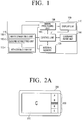
- FIG. 1 is a schematic block diagram of an electronic picture frame according to an exemplary embodiment of the present invention.
- the electronic picture frame 100 includes an external memory connecting unit 110, an internal memory 120, a signal processing unit 130, a display unit 140, a command input unit 150, and a control unit 160.
- the external memory connecting unit 110 includes a first connecting unit 110-1, a second connecting unit 110-2, ..., and an Nth connecting unit 110-n, and each connecting unit 110-1, 110-2, ..., and 110-n may be connected to a respective external memory such as a Secure Digital (SD) memory, a Compact Flash (CF) memory, or a Universal Serial Bus (USB) memory.
- SD Secure Digital
- CF Compact Flash
- USB Universal Serial Bus
- images such as photos may be compressed and stored into Joint Photographic Experts Group (JPEG), bitmap, or Graphics Interchange Format (GIF) formats.
- JPEG Joint Photographic Experts Group
- GIF Graphics Interchange Format
- the external memory connecting unit 110 may be connected directly to an external device in which images are stored such as a personal computer or a digital camera.
- the internal memory 120 stores programs and various data to operate the electronic picture frame 100, and stores images such as photos in JPEG format.
- the signal processing unit 130 decodes images stored in an external memory which is connected to the external memory connecting unit 110, or in the internal memory 120. If an image stored in the external memory or the internal memory 120 is a photo, the photo may have been mostly compressed in JPEG format and stored, in which case the signal processing unit 130 decodes the JPEG image. Subsequently, according to the control of the control unit 160, the signal processing unit 130 performs scaling and splitting so that the image can be displayed in a user's desired form.
- the display unit 140 displays the image output by the signal processing unit 130.
- the image may be displayed on the display unit 140 in diverse forms as illustrated in FIGS. 2A to 3C .
- the display unit 140 may display images using Low Voltage Differential Signaling (LVDS), Transistor Transistor Logic (TTL), or an analog RGB method.
- LVDS Low Voltage Differential Signaling
- TTL Transistor Transistor Logic
- the command input unit 150 receives user commands to control the operation of the electronic picture frame 100 and transmits the user commands to the control unit 160.
- the command input unit 150 may include button keys or touch keys to input user commands, may receive user commands from a remote control (not shown), or may be a touch panel which is coupled with the display unit 140. Using such a command input unit 150, the user selects a memory or folder in which a desired image is stored and selects an image display method supported by the electronic picture frame 100.
- the control unit 160 controls the operation of the electronic picture frame 100 according to a user command input received through the command input unit 150. That is, control unit 160 controls the signal processing unit 130 and the display unit 140 to display images, which are stored in external memories connected to the external memory connecting unit 110 or the internal memory 130, on the display unit 140 using an image display method selected by a user command. This operation of the control unit 160 will be described in more detail below.
- FIGS. 2A to 2G illustrate a function for displaying images using an electronic picture frame according to an exemplary embodiment of the present invention.
- the screen 200 consists of a main screen 210 and a thumbnail screen 220. Images stored in a selected memory are displayed as thumbnails on the thumbnail screen 220. Exchangeable image file format (EXIF) information related to the thumbnails may be displayed on the thumbnail screen 220 with the thumbnails.
- the thumbnail screen 220 may be scrolled up or down. While the thumbnail screen 220 is being scrolled, image C in a preset position of the thumbnail screen 220 is enlarged and displayed on the main screen 210. In FIG. 2A , the preset position is represented as a hatched area. A thumbnail image is a smaller image than an image displayed on the main screen 210.
- image C displayed on the main screen 210 in FIG. 2A is displayed again on the thumbnail screen 220.
- image D in the preset position of the thumbnail screen 220 is enlarged and displayed on the main screen 210.
- image D appears on the main screen 210, as soon as image C disappears, image D appears.
- no image may be displayed on the main screen 210 until the thumbnail screen 220 is scrolled down and image D following image C is positioned in the center of the thumbnail screen 220.
- the image at the center of the thumbnail 220 may be gradually enlarged and displayed on the main screen 210.
- the image displayed on the main screen 210 may be gradually reduced and displayed on the thumbnail screen 220.
- the thumbnail screen 220 in FIGS. 2A to 2C may also be scrolled up. Scrolling may be performed automatically, or may be performed in a direction which is selected by a user command. The number of images displayed on the thumbnail screen 220 may be set according to a user command.
- an image at a preset position on the thumbnail screen 220 disappears while being displayed on the main screen 210.
- an image continues to be displayed at the preset position of the thumbnail screen 220 while also being displayed on the main screen 210.
- following thumbnail images appear on and disappears from the thumbnail screen 220 according to the direction in which the thumbnail screen 220 is scrolled.
- thumbnail images may be displayed on the thumbnail screen 220, but no image may be displayed on the main screen 210.
- the thumbnail images displayed on the thumbnail screen 220 include images which have been displayed on the main screen 210 and images which are not displayed on the main screen 210.
- FIGS. 2D and 2E illustrate that the position of an image on the thumbnail screen 220 to be displayed on the main screen 210 may vary according to the direction to which the thumbnail screen 220 is scrolled. That is, as illustrated in FIG. 2D , if the thumbnail screen 220 is scrolled down, image A on a preset position of the thumbnail screen 220 indicated by hatching is displayed on the main screen 210. Since the thumbnail screen 220 is scrolled down, the image A disappears simultaneously from both the main screen 210 and the thumbnail screen 220. However, if the thumbnail screen 220 is scrolled up, the image A is displayed simultaneously on both the main screen 210 and the thumbnail screen 220.
- FIG. 2E if the thumbnail screen 220 is scrolled down, image D on a preset position of the thumbnail screen 220 indicated by hatching is displayed on the main screen 210. Since the thumbnail screen 220 is scrolled down, the image D is displayed concurrently on both the main screen 210 and the thumbnail screen 220. However, if the thumbnail screen 220 is scrolled up, the image D disappears simultaneously from both the main screen 210 and the thumbnail screen 220.
- FIGS. 2F and 2G illustrate that an image at a preset location of the thumbnail screen 220 disappears from the thumbnail screen 220 while being displayed on the main screen 210.
- the thumbnail screen 220 is positioned vertically on the right of the screen 200, but it may also be positioned vertically on the left of the screen 200, or horizontally on the upper or lower portion of the screen 200. If the thumbnail screen 220 is positioned horizontally on the upper or lower portion of the screen 200, the thumbnail screen 220 may be scrolled to the right or left.
- the preset position on the thumbnail screen 220 may vary according to a user command, and the scrolling rate may vary according to a user command.
- thumbnail images to be displayed on the thumbnail screen 220 are images provided by a plurality of storage areas, which are memories or folders.
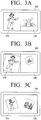
- FIGS. 3A to 3C illustrate a function for displaying different images on a screen using an electronic picture frame according to an example outside the scope of the present invention.
- the screen 300 consists of a first display area 310 and a second display area 330.
- Each display area 310 and 330 may display images which are stored in different memories.
- the user may sequentially display the images stored in an SD memory which is connected to the external memory connecting unit 110 on the first display area 310, and may sequentially display the images stored in the internal memory 120 on the second display area 330.
- the images are displayed in a sliding manner.
- the process of reducing and enlarging the images on the first display area 310 and the second display area 330 may be gradually expressed.
- the user selects a CF memory and a USB memory which are connected to the external memory connecting unit 110 so that the images which are stored in the CF memory and the USB memory can be displayed on the first display area 310 and the second display area 330, respectively.
- An image stored in the CF memory is gradually enlarged, moved, and displayed on the first display area 310.
- the image is then gradually reduced and moved, and disappears from the first display area 310.
- Another image stored in the CF memory is displayed on the first display area 310 in the same manner.
- On the second display area 330 the images are displayed in the same manner. In this manner, the images alternately appear on and disappear from the first display area 310 and the second display area 330.
- the screen 300 consists of the two display areas 310 and 330, but the screen 300 may consist of three or more display areas. In this case, the three or more display areas may display images stored in three or more memories, respectively.
- FIGS. 3A to 3C the user selects desired memories.
- various kinds of images are categorized differently and stored separately in a plurality of folders in a single memory, and that one of the plurality of folders may be selected and displayed on the first display area 310 and another folder may be selected and displayed on the second display area 330.
- FIG. 4 is a flow chart illustrating the operation of an electronic picture frame according to an exemplary embodiment of the present invention.
- the electronic picture frame 100 reads out images (S400), and displays the images on a display area of the screen using a preset image display method (S450). That is, the control unit 160 reads out images to be displayed on the screen from a memory including the images from among external memories which are connected to the external memory connecting unit 110 and the internal memory, and then controls the signal processing unit 130 and the display unit 140 to display the read-out images on the screen using the method described with reference to FIGS. 2A to 2C or the method described with reference to FIGS. 3A to 3C .
- FIG. 5 is a flow chart illustrating a method for displaying images using the electronic picture frame described with reference to FIGS. 2A to 2G .
- the control unit 160 detects images (S500), and controls the signal processing unit 130 and the display unit 140 to display the detected images on a first area and scrolls through the displayed images (S520). That is, as illustrated in FIGS. 2A to 2C , the detected images are displayed as thumbnails on the thumbnail screen 220, and the thumbnail screen 220 is scrolled through.
- control unit 160 controls the signal processing unit 130 and the display unit 140 to display one of the images that is displayed on the first area on a second area (S540). That is, as illustrated in FIGS. 2A to 2C , while the thumbnail screen 220 is being scrolled, image C at the center of the thumbnail screen 220 is enlarged and displayed on the main screen 210.
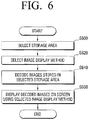
- FIG. 6 is a flow chart illustrating a method for displaying different images on screen using the electronic picture frame described with reference to FIGS. 3A to 3C .
- storage areas are selected according to a user command (S600) and an image display method is selected (S620). That is, the user selects a memory, in which the desired images are stored from among the memories connected to the external memory connecting unit 110 and the internal memory 120, and selects a method for displaying the images in the selected storage area. For example, the user may select the images stored in a USB memory to be displayed on the first display area and may select the images stored in a CF memory to be displayed on the second display area.
- the signal processing unit 130 decodes the images stored in the selected storage area (S640), and the display unit 140 displays the decoded images on the screen using the selected image display method (S660).
- the control unit 160 controls the signal processing unit 130 to decode the images stored in the selected memory and performs scaling and splitting of the decoded images. Consequently, the images in the USB memory can be processed by the signal processing unit 130 and displayed on the first display area, and the images in the CF memory can be processed by the signal processing unit 130 and displayed on the second display area.
- memories are selected as storage areas, but a plurality of folders in which various kinds of images are categorized differently may be selected as storage areas.
- images are displayed in diverse forms so that the user can view the images in an interesting way, and the user can view images distributed in various types of memories in a desired way.
Landscapes
- Engineering & Computer Science (AREA)
- Human Computer Interaction (AREA)
- Multimedia (AREA)
- Signal Processing (AREA)
- Theoretical Computer Science (AREA)
- General Engineering & Computer Science (AREA)
- Physics & Mathematics (AREA)
- General Physics & Mathematics (AREA)
- Computer Hardware Design (AREA)
- Controls And Circuits For Display Device (AREA)
- User Interface Of Digital Computer (AREA)
- Television Signal Processing For Recording (AREA)
- Studio Circuits (AREA)
- Ultra Sonic Daignosis Equipment (AREA)
Claims (12)
- Elektronischer Bilderrahmen, der Folgendes umfasst:eine Anzeigeeinheit;eine Signalverarbeitungseinheit; undeine Steuereinheit, die die Signalverarbeitungseinheit so steuert, dass sie eine Vielzahl von Bildern derart verarbeitet, dass durch die Vielzahl von Bildern gescrollt werden kann und die Vielzahl von Bildern in einem ersten Bereich der Anzeigeeinheit angezeigt werden kann, um eines aus der Vielzahl von Bildern, durch die gescrollt wird, automatisch in einem zweiten Bereich der Anzeigeeinheit anzuzeigen,wobei, wenn in einer ersten Richtung durch die Vielzahl von Bildern gescrollt wird und ein Bild aus der Vielzahl von Bildern eine erste voreingestellte Position in dem ersten Bereich erreicht, ein dem Bild an der ersten voreingestellten Position entsprechendes größeres Bild in dem zweiten Bereich erscheint, undwenn in einer der ersten Richtung gegenüber liegenden zweiten Richtung durch die Vielzahl von Bildern gescrollt wird und ein Bild aus der Vielzahl von Bildern eine zweite voreingestellte Position in dem ersten Bereich erreicht, ein dem Bild an der zweiten voreingestellten Position entsprechendes größeres Bild in dem zweiten Bereich erscheint, wobei die erste voreingestellte Position sich von der zweiten voreingestellten Position unterscheidet, wobei die erste voreingestellte Position und die zweite voreingestellte Position in Bezug auf die Scrollrichtung an gegenüber liegenden Enden des ersten Bereichs angeordnet sind.
- Elektronischer Bilderrahmen nach Anspruch 1, wobei eine Anzahl von Bildern in dem ersten Bereich angezeigt wird, wobei entweder in der ersten Richtung oder in der zweiten Richtung durch die Bilder gescrollt wird, und wobei die erste voreingestellte Position und die zweite voreingestellte Position jeweils an verschiedenen Positionen in dem ersten Bereich fest stehend sind.
- Elektronischer Bilderrahmen nach Anspruch 1 oder 2, wobei gemäß einem von einer mit der Anzeigeeinheit gekoppelten Berührungstafel empfangenen Benutzerbefehl durch die Vielzahl von Bildern gescrollt wird.
- Elektronischer Bilderrahmen nach einem der Ansprüche 1 bis 3, wobei eine Scrollrichtung der Vielzahl von Bildern gemäß einem Benutzerbefehl geändert wird.
- Elektronischer Bilderrahmen nach einem der Ansprüche 1 bis 4, wobei, während in dem zweiten Bereich das dem Bild an der ersten oder zweiten voreingestellten Position entsprechende größere Bild angezeigt wird, das an der ersten voreingestellten Position angezeigte Bild aus dem ersten Bereich verschwindet.
- Elektronischer Bilderrahmen nach Anspruch 5, wobei ein Bild an einer ersten oder zweiten voreingestellten Position in der entsprechenden Scrollrichtung aus dem ersten Bereich verschwindet, wenn ein größeres Bild davon in dem zweiten Bereich angezeigt wird.
- Bildanzeigeverfahren für einen elektronischen Bilderrahmen, wobei das Verfahren Folgendes umfasst:unter Steuerung eines Prozessors, Anzeigen einer Vielzahl von Bildern in einem ersten Bereich einer Anzeige;Scrollen durch die Vielzahl von Bildern auf der Anzeige; undautomatisches Anzeigen eines aus der Vielzahl von Bildern, durch die gescrollt wird, in einem zweiten Bereich der Anzeige,wobei, wenn in einer ersten Richtung durch die Vielzahl von Bildern gescrollt wird und ein Bild aus der Vielzahl von Bildern eine erste voreingestellte Position in dem ersten Bereich erreicht, ein dem Bild an der ersten voreingestellten Position entsprechendes größeres Bild in dem zweiten Bereich erscheint, undwenn in einer der ersten Richtung gegenüber liegenden zweiten Richtung durch die Vielzahl von Bildern gescrollt wird und ein Bild aus der Vielzahl von Bildern eine zweite voreingestellte Position in dem ersten Bereich erreicht, ein dem Bild an der zweiten voreingestellten Position entsprechendes größeres Bild in dem zweiten Bereich erscheint, wobei die erste voreingestellte Position sich von der zweiten voreingestellten Position unterscheidet, wobei die erste voreingestellte Position und die zweite voreingestellte Position in Bezug auf die Scrollrichtung an gegenüber liegenden Enden des ersten Bereichs angeordnet sind.
- Verfahren nach Anspruch 7, wobei gemäß einem von einer mit der Anzeigeeinheit gekoppelten Berührungstafel empfangenen Benutzerbefehl durch die Vielzahl von Bildern gescrollt wird.
- Verfahren nach einem der Ansprüche 7 oder 8, wobei, während in dem zweiten Bereich das dem Bild an der ersten voreingestellten Position entsprechende größere Bild angezeigt wird, das an der ersten voreingestellten Position angezeigte Bild verschwindet.
- Verfahren nach einem der Ansprüche 7 bis 9, wobei eine Scrollrichtung der Vielzahl von Bildern gemäß einem Benutzerbefehl geändert wird.
- Nicht flüchtiges, computerlesbares Speichermedium, in dem computerlesbare Anweisungen eingebettet sind, die einen Computer in die Lage versetzten, ein Bildanzeigeverfahren für einen elektronischen Bilderrahmen auszuführen, wobei das Verfahren Folgendes umfasst:unter Steuerung eines Prozessors, Anzeigen einer Vielzahl von Bildern in einem ersten Bereich einer Anzeige;Scrollen durch die Vielzahl von Bildern auf der Anzeige; undautomatisches Anzeigen eines aus der Vielzahl von Bildern, durch die gescrollt wird, in einem zweiten Bereich der Anzeige,wobei, wenn in einer ersten Richtung durch die Vielzahl von Bildern gescrollt wird und ein Bild aus der Vielzahl von Bildern eine erste voreingestellte Position in dem ersten Bereich erreicht, ein dem Bild an der ersten voreingestellten Position entsprechendes größeres Bild in dem zweiten Bereich erscheint, undwenn in einer der ersten Richtung gegenüber liegenden zweiten Richtung durch die Vielzahl von Bildern gescrollt wird und ein Bild aus der Vielzahl von Bildern eine zweite voreingestellte Position in dem ersten Bereich erreicht, ein dem Bild an der zweiten voreingestellten Position entsprechendes größeres Bild in dem zweiten Bereich erscheint, wobei die erste voreingestellte Position sich von der zweiten voreingestellten Position unterscheidet, wobei die erste voreingestellte Position und die zweite voreingestellte Position in Bezug auf die Scrollrichtung an gegenüber liegenden Enden des ersten Bereichs angeordnet sind.
- Nicht flüchtiges, computerlesbares Speichermedium nach Anspruch 11, wobei es sich bei der Vielzahl von Bildern um Miniaturansichtsbilder handelt.
Priority Applications (2)
| Application Number | Priority Date | Filing Date | Title |
|---|---|---|---|
| EP21159078.1A EP3863273B1 (de) | 2008-06-13 | 2009-03-25 | Elektronischer bilderrahmen und bildanzeigeverfahren dafür |
| EP25185195.2A EP4597282A3 (de) | 2008-06-13 | 2009-03-25 | Elektronischer bildrahmen und bildanzeigeverfahren dafür |
Applications Claiming Priority (2)
| Application Number | Priority Date | Filing Date | Title |
|---|---|---|---|
| KR1020080055771A KR101457404B1 (ko) | 2008-06-13 | 2008-06-13 | 전자액자 및 그의 이미지 표시방법 |
| EP09156214A EP2134070A1 (de) | 2008-06-13 | 2009-03-25 | Elektronischer Bilderrahmen und Bildanzeigeverfahren dafür |
Related Parent Applications (1)
| Application Number | Title | Priority Date | Filing Date |
|---|---|---|---|
| EP09156214A Division EP2134070A1 (de) | 2008-06-13 | 2009-03-25 | Elektronischer Bilderrahmen und Bildanzeigeverfahren dafür |
Related Child Applications (3)
| Application Number | Title | Priority Date | Filing Date |
|---|---|---|---|
| EP21159078.1A Division EP3863273B1 (de) | 2008-06-13 | 2009-03-25 | Elektronischer bilderrahmen und bildanzeigeverfahren dafür |
| EP21159078.1A Division-Into EP3863273B1 (de) | 2008-06-13 | 2009-03-25 | Elektronischer bilderrahmen und bildanzeigeverfahren dafür |
| EP25185195.2A Division EP4597282A3 (de) | 2008-06-13 | 2009-03-25 | Elektronischer bildrahmen und bildanzeigeverfahren dafür |
Publications (2)
| Publication Number | Publication Date |
|---|---|
| EP3136703A1 EP3136703A1 (de) | 2017-03-01 |
| EP3136703B1 true EP3136703B1 (de) | 2021-05-05 |
Family
ID=40568224
Family Applications (4)
| Application Number | Title | Priority Date | Filing Date |
|---|---|---|---|
| EP21159078.1A Active EP3863273B1 (de) | 2008-06-13 | 2009-03-25 | Elektronischer bilderrahmen und bildanzeigeverfahren dafür |
| EP25185195.2A Pending EP4597282A3 (de) | 2008-06-13 | 2009-03-25 | Elektronischer bildrahmen und bildanzeigeverfahren dafür |
| EP09156214A Withdrawn EP2134070A1 (de) | 2008-06-13 | 2009-03-25 | Elektronischer Bilderrahmen und Bildanzeigeverfahren dafür |
| EP16194153.9A Active EP3136703B1 (de) | 2008-06-13 | 2009-03-25 | Elektronischer bilderrahmen und bildanzeigeverfahren dafür |
Family Applications Before (3)
| Application Number | Title | Priority Date | Filing Date |
|---|---|---|---|
| EP21159078.1A Active EP3863273B1 (de) | 2008-06-13 | 2009-03-25 | Elektronischer bilderrahmen und bildanzeigeverfahren dafür |
| EP25185195.2A Pending EP4597282A3 (de) | 2008-06-13 | 2009-03-25 | Elektronischer bildrahmen und bildanzeigeverfahren dafür |
| EP09156214A Withdrawn EP2134070A1 (de) | 2008-06-13 | 2009-03-25 | Elektronischer Bilderrahmen und Bildanzeigeverfahren dafür |
Country Status (3)
| Country | Link |
|---|---|
| US (5) | US8576254B2 (de) |
| EP (4) | EP3863273B1 (de) |
| KR (1) | KR101457404B1 (de) |
Families Citing this family (12)
| Publication number | Priority date | Publication date | Assignee | Title |
|---|---|---|---|---|
| KR101457404B1 (ko) * | 2008-06-13 | 2014-11-06 | 삼성전자주식회사 | 전자액자 및 그의 이미지 표시방법 |
| DE102010013170A1 (de) * | 2010-03-27 | 2011-09-29 | Audi Ag | Vorrichtung zur Bedienung unterschiedlicher Funktionen eines Kraftfahrzeugs |
| KR101851241B1 (ko) * | 2011-12-06 | 2018-04-24 | 삼성전자 주식회사 | 휴대 단말기의 컨텐츠 통합 관리 방법 및 장치 |
| KR101457639B1 (ko) * | 2013-02-18 | 2014-11-07 | 주식회사 리멤버피플 | 음원출력 기능이 구비된 사진액자 및, 이 사진액자에 입력되기 위한 음원출력 소스데이터를 생성하는 프로그램을 기억한 기억매체 |
| USD730941S1 (en) * | 2013-06-09 | 2015-06-02 | Apple Inc. | Display screen or portion thereof with icon |
| US9628747B2 (en) | 2014-05-09 | 2017-04-18 | Lyve Minds, Inc. | Image scrolling on a photo sharing device display |
| USD778941S1 (en) | 2016-01-08 | 2017-02-14 | Apple Inc. | Display screen or portion thereof with graphical user interface |
| USD846594S1 (en) | 2017-07-10 | 2019-04-23 | Apple Inc. | Display screen or portion thereof with icon |
| KR102301498B1 (ko) * | 2019-12-23 | 2021-09-13 | 네이버 주식회사 | 듀얼 스크린에서 컨텐츠와 컨텐츠 목록을 연동하여 표시하는 방법, 시스템, 및 컴퓨터 프로그램 |
| CN111261063B (zh) * | 2020-03-31 | 2021-07-06 | 深圳市华星光电半导体显示技术有限公司 | 显示面板及显示装置 |
| CN113497888B (zh) * | 2020-04-07 | 2023-05-02 | 华为技术有限公司 | 照片预览方法、电子设备和存储介质 |
| CN117112119B (zh) * | 2023-10-23 | 2024-03-26 | 深圳市亿莱顿科技有限公司 | 图片展示方法和装置 |
Family Cites Families (56)
| Publication number | Priority date | Publication date | Assignee | Title |
|---|---|---|---|---|
| US5963204A (en) * | 1996-09-20 | 1999-10-05 | Nikon Corporation | Electronic camera with reproduction and display of images at the same timing |
| US6118480A (en) * | 1997-05-05 | 2000-09-12 | Flashpoint Technology, Inc. | Method and apparatus for integrating a digital camera user interface across multiple operating modes |
| US6020920A (en) | 1997-06-10 | 2000-02-01 | Flashpoint Technology, Inc. | Method and system for speculative decompression of compressed image data in an image capture unit |
| US6233015B1 (en) * | 1997-06-27 | 2001-05-15 | Eastman Kodak Company | Camera with user compliant browse and display modes |
| JP3360598B2 (ja) * | 1998-02-18 | 2002-12-24 | ミノルタ株式会社 | 画像システム |
| US6834130B1 (en) * | 1998-02-18 | 2004-12-21 | Minolta Co., Ltd. | Image retrieval system for retrieving a plurality of images which are recorded in a recording medium, and a method thereof |
| US7152210B1 (en) * | 1999-10-20 | 2006-12-19 | Koninklijke Philips Electronics N.V. | Device and method of browsing an image collection |
| US6433839B1 (en) * | 2000-03-29 | 2002-08-13 | Hourplace, Llc | Methods for generating image set or series with imperceptibly different images, systems therefor and applications thereof |
| US7228061B2 (en) * | 2000-11-17 | 2007-06-05 | Canon Kabushiki Kaisha | Image display system, image reproducing apparatus, digital television apparatus, image display method, and storage medium for controlling image display based on additional information read from multiple image recording apparatuses |
| JP2002171434A (ja) * | 2000-12-04 | 2002-06-14 | Nikon Corp | 電子カメラ |
| JP2002300403A (ja) * | 2001-03-30 | 2002-10-11 | Fuji Photo Film Co Ltd | 画像処理装置 |
| US8002623B2 (en) * | 2001-08-09 | 2011-08-23 | Igt | Methods and devices for displaying multiple game elements |
| US7184082B2 (en) * | 2001-08-28 | 2007-02-27 | Olympus Corporation | Image displaying system, image displaying method, image printing system, and image printing method |
| US20030043282A1 (en) * | 2001-09-04 | 2003-03-06 | Eastman Kodak Company | Camera having selective image exclusion from first in-first out electronic image overwriting and method |
| US6907575B2 (en) * | 2001-09-06 | 2005-06-14 | Danger, Inc. | Method of scrolling a display window |
| JP3787529B2 (ja) * | 2002-02-12 | 2006-06-21 | 株式会社日立製作所 | 光ディスク記録再生装置 |
| JP2004193695A (ja) * | 2002-12-09 | 2004-07-08 | Hitachi Ltd | 記録再生装置及び方法 |
| US20040175764A1 (en) * | 2003-01-06 | 2004-09-09 | Hiroto Nishiyama | Image processing apparatus, image processing program, recording medium, and image processing method |
| JP2004213450A (ja) * | 2003-01-07 | 2004-07-29 | Matsushita Electric Ind Co Ltd | 印刷システムおよび印刷サムネイル作成方法 |
| US7149370B2 (en) * | 2003-03-07 | 2006-12-12 | Nokia Corporation | Method and device for image surfing |
| JP4056915B2 (ja) * | 2003-03-25 | 2008-03-05 | 富士フイルム株式会社 | 画像表示方法及びプリント注文受付装置並びにプリント注文受付システム |
| JP2004326253A (ja) * | 2003-04-22 | 2004-11-18 | Toshiba Corp | メモリカード自動表示システム |
| US7661075B2 (en) * | 2003-05-21 | 2010-02-09 | Nokia Corporation | User interface display for set-top box device |
| KR100513050B1 (ko) * | 2003-06-02 | 2005-09-06 | 엘지전자 주식회사 | Tv 시스템의 다중 pop에서 슬롯 이동 방법 및 장치 |
| WO2005024777A1 (ja) * | 2003-09-03 | 2005-03-17 | Olympus Corporation | 画像表示装置、画像表示プログラム、画像表示方法、画像表示プログラムを記録する記録媒体 |
| US7599100B2 (en) * | 2003-10-01 | 2009-10-06 | Seiko Epson Corporation | Image processing apparatus |
| US6990637B2 (en) * | 2003-10-23 | 2006-01-24 | Microsoft Corporation | Graphical user interface for 3-dimensional view of a data collection based on an attribute of the data |
| US7437005B2 (en) * | 2004-02-17 | 2008-10-14 | Microsoft Corporation | Rapid visual sorting of digital files and data |
| WO2005109157A1 (ja) * | 2004-05-10 | 2005-11-17 | Sony Computer Entertainment Inc. | マルチメディア再生装置およびメニュー画面表示方法 |
| JP4869574B2 (ja) | 2004-09-09 | 2012-02-08 | Necカシオモバイルコミュニケーションズ株式会社 | 携帯型情報処理装置、情報提示方法および情報提示プログラム |
| US7705858B2 (en) * | 2004-10-06 | 2010-04-27 | Apple Inc. | Techniques for displaying digital images on a display |
| JP2006211078A (ja) | 2005-01-26 | 2006-08-10 | Casio Comput Co Ltd | デジタルカメラ、表示方法及びプログラム |
| TWI405135B (zh) * | 2005-05-17 | 2013-08-11 | Ibm | 系統,方法及記錄媒體 |
| JP2006345296A (ja) * | 2005-06-09 | 2006-12-21 | Fujifilm Holdings Corp | 画像表示装置及びソート方法 |
| JP4416707B2 (ja) * | 2005-07-21 | 2010-02-17 | 富士フイルム株式会社 | デジタルカメラ |
| JP4678508B2 (ja) * | 2005-08-26 | 2011-04-27 | 富士フイルム株式会社 | 画像処理装置、画像処理方法及び画像処理プログラム |
| JP4624234B2 (ja) | 2005-10-19 | 2011-02-02 | 富士フイルム株式会社 | 画像再生装置及び画像再生プログラム |
| EP1962497B1 (de) * | 2005-11-25 | 2013-01-16 | Nikon Corporation | Elektronische kamera und bildverarbeitungseinrichtung |
| JP4894252B2 (ja) * | 2005-12-09 | 2012-03-14 | ソニー株式会社 | データ表示装置、データ表示方法及びデータ表示プログラム |
| US20070186177A1 (en) * | 2006-02-03 | 2007-08-09 | Yahoo! Inc. | Content navigation interfaces and associated methods |
| JP4492555B2 (ja) * | 2006-02-07 | 2010-06-30 | セイコーエプソン株式会社 | 印刷装置 |
| JP4621157B2 (ja) * | 2006-03-09 | 2011-01-26 | 富士フイルム株式会社 | 携帯型画像通信システムならびにそのシステムを構成する送信装置および受信装置ならびにそれらの制御方法 |
| JP5517397B2 (ja) * | 2006-08-11 | 2014-06-11 | キヤノン株式会社 | 画像処理方法、画像処理装置 |
| US8736557B2 (en) * | 2006-09-11 | 2014-05-27 | Apple Inc. | Electronic device with image based browsers |
| JP2008136167A (ja) * | 2006-10-25 | 2008-06-12 | Seiko Epson Corp | 画像出力装置、画像処理装置、画像出力画像処理システム、それらの方法及びそれらのプログラム |
| US7836475B2 (en) * | 2006-12-20 | 2010-11-16 | Verizon Patent And Licensing Inc. | Video access |
| AU2006252194B2 (en) * | 2006-12-21 | 2010-02-11 | Canon Kabushiki Kaisha | Scrolling Interface |
| WO2008085206A2 (en) * | 2006-12-29 | 2008-07-17 | Prodea Systems, Inc. | Subscription management of applications and services provided through user premises gateway devices |
| JP2008244873A (ja) * | 2007-03-27 | 2008-10-09 | Fujifilm Corp | 画像管理システム、デジタルカメラ、画像管理方法、及び画像管理プログラム |
| JP4671989B2 (ja) | 2007-05-15 | 2011-04-20 | 株式会社ニコン | カメラ |
| WO2009001683A1 (ja) * | 2007-06-28 | 2008-12-31 | Sharp Kabushiki Kaisha | 表示装置及び表示方法 |
| AU2007249153B2 (en) * | 2007-12-20 | 2010-08-26 | Canon Kabushiki Kaisha | A method of browsing media items using thumbnails |
| KR101457404B1 (ko) * | 2008-06-13 | 2014-11-06 | 삼성전자주식회사 | 전자액자 및 그의 이미지 표시방법 |
| KR101640460B1 (ko) * | 2009-03-25 | 2016-07-18 | 삼성전자 주식회사 | 휴대 단말기의 분할 화면 운용 방법 및 이를 지원하는 휴대 단말기 |
| US9237296B2 (en) * | 2009-06-01 | 2016-01-12 | Lg Electronics Inc. | Image display apparatus and operating method thereof |
| JP5638896B2 (ja) * | 2010-09-21 | 2014-12-10 | 任天堂株式会社 | 表示制御プログラム、表示制御装置、表示制御システム、および表示制御方法 |
-
2008
- 2008-06-13 KR KR1020080055771A patent/KR101457404B1/ko active Active
-
2009
- 2009-02-12 US US12/370,257 patent/US8576254B2/en active Active
- 2009-03-25 EP EP21159078.1A patent/EP3863273B1/de active Active
- 2009-03-25 EP EP25185195.2A patent/EP4597282A3/de active Pending
- 2009-03-25 EP EP09156214A patent/EP2134070A1/de not_active Withdrawn
- 2009-03-25 EP EP16194153.9A patent/EP3136703B1/de active Active
-
2013
- 2013-10-11 US US14/051,706 patent/US10788973B2/en active Active
-
2020
- 2020-08-27 US US17/004,141 patent/US11614861B2/en active Active
-
2023
- 2023-02-24 US US18/174,340 patent/US12014041B2/en active Active
-
2024
- 2024-05-16 US US18/665,657 patent/US20240302950A1/en active Pending
Also Published As
| Publication number | Publication date |
|---|---|
| US10788973B2 (en) | 2020-09-29 |
| KR101457404B1 (ko) | 2014-11-06 |
| US20090309901A1 (en) | 2009-12-17 |
| EP3863273B1 (de) | 2025-08-06 |
| US20230214108A1 (en) | 2023-07-06 |
| US11614861B2 (en) | 2023-03-28 |
| EP4597282A2 (de) | 2025-08-06 |
| US12014041B2 (en) | 2024-06-18 |
| EP3863273A1 (de) | 2021-08-11 |
| EP2134070A1 (de) | 2009-12-16 |
| US20240302950A1 (en) | 2024-09-12 |
| US20140040816A1 (en) | 2014-02-06 |
| US8576254B2 (en) | 2013-11-05 |
| KR20090129711A (ko) | 2009-12-17 |
| EP4597282A3 (de) | 2025-10-15 |
| EP3136703A1 (de) | 2017-03-01 |
| US20200393944A1 (en) | 2020-12-17 |
Similar Documents
| Publication | Publication Date | Title |
|---|---|---|
| EP3136703B1 (de) | Elektronischer bilderrahmen und bildanzeigeverfahren dafür | |
| US9497405B2 (en) | Display device for displaying videos side by side without overlapping each other and method for the same | |
| US8570335B2 (en) | Mobile device and method for displaying thumbnails on the mobile device | |
| US20150121177A1 (en) | Electronic device, method, and storage medium | |
| JP2007256529A (ja) | 文書画像表示装置、情報処理装置、文書画像表示方法、情報処理方法、文書画像表示プログラム、記録媒体及びデータ構造 | |
| US20130083071A1 (en) | Image display apparatus, image display method and computer readable recording medium | |
| US8803919B2 (en) | Display apparatus and image display method thereof | |
| JP2007060646A5 (de) | ||
| JP6598600B2 (ja) | 文書生成システム、文書サーバ、端末装置、文書生成方法、およびコンピュータプログラム | |
| JP6808424B2 (ja) | 画像記録装置およびその制御方法 | |
| US9530183B1 (en) | Elastic navigation for fixed layout content | |
| JP2006251275A (ja) | 画像表示装置 | |
| US20130139051A1 (en) | Mobile terminal, method for controlling the same, and non-transitory storage medium storing program to be executed by mobile terminal | |
| JP5419783B2 (ja) | 画像再生装置及び画像再生装置の制御方法 | |
| JP4741916B2 (ja) | 画像処理装置、画像処理方法及び該方法を実行するための画像処理プログラムを格納したコンピュータ読み取り可能な記録媒体 | |
| JP3122736U (ja) | 画像表示装置 | |
| KR20080074325A (ko) | 뷰어가 내장된 화상형성장치 및 그 제어방법 | |
| JP2010061623A (ja) | 文書処理装置、文書処理方法および文書処理プログラム | |
| JP2013037188A (ja) | 画像表示装置、画像表示方法、及び、プログラム | |
| JP2007017523A (ja) | サムネイル表示装置 | |
| JPH04270557A (ja) | 縮小変換画像の表示方法 | |
| JP2007304247A (ja) | 画像処理装置、画像処理方法、画像処理プログラムおよびコンピュータ読み取り可能な記録媒体 | |
| JP2001167085A (ja) | 画像編集装置、画像編集方法及び記録媒体 | |
| JPH09101841A (ja) | 情報処理装置 | |
| JP2015191495A (ja) | 表示データ作成システム、表示データ作成方法及び表示データ作成用コンピュータプログラム |
Legal Events
| Date | Code | Title | Description |
|---|---|---|---|
| PUAI | Public reference made under article 153(3) epc to a published international application that has entered the european phase |
Free format text: ORIGINAL CODE: 0009012 |
|
| STAA | Information on the status of an ep patent application or granted ep patent |
Free format text: STATUS: THE APPLICATION HAS BEEN PUBLISHED |
|
| AC | Divisional application: reference to earlier application |
Ref document number: 2134070 Country of ref document: EP Kind code of ref document: P |
|
| AK | Designated contracting states |
Kind code of ref document: A1 Designated state(s): DE FR GB NL |
|
| STAA | Information on the status of an ep patent application or granted ep patent |
Free format text: STATUS: REQUEST FOR EXAMINATION WAS MADE |
|
| 17P | Request for examination filed |
Effective date: 20170505 |
|
| RBV | Designated contracting states (corrected) |
Designated state(s): DE FR GB NL |
|
| STAA | Information on the status of an ep patent application or granted ep patent |
Free format text: STATUS: EXAMINATION IS IN PROGRESS |
|
| 17Q | First examination report despatched |
Effective date: 20190411 |
|
| GRAP | Despatch of communication of intention to grant a patent |
Free format text: ORIGINAL CODE: EPIDOSNIGR1 |
|
| STAA | Information on the status of an ep patent application or granted ep patent |
Free format text: STATUS: GRANT OF PATENT IS INTENDED |
|
| INTG | Intention to grant announced |
Effective date: 20201110 |
|
| GRAS | Grant fee paid |
Free format text: ORIGINAL CODE: EPIDOSNIGR3 |
|
| GRAA | (expected) grant |
Free format text: ORIGINAL CODE: 0009210 |
|
| STAA | Information on the status of an ep patent application or granted ep patent |
Free format text: STATUS: THE PATENT HAS BEEN GRANTED |
|
| AC | Divisional application: reference to earlier application |
Ref document number: 2134070 Country of ref document: EP Kind code of ref document: P |
|
| AK | Designated contracting states |
Kind code of ref document: B1 Designated state(s): DE FR GB NL |
|
| REG | Reference to a national code |
Ref country code: GB Ref legal event code: FG4D |
|
| REG | Reference to a national code |
Ref country code: DE Ref legal event code: R096 Ref document number: 602009063678 Country of ref document: DE |
|
| REG | Reference to a national code |
Ref country code: NL Ref legal event code: FP |
|
| REG | Reference to a national code |
Ref country code: DE Ref legal event code: R097 Ref document number: 602009063678 Country of ref document: DE |
|
| PLBE | No opposition filed within time limit |
Free format text: ORIGINAL CODE: 0009261 |
|
| STAA | Information on the status of an ep patent application or granted ep patent |
Free format text: STATUS: NO OPPOSITION FILED WITHIN TIME LIMIT |
|
| 26N | No opposition filed |
Effective date: 20220208 |
|
| PGFP | Annual fee paid to national office [announced via postgrant information from national office to epo] |
Ref country code: NL Payment date: 20260220 Year of fee payment: 18 |
|
| PGFP | Annual fee paid to national office [announced via postgrant information from national office to epo] |
Ref country code: GB Payment date: 20260224 Year of fee payment: 18 |
|
| PGFP | Annual fee paid to national office [announced via postgrant information from national office to epo] |
Ref country code: DE Payment date: 20260220 Year of fee payment: 18 |
|
| PGFP | Annual fee paid to national office [announced via postgrant information from national office to epo] |
Ref country code: FR Payment date: 20260224 Year of fee payment: 18 |