EP2189892A2 - Bildverarbeitungsvorrichtung, Bildverarbeitungsverfahren und Bildanzeigeprogramm - Google Patents
Bildverarbeitungsvorrichtung, Bildverarbeitungsverfahren und Bildanzeigeprogramm Download PDFInfo
- Publication number
- EP2189892A2 EP2189892A2 EP09176454A EP09176454A EP2189892A2 EP 2189892 A2 EP2189892 A2 EP 2189892A2 EP 09176454 A EP09176454 A EP 09176454A EP 09176454 A EP09176454 A EP 09176454A EP 2189892 A2 EP2189892 A2 EP 2189892A2
- Authority
- EP
- European Patent Office
- Prior art keywords
- image
- display
- operating surface
- user
- pointing
- Prior art date
- Legal status (The legal status is an assumption and is not a legal conclusion. Google has not performed a legal analysis and makes no representation as to the accuracy of the status listed.)
- Granted
Links
Images






Classifications
-
- G—PHYSICS
- G06—COMPUTING OR CALCULATING; COUNTING
- G06F—ELECTRIC DIGITAL DATA PROCESSING
- G06F3/00—Input arrangements for transferring data to be processed into a form capable of being handled by the computer; Output arrangements for transferring data from processing unit to output unit, e.g. interface arrangements
- G06F3/01—Input arrangements or combined input and output arrangements for interaction between user and computer
- G06F3/048—Interaction techniques based on graphical user interfaces [GUI]
- G06F3/0487—Interaction techniques based on graphical user interfaces [GUI] using specific features provided by the input device, e.g. functions controlled by the rotation of a mouse with dual sensing arrangements, or of the nature of the input device, e.g. tap gestures based on pressure sensed by a digitiser
- G06F3/0488—Interaction techniques based on graphical user interfaces [GUI] using specific features provided by the input device, e.g. functions controlled by the rotation of a mouse with dual sensing arrangements, or of the nature of the input device, e.g. tap gestures based on pressure sensed by a digitiser using a touch-screen or digitiser, e.g. input of commands through traced gestures
-
- G—PHYSICS
- G06—COMPUTING OR CALCULATING; COUNTING
- G06F—ELECTRIC DIGITAL DATA PROCESSING
- G06F3/00—Input arrangements for transferring data to be processed into a form capable of being handled by the computer; Output arrangements for transferring data from processing unit to output unit, e.g. interface arrangements
- G06F3/01—Input arrangements or combined input and output arrangements for interaction between user and computer
- G06F3/048—Interaction techniques based on graphical user interfaces [GUI]
- G06F3/0484—Interaction techniques based on graphical user interfaces [GUI] for the control of specific functions or operations, e.g. selecting or manipulating an object, an image or a displayed text element, setting a parameter value or selecting a range
- G06F3/0485—Scrolling or panning
-
- G—PHYSICS
- G06—COMPUTING OR CALCULATING; COUNTING
- G06F—ELECTRIC DIGITAL DATA PROCESSING
- G06F3/00—Input arrangements for transferring data to be processed into a form capable of being handled by the computer; Output arrangements for transferring data from processing unit to output unit, e.g. interface arrangements
- G06F3/01—Input arrangements or combined input and output arrangements for interaction between user and computer
- G06F3/048—Interaction techniques based on graphical user interfaces [GUI]
- G06F3/0481—Interaction techniques based on graphical user interfaces [GUI] based on specific properties of the displayed interaction object or a metaphor-based environment, e.g. interaction with desktop elements like windows or icons, or assisted by a cursor's changing behaviour or appearance
- G06F3/04812—Interaction techniques based on cursor appearance or behaviour, e.g. being affected by the presence of displayed objects
-
- G—PHYSICS
- G06—COMPUTING OR CALCULATING; COUNTING
- G06F—ELECTRIC DIGITAL DATA PROCESSING
- G06F3/00—Input arrangements for transferring data to be processed into a form capable of being handled by the computer; Output arrangements for transferring data from processing unit to output unit, e.g. interface arrangements
- G06F3/01—Input arrangements or combined input and output arrangements for interaction between user and computer
- G06F3/048—Interaction techniques based on graphical user interfaces [GUI]
- G06F3/0484—Interaction techniques based on graphical user interfaces [GUI] for the control of specific functions or operations, e.g. selecting or manipulating an object, an image or a displayed text element, setting a parameter value or selecting a range
- G06F3/0485—Scrolling or panning
- G06F3/04855—Interaction with scrollbars
-
- G—PHYSICS
- G09—EDUCATION; CRYPTOGRAPHY; DISPLAY; ADVERTISING; SEALS
- G09G—ARRANGEMENTS OR CIRCUITS FOR CONTROL OF INDICATING DEVICES USING STATIC MEANS TO PRESENT VARIABLE INFORMATION
- G09G5/00—Control arrangements or circuits for visual indicators common to cathode-ray tube indicators and other visual indicators
- G09G5/14—Display of multiple viewports
-
- G—PHYSICS
- G09—EDUCATION; CRYPTOGRAPHY; DISPLAY; ADVERTISING; SEALS
- G09G—ARRANGEMENTS OR CIRCUITS FOR CONTROL OF INDICATING DEVICES USING STATIC MEANS TO PRESENT VARIABLE INFORMATION
- G09G5/00—Control arrangements or circuits for visual indicators common to cathode-ray tube indicators and other visual indicators
- G09G5/34—Control arrangements or circuits for visual indicators common to cathode-ray tube indicators and other visual indicators for rolling or scrolling
- G09G5/346—Control arrangements or circuits for visual indicators common to cathode-ray tube indicators and other visual indicators for rolling or scrolling for systems having a bit-mapped display memory
Definitions
- the present invention relates to, for example, an apparatus that includes a display device having a relatively large display screen and can display various images, such as a digital still camera, and a method and a program used for the apparatus.
- Digital still cameras that record shot images on a recording medium as digital data are in widespread use. With recent reductions in the size and increases in the capacity of built-in flash memories or removable memories used in digital still cameras, it is now possible to accumulate a large amount of image data in these memories.
- accumulated images are played back one by one and displayed on the display screen to be checked.
- the digital still camera typically, upon entering image playback mode, the digital still camera transitions to a state in which, for example, an image selected by the user from among images recorded on the recording medium is displayed across the entire display image.
- a hardware key such as a cross key is operated to forward or reverse the display image one by one. Therefore, it is sometimes necessary to operate the hardware key many times until a target image is displayed.
- Some image display apparatuses that display an image allow the display image to be forwarded/reversed by performing a flick operation in an arbitrary direction by using a finger or the like, on a touch panel provided on the display screen.
- the operation of forwarding/reversing the display image on the touch panel is an intuitive operation for the user, and is easy to understand and excellent in terms of operability.
- such an operation of forwarding or reversing the display image on the touch panel is the same as the operation using a hardware key in that it is necessary to perform the operation on the touch panel a plurality of times until a target image is displayed.
- Japanese Unexamined Patent Application Publication No. 2008-033695 discloses a technique in which the amount of scrolling is calculated from the distance of a so-called drag operation (distance between the start point of a drag operation and a reference point), and an image is scrolled on the basis of this calculated amount of scrolling.
- the user can scroll the display image by an appropriate amount by a single drag operation, thereby enabling quick retrieval of a target image.
- the amount of scrolling is determined in accordance with the distance of a drag operation.
- the amount of scrolling it is necessary to perform a long drag operation.
- a flick operation on the touch panel is set as an operation for instructing forwarding/reversing of a display image
- a predetermined operating key such as a fast-forward button a plurality of times until a target playback speed such as 10-times speed or 20-times speed is achieved.
- an imaging processing apparatus includes: an image display device; pointed-position detecting means for accepting a pointing operation from a user via an operating surface provided on a display screen of the image display device, and detecting and outputting a position pointed by the pointing operation on the operating surface; storing means for storing image data; and display control means for displaying on the image display device an image according to the image data stored by the storing means.
- the display control means starts a display process of an image on the image display device in a manner according to the pointing operation made by the user which is determined on the basis of a detection output from the pointed-position detecting means, and continues the display process when pointing on the operating surface continues successively from the pointing operation on the operating surface.
- the display control means has a function of displaying an image according to image data stored by the storing means, on the display screen of the image display device.
- a pointing operation is made on the operating surface of the pointed-position detecting means, a display process of an image is started by the display control means in a manner according to the pointing operation made on the operating surface, and while pointing on the operating surface continues successively from the pointing operation, the display process in a manner according to the pointing operation is continued.
- the user can start an image display process in a manner according to the pointing operation. Then, the display process can be continued while pointing on the operating surface continues successively from the pointing operation. Therefore, an image display process intended by the user can be started by a simple action, and the image display process can be continued in a manner intended by the user.
- an image display process started in accordance with an initial operation can be continued as desired by the user in a manner intended by the user, without performing frequent operations or complex operations.
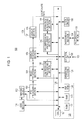
- Fig. 1 is a block diagram showing a configuration example of an imaging apparatus 100 according to a first embodiment to which an apparatus, a method, and a program according to an embodiment of the present invention is applied.
- the imaging apparatus 100 can switch between shooting modes to shoot both still images and moving images and record the images onto a recording medium.
- the imaging apparatus 100 includes a lens section 101, an imaging device 102, a pre-processing section 103, an image processing section 104, a display processing section 105, a display section 106, a touch panel 107, a compression processing section 109, a decompression processing section 110, and a reducing/enlarging section 111.
- the imaging apparatus 100 also includes a control section 120, an operating section 131, an external interface (hereinafter, abbreviated as external I/F) 132, an input/output terminal 133, a write/read section 134, a recording medium 135, and a clock circuit 136.
- external I/F external interface
- the display section 106 is made of, for example, a so-called thin display device such as an LCD (Liquid Crystal Display) or an organic EL (Electroluminescence) panel.
- a touch panel 107 is attached to the entire surface of the display screen of the display section 106 so as to form an operating surface.
- the touch panel 107 accepts a pointing operation (contacting operation) on the operating surface from the user, detects the pointed position (contact position) on the operating surface of the touch panel 107, and notifies the control section 120 of coordinate data indicating the pointed position.
- control section 120 controls individual sections of the imaging apparatus 100, and also grasps what kind of display is being made on the display screen of the display section 106.
- the control section 120 can accept a pointing operation (input operation) from the user on the basis of coordinate data indicating a pointed position on the operating surface from the touch panel 107, and display information on the display screen of the display section 106 corresponding to the pointed position.
- a user places a finger, a stylus, or the like in contact with the operating surface of the touch panel 107.
- a numeral is displayed at a position on the display screen which corresponds to (coincides with) the contact position, it can be determined by the control section 120 that the user has selected the displayed numeral for input.
- the display section 106 and the touch panel 107 form a touch screen 108 as an input apparatus.
- the touch panel 107 can be implemented as, for example, a pressure-sensitive or electrostatic one.
- the touch panel 107 can detect each of operations made simultaneously at a plurality of locations on the operating surface, and output coordinate data indicating each corresponding contact position.
- the touch panel 107 can also detect each of pointing operations repeatedly made on the operating surface, and output coordinate data indicating each corresponding contacting operation.
- the touch panel 107 can also detect the contact position successively at each predetermined timing, and output coordinate data indicating the contact position.
- the touch panel 107 can accept various kinds of pointing operation (operation input) from the user, such as so-called tap operation, double-tap operation, drag operation, flick operation, and pinch operation, and detects the operation.
- a tap operation is an action (operation) of pointing at a single predetermined point on the operating surface only once in a tap motion.
- a double-tap operation is an action of successively pointing at a single predetermined point on the operating surface twice in a tap-tap motion.
- a drag operation is an action of moving a user's finger or stylus while keeping the finger or stylus in contact with the operating surface.
- a flick operation is an action of pointing at a single point on the operating surface with a user's finger or stylus, and then quickly “flicking" the finger or stylus in that state in an arbitrary direction.
- a pinch operation is an action of placing two user's fingers or the like in contact with the operating surface simultaneously, and then spreading apart or closing together the two fingers or the like.
- an operation of spreading apart the two fingers or the like held in contact is referred to as pinch-out operation
- an operation of closing the two fingers or the like together is referred to as pinch-in operation.
- a drag operation and a flick operation are both an operation of placing a user's finger or the like in contact with the operating surface and then moving the finger or the like on the operating surface (tracing the operating surface), and can be grasped on the basis of two kinds of information, the distance of movement and the direction of movement.
- tracing operation is used to generically refer to a drag operation and a flick operation.
- the control section 120 is connected to individual sections constituting the imaging apparatus 100 to control the individual sections of the imaging apparatus 100 as mentioned above, and is configured as a so-called microcomputer.
- the control section 120 includes a CPU (Central Processing Unit) 121, a ROM (Read Only Memory) 122, a RAM (Random Access Memory) 123, and an EEPROM (Electrically Erasable and Programmable ROM) 124 that are connected via a CPU bus 125.
- CPU Central Processing Unit
- ROM Read Only Memory
- RAM Random Access Memory
- EEPROM Electrically Erasable and Programmable ROM
- the CPU 121 reads and executes a program stored in the ROM 122 described later, generates a control signal to be supplied to each section, and supplies this control signal to each section. Also, the CPU 121 accepts data or the like provided from each section, and processes this data.
- the ROM 122 stores and holds various programs executed by the CPU 121, various data necessary for processing, and the like in advance.
- the RAM 123 is mainly used as a work area, such as for temporary storage of intermediate results in various kinds of processing.
- the EEPROM 124 is a so-called non-volatile memory, and stores and holds information that should be held even when the power of the imaging apparatus 100 is turned off. For example, various parameters set by the user or the final results of various processing, or processing programs, data, or the like additionally provided for addition of functions or the like are held in the EEPROM 124.
- the operating section 131, the external I/F 132, the write/read section 134, and the clock circuit 136 are connected to the control section 120 configured as mentioned above.
- the operating section 131 has operating keys such as various adjustment keys, function keys, and shutter keys, and accepts an operation input from the user and notifies the control section 120 of this operation input.
- the control section 120 can control individual sections to execute processing based on the operation input.
- the external I/F 132 is, for example, a digital interface conforming to a predetermined standard, such as USB (Universal Serial Bus) or IEEE (Institute of Electrical and Electronics Engineers Inc) 1394.
- a predetermined standard such as USB (Universal Serial Bus) or IEEE (Institute of Electrical and Electronics Engineers Inc) 1394.
- the external I/F 132 accepts data from external equipment connected to the input/output terminal 133 by converting the data into a format that allows processing by the imaging apparatus 100, or outputs data to be sent out from the imaging apparatus 100 by converting the data into a predetermined format.
- the write/read section 134 writes data onto the recording medium 135 of the imaging apparatus 100, or reads data recorded on the recording medium 135, in accordance with control by the control section 120.
- the recording medium 135 is configured to be removable from the imaging apparatus 100 and is, for example, a so-called memory card type removable memory for which a semiconductor memory is used and which has a storage capacity of several gigabytes or more.
- a built-in recording medium such as a built-in flash memory or a compact hard disk can be also used as the recording medium 135.
- removable recording medium such as a compact optical disc such as a DVD (Digital Versatile Disc) or a CD (Compact Disc) can be also used as the recording medium 135.
- DVD Digital Versatile Disc
- CD Compact Disc
- the clock circuit 136 includes a calendar function, and can provide the current year/month/day, the current day of the week, and the current time and, as necessary, can implement even a time counter function of measuring a predetermined time interval.
- the clock circuit 136 With this function of the clock circuit 136, information related to the shooting date, such as the date and time of shooting and the day of the week of shooting, can be appended to image data that has been shot. In addition, by using the function of the clock circuit 136, it is possible to implement even a self-timer shooting function that makes it possible to fire the shutter to shoot automatically after elapse of a fixed period of time from a predetermined operation.
- the lens section 101 is a portion which includes an imaging lens (objective lens), an exposure adjustment mechanism, a focus adjustment mechanism, a shutter mechanism, and the like, and captures the image of a subject and forms the image on the sensor surface of an imaging device in the subsequent stage.
- the imaging device 102 is made of an imaging sensor (imaging device) such as a CCD (Charge Coupled Device) or CMOS (Complementary Metal Oxide Semiconductor) image sensor.
- imaging sensor such as a CCD (Charge Coupled Device) or CMOS (Complementary Metal Oxide Semiconductor) image sensor.
- the imaging device 102 captures an image formed on its own sensor surface via the lens section 101, as an electrical signal (image signal).
- the imaging device 102 includes a single plate color filter of a predetermined color pattern which is configured to generate a signal of either R (red), G (green), or B (blue) for each pixel.
- the pre-processing section 103 includes a CDS (Correlated Double Sampling) circuit, an AGC (Automatic Gain Control) circuit, an A/D (Analog/Digital) converter, and the like, and captures the image signal from the imaging device 102 as digital data.
- CDS Correlated Double Sampling
- AGC Automatic Gain Control
- A/D Analog/Digital
- the image signal (image data) captured via the pre-processing section 103 is supplied to the image processing section 104.
- the image processing section 104 has, although not shown, a detection circuit, a white balance circuit, a de-mosaic circuit, a resolution conversion circuit, and other such image correction circuit or the like.
- parameters for various adjustment processes such as a parameter for exposure adjustment, a parameter for focus adjustment, and a parameter for white balance adjustment are generated.
- the parameter for exposure adjustment and the parameter for focus adjustment are supplied to the control section 120.
- the control section 120 can control the exposure adjustment mechanism and focus adjustment mechanism of the lens section 102 to perform appropriate adjustment for exposure and focus.
- the image processing section 104 performs a black level matching process, or a white balance adjustment process based on the parameter for white balance adjustment generated as mentioned above, on the image data from the pre-processing section 103.
- a black level matching process or a white balance adjustment process based on the parameter for white balance adjustment generated as mentioned above, on the image data from the pre-processing section 103.
- an adjustment is made so that an image generated by the image data from the pre-processing section 103 has appropriate color shade.
- the image processing section 104 performs a demosaic process (synchronization process) for generating RGB data (three primary-color data), an aperture correction process, a gamma (y) correction process, and the like, on the image data that has been adjusted so as to have appropriate color shade.
- a demosaic process synchronization process for generating RGB data (three primary-color data), an aperture correction process, a gamma (y) correction process, and the like, on the image data that has been adjusted so as to have appropriate color shade.
- the image processing section 104 performs a Y/C conversion process for generating a luminance signal (Y) and chrominance signals (Cb, Cr) from the generated RGB data, a chromatic aberration correcting process, a resolution conversion process, and the like to form the luminance signal Y and the chrominance signals Cb, Cr.
- the pieces of image data (the luminance signal Y and the chrominance signals Cb, Cr) generated in the image processing section 104 are supplied to the display processing section 105, where the pieces of image data are converted into image signals in a format for supply to the display section 106 and are supplied to the display section 106.
- a subject's image captured via the lens section 101 is displayed on the display screen of the display section 106.
- the user can shoot a target subject's image while checking the subject's image displayed on the display screen of the display section 106.
- the luminance signal Y and the chrominance signals Cb, Cr generated in the image processing section 104 are also supplied to the compression processing section 109. Then, at the timing when the shutter key of the operating section 131 is depressed, the compression processing section 109 compresses the image data of an image displayed on the display screen of the display section 106 at that point in time, and supplies this compressed data to the control section 120.
- a data compression process is performed in accordance with a data compression scheme determined in advance.
- the data compression scheme the JPEG (Joint Photographic Experts Group) scheme is used in the case of a still image, and the MPEG (Moving picture Experts Group) or the like is used in the case of a moving image.
- JPEG Joint Photographic Experts Group
- MPEG Motion Picture Experts Group
- the control section 120 controls the write/read section 134, and records the compressed image data from the compression processing section 109 onto the recording medium 135. In this way, the imaging apparatus 100 can shoot a subject's image, and record image data forming the subject's image onto the recording medium 135.
- the image data obtained by shooting as mentioned above can be managed by being stored on the recording medium 135 in the order of time series (in the order of shooting date and time) in corresponding folder units.
- a folder can be generated in accordance with the purpose, such as for each subject or each event.
- a folder is formed for each shot event such as an entrance ceremony, a sports day, or a birthday party.
- shot event such as an entrance ceremony, a sports day, or a birthday party.
- the image data recorded on the recording medium 135 can be read by the write/read section 134 controlled by the control section 120.
- the image data read from the recording medium 135 is supplied to the decompression processing section 110 via the control section 120.
- the decompression processing section 110 performs a decompression process on the image data supplied to the decompression processing section 110, in accordance with the data compression scheme used at the time of data compression, reconstructs the image data prior to data compression, and supplies the reconstructed data to the reducing/enlarging section 111.
- the reducing/enlarging section 111 thins or interpolates the image data from the decompression processing section 110 in accordance with control by the control section 120, thereby enlarging or reducing an image formed by the image data.
- the reducing/enlarging section 111 can be also controlled by the control section 120 so as not to perform a reducing process or an enlarging process with respect to supplied image data.
- the reducing/enlarging section 111 generates the luminance signal Y and the chrominance signals Cb, Cr in a format for supply to the display processing section 105, and supplies the signals to the display processing section 105.
- the display processing section 105 converts the image signals from the reducing/enlarging section 111 into image signals in a format for supply to the display section 106, and supplies the converted image signals to the display section 106.
- an image based on image data recorded on the recording medium 135 can be displayed on the display screen of the display section 106. That is, the image data of a target image recorded on the recording medium 135 can be played back.
- the imaging apparatus 100 can shoot a subject's image, and records the image onto the recording medium 135.
- the imaging apparatus 100 can also read and play back image data recorded on the recording medium 135, and display an image based on the image data on the display screen of the display section 106.
- the display processing section 105 of the imaging apparatus 100 can perform forwarding/reversing of a display image in accordance with control by the control section 120.
- forwarding/reversing of a display image will be sometimes referred to as scroll or screen forwarding.
- the imaging apparatus 100 when a tracing operation is performed, the imaging apparatus 100 according to the first embodiment can start a scrolling process of a display image in accordance with the direction of the tracing operation.
- image data obtained by shooting can be stored into an image folder on the recording medium 135, which is generated in accordance with a user's instruction, in the order of shooting date and time (in the order of time series according to the shooting date and time).
- an image folder is generated for, for example, each shot event such as an entrance ceremony, a sports day, or a birthday party. Other than this, it is also possible, for example, to generate an image folder corresponding to a shooting date.
- Fig. 2 is a diagram illustrating a layout example of an image folder generated on the recording medium 135 of the imaging apparatus 100.
- an image folder has a folder name as identification information for identifying each holder.
- This folder name represents, for example, information corresponding to a shot event, such as an entrance ceremony, a sports day, or a birthday party, or information related to a shooting date such as the shooting year/month, or shooting year/month/day.
- Each image folder has, as its header information, the creation date and time of the image folder, and other various kinds of metadata.
- metadata include notes information (character information) inputted by the user, in addition to information that can be automatically assigned in the imaging apparatus 100 such as the number of image files stored in the image folder. It is also possible to append other kinds of information as metadata.
- An image folder stores the shooting date and time, the file name, and the address on the recording medium with respect to each of image files belonging to the image folder. Through such information in the image folder, it is possible to grasp what image files shot at what times are stored in the image folder, and where on the recording medium those image files are stored.
- Fig. 3 is a layout example of an image file recorded on the recording medium 135 of the imaging apparatus 100.
- an image file has a file name as identification information for identifying each image file.
- This file name is, for example, automatically assigned by the control section 120 at the time of shooting, and corresponds to each of the files names 1, 2, 3, and so on in the image folder shown in Fig. 2 .
- Each image file has the shooting date and time of image data stored in the image file (which corresponds to the creation date and time of the image file), and various kinds of metadata.
- metadata include notes information (character information) inputted by the user, in addition to information that can be automatically assigned in the imaging apparatus 100 such the size of the file. It is also possible to append other kinds of information as metadata.
- the image file stores image data forming a subject's image obtained by shooting, as main data.
- a folder corresponding to a shooting date is automatically generated, and image data obtained by shooting can be stored in this folder.
- an image folder generated in the imaging apparatus 100 manages image files of image data obtained by shooting, in the order of time series in accordance with the shooting date and time.
- the image data of the image file shown in Fig. 3 can be read and sequentially displayed in the forward direction of time, and can be read and sequentially displayed in the reverse direction of time.
- the imaging apparatus 100 allows forwarding/reversing of a display image (scrolling of the display image) to be performed by a tracing operation (drag operation or flick operation) on the operating surface of the touch panel 107.
- Fig. 4 is a diagram illustrating the manner in which an image is displayed at the time of scrolling of a display image which is performed in the imaging apparatus 100 according to the first embodiment.
- Fig. 4(a) shows that at the current point in time, image D is being displayed on a display screen 6G, and in the image folder to which this image D belongs, image C, image B, and image A are present before image D. Of course, there are also cases when image E, image F, and so on are present after image D.
- Fig. 4(a) shows a case in which, as mentioned above, images are shot in the order of image A, B, C, D, and so on, and pieces of image data forming these images are stored in a predetermined image folder in the order of time series based on shooting date and time, and at the current point in time, image D is being displayed on the display screen 6G of the display section 106.
- the touch panel 107 sequentially supplies coordinate data indicating a position on the operating surface contacted by the user's finger or the like, to the control section 120.
- the control section 120 determines what kind of operation has been made on the operating surface of the touch panel 107.
- a tracing operation on the operating surface of the touch panel 107 in the case when an image is displayed on the entire surface of the display screen 6G as shown in Fig. 4(a) instructs scrolling of the display image.
- a single tracing operation with respect to a display image is an operation of shifting the display image by one image's worth (scrolling by one image's worth) in the traced direction.
- a single tracing operation means a series of operations from placing a finger or the like in contact with the operating surface, moving the finger or the like on the operating surface while keeping the contact, and then releasing the finger or the like from the operating surface.
- the control section 120 determines that scrolling of the display image in the reverse direction of time has been instructed.
- control section 120 of the imaging apparatus 100 prepares the image data of an image to be displayed by scrolling in, for example, the RAM 123.
- a single tracing operation with respect to a display image is an operation of shifting the display image by one image's worth in the traced direction.
- the image at the arrival point of scrolling is image C, and images to be scrolled are image D that is currently being displayed, and image C immediately preceding image D.
- control section 120 controls the write/read section 134, references information of an image folder to be displayed to read the image data of each of image D and image C to be scrolled, and stores the image data into the RAM 123.
- the image data of image D that is the image being currently displayed is present in the RAM 123, it is not necessary to read the image data of image D anew, and it is possible to use the image data of image D that is present in the RAM 123.
- the image data of each of image D and image C to be scrolled is temporally stored in the RAM 123.
- the control section 120 controls the decompression processing section 110, the reducing/enlarging section 111, and the display processing section 105, and starts the scrolling process of a display image.
- control section 120 supplies image data to the decompression processing section 110 in the order of image D and then image C.
- the decompression processing section 110 performs a decompression process on supplied image data that has undergone data compression, thereby reconstructing the original image prior to the data compression, and supplies this reconstructed image data to the reducing/enlarging section 111.
- the reducing/enlarging section 111 since it is not necessary to perform enlargement or reduction of the display image, the reducing/enlarging section 111 generates, from supplied image data, an image signal in a format for supply to the display processing section 105, and supplies this image signal to the display processing section 105.
- the display processing section 105 In accordance with control by the control section 120, the display processing section 105 generates, from the supplied image signal, an image signal for displaying one screen's worth of image so as to move the image to be scrolled from the left to right of the display screen 6G, and supplies this image signal to the display section 106.
- a part of image D as an image at the scroll start point, and a part of image C (image at the scroll arrival point) immediately preceding image D are displayed inside the display screen 6G, and both the images can be viewed.
- a display process of an image via the decompression processing section 110, the reducing/enlarging section 111, and the display processing section 105 is repeated with respect to the image data of each of image D and image C to be scrolled.
- an image can be displayed on the display screen 6G of the display section 106 while gradually scrolling the display image (while shifting the display position on the display screen).
- decompressed image data can be held in, for example, the RAM 123, or a buffer memory or the like in the decompression processing section 110, the decompressed image data that has been held is used.
- the control section 120 sets image C and image B immediately preceding image C as images to be scrolled anew. Then, the control section 120 controls the write/read section 134 to read the image data of image B from the recording medium 135, and temporarily stores the image data in the RAM 123.
- control section 120 controls the decompression processing section 110, the reducing/enlarging section 111, and the display processing section 105 to scroll from image C to image B as shown in Fig. 4(d) .
- the user can perform the series of scroll display of the display image from image D to image B, by simply performing a tracing operation and then continuing the contact of the finger or the like with the operating surface of the touch panel 107 as it is.
- scrolling of the display image through a plurality of screens can be performed in one action without performing a tracing operation a plurality of times with respect to the operating surface of the touch panel 107 attached to the display screen 6G.
- Fig. 4 The example shown in Fig. 4 is directed to the case when scrolling is performed from the state in which image D is being displayed, up to image B located two images before image D.
- the scrolling process can be further continued by continuing the contact of the finger or the like having performed the tracing operation with the operating surface of the touch panel 107.
- the scrolling process is stopped for a fixed time period, and after the new image is displayed for the fixed time period, the scrolling process is carried on (resumed).
- the fixed time period for which scrolling of a display image is temporarily stopped is, for example, on the order of several hundred milliseconds to a second.
- the fixed time period is not limited to this, and can be set to various time periods.
- the fixed time period for which scrolling of a display image is temporarily stopped (pause time for the display image after scrolling) can be also determined in accordance with the distance or time period of a tracing operation. If the distance of the tracing operation is long or the speed of the tracing operation is fast, in many cases, the conceivable reason is that the user wants to scroll a large amount of images.
- the fixed time period for which scrolling of a display image is temporarily stopped can be set in accordance with the distance of a tracing operation, or the fixed time period for which scrolling of a display image is temporarily stopped can be set in accordance with the speed of a tracing operation.
- the possible range of the distance of a tracing operation can be divided into a plurality of ranges in advance, and the time period for which scrolling of a display image is temporarily stopped can be set to vary for each of the divided ranges.
- the possible range of the speed of a tracing operation can be divided into a plurality of ranges in advance, and the time period for which scrolling of a display image is temporarily stopped can be set to vary for each of the divided ranges.
- the fixed time period for which scrolling of a display image is temporarily stopped can be also set on the basis of both the distance and speed of a tracing operation. For example, it is possible to set the fixed time period to a short time period determined in advance in the case when the distance of a tracing operation is longer than a predetermined threshold and the speed of the tracing operation is faster than a predetermined threshold, or to set the fixed time period to a relatively long time period determined in advance in other cases.
- the fixed time period short irrespective of the distance of a tracing operation in the case when the speed of the tracing operation is faster than a predetermined threshold, or to set the fixed time period short irrespective of the speed of a tracing operation in the case when the distance of the tracing operation is longer than a predetermined threshold. Therefore, in cases other than these, the fixed time period is set long in the case when the distance of a tracing operation is short and the speed of the tracing operation is slow.
- the fixed time period for which scrolling of a display image is temporarily stopped (pause time for the display image after scrolling) can be controlled as appropriate.
- the playback interval of one image is set small so that high-speed scroll display can be performed.
- the distance of a tracing operation means the length (distance) traced on the operating surface of the touch panel by performing the tracing operation.
- the speed of a tracing operation is obtained by dividing the distance of the tracing operation by the time period of the tracing operation (the time period for which a finger or the like is moved while being held in contact with the operating surface).
- the control section 120 of the imaging apparatus 100 can detect the distance of a tracing operation on the basis of coordinate data from the touch panel 107 which changes in accordance with the tracing operation.
- the control section 120 of the imaging apparatus 100 can also detect the time period from the start to end of a tracing operation as the time period of the tracing operation via the clock circuit 136. Specifically, the time period of movement from the point in time when supply of coordinate data from the touch panel 107 is started to the point in time when changing of the coordinate data that changes in accordance with a tracing operation ends, is detected as the time period of the tracing operation.
- control section 120 of the imaging apparatus 100 can calculate the speed of a tracing operation, from the distance of the tracing operation and the time period of the tracing operation which can be detected as mentioned above.
- Fig. 4 The example shown in Fig. 4 is directed to the case in which accumulated images are scrolled in the reverse direction of shooting date and time and displayed, by performing a tracing operation from left to right on the operating surface of the touch panel 107 on the display screen 6G.
- accumulated images can be scrolled in the forward direction of shooting date and time.
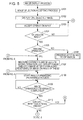
- FIGS. 5 and 6 are flowcharts illustrating a playback process of a shot image including a scrolling process which is performed in the imaging apparatus 100 according to the first embodiment.
- the process shown in Fig. 5 is executed mainly by the control section 120 when, for example, a menu item called image playback process (playback process of a recorded image) is selected from a menu displayed on the display screen of the display section 106.
- a menu item called image playback process playback process of a recorded image
- the menu is displayed on the display screen of the display section 106 by the controlling section 120 controlling the display processing section 105 and the like, when a predetermined operation such as a depressing operation on a menu key provided in the operating section 131 of the imaging apparatus 100 is performed.
- control section 120 executes the processes shown in Figs. 5 and 6 , and first performs a process of accepting a selection input for selecting the first image to be displayed (step S101).
- step S101 the control section 120 first displays a list of image folders and accepts a selection input, displays a list of images in image files belonging to a selected image folder, and accepts a selection input for selecting an image to be displayed in one screen.
- a list of images belonging to an image folder is, for example, a list of thumbnail images for images in each image file.
- Thumbnail image data for displaying a thumbnail image is, for example, created in advance on the basis of image data of each image file at appropriate timing after shooting, and although not shown in Fig. 3 , is stored in each individual image file.
- the thumbnail image data may be created on the basis of image data of each image file and displayed at the time of displaying a thumbnail image.
- control section 120 displays the image selected in step S101 on the display screen 6G of the display section 106 (step S102).
- step S102 the control section 120 grasps from which image file each of thumbnail images displayed in list form is read. Accordingly, the control section 120 identifies an image file having a selected thumbnail image, and controls the write/read section 134 to read image data from the identified image file.
- control section 120 processes the read image data in the decompression processing section 110, the reducing/enlarging section 111, and the display processing section 105, and supplies the processed image data to the display section 106, thereby displaying the image selected by the user on the entire surface of the display screen 6G of the display section 106.
- step S102 is a process of reading the image data of an image selected by the user, and fully displaying the image across the display screen 6G of the display section 106 (performing one-screen display of an image).
- control section 120 is made to accept an operation input from the user via the touch panel 107 and the operating section 131 (step S103), and determines whether or not an operation input from the user has been accepted (step S104). If it is determined in the determining process in step S104 that an operation input from the user has not been accepted, the control section 120 repeats the process from step S103 onwards.
- control section 120 determines whether or not the accepted operation input is a tracing operation for performing scrolling of a display image (step S105).
- step S105 If it is determined in the determining process in step S105 that the accepted operation input is not a tracing operation, the control section 120 executes a process according to the accepted operation input from the user (step S106).
- step S106 for example, various kinds of process such as an enlarging process or reducing process of a display image, and a process of ending the image playback process are performed in accordance with the operation input.
- step S105 If it is determined in the determining process in step S105 that the accepted operation input is a tracing operation, the control section 120 measures the distance h of the tracing operation and the speed v of the tracing operation, and specifies the pause time t for the display image after scrolling, on the basis of these pieces of information (step S107).
- the distance h of a tracing operation can be measured on the basis of coordinate data sequentially supplied from the touch panel 107.
- the speed of a tracing operation is found by dividing the measured distance of the tracing operation by the time period of the tracing operation.
- the time period of a tracing operation can be grasped by measuring the time period from the start to end of the tracing operation, which can be grasped on the basis of coordinate data sequentially supplied from the touch panel 107, by the clock circuit 136.
- step S108 the control section 120 starts a process of scrolling one screen's worth of display image (forwarding process or reversing process of the display process) in accordance with the direction of the tracing operation (step S108).
- the process in step S108 is a process of preparing image data necessary for display by reading the image data from a recording medium, and controlling each of the decompression processing section 110, the reducing/enlarging section 111, and the display processing section 105 to scroll the display image.
- control section 120 determines whether or not one screen's worth of scrolling has been finished (step S109). If it is determined that one screen's worth of scrolling has not been finished, one screen's worth of scrolling is carried on so as to repeat the process in step S109.
- control section 120 checks the presence/absence of coordinate data from the touch panel 107, and determines whether or not the contact with the operating surface of the touch panel 107 has been continuing (step S110).
- This determining process in step S110 is a process of determining whether or not the contact of a user's finger or the like with the operating surface of the touch panel has been continuing successively since the tracing operation.
- step S110 If it is determined in the determining process in step S110 that the contact of the finger or the like with the operating surface of the touch panel 107 has ended, it is determined that the user has ended the scrolling process, and the process from step S103 onwards is repeated. Thus, a new tracing operation or the like can be accepted.
- step S110 If it is determined in the determining process in step S110 that the contact of the finger or the like with the operating surface of the touch panel 107 has not ended (has been continuing), it is determined that the user has been continuing the scrolling process, and the processing proceeds to the process in Fig. 6 .
- control section 120 determines whether or not there has been no change in the contact position of the user's finger or the like held in contact with the operating surface of the touch panel 107 (step S111). If it is determined in the determining process in step S111 that there has been no change in the contact position of the finger or the like, the control section 120 pauses the display of a new image that is displayed on the display screen 6G after one screen's worth of scrolling, for the pause time t (step S112).
- step S112 is a process of temporarily stopping the scrolling process so that a new image displayed after scrolling is paused for the pause time t.
- the pause time t is the time specified in step S107.
- control section 120 repeats the process from step S108 onwards shown in Fig. 5 to perform the next one screen's worth of scrolling process. That is, the scrolling process is resumed, and scrolling of the display image is continuously performed.
- control section 120 determines that a new tracing operation has been performed, repeats the process from step S107 onwards shown in Fig. 5 , and starts the scrolling process of a display image according to the new tracing operation.
- the new tracing operation can be performed successively from the initial tracing operation. Therefore, forwarding/reversing of the display image can be performed successively with ease.
- scrolling of a display image is started by a tracing operation, and by keeping a finger or the like in contact with the operating surface of the touch panel 107 successively from the tracing operation, the scrolling process can be continued.
- the pause time t for the display image after scrolling is controlled appropriately in accordance with the distance or speed of the tracing operation, so that the display image can be scrolled at a speed intended by the user, without the scrolled display image becoming hard to view.
- the image display mode is switched over to allow for more efficient image display and scrolling.
- the imaging apparatus according to the second embodiment is also the imaging apparatus 100 configured as described with reference to Fig. 1 .
- Fig. 1 in the description of the imaging apparatus 100 according to the second embodiment as well.
- image data (still image data) obtained by shooting is managed for each folder and for each shooting date and time.
- scrolling of a display image can be started in accordance with a tracing operation.
- an image can be displayed and scrolled more efficiently, so that scrolling of a display image can be performed in a manner that meets the user's needs.
- a scrolling process of a display image can be started by a tracing operation on the operating surface of the touch panel 107.
- Fig. 7 is a diagram illustrating the manner in which an image is displayed at the time of scrolling of a display image which is performed in the imaging apparatus 100 according to the second embodiment.
- Fig. 7(a) shows that, as in the case of the first embodiment, at the current point in time, image D is being displayed on the display screen 6G.
- image D In the image folder to which this image D belongs, a plurality of images including image C, image B, image A, image Z, image Y, image X, image W, image V, image U, image T, and so on are present before image D. Of course, there are also cases when image E, image F, and so on are present after image D.
- images are shot in the order of image T, U, V, W, X, Y, Z, A, B, C, D, and so on, and pieces of image data forming these images are stored in a predetermined image folder in the order of time series based on shooting date and time.
- a tracing operation drag operation or flick operation
- a finger a stylus, or the like
- a stylus or the like
- the user has performed a tracing operation (drag operation or flick operation) with a finger, a stylus, or the like on the operating surface of the touch panel 107 of the display screen 6G on which image D is being displayed, from left to right as indicated by an arrow.
- a single tracing operation with respect to a display image is an operation of shifting the display image by one image's worth (scrolling by one image's worth) in the traced direction.
- the control section 120 determines that scrolling of the display image in the reverse direction of time has been instructed.
- control section 120 of the imaging apparatus 100 controls the write/read section 134, and prepares the image data of an image to be displayed by scrolling in, for example, the RAM 123.
- control section 120 controls the decompression processing section 110, the reducing/enlarging section 111, and the display processing section 105, and starts a scrolling process of a display image.
- a display process of an image via the decompression processing section 110, the reducing/enlarging section 111, and the display processing section 105 is repeated with respect to the image data of each of image D and image C to be scrolled.
- an image can be displayed on the display screen 6G of the display section 106 while gradually scrolling the display image (while shifting the display position on the display screen).
- the display image gradually changes from image D to image C, and when all of image C is displayed on the display screen 6G, image C is displayed for a fixed time period.
- control section 120 resumes scrolling, and changes the display image gradually from image C to image B as shown in Fig. 7(b) .
- image B is displayed for a fixed time period.
- the display mode is changed so that the number of images displayed in one screen is increased, and scrolling is done a plurality of images at a time.
- control section 120 changes the display mode so that the number of images displayed in one screen is five, and scrolling is done three images at a time.
- the control section 120 of the imaging apparatus 100 changes the number of images displayed in one screen from one to five. That is, the display mode is changed to one for displaying five reduced images in one screen.
- image B is displayed on the entire surface of the display screen 6G
- five images located before image B namely image A, image Z, image Y, image X, and image W become the images to be displayed.
- the control section 120 controls the write/read section 134 to read these five pieces of image data to be displayed, and temporarily stores the pieces of image data in the RAM 123.
- control section 120 controls each of the decompression processing section 110, the reducing/enlarging section 111, and the display processing section 105 to perform a process of displaying five reduced images in one screen. That is, the control section 120 supplies the read image data to the decompression processing section 110.
- the decompression processing section 110 performs a decompression process on supplied image data that has undergone data compression, reconstructing the original image prior to the data compression, and supplies this reconstructed image data to the reducing/enlarging section 111.
- the reducing/enlarging section 111 reduces the image data from the decompression processing section 110 to a predetermined size by a thinning process or the like. Then, from this reduced image data, the reducing/enlarging section 111 generates an image signal in a format for supply to the display processing section 105, and supplies this image signal to the display processing section 105.
- the display processing section 105 From the image signal from the reducing/enlarging section 111, the display processing section 105 generates an image signal for displaying one screen's worth of display image including five reduced images, and supplies this image signal to the display section 106.
- control section 120 carries on with the scrolling process of the display image in the manner of displaying five reduced images in one screen.
- the display mode is such that five reduced images are displayed in one screen, and the control section 120 performs processing so that three images' worth of scrolling is done at a time for each one screen.
- control section 120 reads the image data of each of image V, image U, and image T that are three images located before image W.
- control section 120 processes the newly read image data of each of image V, image U, and image T via the decompression processing section 110, the reducing/enlarging section 111, and the display processing section 105 and displays the image data.
- the display image can be further scrolled back in time by three images' worth from the state shown in Fig. 7(c) and displayed. Then, while contact of a finger or the like with the operating section of the touch panel 107 continues, likewise, a scrolling process is performed so as to shift the displayed image by three images' worth at a time.
- image data of images to be previously displayed image data after a decompression process is held, and this image data can be used.
- image display can be performed in the manner as shown in Fig. 7(c) and Fig. 7(d) without performing a decompression process and a reducing process.
- control section 120 performs a process of displaying the image located at the center of the display screen 6G (image V in the case of Fig. 7(d) ), on the entire surface of the display screen 6G.
- control section 120 processes the image data of image V via the decompression processing section 110, the reducing/enlarging section 111, and the display processing section 105, and displays image V on the entire surface of the display screen 6G of the display section 106 as shown in Fig. 7(e) .
- a tracing operation operation from placing a finger or the like in contact with the operating surface of the touch panel 107 to releasing the finger or the like from the operating surface
- one image's worth of scrolling or the like is performed, so that a target image can be displayed on the entire surface of the display screen 6G.
- Fig. 7 The example shown in Fig. 7 is directed to the case in which accumulated images are scrolled in the reverse direction of shooting date and time for display, by performing a tracing operation from left to right on the operating surface of the touch panel 107 on the display screen 6G.
- accumulated images can be scrolled in the forward direction of shooting date and time for display, in the manner described with reference to Fig. 7 .
- scrolling can be performed in the forward direction of time in the manner of displaying five reduced images in one screen.
- the display mode is changed so that more images can be displayed in one screen. Then, the display image can be scrolled in the state with a plurality of images displayed in one screen.
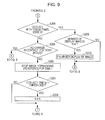
- FIGS. 8 and 9 are flowcharts illustrating a playback process of a shot image including a scrolling process which is performed in the imaging apparatus 100 according to the second embodiment.
- the process shown in Figs. 8 and 9 is executed mainly by the control section 120 when a menu item called image playback process (playback process of a recorded image) is selected from a menu displayed on the display screen of the display section 106.
- a menu item called image playback process playback process of a recorded image
- the process shown in Figs. 8 and 9 is also performed basically in the same way as the image playback process in the imaging apparatus according to the first embodiment described with reference to Figs. 5 and 6 .
- the same reference numerals are assigned to those steps in which the same process as the process in the flowcharts shown in Figs. 5 and 6 is performed, and detailed description of those portions is omitted to avoid repetition.
- control section 120 executes the process shown in Figs. 7 and 8 . Then, the control section 120 proceeds with the process in the same way as in the case of the imaging apparatus according to the first embodiment mentioned above.
- control section 120 proceeds with the process in the order of an image selection accepting process (step S101), a display process of one selected image (step S102), accepting of an operation input (step S103), determination of the presence/absence of an operation input (step S104), and then determination of whether or not the operation is a tracing operation (step S105).
- step S105 If it is determined in the determining process in step S105 that an accepted operation input is not a tracing operation, the control section 120 executes a process according to the accepted operation input (step S106).
- step S105 If it is determined in the determining process in step S105 that an accepted operation input is a tracing operation, the control section 120 performs pre-processing for executing a scrolling process (step S201).
- step S201 as in the process of step S107 according to the first embodiment shown in Fig. 5 , the control section 120 measures the distance h of the tracing operation and the speed v of the tracing operation, and specifies the pause time t for the display image after scrolling on the basis of these pieces of information.
- step S201 the control section 120 sets a variable N, which indicates the number of images displayed in one screen, to a value "1", and then starts measurement of the contact time ht of the finger or the like with the touch panel 107 continuing from the tracing operation, via the clock circuit 136.
- control section 120 starts a process of scrolling the display image by one screen's worth, in the manner of displaying N images in one screen (forwarding process or reversing process of the display image) (step S202).
- step S202 is a process of preparing image data necessary for display by reading the image data from a recording medium, and controlling each of the decompression processing section 110, the reducing/enlarging section 111, and the display processing section 105 to scroll the display image.
- step S202 In the process in step S202, as shown in Fig. 7(a) and Fig. 7(b) , immediately after the tracing operation, scrolling is performed in the manner of one image in one screen. Then, in the process in step S202, as will be described later, when the contact time of a finger or the like with the operating surface of the touch panel 107 exceeds threshold T, scrolling is performed in the manner of five images in one screen as shown in Fig. 7(a) and Fig. 7(b) .
- control section 120 determines whether or not one screen's worth (one screen's worth displaying N images) of scrolling has been finished (step S203), and if it is determined that one screen's worth of scrolling has not been finished, the control section 120 carries on with one screen's worth of scrolling so as to repeat the process in step S203.
- step S203 If it is determined in the determining process in step S203 that one screen's worth of scrolling has been finished, the processing proceeds to the process shown in Fig. 9 . Then, the control section 120 checks the presence/absence of coordinate data from the touch panel 107, and determines whether or not the contact with the operating surface of the touch panel 107 has been continuing (step S204).
- the determining process in step S204 is a process of determining whether or not the contact of a user's finger or the like with the operating surface of the touch panel has been continuing successively since the tracing operation.
- step S204 If it is determined in the determining process in step S204 that the contact of the finger or the like with the operating surface of the touch panel 107 has not ended (has been continuing), the control section 120 determines whether or not there has been no change in the contact position of the user's finger or the like held in contact with the operating surface of the touch panel 107 (step S205).
- control section 120 pauses the display of a new image that is displayed on the display screen 6G after one screen's worth of scrolling, for the pause time t (step S206).
- step S206 is a process of temporarily stopping the scrolling process so that a new image displayed after scrolling is paused for the pause time t.
- the pause time t is the time specified in step S201.
- control section 120 determines whether or not the contact time (duration of contact) ht of the contact of the user's finger or the like with the operating surface of the touch panel 107 which has been continued since the tracing operation has exceeded threshold T (step S207).
- step S207 If it is determined in step S207 that the contact time ht has exceeded threshold T, the control section 120 sets the number of display images N displayed in one screen to a value "5", and changes the display mode (step S208). If it is determined in step S207 that the contact time ht has not exceeded threshold T, the control section 120 does not change the number of display images N displayed in one screen.
- control section 120 repeats the process shown in Fig. 8 from the process in step S202 onwards.
- control section 120 changes the display mode, and carries on with the scrolling process in the manner of displaying five reduced images in one screen.
- control section 120 carries on with the scrolling process in the manner of displaying one image in one screen.
- control section 120 determines that a new tracing operation has been performed, repeats the process shown in Fig. 8 from the process in step S201 onwards, and starts the scrolling process of a display image according to the new tracing operation.
- control section 120 determines whether or not the value of the number of display images N displayed in one screen is "1" (step S209).
- step S209 If it is determined in the determining process in step S209 that the value of the number of display images N displayed in one screen is not "1", the display mode is changed, and images are displayed in the manner shown in Fig. 7(c) and Fig. 7(d) .
- the control section 120 performs a process of enlarging the image displayed at the center of the display screen 6G, and displaying the image on the entire surface of the display screen 6G (step S210). Thereafter, the control section 120 repeats the process shown in Fig. 8 from the process in step S103 onwards, thereby making it possible to accept a new tracing operation or the like.
- control section 120 directly repeats the process shown in Fig. 8 from the process in step S103 onwards, thereby making it possible to accept a new tracing operation or the like.
- the display mode is changed in accordance with the contact time of a finger or the like with the operating surface of the touch panel 107 successively since a tracing operation, so that the scrolling process of a display image can be performed in the manner of display intended by the user.
- the second embodiment is directed to the case in which, as described with reference to Fig. 7 , display of one image in one screen (first display mode) and display of five images in one screen (second display mode) are switched between each other.
- first display mode display of one image in one screen
- second display mode display of five images in one screen
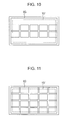
- the number of display images N displayed in one screen can be set to an appropriate value not smaller than "2". For example, by setting the number of display images N displayed in one screen to "10", as shown in Fig. 10 , display of 10 images in one screen can be also performed.
- the second embodiment mentioned above is directed to the case in which scrolling is done in units of three images.
- the unit of scrolling process can be set to any appropriate number not larger than the number of display images N displayed in one screen.
- the unit of scrolling can be set within a range of one to five images. In this way, an image scrolling process can be performed without causing occurrence of an image that becomes no longer displayed due to the scrolling process.
- how many reduced images are scrolled at a time may be determined on the basis of one or both of the distance and speed of a tracing operation.
- the unit of images to be scrolled can be made larger if the distance or speed of a tracing operation is larger than a fixed value, and the unit of images to be scrolled can be made smaller in other cases.
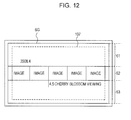
- Fig. 12 it is also possible to perform image display including not only reduced images but also display areas for date information and event information which represent information related to displayed images.
- the display screen 6G is divided into three display areas with respect to the vertical direction.
- the top row of the display screen 6G is a date area 61
- the middle row is an image area 62
- the bottom row is an event area 63.
- the date area 61 is a part that displays the shooting year/month of a displayed image.
- the image area 62 is a part that displays reduced images.
- the event area 63 is a part that displays the folder name of an image folder to which the displayed image belongs, event name information stored as metadata in the image folder, or the like.
- each image folder described with reference to Fig. 2 is arranged in the order of the creation date and time of the image folder or in the order of the shooting years/ months/days of image files belonging to the image folder in advance to allow its management.
- shot images can be displayed in the manner shown in Fig. 12 for each shooting year/month and for each event (for each image folder).
- image scrolling can be performed while also referring to such information as the year/month information displayed in the date area 61, or the event name (image folder name) displayed in the event area 63.
- the display mode for performing the display shown in Fig. 12 for example, by performing a tracing operation on the date area 61, the display can be changed so as to scroll through shooting year/month so that images in an image folder belonging to the changed shooting year/month are displayed.
- the display can be changed so as to scroll through image folders so that images in an image folder belonging to the changed event are displayed.
- display modes for performing various manners of display can be used, such as a mode which not only simply varies the number of reduced images displayed in one screen but also displays information related to a displayed image together with reduced images.
- the display can be performed by the control section 120 controlling the decompression processing section 110, the reducing/enlarging section 111, and the display processing section 105.
- information other than images obtained by shooting such information can be acquired from an image folder, an image file, the ROM 122, the clock circuit 136, or the like by the control section 120, and displayed after being processed in the reducing/enlarging section 111 or the display processing section 105.
- the imaging apparatus uses a tracing operation on the touch panel 107 as an operation for starting an image scrolling process. Then, the scrolling process is continued while the contact of a finger or the like with the operating surface of the touch panel 107 continues successively from the tracing operation.
- the imaging apparatus according to the third embodiment is also the imaging apparatus 100 configured as described with reference to Fig. 1 .
- Fig. 1 in the description of the imaging apparatus 100 according to the third embodiment as well.
- image data (still image data) obtained by shooting is managed for each folder and for each shooting date and time.
- the displayed image when an image is being displayed on the display screen 6G, the displayed image can be enlarged or reduced by performing a pinch operation on the touch panel 107.
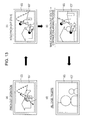
- Fig. 13 is a diagram illustrating the manner in which an image is displayed at the time of an enlarging process of a display image which is performed in the imaging apparatus 100 according to the third embodiment.
- a pinch-out operation is performed in which user's two fingers that are closed together are placed in contact with the operating surface of the touch panel 107 simultaneously, and then the two fingers are spread apart as indicated by arrows.
- the touch panel 107 can detect each of operations simultaneously performed in a plurality of locations on the operating surface, and output coordinate data indicating each of the contact positions.
- the touch panel 107 can also detect the contact position successively at each predetermined timing, and output coordinate data indicating the contact position.
- the control section 120 of the imaging apparatus 100 can detect that a pinch-out operation has been performed, by analyzing coordinate data from the touch panel 107.
- the control section 120 of the imaging apparatus 100 determines the pinch-out operation as an operation for instructing enlarging of a display image. Then, the control section 120 controls the reducing/enlarging section 111 and the display processing section 105, and starts a process of enlarging the display image and displaying the display image again (enlarging process of the display image).
- image data which is the image data of an image to be displayed and which has undergone a decompression process in the decompression processing section 110 is enlarged in the reducing/enlarging section 111 by performing an interpolation process on the image data or the like. Then, from the enlarged image data, the reducing/enlarging section 111 generates an image signal in a format for supply to the display processing section 105, and supplies this image signal to the display processing section 105.
- the display processing section 105 From the image signal from the reducing/enlarging section 111, the display processing section 105 generates an image signal to be supplied to the display section 106, and supplies this image signal to the display section 106.
- an image that is enlarged from the state shown in Fig. 13(a) can be displayed on the display screen 6G of the display section 106.
- coordinate data is continuously supplied to the control section 120 from the touch panel 107, and the control section 120 can determine that the pinch-out operation has been continued as it is (the pinch-out operation is held).
- control section 120 continues the enlarging process of the display image. That is, the control section 120 controls the reducing/enlarging section 111 and the display processing section 105 and, as mentioned above, performs a process of further enlarging the image to be displayed and displaying the image.
- the enlarging process of the display image can be performed continuously while the pinch-out operation is continued. Then, when the user releases the fingers from the operating surface of the touch panel 107, coordinate data is no longer supplied from the touch panel 107. Thus, the control section 120 determines that the pinch-out operation has ended, and ends the enlarging process of the display image.
- the user can gradually enlarge the image shown in Fig. 13(a) to the state shown in Fig. 13(d) for display.
- a reducing process of the display image can be performed by performing a pinch-in operation on the operating surface of the touch panel.
- the reducing process of the image can be performed in the order of Fig. 13(d), Fig. 13(c), Fig. 13(b) , and then Fig. 13(a) .
- the imaging apparatus 100 by performing a pinch-out operation continuously, the enlarging process of an image started in accordance with the pinch-out operation can be performed continuously.
- the imaging apparatus 100 by performing a pinch-in operation continuously, the reducing process of an image started in accordance with the pinch-in operation can be performed continuously.
- FIGs. 14 and 15 are flowcharts illustrating a playback process of a shot image including an enlarged display/reduced display process of a display image which is performed in the imaging apparatus 100 according to the third embodiment.
- the process shown in Figs. 14 and 15 is executed mainly by the control section 120 when a menu item called image playback process (playback process of a recorded image) is selected from a menu displayed on the display screen of the display section 106.
- a menu item called image playback process playback process of a recorded image
- the process shown in Figs. 14 and 15 is also performed basically in the same way as the image playback process in the imaging apparatus according to the first embodiment described with reference to Figs. 5 and 6 .
- the same reference numerals are assigned to those steps in which the same process as the process in the flowcharts shown in Figs. 5 and 6 is performed, and detailed description of those portions is omitted to avoid repetition.
- control section 120 executes the process shown in Figs. 14 and 15 . Then, the control section 120 proceeds with the process in the same way as in the case of the imaging apparatus according to the first embodiment mentioned above.
- control section 120 proceeds with the process in the order of an image selection accepting process (step S101), a display process of one selected image (step S102), accepting of an operation input (step S103), and then determination of the presence/absence of an operation input (step S104).
- step S301 If it is determined in the determining process in step S104 that an operation input from the user has been accepted, the control section 120 determines whether or not the accepted operation input is a pinch operation (step S301).
- step S301 If it is determined in the determining process in step S301 that the accepted operation input is not a pinch operation, the control section 120 executes a process according to the accepted operation input from the user (step S302).
- step S302 for example, various kinds of process such as a scrolling process of an image, and a process of ending the image playback process are performed in accordance with the operation input.
- step S301 If it is determined in the determining process in step S301 that the accepted operation input is a pinch operation, the control section 120 measures the distance h of the pinch operation and the speed v of the pinch operation, and specifies the pause time t for the display image on the basis of these pieces of information (step S303)
- step S303 is a process of specifying the time t for which, after finishing an enlarging/reducing process of a display image at a constant ratio determined in advance, the processed display image is displayed as it is.
- the distance h of a pinch operation can be measured from the coordinates of the start point and end point of movement of a user's finger or the like according to the pinch operation, on the basis of coordinate data sequentially supplied from the touch panel 107.
- the speed of a pinch operation can be found by dividing the measured distance of the pinch operation by the time period of the pinch operation.
- the time period of the pinch operation can be grasped by measuring the time period from the start to end of movement of the user's finger or the like according to the pinch operation.
- control section 120 controls the reducing/enlarging section 111 and the display processing section 105, and starts a process of enlarging or reducing a display image at a constant ratio for display (step S304). That is, in step S304, an enlarging process is performed in the case of a pinch-out operation, and a reducing process is performed in the case of a pinch-in operation.
- control section 120 determines whether or not the process of enlarging or reducing a display image at a constant ratio for display has been finished (step S305). If it is determined that the process has not been finished, the control section 120 carries on with the process of enlarging or reducing a display image at a constant ratio so as to repeat the process in step S305.
- control section 120 checks the presence/absence of coordinate data from the touch panel 107, and determines whether or not the contact with the operating surface of the touch panel 107 has been continuing (step S306).
- step S306 is a process of determining whether or not the contact of the user's finger or the like with the operating surface of the touch panel has been continuing successively since the pinch operation.
- step S306 If it is determined in the determining process in step S306 that the contact of the finger or the like with the operating surface of the touch panel 107 has ended, it is determined that the user has ended the enlarging process or reducing process of the display image, and the process from step S103 onwards is repeated. Thus, a new pinch operation or the like can be accepted.
- step S306 If it is determined in the determining process in step S306 that the contact of the finger or the like with the operating surface of the touch panel 107 has not ended (has been continuing), it is determined that the user has continued the enlarging process or reducing process of the display image, and the processing proceeds to the process in Fig. 15 .
- the control section 120 determines whether or not there has been no change in the contact position of the user's finger or the like held in contact with the operating surface of the touch panel 107 (step S307). If it is determined in the determining process in step S307 that there has been no change in the contact position of the finger or the like, the control section 120 pauses the display of a new image that is displayed on the display screen 6G after the enlarging process or reducing process of the display image, for the pause time t (step S308).
- the process in step S308 is a process of temporarily stopping the enlarging process or reducing process of the display image so that a new image displayed after the enlarging process or reducing process of the display image is paused for the pause time t.
- the pause time t is the time specified in step S303.
- control section 120 repeats the process from step S304 onwards shown in Fig. 14 so as to continue the enlarging process or reducing process of the display image. That is, the enlarging process or reducing process of the display image is resumed, and the enlarging process or reducing process of the display image is further performed.
- step S307 If it is determined in the determining process in step S307 that there has been a change in the contact position of the finger or the like, the control section 120 determines that a new pinch operation or the like has been performed, and repeats the process from step S301 onwards shown in Fig. 14 .
- enlarged display or reduced display of a display image is started by a pinch operation, and by keeping a finger or the like in contact with the operating surface of the touch panel 107 successively from the pinch operation, the enlarged display or reduced display of the display image can be continued.
- the pause time for the display image after the enlarged display or reduced display of the display image is controlled appropriately in accordance with the distance or speed of the pinch operation, so that the display image can be enlarged or reduced at a speed intended by the user, without the display image becoming hard to view.
- the enlargement ratio or the reduction ratio which is set constant in the third embodiment mentioned above may be varied in accordance with the distance or speed of a pinch operation.
- the possible range of the distance of a pinch operation can be divided into a plurality of ranges in advance, and the enlargement ratio or the reduction ratio can be set for each of the divided ranges.
- the possible range of the speed of a pinch operation can be divided into a plurality of ranges in advance, and the enlargement ratio or the reduction ratio can be set for each of the divided ranges.
- the enlargement ratio or the reduction ratio can be also set on the basis of both the distance and speed of a pinch operation. For example, it is possible to set the enlargement ratio or the reduction ratio larger in the case when the distance of a pinch operation is longer than a predetermined threshold, and the speed of the pinch operation is faster than a predetermined threshold, or to set the enlargement ratio or the reduction ratio smaller in other cases.
- the enlargement ratio or the reduction ratio is set smaller in cases other than these, that is, when the distance of a tracing operation is short and the speed of the tracing operation is slow.
- the enlargement ratio or reduction ratio of a display image can be controlled as appropriate on the basis of one or both of the distance and speed of a pinch operation.
- the imaging apparatus according to the fourth embodiment is also the imaging apparatus 100 configured as described with reference to Fig. 1 .
- Fig. 1 in the description of the imaging apparatus 100 according to the fourth embodiment as well.
- fast-forwarding or fast-reversing can be performed in accordance with a tracing operation.
- a control panel is displayed on the display screen, and a so-called software key is formed by this display and a touch panel attached to the display screen, thereby accepting various operation inputs.
- changing the playback speed of the moving image can be performed as follows. First, a control panel is displayed on the display screen, and a button (fast-forward button or fast-reverse button) on the panel is depressed a plurality of times, thereby making it possible to change the playback speed in a stepwise manner.
- the playback speed can be changed to a more appropriate playback speed at the time of moving image playback by a simple operation of tracing the touch panel 107.
- Figs. 16 and 17 are diagrams illustrating a changing process of playback speed during moving image display which is performed in the imaging apparatus 100 according to the fourth embodiment.
- the playback speed of a moving image to be played back can be changed by a tracing operation on the operating surface of the touch panel 107.
- Fig. 16 illustrates the case of changing the playback speed and then maintaining the changed playback speed.
- Fig. 17 illustrates the case of changing the playback speed and then further changing the changed playback speed.
- Fig. 16 a description will be given of the case of changing the playback speed and then maintaining the changed playback speed.
- a moving image is being played back at a normal playback speed as shown in Fig. 16(a)
- the user places a finger or the like in contact with the operating surface of the touch panel 107, and then performs a tracing operation from left to right as indicated by an arrow.
- the touch panel 107 sequentially detects coordinate data indicating the pointed position, and notifies the control section 120 of the coordinate data.
- the control section 120 determines the operation made by the user, on the basis of the coordinate data from the touch panel 107.
- control section 120 determines that fast-forward playback has been instructed.
- the control section 120 specifies the playback speed in accordance with the distance and speed of the tracing operation made on the operating surface of the touch panel 107.
- the playback speed is determined in a stepwise manner in accordance with the distance of the tracing operation such that the playback speed is the 3-times speed when the distance of the tracing operation falls within a first distance range, the 5-times speed when the distance of the tracing operation falls within a second distance range longer than the first distance range, and the 10-times speed when the distance of the tracing operation falls within a third distance range longer than the second distance range.
- the playback speed is determined in a stepwise manner in accordance with the speed of the tracing operation such that the playback speed is the 3-times speed when the speed of the tracing operation falls within a first speed range, the 5-times speed when the speed of the tracing operation falls within a second speed range faster than the first speed range, and the 10-times speed when the speed of the tracing operation falls within a third speed range faster than the second speed range.
- the playback speed may be determined by taking both the distance and speed of the tracing operation into consideration. It is also possible to determine the playback speed on the basis of the combination of the distance and speed of the tracing operation.
- control section 120 starts playback of a display image at the specified playback speed. Specifically, playback of a moving image is performed by controlling the write/read section 134 to read moving image data to be played back, processing this moving image data via the decompression processing section 110, the enlarging/reducing section 111, and the display processing section 105, and supplying the processed moving image data to the display section 106.
- control section 120 can play back a moving image to be played back at a playback speed as instructed by the user.
- a rough indication of playback speed such as "x5", is displayed in the lower left of the display image, for example.
- This display can be implemented by supplying display information to the display processing section 105, and combining the display information with the display image.
- This display “x5" indicates that playback is being done at 5 times the normal playback speed. Therefore, “x3” is displayed when playback is being done at three times the normal playback speed, and “x10” is displayed when playback is being done at ten times the normal playback speed.
- control section 120 controls individual sections so as to maintain the playback speed of the moving image which has been changed by the tracing operation.
- control section 120 controls individual sections so as to return the playback speed to the normal playback speed.
- the user places a finger or the like in contact with the operating surface of the touch panel 107, and then performs a tracing operation from left to right as indicated by an arrow.
- the control section 120 controls individual sections as mentioned above, and changes the playback speed of a moving image being played back, in accordance with the tracing operation.
- the user can play back the moving image while maintaining the changed playback speed.
- Fig. 17(a) shows that the playback speed has been changed to 5-times speed (" ⁇ 5"), and this speed is maintained.
- the control section 120 can detect that a further rightward tracing operation has been performed, on the basis of a change in coordinate data from the touch panel 107. In this case, the control section 120 determines that an operation of further raising the maintained playback speed has been performed, and controls individual sections so as to increase the playback speed.
- Fig. 17(b) shows that the playback speed shown in Fig. 17(a) has been changed from 5-times speed (" ⁇ 5") to 8-times speed (“ ⁇ 8"), and this playback speed is maintained.
- control section 120 controls individual sections so as to return the playback speed to the normal playback speed.
- the playback speed is set as 5-times speed (" ⁇ 5"), and this playback speed is maintained.
- the control section 120 can detect that a leftward tracing operation has been performed, on the basis of a change in coordinate data from the touch panel 107. In this case, the control section 120 determines that an operation of further lowering the maintained playback speed has been performed, and controls individual sections so as to reduce the playback speed.
- Fig. 17(c) shows that the playback speed shown in Fig. 17(a) has been changed from 5-times speed (" ⁇ 5") to 2-times speed (“ ⁇ 2”), and this playback speed is maintained.
- control section 120 controls individual sections so as to return the playback speed to the normal playback speed.
- fast-reverse playback can be performed by performing a tracing operation from the right side to the left side on the operating surface of the touch panel 107.
- the playback speed during fast-reverse playback can be changed in a flexible manner as instructed by the user.
- the playback speed of the moving image can be adjusted in a flexible manner.
- FIGS. 18 and 19 are flowcharts illustrating a moving image playback process including an adjusting process of moving image playback speed which is performed in the imaging apparatus 100 according to the fourth embodiment.
- the process shown in Figs. 18 and 19 is executed mainly by the control section 120 when, for example, a menu item called moving image playback process (playback process of a recorded moving image) is selected from a menu displayed on the display screen of the display section 106.
- a menu item called moving image playback process playback process of a recorded moving image
- the menu is displayed on the display screen of the display section 106 by the controlling section 120 controlling the display processing section 105 and the like, when a predetermined operation such as a depressing operation on a menu key provided in the operating section 131 of the imaging apparatus 100 is performed.
- control section 120 executes the process shown in Figs. 18 and 19 , and performs a process of accepting a selection input for selecting a moving image to be played back.
- step S401 the control section 120 displays a list of moving image files recorded on the recording medium 135 and accepts a selection input.
- a list of moving image files displays in list form such information as the thumbnail images and shooting dates of representative images of individual moving image files.
- Thumbnail image data for displaying a thumbnail image is, for example, created in advance at appropriate timing after shooting, on the basis of the image data of the first frame of each moving image file, or the like, and appended to each moving image file as metadata.
- thumbnail image data may be created and displayed on the basis of the image data of each moving image file at the time of displaying a thumbnail image.
- step S402 the control section 120 starts a process of playing back the moving image data of a moving image file selected in step S401, and displaying a moving image on the display screen 6G of the display section 106 (step S402).
- step S402 the control section 120 grasps to which moving image file each of thumbnail images displayed in list form corresponds. Accordingly, the control section 120 identifies a moving image file corresponding to a selected thumbnail image, and controls the write/read section 134 to read moving image data from the identified moving image files.
- control section 120 processes the read image data in the decompression processing section 110, the reducing/enlarging section 111, and the display processing section 105, and supplies the processed image data to the display section 106, thereby displaying a moving image based on the selected image file on the entire surface of the display screen 6G of the display section 106.
- the process in step S402 is a process (normal playback process) of reading moving image data of a moving image file selected by the user, and processing this moving image data to play back a moving image at normal playback speed on the display section 106.
- control section 120 is made to accept an operation input from the user via the touch panel 107 and the operating section 131 (step S403), and determines whether or not an operation input from the user has been accepted (step S404). If it is determined in the determining process in step S404 that an operation input from the user has not been accepted, the control section 120 repeats the process from step S403 onwards.
- step S404 If it is determined in the determining process in step S404 that an operation input from the user has been accepted, the control section 120 determines whether or not the accepted operation input is a tracing operation for changing the playback speed (for fast-forward playback or fast-reverse playback) (step S405).
- step S405 If it is determined in the determining process in step S405 that the accepted operation input is not a tracing operation, the control section 120 executes a process according to the accepted operation input from the user (step S406).
- step S406 for example, various processes such as temporary stopping or stopping of the playback process are performed in accordance with the operation input.
- step S405 If it is determined in the determining process in step S405 that the accepted operation input is a tracing operation, the control section 120 measures the distance h of the tracing operation and the speed v of the tracing operation, and specifies the speed of variable-speed playback (what multiple of speed is to be set) (step S407).
- the distance h of a tracing operation can be measured on the basis of coordinate data sequentially supplied from the touch panel 107.
- the speed of a tracing operation is found by dividing the measured distance of the tracing operation by the time period of the tracing operation.
- the time period of a tracing operation can be grasped by measuring the time period from the start to end of the tracing operation, which can be grasped on the basis of coordinate data sequentially supplied from the touch panel 107, by the clock circuit 136.
- control section 120 starts variable-speed playback (fast-forward playback or fast-reverse playback) of a moving image that is being played back, at the playback speed specified in step S407 (step S408).
- control section 120 proceeds to the process in step S19, checks the presence/absence of coordinate data from the touch panel 107, and determines whether or not the contact with the operating surface of the touch panel 107 has been continuing (step S409).
- This determining process in step S409 is a process of determining whether or not the contact of a user's finger or the like with the operating surface of the touch panel has been continuing successively since the tracing operation.
- control section 120 controls individual sections so as to return the moving image being played back at variable speed to the original constant-speed playback (normal speed playback) (step S410).
- control section 120 repeats the process shown in Fig. 18 from the process in step S403 onwards.
- a new tracing operation or the like can be accepted.
- step S409 If it is determined in the determining process in step S409 that the contact of the finger or the like with the operating surface of the touch panel 107 has not ended (has been continuing), it is determined that the user has been continuing the variable-speed playback of the moving image.
- control section 120 determines whether or not there has been no change in the contact position of the user's finger or the like held in contact with the operating surface of the touch panel 107 (step S411). If it is determined in the determining process in step S411 that there has been no change in the contact position of the finger or the like, the control section 120 repeats the process from step S409 onwards.
- step S411 If it is determined in the determining process in step S411 that there has been a change in the contact position of the finger or the like, it can be determined that a tracing operation has been performed again.
- This tracing operation performed again means that an operation of adjusting the speed of variable-speed playback has been performed as mentioned above with reference to Fig. 17(b) and Fig. 17(c) .
- control section 120 detects the direction of the tracing operation, the distance h of the tracing operation, and the speed v of the tracing operation, and specifies a new speed of variable-speed playback (what multiple of speed is to be set) (step S412).
- control section 120 changes the playback speed of the moving image being played back so as to be the speed of variable-speed playback specified in step S412 (step S413). Thereafter, the process from step S409 onwards is repeated.
- the playback speed of the moving images can be changed by a tracing operation on the touch panel 107. Then, by keeping the contact of the finger or the like with the operating surface of the touch panel 107 successively from the tracing operation, playback of the moving image can be performed so as to maintain the changed playback speed of the moving image.
- the playback speed of moving images can be adjusted (made faster or slower) again.
- the speed at which a display image is changed can be controlled in accordance with the distance or speed of a tracing operation, or the distance or speed of a pinch operation.
- retrieval of a desired image can be performed quickly and easily.
- the display mode of an image can be changed by continuing the contact of the finger or the like with the operating surface of the touch panel successively from the tracing operation.
- retrieval of a desired image can be performed quickly and easily.
- variable-speed playback of a moving image can be performed by performing a tracing operation during playback of the moving image. Then, after performing the tracing operation, by holding the finger or the like in contact with the touch panel as it is without releasing, the variable-speed playback of the moving image can be maintained as it is, and when a tracing operation is further performed from that state, the playback speed can be adjusted.
- the necessity of performing an operation such as a tracing operation or a pinch operation a plurality of times on the operating surface of the touch panel can be reduced, thereby making it possible to give a desired change to the image by performing the operation a small number of times.
- a method and a program according to an embodiment of the present invention can be implemented as the method or the program described with reference to each of Figs. 5 and 6 , Figs. 8 and 9 , Figs. 14 and 15 , and Figs. 18 and 19 .
- the image processing apparatus according to an embodiment of the present invention can be implemented.
- the display section 106 implements an image display device
- the touch panel 107 implements pointed-position detecting means
- the recording medium 135 implements storing means
- mainly the control section 120 implements display control means.
- the clock circuit 136 implements measuring means for measuring a duration.
- the touch panel 107 and the control section 120 implement distance detecting means, the clock circuit 136 implements time provision means, and the touch panel 107, the control section 120, and the clock circuit 136 implement speed detecting means.
- the threshold for the distance or speed of a tracing operation, or the threshold for the duration of contact of a finger or the like with the touch panel can be set to an appropriate value by taking conditions such as the performance of equipment into account.
- the present invention can be applied to a mobile telephone terminal with camera function, a mobile information terminal such as a so-called PDA (Personal Digital Assistant) capable of processing image data, and other various kinds of image processing apparatus capable of processing image data.
- a mobile telephone terminal with camera function a mobile information terminal
- PDA Personal Digital Assistant
- image processing apparatus capable of processing image data.
- an operation of tracing the display screen from right to left is set as an operation in the forward direction of time
- an operation of tracing the display screen from left to right is set as an operation in the reverse direction of time.
- an operation of tracing the display screen from left to right may be set as an operation in the forward direction of time
- an operation of tracing the display screen from right to left may be set as an operation in the reverse direction of time
- an operation of tracing the display screen from right to left is set as an operation for executing fast-forward playback
- an operation of tracing the display screen from left to right is set as an operation for executing fast-reverse playback.
- an operation of tracing the display screen from left to right may be set as an operation for executing fast-reverse playback
- an operation of tracing the display screen from right to left may be set as an operation for executing fast-forward playback.
- retrieval of an image is performed by an operation of tracing the display screen in the horizontal direction.
- the touch panel is implemented as a pressure-sensitive or electrostatic one, this should not be construed restrictively.
- touch panels of a type which can identify a pointed position by detecting a change in brightness due to proximity to a finger or the like That is, it is possible to use touch panels of various configurations which can detect a position pointed by the user.
Landscapes
- Engineering & Computer Science (AREA)
- General Engineering & Computer Science (AREA)
- Theoretical Computer Science (AREA)
- Human Computer Interaction (AREA)
- Physics & Mathematics (AREA)
- General Physics & Mathematics (AREA)
- User Interface Of Digital Computer (AREA)
- Controls And Circuits For Display Device (AREA)
- Position Input By Displaying (AREA)
- Studio Devices (AREA)
Applications Claiming Priority (1)
| Application Number | Priority Date | Filing Date | Title |
|---|---|---|---|
| JP2008295304A JP4811452B2 (ja) | 2008-11-19 | 2008-11-19 | 画像処理装置、画像表示方法および画像表示プログラム |
Publications (3)
| Publication Number | Publication Date |
|---|---|
| EP2189892A2 true EP2189892A2 (de) | 2010-05-26 |
| EP2189892A3 EP2189892A3 (de) | 2011-08-10 |
| EP2189892B1 EP2189892B1 (de) | 2017-07-19 |
Family
ID=41404150
Family Applications (1)
| Application Number | Title | Priority Date | Filing Date |
|---|---|---|---|
| EP09176454.8A Active EP2189892B1 (de) | 2008-11-19 | 2009-11-19 | Verfahren und Vorrichtung zur Bildverarbeitung |
Country Status (6)
| Country | Link |
|---|---|
| US (1) | US9063646B2 (de) |
| EP (1) | EP2189892B1 (de) |
| JP (1) | JP4811452B2 (de) |
| CN (1) | CN101742104A (de) |
| BR (1) | BRPI0904536A2 (de) |
| RU (1) | RU2441268C2 (de) |
Cited By (4)
| Publication number | Priority date | Publication date | Assignee | Title |
|---|---|---|---|---|
| WO2013152782A1 (de) * | 2012-04-12 | 2013-10-17 | Siemens Enterprise Communications Gmbh & Co. Kg | Verfahren zum beeinflussen der darstellung einer auf einer anzeigeeinrichtung eines informationstechnischen geräts angezeigten bildhaften information |
| EP2434490A3 (de) * | 2010-09-24 | 2014-11-05 | Lg Electronics Inc. | Tragbares Endgerät und Verfahren zur Steuerung der Wiedergabegeschwindigkeit dieses Geräts |
| EP2477106A3 (de) * | 2011-01-13 | 2017-05-10 | Casio Computer Co., Ltd. | Elektronische Vorrichtung |
| EP2490112A3 (de) * | 2011-02-16 | 2017-10-18 | Sony Mobile Communications AB | Steuerungsvorrichtung mit verstellbarer Anzeigeskala und Spielgeschwindigkeit |
Families Citing this family (65)
| Publication number | Priority date | Publication date | Assignee | Title |
|---|---|---|---|---|
| JP5219929B2 (ja) | 2008-07-31 | 2013-06-26 | ソニー株式会社 | 情報処理装置および方法、並びにプログラム |
| KR101545880B1 (ko) * | 2008-12-22 | 2015-08-21 | 삼성전자주식회사 | 터치 스크린을 구비한 단말기 및 그 단말기의 데이터 표시 방법 |
| JP5284113B2 (ja) * | 2009-01-06 | 2013-09-11 | キヤノン株式会社 | 情報処理装置、情報処理方法、プログラム及び記憶媒体 |
| JP5343676B2 (ja) * | 2009-04-08 | 2013-11-13 | ソニー株式会社 | 画像処理装置、画像処理方法およびコンピュータプログラム |
| JP5463739B2 (ja) | 2009-06-03 | 2014-04-09 | ソニー株式会社 | 撮像装置、画像処理方法及びプログラム |
| US8434153B2 (en) | 2009-08-24 | 2013-04-30 | Microsoft Corporation | Application display on a locked device |
| US20110239114A1 (en) * | 2010-03-24 | 2011-09-29 | David Robbins Falkenburg | Apparatus and Method for Unified Experience Across Different Devices |
| EP2395440A3 (de) * | 2010-06-14 | 2012-01-11 | Lg Electronics Inc. | Mobiles Endgerät und Steuerungsverfahren dafür |
| CN102346620A (zh) * | 2010-07-29 | 2012-02-08 | 和硕联合科技股份有限公司 | 电子书及其注记显示方法 |
| USD661702S1 (en) * | 2010-08-31 | 2012-06-12 | Sony Corporation | Display panel or screen with an animated graphical user interface |
| KR20120023867A (ko) * | 2010-09-02 | 2012-03-14 | 삼성전자주식회사 | 터치 스크린을 구비한 휴대 단말기 및 그 휴대 단말기에서 컨텐츠 표시 방법 |
| KR101727899B1 (ko) | 2010-11-26 | 2017-04-18 | 엘지전자 주식회사 | 휴대 단말기 및 그 동작 제어방법 |
| JP5193275B2 (ja) * | 2010-12-01 | 2013-05-08 | 株式会社コナミデジタルエンタテインメント | 情報処理装置、情報処理装置の制御方法、及びプログラム |
| JP5678324B2 (ja) | 2011-02-10 | 2015-03-04 | パナソニックIpマネジメント株式会社 | 表示装置、コンピュータプログラム、及び表示方法 |
| US9058098B2 (en) * | 2011-02-14 | 2015-06-16 | Sony Corporation | Display control device |
| JP2012185647A (ja) | 2011-03-04 | 2012-09-27 | Sony Corp | 表示制御装置、表示制御方法、およびプログラム |
| US9588673B2 (en) * | 2011-03-31 | 2017-03-07 | Smart Technologies Ulc | Method for manipulating a graphical object and an interactive input system employing the same |
| WO2012164895A1 (ja) | 2011-05-27 | 2012-12-06 | 京セラ株式会社 | 電子機器 |
| KR101794000B1 (ko) * | 2011-06-13 | 2017-11-06 | 삼성전자주식회사 | 터치 스크린을 구비하는 기기에서 스크롤 장치 및 방법 |
| JP2013008193A (ja) * | 2011-06-24 | 2013-01-10 | Nikon Corp | 撮像装置および撮像装置の制御プログラム |
| JP5848561B2 (ja) * | 2011-09-20 | 2016-01-27 | キヤノン株式会社 | 撮像装置及びその制御方法、プログラム、並びに記憶媒体 |
| JP5875813B2 (ja) * | 2011-09-27 | 2016-03-02 | オリンパス株式会社 | 顕微鏡システム |
| JP2013072995A (ja) * | 2011-09-27 | 2013-04-22 | Olympus Corp | 顕微鏡システム |
| JP5994434B2 (ja) * | 2011-10-07 | 2016-09-21 | カシオ計算機株式会社 | 電子機器、及びプログラム |
| JP2016194957A (ja) * | 2011-10-07 | 2016-11-17 | カシオ計算機株式会社 | 電子機器、及びプログラム |
| JP5927907B2 (ja) * | 2011-12-26 | 2016-06-01 | ブラザー工業株式会社 | 画像形成装置、画像形成装置の制御方法およびプログラム |
| JP5565433B2 (ja) * | 2012-04-20 | 2014-08-06 | カシオ計算機株式会社 | 撮像装置及び撮像処理方法並びにプログラム |
| JP5923395B2 (ja) * | 2012-06-26 | 2016-05-24 | 京セラ株式会社 | 電子機器 |
| JP6198377B2 (ja) * | 2012-09-14 | 2017-09-20 | キヤノン株式会社 | 表示制御装置、表示制御方法、及びプログラム |
| RU2533445C2 (ru) * | 2012-10-02 | 2014-11-20 | ЭлДжи ЭЛЕКТРОНИКС ИНК. | Автоматическое распознавание и съемка объекта |
| US9335913B2 (en) | 2012-11-12 | 2016-05-10 | Microsoft Technology Licensing, Llc | Cross slide gesture |
| JP5916033B2 (ja) * | 2012-12-03 | 2016-05-11 | 株式会社ソニー・インタラクティブエンタテインメント | 電子機器、画像表示制御方法 |
| KR20140111171A (ko) * | 2013-03-08 | 2014-09-18 | 삼성전자주식회사 | 컨텐츠의 스크롤 시 대표 정보를 표시하는 전자 장치 및 그 제어 방법 |
| JP5951551B2 (ja) * | 2013-04-17 | 2016-07-13 | 株式会社スター精機 | 成形品取出機の教示ペンダント |
| US9319589B2 (en) * | 2013-05-31 | 2016-04-19 | Sony Corporation | Device and method for capturing images and selecting a desired image by tilting the device |
| USD738394S1 (en) | 2013-06-09 | 2015-09-08 | Apple Inc. | Display screen or portion thereof with animated graphical user interface |
| USD741350S1 (en) | 2013-06-10 | 2015-10-20 | Apple Inc. | Display screen or portion thereof with animated graphical user interface |
| JP2015026257A (ja) * | 2013-07-26 | 2015-02-05 | ソニー株式会社 | 情報処理装置、情報処理方法、およびプログラム |
| JP6364718B2 (ja) * | 2013-08-05 | 2018-08-01 | 日本電気株式会社 | 情報表示装置、制御方法、及びプログラム |
| USD772278S1 (en) | 2013-12-18 | 2016-11-22 | Apple Inc. | Display screen or portion thereof with animated graphical user interface |
| JP6388479B2 (ja) * | 2014-02-19 | 2018-09-12 | ヤフー株式会社 | 情報表示装置、情報配信装置、情報表示方法、情報表示プログラムおよび情報配信方法 |
| JP6176853B2 (ja) * | 2014-02-24 | 2017-08-09 | 株式会社ゼンリンデータコム | 画像表示処理装置、画像表示処理方法および画像表示処理プログラム |
| USD769892S1 (en) | 2014-05-30 | 2016-10-25 | Apple Inc. | Display screen or portion thereof with graphical user interface |
| JP5841224B2 (ja) * | 2014-12-12 | 2016-01-13 | 京セラ株式会社 | 電子機器、表示制御方法および表示制御プログラム |
| US9740860B2 (en) * | 2015-02-26 | 2017-08-22 | Kairos Social Solutions, Inc. | Device, system, and method of preventing unauthorized recording of visual content displayed on an electronic device |
| US10162516B2 (en) * | 2015-05-22 | 2018-12-25 | Casio Computer Co., Ltd. | Display apparatus for displaying images |
| JP6098681B2 (ja) * | 2015-05-22 | 2017-03-22 | カシオ計算機株式会社 | 表示装置、表示方法及びプログラム |
| USD765699S1 (en) | 2015-06-06 | 2016-09-06 | Apple Inc. | Display screen or portion thereof with graphical user interface |
| US10503387B2 (en) * | 2015-06-07 | 2019-12-10 | Apple Inc. | Intelligent scrolling of electronic document |
| US10481645B2 (en) | 2015-09-11 | 2019-11-19 | Lucan Patent Holdco, LLC | Secondary gesture input mechanism for touchscreen devices |
| JP5869722B1 (ja) * | 2015-11-12 | 2016-02-24 | 京セラ株式会社 | 電子機器、表示制御方法および表示制御プログラム |
| JP6711632B2 (ja) * | 2016-02-08 | 2020-06-17 | キヤノン株式会社 | 情報処理装置、情報処理方法、及び、プログラム |
| JP6145738B2 (ja) * | 2016-03-03 | 2017-06-14 | パナソニックIpマネジメント株式会社 | 表示装置及びコンピュータプログラム |
| JP6176357B2 (ja) * | 2016-04-28 | 2017-08-09 | ブラザー工業株式会社 | 画像形成装置、画像形成装置の制御方法およびプログラム |
| JP6643948B2 (ja) | 2016-05-12 | 2020-02-12 | キヤノン株式会社 | 表示制御装置およびその制御方法 |
| JP6395768B2 (ja) * | 2016-07-14 | 2018-09-26 | キヤノン株式会社 | 表示制御装置、表示制御方法、及びプログラム |
| CN112653837B (zh) | 2016-08-31 | 2022-09-13 | 佳能株式会社 | 摄像控制设备及其控制方法和存储介质 |
| US20180225013A1 (en) * | 2017-02-06 | 2018-08-09 | Likemoji Inc. | Network-based graphical communication system |
| JP6789839B2 (ja) * | 2017-02-14 | 2020-11-25 | キヤノン株式会社 | 表示制御装置およびその制御方法、プログラム、記憶媒体 |
| USD846587S1 (en) | 2017-06-04 | 2019-04-23 | Apple Inc. | Display screen or portion thereof with animated graphical user interface |
| USD879132S1 (en) | 2018-06-03 | 2020-03-24 | Apple Inc. | Electronic device with graphical user interface |
| USD877175S1 (en) | 2018-06-04 | 2020-03-03 | Apple Inc. | Electronic device with graphical user interface |
| USD883319S1 (en) | 2018-10-29 | 2020-05-05 | Apple Inc. | Electronic device with graphical user interface |
| USD1010674S1 (en) * | 2020-12-31 | 2024-01-09 | Guangdong Oppo Mobile Telecommunications Corp., Ltd. | Display screen or portion thereof with transitional graphical user interface |
| USD984461S1 (en) | 2021-06-04 | 2023-04-25 | Apple Inc. | Display screen or portion thereof with graphical user interface |
Citations (1)
| Publication number | Priority date | Publication date | Assignee | Title |
|---|---|---|---|---|
| JP2008033695A (ja) | 2006-07-29 | 2008-02-14 | Sony Corp | 表示内容のスクロール方法、スクロール装置およびスクロールプログラム |
Family Cites Families (37)
| Publication number | Priority date | Publication date | Assignee | Title |
|---|---|---|---|---|
| US4905007A (en) * | 1987-05-29 | 1990-02-27 | Samson Rohm | Character input/output device |
| US5499330A (en) * | 1993-09-17 | 1996-03-12 | Digital Equipment Corp. | Document display system for organizing and displaying documents as screen objects organized along strand paths |
| JP3176541B2 (ja) | 1995-10-16 | 2001-06-18 | シャープ株式会社 | 情報検索装置および情報検索方法 |
| US6147703A (en) * | 1996-12-19 | 2000-11-14 | Eastman Kodak Company | Electronic camera with image review |
| GB9701793D0 (en) * | 1997-01-29 | 1997-03-19 | Gay Geoffrey N W | Means for inputting characters or commands into a computer |
| US6747680B1 (en) * | 1999-12-13 | 2004-06-08 | Microsoft Corporation | Speed-dependent automatic zooming interface |
| US6233015B1 (en) * | 1997-06-27 | 2001-05-15 | Eastman Kodak Company | Camera with user compliant browse and display modes |
| US8479122B2 (en) | 2004-07-30 | 2013-07-02 | Apple Inc. | Gestures for touch sensitive input devices |
| US6538698B1 (en) * | 1998-08-28 | 2003-03-25 | Flashpoint Technology, Inc. | Method and system for sorting images in an image capture unit to ease browsing access |
| JP2003512676A (ja) | 1999-10-20 | 2003-04-02 | コーニンクレッカ フィリップス エレクトロニクス エヌ ヴィ | 画像コレクションをブラウズする装置及び方法 |
| US7138983B2 (en) * | 2000-01-31 | 2006-11-21 | Canon Kabushiki Kaisha | Method and apparatus for detecting and interpreting path of designated position |
| JP4325075B2 (ja) * | 2000-04-21 | 2009-09-02 | ソニー株式会社 | データオブジェクト管理装置 |
| EP1251515A1 (de) * | 2001-04-19 | 2002-10-23 | Koninklijke Philips Electronics N.V. | Verfahren und System zur Auswahl einer Position in einer Bildsequenz |
| WO2003021916A2 (en) * | 2001-08-29 | 2003-03-13 | Digeo, Inc. | System and method for capturing video frames for focused navigation within a user interface |
| US6690387B2 (en) | 2001-12-28 | 2004-02-10 | Koninklijke Philips Electronics N.V. | Touch-screen image scrolling system and method |
| CN102999746B (zh) * | 2002-09-26 | 2016-11-23 | Ip解决方案株式会社 | 使用光点图形的信息重放、输入输出方法、信息重放装置、便携信息输入输出装置以及电子玩具 |
| US20060109283A1 (en) * | 2003-02-04 | 2006-05-25 | Shipman Samuel E | Temporal-context-based video browsing interface for PVR-enabled television systems |
| EP1538536A1 (de) * | 2003-12-05 | 2005-06-08 | Sony International (Europe) GmbH | Techniken für Visualisierung und Kontrolle für digitale Multimediainhalte |
| JP2005234291A (ja) * | 2004-02-20 | 2005-09-02 | Nissan Motor Co Ltd | 表示装置および表示方法 |
| JP4855654B2 (ja) * | 2004-05-31 | 2012-01-18 | ソニー株式会社 | 車載装置、車載装置の情報提供方法、車載装置の情報提供方法のプログラム及び車載装置の情報提供方法のプログラムを記録した記録媒体 |
| US20070087781A1 (en) * | 2004-06-30 | 2007-04-19 | Bettis Sonny R | Video services delivered to a cellular handset |
| US7728821B2 (en) * | 2004-08-06 | 2010-06-01 | Touchtable, Inc. | Touch detecting interactive display |
| EP1790277B1 (de) * | 2004-08-23 | 2018-11-21 | Olympus Corporation | Bildanzeigevorrichtung und bildanzeigeprogramm |
| RU2304301C2 (ru) * | 2004-10-29 | 2007-08-10 | Дмитрий Иванович Самаль | Способ ввода символов в электронно-вычислительные устройства |
| US7786975B2 (en) * | 2005-12-23 | 2010-08-31 | Apple Inc. | Continuous scrolling list with acceleration |
| JP4770460B2 (ja) * | 2005-12-28 | 2011-09-14 | ソニー株式会社 | 画像記録装置、画像記録方法、画像処理装置、画像処理方法及びプログラム |
| KR100672605B1 (ko) * | 2006-03-30 | 2007-01-24 | 엘지전자 주식회사 | 아이템 선택 방법 및 이를 위한 단말기 |
| US9395905B2 (en) * | 2006-04-05 | 2016-07-19 | Synaptics Incorporated | Graphical scroll wheel |
| US8683362B2 (en) * | 2008-05-23 | 2014-03-25 | Qualcomm Incorporated | Card metaphor for activities in a computing device |
| CN101063925B (zh) | 2006-04-24 | 2012-03-21 | 宏达国际电子股份有限公司 | 信息导读方法 |
| TWI382388B (zh) * | 2006-05-23 | 2013-01-11 | Au Optronics Corp | 薄膜電晶體液晶顯示器的驅動電路、時序控制器及其驅動方法 |
| JP5186132B2 (ja) * | 2007-04-24 | 2013-04-17 | 株式会社ソニー・コンピュータエンタテインメント | 画像表示装置、画像表示方法、プログラム及び情報記憶媒体 |
| US8681104B2 (en) * | 2007-06-13 | 2014-03-25 | Apple Inc. | Pinch-throw and translation gestures |
| US8365235B2 (en) * | 2007-12-18 | 2013-01-29 | Netflix, Inc. | Trick play of streaming media |
| JP4752900B2 (ja) * | 2008-11-19 | 2011-08-17 | ソニー株式会社 | 画像処理装置、画像表示方法および画像表示プログラム |
| JP5524868B2 (ja) * | 2009-02-02 | 2014-06-18 | パナソニック株式会社 | 情報表示装置 |
| JP5393190B2 (ja) * | 2009-02-17 | 2014-01-22 | キヤノン株式会社 | 表示制御装置、表示制御装置の制御方法、プログラム、及び記録媒体 |
-
2008
- 2008-11-19 JP JP2008295304A patent/JP4811452B2/ja not_active Expired - Fee Related
-
2009
- 2009-10-28 US US12/607,475 patent/US9063646B2/en active Active
- 2009-11-18 BR BRPI0904536-8A patent/BRPI0904536A2/pt not_active IP Right Cessation
- 2009-11-18 RU RU2009142618/08A patent/RU2441268C2/ru not_active IP Right Cessation
- 2009-11-19 CN CN200910222863A patent/CN101742104A/zh active Pending
- 2009-11-19 EP EP09176454.8A patent/EP2189892B1/de active Active
Patent Citations (1)
| Publication number | Priority date | Publication date | Assignee | Title |
|---|---|---|---|---|
| JP2008033695A (ja) | 2006-07-29 | 2008-02-14 | Sony Corp | 表示内容のスクロール方法、スクロール装置およびスクロールプログラム |
Cited By (5)
| Publication number | Priority date | Publication date | Assignee | Title |
|---|---|---|---|---|
| EP2434490A3 (de) * | 2010-09-24 | 2014-11-05 | Lg Electronics Inc. | Tragbares Endgerät und Verfahren zur Steuerung der Wiedergabegeschwindigkeit dieses Geräts |
| EP2477106A3 (de) * | 2011-01-13 | 2017-05-10 | Casio Computer Co., Ltd. | Elektronische Vorrichtung |
| EP2490112A3 (de) * | 2011-02-16 | 2017-10-18 | Sony Mobile Communications AB | Steuerungsvorrichtung mit verstellbarer Anzeigeskala und Spielgeschwindigkeit |
| WO2013152782A1 (de) * | 2012-04-12 | 2013-10-17 | Siemens Enterprise Communications Gmbh & Co. Kg | Verfahren zum beeinflussen der darstellung einer auf einer anzeigeeinrichtung eines informationstechnischen geräts angezeigten bildhaften information |
| CN103765363B (zh) * | 2012-04-12 | 2016-12-28 | 统一有限责任两合公司 | 影响带有图像的信息的表示的方法和设备 |
Also Published As
| Publication number | Publication date |
|---|---|
| JP4811452B2 (ja) | 2011-11-09 |
| EP2189892B1 (de) | 2017-07-19 |
| JP2010122856A (ja) | 2010-06-03 |
| US20100123734A1 (en) | 2010-05-20 |
| CN101742104A (zh) | 2010-06-16 |
| RU2009142618A (ru) | 2011-05-27 |
| US9063646B2 (en) | 2015-06-23 |
| BRPI0904536A2 (pt) | 2011-02-08 |
| RU2441268C2 (ru) | 2012-01-27 |
| EP2189892A3 (de) | 2011-08-10 |
Similar Documents
| Publication | Publication Date | Title |
|---|---|---|
| EP2189892B1 (de) | Verfahren und Vorrichtung zur Bildverarbeitung | |
| JP4752900B2 (ja) | 画像処理装置、画像表示方法および画像表示プログラム | |
| EP2541902B1 (de) | Bildverarbeitungsvorrichtung und Bildverarbeitungsverfahren | |
| US7154544B2 (en) | Digital camera including a zoom button and/or a touch tablet useable for performing a zoom operation | |
| US8884882B2 (en) | Mobile equipment with display function | |
| US8468467B2 (en) | Display control apparatus, display control method and program for displaying images of a plurality of files | |
| US20110018827A1 (en) | Information processing apparatus, display method, and display program | |
| JP2009077214A (ja) | 撮像装置とその制御方法 | |
| US20080212900A1 (en) | Imaging apparatus, image editing method and program | |
| JP4011017B2 (ja) | デジタルイメージデバイス及びその制御方法 | |
| JP2006303896A (ja) | 画像拡大再生時に縮小ガイド画像の表示を切り替え可能なカメラ装置、および画像表示方法 | |
| JP4570171B2 (ja) | 情報処理装置および記録媒体 | |
| JP4671989B2 (ja) | カメラ | |
| US20060123343A1 (en) | Display control apparatus and method, recording medium, and program | |
| JP6590560B2 (ja) | 撮像制御装置およびその制御方法 | |
| JP4571111B2 (ja) | 情報処理装置および記録媒体 | |
| JP4310711B2 (ja) | 情報処理装置および記録媒体 | |
| JPH10224677A (ja) | 情報処理装置および記録媒体 | |
| JP2021052307A (ja) | 撮像装置および撮像装置の制御方法 | |
| JP2006237713A (ja) | 撮像装置、マーク作成方法及びプログラム | |
| JPH10341393A (ja) | 情報処理装置および記録媒体 | |
| JP2007288796A (ja) | 情報処理装置および記録媒体 |
Legal Events
| Date | Code | Title | Description |
|---|---|---|---|
| PUAI | Public reference made under article 153(3) epc to a published international application that has entered the european phase |
Free format text: ORIGINAL CODE: 0009012 |
|
| 17P | Request for examination filed |
Effective date: 20091119 |
|
| AK | Designated contracting states |
Kind code of ref document: A2 Designated state(s): AT BE BG CH CY CZ DE DK EE ES FI FR GB GR HR HU IE IS IT LI LT LU LV MC MK MT NL NO PL PT RO SE SI SK SM TR |
|
| AX | Request for extension of the european patent |
Extension state: AL BA RS |
|
| RTI1 | Title (correction) |
Free format text: METHOD AND APPARATUS FOR IMAGE PROCESSING |
|
| PUAL | Search report despatched |
Free format text: ORIGINAL CODE: 0009013 |
|
| AK | Designated contracting states |
Kind code of ref document: A3 Designated state(s): AT BE BG CH CY CZ DE DK EE ES FI FR GB GR HR HU IE IS IT LI LT LU LV MC MK MT NL NO PL PT RO SE SI SK SM TR |
|
| AX | Request for extension of the european patent |
Extension state: AL BA RS |
|
| RIC1 | Information provided on ipc code assigned before grant |
Ipc: G06F 3/048 20060101AFI20110704BHEP |
|
| 17Q | First examination report despatched |
Effective date: 20110729 |
|
| REG | Reference to a national code |
Ref country code: DE Ref legal event code: R079 Ref document number: 602009047178 Country of ref document: DE Free format text: PREVIOUS MAIN CLASS: G06F0003048000 Ipc: G06F0003048800 |
|
| RIC1 | Information provided on ipc code assigned before grant |
Ipc: G06F 3/0485 20130101ALI20161216BHEP Ipc: G06F 3/0488 20130101AFI20161216BHEP |
|
| GRAP | Despatch of communication of intention to grant a patent |
Free format text: ORIGINAL CODE: EPIDOSNIGR1 |
|
| STAA | Information on the status of an ep patent application or granted ep patent |
Free format text: STATUS: GRANT OF PATENT IS INTENDED |
|
| INTG | Intention to grant announced |
Effective date: 20170213 |
|
| GRAS | Grant fee paid |
Free format text: ORIGINAL CODE: EPIDOSNIGR3 |
|
| GRAA | (expected) grant |
Free format text: ORIGINAL CODE: 0009210 |
|
| STAA | Information on the status of an ep patent application or granted ep patent |
Free format text: STATUS: THE PATENT HAS BEEN GRANTED |
|
| AK | Designated contracting states |
Kind code of ref document: B1 Designated state(s): AT BE BG CH CY CZ DE DK EE ES FI FR GB GR HR HU IE IS IT LI LT LU LV MC MK MT NL NO PL PT RO SE SI SK SM TR |
|
| REG | Reference to a national code |
Ref country code: GB Ref legal event code: FG4D |
|
| REG | Reference to a national code |
Ref country code: CH Ref legal event code: EP |
|
| REG | Reference to a national code |
Ref country code: IE Ref legal event code: FG4D |
|
| REG | Reference to a national code |
Ref country code: AT Ref legal event code: REF Ref document number: 910994 Country of ref document: AT Kind code of ref document: T Effective date: 20170815 |
|
| REG | Reference to a national code |
Ref country code: DE Ref legal event code: R096 Ref document number: 602009047178 Country of ref document: DE |
|
| REG | Reference to a national code |
Ref country code: FR Ref legal event code: PLFP Year of fee payment: 9 |
|
| REG | Reference to a national code |
Ref country code: NL Ref legal event code: MP Effective date: 20170719 |
|
| REG | Reference to a national code |
Ref country code: LT Ref legal event code: MG4D |
|
| REG | Reference to a national code |
Ref country code: AT Ref legal event code: MK05 Ref document number: 910994 Country of ref document: AT Kind code of ref document: T Effective date: 20170719 |
|
| PG25 | Lapsed in a contracting state [announced via postgrant information from national office to epo] |
Ref country code: NL Free format text: LAPSE BECAUSE OF FAILURE TO SUBMIT A TRANSLATION OF THE DESCRIPTION OR TO PAY THE FEE WITHIN THE PRESCRIBED TIME-LIMIT Effective date: 20170719 Ref country code: HR Free format text: LAPSE BECAUSE OF FAILURE TO SUBMIT A TRANSLATION OF THE DESCRIPTION OR TO PAY THE FEE WITHIN THE PRESCRIBED TIME-LIMIT Effective date: 20170719 Ref country code: AT Free format text: LAPSE BECAUSE OF FAILURE TO SUBMIT A TRANSLATION OF THE DESCRIPTION OR TO PAY THE FEE WITHIN THE PRESCRIBED TIME-LIMIT Effective date: 20170719 Ref country code: NO Free format text: LAPSE BECAUSE OF FAILURE TO SUBMIT A TRANSLATION OF THE DESCRIPTION OR TO PAY THE FEE WITHIN THE PRESCRIBED TIME-LIMIT Effective date: 20171019 Ref country code: LT Free format text: LAPSE BECAUSE OF FAILURE TO SUBMIT A TRANSLATION OF THE DESCRIPTION OR TO PAY THE FEE WITHIN THE PRESCRIBED TIME-LIMIT Effective date: 20170719 Ref country code: SE Free format text: LAPSE BECAUSE OF FAILURE TO SUBMIT A TRANSLATION OF THE DESCRIPTION OR TO PAY THE FEE WITHIN THE PRESCRIBED TIME-LIMIT Effective date: 20170719 Ref country code: FI Free format text: LAPSE BECAUSE OF FAILURE TO SUBMIT A TRANSLATION OF THE DESCRIPTION OR TO PAY THE FEE WITHIN THE PRESCRIBED TIME-LIMIT Effective date: 20170719 |
|
| PG25 | Lapsed in a contracting state [announced via postgrant information from national office to epo] |
Ref country code: PL Free format text: LAPSE BECAUSE OF FAILURE TO SUBMIT A TRANSLATION OF THE DESCRIPTION OR TO PAY THE FEE WITHIN THE PRESCRIBED TIME-LIMIT Effective date: 20170719 Ref country code: GR Free format text: LAPSE BECAUSE OF FAILURE TO SUBMIT A TRANSLATION OF THE DESCRIPTION OR TO PAY THE FEE WITHIN THE PRESCRIBED TIME-LIMIT Effective date: 20171020 Ref country code: BG Free format text: LAPSE BECAUSE OF FAILURE TO SUBMIT A TRANSLATION OF THE DESCRIPTION OR TO PAY THE FEE WITHIN THE PRESCRIBED TIME-LIMIT Effective date: 20171019 Ref country code: LV Free format text: LAPSE BECAUSE OF FAILURE TO SUBMIT A TRANSLATION OF THE DESCRIPTION OR TO PAY THE FEE WITHIN THE PRESCRIBED TIME-LIMIT Effective date: 20170719 Ref country code: ES Free format text: LAPSE BECAUSE OF FAILURE TO SUBMIT A TRANSLATION OF THE DESCRIPTION OR TO PAY THE FEE WITHIN THE PRESCRIBED TIME-LIMIT Effective date: 20170719 Ref country code: IS Free format text: LAPSE BECAUSE OF FAILURE TO SUBMIT A TRANSLATION OF THE DESCRIPTION OR TO PAY THE FEE WITHIN THE PRESCRIBED TIME-LIMIT Effective date: 20171119 |
|
| REG | Reference to a national code |
Ref country code: DE Ref legal event code: R097 Ref document number: 602009047178 Country of ref document: DE |
|
| PG25 | Lapsed in a contracting state [announced via postgrant information from national office to epo] |
Ref country code: RO Free format text: LAPSE BECAUSE OF FAILURE TO SUBMIT A TRANSLATION OF THE DESCRIPTION OR TO PAY THE FEE WITHIN THE PRESCRIBED TIME-LIMIT Effective date: 20170719 Ref country code: DK Free format text: LAPSE BECAUSE OF FAILURE TO SUBMIT A TRANSLATION OF THE DESCRIPTION OR TO PAY THE FEE WITHIN THE PRESCRIBED TIME-LIMIT Effective date: 20170719 Ref country code: CZ Free format text: LAPSE BECAUSE OF FAILURE TO SUBMIT A TRANSLATION OF THE DESCRIPTION OR TO PAY THE FEE WITHIN THE PRESCRIBED TIME-LIMIT Effective date: 20170719 |
|
| PLBE | No opposition filed within time limit |
Free format text: ORIGINAL CODE: 0009261 |
|
| STAA | Information on the status of an ep patent application or granted ep patent |
Free format text: STATUS: NO OPPOSITION FILED WITHIN TIME LIMIT |
|
| PG25 | Lapsed in a contracting state [announced via postgrant information from national office to epo] |
Ref country code: SK Free format text: LAPSE BECAUSE OF FAILURE TO SUBMIT A TRANSLATION OF THE DESCRIPTION OR TO PAY THE FEE WITHIN THE PRESCRIBED TIME-LIMIT Effective date: 20170719 Ref country code: EE Free format text: LAPSE BECAUSE OF FAILURE TO SUBMIT A TRANSLATION OF THE DESCRIPTION OR TO PAY THE FEE WITHIN THE PRESCRIBED TIME-LIMIT Effective date: 20170719 Ref country code: IT Free format text: LAPSE BECAUSE OF FAILURE TO SUBMIT A TRANSLATION OF THE DESCRIPTION OR TO PAY THE FEE WITHIN THE PRESCRIBED TIME-LIMIT Effective date: 20170719 Ref country code: SM Free format text: LAPSE BECAUSE OF FAILURE TO SUBMIT A TRANSLATION OF THE DESCRIPTION OR TO PAY THE FEE WITHIN THE PRESCRIBED TIME-LIMIT Effective date: 20170719 |
|
| 26N | No opposition filed |
Effective date: 20180420 |
|
| PG25 | Lapsed in a contracting state [announced via postgrant information from national office to epo] |
Ref country code: MC Free format text: LAPSE BECAUSE OF FAILURE TO SUBMIT A TRANSLATION OF THE DESCRIPTION OR TO PAY THE FEE WITHIN THE PRESCRIBED TIME-LIMIT Effective date: 20170719 |
|
| PG25 | Lapsed in a contracting state [announced via postgrant information from national office to epo] |
Ref country code: CH Free format text: LAPSE BECAUSE OF NON-PAYMENT OF DUE FEES Effective date: 20171130 Ref country code: LI Free format text: LAPSE BECAUSE OF NON-PAYMENT OF DUE FEES Effective date: 20171130 |
|
| PG25 | Lapsed in a contracting state [announced via postgrant information from national office to epo] |
Ref country code: SI Free format text: LAPSE BECAUSE OF FAILURE TO SUBMIT A TRANSLATION OF THE DESCRIPTION OR TO PAY THE FEE WITHIN THE PRESCRIBED TIME-LIMIT Effective date: 20170719 Ref country code: LU Free format text: LAPSE BECAUSE OF NON-PAYMENT OF DUE FEES Effective date: 20171119 |
|
| REG | Reference to a national code |
Ref country code: BE Ref legal event code: MM Effective date: 20171130 |
|
| REG | Reference to a national code |
Ref country code: IE Ref legal event code: MM4A |
|
| PG25 | Lapsed in a contracting state [announced via postgrant information from national office to epo] |
Ref country code: MT Free format text: LAPSE BECAUSE OF NON-PAYMENT OF DUE FEES Effective date: 20171119 |
|
| PG25 | Lapsed in a contracting state [announced via postgrant information from national office to epo] |
Ref country code: IE Free format text: LAPSE BECAUSE OF NON-PAYMENT OF DUE FEES Effective date: 20171119 |
|
| PG25 | Lapsed in a contracting state [announced via postgrant information from national office to epo] |
Ref country code: BE Free format text: LAPSE BECAUSE OF NON-PAYMENT OF DUE FEES Effective date: 20171130 |
|
| PG25 | Lapsed in a contracting state [announced via postgrant information from national office to epo] |
Ref country code: HU Free format text: LAPSE BECAUSE OF FAILURE TO SUBMIT A TRANSLATION OF THE DESCRIPTION OR TO PAY THE FEE WITHIN THE PRESCRIBED TIME-LIMIT; INVALID AB INITIO Effective date: 20091119 |
|
| PG25 | Lapsed in a contracting state [announced via postgrant information from national office to epo] |
Ref country code: CY Free format text: LAPSE BECAUSE OF NON-PAYMENT OF DUE FEES Effective date: 20170719 |
|
| PG25 | Lapsed in a contracting state [announced via postgrant information from national office to epo] |
Ref country code: MK Free format text: LAPSE BECAUSE OF FAILURE TO SUBMIT A TRANSLATION OF THE DESCRIPTION OR TO PAY THE FEE WITHIN THE PRESCRIBED TIME-LIMIT Effective date: 20170719 |
|
| PG25 | Lapsed in a contracting state [announced via postgrant information from national office to epo] |
Ref country code: TR Free format text: LAPSE BECAUSE OF FAILURE TO SUBMIT A TRANSLATION OF THE DESCRIPTION OR TO PAY THE FEE WITHIN THE PRESCRIBED TIME-LIMIT Effective date: 20170719 |
|
| PG25 | Lapsed in a contracting state [announced via postgrant information from national office to epo] |
Ref country code: PT Free format text: LAPSE BECAUSE OF FAILURE TO SUBMIT A TRANSLATION OF THE DESCRIPTION OR TO PAY THE FEE WITHIN THE PRESCRIBED TIME-LIMIT Effective date: 20170719 |
|
| REG | Reference to a national code |
Ref country code: GB Ref legal event code: 746 Effective date: 20211108 |
|
| PGFP | Annual fee paid to national office [announced via postgrant information from national office to epo] |
Ref country code: FR Payment date: 20221021 Year of fee payment: 14 |
|
| PGFP | Annual fee paid to national office [announced via postgrant information from national office to epo] |
Ref country code: GB Payment date: 20221021 Year of fee payment: 14 |
|
| P01 | Opt-out of the competence of the unified patent court (upc) registered |
Effective date: 20230527 |
|
| GBPC | Gb: european patent ceased through non-payment of renewal fee |
Effective date: 20231119 |
|
| PG25 | Lapsed in a contracting state [announced via postgrant information from national office to epo] |
Ref country code: GB Free format text: LAPSE BECAUSE OF NON-PAYMENT OF DUE FEES Effective date: 20231119 |
|
| PG25 | Lapsed in a contracting state [announced via postgrant information from national office to epo] |
Ref country code: FR Free format text: LAPSE BECAUSE OF NON-PAYMENT OF DUE FEES Effective date: 20231130 |
|
| PG25 | Lapsed in a contracting state [announced via postgrant information from national office to epo] |
Ref country code: GB Free format text: LAPSE BECAUSE OF NON-PAYMENT OF DUE FEES Effective date: 20231119 Ref country code: FR Free format text: LAPSE BECAUSE OF NON-PAYMENT OF DUE FEES Effective date: 20231130 |
|
| PGFP | Annual fee paid to national office [announced via postgrant information from national office to epo] |
Ref country code: DE Payment date: 20241022 Year of fee payment: 16 |