WO2022149222A1 - 仕訳装置、仕訳方法、仕訳表示方法、仕訳表示プログラム - Google Patents
仕訳装置、仕訳方法、仕訳表示方法、仕訳表示プログラム Download PDFInfo
- Publication number
- WO2022149222A1 WO2022149222A1 PCT/JP2021/000232 JP2021000232W WO2022149222A1 WO 2022149222 A1 WO2022149222 A1 WO 2022149222A1 JP 2021000232 W JP2021000232 W JP 2021000232W WO 2022149222 A1 WO2022149222 A1 WO 2022149222A1
- Authority
- WO
- WIPO (PCT)
- Prior art keywords
- document
- rule
- journal
- main
- unit
- Prior art date
- Legal status (The legal status is an assumption and is not a legal conclusion. Google has not performed a legal analysis and makes no representation as to the accuracy of the status listed.)
- Ceased
Links
Images





Classifications
-
- G—PHYSICS
- G06—COMPUTING OR CALCULATING; COUNTING
- G06Q—INFORMATION AND COMMUNICATION TECHNOLOGY [ICT] SPECIALLY ADAPTED FOR ADMINISTRATIVE, COMMERCIAL, FINANCIAL, MANAGERIAL OR SUPERVISORY PURPOSES; SYSTEMS OR METHODS SPECIALLY ADAPTED FOR ADMINISTRATIVE, COMMERCIAL, FINANCIAL, MANAGERIAL OR SUPERVISORY PURPOSES, NOT OTHERWISE PROVIDED FOR
- G06Q40/00—Finance; Insurance; Tax strategies; Processing of corporate or income taxes
Definitions
- the present invention relates to a technique for journalizing transactions or a technique for displaying them.
- journal entries per year will be as high as 5,000.
- numbers are generally larger.
- a tax accountant who undertakes accounting for a large number of companies sometimes has to complete millions of journal entries by the final tax return each year, and the effort is immeasurable.
- Patent Document 1 discloses a technique for recording a document that serves as a voucher for a transaction in the journal processing for recording the transaction in the books.
- invoice payment processing involves an invoice that identifies the invoice amount and a bank statement that records the withdrawal of that invoice amount from a bank account.
- the bank statement records deposits and withdrawals related to different transactions in each bank, and it is necessary to extract the appropriate line according to the journal processing to be executed and process it together with the invoice and other documents.
- the present invention has been made in view of such a situation, and an object thereof is to provide a journalizing device capable of efficiently journalizing when a plurality of documents are related to one transaction.
- the journalizing device of a certain aspect of the present invention has a matching rule acquisition unit for acquiring a main document to be journalized and a matching rule for acquiring a related document set for the main document. It is provided with a unit, a related document search unit that searches for related documents based on matching rules, and a journal processing unit that executes journal processing while associating the acquired main document and the searched related documents.
- Another aspect of the present invention is a journalizing method.
- the main document acquisition step to acquire the main document to be journalized the matching rule acquisition step to acquire the matching rule of the related document set for the main document, and the related document to search the related document based on the matching rule. It includes a search step and a journal processing step that executes journal processing while associating the acquired main document and the searched related document.
- Yet another aspect of the present invention is a journalizing device.
- This device has a machine learning unit that can machine-learn the relationship between the main document to be journalized and related documents that should be journalized together with the main document, a main document acquisition unit that acquires the main document, and machine learning. Based on the machine-learned relationship of the department, the journal entry process is executed while associating the acquired main document and the searched related document with the related document search department that searches for related documents related to the main document acquired by the main document acquisition department. It is equipped with a journal processing unit.
- Yet another aspect of the present invention is a journal display method. This method is executed while associating the main document and the related document with the main document display area for displaying the main document to be processed and the related document display area for displaying the related document searched for the main document.
- a display control step for displaying a screen including a journal display area for displaying the contents of processing is provided.
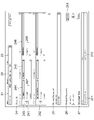
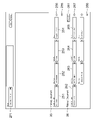
- journalizing apparatus It is a functional block diagram of the journalizing apparatus which concerns on 1st Embodiment. It is a figure which shows the example of the registration screen of a compound rule. It is a detailed registration screen of the specified information of the main document and the matching rule of the related document. It is a figure which shows the data structure of the compound rule stored in the compound rule storage part. It is a flowchart which shows the processing of a journalizing apparatus. It is a figure which shows the screen example which shows the status of the journalizing process of a journalizing apparatus. It is a flowchart which shows the processing of the application example of a journalizing apparatus. It is a functional block diagram of the journalizing apparatus which concerns on 2nd Embodiment.
- the main purpose of this embodiment is to efficiently find the related document of the main document to be journalized.
- the matching rule of the related document set according to the main document is used.
- the relationship between the machine-learned main document and the related document is used.
- FIG. 1 is a functional block diagram of the journalizing device 100 according to the first embodiment.
- the journalizing device 100 includes a document input unit 101, a document storage unit 102, a metadata extraction unit 103, a main document acquisition unit 104, a compound rule storage unit 105, a compound rule registration unit 106, and a compound rule selection unit 107.
- a matching rule acquisition unit 108, a related document search unit 109, a journal processing unit 110, and a display control unit 111 are provided.
- These functional blocks are realized by the cooperation of hardware resources such as a computer's central processing unit, memory, input device, output device, and peripheral devices connected to the computer, and software executed using them. ..
- each of the above functional blocks may be realized by the hardware resources of a single computer, or may be realized by combining the hardware resources distributed to a plurality of computers. ..
- the journalizing device 100 is connected to a user terminal (PC, smartphone, etc.) via a network such as the Internet, and the user can input by an appropriate input means (mouse, keyboard, touch panel, camera, etc.) of the user terminal.
- an appropriate input means mouse, keyboard, touch panel, camera, etc.
- the document input unit 101 inputs a document to be journalized and stores it in the document storage unit 102.
- the documents are classified into a main document and related documents.
- the main document is an indispensable document in the journal processing to be executed, and corresponds to a voucher document that is evidence of the contents of the transaction. If there is no main document, the journal processing will not be executed.
- a related document is a document that provides information that supplements the journal entry process based on the main document.
- the related document may be a voucher document certifying the contents of the transaction together with the main document, or may be any supplementary document (for example, a communication record or memorandum of a person concerned with the transaction) that is not required to complete the journal processing.
- the journal processing may not be executed if there is no related document, or the journal processing may be executed even if there is no related document.
- the voucher document can be the main document or the related document depending on the journal processing to be performed. Therefore, the classification of the main document and related documents is not fixed and may have liquidity that changes depending on the journal processing to be executed.
- FIG. 9 is a schematic diagram illustrating payment processing of an invoice in a company 40 that uses an automatic journalizing service provided by the journalizing device 100.
- the journalizing device 100 and the company person in charge terminal 41 of the automatic journalizing service user company 40 are connected to each other so as to be communicable via a network 42 such as the Internet.
- the company 40 using the automatic journalizing service orders goods and services from a business partner 43 such as a subcontractor, and the business partner 43 provides the ordered goods and services to the company 40 using the automatic journalizing service.
- the business partner 43 creates an invoice and sends it to the company 40 using the automatic journalizing service in order to claim the consideration for the goods and services.
- the company 40 using the automatic journalizing service instructs the bank 44, which has a bank account, to transfer the amount of money stated in the invoice from its bank account to the bank account of the business partner 43.
- Bank 44 performs the transfer process.
- the bank 44 periodically prepares a bank statement (for example, including the above-mentioned transfer record) of the automatic journalizing service user company 40 and provides it to the company 40 at a frequency such as once a month.
- the invoice from the business partner is the main document
- the bank statement indicating that the invoice amount stated in the invoice has been withdrawn to the bank account of the business partner is the related document. Become.
- both the main document and the related document are voucher documents required to complete the journal entry process, and when both documents are ready, the debit expense is recorded as the billing amount, and the debt reduction due to the decrease in accounts payable is recorded.
- Journal processing such as recording is executed, and journal processing is executed to record the asset reduction due to the withdrawal of the invoiced amount from the bank account on the credit side.
- the refund notice from the tax authorities is the main document
- the bank statement indicating that the refund amount stated in the refund notice has been deposited in the bank account is the related document.
- both the main document and related documents are voucher documents required to complete the journal processing, and when both documents are ready, the debit will record the increase in assets associated with the deposit of the refund amount to the bank account. Is executed, and journal processing such as recording revenue from deposits on the credit side and recording asset reduction due to the reversal of deferred tax assets is executed.
- voucher document An example of a voucher document is shown below.
- Documents showing the contents of transactions and fund transfers such as quotes, purchase orders, invoices, invoices, receipts, borrowing contracts, tax payment notices, refund notices, interest rate notices, dividend payment notices, etc.
- Banks Documents showing deposits and withdrawals of bank accounts such as bank statements ⁇ List of capital expenses (CAPEX) subject to depreciation ⁇ New acquisition of real estate, construction completion report, operating status, rent, income, expenditure, deposit, Documents related to real estate management such as receivables ⁇ Reports related to trusts such as trust financial statements
- the types of voucher documents and other optional supplementary documents described above are when the metadata extraction unit 103, which will be described later, extracts the metadata. It is determined and recorded in the document storage unit 102. Alternatively, the document type may be recorded in the document storage unit 102 by the document input unit 101 by manual input by the user or automatic recognition by the computer when the document is input.
- documents and documents mean an arbitrary type, format, extension file, and electronic document. Therefore, documents and documents include not only document files in a narrow sense but also non-document format files such as table calculation files, image files, video files, audio files, communication files such as e-mails and messages.
- a document obtained by scanning a paper voucher document or the like with an image scanner is input to the document input unit 101 as an image file.
- the metadata extraction unit 103 extracts metadata from a document stored in the document storage unit 102 by the document input unit 101. If the document is a file containing text data such as a document file, table calculation file, communication file, etc., each text data that may be used for journal processing is extracted individually, and metadata is added with appropriate type information. Generate.
- the issuer name is text data with "AAA”
- the metadata "issuer name: AAA” to which the type information with "issuer name” is added is Generated.
- the destination name of the invoice is text data with "BBB”
- the metadata "destination name: BBB” with the type information of the "destination name” is generated, and the invoice amount is invoiced.
- the issue date of the invoice is the text data with "DDD”. If so, the metadata "issue date: DDD" to which the type information of "issue date” is added is generated.
- the non-text data may be extracted as metadata as it is.
- the metadata extraction unit 103 may be used for journal processing by non-text data recognition such as image recognition and audio recognition. Extract certain data from a file and add appropriate type information to generate metadata.
- OCR optical character recognition
- text from the image file can be applied.
- Data can be extracted.
- the generation of metadata based on the extracted text data can be performed in the same manner as the file containing the above text data.
- the metadata may be non-text data such as image data, moving image data, and voice data.
- image files instead of applying OCR, image areas that may be used for journal processing are specified in the image file, and appropriate type information is added to the image data of each image area. It may be used as metadata.
- AI artificial intelligence
- metadata can interpret the metadata directly extracted from the above documents and autonomously generate supplementary data useful for journal processing. .. It is preferable to include the supplementary data generated by artificial intelligence in the metadata as described above.
- the metadata extracted from the document by the metadata extraction unit 103 as described above is related to the document and is stored in the document storage unit 102 together with the document.
- the above is the preparatory process for journal processing, and the following is the actual journal processing.
- the main document acquisition unit 104 acquires the main document to be journalized from the document storage unit 102.
- the order and timing for the main document acquisition unit 104 to acquire the main document from among a large number of documents stored in the document storage unit 102 are arbitrary, but hereinafter, each time a new document is stored in the document storage unit 102. ,
- the main document acquisition unit 104 shall acquire the new document as the main document.
- the document acquired by the main document acquisition unit 104 may not correspond to the main document as a result. In that case, the journalizing device 100 cancels the journalizing process based on the document and makes the next new document. Wait until the document is stored.
- the compound rule storage unit 105 stores the compound rule including the main document designation information for designating the main document, the matching rule for the related document, and the journal processing rule based on the main document and the related document.
- the compound rule registration unit 106 registers the compound rule in the compound rule storage unit 105.
- the compound rule registration unit 106 performs registration processing such as creating a new compound rule and changing or deleting an existing compound rule in response to a user's manual operation or automatic input by a computer.
- the 2 and 3 show an example of a compound rule registration screen by the compound rule registration unit 106.
- This registration screen is displayed on the display screen 20 by the display control unit 111, which will be described later.
- the transaction name display area 21 displays the name of the transaction that can be arbitrarily set by the user or the computer.
- the transaction summary display area 22 displays a summary of transactions selected from a pull-down list prepared in advance.
- the entity display area 23 displays an entity (individual or corporation) to which this compound rule is applied. For example, when a tax accountant corporation having a large number of customers uses the journalizing device 100 of the present embodiment, by designating the applicable entity in the entity display area 23, different compound rules are set for each customer (entity) of the tax accountant corporation. Can be set.
- the journal display area 24 is an area for displaying the contents of the journal processing executed while associating the main document displayed in the main document display area 25 with the related document displayed in the related document display area 26, and is the main area of the compound rule. Set journal processing rules as a department.
- the debit display area 241 sets the debit (Debit / Dr) processing
- the credit display area 242 sets the credit (Credit / Cr) processing.
- the debit display area 241 and the credit display area 242 include a credit display unit 243, a transaction account display unit 244, a transaction sub-account display unit 245, a transaction amount display unit 246, a tax account display unit 247, and a tax amount display unit 248, respectively. , Each display is editable.
- both the items of the main document and the items of the related document can be used for the calculation.
- it is possible to set based on different items of different documents such as "amount (item 1 of the main document)-(item 3 of the related document)".
- the degree of freedom in setting the journal processing can be increased.
- more complicated journal processing can be automated, and user convenience is improved.
- the credit display unit 243 displays the distinction between the debit (Dr) and the credit (Cr).
- there is one debit display area 241 representing a debit and one credit display area 242 representing a credit but there are also transactions in which there are a plurality of debit and / or credit items. In that case, a plurality of debit display areas 241 and / or credit display areas 242 can be set.
- the transaction account display unit 244 specifies an account (account) for recording transactions.
- the transaction sub-account display unit 245 designates a sub-account (sub-account) of the account item specified by the transaction account display unit 244. If there is no sub-account in the account, the transaction sub-account display unit 245 is left blank.
- the transaction amount display unit 246 specifies the transaction amount to be recorded in the account and sub-accounts specified by the transaction account display unit 244 and the transaction sub-account display unit 245.
- "Notice Letter" notice of anonymous partnership investment
- the "Notice Amount" displayed on the transaction amount display unit 246 of the debit display area 241 and the credit display area 242 means that the transaction amount is the amount of the silent partnership investment described in the "Notice Letter".
- the debit display area 241 the increase in ordinary deposits due to the deposit of the silent partnership investment is recorded, and in the credit display area 242, the increase in the silent partnership investment is recorded.
- the debit and credit transaction amount display units 246 must match. In transactions with multiple debit and / or credit items, the total amount of the debit and credit transaction amount display units 246 must match.
- the tax account display unit 247 specifies an account (account) for recording taxes related to transactions.
- the tax amount display unit 248 specifies the tax amount to be recorded in the account item designated by the tax account display unit 247. In the illustrated transaction example, since tax related to the transaction is not generated, the tax account display unit 247 displays "0-not applicable", and the tax amount display unit 248 displays "0".
- the main document display area 25 displays the main document to be journalized or the type of the main document. As described above, in the illustrated example, "Notice Letter” (notice of silent partnership investment) is registered as the main document or the type of the main document. The detailed registration screen of the main document will be described later with reference to FIG.
- the related document display area 26 displays the related document or the type of the related document to be searched based on the matching rule of the related document set in advance for the main document.
- "Bank Statement” (bank statement in which the silent partnership investment is deposited) is registered as the related document or the type of the related document. Since a plurality of related documents can be registered in one compound rule unlike the main document, a related document addition button 261 for that purpose is provided. The detailed registration screen for related documents will be described later in FIG.
- the document rule display area 27 displays the name 271 and the registration date 272 of the document rule registered on the registration screen of the designated information of the main document and the matching rule of the related document shown in FIG. By selecting the document rule name 271 on the screen, the transition to the detailed registration screen of FIG. 3 can be performed.
- FIG. 3 is a detailed registration screen of the designated information of the main document and the matching rule of the related document.
- the name 271 of the document rule can be arbitrarily set by the user or the computer.
- the main document display area 25 includes a document type 251, a metadata type (DataKey) 252, a comparison condition 253, and a comparison value 254 as setting items of the main document designation information for designating the main document.
- Document type 251 sets the type of document. For example, the various voucher documents exemplified above can be selected from the pull-down list. In the illustrated example, as described above, "Notice Letter" corresponding to the notification of silent partnership investment is set.
- the metadata type 252 sets the type of metadata used to specify the main document for the type of document set in the document type 251.
- metadata such as "issuer name: AAA”, “destination name: BBB”, “billing amount: CCC”, and “issue date: DDD" when the document type is an invoice is illustrated.
- type information such as "issuer name”, “destination name”, “billing amount”, and “issue date” in the preceding stage of each of these metadata can be set in the metadata type 252. Since the types of metadata mainly used for designating the main document are limited according to the document type 251, the user may be able to select an appropriate one from these as a pull-down list. In the illustrated example, "Notice Sender" (issuer name) of the silent partnership investment notice is set.
- the comparison condition 253 sets a comparison condition for the comparison value set in the comparison value 254 for the type of metadata set in the metadata type 252.
- the comparison condition 253 sets various logical operation methods for the text data. For example, for a text with a comparison value of 254, “is the same as it”, “is not the same”, “includes it”, “does not include it”, “starts with”, “does not start with”, “ends with”, “does not end with it”, etc.
- Various comparison conditions can be set.
- the comparison condition 253 sets various arithmetic calculation methods for the numerical data.
- comparison value 254 For example, with respect to the numerical value of the comparison value 254, simple magnitude comparison conditions such as “equal to it”, “not equal to it”, “greater than that", “less than that”, “more than that”, and “less than or equal to” can be set.
- a plurality of comparison values 254 may be set in the above logical operation or arithmetic operation.
- the comparison condition 253 in that case can be set as a multivariable function that performs an arbitrary comparison operation based on a plurality of comparison values 254.
- the comparison condition 253 with "contains” (including) is set for the comparison value 254 with "XX Bank, Ltd.”. Therefore, this main document designation information "includes” (comparison value 253) "Notice Letter” (document type 251) as "Notice Sender” (metadata type 252). It is designated as the main document. In other words, the notice of silent partnership investment issued by XX Bank, Ltd. is designated as the main document by this main document designation information.
- the main document designation information there is only one main document designation information defined by the combination of the setting items 251 to 254, but the main document designation information can be added by the main document designation information addition button 255.
- the document type 251 is inevitably the same as the existing main document designation information. Therefore, in the newly added main document designation information, three items of metadata type 252, comparison condition 253, and comparison value 254 may be set.
- the existing main document designation information can be deleted by pressing the main document designation information deletion button 256.
- the related document display area 26 includes a document type 262, a metadata type 263, a comparison condition 264, and a comparison value 265 as setting items for matching rules for related documents. These setting items are equivalent to the document type 251 of the main document display area 25, the metadata type 252, the comparison condition 253, and the comparison value 254, and duplicated description will be omitted.
- the document type 262 sets the document type in the same manner as the document type 251 of the main document.
- the main document is limited to voucher documents, but since the related documents may be any supplementary documents other than voucher documents, the types corresponding to them can be additionally set. In the illustrated example, as described above, a “Bank Statement” regarding the deposit of silent partnership investment is set. Two matching rules are set for this "Bank Statement".
- a bank statement containing a description of foreign relations and a transaction amount equal to the amount of silent partnership investment stated in the notice is provided as a related document. Can be searched as.
- the bank statement as the related document searched in this way is the voucher of the transaction displayed in the journal display area 24 of FIG. 2, together with the notice of the silent partnership investment issued by XX Bank, Ltd., which is the main document. Become.
- the journal processing of the transaction displayed in the journal display area 24 (the deposit processing of the silent partnership investment from XX Bank, Ltd.) is performed by the journal processing unit 110, which will be described later. Will be executed.
- the matching rule addition button 266 allows you to add a matching rule for the existing related document "Bank Statement" (document type 262).
- the existing matching rule can be deleted by the matching rule deletion button 267.
- another related document can be added by the related document addition button 261 similar to that in FIG. 2.
- the document rule shown in FIG. 3 is that the text data extracted from the document has a comparison value of 254 and 265.
- document rules can be configured based on non-text data such as image data, video data, audio data, and supplementary data by AI.
- the non-text data itself may be used as the comparison target data instead of the comparison values 254 and 265, and the similarity determination algorithm according to the format of the comparison target data may be used instead of the comparison conditions 253 and 264.
- the image data of a logotype of a group or a product is used as the comparison target data, a document containing an image similar to the logotype can be searched by using an arbitrary image similarity determination algorithm.
- FIG. 4 shows the data structure of the compound rule stored in the compound rule storage unit 105.
- the compound rule includes basic information, a journal processing rule 24, a main document designation information 25, and a related document matching rule 26.
- the basic information is input to the ID that specifies the compound rule (for example, the name entered in the transaction name display area 21 or the unique symbol number) and the transaction summary (for example, the transaction summary display area 22) to which the compound rule corresponds.
- Information and each information of the entity to which the compound rule is applied (for example, the entity specified in the entity display area 23) are included.
- the journal processing rule 24 includes debit information 241 and credit information 242.
- the debit information 241 and the debit information 242 include the debit information 243, the transaction account information 244, the transaction sub-account information 245, the transaction amount information 246, the tax account information 247, and the tax amount information 248, respectively.
- the main document designation information 25 includes a document type 251 and a metadata type 252, a comparison condition 253, and a comparison value 254. There may be a plurality of sets 251 to 254 of these data. In that case, as described above, the document type 251 is the same for all data sets.
- the related document matching rule 26 includes a document type 262, a metadata type 263, a comparison condition 264, and a comparison value 265. There may be a plurality of sets 262 to 265 of these data.
- the compound rule selection unit 107 selects a compound rule including the main document designation information that specifies the main document acquired by the main document acquisition unit 104 from the compound rule storage unit 105.
- the main document designation information referred to here is composed of a document type 251 in the main document display area 25 of FIG. 3, a metadata type 252, a comparison condition 253, and a comparison value 254. Therefore, when the main document acquired by the main document acquisition unit 104 matches the main document designation information 251 to 254 of FIG. 3 with the “notice of silent partnership investment issued by XX Bank, Ltd.”, FIGS. 2 and FIG.
- the compound rule shown in 3 is selected by the compound rule selection unit 107.
- the journalizing device 100 stops the subsequent processing of the document and waits until the main document acquisition unit 104 acquires a new document. Further, when there are a plurality of compound rules including the main document designation information 251 to 254 that match the document acquired by the main document acquisition unit 104, the compound rule selection unit 107 follows a predetermined priority order or in an arbitrary order. Select a compound rule with. This process will be described later.
- the matching rule acquisition unit 108 acquires the matching rule of the related document set in advance for the main document acquired by the main document acquisition unit 104. Specifically, the matching rule acquisition unit 108 acquires the matching rule of the related document included in the compound rule selected by the compound rule selection unit 107.
- the matching rule referred to here is composed of a document type 262, a metadata type 263, a comparison condition 264, and a comparison value 265 in the related document display area 26 of FIG.
- the related document search unit 109 searches for related documents stored in the document storage unit 102 based on the matching rule acquired by the matching rule acquisition unit 108.
- the related document search unit 109 "explains foreign relations. Search for "bank statement" as a related document, which includes and includes a transaction amount equal to the amount of silent partnership investment stated in the notice. If a related document is found in the document storage unit 102, the process proceeds to the next journal processing unit 110. The processing when the related document is not found in the document storage unit 102 will be described later.
- the journal processing unit 110 executes the journal processing while associating the main document acquired by the main document acquisition unit 104 and the related document searched by the related document search unit 109. Specifically, the journal processing unit 110 executes the journal processing based on the journal processing rule included in the compound rule selected by the compound rule selection unit 107.
- the journal processing rule referred to here is displayed in the journal display area 24 of FIG.
- the journal processing unit 110 processes the journal in the journal display area 24 when the main document in the main document display area 25 and the related documents in the related document display area 26 are prepared. To execute.
- the display control unit 111 displays the status or result of the journal processing executed by the journal processing unit 110 on the display screen 20.
- a screen example is shown in FIG. 6, which will be described later.
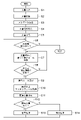
- FIG. 5 is a flowchart showing the processing of the journalizing device 100.
- S means “step”.
- the document input unit 101 inputs the document to be journalized.
- the document input in S1 is stored in the document storage unit 102.
- the metadata extraction unit 103 extracts metadata from the document stored in S2.
- the metadata extraction unit 103 determines the type of document (invoice, refund notice, bank statement, etc.) based on the metadata extracted in S3. The determination of the type of this document may be made on a rule basis or by using a model obtained by machine learning. If the metadata extracted in S3 contains the document type, that type is adopted, otherwise it is rule-based or machine learning-based based on the content of the document's image recognition and / or other metadata. May be determined.
- the metadata extracted in S3 and the document type determined in S4 are related to the document stored in S2 and are stored in the document storage unit 102 together with the document.
- the document preparation steps S1 to S4 and the document processing steps after S5 are continuously performed, but the document preparation step and the document processing step may be set as separate steps, and each may be performed at an arbitrary timing.
- the main document acquisition unit 104 acquires the document to be journaled from the document storage unit 102.
- the main document acquisition unit 104 determines whether or not there is an unprocessed transaction for the document acquired in S5.
- a document contains multiple transactions, such as a bank statement, each transaction is processed sequentially.
- the compound rule selection unit 107 searches for the compound rule stored in the compound rule storage unit 105 based on the document type determined in S4. Specifically, as the main document designation information displayed in the main document display area 25 of FIG. 3, a compound rule including the same document type 251 as the document type determined in S4 is searched. For example, when the document type determined in S4 is "invoice", the compound rule in which the document type 251 is "invoice" is searched.
- the compound rule selection unit 107 determines whether or not the document acquired in S5 for the compound rule of the same document type searched in S7 matches the main document designation information 252 to 254. If they do not match, the process returns to S7 and another compound rule of the same document type is searched. If they match, the process proceeds to S9, and the compound rule selection unit 107 selects the compound rule including the main document designation information 252 to 254. At this point, the document acquired in S5 has been certified as the main document corresponding to the specific compound rule.
- the matching rule acquisition unit 108 acquires matching rules 262 to 265 of related documents included in the compound rule selected in S9.
- the related document search unit 109 searches for related documents based on the matching rules 262 to 265 of the related documents acquired in S10.
- the related document search unit 109 determines whether or not the related document is found. If a related document is found, the process proceeds to S13, and the journal processing unit 110 executes journal processing based on the journal processing rule displayed in the journal display area 24 of the compound rule selected in S9. If the related document is not found, the process proceeds to S14 and the exception handling described later is executed.
- the related document can be divided into two cases: exception handling within the same compound rule, and exception handling by transitioning to another compound rule.
- exception handling when a related document is not found, an account different from the intended journal processing is used, and when the related document is not found, the expected journal processing is performed. There are two ways to use the same account. With these combinations, there are four types of exception handling. Hereinafter, each type will be described in sequence.
- exception handling is performed within the same compound rule, and if a related document is not found, an account item different from the intended journal handling is used. In this type, even if the related document is not found in S12, exception handling is performed in the compound rule selected in S9.
- the journal processing unit 110 in addition to the intended journal processing rule (first journal processing rule) displayed in the journal display area 24 of FIG. 2, the journal processing unit 110 is exceptional when a related document is not found. Includes a preliminary journal entry rule to be executed (second journal entry rule).
- the intended journal processing rule is "debit the expense of the invoice and debit the credit to record the loss of bank account assets associated with the withdrawal of the invoice".
- the preliminary journalizing rule is "to debit the expense of the invoice and to the credit to record the accounts receivable that are obliged to pay the invoice". If the bank statement is not found, it will be recorded in the accounting books as accounts payable until it is resolved because there is no voucher for withdrawal from the bank account.
- exception handling is performed within the same compound rule, and after recording that the related document was not found, the same account as the intended journal handling is used.
- exception handling is performed in the compound rule selected in S9.
- the journal processing unit 110 executes the journal processing based on the intended journal processing rule displayed in the journal display area 24 of FIG. 2, but if the related document is not found, the information is also recorded.
- the journal processing is executed based on the intended journal processing rule "Record the expense of the invoice amount on the debit side and record the asset reduction of the bank account due to the withdrawal of the invoice amount on the credit side".
- exception handling is performed by transitioning to another compound rule, and if a related document is not found, an account item different from the intended journal handling is used.
- the other compound rules referred to here are compound rules in which the main document designation information 251 to 254 are the same as the compound rule originally selected in S9, and the matching rules 262 to 265 and the journal processing rule 24 of the related documents are different. be.
- the other compound rule does not have to include the matching rules 262 to 265 of the related document.
- the matching processes S10 to S12 of the related document are skipped, and the journal entry of the compound rule originally selected in S9.
- Journal processing based on a journal processing rule (second journal processing rule) different from the processing rule (first journal processing rule) is executed in S13.
- the first journal processing rule and the second journal processing rule are as described above in the exception handling of the first type.
- the exception handling is performed by transitioning to another compound rule, and after recording that the related document was not found, the same account as the intended journal handling is used.
- the related document if it is not found in S12, it returns to S9 and another compound rule is selected.
- the other compound rules referred to here are the compound rules originally selected in S9, the compound rules in which the main document designation information 251 to 254 and the journal processing rule 24 are the same, and do not include the matching rules 262 to 265 of the related documents. Is.
- the matching processes S10 to S12 of the related document are skipped, and the journal processing unit 110 executes the journal processing based on the intended journal processing rule in S13, but also includes the status information indicating that the related document was not found. And record.
- the status information is as described above in the second type of exception handling.
- the compound rule selection unit 107 puts the compound rule in which the matching rules 262 to 265 of the related document are strict first. It is preferable to select the compound rule in which the matching rules 262 to 265 of the related documents are loose or not selected later. By doing so, the presence or absence of the desired related document can be confirmed first, and exception handling is executed only when the related document is insufficient.
- FIG. 6 is an example of a screen showing the status of journal processing of the journal device 100.
- This screen is displayed on the display screen 20 by the display control unit 111.
- the transaction type display area 31 corresponds to the transaction summary display area 22 in the example of the registration screen of the compound rule of FIG. 2, and displays the transaction type.
- the date display area 32 displays the processing date of the journalizing device 100.
- the settlement status display area 33 displays the settlement status information described above with respect to the second and fourth types of exception handling. The user can enter an arbitrary comment in the comment display area 34.
- the progress status display area 35 displays the progress status of the processing of the journalizing device 100.
- the journal display area 36 corresponds to the journal display area 24 in FIG. 2 and displays the content of the journal processing executed by the journal processing unit 110.
- the journal entry display area 36 includes a difference display unit 361 that displays the difference between the total amount of debits and the total amount of credits. Since the debit and credit amounts match in the correct journal processing, "0" is displayed on the difference display unit 361. On the other hand, if the journal processing is incorrect, the difference display unit 361 displays the difference other than "0".
- the difference reason suggestion unit 362 suggests the error underlying the error scenario as the difference reason.
- the error scenario relates to, for example, changing the tax rate. If the debit amount is based on the tax rate before the change (for example, 8%) and the credit amount is based on the tax rate after the change (for example, 10%), the difference display unit 361 has a difference corresponding to the difference between the tax rates before and after the change. Occurs.
- the difference reason suggestion unit 362 detects that a difference (for example, an amount equivalent to a 2% tax rate difference) that matches the error scenario regarding the change in the tax rate has occurred in the difference display unit 361, and the change in the tax rate is the reason for the difference.
- an icon of the difference reason suggestion unit 362 appears on the screen, and the user can select the icon to confirm the detailed reason for the difference.
- the error scenarios other than the change of the tax rate may be due to the difference between the tax-excluded notation and the tax-included notation, and the presence or absence of tax in the case of overseas transactions.
- the main document display area 37 corresponds to the main document display area 25 in FIG. 2, and displays the main document related to the journal processing executed by the journal processing unit 110.
- the actual main document is attached to the main document attachment part 371.
- the related document display area 38 corresponds to the related document display area 26 in FIG. 2, and displays related documents related to the journal processing executed by the journal processing unit 110.
- An actual related document is attached to the related document attachment section 381.
- the related document summarization unit 382 displays summary information of related documents related to journal processing.
- Tax accountant B who belongs to a tax accountant corporation that uses the automatic journalizing service provided by the journalizing device 100, journalizes the invoice "invoice.pdf" electronically received from one of the clients of the tax accountant corporation, "Invoice.pdf”. Upload to the device 100 (S1).
- the invoice "invoice.pdf” is an invoice issued by "Dingsha” to "Bank”, the item is “office supplies”, the invoice amount is "3800 yen”, and the issue date is "January 5, 2020”.
- the transfer destination bank is "ABC Bank”.
- the journalizing device 100 determines that the document type is "invoice” by performing OCR on the uploaded invoice "invoice.pdf” (S4), and extracts the following metadata (S3).
- the journalizing device 100 acquires the invoice "invoice.pdf” as the main document (S5), and searches for the compound rule based on the document type "invoice” (S7). As a result, the following compound rule is acquired (S9).
- Main document designation information: Document type invoice, main document description includes the word "office supplies”, the invoice amount of the main document is 10,000 yen or less
- the journalizing device 100 searches the document storage unit 102 according to the related document matching rule described above, and finds that the eighth line of the bank statement "January Statement.pdf" satisfies the related document matching rule (S11). The journalizing device 100 associates the eighth line of the found bank statement "January Statement.pdf” with the invoice "invoice.pdf”. The journalizing device 100 uses the metadata of the bank statement “January Statement.pdf” and the metadata of the invoice “invoice.pdf” to generate journal data according to the above journal processing rules, and is a holding unit (not shown). It is stored in (S13).
- journalizing device 100 The configuration and operation of the journalizing device 100 have been described above. According to the journalizing device 100, related documents to be journalized together with the main document can be efficiently searched based on the matching rule set in advance for the main document.
- journalizing device 100 not only the main document but also related documents can be searched, so that it is possible to set a compound rule with a higher degree of freedom. For example, it is possible to change the account or status depending on the presence or absence of evidence of settlement.
- the system automatically searches for related documents at the time of journal creation without the user searching for related documents, which can reduce the user's trouble.
- exception handling is stipulated when there is no related document, it is possible to flexibly deal with various situations of actual accounting and taxation. Further, for example, when an invoice is attached as the main document to the journal data related to the invoice, by attaching the bank statement as the related document, it can be seen at a glance that the settlement has been completed.
- journalizing device 100 Next, some application examples of the journalizing device 100 will be shown.
- a plurality of documents each of which can be journalized independently as a main document, are collectively journalized by one compound rule.
- a compound rule in which payment processing of three invoices having the same issuer is collectively journalized will be described with reference to an example of a registration screen of the compound rule of FIGS. 2 and 3.
- any one of the three invoices is registered in the main document display area 25 as the main document, and the remaining two are registered in the related document display area 26 as the related document.
- a bank statement that records withdrawals from the bank account of the total invoice amount of the three invoices is also registered in the related document display area 26 as a related document.
- the "invoice ID” (metadata type 263) is the “invoice ID of the first invoice” (comparison value 265) so that the first invoice is not duplicated as the second invoice. )
- "different” (comparison condition 264) and "invoice” (document type 262) are set as supplementary matching rules.
- "YY Co., Ltd.” (comparison value 265) is “included” in the "issuer name” (metadata type 263) (comparison condition 264).
- a matching rule for acquiring "invoice” (document type 262) is set.
- the "invoice ID” (metadata type 263) is “invoices for the first and second invoices” so that the first or second invoice is not duplicated as the third invoice.
- a supplementary matching rule between "ID” (comparison value 265) and “different” (comparison condition 264) and "invoice” (document type 262) is set.
- the journal processing unit 110 debits three invoices. Executes a journal entry process that records the cost of the total invoice amount of the invoice and records the loss of assets in the bank account due to the withdrawal of the total invoice amount of the three invoices to the credit. At this time, the total amount of the three invoices is designated in the transaction amount display unit 246 of the debit and credit in the journal display area 24 of FIG.
- the billing amount of one invoice can be divided into a plurality of payments.
- a compound rule that executes the journal processing is applied for each payment processing.
- the compound rule for each round differs substantially only in the transaction amount.
- the invoice hereinafter referred to as the original invoice
- the bank statement is the related document.
- a virtual (virtual) invoice corresponding to the original invoice is newly generated and registered in the document storage unit 102.
- the virtual invoice differs only in the invoice amount (invoice amount of the original invoice-first payment amount) in its metadata, and the other items are the same invoice as that of the original invoice.
- the virtual invoice may be accompanied by information (such as a flag) indicating that it is virtual, that is, it is an invoice that exists only within the journalizing device 100.
- the journal processing of the transaction amount “30” is executed.
- the journalizing device 100 issues the first virtual invoice after the first journalizing process and sets the invoice amount to the unpaid "70” (reduces the original invoice to the unpaid "70”). Equivalent to what you did).
- the first virtual invoice with the invoice amount of "70” is the main document, and the bank statement is the related document.
- the journal processing of the transaction amount “40” is executed.
- the journalizing device 100 issues a second virtual invoice after the second journalizing process and sets the invoice amount to the unpaid "30" (reduces the original invoice to the unpaid "30"). Equivalent to what you did).
- the second virtual invoice with the invoice amount of "30" is the main document, and the bank statement is the related document.
- the balance "30” is paid in the third payment process and the withdrawal history is recorded in the bank statement. Therefore, in the third payment processing compound rule, the journal processing of the transaction amount “30” is executed. By the above three payment processes, the original invoice with the invoice amount "100" is paid off.
- virtual vouchers are used for various purposes in automatic journals, such as issuing a virtual voucher as a placeholder for the voucher that should be, for example, in the case of accounts payable or accounts payable. be able to.
- the types of virtual vouchers include vouchers with meaningful information such as the virtual invoice above, blank vouchers with nothing written, and vouchers with meaningless information. And so on.
- the computer presents a plurality of possible combinations of the main document and related documents on the display screen 20 via the display control unit 111, and the user can select one combination from the combinations. Further, in a state where the main document has been decided, the computer may present candidates for related documents and ask the user's judgment.
- FIG. 10 is another screen example showing the status of the journal processing of the journal device 100.
- this screen since the journal is journalized by a compound rule that does not include the matching rule of the related document, this screen has the main document display area 37, but does not have the related document display area 38.
- This screen includes an add button 901 for accepting additional instructions for related documents.
- the add button 901 is specified by the user (tap or click, etc.)
- the journalizing device 100 defaults (although no matching rule corresponding to the main document displayed in the main document display area 37 is registered). Search for related documents according to matching rules.
- the default matching rule is, for example, "a document of the same type as the main document type", "a document having the same keyword as the keyword of the main document", and may be appropriately set.
- the journalizing device 100 causes the display screen 20 to display a candidate display screen for allowing the user to select a related document from the candidate documents found as a result of the search.
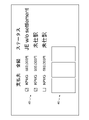
- FIG. 11 is a representative screen view showing an example of a candidate display screen.
- the candidate display screen presents candidates for additional related documents and lets the user select them.
- the user selects a document to be added as a related document from the presented candidates.
- three candidate documents are displayed.
- the candidate document selection area 45 the basic information of the three candidate documents (“payee”, “amount”, and “status” in the illustrated example) is displayed side by side.
- the user can select and add each candidate document as a related document by checking the check box of each candidate document.
- each actual candidate document is attached so as to be viewable, and can be referred to when the user considers it.
- the journalizing device 100 acquires the result of selection on the candidate display screen and reflects it in the journalizing of the main document. For example, if the main document and the selected related document match the accounts, sub-items, taxes, accounts, departments, etc. and the conditions are met, the journal update process to add up the values or delete the same values. Will be done. The result of such a journal update process is displayed in the updated journal display area 36. At the same time, the information corresponding to the selected related document is displayed in the related document display area 38.
- the add button 901 may be displayed even when the main document is accompanied by a related document, and even in this case, when the add button 901 is specified, the same processing as described above is executed.
- the compound rule to be applied to the main document to be journalized is tentatively determined, and the subsequent processing is performed.
- the compound rule is configured to be configurable whether or not the related document is required, and whether or not to record status information indicating whether or not the related document is unpaid.
- a check box for specifying whether or not to record status information is provided next to the entity display area 23, and the related document is required to be in the related document display area 26.
- a check box may be provided to specify whether or not to do so.
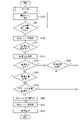
- FIG. 7 is a flowchart relating to the third application example. In S15 and S8 after the same processes S1 to S6 as in FIG.
- the compound rule selection unit 107 searches for the compound rule for the main document acquired in S5. Specifically, the compound rule including the main document designation information 251 to 254 (FIG. 3) that designates the main document acquired in S5 is searched. When such a compound rule is found, the compound rule selection unit 107 tentatively determines it in S16.
- the matching rule acquisition unit 108 determines whether or not the compound rule provisionally determined in S16 includes the matching rules 262 to 265 of the related document. If the matching rules 262 to 265 of the related document are not included, the compound rule is finally determined (S21), and the journal processing unit 110 executes the journal processing in the process of proceeding to S13. When the matching rules 262 to 265 of the related document are included, the process proceeds to S11 and the related document search unit 109 searches for the related document.
- the related document search unit 109 determines whether or not the related document is found. When the related document is found, the process proceeds to S23 and the related document search unit 109 determines whether or not the related document is essential in the journal processing. When the related document search unit 109 is set to require the related document in the compound rule tentatively determined in S16 (Y in S23), the compound rule is finally determined (S21), and the journal entry proceeds to S13. The processing unit 110 executes the journal processing. When the related document search unit 109 is not set to require the related document in the compound rule tentatively determined in S16 (N in S23), the related document search unit 109 proceeds to S19 described later. If the related document is not found in S12, the process proceeds to S18 and the related document search unit 109 determines whether or not the related document is essential in the journal processing.
- journal processing unit 110 determines whether or not the status information needs to be set. When the journal processing unit 110 does not need to set the status information, that is, when the compound rule tentatively determined in S16 is not set to record the status information, the journal processing unit 110 finally determines the compound rule (S21) and S13. The journal processing unit 110 executes the journal processing without adding the status information.
- the related document may be found (via S23) or not found (via S18). This is suitable when specifying non-essential supplementary information such as notes about transactions as related documents.
- the journal processing unit 110 proceeds to S20 to add the status information.
- the status information is information indicating the status such as whether or not a related document is found. For example, if the type of the main document is an invoice and the type of the related document is a bank statement, and if the related document is found in S11 (via S23), the above-mentioned "with settlement" is recorded as status information.
- the compound rule selection unit 107 determines the compound rule.
- the journal processing unit 110 executes the journal processing and records it together with the status information set in S20.
- the compound rule When multiple related documents are specified in the compound rule, it may be configured so that it can be specified whether it is required or not for each related document. In this case, for example, by setting that the second invoice is mandatory in the first application example and neither the third invoice nor the bank statement is mandatory, the sum of the two invoices and the invoice 3 are set. You can set a compound rule for total payment that can be used for total, settled, and unsettled sheets.
- FIG. 8 is a functional block diagram of the journalizing device 100 according to the second embodiment.
- the machine learning unit 112 the training data providing unit 113, and the evaluation A portion 114 is provided.
- the machine learning unit 112 can machine learn the relationship between the main document to be journalized and the related document to be journalized together with the main document.
- the training data providing unit 113 provides training data for machine learning to the machine learning unit 112.
- the training data covers the relationship between each assumed type of the main document and each assumed type of the related document, and includes the domain knowledge graphed as reference data.
- the machine learning unit 112 indicates related documents corresponding to the main document acquired by the main document acquisition unit 104 by machine learning these comprehensive training data at the time of initial setup and maintenance of the journalizing device 100. Then, the related document search unit 109 can be made to search.
- the training data can also include the contents of journal processing according to the comprehensive combination of the main document and related documents.
- the machine learning unit 112 can instruct the journal processing unit 110 to execute the journal processing while associating the main document acquired by the main document acquisition unit 104 and the related document searched by the related document search unit 109.
- the evaluation unit 114 evaluates the main document acquired by the main document acquisition unit 104, the related document searched by the related document search unit 109, and a part or all of the contents of the journal processing executed by the journal processing unit 110. Judge the correctness.
- the evaluation may be led by the user or may be performed autonomously by the computer. For example, if the result of the journal processing executed by the journal processing unit 110 is inconsistent with the result of another journal processing already executed, the journal processing is determined to be an error.
- the evaluation unit 114 When an error is detected by the evaluation, the evaluation unit 114 sends a correction instruction to the related document search unit 109 and the journal processing unit 110 to correct each process. Further, the evaluation unit 114 feeds back the correctness determination result to the training data providing unit 113.
- the training data providing unit 113 provides these as training data to the machine learning unit 112. As described above, the machine learning unit 112 can continuously perform machine learning using the data used in the actual processing of the journalizing device 100, and can maintain the processing accuracy high.
- each device described in the embodiment can be realized by the hardware resource or the software resource, or by the cooperation of the hardware resource and the software resource.
- Processors, ROMs, RAMs, and other LSIs can be used as hardware resources.
- Programs such as operating systems and applications can be used as software resources.
- the present invention relates to a technique for journalizing transactions or a technique for displaying them.
- journal display area 25 main document display area, 26 related document display area, 27 document rule display area, 36 journal display area, 37 main document display area, 38 related document display area, 100 journal device, 104 main document acquisition unit, 105 compound rule storage unit, 107 compound rule selection unit, 108 matching rule acquisition unit, 109 related document search unit, 110 journal processing unit, 111 display control unit, 112 machine learning unit, 113 training data provision unit, 114 evaluation unit.
Landscapes
- Business, Economics & Management (AREA)
- Engineering & Computer Science (AREA)
- Accounting & Taxation (AREA)
- Development Economics (AREA)
- Economics (AREA)
- Finance (AREA)
- Marketing (AREA)
- Strategic Management (AREA)
- Technology Law (AREA)
- Physics & Mathematics (AREA)
- General Business, Economics & Management (AREA)
- General Physics & Mathematics (AREA)
- Theoretical Computer Science (AREA)
- Financial Or Insurance-Related Operations Such As Payment And Settlement (AREA)
Priority Applications (2)
| Application Number | Priority Date | Filing Date | Title |
|---|---|---|---|
| PCT/JP2021/000232 WO2022149222A1 (ja) | 2021-01-06 | 2021-01-06 | 仕訳装置、仕訳方法、仕訳表示方法、仕訳表示プログラム |
| JP2022573848A JP7244159B2 (ja) | 2021-01-06 | 2021-01-06 | 仕訳装置、仕訳方法、仕訳表示方法、仕訳表示プログラム |
Applications Claiming Priority (1)
| Application Number | Priority Date | Filing Date | Title |
|---|---|---|---|
| PCT/JP2021/000232 WO2022149222A1 (ja) | 2021-01-06 | 2021-01-06 | 仕訳装置、仕訳方法、仕訳表示方法、仕訳表示プログラム |
Publications (1)
| Publication Number | Publication Date |
|---|---|
| WO2022149222A1 true WO2022149222A1 (ja) | 2022-07-14 |
Family
ID=82358181
Family Applications (1)
| Application Number | Title | Priority Date | Filing Date |
|---|---|---|---|
| PCT/JP2021/000232 Ceased WO2022149222A1 (ja) | 2021-01-06 | 2021-01-06 | 仕訳装置、仕訳方法、仕訳表示方法、仕訳表示プログラム |
Country Status (2)
| Country | Link |
|---|---|
| JP (1) | JP7244159B2 (https=) |
| WO (1) | WO2022149222A1 (https=) |
Cited By (2)
| Publication number | Priority date | Publication date | Assignee | Title |
|---|---|---|---|---|
| JP2024178845A (ja) * | 2023-06-13 | 2024-12-25 | 株式会社オービック | 業務支援装置、業務支援方法、及び、業務支援プログラム |
| JP2026036712A (ja) * | 2024-08-21 | 2026-03-06 | 有限責任あずさ監査法人 | 情報比較装置、情報比較方法、記憶媒体 |
Citations (6)
| Publication number | Priority date | Publication date | Assignee | Title |
|---|---|---|---|---|
| US20050086135A1 (en) * | 2003-10-20 | 2005-04-21 | Li-Chin Lu | Automatic bookkeeping system |
| JP2008204095A (ja) * | 2007-02-19 | 2008-09-04 | Hitachi Ltd | 問題解決支援システム及び問題解決支援方法 |
| JP2016194802A (ja) * | 2015-03-31 | 2016-11-17 | 株式会社日本デジタル研究所 | 会計入力システム、端末装置、サーバー装置、方法およびプログラム |
| JP2017054469A (ja) * | 2015-09-11 | 2017-03-16 | 株式会社日本デジタル研究所 | データ管理システム、方法およびプログラム |
| JP2018081530A (ja) * | 2016-11-17 | 2018-05-24 | セイコーエプソン株式会社 | 財務帳票作成システム、財務帳票作成端末、及び財務帳票作成プログラム |
| JP6712738B1 (ja) * | 2019-10-31 | 2020-06-24 | 株式会社日本デジタル研究所 | 証憑判定装置、会計処理装置、証憑判定プログラム、証憑判定システム及び証憑判定方法 |
-
2021
- 2021-01-06 JP JP2022573848A patent/JP7244159B2/ja active Active
- 2021-01-06 WO PCT/JP2021/000232 patent/WO2022149222A1/ja not_active Ceased
Patent Citations (6)
| Publication number | Priority date | Publication date | Assignee | Title |
|---|---|---|---|---|
| US20050086135A1 (en) * | 2003-10-20 | 2005-04-21 | Li-Chin Lu | Automatic bookkeeping system |
| JP2008204095A (ja) * | 2007-02-19 | 2008-09-04 | Hitachi Ltd | 問題解決支援システム及び問題解決支援方法 |
| JP2016194802A (ja) * | 2015-03-31 | 2016-11-17 | 株式会社日本デジタル研究所 | 会計入力システム、端末装置、サーバー装置、方法およびプログラム |
| JP2017054469A (ja) * | 2015-09-11 | 2017-03-16 | 株式会社日本デジタル研究所 | データ管理システム、方法およびプログラム |
| JP2018081530A (ja) * | 2016-11-17 | 2018-05-24 | セイコーエプソン株式会社 | 財務帳票作成システム、財務帳票作成端末、及び財務帳票作成プログラム |
| JP6712738B1 (ja) * | 2019-10-31 | 2020-06-24 | 株式会社日本デジタル研究所 | 証憑判定装置、会計処理装置、証憑判定プログラム、証憑判定システム及び証憑判定方法 |
Cited By (3)
| Publication number | Priority date | Publication date | Assignee | Title |
|---|---|---|---|---|
| JP2024178845A (ja) * | 2023-06-13 | 2024-12-25 | 株式会社オービック | 業務支援装置、業務支援方法、及び、業務支援プログラム |
| JP7712979B2 (ja) | 2023-06-13 | 2025-07-24 | 株式会社オービック | 業務支援装置、業務支援方法、及び、業務支援プログラム |
| JP2026036712A (ja) * | 2024-08-21 | 2026-03-06 | 有限責任あずさ監査法人 | 情報比較装置、情報比較方法、記憶媒体 |
Also Published As
| Publication number | Publication date |
|---|---|
| JP7244159B2 (ja) | 2023-03-22 |
| JPWO2022149222A1 (https=) | 2022-07-14 |
Similar Documents
| Publication | Publication Date | Title |
|---|---|---|
| AU2007275708B2 (en) | Method and system for receivables management | |
| JP6307693B2 (ja) | 会計処理システム | |
| JP6528070B2 (ja) | 記帳システム | |
| JP6895632B1 (ja) | 会計処理装置、会計処理システム、会計処理方法及びプログラム | |
| WO2014152574A1 (en) | Electronic payment system operative with existing accounting software and existing remote deposit capture and mobile rdc software | |
| JP2020170556A (ja) | 債務顧客管理システム、債務顧客管理方法及び債務顧客管理プログラム | |
| JP2025085813A (ja) | 債権管理装置、債権管理方法、及び債権管理プログラム | |
| JP7244159B2 (ja) | 仕訳装置、仕訳方法、仕訳表示方法、仕訳表示プログラム | |
| JP7084800B2 (ja) | 差額管理装置、差額管理方法、及び差額管理プログラム | |
| JP4459538B2 (ja) | 組戻し対応資金管理システム、組戻し対応資金管理システム用プログラム、及び組戻し対応資金管理システム用プログラムを記録した記録媒体 | |
| WO2022195901A1 (ja) | 会計処理装置および会計処理方法 | |
| KR100334249B1 (ko) | 네트워크를 이용하는 지식적 데이터구조, 처리장치 및 매체 | |
| JP7258322B2 (ja) | 仕訳装置、仕訳方法 | |
| US20020049754A1 (en) | Expenditure management system, method and recording media | |
| JP2003132220A (ja) | 電子手形管理システム及びその方法 | |
| JP2001325419A (ja) | 会計データ作成方法、決算ファイル作成方法、連結決算方法、会計データ、入力画面、会計データ作成プログラム、決算ファイル作成プログラム及び連結決算作成プログラムの記録媒体 | |
| JP2002183642A (ja) | 企業グループ間の集中決済処理情報自動生成装置および記録媒体 | |
| JP3551311B2 (ja) | 仕訳入力支援機能付会計処理システム | |
| JP2002207881A (ja) | 外貨資金繰情報の提示を利用した為替先物予約取引の約定システム | |
| JP2001101266A (ja) | キャッシュフロー計算システム | |
| JP2001084304A (ja) | 連結決算用データ作成システム | |
| AU2012268872A9 (en) | Method and system for receivables management | |
| JP2020086709A (ja) | 仕訳作成装置、仕訳作成方法および仕訳作成プログラム | |
| JP2025014151A (ja) | 精算管理装置、精算管理方法、及び精算管理プログラム | |
| JP2024142235A (ja) | 財務経理処理システム、財務経理処理方法及び財務経理処理プログラム |
Legal Events
| Date | Code | Title | Description |
|---|---|---|---|
| 121 | Ep: the epo has been informed by wipo that ep was designated in this application |
Ref document number: 21917450 Country of ref document: EP Kind code of ref document: A1 |
|
| ENP | Entry into the national phase |
Ref document number: 2022573848 Country of ref document: JP Kind code of ref document: A |
|
| NENP | Non-entry into the national phase |
Ref country code: DE |
|
| 122 | Ep: pct application non-entry in european phase |
Ref document number: 21917450 Country of ref document: EP Kind code of ref document: A1 |