WO2022014444A1 - ロボット制御システム - Google Patents
ロボット制御システム Download PDFInfo
- Publication number
- WO2022014444A1 WO2022014444A1 PCT/JP2021/025652 JP2021025652W WO2022014444A1 WO 2022014444 A1 WO2022014444 A1 WO 2022014444A1 JP 2021025652 W JP2021025652 W JP 2021025652W WO 2022014444 A1 WO2022014444 A1 WO 2022014444A1
- Authority
- WO
- WIPO (PCT)
- Prior art keywords
- function
- unit
- robot control
- file
- control device
- Prior art date
- Legal status (The legal status is an assumption and is not a legal conclusion. Google has not performed a legal analysis and makes no representation as to the accuracy of the status listed.)
- Ceased
Links
Images

Classifications
-
- B—PERFORMING OPERATIONS; TRANSPORTING
- B25—HAND TOOLS; PORTABLE POWER-DRIVEN TOOLS; MANIPULATORS
- B25J—MANIPULATORS; CHAMBERS PROVIDED WITH MANIPULATION DEVICES
- B25J9/00—Program-controlled manipulators
- B25J9/16—Program controls
- B25J9/1656—Program controls characterised by programming, planning systems for manipulators
-
- B—PERFORMING OPERATIONS; TRANSPORTING
- B25—HAND TOOLS; PORTABLE POWER-DRIVEN TOOLS; MANIPULATORS
- B25J—MANIPULATORS; CHAMBERS PROVIDED WITH MANIPULATION DEVICES
- B25J13/00—Controls for manipulators
- B25J13/06—Control stands, e.g. consoles, switchboards
Definitions
- the present invention relates to a robot control system.
- the robot control device uses system software to control the robot.
- the system software is stored in a storage unit such as a memory in the robot control device (see, for example, Patent Document 1).
- the robot control system includes a robot control device for controlling a robot, a teaching operation panel connected to the robot control device and operated by an operator, and the robot control device is the robot.
- a storage unit for storing the system software of the control device, a function addition unit for adding and deleting functions to the system software, and a function addition unit provided on the teaching operation panel to enable or disable the operation of the function addition unit.
- the operation of the function addition unit is enabled by the switching unit and the switching unit, the addition and deletion of the function by the function addition unit is enabled, and the operation of the function addition unit is disabled by the switching unit. If this is the case, a robot control system including a function control unit that invalidates the addition and deletion of functions by the function addition unit.
- FIG. 1 is a block diagram showing a configuration of a robot control system 100 according to the present embodiment.
- the robot control system 100 includes a robot control device 1, a robot 2, a teaching operation panel 3, and an external storage device 4.
- the robot control device 1 is connected to the robot 2 and executes various processes to control the robot 2.
- the robot 2 is connected to the robot control device 1 and operates according to the control from the robot control device 1.
- the teaching operation panel 3 is a display input device equipped with a display, hardware keys, and the like.
- the teaching operation panel 3 is connected to the robot control device 1 and is operated by an operator to create, modify, register, or set various parameters of a robot program, as well as to regenerate and operate the taught robot program and to manually position the robot. Perform operations, etc.
- the teaching operation panel 3 is provided on the teaching operation panel 3 and includes a switching unit 31 for setting the operation of the function addition unit 111 of the control unit 11 described later to be valid or invalid.
- the switching unit 31 may be a switch or a button that can switch ON / OFF.
- the external storage device 4 is a storage device that can be connected to a robot control device 1 such as a USB memory or a CF card.
- the external storage device 4 includes, for example, an additional function file 41.
- the robot control device 1 includes a control unit 11 and a storage unit 12.
- the control unit 11 is a processor such as a CPU (Central Processing Unit).
- the control unit 11 includes a function addition unit 111, a screen addition unit 112, a setting change unit 113, and a function control unit 114.
- the storage unit 12 is composed of a ROM (read only memory), a RAM (random access memory), a non-volatile memory, a hard disk drive, an SSD (solid state drive), and the like, and stores various data.
- the system software for controlling the robot 2 and the system software for performing image processing are stored in the ROM of the storage unit 12.
- the robot program in which the work contents of the robot are taught according to the application and the setting data related thereto are stored in the non-volatile memory of the storage unit 12.
- the RAM of the storage unit 12 is used as a storage area for temporary storage of data in various arithmetic processes performed by the control unit 11.
- the system software 121 is system software for controlling the robot 2, and is an aggregate of a plurality of system programs.
- the robot program 122 is a program for causing the robot 2 to execute various operations.
- the additional function file 41 stored in the external storage device 4 includes a file for adding a function to the system software 121, and is composed of an archive file in which a plurality of system programs and a plurality of data files are combined into one file.
- the additional function file 41 includes, for example, a function definition information file, an additional system software file, an operation screen configuration file, an operation screen control file, a robot program command file, a setting data file, a command file, and the like.
- the function definition information file has definition information (name, version number, ID name, function description, etc.).
- the function definition information file 411 is registered as an entry in the additional function database added to the storage unit 12.
- the function addition unit 111 of the control unit 11 causes the teaching operation panel 3 of the robot control device 1 to display a list of the functions to be added based on the data in the additional function database.
- the additional function file 41 has identification information of the function to be added. Thereby, the control unit 11 can distinguish the added function from the other function.
- the additional system software file is a file containing a system program in machine language that can be executed by the control unit 11 of the robot control device 1.
- the operation screen configuration file and the operation screen control file are files for adding an operation screen to the teaching operation panel 3 of the robot control device 1.
- the operation screen configuration file and the operation screen control file are registered in the screen control database added to the storage unit 12.
- the robot program instruction file is a file for adding a new robot instruction.
- the setting data file is a file for changing the setting of the robot 2 by the robot control device 1.
- the command file is a file including commands for the robot control device 1 to perform various processes (file operation, system setting operation, etc.).
- the function addition unit 111 adds a function to the system software 121 based on the additional function file 41 stored in the external storage device 4.
- the function addition unit 111 may selectively add a function to the system software 121 based on the additional function file 41. Specifically, the function addition unit 111 selectively adds a function to the system software 121 by displaying a list of additional functions on the teaching operation panel 3 and selecting a specific function according to the operation of the teaching operation panel 3. You may.
- the introduction of the additional function is executed by, for example, the following processing.
- the function addition unit 111 expands the file in the additional function file 41 into the RAM of the storage unit 12.
- the function addition unit 111 reads the function information (ID name, version number, etc.) from the function definition information file, and secures an area (function introduction area) for storing the additional function in the non-volatile memory of the storage unit 12. do. Further, the function addition unit 111 uses the ID name of the additional function as the name of the function introduction area.
- the function addition unit 111 copies all the files expanded in the storage unit 12 to the reserved function introduction area, and then deletes the expanded files.
- the control unit 11 executes the process corresponding to each file included in the additional function file 41.
- E When the robot control device 1 is restarted after all the processes are completed, the robot control device 1 can execute the additional function.
- the screen addition unit 112 adds a new graphical user interface (GUI) screen to the system software 121 based on the operation screen configuration file and the operation screen control file. For example, the screen addition unit 112 adds a new GUI screen for operating the additional device 5 to the system software 121 based on the operation screen configuration file and the operation screen control file. As a result, the user can operate the additional function by the teaching operation panel 3.
- GUI graphical user interface
- the setting change unit 113 changes the system settings of the system software 121 based on the setting data file and the command file. For example, the setting change unit 113 changes the system setting of the system software 121 related to the operation of the additional device 5 based on the setting data file and the command file.
- the function control unit 114 When the operation of the function addition unit 111 is effectively set by the switching unit 31, the function control unit 114 enables the addition of the function by the function addition unit 111. Further, when the operation of the function addition unit 111 is set to be invalid by the switching unit 31, the function control unit 114 invalidates the addition of the function by the function addition unit 111. That is, the addition of a function by the function addition unit 111 is possible only when the operation of the function addition unit 111 is effectively set.
- the function control unit 114 is set to invalidate the operation of the function addition unit 111 by the switching unit 31.
- a message prompting the switching unit 31 to enable the operation of the function addition unit 111 is displayed on the teaching operation panel 3.
- the function control unit 114 teaches and operates a message urging the switching unit 31 to enable the operation of the function addition unit 111 until the switching unit 31 enables the operation of the function addition unit 111 or the screen transitions to another screen. Continue to display on board 3. Further, when the operation of the function addition unit 111 is enabled by the switching unit 31, the function control unit 114 enables the addition of the function by the function addition unit 111.
- the function control unit may enable an operation for selectively adding a function to the system software 121 on the teaching operation panel 3.
- the robot control device 1 can selectively add a function to the system software 121.
- the function control unit 114 stops the automatic operation of the robot 2 and the switching unit 31 Generates notification information that notifies you of a setting error. Specifically, if the operation of the function addition unit 111 is effectively set by the switching unit 31 during the automatic operation of the robot 2 by the robot control device 1, the function control unit 114 stops the automatic operation of the robot 2 and switches. An abnormality message is displayed on the teaching operation panel 3 as notification information for notifying the abnormality of the setting of the unit 31. Further, the function control unit 114 may generate an alarm sound as notification information.
- the function control unit 114 temporarily stores the additional function file in the storage unit 12 when the additional function file exists in the external storage device 4. You may remember it. Then, when the operation of the function addition unit 111 is effectively set by the switching unit 31, the function addition unit 111 adds a function to the system software 121 based on the additional function file temporarily stored in the storage unit 12. May be good.
- the function control unit 114 temporarily stores the additional function file in the storage unit 12 when the additional function file exists in the external storage device 4. You may remember it. Then, when the operation of the function addition unit 111 is effectively set by the switching unit 31, the function control unit 114 may display the execution information for executing the addition of the function by the function addition unit 111 on the teaching operation panel 3. good.
- the function control unit 114 when the function control unit 114 enables the operation of the function addition unit 111 by the switching unit 31, the function control unit 114 displays information instructing the start of installation of the additional function file as execution information on the teaching operation panel 3. .. As a result, the operator operates the teaching operation panel 3 to install the additional function file. Then, the function addition unit 111 may add a function to the system software 121 based on the additional function file temporarily stored in the storage unit 12.
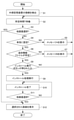
- FIG. 2 is a flowchart showing the processing of the robot control system 100 according to the present embodiment.
- the function control unit 114 detects that the external storage device 4 is connected to the robot control device 1.
- step S2 the function control unit 114 waits for a predetermined time T (for example, 0.1 second).
- step S3 the function control unit 114 determines whether or not a screen other than the screen for adding a function is selected on the teaching operation panel 3. If another screen is selected (YES), the process proceeds to step S12. On the other hand, when the screen for adding the function is selected (NO), the process proceeds to step S4.
- step S4 the function control unit 114 determines whether or not the operation of the function addition unit 111 is effectively set by the switching unit 31. If it is set to be valid (YES), the process proceeds to step S6. On the other hand, if it is set to invalid (NO), the process proceeds to step S5.
- step S5 the function control unit 114 displays a message A on the teaching operation panel 3 urging the switching unit 31 to effectively set the operation of the function addition unit 111.
- the function control unit 114 displays a message A such as "Please turn on the switch” or "The switch is off” on the teaching operation panel 3.
- step S6 the function control unit 114 enables the addition of the function by the function addition unit 111. Then, the function control unit 114 determines whether or not the additional function file exists in the external storage device 4. If the additional function file exists (YES), the process proceeds to step S8. On the other hand, if the additional function file does not exist (NO), the process proceeds to step S7.
- step S7 since the additional function file did not exist in step S6, the function control unit 114 displays a message B prompting the connection of another external storage device 4 in which the additional function file exists on the teaching operation panel 3. For example, the function control unit 114 displays a message B such as "Please connect the correct external storage device" on the teaching operation panel 3.
- step S8 the function control unit 114 determines whether or not the screen for adding a function on the teaching operation panel 3 has been operated. Specifically, the function control unit 114 determines whether the installation execution button has been pressed as an operation on the screen for adding a function on the teaching operation panel 3. If the installation execution button is pressed (YES), the process proceeds to step S9. On the other hand, if the installation execution button is not pressed (NO), the process proceeds to step S2.
- step S9 the function addition unit 111 executes a process of adding (installing) a function to the system software 121 based on the additional function file.
- step S10 the function control unit 114 displays on the teaching operation panel 3 information indicating that the function addition (installation) process is completed after the function addition by the function addition unit 111. For example, the function control unit 114 displays a message such as "installation completed".
- step S11 the function control unit 114 determines whether or not a screen other than the screen for adding a function is selected on the teaching operation panel 3. If another screen is selected (YES), the process proceeds to step S12. On the other hand, when the screen for adding the function is selected (NO), the process proceeds to step S10.
- step S12 the function control unit 114 displays the screen selected in step S3 or step S11 on the teaching operation panel 3.
- the function addition unit 111 and the screen addition unit 112 may allow the function once added to be deleted later.
- the function addition unit 111 may selectively delete the added function. Specifically, the function addition unit 111 displays a list of already added functions on the teaching operation panel 3, and selectively deletes the functions by selecting a specific function according to the operation of the teaching operation panel 3. You may.
- the deletion of the function is executed by, for example, the following processing.
- the function addition unit 111 can specify the function introduction area in the non-volatile memory of the storage unit 12 by using the ID name of the additional function.
- the control unit 11 executes a process related to deletion of each file included in the additional function file 41.
- the function addition unit 111 deletes the file expanded in the function introduction area in the storage unit 12.
- the function addition unit 111 deletes the file in the additional function file 41 to be expanded in the RAM of the storage unit 12.
- E When the robot control device 1 is restarted after all the processes are completed, the robot control device 1 becomes effective in deleting the function.
- the screen addition unit 112 deletes a new GUI screen for operating the additional device 5 added to the system software 121 based on the operation screen configuration file and the operation screen control file.
- the setting change unit 113 changes the system setting of the system software 121 after the function is deleted based on the setting data file and the command file. For example, the setting change unit 113 changes the system setting of the system software 121 regarding the operation after the deletion of the additional device 5 based on the setting data file and the command file to be deleted.
- the function control unit 114 When the operation of the function addition unit 111 is enabled by the switching unit 31, the function control unit 114 enables the deletion of the function by the function addition unit 111. Further, when the operation of the function addition unit 111 is set to be invalid by the switching unit 31, the function control unit 114 invalidates the deletion of the function by the function addition unit 111. That is, the function can be deleted by the function addition unit 111 only when the operation of the function addition unit 111 is effectively set.
- the function control unit 114 is set to invalidate the operation of the function addition unit 111 by the switching unit 31. In this case, a message urging the switching unit 31 to enable the function deletion operation of the function addition unit 111 is displayed on the teaching operation panel 3.
- the function control unit 114 teaches and operates a message urging the switching unit 31 to enable the operation of the function addition unit 111 until the switching unit 31 enables the operation of the function addition unit 111 or the screen transitions to another screen. Continue to display on board 3. Further, when the operation of the function addition unit 111 is enabled by the switching unit 31, the function control unit 114 enables the deletion of the function by the function addition unit 111.
- the function control unit may enable an operation for selectively deleting the function to the system software 121 on the teaching operation panel 3.
- the robot control device 1 can selectively delete the function added to the system software 121.
- the function control unit 114 stops the automatic operation of the robot 2 and the switching unit 31 Generates notification information to notify the setting error.
- the function control unit 114 stops the automatic operation of the robot 2 and switches.
- An abnormality message is displayed on the teaching operation panel 3 as notification information for notifying the abnormality of the setting of the unit 31. Further, the function control unit 114 may generate an alarm sound as notification information.
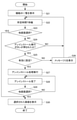
- FIG. 3 is a flowchart showing a deletion process of the function of the robot control system 100 according to the present embodiment.
- the function control unit 114 displays a list of the functions already added on the teaching operation panel 3.
- the function control unit 114 waits for a predetermined time T (for example, 0.1 second).
- step S23 the function control unit 114 determines whether or not a screen other than the screen for deleting the function is selected on the teaching operation panel 3. If another screen is selected (YES), the process proceeds to step S30. On the other hand, when the screen for deleting the function is selected (NO), the process proceeds to step S24.
- step S24 the function control unit 114 determines whether or not the screen for deleting the function has been operated on the teaching operation panel 3. Specifically, the function control unit 114 determines whether the uninstall execution button has been pressed as an operation on the screen for deleting the function on the teaching operation panel 3. When the uninstall execution button is pressed (YES), the process proceeds to step S25. On the other hand, if the installation execution button is not pressed (NO), the process proceeds to step S22.
- step S25 the function control unit 114 determines whether or not the operation of the function addition unit 111 is effectively set by the switching unit 31. If it is set to be valid (YES), the process proceeds to step S27. On the other hand, if it is set to invalid (NO), the process proceeds to step S26.
- step S26 the function control unit 114 displays a message C such as "Please turn on the switch” or "The switch is off” on the teaching operation panel 3, and then the process is performed in step S22. Move to.
- step S27 the function addition unit 111 executes a process of deleting (uninstalling) the function in the system software 121 based on the additional function file.
- step S28 the function control unit 114 displays on the teaching operation panel 3 information indicating that the function deletion (uninstallation) process is completed after the function is deleted by the function addition unit 111. For example, the function control unit 114 displays a message such as "Uninstallation completed".
- step S29 the function control unit 114 determines whether or not a screen other than the screen for deleting the function is selected on the teaching operation panel 3. If another screen is selected (YES), the process proceeds to step S30. On the other hand, when the screen for deleting the function is selected (NO), the process proceeds to step S28.
- step S30 the function control unit 114 displays the screen selected in step S23 or step S28 on the teaching operation panel 3.
- the robot control system 100 is a teaching operation panel 3 connected to a robot control device 1 for controlling the robot 2 and a robot control device 1 and operated by an operator. And.
- the robot control device 1 is provided on a storage unit 12 for storing the system software 121 of the robot control device 1, a function addition unit 111 for adding a function to the system software 121, and a function addition unit 111, which is provided on the teaching operation panel 3.
- the function addition unit 111 When the operation of the function addition unit 111 is enabled by the switching unit 31 for setting the operation to be valid or invalid, the function addition unit 111 enables the addition and deletion of the function, and the switching unit 31 enables the addition and deletion of the function.
- the function control unit 114 for invalidating the addition and deletion of the function by the function addition unit 111 is provided.
- the function addition unit 111 adds the function of the system software 121.
- the deletion can be enabled and disabled appropriately. Therefore, the robot control system 100 can appropriately add and delete new functions to the system software 121.
- the function addition unit 111 adds and deletes a function to the system software based on the additional function file stored in the external storage device. Thereby, the robot control system 100 can appropriately add and delete functions to the system software.
- the additional function file is composed of an archive file in which a plurality of programs and a plurality of data files are combined into one file.
- the robot control system 100 can suitably introduce a file having an additional function.
- the function addition unit 111 selectively adds a function to the system software 121 based on the additional function file 41.
- the robot control system 100 can appropriately introduce additional functions required for the robot control device 1.
- the function control unit 114 selectively adds a function to the system software 121 or deletes the added function on the teaching operation panel 3. Enables the operation of.
- the robot control system 100 can appropriately introduce additional functions required for the robot control device 1, and the robot control system 100 can appropriately delete the functions once added.
- the function control unit 114 stops the automatic operation and sets the switching unit 31. Generates notification information to notify the abnormality.
- the robot control system 100 can avoid introducing the additional function at the time of automatic operation, so that it is possible to prevent the automatic operation of the robot 2 from being affected by the introduction operation of the additional function.
- the function control unit 114 temporarily stores the additional function file 41 in the storage unit 12 when the additional function file 41 exists in the external storage device 4.
- the function addition unit 111 adds a function to the system software 121 based on the additional function file 41 temporarily stored in the storage unit 12.
- the robot control system 100 can add a function to the system software 121 by the additional function file 41 temporarily stored in the storage unit 12 in a state where the operation of the function addition unit 111 is set to be invalid.
- the function control unit 114 temporarily stores the additional function file 41 in the storage unit 12 when the additional function file 41 exists in the external storage device 4.
- the function control unit 114 displays the execution information for executing the addition of the function by the function addition unit 111 on the teaching operation panel 3.
- the robot control system 100 displays the execution information for executing the addition of the function by the function addition unit 111 on the teaching operation panel 3. Therefore, the operator can add a function by the function addition unit 111 by referring to the execution information and operating the teaching operation panel 3.
- the above robot control system 100 can be realized by hardware, software, or a combination thereof. Further, the control method performed by the robot control system 100 can also be realized by hardware, software, or a combination thereof.
- what is realized by software means that it is realized by a computer reading and executing a program.
- Non-transitory computer-readable media include various types of tangible storage media.
- Examples of non-temporary computer-readable media include magnetic recording media (eg, hard disk drives), optomagnetic recording media (eg, optomagnetic disks), CD-ROMs (Read Only Memory), CD-Rs, CD-Rs /. W, including semiconductor memory (for example, mask ROM, PROM (Programmable ROM), EPROM (Erasable PROM), flash ROM, RAM (random access memory), SSD (solid state drive)).
- Robot control device Teaching operation panel 3 Robot 111 Function addition part 112 Screen addition part 113 Setting change part 114 Function control part
Landscapes
- Engineering & Computer Science (AREA)
- Robotics (AREA)
- Mechanical Engineering (AREA)
- Manipulator (AREA)
- Numerical Control (AREA)
Abstract
Description
ロボット制御システム100は、ロボット制御装置1と、ロボット2と、教示操作盤3と、外部記憶装置4と、を備える。
ロボット制御装置1は、ロボット2と接続され、ロボット2を制御するために各種の処理を実行する。
制御部11は、CPU(Central Processing Unit)等のプロセッサである。制御部11は、機能追加部111と、画面追加部112と、設定変更部113と、機能制御部114と、を備える。
ロボットプログラム122は、ロボット2に各種の動作を実行させるためのプログラムである。
設定用データファイルは、ロボット制御装置1によりロボット2の設定を変更するためのファイルである。
コマンドファイルは、ロボット制御装置1が各種処理(ファイル操作、システム設定操作等)を行うためのコマンドを含むファイルである。
(a)機能追加部111は、追加機能ファイル41内のファイルを記憶部12のRAMに展開する。
(b)機能追加部111は、機能定義情報ファイルから機能情報(ID名、版数等)を読み取り、記憶部12の不揮発性メモリに追加機能を格納するための領域(機能導入領域)を確保する。また、機能追加部111は、追加機能のID名を機能導入領域の名称として使用する。
(c)機能追加部111は、記憶部12に展開されたファイルを確保された機能導入領域にすべてコピーし、その後、展開されたファイルを削除する。
(d)制御部11は、追加機能ファイル41に含まれる各ファイルに対応する処理を実行する。
(e)全ての処理の完了後、ロボット制御装置1を再起動すると、ロボット制御装置1は、追加機能を実行可能となる。
具体的には、ロボット制御装置1によるロボット2の自動運転中に、切替部31により機能追加部111の動作を有効に設定すると、機能制御部114は、ロボット2の自動運転を停止し、切替部31の設定の異常を報知する報知情報として異常メッセージを教示操作盤3に表示する。また、機能制御部114は、報知情報としてアラーム音を発生させてもよい。
ステップS1において、機能制御部114は、外部記憶装置4がロボット制御装置1に接続されたこと検出する。
ステップS3において、機能制御部114は、教示操作盤3において機能を追加するための画面以外の他の画面が選択されているか否かを判定する。他の画面が選択されている場合(YES)、処理は、ステップS12へ移る。一方、機能を追加するための画面が選択されている場合(NO)、処理は、ステップS4へ移る。
機能追加部111及び画面追加部112は、一度追加された機能を後に削除することも可能としてもよい。
(a)機能追加部111は、記憶部12の不揮発性メモリ内の機能導入領域を追加機能のID名を用いて特定することができる。
(b)制御部11は、追加機能ファイル41に含まれる各ファイルの削除に関する処理を実行する。
(c)機能追加部111は、記憶部12内の機能導入領域に展開されたファイルを削除する。
(d)機能追加部111は、記憶部12のRAMに展開する追加機能ファイル41内のファイルを削除する。
(e)全ての処理の完了後、ロボット制御装置1を再起動すると、ロボット制御装置1は、機能の削除が有効となる。
ステップS21において、機能制御部114は、既に追加された機能の一覧を教示操作盤3に表示する。
ステップS22において、機能制御部114は、所定時間T(例えば0.1秒)待機する。
2 教示操作盤
3 ロボット
111 機能追加部
112 画面追加部
113 設定変更部
114 機能制御部
Claims (9)
- ロボットを制御するためのロボット制御装置と、
前記ロボット制御装置と接続され、作業者によって操作される教示操作盤と、を備え、
前記ロボット制御装置は、
前記ロボット制御装置のシステムソフトウェアを記憶する記憶部と、
前記システムソフトウェアに機能を追加及び削除する機能追加部と、
前記教示操作盤上に設けられ、前記機能追加部の動作を有効又は無効に設定するための切替部と、
前記切替部により前記機能追加部の動作を有効に設定した場合、前記機能追加部による機能の追加及び削除を有効にし、
前記切替部により前記機能追加部の動作を無効に設定した場合、前記機能追加部による機能の追加及び削除を無効にする機能制御部と、
を備えるロボット制御システム。 - 前記機能追加部は、外部記憶装置に記憶された追加機能ファイルに基づいて前記システムソフトウェアに機能を追加及び削除する、請求項1に記載のロボット制御システム。
- 前記追加機能ファイルは、複数のプログラム及び複数データファイルを1つのファイルとしたアーカイブファイルで構成される、請求項2に記載のロボット制御装置。
- 前記機能追加部は、前記追加機能ファイルに基づいて、選択的に前記システムソフトウェアに機能を追加する、請求項2又は3に記載のロボット制御装置。
- 前記機能制御部は、前記切替部により前記機能追加部の動作を有効に設定した場合、前記教示操作盤において選択的に前記システムソフトウェアに機能を追加するための操作を可能にする、請求項4に記載のロボット制御装置。
- 前記機能制御部は、前記切替部により前記機能追加部の動作を有効に設定した場合、前記教示操作盤において選択的に前記システムソフトウェアに追加された機能を削除するための操作を可能にする、請求項4に記載のロボット制御装置。
- 前記ロボット制御装置による前記ロボットの自動運転中に、前記切替部により前記機能追加部の動作を有効に設定すると、
前記機能制御部は、前記自動運転を停止し、前記切替部の設定の異常を報知する報知情報を生成する、請求項1から6のいずれか一項に記載のロボット制御装置。 - 前記機能制御部は、前記切替部により前記機能追加部の動作を無効に設定した状態において、前記外部記憶装置に前記追加機能ファイルが存在する場合、前記追加機能ファイルを前記記憶部に一時的に記憶し、
前記機能追加部は、前記切替部により前記機能追加部の動作を有効に設定した場合、前記記憶部に一時的に記憶された前記追加機能ファイルに基づいて前記システムソフトウェアに機能を追加する、請求項2に記載のロボット制御装置。 - 前記機能制御部は、前記切替部により前記機能追加部の動作を無効に設定した状態において、前記外部記憶装置に前記追加機能ファイルが存在する場合、前記追加機能ファイルを前記記憶部に一時的に記憶し、
前記機能制御部は、前記切替部により前記機能追加部の動作を有効に設定した場合、前記機能追加部による機能の追加を実行するための実行情報を前記教示操作盤に表示する、請求項2に記載のロボット制御装置。
Priority Applications (7)
| Application Number | Priority Date | Filing Date | Title |
|---|---|---|---|
| US18/002,453 US12337480B2 (en) | 2020-07-14 | 2021-07-07 | Robot control system |
| DE112021003750.1T DE112021003750B4 (de) | 2020-07-14 | 2021-07-07 | Robotersteuersystem |
| JP2022536298A JP7525608B2 (ja) | 2020-07-14 | 2021-07-07 | ロボット制御システム |
| CN202180049467.3A CN115803157A (zh) | 2020-07-14 | 2021-07-07 | 机器人控制系统 |
| JP2024063618A JP7791236B2 (ja) | 2020-07-14 | 2024-04-10 | ロボット制御システム |
| US19/081,820 US20250205888A1 (en) | 2020-07-14 | 2025-03-17 | Robot control system |
| JP2025209175A JP2026027561A (ja) | 2020-07-14 | 2025-11-28 | ロボット制御システム |
Applications Claiming Priority (2)
| Application Number | Priority Date | Filing Date | Title |
|---|---|---|---|
| JP2020-120851 | 2020-07-14 | ||
| JP2020120851 | 2020-07-14 |
Related Child Applications (2)
| Application Number | Title | Priority Date | Filing Date |
|---|---|---|---|
| US18/002,453 A-371-Of-International US12337480B2 (en) | 2020-07-14 | 2021-07-07 | Robot control system |
| US19/081,820 Division US20250205888A1 (en) | 2020-07-14 | 2025-03-17 | Robot control system |
Publications (1)
| Publication Number | Publication Date |
|---|---|
| WO2022014444A1 true WO2022014444A1 (ja) | 2022-01-20 |
Family
ID=79554811
Family Applications (1)
| Application Number | Title | Priority Date | Filing Date |
|---|---|---|---|
| PCT/JP2021/025652 Ceased WO2022014444A1 (ja) | 2020-07-14 | 2021-07-07 | ロボット制御システム |
Country Status (5)
| Country | Link |
|---|---|
| US (2) | US12337480B2 (ja) |
| JP (3) | JP7525608B2 (ja) |
| CN (1) | CN115803157A (ja) |
| DE (1) | DE112021003750B4 (ja) |
| WO (1) | WO2022014444A1 (ja) |
Citations (4)
| Publication number | Priority date | Publication date | Assignee | Title |
|---|---|---|---|---|
| JP2000125246A (ja) * | 1998-10-14 | 2000-04-28 | Seiko Epson Corp | デジタルカメラ用記憶媒体およびデジタルカメラ |
| JP2015056161A (ja) * | 2013-09-13 | 2015-03-23 | 株式会社安川電機 | 制御装置、セキュリティー管理システム及びセキュリティー管理方法 |
| JP2016059982A (ja) * | 2014-09-16 | 2016-04-25 | セイコーエプソン株式会社 | 画像処理装置、及びロボットシステム |
| JP2019028518A (ja) * | 2017-07-26 | 2019-02-21 | ファナック株式会社 | 数値制御装置、および、数値制御装置の制御方法 |
Family Cites Families (31)
| Publication number | Priority date | Publication date | Assignee | Title |
|---|---|---|---|---|
| EP1182610A1 (en) * | 2000-02-09 | 2002-02-27 | Sony Corporation | Information processing device and method, data holding device, and program |
| SE0101199D0 (sv) * | 2001-04-02 | 2001-04-02 | Abb Ab | An industrial robot |
| US7643907B2 (en) * | 2005-02-10 | 2010-01-05 | Abb Research Ltd. | Method and apparatus for developing a metadata-infused software program for controlling a robot |
| WO2007083534A1 (ja) * | 2006-01-19 | 2007-07-26 | Konica Minolta Holdings, Inc. | 制御プログラム、プログラム提供システム及びプログラム提供方法 |
| FR2963132A1 (fr) * | 2010-07-23 | 2012-01-27 | Aldebaran Robotics | Robot humanoide dote d'une interface de dialogue naturel, methode d'utilisation et de programmation de ladite interface |
| FR2969026B1 (fr) * | 2010-12-17 | 2013-02-01 | Aldebaran Robotics | Robot humanoide dote d'un gestionnaire de ses ressources physiques et virtuelles, procedes d'utilisation et de programmation |
| JP6052576B2 (ja) * | 2012-05-30 | 2016-12-27 | 日本電気株式会社 | 情報処理システム、情報処理方法、情報処理装置、携帯端末およびその制御方法と制御プログラム |
| EP2749974A2 (en) * | 2012-12-28 | 2014-07-02 | Kabushiki Kaisha Yaskawa Denki | Robot teaching system, robot teaching assistant device, and robot teaching method |
| JP6057845B2 (ja) | 2013-06-27 | 2017-01-11 | 株式会社三栄水栓製作所 | 弁ユニット及び水栓 |
| WO2015011896A1 (ja) * | 2013-07-23 | 2015-01-29 | パナソニックIpマネジメント株式会社 | 機能設定方法 |
| JP5850962B2 (ja) | 2014-02-13 | 2016-02-03 | ファナック株式会社 | ビジュアルフィードバックを利用したロボットシステム |
| WO2016014137A2 (en) * | 2014-05-06 | 2016-01-28 | Neurala, Inc. | Apparatuses, methods, and systems for defining hardware-agnostic brains for autonomous robots |
| US10279470B2 (en) * | 2014-06-12 | 2019-05-07 | Play-i, Inc. | System and method for facilitating program sharing |
| DE102015206571B3 (de) * | 2015-04-13 | 2016-08-04 | Kuka Roboter Gmbh | Roboter-Bedienhandgerät mit einer Adaptervorrichtung für ein mobiles Endgerät |
| JP2017004204A (ja) * | 2015-06-09 | 2017-01-05 | ファナック株式会社 | タッチ操作により電子データを編集する情報処理装置 |
| EP3319761A4 (en) * | 2015-07-08 | 2019-03-06 | Universal Robots A/S | METHOD FOR EXTENDING END-USER PROGRAMMING OF AN INDUSTRIAL ROBOT WITH CONTRIBUTIONS FROM THIRD PARTIES |
| DE102015222164B4 (de) * | 2015-11-11 | 2025-01-02 | Kuka Roboter Gmbh | Verfahren und Computerprogramm zur Erzeugung einer grafischen Benutzerschnittstelle eines Manipulatorprogramms |
| EP3243607B1 (en) * | 2016-05-09 | 2021-01-27 | OpiFlex Automation AB | A system and a method for programming an industrial robot |
| DE102016208811B3 (de) * | 2016-05-20 | 2017-10-05 | Kuka Roboter Gmbh | Mobile Sicherheits-Grundsteuervorrichtung mit einer Kodiervorrichtung für ein mobiles Endgerät mit Multi-Touchscreen |
| JP6338617B2 (ja) * | 2016-05-31 | 2018-06-06 | 株式会社アスコ | 教示装置 |
| EP3512667A1 (en) * | 2016-09-13 | 2019-07-24 | ABB Schweiz AG | Method of programming an industrial robot |
| US9717607B1 (en) * | 2016-10-28 | 2017-08-01 | International Business Machines Corporation | Augmented control of robotic prosthesis by a cognitive system |
| JP6853675B2 (ja) * | 2017-01-20 | 2021-03-31 | 川崎重工業株式会社 | ロボットシステムとロボットの制御装置 |
| JP6708581B2 (ja) * | 2017-04-07 | 2020-06-10 | ライフロボティクス株式会社 | 教示装置、表示装置、教示プログラム及び表示プログラム |
| US10389820B2 (en) * | 2017-10-26 | 2019-08-20 | Autoauto, Llc | System and method for programming an embedded system |
| KR101988282B1 (ko) * | 2018-01-24 | 2019-06-12 | 주식회사 헬로긱스 | 프로그래밍 가능한 입력모듈을 포함하는 이동 로봇 |
| KR102198824B1 (ko) * | 2018-11-08 | 2021-01-05 | 정희용 | 피지컬 소프트웨어 코딩 교육 교재 실행 장치 |
| CN109483536B (zh) | 2018-11-09 | 2020-06-23 | 珠海格力电器股份有限公司 | 一种机器人的附加轴添加方法、装置、存储介质及机器人 |
| GB2580332A (en) * | 2018-12-31 | 2020-07-22 | Robotify Labs Ltd | A computer program product and method for teaching computer programming |
| US11279042B2 (en) * | 2019-03-12 | 2022-03-22 | Bear Robotics, Inc. | Robots for serving food and/or drinks |
| JP7424028B2 (ja) * | 2019-12-16 | 2024-01-30 | 株式会社デンソーウェーブ | ロボット操作端末 |
-
2021
- 2021-07-07 JP JP2022536298A patent/JP7525608B2/ja active Active
- 2021-07-07 WO PCT/JP2021/025652 patent/WO2022014444A1/ja not_active Ceased
- 2021-07-07 CN CN202180049467.3A patent/CN115803157A/zh active Pending
- 2021-07-07 US US18/002,453 patent/US12337480B2/en active Active
- 2021-07-07 DE DE112021003750.1T patent/DE112021003750B4/de active Active
-
2024
- 2024-04-10 JP JP2024063618A patent/JP7791236B2/ja active Active
-
2025
- 2025-03-17 US US19/081,820 patent/US20250205888A1/en active Pending
- 2025-11-28 JP JP2025209175A patent/JP2026027561A/ja active Pending
Patent Citations (4)
| Publication number | Priority date | Publication date | Assignee | Title |
|---|---|---|---|---|
| JP2000125246A (ja) * | 1998-10-14 | 2000-04-28 | Seiko Epson Corp | デジタルカメラ用記憶媒体およびデジタルカメラ |
| JP2015056161A (ja) * | 2013-09-13 | 2015-03-23 | 株式会社安川電機 | 制御装置、セキュリティー管理システム及びセキュリティー管理方法 |
| JP2016059982A (ja) * | 2014-09-16 | 2016-04-25 | セイコーエプソン株式会社 | 画像処理装置、及びロボットシステム |
| JP2019028518A (ja) * | 2017-07-26 | 2019-02-21 | ファナック株式会社 | 数値制御装置、および、数値制御装置の制御方法 |
Also Published As
| Publication number | Publication date |
|---|---|
| JP7525608B2 (ja) | 2024-07-30 |
| JPWO2022014444A1 (ja) | 2022-01-20 |
| JP2024086860A (ja) | 2024-06-28 |
| DE112021003750T5 (de) | 2023-05-11 |
| JP2026027561A (ja) | 2026-02-18 |
| US20250205888A1 (en) | 2025-06-26 |
| US20230256599A1 (en) | 2023-08-17 |
| CN115803157A (zh) | 2023-03-14 |
| JP7791236B2 (ja) | 2025-12-23 |
| US12337480B2 (en) | 2025-06-24 |
| DE112021003750B4 (de) | 2026-04-23 |
Similar Documents
| Publication | Publication Date | Title |
|---|---|---|
| WO2015027732A1 (zh) | 一种动态补丁函数的方法及装置、存储介质 | |
| JP5451799B2 (ja) | Pos装置 | |
| JP7525608B2 (ja) | ロボット制御システム | |
| JP7818118B2 (ja) | Rpa管理装置、rpa管理方法、および、rpa管理プログラム | |
| JP5865192B2 (ja) | 教示データ編集システムおよびプログラム | |
| CN112936220B (zh) | 机器人控制装置 | |
| JP4534796B2 (ja) | 制御システム | |
| JP5133230B2 (ja) | 情報処理装置、情報処理方法、及び、プログラム | |
| CN114326507A (zh) | 机台控制方法、装置、电子设备及计算机可读存储介质 | |
| JP2001135010A (ja) | マスター/スレーブ切替システム | |
| JP5158883B2 (ja) | ファームウェア更新方法及びファームウェア更新装置 | |
| CN110073298A (zh) | 绘图软件、存储介质及绘图装置 | |
| CN115202683A (zh) | 程序修正辅助装置以及程序修正辅助方法 | |
| JP2005122623A (ja) | 複合プログラムおよびプログラム処理装置 | |
| JP2017049722A (ja) | ジョブ管理システム、ジョブ管理方法およびプログラム | |
| JP3853581B2 (ja) | 制御装置、および、そのプログラムが記録された記録媒体 | |
| JP2005321967A (ja) | 情報処理装置 | |
| JP4028857B2 (ja) | 数値制御装置 | |
| CN117762518A (zh) | 一种基本输入输出系统的设定方法、装置、设备及介质 | |
| JP2005078368A (ja) | ファイル制御プログラム、ファイル制御装置及びファイル制御方法 | |
| JP2015060320A (ja) | プログラム、情報処理装置及び情報処理システム | |
| JP2000010534A (ja) | 画面解像度変更方法と装置 | |
| JPWO2012169038A1 (ja) | 電子機器、電源操作ログ記録方法およびプログラム | |
| JP2021068147A (ja) | 情報処理装置、情報処理方法、およびプログラム | |
| JP2008033553A (ja) | バージョン管理システムおよびバージョン管理方法 |
Legal Events
| Date | Code | Title | Description |
|---|---|---|---|
| 121 | Ep: the epo has been informed by wipo that ep was designated in this application |
Ref document number: 21843139 Country of ref document: EP Kind code of ref document: A1 |
|
| ENP | Entry into the national phase |
Ref document number: 2022536298 Country of ref document: JP Kind code of ref document: A |
|
| WWE | Wipo information: entry into national phase |
Ref document number: 112021003750 Country of ref document: DE |
|
| 122 | Ep: pct application non-entry in european phase |
Ref document number: 21843139 Country of ref document: EP Kind code of ref document: A1 |
|
| WWG | Wipo information: grant in national office |
Ref document number: 18002453 Country of ref document: US |
|
| WWG | Wipo information: grant in national office |
Ref document number: 112021003750 Country of ref document: DE |