WO2016136605A1 - 情報処理装置および画面生成方法 - Google Patents
情報処理装置および画面生成方法 Download PDFInfo
- Publication number
- WO2016136605A1 WO2016136605A1 PCT/JP2016/054817 JP2016054817W WO2016136605A1 WO 2016136605 A1 WO2016136605 A1 WO 2016136605A1 JP 2016054817 W JP2016054817 W JP 2016054817W WO 2016136605 A1 WO2016136605 A1 WO 2016136605A1
- Authority
- WO
- WIPO (PCT)
- Prior art keywords
- screen
- user
- mode
- information processing
- login
- Prior art date
- Legal status (The legal status is an assumption and is not a legal conclusion. Google has not performed a legal analysis and makes no representation as to the accuracy of the status listed.)
- Ceased
Links
Images

Classifications
-
- G—PHYSICS
- G06—COMPUTING OR CALCULATING; COUNTING
- G06F—ELECTRIC DIGITAL DATA PROCESSING
- G06F1/00—Details not covered by groups G06F3/00 - G06F13/00 and G06F21/00
- G06F1/26—Power supply means, e.g. regulation thereof
- G06F1/32—Means for saving power
- G06F1/3203—Power management, i.e. event-based initiation of a power-saving mode
- G06F1/3234—Power saving characterised by the action undertaken
- G06F1/325—Power saving in peripheral device
- G06F1/3265—Power saving in display device
-
- A—HUMAN NECESSITIES
- A63—SPORTS; GAMES; AMUSEMENTS
- A63F—CARD, BOARD, OR ROULETTE GAMES; INDOOR GAMES USING SMALL MOVING PLAYING BODIES; VIDEO GAMES; GAMES NOT OTHERWISE PROVIDED FOR
- A63F13/00—Video games, i.e. games using an electronically generated display having two or more dimensions
-
- A—HUMAN NECESSITIES
- A63—SPORTS; GAMES; AMUSEMENTS
- A63F—CARD, BOARD, OR ROULETTE GAMES; INDOOR GAMES USING SMALL MOVING PLAYING BODIES; VIDEO GAMES; GAMES NOT OTHERWISE PROVIDED FOR
- A63F13/00—Video games, i.e. games using an electronically generated display having two or more dimensions
- A63F13/25—Output arrangements for video game devices
-
- A—HUMAN NECESSITIES
- A63—SPORTS; GAMES; AMUSEMENTS
- A63F—CARD, BOARD, OR ROULETTE GAMES; INDOOR GAMES USING SMALL MOVING PLAYING BODIES; VIDEO GAMES; GAMES NOT OTHERWISE PROVIDED FOR
- A63F13/00—Video games, i.e. games using an electronically generated display having two or more dimensions
- A63F13/30—Interconnection arrangements between game servers and game devices; Interconnection arrangements between game devices; Interconnection arrangements between game servers
- A63F13/35—Details of game servers
-
- A—HUMAN NECESSITIES
- A63—SPORTS; GAMES; AMUSEMENTS
- A63F—CARD, BOARD, OR ROULETTE GAMES; INDOOR GAMES USING SMALL MOVING PLAYING BODIES; VIDEO GAMES; GAMES NOT OTHERWISE PROVIDED FOR
- A63F13/00—Video games, i.e. games using an electronically generated display having two or more dimensions
- A63F13/45—Controlling the progress of the video game
- A63F13/49—Saving the game status; Pausing or ending the game
- A63F13/493—Resuming a game, e.g. after pausing, malfunction or power failure
-
- A—HUMAN NECESSITIES
- A63—SPORTS; GAMES; AMUSEMENTS
- A63F—CARD, BOARD, OR ROULETTE GAMES; INDOOR GAMES USING SMALL MOVING PLAYING BODIES; VIDEO GAMES; GAMES NOT OTHERWISE PROVIDED FOR
- A63F13/00—Video games, i.e. games using an electronically generated display having two or more dimensions
- A63F13/50—Controlling the output signals based on the game progress
- A63F13/52—Controlling the output signals based on the game progress involving aspects of the displayed game scene
-
- A—HUMAN NECESSITIES
- A63—SPORTS; GAMES; AMUSEMENTS
- A63F—CARD, BOARD, OR ROULETTE GAMES; INDOOR GAMES USING SMALL MOVING PLAYING BODIES; VIDEO GAMES; GAMES NOT OTHERWISE PROVIDED FOR
- A63F13/00—Video games, i.e. games using an electronically generated display having two or more dimensions
- A63F13/50—Controlling the output signals based on the game progress
- A63F13/53—Controlling the output signals based on the game progress involving additional visual information provided to the game scene, e.g. by overlay to simulate a head-up display [HUD] or displaying a laser sight in a shooting game
-
- A—HUMAN NECESSITIES
- A63—SPORTS; GAMES; AMUSEMENTS
- A63F—CARD, BOARD, OR ROULETTE GAMES; INDOOR GAMES USING SMALL MOVING PLAYING BODIES; VIDEO GAMES; GAMES NOT OTHERWISE PROVIDED FOR
- A63F13/00—Video games, i.e. games using an electronically generated display having two or more dimensions
- A63F13/70—Game security or game management aspects
- A63F13/79—Game security or game management aspects involving player-related data, e.g. identities, accounts, preferences or play histories
-
- A—HUMAN NECESSITIES
- A63—SPORTS; GAMES; AMUSEMENTS
- A63F—CARD, BOARD, OR ROULETTE GAMES; INDOOR GAMES USING SMALL MOVING PLAYING BODIES; VIDEO GAMES; GAMES NOT OTHERWISE PROVIDED FOR
- A63F13/00—Video games, i.e. games using an electronically generated display having two or more dimensions
- A63F13/85—Providing additional services to players
- A63F13/87—Communicating with other players during game play, e.g. by e-mail or chat
-
- G—PHYSICS
- G06—COMPUTING OR CALCULATING; COUNTING
- G06F—ELECTRIC DIGITAL DATA PROCESSING
- G06F1/00—Details not covered by groups G06F3/00 - G06F13/00 and G06F21/00
- G06F1/26—Power supply means, e.g. regulation thereof
- G06F1/32—Means for saving power
- G06F1/3203—Power management, i.e. event-based initiation of a power-saving mode
- G06F1/3234—Power saving characterised by the action undertaken
- G06F1/3287—Power saving characterised by the action undertaken by switching off individual functional units in the computer system
-
- G—PHYSICS
- G06—COMPUTING OR CALCULATING; COUNTING
- G06F—ELECTRIC DIGITAL DATA PROCESSING
- G06F1/00—Details not covered by groups G06F3/00 - G06F13/00 and G06F21/00
- G06F1/26—Power supply means, e.g. regulation thereof
- G06F1/32—Means for saving power
- G06F1/3203—Power management, i.e. event-based initiation of a power-saving mode
-
- Y—GENERAL TAGGING OF NEW TECHNOLOGICAL DEVELOPMENTS; GENERAL TAGGING OF CROSS-SECTIONAL TECHNOLOGIES SPANNING OVER SEVERAL SECTIONS OF THE IPC; TECHNICAL SUBJECTS COVERED BY FORMER USPC CROSS-REFERENCE ART COLLECTIONS [XRACs] AND DIGESTS
- Y02—TECHNOLOGIES OR APPLICATIONS FOR MITIGATION OR ADAPTATION AGAINST CLIMATE CHANGE
- Y02D—CLIMATE CHANGE MITIGATION TECHNOLOGIES IN INFORMATION AND COMMUNICATION TECHNOLOGIES [ICT], I.E. INFORMATION AND COMMUNICATION TECHNOLOGIES AIMING AT THE REDUCTION OF THEIR OWN ENERGY USE
- Y02D10/00—Energy efficient computing, e.g. low power processors, power management or thermal management
-
- Y—GENERAL TAGGING OF NEW TECHNOLOGICAL DEVELOPMENTS; GENERAL TAGGING OF CROSS-SECTIONAL TECHNOLOGIES SPANNING OVER SEVERAL SECTIONS OF THE IPC; TECHNICAL SUBJECTS COVERED BY FORMER USPC CROSS-REFERENCE ART COLLECTIONS [XRACs] AND DIGESTS
- Y02—TECHNOLOGIES OR APPLICATIONS FOR MITIGATION OR ADAPTATION AGAINST CLIMATE CHANGE
- Y02D—CLIMATE CHANGE MITIGATION TECHNOLOGIES IN INFORMATION AND COMMUNICATION TECHNOLOGIES [ICT], I.E. INFORMATION AND COMMUNICATION TECHNOLOGIES AIMING AT THE REDUCTION OF THEIR OWN ENERGY USE
- Y02D30/00—Reducing energy consumption in communication networks
- Y02D30/50—Reducing energy consumption in communication networks in wire-line communication networks, e.g. low power modes or reduced link rate
Definitions
- the present invention relates to an information processing apparatus having a power saving function.
- Some information processing devices such as game devices are equipped with a power saving function that automatically turns off the system power when the user's no-operation period reaches a predetermined time. Since portable devices are battery-powered, there is a strong demand for power saving. However, even in stationary information devices, efforts are being made to save power in order to reduce unnecessary power consumption.
- the suspend function installed in the personal computer is configured to store the state immediately before turning off the power in the memory and to return to the state immediately before turning off the power when the power is turned on next time. As a result, the user can immediately start work from the state immediately before suspending.
- the information processing apparatus generates a screen after the system resume so that the user can start the operation without feeling uncomfortable after the system resume.
- information processing devices that allow various users to log in are slightly different from personal computers that are assumed to be used by a specific person. For example, if the system is suspended while a user is logged in, and another user logs in after the system resumes, the logged-in user is different before and after the suspend, so the screen before the suspend is restored. It is not preferable. In order to solve this problem, it is necessary to control to return to the screen immediately before suspending only when the same user logs in as before suspending.
- an object of the present invention is to provide a technique capable of suitably generating a screen after system resume.
- an information processing apparatus includes a mode control unit that sets an operation mode to a power saving mode, and a screen control unit that generates a display screen. After the mode control unit transitions from the power saving mode to the normal mode, the screen control unit generates a display screen according to the type of the screen that was displayed before the power saving mode was set.
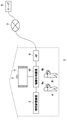
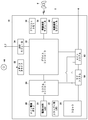
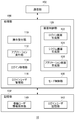
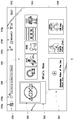
- FIG. 1 It is a figure which shows the information processing system concerning the Example of this invention. It is a figure which shows the functional block of information processing apparatus. It is a figure which shows the structure of information processing apparatus.
- A shows the example of a user selection screen
- (b) is a figure which shows the example of a passcode input screen.
- It is a figure which shows the example of a home screen.
- It is a figure which shows the example of the function screen which changed from the home screen.
- FIG. 1 shows an information processing system 1 according to an embodiment of the present invention.
- the information processing system 1 includes an information processing apparatus 10 that is a user terminal and a server 5.
- the access point (hereinafter referred to as “AP”) 8 has functions of a wireless access point and a router, and the information processing apparatus 10 can communicate with the server 5 on the network 3 by connecting to the AP 8 wirelessly or via a wire. Connect to.
- AP access point
- the auxiliary storage device 2 is a large-capacity storage device such as an HDD (hard disk drive) or a flash memory, and may be an external storage device connected to the information processing device 10 by a USB (Universal Serial Bus) or a built-in storage. It may be a device.
- the output device 4 may be a television having a display for outputting an image and a speaker for outputting sound, or may be a computer display.
- the information processing device 10 is connected to the input device 6 operated by the user wirelessly or by wire, and the input device 6 outputs operation information indicating the operation result of the user to the information processing device 10.
- the information processing apparatus 10 receives the operation information from the input device 6, the information processing apparatus 10 reflects the result in OS (system software) or application processing, and outputs the processing result from the output device 4.
- the input device 6 includes a plurality of input units such as a plurality of push-type operation buttons, an analog stick that can input an analog amount, and a rotary button.
- the information processing device 10 may be a game device that executes a game program and other applications, and the input device 6 may be a game controller that provides user operation information to the game device.
- the camera 7 as an imaging device is provided in the vicinity of the output device 4 and images the space around the output device 4.
- FIG. 1 shows an example in which the camera 7 is attached to the upper portion of the output device 4, the camera 7 may be disposed on the side or lower portion of the output device 4, and in any case, located in front of the output device 4. It is arranged at a position where the user can be imaged.
- the camera 7 may be a stereo camera.
- the server 5 provides a network service to the user of the information processing system 1.
- the server 5 manages a network account for identifying each user, and each user signs in to a network service provided by the server 5 using the network account.
- the user can register game save data and a trophy, which is a virtual award item acquired during game play, in the server 5.
- the user can also connect with other users via the network 3 and exchange chat messages and voice messages.
- FIG. 2 shows functional blocks of the information processing apparatus 10.
- the information processing apparatus 10 includes a main power button 20, a power ON LED 21, a standby LED 22, a system controller 24, a clock 26, a device controller 30, a media drive 32, a USB module 34, a flash memory 36, a wireless communication module 38, and wired communication.
- a module 40, a subsystem 50, and a main system 60 are included.
- the main system 60 includes a main CPU (Central Processing Unit), a memory and a memory controller that are main storage devices, a register, a GPU (Graphics Processing Unit), and the like.
- the GPU is mainly used for arithmetic processing of game programs.
- the main CPU has a function of starting up the OS and executing an application stored in the auxiliary storage device 2 or the ROM medium 44 in an environment provided by the OS.
- the subsystem 50 includes a sub CPU, a memory that is a main storage device, a memory controller, a register, and the like, and does not include a GPU.
- the number of circuit gates of the sub CPU is smaller than the number of circuit gates of the main CPU, and the operation power consumption of the sub CPU is smaller than the operation power consumption of the main CPU.
- the sub CPU operates while the main CPU is in the standby mode, and its processing function is limited in order to keep power consumption low.
- the main power button 20 is an input unit through which an operation input from a user is performed.
- the main power button 20 is provided on the front surface of the housing of the information processing apparatus 10 and turns on or off power supply to the main system 60 of the information processing apparatus 10.
- the main power supply being in the on state means that the main system 60 is in the normal mode (active mode)
- the main power supply in the off state means that the main system 60 is in the standby mode (suspend mode). It means that there is.
- the power ON LED 21 is lit when the main power button 20 is turned on, and the standby LED 22 is lit when the main power button 20 is turned off.
- the system controller 24 detects pressing of the main power button 20 by the user.
- the system controller 24 acquires the pressing operation as an “on instruction”, while when the main power is in the on state, the main power button 20 is pressed.
- the button 20 is pressed, the system controller 24 acquires the pressing operation as an “off instruction”.
- the main power can be turned on / off by operating a predetermined button of the input device 6.
- the system controller 24 acquires the ON instruction, the main system 60 executes a user login process.
- the main CPU has a function of executing an application stored in the auxiliary storage device 2 or the ROM medium 44, while the sub CPU does not have such a function.
- the sub CPU has a function of accessing the auxiliary storage device 2 and a function of transmitting and receiving data to and from the server 5.
- the information processing apparatus 10 since the subsystem 50 is operating even when the main system 60 is suspended, the information processing apparatus 10 always maintains a signed-in state for the network service provided by the server 5.
- the clock 26 is a real-time clock, generates current date and time information, and supplies it to the system controller 24, the subsystem 50, and the main system 60.
- the device controller 30 is configured as an LSI (Large-Scale Integrated ⁇ ⁇ Circuit) that exchanges information between devices like a south bridge. As illustrated, devices such as a system controller 24, a media drive 32, a USB module 34, a flash memory 36, a wireless communication module 38, a wired communication module 40, a subsystem 50, and a main system 60 are connected to the device controller 30.
- the device controller 30 absorbs the difference in electrical characteristics of each device and the difference in data transfer speed, and controls the timing of data transfer.
- the media drive 32 is a drive device that loads and drives application software such as a game and a ROM medium 44 that records license information, and reads programs and data from the ROM medium 44.
- the ROM medium 44 is a read-only recording medium such as an optical disc, a magneto-optical disc, or a Blu-ray disc.
- the USB module 34 is a module that is connected to an external device with a USB cable.
- the USB module 34 is connected to the auxiliary storage device 2 and the camera 7 with a USB cable.
- the flash memory 36 is an auxiliary storage device that constitutes an internal storage.
- the wireless communication module 38 wirelessly communicates with, for example, the input device 6 using a communication protocol such as a Bluetooth (registered trademark) protocol or an IEEE802.11 protocol.
- the wireless communication module 38 corresponds to the third generation (3rd Generation) digital mobile phone system conforming to the IMT-2000 (International Mobile Telecommunication 2000) standard defined by the ITU (International Telecommunication Union). It may also be compatible with another generation of digital mobile phone systems.
- the wired communication module 40 performs wired communication with an external device and connects to the network 3 via the AP 8.
- the information processing apparatus 10 prepares a plurality of types of login processes, and executes login processes according to system settings when a login request is received from a user.
- a login request is received from a user.
- an outline of two types of typical login processes in the information processing apparatus 10 will be described.
- the login process 1 is a process for automatically logging in a user when automatic login is set for one user.
- a user who has been set for automatic login is logged in immediately after the information processing apparatus 10 is activated or immediately after the information processing apparatus 10 is resumed from system suspend.
- the user can turn on the main power button 20 or operate a predetermined button on the input device 6 when the main power of the information processing apparatus 10 is turned off. You can log in automatically without going through the selection screen.
- This login process 1 is executed when there is no logged-in user, and this login process 1 is not executed when there is an already logged-in user.
- the login process 2 is a process for logging in the user selected on the user selection screen.
- the information processing device 10 displays a user selection screen on the output device 4.
- the information processing apparatus 10 performs user authentication and logs the user in.
- the information processing apparatus 10 has a power saving function, and transitions the operation mode from the normal mode to the power saving mode when a predetermined condition is satisfied. After that, when a return operation is performed by the user and a transition is made from the power saving mode to the normal mode, the information processing apparatus 10 is displayed before the user who logs in first after the return and / or the power saving mode is set. It has a function to generate a display screen according to the type of screen that was used.
- FIG. 3 shows the configuration of the information processing apparatus 10.
- the information processing apparatus 10 includes a processing unit 100, a communication unit 102, and a storage unit 132.
- the communication unit 102 includes the wireless communication module 38 and the wired communication module 40 illustrated in FIG.
- the storage unit 132 includes an auxiliary storage device 2, a flash memory 36, or a memory such as a RAM (not shown).
- the functions of the processing unit 100 are realized by an OS (system software) and an application or memory executed by the OS, and include an operation receiving unit 110, an application execution unit 112, a login processing unit 114, a login user management unit 116, a screen control unit 120, and the like.
- a mode control unit 130 is provided.
- the screen control unit 120 has a function of generating a display screen, and includes a login screen generation unit 122, a system screen generation unit 124, and an application screen generation unit 126.
- each element described as a functional block for performing various processes can be configured by a circuit block, a memory, and other LSIs in terms of hardware, and loaded into the memory in terms of software. Realized by programs. Therefore, it is understood by those skilled in the art that these functional blocks can be realized in various forms by hardware only, software only, or a combination thereof, and is not limited to any one.
- the information processing apparatus 10 is equipped with a suspend and resume control function of the main system 60.
- the mode control unit 130 changes the operation mode of the system between the normal mode and the power saving mode.
- the “power saving mode” may be referred to as a standby mode or a suspend mode.
- the information processing apparatus 10 is a device that allows a plurality of registered users to log in simultaneously. By allowing a plurality of users to log in, the information processing apparatus 10 can individually save the save data of each logged-in user.
- the registered user information holding unit 140 associates a user account with a login passcode, a sign-in ID for signing in to the server 5, a network account, a user online ID, a user icon for expressing the user, and the like. , As registered user information.
- at least registered user information of the users A and B is registered in the registered user information holding unit 140. Therefore, each of the users A and B can log in and enjoy an application such as a game together. .
- the login process 1 is executed when one registered user is set as an automatic login user and there is no logged-in user.
- the operation accepting unit 110 accepts a login request.
- the login processing unit 114 causes the information processing apparatus 10 to automatically log in the user for which automatic login is set. For example, if the user A is set as a target for automatic login, the login processing unit 114 logs the user A in.
- the login processing unit 114 stores login information, that is, information (user account) for specifying the user A and the device ID of the input device 6 in association with each other in the login user storage unit 142.
- login process 2 is executed.
- the operation reception unit 110 receives a login request and transmits the login request to the screen control unit 120.
- the login screen generation unit 122 reads the registered user information held in the registered user information holding unit 140 and generates a selection screen for selecting a registered user. Specifically, the login screen generation unit 122 reads a user icon and an online ID (or a nickname on the network) from the registered user information, and displays a user selection screen in which the registered user's online IDs are arranged in a list format. It is displayed on the output device 4.
- FIG. 4A shows an example of a user selection screen.
- the user selection screen constitutes a login screen for the user to log in.
- the user icon and the online ID are referred to as “user specifying information”.
- the login screen generation unit 122 displays the focus frame 200 that surrounds one piece of user specifying information so as to be movable on the list.
- the user operates the input unit of the input device 6 to move the focus frame 200 to the display area of his / her user specifying information and presses the enter button of the input device 6 to select his / her user specifying information.
- the login processing unit 114 displays the passcode input screen shown in FIG. To do.
- the login processing unit 114 determines whether or not it is the same as the HANAKO login passcode held in the registered user information holding unit 140. HANAKO) is logged in.
- the login processing unit 114 stores the login information, that is, information (user account) for specifying the user A (HANAKO) and the device ID of the input device 6 in association with each other in the login user storage unit 142.
- the user A logs in to the information processing apparatus 10 by such a procedure.
- the system screen generation unit 124 After the user logs in, the system screen generation unit 124 generates a system screen and displays it on the output device 4.
- the system screen includes a home screen and a function screen that transitions from the home screen.
- the system screen generation unit 124 When the user A logs in to the information processing apparatus 10, the system screen generation unit 124 first displays a home screen that is a basic operation on the output device 4.
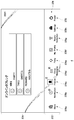
- FIG. 5 shows an example of the home screen.
- the system screen generation unit 124 arranges the new arrival information icon 330 at the top (that is, the left end) of the icon row.
- the system screen generation unit 124 puts the new arrivals information icon 330 into the focus frame 328 and sets the focus state.
- the system screen generation unit 124 arranges the content icons 326 in the order of the access date and time closer to the current date and time after the second in the icon row based on the user access date and time for each application and each content. Further, the system screen generation unit 124 arranges the live information item 332 in the live area 316.
- the system screen generation unit 124 arranges a part of a plurality of system function icons 376 indicating a plurality of system functions provided by the information processing apparatus 10 in the system area 312.
- a store icon 376a, a notification icon 376b, a friend icon 376c, a profile icon 376f, and a trophy icon 376g are displayed.
- the system screen generation unit 124 arranges a trophy number indicator indicating the number of trophy acquired by the user A (“23” in FIG. 5) in association with the trophy icon 376g.
- the system screen generation unit 124 arranges an unread number indicator indicating the number of unread messages by the user A (“6” in FIG. 5) in association with the notification icon 376b.
- the system screen generation unit 124 forms a display area 320 for displaying a message addressed to the user A in the vicinity of the notification icon 376b.
- the system screen generation unit 124 arranges an online number indicator indicating the number of online friend users, that is, the number of currently logged-in friends connected to the network 3 ("3" in FIG. 5) in association with the friend icon 376c. .
- the friend user is a user registered as a friend of the user A in the server 5.
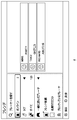
- the system screen generating unit 124 When the user selects the friend icon 376c on the home screen shown in FIG. 5, the system screen generating unit 124 generates a function screen related to the friend.
- FIG. 6 shows an example of a function screen transitioned from the home screen.
- the system screen generation unit 124 arranges a plurality of system function icons 376 in the system function selection area 372.
- a store icon 376a, a notification icon 376b, a friend icon 376c, a group message icon 376d, a party icon 376e, a profile icon 376f, a trophy icon 376g, a setting icon 376h, and a power icon 376i are displayed.
- the system screen generation unit 124 sequentially switches the system function icons 376 to be focused in accordance with the operation input in the horizontal direction of the input device 6 by the user, and displays the focused icons in a highlighted manner (large size, different colors, etc.).
- FIG. 6 shows a state in which the friend icon 376c is selected and focused and highlighted from other icons.
- the presence information of online friends is displayed.
- the operation reception unit 110 receives the determination operation and provides the determination operation to the system screen generation unit 124.
- the system screen generation unit 124 displays a screen ( (Hereinafter referred to as a friend screen) is generated and displayed on the output device 4.
- FIG. 7 shows an example of a friend screen.
- the application execution unit 112 executes an application
- the application screen generation unit 126 generates an application screen.
- a typical example of the application is a game, which includes a web browser, a moving image reproduction application, and the like. Therefore, in the embodiment, the application screen is a game screen generated by a game, a browser screen generated by a web browser, a video screen generated by a video playback application, etc., and screens generated by other system software are collectively referred to as a system.
- a friend screen shown in FIG. 7 is also one of the system screens.
- the operation accepting unit 110 accepts an application activation operation
- the application execution unit 112 executes the game program.
- the login user management unit 116 associates information (application ID) that identifies the activated application with the logged-in user storage unit 142 in association with the user account of the activated user A.
- the login user storage unit 142 stores the user who started the application.
- the login user management unit 116 may store the user who started the application in another storage unit.
- the application execution unit 112 performs a calculation process for moving the game character in the virtual space based on the operation information input from the user A to the input device 6.
- the application screen generation unit 126 includes a GPU (Graphics Processing Unit) that executes rendering processing and the like, and receives game program processing results to generate game image data to be displayed on the output device 4.
- GPU Graphics Processing Unit
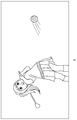
- FIG. 8 shows an example of the game screen.
- the application execution unit 112 progresses the game using the operation information of the input device 6 received by the operation reception unit 110, and the application screen generation unit 126 generates a game screen and displays it on the output device 4.
- FIG. 1 shows a situation in which user B participates in the game and plays a golf game together with two people.
- the mode control unit 130 sets the operation mode of the main system 60 to either the normal mode or the power saving mode (standby mode).
- the transition to the standby mode is executed with the following operation as a trigger.
- A1 When a predetermined button of the input device 6 is operated, a power setting menu is displayed. By selecting “standby mode”, the main system 60 is suspended.
- A2) When the power icon 376i is selected on the function screen shown in FIG. 6, the power setting menu is displayed, and the main system 60 is suspended by selecting “enter standby mode”.
- A3 When the main power button 20 is pressed for a short time, the main system 60 is suspended.
- A4 If it is set to shift to the standby mode when no operation input is made for a predetermined time, the main system 60 is suspended when the non-operation period reaches the predetermined time.
- the mode control unit 130 executes the suspend process, and the operation mode Set to standby mode.
- the suspend process is a process of saving the data of the application being executed immediately before the transition stored in the main memory or the register of the main system 60 in another memory as the suspend data.
- Another memory may be a RAM that is supplied with power even in the standby mode, or may be a flash memory 36 that is a non-volatile memory.
- the logged-in users A and B are automatically logged out before transitioning to the standby mode.
- the mode control unit 130 turns off the main system 60 and sets the operation mode to the standby mode.
- one feature of the login processing unit 114 is that all logged-in users are logged out before system suspend.
- the login processing unit 114 can maintain the login state of the user even during the system suspend. In this case, in order to return to the state before the suspend after the system resume, all the login users before the suspend are You must log in again.
- the information processing apparatus 10 according to the embodiment is a game device, and it cannot be said that all users who have logged in before suspending have the same timing to re-login at the same time, and the login state is maintained during suspending. If the control is performed, it is expected that it is difficult to return to the original state. Therefore, the login processing unit 114 logs out all logged-in users before system suspend so that anyone can log in after resuming.
- the login processing unit 114 deletes the login information of the users A and B stored in the login user storage unit 142 by logging out all users.
- the login information includes information indicating that the user A has started the application (golf game), but this information is left.
- Information indicating that the user A has started the application may continue to be stored in the login user storage unit 142, but may be saved in another memory by the suspend process. In any case, information indicating that the user A has started the application that was being executed before the suspension is stored in the storage unit 132 even during the suspension, and can be referred to by the login processing unit 114 after the resume. It is like that.
- the login processing unit 114 is further characterized in that the user is logged out after the suspend processing by the mode control unit 130 is completed. If the user is logged out before the suspend process, the player disappears from the game, and the game ends at that point. Therefore, after the state in which the users A and B are playing is saved by the suspend process, the login processing unit 114 forcibly logs out the logged-in user, and then the mode control unit 130 puts the main system 60 in the standby state. The mode is changed.
- the transition from the standby mode to the normal mode is executed in response to the following operation.
- B1 When a predetermined button of the input device 6 is operated, the main system 60 is powered on and resumed.
- B2 When the main power button 20 is pressed briefly, the main system 60 is turned on and resumed.
- B3 When an activation request transmitted from an information device different from the information processing apparatus 10 is received, the main system 60 is powered on and resumed. This operation is performed at the start of remote play.
- remote play a user who has registered a user account in the information processing apparatus 10 transmits game operation information to the information processing apparatus 10 using an information device from a remote location, and the operation information is received from the information processing apparatus 10.
- a game can be played by receiving a game image reflected in the progress of the game.
- the mode control unit 130 executes the resume process, changes the operation mode to the normal mode, and the login processing unit 114 performs the login process. Execute. As described above, if the automatic login is set, the login processing unit 114 automatically logs in the user. If the automatic login is not set, the login screen generating unit 122 displays the user selection screen (see FIG. 4). ) Is displayed on the output device 4, and the login processing unit 114 logs the user in.
- the screen control unit 120 When the user logs in after the mode control unit 130 transitions from the standby mode to the normal mode, the screen control unit 120 generates a display screen according to the logged-in user. Specifically, the screen control unit 120 generates a display screen according to whether or not the logged-in user is a user who started the application before transition to the standby mode.
- the login processing unit 114 refers to the user account of the logged-in user and the user account of the user who started the application before suspending stored in the storage unit 132, and determines whether or not they match. If the two match, the login processing unit 114 detects that the user who started the application before suspending has logged in again, and notifies the screen control unit 120 of it. Thus, the application screen generation unit 126 displays the application screen displayed before the suspension on the output device 4 using the application data saved by the suspend process. As a result, the user A can immediately resume the game.
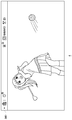
- FIG. 9 shows an example of an application screen displayed after system resume.
- an information bar 380 is temporarily displayed on the application screen for about 10 seconds.
- This information bar 380 is the display content of the system area 312 on the home screen (see FIG. 5), that is, a part of the system screen is displayed on the application screen that returns after resume.
- the screen control unit 120 can notify the latest information to the user A by displaying a part of the system screen (here, the home screen) together with the application screen. Note that the user A cannot operate the information bar 380 and needs to return to the home screen to view the latest information.
- the game returns in a state where the users A and B are playing, but the user B is logged out when returning. For this reason, the game is handled as if user B had left the game at the time of return. In order for the user B to play the golf game, the user B may log in again and then participate in the game.
- the login processing unit 114 detects that a user other than the user who started the application before the suspension is logged in.
- the login processing unit 114 notifies the screen control unit 120 to that effect, and the system screen generation unit 124 thereby displays a predetermined screen on the output device 4.
- the system screen generator 124 displays a home screen shown in FIG. 5 on the output device 4 as a predetermined screen.
- the home screen is a basic screen for starting an application and opening a function screen, and a login user can perform various operations from the home screen.
- the home screen can be said to be the most convenient screen for the user, and the system screen generation unit 124 presents the home screen to the login user, so that the login user can immediately start the game or display the friend screen. You can see.
- the application execution unit 112 is in a state where the game started by the user A before suspending is paused. Therefore, when the logged-in user starts the game, the user A starts up. You may notify that the played game is over.
- the application screen displayed immediately before the transition is provided to the user A, and when a registered user other than the user A logs in, A home screen is provided.
- the user A started and played the game himself, so it is highly likely that the same game will be played after re-login, while the user B participates in the game started by the user A.
- the screen control unit 120 controls the display screen after re-login to be different depending on whether the user has started the application or not.
- the above is the processing when the application screen is displayed on the output device 4 immediately before suspending.
- the screen control unit 120 When a transition is made from the state in which the application screen is displayed to the standby mode, the screen control unit 120 generates a display screen according to the user who logs in after the resume, thereby providing an operational feeling that matches the user's needs.
- the screen displayed immediately before suspend is not the application screen but the system screen, it is not always the best to return to the system screen before suspend after resuming.
- the friend screen shown in FIG. 7 is displayed immediately before the suspend, the user A may be interested in an online friend at that time, but is interested when logging in again after a while. Most likely not.
- the screen control unit 120 when the user logs in after the mode control unit 130 transitions from the standby mode to the normal mode, the screen control unit 120 generates a display screen according to the type of the screen that was displayed before the standby mode was set. To do.
- the screen type is a system screen or an application screen.
- the system screen generation unit 124 outputs a predetermined system screen (home screen) after the transition from the power saving mode to the normal mode. Display on device 4.
- the home screen is convenient because the user can perform various operations, and a uniform operation feeling can be provided to the user by always displaying the home screen after the resume.
- the application screen generation unit 126 displays the application data saved by the suspend process before the suspend process.
- the applied application screen is displayed on the output device 4.
- the user can immediately resume the game.
- it is preferable that a part of the home screen is displayed together with the application screen so that the user can be notified of the presence of the latest information.
- DESCRIPTION OF SYMBOLS 1 ... Information processing system, 10 ... Information processing apparatus, 60 ... Main system, 100 ... Processing part, 102 ... Communication part, 110 ... Operation reception part, 112 ... Application Execution unit 114 ... login processing unit 116 ... login user management unit 120 ... screen control unit 122 ... login screen generation unit 124 ... system screen generation unit 126 ... Application screen generation unit, 130 ... mode control unit, 132 ... storage unit, 140 ... registered user information holding unit, 142 ... login user storage unit.
- the present invention can be used in the technical field related to the power saving function.
Landscapes
- Engineering & Computer Science (AREA)
- Multimedia (AREA)
- Theoretical Computer Science (AREA)
- Physics & Mathematics (AREA)
- General Engineering & Computer Science (AREA)
- General Physics & Mathematics (AREA)
- Optics & Photonics (AREA)
- Computing Systems (AREA)
- Business, Economics & Management (AREA)
- Computer Security & Cryptography (AREA)
- General Business, Economics & Management (AREA)
- Computer Hardware Design (AREA)
- Power Sources (AREA)
- User Interface Of Digital Computer (AREA)
Priority Applications (1)
| Application Number | Priority Date | Filing Date | Title |
|---|---|---|---|
| US15/554,001 US10514750B2 (en) | 2015-02-27 | 2016-02-19 | Information processor and image generation method |
Applications Claiming Priority (2)
| Application Number | Priority Date | Filing Date | Title |
|---|---|---|---|
| JP2015-038526 | 2015-02-27 | ||
| JP2015038526A JP6240627B2 (ja) | 2015-02-27 | 2015-02-27 | 情報処理装置および画面生成方法 |
Publications (1)
| Publication Number | Publication Date |
|---|---|
| WO2016136605A1 true WO2016136605A1 (ja) | 2016-09-01 |
Family
ID=56788490
Family Applications (1)
| Application Number | Title | Priority Date | Filing Date |
|---|---|---|---|
| PCT/JP2016/054817 Ceased WO2016136605A1 (ja) | 2015-02-27 | 2016-02-19 | 情報処理装置および画面生成方法 |
Country Status (3)
| Country | Link |
|---|---|
| US (1) | US10514750B2 (enExample) |
| JP (1) | JP6240627B2 (enExample) |
| WO (1) | WO2016136605A1 (enExample) |
Families Citing this family (5)
| Publication number | Priority date | Publication date | Assignee | Title |
|---|---|---|---|---|
| JP6288882B1 (ja) * | 2016-12-12 | 2018-03-07 | 株式会社コナミデジタルエンタテインメント | ゲーム制御装置、ゲームシステム、及びプログラム |
| TWI667569B (zh) * | 2018-07-20 | 2019-08-01 | 技嘉科技股份有限公司 | 電腦喚醒方法及電腦節電方法 |
| JP6665987B1 (ja) * | 2018-10-12 | 2020-03-13 | 理 三國 | ネットワークゲームシステム、ネットワークゲームプログラムおよびネットワークゲーム方法 |
| CN111714881B (zh) * | 2020-06-15 | 2023-08-15 | 北京智明星通科技股份有限公司 | 基于系统消息快速接入游戏任务的方法、系统及终端 |
| JP7091599B2 (ja) * | 2020-09-30 | 2022-06-28 | 株式会社カプコン | ゲームプログラム、ゲーム装置およびゲームシステム |
Citations (3)
| Publication number | Priority date | Publication date | Assignee | Title |
|---|---|---|---|---|
| JP2001005546A (ja) * | 1999-06-22 | 2001-01-12 | Toshiba Corp | コンピュータ |
| JP2012130017A (ja) * | 2012-01-10 | 2012-07-05 | Kyocera Corp | アプリケーション実行制御装置及びアプリケーション実行制御方法 |
| JP2013222394A (ja) * | 2012-04-18 | 2013-10-28 | Canon Inc | 情報処理装置、その制御方法及びプログラム |
Family Cites Families (10)
| Publication number | Priority date | Publication date | Assignee | Title |
|---|---|---|---|---|
| US6303523B2 (en) * | 1998-02-11 | 2001-10-16 | Applied Materials, Inc. | Plasma processes for depositing low dielectric constant films |
| JP4645287B2 (ja) * | 2005-04-28 | 2011-03-09 | 富士ゼロックス株式会社 | 画像形成装置 |
| JP4918350B2 (ja) * | 2006-03-29 | 2012-04-18 | 富士通株式会社 | 情報処理装置、電源制御方法及びプログラム |
| US8356315B2 (en) * | 2007-12-03 | 2013-01-15 | Koncelik Jr Lawrence J | Setting television default channel |
| JP5089415B2 (ja) * | 2008-02-07 | 2012-12-05 | キヤノン株式会社 | 周辺機器、その制御方法及びプログラム |
| JP5247317B2 (ja) * | 2008-09-09 | 2013-07-24 | キヤノン株式会社 | 装置、方法、プログラム、及び記憶媒体 |
| US8692763B1 (en) * | 2009-09-28 | 2014-04-08 | John T. Kim | Last screen rendering for electronic book reader |
| JP5539947B2 (ja) | 2011-11-07 | 2014-07-02 | 株式会社ソニー・コンピュータエンタテインメント | 電子機器 |
| JP5950151B2 (ja) * | 2012-02-28 | 2016-07-13 | ソニー株式会社 | 電子機器、電源制御方法、およびプログラム |
| KR102195518B1 (ko) * | 2013-12-13 | 2020-12-29 | 삼성전자 주식회사 | 전자장치의 화면 표시 제어장치 및 방법 |
-
2015
- 2015-02-27 JP JP2015038526A patent/JP6240627B2/ja active Active
-
2016
- 2016-02-19 WO PCT/JP2016/054817 patent/WO2016136605A1/ja not_active Ceased
- 2016-02-19 US US15/554,001 patent/US10514750B2/en active Active
Patent Citations (3)
| Publication number | Priority date | Publication date | Assignee | Title |
|---|---|---|---|---|
| JP2001005546A (ja) * | 1999-06-22 | 2001-01-12 | Toshiba Corp | コンピュータ |
| JP2012130017A (ja) * | 2012-01-10 | 2012-07-05 | Kyocera Corp | アプリケーション実行制御装置及びアプリケーション実行制御方法 |
| JP2013222394A (ja) * | 2012-04-18 | 2013-10-28 | Canon Inc | 情報処理装置、その制御方法及びプログラム |
Also Published As
| Publication number | Publication date |
|---|---|
| US20180039321A1 (en) | 2018-02-08 |
| US10514750B2 (en) | 2019-12-24 |
| JP6240627B2 (ja) | 2017-11-29 |
| JP2016162070A (ja) | 2016-09-05 |
Similar Documents
| Publication | Publication Date | Title |
|---|---|---|
| JP5977147B2 (ja) | 情報処理装置および入力装置 | |
| JP6400280B2 (ja) | 情報処理システムおよび情報処理装置 | |
| JP6612086B2 (ja) | 情報処理装置および視聴リクエスト送信方法 | |
| JP7390992B2 (ja) | 情報処理装置および画像表示方法 | |
| JP6612019B2 (ja) | 情報処理装置、制御データ送信方法および情報処理システム | |
| JP6240627B2 (ja) | 情報処理装置および画面生成方法 | |
| JP2014238723A (ja) | 情報処理装置 | |
| JP7365952B2 (ja) | 情報処理装置および画像配信方法 | |
| JP2014236866A (ja) | 情報処理装置 | |
| JP7568388B2 (ja) | 情報処理装置および画像表示方法 | |
| JP6139481B2 (ja) | 情報処理装置、コンテンツ画像の共有制御方法および情報処理システム | |
| JP2016162069A (ja) | 情報処理装置および画面生成方法 | |
| JP7374257B2 (ja) | 処理方法およびプログラム | |
| JP6215995B2 (ja) | 入力装置 | |
| JP7091289B2 (ja) | 情報処理装置および入力装置 | |
| JP6495976B2 (ja) | 情報処理装置および情報表示制御方法 | |
| JP2016162068A (ja) | 情報処理装置、メッセージ表示方法および情報システム | |
| JP6779190B2 (ja) | ゲームコントローラ | |
| WO2025253532A1 (ja) | 情報処理装置 | |
| JP2020168209A (ja) | 情報処理装置、情報処理システムおよびアプリケーション画面表示方法 |
Legal Events
| Date | Code | Title | Description |
|---|---|---|---|
| 121 | Ep: the epo has been informed by wipo that ep was designated in this application |
Ref document number: 16755351 Country of ref document: EP Kind code of ref document: A1 |
|
| WWE | Wipo information: entry into national phase |
Ref document number: 15554001 Country of ref document: US |
|
| NENP | Non-entry into the national phase |
Ref country code: DE |
|
| 122 | Ep: pct application non-entry in european phase |
Ref document number: 16755351 Country of ref document: EP Kind code of ref document: A1 |