EP2608516A2 - Bildverarbeitungsvorrichtung, Verfahren zur Steuerung der Bildverarbeitungsvorrichtung, und Speichermedium - Google Patents
Bildverarbeitungsvorrichtung, Verfahren zur Steuerung der Bildverarbeitungsvorrichtung, und Speichermedium Download PDFInfo
- Publication number
- EP2608516A2 EP2608516A2 EP12198646.7A EP12198646A EP2608516A2 EP 2608516 A2 EP2608516 A2 EP 2608516A2 EP 12198646 A EP12198646 A EP 12198646A EP 2608516 A2 EP2608516 A2 EP 2608516A2
- Authority
- EP
- European Patent Office
- Prior art keywords
- image
- document image
- document
- sheet
- processing apparatus
- Prior art date
- Legal status (The legal status is an assumption and is not a legal conclusion. Google has not performed a legal analysis and makes no representation as to the accuracy of the status listed.)
- Withdrawn
Links
Images













Classifications
-
- H—ELECTRICITY
- H04—ELECTRIC COMMUNICATION TECHNIQUE
- H04N—PICTORIAL COMMUNICATION, e.g. TELEVISION
- H04N1/00—Scanning, transmission or reproduction of documents or the like, e.g. facsimile transmission; Details thereof
- H04N1/387—Composing, repositioning or otherwise geometrically modifying originals
-
- G—PHYSICS
- G06—COMPUTING OR CALCULATING; COUNTING
- G06F—ELECTRIC DIGITAL DATA PROCESSING
- G06F3/00—Input arrangements for transferring data to be processed into a form capable of being handled by the computer; Output arrangements for transferring data from processing unit to output unit, e.g. interface arrangements
- G06F3/01—Input arrangements or combined input and output arrangements for interaction between user and computer
- G06F3/048—Interaction techniques based on graphical user interfaces [GUI]
- G06F3/0487—Interaction techniques based on graphical user interfaces [GUI] using specific features provided by the input device, e.g. functions controlled by the rotation of a mouse with dual sensing arrangements, or of the nature of the input device, e.g. tap gestures based on pressure sensed by a digitiser
- G06F3/0488—Interaction techniques based on graphical user interfaces [GUI] using specific features provided by the input device, e.g. functions controlled by the rotation of a mouse with dual sensing arrangements, or of the nature of the input device, e.g. tap gestures based on pressure sensed by a digitiser using a touch-screen or digitiser, e.g. input of commands through traced gestures
-
- H—ELECTRICITY
- H04—ELECTRIC COMMUNICATION TECHNIQUE
- H04N—PICTORIAL COMMUNICATION, e.g. TELEVISION
- H04N1/00—Scanning, transmission or reproduction of documents or the like, e.g. facsimile transmission; Details thereof
-
- H—ELECTRICITY
- H04—ELECTRIC COMMUNICATION TECHNIQUE
- H04N—PICTORIAL COMMUNICATION, e.g. TELEVISION
- H04N1/00—Scanning, transmission or reproduction of documents or the like, e.g. facsimile transmission; Details thereof
- H04N1/00127—Connection or combination of a still picture apparatus with another apparatus, e.g. for storage, processing or transmission of still picture signals or of information associated with a still picture
- H04N1/00278—Connection or combination of a still picture apparatus with another apparatus, e.g. for storage, processing or transmission of still picture signals or of information associated with a still picture with a printing apparatus, e.g. a laser beam printer
-
- H—ELECTRICITY
- H04—ELECTRIC COMMUNICATION TECHNIQUE
- H04N—PICTORIAL COMMUNICATION, e.g. TELEVISION
- H04N1/00—Scanning, transmission or reproduction of documents or the like, e.g. facsimile transmission; Details thereof
- H04N1/0035—User-machine interface; Control console
- H04N1/00405—Output means
- H04N1/00408—Display of information to the user, e.g. menus
- H04N1/00411—Display of information to the user, e.g. menus the display also being used for user input, e.g. touch screen
-
- H—ELECTRICITY
- H04—ELECTRIC COMMUNICATION TECHNIQUE
- H04N—PICTORIAL COMMUNICATION, e.g. TELEVISION
- H04N1/00—Scanning, transmission or reproduction of documents or the like, e.g. facsimile transmission; Details thereof
- H04N1/0035—User-machine interface; Control console
- H04N1/00405—Output means
- H04N1/00408—Display of information to the user, e.g. menus
- H04N1/0044—Display of information to the user, e.g. menus for image preview or review, e.g. to help the user position a sheet
-
- H—ELECTRICITY
- H04—ELECTRIC COMMUNICATION TECHNIQUE
- H04N—PICTORIAL COMMUNICATION, e.g. TELEVISION
- H04N1/00—Scanning, transmission or reproduction of documents or the like, e.g. facsimile transmission; Details thereof
- H04N1/387—Composing, repositioning or otherwise geometrically modifying originals
- H04N1/3872—Repositioning or masking
-
- H—ELECTRICITY
- H04—ELECTRIC COMMUNICATION TECHNIQUE
- H04N—PICTORIAL COMMUNICATION, e.g. TELEVISION
- H04N1/00—Scanning, transmission or reproduction of documents or the like, e.g. facsimile transmission; Details thereof
- H04N1/387—Composing, repositioning or otherwise geometrically modifying originals
- H04N1/3877—Image rotation
-
- H—ELECTRICITY
- H04—ELECTRIC COMMUNICATION TECHNIQUE
- H04N—PICTORIAL COMMUNICATION, e.g. TELEVISION
- H04N1/00—Scanning, transmission or reproduction of documents or the like, e.g. facsimile transmission; Details thereof
- H04N1/387—Composing, repositioning or otherwise geometrically modifying originals
- H04N1/393—Enlarging or reducing
-
- H—ELECTRICITY
- H04—ELECTRIC COMMUNICATION TECHNIQUE
- H04N—PICTORIAL COMMUNICATION, e.g. TELEVISION
- H04N1/00—Scanning, transmission or reproduction of documents or the like, e.g. facsimile transmission; Details thereof
- H04N1/0035—User-machine interface; Control console
- H04N1/00405—Output means
- H04N1/00408—Display of information to the user, e.g. menus
- H04N1/00413—Display of information to the user, e.g. menus using menus, i.e. presenting the user with a plurality of selectable options
-
- H—ELECTRICITY
- H04—ELECTRIC COMMUNICATION TECHNIQUE
- H04N—PICTORIAL COMMUNICATION, e.g. TELEVISION
- H04N1/00—Scanning, transmission or reproduction of documents or the like, e.g. facsimile transmission; Details thereof
- H04N1/0035—User-machine interface; Control console
- H04N1/00405—Output means
- H04N1/00482—Output means outputting a plurality of job set-up options, e.g. number of copies, paper size or resolution
-
- H—ELECTRICITY
- H04—ELECTRIC COMMUNICATION TECHNIQUE
- H04N—PICTORIAL COMMUNICATION, e.g. TELEVISION
- H04N2201/00—Indexing scheme relating to scanning, transmission or reproduction of documents or the like, and to details thereof
- H04N2201/0077—Types of the still picture apparatus
- H04N2201/0091—Digital copier; digital 'photocopier'
-
- H—ELECTRICITY
- H04—ELECTRIC COMMUNICATION TECHNIQUE
- H04N—PICTORIAL COMMUNICATION, e.g. TELEVISION
- H04N2201/00—Indexing scheme relating to scanning, transmission or reproduction of documents or the like, and to details thereof
- H04N2201/0077—Types of the still picture apparatus
- H04N2201/0094—Multifunctional device, i.e. a device capable of all of reading, reproducing, copying, facsimile transception, file transception
Definitions
- the present invention relates to an image processing apparatus, a method for controlling the image processing apparatus, and a storage medium.
- Fig. 3 illustrates a sheet selection screen according to the first exemplary embodiment.
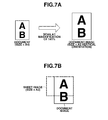
- Figs. 6A and 6B are charts comparing a document image with a sheet image according to the first exemplary embodiment.
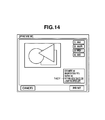
- Fig. 14 is a schematic diagram illustrating the rotation process according to the first exemplary embodiment.
- Figs. 24A, 24B , and 24C are schematic diagrams illustrating the layout edit processing applied to documents equal in size according to a second exemplary embodiment.
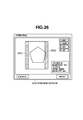
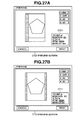
- Fig. 28 is a flow chart indicating the display of the preview screen and the layout edit processing according to the third exemplary embodiment.
- the preview screen 900 in Fig. 9A is a screen, displayed on the operation unit 105, for notifying the user which area of the document image is printed or not.
- the user places the A4-size document on the scanner 108 and sets the A3-size sheet used for printing and a print magnification of 141% as the print setting.
- a sheet image 901 indicates a sheet used for printing, i.e., an A3-size sheet.
- a document image 902 is an image generated by the scanner 108. In the present exemplary embodiment, both of the sheet image and the document image are displayed. Although the size of the document is A4, the size of the document image is A3 in vertical orientation because the print magnification is set to 141% on the preview screen 900.
- the sheet image 901 superimposed on the document image 902 is displayed on the preview screen 900 to distinguishably display which area of the document image is printed or not on the sheet.
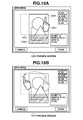
- Figs. 10A and 10B are schematic diagrams illustrating a layout edit processing in the present exemplary embodiment.
- Fig. 12 is a chart which defines the rotation process executed by the CPU 101 for each of combinations of the start and end points of the drag operation. If definition is indicated by "-", the rotation process is not executed.
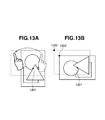
- a shift process for shifting the document image such as "shift to upper left”, and “shift to lower right” is also defined. The shift process is described blow with reference to Figs. 13 and 14 .
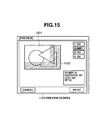
- a preview screen 1500 illustrated in Fig. 15 is the one that is displayed on the operation unit 105 when the user places an A3-size document on the scanner 108 and sets the A4R-size sheet for printing and a print magnification of 100% (same size) as the print setting.
- a sheet image 1501 is indicated by a broken line and a document image 1502 is indicated by a solid line.
- a shaded area is a part of the document image 1502 which is not printed on the sheet. At this point, the user reduces the document image to allow all areas of the document image to be printed on the sheet.
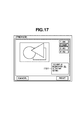
- a preview screen 1610 illustrated in Fig. 16B describes a specific method of the variable magnification process.
- the user touches the vertex 1604 of the document image and drags the vertex 1604 along the diagonal line of the document image.
- L > so that the variable magnification ratio is smaller than 100%.
- L ⁇ so that the variable magnification ratio is greater than 100%.
- the variable magnification process is applied to the document image based on the variable magnification ratio. After the variable magnification process is applied, the sheet image and the document image subjected to the variable magnification process are displayed on the operation unit 105.
- the document image is highlighted and brought into a state where the layout edit processing can be received.
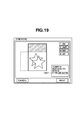
- the CPU 101 of the image processing apparatus 100 executes the moving process if the user performs the drag operation using two fingers, i.e., if the CPU 101 of the image processing apparatus 100 detects that two points are touched, to distinguish the moving process from the above rotation and the variable magnification process.
- step S2103 the CPU 101 determines whether the document image to be subjected to the layout edit processing is selected. In the present exemplary embodiment, if the document image in the preview screen displayed in step S2102 is touched, the CPU 101 determines that the document image is selected. In step S2103, if the CPU 101 determines that the document image is selected (YES in step S2103), the proceeding proceeds to step S2104 to execute the layout edit processing to be applied to the document image.
- the layout edit processing applied to the document image is described below with reference to a flow chart in Fig. 22 . If the CPU 101 determines that the document image is not selected (NO in step S2103), the proceeding proceeds to step S2105.
- step S2107 the CPU 101 determines whether to start printing. In the present exemplary embodiment, the CPU 101 determines to start printing if an execution button (not illustrated) or the button 906 of the preview screen 900 is selected by the user. If the CPU 101 determines to start printing (YES in step S2107), the proceeding proceeds to step S2108 to execute printing. If the CPU 101 determines not to start printing (NO in step S2107), the proceeding returns to step S2103.
- step S2101 in Fig. 21 it is described that printing is executed without displaying the preview screen if all areas of the document image are printed, however, the present exemplary embodiment is not limited to the above description.
- the preview screen may be displayed before the execution of printing without making the determination of step S2101 irrespective of whether all areas of the document image are printed.
- step S2202 If the CPU 101 determines to have received the operation of the rotation process (YES in step S2202), the processing proceeds to step S2203 and the CPU 101 executes the rotation process of the document image as described in Figs. 10 to 14 based on the operation of the user. The CPU 101 executes the rotation process and then changes the print setting based on the rotation process. The CPU 101 updates the preview screen displayed on the operation unit 105 to the preview screen subjected to the rotation process and displays the updated print setting as illustrated in 1401 in Fig. 14 . If the CPU 101 determines not to have received the operation of the rotation process (NO in step S2202), the processing proceeds to step S2204.
- step S2302 the CPU 101 determines whether the operation of the rotation process has been received.
- the term "rotation process” is a process for rotating a sheet image.
- the CPU 101 determines to have received the operation of the rotation process. If the CPU 101 determines to have received the operation of the rotation process (YES in step S2302), the processing proceeds to step S2303 and the CPU 101 executes the rotation process of the sheet image based on the operation of the user. After that, the CPU 101 updates the preview screen displayed on the operation unit 105 to be the preview screen subjected to the rotation process. If the CPU 101 determines not to have received the operation of the rotation process (NO in step S2302), the processing proceeds to step S2304.
- step S2308 the CPU 101 determines whether the document image is selected. If the CPU 101 determines that the document image is selected (YES in step S2308), the processing proceeds to step S2309 to release the selected state of the sheet image and proceeds to step S2103 in Fig. 21 . If the CPU 101 determines that the document image is not selected (NO in step S2308), the processing proceeds to step S2310.
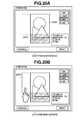
- a preview screen 2400 in Fig. 24A is a screen displayed on the operation unit 105. From Fig. 24A , it can be seen that a part of the document image is not printed.
- a preview screen 2410 in Fig. 24B is displayed.
- the user instructs execution on the preview screen 2410 and a message 2421 appears on a preview screen 2420 in Fig. 24C , which inquires of the user whether to apply the similar editing to a document equal in size. If the user selects "Yes," the layout edited based on the operation of the user is stored.
- the subsequent A4-size documents are copied based on the stored layout without displaying the preview screen 2400.
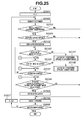
- step S2501 the CPU 101 sets 1 to a variable N.
- step S2502 the scanner 108 reads an N-th document.
- step S2101 the CPU 101 determines whether all areas of the document image are printed.
- the CPU 101 causes the operation unit 105 to display a re-scan screen 2900 illustrated in Fig. 29 to notify the user that the document needs to be read again.
- An image 2901 illustrated in Fig. 29 indicates a document and is displayed using the document image.
- An image 2902 is the one indicating the scanner 108.
- the re-scan screen 2900 notifies the user not only of the document to be read again but also of the orientation in which the document is placed on the scanner 108 (orientation of A4-size in Fig. 29 ), like the image 2901. This can prevent the user from wrongly placing the document (mistaking the orientation of the document) when the user places the document on the scanner 108 to read the document again.
- step S2803 the CPU 101 determines whether to start printing. If the user selects an execution button (not illustrated), the CPU 101 determines to start printing (YES in step S2803), and processing proceeds to step S2804. If the CPU 101 determines not to start printing (NO in step S2803), and processing waits until the user selects the execution button (not illustrated) .
- step S2804 the scanner 108 reads the document and generates the document image based on the changed print setting.
- step S2108 the printer 107 executes printing.
Landscapes
- Engineering & Computer Science (AREA)
- Multimedia (AREA)
- Signal Processing (AREA)
- Human Computer Interaction (AREA)
- General Engineering & Computer Science (AREA)
- Theoretical Computer Science (AREA)
- Physics & Mathematics (AREA)
- General Physics & Mathematics (AREA)
- Editing Of Facsimile Originals (AREA)
- Facsimiles In General (AREA)
Applications Claiming Priority (2)
| Application Number | Priority Date | Filing Date | Title |
|---|---|---|---|
| JP2011278695A JP5936347B2 (ja) | 2011-12-20 | 2011-12-20 | 印刷装置、印刷装置の制御方法、及びプログラム |
| JP2011278696A JP6091061B2 (ja) | 2011-12-20 | 2011-12-20 | 画像処理装置、画像処理装置の制御方法、及びプログラム |
Publications (1)
| Publication Number | Publication Date |
|---|---|
| EP2608516A2 true EP2608516A2 (de) | 2013-06-26 |
Family
ID=47632731
Family Applications (1)
| Application Number | Title | Priority Date | Filing Date |
|---|---|---|---|
| EP12198646.7A Withdrawn EP2608516A2 (de) | 2011-12-20 | 2012-12-20 | Bildverarbeitungsvorrichtung, Verfahren zur Steuerung der Bildverarbeitungsvorrichtung, und Speichermedium |
Country Status (4)
| Country | Link |
|---|---|
| US (1) | US8934111B2 (de) |
| EP (1) | EP2608516A2 (de) |
| KR (1) | KR101596084B1 (de) |
| CN (1) | CN103179309A (de) |
Families Citing this family (15)
| Publication number | Priority date | Publication date | Assignee | Title |
|---|---|---|---|---|
| JP2014086836A (ja) * | 2012-10-23 | 2014-05-12 | Canon Inc | 画像処理装置及びその制御方法、並びにプログラム |
| JP2014239364A (ja) * | 2013-06-10 | 2014-12-18 | コニカミノルタ株式会社 | 出力設定装置およびコンピュータープログラム |
| US9542137B2 (en) * | 2014-01-14 | 2017-01-10 | Xerox Corporation | Image shift template |
| JP2015156637A (ja) * | 2014-01-15 | 2015-08-27 | 株式会社リコー | 画像形成装置およびプログラム |
| JP6213380B2 (ja) * | 2014-06-02 | 2017-10-18 | コニカミノルタ株式会社 | 表示装置、画像形成装置、表示制御プログラム及び画像形成プログラム |
| US20160070995A1 (en) * | 2014-09-10 | 2016-03-10 | Océ-Technologies B.V. | Method for generating a proof of a print job comprising a document to be printed with parameters and system therewith |
| CN105589666A (zh) * | 2014-11-13 | 2016-05-18 | 王者蓝 | 基于纸张原有内容进行套打的方法 |
| USD774054S1 (en) * | 2015-06-07 | 2016-12-13 | Apple Inc. | Display screen or portion thereof with animated graphical user interface |
| CN105607879A (zh) * | 2015-12-21 | 2016-05-25 | 珠海奔图电子有限公司 | 一种适用于预打印纸的画像调整控制方法及装置 |
| JP6859871B2 (ja) * | 2017-06-28 | 2021-04-14 | セイコーエプソン株式会社 | 表示制御装置、印刷装置、表示制御装置の制御方法およびそのプログラム |
| CN107577403A (zh) * | 2017-09-12 | 2018-01-12 | 珠海智汇网络设备有限公司 | 文本框编排方法、手持式票据打印机及其程序存储介质 |
| CN109358826A (zh) * | 2018-10-26 | 2019-02-19 | 苏州浪潮智能软件有限公司 | 一种基于所见即所得的打印配置方法 |
| JP2020137046A (ja) | 2019-02-25 | 2020-08-31 | ブラザー工業株式会社 | 画像処理装置 |
| US20220222033A1 (en) * | 2021-01-11 | 2022-07-14 | Rovi Guides, Inc. | Customized volume control in small screen media players |
| CN116171457B (zh) | 2021-09-24 | 2026-01-13 | 京东方科技集团股份有限公司 | 图像处理方法、装置、电子设备和存储介质 |
Citations (3)
| Publication number | Priority date | Publication date | Assignee | Title |
|---|---|---|---|---|
| JPH0993378A (ja) | 1995-07-20 | 1997-04-04 | Canon Inc | 画像形成装置 |
| JPH11105370A (ja) | 1997-10-02 | 1999-04-20 | Canon Inc | 印刷制御方法及びその装置及び記憶媒体 |
| JP2010109597A (ja) | 2008-10-29 | 2010-05-13 | Canon Inc | 画像処理装置および画像処理方法 |
Family Cites Families (16)
| Publication number | Priority date | Publication date | Assignee | Title |
|---|---|---|---|---|
| US5162918A (en) * | 1989-01-13 | 1992-11-10 | Minolta Camera Kabushiki Kaisha | Copying apparatus with display of both document image and frame of document contour |
| US6757081B1 (en) * | 2000-04-07 | 2004-06-29 | Hewlett-Packard Development Company, L.P. | Methods and apparatus for analyzing and image and for controlling a scanner |
| KR100519977B1 (ko) | 2001-10-12 | 2005-10-13 | 삼성전자주식회사 | 사용자 선택영역 복사 기능을 가지는 복사기 및 그복사기의 복사 제어방법 |
| JP4427745B2 (ja) * | 2005-02-18 | 2010-03-10 | ノーリツ鋼機株式会社 | プリント処理システム及びプリント処理プログラム |
| JP2006277056A (ja) * | 2005-03-28 | 2006-10-12 | Brother Ind Ltd | 情報処理装置及びプログラム |
| KR100813962B1 (ko) * | 2005-09-16 | 2008-03-14 | 삼성전자주식회사 | 프리뷰 이미지를 이용하여 인쇄 옵션의 설정을 변경하는장치 및 방법 |
| KR20070040646A (ko) * | 2005-10-12 | 2007-04-17 | 삼성전자주식회사 | 화상형성장치의 이미지 편집장치 및 방법 |
| CN1794167A (zh) * | 2006-01-06 | 2006-06-28 | 无锡永中科技有限公司 | 打印参数设置的方法 |
| JP2007195065A (ja) * | 2006-01-20 | 2007-08-02 | Canon Inc | 描画方法及び画像処理装置 |
| US8508806B2 (en) * | 2006-03-30 | 2013-08-13 | Brother Kogyo Kabushiki Kaisha | Communication device capable of displaying preview of transmission data |
| JP5253035B2 (ja) * | 2008-08-08 | 2013-07-31 | キヤノン株式会社 | 画像処理装置、画像処理方法、およびプログラム |
| JP2010108022A (ja) * | 2008-10-28 | 2010-05-13 | Seiko Epson Corp | プリンタドライバプログラム、印刷制御装置、印刷制御方法 |
| US8472051B2 (en) * | 2008-11-11 | 2013-06-25 | Sharp Kabushiki Kaisha | Image forming apparatus and method for displaying preview image of top page of multiple sub-jobs of a print job |
| JP5371560B2 (ja) * | 2009-06-09 | 2013-12-18 | キヤノン株式会社 | レイアウト編集装置、レイアウト編集方法及びプログラム |
| KR20110088727A (ko) * | 2010-01-29 | 2011-08-04 | 삼성전자주식회사 | 휴대용 단말기에서 출력 이미지를 회전시키기 위한 장치 및 방법 |
| JP5091267B2 (ja) * | 2010-02-18 | 2012-12-05 | シャープ株式会社 | 操作機器、その操作機器を備えた電子機器および画像処理装置ならびに操作方法 |
-
2012
- 2012-12-11 KR KR1020120143548A patent/KR101596084B1/ko active Active
- 2012-12-13 CN CN2012105599848A patent/CN103179309A/zh active Pending
- 2012-12-18 US US13/718,958 patent/US8934111B2/en active Active
- 2012-12-20 EP EP12198646.7A patent/EP2608516A2/de not_active Withdrawn
Patent Citations (3)
| Publication number | Priority date | Publication date | Assignee | Title |
|---|---|---|---|---|
| JPH0993378A (ja) | 1995-07-20 | 1997-04-04 | Canon Inc | 画像形成装置 |
| JPH11105370A (ja) | 1997-10-02 | 1999-04-20 | Canon Inc | 印刷制御方法及びその装置及び記憶媒体 |
| JP2010109597A (ja) | 2008-10-29 | 2010-05-13 | Canon Inc | 画像処理装置および画像処理方法 |
Also Published As
| Publication number | Publication date |
|---|---|
| CN103179309A (zh) | 2013-06-26 |
| US20130155423A1 (en) | 2013-06-20 |
| KR101596084B1 (ko) | 2016-02-19 |
| KR20130071368A (ko) | 2013-06-28 |
| US8934111B2 (en) | 2015-01-13 |
Similar Documents
| Publication | Publication Date | Title |
|---|---|---|
| EP2608516A2 (de) | Bildverarbeitungsvorrichtung, Verfahren zur Steuerung der Bildverarbeitungsvorrichtung, und Speichermedium | |
| JP5314887B2 (ja) | 画像処理情報を含む出力イメージの設定方法および該設定制御プログラム | |
| JP4828338B2 (ja) | 画像処理装置およびプログラム | |
| JP4704288B2 (ja) | 画像処理装置およびプログラム | |
| JP4636176B2 (ja) | 印刷制御装置及びプログラム | |
| JP5599117B2 (ja) | 操作装置及び操作方法 | |
| CN101762998B (zh) | 图像形成装置和预览显示方法 | |
| JP2024163147A (ja) | 画像検査装置 | |
| JP5273133B2 (ja) | 画像処理装置および画像処理プログラム | |
| US9223485B2 (en) | Image processing apparatus, image forming apparatus including same, and method for controlling image processing apparatus | |
| JP2007160922A (ja) | 画像処理装置、プログラムおよび画像処理装置における仕上がりデータ移動方法 | |
| JP6091061B2 (ja) | 画像処理装置、画像処理装置の制御方法、及びプログラム | |
| JP2011116040A (ja) | 画像形成装置、画像形成装置の制御方法およびプログラム | |
| JP6229786B2 (ja) | 表示制御装置、表示制御方法及び表示制御プログラム | |
| JP2009278373A (ja) | 画像処理装置、画像形成装置及びコンピュータプログラム | |
| US7659999B2 (en) | UIdesign: N-up calculator user interface | |
| JP4284547B2 (ja) | 画像処理装置 | |
| JP5145207B2 (ja) | 画像形成装置 | |
| JP2006268541A (ja) | 印刷イメージ表示装置、印刷イメージ表示方法、及び印刷イメージ表示プログラム | |
| US20140268197A1 (en) | Image forming apparatus and image forming method | |
| JP6060740B2 (ja) | 表示制御装置、表示制御方法及び表示制御プログラム | |
| JP2011124841A (ja) | 画像形成装置 | |
| JP5282488B2 (ja) | 画像処理装置、プログラムおよび画像処理方法 | |
| JP5936347B2 (ja) | 印刷装置、印刷装置の制御方法、及びプログラム | |
| JP3987066B2 (ja) | 画像形成装置、画像形成方法及びプログラム |
Legal Events
| Date | Code | Title | Description |
|---|---|---|---|
| AK | Designated contracting states |
Kind code of ref document: A2 Designated state(s): AL AT BE BG CH CY CZ DE DK EE ES FI FR GB GR HR HU IE IS IT LI LT LU LV MC MK MT NL NO PL PT RO RS SE SI SK SM TR |
|
| AX | Request for extension of the european patent |
Extension state: BA ME |
|
| PUAI | Public reference made under article 153(3) epc to a published international application that has entered the european phase |
Free format text: ORIGINAL CODE: 0009012 |
|
| STAA | Information on the status of an ep patent application or granted ep patent |
Free format text: STATUS: THE APPLICATION HAS BEEN WITHDRAWN |
|
| 18W | Application withdrawn |
Effective date: 20160628 |