EP2416239B1 - Auf tragbare Endgerätevorrichtung montierte Steuerungsvorrichtung - Google Patents
Auf tragbare Endgerätevorrichtung montierte Steuerungsvorrichtung Download PDFInfo
- Publication number
- EP2416239B1 EP2416239B1 EP11176471.8A EP11176471A EP2416239B1 EP 2416239 B1 EP2416239 B1 EP 2416239B1 EP 11176471 A EP11176471 A EP 11176471A EP 2416239 B1 EP2416239 B1 EP 2416239B1
- Authority
- EP
- European Patent Office
- Prior art keywords
- display
- image
- data
- type
- Prior art date
- Legal status (The legal status is an assumption and is not a legal conclusion. Google has not performed a legal analysis and makes no representation as to the accuracy of the status listed.)
- Active
Links
Images




Classifications
-
- G—PHYSICS
- G06—COMPUTING OR CALCULATING; COUNTING
- G06F—ELECTRIC DIGITAL DATA PROCESSING
- G06F3/00—Input arrangements for transferring data to be processed into a form capable of being handled by the computer; Output arrangements for transferring data from processing unit to output unit, e.g. interface arrangements
- G06F3/12—Digital output to print unit, e.g. line printer, chain printer
- G06F3/1201—Dedicated interfaces to print systems
- G06F3/1278—Dedicated interfaces to print systems specifically adapted to adopt a particular infrastructure
- G06F3/1285—Remote printer device, e.g. being remote from client or server
-
- G—PHYSICS
- G06—COMPUTING OR CALCULATING; COUNTING
- G06F—ELECTRIC DIGITAL DATA PROCESSING
- G06F1/00—Details not covered by groups G06F3/00 - G06F13/00 and G06F21/00
- G06F1/16—Constructional details or arrangements
- G06F1/1613—Constructional details or arrangements for portable computers
- G06F1/1633—Constructional details or arrangements of portable computers not specific to the type of enclosures covered by groups G06F1/1615 - G06F1/1626
- G06F1/1684—Constructional details or arrangements related to integrated I/O peripherals not covered by groups G06F1/1635 - G06F1/1675
- G06F1/1694—Constructional details or arrangements related to integrated I/O peripherals not covered by groups G06F1/1635 - G06F1/1675 the I/O peripheral being a single or a set of motion sensors for pointer control or gesture input obtained by sensing movements of the portable computer
-
- G—PHYSICS
- G06—COMPUTING OR CALCULATING; COUNTING
- G06F—ELECTRIC DIGITAL DATA PROCESSING
- G06F3/00—Input arrangements for transferring data to be processed into a form capable of being handled by the computer; Output arrangements for transferring data from processing unit to output unit, e.g. interface arrangements
- G06F3/12—Digital output to print unit, e.g. line printer, chain printer
- G06F3/1201—Dedicated interfaces to print systems
- G06F3/1202—Dedicated interfaces to print systems specifically adapted to achieve a particular effect
- G06F3/1203—Improving or facilitating administration, e.g. print management
- G06F3/1205—Improving or facilitating administration, e.g. print management resulting in increased flexibility in print job configuration, e.g. job settings, print requirements, job tickets
-
- G—PHYSICS
- G06—COMPUTING OR CALCULATING; COUNTING
- G06F—ELECTRIC DIGITAL DATA PROCESSING
- G06F3/00—Input arrangements for transferring data to be processed into a form capable of being handled by the computer; Output arrangements for transferring data from processing unit to output unit, e.g. interface arrangements
- G06F3/12—Digital output to print unit, e.g. line printer, chain printer
- G06F3/1201—Dedicated interfaces to print systems
- G06F3/1223—Dedicated interfaces to print systems specifically adapted to use a particular technique
- G06F3/1237—Print job management
- G06F3/1253—Configuration of print job parameters, e.g. using UI at the client
- G06F3/1256—User feedback, e.g. print preview, test print, proofing, pre-flight checks
-
- G—PHYSICS
- G06—COMPUTING OR CALCULATING; COUNTING
- G06F—ELECTRIC DIGITAL DATA PROCESSING
- G06F3/00—Input arrangements for transferring data to be processed into a form capable of being handled by the computer; Output arrangements for transferring data from processing unit to output unit, e.g. interface arrangements
- G06F3/12—Digital output to print unit, e.g. line printer, chain printer
- G06F3/1201—Dedicated interfaces to print systems
- G06F3/1278—Dedicated interfaces to print systems specifically adapted to adopt a particular infrastructure
- G06F3/1292—Mobile client, e.g. wireless printing
-
- G—PHYSICS
- G06—COMPUTING OR CALCULATING; COUNTING
- G06F—ELECTRIC DIGITAL DATA PROCESSING
- G06F2200/00—Indexing scheme relating to G06F1/04 - G06F1/32
- G06F2200/16—Indexing scheme relating to G06F1/16 - G06F1/18
- G06F2200/161—Indexing scheme relating to constructional details of the monitor
- G06F2200/1614—Image rotation following screen orientation, e.g. switching from landscape to portrait mode
-
- G—PHYSICS
- G06—COMPUTING OR CALCULATING; COUNTING
- G06F—ELECTRIC DIGITAL DATA PROCESSING
- G06F2200/00—Indexing scheme relating to G06F1/04 - G06F1/32
- G06F2200/16—Indexing scheme relating to G06F1/16 - G06F1/18
- G06F2200/163—Indexing scheme relating to constructional details of the computer
- G06F2200/1637—Sensing arrangement for detection of housing movement or orientation, e.g. for controlling scrolling or cursor movement on the display of an handheld computer
Definitions
- the technique taught in the present specification relates to a controlling device mounted on a portable type terminal device such as a mobile phone, PDA (Personal Digital Assistant), portable music player, notebook PC, tablet PC, etc.
- a portable type terminal device such as a mobile phone, PDA (Personal Digital Assistant), portable music player, notebook PC, tablet PC, etc.
- a mobile phone provided with a main body and a display capable of rotating relative to the main body is known (e.g., Japanese Patent Application Publication No. 2001-156893 ).
- this mobile phone shows an image such that a left-right direction of the image is along a short side of the display and, in a state where the display is present in a horizontal position, the mobile phone shows the image such that the left-right direction of the image is along a long side of the display.
- EP 1 469 668 A describes a print terminal including a memory reader for reading image data recorded in a recording medium, an image-capturing unit for capturing the image data read by the memory reader, and an image-processing unit for processing the image data captured by the image-capturing unit.
- the image-processing unit has a first rotation-processing function for rotating a print image to be used in printing the image data, a second rotation-processing function for rotating a print-medium image to change the orientation of a print medium to be used in printing the image data, and a third rotation function for simultaneously rotating both the print image and the print-medium image.
- the print medium can be obtained in which the left-right direction of the specific image is along the short side both when the print of the specific image is instructed in the first state and when the print of the specific image is instructed in the second state. That is, a print medium can be obtained in which the left-right direction of the specific image is along the short side regardless of the direction of the specific image relative to the display. Consequently, the user can be given a printout that gives him/her a standardized impression.
- the left-right direction of the specific image is along the short side of the print medium, the number of pages of print medium needed for printing can be reduced compared to a configuration in which the left-right direction of the specific image is along the long side of the print medium.
- Fig. 1 shows a configuration of a communication system.
- Fig. 2 shows a flowchart of a process performed in accordance with an OS program.
- Fig. 3 shows a flowchart of a process performed in accordance with a print application.
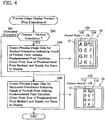
- Fig. 4 shows a flowchart of a preview image display process of a first embodiment
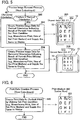
- Fig. 5 shows a flowchart of a preview image renewal process of the first embodiment.
- Fig. 6 shows a flowchart of a print data creation process of the first embodiment.
- Fig. 7 shows processes until printing is performed.
- Fig. 8 shows a flowchart of a preview image display process of a second embodiment
- Fig. 9 shows a flowchart of a preview image renewal process of the second embodiment.
- Fig. 10 shows a flowchart of a print data creation process of the second embodiment.
- a communication system 2 comprises a mobile terminal device 10, a printer 60 and a Web server 72.
- the mobile terminal device 10 and the printer 60 are connected communicably via a network 50.
- the network 50 is a local area network (LAN) that is compliant with Wi-Fi (registered trademark) etc., and comprises an access point (AP) 52 and a network cable 54.
- the network 50 is connected with the Internet 70.
- the Web server 72 is connected with the Internet 70.
- the mobile terminal device 10 can be wirelessly connected with the network 50 via the AP 52. In this case, the mobile terminal device 10 can communicate with the printer 60 via the network 50 and, further, can communicate with the Web server 72 via the network 50 and the Internet 70.
- the mobile terminal device 10 is a terminal device that can easily be carried by a user (i.e., a portable type terminal device).
- the mobile terminal device 10 is, e.g., a mobile phone, PDA, portable music player, notebook PC, tablet PC, etc.
- the mobile terminal device 10 comprises a display 12, a communication interface (communication I/F) 16 and a controlling unit 20.
- the units 12, 16,20 are connected to a bus line 18.
- the communication I/F 16 is an I/F for the mobile terminal device 10 to perform wireless communication.
- the display 12 is a display for showing various types of information.
- the exterior of the mobile terminal device 10 is shown in Fig. 2 .
- the display 12 has a rectangular shape in which the length of a short side is L1 and the length of a long side is L2 (i.e., a rectangular shape in which L2 is greater than L1).
- the upper figure shows the long side of the display 12 extending along a perpendicular direction relative to the ground surface (i.e., the gravitational direction).
- the lower figure shows the short side of the display 12 extending along the perpendicular direction relative to the ground surface (i.e., the gravitational direction).
- the state of the upper figure in Fig. 2 may be expressed as "the posture of the mobile terminal device 10 is vertically oriented", and the state of the lower figure in Fig. 2 may be expressed as "the posture of the mobile terminal device 10 is horizontally oriented”.
- the display 12 of the present embodiment is a touch panel which also functions as an operation unit operated by the user.
- the controlling unit 20 comprises a CPU 22 and a program storage area 24.
- the CPU 22 performs various processes in accordance with programs 26, 28 stored in the program storage area 24.
- the function of a display controlling unit 30 is realized by the CPU 22 performing processes in accordance with the OS program 26.
- the functions of a print data creation unit 40, a sending unit 42, and a display data creation unit 44 are realized by the CPU 22 performing processes in accordance with the print application 28.
- the OS program 26 is pre-installed in the mobile terminal device 10 at the shipment stage of the mobile terminal device 10.
- the print application 28 is installed in the mobile terminal device 10 by, e.g., being downloaded from a server supplied by a vendor or a manufacturer of the printer 60.
- the print application 28 may be pre-installed in the mobile terminal device 10 at the shipment stage of the mobile terminal device 10, or may be installed in the mobile terminal device 10 from a storage medium (media) such as a CD, etc.
- the user can instruct the mobile terminal device 10 to access the Web server 72.
- the display controlling unit 30 accesses the Web server 72, and obtains HTML (Hyper Text Markup Language) format Web data from the Web server 72.
- the display controlling unit 30 determines the posture of the mobile terminal device 10 based on a value detected by a posture sensor (e.g., an acceleration sensor) that is not shown and is housed in the mobile terminal device 10. Specifically, the display controlling unit 30 determines whether the mobile terminal device 10 is vertically oriented (the state of the upper figure in Fig. 2 ) or horizontally oriented (the state of the lower figure in Fig. 2 ). Furthermore, in S4, the display controlling unit 30 does not determine exactly whether the posture of the mobile terminal device 10 is vertically or horizontally oriented, but determines whether the posture of the mobile terminal device 10 is closer to vertical or horizontal.
- a posture sensor e.g., an acceleration sensor
- the display controlling unit 30 determines YES in S4 (for being closer to the vertical orientation). Further, e.g., in a state where the mobile terminal device 10 has been rotated clockwise 60 degrees from the vertically oriented posture, with the center of the display 12 being the center of rotation, the display controlling unit 30 determines NO in S4 (for being closer to the horizontal orientation). Furthermore, in the processes below, as well, in a case where the posture of the mobile terminal device 10 is to be determined (e.g., S42 of Fig. 4 , S62 of Fig. 5 ), the determination is performed in the same manner as S4.
- the display controlling unit 30 creates RGB image data for vertical orientation in BMP format using the HTML format Web data obtained in S2.
- Web data the up-down direction and left-right direction of an image (the letters “A” to “L” in the example of Fig. 2 ) represented by the Web data (text data, image data etc.) is usually predetermined.
- left to right is arranged in the sequence "A", "B", "C” and up to down is arranged in the sequence "A", "D", "G", "J”. That is, the up-down direction of Fig. 2 is the up-down direction of the image, and the left-right direction of Fig.
- the display controlling unit 30 creates image data for vertical orientation such that the up-down direction of the image represented by Web data is along the long side of the display 12, and the left-right direction of the image is along the short side of the display 12. Furthermore, in the present embodiment, the image data for vertical orientation is created such that the entire length in the left-right direction of an image 80 shown in the display 12 (the length from the left edge of "A" to the right edge of "C") is approximately equal to the length of the short side of the display 12.
- the display controlling unit 30 further supplies the image data for vertical orientation to the display 12. Consequently, as shown in the upper figure of Fig. 2 , the image 80 including the letters is shown in the display 12. Furthermore, if the user scrolls the display of the display 12 downward, instead of the letters "A" to "L", another image arranged below the letters "A" to "L” in the image data is shown in the display 12.
- S6 ends, the process proceeds to S9.
- the display controlling unit 30 creates BMP format RGB image data for horizontal orientation using the HTML format Web data obtained in S2.
- the display controlling unit 30 creates the image data for horizontal orientation such that the up-down direction of the image represented by the Web data is along the short side of the display 12, and the left-right direction of the image is along the long side of the display 12.
- the display controlling unit 30 further supplies the image data for horizontal orientation to the display 12. Consequently, as shown in the lower figure of Fig. 2 , an image 90 containing the letters is shown in the display 12.
- the image data for horizontal orientation is created such that the entire length in the left-right direction of the image 90 shown in the display 12 (the length from the left edge of "A" to the right edge of "C") is approximately equal to the length of the long side of the display 12.
- the long side of the display 12 is longer than the short side of the display 12. Consequently, the size of a partial image (e.g., the single letter "A") that constitutes the image 90 represented by the image data for horizontal orientation is greater than the size of the same partial image that constitutes the image 80 represented by the image data for vertical orientation. Therefore, as shown in the upper figure of Fig.
- the size of the partial image that constitutes the image 90 represented by the image data for horizontal orientation may be the same as the size of the partial image constituting the image 80 represented by the image data for vertical orientation.
- the display controlling unit 30 determines whether an operation has been performed to end the displaying of the images 80, 90 represented by the Web data in the display 12. In a case of NO here, the display controlling unit 30 returns to S4, and monitors whether the posture of the mobile terminal device 10 has changed. For example, in a case where the posture of the mobile terminal device 10 has changed from the vertical to horizontal orientation, the display controlling unit 30 determines NO in S4, creates the image data for horizontal orientation in S8, and supplies that image data to the display 12. Further, e.g., in a case where the posture of the mobile terminal device 10 has changed from horizontal to vertical orientation, the display controlling unit 30 determines YES in S4, creates the image data for vertical orientation in S6, and supplies that image data to the display 12.
- the mobile terminal device 10 switches the direction of the images 80, 90 relative to the display 12 in accordance with the posture of the mobile terminal device 10. Furthermore, in a case of YES in S9, the displaying of the images 80, 90 represented by the Web data ends.
- the display data creation unit 44 performs a preview image display process.
- Fig. 4 shows a flowchart of the preview image display process.
- the display data creation unit 44 determines the posture of the mobile terminal device 10. In a case where the mobile terminal device 10 is vertically oriented, the display data creation unit 44 determines YES in S42, and proceeds to S44.
- the display data creation unit 44 creates preview image data for vertical orientation that represents a preview image indicating the result of portrait print (i.e., printing where a left-right direction of an image of a print target is along a short side of a print medium) of the image 80 represented by the Web data (see Fig.
- the preview image 100 shows a border 102 of the print medium and an image 104 (i.e., the letters "A” to "L") corresponding to the image 80 represented by the Web data.
- the display data creation unit 44 creates the preview image data using a print condition that was determined in advance (called "predetermined print condition" below).
- the predetermined print condition is color print using A4 size print medium. Consequently, the display data creation unit 44 creates the preview image data such that the aspect ratio of the border 102 in the preview image 100 is 1: square root of 2, which is the aspect ratio of A4 size. Further, the display data creation unit 44 creates the preview image data such that the image 104 in the preview image 100 is a color image. Furthermore, in the present embodiment, a predetermined margin size is adopted as the predetermined print condition.
- the margin size of both edges of the short side of the print medium is 1/10 smaller than the length of the short side of the print medium. Consequently, the entire length of the image 104 in the left-right direction (the length from the left edge of "A" to the right edge of "C") is approximately equal to the length of the short side of the border 102. Furthermore, in a variant embodiment, no margin may be adopted as the predetermined print condition. In this variant embodiment, the entire length of the image 104 in the left-right direction matches the length of the short side of the border 102. Furthermore, as with the margins in the short side direction, the margin size of both edges of the long side of the print medium is 1/10 smaller than the length of the long side of the print medium. Consequently, the entire length in the up-down direction of the image 104 (the length from the top edge of "A" to the bottom edge of "J") is approximately equal to the length of the long side of the border 102.
- the display data creation unit 44 creates the preview image data such that the left-right direction of the preview image 100 is along the short side of the display 12 and the up-down direction of the preview image 100 is along the long side of the display 12. Furthermore, the left-right direction of the preview image 100 corresponds to the left-right direction of the image 104 in the preview image 100 (i.e., the direction in which "A", “B”, “C” are aligned), and the up-down direction of the preview image 100 corresponds to the up-down direction of the image 104 in the preview image 100 (i.e., the direction in which "A", “D”, “G”, “J” are aligned).
- the display data creation unit 44 creates the preview image data such that the entirety of the preview image 100 indicating the print result for one piece of print medium fits into the display 12. Furthermore, the display data creation unit 44 creates the preview image data such that the size of the entirety of the preview image 100 increases, as long as the entirety of the preview image 100 can fit into the display 12. When S44 ends, the preview image display process ends.
- the display data creation unit 44 determines NO in S42, and proceeds to S46.
- the display data creation unit 44 creates preview image data for horizontal orientation that represents a preview image indicating the result of portrait print of the image 80 represented by the Web data (see Fig. 2 ), and supplies that preview image data to the display 12. Consequently, a preview image 110 is shown in the display 12.
- the preview image 110 shows a border 112 of the print medium and an image 114 (i.e., the letters "A" to "L") corresponding to the image 80 represented by the Web data.
- the display data creation unit 44 creates the preview image data using the predetermined print condition. Consequently, the aspect ratio of the border 112 in the preview image 110 is 1: square root of 2, and the image 114 in the preview image 110 is a color image.
- the display data creation unit 44 creates the preview image data such that the left-right direction of the preview image 110 (i.e., the direction in which "A", "B”, “C” are aligned) is along the long side of the display 12, and the up-down direction of the preview image 110 (i.e., the direction in which "A", “D”, “G”, “J” are aligned) is along the short side of the display 12. Other points are the same as in S44.
- the preview image display process ends.
- the user can check the print result before the images 80, 90 shown in the display 12 are actually printed.
- the preview image 100, etc. since the preview image 100, etc. is shown, the user can check the preview image 100, etc. well before setting the print condition (i.e., immediately after the print application 28 was initiated). Further, since the entirety of the preview image 100, etc. corresponding to one piece of print medium is shown so as to fit into the display 12, it is easy for the user to check the preview image 100, etc.
- the process proceeds to S12 of Fig. 3 .
- the controlling unit 20 sends a search packet to the network 50 (see Fig. 1 ). Consequently, the printer 60 connected with the network 50 sends a response packet to the mobile terminal device 10. In a case where another printer (not shown) is also connected with the network 50, that other printer also sends a response packet to the mobile terminal device 10.
- the response packet includes a node name, IP address, etc. of the source printer.
- the controlling unit 20 displays the node names of the printers in the display 12. The user can select the node name of one printer by operating the display 12. In this case, the controlling unit 20 determines YES in S14, and proceeds to S16. In the present embodiment, the description below will continue using the case of the node name of the printer 60 being selected.
- the controlling unit 20 asks the printer 60 for the print condition executable by the printer 60. Consequently, the controlling unit 20 obtains information indicating the print condition executable by the printer 60. Furthermore, the print condition executable by the printer 60 includes, e.g., size of print medium (A4 size, Letter size, etc.), type of print medium (normal paper, glossy paper etc.), print color (color print, monochrome print), capability of duplex print, etc.
- size of print medium A4 size, Letter size, etc.
- type of print medium normal paper, glossy paper etc.
- print color color print, monochrome print
- capability of duplex print etc.
- the controlling unit 20 displays the print condition executable by the printer 60 in the display 12 based on the information obtained in S16.
- the user can set (i.e., select) the desired print condition.
- the controlling unit 20 determines YES in S20, and proceeds to S22.
- the description below will continue using the case of "Letter size” being set as the size of the print medium, and "monochrome print” being set as the print color.
- Fig. 5 shows a flowchart of the preview image renewal process.
- the display data creation unit 44 determines YES in S62, and proceeds to S64. Except for the point that the set print condition (i.e., monochrome print, Letter size) is used, the process S64 is the same as the process S44 of Fig. 4 . As a result of the process S64, a preview image 200 is shown in the display 12 instead of the preview image 100 of Fig. 4 .
- the aspect ratio of a border 202 in the preview image 200 is 8.5:11, which is the aspect ratio of Letter size, and an image 204 in the preview image 200 is a monochrome image. Furthermore, since the aspect ratio of the print medium changes, a part of the image 204 in the preview image 200 (the part having "J", “K”, "L") is lost compared to the case of the preview image display process of Fig. 4 . When S64 ends, the preview image renewal process ends.
- the display data creation unit 44 determines NO in S62, and proceeds to S66. Except for the point that the set print condition (i.e., monochrome print, Letter size) is used, the process S66 is the same as the process S46 of Fig. 4 .
- the result of the process S66 which is shown in the display 12 instead of the preview image 110 of Fig. 4 , is a preview image 210 indicating a border 212 having the aspect ratio 8.5:11 and an image 214 which is a monochrome image.
- the preview image renewal process ends.
- the preview image 200, etc. indicating the print result monochrome print is displayed. Further, in a case e.g. where the size of the print medium (e.g., Letter size) has been set by the user, the preview image 200, etc. corresponding to the aspect ratio of that size is displayed. The user can check the preview image 200, etc. indicating the print result that corresponds to his desired print condition.
- the size of the print medium e.g., Letter size
- the process proceeds to S24 of Fig. 3 .
- the controlling unit 20 monitors whether print start has been instructed by the user. After seeing the preview image 200, etc. shown in the preview image renewal process of Fig. 5 , the user can instruct print start by operating the display 12. In this case, the controlling unit 20 determines YES in S24, and proceeds to S28. Furthermore, the user can change the posture of the mobile terminal device 10 before instructing print start. The controlling unit 20 monitors whether the posture of the mobile terminal device 10 has changed (i.e., changed from closer-to-vertically-oriented state to closer-to-horizontally-oriented state, or changed from closer-to-horizontally-oriented state to closer-to-vertically-oriented state) (S26).
- the display data creation unit 44 performs the preview image renewal process of S22 (see Fig. 5 ) again. Consequently, in a case e.g. where the posture changed from the vertical to the horizontal orientation, the preview image 210 is newly displayed instead of the preview image 200.
- Fig. 6 shows a flowchart of the print data creation process.
- the print data creation unit 40 creates print data for portrait print.
- the sending unit 42 sends the print data for portrait print with the IP address of the printer 60 obtained in S12 of Fig. 3 as the destination. Consequently, the printer 60 prints an image 302 on a print medium 300 using the print data for portrait print.
- the printer 60 is usually capable of interpreting JPEG format data. Consequently, in the present embodiment, the print data creation unit 40 creates RGB bitmap data using the Web data obtained in S2 of Fig. 2 , and creates JPEG format print data by compressing the bitmap data.
- the print data creation unit 40 creates the print data for portrait print utilizing the set print condition (i.e., monochrome print, Letter size). That is, for the printer 60 to perform the monochrome print, the print data creation unit 40 creates bitmap data such that the RGB values of the pixels constituting the bitmap data are identical. Further, for the printer 60 to perform printing on a Letter size print medium, the print data creation unit 40 creates the bitmap data having a number of pixels corresponding to the length of the short side and the length of the long side of the Letter size print medium. Further, for the printer 60 to perform a portrait print of the image 80 represented by the Web data (see Fig.
- the print data creation unit 40 creates the bitmap data such that the left-right direction of the image 302 to be printed (i.e., the direction in which "A", “B”, “C” are aligned) is along the short side of the print medium, and the up-down direction of the image 302 (i.e., the direction in which "A", “D”, “G”, “H” are aligned) is along the long side of the print medium. Furthermore, the print data creation unit 40 creates the bitmap data utilizing the predetermined margin size.
- the margin size here is the same as the case of the preview image (e.g., the margin size of the short side direction is smaller than 1/10 of the length of the short side).
- the entire length of the image 302 in the left-right direction (the length from the left edge of "A" to the right edge of "C") is approximately equal to the length of the short side of the print medium 300. Furthermore, in a variant embodiment, no margin may be adopted. In this variant embodiment, the entire length of the image 302 in the left-right direction is equal to the length of the short side of the print medium 300.
- Fig. 7 shows how the image shown in the display 12 and the image printed on the print medium 300 change in accordance with the posture of the mobile terminal device 10. Furthermore, of the figures in Fig. 7 , the figures corresponding to "portrait print fix mode" are realized in the first embodiment.
- the "display dependent mode" in Fig. 7 is utilized in a second embodiment described below.
- the preview image 100 is displayed (S44 of Fig. 4 ).
- the preview image 200 is displayed (S64 of Fig. 5 ), and when print start is instructed, the portrait print on the print medium 300 is performed (S82 of Fig. 6 ).
- the preview image 110 is displayed (S46 of Fig. 4 ).
- the preview image 210 is displayed (S66 of Fig. 5 ), and when print start is instructed, the portrait print on the print medium 300 is performed (S82 of Fig. 6 ). That is, in the present embodiment, the portrait print is performed when the initiation of the print application 28 is instructed both in the state of the mobile terminal device 10 being vertically oriented and in the state of the mobile terminal device 10 being horizontally oriented.
- a configuration (called “comparative example mobile terminal device” below) is conceivable in which the printer 60 performs a portrait print in a case where the initiation of the print application 28 is instructed when the mobile terminal device 10 is in the vertically oriented state, and the printer 60 performs a landscape print (i.e., printing in which the left-right direction of the image of the print target is along the long side of the print medium) in a case where the initiation of the print application 28 is instructed when the mobile terminal device 10 is in the horizontally oriented state.
- the direction of the image relative to the print medium changes in accordance with the direction of the image relative to the display.
- a first print medium i.e., a portrait printout
- a second print medium i.e., a landscape printout
- the direction of the top-level Web page relative to the first print medium differs from the direction of the lower-level Web page relative to the second print medium. That is, in the comparative example mobile terminal device, the direction of the image relative to the print medium is different in the first print medium and the second print medium, and the user obtains printouts which do not give him/her a standardized impression.
- the print medium 300 can be obtained in which the left-right direction of the image 80, etc. is along the short side, in both cases where the printing is instructed of the image 80 (see Fig. 2 ) that is shown in the mobile terminal device 10 in the vertically oriented state, and where the printing is instructed of the image 90 (see Fig. 2 ) that is shown in the mobile terminal device 10 in the horizontally oriented state. That is, the portrait print is performed regardless of the direction of the image 80, etc. relative to the display 12. Consequently, the user can obtain printouts which give him/her a standardized impression. In particular, since the left-right direction of the image 80, etc.
- the Web data which is the printing target in the present embodiment, is likely to have a comparatively long data configuration in its up-down direction. Consequently, there is a clear reduction in the number of pages of print medium needed for printing. Further, in the present embodiment, since the entire length of the image 80, etc.
- the situation can be prevented where the entire length of the image 80, etc. in the left-right direction is significantly smaller than the length of the short side of the print medium 300 (i.e., the image 80, etc. is printed significantly smaller than the print medium).
- the user can obtain an appropriate printout even if printing is instructed on the portable type terminal device 10 in which the direction of the image 80, etc. relative to the display 12 can be switched.
- the "Web data" obtained in S2 of Fig. 2 is an example of the "specific data”.
- examples of the "first case” and the “second case” are respectively the situation where the print application 28 is initiated in the state where the image 80 is shown, and the situation where the print application 28 is initiated in the state where the image 90 is shown.
- the print data created in S82 of Fig. 6 is an example of the "first type of print data”.
- the preview image 100 and the preview image 110 of Fig. 4 , and the preview image 200 of Fig. 5 are respectively examples of the "first type of a preview image", "second type of a preview image", and "third type of a preview image”.
- the printer 60 there are two modes for causing the printer 60 to print using the print application 28.
- One of the modes (called “portrait print fix mode” below) is a mode for causing the printer 60 to print a portrait print regardless of the direction of the image relative to the display 12 (i.e., the posture of the mobile terminal device 10).
- the other of the modes (called “display dependent mode” below) is a mode for causing the printer 60 to print either the portrait print or the landscape print according to the direction of the image relative to the display 12 (i.e., the posture of the mobile terminal device 10).
- the user can select one mode out of the portrait print fix mode and the display dependent mode by operating (touching) the display 12.
- Information indicating the mode selected by the user is stored in a memory (not shown) in the controlling unit 20.
- the display data creation unit 44 reads the information in memory (not shown) to determine which mode, of the portrait print fix mode and the display dependent mode, has been selected by the user. In a case where the portrait print fix mode has been selected, the display data creation unit 44 determines YES in S40, and proceeds to S42. Further, in a case where the display dependent mode has been selected, the display data creation unit 44 determines NO in S40, and proceeds to S48. S42 to S46, which are performed in the case of the portrait print fix mode, are the same as S42 to S46 of Fig. 4 of the first embodiment.
- the display data creation unit 44 determines the posture of the mobile terminal device 10. In the case where the mobile terminal device 10 is vertically oriented, the display data creation unit 44 determines YES in S48, and proceeds to S44. In the case where the mobile terminal device 10 is horizontally oriented, the display data creation unit 44 determines NO in S48, and proceeds to S50. In S50, the display data creation unit 44 creates preview image data for horizontal orientation that represents a preview image indicating the result of landscape print of the image 90 represented by the Web data (see Fig. 2 ), and supplies the preview image data to the display 12. Consequently, a preview image 120 is shown in the display 12. The preview image 120 shows a border 122 of the print medium and an image 124 (i.e., the letters "A" to "F") corresponding to the image 90 represented by the Web data.
- an image 124 i.e., the letters "A" to "F
- the display data creation unit 44 creates the preview image data using the predetermined print condition (color print using A4 print medium). Consequently, the aspect ratio of the border 122 in the preview image 120 is 1: square root of 2, and the image 124 in the preview image 120 is a color image.
- the display data creation unit 44 creates the preview image data such that the left-right direction of the preview image 120 (i.e., the direction in which "A", "B", "C” are aligned) is along the long side of the display 12, and the up-down direction of the preview image 120 (i.e., the direction in which "A", "D” are aligned) is along the short side of the display 12.
- the predetermined margin size is adopted as the predetermined print condition. Consequently, the entire length of the image 124 in the left-right direction (the length from the left edge of "A" to the right edge of "C") is approximately equal to the length of the long side of the border 122. Consequently, the entire length of the image 124 in the left-right direction in the preview image 120 is greater than the entire length of the image 104 in the left-right direction in the preview image 100 shown in S44. Consequently, the size of a partial image (e.g., the single letter "A") that constitutes the image 124 in the preview image 120 is greater than the size of the same partial image that constitutes the image 104 in the preview image 100. Other points are the same as S44. When S50 ends, the preview image display process ends.
- Fig. 9 shows a flowchart of the preview image renewal process of the present embodiment.
- the display data creation unit 44 determines which mode, of the portrait print fix mode and the display dependent mode, has been selected by the user. In a case where the portrait print fix mode has been selected, the display data creation unit 44 determines YES in S60, and proceeds to S62. Further, in a case where the display dependent mode has been selected, the display data creation unit 44 determines NO in S60, and proceeds to S68.
- S62 to S66 which are performed in the case of the portrait print fix mode, are the same as S62 to S66 of Fig. 5 of the first embodiment.
- the display data creation unit 44 determines the posture of the mobile terminal device 10. In the case where the mobile terminal device 10 is vertically oriented, the display data creation unit 44 determines YES in S68, and proceeds to S64. In the case where the mobile terminal device 10 is horizontally oriented, the display data creation unit 44 determines NO in S68, and proceeds to S70. Except for the point that the set print condition (i.e., monochrome print, Letter size) is used, the process S70 is the same as the process S50 of Fig. 8 . As a result of the process S70, a preview image 220 is shown in the display 12 instead of the preview image 120 of Fig. 8 . The preview image 220 has a border 222 with the aspect ratio 8.
- Fig. 10 shows a flowchart of the print data creation process of the present embodiment
- the print data creation unit 40 determines which mode, of the portrait print fix mode and the display dependent mode, has been selected by the user. In the case where the portrait print fix mode has been selected, the print data creation unit 40 determines YES in S80, and proceeds to S82. S82, which is performed in the case where the portrait print fix mode has been selected, is the same as S82 of Fig. 6 of the first embodiment. Further, in the case where the display dependent mode has been selected, the print data creation unit 40 determines NO in S80, and proceeds to S84.
- the print data creation unit 40 determines the posture of the mobile terminal device 10. In the case where the mobile terminal device 10 is vertically oriented, the print data creation unit 40 determines YES in S84, and proceeds to S82. Consequently, the printer 60 performs a portrait print of the image 302 on the print medium 300. In the case where the mobile terminal device 10 is horizontally oriented, the print data creation unit 40 determines NO in S84, and proceeds to S86. In the process S86, the print data creation unit 40 creates print data for landscape print. Further, in S86, the sending unit 42 sends the print data for landscape print, with the IP address of the printer 60 obtained in S12 of Fig. 3 as the destination. Consequently, the printer 60 prints an image 402 on the print medium 300 utilizing the print data for landscape print.
- the process S86 is fundamentally the same as the process S82.
- the print data creation unit 40 creates bitmap data such that the left-right direction of the image 402 to be printed (i.e., the direction in which "A", "B", “C” are aligned) is along the long side of the print medium, and the up-down direction of the image 402 (i.e., the direction in which "A", "D” are aligned) is along the short side of the print medium.
- the entire length of the image 402 in the left-right direction (the length from the left edge of "A” to the right edge of "C") is approximately equal to the length of the long side of the print medium 300.
- the length of the long side of the print medium 300 is longer than the length of the short side of the print medium 300. Consequently, the entire length in the left-right direction of the image 402 obtained by landscape printing is longer than the entire length in the left-right direction of the image 302 obtained by portrait printing. Consequently, the size of the partial image (e.g., the single letter "A") that constitutes the image 402 is greater than the size of the same partialimage that constitutes the image 302.
- the print data creation unit 40 further creates print data for printing "G” to "L” on another piece of print medium. That is, the number of pieces of print medium required is greater in performing the process S86 than in performing the process S82.
- the preview image 100 is displayed (S44 of Fig. 8 ).
- the preview image 200 is displayed (S64 of Fig. 9 ), and when print start is instructed, the portrait print is performed on the print medium 300 (S82 of Fig. 10 ).
- the display dependent mode when the mobile terminal device 10 is in the horizontally oriented state when the initiation of the print application 28 is instructed, the preview image 120 is displayed (S50 of Fig. 8 ).
- the print condition is set, the preview image 220 is displayed (S70 of Fig.
- the landscape print is performed on the print medium 300 (S86 of Fig. 10 ). That is, in the display dependent mode, the printing can be switched between portrait print and landscape print when the initiation of the print application 28 is instructed, in accordance with the terminal device 10 having been in the vertically oriented state or the horizontally oriented state at the time of the instruction.
- the print data created in S86 of Fig. 10 is an example of the "second type of the print data".
- HTML was adopted as the data format of the "specific data”.
- XHTML format Web data JPEG format data, BMP format data, etc. may be adopted instead.
- JPEG was adopted as the data format of the "print data”.
- PS Post Script
- XPS XPS
- PDF PDF
- the print data may have any format that the printer is capable of interpreting.
- the print data creation unit 40 may create any print data that has a format that the printer 60 is capable of interpreting, this format being obtained as a result of an inquiry to the printer 60.
- the display controlling unit 30 switches the direction of the image relative to the display 12 in accordance with the posture of the mobile terminal device 10.
- the display controlling unit 30 may switch the direction of the image relative to the display 12 in a case where a predetermined button is operated.
- the display controlling unit 30 may switch the direction of the image relative to the display 12 in a case where the display 12 moves (e.g., rotates) relative to the main body.
- the predetermined print condition adopted e.g. in S44 of Fig. 4 , etc. is a color print using A4 size print medium.
- the controlling unit 20 may store the print condition each time the print condition is set by the user, and may adopt this most recently set print condition as the predetermined print condition in S44 of Fig. 4 , etc.
- the functions of the units taught in the present specification may be realized by software 26, 28, as shown in the embodiment, or instead may be realized by hardware such as a logic circuit.
Landscapes
- Engineering & Computer Science (AREA)
- Theoretical Computer Science (AREA)
- Human Computer Interaction (AREA)
- Physics & Mathematics (AREA)
- General Engineering & Computer Science (AREA)
- General Physics & Mathematics (AREA)
- Computer Hardware Design (AREA)
- Computer Networks & Wireless Communication (AREA)
- Record Information Processing For Printing (AREA)
- User Interface Of Digital Computer (AREA)
- Digital Computer Display Output (AREA)
- Accessory Devices And Overall Control Thereof (AREA)
- Printers Characterized By Their Purpose (AREA)
Claims (8)
- Computerprogrammprodukt für ein Endgerät (10) der transportablen Art, wobei das Endgerät (10) der transportablen Art Folgendes beinhaltet: ein Display (12) mit einer rechteckigen Form, die durch eine lange Seite (L2) entlang einer ersten Richtung und eine kurze Seite (L1) entlang einer zweiten Richtung definiert ist, wobei die zweite Richtung senkrecht zur ersten Richtung liegt, und eine Display-Steuereinheit (30), die für Folgendes konfiguriert ist: in einem Zustand, in dem die Stellung des Endgeräts (10) der transportablen Art vertikal ausgerichtet ist, wobei sich die lange Seite (L2) des Displays (12) entlang einer senkrechten Richtung relativ zur Bodenoberfläche erstreckt, Erzeugen von Bilddaten für die vertikale Ausrichtung derart, dass die Auf/Ab-Richtung eines Bildes (80), das durch Web-Daten dargestellt wird, entlang der langen Seite des Displays (12) liegt und die Links/Rechts-Richtung des Bildes (80) entlang der kurzen Seite (L1) des Displays (12) liegt, und Veranlassen des Displays (12), das Bild (80), das durch Web-Daten dargestellt wird, in der vertikalen Ausrichtung anzuzeigen, und in einem Zustand, in dem die Stellung des mobilen Endgeräts (10) horizontal ausgerichtet ist, wobei sich die kurze Seite (L1) des Displays (12) entlang der senkrechten Richtung relativ zur Bodenoberfläche erstreckt, Erzeugen von Bilddaten für die horizontale Ausrichtung derart, dass die Auf/Ab-Richtung des Bildes (90), das durch Web-Daten dargestellt wird, entlang der kurzen Seite (L1) des Displays (12) liegt und die Links/Rechts-Richtung des Bildes (90) entlang der langen Seite (L2) des Displays (12) liegt, und Veranlassen des Displays (12), das Bild (90), das durch Web-Daten dargestellt wird, in der vertikalen Ausrichtung anzuzeigen,
wobei das Computerprogramm Anweisungen beinhaltet, um anzuordnen, dass das Endgerät (10) der transportablen Art Folgendes ausführt:Erzeugen von Bilddaten, die ein Vorschaubild (100, 110, 200, 210) darstellen, das ein Druckergebnis des Bildes (80, 90) angibt, so dass die Display-Daten zu dem Display (12) geführt werden, wenn das Drucken des Bildes (80, 90) angewiesen wird,Erzeugen von Druckdaten durch Verwenden der Web-Daten, wenn das Drucken des Bildes (80, 90) angewiesen wird, wobei die Druckdaten ein Format aufweisen, das ein Drucker (60) zu interpretieren in der Lage ist, undSenden der Druckdaten an den Drucker (60), wobei:sowohl in einem ersten Fall, wenn das Drucken des Bildes (80) ohne Zuweisen einer Druckausrichtung in einem ersten Zustand angewiesen wird, als auch ein einem zweiten Fall, wenn das Drucken des speziellen Web-Bildes (90) ohne Zuweisen einer Druckausrichtung in einem zweiten Zustand angewiesen wird, eine erste Art der Druckdaten erzeugt wird, um den Drucker (60) zu veranlassen, eine erste Art eines Druckens auszuführen,der erste Zustand ein Zustand ist, in dem das Bild (80) derart auf dem Display (12) gezeigt wird, dass die Auf/Ab-Richtung des Bildes (80) entlang der langen Seite (L2) liegt und die Links/Rechts-Richtung des Bildes (80) entlang der kurzen Seite (L1) liegt,der zweite Zustand ein Zustand ist, in dem das Bild (90) derart auf dem Display (12) gezeigt wird, dass die Auf/Ab-Richtung des Bildes (90) entlang der kurzen Seite (L1) liegt und die Links/Rechts-Richtung des Bildes (90) entlang langen Seite (L2) der liegt, unddie Links/Rechts-Richtung des Bildes (80, 90) bei der ersten Art des Druckens entlang einer kurzen Seite eines Druckmediums (300) liegt und eine gesamte Länge des Bildes (80, 90) in der Links/Rechts-Richtung der kurzen Seite des Druckmediums (300) entspricht,wobei in dem ersten Fall eine erste Art der Display-Daten zum Display (12) geführt wird, wobei die erste Art der Display-Daten dafür vorgesehen ist, eine erste Art des Vorschaubildes (100) zu bewirken, das ein Druckergebnis eines Stücks des Druckmediums (300) angibt, das auf dem Display (12) anzuzeigen ist, so dass eine Auf/Ab-Richtung der ersten Art des Vorschaubildes (100) entlang der langen Seite (L2) des Displays (12) liegt und eine Links/Rechts-Richtung der ersten Art des Vorschaubildes (100) entlang der kurzen Seite (L1) des Displays (12) liegt, wobei die erste Art der Display-Daten Daten sind, die bewirken, dass eine Gesamtheit der ersten Art des Vorschaubildes (100) gleichzeitig auf dem Display (12) angezeigt wird, und wobei in dem zweiten Fall eine zweite Art der Display-Daten zum Display (12) geführt wird, wobei die zweite Art der Display-Daten dafür vorgesehen ist, eine zweite Art des Vorschaubildes (110) zu bewirken, das ein Druckergebnis eines Stücks des Druckmediums (300) angibt, das auf dem Display (12) anzuzeigen ist, so dass eine Auf/Ab-Richtung der zweiten Art des Vorschaubildes (110) entlang der kurzen Seite (L1) des Displays (12) liegt und eine Links/Rechts-Richtung der zweiten Art des Vorschaubildes (100) entlang der langen Seite (L2) des Displays (12) liegt, wobei die zweite Art der Display-Daten Daten sind, die bewirken, dass eine Gesamtheit der zweiten Art des Vorschaubildes (110) gleichzeitig auf dem Display (12) angezeigt wird. - Computerprogramm nach Anspruch 1, wobei
in dem ersten Fall, bevor durch den Benutzer auf dem Druckbedingungen-Einstellungsbildschirm eine spezielle Druckbedingung eingestellt wird, die erste Art der Display-Daten gemäß einer festgelegten Druckbedingung zu dem Display (12) geführt wird und in dem zweiten Fall, bevor durch den Benutzer die spezielle Druckbedingung eingestellt wird, die zweite Art der Display-Daten gemäß der festgelegten Druckbedingung zu dem Display (12) geführt wird. - Computerprogramm nach Anspruch 2, Anweisungen beinhaltend, um anzuordnen, dass das Endgerät (10) der transportablen Folgendes ausführt:nachdem die spezielle Druckbedingung durch den Benutzer auf dem Druckbedingungen-Einstellungsbildschirm eingestellt wurde, Erzeugen einer dritten Art der Display-Daten, so dass die dritte Art der Display-Daten zu dem Display (12) geführt wird, undwobei die dritte Art der Display-Daten eine dritte Art des Vorschaubildes (200, 210) darstellt, das ein Druckergebnis des Bildes (80, 90) gemäß der speziellen Druckbedingung anzeigt.
- Computerprogramm nach Anspruch 3, wobeiin dem ersten Fall, bevor durch den Benutzer eine spezielle Druckbedingung auf dem Druckbedingungen-Einstellungsbildschirm eingestellt wird, die erste Art der Display-Daten durch Verwenden einer Größe eines festgelegten Druckmediums erzeugt wird, die in der festgelegten Druckbedingung enthalten ist,in dem zweiten Fall, bevor durch den Benutzer eine spezielle Druckbedingung auf dem Druckbedingungen--Einstellungsbildschirm eingestellt wird, die zweite Art der Display-Daten durch Verwenden der Größe des festgelegten Druckmediums erzeugt wird,nachdem durch den Benutzer die spezielle Druckbedingung auf dem Druckbedingungen-Einstellungsbildschirm eingestellt wird, die dritte Art der Display-Daten durch Verwenden einer Größe eines Druckmediums erzeugt wird, die als die spezielle Druckbedingung eingestellt ist.
- Computerprogramm nach einem der Ansprüche 1 bis 4, wobei in einem Zustand, in dem von dem Benutzer ein erster Modus ausgewählt wurde, die erste Art der Druckdaten in sowohl dem ersten Fall als auch dem zweiten Fall erzeugt wird,in einem Zustand, in dem von dem Benutzer ein zweiter Modus ausgewählt wurde, die erste Art der Druckdaten in dem ersten Fall erzeugt wird und eine zweite Art der Druckdaten zum Veranlassen des Druckers (60), eine zweite Art des Druckens auszuführen, in dem zweiten Fall erzeugt wird undbei der zweiten Art des Druckens die Auf/Ab-Richtung des Bildes (80, 90) entlang der kurzen Seite des Druckmediums (300) liegt.
- Computerprogramm nach einem der Ansprüche 1 bis 5, wobei die Web-Daten HTML-Daten sind.
- Computerprogramm nach einem der Ansprüche 1 bis 6, wobei in einem Fall, in dem durch den Benutzer in einem Zustand, in dem die erste Art des Vorschaubildes (100) auf dem Display (12) gezeigt wird, eine Aktion durchgeführt wird, wobei die Aktion eine Aktion ist, um das Endgerät (10) der transportablen Art zu veranlassen, sich in einer Stellung zu befinden, in der sich die kurze Seite (L1) entlang der senkrechten Richtung relativ zur Bodenoberfläche erstreckt, die zweite Art von Display-Daten zu dem Display (12) geführt wird.
- Computerprogramm nach einem der Ansprüche 1 bis 7, wobei ein Druckergebnis des Bildes (80, 90) gemäß der ersten Art der Druckdaten ein Druckergebnis angibt, bei dem:eine gesamte Länge des Bildes (80, 90) in der Links/Rechts-Richtung entlang der kurzen Seite des Druckmediums (300) gedruckt wird undnur eine Länge innerhalb einer gesamten Länge des Bildes (80, 90) in der Auf/AbRichtung entlang einer langen Seite des Druckmediums (300) gedruckt wird, wobei die Länge eine Länge von einem oberen Rand des Bildes (80, 90) und kürzer als die gesamte Länge des Bildes in der Auf/Ab-Richtung ist.
Priority Applications (1)
| Application Number | Priority Date | Filing Date | Title |
|---|---|---|---|
| EP19177083.3A EP3570156B1 (de) | 2010-08-06 | 2011-08-03 | Auf tragbare endgerätevorrichtung montierte steuerungsvorrichtung |
Applications Claiming Priority (1)
| Application Number | Priority Date | Filing Date | Title |
|---|---|---|---|
| JP2010177339A JP2012038067A (ja) | 2010-08-06 | 2010-08-06 | 可搬型の端末装置に搭載される制御装置 |
Related Child Applications (2)
| Application Number | Title | Priority Date | Filing Date |
|---|---|---|---|
| EP19177083.3A Division EP3570156B1 (de) | 2010-08-06 | 2011-08-03 | Auf tragbare endgerätevorrichtung montierte steuerungsvorrichtung |
| EP19177083.3A Division-Into EP3570156B1 (de) | 2010-08-06 | 2011-08-03 | Auf tragbare endgerätevorrichtung montierte steuerungsvorrichtung |
Publications (3)
| Publication Number | Publication Date |
|---|---|
| EP2416239A2 EP2416239A2 (de) | 2012-02-08 |
| EP2416239A3 EP2416239A3 (de) | 2013-07-17 |
| EP2416239B1 true EP2416239B1 (de) | 2021-09-22 |
Family
ID=44533495
Family Applications (2)
| Application Number | Title | Priority Date | Filing Date |
|---|---|---|---|
| EP19177083.3A Active EP3570156B1 (de) | 2010-08-06 | 2011-08-03 | Auf tragbare endgerätevorrichtung montierte steuerungsvorrichtung |
| EP11176471.8A Active EP2416239B1 (de) | 2010-08-06 | 2011-08-03 | Auf tragbare Endgerätevorrichtung montierte Steuerungsvorrichtung |
Family Applications Before (1)
| Application Number | Title | Priority Date | Filing Date |
|---|---|---|---|
| EP19177083.3A Active EP3570156B1 (de) | 2010-08-06 | 2011-08-03 | Auf tragbare endgerätevorrichtung montierte steuerungsvorrichtung |
Country Status (3)
| Country | Link |
|---|---|
| US (1) | US20120033262A1 (de) |
| EP (2) | EP3570156B1 (de) |
| JP (1) | JP2012038067A (de) |
Families Citing this family (17)
| Publication number | Priority date | Publication date | Assignee | Title |
|---|---|---|---|---|
| US8937735B2 (en) | 2011-03-31 | 2015-01-20 | Brother Kogyo Kabushiki Kaisha | Non-transitory storage medium storing image-forming-data transmitting program, mobile terminal, and control method therefor transmitting movement and orientation information of mobile terminal |
| JP5982916B2 (ja) * | 2012-03-22 | 2016-08-31 | コニカミノルタ株式会社 | 画像処理装置、画像処理プログラム、画像処理システム、および画像処理方法 |
| JP5874918B2 (ja) * | 2012-03-29 | 2016-03-02 | カシオ計算機株式会社 | データ印刷システム、携帯端末装置及びプログラム |
| JP6011019B2 (ja) * | 2012-05-17 | 2016-10-19 | ブラザー工業株式会社 | プログラムおよび携帯端末 |
| US9047034B2 (en) * | 2012-06-21 | 2015-06-02 | Toshiba Tec Kabushiki Kaisha | Mobile device control of multifunction peripheral output |
| JP2014075054A (ja) * | 2012-10-04 | 2014-04-24 | Fuji Xerox Co Ltd | 印刷指示装置、印刷装置、および、プログラム |
| US9741150B2 (en) | 2013-07-25 | 2017-08-22 | Duelight Llc | Systems and methods for displaying representative images |
| JP6171787B2 (ja) * | 2013-09-25 | 2017-08-02 | ブラザー工業株式会社 | 画像処理装置、状態遷移方法、及びプログラム |
| JP6180980B2 (ja) * | 2014-03-26 | 2017-08-16 | 京セラドキュメントソリューションズ株式会社 | 画像形成システム及び携帯端末 |
| JP2014149860A (ja) * | 2014-04-14 | 2014-08-21 | Nihon Kokoku Media Kyokyu Kk | 携帯型多機能端末の情報表示方法及びそれを用いた情報表示システム、並びに携帯型多機能端末 |
| US12401911B2 (en) | 2014-11-07 | 2025-08-26 | Duelight Llc | Systems and methods for generating a high-dynamic range (HDR) pixel stream |
| US12401912B2 (en) | 2014-11-17 | 2025-08-26 | Duelight Llc | System and method for generating a digital image |
| US12445736B2 (en) | 2015-05-01 | 2025-10-14 | Duelight Llc | Systems and methods for generating a digital image |
| JP6226000B2 (ja) * | 2016-01-15 | 2017-11-08 | カシオ計算機株式会社 | 制御装置、携帯端末装置及びプログラム |
| JP6598210B2 (ja) * | 2016-03-07 | 2019-10-30 | セイコーソリューションズ株式会社 | 電子機器 |
| JP2017175516A (ja) * | 2016-03-25 | 2017-09-28 | 富士ゼロックス株式会社 | 端末及びプログラム |
| JP6288183B2 (ja) * | 2016-08-04 | 2018-03-07 | ブラザー工業株式会社 | プログラムおよび携帯端末 |
Family Cites Families (21)
| Publication number | Priority date | Publication date | Assignee | Title |
|---|---|---|---|---|
| JP3404422B2 (ja) * | 1993-08-10 | 2003-05-06 | ブラザー工業株式会社 | ファクシミリ装置 |
| JP2001156893A (ja) | 1999-11-29 | 2001-06-08 | Nec Saitama Ltd | 通信機器の表示システム及び方法 |
| JP3444269B2 (ja) * | 2000-05-19 | 2003-09-08 | セイコーエプソン株式会社 | ネットワーク上のコンテンツを編集して印刷するネットワークプリンタ及びネットワーク上のコンテンツ印刷方法 |
| JP2002090866A (ja) * | 2000-09-12 | 2002-03-27 | Canon Inc | 複合カメラおよびその制御方法、並びに記憶媒体 |
| US7155070B2 (en) * | 2001-03-29 | 2006-12-26 | Fotomedia Technologies, Llc | Visual cell phone notification of processed film images |
| JP2004240878A (ja) * | 2003-02-07 | 2004-08-26 | Nec Corp | 携帯型電子機器、表示方向切り替え方法およびプログラム |
| JP2004320277A (ja) * | 2003-04-15 | 2004-11-11 | Sony Corp | プリント用端末、プリントシステム、記憶媒体及びプログラム |
| US7085590B2 (en) * | 2003-12-31 | 2006-08-01 | Sony Ericsson Mobile Communications Ab | Mobile terminal with ergonomic imaging functions |
| JP2006302165A (ja) * | 2005-04-25 | 2006-11-02 | Seiko Epson Corp | 画像データ供給装置、および画像データ供給方法 |
| US7352567B2 (en) * | 2005-08-09 | 2008-04-01 | Apple Inc. | Methods and apparatuses for docking a portable electronic device that has a planar like configuration and that operates in multiple orientations |
| KR100708178B1 (ko) * | 2005-09-01 | 2007-04-16 | 삼성전자주식회사 | 영상 처리 방법, 장치 및 영상 정보를 기록한 정보저장매체 |
| JP2007251750A (ja) * | 2006-03-17 | 2007-09-27 | Nikon Corp | 無線通信機能付きカメラ |
| JP4757074B2 (ja) * | 2006-03-30 | 2011-08-24 | キヤノン株式会社 | 画像形成装置及び画像形成装置の制御方法 |
| JP2007276317A (ja) * | 2006-04-07 | 2007-10-25 | Canon Inc | 印刷装置、印刷方法及びプログラム |
| JP4874086B2 (ja) * | 2006-12-26 | 2012-02-08 | シャープ株式会社 | 携帯情報端末 |
| JP5055068B2 (ja) * | 2007-09-04 | 2012-10-24 | キヤノン株式会社 | 印刷装置、その制御方法及びプログラム |
| CN102203850A (zh) * | 2008-09-12 | 2011-09-28 | 格斯图尔泰克公司 | 相对于用户而定向所显示的元素 |
| JP2010109741A (ja) * | 2008-10-30 | 2010-05-13 | Brother Ind Ltd | 印刷装置 |
| JP4636176B2 (ja) * | 2008-12-25 | 2011-02-23 | ブラザー工業株式会社 | 印刷制御装置及びプログラム |
| JP5240170B2 (ja) * | 2009-03-18 | 2013-07-17 | 株式会社リコー | 画像形成装置、プログラムおよび情報処理システム |
| US9639787B2 (en) * | 2010-03-11 | 2017-05-02 | Apple Inc. | Print orientation of documents based on device sensor output |
-
2010
- 2010-08-06 JP JP2010177339A patent/JP2012038067A/ja active Pending
-
2011
- 2011-08-03 EP EP19177083.3A patent/EP3570156B1/de active Active
- 2011-08-03 EP EP11176471.8A patent/EP2416239B1/de active Active
- 2011-08-08 US US13/205,169 patent/US20120033262A1/en not_active Abandoned
Also Published As
| Publication number | Publication date |
|---|---|
| EP3570156B1 (de) | 2025-09-03 |
| JP2012038067A (ja) | 2012-02-23 |
| EP3570156A1 (de) | 2019-11-20 |
| EP2416239A3 (de) | 2013-07-17 |
| US20120033262A1 (en) | 2012-02-09 |
| EP2416239A2 (de) | 2012-02-08 |
Similar Documents
| Publication | Publication Date | Title |
|---|---|---|
| EP3570156B1 (de) | Auf tragbare endgerätevorrichtung montierte steuerungsvorrichtung | |
| JP4059027B2 (ja) | プリンタおよびプリンタの印刷条件設定方法 | |
| JP2007200235A (ja) | リムーバブルメディア装置、リムーバブルメディア装置制御プログラムおよびネット機器制御プログラム | |
| JP2004320277A (ja) | プリント用端末、プリントシステム、記憶媒体及びプログラム | |
| JP2011181063A (ja) | 画像形成装置、入力制御方法、入力制御プログラム、及び記憶媒体 | |
| JP5031788B2 (ja) | 印刷装置およびプログラム | |
| US20110119606A1 (en) | Information processing apparatus and method thereof | |
| US20100245872A1 (en) | Printing control method, printing control apparatus, and computer-readable recording medium | |
| US20120092683A1 (en) | Image forming apparatus and document editing method | |
| JP5843180B2 (ja) | 可搬型の端末装置に搭載される制御装置 | |
| JP5637242B2 (ja) | 可搬型の端末装置に搭載される制御装置 | |
| US9111374B2 (en) | Mobile terminal, method for controlling the same, and non-transitory storage medium storing program to be executed by mobile terminal | |
| US10498911B2 (en) | Display device, image processing device and non-transitory recording medium | |
| JP5590203B2 (ja) | 可搬型の端末装置に搭載される制御装置 | |
| JP2006065204A (ja) | 電子文書閲覧システム及び仮想プリンタドライバ | |
| JP6747185B2 (ja) | 遠隔サポートシステム、情報処理装置、画像形成装置、および、プログラム | |
| JP2009118259A (ja) | 画像処理システム | |
| JP2007251546A (ja) | リムーバブルメディア装置およびデータ制御プログラム | |
| JP2006065759A (ja) | 文書電子化方法及びブリッジメディア | |
| JP4618447B2 (ja) | プリンタおよびプリンタの印刷条件設定方法 | |
| JP4544133B2 (ja) | 印刷装置および印刷制御方法 | |
| US20060268309A1 (en) | Image forming apparatus and method | |
| JP4856104B2 (ja) | プリント用端末、プリントシステム、記憶媒体及びプログラム | |
| JP6613794B2 (ja) | プログラム | |
| JP2014079906A (ja) | 情報処理システム、画像処理装置及びプログラム |
Legal Events
| Date | Code | Title | Description |
|---|---|---|---|
| AK | Designated contracting states |
Kind code of ref document: A2 Designated state(s): AL AT BE BG CH CY CZ DE DK EE ES FI FR GB GR HR HU IE IS IT LI LT LU LV MC MK MT NL NO PL PT RO RS SE SI SK SM TR |
|
| AX | Request for extension of the european patent |
Extension state: BA ME |
|
| PUAI | Public reference made under article 153(3) epc to a published international application that has entered the european phase |
Free format text: ORIGINAL CODE: 0009012 |
|
| PUAL | Search report despatched |
Free format text: ORIGINAL CODE: 0009013 |
|
| RIC1 | Information provided on ipc code assigned before grant |
Ipc: G06F 3/12 20060101AFI20130603BHEP |
|
| AK | Designated contracting states |
Kind code of ref document: A3 Designated state(s): AL AT BE BG CH CY CZ DE DK EE ES FI FR GB GR HR HU IE IS IT LI LT LU LV MC MK MT NL NO PL PT RO RS SE SI SK SM TR |
|
| AX | Request for extension of the european patent |
Extension state: BA ME |
|
| 17P | Request for examination filed |
Effective date: 20140115 |
|
| RBV | Designated contracting states (corrected) |
Designated state(s): AL AT BE BG CH CY CZ DE DK EE ES FI FR GB GR HR HU IE IS IT LI LT LU LV MC MK MT NL NO PL PT RO RS SE SI SK SM TR |
|
| 17Q | First examination report despatched |
Effective date: 20161007 |
|
| STAA | Information on the status of an ep patent application or granted ep patent |
Free format text: STATUS: EXAMINATION IS IN PROGRESS |
|
| APBK | Appeal reference recorded |
Free format text: ORIGINAL CODE: EPIDOSNREFNE |
|
| APBN | Date of receipt of notice of appeal recorded |
Free format text: ORIGINAL CODE: EPIDOSNNOA2E |
|
| APBR | Date of receipt of statement of grounds of appeal recorded |
Free format text: ORIGINAL CODE: EPIDOSNNOA3E |
|
| APAF | Appeal reference modified |
Free format text: ORIGINAL CODE: EPIDOSCREFNE |
|
| APBT | Appeal procedure closed |
Free format text: ORIGINAL CODE: EPIDOSNNOA9E |
|
| REG | Reference to a national code |
Ref country code: DE Ref legal event code: R079 Ref document number: 602011071817 Country of ref document: DE Free format text: PREVIOUS MAIN CLASS: G06F0003120000 Ipc: G06F0001160000 |
|
| GRAP | Despatch of communication of intention to grant a patent |
Free format text: ORIGINAL CODE: EPIDOSNIGR1 |
|
| STAA | Information on the status of an ep patent application or granted ep patent |
Free format text: STATUS: GRANT OF PATENT IS INTENDED |
|
| RIC1 | Information provided on ipc code assigned before grant |
Ipc: G06F 3/12 20060101ALI20210315BHEP Ipc: G06F 1/16 20060101AFI20210315BHEP |
|
| INTG | Intention to grant announced |
Effective date: 20210413 |
|
| GRAS | Grant fee paid |
Free format text: ORIGINAL CODE: EPIDOSNIGR3 |
|
| GRAA | (expected) grant |
Free format text: ORIGINAL CODE: 0009210 |
|
| STAA | Information on the status of an ep patent application or granted ep patent |
Free format text: STATUS: THE PATENT HAS BEEN GRANTED |
|
| AK | Designated contracting states |
Kind code of ref document: B1 Designated state(s): AL AT BE BG CH CY CZ DE DK EE ES FI FR GB GR HR HU IE IS IT LI LT LU LV MC MK MT NL NO PL PT RO RS SE SI SK SM TR |
|
| REG | Reference to a national code |
Ref country code: GB Ref legal event code: FG4D |
|
| REG | Reference to a national code |
Ref country code: IE Ref legal event code: FG4D |
|
| REG | Reference to a national code |
Ref country code: DE Ref legal event code: R096 Ref document number: 602011071817 Country of ref document: DE |
|
| REG | Reference to a national code |
Ref country code: CH Ref legal event code: EP Ref country code: AT Ref legal event code: REF Ref document number: 1432827 Country of ref document: AT Kind code of ref document: T Effective date: 20211015 |
|
| REG | Reference to a national code |
Ref country code: LT Ref legal event code: MG9D |
|
| REG | Reference to a national code |
Ref country code: NL Ref legal event code: MP Effective date: 20210922 |
|
| PG25 | Lapsed in a contracting state [announced via postgrant information from national office to epo] |
Ref country code: SE Free format text: LAPSE BECAUSE OF FAILURE TO SUBMIT A TRANSLATION OF THE DESCRIPTION OR TO PAY THE FEE WITHIN THE PRESCRIBED TIME-LIMIT Effective date: 20210922 Ref country code: HR Free format text: LAPSE BECAUSE OF FAILURE TO SUBMIT A TRANSLATION OF THE DESCRIPTION OR TO PAY THE FEE WITHIN THE PRESCRIBED TIME-LIMIT Effective date: 20210922 Ref country code: FI Free format text: LAPSE BECAUSE OF FAILURE TO SUBMIT A TRANSLATION OF THE DESCRIPTION OR TO PAY THE FEE WITHIN THE PRESCRIBED TIME-LIMIT Effective date: 20210922 Ref country code: NO Free format text: LAPSE BECAUSE OF FAILURE TO SUBMIT A TRANSLATION OF THE DESCRIPTION OR TO PAY THE FEE WITHIN THE PRESCRIBED TIME-LIMIT Effective date: 20211222 Ref country code: RS Free format text: LAPSE BECAUSE OF FAILURE TO SUBMIT A TRANSLATION OF THE DESCRIPTION OR TO PAY THE FEE WITHIN THE PRESCRIBED TIME-LIMIT Effective date: 20210922 Ref country code: BG Free format text: LAPSE BECAUSE OF FAILURE TO SUBMIT A TRANSLATION OF THE DESCRIPTION OR TO PAY THE FEE WITHIN THE PRESCRIBED TIME-LIMIT Effective date: 20211222 Ref country code: LT Free format text: LAPSE BECAUSE OF FAILURE TO SUBMIT A TRANSLATION OF THE DESCRIPTION OR TO PAY THE FEE WITHIN THE PRESCRIBED TIME-LIMIT Effective date: 20210922 |
|
| REG | Reference to a national code |
Ref country code: AT Ref legal event code: MK05 Ref document number: 1432827 Country of ref document: AT Kind code of ref document: T Effective date: 20210922 |
|
| PG25 | Lapsed in a contracting state [announced via postgrant information from national office to epo] |
Ref country code: LV Free format text: LAPSE BECAUSE OF FAILURE TO SUBMIT A TRANSLATION OF THE DESCRIPTION OR TO PAY THE FEE WITHIN THE PRESCRIBED TIME-LIMIT Effective date: 20210922 Ref country code: GR Free format text: LAPSE BECAUSE OF FAILURE TO SUBMIT A TRANSLATION OF THE DESCRIPTION OR TO PAY THE FEE WITHIN THE PRESCRIBED TIME-LIMIT Effective date: 20211223 |
|
| PG25 | Lapsed in a contracting state [announced via postgrant information from national office to epo] |
Ref country code: AT Free format text: LAPSE BECAUSE OF FAILURE TO SUBMIT A TRANSLATION OF THE DESCRIPTION OR TO PAY THE FEE WITHIN THE PRESCRIBED TIME-LIMIT Effective date: 20210922 |
|
| PG25 | Lapsed in a contracting state [announced via postgrant information from national office to epo] |
Ref country code: IS Free format text: LAPSE BECAUSE OF FAILURE TO SUBMIT A TRANSLATION OF THE DESCRIPTION OR TO PAY THE FEE WITHIN THE PRESCRIBED TIME-LIMIT Effective date: 20220122 Ref country code: SK Free format text: LAPSE BECAUSE OF FAILURE TO SUBMIT A TRANSLATION OF THE DESCRIPTION OR TO PAY THE FEE WITHIN THE PRESCRIBED TIME-LIMIT Effective date: 20210922 Ref country code: RO Free format text: LAPSE BECAUSE OF FAILURE TO SUBMIT A TRANSLATION OF THE DESCRIPTION OR TO PAY THE FEE WITHIN THE PRESCRIBED TIME-LIMIT Effective date: 20210922 Ref country code: PT Free format text: LAPSE BECAUSE OF FAILURE TO SUBMIT A TRANSLATION OF THE DESCRIPTION OR TO PAY THE FEE WITHIN THE PRESCRIBED TIME-LIMIT Effective date: 20220124 Ref country code: PL Free format text: LAPSE BECAUSE OF FAILURE TO SUBMIT A TRANSLATION OF THE DESCRIPTION OR TO PAY THE FEE WITHIN THE PRESCRIBED TIME-LIMIT Effective date: 20210922 Ref country code: NL Free format text: LAPSE BECAUSE OF FAILURE TO SUBMIT A TRANSLATION OF THE DESCRIPTION OR TO PAY THE FEE WITHIN THE PRESCRIBED TIME-LIMIT Effective date: 20210922 Ref country code: ES Free format text: LAPSE BECAUSE OF FAILURE TO SUBMIT A TRANSLATION OF THE DESCRIPTION OR TO PAY THE FEE WITHIN THE PRESCRIBED TIME-LIMIT Effective date: 20210922 Ref country code: EE Free format text: LAPSE BECAUSE OF FAILURE TO SUBMIT A TRANSLATION OF THE DESCRIPTION OR TO PAY THE FEE WITHIN THE PRESCRIBED TIME-LIMIT Effective date: 20210922 Ref country code: CZ Free format text: LAPSE BECAUSE OF FAILURE TO SUBMIT A TRANSLATION OF THE DESCRIPTION OR TO PAY THE FEE WITHIN THE PRESCRIBED TIME-LIMIT Effective date: 20210922 Ref country code: AL Free format text: LAPSE BECAUSE OF FAILURE TO SUBMIT A TRANSLATION OF THE DESCRIPTION OR TO PAY THE FEE WITHIN THE PRESCRIBED TIME-LIMIT Effective date: 20210922 |
|
| REG | Reference to a national code |
Ref country code: DE Ref legal event code: R097 Ref document number: 602011071817 Country of ref document: DE |
|
| PG25 | Lapsed in a contracting state [announced via postgrant information from national office to epo] |
Ref country code: DK Free format text: LAPSE BECAUSE OF FAILURE TO SUBMIT A TRANSLATION OF THE DESCRIPTION OR TO PAY THE FEE WITHIN THE PRESCRIBED TIME-LIMIT Effective date: 20210922 |
|
| PLBE | No opposition filed within time limit |
Free format text: ORIGINAL CODE: 0009261 |
|
| STAA | Information on the status of an ep patent application or granted ep patent |
Free format text: STATUS: NO OPPOSITION FILED WITHIN TIME LIMIT |
|
| 26N | No opposition filed |
Effective date: 20220623 |
|
| PG25 | Lapsed in a contracting state [announced via postgrant information from national office to epo] |
Ref country code: SI Free format text: LAPSE BECAUSE OF FAILURE TO SUBMIT A TRANSLATION OF THE DESCRIPTION OR TO PAY THE FEE WITHIN THE PRESCRIBED TIME-LIMIT Effective date: 20210922 |
|
| PG25 | Lapsed in a contracting state [announced via postgrant information from national office to epo] |
Ref country code: IT Free format text: LAPSE BECAUSE OF FAILURE TO SUBMIT A TRANSLATION OF THE DESCRIPTION OR TO PAY THE FEE WITHIN THE PRESCRIBED TIME-LIMIT Effective date: 20210922 |
|
| PG25 | Lapsed in a contracting state [announced via postgrant information from national office to epo] |
Ref country code: MC Free format text: LAPSE BECAUSE OF FAILURE TO SUBMIT A TRANSLATION OF THE DESCRIPTION OR TO PAY THE FEE WITHIN THE PRESCRIBED TIME-LIMIT Effective date: 20210922 |
|
| REG | Reference to a national code |
Ref country code: CH Ref legal event code: PL |
|
| PG25 | Lapsed in a contracting state [announced via postgrant information from national office to epo] |
Ref country code: LU Free format text: LAPSE BECAUSE OF NON-PAYMENT OF DUE FEES Effective date: 20220803 Ref country code: LI Free format text: LAPSE BECAUSE OF NON-PAYMENT OF DUE FEES Effective date: 20220831 Ref country code: CH Free format text: LAPSE BECAUSE OF NON-PAYMENT OF DUE FEES Effective date: 20220831 |
|
| REG | Reference to a national code |
Ref country code: BE Ref legal event code: MM Effective date: 20220831 |
|
| P01 | Opt-out of the competence of the unified patent court (upc) registered |
Effective date: 20230529 |
|
| PG25 | Lapsed in a contracting state [announced via postgrant information from national office to epo] |
Ref country code: IE Free format text: LAPSE BECAUSE OF NON-PAYMENT OF DUE FEES Effective date: 20220803 |
|
| PG25 | Lapsed in a contracting state [announced via postgrant information from national office to epo] |
Ref country code: BE Free format text: LAPSE BECAUSE OF NON-PAYMENT OF DUE FEES Effective date: 20220831 |
|
| PG25 | Lapsed in a contracting state [announced via postgrant information from national office to epo] |
Ref country code: HU Free format text: LAPSE BECAUSE OF FAILURE TO SUBMIT A TRANSLATION OF THE DESCRIPTION OR TO PAY THE FEE WITHIN THE PRESCRIBED TIME-LIMIT; INVALID AB INITIO Effective date: 20110803 |
|
| PG25 | Lapsed in a contracting state [announced via postgrant information from national office to epo] |
Ref country code: SM Free format text: LAPSE BECAUSE OF FAILURE TO SUBMIT A TRANSLATION OF THE DESCRIPTION OR TO PAY THE FEE WITHIN THE PRESCRIBED TIME-LIMIT Effective date: 20210922 Ref country code: MK Free format text: LAPSE BECAUSE OF FAILURE TO SUBMIT A TRANSLATION OF THE DESCRIPTION OR TO PAY THE FEE WITHIN THE PRESCRIBED TIME-LIMIT Effective date: 20210922 Ref country code: CY Free format text: LAPSE BECAUSE OF FAILURE TO SUBMIT A TRANSLATION OF THE DESCRIPTION OR TO PAY THE FEE WITHIN THE PRESCRIBED TIME-LIMIT Effective date: 20210922 |
|
| PG25 | Lapsed in a contracting state [announced via postgrant information from national office to epo] |
Ref country code: TR Free format text: LAPSE BECAUSE OF FAILURE TO SUBMIT A TRANSLATION OF THE DESCRIPTION OR TO PAY THE FEE WITHIN THE PRESCRIBED TIME-LIMIT Effective date: 20210922 |
|
| PG25 | Lapsed in a contracting state [announced via postgrant information from national office to epo] |
Ref country code: MT Free format text: LAPSE BECAUSE OF FAILURE TO SUBMIT A TRANSLATION OF THE DESCRIPTION OR TO PAY THE FEE WITHIN THE PRESCRIBED TIME-LIMIT Effective date: 20210922 |
|
| PGFP | Annual fee paid to national office [announced via postgrant information from national office to epo] |
Ref country code: DE Payment date: 20250709 Year of fee payment: 15 |
|
| PGFP | Annual fee paid to national office [announced via postgrant information from national office to epo] |
Ref country code: GB Payment date: 20250710 Year of fee payment: 15 |
|
| PGFP | Annual fee paid to national office [announced via postgrant information from national office to epo] |
Ref country code: FR Payment date: 20250709 Year of fee payment: 15 |