EP0437077B1 - Tabelleneditor - Google Patents
Tabelleneditor Download PDFInfo
- Publication number
- EP0437077B1 EP0437077B1 EP90314043A EP90314043A EP0437077B1 EP 0437077 B1 EP0437077 B1 EP 0437077B1 EP 90314043 A EP90314043 A EP 90314043A EP 90314043 A EP90314043 A EP 90314043A EP 0437077 B1 EP0437077 B1 EP 0437077B1
- Authority
- EP
- European Patent Office
- Prior art keywords
- line
- information
- lines
- rows
- columns
- Prior art date
- Legal status (The legal status is an assumption and is not a legal conclusion. Google has not performed a legal analysis and makes no representation as to the accuracy of the status listed.)
- Expired - Lifetime
Links
Images








Classifications
-
- G—PHYSICS
- G06—COMPUTING OR CALCULATING; COUNTING
- G06F—ELECTRIC DIGITAL DATA PROCESSING
- G06F40/00—Handling natural language data
- G06F40/10—Text processing
- G06F40/166—Editing, e.g. inserting or deleting
- G06F40/177—Editing, e.g. inserting or deleting of tables; using ruled lines
-
- G—PHYSICS
- G06—COMPUTING OR CALCULATING; COUNTING
- G06F—ELECTRIC DIGITAL DATA PROCESSING
- G06F40/00—Handling natural language data
- G06F40/10—Text processing
- G06F40/166—Editing, e.g. inserting or deleting
- G06F40/177—Editing, e.g. inserting or deleting of tables; using ruled lines
- G06F40/18—Editing, e.g. inserting or deleting of tables; using ruled lines of spreadsheets
Definitions
- the present invention relates to a table editor for text processing and spread sheet processing, and more particularly a table editor that allows rows or columns to be inserted into or deleted from a table in a user-friendly manner.
- Prior art relating to the present invention include a method wherein a starting point and an end point of a line are specified, and the line is drawn or deleted between them, thereby inserting or deleting rows (Japanese Published Unexamined Patent Application No. 60-2514743); and a method wherein a point on an already drawn line is specified, then a direction is specified, and then another line beginning at the point in the line is generated to the outer frame (Japanese Published Unexamined Patent Application No. 62-237494).
- these publications include no techniques for inserting or deleting rows or columns into or from a table in a user-friendly manner.
- a table editor for use with a display device for editing a table comprising table information to be displayed in a number of boxes arranged in rows and columns, the table editor comprising: pointing mark information storage means for storing pointing mark information indicative of a pointing mark; means for controlling the display device to display a graphical representation of the table and said pointing mark on the screen of the display device; location pointing means for updating the pointing mark information in said pointing mark information storage means to direct a location of said pointing mark, characterised by line information storage means for storing line information indicative of a plurality of lines in the graphical representation, said lines defining the boxes in which the table information is displayed; means for enabling an operator to generate a line identifying command; line identification means for identifying one or more of said lines pointed to by said pointing mark, based on said pointing mark information and said line identifying command; means for executing an insertion or deletion operation against the table information, in which the identified line or lines define an inserting or deleting position;
- the present invention enables a table editor to be provided which is designed to pick lines in a table for inserting or deleting a row or column. That is, when a row is inserted, the line in the inserting position, or the line between the two rows above and below the row to be inserted, is picked. Similarly, when a column is inserted, the line between the two columns at the left and the right of the column to be inserted, is picked. When a row is deleted, the lines above and below the row to be deleted are picked. When a column is deleted, the lines at the right and the left of the column to be deleted are picked.
- the line or lines define an inserting or deleting position, thereby enabling a row or column to be determined visually independent of the concepts of row and column and thus allowing specification of any such row or column more directly and accurately.
- the editing command can be either an insertion command and/or a deletion command.
- the means for updating the line information does so such that if a line identified by said line identification means is located between two consecutive rows, one or more new rows are inserted, in response to said insertion command, and so that, if a line identified by said line identification means is located between two consecutive columns, one or more new columns are inserted in response to said insertion command.
- the means for updating the line information does so such that if two lines identified by said line identification means are located between two rows, one or more rows between said two lines are deleted in response to said deletion command, and so that, if two lines identified by said line identification means are located between two columns, one or more columns between said two lines are deleted in response to said deletion command.
- the table editor can include a display device and the location pointing means can be a mouse device.
- the table editor can be in the form of a general purpose data processing system under the control of suitable software, and can include other devices such as a keyboard, data storage devices, communications links and the like. Alternatively, the table editor could be a dedicated hardware device.
- Figure 1 shows the overall system configuration of the embodiment.
- the system consists of a personal computer 1, an operating system 2, and a table editor 3.
- the personal computer 1 may be a PS/55 of IBM Japan, for example, which consists of a processor 4, a display device 5, a keyboard 6, and a mouse device 7.
- the operating system 2 may be an OS/55 of IBM Japan, for example, which includes a presentation manager 8 managing interaction between a display device 5 and a user.
- the presentation manager 8 also manages mouse cursor (pointer) information controlled by the mouse device.
- the table editor 3 is a feature that generates and edits a table according to directions inputted by the user.
- Figure 2 is to illustrate the configuration of the table editor 3 in Figure 1 in more detail.
- the table editor 3 consists of a table manager 9 and an event processor 10, etc.
- the event processor 10 is designed to receive event information from the presentation manager 8, and to execute the processing routines shown in Figures 4A to 4F, which will be described later.
- the event processor 10 also controls drag flags indicating whether or not the mode is the drag mode used to move lines.
- the table manager 9 has the configuration shown in Figure 3, which will be detailed later. In this configuration, when a user gives directions with the keyboard 6 or the mouse device 7, the presentation manager 8 in the operating system 2 generates event information according to the user's directions, and sends it to the event processor 10.
- the event processor 10 supplies based on the event information to the table manager 9 messages directing it to produce or modify table information. Then, the table manager 9 produces or modifies the table information in response to the messages, and returns it to the presentation manager 8, which then displays a table in accordance with said user's directions.
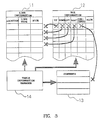
- FIG 3 is to illustrate the configuration of the table manager 9 shown in Figure 2 in more detail.
- the table manager 9 consists of a line information storage 11, a box information storage 12, a content information storage 13, and a table information manager 14, etc.
- the line information storage 11 contains location information (the coordinates of starting points and end points of all the lines constituting a table, line type information, and pick flags (indicating whether or not lines are being picked).
- the box information storage 12 contains a information concerning four lines constituting a box, and the contents to be displayed in the box, that is, pointers to the line information storage 11 and the content information storage 13 which is described later.
- the box information storage 12 also contains pick flags (indicating certain boxes are being picked).
- the content information storage 13 stores the contents to be displayed in a box.
- the table information manager 14 manages the line information storage 11, box information storage 12, and content information storage 13.
- the table editor 3 creates and edits tables.
- Such a table usually consists of some vertical lines and horizontal lines as in Figure 5.
- a field enclosed by four such lines, two vertical and two horizontal, is hereinafter called a box, as usually so designated.
- editing of a table is mainly explained because it is created in a substantially similar manner to a conventional one.
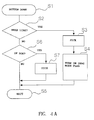
- the presentation manager 8 sends button-down event information to the event processor 10 (step S1), together with mouse cursor (pointer) location information.
- the event processor 10 sequentially inquires line information of the table manager 9, and runs a test as to whether or not the mouse cursor is near a line (step S2). If the mouse cursor is near a line, then the line is picked (step S3). That is, a pick flag is set at the corresponding line entry in the line information storage 11 of the table manager 9. Also, a flag for the drag mode, which is managed by the event processor 10, is turned on (step S4). Then, the routine is terminated (step S5). If it is judged at step 2 that the mouse cursor is not near a line, then a test is run as to whether or not the mouse cursor is in a box (step S6).
- the test is also run by using the line information in the line information storage 11. If the mouse cursor is in a box, then the box is picked (step S7). That is, a pick flag is set at the corresponding box entry in the box information storage 12 of the table manager 9. Then, the routine is terminated (step S5). If the mouse cursor is not in a box, then the routine terminates at once (step S5).
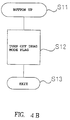
- step S11 If the user presses once a button on the mouse device 7, and then take his finger off the button, the button goes up to the original position.
- the presentation manager 8 detects the button-up event and sends button-up event information to the event processor 10 (step S11). Then the event processor 10 resets the drag mode flag to the off position (step S12) and terminates the routine (step S13).
- a move routine runs by increment of the location of the mouse cursor (step S21). This routine first tests whether or not the mode is in the drag mode (step S22). If it is in the drag mode, or the drag mode flag is on, the line being picked at the moment, if any, is moved (step S23). That is, location information of the line is updated. Then, the routine is terminated (step S24). If it is not in the drag mode, then the routine terminates at once (step S24).
- the presentation manager 8 sends line insertion event information to the event processor 10 (step S31).
- the event processor 10 inquires pick information of the line information storage 11 (step S31). If there is a line being picked, the event processor 10 separates the line into two lines (step S33), and then terminates the line insertion routine (step S34). If there is no line being picked, the routine terminates at once (step S34).
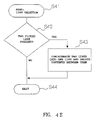
- the presentation manager 8 sends line deletion event information to the event processor 10 (step S41).
- the event processor 10 inquires pick information of the line information storage 11 (step S41). If there are two lines being picked, the event processor 10 concatenates the two lines into a single line, deletes the contents between the two lines (step S43), and terminates the line deletion routine (step S44). If two lines are not picked, the routine terminates at once (step S44).
- the presentation manager 8 sends box concatenation event information to the event processor 10 (step S51).
- the event processor 10 inquires pick information of the box information storage 12 (step S51). If there are two or more boxes being picked, the event processor 10 concatenates these two or more boxes into a single box (step S53), and thus hides away the lines between those boxes as hidden lines. To set up such hidden lines, it is necessary only to specify the attribute "hidden line" for that area. Then the event processor 10 terminates the box concatenation routine (step S54). If fewer than two boxes are being picked, the routine terminates at once (step S54).
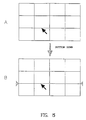
- Figure 5 illustrates how rows are inserted.
- the mouse device 7 ( Figure 1) is first used to move the mouse cursor (the arrow mark in this example) on the line between the second and the third row as shown in (A).
- a button on the mouse device 7 is clicked to generate button-down event information, as shown in Figure 4A.
- a pick flag is set in the line information for the corresponding line based on the button-down information.
- a triangular mark indicating the line being picked is displayed at each end of the picked line based on the flag (B).
- the edit item in the menu bar in the upper area of the screen (window) is picked to display a pull-down menu of edit items (C).
- the presentation manager 8 sends line insertion event information to the event processor 10, and separates the corresponding line into two new lines as shown by four triangular marks in (D), between which a row is then inserted.
- both the vertical and the horizontal length of the outer frame of the table are fixed, and both the height of each row and the width of each column are both constant. Accordingly, the height of each row in (D) is less than that of each row in (A) on account of the insertion of the row mentioned.
- the height of the row to be inserted may be uniquely determined locationally in relation to that of the row just above or just below the row in question, or may be left to the user's decision.
- Figure 6 illustrates how a row is deleted.
- the third row from the top is deleted.
- the ruled lines just above and just below the row to be deleted are picked one after the other with the mouse device 7 ( Figure 1), similarly to the case shown in in Figure 5.
- a pick flag is set on the lines just above and just below the row to the deleted.
- a triangular mark is displayed at each end of the two lines based on the flag, as shown in (A), to indicate that they are picked.
- the edit item in the menu bar in the upper area of the screen (window) is picked to display a pull-down menu of edit items.
- the presentation manager 8 sends line deletion event information to the event processor 10, and concatenates the corresponding two lines into a single line using the routine shown in Figure 4E, thus the row being deleted is as shown in (B).
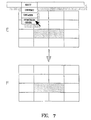
- Figure 7 illustrates how boxes are concatenated.
- the mouse device 7 ( Figure 1) is first used to move the mouse cursor into the box at the intersection of the third row and the second column, as shown in (A).
- a button on the mouse device 7 is clicked to generate button-down event information of Figure 4A.
- a pick flag is set in the box information for the corresponding box based on the button-down information, and the box is highlighted (B).
- the mouse cursor is moved into the box at the intersection of the third row and the third column (C).
- a pick flag is set in the box information for the corresponding box in the same manner to highlight two picked boxes as shown in (D). Then, the edit item in the menu bar in the upper area row of the screen (window) is picked to display a pull-down menu of edit items (E). Then, when the box concatenation item in the pull-down menu is picked, the presentation manager 8 sends box concatenation event information to the event processor 10, and concatenates the corresponding two boxes into a single box by the routine shown in Figure 4F (F).
- Figure 8 illustrates how a line is moved (dragged).
- the third vertical line from the left is dragged.
- the box at the intersection of the third row and the second column and the box at the intersection of the third row and the third column have already been concatenated according to the example of Figure 7. For this reason, part of the third line has been hidden.
- the mouse device 7 ( Figure 1) is used to move the mouse cursor onto the third line from the left, as shown in (A). Then, a button on the mouse device 7 is pressed to generate button-down event information, as shown in Figure 4A. A pick flag is set in the line information for the corresponding line based on the button-down information. Then, a triangular mark is displayed at each end of the picked line based on the flag, as shown in (A) to indicate that it is picked. Furthermore, a drag mode flag is set (turned on) based on the button-down information. The drag mode flag is kept ON until button-up event information is generated, as shown in Figure 4B.
- the move routine is executed repeatedly based on the move event information of Figure 4C, thus the picked line is moved.
- the line visually is discontinued on the third row, but the upper partial line and the lower partial line move together with each other (B) because the line is a ruled line partially having the attribute of a "hidden line.”
- the present invention is not limited to the above-mentioned embodiment, but is capable of being embodied in various variations. For example, even where all lines are hidden lines, this invention can be applied to insert rows and columns. Moreover, needless to say, pointing devices other than the mouse device 7 may be used.
- the present invention enables insertion locations to be specified simply and also allows operations to be performed freely irrespective of the concepts of row and column, inasmuch as the line between the rows just above and just below an inserting location is picked when a row is inserted, and the line between the columns at the left and the right of an inserting location is picked when a column is inserted. Also, this invention simplifies the deletion of rows and columns because it allows such deletion of rows and columns to be specified by picking lines.
Landscapes
- Engineering & Computer Science (AREA)
- Theoretical Computer Science (AREA)
- Audiology, Speech & Language Pathology (AREA)
- Health & Medical Sciences (AREA)
- Computational Linguistics (AREA)
- General Health & Medical Sciences (AREA)
- Physics & Mathematics (AREA)
- General Engineering & Computer Science (AREA)
- General Physics & Mathematics (AREA)
- Artificial Intelligence (AREA)
- Digital Computer Display Output (AREA)
- Calculators And Similar Devices (AREA)
- Document Processing Apparatus (AREA)
- Stored Programmes (AREA)
- User Interface Of Digital Computer (AREA)
Claims (8)
- Ein Tabelleneditor (3) für die Verwendung mit einer Anzeigeeinheit (5) für das Editieren einer Tabelle, die Tabellendaten enthält, die in einer Vielzahl von in Reihen und Spalten angeordneten Kästchen angezeigt werden sollen, wobei der Tabelleneditor:Zeigemarkierungsdaten-Speichereinrichtungen für das Speichern von Zeigemarkierungsdaten, die eine Zeigemarkierung angeben;Einrichtungen (8) für das Steuern der Anzeigeeinheit (5), damit diese eine graphische Darstellung der Tabelle und der Zeigemarkierung auf dem Bildschirm der Anzeigeeinheit anzeigt; undPositionszeigeeinrichtungen (8) für das Aktualisieren der Zeigemarkierungsdaten in den Zeigemarkierungsdaten-Speichereinrichtungen, um eine Position der Zeigemarkierung anzuweisen, umfaßt, gekennzeichnet durchLiniendaten-Speichereinrichtungen (11) für das Speichern von Liniendaten, die eine Vielzahl von Linien in der graphischen Darstellung anzeigen, wobei die Linien Kästchen definieren, in denen die Tabellendaten angezeigt werden;Einrichtungen, die es einem Bediener ermöglichen, einen eine Linie kennzeichnenden Befehl zu generieren;Linienkennzeichnungseinrichtungen für das Kennzeichnen einer oder mehrerer der Linien, auf die die Zeigemarkierung zeigt, auf der Grundlage der Zeigemarkierungsdaten und des Linienkennzeichnungsbefehls;Einrichtungen für das Ausführen einer Einfüge- oder Löschoperation mit den Tabellendaten, bei der die gekennzeichnete Linie bzw. die gekennzeichneten Linien eine Einfüge- oder Löschposition definieren;Einrichtungen für das Aktualisieren der Liniendaten in den Liniendaten-Speichereinrichtungen gemäß der Einfüge- oder Löschoperation.
- Ein Tabelleneditor nach Anspruch 1, wobei die Einrichtungen zum Aktualisieren der Liniendaten so ausgelegt sind, daß, wenn sich eine durch die Linienkennzeichnungseinrichtungen gekennzeichnete Linie zwischen zwei aufeinanderfolgenden Reihen befindet, eine oder mehrere neue Reihen in Abhängigkeit des Einfügebefehls eingefügt werden, und daß, wenn sich eine durch die Linienkennzeichnungseinrichtungen gekennzeichnete Linie zwischen zwei aufeinanderfolgenden Spalten befindet, eine oder mehrere neue Spalten in Abhängigkeit des Einfügebefehls eingefügt werden.
- Ein Tabelleneditor nach Anspruch 2, wobei Liniendaten-Aktualisierungseinrichtungen so ausgelegt sind, daß sie die Liniendaten in den Liniendaten-Speichereinrichtungen so aktualisieren, daß eine angegebene Anzahl von Reihen oder Spalten eingefügt wird.
- Ein Tabelleneditor nach Anspruch 2 oder Anspruch 3, wobei die Liniendaten-Aktualisierungseinrichtungen so ausgelegt sind, daß sie die Daten in den Liniendaten-Speichereinrichtungen so aktualisieren, daß Reihen oder Spalten mit angegebener Größe eingefügt werden.
- Ein Tabelleneditor nach Anspruch 1, wobei die Einrichtungen für das Aktualisieren der Liniendaten so ausgelegt sind, daß, wenn sich zwei durch die Linienkennzeichnungseinrichtungen gekennzeichnete Linien zwischen zwei Reihen befinden, eine oder mehrere Reihen zwischen den beiden Linien in Abhängigkeit des Löschbefehls gelöscht werden, und daß, wenn sich die beiden durch die Linienkennzeichnungseinrichtungen gekennzeichneten Linien zwischen zwei Spalten befinden, eine oder mehrere Spalten zwischen den beiden Linien in Abhängigkeit des Löschbefehls gelöscht werden.
- Ein Tabelleneditor nach einem der vorangehenden Ansprüche, wobei die Liniendaten-Aktualisierungseinrichtungen so ausgelegt sind, daß sie die Liniendaten in den Liniendaten-Speichereinrichtungen so aktualisieren, daß bestehende eingefügte Reihen oder Spalten innerhalb eines Rahmens mit zuvor festgelegter Größe gleichmäßig angeordnet werden.
- Ein Tabelleneditor nach einem der vorangehenden Ansprüche, der eine Anzeigeeinheit umfaßt.
- Ein Tabelleneditor nach einem der vorangehenden Ansprüche, wobei es sich bei der Positionszeigeeinrichtung um eine Mauseinheit handelt.
Applications Claiming Priority (2)
| Application Number | Priority Date | Filing Date | Title |
|---|---|---|---|
| JP2000717A JPH0758487B2 (ja) | 1990-01-08 | 1990-01-08 | 表編集装置 |
| JP717/90 | 1990-01-08 |
Publications (3)
| Publication Number | Publication Date |
|---|---|
| EP0437077A2 EP0437077A2 (de) | 1991-07-17 |
| EP0437077A3 EP0437077A3 (en) | 1993-02-24 |
| EP0437077B1 true EP0437077B1 (de) | 1996-02-14 |
Family
ID=11481509
Family Applications (1)
| Application Number | Title | Priority Date | Filing Date |
|---|---|---|---|
| EP90314043A Expired - Lifetime EP0437077B1 (de) | 1990-01-08 | 1990-12-20 | Tabelleneditor |
Country Status (5)
| Country | Link |
|---|---|
| US (1) | US5239287A (de) |
| EP (1) | EP0437077B1 (de) |
| JP (1) | JPH0758487B2 (de) |
| CA (1) | CA2032854C (de) |
| DE (1) | DE69025389T2 (de) |
Families Citing this family (11)
| Publication number | Priority date | Publication date | Assignee | Title |
|---|---|---|---|---|
| JPH05250357A (ja) * | 1992-03-05 | 1993-09-28 | Ricoh Co Ltd | 画像読取修正装置および修正画像形成装置 |
| US5550563A (en) * | 1992-12-23 | 1996-08-27 | Taligent, Inc. | Interaction framework system |
| US6259446B1 (en) | 1992-12-23 | 2001-07-10 | Object Technology Licensing Corporation | Menu state system |
| JPH08505721A (ja) | 1992-12-23 | 1996-06-18 | タリジェント インコーポレイテッド | オブジェクト指向フレームワーク・システム |
| JP3234079B2 (ja) * | 1993-12-22 | 2001-12-04 | 富士通株式会社 | ビットマップイメージデータの縮小方式 |
| US5764873A (en) * | 1994-04-14 | 1998-06-09 | International Business Machines Corporation | Lazy drag of graphical user interface (GUI) objects |
| JP3020849B2 (ja) * | 1995-09-28 | 2000-03-15 | シャープ株式会社 | データ検索装置 |
| JP2010003046A (ja) * | 2008-06-19 | 2010-01-07 | Dainippon Printing Co Ltd | 表組み編集装置、方法、プログラム、及び記録媒体 |
| US8392819B2 (en) * | 2009-05-20 | 2013-03-05 | Microsoft Corporation | Column selection, insertion and resizing in computer-generated tables |
| KR20140120564A (ko) * | 2013-04-03 | 2014-10-14 | 케이티하이텔 주식회사 | 컨텍스트를 기반으로 셀을 편집하는 인터페이스를 제공하는 장치 및 방법 |
| CN110427601B (zh) * | 2019-07-16 | 2021-05-18 | 广州视源电子科技股份有限公司 | 表格处理方法、装置、智能交互平板及存储介质 |
Family Cites Families (10)
| Publication number | Priority date | Publication date | Assignee | Title |
|---|---|---|---|---|
| JPS6014292A (ja) * | 1983-07-06 | 1985-01-24 | 株式会社東芝 | 文書作成装置 |
| JPS60163156A (ja) * | 1984-02-04 | 1985-08-26 | Casio Comput Co Ltd | 文書作成編集方法 |
| JPS60251473A (ja) * | 1984-05-19 | 1985-12-12 | インタ−ナショナル ビジネス マシ−ンズ コ−ポレ−ション | 作表方式 |
| US4663615A (en) * | 1984-12-26 | 1987-05-05 | International Business Machines Corporation | Document creation |
| DE3613740A1 (de) * | 1985-04-26 | 1986-10-30 | Casio Computer Co., Ltd., Tokio/Tokyo | Verfahren zum erzeugen einer tabelle fuer das speichern einer groesseren menge von datenbereichen sowie einer vorrichtung zur verwirklichung dieses verfahrens |
| JPS61275795A (ja) * | 1985-05-31 | 1986-12-05 | キヤノン株式会社 | 文書処理装置 |
| JPS6280692A (ja) * | 1985-10-04 | 1987-04-14 | 株式会社日立製作所 | 表作成装置 |
| JPH0673074B2 (ja) * | 1986-04-09 | 1994-09-14 | 国際電信電話株式会社 | ドツト構成文字表示変換方式 |
| JPS6324419A (ja) * | 1986-07-17 | 1988-02-01 | Toshiba Corp | 複合文書処理装置 |
| JPS63155257A (ja) * | 1986-12-18 | 1988-06-28 | Brother Ind Ltd | ワ−ドプロセツサ |
-
1990
- 1990-01-08 JP JP2000717A patent/JPH0758487B2/ja not_active Expired - Fee Related
- 1990-12-20 CA CA002032854A patent/CA2032854C/en not_active Expired - Fee Related
- 1990-12-20 DE DE69025389T patent/DE69025389T2/de not_active Expired - Fee Related
- 1990-12-20 EP EP90314043A patent/EP0437077B1/de not_active Expired - Lifetime
-
1991
- 1991-01-03 US US07/637,083 patent/US5239287A/en not_active Expired - Lifetime
Non-Patent Citations (2)
| Title |
|---|
| 'Using Framework II' 1985 , ASHTON-TATE , US, pages 4 - 12 * |
| Y. MCCOY 'Quattro: The Complete Reference' 1988 , BORLAND/OSBORNE MCGRAW-HILL, BERKELEY, CA, US, pages 140 - 149 * |
Also Published As
| Publication number | Publication date |
|---|---|
| DE69025389T2 (de) | 1996-09-19 |
| CA2032854C (en) | 1994-02-08 |
| JPH0758487B2 (ja) | 1995-06-21 |
| CA2032854A1 (en) | 1991-07-09 |
| US5239287A (en) | 1993-08-24 |
| EP0437077A2 (de) | 1991-07-17 |
| DE69025389D1 (de) | 1996-03-28 |
| EP0437077A3 (en) | 1993-02-24 |
| JPH03204764A (ja) | 1991-09-06 |
Similar Documents
| Publication | Publication Date | Title |
|---|---|---|
| US4714918A (en) | Window view control | |
| US5179655A (en) | Multiwindow control method and apparatus for work station having multiwindow function | |
| US5237653A (en) | Multiwindow control method and apparatus for work station having multiwindow function | |
| JP3317763B2 (ja) | プログラム起動方法およびその処理装置 | |
| JPH06290250A (ja) | 情報処理装置の履歴内容提示方式 | |
| JPH06105455B2 (ja) | 製造工程計画を生成するための方法及びシステム | |
| US5239287A (en) | Table editor | |
| US20160110331A1 (en) | Range adjustment for text editing | |
| AU2023200293B2 (en) | Method of computerized presentation of a legend of object symbols on a document | |
| JPH07220109A (ja) | 情報処理装置及び方法 | |
| US7053914B2 (en) | Graphic editing device, graphic editing method and storage medium for storing a program | |
| JP2785941B2 (ja) | ウインドウ情報分割・統合処理方式 | |
| JPH1115583A (ja) | アイコン表示制御装置及びアイコン表示制御方法 | |
| JP2621486B2 (ja) | 文書編集方法およびその装置 | |
| JP3674905B2 (ja) | 文書編集装置 | |
| JPS63313234A (ja) | フアイルインデツクス表示方式 | |
| JPS6330976A (ja) | マクロコマンド編集方式 | |
| JP3072516B2 (ja) | 文書編集装置 | |
| JP3036026B2 (ja) | 文書作成装置 | |
| JP2872854B2 (ja) | 図形処理方法及びその装置 | |
| JPH08255010A (ja) | プログラミング装置におけるコメント表示装置 | |
| JP3774519B2 (ja) | 文書処理装置およびその方法 | |
| JP2753015B2 (ja) | 属性入力方法 | |
| JPS6133567A (ja) | 文書処理装置 | |
| JPH0883162A (ja) | 画面表示システム |
Legal Events
| Date | Code | Title | Description |
|---|---|---|---|
| PUAI | Public reference made under article 153(3) epc to a published international application that has entered the european phase |
Free format text: ORIGINAL CODE: 0009012 |
|
| AK | Designated contracting states |
Kind code of ref document: A2 Designated state(s): DE FR GB IT |
|
| 17P | Request for examination filed |
Effective date: 19911112 |
|
| PUAL | Search report despatched |
Free format text: ORIGINAL CODE: 0009013 |
|
| AK | Designated contracting states |
Kind code of ref document: A3 Designated state(s): DE FR GB IT |
|
| 17Q | First examination report despatched |
Effective date: 19940819 |
|
| GRAA | (expected) grant |
Free format text: ORIGINAL CODE: 0009210 |
|
| AK | Designated contracting states |
Kind code of ref document: B1 Designated state(s): DE FR GB IT |
|
| REF | Corresponds to: |
Ref document number: 69025389 Country of ref document: DE Date of ref document: 19960328 |
|
| ITF | It: translation for a ep patent filed | ||
| ET | Fr: translation filed | ||
| PG25 | Lapsed in a contracting state [announced via postgrant information from national office to epo] |
Ref country code: GB Effective date: 19961220 |
|
| PLBE | No opposition filed within time limit |
Free format text: ORIGINAL CODE: 0009261 |
|
| STAA | Information on the status of an ep patent application or granted ep patent |
Free format text: STATUS: NO OPPOSITION FILED WITHIN TIME LIMIT |
|
| 26N | No opposition filed | ||
| GBPC | Gb: european patent ceased through non-payment of renewal fee |
Effective date: 19961220 |
|
| PG25 | Lapsed in a contracting state [announced via postgrant information from national office to epo] |
Ref country code: FR Effective date: 19970829 |
|
| PG25 | Lapsed in a contracting state [announced via postgrant information from national office to epo] |
Ref country code: DE Effective date: 19970902 |
|
| REG | Reference to a national code |
Ref country code: FR Ref legal event code: ST |
|
| PG25 | Lapsed in a contracting state [announced via postgrant information from national office to epo] |
Ref country code: IT Free format text: LAPSE BECAUSE OF NON-PAYMENT OF DUE FEES;WARNING: LAPSES OF ITALIAN PATENTS WITH EFFECTIVE DATE BEFORE 2007 MAY HAVE OCCURRED AT ANY TIME BEFORE 2007. THE CORRECT EFFECTIVE DATE MAY BE DIFFERENT FROM THE ONE RECORDED. Effective date: 20051220 |