WO2024189784A1 - 作画支援プログラム、作画支援装置及び作画支援方法 - Google Patents
作画支援プログラム、作画支援装置及び作画支援方法 Download PDFInfo
- Publication number
- WO2024189784A1 WO2024189784A1 PCT/JP2023/009897 JP2023009897W WO2024189784A1 WO 2024189784 A1 WO2024189784 A1 WO 2024189784A1 JP 2023009897 W JP2023009897 W JP 2023009897W WO 2024189784 A1 WO2024189784 A1 WO 2024189784A1
- Authority
- WO
- WIPO (PCT)
- Prior art keywords
- display
- display screen
- design
- language
- screen
- Prior art date
- Legal status (The legal status is an assumption and is not a legal conclusion. Google has not performed a legal analysis and makes no representation as to the accuracy of the status listed.)
- Ceased
Links
Images






Classifications
-
- G—PHYSICS
- G05—CONTROLLING; REGULATING
- G05B—CONTROL OR REGULATING SYSTEMS IN GENERAL; FUNCTIONAL ELEMENTS OF SUCH SYSTEMS; MONITORING OR TESTING ARRANGEMENTS FOR SUCH SYSTEMS OR ELEMENTS
- G05B19/00—Program-control systems
- G05B19/02—Program-control systems electric
- G05B19/04—Program control other than numerical control, i.e. in sequence controllers or logic controllers
- G05B19/05—Programmable logic controllers, e.g. simulating logic interconnections of signals according to ladder diagrams or function charts
-
- G—PHYSICS
- G05—CONTROLLING; REGULATING
- G05B—CONTROL OR REGULATING SYSTEMS IN GENERAL; FUNCTIONAL ELEMENTS OF SUCH SYSTEMS; MONITORING OR TESTING ARRANGEMENTS FOR SUCH SYSTEMS OR ELEMENTS
- G05B23/00—Testing or monitoring of control systems or parts thereof
- G05B23/02—Electric testing or monitoring
-
- G—PHYSICS
- G06—COMPUTING OR CALCULATING; COUNTING
- G06F—ELECTRIC DIGITAL DATA PROCESSING
- G06F3/00—Input arrangements for transferring data to be processed into a form capable of being handled by the computer; Output arrangements for transferring data from processing unit to output unit, e.g. interface arrangements
- G06F3/01—Input arrangements or combined input and output arrangements for interaction between user and computer
- G06F3/048—Interaction techniques based on graphical user interfaces [GUI]
- G06F3/0481—Interaction techniques based on graphical user interfaces [GUI] based on specific properties of the displayed interaction object or a metaphor-based environment, e.g. interaction with desktop elements like windows or icons, or assisted by a cursor's changing behaviour or appearance
Definitions
- This disclosure relates to a drawing support program, a drawing support device, and a drawing support method.
- Programmable displays are known that display the status of devices such as programmable logic controllers (PLCs) and sensors, and accept operations for the devices.
- the display screen displayed on a programmable display contains multiple components as images, such as components that indicate specific functions such as switches and meters, and components that display data such as text.
- the display screens displayed on such programmable displays are created by using drawing software to edit project data that contains display screen information that defines the display screen.
- Patent Document 1 discloses a technique for switching the font of text on the display screen while maintaining the display operation of a programmable display in an operating mode that allows PLC communication.
- the present disclosure has been made in consideration of the above circumstances, and aims to provide a drawing support program, drawing support device, and drawing support method that are capable of creating a display screen whose design changes simultaneously with switching the display language in a single piece of project data for a programmable display device.
- the drawing support program includes: Computer, A display control means for displaying a drawing screen for drawing a display screen of the programmable display device on a display device; a setting unit that sets, in project data including display screen information defining the display screen, a display language to be displayed on the display screen in association with design information indicating a design of the display screen; When the display language of the display screen is switched, the display control means displays the display screen on the display device in a design indicated by design information associated with the switched display language.
- the present disclosure provides a drawing support program, a drawing support device, and a drawing support method that can create a display screen whose design changes simultaneously with switching the display language in one project data of a programmable display device.
- FIG. 1 is a diagram showing a functional configuration of a drawing support device according to an embodiment
- FIG. 1 is a block diagram showing a hardware configuration of a drawing support device according to an embodiment
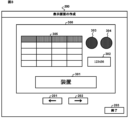
- FIG. 1 is a diagram showing an example of a display screen in a drawing screen according to an embodiment
- FIG. 1 is a diagram showing an example of design information according to an embodiment
- FIG. 1 is a diagram showing an example of character string information according to an embodiment
- FIG. 1 is a diagram showing an example of switching information according to an embodiment
- FIG. 13 is a diagram showing a dialog for setting the association between the display language and the design information according to the embodiment.
- FIG. 13 is a diagram showing a dialog for editing design information in the embodiment.
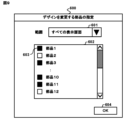
- FIG. 1 is a diagram showing an example of a display screen in a drawing screen according to an embodiment
- FIG. 1 is a diagram showing an example of a display screen in a drawing screen according to an embodiment
- the drawing support device 100 is a device in which drawing software for drawing a display screen of a programmable display is installed.
- the drawing software edits project data including display screen information defining the display screen of the programmable display, system setting information, and the like.
- project data including display screen information defining the drawn display screen is created.
- the drawing support device 100 transfers the project data and firmware operating on the programmable display to the programmable display, the programmable display becomes able to display the display screen drawn by the user.
- FIG. 1 shows the functional configuration of the drawing support device 100.
- the drawing support device 100 includes a display control unit 101 that causes a display device to display a drawing screen for drawing a display screen, a storage unit 102 that stores project data including display screen information that defines the display screen, a setting unit 103 that sets design information in association with a display language, a translation unit 104 that translates character strings included in the display screen information into a specified language, an editing unit 105 that edits predetermined design information, and a designation unit 106 that designates parts whose design is to be changed.
- the drawing support device 100 associates design information indicating the design of the display screen with the display language of the display screen, and creates project data in which the design of the display screen changes when the display language is switched. Therefore, when the display language is switched on the display screen of the programmable display device, the design of the display screen is changed to the design indicated by the design information associated with the switched display language.
- the drawing support device 100 in FIG. 1 has the hardware configuration shown in FIG. 2.
- the drawing support device 100 has a processor 11 that executes various processes, a main memory unit 12 that is used as a working area for the processor 11, an auxiliary memory unit 13 that stores various data used in the processing of the processor 11, a communication unit 14 for communicating with external devices, and an input/output interface 15 for connecting external devices.
- the main memory unit 12, the auxiliary memory unit 13, the communication unit 14, and the input/output interface 15 are all connected to the processor 11 via a bus 16.
- the processor 11 includes a CPU (Central Processing Unit).
- the processor 11 executes programs stored in the auxiliary storage unit 13 to realize various functions of the drawing support device 100.
- the main memory unit 12 includes a RAM (Random Access Memory). Programs are loaded into the main memory unit 12 from the auxiliary memory unit 13.
- the main memory unit 12 is used as a working area for the processor 11.
- the auxiliary memory unit 13 includes a non-volatile memory such as an EEPROM (Electrically Erasable Programmable Read-Only Memory). In addition to programs, the auxiliary memory unit 13 stores various data used in the processing of the processor 11. In accordance with instructions from the processor 11, the auxiliary memory unit 13 supplies the processor 11 with data used by the processor 11, and stores the data supplied from the processor 11.
- EEPROM Electrically Erasable Programmable Read-Only Memory
- the communication unit 14 includes a network interface circuit for communicating with an external device.
- the communication unit 14 receives a signal from the external device and outputs data indicated by this signal to the processor 11.
- the communication unit 14 also transmits a signal indicating the data output from the processor 11 to the external device.
- the input/output interface 15 is an interface for connecting external devices, and includes an interface equipped with a serial port and a Universal Serial Bus (USB) port.
- An external device is, for example, an input device such as an input key, a display device such as a display, and an output device including a speaker.
- the input/output interface 15 receives a signal from the external device, and outputs data indicated by this signal to the processor 11.
- the input/output interface 15 also transmits a signal indicating the data output from the processor 11 to the external device.
- the display control unit 101 in FIG. 1 causes the display device to display a drawing screen for drawing the display screen of the programmable display.
- the display control unit 101 also causes the display device to display the drawing screen based on the display screen information stored in the storage unit 102.
- the display control unit 101 is realized by the processor 11 and the input/output interface 15.
- the display control unit 101 is an example of a display control means.
- the display control unit 101 when the display control unit 101 receives information indicating that an operation to start creating a display screen has been performed, the display control unit 101 causes a drawing screen for drawing the display screen to be displayed on a display external to the drawing support device 100. In addition, when the display control unit 101 receives information indicating an operation to newly create a part on the drawing screen, the display control unit 101 causes the part to be displayed on a display external to the drawing support device 100.
- Figure 3 shows an example of a drawing screen.
- Drawing screen 200 includes a drawn display screen 300, buttons 201 and 202 for switching the display language of display screen 300, and a button 203 for ending drawing.
- Display screen 300 includes created parts 301 to 305.
- parts 301 and 302 are associated with character strings, and "Japanese" is used as the display language.
- the storage unit 102 stores project data including display screen information that defines the display screen.
- the storage unit 102 is realized by the auxiliary storage unit 13.
- the display screen information is information that defines the display screen to be displayed on the programmable display device, and is generated and updated by the setting unit 103 in response to information indicating the operation received by the setting unit 103.
- the display screen information includes screen information 1021, part information 1022, character string information 1023, and switching information 1024.
- Screen information 1021 includes identification information for identifying the drawn display screen, attribute information indicating the attributes of the display screen, identification information of the parts included in the display screen, etc.
- the attribute information of the display screen includes, for example, information indicating the type and color of the background image.
- Component information 1022 is information about components that are included as images on the display screen, and includes identification information for identifying the components, attribute information that indicates the attributes of the components, and design information.
- Components include, for example, components that indicate specific functions such as switches and meters, and components that indicate data such as text and graphs.
- the attribute information of a part includes various information that can be set for the part in the drawing software, such as information indicating the position, size, shape, and color of the part on the display screen, information indicating the type of part, and a string ID of a string associated with the part.
- Design information is information that indicates the design of the display screen, and includes information that indicates the design of the parts.
- Information that indicates the design of the parts is information about the display form of the parts.
- Design information indicates, for example, the type of texture of the figures, the type of font of the character string, and the type of color tone.
- the attributes of the parts such as the position, size, shape, and color, are defined based on the attribute information, and the design of the parts is defined based on the design information.
- multiple patterns are predefined in the drawing software.
- An example of design information is shown in FIG. 4.
- the design information includes three patterns, "Design 1", “Design 2", and "Design 3".
- String information 1023 is information about strings included in the display screen, and includes identification information for identifying strings, and information about strings for each display language.
- An example of string information 1023 is shown in FIG. 5.
- the string ID in FIG. 5 is identification information for identifying strings included in the project data, and is assigned as attribute information to a component to which the string indicated by the string ID corresponds.
- the display language ID in FIG. 5 is identification information for identifying a display language. The user sets which display language is to be associated with the display language ID.
- display language ID "1" is associated with “Japanese”, display language ID “2” with “English”, display language ID “3” with “Chinese”, and display language ID "4" with “Vietnamese”.
- the record in the first row of the table in FIG. 5 indicates that the string with string ID "1” is displayed as “ ⁇ ” in the display language with display language ID “1”, as “Device” in the display language with display language ID “2”, as “ ⁇ ” in the display language with display language ID "3”, and as "Thi?t b?” in the display language with display language ID "4".
- FIG. 5 includes strings in four display languages, the number and type of display languages can be set appropriately by the user.
- the timing of registering the character string information 1023 is arbitrary, and the user may register it in the storage unit 102 before the start of drawing the display screen, or may register it while drawing is in progress. Also, in FIG. 5, translations in multiple languages are shown for a character string indicated by one character string ID, but as described below, a character string in one display language is registered, and translations in other display languages are automatically registered as character string information 1023 by performing a prescribed operation. In this embodiment, only the Japanese character string with display language ID "1" is registered by the user as character string information 1023, and the translations in the display languages with display language IDs "2" to "4" are registered by the translation unit 104, as described below.
- the switching information 1024 includes a language switching address and information associating the display language and design information to be displayed on the display screen.
- the language switching address is an address used to switch the display language of the display screen.
- the value of the language switching address indicates the display language ID of the display language currently displayed on the display screen, and changes each time the buttons 201 and 202 on the drawing screen 200 are selected.
- the value of the language switching address changes when an operation is performed to switch the display language of the display screen. The association between the display language and the design information is performed by the user, as will be described later.
- An example of the switching information 1024 is shown in FIG. 6.
- the display control unit 101 displays the display screen 300 on the drawing screen 200 based on the display screen information in the storage unit 102.
- the display control unit 101 displays the display screen 300, which includes the parts 301 and 302 associated with the character strings of character string IDs "1" and "4", on the drawing screen 200, in the design indicated by the design information of "design 1" associated with "Japanese” of the display language ID "1", as shown in FIG. 3.
- the setting unit 103 sets the display screen information based on information indicating a user operation.
- the setting unit 103 is realized by the processor 11 and the input/output interface 15.
- the setting unit 103 is an example of a setting means.
- the setting unit 103 when the setting unit 103 receives information indicating an operation to create a new display screen and a part, it generates screen information 1021 and part information 1022 and stores them in the storage unit 102. Furthermore, when the setting unit 103 receives information indicating an operation to specify attributes of a display screen and a part, it updates the screen information 1021 and part information 1022 stored in the storage unit 102 based on the information indicating the received operation. Furthermore, when the setting unit 103 receives information indicating an operation to register a character string, it updates the character string information 1023 stored in the storage unit 102 based on the information indicating the received operation.
- the setting unit 103 sets the display language to be displayed on the display screen in the project data including the display screen information that defines the display screen, in association with design information indicating the design of the display screen.
- the display control unit 101 displays a dialog 400 for setting the association between the display language and the design information on the drawing screen, as shown in FIG. 7.
- the dialog 400 in FIG. 7 includes a display language ID 401, a field 402 for specifying the design information to be associated with the display language of the display language ID, a check box 403 for specifying whether or not to perform a translation, a button 404 for editing the design information, a button 405 for specifying the part whose design will be changed, and a button 406 for approving the settings.
- the setting unit 103 associates the specified design information with the display language IDs "1" to "4" and registers them as switching information 1024 as shown in FIG. 6.
- the translation unit 104 also translates character strings included in the display screen information into a specified language, and registers the character strings translated into the specified language in the project data.
- translation software is installed in the drawing support device 100, and the translation unit 104 translates character strings by using the translation software.
- the drawing software can link the translation software with the drawing software.
- the translation unit 104 is realized by the processor 11 and the input/output interface 15.
- the translation unit 104 is an example of a translation means.
- the character string included in the display screen information is a character string registered as character string information 1023, and is a character string indicated by the character string ID in FIG. 5.
- the specified language is a language specified by the user among the display languages assigned with a display language ID.
- translation unit 104 determines that the language specified by the user is "English” with display language ID “2", “Chinese” with display language ID “3”, and “Vietnamese” with display language ID "4". Then, translation unit 104 translates the Japanese character string with display language ID “1” into “English” with display language ID “2”, “Chinese” with display language ID “3”, and “Vietnamese” with display language ID "4" as shown in FIG. 5, and registers the translations as character string information 1023.
- the editing unit 105 edits predetermined design information based on an editing operation for editing the design information of a part.
- the editing unit 105 is realized by the processor 11 and the input/output interface 15.
- the editing unit 105 is an example of an editing means.
- the dialog 500 in FIG. 8 includes a table 501 in which part IDs are associated with the design information of each pattern, and a button 502 for approving the editing operation.
- the part ID is identification information for identifying the parts included in the display screen, and is registered as part information 1022. It is assumed that the table 501 includes the part IDs of all parts included in the project data.
- the design information in table 501 in FIG. 8 is predetermined as the initial value of the drawing software, and the user can edit the information included in table 501. In other words, the design content can be specified for each part in the design information of each pattern.
- the editing unit 105 registers the edited design information "Real, Gothic, Monochrome” of "Design 1" in association with part ID "2."
- the designation unit 106 designates, among the parts included in the display screen, the parts to be changed to the design indicated by the design information associated with the switched display language.
- the designation unit 106 is realized by the processor 11 and the input/output interface 15.
- the designation unit 106 is an example of a designation means.
- the display control unit 101 displays a dialog 600 for specifying a part whose design is to be changed on the drawing screen, as shown in FIG. 9.
- the dialog 600 in FIG. 9 includes a field 601 for selecting a display screen, a field 602 for displaying the parts included in the display screen selected in field 601, a check box 603 for specifying the part whose design is to be changed, and a button 604 for approving the specified contents.
- the specification unit 106 registers in the switching information 1024 a setting that limits the parts whose design will be changed when the display language is switched to part ID "1", part ID "3", ..., part ID "10", and part ID "11".
- the display control unit 101 displays the display screen on the display device in the design indicated by the design information associated with the switched display language.
- the display control unit 101 when the display control unit 101 receives information indicating that the button 202 has been selected on the drawing screen 200 of FIG. 3, it changes the value of the language switching address to "2" and displays the display screen 300 with the display language set to "English” as shown in FIG. 10.
- the text of the part 301 is displayed in "English”
- the parts 301 to 304 are displayed in the design indicated by the design information of "Design 2" which is associated with "English”.
- the texture of the figures of the parts 301 to 304 is changed from “simple” to “plastic”
- the font of the text of the parts 301 and 302 is changed from “Mincho” to “Gothic”
- the tone of the color applied to the parts 301 to 304 is changed from “monochrome” to "pastel”.
- the display control unit 101 When the display control unit 101 receives information indicating that the button 202 has been selected on the drawing screen 200 of FIG. 10, the display control unit 101 changes the value of the language switching address to "3" and displays the display screen 300 with the display language set to "Chinese” as shown in FIG. 11. On the display screen 300 of FIG. 11, the character string of the part 301 is displayed in “Chinese”, and the parts 301 to 304 are displayed in the design indicated by the design information of "Design 1" associated with "Chinese”. When the display control unit 101 receives information indicating that the button 202 has been selected on the drawing screen 200 of FIG. 11, the display control unit 101 changes the value of the language switching address to "4" and displays the display screen 300 with the display language set to "Vietnamese".
- the display control unit 101 highlights the area of the display screen that will be changed to the design indicated by the design information associated with the switched display language on the drawing screen.
- the display control unit 101 highlights the areas 311-313 including the parts 301-304 whose design has been changed from that indicated by the design information of "Design 1" to that indicated by the design information of "Design 2" by surrounding them with dotted lines.
- the display control unit 101 highlights the areas 311-313 including the parts 301-304 whose design has been changed from that indicated by the design information of "Design 2" to that indicated by the design information of "Design 1” by surrounding them with dotted lines.
- the setting process executed by the drawing support device 100 according to this embodiment will be described with reference to the flowchart in FIG. 12.
- the setting process in FIG. 12 is executed, for example, when the drawing support device 100 receives information indicating an operation to associate design information with a display language.
- the display control unit 101 displays a setting screen for setting the association between the display language and the design information (step S101).
- the display control unit 101 displays a dialog 400 on the drawing screen for setting the correspondence between the display language and the design information.
- the setting unit 103 judges whether the setting has been approved (step S102). If the setting unit 103 judges that the setting has been approved (step S102; YES), it sets the display language to correspond to the design information (step S103). Next, the translation unit 104 judges whether a translation instruction has been received (step S104). If the translation unit 104 judges that a translation instruction has been received (step S104; YES), the translation unit 104 translates the character string included in the display screen information into the specified language and registers the character string translated into the specified language in the project data (step S105). On the other hand, if the translation unit 104 judges that a translation instruction has not been received (step S104; NO), it ends the setting process.
- the setting unit 103 receives information indicating the selection of the button 406 in FIG. 7, as shown in FIG. 6, it registers the design information specified in the dialog 400 in association with the display language IDs "1" to "4" as switching information 1024.
- the translation unit 104 detects a check in the checkbox 403, it determines that a translation instruction has been received, and translates the Japanese character string with the display language ID "1" into "English” with the display language ID "2", “Chinese” with the display language ID "3”, and "Vietnamese” with the display language ID "4", and registers the translations as character string information 1023.
- step S106 determines whether or not information indicating an editing operation for editing the design information of the component has been received. If the editing unit 105 determines that information indicating an editing operation has been received (step S106; YES), it edits the predetermined design information based on the editing operation (step S107). On the other hand, if the editing unit 105 determines that information indicating an editing operation has not been received (step S106; NO), it proceeds to step S108.
- the display control unit 101 displays a dialog 500 for editing design information on the drawing screen as shown in FIG. 8. Then, when the editing unit 105 receives information indicating the selection of button 502 in FIG. 8, it registers the design information shown in table 501 in FIG. 8 in association with the component ID.
- the designation unit 106 determines whether or not it has received information indicating a designation operation for designating a part whose design is to be changed to the design indicated by the design information associated with the switched display language (step S108). If the designation unit 106 determines that it has received information indicating a designation operation (step S108; YES), it designates the part whose design is to be changed based on the designation operation (step S109). On the other hand, if the designation unit 106 determines that it has not received information indicating a designation operation (step S108; NO), it returns to step S102.
- the display control unit 101 displays a dialog 600 for designating the part whose design is to be changed on the drawing screen, as shown in FIG. 9. Then, when the designation unit 106 receives information indicating the selection of button 604 in FIG. 9, it registers in the switching information 1024 a setting that limits the parts whose design is to be changed when the display language is switched to part ID "1", part ID "3", ..., part ID "10", and part ID "11".
- a display screen can be created in which the design changes when the display language is switched, using one piece of project data for a programmable display. This eliminates the need to prepare multiple pieces of project data for each design, facilitating the management of project data and preventing the occurrence of human error.
- character strings to be displayed on the display screen can be automatically translated and registered as character string information. This saves the user the trouble of having to translate manually, and improves the efficiency of the work of creating the display screen.
- the user can edit the design information and specify the parts whose design is to be changed, which increases the degree of freedom in designing the display screen. This allows a high-quality display screen to be created according to the skill level of the screen designer.
- a display screen can be created in which the design is changed at the same time as the display language is switched in one project data, so that the area in which the design is changed can be highlighted in association with the display language. This makes it easy to recognize parts whose designs have been changed all at once.
- the translation unit 104 translates character strings by using translation software installed in the drawing assistance device 100, but this is not limited to the above.
- the translation unit 104 may be realized by the processor 11, the communication unit 14, and the input/output interface 15, and may communicate with a device external to the drawing assistance device 100 and use a translation function provided by the external device.
- the drawing assistance device 100 may not be equipped with the translation unit 104.
- the display control unit 101 displays the display screen 300 with a different display language on the drawing screen 200; however, the display format of the display screen 300 is not limited to this.
- the display control unit 101 may display display screens with different display languages on one drawing screen.
- the display control unit 101 may display the display screen 300 of FIG. 3, the display screen 300 of FIG. 10, the display screen 300 of FIG. 11, and a display screen whose display language is "Vietnamese" all together on one drawing screen. This makes it possible to list the changes, making it easy to compare the changes. The user can arbitrarily select the display screen to be displayed on one drawing screen.
- step S103 may be executed after step S105
- steps S106 and S107 may be executed after step S109.
- the display control unit 101 is realized by the processor 11 and the input/output interface 15, and the display control unit 101 causes the display device to display a drawing screen for drawing the display screen to be displayed on the programmable display device, but this is not limited to the above.
- the display control unit 101 may be realized by the processor 11 and the display device, and may display the drawing screen. Therefore, the drawing support device 100 may have a hardware configuration that includes a display device such as a display.
- the setting unit 103, the translation unit 104, the editing unit 105, and the designation unit 106 are realized by the processor 11 and the input/output interface 15, but this is not limited to the above.
- the setting unit 103, the translation unit 104, the editing unit 105, and the designation unit 106 may be realized by the processor 11 and an input device, and may receive operations from a user. Therefore, the drawing support device 100 may have a hardware configuration that includes an input device such as an input key.
- Such programs may be distributed in any manner; for example, they may be stored on a computer-readable recording medium such as a CD-ROM (Compact Disk Read-Only Memory), a DVD (Digital Versatile Disk), or a memory card and distributed, or they may be distributed via a communications network such as the Internet.
- a computer-readable recording medium such as a CD-ROM (Compact Disk Read-Only Memory), a DVD (Digital Versatile Disk), or a memory card and distributed, or they may be distributed via a communications network such as the Internet.
- the present disclosure provides a drawing support program, a drawing support device, and a drawing support method that can create a display screen whose design changes simultaneously with switching the display language in one project data of a programmable display device.
- 11 Processor 12 Main memory, 13 Auxiliary memory, 14 Communication, 15 Input/output interface, 16 Bus, 100 Drawing support device, 101 Display control, 102 Memory, 103 Setting, 104 Translation, 105 Editing, 106 Designation, 200 Drawing screen, 201-203, 404-406, 502, 604 Button, 300 Display screen, 301-305 Parts, 311-313 Area, 400, 500, 600 Dialog, 401 Display language ID, 402, 601, 602 Column, 403, 603 Check box, 501 Table, 1021 Screen information, 1022 Part information, 1023 Character string information, 1024 Switching information.
Landscapes
- Engineering & Computer Science (AREA)
- Physics & Mathematics (AREA)
- General Physics & Mathematics (AREA)
- Automation & Control Theory (AREA)
- General Engineering & Computer Science (AREA)
- Theoretical Computer Science (AREA)
- Human Computer Interaction (AREA)
- User Interface Of Digital Computer (AREA)
Priority Applications (2)
| Application Number | Priority Date | Filing Date | Title |
|---|---|---|---|
| PCT/JP2023/009897 WO2024189784A1 (ja) | 2023-03-14 | 2023-03-14 | 作画支援プログラム、作画支援装置及び作画支援方法 |
| JP2023552317A JPWO2024189784A1 (https=) | 2023-03-14 | 2023-03-14 |
Applications Claiming Priority (1)
| Application Number | Priority Date | Filing Date | Title |
|---|---|---|---|
| PCT/JP2023/009897 WO2024189784A1 (ja) | 2023-03-14 | 2023-03-14 | 作画支援プログラム、作画支援装置及び作画支援方法 |
Publications (1)
| Publication Number | Publication Date |
|---|---|
| WO2024189784A1 true WO2024189784A1 (ja) | 2024-09-19 |
Family
ID=92754692
Family Applications (1)
| Application Number | Title | Priority Date | Filing Date |
|---|---|---|---|
| PCT/JP2023/009897 Ceased WO2024189784A1 (ja) | 2023-03-14 | 2023-03-14 | 作画支援プログラム、作画支援装置及び作画支援方法 |
Country Status (2)
| Country | Link |
|---|---|
| JP (1) | JPWO2024189784A1 (https=) |
| WO (1) | WO2024189784A1 (https=) |
Citations (3)
| Publication number | Priority date | Publication date | Assignee | Title |
|---|---|---|---|---|
| JP2005174129A (ja) * | 2003-12-12 | 2005-06-30 | Digital Electronics Corp | 画面データ変換装置、並びに、そのプログラムおよび記録媒体 |
| JP2012073829A (ja) * | 2010-09-29 | 2012-04-12 | Oki Data Corp | 画像形成システム |
| WO2017009965A1 (ja) * | 2015-07-15 | 2017-01-19 | 三菱電機株式会社 | 表示制御装置および表示制御方法 |
Family Cites Families (6)
| Publication number | Priority date | Publication date | Assignee | Title |
|---|---|---|---|---|
| JP2002268704A (ja) * | 2001-03-13 | 2002-09-20 | Digital Electronics Corp | 表示装置、画面作成装置および画面作成プログラム |
| JP4298631B2 (ja) * | 2004-11-05 | 2009-07-22 | 株式会社デジタル | 制御用表示装置、そのプログラムおよび記録媒体 |
| KR101085880B1 (ko) * | 2010-11-05 | 2011-11-23 | 주식회사 네오패드 | 가상 키입력수단의 배경화면 광고 제공 방법 및 시스템 |
| JP2016130878A (ja) * | 2015-01-13 | 2016-07-21 | 株式会社リコー | 情報処理装置、情報処理システム、設定方法およびプログラム |
| KR101791335B1 (ko) * | 2016-03-25 | 2017-10-27 | 엘에스산전 주식회사 | Hmi시스템 |
| US10788972B2 (en) * | 2017-10-02 | 2020-09-29 | Fisher-Rosemount Systems, Inc. | Systems and methods for automatically populating a display area with historized process parameters |
-
2023
- 2023-03-14 JP JP2023552317A patent/JPWO2024189784A1/ja active Pending
- 2023-03-14 WO PCT/JP2023/009897 patent/WO2024189784A1/ja not_active Ceased
Patent Citations (3)
| Publication number | Priority date | Publication date | Assignee | Title |
|---|---|---|---|---|
| JP2005174129A (ja) * | 2003-12-12 | 2005-06-30 | Digital Electronics Corp | 画面データ変換装置、並びに、そのプログラムおよび記録媒体 |
| JP2012073829A (ja) * | 2010-09-29 | 2012-04-12 | Oki Data Corp | 画像形成システム |
| WO2017009965A1 (ja) * | 2015-07-15 | 2017-01-19 | 三菱電機株式会社 | 表示制御装置および表示制御方法 |
Also Published As
| Publication number | Publication date |
|---|---|
| JPWO2024189784A1 (https=) | 2024-09-19 |
Similar Documents
| Publication | Publication Date | Title |
|---|---|---|
| JP3057019B2 (ja) | 部品選定装置及びcad機能を備えた部品選定システム | |
| KR100613052B1 (ko) | 레거시 소프트웨어와 스크린 리더 프로그램 간의 상호작동을 위한 방법 및 장치 | |
| US9171069B2 (en) | Method and apparatus for analyzing a document | |
| CN109690426A (zh) | 梯形图程序编辑辅助装置及梯形图程序的编辑方法 | |
| JP2000194472A (ja) | 表示装置用の操作画面表示方法および作成装置 | |
| WO2024189784A1 (ja) | 作画支援プログラム、作画支援装置及び作画支援方法 | |
| EP3951519B1 (en) | Development support device, method for controlling development support device, information processing program, and recording medium | |
| JP3108031B2 (ja) | かな漢字変換用ソフトウェアを用いて文字を入力する際のコマンド入力方法およびその方法をコンピュータに実行させるためのプログラムを記録したコンピュータ読み取り可能な記録媒体 | |
| JPH01196658A (ja) | 情報処理装置 | |
| JPH11232276A (ja) | 文字処理装置と文字データの処理方法、及び記憶媒体 | |
| JP2998674B2 (ja) | 設計作業における文書作成支援装置 | |
| JP2006127270A (ja) | 機械翻訳装置及び機械翻訳プログラム | |
| CN112784542B (zh) | 一种文档编辑方法及装置 | |
| JP2001282773A (ja) | 構造化文書編集装置及び、構造化文書編集方法及び記録媒体 | |
| JP2007280092A (ja) | 画面データ作成方法 | |
| JP2845875B2 (ja) | 定義体のオブジェクト作成処理装置 | |
| JP2004288028A (ja) | レイアウトシステム、レイアウト支援システム、レイアウトプログラム及びレイアウト支援プログラム、並びにレイアウト方法及びレイアウト支援方法 | |
| JP2576371B2 (ja) | ジャンプ信号名付与方法 | |
| JP3809238B2 (ja) | 文書処理方法及びその装置 | |
| JP2024093614A (ja) | 情報処理システム、情報処理方法、プログラム | |
| JP2008009859A (ja) | 検索インデックス作成装置及び検索インデックス作成方法 | |
| CN121635778A (zh) | 快捷键设置方法、装置、设备、存储介质及程序产品 | |
| CN114880986A (zh) | 一种快速生成全局配置组件的方法 | |
| JP2002244705A (ja) | エディタ装置のデータ転送システムおよびデータ転送プログラム | |
| JPS58105302A (ja) | プログラマブル・コントロ−ラの図示式プログラミング装置 |
Legal Events
| Date | Code | Title | Description |
|---|---|---|---|
| WWE | Wipo information: entry into national phase |
Ref document number: 2023552317 Country of ref document: JP |
|
| 121 | Ep: the epo has been informed by wipo that ep was designated in this application |
Ref document number: 23927405 Country of ref document: EP Kind code of ref document: A1 |
|
| NENP | Non-entry into the national phase |
Ref country code: DE |
|
| 122 | Ep: pct application non-entry in european phase |
Ref document number: 23927405 Country of ref document: EP Kind code of ref document: A1 |