WO2024004044A1 - レーザ加工システム、及びレーザ加工方法 - Google Patents
レーザ加工システム、及びレーザ加工方法 Download PDFInfo
- Publication number
- WO2024004044A1 WO2024004044A1 PCT/JP2022/025800 JP2022025800W WO2024004044A1 WO 2024004044 A1 WO2024004044 A1 WO 2024004044A1 JP 2022025800 W JP2022025800 W JP 2022025800W WO 2024004044 A1 WO2024004044 A1 WO 2024004044A1
- Authority
- WO
- WIPO (PCT)
- Prior art keywords
- laser
- laser processing
- mode
- processor
- control device
- Prior art date
- Legal status (The legal status is an assumption and is not a legal conclusion. Google has not performed a legal analysis and makes no representation as to the accuracy of the status listed.)
- Ceased
Links
Images








Classifications
-
- B—PERFORMING OPERATIONS; TRANSPORTING
- B23—MACHINE TOOLS; METAL-WORKING NOT OTHERWISE PROVIDED FOR
- B23K—SOLDERING OR UNSOLDERING; WELDING; CLADDING OR PLATING BY SOLDERING OR WELDING; CUTTING BY APPLYING HEAT LOCALLY, e.g. FLAME CUTTING; WORKING BY LASER BEAM
- B23K26/00—Working by laser beam, e.g. welding, cutting or boring
- B23K26/02—Positioning or observing the workpiece, e.g. with respect to the point of impact; Aligning, aiming or focusing the laser beam
- B23K26/04—Automatically aligning, aiming or focusing the laser beam, e.g. using the back-scattered light
- B23K26/046—Automatically focusing the laser beam
-
- B—PERFORMING OPERATIONS; TRANSPORTING
- B23—MACHINE TOOLS; METAL-WORKING NOT OTHERWISE PROVIDED FOR
- B23K—SOLDERING OR UNSOLDERING; WELDING; CLADDING OR PLATING BY SOLDERING OR WELDING; CUTTING BY APPLYING HEAT LOCALLY, e.g. FLAME CUTTING; WORKING BY LASER BEAM
- B23K26/00—Working by laser beam, e.g. welding, cutting or boring
- B23K26/08—Devices involving relative movement between laser beam and workpiece
- B23K26/0869—Devices involving movement of the laser head in at least one axial direction
- B23K26/0876—Devices involving movement of the laser head in at least one axial direction in at least two axial directions
- B23K26/0884—Devices involving movement of the laser head in at least one axial direction in at least two axial directions in at least three axial directions, e.g. manipulators, robots
-
- B—PERFORMING OPERATIONS; TRANSPORTING
- B23—MACHINE TOOLS; METAL-WORKING NOT OTHERWISE PROVIDED FOR
- B23K—SOLDERING OR UNSOLDERING; WELDING; CLADDING OR PLATING BY SOLDERING OR WELDING; CUTTING BY APPLYING HEAT LOCALLY, e.g. FLAME CUTTING; WORKING BY LASER BEAM
- B23K26/00—Working by laser beam, e.g. welding, cutting or boring
- B23K26/02—Positioning or observing the workpiece, e.g. with respect to the point of impact; Aligning, aiming or focusing the laser beam
- B23K26/04—Automatically aligning, aiming or focusing the laser beam, e.g. using the back-scattered light
-
- B—PERFORMING OPERATIONS; TRANSPORTING
- B23—MACHINE TOOLS; METAL-WORKING NOT OTHERWISE PROVIDED FOR
- B23K—SOLDERING OR UNSOLDERING; WELDING; CLADDING OR PLATING BY SOLDERING OR WELDING; CUTTING BY APPLYING HEAT LOCALLY, e.g. FLAME CUTTING; WORKING BY LASER BEAM
- B23K26/00—Working by laser beam, e.g. welding, cutting or boring
- B23K26/70—Auxiliary operations or equipment
-
- B—PERFORMING OPERATIONS; TRANSPORTING
- B23—MACHINE TOOLS; METAL-WORKING NOT OTHERWISE PROVIDED FOR
- B23K—SOLDERING OR UNSOLDERING; WELDING; CLADDING OR PLATING BY SOLDERING OR WELDING; CUTTING BY APPLYING HEAT LOCALLY, e.g. FLAME CUTTING; WORKING BY LASER BEAM
- B23K26/00—Working by laser beam, e.g. welding, cutting or boring
- B23K26/70—Auxiliary operations or equipment
- B23K26/702—Auxiliary equipment
Definitions
- a laser processing system for laser processing a workpiece is known (for example, Patent Document 1).
- laser processing may be performed in an automatic operation mode in which the robot and laser oscillator are automatically operated according to a processing program. In such automated driving, it is necessary to ensure work safety.
- a laser processing system that processes a workpiece with a laser includes a laser processing head that emits laser light generated by a laser oscillator, a robot that moves the laser processing head relative to the workpiece, and a laser processing system that processes a workpiece with a laser beam.
- a distance measurement sensor that measures the distance between the head and the workpiece, a laser emission operation that operates a laser oscillator to emit laser light from the laser processing head, and a robot that operates to move the laser processing head relative to the workpiece. It includes a control device that controls the movement operation, and a mode selection switch that selects the operation mode of laser processing.
- an automatic operation mode in which the laser emission operation and movement operation are automatically executed according to the processing program is selected as the operation mode by the mode selection switch, and the distance measured by the distance sensor is within a predetermined range.
- the laser emission operation and the movement operation are executed as the automatic operation mode.
- FIG. 1 is a schematic diagram of a laser processing system according to an embodiment.
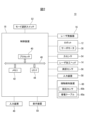
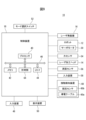
- 3 is a block diagram of the laser processing system shown in FIG. 2.
- FIG. FIG. 2 is an enlarged view of the laser processing head shown in FIG. 1.
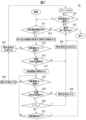
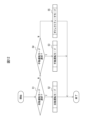
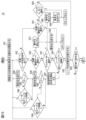
- FIG. 3 is a flowchart showing an example of the operation flow of the laser processing head shown in FIG. 2.
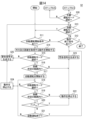
- FIG. 7 is a flowchart showing an example of the flow of step S2 in FIG. 6.
- FIG. 7 is a flowchart showing an example of the flow of step S3 in FIG. 6.
- 3 is a block diagram showing other functions of the laser processing system shown in FIG. 2.
- FIG. 2 is an enlarged view of the laser processing head shown in FIG. 1.
- FIG. 7 is a flowchart showing another example of the flow of step S3 in FIG. 6.
- 7 is a flowchart showing still another example of the flow of step S3 in FIG. 6.
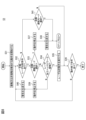
- 10 is a flowchart showing an example of the operation flow of the laser processing system shown in FIG. 9.
- FIG. FIG. 7 is an enlarged view of a mode selection switch according to another embodiment.
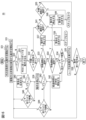
- 13 is a flowchart showing an example of the flow of step S2 in FIG. 12.
- FIG. 13 is a flowchart showing an example of the flow of step S3 in FIG. 12.
- 13 is a flowchart showing an example of the flow of step S5 in FIG. 12.
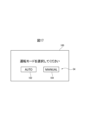
- FIG. An example of a mode selection switch image is shown.
- the laser processing system 10 is a system that can perform laser processing (laser welding, laser cutting, etc.) on a workpiece W in collaboration with an operator.
- the laser processing system 10 includes a robot 12, a laser processing head 14, a laser oscillator 16, and a control device 18.
- the robot 12 moves the laser processing head 14 relative to the workpiece W.
- the robot 12 is a vertically articulated robot and includes a robot base 20, a rotating trunk 22, a lower arm 24, an upper arm 26, and a wrist 28.
- the robot base 20 is fixed on the floor of the work cell.
- the turning trunk 22 is provided on the robot base 20 so as to be able to turn around a vertical axis.
- the lower arm portion 24 is provided on the rotating trunk 22 so as to be rotatable around a horizontal axis.
- the upper arm section 26 is rotatably provided at the distal end of the lower arm section 24.
- the wrist portion 28 includes a wrist base 28a provided at the distal end of the upper arm portion 26 so as to be rotatable around two axes orthogonal to each other, and a wrist flange 28b rotatably provided on the wrist base 28a. and has.
- Each component of the robot 12 (that is, the robot base 20, the rotating trunk 22, the lower arm 24, the upper arm 26, and the wrist 28) is provided with a plurality of servo motors 30 (FIG. 2), respectively.
- These servo motors 30 move each movable component of the robot 12 (that is, the rotating trunk 22, the lower arm section 24, the upper arm section 26, the wrist section 28, and the wrist flange 28b) around the drive shaft in response to commands from the control device 18. Rotate it. Thereby, the robot 12 moves the laser processing head 14 with respect to the workpiece W.
- the laser processing head 14 is detachably attached to the wrist flange 28b of the robot 12, and emits the laser beam LB generated by the laser oscillator 16.
- the laser processing head 14 includes a head main body 32, a nozzle 34, an attachment/detachment tool 36, and a grip part 38.
- the head body 32 is hollow, and includes an optical lens (collimating lens, focus lens, etc.) and a lens drive unit (for example, a servo motor) that displaces the optical lens according to a command from the control device 18. ) and other optical system components.
- the nozzle 34 is hollow and provided at the tip of the head body 32.
- the nozzle 34 has a truncated conical outer shape whose cross-sectional area decreases from the base end to the tip end, and an exit port 34a is formed at the tip end.
- a hollow chamber is formed inside the head body 32 and the nozzle 34, and an assist gas AG is supplied into the chamber from an assist gas supply device (not shown) provided outside.
- the laser beam LB generated by the laser oscillator 16 propagates within the chamber and is emitted along the optical axis A from the emission port 34a together with the assist gas AG.
- the attachment/detachment tool 36 is provided on the head main body 32 and is attached/detached to/from the wrist flange 28b of the robot 12.
- the attachment/detachment tool 36 may include a fastener such as a bolt, and may be fastened to the wrist flange 28b by the fastener.
- the attachment/detachment tool 36 has an engaging part that removably engages with an engaged part formed on the wrist flange 28b, and the engaged part and the engaging part are engaged with each other. It may be attached to and detached from the wrist flange 28b.
- the attachment/detachment tool 36 may include an electromagnet, and may be suctioned and fixed to the wrist flange 28b by electromagnetic force generated by the electromagnet.
- the laser processing head 14 is detachably attached to the wrist flange 28b of the robot 12 via this attachment/detachment tool 36.
- the grip portion 38 is integrally provided at the base end portion of the head body 32 so that the operator can grip it with one hand.
- the grip portion 38 may have a concave and convex portion that corresponds to the fingers of one hand so that the operator can easily grip it with one hand.
- the operator can carry the laser processing head 14 by grasping the gripping portion 38 and removing the laser processing head 14 from the wrist flange 28b.
- laser oscillator 16 internally oscillates a laser in response to a command (laser power command, etc.) from control device 18 to generate laser light LB.
- the laser oscillator 16 may be of any type, such as a fiber laser oscillator, a pulsed laser oscillator, a direct diode laser (DDL), a CO 2 laser oscillator, or a solid state laser (YAG laser) oscillator.
- the laser oscillator 16 supplies the generated laser beam LB to the laser processing head 14 via the light guide path 39.
- the light guide path 39 may be configured by an optical fiber, a cavity, a light guide material such as crystal, a reflecting mirror, an optical lens, or the like.
- the control device 18 operates the laser oscillator 16 to emit the laser beam LB from the laser processing head 14, and operates the robot 12 to move the laser processing head 14 attached to the robot 12 to the workpiece W.
- the movement operation MO to be moved relative to the object is controlled.
- control device 18 is a computer having a processor 40, a memory 42, and an I/O interface 44, as shown in FIG.
- the processor 40 has a CPU, a GPU, etc., is communicably connected to a memory 42 and an I/O interface 44 via a bus 46, and performs various calculations for executing laser processing described below while communicating with these components. Perform processing.
- the memory 42 has a RAM, a ROM, or the like, and temporarily or permanently stores various data used in the arithmetic processing executed by the processor 40 and various data generated during the arithmetic processing.
- the I/O interface 44 has, for example, an Ethernet (registered trademark) port, a USB port, an optical fiber connector, or an HDMI (registered trademark) terminal, and allows data to be exchanged with an external device under instructions from the processor 40. Communicate by wire or wirelessly.
- the robot 12 specifically, each servo motor 30
- the laser processing head 14 specifically, the lens driving section
- the laser oscillator 16 are communicably connected to the I/O interface 44.
- the control device 18 is further provided with an input device 48 and a display device 50.
- the input device 48 has a keyboard, a mouse, a touch panel, or the like, and receives data input from an operator.
- the display device 50 has a liquid crystal display, an organic EL display, or the like, and displays various data.
- the input device 48 and the display device 50 are connected to the I/O interface 44 so that they can communicate by wire or wirelessly.
- the input device 48 and the display device 50 may be integrated into the casing of the control device 18, or may be provided separately from the casing of the control device 18, for example as one computer (PC, etc.). may be provided.
- the laser processing system 10 further includes a mode selection switch 52, a force sensor 54 (FIG. 2), a distance measurement sensor 56, an input device 58, and a contact detection device 60.
- the mode selection switch 52 is for selecting the operation mode DM of laser processing to be executed by the control device 18.
- the mode selection switch 52 is provided integrally with the control device 18.
- the processor 40 sequentially generates commands to the laser oscillator 16 according to the processing program PP, operates the laser oscillator 16 according to the commands, and operates the laser processing head 14.
- a laser emitting operation LO for emitting laser light LB from is automatically executed.
- This machining program PP is created by an operator and stored in the memory 42 in advance.
- the processing program PP may include a first processing program PP A that defines the operation of the laser oscillator 16 and a second processing program PP B that defines the operation of the robot 12.
- the operator holds and carries the laser processing head 14 with his/her hand, causes the control device 18 to manually execute the laser emission operation LO, and works with the laser beam LB emitted from the laser processing head 14.
- the operator manually gives a manual laser emission command CM2 to be described later to the control device 18, and the processor 40 of the control device 18 controls the laser emission operation LO according to the manual laser emission command CM2. Execute.
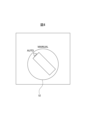
- FIG. 4 shows a state in which the automatic driving mode DM1 (“AUTO”) is selected by the mode selection switch 52.
- the mode selection switch 52 supplies an automatic operation mode transition command CM3 to the control device 18.
- the mode selection switch 52 supplies a manual operation mode transition command CM4 to the control device 18.
- the automatic operation mode transition command CM3 and the manual operation mode transition command CM4 are configured using ON/OFF signals (for example, automatic operation mode transition command CM3: ON signal or "1" signal, manual operation mode transition command CM4: OFF signal or " 0” signal).
- the force sensor 54 (FIG. 2) is provided on the robot 12 and detects the external force F applied to the robot 12.
- the force sensor 54 is provided in each servo motor 30 of the robot 12 and includes a plurality of torque sensors 54A that respectively detect the torque applied to the output shaft of the servo motor 30.
- the force sensor 54 includes a 6-axis force sensor 54B that is provided on a component of the robot 12 (for example, the robot base 20 or the wrist 28) and can detect forces in 6-axis directions.
- the processor 40 of the control device 18 can determine the magnitude and direction of the external force F applied to the robot 12 based on the detection data DF of the force sensor 54, and determine the location of the robot 12 to which the external force F has been applied. (For example, the wrist portion 28) can be specified.
- the distance measurement sensor 62 has a measurement direction D (in other words, a radiation direction of the infrared ray, laser, or sound wave) for measuring the distance d to the target object, and an optical axis A. It is attached to the head body 32 (or nozzle 34) of the laser processing head 14 so as to be parallel to the main body 32 (or nozzle 34) of the laser processing head 14. That is, in this case, the distance measuring sensor 56 measures the distance d in the direction of the optical axis A between the laser processing head 14 (output port 34a) and the workpiece W.
- a measurement direction D in other words, a radiation direction of the infrared ray, laser, or sound wave
- the input device 58 receives an input operation of a manual laser emission command CM2 for causing the processor 40 of the control device 18 to execute the laser emission operation LO.
- the input device 58 has a push button, a switch, a touch panel, etc. that can be input manually by the operator, and is provided on the laser processing head 14 (for example, the head main body 32 or the grip portion 38).
- the input device 58 receives an input operation by the operator, it supplies a manual laser emission command CM2 to the control device 18.
- the manual laser emission command CM2 may be an ON signal (or a "1" signal).
- the processor 40 of the control device 18 When the processor 40 of the control device 18 receives the manual laser emission command CM2 while executing the manual operation mode DM2, it executes the laser emission operation LO in accordance with the manual laser emission command CM2. In this way, the operator can carry the laser processing head 14 by hand in the manual operation mode DM1 and manually perform laser processing on the workpiece W using the laser beam LB emitted from the emission port 34a of the laser processing head 14. .
- the input device 58 is provided on the laser processing head 14 adjacent to the grip 38 so that the operator can perform input operations with one hand while gripping the grip 38.
- the contact detection device 60 detects whether the laser processing head 14 and the work W are in contact with each other or are not in contact with each other.
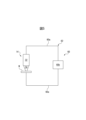
- the contact detection device 60 includes a conductive cable 60a and a resistance sensor 60b (FIGS. 2 and 5). One end of the conductive cable 60a is electrically connected to the head main body 32 of the laser processing head 14, and the other end is electrically connected to the workpiece W, thereby electrically connecting the laser processing head 14 and the workpiece W. Connect to.
- the head main body 32 and the nozzle 34 of the laser processing head 14 are at least partially made of a conductive material (for example, metal). Further, the workpiece W is made of metal (for example, iron or copper). Therefore, if the tip of the nozzle 34 of the laser processing head 14 comes into contact with the workpiece W, as shown in FIG. A closed circuit 62 will be formed.
- a conductive material for example, metal
- the workpiece W is made of metal (for example, iron or copper). Therefore, if the tip of the nozzle 34 of the laser processing head 14 comes into contact with the workpiece W, as shown in FIG. A closed circuit 62 will be formed.
- the resistance sensor 60b measures the resistance R of the closed circuit 62 by applying a voltage to the closed circuit 62.
- the resistance R measured by the resistance sensor 60b becomes an extremely small value R 0 (R 0 ⁇ 0).
- the resistance R measured by the resistance sensor 60b is an extremely large value R 1 (R 1 ⁇ R 0 ).
- the contact detection device 60 is capable of detecting whether the laser processing head 14 and the workpiece W are in contact or not in contact based on the resistance R measured by the resistance sensor 60b. .
- the resistance sensor 60b supplies measurement data of the measured resistance R or contact determination data indicating contact or non-contact between the laser processing head 14 and the work W to the control device 18 as detection data DD.
- the processor 40 of the control device 18 can determine whether the laser processing head 14 and the workpiece W are in contact or not in contact from the detection data DD of the resistance sensor 60b.
- the resistance sensor 60b may be built into the head main body 32.
- the force sensor 54, the distance sensor 56, the input device 58, and the contact detection device 60 may be connected to the I/O interface 44 of the control device 18 so as to be able to communicate wirelessly or by wire. .
- the processor 40 of the control device 18 starts the flow shown in FIG. 6, for example, when receiving an operation start command (for example, a power ON command) from an operator, a host controller, or the operation program OP.
- an operation start command for example, a power ON command
- step S1 the processor 40 determines whether the automatic driving mode DM1 has been selected by the mode selection switch 52. Specifically, the processor 40 determines whether it has received the automatic driving mode transition command CM3 or the manual driving mode transition command CM4 from the mode selection switch 52. When the processor 40 receives the automatic operation mode transition command CM3, the processor 40 determines YES and proceeds to step S2, whereas when it receives the manual operation mode transition instruction CM4, the processor 40 determines NO and proceeds to step S3.
- step S2 the processor 40 shifts the operation mode DM to the automatic driving mode DM1 and executes the flow of the automatic driving mode DM1. After transitioning to the automatic driving mode DM1, the processor 40 becomes able to accept the automatic driving start command CM1, but rejects the manual laser emission command CM2 supplied from the input device 58.
- the flow of automatic driving mode DM1 in step S2 will be described.
- step S11 the processor 40 determines whether an automatic driving start command CM1 for starting automatic driving in the automatic driving mode DM1 has been received. Specifically, the processor 40 generates an automatic driving start image IM1 (not shown) on which a button image for starting automatic driving is displayed, and displays it on the display device 50.
- the operator operates the input device 48 of the control device 18 and clicks on the button image displayed on the automatic operation start image IM1 to input the automatic operation start command CM1 to the processor 40. be able to.
- the processor 40 receives the automatic operation start command CM1, it determines YES and proceeds to step S14, whereas when it determines NO, it proceeds to step S12.
- step S12 the processor 40 determines whether or not it has received an operation termination command (for example, a shutdown command) from, for example, an operator, a host controller, or the operation program OP.
- an operation termination command for example, a shutdown command
- the processor 40 determines YES and ends the flow of step S2 shown in FIG. 7, thereby ending the flow shown in FIG. 6.
- the processor 40 determines NO, the process proceeds to step S13.
- step S13 the processor 40 determines whether the automatic driving mode DM1 is still selected by the mode selection switch 52. If the processor 40 determines YES, the process returns to step S11, whereas if the processor 40 determines NO (that is, the mode selection switch 52 was operated to switch to manual operation mode DM2), the process returns to step S3 in FIG. move on.
- step S14 the processor 40 performs an operation to obtain the external force F applied to the robot 12 and an operation to obtain the distance d between the laser processing head 14 and the workpiece W. , respectively. Specifically, the processor 40 continuously (for example, periodically) acquires the detection data DF from the force sensor 54, and continuously determines the external force F applied to the robot 12 based on the detection data DF. . Further, the processor 40 continuously (for example, periodically) acquires the distance d between the laser processing head 14 and the workpiece W measured by the distance measurement sensor 56. In this way, the processor 40 monitors the external force F and the distance d after starting this step S14.
- step S15 the processor 40 determines whether the automatic driving mode DM1 is still selected by the mode selection switch 52, as in step S13 described above. If the processor 40 determines YES, the process proceeds to step S16, whereas if the processor 40 determines NO, the process proceeds to step S25.
- step S16 the processor 40 determines whether the most recently acquired distance d between the laser processing head 14 and the workpiece W is within a predetermined range RG.
- step S17 the processor 40 starts automatic operation. Specifically, the processor 40 reads the machining program PP from the memory 42 and executes it, and sequentially generates a command to the laser oscillator 16 and a command to the robot 12 according to the machining program PP. In this way, the processor 40 starts an automatic operation in which the laser emission operation LO and the movement operation MO are automatically executed according to the processing program PP.
- the processor 40 selects the automatic driving mode DM1 by the mode selection switch 52 (determined as YES in step S15), and the distance d measured by the distance sensor 56 is within the range RG. If the condition is satisfied (determined as YES in step S16), the laser emission operation LO and movement operation MO are executed as automatic operation mode DM1.
- step S18 the processor 40 determines whether the automatic driving mode DM1 is still selected by the mode selection switch 52, as in step S13 described above. If the processor 40 determines YES, the process proceeds to step S19, whereas if the processor 40 determines NO, the process proceeds to step S24.
- step S19 the processor 40 determines whether the most recently acquired distance d between the laser processing head 14 and the workpiece W is within the range RG, as in step S16 described above. If the processor 40 determines YES, the process proceeds to step S20, whereas if the processor 40 determines NO, the process proceeds to step S22.
- step S20 the processor 40 determines whether the most recently acquired external force F exceeds a predetermined threshold F th1 (F>F th1 ). If F>F th1 , the processor 40 determines YES and proceeds to step S22, whereas if F ⁇ F th1 , the processor 40 determines NO and proceeds to step S21.
- F th1 a predetermined threshold
- the processor 40 monitors the external force F1 applied to a specific part of the robot 12 (for example, the upper arm 26 or the wrist 28) based on the detection data DF of the force sensor 54, and in this step S20, If the external force F1 exceeds the threshold F1 th1 (F1>F1 th1 ), the determination may be YES.
- step S21 the processor 40 determines whether automatic driving has ended. For example, the processor 40 can determine from the currently executed machining program PP whether all instruction codes for the laser emission operation LO and movement operation MO specified in the machining program PP have been executed.
- step S12 If the processor 40 determines YES, the process returns to step S12, whereas if the processor 40 determines NO, the process returns to step S18. In this way, the processor 40 repeatedly executes the loop of steps S18 to S21 until it determines NO in step S18 or S19 or YES in step S20 or S21, and sets the automatic operation mode DM1 to the laser emission operation LO. and continues to execute the movement operation MO.
- step S22 the processor 40 stops at least one of the laser emission operation LO and the movement operation MO in the automatic driving mode DM1. .
- the processor 40 stops both the laser emission operation LO and the movement operation MO in this step S22.
- the processor 40 stops the operation of the servo motors 30 by stopping commands (torque commands, etc.) to each servo motor 30 of the robot 12, thereby stopping the movement operation MO.
- the processor 40 forcibly stops the operation of each servo motor 30 by activating each brake mechanism, Therefore, the moving operation MO may be stopped.
- the processor 40 stops the laser emission operation LO by stopping the laser beam generation operation of the laser oscillator 16.
- the processor 40 may block the laser beam LB with the shutter, The laser emission operation LO may be stopped.
- step S23 the processor 40 generates a warning signal AL.
- the processor 40 may issue a message saying, ⁇ The workpiece may not be installed at an appropriate position with respect to the laser processing head.Check the installation state of the workpiece.'' ” is generated as an image or audio warning signal AL1.
- step S23 after determining YES in step S20, the processor 40 issues an image or audio warning, for example, "The robot may have interfered with an environmental object. Please check the surroundings of the robot.” Generates signal AL2.
- the processor 40 may display the generated warning signal AL1 or AL2 as an image on the display device 50, or may output it as a sound from a speaker (not shown) provided in the control device 18. After step S23, the processor 40 returns to step S12.
- step S24 the processor 40 stops at least one of the laser emission operation LO and the movement operation MO, as in step S22 described above. For example, in step S24, the processor 40 stops both the laser emission operation LO and the movement operation MO.
- step S25 the processor 40 generates a warning signal AL.
- the processor 40 generates an image or audio warning signal AL3 that says "Automatic driving cannot be performed because the driving mode has been changed.”
- the processor 40 may display the generated warning signal AL3 as an image on the display device 50 or output it as sound from a speaker.
- the processor 40 proceeds to step S3 in FIG.
- step S1 if the determination is NO in step S1 (or if the determination is NO in step S13 in FIG. 7, or after step S25), the processor 40 performs the operation in step S3.
- the mode DM is transferred to the manual operation mode DM2, and the flow of the manual operation mode DM2 is executed.
- step S32 the processor 40 determines whether or not the manual laser emission command CM2 has been received from the input device 58. If the processor 40 receives the manual laser emission command CM2 from the input device 58, it makes a YES decision and proceeds to step S33, while if it makes a NO decision, it does not execute the laser emission operation LO in the manual operation mode DM2. Then, the process advances to step S41. If, at the start of step S32, a laser emitting operation LO in step S35, which will be described later, is being executed, and the determination is NO in step S32, the processor 40 stops the laser emitting operation LO.
- step S33 the processor 40 determines whether the automatic driving mode DM1 has been selected by the mode selection switch 52, similarly to step S1 described above.
- the processor 40 determines YES (that is, when the mode selection switch 52 is switched to the automatic driving mode DM1), the process proceeds to step S37.
- the processor 40 determines NO (that is, if the manual operation mode DM2 is still selected by the mode selection switch 52), the process proceeds to step S34.
- step S34 the processor 40 determines whether the laser processing head 14 and the work W are in contact with each other. Specifically, the processor 40 determines whether the contact detection device 60 detects contact between the laser processing head 14 and the workpiece W, or detects non-contact based on the detection data DD most recently acquired from the resistance sensor 60b. Determine whether The processor 40 determines YES when contact between the laser processing head 14 and the workpiece W is detected, and proceeds to step S35, while determining NO when non-contact between the laser processing head 14 and the workpiece W is detected. It is determined that this is the case, and the process proceeds to step S39.
- the processing conditions CP include, for example, the material of the work W (SUS, aluminum, etc.), the thickness [mm], and the melting point [° C.].
- the output condition C O includes, for example, the laser power [kW], duty ratio [%], and pulse oscillation frequency [Hz] of the laser beam LB.
- the data table DT stores output conditions C O (laser power, duty ratio, pulse oscillation frequency) in association with each of a plurality of processing conditions C P (material, thickness, melting point).
- the processor 40 presets the output condition CO in the manual operation mode DM2 based on the data table DT.
- the operator may manually select the output condition C O corresponding to the processing condition C P (for example, material and thickness) of the workpiece W to be processed from the data table DT.
- the processor 40 may generate an image of the data table DT and display it on the display device 50.
- the operator operates the input device 48 of the control device 18 while visually checking the image of the data table DT to search the data table DT for output conditions C O corresponding to the machining conditions C P of the work W to be machined. and select.
- the processor 40 receives operator input through the input device 48 and sets the output condition CO selected from the data table DT as the output condition in the manual operation mode DM2.
- step S35 the processor 40 generates a command to the laser oscillator 16 according to the preset output condition C O in response to the manual laser emission command CM2, and sets the laser power, duty ratio, and A laser emitting operation LO is performed to generate laser light LB having a pulse oscillation frequency and a pulse oscillation frequency.
- the operator can manually laser-process the workpiece by emitting the laser beam LB with the desired output condition C0 from the laser processing head 14 held with one hand.
- step S36 the processor 40 determines whether or not an operation end command has been received, similar to step S12 described above. When the processor 40 determines YES, it ends the flow of step S3 shown in FIG. 8, and thus ends the flow shown in FIG. 6. On the other hand, if the processor 40 determines NO, the process returns to step S32.
- step S32 that is, while receiving the manual laser emission command CM2 from the input device 58
- the processor 40 determines YES in step S33 or S36, or The loop of steps S32 to S36 is repeatedly executed until a negative determination is made in S34, and the laser emitting operation LO is continuously executed in the manual operation mode DM2.
- the operator can manually laser-process the workpiece W using the laser processing head 14 held in his hand.
- step S33 the laser emission operation LO in manual operation mode DM2 is stopped in step S37.
- the processor 40 stops the laser emission operation LO by stopping the laser beam generation operation of the laser oscillator 16 or by blocking the laser beam LB with the above-mentioned shutter.
- step S38 the processor 40 generates a warning signal AL.
- the processor 40 generates a visual or audio warning signal AL4 that says "Manual driving cannot be performed because the driving mode has been changed.”
- the processor 40 may display the generated warning signal AL4 on the display device 50 as an image or may output it as audio from a speaker.
- the processor 40 proceeds to step S2 in FIG.
- step S39 the processor 40 stops the laser emission operation LO in the manual operation mode DM2, as in step S37 described above. Then, in step S40, the processor 40 generates a warning signal AL. For example, the processor 40 generates a visual or audio warning signal AL5 that says "The laser processing head may be separated from the workpiece. Please bring the laser processing head into contact with the workpiece.” and displays it on the display device 50. It may be displayed or output from a speaker. After step S40, the processor 40 returns to step S32.
- step S41 the processor 40 determines whether the automatic driving mode DM1 has been selected by the mode selection switch 52, similarly to step S33 described above. If the processor 40 determines YES, the process proceeds to step S2 in FIG. 6, whereas if the processor 40 determines NO, the process proceeds to step S36.
- the control device 18 uses the mode selection switch 52 to automatically select the laser emission operation LO and the movement operation MO according to the processing program PP as the operation mode DM.
- the automatic driving mode DM1 to be executed is selected (determined as YES in step S15 or S18), and the distance d measured by the distance measurement sensor 56 is within the predetermined range RG (determined as YES in step S16 or S19). If the automatic operation mode DM1 is determined, the laser emission operation LO and movement operation MO are executed as the automatic operation mode DM1.
- mode DM1 is selected and the workpiece W is placed at an appropriate position with respect to the laser processing head 14 so that the distance d is within the range RG.
- the laser emission operation LO in the automatic operation mode DM1 is executed unintentionally, and the laser beam LB from the laser processing head 14 in the laser emission operation LO is transmitted in an unintended direction other than the workpiece W ( For example, it is possible to reliably avoid being emitted in the direction of the operator. Therefore, automatic operation of the laser processing system 10 can be safely performed.
- the input device 58 receives an input operation of a manual laser emission command CM2 for causing the control device 18 to execute the laser emission operation LO. Further, the contact detection device 60 detects contact or non-contact between the laser processing head 14 and the workpiece W. Moreover, the mode selection switch 52 is configured to be able to switch the driving mode DM1 between the automatic driving mode DM1 and the manual driving mode DM2.
- the control device 18 receives an input signal through the input device 58.
- the laser emission operation LO is executed in the manual operation mode DM2.
- the operator manually operates the mode selection switch 52 to select the manual operation mode DM2,
- the laser processing head 14 is brought into contact with the workpiece W.
- the laser emission operation LO in the manual operation mode DM2 is executed unintentionally, and that the laser beam LB from the laser processing head 14 is directed in a direction other than the workpiece W (for example, the operator It is possible to reliably avoid radiation being emitted in the direction of Therefore, the operator can safely perform manual laser processing.
- the contact detection device 60 includes a conductive cable 60a that electrically connects the laser processing head 14 and the workpiece W, the workpiece W, the laser processing head 14 that contacts the workpiece W, and the conductive cable 60a that electrically connects the laser processing head 14 and the workpiece W. It has a resistance sensor 60b that measures the resistance R of the closed circuit 62 formed by 60a.
- the contact detection device 60 is configured to detect contact or non-contact between the laser processing head 14 and the work W based on the resistance R measured by the resistance sensor 60b. According to this configuration, contact or non-contact between the laser processing head 14 and the workpiece W can be detected quickly and reliably with a relatively simple configuration.
- control device 18 also determines whether the mode selection switch 52 is operated and the manual operation mode DM2 becomes non-selected (step (determined as YES in S33), or when the contact detection device 60 detects non-contact (determined as NO in step S34), the laser emitting operation LO is stopped.
- the mode selection switch 52 is unintentionally switched to another operation mode DM (specifically, the automatic operation mode DM1).
- the laser beam LB from the laser processing head 14 can be prevented from being emitted in an unintended direction (for example, toward the operator).
- the laser processing head 14 separates from the workpiece W, and the laser beam LB from the laser processing head 14 is emitted in an unintended direction. can also be prevented. Thereby, the safety of the operator in manual operation mode DM1 can be more reliably ensured.
- the laser processing head 14 has a grip part 38 that can be held by the operator with one hand, and the input device 58 is configured such that input operation can be performed with the one hand holding the grip part 38. It is provided on the laser processing head 14 adjacent to the grip portion 38 . According to this configuration, the operator grasps the grip portion 38 with one hand, removes the laser processing head 14 from the robot 12, and operates the input device 58 with the one hand, thereby controlling the laser emission operation LO in the manual operation mode DM1. can be easily carried out.
- the control device 18 when the control device 18 receives the automatic driving start command CM1 for starting the automatic driving mode DM1 (determined as YES in step S11), the control device 18 selects the automatic driving mode by using the mode selection switch 52. If DM1 is not selected (determined NO in step S15), or if the distance d measured by the ranging sensor 56 is outside the range RG (determined NO in step S16), At least one (for example, both) of the laser emission operation LO and the movement operation MO is not started in the automatic operation mode DM1. According to this configuration, the safety of the operator can be ensured when starting automatic operation.
- the processor 40 when the processor 40 receives the automatic driving start command CM1, even if the automatic driving mode DM1 is not selected by the mode selection switch 52 or the distance d is outside the range RG, the processor 40 selects the automatic driving mode.
- Laser emission operation LO or movement operation MO may be started as DM1.
- the automatic operation mode DM1 is not selected by the mode selection switch 52, or the distance d is outside the range RG. Even if the operator is in the automatic operation mode DM1 and starts the movement operation MO, the safety of the operator can be ensured. Alternatively, if the operator is outside a safety fence (not shown) installed in the work cell so as to surround the operating range of the robot 12, the laser emission operation LO may be started in automatic operation mode DM1. Even so, the safety of the operator can be ensured.
- the control device 18 determines that the automatic driving mode DM1 is not selected when the mode selection switch 52 is operated while executing the laser emission operation LO and the movement operation MO in the automatic driving mode DM1. (determined NO in step S18), or if the distance d measured by the ranging sensor 56 is outside the range RG (determined NO in step S19), the laser emission operation LO and the movement operation MO At least one of them is stopped (steps S22, S24). According to this configuration, the safety of the operator during automatic operation can be ensured.
- the input device 58 and the contact detection device 60 may be omitted from the laser processing system 10. Further, only the automatic driving mode DM1 may be set as the driving mode DM, and the mode selection switch 52 may be configured to be able to select between the automatic driving mode DM1 and an OFF mode in which no driving mode DM is selected. In this case, the processor 40 may execute only the flow of the automatic driving mode DM1 in step S2.
- steps S15 and S16 may be omitted from the flow of step S2.
- steps S18 and S19 may be omitted from the flow of step S2.
- the contact detection device 60 is not limited to a configuration having a conductive cable 60a and a resistance sensor 60b, but may include any sensor such as a proximity sensor capable of detecting contact between the laser processing head 14 and the workpiece W. good.
- the processor 40 may execute a cooperative operation program COP that causes the robot 12 to perform a cooperative operation to assist manual laser processing by the operator.
- This cooperative operation program COP may be used, for example, to hold and move (for example, rotate) the workpiece W while an operator manually executes laser processing, or to load the workpiece W onto a jig.
- the robot 12 may be configured to perform a working operation.
- a robot hand capable of holding the workpiece W may be attached to the wrist portion 28 of the robot 12 in addition to (or instead of) the laser processing head 14. According to this configuration, the operator can effectively perform manual laser processing in cooperation with the robot 12.
- the control device 18 further includes a clock section 64.
- the timer 64 is communicably connected to the processor 40 via the bus 46, and measures the elapsed time t from a certain point in time in response to a command from the processor 40.
- the clock section 64 may be built into the casing of the control device 18.
- the clock section 64 may be externally attached to the casing of the control device 18, for example as an electronic clock, and connected to the I/O interface 44.
- the processor 40 stores the input waiting time t th1 in the memory 42 and registers it as waiting time setting information.
- the processor 40 presets the waiting time t th1 .
- step S3 shown in FIG. 10 when the processor 40 determines NO in step S34, it starts counting the elapsed time t in step S42. Specifically, the processor 40 activates the timer 64 to start measuring the elapsed time t from the time t0 for which the determination is NO in step S34.
- step S43 the processor 40 determines whether the elapsed time t measured by the timer 64 has reached a preset waiting time t th1 (that is, t ⁇ t th1 ). When t ⁇ t th1 , the processor 40 determines YES and proceeds to step S39, whereas when t ⁇ t th1 , the processor 40 determines NO and proceeds to step S44.
- step S44 the processor 40 determines whether contact between the laser processing head 14 and the workpiece W has been detected by the contact detection device 60, similarly to step S34 described above. If the processor 40 determines YES, the process returns to step S32, whereas if the processor 40 determines NO (that is, the laser processing head 14 and the workpiece W are still in non-contact), the process returns to step S43.
- steps S42 to S44 after executing step S35, while continuing the laser emission operation LO (that is, while continuing to make a YES determination in step S32), the processor 40 performs NO in step S34. If it is determined that step S34 is NO, step S39 is not executed (in other words, the laser (The emission operation LO continues).
- step S44 determines NO in step S44 before the waiting time t th1 has elapsed (that is, if the non-contact between the laser processing head 14 and the workpiece W continues over the period t th1 If detected)
- the laser emitting operation LO is stopped in step S39.
- the processor 40 continues the laser emitting operation LO without executing step S39.
- the control device 18 performs the laser emission operation from time t0 when the contact detection device 60 detects non-contact while executing the laser emission operation LO in the manual operation mode DM1. Set the waiting time t th1 until stopping LO. Then, the control device 18 stops the laser emission operation LO in the manual operation mode DM2 when the standby time t th1 has elapsed from the time point t 0 .
- the operator moves the laser processing head 14 with respect to the workpiece W while bringing the tip of the laser processing head 14 into contact with the workpiece W, and emits light from the laser processing head 14.
- Laser processing may be performed using the laser beam LB.
- the laser processing head 14 may be separated from the workpiece W instantaneously (for example, by 0.1 [sec]) due to the unevenness on the surface of the workpiece W, for example. Even if the laser processing head 14 is momentarily separated from the workpiece W in this way, there is a low possibility that the laser beam LB from the laser processing head 14 will be emitted in the direction of the operator, and therefore, the safety of the operator can be ensured. .
- step S39 by setting the waiting time t th1 until the laser emission operation LO is stopped in step S39, it is assumed that the laser processing head 14 is instantaneously separated from the work W as described above. Also, the laser emission operation LO can be continued. On the other hand, if the non-contact between the laser processing head 14 and the workpiece W is still detected even after the waiting time t th1 has elapsed, step S39 is immediately executed to stop the laser emission operation LO. Can be stopped. Therefore, according to the present embodiment, the laser processing work in the manual operation mode DM2 can be carried out efficiently, and the safety of the operator can be ensured.
- step S3 executed by the control device 18 shown in FIG. 9 will be described.
- the processor 40 calculates a second waiting time t th2 from the time t 0 when the determination is NO in step S34 until the generation of the warning signal AL in step S40. is set in advance.
- the processor 40 stores the input second waiting time t th2 in the memory 42 and registers it together with the waiting time t th1 as waiting time setting information.
- FIG. 11 shows the flow of step S3 according to this embodiment. Note that in the flow shown in FIG. 11, processes similar to those in the flow shown in FIG. 10 are given the same step numbers, and redundant explanations will be omitted.
- the processor 40 stops the laser emission operation LO in step S39, and then further executes steps S45 and S46.
- step S45 the processor 40 determines whether the elapsed time t measured by the timer 64 has reached a preset second waiting time t th2 (that is, t ⁇ t th2 ). Determine.
- the processor 40 determines YES when t ⁇ t th2 , and proceeds to step S40, while determining NO when t th1 ⁇ t ⁇ t th2 , and proceeds to step S46.
- step S46 the processor 40 determines whether contact between the laser processing head 14 and the workpiece W has been detected by the contact detection device 60, similarly to step S44 described above. If the processor 40 determines YES, the process returns to step S32, whereas if the processor 40 determines NO, the process returns to step S45.
- the warning signal AL5 can be generated and notified to the operator only when the non-contact period between the laser processing head 14 and the workpiece W is detected for a long time. Thereby, it is possible to avoid sending the warning signal AL5 frequently.
- the processor 40 executes the direct teach mode DM3 in addition to the automatic operation mode DM1 and manual operation mode DM2 described above.
- the processor 40 operates the robot 12 according to the external force F applied to the robot 12 by the operator, and also performs the laser emission operation LO in response to the manual laser emission command CM2 inputted by the operator through the input device 58. This is the driving mode DM to be executed.
- the mode selection switch 52 is set to automatic operation mode DM1: "AUTO”, manual operation mode DM2: “MANUAL”, and direct teach mode DM3 represented as "TEACH". It is configured so that it can be switched between.
- mode selection switch 52 supplies direct teach mode transition command CM5 to control device 18.
- step S4 the processor 40 determines whether the manual operation mode DM2 or the direct teach mode DM3 has been selected by the mode selection switch 52. judge.
- step S3 when the processor 40 receives the manual operation mode transition command CM4 from the mode selection switch 52, it determines YES and proceeds to step S3. On the other hand, when the processor 40 receives the direct teach mode transition command CM5 from the mode selection switch 52, the processor 40 determines NO and proceeds to step S5.
- FIG. 14 shows the flow of step S2 in FIG. 12. Note that in the flow shown in FIG. 14, processes similar to those in the flow of FIG. 7 are given the same step numbers, and redundant explanations will be omitted.
- the processor 40 in step S26 determines whether the manual operation mode DM2 has been selected by the mode selection switch 52 or if the Determine whether teach mode DM3 is selected.
- step S3 the processor 40 determines NO and proceeds to step S5 in FIG. Proceed to. Furthermore, after step S25, the processor 40 proceeds to step S26.
- FIG. 15 shows the flow of step S3 in FIG. 12. Note that in the flow shown in FIG. 15, processes similar to those in the flow of FIG. 11 are given the same step numbers, and redundant explanations will be omitted.
- the processor 40 determines in step S47 whether or not direct teach mode DM3 has been selected (that is, direct teach mode transition command CM5 has been received). judge. If the processor 40 determines YES, the process proceeds to step S48, whereas if the processor 40 determines NO, the process proceeds to step S34.
- step S48 the processor 40 stops the laser emission operation LO in the manual operation mode DM2, similar to step S37 described above. Then, in step S49, the processor 40 generates the warning signal AL4, as in step S38 described above, and then proceeds to step S5 in FIG. 12.
- step S50 the processor 40 determines whether direct teach mode DM3 has been selected, similarly to step S47 described above. If the processor 40 determines YES, the process proceeds to step S5 in FIG. 12, whereas if the processor 40 determines NO, the process proceeds to step S36.
- step S4 if the determination is NO in step S4 (or if the determination is NO in step S26 in FIG. 14, after step S49 in FIG. 15, or after step S49 in FIG. If the determination is YES in S50), the processor 40 shifts the operation mode DM to the direct teach mode DM3 in step S5, and executes the flow of the direct teach mode DM3.
- step S5 After transitioning to the direct teach mode DM3, the processor 40 becomes able to accept the manual laser emission command CM2 through the input device 58, but rejects the automatic operation start command CM1.
- the flow of the direct teach mode DM3 in step S5 will be described below with reference to FIG. Note that in the flow shown in FIG. 16, processes similar to those in the flow of FIG. 15 are given the same step numbers, and redundant explanations will be omitted.
- step S51 the processor 40 starts an operation to obtain the external force F applied to the robot 12. Specifically, the processor 40 continuously (for example, periodically) acquires detection data DF from the force sensor 54, and determines the magnitude and direction of the external force F applied to the robot 12 based on the detection data DF. and the part of the robot 12 to which the external force F is applied are continuously determined. After that, the processor 40 executes step S31 described above.
- step S52 the processor 40 determines whether the magnitude of the most recently acquired external force F exceeds a predetermined threshold value F th2 (F>F th2 ).
- This threshold value F th2 may be set to a smaller value (F th2 ⁇ F th1 ) than the threshold value F th1 referred to in step S20 (FIG. 7, FIG. 14) described above. If F>F th2 , the processor 40 determines YES and proceeds to step S53, whereas if F ⁇ F th2 , the processor 40 determines NO and proceeds to step S32.
- step S53 the processor 40 operates the robot 12 according to the most recently acquired external force F. Specifically, the processor 40 generates a command (torque command, etc.) to move the part of the robot 12 to which the most recently acquired external force F was applied (for example, the wrist 28) in the direction of the external force F. Then, each servo motor 30 of the robot 12 is driven according to the command. As a result, the robot 12 moves the part to which the external force F is applied in the direction of the external force F in accordance with the external force F.
- a command torque command, etc.
- the operator grips the grip portion 38 of the laser processing head 14 and applies an external force F to the laser processing head 14 to push it in a desired direction ⁇ .
- the external force F applied in the direction ⁇ is applied from the laser processing head 14 to the wrist flange 28b of the robot 12, and is detected by the force sensor 54.
- the processor 40 operates the robot 12 according to the external force F detected by the force sensor 54, and moves the wrist flange 28b (that is, the laser processing head 14) of the robot 12 in the direction ⁇ . In this way, the operator can manually operate the robot 12 to move the laser processing head 14 in the desired direction ⁇ by the operation of the robot 12.
- step S53 the processor 40 may move the part of the robot 12 to which the external force F is applied (for example, the wrist flange 28b) by a predetermined distance ⁇ at a predetermined constant speed V. .
- This speed V and distance ⁇ can be predetermined by the operator as required values for direct teach mode DM3.
- step S53 the processor 40 executes steps S32 and S33 described above.
- step S33 the processor 40 determines whether manual operation mode DM2 has been selected (that is, manual operation mode transition command CM4 has been received). If the processor 40 determines YES, it sequentially executes steps S48 and S49 described above, and proceeds to step S3 in FIG. 12.
- step S54 if the processor 40 determines NO in step S54, it sequentially executes steps S34 to S36, S42 to S44, S39, S45, S46, and S40 described above. If the processor 40 determines NO in step S36, if it determines YES in step S44 or S46, or after executing step S40, the process returns to step S52.
- step S55 the processor 40 determines whether manual operation mode DM2 has been selected, similarly to step S54 described above. If the processor 40 determines YES, the process proceeds to step S3 in FIG. 12, whereas if the processor 40 determines NO, the process proceeds to step S36.
- the processor 40 operates the robot 12 according to the external force F applied by the operator (step S53), moves the laser processing head 14 in the direction performs the laser emission operation LO in accordance with the manual laser emission command CM2 input by operating the input device 58 (step S35).
- the operator manually operates the robot 12 to move the laser processing head 14 in the desired direction ⁇ by the operation of the robot 12, and operates the input device 58 to direct the laser beam LB to the laser processing head.
- the robot 12 may move the laser processing head 14 at a constant speed V as described above. According to this configuration, the finishing quality of laser processing can be improved.
- steps S45 and S46 may be omitted from the flow shown in FIG. 16, and the flow may be configured in the same manner as the flow shown in FIG. Alternatively, the flow shown in FIG. 16 may be configured in the same manner as the flow shown in FIG. 8 by omitting steps S42 to S46. If steps S42 to S46 are omitted from the flow shown in FIG. 16, the control device 18 shown in FIG. 2 in which the clock section 64 is omitted can execute the flow shown in FIG.
- step S19 shown in FIG. 14 may be applied instead of step S34, and steps S42 to S44, S45, S46, and S40 may be omitted.
- step S31 is omitted from the flow of FIG. 16, and in step S51, the processor 40 starts an operation to obtain the external force F and the distance d, similarly to step S14 of FIG.
- the processor 40 determines NO in step S54, it executes step S19 and determines whether the distance d is within the range RG. If the distance d is within the range RG, the processor 40 determines YES and proceeds to step S35.
- the processor 40 determines NO, executes step S39 to stop the laser emission operation LO, and then executes the above-mentioned step S23 to generate the warning signal AL1. . After that, the processor 40 returns to step S52. That is, in this case, when the distance d between the laser processing head 14 and the workpiece W falls outside the predetermined range RG while executing the laser emission operation LO (step S35) in the direct teach mode DM3, the processor 40 , the laser emission operation LO is stopped.
- step S2 flow of automatic operation mode DM1
- the processor 40 changes the distance d between the laser processing head 14 and the workpiece W to a predetermined target distance d 0 after starting automatic operation in step S17.
- Gap control GC may also be performed.
- This target distance d 0 can be determined by the operator, for example, as a value within the range RG referred to in steps S16 and S19 (for example, d th1 ⁇ d 0 ⁇ d th2 ).
- the processor 40 performs feedback control on each servo motor 30 of the robot 12 based on the distance d acquired from the distance measurement sensor 56, and controls the robot 12 so that the distance d matches the target distance d0 .
- the position of the laser processing head 14 in the direction of the optical axis A is adjusted by the operation.
- the processor 40 may execute the flow of FIG. 6, the flow of step S2 shown in FIG. 7, and the flow of step S3 shown in FIG. 8, FIG. 10, or FIG. 11 according to the operation program OP.
- This operation program OP may be created in advance by the operator and stored in the memory 42 as a separate program from the above-mentioned machining program PP.
- the processor 40 executes the flow of step S2 in FIG. 7 according to the operation program OP, and when starting step S17, reads out the processing program PP from the memory 42 and executes it, so that the laser emission operation LO and Start automatic operation of movement operation MO.
- a gap control program GP for the gap control GC described above may be further prepared.
- the processor 40 executes the gap control program GP in parallel with the machining program PP, and executes the gap control GC in parallel with the automatic operation.
- the operation programs OP include a first operation program OP1 that causes the processor 40 to execute the flow of FIG. 6, a second operation program OP2 that causes the processor 40 to execute the flow of step S2, and a second operation program OP2 that causes the processor 40 to execute the flow of step S3. It may also include a third operation program OP3 to be executed.
- the processor 40 executes the flow of FIG. 12, the flow of step S2 shown in FIG. 14, the flow of step S3 shown in FIG. 15, and the flow of step S5 shown in FIG. 16 according to the operation program OP.
- the operation programs OP include a first operation program OP1 that causes the processor 40 to execute the flow of FIG. 12, a second operation program OP2 that causes the processor 40 to execute the flow of step S2, and a second operation program OP2 that causes the processor 40 to execute the flow of step S3. It may include a third operating program OP3 that causes the processor 40 to execute, and a fourth operating program OP4 that causes the processor 40 to execute the flow of step S5.
- the input device 58 does not need to be provided in the laser processing head 14; for example, it may be a portable button device that can be carried by the operator separately from the laser processing head 14, or a portable button device that can be operated by the operator with his or her feet. It may be configured as a foot pedal (or foot switch). Moreover, the distance measuring sensor 56 does not need to be provided in the laser processing head 14, and may be provided adjacent to the workpiece W, for example.
- the laser processing system 10 may further include a second input device that receives an input operation of an assist gas emission command for causing the laser processing head 14 to emit the assist gas AG in the manual operation mode DM2 of step S3.
- the processor 40 operates the assist gas supply device in accordance with the assist gas emission command transmitted from the second input device, and the laser processing head Assist gas AG is supplied to 14.
- the second input device may be provided in the laser processing head 14 adjacent to the grip 38 so that the input operation can be performed with one hand holding the grip 38.
- the mode selection switch 52 may be provided not only in the control device 18 but also in any component.
- the mode selection switch 52 may be provided on the laser processing head 14 or may be configured as a portable switch that is provided separately from the control device 18 and can be carried by the operator.
- the mode selection switch 52 is communicably connected to the control device 18 and provided in a teaching device (a teaching pendant, a tablet terminal device, etc.) for teaching the robot 12 and the laser oscillator 16 to operate. Good too.
- mode selection switch 52 was provided in the control device 18 as a physical switch was described.
- mode selection switch 52 may be implemented in control device 18 as a software switch (or virtual switch).
- the processor 40 of the control device 18 generates a mode selection switch image 100 for selecting the driving mode DM, and displays it on the display device 50.
- FIG. 17 shows an example of the mode selection switch image 100.
- the mode selection switch image 100 is a graphical user interface (GUI) for allowing the operator to select the driving mode DM, and includes an automatic driving button image 102 and a manual driving button image 104.
- GUI graphical user interface
- the automatic operation button image 102 represented as "AUTO” corresponds to automatic operation mode DM1
- the manual operation button image 104 represented as “MANUAL” corresponds to manual operation mode DM2.
- the operator While viewing the mode selection switch image 100 displayed on the display device 50 of the control device 18, the operator operates the input device 48 to click the automatic operation button image 102 or the manual operation button image 104 on the image. , it is possible to select automatic operation mode DM1 or manual operation mode DM2.
- the processor 40 When the processor 40 receives an input for selecting the automatic operation button image 102 from the operator through the input device 48 (that is, an automatic operation mode transition command CM3), the processor 40 transitions the operation mode DM to the automatic operation mode DM1 (step S2 described above). do. On the other hand, when the processor 40 receives an input to select the manual operation button image 104 from the operator through the input device 48 (that is, a manual operation mode transition command CM4), the processor 40 changes the operation mode DM to the manual operation mode DM2 (step S3 described above). Move to.
- the automatic operation button image 102 and the manual operation button image 104 constitute the mode selection switch 52 as software, and the operator can select the operation mode DM by operating the mode selection switch 52 on the image. , switchable between automatic operation mode DM1 and manual operation mode DM2.
- mode selection switch 52 as software can be configured to select automatic operation mode DM1, manual operation mode DM2, or direct teach mode DM3. Furthermore, the mode selection switch 52 as software may be implemented not only in the control device 18 but also in the above-mentioned teaching device or any other communication device (PC, tablet terminal) communicably connected to the control device 18. Good too.
- automatic driving mode DM1 manual driving mode DM2, and direct teach mode DM3 were illustrated as driving modes DM.
- the operation mode DM is not limited to this, and may include any other operation mode DM, such as a teaching mode DM4 for teaching the robot 12 and the laser oscillator 16 to operate.
- control device 18 controls the robot 12 and the laser oscillator 16
- the control device 18 may include a first control device 18A that controls the robot 12 and a second control device 18B that controls the laser oscillator 16.
- FIGS. 18 and 19 Such a configuration is shown in FIGS. 18 and 19.
- the control device 18 includes a first control device 18A that controls the movement operation MO of the robot 12, and a first control device 18A that controls the laser beam emission operation LO of the laser oscillator 16. 2 control devices 18B.
- the first controller 18A is a computer having a processor 40A, a memory 42A, an I/O interface 44A, and a bus 46A.
- the I/O interface 44A of the first control device 18A includes the robot 12 (servo motor 30), laser processing head 14 (lens drive section), input device 48A, display device 50A, force sensor 54, distance measurement sensor 56, An input device 58 and a contact detection device 60 (resistance sensor 60b) are communicably connected. Moreover, the above-mentioned mode selection switch 52 is provided in the first control device 18A.
- the second control device 18B is a computer having a processor 40B, a memory 42B, an I/O interface 44B, and a bus 46B.
- An input device 48B, a display device 50B, a laser oscillator 16, and an I/O interface 44A of the first control device 18A are communicably connected to the I/O interface 44B of the second control device 18B.
- the laser oscillator 16, the second control device 18B, the input device 48B, and the display device 50B may be integrated into a common housing to form a unit to form a single laser oscillation device 72.
- the processor 40A of the first control device 18A and the processor 40B of the second control device 18B execute the flows shown in FIGS. 6 to 8, FIGS. 10 to 12, and FIGS. 14 to 16 while communicating with each other. You may.
- the laser processing head 14 may be any type of processing head, such as a laser scanner (or galvano scanner), for example.
- This laser scanner includes a plurality of mirrors that each reflect the laser beam LB supplied from the laser oscillator 16, a plurality of mirror drive units that individually drive the plurality of mirrors, and a plurality of mirrors that collect the laser beam reflected by the mirror. It has an optical lens that emits light.
- the laser scanner can move the irradiation point of the laser beam irradiated onto the workpiece at high speed on the surface of the workpiece W by changing the orientation of a plurality of mirrors using a mirror drive unit.
- the robot 12 is not limited to a vertically articulated robot, but may be, for example, a horizontally articulated robot or a parallel link type robot. It may be configured to include a screw mechanism and a third ball screw mechanism that moves the laser processing head 14 in the vertical direction. Additionally, the light guide path 39 may be omitted from the laser processing system 10 or 10'. In this case, the laser oscillator 16 may be directly connected to the laser processing head 14.
Landscapes
- Physics & Mathematics (AREA)
- Optics & Photonics (AREA)
- Engineering & Computer Science (AREA)
- Plasma & Fusion (AREA)
- Mechanical Engineering (AREA)
- Robotics (AREA)
- Laser Beam Processing (AREA)
Priority Applications (6)
| Application Number | Priority Date | Filing Date | Title |
|---|---|---|---|
| PCT/JP2022/025800 WO2024004044A1 (ja) | 2022-06-28 | 2022-06-28 | レーザ加工システム、及びレーザ加工方法 |
| CN202280096721.XA CN119317503A (zh) | 2022-06-28 | 2022-06-28 | 激光加工系统以及激光加工方法 |
| DE112022006984.8T DE112022006984T5 (de) | 2022-06-28 | 2022-06-28 | Laserbearbeitungssystem und laserbearbeitungsverfahren |
| US18/875,294 US20250367758A1 (en) | 2022-06-28 | 2022-06-28 | Laser processing system, and laser processing method |
| JP2022563496A JP7208445B1 (ja) | 2022-06-28 | 2022-06-28 | レーザ加工システム、及びレーザ加工方法 |
| TW112123412A TWI896991B (zh) | 2022-06-28 | 2023-06-21 | 雷射加工系統及雷射加工方法 |
Applications Claiming Priority (1)
| Application Number | Priority Date | Filing Date | Title |
|---|---|---|---|
| PCT/JP2022/025800 WO2024004044A1 (ja) | 2022-06-28 | 2022-06-28 | レーザ加工システム、及びレーザ加工方法 |
Publications (1)
| Publication Number | Publication Date |
|---|---|
| WO2024004044A1 true WO2024004044A1 (ja) | 2024-01-04 |
Family
ID=84974459
Family Applications (1)
| Application Number | Title | Priority Date | Filing Date |
|---|---|---|---|
| PCT/JP2022/025800 Ceased WO2024004044A1 (ja) | 2022-06-28 | 2022-06-28 | レーザ加工システム、及びレーザ加工方法 |
Country Status (6)
| Country | Link |
|---|---|
| US (1) | US20250367758A1 (https=) |
| JP (1) | JP7208445B1 (https=) |
| CN (1) | CN119317503A (https=) |
| DE (1) | DE112022006984T5 (https=) |
| TW (1) | TWI896991B (https=) |
| WO (1) | WO2024004044A1 (https=) |
Citations (4)
| Publication number | Priority date | Publication date | Assignee | Title |
|---|---|---|---|---|
| JPH1071542A (ja) * | 1996-06-17 | 1998-03-17 | Amada Co Ltd | 工作機械の動作状態設定方法、及び動作状態設定装置 |
| JP2008043989A (ja) * | 2006-08-21 | 2008-02-28 | Omron Laserfront Inc | レーザ加工装置及びこれを使用したレーザ加工方法 |
| JP2019005800A (ja) * | 2017-06-28 | 2019-01-17 | コマツ産機株式会社 | 三次元レーザ加工機および三次元レーザ加工機の制御方法 |
| WO2021152450A1 (en) * | 2020-01-27 | 2021-08-05 | Netalux Nv | Laser treatment device and procedure for laser treatment |
Family Cites Families (4)
| Publication number | Priority date | Publication date | Assignee | Title |
|---|---|---|---|---|
| JP2002538971A (ja) | 1998-09-09 | 2002-11-19 | ジーエスアイ ルモニクス | ロボット的に動作するレーザ・ヘッド |
| JP5226823B2 (ja) * | 2011-04-08 | 2013-07-03 | 株式会社キーエンス | レーザ加工条件設定装置、レーザ加工条件設定方法、レーザ加工条件設定プログラム、コンピュータで読み取り可能な記録媒体及び記録した機器並びにレーザ加工システム |
| JP6268364B2 (ja) | 2014-03-07 | 2018-01-31 | パナソニックIpマネジメント株式会社 | レーザ加工システム |
| JP5902747B2 (ja) * | 2014-04-30 | 2016-04-13 | ファナック株式会社 | 加工再開準備機能を有するレーザ加工システム |
-
2022
- 2022-06-28 DE DE112022006984.8T patent/DE112022006984T5/de active Pending
- 2022-06-28 US US18/875,294 patent/US20250367758A1/en active Pending
- 2022-06-28 JP JP2022563496A patent/JP7208445B1/ja active Active
- 2022-06-28 WO PCT/JP2022/025800 patent/WO2024004044A1/ja not_active Ceased
- 2022-06-28 CN CN202280096721.XA patent/CN119317503A/zh active Pending
-
2023
- 2023-06-21 TW TW112123412A patent/TWI896991B/zh active
Patent Citations (4)
| Publication number | Priority date | Publication date | Assignee | Title |
|---|---|---|---|---|
| JPH1071542A (ja) * | 1996-06-17 | 1998-03-17 | Amada Co Ltd | 工作機械の動作状態設定方法、及び動作状態設定装置 |
| JP2008043989A (ja) * | 2006-08-21 | 2008-02-28 | Omron Laserfront Inc | レーザ加工装置及びこれを使用したレーザ加工方法 |
| JP2019005800A (ja) * | 2017-06-28 | 2019-01-17 | コマツ産機株式会社 | 三次元レーザ加工機および三次元レーザ加工機の制御方法 |
| WO2021152450A1 (en) * | 2020-01-27 | 2021-08-05 | Netalux Nv | Laser treatment device and procedure for laser treatment |
Also Published As
| Publication number | Publication date |
|---|---|
| US20250367758A1 (en) | 2025-12-04 |
| CN119317503A (zh) | 2025-01-14 |
| TWI896991B (zh) | 2025-09-11 |
| JP7208445B1 (ja) | 2023-01-19 |
| DE112022006984T5 (de) | 2025-02-20 |
| JPWO2024004044A1 (https=) | 2024-01-04 |
| TW202400342A (zh) | 2024-01-01 |
Similar Documents
| Publication | Publication Date | Title |
|---|---|---|
| US11192204B2 (en) | Laser machining system including laser machining head and imaging device | |
| US10493561B2 (en) | Laser machining device provided with laser emitter emitting laser beam and machining chamber | |
| JP2548027B2 (ja) | アークビジョンセンサ操作方式 | |
| TWI895687B (zh) | 雷射加工系統及雷射加工方法 | |
| JP7208445B1 (ja) | レーザ加工システム、及びレーザ加工方法 | |
| US11358281B2 (en) | Control method by robot system and robot system | |
| TW202402435A (zh) | 雷射加工頭及雷射加工系統 | |
| JP7460854B2 (ja) | 動作モードを選択する機能を有するツールを切り換える装置、教示装置、制御装置、ロボットシステム、及び方法 | |
| JPWO2024009359A5 (https=) | ||
| JP6907769B2 (ja) | レーザ加工装置、制御データ生成装置、およびレーザ加工装置の制御方法 | |
| JP2023051446A (ja) | レーザ加工装置及びレーザ加工方法 | |
| JPH06180607A (ja) | 立体加工用レーザ加工装置 | |
| US20250187185A1 (en) | Device for generating search program for robot | |
| TWI901964B (zh) | 機器人之控制裝置、機器人系統、及機器人之控制方法 | |
| US20250010397A1 (en) | Laser processing system and control device | |
| KR102705568B1 (ko) | 스탠드형 소켓 및 분기배관 오비탈 용접장치 | |
| JP2025160819A (ja) | 溶接システム、加工システム及び測定システム | |
| US12397418B2 (en) | Processing method, program and robot system | |
| JP2020151761A (ja) | レーザマーカ | |
| JP2025013668A (ja) | レーザ加工機の動作を教示する教示装置及び教示方法、並びに、干渉確認プログラムを生成する装置及び方法 | |
| JP2018103213A (ja) | レーザ加工装置 | |
| JP2024104968A (ja) | 溶接システム及び溶接方法 | |
| WO2025017864A1 (ja) | ロボット制御装置 | |
| JPH04256802A (ja) | ロボットシステム | |
| JPH09122961A (ja) | レーザ加工機 |
Legal Events
| Date | Code | Title | Description |
|---|---|---|---|
| ENP | Entry into the national phase |
Ref document number: 2022563496 Country of ref document: JP Kind code of ref document: A |
|
| 121 | Ep: the epo has been informed by wipo that ep was designated in this application |
Ref document number: 22949320 Country of ref document: EP Kind code of ref document: A1 |
|
| WWE | Wipo information: entry into national phase |
Ref document number: 112022006984 Country of ref document: DE Ref document number: 202280096721.X Country of ref document: CN |
|
| WWE | Wipo information: entry into national phase |
Ref document number: 18875294 Country of ref document: US |
|
| WWP | Wipo information: published in national office |
Ref document number: 202280096721.X Country of ref document: CN |
|
| WWP | Wipo information: published in national office |
Ref document number: 112022006984 Country of ref document: DE |
|
| 122 | Ep: pct application non-entry in european phase |
Ref document number: 22949320 Country of ref document: EP Kind code of ref document: A1 |
|
| WWP | Wipo information: published in national office |
Ref document number: 18875294 Country of ref document: US |