WO2018116359A1 - コンピュータシステム、店舗情報提供方法及びプログラム - Google Patents
コンピュータシステム、店舗情報提供方法及びプログラム Download PDFInfo
- Publication number
- WO2018116359A1 WO2018116359A1 PCT/JP2016/087846 JP2016087846W WO2018116359A1 WO 2018116359 A1 WO2018116359 A1 WO 2018116359A1 JP 2016087846 W JP2016087846 W JP 2016087846W WO 2018116359 A1 WO2018116359 A1 WO 2018116359A1
- Authority
- WO
- WIPO (PCT)
- Prior art keywords
- store
- store information
- seats
- information
- module
- Prior art date
- Legal status (The legal status is an assumption and is not a legal conclusion. Google has not performed a legal analysis and makes no representation as to the accuracy of the status listed.)
- Ceased
Links
Images





Classifications
-
- G—PHYSICS
- G06—COMPUTING OR CALCULATING; COUNTING
- G06Q—INFORMATION AND COMMUNICATION TECHNOLOGY [ICT] SPECIALLY ADAPTED FOR ADMINISTRATIVE, COMMERCIAL, FINANCIAL, MANAGERIAL OR SUPERVISORY PURPOSES; SYSTEMS OR METHODS SPECIALLY ADAPTED FOR ADMINISTRATIVE, COMMERCIAL, FINANCIAL, MANAGERIAL OR SUPERVISORY PURPOSES, NOT OTHERWISE PROVIDED FOR
- G06Q10/00—Administration; Management
- G06Q10/04—Forecasting or optimisation specially adapted for administrative or management purposes, e.g. linear programming or "cutting stock problem"
-
- G—PHYSICS
- G06—COMPUTING OR CALCULATING; COUNTING
- G06Q—INFORMATION AND COMMUNICATION TECHNOLOGY [ICT] SPECIALLY ADAPTED FOR ADMINISTRATIVE, COMMERCIAL, FINANCIAL, MANAGERIAL OR SUPERVISORY PURPOSES; SYSTEMS OR METHODS SPECIALLY ADAPTED FOR ADMINISTRATIVE, COMMERCIAL, FINANCIAL, MANAGERIAL OR SUPERVISORY PURPOSES, NOT OTHERWISE PROVIDED FOR
- G06Q50/00—Information and communication technology [ICT] specially adapted for implementation of business processes of specific business sectors, e.g. utilities or tourism
- G06Q50/10—Services
- G06Q50/12—Hotels or restaurants
Definitions
- the present invention relates to a computer system, a store information providing method, and a program for receiving store information and receiving store information.
- measurement instructions are transmitted to various sensors, and based on these instructions, various sensors transmit detected detection results.
- a configuration is disclosed in which the management device determines whether or not the seat is vacant based on the detection result, and transmits the location of the vacant seat to the terminal (see Patent Document 1).
- Patent Document 1 Although it is possible to detect a vacant seat, it is impossible to provide store information to the user in real time in consideration of the number of customers in the store and the number of vacant seats.
- the present invention is a computer system capable of registering the number of vacancies by analyzing an image of a camera image showing a store seat and providing store information in which the number of vacancies satisfying the number of people input by the user is registered,
- An object is to provide a store information providing method and program.
- the present invention provides the following solutions.
- the present invention is a computer system that accepts input of the number of people and provides store information, An acquisition means for acquiring a camera image showing a store seat; Image analysis of the acquired camera image, detecting means for detecting the number of seats, A registration means for registering the detected number of seats in association with store information; Providing means for providing the store information in which the number of seats satisfying the number of persons is registered based on the number of persons received; A computer system is provided.
- a computer system that accepts the number of people and provides store information acquires a camera image showing a store seat, analyzes the acquired camera image, and detects the number of empty seats.
- the detected number of seats is registered in association with store information, and the store information in which the number of seats satisfying the number of people is registered is provided based on the received number of people.
- the present invention is a computer system category, but the same functions and effects according to the category are exhibited in other categories such as the store information providing method and program.
- ADVANTAGE OF THE INVENTION it becomes possible to provide the shop information in which the number of vacant seats that satisfy the number of seats entered by the user is registered by performing image analysis on the camera image showing the seats of the store and registering the number of vacant seats. .
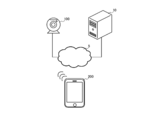
- FIG. 1 is a diagram showing an overview of the store information providing system 1.
- FIG. 2 is an overall configuration diagram of the store information providing system 1.
- FIG. 3 is a functional block diagram of the computer 10, the camera 100, and the user terminal 200.
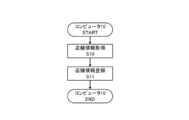
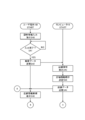
- FIG. 4 is a flowchart showing store information registration processing executed by the computer 10.
- FIG. 5 is a flowchart illustrating an imaging process executed by the computer 10 and the camera 100.
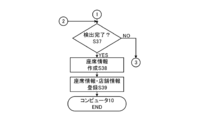
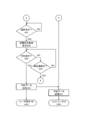
- FIG. 6 is a flowchart illustrating vacant seat detection processing executed by the computer 10.
- FIG. 7 is a flowchart illustrating vacant seat detection processing executed by the computer 10.
- FIG. 8 is a flowchart showing store information providing processing executed by the computer 10 and the user terminal 200.
- FIG. 9 is a flowchart showing store information provision processing executed by the computer 10 and the user terminal 200.
- FIG. 1 is a diagram showing an overview of the store information providing system 1.
- FIG. 2 is an overall configuration diagram of the store information providing system 1.
- FIG. 3 is a functional block diagram of the computer
- FIG. 10 is a diagram illustrating an example of a result of image analysis.
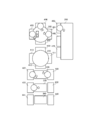
- FIG. 11 is a diagram illustrating an example of a result of image analysis.
- FIG. 12 is a diagram illustrating an example of a customer information input screen.
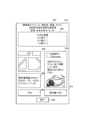
- FIG. 13 is a diagram illustrating an example of a store candidate screen.
- FIG. 14 is a diagram illustrating an example of a store introduction screen.
- FIG. 1 is a diagram for explaining an outline of a store information providing system 1 which is a preferred embodiment of the present invention.
- the store information providing system 1 includes a computer 10, a camera 100, and a user terminal 200.
- the store information providing system 1 is a computer system that accepts the number of people and provides store information.
- the number of computers 10, cameras 100, and user terminals 200 can be changed as appropriate. Further, the computer 10, the camera 100, and the user terminal 200 are not limited to real devices, and may be virtual devices. Each process described below may be realized by any one or a combination of the computer 10, the camera 100, and the user terminal 200.
- the computer 10 is a computer device capable of data communication with the camera 100 and the user terminal 200.
- the camera 100 is an imaging device such as a network camera capable of data communication with the computer 10.
- the camera 100 is provided inside a store such as a restaurant, and captures tables, chairs, customers, and the like in the store as camera images such as moving images and still images.
- the camera 100 is not limited to a store, and may be provided in other places.
- the user terminal 200 is a terminal device possessed by the user that can perform data communication with the computer 10.
- the user terminal 200 is, for example, a mobile phone, a portable information terminal, a tablet terminal, a personal computer, an electric appliance such as a netbook terminal, a slate terminal, an electronic book terminal, a portable music player, a smart glass, a head-mounted display, etc. Wearable terminals and other items.
- the camera 100 captures a camera image showing a store seat (step S01).
- the camera 100 captures a camera image of a table, a chair belonging to the table, and a customer sitting in the chair.
- the camera 100 transmits the captured camera image to the computer 10 (step S02).
- the computer 10 receives a camera image.
- the computer 10 acquires a camera image captured by the camera 100 by receiving the camera image.
- the computer 10 analyzes the image of the camera image (step S03).
- the computer 10 analyzes the position and number of tables, the position and number of chairs belonging to each table, the position and number of customers, and the like.
- the computer 10 detects a vacant seat based on the result of the image analysis (step S04).
- the computer 10 detects a vacant seat by determining whether a customer is not sitting on a chair, an article is not placed on a table, or an article is not placed on a chair belonging to the table.
- the computer 10 registers the detected vacant seat and store information in association with each other (step S05).
- the computer 10 previously receives and detects store information (the number of tables, the number of chairs belonging to each table, the store name, the store genre, the store description, the store periphery map, the content posted by the cooperative SNS, the evaluation, etc.).
- store information the number of tables, the number of chairs belonging to each table, the store name, the store genre, the store description, the store periphery map, the content posted by the cooperative SNS, the evaluation, etc.
- the user terminal 200 receives an input of the number of people at the time of visiting from the user (step S06).
- the user terminal 200 receives an input of the number of people through a predetermined application or the website of this store.
- the user terminal 200 transmits customer data indicating the received number of people to the computer 10 (step S07).
- Computer 10 receives customer data. Based on this customer data, the computer 10 provides the user terminal 200 with store information in which the number of vacancies satisfying this number is registered (step S08). The computer 10 extracts one or a plurality of store information associated with the number of vacant seats equal to or more than this number of people, and transmits the one or more store information to the user terminal 200. The computer 10 provides store information by transmitting store information to the user terminal 200.
- FIG. 2 is a diagram showing a system configuration of the store information providing system 1 which is a preferred embodiment of the present invention.
- the store information providing system 1 includes a computer 10, a camera 100, a user terminal 200, and a public line network (Internet network, third- and fourth-generation communication network, etc.) 5, and accepts the number of people and provides store information.
- Computer system includes a computer 10, a camera 100, a user terminal 200, and a public line network (Internet network, third- and fourth-generation communication network, etc.) 5, and accepts the number of people and provides store information.
- Computer system is a diagram showing a system configuration of the store information providing system 1 which is a preferred embodiment of the present invention.
- the store information providing system 1 includes a computer 10, a camera 100, a user terminal 200, and a public line network (Internet network, third- and fourth-generation communication network, etc.) 5, and accepts the number of people and provides store information.
- Computer system is a public line network (Internet network, third- and fourth-generation
- each apparatus which comprises the shop information provision system 1 can be changed suitably.
- the store information providing system 1 is not limited to a real device, and may be realized by a virtual device.
- each process mentioned later may be implement
- the computer 10 is the above-described computer device having the functions described below.
- the camera 100 is the above-described imaging device having the functions described below.
- the user terminal 200 is the above-described terminal device having the functions described later.
- FIG. 3 is a functional block diagram of the computer 10, the camera 100, and the user terminal 200.
- the computer 10 includes a CPU (Central Processing Unit), a RAM (Random Access Memory), a ROM (Read Only Memory), etc. as the control unit 11, and a device for enabling communication with other devices as the communication unit 12. For example, a WiFi (Wireless Fidelity) compatible device compliant with IEEE 802.11 is provided.
- the computer 10 also includes a data storage unit such as a hard disk, a semiconductor memory, a recording medium, or a memory card as the storage unit 13. Further, the computer 10 includes, as the processing unit 14, an analysis device that performs image analysis of the acquired captured image, a calculation device that executes various calculations, an issue device that issues coupons, and the like.
- control unit 11 reads a predetermined program, thereby realizing a store information acquisition module 20, a data transmission / reception module 21, and a store information providing module 22 in cooperation with the communication unit 12. Further, in the computer 10, the control unit 11 reads a predetermined program, thereby realizing the storage module 30 in cooperation with the storage unit 13. Further, in the computer 10, the control unit 11 reads a predetermined program, thereby realizing the analysis module 40, the store information extraction module 41, and the reservation module 42 in cooperation with the processing unit 14.
- the camera 100 includes a CPU, RAM, ROM, and the like as the control unit 110, and a device for enabling communication with other devices as the communication unit 120.
- the camera 100 includes, as the imaging unit 140, an imaging device such as a lens, an imaging device, various buttons, and a flash.
- the control unit 110 when the control unit 110 reads a predetermined program, the data transmission module 150 is realized in cooperation with the communication unit 120. In the camera 100, the control unit 110 reads a predetermined program, thereby realizing the imaging module 170 in cooperation with the imaging unit 140.
- the user terminal 200 includes a CPU, RAM, ROM, and the like as the control unit 210, and a device for enabling communication with other devices as the communication unit 220.
- the user terminal 200 includes, as the input / output unit 240, a display unit that outputs and displays data and images controlled by the control unit 210, an input unit such as a touch panel, a keyboard, and a mouse that receives input from the user.
- the control unit 210 when the control unit 210 reads a predetermined program, the customer data transmission module 250, the store data acquisition module 251, and the reservation data transmission module 252 are realized in cooperation with the communication unit 220. Further, in the user terminal 200, the control unit 210 reads a predetermined program, thereby realizing the input receiving module 270 and the display module 271 in cooperation with the input / output unit 240.
- FIG. 4 is a flowchart of store information registration processing executed by the computer 10. Processing executed by each module described above will be described together with this processing.
- the store information acquisition module 20 acquires store information (step S10).
- Store information includes, for example, the position and number of tables, the position and number of chairs belonging to each table, name, genre (Japanese food, Western food, Chinese food, Indian food, Nepalese food, meat food, seafood food, kaiseki, etc. Cooking, etc.), explanation (charge, recommendation, budget, regular holiday, telephone number, address, contact information, etc.), surrounding map, SNS posting content or evaluation.
- the store information acquisition module 20 acquires from a store terminal or an external computer owned by a store related person (not shown).
- the store terminal receives the input of the store information described above from the store officials, and transmits the received store information to the computer 10.
- the store information acquisition module 20 acquires the store information by receiving the store information.
- the store information acquisition module 20 acquires store information from an external computer or an external database that stores store information in advance.
- the storage module 30 registers the acquired store information (step S11).
- step S12 the storage module 30 stores the acquired store information in itself.
- the storage module 30 may store the store information in association with an identifier (name, preset character string, etc.) that can uniquely identify the store.
- FIG. 5 is a diagram illustrating a flowchart of an imaging process executed by the computer 10 and the camera 100. The processing executed by the modules of each device described above will be described together with this processing.
- the imaging module 170 captures a camera image such as a moving image or a still image in a store such as a restaurant (step S20). In step S20, the imaging module 170 always captures a camera image.
- the camera 100 is installed at a position where the inside of the store can be viewed, and images all tables present in the store and chairs belonging to each table.
- a plurality of cameras 100 may be provided in the store, and one or a plurality of tables corresponding to each camera 100 and a camera image of a chair belonging to each table may be captured.
- the imaging module 170 may capture a camera image at a predetermined time interval, for example, every 30 seconds, every minute, every 5 minutes.
- the data transmission module 150 transmits camera image data indicating a camera image to the computer 10 (step S21).
- the data transmission module 150 assigns and transmits an identifier relating to the imaging location (installation location name, position information, device number, pre-assigned character string, IP address, MAC address, etc.) as device data.
- the data transmission / reception module 21 receives camera image data.
- the computer 10 acquires camera images captured by the camera 100 by receiving the camera image data.
- FIG.6 and FIG.7 are flowcharts showing the vacant seat detection process executed by the computer 10. Processing executed by each module described above will be described together with this processing.
- the analysis module 40 performs image analysis on the acquired camera image (step S30).
- step S30 the analysis module 40 displays the position and number of tables reflected in the camera image, the position and number of chairs belonging to each table, the position and number of customers, the food and drink placed on the table, and the like.
- the analysis module 40 analyzes a table, a chair, and a customer by extracting a feature amount of a camera image. Further, the analysis module 40 determines the vacancy status of the table, the number of customers, the order contents of the customers, etc. based on the analysis result.
- the analysis module 40 stores in advance a camera image obtained by capturing the position and number of tables and the position and number of chairs belonging to each table in a state where there are no customers in the store, and the camera image acquired this time Image analysis may be performed by comparing the stored camera image. Moreover, the analysis module 40 may perform image analysis by other methods.
- the analysis module 40 detects in-store information indicating the position and number of tables shown in the camera image and the position and number of chairs belonging to each table (step S31). .
- step S31 the analysis module 40 detects the position and the number of each table shown in the camera image.
- the analysis module 40 detects the position and number of chairs belonging to each table shown in the camera image.
- the analysis module 40 detects a circular or rectangular table
- the analysis module 40 detects a chair existing around the table as a chair belonging to the table.
- the analysis module 40 detects a rectangular table
- the analysis module 40 detects a chair existing at a position facing the table as a chair belonging to the table.
- the analysis module 40 detects a rectangular table
- the analysis module 40 detects a chair juxtaposed along one side as a chair belonging to one group belonging to this table.
- the analysis module 40 detects that the chairs juxtaposed along one side are chairs of different groups belonging to this table.
- the analysis module 40 may detect a configuration other than the example described above as a chair belonging to each table.
- FIG. 10 is a diagram illustrating an example of a result of image analysis.
- the analysis module 40 detects the position and number of tables shown in the camera image, and the position and number of chairs belonging to each table. That is, the analysis module 40 detects the first table 300, the second table 310, the third table 320, the fourth table 330, the fifth table 340, and the sixth table 350 as tables reflected in the camera image.
- the analysis module 40 also includes chairs 400 to 403 belonging to the first table 300, chairs 410 to 413 belonging to the second table 310, chairs 420 and 421 belonging to the third table 320, and chairs 430 and 431 belonging to the fourth table 330.
- Chairs 440 and 441 belonging to the fifth table 340 and chairs 450, 460 and 470 belonging to the sixth table 350 are detected.
- the analysis module 40 determines which chair belongs to which table based on the shape and position of each chair, and detects the chair as belonging to each table. For example, when the table is circular, the analysis module 40 detects a chair positioned around the circle as a chair belonging to the table. In addition, when the table is rectangular, the analysis module 40 detects a chair arranged at a peripheral position or a facing position as a chair belonging to the table. Moreover, when the table is a rectangle, the analysis module 40 detects a chair juxtaposed on one side of the rectangle as a chair of a different group, although belonging to this table. That is, in FIG. 10, chairs belonging to each table are treated as one group in the first to fifth tables 300 to 340, whereas chairs 450, 460, and 470 are respectively treated in the sixth table 350. Treated as a different group.
- the analysis module 40 determines whether there is a customer in the detected chair based on the result of the image analysis (step S32).
- step S ⁇ b> 32 the analysis module 40 determines whether or not a customer is present in any or a plurality of chairs belonging to one table.
- the analysis module 40 determines that a customer exists when the customer is reflected on the chair.
- the analysis module 40 judges that a customer exists in any chair of this table, when food and drink and other articles
- the analysis module 40 determines that the customer exists in another chair of the table to which this chair belongs or in this chair.
- step S32 when the analysis module 40 determines that there is no customer (step S32: NO), that is, when it is determined that all the chairs belonging to one table are vacant, the analysis module 40 determines the empty table information. Is created (step S33).
- step S33 the analysis module 40 creates the table identifier and the number of empty chairs as empty table information.
- the table identifier is a character string or position information set in advance in each table. For example, in FIG. 11 described later, the analysis module 40 creates the empty table information that the identifier of the second table 310 and the four legs of the chairs 410 to 413 are empty.
- the analysis module 40 creates, as empty table information, the identifier of the fifth table 340 and the fact that the two chairs 440 and 441 are empty. Moreover, the analysis module 40 creates the identifier of the sixth table 350 and the fact that one leg of the chair 620 is empty as empty table information. Further, the analysis module 40 creates, as empty table information, the identifier of the sixth table 350 and the fact that one leg of the chair 630 is empty.
- step S33 the analysis module 40 may create a vacant chair as empty table information when the store does not have a table.
- step S32 determines in step S32 that there is a customer (YES in step S32), that is, if it is determined that the customer exists in all chairs or any chair belonging to one table
- the analysis module 40 40 detects the attribute information of the customer existing in this chair (step S34).
- step S34 the analysis module 40 detects the customer's entry time, stay time, order contents, purchase price, and the like as attribute information.
- the analysis module 40 extracts the feature amount of the food or drink placed on the table based on the result of the image analysis.
- the analysis module 40 specifies the order contents ordered by the customer based on the extracted feature amount.
- the analysis module 40 specifies the purchase amount of the customer based on the fee table associated with the specified order contents.
- the analysis module 40 specifies the time when it was detected that the customer first exists in the chair as the store entry time.
- the analysis module 40 specifies the time between this store entry time and the current time as the staying time.
- the attribute information detected by the analysis module 40 is not limited to the above-described example, and other information may be detected, or any of them may be detected. Further, this process can be omitted, and in this case, each process described later may be executed. Further, the data transmission / reception module 21 may transmit this attribute information to a store terminal not shown. By doing in this way, it becomes easy to grasp a customer unit price, a customer's stay time, a customer's order contents, etc. with a store terminal, and it becomes easy to estimate sales.
- FIG. 11 is a diagram illustrating an example of a result of image analysis.
- the analysis module 40 detects the presence / absence of customers and customer attribute information in each table.
- the analysis module 40 detects three customers 500 to 502 in the first table 300.
- the analysis module 40 detects the customer 500 for the chair 400, the customer 501 for the chair 401, the customer 502 for the chair 403, and no customer for the chair 402.
- the analysis module 40 detects a chair 402 in which no customer exists as an occupant seat because there are other customers, but superimposes the chair seat icon 640 indicating that one chair is vacant on the chair 402. indicate.
- the companion seat icon 640 indicates the number of companion seats.
- the analysis module 40 detects the attribute information of the first table 300, and detects the stay time and the order contents.
- the analysis module 40 detects that there is no customer in the second table 310.
- the analysis module 40 detects that there are no customers in the chairs 410 to 413 in the second table 310, and therefore detects that the second table 310 in which no customer exists is vacant, and superimposes the vacant seat icon 600 on the second table 310.
- the analysis module 40 detects two customers 510 and 511 in the third table 320.
- the analysis module 40 detects the customer 510 for the chair 420 and the customer 511 for the chair 421.
- the analysis module 40 detects that the third table 320 is full because there is no chair for which no customer exists.
- the analysis module 40 detects the attribute information of the third table 320, and detects the stay time and the order contents.
- the analysis module 40 detects one customer 520 in the fourth table 330.
- the analysis module 40 detects no customer in the chair 430 and the customer 520 in the chair 431 in the fourth table 330.
- the analysis module 40 detects a chair 430 that does not have a customer as a seat because there is a vacant seat but there are other customers, and superimposes a chair seat icon 650 indicating that one chair is vacant on the chair 430. indicate.
- the companion seat icon 650 indicates the number of companion seats.
- the analysis module 40 detects the attribute information of the fourth table 330, and detects the stay time and the order contents.
- the analysis module 40 detects that there is no customer in the fifth table 340.
- the analysis module 40 detects that the fifth table 340 in which no customer exists is vacant because there are no customers in the chairs 440 and 441, and superimposes the vacant seat icon 610 on the fifth table 340.
- To display. The number of chairs 440 and 441 belonging to the fifth table 340 is displayed on the vacant seat icon 610.
- the analysis module 40 detects one customer 530 in the sixth table 350.
- the analysis module 40 detects the customer 530 for the chair 450, no customer for the chair 460, and no customer for the chair 470.
- the analysis module 40 detects that each chair is independent because the sixth table 350 has chairs juxtaposed only on one side, the chair 450 is full, the chair 460 is empty, and the chair 470 is empty. Detect that there is.
- the analysis module 40 detects the attribute information of the chair 450, and detects the stay time and the order contents.
- the analysis module 40 displays a vacant seat icon 620 similar to that of the second table 310 and the fifth table 340 superimposed on the chair 460 and displays a similar vacant seat icon 630 superimposed on the chair 470.
- the vacant seat icon 640 displays the number of chairs 460. In addition, the number of chairs 470 is displayed in the vacant seat icon 640.
- the analysis module 40 may be configured to superimpose a vacant seat icon on all vacant chairs. Moreover, you may show that it is a vacant seat by another structure. Moreover, the structure which superimposes a vacant seat icon on all the tables in which a vacant seat exists may be sufficient.
- the analysis module 40 determines whether there is a vacant seat (step S35). In step S35, the analysis module 40 determines whether there is a vacant seat in the chair belonging to one table. The analysis module 40 determines whether there is a chair that has not detected a customer among chairs located around or near one table.
- step S35 if the analysis module 40 determines that there are no vacant seats (step S35 NO), that is, if there are customers in all the chairs belonging to one table, the analysis module 40 executes the process of step S37 described later.
- step S35 determines in step S35 that there is a vacant seat (YES in step S35), that is, if there is a customer in another chair in the table to which the chair that is vacant seat belongs.
- the table is determined to be a companion, and companion information is created (step S36).
- step S36 the analysis module 40 creates the table identifier and the number of vacant chairs as the seating information.
- the table identifier is a character string or position information set in advance in each table. For example, in FIG. 11, the analysis module 40 creates as the seating information that the identifier of the first table 300 and one of the chairs 402 are vacant. Moreover, the analysis module 40 creates the identifier of the fourth table 330 and the fact that one leg of the chair 430 is vacant as companion information.
- the analysis module 40 determines whether or not the detection for all the tables shown in the camera image has been completed (step S37). In step S37, when it is determined that the analysis module 40 has not been completed (step S37: NO), the analysis module 40 executes the processes after step S32 described above.
- step S37 the analysis module 40 creates seat information in which attribute information, seating information, and vacant seat information are collected (step S38).
- step S38 the analysis module 40 creates seat information based on the attribute information, the seat information, and the vacancy information in each table.
- the seat information may include the status of each table, the status of the total number of seats and vacancies, the expected remaining time of the customer, and the like.
- the estimated remaining stay time is calculated based on the order contents included in the attribute information detected this time by the analysis module 40 learning the past customer order contents and stay time as teacher data.
- the storage module 30 registers seat information and store information in association with each other (step S39).
- the storage module 30 stores the store identifier (name, preset character string, etc.), the current time, seat information, and store information in association with each other.
- the storage module 30 may store information other than the examples described above in association with the seat information and the store information, or may store only seat information in association with the store information.
- the above is the vacant seat detection process.
- FIGS. 8 and 9 are flowcharts of the store information providing process executed by the computer 10 and the user terminal 200. The processing executed by the modules of each device described above will be described together with this processing.
- the input reception module 270 receives input of customer information such as the number of people, store genre, budget, visit time from the user (step S40). In step S40, the input reception module 270 activates a predetermined application and receives input of customer information.
- the input receiving module 270 may receive customer information input by accessing a website or the like. Further, the customer information is not limited to the example described above, and may be other information or any one of them.
- FIG. 12 is a diagram illustrating an example of a customer information input screen.
- the input reception module 270 displays a store visitor number input area 710, a genre input area 720, a budget input area 730, a store visit time input area 740, a transmission icon 750, and an end icon 760 as a customer information input screen 700.
- Each region receives a selection input from the user, displays a virtual keyboard, a plurality of options, and the like, thereby receiving an input of a character string, options, and the like desired by the user.
- the store visit number input area 710 is an area for inputting the number of visitors when the user visits the store. For example, an input of “four people” is accepted.
- the genre input area 720 is an area for inputting a genre of a store desired by the user, and accepts an input of “coffee shop”, for example.
- the budget input area 730 is an area for inputting a user's budget, and accepts an input of “3000 yen”, for example.
- the store visit time input area 740 is an area for accepting an input of a visit time by the user, and accepts an input of “19:00”, for example.
- the transmission icon 750 receives a selection input from the user, and the customer data transmission module 250 transmits the customer information for which the input has been received to the computer 10 as customer data.
- the end icon 760 accepts a selection input from the user and ends this screen.
- the input reception module 270 only needs to receive at least the number of visitors, and other input contents can be changed as appropriate.
- the input reception module 270 can easily search for a store desired by the user by receiving an input of the genre input area 720.
- the input receiving module 270 determines whether or not the input has been completed (step S41). In step S41, the input reception module 270 makes a determination based on whether or not an input of the transmission icon 750 has been received.
- step S41 the input reception module 270 determines that the input is not completed (NO in step S41), that is, the case where the input of the transmission icon 750 is not received or the number of visitors who have received the input of the transmission icon 750 When the input of the input area 710 is not received, this process is repeated.
- step S41 when the input reception module 270 receives an input of the end icon 760, the input reception module 270 ends the display of the customer information input screen and ends the present process.
- step S41 determines in step S41 that the input has been completed (YES in step S41), that is, if the input of the transmission icon 750 and at least the input of the visitor number input area 710 are received
- the customer The data transmission module 250 transmits the customer information received as input to the computer 10 as customer data (step S42).
- step S42 the customer data transmission module 250 adds the data related to the location information of its current location to the customer data and transmits it.
- the data transmission / reception module 21 receives customer data.
- the store information extraction module 41 extracts store information that satisfies the number of empty seats satisfying the number of customers included in the customer data, the genre, and the position information within a predetermined range of the position information of the user terminal 200 (step S43).
- the store information extraction module 41 extracts one or a plurality of store information in which the number of vacant seats equal to or more than the number of visitors is registered. Further, the store information extraction module 41 extracts one or more store information satisfying the genre from the extracted one or more store information.
- the store information extraction module 41 includes one or a plurality of stores in which position information within a predetermined range (for example, a radius of several hundred meters or several kilometers) of the position information included in the customer data is registered among the extracted store information. Extract information.
- the store information extraction module 41 may extract store information based only on the number of customers who visit the store, may extract store information based on other customer information instead of a genre, or may store a plurality of customers. Store information may be extracted based on the information.
- the store information extraction module 41 determines the order of the extracted store information (step S44).
- step S44 the store information extraction module 41 determines the order of the store information based on the proximity from the current location.
- the store information extraction module 41 can change the order of the store information by learning the store genre or the store location information. For example, when learning a genre as customer information, based on the number of times the content of the genre included in the customer information is input, the order of providing corresponding or similar store information is added to the proximity of the current location, and based on the learned genre To change.
- the store information extraction module 41 may omit this process when one store information is extracted.
- the store information providing module 22 transmits store information as store data to the user terminal 200 (step S45).
- step S ⁇ b> 45 the store information providing module 22 provides store information by transmitting store data to the user terminal 200.
- the store data acquisition module 251 receives store data. Based on the store data, the display module 271 displays store information candidates that satisfy the customer information received through the process of step S40 described above (step S46). In step S46, the display module 271 displays store candidates in the order of the store information determined by the processing in step S44 described above. The display module 271 displays the name of each store and the number of seats available as candidates for the store information. The display module 271 may display other information as candidates for store information, or may display only the name or the number of seats available.
- FIG. 13 is a diagram illustrating an example of a store candidate screen.
- the display module 271 displays a first candidate display area 810, a second candidate display area 811, a third candidate display area 812, and an end icon 820 as the store candidate screen 800.
- Each area receives a selection input from the user, and displays a store screen of a corresponding store candidate to be described later.
- the first candidate display area 810, the second candidate display area 811, and the third candidate display area 812 display the names of the stores that are candidates and the number of seats available.
- the number of vacant seats displays the type of table seat based on the in-store information and the number of vacant seats based on the seat information.
- the end icon 820 accepts input from the user and ends the display of this screen.
- the number of candidates displayed by the display module 271 and the display mode are not limited to the above-described example, and can be changed as appropriate.
- the display module 271 may display store candidates of a plurality of genres, or display genre candidates and display store candidates of each genre by accepting selection input to the genre candidates. Also good. Further, the contents displayed on each area by the display module 271 can be changed as appropriate.
- the display module 271 determines whether selection of a store candidate has been accepted (step S47). In step S47, the display module 271 makes a determination based on whether a selection input for each area has been received.
- step S47 if the display module 271 determines that it has not been accepted (NO in step S47), that is, if it has not accepted selection input for any of the areas, this process is repeated.
- the display module 271 receives selection input of the end icon 820, the display module 271 ends the present screen and ends the present process.
- step S47 when the display module 271 determines in step S47 that it has received (YES in step S47), the display module 271 displays a store introduction screen of the store candidates that have received the selection (step S48).
- step S48 the display module 271 displays a name, a genre, a description, a peripheral map based on the store information, the posted content or evaluation of the linked SNS, etc. as the store introduction screen.
- FIG. 14 is a diagram illustrating an example of a store introduction screen.
- the display module 271 displays an explanation display area 910, a vacant seat status display area 920, a map display area 930, a contact display area 940, a posted content display area 950, a reservation icon 960, and other store icons as a store introduction screen 900. 970 and an end icon 980 are displayed.
- the explanation display area 910 is an area for displaying the name, genre, explanation, evaluation and the like of this store.
- the vacant seat status display area 920 is an area that displays the type of vacant table (4 seats, 2 seats, 1 seat, etc.) and the number of seats available.
- the map display area 930 is an area for displaying a route from the current location of the user terminal 200 to the store or a map around the store. The map display area 930 displays the route from the current location to the store, the required time, and the like by cooperating with other map applications and navigation applications. Based on the map display area 930, the display module 271 can execute voice guidance and the like.
- the contact address display area 940 is an area for displaying contact information such as the store address, telephone number, and business hours.
- the posted content display area 950 is an area for displaying past posted contents, advertisements, and the like of the SNS to be linked.
- the reservation icon 960 is an icon that accepts input from the user and executes reservation processing.
- the other store icon 970 is an icon that receives input from the user and executes redisplay of the store candidate screen or display of the store introduction screen of another store.
- the end icon 980 is an icon that accepts input from the user and ends the display of this screen.
- each area described above can be changed as appropriate. Further, the contents of each icon described above can be changed as appropriate. In addition, it is not always necessary to display all the areas described above, and any or a plurality of combinations may be displayed, or other contents may be displayed. Moreover, it is not always necessary to display all the icons described above, and any or a plurality of combinations may be displayed, or other contents may be displayed.
- the display module 271 determines whether or not the store reservation input has been received (step S49). In step S49, the display module 271 determines based on whether or not an input of the reservation icon 960 has been accepted.
- step S49 when the display module 271 determines that it has been received (YES in step S49), the reservation data transmission module 252 transmits the reservation data to the computer 10 (step S50).
- step S50 the reservation data transmission module 252 transmits, as reservation data, the number of customers who have received input as customer information, the store visit time, and the store identifier (store information such as name and location information can be uniquely specified). .
- the reservation data is not limited to the above example, and can be changed as appropriate.
- the display module 271 may further display a coupon by accepting an input of the reservation icon 960.
- the computer 10 changes the discount rate according to the number of vacant seats or the ratio of vacant seats based on the seat information. For example, the discount rate is set higher as the number of vacant seats or the ratio of vacant seats is larger.
- the data transmission / reception module 21 receives reservation data.
- the reservation module 42 specifies a reservation destination store based on the reservation data, and the data transmission / reception module 21 transmits the reservation data to a store terminal (not shown) arranged in the store (step S51).
- the store terminal receives this reservation data.
- the store terminal displays reservation contents based on the reservation data.
- the store personnel make necessary preparations based on the reservation details.
- step S49 determines whether or not an input for displaying another store candidate has been accepted. If it is determined in step S49 that the display module 271 has not accepted (NO in step S49), that is, if the input of the reservation icon 960 has not been accepted, whether or not an input for displaying another store candidate has been accepted. Is determined (step S52). In step S52, determination is made based on whether or not an input of the multi-store icon 970 has been accepted.
- step S52 if the display module 271 determines that it has not been accepted (NO in step S52), it executes the process of step S49 described above again.
- step S52 when the display module 271 determines that it has been accepted (YES in step S52), the process of step S46 described above is executed again. At this time, the display module 271 may display a store introduction screen related to a store that is a candidate next to the store that is currently displayed.
- step S49 and step S52 when the input of the end icon 980 is accepted, the display of this screen is terminated and the present process is terminated.
- the above is the store information provision processing.
- the means and functions described above are realized by a computer (including a CPU, an information processing apparatus, and various terminals) reading and executing a predetermined program.
- the program is provided, for example, in a form (SaaS: Software as a Service) provided from a computer via a network.
- the program is provided in a form recorded on a computer-readable recording medium such as a flexible disk, CD (CD-ROM, etc.), DVD (DVD-ROM, DVD-RAM, etc.).
- the computer reads the program from the recording medium, transfers it to the internal storage device or the external storage device, stores it, and executes it.
- the program may be recorded in advance in a storage device (recording medium) such as a magnetic disk, an optical disk, or a magneto-optical disk, and provided from the storage device to a computer via a communication line.
- 1 store information provision system, 10 computers, 100 cameras, 200 user terminals
Landscapes
- Business, Economics & Management (AREA)
- Tourism & Hospitality (AREA)
- Engineering & Computer Science (AREA)
- Strategic Management (AREA)
- Economics (AREA)
- Human Resources & Organizations (AREA)
- General Business, Economics & Management (AREA)
- General Physics & Mathematics (AREA)
- Marketing (AREA)
- Physics & Mathematics (AREA)
- Theoretical Computer Science (AREA)
- General Health & Medical Sciences (AREA)
- Health & Medical Sciences (AREA)
- Primary Health Care (AREA)
- Development Economics (AREA)
- Game Theory and Decision Science (AREA)
- Entrepreneurship & Innovation (AREA)
- Operations Research (AREA)
- Quality & Reliability (AREA)
- Management, Administration, Business Operations System, And Electronic Commerce (AREA)
Abstract
【課題】店舗の席が映っているカメラ画像を画像解析して空席数を登録し、ユーザから入力された人数を満たす空席数が登録された店舗情報を提供することを目的とする。 【解決手段】人数の入力を受け付けて店舗情報を提供するコンピュータシステムは、店舗の席が映っているカメラ画像を取得し、取得した前記カメラ画像を画像解析して、空席数を検知し、検知した前記空席数を店舗情報と関連付けて登録し、受け付けた前記人数に基づいて、当該人数を満たす空席数が登録された前記店舗情報を提供する。また、コンピュータシステムは、テーブル毎の空席数を検知し、検知した前記テーブル毎の空席数を店舗情報と関連付けて登録し、前記人数を満たす前記テーブル毎の空席数が登録された前記店舗情報を提供する。また、コンピュータシステムは、店舗のジャンルの入力を受け付け、検知した前記空席数を前記ジャンルと関連付けて登録し、受け付けた前記ジャンルに基づいて、当該ジャンルを満たす前記店舗情報を提供する。
Description
本発明は、人数の入力を受け付けて、店舗情報を提供するコンピュータシステム、店舗情報提供方法及びプログラムに関する。
近年、公共交通機関や飲食店等において、椅子に重量センサ等の各種センサを設け、センサの検知結果から、この椅子が空席であるか否かを判定するシステムが存在する。このようなシステムにおいて、判定結果を、ユーザが所持する端末等に送信することにより、空席情報をユーザに通知することが可能となっている。
このようなシステムにおいて、計測指示を各種センサに送信し、この指示に基づいて、各種センサが、検知した検知結果を送信する。管理装置は、この検知結果に基づいて、座席が空席であるか否かを判定し、空席である座席の場所を、端末に送信する構成が開示されている(特許文献1参照)。
しかしながら、特許文献1の構成では、空席を検知することは可能であるものの、リアルタイムに、店舗にいる客数と空席数とを考慮して、ユーザに店舗情報を提供することができなかった。
本発明は、店舗の席が映っているカメラ画像を画像解析して空席数を登録し、ユーザから入力された人数を満たす空席数が登録された店舗情報を提供することが可能なコンピュータシステム、店舗情報提供方法及びプログラムを提供することを目的とする。
本発明では、以下のような解決手段を提供する。
本発明は、人数の入力を受け付けて店舗情報を提供するコンピュータシステムであって、
店舗の席が映っているカメラ画像を取得する取得手段と、
取得した前記カメラ画像を画像解析して、空席数を検知する検知手段と、
検知した前記空席数を店舗情報と関連付けて登録する登録手段と、
受け付けた前記人数に基づいて、当該人数を満たす空席数が登録された前記店舗情報を提供する提供手段と、
を備えることを特徴とするコンピュータシステムを提供する。
店舗の席が映っているカメラ画像を取得する取得手段と、
取得した前記カメラ画像を画像解析して、空席数を検知する検知手段と、
検知した前記空席数を店舗情報と関連付けて登録する登録手段と、
受け付けた前記人数に基づいて、当該人数を満たす空席数が登録された前記店舗情報を提供する提供手段と、
を備えることを特徴とするコンピュータシステムを提供する。
本発明によれば、人数の入力を受け付けて店舗情報を提供するコンピュータシステムは、店舗の席が映っているカメラ画像を取得し、取得した前記カメラ画像を画像解析して、空席数を検知し、検知した前記空席数を店舗情報と関連付けて登録し、受け付けた前記人数に基づいて、当該人数を満たす空席数が登録された前記店舗情報を提供する。
本発明は、コンピュータシステムのカテゴリであるが、店舗情報提供方法及びプログラム等の他のカテゴリにおいても、そのカテゴリに応じた同様の作用・効果を発揮する。
本発明によれば、店舗の席が映っているカメラ画像を画像解析して空席数を登録し、ユーザから入力された人数を満たす空席数が登録された店舗情報を提供することが可能となる。
以下、本発明を実施するための最良の形態について図を参照しながら説明する。なお、これはあくまでも一例であって、本発明の技術的範囲はこれに限られるものではない。
[店舗情報提供システム1の概要]
本発明の概要について、図1に基づいて説明する。図1は、本発明の好適な実施形態である店舗情報提供システム1の概要を説明するための図である。店舗情報提供システム1は、コンピュータ10、カメラ100、ユーザ端末200から構成され、人数の入力を受け付けて店舗情報を提供するコンピュータシステムである。
本発明の概要について、図1に基づいて説明する。図1は、本発明の好適な実施形態である店舗情報提供システム1の概要を説明するための図である。店舗情報提供システム1は、コンピュータ10、カメラ100、ユーザ端末200から構成され、人数の入力を受け付けて店舗情報を提供するコンピュータシステムである。
なお、図1において、コンピュータ10、カメラ100、ユーザ端末200の数は、適宜変更可能である。また、コンピュータ10、カメラ100、ユーザ端末200は、実在する装置に限らず、仮想的な装置であってもよい。また、後述する各処理は、コンピュータ10、カメラ100、ユーザ端末200のいずれか又は複数の組み合わせにより実現されてもよい。
コンピュータ10は、カメラ100、ユーザ端末200とデータ通信可能なコンピュータ装置である。
カメラ100は、コンピュータ10とデータ通信可能な、ネットワークカメラ等の撮像装置である。カメラ100は、飲食店等の店舗内部に設けられ、店舗内のテーブル、椅子及び顧客等を動画や静止画等のカメラ画像として撮像する。なお、カメラ100は、店舗に限らず、その他の場所に設けられていてもよい。
ユーザ端末200は、コンピュータ10とデータ通信可能な、ユーザが所持する端末装置である。ユーザ端末200は、例えば、携帯電話、携帯情報端末、タブレット端末、パーソナルコンピュータに加え、ネットブック端末、スレート端末、電子書籍端末、携帯型音楽プレーヤ等の電化製品や、スマートグラス、ヘッドマウントディスプレイ等のウェアラブル端末や、その他の物品である。
はじめに、カメラ100は、店舗の席が映っているカメラ画像を撮像する(ステップS01)。カメラ100は、テーブルと、このテーブルに属する椅子と、椅子に座っている顧客のカメラ画像を撮像する。
カメラ100は、撮像したカメラ画像を、コンピュータ10に送信する(ステップS02)。
コンピュータ10は、カメラ画像を受信する。コンピュータ10は、カメラ画像を受信することにより、カメラ100が撮像したカメラ画像を取得する。
コンピュータ10は、カメラ画像を画像解析する(ステップS03)。コンピュータ10は、テーブルの位置やその数、各テーブルに属する椅子の位置やその数、顧客の位置やその数等を解析する。
コンピュータ10は、画像解析の結果に基づいて、空席を検知する(ステップS04)。コンピュータ10は、顧客が椅子に座っていない、テーブル上に物品が載置されていない又はこのテーブルに属する椅子に物品が載置されていない等を判断することにより、空席を検知する。
コンピュータ10は、検知した空席と店舗情報とを関連付けて登録する(ステップS05)。コンピュータ10は、予め店舗情報(テーブルの数、各テーブルに属する椅子の数、店舗の名称、店舗のジャンル、店舗の説明、店舗周辺地図、連携するSNSの投稿内容、評価等)を受け付け、検知した空席と店舗情報とを関連付けて登録する。
ユーザ端末200は、ユーザから来店時の人数の入力を受け付ける(ステップS06)。ユーザ端末200は、所定のアプリケーションやこの店舗のWebサイトにより、人数の入力を受け付ける。
ユーザ端末200は、受け付けた人数を示す顧客データを、コンピュータ10に送信する(ステップS07)。
コンピュータ10は、顧客データを受信する。コンピュータ10は、この顧客データに基づいて、この人数を満たす空席数が登録された店舗情報をユーザ端末200に提供する(ステップS08)。コンピュータ10は、この人数以上の空席数に関連付けられた一又は複数の店舗情報を抽出し、この一又は複数の店舗情報をユーザ端末200に送信する。コンピュータ10は、店舗情報をユーザ端末200に送信することにより、店舗情報を提供する。
以上が、店舗情報提供システム1の概要である。
[店舗情報提供システム1のシステム構成]
図2に基づいて、店舗情報提供システム1のシステム構成について説明する。図2は、本発明の好適な実施形態である店舗情報提供システム1のシステム構成を示す図である。店舗情報提供システム1は、コンピュータ10、カメラ100、ユーザ端末200、公衆回線網(インターネット網や、第3、第4世代通信網等)5から構成され、人数の入力を受け付けて店舗情報を提供するコンピュータシステムである。
図2に基づいて、店舗情報提供システム1のシステム構成について説明する。図2は、本発明の好適な実施形態である店舗情報提供システム1のシステム構成を示す図である。店舗情報提供システム1は、コンピュータ10、カメラ100、ユーザ端末200、公衆回線網(インターネット網や、第3、第4世代通信網等)5から構成され、人数の入力を受け付けて店舗情報を提供するコンピュータシステムである。
なお、店舗情報提供システム1を構成する各装置類の数及びその種類は、適宜変更可能である。また、店舗情報提供システム1は、実在する装置に限らず、仮想的な装置により実現されてもよい。また、後述する各処理は、店舗情報提供システム1を構成する各装置類のいずれか又は複数の組み合わせにより実現されてもよい。
コンピュータ10は、後述の機能を備えた上述したコンピュータ装置である。
カメラ100は、後述の機能を備えた上述した撮像装置である。
ユーザ端末200は、後述の機能を備えた上述した端末装置である。
[各機能の説明]
図3に基づいて、店舗情報提供システム1の機能について説明する。図3は、コンピュータ10、カメラ100、ユーザ端末200の機能ブロック図を示す図である。
図3に基づいて、店舗情報提供システム1の機能について説明する。図3は、コンピュータ10、カメラ100、ユーザ端末200の機能ブロック図を示す図である。
コンピュータ10は、制御部11として、CPU(Central Processing Unit)、RAM(Random Access Memory)、ROM(Read Only Memory)等を備え、通信部12として、他の機器と通信可能にするためのデバイス、例えば、IEEE802.11に準拠したWiFi(Wireless Fidelity)対応デバイスを備える。また、コンピュータ10は、記憶部13として、ハードディスクや半導体メモリ、記録媒体、メモリカード等によるデータのストレージ部を備える。また、コンピュータ10は、処理部14として、取得した撮像画像の画像解析を実行する解析デバイスや各種計算を実行する計算デバイスやクーポンを発行する発行デバイス等を備える。
コンピュータ10において、制御部11が所定のプログラムを読み込むことにより、通信部12と協働して、店舗情報取得モジュール20、データ送受信モジュール21、店舗情報提供モジュール22を実現する。また、コンピュータ10において、制御部11が所定のプログラムを読み込むことにより、記憶部13と協働して、記憶モジュール30を実現する。また、コンピュータ10において、制御部11が所定のプログラムを読み込むことにより、処理部14と協働して、解析モジュール40、店舗情報抽出モジュール41、予約モジュール42を実現する。
カメラ100は、コンピュータ10と同様に、制御部110として、CPU、RAM、ROM等を備え、通信部120として、他の機器と通信可能にするためのデバイス等を備える。また、カメラ100は、撮像部140として、レンズ、撮像素子、各種ボタン、フラッシュ等の撮像デバイス等を備える。
カメラ100において、制御部110が所定のプログラムを読み込むことにより、通信部120と協働して、データ送信モジュール150を実現する。また、カメラ100において、制御部110が所定のプログラムを読み込むことにより、撮像部140と協働して、撮像モジュール170を実現する。
ユーザ端末200は、コンピュータ10と同様に、制御部210として、CPU、RAM、ROM等を備え、通信部220として、他の機器と通信可能にするためのデバイス等を備える。また、ユーザ端末200は、入出力部240として、制御部210で制御したデータや画像を出力表示する表示部や、ユーザからの入力を受け付けるタッチパネルやキーボード、マウス等の入力部等を備える。
ユーザ端末200において、制御部210が所定のプログラムを読み込むことにより、通信部220と協働して、顧客データ送信モジュール250、店舗データ取得モジュール251、予約データ送信モジュール252を実現する。また、ユーザ端末200において、制御部210が所定のプログラムを読み込むことにより、入出力部240と協働して、入力受付モジュール270、表示モジュール271を実現する。
なお、以下の説明において、カメラ100、ユーザ端末200の各装置は1つであるものとして説明しているが、複数であっても本処理は実行可能であることはいうまでもない。
[店舗情報登録処理]
図4に基づいて、店舗情報提供システム1が実行する店舗情報登録処理について説明する。図4は、コンピュータ10が実行する店舗情報登録処理のフローチャートを示す図である。上述した各モジュールが実行する処理について、本処理に併せて説明する。
図4に基づいて、店舗情報提供システム1が実行する店舗情報登録処理について説明する。図4は、コンピュータ10が実行する店舗情報登録処理のフローチャートを示す図である。上述した各モジュールが実行する処理について、本処理に併せて説明する。
店舗情報取得モジュール20は、店舗情報を取得する(ステップS10)。店舗情報とは、例えば、テーブルの位置及びその数、各テーブルに属する椅子の位置とその数、名称、ジャンル(和食、洋食、中華料理、インド料理、ネパール料理等や肉料理、魚介料理、懐石料理等)、説明(料金、おすすめ、予算、定休日、電話番号、住所、連絡先等)、周辺地図、連携するSNSの投稿内容又は評価である。店舗情報取得モジュール20は、図示していない店舗関係者が所持する店舗端末や外部コンピュータから取得する。店舗端末は、店舗関係者から上述した店舗情報の入力を受け付け、受け付けた店舗情報をコンピュータ10に送信する。店舗情報取得モジュール20は、この店舗情報を受信することにより取得する。また、店舗情報取得モジュール20は、予め店舗情報を記憶した外部コンピュータや外部データベース等から、店舗情報を取得する。
記憶モジュール30は、取得した店舗情報を登録する(ステップS11)。ステップS12において、記憶モジュール30は、取得した店舗情報を自身に記憶する。なお、複数の店舗情報を記憶する場合、記憶モジュール30は、店舗情報に、店舗を一意に特定可能な識別子(名称、予め設定された文字列等)を関連付けて記憶すればよい。
以上が、店舗情報登録処理である。
[撮像処理]
図5に基づいて、店舗情報提供システム1が実行する撮像処理について説明する。図5は、コンピュータ10、カメラ100が実行する撮像処理のフローチャートを示す図である。上述した各装置のモジュールが実行する処理について、本処理に併せて説明する。
図5に基づいて、店舗情報提供システム1が実行する撮像処理について説明する。図5は、コンピュータ10、カメラ100が実行する撮像処理のフローチャートを示す図である。上述した各装置のモジュールが実行する処理について、本処理に併せて説明する。
撮像モジュール170は、飲食店等の店舗内の動画や静止画等のカメラ画像を撮像する(ステップS20)。ステップS20において、撮像モジュール170は、常時カメラ画像を撮像する。カメラ100は、店舗内を一望できる位置に設置されており、店舗内に存在する全てのテーブル及び各テーブルに属する椅子を撮像する。
なお、ステップS20において、複数のカメラ100を店舗内に設け、各カメラ100が対応する一又は複数のテーブルと、各テーブルに属する椅子のカメラ画像を撮像してもよい。また、撮像モジュール170は、所定の時間間隔、例えば、30秒毎、1分毎、5分毎の時間間隔でカメラ画像を撮像してもよい。
データ送信モジュール150は、カメラ画像を示すカメラ画像データを、コンピュータ10に送信する(ステップS21)。ステップS21において、データ送信モジュール150は、撮像場所に関する識別子(設置場所の名称、位置情報、機器番号、予め付与された文字列、IPアドレス、MACアドレス等)を機器データとして付与し、送信する。
データ送受信モジュール21は、カメラ画像データを受信する。コンピュータ10は、カメラ画像データを受信することにより、カメラ100が撮像したカメラ画像を取得する。
以上が、撮像処理である。
[空席検知処理]
図6及び図7に基づいて、店舗情報提供システム1が実行する空席検知処理について説明する。図6及び図7は、コンピュータ10が実行する空席検知処理のフローチャートを示す図である。上述した各モジュールが実行する処理について、本処理に併せて説明する。
図6及び図7に基づいて、店舗情報提供システム1が実行する空席検知処理について説明する。図6及び図7は、コンピュータ10が実行する空席検知処理のフローチャートを示す図である。上述した各モジュールが実行する処理について、本処理に併せて説明する。
解析モジュール40は、取得したカメラ画像を画像解析する(ステップS30)。ステップS30において、解析モジュール40は、カメラ画像に映っているテーブルの位置やその数、各テーブルに属する椅子の位置やその数、顧客の位置やその数、テーブルに載置された飲食物等を解析する。例えば、解析モジュール40は、カメラ画像の特徴量を抽出することにより、テーブル、椅子及び顧客を解析する。また、解析モジュール40は、解析結果に基づいて、テーブルの空席状況、顧客の数、顧客の注文内容等を判断する。
なお、解析モジュール40は、予めこの店舗の顧客がいない状態におけるテーブルの位置やその数及び各テーブルに属する椅子の位置やその数を撮像したカメラ画像を記憶しておき、今回取得したカメラ画像と記憶していたカメラ画像とを比較することにより、画像解析を行ってもよい。また、解析モジュール40は、その他の方法により、画像解析を実行してもよい。
解析モジュール40は、画像解析の結果に基づいて、カメラ画像に映っている各テーブルの位置及びその数と、各テーブルに属する椅子の位置及びその数とを示す店内情報を検出する(ステップS31)。ステップS31において、解析モジュール40は、カメラ画像に映っている各テーブルの位置及びその数を検出する。また、解析モジュール40は、カメラ画像に映っている各テーブルに属する椅子の位置及びその数を検出する。解析モジュール40は、円形又は矩形のテーブルを検出した場合、このテーブルの周囲に存在する椅子を、このテーブルに属する椅子として検出する。また、解析モジュール40は、矩形のテーブルを検出した場合、このテーブルを挟んで対向する位置に存在する椅子を、このテーブルに属する椅子として検出する。また、解析モジュール40は、矩形のテーブルを検出した場合、一の辺に沿って並置された椅子を、このテーブルに属する一のグループの椅子であるとして検出する。また、解析モジュール40は、矩形のテーブルを検出した場合、一の辺に沿って並置された椅子を、このテーブルに属する異なるグループの椅子であると検出する。なお、解析モジュール40は、上述した例以外の構成を、各テーブルに属する椅子として検出してもよい。
図10に基づいて、解析モジュール40が実行する画像解析の結果について説明する。図10は、画像解析の結果の一例を示す図である。図10において、解析モジュール40は、カメラ画像に映っているテーブルの位置及びその数と、各テーブルに属する椅子の位置及びその数とを検出する。すなわち、解析モジュール40は、カメラ画像に映っているテーブルとして、第1テーブル300、第2テーブル310、第3テーブル320、第4テーブル330、第5テーブル340、第6テーブル350を検出する。また、解析モジュール40は、第1テーブル300に属する椅子400~403、第2テーブル310に属する椅子410~413、第3テーブル320に属する椅子420,421、第4テーブル330に属する椅子430,431、第5テーブル340に属する椅子440,441、第6テーブル350に属する椅子450,460,470を検出する。
解析モジュール40は、各椅子の形状やその位置等に基づいて、どの椅子がどのテーブルに属するかを判断し、各テーブルに属する椅子として検出する。例えば、解析モジュール40は、テーブルが円形である場合、この円形の周囲に位置する椅子を、このテーブルに属する椅子として検出する。また、解析モジュール40は、テーブルが矩形である場合、周囲の位置又は対向する位置に配置された椅子を、このテーブルに属する椅子として検出する。また、解析モジュール40は、テーブルが矩形である場合、この矩形の一辺に並置された椅子を、このテーブルに属するものの、異なるグループの椅子として検出する。すなわち、図10において、第1~第5テーブル300~340は、各テーブルに属する椅子が一のグループとして扱われるのに対して、第6テーブル350は、椅子450,460,470が、其々異なるグループとして扱われる。
解析モジュール40は、画像解析の結果に基づいて、検出した椅子に顧客が存在するか否かを判断する(ステップS32)。ステップS32において、解析モジュール40は、一のテーブルに属する椅子のいずれか又は複数に顧客が存在するか否かを判断する。解析モジュール40は、この椅子に重畳して顧客が映っている場合、顧客が存在すると判断する。また、解析モジュール40は、テーブルに飲食物やその他の物品が載置されている場合、このテーブルのいずれかの椅子に顧客が存在すると判断する。また、解析モジュール40は、椅子に物品が載置されている場合、この椅子が属するテーブルの他の椅子又はこの椅子に顧客が存在すると判断する。
ステップS32において、解析モジュール40は、顧客が存在しないと判断した場合(ステップS32 NO)、すなわち、一のテーブルに属する全ての椅子が空席であると判断した場合、解析モジュール40は、空テーブル情報を作成する(ステップS33)。ステップS33において、解析モジュール40は、テーブルの識別子、空いている椅子の数を空テーブル情報として作成する。テーブルの識別子は、予め各テーブルに設定された文字列や位置情報等である。例えば、後述する図11において、解析モジュール40は、第2テーブル310の識別子と椅子410~413の4脚が空いていることを空テーブル情報として作成する。また、解析モジュール40は、第5テーブル340の識別子と、椅子440,441の2脚が空いていることを空テーブル情報として作成する。また、解析モジュール40は、第6テーブル350の識別子と、椅子620の1脚が空いていることを空テーブル情報として作成する。また、解析モジュール40は、第6テーブル350の識別子と椅子630の1脚が空いていることを空テーブル情報として作成する。
なお、ステップS33において、解析モジュール40は、テーブルが存在しない店舗の場合、空いている椅子を空テーブル情報として作成すればよい。
一方、ステップS32において、解析モジュール40は、顧客が存在すると判断した場合(ステップS32 YES)、すなわち、一のテーブルに属する全ての椅子又はいずれかの椅子に顧客が存在すると判断した場合、解析モジュール40は、この椅子に存在する顧客の属性情報を検出する(ステップS34)。ステップS34において、解析モジュール40は、属性情報として、この顧客の入店時刻、滞在時間、注文内容、購入金額等を検出する。解析モジュール40は、画像解析の結果に基づいて、テーブルに載置された飲食物の特徴量を抽出する。解析モジュール40は、抽出した特徴量に基づいて、顧客が注文した注文内容を特定する。解析モジュール40は、この特定した注文内容に関連付けられた料金表等に基づいて、この顧客の購入金額を特定する。また、解析モジュール40は、顧客が初めて椅子に存在することを検出した時刻を、入店時刻として特定する。また、解析モジュール40は、この入店時刻から現在時刻までの間の時間を滞在時間として特定する。
なお、解析モジュール40が検出する属性情報は、上述した例に限らず、その他の情報を検出してもよいし、いずれかであってもよい。また、本処理は、省略可能であり、この場合、後述する各処理を実行すればよい。また、データ送受信モジュール21は、この属性情報を図示していない店舗端末等に送信してもよい。このようにすることにより、店舗端末により、顧客単価、顧客の滞在時間、顧客の注文内容等を把握することが容易となり、売上額を予想することが容易となる。
図11に基づいて、解析モジュール40が実行する画像解析の結果について説明する。図11は、画像解析の結果の一例を示す図である。解析モジュール40は、各テーブルにおける顧客の有無及び顧客の属性情報を検出する。
解析モジュール40は、第1テーブル300に、3人の顧客500~502を検出する。解析モジュール40は、第1テーブル300において、椅子400には顧客500を、椅子401には顧客501を、椅子403には顧客502を、椅子402には顧客なしを検出する。解析モジュール40は、顧客が存在しない椅子402を、空席であるが他に顧客がいることから相席と検出し、椅子が1つ空いていることを示す相席アイコン640をこの椅子402に重畳させて表示する。この相席アイコン640は、相席の数を示す。また、解析モジュール40は、第1テーブル300の属性情報を検出し、滞在時間、注文内容を検出する。
解析モジュール40は、第2テーブル310に、顧客がいないことを検出する。解析モジュール40は、第2テーブル310において、椅子410~413に顧客が存在しないことから、顧客が存在しない第2テーブル310を空席であると検出し、空席アイコン600をこの第2テーブル310に重畳させて表示する。この空席アイコン600には、この第2テーブル310に属する椅子410~413の数を表示する。
解析モジュール40は、第3テーブル320に、2人の顧客510,511を検出する。解析モジュール40は、第3テーブル320において、椅子420には顧客510を、椅子421には顧客511を検出する。解析モジュール40は、顧客が存在しない椅子がないことからこの第3テーブル320は満席であると検出する。解析モジュール40は、第3テーブル320の属性情報を検出し、滞在時間、注文内容を検出する。
解析モジュール40は、第4テーブル330に、1人の顧客520を検出する。解析モジュール40は、第4テーブル330において、椅子430には顧客なしを、椅子431には顧客520を検出する。解析モジュール40は、顧客が存在しない椅子430を、空席であるが他に顧客がいることから相席と検出し、椅子が1つ空いていることを示す相席アイコン650をこの椅子430に重畳させて表示する。この相席アイコン650は、相席の数を示す。また、解析モジュール40は、第4テーブル330の属性情報を検出し、滞在時間、注文内容を検出する。
解析モジュール40は、第5テーブル340に、顧客がいないことを検出する。解析モジュール40は、第5テーブル340において、椅子440,441に顧客が存在しないことから、顧客が存在しない第5テーブル340を空席であると検出し、空席アイコン610をこの第5テーブル340に重畳させて表示する。この空席アイコン610には、この第5テーブル340に属する椅子440,441の数を表示する。
解析モジュール40は、第6テーブル350に1人の顧客530を検出する。解析モジュール40は、第6テーブル350において、椅子450には顧客530を、椅子460には顧客なしを、椅子470には顧客なしを検出する。解析モジュール40は、第6テーブル350が、一辺にのみ椅子が並置されていることから、各椅子が独立したものであると検出し、椅子450が満席、椅子460が空席、椅子470が空席であると検出する。解析モジュール40は、椅子450の属性情報を検出し、滞在時間、注文内容を検出する。解析モジュール40は、第2テーブル310及び第5テーブル340と同様の空席アイコン620を椅子460に重畳させて表示し、同様の空席アイコン630を椅子470に重畳させて表示する。空席アイコン640には、椅子460の数を表示する。また、空席アイコン640には、椅子470の数を表示する。
なお、解析モジュール40は、全ての空席となっている椅子に空席アイコンを重畳させる構成であってもよい。また、その他の構成により、空席であることを示してもよい。また、空席が存在する全てのテーブルに対して、空席アイコンを重畳させる構成であってもよい。
解析モジュール40は、空席の有無を判断する(ステップS35)。ステップS35において、解析モジュール40は、一のテーブルに属する椅子に空席があるか否かを判断する。解析モジュール40は、一のテーブルの周囲又は近傍に位置する椅子のうち、顧客を検出していない椅子があるか否かを判断する。
ステップS35において、解析モジュール40は、空席がないと判断した場合(ステップS35 NO)、すなわち、一のテーブルに属する椅子の全てに顧客が存在する場合、後述するステップS37の処理を実行する。
一方、ステップS35において、解析モジュール40は、空席があると判断した場合(ステップS35 YES)、すなわち、空席である椅子が属するテーブルにおける他の椅子に顧客が存在する場合、解析モジュール40は、このテーブルは相席であると判断し、相席情報を作成する(ステップS36)。ステップS36において、解析モジュール40は、テーブルの識別子、空いている椅子の数を相席情報として作成する。テーブルの識別子は、予め各テーブルに設定された文字列や位置情報等である。例えば、図11において、解析モジュール40は、第1テーブル300の識別子と椅子402の1脚が空いていることを相席情報として作成する。また、解析モジュール40は、第4テーブル330の識別子と、椅子430の1脚が空いていることを相席情報として作成する。
解析モジュール40は、カメラ画像に映っている全てのテーブルに対する検出が完了したか否かを判断する(ステップS37)。ステップS37において、解析モジュール40は、完了していないと判断した場合(ステップS37 NO)、上述したステップS32以降の処理を実行する。
一方、ステップS37において、解析モジュール40は、完了したと判断した場合(ステップS37 YES)、解析モジュール40は、属性情報、相席情報及び空席情報をまとめた座席情報を作成する(ステップS38)。ステップS38において、解析モジュール40は、各テーブルにおける属性情報、相席情報及び空席情報に基づいて、座席情報を作成する。座席情報には、これらに加え、各テーブルの相席状況、全体の相席及び空席の割合等の状況、顧客の残り滞在予想時間等が含まれていてもよい。残り滞在予想時間は、解析モジュール40が、過去の顧客の注文内容と滞在時間とを教師データとして学習し、今回検出した属性情報に含まれる注文内容に基づいて、算出する。
記憶モジュール30は、座席情報と店舗情報とを関連付けて登録する(ステップS39)。ステップS39において、記憶モジュール30は、この店舗の識別子(名称、予め設定された文字列等)と、現在時刻と、座席情報と店舗情報とを関連付けて記憶する。なお、記憶モジュール30は、上述した例以外の情報を座席情報及び店舗情報に関連付けて記憶してもよいし、座席情報のみを店舗情報に関連付けて記憶してもよい。
以上が、空席検知処理である。
[店舗情報提供処理]
図8及び図9に基づいて、店舗情報提供システム1が実行する店舗情報提供処理について説明する。図8及び図9は、コンピュータ10、ユーザ端末200が実行する店舗情報提供処理のフローチャートを示す図である。上述した各装置のモジュールが実行する処理について、本処理に併せて説明する。
図8及び図9に基づいて、店舗情報提供システム1が実行する店舗情報提供処理について説明する。図8及び図9は、コンピュータ10、ユーザ端末200が実行する店舗情報提供処理のフローチャートを示す図である。上述した各装置のモジュールが実行する処理について、本処理に併せて説明する。
入力受付モジュール270は、ユーザから人数、店舗のジャンル、予算、来店時間等の顧客情報の入力を受け付ける(ステップS40)。ステップS40において、入力受付モジュール270は、所定のアプリケーションを起動し、顧客情報の入力を受け付ける。なお、入力受付モジュール270は、Webサイト等にアクセスすることにより、顧客情報の入力を受け付けてもよい。また、顧客情報は、上述した例に限らず、その他の情報であってもよいし、いずれかであってもよい。
図12に基づいて、入力受付モジュール270が受け付ける顧客情報について説明する。図12は、顧客情報入力画面の一例を示す図である。図12において、入力受付モジュール270は、顧客情報入力画面700として、来店人数入力領域710、ジャンル入力領域720、予算入力領域730、来店時間入力領域740、送信アイコン750、終了アイコン760を表示する。各領域は、ユーザからの選択入力を受け付けることにより、仮想的なキーボードや、複数の選択肢等を表示することにより、ユーザが所望する文字列や選択肢等の入力を受け付ける。
来店人数入力領域710は、ユーザが来店する際の人数を入力する領域であり、例えば、「4人」の入力を受け付ける。ジャンル入力領域720は、ユーザが所望する店舗のジャンルを入力する領域であり、例えば、「喫茶店」の入力を受け付ける。予算入力領域730は、ユーザの予算を入力する領域であり、例えば、「3000円」の入力を受け付ける。来店時間入力領域740は、ユーザが来店する時間の入力を受け付ける領域であり、例えば、「19:00」の入力を受け付ける。送信アイコン750は、ユーザからの選択入力を受け付け、顧客データ送信モジュール250は、入力を受け付けた顧客情報を、顧客データとしてコンピュータ10に送信する。終了アイコン760は、ユーザからの選択入力を受け付け、本画面を終了する。
なお、顧客情報入力画面700において、入力受付モジュール270は、少なくとも来店人数の入力を受け付ければよく、その他の入力内容は適宜変更可能である。また、入力受付モジュール270は、ジャンル入力領域720の入力を受け付けることにより、ユーザが所望する店舗を検索することを容易にすることが可能となる。
入力受付モジュール270は、入力が完了したか否かを判断する(ステップS41)。ステップS41において、入力受付モジュール270は、送信アイコン750の入力を受け付けたか否かに基づいて判断する。
ステップS41において、入力受付モジュール270は、入力が完了していないと判断した場合(ステップS41 NO)、すなわち、送信アイコン750の入力を受け付けていない場合又は送信アイコン750の入力を受け付けたものの来店人数入力領域710の入力を受け付けていない場合、本処理を繰り返す。なお、ステップS41において、入力受付モジュール270は、終了アイコン760の入力を受け付けた場合、顧客情報入力画面の表示を終了し、本処理を終了する。
一方、ステップS41において、入力受付モジュール270は、入力が完了したと判断した場合(ステップS41 YES)、すなわち、送信アイコン750の入力を受け付けかつ少なくとも来店人数入力領域710の入力を受け付けた場合、顧客データ送信モジュール250は、入力を受け付けた顧客情報を、顧客データとしてコンピュータ10に送信する(ステップS42)。ステップS42において、顧客データ送信モジュール250は、顧客データに、自身の現在地の位置情報に関するデータを付与して送信する。
データ送受信モジュール21は、顧客データを受信する。店舗情報抽出モジュール41は、この顧客データに含まれる来店人数を満たす空席数、ジャンルかつユーザ端末200の位置情報の所定範囲内の位置情報を満たす店舗情報を抽出する(ステップS43)。ステップS43において、店舗情報抽出モジュール41は、店舗情報抽出モジュール41は、来店人数以上の空席数が登録された一又は複数の店舗情報を抽出する。さらに、店舗情報抽出モジュール41は、抽出した一又は複数の店舗情報のうち、ジャンルを満たす一又は複数の店舗情報を抽出する。さらに、店舗情報抽出モジュール41は、抽出した店舗情報のうち、顧客データに含まれる位置情報の所定範囲内(例えば、半径数百m、数km)の位置情報が登録された一又は複数の店舗情報を抽出する。
なお、店舗情報抽出モジュール41は、来店人数のみにより、店舗情報を抽出してもよいし、ジャンルの代わりに、他の顧客情報に基づいて、店舗情報を抽出してもよいし、複数の顧客情報に基づいて店舗情報を抽出してもよい。
店舗情報抽出モジュール41は、抽出した店舗情報の順序を決定する(ステップS44)。ステップS44において、店舗情報抽出モジュール41は、店舗情報の順序を、現在地からの近さに基づいて決定する。このとき、店舗情報抽出モジュール41は、店舗のジャンル又は店舗の位置情報を学習することにより、この店舗情報の順序を変更することも可能である。例えば、顧客情報としてジャンルを学習する場合、顧客情報に含まれるジャンルの内容の入力回数に基づいて、該当又は類似する店舗情報の提供の順序を現在地の近さに加え、この学習したジャンルに基づいて変更する。また、顧客情報として、店舗の位置情報を学習する場合、顧客情報に含まれる位置情報の内容の入力回数に基づいて、該当又は類似する店舗情報の提供の順序を現在地の近さに加え、この学習した位置情報に基づいて変更する。店舗情報抽出モジュール41は、一の店舗情報を抽出した場合、本処理を省略すればよい。
店舗情報提供モジュール22は、店舗情報を、店舗データとしてユーザ端末200に送信する(ステップS45)。ステップS45において、店舗情報提供モジュール22は、店舗データをユーザ端末200に送信することにより、店舗情報を提供する。
店舗データ取得モジュール251は、店舗データを受信する。表示モジュール271は、店舗データに基づいて、上述したステップS40の処理により入力を受け付けた顧客情報を満たす店舗情報の候補を表示する(ステップS46)。ステップS46において、表示モジュール271は、上述したステップS44の処理により決定した店舗情報の順序により、店舗候補を表示する。表示モジュール271は、この店舗情報の候補として、各店舗の名称及び空席数を表示する。なお、表示モジュール271は、店舗情報の候補とて他の情報を表示してもよいし、名称のみ又は空席数のみを表示してもよい。
図13に基づいて、表示モジュール271が表示する店舗候補について説明する。図13は、店舗候補画面の一例を示す図である。図13において、表示モジュール271は、店舗候補画面800として、第1候補表示領域810、第2候補表示領域811、第3候補表示領域812、終了アイコン820を表示する。各領域は、ユーザからの選択入力を受け付け、後述する該当する店舗候補の店舗画面を表示する。第1候補表示領域810、第2候補表示領域811、第3候補表示領域812は、候補となる店舗の名称及び空席数を表示する。空席数は、店内情報に基づいたテーブル席の種類及び座席情報に基づいた空席数を表示する。終了アイコン820は、ユーザからの入力を受け付け、本画面の表示を終了する。
なお、表示モジュール271が表示する候補の数及び表示態様は、上述した例に限らず適宜変更可能である。また、表示モジュール271は、複数のジャンルの店舗候補を表示してもよいし、ジャンルの候補を表示し、このジャンルの候補への選択入力を受け付けることにより、各ジャンルの店舗候補を表示してもよい。また、表示モジュール271が各領域に表示する内容は、適宜変更可能である。
表示モジュール271は、店舗候補の選択を受け付けたか否かを判断する(ステップS47)。ステップS47において、表示モジュール271は、各領域の選択入力を受け付けたか否かに基づいて判断する。
ステップS47において、表示モジュール271は、受け付けていないと判断した場合(ステップS47 NO)、すなわち、いずれかの領域に対しての選択入力を受け付けていない場合、本処理を繰り返す。なお、表示モジュール271は、終了アイコン820の選択入力を受け付けた場合、本画面を終了するとともに、本処理を終了する。
一方、ステップS47において、表示モジュール271は、受け付けたと判断した場合(ステップS47 YES)、表示モジュール271は、選択を受け付けた店舗候補の店舗紹介画面を表示する(ステップS48)。ステップS48において、表示モジュール271は、店舗紹介画面として、店舗情報に基づいた名称、ジャンル、説明、周辺地図、連携するSNSの投稿内容又は評価等を表示する。
図14に基づいて、表示モジュール271が表示する店舗紹介画面について説明する。図14は、店舗紹介画面の一例を示す図である。図14において、表示モジュール271は、店舗紹介画面900として、説明表示領域910、空席状況表示領域920、地図表示領域930、連絡先表示領域940、投稿内容表示領域950、予約アイコン960、他店舗アイコン970、終了アイコン980を表示する。
説明表示領域910は、この店舗の名称、ジャンル、説明文、評価等を表示する領域である。空席状況表示領域920は、空席のテーブルの種類(4人掛け、2人掛け、1人掛け等)及び空いている数を表示する領域である。地図表示領域930、ユーザ端末200の現在地からこの店舗までの経路又はこの店舗の周辺地図を表示する領域である。この地図表示領域930は、他の地図アプリケーションやナビゲーションアプリケーション等と連携することにより、現在地から店舗までの経路、所要時間等を表示する。地図表示領域930に基づいて、表示モジュール271は、音声案内等を実行することも可能である。連絡先表示領域940は、この店舗の住所、電話番号、営業時間等の連絡先を表示する領域である。投稿内容表示領域950は、連携するSNSの過去の投稿内容や、宣伝等を表示する領域である。予約アイコン960は、ユーザからの入力を受け付け、予約処理を実行するアイコンである。他店舗アイコン970は、ユーザからの入力を受け付け、店舗候補画面の再表示又は他店舗の店舗紹介画面の表示を実行するアイコンである。終了アイコン980は、ユーザからの入力を受け付け、本画面の表示を終了するアイコンである。
なお、上述した各領域に表示する内容は適宜変更可能である。また、上述した各アイコンの内容も適宜変更可能である。また、上述した各領域は、必ずしも全てを表示する必要はなく、いずれか又は複数の組み合わせを表示してもよいし、その他の内容を表示してもよい。また、上述した各アイコンは、必ずしも全てを表示する必要はなく、いずれか又は複数の組み合わせを表示してもよいし、その他の内容を表示してもよい。
表示モジュール271は、店舗の予約の入力を受け付けたか否かを判断する(ステップS49)。ステップS49において、表示モジュール271は、予約アイコン960の入力を受け付けたか否かに基づいて判断する。
ステップS49において、表示モジュール271は、受け付けたと判断した場合(ステップS49 YES)、予約データ送信モジュール252は、予約データをコンピュータ10に送信する(ステップS50)。ステップS50において、予約データ送信モジュール252は、顧客情報として入力を受け付けた来店人数、来店時間及び店舗の識別子(名称、位置情報等の店舗情報を一意に特定可能なもの)を予約データとして送信する。なお、予約データは、上述の例に限らず、適宜変更可能である。
ステップS49において、表示モジュール271は、予約アイコン960の入力を受け付けることにより、さらに、クーポンを表示してもよい。このクーポンは、コンピュータ10が、座席情報に基づいた空席数又は空席の割合に応じて、割引率を変動させたものである。例えば、空席数又は空席の割合が大きい程、割引率を高く設定したものである。
データ送受信モジュール21は、予約データを受信する。予約モジュール42は、この予約データに基づいて、予約先の店舗を特定し、データ送受信モジュール21は、この店舗に配置された図示していない店舗端末に、予約データを送信する(ステップS51)。店舗端末は、この予約データを受信する。店舗端末は、この予約データに基づいて予約内容を表示する。店舗関係者は、この予約内容に基づいて、必要な準備を行う。
一方、ステップS49において、表示モジュール271は、受け付けていないと判断した場合(ステップS49 NO)、すなわち、予約アイコン960の入力を受け付けていない場合、他の店舗候補を表示する入力を受け付けたか否かを判断する(ステップS52)。ステップS52において、多店舗アイコン970の入力を受け付けたか否かに基づいて判断する。
ステップS52において、表示モジュール271は、受け付けていないと判断した場合(ステップS52 NO)、再度上述したステップS49の処理を実行する。
一方、ステップS52において、表示モジュール271は、受け付けたと判断した場合(ステップS52 YES)、再度上述したステップS46の処理を実行する。なお、このとき、表示モジュール271は、現在表示する店舗の次の候補の店舗に係る店舗紹介画面を表示してもよい。
なお、ステップS49及びステップS52において、終了アイコン980の入力を受け付けた場合、本画面の表示を終了し、本処理を終了する。
以上が、店舗情報提供処理である。
上述した手段、機能は、コンピュータ(CPU、情報処理装置、各種端末を含む)が、所定のプログラムを読み込んで、実行することによって実現される。プログラムは、例えば、コンピュータからネットワーク経由で提供される(SaaS:ソフトウェア・アズ・ア・サービス)形態で提供される。また、プログラムは、例えば、フレキシブルディスク、CD(CD-ROMなど)、DVD(DVD-ROM、DVD-RAMなど)等のコンピュータ読取可能な記録媒体に記録された形態で提供される。この場合、コンピュータはその記録媒体からプログラムを読み取って内部記憶装置又は外部記憶装置に転送し記憶して実行する。また、そのプログラムを、例えば、磁気ディスク、光ディスク、光磁気ディスク等の記憶装置(記録媒体)に予め記録しておき、その記憶装置から通信回線を介してコンピュータに提供するようにしてもよい。
以上、本発明の実施形態について説明したが、本発明は上述したこれらの実施形態に限るものではない。また、本発明の実施形態に記載された効果は、本発明から生じる最も好適な効果を列挙したに過ぎず、本発明による効果は、本発明の実施形態に記載されたものに限定されるものではない。
1 店舗情報提供システム、10 コンピュータ、100 カメラ、200 ユーザ端末
Claims (5)
- 人数の入力を受け付けて店舗情報を提供するコンピュータシステムであって、
店舗の席が映っているカメラ画像を取得する取得手段と、
取得した前記カメラ画像を画像解析して、空席数を検知する検知手段と、
検知した前記空席数を店舗情報と関連付けて登録する登録手段と、
受け付けた前記人数に基づいて、当該人数を満たす空席数が登録された前記店舗情報を提供する提供手段と、
を備えることを特徴とするコンピュータシステム。 - 前記検知手段は、テーブル毎の空席数を検知し、
前記登録手段は、検知した前記テーブル毎の空席数を店舗情報と関連付けて登録し、
前記提供手段は、前記人数を満たす前記テーブル毎の空席数が登録された前記店舗情報を提供する、
ことを特徴とする請求項1に記載のコンピュータシステム。 - 店舗のジャンルの入力を受け付ける受付手段と、
を備え、
前記登録手段は、検知した前記空席数を前記ジャンルと関連付けて登録し、
前記提供手段は、受け付けた前記ジャンルに基づいて、当該ジャンルを満たす前記店舗情報を提供する、
ことを特徴とする請求項1に記載のコンピュータシステム。 - 人数の入力を受け付けて店舗情報を提供する店舗情報提供方法であって、
店舗の席が映っているカメラ画像を取得するステップと、
取得した前記カメラ画像を画像解析して、空席数を検知するステップと、
検知した前記空席数を店舗情報と関連付けて登録するステップと、
受け付けた前記人数に基づいて、当該人数を満たす空席数が登録された前記店舗情報を提供するステップと、
を備えることを特徴とする店舗情報提供方法。 - 人数の入力を受け付けて店舗情報を提供するコンピュータシステムに、
店舗の席が映っているカメラ画像を取得するステップ、
取得した前記カメラ画像を画像解析して、空席数を検知するステップ、
検知した前記空席数を店舗情報と関連付けて登録するステップ、
受け付けた前記人数に基づいて、当該人数を満たす空席数が登録された前記店舗情報を提供するステップ、
を実行させるためのプログラム。
Priority Applications (2)
| Application Number | Priority Date | Filing Date | Title |
|---|---|---|---|
| JP2017562793A JP6441509B2 (ja) | 2016-12-19 | 2016-12-19 | コンピュータシステム、店舗情報提供方法及びプログラム |
| PCT/JP2016/087846 WO2018116359A1 (ja) | 2016-12-19 | 2016-12-19 | コンピュータシステム、店舗情報提供方法及びプログラム |
Applications Claiming Priority (1)
| Application Number | Priority Date | Filing Date | Title |
|---|---|---|---|
| PCT/JP2016/087846 WO2018116359A1 (ja) | 2016-12-19 | 2016-12-19 | コンピュータシステム、店舗情報提供方法及びプログラム |
Publications (1)
| Publication Number | Publication Date |
|---|---|
| WO2018116359A1 true WO2018116359A1 (ja) | 2018-06-28 |
Family
ID=62627296
Family Applications (1)
| Application Number | Title | Priority Date | Filing Date |
|---|---|---|---|
| PCT/JP2016/087846 Ceased WO2018116359A1 (ja) | 2016-12-19 | 2016-12-19 | コンピュータシステム、店舗情報提供方法及びプログラム |
Country Status (2)
| Country | Link |
|---|---|
| JP (1) | JP6441509B2 (ja) |
| WO (1) | WO2018116359A1 (ja) |
Cited By (6)
| Publication number | Priority date | Publication date | Assignee | Title |
|---|---|---|---|---|
| CN110246253A (zh) * | 2019-06-14 | 2019-09-17 | 蚌埠学院 | 一种基于统计学的门禁管理系统 |
| JP2020030653A (ja) * | 2018-08-23 | 2020-02-27 | 株式会社東芝 | 座席状態センシングシステム、座席状態判定方法、および画像センサ |
| WO2020066038A1 (ja) * | 2018-09-25 | 2020-04-02 | Line株式会社 | 端末の表示方法、端末、端末のプログラム、サーバの通信方法、サーバ、サーバのプログラム |
| JP2021077246A (ja) * | 2019-11-13 | 2021-05-20 | 本田技研工業株式会社 | 将来性評価装置及び将来性評価方法 |
| WO2021132414A1 (ja) * | 2019-12-24 | 2021-07-01 | ソフトバンク株式会社 | 情報処理装置、情報処理方法、情報処理プログラム、情報処理システム、端末装置、端末装置制御方法、端末装置制御プログラムおよび端末プログラム |
| JP2021101295A (ja) * | 2019-12-24 | 2021-07-08 | ソフトバンク株式会社 | 情報処理装置、情報処理方法、端末装置、および、端末装置制御プログラム |
Families Citing this family (1)
| Publication number | Priority date | Publication date | Assignee | Title |
|---|---|---|---|---|
| KR102226149B1 (ko) * | 2020-04-24 | 2021-03-10 | 주식회사카이저솔루션 | 클라우드 기반의 소상공인용 모바일 주문 및 결제 시스템 및 방법 |
Citations (5)
| Publication number | Priority date | Publication date | Assignee | Title |
|---|---|---|---|---|
| JP2011008454A (ja) * | 2009-06-25 | 2011-01-13 | Hitachi Ltd | 情報提供システム |
| JP2011187030A (ja) * | 2010-03-11 | 2011-09-22 | Omron Corp | 環境情報提供装置、環境情報提供装置連携システム、環境情報提供方法、および、表示装置 |
| JP2014067261A (ja) * | 2012-09-26 | 2014-04-17 | Rakuten Inc | 情報処理装置、情報処理方法、および、情報処理装置用プログラム |
| JP2014071703A (ja) * | 2012-09-28 | 2014-04-21 | Rakuten Inc | 情報処理装置、情報処理方法及び情報処理プログラム |
| JP2016099958A (ja) * | 2014-11-26 | 2016-05-30 | Line株式会社 | サーバ、管理方法および管理プログラム |
Family Cites Families (3)
| Publication number | Priority date | Publication date | Assignee | Title |
|---|---|---|---|---|
| JP2005044083A (ja) * | 2003-07-25 | 2005-02-17 | Ricoh Co Ltd | 販売支援方法及び販売支援プログラム |
| JP2010015270A (ja) * | 2008-07-01 | 2010-01-21 | Toyota Motor Corp | 車載情報端末、情報提供方法 |
| JP5920072B2 (ja) * | 2012-07-10 | 2016-05-18 | 株式会社デンソー | 検索装置 |
-
2016
- 2016-12-19 JP JP2017562793A patent/JP6441509B2/ja active Active
- 2016-12-19 WO PCT/JP2016/087846 patent/WO2018116359A1/ja not_active Ceased
Patent Citations (5)
| Publication number | Priority date | Publication date | Assignee | Title |
|---|---|---|---|---|
| JP2011008454A (ja) * | 2009-06-25 | 2011-01-13 | Hitachi Ltd | 情報提供システム |
| JP2011187030A (ja) * | 2010-03-11 | 2011-09-22 | Omron Corp | 環境情報提供装置、環境情報提供装置連携システム、環境情報提供方法、および、表示装置 |
| JP2014067261A (ja) * | 2012-09-26 | 2014-04-17 | Rakuten Inc | 情報処理装置、情報処理方法、および、情報処理装置用プログラム |
| JP2014071703A (ja) * | 2012-09-28 | 2014-04-21 | Rakuten Inc | 情報処理装置、情報処理方法及び情報処理プログラム |
| JP2016099958A (ja) * | 2014-11-26 | 2016-05-30 | Line株式会社 | サーバ、管理方法および管理プログラム |
Cited By (9)
| Publication number | Priority date | Publication date | Assignee | Title |
|---|---|---|---|---|
| JP2020030653A (ja) * | 2018-08-23 | 2020-02-27 | 株式会社東芝 | 座席状態センシングシステム、座席状態判定方法、および画像センサ |
| JP7145693B2 (ja) | 2018-08-23 | 2022-10-03 | 株式会社東芝 | 座席状態センシングシステム、座席状態判定方法、および画像センサ |
| WO2020066038A1 (ja) * | 2018-09-25 | 2020-04-02 | Line株式会社 | 端末の表示方法、端末、端末のプログラム、サーバの通信方法、サーバ、サーバのプログラム |
| CN110246253A (zh) * | 2019-06-14 | 2019-09-17 | 蚌埠学院 | 一种基于统计学的门禁管理系统 |
| JP2021077246A (ja) * | 2019-11-13 | 2021-05-20 | 本田技研工業株式会社 | 将来性評価装置及び将来性評価方法 |
| JP7041113B2 (ja) | 2019-11-13 | 2022-03-23 | 本田技研工業株式会社 | 将来性評価装置及び将来性評価方法 |
| WO2021132414A1 (ja) * | 2019-12-24 | 2021-07-01 | ソフトバンク株式会社 | 情報処理装置、情報処理方法、情報処理プログラム、情報処理システム、端末装置、端末装置制御方法、端末装置制御プログラムおよび端末プログラム |
| JP2021101295A (ja) * | 2019-12-24 | 2021-07-08 | ソフトバンク株式会社 | 情報処理装置、情報処理方法、端末装置、および、端末装置制御プログラム |
| US12175502B2 (en) | 2019-12-24 | 2024-12-24 | Softbank Corp. | Information processing apparatus, information processing method, information processing system, terminal device, terminal-device control method, and non-transitory computer readable storage medium |
Also Published As
| Publication number | Publication date |
|---|---|
| JPWO2018116359A1 (ja) | 2018-12-20 |
| JP6441509B2 (ja) | 2018-12-19 |
Similar Documents
| Publication | Publication Date | Title |
|---|---|---|
| JP6441509B2 (ja) | コンピュータシステム、店舗情報提供方法及びプログラム | |
| JP6246446B1 (ja) | コンピュータシステム、空席検知方法及びプログラム | |
| US20150161715A1 (en) | Using indoor maps to direct consumers to sale items, shopping lists, or other specific locations in a store, retail establishment, or other geographic area | |
| KR101734345B1 (ko) | 매장의 실시간 혼잡도 정보제공을 통한 고객 관리시스템 | |
| US20130103608A1 (en) | Location Determination and Map Building | |
| JP2008217133A (ja) | 地域情報案内システム、地域情報配信システム、地域情報配信プログラム、地域情報案内方法 | |
| US20150307279A1 (en) | Retail automation platform | |
| JP2018005692A (ja) | 情報処理システム、情報処理装置、プログラム及び情報処理方法 | |
| TW201721607A (zh) | 資訊取得系統、攜帶型終端、伺服器、以及攜帶資訊機器用程式 | |
| JP2018005691A (ja) | 情報処理システム、情報処理装置及び情報処理方法 | |
| JP2014146154A (ja) | 客層分析装置、客層分析システムおよび客層分析方法 | |
| JP6339285B1 (ja) | サービス提供システム | |
| JP6589062B2 (ja) | 空席管理システム、空席管理方法及びプログラム | |
| JP7013658B2 (ja) | 情報処理装置、情報処理方法、端末、情報処理システム及びプログラム | |
| JPWO2016152765A1 (ja) | 商品情報管理装置、商品情報管理システム、商品情報管理方法およびプログラム | |
| JP6879529B1 (ja) | 商品・役務注文システム、商品・役務注文方法及びそのプログラム | |
| JP2018077664A (ja) | 情報処理システム、情報処理装置、表示装置及びプログラム | |
| JP2022151795A (ja) | 情報提示システム、情報提示方法、及び情報提示プログラム | |
| JP7027503B1 (ja) | 情報処理装置、情報処理方法及び情報処理プログラム | |
| JP7476881B2 (ja) | 情報処理装置、情報処理方法およびプログラム | |
| JP6788710B1 (ja) | 画像出力装置及び画像出力方法 | |
| JP7795080B2 (ja) | 情報処理システム、情報処理方法及びプログラム | |
| JP2020052270A (ja) | 表示装置及び表示システム | |
| KR20240009213A (ko) | 빅데이터 기반의 고객 감성분석을 이용한 광고 제공 시스템 및 방법 | |
| KR20120087202A (ko) | 사용자 위치기반 구매추천 서비스 시스템 및 방법 |
Legal Events
| Date | Code | Title | Description |
|---|---|---|---|
| ENP | Entry into the national phase |
Ref document number: 2017562793 Country of ref document: JP Kind code of ref document: A |
|
| 121 | Ep: the epo has been informed by wipo that ep was designated in this application |
Ref document number: 16924797 Country of ref document: EP Kind code of ref document: A1 |
|
| NENP | Non-entry into the national phase |
Ref country code: DE |
|
| 122 | Ep: pct application non-entry in european phase |
Ref document number: 16924797 Country of ref document: EP Kind code of ref document: A1 |