WO2014203960A1 - 振動データ生成プログラム、および振動データ生成装置 - Google Patents
振動データ生成プログラム、および振動データ生成装置 Download PDFInfo
- Publication number
- WO2014203960A1 WO2014203960A1 PCT/JP2014/066262 JP2014066262W WO2014203960A1 WO 2014203960 A1 WO2014203960 A1 WO 2014203960A1 JP 2014066262 W JP2014066262 W JP 2014066262W WO 2014203960 A1 WO2014203960 A1 WO 2014203960A1
- Authority
- WO
- WIPO (PCT)
- Prior art keywords
- vibration
- vibration data
- virtual
- data generation
- unit
- Prior art date
- Legal status (The legal status is an assumption and is not a legal conclusion. Google has not performed a legal analysis and makes no representation as to the accuracy of the status listed.)
- Ceased
Links
Images









Classifications
-
- G—PHYSICS
- G06—COMPUTING OR CALCULATING; COUNTING
- G06F—ELECTRIC DIGITAL DATA PROCESSING
- G06F3/00—Input arrangements for transferring data to be processed into a form capable of being handled by the computer; Output arrangements for transferring data from processing unit to output unit, e.g. interface arrangements
- G06F3/01—Input arrangements or combined input and output arrangements for interaction between user and computer
- G06F3/048—Interaction techniques based on graphical user interfaces [GUI]
- G06F3/0487—Interaction techniques based on graphical user interfaces [GUI] using specific features provided by the input device, e.g. functions controlled by the rotation of a mouse with dual sensing arrangements, or of the nature of the input device, e.g. tap gestures based on pressure sensed by a digitiser
- G06F3/0488—Interaction techniques based on graphical user interfaces [GUI] using specific features provided by the input device, e.g. functions controlled by the rotation of a mouse with dual sensing arrangements, or of the nature of the input device, e.g. tap gestures based on pressure sensed by a digitiser using a touch-screen or digitiser, e.g. input of commands through traced gestures
-
- B—PERFORMING OPERATIONS; TRANSPORTING
- B06—GENERATING OR TRANSMITTING MECHANICAL VIBRATIONS IN GENERAL
- B06B—METHODS OR APPARATUS FOR GENERATING OR TRANSMITTING MECHANICAL VIBRATIONS OF INFRASONIC, SONIC, OR ULTRASONIC FREQUENCY, e.g. FOR PERFORMING MECHANICAL WORK IN GENERAL
- B06B1/00—Methods or apparatus for generating mechanical vibrations of infrasonic, sonic, or ultrasonic frequency
- B06B1/02—Methods or apparatus for generating mechanical vibrations of infrasonic, sonic, or ultrasonic frequency making use of electrical energy
- B06B1/0207—Driving circuits
- B06B1/0223—Driving circuits for generating signals continuous in time
- B06B1/0269—Driving circuits for generating signals continuous in time for generating multiple frequencies
-
- G—PHYSICS
- G06—COMPUTING OR CALCULATING; COUNTING
- G06F—ELECTRIC DIGITAL DATA PROCESSING
- G06F3/00—Input arrangements for transferring data to be processed into a form capable of being handled by the computer; Output arrangements for transferring data from processing unit to output unit, e.g. interface arrangements
- G06F3/01—Input arrangements or combined input and output arrangements for interaction between user and computer
- G06F3/016—Input arrangements with force or tactile feedback as computer generated output to the user
-
- G—PHYSICS
- G06—COMPUTING OR CALCULATING; COUNTING
- G06F—ELECTRIC DIGITAL DATA PROCESSING
- G06F3/00—Input arrangements for transferring data to be processed into a form capable of being handled by the computer; Output arrangements for transferring data from processing unit to output unit, e.g. interface arrangements
- G06F3/01—Input arrangements or combined input and output arrangements for interaction between user and computer
- G06F3/03—Arrangements for converting the position or the displacement of a member into a coded form
- G06F3/041—Digitisers, e.g. for touch screens or touch pads, characterised by the transducing means
-
- G—PHYSICS
- G06—COMPUTING OR CALCULATING; COUNTING
- G06F—ELECTRIC DIGITAL DATA PROCESSING
- G06F3/00—Input arrangements for transferring data to be processed into a form capable of being handled by the computer; Output arrangements for transferring data from processing unit to output unit, e.g. interface arrangements
- G06F3/01—Input arrangements or combined input and output arrangements for interaction between user and computer
- G06F3/048—Interaction techniques based on graphical user interfaces [GUI]
- G06F3/0487—Interaction techniques based on graphical user interfaces [GUI] using specific features provided by the input device, e.g. functions controlled by the rotation of a mouse with dual sensing arrangements, or of the nature of the input device, e.g. tap gestures based on pressure sensed by a digitiser
- G06F3/0488—Interaction techniques based on graphical user interfaces [GUI] using specific features provided by the input device, e.g. functions controlled by the rotation of a mouse with dual sensing arrangements, or of the nature of the input device, e.g. tap gestures based on pressure sensed by a digitiser using a touch-screen or digitiser, e.g. input of commands through traced gestures
- G06F3/04883—Interaction techniques based on graphical user interfaces [GUI] using specific features provided by the input device, e.g. functions controlled by the rotation of a mouse with dual sensing arrangements, or of the nature of the input device, e.g. tap gestures based on pressure sensed by a digitiser using a touch-screen or digitiser, e.g. input of commands through traced gestures for inputting data by handwriting, e.g. gesture or text
-
- H—ELECTRICITY
- H04—ELECTRIC COMMUNICATION TECHNIQUE
- H04M—TELEPHONIC COMMUNICATION
- H04M1/00—Substation equipment, e.g. for use by subscribers
- H04M1/72—Mobile telephones; Cordless telephones, i.e. devices for establishing wireless links to base stations without route selection
- H04M1/724—User interfaces specially adapted for cordless or mobile telephones
- H04M1/72403—User interfaces specially adapted for cordless or mobile telephones with means for local support of applications that increase the functionality
Definitions
- the present invention relates to a vibration data generation program and a vibration data generation device.
- This application claims priority based on Japanese Patent Application No. 2013-130666 filed on June 21, 2013 and Japanese Patent Application No. 2013-130567 filed on June 21, 2013, and its contents Is hereby incorporated by reference.
- Patent Document 1 describes an information communication terminal that generates vibration pattern data for causing a vibration means to vibrate based on a detection result of an acceleration detection means for detecting acceleration and stores the vibration pattern in a data storage means. Yes.
- a tactile vibration watch that gives time information by touch is known (for example, see Patent Document 2).
- This tactile type vibration watch has a watch substrate with twelve tactile parts spaced apart from each other in the circumferential direction, vibration means for vibrating each of the twelve tactile parts, and time measurement. And a vibration control means for selectively vibrating the 12 tactile parts by controlling the vibration means corresponding to the measured time value.
- the tactile vibration watch includes at least one of an analog type and a digital type display device that gives time information visually.
- the conventional apparatus merely performs a simple process of replacing the acceleration applied to the apparatus with vibration, and involves a movement of a vibration pattern desired by the user, for example, a vibration source (including a virtual vibration source).
- the vibration pattern cannot be reproduced.
- An object of an aspect of the present invention is to generate vibration data that can reproduce a vibration pattern that accompanies the movement of a vibration source.
- Another object of the present invention is to provide more complicated vibration information.
- One aspect of the present invention is a vibration data generation apparatus that generates vibration data for a vibration reproduction apparatus having a plurality of vibrators to control each vibrator, and is a virtual data input to an input unit.
- An acquisition unit that acquires information indicating a vibration source and generation of vibration data including vibration patterns of each of the plurality of vibrators of the vibration reproducing device so that the acquired position of the virtual vibration source is reproduced.
- a vibration data generation device including a generation unit.
- Another aspect of the present invention is a vibration data generation program for causing a computer to generate vibration data for a vibration reproducing device having a plurality of vibrators to control each vibrator. The process of acquiring information indicating the virtual vibration source input to the vibration and the vibration of each of the plurality of vibrators of the vibration reproducing device so that the position of the acquired virtual vibration source is reproduced.
- a vibration data generation program for executing vibration data including a pattern.
- vibration data that can reproduce a vibration pattern that accompanies the movement of a vibration source can be generated.
- more complicated vibration information can be provided.
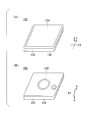
- FIG. 1 is a diagram illustrating an example of an external configuration of the vibration reproducing device 100.
- FIG. 2 is a diagram illustrating an example of a functional configuration of the vibration reproducing device 100.
- the XYZ orthogonal coordinate system is a coordinate system based on the vibration reproducing device 100.
- the stacking direction of the components of the vibration reproducing device 100 is defined as the Z direction.
- a plane orthogonal to the Z direction is defined as an XY plane, and directions orthogonal to the XY plane are defined as an X direction and a Y direction, respectively.
- the vibration reproducing device 100 has, for example, a substantially rectangular shape when viewed in the Z direction, and has a configuration in which the touch panel 110, the main body 120, and the back cover 130 are stacked in the Z direction.
- 1A is a diagram of the vibration reproducing device 100 as viewed from the touch panel 110 side
- FIG. 1B is a diagram of the electronic device as viewed from the back cover 130 side.
- the main body 120 houses the storage unit 160, the speaker 170, the vibration generating unit 180, the control unit 190, and the like shown in FIG.
- the main unit 120 also houses a camera, communication device, I / O (I / O port, I / O interface), acceleration sensor, power supply circuit, battery, GPS (Global Positioning System) receiver, and the like in a casing. May be.
- the storage unit 160 stores a program (firmware) executed by a CPU (Central Processing Unit) of the control unit 190, calculation results obtained by the CPU performing calculation processing, content data 162, and the like.
- a program firmware executed by a CPU (Central Processing Unit) of the control unit 190, calculation results obtained by the CPU performing calculation processing, content data 162, and the like.
- CPU Central Processing Unit
- Speaker 170 outputs sound based on the sound data generated by control unit 190.
- the vibration generator 180 generates vibration based on the vibration data generated by the controller 190.
- the vibration generating unit 180 includes a plurality of vibrators.
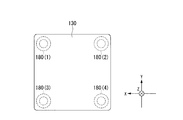
- FIG. 3 is a view exemplifying the arrangement positions of the vibrators 180 (1) to 180 (4) in the vibration reproducing apparatus 100, and is a partial perspective view of the vibration reproducing apparatus 100 as viewed from the back cover 130 side.
- the vibration generator 180 includes, for example, vibrators 180 (1), 180 (2), 180 (3), and 180 (4) disposed near the four corners of the vibration reproducing device 100. .
- Each vibrator is attached to the back cover 130, for example.
- a voice coil motor (VCM) or an eccentric motor is used as the vibrator.
- VCM voice coil motor
- each vibrator When using a voice coil motor, each vibrator generates vibration in the Z direction, for example.
- the arrangement of the vibrators is not limited to that shown in FIG. 3, and the vibrators may be arranged in other arrangements.
- the vibration reproducing device 100 can transmit vibration to the user's palm or display an image on the touch panel 110 while the user holds the back cover 130 with the palm.
- the vibration generated by the vibration generating unit 180 is also transmitted to the touch panel 110 side, when the user touches the touch panel 110 with a finger, the vibration can be transmitted to the finger corresponding to the contact position.
- FIG. 4 is a diagram illustrating a state in which the vibration reproducing device 100 is used while being held by the palm P of the user.
- the vibration reproducing device 100 displays a landscape where the vehicle Vh is traveling in the city.
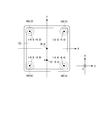
- FIG. 5 is a diagram illustrating the position A of the virtual vibration source felt by the user.
- the position A of the virtual vibration source is, for example, a barycentric point obtained by weighting the positions of the transducers 180 (1) to 180 (4) with their respective amplitudes.
- the control unit 90 vibrates the vibrator 180 (1) with an amplitude of 0.45 ⁇ K (reference amplitude) and the vibrator 180 (3) with an amplitude of 0.55 ⁇ K.
- the vibrator 180 (4) By vibrating the vibrator 180 (4) with an amplitude of 1 ⁇ K, vibration is generated in the vicinity of the position A of the virtual vibration source for the user holding the vibration reproducing device 100 in the state of FIG. You can make them feel.
- the vibrator 180 (2) is not vibrated (amplitude 0 ⁇ K).
- Expression (1) represents the amount of vibration of the vibrators 180 (1) to 180 (4) in the X direction component.
- Expression (2) represents the amount of vibration of the vibrators 180 (1) to 180 (4) in the Y direction component.
- the term contributed by the vibrator 180 (1) is (+ 0.9 ⁇ 0.45 ⁇ K), and the term contributed by the vibrator 180 (3) is (+ 0.9 ⁇ 0.55 ⁇ K), and the term to which the vibrator 180 (4) contributes is ( ⁇ 0.9 ⁇ 1 ⁇ K).
- the term contributed by the vibrator 180 (1) is (+ 0.9 ⁇ 0.45 ⁇ K)
- the term contributed by the vibrator 180 (3) is ( ⁇ 0.9 ⁇ 0.55 ⁇ K)
- the term to which the vibrator 180 (4) contributes is ( ⁇ 0.9 ⁇ 1 ⁇ K).
- the vibration reproducing apparatus 100 can make the user feel that the vibration is moving by changing the position of the virtual vibration source by changing the vibration intensity of each vibrator.
- the vibration reproducing apparatus 100 moves the position A of the virtual vibration source as the vibration source (for example, the engine of the vehicle Vh) displayed on the touch panel moves.
- the vibration reproducing device 100 vibrates each vibrator so that the engine portion of the vehicle Vh is positioned at the virtual vibration source position A.
- the strength of is changed over time.
- the vibration reproducing device 100 can provide the user with a higher level of realism.
- the vibration data generation device 1 functions by installing dedicated software (vibration data generation program) in a terminal device such as a personal computer, for example.
- the vibration data generation program is, for example, a part of an authoring tool that associates moving images and music with vibrations in time series and generates content data that can be reproduced in conjunction with these.
- the vibration data generation device 1 transmits vibration data to the vibration reproduction device 100 by being connected to the vibration reproduction device 100 via a communication cable or by wireless communication.
- FIG. 6 is a diagram illustrating an example of a hardware configuration of the vibration data generation device 1.
- the vibration data generation device 1 includes, for example, a CPU 10, a drive unit 12, a display unit 20, an input unit 22, a speaker 24, an interface unit 26, and a storage unit 30.
- the CPU 10 executes various programs stored in the storage unit 30.
- the drive unit 12 is loaded with a storage medium 14 such as a USB memory, a CD (Compact Disc), a DVD (Digital Versatile Disc), or an SD card.
- a storage medium 14 such as a USB memory, a CD (Compact Disc), a DVD (Digital Versatile Disc), or an SD card.
- the storage unit 30 includes, for example, an HDD (Hard Disk Drive), a flash memory, a ROM (Read Only Memory), a RAM (Random Access Memory), a register, and the like.
- HDD Hard Disk Drive
- flash memory a ROM (Read Only Memory)
- RAM Random Access Memory
- the display unit 20 is a liquid crystal display device, an organic EL (Electroluminescence) display device, or the like.
- the input unit 22 is a keyboard, mouse, touch pad, or other input device.
- the display unit 20 may be configured as a touch panel and function as an input device.
- the interface unit 26 is a device for connecting to a network NW such as the Internet, and includes a network card and the like.
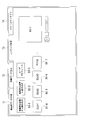
- FIG. 7 is a diagram illustrating an example of a functional configuration of the vibration data generation device 1.
- An authoring tool 31 is stored in the storage unit 30. Further, the storage unit 30 uses vibration pattern template data 32 that is a vibration pattern corresponding to movement between partial areas (described later) of virtual vibration sources used by the authoring tool 31, and content data generated by the authoring tool 31. 33 and the like are stored.
- the vibration pattern template data 32 is stored in the storage unit 30 along with the authoring tool 31 when the authoring tool 31 is installed in the vibration data generation device 1, for example.
- the authoring tool 31 may be installed by the interface unit 26 acquired from another computer via the network NW, or may be installed from the storage medium 14 attached to the drive unit 12.
- the vibration data generation device 1 includes a moving image data generation unit 40, a vibration data generation unit 41, a content management unit 42, and a community site processing unit 43 as functional units that function when the CPU 10 executes the authoring tool 31. Is provided.
- the vibration data generation unit 41 includes a position acquisition unit 41A, a vibrator vibration pattern generation unit 41B, and a position display control unit 41C.
- the authoring tool 31 roughly displays a moving image data generation screen, a vibration data generation screen, a content management screen, and a community site screen on the display unit 20.
- FIG. 8 is a diagram showing an example of a moving image data generation screen.
- a tab T1 common to each screen is operated (clicking, tapping, etc. with a mouse)
- the moving image data generation unit 40 is activated and a moving image data generation screen is displayed.
- Generation of moving image data is performed, for example, in a flow of style selection ⁇ material selection ⁇ save / transfer.
- a style refers to content prepared in advance that integrates moving images, sounds, and vibrations.
- FIG. 8 shows a display screen (style selection screen) when style selection is performed.
- a style selection button B1-1 for displaying a style selection screen
- a material selection button B1-2 for displaying a material selection screen
- a save / transfer button for displaying a save / transfer screen B1-3 is provided.
- style selection buttons B1-4 to B1-7 for selecting a style to be created or edited are provided.
- a representative image of the style corresponding to the selected style selection button is displayed in the area A1-1.
- the preview button B1-9 is operated, the moving image and sound included in the selected style are reproduced in an arbitrary area in synchronization.
- the user can switch on / off the sound output by operating the mute button B1-10.
- the user can adjust the volume by performing a slide operation (for example, an operation of moving the volume adjustment knob B1-11 left and right while clicking with the mouse).
- FIG. 9 is a diagram illustrating an example of a material selection screen.
- a representative image of the style selected on the style selection screen is displayed.
- the material selection screen is provided with buttons B1-12 to B1-15 for designating the location of the material.
- buttons B1-12 to B1-15 for designating the location of the material.
- a list of moving image data stored in the storage unit 30 by the vibration data generation device 1 is displayed.
- the button B1-13 the content data 162 stored in the storage unit 160 by the vibration reproducing device 100 connected to the vibration data generating device 1 is read, and a list thereof is displayed.
- buttons B1-14 when the user operates the button B1-14, a list of music stored in the storage unit 30 by the vibration data generation device 1 is displayed.
- button B1-15 a list of moving images and music that can be downloaded from the community site (described later) is displayed.
- the moving images and music whose list is displayed in this way can be narrowed down by the narrowing down buttons B1-16 to B1-18.
- the narrowing down is based on, for example, whether to include a still image, whether to include a moving image, whether to include material that the user owns, or whether to include material that is held by a third party other than the user. Can be done.
- the arrangement order of the materials can be changed based on the date on which the materials are imaged.
- thumbnail images Sn1 to Sn5... Of materials that can be included in the style are displayed.
- the thumbnail image of the selected material is displayed in the area A1-3 in time series (in order of reproduction).
- FIG. 10 is a diagram illustrating an example of a save / transfer screen.
- a preview button B1-9, a mute button B1-10, and a volume control knob B1-11 are provided, and playback and playback of moving images and sounds included in the selected style ON / OFF switching and volume adjustment are possible.
- the moving image is reproduced in the area A1-4.
- a “virtual vibration source position A”, which will be described later, may be superimposed on the moving image reproduced in the area A1-4 in synchronization with the reproduction time.
- the thumbnail image of the material included in the selected style is displayed in area A1-5 together with the elapsed time from the start of playback of the style shown in area A1-6.
- an indicator In1 is superimposed and displayed in conjunction with the elapsed time of the moving image reproduced by operating the preview button B1-9.
- the save / transfer screen includes a style change button B1-19, a small size designation button B1-20, a large size designation button B1-21, a time setting window B1-22, a transfer button B1-23, and a save button B1-24.
- a thumbnail enlargement / reduction knob B1-25 is provided.
- the user can transfer the style being edited to the vibration reproducing device 100 without saving it in the vibration data generating device 1 by operating the transfer button B1-23. Further, the user can save the completed style as the content data 33 in the storage unit 30 of the vibration data generation device 1 by operating the save button B1-24. At this time, vibration data set in advance for each style is given to the style. Further, by operating the thumbnail enlargement / reduction knob B1-25, the thumbnail image displayed in the area A1-5 can be enlarged or reduced.
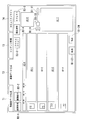
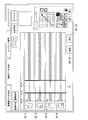
- FIG. 11 is a diagram illustrating an example of a vibration data generation screen.
- a new creation button B2-1 and a vibration pasting button B2-2 are provided. The user can create new vibration data by operating the new creation button B2-1.
- the vibration data is created by (A) vibration data converted from music data, (B) vibration data generated based on the style, (C) fixed wave data, (D) vibration data converted from line input recording. This is done by editing one of the following. These can be saved, for example, as a moving image file with vibration having an extension of “.mov” or a vibration file having an extension of “.vib”.
- the vibration data generation screen is provided with a file menu display button B2-3, a fixed waveform selection button B2-4, and an effect button B2-5.
- the user can display a list of vibration data by operating the file menu display button B2-3 (corresponding to the vibration data (A) and (B) above).
- the user selects fixed waveform selection button B2-4 to input fixed wave information to generate initial data of vibration data, or to set vibration data converted from line input recording as initial data. (Corresponding to the vibration data (C) and (D) above).
- the user When generating the initial data of vibration data by inputting fixed wave information, the user selects the waveform type (for example, rectangular wave or sine wave), amplitude, frequency, time length, presence / absence of tone burst, number of ringing, and number of stops , Mode (uniform wave, fade-in wave, fade-out wave) or the like can be set.
- the waveform type for example, rectangular wave or sine wave
- amplitude, frequency, time length, presence / absence of tone burst, number of ringing, and number of stops Mode (uniform wave, fade-in wave, fade-out wave) or the like can be set.
- vibration data is newly created by the vibration data generation unit 41 and the created vibration data is pasted to a moving image.
- vibration data generation unit 41 not only vibration data is newly created but vibration data generation is also performed.
- the vibration data included in the moving image file with vibration may be edited by the unit 41.
- the vibration data generation screen is provided with areas A2-1 to A2-4 for displaying vibration patterns corresponding to the vibrators 180 (1) to 180 (4) of the vibration reproducing device 100.
- a region A2-1 shows a vibration pattern corresponding to the vibrator 180 (2) located at the upper left when the vibration reproducing device 100 is viewed from the touch panel 110 side, and a lapse of time from the vibration reproduction start time indicated by the region A2-5. Display with time (preview display).
- the area A2-2 displays a vibration pattern corresponding to the vibrator 180 (4) located at the lower left
- the area A2-3 displays a vibration pattern corresponding to the vibrator 180 (1) located at the upper right.
- the area A2-4 displays a vibration pattern corresponding to the vibrator 180 (3) located in the lower right.
- FIG. 12 is a diagram showing how vibration patterns for each transducer are displayed in the areas A2-1 to A2-4 when certain vibration data is selected as initial data.
- the user operates the effect button B2-5 to perform silence processing (sets the amplitude of the selected portion to zero), trim (cuts the selected portion and closes the time axis), gain adjustment, high-pass / low-pass filter, etc. Can be applied to some or all of the displayed vibration patterns.
- the user inputs the diagonal end of the rectangle with the mouse (for example, clicks on the upper left corner) for the target period for performing such effect processing and processing for reflecting the movement path of the virtual vibration source described later in the vibration pattern. , Move it to the lower right and stop clicking, etc.).
- the vibration data generation screen is provided with a transfer button B1-23 and a save button B1-24 similar to the moving image data generation screen. Further, the vibration data generation screen is provided with a region A2-6 for reproducing a moving image, a preview button B1-9, a mute button B1-10, and a volume adjustment knob B1-11 similar to those in the moving image data generation screen. ing.
- the indicator In2 may be superimposed and displayed on the areas A2-1 to A2-4 in conjunction with the elapsed time of the reproduced moving image.
- a movement locus input for inputting a locus of the position of a virtual vibration source (hereinafter referred to as “movement locus”; the movement locus may include a “position” where the movement locus may be included) is input to the vibration data generation screen.
- Region A2-7 is provided.
- FIG. 13 is an enlarged view of the movement locus input area A2-7.
- the input operation performed on the movement locus input area A2-7 is acquired by the position acquisition unit 41A as information for specifying the position of the virtual vibration source.
- the movement locus input area A2-7 is provided with movement locus selection buttons B2-9 to B2-20 for selecting any of the movement locus candidates prepared in advance. As moving path candidates, “move the upper side of the vibration reproducing device 100 from right to left (see FIG.
- the movement locus input area A2-7 is provided with buttons B2-21, B2-22 for rotating the movement locus itself, for example, 90 degrees clockwise or counterclockwise.
- a handwriting input button B2-23 is provided in the movement locus input area A2-7.
- the position acquisition unit 41A acquires the user's drawing result
- the position display control unit 41C displays a movement locus corresponding to this in the movement locus display area A2-8.
- a vibration pattern for realizing the movement trajectory selected or drawn at that time is generated by the vibration pattern generation unit 41B for each transducer, and the areas A2-1 to A2— 4 (see FIGS. 14 and 15).
- the vibration pattern generation unit 41B for each vibrator breaks down the movement trajectory into movements between the lattice-like partial areas PA in the movement trajectory display area A2-8 (see FIG. 13), and corresponds to the movement between the PAs.
- the vibration pattern of each vibrator previously obtained is read from the vibration pattern template data 32, and the vibration pattern for each vibrator corresponding to the movement locus is generated by connecting the read vibration patterns.
- a vibration pattern for each vibrator is generated by decomposing the movement between the areas PA and reading out the vibration pattern of each vibrator obtained in advance corresponding to the movement between the PAs.
- the vibration pattern generation unit 41B for each transducer specifies a vibration pattern that uses the point as a virtual vibration source.
- a vibration pattern for each vibrator is generated so as to continue during the set time interval.
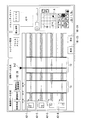
- FIG. 14 is a diagram illustrating an example of a vibration data generation screen after the movement trajectory selection button “Move from the lower left to the upper right” is operated.
- the corresponding movement locus is displayed in the movement locus display area A2-8.
- the time interval T1 designated in advance by the user in the areas A2-1 to A2-4 in order to realize that the virtual vibration source “moves from the lower left to the upper right” in the vibration reproducing device 100.
- the vibration pattern is previewed.
- the vibration pattern template data 32 may include information that associates the movement trajectory selection buttons B2-9 to B2-20 with movement between a series of PAs, or the movement trajectory selection buttons B2-9 to B2— 20 may be information that directly associates the vibration pattern.
- the movement trajectory selected or drawn at that time is canceled and returned to the previous state.
- FIG. 15 is a diagram illustrating an example of a vibration data generation screen after the movement trajectory selection button “turns approximately 1 ⁇ 4 in a substantially circular arc” is operated for the time interval T2 after the time interval T1. It is.
- the corresponding movement locus is displayed in the movement locus display area A2-8, and further, in the time interval T2 selected in advance in the areas A2-1 to A2-4, the vibration reproducing apparatus 100 performs a virtual operation.
- a vibration pattern for realizing that the typical vibration source “3/4 rotates in a substantially arc shape” is displayed as a preview.
- the moving speed of the virtual vibration source is relatively increased.
- the moving speed of the virtual vibration source is relatively slow. Thereby, the user can change the moving speed of the virtual vibration source.
- the user can generate vibration data including a vibration pattern for realizing the movement of the position of the virtual vibration source with a simple operation.
- vibration data to be reproduced by linking with the display of a moving image in which a car runs away from the right side to the left side of the screen “virtual vibration source moves from right to left” is realized.
- vibration data including a vibration pattern it is possible to realize a high level of realism.
- FIG. 16 is an example of a flowchart showing a flow of processing executed by the vibration data generation device 1 of the present embodiment.
- the process of the flowchart of FIG. 16 is started, for example, when desired vibration data is read and vibration patterns based on the vibration data are displayed in the areas A2-1 to A2-4.
- the position acquisition unit 41A (see FIG. 7) of the vibration data generation device 1 waits until a time interval is specified (step S200).
- the designation of the time interval may be performed by the user's operation, or may be performed without the user's operation, for example, the first time interval is automatically designated in the initial state.
- the position acquisition unit 41A stands by until a movement locus is input (step S202).
- the vibration pattern generation unit 41B for each transducer acquires the movement locus received by the position acquisition unit 41A (step S204), and the vibration pattern corresponding to the movement locus is used as the vibration data being edited. Embed (step S206).
- the user can transfer the vibration data being edited to the vibration reproduction device 100 without saving it in the vibration data generation device 1 by operating the transfer button B1-23.
- the user operates the save button B1-24 to change the vibration data being edited into a format that can be pasted to the moving image data, and then stores the content in the storage unit 30 of the vibration data generation device 1. Data 33 can be saved.
- the process of obtaining and displaying the movement locus from the given vibration pattern may be performed.
- the vibration data generation unit 41 may virtually reproduce the vibration and display the position of the virtual vibration source at each reproduction time point, or the virtual vibration at the time point designated by the user. The location of the source may be displayed.
- FIG. 17 is a diagram showing another example of the vibration generation screen.
- the vibration reproduction / trajectory analysis button B2-26 when operated, the vibration data edited at that time is virtually reproduced and calculated from the vibration pattern of each transducer corresponding to the reproduction time.
- the position A of the virtual vibration source is displayed in the movement locus display area A2-8. As a result, the position A of the virtual vibration source moves according to the movement of the indicator In2 indicating the vibration reproduction position.
- the vibration data may be obtained from the movement trajectory or may not be.
- the vibration data generation unit 41 obtains the position of the virtual vibration source at each playback time as the center of gravity obtained by weighting the position of the transducer with the amplitude as described above.
- the position A of the virtual vibration source is not limited to the movement locus display area A2-8, but is superimposed on the moving picture to be played back in synchronization with the playback time in the area A2-6 where the moving picture is played back. May be.
- the vibration data generation unit 41 may reproduce the moving image or music and indicate the reproduction time of the corresponding vibration data with an indicator In2.
- the vibration data generation unit 41 may change the color and size of the preview according to the vibration intensity of each vibrator. For example, the vibration data generation unit 41 compares the total amplitude of each vibrator with a threshold value, and when the value exceeds the threshold value, the area A2-1 to A2-4 is enlarged and displayed as a pop-up or the area A2-1. The color of A2-4 may be changed to a specific color. Thereby, the user can recognize the magnitude of vibration more intuitively.
- FIG. 18 is a diagram illustrating an example of a content management screen.
- the content data 162 (see FIG. 2) is read from the vibration reproducing device 100.
- the content data 162 there can be a style in which a moving image or music is associated with vibration data, and a vibration data alone.
- the style or vibration data being edited is written as content data 162 in the storage unit 160 of the vibration reproducing device 100.
- a user profile button B3-3 for editing the user profile registered in the storage unit 160 of the vibration reproducing device 100 from the vibration data generating device 1, and the style are reproduced according to the user's operation.
- a region A3-1 or the like is provided.
- the community site processing unit 43 when the tab T4 is operated, the community site processing unit 43 is activated and a community site processing screen (not shown) is displayed.
- the community site processing unit 43 has a web browser function and displays a community site on the web.
- the community site is, for example, a site that can be browsed by registered users among the users of the vibration reproducing device 100, and can browse or download the styles uploaded by the user.
- vibration data generation device 1 and the authoring tool 31 of the present embodiment described above vibration data capable of reproducing a vibration pattern with a virtual vibration source movement can be generated.
- the vibration data generation device 1 and the authoring tool 31 of the present embodiment since the moving locus of the virtual vibration source generated from the specified vibration pattern is displayed on the display unit 20, more complicated vibration information is displayed. Can be provided.
- the vibration data generated by the vibration data generation device 1 may be for realizing the actual movement of the vibration source.
- FIG. 19 is a diagram illustrating another example of the arrangement positions of the vibrators in the vibration reproducing device 100. As shown in FIG. 19, when the vibration reproducing apparatus 100 includes a plurality of vibrators 180 (1) to 180 (n) in a lattice shape, the vibration data generating apparatus 1 indicates the movement locus of the vibration source input by the user. As realized, vibration data is generated by selecting a vibrator to be vibrated in time series.
- the vibration reproducing device 100 for which the vibration data generating device 1 generates vibration data is not limited to one that can be held by a person with a palm, for example, a device in which a plurality of vibrators are provided on a bed or a sofa.
- various devices that come into contact with a person at a plurality of locations may be applicable.
- the vibration data generated by the vibration data generation apparatus 1 can be used in an apparatus having a smaller number of vibrators than the vibration reproduction apparatus 100 that is originally targeted.
- the vibration reproducing apparatus 100 includes two vibrators on the left and right sides
- the vibration patterns of the upper left and lower left vibrators of vibration data generated for four vibrators are synthesized (for example, an average is obtained) and left
- the vibration patterns of the upper right and lower right vibrators can be combined (for example, an average is obtained) to obtain the vibration pattern of the right vibrator.
- Vibration data generation apparatus 10 ... CPU, 12 ... Drive part, 20 ... Display part, 22 ... Input part, 24 ... Speaker, 26 ... Interface part, 30 ... Memory
Landscapes
- Engineering & Computer Science (AREA)
- General Engineering & Computer Science (AREA)
- Theoretical Computer Science (AREA)
- Human Computer Interaction (AREA)
- Physics & Mathematics (AREA)
- General Physics & Mathematics (AREA)
- Computer Networks & Wireless Communication (AREA)
- Signal Processing (AREA)
- Mechanical Engineering (AREA)
- User Interface Of Digital Computer (AREA)
- Telephone Function (AREA)
Abstract
振動データ生成装置は、複数の振動子を有する振動再生装置が各振動子を制御するための振動データを生成する振動データ生成装置であって、入力部に対して入力された、仮想的な振動源を示す情報を取得する取得部と、取得した前記仮想的な振動源の位置が再現されるように、前記振動再生装置の複数の振動子のそれぞれの振動パターンを含む振動データを生成する生成部と、を備える。
Description
本発明は、振動データ生成プログラム、および振動データ生成装置に関する。
本願は、2013年6月21日に出願された日本国特願2013-130566号及び2013年6月21日に出願された日本国特願2013-130567号に基づき優先権を主張し、その内容をここに援用する。
本願は、2013年6月21日に出願された日本国特願2013-130566号及び2013年6月21日に出願された日本国特願2013-130567号に基づき優先権を主張し、その内容をここに援用する。
携帯電話に代表されるように、振動子(バイブレータ)を備える端末装置が普及している。振動子による振動パターンは、予め端末装置の記憶部に記憶されている場合が多い。
このような状態において、ユーザが所望の振動パターンを生成することができれば、装置の利用態様が広がることが期待される。
特許文献1には、加速度を検知する加速度検知手段の検知結果に基づいて、振動手段に振動させる振動パターンのデータを生成し、前記振動パターンをデータ記憶手段に保存する情報通信端末について記載されている。
このような状態において、ユーザが所望の振動パターンを生成することができれば、装置の利用態様が広がることが期待される。
特許文献1には、加速度を検知する加速度検知手段の検知結果に基づいて、振動手段に振動させる振動パターンのデータを生成し、前記振動パターンをデータ記憶手段に保存する情報通信端末について記載されている。
また、触覚により時刻情報を与える触知式バイブレーション時計が知られている(例えば、特許文献2参照)。この触知式バイブレーション時計は、周方向で相互に離隔位置する12個の触知部が表面に設けられた時計基板と、12個の触知部をそれぞれ振動させる加振手段と、時刻を計測する計時手段と、計測された時刻値に対応して加振手段を制御して12個の触知部を選択的に振動させる加振制御手段と、を備える。また、この触知式バイブレーション時計は、視覚により時刻情報を与えるアナログ式及びデジタル式の少なくとも一方の表示装置を備える。
しかしながら、従来の装置は、装置に作用した加速度を振動に置き換えるといった単純な処理を行うものに過ぎず、ユーザが所望する振動パターン、例えば振動源(仮想的な振動源を含む)の移動を伴う振動パターンなどを再現させることができない。
本発明の態様は、振動源の移動を伴う振動パターンを再現可能な振動データを生成することを目的の一つとする。
本発明の態様は、振動源の移動を伴う振動パターンを再現可能な振動データを生成することを目的の一つとする。
また、従来の触知式バイブレーション時計では、ユーザは、時刻情報を視認することにより、どの触知部が振動するかを知ることができるのみであり、より複雑な振動の情報を得ることができない。
本発明の別の態様は、より複雑な振動の情報を提供することを目的の一つとする。
本発明の別の態様は、より複雑な振動の情報を提供することを目的の一つとする。
本発明の一態様は、複数の振動子を有する振動再生装置が各振動子を制御するための振動データを生成する振動データ生成装置であって、入力部に対して入力された、仮想的な振動源を示す情報を取得する取得部と、取得された前記仮想的な振動源の位置が再現されるように、前記振動再生装置の複数の振動子のそれぞれの振動パターンを含む振動データを生成する生成部と、を備える振動データ生成装置である。
本発明の他の態様は、コンピュータに、複数の振動子を有する振動再生装置が各振動子を制御するための振動データを生成させる、振動データ生成プログラムであって、前記コンピュータに、入力部に対して入力された、仮想的な振動源を示す情報を取得する処理と、前記取得した仮想的な振動源の位置が再現されるように、前記振動再生装置の複数の振動子のそれぞれの振動パターンを含む振動データを生成する処理と、を実行させる振動データ生成プログラムである。
本発明の他の態様は、コンピュータに、複数の振動子を有する振動再生装置が各振動子を制御するための振動データを生成させる、振動データ生成プログラムであって、前記コンピュータに、入力部に対して入力された、仮想的な振動源を示す情報を取得する処理と、前記取得した仮想的な振動源の位置が再現されるように、前記振動再生装置の複数の振動子のそれぞれの振動パターンを含む振動データを生成する処理と、を実行させる振動データ生成プログラムである。
本発明の一態様によれば、振動源の移動を伴う振動パターンを再現可能な振動データを生成することができる。
また、本発明の別の一態様によれば、より複雑な振動の情報を提供することができる。
また、本発明の別の一態様によれば、より複雑な振動の情報を提供することができる。
以下、図面を参照し、本発明の振動データ生成装置、および振動データ生成プログラムの実施形態について説明する。
<振動再生装置>
本実施形態の振動データ生成装置が生成する振動データを再生する振動再生装置について説明する。図1は、振動再生装置100の外観構成の一例を示す図である。また、図2は、振動再生装置100の機能構成の一例を示す図である。
本実施形態の振動データ生成装置が生成する振動データを再生する振動再生装置について説明する。図1は、振動再生装置100の外観構成の一例を示す図である。また、図2は、振動再生装置100の機能構成の一例を示す図である。
以下、XYZ直交座標系を用いて振動再生装置100の構成を説明する。XYZ直交座標系は、振動再生装置100を基準とした座標系である。XYZ直交座標系において、振動再生装置100の各構成要素の積層方向をZ方向とする。また、Z方向に直交する平面をXY平面とし、XY平面において直交する方向をそれぞれX方向及びY方向とする。
振動再生装置100は、例えば、Z方向視で略矩形の形状を有し、タッチパネル110、本体部120、背面カバー130がZ方向に積層された構成となっている。図1(A)は、振動再生装置100をタッチパネル110側から見た図であり、図1(B)は、電子機器を背面カバー130側から見た図である。
本体部120は、筐体内に、図2に示す記憶部160、スピーカ170、振動発生部180、制御部190などを収容する。また、本体部120は、カメラや通信装置、I/O(I/Oポート、I/Oインターフェース)、加速度センサ、電源回路、バッテリ、GPS(Global Positioning System)受信機などを筐体に収容してもよい。
記憶部160には、制御部190のCPU(Central Processing Unit)が実行するプログラム(ファームウェア)、CPUが演算処理を行った演算結果の他、コンテンツデータ162などが格納される。
スピーカ170は、制御部190により生成された音声データに基づき、音声を出力する。
振動発生部180は、制御部190により生成された振動データに基づき、振動を発生させる。振動発生部180は、複数の振動子を備える。図3は、振動再生装置100における振動子180(1)~180(4)の配設位置を例示した図であり、振動再生装置100を背面カバー130側から見た部分透視図である。
振動発生部180は、図3に示すように、例えば、振動再生装置100の四隅付近に配設された振動子180(1)、180(2)、180(3)、180(4)を備える。各振動子は、例えば背面カバー130に取り付けられる。振動子としては、例えば、ボイスコイルモータ(VCM)や偏心モータなどが用いられる。ボイスコイルモータを用いる場合、各振動子は、例えばZ方向の振動を発生させる。なお、振動子の配置は図3に示すものに限らず、他の配置で振動子が配設されてもよい。
係る構成によって、振動再生装置100は、例えばユーザが掌で背面カバー130を保持した状態で、ユーザの掌に振動を伝えたり、タッチパネル110に画像を表示することができる。また、振動発生部180が発生させた振動は、タッチパネル110側にも伝達されるため、ユーザがタッチパネル110に指で触れたときに、接触位置に対応して振動を指に伝えることができる。
図4は、振動再生装置100がユーザの掌Pで保持されて使用される様子を示す図である。図4において、振動再生装置100は、街中を車両Vhが走行している風景を表示している。
4つの振動子180(1)~180(4)を有する振動再生装置100は、ユーザにファントムセンセーションによる仮想的な振動源を感じさせることができる。図5は、ユーザが感じる仮想的な振動源の位置Aを例示した図である。仮想的な振動源の位置Aは、例えば、振動子180(1)~180(4)の位置を、それぞれの振幅で重み付けした重心点である。
図5の例では、振動再生装置100の中心点を原点とする座標系(x,y)=(-1.0~+1.0,-1.0~+1.0)を設定した。この座標系において、振動子180(1)の座標を(x,y)=(+0.9,+0.9)、振動子180(2)の座標を(x,y)=(-0.9,+0.9)、振動子180(3)の座標を(x,y)=(+0.9,-0.9)、振動子180(4)の座標を(x,y)=(-0.9,-0.9)、仮想的な振動源の位置Aの座標を(x,y)=(0,-0.5)と設定した。
上記のような設定の場合、制御部90は、例えば、振動子180(1)を振幅0.45×K(基準振幅)で振動させ、振動子180(3)を振幅0.55×Kで振動させ、振動子180(4)を振幅1×Kで振動させることにより、振動再生装置100を図4の状態で保持するユーザに、仮想的な振動源の位置Aの付近で振動が発生していると感じさせることができる。なお、この設定においては、振動子180(2)は振動させない(振幅0×K)。
すなわち、下記の式(1)、(2)に示すように、振動子180(1)~振動子180(4)からの各振動のX方向成分の振動、及び、Y方向成分の振動がそれぞれ加減されることによって、仮想的な振動源の位置Aの座標(x,y)=(0,-0.5)の付近において、振動が発生しているとユーザに感じさせることができる。式(1)は、X方向成分における振動子180(1)~振動子180(4)の各振動の加減を表す。式(2)は、Y方向成分における振動子180(1)~振動子180(4)の各振動の加減を表す。


上記の式(1)において、振動子180(1)が寄与している項は、(+0.9×0.45×K)であり、振動子180(3)が寄与している項は、(+0.9×0.55×K)であり、振動子180(4)が寄与している項は、(-0.9×1×K)である。
上記の式(2)において、振動子180(1)が寄与している項は、(+0.9×0.45×K)であり、振動子180(3)が寄与している項は、(-0.9×0.55×K)であり、振動子180(4)が寄与している項は、(-0.9×1×K)である。
振動再生装置100は、各振動子の振動の強さを変化させて仮想的な振動源の位置Aを移動させることにより、ユーザに振動が移動しているように感じさせることができる。振動再生装置100は、タッチパネルに表示されている振動源(例えば車両Vhのエンジン)が移動するのに合わせて、仮想的な振動源の位置Aを移動させる。図4の例では、振動再生装置100は、車両Vhが画像において右から左に移動するとした場合、車両Vhのエンジン部分が仮想的な振動源の位置Aとなるように、各振動子の振動の強さを経時変化させる。これによって、振動再生装置100は、より高度な臨場感をユーザに提供することができる。
<振動データ生成装置>
[構成]
振動データ生成装置1は、例えば、パーソナルコンピュータなどの端末装置に、専用のソフトウェア(振動データ生成プログラム)がインストールされることによって機能する。振動データ生成プログラムは、例えば、動画像や音楽と、振動とを時系列で対応付け、これらを連動して再生可能なコンテンツデータを生成するオーサリングツールの一部であるものとする。振動データ生成装置1は、振動再生装置100と通信ケーブルで接続され、或いは無線で通信することにより、振動データを振動再生装置100に送信する。
[構成]
振動データ生成装置1は、例えば、パーソナルコンピュータなどの端末装置に、専用のソフトウェア(振動データ生成プログラム)がインストールされることによって機能する。振動データ生成プログラムは、例えば、動画像や音楽と、振動とを時系列で対応付け、これらを連動して再生可能なコンテンツデータを生成するオーサリングツールの一部であるものとする。振動データ生成装置1は、振動再生装置100と通信ケーブルで接続され、或いは無線で通信することにより、振動データを振動再生装置100に送信する。
図6は、振動データ生成装置1のハードウェア構成の一例を示す図である。振動データ生成装置1は、例えば、CPU10と、ドライブ部12と、表示部20と、入力部22と、スピーカ24と、インターフェース部26と、記憶部30とを備える。
CPU10は、記憶部30に格納された各種プログラムを実行する。ドライブ部12には、USBメモリ、CD(Compact Disc)、DVD(Digital Versatile Disc)、SDカードなどの記憶媒体14が装着される。
記憶部30は、例えば、HDD(Hard Disk Drive)、フラッシュメモリ、ROM(Read Only Memory)、RAM(Random Access Memory)やレジスタ等を含む。
表示部20は、液晶ディスプレイ装置や有機EL(Electroluminescence)表示装置などである。
入力部22は、キーボード、マウス、タッチパッド、その他の入力装置である。
なお、表示部20がタッチパネルとして構成され、入力装置として機能してもよい。
なお、表示部20がタッチパネルとして構成され、入力装置として機能してもよい。
インターフェース部26は、インターネットなどのネットワークNWに接続するための装置であり、ネットワークカードなどを含む。
図7は、振動データ生成装置1の機能構成の一例を示す図である。記憶部30には、オーサリングツール31が格納される。また、記憶部30には、オーサリングツール31が利用する、仮想的な振動源の部分領域(後述)間の移動に対応する振動パターンである振動パターンテンプレートデータ32、オーサリングツール31が生成するコンテンツデータ33などが格納される。
振動パターンテンプレートデータ32は、例えば、オーサリングツール31が振動データ生成装置1にインストールされたときに、オーサリングツール31に付随して記憶部30に格納される。
オーサリングツール31は、インターフェース部26がネットワークNWを介して他のコンピュータから取得したものがインストールされてもよいし、ドライブ部12に装着された記憶媒体14からインストールされてもよい。
振動データ生成装置1は、CPU10がオーサリングツール31を実行することにより機能する機能部として、動画像データ生成部40と、振動データ生成部41と、コンテンツ管理部42と、コミュニティサイト処理部43とを備える。振動データ生成部41は、位置取得部41Aと、振動子毎振動パターン生成部41Bと、位置表示制御部41Cとを備える。
[動画像データ生成]
オーサリングツール31は、大別すると、動画像データ生成画面、振動データ生成画面、コンテンツ管理画面、コミュニティサイト画面を表示部20に表示させる。
オーサリングツール31は、大別すると、動画像データ生成画面、振動データ生成画面、コンテンツ管理画面、コミュニティサイト画面を表示部20に表示させる。
図8は、動画像データ生成画面の一例を示す図である。各画面共通のタブT1が操作(マウスによるクリック、タップなど)されると、動画像データ生成部40が起動し、動画像データ生成画面が表示される。動画像データの生成は、例えば、スタイル選択→素材選択→保存/転送といった流れで行われる。スタイルとは、予め用意された、動画像、音、振動が一体となったコンテンツをいう。図8は、スタイル選択が行われる際の表示画面(スタイル選択画面)を示している。動画像データ生成画面では、スタイル選択画面を表示させるためのスタイル選択ボタンB1-1、素材選択画面を表示させるための素材選択ボタンB1-2、保存/転送画面を表示させるための保存/転送ボタンB1-3が設けられる。
また、スタイル選択画面では、これから作成または編集しようとするスタイルを選択するためのスタイル選択ボタンB1-4~B1-7が設けられる。ユーザが、いずれかのスタイル選択ボタンを操作すると、選択されたスタイル選択ボタンに対応するスタイルの代表画像が、領域A1-1に表示される。この状態で、プレビューボタンB1-9が操作されると、選択されているスタイルに含まれる動画像および音が同期して任意の領域で再生される。
なお、ユーザは、ミュートボタンB1-10を操作することで音の出力のオン/オフを切り替えることができる。また、ユーザは、音量調節つまみB1-11をスライド操作(例えば、マウスでクリックした状態で左右に動かす操作)をすることで音量を調整することができる。
ユーザが素材選択ボタンB1-2を操作すると、素材選択画面が表示される。図9は、素材選択画面の一例を示す図である。素材選択画面における領域A1-2には、スタイル選択画面で選択されたスタイルの代表画像が表示される。また、素材選択画面には、素材の所在を指定するためのボタンB1-12~B1-15が設けられる。ユーザがボタンB1-12を操作すると、振動データ生成装置1が記憶部30に記憶させている動画像データの一覧が表示される。また、ユーザがボタンB1-13を操作すると、振動データ生成装置1と通信接続されている振動再生装置100が記憶部160に記憶させているコンテンツデータ162が読み込まれ、その一覧が表示される。また、ユーザがボタンB1-14を操作すると、振動データ生成装置1が記憶部30に記憶させている音楽の一覧が表示される。また、ユーザがボタンB1-15を操作すると、コミュニティサイト(後述)からダウンロード可能な動画像や音楽の一覧が表示される。
このように一覧が表示される動画像や音楽は、絞り込みボタンB1-16~B1-18によって絞り込みを行うことができる。絞り込みは、例えば、静止画を含めるか否か、動画像を含めるか否か、ユーザ自身の保有する素材を含めるか否か、ユーザ以外の第三者が保有する素材を含めるか否かに基づいて行うことができる。また、素材選択画面では、素材が撮像等された日付等に基づいて素材の並び順を変更することができる。また、素材選択画面では、スタイルに含めることが可能な素材のサムネイル画像Sn1~Sn5‥が表示される。ユーザが、所望の素材のサムネイル画像を選択すると、選択された素材のサムネイル画像が、時系列で(再生順に)領域A1-3に表示される。
ユーザが保存/転送ボタンB1-3を操作すると、保存/転送画面が表示される。図10は、保存/転送画面の一例を示す図である。保存/転送画面では、スタイル選択画面と同様、プレビューボタンB1-9、ミュートボタンB1-10、音量調節つまみB1-11が設けられ、選択されているスタイルに含まれる動画像および音の再生、音のオン/オフ切替、音量調整が可能となっている。動画像は、領域A1-4において再生される。
なお、領域A1―4において再生される動画像に対して、後述する「仮想的な振動源の位置A」が、再生時間を同期させて重畳表示されてもよい。また、保存/転送画面では、選択されているスタイルに含まれる素材のサムネイル画像が、領域A1-6で示されるスタイルの再生開始時点からの経過時間と共に、領域A1-5に表示される。領域A1-5、A1-6には、プレビューボタンB1-9が操作されることによって再生される動画像の経過時間に連動して、インジケータIn1が重畳表示される。
また、保存/転送画面には、スタイル変更ボタンB1-19、サイズ小指定ボタンB1-20、サイズ大指定ボタンB1-21、時間設定ウインドウB1-22、転送ボタンB1-23、保存ボタンB1-24、サムネイル拡大/縮小つまみB1-25が設けられる。ユーザは、スタイル変更ボタンB1-19を操作することにより、スタイル選択画面に遷移させ、スタイルを選びなおすことができる。また、ユーザは、サイズ小指定ボタンB1-20またはサイズ大指定ボタンB1-21を操作することにより、作成する動画像のサイズを大小いずれかに設定することができる。また、ユーザは、時間設定ウインドウB1-22に値を入力することにより、作成する動画像の時間的長さを設定することができる。動画像の時間的長さは、スタイルに音楽が含まれている場合は、その音楽の長さに初期値が設定されている。また、ユーザは、転送ボタンB1-23を操作することにより、編集中のスタイルを、振動データ生成装置1に保存せずに、振動再生装置100に転送することができる。また、ユーザは、保存ボタンB1-24を操作することにより、完成したスタイルを振動データ生成装置1の記憶部30に、コンテンツデータ33として保存することができる。この際に、スタイルには、予めスタイル毎に設定されている振動データが付与される。また、サムネイル拡大/縮小つまみB1-25を操作することにより、領域A1-5に表示されているサムネイル画像を拡大または縮小することができる。
[振動データ生成]
タブT2が操作されると、振動データ生成部41が起動し、振動データ生成画面が表示される。図11は、振動データ生成画面の一例を示す図である。振動データ生成画面には、新規作成ボタンB2―1、および振動貼付ボタンB2―2が設けられる。ユーザは、新規作成ボタンB2-1を操作することにより、新規に振動データを作成することができる。
タブT2が操作されると、振動データ生成部41が起動し、振動データ生成画面が表示される。図11は、振動データ生成画面の一例を示す図である。振動データ生成画面には、新規作成ボタンB2―1、および振動貼付ボタンB2―2が設けられる。ユーザは、新規作成ボタンB2-1を操作することにより、新規に振動データを作成することができる。
また、ユーザは、振動貼付ボタンB2―2を操作することにより、作成済の振動データを動画像に貼り付けることができる。振動データの作成は、(A)音楽データから変換される振動データ、(B)スタイルに基づいて作成された振動データ、(C)固定波データ、(D)ライン入力録音から変換される振動データのいずれかを編集することにより行われる。これらは、例えば、拡張子が「.mov」である振動付き動画ファイルの形式や、拡張子が「.vib」である振動ファイルの形式として保存が可能である。また、振動データ生成画面には、ファイルメニュー表示ボタンB2―3、固定波形選択ボタンB2―4、エフェクトボタンB2-5が設けられる。ユーザは、ファイルメニュー表示ボタンB2―3を操作することにより、振動データの一覧を表示させることができる(上記(A)、(B)の振動データに対応)。また、ユーザは、固定波形選択ボタンB2―4を選択することにより、固定波情報を入力して振動データの初期データを生成したり、ライン入力録音から変換される振動データを初期データとしたりすることができる(上記(C)、(D)の振動データに対応)。
固定波情報を入力して振動データの初期データを生成する場合、ユーザは、波形種別(例えば、矩形波かサイン波か)、振幅、周波数、時間長、トーンバーストの有無および鳴動回数並びに停止回数、モード(均一波か、フェードイン波か、フェードアウト波か)などを設定することができる。
なお、ここでは振動データ生成部41によって新規に振動データを作成し、作成した振動データを動画像に貼り付ける場合について説明しているが、新規に振動データを作成するだけでなく、振動データ生成部41によって、振動付き動画ファイルに含まれる振動データの編集を行うようにしても良い。
また、振動データ生成画面には、振動再生装置100の各振動子180(1)~180(4)に対応する振動パターンを表示する領域A2―1~A2―4が設けられる。領域A2―1は、振動再生装置100をタッチパネル110側から見た場合に左上に位置する振動子180(2)に対応する振動パターンを、領域A2―5が示す振動の再生開始時点からの経過時間と共に表示する(プレビュー表示)。また領域A2―2は、左下に位置する振動子180(4)に対応する振動パターンを表示し、領域A2―3は、右上に位置する振動子180(1)に対応する振動パターンを表示し、領域A2―4は、右下に位置する振動子180(3)に対応する振動パターンを表示する。
図12は、ある振動データが初期データとして選択された時点において、領域A2―1~A2―4に、振動子毎の振動パターンが表示される様子を示す図である。ユーザは、エフェクトボタンB2―5を操作することにより、無音化(選択部分の振幅をゼロにする)、トリム(選択部分を切り取って時間軸を詰める)、ゲイン調整、ハイパス/ローパスフィルター等の処理を、表示されている振動パターンの一部または全部に施すことができる。
ユーザは、このようなエフェクト処理や、後述する仮想的な振動源の移動軌跡を振動パターンに反映させる処理を行う対象期間を、例えば、マウスで矩形の対角端を入力する(左上をクリックし、右下に移動させてクリックを止めるなど)ことにより、指定することができる。
また、振動データ生成画面には、動画像データ生成画面と同様の転送ボタンB1-23および保存ボタンB1-24が設けられる。また、振動データ生成画面には、動画像の再生を行う領域A2―6と、動画像データ生成画面と同様のプレビューボタンB1-9、ミュートボタンB1-10、音量調節つまみB1-11が設けられている。プレビューボタンB1-9により動画像が再生されるとき、再生される動画像の経過時間に連動して、インジケータIn2が領域A2―1~A2―4に重畳表示されてよい。
(移動軌跡に対応する振動データ生成)
また、振動データ生成画面には、仮想的な振動源の位置の軌跡(以下、「移動軌跡」と称する;移動軌跡は、静止する「位置」を含んでよい)を入力するための移動軌跡入力領域A2―7が設けられている。
また、振動データ生成画面には、仮想的な振動源の位置の軌跡(以下、「移動軌跡」と称する;移動軌跡は、静止する「位置」を含んでよい)を入力するための移動軌跡入力領域A2―7が設けられている。
図13は、移動軌跡入力領域A2―7の拡大図である。移動軌跡入力領域A2―7に対してなされた入力操作は、仮想的な振動源の位置を特定する情報として位置取得部41Aにより取得される。移動軌跡入力領域A2―7には、予め用意された移動軌跡の候補のいずれかを選択するための移動軌跡選択ボタンB2―9~B2―20が設けられている。移動軌跡の候補としては、「振動再生装置100の上辺近くを右から左へ移動する(図5参照)」およびその逆、「振動再生装置100の中央部を右から左へ移動する」、「振動再生装置100の左下から右上に向けて移動する」、「L字状に移動する」、「直線状に略一回転する」、「略円弧状に3/4回転、または半回転する」などの移動軌跡が用意されている。ユーザが移動軌跡選択ボタンを操作すると、操作されたボタンに対応する移動軌跡が、位置表示制御部41Cによって移動軌跡表示領域A2―8に表示される。
また、移動軌跡入力領域A2―7には、移動軌跡そのものを例えば90度、時計まわりまたは反時計まわりに回転させるためのボタンB2―21、B2―22が設けられている。また、移動軌跡入力領域A2―7には、手書き入力ボタンB2―23が設けられている。ユーザが、手書き入力ボタンB2―23を操作すると、マウスやタッチパッド、タッチパネルなどを用いて、移動軌跡を手書きで移動軌跡表示領域A2―8に描画することが可能となる。位置表示制御部41Cは、位置取得部41Aがユーザの描画結果を取得すると、これに応じた移動軌跡を移動軌跡表示領域A2―8に表示させる。
ユーザが確定ボタンB2―24を操作すると、その時点で選択または描画されている移動軌跡を実現するための振動パターンが、振動子毎振動パターン生成部41Bによって生成され、領域A2―1~A2―4に反映される(図14、15参照)。振動子毎振動パターン生成部41Bは、例えば、移動軌跡を、移動軌跡表示領域A2―8における格子状の部分領域PA間の移動に分解し(図13参照)、各PA間の移動に対応して予め求められている各振動子の振動パターンを、振動パターンテンプレートデータ32から読み出し、読み出した振動パターンを繋げることで、移動軌跡に対応する振動子毎の振動パターンを生成する。ユーザが、手書き入力ボタンB2―23を操作して、移動軌跡を手書きで移動軌跡表示領域A2―8に描画した場合も同様に、移動軌跡を、移動軌跡表示領域A2―8における格子状の部分領域PA間の移動に分解し、各PA間の移動に対応して予め求められている各振動子の振動パターン読み出すことにより、振動子毎の振動パターンを生成する。
なお、ユーザが手書き入力ボタンB2―23を操作して、例えば静止する一点のみを指定した場合、振動子毎振動パターン生成部41Bは、当該点を仮想的な振動源とする振動パターンが、指定された時間区間の間、継続するように、振動子毎の振動パターンを生成する。
図14は、「左下から右上に向けて移動する」という移動軌跡選択ボタンが操作された後の振動データ生成画面の一例を示す図である。図14において、移動軌跡表示領域A2―8には、該当する移動軌跡が表示されている。また、領域A2―1~A2―4における、予めユーザにより指定されている時間区間T1では、振動再生装置100において仮想的な振動源が「左下から右上に向けて移動する」ことを実現するための振動パターンが、プレビュー表示されている。
なお、振動パターンテンプレートデータ32は、移動軌跡選択ボタンB2―9~B2―20と、一連のPA間の移動とを対応付けた情報を含んでもよいし、移動軌跡選択ボタンB2―9~B2―20と、振動パターンとを直接的に対応付ける情報であってもよい。また、ユーザが図13に示されるボタンB2―25を操作すると、その時点で選択または描画されている移動軌跡が取り消され、1つ前の状態に戻される。
また、図15は、時間区間T1よりも後の時間区間T2に対し、「略円弧状に3/4回転する」という移動軌跡選択ボタンが操作された後の振動データ生成画面の一例を示す図である。図15において、移動軌跡表示領域A2―8には、該当する移動軌跡が表示され、更に、領域A2―1~A2―4における、予め選択されている時間区間T2では、振動再生装置100において仮想的な振動源が「略円弧状に3/4回転する」ことを実現するための振動パターンが、プレビュー表示されている。
ユーザが時間的に短い時間区間を選択して移動軌跡を入力すると、相対的に、仮想的な振動源の移動速度が速くなる。逆に、時間的に長い時間区間して移動軌跡を入力すると、相対的に、仮想的な振動源の移動速度が遅くなる。これによって、ユーザは、仮想的な振動源の移動速度を変更することができる。
係る処理によって、ユーザは、仮想的な振動源の位置が移動することを実現するための振動パターンを含む振動データを、簡単な操作で生成することができる。この結果、例えば、自動車が画面の右側から左側に向けて走り去る動画像の表示とリンクさせて再生する振動データとして、「仮想的な振動源が右から左に移動する」ことを実現するための振動パターンを含む振動データを作成することにより、高度な臨場感を実現させることができる。
図16は、本実施形態の振動データ生成装置1により実行される処理の流れを示すフローチャートの一例である。図16のフローチャートの処理は、例えば、所望の振動データが読み出され、振動データに基づく振動パターンが領域A2―1~A2―4に表示されたときに開始される。
まず、振動データ生成装置1の位置取得部41A(図7参照)は、時間区間が指定されるまで待機する(ステップS200)。なお、時間区間の指定は、ユーザの操作によって行われる場合と、例えば、初期状態において最初の時間区間が自動的に指定されるなど、ユーザの操作によらずに行われる場合とがあり得る。
時間区間が指定されると、位置取得部41Aは、移動軌跡の入力があるまで待機する(ステップS202)。
移動軌跡の入力があると、振動子毎振動パターン生成部41Bは、位置取得部41Aが受け付けた移動軌跡を取得し(ステップS204)、移動軌跡に対応する振動パターンを、編集中の振動データに埋め込む(ステップS206)。
振動生成画面において、ユーザは、転送ボタンB1-23を操作することにより、編集中の振動データを、振動データ生成装置1に保存せずに、振動再生装置100に転送することができる。
また、ユーザは、保存ボタンB1-24を操作することにより、編集中の振動データを、動画像データに貼り付け可能な形式に変更した上で、振動データ生成装置1の記憶部30に、コンテンツデータ33として保存することができる。
動画像データに貼り付け可能な形式への変更は、若干の処理時間を要するものである。このため、仮にユーザが、作成中の振動データを振動再生装置100に再生させてみたいと思った場合に対応するために、転送ボタンB1-23を操作することで、迅速に振動再生装置100に転送することができる仕組みとなっている。
また、振動生成画面において、移動軌跡から振動パターンを求めて表示する処理に加えて、与えられた振動パターンから移動軌跡を求めて表示する処理を行ってもよい。この場合、振動データ生成部41は、振動を仮想的に再生させると共に、各再生時点をおける仮想的な振動源の位置を表示してもよいし、ユーザにより指定された時点における仮想的な振動源の位置を表示してもよい。
図17は振動生成画面の他の例を示す図である。図17において、振動再生/軌跡解析ボタンB2―26が操作されると、その時点で編集されている振動データが仮想的に再生され、再生時点に対応する各振動子の振動パターンから算出される仮想的な振動源の位置Aが、移動軌跡表示領域A2-8に表示される。この結果、振動の再生位置を示すインジケータIn2の移動に応じて、仮想的な振動源の位置Aが移動することになる。
振動データは、移動軌跡から求められたものであってもよいし、そうでないものであってもよい。後者の場合、振動データ生成部41は、各再生時点における仮想的な振動源の位置を、前述したように、振動子の位置を振幅で重み付けした重心として求める。仮想的な振動源の位置Aは、移動軌跡表示領域A2-8に限らず、動画像の再生を行う領域A2―6において、再生される動画像に対して、再生時間を同期させて重畳表示されてもよい。
また、振動データ生成部41は、振動データが動画像や音楽に対応付けられている場合、動画像や音楽を再生すると共に、対応する振動データの再生時点をインジケータIn2で示してもよい。
また、振動データ生成部41は、各振動子の振動の強さに応じて、プレビューの色や大きさを変化させてもよい。例えば、振動データ生成部41は、各振動子の振幅の合計を閾値と比較し、閾値を上回る場合には、領域A2―1~A2―4を拡大してポップアップ表示したり、領域A2―1~A2―4の色を特定の色に変更したりしてもよい。これにより、ユーザがより直感的に振動の大きさを認知することができる。
[コンテンツ管理、コミュニティサイト]
タブT3が操作されると、コンテンツ管理部42が起動し、コンテンツ管理画面が表示される。図18は、コンテンツ管理画面の一例を示す図である。コンテンツ管理画面においてユーザが読み込みボタンB3-1を操作すると、振動再生装置100からのコンテンツデータ162(図2参照)の読み込みが行われる。コンテンツデータ162としては、動画像や音楽と振動データが対応付けられたスタイルと、振動データのみのものとが存在し得る。
タブT3が操作されると、コンテンツ管理部42が起動し、コンテンツ管理画面が表示される。図18は、コンテンツ管理画面の一例を示す図である。コンテンツ管理画面においてユーザが読み込みボタンB3-1を操作すると、振動再生装置100からのコンテンツデータ162(図2参照)の読み込みが行われる。コンテンツデータ162としては、動画像や音楽と振動データが対応付けられたスタイルと、振動データのみのものとが存在し得る。
コンテンツ管理画面においてユーザが書き込みボタンB3-2を操作すると、編集中のスタイルまたは振動データが、振動再生装置100の記憶部160にコンテンツデータ162として書き込まれる。
また、コンテンツ管理画面には、振動再生装置100の記憶部160に登録されているユーザプロフィールを振動データ生成装置1から編集するためのユーザプロフィールボタンB3-3、ユーザの操作に応じてスタイルを再生する領域A3-1などが設けられている。
また、タブT4が操作されると、コミュニティサイト処理部43が起動し、コミュニティサイト処理画面(不図示)が表示される。コミュニティサイト処理部43は、Webブラウザ機能を有し、Web上のコミュニティサイトを表示する。コミュニティサイトとは、例えば、振動再生装置100のユーザのうち登録されたユーザが閲覧可能なサイトであり、ユーザがアップロードしたスタイルなどを閲覧またはダウンロード可能なサイトである。
[まとめ]
以上説明した本実施形態の振動データ生成装置1、およびオーサリングツール31によれば、仮想的な振動源の移動を伴う振動パターンを再現可能な振動データを生成することができる。
以上説明した本実施形態の振動データ生成装置1、およびオーサリングツール31によれば、仮想的な振動源の移動を伴う振動パターンを再現可能な振動データを生成することができる。
また、本実施形態の振動データ生成装置1、およびオーサリングツール31によれば、特定された振動パターンから生じる仮想的な振動源の移動軌跡を表示部20に表示させるため、より複雑な振動の情報を提供することができる。
以上、本発明を実施するための形態について実施例を用いて説明したが、本発明はこうした実施例に何等限定されるものではなく、本発明の要旨を逸脱しない範囲内において種々の変形及び置換を加えることができる。
例えば、振動データ生成装置1が生成する振動データは、実際の振動源の移動を実現するためのものであってもよい。図19は、振動再生装置100における振動子の配設位置の他の例を示す図である。図19に示すように、振動再生装置100が格子状に複数の振動子180(1)~180(n)を備える場合、振動データ生成装置1は、ユーザにより入力された振動源の移動軌跡を実現するように、振動させる振動子を時系列に選択することで、振動データを生成する。
また、振動データ生成装置1が振動データを生成する対象となる振動再生装置100としては、人が掌で保持可能なものに限らず、例えばベッドやソファに複数の振動子が配設されたもの等、複数箇所で人に当接する種々の装置が該当し得る。
また、振動データ生成装置1が生成する振動データは、本来対象としている振動再生装置100よりも振動子の数が少ない装置において使用されることも可能である。例えば、振動再生装置100が左右に2つの振動子を備える場合、4つの振動子を対象として生成された振動データの左上と左下の振動子の振動パターンを合成して(例えば平均を求め)左側の振動子の振動パターンとし、右上と右下の振動子の振動パターンを合成して(例えば平均を求め)右側の振動子の振動パターンとするなど、ダウンコンバートして使用することができる。
1‥振動データ生成装置、10‥CPU、12‥ドライブ部、20‥表示部、22‥入力部、24‥スピーカ、26‥インターフェース部、30‥記憶部、31‥オーサリングツール、32‥振動パターンテンプレートデータ、33‥コンテンツデータ、40‥動画像データ生成部、41‥振動データ生成部、41A‥位置取得部、41B‥振動子毎振動パターン生成部、41C‥位置表示制御部、42‥コンテンツ管理部、43‥コミュニティサイト処理部、100‥振動再生装置、180‥振動発生部、180(1)~180(4)‥振動子
Claims (11)
- 複数の振動子を有する振動再生装置が各振動子を制御するための振動データを生成する振動データ生成装置であって、
入力部に対して入力された、仮想的な振動源を示す情報を取得する取得部と、
取得された前記仮想的な振動源の位置が再現されるように、前記振動再生装置の複数の振動子のそれぞれの振動パターンを含む振動データを生成する生成部と、
を備える振動データ生成装置。 - 請求項1記載の振動データの生成装置であって、
前記取得部は、前記仮想的な振動源の位置を取得する、
振動データ生成装置。 - 請求項2記載の振動データ生成装置であって、
前記仮想的な振動源の位置は、前記複数の振動子の位置をそれぞれの振動子の振幅で重み付けした重心点である、
振動データ生成装置。 - 請求項1または3記載の振動データ生成装置であって、
前記取得部は、前記仮想的な振動源の位置の軌跡を取得する、
振動データ生成装置。 - 請求項4記載の振動データ生成装置であって、
前記取得部は、前記仮想的な振動源の位置の軌跡の候補を表示した入力受付画面を表示部に表示させ、前記入力部に対する入力に基づいて選択された前記仮想的な振動源の位置の軌跡の候補に対応する軌跡を、前記仮想的な振動源の位置の軌跡として取得する、
振動データ生成装置。 - 請求項5記載の振動データ生成装置であって、
前記生成部は、前記仮想的な振動源の位置の軌跡の候補に対応付けられて記憶部に記憶されている前記複数の振動子毎の振動パターンのうち、前記入力部に対する入力に基づいて選択された前記仮想的な振動源の位置の軌跡の候補に対応する振動パターンを前記記憶部から読み出し、該読み出した振動パターンを含む振動データを生成する、
振動データ生成装置。 - 請求項4から6のうちいずれか1項記載の振動データ生成装置であって、
前記表示部は、前記入力部によって前記仮想的な振動源の位置の軌跡を手動で描画可能な領域を有し、
前記取得部は、前記領域に描画された軌跡を、前記仮想的な振動源の位置の軌跡として取得する、
振動データ生成装置。 - 請求項1から7のうちいずれか1項記載の振動データ生成装置であって、
前記振動再生装置は、略矩形形状を有し、該矩形形状の四隅付近にそれぞれ振動子が配置された振動再生装置である、
振動データ生成装置。 - コンピュータに、複数の振動子を有する振動再生装置が各振動子を制御するための振動データを生成させる、振動データ生成プログラムであって、
前記コンピュータに、
入力部に対して入力された、仮想的な振動源を示す情報を取得する処理と、
前記取得した仮想的な振動源の位置が再現されるように、前記振動再生装置の複数の振動子のそれぞれの振動パターンを含む振動データを生成する処理と、
を実行させる振動データ生成プログラム。 - 請求項2から8のうちいずれか1項記載の振動データ生成装置であって、
前記複数の振動子のそれぞれの振動パターンの再生時に、前記仮想的な振動源の位置を表示部に表示させる表示制御部、
を更に備える振動データ生成装置。 - 請求項10記載の振動データ生成装置であって、
前記表示制御部は、前記振動パターンにおける再生時点の振動の強さに応じて、前記仮想的な振動源の表示態様を変更する、
振動データ生成装置。
Priority Applications (2)
| Application Number | Priority Date | Filing Date | Title |
|---|---|---|---|
| JP2015522971A JP6225989B2 (ja) | 2013-06-21 | 2014-06-19 | 振動データ生成プログラム、および振動データ生成装置 |
| US14/944,654 US10603687B2 (en) | 2013-06-21 | 2015-11-18 | Vibration data generation program and vibration data generation device |
Applications Claiming Priority (4)
| Application Number | Priority Date | Filing Date | Title |
|---|---|---|---|
| JP2013-130566 | 2013-06-21 | ||
| JP2013130567 | 2013-06-21 | ||
| JP2013-130567 | 2013-06-21 | ||
| JP2013130566 | 2013-06-21 |
Related Child Applications (1)
| Application Number | Title | Priority Date | Filing Date |
|---|---|---|---|
| US14/944,654 Continuation US10603687B2 (en) | 2013-06-21 | 2015-11-18 | Vibration data generation program and vibration data generation device |
Publications (1)
| Publication Number | Publication Date |
|---|---|
| WO2014203960A1 true WO2014203960A1 (ja) | 2014-12-24 |
Family
ID=52104686
Family Applications (1)
| Application Number | Title | Priority Date | Filing Date |
|---|---|---|---|
| PCT/JP2014/066262 Ceased WO2014203960A1 (ja) | 2013-06-21 | 2014-06-19 | 振動データ生成プログラム、および振動データ生成装置 |
Country Status (3)
| Country | Link |
|---|---|
| US (1) | US10603687B2 (ja) |
| JP (1) | JP6225989B2 (ja) |
| WO (1) | WO2014203960A1 (ja) |
Cited By (6)
| Publication number | Priority date | Publication date | Assignee | Title |
|---|---|---|---|---|
| JP2018020088A (ja) * | 2016-07-26 | 2018-02-08 | 任天堂株式会社 | 振動制御システム、振動制御方法および振動制御プログラム |
| WO2018116544A1 (ja) * | 2016-12-19 | 2018-06-28 | ソニー株式会社 | 情報処理装置、情報処理方法、およびプログラム |
| JP2019126632A (ja) * | 2018-01-25 | 2019-08-01 | 凸版印刷株式会社 | 振動提示システム、振動提示方法、操作端末および振動提示デバイス |
| WO2019163260A1 (ja) * | 2018-02-20 | 2019-08-29 | ソニー株式会社 | 情報処理装置、情報処理方法、およびプログラム |
| JP2021096583A (ja) * | 2019-12-16 | 2021-06-24 | 日本放送協会 | プログラム、情報処理装置、及び情報処理方法 |
| JP2023136448A (ja) * | 2022-03-17 | 2023-09-29 | 国立大学法人広島大学 | 振動解析装置及びプログラム |
Families Citing this family (3)
| Publication number | Priority date | Publication date | Assignee | Title |
|---|---|---|---|---|
| GB8926781D0 (en) | 1989-11-27 | 1990-01-17 | Nat Res Dev | Identification of micro-organisms |
| JP6939024B2 (ja) * | 2017-03-31 | 2021-09-22 | セイコーエプソン株式会社 | ロボット制御装置、ロボットおよびロボットシステム |
| DE112021002333T5 (de) * | 2020-04-14 | 2023-02-09 | Sony Group Corporation | Datenverarbeitungsvorrichtung und Datenverarbeitungsverfahren |
Citations (2)
| Publication number | Priority date | Publication date | Assignee | Title |
|---|---|---|---|---|
| JP2002149312A (ja) * | 2000-08-08 | 2002-05-24 | Ntt Docomo Inc | 携帯型電子機器、電子機器、振動発生器、振動による報知方法および報知制御方法 |
| US20110157052A1 (en) * | 2009-12-24 | 2011-06-30 | Samsung Electronics Co., Ltd. | Method and apparatus for generating vibrations in portable terminal |
Family Cites Families (11)
| Publication number | Priority date | Publication date | Assignee | Title |
|---|---|---|---|---|
| US9802225B2 (en) * | 2005-06-27 | 2017-10-31 | General Vibration Corporation | Differential haptic guidance for personal navigation |
| JP4302698B2 (ja) | 2006-02-10 | 2009-07-29 | ソフトバンクモバイル株式会社 | 情報通信端末 |
| JP2009122011A (ja) | 2007-11-16 | 2009-06-04 | Takashi Koyabata | 触知式バイブレーション時計 |
| US20100013613A1 (en) * | 2008-07-08 | 2010-01-21 | Jonathan Samuel Weston | Haptic feedback projection system |
| KR101628782B1 (ko) * | 2009-03-20 | 2016-06-09 | 삼성전자주식회사 | 휴대용 단말기에서 복수의 진동자를 이용한 햅틱 기능 제공방법 및 장치 |
| JP5812775B2 (ja) * | 2011-09-08 | 2015-11-17 | タイガースポリマー株式会社 | エラストマーチューブおよびその劣化検知方法 |
| US9746924B2 (en) * | 2012-09-11 | 2017-08-29 | Nec Corporation | Electronic device, method for controlling electronic device, and recording medium |
| JP2014131133A (ja) * | 2012-12-28 | 2014-07-10 | Kyocera Document Solutions Inc | 操作入力装置、情報処理装置 |
| JP2014182659A (ja) * | 2013-03-19 | 2014-09-29 | Fujitsu Ltd | 操作ロック解除装置、操作ロック解除方法及び操作ロック解除プログラム |
| JP2014202616A (ja) * | 2013-04-05 | 2014-10-27 | セイコーエプソン株式会社 | 振動素子、電子デバイス、電子機器および移動体 |
| JP2015028766A (ja) * | 2013-06-24 | 2015-02-12 | パナソニックIpマネジメント株式会社 | 触感呈示装置および触感呈示方法 |
-
2014
- 2014-06-19 WO PCT/JP2014/066262 patent/WO2014203960A1/ja not_active Ceased
- 2014-06-19 JP JP2015522971A patent/JP6225989B2/ja active Active
-
2015
- 2015-11-18 US US14/944,654 patent/US10603687B2/en active Active
Patent Citations (2)
| Publication number | Priority date | Publication date | Assignee | Title |
|---|---|---|---|---|
| JP2002149312A (ja) * | 2000-08-08 | 2002-05-24 | Ntt Docomo Inc | 携帯型電子機器、電子機器、振動発生器、振動による報知方法および報知制御方法 |
| US20110157052A1 (en) * | 2009-12-24 | 2011-06-30 | Samsung Electronics Co., Ltd. | Method and apparatus for generating vibrations in portable terminal |
Cited By (13)
| Publication number | Priority date | Publication date | Assignee | Title |
|---|---|---|---|---|
| JP2018020088A (ja) * | 2016-07-26 | 2018-02-08 | 任天堂株式会社 | 振動制御システム、振動制御方法および振動制御プログラム |
| WO2018116544A1 (ja) * | 2016-12-19 | 2018-06-28 | ソニー株式会社 | 情報処理装置、情報処理方法、およびプログラム |
| JPWO2018116544A1 (ja) * | 2016-12-19 | 2019-10-24 | ソニー株式会社 | 情報処理装置、情報処理方法、およびプログラム |
| US11422626B2 (en) | 2016-12-19 | 2022-08-23 | Sony Corporation | Information processing device, and information processing method, for outputting sensory stimulation to a user |
| JP7058002B2 (ja) | 2018-01-25 | 2022-04-21 | 凸版印刷株式会社 | 振動提示システム、振動提示方法、操作端末および振動提示デバイス |
| JP2019126632A (ja) * | 2018-01-25 | 2019-08-01 | 凸版印刷株式会社 | 振動提示システム、振動提示方法、操作端末および振動提示デバイス |
| JP7314926B2 (ja) | 2018-02-20 | 2023-07-26 | ソニーグループ株式会社 | 情報処理装置、情報処理方法、およびプログラム |
| JPWO2019163260A1 (ja) * | 2018-02-20 | 2021-02-04 | ソニー株式会社 | 情報処理装置、情報処理方法、およびプログラム |
| WO2019163260A1 (ja) * | 2018-02-20 | 2019-08-29 | ソニー株式会社 | 情報処理装置、情報処理方法、およびプログラム |
| JP2021096583A (ja) * | 2019-12-16 | 2021-06-24 | 日本放送協会 | プログラム、情報処理装置、及び情報処理方法 |
| JP7377093B2 (ja) | 2019-12-16 | 2023-11-09 | 日本放送協会 | プログラム、情報処理装置、及び情報処理方法 |
| JP2023136448A (ja) * | 2022-03-17 | 2023-09-29 | 国立大学法人広島大学 | 振動解析装置及びプログラム |
| JP7801756B2 (ja) | 2022-03-17 | 2026-01-19 | 国立大学法人広島大学 | 振動解析装置及びプログラム |
Also Published As
| Publication number | Publication date |
|---|---|
| US10603687B2 (en) | 2020-03-31 |
| JPWO2014203960A1 (ja) | 2017-02-23 |
| JP6225989B2 (ja) | 2017-11-08 |
| US20160067743A1 (en) | 2016-03-10 |
Similar Documents
| Publication | Publication Date | Title |
|---|---|---|
| JP6225989B2 (ja) | 振動データ生成プログラム、および振動データ生成装置 | |
| JP6023364B2 (ja) | 車載情報システム、車載装置 | |
| JP4659505B2 (ja) | 情報処理方法及び装置 | |
| KR102114729B1 (ko) | 저장된 정보 표시 방법 및 그 전자 장치 | |
| JPWO2008111113A1 (ja) | エフェクト装置、av処理装置およびプログラム | |
| TW200928953A (en) | Method, apparatus and computer program product for providing an improved user interface | |
| WO2016124095A1 (zh) | 生成视频的方法、装置及终端 | |
| JP2013054470A (ja) | 情報処理装置、情報処理方法、及びプログラム | |
| JP2012252609A5 (ja) | ||
| CN109189313A (zh) | 移动装置及其控制方法 | |
| WO2012025956A1 (ja) | ナビゲーション装置 | |
| JP6017858B2 (ja) | 電子機器及び音出力方法 | |
| JP2004333546A (ja) | 表示制御装置、表示制御方法および表示制御プログラム | |
| JP6493599B2 (ja) | 電子機器 | |
| JP2010039991A (ja) | 画像表示方法、画像表示用コンピュータプログラムおよび記録媒体 | |
| JP5348173B2 (ja) | 電子情報処理装置及びプログラム | |
| KR20200005752A (ko) | 사용자 기기 및 그 동작 방법 | |
| JP3843948B2 (ja) | 音楽コンテンツ利用装置および同装置に適用されるコンピュータプログラム | |
| JP6350238B2 (ja) | 情報処理装置 | |
| JP2013257517A (ja) | パラメータ制御プログラム及びパラメータ制御装置 | |
| JP2010231027A (ja) | 電子音楽装置 | |
| JP3843947B2 (ja) | 音楽コンテンツ利用装置および同装置に適用されるコンピュータプログラム | |
| JP2017134713A (ja) | 電子機器、電子機器の制御プログラム | |
| JP2003122382A (ja) | 携帯型の複合型再生装置 | |
| HK40081840B (zh) | 多媒体录制方法、装置、设备及可读存储介质 |
Legal Events
| Date | Code | Title | Description |
|---|---|---|---|
| 121 | Ep: the epo has been informed by wipo that ep was designated in this application |
Ref document number: 14813691 Country of ref document: EP Kind code of ref document: A1 |
|
| ENP | Entry into the national phase |
Ref document number: 2015522971 Country of ref document: JP Kind code of ref document: A |
|
| NENP | Non-entry into the national phase |
Ref country code: DE |
|
| 122 | Ep: pct application non-entry in european phase |
Ref document number: 14813691 Country of ref document: EP Kind code of ref document: A1 |