WO2011158641A1 - 情報処理端末およびその操作制御方法 - Google Patents
情報処理端末およびその操作制御方法 Download PDFInfo
- Publication number
- WO2011158641A1 WO2011158641A1 PCT/JP2011/062378 JP2011062378W WO2011158641A1 WO 2011158641 A1 WO2011158641 A1 WO 2011158641A1 JP 2011062378 W JP2011062378 W JP 2011062378W WO 2011158641 A1 WO2011158641 A1 WO 2011158641A1
- Authority
- WO
- WIPO (PCT)
- Prior art keywords
- information processing
- processing terminal
- display
- line
- displayed
- Prior art date
- Legal status (The legal status is an assumption and is not a legal conclusion. Google has not performed a legal analysis and makes no representation as to the accuracy of the status listed.)
- Ceased
Links
Images











Classifications
-
- G—PHYSICS
- G06—COMPUTING OR CALCULATING; COUNTING
- G06F—ELECTRIC DIGITAL DATA PROCESSING
- G06F3/00—Input arrangements for transferring data to be processed into a form capable of being handled by the computer; Output arrangements for transferring data from processing unit to output unit, e.g. interface arrangements
- G06F3/01—Input arrangements or combined input and output arrangements for interaction between user and computer
- G06F3/048—Interaction techniques based on graphical user interfaces [GUI]
- G06F3/0487—Interaction techniques based on graphical user interfaces [GUI] using specific features provided by the input device, e.g. functions controlled by the rotation of a mouse with dual sensing arrangements, or of the nature of the input device, e.g. tap gestures based on pressure sensed by a digitiser
- G06F3/0488—Interaction techniques based on graphical user interfaces [GUI] using specific features provided by the input device, e.g. functions controlled by the rotation of a mouse with dual sensing arrangements, or of the nature of the input device, e.g. tap gestures based on pressure sensed by a digitiser using a touch-screen or digitiser, e.g. input of commands through traced gestures
- G06F3/04886—Interaction techniques based on graphical user interfaces [GUI] using specific features provided by the input device, e.g. functions controlled by the rotation of a mouse with dual sensing arrangements, or of the nature of the input device, e.g. tap gestures based on pressure sensed by a digitiser using a touch-screen or digitiser, e.g. input of commands through traced gestures by partitioning the display area of the touch-screen or the surface of the digitising tablet into independently controllable areas, e.g. virtual keyboards or menus
-
- G—PHYSICS
- G06—COMPUTING OR CALCULATING; COUNTING
- G06F—ELECTRIC DIGITAL DATA PROCESSING
- G06F3/00—Input arrangements for transferring data to be processed into a form capable of being handled by the computer; Output arrangements for transferring data from processing unit to output unit, e.g. interface arrangements
- G06F3/01—Input arrangements or combined input and output arrangements for interaction between user and computer
- G06F3/02—Input arrangements using manually operated switches, e.g. using keyboards or dials
- G06F3/023—Arrangements for converting discrete items of information into a coded form, e.g. arrangements for interpreting keyboard generated codes as alphanumeric codes, operand codes or instruction codes
- G06F3/0233—Character input methods
- G06F3/0236—Character input methods using selection techniques to select from displayed items
-
- G—PHYSICS
- G06—COMPUTING OR CALCULATING; COUNTING
- G06F—ELECTRIC DIGITAL DATA PROCESSING
- G06F3/00—Input arrangements for transferring data to be processed into a form capable of being handled by the computer; Output arrangements for transferring data from processing unit to output unit, e.g. interface arrangements
- G06F3/01—Input arrangements or combined input and output arrangements for interaction between user and computer
- G06F3/048—Interaction techniques based on graphical user interfaces [GUI]
- G06F3/0481—Interaction techniques based on graphical user interfaces [GUI] based on specific properties of the displayed interaction object or a metaphor-based environment, e.g. interaction with desktop elements like windows or icons, or assisted by a cursor's changing behaviour or appearance
- G06F3/0482—Interaction with lists of selectable items, e.g. menus
-
- G—PHYSICS
- G06—COMPUTING OR CALCULATING; COUNTING
- G06F—ELECTRIC DIGITAL DATA PROCESSING
- G06F3/00—Input arrangements for transferring data to be processed into a form capable of being handled by the computer; Output arrangements for transferring data from processing unit to output unit, e.g. interface arrangements
- G06F3/01—Input arrangements or combined input and output arrangements for interaction between user and computer
- G06F3/048—Interaction techniques based on graphical user interfaces [GUI]
- G06F3/0484—Interaction techniques based on graphical user interfaces [GUI] for the control of specific functions or operations, e.g. selecting or manipulating an object, an image or a displayed text element, setting a parameter value or selecting a range
- G06F3/0485—Scrolling or panning
-
- G—PHYSICS
- G06—COMPUTING OR CALCULATING; COUNTING
- G06F—ELECTRIC DIGITAL DATA PROCESSING
- G06F3/00—Input arrangements for transferring data to be processed into a form capable of being handled by the computer; Output arrangements for transferring data from processing unit to output unit, e.g. interface arrangements
- G06F3/01—Input arrangements or combined input and output arrangements for interaction between user and computer
- G06F3/048—Interaction techniques based on graphical user interfaces [GUI]
- G06F3/0487—Interaction techniques based on graphical user interfaces [GUI] using specific features provided by the input device, e.g. functions controlled by the rotation of a mouse with dual sensing arrangements, or of the nature of the input device, e.g. tap gestures based on pressure sensed by a digitiser
- G06F3/0488—Interaction techniques based on graphical user interfaces [GUI] using specific features provided by the input device, e.g. functions controlled by the rotation of a mouse with dual sensing arrangements, or of the nature of the input device, e.g. tap gestures based on pressure sensed by a digitiser using a touch-screen or digitiser, e.g. input of commands through traced gestures
- G06F3/04883—Interaction techniques based on graphical user interfaces [GUI] using specific features provided by the input device, e.g. functions controlled by the rotation of a mouse with dual sensing arrangements, or of the nature of the input device, e.g. tap gestures based on pressure sensed by a digitiser using a touch-screen or digitiser, e.g. input of commands through traced gestures for inputting data by handwriting, e.g. gesture or text
Definitions
- the present invention relates to an information processing terminal provided with a touch panel display.
- Some information processing terminals of this type employ a touch panel display in which an input device and a display device are integrated.
- a touch screen display is suitable for a portable information processing terminal because a large screen can be provided for a small device outer shape, and both a reduction in size of the device and an increase in display size can be achieved.
- an information processing terminal has a function of inputting characters in addition to a function of selecting a desired item from a menu as a user interface (see Patent Documents 1 to 5).
- the character input functions described in Patent Documents 1 to 5 are assumed to be input operations while holding the casing of the information processing terminal, and the user inputs characters without releasing the hand holding the information processing terminal. can do.
- the user can create an e-mail or a text to be posted to Twitter (registered trademark) service by operating with a hand holding a PDA (Personal Digital Assistant) or a mobile phone.
- the character string is displayed in parallel with one side of the display.
- the row of characters in the line corresponding to the selected character in that row is displayed vertically with the row of characters in the row.
- any in-line character that character is input.
- the operation buttons of the software key are arranged in an arc shape on the side of the display. The user performs an operation by touching the operation button with the thumb of the hand holding the housing.
- the hardware key of the QWERTY key is arranged separately on both sides of the display. The user can press the character key with the thumbs of both hands while holding the information processing terminal with both hands.
- JP 2006-148536 A Japanese Patent No. 3715593 JP 2009-158989 A JP 2006-350409 A JP 2000-267787 A
- Patent Documents 1 and 2 all characters in the upper row are displayed, and when any character in the upper row is selected, all in-line characters corresponding to the character are displayed. Therefore, there is a problem that the ratio of the key display on the screen increases. Further, if the key display is made small to alleviate the problem, there is a problem that it becomes difficult to input.
- Patent Documents 1 and 2 are displayed in parallel with the sides of the display with all characters in the character string fixed. For this reason, when inputting characters while holding the housing, there is a problem that it is necessary to move the thumb greatly or move the position of the hand holding the information processing terminal.
- Patent Document 4 displays all keys to which input candidate characters are assigned, there is a problem that the ratio of the key display on the screen increases. Also, if the ratio of the key display on the screen is reduced, the portion corresponding to each character is reduced, making it difficult to input.
- Patent Document 5 displays all the keys of the QWERTY key, there is a problem that the ratio of the key display on the screen increases. Further, if it is attempted to reduce the ratio of the key display on the screen, there is a problem that each key becomes smaller and it is difficult to input.
- An object of the present invention is to provide a software key that can be easily input while ensuring a wide display area on the display.
- an information processing terminal provides: A display input unit for displaying an image on the display and receiving an operation; A plurality of items included in the first item group are arranged in a line, a part of the line is displayed in a predetermined sector area on the lower side of the display, and the line is scrolled according to an operation on the display. And control means for changing items to be displayed on the display.
- An operation control method is an operation control method for an information processing terminal having a display for displaying an image, A plurality of items included in the first item group are arranged in a row and a part of the row is displayed in a predetermined sector area on the lower side of the display, In this method, the column is scrolled in accordance with a user operation, and items displayed on the display are changed.
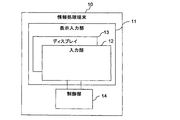
- FIG. 1 is a front view of an information processing terminal according to the first embodiment.
- the information processing terminal 10 according to the embodiment of the present invention is a portable information device having a communication function as an example. Usually, the user uses the information processing terminal 10 while holding it without placing it on the desk.
- the information processing terminal 10 is integrated with display means and input means, and the user operates by touching the screen.
- the information processing terminal 10 activates an application in response to a touch operation on an icon and displays a screen such as a software switch, and executes processing of the application in response to a touch operation on the software switch.
- the information processing terminal 10 provides a character input function for inputting characters such as hiragana, katakana, kanji, and alphanumeric characters for some applications.
- the user can create a mail sentence using a mailer application.
- the user can create a text to be posted to the Twitter (registered trademark) service using, for example, a browser application.
- Twitter a usage mode in which a sentence to be posted next is input while referring to a sentence posted in the past is assumed.
- a key display for inputting characters or a finger operated by the user is viewing the display. It is desirable not to disturb.
- FIG. 2 is a functional block diagram of the information processing terminal according to the first embodiment.
- the information processing terminal 10 includes a display input unit 11 and a control unit 14.
- the display input unit 11 is a touch panel display in which the touch input unit 12 and the display 13 are integrated.
- the input unit 12 notifies the control unit 14 of touch position information indicating the touched position.
- the display 13 displays an image according to an instruction from the control unit 14 and changes the image.
- the control unit 14 executes an application based on the touch position information from the input unit 12 and displays an application screen on the display 13. For example, when the cursor is moved to an area (character input area) where characters can be input on the screen according to the touch position information, the control unit 14 enters a character input state where characters can be input.
- each line is represented by each character in the 50-sound stage, and the character representing each line is referred to as a “representative character”. “A”, “KA”, “SA”, “TA”, “NA”,... Are representative characters.
- characters at each level included in one line are referred to as “in-line characters”. For example, “ka”, “ki”, “ku”, “ke”, and “ko” are the in-line characters of the ka line.
- the control unit 14 groups all the representative characters into one first group, and groups the in-line characters of each line into the second group.
- a second group will exist for each row.
- the representative characters included in the first group have an order
- the in-line characters belonging to the second group also have an order.
- the order according to the 50-note table is used. Specifically, the representative characters are arranged in the order of “a”, “ka”, “sa”, “ta”, “na”, and so on.
- the in-line characters in the ka line are “ka” “ki” “ku” “ke”. They are arranged in the order of “ko”.
- the control unit 14 displays a part of a predetermined display range among the representative characters arranged in the order belonging to the first group in a line in the sector area on the lower side of the display 13.
- this sector area is an area that is assumed to reach the thumb when a touch operation is performed with the thumb of the hand holding the information processing terminal 10.
- the size of the fan-shaped area is arbitrary, but may be determined within a range in which the thumb can reach with the size of a standard human hand using the information processing terminal 10, for example. Further, for example, when representative characters or in-line characters are displayed on the display 13, it may be determined so as to ensure a certain visibility of other display contents and a certain operability of character input.
- the display range may be set to a suitable range in consideration of, for example, the size of the sector area and the display size of each character. If it is preferable to display only six representative characters from the size of the sector area and the appropriate size of the representative characters, the display range may be six characters.
- the control unit 14 detects a flick operation to an area in which a column on the display 13 is displayed based on the touch position information in a state where the portion within the display range of the representative character string is displayed on the display 13, the flick is performed.
- the representative character string in the display range is scrolled on the above-described line, and the representative character displayed on the display 13 is continuously changed.
- the control unit 14 detects a tap operation on any of the representative characters based on the touch position information while displaying the representative character in the display range
- the representative character designated by the tap operation represents the representative character. Displays the in-line characters of the line. Here, all the characters in the line are displayed, but only a part may be displayed.
- control unit 14 detects a flick operation to the area where the in-line character is displayed, the control unit 14 scrolls the in-line character string according to the flick operation.
- control unit 14 detects a tap operation on any in-line character, the control unit 14 inputs the in-line character designated by the tap operation into the character input area.
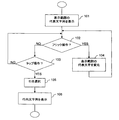
- FIG. 3 is a flowchart showing an operation at the time of row selection of the information processing terminal 10 according to the first embodiment.
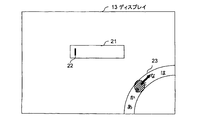
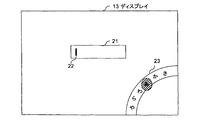
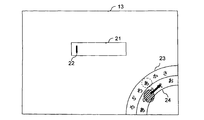
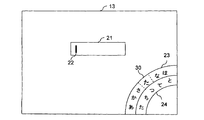
- FIGS. 4A to 4E are diagrams showing the behavior of the information processing terminal 10 according to the first embodiment when a row is selected.
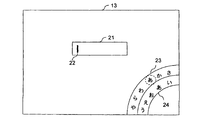
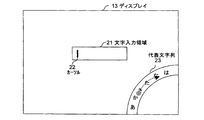
- the information processing terminal 10 in the character input state displays a string of representative characters in the display range on the display 13 (step 101).
- a string of representative characters in the display range on the display 13 For example, as shown in FIG. 4A, in a character input state where the cursor 22 is in the character input area 21, a part (display range) of the representative character string 23 is displayed on the arc that intersects the lower and right sides at the lower right of the display 13.
- the information processing terminal 10 monitors the flick operation and the tap operation (steps 102 and 103).
- the information processing terminal 10 continuously changes the characters of the representative character string 23 in the display range in accordance with the flick operation (step 104).
- the flick operation is indicated by a hatched ellipse and an arrow.
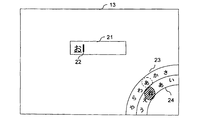
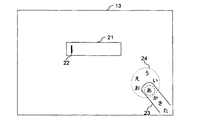
- the information processing terminal 10 selects a line of the representative character specified by the tap operation (step 105), The characters are displayed concentrically with the representative character row in a line on the inner arc (step 106). For example, when a tap operation is performed on “A” in the representative character string 23 as shown in FIG. 4D, the in-line character string 24 “A”, “I”, “U”, “E” of that line as shown in FIG. 4E. "" Is displayed on the inner arc. In the figure, the tap operation is indicated by a hatched ellipse.
- FIG. 5 is a flowchart showing an operation at the time of character selection of the information processing terminal 10 according to the first embodiment.
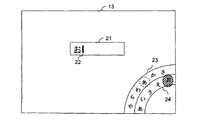
- FIGS. 6A to 6D are diagrams showing the behavior of the information processing terminal 10 when selecting characters according to the first embodiment.
- the information processing terminal 10 monitors the flick operation and the tap operation (steps 202 and 203) while displaying the in-line character string 24 on the display 13 (step 201). For example, as shown in FIG. 6A, the information processing terminal 10 monitors the flick operation and the tap operation in a state where the in-line character string 24 “A”, “I”, “U”, “E”, “O” is displayed.
- the information processing terminal 10 continuously changes the characters of the in-line character string 24 in the display range in accordance with the flick operation (step 204).
- the flick operation is performed on the area where the in-line character string 24 is displayed
- the information processing terminal 10 continuously changes the characters of the in-line character string 24 in the display range in accordance with the flick operation (step 204).
- the flick operation is performed as shown in FIG. 6B
- the in-line characters in the display range change as shown in FIG. 6C.
- the information processing terminal 10 determines the in-line character designated by the tap operation and inputs it to the character input area 21 (step 205). . For example, as shown in FIG. 6D, when a tap operation is performed on “O” in the in-line character string 24, “O” is input to the character input area 21.
- the information processing terminal 10 arranges a plurality of items (here, characters) in a line and sets a part of the line to a fan shape on the lower side of the display 13.
- the item (character) displayed in the area is scrolled in accordance with the operation, and the item (character) displayed on the display 13 is changed. Therefore, it is possible to provide a software key that allows easy input while ensuring the operability of touching each character while ensuring a wide display area on the display 13.
- the lower limit of the natural movable angle range of the thumb of the hand holding the information processing terminal 10 from the side is the direction parallel to the lower side. Further, the range of the area that the thumb can reach is a fan shape.
- the information processing terminal 10 is held in order to effectively use the movable angle range of the thumb for the touch operation and suppress the obstruction of the visual recognition by the software key for inputting characters and the thumb.
- a character string is displayed in the sector area on the lower side of the display 13 that is close to the side of the housing and close to the lower side so that the movable range of the thumb does not disturb the display as much as possible.
- column according to operation is employ
- the information processing terminal 10 arranges a plurality of items included in the first group in a row, and at least part of the row is displayed on the lower side of the display 13. At least some of the items included in the second item group corresponding to the items of the first item group displayed by the operation and displayed in the sector region are further displayed in the sector region. Therefore, it is possible to provide a software key that allows easy input while ensuring the operability of touching each character while ensuring a wide display area on the display 13.
- the sector of the lower side of the display 13 that is close to the side of the casing that holds the information processing terminal 10 and close to the lower side so that the movable range of the thumb does not disturb the display as much as possible.
- a character string is displayed in the area.
- character selection is hierarchized as selection from the first group and subsequent selection from the second group. The structure to be adopted is adopted.
- the first aspect and the second aspect described above can be independently employed, and each character can be secured while ensuring a wide display area on the display 13 by adopting only one of them. This contributes to providing a software key that ensures easy touch operation and allows easy input.
- the upper limit of the natural movable angle range of the thumb of the right hand (or left hand) holding the information processing terminal 10 from the side is the direction parallel to the right side (left side if left hand). Therefore, in the present embodiment, the lower side and the right side (or the left side) intersect with each other in order to effectively use the movable angle range of the thumb for the touch operation and suppress the obstruction of the display visibility by the software key for inputting characters and the thumb.
- the character string is displayed on the line.
- the character The columns are arranged on a straight line or arc.
- the conversion candidate word or the like is displayed to assist the character input.
- the information processing terminal 10 uses the previously input words starting with the hiragana characters as conversion candidates as representative characters. Are displayed in a line on an arc that is concentric with the column and the in-line character column.
- the information processing terminal 10 displays the conversion candidates on the character input area 21 and confirms the conversion.
- the information processing terminal 10 may obtain the priority of each conversion candidate from the past input history, and display each conversion candidate in a manner corresponding to the priority. For example, you may arrange and display in order from the conversion candidate with a high priority. Further, the conversion candidates with high priority may be displayed at a position where they can be easily touched. Each conversion candidate may be displayed larger as the priority is higher. As for the priority, a high priority may be given to a recently input word. Moreover, you may decide to give a high priority to the word with high frequency input in the past.
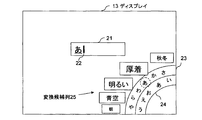
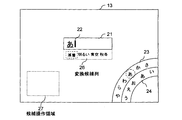
- FIG. 7 is a diagram illustrating a state in which the information processing terminal 10 according to the first embodiment displays conversion candidates.
- “A” is input in the character input area 21
- words input in the past starting with “A” are displayed side by side as the conversion candidate column 25.
- each conversion candidate is displayed in a size corresponding to the priority.
- the information processing terminal 10 inputs the conversion candidate to the character input area 21 when a tap operation is performed on any conversion candidate.
- the present invention is not limited to this.
- the information processing terminal 10 inputs the conversion candidate into the character input area 21. Also good.
- the user can select a character input area 21 of a desired application and input a character.
- a plurality of applications may be executed on one display. It is also possible to execute a plurality of applications for each of the two displays. Even in such a case, when the user performs a flick operation toward the character input area 21 of the desired application or the display on which the desired character input area 21 is displayed, the desired information is displayed. A conversion candidate may be input to the input area 21.
- the information processing terminal 10 displays icons indicating a plurality of applications that are targets of character input around the conversion candidate.
- icons for conversion candidates may be input to the character input area 21 of the application of the icon.
- the information processing terminal 10 displays the conversion candidate in the character input area 21 of the application of the icon. You may enter a character. According to this, when a plurality of applications are executed simultaneously, even if there is an application in which the character input area 21 is not displayed, the user selects the character input area 21 of the desired application and inputs characters. be able to.
- the icon displayed around the conversion candidate when the user performs a tap operation on the conversion candidate may include an icon of an application that is not active or is not being executed.
- the information processing terminal 10 activates the application and inputs the conversion candidate character in the character input area 21. do it.
- the information processing terminal 10 activates the application and inputs the conversion candidate character into the character input area 21.
- the information processing terminal 10 activates the dictionary application and displays the meaning of the word.
- the conversion candidate column 25 is displayed on the outer arc concentric with the representative character string 23 and the in-line character string 24, but the present invention is not limited to this.
- the conversion candidate string 25 may be displayed on an arc that is concentric with the representative character string 23 and the in-line character string 24.
- the representative character string 23, the in-line character string 24, and the conversion candidate string 25 may be arranged in the order from the inside to the outside or from the inside to the outside. Thereby, operability is improved and characters can be input quickly.
- the in-line character string is displayed inside the representative character string 23 as shown in FIGS. 6A to 6D.
- the present invention is not limited to this.
- the in-line character string 24 may be displayed outside the representative character string 23. Then, since the in-line character displayed when the representative character is selected is not hidden by the thumb, it is easy to move to the operation of selecting the next in-line character.
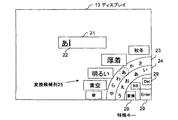
- FIG. 8 is a diagram showing an example of the arrangement of special keys in the first embodiment.
- the special key 29 is arranged further inside the in-line character string 24.
- the special key 29 of this embodiment shown in FIG. 8 is arranged at a fixed position and cannot be moved by a flick operation or a drag operation. Since the character string 24 is arranged on the inner side of the in-line character string 24 in contact with or near the outer edge of the display 13, the position can be specified from the outer edge of the display 13 with the sensation of hands and fingers. Therefore, if the user gets used to it, these special keys 29 can be operated by blind touch.
- the position where the character input area is displayed is arbitrary, and can be freely determined by the application or the user.
- the character input area 21 is displayed near the center of the display 13.
- the user moves the cursor by a touch operation on the character input area 21.
- an auxiliary character input area may be arranged near the representative character string 23 or the in-line character string.
- the information processing terminal 10 displays the same content as the character input area 21 in the auxiliary character input area, and accepts the touch operation to the auxiliary character input area in the same manner as the touch operation to the character input area.
- the user can move the cursor by a touch operation on the auxiliary character input area.
- the information processing terminal 10 having the touch panel display 13 is illustrated, but the present invention is not limited to this, and the input unit and the display unit may be separate.
- the present invention can also be applied to an information processing terminal 10 that includes a pointing device for operating a cursor or a pointer as input means, and the user clicks and drags at a desired position on the screen on the display.
- the representative character string 23 displayed in this embodiment is assumed to circulate. For example, by the flick operation in FIG. 4B, a connected portion of “A” and “WA” appears in FIG. 4C.
- the representative character string 23, the in-line character string 24, and the conversion candidate string 25 may or may not circulate. Moreover, it may differ whether it circulates individually. For example, when the number of characters included in a character string is large, it may be desirable to circulate so that a desired character can be reached by a flick operation in a near direction. In addition, if it is not circulated, it may be possible to perform a large flick operation without worrying about passing through when a character close to the end of the character string is to be displayed.
- the flick operation is illustrated for scrolling the character string, but the present invention is not limited to this.
- the information processing terminal 10 may similarly scroll a character string by a drag operation, or may scroll a character string by either a flick operation or a drag operation.
- the information processing terminal 10 displays the character strings in a line on a line intersecting the lower side of the display 13, but the lower side detection method is not particularly limited.
- the lower side may be detected from the vertical direction of the image displayed on the display 13.
- the information processing terminal 10 includes a sensor using a gyroscope or the like, and may detect the lower side from the posture of the own apparatus obtained by the sensor.
- the sector area is a fixed area, but the present invention is not limited to this.
- the sector area may be set or changed.
- the information processing terminal 10 may have a setting function for setting or changing a sector area as an initial setting.
- the control unit 14 performs a display prompting the user to touch the display 13 with the thumb while holding the information processing terminal 10 (tap operation, flick operation, drag operation, etc.). What is necessary is just to define a fan-shaped area
- the information processing terminal 10 may first set a sector area when starting character input. The same method as described above may be used as a method of setting the sector area.
- the character input target of the present invention is not limited to hiragana.
- the information processing terminal 10 may be able to input a katakana with the same configuration and operation.
- the present invention can be similarly applied to inputting alphabetic characters such as English characters.
- the alphabet characters may be grouped into a plurality of second groups by grouping consecutive alphabet characters into one for each predetermined number from the top. Then, the first alphabetic character of each second group may be used as a representative character representing the second group, and the representative characters of each second group may be combined into the first group.
- the information processing terminal 10 allows the display below the items to be displayed on the display 13 for character input, such as the representative character string 23, the in-line character string 24, and the conversion candidate string 25. Thus, it may be displayed semi-transparently.
- the in-line character string 24 can be scrolled by a flick operation in the same manner as the representative character string 23 has been described, but the present invention is not limited to this.
- each character may be displayed at a fixed position and not scrolled. If the number of characters in the line is not so large and all the characters can be displayed on the arc intersecting the lower side and the side, it is possible to specify a desired in-line character without scrolling.
- 9A and 9B are diagrams showing examples of display display of the information processing terminal 10 according to the first modification of the first embodiment in which the in-line character string 24 is not scrolled.
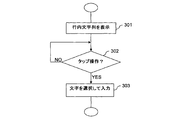
- FIG. 10 is a flowchart showing an operation at the time of character selection of the information processing terminal 10 according to the first modification of the first embodiment in which the in-line character string 24 is not scrolled.
- the operation of the information processing terminal 10 when selecting a row is the same as that shown in FIG.
- the character position of the in-line character string displayed in step 106 is fixed.
- “a” in the representative character string 23 is designated by the user, and the in-line character strings 24 “A”, “I”, “U”, “E” and “O” are displayed at fixed positions. Has been.
- the information processing terminal 10 monitors the tap operation on the characters in the in-line character string 24 with the in-line character string 24 displayed on the display 13 (step 301) (step 302). For example, as shown in FIG. 9A, the information processing terminal 10 monitors the tap operation in a state where the in-line character string 24 “A”, “I”, “U”, “E”, “O” is displayed.
- the information processing terminal 10 determines the in-line character designated by the tap operation and inputs it to the character input area 21 (step 303). For example, as shown in FIG. 9B, when a tap operation is performed on “O” in the in-line character string 24, “O” is input to the character input area 21.
- the in-line character string 24 is not scrolled by the flick operation, and the user may select a desired in-line character while sliding the finger on the in-line character string 24.
- the in-line characters in the in-line character string 24 are displayed side by side starting from the lower left on the arc and ending at the upper right.
- the present invention is not limited to this.
- the in-line characters in the in-line character string 24 may be displayed side by side so as to start near the position where the touch operation is performed. Good.
- FIG. 11 is a diagram showing another example of display display of the information processing terminal 10 according to the first modification of the first embodiment in which the in-line character string 24 is not scrolled.
- the in-line character strings 24 “A”, “I”, “U”, “E”, “O” are displayed starting from the vicinity of the touch position. Is done. Since the user can grasp the position of each character in the in-line character string 24 based on the positional relationship from the touch position where the representative character has been selected, the user can proceed to an operation of continuously selecting the in-line character.
- the information processing terminal 10 displays an in-line character string 24 corresponding to a representative character displayed at a predetermined position (hereinafter referred to as “selected position”) in the representative character string 23. May be.
- the information processing terminal 10 may display the in-line character string 24 corresponding to the representative character in conjunction therewith.
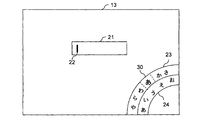
- FIGS 12A and 12B are diagrams showing examples of display display of the information processing terminal 10 according to the second modification of the first embodiment.
- the representative character “A” is displayed at the selection position 30. Therefore, the in-line character string 24 displays the in-line character of that line.
- the in-line character string 24 is moved by the flick operation, and when the representative character “ta” comes to the selection position 30 as shown in FIG. 12B, the in-line character of the line is displayed in the in-line character string 24.
- FIG. 13 is a flowchart showing the line selection and character selection operations of the information processing terminal 10 according to the second modification of the first embodiment.
- the information processing terminal 10 in the character input state has a representative character string 23 in the display range and a representative displayed at a predetermined position (for example, the center of the character string) in the representative character string 23.
- the in-line character string 24 corresponding to the character is displayed on the display 13 (step 401).
- the information processing terminal 10 monitors the flick operation to the area of the representative character string 23 and the tap operation to the character of the in-line character string 24 (steps 402 and 403).
- the information processing terminal 10 continuously changes the characters of the representative character string 23 in the display range according to the flick operation, and interlocks with the change.
- the in-line character string corresponding to the representative character at the predetermined position is sequentially displayed (step 404).
- the information processing terminal 10 determines the in-line character designated by the tap operation and inputs it to the character input area 21 (step 405).
- the in-line character corresponding to the representative character displayed at the predetermined position is automatically displayed, the user does not need to designate the representative character by a tap operation, and the quick character is displayed. Input is possible.
- which of the representative character string 23 and the in-line character string 24 is displayed outside and which is displayed inside is not particularly limited. Assuming an operation of flicking or dragging, visibility is better when the in-line character string 24 is displayed outside.
- the in-line character string 24 Since the in-line character string 24 has fewer characters than the representative character string 23, the in-line character string 24 is displayed on the inner side as shown in FIGS. 12A and 12B, and the number of characters that can be displayed in the representative character string 23 is increased as much as possible. Also good. In particular, when the position of each in-line character of the in-line character string 24 is fixed and not scrolled by flick operation as in the first modification, the position of the in-line character can be understood without knowing if it is used. The visibility when 24 is displayed on the inside is not a problem.
- the information processing terminal 10 may fix the image of the display area of the in-line character string 24. Thereby, the processing amount of image display can be reduced. For example, when the representative character string 23 is scrolled at a high speed, the information processing terminal 10 may continue to display the image before the flick operation in the area of the in-line character string 24. Alternatively, when the representative character string 23 is scrolled at a high speed, the information processing terminal 10 may display a specific pattern or a single color image in the area of the in-line character string 24.
- conversion candidates are arranged on an arc concentric with the representative character string 23 and the in-line character string 24, and special keys used for character input are arranged further inside the in-line character string 24. .
- the user uses these special keys to edit input characters, select conversion candidates, and determine.
- the selection candidate may be controlled with the other hand holding the information processing terminal 10.
- the information processing terminal 10 of the third modified example has a configuration for performing an operation related to the selection candidate with a finger of the hand opposite to the operation of the representative character and the inline character.
- the information processing terminal 10 of the third modified example uses words such as words starting with hiragana displayed in the character input area as selection candidates, and displays the selection candidates in the vicinity of the character input area.
- FIG. 14 is a diagram showing a screen display example of the display 13 in the third modified example.
- a conversion candidate string 26 is displayed below the character input area 21.
- a plurality of selection candidate words are displayed in the conversion candidate column 26, and the word “thick clothes” is selected among them.
- “thick” is surrounded by a broken line to indicate selection.
- the information processing terminal 10 accepts control of the selection candidate by a touch operation on the lower side (candidate operation area) on the opposite side to the side on which the representative character string 23 and the in-line character string 24 of the display 13 are displayed.
- control unit 14 when the control unit 14 detects a flick operation or a drag operation to the candidate operation region based on the touch position information from the input unit 12, the control unit 14 switches selection of the selection candidates according to the operation. For example, when a right flick operation is performed on the candidate operation area in the state of FIG. 14, the control unit 14 sequentially switches the selection of conversion candidates to “bright”, “blue sky”, and “autumn / winter”.
- control unit 14 detects a tap operation on the candidate operation area in a state where any selection candidate is selected, the control unit 14 recognizes that the selected selection candidate is designated, and selects the selection candidate. A word is input to the character input area 21. For example, when a tap operation is performed on the candidate operation area in the state of FIG. 14, “thick clothes” that is the selected selection candidate is input to the character input area 21.
- conversion candidates are arranged on an arc concentric with the representative character string 23 and the in-line character string 24, and special keys used for character input are arranged further inside the in-line character string 24.
- special keys used for character input are arranged further inside the in-line character string 24.
- the present invention is not limited to disposing the special key inside the in-line character string 24.
- the special key is not limited to the inside of the in-line character string 24 but may be disposed in contact with the outer edge of the display 13 or in the vicinity of the outer edge.
- FIG. 15 is a diagram illustrating an arrangement example of special keys in the fourth modification.
- the special keys 29 are arranged near the outer edge of the display 13 along the outer edge. Since the position can be specified from the outer edge of the display 13 with the sensation of a hand and a finger, the user can operate these special keys 29 by blind touch if he / she gets used to it. Further, even if the special key 29 is on the extension line of the arc of the representative character string 23 or the in-line character string 24, the user can specify the location where the special key 29 is located from the outer edge. The nature is kept low.
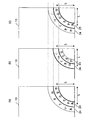
- FIG. 16 is a diagram showing how the display changes in the fifth modification.
- a position where the touch operation such as flicking and tapping with the thumb of the hand holding the information processing terminal 10 can be easily performed is defined.
- the touch fit position is assumed to be around an arc having a radius L with the corner of the display as the center. In FIG. 16, the area between the two thick arcs is the touch fit position.
- the information processing terminal 10 displays the representative character string 23 at the touch-appropriate position as shown in FIG.
- the information processing terminal 10 shifts the representative character string 23 that has been displayed at the touch-appropriate position so far, and moves into the line of the designated representative character line.
- the character string 24 is displayed at the touch fit position.
- FIG. 16B shows a state in which the representative character “ka” is designated by the user and the in-line character string 24 of the ka line is displayed at the touch fit position.
- the information processing terminal 10 inputs the designated in-line character into a character input area (not shown in FIG. 16), and FIG. As shown in c), the representative character string 23 is returned to the touch fit position.
- This modification allows the user to perform an operation at a position where the user can easily perform a touch operation, and makes it easier to input characters.
- the representative character string 23 and the in-line character string 24 are appropriately displayed at the touch fit position, but the present invention is not limited to this.
- a special key such as a conversion key and / or a conversion candidate may be appropriately displayed at the touch fit position.
- touch fit position of the present modification is not limited to the arc illustrated above, and may be another shape.
- the touch fit position may be changeable, and may be set according to the user as an initial setting or setting menu of the information processing terminal 10.
- the information processing terminal 10 may set the touch fit position in an area having a predetermined shape including a position where the touch operation is performed in a predetermined state. For example, when a touch operation is performed on a position that is easy to touch in a state in which the touch fit position is set by the user's menu, the information processing terminal 10 calculates an average value (average touch position) of the touch positions, The touch matching position may be set on an arc including the average touch position. According to this, it is possible to set a touch-appropriate position suitable for each user, and it becomes easier to input characters.
- the touch matching position may be set in an area including the position touched first after entering the character input state. According to this, the user can easily set the touch fit position when inputting characters without setting the touch fit position in advance by the initial setting or the setting menu.
- the information processing terminal 10 when the user designates any in-line character by a touch operation from the state in which the in-line character string 24 is displayed at the touch suitable position, the information processing terminal 10 returns the representative character string 23 to the touch suitable position.
- the present invention is not limited to this.
- the information processing terminal 10 sets the representative character string 23 to the touch suitable position. You may decide to return it.
- the representative character string 23 and the in-line character string 24 are arranged on a straight line in the sector area.
- the basic configuration and operation of the information processing terminal 10 of the second embodiment are the same as those of the first embodiment, but the display forms of the representative character string 23 and the in-line character string 24 are different.
- FIG. 17 is a diagram illustrating an example of screen display by the information processing terminal 10 according to the second embodiment.
- the representative character string 23 and the in-line character string 24 are displayed on the straight line intersecting the lower side and the right side at the lower right of the display 13. This is a display example of a state corresponding to FIG. 4E or FIG. 6A in the first embodiment, but the representative character string 23 and the in-line character string 24 are similarly displayed on a straight line in other states.
- the representative character string 23 and the in-line character string 24 are arranged on the arc in consideration of the ease of the flick operation with the thumb.
- the activation by the natural flick operation of the thumb is a short distance. If there is, it can be approximated by a straight line. Therefore, in this embodiment, they are arranged in the representative character string 23 and the in-line character string 24.
- the flick operation with the finger of the hand not holding the information processing terminal 10 or the flick operation with the touch pen can be used together. However, the operability may be good.
- the representative character string 23 and the in-line character string 24 are both concentric arcs or straight lines.
- the present invention is not limited to this. And the other may be a curve.
- the representative character string 23 and the in-line character string 24 are both arranged on a line assuming a flick operation or a drag operation for moving the thumb from the base, but the present invention is not limited to this. is not.
- the representative character string 23 is arranged on an arc
- the in-line character string 24 is arranged on a straight line that intersects the arc of the representative character string 23.
- the basic configuration and operation of the information processing terminal 10 of the second embodiment are the same as those of the first embodiment, but the display format of the in-line character string 24 is different.
- FIG. 18 is a diagram illustrating an example of screen display by the information processing terminal 10 according to the third embodiment.
- the representative character string 23 is arranged on an arc as in the first embodiment, but the in-line character string 24 is arranged on a straight line that intersects the arc near the center of the arc of the representative character string 23. Has been.
- the thumb As a relatively easy flick and drag operation by the thumb of the hand holding the information processing terminal 10, the thumb is bent and extended in addition to the operation of moving the thumb sideways from the root as used in the first and second embodiments. There is an operation.
- the in-line character string 24 of the present embodiment is arranged assuming that a flick or drag operation is performed by bending the thumb.
- a tap operation may be used in the same manner as in the first embodiment when selecting a row of the information processing terminal 10 according to the present embodiment, but an operation different from that may be used.
- the information processing terminal 10 corresponds to the representative character displayed at a predetermined position (for example, the center of the character string) in the representative character string 23.
- the in-line character string 24 may be displayed on the display 13.
- the representative character string 23 is arranged on a curved line (arc) and the in-line character string 24 is arranged on a straight line.
- the present invention is not limited to this.
- the fourth embodiment uses a combination of a curve and a straight line as in the third embodiment, but their usage is different from the third embodiment.
- the representative character string 23 is arranged on a straight line that becomes a trajectory when the thumb of the hand holding the information processing terminal 10 is bent and stretched, and the in-line character string 24 is the hand holding the information processing terminal 10.
- the in-line character string 24 is the hand holding the information processing terminal 10.
- the in-line character strings 24 are arranged in a line on a circle that comes near the natural position of the thumb of the hand holding the information processing terminal 10. This facilitates flicking, dragging, and tapping operations to the in-line character string 24.
- the information processing terminal 10 of the fourth embodiment has the same basic configuration and operation as that of the first embodiment, but the display form of the representative character string 23 and the in-line character string 24 is different.
- FIG. 19 is a diagram illustrating an example of screen display by the information processing terminal 10 according to the fourth embodiment.
- the representative character string 23 is arranged on a straight line that becomes a trajectory when the thumb of the right hand is bent and stretched, and the in-line character string 24 is arranged in a line so as to draw a circle near the natural position of the thumb. Has been placed.
- the in-line character string 24 arranged on the circle may be rotated by a flick operation or a drag operation, and a desired character may or may not be moved to a desired position.
- a tap operation may be used in the same manner as in the first embodiment when selecting a row of the information processing terminal 10 according to the present embodiment, but an operation different from that may be used.
- the information processing terminal 10 corresponds to the representative character displayed at a predetermined position (for example, the leading end of the character string) in the representative character string 23.
- the in-line character string 24 may be displayed on the display 13.
- the information processing terminal 10 having a configuration in which a desired hiragana is selected by two-level display of the representative character string 23 and the in-line character string 24 is illustrated, but the present invention is not limited to this. .
- a plurality of items are arranged in a line and a part of the line is displayed in the fan-shaped area on the lower side of the display 13, and the line is scrolled and displayed on the display 13 according to the operation. If the item to be changed is changed, it contributes to providing a software key that can be easily input while ensuring a wide display area on the display.
- the in-line character string 24 on a straight line is used as it is instead of the representative character.
- the character is selected, so that the two-level display as in the first embodiment is not required.
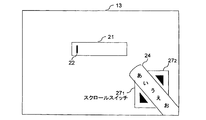
- the items are arranged in a line and a part of the line is displayed in the fan-shaped area on the lower side of the display 13. There is only one item representing a row in the column. Furthermore, in the fifth embodiment, a software switch for scrolling is provided instead of using a flick operation or a drag operation as in the first embodiment.
- the basic configuration and operation of the information processing terminal 10 of the fifth embodiment are the same as those of the first embodiment, but the in-line character string 24 of that line is displayed instead of the representative character string 23 of that line.
- another difference is that a software switch for scrolling is arranged.
- FIG. 20 is a diagram illustrating an example of screen display by the information processing terminal 10 according to the fifth embodiment.
- an in-line character string 24 “Aiueo”, which is an item representing the line, is displayed, and scroll switches 27 1 and 27 2 that are software switches for scrolling are arranged on both sides thereof. .
- the information processing terminal 10 When the information processing terminal 10 according to the fifth embodiment detects a touch (tap operation or long press operation) on the scroll switches 27 1 and 27 2 at the time of line selection, the in-line character string 24 to be displayed is sequentially displayed according to the operation. Switch. In addition, when selecting a character, the information processing terminal 10 selects the character and displays it in the character input area 21 when detecting a tap operation on a certain in-line character in the displayed in-line character string 24.
- the characters in the in-line character string 24 displayed on the display 13 may or may not be scrolled by a flick operation or a drag operation.
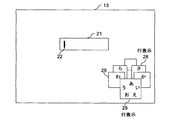
- the information processing terminal 10 of the sixth embodiment has the same basic configuration and operation as that of the first embodiment, but displays a line display 28 instead of a representative character on a circle, and displays the line display 28.
- the in-line character string 24 is displayed on a circle.
- in-line characters included in the line are arranged. That is, the in-line character string 24 is used as it is instead of a representative character as an item representing a line.
- in-line characters in the in-line character string 24 are arranged on a circle rather than on a straight line as in the fifth embodiment.
- FIG. 21 is a diagram illustrating an example of screen display by the information processing terminal 10 according to the sixth embodiment.
- a plurality of items (line display) 28 each representing a plurality of lines are displayed side by side on a three-dimensional circle.
- the information processing terminal 10 switches the line display 28 so that the circle rotates.
- the information processing terminal 10 selects a row having the row display 28 at a predetermined position.
- a line having a line display 28 in front of the center of the circle is selected.
- the information processing terminal 10 does not display the in-line character string 24 for all items representing each line to be displayed, but only in the line display 28 displayed at the selected position.
- the character string 24 is displayed.
- the information processing terminal 10 selects the character and displays it in the character input area 21.
- a plurality of line displays 28 are displayed side by side on a circle simulating a three-dimensional shape.
- this circle does not have to be a perfect circle or an ellipse, and it is only necessary that the circles are arranged on a line (annular) that circulates the row display.
- the first to sixth embodiments show examples in which positions for displaying the representative character string 23, the in-line character string 24, the conversion candidate string 25, the scroll switch 27, the line display 28, or the special key 29 are predetermined. It was. However, the present invention is not limited to this. As another example, the position and size of the sector area for displaying them may be changeable according to the user. Thereby, operability can be improved.
- the basic configuration and operation of the information processing terminal 10 of the seventh embodiment are the same as those of the first embodiment, but there are further setting modes in the seventh embodiment.
- the setting mode is activated, for example, when initial setting or when the setting mode is selected from the menu screen.
- the user can adjust the display of the representative character string 23 and the in-line character string 24 by performing a touch operation prompted by voice or screen display.
- the information processing terminal 10 starts the setting mode according to the menu selection by the user.
- the information processing terminal 10 detects the trajectory of the flick operation and displays the trajectory.
- the display position of the representative character string 23 or the in-line character string 24 and the radius of the arc are determined so as to include them.
- the information processing terminal 10 displays the representative character string 23 and the in-line character string 24 according to the display position determined in the setting mode and the radius of the arc.
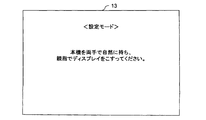
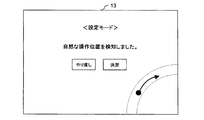
- 22A to 22C are diagrams showing examples of screen display by the information processing terminal 10 according to the seventh embodiment.
- the information processing terminal 10 displays a screen as shown in FIG. 22A and prompts the user to perform a touch operation on the display 13.
- the information processing terminal 10 detects the locus of the touch position and displays the locus on the screen as in the example of FIG. 22B.
- the user can select whether to redo or confirm the setting.
- the information processing terminal 10 returns to the display of FIG. 22A and redoes the setting from the beginning.
- the information processing terminal 10 determines the display position of the representative character string 23 and the radius of the arc so as to include the detected touch position locus, and matches the representative character string 23 with the in-line character string 24. The display position and the radius of the arc are determined, and the setting mode is terminated.
- the information processing terminal 10 displays the representative character string 23 and the in-line character string 24 at the display position and the arc radius determined in the setting mode in the character input state.
- a display input unit for displaying an image on the display and receiving an operation;
- the plurality of items included in the first item group are arranged in a line, and at least a part of the line is displayed in a predetermined sector area on the lower side of the display, and the selection is performed by the selection operation on the display.
- An information processing terminal comprising: control means for further displaying at least some of the items included in the second item group corresponding to the items of the first item group in the sector area.
- Appendix 2 The information processing terminal according to appendix 1, wherein the display is a quadrangle, and the row is on a line intersecting a lower side of the display and one of the side sides.
- the control means displays the first item group column on a straight line, and the at least some items of the second item group are aligned on a straight line adjacent to the first item group column.
- the information processing apparatus according to appendix 4 which is displayed side by side.
- the control means displays the column of the first item group on an arc, and the at least some items of the second item group are arranged in a row on an arc concentric with the column of the first item group.
- the information processing apparatus according to appendix 4 which is displayed side by side.
- the control means arranges the at least some items of the second item group in a line on a line intersecting the column of the first item group with the selected item of the first item group as an intersection.
- control unit displays the at least some items of the second item group in a line around the selected item of the first item group. apparatus.
- Appendix 9 Any one of appendices 4 to 8, wherein the control means scrolls the column of items of the second item group displayed on the display according to an operation on the display, and changes the items displayed on the display.
- the information processing terminal according to one item.
- the item of the second item group is a character;
- the control means displays the character on which the selection operation has been performed in a character input area, and selects words related to the character displayed in the character input area.
- the information processing terminal according to any one of appendices 4 to 9, which is displayed as:
- Appendix 11 The information processing terminal according to appendix 10, wherein the control means displays the selection candidate in or near the sector area.
- Appendix 12 The information processing terminal according to appendix 10 or 11, wherein the control means displays the selection candidate at a position or size according to priority.
- Appendix 14 14. The information processing terminal according to appendix 13, wherein the control means controls the selection candidate according to an operation on a lower side portion on the opposite side of the sector area of the display.
- Appendix 16 The information processing terminal according to appendix 14 or 15, wherein the operation for designating the selection candidate is a tap operation.
- Appendix 17 The information processing terminal according to any one of appendices 10 to 16, wherein the selection candidate is a word that starts with a character displayed in the character input area.
- Appendix 19 The information processing terminal according to appendices 1 to 18, wherein the control means displays the item to be displayed on the display in a translucent manner.
- Appendix 20 The information processing terminal according to any one of appendices 1 to 19, wherein the control unit sets the sector area according to a position on a display where an operation is detected by the display input unit in a predetermined state.
- Appendix 21 An operation control method of an information processing terminal that displays a screen by a display and receives an operation, A plurality of items included in the first item group are arranged in a line, and at least a part of the line is displayed in a predetermined sector area on the lower side of the display, An operation control method for further displaying at least a part of items included in a second item group corresponding to an item of the first item group selected by a user's selection operation in the sector area.
Landscapes
- Engineering & Computer Science (AREA)
- General Engineering & Computer Science (AREA)
- Theoretical Computer Science (AREA)
- Human Computer Interaction (AREA)
- Physics & Mathematics (AREA)
- General Physics & Mathematics (AREA)
- User Interface Of Digital Computer (AREA)
- Input From Keyboards Or The Like (AREA)
- Position Input By Displaying (AREA)
Priority Applications (3)
| Application Number | Priority Date | Filing Date | Title |
|---|---|---|---|
| EP11795549.2A EP2584434A4 (en) | 2010-06-17 | 2011-05-30 | Information processing terminal and method for controlling operation thereof |
| US13/704,843 US20130241838A1 (en) | 2010-06-17 | 2011-05-30 | Information processing terminal and method for controlling operation thereof |
| CN2011800298710A CN102947776A (zh) | 2010-06-17 | 2011-05-30 | 信息处理终端及其操作控制方法 |
Applications Claiming Priority (2)
| Application Number | Priority Date | Filing Date | Title |
|---|---|---|---|
| JP2010-138512 | 2010-06-17 | ||
| JP2010138512A JP2012003545A (ja) | 2010-06-17 | 2010-06-17 | 情報処理端末およびその操作制御方法 |
Publications (1)
| Publication Number | Publication Date |
|---|---|
| WO2011158641A1 true WO2011158641A1 (ja) | 2011-12-22 |
Family
ID=45348050
Family Applications (1)
| Application Number | Title | Priority Date | Filing Date |
|---|---|---|---|
| PCT/JP2011/062378 Ceased WO2011158641A1 (ja) | 2010-06-17 | 2011-05-30 | 情報処理端末およびその操作制御方法 |
Country Status (5)
| Country | Link |
|---|---|
| US (1) | US20130241838A1 (enExample) |
| EP (1) | EP2584434A4 (enExample) |
| JP (1) | JP2012003545A (enExample) |
| CN (1) | CN102947776A (enExample) |
| WO (1) | WO2011158641A1 (enExample) |
Cited By (3)
| Publication number | Priority date | Publication date | Assignee | Title |
|---|---|---|---|---|
| JP2013223044A (ja) * | 2012-04-13 | 2013-10-28 | Metamoji Corp | 文字入力方法及び文字入力装置 |
| EP2859430B1 (en) * | 2012-06-06 | 2019-02-27 | Thomson Licensing | Method and apparatus for entering symbols from a touch-sensitive screen |
| WO2022091760A1 (ja) * | 2020-10-21 | 2022-05-05 | 株式会社Nttドコモ | 操作装置 |
Families Citing this family (39)
| Publication number | Priority date | Publication date | Assignee | Title |
|---|---|---|---|---|
| KR101636705B1 (ko) * | 2009-08-06 | 2016-07-06 | 삼성전자주식회사 | 터치스크린을 구비한 휴대 단말의 문자 입력 방법 및 장치 |
| JP5361913B2 (ja) * | 2011-01-25 | 2013-12-04 | 株式会社ソニー・コンピュータエンタテインメント | 入力装置、入力方法及びコンピュータプログラム |
| CN102203715B (zh) * | 2011-05-23 | 2013-03-20 | 华为终端有限公司 | 一种输入方法、输入装置和终端设备 |
| WO2013111213A1 (ja) * | 2012-01-27 | 2013-08-01 | Necカシオモバイルコミュニケーションズ株式会社 | 文字入力装置、文字入力方法、プログラム及び端末装置 |
| US20130219340A1 (en) * | 2012-02-21 | 2013-08-22 | Sap Ag | Navigation on a Portable Electronic Device |
| JP6013004B2 (ja) * | 2012-04-02 | 2016-10-25 | シャープ株式会社 | 文字入力装置およびその制御方法、制御プログラム、ならびに、制御プログラムを記録したコンピュータ読み取り可能な記録媒体 |
| US20130265235A1 (en) * | 2012-04-10 | 2013-10-10 | Google Inc. | Floating navigational controls in a tablet computer |
| USD730370S1 (en) | 2012-04-10 | 2015-05-26 | Google Inc. | Display screen of a communication terminal with a graphical user interface |
| WO2013176019A1 (ja) * | 2012-05-22 | 2013-11-28 | Necカシオモバイルコミュニケーションズ株式会社 | 情報入力装置、情報入力方法、およびプログラム |
| JP5965212B2 (ja) * | 2012-05-23 | 2016-08-03 | シャープ株式会社 | 携帯情報装置、文字入力方法、文字入力プログラム、および、プログラム記録媒体 |
| JP2013254249A (ja) * | 2012-06-05 | 2013-12-19 | Sharp Corp | 情報処理装置 |
| JP6051692B2 (ja) * | 2012-09-03 | 2016-12-27 | 富士通株式会社 | 文字変換装置、文字変換方法、及びプログラム |
| US9195368B2 (en) * | 2012-09-13 | 2015-11-24 | Google Inc. | Providing radial menus with touchscreens |
| CN103870186A (zh) * | 2012-12-17 | 2014-06-18 | 华为终端有限公司 | 一种触摸屏电子设备的输入方法和装置 |
| IN2013CH00469A (enExample) * | 2013-01-21 | 2015-07-31 | Keypoint Technologies India Pvt Ltd | |
| WO2014111959A2 (en) | 2013-01-21 | 2014-07-24 | Keypoint Technologies India Pvt. Ltd. | Text input system and method |
| CN104216645A (zh) * | 2013-05-29 | 2014-12-17 | 腾讯科技(深圳)有限公司 | 触屏终端上的输入方法、装置和一种触屏终端 |
| US20150074600A1 (en) * | 2013-09-09 | 2015-03-12 | Blackberry Limited | Device and method for identifying data |
| JP5931839B2 (ja) * | 2013-11-20 | 2016-06-08 | ヤフー株式会社 | 情報処理装置、情報処理方法、プログラム、配信サーバ、および配信方法 |
| CN103648045A (zh) * | 2013-12-20 | 2014-03-19 | 乐视致新电子科技(天津)有限公司 | 通过侧边导航栏切换显示界面的方法及装置 |
| US10254959B2 (en) * | 2014-01-24 | 2019-04-09 | Huawei Device (Dongguan) Co., Ltd. | Method of inputting a character into a text string using a sliding touch gesture, and electronic device therefor |
| EP3121691B1 (en) * | 2014-03-18 | 2020-03-18 | Huawei Device Co., Ltd. | Method and terminal for inputting text |
| US20160077735A1 (en) * | 2014-09-17 | 2016-03-17 | Kabushiki Kaisha Toshiba | Character input apparatus and character input method |
| JP6516352B2 (ja) * | 2014-12-16 | 2019-05-22 | 学校法人帝京大学 | モバイルデバイス用の文字入力方法及び文字入力領域の自動調整方法 |
| JP6459640B2 (ja) * | 2015-03-03 | 2019-01-30 | オムロン株式会社 | 文字入力システム用のプログラムおよび情報処理装置 |
| CN107408007B (zh) * | 2015-04-20 | 2019-07-23 | 华为技术有限公司 | 一种终端设备的文本输入的显示方法、装置及终端设备 |
| CN106293428A (zh) * | 2015-05-15 | 2017-01-04 | 阿里巴巴集团控股有限公司 | 触控终端的字符输入方法 |
| KR102508833B1 (ko) * | 2015-08-05 | 2023-03-10 | 삼성전자주식회사 | 전자 장치, 전자 장치의 문자 입력 방법 |
| US10628036B2 (en) * | 2016-01-18 | 2020-04-21 | Microsoft Technology Licensing, Llc | Keyboard customization |
| CN115167727A (zh) * | 2016-03-25 | 2022-10-11 | 华为技术有限公司 | 字符输入方法、装置及终端 |
| JP2018082243A (ja) | 2016-11-14 | 2018-05-24 | 京セラ株式会社 | 電子機器、制御方法、およびプログラム |
| US10671181B2 (en) * | 2017-04-03 | 2020-06-02 | Microsoft Technology Licensing, Llc | Text entry interface |
| JP2019021108A (ja) * | 2017-07-19 | 2019-02-07 | 京セラドキュメントソリューションズ株式会社 | 表示制御装置、表示制御方法、及び表示制御プログラム |
| US10936163B2 (en) * | 2018-07-17 | 2021-03-02 | Methodical Mind, Llc. | Graphical user interface system |
| JP2020035368A (ja) * | 2018-08-31 | 2020-03-05 | 株式会社Jvcケンウッド | 表示制御装置、表示装置、表示制御方法、プログラム |
| US10860209B1 (en) * | 2019-12-12 | 2020-12-08 | Dell Products L.P. | Selection and configuration of one-hand keyboards for touch screen devices |
| CA3165578A1 (en) | 2019-12-27 | 2021-07-01 | Methodical Mind, Llc. | Graphical user interface system |
| US12248656B2 (en) | 2020-01-22 | 2025-03-11 | Methodical Mind, Llc | Graphical user interface system |
| CN114647349A (zh) * | 2020-12-17 | 2022-06-21 | 中移(苏州)软件技术有限公司 | 表情信息选取方法及装置、电子设备及存储介质 |
Citations (3)
| Publication number | Priority date | Publication date | Assignee | Title |
|---|---|---|---|---|
| JP2003330613A (ja) * | 2002-05-13 | 2003-11-21 | Mobile Computing Technologies:Kk | 携帯型情報端末装置、表示制御情報、及び表示制御方法 |
| JP2005092521A (ja) * | 2003-09-17 | 2005-04-07 | Sony Ericsson Mobilecommunications Japan Inc | 文字入力装置 |
| JP2010108080A (ja) * | 2008-10-28 | 2010-05-13 | Sharp Corp | メニュー表示装置、メニュー表示装置の制御方法、およびメニュー表示プログラム |
Family Cites Families (17)
| Publication number | Priority date | Publication date | Assignee | Title |
|---|---|---|---|---|
| US6011542A (en) * | 1998-02-13 | 2000-01-04 | Sony Corporation | Graphical text entry wheel |
| US6707571B1 (en) * | 1998-08-28 | 2004-03-16 | Seiko Epson Corporation | Character printing method and device as well as image forming method and device |
| US20020054135A1 (en) * | 2000-03-17 | 2002-05-09 | Masahiro Noguchi | Information processing device, information processsing method, and computer-readable storage medium storing program for executing this method on a computer |
| US7036091B1 (en) * | 2001-09-24 | 2006-04-25 | Digeo, Inc. | Concentric curvilinear menus for a graphical user interface |
| US7002553B2 (en) * | 2001-12-27 | 2006-02-21 | Mark Shkolnikov | Active keyboard system for handheld electronic devices |
| GB0201074D0 (en) * | 2002-01-18 | 2002-03-06 | 3G Lab Ltd | Graphic user interface for data processing device |
| US7986301B2 (en) * | 2004-06-21 | 2011-07-26 | Research In Motion Limited | Handheld wireless communication device |
| US7973765B2 (en) * | 2004-06-21 | 2011-07-05 | Research In Motion Limited | Handheld wireless communication device |
| KR100837283B1 (ko) * | 2007-09-10 | 2008-06-11 | (주)익스트라스탠다드 | 터치스크린을 구비한 휴대용 단말기 |
| KR101461954B1 (ko) * | 2008-05-08 | 2014-11-14 | 엘지전자 주식회사 | 단말기 및 그 제어 방법 |
| US8552992B1 (en) * | 2008-06-30 | 2013-10-08 | Amazon Technologies, Inc. | Systems and methods for textual input using multi-directional input devices |
| KR20100027686A (ko) * | 2008-09-03 | 2010-03-11 | 엘지전자 주식회사 | 이동단말기 및 그 제어 방법 |
| JP5509773B2 (ja) * | 2009-01-21 | 2014-06-04 | オムロン株式会社 | パラメータ決定支援装置およびパラメータ決定支援プログラム |
| US9015627B2 (en) * | 2009-03-30 | 2015-04-21 | Sony Corporation | User interface for digital photo frame |
| EP2442167A3 (en) * | 2009-06-16 | 2012-10-17 | Intel Corporation | Camera applications in a handheld device |
| US9013423B2 (en) * | 2009-06-16 | 2015-04-21 | Intel Corporation | Adaptive virtual keyboard for handheld device |
| US20120162078A1 (en) * | 2010-12-28 | 2012-06-28 | Bran Ferren | Adaptive virtual keyboard for handheld device |
-
2010
- 2010-06-17 JP JP2010138512A patent/JP2012003545A/ja active Pending
-
2011
- 2011-05-30 EP EP11795549.2A patent/EP2584434A4/en not_active Withdrawn
- 2011-05-30 US US13/704,843 patent/US20130241838A1/en not_active Abandoned
- 2011-05-30 CN CN2011800298710A patent/CN102947776A/zh active Pending
- 2011-05-30 WO PCT/JP2011/062378 patent/WO2011158641A1/ja not_active Ceased
Patent Citations (3)
| Publication number | Priority date | Publication date | Assignee | Title |
|---|---|---|---|---|
| JP2003330613A (ja) * | 2002-05-13 | 2003-11-21 | Mobile Computing Technologies:Kk | 携帯型情報端末装置、表示制御情報、及び表示制御方法 |
| JP2005092521A (ja) * | 2003-09-17 | 2005-04-07 | Sony Ericsson Mobilecommunications Japan Inc | 文字入力装置 |
| JP2010108080A (ja) * | 2008-10-28 | 2010-05-13 | Sharp Corp | メニュー表示装置、メニュー表示装置の制御方法、およびメニュー表示プログラム |
Cited By (3)
| Publication number | Priority date | Publication date | Assignee | Title |
|---|---|---|---|---|
| JP2013223044A (ja) * | 2012-04-13 | 2013-10-28 | Metamoji Corp | 文字入力方法及び文字入力装置 |
| EP2859430B1 (en) * | 2012-06-06 | 2019-02-27 | Thomson Licensing | Method and apparatus for entering symbols from a touch-sensitive screen |
| WO2022091760A1 (ja) * | 2020-10-21 | 2022-05-05 | 株式会社Nttドコモ | 操作装置 |
Also Published As
| Publication number | Publication date |
|---|---|
| EP2584434A4 (en) | 2017-01-04 |
| CN102947776A (zh) | 2013-02-27 |
| EP2584434A1 (en) | 2013-04-24 |
| US20130241838A1 (en) | 2013-09-19 |
| JP2012003545A (ja) | 2012-01-05 |
Similar Documents
| Publication | Publication Date | Title |
|---|---|---|
| WO2011158641A1 (ja) | 情報処理端末およびその操作制御方法 | |
| US10379626B2 (en) | Portable computing device | |
| US10275153B2 (en) | Multidirectional button, key, and keyboard | |
| KR101636705B1 (ko) | 터치스크린을 구비한 휴대 단말의 문자 입력 방법 및 장치 | |
| KR100478020B1 (ko) | 화면표시식키이입력장치 | |
| JP4863211B2 (ja) | 文字データ入力装置 | |
| JP5801348B2 (ja) | 入力システム、入力方法およびスマートフォン | |
| JP2003015808A (ja) | タッチ式キー入力装置 | |
| KR20130088752A (ko) | 다방향 버튼, 키 및 키보드 | |
| JP2010079441A (ja) | 携帯端末、ソフトウェアキーボード表示方法、及びソフトウェアキーボード表示プログラム | |
| US20050066291A1 (en) | Manual user data entry method and system | |
| KR101039284B1 (ko) | 터치식 문자 입력 장치 및 방법 | |
| CN103324432B (zh) | 一种多国语言通用笔划输入系统 | |
| JP4614505B2 (ja) | 画面表示式キー入力装置 | |
| US10423328B2 (en) | Portable terminal for controlling two cursors within a virtual keyboard according to setting of movement by a single key at a time or a plurality of keys at a time | |
| US20150301739A1 (en) | Method and system of data entry on a virtual interface | |
| JP2013033553A (ja) | 文字データ入力装置 | |
| JP2012060545A (ja) | ハングル文字入力方法と装置 | |
| KR102070008B1 (ko) | 터치스크린 상에서 터치 버튼의 멀티터치 인식방법, 문자 입력 방법 및 객체 변형 방법 | |
| KR20220053522A (ko) | 터치스크린 상에서 터치 버튼의 멀티터치 인식방법, 문자 입력 방법 및 객체 변형 방법 | |
| KR20240152278A (ko) | 터치스크린 상에서 터치 버튼의 멀티터치 인식방법, 문자 입력 방법 및 객체 변형 방법 | |
| JP3766695B6 (ja) | 画面表示式キー入力装置 | |
| JP3766695B2 (ja) | 画面表示式キー入力装置 | |
| KR20120061038A (ko) | 터치스크린 상에서 터치 버튼의 멀티터치 인식방법, 문자 입력 방법 및 객체 변형 방법 | |
| KR20200083383A (ko) | 터치스크린 상에서 터치 버튼의 멀티터치 인식방법, 문자 입력 방법 및 객체 변형 방법 |
Legal Events
| Date | Code | Title | Description |
|---|---|---|---|
| WWE | Wipo information: entry into national phase |
Ref document number: 201180029871.0 Country of ref document: CN |
|
| 121 | Ep: the epo has been informed by wipo that ep was designated in this application |
Ref document number: 11795549 Country of ref document: EP Kind code of ref document: A1 |
|
| WWE | Wipo information: entry into national phase |
Ref document number: 2011795549 Country of ref document: EP |
|
| NENP | Non-entry into the national phase |
Ref country code: DE |
|
| WWE | Wipo information: entry into national phase |
Ref document number: 13704843 Country of ref document: US |