WO2011048977A1 - 機能実行プログラム、端末装置、機能実行方法、記録媒体及び情報処理システム - Google Patents
機能実行プログラム、端末装置、機能実行方法、記録媒体及び情報処理システム Download PDFInfo
- Publication number
- WO2011048977A1 WO2011048977A1 PCT/JP2010/067880 JP2010067880W WO2011048977A1 WO 2011048977 A1 WO2011048977 A1 WO 2011048977A1 JP 2010067880 W JP2010067880 W JP 2010067880W WO 2011048977 A1 WO2011048977 A1 WO 2011048977A1
- Authority
- WO
- WIPO (PCT)
- Prior art keywords
- function
- contact
- distance
- contact point
- measuring
- Prior art date
- Legal status (The legal status is an assumption and is not a legal conclusion. Google has not performed a legal analysis and makes no representation as to the accuracy of the status listed.)
- Ceased
Links
Images


Classifications
-
- G—PHYSICS
- G06—COMPUTING OR CALCULATING; COUNTING
- G06F—ELECTRIC DIGITAL DATA PROCESSING
- G06F3/00—Input arrangements for transferring data to be processed into a form capable of being handled by the computer; Output arrangements for transferring data from processing unit to output unit, e.g. interface arrangements
- G06F3/01—Input arrangements or combined input and output arrangements for interaction between user and computer
- G06F3/048—Interaction techniques based on graphical user interfaces [GUI]
- G06F3/0487—Interaction techniques based on graphical user interfaces [GUI] using specific features provided by the input device, e.g. functions controlled by the rotation of a mouse with dual sensing arrangements, or of the nature of the input device, e.g. tap gestures based on pressure sensed by a digitiser
- G06F3/0488—Interaction techniques based on graphical user interfaces [GUI] using specific features provided by the input device, e.g. functions controlled by the rotation of a mouse with dual sensing arrangements, or of the nature of the input device, e.g. tap gestures based on pressure sensed by a digitiser using a touch-screen or digitiser, e.g. input of commands through traced gestures
- G06F3/04883—Interaction techniques based on graphical user interfaces [GUI] using specific features provided by the input device, e.g. functions controlled by the rotation of a mouse with dual sensing arrangements, or of the nature of the input device, e.g. tap gestures based on pressure sensed by a digitiser using a touch-screen or digitiser, e.g. input of commands through traced gestures for inputting data by handwriting, e.g. gesture or text
-
- G—PHYSICS
- G06—COMPUTING OR CALCULATING; COUNTING
- G06F—ELECTRIC DIGITAL DATA PROCESSING
- G06F3/00—Input arrangements for transferring data to be processed into a form capable of being handled by the computer; Output arrangements for transferring data from processing unit to output unit, e.g. interface arrangements
- G06F3/01—Input arrangements or combined input and output arrangements for interaction between user and computer
- G06F3/017—Gesture based interaction, e.g. based on a set of recognized hand gestures
-
- G—PHYSICS
- G06—COMPUTING OR CALCULATING; COUNTING
- G06F—ELECTRIC DIGITAL DATA PROCESSING
- G06F3/00—Input arrangements for transferring data to be processed into a form capable of being handled by the computer; Output arrangements for transferring data from processing unit to output unit, e.g. interface arrangements
- G06F3/01—Input arrangements or combined input and output arrangements for interaction between user and computer
- G06F3/048—Interaction techniques based on graphical user interfaces [GUI]
- G06F3/0487—Interaction techniques based on graphical user interfaces [GUI] using specific features provided by the input device, e.g. functions controlled by the rotation of a mouse with dual sensing arrangements, or of the nature of the input device, e.g. tap gestures based on pressure sensed by a digitiser
- G06F3/0488—Interaction techniques based on graphical user interfaces [GUI] using specific features provided by the input device, e.g. functions controlled by the rotation of a mouse with dual sensing arrangements, or of the nature of the input device, e.g. tap gestures based on pressure sensed by a digitiser using a touch-screen or digitiser, e.g. input of commands through traced gestures
Definitions
- the present invention relates to a technical field such as a terminal device having a touch panel and a function execution method in the terminal device.
- a preset menu button is displayed corresponding to the touch point, and the touch panel is once detached (the user touches the touch panel to release the finger or the like from the touch panel).
- a touch panel configured to execute a predetermined function when a user touches the menu button again has been used.
- Patent Literature 1 when the user touches the touch panel, four areas to which a predetermined function is assigned to each of the four directions centering on the contact point are displayed. After entering the detached state, a predetermined function is executed when the user touches an area to which any function is assigned again.
- the present invention has been made in view of the above points, and provides a function execution program, a terminal device, a function execution method, a recording medium, and an information processing system capable of providing a user with a more convenient touch panel operation method.
- the purpose is to provide.
- the invention according to claim 1 is a time measuring means for detecting a contact point of the computer with the input means integrated with the display means and measuring a contact duration at the contact point, When the continuous movement of the contact point is detected, the distance measuring means for measuring the movement distance, and when the contact duration is a predetermined time or more and the movement distance is a predetermined distance or more, It is characterized by functioning as execution means for executing a preset function.
- the user after the user touches the input unit integrated with the display unit and continues the contact at the contact point for a predetermined time or longer, the user performs an operation of continuously moving the contact point by a predetermined distance or more while continuing the contact.
- a preset function is executed, so that the object originally displayed on the display means is not selected by mistake.
- the object originally displayed on the display means can be operated by setting the input means once to the detached state without performing the cancel operation, and the user can perform a series of operations such as contact and movement, that is, one action. Since the function can be executed in this manner, it is possible to provide a method for operating the input means integrated with the highly convenient display means.
- the computer is further caused to function as a direction detection unit that detects a moving direction in which the contact point continuously moves, and the execution unit includes: When the contact duration time is equal to or longer than a predetermined time and the moving distance is equal to or longer than a predetermined distance, a function set in advance for a direction range including the detected moving direction is executed. The computer is made to function.
- the convenience can be further improved.
- the execution means is configured such that the contact duration is a predetermined time or more and the moving distance is a predetermined distance or more.
- the computer is caused to function so as to execute a preset function for a time range including the contact duration time.
- the user can select and execute a desired function from a plurality of functions by determining the contact duration time at the contact point, so that the convenience can be further improved.
- a time measuring means for detecting a contact point to the input means integrated with the display means and measuring a contact duration at the contact point, and detecting a continuous movement of the contact point.
- a distance measuring means for measuring the movement distance, and an execution means for executing a preset function when the contact duration is a predetermined time or more and the movement distance is a predetermined distance or more. It is characterized by providing.
- the terminal device further includes a direction detecting unit that detects a moving direction in which the contact point continuously moves, and the execution unit includes the contact duration time.
- the execution unit includes the contact duration time.
- the execution unit is configured such that the contact duration is a predetermined time or more and the moving distance is a predetermined distance or more.
- a function set in advance for a time range including the contact duration time is executed.
- the invention according to claim 7 detects a contact point to the input means integrated with the display means, and measures a time measurement step of measuring a contact duration at the contact point, and detects a continuous movement of the contact point.
- the invention according to claim 8 is a time measuring means for detecting a contact point to the input means integrated with the display means and measuring a contact duration time at the contact point, and continuous movement of the contact point. And a distance measuring means for measuring the movement distance, and when the contact duration is a predetermined time or more and the movement distance is a predetermined distance or more, a preset function is executed.
- a function execution program that functions as execution means is recorded in a computer-readable manner.
- the invention according to claim 9 is an information processing system comprising a terminal device and a server device to which the terminal device can be connected via a network, wherein the terminal device is an input unit integrated with a display unit.
- the server device includes: It is characterized by comprising receiving means for receiving the execution request transmitted from the terminal device, and processing means for executing processing corresponding to the received execution request.
- the invention according to claim 10 is a computer for detecting a contact point on the touch panel and measuring a contact continuation time at the contact point, detecting a continuous movement of the contact point, and detecting the movement.
- a distance measuring unit that measures a distance; and an execution unit that executes a preset function when the contact duration is a predetermined time or longer and the moving distance is a predetermined distance or longer. It is characterized by that.
- the user after the user touches the touch panel and continues the contact at the contact point for a predetermined time or more, the user performs an operation of moving the contact point continuously by a predetermined distance or more while continuing the contact. Since the set function is executed, the object originally displayed on the touch panel is not selected by mistake. In addition, the object that is originally displayed on the touch panel can be operated by once bringing the touch panel into a detached state without performing a cancel operation, and the user can perform a series of operations of contact and movement, that is, one action. Therefore, it is possible to provide a highly convenient touch panel operation method.
- the user after the user touches the input unit integrated with the display unit and continues the contact at the contact point for a predetermined time or longer, the user performs an operation of continuously moving the contact point by a predetermined distance or more while continuing the contact.
- a preset function is executed, so that the object originally displayed on the display means is not selected by mistake.
- the object originally displayed on the display means can be operated by setting the input means once to the detached state without performing the cancel operation, and the user can perform a series of operations such as contact and movement, that is, one action. Since the function can be executed in this manner, it is possible to provide a method for operating the input means integrated with the highly convenient display means.
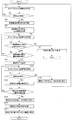
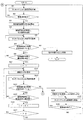
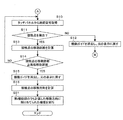
- FIG. 6 is a flowchart illustrating a processing example of a control unit 101 of the mobile phone 100 according to an embodiment. It is a figure which shows an example of the content set to a function table in one Embodiment. 6 is a flowchart illustrating a processing example of a control unit 101 of the mobile phone 100 according to an embodiment. 6 is a flowchart illustrating a processing example of a control unit 101 of the mobile phone 100 according to an embodiment. 6 is a flowchart illustrating a processing example of a control unit 101 of the mobile phone 100 according to an embodiment. 6 is a flowchart illustrating a processing example of a control unit 101 of the mobile phone 100 according to an embodiment. 6 is a flowchart illustrating a processing example of a control unit 101 of the mobile phone 100 according to an embodiment.
- FIG. 1 is a diagram illustrating an example of a schematic configuration of a shopping system S according to the present embodiment.
- the shopping system S includes a mobile phone 100 as an example of a terminal device and a shopping server 200 as an example of a server device.
- the shopping server 200 and the mobile phone 100 can transmit and receive data to and from each other using, for example, TCP / IP as a communication protocol via the network NW.
- the network NW is constructed by, for example, the Internet, a dedicated communication line (for example, a CATV (CommunityCommunAntenna Television) line), a mobile communication network (including a base station, etc.), a gateway, and the like.
- the mobile phone 100 includes a touch panel.
- the mobile phone 100 performs various functions by user operations on the touch panel.
- the mobile phone 100 receives a web page from the shopping server 200 and displays it by a user operation on the touch panel.
- the mobile phone 100 exchanges data with the shopping server 200, so that the user of the mobile phone 100 can purchase a product at a shopping site.
- the shopping server 200 transmits a Web page to the mobile phone 100 based on a request from the mobile phone 100, and performs processing such as purchase of a product by the user.
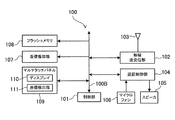
- FIG. 2 is a block diagram showing an example of a schematic configuration of the mobile phone 100 according to the present embodiment.
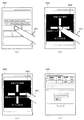
- FIG. 3 is a diagram illustrating a display example of a screen at the time of a storage slide operation.
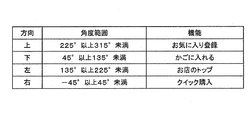
- FIG. 4 is a diagram illustrating an example of contents set in the function table.
- the mobile phone 100 includes a control unit 101, a radio transmission / reception unit 102, an antenna 103, a call control unit 104, a speaker 105, a microphone 106, an incoming call notification unit 107, a flash memory 108, and a touch panel.
- a multi-touch panel 109 is included.
- the control unit 101, the wireless transmission / reception unit 102, the call control unit 104, the incoming call notification unit 107, the flash memory 108, and the multi-touch panel 109 are connected to each other via the bus 100B, and data and signals are transmitted and received.
- the wireless transmission / reception unit 102 accesses the mobile communication network via the antenna 103, and transmits / receives various data such as voice data, message data, and image data to / from other devices provided with communication means.
- the wireless transmission / reception unit 102 establishes a link by accessing the shopping server 200 via the mobile communication network while starting Web browsing application software (hereinafter referred to as “browsing application”), which will be described later, to establish an HTTP (HyperText).
- HTTP Web browsing application software
- HTTP HyperText
- Various types of data are sent and received using protocols such as Transfer (Protocol).
- Multi-touch panel 109 serves as a display of mobile phone 100 and as an input device.
- the multi-touch panel 109 displays coordinates of the display 110 and a point touched by a user with a finger, a touch pen (stylus pen) or the like (hereinafter referred to as “finger”) (hereinafter referred to as “contact point”).
- a coordinate detection unit 111 for detection The display 110 displays various screens under the control of the control unit 101.
- the coordinate detection unit 111 transmits a coordinate signal indicating coordinates touched by the user on various screens to the control unit 101.
- the control part 101 detects a user's input operation based on the received coordinate signal.
- the coordinate detection unit 111 may be configured as a part of the display 110.
- touch means that a finger or the like touches the screen of the display 110.
- Decorator means that a finger or the like that once touches the screen of the display 110 leaves the screen.
- Tap means that the user detaches immediately after touching the screen of the display 110.
- the tap operation is used, for example, as an operation for selecting an object displayed on the screen (for example, a button, a link, or the like displayed on the screen, which can be selected by the user).
- “Slide” refers to moving (sliding) a finger or the like touching the screen of the display 110 without releasing the screen.
- the slide operation is used as an operation for scrolling the screen, for example.
- the multi-touch panel 109 uses an optical coordinate detection unit 111 capable of detecting multiple points (detecting touches on a plurality of points (coordinates) simultaneously).
- the optical coordinate detection unit 111 using the optical sensor system has a built-in optical sensor in each pixel of the panel that constitutes the display 110, and detects the coordinates at which a finger or the like approaches or touches the display 110 by the optical sensor. To do.
- the optical coordinate detection unit 111 can detect the coordinates only by approaching even if the finger or the like does not directly touch the multi-touch panel 109. Therefore, the coordinate detection unit 111 can detect the coordinates below.
- An operation for bringing a finger or the like close to the multi-touch panel 109 within a range is also described as a touch operation.
- the coordinate detection unit 111 is described as an optical coordinate detection unit 111 using an optical sensor method. However, if multipoint detection is possible, other known optical coordinate detection methods are used. Part can be used. Furthermore, the coordinate detection unit is not limited to an optical type, and a known type of coordinate detection unit such as a projection capacitive method or a resistive film method can be used as long as multipoint detection is possible.
- the control unit 101 is mainly configured by a CPU and includes a memory such as a ROM and a RAM.
- the CPU reads various control programs stored in the ROM and the flash memory 108 and uses the RAM as necessary.
- Various controls of the mobile phone 100 are performed by executing the control program.
- the control unit 101 functions as a time measurement unit, a distance measurement unit, a direction detection unit, an execution unit, and a transmission unit of the present invention by executing a browsing application.
- the browsing application may be stored in the ROM or the flash memory 108 in advance, or may be read into the flash memory 108 via a recording medium such as a memory card, or from a predetermined server device to the network NW. You may make it download via this.
- the browsing application is application software that provides an HTML document and other data from a Web server based on an input operation on the multi-touch panel 109 and provides a Web browser function for displaying a Web page on the screen.
- the browsing application provides various functions for the mobile phone 100 to use the shopping site conveniently and easily in cooperation with the shopping server 200.
- the browsing application provides a simple operation method for the mobile phone 100 to execute various functions.
- this operation method the user touches the screen, and after a predetermined time (for example, 1 second) has elapsed without moving the touched finger or the like, the touched finger or the like is moved in a predetermined direction (for example, a predetermined distance) (for example, 1 cm or the like) or more (slid).
- a predetermined direction for example, a predetermined distance
- 1 cm or the like for example, 1 cm or the like
- This page display area is an area in which a Web page is displayed.
- reference numeral 300 denotes a page display area.
- the page display area for example, a Web page showing details of a certain product searched by the user is displayed.
- the user touches an arbitrary position in the page display area.
- reference numeral 301 indicates a finger of the user's hand.
- a function guide (reference numeral 302) is superimposed on the displayed web page as shown in FIG. 3B. Is displayed.
- the function guide is information indicating a sliding direction of a finger or the like and a function to be executed in association with each other. Specifically, up, down, left, and right arrows are displayed as function guides, and functions to be executed are displayed at the ends of the arrows. For example, the upper direction is assigned to “favorite registration”, the lower direction is assigned to “add to basket”, the left direction is assigned to “shop top”, and the right direction is assigned to “quick purchase”.
- “Favorite registration” is a function for registering a product whose details are displayed in a favorite.
- “Add to basket” is a function for putting a product for which details are displayed into a shopping cart.
- the “shop top” is a function for moving to the top web page of a store that sells products for which details are displayed.
- “Quick purchase” is a function for moving to a Web page for purchasing a product for which details are displayed.
- the user slides the finger touched by the user in a certain direction, for example, the right direction for a predetermined distance or more.
- the function guide is erased from the screen, and the function corresponding to the sliding direction is executed. Since the right direction is “quick purchase”, a web page for purchasing a product is displayed in the page display area. Further, when the user detaches the touched finger or the like before sliding it for a predetermined distance or more, the function guide is deleted from the screen, and the web page originally displayed is displayed in the page display area. Therefore, the user can select an object on the Web page without performing any cancel operation.
- the time from when the user touches the page display area until the function guide is displayed is called “minimum contact time”.
- a distance required to slide a finger or the like to execute a function after the function guide is displayed is referred to as a “function execution distance”.
- the minimum contact time and the function execution distance are set in advance and stored in the flash memory 108, for example.
- the minimum contact time is, for example, a time for distinguishing between a normal tap operation and slide operation and a reservoir slide operation. That is, if the user touches the page display area and detaches before the minimum contact time elapses, it becomes a tap operation. If the user slides a finger or the like before the minimum contact time has elapsed since the user touched the page display area, it becomes a slide operation.
- the minimum contact time is set to an appropriate value in order to separate these operations from the storage slide operation.
- the function execution distance is a distance for distinguishing, for example, an erroneous operation by the user or a case where the user unconsciously touches the multi-touch panel 109 and a slide in the accumulation slide operation. Note that the minimum contact time and the function execution distance may be changeable by user operation.
- the function assignment for the slide direction is defined by, for example, a function table shown in FIG.
- the function table is stored in the flash memory 108, for example.
- an angle range in that direction, identification information indicating the function, and the like are set in association with each of the upper, lower, left, and right sliding directions.
- the angle shown in the angle range is the point touched by the user, that is, the right point is 0 ° centered on the contact point, clockwise from the right direction, 90 ° downward, 180 ° left, and upward It is 270 degrees.
- Each of the upper, lower, left and right sliding directions has an angle range of 90 °.
- the upward direction has an angle range of 225 ° or more and less than 315 °. In other words, not only directly above (direction of 270 °) but also a deviation in the sliding direction of less than 45 ° from right to left is included in the upward direction.
- the functions assigned to each slide direction are not limited to the four functions described above. Other functions include, for example, “bookmark registration”, “screen memo”, “similarity search”, “recommend”, “jump within page”, and the like.
- “Bookmark registration” is a function for registering a displayed Web page in a bookmark.
- the “screen memo” is a function for saving the HTML document, the image data, and the like constituting the displayed Web page in the flash memory 108.
- the “similarity search” is a function for searching for a product similar to the product whose details are displayed.
- “Recommend” is a function that recommends the purchase of another product based on the product for which details are displayed.
- “In-page jump” is a function for moving to the next jump tag of the Web page when a part of the Web page is displayed in the page display area.
- a jump tag is an anchor tag or the like described in an HTML document that constitutes a Web page, and is provided with a label (name attribute) for identifying a jump destination. Note that the function assignment in each sliding direction may be changed by a user operation.
- “bookmark registration”, “screen memo”, and “jump within page” can be realized by the mobile phone 100 alone.
- the mobile phone 100 needs to cooperate with the shopping server 200. Therefore, when displaying the Web page on the screen, the control unit 101 determines the product ID that is the product identification information, the store ID that is the store identification information, and the like from the HTML document that configures the Web page and the URL thereof. get.
- the control unit 101 selects a function corresponding to the slide direction based on the function table.
- the control part 101 transmits the HTTP request (an example of an execution request) corresponding to the selected function to the shopping server 200, for example.
- HTTP request an example of an execution request
- the control unit 101 displays details in the URL corresponding to the function.
- a request URL is created by adding the product ID of the current product, and a request including the request URL is transmitted to the shopping server 200.
- the control unit 101 creates the URL of the top web page of the store based on the store ID of the store that sells the product whose details are displayed, A request including the request URL is transmitted to the shopping server 200.
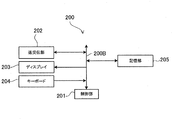
- FIG. 5 is a block diagram illustrating an example of a schematic configuration of the shopping server 200 according to the present embodiment.
- the shopping server 200 includes a control unit 201, a transmission / reception unit 202, a display 203, a keyboard 204, and a storage unit 205. These components are connected to each other by a bus 200B, and data and signals are transmitted and received.
- the transmission / reception unit 202 establishes a link with the mobile phone 100 to transmit / receive various data.
- the display 203 and the keyboard 204 are used when the administrator of the shopping server 200 maintains and manages the shopping server 200.
- the storage unit 205 is configured by, for example, a hard disk drive.
- various databases such as a member DB (database), a store DB, a product DB, and a member use DB are constructed.
- a member DB database
- a store DB information related to users registered as members in the shopping site
- member ID, password information related to users registered as members in the shopping site
- member ID information related to users registered as members in the shopping site
- the store DB information (for example, store ID, password, store name, address, telephone number, e-mail address, etc.) related to stores that sell products on the shopping site is registered for each store.
- information related to products sold on the shopping site for example, store ID, product ID, product name, price, description information, images related to products, etc. of stores that sell products
- store ID information related to products sold on the shopping site
- product ID information related to products sold on the shopping site
- product name for example, product ID
- price for example, price
- description information for example, price
- member use ID user information related to the use of the shopping site (for example, member ID, purchase history, browsing history, favorite product information, etc.) is registered for each user.
- the storage unit 205 stores various data such as HTML documents, image data, audio data, text data, electronic documents, and the like of each Web page that constitutes the shopping site.
- the control unit 201 is configured around a CPU and includes a memory such as a ROM and a RAM.
- the CPU reads various control programs stored in the ROM and the storage unit 205 and uses the RAM as necessary.
- Various control of the shopping server 200 is performed by executing the control program.
- the control unit 201 functions as a receiving unit and a processing unit of the present invention by executing a Web server program.
- the Web server program may be read into the storage unit 205 via a recording medium such as a CD-ROM, or may be downloaded from a predetermined server device via the network NW.
- FIG. 6 is a flowchart showing a processing example of the control unit 101 of the mobile phone 100 according to the present embodiment.
- the browser application is activated on the mobile phone 100.
- login to the shopping site is performed.
- the shopping server 200 issues a session ID to the mobile phone 100. Since the session ID is included in the request from the mobile phone 100 to the shopping server 200, the shopping server 200 can specify which user the request is from.
- a request is transmitted from the mobile phone 100 to the shopping server 200 based on an operation by the user, and based on the request, the shopping server 200 performs a product search process and shows details of the product selected by the user.
- the HTML document is transmitted to the mobile phone 100.
- the control unit 101 of the mobile phone 100 displays a Web page in the page display area of the screen based on the received HTML document.
- the process shown in FIG. 6 is started when the Web page display process is completed.
- control unit 101 acquires a coordinate signal from the coordinate detection unit 111 of the multi-touch panel 109 (step S1). Next, the control unit 101 determines whether a contact point with respect to the page display area of the screen has been detected based on the acquired coordinate signal (step S2). That is, the control unit 101 determines whether or not the page display area is touched. At this time, if the contact point is not detected (step S2: NO), the control unit 101 proceeds to step S1 and acquires a coordinate signal at the next sampling timing.
- step S2 when the control unit 101 detects a contact point (step S2: YES), the control unit 101 starts measuring the contact duration as a time measurement unit (step S3). Next, the control unit 101 specifies the contact start point, and stores the coordinates of the specified contact start point in the RAM (step S4).
- a contact point contact point group
- the control unit 101 specifies the coordinates of the center of the contact area as the coordinates of the contact start point.
- an intermediate point between the left end coordinate and the right end coordinate of the contact area is set as the X coordinate of the contact point
- an intermediate point between the upper end coordinate and the lower end coordinate of the contact area is set as the Y coordinate of the contact point.
- step S5 After storing the coordinates of the contact start point, the control unit 101 acquires a coordinate signal from the coordinate detection unit 111 of the multi-touch panel 109 when the next sampling timing arrives (step S5). Next, the control unit 101 determines whether or not contact is detected at the contact start point based on the acquired coordinate signal (step S6). At this time, if no contact is detected at the contact start point (step S6: NO), the control unit 101 proceeds to step S7.
- step S7 The fact that no contact has been detected at the contact start point indicates that the contact point has been moved by detaching (that is, tapping in this case) or by sliding the touched finger or the like. Therefore, in step S7, the control unit 101 executes processing according to the tap operation or the slide operation.
- step S6 when a contact is detected at the contact start point (step S6), the control unit 101 proceeds to step S8. That contact is detected at the contact start point indicates that the touched finger or the like is not slid (the contact point is not moved or hardly moved). Therefore, in step S8, the control unit 101 determines whether or not an elapsed time since contact is detected (measurement of the contact duration time is started in step S3), that is, whether or not the contact duration time is equal to or longer than the minimum contact time. (Step S8). At this time, if the contact duration time is less than the minimum contact time (step S8: NO), the control unit 101 proceeds to step S5 and acquires a coordinate signal at the next sampling timing.
- the control unit 101 displays the function guide in the page display area (step S9). Then, the control unit 101 detects the continuous movement of the contact point and measures the movement distance in steps S10 to S14 as distance measurement means.
- the detection of the continuous movement of the contact point is to detect a slide in the accumulation slide operation.
- the continuous movement of the contact point seen from the control unit 101 means that the contact point moves on condition that the contact point is detected at each sampling timing. Furthermore, for example, at least one contact point (contact point group) detected at the previous sampling timing is determined to be that the contact point has moved continuously if contact is detected at the current sampling timing. It is good as a condition.
- the contact point cannot be detected at a completely distant position between the previous sampling timing and the current sampling timing, and at least some This is because the contact points overlap.
- the movement of the contact point is resumed after the movement of the contact point is temporarily stopped, it is regarded as a continuous movement of the contact point.
- step S10 the control unit 101 acquires a coordinate signal from the coordinate detection unit 111 of the multi-touch panel 109 (step S10).
- step S11 the control unit 101 determines whether a contact point is detected based on the acquired coordinate signal.
- step S11 NO
- the control unit 101 proceeds to step S12.
- the fact that the contact has not been detected is, for example, a case where the touched finger or the like is detached before moving beyond the function execution distance. Therefore, in step S12, the control unit 101 deletes the function guide from the screen and returns to the original screen display. And the control part 101 transfers to step S1, and acquires a coordinate signal at the next sampling timing.
- step S11 when the contact point is detected (step S11: YES), the control unit 101 specifies the coordinates of the center of the contact area as the current contact point, and determines the contact point from the contact start point to the current contact point.
- the moving distance is measured (step S13).
- a linear distance from the contact start point to the current contact point may be used as the movement distance of the contact point.
- step S14 determines whether or not the calculated movement distance of the contact point is greater than or equal to the function execution distance. At this time, when the moving distance of the contact point is less than the function execution distance (step S14: NO), the control unit 101 proceeds to step S10 and acquires a coordinate signal at the next sampling timing.
- step S14 when the moving distance of the contact point is equal to or longer than the function execution distance (step S14: YES), the control unit 101 deletes the function guide from the screen and returns to the original screen display.
- the control unit 11 calculates the moving direction of the contact point based on the coordinates of the contact start point and the coordinates of the current contact point as direction detection means (step S16).
- step S17 the control unit 101 refers to the function table, and selects and executes a function assigned to an angle range including the calculated movement direction as an execution unit (step S17).
- the control unit 101 transmits a request corresponding to the function to the shopping server 200 as a transmission unit.
- the control unit 201 of the shopping server 200 executes a process corresponding to the selected function while accessing various databases based on the request as a processing unit. And the control part 201 transmits a response to the mobile telephone 100 based on the execution result of this process. At this time, the control unit 201 transmits an HTML document indicating an execution result or the like included in a response as necessary. Based on the received response, the control unit 101 of the mobile phone 100 displays a function execution result on the screen or displays a Web page on the screen.
- the control unit 101 of the mobile phone 100 detects a contact point on the multi-touch panel 109, measures the contact duration at the contact point, and continuously detects the contact point.
- the movement distance of the contact point is measured, and the contact duration is the minimum contact time or more and the movement distance of the contact point is the function execution distance or more, the preset function is Execute. Accordingly, after the user touches the multi-touch panel 109 and continues contact for at least the minimum contact time at the contact point, the user performs a pool slide operation in which the contact point is continuously moved over the function execution distance while continuing contact.
- a preset function is executed, the object originally displayed on the multi-touch panel is not selected by mistake.
- the object originally displayed on the touch panel 109 can be operated by setting the multi-touch panel 109 once to the detached state without performing the cancel operation, and the user can perform a series of operations such as contact and movement, that is, one action. Since the function can be executed with this, the convenience can be improved.
- control unit 101 of the mobile phone 100 detects the moving direction in which the contact point has moved continuously, the contact duration is not less than the minimum contact time, and the moving distance of the contact point is not less than the function execution distance.
- a function set in advance is executed for an angle range including the detected moving direction. Therefore, since the user can select and execute a desired function from a plurality of functions by determining the direction in which the contact point is moved, the convenience can be further improved.
- the control unit 101 of the mobile phone 100 issues a request to execute a preset function.
- the control unit 201 of the shopping server 200 that transmits the request to the shopping server 200 and receives the request executes processing corresponding to the request. Therefore, even functions that cannot be executed by the mobile phone 100 alone can be realized by cooperating with the shopping server 200.
- the control unit 101 of the mobile phone 100 displays the function guide on the screen when the contact duration exceeds the minimum contact time
- the function guide is deleted from the screen when the contact point is no longer detected.
- the screen display is restored to the original state before the function guide display. Therefore, it is possible to allow the user to recognize in which direction the finger or the like can be slid while allowing the object originally displayed on the multi-touch panel 109 to be operated without performing the cancel operation.
- the function is assigned to the sliding direction in the reservoir slide operation.
- functions can be assigned to the sliding direction and the contact duration.
- FIG. 7 is a diagram showing an example of contents set in the function table.
- function groups are assigned to a plurality of ranges of contact duration time. For example, when the minimum contact time is 1 second, the first function group is assigned to 1 second to less than 5 seconds, and the second function group is assigned to 5 seconds to less than 10 seconds.
- a function is assigned to each of the up / down / left / right sliding directions. That is, eight functions are assigned in total for the first function group and the second function group.
- a function group upper limit time is set for each function group.
- an upper limit value of a time range corresponding to the function group is set (for example, 5 seconds is set for the first function group upper limit time, and 10 seconds is set for the second function group upper limit time. ).
- the reservoir slide operation of the present embodiment will be described more specifically.
- the function guide 1 corresponding to the first function group is displayed. Specifically, as the function guide 1, each function included in the first function group is displayed corresponding to each of the up / down / left / right sliding directions. Thereafter, when the user slides the touched finger in a certain direction more than the function execution distance before 5 seconds as the first function group upper limit time has elapsed since the start of the touch, The function corresponding to the slide direction is executed. The state of the screen transition at this time is the same as that shown in FIGS.
- the function guide 2 corresponding to the second function group is displayed instead of the function guide 1. Specifically, each function included in the second function group is displayed as the function guide 2 corresponding to each of the up / down / left / right sliding directions. Thereafter, when the user slides the touched finger in a certain direction more than the function execution distance before 10 seconds as the second function group upper limit time has elapsed since the start of the touch, the second function group The function corresponding to the slide direction is executed. On the other hand, if 10 seconds have elapsed since the user started touching without moving the touched finger, the function guide 2 is erased from the screen, and the original screen display is restored.
- FIG. 8 and 9 are flowcharts showing a processing example of the control unit 101 of the mobile phone 100 according to the present embodiment.
- FIG. 8 processes similar to those in FIG. 6 are given the same step numbers.
- step S8 if the contact duration time is equal to or longer than the minimum contact time (step S8: YES), the control unit 101 sets 1 to the function group number i (step S21). Next, the control unit 101 displays the function guide i in the page display area (step S22). Then, when the next sampling timing arrives, the control unit 101 acquires a coordinate signal from the coordinate detection unit 111 of the multi-touch panel 109 (step S23). Next, the control unit 101 determines whether or not contact is detected at the contact start point based on the acquired coordinate signal (step S24).
- step S24 when contact is detected at the contact start point (step S24: YES), the control unit 101 determines whether or not the contact duration is equal to or longer than the i-th function group upper limit time (step S25). . At this time, when the contact duration is less than the i-th function group upper limit time (step S25: NO), the control unit 101 proceeds to step S23 and acquires a coordinate signal at the next sampling timing.
- step S25 when the contact duration is equal to or longer than the i-th function group upper limit time (step S25: YES), the control unit 101 adds 1 to the function group number i (step S26). Next, the control unit 101 determines whether or not the function group number i is greater than 2 (step S27). At this time, when the function group number i is 2 or less (step S27: NO), the control unit 101 proceeds to step S22. At this time, the control unit 101 deletes the function guide i-1 from the page display area and displays the function guide i in the page display area.
- step 27 if the function group number i is greater than 2 (step 27: YES), the control unit 101 proceeds to step 28.
- the control unit 101 waits until the user detaches, and then proceeds to step S1. Specifically, the control unit 101 deletes the function guide from the screen and returns to the original screen display (step S28).
- the control unit 101 acquires a coordinate signal from the coordinate detection unit 111 of the multi-touch panel 109 (step S29).
- step S30 the control unit 101 determines whether or not a contact point with respect to the page display area of the screen has been detected based on the acquired coordinate signal.
- step S30: YES if the control unit 101 detects a contact point (step S30: YES), the control unit 101 proceeds to step S29 and acquires a coordinate signal at the next sampling timing. On the other hand, when the contact point is not detected (step S30: NO), the control unit 101 proceeds to step S1 and acquires a coordinate signal at the next sampling timing.
- step S24 if no contact is detected at the contact start point (step S24: NO), the control unit 101 proceeds to step S10 as shown in FIG.
- the processing in steps S10 to S16 is the same as that in the first embodiment.
- the control unit 101 refers to the function table and selects a function assigned to the angular range including the calculated moving direction from the i-th function group. Execute (Step S31).
- the control unit 101 of the mobile phone 100 has a contact duration time equal to or longer than the minimum contact time and the moving distance of the contact point is equal to or longer than the function execution distance.
- the preset function is executed for the angle range including the detected moving direction and the time range including the contact duration. Therefore, the user can select and execute a desired function from a plurality of functions by determining the contact duration time at the contact point and the direction in which the contact point is moved, so that convenience can be further improved.
- the angle range in the moving direction of the contact point is four ranges, but may be three ranges or less, or five ranges or more.
- a function may be assigned only to a predetermined range among a plurality of angle ranges.
- the range of the contact duration is 2 ranges, but may be 3 ranges or more.
- the function is assigned to the range of the moving direction of the contact point and the range of the contact duration, but the function may be assigned only to the range of the contact duration.
- the control unit 101 of the mobile phone 100 executes a function assigned to the range of the contact duration regardless of the direction in which the contact point moves.
- the control unit 101 may display a function guide. As the function guide in this case, information indicating one function assigned corresponding to the range of the contact duration time is displayed.
- control unit 101 may not display the function guide. In that case, the fact that the selectable function has been switched may be explicitly displayed by another method such as highlighting of a contact point.
- control unit 101 does not have to consider the moving direction of the contact point and the contact duration when determining the function to be executed. That is, as long as the condition that the contact duration is equal to or longer than the minimum contact time and the moving distance of the contact point is equal to or longer than the function execution distance, the control unit 101 determines which direction the moving direction of the contact point is. Regardless of whether or not the contact duration time is how long, one preset function may be executed.
- the present invention can also be applied to a case where a function is executed when a type of Web page is being displayed.
- the present invention can also be applied to a case where a function for using a site other than a shopping site is executed.
- the function execution program of the present invention is applied to application software for browsing a Web page.
- the function execution program of the present invention can be applied to other application software.
- the present invention may be applied to various functions of the mobile phone 100.
- the terminal device of the present invention is applied to a mobile phone.
- the terminal device of the present invention is applied to a device other than the mobile phone as long as the terminal device includes a touch panel. You may do it.
Landscapes
- Engineering & Computer Science (AREA)
- General Engineering & Computer Science (AREA)
- Theoretical Computer Science (AREA)
- Human Computer Interaction (AREA)
- Physics & Mathematics (AREA)
- General Physics & Mathematics (AREA)
- User Interface Of Digital Computer (AREA)
- Position Input By Displaying (AREA)
- Telephone Function (AREA)
Priority Applications (1)
| Application Number | Priority Date | Filing Date | Title |
|---|---|---|---|
| US13/503,219 US9671952B2 (en) | 2009-10-23 | 2010-10-12 | Function execution program, terminal device, function execution method, recording medium and information processing system |
Applications Claiming Priority (2)
| Application Number | Priority Date | Filing Date | Title |
|---|---|---|---|
| JP2009-243998 | 2009-10-23 | ||
| JP2009243998A JP5433375B2 (ja) | 2009-10-23 | 2009-10-23 | 端末装置、機能実行方法、機能実行プログラム及び情報処理システム |
Publications (1)
| Publication Number | Publication Date |
|---|---|
| WO2011048977A1 true WO2011048977A1 (ja) | 2011-04-28 |
Family
ID=43900204
Family Applications (1)
| Application Number | Title | Priority Date | Filing Date |
|---|---|---|---|
| PCT/JP2010/067880 Ceased WO2011048977A1 (ja) | 2009-10-23 | 2010-10-12 | 機能実行プログラム、端末装置、機能実行方法、記録媒体及び情報処理システム |
Country Status (3)
| Country | Link |
|---|---|
| US (1) | US9671952B2 (enExample) |
| JP (1) | JP5433375B2 (enExample) |
| WO (1) | WO2011048977A1 (enExample) |
Cited By (5)
| Publication number | Priority date | Publication date | Assignee | Title |
|---|---|---|---|---|
| WO2013157330A1 (ja) * | 2012-04-20 | 2013-10-24 | ソニー株式会社 | 情報処理装置、情報処理方法、及びプログラム |
| CN103488387A (zh) * | 2012-06-08 | 2014-01-01 | 联想(北京)有限公司 | 一种信息处理的方法及一种电子设备 |
| JP2015217006A (ja) * | 2014-05-15 | 2015-12-07 | 株式会社コロプラ | ユーザインターフェースプログラム及び当該プログラムを備えたゲームプログラム |
| JP2015229081A (ja) * | 2014-06-06 | 2015-12-21 | 株式会社セガゲームス | プログラム及び端末装置 |
| WO2016092864A1 (ja) * | 2014-12-13 | 2016-06-16 | Movin合同会社 | ユーザーインタフェースを提供する方法、プログラム及び電子機器 |
Families Citing this family (32)
| Publication number | Priority date | Publication date | Assignee | Title |
|---|---|---|---|---|
| JP5775291B2 (ja) * | 2010-12-07 | 2015-09-09 | シャープ株式会社 | 電子機器および表示方法 |
| JP5756682B2 (ja) * | 2011-06-15 | 2015-07-29 | シャープ株式会社 | 情報処理装置 |
| US9417754B2 (en) | 2011-08-05 | 2016-08-16 | P4tents1, LLC | User interface system, method, and computer program product |
| JP5545497B2 (ja) * | 2011-08-22 | 2014-07-09 | 富士ゼロックス株式会社 | 入力表示装置、画像形成装置、撮像装置、及びプログラム |
| JP5816516B2 (ja) | 2011-10-24 | 2015-11-18 | 京セラ株式会社 | 電子機器、制御プログラム及び処理実行方法 |
| US8773381B2 (en) * | 2012-03-02 | 2014-07-08 | International Business Machines Corporation | Time-based contextualizing of multiple pages for electronic book reader |
| JP5994300B2 (ja) * | 2012-03-12 | 2016-09-21 | ブラザー工業株式会社 | 入力装置及び入力プログラム |
| JP2013200836A (ja) * | 2012-03-26 | 2013-10-03 | Toshiba Denpa Products Kk | 操作支援方法及び操作支援プログラム |
| JP6036082B2 (ja) * | 2012-09-21 | 2016-11-30 | ブラザー工業株式会社 | 画像処理装置および画像処理プログラム |
| JP5949406B2 (ja) * | 2012-10-01 | 2016-07-06 | 株式会社デンソー | ユニット操作システム、当該システムに用いられるスレーブ表示装置、及び、マスタ表示装置 |
| US9411507B2 (en) * | 2012-10-02 | 2016-08-09 | Toyota Motor Engineering & Manufacturing North America, Inc. | Synchronized audio feedback for non-visual touch interface system and method |
| JP2014221156A (ja) * | 2013-05-14 | 2014-11-27 | 株式会社大一商会 | 遊技機 |
| JP2014223120A (ja) * | 2013-05-15 | 2014-12-04 | 株式会社大一商会 | 遊技機 |
| JP2014238621A (ja) * | 2013-06-06 | 2014-12-18 | カルソニックカンセイ株式会社 | 入力受付装置 |
| JP6218451B2 (ja) * | 2013-06-18 | 2017-10-25 | シャープ株式会社 | プログラム実行装置 |
| JP6153007B2 (ja) * | 2013-07-19 | 2017-06-28 | 株式会社コナミデジタルエンタテインメント | 操作システム、操作制御方法、操作制御プログラム |
| JP6334125B2 (ja) | 2013-10-11 | 2018-05-30 | 任天堂株式会社 | 表示制御プログラム、表示制御装置、表示制御システム、および表示制御方法 |
| US10331777B2 (en) | 2013-12-31 | 2019-06-25 | Barnes & Noble College Booksellers, Llc | Merging annotations of paginated digital content |
| US10915698B2 (en) * | 2013-12-31 | 2021-02-09 | Barnes & Noble College Booksellers, Llc | Multi-purpose tool for interacting with paginated digital content |
| US10528250B2 (en) | 2014-02-21 | 2020-01-07 | Groupon, Inc. | Method and system for facilitating consumer interactions with promotions |
| US10425575B2 (en) * | 2014-08-12 | 2019-09-24 | Sony Corporation | Information processing device, program, and information processing method |
| JP6063437B2 (ja) * | 2014-12-19 | 2017-01-18 | 株式会社スクウェア・エニックス | プログラム、コンピュータ装置、コンピュータ処理方法、及びシステム |
| KR102318920B1 (ko) | 2015-02-28 | 2021-10-29 | 삼성전자주식회사 | 전자 장치 및 전자 장치의 제어 방법 |
| KR102402678B1 (ko) * | 2015-03-18 | 2022-05-26 | 삼성전자주식회사 | 이벤트 기반 센서 및 프로세서의 동작 방법 |
| JP6078684B1 (ja) * | 2016-09-30 | 2017-02-08 | グリー株式会社 | プログラム、制御方法、および情報処理装置 |
| JP2017060861A (ja) * | 2016-12-16 | 2017-03-30 | 株式会社スクウェア・エニックス | プログラム、コンピュータ装置、コンピュータ処理方法、及びシステム |
| JP6912995B2 (ja) * | 2017-01-16 | 2021-08-04 | グリー株式会社 | プログラム、制御方法、および情報処理装置 |
| JP2018057801A (ja) * | 2017-01-16 | 2018-04-12 | グリー株式会社 | プログラム、制御方法、および情報処理装置 |
| JP7139494B2 (ja) * | 2017-10-20 | 2022-09-20 | グリー株式会社 | プログラム、制御方法、および情報処理装置 |
| CN111158575B (zh) * | 2019-12-30 | 2021-05-25 | 广州酷狗计算机科技有限公司 | 终端执行处理的方法、装置、设备以及存储介质 |
| JP6956246B1 (ja) * | 2020-10-29 | 2021-11-02 | 株式会社あかつき | 情報処理方法、プログラム、情報処理装置 |
| JP7427635B2 (ja) * | 2020-10-29 | 2024-02-05 | 株式会社あかつき | 情報処理方法、プログラム、情報処理装置 |
Citations (2)
| Publication number | Priority date | Publication date | Assignee | Title |
|---|---|---|---|---|
| JPS63172325A (ja) * | 1987-01-10 | 1988-07-16 | Pioneer Electronic Corp | タツチパネル制御装置 |
| JPH11507455A (ja) * | 1995-06-06 | 1999-06-29 | シリコン グラフィックス インコーポレイテッド | メニューの作成、制御、表示のための方法及び装置 |
Family Cites Families (10)
| Publication number | Priority date | Publication date | Assignee | Title |
|---|---|---|---|---|
| JP3546337B2 (ja) * | 1993-12-21 | 2004-07-28 | ゼロックス コーポレイション | 計算システム用ユーザ・インタフェース装置及びグラフィック・キーボード使用方法 |
| JPH08286807A (ja) * | 1995-04-18 | 1996-11-01 | Canon Inc | データ処理装置及びそのジェスチャ認識方法 |
| JP3385965B2 (ja) * | 1998-04-20 | 2003-03-10 | セイコーエプソン株式会社 | 入力装置及び入力方法 |
| JP2001117686A (ja) * | 1999-10-20 | 2001-04-27 | Toshiba Corp | ペン入力装置およびペン入力装置のポインティング処理方法 |
| US6897853B2 (en) * | 2000-11-10 | 2005-05-24 | Microsoft Corp. | Highlevel active pen matrix |
| US7302650B1 (en) * | 2003-10-31 | 2007-11-27 | Microsoft Corporation | Intuitive tools for manipulating objects in a display |
| US7533349B2 (en) * | 2006-06-09 | 2009-05-12 | Microsoft Corporation | Dragging and dropping objects between local and remote modules |
| JP2008009668A (ja) | 2006-06-29 | 2008-01-17 | Syn Sophia Inc | タッチパネルの駆動方法及び入力方法 |
| JP5210547B2 (ja) * | 2007-05-29 | 2013-06-12 | 任天堂株式会社 | 移動制御プログラムおよび移動制御装置 |
| US8302033B2 (en) * | 2007-06-22 | 2012-10-30 | Apple Inc. | Touch screen device, method, and graphical user interface for providing maps, directions, and location-based information |
-
2009
- 2009-10-23 JP JP2009243998A patent/JP5433375B2/ja active Active
-
2010
- 2010-10-12 WO PCT/JP2010/067880 patent/WO2011048977A1/ja not_active Ceased
- 2010-10-12 US US13/503,219 patent/US9671952B2/en active Active
Patent Citations (2)
| Publication number | Priority date | Publication date | Assignee | Title |
|---|---|---|---|---|
| JPS63172325A (ja) * | 1987-01-10 | 1988-07-16 | Pioneer Electronic Corp | タツチパネル制御装置 |
| JPH11507455A (ja) * | 1995-06-06 | 1999-06-29 | シリコン グラフィックス インコーポレイテッド | メニューの作成、制御、表示のための方法及び装置 |
Cited By (7)
| Publication number | Priority date | Publication date | Assignee | Title |
|---|---|---|---|---|
| WO2013157330A1 (ja) * | 2012-04-20 | 2013-10-24 | ソニー株式会社 | 情報処理装置、情報処理方法、及びプログラム |
| US9898159B2 (en) | 2012-04-20 | 2018-02-20 | Sony Corporation | Arrangement and display of graphical elements based on designation of a point |
| CN103488387A (zh) * | 2012-06-08 | 2014-01-01 | 联想(北京)有限公司 | 一种信息处理的方法及一种电子设备 |
| JP2015217006A (ja) * | 2014-05-15 | 2015-12-07 | 株式会社コロプラ | ユーザインターフェースプログラム及び当該プログラムを備えたゲームプログラム |
| JP2015229081A (ja) * | 2014-06-06 | 2015-12-21 | 株式会社セガゲームス | プログラム及び端末装置 |
| WO2016092864A1 (ja) * | 2014-12-13 | 2016-06-16 | Movin合同会社 | ユーザーインタフェースを提供する方法、プログラム及び電子機器 |
| JPWO2016092864A1 (ja) * | 2014-12-13 | 2017-11-24 | Movin合同会社 | ユーザーインタフェースを提供する方法、プログラム及び電子機器 |
Also Published As
| Publication number | Publication date |
|---|---|
| JP2011090532A (ja) | 2011-05-06 |
| JP5433375B2 (ja) | 2014-03-05 |
| US9671952B2 (en) | 2017-06-06 |
| US20120212450A1 (en) | 2012-08-23 |
Similar Documents
| Publication | Publication Date | Title |
|---|---|---|
| JP5433375B2 (ja) | 端末装置、機能実行方法、機能実行プログラム及び情報処理システム | |
| JP5712172B2 (ja) | 情報表示制御システム、携帯端末、および制御方法 | |
| US20090207139A1 (en) | Apparatus, method and computer program product for manipulating a reference designator listing | |
| CN103823801B (zh) | 一种在移动终端中实现网页分享的方法、装置及系统 | |
| US20170212659A1 (en) | Method and apparatus for selecting link entities in touch screen based web browser environment | |
| WO2014030456A1 (ja) | ユーザインタフェース装置、ユーザインタフェース方法及びプログラム | |
| US20120023410A1 (en) | Computing device and displaying method at the computing device | |
| CN102663055A (zh) | 浏览器导航的实现方法、装置及浏览器 | |
| JP2015092304A (ja) | 情報表示装置 | |
| WO2013182141A1 (zh) | 一种人机交互方法、装置及其电子设备 | |
| US20090327408A1 (en) | Mobile terminal | |
| US20160147313A1 (en) | Mobile Terminal and Display Orientation Control Method | |
| JP2014219740A (ja) | 情報処理装置、情報処理システム、情報処理方法およびプログラム | |
| US20130055114A1 (en) | Enhanced and Extended Browsing Via Companion Mobile Device | |
| JP6275218B1 (ja) | 情報処理プログラム、情報処理装置および情報処理方法 | |
| JP5398555B2 (ja) | 装置、装置の制御方法 | |
| US20130205260A1 (en) | Method and apparatus for managing an application in a mobile electronic device | |
| CN103618958A (zh) | 一种电视机文本信息输入方法及装置 | |
| JP2014071669A (ja) | 情報表示装置、制御方法及びプログラム | |
| JP4929330B2 (ja) | 入力支援プログラム、端末及びWebシステム | |
| JP4135491B2 (ja) | 携帯端末装置および機能起動プログラム | |
| US20210200832A1 (en) | Presenting indicators associated with network-associated content | |
| JP6262889B2 (ja) | 情報処理装置、情報処理方法及びプログラム | |
| KR101635978B1 (ko) | 대형화면을 갖는 휴대단말기에서 쇼핑용 어플리케이션의 제어방법 | |
| JP7632193B2 (ja) | 表示制御プログラム |
Legal Events
| Date | Code | Title | Description |
|---|---|---|---|
| 121 | Ep: the epo has been informed by wipo that ep was designated in this application |
Ref document number: 10824826 Country of ref document: EP Kind code of ref document: A1 |
|
| WWE | Wipo information: entry into national phase |
Ref document number: 13503219 Country of ref document: US |
|
| 122 | Ep: pct application non-entry in european phase |
Ref document number: 10824826 Country of ref document: EP Kind code of ref document: A1 |