WO2010016409A1 - 入力装置、入力方法、及び入力プログラムを記録した記録媒体 - Google Patents
入力装置、入力方法、及び入力プログラムを記録した記録媒体 Download PDFInfo
- Publication number
- WO2010016409A1 WO2010016409A1 PCT/JP2009/063376 JP2009063376W WO2010016409A1 WO 2010016409 A1 WO2010016409 A1 WO 2010016409A1 JP 2009063376 W JP2009063376 W JP 2009063376W WO 2010016409 A1 WO2010016409 A1 WO 2010016409A1
- Authority
- WO
- WIPO (PCT)
- Prior art keywords
- area
- display
- display screen
- item
- menu
- Prior art date
- Legal status (The legal status is an assumption and is not a legal conclusion. Google has not performed a legal analysis and makes no representation as to the accuracy of the status listed.)
- Ceased
Links
Images







Classifications
-
- G—PHYSICS
- G06—COMPUTING OR CALCULATING; COUNTING
- G06F—ELECTRIC DIGITAL DATA PROCESSING
- G06F3/00—Input arrangements for transferring data to be processed into a form capable of being handled by the computer; Output arrangements for transferring data from processing unit to output unit, e.g. interface arrangements
- G06F3/01—Input arrangements or combined input and output arrangements for interaction between user and computer
- G06F3/048—Interaction techniques based on graphical user interfaces [GUI]
- G06F3/0487—Interaction techniques based on graphical user interfaces [GUI] using specific features provided by the input device, e.g. functions controlled by the rotation of a mouse with dual sensing arrangements, or of the nature of the input device, e.g. tap gestures based on pressure sensed by a digitiser
- G06F3/0488—Interaction techniques based on graphical user interfaces [GUI] using specific features provided by the input device, e.g. functions controlled by the rotation of a mouse with dual sensing arrangements, or of the nature of the input device, e.g. tap gestures based on pressure sensed by a digitiser using a touch-screen or digitiser, e.g. input of commands through traced gestures
- G06F3/04883—Interaction techniques based on graphical user interfaces [GUI] using specific features provided by the input device, e.g. functions controlled by the rotation of a mouse with dual sensing arrangements, or of the nature of the input device, e.g. tap gestures based on pressure sensed by a digitiser using a touch-screen or digitiser, e.g. input of commands through traced gestures for inputting data by handwriting, e.g. gesture or text
-
- H—ELECTRICITY
- H04—ELECTRIC COMMUNICATION TECHNIQUE
- H04M—TELEPHONIC COMMUNICATION
- H04M1/00—Substation equipment, e.g. for use by subscribers
- H04M1/247—Telephone sets including user guidance or feature selection means facilitating their use
- H04M1/2477—Telephone sets including user guidance or feature selection means facilitating their use for selecting a function from a menu display
-
- G—PHYSICS
- G06—COMPUTING OR CALCULATING; COUNTING
- G06F—ELECTRIC DIGITAL DATA PROCESSING
- G06F3/00—Input arrangements for transferring data to be processed into a form capable of being handled by the computer; Output arrangements for transferring data from processing unit to output unit, e.g. interface arrangements
- G06F3/01—Input arrangements or combined input and output arrangements for interaction between user and computer
- G06F3/048—Interaction techniques based on graphical user interfaces [GUI]
- G06F3/0481—Interaction techniques based on graphical user interfaces [GUI] based on specific properties of the displayed interaction object or a metaphor-based environment, e.g. interaction with desktop elements like windows or icons, or assisted by a cursor's changing behaviour or appearance
- G06F3/0482—Interaction with lists of selectable items, e.g. menus
-
- G—PHYSICS
- G06—COMPUTING OR CALCULATING; COUNTING
- G06F—ELECTRIC DIGITAL DATA PROCESSING
- G06F3/00—Input arrangements for transferring data to be processed into a form capable of being handled by the computer; Output arrangements for transferring data from processing unit to output unit, e.g. interface arrangements
- G06F3/01—Input arrangements or combined input and output arrangements for interaction between user and computer
- G06F3/048—Interaction techniques based on graphical user interfaces [GUI]
- G06F3/0487—Interaction techniques based on graphical user interfaces [GUI] using specific features provided by the input device, e.g. functions controlled by the rotation of a mouse with dual sensing arrangements, or of the nature of the input device, e.g. tap gestures based on pressure sensed by a digitiser
- G06F3/0488—Interaction techniques based on graphical user interfaces [GUI] using specific features provided by the input device, e.g. functions controlled by the rotation of a mouse with dual sensing arrangements, or of the nature of the input device, e.g. tap gestures based on pressure sensed by a digitiser using a touch-screen or digitiser, e.g. input of commands through traced gestures
- G06F3/04886—Interaction techniques based on graphical user interfaces [GUI] using specific features provided by the input device, e.g. functions controlled by the rotation of a mouse with dual sensing arrangements, or of the nature of the input device, e.g. tap gestures based on pressure sensed by a digitiser using a touch-screen or digitiser, e.g. input of commands through traced gestures by partitioning the display area of the touch-screen or the surface of the digitising tablet into independently controllable areas, e.g. virtual keyboards or menus
-
- H—ELECTRICITY
- H04—ELECTRIC COMMUNICATION TECHNIQUE
- H04M—TELEPHONIC COMMUNICATION
- H04M1/00—Substation equipment, e.g. for use by subscribers
- H04M1/72—Mobile telephones; Cordless telephones, i.e. devices for establishing wireless links to base stations without route selection
- H04M1/724—User interfaces specially adapted for cordless or mobile telephones
- H04M1/72469—User interfaces specially adapted for cordless or mobile telephones for operating the device by selecting functions from two or more displayed items, e.g. menus or icons
-
- H—ELECTRICITY
- H04—ELECTRIC COMMUNICATION TECHNIQUE
- H04M—TELEPHONIC COMMUNICATION
- H04M2250/00—Details of telephonic subscriber devices
- H04M2250/22—Details of telephonic subscriber devices including a touch pad, a touch sensor or a touch detector
Definitions
- the present invention relates to an input device in a portable terminal, and more particularly to an input device that can be operated by a user instructing a coordinate position on a display device.
- the number of mobile phones is rapidly increasing in Japan at a rate of one per person.
- the current mobile phone has not only a telephone function but also a mail transmission / reception function, an Internet connection function, and a TV viewing function, and is used as a private information terminal.
- USP 7,093,201 discloses a technique for displaying a large number of function lists in a small space by arranging items that can be selected and executed in a curve. Use the cursor keys to move the placed item and place the item to be selected at the position that will be the tip of the curve. The selected item is displayed slightly larger than the other items, and the item is executed by pressing the enter key there.
- US2005081164A1 discloses a display method in which a rotary dial that can be rotated is provided on a mobile phone, and menu display is controlled according to the rotation amount and rotation speed of the rotary dial.
- the menu has a hierarchical structure from the first to the third, and each menu in at least the first and second layers is a seamless menu in which the first menu and the last menu are connected. It is easy to do.
- Japanese Patent Laid-Open No. 2000-10702 discloses a technique of dividing a display unit into several vertical and horizontal columns to form a plurality of divided screens, selecting a menu item using a cursor key, and executing the selected item.
- the divided screen is scrolled up and down and left and right by operating the cursor keys, and the menu to be selected is moved to the center position of the displayed divided screen.
- the menu can be executed by operating the enter key in this state.
- one object of the present invention is to provide an input device and an input method that are easy for a user to operate in an input device that employs an input device that detects an operation on a display screen.
- Another object of the present invention is to provide an input device and an input method for providing an appropriate interface according to which hand a user operates the device in an input device employing an input device that detects an operation on a display screen. It is to be.
- An input device includes a display device having a display screen, an input device for receiving an input indicating an arbitrary point on the display screen, and a plurality of devices arranged in a predetermined order.
- a first storage device for storing the item name of the menu item and a function assigned to the item name, and a first storage unit for displaying the item names of the menu items in the order shown on the display screen. 1 display section.
- the first display unit displays the item name of one menu item in the first area of the display screen, and other menu items in the second and third areas on both sides of the first area of the display screen. Each item name is displayed.
- the input device further executes a function assigned to the item name displayed in the first area in response to the position belonging to the first area indicated by the input device on the display screen. And a plurality of item names displayed by the first display unit in response to the input device indicating the position belonging to the second area or the third area on the display screen. And a menu scroll unit for scrolling in one direction or the other direction along the name arrangement direction.
- the input device In response to the instruction of the position of the divided area on the display device, the input device scrolls the item name of the menu item displayed and the item of the menu item displayed in the predetermined area Perform the function corresponding to the name.
- menu item names are scrolled instead of menu item selections. There is no need to individually indicate the item names displayed in the second and third areas. Even if the display of the individual item names is small, the menu can be easily scrolled by designating the second and third areas. Therefore, in order to execute a function corresponding to a desired item name, it is only necessary to perform an operation on the first area. Therefore, even if many menu items are displayed on a small screen, the operation is not hindered, and item names of many menu items can be displayed. As a result, in a mobile terminal that employs an input device that detects an operation on the display screen, it is possible to provide an input device that considers user operability.
- the first display unit displays the item names of the plurality of menu items on the display screen so as to be arranged along a predetermined arc and each menu item is positioned inside the arc.
- the arc may be a part of anything such as a circle, an ellipse, a hyperbola, sin, cos, and a quadratic function. These curves are preferably line-symmetric with respect to a certain straight line.
- the input device includes a second storage unit for storing a plurality of icon images corresponding to a plurality of item names, and a display area at each position adjacent to the item names of the plurality of menu items. And a second display unit for displaying an icon corresponding to the name.
- the input device in response to an instruction in the area where any of the plurality of icons is displayed on the display screen, has a function assigned to the item name of the menu item corresponding to the icon. It further includes a direct menu execution unit for executing.
- the function assigned to the desired item name can be executed without scrolling the item name so that the item name of the menu item is located in the first area.
- the trouble of scrolling the menu so that the item name of the desired menu item comes to the first area can be saved, and the function corresponding to the desired item name can be executed quickly.
- the input device belongs to the fourth area on the display screen and an area defining section for defining a fourth area arranged on the opposite side of the item name with respect to the plurality of icons on the display screen.
- the display position of the plurality of item names on the first display section, the display position of the plurality of icons on the second display section, and the definition of the fourth area by the area defining section And a display inversion unit for inverting the position symmetrically with respect to a predetermined line segment parallel to a line connecting item names at both ends of the plurality of item name arrays.
- menu item display In an input device of a portable information processing apparatus that is often operated with the thumb of one hand, if menu item display can be reversed symmetrically, it is possible to realize menu item display that is easy to operate with any hand. As a result of the display reversal, the number of hands to be operated is not limited, and item names that are easy to operate with either the left or right hand can be displayed, improving operability. As a result, an input device that employs an input device that detects an operation on the display screen can be more easily operated by the user. Further, it is possible to provide an input device that provides an appropriate interface according to which hand the user operates the device.
- the input device is one of an input mode switching button that generates an input mode switching signal in response to a user operation, and a display inversion unit and a direct menu execution unit in response to the input mode switching signal. And an input mode switching unit for alternately switching between a first input mode in which only one is valid and a second input mode in which only the other is valid.
- An input method is an input method in an information input device having a display device having a display screen and an input device for receiving an input indicating an arbitrary point on the display screen.
- Each name is displayed so as to form a column.
- the input method further reads out a function corresponding to the item name displayed in the first area from the storage device and executes it in response to the position belonging to the first area being designated on the display screen. And, in response to the designation of the position belonging to the second area or the third area on the display screen, the item names of a plurality of menu items displayed on the display screen are arranged in an item name array. Scrolling in one direction or the other direction along the direction.
- the computer program recorded on the recording medium according to the third aspect of the present invention is connected to a display device having a display screen and an input device for receiving an input indicating an arbitrary point on the display screen.
- the computer When executed by a computer, the computer is operated as an input device as follows. That is, the computer program causes the computer to store a storage device for storing item names of a plurality of menu items ordered in a predetermined order and functions assigned to the item names, on a display screen.
- the display device is operated as an input device including a first display unit for arranging and displaying item names of a plurality of stored menu items in order.
- the first display unit displays the item name of one menu item in the first area of the display screen, and other menu items in the second and third areas on both sides of the first area of the display screen. Each item name is displayed.
- the input device further executes a function assigned to the item name displayed in the first area in response to the position belonging to the first area indicated by the input device on the display screen. And a plurality of item names displayed by the first display unit in response to the input device instructing the position belonging to the second region or the third region on the display screen, And a menu scroll unit for scrolling in one direction or the other direction along the arrangement direction of the item names.
- the function corresponding to the menu item displayed in the predetermined area is executed. It is possible to move a plurality of displayed menu item lists. When the second and third areas are pressed, the menu items are moved instead of selecting individual menu items, so that even if a large number of menu items are arranged in these areas, the menu items are selected. There is no inconvenience in work. Therefore, many menu items can be displayed on a small screen. Further, by displaying each menu item so as to be positioned on a predetermined arc on the display screen, the menu is easy for the user to see and operate.
- an input device and an input method that are easy for a user to operate in an input device that employs an input device that detects an operation on a display screen.
- an input device and an input method that provide an appropriate interface depending on which hand a user operates the device are provided. it can.
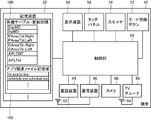
- FIG. 4 is a block diagram illustrating a configuration of a mobile terminal 40.
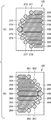
- FIG. (A) is a figure showing the display screen of the display device 54 at the time of setting for one-handed operation mode / right-handed operation
- (B) is a figure showing the display screen of the display device 54 at the time of setting for one-handed operating mode / left-handed operation.
- (A) is a table PAreaTbl. Showing the operation area at the time of setting for right-hand operation. Right
- (B) is a table indicating an operation area at the time of setting for left-hand operation, PAreaTbl.
- FIG. 1 It is a figure showing Left.
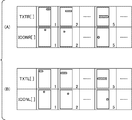
- (A) and (B) are tables DAreaTbl. Showing the display area at the time of setting for right-hand operation.
- Table DAreaTbl Indicating the display area at the time of setting for Right and left hand operation.
- (A) and (B) are tables DAreaTbl. Showing the display area at the time of setting for right-hand operation.
- Right and a table DAreaTbl Indicating the display area at the time of setting for left hand operation.
- It is a figure showing the application table 360 which listed the application which can be started with the portable terminal.
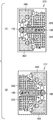
- FIG. 1 A and (B) are views showing a right hand operation display screen 310 and a left hand operation display screen 312 in the two-hand operation mode, respectively. It is a figure showing the screen transition in the setting for both-hands operation mode and left-hand operation.
- FIG. 1 A) and (B) are diagrams showing a display screen 370 for right-hand operation and a display screen 372 for left-hand operation in the one-hand operation mode, respectively. It is a figure showing the screen transition in the setting for one hand operation mode and left hand operation.
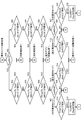
- It is a flowchart which shows the control structure of the program for controlling the display and operation
- FIG. 14 is a flowchart illustrating a control structure of a program for determining an operation area and controlling processing accompanying the operation region, following the program of FIG. 13. It is a figure showing the control structure of the process for selecting the previous candidate of an item list in a flowchart format. It is a figure showing the control structure of the program for selecting the next candidate of an item list in a flowchart format. It is the figure which represented the control structure of the program which starts a selection application in the flowchart format.
- FIG. 10 is a flowchart showing a control structure of a program for starting an application from a selected area when any of operation areas A4 [1] to A4 [9] is operated in the two-hand operation mode.
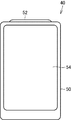
- the mobile terminal 40 includes a main body casing 50, a display device 54 provided in the main body casing 50, a one-hand operation mode and both hands provided on an end surface of the main body casing 50, which will be described later. And a mode switching button 52 for switching between operation modes.
- mobile terminal 40 is connected to control unit 80 for controlling mobile terminal 40, mode switching button 52, display device 54, and control unit 80, and is placed on display device 54.
- the touch panel 56 for detecting the user's operation on the display screen and passing the detected coordinates to the control unit 80 and the scanner connected to the control unit 80 and incorporated in the display device 54 58, a wireless communication device 84 connected to the control unit 80 for performing telephone communication, a wireless communication device 86 connected to the control unit 80 for data communication such as mail and Internet functions, and control.
- a TV tuner 90 for receiving TV broadcasts, a camera 88 connected to the control unit 80, and various tables and variables connected to the control unit 80.
- a storage device 82 for storing etc.
- the portable terminal 40 further includes an antenna 92 connected to the communication device 84 and the communication device 86, and an antenna 94 connected to the TV tuner 90 for receiving TV radio waves.
- the storage device 82 includes a storage area 100 for storing values of various tables and variables, and a storage area 102 for storing application-related files.
- the storage area 100 includes a variable DspMD representing a screen display setting state, a variable InpMD representing an operation mode state, and a table PAreaTbl. Right and a table PAreaTbl. Left and a table DAreaTbl. Representing a display area for right hand operation. Right and a table DAreaTbl. Indicating the display area for left-hand operation. Left, an application table (APLTbl) 360 that stores information related to applications executed on the mobile terminal 40, and a variable APLCNT that represents the number of applications stored in the application table 360 are stored.
- APILTbl application table
- variable InpMD values corresponding to the one-handed operation mode and the two-handed operation mode switched by the mode switching button 52 are stored.
- the variable InpMD stores a value of 0 in the two-hand operation mode and a value of 1 in the one-hand operation mode.
- each of the two-handed operation mode and the one-handed operation mode has a display setting for a right hand operation and a display setting for a left hand operation.
- the variable DspMD stores a value of 0 when the display setting for the right hand operation is set, and a value of 1 when the display setting for the left hand operation is set.
- the storage area 102 stores an execution file and an icon file for each application executed on the mobile terminal.
- display screen 120 when setting for one-handed operation mode / right-handed operation displays selected application name 130, icon 132 corresponding to the selected application, and various applications. Icons 134 to 148 and application names 160 to 174 corresponding to these icons are displayed.
- the application names 160 to 166 are arranged on the upper side with respect to the selected application name 130, and the application names 168 to 174 are arranged on the lower side with respect to the selected application name 130.
- the application name 130 is arranged so that its longitudinal direction is perpendicular to the arc formed by the arrangement of application names. Further, the application name 160-166 and the application name 168-174 are symmetrical with respect to the center line in the longitudinal direction of the central application name 130, respectively, and both of the longitudinal directions are parallel to the application name 130. It is arranged to become.
- the icon 134 and the application name 160 arranged on the right side thereof, the icon 136 and the application name 162 arranged on the right side thereof correspond to each other in pairs. These are arranged so that 132 to 148 draw an arc on the substantially left half (semicircle) of the circle.
- the display screen 180 has the screen 120 of FIG. 4A parallel to the line connecting the items arranged at both ends of the list of menu items, and the screen 120 is vertically divided by two.
- the display screen area is divided into several display areas and several operation areas as described below. Information on these areas is recorded as a table as described below.
- the table PAreaTbl. “Right” stores data representing each partial area when the area of the touch panel 56 is divided into several partial areas. In the following description, the direction in which the mode switching button 52 is provided in FIG.
- the table PAreaTbl. Right stores coordinate data representing operation areas AR1 to AR3 and AR5, and operation area arrays AR4 [1] to AR4 [9] including a plurality of operation areas.
- the operation area AR1 has a shape corresponding to the second quadrant of a slightly horizontally long ellipse and is arranged at the upper right of the display screen.
- the operation area AR2 has a shape corresponding to the third quadrant of the same ellipse, and is arranged at the lower right of the display screen.
- the operation area AR3 is a horizontally long rectangular area arranged between the operation area AR1 and the operation area AR2 so as to coincide with the display position of the selected application name 130 shown in FIG.
- Both left and right end portions have the shape of the right half of a circle.
- the operation area AR5 has a shape in which the shape of the portion corresponding to the fourth quadrant and the shape of the portion corresponding to the first quadrant of the same circle are respectively arranged on the upper left and lower left of the touch panel 56.
- the operation area AR4 stores coordinates for specifying a plurality (9 in this embodiment) of circular areas. These nine circular areas are arranged from the upper center of the touch panel toward the center left end and further toward the lower center so as to draw the left half of a large circle so as to coincide with the display positions of the icons 134 to 148 in FIG. ing.
- the areas indicated by the operation areas AR4 [1] to AR4 [4] and AR4 [6] to AR4 [9] are circles of the same size, but the operation area AR4 [5] is larger than these, and the area of the operation area AR3 It has almost the same diameter as the height of the rectangle.
- the circular area represented by the operation area AR4 [5] is arranged at a position such that the right semicircle coincides with the left semicircle of the operation area AR3.
- this table includes operation areas AL1 to AL5.
- Each of these operation areas AL1 to AL5 has a table PAreaTbl. Shown in FIG.
- the operation areas AR1 to AR5 represented by Right are reversed left and right.
- the operation area AL3 matches the display area of the selected application name 190 shown in FIG. 4B, and the operation areas AL4 [1] to AL4 [9] are the icons 194 to 208 shown in FIG. 4B. Matches the display area.
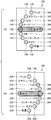
- Display areas TXTR [1] to TXTR [9] represented by Right are areas for displaying application names 160 to 166, 130, and 168 to 174 shown in FIG. 4A, respectively, and display area ICON [1 ] To ICON [9] are areas for displaying icons 134 to 140, 132 and 142 to 148 shown in FIG. Table DAreaTbl.
- the display areas TXTL [1] to TXTL [9] represented by Left correspond to the application names 222 to 226, 190, and 228 to 234 shown in FIG. 4B, respectively, and the display areas ICONL [1] to ICONL [9] is an area for displaying the icons 194 to 200, 192, and 202 to 208 shown in FIG.
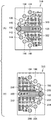
- FIGS. 7A and 7B the operation areas AR1, AR2, and AR5 and AL1, AL2, and AL5 shown in FIG. 5 are not shown here for easy understanding of the drawing.
- display screen 120 includes display areas 250 to 264 for displaying application names, and display / operation areas 270 to 278.
- the display area 250 corresponds to TXTR [5]
- the display / operation area 270 corresponds to ICONR [5].
- the display areas 252 to 258 and the display areas 259 to 264 correspond to TXTR [1] to TXTR [4] and TXTR [6] to TXTR [9], respectively.
- the display / operation areas 271 to 278 correspond to ICONR [1] to ICONR [9], respectively.
- display screen 180 includes display areas 280 to 296 for displaying application names, and display / operation areas 300 to 308.
- the display area 280 corresponds to TXTL [5]
- the display / operation area 300 corresponds to ICONL [5].
- the display areas 282 to 288 and the display areas 290 to 296 correspond to TXTL [1] to TXL [4] and TXTL [6] to TXTL [9], respectively.
- the display / operation area 300 corresponds to ICONL [5]
- the display / operation areas 301 to 306 correspond to ICONL [1] to ICONL [4] and ICONL [6] to ICONL [9], respectively.
- the application table 360 includes an application number indicating the number assigned to the application. And an application name, an application execution file name, and an icon file name representing an application icon.
- Each item in the application table 360 is an application number. Can be specified.
- the i-th application name, execution file name, and icon file name in the application table 360 are respectively APLTbl [i].
- EXEFile, APLTbl [i]. Can be specified with ICONFile.
- FIGS. 9A and 9B respectively show a display screen 310 of settings for right-hand operation in the two-hand operation mode (hereinafter referred to as “two-hand operation mode / right-hand operation setting”) and settings for left-hand operation in the two-hand operation mode.
- FIG. 11 is a diagram showing a display screen 312 (hereinafter referred to as “two-hand operation mode / left-hand operation setting”).
- the mode switching button 52 when the mode switching button 52 is pressed in the one-handed operation mode / right-handed operation setting, the two-handed operation mode / right-handed operation setting is selected, and when the mode switching button 52 is pressed in the one-handed operating mode / left-handed operation setting, the two-handed operation is performed. Setting for mode and left hand operation.
- the two-hand operation mode / right-hand operation setting is a setting when it is assumed that the display surface of the display device 54 is operated with the left hand with a stylus pen or the like while holding the housing 50 with the right hand.
- the two-hand operation mode / left-hand operation setting is a setting assuming that the display surface of the display device 54 is operated with the right hand while holding the housing 50 with the left hand.
- the table PAreaTbl. Right is applied, and the table DAreaTbl. Right is applied.
- the table PAreaTbl. Left is applied, and the table DAreaTbl. Left is applied.
- display screen 310 in the two-hand operation mode / right-hand operation setting includes an operation area 320 corresponding to right-hand operation area AR1 and a right-hand operation area. And an operation area 322 corresponding to AR2.
- the display screen 312 in the two-hand operation mode / left-hand operation setting includes an operation area 330 corresponding to the left-hand operation area AL1 and an operation area 332 corresponding to the left-hand operation area AL2.
- application names corresponding to the icons are displayed as shown in the figure.
- display screen 312 for setting for both-hand operation mode and left-hand operation includes an operation area 340 corresponding to operation area AL1 for left-hand operation and an operation area 342 corresponding to operation area AL2.
- FIG. 10 shows a state where the application “Contact” is selected.
- the application name 190 is pressed in this state, the selected application “Contact” is activated.
- the icon 194 (the corresponding application name text is “TV”) is pressed, the application “TV” is activated.
- the operation area 340 is pressed on the display screen 312, the previous candidate for the currently selected application is selected.
- the display screen 350 is a screen when the operation area 340 is pressed once, and the candidate application “mail” immediately before “contact” is selected.
- the operation area 342 is pressed on the display screen 312, the next candidate for the currently selected application is selected.
- the display screen 352 is a screen when the operation area 342 is pressed once, and the next candidate application “memo” for “contact” is selected.
- the display screen 370 for setting for one-handed operation mode / right-handed operation has a table PAreaTbl. Right is applied, and in addition to displaying icons and text of each application, each includes an operation area 390 and an operation area 392 corresponding to the operation area AR5.
- the operation areas 390 and 392 are both defined on the opposite side of the area where the menu item names are displayed with respect to the icon rows arranged in a semicircle.
- a display screen 372 for setting for one-handed operation mode / left-handed operation has a table PAreaTbl. Left is applied, and both include an operation area 400 and an operation area 402 corresponding to the operation area AL5. Both the operation areas 400 and 402 are defined on the opposite side to the area where the menu item names are displayed with respect to the icon rows arranged in a semicircle.
- a display screen 372 in the one-hand operation mode / left-hand operation setting includes an operation area 340 corresponding to the operation area AL1 for left-hand operation in addition to the display of the icon and application name of each application.
- An operation area 342 corresponding to the operation area AL2 and an operation area 410 corresponding to the operation area AL5 are included.
- the display screen 372 of FIG. 12 shows a state where the application “contact” is selected on the one-hand operation mode / left-hand operation setting screen.
- the selected application “contact” is activated.
- the operation area 340 is pressed, since this area is within the operation area 330 shown in FIG. 11B, the previous candidate of the currently selected application is selected.
- the display screen 420 is a screen when the operation area 340 is pressed once on the display screen 372, and the candidate application “mail” immediately before the application “contact” is selected.
- the operation area 342 is pressed on the display screen 372, since this area is within the operation area 332 shown in FIG. 11B, the next candidate application of the currently selected application is selected.
- the display screen 422 is a screen when the operation area 342 is pressed once on the display screen 372, and the next candidate application “memo” of the application “contact” is selected.
- the operation area 410 is pressed on the display screen 372, since this area is within the operation area 400 shown in FIG. 11B, the current left-hand display screen 372 is switched to the right-hand display screen 370. .
- the program whose control structure is shown in FIG. 13 is started when the power of the portable terminal 40 is turned on.
- this program has the application number of the selected application.
- step 450 other variables (DspMD, ImpMD, etc.) are also initialized.
- step 454 when any of the values of (SelNo-4) to (SelNo-1) is less than 1 in step 454 and step S456, APLCNT is added to the value. If any of the values (SelNo + 1) to (SelNo + 4) is larger than APLCNT, APLCNT is subtracted from that value.
- Step 454 or Step 456 This program is further executed following Step 454 or Step 456 to determine whether or not the mode switching button 52 has been pressed and to branch the control flow according to the determination result, and to the mode in Step 458.
- This program is further executed when it is determined in step 458 that the mode switching button 52 has not been pressed (in the case of NO), and it is determined whether or not an operation of the touch panel 56 has been detected, and according to the determination result.
- Step 470 for branching the flow and step 472 that is executed when it is determined in step 470 that the operation area AR5 has been operated (in the case of YES) and that sets the value of the variable DspMD to 1 are included. After executing step 472, control returns to step 452.
- the operation area table PAreaTbl In the case (YES), the operation area table PAreaTbl.
- Step 526 for determining whether or not the Left operation area AL3 has been operated and branching the control flow according to the determination result, and when it is determined in Step 526 that the operation area AL3 has not been operated (in the case of NO)
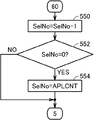
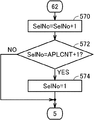
- the program whose control structure is shown in FIG. 16 is determined in step 504 shown in FIG. 14 when it is determined that the operation area AR2 is operated (in the case of YES) or in step 524 that the operation area AL2 is operated. It is executed in the case (in the case of YES).
- the program having the control structure shown in FIG. 17 determines that the operation area AR3 has been operated in step 506 shown in FIG. 14 (YES) or that the operation area AL3 has been operated in step 526. It is executed when it is (YES).
- this program refers to application table 360, and applications APLTbl [SelNo]. Step 590 for launching the ExeFile is included. After executing step 590, the control of this program is terminated.
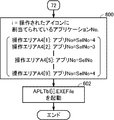
- the program whose control structure is shown in FIG. 18 is determined in step 514 shown in FIG. 14 when it is determined that one of the operation areas AR4 [1] to AR4 [9] (that is, one of the icons) has been operated (YES). Or when it is determined in step 534 that any one of the operation areas AL4 [1] to AL4 [9] has been operated (in the case of YES). In this process, an application corresponding to the operated icon is activated. In FIG. 18, AR4 and AL4 are collectively written as “A4”.
- this program has an application number assigned to the operated icon. Substituting variable i for variable i, and following step 600, with reference to application table 360, APLTbl [i]. And step 602 for activating EXEFile. After executing step 602, the execution of this program is terminated.
- the operation number A4 [1] has an application number.
- SelNo-4 is assigned, SelNo-3 is assigned to the operation area A4 [2], SelNo-2 is assigned to the operation area A4 [3], and SelNo ⁇ is assigned to the operation area A4 [4].
- 1 is SelNo in the operation area A4 [5]
- SelNo + 1 is in the operation area A4 [6]
- SelNo + 2 is in the operation area A4 [7]
- SelNo + 3 is in the operation area A4 [8]
- the operation area A4. [9] is assigned SelNo + 4, respectively. Therefore, the application corresponding to the icon displayed in the operation area A4 [5], that is, the application whose name is displayed in the center is activated in the process of this step.
- the portable terminal 40 operates as follows.
- the program shown in FIG. 13 is started.
- the value of the variable DspMD is initialized to 0 and the value of the variable InpMD is initialized to 1, respectively. That is, the mobile terminal 40 is activated in the one-hand operation mode / right-hand operation setting.
- the variable SelNo is initialized to 5 (step 450).
- display screen 120 for right-hand operation setting is displayed (YES in step 452; step 454).
- steps 458, 462, 500, 502, 550, FIGS. 13 to 18 when operation area AR2 is pressed, the previous candidate is selected from the selected application (steps 458, 462, 500, 502, 550, FIGS. 13 to 18).
- the application list displayed on the display device 54 displays some of the applications that can be executed on the mobile terminal 40. By operating the operation areas AR1 and AR2 and moving the application list, an application other than the initial screen can be selected and executed.
- the display screen 180 When switching to the setting for left-hand operation, the display screen 180 is displayed (steps 452 and 456).
- Application names and icon images corresponding to (SelNo-4) to (SelNo-1), SelNo, (SelNo + 1) to (SelNo + 4) are assigned and displayed.
- the next candidate of the currently selected application is selected (paths of steps 458, 462, 500, 522, 524, 570, 572, and 574 in FIGS. 13 to 18).
- variable InpMD 0 is substituted to switch to the two-handed operation mode (steps 458 and 460 in FIG. 13).
- the operation setting (value of variable DspMD) in the one-handed operation mode is inherited as it is.
- the display area table DAreaTbl In the operation area table and the display area table in the two-hand operation mode, as in the one-hand operation mode, the display area table DAreaTbl. Right and operation area table PAreaTbl. When Right is set for left-hand operation, the display area table DAreaTbl. Left and operation area table PAreaTbl. Left is applied to each.
- operation areas AR1 to AR5 for right hand operation and the operation areas AL1 to AL5 for left hand operation are collectively referred to as operation areas A1 to A5.
- the operation when the operation area A1, the operation area A2, and the operation area A3 are operated is the same as that in the one-hand operation mode.
- the operation in the operation area A5 is invalid (steps 458, 462, 500, 502 or 522, 504 or 524, 506 or 526, 508 or 528, 514 or 534, 458 in FIGS. 13 to 18). Route). Therefore, the left and right operation screens cannot be switched in the two-hand operation mode.
- the application can be directly activated (steps 458, 462, 500, 502 or 522 in FIGS. 13 to 18). 504 or 524, 506 or 526, 508 or 528, 514 or 534, 590).
- the operation setting (value of variable DspMD) in the two-handed operation mode is inherited as it is.
- the application list is arranged on a substantially semicircle that is symmetrical in both the right-hand operation setting and the left-hand operation setting.
- you can switch freely during operation so that you can choose an easy-to-use arrangement when you hold it with your right hand and left hand.
- the application when switching to the two-handed operation mode, the application can be started directly by touching the icon placed at the end of the displayed application name. It is no longer necessary to send the application you want to launch to the selection area in the center of the screen. As a result, the number of times of touching the operation area for candidate selection is reduced, and the desired application can be activated with a small number of operations.
- the portable terminal 40 has an operation mode that is assumed to be operated with the left and right thumbs, and can realize an input method that takes operability into consideration. In view of visibility, the application list can be scrolled, so that the display is not complicated. As a result, in the portable terminal using the touch panel, it is possible to realize an input device considering user operability and visibility.
- the present invention can be applied to portable information processing terminals such as mobile phones, PDAs (Personal Digital Assistants), and remote controllers for electronic devices.
- portable information processing terminals such as mobile phones, PDAs (Personal Digital Assistants), and remote controllers for electronic devices.
Landscapes
- Engineering & Computer Science (AREA)
- General Engineering & Computer Science (AREA)
- Theoretical Computer Science (AREA)
- Human Computer Interaction (AREA)
- Physics & Mathematics (AREA)
- General Physics & Mathematics (AREA)
- Computer Vision & Pattern Recognition (AREA)
- Signal Processing (AREA)
- User Interface Of Digital Computer (AREA)
- Telephone Function (AREA)
Abstract
Description
52 モード切換ボタン
54 表示装置
56 タッチパネル
80 制御部
82 記憶装置
図1及び図2を参照して、携帯端末40は、本体筐体50と、本体筐体50に設けられた表示装置54と、本体筐体50の端面に設けられ後述する片手操作モードと両手操作モードとを切換えるためのモード切換ボタン52とを含む。
本実施の形態に係る携帯端末40は以下のように動作する。
Claims (14)
- 表示画面を有する表示装置と、
前記表示画面の上の任意の点を指示する入力を受けるための入力手段と、
所定の順序により順序付けられた複数のメニュー項目の項目名及び当該項目名に割り当てられた機能を記憶するための第1の記憶手段と、
前記表示画面上に、前記第1の記憶手段に記憶されている複数のメニュー項目の項目名を、前記順序にしたがって配列して表示するための第1の表示手段とを含み、
前記第1の表示手段は、前記表示画面中の第1の領域に1つのメニュー項目の項目名を、前記表示画面の前記第1の領域をはさんだ両側の第2及び第3の領域に他のメニュー項目の項目名をそれぞれ表示し、
さらに、前記表示画面上で前記第1の領域に属する位置が前記入力手段により指示されたことに応答して、当該第1の領域に表示されている項目名に割り当てられた機能を実行するための実行手段と、
前記表示画面上で前記第2の領域又は前記第3の領域に属する位置が前記入力手段により指示されたことに応答して、前記第1の表示手段により表示される前記複数の項目名を、前記項目名の配列方向に沿った一方方向又は他方方向にスクロールさせるためのメニュースクロール手段とを含む、入力装置。 - 前記第1の表示手段は、前記複数のメニュー項目の項目名を、前記表示画面上に、所定の円弧に沿って、かつ各メニュー項目が前記円弧の内側に位置するように配列して表示する、請求項1に記載の入力装置。
- 前記複数の項目名に対応する複数のアイコン画像を記憶するための第2の記憶手段と、
前記表示領域上で前記複数のメニュー項目の項目名にそれぞれ隣接する位置に、各項目名に対応するアイコンを表示するための第2の表示手段とをさらに含む、請求項1又は請求項2に記載の入力装置。 - 前記表示画面上で前記複数のアイコンのいずれかが表示された領域内が指示されたことに応答して、当該アイコンに対応したメニュー項目の項目名に割り当てられた機能を実行するためのダイレクトメニュー実行手段をさらに含む、請求項3に記載の入力装置。
- 前記表示画面内において、前記複数のアイコンに関して前記項目名と反対側に配置される第4の領域を規定するための領域規定手段と、
前記表示画面上で前記第4の領域に属している位置が指示されたことに応答して、前記第1の表示手段による前記複数の項目名の表示位置、前記第2の表示手段による前記複数のアイコンの表示位置、及び前記領域規定手段による前記第4の領域の規定位置を、前記複数個の項目名の配列の両端の項目名を結ぶ線と平行な所定の線分に関して対称に反転させるための表示反転手段とをさらに含む、請求項4に記載の入力装置。 - 前記所定の線分は、前記表示画面を2等分する線分である、請求項5に記載の入力装置。
- 利用者の操作に応答して入力モード切換信号を発生する入力モード切換ボタンと、
前記入力モード切換信号に応答して、前記表示反転手段及び前記ダイレクトメニュー実行手段のうち、一方のみが有効な第1の入力モードと、他方のみが有効な第2の入力モードとを交互に切換えるための入力モード切換手段とをさらに含む、請求項5又は請求項6に記載の入力装置。 - 前記第4の領域は、前記第1の表示領域に関して互いに対称な二つの領域を含む、請求項5~請求項7のいずれかに記載の入力装置。
- 前記第1の表示手段は、前記第2の領域の項目名と、前記第3の領域の項目名とを、前記第1の領域を中心として互いに線対称な位置に表示する、請求項1~請求項8のいずれかに記載の入力装置。
- 前記第1の表示手段は、前記複数のメニュー項目の項目名を互いに平行に表示する、請求項1-請求項9のいずれかに記載の入力装置。
- 前記表示画面は、第1の対辺及び第2の対辺を有する長方形であり、
前記第1の対辺は前記第2の対辺より長く、
前記第1の領域は、その長手方向の中心線が前記第1の対辺に対し直角となるように配置される、請求項1-請求項10のいずれかに記載の入力装置。 - 前記メニュースクロール手段は、前記複数個のメニュー項目の先頭のメニュー項目と最後のメニュー項目とが互いに連続しているように項目名をスクロールさせる、請求項1-請求項11のいずれかに記載の入力装置。
- 表示画面を有する表示装置と、
前記表示画面の上の任意の点を指示する入力を受けるための入力手段とを有する情報入力装置における入力方法であって、
所定の順序により順序付けられた複数のメニュー項目の項目名及び当該項目名に割り当てられた機能を記憶装置に記憶するステップと、
表示装置の表示画面上に、前記記憶装置に記憶されている前記複数のメニュー項目の項目名を前記順序にしたがってリスト表示するステップとを含み、
前記リスト表示するステップは、前記表示画面中の第1の領域に1つのメニュー項目の項目名を、前記表示画面の前記第1の領域をはさんだ両側の第2及び第3の領域に他のメニュー項目の項目名を、列を形成するようにそれぞれ表示し、
前記情報入力方法はさらに、
前記表示画面上で前記第1の領域に属する位置が指示されたことに応答して、当該第1の領域に表示されている項目名に対応する機能を前記記憶装置から読み出して実行するステップと、
前記表示画面上で前記第2の領域又は前記第3の領域に属する位置が指示されたことに応答して、前記表示画面上に表示される前記複数のメニュー項目の項目名を、前記項目名の配列方向に沿った一方方向又は他方方向にスクロールさせるステップとを含む、入力方法。 - 表示画面を有する表示装置と、前記表示画面の上の任意の点を指示する入力を受けるための入力手段とが接続されるコンピュータにより実行されると、当該コンピュータを、入力装置として動作させるコンピュータプログラムを記憶した記憶媒体であって、
前記コンピュータプログラムは、前記コンピュータにより実行されると、前記コンピュータを、
所定の順序により順序付けられた複数のメニュー項目の項目名及び当該項目名に割り当てられた機能を記憶するための第1の記憶手段と、
前記表示画面上に、前記記憶手段に記憶されている複数のメニュー項目の項目名を、前記順序にしたがって配列して表示するための第1の表示手段とを含み、
前記第1の表示手段は、前記表示画面中の第1の領域に1つのメニュー項目の項目名を、前記表示画面の前記第1の領域をはさんだ両側の第2及び第3の領域に他のメニュー項目の項目名をそれぞれ表示し、
さらに、前記表示画面上で前記第1の領域に属する位置が前記入力手段により指示されたことに応答して、当該第1の領域に表示されている項目名に割り当てられた機能を実行するための実行手段と、
前記表示画面上で前記第2の領域又は前記第3の領域に属する位置が前記入力手段により指示されたことに応答して、前記第1の表示手段により表示される前記複数の項目名を、前記項目名の配列方向に沿った一方方向又は他方方向にスクロールさせるためのメニュースクロール手段とを含む入力装置として動作させる、コンピュータプログラム。
Priority Applications (3)
| Application Number | Priority Date | Filing Date | Title |
|---|---|---|---|
| CN2009801009871A CN101855611B (zh) | 2008-08-05 | 2009-07-28 | 输入装置、输入方法、以及记录有输入程序的记录介质 |
| US12/682,203 US20100211915A1 (en) | 2008-08-05 | 2009-07-28 | Input apparatus, input method, and recording medium recording input program |
| GB1008008.3A GB2466905B (en) | 2008-08-05 | 2009-07-28 | Input apparatus, input method, and recording medium recording input program |
Applications Claiming Priority (2)
| Application Number | Priority Date | Filing Date | Title |
|---|---|---|---|
| JP2008-202108 | 2008-08-05 | ||
| JP2008202108A JP2010039772A (ja) | 2008-08-05 | 2008-08-05 | 入力操作装置 |
Publications (1)
| Publication Number | Publication Date |
|---|---|
| WO2010016409A1 true WO2010016409A1 (ja) | 2010-02-11 |
Family
ID=41663629
Family Applications (1)
| Application Number | Title | Priority Date | Filing Date |
|---|---|---|---|
| PCT/JP2009/063376 Ceased WO2010016409A1 (ja) | 2008-08-05 | 2009-07-28 | 入力装置、入力方法、及び入力プログラムを記録した記録媒体 |
Country Status (5)
| Country | Link |
|---|---|
| US (1) | US20100211915A1 (ja) |
| JP (1) | JP2010039772A (ja) |
| CN (1) | CN101855611B (ja) |
| GB (1) | GB2466905B (ja) |
| WO (1) | WO2010016409A1 (ja) |
Cited By (6)
| Publication number | Priority date | Publication date | Assignee | Title |
|---|---|---|---|---|
| US20100318905A1 (en) * | 2009-06-16 | 2010-12-16 | Samsung Electronics Co., Ltd. | Method for displaying menu screen in electronic devicing having touch screen |
| WO2013114442A1 (ja) * | 2012-01-31 | 2013-08-08 | 株式会社アイ・ピー・エス | 携帯端末管理サーバ、および携帯端末管理プログラム |
| WO2013114440A1 (ja) * | 2012-01-31 | 2013-08-08 | 株式会社アイ・ピー・エス | 携帯端末管理サーバ、および携帯端末管理プログラム |
| WO2013114441A1 (ja) * | 2012-01-31 | 2013-08-08 | 株式会社アイ・ピー・エス | 携帯端末管理サーバ、および携帯端末管理プログラム |
| RU2504097C1 (ru) * | 2012-05-28 | 2014-01-10 | Александр Игоревич Тверезовский | Пользовательский интерфейс для работы с поисковыми системами и базами данных (варианты) |
| JP2021524735A (ja) * | 2018-05-08 | 2021-09-16 | アメリカ合衆国 | ヘキサマー4面体rnaナノ構造 |
Families Citing this family (41)
| Publication number | Priority date | Publication date | Assignee | Title |
|---|---|---|---|---|
| US8594740B2 (en) | 2008-06-11 | 2013-11-26 | Pantech Co., Ltd. | Mobile communication terminal and data input method |
| JP4823342B2 (ja) * | 2009-08-06 | 2011-11-24 | 株式会社スクウェア・エニックス | タッチパネル式ディスプレイを持った携帯型コンピュータ |
| CN102782623B (zh) * | 2010-03-01 | 2015-12-02 | 松下知识产权经营株式会社 | 显示装置 |
| JP5732218B2 (ja) * | 2010-09-21 | 2015-06-10 | 任天堂株式会社 | 表示制御プログラム、表示制御装置、表示制御システム、および表示制御方法 |
| JP5638896B2 (ja) * | 2010-09-21 | 2014-12-10 | 任天堂株式会社 | 表示制御プログラム、表示制御装置、表示制御システム、および表示制御方法 |
| KR20120075839A (ko) * | 2010-12-29 | 2012-07-09 | 삼성전자주식회사 | 터치스크린 단말기에서 마우스 우 클릭 기능 제공 방법 및 장치 |
| USD677692S1 (en) * | 2011-01-19 | 2013-03-12 | Microsoft Corporation | Display screen with graphical user interface |
| US9159293B2 (en) | 2011-03-16 | 2015-10-13 | Kyocera Corporation | Electronic device, control method, and storage medium storing control program |
| US8787984B2 (en) | 2011-08-03 | 2014-07-22 | Kyocera Corporation | Mobile electronic device and control method for changing setting of locked state on touch screen display |
| JP6045847B2 (ja) | 2011-08-18 | 2016-12-14 | 京セラ株式会社 | 携帯電子機器、制御方法、および、制御プログラム |
| JP2013218428A (ja) * | 2012-04-05 | 2013-10-24 | Sharp Corp | 携帯型電子機器 |
| US20130265235A1 (en) * | 2012-04-10 | 2013-10-10 | Google Inc. | Floating navigational controls in a tablet computer |
| JP2013229807A (ja) * | 2012-04-26 | 2013-11-07 | Sharp Corp | ポータブルテレビ |
| JP2014041498A (ja) * | 2012-08-23 | 2014-03-06 | Sanyo Electric Co Ltd | 通信端末装置 |
| USD727938S1 (en) * | 2012-08-29 | 2015-04-28 | Samsung Electronics Co., Ltd. | Digital camera with a graphical user interface |
| USD729828S1 (en) * | 2012-08-29 | 2015-05-19 | Samsung Electronics Co., Ltd | Digital camera with a graphical user interface |
| USD728596S1 (en) * | 2012-08-29 | 2015-05-05 | Samsung Electronics Co., Ltd. | Digital camera with a graphical user interface |
| USD728597S1 (en) * | 2012-08-29 | 2015-05-05 | Samsung Electronics Co., Ltd. | Digital camera with a graphical user interface |
| USD728598S1 (en) * | 2012-08-29 | 2015-05-05 | Samsung Electronics Co., Ltd. | Digital camera with a graphical user interface |
| JP5924203B2 (ja) * | 2012-09-12 | 2016-05-25 | ブラザー工業株式会社 | 画像表示制御装置、画像表示制御方法およびプログラム |
| USD727940S1 (en) * | 2012-09-18 | 2015-04-28 | Samsung Electronics Co., Ltd. | Digital camera with a graphical user interface |
| USD727939S1 (en) * | 2012-09-18 | 2015-04-28 | Samsung Electronics Co., Ltd. | Digital camera with a graphical user interface |
| USD728600S1 (en) * | 2012-09-18 | 2015-05-05 | Samsung Electronics Co., Ltd. | Digital camera with a graphical user interface |
| USD728599S1 (en) * | 2012-09-18 | 2015-05-05 | Samsung Electronics Co., Ltd. | Digital camera with a graphical user interface |
| KR20140070745A (ko) * | 2012-11-26 | 2014-06-11 | 삼성전자주식회사 | 디스플레이 장치 및 이의 구동 방법 |
| CN103914214A (zh) * | 2013-01-07 | 2014-07-09 | 联想(北京)有限公司 | 一种显示方法及电子设备 |
| CN103513817B (zh) * | 2013-04-26 | 2017-02-08 | 展讯通信(上海)有限公司 | 一种触控设备及控制其配置操作模式的方法、装置 |
| CN104252284A (zh) * | 2013-06-26 | 2014-12-31 | 中兴通讯股份有限公司 | 文件显示方法及装置 |
| USD781316S1 (en) * | 2013-07-30 | 2017-03-14 | Samsung Electronics Co., Ltd. | Display screen or portion thereof with graphical user interface |
| JP2015102943A (ja) * | 2013-11-22 | 2015-06-04 | 富士通株式会社 | 携帯装置、画面表示プログラム及び画面表示方法 |
| USD757046S1 (en) * | 2014-01-03 | 2016-05-24 | Samsung Electroncs Co., Ltd. | Display screen or portion thereof with graphical user interface |
| USD775196S1 (en) * | 2014-03-10 | 2016-12-27 | Htc Corporation | Display screen or portion thereof with graphical user interface |
| USD763267S1 (en) * | 2014-03-14 | 2016-08-09 | Dacadoo Ag | Display panel portion with a graphical user interface component |
| FR3019331A1 (fr) * | 2014-03-27 | 2015-10-02 | Bilal Etahraouane | Combinaison nouvelle de moyens connus pour utiliser instinctivement un smartphone a l'aide d'une seule main |
| DE202015006142U1 (de) | 2014-09-02 | 2015-12-09 | Apple Inc. | Elektronische Touch-Kommunikation |
| WO2016036427A1 (en) | 2014-09-02 | 2016-03-10 | Apple Inc. | Electronic device with rotatable input mechanism |
| CN104965668B (zh) * | 2015-06-19 | 2018-03-27 | 北京奇虎科技有限公司 | 界面操作的方法和装置 |
| CN106776624B (zh) * | 2015-11-23 | 2019-12-24 | 阿里巴巴集团控股有限公司 | 一种信息展示方法及装置 |
| USD1046902S1 (en) | 2020-07-06 | 2024-10-15 | Andreas Hettich Gmbh & Co. Kg | Display panel or portion thereof with a transitional graphical user interface |
| USD1048082S1 (en) * | 2020-07-06 | 2024-10-22 | Andreas Hettich Gmbh & Co. Kg | Display panel or portion thereof with a transitional graphical user interface |
| USD1046901S1 (en) | 2020-07-06 | 2024-10-15 | Andreas Hettich Gmbh & Co. Kg | Display panel or portion thereof with transitional graphical user interface |
Citations (1)
| Publication number | Priority date | Publication date | Assignee | Title |
|---|---|---|---|---|
| JP2008165770A (ja) * | 2007-12-11 | 2008-07-17 | Kyocera Corp | 画像表示制御装置及びこれに用いられる画像表示制御プログラム |
Family Cites Families (9)
| Publication number | Priority date | Publication date | Assignee | Title |
|---|---|---|---|---|
| EP0827063B1 (en) * | 1996-08-28 | 2002-11-13 | Koninklijke Philips Electronics N.V. | Method and system for selecting an information item |
| US7185290B2 (en) * | 2001-06-08 | 2007-02-27 | Microsoft Corporation | User interface for a system and process for providing dynamic communication access and information awareness in an interactive peripheral display |
| US7093201B2 (en) * | 2001-09-06 | 2006-08-15 | Danger, Inc. | Loop menu navigation apparatus and method |
| US6966037B2 (en) * | 2001-11-19 | 2005-11-15 | Nokia Corporation | Method and apparatus for scrollable cross-point navigation in a calendar user interface |
| US7167910B2 (en) * | 2002-02-20 | 2007-01-23 | Microsoft Corporation | Social mapping of contacts from computer communication information |
| TWI238348B (en) * | 2002-05-13 | 2005-08-21 | Kyocera Corp | Portable information terminal, display control device, display control method, and recording media |
| US7681149B2 (en) * | 2003-05-21 | 2010-03-16 | Nokia Corporation | User interface display for set-top box device |
| EP1510911A3 (en) * | 2003-08-28 | 2006-03-22 | Sony Corporation | Information processing apparatus, information processing method, information processing program and storage medium containing information processing program |
| US20060020904A1 (en) * | 2004-07-09 | 2006-01-26 | Antti Aaltonen | Stripe user interface |
-
2008
- 2008-08-05 JP JP2008202108A patent/JP2010039772A/ja active Pending
-
2009
- 2009-07-28 CN CN2009801009871A patent/CN101855611B/zh not_active Expired - Fee Related
- 2009-07-28 US US12/682,203 patent/US20100211915A1/en not_active Abandoned
- 2009-07-28 GB GB1008008.3A patent/GB2466905B/en not_active Expired - Fee Related
- 2009-07-28 WO PCT/JP2009/063376 patent/WO2010016409A1/ja not_active Ceased
Patent Citations (1)
| Publication number | Priority date | Publication date | Assignee | Title |
|---|---|---|---|---|
| JP2008165770A (ja) * | 2007-12-11 | 2008-07-17 | Kyocera Corp | 画像表示制御装置及びこれに用いられる画像表示制御プログラム |
Cited By (7)
| Publication number | Priority date | Publication date | Assignee | Title |
|---|---|---|---|---|
| US20100318905A1 (en) * | 2009-06-16 | 2010-12-16 | Samsung Electronics Co., Ltd. | Method for displaying menu screen in electronic devicing having touch screen |
| WO2013114442A1 (ja) * | 2012-01-31 | 2013-08-08 | 株式会社アイ・ピー・エス | 携帯端末管理サーバ、および携帯端末管理プログラム |
| WO2013114440A1 (ja) * | 2012-01-31 | 2013-08-08 | 株式会社アイ・ピー・エス | 携帯端末管理サーバ、および携帯端末管理プログラム |
| WO2013114441A1 (ja) * | 2012-01-31 | 2013-08-08 | 株式会社アイ・ピー・エス | 携帯端末管理サーバ、および携帯端末管理プログラム |
| JP5479598B2 (ja) * | 2012-01-31 | 2014-04-23 | 株式会社アイ・ピー・エス | 携帯端末管理サーバ、および携帯端末管理プログラム |
| RU2504097C1 (ru) * | 2012-05-28 | 2014-01-10 | Александр Игоревич Тверезовский | Пользовательский интерфейс для работы с поисковыми системами и базами данных (варианты) |
| JP2021524735A (ja) * | 2018-05-08 | 2021-09-16 | アメリカ合衆国 | ヘキサマー4面体rnaナノ構造 |
Also Published As
| Publication number | Publication date |
|---|---|
| GB201008008D0 (en) | 2010-06-30 |
| CN101855611A (zh) | 2010-10-06 |
| JP2010039772A (ja) | 2010-02-18 |
| GB2466905B (en) | 2012-12-12 |
| GB2466905A (en) | 2010-07-14 |
| CN101855611B (zh) | 2013-09-25 |
| US20100211915A1 (en) | 2010-08-19 |
Similar Documents
| Publication | Publication Date | Title |
|---|---|---|
| WO2010016409A1 (ja) | 入力装置、入力方法、及び入力プログラムを記録した記録媒体 | |
| US10521111B2 (en) | Electronic apparatus and method for displaying a plurality of images in a plurality of areas of a display | |
| JP5334330B2 (ja) | 携帯端末装置、表示制御方法、及び表示制御プログラム | |
| KR102097496B1 (ko) | 폴더블 이동 단말기 및 그 제어 방법 | |
| JP5722642B2 (ja) | 携帯端末装置 | |
| JP5661547B2 (ja) | 携帯端末装置およびプログラム | |
| US9207864B2 (en) | Method and apparatus for area-efficient graphical user interface | |
| JP5805428B2 (ja) | 携帯端末装置およびプログラム | |
| KR101979666B1 (ko) | 표시부에 출력되는 입력 영역 운용 방법 및 이를 지원하는 단말기 | |
| JP4602417B2 (ja) | 文字入力装置 | |
| JP5611763B2 (ja) | 携帯端末装置及び処理方法 | |
| US20120297339A1 (en) | Electronic device, control method, and storage medium storing control program | |
| KR20130054071A (ko) | 다중 어플리케이션을 실행하는 모바일 장치 및 그 방법 | |
| JP5859298B2 (ja) | 情報処理システム、情報処理装置、情報処理方法及び情報処理プログラム | |
| US20110248928A1 (en) | Device and method for gestural operation of context menus on a touch-sensitive display | |
| WO2011055816A1 (ja) | 情報端末及び入力制御プログラム | |
| KR20130035857A (ko) | 이동 화면 탐색 장치 및 방법 | |
| JP2012175213A (ja) | 携帯電子機器、その制御方法及びプログラム | |
| US9176526B2 (en) | Portable terminal device, image display method used for same, and recording medium to record program for same | |
| WO2013047182A1 (ja) | 携帯型電子機器、タッチ操作処理方法およびプログラム | |
| JPWO2013124912A1 (ja) | 表示装置および表示方法 | |
| CN100483320C (zh) | 输入装置、携带终端装置及内容数据的操作方法 | |
| JP2011118729A (ja) | 電子機器および選択画面の表示方法 | |
| JP4719238B2 (ja) | 携帯電子機器 | |
| JP5514706B2 (ja) | 携帯電子機器 |
Legal Events
| Date | Code | Title | Description |
|---|---|---|---|
| WWE | Wipo information: entry into national phase |
Ref document number: 200980100987.1 Country of ref document: CN |
|
| 121 | Ep: the epo has been informed by wipo that ep was designated in this application |
Ref document number: 09804893 Country of ref document: EP Kind code of ref document: A1 |
|
| WWE | Wipo information: entry into national phase |
Ref document number: 12682203 Country of ref document: US |
|
| ENP | Entry into the national phase |
Ref document number: 1008008 Country of ref document: GB Kind code of ref document: A Free format text: PCT FILING DATE = 20090728 |
|
| WWE | Wipo information: entry into national phase |
Ref document number: 1008008.3 Country of ref document: GB |
|
| NENP | Non-entry into the national phase |
Ref country code: DE |
|
| 122 | Ep: pct application non-entry in european phase |
Ref document number: 09804893 Country of ref document: EP Kind code of ref document: A1 |