EP2547102B1 - Information processing method and information processing system - Google Patents
Information processing method and information processing system Download PDFInfo
- Publication number
- EP2547102B1 EP2547102B1 EP12004641.2A EP12004641A EP2547102B1 EP 2547102 B1 EP2547102 B1 EP 2547102B1 EP 12004641 A EP12004641 A EP 12004641A EP 2547102 B1 EP2547102 B1 EP 2547102B1
- Authority
- EP
- European Patent Office
- Prior art keywords
- image
- information processing
- window
- processing apparatus
- synchronous
- Prior art date
- Legal status (The legal status is an assumption and is not a legal conclusion. Google has not performed a legal analysis and makes no representation as to the accuracy of the status listed.)
- Active
Links
Images











Classifications
-
- G—PHYSICS
- G06—COMPUTING OR CALCULATING; COUNTING
- G06F—ELECTRIC DIGITAL DATA PROCESSING
- G06F3/00—Input arrangements for transferring data to be processed into a form capable of being handled by the computer; Output arrangements for transferring data from processing unit to output unit, e.g. interface arrangements
- G06F3/01—Input arrangements or combined input and output arrangements for interaction between user and computer
- G06F3/048—Interaction techniques based on graphical user interfaces [GUI]
- G06F3/0484—Interaction techniques based on graphical user interfaces [GUI] for the control of specific functions or operations, e.g. selecting or manipulating an object, an image or a displayed text element, setting a parameter value or selecting a range
- G06F3/04845—Interaction techniques based on graphical user interfaces [GUI] for the control of specific functions or operations, e.g. selecting or manipulating an object, an image or a displayed text element, setting a parameter value or selecting a range for image manipulation, e.g. dragging, rotation, expansion or change of colour
-
- H—ELECTRICITY
- H04—ELECTRIC COMMUNICATION TECHNIQUE
- H04N—PICTORIAL COMMUNICATION, e.g. TELEVISION
- H04N7/00—Television systems
- H04N7/14—Systems for two-way working
- H04N7/15—Conference systems
-
- G—PHYSICS
- G06—COMPUTING OR CALCULATING; COUNTING
- G06F—ELECTRIC DIGITAL DATA PROCESSING
- G06F3/00—Input arrangements for transferring data to be processed into a form capable of being handled by the computer; Output arrangements for transferring data from processing unit to output unit, e.g. interface arrangements
- G06F3/01—Input arrangements or combined input and output arrangements for interaction between user and computer
- G06F3/048—Interaction techniques based on graphical user interfaces [GUI]
- G06F3/0484—Interaction techniques based on graphical user interfaces [GUI] for the control of specific functions or operations, e.g. selecting or manipulating an object, an image or a displayed text element, setting a parameter value or selecting a range
-
- G—PHYSICS
- G06—COMPUTING OR CALCULATING; COUNTING
- G06F—ELECTRIC DIGITAL DATA PROCESSING
- G06F3/00—Input arrangements for transferring data to be processed into a form capable of being handled by the computer; Output arrangements for transferring data from processing unit to output unit, e.g. interface arrangements
- G06F3/14—Digital output to display device ; Cooperation and interconnection of the display device with other functional units
- G06F3/1454—Digital output to display device ; Cooperation and interconnection of the display device with other functional units involving copying of the display data of a local workstation or window to a remote workstation or window so that an actual copy of the data is displayed simultaneously on two or more displays, e.g. teledisplay
-
- G—PHYSICS
- G16—INFORMATION AND COMMUNICATION TECHNOLOGY [ICT] SPECIALLY ADAPTED FOR SPECIFIC APPLICATION FIELDS
- G16H—HEALTHCARE INFORMATICS, i.e. INFORMATION AND COMMUNICATION TECHNOLOGY [ICT] SPECIALLY ADAPTED FOR THE HANDLING OR PROCESSING OF MEDICAL OR HEALTHCARE DATA
- G16H30/00—ICT specially adapted for the handling or processing of medical images
- G16H30/40—ICT specially adapted for the handling or processing of medical images for processing medical images, e.g. editing
-
- H—ELECTRICITY
- H04—ELECTRIC COMMUNICATION TECHNIQUE
- H04L—TRANSMISSION OF DIGITAL INFORMATION, e.g. TELEGRAPHIC COMMUNICATION
- H04L12/00—Data switching networks
- H04L12/02—Details
- H04L12/16—Arrangements for providing special services to substations
- H04L12/18—Arrangements for providing special services to substations for broadcast or conference, e.g. multicast
- H04L12/1813—Arrangements for providing special services to substations for broadcast or conference, e.g. multicast for computer conferences, e.g. chat rooms
-
- H—ELECTRICITY
- H04—ELECTRIC COMMUNICATION TECHNIQUE
- H04L—TRANSMISSION OF DIGITAL INFORMATION, e.g. TELEGRAPHIC COMMUNICATION
- H04L12/00—Data switching networks
- H04L12/02—Details
- H04L12/16—Arrangements for providing special services to substations
- H04L12/18—Arrangements for providing special services to substations for broadcast or conference, e.g. multicast
- H04L12/1813—Arrangements for providing special services to substations for broadcast or conference, e.g. multicast for computer conferences, e.g. chat rooms
- H04L12/1827—Network arrangements for conference optimisation or adaptation
-
- H—ELECTRICITY
- H04—ELECTRIC COMMUNICATION TECHNIQUE
- H04L—TRANSMISSION OF DIGITAL INFORMATION, e.g. TELEGRAPHIC COMMUNICATION
- H04L65/00—Network arrangements, protocols or services for supporting real-time applications in data packet communication
- H04L65/40—Support for services or applications
- H04L65/403—Arrangements for multi-party communication, e.g. for conferences
-
- G—PHYSICS
- G06—COMPUTING OR CALCULATING; COUNTING
- G06F—ELECTRIC DIGITAL DATA PROCESSING
- G06F16/00—Information retrieval; Database structures therefor; File system structures therefor
- G06F16/40—Information retrieval; Database structures therefor; File system structures therefor of multimedia data, e.g. slideshows comprising image and additional audio data
- G06F16/43—Querying
- G06F16/438—Presentation of query results
- G06F16/4387—Presentation of query results by the use of playlists
- G06F16/4393—Multimedia presentations, e.g. slide shows, multimedia albums
-
- G—PHYSICS
- G06—COMPUTING OR CALCULATING; COUNTING
- G06F—ELECTRIC DIGITAL DATA PROCESSING
- G06F2203/00—Indexing scheme relating to G06F3/00 - G06F3/048
- G06F2203/048—Indexing scheme relating to G06F3/048
- G06F2203/04803—Split screen, i.e. subdividing the display area or the window area into separate subareas
-
- G—PHYSICS
- G06—COMPUTING OR CALCULATING; COUNTING
- G06F—ELECTRIC DIGITAL DATA PROCESSING
- G06F2203/00—Indexing scheme relating to G06F3/00 - G06F3/048
- G06F2203/048—Indexing scheme relating to G06F3/048
- G06F2203/04806—Zoom, i.e. interaction techniques or interactors for controlling the zooming operation
-
- G—PHYSICS
- G06—COMPUTING OR CALCULATING; COUNTING
- G06Q—INFORMATION AND COMMUNICATION TECHNOLOGY [ICT] SPECIALLY ADAPTED FOR ADMINISTRATIVE, COMMERCIAL, FINANCIAL, MANAGERIAL OR SUPERVISORY PURPOSES; SYSTEMS OR METHODS SPECIALLY ADAPTED FOR ADMINISTRATIVE, COMMERCIAL, FINANCIAL, MANAGERIAL OR SUPERVISORY PURPOSES, NOT OTHERWISE PROVIDED FOR
- G06Q10/00—Administration; Management
- G06Q10/10—Office automation; Time management
-
- H—ELECTRICITY
- H04—ELECTRIC COMMUNICATION TECHNIQUE
- H04L—TRANSMISSION OF DIGITAL INFORMATION, e.g. TELEGRAPHIC COMMUNICATION
- H04L12/00—Data switching networks
- H04L12/02—Details
- H04L12/16—Arrangements for providing special services to substations
- H04L12/18—Arrangements for providing special services to substations for broadcast or conference, e.g. multicast
- H04L12/1813—Arrangements for providing special services to substations for broadcast or conference, e.g. multicast for computer conferences, e.g. chat rooms
- H04L12/1822—Conducting the conference, e.g. admission, detection, selection or grouping of participants, correlating users to one or more conference sessions, prioritising transmission
-
- H—ELECTRICITY
- H04—ELECTRIC COMMUNICATION TECHNIQUE
- H04M—TELEPHONIC COMMUNICATION
- H04M2250/00—Details of telephonic subscriber devices
- H04M2250/62—Details of telephonic subscriber devices user interface aspects of conference calls
Definitions
- the present disclosure relates to an information processing method and an information processing system with which users of a plurality of information processing apparatuses share and examine the same image.
- a system in which a common screen is shared, as a shared information resource, by terminals of the respective users in order to assist a teleconference between a plurality of users is known.
- a videoconference system is an example of such a system.
- a common pathological image is shared by terminals of a plurality of doctors. Opinions are exchanged between the terminals, and, at the same time, the diagnosis is made. In this manner, diagnosis efficiency is increased.
- a pointing cursor may be displayed on a screen shared by a plurality of terminals.
- US 2009/0 327 425 A1 discloses an asynchronous meeting system.
- a meeting participant can either take part in a live stream of a meeting with a computing device or switch to an asynchronous mode, in which he is able to view recorded parts of the meeting.
- US 2010/0 312 897 A1 describes a method for performing a collaborative session on a plurality of computing devices.
- the content of the collaborative session is controlled by a single device, and control can be transferred between devices upon request.
- US 2011/0047485 A1 describes a conference system able to share a screen between plural terminal apparatuses. Comments to image data typed by plural participants at different terminals are altogether shown in the shared screen with the representation of the image data.
- an information processing method as defined in claim 6.
- a user of an information processing apparatus, to which the operation right is not granted instructs to arbitrarily change image synchronous on/off states of an information processing apparatus, to which the operation right is not granted. Therefore, the user of the information processing apparatus, to which the operation right is not granted, not only passively examines image operation results by a user of an information processing apparatus, to which the operation right is granted, but also actively performs image operations to thereby perform examinations from the other point of view. Further, it is possible to re-establish the image synchronous state as needed.
- a user of an information processing apparatus may operate an image at will without awareness of how to return to the original state, the latest image operation result by a user of an information processing apparatus, to which the operation right is granted, and the like.
- the information processing method may further include canceling, in a case where the first request is input by a user, the image synchronous state in the information processing apparatus, the first request being an occurrence of an input by a user for operating an image displayed in the display unit of the information processing apparatus, to which the operation right is not granted.
- an operation is input, by a user, in an image, the exclusive operation right to which is not granted to the user. Because such an operation occurs, the user of the information processing apparatus may use the image, the exclusive operation right to which is not granted to the user, as a private image. Further, the operation to the image, the exclusive operation right to which is not granted to the user, starts.
- operations such as moves, zoom factor changes, and the like with respect to the private image are enabled. That is, it is not necessary to perform a user operation only to move to operations with respect to a private image. Therefore, the user operability is further increased.
- the information processing method may further include granting, in a case where an operation right acquisition request is input, by a user, in the information processing apparatus, to which the operation right is not granted, the operation right to the information processing apparatus.
- the image operation right may be moved between the plurality of information processing apparatuses, at will. That is, it is possible to change the image operation side and the side that merely examines the operated image, as needed.
- the information processing method may further include: displaying a plurality of images in each of the display units, the images being asynchronous, the images being synchronous with the images in the plurality of information processing apparatuses, respectively; and granting the operation right to one of a plurality of information processing apparatuses, for each synchronous image combination in the plurality of information processing apparatuses.
- the respective information processing apparatuses may display, for example, one image as an image to be operated and the other image as an image to be merely examined, and the like. Further, because of this, a plurality of users may interactively and efficiently exchange opinions by using the two images, the operation rights of which are granted to the different users.
- the information processing method may further include replacing, in a state where an operation right to one image of a plurality of images displayed in each of the display units is granted to one information processing apparatus, and where an operation right to the other image is granted to the other information processing apparatus, in a case where a third request is input in the other information processing apparatus by a user, the one image with the other image.
- the user of one information processing apparatus is a student
- the user of the other information processing apparatus is a teacher.
- the display unit of the student-side information processing apparatus may promptly replace the image, the operation right to which is granted to the student side, with the image, the operation right to which is granted to the teacher at present.
- the student may operate the image, the operation right to which is granted to the student himself, to thereby confirm the area in the vicinity of the image, the operation right to which is granted to the teacher at present, and the details of the image. Therefore, the student may swiftly start to confirm the area in the vicinity of the image, to which the teacher pays attention at present, and the details of the image, by using the image, the operation right to which is granted to the student side.
- an information processing system as defined in claim 1.
- the present disclosure may increase image examination efficiency in a case of sharing the image by users of a plurality of information processing apparatuses.
- Fig. 1 is a diagram showing the configuration of an information processing system according to a first embodiment of the present disclosure.
- An information processing system 100 includes an image server 10, a synchronous server 20, and a plurality of viewers 30A, 30B (information processing apparatuses) , connected to each other via a network 40.
- the network 40 may be a WAN (Wide Area Network) such as the Internet, or a LAN (Local Area Network). Further, the network 40 may be wired or wireless.
- the situation where the two viewers 30A, 30B are connected is illustrated. However, the number of viewers may be three or more.
- the respective terms "first viewer 30A" and "second viewer 30B" will be used.
- the term "viewer(s) 30A, 30B" will be used.
- the image server 10 may be configured by, for example, a general computer.
- the image server 10 has image storage for storing image data.
- the image server 10 reads appropriate image data from the image storage and replies the image data to the viewers 30A, 30B.
- images stored in the image storage may be, for example, microscope images of pathological specimens and the like.
- a microscope image of a pathological specimen has a resolution higher than the screen of the display unit of the viewer 30A, 30B.
- the image server 10 receives an image data request including, for example, an image name, image location information in the entire image, and the like, from the viewers 30A, 30B.
- the image server 10 reads appropriate image data from the image storage, and replies the image data to the viewers 30A, 30B.
- the image location information may be, for example, coordinate data of the image in an entire image. Alternatively, an entire image is divided and handled in a unit of so-called "tile" having a predetermined number of pixels in width and height (For example, 256 x 256 (pixels), 236 x 512(pixels)). In this case, the preassigned number for each unit may be used as the image location information.
- the synchronous server 20 performs synchronous processing.
- the viewers 30A, 30B display the same image.
- the same image means the image of the same area of the same object image in the same zoom factor and the same angle. That is, the image that users of the viewers 30A, 30B watch in the same way is called “the same image”.
- the synchronous server 20 may be configured by, for example, a general computer system.
- Fig. 2 is a block diagram showing a functional structure of the synchronous server 20 implemented by using a general computer system.
- the synchronous server 20 includes a communication unit 21, synchronous control table storage 23, a synchronous processing unit 25, and the like.
- the communication unit 21 receives an image data request, an operation right acquisition request, an asynchronous request, and a synchronous return request from the viewers 30A, 30B via the network 40.
- the communication unit 21 sends replies to the respective requests to the viewers 30A, 30B via the network 40.
- the synchronous control table storage 23 stores synchronous control table.
- the synchronous control table is control information necessary for image synchronous processing of the viewers 30A, 30B.
- Fig. 3 is a diagram showing the structure of the synchronous control table.
- the synchronous control table records of the respective windows are registered.
- the number of records is the same as the number of the windows.
- the record for each window includes information on a viewer ID, a window ID, an operation right flag, an asynchronous flag, and the like. Hereinbelow, the respective information will be described.
- the viewer ID is information for identifying a viewer.
- the window ID is an ID uniquely given to a combination of a plurality of windows in a correspondence relation.
- the correspondence relation means that the plurality of windows are image synchronous processing targets of a plurality of viewers.
- Fig. 3 shows a case where one window is displayed in each of two viewers (single-window display mode). Therefore, the kind of window ID is "01".
- Fig. 4 shows a case where a plurality of windows are displayed in each viewer (multi-window display mode)
- the number of windows displayed in each viewer may be three or more.
- Fig. 5 shows an example of a synchronous control table in this case. The number of the kinds of window ID is three or more.
- the operation right flag is a flag for identifying one window to which an exclusive operation right (hereinafter, simply referred to as "operation right”.) is given in a combination of a plurality of windows of a plurality of viewers in a correspondence relation.
- the operation right flag is set for any one window in the combination of a plurality of windows of a plurality of viewers in a correspondence relation.
- the operation right is a right to perform operations such as moves, zoom factor changes, rotations, and the like (hereinafter, referred to as "image operation”.) with respect to an image displayed in a window, according to instructions input by a user. Therefore, an operation, instructed by a user with respect to an image displayed in a window, to which the operation right is not granted, is disabled. Note that, in a case where a temporary asynchronous state is set, the restriction is canceled. The temporary asynchronous state will be described later in detail.
- the image operation results in the window, to which the operation right is granted, are reflected in the image in the window, to which the operation right is not granted.
- the window, to which the operation right is granted is referred to as "presenter window”.
- the window, to which the operation right is not granted is referred to as "audience window”.
- the value "1" is set in the asynchronous flag, in a case where the synchronous state of a plurality of windows of a plurality of viewers in a correspondence relation is temporarily canceled and the asynchronous state is established.
- the asynchronous flag is set based on an asynchronous request from a viewer.
- the asynchronous flag is reset based on a synchronous return request from a viewer.
- the synchronous processing unit 25 refers to the above-mentioned synchronous control table, and performs synchronous processing of images displayed in a plurality of windows of a plurality of viewers in a correspondence relation. Every time an instruction to operate an image in a presenter window is given by a user, the synchronous processing unit 25 is capable of receiving, by using the communication unit 21, a synchronous commission including image location information, a viewer ID, and a window ID of a presenter window sent from a viewer that has the window. In a case of receiving the synchronous commission, the synchronous processing unit 25 sends a synchronous request to the other viewers by using the communication unit 21.
- the synchronous request includes the above-mentioned respective pieces of information included in the received synchronous commission.
- the synchronous processing unit 25 is capable of receiving an operation right acquisition request by using the communication unit 21.
- an operation right acquisition button in the audience window When an operation right acquisition button in the audience window is operated, a viewer that has the window sends the operation right acquisition request.
- the operation right acquisition request includes the viewer ID and the window ID of the audience window.
- the synchronous processing unit 25 sets an operation right flag with respect to the audience window in the synchronous control table.
- the synchronous processing unit 25 resets an operation right flag of a presenter window having the window ID same as the window ID of the audience window. As a result, the operation right is moved between a plurality of windows in a correspondence relation.
- the synchronous processing unit 25 is capable of receiving an asynchronous request by using the communication unit 21.
- an asynchronous button in an audience window is operated, the asynchronous request is sent from a viewer that has the window.
- the asynchronous request includes the viewer ID and the window ID of the audience window.
- the synchronous processing unit 25 sets an asynchronous flag with respect to the audience window in the synchronous control table. As a result, the audience window is set as the asynchronous state.
- the synchronous processing unit 25 is capable of receiving a synchronous return request by using the communication unit 21.
- a synchronous button in an audience window set as the asynchronous state is operated, the synchronous return request is sent from a viewer that has the window.
- the synchronous return request includes the viewer ID and the window ID of the audience window. Based on the viewer ID and the window ID included in the received synchronous return request, the synchronous processing unit 25 resets the asynchronous flag with respect to the audience window in the synchronous control table.
- the information processing system 100 of this embodiment employs a server/client system. Therefore, the synchronous server 20 performs the synchronous processing.
- the present disclosure essentially has no relation to a server/client system.
- at least one of the plurality of viewers 30A, 30B may perform the synchronous processing that the synchronous server 20 performs.
- Each of the viewers 30A, 30B may be configured by, for example, a general computer system.
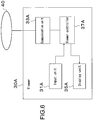
- Fig. 6 is a block diagram showing a functional structure of each of the viewers 30A, 30B implemented by a general computer system. Note that, because the configurations of the two viewers 30A, 30B are the same, the configuration of the first viewer 30A will only be described.
- the first viewer 30A includes an input unit 31A, a communication unit 33A, a display unit 35A, a viewer controller 37A, and the like.
- the input unit 31A such as, for example, a mouse, a keyboard, a touchpad, a sound input unit, or the like receives inputs from a user.
- a user is capable of inputting instructions to perform various requests.
- the various requests includes an instruction of various operations with respect to an image in a window, the operation right acquisition request, the asynchronous request, the synchronous return request, an inter-window copy request, and the like.
- the communication unit 33A sends various requests such as the image data request, the synchronous commission, the operation right acquisition request, the asynchronous request, the synchronous return request, and the like to the synchronous server 20 via the network 40.
- the communication unit 33A receives replies to the respective requests from the synchronous server 20 via the network 40.
- the display unit 35A is a device that optically outputs images such as, for example, a cathode-ray tube (CRT), a plasma display, a liquid crystal display, an organic EL (electroluminescence) display, or the like.
- CTR cathode-ray tube
- plasma display a plasma display
- liquid crystal display a liquid crystal display
- organic EL (electroluminescence) display or the like.
- the viewer controller 37A calculates image location information necessary to update an image in a window.
- the operation information is input by a user by using the input unit 31A in order to update the image in the presenter window.
- the viewer controller 37A sends an image data request to the image server 10 by using the communication unit 33A.
- the image data request includes the image location information, the viewer ID, and the window ID of the presenter window.
- the viewer controller 37A sends a synchronous commission to the synchronous server 20 by using the communication unit 33A.
- the synchronous commission includes the image location information, the viewer ID, and the window ID of the presenter window.
- the viewer controller 37A disables operation information input by a user by using the input unit 31A.
- the operation information is input to update an image in the audience window. As a result, it is possible to avoid a breakdown of the synchronous relation between the presenter and the audience.
- the viewer controller 37A updates the image in the window based on the image data, which is replied from the image server 10 in response to the sent image data request. Further, in a case where the viewer controller 37A receives a synchronous request including image location information from the synchronous server 20, the viewer controller 37A sends an image data request to the image server 10 via the communication unit 33A. The image data request includes the image location information included in the synchronous request. The viewer controller 37A updates the image in the window based on the image data replied from the image server 10.
- the second viewer 30B includes an input unit 31B, a communication unit 33B, a display unit 35B, a viewer controller 37B, and the like, too. The description thereof will be omitted to avoid overlap.
- GUIs Graphic User Interfaces
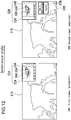
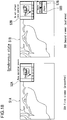
- Fig. 12 is a diagram showing examples of the two windows of the two viewers 30A, 30B in the synchronous state.
- the left side in Fig. 12 shows a first window 51A of the first viewer 30A set as the presenter.
- the right side shows a second window 51B of the second viewer 30B set as the audience.
- Each of the first window 51A and the second window 51B includes an image operation GUI 52A, 52B to receive instructions from a user to operate the image in the window.
- the image operation GUI 52A, 52B includes a thumbnail map 53A, 53B and a thumbnail map operation GUI 54A, 54B.
- the thumbnail map 53A, 53B includes a zoom-out image 55A, 55B of the entire object and a frame 56A, 56B.
- the frame 56A, 56B equivalently shows the image area, which is displayed in the first window 51A or the second window 51B, in the zoom-out image 55A, 55B. Based on instructions from a user, the frame 56A, 56B may move in the zoom-out image 55A, 55B, in an arbitrary direction and for an arbitrary distance.
- the viewer controller 37A calculates image location information.
- the thumbnail map operation GUI 54A, 54B includes GUI components such as a plurality of buttons and the like.
- the plurality of buttons receive instructions from a user to operate an image such as moves, zoom factor changes, rotations, and the like with respect to the image.
- move operations of the frame 56A, 56B may be performed by drag operations and the like by using a mouse and the like.
- the image operation GUIs 52A, 52B to operate the image have been described above.
- an operation right acquisition button 57B and an asynchronous/synchronous change button 58B are displayed in the audience window, for example, in the the second window 51B.
- the operation right acquisition button 57B is a button in the audience second window 51B, which is used in a case where a user wishes to acquire the operation right. In a case where the operation right acquisition button 57B is operated, the operation right is granted. Then, the operation right acquisition button 57B disappears from the second window 51B. In a case where the operation right acquisition button 57B disappears from the second window 51B, a user recognizes that the operation right is granted to his window, and that his window functions as a presenter. Then, the user may start image operations.
- the asynchronous/synchronous change button 58B is a button, which is used in a case where a user wishes to use the audience second window 51B personally, in a temporary asynchronous state with respect to the presenter first window 51A.
- the asynchronous/synchronous change button 58B changes from "Async" to "Sync".
- the asynchronous/synchronous change button 58B functions as a button to return from the asynchronous state to the synchronous state.
- the audience second window 51B and the presenter first window 51A are in the synchronous state
- a user starts any input operation in the image operation GUI 52B of the second window 51B by using the input unit 31B.
- the audience second window 51B changes from the synchronous state to the asynchronous state.
- the asynchronous/synchronous change button 58B changes from "Sync" to "Async".
- the first input operation in the image operation GUI 52B functions as the actual operation in the image in the second window 51B.
- a user may start to operate the image personally more promptly than the case where the asynchronous/synchronous change button 58B is operated.
- means for inputting instructions by a user to operate an image may not be limited to the image operation GUI 52B.
- a pointer cursor may be directly displayed in the image in the second window 51B, and the image may be operated through input operations (click, double click, right click, left click, drag, and the like) by using the pointer cursor.
- the first input operation may function as the actual operation in the image in the second window 51B.
- FIG. 7 is a sequence diagram showing the synchronous processing flow including the synchronous/asynchronous change operations.
- Fig. 12 to Fig. 17 are diagrams showing display examples in the two windows in a correspondence relation, in the single-window display mode.
- the left side in Fig. 12 shows the presenter first window 51A of the first viewer 30A
- the right side in Fig. 12 shows the audience second window 51B of the second viewer 30B.
- the first window 51A and the second window 51B are in the synchronous state. The same images are thus displayed in the first window 51A and the second window 51B.
- the operation right acquisition button 57B and the asynchronous/synchronous change button 58B are displayed in the audience second window 51B. "Async" is displayed in the asynchronous/synchronous change button 58B.
- a user inputs an arbitrary operation in the image displayed in the presenter first window 51A (A1 in Fig. 7 ).
- the viewer controller 37A of the first viewer 30A calculates image location information.
- the viewer controller 37A performs controls to update the image in the first window 51A.
- the viewer controller 37A performs controls to send a synchronous commission including the image location information to the synchronous server 20 by using the communication unit 33A (A2 in Fig. 7 ).
- the synchronous server 20 receives the synchronous commission, extracts the image location information from the synchronous commission, creates a synchronous request including the image location information, and sends the synchronous request to the second viewer 30B (A3 in Fig. 7 ).
- the viewer controller 37B of the second viewer 30B receives the synchronous request by using the communication unit 33A. Then, the viewer controller 37B controls to extract the image location information from the synchronous request, and to update the image in the second window 51B based on the image location information (A4 in Fig. 7 ) .
- the operation right acquisition button 57B and the asynchronous/synchronous change button 58B are displayed in the the audience second window 51B.
- operations in a case where a user operates the asynchronous/synchronous change button 58B or the image operation GUI 52B in the audience second window will be described.
- the viewer controller 37B of the second viewer 30B sends an asynchronous request including the viewer ID and the window ID to the synchronous server 20 (B2 in Fig. 7 ).
- the synchronous processing unit 25 of the synchronous server 20 sets the asynchronous flag of the second window 51B in the synchronous control table (B3 in Fig. 7 ). As a result, the synchronous state of the first window 51A and the second window 51B is canceled. After that, the synchronous processing unit 25 returns an asynchronous reply to the second viewer 30B (B4 in Fig. 7 ). Receiving the asynchronous reply, the viewer controller 37B of the second viewer 30B changes the asynchronous/synchronous change button 58B in the second window 51B to "Sync". In addition, the viewer controller 37B sets the asynchronous state, which allows a user to input operations in the image operation GUI 52B to operate the image in the second window 51B (B5 in Fig. 7 ).
- the synchronous processing unit 25 of the synchronous server 20 receives a synchronous return request from the second viewer 30B, the synchronous processing unit 25 prohibits the transmission of image location information from the first viewer 30A to the second viewer 30B.
- a user of the second viewer 30B may operate the image in the second window 51B of the second viewer 30B personally, and the user may input arbitrary operations.
- asynchronous/synchronous change button 58B or the image operation GUI 52B in the audience second window 51B is operated.
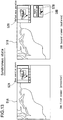
- the asynchronous state of the second window 51B and the presenter first window 51A is established, and the asynchronous/synchronous change button 58B changes from "Async" to "Sync".
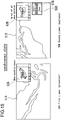
- Fig. 14 and Fig. 15 in a case where the image displayed in the presenter first window 51A is operated (C1 in Fig. 7 ), a synchronous request including image location information based on the operation information is not given to the second viewer 30B. Therefore, the operation is not reflected in the image in the second window 51B.
- Fig. 14 and Fig. 15 show a case where operations on the image displayed in the presenter first window 51A are repeated, and, meanwhile, a user does not input operations in the image in the audience second window 51B.
- the image in the audience second window 51B is updated based on the operation information (B6 in Fig. 7 ).
- the audience second window 51B changes to the asynchronous state based on operations of the image operation GUI 52B. In this case, based on the first operation in the image operation GUI 52B, the image displayed in the second window 51B is actually operated.
- asynchronous/synchronous change button 58B displayed as "Sync" is operated (E1 in Fig. 7 )
- the viewer controller 37B of the second viewer 30B sends a synchronous return request to the synchronous server 20 by using the communication unit 33A (E2 in Fig. 7 ).
- the synchronous return request includes the viewer ID and the window ID of the audience second window 51B.
- the synchronous processing unit 25 of the synchronous server 20 resets the asynchronous flag of the second window 51B in the synchronous control table based on the viewer ID and the window ID included in the synchronous return request (E3 in Fig. 7 ). Further, the synchronous processing unit 25 sends a synchronous request to the second viewer 30B that sent the synchronous return request (E4 in Fig. 7 ).
- the synchronous request includes the latest image location information. The latest image location information is calculated based on the latest operation (D1 in Fig. 7 ) on the image in the second window 51B as the presenter.
- the viewer controller 37B of the second viewer 30B controls to update the image in the second window 51B based on the image location information included in the received synchronous request.
- the viewer controller 37B changes the asynchronous/synchronous change button 58B from "Sync" to "Async" (E5 in Fig. 7 ).
- the synchronous state of the first window 51A and the second window 51B is re-established.
- FIG. 8 is a sequence diagram showing the flow of synchronous processing including operation right move processing between the viewers.
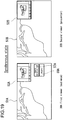
- Fig. 18 and Fig. 19 are diagrams showing display examples of the windows in the operation right move processing.
- A1 to A4 in Fig. 8 operations are input in the image displayed in the presenter first window 51A by a user. The operations are reflected in the image displayed in the audience second window 51B.
- the behaviors in A1 to A4 in Fig. 8 are the same as the behaviors A1 to A4 in Fig. 7 .
- a user operates the operation right acquisition button 57B in the audience second window 51B (F1 in Fig. 8 ).
- the viewer controller 37B of the second viewer 30B sends an operation right acquisition request to the synchronous server 20 (F2 in Fig. 8 ).
- the operation right acquisition request includes the viewer ID and the window ID of the audience second window 51B.
- the synchronous processing unit 25 of the synchronous server 20 receives the operation right acquisition request.
- the operation right abandonment request includes the viewer ID and the window ID extracted from the operation right acquisition request.
- the synchronous processing unit 25 sends the operation right abandonment request to the first viewer 30A (F3 in Fig. 8 ).
- the viewer controller 37A of the first viewer 30A controls to display an operation right acquisition button 57A and an asynchronous/synchronous change button 58A in the first window 51A (F4 in Fig. 8 ).
- the viewer controller 37A returns an operation right abandonment reply to the synchronous server 20 (F5 in Fig. 8 ).
- the synchronous server 20 receives the operation right abandonment reply from the first viewer 30A, the synchronous server 20 resets the operation right flag of the first window 51A in the synchronous control table. In addition, the synchronous server 20 sets the operation right flag of the second window 51B (F6 in Fig. 8 ). After that, the synchronous processing unit 25 of the synchronous server 20 sends an operation right acquisition reply to the second viewer 30B (F7 in Fig. 8 ).
- the operation right acquisition reply at least includes the window ID of the second window 51B.
- the second viewer 30B deletes the operation right acquisition button 57B and the asynchronous/synchronous change button 58B from the second window 51B (F8 in Fig. 8 ).
- the operation right is moved from the first window 51A to the second window 51B.
- a user inputs operations in the image displayed in the first window 51A as the present presenter.
- the operations are reflected in the image displayed in the second window 51B as the present audience (G1 to G4 in Fig. 8 ).
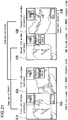
- Fig. 20 is a diagram showing a multi-window display example corresponding to the synchronous control table of Fig. 4 .
- the first viewer 30A having a viewer ID "0001”
- the second viewer 30B having a viewer ID "0002”.
- the second right window 62B holds the operation right.
- One of the effective uses of the multi-window display mode may be an educational system.
- an educational system there are two window combinations in the correspondence relation.
- the operation right to one combination is granted to the teacher-side viewer.
- the operation right to the other combination is granted to the student-side viewer.
- the teacher operates the image displayed in the window, the operation right to which is granted to the teacher-side viewer.
- the student may view the image operated by the teacher by using the student-side viewer.
- the window, the operation right to which is granted to the student-side viewer is used in relation to the image displayed in the window, the operation right to which is granted to the teacher-side viewer.
- the student uses the window, the operation right to which is granted to the student-side viewer, to confirm the area in the vicinity of the image displayed in the window, the operation right to which is granted to the teacher-side viewer, and the details of the image by changing the zoom factor.
- the student by himself, to manually adjust the image position in the window, the operation right to which is granted to the student-side viewer, to the image position displayed in the window, the operation right to which is granted to the teacher-side viewer.
- Such an adjusting operation may lay a heavy burden on a user.
- the image in the presenter window may be replaced with the copy of the image in the audience window as it is.
- Inter-window copy buttons 63A, 63B are displayed in the presenter windows that hold the operation rights (first left window 61A, second right window 62B).
- the inter-window copy buttons 63A, 63B receive instructions by users to copy images between the above-mentioned windows.
- Fig. 9 is a sequence diagram showing the flow of synchronous processing in the multi-window display mode including the inter-window image copying.
- A1 to A4 in Fig. 9 operations are input in the image displayed in the second right window 62B (presenter) of the second viewer 30B by a user.
- the operations are reflected in the image displayed in the first right window 62A (audience) of the first viewer 30A.
- the behaviors in A1 to A4 in Fig. 9 are the same as the behaviors A1 to A4 in Fig. 7 .
- Fig. 21 shows the result of moving operations on the image in the second right window 62B (presenter) of the second viewer 30B by a teacher. Moving operations are input in the image in the second right window 62B (presenter). Because of the moving operations, as shown in Fig. 22 , the image in the first right window 62A (audience) of the first viewer 30A is updated based on the synchronous processing.
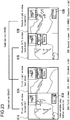
- a student wishes to confirm the area in the vicinity of the image, which is displayed in the first right window 62A, and the details of the image by using the first left window 61A (presenter) of the first viewer 30A.
- the student operates the inter-window copy button 63A in the first left window 61A by using the input unit 31A (H1 in Fig. 9 ).
- the viewer controller 37A of the first viewer 30A determines that the inter-window copy button 63A is operated. In this case, the viewer controller 37A obtains the copy of the image data displayed in the first right window 62A (H2 in Fig. 9 ). Then, as shown in Fig. 24 , the viewer controller 37A replaces the image in the first left window 61A with the obtained image data (H3 in Fig. 9 ).
- the area of the image in the window, the operation right to which is granted to the teacher at present that is, the image on which the teacher gives an explanation at present
- the student may swiftly start to confirm the area in the vicinity of the image, to which the teacher pays attention at present, and the details of the image, by using the window, the operation right to which is granted to the student side.
- the viewer controller 37A may obtain the image data displayed in the first right window 62A by copying image data in the memory of the first viewer 30A. Alternatively, the viewer controller 37A may obtain the image data by accessing the image server 10.
- the viewer controller 37A of the first viewer 30A updates the image in the first left window 61A. After that, the viewer controller 37A calculates image location information on the updated image.
- the viewer controller 37A sends a synchronous commission to the synchronous server 20 (H4 in Fig. 9 ).
- the synchronous commission includes the image location information, the viewer ID, and the window ID of the first left window 61A.
- the synchronous server 20 extracts the image location information, the viewer ID, and the window ID from the received synchronous commission.
- the synchronous server 20 sends a synchronous request including those pieces of information to the second viewer 30B (H5 in Fig. 9 ).
- the viewer controller 37B of the second viewer 30B updates the image in the second left window 61B (H6 in Fig. 9 ).
- Fig. 10 is a diagram showing the hardware configuration of a general computer 200.
- the computer 200 includes a CPU (Central Processing Unit) 201, a ROM (Read Only Memory) 202, and a RAM (Random Access Memory) 203.
- the computer 200 further includes an input device 204, an output device 205, a storage device 206, a media interface device 207, a network connecting device 208, and a bus 209 connecting them to each other.
- CPU Central Processing Unit
- ROM Read Only Memory
- RAM Random Access Memory
- the CPU 201 functions as an arithmetic processing unit and a control unit.
- the CPU 201 controls the entire behaviors of the computer 200 based on various programs.
- the ROM 202 stores the programs, arithmetic parameters, and the like to be used by the CPU 201.
- the RAM 203 temporarily stores the programs executed by the CPU 201, parameters arbitrarily change during the execution of the programs, and the like.
- the synchronous processing unit 25 of the synchronous server 20, the viewer controllers 37A, 37B of the viewers 30A, 30B, and the like are implemented by, for example, the CPU 201, the programs stored in the ROM 202, the working area of the RAM 203, and the like in the hardware configuration of the the computer 200.
- the input device 204 includes input means, an input control circuit, and the like.
- a user inputs information by using the input means such as a mouse, a keyboard, a touchpad, buttons, a microphone, switches, a lever, and the like.
- the input control circuit creates input signals based on instructions input by a user, outputs the signals to the CPU 201, and the like.
- a user of the computer 200 may input various data in the CPU 201, and may input processing-behavior instructions in the CPU 201.
- the output device 205 includes a display device such as, for example, a CRT (Cathode Ray Tube) display device, a liquid crystal display (LCD) device, an OLED (Organic Light Emitting Diode) device, or the like. Further, the output device 205 includes sound output devices such as a speaker, headphone, and the like.
- a display device such as, for example, a CRT (Cathode Ray Tube) display device, a liquid crystal display (LCD) device, an OLED (Organic Light Emitting Diode) device, or the like.
- LCD liquid crystal display
- OLED Organic Light Emitting Diode
- the storage device 206 is a device for storing the programs and user data.
- the storage device 206 includes a storage medium, a reader/writer that reads/writes data from/in the storage medium, and the like.
- the storage device 206 consists of, for example, a HDD (Hard Disk Drive), an SSD (Solid State Drive), or the like.
- the media interface device 207 is a reader/writer for a storage medium.
- the media interface device 207 reads/writes data from/in a loaded removal recording medium 2A such as a magnetic disk, an optical disk, a magneto-optical disk, a semiconductor memory, or the like.
- the network connecting device 208 is, for example, an interface connecting the computer 200 to the network 40.
- the network connecting device 208 may be a device for a wireless LAN (Local Area Network), a device for a wireless USB, or a wired communication device performing wired communication.
- a wireless LAN Local Area Network
- a device for a wireless USB or a wired communication device performing wired communication.
- the image synchronous processing between two viewers has been described. However, it is needless to say that the present disclosure may be applied to a case where three or more viewers are connected to each other. That is, the operation right is granted to one window, as a presenter, of three or more window combinations in the correspondence relation of three or more viewers. Operations on the image in the presenter window may be reflected in the the other audience windows.
- each viewer does not necessarily display the windows of all the viewers.
- a teacher-side viewer is connected to a plurality of student-side viewers.
- the teacher-side viewer may display the window, the operation right to which is granted to the teacher, and a plurality of windows of all the students as audience windows.
- a student-side viewer may display the window, the operation right to which is granted to the student himself, and the window of the teacher as an audience window.
- the window display is selectively controlled for each viewer.
- the selective control may be implemented by using, for example, a table that controls information for selecting a window to be displayed as an audience for each viewer (for example, combination of viewer ID and window ID, etc.), for example.
- an information processing system includes a first information processing apparatus configured to display a first synchronous image in a first window, the first window having an operation right, and includes a second information processing apparatus having a synchronous state or an asynchronous state.
- the second information processing apparatus is configured to: display a second synchronous image; in response to a first request, switch from the synchronous state to the asynchronous state; and in response to a second request, switch from the asynchronous state to the synchronous state.
- the second synchronous image is the same as the first synchronous image when the second information processing apparatus has the synchronous state.
- the second information processing apparatus is configured to, when the second information processing apparatus has the asynchronous state, enable a user to operate an input device to control an image displayed by the second information processing apparatus.
- the operation right is moved from the first information processing apparatus to the second information processing apparatus.
- the second information processing apparatus is configured to, in response to a third request, transmit an operation right acquisition request.
- the second information processing apparatus is configured to receive an operation right acquisition reply.
- the second information processing apparatus is configured to display the second synchronous image in a second window.
- the first information processing apparatus is configured to display a third synchronous image in a third window, the third window having a second operation right.
- the second information processing apparatus is configured to display a fourth synchronous image in a fourth window.
- the second operation right is moved from the third window to the fourth window of the second information processing apparatus.
- a method of operating an information processing system includes: causing a first information processing apparatus to display a first synchronous image in a first window, the first window having an operation right; causing a second information processing apparatus to display a second synchronous image, the second information processing apparatus having a synchronous state or an asynchronous state; in response to a first request, causing the second information processing apparatus to switch from the synchronous state to the asynchronous state; and in response to a second request, causing the second information processing apparatus to switch from the asynchronous state to the synchronous state.
- the second synchronous image is the same as the first synchronous image when second information processing apparatus has the synchronous state.
- the method further includes causing the second information processing apparatus to, when the second information processing apparatus has the asynchronous state, enable a user to operate an input device to control an image displayed by the second information processing apparatus.
- the operation right in response to a third request, is moved from the first information processing apparatus to the second information processing apparatus.
- the method further includes causing the second information processing to, in response to a third request, transmit an operation right acquisition request.
- the method further includes causing the second information processing apparatus to receive an operation right acquisition reply.
- the method further includes causing the second information processing apparatus to display the second synchronous image in a second window.
- the method further includes causing the first information processing apparatus to display a third synchronous image in a third window, the third window having a second operation right. And the method includes causing the second information processing apparatus to display a fourth synchronous image in a fourth window.
- the second operation right is moved from the third window to the fourth window of the second information processing apparatus.
- an information processing apparatus includes a processor and a memory device storing instructions. When executed by the processor, the instructions cause the processor to: receive, from a first information processing apparatus, an asynchronous request; in response to receiving the asynchronous request, for the first information processing apparatus, set a flag; thereafter, receive from the first information processing apparatus, a synchronous request; and in response to receiving the synchronous request, reset the flag.
- the instructions when executed by the processor, cause the processor to receive, from the first information processing apparatus, an operation right acquisition request; in response to receiving the operation right request, transmit an operation right abandonment request to a second information processing request; thereafter, receive an operation right abandonment reply from the second information processing apparatus; and in response to receiving the operation right abandonment reply, transmit an operation right acquisition reply to the first information processing apparatus.
- the operation right acquisition request includes data representative of a window identification.
- an information processing apparatus includes a processor, a display device, and a memory device storing instructions.
- the instructions When executed by the processor, the instructions cause the processor, in cooperation with the display device, to: display a synchronous image; in response to a first request, switch from a synchronous state to an asynchronous state; and in response to a second request, switch from the asynchronous state to the synchronous state.
- the synchronous image is the same as another synchronous image being displayed by another information processing apparatus when the information processing apparatus has the synchronous state.
- the instructions when executed by the processor, cause the processor to enable a user to operate an input device to control a displayed image when the information processing apparatus has the asynchronous state.
- the instructions when executed by the processor, cause the processor to receive an operation right.
- the instructions when executed by the processor, cause the processor to, in response to a third request, transmit an operation right acquisition request.
- the instructions when executed by the processor, cause the processor to receive an operation right acquisition reply.
Landscapes
- Engineering & Computer Science (AREA)
- General Engineering & Computer Science (AREA)
- Theoretical Computer Science (AREA)
- Multimedia (AREA)
- Signal Processing (AREA)
- Computer Networks & Wireless Communication (AREA)
- Human Computer Interaction (AREA)
- Physics & Mathematics (AREA)
- General Physics & Mathematics (AREA)
- Health & Medical Sciences (AREA)
- Radiology & Medical Imaging (AREA)
- Epidemiology (AREA)
- General Health & Medical Sciences (AREA)
- Medical Informatics (AREA)
- Primary Health Care (AREA)
- Public Health (AREA)
- Nuclear Medicine, Radiotherapy & Molecular Imaging (AREA)
- User Interface Of Digital Computer (AREA)
- Information Transfer Between Computers (AREA)
- Hardware Redundancy (AREA)
- Digital Computer Display Output (AREA)
Applications Claiming Priority (1)
| Application Number | Priority Date | Filing Date | Title |
|---|---|---|---|
| JP2011154603A JP5889559B2 (ja) | 2011-07-13 | 2011-07-13 | 情報処理方法および情報処理システム |
Publications (3)
| Publication Number | Publication Date |
|---|---|
| EP2547102A2 EP2547102A2 (en) | 2013-01-16 |
| EP2547102A3 EP2547102A3 (en) | 2017-06-21 |
| EP2547102B1 true EP2547102B1 (en) | 2021-11-03 |
Family
ID=46639264
Family Applications (1)
| Application Number | Title | Priority Date | Filing Date |
|---|---|---|---|
| EP12004641.2A Active EP2547102B1 (en) | 2011-07-13 | 2012-06-20 | Information processing method and information processing system |
Country Status (4)
| Country | Link |
|---|---|
| US (3) | US9635313B2 (enExample) |
| EP (1) | EP2547102B1 (enExample) |
| JP (1) | JP5889559B2 (enExample) |
| CN (1) | CN102880823A (enExample) |
Families Citing this family (29)
| Publication number | Priority date | Publication date | Assignee | Title |
|---|---|---|---|---|
| JP4692529B2 (ja) * | 2007-08-07 | 2011-06-01 | セイコーエプソン株式会社 | グラフィカルユーザインタフェース装置 |
| CN104753974A (zh) | 2013-12-25 | 2015-07-01 | 珠海金山办公软件有限公司 | 一种文档共享浏览方法及系统 |
| JP5914542B2 (ja) * | 2014-02-12 | 2016-05-11 | 日本電信電話株式会社 | 表示制御装置、表示制御装置の動作方法およびコンピュータプログラム |
| KR102262051B1 (ko) * | 2014-08-01 | 2021-06-09 | 삼성전자 주식회사 | 디스플레이장치, 이를 포함하는 다중 디스플레이 시스템 및 그 제어방법 |
| CN104244075B (zh) * | 2014-08-29 | 2019-02-22 | 形山科技(深圳)有限公司 | 一种媒体信息分享方法和系统 |
| CN104333449B (zh) * | 2014-09-29 | 2018-11-06 | 形山科技(深圳)有限公司 | 一种图片保密方法及系统 |
| CN104407846B (zh) * | 2014-10-29 | 2020-03-20 | 中国建设银行股份有限公司 | 一种信息处理方法及装置 |
| JP2016099732A (ja) * | 2014-11-19 | 2016-05-30 | セイコーエプソン株式会社 | 情報処理装置、情報処理システム、情報処理方法及びプログラム |
| US20160216861A1 (en) * | 2015-01-27 | 2016-07-28 | I/O Interconnect Inc. | Method for Changing Touch Control Function for Smartphone and Touchscreen Computer |
| US9921733B2 (en) | 2015-01-28 | 2018-03-20 | Splunk Inc. | Graphical interface for automatically binned information |
| US10031730B2 (en) * | 2015-04-22 | 2018-07-24 | Salesforce.Com, Inc. | Systems and methods of implementing extensible browser executable components |
| US10382424B2 (en) * | 2016-01-26 | 2019-08-13 | Redhat, Inc. | Secret store for OAuth offline tokens |
| CN107517399B (zh) * | 2016-06-16 | 2021-04-13 | 腾讯科技(深圳)有限公司 | 一种媒体信息同步的方法以及服务器 |
| US10592067B2 (en) * | 2016-08-12 | 2020-03-17 | Boston Scientific Scimed, Inc. | Distributed interactive medical visualization system with primary/secondary interaction features |
| JP6897040B2 (ja) * | 2016-09-23 | 2021-06-30 | 富士フイルムビジネスイノベーション株式会社 | プログラム、情報処理装置及び情報処理システム |
| JP6352503B2 (ja) * | 2016-09-30 | 2018-07-04 | 株式会社Medi Plus | 医療動画像表示システム |
| US10440346B2 (en) | 2016-09-30 | 2019-10-08 | Medi Plus Inc. | Medical video display system |
| TWI622026B (zh) * | 2017-04-12 | 2018-04-21 | Tutor Group Ltd | Interactive teaching system |
| EP3660687A4 (en) * | 2017-07-24 | 2020-08-19 | Fujitsu Limited | INFORMATION PROCESSING DEVICE, SHARE ORDER PROCESS AND SHARE ORDER PROGRAM |
| US10788972B2 (en) * | 2017-10-02 | 2020-09-29 | Fisher-Rosemount Systems, Inc. | Systems and methods for automatically populating a display area with historized process parameters |
| CN108900794B (zh) * | 2018-07-13 | 2023-01-06 | 北京罗森桥科技有限公司 | 用于远程会议的方法和装置 |
| JP7097774B2 (ja) * | 2018-07-27 | 2022-07-08 | シャープ株式会社 | 表示装置、表示方法及びプログラム |
| CN109273100A (zh) * | 2018-09-04 | 2019-01-25 | 广州广康医疗科技股份有限公司 | 一种远程会诊系统及方法 |
| CN110691331B (zh) * | 2019-08-30 | 2021-11-02 | 国家电网有限公司 | 基于蓝牙mesh技术的会议演示方法、装置及终端设备 |
| CN110782975B (zh) * | 2019-10-28 | 2022-07-22 | 杭州迪英加科技有限公司 | 一种显微镜下病理切片图像的呈现方法及装置 |
| WO2022249900A1 (ja) * | 2021-05-26 | 2022-12-01 | Necソリューションイノベータ株式会社 | 情報処理装置 |
| US12304648B2 (en) | 2021-11-12 | 2025-05-20 | Rockwell Collins, Inc. | System and method for separating avionics charts into a plurality of display panels |
| US12306007B2 (en) * | 2021-11-12 | 2025-05-20 | Rockwell Collins, Inc. | System and method for chart thumbnail image generation |
| US12254282B2 (en) | 2021-11-12 | 2025-03-18 | Rockwell Collins, Inc. | Method for automatically matching chart names |
Family Cites Families (43)
| Publication number | Priority date | Publication date | Assignee | Title |
|---|---|---|---|---|
| JPH06161956A (ja) * | 1992-11-20 | 1994-06-10 | Fuji Xerox Co Ltd | 共同作業支援システム |
| JPH07298235A (ja) | 1994-04-27 | 1995-11-10 | Canon Inc | テレビ会議装置及びそのポインティングカーソル表示制御方法 |
| JP3557246B2 (ja) | 1994-06-08 | 2004-08-25 | オリンパス株式会社 | 顕微鏡画像遠隔観察装置および顕微鏡画像の遠隔観察方法 |
| JPH08147391A (ja) | 1994-11-25 | 1996-06-07 | Hitachi Ltd | 連携診療支援方法及び装置 |
| JP3937469B2 (ja) | 1996-01-17 | 2007-06-27 | キヤノン株式会社 | 情報処理システム及びその方法及び装置 |
| JP3821170B2 (ja) | 1996-07-26 | 2006-09-13 | 富士ゼロックス株式会社 | 共同作業情報の管理方法および共同作業支援システム |
| JP3846666B2 (ja) * | 1998-09-24 | 2006-11-15 | 富士通株式会社 | 共有画面制御装置 |
| US7738688B2 (en) | 2000-05-03 | 2010-06-15 | Aperio Technologies, Inc. | System and method for viewing virtual slides |
| US7027633B2 (en) * | 2000-11-30 | 2006-04-11 | Foran David J | Collaborative diagnostic systems |
| US20020138624A1 (en) * | 2001-03-21 | 2002-09-26 | Mitsubishi Electric Information Technology Center America, Inc. (Ita) | Collaborative web browsing |
| JP2003216133A (ja) | 2002-01-25 | 2003-07-30 | Konica Corp | 医用画像処理装置、医用画像処理方法、プログラム、及び記憶媒体 |
| AU2003228416A1 (en) * | 2002-04-02 | 2003-10-20 | Collabo-Technology, Inc. | Method and apparatus for synchronous project collaboration |
| JP3943504B2 (ja) | 2002-04-10 | 2007-07-11 | 日本電信電話株式会社 | Sbcコラボレーションシステムおよびsbcコラボレーションを実現するプロキシサーバ |
| US20050162384A1 (en) * | 2004-01-28 | 2005-07-28 | Fujinon Corporation | Pointing device, method for displaying point image, and program therefor |
| JP2005286972A (ja) | 2004-03-31 | 2005-10-13 | Sony Broadband Solution Corp | 多地点会議接続システム、並びに多地点会議接続方法 |
| CN101076724B (zh) * | 2004-04-14 | 2012-11-14 | 美国医软科技公司 | 肝病诊断系统,方法和图形用户界面 |
| US7383495B2 (en) * | 2005-02-15 | 2008-06-03 | Microsoft Corporation | Presentation viewing tool designed for the viewer |
| JP4208252B2 (ja) * | 2005-11-17 | 2009-01-14 | 富士通株式会社 | 端末操作装置 |
| JP4640289B2 (ja) | 2006-08-04 | 2011-03-02 | 富士ゼロックス株式会社 | 共有画像表示プログラム、情報端末装置 |
| US8935624B2 (en) * | 2006-12-18 | 2015-01-13 | Voyant Health Ltd. | Method for copying images |
| JP2009044265A (ja) | 2007-08-06 | 2009-02-26 | Sharp Corp | 映像出力装置 |
| JP4127566B2 (ja) * | 2007-08-10 | 2008-07-30 | 株式会社リコー | 電子会議システム |
| US8112490B2 (en) * | 2008-05-15 | 2012-02-07 | Upton Kevin S | System and method for providing a virtual environment with shared video on demand |
| JP5112171B2 (ja) | 2008-05-29 | 2013-01-09 | 株式会社リコー | 画面編集装置、画面編集方法、プログラム、電子装置及び画像形成装置 |
| US20090327425A1 (en) * | 2008-06-25 | 2009-12-31 | Microsoft Corporation | Switching between and dual existence in live and recorded versions of a meeting |
| JP2010033229A (ja) | 2008-07-28 | 2010-02-12 | Hitachi Software Eng Co Ltd | 同期状態を制御可能な電子会議システム |
| US20100131873A1 (en) * | 2008-11-25 | 2010-05-27 | General Electric Company | Clinical focus tool systems and methods of use |
| EP2359282A2 (en) * | 2008-11-28 | 2011-08-24 | Fujifilm Medical Systems U.S.A. Inc. | Active overlay system and method for accessing and manipulating imaging dislays |
| US8547402B2 (en) * | 2009-10-07 | 2013-10-01 | Hologic, Inc. | Displaying computer-aided detection information with associated breast tomosynthesis image information |
| US20100153497A1 (en) * | 2008-12-12 | 2010-06-17 | Nortel Networks Limited | Sharing expression information among conference participants |
| CN102656858A (zh) * | 2009-05-04 | 2012-09-05 | 捷讯研究有限公司 | 用于使用sip协议来实现协作会话的控制转移的系统和方法 |
| JP2011044877A (ja) * | 2009-08-20 | 2011-03-03 | Sharp Corp | 情報処理装置、会議システム、情報処理方法及びコンピュータプログラム |
| JP5553569B2 (ja) | 2009-09-29 | 2014-07-16 | 富士フイルム株式会社 | 画像表示装置及び画像表示方法 |
| US8924864B2 (en) * | 2009-11-23 | 2014-12-30 | Foresight Imaging LLC | System and method for collaboratively communicating on images and saving those communications and images in a standard known format |
| JP5589366B2 (ja) * | 2009-11-27 | 2014-09-17 | ソニー株式会社 | 情報処理装置、情報処理方法及びそのプログラム |
| JP5658451B2 (ja) | 2009-11-30 | 2015-01-28 | ソニー株式会社 | 情報処理装置、情報処理方法及びそのプログラム |
| US9244533B2 (en) * | 2009-12-17 | 2016-01-26 | Microsoft Technology Licensing, Llc | Camera navigation for presentations |
| US20110238618A1 (en) * | 2010-03-25 | 2011-09-29 | Michael Valdiserri | Medical Collaboration System and Method |
| US20110282686A1 (en) * | 2010-05-12 | 2011-11-17 | General Electric Company | Medical conferencing systems and methods |
| US20120030288A1 (en) * | 2010-07-27 | 2012-02-02 | International Business Machines Corporation | Synchronizing user content in a collaborative session |
| US10734116B2 (en) * | 2011-10-04 | 2020-08-04 | Quantant Technology, Inc. | Remote cloud based medical image sharing and rendering semi-automated or fully automated network and/or web-based, 3D and/or 4D imaging of anatomy for training, rehearsing and/or conducting medical procedures, using multiple standard X-ray and/or other imaging projections, without a need for special hardware and/or systems and/or pre-processing/analysis of a captured image data |
| US10154226B2 (en) * | 2012-05-15 | 2018-12-11 | Capsovision Inc. | System and method for displaying bookmarked capsule images |
| DE102015118050A1 (de) * | 2014-10-24 | 2016-04-28 | Hectec Gmbh | Verfahren zur Planung, Vorbereitung, Begleitung, Überwachung und/oder abschließenden Kontrolle eines operativen Eingriffs in den menschlichen oder tierischen Körper, Vorrichtung zum Ausführen eines solchen Eingriffs und Verwendung der Vorrichtung |
-
2011
- 2011-07-13 JP JP2011154603A patent/JP5889559B2/ja active Active
-
2012
- 2012-06-20 EP EP12004641.2A patent/EP2547102B1/en active Active
- 2012-06-29 US US13/538,560 patent/US9635313B2/en active Active
- 2012-07-06 CN CN2012102365241A patent/CN102880823A/zh active Pending
-
2017
- 2017-03-14 US US15/458,217 patent/US20170185272A1/en not_active Abandoned
-
2020
- 2020-08-18 US US16/996,452 patent/US11487412B2/en active Active
Non-Patent Citations (1)
| Title |
|---|
| None * |
Also Published As
| Publication number | Publication date |
|---|---|
| JP2013020520A (ja) | 2013-01-31 |
| US11487412B2 (en) | 2022-11-01 |
| EP2547102A3 (en) | 2017-06-21 |
| US20170185272A1 (en) | 2017-06-29 |
| US20130019188A1 (en) | 2013-01-17 |
| JP5889559B2 (ja) | 2016-03-22 |
| EP2547102A2 (en) | 2013-01-16 |
| CN102880823A (zh) | 2013-01-16 |
| US9635313B2 (en) | 2017-04-25 |
| US20200379633A1 (en) | 2020-12-03 |
Similar Documents
| Publication | Publication Date | Title |
|---|---|---|
| EP2547102B1 (en) | Information processing method and information processing system | |
| EP2962478B1 (en) | System and method for multi-user control and media streaming to a shared display | |
| JP6525611B2 (ja) | 画像処理装置およびその制御方法 | |
| US9733736B2 (en) | Image display apparatus and method, image display system, and program | |
| US9341835B2 (en) | Virtual telemicroscope | |
| US20070162860A1 (en) | Remote console for observing multiple workstations | |
| US20130290421A1 (en) | Visualization of complex data sets and simultaneous synchronization of such data sets | |
| NO20092407L (no) | Fremgangsmate, prosesseringsinstruksjoner og anordning for endring av en videokonferanse-layout | |
| EP2829060A1 (en) | Teleconference system and teleconference terminal | |
| DE102010052244A1 (de) | Verfahren und Vorrichtung zur Darstellung einer grafischen Benutzeroberfläche einer tragbaren Recheneinheit auf einem externen Anzeigegerät | |
| US11355156B2 (en) | Systems and methods for producing annotated class discussion videos including responsive post-production content | |
| KR102016277B1 (ko) | 지적 재산 지원 시스템, 지적 재산 지원 방법 및 지적 재산 지원 프로그램 | |
| JP5514038B2 (ja) | ストリートビュー自動出力装置、地図自動出力装置、ストリートビュー自動出力方法、地図自動出力方法、およびプログラム | |
| US20150154749A1 (en) | Information processing apparatus, information processing system, information processing method, and program | |
| JP4836825B2 (ja) | マルチスクリーン表示システム | |
| JP6554041B2 (ja) | 情報処理方法および情報処理装置 | |
| JP2018163698A (ja) | 情報処理方法および情報処理装置 | |
| US20240195938A1 (en) | Method and system for providing an on-line conference including a medical image | |
| Malami | Recent advances in telepathology in the developing world | |
| WO2025029266A1 (en) | Systems and methods for mouse and keyboard synchronization | |
| US10163181B2 (en) | Method and system for joint evaluation of a medical image dataset | |
| WO2024104846A1 (en) | Input device restriction management for safe remote operation of medical devices | |
| JPWO2019008732A1 (ja) | 情報処理装置、情報処理方法、及び情報処理プログラム | |
| JP2020098438A (ja) | 医用画像表示装置及び医用画像表示システム | |
| HK1208548A1 (en) | Medical assistance system and method for same |
Legal Events
| Date | Code | Title | Description |
|---|---|---|---|
| PUAI | Public reference made under article 153(3) epc to a published international application that has entered the european phase |
Free format text: ORIGINAL CODE: 0009012 |
|
| 17P | Request for examination filed |
Effective date: 20120620 |
|
| AK | Designated contracting states |
Kind code of ref document: A2 Designated state(s): AL AT BE BG CH CY CZ DE DK EE ES FI FR GB GR HR HU IE IS IT LI LT LU LV MC MK MT NL NO PL PT RO RS SE SI SK SM TR |
|
| AX | Request for extension of the european patent |
Extension state: BA ME |
|
| PUAL | Search report despatched |
Free format text: ORIGINAL CODE: 0009013 |
|
| AK | Designated contracting states |
Kind code of ref document: A3 Designated state(s): AL AT BE BG CH CY CZ DE DK EE ES FI FR GB GR HR HU IE IS IT LI LT LU LV MC MK MT NL NO PL PT RO RS SE SI SK SM TR |
|
| AX | Request for extension of the european patent |
Extension state: BA ME |
|
| RIC1 | Information provided on ipc code assigned before grant |
Ipc: H04N 7/15 20060101AFI20170518BHEP Ipc: H04L 12/18 20060101ALI20170518BHEP |
|
| STAA | Information on the status of an ep patent application or granted ep patent |
Free format text: STATUS: EXAMINATION IS IN PROGRESS |
|
| 17Q | First examination report despatched |
Effective date: 20190830 |
|
| GRAP | Despatch of communication of intention to grant a patent |
Free format text: ORIGINAL CODE: EPIDOSNIGR1 |
|
| STAA | Information on the status of an ep patent application or granted ep patent |
Free format text: STATUS: GRANT OF PATENT IS INTENDED |
|
| INTG | Intention to grant announced |
Effective date: 20210531 |
|
| RAP3 | Party data changed (applicant data changed or rights of an application transferred) |
Owner name: SONY GROUP CORPORATION |
|
| GRAS | Grant fee paid |
Free format text: ORIGINAL CODE: EPIDOSNIGR3 |
|
| GRAA | (expected) grant |
Free format text: ORIGINAL CODE: 0009210 |
|
| STAA | Information on the status of an ep patent application or granted ep patent |
Free format text: STATUS: THE PATENT HAS BEEN GRANTED |
|
| AK | Designated contracting states |
Kind code of ref document: B1 Designated state(s): AL AT BE BG CH CY CZ DE DK EE ES FI FR GB GR HR HU IE IS IT LI LT LU LV MC MK MT NL NO PL PT RO RS SE SI SK SM TR |
|
| REG | Reference to a national code |
Ref country code: GB Ref legal event code: FG4D |
|
| REG | Reference to a national code |
Ref country code: AT Ref legal event code: REF Ref document number: 1445058 Country of ref document: AT Kind code of ref document: T Effective date: 20211115 Ref country code: CH Ref legal event code: EP |
|
| REG | Reference to a national code |
Ref country code: IE Ref legal event code: FG4D |
|
| REG | Reference to a national code |
Ref country code: DE Ref legal event code: R096 Ref document number: 602012077062 Country of ref document: DE |
|
| REG | Reference to a national code |
Ref country code: LT Ref legal event code: MG9D |
|
| REG | Reference to a national code |
Ref country code: NL Ref legal event code: MP Effective date: 20211103 |
|
| REG | Reference to a national code |
Ref country code: AT Ref legal event code: MK05 Ref document number: 1445058 Country of ref document: AT Kind code of ref document: T Effective date: 20211103 |
|
| PG25 | Lapsed in a contracting state [announced via postgrant information from national office to epo] |
Ref country code: RS Free format text: LAPSE BECAUSE OF FAILURE TO SUBMIT A TRANSLATION OF THE DESCRIPTION OR TO PAY THE FEE WITHIN THE PRESCRIBED TIME-LIMIT Effective date: 20211103 Ref country code: LT Free format text: LAPSE BECAUSE OF FAILURE TO SUBMIT A TRANSLATION OF THE DESCRIPTION OR TO PAY THE FEE WITHIN THE PRESCRIBED TIME-LIMIT Effective date: 20211103 Ref country code: FI Free format text: LAPSE BECAUSE OF FAILURE TO SUBMIT A TRANSLATION OF THE DESCRIPTION OR TO PAY THE FEE WITHIN THE PRESCRIBED TIME-LIMIT Effective date: 20211103 Ref country code: BG Free format text: LAPSE BECAUSE OF FAILURE TO SUBMIT A TRANSLATION OF THE DESCRIPTION OR TO PAY THE FEE WITHIN THE PRESCRIBED TIME-LIMIT Effective date: 20220203 Ref country code: AT Free format text: LAPSE BECAUSE OF FAILURE TO SUBMIT A TRANSLATION OF THE DESCRIPTION OR TO PAY THE FEE WITHIN THE PRESCRIBED TIME-LIMIT Effective date: 20211103 |
|
| PG25 | Lapsed in a contracting state [announced via postgrant information from national office to epo] |
Ref country code: IS Free format text: LAPSE BECAUSE OF FAILURE TO SUBMIT A TRANSLATION OF THE DESCRIPTION OR TO PAY THE FEE WITHIN THE PRESCRIBED TIME-LIMIT Effective date: 20220303 Ref country code: SE Free format text: LAPSE BECAUSE OF FAILURE TO SUBMIT A TRANSLATION OF THE DESCRIPTION OR TO PAY THE FEE WITHIN THE PRESCRIBED TIME-LIMIT Effective date: 20211103 Ref country code: PT Free format text: LAPSE BECAUSE OF FAILURE TO SUBMIT A TRANSLATION OF THE DESCRIPTION OR TO PAY THE FEE WITHIN THE PRESCRIBED TIME-LIMIT Effective date: 20220303 Ref country code: PL Free format text: LAPSE BECAUSE OF FAILURE TO SUBMIT A TRANSLATION OF THE DESCRIPTION OR TO PAY THE FEE WITHIN THE PRESCRIBED TIME-LIMIT Effective date: 20211103 Ref country code: NO Free format text: LAPSE BECAUSE OF FAILURE TO SUBMIT A TRANSLATION OF THE DESCRIPTION OR TO PAY THE FEE WITHIN THE PRESCRIBED TIME-LIMIT Effective date: 20220203 Ref country code: NL Free format text: LAPSE BECAUSE OF FAILURE TO SUBMIT A TRANSLATION OF THE DESCRIPTION OR TO PAY THE FEE WITHIN THE PRESCRIBED TIME-LIMIT Effective date: 20211103 Ref country code: LV Free format text: LAPSE BECAUSE OF FAILURE TO SUBMIT A TRANSLATION OF THE DESCRIPTION OR TO PAY THE FEE WITHIN THE PRESCRIBED TIME-LIMIT Effective date: 20211103 Ref country code: HR Free format text: LAPSE BECAUSE OF FAILURE TO SUBMIT A TRANSLATION OF THE DESCRIPTION OR TO PAY THE FEE WITHIN THE PRESCRIBED TIME-LIMIT Effective date: 20211103 Ref country code: GR Free format text: LAPSE BECAUSE OF FAILURE TO SUBMIT A TRANSLATION OF THE DESCRIPTION OR TO PAY THE FEE WITHIN THE PRESCRIBED TIME-LIMIT Effective date: 20220204 Ref country code: ES Free format text: LAPSE BECAUSE OF FAILURE TO SUBMIT A TRANSLATION OF THE DESCRIPTION OR TO PAY THE FEE WITHIN THE PRESCRIBED TIME-LIMIT Effective date: 20211103 |
|
| PG25 | Lapsed in a contracting state [announced via postgrant information from national office to epo] |
Ref country code: SM Free format text: LAPSE BECAUSE OF FAILURE TO SUBMIT A TRANSLATION OF THE DESCRIPTION OR TO PAY THE FEE WITHIN THE PRESCRIBED TIME-LIMIT Effective date: 20211103 Ref country code: SK Free format text: LAPSE BECAUSE OF FAILURE TO SUBMIT A TRANSLATION OF THE DESCRIPTION OR TO PAY THE FEE WITHIN THE PRESCRIBED TIME-LIMIT Effective date: 20211103 Ref country code: RO Free format text: LAPSE BECAUSE OF FAILURE TO SUBMIT A TRANSLATION OF THE DESCRIPTION OR TO PAY THE FEE WITHIN THE PRESCRIBED TIME-LIMIT Effective date: 20211103 Ref country code: EE Free format text: LAPSE BECAUSE OF FAILURE TO SUBMIT A TRANSLATION OF THE DESCRIPTION OR TO PAY THE FEE WITHIN THE PRESCRIBED TIME-LIMIT Effective date: 20211103 Ref country code: DK Free format text: LAPSE BECAUSE OF FAILURE TO SUBMIT A TRANSLATION OF THE DESCRIPTION OR TO PAY THE FEE WITHIN THE PRESCRIBED TIME-LIMIT Effective date: 20211103 Ref country code: CZ Free format text: LAPSE BECAUSE OF FAILURE TO SUBMIT A TRANSLATION OF THE DESCRIPTION OR TO PAY THE FEE WITHIN THE PRESCRIBED TIME-LIMIT Effective date: 20211103 |
|
| REG | Reference to a national code |
Ref country code: DE Ref legal event code: R097 Ref document number: 602012077062 Country of ref document: DE |
|
| PLBE | No opposition filed within time limit |
Free format text: ORIGINAL CODE: 0009261 |
|
| STAA | Information on the status of an ep patent application or granted ep patent |
Free format text: STATUS: NO OPPOSITION FILED WITHIN TIME LIMIT |
|
| 26N | No opposition filed |
Effective date: 20220804 |
|
| PG25 | Lapsed in a contracting state [announced via postgrant information from national office to epo] |
Ref country code: AL Free format text: LAPSE BECAUSE OF FAILURE TO SUBMIT A TRANSLATION OF THE DESCRIPTION OR TO PAY THE FEE WITHIN THE PRESCRIBED TIME-LIMIT Effective date: 20211103 |
|
| PG25 | Lapsed in a contracting state [announced via postgrant information from national office to epo] |
Ref country code: SI Free format text: LAPSE BECAUSE OF FAILURE TO SUBMIT A TRANSLATION OF THE DESCRIPTION OR TO PAY THE FEE WITHIN THE PRESCRIBED TIME-LIMIT Effective date: 20211103 |
|
| PG25 | Lapsed in a contracting state [announced via postgrant information from national office to epo] |
Ref country code: MC Free format text: LAPSE BECAUSE OF FAILURE TO SUBMIT A TRANSLATION OF THE DESCRIPTION OR TO PAY THE FEE WITHIN THE PRESCRIBED TIME-LIMIT Effective date: 20211103 |
|
| REG | Reference to a national code |
Ref country code: CH Ref legal event code: PL |
|
| REG | Reference to a national code |
Ref country code: BE Ref legal event code: MM Effective date: 20220630 |
|
| PG25 | Lapsed in a contracting state [announced via postgrant information from national office to epo] |
Ref country code: LU Free format text: LAPSE BECAUSE OF NON-PAYMENT OF DUE FEES Effective date: 20220620 Ref country code: LI Free format text: LAPSE BECAUSE OF NON-PAYMENT OF DUE FEES Effective date: 20220630 Ref country code: IE Free format text: LAPSE BECAUSE OF NON-PAYMENT OF DUE FEES Effective date: 20220620 Ref country code: CH Free format text: LAPSE BECAUSE OF NON-PAYMENT OF DUE FEES Effective date: 20220630 |
|
| PG25 | Lapsed in a contracting state [announced via postgrant information from national office to epo] |
Ref country code: IT Free format text: LAPSE BECAUSE OF FAILURE TO SUBMIT A TRANSLATION OF THE DESCRIPTION OR TO PAY THE FEE WITHIN THE PRESCRIBED TIME-LIMIT Effective date: 20211103 Ref country code: BE Free format text: LAPSE BECAUSE OF NON-PAYMENT OF DUE FEES Effective date: 20220630 |
|
| P01 | Opt-out of the competence of the unified patent court (upc) registered |
Effective date: 20230527 |
|
| PG25 | Lapsed in a contracting state [announced via postgrant information from national office to epo] |
Ref country code: HU Free format text: LAPSE BECAUSE OF FAILURE TO SUBMIT A TRANSLATION OF THE DESCRIPTION OR TO PAY THE FEE WITHIN THE PRESCRIBED TIME-LIMIT; INVALID AB INITIO Effective date: 20120620 |
|
| PG25 | Lapsed in a contracting state [announced via postgrant information from national office to epo] |
Ref country code: MK Free format text: LAPSE BECAUSE OF FAILURE TO SUBMIT A TRANSLATION OF THE DESCRIPTION OR TO PAY THE FEE WITHIN THE PRESCRIBED TIME-LIMIT Effective date: 20211103 Ref country code: CY Free format text: LAPSE BECAUSE OF FAILURE TO SUBMIT A TRANSLATION OF THE DESCRIPTION OR TO PAY THE FEE WITHIN THE PRESCRIBED TIME-LIMIT Effective date: 20211103 |
|
| PG25 | Lapsed in a contracting state [announced via postgrant information from national office to epo] |
Ref country code: TR Free format text: LAPSE BECAUSE OF FAILURE TO SUBMIT A TRANSLATION OF THE DESCRIPTION OR TO PAY THE FEE WITHIN THE PRESCRIBED TIME-LIMIT Effective date: 20211103 |
|
| PGFP | Annual fee paid to national office [announced via postgrant information from national office to epo] |
Ref country code: GB Payment date: 20240521 Year of fee payment: 13 |
|
| PGFP | Annual fee paid to national office [announced via postgrant information from national office to epo] |
Ref country code: FR Payment date: 20240522 Year of fee payment: 13 |
|
| PG25 | Lapsed in a contracting state [announced via postgrant information from national office to epo] |
Ref country code: MT Free format text: LAPSE BECAUSE OF FAILURE TO SUBMIT A TRANSLATION OF THE DESCRIPTION OR TO PAY THE FEE WITHIN THE PRESCRIBED TIME-LIMIT Effective date: 20211103 |
|
| PGFP | Annual fee paid to national office [announced via postgrant information from national office to epo] |
Ref country code: DE Payment date: 20250520 Year of fee payment: 14 |