EP2117229A2 - Kamera - Google Patents
Kamera Download PDFInfo
- Publication number
- EP2117229A2 EP2117229A2 EP09158572A EP09158572A EP2117229A2 EP 2117229 A2 EP2117229 A2 EP 2117229A2 EP 09158572 A EP09158572 A EP 09158572A EP 09158572 A EP09158572 A EP 09158572A EP 2117229 A2 EP2117229 A2 EP 2117229A2
- Authority
- EP
- European Patent Office
- Prior art keywords
- file
- image file
- image
- individual image
- image files
- Prior art date
- Legal status (The legal status is an assumption and is not a legal conclusion. Google has not performed a legal analysis and makes no representation as to the accuracy of the status listed.)
- Withdrawn
Links
- 230000004044 response Effects 0.000 claims abstract description 5
- 238000000034 method Methods 0.000 claims description 47
- 238000012217 deletion Methods 0.000 claims description 5
- 230000037430 deletion Effects 0.000 claims description 5
- 238000012545 processing Methods 0.000 description 28
- 238000010586 diagram Methods 0.000 description 5
- 238000006243 chemical reaction Methods 0.000 description 2
- 238000010276 construction Methods 0.000 description 2
- 238000012937 correction Methods 0.000 description 2
- 230000000694 effects Effects 0.000 description 2
- 238000003384 imaging method Methods 0.000 description 2
- 238000012986 modification Methods 0.000 description 2
- 238000004891 communication Methods 0.000 description 1
- 230000006835 compression Effects 0.000 description 1
- 238000007906 compression Methods 0.000 description 1
- 230000004048 modification Effects 0.000 description 1
- 238000003825 pressing Methods 0.000 description 1
- 239000010453 quartz Substances 0.000 description 1
- 230000002787 reinforcement Effects 0.000 description 1
- VYPSYNLAJGMNEJ-UHFFFAOYSA-N silicon dioxide Inorganic materials O=[Si]=O VYPSYNLAJGMNEJ-UHFFFAOYSA-N 0.000 description 1
Images




Classifications
-
- H—ELECTRICITY
- H04—ELECTRIC COMMUNICATION TECHNIQUE
- H04N—PICTORIAL COMMUNICATION, e.g. TELEVISION
- H04N5/00—Details of television systems
- H04N5/76—Television signal recording
- H04N5/765—Interface circuits between an apparatus for recording and another apparatus
- H04N5/77—Interface circuits between an apparatus for recording and another apparatus between a recording apparatus and a television camera
- H04N5/772—Interface circuits between an apparatus for recording and another apparatus between a recording apparatus and a television camera the recording apparatus and the television camera being placed in the same enclosure
-
- H—ELECTRICITY
- H04—ELECTRIC COMMUNICATION TECHNIQUE
- H04N—PICTORIAL COMMUNICATION, e.g. TELEVISION
- H04N9/00—Details of colour television systems
- H04N9/79—Processing of colour television signals in connection with recording
- H04N9/80—Transformation of the television signal for recording, e.g. modulation, frequency changing; Inverse transformation for playback
- H04N9/82—Transformation of the television signal for recording, e.g. modulation, frequency changing; Inverse transformation for playback the individual colour picture signal components being recorded simultaneously only
- H04N9/8205—Transformation of the television signal for recording, e.g. modulation, frequency changing; Inverse transformation for playback the individual colour picture signal components being recorded simultaneously only involving the multiplexing of an additional signal and the colour video signal
-
- H—ELECTRICITY
- H04—ELECTRIC COMMUNICATION TECHNIQUE
- H04N—PICTORIAL COMMUNICATION, e.g. TELEVISION
- H04N5/00—Details of television systems
- H04N5/76—Television signal recording
- H04N5/765—Interface circuits between an apparatus for recording and another apparatus
-
- H—ELECTRICITY
- H04—ELECTRIC COMMUNICATION TECHNIQUE
- H04N—PICTORIAL COMMUNICATION, e.g. TELEVISION
- H04N5/00—Details of television systems
- H04N5/76—Television signal recording
- H04N5/78—Television signal recording using magnetic recording
- H04N5/781—Television signal recording using magnetic recording on disks or drums
-
- H—ELECTRICITY
- H04—ELECTRIC COMMUNICATION TECHNIQUE
- H04N—PICTORIAL COMMUNICATION, e.g. TELEVISION
- H04N5/00—Details of television systems
- H04N5/76—Television signal recording
- H04N5/907—Television signal recording using static stores, e.g. storage tubes or semiconductor memories
-
- H—ELECTRICITY
- H04—ELECTRIC COMMUNICATION TECHNIQUE
- H04N—PICTORIAL COMMUNICATION, e.g. TELEVISION
- H04N9/00—Details of colour television systems
- H04N9/79—Processing of colour television signals in connection with recording
- H04N9/80—Transformation of the television signal for recording, e.g. modulation, frequency changing; Inverse transformation for playback
- H04N9/804—Transformation of the television signal for recording, e.g. modulation, frequency changing; Inverse transformation for playback involving pulse code modulation of the colour picture signal components
- H04N9/8042—Transformation of the television signal for recording, e.g. modulation, frequency changing; Inverse transformation for playback involving pulse code modulation of the colour picture signal components involving data reduction
- H04N9/8047—Transformation of the television signal for recording, e.g. modulation, frequency changing; Inverse transformation for playback involving pulse code modulation of the colour picture signal components involving data reduction using transform coding
-
- H—ELECTRICITY
- H04—ELECTRIC COMMUNICATION TECHNIQUE
- H04N—PICTORIAL COMMUNICATION, e.g. TELEVISION
- H04N9/00—Details of colour television systems
- H04N9/79—Processing of colour television signals in connection with recording
- H04N9/80—Transformation of the television signal for recording, e.g. modulation, frequency changing; Inverse transformation for playback
- H04N9/82—Transformation of the television signal for recording, e.g. modulation, frequency changing; Inverse transformation for playback the individual colour picture signal components being recorded simultaneously only
- H04N9/8205—Transformation of the television signal for recording, e.g. modulation, frequency changing; Inverse transformation for playback the individual colour picture signal components being recorded simultaneously only involving the multiplexing of an additional signal and the colour video signal
- H04N9/8227—Transformation of the television signal for recording, e.g. modulation, frequency changing; Inverse transformation for playback the individual colour picture signal components being recorded simultaneously only involving the multiplexing of an additional signal and the colour video signal the additional signal being at least another television signal
-
- H—ELECTRICITY
- H04—ELECTRIC COMMUNICATION TECHNIQUE
- H04N—PICTORIAL COMMUNICATION, e.g. TELEVISION
- H04N9/00—Details of colour television systems
- H04N9/79—Processing of colour television signals in connection with recording
- H04N9/87—Regeneration of colour television signals
- H04N9/8715—Regeneration of colour television signals involving the mixing of the reproduced video signal with a non-recorded signal, e.g. a text signal
Definitions
- Japanese Laid-Open Patent Publication No. 2001-43239 discloses an image recording apparatus that records a plurality of image data in one image file.
- a camera comprises: an image device that captures an image of a subject to acquire image data; a first image file creation device that creates an image file based on the image data acquired by the image device; a first recording control device that records the image file created by the image file creation device in a recording medium; an information creation device that creates association information for associating a plurality of image files created by the first image file creation device based on a plurality of image data acquired by the image device as a set of image data and recorded in the recording medium, with each other as a set of individual image files when the camera is set to a first photography mode in which data of a plurality of image files are combined to create one integrated image file; a second image file creation device that combines a plurality of the individual image files based on the association information in response to an instruction by a user to create one integrated image file; and a second recording control device that records the integrated image file created by the second image file creation device in a recording medium.
- the first recording control device may leave the individual image files to be recorded in the recording medium after the integrated image file is created by the second recording control device.
- the camera according to the first aspect may further comprises: an acceptance device that accepts selection by the user of an image file from a plurality of the individual image files, wherein: the information creation device creates association information for associating as one set the individual image files selection of which has been accepted by the acceptance device.
- the camera according to the third aspect may further comprises: a deletion device that deletes an individual image file other than the individual image files selection of which has been accepted by the acceptance device.
- the first recording control device records the individual image files in an individual image file recording region prepared in the recording medium; the second recording control device records the integrated image file in an integrated image file recording region prepared in the recording medium; and the camera further comprises a recording destination change device that copies or moves the individual image files selection of which has been accepted by the acceptance device from the individual image file recording region to the integrated image file recording region.
- the second recording control device may assign a file name to the integrated image file so that a region name of the individual image file recording region and a region name of the integrated image file recording region are associated with each other.
- file names of the individual image files and a file name of the integrated image file include respective number sections expressed as number symbols; and the first recording control device and the second recording control device assign file names to the individual image files and the integrated image file so that the number sections of the file names of the individual image files and the number section of the file name of the integrated image file constitute consecutive numbers.
- a file name of the integrated image file recorded in the recording medium in the first photography mode and a file name of the image file recorded in the recording medium in the second photography mode (referred to as a single image file) contain respective number sections expressed as number symbols; and the first recording control device and the second recording control device assign the file names of the integral image file and the single image file so that the number section of the file name of the integral image file and the number section of the file name of the single image file constitute consecutive numbers.
- the first recording control device assigns respective file names to the individual image files recorded in the recording medium in the first photography mode and the image file (referred to as a single image file) recorded in the recording medium in the second photography mode so that the file names of the individual image file and the single image file do not overlap each other.
- the information creation device may associate a plurality of the individual image files with each other by any one of methods (1) to (3) below:
- FIG. 1 is a block diagram showing the construction of a camera according to a first embodiment of the present invention.
- a camera 100 includes a DSC engine 201 that operates the camera 100.
- the DSC engine 201 there are provided an image processing circuit 201a, a JPEG Codec 201b, a SIO/PIO 201c, a display controller 201d, a CPU 201e, a DMA controller 201f, a memory controller 201g, and an audio Codec 201 h.
- the DSC engine 201 is connected to external devices such as a memory CARD slot 202, a flash memory 203, SDRAM 204, an LCD panel 205, a quartz oscillator (X'tal) 206, a speaker 207, and an operation button 208.
- the DSC engine 201 is also connected to a photographic lens 209, an image sensor (for example, CCD) 210, an AFE 211, and an imaging circuit such as a TG (timing generator), which is not shown.
- An image of a subject is formed on the CCD 210 through the photographic lens 209.
- a mechanical shutter, a mechanical aperture, a focus lens, a zoom lens and the like are driven to perform shooting.
- a motor driver IC (not shown) is used to drive these components and the motor driver IC is controlled through an SIO (serial port) 201c or PIO (parallel port) 201c of the DSC engine 201.
- the CCD 210 is driven by the TG (not shown) to perform exposure of the subject to light and reading out of the image signal.
- the TG and the AFE 211 to be detailed later is controlled by serial communication that uses the SIO 201c of the DSC engine 201.
- the image signal read out from the CCD 210 is sampled by the Analog Front End (AFE) 211 and converted to digital data pixel by pixel.
- the digital image data (RAW data) is input to the DSC engine 201 and subjected to image processing in the image processing circuit 201a that exists inside the DSC engine 201.
- the image processing circuit 201a performs WB adjustment, ⁇ correction, color interpolation, color conversion (color correction), resolution conversion, edge reinforcement, and so on and records image data after the image processing into the SDRAM 204.
- the image processing circuit 201a creates display image data for displaying a through image (live preview image) and records it in the SDRAM 204.
- the display controller 201d reads out display image data from the SDRAM 204 and outputs it to the LCD panel 205, thereby displaying a through image on the LCD panel 205.
- the JPEG Codec 201b reads out from the SDRAM 204 the image data after the image processing by the image processing circuit 201 a and performs JPEG compression to create an image data of a JPEG format.
- the JPEG Codec 201b records the created JPEG image data in the SDRAM 204.
- the CPU 201e reads out the JPEG data recorded in the SDRAM 204 to create an image file and records the created image file in a memory card, for example, an SD card inserted in the memory CARD slot 202.
- Input and output of data to and from the memory card inserted in the memory CARD slot 202, the flush memory 203, and the SDRAM 204 are controlled by the memory controller 201g.
- the CPU 201e when a photographic mode of the camera 100 is set to a mode in which a plurality of images is taken as a set such as a continuous shooting photography mode or a panorama photography mode, the CPU 201e records image files captured as one set in the photographic mode in the memory card after they are associated with each other. For example, the CPU 201e stores the plurality of image files taken as one set in one directory (folder) prepared in the memory card, thereby associating the image files with each other.
- the CPU 201e gathers and records as one file the data in the plurality of the associated image files that are stored as one set in the memory card based on the result of the above-mentioned association after the photography of one set of images is completed, that is, a continuous shooting photography or panorama photography is completed. That is, in the present embodiment, the data in the image files taken as one set as mentioned above and recorded in the memory card are recorded as a whole in an image file of a file format that can record a plurality of image data in one image file.
- FIG. 2 is a schematic diagram showing a file format of an image file that can record a plurality of image data according to the present embodiment.
- the file format is hereinafter referred to as a plural images format.
- an image file of the plural images format is referred to as a plural images file.
- the plural images file is assigned ".MIG" as an extension.
- the plural images file includes one header section 2a that stores header information on the plural images file in whole and a plurality of individual image data sections 2b that stores data recorded in separate image files (individual image files).
- Individual image data sections 2b include each a header section 2c for storing the header information of the individual image recorded in the individual image file and an image data section 2d for storing image data of the individual image.
- the CPU 201e when the CPU 201e records n individual image files as one set in a directory created in a memory card by continuous shooting photography, the CPU 201e reads out data in each individual image file from the directory and stores the data in each individual image data section 2b, thereby creating a plural images file of the format as shown in FIG. 2 .
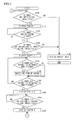
- FIG. 3 is a flowchart illustrating the processing by the camera 100 according to the first embodiment.
- the processing shown in FIG. 3 is performed by executing a program that is started up when a release button contained in an operation button 208 is fully pressed by the user while the camera 100 is set in the photography mode in which a plurality of images is taken as one set, such as a continuous shooting mode or a panorama photography mode.
- step S10 the CPU 201e prepares a subdirectory for recording individual image files taken as one set in a memory card inserted in the memory CARD slot 202.
- the CPU 201e causes a number section to be included in each of the subdirectory name, the file name of individual image file, and the file name of a plural images file.
- the CPU 201e controls such that the number section of the file name of the individual image file and the number section of the file name of the plural images file constitute consecutive numbers so that the respective file names of the individual image file and of the plural images file will not overlap each other except for the extensions of the file names.
- the CPU 201e makes the number section of the file name of the plural images file identical to the number section of the name of the subdirectory to associate a plural images file with the subdirectory having recorded therein the individual image files from which the plural images file has been created.
- the association makes it possible to figure out which individual image files in the subdirectory have been used to create the plural images file.
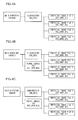
- the CPU 201e assigns a temporary number to the number section of the directory name of the prepared subdirectory in step S10. For example, as shown in FIG. 4A , a subdirectory is prepared in the main directory (100ABCD) in the memory CARD slot 202 and the directory name thereof is defined as "SUB_9999" that includes the temporary number 9999.
- step S20 the CPU 201e performs shooting corresponding to the photographic mode based on the operation of the release button by the user to create the above-mentioned individual image file.
- step S30 the CPU 201e assigns a file name in conformity with the file nomenclature to the individual image file created in step S20 and records the file in the subdirectory prepared in step S10. For example, the CPU 201e assigns to the created individual image file an image file name containing a number obtained by adding 1 to the last number, that is, the greatest number contained in the file names of existing image files.
- the existing image files referred to herein mean image files other than the individual image files created in step S20, such as those image files recorded in the main directory (100ABCD), other individual image files recorded in the subdirectory (SUB_9999), and individual image files recorded in other subdirectories and so on.
- the last number included in the file names of the existing image files is 5 (0005) when an individual image file 1 is created, the CPU 201e assigns, to the individual image file 1, "DSC_0006.JPG" as a file name that includes 6 obtained by adding 1 to the last number, and records it in the subdirectory (SUB_9999).
- the CPU 201e assigns a file name "DSC_0007.JPG" to the individual image file 2, a file name "DSC_0008.JPG” to the individual image file 3 and a file name "DSC_0009.JPG” to the individual image file 4 as shown in FIG. 4A .
- the CPU 201e then records the individual image files in the subdirectory (SUB_9999).
- a plurality of individual image files shot as one set can be associated with each other by recording the individual image files shot as one set in one subdirectory.
- step S40 the CPU 201e judges whether shooting of one set of images is completed. If the result of the judgment in step S40 is NO, the procedure returns to step S20. On the contrary, if the result of the judgment in step S40 is YES, the procedure proceeds to step S50.
- step S50 the CPU 201e judges whether the number of images shot in the above-mentioned photographic processing is plural. If the result of the judgment in step S50 is YES, the procedure proceeds to step S60.
- step S60 the CPU 201e creates an empty plural images file, that is, a plural images file that stores no data in each individual image data section 2b, assigns a file name in conformity with the file nomenclature, and records the file in the main directory (100ABCD). For example, as shown in FIG. 4B , the CPU 201e assigns to the created plural images file an image file name "DSC_0010.MIG" that contains 10 obtained by adding 1 to the last number 9 (0009) contained in the file names of the individual image files recorded in the subdirectory (SUB_9999).
- no data is stored in each individual image data section 2b in the plural images file in the step of shooting but the data are stored in the individual image data sections 2b by the processing to be detailed later referring to FIGS. 5 and 6 .
- This is done taking into consideration the situations below. That is, on one hand, it is unclear whether the user desires to prepare a plural images file based on the individual image files shot as one set. On the other hand, even when the user desires to prepare a plural images file, it is still unclear whether the user desires to put together all the individual image files shot as one set into one plural images file. For this reason, in the step of shooting, the individual image files are not put together into one plural images file but individual image files shot as one set are recorded in the same subdirectory and only associated with each other so as to enable the user to prepare a plural images file as desired afterwards.
- step S70 the procedure proceeds to step S70 and the CPU 201e changes the number section of the directory name of the subdirectory to become identical with the number section of the file name of the plural images file created in step S60 to associate the directory name with the file name.
- the CPU 201e changes the number section of the directory name of the subdirectory to 10(0010), which is the same as the number section of the file name of the plural images file, to name the subdirectory "SUB_0010". Thereafter, the procedure is terminated.
- step S50 when the result of the judgment in step S50 is NO, the procedure proceeds to step S80.
- step S80 the CPU 201e judges that a plurality of images is not shot as one set and copies or moves the individual image file recorded in the subdirectory to the main directory (100ABCD) so as to record the image therein in the same manner as in the case where ordinary shooting is performed. Then, the procedure proceeds to step S90 and the CPU 201e deletes the subdirectory from the main directory (100ABCD) since no subdirectory is necessary in this case, and the procedure is terminated.
- FIGS. 5 and 6 are flowcharts each illustrating the flow of processing of creating a plural images file according to the present embodiment.
- the processing shown in FIGS. 5 and 6 is performed by the CPU 201e according to a program that is started up when the mode of the camera 100 is set to a replay mode for replaying images.
- step S100 the CPU 201e judges whether there is an empty plural images file in the main directory (100ABCD) of the memory card. That is, the CPU 201e judges whether there is a plural images file that is not completely prepared. If the result of the judgment in step S100 is NO, the procedure proceeds to step S140 and the CPU 201 controls the display controller 201d to display the replayed image (reproduced image) on the LCD panel 205 and the procedure is terminated.
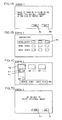
- step S110 in which the CPU 201e displays a screen 1 shown in FIG. 7A on the LCD panel 205 to notify the user that there is a plural images file that is not completely prepared.
- a "YES” button 6a and a "NO” button 6b are arranged.
- the user operates the operation button 208 to select the "YES” button 6a, so that start of preparing the plural images file can be instructed.
- the user can select the "NO" button 6b to instruct not to start preparing the plural images file.
- step S120 the CPU 201e judges whether there is an operation of the operation button 208 by the user. If the result of the judgment in step S120 is YES, the procedure proceeds to step S130, in which the CPU 201e judges whether preparation of a plural images file has been instructed based on the operation of the "YES" button on the screen 1 by the user. If the result of the judgment in step S130 is NO, that is, if it has been judged that the "NO" button was operated by the user, the procedure proceeds to the step S140. On the contrary, if the result of the judgment is YES, the procedure proceeds to step S150.
- step S150 the CPU 201e displays a screen 2 shown in FIG. 7B on the LCD panel 205.
- the CPU 201e displays the directory name of a subdirectory, of which preparation of the plural images file has not been completed, on the screen 2 and displays reduced-size images, for example, thumbnails of the individual image files recorded in the subdirectory in association with each subdirectory name.
- the CPU 201e specifies an empty plural images file from among the plural images files recorded in the main directory and identifies a subdirectory with the directory name that contains the number section that corresponds to the number section of the file name of the specified plural images file.
- the CPU 201e displays the directory name of the specified subdirectory and the thumbnail images of the individual image files recorded in the subdirectory in association with each other on the screen 2.
- the directory name of the specified subdirectory and the thumbnail images of the individual image files recorded in the subdirectory in association with each other on the screen 2.
- the CPU 201e displays on the screen 2 a cursor 6c for selecting as a set one subdirectory name displayed on the screen 2 and thumbnail images of the individual image files recorded in the subdirectory.
- the user can operate the operation button 208 to change the subdirectory to be selected.
- the CPU 201e moves the cursor 6c on the screen according to the content of the operation.
- the user can determine an individual image file in the subdirectory at which the cursor 6c is pointed as a target of creation of a plural images file by operating the operation button 208 in a state where the cursor 6c points any one of the subdirectories.
- step S160 the CPU 201e judges whether a change of subdirectory to be selected has been instructed by the operation of the operation button 208 by the user. If the result of the judgment in step S160 is NO, the procedure proceeds to step S180 to be detailed later. On the contrary, if the result of the judgment in step S160 is YES, the procedure proceeds to step S170. In step S170, the cursor 6c is moved on the screen in response to the operation of the operation button 208 by the user and the procedure proceeds to step S180.
- step S180 the CPU 201e judges whether selection of subdirectory has been determined by the operation of the operation button 208 by the user. If the result of the judgment in step S180 is NO, the procedure returns to step S160 and the processing is repeated. On the contrary, if the result of the judgment in step S180 is YES, the procedure proceeds to step S190.
- step S190 the CPU 201e displays a screen 3 as shown in FIG. 7C on the LCD panel 205.
- the CPU 201e displays on the screen 3 a list of the thumbnails of the individual image files recorded in the subdirectory selected by the user.
- the CPU 201 displays a check box 6e for selecting a representative image and a check box 6f for selecting a plurality of images in association with each thumbnail image.
- the user can select image files whose data he or she wishes to store in the plural images file from among the individual image files by checking the check box 6f for selecting a plurality of images by operating the operation button 208.
- the CPU 201e checks by default the check boxes 6f for selecting a plurality of images corresponding to all the thumbnail images and the user removes the check from the check box 6f that corresponds to an individual image file the data of which the user does not wish to store in the plural images file.
- the user can specify a representative image out of individual image files selected as objects to be included in the plural images file, i.e., individual image files for which the user checked in the check box 6f for selecting plural images by operating the operation button 208 to check the check box 6.
- One such representative image is specified. Only one of the check boxes 6e for selecting the representative image corresponding to any one of thumbnail image may be checked. When the check in the check box 6f for selecting a plural images file has been removed by the user as mentioned above, and if the check box 6e for selecting plural images corresponding to the thumbnail image has been checked, the CPU 201e removes the check from the check box 6e for selecting a representative image.
- the CPU 201e displays a cursor 6d for selecting a thumbnail image.
- the user can operate the operation button 208 to move the cursor 6d and cause a predetermined operation to be performed in a state in which the cursor 6d points any one of the thumbnail images.
- the check box 6e for selecting a representative image that corresponds to the thumbnail image specified with the cursor 6d and the check box 6f for selecting a plural images file can be checked.
- step S200 the CPU 201e judges whether preparation of a plural images file has been instructed based on the condition whether the "PREPARE PLURAL IMAGES FILE" button 6g has been selected. If the result of the judgment in step S200 is YES, the procedure proceeds to step S210.
- step S210 the CPU 201e displays a screen 4 shown in FIG. 7D on the LCD panel 205 and to make an inquiry to the user if he or she wishes to delete the individual image files that have been selected to be contained in the plural images files.
- the user can give an instruction to delete the individual image files that have been selected to be included in the plural images file by operating the operation button 208 to select a "YES" button 6h on the screen 4.
- the user can give an instruction to retain in the subdirectory the individual image files that have been selected to be contained in the plural images file by operating the operation button 208 to select a "NO" button 6i.
- step S220 in FIG. 6 the CPU 201e judges whether the user has operated the operation button 208. If the result of the judgment in step S220 is YES, the procedure proceeds to step S230 in which the CPU 201e judges whether the content of the operation has been the selection of the "YES" button 6h, that is, an instruction for the deletion of the individual image files. If the result of the judgment in step S230 is YES, the procedure proceeds to step S240.
- step S240 the CPU 201e reads out the individual image files corresponding to the thumbnail images of which the check boxes 6f for selecting plural images have been checked on the screen 3 from the memory card to the SDRAM 204 and also reads out the plural images file prepared in step S60, and the procedure proceeds to step S250.
- step S250 the CPU 201e puts together (combines) the data of the individual image files read out to the SDRAM 204 into one to create a plural images file of the format shown in FIG. 2 .
- the CPU 201e creates a plural images file in which the data of the individual image files read out to the SDRAM 204 are stored in respective individual image data sections 2b.
- step S260 in which the CPU 201e labels the plural images file created in step S240 as the same file name as that of a corresponding empty plural images file recorded in the main directory and overwrite save it in the main directory.
- step S260 the CPU 201e labels the plural images file created in step S240 as the same file name as that of a corresponding empty plural images file recorded in the main directory and overwrite save it in the main directory.
- the CPU 201e may be adapted to copy the individual image file, which has been selected by the user as a representative image on the screen 3 shown in FIG. 7C when a plural images file is created, from the subdirectory to the main directory and record it in the main directory.
- step S270 in which the CPU 201e deletes the image files whose data are contained in the plural images file from the subdirectory where the plural images file has been created and the procedure returns to step S100.
- the individual image files whose data have not been contained in the plural images file are allowed to remain as they are in the subdirectory so that the user can browse the respective image data in the individual image files.
- step S230 when the judgment in step S230 is NO, the procedure proceeds to step S280.
- steps S280 to step S300 the CPU 201e performs processing similar to that in step S240 to step S260. Then, the procedure returns to step S100.
- the plural image file is associated with the subdirectory in which the individual image files used for creating the plural images file are recorded by making the number section of the file name of the plural images file and the file name of the subdirectory identical with each other.
- the number section in the directory name of the subdirectory is assigned with a temporary number in advance and when preparation of an empty plural images file is completed, the number section in the file name of the plural images file and the number section in the directory name of the subdirectory are made identical.
- FIGS. 1 , 2 , and 5 to 7D are the same as in the first embodiment, so that detailed explanations thereof are omitted herein.
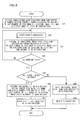
- FIG. 8 is a flowchart illustrating the processing by the camera 100 according to the second embodiment.
- the processing illustrated in FIG. 8 is performed according to a program that is started up by fully pressing the release button included in the operation button 208 by the user when the photographic mode of the camera 100 is set to a mode in which a plurality of images is shot as a set, such as a continuous photography mode or a panoramic photography mode.
- processing similar to that in FIG. 3 is assigned the same step number and explanation is focused to differences from FIG. 3 .
- step S11 the CPU 201e prepares a subdirectory for recording therein individual image files taken as one set in the memory card inserted in the memory CARD slot 202.
- the CPU 201e provides number sections in the subdirectory name, file names of individual image files, and the file name of the plural images file, respectively.
- the CPU 201e assigns consecutive numbers to the number section of the subdirectory name, the number section of the file names of the individual image files, and the number section of the file name of the plural images file in order to avoid overlaps in the number sections.
- step S11 the CPU 201e assigns to the created subdirectory a directory name obtained by adding 1 to the last number in the file names of the existing image files and the directory names of the existing subdirectories.
- the existing image files is meant image files recorded in the main directory (100ABCD) and the individual image files recorded in the subdirectory (SUB_9999).
- the CPU 201e assigns to the subdirectory a file name of "SUB_0006" as shown in FIG. 9A as a file name that contains a number 6 obtained by adding 1 to the last number of 5.
- step S20 in which the CPU 201e performs shooting processing in the same manner as in the first embodiment and the procedure proceeds to step S31.
- step S31 the CPU 201e assigns a file name in conformity with the above-mentioned nomenclature to the individual image files created in the step S20 and records them in the subdirectory prepared in step S11.
- the CPU 201e assigns to the created individual image file an image file name that contains a number obtained by adding 1 to the last number, i.e., the greatest number included in the file names of the existing image files and directory names of the existing subdirectories. For example, if the last number included in the existing directory names and the existing file names is 6 (0006) which is included in the subdirectory name assigned in step S11 when an individual image file 1 is created, the CPU 201e assigns to the individual image file 1 a file name of "DSC_0007.JPG" as a file name that includes 7 obtained by adding 1 to the last number and records it in the subdirectory (SUB_0006).
- the CPU 201e assigns a file name of "DSC_0008.JPG" to the individual image file 2, a file name of "DSC_0009.JPG” to the individual image file 3, and a file name of "DSC_0010.JPG" to the individual image file 4 as shown in FIG. 9A .
- the CPU 201e records each individual image file in the subdirectory (SUB_0006). Also, in the present embodiment, a plurality of individual image files shot as one set can be associated with each other by recording the individual image files shot as one set in one and the same subdirectory.
- the CPU 201e performs the processing in steps S40 to S60 in the same manner as in the first embodiment.
- a plural images file is assigned with an image file name "DSC_0011.MIG" that contains 11 obtained by adding 1 to the last number 10 (0010) contained in the file names of the individual image files recorded in the subdirectory (SUB_0006).
- the procedure proceeds from step S60 to step S71, in which the CPU 201e associate the plural images file with the subdirectory that has recorded therein individual image files from which the plural images file has been created.
- the CPU 201e may perform the above-mentioned association by associating the file name of the plural images file with the directory name of the subdirectory by use of a database.
- the CPU 201e may perform the above-mentioned association by recording the directory name of the subdirectory in which the individual image files from which the plural images file has been created in a header section 2a of the plural images file.
- the CPU 201e is adapted to associate the plural images file with the subdirectory that has recorded therein individual image files from which the plural images file has been created by use of a database or by recording the directory name of the subdirectory in which the individual image files from which the plural images file has been created in a header section 2a of the plural images file.
- the CPU 201e is adapted to associate the plural images file with the subdirectory that has recorded therein individual image files from which the plural images file has been created by use of a database or by recording the directory name of the subdirectory in which the individual image files from which the plural images file has been created in a header section 2a of the plural images file.
- the camera according to the above-mentioned embodiments can be modified as follows.
- the user can create a combined image file by readily specifying image files to be combined after completion of shooting without preliminarily setting the camera so as to enable creation of a combined image file before shooting.
Landscapes
- Engineering & Computer Science (AREA)
- Multimedia (AREA)
- Signal Processing (AREA)
- Studio Devices (AREA)
- Television Signal Processing For Recording (AREA)
Applications Claiming Priority (1)
| Application Number | Priority Date | Filing Date | Title |
|---|---|---|---|
| JP2008121403A JP5163264B2 (ja) | 2008-05-07 | 2008-05-07 | カメラ |
Publications (2)
| Publication Number | Publication Date |
|---|---|
| EP2117229A2 true EP2117229A2 (de) | 2009-11-11 |
| EP2117229A3 EP2117229A3 (de) | 2014-05-07 |
Family
ID=40940153
Family Applications (1)
| Application Number | Title | Priority Date | Filing Date |
|---|---|---|---|
| EP09158572.9A Withdrawn EP2117229A3 (de) | 2008-05-07 | 2009-04-23 | Kamera |
Country Status (3)
| Country | Link |
|---|---|
| US (1) | US8395675B2 (de) |
| EP (1) | EP2117229A3 (de) |
| JP (1) | JP5163264B2 (de) |
Families Citing this family (6)
| Publication number | Priority date | Publication date | Assignee | Title |
|---|---|---|---|---|
| JP5556260B2 (ja) * | 2010-03-12 | 2014-07-23 | 株式会社ニコン | 画像記録装置、および画像記録プログラム |
| JP5936362B2 (ja) * | 2012-01-12 | 2016-06-22 | キヤノン株式会社 | 情報処理装置、情報処理方法 |
| KR20150053634A (ko) * | 2013-11-08 | 2015-05-18 | 삼성전자주식회사 | 디지털 영상 관리 방법, 상기 방법을 기록한 컴퓨터 판독 가능 저장매체 및 디지털 영상 관리 장치. |
| CN105224572B (zh) * | 2014-06-30 | 2019-11-15 | 北京金山安全软件有限公司 | 鉴别垃圾目录的方法及装置 |
| US20170187910A1 (en) * | 2015-12-28 | 2017-06-29 | Amasing Apps USA LLC | Method, apparatus, and computer-readable medium for embedding options in an image prior to storage |
| WO2020199090A1 (en) * | 2019-04-01 | 2020-10-08 | Citrix Systems, Inc. | Automatic image capture |
Citations (1)
| Publication number | Priority date | Publication date | Assignee | Title |
|---|---|---|---|---|
| JP2001043239A (ja) | 1999-07-30 | 2001-02-16 | Canon Inc | 画像記憶方法及び装置及び記憶媒体 |
Family Cites Families (11)
| Publication number | Priority date | Publication date | Assignee | Title |
|---|---|---|---|---|
| JP3556265B2 (ja) * | 1994-03-04 | 2004-08-18 | オリンパス株式会社 | 画像取扱装置及びカメラ |
| JPH11266420A (ja) * | 1998-03-17 | 1999-09-28 | Hitachi Ltd | 画像データ記録方法及び画像データ記録装置 |
| JP3096684B2 (ja) * | 1998-03-25 | 2000-10-10 | 三洋電機株式会社 | デジタルカメラ |
| JP2004297424A (ja) * | 2003-03-27 | 2004-10-21 | Fuji Photo Film Co Ltd | デジタルカメラ |
| JP2004350042A (ja) * | 2003-05-22 | 2004-12-09 | Canon Inc | 記録装置および記録方法、再生装置および再生方法、並びに記憶媒体 |
| JP2005026951A (ja) * | 2003-07-01 | 2005-01-27 | Minolta Co Ltd | 画像処理システムおよび画像処理方法 |
| JP2005143020A (ja) * | 2003-11-10 | 2005-06-02 | Seiko Epson Corp | 撮影装置およびその処理方法並びに撮影装置用のプログラム |
| JP4239090B2 (ja) * | 2004-01-08 | 2009-03-18 | 富士フイルム株式会社 | ファイル管理プログラム |
| JP4158774B2 (ja) | 2005-03-07 | 2008-10-01 | 株式会社日立製作所 | 再生方法 |
| JP4498236B2 (ja) * | 2005-07-13 | 2010-07-07 | キヤノン株式会社 | 画像処理装置およびその制御方法 |
| JP4164510B2 (ja) * | 2005-12-22 | 2008-10-15 | キヤノン株式会社 | 画像処理装置、画像処理方法 |
-
2008
- 2008-05-07 JP JP2008121403A patent/JP5163264B2/ja not_active Expired - Fee Related
-
2009
- 2009-04-21 US US12/385,828 patent/US8395675B2/en not_active Expired - Fee Related
- 2009-04-23 EP EP09158572.9A patent/EP2117229A3/de not_active Withdrawn
Patent Citations (1)
| Publication number | Priority date | Publication date | Assignee | Title |
|---|---|---|---|---|
| JP2001043239A (ja) | 1999-07-30 | 2001-02-16 | Canon Inc | 画像記憶方法及び装置及び記憶媒体 |
Also Published As
| Publication number | Publication date |
|---|---|
| EP2117229A3 (de) | 2014-05-07 |
| US20090278955A1 (en) | 2009-11-12 |
| JP5163264B2 (ja) | 2013-03-13 |
| US8395675B2 (en) | 2013-03-12 |
| JP2009272871A (ja) | 2009-11-19 |
Similar Documents
| Publication | Publication Date | Title |
|---|---|---|
| JP4990321B2 (ja) | 撮像装置 | |
| JP4481842B2 (ja) | 撮像装置及びその制御方法 | |
| US20080016470A1 (en) | Image display apparatus and method and image management program | |
| US8885056B2 (en) | Digital camera | |
| US8395675B2 (en) | Camera | |
| JP2009199586A (ja) | 情報処理装置及びその制御方法 | |
| US20050212915A1 (en) | Digital camera | |
| US8004582B2 (en) | Image file processing apparatus, image file processing method, and storage medium | |
| JP2004080783A (ja) | 画像削除選択と関連付けられたデジタル・カメラ | |
| JP3764989B2 (ja) | 電子スチルカメラおよび画像一覧表示用ファイルの作成方法 | |
| JP4472153B2 (ja) | 電子カメラ装置、画像表示方法、及び記憶媒体 | |
| JP5021546B2 (ja) | マルチ画像ファイル作成装置、マルチ画像ファイル作成プログラム、マルチ画像ファイル作成方法 | |
| JP4503867B2 (ja) | 画像再生装置及び電子カメラ装置並びに画像再生方法 | |
| JP2002057978A (ja) | 電子カメラ装置 | |
| JP2001024928A (ja) | 電子カメラ及びその画像記録方法 | |
| JP3999681B2 (ja) | デジタルカメラ | |
| JP2005311493A (ja) | カメラ | |
| JP4860495B2 (ja) | 撮像装置 | |
| JP2000339344A (ja) | 画像読取保存装置 | |
| JP2000125233A (ja) | 情報管理方法および情報管理装置 | |
| JP2007318739A (ja) | 印刷制御装置、およびそれを備えた撮像装置 | |
| JP4992597B2 (ja) | 撮像装置およびプログラム | |
| JP2005117119A (ja) | デジタルカメラ | |
| JP2005027233A (ja) | デジタルカメラ、注文情報記録プログラム、及び表示プログラム | |
| JP2001285758A (ja) | 電子カメラ及び画像処理装置並びに記録媒体 |
Legal Events
| Date | Code | Title | Description |
|---|---|---|---|
| PUAI | Public reference made under article 153(3) epc to a published international application that has entered the european phase |
Free format text: ORIGINAL CODE: 0009012 |
|
| AK | Designated contracting states |
Kind code of ref document: A2 Designated state(s): AT BE BG CH CY CZ DE DK EE ES FI FR GB GR HR HU IE IS IT LI LT LU LV MC MK MT NL NO PL PT RO SE SI SK TR |
|
| RAP1 | Party data changed (applicant data changed or rights of an application transferred) |
Owner name: NIKON CORPORATION |
|
| PUAL | Search report despatched |
Free format text: ORIGINAL CODE: 0009013 |
|
| AK | Designated contracting states |
Kind code of ref document: A3 Designated state(s): AT BE BG CH CY CZ DE DK EE ES FI FR GB GR HR HU IE IS IT LI LT LU LV MC MK MT NL NO PL PT RO SE SI SK TR |
|
| AX | Request for extension of the european patent |
Extension state: AL BA RS |
|
| RIC1 | Information provided on ipc code assigned before grant |
Ipc: H04N 9/82 20060101ALI20140328BHEP Ipc: H04N 5/77 20060101AFI20140328BHEP |
|
| 17P | Request for examination filed |
Effective date: 20141106 |
|
| RBV | Designated contracting states (corrected) |
Designated state(s): AT BE BG CH CY CZ DE DK EE ES FI FR GB GR HR HU IE IS IT LI LT LU LV MC MK MT NL NO PL PT RO SE SI SK TR |
|
| RAP1 | Party data changed (applicant data changed or rights of an application transferred) |
Owner name: NIKON CORPORATION |
|
| 17Q | First examination report despatched |
Effective date: 20151208 |
|
| STAA | Information on the status of an ep patent application or granted ep patent |
Free format text: STATUS: THE APPLICATION IS DEEMED TO BE WITHDRAWN |
|
| 18D | Application deemed to be withdrawn |
Effective date: 20160621 |