EP1624364A2 - Datenverarbeitungsvorrichtung, Datenverarbeitungsverfahren, und elektronische Vorrichtung - Google Patents
Datenverarbeitungsvorrichtung, Datenverarbeitungsverfahren, und elektronische Vorrichtung Download PDFInfo
- Publication number
- EP1624364A2 EP1624364A2 EP05011745A EP05011745A EP1624364A2 EP 1624364 A2 EP1624364 A2 EP 1624364A2 EP 05011745 A EP05011745 A EP 05011745A EP 05011745 A EP05011745 A EP 05011745A EP 1624364 A2 EP1624364 A2 EP 1624364A2
- Authority
- EP
- European Patent Office
- Prior art keywords
- casing
- display
- main body
- operation device
- data processing
- Prior art date
- Legal status (The legal status is an assumption and is not a legal conclusion. Google has not performed a legal analysis and makes no representation as to the accuracy of the status listed.)
- Withdrawn
Links
Images





Classifications
-
- G—PHYSICS
- G06—COMPUTING OR CALCULATING; COUNTING
- G06F—ELECTRIC DIGITAL DATA PROCESSING
- G06F1/00—Details not covered by groups G06F3/00 - G06F13/00 and G06F21/00
- G06F1/16—Constructional details or arrangements
- G06F1/1613—Constructional details or arrangements for portable computers
- G06F1/1615—Constructional details or arrangements for portable computers with several enclosures having relative motions, each enclosure supporting at least one I/O or computing function
- G06F1/1616—Constructional details or arrangements for portable computers with several enclosures having relative motions, each enclosure supporting at least one I/O or computing function with folding flat displays, e.g. laptop computers or notebooks having a clamshell configuration, with body parts pivoting to an open position around an axis parallel to the plane they define in closed position
-
- G—PHYSICS
- G06—COMPUTING OR CALCULATING; COUNTING
- G06F—ELECTRIC DIGITAL DATA PROCESSING
- G06F1/00—Details not covered by groups G06F3/00 - G06F13/00 and G06F21/00
- G06F1/16—Constructional details or arrangements
- G06F1/1613—Constructional details or arrangements for portable computers
- G06F1/1626—Constructional details or arrangements for portable computers with a single-body enclosure integrating a flat display, e.g. Personal Digital Assistants [PDAs]
-
- G—PHYSICS
- G06—COMPUTING OR CALCULATING; COUNTING
- G06F—ELECTRIC DIGITAL DATA PROCESSING
- G06F1/00—Details not covered by groups G06F3/00 - G06F13/00 and G06F21/00
- G06F1/16—Constructional details or arrangements
- G06F1/1613—Constructional details or arrangements for portable computers
- G06F1/1633—Constructional details or arrangements of portable computers not specific to the type of enclosures covered by groups G06F1/1615 - G06F1/1626
- G06F1/1637—Details related to the display arrangement, including those related to the mounting of the display in the housing
- G06F1/1647—Details related to the display arrangement, including those related to the mounting of the display in the housing including at least an additional display
-
- G—PHYSICS
- G06—COMPUTING OR CALCULATING; COUNTING
- G06F—ELECTRIC DIGITAL DATA PROCESSING
- G06F1/00—Details not covered by groups G06F3/00 - G06F13/00 and G06F21/00
- G06F1/16—Constructional details or arrangements
- G06F1/1613—Constructional details or arrangements for portable computers
- G06F1/1633—Constructional details or arrangements of portable computers not specific to the type of enclosures covered by groups G06F1/1615 - G06F1/1626
- G06F1/1684—Constructional details or arrangements related to integrated I/O peripherals not covered by groups G06F1/1635 - G06F1/1675
- G06F1/169—Constructional details or arrangements related to integrated I/O peripherals not covered by groups G06F1/1635 - G06F1/1675 the I/O peripheral being an integrated pointing device, e.g. trackball in the palm rest area, mini-joystick integrated between keyboard keys, touch pads or touch stripes
-
- Y—GENERAL TAGGING OF NEW TECHNOLOGICAL DEVELOPMENTS; GENERAL TAGGING OF CROSS-SECTIONAL TECHNOLOGIES SPANNING OVER SEVERAL SECTIONS OF THE IPC; TECHNICAL SUBJECTS COVERED BY FORMER USPC CROSS-REFERENCE ART COLLECTIONS [XRACs] AND DIGESTS
- Y10—TECHNICAL SUBJECTS COVERED BY FORMER USPC
- Y10S—TECHNICAL SUBJECTS COVERED BY FORMER USPC CROSS-REFERENCE ART COLLECTIONS [XRACs] AND DIGESTS
- Y10S345/00—Computer graphics processing and selective visual display systems
- Y10S345/901—Electronic book with display
Definitions
- the present invention relates to a data processing device, a data processing method, and an electronic device.
- the invention relates to a data processing device, a data processing method, and an electronic device, such as an electronic book.
- IT information technology
- a display device such as a high-performance display
- Internet a technology for distributing a large volume of data
- electronic devices in widespread use, for example, there is an electronic book proposed to display data of a book, amagazine, a newspaper, or the like that has been provided as a printed matter (refer to JP 2004-145553 A).
- Another proposed one of the electronic devices has been a computer input device in which operation keys for performing shift operations and a display device are arranged on a front side of a device main body, and input keys for inputting symbols such as characters or numerals are arranged on a backside of the device main body (refer to paragraph numbers "0022" to "0024” and FIGS. 5 and 6 of Japanese Utility Model Application Laid-open No. H08-001670).
- Yet another proposed one of the electronic devices has been a portable terminal device in which a display device and operation keys are arranged on a front side of a device main body and an operation pad is arranged on a backside of the device main body (refer to paragraph numbers "0014" and "0017” and FIG. 1 of JP 2002-006988 A).
- the plurality of input keys are arranged on the backside of the device main body.
- the portable terminal device of JP 2002-006988 A if certain processing such as magnification or reduction of a display screen can be carried out only by operating the operation pad arranged on the backside of the device main body, there is a fear that the display screen will be magnified or reduced by an erroneous operation of the operation pad.
- an exemplary feature of the present invention is to provide a data processing device, a data processing method, and an electronic device, which are capable of preventing an erroneous operation of an operation device.
- an electronic device including: a device main body including processing circuit that processes data; a display device arranged in the device main body to display the data; a first operation device arranged in the device main body on a display surface side of the display device within a movable range of fingers of a hand for holding the device main body; a second operation device arranged in the device main body on an opposite side of the display surface within the movable range of the fingers of the hand for holding the device main body; and a control circuit that causes, only when one of the first operation device and the second operation device is being operated, the other to function.
- a data processing device including: a display device arranged in a device main body to display data; a first operation device arranged in an outer periphery of a display surface of the display device within a movable range of fingers of a hand for holding the device main body; a second operation device arranged in the device main body on an opposite side of the display surface within the movable range of the fingers of the hand for holding the device main body; and a control circuit that causes, only when one of the first operation device and the second operation device is being operated, the other to function.
- a data processing device including: display means for displaying data, which is arranged in a device main body; a first operation means arranged in an outer periphery of a display surface of the display device within a movable range of fingers of a hand for holding the device main body; a second operation arranged in the device main body on an opposite side of the display surface within the movable range of the fingers of the hand for holding the device main body; and control means for causing, only when one of the first operation means and the second operation means is being operated, the other to function.
- a data processing method including: detecting an operation of one of a first operation device arranged on one surface side of a device main body and a second operation device arranged on the other surface side of the device main body; and processing based on an operation of the other of the first operation device and the second operation device only when a detection of the operation is being maintained.
- the data processing method, and the electronic device of the present invention for example, only when the operation of the first operation device is detected, the processing based on the second operation device is executed. Thus, it is possible to prevent an erroneous operation of the second operation device.
- the electronic book of the first exemplary embodiment is an electronic device which displays data of a book, a magazine, a newspaper, or the like that has been provided as a printed matter and enables holding of a device main body by hand as in the case of reading a book.
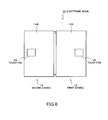
- first and second sheet metal casings 12 and 14 are connected together via a hinge 20 serving as opening/closing means.
- the first and second casings 12 and 14 can be opened/closed via the hinge 20 so as to be double spread.
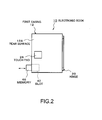
- the first and second casings 12 and 14 can be folded as in the case of a book (see FIG. 2).
- the electronic book 10 of this exemplary embodiment is set so that the casings 12 and 14 can be used in a portrait orientation.
- a first display device 16 constituted of a liquid crystal panel, a plasma display panel, or the like is disposed in the first casing 12.
- a second display device 18 constituted of a liquid crystal panel, a plasma display panel, or the like is disposed on a surface side corresponding to the first display device 16.
- first and second display devices 16 and 18 are arranged so that display surfaces (display screens) 17 and 19 thereof, respectively, can face each other when the first and second casings 12 and 14 are closed.
- the first and second casings 12 and 14 incorporate various electronic components such as storing devices, a battery, etc.
- the first and second display devices 16 and 18 are mounted to outer frames 13 and 15 of the first and second casings 12 and 14, respectively.
- a plurality of, e.g., three operation buttons 24 are arranged in a holding section (a portion on one surface side of the first casing 12 and on an opposite side of the hinge 20) 13A of the outer frame 13.
- the operation buttons 24 that are press-button type operation keys include buttons such as a page-turning button and a button for turning power ON.
- the number of operation buttons 24 may be one, two, or four or more.
- the operation button 24 is a key device, constituting a part of a first operation device 36 (see FIG. 3).
- one operation button 25 is arranged in a holding section (a portion on one surface side of the second casing 14 and on an opposite side of the hinge 20) 15A of the outer frame 15.
- the operation button 25 includes a button such as a page-turning button.
- the number of operation buttons 25 may be two or more.
- the operation button 25 constitutes a part of the first operation device 36 (see FIG. 3).
- a touch pad 26 constituting a pointing device is arranged in a rear surface (other surface) 12A of the first casing 12.
- the touch pad 26 constitutes a part of a second operation device 38 (see FIG. 3).
- the operation button 24 and the touch pad 26 are arranged in positions corresponding to fingers HR1 to HR5 of the right hand HR within a movable range of the finger HR1, HR2, or the like.
- a thumb HR1 of the right hand HR is arranged within a movable range that allows the operation of the operation buttons 24A to 24C.
- a forefinger HR3, a middle finger HR2, a third finger HR4, or the like of the right hand HR is arranged within a movable range that allows the operation of the touch pad 26.
- the operation button and the touch pad only need to be arranged as a pair at least in one place (right or left side) of an area for holding the electronic book 10 by hand.
- the operation button 25 is arranged in one of positions corresponding to fingers HL1 to HL5 of the left hand HL within a movable range of the finger HR1, HR2, or the like. Specifically, for example, a thumb HL1 of the left hand HL is arranged within a movable range that allows the operation of the operation button 25.
- a touch pad 26 may be arranged on a rear surface 14A of the second casing 14 within a movable range that allows the operation with a middle finger HL2 of the left hand HL.
- a magnet may be disposed in the holding section 13A or 15A to prevent improper opening of the first and second casings 12 and 14.
- the number or the arranging positions of operation buttons or pointing devices can be optionally changed.
- the pointing device may be arranged only on the rear surface 14A of the second casing 14, or the operation button may be arranged in at least one place of the outer frame 13 or 15.
- the operation button or the pointing device may be disposed on a short side section of the outer frame 13 or 15 (side orthogonal to the holding section 13A or 15A).
- a width W1 (see FIG. 1) of the holding section 13A or 15A is decided in consideration of portability of the electronic book 10, a display size of the display device 16 or 18, or the like. It is becoming popular that the width is set to be as small as possible. Accordingly, the operation button 24 or 25 arranged even in a narrow space is selected as an operation member of the operation device arranged in the outer frame 13 or 15.
- an operation member of the operation device arranged on the rear surface 12A or 14A of the casing 12 or 14, respectively a space therefor does not need to be considered, but the operation member must be operable only by a sensation (feeling) of a finger without being visually recognized. Accordingly, a pointing device such as a touch pad, a track ball, or a track point is selected as the operation member of the operation device arranged on the rear surface 12A or 14A.
- the thumb HR1 of the right hand HR is set in a corresponding relation to the operation buttons 24A to 24C arranged in the holding section 13A of the outer frame 13, and positioned within an operable range of the operation button 24.
- the middle finger HR2 or the like of the right hand HR is set in a corresponding relation to the touch pad 26 arranged on the rear surface 12A of the first casing 12, and positioned within an operable range of the touch pad 26.
- the thumb HL1 of the left hand HL is set in a corresponding relation to the operation button 25 arranged in the holding section 15A of the outer frame 15, and positioned within an operable range of the operation button 25.
- the fingers HL2 to HL5 other than the thumb HL1 of the left hand HL are positioned on the rear surface 14A of the second casing 14 to hold the second casing 14.
- the thumb HR1, the middle finger HR2, or the like corresponding to the operation button 24 or the touch pad 26 is moved, whereby the operation button 24 or the touch pad 26 can be operated.
- the operation button 24A or 25 is for turning each page forward or backward to another page.
- the operation button 24A is for turning each page forward to the next page.
- the operation button 25 is for turning each page backward to the previous page.
- a display screen displayed on the display surface 17 or 19 is magnified or reduced by sliding a finger on the touch pad 26.
- a magnification/reduction mode is set, thereby displaying an instruction screen 17A of the magnification/reduction mode on the display surface 17 (see FIG. 5).
- the display screen is magnified or reduced by performing an operation following the instruction screen 17A of FIG. 5.
- the finger is slid up (in an upper direction) on the touch pad 26 with the operation button 24B being held down.
- the finger is slid down (in a lower direction) on the touch pad 26 the operation button 24B being held down.
- the finger is slid on the touch pad 26 with the operation button 24C being held down (operated) , whereby pages displayed on the display surface 17 or 19 are turned forward or backward to a desired page.
- the operation button 24C is operated, a fast-forward/fast-backward mode is set, thereby displaying an instruction screen 19A of the fast-forward/fast-backward mode on the display screen 19 (see FIG. 5).
- the operation button 24C being held down, the pages are turned forward or backward to a desired page by performing an operation following the instruction screen 19A of FIG. 5.
- the finger is slid right to left (in a left direction) on the touch pad 26 with the operation button 24C being held down (operated).
- the finger is slid left to right (in a right direction) on the touch pad 26 with the operation button 24C being held down.
- touch pad 26 By operating the touch pad 26, for example, data of a text or software is selected to execute processing such as connection to the Internet or dictionary search, or adjustment of contrast of the display screen. By moving a cursor on the touch pad, for example, characters or symbols on a software keyboard are designated to input data.
- the operation button 24 and the touch pad 26 are arranged on the front and rear surfaces of the first casing 12, for example, within the movable range of the fingers of the right hand in the state of holding the electronic book 10. Accordingly, a desired operation such as connection to the Internet or adjustment of the display screen can be carried out reliably and surely, thereby improving operability.
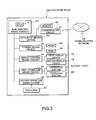
- the electronic book 10 includes data input means (a data input device) 30, storing means (a storing device) 32, display control means (a display control circuit) 34, a first operation means (first operation device) 36, a second operation means (second operation device) 38, and main control means (a main control circuit) 40.
- the data input device 30, the storing device 32, the display control circuit 34, and the first and second operation devices 36 and 38 are connected to the main control circuit 40.
- the data input means 30 includes a communication circuit 31 or a data reading circuit (not shown).
- the data input means 30 inputs data via, e.g., a communication network 48, or from a recording medium (memory 45) such as a CD-ROM installed in the electronic book 10.
- a recording medium such as a CD-ROM installed in the electronic book 10.
- the method of inputting the data via the communication network 48 adopts wired, radio, or infrared-ray transmission.
- a slot 42 (see a broken line of FIG. 2) is disposed to insert a memory 45 shown in FIG. 2.
- the storing device 32 includes a recording medium such as a read only memory (ROM) 44 or a random access memory (RAM) 45.
- the recording medium such as the ROM 44 has a memory area (program area, work area, or the like) dedicated to reading of a program for executing various processing operations, or various data.
- the recording medium such as the RAM 45 has a memory area for reading/writing various data or a memory area for storing input data.
- Data read from the storing device 32 is displayed on the first or second display device 16 or 18 via the display control circuit 34.
- the display devices 16 and 18 display data on a page basis.
- the main control circuit 40 is control means constituted of a central processing unit (CPU) 41 or the like.
- the main control circuit 40 is in control of an overall operation of the electronic book 10. For example, when the operation buttons 24 and 25 of the first operation device 36 are operated, or when the touch pad 26 of the second operation device 38 is operated, the main control circuit 40 executes processing based on the operation.
- FIG. 4 is a flowchart showing a processing routine executed by the main control circuit 40 of the electronic book 10 shown in FIG. 3.
- a program is prestored in a program area of the ROM 44 of the storing device 32.
- the flowchart of FIG. 4 shows a process executed by operating the operation button 24 after a power key 24C (see FIG. 3) of the electronic book 10 is turned ON (after an image is displayed on the display surface 17 or 19 of FIG. 1).
- the processing of the operation mode continues until the operation of the operation button 24 or the touch pad 26 ends.
- the processing of the operation mode may be executed by operating only one of the operation button 24 and the touch pad 26.
- step 100 the main control circuit 40 shown in FIG. 3 determines whether an operation is completed or not only by, e.g., the operation buttons 24A to 24C or 25 (first operation device 36).
- the operation completed only by the first operation device 36 is an operation involved in turning-off of the operation button 24C.
- the main control circuit 40 executes processing based on the operations of the operation buttons 24A to 24C or 25, e.g., processing involved in the turning-off of the operation button 24C.
- step 104 the main control circuit 40 determines whether the operation buttons 24A to 24C or 25 have been operated or not (i.e., whether or not the operation button 24 or 25 has been held down). In the case of YES in the step 104, i.e., if the holding-down of the operation button 24 or 25 is being detected, in step 106, the main control circuit 40 determines whether the touch pad 26 is being operated or not.
- step 108 the main control circuit 40 executes processing based on the operation of the touch pad 26.
- the main control circuit 40 executes processing of magnifying or reducing a display screen of the first or second display surface 17 or 19.
- the main control circuit 40 executes the processing of magnifying/reducing the display screen.
- the main control circuit 40 executes processing of turning pages displayed on the display surface 17 or 19 forward or backward to a desired page, thereby changing the current page on the display screen to the desired page.
- the main control circuit 40 finishes the process of the flowchart. For example, if the touch pad 26 alone is operated in the state in which the operation button 24 or 25 has not been continuously pressed, the main control circuit 40 finishes the process of the flowchart without executing the processing of magnification/reduction or page-turning.
- NO in the step 106 i.e., if the touch pad 26 has not been operated, returning to the step 104, the main control circuit 40 continues the processing of the step 104 and after.
- the touch pad 26 (second operation device) is arranged in the position corresponding to the finger HR2 or the like when the electronic book 10 is held with the hand HR. Accordingly, the touch pad 26 may be touched and operated irrespective of user's intention. According to this exemplary embodiment, for example, only when the main control circuit 40 (see FIG. 3) detects the operation of the operation button 24 or 25, the processing based on the operation of the touch pad 26 is executed. Thus, it is possible to prevent an erroneous operation of the touch pad 26.
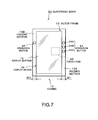
- FIGS. 7 to 9 show a second exemplary embodiment of the present invention.
- an electronic book 50 of this exemplary embodiment includes only a single casing.
- the casing shown in FIG. 7 is roughly similar in structure to the first casing 12 shown in FIG. 1.
- FIG. 7 is a front view of the electronic book 50 of this exemplary embodiment.
- FIG. 8 is a front diagram showing how the electronic book 50 of this exemplary embodiment is held with one hand.
- FIG. 9 is a perspective diagram of the electronic book 50 of this exemplary embodiment, which shows its backside.
- the same components as those of FIG. 1 are denoted by identical reference numerals, and briefly described.
- a display device 16 is disposed in the casing 12 of the electronic device 50.
- the display device 16 is mounted to an outer frame 13 of the casing 12.
- a slot 42 (see broken line of FIG. 9) is defined, in which a recording medium (memory) 46 is inserted.
- data read from the recording medium (memory) 46 or the like is displayed on a display surface (display screen) 17 of the display device 16.
- buttons 24 are arranged in a holding section 13A of the outer frame 13.
- a holding section 13B is disposed in a position opposed to the holding section 13A.
- one operation button 25 is arranged in the holding section 13B.
- a touch pad 26 is arranged on a rear surface 12A of the casing 12.
- the operation button 25 is a power button
- the operation button 24C is a page-turning button.
- Other components are similar to those of the first exemplary embodiment, and thus description thereof will be omitted.
- the electronic book 50 includes only the single casing 12.
- the electronic book 50 can be held only with one hand (e. g. , right hand HR) (see FIG. 8).
- the operation buttons 24A to 24C and the touch pad 26 are arranged in positions corresponding to a finger HR1, HR2, or the like of the right hand HR, and thus the operation buttons 24A to 24C and the touch pad 26 can be operated only by the finger HR1, HR2 or the like of the right hand HR.
- the operation button 24 and the touch pad 26 may be disposed only on the holding section 13A side without disposing the operation button 25 in the holding section 13B. According to this exemplary embodiment, the operation button 24 and the touch pad 26 may be disposed only on the holding section 13B side.
- operation buttons 24A to 24C and a pointing device 26 may be disposed on at least one (left) short side section 13C of an outer frame 13, and an operation button 25 may be disposed on the other (right) short side 13D thereof.
- Other components and operational effects are similar to those of the second exemplary embodiment, and thus description thereof will be omitted.
- buttons 24A to 24C and a pointing device 25 may be disposed on one (lower) short side section 13C of an outer frame 13.
- Other components and operational effects are similar to those of the second exemplary embodiment, and thus description thereof will be omitted.
- combination patterns of the present invention for example, two or more of this exemplary embodiments and this modified examples may be combined.
- the electronic device of this exemplary embodiment includes the casing 12 or 14 which is a device main body, the display device 16 or 18 arranged in the casing 12 or 14, the first operation device (operation button) 24 or 25 arranged in the casing 12 or 14 on the display surface 17 or 19 side of the display device 16 or 18 within the movable range of the fingers of the hand for holding the casing 12 or 14, the second operation device (touch pad) 26 arranged on the surface of the casing 12 or 14 opposed to the display surface 17 or 19 within the movable range of the fingers of the hand for holding the casing 12 or 14, and the main control circuit 40 shown in FIG. 3 which causes, only when one of the first operation device (operation button) 24 or 25 and the second operation device (touch pad) 26 is operated, the other of the second operation device (touch pad) 26 and the first operation device (operation button) 24 or 25 to function.
- the data processing device of this exemplary embodiment includes the display device 16 arranged in the casing 12 which is a device main body, the first operation device (operation button) 24 or 25 arranged in the casing 12 on the display surface 17 side of the display device 16 within the movable range of the fingers of the hand for holding the casing 12, the second operation device (touch pad) 26 arranged on the surface of the casing 12 opposed to the display surface 17 within the movable range of the fingers of the hand for holding the casing 12, and the main control circuit 40 shown in FIG. 3 which causes, only when one of the first operation device (operation button) 24 or 25 and the second operation device (touch pad) 26 is operated, the other of the second operation device (touch pad) 26 and the first operation device (operation button) 24 or 25 to function.
- the data processing method of this exemplary embodiment includes, detecting an operation of one of a first operation device arranged on one surface side of a device main body and a second operation device arranged on the other surface side of the device main body (see step 106), and processing based on an operation of the other of the first operation device and the second operation device only when a detection of the operation is being maintained (see step 108) .
- the electronic device of the present invention conceptually encompasses electronic devices in addition to the electronic book of each exemplary embodiment, e.g., a portable device such as personal digital assistants (PDAs) and an input/output device such as a portable personal computer (PC).
- a portable device such as personal digital assistants (PDAs) and an input/output device such as a portable personal computer (PC).
- the electronic device of the present invention may be a portable telephone which includes a radio transmission/reception circuit for transmitting/receiving voice data, mail data, image data, or the like, and a data processing circuit.
Landscapes
- Engineering & Computer Science (AREA)
- Theoretical Computer Science (AREA)
- Computer Hardware Design (AREA)
- Physics & Mathematics (AREA)
- Human Computer Interaction (AREA)
- General Engineering & Computer Science (AREA)
- General Physics & Mathematics (AREA)
- Mathematical Physics (AREA)
- Position Input By Displaying (AREA)
- Input From Keyboards Or The Like (AREA)
- Calculators And Similar Devices (AREA)
- Information Retrieval, Db Structures And Fs Structures Therefor (AREA)
Applications Claiming Priority (1)
| Application Number | Priority Date | Filing Date | Title |
|---|---|---|---|
| JP2004163255A JP2005346244A (ja) | 2004-06-01 | 2004-06-01 | 情報表示装置及びその操作方法 |
Publications (2)
| Publication Number | Publication Date |
|---|---|
| EP1624364A2 true EP1624364A2 (de) | 2006-02-08 |
| EP1624364A3 EP1624364A3 (de) | 2012-06-27 |
Family
ID=34937097
Family Applications (1)
| Application Number | Title | Priority Date | Filing Date |
|---|---|---|---|
| EP05011745A Withdrawn EP1624364A3 (de) | 2004-06-01 | 2005-05-31 | Datenverarbeitungsvorrichtung, Datenverarbeitungsverfahren, und elektronische Vorrichtung |
Country Status (4)
| Country | Link |
|---|---|
| US (1) | US7705799B2 (de) |
| EP (1) | EP1624364A3 (de) |
| JP (1) | JP2005346244A (de) |
| CN (1) | CN1331034C (de) |
Cited By (4)
| Publication number | Priority date | Publication date | Assignee | Title |
|---|---|---|---|---|
| CN101598986B (zh) * | 2008-06-03 | 2011-08-24 | 联咏科技股份有限公司 | 可节省电源消耗的触碰检测装置 |
| CN102339534A (zh) * | 2010-07-27 | 2012-02-01 | 纬创资通股份有限公司 | 可适应使用者握持方式的便携式电子装置 |
| CN104281370A (zh) * | 2013-07-03 | 2015-01-14 | 腾讯科技(深圳)有限公司 | 一种网页窗口关闭方法及装置 |
| CN110069100A (zh) * | 2019-03-29 | 2019-07-30 | 联想(北京)有限公司 | 一种电子设备 |
Families Citing this family (101)
| Publication number | Priority date | Publication date | Assignee | Title |
|---|---|---|---|---|
| US9047102B2 (en) | 2010-10-01 | 2015-06-02 | Z124 | Instant remote rendering |
| US8933949B2 (en) | 2010-10-01 | 2015-01-13 | Z124 | User interaction across cross-environment applications through an extended graphics context |
| US8726294B2 (en) | 2010-10-01 | 2014-05-13 | Z124 | Cross-environment communication using application space API |
| US8966379B2 (en) | 2010-10-01 | 2015-02-24 | Z124 | Dynamic cross-environment application configuration/orientation in an active user environment |
| US7656393B2 (en) | 2005-03-04 | 2010-02-02 | Apple Inc. | Electronic device having display and surrounding touch sensitive bezel for user interface and control |
| US11275405B2 (en) | 2005-03-04 | 2022-03-15 | Apple Inc. | Multi-functional hand-held device |
| US8832577B2 (en) * | 2010-10-01 | 2014-09-09 | Z124 | Universal clipboard |
| US20120084722A1 (en) * | 2010-10-01 | 2012-04-05 | Imerj LLC | Multiple child windows in dual display communication devices |
| DE212006000028U1 (de) * | 2005-03-04 | 2007-12-20 | Apple Inc., Cupertino | Multifunktionale Handgehaltene Vorrichtung |
| US8413904B1 (en) | 2006-03-29 | 2013-04-09 | Gregg E. Zehr | Keyboard layout for handheld electronic book reader device |
| US7748634B1 (en) | 2006-03-29 | 2010-07-06 | Amazon Technologies, Inc. | Handheld electronic book reader device having dual displays |
| US8018431B1 (en) | 2006-03-29 | 2011-09-13 | Amazon Technologies, Inc. | Page turner for handheld electronic book reader device |
| US9384672B1 (en) * | 2006-03-29 | 2016-07-05 | Amazon Technologies, Inc. | Handheld electronic book reader device having asymmetrical shape |
| JP2007293407A (ja) * | 2006-04-21 | 2007-11-08 | E-Lead Electronic Co Ltd | 背負い式入力装置 |
| USD565045S1 (en) * | 2006-08-21 | 2008-03-25 | Quanta Computer, Inc. | Portable computer |
| US7889173B2 (en) * | 2006-09-14 | 2011-02-15 | Microsoft Corporation | Defining user input fields on a portable media device |
| US20080094357A1 (en) * | 2006-10-20 | 2008-04-24 | Qualcomm Incorporated | Design for the mouse for any portable device |
| US8291346B2 (en) * | 2006-11-07 | 2012-10-16 | Apple Inc. | 3D remote control system employing absolute and relative position detection |
| US8341544B2 (en) | 2007-12-14 | 2012-12-25 | Apple Inc. | Scroll bar with video region in a media system |
| US20090153475A1 (en) * | 2007-12-14 | 2009-06-18 | Apple Inc. | Use of a remote controller Z-direction input mechanism in a media system |
| US8881049B2 (en) * | 2007-12-14 | 2014-11-04 | Apple Inc. | Scrolling displayed objects using a 3D remote controller in a media system |
| US8194037B2 (en) * | 2007-12-14 | 2012-06-05 | Apple Inc. | Centering a 3D remote controller in a media system |
| JP5203797B2 (ja) * | 2008-05-13 | 2013-06-05 | 株式会社エヌ・ティ・ティ・ドコモ | 情報処理装置及び情報処理装置の表示情報編集方法 |
| USD591285S1 (en) * | 2008-06-10 | 2009-04-28 | Quanta Computer Inc. | Notebook computer |
| JP2010026985A (ja) * | 2008-07-24 | 2010-02-04 | Sony Corp | 情報処理装置及び情報処理方法 |
| JP5066055B2 (ja) * | 2008-10-28 | 2012-11-07 | 富士フイルム株式会社 | 画像表示装置、画像表示方法およびプログラム |
| US8432356B2 (en) * | 2009-01-09 | 2013-04-30 | Amazon Technologies, Inc. | Button with edge mounted pivot point |
| KR101533850B1 (ko) * | 2009-01-20 | 2015-07-06 | 엘지전자 주식회사 | 전자 종이를 가진 이동 통신 단말기 및 이에 적용된 제어방법 |
| USD615538S1 (en) * | 2009-02-27 | 2010-05-11 | Quanta Computer Inc. | Notebook |
| JP2010256963A (ja) * | 2009-04-21 | 2010-11-11 | Takeshi Ito | 電子書籍 |
| JP2010272111A (ja) * | 2009-04-24 | 2010-12-02 | Kddi Corp | 使用時に目視されない面に入力部を配置した情報機器、入力方法及びプログラム |
| ES2328553B1 (es) * | 2009-05-22 | 2010-09-17 | Xavier Torres Gomez | Computador portatil. |
| US8471824B2 (en) | 2009-09-02 | 2013-06-25 | Amazon Technologies, Inc. | Touch-screen user interface |
| US9262063B2 (en) | 2009-09-02 | 2016-02-16 | Amazon Technologies, Inc. | Touch-screen user interface |
| US9188976B1 (en) * | 2009-09-02 | 2015-11-17 | Amazon Technologies, Inc. | Content enabling cover for electronic book reader devices |
| US8624851B2 (en) * | 2009-09-02 | 2014-01-07 | Amazon Technologies, Inc. | Touch-screen user interface |
| US8451238B2 (en) | 2009-09-02 | 2013-05-28 | Amazon Technologies, Inc. | Touch-screen user interface |
| USD618683S1 (en) * | 2009-09-23 | 2010-06-29 | Microsoft Corporation | Dual display device |
| JP4959765B2 (ja) * | 2009-09-28 | 2012-06-27 | 京セラ株式会社 | 携帯端末装置 |
| US20110090234A1 (en) * | 2009-10-19 | 2011-04-21 | Barnes & Noble, Inc. | Apparatus and method for control of multiple displays from a single virtual frame buffer |
| USD634321S1 (en) * | 2009-10-30 | 2011-03-15 | Nec Display Solutions, Ltd. | Display |
| US20110115719A1 (en) * | 2009-11-17 | 2011-05-19 | Ka Pak Ng | Handheld input device for finger touch motion inputting |
| USD626124S1 (en) * | 2009-12-03 | 2010-10-26 | Hon Hai Precision Industry Co., Ltd. | E-book reader |
| USD684153S1 (en) * | 2009-12-25 | 2013-06-11 | Sony Corporation | Information transmitter |
| USD638833S1 (en) * | 2010-01-26 | 2011-05-31 | Hon Hai Precision Industry Co., Ltd. | Portable computer |
| US8724301B2 (en) * | 2010-01-29 | 2014-05-13 | Mohamed K. Mahmoud | Laptop book |
| US8279589B2 (en) * | 2010-02-01 | 2012-10-02 | Christine Hana Kim | Apparatus and method for data entry from a removable portable device cover |
| US20110199307A1 (en) * | 2010-02-12 | 2011-08-18 | Huy Hai Dinh | Keyboard and touchpad arrangement for electronic handheld devices |
| US8310842B1 (en) | 2010-03-09 | 2012-11-13 | Amazon Technologies, Inc. | Height reduction in portable devices |
| US9891821B2 (en) | 2010-04-23 | 2018-02-13 | Handscape Inc. | Method for controlling a control region of a computerized device from a touchpad |
| US9891820B2 (en) | 2010-04-23 | 2018-02-13 | Handscape Inc. | Method for controlling a virtual keyboard from a touchpad of a computerized device |
| US9310905B2 (en) * | 2010-04-23 | 2016-04-12 | Handscape Inc. | Detachable back mounted touchpad for a handheld computerized device |
| US9678662B2 (en) | 2010-04-23 | 2017-06-13 | Handscape Inc. | Method for detecting user gestures from alternative touchpads of a handheld computerized device |
| US9639195B2 (en) | 2010-04-23 | 2017-05-02 | Handscape Inc. | Method using finger force upon a touchpad for controlling a computerized system |
| US9311724B2 (en) | 2010-04-23 | 2016-04-12 | Handscape Inc. | Method for user input from alternative touchpads of a handheld computerized device |
| US9542032B2 (en) | 2010-04-23 | 2017-01-10 | Handscape Inc. | Method using a predicted finger location above a touchpad for controlling a computerized system |
| US9529523B2 (en) | 2010-04-23 | 2016-12-27 | Handscape Inc. | Method using a finger above a touchpad for controlling a computerized system |
| US9430147B2 (en) | 2010-04-23 | 2016-08-30 | Handscape Inc. | Method for user input from alternative touchpads of a computerized system |
| US8390573B2 (en) * | 2010-04-26 | 2013-03-05 | Chris Trout | Data processing device |
| US8698761B2 (en) * | 2010-04-30 | 2014-04-15 | Blackberry Limited | Electronic device |
| US9851747B2 (en) * | 2010-05-21 | 2017-12-26 | Peter G. Winsky | Electronic book reader with closely juxtaposed display screens |
| US20110291946A1 (en) * | 2010-05-26 | 2011-12-01 | T-Mobile Usa, Inc. | Touchpad interaction |
| USD650780S1 (en) * | 2010-06-01 | 2011-12-20 | Kno, Inc. | Electronic device |
| USD650781S1 (en) * | 2010-06-01 | 2011-12-20 | Kno, Inc. | Electronic device |
| USD635567S1 (en) * | 2010-06-01 | 2011-04-05 | Kno, Inc. | Electronic device |
| USD641353S1 (en) * | 2010-06-01 | 2011-07-12 | Kno, Inc. | Electronic device |
| USD640686S1 (en) * | 2010-06-18 | 2011-06-28 | Lead Technology Capital Management, Llc | Laptop with dual screens and removable keyboard |
| WO2011160571A1 (zh) * | 2010-06-21 | 2011-12-29 | 汉王科技股份有限公司 | 具备电容触控功能的电子书阅读器装置及其触控方法 |
| CN101866559A (zh) * | 2010-06-21 | 2010-10-20 | 汉王科技股份有限公司 | 具备电容触控功能的电子书阅读器装置及其触控方法 |
| CN101882383A (zh) * | 2010-06-21 | 2010-11-10 | 汉王科技股份有限公司 | 具备电容触控功能的电子书阅读器装置 |
| USD631043S1 (en) * | 2010-09-12 | 2011-01-18 | Steven Kell | Electronic dual screen personal tablet computer with integrated stylus |
| US9046992B2 (en) | 2010-10-01 | 2015-06-02 | Z124 | Gesture controls for multi-screen user interface |
| CN103229156B (zh) | 2010-10-01 | 2016-08-10 | Flex Electronics ID Co.,Ltd. | 多操作系统环境中的对接系统的自动配置 |
| US8898443B2 (en) | 2010-10-01 | 2014-11-25 | Z124 | Multi-operating system |
| US8761831B2 (en) | 2010-10-15 | 2014-06-24 | Z124 | Mirrored remote peripheral interface |
| USD649543S1 (en) * | 2010-12-22 | 2011-11-29 | Compal Electronics, Inc. | Electronic computer |
| USD680531S1 (en) * | 2010-12-27 | 2013-04-23 | Nec Corporation | Portable information terminal |
| USD658173S1 (en) * | 2011-01-03 | 2012-04-24 | Samsung Electronics Co., Ltd. | Terminal for portable mobile communication |
| US8775966B2 (en) | 2011-06-29 | 2014-07-08 | Motorola Mobility Llc | Electronic device and method with dual mode rear TouchPad |
| US20150277597A1 (en) * | 2011-09-01 | 2015-10-01 | Handscape Inc. | Touchpad hand detector |
| US20130080932A1 (en) | 2011-09-27 | 2013-03-28 | Sanjiv Sirpal | Secondary single screen mode activation through user interface toggle |
| TW201340067A (zh) * | 2012-01-06 | 2013-10-01 | Access Business Group Int Llc | 具感應次級線圈之印刷媒體 |
| USD693323S1 (en) * | 2012-02-21 | 2013-11-12 | Nec Casio Mobile Communications Ltd. | Portable wireless telephone |
| JP1465491S (de) * | 2012-05-01 | 2015-03-23 | ||
| CN104321721B (zh) * | 2012-06-28 | 2018-01-19 | 英特尔公司 | 薄屏框架平板设备 |
| USD695286S1 (en) * | 2012-07-05 | 2013-12-10 | R. David Katz | Portable computing device with multi-screen display |
| USD704700S1 (en) * | 2012-07-12 | 2014-05-13 | Sony Corporation | Computer |
| US20140062838A1 (en) * | 2012-09-06 | 2014-03-06 | Electronics And Telecommunications Research Institute | Mobile e-binder system |
| WO2014132965A1 (ja) * | 2013-02-27 | 2014-09-04 | Necカシオモバイルコミュニケーションズ株式会社 | 携帯電子機器、その制御方法及びプログラム |
| USD756354S1 (en) * | 2013-11-20 | 2016-05-17 | Fujifilm Corporation | Personal digital assistance |
| USD756355S1 (en) * | 2013-11-20 | 2016-05-17 | Fujifilm Corporation | Personal digital assistance |
| US10606476B2 (en) * | 2013-12-04 | 2020-03-31 | Autodesk, Inc. | Techniques for interacting with handheld devices |
| US9436295B2 (en) * | 2014-03-28 | 2016-09-06 | Intel Corporation | Alternate dynamic keyboard for convertible tablet computers |
| KR102283584B1 (ko) | 2014-05-19 | 2021-07-30 | 삼성디스플레이 주식회사 | 표시장치 |
| US10474409B2 (en) * | 2014-09-19 | 2019-11-12 | Lenovo (Beijing) Co., Ltd. | Response control method and electronic device |
| CN104765995B (zh) * | 2015-04-24 | 2018-03-06 | 福建师范大学 | 基于触屏操作的智能设备身份认证方法及客户端 |
| CN106610694A (zh) * | 2015-10-22 | 2017-05-03 | 华为终端(东莞)有限公司 | 一种电子设备及其数据处理方法 |
| US20170220307A1 (en) * | 2016-02-02 | 2017-08-03 | Samsung Electronics Co., Ltd. | Multi-screen mobile device and operation |
| JP6793569B2 (ja) * | 2017-02-20 | 2020-12-02 | 東芝テック株式会社 | 電子機器用ケース |
| CN109542299B (zh) * | 2018-11-21 | 2020-11-10 | 掌阅科技股份有限公司 | 用于电子书的金句展示方法、电子设备及计算机存储介质 |
| US12380292B2 (en) * | 2021-12-31 | 2025-08-05 | Viking Discoveries Llc | Method of unlocking an operation of a device with a tiny RFID tag embedded on an integrated circuit |
Family Cites Families (19)
| Publication number | Priority date | Publication date | Assignee | Title |
|---|---|---|---|---|
| JPH0764754A (ja) * | 1993-08-24 | 1995-03-10 | Hitachi Ltd | 小型情報処理装置 |
| US5515305A (en) * | 1993-12-09 | 1996-05-07 | Dell Usa, L.P. | PDA having chord keyboard input device and method of providing data thereto |
| JPH081670A (ja) | 1994-06-23 | 1996-01-09 | Kobe Steel Ltd | 繊維強化熱可塑性樹脂成形体のリサイクル法 |
| JPH0926769A (ja) * | 1995-07-10 | 1997-01-28 | Hitachi Ltd | 画像表示装置 |
| GB2314179B (en) * | 1996-06-12 | 1998-05-20 | John Quentin Phillipps | Portable electronic apparatus |
| JPH11203038A (ja) * | 1998-01-09 | 1999-07-30 | Matsushita Electric Ind Co Ltd | 携帯端末装置 |
| US6909424B2 (en) * | 1999-09-29 | 2005-06-21 | Gateway Inc. | Digital information appliance input device |
| JP2001236051A (ja) * | 1999-11-30 | 2001-08-31 | Nokia Corp | 背面対話式ハンドヘルド・ディスプレイ装置 |
| JP2001202192A (ja) * | 2000-01-18 | 2001-07-27 | Sony Corp | 情報処理装置及びその方法並びにプログラム格納媒体 |
| US20040049743A1 (en) * | 2000-03-31 | 2004-03-11 | Bogward Glenn Rolus | Universal digital mobile device |
| JP2002006988A (ja) | 2000-06-27 | 2002-01-11 | Nec Yonezawa Ltd | 操作パット付き携帯端末装置 |
| CN1332330C (zh) * | 2000-09-30 | 2007-08-15 | 仁宝电脑工业股份有限公司 | 一种具有缩放显示功能的掌上型装置 |
| US7142195B2 (en) * | 2001-06-04 | 2006-11-28 | Palm, Inc. | Interface for interaction with display visible from both sides |
| JP2003150308A (ja) * | 2001-11-15 | 2003-05-23 | Seiko Epson Corp | 表示装置 |
| US7154480B2 (en) * | 2002-04-30 | 2006-12-26 | Kazuho Iesaka | Computer keyboard and cursor control system with keyboard map switching system |
| JP3852368B2 (ja) * | 2002-05-16 | 2006-11-29 | ソニー株式会社 | 入力方法及びデータ処理装置 |
| JP2004145553A (ja) | 2002-10-23 | 2004-05-20 | Sony Broadband Solution Corp | 電子化された文書のためのページ開閉状態入力装置、電子ブック、並びに電子化された文書の表示方法 |
| US20050104855A1 (en) * | 2003-11-19 | 2005-05-19 | Paradigm Research Technologies Llc | Double side transparent keyboard for miniaturized electronic appliances |
| JP5020558B2 (ja) * | 2006-07-18 | 2012-09-05 | 株式会社リコー | 画像入出力装置及び画像入出力方法 |
-
2004
- 2004-06-01 JP JP2004163255A patent/JP2005346244A/ja active Pending
-
2005
- 2005-05-26 US US11/137,454 patent/US7705799B2/en active Active
- 2005-05-31 EP EP05011745A patent/EP1624364A3/de not_active Withdrawn
- 2005-06-01 CN CNB2005100732015A patent/CN1331034C/zh not_active Expired - Lifetime
Non-Patent Citations (1)
| Title |
|---|
| None * |
Cited By (7)
| Publication number | Priority date | Publication date | Assignee | Title |
|---|---|---|---|---|
| CN101598986B (zh) * | 2008-06-03 | 2011-08-24 | 联咏科技股份有限公司 | 可节省电源消耗的触碰检测装置 |
| CN102339534A (zh) * | 2010-07-27 | 2012-02-01 | 纬创资通股份有限公司 | 可适应使用者握持方式的便携式电子装置 |
| CN102339534B (zh) * | 2010-07-27 | 2013-06-12 | 纬创资通股份有限公司 | 可适应使用者握持方式的便携式电子装置 |
| CN104281370A (zh) * | 2013-07-03 | 2015-01-14 | 腾讯科技(深圳)有限公司 | 一种网页窗口关闭方法及装置 |
| CN104281370B (zh) * | 2013-07-03 | 2019-06-25 | 腾讯科技(深圳)有限公司 | 一种网页窗口关闭方法及装置 |
| CN110069100A (zh) * | 2019-03-29 | 2019-07-30 | 联想(北京)有限公司 | 一种电子设备 |
| CN110069100B (zh) * | 2019-03-29 | 2020-10-27 | 联想(北京)有限公司 | 一种电子设备 |
Also Published As
| Publication number | Publication date |
|---|---|
| US20050264540A1 (en) | 2005-12-01 |
| US7705799B2 (en) | 2010-04-27 |
| EP1624364A3 (de) | 2012-06-27 |
| CN1331034C (zh) | 2007-08-08 |
| CN1704885A (zh) | 2005-12-07 |
| JP2005346244A (ja) | 2005-12-15 |
Similar Documents
| Publication | Publication Date | Title |
|---|---|---|
| US7705799B2 (en) | Data processing device, data processing method, and electronic device | |
| US6507336B1 (en) | Keyboard for a handheld computer | |
| US8576180B2 (en) | Method for switching touch keyboard and handheld electronic device and storage medium using the same | |
| US20200019298A1 (en) | Text selection using a touch sensitive screen of a handheld mobile communication device | |
| US6130665A (en) | Touch screen handling | |
| CA2640785C (en) | Electronic device and method of controlling the same | |
| JP4084582B2 (ja) | タッチ式キー入力装置 | |
| KR101449781B1 (ko) | 단말기의 문자 입력 장치 및 방법 | |
| US7715191B2 (en) | Handheld electronic communication device transitionable between compact and expanded configurations | |
| US20060101354A1 (en) | Gesture inputs for a portable display device | |
| US20080168075A1 (en) | Portable information terminal capable of entering thereinto plurality of character types, record medium recording control program, and method for character entry processing | |
| US20020063695A1 (en) | Flip-style user interface | |
| CN105103110B (zh) | 信息终端、显示控制方法和程序 | |
| US20140210759A1 (en) | Information displaying apparatus, method of displaying information, information displaying system, and server apparatus and terminal device | |
| US20030043118A1 (en) | Compact keyboard for handheld computer | |
| EP2498172A1 (de) | Mobiles endgerät und anzeigeverfahren dafür | |
| US9128590B2 (en) | Contents display device and contents display method | |
| CN112558829B (zh) | 输入法显示方法、装置及电子设备 | |
| JP2000010713A (ja) | 段階収納式キーボード付情報機器 | |
| JP4917114B2 (ja) | ハンドヘルド無線通信デバイス用トラックボールソケット | |
| JP2013003674A (ja) | 情報表示装置及びプログラム | |
| KR100689515B1 (ko) | 투명 키패드를 이용한 장치 | |
| JP2004221683A (ja) | 携帯通信端末 | |
| JP2003150308A (ja) | 表示装置 | |
| CA2655066C (en) | Handheld electronic communication device transitionable between compact and expanded configurations |
Legal Events
| Date | Code | Title | Description |
|---|---|---|---|
| PUAI | Public reference made under article 153(3) epc to a published international application that has entered the european phase |
Free format text: ORIGINAL CODE: 0009012 |
|
| AK | Designated contracting states |
Kind code of ref document: A2 Designated state(s): AT BE BG CH CY CZ DE DK EE ES FI FR GB GR HU IE IS IT LI LT LU MC NL PL PT RO SE SI SK TR |
|
| AX | Request for extension of the european patent |
Extension state: AL BA HR LV MK YU |
|
| PUAL | Search report despatched |
Free format text: ORIGINAL CODE: 0009013 |
|
| AK | Designated contracting states |
Kind code of ref document: A3 Designated state(s): AT BE BG CH CY CZ DE DK EE ES FI FR GB GR HU IE IS IT LI LT LU MC NL PL PT RO SE SI SK TR |
|
| AX | Request for extension of the european patent |
Extension state: AL BA HR LV MK YU |
|
| RIC1 | Information provided on ipc code assigned before grant |
Ipc: G06F 1/16 20060101AFI20120524BHEP |
|
| 17P | Request for examination filed |
Effective date: 20120924 |
|
| AKX | Designation fees paid |
Designated state(s): DE FR GB IT |
|
| 17Q | First examination report despatched |
Effective date: 20160204 |
|
| RAP1 | Party data changed (applicant data changed or rights of an application transferred) |
Owner name: LENOVO INNOVATIONS LIMITED (HONG KONG) |
|
| STAA | Information on the status of an ep patent application or granted ep patent |
Free format text: STATUS: EXAMINATION IS IN PROGRESS |
|
| STAA | Information on the status of an ep patent application or granted ep patent |
Free format text: STATUS: THE APPLICATION IS DEEMED TO BE WITHDRAWN |
|
| 18D | Application deemed to be withdrawn |
Effective date: 20200603 |