EP1501003A2 - Appareils, systèmes et procédés relatifs à un lecteur multimédia amélioré - Google Patents
Appareils, systèmes et procédés relatifs à un lecteur multimédia amélioré Download PDFInfo
- Publication number
- EP1501003A2 EP1501003A2 EP04011093A EP04011093A EP1501003A2 EP 1501003 A2 EP1501003 A2 EP 1501003A2 EP 04011093 A EP04011093 A EP 04011093A EP 04011093 A EP04011093 A EP 04011093A EP 1501003 A2 EP1501003 A2 EP 1501003A2
- Authority
- EP
- European Patent Office
- Prior art keywords
- component
- media
- user interface
- screen
- wing
- Prior art date
- Legal status (The legal status is an assumption and is not a legal conclusion. Google has not performed a legal analysis and makes no representation as to the accuracy of the status listed.)
- Withdrawn
Links
Images





Classifications
-
- G—PHYSICS
- G11—INFORMATION STORAGE
- G11B—INFORMATION STORAGE BASED ON RELATIVE MOVEMENT BETWEEN RECORD CARRIER AND TRANSDUCER
- G11B20/00—Signal processing not specific to the method of recording or reproducing; Circuits therefor
- G11B20/10—Digital recording or reproducing
-
- G—PHYSICS
- G06—COMPUTING OR CALCULATING; COUNTING
- G06F—ELECTRIC DIGITAL DATA PROCESSING
- G06F1/00—Details not covered by groups G06F3/00 - G06F13/00 and G06F21/00
- G06F1/16—Constructional details or arrangements
- G06F1/1613—Constructional details or arrangements for portable computers
- G06F1/1626—Constructional details or arrangements for portable computers with a single-body enclosure integrating a flat display, e.g. Personal Digital Assistants [PDAs]
-
- G—PHYSICS
- G06—COMPUTING OR CALCULATING; COUNTING
- G06F—ELECTRIC DIGITAL DATA PROCESSING
- G06F1/00—Details not covered by groups G06F3/00 - G06F13/00 and G06F21/00
- G06F1/16—Constructional details or arrangements
- G06F1/1613—Constructional details or arrangements for portable computers
-
- G—PHYSICS
- G06—COMPUTING OR CALCULATING; COUNTING
- G06F—ELECTRIC DIGITAL DATA PROCESSING
- G06F1/00—Details not covered by groups G06F3/00 - G06F13/00 and G06F21/00
- G06F1/16—Constructional details or arrangements
- G06F1/1613—Constructional details or arrangements for portable computers
- G06F1/1615—Constructional details or arrangements for portable computers with several enclosures having relative motions, each enclosure supporting at least one I/O or computing function
- G06F1/1616—Constructional details or arrangements for portable computers with several enclosures having relative motions, each enclosure supporting at least one I/O or computing function with folding flat displays, e.g. laptop computers or notebooks having a clamshell configuration, with body parts pivoting to an open position around an axis parallel to the plane they define in closed position
- G06F1/1618—Constructional details or arrangements for portable computers with several enclosures having relative motions, each enclosure supporting at least one I/O or computing function with folding flat displays, e.g. laptop computers or notebooks having a clamshell configuration, with body parts pivoting to an open position around an axis parallel to the plane they define in closed position the display being foldable up to the back of the other housing with a single degree of freedom, e.g. by 360° rotation over the axis defined by the rear edge of the base enclosure
-
- G—PHYSICS
- G06—COMPUTING OR CALCULATING; COUNTING
- G06F—ELECTRIC DIGITAL DATA PROCESSING
- G06F1/00—Details not covered by groups G06F3/00 - G06F13/00 and G06F21/00
- G06F1/16—Constructional details or arrangements
- G06F1/1613—Constructional details or arrangements for portable computers
- G06F1/1615—Constructional details or arrangements for portable computers with several enclosures having relative motions, each enclosure supporting at least one I/O or computing function
- G06F1/1624—Constructional details or arrangements for portable computers with several enclosures having relative motions, each enclosure supporting at least one I/O or computing function with sliding enclosures, e.g. sliding keyboard or display
-
- G—PHYSICS
- G06—COMPUTING OR CALCULATING; COUNTING
- G06F—ELECTRIC DIGITAL DATA PROCESSING
- G06F1/00—Details not covered by groups G06F3/00 - G06F13/00 and G06F21/00
- G06F1/16—Constructional details or arrangements
- G06F1/1613—Constructional details or arrangements for portable computers
- G06F1/1633—Constructional details or arrangements of portable computers not specific to the type of enclosures covered by groups G06F1/1615 - G06F1/1626
- G06F1/1684—Constructional details or arrangements related to integrated I/O peripherals not covered by groups G06F1/1635 - G06F1/1675
- G06F1/169—Constructional details or arrangements related to integrated I/O peripherals not covered by groups G06F1/1635 - G06F1/1675 the I/O peripheral being an integrated pointing device, e.g. trackball in the palm rest area, mini-joystick integrated between keyboard keys, touch pads or touch stripes
-
- G—PHYSICS
- G06—COMPUTING OR CALCULATING; COUNTING
- G06F—ELECTRIC DIGITAL DATA PROCESSING
- G06F2200/00—Indexing scheme relating to G06F1/04 - G06F1/32
- G06F2200/16—Indexing scheme relating to G06F1/16 - G06F1/18
- G06F2200/163—Indexing scheme relating to constructional details of the computer
- G06F2200/1633—Protecting arrangement for the entire housing of the computer
-
- G—PHYSICS
- G06—COMPUTING OR CALCULATING; COUNTING
- G06F—ELECTRIC DIGITAL DATA PROCESSING
- G06F2200/00—Indexing scheme relating to G06F1/04 - G06F1/32
- G06F2200/16—Indexing scheme relating to G06F1/16 - G06F1/18
- G06F2200/163—Indexing scheme relating to constructional details of the computer
- G06F2200/1634—Integrated protective display lid, e.g. for touch-sensitive display in handheld computer
Definitions
- the present invention is directed to an improved portable media apparatus and corresponding methods that provide an improved media recording, synchronization, rendering and user interface experience for a user.
- PMPs smart portable media players
- a typical portable media player is a device about the size of a book that can play audio and video files as well as display photos.
- Such a device may have an independent processor, a reasonably sized hard drive and a small color display, e.g., RGB.
- USB and wireless LAN (WLAN) technology are generally made available to transfer data from a PC.
- first-generation digital portable devices have offered basic PC synchronization features and enabled consumers to take limited amounts of media to go.
- Portable media players are thus handheld personal media players that enable entertainment on the go by providing consumers with an easy and complete solution to download, store and play back all their favorite digital media content including video, music and photos.
- Apparatus, systems and methods for enabling an improved portable media player are provided.
- the apparatus provides improved media recording, synchronization, rendering and user interface experiences for a user.
- portable media players are provided with a closed position for substantially protecting the media screen when music is being played, and an open position which uncovers the media screen for the viewing of video, photos, movies and the like.
- a portable media player with a small screen with a dual-sided cover spreading outward to reveal a large screen with wings on either side.
- User Interface controls may be located on the wings, and the functionality may be augmented or replaced with swappable, interchangeable wings offering cartridge like replaceable functionality.
- the invention provides apparatus, systems and methods for enabling an improved portable media player.
- the invention includes: (1) improved user interface and associated software, (2) structural advantages nowhere found in the prior art and (3) augmentable functionality to suit a user's needs and desires in connection with a personalized and customizable media experience.
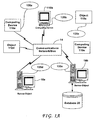
- Fig. 1A provides a schematic diagram of an exemplary networked or distributed computing environment.
- the distributed computing environment comprises computing objects 10a, 10b, etc. and computing objects or devices 110a, 110b, 110c, etc. These objects may comprise programs, methods, data stores, programmable logic, etc.
- the objects may comprise portions of the same or different devices such as PDAs, televisions, MP3 players, televisions, personal computers, personal media players, etc.
- Each object can communicate with another object by way of the communications network 14.
- This network may itself comprise other computing objects and computing devices that provide services to the system of Fig. 1A.
- each object 10a, 10b, etc. or 110a, 110b, 110c, etc. may contain an application that might make use of an API, or other object, software or hardware, that interacts with the portable media player of the invention, or media on any of the other devices in the network.
- an object such as 110c
- the physical environment depicted may show the connected devices as computers, such illustration is merely exemplary and the physical environment may alternatively be depicted or described comprising various digital devices such as PDAs, televisions, MP3 players, etc., software objects such as interfaces, COM objects and the like.
- computing systems may be connected together by wired or wireless systems, by local networks or widely distributed networks.
- networks are coupled to the Internet, which provides the infrastructure for widely distributed computing and encompasses many different networks.
- Network transport media In home networking environments, there are at least four disparate network transport media that may each support a unique protocol, such as Power line, data (both wireless and wired), voice (e.g., telephone) and entertainment media. Most home control devices such as light switches and appliances may use power line for connectivity.
- Data Services may enter the home as broadband (e.g., either DSL or Cable modem) and are accessible within the home using either wireless (e.g., HomeRF or 802.11b) or wired (e.g., Home PNA, Cat 5, even power line) connectivity.
- Voice traffic may enter the home either as wired (e.g., Cat 3) or wireless (e.g., cell phones) and may be distributed within the home using Cat 3 wiring.
- Entertainment media may enter the home either through satellite or cable and is typically distributed in the home using coaxial cable.
- IEEE 1394 and DVI are also used as digital interconnects for clusters of media devices. All of these network environments and others that may emerge as protocol standards may be interconnected to form an intranet that may be connected to the outside world by way of the Internet, and a user may interact with all of the user's media through such an intranet, or beyond.
- a variety of disparate sources exist for the storage and transmission of data, and consequently, moving forward, computing devices will require ways of sharing data, such as data accessed or utilized incident to program objects or media objects, which may be utilized in connection with the portable media player(s) of the present invention.
- Fig. 1A illustrates an exemplary networked or distributed environment, with a server in communication with client computers via a network/bus, of which the portable media player of the invention may take advantage to access and share media.
- a number of servers 10a, 10b, etc. are interconnected via a communications network/bus 14, which may be a LAN, WAN, intranet, the Internet, etc., with a number of client or remote computing devices 110a, 110b, 110c, 110d, 110e, etc., such as a portable computer, handheld computer, thin client, networked appliance, or other device, such as a VCR, TV, oven, light, heater and the like in accordance with the present invention.
- the present invention may apply to any computing device in connection with which it is desirable to interact with media of any kind.
- the servers 10a, 10b, etc. can be Web servers with which the clients 110a, 110b, 110c, 110d, 110e, etc. communicate via any of a number of known protocols such as HTTP.
- Servers 10a, 10b, etc. may also serve as clients 110a, 110b, 110c, 110d, 110e, etc., as may be characteristic of a distributed computing environment. Communications may be wired or wireless, where appropriate.
- Client devices 110a, 110b, 110c, 110d, 110e, etc. may or may not communicate via communications network/bus 14, and may have independent communications associated therewith.
- Each client computer 110a, 110b, 110c, 110d, 110e, etc. and server computer 10a, 10b, etc. may be equipped with various application program modules or objects 135 and with connections or access to various types of media storage elements or objects, across which files may be stored or to which portion(s) of media files may be downloaded or migrated.
- Any computer 10a, 10b, 110a, 110b, etc. may be responsible for the maintenance and updating of a database 20 or other media storage element in accordance with the present invention, such as a database or memory 20 for storing media data processed, extracted or rendered according to the invention.
- the present invention can be utilized in a computer network environment having client computers 110a, 110b, etc. that can access and interact with a computer network/bus 14 and server computers 10a, 10b, etc. that may interact with client computers 110a, 110b, etc. and other like devices, and databases 20.
- Fig. 1B and the following discussion are intended to provide a brief general description of a suitable computing environment in connection with which the invention may be used. It should be understood, however, that handheld, portable and other computing devices and computing objects of all kinds are contemplated for use in connection with the present invention. While a general purpose computer is described below, this is but one example.
- the present invention may be implemented in an environment of networked hosted services in which very little or minimal client resources are implicated, e.g., a networked environment in which the client device serves merely as an interface to the network/bus, such as an object placed in an appliance.
- a computing device or peripheral that includes media objects, such as photos, movies, video or audio of any kind, can benefit from the techniques of the invention. Any such place is thus a desirable, or suitable, environment for operation of the techniques of the invention.
- any software used with the invention can be implemented via an operating system, for use by a developer of services for a media device or object, and/or included within application software that operates in connection with the portable media player of the invention, or provided within the portable media player itself.
- Software may be described in the general context of computer-executable instructions, such as program modules, being executed by one or more computers, such as client workstations, servers or other devices.
- program modules include routines, programs, objects, components, data structures and the like that perform particular tasks or implement particular abstract data types.
- the functionality of the program modules may be combined or distributed as desired in various embodiments.
- those skilled in the art will appreciate that the invention may be practiced with other computer system configurations and protocols.
- PCs personal computers
- automated teller machines server computers
- hand-held or laptop devices multi-processor systems
- microprocessor-based systems programmable consumer electronics
- network PCs appliances
- lights environmental control elements
- minicomputers mainframe computers and the like.
- the invention may also be practiced in distributed computing environments where tasks are performed by remote processing devices that are linked through a communications network/bus or other data transmission medium.
- program modules may be located in both local and remote computer storage media including memory storage devices, and client nodes may in turn behave as server nodes.
- Fig. 1B thus illustrates an example of a suitable computing system environment 100 in connection with which the invention may be utilized, although as made clear above, the computing system environment 100 is only one example of a suitable computing environment and is not intended to suggest any limitation as to the scope of use or functionality of the invention. Neither should the computing environment 100 be interpreted as having any dependency or requirement relating to any one or combination of components illustrated in the exemplary operating environment 100.
- an exemplary system for implementing the invention includes a general purpose computing device in the form of a computer 110.
- Components of computer 110 may include, but are not limited to, a processing unit 120, a system memory 130, and a system bus 121 that couples various system components including the system memory to the processing unit 120.
- the system bus 121 may be any of several types of bus structures including a memory bus or memory controller, a peripheral bus, and a local bus using any of a variety of bus architectures.
- such architectures include Industry Standard Architecture (ISA) bus, Micro Channel Architecture (MCA) bus, Enhanced ISA (EISA) bus, Video Electronics Standards Association (VESA) local bus, and Peripheral Component Interconnect (PCI) bus (also known as Mezzanine bus).
- ISA Industry Standard Architecture
- MCA Micro Channel Architecture
- EISA Enhanced ISA
- VESA Video Electronics Standards Association
- PCI Peripheral Component Interconnect
- Computer 110 typically includes a variety of computer readable media.
- Computer readable media can be any available media that can be accessed by computer 110 and includes both volatile and nonvolatile media, removable and non-removable media.
- Computer readable media may comprise computer storage media and communication media.
- Computer storage media includes both volatile and nonvolatile, removable and non-removable media implemented in any method or technology for storage of information such as computer readable instructions, data structures, program modules or other data.
- Computer storage media includes, but is not limited to, RAM, ROM, EEPROM, flash memory or other memory technology, CDROM, digital versatile disks (DVD) or other optical disk storage, magnetic cassettes, magnetic tape, magnetic disk storage or other magnetic storage devices, or any other medium which can be used to store desired information and which can accessed by computer 110.
- Communication media typically embodies computer readable instructions, data structures, program modules or other data in a modulated data signal such as a carrier wave or other transport mechanism and includes any information delivery media.
- modulated data signal means a signal that has one or more of its characteristics set or changed in such a manner as to encode information in the signal.
- communication media includes wired media such as a wired network or direct-wired connection, and wireless media such as acoustic, RF, infrared and other wireless media. Combinations of any of the above should also be included within the scope of computer readable media.
- the system memory 130 includes computer storage media in the form of volatile and/or nonvolatile memory such as read only memory (ROM) 131 and random access memory (RAM) 132.
- ROM read only memory
- RAM random access memory
- BIOS basic input/output system
- RAM 132 typically contains data and/or program modules that are immediately accessible to and/or presently being operated on by processing unit 120.
- Fig. 1B illustrates operating system 134, application programs 135, other program modules 136, and program data 137.
- the computer 110 may also include other removable/non-removable, volatile/nonvolatile computer storage media.
- Fig. 1B illustrates a hard disk drive 141 that reads from or writes to non-removable, nonvolatile magnetic media, a magnetic disk drive 151 that reads from or writes to a removable, nonvolatile magnetic disk 152, and an optical disk drive 155 that reads from or writes to a removable, nonvolatile optical disk 156, such as a CDROM or other optical media.
- removable/non-removable, volatile/nonvolatile computer storage media that can be used in the exemplary operating environment include, but are not limited to, magnetic tape cassettes, flash memory cards, digital versatile disks, digital video tape, solid state RAM, solid state ROM and the like.
- the hard disk drive 141 is typically connected to the system bus 121 through a non-removable memory interface such as interface 140, and magnetic disk drive 151 and optical disk drive 155 are typically connected to the system bus 121 by a removable memory interface, such as interface 150.
- Fig. 1B The drives and their associated computer storage media discussed above and illustrated in Fig. 1B provide storage of computer readable instructions, data structures, program modules and other data for the computer 110.
- hard disk drive 141 is illustrated as storing operating system 144, application programs 145, other program modules 146, and program data 147. Note that these components can either be the same as or different from operating system 134, application programs 135, other program modules 136, and program data 137.
- Operating system 144, application programs 145, other program modules 146, and program data 147 are given different numbers here to illustrate that, at a minimum, they are different copies.
- a user may enter commands and information into the computer 110 through input devices such as a keyboard 162 and pointing device 161, commonly referred to as a mouse, trackball or touch pad.
- Other input devices may include a microphone, joystick, game pad, satellite dish, scanner, or the like.
- These and other input devices are often connected to the processing unit 120 through a user input interface 160 that is coupled to the system bus 121, but may be connected by other interface and bus structures, such as a parallel port, game port or a universal serial bus (USB).
- a graphics interface 182, such as Northbridge may also be connected to the system bus 121. Northbridge is a chipset that communicates with the CPU, or host processing unit 120, and assumes responsibility for accelerated graphics port (AGP) communications.
- AGP accelerated graphics port
- GPUs 184 may communicate with graphics interface 182.
- GPUs 184 generally include on-chip memory storage, such as register storage and GPUs 184 communicate with a video memory 186, wherein the application variables of the invention may have impact.
- GPUs 184 are but one example of a coprocessor and thus a variety of coprocessing devices may be included in computer 110, and may include a variety of procedural shaders, such as pixel and vertex shaders.
- a monitor 191 or other type of display device is also connected to the system bus 121 via an interface, such as a video interface 190, which may in turn communicate with video memory 186.
- computers may also include other peripheral output devices such as speakers 197 and printer 196, which may be connected through an output peripheral interface 195.
- the computer 110 may operate in a networked or distributed environment using logical connections to one or more remote computers, such as a remote computer 180.
- the remote computer 180 may be a personal computer, a server, a router, a network PC, a peer device or other common network node, and typically includes many or all of the elements described above relative to the computer 110, although only a memory storage device 181 has been illustrated in Fig. 1B.
- the logical connections depicted in Fig. 1B include a local area network (LAN) 171 and a wide area network (WAN) 173, but may also include other networks/buses.
- LAN local area network
- WAN wide area network
- Such networking environments are commonplace in homes, offices, enterprise-wide computer networks, intranets and the Internet.
- the computer 110 When used in a LAN networking environment, the computer 110 is connected to the LAN 171 through a network interface or adapter 170. When used in a WAN networking environment, the computer 110 typically includes a modem 172 or other means for establishing communications over the WAN 173, such as the Internet.
- the modem 172 which may be internal or external, may be connected to the system bus 121 via the user input interface 160, or other appropriate mechanism.
- program modules depicted relative to the computer 110, or portions thereof may be stored in the remote memory storage device.
- Fig. 1B illustrates remote application programs 185 as residing on memory device 181. It will be appreciated that the network connections shown are exemplary and other means of establishing a communications link between the computers may be used.
- the portable media player of the invention is designed to provide a compact package, integrated screen protection, a personalized feel, environmental suitability to playing sound versus watching video/pictures (e.g., standing, holding and carrying), a perceptional viewing angle when standing and a logical component layout for ease of user interface.
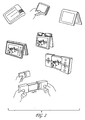
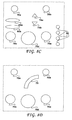
- the invention includes portable media player designs including a roller design, a wallet design and a theatre design. Each of these concepts is depicted in Fig. 2.
- the wallet design is functionally depicted by the upper two right pictures, wherein in the left of those pictures, a hand is holding the "wallet" closed and in the right picture, the wallet sits on a surface, partially opened, to give the user a view of the small screen on the front.
- the wallet design provides a design from the inside out, giving a very flexible usage model.
- the design includes a soft-hard contrast as between the wallet material and the video screen, for instance, provides built in screen protection, and is self standing as a result of an elastomeric hinge.
- the wallet design includes an integrate cover "from the inside out” instead of adding a cover as an addition.
- the combination of hard and soft materials provides a nice feeling aesthetic to a user.
- the soft elastomeric hinge allows for multiple positions on the table, lap, or any other environment as well.
- the roller design in two separate embodiments is depicted in the upper left of Fig. 2, and also in the middle below the black and white wallet design drawings. Similar to the wallet design, when the roller pivots, the screen can be angled to the user's desire.
- the roller design gives the user not only pivoting abilities with the rollers, but also user interface control, by turning the rollers, by sliding the rollers about their longitudinal axes, or by pressing buttons on the ends of the rollers.
- the roller design provides a generally clamshell design, an input focused design, machined material fell, screen protection and self standing capabilities.
- the roller design includes optimal input rollers for navigation and transport controls, wherein the buttons are clustered.
- a design is implemented that looks somewhat similar to a jewel box, optionally machined in aluminum or molded magnesium.
- the theatre design is depicted in the bottom three pictures of Fig. 2, open in the top and bottom of the three, and closed in the middle of the three.
- the slidable "wings" of the theatre design enable several advantages including functional augmentation of the device, protection of the video screen, while leaving some video screen available for other display purposes even when the wings are closed.
- the theatre design is angled for optimal viewing, and buttons on the "wings" of the device give natural input capabilities to a user holding the device.
- the theatre design provides a desirably small package, a surprise opening for the display of additional information, a hard outside, soft inside user experience, a maximum grip area because the wings of the device slide, but do not give up space by folding or retracting, inherent screen protection and a self standing angled view of the device and media screen when placed on a surface.
- a focus is placed on minimizing the visual elements, in order to maximize the visual entertainment experience and consumer allure.
- the device has a curve towards the user to emphasize the personal cinema experience by placing the user at the center of the curved experience.
- the theatre design includes enclosure by the wings that expose a hint of the media screen, allowing a user, for instance, to receive feedback about music playing while the device is in the closed position.
- the wings are provided for handling the device, solving a typical challenge between devices that are horizontally versus vertically oriented. Additionally, because the wings slide together and meet in a secure fashion, the device possesses a secure feel when the device is closed.
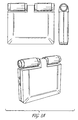
- FIG. 3A An embodiment of the roller design is depicted in Figs. 3A to 3D. Beginning clockwise from the upper left, Fig. 3A includes front, side and perspective views of an embodiment of the roller design, each in the closed position. One can observe that the video screen is protected in the closed position, and that the rollers on top of the portable media player provide an enhanced user interface mechanism.
- the rollers provide three substantially different user input mechanisms: (1) rolling a roller about its rotational axis in either direction provides up to four separate input controls, namely right one clockwise, right one counterclockwise, left one clockwise and left one counterclockwise, (2) sliding a roller along its longitudinal axis in either direction provides up to four separate input controls, namely, sliding the right roller towards the center of the device, sliding the right roller away from the center of the device, sliding the left roller towards the center of the device and sliding the left roller away from the center of the device and (3) buttons on the end of the rollers, which if optionally divided into an upper button and a bottom button each, also provide up to four separate input controls.
- the roller design of the portable media player provides a variety of audio options.
- the open position see below
- the portable media player provides a variety of video and photo options as well.
- Fig. 3B illustrates the roller design of the portable media player of the invention in two separate open positions.
- the roller design provides a variety of viewing options for a user desiring to watch video.
- Fig. 3C illustrates a three step sequence wherein, in the first top frame, a user holds the roller design in the closed position, perhaps because the user is listening to music. Then, in the middle frame, the user decides to use the functional controls of the roller design, either to change the music the user is listening to, or to get ready to open the portable media player to view video. In the bottom frame, a user holds the roller design in the open position and is able to easily view photos or videos, and control the viewing with the user's thumbs which naturally are positioned at the controls through the act of holding the portable media player.
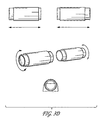
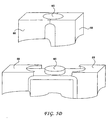
- Fig. 3D illustrates an isolated view of the roller/scroller components of the roller design to illustrate the combinational functionality represented thereby.
- the rollers once again offer two additional degrees of freedom, i.e., turning a roller clockwise or counterclockwise and choosing to turn either the left or right roller.
- buttons are placed on the end of each roller, but any number of user interface controls (0, 1, 2, 3...) can be placed on the ends to the extent a satisfying user interface experience can be delivered to the user.
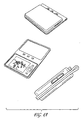
- FIG. 4A An embodiment of the wallet design is depicted in Figs. 4A to 4C. Beginning clockwise from the upper left, Fig. 4A includes closed perspective, open perspective and a closed side view of an embodiment of the wallet design.
- the video screen is protected in the closed position, and that the wallet has side and top buttons for control in the closed position, and enhanced controls in the open position.
- Such enhanced controls include a scalloped, or dish-like button which is shaped for ergonomic fitting with a user's thumb.
- the wallet design of the portable media player provides a variety of audio options.
- the portable media player provides a variety of video and photo options as well.
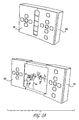
- Fig. 4B illustrates the wallet design of the portable media player of the invention in two separate open positions. Similar to the roller design, in the top view, one might imagine viewing one's favorite movie or the like while the device lay on a table, angled optimally by the wallet pivot point for viewing. At the same time, as illustrated by the bottom picture, one might imagine viewing one's favorite movie or the like while the device was completely open, so that one might hold the device at the right viewing angle, e.g., if a user was on an airplane or another place where placing the device on a surface was sub-optimal.
- the wallet design provides a variety of viewing options for a user desiring to watch video and photos.
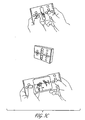
- Fig. 4C illustrates a three step sequence wherein, in the first top frame, a user holds the wallet design in the closed position, perhaps because the user is listening to music. Then, in the middle frame, the user decides to use the functional controls of the wallet design, either to change the music the user is listening to, or to get ready to open the portable media player to view video. In the bottom frame, a user holds the wallet design in the completely open position and is able to easily view photos or videos, and control the viewing with the user's thumbs which are naturally positioned at the controls through the act of holding the portable media player.
- FIG. 5A includes a closed perspective of the theatre design (top) and an open perspective (bottom).
- the media screen is protected by wings 50 in the closed position, although a small portion of the media screen remains visible to a user for auxiliary display information, such as details relating to the music being played.
- the media screen is a touch pad screen
- the media screen itself can become a user interface control point, wherein the portion(s) of the media screen that are nonetheless exposed when the wings 50 are closed can have functionality associated with input regions defined by software underlying the touch screen media screen.
- exemplary button controls are illustrated in the disclosed theatre embodiment, a variety of user interface controls are contemplated for the various design embodiments presented herein (See, e.g., below with respect to Figs. 8A to 8E).
- the theatre design of the portable media player provides a variety of audio options.
- the portable media player provides a variety of video and photo options as well.
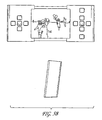
- Fig. 5B illustrates a front and side view of the theatre design of the portable media player of the invention in two separate open positions.
- the theatre design accommodates one's wish to view one's favorite movie or the like while the device lays on a table by angling the bottom surface between 5 and 45 degrees for viewing.
- the bottom surface is angles the device's media screen back away from the user by an angle of between 5 and 15 degrees.
- Fig. 5C illustrates a three step sequence wherein, in the first top frame, a user holds the theatre design in the closed position, perhaps because the user is listening to music. Then, in the middle frame, the user decides to place the device down on a table, perhaps because the user is listening to music via a remote control device. In the bottom frame, a user holds the theatre design in the completely open position and is able to easily view photos or videos, and control the viewing with the user's thumbs which are naturally positioned at the controls through the act of holding the portable media player.
- the theatre design provides a variety of viewing options for a user desiring to watch video and photos.
- Fig. 5D illustrates a synchronization component on the theatre design that can be accommodated in any of the embodiments of the personal media player disclosed herein.
- the device when the device is in the closed position (top picture), substantially just the surface of synchronization component 60 is exposed. Since the surface is all that is needed to dock and synchronize the portable media player to an alternate computing device, such as a PC, the portable media player can be docked when wings 50 are in the closed position (or when the roller design is closed, or when the wallet design is closed, etc.).
- the portable media player can also be docked and synchronized when the device is in the open position, e.g., when wings 50 are open (or when the roller design is open, or when the wallet design is open, etc.). Since synchronization component 60 is even more exposed when the portable media player is in the open position, the portable media player can be docked and synchronized when opened as well. Synchronization component 60 could be located on the top or the bottom of the portable media player, wherever it makes sense to fit into the docking component design that will accommodate the docking of the portable media player with other computing devices.
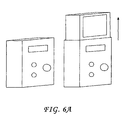
- Figs. 6A to 6D illustrate additional embodiments of the portable media player of the present invention having a closed (audio) position protecting the media screen and an open (video + audio) position.
- a Jack in the Box design is illustrated (e.g., an altered theatre design having one wing), wherein the user interface controls are placed on the outside cartridge, and when the user desires, the user initiates a control to have the media screen slide out of the outside cartridge.
- the outside cartridge may possess the swappable or interchangeable characteristics, and thus the functionality of the device may be supplemented or replaced.
- the bottom of the outside cartridge may be angled for viewing optimality and the screen is protected when the device is in the closed position.
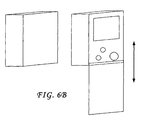
- Fig. 6B illustrates a similar embodiment wherein a sliding door protects the media screen. While in this embodiment the user interface controls are depicted inside on the surface co-located with the media screen, the user interface controls can also be located on the sliding door itself. Additionally, the sliding door may behave as a remote control for the device. Like the other embodiments, the screen is protected when the door is shut, and the screen may be angled for viewing purposes via the angle of the bottom surface.
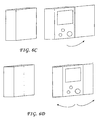
- Figs. 6C and 6D are embodiments similar to Fig. 6B wherein instead of a sliding door, one or two hinged doors are provided to open or close to make apparent or protect the media screen.
- the location of the user interface controls in the exemplary Figures are non-limiting in that the controls can be located on the surface with the media screen, on the door(s) of the device, or on any other portion of the portable media player as well.
- the screen is protected when the door is shut, and the screen may be angled for viewing purposes via the angle of the bottom surface.
- any of the embodiments described herein that include a cartridge, or sleeve, or other removable component may benefit from the augmentation of functionality for the portable media player.
- the wings 50 may be interchangeable with other wings 50 to swap or augment functionality.
- Wings 50 also provide a cosmetic effect as well depending on their design, and thus different cosmetic effects can be achieved by swapping or interchanging sleeves.
- the alternate functionality of a portable media player that may be achieved in accordance with the invention can be achieved either by removing a wing 50 and replacing it with another wing 50 with an alternate set of functionality, or by attaching a sleeve to an existing wing 50 which augments the functionality of the existing wing 50.
- a wing 50 or sleeve that includes a speaker
- the provision of a wing 50 or sleeve that includes a TV out (or in) component or microphone input the provision of a wing 50 or sleeve that includes noise reduction/cancellation circuitry
- the provision of a wing 50 or sleeve that includes accommodation for a Bluetooth headphone may also behave as a detachable remote control device.
- a sleeve may be a sliding plate face, a wrapping component, or any other device that attaches to wing 50 and accordingly augments the functionality of the portable media player to which it is attached.
- Figs. 7A to 7C illustrate various usage scenarios of the present invention.
- the devices are provided with a docking station including capabilities for different types of connections to various computing objects and devices, such as a PC.
- Accessories include a remote control device and earphones.
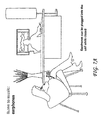
- Fig. 7A illustrates that earphones can be plugged into the unit to hear audio, such as music, but can also be used to hear the audio component of a video rendering.
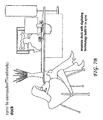
- Fig. 7B illustrates that a separate dock with digitizing technology is built into an embodiment of the synchronization component of the invention (See, e.g., Fig. 5D).
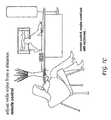
- Fig. 7C illustrates that a user can control various functionality of the portable media player from a distance via a remote control, ranging from synchronization control to rendering of media.
- a wing of the theatre design of Figs. 5A to 5D may be removed and operate as a remote control and the sliding door of Fig. 6B can be removed to operate as a remote control.
- Other embodiments can have a removable remote control portion as well.
- a remote control separate from the portable media player itself can be provided for the purpose of providing remote control services.
- Figs. 8A to 8E illustrate exemplary user interface controls for the various embodiments of the portable media player of the present invention, wherever they are located on the device.
- exemplary non-limiting control functionality for a portable media player of the invention may include: “Escape,” “Start,” “Options,” “More,” “OK,” “Back,” “Forward,” “Play,” Pause,” “Up,” “Down,” “Fast Forward,” “Reverse,” “Skip Forward,” “Skip backwards,” “Menu,” “Left,” “Right,” “Mute,” “Volume Up,” “Volume Down,” preset(s) for specialized functionality and/or any combination or permutation of these controls (e.g., play and pause are often combined with a single control).
- Fig. 8A illustrates a user interface control set including up and down controls 74a and 74b for facilitation of navigation, various buttons 70a, 70b, 70c, 70d, 70e, etc. for typical media functionality and buttons 80a, 80b, etc. for less standard media player functionality, such as "options," “more,” etc.
- Fig. 8B illustrates a variation on the user interface control set of Fig. 8A without the optional media player functionality.
- Fig. 8C illustrates another variation on the user interface control set of Fig. 8A, which further includes one or more preset buttons 85 for the provision of specialized preset functionality, such as functionality that is uncommon, a particularly unique combination of typical functionalities, or functionality that is particular to the embodiment of portable media player.
- Fig. 8D is yet another variation of a user interface control set wherein a substantially arc shaped touch pad control 75 is provided which provides an enhanced user experience for navigation and media control.
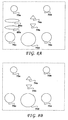
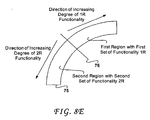
- Fig. 8E illustrates the functionality of an embodiment of the substantially arc shaped touch pad control 75 in more detail.
- the arc shaped control provides an enhanced user interface experience and ergonomic solution to the awkward input control problem for a user who is holding and simultaneously controlling any of the various portable media players disclosed herein.
- arc 75 is divided into two regions of control, substantially about the center 76 of the arc.
- a first set of functionality is associated with the first region 1R and a second set of functionality is associated with the second region 2R.
- a tap to the arced touch pad 75 is given special functional meaning.
- a tap to the first region 1R is given a first functional meaning and a tap to the second region 2R is given a second functional meaning.
- the first set of functionality (and second set of functionality) has one functional purpose for each functionality of the set, but the difference from functionality from functionality within the set lies in the degree of functional purpose.
- all of the functionalities of the first set of functionality might represent "up” functionality, but the difference from functionality to functionality lies in how much "up” is effected.
- all of the functionalities of the second set of functionality might represent "down” functionality, but the difference from functionality to functionality lies in how much "down” is effected. In one embodiment, this is achieved with a measure of how far user input is from the center 76.
- one embodiment works as follows: the farther the user input is from center line 76 in the first region 1R, the greater the degree of "up” that is applied whereas the closer the user input is to the center line 76 in the first region 1R, the less the degree of "up” that is applied; similarly, the farther the user input is from center line 76 in the second region 2R, the greater the degree of "down” that is applied whereas the closer the user input is to the center line 76 in the second region 2R, the less the degree of "down” that is applied.
- the direction of increasing functionality illustrated can optionally be reversed to the direction of decreasing functionality, and the use of "up” and "down” was for exemplary purposes only.
- control is suited for any two opposing sets of functionality such as “up and down,” “in and out”, “left and right,” volume up and volume down,” “forward and reverse,” “skip forward and skip backward,” and so on, although the invention is not limited to two sets of opposing functionality.
- the user interface touchpad control substantially in the shape of an arc is a user interface touchpad control substantially in the shape of a quarter circle.
- a user interface touchpad control is provided that is substantially in the shape of an arc comprising a first region for first touchpad input and a second region for second touchpad input, wherein the first region is divided by the second region substantially via the center of the arc.
- the user interface control comprises a touch pad arc divided into a first region of control providing a first set of functionality and a second region of control providing a second set of functionality different from the first set of functionality, wherein the first and second regions are divided substantially about the orthogonal center line of the arc.
- the user interface control may have the first set of functionality provide a set of functionality opposite to the second set of functionality.
- the first set of functionality includes varying degrees of "up” functionality and the second set of functionality includes varying degrees of "down” functionality.
- the farther from the center line the touch pad arc receives input in the first region the greater the degree of functionality of the first set of functionality is provided and the farther from the center line the touch pad arc receives input in the second region, the greater the degree of functionality of the second set of functionality is provided.
- a computer readable medium having computer executable instructions for providing control support to a touch pad arc may comprise a detection component for detecting where touch pad input of a touch pad arc is received, whereby the touch pad arc is divided into a first region and a second region substantially about the orthogonal center line of the touch pad arc and an output component for outputting a functional result, whereby if input is received in the first region, a functional result of a first set of functional results is output by the output component, and whereby if input is received in the second region, a functional result of a second set of functional results is output by the output component.
- the invention includes at a minimum, design embodiments with dashed lines (for de-emphasis) and solid lines (for emphasis) for emphasizing the roller(s) of the roller embodiment, the elastometric material in each of the embodiment(s), the wings and overall design of the theatre embodiment, the synchronization component implementation, the Jack in the Box design and corresponding designs with doors, the wallet design, and all user interface configurations, including, but not limited to the substantially arc shaped user interface control 75, and any combination of the elements recited in this sentence as well.
- Subelements, considered alone, of these identified elements have innovative design features as well, and thus subelements and subfeatures, permutations and combinations thereof, also form part of the design elements of the invention.
- any peripheral or computing device can take advantage of the docking and synchronization capabilities of the portable media player(s) of the invention, and the algorithm(s) and hardware implementations used in connection with such docking and synchronization of the invention may be applied to the operating system of a computing device, provided as a separate object on the device, as part of another object, as a reusable control, as a downloadable object from a server, as a "middle man" between a device or object and the network, as a distributed object, as hardware, in memory, a combination of any of the foregoing, etc.
- the various techniques described herein may be implemented in connection with hardware or software or, where appropriate, with a combination of both.
- the methods and apparatus of the present invention may take the form of program code (i.e., instructions) embodied in tangible media, such as floppy diskettes, CD-ROMs, hard drives, or any other machine-readable storage medium, wherein, when the program code is loaded into and executed by a machine, such as a computer, the machine becomes an apparatus for practicing the invention.
- the computing device will generally include a processor, a storage medium readable by the processor (including volatile and non-volatile memory and/or storage elements), at least one input device, and at least one output device.
- One or more programs that are used incident to docking, digitization and synchronization of a portable media player of the invention may make use of a data processing API, reusable controls, or the like, which are preferably implemented in a high level procedural or object oriented programming language to communicate with a computer system.
- the program(s) can be implemented in assembly or machine language, if desired.
- the language may be a compiled or interpreted language, and combined with hardware implementations.
- Various aspects of the invention may also be practiced via communications embodied in the form of program code that is transmitted over some transmission medium, such as over electrical wiring or cabling, through fiber optics, or via any other form of transmission, wherein, when the program code is received and loaded into and executed by a machine, such as an EPROM, a gate array, a programmable logic device (PLD), a client computer, a video recorder or the like, or a receiving machine having the signal processing capabilities as described in exemplary embodiments above becomes an apparatus for practicing the invention.
- a machine such as an EPROM, a gate array, a programmable logic device (PLD), a client computer, a video recorder or the like, or a receiving machine having the signal processing capabilities as described in exemplary embodiments above becomes an apparatus for practicing the invention.
- PLD programmable logic device
- client computer a video recorder or the like
- a receiving machine having the signal processing capabilities as described in exemplary embodiments above becomes an apparatus for practicing the invention.
- the program code When
Landscapes
- Engineering & Computer Science (AREA)
- Theoretical Computer Science (AREA)
- Computer Hardware Design (AREA)
- Physics & Mathematics (AREA)
- Human Computer Interaction (AREA)
- General Engineering & Computer Science (AREA)
- General Physics & Mathematics (AREA)
- Mathematical Physics (AREA)
- Signal Processing (AREA)
- User Interface Of Digital Computer (AREA)
- Two-Way Televisions, Distribution Of Moving Picture Or The Like (AREA)
- Television Signal Processing For Recording (AREA)
Applications Claiming Priority (4)
| Application Number | Priority Date | Filing Date | Title |
|---|---|---|---|
| US47468603P | 2003-05-30 | 2003-05-30 | |
| US474686P | 2003-05-30 | ||
| US788812 | 2004-02-27 | ||
| US10/788,812 US20040239753A1 (en) | 2003-05-30 | 2004-02-27 | Apparatus, systems and methods relating to an improved media player |
Publications (1)
| Publication Number | Publication Date |
|---|---|
| EP1501003A2 true EP1501003A2 (fr) | 2005-01-26 |
Family
ID=33457621
Family Applications (1)
| Application Number | Title | Priority Date | Filing Date |
|---|---|---|---|
| EP04011093A Withdrawn EP1501003A2 (fr) | 2003-05-30 | 2004-05-10 | Appareils, systèmes et procédés relatifs à un lecteur multimédia amélioré |
Country Status (6)
| Country | Link |
|---|---|
| US (1) | US20040239753A1 (fr) |
| EP (1) | EP1501003A2 (fr) |
| JP (1) | JP2004364295A (fr) |
| KR (1) | KR20040103462A (fr) |
| CN (1) | CN1585019A (fr) |
| TW (1) | TW200500924A (fr) |
Cited By (3)
| Publication number | Priority date | Publication date | Assignee | Title |
|---|---|---|---|---|
| CN101667058B (zh) * | 2008-09-03 | 2011-12-07 | 联想(北京)有限公司 | 在多系统间切换焦点的交互方法 |
| CN102723088A (zh) * | 2012-06-14 | 2012-10-10 | 宁波永佳电子科技有限公司 | 一种影像模式控制编码器 |
| CN104078064A (zh) * | 2014-07-04 | 2014-10-01 | 深圳丝路数字视觉股份有限公司 | 情景模式的配置方法及装置、多媒体播放控制方法及系统 |
Families Citing this family (12)
| Publication number | Priority date | Publication date | Assignee | Title |
|---|---|---|---|---|
| JP2005341262A (ja) * | 2004-05-27 | 2005-12-08 | Canon Inc | 撮像装置 |
| US7801478B2 (en) * | 2005-05-03 | 2010-09-21 | Marvell International Technology Ltd. | Systems for and methods of remote host-based media presentation |
| KR100721292B1 (ko) * | 2005-10-11 | 2007-05-25 | 주식회사 레인콤 | 휴대용 멀티미디어의 하드디스크 액세스 장치 및 그 방법 |
| CN101916581A (zh) | 2005-12-12 | 2010-12-15 | 精工爱普生株式会社 | 用于便携式媒体播放器的扩展坞及方法 |
| US20070185601A1 (en) * | 2006-02-07 | 2007-08-09 | Apple Computer, Inc. | Presentation of audible media in accommodation with external sound |
| US7493151B2 (en) * | 2006-03-14 | 2009-02-17 | Sony Ericsson Mobile Communications Ab | Housing arrangement for a portable device with a display |
| US8324492B2 (en) * | 2006-04-21 | 2012-12-04 | Vergence Entertainment Llc | Musically interacting devices |
| US20090042609A1 (en) * | 2006-06-29 | 2009-02-12 | Sony Ericsson Mobile Communications Ab | Selective Rendering of Multimedia Information |
| US8508475B2 (en) | 2008-10-24 | 2013-08-13 | Microsoft Corporation | User interface elements positioned for display |
| CN105468347B (zh) * | 2014-09-05 | 2018-07-27 | 富泰华工业(深圳)有限公司 | 暂停视频播放的系统及方法 |
| KR20160112143A (ko) | 2015-03-18 | 2016-09-28 | 삼성전자주식회사 | 전자 장치 및 전자 장치에서의 디스플레이 패널의 화면 업데이트 방법 |
| KR102224096B1 (ko) | 2020-08-07 | 2021-03-05 | 엘지디스플레이 주식회사 | 표시장치 |
Family Cites Families (26)
| Publication number | Priority date | Publication date | Assignee | Title |
|---|---|---|---|---|
| JPH05108572A (ja) * | 1991-10-17 | 1993-04-30 | Fujitsu Ltd | 情報入出力装置 |
| JPH0619849A (ja) * | 1992-06-30 | 1994-01-28 | Canon Inc | 携帯型電子機器、および位置検出装置で用いる位置指示器 |
| US5612732A (en) * | 1993-03-31 | 1997-03-18 | Casio Computer Co., Ltd. | Portable compact imaging and displaying apparatus with rotatable camera |
| JPH09258844A (ja) * | 1996-03-25 | 1997-10-03 | Meidensha Corp | ノート型コンピュータ |
| JPH10243489A (ja) * | 1997-02-28 | 1998-09-11 | Toshiba Corp | コンピュータシステム |
| US5983073A (en) * | 1997-04-04 | 1999-11-09 | Ditzik; Richard J. | Modular notebook and PDA computer systems for personal computing and wireless communications |
| US6259469B1 (en) * | 1997-09-05 | 2001-07-10 | Nikon Corporation | Information processing device, information processing method, and recording media |
| KR100303082B1 (ko) * | 1997-10-13 | 2001-11-22 | 윤종용 | 휴대용컴퓨터를이용한멀티미디어기기 |
| JP3674275B2 (ja) * | 1997-11-28 | 2005-07-20 | カシオ計算機株式会社 | カメラ装置 |
| GB2334301A (en) * | 1998-02-17 | 1999-08-18 | Ericsson Telefon Ab L M | Slidable and rotatable hinge assembly for a mobile radiotelephone |
| US6657654B2 (en) * | 1998-04-29 | 2003-12-02 | International Business Machines Corporation | Camera for use with personal digital assistants with high speed communication link |
| JP2000184026A (ja) * | 1998-12-14 | 2000-06-30 | Samsung Sdi Co Ltd | 携帯用通信装置 |
| US6262724B1 (en) * | 1999-04-15 | 2001-07-17 | Apple Computer, Inc. | User interface for presenting media information |
| US20030103079A1 (en) * | 1999-06-14 | 2003-06-05 | Lycos, Inc., A Virginia Corporation | Media resource manager/player |
| US6647409B1 (en) * | 1999-07-13 | 2003-11-11 | Microsoft Corporation | Maintaining a sliding view of server based data on a handheld personal computer |
| JP4210884B2 (ja) * | 1999-10-18 | 2009-01-21 | クラリオン株式会社 | 車載用機器及びその制御方法 |
| CA2299572C (fr) * | 1999-11-18 | 2004-05-04 | Xybernaut Corporation | Communicateur personnel |
| JP4470343B2 (ja) * | 2000-06-22 | 2010-06-02 | ソニー株式会社 | 情報閲覧装置および情報出力制御方法 |
| DE60106839T2 (de) * | 2000-06-30 | 2005-12-15 | Koninklijke Philips Electronics N.V. | Elektronisches Gerät mit zusammenklappbarer Anzeigevorrichtung |
| FI110046B (fi) * | 2000-11-27 | 2002-11-15 | Lasse Artturi Halttunen | Menetelmä mobiilipuhelimen kuvan ja äänen siirtämiseksi tavalliseen analogiseen televisiovastaanottimeen matkapuhelinlisälaitteen avulla |
| JP2003086968A (ja) * | 2001-06-28 | 2003-03-20 | Sony Corp | 電子機器 |
| JP2002304235A (ja) * | 2001-04-05 | 2002-10-18 | Sony Corp | 携帯情報端末保持用クレードル |
| JP2003008725A (ja) * | 2001-06-21 | 2003-01-10 | Matsushita Electric Ind Co Ltd | 電子機器 |
| US7149557B2 (en) * | 2003-05-12 | 2006-12-12 | Siemens Communications, Inc. | Mobile communication device having extendable display |
| EP1652392A1 (fr) * | 2003-07-31 | 2006-05-03 | Neomtel Co., Ltd. | Procede de generation de messages multimedia |
| US7857382B2 (en) * | 2005-04-20 | 2010-12-28 | Audiovox Corporation | Detachable vehicle entertainment system for the armrest/console of a vehicle |
-
2004
- 2004-02-27 US US10/788,812 patent/US20040239753A1/en not_active Abandoned
- 2004-05-10 EP EP04011093A patent/EP1501003A2/fr not_active Withdrawn
- 2004-05-20 TW TW093114302A patent/TW200500924A/zh unknown
- 2004-05-29 KR KR1020040038664A patent/KR20040103462A/ko not_active Ceased
- 2004-05-31 CN CNA2004100474714A patent/CN1585019A/zh active Pending
- 2004-05-31 JP JP2004162498A patent/JP2004364295A/ja active Pending
Cited By (4)
| Publication number | Priority date | Publication date | Assignee | Title |
|---|---|---|---|---|
| CN101667058B (zh) * | 2008-09-03 | 2011-12-07 | 联想(北京)有限公司 | 在多系统间切换焦点的交互方法 |
| CN102723088A (zh) * | 2012-06-14 | 2012-10-10 | 宁波永佳电子科技有限公司 | 一种影像模式控制编码器 |
| CN104078064A (zh) * | 2014-07-04 | 2014-10-01 | 深圳丝路数字视觉股份有限公司 | 情景模式的配置方法及装置、多媒体播放控制方法及系统 |
| CN104078064B (zh) * | 2014-07-04 | 2017-04-05 | 丝路视觉科技股份有限公司 | 情景模式的配置方法及装置、多媒体播放控制方法及系统 |
Also Published As
| Publication number | Publication date |
|---|---|
| JP2004364295A (ja) | 2004-12-24 |
| KR20040103462A (ko) | 2004-12-08 |
| TW200500924A (en) | 2005-01-01 |
| CN1585019A (zh) | 2005-02-23 |
| US20040239753A1 (en) | 2004-12-02 |
Similar Documents
| Publication | Publication Date | Title |
|---|---|---|
| US20040239622A1 (en) | Apparatus, systems and methods relating to improved user interaction with a computing device | |
| EP1501003A2 (fr) | Appareils, systèmes et procédés relatifs à un lecteur multimédia amélioré | |
| KR101541946B1 (ko) | 플립 폼 팩터를 갖는 휴대용 미디어 플레이어 | |
| US8939838B2 (en) | Accessory for playing games with a portable electronic device | |
| TW472204B (en) | Portable notebook computer | |
| US8631351B2 (en) | Providing multiple degrees of context for content consumed on computers and media players | |
| US20080062625A1 (en) | Portable computer for dual, rotatable screens | |
| US20080024976A1 (en) | Digital video and music player belt buckles | |
| JP4242064B2 (ja) | 折りたたみ式スピーカを有するポータブルコンピュータ | |
| US6694391B2 (en) | Combination computer mouse and telephony handset | |
| US20090327969A1 (en) | Semantic zoom in a virtual three-dimensional graphical user interface | |
| US20120326972A1 (en) | Multi-task interactive wireless telecommunications device | |
| US20070086724A1 (en) | Interface systems for portable digital media storage and playback devices | |
| US20080138028A1 (en) | Interface systems for portable digital media storage and playback devices | |
| JP4533098B2 (ja) | 画像表示装置、画像表示装置の表示制御方法、プログラム、及び記憶媒体 | |
| WO2005119404A1 (fr) | Système informatique portable multi-affichage pliant et séparable | |
| CN1902563A (zh) | 平板式膝上计算机及交互会议工作站系统 | |
| WO2009073298A2 (fr) | Structure d'interface utilisateur commune | |
| US20070060216A1 (en) | Portable communication apparatus | |
| US7385597B2 (en) | Information processing device with rotatable screen and external input device | |
| HK1072642A (en) | Apparatus, systems and methods relating to an improved media player | |
| JP5327865B2 (ja) | 携帯端末装置及びプログラム | |
| US20170310807A1 (en) | Vertical slide aparatus with rotational screen for smart phones, pdas, tablets and the like | |
| US20250392658A1 (en) | Electronic Devices and Corresponding Methods for Indicating Content Creating Device Geometric Form Factor | |
| JP4536870B2 (ja) | 入力装置 |
Legal Events
| Date | Code | Title | Description |
|---|---|---|---|
| PUAI | Public reference made under article 153(3) epc to a published international application that has entered the european phase |
Free format text: ORIGINAL CODE: 0009012 |
|
| AK | Designated contracting states |
Kind code of ref document: A2 Designated state(s): AT BE BG CH CY CZ DE DK EE ES FI FR GB GR HU IE IT LI LU MC NL PL PT RO SE SI SK TR |
|
| AX | Request for extension of the european patent |
Extension state: AL HR LT LV MK |
|
| REG | Reference to a national code |
Ref country code: HK Ref legal event code: DE Ref document number: 1072642 Country of ref document: HK |
|
| RIN1 | Information on inventor provided before grant (corrected) |
Inventor name: BURTON MAXIMILLIAN PHILIP Inventor name: GODEE JOOST Inventor name: UDIYAN ILANJERAN PADMANABHAN Inventor name: CERCEO, MICHAEL Inventor name: PROCTOR, DAVID W. |
|
| RIN1 | Information on inventor provided before grant (corrected) |
Inventor name: BURTON MAXIMILLIAN PHILIP Inventor name: GODEE JOOST Inventor name: UDIYAN ILANJERAN PADMANABHAN Inventor name: CERCEO, MICHAEL Inventor name: PROCTOR, DAVID W. |
|
| STAA | Information on the status of an ep patent application or granted ep patent |
Free format text: STATUS: THE APPLICATION IS DEEMED TO BE WITHDRAWN |
|
| 18D | Application deemed to be withdrawn |
Effective date: 20101201 |
|
| REG | Reference to a national code |
Ref country code: HK Ref legal event code: WD Ref document number: 1072642 Country of ref document: HK |