EP1338865B1 - Navigation system - Google Patents
Navigation system Download PDFInfo
- Publication number
- EP1338865B1 EP1338865B1 EP03003190A EP03003190A EP1338865B1 EP 1338865 B1 EP1338865 B1 EP 1338865B1 EP 03003190 A EP03003190 A EP 03003190A EP 03003190 A EP03003190 A EP 03003190A EP 1338865 B1 EP1338865 B1 EP 1338865B1
- Authority
- EP
- European Patent Office
- Prior art keywords
- screen
- information
- communication
- display
- communication line
- Prior art date
- Legal status (The legal status is an assumption and is not a legal conclusion. Google has not performed a legal analysis and makes no representation as to the accuracy of the status listed.)
- Expired - Lifetime
Links
Images





Classifications
-
- G—PHYSICS
- G01—MEASURING; TESTING
- G01C—MEASURING DISTANCES, LEVELS OR BEARINGS; SURVEYING; NAVIGATION; GYROSCOPIC INSTRUMENTS; PHOTOGRAMMETRY OR VIDEOGRAMMETRY
- G01C21/00—Navigation; Navigational instruments not provided for in groups G01C1/00 - G01C19/00
- G01C21/26—Navigation; Navigational instruments not provided for in groups G01C1/00 - G01C19/00 specially adapted for navigation in a road network
- G01C21/34—Route searching; Route guidance
- G01C21/36—Input/output arrangements for on-board computers
- G01C21/3679—Retrieval, searching and output of POI information, e.g. hotels, restaurants, shops, filling stations, parking facilities
-
- G—PHYSICS
- G08—SIGNALLING
- G08G—TRAFFIC CONTROL SYSTEMS
- G08G1/00—Traffic control systems for road vehicles
- G08G1/09—Arrangements for giving variable traffic instructions
- G08G1/0962—Arrangements for giving variable traffic instructions having an indicator mounted inside the vehicle, e.g. giving voice messages
- G08G1/0968—Systems involving transmission of navigation instructions to the vehicle
- G08G1/0969—Systems involving transmission of navigation instructions to the vehicle having a display in the form of a map
Definitions
- the present invention relates to a navigation system which has communication function with the information service device such as a communication type navigation device.
- a communication type navigation device in which various information on route information and map information, etc. acquired by accessing the information service device by using the radio communication device such as cellular phones can be provided to a user.
- connection fees are generated in such a communication type navigation device.
- connection fees increase as the time that the communication line has been established between the information service device and this system becomes long when public line adopts the hourly charge system.
- the size of the display panel of the navigation device is also limited in general.
- the display part is integrated with the main body of the device, and the size of the entire navigation device is assumed the same 1DIN (Deutsches Institut fuer Normung) as a general car stereo, the display screen becomes a small, wide screen of about 10,67 cm (4.2 inches). Therefore, the mechanism to improve the usability in the setting or the operation is required in order to accept the setting necessary to display the route guidance and the map, etc. from the operator through the operation screen displayed on this small, wide screen.
- EP 1035531 discloses an information providing system for mobile units, in which a server is provided for searching a map data base for a map suitable for a destination the present position of the vehicle, computing a guide route from the present position to the destination of the vehicle, determining a location at which route information is to be transmitted to the vehicle and transferring the information when the vehicle arrives at the determined location.
- the present invention is achieved in consideration of the above-mentioned circumstances.
- An object of the present invention is to provide a car navigation system having the communication function with the information service device such as the communication type navigation devices, which can shorten the establishment time of the communication line between the information service device and the car navigation.
- Another object is to improve the usability in the setting or the operation required.
- a car navigation system can include a communication part which communicates through a communication line. Further, such a car navigation system can comprise a display part, a plurality of screen switch buttons, and/or a processing part which accepts setting from an operator and performs the processing. Further, said processing part can include a screen change processing means and/or a communication control processing means.
- Said screen change processing means allows the operation screen displayed in said display part to change according to the content of the operation on said plural screen switch buttons by the operator, the operation screen under the display, and the layered structure of said plural operation screens, the operation screens to receive the setting from the operator being provided hierarchically.
- a communication control processing means establishes communication line between said information service device and this system by controlling said communication part when it is necessary to receive the information from said information service device in order to process according to the setting given by the operator through each of a series of operation screens displayed in said display part, and cuts off said communication line after said information is received.
- the communication line is established between the information service device and this system to perform the processing (for instance, the display of the map in the vicinity of the point set by the user and the route guidance to the destination set by the user) according to the setting given by the operator, only when it is necessary to receive the information (for instance, the map information used for map display and the route information used to guide the route) from the information service device. Further, when the reception of the information ends, the communication line is cut off. Therefore, the communication line can be prevented from coming to remain being established with the communication not actually done. As a result, the establishment time of the communication line between the information service device and this system can be shortened.
- a plurality of operation screens is prepared hierarchically to receive the setting content from the operator.
- the operation screen displayed in said display part is changed according to the content of the operation on said plural screen switch buttons by the operator, the operation screen under the display, and the layered structure of said plural operation screens.
- each operation screen can be simply composed by adopting such configuration, the usability in the setting or the operation can be improved even when the display screen of said display part is made as a small, wide screen of 10,67 cm (about 4.2 inches) for instance.
- Fig. 1 is an outline view of the communication system to which the present invention is applied.
- the shown communication system comprises navigation device 20 installed and used in a vehicle, and information service center 10 to provide various data such as map data, route date, and traffic data, etc. to the navigation device 20 as shown in the figure.
- navigation device 20 is composed so as to connect with cellular phone 30.
- the navigation device 20 communicates with information service center 10 through this cellular phone 30, wireless base station 60, and public line network 50. Further, the navigation device 20 is composed so that various sensors installed in the vehicle such as GPS receiver 40, and speed sensors and the giro sensors not shown in the figure can be connected.
- Navigation device 20 in the above communication system has a plurality of operation screens provided hierarchically, for receiving the setting (for instance, the destination setting of the route guidance and the point setting of the map display) from the operator. Further, a plurality of screen switch buttons has been also installed therein. The operation screen displayed in said display part is changed according to the content of the operation on said plural screen switch buttons by the operator, the operation screen under the display, and the layered structure of said plural operation screens.
- navigation device 20 When the setting necessary to execute the function provided by navigation device 20 (for instance, route guidance and/or map display) is given from the operator through such an operation screen, the navigation device 20 executes its function according to this setting.
- the navigation device 20 controls cellular phone 30 only when it is necessary to receive the information (for instance, route information used for the route guidance and/or map information used for the map display) from the information service center 10, establishes the communication line between information service center 10 and this system, and receives the information. And, when the reception of information ends, the communication line is cut off at once.
- information service center 10 performs the necessary processing (for instance, route search processing or information retrieval processing) according to the information request from the navigation device 20, obtains the information, and sends it to navigation device 20.
- necessary processing for instance, route search processing or information retrieval processing
- navigation device 20 and information service center 10 which compose the above-mentioned communication system will be explained.
- navigation device 20 First of all, navigation device 20 will be explained.
- Fig. 2 is a block diagram of navigation device 20.
- Navigation device 20 comprises CPU 201, RAM 202 which functions as a work area of CPU 201, flash ROM 203 where various programs to achieve the functions given by navigation device 20 are stored, cellular phone IF (interface) 204 to connect with cellular phone 30, memory card IF 205 to connect with memory card (a hard disk of the card type is included) 210 used to preserve various data such as map data 2101, member data 2102, etc., sensor IF 206 to connect with various sensors such as GPS receiver 40, a speed sensor, and a giro sensor, operation button group 207, display 208, and bus 209 to connect these each part 201-208 mutually.
- cellular phone IF interface
- memory card IF 205 to connect with memory card (a hard disk of the card type is included) 210 used to preserve various data such as map data 2101, member data 2102, etc.
- sensor IF 206 to connect with various sensors such as GPS receiver 40, a speed sensor, and a giro sensor
- operation button group 207 such as GPS receiver 40
- cellular phone IF 204 has communication method judgment part 301 for determining whether the communication method of cellular phone 30 is a circuit switching method or a packet communication method.
- Map data 2101 registered on memory card 210 is map data for a large area (zoom-out) map and map data for a detailed (zoom-in) map.
- map data for the large area map data on the whole country is registered beforehand.
- map data for a detailed map is map data received from the information service center 10, data on the whole country is not necessarily completed.
- OSPG operation system program
- communication control PG 2032 communication control PG 2032
- display screen handling PG 2033 vehicle position calculation PG 2034
- member registration PG 2035 member registration PG 2035
- navigation PG2036 is stored as application PG to achieve each of the functions that the user can provide navigation device 20.
- OSPG 2031 is program which is loaded into RAM 202 first when a power supply of navigation device 20 is turned on, and executed by CPU 201. OSPG 2031 controls totally each of parts 201-208 shown in Fig. 2 .
- Communication controls PG 2032 is a program that establishes the communication line between information service center 10 and this system by controlling cellular phone IF 204 according to the instruction from OSPG 2031, and cuts off the established communication line.
- Display screen handling PG2033 is a program that accepts various setting from the operator by displaying the operation screens on display 208. Here, a plurality of operation screens which have the layered structure are prepared, and various setting is accepted through these operation screens.
- Vehicle position calculation PG 2034 is a program that calculates the position (present place) of the vehicle equipped with navigation device 20 based on the measurement data obtained from GPS receiver 40 connected with sensor IF 206, the speed sensor, and the giro sensor, etc.
- Member registration PG 2035 is a program that saves member data 2102 which is a qualification necessary to receive information from the information service center 10.
- Navigation PG 2036 is a program that performs various processing which relates to navigations such as the route guidance, the map display, and the traffic information display, etc.
- OSPG 2032-2036 other than OSPG 2031 are called by OSPG 2031, loaded into RAM 202, and executed by CPU 201.
- navigation device 20 In navigation device 20 according to this illustration of the present invention, display 208 has been integrated with the main body of navigation device 20.
- the size of the main body of navigation device 20 is same 1DIN as a general car stereo.
- FIG. 3 One example of operation button group 207 arranged in front of navigation device 20 and display 208 is shown in Fig. 3 .
- display panel 2081 on display 208 has a wide screen of 10,67 cm (about 4.2 inches) as can be installed in front of the main body of the device of 1DIN size.
- Buttons F1- F4 arranged downward in front of the main body are used as screen switch buttons 2071.
- OSPG 2031 notifies display screen handling PG 2032 of the handling operation.
- Display screen handling PG 2032 switches the operation screen displayed on display panel 2081, based on the operated screen switch button 2071, and the operation screen currently displayed on display panel 2081 and the hierarchical structure of the operation screen.
- Display screen handling PG 2032 displays explanation information 2075 corresponding to respective screen switch buttons 2071 under the operation screen under the operation screen as shown in the figure.
- Explanation information 2075 is information on the explanation of the set item which can be accepted through the operation screen switched and displayed on display panel 2081 by operating corresponding screen switch button 2071. The operator can easily understand which screen switch button 2071 has to be operated so as to allow the screen to change to the operation screen required to set desired information by referring to this explanation information 2075.
- screen handling PG 2032 does not display explanation information 2075 until any one of the screen switch buttons 2071 is operated by the operator afterwards.
- return button 2072 arranged in the lower right part in front of the main body is a button for switching the operation screen displayed on display panel 2081 to the previous operation screen.
- the OSPG 2031 notifies the operation of the return button to display screen handling PG 2032.
- display screen handling PG 2032 switches the current operation screen to the operation screen displayed on display panel 2081 just before the current one.
- Cross button 2073 and decision button 2074 arranged in the upper right part in front of the main body are buttons to move the cursor displayed on display panel 2081, and to select the item.
- OSPG 2031 moves the cursor on display panel 2081 20 according to the operation to cross button 2073.
- decision button 2074 When decision button 2074 is operated, OSPG 2031 notifies the cursor position of that time to PG 2035-2037 under operation when information is displayed in display part 208.
- PG 2035-2037 under operation processes according to the item to which the notified cursor position indicates.
- CPU 201 loads OSPG 2031 into RAM 202 and executes it when the power supply of navigation device 20 is turned on.
- OSPG 2031 loads other various PG 2032-2036 into RAM 202 and executes them.
- the process achieved by executing communication control PG 2032 will be referred as a communication control module, the process achieved by executing display screen handling PG 2033 as a display screen handling module, the process achieved by executing vehicle position calculation PG 2034 as a vehicle position calculation module, the process achieved by executing member registration PG 2035 as a member registration module, and the process achieved by executing navigation PG 2036 as a navigation module.
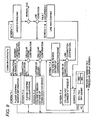
- Figs. 5 to 8 are views explaining the screen change of the operation screen displayed on display panel 2081.
- the communication method which adopts cellular phone 30 as mentioned above is judged by communication method judgment part 301 of cellular phone IF 204.
- Display screen handling module displays screen 0 which is the initial operation screen on display panel 2081.
- the screen 0 includes "DEVICE SETTING” (button F1) for shifting to the operation screen to adjust voice and picture quality, etc., "INFO.” (button F2) for shifting to the operation screen to retrieve information at information service center 10, "NAVI.” (button F3) for shifting to the operation screen for route guidance, "NAVI. SETTING” (button F4) for shifting to the operation screen to do various setting of registration of member information etc., and "TEL.” (button F5) for shifting to the operation screen to set by cellular phone 30, as explanation information 2075 on buttons F1- F5 which are screen switch buttons 2071
- the display screen handling module detects this operation. And, the module shifts the screen displayed on display panel 2081 from screen 0 to screen 2 which is the operation screen to do setting necessary to guide the route. At this time, the display screen handling module confirms whether memory card 210 is installed on memory IF 205, and whether installed memory card 210 can be used for navigation device 20. The display screen shifts to screen 1 to display the error message without shifting to screen 2 when there is a problem, and the display screen returns to screen 0 after screen 1 is displayed on display panel 2081 for the predetermined time.
- the screen 2 includes "NAVI. SETTING” (button F1), "INFO.” (button F2), “YOU ARE HERE” (button F3) to shift to the operation screen for displaying the map near the present placer, "MAP OPERATION” (button F4) to shift to the operation screen for changing the setting (zoom-in and zoom-out, etc.) of the map displayed on display panel 2081, and "DEST. SETTING” (button F5) to shift to the operation screen for setting the destination (goal) of the route guidance as well as the map, as explanation information 2075 on buttons F1-F5.
- the map displayed with explanation information 2075 is a map that the navigation module displays on display panel 2081 by using map data 101, for instance, stored in memory card 210. You can use the defaulted map (map in the vicinity of the fixed registration point and/or the map near the present place) as the map, or the map displayed on display panel 2081 at the end before that (Which map is displayed at the end may be cached in memory card 210).
- the display screen handling module shifts the content of the display of display panel 2081 from screen 2 to screen 4 when button F1 is operated on screen 2, and shifts that of display panel 2081 from screen 2 to screen 3 when button F2 is operated.
- button F5 When button F5 is operated with screen 2 displayed on display panel 2081, the display screen handling module detects this operation. Then, the display screen handling module shifts the screen displayed on display panel 2081 to screen 2-1 which is the operation screen to accept the destination setting.
- Screen 2-1 includes:"POI” (button F1) to shift to the operation screen for setting destination from facilities name etc.; "PREVIOUS DESTINATION” (button F2) to shift to the operation screen for setting destination from the career of the destination set in the past; "MEMORY” (button F3) to shift to the operation screen for setting destination from registered place; "HOME” (button F4) to shift to the operation screen for setting own house in the destination; and "TEL. NUM.” (button F5) to shift to operation screen for setting destination from the telephone number as explanation information 2075 on button F1- F5.
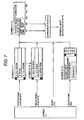
- buttons F1 and F5 are operated will be explained with reference to Fig. 7 .
- button F4 When button F4 is operated with screen 2 displayed on display panel 2081, the display screen handling module detects this operation. Then, the display screen handling module shifts the screen displayed on display panel 2081 to screen 2-2 which is the operation screen to accept the setting of the map operation.
- Screen 2-2 includes "NORTH” (button F1), "PRESENT PLACE(YOU ARE HERE)” (button F2), “DETAILS (ZOOM-IN)” (button F3), and "LARGE AREA (ZOOM-OUT)” (button F4), along with the map as explanation information 2075 on button F1- F4.
- buttons F2 and F3 are similar to "PRESENT PLACE” which is explanation information 2075 associated with button F3 on screen 2. Therefore, when button F2 is operated on screen 2-2, the display screen handling module shifts the content of the display of display panel 2081 from screen 2-2 to screen 2-3.
- the display screen handling module When button F1 is operated with screen 2-2 displayed on display panel 2081, the display screen handling module notifies a "NORTH" instruction of the navigation module. Then, the navigation module changes the north direction of the map displaying in display panel 2081 so as to turn to a predetermined direction of display panel 2081(for instance, upper part). Further, when button F3 is operated, the instruction of "DETAILS" is notified the navigation module. When received, the navigation module makes the map displayed on display panel 2081 by using the map data for the detailed map registered on memory card 210. In addition, the navigation module notifies the instruction of "LARGE AREA" when button F4 is operated. Then, the navigation module makes the map displayed on display panel 2081 by using the map data for the large area map registered on memory card 210.
- the navigation module requests the reception of the detailed map data to the communication control module.
- the communication control module establishes the communication line between information service center 10 and this system, downloads the map data for the detailed map requested from the navigation module, and registers this on memory card 210. And, when the downloading ends, the communication line is cut off automatically.
- display screen handling module detects this operation. Then, the screen displayed on display panel 2081 is shifted from screen 2 to screen 2-3 which is the operation screen for displaying the map in the neighborhood of the present place.
- Screen 2-3 includes "MAP OPERATION” (button F1), "DESTINATION SETTING” (button F2), "INFO.” (button F3), and "NAVI. SETTING” (button F4) along with the map in the neighborhood of the present place as explanation information 2075 on buttons F1-F4.
- buttons F1 and F2 are similar to those which are explanation information 2075 associated with buttons F4 and F5 on screen 2. Therefore, when button F1 is operated on screen 2-3, the display screen handling module shifts the content of the display on display panel 2081 from screen 2-3 to screen 2-2. When button F2 is operated, the content of the display on display panel 2081 is shifted from screen 2-3 to screen 2-1. Further, “INFO.” and “ NAVI. SETTING “ which are explanation information 2075 associated with buttons F3 and F4 are similar to " NAVI. SETTING” and "INFO.” which are explanation information 2075 associated with button F4 and F2 on screen 0. Therefore, the display screen handling module shifts the content of the display on display panel 2081 from screen 2-3 to screen 4 when button F3 is operated on screen 2-3. And, it shifts the content of the display on display panel 2081 from screen 2-3 to screen 3 when button F4 is operated.
- the navigation module makes the map in the neighborhood of the present place displayed along with explanation information 2075 by using the present place calculated by the vehicle position calculation module and the map data registered on memory card 210, and displays in display panel 2081.
- the map displayed on display panel 2081 is the detailed map or the large area map is determined according to the content of the setting accepted from the operator through the operation screen (screen 2-2) for the map operation.
- map data in the neighborhood of the present place is not registered on memory card 210 though the content of the setting is the detailed map
- the map in the neighborhood of the present place is displayed by using the map data for the large area map.
- buttons F2 When button F2 is operated with screen 0 displayed on display panel 2081, the display screen handling module detects this operation. And, the screen displayed on display panel 2081 is shifted from screen 0 to screen 3 which is the operation screen to shift to operation screen for retrieving the information given by information service center 10.
- Screen 3 includes "MAP RENEWAL” (button F1) to shift to the operation screen for updating the map, "LANDMARK” (button F2) to shift to the operation screen for receiving information on local facilities, "TRAFFIC INFO.” (button F3) to shift to the operation screen for receiving on the traffic information as explanation information 2075 on buttons F1- F3.
- the display screen handling module notifies the navigation module of the instruction of "MAP RENEWAL" when button F1 is operated with screen 3 displayed on display panel 2081.
- the navigation module requests the reception of the map data displaying in display panel 2081 to the communication control module.
- the communication control module establishes the communication line between information service center 10 and this system, downloads the map data requested from the navigation module, and updates the corresponding map data registered on memory card 210 to this downloaded map. And, when the downloading ends, the communication line is cut off automatically.
- the navigation module can display the selection screen on display panel 2081 so that the operator can select the map data to be updated among the corresponding map data registered on memory card 210.
- the display screen handling module notifies the navigation module of the instruction of "LANDMARK" when button F2 is operated with screen 3 displayed on display panel 2081.
- the navigation module requests the reception of the facilities information in the neighborhood of the present place to the communication control module.
- the communication control module establishes the communication line between information service center 10 and this system, downloads the information of facilities in the neighborhood of the present place requested from the navigation module, and registers it on memory card 210. And, when the downloading ends, the communication line is cut off automatically.
- the navigation module displays the map in the neighborhood the present place on display panel 2081 with the information of facilities in the neighborhood of the present place by using the map data stored on memory card 210 and the downloaded information of facilities.
- the display screen handling module notifies the navigation module of the instruction of "TRAFFIC INFORMATION" when button F3 is operated with screen 3 displayed on display panel 2081.
- the navigation module requests the reception of the traffic information in the neighborhood of the present place calculated by the vehicle position calculation module to the communication control module.
- the communication control module establishes the communication line between information service center 10 and this system, downloads the traffic information in the neighborhood of the present place requested from the navigation module, and registers it on memory card 210. And, when the downloading ends, the communication line is cut off automatically.
- the navigation module displays the map in the neighborhood the present place on display panel 2081 with the traffic information in the neighborhood of the present place by using the map data stored on memory card 210 and the downloaded traffic information.
- display screen handling module detects this operation. And, the screen displayed on display panel 2081 is shifted from screen 0 to screen 4 which is the operation screen for doing various setting of the registration of member information etc. At this time, whether memory card 210 is installed on memory IF 205, and the installed memory card 210 is available to navigation device 20, etc. are confirmed by the display screen handling module. And, the screen shifts to screen 1 to display the error message without shifting to screen 4 when there is a problem. The screen returns to screen 0 after screen 1 is displayed on display panel 2081 for the predetermined time.
- Screen 4 includes "ICONS” (button F1) for setting the type of facilities to display icon on map, "TRACKING” (button F 2) for setting whether making the running tracks for the vehicle displayed, "MEMBER SETTING” (button F3) for setting member information to receive the information service from information service center 10 as explanation information 2075 on button F1- F3 .
- ICONS button F1
- TRACKING button F 2
- MEMBER SETTING button F3
- the display screen handling module detects this operation, and returns the screen displayed on display panel 2081 to the previous screen.
- button F1 is operated with screen 2-1 displayed
- Fig. 6 the operation when button F1 is operated with screen 2-1 displayed
- buttons F1 and F2 When button F1 is operated with screen 2-1 displayed on display panel 2081, the display screen handling module detects this operation. As a result, the screen which is the operation screen for selecting whether making the facility set as the destination the nearest facility or making the facility the whole country facilities is displayed on displays screen 2-1-1.
- Screen 2-1-1 includes "NEARBY” (button F1) to set the nearest facility as the destination and "CATEGORY” (button F2) to set the destination from facilities in the whole country as explanation information 2075 on buttons F1 and F2.
- the display screen handling module detects this operation, and makes display panel 2081 to display screen 2-1-2 which is the operation screen to select the type of nearest facility set as the destination.
- the operator can select the desired type by using cross key 2073 and decision button 2074 from among the facility type displayed on screen 2-1-2.
- the display screen handling module sets the facility of the selected type and the facility nearest to the present place calculated from the vehicle calculation module as the destination. After that, it makes display panel 2081 to display screen 2-1-6 which is the operation screen to select the condition (toll road priority or ordinary road priority) used to search for a recommended route.
- the display screen handling module detects this operation, and makes display panel 2081 to display screen 2-1-3 which is the operation screen to select the type of the facility, etc. set as the destination.
- the operator can select the desired type by using cross key 2073 and decision button 2074 from among the facility type displayed on screen 2-1-3. And, when the desired type is selected. And, when the desired type is selected, screen 2-1-4 which is the operation screen to select the existence area of the destination is displayed on display panel 2081.
- the operator can select the desired area from among the area displayed on screen 2-1-4 by using cross key 2073 and decision button 2074. And, when the desired area is selected, the display screen handling module retrieves information such as facilities which exist in this area and facilities which belongs to the type selected through screen 2-1-3 displayed immediately before in display panel 2081 by using the map data registered on memory card 210. And, screen 2-1-5 which is operation screen to select the desired facilities etc. from among information on the detected facilities, etc. is displayed.
- the operator can select the desired facility from among facilities displayed on screen 2-1-4 by using cross key 2073 and decision button 2074. And, when the desired facility are selected, the display screen handling module sets this facility as the destination. After that, screen 2-1-6 is displayed on display panel 2081.
- the display screen handling module When button F1 is operated with screen 2-1-6 displayed on display panel 2081, the display screen handling module requests the route guidance to the destination set by using display screen immediately before to the navigation module under the condition of the priority use of the toll road. On the other hand, when button F2 is operated, the display screen handling module requests the route guidance to the destination set to the navigation module under the condition of the priority use of the ordinary road.
- the navigation module When received, the navigation module requests the reception of the recommended route from the present place to the destination set which the vehicle calculation module calculates and the recommended route under the priority use for the toll road or the ordinary road to the communication control module.
- the communication control module establishes the communication line between information service center 10 and this system, downloads the route data of the recommended route requested the reception from the navigation module and the detailed map data in the neighborhood of the destination, and registers it on memory card 210. And, when the downloading ends, the communication line is cut off automatically.
- the navigation module displays the map in the neighborhood of the present place on display panel 2081 with the traffic information in the neighborhood of the present place by using the map data stored on memory card 210 and the downloaded route data, and starts the route guidance.
- buttons F2-F5 are operated with screen 2-1 displayed will be explained with reference to Fig. 7 .
- the display screen handling module detects this operation, and makes display panel 2081 to display screen 2-1-7 which is the operation screen to select this destination from among the list of the facilities, etc. set as the destination so far recorded as the past record in memory card 210.
- the operator can select the desired facility from among the facilities, etc. displayed on screen 2-1-7 by using cross key 2073 and decision button 2074.
- the display screen handling module sets this facility as the destination. After that, screen 2-1-6 is displayed on display panel 2081.
- the display screen handling module When button F3 is operated with screen 2-1 displayed on display panel 2081, the display screen handling module detects this operation, and makes display panel 2081 to display screen 2-1-8 which is the operation screen to select the this destination from among the list of facilities, etc. recorded for instance as registered place in memory card 210.
- the operator can select the desired facility from among the facilities, etc. displayed on screen 2-1-7 by using cross key 2073 and decision button 2074.
- the display screen handling module sets this facility as the destination. After that, screen 2-1-6 is displayed on display panel 2081.
- the display screen handling module When button F5 is operated with screen 2-1 displayed on display panel 2081, the display screen handling module detects this operation, and makes display panel 2081 to display screen 2-1-9 which is the operation screen to accept the input by the telephone number.
- the operator can input the telephone number by sequentially selecting numeral from among the dial numeral displayed on screen 2-1-7 by using cross key 2073 and decision button 2074.
- the display screen handling module sets the address of the telephone corresponding to this telephone number as the destination. After that, screen 2-1-6 is displayed on display panel 2081.
- Fig. 7 when button F4 is operated with screen 2-1 displayed on display panel 2081, the display screen handling module sets, for instance, the address of his/her own house recorded in memory card 210 as the destination. After that, screen 2-1-6 is displayed on display panel 2081.
- screen 2-1-6 is the same as screen 2-1-6 of Fig. 6 .
- buttons F1- F3 are operated with screen 4 displayed will be explained with reference to Fig.8 .
- display screen handling module detects this operation, and makes display panel 2081 to display screen 4-1 which is the operation screen to select the type of facilities to which the icon is displayed when the map is displayed.
- the operator can select the desired type from among the type of facilities being displayed on screen 4-1(the plural types can be selected) by using cross key 2073 and decision button 20.
- the selected type is registered on memory card 210.
- the navigation module examines the facility type of the icon display registered on memory card 210, and displays the facility type set so as to display the icon on the map.
- display screen handling module detects this operation, and makes display panel 2081 to display screen 4-2 which is the operation screen to register member information.
- the operator can input the member information by sequentially selecting the characters displayed on screen 4-2 by using cross key 2073 and decision button 2074.
- the member registration module registers this member information on memory card 210 as member data 2102.
- the display screen handling module turns on/off the flag indicative of the display of the track or non-display registered on memory card 210 for instance.
- the navigation module checks this flag registered on memory card 210, and decides whether to display track for the run of the car.
- the communication control module confirms whether member data 2102 is registered on memory card 210. If not, it notifies the display screen handling module of that. When received, the display screen handling module makes display panel 2081 to display screen T1- 1 including the message indicative of that. After that, after the predetermined time passes, the screen of display panel 2081 is returned to the screen displayed just before screen T1-1.
- the communication control module confirms the state of cellular phone 30. If cellular phone 30 is not connected, or if the dial is locked or the sending is restricted even when cellular phone 30 is connected, the communication control module notifies the display screen handling module of that. When received, the display screen handling module makes display panel 2081 to display screen T1- 2 which includes the message indicative of that. After that, after the predetermined time passes, the screen of display panel 2081 is returned to the screen displayed immediately before beginning of the communication.
- the communication control module confirms the communication range of cellular phone 30. When the cellular phone is out of the communication range, the communication control module notifies the display screen handling module of that. When received, the display screen handling module makes display panel 2081 to display screen T1- 3 which includes the message indicative of that. After that, after the predetermined time passes, the screen of display panel 2081 is returned to the screen displayed just before screen T1-3.
- the communication control module controls cellular phone 30 and calls the information service center 10 when it is confirmed to be able to call information service center 10 by the above-mentioned (E-1) - (E-3). And, the kind of the information which the operator wants to obtain, the condition (the content of the setting), and the member data are sent to information service center 10. Meanwhile, the display screen handling module makes display panel 2081 to display screen T1-4 which includes the message indicating that the connection is under negotiation.
- the communication control module notifies the display screen handling module of that.
- the display screen handling module makes display panel 2081 to display screen T1- 5 which includes the message indicative of that. After that, after the predetermined time passes, screen T1-6 is displayed on display panel 2081.
- the operator can select to retry through screen T1-6 by using cross key 2073 and decision button 207.
- the display screen handling module informs the communication control module of that.
- the communication control module returns to the above-mentioned (E-4) and tries to call information service center 10.
- the display screen handling module returns the screen of display panel 2081 to the screen displayed immediately before beginning of the communication.
- the communication control module When the communication line is established between information service center 10 and this system, the communication control module notifies the display screen handling module of that. When received, the display screen handling module makes display panel 2081 to display screen T1- 7 which includes the message indicative of that.
- the communication control module sends the request of the reception of the information on the route data, the map data, and the traffic data, etc. by using the communication line established between information service center 10 and this system, and downloads the information from information service center 10. And, when downloading is completed, the communication line is cut off.
- the communication control module notifies the display screen handling module of that.
- the display screen handling module makes display panel 2081 to display screen T1-8 which includes the message indicative of that. After that, after the predetermined time passes, screen T1-6 is displayed on display panel 2081.
- Fig. 10 is a function block diagram of information service center 10.
- Information service center 10 includes communication part 101 which communicates with other party device through public line network 50, information retrieval part 102 which retrieves the information required from navigation device 20 through communication part 101, route search part 103 which searches the route according to the route search request received from navigation device 20 through communication part 101, map data base 104 in which the map data to use for the map display, the route display, and the route guidance in navigation device 20 is registered, route information data base 10 in which the road data used to search the route is registered, traffic information management data base 106 in which the information on traffic trouble due to traffic jam and traffic accident, etc.
- weather information management data base 107 in which the information on running attention such as rain, snows, and strong winds in each area is registered
- facility information management data base 108 in which the information on facilities is registered
- authentication part 109 which certificates the member information
- member information management data base 110 in which the member information on the user who can use information service center 10 is registered.
- Information service center 10 which has the above-mentioned configuration can be constructed on the computer system which has the general configuration as shown in Fig. 11 , comprising CPU 151, memory 152, external memory 153 such as a hard disk drive, reader 157 which reads data from storage medium 159 which has the portability such as a CD-ROM or a DVD-ROM, input device 155 such as a keyboard or a mouse, output device 156 such as a monitor, communication device 154 which communicates through public line network 50, and bus 158 which connects these device, or the network system constructed by connecting a plurality of these computer systems by using the network interface not shown.
- CPU 151 central processing unit 151
- memory 152 such as a hard disk drive
- reader 157 which reads data from storage medium 159 which has the portability such as a CD-ROM or a DVD-ROM
- input device 155 such as a keyboard or a mouse
- output device 156 such as a monitor
- communication device 154 which communicates through public line network 50
- the program for constructing the above-mentioned information service center 10 on such a computer system or network system can be taken from storage medium 159 into memory 152 through reader 157 or from external memory 153, and can be executed in CPU 151. Or, this program can be taken into memory 152 from public line network 50 through communication device 154 or from the network through the network interface not shown, and can be executed in CPU 151.
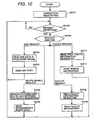
- Fig. 12 is a flow chart explaining the operation of information service center 10.
- communication part 101 establishes the communication line between this navigation device 20 and the this communication part 101 when the message from navigation device 20 through public line network 50 is received, and receives the member information.
- Authentication part 109 certificates by examining whether this member information is registered in member information management data base 110. And, the processing (processing after S2702) advances next only when the authentication is established.
- the communication line is cut off (S2701) when the authentication is not established.
- communication part 101 receives the request from navigation device 20, and analyzes the content of the request (S2702, S2703). As a result, the request concerned is notified to route search part 103 if it is the route search request. The request concerned is notified to information retrieval part 102 if they are requests (either the map data request, the weather information request, the traffic information request or the facility information request) other than the route search.
- Route search part 103 searches the recommended route between the departure place (present place) included in said route search request and the destination (destination set place) by using the Dijkstra method, etc. by using route information data base 105 when the route search request is received from the navigation device 20 through communication part 101 (S2704). Then, the data of the recommended route searched is sent to navigation device 20 which sends said route search request through communication part 101 (S2705).
- information retrieval part 102 reads the map data of the area which includes the area or the point included in the request concerned from the map data base 104 (S2706). And, the read map data is sent to navigation device 20 which sends said map data request through communication part 101 (S2707).
- information retrieval part 102 reads the facility information in the vicinity of the point (present place) included in the request concerned from facility information management data base 108 (S2708).
- the read facilities information is sent to navigation device 20 which sends said facility information request through communication part 101 (S2709).
- information retrieval part 102 reads the traffic information in the vicinity of the point (present place) included in the request concerned from traffic informationmanagement data base 106 (S2710).
- the traffic information read is sent to navigation device 20 which sends said traffic information request through communication part 101 (S2711).
- the communication line has been established between information service center 10 and this system only when it is necessary to receive the information (for instance, map information used for the map display and route information used to guide the route) from the information service center 10, in order to perform the processing (for instance, the route guidance to the destination set by the user and map display in the neighborhood of the point set by the user) according to the setting given by the operator. And, when the reception of information ends, the communication line has been cut off. Therefore, it is possible to prevent the communication line from remaining being established with the communication not actually done. As a result, the establishment time of the communication line between information service centers 10 can be shortened.
- a plurality of operation screens are prepared hierarchically to receive the setting content from the operator.
- the operation screen displayed in display panel 2081 is changed according to the content of the operation to screen switch buttons (F1 to F5) 2071 by the operator, the operation screen under the display, and the layered structure.
- each operation screen can be simply composed by adopting such configuration, the usability in the setting or the operation can be improved even when the display screen of display panel is made as a small, wide screen of about 10,67 cm (4.2 inches) for instance.
- item information 2075 allocated respectively of screen switch buttons (F1-F5) 2071 is displayed on display panel 2081 according to the way in which the correspondence relation between screen switch buttons 2071 and the item information is made to be understood. Therefore, it is possible to understand easily that which operation screen is obtained by operating which screen switch button 2071.
- the present invention is not limited to the above-mentioned embodiment. Further, it is possible to change variously within the range of the summary.
- navigation device 20 has cut off the communication line in the above-mentioned embodiment automatically after acquiring the information from the information service center 10, it is possible to display the message to confirm whether it is possible to cut off automatically in display panel 2081, and cut off automatically when the instruction given from the operator through operation button group 207 admits cutting off
- the communication method which cellular phone 30 adopts as mentioned above is judged by communication method judgment part 301 for cellular phone IF 30.
- the communication charge is decided for the packet method in proportion to the data amount to communicate differently from the circuit switching method that the communication charge is decided depending on time when the line is connected. Therefore, the necessity for cutting off the line even if the communication ends disappears.
- communication control PG 2032 does not cut off the line when the communication method judgment part 301 for cellular phone IF 204 detects that the communication method of cellular phone 30 is the packet communication method. For instance, when button F3 is operated on screen 2-2 of Fig.5 and the map data of the detailed map which tries to be displayed is not registered on memory card 210, the navigation module requests the reception of the detailed map data to the communication control module.
- the communication control module establishes the communication line between information service center 10 and this system, downloads the map data for a detailed map requested from the navigation module, and registers this on memory card 210. And, even when downloading ends, the communication line is not cut off for the packet communication method. Time (screen T1-4 of Fig.8 ) to establish the connection of the communication line becomes unnecessary when the next communication begins by doing so, and the response quickens.
- navigation device 20 Although the present invention has been explained about an example of navigation device 20, it is not limited to the foregoing detailed description thereof.
- the present invention can be applied also to the information terminal such as PDA (Personal Digital Assistance) other than navigation device 20.
- PDA Personal Digital Assistance
Landscapes
- Engineering & Computer Science (AREA)
- Radar, Positioning & Navigation (AREA)
- Remote Sensing (AREA)
- Physics & Mathematics (AREA)
- General Physics & Mathematics (AREA)
- Automation & Control Theory (AREA)
- Navigation (AREA)
- Traffic Control Systems (AREA)
- Instructional Devices (AREA)
- User Interface Of Digital Computer (AREA)
- Mobile Radio Communication Systems (AREA)
Applications Claiming Priority (2)
| Application Number | Priority Date | Filing Date | Title |
|---|---|---|---|
| JP2002041778A JP3933955B2 (ja) | 2002-02-19 | 2002-02-19 | 車載装置 |
| JP2002041778 | 2002-02-19 |
Publications (2)
| Publication Number | Publication Date |
|---|---|
| EP1338865A1 EP1338865A1 (en) | 2003-08-27 |
| EP1338865B1 true EP1338865B1 (en) | 2012-08-29 |
Family
ID=27655207
Family Applications (1)
| Application Number | Title | Priority Date | Filing Date |
|---|---|---|---|
| EP03003190A Expired - Lifetime EP1338865B1 (en) | 2002-02-19 | 2003-02-19 | Navigation system |
Country Status (3)
| Country | Link |
|---|---|
| US (1) | US6853904B2 (enExample) |
| EP (1) | EP1338865B1 (enExample) |
| JP (1) | JP3933955B2 (enExample) |
Families Citing this family (38)
| Publication number | Priority date | Publication date | Assignee | Title |
|---|---|---|---|---|
| JP2004127049A (ja) * | 2002-10-04 | 2004-04-22 | Pioneer Electronic Corp | 階層情報を記録した記録媒体、情報検索装置、そのシステム、その方法、そのプログラム、および、そのプログラムを記録した記録媒体 |
| KR101168423B1 (ko) * | 2003-02-05 | 2012-07-25 | 가부시키가이샤 자나비 인포메틱스 | 내비게이션 장치의 경로 탐색 방법 및 교통 정보 표시 방법 |
| JP4270946B2 (ja) * | 2003-06-02 | 2009-06-03 | 三菱電機株式会社 | ナビゲーション装置 |
| JP4088237B2 (ja) * | 2003-10-23 | 2008-05-21 | 株式会社ナビタイムジャパン | ナビゲーション装置、ナビゲーション方法、ナビゲーションプログラム |
| US7146271B2 (en) * | 2003-12-23 | 2006-12-05 | Honda Motor Co., Ltd. | System and method for managing navigation information |
| US7184888B2 (en) * | 2003-12-23 | 2007-02-27 | Honda Motor Co., Ltd. | System and method for transferring navigation information using different coordinate systems |
| US7480561B2 (en) * | 2003-12-23 | 2009-01-20 | Honda Motor Co., Ltd. | Prioritized delivery of navigation information |
| US7263438B2 (en) * | 2003-12-23 | 2007-08-28 | Honda Motor Co., Ltd. | Smart storage and transmission of navigation information |
| TW200522710A (en) * | 2003-12-29 | 2005-07-01 | Pixart Imaging Inc | Image navigation chip |
| JP4684565B2 (ja) * | 2004-03-23 | 2011-05-18 | 三菱電機株式会社 | 案内情報検索装置およびこれを用いた案内情報検索システム |
| US7206696B2 (en) * | 2004-05-19 | 2007-04-17 | Honda Motor Co., Ltd. | Method for modifying navigation information |
| US20050261829A1 (en) * | 2004-05-19 | 2005-11-24 | Honda Motor Co., Ltd. | System and method for off route processing |
| US7292936B2 (en) * | 2004-05-19 | 2007-11-06 | Honda Motor Co., Ltd. | System and method for displaying information |
| US20050261824A1 (en) * | 2004-05-19 | 2005-11-24 | Honda Motor Co., Ltd. | System and method for varying content |
| JP2006029885A (ja) * | 2004-07-14 | 2006-02-02 | Alpine Electronics Inc | 施設検索システムおよび方法 |
| JP4271651B2 (ja) * | 2004-12-13 | 2009-06-03 | 三菱電機株式会社 | ナビゲーションシステム |
| JP2006195768A (ja) * | 2005-01-14 | 2006-07-27 | Alps Electric Co Ltd | 入力装置付き表示装置 |
| US20060247852A1 (en) * | 2005-04-29 | 2006-11-02 | Kortge James M | System and method for providing safety-optimized navigation route planning |
| JP4366352B2 (ja) * | 2005-10-19 | 2009-11-18 | 富士通テン株式会社 | 電子装置 |
| KR100655084B1 (ko) * | 2006-01-17 | 2006-12-08 | 삼성전자주식회사 | 센스앰프 인에이블 회로 및 이를 갖는 반도체 메모리 장치 |
| JP4884796B2 (ja) * | 2006-02-22 | 2012-02-29 | 富士通テン株式会社 | 入出力制御装置および入出力制御方法 |
| US20070299607A1 (en) * | 2006-06-27 | 2007-12-27 | Verizon Laboratories Inc. | Driving directions with landmark data |
| US20080005679A1 (en) * | 2006-06-28 | 2008-01-03 | Microsoft Corporation | Context specific user interface |
| US9031777B2 (en) | 2006-08-08 | 2015-05-12 | Verizon Patent And Licensing Inc. | Driving directions with selective printing |
| JP4813561B2 (ja) * | 2006-09-12 | 2011-11-09 | シャープ株式会社 | 携帯端末、表示方法、表示様式決定プログラムおよびコンピュータ読み取り可能な記録媒体 |
| US8744758B2 (en) * | 2006-12-19 | 2014-06-03 | Verizon Patent And Licensing Inc. | Driving directions printed text scaling |
| US8584013B1 (en) | 2007-03-20 | 2013-11-12 | Google Inc. | Temporal layers for presenting personalization markers on imagery |
| US8117303B2 (en) * | 2007-06-29 | 2012-02-14 | Nokia Corporation | Systems, methods, devices, and computer program products for downloading content for offline browsing |
| JP5561847B2 (ja) * | 2008-06-19 | 2014-07-30 | ローム株式会社 | ドライブレコーダ |
| US8332535B2 (en) * | 2008-07-09 | 2012-12-11 | International Business Machines Corporation | System and method for providing privacy and limited exposure services for location based services |
| JP5018695B2 (ja) * | 2008-08-21 | 2012-09-05 | 株式会社Jvcケンウッド | 車載器 |
| JP5219705B2 (ja) * | 2008-09-12 | 2013-06-26 | 富士通テン株式会社 | 情報処理装置および情報処理方法 |
| US8549552B2 (en) | 2009-11-03 | 2013-10-01 | The Nielsen Company (Us), Llc | Methods and apparatus to monitor media exposure in vehicles |
| US9188985B1 (en) * | 2012-09-28 | 2015-11-17 | Google Inc. | Suggesting a route based on desired amount of driver interaction |
| WO2014108965A1 (ja) * | 2013-01-09 | 2014-07-17 | パナソニック株式会社 | 情報表示処理システム、情報表示処理装置、および携帯端末 |
| US9235989B2 (en) * | 2014-02-27 | 2016-01-12 | Siemens Industry, Inc. | Adjustment of a traffic signal control plan based on local environmental conditions |
| US9551588B2 (en) | 2014-08-29 | 2017-01-24 | The Nielsen Company, LLC | Methods and systems to determine consumer locations based on navigational voice cues |
| CN111475082A (zh) * | 2020-04-01 | 2020-07-31 | 上海擎感智能科技有限公司 | 车载屏幕连接方法、管理系统及计算机可读存储介质 |
Family Cites Families (7)
| Publication number | Priority date | Publication date | Assignee | Title |
|---|---|---|---|---|
| US5339392A (en) * | 1989-07-27 | 1994-08-16 | Risberg Jeffrey S | Apparatus and method for creation of a user definable video displayed document showing changes in real time data |
| KR0183524B1 (ko) * | 1995-09-27 | 1999-04-15 | 모리 하루오 | 네비게이션 장치 |
| US6163749A (en) * | 1998-06-05 | 2000-12-19 | Navigation Technologies Corp. | Method and system for scrolling a map display in a navigation application |
| DE60027499T2 (de) * | 1999-03-05 | 2006-11-16 | Hitachi, Ltd. | Informationsdarbietungssystem für mobile Einheiten |
| EP1080754A3 (en) * | 1999-09-02 | 2004-07-07 | Sony Computer Entertainment Inc. | Entertainment system, entertainment apparatus, recording medium, and program |
| JP3475142B2 (ja) * | 2000-03-01 | 2003-12-08 | 三菱電機株式会社 | 地図データ送信装置、地図データ送信方法、及び、地図データ送信方法をコンピュータに実行させるためのプログラムを記録したコンピュータ読み取り可能な記録媒体 |
| US20010030667A1 (en) * | 2000-04-10 | 2001-10-18 | Kelts Brett R. | Interactive display interface for information objects |
-
2002
- 2002-02-19 JP JP2002041778A patent/JP3933955B2/ja not_active Expired - Fee Related
-
2003
- 2003-02-19 EP EP03003190A patent/EP1338865B1/en not_active Expired - Lifetime
- 2003-02-19 US US10/367,733 patent/US6853904B2/en not_active Expired - Fee Related
Also Published As
| Publication number | Publication date |
|---|---|
| US6853904B2 (en) | 2005-02-08 |
| JP3933955B2 (ja) | 2007-06-20 |
| EP1338865A1 (en) | 2003-08-27 |
| JP2003244770A (ja) | 2003-08-29 |
| US20030158651A1 (en) | 2003-08-21 |
Similar Documents
| Publication | Publication Date | Title |
|---|---|---|
| EP1338865B1 (en) | Navigation system | |
| US6952643B2 (en) | Road traffic information output apparatus | |
| CN100545671C (zh) | 使用移动通信系统的位置信息共享系统和方法 | |
| US6853911B1 (en) | Downloading geographical data to a mobile station and displaying a map | |
| CN1950863B (zh) | 便携式导航终端 | |
| EP0921700B1 (en) | Information terminal device | |
| US8249808B2 (en) | Method and apparatus for setting destination in navigation terminal | |
| USRE47012E1 (en) | Guide display device and guide display method, and display device and method for switching display contents | |
| JP2003156340A (ja) | ナビゲーションシステム、ナビゲーションシステム用情報サーバ装置および通信端末装置、並びに、ナビゲーションシステムにおける移動体の変更方法および変更処理プログラム | |
| US20040032344A1 (en) | Method of determining driving routes | |
| JP4325905B2 (ja) | 携帯情報端末 | |
| JPH11201762A (ja) | 情報提供システム | |
| JP4395468B2 (ja) | ナビゲーションシステム、携帯端末装置および地図表示方法 | |
| JP2005181262A (ja) | 車載機および携帯電話機 | |
| JP4138505B2 (ja) | 車載用情報端末 | |
| JPH11201769A (ja) | 通信型経路案内システムおよびそこで用いられる通信方法 | |
| JP2006275777A (ja) | ナビゲーション装置、地図データ更新システム、地図データ更新方法 | |
| KR100811631B1 (ko) | 차량 단말기에서의 동적 경로 제공 장치 및 방법 | |
| JP3543560B2 (ja) | ナビゲーションシステム | |
| JP4308291B2 (ja) | 情報端末装置 | |
| KR100469236B1 (ko) | 휴대폰의 지리정보 제공 방법 | |
| JP4001963B2 (ja) | 通信方法、ナビゲーション装置及び自動車 | |
| JP4198541B2 (ja) | 情報配信方法 | |
| JP5177691B2 (ja) | 携帯ナビゲーション端末およびプログラム | |
| JP2004343618A (ja) | 車載用電子機器およびそれを用いた無線通信方法 |
Legal Events
| Date | Code | Title | Description |
|---|---|---|---|
| PUAI | Public reference made under article 153(3) epc to a published international application that has entered the european phase |
Free format text: ORIGINAL CODE: 0009012 |
|
| AK | Designated contracting states |
Designated state(s): AT BE BG CH CY CZ DE DK EE ES FI FR GB GR HU IE IT LI LU MC NL PT SE SI SK TR |
|
| AX | Request for extension of the european patent |
Extension state: AL LT LV MK RO |
|
| 17P | Request for examination filed |
Effective date: 20031210 |
|
| AKX | Designation fees paid |
Designated state(s): DE FR GB |
|
| RAP1 | Party data changed (applicant data changed or rights of an application transferred) |
Owner name: XANAVI INFORMATICS CORPORATION Owner name: HITACHI, LTD. Owner name: CLARION CO., LTD. |
|
| 17Q | First examination report despatched |
Effective date: 20090917 |
|
| GRAP | Despatch of communication of intention to grant a patent |
Free format text: ORIGINAL CODE: EPIDOSNIGR1 |
|
| GRAS | Grant fee paid |
Free format text: ORIGINAL CODE: EPIDOSNIGR3 |
|
| RAP1 | Party data changed (applicant data changed or rights of an application transferred) |
Owner name: CLARION CO., LTD. Owner name: HITACHI, LTD. Owner name: XANAVI INFORMATICS CORPORATION |
|
| GRAA | (expected) grant |
Free format text: ORIGINAL CODE: 0009210 |
|
| AK | Designated contracting states |
Kind code of ref document: B1 Designated state(s): DE FR GB |
|
| REG | Reference to a national code |
Ref country code: GB Ref legal event code: FG4D |
|
| REG | Reference to a national code |
Ref country code: DE Ref legal event code: R096 Ref document number: 60341931 Country of ref document: DE Effective date: 20121025 |
|
| PLBE | No opposition filed within time limit |
Free format text: ORIGINAL CODE: 0009261 |
|
| STAA | Information on the status of an ep patent application or granted ep patent |
Free format text: STATUS: NO OPPOSITION FILED WITHIN TIME LIMIT |
|
| 26N | No opposition filed |
Effective date: 20130530 |
|
| REG | Reference to a national code |
Ref country code: DE Ref legal event code: R097 Ref document number: 60341931 Country of ref document: DE Effective date: 20130530 |
|
| REG | Reference to a national code |
Ref country code: DE Ref legal event code: R082 Ref document number: 60341931 Country of ref document: DE Representative=s name: BEETZ & PARTNER PATENT- UND RECHTSANWAELTE, DE |
|
| REG | Reference to a national code |
Ref country code: DE Ref legal event code: R082 Ref document number: 60341931 Country of ref document: DE Representative=s name: BEETZ & PARTNER PATENT- UND RECHTSANWAELTE, DE Effective date: 20140311 Ref country code: DE Ref legal event code: R081 Ref document number: 60341931 Country of ref document: DE Owner name: HITACHI, LTD., JP Free format text: FORMER OWNER: CLARION CO., LTD., HITACHI, LTD., XANAVI INFORMATICS CORPORATION, , JP Effective date: 20140311 Ref country code: DE Ref legal event code: R081 Ref document number: 60341931 Country of ref document: DE Owner name: CLARION CO., LTD., JP Free format text: FORMER OWNER: CLARION CO., LTD., HITACHI, LTD., XANAVI INFORMATICS CORPORATION, , JP Effective date: 20140311 Ref country code: DE Ref legal event code: R081 Ref document number: 60341931 Country of ref document: DE Owner name: HITACHI, LTD., JP Free format text: FORMER OWNER: HITACHI, LTD., HCX CORP., , JP Effective date: 20120829 Ref country code: DE Ref legal event code: R081 Ref document number: 60341931 Country of ref document: DE Owner name: CLARION CO., LTD., JP Free format text: FORMER OWNER: HITACHI, LTD., HCX CORP., , JP Effective date: 20120829 Ref country code: DE Ref legal event code: R081 Ref document number: 60341931 Country of ref document: DE Owner name: CLARION CO., LTD., SAITAMA-SHI, JP Free format text: FORMER OWNER: HITACHI, LTD., HCX CORP., , JP Effective date: 20120829 Ref country code: DE Ref legal event code: R082 Ref document number: 60341931 Country of ref document: DE Representative=s name: BEETZ & PARTNER MBB, DE Effective date: 20140311 Ref country code: DE Ref legal event code: R081 Ref document number: 60341931 Country of ref document: DE Owner name: CLARION CO., LTD., SAITAMA-SHI, JP Free format text: FORMER OWNER: CLARION CO., LTD., HITACHI, LTD., XANAVI INFORMATICS CORPORATION, , JP Effective date: 20140311 Ref country code: DE Ref legal event code: R081 Ref document number: 60341931 Country of ref document: DE Owner name: HITACHI, LTD., JP Free format text: FORMER OWNERS: CLARION CO., LTD., TOKIO/TOKYO, JP; HITACHI, LTD., TOKYO, JP; XANAVI INFORMATICS CORPORATION, ZAMA-SHI, KANAGAWA, JP Effective date: 20140311 Ref country code: DE Ref legal event code: R081 Ref document number: 60341931 Country of ref document: DE Owner name: HITACHI, LTD., JP Free format text: FORMER OWNERS: HITACHI, LTD., TOKYO, JP; HCX CORP., TODA, SAITAMA, JP Effective date: 20120829 Ref country code: DE Ref legal event code: R081 Ref document number: 60341931 Country of ref document: DE Owner name: CLARION CO., LTD., SAITAMA-SHI, JP Free format text: FORMER OWNERS: HITACHI, LTD., TOKYO, JP; HCX CORP., TODA, SAITAMA, JP Effective date: 20120829 Ref country code: DE Ref legal event code: R081 Ref document number: 60341931 Country of ref document: DE Owner name: CLARION CO., LTD., SAITAMA-SHI, JP Free format text: FORMER OWNERS: CLARION CO., LTD., TOKIO/TOKYO, JP; HITACHI, LTD., TOKYO, JP; XANAVI INFORMATICS CORPORATION, ZAMA-SHI, KANAGAWA, JP Effective date: 20140311 Ref country code: DE Ref legal event code: R082 Ref document number: 60341931 Country of ref document: DE Representative=s name: BEETZ & PARTNER MBB PATENTANWAELTE, DE Effective date: 20140311 Ref country code: DE Ref legal event code: R082 Ref document number: 60341931 Country of ref document: DE Representative=s name: BEETZ & PARTNER MBB PATENT- UND RECHTSANWAELTE, DE Effective date: 20140311 |
|
| REG | Reference to a national code |
Ref country code: GB Ref legal event code: 732E Free format text: REGISTERED BETWEEN 20140424 AND 20140430 |
|
| PGFP | Annual fee paid to national office [announced via postgrant information from national office to epo] |
Ref country code: FR Payment date: 20140211 Year of fee payment: 12 |
|
| REG | Reference to a national code |
Ref country code: FR Ref legal event code: TQ Owner name: HITACHI, LTD., JP Effective date: 20140526 Ref country code: FR Ref legal event code: TQ Owner name: CLARION CO., LTD., JP Effective date: 20140526 |
|
| PGFP | Annual fee paid to national office [announced via postgrant information from national office to epo] |
Ref country code: GB Payment date: 20140219 Year of fee payment: 12 |
|
| PGFP | Annual fee paid to national office [announced via postgrant information from national office to epo] |
Ref country code: DE Payment date: 20140417 Year of fee payment: 12 |
|
| REG | Reference to a national code |
Ref country code: DE Ref legal event code: R119 Ref document number: 60341931 Country of ref document: DE |
|
| GBPC | Gb: european patent ceased through non-payment of renewal fee |
Effective date: 20150219 |
|
| REG | Reference to a national code |
Ref country code: FR Ref legal event code: ST Effective date: 20151030 |
|
| PG25 | Lapsed in a contracting state [announced via postgrant information from national office to epo] |
Ref country code: GB Free format text: LAPSE BECAUSE OF NON-PAYMENT OF DUE FEES Effective date: 20150219 Ref country code: DE Free format text: LAPSE BECAUSE OF NON-PAYMENT OF DUE FEES Effective date: 20150901 |
|
| PG25 | Lapsed in a contracting state [announced via postgrant information from national office to epo] |
Ref country code: FR Free format text: LAPSE BECAUSE OF NON-PAYMENT OF DUE FEES Effective date: 20150302 |