EP0670541A2 - System und Verfahren zur Steuerung eines Rechnercursors - Google Patents
System und Verfahren zur Steuerung eines Rechnercursors Download PDFInfo
- Publication number
- EP0670541A2 EP0670541A2 EP95103086A EP95103086A EP0670541A2 EP 0670541 A2 EP0670541 A2 EP 0670541A2 EP 95103086 A EP95103086 A EP 95103086A EP 95103086 A EP95103086 A EP 95103086A EP 0670541 A2 EP0670541 A2 EP 0670541A2
- Authority
- EP
- European Patent Office
- Prior art keywords
- cursor
- border
- indicator signal
- display
- movement
- Prior art date
- Legal status (The legal status is an assumption and is not a legal conclusion. Google has not performed a legal analysis and makes no representation as to the accuracy of the status listed.)
- Withdrawn
Links
Images

Classifications
-
- G—PHYSICS
- G06—COMPUTING OR CALCULATING; COUNTING
- G06F—ELECTRIC DIGITAL DATA PROCESSING
- G06F3/00—Input arrangements for transferring data to be processed into a form capable of being handled by the computer; Output arrangements for transferring data from processing unit to output unit, e.g. interface arrangements
- G06F3/01—Input arrangements or combined input and output arrangements for interaction between user and computer
- G06F3/048—Interaction techniques based on graphical user interfaces [GUI]
- G06F3/0481—Interaction techniques based on graphical user interfaces [GUI] based on specific properties of the displayed interaction object or a metaphor-based environment, e.g. interaction with desktop elements like windows or icons, or assisted by a cursor's changing behaviour or appearance
- G06F3/04812—Interaction techniques based on cursor appearance or behaviour, e.g. being affected by the presence of displayed objects
Definitions
- the invention relates generally to a system and method for control of a cursor on a computer display screen.
- Computers have become common in the work place and at home. Early computer systems required extensive knowledge of computer programming to effectively operate the computer. Newer computers have been designed to permit simplified use by those without formal background in computer science. Operating systems, such as the Microsoft® WindowsTM operating system provide a graphical environment that can be used by persons with little or no previous experience in the use of computers. Thus, computers have become easier to operate and their use has become more pervasive.
- a cursor pointing device such as a mouse, trackball, or the like
- a cursor pointing device permits the easy manipulation of a cursor on the visual display coupled to the computer.
- a cursor pointing device such as a mouse, trackball, or the like
- the movement of the cursor with a mouse becomes inefficient.
- the movement of the cursor from one side of the visual display to the opposite side of the visual display requires extensive manipulation of the mouse.
- some prior art systems permit the movement of the cursor off one side of the visual display and cause the cursor to reappear on the opposite side of the visual display. This technique, known as screen wrapping, can simplify the movement of the cursor.
- the present invention is embodied in a system and method for controlling cursor movement using a display having first and second opposing borders, and means for restricting the movement of the cursor beyond the first border.
- Signal generation means generate an indicator signal in response to a user effort to move the cursor beyond the first barrier.
- Wrapping means enabled by the indicator signal, wrap the cursor from a location in the vicinity of the first border on the display to a location in the vicinity of the second border.
- the first and second borders may be visually detectable to the user.
- the indicator signal may be generated by a variety of means such as continued movement of the cursor against the first border.
- the indicator signal may be generated when the cursor is moved against the first border for a predetermined period of time or for a predetermined distance.
- the indicator signal may be generated in response to the detection of a rate of movement with which the cursor approaches the first border.
- the rate of movement may be a velocity.
- the indicator signal may be generated when the velocity is below a predetermined velocity.
- the detected rate of movement may be an acceleration.
- the indicator signal may be generated when the acceleration is below a predetermined acceleration.
- the system may further include a command entry device operable by the user, with the indicator signal beam generated by the user activating the command entry device.
- the system has selectively enabled wrapping means for wrapping the cursor from a location in the vicinity of the first border to a location in the vicinity of the second border.
- the wrapping means having enabled mode for restricting movement of the cursor beyond the first border in a disabled mode for permitting the movement of the cursor beyond the first border.
- the signal generation means generate an indicator signal in response to a user effort to move the cursor beyond the first border with the indicator signal placing the wrapping means in the disabled mode.
- the signal generation means may initially place the wrapping means in a disabled mode with the first crossing of the first border causing the signal generation means to place the wrapping means in the enabled mode.
- the signal generation means may subsequently return the wrapping means to the disabled mode by the generation of the indicator signal.
- the indicator signal is generated by the continued movement of the cursor against the first border for a first predetermined period of time.
- the system may also include adjustment means for increasing the first predetermined period of time following the generation of the indicator signal for a first time such that the indicator signal is generated a second time by continued movement of the cursor against one of the first or second borders for an increased period of time.
- the adjustment means may increase the first predetermined period of time each time that the cursor recrosses one of the first and second borders within a second predetermined period of time.
- the adjustment means may also decrease the increased period of time when the indicator signal is not generated within the second predetermined period of time.
- the system may include adjustment means for increasing the first predetermined distance following the generation of the indicator signal a first time such that the indicator signal is generated a second time by continued movement of the cursor against one of the first and second borders for the increased distance.
- the adjustment means may increase the first predetermined distance each time that the cursor recrosses one of the first and second borders within a predetermined period of time.
- the adjustment means can decrease the increased distance when the indicator signal is not generated within the predetermined period of time.
- Figure 1 is a functional block diagram of a system according to the present invention.
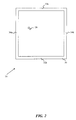
- Figure 2 illustrates the screen wrap barrier used by the system of Figure 1.
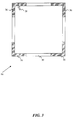
- Figure 3 illustrates a partial screen wrap barrier used by the system of Figure 1.
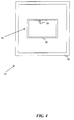
- Figure 4 illustrates the screen wrap barrier used by the system of Figure 1 when an additional window is visible on the computer display.
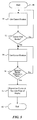
- Figure 5 is a flow chart of the operation of the system of Figure 1.
- the present invention implements a screen wrap barrier to limit the inadvertent wrapping of the cursor as is common in the prior art.
- the system of the present invention permits screen wrapping only after it has determined that a user probably intends to wrap the cursor to the opposite side of the visual display. There are a number of different techniques, described in detail below, by which the system can make such a determination.
- the present invention is embodied in a system 10 shown in the block diagram of Figure 1.
- a central processing unit (CPU) 12 performs the analysis functions that will be described below.
- the CPU 12 can be any number of well known devices.
- the system 10 includes a memory 14, which may comprise both random access memory (RAM) and read-only memory (ROM).
- the memory 14 stores a software program that forms a portion of the system 10.
- the display 16 may be an integral part of the system 10, such as when the system is incorporated into a laptop computer, or may be a stand alone device.
- the system 10 also includes a cursor control device 18 that controls the position of a cursor generated on the display 16.
- the cursor control device 18 may be a mouse, joystick, trackball, keyboard, or the like.
- the present invention is not limited by the specific form of the cursor control device 18.
- the system 10 also includes a command entry device 20, which may be a button on the cursor control device 18 or on a keyboard (not shown).
- the system 10 may also include a second command entry device 21, such as a second button on the cursor control device 18 or on the keyboard (not shown).
- the user can position the cursor at a desired location on the display 16 using the cursor control device 18 and then press the command entry device 20 to activate a computer command associated with the selected location on the display.
- the various components of the system 10 are coupled together by a bus 22, which may carry power as well as data signals.
- a cursor location storage area 24 of the system 10 contains a pointer to the location of the cursor on the display 16.
- the display 16 displays the cursor at the position corresponding to the data within the current location storage area 24.
- the current location storage area 24 may be part of the memory 14.
- the cursor control device 18 generates electrical signals indicative of the desired movement of the cursor.
- the CPU 12 interprets the electrical signals from the cursor control device 18 and alters the current location storage area 24 accordingly. Each time that the CPU alters the current location storage area 24, the position of the cursor on the display 16 is changed in a corresponding fashion.
- the display 16 is generally rectangular in shape and has an electronic border 30 displayed around the edges of the display.
- the border 30 may have the same color as the background graphics displayed on the display 16, or may have a different color so as to make the border 30 visually detectable by the user.
- the advantages of a visible border 30 will be discussed below.
- the system 10 permits the user to determine the color of the border 30.
- the border 30 has two sets of opposing borders, comprising a top border 32a and an opposing bottom border 32b, and a left border 34a and an opposing right border 34b. It should be noted that the border 30 is shown in Figure 2 with exaggerated dimensions relative to the overall size of the display 16 in order to more clearly depict the operation of the present invention.
- the border 30 is a single pixel wide on all four opposing borders 32a, 32b, 34a, and 34b.
- the border 30 can have an arbitrary thickness that may be specified by the user.
- the border 30 may be five pixels wide on all four opposing borders 32a, 32b, 34a, and 34b, or may have a different width for each of the four opposing borders.
- the system 10 causes the movement of the cursor 28 to slow down or stop altogether.
- the system will not permit additional movement of the cursor 28 beyond the border 30 unless a barrier penetration indicator signal is generated.
- the cursor 28 With a one pixel border 30, the cursor 28 can be positioned on the border, but cannot move beyond the border unless the indicator signal is generated. If the border 30 is more than one pixel wide, the system 10 causes the movement of the cursor 28 to slow down or stop within the border. If the indicator signal is generated, the system 10 "lowers the barrier” by deactivating the border 30 and permits the cursor 28 to wrap to the opposite side of the display 16 in a conventional manner.
- the system 10 generates the indicator signal only if it determines that the user probably intends to wrap the cursor 28 to the opposite side of the display 16.
- the generation of the indicator signal may be controlled by a variety of factors. For example, continued efforts by the user to move the cursor 28 beyond the border 30 are interpreted by the system 10 as an indication that the user probably intends to wrap the cursor 28 to the opposite side of the display 16.
- the continued or repetitive effort to move of the cursor 28 against the border 30 is detected by the system 10 by analysis of the electrical signals from the cursor control device 18.
- the continued movement of the cursor 28 against the border 30 may be detected by measuring the time over which the user moves the cursor against the border, or, alternatively, by measuring the distance, based on the continued movement of the cursor against the border, that the cursor 28 would have traveled if no border 30 were in place to serve as a barrier ( i.e. , the distance that the cursor 28 would have moved were it not for the presence of the border 30). If the user continues to move the cursor 28 against the border 30 for a predetermined period of time, the system 10 will generate the indicator signal and permit the cursor 28 to move across the border and then to the opposite side of the display 16.
- the system will generate the indicator signal and permit the cursor 28 to wrap to the opposite side of the display 16.
- the system 10 measures the velocity with which the cursor 28 approaches the border 30 in order to determine whether or not to generate the indicator signal.
- the velocity of the cursor 28 can be determined by measuring the distance over which the cursor is moved in a given time period in response to the user manipulating the cursor control device 18. If the velocity of the cursor 28 is below a predetermined velocity, the system 10 interprets this as an indication that the user actually intends to wrap the cursor 28 to the opposite side of the display 16 because the user is intentionally moving the cursor against the border 30. On the other hand, a high velocity of the cursor 28 against the border 30 indicates that the user may not have intended the cursor 28 to wrap to the opposite side of the display 16.
- the system 10 will prevent the cursor 28 from wrapping unless the indicator signal is generated based on detecting the continued movement of the cursor against the border 30, as described above.
- the velocity can be analyzed such that a velocity that exceeds the predetermined threshold could be interpreted by the system 10 as an indicator that the user actually intends to cause the cursor 28 to wrap to the opposite side of the display 16.
- the system 10 considers this an indication that the user actually intends to wrap the cursor 28 to the opposite side of the display 16. This is similar to the velocity measurement described above. In this embodiment, the velocity is zero at the border 30 and thus the system 10 will generate the indicator signal.
- the acceleration of the cursor 28 may also be used as an indicator of the user's intent. For example, a decreasing acceleration in the vicinity of the border 30 is interpreted by the system 10 as an indication that the user intends to cause the cursor 28 to wrap to the opposite of the display 16. If the acceleration is above a predetermined acceleration, the system 10 interprets this as an indication that the user did not intend to cause the cursor 28 to wrap to the opposite side of the display 16.
- the acceleration may be measured by determining the change in the velocity of the cursor 28 over a given period of time in response to the user manipulating the cursor control device 18. Alternatively, the acceleration can be analyzed such that an acceleration that exceeds the predetermined threshold could be interpreted by the system 10 as an indicator that the user actually intends to cause the cursor 28 to wrap to the opposite side of the display 16.
- the system 10 can analyze the various factors in number of different ways to determine whether or not to generate the indicator signal.
- the system 10 can also use a combination of factors to determine whether or not to generate the indicator signal.
- One such example of a combination of factors is time and distance. If the user continues to manipulate the cursor control device 18 to move the cursor 28 against the border 30 for a predetermined combination of time and distance (i.e. , the distance that the cursor 28 would have moved were it not for the presence of the border 30), the system 10 will generate the indicator signal.
- the user manually generates the indicator signal by manipulating the cursor control device 18 to move the cursor 28 against the border 30 while simultaneously depressing a control switch such as the command entry device 20.
- the simultaneous activation of the command entry device 20 and the movement of the cursor 28 against the border 30 causes the system 10 to generate the indicator signal.
- the system 10 will only allow the cursor 28 to wrap to the opposite side of the display 16 if the user manually generates the indicator signal.
- the system 10 selectively activates and deactivates the border 30 displayed around the edges of the display 16.
- the border 30 is initially deactivated, thus permitting the cursor 28 to wrap from one side of the display to the opposite side without requiring the generation of the indicator signal.
- the indicator signal can serve to deactivate or disable the border 30, while the border is active or enabled whenever the indicator signal is not present.
- the border 30 is defined by an enabled mode, in which the border prevents the wrapping of the cursor 28, and a disabled mode when the presence of the indicator signal permits the wrapping of the cursor 28.
- the system 10 interprets this as an indication that the user inadvertently caused the cursor 28 to wrap. In such a situation, the system 10 will activate the border 30 to prevent further inadvertent screen wrapping.
- the system 10 can be configured to activate the entire border 30 or just the border 34a which the user inadvertently crossed. The user must then subsequently cause the cursor 28 to wrap to the opposite side of the display 16 in one of the manners described above.
- the system 10 deactivates the border 30 to permit the user to wrap the cursor 28 without requiring the generation of the indicator signal. If the user wraps the cursor 28 and does not rewrap the cursor within the first predetermined period of time, the system 10 will not activate the border 30 and will continue to permit the cursor to wrap without requiring the generation of the indicator signal.
- the system 10 interprets this action as an indication that the user actually intended to wrap the cursor 28 to the opposite side of the display 16. In such a situation, the system 10 will not activate the border 30 and will not require the generation of the indicator signal until such time when the user wraps the cursor 28 and rewraps within the first predetermined period of time.
- This embodiment permits the simple wrapping of the cursor 28 without the delay that may be required to generate the indicator signal, but will activate the border 30 if the user's activity indicates that an inadvertent wrapping of the cursor 28 has occurred.
- the system 10 has a plurality of border activation levels that are incrementally altered each time that the cursor 28 wraps within the first predetermined period of time. For example, the system 10 initially deactivates the border 30. However, the first time that the user causes the cursor 28 to wrap from one side of the display 16 to the opposite side of the display, the system 10 activates the border 30 to a first activation level. Each time that the cursor 28 rewraps during the predetermined period of time causes the border 30 to have an incrementally higher border activation level thus making it increasingly more difficult to wrap the cursor 28. The user can penetrate the barrier by causing the system 10 to generate the indicator signal as discussed above.
- the border activation level decreases incrementally for each first predetermined period of time in which the cursor 28 is not wrapped.
- the system 10 can deactivate the border 30 altogether if no subsequent wrapping occurs within the predetermined period of time.
- the system 10 initially starts with the border 30 in an inactive state and activates the border when the user causes the cursor 28 to cross the border the first time.
- the cursor 28 would be prevented from inadvertently rewrapping.
- the system 10 measures a predetermined period of time after the cursor 28 first crosses the border 30. If there is no additional wrapping of the cursor 28 within the predetermined period of time, the system 10 will deactivate the border 30 and return the system to its original state.
- the user may also designate portions of the border 30 as impenetrable so that the designated portion of the border cannot be penetrated even upon continued movement of the cursor 28 against the designated portion of the border.
- the user may designate corners 36, shown in Figure 3, of the border 30 as having no screen wrap capability. Thus, even continued movement of the cursor 28 against the corners 36 will not cause the cursor to wrap to the opposite side of the display 16.
- the corners 36 are displayed in a different color than the border 30 on the display 16 to indicate to the user that no screen wrap will occur in these corner areas.
- the user may designate any portion of the border 30 as impenetrable.
- the user may cause a small window 40 with a border 42 to appear on the display 16, as shown in Figure 4.
- the principles of the system may apply equally to the window 40.
- the border 42 surrounding the window 40 can prevent the user from inadvertently causing the cursor 28 from wrapping from one side of the window 40 to the opposite side.
- the operation of the present invention is illustrated in the flowchart of Figure 5.
- the system 10 begins processing data at start 48.
- step 50 the system 10 gets a current cursor position from the cursor location storage area 24. Techniques for determining the current cursor position are well-known in the art and will not be discussed herein.
- decision 52 the system determines whether the current cursor position is near the border 30. If the current cursor position is not near the border 30, the result of decision 52 is NO and the system 10 returns to step 50. If the current cursor position is near the border 30, the result of decision 52 is YES. In that event, the system 10 gets an updated cursor position in step 54.
- decision 56 the system 10 determines whether or not to generate the indicator signal and permit the cursor 28 to wrap across the border 30.
- This decision step is intended to encompass the broad range of techniques described above, including enabled and disabled modes, variable border activation levels, time, distance, acceleration, velocity, and the like. The factors used in the determination of whether or nor to generate the indicator signal are discussed in detail above.
- the system 10 If the system 10 does not generate the indicator signal, the result of decision 56 is NO, and the system returns to step 54. If the system 10 does generate the indicator signal, the result of decision 56 is YES. In that event, the system 10 repositions the cursor 28 at the opposite edge of the display 16. The system 10 ends the process of indicator in step 60.
- the present invention permits the full use of screen wrapping capabilities available in the prior art without the drawback of inadvertent screen wrapping.
- the present invention describes a variety of factors used to determine whether or not to generate the indicator signal. These techniques may be used individually or in combination, and may be selected by the user to customize the system 10 to the particular user's needs. While the above examples are related to the movement of the cursor 28 through a cursor control device 18 such as a computer mouse, those skilled in the art will readily appreciate that the principles of the present invention are equally applicable to any cursor control device such as a joystick, trackball, keyboard, or the like.
Landscapes
- Engineering & Computer Science (AREA)
- General Engineering & Computer Science (AREA)
- Theoretical Computer Science (AREA)
- Human Computer Interaction (AREA)
- Physics & Mathematics (AREA)
- General Physics & Mathematics (AREA)
- User Interface Of Digital Computer (AREA)
- Digital Computer Display Output (AREA)
- Controls And Circuits For Display Device (AREA)
Applications Claiming Priority (2)
| Application Number | Priority Date | Filing Date | Title |
|---|---|---|---|
| US08/206,543 US5929840A (en) | 1994-03-04 | 1994-03-04 | System and method for computer cursor control |
| US206543 | 1998-12-07 |
Publications (2)
| Publication Number | Publication Date |
|---|---|
| EP0670541A2 true EP0670541A2 (de) | 1995-09-06 |
| EP0670541A3 EP0670541A3 (de) | 1997-02-12 |
Family
ID=22766853
Family Applications (1)
| Application Number | Title | Priority Date | Filing Date |
|---|---|---|---|
| EP95103086A Withdrawn EP0670541A3 (de) | 1994-03-04 | 1995-03-03 | System und Verfahren zur Steuerung eines Rechnercursors. |
Country Status (3)
| Country | Link |
|---|---|
| US (1) | US5929840A (de) |
| EP (1) | EP0670541A3 (de) |
| JP (1) | JPH0836478A (de) |
Cited By (3)
| Publication number | Priority date | Publication date | Assignee | Title |
|---|---|---|---|---|
| WO1998021645A1 (en) * | 1996-11-12 | 1998-05-22 | Legaltech, Inc. | Computer input device and controller therefor |
| FR2860308A1 (fr) * | 2003-09-26 | 2005-04-01 | Inst Nat Rech Inf Automat | Modulation de position de curseur dans les donnees video pour ecran d'ordinateur |
| EP2044505A4 (de) * | 2006-07-10 | 2013-01-09 | Microsoft Corp | Rollkugelsystem und verfahren für ein mobiles datenverarbeitungsgerät |
Families Citing this family (32)
| Publication number | Priority date | Publication date | Assignee | Title |
|---|---|---|---|---|
| US6867790B1 (en) * | 1996-08-09 | 2005-03-15 | International Business Machines Corporation | Method and apparatus to conditionally constrain pointer movement on a computer display using visual cues, controlled pointer speed and barriers on the display which stop or restrict pointer movement |
| US6920619B1 (en) * | 1997-08-28 | 2005-07-19 | Slavoljub Milekic | User interface for removing an object from a display |
| USRE43318E1 (en) * | 1997-08-28 | 2012-04-17 | Flatworld Interactives, Llc | User interface for removing an object from a display |
| US6295049B1 (en) * | 1999-03-03 | 2001-09-25 | Richard T. Minner | Computer system utilizing graphical user interface with hysteresis to inhibit accidental selection of a region due to unintended cursor motion and method |
| FR2795997B1 (fr) * | 1999-07-05 | 2001-10-19 | Cit Alcatel | Procede de fabrication d'une fibre optique plastique a gradient d'indice |
| JP4501209B2 (ja) * | 2000-03-08 | 2010-07-14 | ソニー株式会社 | 情報処理装置、情報処理方法およびリモコンのコマンダ |
| US20020084981A1 (en) * | 2000-11-14 | 2002-07-04 | Flack James F. | Cursor navigation system and method for a display |
| US6819313B2 (en) * | 2001-03-08 | 2004-11-16 | International Business Machines Corporation | User interactive cursor control in a computer controlled display system with supplemental mouse lighting to aid in cursor positioning |
| US7187049B2 (en) * | 2002-05-13 | 2007-03-06 | Micron Technology, Inc. | Data download to imager chip using image sensor as a receptor |
| US20040070616A1 (en) * | 2002-06-02 | 2004-04-15 | Hildebrandt Peter W. | Electronic whiteboard |
| US7454707B2 (en) * | 2002-09-30 | 2008-11-18 | Canon Kabushiki Kaisha | Image editing method, image editing apparatus, program for implementing image editing method, and recording medium recording program |
| US7761814B2 (en) * | 2004-09-13 | 2010-07-20 | Microsoft Corporation | Flick gesture |
| US8013837B1 (en) * | 2005-10-11 | 2011-09-06 | James Ernest Schroeder | Process and apparatus for providing a one-dimensional computer input interface allowing movement in one or two directions to conduct pointer operations usually performed with a mouse and character input usually performed with a keyboard |
| US7782302B2 (en) * | 2006-07-10 | 2010-08-24 | Microsoft Corporation | Trackball for a mobile device |
| GB2453675B (en) * | 2006-10-10 | 2009-09-23 | Promethean Ltd | Pointing device specific applications/areas for interactive surface |
| US10504285B2 (en) * | 2007-09-26 | 2019-12-10 | Autodesk, Inc. | Navigation system for a 3D virtual scene |
| US9280257B2 (en) * | 2007-09-26 | 2016-03-08 | Autodesk, Inc. | Navigation system for a 3D virtual scene |
| JP5707015B2 (ja) * | 2007-09-27 | 2015-04-22 | 株式会社日立メディコ | 情報表示装置 |
| KR20100114908A (ko) * | 2008-01-30 | 2010-10-26 | 톰슨 라이센싱 | 포인터 제어 장치, 그 방법 및 포인터 제어 프로그램 |
| US8176434B2 (en) * | 2008-05-12 | 2012-05-08 | Microsoft Corporation | Virtual desktop view scrolling |
| US8806381B2 (en) * | 2009-11-18 | 2014-08-12 | International Business Machines Corporation | Method and system to improve GUI use efficiency |
| JP2012156797A (ja) * | 2011-01-26 | 2012-08-16 | Sony Corp | 画像処理装置及び画像処理方法 |
| US20140168126A1 (en) * | 2012-12-14 | 2014-06-19 | Jeffrey N. Yu | Dynamic border control systems and methods |
| US20150074564A1 (en) * | 2013-09-10 | 2015-03-12 | Lenovo (Singapore) Pte. Ltd. | Feedback for cursor location in multiple monitor device contexts |
| US10664162B2 (en) * | 2013-11-18 | 2020-05-26 | Red Hat, Inc. | Multiple display management |
| EP2887184A1 (de) * | 2013-12-23 | 2015-06-24 | Movea | Luftzeigestab mit verbesserter Benutzererfahrung |
| GB201408258D0 (en) * | 2014-05-09 | 2014-06-25 | British Sky Broadcasting Ltd | Television display and remote control |
| US20160239085A1 (en) * | 2015-02-18 | 2016-08-18 | Lenovo (Singapore) Pte, Ltd. | Force indication of a boundary |
| US10423293B2 (en) * | 2015-11-25 | 2019-09-24 | International Business Machines Corporation | Controlling cursor motion |
| US11093101B2 (en) * | 2018-06-14 | 2021-08-17 | International Business Machines Corporation | Multiple monitor mouse movement assistant |
| CN111447484B (zh) * | 2020-03-31 | 2022-04-08 | 北京小米移动软件有限公司 | 电子节目指南epg的加载方法及装置、存储介质 |
| US12124757B2 (en) | 2022-07-26 | 2024-10-22 | Lenovo (Singapore) Pte. Ltd. | Movement of cursor between displays based on motion vectors |
Family Cites Families (6)
| Publication number | Priority date | Publication date | Assignee | Title |
|---|---|---|---|---|
| DE3632601A1 (de) * | 1985-09-27 | 1987-04-23 | Olympus Optical Co | Vorrichtung zum darstellen einer positionsanzeigemarke auf mehreren bildschirmen |
| US5195179A (en) * | 1986-01-29 | 1993-03-16 | Hitachi, Ltd. | Coordinate input apparatus |
| US5208906A (en) * | 1988-12-30 | 1993-05-04 | Chipsoft Ca, Corp. | Method and apparatus for representing bordered areas of a generic form with records |
| JP2784032B2 (ja) * | 1989-04-04 | 1998-08-06 | 株式会社日立製作所 | 画面表示切換方法及び画面表示切換装置 |
| JPH02294687A (ja) * | 1989-05-10 | 1990-12-05 | Fujitsu Ltd | カーソル制御装置 |
| US5263134A (en) * | 1989-10-25 | 1993-11-16 | Apple Computer, Inc. | Method and apparatus for controlling computer displays by using a two dimensional scroll palette |
-
1994
- 1994-03-04 US US08/206,543 patent/US5929840A/en not_active Expired - Lifetime
-
1995
- 1995-03-03 JP JP7044412A patent/JPH0836478A/ja not_active Withdrawn
- 1995-03-03 EP EP95103086A patent/EP0670541A3/de not_active Withdrawn
Cited By (5)
| Publication number | Priority date | Publication date | Assignee | Title |
|---|---|---|---|---|
| WO1998021645A1 (en) * | 1996-11-12 | 1998-05-22 | Legaltech, Inc. | Computer input device and controller therefor |
| US5870079A (en) * | 1996-11-12 | 1999-02-09 | Legaltech, Inc. | Computer input device and controller therefor |
| FR2860308A1 (fr) * | 2003-09-26 | 2005-04-01 | Inst Nat Rech Inf Automat | Modulation de position de curseur dans les donnees video pour ecran d'ordinateur |
| WO2005031556A1 (fr) * | 2003-09-26 | 2005-04-07 | Inria Institut National De Recherche En Informatique Et En Automatique | Modulation de position de curseur dans les donnees video pour ecran d’ordinateur |
| EP2044505A4 (de) * | 2006-07-10 | 2013-01-09 | Microsoft Corp | Rollkugelsystem und verfahren für ein mobiles datenverarbeitungsgerät |
Also Published As
| Publication number | Publication date |
|---|---|
| JPH0836478A (ja) | 1996-02-06 |
| EP0670541A3 (de) | 1997-02-12 |
| US5929840A (en) | 1999-07-27 |
Similar Documents
| Publication | Publication Date | Title |
|---|---|---|
| US5929840A (en) | System and method for computer cursor control | |
| US5528260A (en) | Method and apparatus for proportional auto-scrolling | |
| US5508717A (en) | Computer pointing device with dynamic sensitivity | |
| CA2000035C (en) | Squeezable control device for computer display systems | |
| US5943052A (en) | Method and apparatus for scroll bar control | |
| JP3297365B2 (ja) | 粘り特性をカーソル制御に与えることによってコンピュータ・ディスプレイ上のオブジェクト選択を改良するための方法、コンピュータ・システム及び選択システム | |
| US5053758A (en) | Touchscreen control panel with sliding touch control | |
| US5726687A (en) | Auto-scrolling with mouse speed computation during dragging | |
| US7190348B2 (en) | Method for touchscreen data input | |
| US5396590A (en) | Non-modal method and apparatus for manipulating graphical objects | |
| US5241655A (en) | Menu presentation method and data processing apparatus | |
| US6345358B1 (en) | System for maintaining visible presentation of status indication by undocking it when it is moving out of visible presentation space and redocking thereto | |
| JP3100550B2 (ja) | デジタイザにおける消去方法及びシステム | |
| US5565887A (en) | Method and apparatus for moving a cursor on a computer screen | |
| US6037929A (en) | Coordinate input system and method of controlling same | |
| JP2659917B2 (ja) | グラフィック操作方法及び装置、グラフィック・ユーザ・インターフェースを提供する方法並びにユーザ操作可能多重オーバラップ・オブジェクトの選択された1つへのアクセスを提供する装置 | |
| JP3944250B2 (ja) | コンピュータのカーソル制御システムおよび方法 | |
| US20080229254A1 (en) | Method and system for enhanced cursor control | |
| JPH04276821A (ja) | コンピュータ表示制御システム | |
| EP0721629A1 (de) | Zeigersteuerungsvorrichtung mit berührungsempfindlicher konsole | |
| EP0651316A1 (de) | Benutzerschnittstellensystem und Verfahren | |
| JP2001142634A (ja) | 専用化した機能の領域を有するトラックパッドポインティング装置 | |
| JPH06314167A (ja) | 適応接触認識方法 | |
| JPH0467647B2 (de) | ||
| KR20100085957A (ko) | 포인터 제어장치 |
Legal Events
| Date | Code | Title | Description |
|---|---|---|---|
| PUAI | Public reference made under article 153(3) epc to a published international application that has entered the european phase |
Free format text: ORIGINAL CODE: 0009012 |
|
| AK | Designated contracting states |
Kind code of ref document: A2 Designated state(s): DE FR GB |
|
| RIN1 | Information on inventor provided before grant (corrected) |
Inventor name: MCROBERT, ALAN W. Inventor name: CLAFIN, ANTHONY R. Inventor name: ROBERTSON, KENNETH R. Inventor name: HENDERSON, PAUL E. JR. Inventor name: BREWER, TIMOTHY T. |
|
| PUAL | Search report despatched |
Free format text: ORIGINAL CODE: 0009013 |
|
| AK | Designated contracting states |
Kind code of ref document: A3 Designated state(s): DE FR GB |
|
| 17P | Request for examination filed |
Effective date: 19970807 |
|
| STAA | Information on the status of an ep patent application or granted ep patent |
Free format text: STATUS: THE APPLICATION IS DEEMED TO BE WITHDRAWN |
|
| 18D | Application deemed to be withdrawn |
Effective date: 19991001 |