EP0618528B1 - Dynamic touchscreen button adjustment mechanism - Google Patents
Dynamic touchscreen button adjustment mechanism Download PDFInfo
- Publication number
- EP0618528B1 EP0618528B1 EP94480019A EP94480019A EP0618528B1 EP 0618528 B1 EP0618528 B1 EP 0618528B1 EP 94480019 A EP94480019 A EP 94480019A EP 94480019 A EP94480019 A EP 94480019A EP 0618528 B1 EP0618528 B1 EP 0618528B1
- Authority
- EP
- European Patent Office
- Prior art keywords
- button
- buttons
- touchscreen
- user
- location
- Prior art date
- Legal status (The legal status is an assumption and is not a legal conclusion. Google has not performed a legal analysis and makes no representation as to the accuracy of the status listed.)
- Expired - Lifetime
Links
Images




Classifications
-
- G—PHYSICS
- G06—COMPUTING OR CALCULATING; COUNTING
- G06F—ELECTRIC DIGITAL DATA PROCESSING
- G06F3/00—Input arrangements for transferring data to be processed into a form capable of being handled by the computer; Output arrangements for transferring data from processing unit to output unit, e.g. interface arrangements
- G06F3/01—Input arrangements or combined input and output arrangements for interaction between user and computer
- G06F3/03—Arrangements for converting the position or the displacement of a member into a coded form
- G06F3/041—Digitisers, e.g. for touch screens or touch pads, characterised by the transducing means
- G06F3/0416—Control or interface arrangements specially adapted for digitisers
- G06F3/0418—Control or interface arrangements specially adapted for digitisers for error correction or compensation, e.g. based on parallax, calibration or alignment
Definitions
- This invention relates to the data processing field. More particularly, this invention relates to a touchscreen apparatus for adjusting a sensing region based on the location that the user touches on the touchscreen, which is contained in a display.
- Touchscreens are well known in the art where the user communicates a desired action to a computer by touching a touchscreen in a specific location.
- the computer system displays graphics on the touchscreen that represent buttons.
- the user interfaces to the computer system by touching the touchscreen in a displayed button's sensing region, which is the area on the touchscreen that the computer system associates with the button.
- the computer system detects the user's touch, maps the touched location to a particular button, and performs appropriate functions based on the button that the user selected via the touch.
- Touchscreens are advantageous in that they can eliminate the need for a keyboard or other input device in applications where a separate input device would be cumbersome, expensive, or susceptible to vandalism. Also, with a touchscreen the user is not forced to read instructions in one place and hunt elsewhere, such as on a keyboard, for keys to press. Instead, the instructions that the user reads and the buttons that the user touches are in the same proximity. This close proximity of instructions and buttons is more convenient and faster for the user and reduces the chance of incorrect button selection.
- touchscreens suffer from the problem that the buttons on the touchscreen are two dimensional, and although the buttons are visually distinct from one another, they are not physically distinct from one another.
- the user of a touchscreen cannot feel when a finger is straying over the edge of a button.
- tall users standing to the right of the touchscreen will tend to perceive the button as being above and to the right of the actual button position, so they will tend to touch high and to the right of the button sensing region.
- short users standing to the left of the touchscreen will tend to perceive the button as being below and to the left of the actual button position, so they will tend to touch low and to the left of the button sensing region.
- a touchscreen apparatus for receiving instructions from a user comprising:
- a computer system dynamically adjusts the orientation of a touchscreen button's sensing region based on the location that the user has touched for a previous button or buttons.
- An initial button or series of buttons of the application that the user is using is configured to sense the location where the user is touching. These initial button(s) are called adjusting buttons.
- the button sensing regions for the remaining buttons are calibrated from these initial touched locations. For example, if the user tends to press high and to the right of the regions for the remaining buttons is calibrated high and to the right. If multiple adjusting buttons are used, the average of the touched positions is used to calibrate the button sensing regions of the non-adjusting buttons.
- buttons are not restricted to the beginning of the application. Any screen that displays buttons can be used to calibrate or recalibrate the button sensing region for subsequent non-adjusting buttons. This allows for greater accuracy should the users change their view or angle of the touchscreen as they use the application.
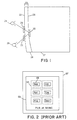
- Fig. 1 is a side view of display 17 and shows the parallax effect, which causes different user view angles to result in different users perceiving button 20 at different locations.
- Touchscreen 18 in display 17 has thickness 23, which is the distance between touchscreen back 28 and touchscreen front 22.
- button 20 is projected onto the touchscreen back 28, users 24 and 26 will attempt to touch it on touchscreen front 22.
- Screen thickness 23 plus the parallax effect causes different operators 24 and 26 to perceive button 20 in different places.
- User 24 will perceive and attempt to touch button 20 at button location 29.
- user 26 will perceive and attempt to touch button 20 at button location 21, which in this example is lower on touchscreen 18 than button location 29.
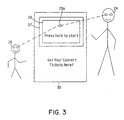
- Fig. 2 shows prior art display 67, touchscreen 68, touchscreen button 60, and button sensing region 64.
- Button sensing region 64 is the area of touchscreen 68 associated with button 60 such that if the user touches within button sensing region 64, the computer system considers button 60 to have been touched.
- prior art touchscreens utilized button sensing regions 64 that were larger than their corresponding buttons 60.
- the prior art solution illustrated by Fig. 2 is disadvantageous in that sensing regions 64 are large and thus limit the density and orientation of buttons 60 that may be concurrently displayed on touchscreen 68.
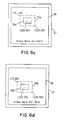
- Fig. 3 shows users 24 and 26 viewing button 20 from different angles.
- Button 20a is displayed on touchscreen 18 in display 17.
- the application in this example is ticket kiosk 30. Because of the parallax effect and screen thickness 23 described in Fig 1., tall user 24 standing to the right of ticket kiosk 30 will tend to view and press button 20a above and to the right of its actual position. In contrast, short user 26, standing to the left of ticket kiosk 30 will tend to view and press button 20a below and to the left of its actual position.
- this invention dynamically adjusts the button sensing regions, as will be shown in Figs. 4a, 4b, 6a, 6b, 6c, 6d, and 6e, and explained in more detail in the flowcharts of Figs. 7, 8, and 9.
- Fig. 4a illustrates display 17 and touchscreen 18 of the preferred embodiment displaying an exemplary seat selection screen.
- the aggregation of all buttons 20 represents a section of seats in a stadium. Users can touch a button to select the seat for which they wish to purchase a ticket.
- the buttons with an X through them represent seats that have already been sold.
- This invention allows a high density of buttons with fine resolution on touchscreen 18 because the button sensing regions are dynamically adjusted to suit individual users, as will be shown in Fig 4b.
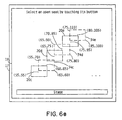
- Fig. 4b is a close up view of a few of buttons 20 and their corresponding button sensing regions 34.
- each button sensing region 34 has been adjusted up and to the right to accommodate a user who tends to touch high and to the right of button 20.
- button sensing region 34c is associated with button 20c.
- the invention associates that touch with button 20c.
- the invention associates that touch with buttons 20d or 20e respectively. In this way a high density of buttons 20 can be displayed and selected on touchscreen 18.
- Fig. 5 shows a block diagram of computer system 10 of the preferred embodiment of the invention.
- Computer system 10 has touchscreen 18 in display 17 connected to system unit 11.
- System unit 11 contains processor 12 connected to memory 13, storage 14, and display adapter 15.
- Processor 12 is suitably programmed to carry out this invention, as described in more detail in the flowcharts of Figs. 7, 8, and 9.
- computer system 10 is an IBM PS/2
- storage 14 is a magnetic hard disk file
- display adapter 15 is an IBM VGA display adapter
- display 17 is an IBM 8516 display.
- Computer system 10 could also be another type of computer system, whether it be another microcomputer such as an Apple Macintosh, a minicomputer such as an IBM AS/400, or a mainframe computer such as an IBM System/390, and still fall within the spirit and scope of this invention.
- computer system 10 could be a microcomputer such as described above but connected to a larger computer system such as an IBM AS/400.
- Button list 46 defines button sensing region 34 for each button 20.
- Factor list 47 contains a list of factors that represent the difference between the center of button sensing region 34 and the locations that the user has touched.
- adjustment factor 48 is the average of the factors in factor list 47. Button list 46, factor list 47, and adjustment factor 48 will be explained in more detail under the description of Figs. 6a - 6e.
- buttons list 46 is a list of button entries. Each entry in button list 46 defines a button sensing region 34 for a button 20 on touchscreen 18 via fields 49, 50, 51, and 52. In the preferred embodiment, there is a separate button list for every screen of buttons displayed, but there could be just one button list for the entire application without departing from the invention. In the preferred embodiment, buttons are displayed as rectangles on the touchscreen, but the buttons could be any geometric shape including, but not limited to, circles, ovals, or polygons with any number of sides.
- Field 50 defines the upper left point of button sensing region 34.
- Field 51 defines the lower right point of button sensing region 34.
- Field 52 defines the center of the button sensing region 34.
- locations on touchscreen 18 are defined by a (X,Y) coordinate system with X representing the horizontal axis and Y representing the vertical axis and location (0,0) representing the lower left hand corner of touchscreen 18.
- X representing the horizontal axis
- Y representing the vertical axis
- location (0,0) representing the lower left hand corner of touchscreen 18.
- other methods of defining locations on touchscreen 18 could be used without departing from the invention. Note that in this example since button sensing region 34 is a rectangle, it would not be necessary to include field 52 in button list 46 since it could be calculated from field 50 and field 51.
- buttons 20a and 20b are adjusting buttons
- buttons 20c, 20d, and 20e are non-adjusting buttons.
- adjusting buttons have button sensing regions that are larger than their associated buttons, and the button sensing regions for adjusting buttons do not move.
- non-adjusting buttons have button sensing regions that are the same size and shape as their associated buttons and the button sensing regions for the non-adjusting buttons are calibrated based on where the user touched on the adjusting buttons.
- the button sensing regions could be other sizes or shapes without departing from the invention.
- button list 46 contains button entries 53, 54, 55, 56, and 57, which correspond to buttons 20a, 20b, 20c, 20d, and 20e, and button sensing regions 34a, 34b, 34c, 34d, and 34e, respectively.
- adjusting buttons are displayed to the user first, but adjusting and non-adjusting buttons could be displayed to the user in any order. Adjusting and non-adjusting buttons could share the same screen or be on different screens.
- Factor list 47 contains the differences between the location that the user touched on an adjusting button and the center of button sensing region 34.
- factor list 47 contains two factors because there are two adjusting buttons in button list 46, each of which was touched once by the user.
- an application could have the user touch an adjusting button more than once, in which case there would not be a one-to-one correspondence between the number of factors in the factor list and the number of adjusting buttons in the button list.
- adjustment factor 48 is set to be the average of all factors in factor list.
- other methods of setting the adjustment factor could be used, including using the mean of the factors or weighting the recent factors more than the remote factors.
- block 601 displays buttons on the touchscreen to the user.
- the number and configuration of the buttons displayed are dependent on the particular application that the user is accessing.
- block 605 determines the location that the user touched.
- Touchscreens are well known in the art that provide the coordinates of the touched location via sensors on the touchscreen such as light emitting diodes and photo detectors. This invention is independent of the method of touched location determination.
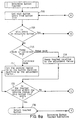
- Block 610 determines which button the user touched by calling the Determine Button Touched subroutine, which is described in detail in Fig. 8.
- block 701 gets a button entry from button list 46.
- Block 705 checks to see if this button entry is for an adjusting button. This check is accomplished by examining type field 49 in the button entry. If this button entry is an adjusting button and the location that the user touched is within the button sensing region for this button entry, blocks 705 and 710 are answered affirmatively.
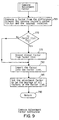
- a new adjustment factor is computed by calling the Compute Adjustment Factor subroutine, which is described in Fig. 9.
- block 765 computes a factor from the difference between the center of the sensing region and the touched location. If block 770 determines that factor list 47 is full, the oldest factor from factor list 47 is removed in block 775. This is necessary because the memory available to store factors is finite. The newly calculated factor is inserted in factor list 47 in block 780. Adjustment factor 48 is set to be the average of all factors in factor list 47 in block 785. Although the preferred embodiment sets the adjustment factor to the average of the factors in the factor list, alternative embodiments could use another method, such as giving recent factors more weight than remote factors or using the mean of the factors. Block 790 returns control from the Compute Adjustment Factor Subroutine to block 730 in Fig. 8. Block 730 returns an indication of which button was touched to block 615 of Fig. 7.
- block 710 determines that the touched location is not within the sensing region for the button entry and if block 740 determines that there are button entries left in button list 46, then the next button entry in button list 46 is processed in block 701. If block 740 determines that there are no button entries left in button list 46, then the user has touched a location on the screen that is not associated with any button, so an indication that no button was touched is returned in block 735 to block 615 in Fig. 7.
- block 715 checks to see whether remap mode (alternative embodiment) or calibrate mode (preferred embodiment) is desired. If block 715 determines that calibrate mode is desired, block 717 sets the sensing region to be the button location modified by adjustment factor 48. If block 715 determines remap mode is desired, block 719 modifies the touched location by the negative of adjustment factor 48. If block 725 determines that the touched location is within the sensing region for the button list entry, then an indication of which button was touched is returned in block 730 to block 615 of Fig. 7.
- block 725 determines that the touched location is not within the button sensing region for the button list entry, then if block 740 determines that there are button entries left in the button list, then the next button entry in button list 46 is processed in block 701. If block 740 determines that there are no button entries left in button list 46, then the user has touched a location on the screen that is not associated with any button, so an indication that no button was touched is returned in block 735 to block 615 in Fig. 7.
- block 610 returned an indication that a button was touched, then block 615 is answered affirmatively, so the appropriate processing is performed for the touched button by the application that the user is accessing in block 620. If block 610 returned an indication that no button was touched, then the user has touched a location on the touchscreen that is not associated with any button, so block 615 is answered negatively and block 625 displays an error message to the user. In either event, block 601 displays a new screen of buttons on the touchscreen.
- touchscreen technology may become widely employed in consumer applications such as operator panels for consumer electronics, appliances, and automobiles. Accordingly, the herein disclosed invention is to be limited only as specified in the following claims.
Landscapes
- Engineering & Computer Science (AREA)
- General Engineering & Computer Science (AREA)
- Theoretical Computer Science (AREA)
- Human Computer Interaction (AREA)
- Physics & Mathematics (AREA)
- General Physics & Mathematics (AREA)
- Position Input By Displaying (AREA)
- User Interface Of Digital Computer (AREA)
- Push-Button Switches (AREA)
Applications Claiming Priority (2)
| Application Number | Priority Date | Filing Date | Title |
|---|---|---|---|
| US4204893A | 1993-04-01 | 1993-04-01 | |
| US42048 | 1998-03-13 |
Publications (2)
| Publication Number | Publication Date |
|---|---|
| EP0618528A1 EP0618528A1 (en) | 1994-10-05 |
| EP0618528B1 true EP0618528B1 (en) | 1999-12-29 |
Family
ID=21919787
Family Applications (1)
| Application Number | Title | Priority Date | Filing Date |
|---|---|---|---|
| EP94480019A Expired - Lifetime EP0618528B1 (en) | 1993-04-01 | 1994-02-22 | Dynamic touchscreen button adjustment mechanism |
Country Status (8)
| Country | Link |
|---|---|
| US (1) | US5565894A (enExample) |
| EP (1) | EP0618528B1 (enExample) |
| JP (1) | JP3292267B2 (enExample) |
| KR (1) | KR970006397B1 (enExample) |
| CN (1) | CN1054450C (enExample) |
| AT (1) | ATE188302T1 (enExample) |
| DE (1) | DE69422323T2 (enExample) |
| TW (1) | TW249282B (enExample) |
Cited By (3)
| Publication number | Priority date | Publication date | Assignee | Title |
|---|---|---|---|---|
| US8035620B2 (en) | 2005-01-14 | 2011-10-11 | Koninklijke Philips Electronics N.V. | Moving objects presented by a touch input display device |
| AU2015202763B2 (en) * | 2014-05-21 | 2017-03-09 | Apple Inc. | Glove touch detection |
| EP3176687B1 (en) * | 2009-06-16 | 2026-04-01 | Intel Corporation | Adaptive virtual keyboard for handheld device |
Families Citing this family (102)
| Publication number | Priority date | Publication date | Assignee | Title |
|---|---|---|---|---|
| EP0703525B1 (en) * | 1994-09-22 | 2001-12-05 | Aisin Aw Co., Ltd. | Touch display type information input system |
| US5896126A (en) * | 1996-08-29 | 1999-04-20 | International Business Machines Corporation | Selection device for touchscreen systems |
| US6072482A (en) * | 1997-09-05 | 2000-06-06 | Ericsson Inc. | Mouse mode manager and voice activation for navigating and executing computer commands |
| US7614008B2 (en) | 2004-07-30 | 2009-11-03 | Apple Inc. | Operation of a computer with touch screen interface |
| US6181328B1 (en) * | 1998-03-02 | 2001-01-30 | International Business Machines Corporation | Method and system for calibrating touch screen sensitivities according to particular physical characteristics associated with a user |
| US6256021B1 (en) * | 1998-09-15 | 2001-07-03 | Ericsson Inc. | Apparatus and method of configuring target areas within a touchable item of a touchscreen |
| JP2000250697A (ja) * | 1999-03-03 | 2000-09-14 | Yazaki Corp | 多機能スイッチ装置における操作ボタンの機能表示方法及び多機能スイッチ装置 |
| JP2000267813A (ja) * | 1999-03-17 | 2000-09-29 | Sharp Corp | タッチパネル入力式電子機器 |
| AU3181800A (en) * | 1999-03-23 | 2000-10-09 | British Telecommunications Public Limited Company | Computer input device |
| US7020270B1 (en) * | 1999-10-27 | 2006-03-28 | Firooz Ghassabian | Integrated keypad system |
| US20010032057A1 (en) * | 1999-12-23 | 2001-10-18 | Smith Randall G. | Initial calibration of a location sensing whiteboard to a projected display |
| US6751487B1 (en) | 2000-02-08 | 2004-06-15 | Ericsson, Inc. | Turn around cellular telephone |
| US6456952B1 (en) | 2000-03-29 | 2002-09-24 | Ncr Coporation | System and method for touch screen environmental calibration |
| SE0103835L (sv) | 2001-11-02 | 2003-05-03 | Neonode Ab | Pekskärm realiserad av displayenhet med ljussändande och ljusmottagande enheter |
| US9164654B2 (en) | 2002-12-10 | 2015-10-20 | Neonode Inc. | User interface for mobile computer unit |
| US8095879B2 (en) | 2002-12-10 | 2012-01-10 | Neonode Inc. | User interface for mobile handheld computer unit |
| US8674966B2 (en) | 2001-11-02 | 2014-03-18 | Neonode Inc. | ASIC controller for light-based touch screen |
| US9052777B2 (en) | 2001-11-02 | 2015-06-09 | Neonode Inc. | Optical elements with alternating reflective lens facets |
| US9778794B2 (en) | 2001-11-02 | 2017-10-03 | Neonode Inc. | Light-based touch screen |
| JP2003344086A (ja) * | 2002-05-28 | 2003-12-03 | Pioneer Electronic Corp | タッチパネル装置及び自動車用表示入力装置 |
| FI112119B (fi) * | 2002-06-25 | 2003-10-31 | Nokia Corp | Menetelmä ohjauskomennon tulkitsemiseksi ja kannettava elektroninen laite |
| US7023427B2 (en) * | 2002-06-28 | 2006-04-04 | Microsoft Corporation | Method and system for detecting multiple touches on a touch-sensitive screen |
| CN1280700C (zh) * | 2002-07-04 | 2006-10-18 | 皇家飞利浦电子股份有限公司 | 自适应虚拟键盘 |
| US8416217B1 (en) | 2002-11-04 | 2013-04-09 | Neonode Inc. | Light-based finger gesture user interface |
| US7103852B2 (en) * | 2003-03-10 | 2006-09-05 | International Business Machines Corporation | Dynamic resizing of clickable areas of touch screen applications |
| US7205959B2 (en) * | 2003-09-09 | 2007-04-17 | Sony Ericsson Mobile Communications Ab | Multi-layered displays providing different focal lengths with optically shiftable viewing formats and terminals incorporating the same |
| JP4148187B2 (ja) * | 2004-06-03 | 2008-09-10 | ソニー株式会社 | 携帯型電子機器、入力操作制御方法及びそのプログラム |
| JP2006061310A (ja) * | 2004-08-25 | 2006-03-09 | Pentax Corp | タッチパネル及び内視鏡装置のプロセッサ |
| WO2006066435A1 (de) * | 2004-12-20 | 2006-06-29 | Speedscript Ag | Verfahren zur dynamischen kalibrierung von kontaktbildschirmen |
| US7694231B2 (en) * | 2006-01-05 | 2010-04-06 | Apple Inc. | Keyboards for portable electronic devices |
| US20070152980A1 (en) * | 2006-01-05 | 2007-07-05 | Kenneth Kocienda | Touch Screen Keyboards for Portable Electronic Devices |
| US8209398B2 (en) * | 2006-03-16 | 2012-06-26 | Exceptional Innovation Llc | Internet protocol based media streaming solution |
| US8725845B2 (en) * | 2006-03-16 | 2014-05-13 | Exceptional Innovation Llc | Automation control system having a configuration tool |
| US8001219B2 (en) * | 2006-03-16 | 2011-08-16 | Exceptional Innovation, Llc | User control interface for convergence and automation system |
| US8155142B2 (en) * | 2006-03-16 | 2012-04-10 | Exceptional Innovation Llc | Network based digital access point device |
| US7966083B2 (en) | 2006-03-16 | 2011-06-21 | Exceptional Innovation Llc | Automation control system having device scripting |
| US8271881B2 (en) * | 2006-04-20 | 2012-09-18 | Exceptional Innovation, Llc | Touch screen for convergence and automation system |
| DE102006043208A1 (de) | 2006-09-11 | 2008-03-27 | Siemens Ag | Touchpad oder -screen und Stellelement für Touchpad oder -screen |
| US20080100586A1 (en) * | 2006-10-26 | 2008-05-01 | Deere & Company | Method and system for calibrating a touch screen |
| US20080268948A1 (en) * | 2006-11-27 | 2008-10-30 | Aristocrat Technologies Australia Pty Ltd | Gaming machine with touch screen |
| TWI450137B (zh) * | 2006-12-11 | 2014-08-21 | Elo Touch Solutions Inc | 用於校準觸控螢幕上之目標之方法及設備 |
| US20080163119A1 (en) * | 2006-12-28 | 2008-07-03 | Samsung Electronics Co., Ltd. | Method for providing menu and multimedia device using the same |
| US8074172B2 (en) | 2007-01-05 | 2011-12-06 | Apple Inc. | Method, system, and graphical user interface for providing word recommendations |
| US20080231604A1 (en) * | 2007-03-22 | 2008-09-25 | Cypress Semiconductor Corp. | Method for extending the life of touch screens |
| JP4450038B2 (ja) | 2007-09-12 | 2010-04-14 | 株式会社カシオ日立モバイルコミュニケーションズ | 情報表示装置及びプログラム |
| US8232973B2 (en) | 2008-01-09 | 2012-07-31 | Apple Inc. | Method, device, and graphical user interface providing word recommendations for text input |
| US8681093B2 (en) * | 2008-02-11 | 2014-03-25 | Apple Inc. | Motion compensation for screens |
| EP2101250B1 (en) * | 2008-03-14 | 2014-06-11 | BlackBerry Limited | Character selection on a device using offset contact-zone |
| US8336577B2 (en) * | 2008-04-23 | 2012-12-25 | Praxair Technology, Inc. | Pressurized gas containing system |
| DE102008029446B4 (de) * | 2008-06-20 | 2024-08-08 | Bayerische Motoren Werke Aktiengesellschaft | Verfahren zur Steuerung von Funktionen in einem Kraftfahrzeug mit benachbart liegenden Bedienelementen |
| US8570279B2 (en) | 2008-06-27 | 2013-10-29 | Apple Inc. | Touch screen device, method, and graphical user interface for inserting a character from an alternate keyboard |
| JP4657331B2 (ja) | 2008-08-27 | 2011-03-23 | 富士フイルム株式会社 | 3次元表示時における指示位置設定装置および方法並びにプログラム |
| US20100188342A1 (en) * | 2009-01-26 | 2010-07-29 | Manufacturing Resources International, Inc. | Method and System for Positioning a Graphical User Interface |
| JP5674079B2 (ja) * | 2009-01-28 | 2015-02-25 | Necプラットフォームズ株式会社 | タッチパネル座標自動修正装置及びそれに用いるタッチパネル座標自動修正方法 |
| US8775023B2 (en) | 2009-02-15 | 2014-07-08 | Neanode Inc. | Light-based touch controls on a steering wheel and dashboard |
| US20100271331A1 (en) * | 2009-04-22 | 2010-10-28 | Rachid Alameh | Touch-Screen and Method for an Electronic Device |
| US20100271312A1 (en) * | 2009-04-22 | 2010-10-28 | Rachid Alameh | Menu Configuration System and Method for Display on an Electronic Device |
| US8542186B2 (en) | 2009-05-22 | 2013-09-24 | Motorola Mobility Llc | Mobile device with user interaction capability and method of operating same |
| CN102447838A (zh) | 2009-06-16 | 2012-05-09 | 英特尔公司 | 手持装置中的摄像机应用 |
| US8438500B2 (en) | 2009-09-25 | 2013-05-07 | Apple Inc. | Device, method, and graphical user interface for manipulation of user interface objects with activation regions |
| US8416205B2 (en) * | 2009-09-25 | 2013-04-09 | Apple Inc. | Device, method, and graphical user interface for manipulation of user interface objects with activation regions |
| US8421762B2 (en) * | 2009-09-25 | 2013-04-16 | Apple Inc. | Device, method, and graphical user interface for manipulation of user interface objects with activation regions |
| US8665227B2 (en) * | 2009-11-19 | 2014-03-04 | Motorola Mobility Llc | Method and apparatus for replicating physical key function with soft keys in an electronic device |
| US8493346B2 (en) * | 2009-12-31 | 2013-07-23 | International Business Machines Corporation | Morphing touchscreen keyboard interface |
| US8806362B2 (en) * | 2010-01-06 | 2014-08-12 | Apple Inc. | Device, method, and graphical user interface for accessing alternate keys |
| US8793611B2 (en) * | 2010-01-06 | 2014-07-29 | Apple Inc. | Device, method, and graphical user interface for manipulating selectable user interface objects |
| US8456445B2 (en) | 2010-04-30 | 2013-06-04 | Honeywell International Inc. | Touch screen and method for adjusting screen objects |
| CN101847079A (zh) * | 2010-04-30 | 2010-09-29 | 中兴通讯股份有限公司 | 调整控件按钮布局的方法和装置 |
| EP2407865A1 (de) * | 2010-07-16 | 2012-01-18 | Gigaset Communications GmbH | Adaptive Kalibrierung von Sensorbildschirmen zur Optimierung der Interfacequalität |
| KR101709497B1 (ko) * | 2010-07-29 | 2017-02-23 | 엘지전자 주식회사 | 휴대 단말기 및 그 동작 제어방법 |
| TWI461975B (zh) * | 2011-01-12 | 2014-11-21 | Wistron Corp | 電子裝置及其觸碰位置之校正方法 |
| KR101160681B1 (ko) | 2011-10-19 | 2012-06-28 | 배경덕 | 이동 통신 단말기의 활성화 시에 특정 동작이 수행되도록 하기 위한 방법, 이동 통신 단말기 및 컴퓨터 판독 가능 기록 매체 |
| KR101991493B1 (ko) * | 2012-01-17 | 2019-06-20 | 삼성전자주식회사 | 터치 인터페이스를 제공하는 방법, 기계로 읽을 수 있는 저장 매체 및 휴대 단말 |
| US12032817B2 (en) | 2012-11-27 | 2024-07-09 | Neonode Inc. | Vehicle user interface |
| US9092093B2 (en) | 2012-11-27 | 2015-07-28 | Neonode Inc. | Steering wheel user interface |
| US20140184511A1 (en) * | 2012-12-28 | 2014-07-03 | Ismo Puustinen | Accurate data entry into a mobile computing device |
| US9047002B2 (en) | 2013-03-15 | 2015-06-02 | Elwha Llc | Systems and methods for parallax compensation |
| US9395902B2 (en) | 2013-03-15 | 2016-07-19 | Elwha Llc | Systems and methods for parallax compensation |
| US9389728B2 (en) | 2013-03-15 | 2016-07-12 | Elwha Llc | Systems and methods for parallax compensation |
| FR3010624B1 (fr) | 2013-09-13 | 2015-09-25 | Ct Hospitalier Universitaire De Poitiers | Procede et systeme de cartographie, procede et systeme d'evaluation de l'efficacite d'une stimulation medullaire |
| US9710150B2 (en) | 2014-01-07 | 2017-07-18 | Qualcomm Incorporated | System and method for context-based touch processing |
| US9791959B2 (en) | 2014-01-07 | 2017-10-17 | Qualcomm Incorporated | System and method for host-augmented touch processing |
| US9841844B2 (en) * | 2014-06-20 | 2017-12-12 | Funai Electric Co., Ltd. | Image display device |
| US10235150B2 (en) * | 2014-12-04 | 2019-03-19 | Google Technology Holdings LLC | System and methods for touch pattern detection and user interface adaptation |
| US10055121B2 (en) | 2015-03-07 | 2018-08-21 | Apple Inc. | Activity based thresholds and feedbacks |
| US10319408B2 (en) | 2015-03-30 | 2019-06-11 | Manufacturing Resources International, Inc. | Monolithic display with separately controllable sections |
| US10922736B2 (en) | 2015-05-15 | 2021-02-16 | Manufacturing Resources International, Inc. | Smart electronic display for restaurants |
| US10269156B2 (en) | 2015-06-05 | 2019-04-23 | Manufacturing Resources International, Inc. | System and method for blending order confirmation over menu board background |
| US10319271B2 (en) | 2016-03-22 | 2019-06-11 | Manufacturing Resources International, Inc. | Cyclic redundancy check for electronic displays |
| US10318043B2 (en) | 2016-03-24 | 2019-06-11 | Gm Global Technology Operations Llc. | Dynamic adjustment of touch sensitive area in a display assembly |
| JP2019526948A (ja) | 2016-05-31 | 2019-09-19 | マニュファクチャリング・リソーシズ・インターナショナル・インコーポレーテッド | 電子ディスプレイ遠隔画像確認システム及びその方法 |
| US10510304B2 (en) | 2016-08-10 | 2019-12-17 | Manufacturing Resources International, Inc. | Dynamic dimming LED backlight for LCD array |
| US10860199B2 (en) | 2016-09-23 | 2020-12-08 | Apple Inc. | Dynamically adjusting touch hysteresis based on contextual data |
| CN108551340B (zh) * | 2018-05-09 | 2021-10-22 | 珠海格力电器股份有限公司 | 一种触摸键抗干扰的处理方法及电器 |
| US11429230B2 (en) | 2018-11-28 | 2022-08-30 | Neonode Inc | Motorist user interface sensor |
| JP6927952B2 (ja) * | 2018-12-14 | 2021-09-01 | ファナック株式会社 | 表示装置、工作機械および異常判定方法 |
| US10963095B1 (en) | 2019-09-27 | 2021-03-30 | Apple Inc. | Glove touch detection |
| US11016656B1 (en) | 2020-02-14 | 2021-05-25 | International Business Machines Corporation | Fault recognition self-learning graphical user interface |
| WO2022072331A1 (en) | 2020-09-30 | 2022-04-07 | Neonode Inc. | Optical touch sensor |
| US11895362B2 (en) | 2021-10-29 | 2024-02-06 | Manufacturing Resources International, Inc. | Proof of play for images displayed at electronic displays |
| US11656885B1 (en) | 2022-02-22 | 2023-05-23 | International Business Machines Corporation | Interface interaction system |
| US12739131B1 (en) | 2024-02-02 | 2026-09-15 | Manufacturing Resources International, Inc. | Video files with embedded digital signatures for data security and authentication, related systems and methods |
Family Cites Families (12)
| Publication number | Priority date | Publication date | Assignee | Title |
|---|---|---|---|---|
| US5003505A (en) * | 1984-05-07 | 1991-03-26 | Hewlett-Packard Company | Touchscreen/keyboard scanner |
| US4710758A (en) * | 1985-04-26 | 1987-12-01 | Westinghouse Electric Corp. | Automatic touch screen calibration method |
| US4764885A (en) * | 1986-04-25 | 1988-08-16 | International Business Machines Corporaton | Minimum parallax stylus detection subsystem for a display device |
| US5025411A (en) * | 1986-12-08 | 1991-06-18 | Tektronix, Inc. | Method which provides debounced inputs from a touch screen panel by waiting until each x and y coordinates stop altering |
| US4821030A (en) * | 1986-12-19 | 1989-04-11 | Tektronix, Inc. | Touchscreen feedback system |
| US4903012A (en) * | 1987-01-20 | 1990-02-20 | Alps Electric Co., Ltd. | Coordinate system input device providing registration calibration and a mouse function |
| JPS63197211A (ja) * | 1987-02-12 | 1988-08-16 | Fujitsu Ltd | タツチパネル付き表示装置 |
| USH716H (en) * | 1987-11-16 | 1989-12-05 | Parallax induced pointing error avoidance method and means for systems using touch screen overlays | |
| US5189732A (en) * | 1987-11-18 | 1993-02-23 | Hitachi, Ltd. | Touch panel input apparatus |
| US5053758A (en) * | 1988-02-01 | 1991-10-01 | Sperry Marine Inc. | Touchscreen control panel with sliding touch control |
| DE3851322T2 (de) * | 1988-02-01 | 1995-05-04 | Sperry Marine Inc | Steuerberührungsanzeige mit Steuerung durch Schiebeberührung. |
| JPH04191920A (ja) * | 1990-11-27 | 1992-07-10 | Oki Electric Ind Co Ltd | タッチパネル装置におけるタッチ位置補正方法 |
-
1994
- 1994-02-22 EP EP94480019A patent/EP0618528B1/en not_active Expired - Lifetime
- 1994-02-22 AT AT94480019T patent/ATE188302T1/de not_active IP Right Cessation
- 1994-02-22 DE DE69422323T patent/DE69422323T2/de not_active Expired - Lifetime
- 1994-03-22 JP JP4964794A patent/JP3292267B2/ja not_active Expired - Lifetime
- 1994-03-30 CN CN94103449A patent/CN1054450C/zh not_active Expired - Lifetime
- 1994-03-30 KR KR1019940006482A patent/KR970006397B1/ko not_active Expired - Lifetime
- 1994-04-11 TW TW083103146A patent/TW249282B/zh not_active IP Right Cessation
- 1994-11-25 US US08/345,266 patent/US5565894A/en not_active Expired - Lifetime
Cited By (4)
| Publication number | Priority date | Publication date | Assignee | Title |
|---|---|---|---|---|
| US8035620B2 (en) | 2005-01-14 | 2011-10-11 | Koninklijke Philips Electronics N.V. | Moving objects presented by a touch input display device |
| EP3176687B1 (en) * | 2009-06-16 | 2026-04-01 | Intel Corporation | Adaptive virtual keyboard for handheld device |
| AU2015202763B2 (en) * | 2014-05-21 | 2017-03-09 | Apple Inc. | Glove touch detection |
| US10620758B2 (en) | 2014-05-21 | 2020-04-14 | Apple Inc. | Glove touch detection |
Also Published As
| Publication number | Publication date |
|---|---|
| ATE188302T1 (de) | 2000-01-15 |
| JPH06309102A (ja) | 1994-11-04 |
| KR970006397B1 (ko) | 1997-04-28 |
| JP3292267B2 (ja) | 2002-06-17 |
| DE69422323D1 (de) | 2000-02-03 |
| CN1095498A (zh) | 1994-11-23 |
| TW249282B (enExample) | 1995-06-11 |
| EP0618528A1 (en) | 1994-10-05 |
| CN1054450C (zh) | 2000-07-12 |
| US5565894A (en) | 1996-10-15 |
| DE69422323T2 (de) | 2000-06-21 |
Similar Documents
| Publication | Publication Date | Title |
|---|---|---|
| US5565894A (en) | Dynamic touchscreen button adjustment mechanism | |
| US7304638B2 (en) | Computer touch screen adapted to facilitate selection of features at edge of screen | |
| US6727892B1 (en) | Method of facilitating the selection of features at edges of computer touch screens | |
| US7158123B2 (en) | Secondary touch contextual sub-menu navigation for touch screen interface | |
| US5189732A (en) | Touch panel input apparatus | |
| KR101146750B1 (ko) | 터치 스크린 상에서 2개-손가락에 의한 입력을 탐지하는 시스템 및 방법과, 터치 스크린 상에서 적어도 2개의 손가락을 통한 3-차원 터치를 센싱하는 시스템 및 방법 | |
| US8633914B2 (en) | Use of a two finger input on touch screens | |
| US4947156A (en) | Handwritten character input device | |
| EP1847915B1 (en) | Touch screen device and method of displaying and selecting menus thereof | |
| US7742042B2 (en) | Touch-sensitive device for scrolling a document on a display | |
| US20040012572A1 (en) | Display and touch screen method and apparatus | |
| US20060077179A1 (en) | Keyboard having automatic adjusting key intervals and a method thereof | |
| JP3939709B2 (ja) | 情報入力方法および情報入出力装置 | |
| US7893927B2 (en) | Touch screen device with guiding surface | |
| JPH1091318A (ja) | コンピュータ・システム、そこへの入力解析方法、表示生成システム、ソフト・キーボード装置及びソフト・ボタン装置 | |
| KR20030068295A (ko) | 전자레인지의 메뉴선택장치 | |
| EP0324306A2 (en) | Parallax error avoidance for a touch screen system | |
| JPH0573196A (ja) | データ入力装置 | |
| GB2422578A (en) | Input apparatus having screen with overlaying transparent embossed push buttons for the visually impaired | |
| JPH08221202A (ja) | 情報表示装置 | |
| JPH0314121A (ja) | プログラマブルディスプレイ装置 | |
| JPH07287689A (ja) | 携帯型情報処理装置 | |
| JP2762296B2 (ja) | タッチパネル式表示装置 | |
| JPH07129307A (ja) | 入力装置 | |
| JPH0580923A (ja) | ポインテイング・デバイス |
Legal Events
| Date | Code | Title | Description |
|---|---|---|---|
| PUAI | Public reference made under article 153(3) epc to a published international application that has entered the european phase |
Free format text: ORIGINAL CODE: 0009012 |
|
| AK | Designated contracting states |
Kind code of ref document: A1 Designated state(s): AT BE CH DE ES FR GB IT LI NL SE |
|
| 17P | Request for examination filed |
Effective date: 19950227 |
|
| 17Q | First examination report despatched |
Effective date: 19980429 |
|
| GRAG | Despatch of communication of intention to grant |
Free format text: ORIGINAL CODE: EPIDOS AGRA |
|
| GRAG | Despatch of communication of intention to grant |
Free format text: ORIGINAL CODE: EPIDOS AGRA |
|
| GRAH | Despatch of communication of intention to grant a patent |
Free format text: ORIGINAL CODE: EPIDOS IGRA |
|
| GRAH | Despatch of communication of intention to grant a patent |
Free format text: ORIGINAL CODE: EPIDOS IGRA |
|
| GRAA | (expected) grant |
Free format text: ORIGINAL CODE: 0009210 |
|
| AK | Designated contracting states |
Kind code of ref document: B1 Designated state(s): AT BE CH DE ES FR GB IT LI NL SE |
|
| PG25 | Lapsed in a contracting state [announced via postgrant information from national office to epo] |
Ref country code: SE Free format text: THE PATENT HAS BEEN ANNULLED BY A DECISION OF A NATIONAL AUTHORITY Effective date: 19991229 Ref country code: LI Free format text: LAPSE BECAUSE OF FAILURE TO SUBMIT A TRANSLATION OF THE DESCRIPTION OR TO PAY THE FEE WITHIN THE PRESCRIBED TIME-LIMIT Effective date: 19991229 Ref country code: ES Free format text: THE PATENT HAS BEEN ANNULLED BY A DECISION OF A NATIONAL AUTHORITY Effective date: 19991229 Ref country code: CH Free format text: LAPSE BECAUSE OF FAILURE TO SUBMIT A TRANSLATION OF THE DESCRIPTION OR TO PAY THE FEE WITHIN THE PRESCRIBED TIME-LIMIT Effective date: 19991229 Ref country code: BE Free format text: LAPSE BECAUSE OF FAILURE TO SUBMIT A TRANSLATION OF THE DESCRIPTION OR TO PAY THE FEE WITHIN THE PRESCRIBED TIME-LIMIT Effective date: 19991229 Ref country code: AT Free format text: LAPSE BECAUSE OF FAILURE TO SUBMIT A TRANSLATION OF THE DESCRIPTION OR TO PAY THE FEE WITHIN THE PRESCRIBED TIME-LIMIT Effective date: 19991229 |
|
| REF | Corresponds to: |
Ref document number: 188302 Country of ref document: AT Date of ref document: 20000115 Kind code of ref document: T |
|
| REG | Reference to a national code |
Ref country code: CH Ref legal event code: EP |
|
| REF | Corresponds to: |
Ref document number: 69422323 Country of ref document: DE Date of ref document: 20000203 |
|
| ITF | It: translation for a ep patent filed | ||
| REG | Reference to a national code |
Ref country code: CH Ref legal event code: NV Representative=s name: DIPL.-ING. CHRISTIAN HEUSCH C/O INTERNATIONAL BUSI |
|
| ET | Fr: translation filed | ||
| REG | Reference to a national code |
Ref country code: CH Ref legal event code: PL |
|
| PLBE | No opposition filed within time limit |
Free format text: ORIGINAL CODE: 0009261 |
|
| STAA | Information on the status of an ep patent application or granted ep patent |
Free format text: STATUS: NO OPPOSITION FILED WITHIN TIME LIMIT |
|
| 26N | No opposition filed | ||
| REG | Reference to a national code |
Ref country code: GB Ref legal event code: IF02 |
|
| REG | Reference to a national code |
Ref country code: GB Ref legal event code: 746 Effective date: 20080117 |
|
| PGFP | Annual fee paid to national office [announced via postgrant information from national office to epo] |
Ref country code: IT Payment date: 20120224 Year of fee payment: 19 |
|
| PGFP | Annual fee paid to national office [announced via postgrant information from national office to epo] |
Ref country code: FR Payment date: 20130311 Year of fee payment: 20 Ref country code: DE Payment date: 20130220 Year of fee payment: 20 Ref country code: GB Payment date: 20130213 Year of fee payment: 20 |
|
| PGFP | Annual fee paid to national office [announced via postgrant information from national office to epo] |
Ref country code: NL Payment date: 20130224 Year of fee payment: 20 |
|
| REG | Reference to a national code |
Ref country code: DE Ref legal event code: R071 Ref document number: 69422323 Country of ref document: DE |
|
| REG | Reference to a national code |
Ref country code: NL Ref legal event code: V4 Effective date: 20140222 |
|
| REG | Reference to a national code |
Ref country code: GB Ref legal event code: PE20 Expiry date: 20140221 |
|
| PG25 | Lapsed in a contracting state [announced via postgrant information from national office to epo] |
Ref country code: GB Free format text: LAPSE BECAUSE OF EXPIRATION OF PROTECTION Effective date: 20140221 Ref country code: DE Free format text: LAPSE BECAUSE OF EXPIRATION OF PROTECTION Effective date: 20140225 |