WO2024095544A1 - 情報処理プログラム、情報処理方法および情報処理システム - Google Patents
情報処理プログラム、情報処理方法および情報処理システム Download PDFInfo
- Publication number
- WO2024095544A1 WO2024095544A1 PCT/JP2023/027242 JP2023027242W WO2024095544A1 WO 2024095544 A1 WO2024095544 A1 WO 2024095544A1 JP 2023027242 W JP2023027242 W JP 2023027242W WO 2024095544 A1 WO2024095544 A1 WO 2024095544A1
- Authority
- WO
- WIPO (PCT)
- Prior art keywords
- costume
- character
- objects
- displayed
- display
- Prior art date
- Legal status (The legal status is an assumption and is not a legal conclusion. Google has not performed a legal analysis and makes no representation as to the accuracy of the status listed.)
- Ceased
Links
Images










Classifications
-
- A—HUMAN NECESSITIES
- A63—SPORTS; GAMES; AMUSEMENTS
- A63F—CARD, BOARD, OR ROULETTE GAMES; INDOOR GAMES USING SMALL MOVING PLAYING BODIES; VIDEO GAMES; GAMES NOT OTHERWISE PROVIDED FOR
- A63F13/00—Video games, i.e. games using an electronically generated display having two or more dimensions
- A63F13/50—Controlling the output signals based on the game progress
- A63F13/52—Controlling the output signals based on the game progress involving aspects of the displayed game scene
-
- A—HUMAN NECESSITIES
- A63—SPORTS; GAMES; AMUSEMENTS
- A63F—CARD, BOARD, OR ROULETTE GAMES; INDOOR GAMES USING SMALL MOVING PLAYING BODIES; VIDEO GAMES; GAMES NOT OTHERWISE PROVIDED FOR
- A63F13/00—Video games, i.e. games using an electronically generated display having two or more dimensions
- A63F13/60—Generating or modifying game content before or while executing the game program, e.g. authoring tools specially adapted for game development or game-integrated level editor
- A63F13/63—Generating or modifying game content before or while executing the game program, e.g. authoring tools specially adapted for game development or game-integrated level editor by the player, e.g. authoring using a level editor
-
- A—HUMAN NECESSITIES
- A63—SPORTS; GAMES; AMUSEMENTS
- A63F—CARD, BOARD, OR ROULETTE GAMES; INDOOR GAMES USING SMALL MOVING PLAYING BODIES; VIDEO GAMES; GAMES NOT OTHERWISE PROVIDED FOR
- A63F13/00—Video games, i.e. games using an electronically generated display having two or more dimensions
- A63F13/50—Controlling the output signals based on the game progress
- A63F13/53—Controlling the output signals based on the game progress involving additional visual information provided to the game scene, e.g. by overlay to simulate a head-up display [HUD] or displaying a laser sight in a shooting game
-
- A—HUMAN NECESSITIES
- A63—SPORTS; GAMES; AMUSEMENTS
- A63F—CARD, BOARD, OR ROULETTE GAMES; INDOOR GAMES USING SMALL MOVING PLAYING BODIES; VIDEO GAMES; GAMES NOT OTHERWISE PROVIDED FOR
- A63F13/00—Video games, i.e. games using an electronically generated display having two or more dimensions
- A63F13/50—Controlling the output signals based on the game progress
- A63F13/53—Controlling the output signals based on the game progress involving additional visual information provided to the game scene, e.g. by overlay to simulate a head-up display [HUD] or displaying a laser sight in a shooting game
- A63F13/533—Controlling the output signals based on the game progress involving additional visual information provided to the game scene, e.g. by overlay to simulate a head-up display [HUD] or displaying a laser sight in a shooting game for prompting the player, e.g. by displaying a game menu
-
- A—HUMAN NECESSITIES
- A63—SPORTS; GAMES; AMUSEMENTS
- A63F—CARD, BOARD, OR ROULETTE GAMES; INDOOR GAMES USING SMALL MOVING PLAYING BODIES; VIDEO GAMES; GAMES NOT OTHERWISE PROVIDED FOR
- A63F13/00—Video games, i.e. games using an electronically generated display having two or more dimensions
- A63F13/60—Generating or modifying game content before or while executing the game program, e.g. authoring tools specially adapted for game development or game-integrated level editor
- A63F13/69—Generating or modifying game content before or while executing the game program, e.g. authoring tools specially adapted for game development or game-integrated level editor by enabling or updating specific game elements, e.g. unlocking hidden features, items, levels or versions
-
- A—HUMAN NECESSITIES
- A63—SPORTS; GAMES; AMUSEMENTS
- A63F—CARD, BOARD, OR ROULETTE GAMES; INDOOR GAMES USING SMALL MOVING PLAYING BODIES; VIDEO GAMES; GAMES NOT OTHERWISE PROVIDED FOR
- A63F13/00—Video games, i.e. games using an electronically generated display having two or more dimensions
- A63F13/70—Game security or game management aspects
- A63F13/79—Game security or game management aspects involving player-related data, e.g. identities, accounts, preferences or play histories
Definitions
- the present invention relates to an information processing program, an information processing method, and an information processing system.
- Patent Document 1 there are known games in which a player can dress a character displayed on a game screen in an outfit of their choice. In this way, the player can set the character's outfit to suit their preferences, which increases the player's attachment to the character and makes the game more interesting.
- Patent document 1 also discloses a method for making multiple characters wear the same outfit all at once. In this way, the provision of a function for setting multiple characters all at once improves the player's operability.
- the above-mentioned bulk setting function is used in a variety of game fields, but with conventional bulk setting functions, it is only possible to set the same costumes, items, etc. for all target characters. Therefore, for example, if multiple characters are to have different costumes, the costumes, etc. must be set individually for each character, which poses the problem of requiring the player to carry out cumbersome operations.
- the present invention aims to provide an information processing program, an information processing method, and an information processing system that can improve player operability.
- an information processing program includes: a process of displaying a selection screen including a first display area in which a display type of an object to be displayed on a game screen can be selected, the first display area being a common display type in which a plurality of the objects have a common appearance, or a special display type in which the plurality of the objects have different appearances, and a second display area in which an application range of the display type selected by a player can be selected, the second display area being a selection range in which a predetermined object or a plurality of objects can be selected; a process of changing a display of the second display area according to the display type selected on the selection screen; When the common display type is selected, a process of displaying at least the predetermined object in an appearance corresponding to the common display type; When the special display type is selected and the plurality of objects are selected as the application scope, a process of determining whether a display condition is satisfied for each of the plurality of objects; a process of displaying an object among the plurality
- the objects include objects that can be displayed with an appearance corresponding to the special display type, and objects that cannot be displayed with an appearance corresponding to the special display type; Identification information is provided for identifying an object that can be displayed with an appearance corresponding to the special display type and an object that cannot be displayed with an appearance corresponding to the special display type; a process of enabling an object that cannot be displayed in an appearance corresponding to the special display type to be displayed in an appearance corresponding to the special display type when the object satisfies a predetermined condition; may be performed by a computer.
- the game screen includes a game screen on which the objects arranged at a first position and a second position are displayed, a process of allowing a player to select the object placed at the first position or the second position;
- the computer executes the above.
- the predetermined object is an object selected by a player
- the process of displaying the selection screen includes: when an object arranged at the first position is selected, in the second display area, it is possible to select whether the application range is to be all objects arranged at the first position or to be all objects displayed on the game screen; When an object placed at the second position is selected, it may be possible to select in the second display area whether the scope of application is to all objects placed at the second position or to all objects displayed on the game screen.
- an information processing method includes: 1. An information processing method performed by one or more computers, comprising: a process of displaying a selection screen including a first display area in which a display type of an object to be displayed on a game screen can be selected, the first display area being a common display type in which a plurality of the objects have a common appearance, or a special display type in which the plurality of the objects have different appearances, and a second display area in which an application range of the display type selected by a player can be selected, the second display area being a second display area in which a predetermined object or a plurality of objects can be selected as the application range; a process of changing a display of the second display area according to the display type selected on the selection screen; When the common display type is selected, a process of displaying at least the predetermined object in an appearance corresponding to the common display type; When the special display type is selected and the plurality of objects are selected as the application scope, a process of determining whether a display condition is satisfied for
- an information processing system includes: One or more computers; The computer, a process of displaying a selection screen including a first display area in which a display type of an object to be displayed on a game screen can be selected, the first display area being a common display type in which a plurality of the objects have a common appearance, or a special display type in which the plurality of the objects have different appearances, and a second display area in which an application range of the display type selected by a player can be selected, the application range being a predetermined object or a plurality of objects; a process of changing a display of the second display area according to the display type selected on the selection screen; When the common display type is selected, a process of displaying at least the predetermined object in an appearance corresponding to the common display type; When the special display type is selected and the plurality of objects are selected as the application scope, a process of determining whether a display condition is satisfied for each of the plurality of objects; a process of displaying an object among the plurality of objects
- the present invention can improve player operability.
- FIG. 1 is an explanatory diagram showing a schematic configuration of an information processing system.
- Fig. 2A is a diagram illustrating the hardware configuration of a player terminal
- Fig. 2B is a diagram illustrating the hardware configuration of a server.
- FIG. 3 is a diagram illustrating an example of the home screen.
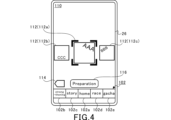
- FIG. 4 is a diagram illustrating an example of the live music selection screen.
- Fig. 5A is a first diagram illustrating an example of the live performance preparation screen
- Fig. 5B is a second diagram illustrating an example of the live performance preparation screen.
- FIG. 6 is a diagram illustrating an example of the character selection dialogue.
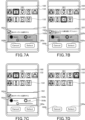
- Fig. 7A is a first diagram for explaining an example of a costume selection dialog
- Fig. 7A is a first diagram for explaining an example of a costume selection dialog
- Fig. 7A is a first diagram for explaining an example of a costume selection dialog
- Fig. 7A is a first diagram for explaining an example of a costume selection dialog
- FIG. 7B is a second diagram for explaining an example of a costume selection dialog
- Fig. 7C is a third diagram for explaining an example of a costume selection dialog
- Fig. 7D is a fourth diagram for explaining an example of a costume selection dialog.
- 8A is a first diagram illustrating an example of a costume selection dialogue of a modified example
- FIG. 8B is a second diagram illustrating an example of a costume selection dialogue of a modified example.
- FIG. 9 is a diagram illustrating information relating to characters.
- FIG. 10 is a diagram illustrating information linked to a game media ID.
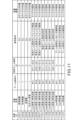
- FIG. 11 is a diagram illustrating a costume ID.
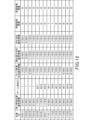
- FIG. 12 is a diagram illustrating information associated with a costume ID.
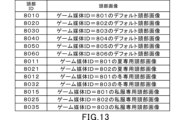
- FIG. 13 is a diagram for explaining the head ID.
- FIG. 10 is a diagram illustrating information linked to a game media ID
- FIG. 11 is a diagram illustrating a costume ID.
- FIG. 12 is a diagram illustrating information associated with a costume
- FIG. 14 is a diagram illustrating the tail ID.
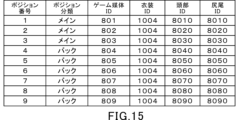
- FIG. 15 is a diagram for explaining a case where a common costume is set by the collective setting function.
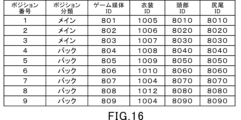
- FIG. 16 is a diagram for explaining a case where individual costumes are set using the batch setting function.
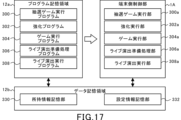
- FIG. 17 is a diagram for explaining the memory configuration and computer functions of the player terminal.
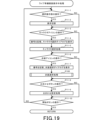
- FIG. 18 is a flowchart illustrating an example of a live performance preparation process in a player terminal.
- FIG. 19 is a flowchart illustrating an example of a process during display of the live preparation screen in the player terminal.
- FIG. 20 is a flowchart illustrating an example of a costume selection process in a player terminal.
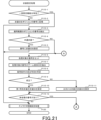
- FIG. 21 is a flowchart illustrating an example of a costume setting process in a player terminal.
- FIG. 22 is a flowchart illustrating an example of a character information setting process in a player terminal.
- (Overall configuration of information processing system S) 1 is an explanatory diagram showing a schematic configuration of an information processing system S.
- the information processing system S is a so-called client-server system including player terminals 1, a server 1000, and a communication network N having a communication base station Na.
- the player terminal 1 can establish communication with the server 1000 via the communication network N.
- the player terminal 1 broadly includes electronic devices that can establish a wireless or wired communication connection with the server 1000. Examples of the player terminal 1 include smartphones, mobile phones, tablet devices, personal computers, game devices, and the like. In this embodiment, a case will be described in which a smartphone is used as the player terminal 1.
- the server 1000 is connected for communication with multiple player terminals 1.
- the server 1000 accumulates various information (player information) for each player playing the game.
- the server 1000 also updates the accumulated information based on operations input from the player terminals 1.
- the communication base station Na is connected to the communication network N and transmits and receives information wirelessly to and from the player terminal 1.
- the communication network N is composed of a mobile phone network, the Internet network, a LAN (Local Area Network), a dedicated line, etc., and realizes a wireless or wired communication connection between the player terminal 1 and the server 1000.
- the player terminal 1 and the server 1000 function as the game device G.
- the player terminal 1 and the server 1000 are each assigned the role of controlling the progress of the game, and the game can progress through cooperation between the player terminal 1 and the server 1000.
- Fig. 2A is a diagram for explaining the hardware configuration of the player terminal 1.
- Fig. 2B is a diagram for explaining the hardware configuration of the server 1000.
- the player terminal 1 includes a CPU (Central Processing Unit) 10, a memory 12, a bus 14, an input/output interface 16, a storage unit 18, a communication unit 20, an input unit 22, and an output unit 24.
- CPU Central Processing Unit
- the server 1000 includes a CPU 1010, a memory 1012, a bus 1014, an input/output interface 1016, a storage unit 1018, a communication unit 1020, an input unit 1022, and an output unit 1024.
- the configurations and functions of the CPU 1010, memory 1012, bus 1014, input/output interface 1016, storage unit 1018, communication unit 1020, input unit 1022, and output unit 1024 of the server 1000 are substantially the same as the CPU 10, memory 12, bus 14, input/output interface 16, storage unit 18, communication unit 20, input unit 22, and output unit 24 of the player terminal 1, respectively. Therefore, the following describes the hardware configuration of the player terminal 1, and a description of the server 1000 is omitted.
- the CPU 10 runs the programs stored in the memory 12 and controls the progress of the game.
- the memory 12 is composed of a ROM (Read Only Memory) or a RAM (Random Access Memory), and stores the programs and various data required to control the progress of the game.
- the memory 12 is connected to the CPU 10 via a bus 14.
- An input/output interface 16 is connected to the bus 14.
- a memory unit 18, a communication unit 20, an input unit 22, and an output unit 24 are connected to the input/output interface 16.
- the storage unit 18 is composed of semiconductor memory such as DRAM (Dynamic Random Access Memory), and stores various programs and data.
- DRAM Dynamic Random Access Memory
- the programs and data stored in the storage unit 18 are loaded into the memory 12 (RAM) by the CPU 10.
- the communication unit 20 is wirelessly connected to the communication base station Na, and transmits and receives information such as various data and programs to and from the server 1000 via the communication network N.
- the programs and the like received from the server 1000 are stored in the memory 12 or the storage unit 18.
- the input unit 22 is composed of, for example, a touch panel through which the player's operations are input (which accepts operations), buttons, a keyboard, a mouse, a cross key, an analog controller, etc.
- the input unit 22 may also be a dedicated controller provided in the player terminal 1 or connected (externally) to the player terminal 1.
- the input unit 22 may be composed of an acceleration sensor that detects the tilt or movement of the player terminal 1, or a microphone that detects the voice of the player.
- the input unit 22 broadly includes devices that can input the player's intentions in an identifiable manner.
- the output unit 24 includes a display device and a speaker.
- the output unit 24 may be a device that is connected (externally attached) to the player terminal 1.
- the player terminal 1 includes a touch panel 26 that functions as the input unit 22 and the output unit 24.
- Game Contents Next, the content of the game provided by the information processing system S (game device G) of this embodiment will be described using an example.
- the player downloads a dedicated application from the server 1000 to the player terminal 1 and registers the player ID in the server 1000.
- the player terminal 1 receives various information stored in the server 1000 and displays a game screen on the touch panel 26.
- FIG. 3 is a diagram illustrating an example of a home screen 100.
- the home screen 100 is displayed on the touch panel 26.
- a menu bar 102 is displayed at the bottom of the home screen 100.
- the menu bar 102 has a number of operation sections that can be operated (tapped) by the player.
- the menu bar 102 is provided with a home screen selection operation section 102a, an enhancement screen selection operation section 102b, a story screen selection operation section 102c, a racing game selection operation section 102d, and a gacha screen selection operation section 102e.
- the operation section corresponding to the screen currently being displayed on the touch panel 26 is highlighted so that the screen currently being displayed can be identified.
- the home screen selection operation section 102a is tapped, the home screen 100 shown in FIG. 3 is displayed on the touch panel 26.
- an strengthening screen (not shown) is displayed.
- the player can strengthen the training game media he or she owns.
- multiple types of training game media are provided by the administrator.
- the player can acquire the training game media by winning a lottery, known as gacha.
- a specified training game medium may be given to the player free of charge by the administrator.
- the player can own the training game media acquired in the lottery or the training game media given to the player by the administrator.
- the development game media is used in the development game described below, and a development game media ID is set for each development game media. Furthermore, one game media ID is always linked to the development game media, i.e., the development game media ID. As will be described in more detail below, a game media ID is provided for each game medium.
- the game media is a character, and one character is linked to the game media ID. Therefore, it can be said that one character is always linked to a development game medium.
- the game medium may be referred to as a character.
- the development game media owned by a player may be referred to as a owned development game medium, and a character linked to a owned development game medium may be referred to as a owned character.
- a level is associated with each development game medium.
- a level between 2 and 5 is associated with each development game medium.
- a development game medium name is also associated with each development game medium.
- Each development game medium is grouped into multiple types.
- All of the multiple development game media belonging to the same type of group are linked to the same game media ID and development game media name.
- different levels and parameters are linked to the multiple development game media belonging to the same type of group.
- the higher the level of the multiple development game media belonging to the same type of group the more advantageous parameters in the development game are linked to them.
- the player can increase the level associated with the owned training game media. More precisely, by strengthening the owned training game media, the player can possess a training game media of a higher level that belongs to the same type of group as the currently owned training game media.
- the level 3 training game medium which belongs to the same type of group as the enhanced level 2 owned training game medium, becomes the owned training game medium.
- a group of the same type is a collection of identical characters at different levels that are managed with different IDs.
- this configuration is not limited, and identical characters (training game media of the same character) may be managed with the same ID and only the associated data may be changed.
- a story screen (not shown) is displayed.
- a story image is provided for each character that appears in the game. The player can select a character and a story image on the story screen to view.
- a racing game selection screen (not shown) is displayed.
- various racing games are provided in which a training character trained in a training game described below can race. The player can select a racing game in which the training character will race on the racing game selection screen.
- Racing games include team competition games in which a team made up of multiple training characters competes against a team of other players selected by a computer. Team competition games have the gameplay of competing with other players for rankings.
- a gacha screen (not shown) is displayed.
- the player can consume in-game currency to enter a gacha lottery.
- the player can win a development game medium in the gacha lottery.
- a training game operation unit 104 is provided above the menu bar 102.
- a training game screen is displayed.
- the player can select one of the owned characters as the character to be trained by selecting the owned training game medium.
- various parameters linked to the character to be trained are updated, and finally the training character is generated.
- the player can play the above-mentioned racing game, etc., using the training character generated in the training game.
- a live performance is a performance in which vocal sound and BGM (Background Music) are output in time with live footage of a character singing and dancing.
- BGM Background Music
- the live performance is described in detail below.
- a live selection button 106 is provided on the home screen 100. When the live selection button 106 is tapped, a live song selection screen 110 is displayed.
- FIG. 4 is a diagram illustrating an example of the live music selection screen 110.
- the player can select the song to watch, i.e., the type of live performance.
- the live song selection screen 110 displays a jacket image 112 for each song.
- jacket image 112a is displayed approximately in the center of the live song selection screen 110.
- jacket images 112b and 112c are displayed on either side of jacket image 112a.
- Jacket image 112a is displayed larger than jacket images 112b and 112c.
- the jacket image 112a displayed large in the center of the screen indicates the song that is currently tentatively selected.
- the jacket images 112 displayed on the live music selection screen 110 are switched in sequence.
- the player can select songs for the live performance by switching the jacket images 112a displayed approximately in the center of the live music selection screen 110.
- songs for live performances include songs that players can view free of charge, and songs that only players who meet the release conditions can view.
- Examples of the release conditions include the above-mentioned specific story image being viewed, specific conditions being met in the above-mentioned racing game or training game, and possessing a specific character.
- the release conditions are not particularly limited.
- the release conditions are not required, and all players may be able to view live performances unconditionally.
- some live performances may be viewable by paying a specific fee, such as in-game currency or real currency.
- the live music selection screen 110 also displays a return button 114 and a live music preparation button 116.
- the return button 114 is tapped, the screen switches from the live music selection screen 110 to the home screen 100.
- the live music preparation button 116 is tapped, the provisionally selected song is set as the selected song, and the live music preparation screen 120 is displayed.
- FIG. 5A is a first diagram illustrating an example of the live performance preparation screen 120.
- FIG. 5B is a second diagram illustrating an example of the live performance preparation screen 120.
- live footage is played on the touch panel 26.
- a number of characters appear in the live footage played at this time.
- the player can select and set the characters that will appear in the live footage. Note that the number of characters that will appear in the live footage is preset for each song, and the player needs to set the number of characters set for each song.
- each song has a set position, i.e., a placement of characters that appear in the live footage.
- the positions are broadly divided into main positions and backing positions. The player can select which characters to place in each of the main and backing positions. Characters placed in the main positions are displayed for a longer period of time in the live footage than characters placed in backing positions, and are more noticeable characters. Although a detailed explanation will be omitted, the character placed in the main position is in charge of vocals, and is the character that sings the song in the live footage.
- the number of main positions and back positions, as well as the relative positions of the characters displayed during the live footage, are set for each song.
- the song shown in Figures 5A and 5B has three main positions and nine back positions. A number is associated with each position, and here positions 1 to 3 are main positions, and positions 4 to 12 are back positions. Note that here, the positions are broadly divided into two categories, main positions and back positions, but the types of positions are not limited to this, and the number of positions may be any number.
- a main position selection operation section 122a and a back position selection operation section 122b are provided at the top of the live performance preparation screen 120.
- the main position selection operation section 122a When the main position selection operation section 122a is tapped, the character to be placed in the main position can be selected on the live performance preparation screen 120, as shown in FIG. 5A.
- the back position selection operation section 122b When the back position selection operation section 122b is tapped, the character to be placed in the back position can be selected on the live performance preparation screen 120, as shown in FIG. 5B.
- the screen of the live performance preparation screen 120 where the character to be placed in the main position can be selected is referred to as the main setting screen 120a
- the screen where the character to be placed in the back position can be selected is referred to as the back setting screen 120b.
- the back position selection operation unit 122b is displayed grayed out on the live preparation screen 120. In this case, when the back position selection operation unit 122b is tapped, a message is displayed indicating that no back position is set. In other words, when a song with only a main position is selected, the back position selection operation unit 122b is not displayed.
- the main setting screen 120a displays a position number identification display 124 indicating the number of the main position.
- the main setting screen 120a displays the numbers of all main positions set for the selected song using the position number identification displays 124.
- three position number identification displays 124 with the numbers 1 to 3 written on them are displayed.
- Below the position number identification displays 124, an image 126 of the character currently set for each main position is displayed.
- the player can set a character for each position number. Therefore, on the main setting screen 120a, an image picture 126 of the character set for the number written on the position number identification display 124 is displayed below the position number identification display 124.
- Image picture 126 displays the entire body of the character, and makes it possible to identify the face of the character currently set for each main position number.
- the part of the character's entire body from the neck up, including the face, will be referred to as the head.
- Image picture 126 includes an image of the head of the currently set character.
- a character icon 128 is displayed below image picture 126. Character icon 128 displays the head of the currently set character.
- the main position number is selected. For example, when the character icon 128 below the position number identification display 124 with the number 3 written on it is tapped, number 3 is selected. Also, when the character icon 128 below the position number identification display 124 with the number 1 written on it is tapped, number 1 is selected. When the character icon 128 is tapped, the character selection dialogue 150 is displayed.
- FIG. 6 is a diagram illustrating an example of the character selection dialog 150.
- the character selection dialog 150 displays a plurality of character icons 128 corresponding to characters possessed by the player.
- the character selection dialog 150 displays character icons 128 corresponding to all possessed characters. Therefore, the number of character icons 128 displayed in the character selection dialog 150 matches the number of characters possessed by the player.
- a single No Designation button 128a is displayed in the upper left of the character selection dialog 150.
- the No Designation button 128a is an operation unit for selecting not to designate a character.
- one mob character is randomly selected from a number of pre-prepared mob characters. Note that mob characters are characters that are prepared separately from the characters that the player can possess.
- a Cancel button 150a and a Select button 150b are provided at the bottom of the character selection dialog 150.
- the Cancel button 150a is tapped, the character selection dialog 150 is closed, and the live preparation screen 120 immediately before the character selection dialog 150 was displayed is displayed.
- any character icon 128 is tapped in the character selection dialog 150, the character linked to the tapped character icon 128 is provisionally selected. Note that when the No Designation button 128a is tapped, a randomly determined mob character is provisionally selected.
- the provisionally selected character is set to the position number previously selected.
- the character selection dialogue 150 is closed, and the live performance preparation screen 120 is displayed just before the character selection dialogue 150 is displayed. At this time, if the set character has been changed, an image corresponding to the changed character is displayed on the live performance preparation screen 120.
- the character icon 128 below the position number identification display 124 with the number 1 written on it is tapped on the main setting screen 120a. Then, when the character is changed in the character selection dialog 150, the main setting screen 120a is displayed when the character selection dialog 150 is closed. At this time, the image 126 and character icon 128 corresponding to the changed character are displayed on the main setting screen 120a.
- the upper part of the back setting screen 120b displays the relative positions of the main position and back position in the live video. Also, here, the image 130 of the character currently set for each number is displayed corresponding to the number.
- the back setting screen 120b displays position number identification displays 124 with the back position numbers written on them.
- position number identification displays 124 In the example shown in FIG. 5B, five position number identification displays 124 with the numbers 4 to 8 written on them are displayed.
- character icons 128 are displayed below the position number identification displays 124.
- the character selection dialogue 150 is displayed in the same manner as when a character icon 128 is tapped on the main setting screen 120a. By tapping a character icon 128 on the back setting screen 120b, the player can select and change the character to be set for each back position number.
- back positions 4 to 12 are provided.
- the position number identification display 124 and character icon 128 corresponding to back positions 9 and onwards are displayed.
- the player can set the characters to be placed at each number of the main positions by tapping the character icons 128 on the main setting screen 120a.
- the player can set the characters to be placed at each number of the back positions by tapping the character icons 128 on the back setting screen 120b.
- the live performance preparation screen 120 When the live performance preparation screen 120 is displayed for the first time after a song has been selected, a specific character is set as the initial setting for all positions. Therefore, the player can change the character to be placed at each position on the live performance preparation screen 120 from the initial setting character to another character. However, when the live performance preparation screen 120 is displayed for the first time, no character may be set for some or all of the positions. Alternatively, for songs for which a live performance has been viewed in the past, the character that was last set may be set as the initial setting.
- a costume icon 132 is displayed below the character icon 128.
- the player can select and set the costume that the character will wear by tapping the costume icon 132.
- predetermined costumes are set for all characters as the initial setting. Note that on the live performance preparation screen 120, there are no positions for which characters and costumes are not set. In other words, on the live performance preparation screen 120, a character and costume are set for all positions.
- the live performance preparation screen 120 also has an automatic button 134.
- an automatic setting screen (not shown) is displayed.
- the player can select either the main position or the backing position, and then select "recommended” or “random” for each character and costume.
- "recommended” a "recommended” character or costume that is set in advance for each song is set in the main position or backing position selected by the player.
- random a character or costume determined by random drawing is set in the main position or backing position selected by the player.
- live performance begins.
- live video is generated in which the characters set on the live performance preparation screen 120 sing and dance in the positions set on the screen.
- the characters appearing in the live video are wearing the costumes set on the live performance preparation screen 120.
- costumes are set as follows to achieve a variety of effects while simplifying the player's operations.
- FIG. 7A is a first diagram illustrating an example of the costume selection dialog 160.
- FIG. 7B is a second diagram illustrating an example of the costume selection dialog 160.
- FIG. 7C is a third diagram illustrating an example of the costume selection dialog 160.
- FIG. 7D is a fourth diagram illustrating an example of the costume selection dialog 160.
- the character set to the position number linked to the tapped costume icon 132 becomes the target character.
- a position number identification display 124 is displayed above the tapped costume icon 132 on the live performance preparation screen 120.
- the character set to the number written on this position number identification display 124 is set as the target character.
- the costume selection dialogue 160 shown in FIG. 7A is displayed.
- a first display area 161 is provided at the top of the costume selection dialogue 160.
- costume icons 132 corresponding to costumes that can be worn by the target character are displayed.
- the costume icon 132 corresponding to the costume currently set for the target character is highlighted.
- a select button 160a and a cancel button 160b are provided at the bottom of the costume selection dialogue 160.
- the select button 160a is tapped, the costume in provisional selection state is set as the costume for the target character.
- the cancel button 160b is tapped, the costume selection dialogue 160 is closed and the live performance preparation screen 120 is displayed.
- a second display area 162 is provided at the bottom of the costume selection dialogue 160.
- the second display area 162 is an operation area for setting the costume in the provisionally selected state to multiple characters including the target character all at once.
- the second display area 162 is an operation area that allows the player to select the scope of application of the costume or type selected by the player.
- the second display area 162 is provided with a check box 162a and an application position selection section 162b.
- the check box 162a accepts an operation for setting whether or not the costume in the provisionally selected state is to be applied to other characters.
- the check box 162a accepts an operation for switching between enabling and disabling a batch setting function for setting the costume in the provisionally selected state to multiple characters all at once. Note that whether or not to perform batch setting may be automatically switched using information in the explanation of FIG. 11 and FIG. 12 described later.
- the display type (type) of costume worn by a character is broadly categorized into a common display type, in which the appearance is common to multiple characters, and an individual display type, in which the appearance differs between multiple characters.
- costumes classified as the common display type will be referred to as common costumes
- costumes classified as the individual display type will be referred to as individual costumes.
- Common costumes are costumes that can be set for all characters, regardless of the character type. This common costume has the same appearance, such as decorations and color, regardless of the type of character wearing it.
- a specific example of a common costume is something like a school uniform.
- an individual costume is a costume that is limited to a specific character. In other words, an individual costume can only be set for a specific character. Here, one individual costume can be set for only one character.
- An individual costume is, for example, a competition costume (hereinafter referred to as a competition outfit) designed only for a specific character for a specific race in a racing game.
- an individual costume is, for example, private clothing provided for each individual character.
- the costume icon 132 is an icon that is a deformed version of the costume model to be worn by the character.
- the costume icon 132 may be able to identify the display type of the costume. Specifically, for example, text such as uniform (common costume), competition outfit, or casual clothes (individual costume) may be displayed, or the icon color may be different for common costume and individual costume.
- the common costume and individual costume may be switched using tabs, and the corresponding costume icon may be displayed.
- the selection (provisional selection) of the costume icon 132 will be described as the selection (provisional selection) of the display type.
- the second display area 162 When special costumes that cannot be set collectively (second and third special costumes described later) are in a provisionally selected state, the second display area 162 is hidden as shown in FIG. 7D. By hiding the second display area 162, the player is unable to set the provisionally selected special costumes to multiple characters collectively. Note that here, when special costumes that cannot be set collectively are in a provisionally selected state, the second display area 162 is hidden; however, for example, the second display area 162 may be displayed grayed out so that no operation by the player is accepted. Alternatively, the second display area 162 may be displayed, but operations on the check boxes 162a may be set to be unacceptable. In this case, for example, the display color of the second display area 162 may be made different from normal.
- FIG. 8A is a first diagram illustrating an example of a modified costume selection dialog.
- FIG. 8B is a second diagram illustrating an example of a modified costume selection dialog.
- the second special costume and swimsuit described below are individual costumes that can be set collectively.
- a message such as "Apply the second battle costume to other characters as well” may be displayed near the check box 162a, as shown in FIG. 8A.
- a message such as "Apply the swimsuit to other characters as well” may be displayed near the check box 162a, as shown in FIG. 8B.
- the batch setting function is disabled, and check boxes 162a are displayed as shown in FIG. 7A.
- the application position selection section 162b is displayed grayed out, and input of operations to the application position selection section 162b is disabled.
- the check box 162a is tapped in the state shown in FIG. 7A, the batch setting function is enabled.
- FIG. 7C a check mark is highlighted in the check box 162a, and the application position selection section 162b is displayed normally.
- the application position selection section 162b is provided with a partial character selection toggle 164a and an all character selection toggle 164b.
- the partial character selection toggle 164a and the all character selection toggle 164b can be selected alternatively.
- the partial character selection toggle 164a and the all character selection toggle 164b accept an operation to set the range to which the costume in the provisionally selected state is applied.
- the costume in the provisionally selected state is applied to some of the characters.
- the target character is set to the main position
- the partial character selection toggle 164a is selected, the scope of application of the costume in the provisionally selected state becomes all characters set to the main position.
- "main" is displayed near the partial character selection toggle 164a as shown in Figure 7C, notifying the user that the character to which the costume will be applied is the character set to the main position.
- the target character is set to the back position
- the partial character selection toggle 164a when the partial character selection toggle 164a is selected, the scope of application of the costume in the provisionally selected state becomes all characters set to the back position. In this case, "back" is displayed near the partial character selection toggle 164a. This notifies the user that the character to which the costume will be applied is a character set to the back position.
- the costume in the provisionally selected state is set to some of the characters all at once. Specifically, if the target character is set to the main position, the costume in the provisionally selected state is set to all of the characters set to the main position all at once. Also, if the target character is set to the back position, the costume in the provisionally selected state is set to all of the characters set to the back position all at once.
- the costume in the provisionally selected state is set for all characters at once, regardless of the position type.
- the costume in the provisionally selected state is set for all characters, regardless of whether the target character is set to the main position or the back position.
- costumes are categorized into a number of groups, and costumes categorized into a certain group are limited in the characters that can wear them.
- the second display area 162 indicates that the characters that can wear the costume may be limited. Specifically, for example, a message such as "Characters that do not have a battle costume will not be reflected" is displayed.
- costumes also include special costumes unique to the character currently set for the target character.
- a first special costume, a second special costume, and a third special costume are provided as special costumes.
- the first special costume is provided for all characters, and can be worn by the character by satisfying the wearing conditions.
- the wearing conditions for the first special costume are the same for all characters. However, the wearing conditions may differ depending on the character.
- the first special costume is a costume unique to the character appearing in the training game. In the training game, races are run in which the character to be trained competes against other characters.
- the first special costume is a so-called racing outfit worn by the character in this training game.
- the first special costume has a different appearance for each character. Only one first special costume may be provided for each character, or multiple first special costumes may be provided. Grades may also be set for the races in the training game, and the first special costume may be wearable only in races with a high grade.
- the second special costume and the third special costume are costumes that are provided to some characters. These second special costumes and third special costumes can be set to the target character by fulfilling the conditions for wearing them.
- the second special costume and the third special costume are costumes that are outside the scope of application of the above-mentioned collective setting function. In other words, the second special costume and the third special costume cannot be set to multiple characters at once. Therefore, when the second special costume or the third special costume is in a provisionally selected state, the second display area 162 is not displayed, as shown in FIG. 7D.
- the above-mentioned collective setting function may also be applied to the second special costume and the third special costume.
- the costume selection dialogue 160 includes a first display area 161 and a second display area 162.
- the first display area 161 is an area where the display type of the character's appearance (the costume worn by the character) can be selected, and where a common display type in which multiple characters have a common appearance, or a special display type in which multiple characters have different appearances, can be selected.
- the second display area 162 is an area where the scope of application of the display type selected by the player can be selected, and where a specified character or multiple characters can be selected as the scope of application.
- the player can limit the scope of application of the costume to a specific character only.
- the specific character is the character selected by the player.
- the player can limit the scope of application of the costume to multiple characters, including the specific character.
- the display of the second display area 162 changes depending on the selected display type, i.e., the costume. Specifically, when a costume for which the collective setting function is enabled is provisionally selected, the second display area 162 is displayed, whereas when a costume for which the collective setting function is disabled is provisionally selected, the second display area 162 is hidden. This makes it possible to inform the player that collective setting is not possible.
- the costume types are described in detail below.
- FIG. 9 is a diagram explaining information related to a character.
- a game medium ID, name, possession information, level, and parameters are linked to a training game medium ID.
- a training game medium ID is linked to each training game medium. Since the training game medium ID is unique to a training game medium, the training game medium ID can be said to be a type of training game medium.
- a game medium ID unique to a character is always set to a training game medium (training game medium ID). Since the game medium ID is unique to a character, the game medium ID can be said to be a type of character.
- the training game medium ID and game medium ID are represented by three-digit integers in decimal.
- a single game medium ID is always linked to a training game medium ID, and one character is set for each training game medium.
- the four training game media with training game medium IDs 901 to 904 are classified into the same type of group.
- the same game medium ID and name are linked to training game media classified into the same type of group, but different levels and parameters are linked to each.
- multiple training game media classified into the same type of group are set so that the higher the level, the more advantageous the parameters used in the training game are.
- a group of the same type is a collection of identical characters at different levels that are managed with different IDs.
- this is not limited to this configuration, and the same character (game media for developing the same character) may be managed with the same ID, and only the associated data may be changed. Details of parameters will be omitted, but they refer to the performance and abilities of the character, and examples include numerical values of speed and stamina, and abilities that can be activated during the game.
- three development game media assigned with development game media IDs 905 to 907, three development game media assigned with development game media IDs 908 to 910, three development game media assigned with development game media IDs 911 to 913, three development game media assigned with development game media IDs 914 to 916, three development game media assigned with development game media IDs 917 to 919, and three development game media assigned with development game media IDs 920 to 922 are each classified into groups of the same type.
- the four development game media assigned with development game media IDs 901 to 904, the three development game media assigned with development game media IDs 911 to 913, and the three development game media assigned with development game media IDs 917 to 919 are of different types and are linked to different names.
- the development game media classified into these three types is linked to a common game media ID. In this way, some game media IDs, i.e. characters, are linked to multiple types of development game media.
- 901 to 904 are different levels of normal version character AAA
- 911 to 913 are different levels of special version character AAA that can be obtained by lottery in a summer-only event
- 917 to 919 are different levels of special version character AAA that can be obtained by lottery in a winter-only event.
- the possession information manages whether or not the character is possessed and what level it is at.
- FIG. 9 includes characters that are not possessed, only possessed development game media may be managed.
- FIG. 10 is a diagram explaining the information linked to a game medium ID.
- a name, a body type ID, a parameter of the number of fans, and a parameter of intimacy are linked to a game medium ID.
- the appearance of the character itself that is, the shape and form of the main body of the character excluding clothing, etc., is set to only one for one game medium ID.
- the body type ID linked to the game medium ID is linked to information when the character is displayed on the game screen, such as the height of the main body of the character.
- the appearance and shape of the character bodies associated with the training game media with training game media IDs 901 to 904, 911 to 913, and 917 to 919 shown in FIG. 9 are the same. Furthermore, when the type (group) of training game media is the same, the clothing worn by the characters will be the same. Therefore, for example, the appearance and shape of the displayed character bodies and the clothing worn by the characters will be the same for training game media with training game media IDs 901 to 904, and there will be no visible differences.
- the game media ID is the same, if the type of development game media is different, the appearance of the character's costume, etc. will be different.
- the three development game media with development game media IDs 901, 911, and 917 all have the same character body, but the costumes worn by the characters are different from each other.
- the player terminal 1 and the server 1000 store player information linked to the player ID.
- the player information includes possession information of the training game medium. Specifically, possession information of "1" indicating possession or "0" indicating non-possession is stored linked to the training game medium ID. As described above, the player can strengthen the possessed training game medium. When possessed training game medium is strengthened, possession information of a training game medium of the same type and of a higher level as the possessed training game medium before strengthening is updated to "1".
- the character to be trained when a certain condition is met, the character to be trained will gain fans. As shown in FIG. 10, when the character to be trained gains fans, the number of fans linked to the game medium ID of the character to be trained is updated. Also, as described above, in team competition races, the player can enter the character trained in the training game. The character gains fans based on the results of the team competition race. A game medium ID is linked to the character to be trained, and when the character to be trained gains fans, the number of fans linked to the game medium ID of the character to be trained is updated.
- the intimacy level is a parameter set for a character, and is managed in association with a game medium ID.
- the intimacy level parameter is a parameter that indicates the degree of use of a character (game medium) common to the entire game.
- the intimacy level parameter is expected to have the effect of strengthening the player's attachment to the character and increasing the frequency of use of the entire game.
- the intimacy level parameter is managed for each character in association with a game medium ID.
- the intimacy level parameter may be a usage level parameter of the character (game medium) in a specific game function (e.g., a race) among multiple game functions.
- a usage level parameter of the character game medium
- a specific game function e.g., a race
- the player can grasp the usage level of a specific character in a specific game, and more detailed motivation can be effectively provided.
- an intimacy rank may exist for each character as information related to the intimacy parameter.
- the intimacy rank increases when the accumulation of the intimacy parameter achieves a condition set for each rank.
- the intimacy rank may be set to, for example, rank 0 to rank 10, and the upper limit of the intimacy rank may be released depending on the operation period of the game.
- the intimacy parameter is given to the used character when a condition is achieved in the training function or battle function.
- the increase in the intimacy parameter based on the use of the game function may vary depending on the game result (rating, ranking, etc.).
- a story which is content linked to the character whose intimacy rank has reached the predetermined rank, is released.
- the intimacy rank which is the condition for releasing a story, may be the same for each character, or may be different depending on the character.
- FIG. 11 is a diagram explaining costume IDs.
- costumes that can be worn by characters in live performances i.e., costumes that can be selected in the costume selection dialog 160, are associated with costume IDs.
- costume IDs are represented by four-digit integers in decimal notation.
- costumes that can be set for characters in live performances are classified into common costumes and individual costumes.
- Common costumes are costumes that can be set for all characters regardless of the character type, i.e., the game medium ID.
- These common costumes have the same appearance, i.e., design, such as decorations and colors, regardless of the type of character wearing them.
- each character is set to a body type, such as height, and the size of the costume differs depending on the body type of the character wearing it. Therefore, in this embodiment, the design of common costumes, other than the size, is common to multiple characters.
- the costume with costume ID 1001 is a summer uniform
- the costume with costume ID 1002 is a winter uniform
- the costume with costume ID 1003 is a gym suit
- the costume with costume ID 1004 is a matching costume such as a dress with predetermined decorations.
- characters may be provided that do not wear common costumes.
- the development game medium may be provided with a first common costume that can be worn by all characters, and a second common costume that cannot be worn by specific characters such as NPCs that cannot be developed by the player (not part of the development game medium).
- the costume ID is linked to a game medium ID and a development game medium ID as information indicating the target character for which the costume can be set.
- a common costume is linked to a game medium ID of "1" and a development game medium ID of "0".
- a game medium ID of "1” is information indicating all game media
- a development game medium ID of "0” is information indicating all development game media.
- an individual costume is a costume that is limited to a specific character.
- an individual costume can only be set for a character with a specific game medium ID. That is, the costume ID of an individual costume is linked to only one game medium ID of a target character.
- an individual costume with a costume ID of 1005 is linked to a game medium ID of 801
- an individual costume with a costume ID of 1006 is linked to a game medium ID of 802.
- an individual costume is unique to a character.
- costume images provided for each costume ID of an individual costume are applied. General two-dimensional and three-dimensional methods are used to adapt costume images.
- the entire image may be changed depending on the costume, and if it is a three-dimensional image, a 3D model of the costume may be combined with a 3D model of the basic character's body type and rendered.
- the individual outfits are classified into one of a number of groups.
- a first special outfit group, a second special outfit group, a third special outfit group, and a casual clothes group are provided.
- an individual outfit classified into the first special outfit group will be referred to as a first special outfit
- an individual outfit classified into the second special outfit group will be referred to as a second special outfit
- an individual outfit classified into the third special outfit group will be referred to as a third special outfit
- an individual outfit classified into the casual clothes group will be referred to as casual clothes.
- First special costumes are provided for all characters linked to the development game medium, in other words, all characters that the player can possess. In other words, the same number of first special costumes are provided as there are game medium IDs. However, first special costumes may be provided for some of the characters that can be possessed. Note that while FIG. 11 only shows costume IDs for three first special costumes, 1005 to 1007, in reality, there are as many costume IDs for first special costumes as there are characters that can be possessed, i.e., the number of game medium IDs.
- the first special costume has wearing conditions.
- the first special costume can be set for the target character when the level of at least one development game medium linked to the target character's game medium ID reaches 3 or higher. Therefore, it can be said that the wearing conditions for the first special costume include possessing at least one development game medium linked to the target character's game medium ID. It is possible to increase the level by accumulating a certain number of items that can be acquired through games, events, or lotteries, but the method of increasing the level is not limited to this.
- the training game media that are the subject of the judgment of the wearing conditions are all training game media linked to the game medium ID of the target character.
- the training game media that are the subject of the judgment of the wearing conditions may be any one of the training game media linked to the game medium ID of the target character.
- the training game media that are the subject of the judgment of the wearing conditions of the first special costume may be the training game media that was first made available among the training game media linked to the game medium ID of the target character. This configuration simplifies the process and reduces the load on the system.
- the costume images, i.e. designs, of the first special costumes displayed in the live performance will be different for each character.
- all of the first special costumes have different designs.
- the second special costume is provided for some of the characters linked to the development game medium, in other words, some of the characters that the player can possess.
- the second special costume is a swimsuit costume, and is set for characters that are featured in an annual summer-only event.
- the second special costume may be provided for all characters that can be possessed.
- two second special costumes are provided, with costume IDs 1101 and 1102 set.
- the second special costume has a wearing condition set.
- the wearing condition for the second special costume is set to be that the player possesses a specified training game medium linked to the game medium ID of the target character.
- the wearing condition for the second special costume set to costume ID 1101 is set to be that the player possesses a training game medium with a training game medium ID of 911 to 913.
- the second special costume with a costume ID of 1101 is a swimsuit costume worn by a special version of character aaa that can be obtained by gacha lottery with training game media with training game media IDs of 911 to 913.
- the special costumes are swimsuit costumes for training game media that can be obtained in the same summer-only event, they each have a different design.
- the conditions for wearing the second special costume are not limited to this.
- the conditions for wearing may include that the level of the training game media that is required to be possessed is at or above a predetermined level.
- the third special costume is provided for some of the characters linked to the development game medium, in other words, some of the characters that the player can possess.
- the third special costume is a Christmas-related costume (Santa or reindeer costume), and is set for characters that are featured in an annual winter-only event.
- the third special costume may be provided for all possessable characters.
- two third special costumes are provided, with costume IDs 1103 and 1104 set.
- the third special costume has a wearing condition set.
- the wearing condition for the third special costume is set to be that the player possesses a specified training game medium linked to the game medium ID of the target character.
- the wearing condition for the third special costume set to costume ID 1104 is set to be that the player possesses a training game medium with a training game medium ID of 920 to 922.
- the third special costume to which costume ID 1103 is set, is a costume in which the special version of character aaa, which can be obtained in a gacha lottery during a winter-only event, is dressed in the style of Santa Claus.
- the special costumes are Christmas-related costumes for the training game media that can be obtained during the same winter-only event, each of these special costumes has a different design.
- the conditions for wearing the third special costume are not limited to this.
- the conditions for wearing may include that the level of the training game media that is required to be possessed is at or above a predetermined level.
- casual clothes are provided for all characters linked to the development game medium, in other words, all characters that the player can possess.
- the same number of casual clothes are provided as the number of game medium IDs.
- casual clothes may be provided for some of the characters that can be possessed. Note that while only three casual clothes costume IDs are shown in FIG. 11, in reality, the same number of casual clothes costume IDs are provided as the number of possessable characters, i.e., the number of game medium IDs.
- the wearing condition for the casual clothes is set to be that the intimacy of the target character, i.e., the intimacy of the game medium ID linked to the costume ID, is equal to or greater than a predetermined value.
- the intimacy which is a parameter indicating the degree of use of a specific character in the game
- the wearing condition condition for unlocking the costume
- the wearing condition for the casual clothes is not limited to this, and for example, the same wearing condition as that for other individual costumes may be set. Note that in FIG. 11, the wearing condition for the costume is set, but it may be rephrased as other conditions such as the possession condition, acquisition condition, or unlock condition of the costume.
- FIG. 12 is a diagram explaining information linked to a costume ID.
- An information table is stored in the player terminal 1 and the server 1000.
- the costume ID is linked to various information shown in FIG. 12.
- the player terminal 1 refers to the information table to generate the image images 126, 130 displayed on the live performance preparation screen 120 and the character image displayed in the live performance video.
- the costume ID is linked to first special costume identification information, game medium ID, live performance usability identification information, wet and see-through identification information, stain identification information, head search information, and tail search information.
- FIG. 12 is explained as an independent table, it may be managed in the same table as FIG. 11, FIG. 13, or FIG. 14. In that case, duplicate data may be omitted, or the head ID and tail ID and their images may be incorporated into the head and tail search information.
- the first special costume identification information is information for identifying whether the costume linked to the costume ID is the first special costume.
- the first special costume identification information is composed of "0" which indicates that it is not the first special costume, and "1" which indicates that it is the first special costume.
- the costume ID of the first special costume is linked to the first special costume identification information of "1". Note that only the identification information for the first special costume will be described here, but this is not limited to this.
- the column name may be used as costume identification information
- the second special costume may be assigned the number "2”
- the third special costume the number "3"
- casual clothes the number "4" the player's arbitrary setting the number "5"
- costumes that do not allow collective setting the number "6”.
- the display in the second display area 162 may be changed, and each character may wear a special costume corresponding to each costume type.
- the costume ID is linked to the game medium ID of the target character.
- the costume ID of the common costume is linked to the game medium ID "1".
- the live use availability identification information is information that identifies whether the costume linked to the costume ID is a costume that can be used in live performances.
- the live use availability identification information is composed of "0" which indicates that it cannot be used in live performances, and "1" which indicates that it can be used in live performances.
- gym clothes and casual clothes are set as unusable in live performances, and other costumes are set as usable, but this is not limited to the above, and casual clothes could be set as "1", for example.
- the wet and see-through compatible identification information is information that identifies whether the costume linked to the costume ID is a costume that can be wet and see-through.
- wet and see-through compatibility is a function that allows the costume being worn to be see-through when, for example, a scene in which a character is displayed is raining in a race or live music video.
- the wet and see-through compatible identification information is composed of "0", which indicates that wet and see-through compatibility is not possible, and "1", which indicates that wet and see-through compatibility is possible.
- the summer uniform and winter uniform are set as not wet and see-through compatible, and the other costumes are set as wet and see-through compatible.
- the dirt handling identification information is information that identifies whether the costume linked to the costume ID is a costume that can handle dirt.
- dirt handling is a function that stains the costume being worn when, for example, a scene in which a character is displayed in a race or live music video is in an environment where the character will get dirty with mud, etc.
- the dirt handling identification information is composed of "0", which indicates that dirt handling is not possible, and "1", which indicates that dirt handling is possible.
- the summer uniform and winter uniform are set as dirt-resistant, and the other costumes are set as dirt-resistant.
- Head search information is information for identifying a head image when displaying a character after an outfit has been set.
- head search information is identified from the outfit ID. Then, based on the head search information, a head image of the character to be displayed on the game screen is extracted.
- the tail search information is information for identifying a tail image when displaying a character after an outfit has been set.
- the tail search information is identified from the outfit ID. Then, based on the tail search information, the tail image of the character to be displayed on the game screen is extracted.
- Head search information and tail search information are composed of single-digit decimal values.
- Head search information of "0" is linked to the costume IDs of all common costumes and costumes classified into the first special costume group.
- head search information with a value set for each group is linked to the costume IDs of costumes classified into groups other than the first special costume group.
- costume IDs here, 1104 of the individual costumes are linked to tail search information of "2", and all other costume IDs are linked to tail search information of "0".
- FIG. 13 is a diagram explaining the head ID.
- a head image identification table is stored in the player terminal 1 and the server 1000.
- the head image identification table is a table for identifying the head image to be displayed on the game screen.
- one head image is linked to each head ID.
- the same number of head IDs are provided as the costume IDs of the individual costumes.
- the head ID is also composed of a four-digit value consisting of a three-digit game medium ID plus head search information.
- the head ID is linked to the head image of the character corresponding to the game medium ID with the highest three digits.
- head ID 8010 is linked to the default head image of a character with game media ID 801.
- head ID 8060 is linked to the default head image of a character with game media ID 806. In this way, head IDs ending in "0" are linked to the default head image of the target character.
- head ID 8011 is associated with a summer-only head image of a character with game medium ID 801.
- head ID 8032 is associated with a winter-only head image of a character with game medium ID 803. In this way, head IDs that end with anything other than "0" are associated with the head image of a target character that corresponds to an individual costume.
- the costume ID When a costume is set by the player, the costume ID is set in association with the game medium ID for which the costume was set. Once the costume ID is set, a head ID is identified from the game medium ID and head search information linked to the costume ID. Once the head ID has been identified in this way, a head image identification table is referenced, and the head image linked to the identified head ID is read out and the character is displayed.
- a head image identification table shown in FIG. 13 when a common costume or a first special costume is set, a default head image is used.
- a head ID whose last digit is a value other than "0" indicating an individual costume group other than the first special costume group, is linked to a dedicated head image for the target character. Therefore, when the costume is set to the second special costume, the third special costume, or casual clothes, a dedicated head image that matches these costumes is identified.
- a dedicated head image prepared to match the individual outfit other than the default is used.
- the dedicated head image differs from the default head image, for example, in the character's facial expression, hairstyle, head accessories such as hair ornaments, etc.
- FIG. 14 is a diagram explaining the tail ID.
- a tail image identification table is stored in the player terminal 1 and the server 1000.
- the tail image identification table is a table for identifying a tail image to be displayed on the game screen.
- one tail image is associated with each tail ID.
- a tail ID is provided that has the same value as the head ID that is identified when the first special costume is selected.
- a tail ID of 8032 is provided that is identified when the costume ID of 1104, which is the third special costume, is selected.
- the tail ID is a four-digit value consisting of a three-digit game media ID plus tail search information.
- the tail ID is linked to the default head image of the character that corresponds to the top three digits of the game media ID.
- a tail ID of 8010 is linked to the default tail image of a character with a game media ID of 801.
- a tail ID of 8060 is linked to the default tail image of a character with a game media ID of 806. In this way, tail IDs ending in "0" are linked to the default tail image of the target character.
- a tail ID of 8032 is associated with a tail image for a character with a game media ID of 803 that is specifically for winter.
- tail IDs that end with a number other than "0" are associated with tail images of target characters that correspond to individual costumes.
- a tail ID is identified from the game media ID and tail search information linked to that costume ID. Once the tail ID is identified in this way, the tail image identification table is referenced, and the tail image linked to the identified tail ID is read out and the character is displayed.
- a dedicated tail image is identified only when the third special costume is set for the character with game media ID 803.
- a default tail image is used.
- a dedicated tail image differs from the default tail image, for example, in the shape of the character's tail and the accessories attached to the tail.
- the default is set to "0" as a general rule, and images can be extracted only when necessary, allowing for efficient processing. Note that although the configuration is such that each costume is separate from the head and tail, an image or 3D model including everything may also be used.
- the character's head image and tail image are identified according to the costume set for the character.
- the player terminal 1 and the server 1000 are provided with a costume image identification table.
- a costume image is linked to each costume ID.
- the costume image identification table is referenced and the costume image linked to the set costume ID is identified.
- the player can set a character and the costume to be worn by the character for each position number on the live performance preparation screen 120. At this time, the player can set the character and costume for each position number individually.
- a bulk setting function is provided for costumes as described above. The following describes the process flow for identifying costume IDs when the bulk setting function is used.
- FIG. 15 is a diagram illustrating a case where a common costume is set using the batch setting function.
- nine positions are set for the selected song.
- positions 1 to 3 are assumed to be main positions, and positions 4 to 9 are assumed to be back positions.
- Characters corresponding to a pre-set song or randomly selected characters may be placed in each position, but here, a character with a game medium ID of "80N (N is an integer from 1 to 9)" is assumed to be set in position N (N is an integer from 1 to 9).
- a costume ID of 1004 is set for position numbers 1 through 3, and a head ID and tail ID corresponding to the game medium ID are set. At this time, the costume ID, head ID, and tail ID for position numbers 4 through 9 are not updated.
- a costume ID of 1004 is set for position numbers 4 to 9, and head IDs and tail IDs corresponding to the game medium ID are set. At this time, the costume IDs, head IDs, and tail IDs for position numbers 1 to 3 are not updated.
- common costumes can be set for multiple characters all at once, improving operability and efficiency.
- the range of collective setting of common costumes can be limited to certain positions, increasing the variety of costumes that can be worn, further improving operability and efficiency.
- the costumes of all characters included in the collective setting range will be the same. Therefore, in this embodiment, of the individual costumes that are unique to each character, the first special costume is also subject to the collective costume setting function.
- FIG. 16 is a diagram illustrating a case where individual costumes are set using the bulk setting function.
- the selected song and the characters set for each position number are the same as the example shown in FIG. 15.
- position 1 is selected, and the first special costume with a costume ID of 1005 is selected in the costume selection dialogue 160.
- the select button 160a is tapped with the all character selection toggle 164b selected.
- the following process is performed for each position number. Specifically, the possessed development game medium that is linked to the game medium ID set for the position number being processed is extracted. Then, it is determined whether the level of the extracted possessed development game medium is at or above a predetermined level, i.e., whether the wearing conditions are met. As another example, instead of determining the wearing conditions each time, a determination can be made without referring to a separate information table by adding a special costume release status column to FIG. 11 or FIG. 12 that sets the wearing conditions to "0" if they are not met and "1" if they have already been met (in other words, the special costume has been released and is in the player's possession).
- the information table ( Figure 12) is referenced, the game medium ID set to the number of the position to be processed is linked, and a costume ID with first special costume identification information of "1" is set. For example, if the number of the position to be processed is "2", it is determined whether the owned development game medium linked to the game medium ID of 802 meets the wearing conditions. Then, if the wearing conditions are met, the costume ID of 1006 identified based on the information table is set.
- a specific costume ID is set.
- characters numbered 7 and 9 do not meet the wearing conditions.
- a common costume, matching costume with a costume ID of 1004 is set for the characters who do not meet the wearing conditions.
- a wearable costume may be set randomly, or no costume may be set and they may be in an unset state. Also, for example, if there are other wearable individual costumes, one of the individual costumes may be set, and if there are no other wearable individual costumes, one of the common costumes may be set.
- the scope of application can be limited to the main position or back position, just as when setting the common costumes in bulk. In this case, the above process is performed only for the position numbers in the set range. Also, although it has been stated here that only the first special costume can be set in bulk among the individual costumes, it may also be possible to set other individual costumes in bulk.
- FIG. 17 is a diagram explaining the configuration of the memory 12 in the player terminal 1 and its function as a computer.
- the memory 12 is provided with a program storage area 12a and a data storage area 12b.
- the CPU 10 stores the terminal side control program (module) in the program storage area 12a.
- the terminal side control programs include a lottery game execution program 300, a strengthening program 302, a game execution program 304, a live performance preparation processing program 306, and a live performance execution program 308. Note that the above programs are only examples, and many other programs are also provided in the program memory area 12a.
- the data memory area 12b is provided with a possession information memory unit 330 and a setting information memory unit 332 as memory units for storing data.
- the possession information memory unit 330 stores information indicating possessed development game media and possessed characters.
- the possession information memory unit 330 also stores information indicating whether a development game media is possessed or not, information indicating the level of the development game media, and information indicating the intimacy level of the game media (characters).
- the setting information memory unit 332 stores information regarding characters and costumes that appear in live performances. Note that the above-mentioned memory units are only examples, and the data memory area 12b is provided with many other memory units.
- the memory units also have many tables.
- the CPU 10 runs each program stored in the program memory area 12a and updates the data in each storage unit in the data memory area 12b.
- the CPU 10 runs each program stored in the program memory area 12a, causing the player terminal 1 (computer) to function as a terminal control unit 1A.
- the terminal control unit 1A includes a lottery game execution unit 300a, a reinforcement execution unit 302a, a game execution unit 304a, a live performance preparation processing unit 306a, and a live performance execution unit 308a.
- the CPU 10 runs the lottery game execution program 300, causing the computer to function as a lottery game execution unit 300a.
- the CPU 10 runs the reinforcement program 302, the game execution program 304, the live performance preparation processing program 306, and the live performance execution program 308, causing them to function as reinforcement execution unit 302a, game execution unit 304a, live performance preparation processing unit 306a, and live performance execution unit 308a, respectively.
- the lottery game execution unit 300a executes a lottery request process.
- lottery request information is sent to the server 1000.
- the server 1000 receives the lottery request information, it executes a lottery process to determine the development game medium by lottery.
- the development game medium determined by this lottery process is linked to the player ID and stored in the memory unit 1018 of the server 1000. If development game medium that the player does not own is determined, the ownership information of that development game medium is updated to "owned" in the server 1000.
- the server 1000 also causes the player terminal 1 to receive lottery result information indicating the lottery result.
- the lottery game execution unit 300a displays the lottery result on the touch panel 26.
- the lottery game execution unit 300a also stores information related to the acquired development game medium in the memory unit 18.
- the lottery game execution unit 300a updates the possession information of the newly acquired development game medium in the possession information memory unit 330.
- the enhancement execution unit 302a executes an enhancement request process.
- enhancement request information is sent to the server 1000.
- the server 1000 receives the enhancement request information, it executes an enhancement process that consumes items and in-game currency to increase the level of the development game medium selected by the player.
- the server 1000 updates the possession information of a development game medium of the same type as the development game medium selected by the player and that is at a higher level than the development game medium currently possessed to "possessed”.
- the server 1000 also causes the player terminal 1 to receive enhancement information indicating the result of the enhancement process.
- the reinforcement execution unit 302a displays the reinforcement result on the touch panel 26.
- the reinforcement execution unit 302a also updates the possession information in the possession information storage unit 330 in the same manner as the server 1000. This updates the level of the development game medium selected by the player.
- the game execution unit 304a executes a selection information transmission process.
- selection information necessary for executing the race game such as the type of race selected, is transmitted.
- the server 1000 receives the selection information, it executes the race game process, such as deriving the race results through calculation processing.
- the server 1000 also causes the player terminal 1 to receive race result information indicating the race results and information related to the character's intimacy level.
- the game execution unit 304a executes a race display process based on the received race result information.
- the game execution unit 304a generates and displays a race commentary image based on the race result information.
- the intimacy level linked to the game medium ID is updated in the server 1000, the intimacy level linked to the game medium ID is similarly updated in the possession information storage unit 330 of the player terminal 1.
- the live performance preparation processing unit 306a executes the live performance preparation processing.
- An example of the processing performed by the live performance preparation processing unit 306a is described in detail below.
- FIG. 18 is a flowchart explaining an example of live performance preparation processing in the player terminal 1.
- the live performance preparation processing unit 306a executes a live song selection process (P10).
- the live performance preparation processing unit 306a displays the live song selection screen 110.
- a song switching operation e.g., a left/right swipe/flick operation on the live song selection screen 110
- the live performance preparation processing unit 306a switches the jacket image 112 displayed on the live song selection screen 110.
- the live performance preparation processing unit 306a also stores the song corresponding to the jacket image 112a as the selected song.
- the live performance preparation processing unit 306a reads out song information for the song stored as the selected song.
- song information is stored for each song in the data memory area 12b.
- the song information includes the position number, the position classification set for each number (whether it is a main position or a back position), initial setting information for the game medium ID and costume ID initially set for each number, image data for the live preparation screen 120, etc.
- the live performance preparation processing unit 306a sets initial setting information as character setting information in the setting information storage unit 332 based on the read music information.
- the character setting information stored in the setting information storage unit 332 is information in which a game medium ID, costume ID, head ID, tail ID, etc. are linked to each position number.
- the live performance preparation processing unit 306a then displays the live performance preparation screen 120 based on the character setting information set in the setting information storage unit 332, i.e., the initial setting information.
- the live performance preparation processing unit 306a executes processing while the live performance preparation screen is displayed.
- FIG. 19 is a flowchart explaining an example of processing during display of the live performance preparation screen on the player terminal 1.
- a selection operation unit main position selection operation unit 122a or back position selection operation unit 122b
- the live performance preparation processing unit 306a displays the main setting screen 120a or back setting screen 120b based on the selection operation unit that was operated (P11-2).
- the live performance preparation processing unit 306a stores the position number associated with the operated character icon 128 and displays the character selection dialog 150 (P11-4).
- the live performance preparation processing unit 306a obtains the game medium ID of the possessed character.
- the live performance preparation processing unit 306a displays the character icon 128 corresponding to the obtained game medium ID in the character selection dialog 150.
- the live performance preparation processing unit 306a executes a character selection process (P11-5). This character selection process is executed while the character selection dialog 150 is displayed.
- the live performance preparation processing unit 306a stores the game medium ID corresponding to the operated character icon 128 as a provisionally selected game medium ID.
- the live performance preparation processing unit 306a determines a mob character and stores the game medium ID dedicated to the determined mob character as a provisionally selected game medium ID.
- the mob character is determined randomly, but any character may be determined from among the characters possessed by the player. Also, the No Designation button 128a is not required.
- the live performance preparation processing unit 306a hides the character selection dialog 150. This causes the live performance preparation screen 120 to be displayed.
- the live performance preparation processing unit 306a stores the provisionally selected game medium ID in association with the position number stored in P11-4 among the character setting information in the setting information storage unit 332. In this case, the live performance preparation processing unit 306a hides the character selection dialog 150 and displays the live performance preparation screen 120. At this time, the live performance preparation processing unit 306a displays the character icon 128 and image images 126, 130 corresponding to the changed game medium ID on the live performance preparation screen 120.
- the live performance preparation processing unit 306a stores the position number associated with the operated costume icon 132 and displays the costume selection dialog 160 (P11-7).
- the live performance preparation processing unit 306a acquires the game medium ID that is set to the position number associated with the operated costume icon 132 based on the character setting information stored in the setting information storage unit 332.
- the live performance preparation processing unit 306a then extracts costume IDs that can be set to the acquired game medium ID, in other words, costume IDs that satisfy the wearing conditions.
- the live performance preparation processing unit 306a also displays a list of costume icons 132 that correspond to the extracted costume IDs in the costume selection dialog 160.
- the costume selection process is a process that is performed while the costume selection dialog 160 is displayed, and allows the player to select a costume.
- FIG. 20 is a flowchart explaining an example of the costume selection process (P100) on the player terminal 1.
- the live performance preparation processing unit 306a stores the costume ID corresponding to the operated costume icon 132 as a provisionally selected costume ID (P100-2).
- the live performance preparation processing unit 306a also displays the second display area 162 in the costume selection dialog 160 if the provisionally selected costume ID is subject to the bulk setting function, and hides the second display area 162 if it is not subject to the bulk setting function (P100-3). If the provisionally selected costume ID is subject to the bulk setting function, the live performance preparation processing unit 306a displays a message for each costume type near the check boxes 162a in the second display area 162. That is, here, the live performance preparation processing unit 306a changes the display of the second display area 162 depending on the costume icon 132 selected in the costume selection dialog 160.
- the live performance preparation processing unit 306a updates the application range information indicating the application range of the batch setting function (P100-5).
- the live performance preparation processing unit 306a switches the display of the second display area 162 based on the operated second display area 162 (P100-6).
- the display modes of the check box 162a, the partial character selection toggle 164a, and the all character selection toggle 164b are updated.
- the live performance preparation processing unit 306a discards the costume ID and application range information that were in a provisionally selected state (P100-8). The live performance preparation processing unit 306a then hides the costume selection dialog 160 (P100-3). With the costume selection dialog 160 no longer displayed, the live performance preparation screen 120 is displayed.
- the live performance preparation processing unit 306a executes the costume setting process (P110).
- FIG. 21 is a flowchart explaining an example of the costume setting process (P110) in the player terminal 1.
- the live performance preparation processing unit 306a determines whether the collective setting function is enabled based on the application range information set in P100-5 (P110-1). If the collective setting function is not enabled (NO in P110-1), the live performance preparation processing unit 306a stores the costume ID in the provisionally selected state in the character setting information in the setting information storage unit 332, linking it to the position number stored in P11-7 (P110-2).
- the live performance preparation processing unit 306a extracts the numbers of all positions within the scope of application of the collective setting function based on the scope information (P110-3). Then, if the costume ID in the tentatively selected state is the costume ID of a common costume (YES in P110-4), the live performance preparation processing unit 306a stores the costume ID in the tentatively selected state in the character setting information in the setting information storage unit 332, linking it to all the numbers extracted in P110-3 (P110-5).
- the live performance preparation processing unit 306a sets one of the numbers extracted in P110-3 as the number to be processed (P110-6). Note that in this flowchart, the case where NO is determined in P110-4 is limited to when the costume ID in the provisionally selected state is the costume ID for the first special costume, but another special costume may be determined, or multiple special costumes may be determined.
- the live performance preparation processing unit 306a extracts the game medium ID linked to the number to be processed from the character setting information in the setting information storage unit 332 (P110-7). The live performance preparation processing unit 306a also determines whether the wearing conditions for the first special costume linked to the game medium ID extracted in P110-7 are met (P110-8).
- the live performance preparation processing unit 306a links the costume ID with the first special costume identification information of "1" among the costume IDs linked to the game medium ID extracted in P110-7 to the number of the processing target in the character setting information in the setting information storage unit 332 and stores it (P110-10).
- the live performance preparation processing unit 306a links the costume ID of the automatic costume to the number of the processing target in the character setting information in the setting information storage unit 332 and stores it (P110-11).
- the live performance preparation processing unit 306a repeats the process from P110-6.
- the unprocessed numbers are set in sequence, and costume IDs are set for all the extracted numbers. Once costume IDs have been set for all the numbers extracted in P110-3 (NO in P110-12), the live performance preparation processing unit 306a executes the character information setting process (P120).
- FIG. 22 is a flowchart explaining an example of the character information setting process (P120) in the player terminal 1.
- the live performance preparation processing unit 306a sets either the number stored in P11-7 or the number extracted in P110-3 as the number to be processed (P120-1).
- the live performance preparation processing unit 306a then extracts the costume ID linked to the number to be processed from the character setting information in the setting information storage unit 332 (P120-2).
- the live performance preparation processing unit 306a also identifies the head search information linked to the costume ID extracted in P120-2 (P120-3).
- the live performance preparation processing unit 306a also extracts a game medium ID linked to the number of the processing target in the character setting information in the setting information storage unit 332 (P120-4).
- the live performance preparation processing unit 306a also sets a head ID by adding the value of the head search information identified in P120-3 to the end of the game medium ID extracted in P120-4 (P120-5).
- the head ID is linked to the number of the processing target in the character setting information in the setting information storage unit 332.
- the live performance preparation processing unit 306a also identifies the tail search information linked to the costume ID extracted in P120-2 (P120-6).
- the live performance preparation processing unit 306a also sets a tail ID by adding the value of the tail search information identified in P120-6 to the end of the game medium ID extracted in P120-4 (P120-7).
- the tail ID is linked to the number to be processed in the character setting information in the setting information storage unit 332.
- the live performance preparation processing unit 306a repeats the process from P120-1.
- the unprocessed numbers are set sequentially, and head IDs and tail IDs are set for all extracted numbers.
- head IDs and tail IDs have been set for all numbers stored in P11-7 or extracted in P110-3 (NO in P120-8)
- the character information setting process (P120) and costume setting process (P110) are completed.
- the live performance preparation processing unit 306a reads the character setting information from the setting information storage unit 332 (P100-10) and generates image images 126, 130 (P100-11). The live performance preparation processing unit 306a then displays the live performance preparation screen 120 (P100-12). At this time, the image images 126, 130 generated in P100-11 are displayed on the live performance preparation screen 120, and also the character icon 128 and costume icon 132 are displayed based on the character setting information. The live performance preparation processing unit 306a then hides the costume selection dialog 160 (P100-13).
- the live performance preparation processing unit 306a executes automatic setting processing (P11-9).
- the automatic setting screen is displayed, and the character and costume are automatically set based on the player's operation.
- the live performance preparation processing unit 306a hides the live performance preparation screen 120 and ends the process while the live performance preparation screen is displayed.
- the live performance execution unit 308a reads out the character setting information stored in the setting information storage unit 332 (P12). Then, the live performance execution unit 308a generates live video including character images based on the character setting information read out in P12, and executes the live performance (P13). This causes the live video to be played back, including characters wearing the costumes set by the player.
- the above-mentioned batch setting function is executed by the above-mentioned processing.
- common costumes and individual costumes can be set collectively for multiple characters.
- a common costume is set collectively, the same costume is worn by multiple characters, and when individual costumes are set collectively, different costumes are worn by multiple characters.
- each game medium ID When the individual costume bulk setting function is used, a determination is made as to whether or not each game medium ID can be worn, and a different costume ID is linked and stored for each game medium ID that is determined to be wearable. Since an image with a different design is linked to each costume ID, individual costumes with different appearances are worn by characters included in the scope of the bulk setting. In this way, different costumes can be set for multiple characters at the same time, which makes it possible to achieve both improved operability and diversified presentation.
- a live performance in which a character sings or dances has been described as an example of a performance.
- the above technical matters are not limited to live performances, and can be applied to any scene displayed on a game screen.
- the object displayed on the game screen is a character, and the player can set the character's costume.
- the object displayed on the game screen is not limited to a character.
- the object displayed on the game screen may be a card in a digital card game, or a picture displayed on a card.
- the object displayed on the game screen may be a card or an item displayed on the game screen in various games.
- the object displayed on the game screen may be a flying object in a shooting game.
- the object displayed on the game screen may be a character or an item displayed on a square in a simulation game.
- the appearance of an object that the player can set is not limited to the character's clothing.
- the appearance of an object that the player can set may be the uniform, weapon, or armor possessed by a character in a sports game, RPG, or action game.
- the player may be able to set the design of a flying object or equipment in a shooting game.
- game screens shown above are merely examples, and the game screens described using the figures can be redesigned as appropriate.
- the processing related to the live performance is executed on the player terminal 1.
- the processing related to the live performance may be executed on the server 1000, or may be executed by the player terminal 1 and the server 1000 in cooperation with each other.
- the information processing program may cause one or more computers to carry out the following processes:
- a process for displaying a selection screen including a first display area (in an embodiment, as an example, the first display area 161) in which a display type of the appearance of an object (in an embodiment, as an example, a character) displayed on the game screen can be selected, and in which a common display type in which multiple objects have a common appearance (in an embodiment, as an example, a costume) or a special display type in which multiple objects have different appearances (in an embodiment, as an example, a first special costume group) can be selected, and a second display area (in an embodiment, as an example, the second display area 162) in which the application range of the display type selected by the player can be selected, and in which a specific object or multiple objects can be selected as the application range (in an embodiment, as an example, P11-7).
- a process for changing the display of the second display area depending on the display type selected on the selection screen (in the embodiment, P100-3 is an example).
- a common display type a process of displaying at least a predetermined object with an appearance corresponding to the common display type (in the embodiment, as an example, P110-5, P100-11, and P100-12).
- a special display type is selected and multiple objects are selected as the scope of application, a process is performed to determine whether the display conditions are met for each of the multiple objects (in the embodiment, P110-8 is an example).
- a process of displaying, among a plurality of objects, objects that are determined to satisfy the display conditions in an appearance corresponding to a special display type in the embodiment, as an example, P110-10, P100-11, and P100-12).
- costume icons 132 are displayed in a selectable manner in the first display area 161. Since one costume is linked to each costume icon 132, the player can select the type of costume, i.e., the display type of the costume, by selecting a costume icon 132.
- the selectable costume icons 132 are displayed in a list in the first display area 161 of the costume selection dialogue 160. Displaying the costume icons 132 in a list improves visibility and operability, and allows the player to easily select a preferred costume even when there are many selectable costumes.
- costume icons 132 corresponding to costumes that can be worn by the selected character are displayed in the first display area 161.
- costume icons 132 corresponding to all costumes may be displayed in the first display area 161 regardless of whether they can be worn.
- costumes that can be worn by the selected character and costumes that cannot be worn may be displayed in a distinguishable manner.
- the selected costume may be set to another character using the bulk setting function.
- the display types of each costume are broadly divided into common display types and individual display types. Therefore, by selecting the costume icon 132, the player can be said to be selecting whether the display type of the character's costume will be the common display type or the individual display type. Note that, for example, the player may be able to select either the common display type or the individual display type (special display type) in the first display area 161. In this case, the costume (appearance) corresponding to the selected display type may be selectable in another display area of the costume selection dialog 160, or in a dialog separate from the costume selection dialog 160.
- the manner in which the display of the second display area changes may be, for example, a change in display color, or a change in a manner that makes it possible to distinguish whether an operational input is valid or invalid.
- the common costume is set only to the character previously selected by the player.
- the common costume is set to multiple characters. In this way, when a common costume is selected, it is sufficient that the common costume is set to at least one or multiple specified characters.
- the player when the player changes the costume settings, the characters wearing the changed costumes are displayed on the live performance preparation screen 120. Therefore, the player can check the costumes of each character before the live performance, and can carry out the live performance as imagined.
- the objects may include objects that can be displayed with an appearance corresponding to the special display type (in an embodiment, as an example, a character that satisfies the wearing conditions) and objects that cannot be displayed with an appearance corresponding to the special display type (in an embodiment, as an example, a character that does not satisfy the wearing conditions).
- identification information in an embodiment, as examples, a level linked to the development game medium, possession information, and an intimacy level linked to the game medium ID
- identification information may be provided to identify objects that can be displayed with an appearance corresponding to the special display type and objects that cannot be displayed with an appearance corresponding to the special display type.
- a process that enables the object to be displayed with an appearance corresponding to the special display type (in an embodiment, as an example, a process of updating information in the possession information memory unit 330 by the lottery game execution unit 300a, the reinforcement execution unit 302a, and the game execution unit 304a) may be executed.
- the game screen may also include a game screen on which objects positioned at a first position (in an embodiment, as an example, a main position) and a second position (in an embodiment, as an example, a back position) are displayed. Then, a process (P10 in the embodiment as an example) may be executed that allows the player to select an object placed at the first position or the second position. Then, when an object placed in the first position is selected, it may be possible to select in the second display area whether the scope of application is to all objects placed in the first position or to all objects displayed on the game screen. In addition, when an object placed in the second position is selected, it may be possible to select in the second display area whether the scope of application is to all objects placed in the second position or to all objects displayed on the game screen.
- the positions in which characters are positioned are broadly divided into two types of positions.
- the performance can be diversified by varying the position of each character.
- the position and costume settings of each character can be realized with simple operations.
- only one type of position may be provided.
- the range of characters for which a common costume or individual costume can be set collectively may be only all characters. Or, only characters in either the main position or the back position may be subject to collectively setting.
- the information processing program for implementing the game may be stored in a non-transitory storage medium that is readable by a computer.
- the above embodiment may be an information processing method for implementing each function and step shown in the flowchart.
Landscapes
- Engineering & Computer Science (AREA)
- Multimedia (AREA)
- Physics & Mathematics (AREA)
- Optics & Photonics (AREA)
- Business, Economics & Management (AREA)
- Computer Security & Cryptography (AREA)
- General Business, Economics & Management (AREA)
- User Interface Of Digital Computer (AREA)
Priority Applications (2)
| Application Number | Priority Date | Filing Date | Title |
|---|---|---|---|
| KR1020257008175A KR20250050940A (ko) | 2022-11-01 | 2023-07-25 | 정보 처리 프로그램, 정보 처리 방법 및 정보 처리 시스템 |
| US19/170,746 US20250229183A1 (en) | 2022-11-01 | 2025-04-04 | Non-transitory computer readable medium, information processing method, and information processing system |
Applications Claiming Priority (2)
| Application Number | Priority Date | Filing Date | Title |
|---|---|---|---|
| JP2022175332A JP7482192B1 (ja) | 2022-11-01 | 2022-11-01 | 情報処理プログラム、情報処理方法および情報処理システム |
| JP2022-175332 | 2022-11-01 |
Related Child Applications (1)
| Application Number | Title | Priority Date | Filing Date |
|---|---|---|---|
| US19/170,746 Continuation US20250229183A1 (en) | 2022-11-01 | 2025-04-04 | Non-transitory computer readable medium, information processing method, and information processing system |
Publications (1)
| Publication Number | Publication Date |
|---|---|
| WO2024095544A1 true WO2024095544A1 (ja) | 2024-05-10 |
Family
ID=90930156
Family Applications (1)
| Application Number | Title | Priority Date | Filing Date |
|---|---|---|---|
| PCT/JP2023/027242 Ceased WO2024095544A1 (ja) | 2022-11-01 | 2023-07-25 | 情報処理プログラム、情報処理方法および情報処理システム |
Country Status (4)
| Country | Link |
|---|---|
| US (1) | US20250229183A1 (https=) |
| JP (2) | JP7482192B1 (https=) |
| KR (1) | KR20250050940A (https=) |
| WO (1) | WO2024095544A1 (https=) |
Families Citing this family (1)
| Publication number | Priority date | Publication date | Assignee | Title |
|---|---|---|---|---|
| CN119893238A (zh) * | 2023-11-17 | 2025-04-25 | 北京有竹居网络技术有限公司 | 用于生成视频的方法、装置、设备和介质 |
Citations (3)
| Publication number | Priority date | Publication date | Assignee | Title |
|---|---|---|---|---|
| CN111282278A (zh) * | 2020-02-28 | 2020-06-16 | 苏州叠纸网络科技股份有限公司 | 一种游戏角色的换装方法、装置、电子设备及存储介质 |
| JP2021166594A (ja) * | 2020-04-09 | 2021-10-21 | 任天堂株式会社 | 情報処理プログラム、情報処理装置、情報処理システム、および情報処理制御方法 |
| JP2022128141A (ja) * | 2021-02-22 | 2022-09-01 | 株式会社Cygames | 情報処理プログラム、情報処理方法および情報処理システム |
-
2022
- 2022-11-01 JP JP2022175332A patent/JP7482192B1/ja active Active
-
2023
- 2023-07-25 WO PCT/JP2023/027242 patent/WO2024095544A1/ja not_active Ceased
- 2023-07-25 KR KR1020257008175A patent/KR20250050940A/ko active Pending
-
2024
- 2024-04-26 JP JP2024072351A patent/JP2024097332A/ja active Pending
-
2025
- 2025-04-04 US US19/170,746 patent/US20250229183A1/en active Pending
Patent Citations (3)
| Publication number | Priority date | Publication date | Assignee | Title |
|---|---|---|---|---|
| CN111282278A (zh) * | 2020-02-28 | 2020-06-16 | 苏州叠纸网络科技股份有限公司 | 一种游戏角色的换装方法、装置、电子设备及存储介质 |
| JP2021166594A (ja) * | 2020-04-09 | 2021-10-21 | 任天堂株式会社 | 情報処理プログラム、情報処理装置、情報処理システム、および情報処理制御方法 |
| JP2022128141A (ja) * | 2021-02-22 | 2022-09-01 | 株式会社Cygames | 情報処理プログラム、情報処理方法および情報処理システム |
Non-Patent Citations (4)
| Title |
|---|
| "22/7 Ongaku no Jikan. (Aboutadding new features)", X (OLD TWITTER), 16 July 2020 (2020-07-16), Retrieved from the Internet <URL:https://twitter.com/nanaon_official/status/1283696322860613633> [retrieved on 20230912] * |
| ANONYMOUS: "[DeraStage] How to change the costumes of all the idols in your formation all at once. It's useful to remember this!", 13 October 2022 (2022-10-13), XP093169005, Retrieved from the Internet <URL:https://dere-ken.com/?p=11711> * |
| ANONYMOUS: "Aniplex to hold "Red and White Nanaon Song Battle" on " / Music Time"! Original songs "Thunder Delay" and "Kiwi's Statement" also implemented", 18 December 2020 (2020-12-18), XP093169001, Retrieved from the Internet <URL:https://gamebiz.jp/news/285058> * |
| ANONYMOUS: "Bandai Namco has implemented an app update for "Mirishita" that adds features such as "mass switching" for group costumes and "business card" features", 17 May 2018 (2018-05-17), XP093169003, Retrieved from the Internet <URL:https://gamebiz.jp/news/210972> * |
Also Published As
| Publication number | Publication date |
|---|---|
| JP2024068668A (ja) | 2024-05-21 |
| JP2024097332A (ja) | 2024-07-18 |
| JP7482192B1 (ja) | 2024-05-13 |
| US20250229183A1 (en) | 2025-07-17 |
| KR20250050940A (ko) | 2025-04-15 |
Similar Documents
| Publication | Publication Date | Title |
|---|---|---|
| JP6964349B2 (ja) | ゲームシステム、それに用いるコンピュータプログラム、及び制御方法 | |
| JP2010178928A (ja) | ゲーム装置、ゲームキャラクタの表示方法、ゲームプログラム及び記録媒体 | |
| JP6999721B2 (ja) | プログラム、端末、ゲームシステム及びゲーム管理装置 | |
| JP6853861B2 (ja) | プログラム、ゲームシステム及びゲーム管理サーバ | |
| JP6810291B1 (ja) | プログラム、端末、ゲーム管理装置、ゲームシステム及びゲーム方法 | |
| JP2013097613A (ja) | 情報処理システム、情報処理方法、情報処理プログラム、情報処理プログラムを記憶したコンピュータ読み取り可能な記録媒体、データ構造、情報処理サーバおよび情報処理端末 | |
| JP7018083B2 (ja) | プログラム、端末、ゲームシステム及びゲーム管理装置 | |
| US11367328B2 (en) | Program, terminal, gaming system, and game management device | |
| US20250229183A1 (en) | Non-transitory computer readable medium, information processing method, and information processing system | |
| JP2022088578A (ja) | プログラム、端末、ゲームシステム及びゲーム管理装置 | |
| JP5696019B2 (ja) | キャラクタ表示装置及びキャラクタ表示プログラム | |
| JP7605796B2 (ja) | プログラム、端末及びゲーム管理装置 | |
| JP7348556B2 (ja) | コンピュータプログラム、およびコンピュータ装置 | |
| JP6194056B2 (ja) | ゲーム装置及びゲームプログラム | |
| JP7421629B1 (ja) | 情報処理プログラム、情報処理方法および情報処理システム | |
| JP2021146062A (ja) | プログラム及びゲーム管理装置 | |
| JP6030612B2 (ja) | ゲーム装置及びゲームプログラム | |
| JP7009539B2 (ja) | ゲーム処理装置、端末及びプログラム | |
| JP5583829B2 (ja) | キャラクタ表示装置及びキャラクタ表示プログラム | |
| JP7702918B2 (ja) | 情報処理装置、ゲーム制御方法およびゲームプログラム | |
| JP5944460B2 (ja) | ゲーム装置及びゲームプログラム | |
| JP2023125760A (ja) | 情報処理プログラム、情報処理装置、情報処理システム、及び情報処理方法 | |
| JP2017006498A (ja) | ゲームシステム、制御方法および制御プログラム |
Legal Events
| Date | Code | Title | Description |
|---|---|---|---|
| 121 | Ep: the epo has been informed by wipo that ep was designated in this application |
Ref document number: 23885316 Country of ref document: EP Kind code of ref document: A1 |
|
| ENP | Entry into the national phase |
Ref document number: 20257008175 Country of ref document: KR Kind code of ref document: A |
|
| WWE | Wipo information: entry into national phase |
Ref document number: 1020257008175 Country of ref document: KR |
|
| WWP | Wipo information: published in national office |
Ref document number: 1020257008175 Country of ref document: KR |
|
| NENP | Non-entry into the national phase |
Ref country code: DE |
|
| 122 | Ep: pct application non-entry in european phase |
Ref document number: 23885316 Country of ref document: EP Kind code of ref document: A1 |