WO2021215296A1 - 運転支援装置、運転支援装置の処理方法およびプログラム - Google Patents
運転支援装置、運転支援装置の処理方法およびプログラム Download PDFInfo
- Publication number
- WO2021215296A1 WO2021215296A1 PCT/JP2021/015268 JP2021015268W WO2021215296A1 WO 2021215296 A1 WO2021215296 A1 WO 2021215296A1 JP 2021015268 W JP2021015268 W JP 2021015268W WO 2021215296 A1 WO2021215296 A1 WO 2021215296A1
- Authority
- WO
- WIPO (PCT)
- Prior art keywords
- driving
- unit
- landscape
- display
- image
- Prior art date
- Legal status (The legal status is an assumption and is not a legal conclusion. Google has not performed a legal analysis and makes no representation as to the accuracy of the status listed.)
- Ceased
Links
Images
Classifications
-
- B—PERFORMING OPERATIONS; TRANSPORTING
- B61—RAILWAYS
- B61L—GUIDING RAILWAY TRAFFIC; ENSURING THE SAFETY OF RAILWAY TRAFFIC
- B61L15/00—Indicators provided on the vehicle or train for signalling purposes
- B61L15/009—On-board display devices
-
- B—PERFORMING OPERATIONS; TRANSPORTING
- B61—RAILWAYS
- B61L—GUIDING RAILWAY TRAFFIC; ENSURING THE SAFETY OF RAILWAY TRAFFIC
- B61L15/00—Indicators provided on the vehicle or train for signalling purposes
- B61L15/0094—Recorders on the vehicle
-
- B—PERFORMING OPERATIONS; TRANSPORTING
- B61—RAILWAYS
- B61L—GUIDING RAILWAY TRAFFIC; ENSURING THE SAFETY OF RAILWAY TRAFFIC
- B61L23/00—Control, warning or like safety means along the route or between vehicles or trains
- B61L23/04—Control, warning or like safety means along the route or between vehicles or trains for monitoring the mechanical state of the route
- B61L23/041—Obstacle detection
-
- B—PERFORMING OPERATIONS; TRANSPORTING
- B61—RAILWAYS
- B61L—GUIDING RAILWAY TRAFFIC; ENSURING THE SAFETY OF RAILWAY TRAFFIC
- B61L27/00—Central railway traffic control systems; Trackside control; Communication systems specially adapted therefor
- B61L27/60—Testing or simulation
-
- G—PHYSICS
- G09—EDUCATION; CRYPTOGRAPHY; DISPLAY; ADVERTISING; SEALS
- G09B—EDUCATIONAL OR DEMONSTRATION APPLIANCES; APPLIANCES FOR TEACHING, OR COMMUNICATING WITH, THE BLIND, DEAF OR MUTE; MODELS; PLANETARIA; GLOBES; MAPS; DIAGRAMS
- G09B19/00—Teaching not covered by other main groups of this subclass
- G09B19/16—Control of vehicles or other craft
- G09B19/167—Control of land vehicles
-
- G—PHYSICS
- G09—EDUCATION; CRYPTOGRAPHY; DISPLAY; ADVERTISING; SEALS
- G09B—EDUCATIONAL OR DEMONSTRATION APPLIANCES; APPLIANCES FOR TEACHING, OR COMMUNICATING WITH, THE BLIND, DEAF OR MUTE; MODELS; PLANETARIA; GLOBES; MAPS; DIAGRAMS
- G09B5/00—Electrically-operated educational appliances
- G09B5/02—Electrically-operated educational appliances with visual presentation of the material to be studied, e.g. using film strip
Definitions
- the present invention relates to a driving support device capable of reviewing past driving operations and learning recommended driving operations, a processing method and a program of the driving support device.
- Patent Document 1 discloses a technique for performing driving training using objective data such as speed and position.
- the present invention provides a driving support device, a processing method of the driving support device, and a method of realizing a review of past driving operations and learning of recommended driving operations by a method that can be easily reflected in actual driving.
- the purpose is to provide a program.
- one of the typical operation support devices of the present invention is a first determination unit in which the processing unit determines the operation data to be displayed on the display unit, and an operation operation based on the determined data.
- a first display control unit that displays a map around the railroad track on the display unit, a second determination unit that determines the position on the railroad track that specifies an image of the front landscape to be displayed on the display unit, and a determined railroad track. It is provided with a second display control unit for displaying an image of the front scenery at the position of 1 on the display unit.
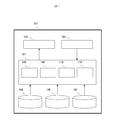
- FIG. 1 is a diagram showing a configuration of a driving support device according to an embodiment of the present invention.
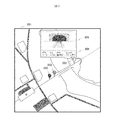
- FIG. 2 is a diagram showing an example of display to the user in the embodiment of the present invention.
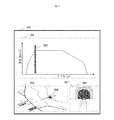
- FIG. 3 is a diagram showing another example of display to the user in the embodiment of the present invention.
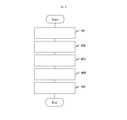
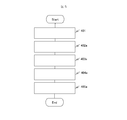
- FIG. 4 is a flowchart showing a process (one example) in the embodiment of the present invention.
- FIG. 5 is a flowchart showing processing (other examples) in the embodiment of the present invention.
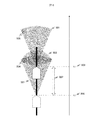
- FIG. 6 is a conceptual diagram illustrating a method of setting an offset value (when the camera has a narrow angle) in the embodiment of the present invention.
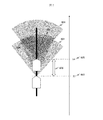
- FIG. 7 is a conceptual diagram illustrating a method of setting an offset value (when the camera has a wide angle) in the embodiment of the present invention.
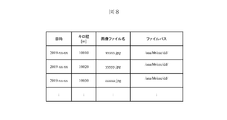
- FIG. 8 is a diagram showing an example of the recording format of the front landscape recording unit in the embodiment of the present invention.
- FIG. 1 is a diagram showing a configuration of a driving support device in this embodiment.
- the driving support device 101 in this embodiment includes a display unit 102 that displays to the user, an operation unit 103 that is operated by the user, and an operation in which recommended driving operations and the driver's own past driving operations are recorded. From the operation recording unit 104, the map recording unit 105 in which the map is recorded, the front landscape recording unit 106 in which the image data of the front landscape and the position data in which the front landscape is captured are recorded, and the processing unit 107. Become.
- the processing unit 107 includes a first determination unit 108 that determines the operation data to be displayed on the display unit, and a first display control unit 109 that displays the operation operation and the map around the track in the determined operation data on the display unit.
- a second determination unit 110 that determines a position on the railroad track that specifies an image of the front landscape to be displayed on the display unit, and a second display that displays an image of the front landscape at the determined position on the railroad track on the display unit. It includes a control unit 111.
- switching the driving operation means operating the driving device to switch between power running, coasting and braking, and to start and end constant speed operation and decelerating operation.
- driving data means the data of the driving operation performed in one crew or the data of the ideal driving operation to be performed in one crew.
- forward landscape means a landscape that the driver visually recognizes in front of the driver in actual driving.
- This device is assumed to be configured as a tablet, but of course it may be configured as another device. For example, it may be configured as a personal computer or an on-board device. Further, as a method for configuring this device, software may be installed on the device, or software placed outside the device as a Web application may be operated from the device without installing the software on the device. May be good. In short, it is sufficient that the user is provided with an interface for using this device, and the device for configuring the device and the method for configuring the device do not matter.
- the front scenery recorded by the front scenery recording unit 106 is based on the front scenery taken in the daytime, but may be the front scenery taken in various external conditions such as early morning, nighttime, rain and fog. It is expected that the learning effect will be improved by displaying the front landscape image taken by the user under the conditions close to the conditions of the driving data to be learned by the user.
- Figure 2 shows an example of display to the user.
- the driver is not familiar with the run curve, which is time-series data of the position and speed of the train, so the switching points of the driving operation are displayed as icons 202, 203, and 204 on the map 201.
- the notch value after switching may also be displayed on the icon.
- the icons 202, 203, and 204 of the operation operation switching point displayed on the map are tapped, the scenery 205 in front of the switching point is displayed.
- An area 206 for displaying various supplementary information other than the front scenery may be provided.
- the time, the position of the switching point (for example, about a kilometer), the speed of the train, and the details of the switching operation operation (for example, from power running to coasting) are displayed.
- the notch values before and after switching may be displayed in the display area 206.
- the user can display the driving operation of at least one or more arbitrary driving data for which he / she wants to confirm the driving operation on the map.
- the icons are displayed for each driving data, for example, by changing the size of the icons or blurring the icons so that the icons of the individual driving data can be identified even when the icons of a plurality of driving data overlap.
- the form may be changed. It is easy to compare the two by displaying the learner's own driving operation and the driving operation of the instructing driver or the driving operation that minimizes the power consumption.
- FIG. 3 shows another example of display to the user.
- FIG. 2 shows an example of displaying only a map, but FIG. 3 shows an area 302 for displaying a run curve and a map on the display 301, assuming a user who wants to associate a switching point of a driving operation with a run curve.
- An example of providing the area 303 and the area 304 for displaying the front scenery is shown.
- the point 306 corresponding to the position is displayed on the map, and the forward landscape 307 corresponding to the position is displayed. By doing so, it becomes possible to easily associate the run curve with the landscape in front.
- the icon of the operation operation switching point shown in FIG. 2 may be displayed in the run curve display area 302 or the map display area 303.
- the notch value may also be displayed in the run curve display area 302.
- the power consumption may also be displayed on the display 301.
- FIG. 4 is a flowchart showing, in the above example (FIG. 2), a process executed by the driving support device until the user specifies an arbitrary driving operation switching point and the landscape in front of the switching point is displayed to the user. Is.
- Step 401 The first determination unit 108 determines the operation data or the default operation data specified by the operation unit 103 by the user as at least one operation data to be displayed.
- the operation data may be specified by the user by the date and time, or may be specified by a unique ID associated with a certain operation such as a train number. The point is that the operation data to be displayed can be specified by the operation unit 103, and the method is not limited. Proceed to step 402.
- Step 402 The first display control unit 109 acquires the operation operation of an arbitrary section from the determined operation data from the operation operation recording unit 104, acquires the map around the track in the same section from the map recording unit 105, and operates.
- the operation switching point is displayed on the display unit 102 as an icon on the map. Proceed to step 403.
- Step 403 The second determination unit 110 determines the driving operation switching point designated by the operation unit 103 as the driving operation switching point for displaying the front scenery.
- the user specifies the driving operation switching point, for example, by tapping the icon of the switching point for which the front scenery is desired to be confirmed among the driving operation switching points displayed on the display unit 102. Proceed to step 404.
- Step 404 The second display control unit 111 calculates a point moved by an offset value with respect to the determined operation operation switching point.
- the position of the operation switching point may be managed by using a kilometer representing a distance from a certain reference point, or may be managed by using latitude and longitude. The point is that the operation switching point can be uniquely specified, and the method does not matter.
- the offset value is the distance required to correct the pre-recorded forward landscape image and the driver's field of view so that they look the same.
- the optimum offset value at which the front landscape image and the driver's field of view look similar may be obtained, or the offset value may be obtained so that the user can see the image as desired. May be adjustable.
- Step 405 The second display control unit 111 acquires the front landscape image corresponding to the kilometer of the front landscape image to be displayed calculated in step 404 from the front landscape recording unit 106 and displays it on the display unit 102.
- FIG. 5 shows the process executed by the driving support device in the above other example (FIG. 3) until the user specifies an arbitrary position on the run curve and the landscape in front of the position is displayed to the user. It is a flowchart.
- the first step is step 401, and the process proceeds to step 402a.
- Step 402a The first display control unit 109 acquires the operation operation of an arbitrary section from the determined operation data from the operation operation recording unit 104, acquires the map around the track in the same section from the map recording unit 105, and operates. The operation is displayed on the display unit 102 together with the map as a run curve. Proceed to step 403a.
- Step 403a The second determination unit 110 determines the position on the run curve designated by the operation unit 103 by the user to the position on the run curve for displaying the front scenery.
- the user specifies the position on the run curve, for example, by moving the pointer 305 to a position on the run curve displayed on the display unit 102 where he / she wants to check the front scenery.
- the point 306 on the map also moves in response to the movement of the pointer 305. Proceed to step 404a.
- Step 404a The second display control unit 111 calculates a position moved by an offset value with respect to the determined position on the run curve.
- the second display control unit 111 calculates the kilometer of the front landscape image to be displayed by adjusting the offset value with respect to the kilometer of the position on the run curve. Proceed to step 405a.
- Step 405a The second display control unit 111 acquires the front landscape image corresponding to the kilometer of the front landscape image to be displayed calculated in step 404a from the front landscape recording unit 106 and displays it on the display unit 102.
- the offset value will be described with reference to FIGS. 6 and 7.
- the offset value has a positive or negative value, and the positive or negative value changes depending on whether the angle of view of the camera used for recording the front landscape in advance is narrower or wider than the human field of view.
- FIG. 6 shows a case where the angle of view 501 of the camera used for recording the front landscape in advance is narrower than the human field of view 502.
- the target object 504 is observed in the field of view of the driver who is at the position of X1 (503) about a kilometer, and it is recommended to switch the driving operation with reference to the target object 504.
- X1 (503) is recorded as the recommended operation switching point.
- the target object 504 is not displayed on the display unit because the angle of view of the camera is narrow. Therefore, the user may misunderstand that the driving operation is switched with reference to the erroneous target 505.
- the absolute value of the offset value 507 is the distance
- the target object 504 does not enter the angle of view unless it is an image of a point retreated in the direction opposite to the traveling direction. In this case, a negative value is set for the offset value.
- FIG. 7 shows a case where the angle of view 601 of the camera used for recording the front landscape in advance is wider than the human field of view 602.
- the target object 604 at the driving operation switching point is included in the angle of view at about km X3 (603), but it seems to be far away as a view. Therefore, the driver may mistakenly learn that the driving operation should be switched when the target object 604 is seen in the distance.
- to the distance X4 (605) which is the distance traveled in the traveling direction so that the appearance of the target object 604 approaches the appearance of a human being, is set as the absolute value of the offset value 606. Set a positive value for the offset value.
- the offset value may be calculated geometrically from the angle of view of the camera and the viewing angle of a human being, or as described above, the front landscape image and the driver's field of view can be seen in the same manner by conducting an experiment with the driver in advance.
- the value may be calculated, or the offset value may be adjusted so that the user can see the image as desired.
- the notch operation is targeted as the operation operation.
- the notch has positive and negative values and zero values.
- a positive value represents the state of stepping on the accelerator in a car
- a negative value represents the state of stepping on the brake.
- the power running notch has a value of 1 to 5
- the brake notch has a value of -1 to -8.
- the notch When shifting from the stopped state to the accelerated state, the notch does not change from 0 to 5 instantly, but often goes through values such as 2 and 4. Therefore, if the operation operation switching points are extracted simply by using only the change in the notch value as a trigger, a large number of operation operation switching points will be set.
- What we want to extract as a driving operation switching point is a point where driving operation is largely switched from powering to coasting and coasting to braking. Therefore, only the points where the notch changes from positive to zero and from zero to negative are extracted as switching points for driving operations.
- Trains have operation modes such as constant speed operation and decelerating operation that maintain a constant speed.
- operation modes such as constant speed operation and decelerating operation that maintain a constant speed.
- it is common to press a dedicated switch. Since the transition from power running to constant speed operation is a large operation operation switching point, the point where a dedicated switch for switching to such an operation mode is handled is also extracted as the operation operation switching point.
- Arbitrary driving data can be recorded in the driving operation recording unit 104 according to the purpose of the learner. For example, when learning the driving operation of the driving driver, the run curve or the driving operation switching point when the driving driver has driven in the past is used. For example, when learning an energy-saving driving operation, an energy-saving driving pattern that minimizes power consumption may be created by a mathematical optimum technique, and a run curve or a driving operation switching point corresponding to the energy-saving driving pattern may be used. If the learner wants to look back on his / her own past driving operation, he / she uses the run curve or the driving operation switching point when the learner himself / herself drove in the past.
- the data of the run curve of the driving operation or the driving operation switching point to be learned by the learner is recorded, and the origin of the data does not matter. It is also possible to extract the driving operation switching point from the run curve. GPS data during operation may be recorded and the run curve may be obtained from the GPS data. The value of the notch obtained from the on-board device may be recorded.
- the learner drives, the points where the instructor notices good driving operations, bad driving operations, etc. are recorded, and when the learner and the instructor look back on the driving operations together, the points can be displayed. , The instructor can explain good driving operation, bad driving operation, etc. The comment accompanying the point may be recorded and displayed.
- the driving data recorded in the driving operation recording unit 104 can be various driving data depending on the purpose of the learner. Therefore, it is not realistic to record all the driving data in the driving support device.
- the driving data may be recorded on a server installed at an arbitrary location, and when the learner selects the desired driving data, the server may go to acquire the selected driving data.
- FIG. 8 shows an example of the recording format of the front landscape image recorded by the front landscape recording unit 106.
- the date and time when the image was acquired, the kilometer, the image file name of the landscape in front of each kilometer, and the storage location (file path) of the image file are described.
- the data format may be other than that shown in FIG. 8, for example, the position data may use latitude / longitude instead of about km, the file path is not described, and the data storage location is searched by the file name. You may try to do it. In short, it suffices if the front landscape image of the position to be displayed can be uniquely acquired, and the saving method and the search method of the target image do not matter.
- the forward landscape image is recorded in the forward landscape recording unit for each external environment (day, night, rain, fog, etc.), and the external environmental conditions of the learning target data are predicted from the operation time and weather forecast of the learning target.
- the front landscape image of the front landscape recording unit having the external environment conditions closest to the predicted external environment may be used for the display of the display unit. By doing so, it becomes possible to learn the driving operation switching point with a more realistic feeling.
- the front landscape image recorded in the front landscape recording unit 106 can be a front landscape image of various routes depending on the route to be learned by the learner. Therefore, it is not realistic to record the front scenery image of all the routes in the driving support device.
- the forward landscape image may be recorded on a server installed at an arbitrary location, and when the learner selects the route to be learned, the server may go to acquire the forward landscape image of the selected route. .. Since image data generally has a large capacity, it is possible to reduce the storage capacity of the driving support device by doing so.
- the map recorded in the map recording unit 105 may also be acquired by the server.
- the driver can learn the point at which the driving operation is switched based on the scenery visually recognized ahead in the actual driving. It becomes easy to associate the learned result with the actual route, and the learned result can be reflected in the actual driving.
- the driving support device may be configured to be connectable to the display device and the operating device.
- processing in the processing unit can be expressed as a processing method of the driving support device, and can also be expressed as a program for causing the computer to execute the processing.
Landscapes
- Engineering & Computer Science (AREA)
- Mechanical Engineering (AREA)
- Business, Economics & Management (AREA)
- Theoretical Computer Science (AREA)
- Physics & Mathematics (AREA)
- Educational Administration (AREA)
- Educational Technology (AREA)
- General Physics & Mathematics (AREA)
- Entrepreneurship & Innovation (AREA)
- Instructional Devices (AREA)
- Train Traffic Observation, Control, And Security (AREA)
- Traffic Control Systems (AREA)
- Navigation (AREA)
Priority Applications (1)
| Application Number | Priority Date | Filing Date | Title |
|---|---|---|---|
| EP21791959.6A EP4140853A4 (en) | 2020-04-20 | 2021-04-13 | Driving assistance device, processing method for driving assistance device, and program |
Applications Claiming Priority (2)
| Application Number | Priority Date | Filing Date | Title |
|---|---|---|---|
| JP2020-074974 | 2020-04-20 | ||
| JP2020074974A JP7308785B2 (ja) | 2020-04-20 | 2020-04-20 | 運転支援装置、運転支援装置の処理方法およびプログラム |
Publications (1)
| Publication Number | Publication Date |
|---|---|
| WO2021215296A1 true WO2021215296A1 (ja) | 2021-10-28 |
Family
ID=78269401
Family Applications (1)
| Application Number | Title | Priority Date | Filing Date |
|---|---|---|---|
| PCT/JP2021/015268 Ceased WO2021215296A1 (ja) | 2020-04-20 | 2021-04-13 | 運転支援装置、運転支援装置の処理方法およびプログラム |
Country Status (3)
| Country | Link |
|---|---|
| EP (1) | EP4140853A4 (enExample) |
| JP (1) | JP7308785B2 (enExample) |
| WO (1) | WO2021215296A1 (enExample) |
Cited By (1)
| Publication number | Priority date | Publication date | Assignee | Title |
|---|---|---|---|---|
| CN114056341A (zh) * | 2021-11-03 | 2022-02-18 | 天津五八驾考信息技术有限公司 | 驾驶培训中的驾驶辅助方法、设备及存储介质 |
Families Citing this family (2)
| Publication number | Priority date | Publication date | Assignee | Title |
|---|---|---|---|---|
| JP2024031429A (ja) * | 2022-08-26 | 2024-03-07 | 株式会社日立製作所 | 運転状況モニタリング装置 |
| JP7774530B2 (ja) * | 2022-08-29 | 2025-11-21 | 株式会社日立製作所 | 運転状況モニタリング装置 |
Citations (3)
| Publication number | Priority date | Publication date | Assignee | Title |
|---|---|---|---|---|
| JP2013032949A (ja) * | 2011-08-01 | 2013-02-14 | Aisin Aw Co Ltd | 車両用表示処理システムおよび車両用表示処理方法並びにプログラム |
| JP2015182684A (ja) * | 2014-03-25 | 2015-10-22 | 株式会社日立製作所 | 計算機システム |
| JP2017003929A (ja) * | 2015-06-16 | 2017-01-05 | 東日本旅客鉄道株式会社 | 乗務員訓練支援システム |
Family Cites Families (2)
| Publication number | Priority date | Publication date | Assignee | Title |
|---|---|---|---|---|
| US8633985B2 (en) * | 2005-08-05 | 2014-01-21 | Vigil Systems Pty. Ltd. | Computerized information collection and training method and apparatus |
| DE102012105043B4 (de) * | 2012-06-12 | 2014-03-27 | Deutsches Zentrum für Luft- und Raumfahrt e.V. | Streckenvorschau |
-
2020
- 2020-04-20 JP JP2020074974A patent/JP7308785B2/ja active Active
-
2021
- 2021-04-13 EP EP21791959.6A patent/EP4140853A4/en active Pending
- 2021-04-13 WO PCT/JP2021/015268 patent/WO2021215296A1/ja not_active Ceased
Patent Citations (3)
| Publication number | Priority date | Publication date | Assignee | Title |
|---|---|---|---|---|
| JP2013032949A (ja) * | 2011-08-01 | 2013-02-14 | Aisin Aw Co Ltd | 車両用表示処理システムおよび車両用表示処理方法並びにプログラム |
| JP2015182684A (ja) * | 2014-03-25 | 2015-10-22 | 株式会社日立製作所 | 計算機システム |
| JP2017003929A (ja) * | 2015-06-16 | 2017-01-05 | 東日本旅客鉄道株式会社 | 乗務員訓練支援システム |
Non-Patent Citations (1)
| Title |
|---|
| See also references of EP4140853A4 * |
Cited By (2)
| Publication number | Priority date | Publication date | Assignee | Title |
|---|---|---|---|---|
| CN114056341A (zh) * | 2021-11-03 | 2022-02-18 | 天津五八驾考信息技术有限公司 | 驾驶培训中的驾驶辅助方法、设备及存储介质 |
| CN114056341B (zh) * | 2021-11-03 | 2024-01-26 | 天津五八驾考信息技术有限公司 | 驾驶培训中的驾驶辅助方法、设备及存储介质 |
Also Published As
| Publication number | Publication date |
|---|---|
| JP7308785B2 (ja) | 2023-07-14 |
| EP4140853A1 (en) | 2023-03-01 |
| EP4140853A4 (en) | 2024-06-05 |
| JP2021172140A (ja) | 2021-11-01 |
Similar Documents
| Publication | Publication Date | Title |
|---|---|---|
| US8406990B2 (en) | Navigational device | |
| WO2021215296A1 (ja) | 運転支援装置、運転支援装置の処理方法およびプログラム | |
| US20090005929A1 (en) | Vehicle behavior learning apparatuses, methods, and programs | |
| JP2005038325A (ja) | 車線変更支援装置 | |
| JP2008275575A (ja) | 車両挙動学習装置及び車両挙動学習プログラム | |
| JP2017083446A (ja) | 自動運転システム及びナビケーションシステム | |
| JP2019087139A (ja) | 車両制御装置 | |
| JP2008001120A (ja) | 車両用表示制御装置 | |
| JP2019148677A (ja) | 仮想現実トレーニングシステム及びそれを備える車両 | |
| JP2018045273A (ja) | 表示装置 | |
| JP3942811B2 (ja) | ナビゲーション装置 | |
| US20060178818A1 (en) | On-board navigation system with a route preview and guiding instructions | |
| JP5687879B2 (ja) | 情報処理装置、自動車、情報処理方法及びプログラム | |
| JP2018083517A (ja) | 車両システム | |
| JP2025105759A (ja) | 画像制御プログラム、画像制御装置及び画像制御方法 | |
| JP2009244660A (ja) | 運転研修装置 | |
| JP2022080013A (ja) | 走行支援装置 | |
| JP4895126B2 (ja) | 画像認識装置及びナビゲーション装置 | |
| JP4728941B2 (ja) | 運転研修装置 | |
| CN104574942A (zh) | 前导车在突发事件发生时精确到秒运行的控制方法及系统 | |
| JP4739174B2 (ja) | 運転研修装置 | |
| JPS62289721A (ja) | 車載用ナビゲ−シヨン装置 | |
| CN120390140A (zh) | 驾考教学视频拍摄辅助方法及系统 | |
| JPH08210869A (ja) | 車両用現在位置表示装置 | |
| CN109624989B (zh) | 车辆驾驶辅助系统和方法 |
Legal Events
| Date | Code | Title | Description |
|---|---|---|---|
| 121 | Ep: the epo has been informed by wipo that ep was designated in this application |
Ref document number: 21791959 Country of ref document: EP Kind code of ref document: A1 |
|
| DPE1 | Request for preliminary examination filed after expiration of 19th month from priority date (pct application filed from 20040101) | ||
| NENP | Non-entry into the national phase |
Ref country code: DE |
|
| ENP | Entry into the national phase |
Ref document number: 2021791959 Country of ref document: EP Effective date: 20221121 |