WO2020195331A1 - サポートプログラム、情報処理装置、および印刷方法 - Google Patents
サポートプログラム、情報処理装置、および印刷方法 Download PDFInfo
- Publication number
- WO2020195331A1 WO2020195331A1 PCT/JP2020/006091 JP2020006091W WO2020195331A1 WO 2020195331 A1 WO2020195331 A1 WO 2020195331A1 JP 2020006091 W JP2020006091 W JP 2020006091W WO 2020195331 A1 WO2020195331 A1 WO 2020195331A1
- Authority
- WO
- WIPO (PCT)
- Prior art keywords
- barcode
- image data
- data
- program
- printer
- Prior art date
- Legal status (The legal status is an assumption and is not a legal conclusion. Google has not performed a legal analysis and makes no representation as to the accuracy of the status listed.)
- Ceased
Links
Images




Classifications
-
- G—PHYSICS
- G06—COMPUTING OR CALCULATING; COUNTING
- G06F—ELECTRIC DIGITAL DATA PROCESSING
- G06F3/00—Input arrangements for transferring data to be processed into a form capable of being handled by the computer; Output arrangements for transferring data from processing unit to output unit, e.g. interface arrangements
- G06F3/12—Digital output to print unit, e.g. line printer, chain printer
- G06F3/1201—Dedicated interfaces to print systems
- G06F3/1223—Dedicated interfaces to print systems specifically adapted to use a particular technique
- G06F3/1224—Client or server resources management
- G06F3/1228—Printing driverless or using generic drivers
-
- H—ELECTRICITY
- H04—ELECTRIC COMMUNICATION TECHNIQUE
- H04N—PICTORIAL COMMUNICATION, e.g. TELEVISION
- H04N1/00—Scanning, transmission or reproduction of documents or the like, e.g. facsimile transmission; Details thereof
- H04N1/32—Circuits or arrangements for control or supervision between transmitter and receiver or between image input and image output device, e.g. between a still-image camera and its memory or between a still-image camera and a printer device
- H04N1/32101—Display, printing, storage or transmission of additional information, e.g. ID code, date and time or title
- H04N1/32144—Display, printing, storage or transmission of additional information, e.g. ID code, date and time or title embedded in the image data, i.e. enclosed or integrated in the image, e.g. watermark, super-imposed logo or stamp
- H04N1/32149—Methods relating to embedding, encoding, decoding, detection or retrieval operations
- H04N1/32203—Spatial or amplitude domain methods
- H04N1/32224—Replacing pixels of an image with other pixels from the same image, e.g. texture block coding
-
- B—PERFORMING OPERATIONS; TRANSPORTING
- B41—PRINTING; LINING MACHINES; TYPEWRITERS; STAMPS
- B41J—TYPEWRITERS; SELECTIVE PRINTING MECHANISMS, i.e. MECHANISMS PRINTING OTHERWISE THAN FROM A FORME; CORRECTION OF TYPOGRAPHICAL ERRORS
- B41J29/00—Details of, or accessories for, typewriters or selective printing mechanisms not otherwise provided for
- B41J29/38—Drives, motors, controls or automatic cut-off devices for the entire printing mechanism
-
- G—PHYSICS
- G06—COMPUTING OR CALCULATING; COUNTING
- G06F—ELECTRIC DIGITAL DATA PROCESSING
- G06F3/00—Input arrangements for transferring data to be processed into a form capable of being handled by the computer; Output arrangements for transferring data from processing unit to output unit, e.g. interface arrangements
- G06F3/12—Digital output to print unit, e.g. line printer, chain printer
- G06F3/1201—Dedicated interfaces to print systems
- G06F3/1202—Dedicated interfaces to print systems specifically adapted to achieve a particular effect
- G06F3/1203—Improving or facilitating administration, e.g. print management
- G06F3/1206—Improving or facilitating administration, e.g. print management resulting in increased flexibility in input data format or job format or job type
-
- G—PHYSICS
- G06—COMPUTING OR CALCULATING; COUNTING
- G06F—ELECTRIC DIGITAL DATA PROCESSING
- G06F3/00—Input arrangements for transferring data to be processed into a form capable of being handled by the computer; Output arrangements for transferring data from processing unit to output unit, e.g. interface arrangements
- G06F3/12—Digital output to print unit, e.g. line printer, chain printer
- G06F3/1201—Dedicated interfaces to print systems
- G06F3/1202—Dedicated interfaces to print systems specifically adapted to achieve a particular effect
- G06F3/1203—Improving or facilitating administration, e.g. print management
- G06F3/1208—Improving or facilitating administration, e.g. print management resulting in improved quality of the output result, e.g. print layout, colours, workflows, print preview
-
- G—PHYSICS
- G06—COMPUTING OR CALCULATING; COUNTING
- G06F—ELECTRIC DIGITAL DATA PROCESSING
- G06F3/00—Input arrangements for transferring data to be processed into a form capable of being handled by the computer; Output arrangements for transferring data from processing unit to output unit, e.g. interface arrangements
- G06F3/12—Digital output to print unit, e.g. line printer, chain printer
- G06F3/1201—Dedicated interfaces to print systems
- G06F3/1223—Dedicated interfaces to print systems specifically adapted to use a particular technique
- G06F3/1237—Print job management
- G06F3/1244—Job translation or job parsing, e.g. page banding
-
- G—PHYSICS
- G06—COMPUTING OR CALCULATING; COUNTING
- G06F—ELECTRIC DIGITAL DATA PROCESSING
- G06F2206/00—Indexing scheme related to dedicated interfaces for computers
- G06F2206/15—Indexing scheme related to printer interfaces for computers, indexing schema related to group G06F3/12
- G06F2206/1514—Sub-job
-
- Y—GENERAL TAGGING OF NEW TECHNOLOGICAL DEVELOPMENTS; GENERAL TAGGING OF CROSS-SECTIONAL TECHNOLOGIES SPANNING OVER SEVERAL SECTIONS OF THE IPC; TECHNICAL SUBJECTS COVERED BY FORMER USPC CROSS-REFERENCE ART COLLECTIONS [XRACs] AND DIGESTS
- Y02—TECHNOLOGIES OR APPLICATIONS FOR MITIGATION OR ADAPTATION AGAINST CLIMATE CHANGE
- Y02P—CLIMATE CHANGE MITIGATION TECHNOLOGIES IN THE PRODUCTION OR PROCESSING OF GOODS
- Y02P90/00—Enabling technologies with a potential contribution to greenhouse gas [GHG] emissions mitigation
- Y02P90/30—Computing systems specially adapted for manufacturing
Definitions
- the technical fields disclosed in this specification relate to support programs, information processing devices, and printing methods that support printer control.
- a printer driver As a technique for controlling a printer from an information processing device such as a personal computer, a configuration in which a printer driver is installed in the information processing device, print data is generated by the printer driver, and the print data is transmitted to the printer is widely known (for example, Japanese Patent Application Laid-Open No. 2017-134718).
- the printer driver is provided by the manufacturer of the printer, supports various functions of the printer, and can fully utilize the printer.
- the algorithm for generating print data differs between the OS standard general-purpose print program described above and the printer driver provided by the printer manufacturer. Therefore, the image including the barcode can be printed by printing with the printer driver, but the image of the barcode cannot be printed by printing with the general-purpose printing program, or even if the image of the barcode can be printed, the quality can be read by the reader. There is a possibility that it will not be.
- This specification discloses a technique for improving the accuracy when printing a barcode in an information processing device incorporating an OS standard general-purpose printing program.
- the support program made for the purpose of solving the above-mentioned problems is a support program that can be executed by a computer of the information processing device and corresponds to a printer connected to the information processing device, and prints an image on the computer.
- a print instruction to be given to the printer is given to a general-purpose print program preliminarily incorporated in the operating system of the information processing apparatus, a bar code is shown in the image data indicating the image to be printed by the print instruction.
- the determination process for determining whether or not information is included and the determination process determines that the information indicating the bar code is included, the image of the bar code that can be generated by the general-purpose printing program is substituted. It is characterized in that a generation process of generating specific data for printing a substitute image of the bar code on the printer is executed.
- the support program corresponding to the printer that prints the image when the image to be printed contains information indicating a barcode, the support program corresponding to the printer that prints the image generates specific specific data for printing the image of the barcode. To do. Therefore, an improvement in drawing accuracy can be expected as compared with the case where the image of the barcode is printed as it is by a general-purpose printing program.
- a control method for realizing the functions of the above device, a computer program, and a computer-readable storage medium for storing the computer program are also new and useful.
- a technology for improving the accuracy when printing a barcode is realized in an information processing device incorporating an OS standard general-purpose printing program.
- This embodiment discloses an embodiment embodying a printing system including a personal computer (hereinafter referred to as "PC") and a printer.
- the printing system of this embodiment is used, for example, for printing barcodes.
- FIG. 1 shows an example of the configuration of a printing system in which the program of the first form is executed.
- the system shown in FIG. 1 includes a PC 1, a printer 2, and a printer 3.
- PC1 is an example of an information processing device.
- the printer 2 and the printer 3 are devices having a printing function, and can communicate with the PC 1 via local communication or network communication.
- a plurality of printers 2 may be connected to the PC 1.
- the PC 1 includes a controller 10, a user interface (hereinafter referred to as "UI") 20, and a communication interface (hereinafter referred to as "communication IF”) 30.
- the UI 20 and the communication IF 30 are electrically connected to the controller 10.
- the UI 20 includes hardware that displays various displays and accepts user's instruction input.
- the UI 20 may be a touch panel having both a display function and an input reception function, or may be a combination of a display having a display function and a keyboard, a mouse, or the like having an input reception function.
- the communication IF30 includes hardware for communicating with the printer 2 and printer 3 and hardware for accessing the Internet.
- the communication IF 30 may include a plurality of interfaces having different communication methods.
- the communication method includes, for example, network communication and USB communication. Further, it may be wired communication or wireless communication.
- the controller 10 includes a CPU 11 and a memory 12.
- the CPU 11 is an example of a computer.
- the memory 12 includes a ROM, a RAM, a non-volatile memory, and a buffer of the CPU 11, and stores programs such as various application programs (hereinafter referred to as “applications”) and various data. In this specification, the details of the memory are not distinguished.
- the CPU 11 executes various processes according to the program read from the memory 12 and based on the user's instruction.
- the controller 10 in FIG. 1 is a general term for hardware and software used for controlling the PC 1, and does not necessarily represent a single hardware that actually exists in the PC 1.
- An example of the memory 12 may be a storage medium that can be read by a computer.
- a computer-readable storage medium is a non-transitory medium.
- the non-transitory medium also includes a recording medium such as a CD-ROM or a DVD-ROM.
- the non-transitory medium is also a tangible medium.
- an electric signal that carries a program downloaded from a server on the Internet is a computer-readable signal medium, which is a kind of computer-readable medium, but is a storage that can be read by a non-transitory computer. Not included in the medium.
- the memory 12 stores an operating system (hereinafter referred to as “OS”) 21 including a general-purpose printing program 41, an auxiliary program 42, and an editing application 43.
- the auxiliary program 42 is an example of a support program.
- the auxiliary program 42 is, for example, a hardware support application (abbreviation, HSA) created by a printer vendor based on a specification published by Microsoft Corporation.
- OS21 is, for example, Microsoft Windows (registered trademark), MacOS (registered trademark), Linux (registered trademark).
- the memory 12 stores various data including information on the connected printer and various programs such as a browser. Further, various information such as the optimization table 22 is stored in the memory 12.
- the general-purpose printing program 41 is an application for executing printing from the PC 1 to various printers such as the printer 2, and is an OS standard printing program pre-installed in the OS 21.
- the general-purpose print program 41 of the present embodiment is a program that generates print data compatible with the printer based on the image data to be printed.
- the general-purpose printing program 41 is a general-purpose application that can be applied to printers of a plurality of types of models provided by the vendor of each printer, and is a program that causes each printer to perform operations common to each model.
- the general-purpose print program 41 may be a kind of program provided by the vendor of each printer to the vendor of OS21 in order to be incorporated in OS21 in advance, for example, a type of printer driver provided to be incorporated in OS21 in advance.
- the auxiliary program 42 is a program that executes processing based on an instruction from the OS 21 when the general-purpose printing program 41 is started, and is an application that supports control of the target hardware, for example, the printer 2.
- the auxiliary program 42 is started from, for example, the general-purpose printing program 41.
- the auxiliary program 42 is a program prepared for each type of printer by a vendor such as the printer 2. For example, an auxiliary program 42 for an inkjet printer and an auxiliary program 42 for a laser printer are prepared. There may be an auxiliary program 42 prepared not only for each printer type but also for each printer model and each printer model series.
- the printer vendor registers the auxiliary program 42 in the platform provided by the OS21 vendor according to the procedure specified by the OS21 vendor.
- the OS 21 downloads the auxiliary program 42 from the server in which the auxiliary program 42 is stored. Incorporate into PC1.
- the OS 21 associates the identification information of the incorporated auxiliary program 42 with the printer information of the newly connected printer and stores it in the memory 12.
- the respective auxiliary programs corresponding to the types of each model are incorporated, and the information for associating each printer with each auxiliary program is stored in the memory 12. That is, in the memory 12, as the printer information of each printer connected to the PC 1, the information of the corresponding auxiliary program 42 is stored together with the model information and access information of the printer.
- the editing application 43 is, for example, an application for creating and editing image data and document data.
- the editing application 43 is, for example, Microsoft Word (registered trademark) or PowerPoint (registered trademark). Further, the application may be provided by the vendor of the printer 2 or the printer 3.
- the editing application 43 accepts a user operation including an instruction to cause the printer 2 to perform a predetermined operation. Specifically, the editing application 43 receives, for example, a selection of an image to be printed, a setting of print parameters, and a print instruction for causing the printer 2 to execute printing via the UI 20.
- the editing application 43 can accept, for example, an editing operation for editing an image having an image including a barcode and characters as a print target. Further, the editing application 43 may accept an editing operation for editing an image including a barcode font of the barcode.
- the barcode has a barcode symbol and a quiet zone.
- Bar code symbols display information by bars and spaces. Quiet zones are provided on the left, right, top and bottom of the barcode symbol in a predetermined size or larger.
- the barcode reader reads the barcode based on the reflectance of the barcode.
- the space or quiet zone of the barcode symbol may be a solid white region or a light background color region having an engineering reflectance that does not affect the detection of the barcode.
- the general-purpose print program 41 when the general-purpose print program 41 receives a print instruction with image data of an image including a barcode and characters from the editing application 43, the general-purpose print program 41 processes the image data to generate print data.
- the general-purpose printing program 41 may show the bar portion of the image showing the bar code symbol (hereinafter referred to as “bar code image”) in gray scale. Further, the general-purpose printing program 41 may generate print data for drawing extra black dots in a space portion of a barcode symbol or a quiet zone.
- the image quality of the barcode may deteriorate depending on the characteristics of the printer and the paper.
- an inkjet printer is more likely to cause bleeding than a thermal transfer printer, and when a bar code bar is printed on paper, the thickness of the bar may be thicker than the set value of print data due to the bleeding.
- plain paper is more likely to cause bleeding than glossy paper, and when a barcode is printed on the paper, the thickness of the bar may be thicker than the set value of the print data due to the bleeding.
- the auxiliary program 42 optimizes the image quality of the barcode image data indicating the barcode by improving the barcode print data generated by the general-purpose printing program 41 so that the barcode can be read.
- the auxiliary program 42 improves the print data by using, for example, the optimization table 22 provided in the memory 12.
- the optimization table 22 stores correction values when optimizing print data.
- the optimization table 22 stores model information, paper type information, and thickness information in association with each other.
- the thickness information is information indicating a correction value when correcting the thickness of the bar constituting the barcode symbol. The smaller the correction value of the thickness information, the thinner the bar thickness.
- the model information is information indicating the model of the printer. For example, when the printer of model A is a thermal transfer type printer and the printer of model B is an inkjet type printer, the thickness information of model B has a correction value smaller than the thickness information of model A. .. For example, when the thickness information of the model A is " ⁇ 0", the thickness information of the model B is "-1". That is, even when the same barcode is printed on the same type of paper, the model B draws the barcode thinner than the model A.
- Paper type information is information indicating the type of paper. For example, even in the same model B, the correction value of the thickness information of plain paper is smaller than that of the thickness information of glossy paper. For example, when the thickness information of model B for glossy paper is "-1", the thickness information of model B for plain paper is "-2". That is, even when the same model of printer is used to print the same barcode, the bar is drawn thinner on plain paper than on glossy paper.
- each process step of the process and the sequence diagram in the embodiment basically indicates the process of the CPU 11 according to the instruction described in the program such as the auxiliary program 42. That is, the processing of "judgment”, “extraction”, “selection”, “calculation”, “decision”, “specification”, “acquisition”, “acceptance”, “control”, etc. in the following description is the processing of the CPU 11. Represents.
- the processing by the CPU 11 also includes hardware control using the API of the OS 21.
- the operation of each program will be described by omitting the detailed description of the OS 21. That is, in the following description, the description to the effect that "program B controls hardware C” may refer to “program B controls hardware C using the API of OS21".
- the processing of the CPU 11 according to the instruction described in the program may be described in abbreviated wording.
- the program may be omitted, such as "CPU 11 performs”.
- the processing of the CPU 11 according to the instruction described in the program may be described by a wording that omits the CPU, such as "the program A performs”.
- acquisition is used as a concept that does not require a request. That is, the process of receiving data without the CPU 11 requesting is also included in the concept of "the CPU 11 acquires the data".
- data in the present specification is represented by a computer-readable bit string. Then, data having the same substantial meaning and content but different formats are treated as the same data. The same applies to "information” in the present specification.
- requesting and “instructing” are concepts indicating that information indicating that a request is being made or information indicating that an instruction is being given is output to the other party. Further, the information indicating that the request is made or the information indicating that the instruction is given is simply described as “request” or "instruction”.
- the process of determining whether or not the information A indicates that it is the matter B by the CPU 11 is conceptually described as "determining whether or not the information A is the matter B from the information A". There is.
- the process of determining whether the information A indicates that it is the matter B or the matter C by the CPU 11 is "determined from the information A whether it is the matter B or the matter C". It may be described conceptually as ".
- the auxiliary program 42 is executed from the general-purpose print program 41 when a print instruction for printing using the general-purpose print program 41 is received in a state where a printer corresponding to the auxiliary program 42 is specified via the editing application 43 or the like.
- the PC 1 receives an instruction to execute printing on the printer 2 via the general-purpose printing program 41 in a state where the image data to be printed is specified by the editing application 43, for example, via the UI 20.
- the auxiliary program 42 corresponding to the model type of the printer 2 is incorporated in the PC 1 will be described.
- the editing application 43 receives the designation of the image to be printed and the input of the instruction for printing execution via the UI 20 (arrow A).
- the editing process for instructing the editing application 43 to edit an image is an example of designating an image to be printed.
- the image edited by the editing application 43 according to the editing operation is an example of the image to be printed.
- the editing application 43 receives, for example, a print instruction in which an image including a barcode and characters is designated as a print target.
- the editing application 43 may accept the barcode information indicating the barcode as an image or may accept the barcode font.
- the editing application 43 that has received the print instruction passes a print execution notification indicating the content of the received print instruction to the OS 21. Note that, in FIG. 2, the operation of the OS 21 is omitted.
- the general-purpose print program 41 indicates various information included in the print instruction, for example, information indicating a printer to be printed, information indicating print parameters set by the application, and image data to be printed in the print execution notification. Information and information that identifies the user who instructed printing can be acquired. As will be described later, this information can also be used in the auxiliary program 42.
- the general-purpose print program 41 generates intermediate image data by converting the image data format included in the print execution notification into the intermediate image data format, and generates print job data including the intermediate image data (arrow C). For example, the general-purpose printing program 41 processes the bar code image or the image data including the bar code font included in the print execution notification into intermediate image data.
- the image data included in the editing application 43 is of various types, and the general-purpose printing program 41 converts the received image data into intermediate image data suitable for generating print data. If the image data included in the print execution notification is data suitable for generating the print data, the generation of the intermediate image data may be omitted and the intermediate image data may be used as it is.
- the intermediate image data is, for example, XPS data.
- the general-purpose print program 41 generates print data based on the intermediate image data (arrow D).
- the print data is an example of raster image data generated by the general-purpose printing program 41 based on the image data.
- the general-purpose print program 41 generates print data using the general-purpose parameters among the print parameters.
- the print data generated by the general-purpose print program 41 is print data in a format that can be used for printing by various printers.
- the print data is, for example, PWGRaster data or PDF data.
- the general-purpose print program 41 Since the auxiliary program 42 corresponding to the printer 2 which is the printer specified by the print instruction is stored in the memory 12, the general-purpose print program 41 outputs an execution command for processing of the auxiliary program 42 and outputs the auxiliary program 42. Is operated (arrow E). For example, when the printer 2 is specified, the general-purpose printing program 41 identifies the model of the printer 2 based on the model information of the printer included in the printer information stored in the memory 12, and corresponds to the model type. Auxiliary program 42 is started. Print parameters and print data are attached to the execution command of the arrow E.
- the auxiliary program 42 acquires print data by receiving an execution command from the general-purpose print program 41 (arrow F).
- the arrow F is an example of the acquisition process.
- the auxiliary program 42 analyzes the print data and searches for the barcode image data indicating the barcode image (arrow G). That is, it is determined whether or not the print job data includes image data having a characteristic as a barcode. For example, when the print data includes image data of an image in which lines having different thicknesses are combined such as a barcode symbol, the auxiliary program 42 detects the image data as barcode image data (arrow H). Then, the auxiliary program 42 improves the detected barcode image data (arrow I).
- Arrows G and H are examples of determination processing
- arrows I are examples of generation processing.
- the auxiliary program 42 determines, for example, whether or not the bar code image data includes image data indicating grayscale, that is, whether or not there is a grayscale area, and the image data indicating grayscale is indicated by the arrow I.
- the bar code image data may be improved by binarizing the image data indicating the gray scale, that is, the gray scale region.
- the print data 300 generated by the general-purpose print program 41 includes the barcode image data 301
- the auxiliary program 42 improves the bar code image data 301 by binarizing the area 302 shown in grayscale. ..
- the grayscale area 302 is changed to black, and the barcode image data is generated only by the general-purpose printing program 41.
- the white area and the black area of the barcode are clearly distinguished. Therefore, it is expected that the printer 2 clearly draws the bar portion of the bar code and outputs a bar code that can be read by the bar code reader.
- auxiliary program 42 may improve the print data by using the arrow I so as to provide, for example, a quiet zone having a predetermined size or more in the area adjacent to the barcode image.
- the auxiliary program 42 determines whether or not there is a white area 305 of a predetermined size or larger in the area adjacent to the barcode image in the print data 300 generated by the general-purpose printing program 41. to decide. For example, when there is a stain 303 in the white area 305 on the left side of the barcode image, as shown in FIG. 3B, the auxiliary program 42 fills the stain 303 with white and determines the stain 303 on the left side of the barcode image. Secure a white area 305 that is larger than the size.
- the color to be filled is not limited to white, and may be a light color having an optical reflectance that does not affect the detection of the barcode.
- the auxiliary program 42 determines the reduction ratio based on the barcode algorithm so that the barcode reader can distinguish between the bar and the space.
- auxiliary program 42 may improve the barcode image data by processing the barcode symbol into an image suitable for reading the barcode with the arrow I, for example, based on the optimization table 22. .. It should be noted that processing the barcode symbol into an image suitable for reading the barcode is an example of improving the optimization of the barcode symbol.
- the auxiliary program 42 changes from the optimization table 22 to "model B” and "plain paper”. Read the associated thickness information "-2". For example, the auxiliary program 42 performs processing to reduce the thickness 304 of the bar shown in FIG. 3A according to the read thickness information. As a result, the image data of the bar portion reflects the bleeding, so that when the printer 2 prints the barcode on plain paper, the thickness of the bar is about the same as the thickness specified by the print data. Therefore, it is expected that the drawing quality of barcodes will be improved.
- the thickness information is specified here based on the model and the paper type, the thickness information may be specified based on either the model or the paper type.
- the barcode symbol is processed into an image suitable for reading the barcode by processing the thickness of the bar, that is, the width of the bar, but the region having high reflectance such as white.
- the barcode symbol may be processed into an image suitable for reading the barcode by increasing the size of the barcode.
- the improved barcode image data is an example of a substitute image
- the print data including the improved barcode image data is an example of specific data. Further, at arrow I, all of the above-mentioned improvements may be made, or the user may be able to select the content of the improvement and make improvements according to the selection.
- the auxiliary program 42 edits the print data other than the barcode image data based on the print parameters (arrow J). For example, the auxiliary program 42 adds a command for executing a function peculiar to the printer 2 to the print data by the arrow J.
- the auxiliary program 42 processes the arrow J without performing the arrow I. You may.
- the processed print data including the improved barcode image data is an example of specific data.
- the auxiliary program 42 reflects the printed data after the processing in the print job, returns a completion notification indicating the end of the processing to the general-purpose printing program 41, and ends the processing (arrow K).
- the auxiliary program 42 may reflect the processed print data in the print job via the general-purpose print program 41.
- the general-purpose print program 41 transmits a print command to the printer 2 in response to receiving the end notification from the auxiliary program 42 (arrow L).
- the printer 2 that has received the print command prints the image of the print data according to the print data attached to the print command.
- the printer 2 receives the print data to which the command is added, the printer 2 performs the operation indicated by the command when executing printing.
- the auxiliary program 42 may transmit a print command to the printer 2 via the communication IF 30 without going through the general-purpose print program 41. In that case, the auxiliary program 42 may convert the print data into a data format different from the above-mentioned data format and transmit the print data.
- the auxiliary program 42 provided by the printer manufacturer prints the barcode image generated by the general-purpose printing program 41 to print the barcode image. Improve the data as needed. Therefore, print data having high barcode drawing accuracy can be output to the printer 2 as compared with the case where the barcode image is printed as it is by the general-purpose printing program 41. That is, it can be expected that the printer 2 prints the barcode with a drawing accuracy that can be read by the barcode reader, as compared with the case where the general-purpose printing program 41 prints the barcode image as it is.
- the editing application 43 may attach the barcode font of the barcode to the print execution notification and pass it to the general-purpose printing program 41 instead of the image data including the barcode. Since bar code printing is a special function, the general-purpose printing program 41 may not be able to analyze the bar code font and generate intermediate image data or print data. Therefore, in the present embodiment, the auxiliary program 42 corresponding to the printer 2 has a function of generating barcode raster image data based on the barcode font of the barcode.
- FIG. 4 also shows the operation of the OS 21 omitted.
- the editing application 43 specifies an image including a barcode and characters and causes the printer 2 to print via the general-purpose printing program 41 will be described as an example.
- the editing application 43 accepts the designation of the image to be printed and the input of the print execution instruction via the UI 20 (arrow A), and outputs the print execution notification (arrow B). For example, when the editing application 43 accepts an image including a barcode font as a print target, the editing application 43 adds the image data including the barcode font to the print execution notification.
- the general-purpose print program 41 generates intermediate image data by converting the image data format included in the print execution notification into the intermediate image data format, and generates print job data including the intermediate image data (arrow C).
- the general-purpose print program 41 generates the print job data 200 shown in FIG. 5 (a).
- the print job data 200 includes various storage areas such as a header area 201, an object area 202, and a buffer area 203.
- the header area 201 is an area for storing the settings received by the editing application 43.
- printer information such as printer identification information and a model is stored.
- the general-purpose printing program 41 identifies a printer designated as a device for executing printing based on the information included in the print execution notification, and the information of the specified printer is stored.
- the general-purpose print program 41 identifies the model of the printer 2 based on the model information of the printer included in the printer information stored in the memory 12, and stores it in the header area 201. To do.
- print parameters such as paper size, paper type, color / monochrome, and image quality attached to the print execution command are stored.
- the object area 202 is an area for storing object information indicating an object to be drawn. That is, the intermediate image data generated by the general-purpose printing program 41 is stored in the object area 202 in the XPS format. For example, when a user operation is performed by selecting an image including a barcode font and a character string as a print target, the text information of the character string "aiueo", that is, the text content, the text font, and the size, is stored in the object area 202. The position is memorized. Further, the object area 202 stores the barcode information of the barcode, that is, the barcode font "12345", the type, the size, and the position.
- the buffer area 203 is a temporary storage area for executing various processes.
- the general-purpose print program 41 outputs an execution command after generating the print job data 200 (arrow O). That is, the general-purpose print program 41 outputs an execution command to the auxiliary program 42 before generating print data when the print execution notification is detected. A print parameter and intermediate image data including a barcode font are attached to this execution command.
- the auxiliary program 42 that has received the execution command from the general-purpose printing program 41 searches for the barcode information from the intermediate image data (arrow P). For example, the auxiliary program 42 determines whether or not there is a barcode font in the object area 202 of the print job data.
- the auxiliary program 42 when the auxiliary program 42 receives the print job data shown in FIG. 5A, it detects the barcode font "12345" (arrow Q). That is, it is determined that the intermediate image data includes the barcode information indicating the barcode.
- the arrows P and Q are examples of the determination process, and when the barcode information is detected, it is an example of the case where the object information indicating the barcode is included in the image data of the print job data.
- the auxiliary program 42 moves the barcode information from the object area 202 to the buffer area 203 (arrow R), as shown in FIG. 5 (b). That is, the auxiliary program 42 overwrites the detected bar code information in the buffer area 203 and deletes the bar code information from the object area 202.
- the arrow R is an example of the barcode storage process
- the barcode information stored in the buffer area 203 is an example of the barcode object data. As a result, the aspect of the print job data is changed.
- the auxiliary program 42 returns the end notification indicating the end of the process to the general-purpose print program 41 and ends the process (arrow S).
- the general-purpose print program 41 generates print data based on the intermediate image data stored in the object area 202 in response to the end notification (arrow D). That is, the intermediate image data in the state where the barcode image is removed is rasterized to generate print data.
- the general-purpose print program 41 generates print data using the general-purpose parameters among the print parameters. Specifically, for example, the general-purpose printing program 41 rasterizes image data indicating characters to generate raster image data 310, as shown in FIG. 6A.
- the raster image data 310 generated by the general-purpose print program 41 is an example of raster image data generated by the general-purpose print program based on the object information included in the image data included in the print job data.
- the general-purpose print program 41 outputs an execution command for executing the process of the auxiliary program 42 (arrow E).
- the auxiliary program 42 acquires print data by receiving an execution command from the general-purpose print program 41 (arrow F).
- the arrow F is an example of the acquisition process.
- the auxiliary program 42 performs rasterization based on the barcode information stored in the buffer area 203, and generates raster image data of the barcode (arrow T).
- the auxiliary program 42 generates raster image data 320 of a barcode image indicating a barcode, as shown in FIG. 6B.
- the raster image data 320 is generated in the same data format as the print data acquired from the general-purpose print program 41.
- the arrow T is an example of raster processing.
- the auxiliary program 42 synthesizes the raster image data of the barcode generated by the arrow T with the print data generated by the general-purpose printing program 41 based on the intermediate image data stored in the object area 202, and generates the composite image data.
- Arrow U Specifically, for example, the auxiliary program 42 synthesizes the raster image data 310 shown in FIG. 6A and the raster image data 320 shown in FIG. 6B, and the composite image data 330 shown in FIG. 6C. To generate.
- the arrow U is an example of the generation process, and the composite image data 330 is an example of specific data.
- the auxiliary program 42 returns the end notification to the general-purpose print program 41 and ends the process (arrow K).
- the general-purpose print program 41 transmits a print command to the printer 2 in response to receiving the end notification from the auxiliary program 42 (arrow L).
- the composite image data 330 is attached to the print command.
- the printer 2 draws the composite image data 330 according to a print command, and prints an image including a barcode and characters on paper.
- the printing process is performed without the auxiliary program 42 executing the processes of the arrows R, T, and U.
- the auxiliary program 42 uses the barcode font "12345" stored in the buffer area 203 to display the barcode image indicating the barcode.
- Raster image data 320 is generated (arrow T, FIG. 6B).
- the auxiliary program 42 combines the raster image data 310 (FIG. 6 (a)) generated by the general-purpose printing program 41 with the raster image data 320 (FIG. 6 (b)) generated by the auxiliary program 42 to create composite image data.
- Generate 330 (arrow U, FIG. 6 (c)). Therefore, even if the general-purpose printing program 41 cannot generate the barcode raster image data from the barcode font, the printer 2 can draw the barcode image.
- the auxiliary program 42 corresponding to the printer 2 generates the composite image data 330, improvement in the drawing accuracy of the barcode can be expected.
- the auxiliary program 42 moves the barcode information from the object area 202 to the buffer area 203 with the arrow R, and reduces the amount of the object information stored in the object area 202. Therefore, the amount of processing that the general-purpose printing program 41 rasterizes with the arrow D can be reduced.
- the auxiliary program 42 rasterizes the entire image including, for example, characters and barcodes with the arrow T. According to this, since there is no object information in the object area 202, the amount of processing that the general-purpose printing program 41 rasterizes can be reduced by the arrow D.
- the mode of the print job data may be changed by overwriting the raster image data generated by the arrow U with the data stored in the object area 202.
- the auxiliary program 42 rasterizes the image data attached to the print instruction to generate print data, and transmits the print data to the printer 2.
- the point, that is, the general-purpose printing program 41 does not generate and transmit print data, is different from the first embodiment.
- FIG. 7 also shows the operation of the OS 21 omitted.
- the editing application 43 specifies an image including a barcode and characters and causes the printer 2 to print via the general-purpose printing program 41 will be described as an example.
- the auxiliary program 42 When the auxiliary program 42 receives the execution command output from the general-purpose print program 41 and acquires the print job data (arrow a), the auxiliary program 42 searches for the barcode information (arrow b). That is, it is determined whether or not the intermediate image data stored in the print job data includes the barcode information.
- the intermediate image data is an example of object information.
- the barcode information may be a barcode image or a barcode font.
- auxiliary program 42 When the auxiliary program 42 detects the barcode information (arrow c), it outputs a cancellation notification to the general-purpose printing program 41 (arrow d).
- the general-purpose print program 41 that has received the cancellation notice is no longer involved in the processing of the print job.
- the arrows b and c are examples of the determination process, and the arrows d are examples of the cancel process.
- the auxiliary program 42 that outputs the cancellation notification edits the intermediate image data (arrow e) and rasterizes the processed intermediate image data to generate print data (arrow f).
- the intermediate image data acquired from the general-purpose printing program 41 is rasterized to generate print data. That is, raster image data of the entire image including the barcode image of the barcode is generated.
- the arrow f is an example of the generation process, and the print data is an example of specific data.
- the auxiliary program 42 transmits the print data generated by the arrow f to the printer 2 using the communication IF30 (arrow g).
- the arrow g is an example of the transmission process.
- the printer 2 prints an image including a barcode according to the print data.
- the auxiliary program 42 does not have to output the cancellation notification of the arrow d.
- the general-purpose print program 41 generates print data based on the intermediate image data, and transmits the generated print data to the printer 2. That is, the auxiliary program 42 does not have to execute the arrows f and g.
- the auxiliary program 42 corresponding to the printer 2 when the intermediate image data generated by the general-purpose printing program 41 includes barcode information, the auxiliary program 42 corresponding to the printer 2 generates raster image data of the entire image including the barcode (arrow). f), the print data is transmitted to the printer 2 (arrow g). That is, the general-purpose printing program 41 is not involved in the generation and transmission of print data. Therefore, the auxiliary program 42 can generate print data having higher barcode drawing accuracy and output it to the printer 2 than when the general-purpose print program 41 generates print data including a barcode image. That is, the printer 2 can print a barcode that can be read by the barcode reader.
- the printer 2 has a function of generating a barcode as a unique function, and the auxiliary program 42 generates a command instead of generating print data and transmits the command to the printer 2. Is different from.
- the auxiliary program 42 detects the barcode information (arrow c), that is, when it is determined that the intermediate image data generated by the general-purpose printing program 41 includes the barcode information. , Set a flag in the intermediate image data (arrow h). Then, the auxiliary program 42 outputs a cancellation notification (arrow d) and performs intermediate image data editing processing (arrow e). The order of the processes of the arrows h and d may be reversed.
- the auxiliary program 42 determines whether or not a flag is set in the intermediate image data processed by the arrow e (arrow i), and if the flag is set, based on the intermediate image data and the print parameters. Generate a command (arrow j). Then, the auxiliary program 42 transmits the generated command to the printer 2 using the communication IF30 (arrow k). The printer 2 draws an image to be printed including a barcode and characters according to a command.
- the auxiliary program 42 does not output the cancellation notification of the arrow d, and the general-purpose printing program 41 converts the barcode information into the intermediate image data.
- the print data may be generated based on the print data, and the print data may be transmitted. That is, the auxiliary program 42 does not have to execute the arrows h and i to k.
- the auxiliary program 42 corresponding to the printer 2 when the intermediate image data generated by the general-purpose printing program 41 includes barcode information, the auxiliary program 42 corresponding to the printer 2 generates a command for rasterizing the entire image including the barcode. (Arrow j), the command is transmitted to the printer 2 (arrow k). That is, the general-purpose printing program 41 is not involved in the generation and transmission of print data. Since the printer 2 draws an image to be printed including a barcode and characters according to a command generated by the auxiliary program 42 corresponding to the printer 2, the printer 2 draws a print command from the general-purpose print program 41. The drawing accuracy of the barcode is increased. That is, the printer 2 can print a barcode that can be read by the barcode reader.
- the device connected to the PC 1 is not limited to a printer, and may be a device having a printing function such as a multifunction device, a copying machine, or a fax machine.
- the printer connected to the PC 1 is not limited to the illustrated example, and may be one printer or three or more printers.
- the information stored in the object information may be one or three or more.
- the arrow T in FIG. 4 may be a process of generating a command for rasterizing an image including a barcode based on the barcode information stored in the buffer area 203.
- the arrow U may add a command to the print data generated by the general-purpose print program 41.
- the general-purpose printing program 41 transmits the print data to which this command is added to the printer 2, and the printer 2 generates a barcode image based on the command and draws the image. According to this, since the printer 2 draws the barcode, it is possible to output the barcode image with high drawing accuracy to the printer 2.
- the auxiliary program 42 may perform processing such as editing of intermediate image data and editing of print data other than the improvement of the barcode.
- the plurality of processes in the arbitrary plurality of steps can be arbitrarily changed in the execution order or executed in parallel as long as the processing contents do not conflict with each other. ..
- the process disclosed in the embodiment may be executed by a single CPU, a plurality of CPUs, hardware such as an ASIC, or a combination thereof.
- the process disclosed in the embodiment can be realized in various aspects such as a recording medium or a method in which a program for executing the process is recorded.
Landscapes
- Engineering & Computer Science (AREA)
- Theoretical Computer Science (AREA)
- Human Computer Interaction (AREA)
- Physics & Mathematics (AREA)
- General Engineering & Computer Science (AREA)
- General Physics & Mathematics (AREA)
- Multimedia (AREA)
- Signal Processing (AREA)
- Quality & Reliability (AREA)
- Record Information Processing For Printing (AREA)
- Accessory Devices And Overall Control Thereof (AREA)
- Stored Programmes (AREA)
Abstract
編集アプリ43から汎用印刷プログラム41に印刷指示があり(矢印A)、その印刷指示に付された画像データがバーコードを示すバーコード情報を含む場合(矢印K)、印刷を実行するプリンタ2に対応する補助プログラム42が、汎用印刷プログラム41によって生成された印刷データのうち、バーコードを示すバーコード画像データを改良することにより(矢印L)、汎用印刷プログラム41によって生成されるバーコードの画像に代替する代替画像を生成する。
Description
本明細書に開示される技術分野は、プリンタの制御をサポートするサポートプログラム、情報処理装置、および印刷方法に関する。
パーソナルコンピュータ等の情報処理装置からプリンタを制御する技術として、情報処理装置にプリンタドライバをインストールし、プリンタドライバによって印刷データを生成し、その印刷データをプリンタに送信する構成が広く知られている(例えば、特開2017-134718号公報)。プリンタドライバは、プリンタのメーカから提供され、そのプリンタが有する各種の機能に対応しており、そのプリンタを十分に利用することができる。
近年、前述したプリンタドライバを利用せず、オペレーティングシステム(OS)に標準に組み込まれている汎用印刷プログラムによってプリンタを制御する技術が実用化されている。この技術では、OSがプリンタを検知するとOS標準の汎用印刷プログラムとの関連付けを行い、以後、そのプリンタに対する印刷指示を受け付けた場合に、プリンタドライバを用いずに、OS標準の汎用印刷プログラムによる印刷が可能になる。
しなしながら、前述したOS標準の汎用印刷プログラムと、プリンタメーカから提供されるプリンタドライバとでは、印刷データを生成する際のアルゴリズムが異なる。そのため、プリンタドライバによる印刷ではバーコードを含む画像を印刷できるが、汎用印刷プログラムによる印刷ではそのバーコードの画像を印刷できない、あるいはそのバーコードの画像を印刷できたとしてもリーダで読み取り可能な品質にならない、といった可能性が生じる。
本明細書は、OS標準の汎用印刷プログラムが組み込まれた情報処理装置において、バーコードを印刷する際の精度を向上させる技術を開示する。
上述した課題の解決を目的としてなされたサポートプログラムは、情報処理装置のコンピュータによって実行可能であり、前記情報処理装置と接続するプリンタに対応するサポートプログラムであって、前記コンピュータに、画像の印刷を前記プリンタに行わせる印刷指示が前記情報処理装置のオペレーティングシステムにあらかじめ組み込まれた汎用印刷プログラムに対してなされた場合に、前記印刷指示による印刷対象となった画像を示す画像データにバーコードを示す情報が含まれるか否かを判断する判断処理と、前記判断処理にて前記バーコードを示す情報が含まれると判断した場合に、前記汎用印刷プログラムにより生成可能な前記バーコードの画像に代替する前記バーコードの代替画像を前記プリンタに印刷させるための特定データを生成する生成処理と、を実行させる、ことを特徴とする。
上記構成によれば、印刷対象の画像にバーコードを示す情報が含まれる場合、当該画像を印刷するプリンタに対応するサポートプログラムが、そのバーコードの画像を印刷するための固有の特定データを生成する。そのため、汎用印刷プログラムによってそのバーコードの画像をそのまま印刷する場合と比較して、描画精度の向上が期待できる。
上記装置の機能を実現するための制御方法、コンピュータプログラム、および当該コンピュータプログラムを格納するコンピュータにて読取可能な記憶媒体も、新規で有用である。
本明細書に開示される技術によれば、OS標準の汎用印刷プログラムが組み込まれた情報処理装置において、バーコードを印刷する際の精度を向上させる技術が実現される。
(第1実施形態)
以下、第1実施の形態のプログラムを利用する印刷システムについて、添付図面を参照しつつ詳細に説明する。本形態は、パーソナルコンピュータ(以下、「PC」とする)とプリンタとを含む印刷システムを具体化した実施の形態を開示するものである。本形態の印刷システムは、例えば、バーコードの印刷に用いられる。
以下、第1実施の形態のプログラムを利用する印刷システムについて、添付図面を参照しつつ詳細に説明する。本形態は、パーソナルコンピュータ(以下、「PC」とする)とプリンタとを含む印刷システムを具体化した実施の形態を開示するものである。本形態の印刷システムは、例えば、バーコードの印刷に用いられる。
第1形態のプログラムが実行される印刷システムの構成の例を、図1に示す。図1に示すシステムには、PC1と、プリンタ2と、プリンタ3と、が含まれる。PC1は、情報処理装置の一例である。プリンタ2およびプリンタ3は、印刷機能を有する装置であり、ローカル通信またはネットワーク通信を介して、PC1と通信可能である。なお、PC1には、複数のプリンタ2が接続されてもよい。
PC1は、例えば、図1に示すように、コントローラ10と、ユーザインタフェース(以下、「UI」とする)20と、通信インタフェース(以下、「通信IF」とする)30と、を備えている。UI20及び通信IF30は、コントローラ10に電気的に接続されている。
UI20は、各種の表示を行い、ユーザの指示入力を受け付けるハードウェアを含む。UI20は、表示機能と入力受付機能との両方の機能を有するタッチパネルであっても良いし、表示機能を有するディスプレイと入力受付機能を有するキーボードやマウス等との組合せであっても良い。
通信IF30は、プリンタ2やプリンタ3との通信を行うためのハードウェアや、インターネットへのアクセスを行うためのハードウェアを含む。通信IF30は、通信方式の異なる複数のインタフェースを含んでいても良い。通信方式としては、例えば、ネットワーク通信、USB通信がある。また、有線通信であっても無線通信であってもよい。
コントローラ10は、CPU11と、メモリ12と、を含む。CPU11は、コンピュータの一例である。メモリ12は、ROMと、RAMと、不揮発性メモリと、CPU11のバッファと、を含み、各種のアプリケーションプログラム(以下、「アプリ」とする)などのプログラムや各種のデータなどを記憶する。なお、本明細書では、メモリの詳細を区別しない。CPU11は、メモリ12から読み出したプログラムに従って、また、ユーザの指示に基づいて、各種の処理を実行する。なお、図1中のコントローラ10は、PC1の制御に利用されるハードウェアやソフトウェアを纏めた総称であって、実際にPC1に存在する単一のハードウェアを表すとは限らない。
メモリ12の一例は、コンピュータが読み取り可能なストレージ媒体であってもよい。コンピュータが読み取り可能なストレージ媒体とは、non-transitoryな媒体である。non-transitoryな媒体には、上記の例の他に、CD-ROM、DVD-ROM等の記録媒体も含まれる。また、non-transitoryな媒体は、tangibleな媒体でもある。一方、インターネット上のサーバなどからダウンロードされるプログラムを搬送する電気信号は、コンピュータが読み取り可能な媒体の一種であるコンピュータが読み取り可能な信号媒体であるが、non-transitoryなコンピュータが読み取り可能なストレージ媒体には含まれない。
メモリ12には、例えば、図1に示すように、汎用印刷プログラム41を含むオペレーティングシステム(以下、「OS」とする)21と、補助プログラム42と、編集アプリ43と、が記憶されている。補助プログラム42は、サポートプログラムの一例である。補助プログラム42は、例えば、マイクロソフト社が公開した仕様に基づいてプリンタベンダによって作成された、ハードウェアサポートアプリ(略称、HSA)である。OS21は、例えば、マイクロソフトウィンドウズ(登録商標)、MacOS(登録商標)、Linux(登録商標)である。なお、メモリ12には、図示したもの以外にも、接続されているプリンタの情報を含む各種のデータや、ブラウザ等の各種のプログラムが記憶されている。また、メモリ12には、最適化テーブル22など、各種情報が記憶されている。
汎用印刷プログラム41は、PC1からプリンタ2等の各種のプリンタで印刷を実行させるためのアプリであり、OS21にあらかじめ組み込まれているOS標準の印刷プログラムである。本形態の汎用印刷プログラム41は、印刷対象の画像データに基づいて、プリンタが対応可能な印刷データを生成するプログラムである。
汎用印刷プログラム41は、各プリンタのベンダによって提供される複数種類のモデルのプリンタに適用可能な汎用のアプリであり、各モデルに共通する動作を各プリンタに行わせるプログラムである。あるいは、汎用印刷プログラム41は、OS21にあらかじめ組み込むために、各プリンタのベンダによってOS21のベンダに提供されるプログラム、例えば、OS21にあらかじめ組み込むために提供されるプリンタドライバの一種であっても良い。
補助プログラム42は、汎用印刷プログラム41の起動に付随してOS21からの指示に基づいて処理を実行するプログラムであり、対象のハードウェア、例えばプリンタ2等の制御をサポートするアプリである。補助プログラム42は、例えば、汎用印刷プログラム41から起動される。補助プログラム42は、プリンタ2等のベンダによってプリンタのタイプごとに用意されるプログラムである。例えば、インクジェットプリンタ用の補助プログラム42やレーザプリンタ用の補助プログラム42が用意される。プリンタのタイプごとに限らず、プリンタのモデルごとやプリンタのモデルのシリーズごとに用意される補助プログラム42が有っても良い。
プリンタのベンダは、OS21のベンダが指定する手順に従って、補助プログラム42をOS21のベンダが提供するプラットフォームに登録する。OS21は、PC1に新たにプリンタ2が接続され、そのプリンタ2に 対応する補助プログラム42がプラットフォームに登録されている場合には、当該補助プログラム42を補助プログラム42が格納されているサーバからダウンロードしてPC1に組み込む。
そして、OS21は、組み込んだ補助プログラム42の識別情報を新たに接続されたプリンタのプリンタ情報に対応付けて、メモリ12に記憶させる。複数のモデルのプリンタが接続されているPC1では、各モデルのタイプに対応するそれぞれの補助プログラムが組み込まれ、各プリンタと各補助プログラムとを対応付ける情報がメモリ12に記憶される。つまり、メモリ12には、PC1に接続されている各プリンタのプリンタ情報として、当該プリンタのモデル情報やアクセス情報とともに、対応する補助プログラム42の情報が記憶される。
編集アプリ43は、例えば、画像データや文書データの作成や編集を行うためのアプリである。編集アプリ43は、例えば、マイクロソフト ワード(登録商標)、パワーポイント(登録商標)である。また、プリンタ2やプリンタ3のベンダから提供されるアプリであってもよい。編集アプリ43は、プリンタ2に所定の動作を行わせる指示を含むユーザ操作を受け付ける。具体的には、編集アプリ43は、UI20を介して、例えば、印刷対象となる画像の選択、印刷パラメータの設定、プリンタ2に印刷を実行させる印刷指示を受け付ける。編集アプリ43は、印刷対象として、例えば、バーコードと文字を含む画像を有する画像を編集する編集操作を受け付けることができる。また、編集アプリ43は、バーコードのバーコードフォントを含む画像を編集する編集操作を受け付けてもよい。
バーコードは、バーコードシンボルと、クワイエットゾーンとを有する。バーコードシンボルは、バーとスペースにより情報を表示する。クワイエットゾーンは、バーコードシンボルの左右上下に所定サイズ以上設けられる。バーコードリーダは、バーコードの反射率に基づいてバーコードを読み取る。バーコードシンボルのスペースやクワイエットゾーンは、白色のベタ領域であってもよいし、バーコードの検出に影響がない程度の工学的反射率を持つ薄い背景色の領域であってもよい。
汎用印刷プログラム41は、例えば、バーコードと文字を含む画像の画像データを付した印刷指示を編集アプリ43から受け付けた場合、当該画像データを加工して印刷データを生成する。しかし、例えば、汎用印刷プログラム41が、バーコードシンボルを示す画像(以下「バーコード画像」とする)のバー部分を、グレースケールで示すことがある。また、汎用印刷プログラム41は、バーコードシンボルのスペース部分やクワイエットゾーンに余分な黒点を描画する印刷データを生成することがある。
さらに、汎用印刷プログラム41が、バーコードの印刷データを正確に生成しても、プリンタや用紙の特性によって、バーコードの画質が悪くなる恐れがある。例えば、インクジェット式のプリンタは、熱転写式のプリンタより滲みを生じやすく、用紙にバーコードのバーを印刷した場合に、滲みによって、バーの太さが印刷データの設定値より太くなることがある。また、普通紙は、光沢紙より滲みを生じやすく、用紙にバーコードを印刷した場合に、滲みによって、バーの太さが印刷データの設定値より太くなることがある。
そこで、補助プログラム42は、汎用印刷プログラム41が生成したバーコードの印刷データを、バーコードが読み取ることができるように改良することにより、バーコードを示すバーコード画像データの画質を最適化する。補助プログラム42は、例えば、メモリ12に設けられた最適化テーブル22を用いて、印刷データを改良する。最適化テーブル22は、印刷データを最適化する場合の補正値を記憶するものである。例えば、最適化テーブル22は、モデル情報と用紙種情報と太さ情報とを関連付けて記憶している。
太さ情報は、バーコードシンボルを構成するバーの太さを補正する際の補正値を示す情報である。太さ情報の補正値が小さいほど、バーの太さが細くされる。モデル情報は、プリンタのモデルを示す情報である。例えば、モデルAのプリンタが熱転写式のプリンタであり、モデルBのプリンタがインクジェット式のプリンタである場合、モデルBの太さ情報は、モデルAの太さ情報より、補正値が小さくされている。例えば、モデルAの太さ情報が「±0」である場合、モデルBの太さ情報は「-1」とされる。つまり、同じバーコードを同じ種の用紙に印刷する場合でも、モデルBは、モデルAより、バーを細く描画する。
用紙種情報は、用紙の種類を示す情報である。例えば、同じモデルBでも、普通紙の太さ情報は、光沢紙の太さ情報より、補正値が小さくされている。例えば、モデルBの光沢紙に対する太さ情報が「-1」である場合、モデルBの普通紙に対する太さ情報は「-2」とされる。つまり、同じモデルのプリンタに同じバーコードを印刷させる場合でも、普通紙は、光沢紙より、バーを細く描画される。
なお、実施の形態における処理およびシーケンス図の各処理ステップは、基本的に、補助プログラム42などのプログラムに記述された命令に従ったCPU11の処理を示す。すなわち、以下の説明における「判断」、「抽出」、「選択」、「算出」、「決定」、「特定」、「取得」、「受付」、「制御」等の処理は、CPU11の処理を表している。CPU11による処理は、OS21のAPIを用いたハードウェア制御も含む。本明細書では、OS21の詳細な記載を省略して各プログラムの動作を説明する。すなわち、以下の説明において、「プログラムBがハードウェアCを制御する」という趣旨の記載は、「プログラムBがOS21のAPIを用いてハードウェアCを制御する」ことを指してもよい。また、プログラムに記述された命令に従ったCPU11の処理を、省略した文言で記載することがある。例えば、「CPU11が行う」のようにプログラムを省略して記載することがある。また、プログラムに記述された命令に従ったCPU11の処理を、「プログラムAが行う」のようにCPUを省略した文言で記載することがある。
なお、「取得」は要求を必須とはしない概念で用いる。すなわち、CPU11が要求することなくデータを受信するという処理も、「CPU11がデータを取得する」という概念に含まれる。また、本明細書中の「データ」とは、コンピュータに読取可能なビット列で表される。そして、実質的な意味内容が同じでフォーマットが異なるデータは、同一のデータとして扱われるものとする。本明細書中の「情報」についても同様である。また、「要求する」、「指示する」とは、要求していることを示す情報や、指示していることを示す情報を相手に出力することを示す概念である。また、要求していることを示す情報や指示していることを示す情報のことを、単に、「要求」、「指示」とも記載する。
また、CPU11による、情報Aは事柄Bであることを示しているか否かを判断する処理を、「情報Aから、事柄Bであるか否かを判断する」のように概念的に記載することがある。CPU11による、情報Aが事柄Bであることを示しているか、事柄Cであることを示しているか、を判断する処理を、「情報Aから、事柄Bであるか事柄Cであるかを判断する」のように概念的に記載することがある。
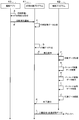
次に、本形態の補助プログラム42の動作を含む印刷手順の一例について、図2のシーケンス図を参照して説明する。補助プログラム42は、編集アプリ43等を介して、補助プログラム42に対応するプリンタが指定された状態で汎用印刷プログラム41を使用して印刷する印刷指示を受け付けた場合に、汎用印刷プログラム41から実行指示されるプログラムである。以下では、PC1がUI20を介して、例えば、編集アプリ43にて、印刷対象の画像データが指定された状態で、汎用印刷プログラム41を介してのプリンタ2での印刷実行の指示を受け付けた場合であって、プリンタ2のモデルのタイプに対応する補助プログラム42がPC1に組み込まれている場合について説明する。
まず、編集アプリ43は、UI20を介して、印刷対象の画像の指定と、印刷実行の指示入力を受け付ける(矢印A)。画像の編集を編集アプリ43に指示する編集処理は、印刷対象の画像の指定の例である。編集操作に従って編集アプリ43が編集した画像は、印刷対象の画像の例である。編集アプリ43は、例えば、バーコードと文字を含む画像を印刷対象として指定した印刷指示を受け付ける。なお、編集アプリ43は、バーコードを示すバーコード情報を、画像として受け付けてもよいし、バーコードフォントにより受け付けてもよい。印刷指示を受け付けた編集アプリ43は、受け付けた印刷指示の内容を示す印刷実行通知をOS21に渡す。なお、図2では、OS21の動作を省略して示している。
OS21は、汎用印刷プログラム41を使用する印刷実行通知を受け付けた場合、汎用印刷プログラム41を実行させ、汎用印刷プログラム41に印刷実行通知を渡す(矢印B)。汎用印刷プログラム41は、印刷実行通知にて、印刷指示に含まれる各種の情報、例えば、印刷させるプリンタを示す情報、アプリにて設定された印刷パラメータを示す情報、印刷対象となる画像データを示す情報、印刷を指示したユーザを識別する情報を、取得できる。なお、後述するように、これらの情報は、補助プログラム42でも使用可能とされる。
汎用印刷プログラム41は、印刷実行通知に含まれる画像データの形式を中間画像データの形式に変換することで中間画像データを生成し、中間画像データを含む印刷ジョブデータを生成する(矢印C)。例えば、汎用印刷プログラム41は、印刷実行通知に含まれるバーコードの画像又はバーコードフォントを含む画像データを中間画像データに加工する。編集アプリ43に含まれる画像データは種々のタイプのものであり、汎用印刷プログラム41は、受け取った画像データを、印刷データの生成に適した中間画像データに変換する。なお、印刷実行通知に含まれる画像データが印刷データの生成に適したデータであれば、中間画像データの生成を省略し、そのまま中間画像データとしても良い。中間画像データは、例えば、XPSデータである。
そして、汎用印刷プログラム41は、中間画像データに基づいて印刷データを生成する(矢印D)。印刷データは、画像データに基づいて汎用印刷プログラム41が生成したラスタ画像データの一例である。汎用印刷プログラム41は、印刷パラメータのうちの汎用パラメータを用いて印刷データを生成する。汎用印刷プログラム41によって生成される印刷データは、各種のプリンタにて印刷に使用できる形式の印刷データである。印刷データは、例えば、PWGRasterデータ、または、PDFデータである。
汎用印刷プログラム41は、印刷指示にて指定されたプリンタであるプリンタ2に対応する補助プログラム42がメモリ12に記憶されていることから、補助プログラム42の処理の実行命令を出力し、補助プログラム42を動作させる(矢印E)。汎用印刷プログラム41は、例えば、プリンタ2が指定されている場合、メモリ12に記憶されているプリンタ情報に含まれるプリンタのモデル情報に基づいて、プリンタ2のモデルを特定し、モデルのタイプに対応する補助プログラム42を起動させる。矢印Eの実行命令には、印刷パラメータと印刷データとが付される。
補助プログラム42は、汎用印刷プログラム41からの実行命令を受け付けることにより、印刷データを取得する(矢印F)。矢印Fは、取得処理の一例である。補助プログラム42は、印刷データを解析し、バーコード画像を示すバーコード画像データを検索する(矢印G)。つまり、印刷ジョブデータにバーコードとしての特徴を持つ画像データが含まれているか否かを判断する。例えば、印刷データが、バーコードシンボルのように太さが異なる線を組み合わせた画像の画像データを含む場合、補助プログラム42は、その画像データをバーコード画像データとして検出する(矢印H)。そして、補助プログラム42は、検出したバーコード画像データを改良する(矢印I)。矢印G,Hは、判断処理の一例であり、矢印Iは、生成処理の一例である。
補助プログラム42は、矢印Iにて、例えば、バーコード画像データがグレースケールを示す画像データを含むか否か、つまり、グレースケールの領域があるか否かを判断し、グレースケールを示す画像データを含む場合、グレースケールを示す画像データ、つまり、グレースケールの領域を、二値化することにより、バーコード画像データを改良してもよい。
例えば、図3(a)に示すように、汎用印刷プログラム41が生成した印刷データ300に、バーコード画像データ301がある場合、バーコード画像データ301の階調が白又は黒か否かを判断する。バーコード画像データ301のバーの領域302がグレースケールで示されている場合、補助プログラム42は、グレースケールで示されている領域302を二値化することにより、バーコード画像データ301を改良する。図3(b)に示す印刷データ400のように、改良されたバーコード画像データ401は、グレースケールの領域302が黒色に変更され、汎用印刷プログラム41のみでバーコード画像データを生成する場合より、バーコードの白の領域と黒の領域がはっきり区別される。よって、プリンタ2は、バーコードのバー部分を明瞭に描画し、バーコードリーダによって読み取り可能なバーコードを出力することが、期待される。
また、補助プログラム42は、矢印Iにて、例えば、バーコード画像に隣接する領域に、所定サイズ以上のクワイエットゾーンを設けるように、印刷データを改良してよい。
例えば図3(a)に示すように、補助プログラム42は、汎用印刷プログラム41によって生成された印刷データ300において、バーコード画像に隣接する領域に所定サイズ以上の白色領域305があるか否かを判断する。例えば、バーコード画像の左側にある白色領域305に汚点303がある場合、図3(b)のに示すように、補助プログラム42は、その汚点303を白色で塗り潰し、バーコード画像の左側に所定サイズ以上の白色領域305を確保する。なお、塗り潰す色は、白に限らず、バーコードの検出に影響しない程度の光学的反射率を持つ薄い色であってもよい。
また、例えば図3(c)に示すように、汎用印刷プログラム41によって生成された印刷データ500において、バーコード画像に隣接する白色領域305が所定サイズ以上でない場合、バーコード画像データ501を縮小することによって、バーコード画像データ501の左右上下に設けられる白色領域305を所定サイズ以上に拡げる。この場合、補助プログラム42は、バーコードリーダがバーとスペースを区別できるように、バーコードアルゴリズムに基づいて縮小率を決定する。このような塗り潰し処理や縮小処理により、所定サイズ以上のクワイエットゾーンがバーコードシンボルの左右上下に確保され、バーコードリーダがバーコードを認識する可能性が高くなる。
また、補助プログラム42は、矢印Iにて、例えば、最適化テーブル22に基づいて、バーコードシンボルをバーコードの読み取りに適した画像に加工することにより、バーコード画像データを改良してもよい。なお、バーコードシンボルをバーコードの読み取りに適した画像に加工することは、バーコードシンボルを最適化する改良を行うことの一例である。
例えば、プリンタ2のモデルが「モデルB」であって、印刷パラメータの用紙種が「普通紙」である場合、補助プログラム42は、最適化テーブル22から、「モデルB」と「普通紙」に関連付けられた太さ情報「-2」を読み出す。例えば、補助プログラム42は、図3(a)に示すバーの太さ304を、読み出した太さ情報に応じて細くする加工を行う。これにより、バー部分の画像データは、滲みを反映したものとなるので、プリンタ2は、普通紙にバーコードを印刷した際に、バーの太さが印刷データによって指定される太さと同程度になり、バーコードの描画品質が向上することが期待される。
なお、ここでは、モデルと用紙種に基づいて太さ情報を特定したが、モデルと用紙種の何れか一方に基づいて太さ情報を特定してもよい。また、本形態では、バーの太さ、つまり、バーの幅を細くする加工を行うことによって、バーコードシンボルをバーコードの読み取りに適した画像に加工したが、白色等の反射率が高い領域のサイズを広くすることによりバーコードシンボルをバーコードの読み取りに適した画像に加工してもよい。なお、改良されたバーコード画像データは、代替画像の一例であり、改良されたバーコード画像データを含む印刷データは、特定データの一例である。また、矢印Iにおいて、上記の各種改良を全て行ってもよいし、ユーザが改良内容を選択できるようにして、選択に応じて改良を行ってもよい。
補助プログラム42は、バーコード画像データを改良した後、バーコード画像データ以外について、印刷パラメータに基づいて印刷データを編集する(矢印J)。例えば、補助プログラム42は、矢印Jにて、プリンタ2に特有な機能を実行させるためのコマンドを印刷データに付加する。なお、補助プログラム42は、バーコード画像データを改良する部分を検出できない場合や、バーコード画像データが印刷データに含まれていない場合には、矢印Iを行わずに、矢印Jの処理を行ってもよい。なお、改良されたバーコード画像データを含む加工済みの印刷データは、特定データの一例である。
そして、補助プログラム42は、処理後の印刷データを印刷ジョブに反映し、処理の終了を示す終了通知を汎用印刷プログラム41に返して処理を終了する(矢印K)。補助プログラム42は、処理後の印刷データを汎用印刷プログラム41に提供することで、汎用印刷プログラム41を介して、処理後の印刷データを印刷ジョブに反映しても良い。
汎用印刷プログラム41は、補助プログラム42から終了通知を受け取ったことに応じて、プリンタ2に対して印刷命令を送信する(矢印L)。これにより、印刷命令を受信したプリンタ2では、印刷命令に付された印刷データに従って、印刷データの画像の印刷が実行される。プリンタ2は、コマンドが付加された印刷データを受信した場合、印刷の実行に際して、コマンドによって示される動作を行う。なお、補助プログラム42は、汎用印刷プログラム41を介さずに通信IF30を介して、印刷命令をプリンタ2に送信してもよい。その場合、補助プログラム42は、前述したデータ形式とは異なるデータ形式に印刷データを変換して送信してもよい。
以上説明したように、印刷対象の画像にバーコードのバーコード画像が含まれる場合、プリンタメーカによって提供される補助プログラム42が、バーコードの画像を印刷するために汎用印刷プログラム41が生成した印刷データを、必要に応じて改良する。そのため、汎用印刷プログラム41によってバーコードの画像をそのまま印刷する場合と比較して、バーコードの描画精度が高い印刷データを、プリンタ2に出力できる。つまり、汎用印刷プログラム41によってバーコードの画像をそのまま印刷する場合と比較して、プリンタ2がバーコードリーダによって読み取り可能な描画精度でバーコードを印刷することが期待できる。
(第2実施形態)
続いて、第2実施形態のプログラムを利用する印刷システムについて、図面を参照しながら説明する。なお、以下の説明において、第1実施形態と共通する構成及び処理には、第1実施形態と同じ符号を図面に付し、説明を適宜省略する。
続いて、第2実施形態のプログラムを利用する印刷システムについて、図面を参照しながら説明する。なお、以下の説明において、第1実施形態と共通する構成及び処理には、第1実施形態と同じ符号を図面に付し、説明を適宜省略する。
編集アプリ43は、バーコードを含む画像データでなく、バーコードのバーコードフォントを印刷実行通知に付して汎用印刷プログラム41に渡すことがある。バーコードの印刷は特殊な機能であるため、汎用印刷プログラム41が、バーコードフォントを解析して中間画像データや印刷データを生成できない場合がある。そこで、本形態では、プリンタ2に対応する補助プログラム42が、バーコードのバーコードフォントに基づいてバーコードのラスタ画像データを生成する機能を有する。
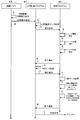
本形態の補助プログラム42の動作を含む印刷手順の一例について、図4のシーケンス図を参照して説明する。なお、図4も、OS21の動作を省略して示している。ここでは、編集アプリ43が、バーコードと文字を含む画像を指定して、汎用印刷プログラム41を介してプリンタ2に印刷を行わせる場合を例に挙げて説明する。
まず、編集アプリ43は、UI20を介して、印刷対象の画像の指定と、印刷実行の指示入力を受け付け(矢印A)、印刷実行通知を出力する(矢印B)。例えば、編集アプリ43は、バーコードフォントを含む画像を印刷対象として受け付けた場合、バーコードフォントを含む画像データを、印刷実行通知に付加する。
汎用印刷プログラム41は、印刷実行通知に含まれる画像データの形式を中間画像データの形式に変換することで中間画像データを生成し、中間画像データを含む印刷ジョブデータを生成する(矢印C)。
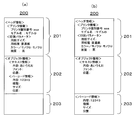
例えば、汎用印刷プログラム41は、図5(a)に示す印刷ジョブデータ200を生成する。印刷ジョブデータ200は、ヘッダ領域201と、オブジェクト領域202と、バッファ領域203などの各種記憶領域を備える。
ヘッダ領域201は、編集アプリ43にて受け付けた設定を記憶する領域である。ヘッダ領域201には、例えば、プリンタ識別情報やモデルなどのプリンタ情報が記憶される。プリンタ情報は、汎用印刷プログラム41が印刷実行通知に含まれる情報に基づいて、印刷を実行させる装置として指定されているプリンタを特定し、その特定したプリンタの情報が記憶される。汎用印刷プログラム41は、例えば、プリンタ2が指定されている場合、メモリ12に記憶されているプリンタ情報に含まれるプリンタのモデル情報に基づいて、プリンタ2のモデルを特定し、ヘッダ領域201に記憶する。また、ヘッダ領域201には、印刷実行命令に付された用紙サイズや用紙種、カラー/モノクロ、画質などの印刷パラメータが記憶される。
オブジェクト領域202は、描画対象となるオブジェクトを示すオブジェクト情報を記憶する領域である。つまり、オブジェクト領域202には、汎用印刷プログラム41が生成した中間画像データがXPS形式で記憶される。例えば、バーコードフォントと文字列を含む画像を印刷対象として選択したユーザ操作が行われた場合、オブジェクト領域202には、文字列「あいうえお」のテキスト情報、つまり、テキスト内容、テキストフォント、サイズ、位置が記憶される。また、オブジェクト領域202には、バーコードのバーコード情報、つまり、バーコードフォント「12345」、種類、サイズ、位置が記憶される。バッファ領域203は、各種処理を実行するための一時的な記憶領域である。
汎用印刷プログラム41は、印刷ジョブデータ200を生成した後、実行命令を出力する(矢印O)。つまり、汎用印刷プログラム41は、印刷実行通知を検知したことを契機に、印刷データを生成する前に、補助プログラム42へ実行命令を出力する。この実行命令には、印刷パラメータと、バーコードフォントを含む中間画像データとが付される。汎用印刷プログラム41からの実行命令を受け付けた補助プログラム42は、中間画像データからバーコード情報を検索する(矢印P)。例えば、補助プログラム42は、印刷ジョブデータのオブジェクト領域202に、バーコードフォントがあるか否か判断する。
例えば、補助プログラム42は、図5(a)に示す印刷ジョブデータを受け付けた場合、バーコードフォント「12345」を検出する(矢印Q)。つまり、中間画像データがバーコードを示すバーコード情報が含まれると判断する。矢印P,Qは判断処理の一例であり、バーコード情報を検出した場合は、印刷ジョブデータの画像データの中にバーコードを示すオブジェクト情報がある場合の一例である。
この場合、補助プログラム42は、図5(b)に示すように、バーコード情報をオブジェクト領域202からバッファ領域203に移動させる(矢印R)。つまり、補助プログラム42は、検出したバーコード情報をバッファ領域203に上書きし、オブジェクト領域202からバーコード情報を削除する。なお、矢印Rは、バーコード記憶処理の一例であり、バッファ領域203に記憶されるバーコード情報は、バーコードオブジェクトデータの一例である。これにより、印刷ジョブデータの態様が変更される。
その後、補助プログラム42は、図4に示すように、処理の終了を示す終了通知を汎用印刷プログラム41に返して処理を終了する(矢印S)。
汎用印刷プログラム41は、終了通知に応じて、オブジェクト領域202に記憶される中間画像データに基づいて印刷データを生成する(矢印D)。つまり、バーコードの画像を抜いた状態の中間画像データをラスタライズし、印刷データを生成する。汎用印刷プログラム41は、印刷パラメータのうちの汎用パラメータを用いて印刷データを生成する。具体的に例えば、汎用印刷プログラム41は、図6(a)に示すように、文字を示す画像のデータをラスタライズしてラスタ画像データ310を生成する。なお、汎用印刷プログラム41が生成するラスタ画像データ310は、汎用印刷プログラムが印刷ジョブデータに含まれる画像データに含まれるオブジェクト情報に基づいて生成したラスタ画像データの一例である。
図4に示すように、印刷データの生成の終了後、汎用印刷プログラム41は、補助プログラム42の処理を実行させる実行命令を出力する(矢印E)。補助プログラム42は、汎用印刷プログラム41からの実行命令を受け付けることにより、印刷データを取得する(矢印F)。矢印Fは取得処理の一例である。補助プログラム42は、バッファ領域203に記憶されるバーコード情報に基づいてラスタライズを行い、バーコードのラスタ画像データを生成する(矢印T)。
具体的に例えば、補助プログラム42は、図6(b)に示すように、バーコードを示すバーコード画像のラスタ画像データ320を生成する。ラスタ画像データ320は、汎用印刷プログラム41から取得した印刷データと同じデータ形式で生成される。矢印Tは、ラスタ処理の一例である。
補助プログラム42は、汎用印刷プログラム41がオブジェクト領域202に記憶される中間画像データに基づいて生成した印刷データに、矢印Tによって生成したバーコードのラスタ画像データを合成し、合成画像データを生成する(矢印U)。具体的に例えば、補助プログラム42は、図6(a)に示すラスタ画像データ310と、図6(b)に示すラスタ画像データ320とを合成し、図6(c)に示す合成画像データ330を生成する。矢印Uは、生成処理の一例であり、合成画像データ330は特定データの一例である。
その後、補助プログラム42は、終了通知を汎用印刷プログラム41に返して処理を終了する(矢印K)。汎用印刷プログラム41は、補助プログラム42から終了通知を受け取ったことに応じて、プリンタ2に対して印刷命令を送信する(矢印L)。このとき、印刷命令には、合成画像データ330が付される。プリンタ2は、印刷命令に従って、合成画像データ330を描画し、バーコードと文字を含む画像を用紙に印刷する。
なお、矢印Qにて、バーコードフォントを検出できない場合、補助プログラム42が上記矢印R、T、Uの処理を実行しない状態で、印刷処理が行われる。
以上説明したように、印刷対象の画像にバーコードを示すバーコードフォントが含まれる場合、補助プログラム42が、バッファ領域203に記憶されるバーコードフォント「12345」から、バーコードを示すバーコード画像のラスタ画像データ320を生成する(矢印T、図6(b))。補助プログラム42は、汎用印刷プログラム41が生成したラスタ画像データ310(図6(a))に、補助プログラム42が生成したラスタ画像データ320(図6(b))を組み合わせることにより、合成画像データ330を生成する(矢印U、図6(c))。よって、汎用印刷プログラム41がバーコードフォントからバーコードのラスタ画像データを生成できない場合でも、プリンタ2はバーコードの画像を描画することが可能になる。特に、プリンタ2に対応する補助プログラム42が合成画像データ330を生成するので、バーコードの描画精度の向上が期待できる。
また、補助プログラム42は、矢印Rにて、バーコード情報をオブジェクト領域202からバッファ領域203に移動させ、オブジェクト領域202に記憶されているオブジェクト情報の量を減らしている。そのため、汎用印刷プログラム41が、矢印Dにてラスタライズする処理量を減らすことができる。
なお、オブジェクト領域202に記憶されるオブジェクト情報は、バッファ領域203に全て移動させてもよい。この場合、補助プログラム42は、矢印Tにて、例えば、文字とバーコードを含む画像全体をラスタライズすることになる。これによれば、オブジェクト領域202にオブジェクト情報がないので、矢印Dにて、汎用印刷プログラム41がラスタライズする処理量を減らすことができる。
また、矢印Rにて、オブジェクト領域202からバーコード情報を削除しなくてもよい。この場合、矢印Uにて生成したラスタ画像データを、オブジェクト領域202に記憶されるデータに上書きすることにより、印刷ジョブデータの態様を変更してもよい。
(第3実施形態)
続いて、第3実施形態のプログラムを利用する印刷システムについて、図面を参照しながら説明する。なお、以下の説明において、第1実施形態と共通する構成及び処理には、第1実施形態と同じ符号を図面に付し、説明を適宜省略する。
続いて、第3実施形態のプログラムを利用する印刷システムについて、図面を参照しながら説明する。なお、以下の説明において、第1実施形態と共通する構成及び処理には、第1実施形態と同じ符号を図面に付し、説明を適宜省略する。
本形態は、編集アプリ43から汎用印刷プログラム41に印刷指示があった場合に、補助プログラム42が、その印刷指示に付された画像データをラスタライズして印刷データを生成し、プリンタ2に送信する点、つまり、汎用印刷プログラム41が印刷データの生成と送信を行わない点が、上記第1実施形態と相違している。
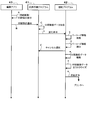
本形態の補助プログラム42の動作を含む印刷手順の一例について、図7のシーケンス図を参照して説明する。なお、図7も、OS21の動作を省略して示している。ここでは、編集アプリ43が、バーコードと文字を含む画像を指定して、汎用印刷プログラム41を介してプリンタ2に印刷を行わせる場合を例に挙げて説明する。
補助プログラム42は、汎用印刷プログラム41から出力された実行命令を受け付け、印刷ジョブデータを取得すると(矢印a)、バーコード情報を検索する(矢印b)。つまり、印刷ジョブデータに記憶される中間画像データに、バーコード情報が含まれるか否かを判断する。中間画像データは、オブジェクト情報の一例である。バーコード情報は、バーコード画像でも、バーコードフォントでもよい。
補助プログラム42は、バーコード情報を検出すると(矢印c)、汎用印刷プログラム41にキャンセル通知を出力する(矢印d)。キャンセル通知を受け付けた汎用印刷プログラム41は、それ以降、当該印刷ジョブの処理に関与しなくなる。なお、矢印b,cは、判断処理の一例であり、矢印dは、キャンセル処理の一例である。
キャンセル通知を出力した補助プログラム42は、中間画像データの編集を行い(矢印e)、その加工済みの中間画像データをラスタライズすることにより、印刷データを生成する(矢印f)。なお、矢印eを行っていない場合、汎用印刷プログラム41から取得した中間画像データをラスタライズして印刷データを生成する。つまり、バーコードのバーコード画像を含む画像全体のラスタ画像データを生成する。矢印fは、生成処理の一例であり、印刷データは、特定データの一例である。
そして、補助プログラム42は、通信IF30を用いて、矢印fにて生成した印刷データをプリンタ2に送信する(矢印g)。矢印gは、送信処理の一例である。プリンタ2は、印刷データに従って、バーコードを含む画像の印刷を実行する。
なお、バーコード情報が中間画像データに含まれず、バーコード情報を検出できない場合(矢印c)、補助プログラム42は、矢印dのキャンセル通知の出力を行わなくても良い。この場合、汎用印刷プログラム41は、中間画像データに基づく印刷データを生成し、生成した印刷データをプリンタ2に送信する。つまり、補助プログラム42は、矢印f、gを実行しなくてもよい。
以上説明したように、汎用印刷プログラム41が生成した中間画像データがバーコード情報を含む場合、プリンタ2に対応する補助プログラム42が、バーコードを含む画像全体のラスタ画像データを生成して(矢印f)、その印刷データをプリンタ2に送信する(矢印g)。すなわち、汎用印刷プログラム41が印刷データの生成および送信に関与しない。そのため、補助プログラム42は、汎用印刷プログラム41がバーコードの画像を含む印刷データを生成する場合より、バーコードの描画精度が高い印刷データを生成して、プリンタ2に出力できる。つまり、バーコードリーダが読み取り可能なバーコードをプリンタ2に印刷させることができる。
(第4実施形態)
続いて、第4実施形態のプログラムを利用する印刷システムについて、図面を参照しながら説明する。なお、以下の説明において、第3実施形態と共通する構成及び処理には、第3実施形態と同じ符号を図面に付し、説明を適宜省略する。本形態は、プリンタ2が特有の機能として、バーコードを生成する機能を有し、補助プログラム42が印刷データの生成に代えてコマンドを生成し、プリンタ2に送信する点が、第3実施形態と相違する。
続いて、第4実施形態のプログラムを利用する印刷システムについて、図面を参照しながら説明する。なお、以下の説明において、第3実施形態と共通する構成及び処理には、第3実施形態と同じ符号を図面に付し、説明を適宜省略する。本形態は、プリンタ2が特有の機能として、バーコードを生成する機能を有し、補助プログラム42が印刷データの生成に代えてコマンドを生成し、プリンタ2に送信する点が、第3実施形態と相違する。
図8のシーケンス図に示すように、補助プログラム42は、バーコード情報を検出した場合(矢印c)、つまり、汎用印刷プログラム41が生成した中間画像データが、バーコード情報を含むと判断した場合、中間画像データにフラグを設定する(矢印h)。そして、補助プログラム42は、キャンセル通知を出力し(矢印d)、中間画像データ編集処理を行う(矢印e)。なお、矢印h、dの処理は順序が逆でもよい。
補助プログラム42は、矢印eにて加工した中間画像データにフラグが設定されているか否かを判断し(矢印i)、フラグが設定されている場合には、中間画像データと印刷パラメータに基づいてコマンドを生成する(矢印j)。そして、補助プログラム42は、生成したコマンドを、通信IF30を用いてプリンタ2に送信する(矢印k)。プリンタ2は、コマンドに従って、バーコードと文字を含む印刷対象の画像を描画する。
なお、バーコード情報が中間画像データに含まれず、バーコード情報を検出できない場合(矢印b)、補助プログラム42は、矢印dのキャンセル通知の出力を行わず、汎用印刷プログラム41に中間画像データに基づく印刷データの生成を行わせ、その印刷データを送信させてもよい。つまり、補助プログラム42は、矢印h、i~kを実行しなくてもよい。
以上説明したように、汎用印刷プログラム41が生成した中間画像データがバーコード情報を含む場合、プリンタ2に対応する補助プログラム42が、バーコードを含む画像全体をラスタライズするためのコマンドを生成して(矢印j)、そのコマンドをプリンタ2に送信する(矢印k)。すなわち、汎用印刷プログラム41が印刷データの生成および送信に関与しない。プリンタ2が、プリンタ2に対応する補助プログラム42が生成したコマンドに従って、バーコードと文字を含む印刷対象となる画像の描画を行うので、汎用印刷プログラム41から印刷命令を受けて印刷する場合より、バーコードの描画精度が高くなる。つまり、バーコードリーダが読み取り可能なバーコードをプリンタ2に印刷させることができる。
なお、本実施の形態は単なる例示にすぎず、本発明を何ら限定するものではない。したがって本発明は当然に、その要旨を逸脱しない範囲内で種々の改良、変形が可能である。例えば、PC1に接続される装置は、プリンタに限らず、複合機、複写機、FAX装置、等印刷機能を有する装置であればよい。また、PC1に接続されるプリンタは、図示の例に限らず、1台でも良いし、3台以上でもよい。また、オブジェクト情報に記憶する情報は、1つでもよいし、3つ以上であってもよい。
図4の矢印Tは、バッファ領域203に記憶されるバーコード情報に基づいて、バーコードを含む画像をラスタライズするコマンドを生成する処理であってもよい。この場合、矢印Uでは、汎用印刷プログラム41が生成した印刷データにコマンドを付加するとよい。汎用印刷プログラム41は、このコマンドを付加した印刷データをプリンタ2に送信し、プリンタ2は、コマンドに基づいてバーコードの画像を生成し、描画を行う。これによれば、プリンタ2にバーコードを描画させるので、描画精度が高いバーコード画像をプリンタ2に出力させることができる。
図2及び図4では、補助プログラム42によるバーコードの改良を説明したが、補助プログラム42は、バーコードの改良以外の中間画像データの編集や印刷データの編集などの処理を行ってもよい。
また、実施の形態に開示されている任意のシーケンス図において、任意の複数のステップにおける複数の処理は、処理内容に矛盾が生じない範囲で、任意に実行順序を変更できる、または並列に実行できる。
また、実施の形態に開示されている処理は、単一のCPU、複数のCPU、ASICなどのハードウェア、またはそれらの組み合わせで実行されてもよい。また、実施の形態に開示されている処理は、その処理を実行するためのプログラムを記録した記録媒体、または方法等の種々の態様で実現することができる。
1 PC
2 プリンタ
11 CPU
20 UI
21 OS
30 通信IF
41 汎用印刷プログラム
42 補助プログラム
2 プリンタ
11 CPU
20 UI
21 OS
30 通信IF
41 汎用印刷プログラム
42 補助プログラム
Claims (16)
- 情報処理装置のコンピュータによって実行可能であり、前記情報処理装置と接続するプリンタに対応するサポートプログラムであって、
前記コンピュータに、
画像の印刷を前記プリンタに行わせる印刷指示が前記情報処理装置のオペレーティングシステムにあらかじめ組み込まれた汎用印刷プログラムに対してなされた場合に、前記印刷指示による印刷対象となった画像を示す画像データにバーコードを示す情報が含まれるか否かを判断する判断処理と、
前記判断処理にて前記バーコードを示す情報が含まれると判断した場合に、前記汎用印刷プログラムにより生成可能な前記バーコードの画像に代替する前記バーコードの代替画像を前記プリンタに印刷させるための特定データを生成する生成処理と、
を実行させる、
ことを特徴とするサポートプログラム。 - 請求項1に記載するサポートプログラムにおいて、
前記コンピュータに、
前記画像データに基づいて前記汎用印刷プログラムが生成したラスタ画像データを取得する取得処理を実行させ、
前記判断処理では、
前記取得処理にて取得した前記ラスタ画像データのうちから前記バーコードの画像を示すバーコード画像データの検出を試み、前記バーコード画像データが検出された場合に、前記バーコードを示す情報が含まれると判断し、
前記生成処理では、
前記判断処理にて前記バーコードを示す情報が含まれると判断した場合、検出された前記バーコード画像データの改良を行ったバーコード画像データを含むラスタ画像データを、前記特定データとして生成する、
ことを特徴とするサポートプログラム。 - 請求項2に記載するサポートプログラムにおいて、
前記生成処理では、
検出された前記バーコード画像データのうちグレースケールを示す画像データに対して二値化する前記改良を行ったラスタ画像データを、前記特定データとして生成する、
ことを特徴とするサポートプログラム。 - 請求項2に記載するサポートプログラムにおいて、
前記生成処理では、
前記バーコードの画像に隣接する領域として、所定サイズ以上のクワイエットゾーンを設ける前記改良を行ったラスタ画像データを、前記特定データとして生成する、
ことを特徴とするサポートプログラム。 - 請求項2に記載するサポートプログラムにおいて、
前記生成処理では、
用紙種に応じて、前記バーコードを構成するバーコードシンボルを最適化する前記改良を行ったラスタ画像データを、前記特定データとして生成する、
ことを特徴とするサポートプログラム。 - 請求項2に記載するサポートプログラムにおいて、
前記生成処理では、
前記プリンタのモデルに応じて、前記バーコードを構成するバーコードシンボルを最適化する前記改良を行ったラスタ画像データを、前記特定データとして生成する、
ことを特徴とするサポートプログラム。 - 請求項1に記載するサポートプログラムにおいて、
前記画像データには、描画対象となるオブジェクトを示すオブジェクト情報が1ないし複数記憶され、
前記判断処理では、
前記汎用印刷プログラムから前記画像データを含む印刷ジョブデータを取得し、取得した前記印刷ジョブデータの前記画像データの中に前記バーコードを示す前記オブジェクト情報がある場合に、前記バーコードを示す情報が含まれると判断し、
さらに前記コンピュータに、
前記判断処理にて前記バーコードを示す情報が含まれると判断した場合、前記バーコードを示す前記オブジェクト情報に対応するバーコードオブジェクトデータを、前記画像データを記憶する態様とは異なる態様で前記印刷ジョブデータに記憶させるバーコード記憶処理を実行させ、
前記生成処理では、
前記汎用印刷プログラムが前記印刷ジョブデータの前記画像データに含まれる前記オブジェクト情報に基づいて生成したラスタ画像データによって示される画像に、前記バーコードオブジェクトデータによって示される画像を組み合わせた画像を、前記プリンタに印刷させるための前記特定データを、前記バーコードオブジェクトデータに基づいて生成する、
ことを特徴とするサポートプログラム。 - 請求項7に記載するサポートプログラムにおいて、
前記バーコード記憶処理では、
前記バーコードオブジェクトデータを、前記画像データを記憶する態様とは異なる態様で前記印刷ジョブデータに記憶させた後に前記画像データから削除する、
ことを特徴とするサポートプログラム。 - 請求項8に記載するサポートプログラムにおいて、
前記バーコード記憶処理では、
前記画像データの全てのオブジェクト情報を、前記バーコードオブジェクトデータとする、
ことを特徴とするサポートプログラム。 - 請求項7から請求項9のいずれか1つに記載するサポートプログラムにおいて、
前記コンピュータに、
前記バーコードオブジェクトデータに基づいて、前記バーコードのラスタ画像データを生成するラスタ処理を実行させ、
前記生成処理では、
前記汎用印刷プログラムが前記印刷ジョブデータの前記画像データに含まれる前記オブジェクト情報に基づいて生成したラスタ画像データに、前記ラスタ処理によって生成された前記ラスタ画像データを合成したラスタ画像データを、前記特定データとして生成する、
ことを特徴とするサポートプログラム。 - 請求項7から請求項9のいずれか1つに記載するサポートプログラムにおいて、
前記生成処理では、
前記バーコードオブジェクトデータに含まれる前記オブジェクト情報に示される画像を前記プリンタに描画させるコマンドを生成し、さらに前記汎用印刷プログラムによって生成された前記ラスタ画像データに前記コマンドを付加したデータを、前記特定データとして生成し、前記汎用印刷プログラムは、前記生成処理によって生成された前記特定データを前記プリンタに送信し、前記プリンタは、前記コマンドに基づいて、画像を描画する機能を有している、
ことを特徴とするサポートプログラム。 - 請求項1に記載するサポートプログラムにおいて、
前記画像データには、描画対象となるオブジェクトを示すオブジェクト情報が1ないし複数記憶され、
前記判断処理では、
前記汎用印刷プログラムから前記画像データを含む印刷ジョブデータを取得し、取得した前記印刷ジョブデータの前記画像データの中に前記バーコードを示す前記オブジェクト情報がある場合に、前記バーコードを示す情報が含まれると判断し、
前記コンピュータに、
前記判断処理にて前記バーコードを示す情報が含まれると判断した場合、前記汎用印刷プログラムによる前記画像データに対する処理をキャンセルするキャンセル処理を実行させ、
前記生成処理では、
前記印刷ジョブデータの前記画像データに含まれる前記オブジェクト情報に基づいて、前記特定データを生成する、
ことを特徴とするサポートプログラム。 - 請求項12に記載するサポートプログラムにおいて、
前記生成処理では、
前記印刷ジョブデータの前記画像データに含まれる前記オブジェクト情報に基づいて、前記バーコードの画像を含むラスタ画像データを前記特定データとして生成し、
さらに前記コンピュータに、
前記生成処理にて生成された前記特定データを、前記プリンタに送信する送信処理を実行させる、
ことを特徴とするサポートプログラム。 - 請求項1に記載するサポートプログラムにおいて、
前記生成処理では、
前記汎用印刷プログラムから前記画像データを含む印刷ジョブデータを取得し、取得した前記印刷ジョブデータの前記画像データに含まれるオブジェクト情報に基づいて、前記オブジェクト情報に対応する画像を前記プリンタに描画させるコマンドを前記特定データとして生成し、
さらに前記コンピュータに、
前記生成処理にて生成された前記特定データを、前記プリンタに送信する送信処理を実行させ、前記プリンタは、前記コマンドに基づいて、前記画像を描画する機能を有している、
ことを特徴とするサポートプログラム。 - コンピュータを備える情報処理装置であって、
前記情報処理装置のオペレーティングシステムは、あらかじめ組み込まれたプログラムである汎用印刷プログラムを有しており、
前記情報処理装置には、前記情報処理装置と接続するプリンタに対応するサポートプログラムが組み込まれており、
前記コンピュータは、
画像の印刷を前記プリンタに行わせる印刷指示が前記汎用印刷プログラムに対してなされた場合に、前記印刷指示による印刷対象となった画像を示す画像データにバーコードを示す情報が含まれるか否かを判断する判断処理と、
前記判断処理にて前記バーコードを示す情報が含まれると判断した場合に、前記汎用印刷プログラムにより生成可能な前記バーコードの画像に代替する前記バーコードの代替画像を前記プリンタに印刷させるための特定データを生成する生成処理と、
を実行する、
ことを特徴とする情報処理装置。 - 情報処理装置にプリンタが接続され、
前記情報処理装置のオペレーティングシステムは、あらかじめ組み込まれたプログラムである汎用印刷プログラムを有しており、
前記情報処理装置には、前記情報処理装置と接続するプリンタに対応するサポートプログラムが組み込まれており、
前記情報処理装置で生成された印刷データに基づく印刷を、前記プリンタに実行させる印刷方法において、
画像の印刷を前記プリンタに行わせる印刷指示が前記汎用印刷プログラムに対してなされた場合に、前記サポートプログラムによって、前記印刷指示による印刷対象となった画像を示す画像データにバーコードを示す情報が含まれるか否かを判断する判断ステップと、
前記判断ステップにて前記バーコードを示す情報が含まれると判断した場合に、前記サポートプログラムによって、前記汎用印刷プログラムにより生成可能な前記バーコードの画像に代替する前記バーコードの代替画像を前記プリンタに印刷させるための特定データを生成する生成ステップと、
を含む、
ことを特徴とする印刷方法。
Priority Applications (1)
| Application Number | Priority Date | Filing Date | Title |
|---|---|---|---|
| US17/485,812 US11630616B2 (en) | 2019-03-28 | 2021-09-27 | Information processing apparatus, printing method, and non-transitory computer-readable medium storing support program therefor for controlling a printer for printing a barcode image |
Applications Claiming Priority (2)
| Application Number | Priority Date | Filing Date | Title |
|---|---|---|---|
| JP2019-064057 | 2019-03-28 | ||
| JP2019064057A JP7298241B2 (ja) | 2019-03-28 | 2019-03-28 | サポートプログラム、情報処理装置、および印刷方法 |
Related Child Applications (1)
| Application Number | Title | Priority Date | Filing Date |
|---|---|---|---|
| US17/485,812 Continuation US11630616B2 (en) | 2019-03-28 | 2021-09-27 | Information processing apparatus, printing method, and non-transitory computer-readable medium storing support program therefor for controlling a printer for printing a barcode image |
Publications (2)
| Publication Number | Publication Date |
|---|---|
| WO2020195331A1 true WO2020195331A1 (ja) | 2020-10-01 |
| WO2020195331A8 WO2020195331A8 (ja) | 2020-11-19 |
Family
ID=72608808
Family Applications (1)
| Application Number | Title | Priority Date | Filing Date |
|---|---|---|---|
| PCT/JP2020/006091 Ceased WO2020195331A1 (ja) | 2019-03-28 | 2020-02-17 | サポートプログラム、情報処理装置、および印刷方法 |
Country Status (3)
| Country | Link |
|---|---|
| US (1) | US11630616B2 (ja) |
| JP (1) | JP7298241B2 (ja) |
| WO (1) | WO2020195331A1 (ja) |
Families Citing this family (3)
| Publication number | Priority date | Publication date | Assignee | Title |
|---|---|---|---|---|
| JP7286713B2 (ja) * | 2021-06-29 | 2023-06-05 | キヤノン株式会社 | インクジェット記録装置及びインクジェット記録方法 |
| JP7751807B2 (ja) | 2021-11-29 | 2025-10-09 | ブラザー工業株式会社 | サポートプログラム及び印刷システム |
| JP2024082122A (ja) * | 2022-12-07 | 2024-06-19 | キヤノン株式会社 | 情報処理装置、その制御方法、及びプログラム |
Citations (7)
| Publication number | Priority date | Publication date | Assignee | Title |
|---|---|---|---|---|
| JP2008167314A (ja) * | 2006-12-28 | 2008-07-17 | Ricoh Co Ltd | 画像処理装置 |
| JP2012194688A (ja) * | 2011-03-15 | 2012-10-11 | Fujitsu Component Ltd | 印刷制御プログラム |
| JP2013077102A (ja) * | 2011-09-30 | 2013-04-25 | Dainippon Screen Mfg Co Ltd | 印刷データ処理装置、印刷データ処理方法、印刷システムおよびプログラム、ならびに、ページデータ作成装置およびラスタライズ処理装置 |
| JP2013167967A (ja) * | 2012-02-14 | 2013-08-29 | Riso Kagaku Corp | 印刷制御装置 |
| JP2015176532A (ja) * | 2014-03-18 | 2015-10-05 | 株式会社リコー | プログラム、情報処理装置および情報処理システム |
| JP2018084978A (ja) * | 2016-11-24 | 2018-05-31 | 株式会社リコー | 情報処理装置、情報処理システム、情報処理方法、及びプログラム |
| JP2018147259A (ja) * | 2017-03-06 | 2018-09-20 | キヤノン株式会社 | 情報処理装置、プログラム、記憶媒体、情報処理方法 |
Family Cites Families (11)
| Publication number | Priority date | Publication date | Assignee | Title |
|---|---|---|---|---|
| US6147767A (en) * | 1997-09-05 | 2000-11-14 | Comtec Informations Systems, Inc. | Computer system for a printer which stores and operates multiple application programs |
| US7311395B2 (en) * | 2001-09-07 | 2007-12-25 | Hewlett-Packard Development Company, L.P. | Optimized ink jet printing of barcodes |
| US7410099B2 (en) * | 2003-06-05 | 2008-08-12 | Ntt Docomo, Inc. | Apparatus and method for reading and decoding information contained in a barcode |
| JP2008080494A (ja) * | 2006-09-25 | 2008-04-10 | Fuji Xerox Co Ltd | 印刷処理装置及び印刷管理システム |
| JP4992737B2 (ja) * | 2008-01-21 | 2012-08-08 | 村田機械株式会社 | 画像読取装置 |
| US9098226B2 (en) * | 2012-08-14 | 2015-08-04 | Seiko Epson Corporation | ePOS printing over a network |
| US9811292B2 (en) * | 2013-09-06 | 2017-11-07 | Seiko Epson Corporation | Using image difference data to reduce data processing |
| JP6631278B2 (ja) | 2016-01-29 | 2020-01-15 | ブラザー工業株式会社 | ドライバプログラム、及びドライバプログラムとプリンタとのセット |
| JP6784538B2 (ja) | 2016-08-18 | 2020-11-11 | キヤノン株式会社 | 情報処理装置、方法およびプログラム |
| JP2019148846A (ja) * | 2018-02-26 | 2019-09-05 | キヤノン株式会社 | 情報処理装置、情報処理方法及びプログラム |
| JP2020017085A (ja) * | 2018-07-25 | 2020-01-30 | 富士ゼロックス株式会社 | 印刷管理装置、印刷システム、及び印刷管理プログラム |
-
2019
- 2019-03-28 JP JP2019064057A patent/JP7298241B2/ja active Active
-
2020
- 2020-02-17 WO PCT/JP2020/006091 patent/WO2020195331A1/ja not_active Ceased
-
2021
- 2021-09-27 US US17/485,812 patent/US11630616B2/en active Active
Patent Citations (7)
| Publication number | Priority date | Publication date | Assignee | Title |
|---|---|---|---|---|
| JP2008167314A (ja) * | 2006-12-28 | 2008-07-17 | Ricoh Co Ltd | 画像処理装置 |
| JP2012194688A (ja) * | 2011-03-15 | 2012-10-11 | Fujitsu Component Ltd | 印刷制御プログラム |
| JP2013077102A (ja) * | 2011-09-30 | 2013-04-25 | Dainippon Screen Mfg Co Ltd | 印刷データ処理装置、印刷データ処理方法、印刷システムおよびプログラム、ならびに、ページデータ作成装置およびラスタライズ処理装置 |
| JP2013167967A (ja) * | 2012-02-14 | 2013-08-29 | Riso Kagaku Corp | 印刷制御装置 |
| JP2015176532A (ja) * | 2014-03-18 | 2015-10-05 | 株式会社リコー | プログラム、情報処理装置および情報処理システム |
| JP2018084978A (ja) * | 2016-11-24 | 2018-05-31 | 株式会社リコー | 情報処理装置、情報処理システム、情報処理方法、及びプログラム |
| JP2018147259A (ja) * | 2017-03-06 | 2018-09-20 | キヤノン株式会社 | 情報処理装置、プログラム、記憶媒体、情報処理方法 |
Also Published As
| Publication number | Publication date |
|---|---|
| JP7298241B2 (ja) | 2023-06-27 |
| US11630616B2 (en) | 2023-04-18 |
| US20220011990A1 (en) | 2022-01-13 |
| WO2020195331A8 (ja) | 2020-11-19 |
| JP2020166363A (ja) | 2020-10-08 |
Similar Documents
| Publication | Publication Date | Title |
|---|---|---|
| US8590775B2 (en) | Image processing apparatus, image processing method, and computer readable storage medium | |
| JP7405217B2 (ja) | サポートプログラム、情報処理装置、および印刷方法 | |
| US11630616B2 (en) | Information processing apparatus, printing method, and non-transitory computer-readable medium storing support program therefor for controlling a printer for printing a barcode image | |
| CN113574499B (zh) | 存储器、信息处理装置、以及印刷方法 | |
| JP7559919B2 (ja) | サポートプログラム、情報処理装置、および印刷方法 | |
| CN113383305A (zh) | 支持程序、信息处理装置、以及印刷方法 | |
| JP5142872B2 (ja) | 印刷制御装置、印刷制御方法、及びコンピュータプログラム | |
| JP2008236200A (ja) | 画像処理装置、画像処理方法、およびプログラム | |
| US11659125B2 (en) | Non-transitory computer readable storage medium, information processing device and printing method for collate printing | |
| US11604613B2 (en) | Support program for driverless general-purpose print program, information processing device, and printing method for aggregate printing | |
| JP7255209B2 (ja) | サポートプログラム、情報処理装置、および印刷方法 | |
| JP5388491B2 (ja) | 印刷装置及びその制御方法、並びに制御プログラム | |
| JP4905275B2 (ja) | 画像処理装置、画像処理方法及び画像処理プログラム | |
| JP2014199507A (ja) | 画像処理装置およびコンピュータプログラム | |
| JP7238482B2 (ja) | プログラム | |
| US20070153321A1 (en) | High speed printing method and apparatus | |
| JP7156482B2 (ja) | プログラム | |
| JP7651998B2 (ja) | プログラム | |
| JP6507809B2 (ja) | 印刷指示装置、印刷システム及びプログラム | |
| US20100060932A1 (en) | Image processing apparatus, information processing method, and computer program product | |
| JP6413783B2 (ja) | 印刷指示装置、印刷システムおよびプログラム | |
| JP2005092461A (ja) | データ編集装置及びその制御方法並びに制御プログラム | |
| JP2010026986A (ja) | 画像形成装置 | |
| JP2006044056A (ja) | 印刷制御装置および方法およびプログラム | |
| JP2010146052A (ja) | プリンタドライバ |
Legal Events
| Date | Code | Title | Description |
|---|---|---|---|
| 121 | Ep: the epo has been informed by wipo that ep was designated in this application |
Ref document number: 20778995 Country of ref document: EP Kind code of ref document: A1 |
|
| NENP | Non-entry into the national phase |
Ref country code: DE |
|
| 122 | Ep: pct application non-entry in european phase |
Ref document number: 20778995 Country of ref document: EP Kind code of ref document: A1 |