WO2020079982A1 - 画像読取装置 - Google Patents
画像読取装置 Download PDFInfo
- Publication number
- WO2020079982A1 WO2020079982A1 PCT/JP2019/034938 JP2019034938W WO2020079982A1 WO 2020079982 A1 WO2020079982 A1 WO 2020079982A1 JP 2019034938 W JP2019034938 W JP 2019034938W WO 2020079982 A1 WO2020079982 A1 WO 2020079982A1
- Authority
- WO
- WIPO (PCT)
- Prior art keywords
- language
- display
- unit
- information
- control unit
- Prior art date
- Legal status (The legal status is an assumption and is not a legal conclusion. Google has not performed a legal analysis and makes no representation as to the accuracy of the status listed.)
- Ceased
Links
Images


Classifications
-
- B—PERFORMING OPERATIONS; TRANSPORTING
- B41—PRINTING; LINING MACHINES; TYPEWRITERS; STAMPS
- B41J—TYPEWRITERS; SELECTIVE PRINTING MECHANISMS, i.e. MECHANISMS PRINTING OTHERWISE THAN FROM A FORME; CORRECTION OF TYPOGRAPHICAL ERRORS
- B41J29/00—Details of, or accessories for, typewriters or selective printing mechanisms not otherwise provided for
- B41J29/42—Scales and indicators, e.g. for determining side margins
-
- G—PHYSICS
- G03—PHOTOGRAPHY; CINEMATOGRAPHY; ANALOGOUS TECHNIQUES USING WAVES OTHER THAN OPTICAL WAVES; ELECTROGRAPHY; HOLOGRAPHY
- G03G—ELECTROGRAPHY; ELECTROPHOTOGRAPHY; MAGNETOGRAPHY
- G03G21/00—Arrangements not provided for by groups G03G13/00 - G03G19/00, e.g. cleaning, elimination of residual charge
-
- G—PHYSICS
- G06—COMPUTING OR CALCULATING; COUNTING
- G06F—ELECTRIC DIGITAL DATA PROCESSING
- G06F3/00—Input arrangements for transferring data to be processed into a form capable of being handled by the computer; Output arrangements for transferring data from processing unit to output unit, e.g. interface arrangements
- G06F3/01—Input arrangements or combined input and output arrangements for interaction between user and computer
- G06F3/048—Interaction techniques based on graphical user interfaces [GUI]
- G06F3/0481—Interaction techniques based on graphical user interfaces [GUI] based on specific properties of the displayed interaction object or a metaphor-based environment, e.g. interaction with desktop elements like windows or icons, or assisted by a cursor's changing behaviour or appearance
- G06F3/0482—Interaction with lists of selectable items, e.g. menus
-
- G—PHYSICS
- G06—COMPUTING OR CALCULATING; COUNTING
- G06F—ELECTRIC DIGITAL DATA PROCESSING
- G06F3/00—Input arrangements for transferring data to be processed into a form capable of being handled by the computer; Output arrangements for transferring data from processing unit to output unit, e.g. interface arrangements
- G06F3/14—Digital output to display device ; Cooperation and interconnection of the display device with other functional units
-
- H—ELECTRICITY
- H04—ELECTRIC COMMUNICATION TECHNIQUE
- H04N—PICTORIAL COMMUNICATION, e.g. TELEVISION
- H04N1/00—Scanning, transmission or reproduction of documents or the like, e.g. facsimile transmission; Details thereof
Definitions
- the present invention relates to an image reading device, and more particularly to a technique for switching a display language.
- Patent Document 1 discloses a printer device that switches the display language of the operation panel to the language indicated by the information transmitted from the scanner device.
- Patent Document 1 also discloses a technique in which a scanner device specifies a language of a character described in a manuscript by using OCR (Optical Character Recognition) and sends information indicating the specified language to a printer device. ing.
- OCR Optical Character Recognition
- the user changes the display language setting by performing an input operation to set the display language to another language.
- the screen for changing the setting uses a language that is difficult for the user to understand in the first place, there is a problem that the user cannot easily change the setting.
- Patent Document 1 Since the printer device disclosed in Patent Document 1 switches the display language according to the information transmitted from the scanner device, the display language can be switched without the above-mentioned input operation by the user. However, Patent Document 1 does not disclose a technique of switching the display language of the scanner device itself according to the above information.
- the present invention has been made in view of the above circumstances, and an object thereof is to set a display language to a language that is likely to be understood by a user without requiring an input operation for setting the display language.
- An image reading apparatus stores an image reading unit that reads a document to generate image data, a display unit, and information for displaying an image corresponding to a language set as a display language. And a control unit that causes the display unit to display an image corresponding to the set language based on the above information.
- the control unit recognizes the language of the characters included in the document based on the image data generated by the image reading unit, the set language and the recognized language are different. If it is, the display language setting is changed from the set language to the recognized language.
- an image corresponding to a language that is likely to be understood by the user can be displayed on the display unit without requiring an input operation for setting the display language, which improves user convenience.
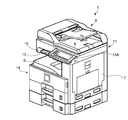
- FIG. 1 is a perspective view showing an appearance of an image forming apparatus including an image reading device according to an embodiment of the present invention.
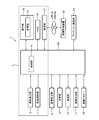
- 1 is a block diagram showing an internal configuration of an image forming apparatus including an image reading apparatus according to an embodiment of the present invention.
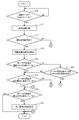
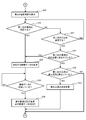
- It is a flowchart which shows a display language change process.
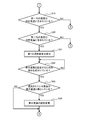
- It is a flowchart which shows a display language change process.
- It is a flowchart which shows a display language change process.
- It is a flowchart which shows a display language change process.
- It is a flowchart which shows a display language change process.
- It is a figure which shows a display language change process.
- It is a figure which shows an example of a home screen.
- It is a figure which shows an example of a 1st original.
- It is a figure which shows another example of a home screen.
- It is a figure which shows an example of a 1st selection screen.
- It is a figure which shows an example of
- FIG. 1 is a perspective view showing the outer appearance of an image forming apparatus including an image reading apparatus according to an embodiment of the present invention.
- the image forming apparatus 1 is a multi-function peripheral having a plurality of functions such as a facsimile function, a copy function, a printer function, and a scanner function.
- the image forming apparatus 1 has a display language change function that changes the display language setting from the set language to the language recognized as the language of the characters included in the original.
- the wording "language” indicates the type of language such as "Japanese” or "English”.
- a housing 7 of the image forming apparatus 1 contains a plurality of devices for realizing various functions of the image forming apparatus 1.
- the housing 7 houses the image reading unit 11, the image forming unit 12, the fixing unit 13, the paper feeding unit 14, and the like.
- the image reading unit 11 includes an ADF (an original conveying unit 6 that conveys an original, and a scanner that optically reads an original conveyed by the original conveying unit 6 or an original placed on a contact glass. Auto Document Feeder).
- the image reading unit 11 irradiates a document with a light irradiating unit and receives reflected light reflected from the document with a CCD (Charge-Coupled Device) sensor to read the document and generate image data.
- ADF an original conveying unit 6 that conveys an original
- a scanner that optically reads an original conveyed by the original conveying unit 6 or an original placed on a contact glass.
- Auto Document Feeder Auto Document Feeder
- the image reading unit 11 irradiates a document with a light irradiating unit and receives reflected light reflected from the document with a CCD (Charge-Coupled Device) sensor to read the document and generate image data.
- CCD Charge-Coupled Device
- the image forming unit 12 includes a photosensitive drum, a charging device, an exposure device, a developing device, and a transfer device.
- the image forming unit 12 includes image data generated by the image reading unit 11, image data sent from a PC (Personal Computer) connected via a network, or image data sent from another facsimile machine. Based on the above, the image formed of the toner image is formed on the recording paper supplied from the paper supply unit 14.
- PC Personal Computer
- the fixing unit 13 fixes the toner image on the recording paper by heating and pressing the recording paper on the surface of which the toner image is formed by the image forming unit 12.
- the recording paper on which the toner image is fixed by the fixing unit 13 is ejected to the paper ejection tray 8.
- the paper feed unit 14 pulls out the recording paper contained in the paper cassette or the recording paper placed on the manual feed tray one by one by a pickup roller and sends the recording paper to the image forming unit 12.
- the image forming apparatus 1 includes an operation unit 15.
- the user inputs, via the operation unit 15, instructions regarding various functions that can be executed by the image forming apparatus 1.
- the operation unit 15 includes, as a hard key, a start key for instructing to start execution of various functions.
- the operation unit 15 also includes a display unit 16.
- the display unit 16 is a display device including a liquid crystal display.
- the display unit 16 displays various screens regarding various functions executable by the image forming apparatus 1.
- the operation unit 15 further includes a touch panel 15A arranged so as to overlap the display unit 16.
- the operation unit 15 is an example of the input unit in the claims.
- FIG. 2 is a block diagram showing an internal configuration of an image forming apparatus including an image reading apparatus according to an embodiment of the present invention.
- the image forming apparatus 1 includes a control unit 100.
- the control unit 100 includes a processor, a RAM (Random Access Memory), a ROM (Read Only Memory), and the like.
- the processor is, for example, a CPU (Central Processing Unit), an MPU (Micro Processing Unit), an ASIC (Application Specific Integrated Circuit), or the like.
- the control unit 100 functions as the control unit 10 when the control program stored in the built-in ROM or HDD (Hard Disk Drive) 19 is executed by the above processor.
- HDD Hard Disk Drive
- the control unit 100 includes a document transport unit 6, an image reading unit 11, an image forming unit 12, a fixing unit 13, a paper feeding unit 14, an operation unit 15, an image processing unit 17, an image memory 18, an HDD 19, a facsimile communication unit 20, and It is electrically connected to the communication unit 21 and the like.
- the document feeding unit 6, the image reading unit 11, the operation unit 15, the display unit 16, the HDD 19, the communication unit 21, and the control unit 100 function as the image reading device 2.
- the control unit 10 controls the entire image forming apparatus 1. More specifically, the control unit 10 controls the operation of each unit of the image forming apparatus 1, communication with a PC connected via a network, or an information processing apparatus such as another image forming apparatus 22. To do.
- the image processing unit 17 executes image processing on the image data generated by the image reading unit 11 as necessary.
- the image memory 18 includes an area for temporarily storing the image data to be printed generated by the image reading unit 11.
- the HDD 19 is a large-capacity storage device that stores various data including image data generated by the image reading unit 11.
- the HDD 19 stores various control programs for realizing general operations of the image forming apparatus 1.
- the HDD 19 is an example of a storage unit in the claims.
- HDD 19 stores an OCR program for executing general OCR processing.
- the above-mentioned processor By operating according to the OCR program, the above-mentioned processor performs, as the control unit 10, an OCR process of converting a portion of image data recognized as a character into text data.
- the OCR program is included in the control program.
- the HDD 19 stores a display language changing program for executing the display language changing process according to the present embodiment.
- the above-mentioned processor operates according to the display language changing program to perform the display language changing process as the control unit 10.
- the display language changing program is included in the control program.
- control unit 10 may be configured to be operable by a hardware circuit without depending on the operation based on the control program, or may be configured to be realized by two or more control units.
- the HDD 19 stores in advance, for one or more predetermined languages, information (hereinafter, referred to as “language information”) for displaying an image corresponding to the language on the display unit 16.
- language information information
- the one or more predetermined languages for the language information will be referred to as “corresponding languages”.
- corresponding languages In the present embodiment, it is assumed that there are a plurality of corresponding languages, including English, Japanese, and Chinese.
- the user of the image forming apparatus 1 selects any one of the above-described corresponding languages as a language to be displayed on the display unit 16 (hereinafter, referred to as “display language”) by inputting through the operation unit 15. Can be selected and preset.
- the HDD 19 stores, as the language information, image data for displaying an image corresponding to each of a plurality of corresponding languages.
- the control unit 10 causes the display unit 16 to display an image corresponding to the language set as the display language, based on the image data stored in the HDD 19.
- a home screen for selecting any one of a plurality of functions executable by the image forming apparatus 1
- a copy screen for performing various settings regarding the copy function
- HDD 19 stores dictionary data corresponding to multiple languages in order to recognize the language of the characters included in the manuscript.
- the facsimile communication unit 20 connects to a public line and transmits / receives image data via the public line.
- the communication unit 21 includes a communication module such as a LAN (Local Area network) board.
- the image forming apparatus 1 performs data communication with a PC on the network or another information processing apparatus such as the image forming apparatus 22 via the communication unit 21.
- a power source is connected to each unit of the image forming apparatus 1, and each unit of the image forming apparatus 1 operates by supplying power from this power source.
- [motion] 3A to 3C are flowcharts showing the display language changing process.
- the control structure of the display language changing program executed by the image forming apparatus 1 in order to execute the display language changing process will be described together with the operation of the image forming apparatus 1.
- the display language changing program is executed when the image forming apparatus 1 is powered on.
- control unit 10 waits until image data is generated by reading a document by image reading unit 11 (NO in step S10). ).
- the control unit 10 also causes the display unit 16 to display a home screen in which a language preset as a display language is used.
- FIG. 4 is a diagram showing an example of the home screen.
- control unit 10 includes, on home screen 40, as soft keys, a key 42 for selecting a copy function, a key 44 for selecting a transmission function, and a key for selecting a facsimile function. 46 etc. are displayed.
- the control unit 10 indicates the characters included in the home screen 40 in Japanese, such as “copy” and “send”.
- the user confirms the copy screen and inputs various settings relating to the copy function via the operation unit 15. After inputting various settings, it is assumed that the user places the first original document desired to be printed on the contact glass of the image reading unit 11 and presses the start key provided on the operation unit 15. .
- control unit 10 When the control unit 10 detects pressing of the start key, the control unit 10 causes the image reading unit 11 to read the first document and generate image data. Referring back to FIG. 3A, when control unit 10 determines that the image data has been generated (YES in step S10), based on the generated image data, the control unit 10 determines the language of the characters included in the document. A process for recognizing (hereinafter referred to as "language recognition process”) is executed (step S11).
- control unit 10 first executes a general OCR process to generate text data based on a portion of the generated image data recognized as a character. The control unit 10 then refers to the dictionary data stored in the HDD 19 to recognize the language of the character indicated by the generated text data. After executing the language recognition process, the control unit 10 determines whether or not the language of the characters included in the document can be recognized by the language recognition process (step S12).
- control unit 10 determines that the language of the characters included in the original can be recognized (YES in step S12), and the text is displayed. Based on the data, the ratio of the number of characters indicated by the language recognized by the language recognition processing (hereinafter, referred to as “recognition language”) to the number of all characters included in the manuscript, The calculation is performed for each of the recognized languages (step S13).
- the control unit 10 determines whether or not the ratio of the first language having the largest calculated ratio exceeds 55% as an example of a predetermined ratio (step S14).
- a predetermined ratio an example of a manuscript in which the ratio for the first language exceeds 55% is shown.
- FIG. 5 is a diagram showing an example of the first original.
- first manuscript 50 includes a character 52 “samurai” shown in Japanese.
- the number of characters included in the first manuscript 50 is “1” and the number of characters shown in Japanese is “1”. Therefore, the control unit 10 determines “100%”. Is calculated.
- control unit 10 determines that the ratio for the first-ranked language exceeds 55% (YES in step S14), and determines whether the first-ranked language is included in the corresponding languages. Is determined (step S15).
- the first language is Japanese
- the corresponding languages are English, Japanese, and Chinese
- the control unit 10 determines that the first language is included in the corresponding languages. Then (YES in step S15), it is determined whether the first language is different from the language set as the display language (step S16).
- the control unit 10 determines that the first language is the same as the set language (NO in step S16), and the display language The display language changing process is terminated without changing the setting.
- the control unit 10 causes the display unit 16 to display the home screen 40 again.
- the user confirms the copy screen and inputs various settings relating to the copy function via the operation unit 15. After inputting the various settings, it is assumed that the user places the second document desired to be printed on the contact glass of the image reading unit 11 and presses the start key provided on the operation unit 15. .
- the second manuscript shall contain the letters shown in English and the letters shown in Russian.
- the ratio of the number of letters shown in English to the number of all letters is "90%”
- the ratio of the number of letters shown in Russian to the number of all letters is , "10%”.
- control unit 10 When the control unit 10 detects pressing of the start key, the control unit 10 causes the image reading unit 11 to read the second document and generate image data. Referring back to FIG. 3A, when it is determined that the image data has been generated (YES in step S10), control unit 10 executes the language recognition process based on the generated image data (step S11). . In this case, the control unit 10 recognizes English and Russian as the languages of the characters included in the second document by the language recognition process.
- the control unit 10 determines that the language of the characters included in the manuscript can be recognized by the language recognition processing (YES in step S12), and calculates the ratio of the recognized language for each recognized language (step S12). S13). In this case, the control unit 10 calculates a ratio of “90%” for English and a ratio of “10%” for Russian.
- the control unit 10 determines whether or not the calculated ratio exceeds 55% as an example of a predetermined ratio for the first language (step S14). In this case, the ratio for the first language is "90%", so the control unit 10 determines that the ratio for the first language exceeds 55% (YES in step S14). , It is determined whether or not the first language is included in the corresponding languages (step S15).
- the control unit 10 determines that the first-ranked language is included in the corresponding languages. (YES in step S15), it is determined whether the first language is different from the language set as the display language (step S16).
- control unit 10 determines that the first language is different from the set language (YES in step S16), and the display language is changed.
- the setting is changed from Japanese to English (step S17).
- the control unit 10 causes the display unit 16 to display an image corresponding to English.
- control unit 10 After changing the display language setting, the control unit 10 ends the display language changing process.
- the control unit 10 causes the display unit 16 to display the home screen corresponding to the changed language.
- FIG. 6 is a diagram showing another example of the home screen.
- control unit 10 has, on home screen 60, a soft key key 62 for selecting a copy function, a key 64 for selecting a transmission function, and a key for selecting a facsimile function. 66 etc. are displayed.
- the control unit 10 indicates the characters included in the home screen 60 in English, for example, “COPY” and “SEND”.
- the user confirms the copy screen and inputs various settings relating to the copy function via the operation unit 15. After inputting the various settings, it is assumed that the user places the third document desired to be printed on the contact glass of the image reading unit 11 and presses the start key provided on the operation unit 15. .
- the third manuscript shall contain the letters shown in English, the letters shown in Japanese, and the letters shown in Russian.
- the ratio of the number of characters shown in English to the number of all characters is "50%”
- the ratio of the number of characters shown in Japanese to the number of all characters is It is “40%”
- the ratio of the number of letters shown in Russian to the number of all letters is “10%”.
- control unit 10 When the control unit 10 detects pressing of the start key, the control unit 10 causes the image reading unit 11 to read the third document and generate image data. Referring back to FIG. 3A, when it is determined that the image data has been generated (YES in step S10), control unit 10 executes the language recognition process based on the generated image data (step S11). . In this case, the control unit 10 recognizes English, Japanese, and Russian as the languages of the characters included in the third document by the language recognition process.
- the control unit 10 determines that the language of the characters included in the manuscript can be recognized by the language recognition processing (YES in step S12), and calculates the ratio of the recognized language for each recognized language (step S12). S13). In this case, the control unit 10 calculates a ratio of “50%” for English, a ratio of “40%” for Japanese, and a ratio of “10%” for Russian. To do.
- the control unit 10 determines whether or not the calculated ratio exceeds 55% for the first language (step S14). In this case, since the ratio for the first language is “50%”, the control unit 10 determines that the ratio for the first language does not exceed 55% (NO in step S14). Of the recognized languages, it is determined whether or not there is a language whose difference from the ratio calculated for the first language is within a predetermined range (step S18). Specifically, the control unit 10 determines whether or not there is a language having a difference within 10% from the ratio calculated for the first-ranked language. In addition, here, 10% is used as an example of a predetermined range.
- the control unit 10 determines the ratio of the first language to the ratio of the recognized languages. It is determined that there is a language whose difference is within a predetermined range (YES in step S18), and with reference to FIG. 3B, it is determined whether or not the first language is included in the corresponding languages. (Step S19).
- the control unit 10 determines that the first-ranked language is included in the corresponding languages. (YES in step S19), it is determined whether or not the second language is included in the corresponding languages (step S20). In this case, since the second-ranked language is Japanese, control unit 10 determines that the second-ranked language is included in the corresponding languages (YES in step S20), and displays it on display unit 16. As a language candidate, a first selection screen for displaying information indicating the first-ranked language and the second-ranked language is displayed (step S21).
- FIG. 7 is a diagram showing an example of the first selection screen.
- control unit 10 causes first selection screen 70 to display a Japanese message 72 “Please select the display language”.
- the control unit 10 includes, as soft keys on the first selection screen 70, a key 74 for inputting an instruction to set English, which is the first language, as the display language, and a Japanese, which is the second language.
- a key 76 for inputting an instruction to set as a display language and a key 78 for inputting an instruction for setting neither the first language nor the second language as a display language are displayed. .
- control unit 10 displays an image showing English and the characters "English” in the area where the key 74 is displayed, and an image showing Japanese and the characters "Japanese” in the area where the key 76 is displayed. Is shown. After displaying first selection screen 70, control unit 10 waits until an instruction for setting the display language is received by pressing key 74 or key 76 (NO in step S22).
- step S22 When setting the first language as the display language It is assumed that the user confirms the first selection screen 70 and presses the key 74. When the pressing of the key 74 is detected via the touch panel 15A, the control unit 10 determines that the instruction for setting the display language is accepted (YES in step S22), and the language indicated by the instruction is displayed. Is different from the language set as the display language (step S23).
- the control unit 10 determines that the language indicated by the instruction is the set language. It is determined that they are different (YES in step S23), and the display language setting is changed from Japanese to English (step S24). After changing the setting of the display language, the control unit 10 causes the display unit 16 to display an image corresponding to English.
- control unit 10 After changing the display language setting, the control unit 10 ends the display language changing process.
- the control unit 10 causes the display unit 16 to display the home screen 60 corresponding to the changed language.
- step S22 When setting the second language as the display language
- the control unit 10 gives an instruction for setting the display language. Is determined to be accepted (YES in step S22), the language indicated by the instruction is determined to be the same as the set language (NO in step S23), and the display language setting is changed. The display language changing process is terminated without performing.
- the control unit 10 causes the display unit 16 to display the home screen 40 again.
- the control unit 10 causes the display unit 16 to display a copy screen corresponding to Japanese.
- the user confirms the copy screen and inputs various settings relating to the copy function via the operation unit 15. After inputting the various settings, it is assumed that the user places the fourth original document desired to be printed on the contact glass of the image reading unit 11 and presses the start key provided on the operation unit 15. .
- the fourth manuscript shall contain the letters shown in English, the letters shown in Japanese, and the letters shown in Russian.
- the ratio of the number of characters shown in English to the number of all characters is "50%"
- the ratio of the number of characters shown in Japanese to the number of all characters is It is “10%”
- the ratio of the number of characters shown in Russian to the number of all characters is “40%”.
- control unit 10 When the control unit 10 detects pressing of the start key, the control unit 10 causes the image reading unit 11 to read the fourth document and generate image data. Referring back to FIG. 3A, when it is determined that the image data has been generated (YES in step S10), control unit 10 executes the language recognition process based on the generated image data (step S11). . In this case, the control unit 10 recognizes English, Japanese, and Russian as the languages of the characters included in the fourth document by the language recognition process.
- the control unit 10 determines that the language of the characters included in the manuscript can be recognized by the language recognition processing (YES in step S12), and calculates the ratio of the recognized language for each recognized language (step S12). S13). In this case, the control unit 10 calculates a ratio of “50%” for English, a ratio of “10%” for Japanese, and a ratio of “40%” for Russian. To do.
- the control unit 10 determines whether the calculated ratio for the first language exceeds 55% (step S14). In this case, the percentage calculated for the first language is “50%”, so the control unit 10 determines that the percentage calculated for the first language does not exceed 55% (step S14). , NO), it is determined whether or not there is a language having a difference between the recognized language and the ratio calculated for the first-ranked language within a predetermined range (in this case, within 10%). (Step S18).
- the calculated ratio for the second-ranked language is “40%”, so that the control unit 10 sets the difference between the recognized language and the first-ranked language in a predetermined range. It is determined that there is a language (YES in step S18), and with reference to FIG. 3B, it is determined whether or not the first language is included in the corresponding languages (step S19).
- the control unit 10 determines that the first-ranked language is included in the corresponding languages. (YES in step S19), it is determined whether or not the second language is included in the corresponding languages (step S20). In this case, since the second language is Russian, the control unit 10 determines that the second language is not included in the corresponding languages (NO in step S20), and again refers to FIG. 3A. Then, it is determined whether or not the first language is different from the language set as the display language (step S16).
- the control unit 10 determines that the first language is different from the set language (YES in step S16), and the display language The setting of is changed from Japanese to English (step S17). After changing the setting of the display language, the control unit 10 causes the display unit 16 to display an image corresponding to English.
- control unit 10 After changing the display language setting, the control unit 10 ends the display language changing process.
- the control unit 10 causes the display unit 16 to display the home screen 60 corresponding to the changed language.
- the user confirms the copy screen and inputs various settings relating to the copy function via the operation unit 15. After inputting various settings, it is assumed that the user places the fifth original document desired to be printed on the contact glass of the image reading unit 11 and presses the start key provided on the operation unit 15. .
- the fifth manuscript shall contain the letters shown in English, the letters shown in Japanese, and the letters shown in Russian.
- the ratio of the number of characters shown in English to the number of all characters is “40%”
- the ratio of the number of characters shown in Japanese to the number of all characters is It is "10%”
- the ratio of the number of characters shown in Russian to the number of all characters is "50%”.
- control unit 10 When the control unit 10 detects pressing of the start key, the control unit 10 causes the image reading unit 11 to read the fifth document and generate image data. Referring back to FIG. 3A, when it is determined that the image data has been generated (YES in step S10), control unit 10 executes the language recognition process based on the generated image data (step S11). . In this case, the control unit 10 recognizes English, Japanese, and Russian as the languages of the characters included in the fifth document by the language recognition process.
- the control unit 10 determines that the language of the characters included in the manuscript can be recognized by the language recognition processing (YES in step S12), and calculates the ratio of the recognized language for each recognized language (step S12). S13). In this case, the control unit 10 calculates a ratio of “40%” for English, a ratio of “10%” for Japanese, and a ratio of “50%” for Russian. To do.
- the control unit 10 determines whether the calculated ratio for the first language exceeds 55% (step S14). In this case, the percentage calculated for the first language is “50%”, so the control unit 10 determines that the percentage calculated for the first language does not exceed 55% (step S14). , NO), it is determined whether or not there is a language having a difference between the recognized language and the ratio calculated for the first-ranked language within a predetermined range (in this case, within 10%). (Step S18).
- the calculated ratio for the second-ranked language is “40%”, so that the control unit 10 sets the difference between the recognized language and the first-ranked language in a predetermined range. It is determined that there is a language (YES in step S18), and with reference to FIG. 3B, it is determined whether or not the first language is included in the corresponding languages (step S19).
- the control unit 10 determines that the first language is not included in the corresponding languages. Then (NO in step S19), referring to FIG. 3C, second selection for displaying information indicating first language and second language on display unit 16 as candidates for the display language. The screen is displayed (step S25).
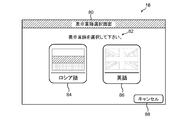
- FIG. 8 is a diagram showing an example of the second selection screen.
- control unit 10 causes second selection screen 80 to display a Japanese message 82 “Please select a display language”.
- the control unit 10 includes, on the second selection screen 80, as a soft key, a key 84 for inputting an instruction to set Russian, which is the first language, as a display language, and an English, which is the second language.
- a key 86 for inputting an instruction to set as a display language and a key 88 for inputting an instruction to select neither the first language nor the second language are displayed.
- the control unit 10 displays an image showing Russian and the characters "Russian" in the area where the key 84 is displayed, and an image showing English and "English” in the area where the key 86 is displayed. The character "" is shown.
- the control unit 10 waits until an instruction for setting the display language is received by pressing the key 84 or the key 86 (NO in step S26, step S27). NO).
- the other image forming apparatus 22 When the other image forming apparatus 22 receives the request for transmitting the first image data, the other image forming apparatus 22 reads the first image data from the storage unit included in the other image forming apparatus 22, and reads the read first image data from the image forming apparatus 1 Send to.
- the control unit 10 of the image forming apparatus 1 receives the first image data via the communication unit 21 (YES in step S29), the display language setting is changed from Japanese to Russian and is received.
- the first image data is stored in the HDD 19 as language information corresponding to Russian (step S30).
- the control unit 10 After changing the setting of the display language, the control unit 10 causes the display unit 16 to display an image corresponding to Russian.
- control unit 10 After changing the display language setting, the control unit 10 ends the display language changing process.
- the control unit 10 causes the display unit 16 to display the home screen corresponding to the changed language.
- the control unit 10 causes the home screen corresponding to Russian to display, as soft keys, keys for selecting the copy function, keys for selecting the transmission function, keys for selecting the facsimile function, and the like. There is.
- the control unit 10 indicates the characters included in the home screen in Russian, such as "iller ⁇ Economics ⁇ ” and " ⁇ réellecetaterion ⁇ rion”.
- control unit 10 determines that the instruction to set the second-ranked language as the display language is accepted (YES in step S27), and the second-ranked language is included in the corresponding languages. It is determined whether or not there is (step S31). In this case, since the second language is English, the control unit 10 determines that the second language is included in the corresponding languages (YES in step S31), and the second language is It is determined whether or not it is different from the language set as the display language (step S32).
- the control unit 10 determines that the second language is different from the set language (YES in step S32), and the display language is displayed. After changing the display language setting from Japanese to English (step S33), the control unit 10 causes the display unit 16 to display an image corresponding to English.
- control unit 10 After changing the display language setting, the control unit 10 ends the display language changing process.
- the control unit 10 causes the display unit 16 to display the home screen 60 corresponding to the changed language.
- control unit 10 determines that the second language is the same as the set language (NO in step S32), and the display language change process. To finish.
- the control unit 10 causes the display unit 16 to display the home screen 40 corresponding to the set language.
- control unit 10 determines that the second language is the corresponding language. It is determined that it is not included (NO in step S31), another image forming apparatus 22 that can support the second language is searched for through the communication unit 21, and the other image forming apparatus 22 that is found is searched. Requesting the transmission of the second image data for displaying the image corresponding to the second language (step S28). After requesting the transmission of the second image data, control unit 10 waits until it receives the second image data from another image forming apparatus 22 (NO in step S29).
- the other image forming apparatus 22 When the other image forming apparatus 22 receives the request for transmitting the second image data, the other image forming apparatus 22 reads the second image data from the storage unit included in the other image forming apparatus 22, and reads the read second image data from the image forming apparatus 1 Send to.
- control unit 10 of image forming apparatus 1 When receiving the second image data via communication unit 21 (YES in step S29), control unit 10 of image forming apparatus 1 changes the display language setting from Japanese to Portuguese and receives the second image data.
- the generated second image data is stored in the HDD 19 as language information corresponding to Portuguese (step S30).
- the control unit 10 After changing the setting of the display language, the control unit 10 causes the display unit 16 to display an image corresponding to Portuguese.
- control unit 10 After changing the display language setting, the control unit 10 ends the display language changing process.
- the control unit 10 causes the display unit 16 to display the home screen corresponding to the changed language.
- the control unit 10 causes the home screen corresponding to Portuguese to display, as soft keys, keys for selecting a copy function, keys for selecting a transmission function, keys for selecting a facsimile function, and the like. There is.
- the control unit 10 indicates the characters included in the home screen in Portuguese, such as "COPIAR” and "ENVIAR".
- step (NO in S14) the ratio calculated for the first language does not exceed 55% (step (NO in S14), if there is no language among the recognized languages whose difference from the ratio of the first language is within a predetermined range (NO in step S18), the control unit 10 determines that Similarly, the processing from step S15 to step S17 is executed.
- control unit 10 ends the display language changing process without changing the setting of the display language.
- the control unit 10 causes the display unit 16 to display the home screen 40 corresponding to the language preset as the display language again.
- the control unit 10 ends the display language change process.
- the control unit 10 causes the display unit 16 to display the home screen 40 corresponding to the language preset as the display language again.
- control unit 10 recognizes the language of the characters included in the document based on the image data generated by the image reading unit 11, and is set as the display language. If the displayed language and the recognized language are different, the display language setting is changed from the set language to the recognized language.
- the characters contained in the manuscript are likely to be represented in the language that the user normally uses. Therefore, according to the above embodiment, an image corresponding to a language that is likely to be understood by the user can be displayed on the display unit 16 without requiring an input operation for setting the display language. , User convenience is improved.
- control unit 10 controls the characters indicated by the recognition language with respect to the total number of characters included in the manuscript among the recognition languages.
- the first language having the largest percentage of the numbers is different from the language set as the display language, the setting of the display language is changed from the set language to the first language.
- the image corresponding to the first language included in the manuscript most frequently is displayed on the display unit 16, further improving the convenience for the user.
- control unit 10 displays information indicating the first-ranked language on display unit 16 when the language information regarding the first-ranked language is not stored in HDD 19.
- the second selection screen 80 is displayed.
- the control unit 10 receives an instruction to set the first language as the display language via the operation unit 15, the control unit 10 transmits the first image to the other image forming apparatus 22 via the communication unit 21. Request transmission of the first image data for displaying the image corresponding to the language of the first place.
- the control unit 10 receives the first image data via the communication unit 21, the control unit 10 changes the setting of the display language from the set language to the first language, and also receives the received first image data. It is stored in the HDD 19 as language information.
- the image forming apparatus 1 can display an image corresponding to the first language on the display unit 16 even if the image forming apparatus 1 does not support the first language included in the document most often. Like Therefore, the convenience for the user is further improved.
- the control unit 10 is the case where the language information about the first-ranked language is not stored in the HDD 19, and the above-mentioned ratio for the first-ranked language among the recognized languages. If there is a second-ranked language within a predetermined range, the second selection for displaying information indicating the first-ranked language and the second-ranked language on the display unit 16. The screen 80 is displayed.
- the control unit 10 receives an instruction to set the second language as the display language via the operation unit 15, and the language information about the second language is not stored in the HDD 19, , Via the communication unit 21, requests the other image forming apparatus 22 to transmit the second image data for displaying the image corresponding to the second language.
- the control unit 10 receives the second image data via the communication unit 21, the control unit 10 changes the setting of the display language from the set language to the second language, and also receives the received second image data. It is stored in the HDD 19 as language information.
- the user can display on the display unit 16 an image corresponding to the second language, which is often included in the manuscript except for the first language. Further, even when the image forming apparatus 1 does not support the second language, the image corresponding to the second language can be displayed on the display unit 16. Therefore, the convenience for the user is further improved.
- control unit 10 receives, via the operation unit 15, an instruction to set the second language as the display language, and the language for the second language is received. If the information is stored in the HDD 19 and the second language is different from the set language, the setting of the display language is changed from the set language to the second language.
- the display unit 16 supports the second language when the second language is supported.
- the image can be displayed easily.
- the control unit 10 determines that among the recognized languages, there is a second-ranked language whose difference from the above-mentioned ratio for the first-ranked language is within a predetermined range.
- the display unit 16 displays the first and second information for displaying the information indicating the first and second languages.
- the selection screen 70 of No. 1 is displayed.
- the user can select either the first language or the second language and display the image corresponding to the selected language on the display unit 16. Therefore, the convenience for the user is further improved.
- the control unit 10 requested the other image forming apparatus 22 to transmit the first image data or the second image data, but the present invention is limited to such an embodiment. Not done. For example, when there is no other image forming apparatus 22 that can support the first language or the second language, the control unit 10 controls the server apparatus connected to the image forming apparatus 1 via the network. May be requested to transmit the translation data corresponding to the first language or the translation data corresponding to the second language.
- control unit 10 executes the following processing instead of the processing from step S28 to step S30 shown in FIG. 3C.
- the control unit 10 causes the server device via the communication unit 21 to translate to the translation source.
- "Japanese” which is the language of "”
- "Mongolian” which is the translation destination language
- Japanese Japanese which is the translation target such as "copy", "send” and "fax” included in the home screen 40.
- the text and the translation information indicating are transmitted.
- dictionary data for translating the translation source language indicated by the received translation information into the translation destination language is indicated by, for example, US Pat. No. 6,996,520.
- the translation target text indicated by the translation information is translated based on the obtained dictionary data.
- the server device transmits the translation data indicating the Mongolian text obtained by the translation to the image forming device 1.
- the control unit 10 of the image forming apparatus 1 Upon receiving the translation data, the control unit 10 of the image forming apparatus 1 uses the received translation data and the image data corresponding to the home screen 40 to generate the image data for displaying the home screen corresponding to the Mongolian language. It is created and stored in the HDD 19, and the display language setting is changed from Japanese to Mongolian.
- the control unit 10 when the first language is included in the corresponding languages and the first language is different from the language set as the display language, the control unit 10 The setting of the display language is changed without displaying the information indicating the first language on the display unit 16, but the present invention is not limited to such an embodiment.
- the control unit 10 causes the display unit 16 to display a screen for displaying information indicating the first-ranked language, and the display language is set to the first-ranked language via the operation unit 15.
- the configuration may be such that the setting of the display language is changed when the instruction to set is received.
- control unit 10 causes the display unit 16 to display information indicating the first language and the second language on the first selection screen 70 or the second selection screen 80.
- the present invention is not limited to such an embodiment.
- the control unit 10 includes the first selection screen 70 or the second selection screen 80 with respect to the display unit 16 and the third largest number in the manuscript together with the first language and the second language. It may be configured to display information indicating the third highest language.
- the predetermined range is set to 10%, but the present invention is not limited to such an embodiment.
- the predetermined range may be a value at which the number of characters included in the manuscript can be determined to be approximately the same as the number of characters in the first language, for example, 5%. Good.
- control unit 10 determines whether or not the above ratio exceeds 55%, but the present invention is not limited to such an embodiment. .
- control unit 10 may be configured to determine whether or not the above ratio exceeds 70%.
- the present invention is not limited to the configuration of the above embodiment, and various modifications can be made.
- the color multifunction peripheral is used as one embodiment of the image reading apparatus according to the present invention, but this is merely an example, and a monochrome multifunction peripheral or another electronic device such as a facsimile machine may be used. You may use.
- FIGS. 1 to 8 are merely one embodiment of the present invention, and the present invention is not limited to the configuration and processing.
Landscapes
- Engineering & Computer Science (AREA)
- Theoretical Computer Science (AREA)
- General Engineering & Computer Science (AREA)
- Physics & Mathematics (AREA)
- General Physics & Mathematics (AREA)
- Human Computer Interaction (AREA)
- Multimedia (AREA)
- Signal Processing (AREA)
- Facsimiles In General (AREA)
Abstract
画像読取装置(2)は、画像読取部(11)と、表示部(16)と、表示言語として設定されている言語に対応する画像を表示部(16)に表示させるための言語情報を記憶している記憶部(19)と、言語情報に基づいて、設定されている言語に対応する画像を表示部(16)に表示させる制御部(10)と、を備える。制御部(10)は、画像読取部(11)によって生成された画像データに基づいて原稿に含まれている文字の言語を認識している場合であって、表示言語として設定されている言語と認識言語とが異なっている場合に、表示言語の設定を、設定されている言語から認識言語に変更する。
Description
本発明は、画像読取装置に関し、特に、表示言語を切替える技術に関する。
表示言語として予め設定されている言語を、異なる言語に切替える技術が知られている。例えば、特許文献1には、操作パネルの表示言語を、スキャナー装置から送信されてくる情報によって示されている言語に切替えるプリンタ装置が開示されている。特許文献1にはまた、スキャナー装置が、原稿に記載されている文字の言語をOCR(Optical Character Recognition)を用いて特定し、特定された言語を示す情報をプリンタ装置に送信する技術が開示されている。
一般的に、表示言語がユーザーにとって理解することが困難な言語であると、ユーザーは、表示言語を他の言語に設定するための入力操作を行なうことによって、表示言語の設定変更を行なう。しかしながら、当該設定変更を行なうための画面には、そもそもユーザーにとって理解することが困難な言語が用いられているため、ユーザーは容易に設定変更を行なうことができないという問題がある。
特許文献1に開示されているプリンタ装置は、スキャナー装置から送信されてくる情報に従って表示言語を切替えるため、ユーザーによる上記入力操作を要することなく、表示言語を切替えることができる。しかしながら、特許文献1には、上記情報に従ってスキャナー装置自身の表示言語を切替える技術については開示されていない。
本発明は、上記の事情に鑑みなされたものであり、表示言語を設定するための入力操作を要することなく、表示言語をユーザーが理解できる可能性の高い言語に設定することを目的とする。
本発明の一局面に係る画像読取装置は、原稿を読み取って画像データを生成する画像読取部と、表示部と、表示言語として設定されている言語に対応する画像を表示するための情報を記憶している記憶部と、上記情報に基づいて、設定されている言語に対応する画像を表示部に表示させる制御部と、を備える。制御部は、画像読取部によって生成された画像データに基づいて原稿に含まれている文字の言語を認識している場合であって、設定されている言語と、認識された言語とが異なっている場合に、表示言語の設定を、設定されている言語から、認識された言語に変更する。
本発明によれば、表示言語を設定するための入力操作を要することなく、表示部に、ユーザーが理解できる可能性の高い言語に対応する画像を表示できるので、ユーザーの利便性が向上する。
以下、本発明の一実施形態に係る画像読取装置について図面を参照して説明する。図1は、本発明の一実施形態に係る画像読取装置を含んでいる画像形成装置の外観を示す斜視図である。図1を参照して、画像形成装置1は、ファクシミリ機能、コピー機能、プリンター機能、及びスキャナー機能等の複数の機能を兼ね備えている複合機である。
画像形成装置1は、表示言語の設定を、設定されている言語から、原稿に含まれている文字の言語として認識されている言語に変更する表示言語変更機能を備えている。本実施の形態において、「言語」という文言は、例えば、「日本語」又は「英語」等の言語の種類を示すものとする。
図1を参照して、画像形成装置1の筐体7には、画像形成装置1の様々な機能を実現するための複数の機器が収容されている。例えば、筐体7には、画像読取部11、画像形成部12、定着部13、及び給紙部14等が収容されている。
画像読取部11は、原稿を搬送する原稿搬送部6と、原稿搬送部6によって搬送されてくる原稿又はコンタクトガラスに載置されている原稿を光学的に読み取るスキャナーと、を含んでいるADF(Auto Document Feeder)である。画像読取部11は、光照射部により原稿を照射し、原稿から反射されてくる反射光をCCD(Charge-Coupled Device)センサーで受光することによって、原稿を読み取って画像データを生成する。
画像形成部12は、感光体ドラム、帯電装置、露光装置、現像装置、及び転写装置を含んでいる。画像形成部12は、画像読取部11によって生成された画像データ、ネットワークを介して接続されているPC(Personal Computer)から送られてくる画像データ、又は他のファクシミリ装置から送られてくる画像データ等に基づいて、給紙部14から供給されてくる記録紙にトナー像によって構成されている画像を形成する。
定着部13は、画像形成部12によって表面にトナー像が形成された記録紙を加熱及び加圧することによってトナー像を記録紙に定着させる。定着部13によってトナー像が定着された記録紙は排紙トレイ8に排出される。
給紙部14は、用紙カセットに収容されている記録紙、又は手差しトレイに載置されている記録紙をピックアップローラーによって1枚ずつ引出して画像形成部12へと送り出す。
画像形成装置1は、操作部15を備えている。ユーザーは、操作部15を介して、画像形成装置1によって実行可能な各種機能についての指示等を入力する。操作部15は、ハードキーとして、各種機能の実行の開始を指示するためのスタートキーを含んでいる。操作部15はまた、表示部16を含んでいる。表示部16は、液晶ディスプレイを含んでいる表示装置である。表示部16は、画像形成装置1によって実行可能な各種機能に関する各種の画面を表示する。操作部15はさらに、表示部16に重ねて配置されるタッチパネル15Aを含んでいる。操作部15は、特許請求の範囲における入力部の一例である。
図2は、本発明の一実施形態に係る画像読取装置を含んでいる画像形成装置の内部構成を示すブロック図である。図2を参照して、画像形成装置1は、制御ユニット100を含んでいる。制御ユニット100は、プロセッサー、RAM(Random Access Memory)、及びROM(Read Only Memory)等を含んでいる。プロセッサーは、例えば、CPU(Central Processing Unit)、MPU(Micro Processing Unit)、又はASIC(Application Specific Integrated Circuit)等である。制御ユニット100は、内蔵しているROM又はHDD(Hard Disk Drive)19に記憶されている制御プログラムが上記のプロセッサーによって実行されることにより、制御部10として機能する。
制御ユニット100は、原稿搬送部6、画像読取部11、画像形成部12、定着部13、給紙部14、操作部15、画像処理部17、画像メモリー18、HDD19、ファクシミリ通信部20、及び通信部21等と電気的に接続されている。本実施の形態において、原稿搬送部6、画像読取部11、操作部15、表示部16、HDD19、通信部21、及び制御ユニット100は、画像読取装置2として機能する。
制御部10は、画像形成装置1の全体制御を司る。より詳細には、制御部10は、画像形成装置1の各部の動作、及び、ネットワークを介して接続されているPC、又は、他の画像形成装置22等の情報処理装置との通信等を制御する。
画像処理部17は、画像読取部11によって生成された画像データに対して、必要に応じて画像処理を実行する。
画像メモリー18は、画像読取部11によって生成された印刷対象の画像データを一時的に記憶する領域を含んでいる。
HDD19は、画像読取部11によって生成された画像データ等を含んでいる各種データを記憶している大容量の記憶装置である。HDD19は、画像形成装置1の一般的な動作を実現するための各種制御プログラムを記憶している。HDD19は、特許請求の範囲における記憶部の一例である。
HDD19は、一般的なOCR処理を実行するためのOCRプログラムを記憶している。上記のプロセッサーは、当該OCRプログラムに従って動作することにより、制御部10として、画像データにおける文字と認識されている部分をテキストデータに変換するOCR処理を実行する。OCRプログラムは、上記制御プログラムに含まれているものとする。
HDD19は、本実施の形態に係る表示言語変更処理を実行するための表示言語変更プログラムを記憶している。上記のプロセッサーは、表示言語変更プログラムに従って動作することにより、制御部10として、表示言語変更処理を実行する。表示言語変更プログラムは、上記制御プログラムに含まれているものとする。
なお、制御部10は、制御プログラムに基づく動作によらず、ハード回路により動作可能に構成されてもよいし、2つ以上の制御ユニットによって実現される構成であってもよい。
HDD19は、予め定められている1つ以上の言語について、当該言語に対応する画像を表示部16に表示させるための情報(以下、「言語情報」と記す。)を予め記憶している。以下、言語情報についての上記予め定められている1つ以上の言語を「対応言語」と記す。本実施の形態において、対応言語は複数あり、英語、日本語、及び中国語を含んでいるものとする。画像形成装置1のユーザーは、操作部15を介した入力によって、表示部16に表示させるための言語(以下、「表示言語」と記す。)として、上記した複数の対応言語のうちのいずれかを選択して予め設定することができる。
HDD19は、上記言語情報として、複数の対応言語のそれぞれに対応する画像を表示するための画像データを記憶している。制御部10は、HDD19に記憶されている上記の画像データに基づいて、表示言語として設定されている言語に対応する画像を、表示部16に表示させる。画像データに基づいて表示される画像としては、例えば、画像形成装置1によって実行可能な複数の機能のうちのいずれかを選択するためのホーム画面、コピー機能に関する各種設定を行なうためのコピー画面、送信機能に関する各種設定を行なうための送信画面、及び、ファクシミリ機能に関する各種設定を行なうためのファクシミリ画面がある。
HDD19は、原稿に含まれている文字の言語を認識するために、多言語に対応する辞書データを記憶している。
ファクシミリ通信部20は、公衆回線への接続を行ない、公衆回線を介して画像データの送受信を行なう。
通信部21は、LAN(Local Area network)ボード等の通信モジュールを含んでいる。画像形成装置1は、通信部21を介して、ネットワーク上のPC、又は、他の画像形成装置22等の情報処理装置とデータ通信を行なう。
画像形成装置1の各部には電源が接続されており、この電源から電力が供給されることによって、画像形成装置1の各部が動作する。
[動作]
図3Aから図3Cまでは、表示言語変更処理を示すフローチャートである。以下、表示言語変更処理を実行するために、画像形成装置1で実行される表示言語変更プログラムの制御構造について、画像形成装置1の動作と併せて説明する。表示言語変更プログラムは、画像形成装置1の電源が投入されることによって実行される。
図3Aから図3Cまでは、表示言語変更処理を示すフローチャートである。以下、表示言語変更処理を実行するために、画像形成装置1で実行される表示言語変更プログラムの制御構造について、画像形成装置1の動作と併せて説明する。表示言語変更プログラムは、画像形成装置1の電源が投入されることによって実行される。
画像形成装置1のユーザーは、操作部15を介した入力によって、表示言語として、日本語を予め設定しているものとする。したがって、表示部16には、日本語に対応する画像が表示されている。
図3Aを参照して、画像形成装置1の電源が投入されると、制御部10は、画像読取部11によって原稿が読取られることにより画像データが生成されるまで待機する(ステップS10にてNO)。制御部10はまた、表示部16に、表示言語として予め設定されている言語が用いられているホーム画面を表示させる。
図4は、ホーム画面の一例を示す図である。図4を参照して、制御部10は、ホーム画面40に、ソフトキーとして、コピー機能を選択するためのキー42、送信機能を選択するためのキー44、及びファクシミリ機能を選択するためのキー46等を表示させている。制御部10は、ホーム画面40に含まれている文字を、例えば、「コピー」及び「送信」のように、日本語によって示す。
(1)原稿に最も多く含まれている言語(第一位の言語)が予め設定されている言語と同じ場合
ユーザーは、ホーム画面40を確認し、コピー機能の利用を所望して、キー42を押下したものとする。タッチパネル15Aによってキー42の押下が検知されると、制御部10は、表示部16に、日本語に対応するコピー画面を表示させる。
ユーザーは、ホーム画面40を確認し、コピー機能の利用を所望して、キー42を押下したものとする。タッチパネル15Aによってキー42の押下が検知されると、制御部10は、表示部16に、日本語に対応するコピー画面を表示させる。
ユーザーは、コピー画面を確認して、操作部15を介して、コピー機能に関する各種設定を入力する。各種設定の入力後、ユーザーは、画像読取部11のコンタクトガラスに、印刷を所望している第1の原稿を載置して、操作部15に備えられているスタートキーを押下したものとする。
制御部10は、スタートキーの押下を検知すると、画像読取部11に対し、第1の原稿を読み取らせて、画像データを生成させる。図3Aを再び参照して、制御部10は、画像データが生成されていると判定すると(ステップS10にてYES)、生成された画像データに基づいて、原稿に含まれている文字の言語を認識するための処理(以下、「言語認識処理」と記す。)を実行する(ステップS11)。
言語認識処理において、制御部10はまず、一般的なOCR処理を実行して、生成された画像データにおける、文字と認識されている部分に基づいて、テキストデータを生成する。制御部10は次いで、HDD19に記憶されている辞書データを参照して、生成されたテキストデータによって示されている文字の言語を認識する。言語認識処理の実行後、制御部10は、言語認識処理によって、原稿に含まれている文字の言語を認識可能であるか否かを判定する(ステップS12)。
制御部10は、第1の原稿に含まれている文字の言語を認識している場合、原稿に含まれている文字の言語を認識可能であると判定し(ステップS12にてYES)、テキストデータに基づいて、原稿に含まれている全ての文字の数に対する、言語認識処理によって認識されている言語(以下、「認識言語」と記す。)によって示されている文字の数の割合を、認識言語のそれぞれについて算出する(ステップS13)。
割合の算出後、制御部10は、算出された割合が最も大きい第一位の言語について、当該割合が予め定められている割合の一例としての55%を超えているか否かを判定する(ステップS14)。ここで、第一位の言語についての割合が55%を超えている原稿の例を示す。図5は、第1の原稿の一例を示す図である。図5を参照して、第1の原稿50は、日本語によって示されている「侍」という文字52を含んでいる。この場合、第1の原稿50に含まれている文字の数は「1」であり、日本語によって示されている文字の数は「1」であるので、制御部10は、「100%」という割合を算出する。
この場合、制御部10は、第一位の言語についての割合が55%を超えていると判定し(ステップS14にてYES)、第一位の言語が、対応言語に含まれているか否かを判定する(ステップS15)。
この場合、第一位の言語は日本語であり、対応言語は、英語、日本語、及び中国語であるので、制御部10は、第一位の言語が対応言語に含まれていると判定し(ステップS15にてYES)、第一位の言語が、表示言語として設定されている言語と異なっているか否かを判定する(ステップS16)。
この場合、設定されている言語は日本語であるので、制御部10は、第一位の言語が、設定されている言語と同じ言語であると判定し(ステップS16にてNO)、表示言語の設定変更を行なうことなく、表示言語変更処理を終了する。表示言語変更処理を終了させると、制御部10は、表示部16に、ホーム画面40を再度表示させる。
(2)第一位の言語が設定されている言語と異なっている場合
ユーザーは、ホーム画面40を確認し、コピー機能の利用を所望して、キー42を押下したものとする。タッチパネル15Aによってキー42の押下が検知されると、制御部10は、表示部16に、日本語に対応するコピー画面を表示させる。
ユーザーは、ホーム画面40を確認し、コピー機能の利用を所望して、キー42を押下したものとする。タッチパネル15Aによってキー42の押下が検知されると、制御部10は、表示部16に、日本語に対応するコピー画面を表示させる。
ユーザーは、コピー画面を確認して、操作部15を介して、コピー機能に関する各種設定を入力する。各種設定の入力後、ユーザーは、画像読取部11のコンタクトガラスに、印刷を所望している第2の原稿を載置して、操作部15に備えられているスタートキーを押下したものとする。
第2の原稿は、英語によって示されている文字と、ロシア語によって示されている文字とを含んでいるものとする。第2の原稿において、全ての文字の数に対する英語によって示されている文字の数の割合は「90%」であり、全ての文字の数に対するロシア語によって示されている文字の数の割合は、「10%」であるものとする。
制御部10は、スタートキーの押下を検知すると、画像読取部11に対し、第2の原稿を読み取らせて、画像データを生成させる。図3Aを再び参照して、制御部10は、画像データが生成されていると判定すると(ステップS10にてYES)、生成された画像データに基づいて、言語認識処理を実行する(ステップS11)。この場合、制御部10は、言語認識処理によって、第2の原稿に含まれている文字の言語として、英語及びロシア語を認識する。
制御部10は、言語認識処理によって、原稿に含まれている文字の言語を認識可能であると判定し(ステップS12にてYES)、認識言語の割合を、認識言語のそれぞれについて算出する(ステップS13)。この場合、制御部10は、英語に対して「90%」という割合を算出し、ロシア語に対して「10%」という割合を算出する。
割合の算出後、制御部10は、第一位の言語について、算出された割合が予め定められている割合の一例としての55%を超えているか否かを判定する(ステップS14)。この場合、第一位の言語についての割合は「90%」であるので、制御部10は、第一位の言語についての割合が55%を超えていると判定し(ステップS14にてYES)、第一位の言語が、対応言語に含まれているか否かを判定する(ステップS15)。
この場合、第一位の言語は英語であり、対応言語は、英語、日本語、及び中国語であるので、制御部10は、第一位の言語が対応言語に含まれていると判定し(ステップS15にてYES)、第一位の言語が、表示言語として設定されている言語と異なっているか否かを判定する(ステップS16)。
この場合、設定されている言語は日本語であるので、制御部10は、第一位の言語が、設定されている言語と異なっていると判定し(ステップS16にてYES)、表示言語の設定を、日本語から英語に変更する(ステップS17)。表示言語の設定変更後、制御部10は、表示部16に、英語に対応する画像を表示させる。
表示言語の設定変更後、制御部10は、表示言語変更処理を終了する。表示言語変更処理を終了させると、制御部10は、表示部16に、変更された言語に対応するホーム画面を表示させる。
図6は、ホーム画面の他の一例を示す図である。図6を参照して、制御部10は、ホーム画面60に、ソフトキーとして、コピー機能を選択するためのキー62、送信機能を選択するためのキー64、及びファクシミリ機能を選択するためのキー66等を表示させている。制御部10は、ホーム画面60に含まれる文字を、例えば、「COPY」及び「SEND」のように、英語によって示す。
(3)第一位の言語の割合と、原稿に2番目に多く含まれている第二位の言語の割合との差が小さい場合であって、第一位の言語及び第二位の言語が対応言語に含まれている場合
ユーザーは、ホーム画面40を確認し、コピー機能の利用を所望して、キー42を押下したものとする。タッチパネル15Aによってキー42の押下が検知されると、制御部10は、表示部16に、日本語に対応するコピー画面を表示させる。
ユーザーは、ホーム画面40を確認し、コピー機能の利用を所望して、キー42を押下したものとする。タッチパネル15Aによってキー42の押下が検知されると、制御部10は、表示部16に、日本語に対応するコピー画面を表示させる。
ユーザーは、コピー画面を確認して、操作部15を介して、コピー機能に関する各種設定を入力する。各種設定の入力後、ユーザーは、画像読取部11のコンタクトガラスに、印刷を所望している第3の原稿を載置して、操作部15に備えられているスタートキーを押下したものとする。
第3の原稿は、英語によって示されている文字と、日本語によって示されている文字と、ロシア語によって示されている文字とを含んでいるものとする。第3の原稿において、全ての文字の数に対する英語によって示されている文字の数の割合は「50%」であり、全ての文字の数に対する日本語によって示されている文字の数の割合は「40%」であり、全ての文字の数に対するロシア語によって示されている文字の数の割合は「10%」であるものとする。
制御部10は、スタートキーの押下を検知すると、画像読取部11に対し、第3の原稿を読み取らせて、画像データを生成させる。図3Aを再び参照して、制御部10は、画像データが生成されていると判定すると(ステップS10にてYES)、生成された画像データに基づいて、言語認識処理を実行する(ステップS11)。この場合、制御部10は、言語認識処理によって、第3の原稿に含まれている文字の言語として、英語、日本語、及びロシア語を認識する。
制御部10は、言語認識処理によって、原稿に含まれている文字の言語を認識可能であると判定し(ステップS12にてYES)、認識言語の割合を、認識言語のそれぞれについて算出する(ステップS13)。この場合、制御部10は、英語に対して「50%」という割合を算出し、日本語に対して「40%」という割合を算出し、ロシア語に対して「10%」という割合を算出する。
割合の算出後、制御部10は、第一位の言語について、算出された割合が55%を超えているか否かを判定する(ステップS14)。この場合、第一位の言語についての割合は「50%」であるので、制御部10は、第一位の言語についての割合は55%を超えていないと判定し(ステップS14にてNO)、認識言語のうちに、第一位の言語について算出された割合との差が予め定められている範囲内の言語があるか否かを判定する(ステップS18)。具体的には、制御部10は、第一位の言語について算出された割合との差が10%以内の言語があるか否かを判定する。なお、ここでは、予め定められている範囲の一例として10%を用いて説明する。
この場合、算出された割合が2番目に大きい第二位の言語についての当該割合が「40%」であるので、制御部10は、認識言語のうちに、第一位の言語の割合との差が予め定められている範囲内の言語があると判定し(ステップS18にてYES)、図3Bを参照して、第一位の言語が、対応言語に含まれているか否かを判定する(ステップS19)。
この場合、第一位の言語は英語であり、対応言語は、英語、日本語、及び中国語であるので、制御部10は、第一位の言語が対応言語に含まれていると判定し(ステップS19にてYES)、第二位の言語が対応言語に含まれているか否かを判定する(ステップS20)。この場合、第二位の言語は日本語であるので、制御部10は、第二位の言語が対応言語に含まれていると判定し(ステップS20にてYES)、表示部16に、表示言語の候補として、第一位の言語及び第二位の言語を示す情報を表示するための第1の選択画面を表示させる(ステップS21)。
図7は、第1の選択画面の一例を示す図である。図7を参照して、制御部10は、第1の選択画面70に、「表示言語を選択して下さい。」という日本語のメッセージ72を表示させている。制御部10は、第1の選択画面70に、ソフトキーとして、第一位の言語である英語を表示言語として設定する指示を入力するためのキー74と、第二位の言語である日本語を表示言語として設定する指示を入力するためのキー76と、第一位の言語及び第二位の言語のいずれも表示言語として設定しない指示を入力するためのキー78と、を表示させている。制御部10は、キー74が表示されている領域に英語を示す画像と「英語」という文字とを示し、キー76が表示されている領域に日本語を示す画像と「日本語」という文字とを示している。第1の選択画面70の表示後、制御部10は、キー74又はキー76が押下されることによって表示言語を設定するための指示を受付けるまで待機する(ステップS22にてNO)。
(3-1)第一位の言語を表示言語として設定する場合
ユーザーは、第1の選択画面70を確認し、キー74を押下したものとする。タッチパネル15Aを介してキー74の押下が検知されると、制御部10は、表示言語を設定するための指示を受付けていると判定し(ステップS22にてYES)、指示によって示されている言語が、表示言語として設定されている言語と異なっているか否かを判定する(ステップS23)。
ユーザーは、第1の選択画面70を確認し、キー74を押下したものとする。タッチパネル15Aを介してキー74の押下が検知されると、制御部10は、表示言語を設定するための指示を受付けていると判定し(ステップS22にてYES)、指示によって示されている言語が、表示言語として設定されている言語と異なっているか否かを判定する(ステップS23)。
この場合、指示によって示されている言語は英語であり、表示言語として設定されている言語は日本語であるので、制御部10は、指示によって示されている言語は、設定されている言語と異なっていると判定し(ステップS23にてYES)、表示言語の設定を、日本語から英語に変更する(ステップS24)。表示言語の設定変更後、制御部10は、表示部16に、英語に対応する画像を表示させる。
表示言語の設定変更後、制御部10は、表示言語変更処理を終了する。表示言語変更処理を終了させると、制御部10は、表示部16に、変更された言語に対応するホーム画面60を表示させる。
(3-2)第二位の言語を表示言語として設定する場合
一方、ユーザーによって、第1の選択画面70のキー76が押下された場合、制御部10は、表示言語を設定するための指示を受付けていると判定するとともに(ステップS22にてYES)、指示によって示されている言語は、設定されている言語と同じであると判定し(ステップS23にてNO)、表示言語の設定変更を行なうことなく、表示言語変更処理を終了する。表示言語変更処理を終了させると、制御部10は、表示部16に、ホーム画面40を再度表示させる。
一方、ユーザーによって、第1の選択画面70のキー76が押下された場合、制御部10は、表示言語を設定するための指示を受付けていると判定するとともに(ステップS22にてYES)、指示によって示されている言語は、設定されている言語と同じであると判定し(ステップS23にてNO)、表示言語の設定変更を行なうことなく、表示言語変更処理を終了する。表示言語変更処理を終了させると、制御部10は、表示部16に、ホーム画面40を再度表示させる。
(4)第一位の言語の割合と第二位の言語の割合との差が小さい場合であって、第一位の言語のみが対応言語に含まれている場合
ユーザーは、ホーム画面40を確認し、コピー機能の利用を所望して、キー42を押下したものとする。タッチパネル15Aによってキー42の押下が検知されると、制御部10は、表示部16に、日本語に対応するコピー画面を表示させる。
ユーザーは、ホーム画面40を確認し、コピー機能の利用を所望して、キー42を押下したものとする。タッチパネル15Aによってキー42の押下が検知されると、制御部10は、表示部16に、日本語に対応するコピー画面を表示させる。
ユーザーは、コピー画面を確認して、操作部15を介して、コピー機能に関する各種設定を入力する。各種設定の入力後、ユーザーは、画像読取部11のコンタクトガラスに、印刷を所望している第4の原稿を載置して、操作部15に備えられているスタートキーを押下したものとする。
第4の原稿は、英語によって示されている文字と、日本語によって示されている文字と、ロシア語によって示されている文字とを含んでいるものとする。第4の原稿において、全ての文字の数に対する英語によって示されている文字の数の割合は「50%」であり、全ての文字の数に対する日本語によって示されている文字の数の割合は「10%」であり、全ての文字の数に対するロシア語によって示されている文字の数の割合は「40%」であるものとする。
制御部10は、スタートキーの押下を検知すると、画像読取部11に対し、第4の原稿を読み取らせて、画像データを生成させる。図3Aを再び参照して、制御部10は、画像データが生成されていると判定すると(ステップS10にてYES)、生成された画像データに基づいて、言語認識処理を実行する(ステップS11)。この場合、制御部10は、言語認識処理によって、第4の原稿に含まれている文字の言語として、英語、日本語、及びロシア語を認識する。
制御部10は、言語認識処理によって、原稿に含まれている文字の言語を認識可能であると判定し(ステップS12にてYES)、認識言語の割合を、認識言語のそれぞれについて算出する(ステップS13)。この場合、制御部10は、英語に対して「50%」という割合を算出し、日本語に対して「10%」という割合を算出し、ロシア語に対して「40%」という割合を算出する。
割合の算出後、制御部10は、第一位の言語について算出された割合が55%を超えているか否かを判定する(ステップS14)。この場合、第一位の言語について算出された割合は「50%」であるので、制御部10は、第一位の言語について算出された割合は55%を超えていないと判定し(ステップS14にてNO)、認識言語のうちに、第一位の言語について算出された割合との差が予め定められている範囲内(この場合、10%以内)の言語があるか否かを判定する(ステップS18)。
この場合、第二位の言語について算出された割合が「40%」であるので、制御部10は、認識言語のうちに、第一位の言語の割合との差が予め定められている範囲内の言語があると判定し(ステップS18にてYES)、図3Bを参照して、第一位の言語が、対応言語に含まれているか否かを判定する(ステップS19)。
この場合、第一位の言語は英語であり、対応言語は、英語、日本語、及び中国語であるので、制御部10は、第一位の言語が対応言語に含まれていると判定し(ステップS19にてYES)、第二位の言語が対応言語に含まれているか否かを判定する(ステップS20)。この場合、第二位の言語はロシア語であるので、制御部10は、第二位の言語が対応言語に含まれていないと判定し(ステップS20にてNO)、図3Aを再び参照して、第一位の言語が、表示言語として設定されている言語と異なっているか否かを判定する(ステップS16)。
この場合、設定されている言語は日本語であるので、制御部10は、第一位の言語が、設定されている言語とは異なっていると判定し(ステップS16にてYES)、表示言語の設定を、日本語から英語に変更する(ステップS17)。表示言語の設定変更後、制御部10は、表示部16に、英語に対応する画像を表示させる。
表示言語の設定変更後、制御部10は、表示言語変更処理を終了する。表示言語変更処理を終了させると、制御部10は、表示部16に、変更された言語に対応するホーム画面60を表示させる。
(5)第一位の言語の割合と第二位の言語の割合との差が小さい場合であって、第一位の言語が対応言語に含まれていない場合
ユーザーは、ホーム画面40を確認し、コピー機能の利用を所望して、キー42を押下したものとする。タッチパネル15Aによってキー42の押下が検知されると、制御部10は、表示部16に、日本語に対応するコピー画面を表示させる。
ユーザーは、ホーム画面40を確認し、コピー機能の利用を所望して、キー42を押下したものとする。タッチパネル15Aによってキー42の押下が検知されると、制御部10は、表示部16に、日本語に対応するコピー画面を表示させる。
ユーザーは、コピー画面を確認して、操作部15を介して、コピー機能に関する各種設定を入力する。各種設定の入力後、ユーザーは、画像読取部11のコンタクトガラスに、印刷を所望している第5の原稿を載置して、操作部15に備えられているスタートキーを押下したものとする。
第5の原稿は、英語によって示されている文字と、日本語によって示されている文字と、ロシア語によって示されている文字とを含んでいるものとする。第5の原稿において、全ての文字の数に対する英語によって示されている文字の数の割合は「40%」であり、全ての文字の数に対する日本語によって示されている文字の数の割合は「10%」であり、全ての文字の数に対するロシア語によって示されている文字の数の割合は「50%」であるものとする。
制御部10は、スタートキーの押下を検知すると、画像読取部11に対し、第5の原稿を読み取らせて、画像データを生成させる。図3Aを再び参照して、制御部10は、画像データが生成されていると判定すると(ステップS10にてYES)、生成された画像データに基づいて、言語認識処理を実行する(ステップS11)。この場合、制御部10は、言語認識処理によって、第5の原稿に含まれている文字の言語として、英語、日本語、及びロシア語を認識する。
制御部10は、言語認識処理によって、原稿に含まれている文字の言語を認識可能であると判定し(ステップS12にてYES)、認識言語の割合を、認識言語のそれぞれについて算出する(ステップS13)。この場合、制御部10は、英語に対して「40%」という割合を算出し、日本語に対して「10%」という割合を算出し、ロシア語に対して「50%」という割合を算出する。
割合の算出後、制御部10は、第一位の言語について算出された割合が55%を超えているか否かを判定する(ステップS14)。この場合、第一位の言語について算出された割合は「50%」であるので、制御部10は、第一位の言語について算出された割合は55%を超えていないと判定し(ステップS14にてNO)、認識言語のうちに、第一位の言語について算出された割合との差が予め定められている範囲内(この場合、10%以内)の言語があるか否かを判定する(ステップS18)。
この場合、第二位の言語について算出された割合が「40%」であるので、制御部10は、認識言語のうちに、第一位の言語の割合との差が予め定められている範囲内の言語があると判定し(ステップS18にてYES)、図3Bを参照して、第一位の言語が、対応言語に含まれているか否かを判定する(ステップS19)。
この場合、第一位の言語はロシア語であり、対応言語は、英語、日本語、及び中国語であるので、制御部10は、第一位の言語が対応言語に含まれていないと判定し(ステップS19にてNO)、図3Cを参照して、表示部16に、表示言語の候補として、第一位の言語及び第二位の言語を示す情報を表示するための第2の選択画面を表示させる(ステップS25)。
図8は、第2の選択画面の一例を示す図である。図8を参照して、制御部10は、第2の選択画面80に、「表示言語を選択して下さい。」という日本語のメッセージ82を表示させている。制御部10は、第2の選択画面80に、ソフトキーとして、第一位の言語であるロシア語を表示言語として設定する指示を入力するためのキー84と、第二位の言語である英語を表示言語として設定する指示を入力するためのキー86と、第一位の言語及び第二位の言語のいずれも選択しない指示を入力するためのキー88と、を表示させている。制御部10は、キー84が表示されている領域には、ロシア語を示す画像と「ロシア語」という文字とを示し、キー86が表示されている領域には、英語を示す画像と「英語」という文字とを示している。第2の選択画面80の表示後、制御部10は、キー84又はキー86が押下されることによって表示言語を設定するための指示を受付けるまで待機する(ステップS26にてNO、ステップS27にてNO)。
(5-1)対応言語ではない第一位の言語を表示言語として設定する場合
ユーザーは、第2の選択画面80を確認し、キー84を押下したものとする。タッチパネル15Aによってキー84の押下が検知されると、制御部10は、第一位の言語を表示言語として設定する指示を受付けていると判定し(ステップS26にてYES)、通信部21を介して、第一位の言語に対応可能な他の画像形成装置22を検索し、検索された他の画像形成装置22に対して、第一位の言語に対応する画像を表示するための第1の画像データの送信を要求する(ステップS28)。第1の画像データの送信要求後、制御部10は、他の画像形成装置22から第1の画像データを受信するまで待機する(ステップS29にてNO)。
ユーザーは、第2の選択画面80を確認し、キー84を押下したものとする。タッチパネル15Aによってキー84の押下が検知されると、制御部10は、第一位の言語を表示言語として設定する指示を受付けていると判定し(ステップS26にてYES)、通信部21を介して、第一位の言語に対応可能な他の画像形成装置22を検索し、検索された他の画像形成装置22に対して、第一位の言語に対応する画像を表示するための第1の画像データの送信を要求する(ステップS28)。第1の画像データの送信要求後、制御部10は、他の画像形成装置22から第1の画像データを受信するまで待機する(ステップS29にてNO)。
他の画像形成装置22は、第1の画像データの送信要求を受信すると、自身が備えている記憶部から第1の画像データを読出し、読出された第1の画像データを、画像形成装置1に対して送信する。
画像形成装置1の制御部10は、通信部21を介して、第1の画像データを受信すると(ステップS29にてYES)、表示言語の設定を、日本語からロシア語に変更するとともに、受信した第1の画像データをロシア語に対応する言語情報としてHDD19に記憶させる(ステップS30)。表示言語の設定変更後、制御部10は、表示部16に、ロシア語に対応する画像を表示させる。
表示言語の設定変更後、制御部10は、表示言語変更処理を終了する。表示言語変更処理を終了させると、制御部10は、表示部16に、変更された言語に対応するホーム画面を表示させる。
制御部10は、ロシア語に対応するホーム画面に、ソフトキーとして、コピー機能を選択するためのキー、送信機能を選択するためのキー、及びファクシミリ機能を選択するためのキー等を表示させている。制御部10は、このホーム画面に含まれる文字を、例えば、「копия」及び「передача」のように、ロシア語によって示す。
(5-2)第二位の言語を表示言語として設定する場合
(5-2-1)第二位の言語が対応言語に含まれている場合
ユーザーによって、第2の選択画面80のキー86が押下されると、制御部10は、第二位の言語を表示言語として設定する指示が受付けていると判定し(ステップS27にてYES)、第二位の言語が対応言語に含まれているか否かを判定する(ステップS31)。この場合、第二位の言語は英語であるので、制御部10は、第二位の言語が対応言語に含まれていると判定し(ステップS31にてYES)、第二位の言語が、表示言語として設定されている言語と異なっているか否かを判定する(ステップS32)。
(5-2-1)第二位の言語が対応言語に含まれている場合
ユーザーによって、第2の選択画面80のキー86が押下されると、制御部10は、第二位の言語を表示言語として設定する指示が受付けていると判定し(ステップS27にてYES)、第二位の言語が対応言語に含まれているか否かを判定する(ステップS31)。この場合、第二位の言語は英語であるので、制御部10は、第二位の言語が対応言語に含まれていると判定し(ステップS31にてYES)、第二位の言語が、表示言語として設定されている言語と異なっているか否かを判定する(ステップS32)。
この場合、設定されている言語は日本語であるので、制御部10は、第二位の言語が、設定されている言語とは異なっていると判定し(ステップS32にてYES)、表示言語の設定を、日本語から英語に変更する(ステップS33)表示言語の設定変更後、制御部10は、表示部16に、英語に対応する画像を表示させる。
表示言語の設定変更後、制御部10は、表示言語変更処理を終了する。表示言語変更処理を終了させると、制御部10は、表示部16に、変更された言語に対応するホーム画面60を表示させる。
一方、第二位の言語が日本語である場合、制御部10は、第二位の言語が、設定されている言語と同じであると判定し(ステップS32にてNO)、表示言語変更処理を終了する。表示言語変更処理を終了させると、制御部10は、表示部16に、設定されている言語に対応するホーム画面40を表示させる。
(5-2-2)第二位の言語が対応言語に含まれていない場合
第二位の言語が例えば「ポルトガル語」である場合、制御部10は、第二位の言語が対応言語に含まれていないと判定し(ステップS31にてNO)、通信部21を介して、第二位の言語に対応可能な他の画像形成装置22を検索し、検索された他の画像形成装置22に対して、第二位の言語に対応する画像を表示するための第2の画像データの送信を要求する(ステップS28)。第2の画像データの送信要求後、制御部10は、他の画像形成装置22から第2の画像データを受信するまで待機する(ステップS29にてNO)。
第二位の言語が例えば「ポルトガル語」である場合、制御部10は、第二位の言語が対応言語に含まれていないと判定し(ステップS31にてNO)、通信部21を介して、第二位の言語に対応可能な他の画像形成装置22を検索し、検索された他の画像形成装置22に対して、第二位の言語に対応する画像を表示するための第2の画像データの送信を要求する(ステップS28)。第2の画像データの送信要求後、制御部10は、他の画像形成装置22から第2の画像データを受信するまで待機する(ステップS29にてNO)。
他の画像形成装置22は、第2の画像データの送信要求を受信すると、自身が備えている記憶部から第2の画像データを読出し、読出された第2の画像データを、画像形成装置1に対して送信する。
画像形成装置1の制御部10は、通信部21を介して、第2の画像データを受信すると(ステップS29にてYES)、表示言語の設定を、日本語からポルトガル語に変更するとともに、受信した第2の画像データをポルトガル語に対応する言語情報としてHDD19に記憶させる(ステップS30)。表示言語の設定変更後、制御部10は、表示部16に、ポルトガル語に対応する画像を表示させる。
表示言語の設定変更後、制御部10は、表示言語変更処理を終了する。表示言語変更処理を終了させると、制御部10は、表示部16に、変更された言語に対応するホーム画面を表示させる。
制御部10は、ポルトガル語に対応するホーム画面に、ソフトキーとして、コピー機能を選択するためのキー、送信機能を選択するためのキー、及びファクシミリ機能を選択するためのキー等を表示させている。制御部10は、このホーム画面に含まれる文字を、例えば、「COPIAR」及び「ENVIAR」のように、ポルトガル語によって示す。
(6)第一位の言語の割合と第二位の言語の割合との差が大きい場合
図3Aを再び参照して、第一位の言語について算出された割合は55%を超えず(ステップS14にてNO)、認識言語のうちに、第一位の言語の割合との差が予め定められている範囲内の言語がない場合(ステップS18にてNO)、制御部10は、上記と同様にして、ステップS15からステップS17までの処理を実行する。
図3Aを再び参照して、第一位の言語について算出された割合は55%を超えず(ステップS14にてNO)、認識言語のうちに、第一位の言語の割合との差が予め定められている範囲内の言語がない場合(ステップS18にてNO)、制御部10は、上記と同様にして、ステップS15からステップS17までの処理を実行する。
(7)原稿に文字が含まれていない場合
図3Aを再び参照して、原稿に文字が含まれておらず、言語認識処理によって、原稿に含まれている文字の言語が認識不可能である場合(ステップS12にてNO)、制御部10は、表示言語の設定変更を行なうことなく、表示言語変更処理を終了する。表示言語変更処理を終了させると、制御部10は、表示部16に、表示言語として予め設定されている言語に対応するホーム画面40を再度表示させる。
図3Aを再び参照して、原稿に文字が含まれておらず、言語認識処理によって、原稿に含まれている文字の言語が認識不可能である場合(ステップS12にてNO)、制御部10は、表示言語の設定変更を行なうことなく、表示言語変更処理を終了する。表示言語変更処理を終了させると、制御部10は、表示部16に、表示言語として予め設定されている言語に対応するホーム画面40を再度表示させる。
なお、第1の選択画面70のキー78、又は、第2の選択画面80のキー88がユーザーによって押下された場合、制御部10は、表示言語変更処理を終了する。表示言語変更処理を終了させると、制御部10は、表示部16に、表示言語として予め設定されている言語に対応するホーム画面40を再度表示させる。
上記実施の形態によれば、制御部10は、画像読取部11によって生成された画像データに基づいて原稿に含まれている文字の言語を認識している場合であって、表示言語として設定されている言語と認識言語とが異なる場合に、表示言語の設定を、設定されている言語から認識言語に変更する。
原稿に含まれている文字は、ユーザーが普段から使用している言語によって表されている可能性が高い。したがって、上記実施の形態によれば、表示言語を設定するための入力操作を要することなく、表示部16に、ユーザーが理解できる可能性の高い言語に対応する画像が表示されるようになるので、ユーザーの利便性が向上する。
また上記実施の形態によれば、制御部10は、認識言語が複数ある場合であって、認識言語のうち、原稿に含まれている全ての文字の数に対する、認識言語によって示されている文字の数の割合が最も大きい第一位の言語が、表示言語として設定されている言語と異なっている場合に、表示言語の設定を、設定されている言語から第一位の言語に変更する。
これによって、表示部16に、原稿に最も多く含まれている第一位の言語に対応する画像が表示されるようになるので、ユーザーの利便性がより一層向上する。
また上記実施の形態によれば、制御部10は、第一位の言語についての言語情報がHDD19に記憶されていない場合に、表示部16に、第一位の言語を示す情報を表示するための第2の選択画面80を表示させる。制御部10は、操作部15を介して、第一位の言語を表示言語として設定する指示を受け付けている場合に、通信部21を介して、他の画像形成装置22に対して、第一位の言語に対応する画像を表示するための第1の画像データの送信を要求する。制御部10は、通信部21を介して第1の画像データを受信すると、表示言語の設定を、設定されている言語から第一位の言語に変更するとともに、受信した第1の画像データを言語情報としてHDD19に記憶させる。
これによって、画像形成装置1が、原稿に最も多く含まれている第一位の言語に対応していない場合であっても、表示部16に、第一位の言語に対応する画像を表示できるようになる。したがって、ユーザーの利便性がさらに向上する。
また上記実施の形態によれば、制御部10は、第一位の言語についての言語情報がHDD19に記憶されていない場合であって、認識言語のうちに、第一位の言語についての上記割合との差が予め定められている範囲内の第二位の言語がある場合に、表示部16に、第一位の言語及び第二位の言語を示す情報を表示するための第2の選択画面80を表示させる。制御部10は、操作部15を介して、第二位の言語を表示言語として設定する指示を受け付けた場合であって、第二位の言語についての言語情報がHDD19に記憶されていない場合に、通信部21を介して、他の画像形成装置22に対して、第二位の言語に対応する画像を表示するための第2の画像データの送信を要求する。制御部10は、通信部21を介して第2の画像データを受信すると、表示言語の設定を、設定されている言語から第二位の言語に変更するとともに、受信した第2の画像データを言語情報としてHDD19に記憶させる。
これによって、ユーザーは、表示部16に、第一位の言語を除いて原稿に多く含まれている第二位の言語に対応する画像を表示させることができるようになる。また、画像形成装置1が第二位の言語に対応していない場合であっても、表示部16に、第二位の言語に対応する画像を表示できるようになる。したがって、ユーザーの利便性がさらに向上する。
また上記実施の形態によれば、制御部10は、操作部15を介して、第二位の言語を表示言語として設定する指示を受け付けている場合であって、第二位の言語についての言語情報がHDD19に記憶されており、かつ、第二位の言語が設定されている言語と異なっている場合に、表示言語の設定を、設定されている言語から第二位の言語に変更する。
これによって、画像形成装置1が第一位の言語に対応していない場合であっても、第二位の言語に対応している場合には、表示部16に、第二位の言語に対応する画像を容易に表示できるようになる。
また上記実施の形態によれば、制御部10は、認識言語のうちに、第一位の言語についての上記割合との差が予め定められている範囲内の第二位の言語がある場合であって、第一位の言語及び第二位の言語が対応言語に含まれている場合に、表示部16に、第一位の言語及び第二位の言語を示す情報を表示するための第1の選択画面70を表示させる。制御部10は、操作部15を介して、第一位の言語又は第二位の言語を表示言語として設定する指示を受け付けた場合であって、上記指示によって示されている言語が設定されている言語と異なっている場合に、表示言語の設定を、設定されている言語から、上記指示によって示されている言語に変更する。
これによって、ユーザーは、第一位の言語及び第二位の言語のいずれかを選択し、表示部16に、選択された言語に対応する画像を表示させることができるようになる。したがって、ユーザーの利便性がより一層向上する。
(第1の変形例)
上記実施の形態では、制御部10は、他の画像形成装置22に対して、第1の画像データ又は第2の画像データの送信を要求したが、本発明はそのような実施の形態に限定されない。例えば、第一位の言語又は第二位の言語に対応可能な他の画像形成装置22が存在していない場合、制御部10は、ネットワークを介して画像形成装置1に接続されているサーバー装置に対して、第一位の言語に対応する翻訳データ又は第二位の言語に対応する翻訳データの送信を要求してもよい。
上記実施の形態では、制御部10は、他の画像形成装置22に対して、第1の画像データ又は第2の画像データの送信を要求したが、本発明はそのような実施の形態に限定されない。例えば、第一位の言語又は第二位の言語に対応可能な他の画像形成装置22が存在していない場合、制御部10は、ネットワークを介して画像形成装置1に接続されているサーバー装置に対して、第一位の言語に対応する翻訳データ又は第二位の言語に対応する翻訳データの送信を要求してもよい。
この場合、制御部10は、図3Cに示すステップS28からステップS30までの処理に代えて、以下の処理を実行する。例えば、第一位の言語である「モンゴル語」に対応するホーム画面を表示するための画像データを取得したい場合、制御部10は、通信部21を介して、サーバー装置に対して、翻訳元の言語である「日本語」と、翻訳先の言語である「モンゴル語」と、ホーム画面40に含まれている「コピー」、「送信」、及び「ファクス」等の翻訳対象の日本語のテキストと、を示す翻訳情報を送信する。
サーバー装置は、翻訳情報を受信すると、受信した翻訳情報によって示されている翻訳元の言語を翻訳先の言語に翻訳するための辞書データを、例えば、米国特許第6996520号明細書によって示されている技術を用いて取得し、取得した辞書データに基づいて、翻訳情報によって示されている翻訳対象のテキストの翻訳を行なう。
サーバー装置は、翻訳によって得られたモンゴル語のテキストを示す翻訳データを、画像形成装置1に対して送信する。
画像形成装置1の制御部10は、翻訳データを受信すると、受信した翻訳データと、ホーム画面40に対応する画像データとを用いて、モンゴル語に対応するホーム画面を表示するための画像データを作成し、HDD19に記憶させるとともに、表示言語の設定を、日本語からモンゴル語に変更する。
(その他の変形例)
上記実施の形態では、第一位の言語が対応言語に含まれており、かつ、第一位の言語が表示言語として設定されている言語とは異なっている場合には、制御部10は、表示部16に第一位の言語を示す情報を表示させることなく、表示言語の設定変更を行なうが、本発明はそのような実施の形態に限定されない。例えば、上記の場合に、制御部10は、表示部16に、第一位の言語を示す情報を表示するための画面を表示させ、操作部15を介して、表示言語を第一位の言語に設定する指示を受け付けた場合に、表示言語の設定変更を行なう構成であってもよい。
上記実施の形態では、第一位の言語が対応言語に含まれており、かつ、第一位の言語が表示言語として設定されている言語とは異なっている場合には、制御部10は、表示部16に第一位の言語を示す情報を表示させることなく、表示言語の設定変更を行なうが、本発明はそのような実施の形態に限定されない。例えば、上記の場合に、制御部10は、表示部16に、第一位の言語を示す情報を表示するための画面を表示させ、操作部15を介して、表示言語を第一位の言語に設定する指示を受け付けた場合に、表示言語の設定変更を行なう構成であってもよい。
また上記実施の形態では、制御部10は、表示部16に対し、第1の選択画面70又は第2の選択画面80に、第一位の言語及び第二位の言語を示す情報を表示させているが、本発明はそのような実施の形態に限定されない。例えば、制御部10は、表示部16に対し、第1の選択画面70又は第2の選択画面80に、第一位の言語及び第二位の言語とともに、原稿に3番目に多く含まれている第三位の言語を示す情報を表示させる構成であってもよい。
また上記実施の形態では、予め定められている範囲を10%としたが、本発明はそのような実施の形態に限定されない。上記予め定められている範囲は、原稿に含まれている文字の数が、第一位の言語の文字の数と同程度の数と判断できる値であればよく、例えば、5%であってもよい。
また上記実施の形態では、図3Aに示すステップS14の処理において、制御部10は、上記割合が55%を超えているか否かを判定したが、本発明はそのような実施の形態に限定されない。例えば、制御部10が、上記割合が70%を超えているか否かを判定する構成であってもよい。
なお、本発明は上記実施の形態の構成に限られず種々の変形が可能である。例えば、上記実施の形態では、本発明に係る画像読取装置の一実施形態としてカラー複合機を用いているが、これは一例に過ぎず、モノクロ複合機、又はファクシミリ装置等の他の電子機器を用いてもよい。
また、図1から図8までを用いて示した上記実施形態の構成及び処理は、本発明の一実施形態に過ぎず、本発明を当該構成及び処理に限定する趣旨ではない。
Claims (7)
- 原稿を読み取って画像データを生成する画像読取部と、
表示部と、
表示言語として設定されている言語に対応する画像を前記表示部に表示させるための言語情報を記憶している記憶部と、
前記言語情報に基づいて、前記設定されている言語に対応する画像を前記表示部に表示させる制御部と、を備え、
前記制御部は、前記画像読取部によって生成された前記画像データに基づいて前記原稿に含まれている文字の言語を認識している場合であって、前記設定されている言語と、認識された言語とが異なっている場合に、前記表示言語の設定を、前記設定されている言語から、前記認識された言語に変更する、画像読取装置。 - 前記制御部は、前記認識された言語が複数ある場合であって、前記認識された言語のうち、前記原稿に含まれている全ての文字の数に対する、前記認識された言語によって示されている文字の数の割合が最も大きい第一位の言語が、前記設定されている言語と異なっている場合に、前記表示言語の設定を、前記設定されている言語から前記第一位の言語に変更する、請求項1に記載の画像読取装置。
- ユーザーによる指示が入力される入力部と、
ネットワークを介して情報処理装置と通信を行なう通信部と、をさらに備え、
前記記憶部は、予め定められている1つ以上の言語のそれぞれについて、当該言語に対応する画像を前記表示部に表示させるための前記言語情報を記憶しており、
前記制御部は、
前記第一位の言語についての前記言語情報が前記記憶部に記憶されていない場合に、前記表示部に、前記第一位の言語を示す情報を表示させ、
前記入力部を介して、前記第一位の言語を前記表示言語として設定する指示を受け付けている場合に、前記通信部を介して、前記第一位の言語に対応する画像を前記表示部に表示させるための第1の情報を管理している前記情報処理装置に対して、前記第1の情報の送信を要求し、
前記通信部を介して前記情報処理装置から送信されてくる前記第1の情報を受信すると、前記表示言語の設定を、前記設定されている言語から前記第一位の言語に変更するとともに、受信した前記第1の情報を前記言語情報として前記記憶部に記憶させる、請求項2に記載の画像読取装置。 - 前記制御部は、
前記第一位の言語についての前記言語情報が前記記憶部に記憶されていない場合であって、前記認識された言語のうちに、前記第一位の言語についての前記割合との差が予め定められている範囲内の言語がある場合に、前記表示部に、前記第一位の言語を示す情報及び前記予め定められている範囲内の言語を示す情報を表示させ、
前記入力部を介して、前記予め定められている範囲内の言語を前記表示言語として設定する指示を受け付けた場合であって、前記予め定められている範囲内の言語についての前記言語情報が前記記憶部に記憶されていない場合に、前記通信部を介して、前記前記予め定められている範囲内の言語に対応する画像を前記表示部に表示させるための第2の情報を管理している前記情報処理装置に対して、前記第2の情報の送信を要求し、
前記通信部を介して前記情報処理装置から送信されてくる前記第2の情報を受信すると、前記表示言語の設定を、前記設定されている言語から前記予め定められている範囲内の言語に変更するとともに、受信した前記第2の情報を前記言語情報として前記記憶部に記憶させる、請求項3に記載の画像読取装置。 - 前記制御部は、前記入力部を介して、前記予め定められている範囲内の言語を前記表示言語として設定する指示を受け付けた場合であって、前記予め定められている範囲内の言語についての言語情報が前記記憶部に記憶されており、かつ、前記予め定められている範囲内の言語が、前記設定されている言語と異なっている場合に、前記表示言語の設定を、前記設定されている言語から前記予め定められている範囲内の言語に変更する、請求項4に記載の画像読取装置。
- ユーザーによる指示が入力される入力部をさらに備え、
前記記憶部は、予め定められている1つ以上の言語のそれぞれについて、当該言語に対応する画像を前記表示部に表示させるための前記言語情報を記憶し、
前記制御部は、
前記認識された言語のうちに、前記第一位の言語についての前記割合との差が予め定められている範囲内の言語がある場合であって、前記第一位の言語及び前記予め定められている範囲内の言語についての前記言語情報が前記記憶部に記憶されている場合に、前記表示部に、前記第一位の言語及び前記予め定められている範囲内の言語を示す情報を表示させ、
前記入力部を介して、前記第一位の言語又は前記予め定められている範囲内の言語を前記表示言語として設定する指示を受け付けた場合であって、前記指示によって示されている言語が前記設定されている言語と異なっている場合に、前記表示言語の設定を、前記設定されている言語から、前記指示によって示されている言語に変更する請求項2に記載の画像読取装置。 - 前記制御部は、前記第一位の言語についての前記言語情報が前記記憶部に記憶されている場合であって、第一位の言語が、前記設定されている言語と異なっている場合には、前記表示部に前記第一位の言語を示す情報を表示させることなく、前記表示言語の設定を、前記設定されている言語から前記第一位の言語に変更する、請求項3に記載の画像読取装置。
Applications Claiming Priority (2)
| Application Number | Priority Date | Filing Date | Title |
|---|---|---|---|
| JP2018195219 | 2018-10-16 | ||
| JP2018-195219 | 2018-10-16 |
Publications (1)
| Publication Number | Publication Date |
|---|---|
| WO2020079982A1 true WO2020079982A1 (ja) | 2020-04-23 |
Family
ID=70284528
Family Applications (1)
| Application Number | Title | Priority Date | Filing Date |
|---|---|---|---|
| PCT/JP2019/034938 Ceased WO2020079982A1 (ja) | 2018-10-16 | 2019-09-05 | 画像読取装置 |
Country Status (1)
| Country | Link |
|---|---|
| WO (1) | WO2020079982A1 (ja) |
Citations (2)
| Publication number | Priority date | Publication date | Assignee | Title |
|---|---|---|---|---|
| JP2010183509A (ja) * | 2009-02-09 | 2010-08-19 | Konica Minolta Business Technologies Inc | 文字表示システム及び画像形成装置 |
| JP2016163939A (ja) * | 2015-03-06 | 2016-09-08 | 京セラドキュメントソリューションズ株式会社 | 画像形成装置、画像形成装置における文字の表示方法およびドライバーソフトウェア |
-
2019
- 2019-09-05 WO PCT/JP2019/034938 patent/WO2020079982A1/ja not_active Ceased
Patent Citations (2)
| Publication number | Priority date | Publication date | Assignee | Title |
|---|---|---|---|---|
| JP2010183509A (ja) * | 2009-02-09 | 2010-08-19 | Konica Minolta Business Technologies Inc | 文字表示システム及び画像形成装置 |
| JP2016163939A (ja) * | 2015-03-06 | 2016-09-08 | 京セラドキュメントソリューションズ株式会社 | 画像形成装置、画像形成装置における文字の表示方法およびドライバーソフトウェア |
Similar Documents
| Publication | Publication Date | Title |
|---|---|---|
| US8638461B2 (en) | Image forming apparatus and method for providing user interface screen of image forming apparatus | |
| JP5114530B2 (ja) | 画像形成装置 | |
| US20220385773A1 (en) | Display device and image forming apparatus capable of determining whether user's hand having made gesture is right or left hand based on detection result of touch panel and allowing display to display screen for right-hand gesture operation or screen for left-hand gesture operation based on determination result | |
| JP2012093877A (ja) | 遠隔操作システム、遠隔操作方法、および、遠隔操作プログラム | |
| JP2024149569A (ja) | 情報処理装置 | |
| JP2010003100A (ja) | データ処理装置、データ処理方法およびデータ処理プログラム | |
| JPH11321040A (ja) | 画像形成装置、使用環境制御方法及び記憶媒体 | |
| JP2025078846A (ja) | 表示システム | |
| US10394445B2 (en) | Text field input selection based on selecting a key on a graphically displayed keyboard | |
| JP2021106369A (ja) | 情報処理装置及び画像形成装置 | |
| JP2011234158A (ja) | 画像形成装置 | |
| JP7147981B2 (ja) | ジョブ処理システム | |
| CN111526259B (zh) | 显示装置 | |
| JP2023025428A (ja) | 電子機器及び画像形成装置 | |
| JP2023068499A (ja) | 画像送信システム及び画像読取装置 | |
| JP2022077743A (ja) | 表示装置及び画像形成装置 | |
| JPWO2020262178A5 (ja) | ||
| JP2015122650A (ja) | 画像形成装置、画像形成装置の制御方法、およびプログラム。 | |
| JP2025090755A (ja) | 画像形成装置 | |
| JP2021197023A (ja) | 情報処理装置 | |
| JP6614744B2 (ja) | スキャンサービス端末、スキャンサービスシステム、スキャン情報提供方法、及びスキャン情報提供用プログラム | |
| JP2021190919A (ja) | 画像形成装置 | |
| JP2019191955A (ja) | 画像表示システム及び画像形成装置 | |
| JP2022077744A (ja) | 表示装置及び画像形成装置 | |
| JP5990831B2 (ja) | 処理実行装置 |
Legal Events
| Date | Code | Title | Description |
|---|---|---|---|
| 121 | Ep: the epo has been informed by wipo that ep was designated in this application |
Ref document number: 19873062 Country of ref document: EP Kind code of ref document: A1 |
|
| NENP | Non-entry into the national phase |
Ref country code: DE |
|
| 122 | Ep: pct application non-entry in european phase |
Ref document number: 19873062 Country of ref document: EP Kind code of ref document: A1 |
|
| NENP | Non-entry into the national phase |
Ref country code: JP |