WO2016203653A1 - 携帯情報端末、及び、そのアプリケーション推薦方法 - Google Patents
携帯情報端末、及び、そのアプリケーション推薦方法 Download PDFInfo
- Publication number
- WO2016203653A1 WO2016203653A1 PCT/JP2015/067790 JP2015067790W WO2016203653A1 WO 2016203653 A1 WO2016203653 A1 WO 2016203653A1 JP 2015067790 W JP2015067790 W JP 2015067790W WO 2016203653 A1 WO2016203653 A1 WO 2016203653A1
- Authority
- WO
- WIPO (PCT)
- Prior art keywords
- application
- information terminal
- portable information
- recommendation
- recommended
- Prior art date
- Legal status (The legal status is an assumption and is not a legal conclusion. Google has not performed a legal analysis and makes no representation as to the accuracy of the status listed.)
- Ceased
Links
Images










Classifications
-
- G—PHYSICS
- G06—COMPUTING OR CALCULATING; COUNTING
- G06Q—INFORMATION AND COMMUNICATION TECHNOLOGY [ICT] SPECIALLY ADAPTED FOR ADMINISTRATIVE, COMMERCIAL, FINANCIAL, MANAGERIAL OR SUPERVISORY PURPOSES; SYSTEMS OR METHODS SPECIALLY ADAPTED FOR ADMINISTRATIVE, COMMERCIAL, FINANCIAL, MANAGERIAL OR SUPERVISORY PURPOSES, NOT OTHERWISE PROVIDED FOR
- G06Q30/00—Commerce
- G06Q30/06—Buying, selling or leasing transactions
- G06Q30/0601—Electronic shopping [e-shopping]
- G06Q30/0631—Recommending goods or services
-
- G—PHYSICS
- G06—COMPUTING OR CALCULATING; COUNTING
- G06F—ELECTRIC DIGITAL DATA PROCESSING
- G06F3/00—Input arrangements for transferring data to be processed into a form capable of being handled by the computer; Output arrangements for transferring data from processing unit to output unit, e.g. interface arrangements
- G06F3/01—Input arrangements or combined input and output arrangements for interaction between user and computer
- G06F3/048—Interaction techniques based on graphical user interfaces [GUI]
- G06F3/0481—Interaction techniques based on graphical user interfaces [GUI] based on specific properties of the displayed interaction object or a metaphor-based environment, e.g. interaction with desktop elements like windows or icons, or assisted by a cursor's changing behaviour or appearance
- G06F3/04817—Interaction techniques based on graphical user interfaces [GUI] based on specific properties of the displayed interaction object or a metaphor-based environment, e.g. interaction with desktop elements like windows or icons, or assisted by a cursor's changing behaviour or appearance using icons
-
- G—PHYSICS
- G06—COMPUTING OR CALCULATING; COUNTING
- G06F—ELECTRIC DIGITAL DATA PROCESSING
- G06F16/00—Information retrieval; Database structures therefor; File system structures therefor
- G06F16/20—Information retrieval; Database structures therefor; File system structures therefor of structured data, e.g. relational data
- G06F16/24—Querying
- G06F16/248—Presentation of query results
-
- G—PHYSICS
- G06—COMPUTING OR CALCULATING; COUNTING
- G06F—ELECTRIC DIGITAL DATA PROCESSING
- G06F16/00—Information retrieval; Database structures therefor; File system structures therefor
- G06F16/90—Details of database functions independent of the retrieved data types
- G06F16/95—Retrieval from the web
- G06F16/953—Querying, e.g. by the use of web search engines
- G06F16/9535—Search customisation based on user profiles and personalisation
Definitions
- the present invention relates to application software recommendation technology and screen display control technology for portable information terminals.
- app useful application software
- Patent Document 1 Japanese Patent Application Laid-Open No. 2004-151858 describes that an application suitable for a location of the portable information terminal is recommended according to the location of the portable information terminal.
- Patent Document 1 describes that a suitable application according to the location of the portable information terminal can be used among many applications.
- the recommendation of an application according to Patent Document 1 is made according to the conditions (location) that the situation of the portable information terminal satisfies.
- the number of recommended applications is too large, and the display method when there are many recommended applications exists. Is not taken into consideration, and on the contrary, there is a possibility that it will be inconvenient.
- a recommended application introduces a store service
- the recommendation of the application may be congested in a crowded area of a store such as a downtown area.
- the recommendation of the application is based on icon display, there may be a problem that the icon cannot be displayed depending on the size of the display area.
- Patent Document 1 there is a description of a method of narrowing down recommended apps from the ranking data of apps at the place. However, this method does not necessarily reflect user preferences.
- An object of the present invention is to provide a portable information terminal and an application recommendation method thereof that can provide a user with more convenient usability in consideration of the above problems.
- the present invention includes a plurality of means for solving the above-described problems.
- the mobile information terminal is a candidate for recommendation when the status of the mobile information terminal satisfies a condition corresponding to the application.
- the application is recommended when the application further satisfies a recommendation permission condition set in advance.
- the present invention it is possible to provide a portable information terminal capable of providing a user-friendly usability and an application recommendation method thereof.
- FIG. 1 is a configuration diagram of a communication system including a portable information terminal according to Embodiment 1.
- FIG. 1 is a block diagram of a portable information terminal according to Embodiment 1.
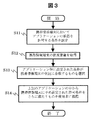
- FIG. 10 is a flowchart illustrating application recommendation processing according to the first embodiment.
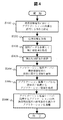
- 6 is a detailed flowchart illustrating application recommendation processing according to the first embodiment. It is an example of a screen display explaining the recommendation permission condition setting of the recommendation application which concerns on Example 1.
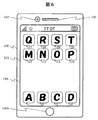
- FIG. 7 is a screen display example illustrating display of a recommended application according to the first embodiment. It is a conceptual diagram explaining cooperation with the wristwatch type display terminal different from the portable information terminal which concerns on Example 2.
- FIG. It is a conceptual diagram explaining cooperation with the display terminal of different spectacles type from the portable information terminal which concerns on Example 2.
- FIG. 10 is a flowchart illustrating application recommendation processing according to the first embodiment.
- 6 is a detailed flowchart illustrating application recommendation processing according to the first embodiment. It is an example of a screen display explaining the recommendation permission
- FIG. 10 is a screen display example illustrating display of a recommended application according to a third embodiment. It is an example of a screen display explaining other displays of a recommendation application concerning Example 3. It is an example of a screen display explaining other displays of a recommendation application concerning Example 3. It is an example of a screen display explaining other displays of a recommendation application concerning Example 3. It is an example of a screen display explaining other displays of a recommendation application concerning Example 3. It is an example of a screen display explaining other displays of a recommendation application concerning Example 3. It is an example of a screen display explaining other displays of a recommendation application concerning Example 3. FIG.
- FIG. 14 is a screen display example illustrating display restrictions for a recommended application according to a fourth embodiment. It is the other example of a screen display explaining the display restriction
- FIG. FIG. 16 is a screen display example illustrating setting of reference permission for information for selecting a recommended application according to the fifth embodiment.
- FIG. 20 is a screen display example illustrating settings for storing an icon of a recommended application according to a sixth embodiment. It is an example of a screen display explaining the option setting of the recommendation application concerning Example 7.
- FIG. 29 is a screen display example illustrating a history screen of a recommended application according to an eighth embodiment. It is an example of a screen display for setting a condition for prohibiting recommendation of an application according to the ninth embodiment.
- FIG. 38 is a screen display example for setting recommendation conditions for an application according to Embodiment 10.
- FIG. 10 is a screen display example illustrating display restrictions for a recommended application according to a fourth embodiment. It is the other example of a screen display explaining the
- FIG. 1 is a configuration diagram of a communication system including the portable information terminal 100 in the present embodiment.
- the communication system includes a portable information terminal 100, a wide area public network 201 such as the Internet and its wireless communication access point 202, a base station 203 of a mobile telephone communication network, an application server 211a, an application recommendation server 211b, and the Internet.
- a mail server 212 and a mobile telephone communication server 213 are included.
- the application server 211a may also serve as the application recommendation server 211b.
- the mobile information terminal 100 may be a mobile phone, a smart phone, a tablet terminal, or the like, or may be a PDA (Personal Digital Assistants) or a notebook PC (Personal Computer). Further, it may be a music player, a digital camera, a portable game machine, or other portable digital device having a communication function.
- PDA Personal Digital Assistants
- notebook PC Personal Computer
- FIG. 2 is a block diagram of the portable information terminal 100 in the present embodiment.
- the portable information terminal 100 includes a main control unit 101, a system bus 102, a ROM 103, a RAM 104, a storage unit 110, a video processing unit 120, an audio processing unit 125, an operation unit 130, a communication processing unit 140, a sensor unit 150, An application recommendation unit 160 and an extended interface unit 170 are included.
- the main control unit 101 is a microprocessor unit that controls the entire portable information terminal 100 according to a predetermined program.
- the system bus 102 is a data communication path for performing data transmission / reception between the main control unit 101 and each unit in the portable information terminal 100.
- a ROM (Read Only Memory) 103 is a memory in which a basic operation program of the portable information terminal 100 such as an operating system and predetermined application software is stored, and can be rewritten, for example, an EEPROM (Electrically Erasable Programmable ROM) or a flash ROM. ROM is used. It is assumed that the basic operation program can be upgraded or expanded by updating the program stored in the ROM 103. Note that the ROM 103 may not use an independent configuration as shown in FIG. 2 but may use a partial storage area in the storage unit 110.
- a RAM (Random Access Memory) 104 is a work area for executing a basic operation program or various application software. The ROM 103 and the RAM 104 may be integrated with the main control unit 101.
- the storage unit 110 is used to store each operation setting value of the portable information terminal 100, user information, various application software that operates, and the like.
- the storage unit 110 includes a display array storage area 111 that stores information on the arrangement status of icons associated with each application (or data created by each application) on the display screen, information on other screen layouts, and the like of the portable information terminal 100.
- Each storage area does not have to be fixed in position in the storage unit 110.
- the storage unit 110 needs to hold the stored information even when power is not supplied to the portable information terminal 100. Therefore, for example, devices such as flash ROM, SSD (Solid State Drive), HDD (Hard Disc Drive) and the like are used.
- the portable information terminal 100 can be expanded in function by downloading new application software from the application server 211a via the Internet 201 and the wireless communication access point 202 or the base station 203 of the mobile telephone communication network. is there. At this time, the downloaded new application software may be stored in the other information storage area 114. In addition, the new application software stored in the information storage area 114 is expanded on the RAM 104 and executed, so that the portable information terminal 100 can realize various new functions.
- the video processing unit 120 includes a video display unit 121, a video signal processing unit 122, and a video input unit 123.
- the video display unit 121 is a display device such as a liquid crystal panel, for example, and provides the video signal processed by the video signal processing unit 122 to the user of the portable information terminal 100.
- the video signal processing unit 122 includes a video RAM (not shown), and realizes screen display by inputting video data to the video RAM. Further, the video signal processing unit 122 has a function of performing format conversion, a menu or other OSD (On Screen Display) signal superimposing processing, if necessary.
- the video input unit 123 is a camera that inputs image data of surroundings and objects by converting light input from a lens into an electrical signal.
- the audio processing unit 125 includes an audio output unit 126, an audio signal processing unit 127, and an audio input unit 128.
- the audio output unit 126 is a speaker, and provides the audio signal processed by the audio signal processing unit 127 to the user of the portable information terminal 100.
- the voice input unit 128 is a microphone, and converts a user's voice and the like into voice data and inputs the voice data.
- the operation unit 130 is an instruction input unit that inputs an operation instruction to the portable information terminal 100.
- the operation unit 130 includes operation keys in which a touch panel and button switches arranged on the video display unit 121 are arranged. And Only one of them may be used.
- the portable information terminal 100 may be operated using a keyboard or the like connected to the expansion interface unit 170 described later.
- the touch panel function may be provided in the video display unit 121.
- the communication processing unit 140 includes a LAN communication unit 141, a mobile telephone network communication unit 142, and a proximity wireless communication unit 143.
- the LAN communication unit 141 transmits and receives data by connecting to the wireless communication access point 202 of the Internet 201 by wireless communication.
- the mobile telephone network communication unit 142 performs telephone communication (call) and data transmission / reception by wireless communication with the base station 203 of the mobile telephone communication network.
- the close proximity wireless communication unit 143 performs wireless communication when close to the corresponding reader / writer.
- the LAN communication unit 141, the mobile telephone network communication unit 142, and the close proximity wireless communication unit 143 are each provided with a coding circuit, a decoding circuit, an antenna, and the like.
- the sensor unit 150 is a group of sensors for detecting the state of the portable information terminal 100.
- the GPS (Global Positioning System) receiving unit 151 the acceleration sensor 152, the gyro sensor 153, the geomagnetic sensor 154, and the illuminance sensor 155 and proximity sensor 156.
- these sensor groups it is possible to detect the position, movement, tilt, direction, ambient brightness, proximity of surrounding objects, and the like of the portable information terminal 100.
- Other sensors may be further provided.
- the application recommendation unit 160 guesses and recommends an application that the user of the mobile information terminal 100 wants to use from information on the current location of the mobile information terminal 100, information on the current time, or other information. I do. Details regarding the application recommendation process will be described later.
- the application recommendation unit 160 does not have an independent configuration as illustrated in FIG. 2, and the main control unit 101 may implement the same function by executing predetermined application software using the RAM 104 as a work area. .
- the extended interface unit 170 is an interface group for extending the functions of the portable information terminal 100.
- the extended interface unit 170 includes a video / audio interface, a USB (Universal Serial Bus) interface, a memory interface, and the like.
- the video / audio interface inputs video signals / audio signals from an external video / audio output device and outputs video signals / audio signals to the external video / audio input device.
- the USB interface connects a keyboard and other USB devices.
- the memory interface connects a memory card and transmits / receives data.
- the configuration example of the portable information terminal 100 shown in FIG. 2 includes a number of configurations that are not essential to the present embodiment, such as the proximity wireless communication unit 143, the illuminance sensor 155, and the proximity sensor 156. Even if it is not configured, the effect of the present embodiment is not impaired. In addition, a configuration not shown in the figure, such as a digital television broadcast receiving function and an electronic money settlement function, may be further added.
- conditions for applications that permit recommendation are set in advance (S11).
- the condition setting is such that the application is divided into categories, and the recommendation is permitted only for the designated category. It is also possible to set the condition in a negative form that prohibits the recommendation.
- the status information of the portable information terminal 100 is acquired (S12). Specifically, it is position information or the like.
- the condition set for each application that is, the condition corresponding to each application that matches the situation of the portable information terminal 100 is selected as a recommended application candidate (S13). For example, it is set as a recommendation condition for the application that the portable information terminal 100 is located near a specific point.
- an application that satisfies the recommendation permission condition set in S11 is actually recommended in the portable information terminal 100 (S14).
- a specific method of recommendation is an icon display of the application, but other formats may be used. Needless to say, the conditions of the application for which recommendation is previously permitted in the portable information terminal 100 performed in S11 can be changed on the portable information terminal 100 as necessary.
- FIG. 5 shows an example of setting recommendation permission conditions for an application.
- categorization is performed according to the type of facility related to the application, and recommendation permission / denial is set for each category. For example, when “on” is permitted and “off” is not permitted, for example, the icon of the recommended application is displayed, and when it is off, the icon of the recommended application is not displayed. Moreover, on / off is switched by tapping the character portion of on / off.
- the setting of the recommendation permission condition is not limited to categorization, and can be arbitrarily set. For example, in the case of an application that has to be downloaded from a server, conditions may be set in the price range of the usage fee. Also, the condition may be set in a predetermined time zone that is the application execution time.
- the reason why the application is actually recommended is that the situation of the portable information terminal 100 satisfies a specific condition, that is, a condition corresponding to each application.
- a specific condition that is, a condition corresponding to each application.
- the GPS receiver 151 receives radio waves from GPS satellites to acquire position information (S101).
- the main control unit 101 acquires current location information by referring to the map data using the position information acquired in the process of S101 (S102). Further, the main control unit 101 acquires current time information (S103).
- the map data may be stored in advance in the other information storage area 114 or the like by the portable information terminal 100, or may be stored in a map data server (not shown). good.
- the map data server stores the map data
- the location information acquired by the main control unit 101 in the process of S101 is used as the LAN communication unit 141 (or mobile telephone network communication unit 142) and the Internet.
- the map data server By transmitting to the map data server via 201, the current location information may be acquired.
- the process of acquiring the current time information in S103 may be performed by referring to the clock function built in the main control unit 101. Alternatively, it may be performed by communicating with a time server (not shown) via the LAN communication unit 141 (or the mobile telephone network communication unit 142) and the Internet 201.
- the application recommendation server 211b After the main control unit 101 acquires current location information and current time information in the processing of S102 and S103, the information is notified to the application recommendation server 211b (S104). When the application recommendation server 211b determines the current location, the location information may be notified instead of the current location information. Next, the application recommendation server 211b selects a recommended application suitable for the user based on the situation information of the portable information terminal 100, and notifies the portable information terminal 100 of the application information as a recommendation candidate (S105). ). Finally, after acquiring recommended application information from the application recommendation server 211b, the application recommendation unit 160 refers to recommendation permission conditions set in advance by the user, and is permitted or not permitted. Only recommendation is performed (S106). Here, as described above, the recommendation permission condition may be set for each category, may be set in a predetermined time zone, or may be set in a predetermined price zone.
- the series of application recommendation processes may be performed with reference to only the current location information acquired in S102, or may be performed with reference to only the current time information acquired in S103.
- the operation history of the user of the mobile information terminal 100 stored in the operation history storage area 112 with respect to the mobile information terminal 100 Etc., or an action schedule input by the user of the portable information terminal 100 stored in the schedule table storage area 113 may be referred to. You may make it further refer to the output of each sensor group with which the portable information terminal 100 is provided.
- the application recommendation process may be performed when the position of the portable information terminal 100 is changed by a predetermined distance or more, or may be performed every time a predetermined time elapses.
- the series of application recommendation processing will be described with specific examples.
- An application or the like that displays a network map may be used as a recommendation candidate.
- the app that displays the map of the Sakai theme park, and the waiting time and congestion of the attractions of the Sakai theme park are provided.
- the recommended application may be a recommended candidate.
- the scheduler If the current location information acquired in S102 substantially matches the location of the company where the user of the portable information terminal 100 is registered in advance by the user of the portable information terminal 100, the scheduler, spreadsheet application, translation An application, such as an application, used for work may be used as a candidate for recommendation.
- an application for displaying traffic information or an application for displaying a route map of the highway Etc. may be recommended candidates.
- the current time information is a general meal time zone according to the current time information acquired in S103. If so, a gourmet-type app or the like that introduces restaurants near the Sakai Station may be used as a recommended candidate for other time zones, such as an app that displays the timetable.
- the current location information acquired in S102 substantially matches the location of the Sakai theme park, and further according to the current time information acquired in S103, if the current time information is near the closing time of the Sakai theme park, For applications that display traffic information on expressways and applications that display the timetable of the nearest station of the Sakai theme park, other applications that display the park map are recommended candidates. May be.
- the current time information acquired in S102 substantially matches the location of the company where the user of the portable information terminal 100 works
- the current time information is further determined according to the current time information acquired in S103. For example, an application that displays a timetable of the nearest station of the company may be used as a recommended candidate for an average work leave period, and an application used for work may be used for other time periods.
- the information on the average work hours of the user of the portable information terminal 100 described above is, for example, stored in the operation history storage area 112 in the operation history storage area 112, the position information of the portable information terminal 100 or the history of the current location information.
- an average time at which the portable information terminal 100 moves from the location of the company to another place is calculated from the history of the current location information, and the calculated time is handled as an average leave time of the user of the portable information terminal 100. Just do it.
- the user of the portable information terminal 100 may register the work hours in the schedule table storage area 113 or the like in advance.
- the portable information terminal 100 When it is determined from the current location information acquired in S102 that the portable information terminal 100 is located on the highway, the portable information terminal 100 is more than a predetermined amount on the highway by referring to the output of the acceleration sensor 152 or the like. If it is determined that the user is moving at a speed, an application that displays an estimated arrival time to the destination registered in advance by the user of the portable information terminal 100, an application that displays tourist information about the destination, etc. When it is determined that the information terminal 100 is moving on the expressway at a speed lower than a predetermined speed or stopped, an application that displays accident information, traffic jam information, and the like may be used as a recommended candidate. .
- a route map to the user's travel destination is displayed by referring to the action schedule input by the user of the portable information terminal 100 and stored in the schedule storage area 113.
- An application or the like may be used as a recommendation candidate.
- an application or the like that displays a guide map of a moving destination may be used as a recommendation candidate.
- the number of applications that are recommended candidates by the application recommendation process is not limited to one, but may be a plurality.
- the application server 211b determines that there is no application that the user of the portable information terminal 100 wants to use even after referring to the current location information, current time information, and other information, It is not necessary to notify the recommendation candidate.
- an application that is determined to be desired by the user of the portable information terminal 100 in the process of S104 is already stored in the storage unit 110 or the like of the portable information terminal 100, the application is carried as it is. What is necessary is just to recommend as an application which the user of the information terminal 100 seems to want to use.
- an application that is determined to be desired by the user of the portable information terminal 100 is not stored in the storage unit 110 or the like of the portable information terminal 100 but is an application stored in the application server 211a or the like
- the application installation software or the like may be recommended as an application that the user of the portable information terminal 100 may want to use.
- browser software linked to a web page introducing the application may be recommended as an application that the user of the portable information terminal 100 seems to want to use.
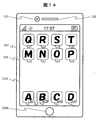
- FIG. 6 is a screen display example showing an example of a basic screen layout in the standby state of the portable information terminal 100 according to the present embodiment.
- components having the same reference numerals as those in FIG. 5 are assumed to have the same configurations / operations as those in FIG.
- the touch panel 130t and the home key 130h are components of the operation unit 130.
- the home key 130h is pressed during execution of various applications, the function to end the running application and display the basic screen. It shall have.
- the main control unit 101 uses the screen display control process according to the result of the application recommendation process to display the application recommended in the application recommendation process of S104 as a portable information terminal.
- Video data having a screen layout that is easy for the user to select is input to the RAM 104.
- a display screen that facilitates selection of the recommended application is presented to the user of the portable information terminal 100.
- video data of the application execution screen is input to the RAM 104.
- the icons i13 to i20 shown in FIG. 6 are icons associated with various applications (or data created by each application) stored in the portable information terminal 100, and are within the display area of the video display unit 121. Is displayed. By selecting these icons, it is possible to activate an application associated with the icon (or an application used to create data associated with the icon). In this embodiment, the selection of an icon is performed by performing an operation such as a tap or a double tap on a portion where the icon is displayed on the touch panel 130t.
- the icons i1 to i4 displayed at the bottom of the video display unit 121 are icons of applications for which recommendation has been executed. That is, in the flowchart shown in FIG. 4, when the application recommendation process is performed in S106 and there is an application that should be recommended to the user of the portable information terminal 100, the recommended application as a result of executing the recommendation of the application Icon. It is not displayed on the screen until the recommendation is executed.
- the corresponding app is activated by selecting an icon. If the recommended application has not yet been downloaded to the portable information terminal 100, an icon is selected to connect to the application server 211a that can download the corresponding application to make it available for download. If the user wants to use the app, download and execute the app.
- the recommended app icon may be displayed until the condition related to the status of the portable information terminal 100 does not satisfy the recommended condition, or may be displayed for a certain period of time.
- a method of erasing by an operation such as flicking by the user may be used.
- the information for selecting a recommended candidate for the application is to estimate the season, the weather at the position of the portable information terminal 100, the application desired by the user, in addition to the position and time of the portable information terminal 100. All useful information is acceptable.
- the main control unit 101 notifies the application recommendation server 211b of information in order to start the application recommendation process.
- the sleep state is The case where the key is released, the case where the home key 130h or any predetermined operation key is pressed, and the like can be considered.
- An icon for executing the application recommendation process may be prepared on the video display unit 121 and may be performed at the timing when the icon is selected and executed. It may be performed at other timing such as in accordance with a predetermined schedule.
- the application recommendation unit 160 may perform the selection of recommendation candidates by obtaining a list of recommended applications and recommendation conditions from the application recommendation server 211b.
- the portable information terminal 100 becomes a recommended candidate based on the current location information and other information.
- the applications that the user of the portable information terminal 100 wants to use only those that satisfy the recommendation permission conditions set in advance in the portable information terminal 100 are recommended by displaying icons or the like. That is, the application is set as a recommendation candidate when the status of the portable information terminal satisfies a condition corresponding to the application, and the application is recommended when the application further satisfies a preset recommendation permission condition.
- the recommended application icon is displayed on the video display unit of the portable information terminal.
- the recommended application icon is displayed on a terminal having another display function in cooperation with the portable information terminal 100.
- An example will be described.
- the configuration in the present embodiment is the same as that in the first embodiment unless otherwise specified. Therefore, in the following, differences from the first embodiment will be mainly described, and common points will be omitted to avoid duplication.
- the application recommendation process is performed in the same manner as in the first embodiment.
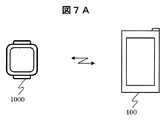
- FIG. 7A is a conceptual diagram illustrating cooperation between the portable information terminal according to the present embodiment and a wristwatch type display terminal.
- a wristwatch type display terminal 1000 that cooperates with the portable information terminal 100 is provided, and an icon of a recommended application is displayed on the wristwatch type display terminal 1000 that is a wearable terminal worn on an arm.
- the portable information terminal 100 can confirm the icon of the recommended application on the wristwatch type display terminal 1000 even in a state where it is put in a bag or the like.
- FIG. 7B is a conceptual diagram for explaining the cooperation between the portable information terminal according to the present embodiment and a different glasses-type display terminal.
- the display device 2000 has a glasses-type display terminal 2000 that cooperates with the portable information terminal 100, and an icon of a recommended application is displayed on the glasses-type display terminal 2000 that is a wearable terminal worn on the head.
- the portable information terminal 100 can confirm the icon of the recommended application on the glasses-type display terminal 2000 even when the portable information terminal 100 is put in a bag or the like.
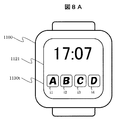
- FIG. 8A shows a display example of the wristwatch type display terminal of FIG. 7A.
- 1100 is a main body of the wristwatch type display terminal 1000
- 1121 is a video display unit
- 1130t is a touch panel
- icons i1 to i4 displayed at the lower part of the video display unit 1121 are icons of recommended applications for which recommendation has been executed. is there.
- the icon is selected by performing an operation such as a tap or a double tap on a portion where the icon is displayed on the touch panel 1130t.
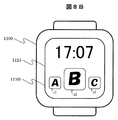
- FIG. 8B is another display example of the wristwatch type display terminal of FIG. 7A.
- the recommended application icon i2 is displayed in large size. That is, in the case of a wristwatch type display terminal, since the display area is small, only one icon i2 of the recommended application is displayed in a large size so that it is easy to see and use.
- the icons of the three recommended applications are displayed.
- the present invention is not limited to this, and a plurality of icons may be displayed.
- a part of the plurality of recommended application icons may be displayed, and the other icons may be scroll-displayed. Further, the icons may be displayed in the same size during normal display and enlarged when they are selected.
- FIG. 9A shows a display example of the glasses-type display terminal of FIG. 7B.
- Reference numeral 2500 denotes a video display unit, and icons i1 to i4 displayed on the video display unit 2500 are icons of recommended apps for which recommendation has been executed.
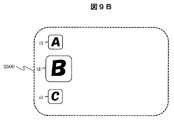
- FIG. 9B is another display example of the glasses-type display terminal of FIG. 7B.
- the recommended application icon i2 is displayed large. That is, in the case of a glasses-type display terminal, since the display area is small, only one icon i2 of the recommended app is displayed in a large size so that it is easy to use when operating with an input device.
- the icons of the three recommended applications are displayed.
- the present invention is not limited to this, and a plurality of icons may be displayed.
- a part of the plurality of recommended application icons may be displayed, and the other icons may be scroll-displayed. Further, the icons may be displayed in the same size during normal display and enlarged when they are selected.
- the portable information terminal is recommended even in a bag or the like. You can check the app and provide an easy-to-use portable information terminal.
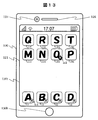
- FIG. 10 a display example in the present embodiment is shown in FIG. 10, components having the same reference numerals as those in FIG. 6 are assumed to have the same configurations / operations as those in FIG. 6 is different from FIG. 6 in that the video display unit 121 is divided into 121a and 121b, and icons i13 to i associated with various applications (or data created by each application) stored in the portable information terminal 100 are displayed in the display area 121a. i20 is displayed, and recommended application icons i3 to i6 are displayed in the display area 121b.
- FIG. 11 shows another display example in this embodiment. 11, components having the same reference numerals as those in FIG. 6 have the same configurations / operations as those in FIG.
- the icon of the recommended application is displayed for each application, but in FIG. 11, the icon is displayed for each category that is the type of facility related to the application. That is, in FIG. 11, an icon i101 is an icon for selecting a recommended app related to a public facility, an icon i102 is an icon for selecting a recommended app related to a restaurant, and an icon i103 is an icon for selecting a recommended app related to a retail store.
- the icon and icon i104 are icons for selecting other recommended apps. In this way, a representative icon is displayed for each type of recommended application.
- FIG. 12 shows still another display example in the present embodiment. 12, components having the same reference numerals as those in FIG. 6 have the same configurations / operations as those in FIG.
- the feature of this embodiment is that an icon i201 is provided. That is, the icon i201 is an icon that is displayed when there is a recommended application, and is an icon indicating that the application has been recommended. By selecting the icon i201, a recommended application can be selected. Note that the icon i201 may be displayed even when there is no recommended app, and the color or shape may be changed to notify that there is a recommended app. Further, the location of the icon i201 may be fixed to improve the visibility of the recommended application. According to the present embodiment, it is possible to display the recommended application with one icon, so that there is an advantage that the display area of the portable information terminal can be effectively used.
- FIG. 13 shows still another display example in this embodiment.
- components having the same reference numerals as those in FIG. 6 have the same configurations / operations as those in FIG.
- icons i1 to i4 are icons of recommended applications
- an R mark (recommendation) indicated by m1 indicates that the recommended application has not yet been downloaded to the portable information terminal 100
- the icon i15 A white R mark indicated by m2 indicates a case where the application indicated by the icon has already been downloaded to the portable information terminal 100.
- a mark indicating whether the recommended application has been downloaded or not on the recommended application icon it is possible to determine whether or not the recommended application has been downloaded by looking at the icon. It has the effect of saving. Therefore, for example, when there is no time, a determination that a recommended application that has not been downloaded can be downloaded later can be realized without unnecessary operations.
- FIG. 14 shows still another display example in the present embodiment. 14, components having the same reference numerals as those in FIG. 6 have the same configurations / operations as those in FIG.
- icons i1 to i4 are icons of recommended applications, and the display indicated by m3 indicates the usage fee of the recommended application. In this way, by displaying the usage fee of the application in advance, for example, if it is free, it can be handled as simply ignoring it as an advertising application, and there is no need to check on the website every time. There is.
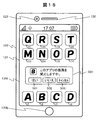
- FIG. 15 is a screen display example for explaining the display restriction of the recommended application in this embodiment.
- reference numeral 500 denotes a display window that appears when, for example, a flick operation is performed on the icon i2 of the recommended application.
- the recommended application indicated by i2 is not desired to be received thereafter, selection of prohibiting the recommended application processing thereafter is possible. Is displayed.
- the display of the recommended application thereafter can be prohibited by selecting the “Yes” button 501. That is, by having a setting function for prohibiting the recommendation of a specific application, it is possible to set so that a preset application is not recommended.
- FIG. 16 is another screen display example for explaining the display limitation of the recommended application in the present embodiment.
- recommended application icons for each category which are types of facilities related to the application corresponding to FIG. 11, are displayed as i101 to i104.
- the display window is 510, and the display of the recommended application can be prohibited for each category in which the flick operation is performed.
- the icon i102 is flicked to display a selection screen 510, and “Yes” in 511 is selected to display a recommended app for a subsequent restaurant.
- by having a setting function for prohibiting the recommendation of a specific type of application it is possible to set so that a preset type of application is not recommended.
- the recommended application icons may be displayed hierarchically by selecting the recommended application icons i101 to i104 for each category, and display of the recommended applications corresponding to the icons may be prohibited.
- FIG. 5 shows an example of setting the recommendation permission condition of the application, and the point of setting the recommendation permission / non-permission for each category has been described. Show.
- the display restriction of the recommended application in this embodiment is to select whether or not the display restriction in the future is permitted for the recommended application.
- the setting of information reference permission for selecting a recommended application for the portable information terminal will be described.
- the configuration in the present embodiment is the same as that in the first embodiment unless otherwise specified. Therefore, differences from the first embodiment will be mainly described, and common points will not be described in order to avoid duplication.
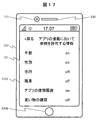
- FIG. 17 is a screen display example for explaining setting of reference permission for information for selecting a recommended application in the present embodiment.
- information for selecting the recommended application for example, the age, sex, address, occupation, etc. of the user of the portable information terminal are transmitted to the application recommendation server 211b.
- the application recommendation server 211b is not only the situation information of the portable information terminal. Considering information related to the user of the portable information terminal, it is conceivable to select a recommended app that is suitable for the user of the portable information terminal and to notify the portable information terminal of the information on the app. However, since the information regarding these users is personal information, it is necessary to set permission to refer to these information. Therefore, as shown in FIG.
- a screen for setting permission / non-permission of reference to information regarding the user of the portable information terminal such as the age, sex, address, and occupation of the user of the portable information terminal is provided.
- on is permitted and off is not permitted. If it is on, the information is transmitted to the application recommendation server 211b to provide information. In the case of off, the information is not transmitted to the application recommendation server 211b and information is not provided.
- on / off is switched by tapping the display part of on / off.
- the information for selecting the recommended application on the application recommendation server side can be set to permit / deny the reference on the portable information terminal side, personal information can be protected.
- the recommended app icon may be displayed until the condition related to the status of the portable information terminal does not satisfy the recommended condition, or may be displayed for a certain period of time.
- a method of erasing by an operation such as a flick by the user may be used.
- This embodiment is an example of a setting screen when it is desired to store an icon of an app that has been recommended once and to continue display.
- FIG. 18 is a screen display example for explaining settings for saving the icon of the recommended application in this embodiment.
- reference numeral 520 denotes a display window that appears when, for example, a flick operation is performed on i2 that is an icon of a recommended application, and can be selected when the icon of the recommended application indicated by i2 is stored and the icon display is to be continued.
- An example in which a simple display is made is shown. If you want to save the recommended app icon, select the “Yes” button 521 to save the recommended app icon. For example, the condition related to the status of the portable information terminal does not satisfy the recommended condition.
- the display can be continued. Specifically, for a service application of a retail store, the user of the portable information terminal can continue to display the icon of the service app even when the user is away from the vicinity of the retail store.
- FIG. 19 is a screen display example for explaining option setting of the recommended application in the present embodiment.
- the option setting includes on / off of the history of recommended applications.
- there is a setting as to whether or not a condition for accepting a recommendation is set is set. For example, this is set to off by default and is not set by the user of the portable information terminal, so that complicated settings can be eliminated.
- there is a setting as to whether or not an application frequently used by a user at a specific location is recommended. This can be used when, for example, a popular app is recommended regardless of the status of the mobile information terminal, but is set to off when the recommended app is to be displayed depending on the status of the mobile information terminal.
- the history screen of recommended apps will be described.
- the configuration in the present embodiment is the same as that in the first embodiment unless otherwise specified. Therefore, differences from the first embodiment will be mainly described, and common points will not be described in order to avoid duplication.
- FIG. 20 is a screen display example for explaining a history screen of recommended apps in the present embodiment.
- a recommended application history screen for example, the recommended location and time of the application A and the application B are displayed. From this history screen, for example, when it is recommended that there is no time to check the recommended app while walking, it is possible to check the recommended app later from this history screen.
- the target app can be executed by selecting the start button 531 in the display window 530 that appears when the app is selected. If the history of recommended applications is unnecessary, the target application can be deleted by selecting the delete button 532 in the display window 530.
- This example describes an example of setting a condition for prohibiting application recommendation.
- the configuration in the present embodiment is the same as that in the first embodiment unless otherwise specified. Therefore, differences from the first embodiment will be mainly described, and common points will not be described in order to avoid duplication.
- FIG. 21 is a screen display example for setting conditions for prohibiting the recommendation of an application in the present embodiment.
- a shopping street in a certain place can be set so that recommendation is prohibited by specifying the place when an application for advertising is flooded and troublesome.
- There is also a setting that prohibits recommendation in the price range of the app This can be set when, for example, a low-priced item is not necessary because it is low in value, or an advertisement application is free, so that it is unnecessary.
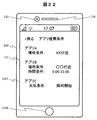
- FIG. 22 is a screen display example for setting application recommendation conditions in this embodiment.
- apps A, B, and C are known and are used when it is desired to notify those apps as recommended apps according to the setting conditions.
- the condition of the place is set.
- the application B a time condition is set in addition to the place condition. For example, it can be used when the business hours of a store are limited and it is desired to use a daily service at a favorite store.
- weather conditions are set.
- the user of the portable information terminal sets a recommendation condition for a known application, and the recommended application is presented under a predetermined condition. So you can prevent you from forgetting.
- the functions of the present embodiment may be realized by hardware by designing, for example, an integrated circuit.
- the microprocessor unit or the like may be realized by software by interpreting and executing a program that realizes each function or the like.
- the program may be stored in advance in the ROM 103 or the storage unit 110 of the portable information terminal 100, but the LAN communication unit 141 or the mobile telephone network communication unit 142 from the application server 211a on the Internet 201. It may be obtained through Further, the program stored in a memory card or the like may be acquired via the expansion interface unit 170.
- control lines and information lines shown in the figure are those that are considered necessary for the explanation, and not all control lines and information lines on the product are necessarily shown. Actually, it may be considered that almost all the components are connected to each other.
- 100 portable information terminal, 101: main control unit, 102: system bus, 103: ROM, 104: RAM, 110: storage unit, 111: display arrangement storage area, 112: operation history storage area, 113: schedule table storage area 114: Other information storage area, 120: Video processing unit, 121, 1121, 2500: Video display unit, 122: Video signal processing unit, 123: Video input unit, 125: Audio processing unit, 126: Audio output unit, 127 : Voice signal processing unit, 128: Voice input unit, 130: Operation unit, 130h: Home key, 130t: Touch panel, 140: Communication processing unit, 141: LAN communication unit, 142: Mobile telephone network communication unit, 143: Proximity Wireless communication unit, 150: sensor unit, 151: GPS receiver unit, 152: acceleration sensor, 153: gyro sensor, 154: geomagnetic sensor 155: Illuminance sensor, 156: Proximity sensor, 160: Application recommendation unit, 170: Extended interface unit, 211a: Application server,
Landscapes
- Engineering & Computer Science (AREA)
- Theoretical Computer Science (AREA)
- Databases & Information Systems (AREA)
- General Engineering & Computer Science (AREA)
- Physics & Mathematics (AREA)
- General Physics & Mathematics (AREA)
- Business, Economics & Management (AREA)
- Data Mining & Analysis (AREA)
- Accounting & Taxation (AREA)
- Finance (AREA)
- Human Computer Interaction (AREA)
- Computational Linguistics (AREA)
- Development Economics (AREA)
- Economics (AREA)
- Marketing (AREA)
- Strategic Management (AREA)
- General Business, Economics & Management (AREA)
- User Interface Of Digital Computer (AREA)
- Telephone Function (AREA)
Abstract
Description
Claims (15)
- 携帯情報端末の状況がアプリケーションに対応した条件を満たしたとき該アプリケーションを推薦候補とし、
該アプリケーションが予め設定された推薦許可条件をさらに満たすときに該アプリケーションの推薦を行うことを特徴とする携帯情報端末。 - 請求項1に記載の携帯情報端末であって、
前記推薦候補は、アプリケーション推薦サーバから通知されることを特徴とする携帯情報端末。 - 請求項1に記載の携帯情報端末であって、
前記推薦許可条件は、アプリケーションのカテゴリ単位での設定、アプリケーションの使用料価格帯での設定、アプリケーションの実施時間帯での設定の何れかであることを特徴とする携帯情報端末。 - 請求項1に記載の携帯情報端末であって、
アイコンを表示することにより前記アプリケーションの推薦を行うことを特徴とする携帯情報端末。 - 請求項4に記載の携帯情報端末であって、
前記携帯情報端末と連携するウェアラブルタイプの端末に前記アイコンを表示することを特徴とする携帯情報端末。 - 請求項4に記載の携帯情報端末であって、
前記推薦されるアプリケーションの種類別に代表アイコンを表示することを特徴とする携帯情報端末。 - 請求項4に記載の携帯情報端末であって、
アプリケーションの推薦があったことを示すアイコンを表示することを特徴とする携帯情報端末。 - 請求項1に記載の携帯情報端末であって、
特定のアプリケーションの推薦を禁止する設定機能を有することを特徴とする情報端末装置。 - 請求項1に記載の携帯情報端末であって、
特定の種類のアプリケーションの推薦を禁止する設定機能を有することを特徴とする情報端末装置。 - 請求項1に記載の携帯情報端末であって、
前記アプリケーションに対応した条件は、前記携帯情報端末の位置、季節、時刻、携帯情報端末の位置における天気、前記携帯情報端末の使用者の属性のいずれか、あるいは、それらの中から選択された複数の条件の組み合わせであることを特徴とする携帯情報端末。 - 請求項2に記載の携帯情報端末であって、
前記アプリケーション推薦サーバ側で推薦候補を判断するための情報を許可/非許可する設定が可能な機能を有し、許可された情報を前記アプリケーション推薦サーバに送信することを特徴とする携帯情報端末。 - 請求項11に記載の携帯情報端末であって、
前記アプリケーション推薦サーバ側で推薦候補を判断するための情報は履歴情報であることを特徴とする携帯情報端末。 - 請求項1に記載の携帯情報端末であって、
前記携帯情報端末の状況が前記アプリケーションに対応した条件を満たさなくなった後でも、前記推薦されたアプリケーションを参照できるように記録しておくことを特徴とする携帯情報端末。 - 請求項1に記載の携帯情報端末であって、
前記推薦されたアプリケーションの履歴を記録しておくことを特徴とする携帯情報端末。 - 携帯情報端末の状況がアプリケーションに対応した条件を満たしたとき該アプリケーションを推薦候補とし、
該アプリケーションが予め設定された推薦許可条件をさらに満たすときに該アプリケーションの推薦を行うことを特徴とする携帯情報端末のアプリケーション推薦方法。
Priority Applications (7)
| Application Number | Priority Date | Filing Date | Title |
|---|---|---|---|
| CN202111515251.XA CN114168855A (zh) | 2015-06-19 | 2015-06-19 | 便携信息终端及其应用推荐方法 |
| CN201580081023.2A CN107710194B (zh) | 2015-06-19 | 2015-06-19 | 便携信息终端及其应用推荐方法 |
| US15/737,161 US10747832B2 (en) | 2015-06-19 | 2015-06-19 | Portable information terminal and application recommending method thereof |
| PCT/JP2015/067790 WO2016203653A1 (ja) | 2015-06-19 | 2015-06-19 | 携帯情報端末、及び、そのアプリケーション推薦方法 |
| JP2017524272A JP6659684B2 (ja) | 2015-06-19 | 2015-06-19 | 携帯情報端末、及び、そのアプリケーション推薦方法 |
| US16/933,711 US11514120B2 (en) | 2015-06-19 | 2020-07-20 | Portable information terminal and application recommending method thereof |
| US17/977,843 US11947609B2 (en) | 2015-06-19 | 2022-10-31 | Portable information terminal and application recommending method thereof |
Applications Claiming Priority (1)
| Application Number | Priority Date | Filing Date | Title |
|---|---|---|---|
| PCT/JP2015/067790 WO2016203653A1 (ja) | 2015-06-19 | 2015-06-19 | 携帯情報端末、及び、そのアプリケーション推薦方法 |
Related Child Applications (2)
| Application Number | Title | Priority Date | Filing Date |
|---|---|---|---|
| US15/737,161 A-371-Of-International US10747832B2 (en) | 2015-06-19 | 2015-06-19 | Portable information terminal and application recommending method thereof |
| US16/933,711 Continuation US11514120B2 (en) | 2015-06-19 | 2020-07-20 | Portable information terminal and application recommending method thereof |
Publications (1)
| Publication Number | Publication Date |
|---|---|
| WO2016203653A1 true WO2016203653A1 (ja) | 2016-12-22 |
Family
ID=57545269
Family Applications (1)
| Application Number | Title | Priority Date | Filing Date |
|---|---|---|---|
| PCT/JP2015/067790 Ceased WO2016203653A1 (ja) | 2015-06-19 | 2015-06-19 | 携帯情報端末、及び、そのアプリケーション推薦方法 |
Country Status (4)
| Country | Link |
|---|---|
| US (3) | US10747832B2 (ja) |
| JP (1) | JP6659684B2 (ja) |
| CN (2) | CN114168855A (ja) |
| WO (1) | WO2016203653A1 (ja) |
Cited By (6)
| Publication number | Priority date | Publication date | Assignee | Title |
|---|---|---|---|---|
| JP2018113639A (ja) * | 2017-01-13 | 2018-07-19 | Kddi株式会社 | 端末装置およびプログラム |
| WO2019036110A1 (en) * | 2017-08-14 | 2019-02-21 | Microsoft Technology Licensing, Llc | RECOMMENDATION OF APPLICATIONS BASED ON HISTORICAL RESEARCH |
| WO2019106867A1 (ja) * | 2017-11-30 | 2019-06-06 | パナソニックIpマネジメント株式会社 | 画像出力装置、画像出力装置の制御方法、及びテレビ |
| JP2020156118A (ja) * | 2020-06-29 | 2020-09-24 | Kddi株式会社 | 端末装置、プログラムおよび制御方法 |
| JP2021124755A (ja) * | 2020-01-31 | 2021-08-30 | ユニ・チャーム株式会社 | 表示制御装置、表示制御方法および表示制御プログラム |
| JPWO2022130598A1 (ja) * | 2020-12-18 | 2022-06-23 |
Families Citing this family (5)
| Publication number | Priority date | Publication date | Assignee | Title |
|---|---|---|---|---|
| JP7034127B2 (ja) * | 2019-09-05 | 2022-03-11 | PayPay株式会社 | 表示制御プログラム、表示制御装置、表示制御方法及び表示制御システム |
| CN115623115B (zh) * | 2020-03-31 | 2024-06-18 | 华为技术有限公司 | 一种跨设备创建应用快捷方式的方法、设备、系统及存储介质 |
| WO2022104319A1 (en) * | 2020-11-12 | 2022-05-19 | Localbuzz, Inc. | Systems and methods for enhancing exploration and discoverability of events and activities and content creation collaboration |
| US20240184604A1 (en) * | 2022-12-05 | 2024-06-06 | Google Llc | Constraining generation of automated assistant suggestions based on application running in foreground |
| US20240185137A1 (en) * | 2022-12-06 | 2024-06-06 | Data.Ai Inc. | Graph augmentation for new applications using machine learning techniques |
Citations (8)
| Publication number | Priority date | Publication date | Assignee | Title |
|---|---|---|---|---|
| JP2003114903A (ja) * | 2001-10-04 | 2003-04-18 | Sony Corp | 情報処理システム、情報出力装置および方法、情報処理装置および方法、記録媒体、並びにプログラム |
| JP2007328414A (ja) * | 2006-06-06 | 2007-12-20 | Kddi Corp | コンテンツ配信システム |
| JP2008187576A (ja) * | 2007-01-31 | 2008-08-14 | Sony Corp | 情報処理装置および方法、並びにプログラム |
| JP2010508592A (ja) * | 2006-10-27 | 2010-03-18 | ジャンプタップ,インコーポレイテッド | アルゴリズム上の再検討及び編集上の再検討の組み合わせによるモバイルコンテンツの検索結果 |
| US20130339345A1 (en) * | 2012-06-04 | 2013-12-19 | Apple Inc. | Mobile device with localized app recommendations |
| JP2014002562A (ja) * | 2012-06-18 | 2014-01-09 | Nippon Telegr & Teleph Corp <Ntt> | アイテム利用促進装置、アイテム利用促進装置の動作方法およびコンピュータプログラム |
| JP2015504212A (ja) * | 2011-12-29 | 2015-02-05 | サムスン エレクトロニクス カンパニー リミテッド | アプリケーション使用に基づいたアプリケーション推薦サーバ、端末、及びその方法 |
| JP2015111813A (ja) * | 2012-12-27 | 2015-06-18 | パナソニック インテレクチュアル プロパティ コーポレーション オブアメリカPanasonic Intellectual Property Corporation of America | 情報通信方法 |
Family Cites Families (20)
| Publication number | Priority date | Publication date | Assignee | Title |
|---|---|---|---|---|
| JP5257311B2 (ja) * | 2008-12-05 | 2013-08-07 | ソニー株式会社 | 情報処理装置、および情報処理方法 |
| US8289162B2 (en) * | 2008-12-22 | 2012-10-16 | Wimm Labs, Inc. | Gesture-based user interface for a wearable portable device |
| US8725585B1 (en) * | 2010-05-18 | 2014-05-13 | Google Inc. | Automatic vetting of web applications to be listed in a marketplace for web applications |
| US20110307354A1 (en) * | 2010-06-09 | 2011-12-15 | Bilgehan Erman | Method and apparatus for recommending applications to mobile users |
| US20120096435A1 (en) * | 2010-10-18 | 2012-04-19 | Microsoft Corporation | Capability-based application recommendation |
| US9558015B2 (en) * | 2010-11-29 | 2017-01-31 | Ford Global Technologies, Llc | Methods and apparatus for activating applications |
| KR20120079925A (ko) * | 2011-01-06 | 2012-07-16 | 삼성전자주식회사 | 휴대 단말기의 도움말 제공 방법 및 장치 |
| KR101812657B1 (ko) * | 2011-11-22 | 2018-01-31 | 삼성전자주식회사 | 컨텍스트 정보에 기초한 애플리케이션 추천 시스템 및 방법 |
| JP6103620B2 (ja) * | 2012-04-12 | 2017-03-29 | クラリオン株式会社 | 車載情報システム、情報端末、アプリケーション実行方法、プログラム |
| JP2014002526A (ja) * | 2012-06-18 | 2014-01-09 | Mitsubishi Electric Corp | リモート画面連携操作システムおよびリモート画面連携操作方法 |
| US8935393B1 (en) * | 2012-08-23 | 2015-01-13 | Google Inc. | Recommendations based on usage and resource consumption data |
| US20150346961A1 (en) * | 2012-12-24 | 2015-12-03 | Nokia Corporation | Method, apparatus and computer program product for providing a recommendation for an application |
| US20140365944A1 (en) * | 2013-06-09 | 2014-12-11 | Apple Inc. | Location-Based Application Recommendations |
| CN104679536A (zh) * | 2013-11-28 | 2015-06-03 | 索尼公司 | 应用程序的启动方法、装置以及电子设备 |
| CN103942270A (zh) * | 2014-03-27 | 2014-07-23 | 上海斐讯数据通信技术有限公司 | 一种智能推荐应用程序的方法及移动终端 |
| CN104166696B (zh) * | 2014-08-01 | 2018-07-27 | 小米科技有限责任公司 | 应用程序推送方法及装置 |
| CN104182330B (zh) * | 2014-08-27 | 2018-04-27 | 北京金山安全软件有限公司 | 一种应用推荐方法、装置以及终端 |
| KR101601896B1 (ko) * | 2014-08-29 | 2016-03-10 | 네이버 주식회사 | 스마트폰 최적화 애플리케이션을 활용하여 스마트폰 사용내역을 수집하고, 사용자에게 알맞은 애플리케이션을 추천하고, 리워드 기반의 리서치 서비스를 제공하는 서비스 시스템 및 방법 |
| US10291740B2 (en) * | 2014-09-03 | 2019-05-14 | Lenovo (Beijing) Co., Ltd. | Method and apparatus for determining application to be recommended |
| CN104699502B (zh) * | 2015-02-12 | 2019-02-01 | Oppo广东移动通信有限公司 | 一种应用推荐的方法及终端 |
-
2015
- 2015-06-19 JP JP2017524272A patent/JP6659684B2/ja active Active
- 2015-06-19 CN CN202111515251.XA patent/CN114168855A/zh active Pending
- 2015-06-19 WO PCT/JP2015/067790 patent/WO2016203653A1/ja not_active Ceased
- 2015-06-19 CN CN201580081023.2A patent/CN107710194B/zh active Active
- 2015-06-19 US US15/737,161 patent/US10747832B2/en active Active
-
2020
- 2020-07-20 US US16/933,711 patent/US11514120B2/en active Active
-
2022
- 2022-10-31 US US17/977,843 patent/US11947609B2/en active Active
Patent Citations (8)
| Publication number | Priority date | Publication date | Assignee | Title |
|---|---|---|---|---|
| JP2003114903A (ja) * | 2001-10-04 | 2003-04-18 | Sony Corp | 情報処理システム、情報出力装置および方法、情報処理装置および方法、記録媒体、並びにプログラム |
| JP2007328414A (ja) * | 2006-06-06 | 2007-12-20 | Kddi Corp | コンテンツ配信システム |
| JP2010508592A (ja) * | 2006-10-27 | 2010-03-18 | ジャンプタップ,インコーポレイテッド | アルゴリズム上の再検討及び編集上の再検討の組み合わせによるモバイルコンテンツの検索結果 |
| JP2008187576A (ja) * | 2007-01-31 | 2008-08-14 | Sony Corp | 情報処理装置および方法、並びにプログラム |
| JP2015504212A (ja) * | 2011-12-29 | 2015-02-05 | サムスン エレクトロニクス カンパニー リミテッド | アプリケーション使用に基づいたアプリケーション推薦サーバ、端末、及びその方法 |
| US20130339345A1 (en) * | 2012-06-04 | 2013-12-19 | Apple Inc. | Mobile device with localized app recommendations |
| JP2014002562A (ja) * | 2012-06-18 | 2014-01-09 | Nippon Telegr & Teleph Corp <Ntt> | アイテム利用促進装置、アイテム利用促進装置の動作方法およびコンピュータプログラム |
| JP2015111813A (ja) * | 2012-12-27 | 2015-06-18 | パナソニック インテレクチュアル プロパティ コーポレーション オブアメリカPanasonic Intellectual Property Corporation of America | 情報通信方法 |
Cited By (12)
| Publication number | Priority date | Publication date | Assignee | Title |
|---|---|---|---|---|
| JP2018113639A (ja) * | 2017-01-13 | 2018-07-19 | Kddi株式会社 | 端末装置およびプログラム |
| WO2019036110A1 (en) * | 2017-08-14 | 2019-02-21 | Microsoft Technology Licensing, Llc | RECOMMENDATION OF APPLICATIONS BASED ON HISTORICAL RESEARCH |
| WO2019106867A1 (ja) * | 2017-11-30 | 2019-06-06 | パナソニックIpマネジメント株式会社 | 画像出力装置、画像出力装置の制御方法、及びテレビ |
| JPWO2019106867A1 (ja) * | 2017-11-30 | 2020-10-08 | パナソニックIpマネジメント株式会社 | 画像出力装置、画像出力装置の制御方法、及びテレビ |
| JP7113341B2 (ja) | 2017-11-30 | 2022-08-05 | パナソニックIpマネジメント株式会社 | 画像出力装置、画像出力装置の制御方法、及びテレビ |
| JP2021124755A (ja) * | 2020-01-31 | 2021-08-30 | ユニ・チャーム株式会社 | 表示制御装置、表示制御方法および表示制御プログラム |
| JP2021176110A (ja) * | 2020-01-31 | 2021-11-04 | ユニ・チャーム株式会社 | 表示制御装置、表示制御方法および表示制御プログラム |
| JP2024050844A (ja) * | 2020-01-31 | 2024-04-10 | ユニ・チャーム株式会社 | 表示制御装置、表示制御方法および表示制御プログラム |
| JP7581153B2 (ja) | 2020-01-31 | 2024-11-12 | ユニ・チャーム株式会社 | 表示制御装置、表示制御方法および表示制御プログラム |
| JP2020156118A (ja) * | 2020-06-29 | 2020-09-24 | Kddi株式会社 | 端末装置、プログラムおよび制御方法 |
| JPWO2022130598A1 (ja) * | 2020-12-18 | 2022-06-23 | ||
| JP7602558B2 (ja) | 2020-12-18 | 2024-12-18 | 日本たばこ産業株式会社 | 吸引装置、端末装置、及びプログラム |
Also Published As
| Publication number | Publication date |
|---|---|
| US20230051401A1 (en) | 2023-02-16 |
| CN114168855A (zh) | 2022-03-11 |
| CN107710194A (zh) | 2018-02-16 |
| JPWO2016203653A1 (ja) | 2018-04-26 |
| CN107710194B (zh) | 2022-01-04 |
| US20180181663A1 (en) | 2018-06-28 |
| US10747832B2 (en) | 2020-08-18 |
| JP6659684B2 (ja) | 2020-03-04 |
| US20200349212A1 (en) | 2020-11-05 |
| US11514120B2 (en) | 2022-11-29 |
| US11947609B2 (en) | 2024-04-02 |
Similar Documents
| Publication | Publication Date | Title |
|---|---|---|
| US11947609B2 (en) | Portable information terminal and application recommending method thereof | |
| JP5961750B2 (ja) | 携帯情報端末 | |
| EP2385441B1 (en) | Mobile terminal and image display method therein | |
| US9313315B2 (en) | Mobile terminal and method of controlling the same for tagging different NFC tags | |
| KR101740435B1 (ko) | 이동 단말기 및 이것의 객체 관련 정보 관리 방법 | |
| US20100191466A1 (en) | Gps location and favorite prediction based on in-vehicle meta-data | |
| EP2703979A2 (en) | Method of controlling a list scroll bar and an electronic device using the same | |
| KR20140038105A (ko) | 휴대 단말기 및 그 제어 방법 | |
| KR102630874B1 (ko) | 상황에 기반한 사용자 맞춤형 설정 방법 및 장치 | |
| EP2369495A1 (en) | Browser based objects for copying and sending operations | |
| CN110099380A (zh) | 应用程序推荐方法、装置、电子设备及介质 | |
| KR20040104752A (ko) | 대화 기회 데이터의 관리 | |
| KR102201727B1 (ko) | 이동 단말기 및 그 제어방법 | |
| JP2016184436A (ja) | 携帯情報端末 | |
| US20130219309A1 (en) | Task performing method, system and computer-readable recording medium | |
| JP2010146286A (ja) | 携帯端末、機能起動手段の提示方法及びプログラム | |
| JP6838180B2 (ja) | 携帯情報端末、及び、そのアプリケーション推薦方法 | |
| EP2958304A1 (en) | Mobile terminal and control method thereof | |
| JP2011238124A (ja) | 携帯型電子機器 | |
| JPWO2009125590A1 (ja) | 携帯端末装置、情報配信装置、情報配信システム及び情報配信方法 | |
| KR20160116976A (ko) | 단말기 및 그 동작 방법 | |
| KR20120028531A (ko) | 이동 단말기 및 디스플레이 제어 방법 | |
| JP2014215637A (ja) | プログラム及び情報処理装置 |
Legal Events
| Date | Code | Title | Description |
|---|---|---|---|
| 121 | Ep: the epo has been informed by wipo that ep was designated in this application |
Ref document number: 15895673 Country of ref document: EP Kind code of ref document: A1 |
|
| ENP | Entry into the national phase |
Ref document number: 2017524272 Country of ref document: JP Kind code of ref document: A |
|
| WWE | Wipo information: entry into national phase |
Ref document number: 15737161 Country of ref document: US |
|
| NENP | Non-entry into the national phase |
Ref country code: DE |
|
| 122 | Ep: pct application non-entry in european phase |
Ref document number: 15895673 Country of ref document: EP Kind code of ref document: A1 |