WO2014092038A1 - タッチ式入力装置 - Google Patents
タッチ式入力装置 Download PDFInfo
- Publication number
- WO2014092038A1 WO2014092038A1 PCT/JP2013/082926 JP2013082926W WO2014092038A1 WO 2014092038 A1 WO2014092038 A1 WO 2014092038A1 JP 2013082926 W JP2013082926 W JP 2013082926W WO 2014092038 A1 WO2014092038 A1 WO 2014092038A1
- Authority
- WO
- WIPO (PCT)
- Prior art keywords
- pressing force
- input device
- control unit
- touch
- movement
- Prior art date
- Legal status (The legal status is an assumption and is not a legal conclusion. Google has not performed a legal analysis and makes no representation as to the accuracy of the status listed.)
- Ceased
Links
Images



Classifications
-
- G—PHYSICS
- G06—COMPUTING OR CALCULATING; COUNTING
- G06F—ELECTRIC DIGITAL DATA PROCESSING
- G06F3/00—Input arrangements for transferring data to be processed into a form capable of being handled by the computer; Output arrangements for transferring data from processing unit to output unit, e.g. interface arrangements
- G06F3/01—Input arrangements or combined input and output arrangements for interaction between user and computer
- G06F3/03—Arrangements for converting the position or the displacement of a member into a coded form
- G06F3/041—Digitisers, e.g. for touch screens or touch pads, characterised by the transducing means
-
- G—PHYSICS
- G06—COMPUTING OR CALCULATING; COUNTING
- G06F—ELECTRIC DIGITAL DATA PROCESSING
- G06F3/00—Input arrangements for transferring data to be processed into a form capable of being handled by the computer; Output arrangements for transferring data from processing unit to output unit, e.g. interface arrangements
- G06F3/01—Input arrangements or combined input and output arrangements for interaction between user and computer
- G06F3/048—Interaction techniques based on graphical user interfaces [GUI]
- G06F3/0484—Interaction techniques based on graphical user interfaces [GUI] for the control of specific functions or operations, e.g. selecting or manipulating an object, an image or a displayed text element, setting a parameter value or selecting a range
- G06F3/0486—Drag-and-drop
-
- G—PHYSICS
- G06—COMPUTING OR CALCULATING; COUNTING
- G06F—ELECTRIC DIGITAL DATA PROCESSING
- G06F3/00—Input arrangements for transferring data to be processed into a form capable of being handled by the computer; Output arrangements for transferring data from processing unit to output unit, e.g. interface arrangements
- G06F3/01—Input arrangements or combined input and output arrangements for interaction between user and computer
- G06F3/048—Interaction techniques based on graphical user interfaces [GUI]
- G06F3/0487—Interaction techniques based on graphical user interfaces [GUI] using specific features provided by the input device, e.g. functions controlled by the rotation of a mouse with dual sensing arrangements, or of the nature of the input device, e.g. tap gestures based on pressure sensed by a digitiser
- G06F3/0488—Interaction techniques based on graphical user interfaces [GUI] using specific features provided by the input device, e.g. functions controlled by the rotation of a mouse with dual sensing arrangements, or of the nature of the input device, e.g. tap gestures based on pressure sensed by a digitiser using a touch-screen or digitiser, e.g. input of commands through traced gestures
- G06F3/04883—Interaction techniques based on graphical user interfaces [GUI] using specific features provided by the input device, e.g. functions controlled by the rotation of a mouse with dual sensing arrangements, or of the nature of the input device, e.g. tap gestures based on pressure sensed by a digitiser using a touch-screen or digitiser, e.g. input of commands through traced gestures for inputting data by handwriting, e.g. gesture or text
-
- G—PHYSICS
- G06—COMPUTING OR CALCULATING; COUNTING
- G06F—ELECTRIC DIGITAL DATA PROCESSING
- G06F2203/00—Indexing scheme relating to G06F3/00 - G06F3/048
- G06F2203/038—Indexing scheme relating to G06F3/038
- G06F2203/0381—Multimodal input, i.e. interface arrangements enabling the user to issue commands by simultaneous use of input devices of different nature, e.g. voice plus gesture on digitizer
-
- G—PHYSICS
- G06—COMPUTING OR CALCULATING; COUNTING
- G06F—ELECTRIC DIGITAL DATA PROCESSING
- G06F2203/00—Indexing scheme relating to G06F3/00 - G06F3/048
- G06F2203/041—Indexing scheme relating to G06F3/041 - G06F3/045
- G06F2203/04105—Pressure sensors for measuring the pressure or force exerted on the touch surface without providing the touch position
-
- G—PHYSICS
- G06—COMPUTING OR CALCULATING; COUNTING
- G06F—ELECTRIC DIGITAL DATA PROCESSING
- G06F3/00—Input arrangements for transferring data to be processed into a form capable of being handled by the computer; Output arrangements for transferring data from processing unit to output unit, e.g. interface arrangements
- G06F3/01—Input arrangements or combined input and output arrangements for interaction between user and computer
- G06F3/03—Arrangements for converting the position or the displacement of a member into a coded form
- G06F3/041—Digitisers, e.g. for touch screens or touch pads, characterised by the transducing means
- G06F3/044—Digitisers, e.g. for touch screens or touch pads, characterised by the transducing means by capacitive means
Definitions
- the present invention relates to a touch-type input device that executes processing according to a mode in which an operation surface is touched.
- the drag-and-drop function uses, for example, a pressing force by a touch sensor as shown in the electronic device of Patent Document 1.
- the detection of the pressing force is stopped while the drag speed is equal to or higher than the predetermined value, and the detection of the pressing force is resumed when the drag speed becomes lower than the predetermined value. Then, when it is detected that the pressing force is less than the threshold value, the position of the object is determined. That is, a drop operation is performed.
- FIG. 7 is a waveform diagram for explaining a problem when the conventional configuration and processing are performed.
- FIG. 7 shows the movement speed of the detection position, the pressing force, and the time waveform of the contact detection flag.
- the finger When the operator selects an object displayed on the operation surface with a finger, the finger may be moved slowly after first lightly touching the operation surface with the finger. In this case, the operator may push the operation surface unintentionally. For example, as shown in the example of FIG. 7, the pressing force increases even in a section where the moving speed of the operation position is slow.
- the contact detection flag changes from Low to Hi, and the drag operation is started.
- This position is set as a detection drag position Pd.
- the operator often increases the movement speed of the operation position after reaching the target drag position Pp. Therefore, the detected drag position Pd is different from the target drag position Pp, and an object that is not the target is dragged.
- An object of the present invention is to realize a touch input device that can suppress an erroneous operation of a drag operation without deteriorating operability.
- the present invention relates to a touch-type input device including a pressing force detection unit that detects a pressing force on an operation surface, and a control unit that detects that the pressing force is equal to or greater than a predetermined threshold and executes a specific process.
- the control unit is characterized in that the threshold value is set to the maximum value in the initial state and is lowered with time.
- the threshold is set high. Therefore, erroneous detection as a drag operation at such time is suppressed.
- a predetermined pressing force continues to be applied, so that the threshold decreases with time, so that the pressing force exceeds the threshold, and the intended drag operation can be reliably detected.
- the touch input device of the present invention preferably has the following configuration.
- the control unit sets the final value of the threshold to a predetermined value that is not 0, and maintains the final value when the threshold reaches the final value.
- the minimum threshold value is limited. As a result, even if the operator simply places the finger on the operation surface without intending the drag operation, it is not detected as a drag operation.
- the touch input device of the present invention preferably has the following configuration.
- the touch-type input device includes a movement detection unit that detects movement of the operation position with respect to the operation surface.
- the control unit sets a threshold value after detecting the start of movement of the operation position.
- control unit of the touch input device of the present invention starts setting the threshold by delaying a predetermined time from the timing when the start of movement of the operation position is detected.
- the drag operation based on the pressing force and the threshold value is not detected in an initial state where it is unclear whether the drag operation or the preparation operation for the drag operation is performed. Therefore, erroneous detection of the drag operation can be more reliably suppressed.
- the touch input device of the present invention may have the following configuration.
- the control unit detects the movement speed from the movement distance of the operation position in a plurality of hours, and changes the threshold according to the movement speed.
- the touch input device of the present invention may have the following configuration.
- the touch input device includes a pressing force detection unit that detects a pressing force on the operation surface, a control unit that detects that the pressing force is equal to or greater than a predetermined threshold value, and executes a specific process, and a movement of the operation position with respect to the operation surface.
- a movement detecting unit for detecting the movement.
- the control unit detects the movement speed from the movement distance of the operation position in a plurality of hours, and changes the threshold according to the movement speed.
- control unit sets the threshold value to be lower as the moving speed is higher.
- the drag operation is difficult to detect when the moving speed is low, and the drag operation is detected when the moving speed is high. Thereby, erroneous detection of the drag operation can be suppressed.
- FIG. 1 is an external perspective view of a touch input device according to a first embodiment of the present invention.
- 1 is a block diagram of a touch input device according to a first embodiment of the present invention. It is a flowchart which shows drag and drop operation of the touch-type input device which concerns on the 1st Embodiment of this invention.
- FIG. 6 is a waveform diagram of a moving speed, a pressing force, and a contact detection flag when a drag-and-drop operation is performed on the touch input device according to the first embodiment of the present invention. It is a flowchart which shows drag and drop operation of the touch-type input device which concerns on the 2nd Embodiment of this invention.
- FIG. 1 is an external perspective view of a touch input device according to the first embodiment of the present invention.
- FIG. 2 is a block diagram of the touch input device according to the first embodiment of the present invention.
- the touch input device 1 includes a substantially rectangular parallelepiped casing 100 having a portable size.
- the casing 100 has a substantially flat plate shape whose length and width are larger than the thickness.
- One flat surface (surface orthogonal to the thickness direction) of the housing 100 is the operation surface 101.
- the flat touch sensor 10 is disposed on the entire operation surface 101.
- the touch sensor 10 is made of a material having translucency.
- a display unit (display panel) 30 is disposed on substantially the entire inner surface of the housing 100 with respect to the touch sensor 10.
- the display unit 30 may be a thin display, for example, a liquid crystal display.
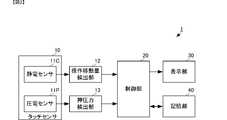
- the touch input device 1 includes the touch sensor 10 and the display unit 30, the operation movement amount detection unit 12, the pressing force detection unit 13, the control unit 20, and the storage unit. 40.
- the touch sensor 10 includes an electrostatic sensor 11C and a piezoelectric sensor 11P.
- the electrostatic sensor 11C and the operation movement amount detection unit 12 constitute the “movement detection unit” of the present invention.
- the piezoelectric sensor 11P and the pressing force detector 13 constitute the “pressing force detector” of the present invention.
- the electrostatic sensor 11C has a structure in which capacitance detection electrodes are formed on both main surfaces of a dielectric substrate.
- the electrostatic sensor 11 generates an operation position detection signal by detecting a change in capacitance at a position where the operator's finger contacts.
- the piezoelectric sensor 11P has a structure in which piezoelectric detection electrodes are formed on both main surfaces of the piezoelectric film. The piezoelectric sensor 11P detects an electric charge generated when the operator's finger presses the operation surface, and generates a press sensing signal.
- the operation position detection signal is sequentially input from the electrostatic sensor 11C to the operation movement amount detection unit 12 at predetermined time intervals.
- the operation movement amount detection unit 12 detects an operation movement amount from operation positions input at a plurality of times.
- the operation movement amount detection unit 12 outputs the operation position and the operation movement amount to the control unit 20.
- the pressing force detection unit 13 detects a pressing force proportional to the amplitude level from the amplitude level of the pressing detection signal.
- the pressing force detection unit 13 outputs the pressing force to the control unit 20.
- the control unit 20 performs overall control of the touch input device 1 and executes specific processing for operation input.
- the storage unit 40 stores a program related to these control processes and a threshold value Th for the pressing force.
- the control unit 20 implements each control and process by reading and executing the program and the threshold value Th stored in the storage unit 40.
- the storage unit 40 can also be used as a calculation memory when executing control or processing.
- the operation movement amount and the pressing force are input to the control unit 20.
- the control unit 20 detects the operation start timing from the operation movement amount. Further, the control unit 20 detects the operation movement speed from the operation movement amounts for a plurality of times.
- the control unit 20 executes the following drag-and-drop operation using the pressing force, the threshold value Th, the operation start timing based on the operation movement amount, and the operation movement speed.
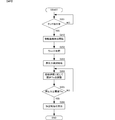
- FIG. 3 is a flowchart showing a drag-and-drop operation of the touch input device according to the first embodiment of the present invention.
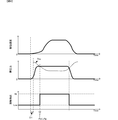
- FIG. 4 is a waveform diagram of the moving speed, the pressing force, and the contact detection flag when the drag-and-drop operation of the touch input device according to the first embodiment of the present invention is performed.
- the control unit 20 detects that the operator has touched the operation surface from the operation movement amount (S101). For example, as illustrated in FIG. 4, the control unit 20 determines that there is touch detection when detecting that the operation movement amount has increased from 0 (S ⁇ b> 101: YES). Until the determination of the presence of touch detection is made, touch detection is continuously performed based on the operation movement amounts sequentially input (S101: NO).
- control unit 20 executes a wait process for a predetermined time ⁇ t starting from the operation start timing (touch detection timing) (S102). During this period, the control unit 20 does not execute processing using the pressing force.
- the control unit 20 when the control unit 20 detects that the wait process for the predetermined time ⁇ t is completed, the control unit 20 starts comparing the pressing force with the threshold Th (S103).
- the control unit 20 changes the threshold value Th over time as shown by a thick dotted line in FIG. More specifically, the control unit 20 sets a maximum value as the initial value of the threshold value Th, and decreases the maximum value over time (S104). And the control part 20 stops the fall of threshold value Th after progress of predetermined time. After stopping the decrease in the threshold value Th, the control unit 20 continues to maintain the stopped value.
- the control unit 20 determines that the drag operation has been performed, and executes a specific process corresponding to the drag operation (S106).
- the specific process is, for example, a process of setting the object set at the operation position to be movable at the timing when the pressing force becomes equal to or higher than the threshold Th.
- the control unit 20 continuously executes a process for lowering the threshold Th and a comparison process between the pressing force and the threshold Th.
- the threshold Th is set high in the movement stage where the movement speed is low before the operator places his finger at the target drag position Pp. Therefore, even if the pressing force increases to some extent due to an operation with a low moving speed, the threshold Th is not exceeded. Accordingly, it is possible to suppress the start of the drag operation in a situation where the target drag operation is not started.
- the control unit 20 changes the contact detection signal from the Low state to the Hi state and starts a drag operation.
- the detected drag position Pd detected by the control unit 20 substantially matches the target drag position Pp intended by the operator.
- the drag operation can be reliably detected, and the true operation position can be detected with high accuracy.
- the drag operation is not started at an unintended operation position, and the drag operation can be reliably started at the intended operation position. False detection can be reliably suppressed.
- the threshold value Th remains at a predetermined value, so that a drop operation for detecting that the pressing force is less than the threshold value Th can also be accurately detected.
- the threshold value Th is stopped at a certain level and maintained.
- the threshold Th is maintained at a certain value at the time when the operator moves the finger and releases the finger from the operation surface to reduce the pressing force.
- the drop operation can be detected even in an extreme situation where the pressing force is zero. Therefore, it is possible to accurately detect the drop operation and improve the operation sensitivity for the drop operation.
- the touch input device according to the present embodiment is different from the touch input device according to the first embodiment in the setting process of the threshold Thv of the control unit 20. Therefore, only different points from the touch input device of the first embodiment will be specifically described.
- FIG. 5 is a flowchart showing a drag-and-drop operation of the touch input device according to the second embodiment of the present invention.
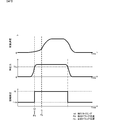
- FIG. 6 is a waveform diagram of the moving speed, the pressing force, and the contact detection flag when the drag-and-drop operation of the touch input device according to the second embodiment of the present invention is performed.
- the control unit 20 detects that the operator touches the operation surface from the operation movement amount (S201). For example, as illustrated in FIG. 6, the control unit 20 determines that there is touch detection when detecting that the operation movement amount has increased from 0 (S ⁇ b> 201: YES). Until the determination of the presence of touch detection is made, touch detection is continuously performed based on the operation movement amounts sequentially input (S201: NO).
- control unit 20 detects the operation movement speed from the time difference between the operation movement amount and a plurality of timings for calculating the operation movement amount (S210).
- control unit 20 executes a wait process for a predetermined time ⁇ t starting from the operation start timing (touch detection timing) (S202). During this period, the control unit 20 does not execute processing using the pressing force.
- the control unit 20 detects that the wait process for the predetermined time ⁇ t is completed, the control unit 20 starts comparing the pressing force with the threshold value Thv (S203).
- the control unit 20 changes the threshold value Thv over time as shown by the thick dotted line in FIG.
- control unit 20 sets a maximum value as an initial value of the threshold value Thv, and sets the threshold value Thv so that it decreases as the operation movement speed increases and increases as the operation movement speed decreases (S204). .
- control unit 20 presets a minimum value of the threshold Thv and changes the threshold Thv between the maximum value and the minimum value.
- the control unit 20 determines that the drag operation has been performed, and executes a specific process corresponding to the drag operation (S206).
- the specific process is, for example, a process of setting the object set at the operation position to be movable at the timing when the pressing force becomes equal to or higher than the threshold Thv.
- the control unit 20 continuously executes the adjustment processing of the threshold Th and the comparison processing of the pressing force and the threshold Th.
- the threshold Thv is set high in the movement stage where the movement speed is low before the operator places the finger at the target drag position Pp. Therefore, even if the pressing force increases to some extent due to an operation with a slow movement speed, the threshold value Thv is not exceeded. Accordingly, it is possible to suppress the start of the drag operation in a situation where the target drag operation is not started. In addition, the true drag operation can be reliably detected, and the true operation position can be detected with high accuracy.
- the threshold Thv is set to be low in the section where the moving speed of moving the finger is fast. Therefore, it is possible to suppress the pressing force from being less than the threshold value Thv in a section where the pressing force is high to some extent due to an operation with a high moving speed. Thereby, it can suppress that drop operation will be carried out to the position which is not intended.
- the threshold Thv increases when the operator decreases the moving speed of the finger to perform the drop operation. At this time, the operator reduces the pressing force toward the drop operation. Therefore, the pressing force is less than the threshold value Thv, and a drop operation can be detected. Thereby, it is possible to accurately detect the drop operation and improve the operation sensitivity for the drop operation.
- the touch sensor described above preferably has the following configuration.
- the touch sensor 10 includes a piezoelectric film, a capacitance detection electrode, and a piezoelectric detection electrode.
- the capacitance detection electrode and the piezoelectric detection electrode are formed on both main surfaces of the piezoelectric film.
- the piezoelectric film is made of uniaxially stretched L-type polylactic acid (PLLA).
- PLLA is a chiral polymer, and the main chain has a helical structure.
- PLLA is uniaxially stretched and has piezoelectricity when the molecules are oriented.
- the uniaxially stretched PLLA generates electric charges when the flat plate surface of the piezoelectric film is pushed in. At this time, the amount of electric charge generated is uniquely determined by the amount of displacement by which the flat plate surface is displaced in the direction orthogonal to the flat plate surface.
- the piezoelectric constant of uniaxially stretched PLLA belongs to a very high class among polymers. Therefore, the pressing force can be sensed with high sensitivity.
- the draw ratio is preferably about 3 to 8 times.
- PLLA generates piezoelectricity by molecular orientation processing such as stretching, and there is no need to perform poling processing like other polymers such as PVDF and piezoelectric ceramics. That is, the piezoelectricity of PLLA that does not belong to ferroelectrics is not expressed by the polarization of ions like ferroelectrics such as PVDF and PZT, but is derived from a helical structure that is a characteristic structure of molecules. is there. For this reason, the pyroelectricity generated in other ferroelectric piezoelectric materials does not occur in PLLA.
- PVDF or the like shows a change in piezoelectric constant over time, and in some cases, the piezoelectric constant may be significantly reduced, but the piezoelectric constant of PLLA is extremely stable over time. Therefore, the pressing force can be sensed with high sensitivity without being affected by the surrounding environment.
- the capacitance detection electrode and the piezoelectric detection electrode are made of a material having translucency and conductivity.
- the capacitance detection electrode and the piezoelectric detection electrode are preferably ITO, ZnO, silver nanowires, an organic electrode based on polythiophene, or an organic electrode based on polyaniline. is there. By using these materials, a highly translucent conductor pattern can be formed.
- the electrostatic sensor 11C and the piezoelectric sensor 11P can be formed using one piezoelectric film as a base material, and thus the touch sensor 10 can be formed thin.
Landscapes
- Engineering & Computer Science (AREA)
- General Engineering & Computer Science (AREA)
- Theoretical Computer Science (AREA)
- Human Computer Interaction (AREA)
- Physics & Mathematics (AREA)
- General Physics & Mathematics (AREA)
- Position Input By Displaying (AREA)
- User Interface Of Digital Computer (AREA)
Abstract
タッチ式入力装置(1)は、タッチセンサ(10)、操作移動量検出部(12)、押圧力検出部(13)、および制御部(20)を備える。タッチセンサ(10)は、静電センサ(11C)と圧電センサ(11P)とを備え、操作位置検出信号と押圧感知信号を出力する。操作移動量検出部(12)は、操作位置検出信号から操作移動量を検出する。押圧力検出部(13)は、押圧感知信号から押圧力を検出する。制御部(20)は、押圧力に対する閾値Thを予め設定しており、押圧力が閾値Th以上になるとドラッグ操作を開始する。閾値Thは、初期値が最大値であり、経時的に低下する値に設定されている。
Description
本発明は、操作面がタッチされた態様に応じた処理を実行するタッチ式入力装置に関する。
現在、表示画面の表面に平板状のタッチセンサを配置した電子機器が各種考案されている。このようなタッチセンサでの操作入力機能として、ドラッグアンドドロップ機能がある。
ドラッグアンドドロップ機能は、例えば、特許文献1の電子機器に示すように、タッチセンサによる押圧力を利用している。
特許文献1の電子機器では、操作面に対する閾値以上の押圧力を検出すると、当該検出位置に割り当てられたオブジェクトが選択される。この押圧力が検出された状態で、且つタッチ位置が移動したことを検出すると、オブジェクトの移動が開始される。すなわち、ドラッグ操作が開始される。
次に、ドラッグ速度が所定値以上の間、押圧力検出は停止され、ドラッグ速度が所定値未満になると押圧力検出は再開される。そして、押圧力が閾値未満になったことが検出されると、オブジェクトの位置が決定される。すなわち、ドロップ操作が行われる。
しかしながら、上述の従来の構成および処理では、次に示すような問題が生じることがある。図7は、従来の構成および処理を行った場合の問題点を説明するための波形図である。図7には、検出位置の移動速度、押圧力、および接触検出フラグの時間波形が記載されている。
操作者が操作面に表示されたオブジェクトを指で選択する場合、まず操作面に指を軽くタッチさせた後に、ゆっくり指を動かすことがある。この場合、操作者は、意図せずに操作面を押し込んでしまうことがある。例えば、図7の例に示すように、操作位置の移動速度が遅い区間であっても押圧力が高くなる。
このような押し込みが行われ、図7に示すように、押圧力が閾値Thc以上になってしまうと、接触検出フラグがLowからHiに遷移して、ドラッグ操作が開始されてしまう。この位置を検出ドラッグ位置Pdとする。しかしながら、操作者は、例えば、図7に示すように、目的ドラッグ位置Ppに達してから操作位置の移動速度を上げることが多い。したがって、検出ドラッグ位置Pdと目的ドラッグ位置Ppとが異なり、目的でないオブジェクトをドラッグ操作してしまうことになる。
なお、ここで、閾値Thcを十分に高く設定すれば、このような意図しないドラッグ操作は抑制できる。しかしながら、この場合、高く設定された閾値Thcを超える押し込みを行わなければ、ドラッグ操作を開始することができない。このため、操作性が低下してしまう。
本発明の目的は、操作性を低下させることなくドラッグ操作の誤操作を抑制できるタッチ式入力装置を実現することにある。
この発明は、操作面に対する押圧力を検出する押圧力検出部と、押圧力が所定閾値以上であることを検出して特定の処理を実行する制御部と、を備えたタッチ式入力装置に関するものであり、制御部は、閾値を初期状態で最大値に設定し、時間経過とともに低下させていくことを特徴としている。
この構成では、ドラッグ操作かドラッグ操作のための準備操作かが不明確な時点では、閾値が高く設定されている。したがって、このような時点で誤ってドラッグ操作として検出することが抑制される。そして、ドラッグ操作が継続される場合、所定の押圧力が加わり続けるので、時間とともに閾値が低下していくことで押圧力が閾値以上となり、意図するドラッグ操作を確実に検出することができる。
また、この発明のタッチ式入力装置では、次の構成であることが好ましい。制御部は、閾値の最終値は0でない所定値に設定されており、閾値が最終値に達すると、該最終値を維持する。
この構成では、閾値の最小値が制限される。これにより、操作者がドラッグ操作を意図することなく、指を操作面に置き続けただけの場合であっても、ドラッグ操作として検出されない。
また、この発明のタッチ式入力装置では、次の構成であることが好ましい。タッチ式入力装置は、操作面に対する操作位置の移動を検出する移動検出部を備える。制御部は、操作位置の移動開始を検出した後に閾値の設定を行う。
この構成では、操作位置の移動が検出されなければ、押圧力と閾値とによるドラッグ操作の検出が行われない。したがって、ドラッグ操作の誤検出を、より確実に抑制することができる。
また、この発明のタッチ式入力装置の制御部は、操作位置の移動開始を検出したタイミングから所定時間遅延させて、閾値の設定を開始することが好ましい。
この構成では、ドラッグ操作かドラッグ操作のための準備操作かが不明確な初期状態で押圧力と閾値とによるドラッグ操作の検出が行われない。したがって、ドラッグ操作の誤検出を、より確実に抑制することができる。
また、この発明のタッチ式入力装置は、次の構成であってもよい。制御部は、複数時間での操作位置の移動距離から移動速度を検出し、閾値を移動速度に応じて変化させる。
また、この発明のタッチ式入力装置は、次の構成であってもよい。タッチ式入力装置は、操作面に対する押圧力を検出する押圧力検出部と、押圧力が所定閾値以上であることを検出して特定の処理を実行する制御部と、操作面に対する操作位置の移動を検出する移動検出部とを備える。制御部は、複数時間での操作位置の移動距離から移動速度を検出し、閾値を移動速度に応じて変化させる。
この構成では、移動速度に応じて閾値が変化するので、移動速度が遅い時にはドラッグ操作が検出されにくく、移動速度が速くなった時にドラッグ操作が検出されやすくする等の調整ができる。これにより、ドラッグ操作の誤検出を抑制できる。
また、この発明のタッチ式入力装置では、制御部は、移動速度が高くなるほど閾値を低く設定することが好ましい。
この構成では、移動速度が遅い時にはドラッグ操作が検出されにくく、移動速度が速くなった時にドラッグ操作が検出される。これにより、ドラッグ操作の誤検出を抑制できる。
この発明によれば、操作性を低下させることなくドラッグ操作の誤操作を抑制できる。
本発明の第1の実施形態に係るタッチ式入力装置について、図を参照して説明する。図1は、本発明の第1の実施形態に係るタッチ式入力装置の外観斜視図である。図2は、本発明の第1の実施形態に係るタッチ式入力装置のブロック図である。
図1に示すように、形状的には、タッチ式入力装置1は、携帯可能な程度の大きさからなる略直方体形状の筐体100を備える。筐体100は、長さおよび幅が厚さよりも大きな、概略的に平板状の形状からなる。筐体100の一方の平板面(厚さ方向に直交する面)が操作面101となる。
操作面101には、平板状のタッチセンサ10が略全面に配置されている。タッチセンサ10は、透光性を有する材料からなる。タッチセンサ10に対して筐体100の内側には、表示部(表示パネル)30が略全面に配置されている。表示部30は薄型ディスプレイであればよく、例えば液晶ディスプレイからなる。
図2に示すように、機能的には、タッチ式入力装置1は、上述のタッチセンサ10、表示部30とともに、操作移動量検出部12、押圧力検出部13、制御部20、および記憶部40を備える。タッチセンサ10は、静電センサ11Cと圧電センサ11Pを備える。静電センサ11Cと操作移動量検出部12により、本発明の「移動検出部」が構成される。圧電センサ11Pと押圧力検出部13により、本発明の「押圧力検出部」が構成される。
静電センサ11Cは、誘電体基板の両主面に静電容量検出用電極が形成された構造からなる。静電センサ11は、操作者の指が接触した位置の静電容量の変化を検出することで、操作位置検出信号を生成する。圧電センサ11Pは、圧電膜の両主面に圧電検出用電極が形成された構造からなる。圧電センサ11Pは、操作者の指が操作面を押し込んだことにより発生する電荷を検出して、押圧感知信号を生成する。
操作移動量検出部12には、静電センサ11Cから所定の時間間隔で順次操作位置検出信号が入力される。操作移動量検出部12は、複数の時間に入力された操作位置から操作移動量を検出する。操作移動量検出部12は、操作位置および操作移動量を制御部20に出力する。
押圧力検出部13は、押圧感知信号の振幅レベルから、当該振幅レベルに比例する押圧力を検出する。押圧力検出部13は、押圧力を制御部20に出力する。
制御部20は、タッチ式入力装置1の全体制御を行うとともに、操作入力に対する特定処理を実行する。記憶部40には、これらの制御処理に関するプログラムや、押圧力に対する閾値Thが記憶されている。制御部20は、記憶部40に記憶されたプログラムや閾値Thを読み出して実行することで、各制御や処理を実現する。なお、記憶部40は、制御や処理の実行時の演算用メモリとしても利用できる。
制御部20には、操作移動量、および押圧力が入力される。制御部20は、操作移動量から操作開始タイミングを検出する。また、制御部20は、複数の時間の操作移動量から操作移動速度を検出する。
制御部20は、押圧力、閾値Th、操作移動量に基づく操作開始タイミング、および操作移動速度を用いて、次に示すドラッグアンドドロップ操作を実行する。
図3は本発明の第1の実施形態に係るタッチ式入力装置のドラッグアンドドロップ操作を示すフローチャートである。図4は本発明の第1の実施形態に係るタッチ式入力装置のドラッグアンドドロップ操作を行った時の移動速度、押圧力、および接触検出フラグの波形図である。
制御部20は、操作移動量から、操作者が操作面をタッチしたことを検出する(S101)。制御部20は、例えば、図4に示すように、操作移動量が0から増加したことを検出するとタッチ検出有りと判断する(S101:YES)。このタッチ検出有りの判断が行われるまでは、順次入力される操作移動量に基づいて、タッチ検出が継続的に行われる(S101:NO)。
次に、制御部20は、操作開始タイミング(タッチ検出タイミング)を起点として、所定時間Δtのウェイト処理を実行する(S102)。この期間、制御部20は、押圧力を用いた処理を実行しない。
次に、制御部20は、所定時間Δtのウェイト処理が完了したことを検出すると、押圧力と閾値Thとの比較を開始する(S103)。制御部20は、閾値Thを、図4の太点線に示すように、経時的変化させる。より具体的には、制御部20は、閾値Thの初期値として最大値を設定し、経時的に当該最大値から低下させる(S104)。そして、制御部20は、所定時間の経過後には、閾値Thの低下を停止させる。制御部20は、閾値Thの低下を停止させた後には、停止した値のまま維持し続ける。
制御部20は、押圧力が閾値Th以上であることを検出すると(S105:YES)、ドラッグ操作が行われたものと判断し、ドラッグ操作に応じた特定処理を実行する(S106)。ここで、特定処理とは、例えば、押圧力が閾値Th以上になったタイミングにおいて操作位置に設定されているオブジェクトを移動可能に設定する処理である。
なお、押圧力が閾値Th未満である間は(S105:NO)、制御部20は、閾値Thの低下処理と、押圧力と閾値Thとの比較処理とを継続的に実行する。
このような処理を行うことで、図4に示すように、操作者が目的のドラッグ位置Ppに指を置く前の移動速度が遅い移動段階では、閾値Thが高く設定されている。したがって、移動速度が遅い操作により押圧力がある程度高くなってしまっても、閾値Thを超えることがない。これにより、このような目的のドラッグ操作が開始されていない状況においてドラッグ操作が開始されてしまうことを抑制できる。
また、図4に示すように、経時的に閾値Thが低下し、逆に操作者が目的のドラッグ位置Ppに達した場合には、継続的に押圧力が高くなっていることから、目的のドラッグ位置Ppでは、押圧力が閾値Th以上となる。このように押圧力が閾値Th以上になることが検出されると、制御部20は、接触検出信号をLow状態からHi状態に遷移させ、ドラッグ操作を開始する。
このように本実施形態の構成及び処理を用いることで、制御部20が検出する検出ドラッグ位置Pdは、操作者が意図する目的のドラッグ位置Ppと略一致する。これにより、ドラッグ操作を確実に検出し、真の操作位置を高精度に検出することができる。
そして、以上にように、本実施形態の構成および処理を用いることで、意図しない操作位置でドラッグ操作が開始されず、意図した操作位置で確実にドラッグ操作を開始することができ、ドラッグ操作の誤検出を確実に抑制できる。
なお、本実施形態の構成および処理では、閾値Thが所定値で留まるため、押圧力が閾値Th未満になったことを検出するドロップ操作も正確に検出することができる。例えば、図4に示すように、閾値Thはある程度の値で下げ止まって維持されている。このため、操作者が指を移動させ、操作面から指を離して押圧力が低下する時点では、閾値Thはある程度の値のまま維持されている。これにより、押圧力が0になるような極端な状況にならなくても、ドロップ操作を検出することができる。したがって、ドロップ操作を正確に検出し、且つドロップ操作に対する操作感度を向上させることができる。
次に、本発明の第2の実施形態に係るタッチ式入力装置について、図を参照して説明する。本実施形態のタッチ式入力装置は、制御部20の閾値Thvの設定処理が第1の実施形態のタッチ式入力装置と異なるものである。したがって、第1の実施形態のタッチ式入力装置と異なる箇所のみを具体的に説明する。
図5は本発明の第2の実施形態に係るタッチ式入力装置のドラッグアンドドロップ操作を示すフローチャートである。図6は本発明の第2の実施形態に係るタッチ式入力装置のドラッグアンドドロップ操作を行った時の移動速度、押圧力、および接触検出フラグの波形図である。
制御部20は、操作移動量から、操作者が操作面をタッチしたことを検出する(S201)。制御部20は、例えば、図6に示すように、操作移動量が0から増加したことを検出するとタッチ検出有りと判断する(S201:YES)。このタッチ検出有りの判断が行われるまでは、順次入力される操作移動量に基づいて、タッチ検出が継続的に行われる(S201:NO)。
次に、制御部20は、操作移動量と、当該操作移動量を算出するための複数のタイミングの時間差から操作移動速度を検出する(S210)。
次に、制御部20は、操作開始タイミング(タッチ検出タイミング)を起点として、所定時間Δtのウェイト処理を実行する(S202)。この期間、制御部20は、押圧力を用いた処理を実行しない。
次に、制御部20は、所定時間Δtのウェイト処理が完了したことを検出すると、押圧力と閾値Thvとの比較を開始する(S203)。制御部20は、閾値Thvを、図6の太点線に示すように、経時的変化させる。
より具体的には、制御部20は、閾値Thvの初期値として最大値を設定し、操作移動速度が早くなるほど低くなり、操作移動速度が遅くなるほど高くなるように閾値Thvを設定する(S204)。この際、制御部20は、第1の実施形態と同様に、閾値Thvの最小値を予め設定しおき、最大値と最小値との間で閾値Thvを変化させる。
制御部20は、押圧力が閾値Thv以上であることを検出すると(S205:YES)、ドラッグ操作が行われたものと判断し、ドラッグ操作に応じた特定処理を実行する(S206)。ここで、特定処理とは、例えば、押圧力が閾値Thv以上になったタイミングにおいて操作位置に設定されているオブジェクトを移動可能に設定する処理である。
なお、押圧力が閾値Thv未満である間は(S205:NO)、制御部20は、閾値Thの調整処理と、押圧力と閾値Thとの比較処理とを継続的に実行する。
このような処理を行うことで、図6に示すように、操作者が目的のドラッグ位置Ppに指を置く前の移動速度が遅い移動段階では、閾値Thvが高く設定されている。したがって、移動速度が遅い操作により押圧力がある程度高くなってしまっても、閾値Thvを超えることがない。これにより、このような目的のドラッグ操作が開始されていない状況においてドラッグ操作が開始されてしまうことを抑制できる。また、真のドラッグ操作を確実に検出し、真の操作位置を高精度に検出することができる。
また、図6に示すように、指を移動させている移動速度が速い区間では、閾値Thvが低く設定されている。したがって、移動速度が速い操作によって押圧力がある程度高い区間では、押圧力が閾値Thv未満になることを抑制できる。これにより、意図しない位置にドロップ操作されてしまうことを抑制できる。
また、図6に示すように、操作者がドロップ操作をしようとして指の移動速度を低下させると、閾値Thvは高くなる。この際、操作者は、ドロップ操作に向けて押圧力を低下させる。したがって、押圧力が閾値Thv未満となり、ドロップ操作を検出できる。これにより、ドロップ操作を正確に検出し、且つドロップ操作に対する操作感度を向上させることができる。
なお、上述の説明では、所定時間Δtのウェイト制御を行う例を説明したが、このウェイト制御を省略することもできる。
また、上述のタッチセンサは、次の構成であることが好ましい。タッチセンサ10は、圧電フィルム、静電容量検出用電極、および圧電検出用電極を備える。静電容量検出用電極および圧電検出用電極は、圧電フィルムの両主面に形成されている。
圧電フィルムは、一軸延伸されたL型ポリ乳酸(PLLA)によって形成されている。
PLLAは、キラル高分子であり、主鎖が螺旋構造を有する。PLLAは、一軸延伸され、分子が配向すると、圧電性を有する。そして、一軸延伸されたPLLAは、圧電フィルムの平板面が押し込まれることにより、電荷を発生する。この際、発生する電荷量は、押し込みにより平板面が、当該平板面に直交する方向へ変位する変位量によって一意的に決定される。
一軸延伸されたPLLAの圧電定数は、高分子中で非常に高い部類に属する。したがって、押圧力を高感度に感知することができる。
なお、延伸倍率は3~8倍程度が好適である。延伸後に熱処理を施すことにより、ポリ乳酸の延びきり鎖結晶の結晶化が促進され圧電定数が向上する。尚、二軸延伸した場合はそれぞれの軸の延伸倍率を異ならせることによって一軸延伸と同様の効果を得ることが出来る。例えばある方向をX軸としてその方向に8倍、その軸に直交するY軸方向に2倍の延伸を施した場合、圧電定数に関してはおよそX軸方向に4倍の一軸延伸を施した場合とほぼ同等の効果が得られる。単純に一軸延伸したフィルムは延伸軸方向に沿って裂け易いため、前述したような二軸延伸を行うことにより幾分強度を増すことができる。
また、PLLAは、延伸等による分子の配向処理で圧電性を生じ、PVDF等の他のポリマーや圧電セラミックスのように、ポーリング処理を行う必要がない。すなわち、強誘電体に属さないPLLAの圧電性は、PVDFやPZT等の強誘電体のようにイオンの分極によって発現するものではなく、分子の特徴的な構造である螺旋構造に由来するものである。このため、PLLAには、他の強誘電性の圧電体で生じる焦電性が生じない。さらに、PVDF等は経時的に圧電定数の変動が見られ、場合によっては圧電定数が著しく低下する場合があるが、PLLAの圧電定数は経時的に極めて安定している。したがって、周囲環境に影響されることなく、押圧力を高感度に感知することができる。
また、PLLAは比誘電率が約2.5と非常に低いため、dを圧電定数とし、εTを誘電率とすると、圧電出力定数(=圧電g定数、g=d/εT)が大きな値となる。
ここで、誘電率ε33
T=13×ε0,圧電定数d31=25pC/NのPVDFの圧電g定数は、上述の式から、g31=0.2172Vm/Nとなる。一方、圧電定数d14=10pC/NであるPLLAの圧電g定数をg31に換算して求めると、d14=2×d31であるので、d31=5pC/Nとなり、圧電g定数は、g31=0.2258Vm/Nとなる。したがって、圧電定数d14=10pC/NのPLLAで、PVDFと同様の押し込み量の検出感度を十分に得ることができる。そして、本願発明の発明者らは、d14=15~20pC/NのPLLAを実験的に得ており、当該PLLAを用いることで、さらに非常に高感度に押圧力を感知することが可能になる。
静電容量検出用電極、圧電検出用電極は、透光性と導電性を有する材料からなる。具体的に、静電容量検出用電極、圧電検出用電極は、ITO、ZnO、銀ナノワイヤ、ポリチオフェンを主成分とする有機電極、ポリアニリンを主成分とする有機電極のいずれかを用いるのが好適である。これらの材料を用いることで、透光性の高い導体パターンを形成できる。
また、このような構成とすることで、静電センサ11Cと圧電センサ11Pとを、1つの圧電フィルムを基材として形成できるので、タッチセンサ10を薄型に形成することができる。
1:タッチ式入力装置、
10:タッチセンサ、
11C:静電センサ、
11P:圧電センサ、
12:操作移動量検出部、
13:押圧力検出部、
20:制御部、
100:筐体、
101:操作面、
30:表示部(表示パネル)、
40:記憶部
10:タッチセンサ、
11C:静電センサ、
11P:圧電センサ、
12:操作移動量検出部、
13:押圧力検出部、
20:制御部、
100:筐体、
101:操作面、
30:表示部(表示パネル)、
40:記憶部
Claims (8)
- 操作面に対する押圧力を検出する押圧力検出部と、
前記押圧力が所定閾値以上であることを検出して特定の処理を実行する制御部と、を備えたタッチ式入力装置であって、
前記制御部は、前記閾値を初期状態で最大値に設定し、時間経過とともに低下させていく、
タッチ式入力装置。 - 前記制御部は、前記閾値の最終値は0でない所定値に設定されており、前記閾値が前記最終値に達すると、該最終値を維持する、
請求項1に記載のタッチ式入力装置。 - 前記操作面に対する操作位置の移動を検出する移動検出部を備え、
前記制御部は、前記操作位置の移動開始を検出した後に、前記閾値の設定を行う、
請求項1または請求項2に記載のタッチ式入力装置。 - 前記制御部は、前記操作位置の移動開始を検出したタイミングから所定時間遅延させて、前記閾値の設定を開始する、
請求項3に記載のタッチ式入力装置。 - 前記制御部は、
複数時間での前記操作位置の移動距離から移動速度を検出し、
前記閾値を前記移動速度に応じて変化させる、
請求項3または請求項4に記載のタッチ式入力装置。 - 操作面に対する押圧力を検出する押圧力検出部と、
前記押圧力が所定閾値以上であることを検出して特定の処理を実行する制御部と、を備えたタッチ式入力装置であって、
前記操作面に対する操作位置の移動を検出する移動検出部を備え、
前記制御部は、
複数時間での前記操作位置の移動距離から移動速度を検出し、
前記閾値を前記移動速度に応じて変化させる、
タッチ式入力装置。 - 前記制御部は、前記操作位置の移動開始を検出したタイミングから所定時間遅延させて、前記閾値の設定を開始する、
請求項6に記載のタッチ式入力装置。 - 前記制御部は、前記移動速度が高くなるほど前記閾値を低く設定する、
請求項5乃至請求項7のいずれかに記載のタッチ式入力装置。
Priority Applications (2)
| Application Number | Priority Date | Filing Date | Title |
|---|---|---|---|
| JP2014552027A JP5794399B2 (ja) | 2012-12-12 | 2013-12-09 | タッチ式入力装置 |
| US14/732,930 US9746953B2 (en) | 2012-12-12 | 2015-06-08 | Touch input device |
Applications Claiming Priority (2)
| Application Number | Priority Date | Filing Date | Title |
|---|---|---|---|
| JP2012270898 | 2012-12-12 | ||
| JP2012-270898 | 2012-12-12 |
Related Child Applications (1)
| Application Number | Title | Priority Date | Filing Date |
|---|---|---|---|
| US14/732,930 Continuation US9746953B2 (en) | 2012-12-12 | 2015-06-08 | Touch input device |
Publications (1)
| Publication Number | Publication Date |
|---|---|
| WO2014092038A1 true WO2014092038A1 (ja) | 2014-06-19 |
Family
ID=50934327
Family Applications (1)
| Application Number | Title | Priority Date | Filing Date |
|---|---|---|---|
| PCT/JP2013/082926 Ceased WO2014092038A1 (ja) | 2012-12-12 | 2013-12-09 | タッチ式入力装置 |
Country Status (3)
| Country | Link |
|---|---|
| US (1) | US9746953B2 (ja) |
| JP (1) | JP5794399B2 (ja) |
| WO (1) | WO2014092038A1 (ja) |
Cited By (8)
| Publication number | Priority date | Publication date | Assignee | Title |
|---|---|---|---|---|
| WO2016047153A1 (en) * | 2014-09-26 | 2016-03-31 | Rakuten, Inc. | Method and system for sensing water, debris or other extraneous objects on a display screen |
| JP2016066338A (ja) * | 2014-09-19 | 2016-04-28 | 株式会社東海理化電機製作所 | タッチセンサ |
| US9904411B2 (en) | 2014-09-26 | 2018-02-27 | Rakuten Kobo Inc. | Method and system for sensing water, debris or other extraneous objects on a display screen |
| US9916037B2 (en) | 2014-09-26 | 2018-03-13 | Rakuten Kobo, Inc. | Method and system for mobile device splash mode operation and transition thereto |
| US9983745B2 (en) | 2014-09-19 | 2018-05-29 | Kabushiki Kaisha Tokai Rika Denki Seisakusho | Touch sensor device and controller |
| CN110494725A (zh) * | 2017-10-03 | 2019-11-22 | 株式会社村田制作所 | 按压传感器和电子设备 |
| JP2021077181A (ja) * | 2019-11-12 | 2021-05-20 | 富士ゼロックス株式会社 | 情報処理装置及びプログラム |
| JPWO2023281705A1 (ja) * | 2021-07-08 | 2023-01-12 |
Families Citing this family (45)
| Publication number | Priority date | Publication date | Assignee | Title |
|---|---|---|---|---|
| JP5197521B2 (ja) * | 2009-07-29 | 2013-05-15 | 京セラ株式会社 | 入力装置 |
| US9417754B2 (en) | 2011-08-05 | 2016-08-16 | P4tents1, LLC | User interface system, method, and computer program product |
| CN104508618B (zh) | 2012-05-09 | 2018-01-05 | 苹果公司 | 用于针对在用户界面中执行的操作提供触觉反馈的设备、方法和图形用户界面 |
| WO2013169846A1 (en) | 2012-05-09 | 2013-11-14 | Yknots Industries Llc | Device, method, and graphical user interface for displaying additional information in response to a user contact |
| WO2013169851A2 (en) | 2012-05-09 | 2013-11-14 | Yknots Industries Llc | Device, method, and graphical user interface for facilitating user interaction with controls in a user interface |
| WO2013169842A2 (en) | 2012-05-09 | 2013-11-14 | Yknots Industries Llc | Device, method, and graphical user interface for selecting object within a group of objects |
| JP6031186B2 (ja) | 2012-05-09 | 2016-11-24 | アップル インコーポレイテッド | ユーザインタフェースオブジェクトを選択するためのデバイス、方法及びグラフィカルユーザインタフェース |
| WO2013169845A1 (en) | 2012-05-09 | 2013-11-14 | Yknots Industries Llc | Device, method, and graphical user interface for scrolling nested regions |
| CN104487930A (zh) | 2012-05-09 | 2015-04-01 | 苹果公司 | 用于移动和放置用户界面对象的设备、方法和图形用户界面 |
| WO2013169865A2 (en) | 2012-05-09 | 2013-11-14 | Yknots Industries Llc | Device, method, and graphical user interface for moving a user interface object based on an intensity of a press input |
| EP2847662B1 (en) | 2012-05-09 | 2020-02-19 | Apple Inc. | Device, method, and graphical user interface for providing feedback for changing activation states of a user interface object |
| WO2013169849A2 (en) | 2012-05-09 | 2013-11-14 | Industries Llc Yknots | Device, method, and graphical user interface for displaying user interface objects corresponding to an application |
| EP2847659B1 (en) | 2012-05-09 | 2019-09-04 | Apple Inc. | Device, method, and graphical user interface for transitioning between display states in response to a gesture |
| WO2013169843A1 (en) | 2012-05-09 | 2013-11-14 | Yknots Industries Llc | Device, method, and graphical user interface for manipulating framed graphical objects |
| WO2014105274A1 (en) | 2012-12-29 | 2014-07-03 | Yknots Industries Llc | Device, method, and graphical user interface for navigating user interface hierarchies |
| HK1215094A1 (zh) | 2012-12-29 | 2016-08-12 | Apple Inc. | 用於根據具有模擬三維特徵的控制圖標的外觀變化來移動光標的設備、方法和圖形用戶界面 |
| CN107831991B (zh) | 2012-12-29 | 2020-11-27 | 苹果公司 | 用于确定是滚动还是选择内容的设备、方法和图形用户界面 |
| WO2014105279A1 (en) | 2012-12-29 | 2014-07-03 | Yknots Industries Llc | Device, method, and graphical user interface for switching between user interfaces |
| AU2013368441B2 (en) | 2012-12-29 | 2016-04-14 | Apple Inc. | Device, method, and graphical user interface for forgoing generation of tactile output for a multi-contact gesture |
| EP3101522A4 (en) * | 2014-01-28 | 2017-08-23 | Sony Corporation | Information processing device, information processing method, and program |
| US10095396B2 (en) | 2015-03-08 | 2018-10-09 | Apple Inc. | Devices, methods, and graphical user interfaces for interacting with a control object while dragging another object |
| US9645732B2 (en) | 2015-03-08 | 2017-05-09 | Apple Inc. | Devices, methods, and graphical user interfaces for displaying and using menus |
| US10048757B2 (en) | 2015-03-08 | 2018-08-14 | Apple Inc. | Devices and methods for controlling media presentation |
| US9632664B2 (en) | 2015-03-08 | 2017-04-25 | Apple Inc. | Devices, methods, and graphical user interfaces for manipulating user interface objects with visual and/or haptic feedback |
| US9639184B2 (en) | 2015-03-19 | 2017-05-02 | Apple Inc. | Touch input cursor manipulation |
| US10152208B2 (en) * | 2015-04-01 | 2018-12-11 | Apple Inc. | Devices and methods for processing touch inputs based on their intensities |
| US20170045981A1 (en) | 2015-08-10 | 2017-02-16 | Apple Inc. | Devices and Methods for Processing Touch Inputs Based on Their Intensities |
| US9891811B2 (en) | 2015-06-07 | 2018-02-13 | Apple Inc. | Devices and methods for navigating between user interfaces |
| US10200598B2 (en) | 2015-06-07 | 2019-02-05 | Apple Inc. | Devices and methods for capturing and interacting with enhanced digital images |
| US10346030B2 (en) | 2015-06-07 | 2019-07-09 | Apple Inc. | Devices and methods for navigating between user interfaces |
| US9860451B2 (en) | 2015-06-07 | 2018-01-02 | Apple Inc. | Devices and methods for capturing and interacting with enhanced digital images |
| US9830048B2 (en) | 2015-06-07 | 2017-11-28 | Apple Inc. | Devices and methods for processing touch inputs with instructions in a web page |
| US10416800B2 (en) | 2015-08-10 | 2019-09-17 | Apple Inc. | Devices, methods, and graphical user interfaces for adjusting user interface objects |
| US10248308B2 (en) | 2015-08-10 | 2019-04-02 | Apple Inc. | Devices, methods, and graphical user interfaces for manipulating user interfaces with physical gestures |
| US10235035B2 (en) | 2015-08-10 | 2019-03-19 | Apple Inc. | Devices, methods, and graphical user interfaces for content navigation and manipulation |
| US9880735B2 (en) | 2015-08-10 | 2018-01-30 | Apple Inc. | Devices, methods, and graphical user interfaces for manipulating user interface objects with visual and/or haptic feedback |
| US9652069B1 (en) * | 2015-10-22 | 2017-05-16 | Synaptics Incorporated | Press hard and move gesture |
| KR102473527B1 (ko) * | 2015-12-21 | 2022-12-01 | 엘지디스플레이 주식회사 | 전자 기기 |
| TWI584185B (zh) * | 2016-04-01 | 2017-05-21 | 速博思股份有限公司 | 整合觸控與壓力感測之裝置及其方法 |
| US10656763B1 (en) * | 2019-01-04 | 2020-05-19 | Sensel, Inc. | Dynamic adjustment of a click threshold corresponding to a force-based tactile sensor |
| WO2020147834A1 (zh) * | 2019-01-18 | 2020-07-23 | 北京钛方科技有限责任公司 | 智能设备按键控制方法、装置、计算机设备和存储介质 |
| JP7305528B2 (ja) * | 2019-12-04 | 2023-07-10 | アルパイン株式会社 | 押下検出装置および押下検出方法 |
| USD989009S1 (en) * | 2020-02-25 | 2023-06-13 | View, Inc. | Control aid housing |
| USD953844S1 (en) | 2020-02-25 | 2022-06-07 | View, Inc. | Flush-mount faceplate |
| JP7755142B2 (ja) * | 2021-10-27 | 2025-10-16 | 株式会社デンソーウェーブ | 光学的情報読取装置 |
Citations (3)
| Publication number | Priority date | Publication date | Assignee | Title |
|---|---|---|---|---|
| JP2004222776A (ja) * | 2003-01-20 | 2004-08-12 | Fuji Photo Film Co Ltd | 異常陰影候補検出装置 |
| JP2007512619A (ja) * | 2003-11-26 | 2007-05-17 | イマージョン コーポレーション | 接触感知式入力装置からの入力の適応型解釈を行うシステム及び方法 |
| JP2011128754A (ja) * | 2009-12-16 | 2011-06-30 | Lg Display Co Ltd | タッチパネル装置およびタッチパネルのタッチ検出方法 |
Family Cites Families (16)
| Publication number | Priority date | Publication date | Assignee | Title |
|---|---|---|---|---|
| US20100220065A1 (en) * | 2009-02-27 | 2010-09-02 | Research In Motion Limited | Touch-sensitive display including a force-sensor and portable electronic device including same |
| US9244562B1 (en) * | 2009-07-31 | 2016-01-26 | Amazon Technologies, Inc. | Gestures and touches on force-sensitive input devices |
| JP5278259B2 (ja) * | 2009-09-07 | 2013-09-04 | ソニー株式会社 | 入力装置、入力方法及びプログラム |
| US20110084910A1 (en) * | 2009-10-13 | 2011-04-14 | Research In Motion Limited | Portable electronic device including touch-sensitive display and method of controlling same |
| US8633916B2 (en) * | 2009-12-10 | 2014-01-21 | Apple, Inc. | Touch pad with force sensors and actuator feedback |
| JP4891463B2 (ja) | 2010-02-23 | 2012-03-07 | 京セラ株式会社 | 電子機器 |
| US20120068939A1 (en) * | 2010-09-17 | 2012-03-22 | Nigel Patrick Pemberton-Pigott | Touch-sensitive display with depression detection and method |
| WO2012054781A1 (en) * | 2010-10-20 | 2012-04-26 | Tactus Technology | User interface system and method |
| US9262002B2 (en) * | 2010-11-03 | 2016-02-16 | Qualcomm Incorporated | Force sensing touch screen |
| JP5452738B2 (ja) * | 2011-02-10 | 2014-03-26 | 京セラ株式会社 | 入力装置 |
| JP5576841B2 (ja) * | 2011-09-09 | 2014-08-20 | Kddi株式会社 | 押圧による画像のズームが可能なユーザインタフェース装置、画像ズーム方法及びプログラム |
| US9035752B2 (en) * | 2013-03-11 | 2015-05-19 | Amazon Technologies, Inc. | Force sensing input device under an unbroken exterior portion of a device |
| JP6089906B2 (ja) * | 2013-04-12 | 2017-03-08 | 富士通株式会社 | 入力装置、入力プログラムおよび入力方法 |
| JP2015011401A (ja) * | 2013-06-26 | 2015-01-19 | 富士通株式会社 | 電子機器及び制御プログラム |
| US10180723B2 (en) * | 2013-10-08 | 2019-01-15 | Joyson Safety Systems Acquisition Llc | Force sensor with haptic feedback |
| US9612680B2 (en) * | 2015-01-28 | 2017-04-04 | Qualcomm Incorporated | Optimizing the use of sensors to improve pressure sensing |
-
2013
- 2013-12-09 JP JP2014552027A patent/JP5794399B2/ja active Active
- 2013-12-09 WO PCT/JP2013/082926 patent/WO2014092038A1/ja not_active Ceased
-
2015
- 2015-06-08 US US14/732,930 patent/US9746953B2/en active Active
Patent Citations (3)
| Publication number | Priority date | Publication date | Assignee | Title |
|---|---|---|---|---|
| JP2004222776A (ja) * | 2003-01-20 | 2004-08-12 | Fuji Photo Film Co Ltd | 異常陰影候補検出装置 |
| JP2007512619A (ja) * | 2003-11-26 | 2007-05-17 | イマージョン コーポレーション | 接触感知式入力装置からの入力の適応型解釈を行うシステム及び方法 |
| JP2011128754A (ja) * | 2009-12-16 | 2011-06-30 | Lg Display Co Ltd | タッチパネル装置およびタッチパネルのタッチ検出方法 |
Cited By (11)
| Publication number | Priority date | Publication date | Assignee | Title |
|---|---|---|---|---|
| JP2016066338A (ja) * | 2014-09-19 | 2016-04-28 | 株式会社東海理化電機製作所 | タッチセンサ |
| US9983745B2 (en) | 2014-09-19 | 2018-05-29 | Kabushiki Kaisha Tokai Rika Denki Seisakusho | Touch sensor device and controller |
| WO2016047153A1 (en) * | 2014-09-26 | 2016-03-31 | Rakuten, Inc. | Method and system for sensing water, debris or other extraneous objects on a display screen |
| JP2017532676A (ja) * | 2014-09-26 | 2017-11-02 | 楽天株式会社 | ディスプレイスクリーン上の水、デブリ、又は他の付着物を検知する方法及びシステム |
| US9904411B2 (en) | 2014-09-26 | 2018-02-27 | Rakuten Kobo Inc. | Method and system for sensing water, debris or other extraneous objects on a display screen |
| US9916037B2 (en) | 2014-09-26 | 2018-03-13 | Rakuten Kobo, Inc. | Method and system for mobile device splash mode operation and transition thereto |
| CN110494725A (zh) * | 2017-10-03 | 2019-11-22 | 株式会社村田制作所 | 按压传感器和电子设备 |
| CN110494725B (zh) * | 2017-10-03 | 2021-04-20 | 株式会社村田制作所 | 按压传感器和电子设备 |
| JP2021077181A (ja) * | 2019-11-12 | 2021-05-20 | 富士ゼロックス株式会社 | 情報処理装置及びプログラム |
| JP7380103B2 (ja) | 2019-11-12 | 2023-11-15 | 富士フイルムビジネスイノベーション株式会社 | 情報処理装置及びプログラム |
| JPWO2023281705A1 (ja) * | 2021-07-08 | 2023-01-12 |
Also Published As
| Publication number | Publication date |
|---|---|
| JPWO2014092038A1 (ja) | 2017-01-12 |
| JP5794399B2 (ja) | 2015-10-14 |
| US9746953B2 (en) | 2017-08-29 |
| US20150268786A1 (en) | 2015-09-24 |
Similar Documents
| Publication | Publication Date | Title |
|---|---|---|
| JP5794399B2 (ja) | タッチ式入力装置 | |
| US10013093B2 (en) | Touch input device and touch input detecting method | |
| JP5874739B2 (ja) | タッチ式操作入力装置 | |
| JP5954500B2 (ja) | タッチ式入力装置 | |
| JP5935899B2 (ja) | ウェイクアップ信号発生装置、タッチ式入力装置 | |
| JP6041978B2 (ja) | 変位センサ、押込量検出センサ、およびタッチ式入力装置 | |
| US10007386B2 (en) | Input device and program | |
| WO2016152388A1 (ja) | タッチ式入力装置 | |
| JP6237890B2 (ja) | 表示装置及びプログラム | |
| WO2016140170A1 (ja) | タッチ式入力装置 | |
| JP6037046B2 (ja) | タッチ式入力装置及び携帯型表示装置 | |
| CN106796466B (zh) | 触摸式输入装置以及触摸输入检测方法 | |
| JP6206604B2 (ja) | 押圧検知装置 | |
| JP5954502B2 (ja) | 入力装置及びプログラム | |
| WO2015064488A1 (ja) | タッチ式入力装置 | |
| JP6079895B2 (ja) | タッチ式入力装置 | |
| JP5983892B2 (ja) | 表示装置 |
Legal Events
| Date | Code | Title | Description |
|---|---|---|---|
| 121 | Ep: the epo has been informed by wipo that ep was designated in this application |
Ref document number: 13861648 Country of ref document: EP Kind code of ref document: A1 |
|
| ENP | Entry into the national phase |
Ref document number: 2014552027 Country of ref document: JP Kind code of ref document: A |
|
| NENP | Non-entry into the national phase |
Ref country code: DE |
|
| 122 | Ep: pct application non-entry in european phase |
Ref document number: 13861648 Country of ref document: EP Kind code of ref document: A1 |