WO2011126122A1 - 文字入力装置および文字入力方法 - Google Patents
文字入力装置および文字入力方法 Download PDFInfo
- Publication number
- WO2011126122A1 WO2011126122A1 PCT/JP2011/058943 JP2011058943W WO2011126122A1 WO 2011126122 A1 WO2011126122 A1 WO 2011126122A1 JP 2011058943 W JP2011058943 W JP 2011058943W WO 2011126122 A1 WO2011126122 A1 WO 2011126122A1
- Authority
- WO
- WIPO (PCT)
- Prior art keywords
- touch panel
- character
- input
- character string
- finger
- Prior art date
- Legal status (The legal status is an assumption and is not a legal conclusion. Google has not performed a legal analysis and makes no representation as to the accuracy of the status listed.)
- Ceased
Links
Images




Classifications
-
- G—PHYSICS
- G06—COMPUTING OR CALCULATING; COUNTING
- G06F—ELECTRIC DIGITAL DATA PROCESSING
- G06F3/00—Input arrangements for transferring data to be processed into a form capable of being handled by the computer; Output arrangements for transferring data from processing unit to output unit, e.g. interface arrangements
- G06F3/01—Input arrangements or combined input and output arrangements for interaction between user and computer
- G06F3/048—Interaction techniques based on graphical user interfaces [GUI]
- G06F3/0487—Interaction techniques based on graphical user interfaces [GUI] using specific features provided by the input device, e.g. functions controlled by the rotation of a mouse with dual sensing arrangements, or of the nature of the input device, e.g. tap gestures based on pressure sensed by a digitiser
- G06F3/0488—Interaction techniques based on graphical user interfaces [GUI] using specific features provided by the input device, e.g. functions controlled by the rotation of a mouse with dual sensing arrangements, or of the nature of the input device, e.g. tap gestures based on pressure sensed by a digitiser using a touch-screen or digitiser, e.g. input of commands through traced gestures
- G06F3/04883—Interaction techniques based on graphical user interfaces [GUI] using specific features provided by the input device, e.g. functions controlled by the rotation of a mouse with dual sensing arrangements, or of the nature of the input device, e.g. tap gestures based on pressure sensed by a digitiser using a touch-screen or digitiser, e.g. input of commands through traced gestures for inputting data by handwriting, e.g. gesture or text
-
- G—PHYSICS
- G06—COMPUTING OR CALCULATING; COUNTING
- G06F—ELECTRIC DIGITAL DATA PROCESSING
- G06F3/00—Input arrangements for transferring data to be processed into a form capable of being handled by the computer; Output arrangements for transferring data from processing unit to output unit, e.g. interface arrangements
- G06F3/01—Input arrangements or combined input and output arrangements for interaction between user and computer
- G06F3/018—Input/output arrangements for oriental characters
-
- G—PHYSICS
- G06—COMPUTING OR CALCULATING; COUNTING
- G06F—ELECTRIC DIGITAL DATA PROCESSING
- G06F3/00—Input arrangements for transferring data to be processed into a form capable of being handled by the computer; Output arrangements for transferring data from processing unit to output unit, e.g. interface arrangements
- G06F3/01—Input arrangements or combined input and output arrangements for interaction between user and computer
- G06F3/02—Input arrangements using manually operated switches, e.g. using keyboards or dials
- G06F3/023—Arrangements for converting discrete items of information into a coded form, e.g. arrangements for interpreting keyboard generated codes as alphanumeric codes, operand codes or instruction codes
- G06F3/0233—Character input methods
- G06F3/0237—Character input methods using prediction or retrieval techniques
-
- G—PHYSICS
- G06—COMPUTING OR CALCULATING; COUNTING
- G06F—ELECTRIC DIGITAL DATA PROCESSING
- G06F3/00—Input arrangements for transferring data to be processed into a form capable of being handled by the computer; Output arrangements for transferring data from processing unit to output unit, e.g. interface arrangements
- G06F3/01—Input arrangements or combined input and output arrangements for interaction between user and computer
- G06F3/048—Interaction techniques based on graphical user interfaces [GUI]
- G06F3/0487—Interaction techniques based on graphical user interfaces [GUI] using specific features provided by the input device, e.g. functions controlled by the rotation of a mouse with dual sensing arrangements, or of the nature of the input device, e.g. tap gestures based on pressure sensed by a digitiser
- G06F3/0488—Interaction techniques based on graphical user interfaces [GUI] using specific features provided by the input device, e.g. functions controlled by the rotation of a mouse with dual sensing arrangements, or of the nature of the input device, e.g. tap gestures based on pressure sensed by a digitiser using a touch-screen or digitiser, e.g. input of commands through traced gestures
- G06F3/04886—Interaction techniques based on graphical user interfaces [GUI] using specific features provided by the input device, e.g. functions controlled by the rotation of a mouse with dual sensing arrangements, or of the nature of the input device, e.g. tap gestures based on pressure sensed by a digitiser using a touch-screen or digitiser, e.g. input of commands through traced gestures by partitioning the display area of the touch-screen or the surface of the digitising tablet into independently controllable areas, e.g. virtual keyboards or menus
Definitions
- the present invention relates to a character input device and a character input method.
- touch panels have been widely used to realize a small character input device that enables intuitive operation and does not include a device that requires a physically large area such as a keyboard. Yes.
- a technique for inputting characters using the touch panel a technique for inputting characters by handwriting on the touch panel (for example, Patent Document 1) and a virtual keyboard (hereinafter referred to as “virtual keyboard”) displayed on the touch panel.
- a technique for inputting a character using a character for example, Patent Document 2.
- the conventional technique of inputting characters by handwriting on the touch panel has a problem that it is difficult to input characters at high speed because it takes time for input and character recognition processing. Further, even in the conventional technique for inputting characters using a virtual keyboard, it is necessary to repeat the operation of raising and lowering the finger with respect to the touch panel for each key corresponding to the character to be input, so that high-speed character input is difficult.
- the present invention has been made in view of the above, and an object of the present invention is to provide a character input device and a character input method that enable high-speed character input on a touch panel.
- the present invention is a character input device, a touch panel for detecting a contact operation on a display surface, and a plurality of buttons displayed on the display surface of the touch panel,
- contact is started at the first position.
- the character obtained by the prediction process or the conversion process based on the character string including the character corresponding to the button displayed on the locus connecting the positions where the contact is detected while the contact is continued from the second position to the second position
- a control unit that displays a column in a predetermined area on the touch panel as a candidate for a character string input by the contact operation.
- control unit starts contact at the first position and continues to the second position, further continues to the predetermined area, and detects a specific action in the predetermined area.
- the character string displayed at the position where the specific action is detected is accepted as the character string input by the action.
- control unit accepts a character string displayed at a position where a change in the movement direction of the contact is detected in the predetermined area as a character string input by the contact operation.
- control unit accepts a character string displayed at a position where a contact movement that draws a locus of a specific shape in the predetermined area is detected as a character string input by the contact operation.
- control unit may convert a character string including characters corresponding to the button displayed on the locus into kanji by the conversion process.
- control unit starts the contact at the first position and continues to the second position, and further continues to a preset symbol area of the touch panel, and is specified in the symbol area.
- one of the character strings obtained by the prediction process or the conversion process is accepted as a character string input by the contact action, and a symbol corresponding to the symbol area is input. It is preferable to accept as a character.
- the present invention is a character input method executed by a character input device having a touch panel for detecting a contact operation on a display surface.
- Characterized in that it comprises the steps of: displaying a predetermined area on the touch panel as a candidate of a character string entered by the contacting operation.
- the character input device and the character input method according to the present invention have the effect of allowing characters to be input at high speed on the touch panel.
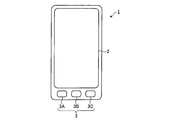
- FIG. 1 is a front view showing an appearance of a mobile phone terminal.
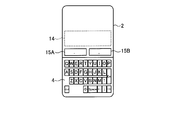
- FIG. 2 is a diagram illustrating a virtual keyboard displayed on the touch panel.
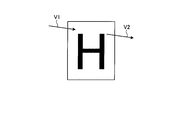
- FIG. 3 is a diagram illustrating an example in which a finger passes through the button area.
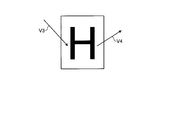
- FIG. 4 is a diagram illustrating an example in which the moving direction of the finger is changed in the button area.
- FIG. 5 is a diagram illustrating an example of a trajectory in which a finger rotates within a button area.
- FIG. 6 is a diagram illustrating an operation example of character input.
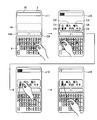
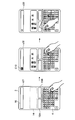
- FIG. 7A is a diagram illustrating an operation example of candidate selection.
- FIG. 7B is a diagram illustrating an operation example of symbol input.
- FIG. 7C is a diagram illustrating another operation example of symbol input.
- FIG. 7A is a diagram illustrating an operation example of candidate selection.
- FIG. 7B is a diagram illustrating an operation example of symbol input.
- FIG. 7C is a diagram illustrating another operation example of symbol input.
- FIG. 7D is a diagram illustrating another operation example of candidate selection.
- FIG. 8 is a diagram illustrating an example of a change in the moving direction of the finger within the input character string candidate display area.
- FIG. 9 is a block diagram showing a schematic configuration of functions of the mobile phone terminal.
- FIG. 10 is a diagram illustrating an example of virtual keyboard data.
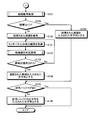
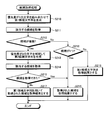
- FIG. 11 is a flowchart showing a processing procedure of character input processing by the mobile phone terminal.
- FIG. 12 is a flowchart showing a processing procedure of character input processing by the mobile phone terminal.
- FIG. 13 is a diagram illustrating an example of the input character buffer.
- FIG. 14 is a diagram illustrating an example of a temporary buffer.
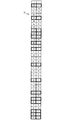
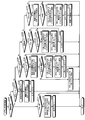
- FIG. 15 is a flowchart showing the processing procedure of the character input determination processing.
- FIG. 16 is a flowchart showing the processing procedure of the symbol input determination processing.
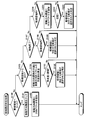
- FIG. 17 is a flowchart illustrating a processing procedure of candidate selection determination processing.
- FIG. 18 is a flowchart illustrating a processing procedure of candidate acquisition processing.
- FIG. 19 is a diagram illustrating an example of processing for determining candidates when a symbol is received.
- a mobile phone terminal will be described as an example of a character input device, but the application target of the present invention is not limited to a mobile phone terminal, and various devices including a touch panel, for example, PHS (Personal Handyphone System),
- PHS Personal Handyphone System
- the present invention can also be applied to PDAs, portable navigation devices, personal computers, game machines, and the like.
- FIG. 1 is a front view showing an appearance of a mobile phone terminal 1 which is an embodiment of the character input device of the present invention.
- the mobile phone terminal 1 includes a touch panel 2 and an input unit 3 including a button 3A, a button 3B, and a button 3C.
- the touch panel 2 displays characters, figures, images, and the like, and detects various operations performed on the touch panel 2 using a finger, stylus, pen, or the like (hereinafter simply referred to as “finger”).
- finger a finger, stylus, pen, or the like
- the input unit 3 activates a function corresponding to the pressed button.
- the cellular phone terminal 1 displays a virtual keyboard 4 on the touch panel 2 as shown in FIG. 2 in order to accept input of characters from the user.
- the touch panel 2 is provided with an input character string candidate display area 14 and symbol areas 15A and 15B.
- the input character string candidate display area 14 a character string predicted or converted from an operation performed on the virtual keyboard 4 is displayed as an input character string candidate.
- the symbol areas 15A and 15B are used for inputting symbols such as punctuation marks and punctuation marks.
- the symbol areas 15A and 15B function as areas for inputting symbols (for example, punctuation marks) only while the virtual keyboard 4 is displayed.
- the appearance when the symbol areas 15A and 15B function as areas for inputting symbols may be clear to the user by the outer frame or background color. It may be transparent so that the user can visually recognize the contents displayed in the area by the program being executed.
- a punctuation mark (“.” Or “.”) is displayed, and in the symbol area 15B, a reading mark (“,” or “,”) is displayed. A symbol corresponding to the area may be displayed in the area.
- the symbol region 15A and the symbol region 15B are collectively referred to as the symbol region 15 unless otherwise distinguished.
- the virtual keyboard 4 includes a plurality of virtual buttons that imitate physical keyboard keys. For example, when the user puts a finger on (touches) and releases the button “Q” in the virtual keyboard 4, the operation is detected by the touch panel 2, and the mobile phone terminal 1 displays the character “Q”. Is accepted as input.
- the cellular phone terminal 1 further accepts input of characters by a continuous method on the virtual keyboard 4.
- the continuous method is a method that allows a user to continuously input a plurality of characters by moving the virtual keyboard 4 while keeping a finger in contact with the touch panel 2.
- a user keeps a finger in contact with the touch panel 2 and moves the user to slide in the order of a “W” button, an “E” button, and a “T” button. You can enter a string.
- a plurality of characters can be input simply by sliding the finger on the touch panel 2 without performing the operation of raising and lowering the finger for each button. Can be entered.
- the user inputs a character among the buttons on the locus on which the user moves his / her finger, the button being displayed at the position where the specific operation is detected by the touch panel 2. Therefore, it is determined that the object is intentionally touched. Specifically, when the touch panel 2 detects an operation for starting finger contact, the mobile phone terminal 1 is said to be touched intentionally if there is a button at a position where the start of contact is detected. judge. Further, when the touch panel 2 detects an operation of moving the finger and moving away from the touch panel 2, the mobile phone terminal 1 is intentionally touched if there is a button at the position where the end of contact is detected. It is determined that
- the mobile phone terminal 1 when an operation for changing the movement direction is detected by the touch panel 2 while the finger is touching the touch panel 2, if the mobile phone terminal 1 has a button at a position where the change of the movement direction is detected, the button is intended. It is determined that it has been touched. Specifically, the mobile phone terminal 1 compares the moving direction when the finger enters the button and the moving direction when the finger comes out of the button, and if the angle difference between the moving directions is larger than the threshold, the user Determines that the button is intentionally touched.
- the button has been intentionally touched, so that the user can easily input the same character continuously. It becomes possible to do. For example, if the user wishes to input the letter “W” three times in succession, the user may move his / her finger to draw a circle three times within the “W” button area.
- the number of rotations can be counted by counting one rotation every time the total angle of finger movement vectors in the button region exceeds 360 degrees.
- FIG. 6 shows an operation example when a user inputs “electronics” to the mobile phone terminal 1.
- the buttons are in the order of “R”, “E”, “H”, “J”, “K” with the finger touching the touch panel 2.
- the cellular phone terminal 1 intentionally includes an “E” button on which a finger is placed, and “R”, “E”, and “K” buttons in which the angle difference between the entry direction and the exit direction is greater than a threshold value. Judged that it was touched.
- the finger passes through the buttons in the order of “U”, “Y”, “T”, “Y”, “U”, “I” while touching the touch panel 2.
- the cellular phone terminal 1 determines that the “U” and “T” buttons whose angle difference between the approach direction and the exit direction is larger than the threshold value are intentionally touched.
- “O”, “I”, “U”, “Y”, “T”, “R”, “T”, “Y”, “U”, “I” ”Is passed over the buttons in the order.
- the mobile phone terminal 1 determines that the “O” and “R” buttons whose angle difference between the approach direction and the exit direction is larger than the threshold value are intentionally touched.
- the finger passes over the buttons in the order of “O”, “K”, “N”, and “J” while touching the touch panel 2.
- the mobile phone terminal 1 determines that the “O” and “N” buttons whose angle difference between the approach direction and the exit direction is larger than the threshold value are intentionally touched.
- s5 with the finger touching the touch panel 2, “I”, “K”, “U”, “G”, “F”, “D”, “S”, “R”, “T”, “Y” ”Is passed over the buttons in the order.
- the mobile phone terminal 1 determines that the “I”, “K”, “U”, and “S” buttons whose angle difference between the approach direction and the exit direction is larger than the threshold value are intentionally touched.
- the finger moved to the “U” button while touching the touch panel 2 is separated from the touch panel 2 in the “U” button area.
- the mobile phone terminal 1 determines that the “U” button with the finger away from the touch panel 2 is intentionally touched.
- the cellular phone terminal 1 can be connected to “E”, “R”, “E”, “K”, “U”, “T”, “O”, “R”, “O”, “N”. , “I”, “K”, “U”, “S”, “U”, it is determined that the buttons are intentionally touched in this order. Then, the cellular phone terminal 1 accepts “ELEKUTORONIKUSU” obtained by connecting the characters corresponding to these buttons in time series as an input character string. This character string matches the character string that the user tried to input.
- the cellular phone terminal 1 has either intentionally touched each button on the trajectory that the user's finger moved while touching the touch panel 2 or simply passed over it. Whether or not it is too much is accurately determined based on the action that the user naturally performs, and character input is accepted. Therefore, the user can input characters to the mobile phone terminal 1 at high speed and accurately.
- the mobile phone terminal 1 does not ignore characters corresponding to the button that is determined that the finger has just passed, but uses those characters to improve input accuracy. Specifically, the cellular phone terminal 1 collates a character string obtained by concatenating characters corresponding to a button determined to have been intentionally touched by the user with a dictionary, and if a corresponding word is not found, The character corresponding to the button determined to have only passed the finger is complemented, and collation with the dictionary is performed again to find a valid word.
- the user when the user wants to input the word “WET” to the mobile phone terminal 1, the user places the finger in the “W” button area, and then touches the touch panel 2 with the finger “T”. "" Is moved in the direction of the button "", and the finger is released from the touch panel 2 within the button area "T”.
- the “W” button on which the finger is placed and the “T” button on which the finger is separated are intentionally touched, but “E” and “R” on the trajectory along which the finger moves. Since the angle difference between the approach direction and the exit direction is small, it is determined that the button has only passed.
- “WT”, which is a character string obtained by concatenating characters corresponding to the button that the user has intentionally touched in time series, does not exist in the dictionary. Therefore, the mobile phone terminal 1 complements the characters corresponding to the buttons that are determined to have just passed through in time series to create candidates “WET”, “WRT”, and “WERT”, and sets each candidate as Check against a dictionary. In this case, since the word “WET” is included in the dictionary, the cellular phone terminal 1 accepts “WET” as an input character. This character string matches the character string that the user tried to input.
- the touch panel 2 detects an operation of placing (contacting) and releasing a finger in any candidate display area
- the mobile phone terminal 1 determines that the candidate displayed in the display area has been selected. .
- the mobile phone terminal 1 also displays the display when the touch panel 2 detects that the user has performed a specific operation in any candidate display area while keeping the finger in contact with the touch panel 2. It is determined that the candidate displayed in the area has been selected.
- the specific action is a clear action that the finger is not passed through the candidate display area in order to move the finger to another location. For example, the candidate with the finger still touching the touch panel 2
- the movement direction is changed within the display area, and the movement is performed while drawing a trajectory rotating within the candidate display area where the finger is still touching the touch panel 2.
- the candidate of the character string input by performing prediction and conversion based on the operation performed while the user kept the finger in contact with the touch panel 2 was displayed, and the user touched the touch panel 2 with the finger.
- the candidate can be selected without performing the operation of raising and lowering the finger. This makes it possible to continuously input characters by the continuous method as described above at high speed.
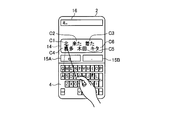
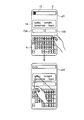
- Fig. 7-1 shows an example of candidate selection when the user is trying to input the character string "KITAFUCHUU".
- the finger is placed in the button area “K”.
- s12 with the finger touching the touch panel 2, after passing over the buttons in the order of "I”, “U”, “Y”, “T”, “R”, “S”, “A”, input
- the cellular phone terminal 1 intentionally includes a “K” button on which a finger is placed, and “I”, “T”, and “A” buttons in which the angle difference between the entry direction and the exit direction is greater than a threshold value. Judged that it was touched.
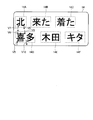
- the mobile phone terminal 1 predicts a character string that the user intends to input from “KITA” that concatenates the characters corresponding to the button that is determined to be intentionally touched, and obtains the candidate C1 obtained by the kanji conversion process.
- ⁇ C8 (“North”, “Came”, “Arrived”, “Kita”, “Kida”, “Kita”
- the cellular phone terminal 1 reversely displays “Kita” obtained by converting “KITA” into Hiragana as a temporary input result in the text input area 16 as a character input destination.
- the text input area 16 is an area temporarily provided on the touch panel 2 by an arbitrary program such as a browser program.
- candidates C1 to C8 (“North”, “Came”, “Arrived”, “Kita”, “Kida”, “Kita” ") Are displayed in the candidate areas 14A to 14F of the input character string candidate display area 14, respectively.
- the angle difference between V7 indicating the movement direction when the finger enters and V8 indicating the movement direction when exiting is larger than the threshold. For this reason, an operation for changing the moving direction of the finger within the candidate area 14A is detected, and the mobile phone terminal 1 determines that the candidate C1 has been selected. Then, the cellular phone terminal 1 normally displays the candidate C1 in the text input area 16 as an input result that is confirmed.
- the candidate area 14D in which the candidate C4 is displayed is passed twice by the finger, but the angle difference between V5 indicating the moving direction at the time of entry and V6 indicating the moving direction at the time of exit from the threshold is larger than the threshold value. Is also small. Further, the angle difference between V9 indicating the moving direction at the time of entry in the second pass and V10 indicating the moving direction at the time of exit is also smaller than the threshold value. For this reason, the mobile phone terminal 1 does not determine that the candidate C4 has been selected.
- the cellular phone terminal 1 determines whether each candidate area on the locus moved with the user's finger touching the touch panel 2 has been intentionally touched, or simply above it. Whether or not it has only passed has been accurately determined based on the action that the user naturally performs.
- Each of the symbol areas 15A and 15B is associated with a symbol such as a punctuation mark or a punctuation mark in advance.
- the touch panel 2 detects that the mobile phone terminal 1 places (contacts) and releases a finger in any of the symbol areas 15, the symbol corresponding to the symbol area 15 is input as a character. Accept.
- the mobile phone terminal 1 can also detect the symbol area when it is detected by the touch panel 2 that the user has performed a specific operation in any of the symbol areas 15 with the finger in contact with the touch panel 2.
- a symbol corresponding to 15 is accepted as an input character.
- the specific motion is a clear motion that the finger is not passed through the symbol region 15 in order to move the finger to another location.
- the symbol region where the finger is still touching the touch panel 2 15 is an operation of changing the moving direction within 15, and an operation of drawing a trajectory that rotates within the symbol area 15 where the finger is still touching the touch panel 2.
- the finger moves while drawing a trajectory of rotation in the symbol region 15 while touching the touch panel 2, and the symbol region 15 is moved to move the finger to another location. Therefore, it is determined that a punctuation mark, which is a symbol corresponding to the symbol region 15A, has been input.
- the number of symbol regions 15 is not limited to two, and may be any number. Further, the position of the symbol area 15 may be a position other than between the virtual keyboard 4 and the input character string candidate display area 14, for example, below the virtual keyboard 4.
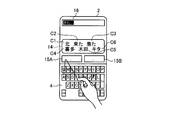
- FIG. 7D illustrates an example in which the user inputs the character string “today” in a continuous manner.
- the finger placed in the “T” button area passes over the buttons in the order of “Y”, “U”, “I”, “O” while touching the touch panel 2, and then moves upward. Has moved.
- the cellular phone terminal 1 determines that the “T” button on which the finger is placed and the “O” button whose angle difference between the approach direction and the exit direction is larger than a threshold value are intentionally touched.
- the cellular phone terminal 1 predicts and converts the character string that the user intends to input from “TO” that connects the characters corresponding to the button that is determined to be touched intentionally, and is obtained by the predictive conversion process.
- Four candidates “today”, “tonight”, “tomorrow”, and “topic” are displayed in the input character string candidate display area 14.
- the cellular phone terminal 1 reversely displays “to” as a temporary input result in the text input area 16 that is a character input destination.
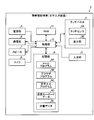
- FIG. 9 is a block diagram showing a schematic configuration of functions of the mobile phone terminal 1 shown in FIG.
- the mobile phone terminal 1 includes a touch panel 2, an input unit 3, a power supply unit 5, a communication unit 6, a speaker 7, a microphone 8, a storage unit 9, a control unit 10, and a RAM. (Random Access Memory) 11.
- the touch panel 2 includes a display unit 2B and a touch sensor 2A superimposed on the display unit 2B.
- the touch sensor 2A detects various operations performed on the touch panel 2 using a finger together with the position on the touch panel 2 where the operation is performed.
- the operations detected by the touch sensor 2 ⁇ / b> A include an operation of bringing a finger into contact with the surface of the touch panel 2, an operation of moving a finger while keeping the surface in contact with the surface of the touch panel 2, and an operation of moving the finger away from the surface of the touch panel 2. It is.
- the touch sensor 2A may employ any detection method such as a pressure-sensitive method or a capacitance method.
- the display unit 2B includes, for example, a liquid crystal display (Liquid Crystal Display), an organic EL (Organic Electro-Luminescence) panel, and the like, and displays characters, figures, images, and the like.
- the input unit 3 receives a user operation through a physical button or the like, and transmits a signal corresponding to the received operation to the control unit 10.
- the power supply unit 5 supplies power obtained from a storage battery or an external power supply to each functional unit of the mobile phone terminal 1 including the control unit 10.
- the communication unit 6 establishes a radio signal line by a CDMA system or the like with a base station via a channel assigned by the base station, and performs telephone communication and information communication with the base station.
- the speaker 7 outputs the other party's voice, ringtone, and the like in telephone communication.
- the microphone 8 converts the voice of the user or the like into an electrical signal.
- the storage unit 9 is, for example, a nonvolatile memory or a magnetic storage device, and stores programs and data used for processing in the control unit 10. Specifically, the storage unit 9 includes a mail program 9A for sending / receiving and browsing mails, a browser program 9B for browsing WEB pages, and a character input program for receiving character input in the continuous mode described above. 9C, virtual keyboard data 9D including definitions related to the virtual keyboard displayed on the touch panel 2 when characters are input, and dictionary data 9E in which information for prediction and conversion of input character strings is registered are stored. The storage unit 9 also stores an operating system program that realizes basic functions of the mobile phone terminal 1 and other programs and data such as address book data in which names, telephone numbers, mail addresses, and the like are registered.
- an operating system program that realizes basic functions of the mobile phone terminal 1 and other programs and data such as address book data in which names, telephone numbers, mail addresses, and the like are registered.
- the control unit 10 is, for example, a CPU (Central Processing Unit), and comprehensively controls the operation of the mobile phone terminal 1. Specifically, the control unit 10 executes the program stored in the storage unit 9 while referring to the data stored in the storage unit 9 as necessary, so that the touch panel 2, the communication unit 6, etc. Various processes are executed by controlling. The control unit 10 expands the program stored in the storage unit 9 and the data acquired / generated / processed by executing the process in the RAM 11 that provides a temporary storage area as necessary. Note that the program executed by the control unit 10 and the data to be referred to may be downloaded from the server device by wireless communication by the communication unit 6.
- a CPU Central Processing Unit
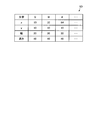
- FIG. 10 an example of the virtual keyboard data 9D stored in the storage unit 9 is shown in FIG.
- a character corresponding to the button for each button included in the virtual keyboard, a character corresponding to the button, a position of the button (for example, upper left coordinates), a width, a height, and the like are registered.
- the character corresponding to a certain button is “Q”
- the width and height of the button are 20 and 40. Etc. are registered.
- FIG. 11 and FIG. 12 are flowcharts showing a processing procedure of character input processing by the cellular phone terminal 1.
- the character input process shown in FIG. 11 and FIG. 12 is realized by the control unit 10 reading and executing the character input program 9C from the storage unit 9, and repeatedly executed while the virtual keyboard 4 is displayed on the touch panel 2. Is done.
- the virtual keyboard 4 is displayed on the touch panel 2 when the control unit 10 executes the character input program 9C or another program.
- the control unit 10 clears the input character buffer 12 as step S110, clears the temporary buffer 13 as step S111, and clears the symbol input buffer as step S112.
- the input character buffer 12 is a storage area in which characters corresponding to the respective buttons on the trajectory moved with the finger touching the touch panel 2 are stored in association with the priority, and are provided in the RAM 11.
- Temporary buffer 13 temporarily stores characters corresponding to buttons determined that the finger has just passed over the buttons on the locus where the finger has moved while touching touch panel 2. This is a storage area and is provided in the RAM 11.
- the symbol buffer is a storage area for storing a symbol received by a specific operation on the symbol area 15, and is provided in the RAM 11.
- FIG. 13 shows the input character buffer 12 when the operation shown in FIG. 6 is performed on the touch panel 2.
- characters corresponding to the buttons on the locus where the finger moves while touching the touch panel 2 are stored in the upper part of the input character buffer 12, and the characters corresponding to the upper characters are stored in the lower part. Stores the priority.
- characters corresponding to the buttons on the locus where the finger moves while touching the touch panel 2 are stored in time series.
- the priority is used to determine whether or not to adopt the associated character when a character string is formed by concatenating characters included in the input character buffer 12.
- the smaller the priority value the more preferentially the associated character is adopted.
- the character corresponding to the button that is determined to have been intentionally touched by the finger is associated with “1” as the priority, and the character corresponding to the button that is determined to be that the finger has simply passed is used. Associates “2” as a priority.
- FIG. 14 shows the temporary buffer 13 when the finger comes out of the “J” button in s1 of FIG.
- the temporary buffer 13 determines that a character corresponding to a button that has been determined that the finger has just passed over it has intentionally touched any button. Until it is stored in time series.
- the control unit 10 sets the input completion flag provided in the RAM 11 to 0 as step S113.
- the input completion flag is used to determine whether or not one character input has been completed.
- the character input for one time here means character input performed between the time when the finger is brought into contact with the touch panel 2 and the time when the finger is released.
- control unit 10 acquires the latest detection result of the touch panel 2 as step S114, and executes candidate selection determination processing as step S115.
- candidate selection determination process the control unit 10 determines whether any of the candidates displayed in the input character string candidate display area 14 has been selected. Details of the candidate selection determination process will be described later.
- Step S116 If none of the candidates displayed in the input character string candidate display area 14 has been selected (No at Step S116), the control unit 10 executes character input determination processing as Step S117, and Step S118. As shown in FIG. Thereafter, the control unit 10 executes Step S123.
- the control unit 10 stores, in the input character buffer 12 and the temporary buffer 13, characters corresponding to the buttons displayed on the locus where the finger moves while touching the touch panel 2. Further, in the symbol input determination process, the control unit 10 stores a symbol received based on a specific operation on the symbol region 15 in the symbol buffer. Details of the character input determination process and the symbol input process will be described later.
- step S116 Yes
- the control unit 10 sets the selected candidate as the character string in step S119. Accept as. Then, the control unit 10 clears the input character buffer 12 as step S120 and clears the temporary buffer 13 as step S121 in order to newly start accepting input of characters. And the control part 10 performs step S123, after clearing the display of the candidate in the input character string candidate display area 14 as step S122.
- the control unit 10 determines whether the input completion flag remains 0 as step S123, and determines whether the symbol buffer is empty as step S124.
- the control unit 10 executes candidate acquisition processing in step S125, and converts the character string predicted or converted from the character string concatenated with the characters stored in the input character buffer 12 into the dictionary data 9E. Get from. Details of the candidate acquisition process will be described later.
- step S126 the control unit 10 displays one or a plurality of character strings obtained by the candidate acquisition process in the input character string candidate display area 14. Then, the control unit 10 determines in step S123 that the input completion flag is not 0, that is, one character input is completed, or the symbol buffer is not empty, that is, if a symbol is input, step S124. Step S114 to Step S126 are repeatedly executed until it is determined in step S1.
- step S127 A character string predicted or converted from a character string obtained by concatenating characters stored in the input character buffer 12 is acquired from the dictionary data 9E.
- step S128, Yes the control unit 10 obtains a character obtained as a result of the candidate acquisition process as step S129. Accepts a character string in which a column is input as the input character string.
- the control unit 10 obtains a plurality of character strings obtained as a result of the candidate acquisition process in step S130. It is displayed in the input character string candidate display area 14. And the control part 10 acquires the newest detection result of the touch panel 2 as step S131, performs candidate selection determination processing as step S132, and is any of the character strings displayed on the input character string candidate display area 14. It is determined whether is selected.
- step S133 if any character string is not selected (step S133, No), the control unit 10 repeatedly executes step S131 to step S133 until any character string is selected.
- the control part 10 may end character input processing. Good.
- step S133 If any of the character strings displayed in the input character string candidate display area 14 in step S133 has been selected (step S133, Yes), the control unit 10 enters the selected character string as step S134. Is accepted as the input character string. Then, in step S135, the control unit 10 checks whether or not the symbol buffer is empty. If it is not empty (No in step S135), the control unit 10 accepts a character in the symbol buffer as an input character in step S136.
- the control unit 10 determines whether the operation detected on the touch panel 2 is an operation of starting contact with the touch panel 2, that is, an operation of bringing a finger into contact with the surface of the touch panel 2 as step S ⁇ b> 140. Judgment.
- the control unit 10 collates the position where the contact is started with the virtual keyboard data 9D as step S141, It is determined whether the position where the contact is started is in any button area. When the position where the contact is started is in any one of the button areas (step S141, Yes), since the button is considered to have been touched intentionally, the control unit 10 corresponds to the button as step S142. The character is associated with the priority “1” and added to the input character buffer 12. The character corresponding to the button is acquired from the virtual keyboard data 9D.
- the control part 10 sets an output flag to "1" as step S143, and complete
- the output flag is provided in the RAM 11 and is used to determine whether or not the character corresponding to the button displayed at the position where the finger is currently in contact has been output to the input character buffer 12 or the temporary buffer 13. It is done.
- the value of the output flag being “0” indicates that the character corresponding to the button displayed at the position where the finger is currently in contact has not been output to any buffer yet. That the value of the output flag is “1” indicates that the character corresponding to the button displayed at the position where the finger is currently in contact has been output to any buffer.
- step S141 when the position where the contact is started is not within the button area (step S141, No), the control unit 10 ends the character input determination process without performing any particular process.
- step S140 when the operation detected on the touch panel 2 is not an operation for starting contact with the touch panel 2 (No in step S140), the control unit 10 performs the operation detected on the touch panel 2 as step S144. 2 is determined based on the detection result of the touch panel 2 to determine whether the operation is to move the finger into the button area while keeping the contact with the touch panel 2. Whether or not the detected operation is an operation of moving a finger into the button area while maintaining contact with the touch panel 2 depends on the contact position indicated by the latest detection result of the touch panel 2 and the contact position indicated by the immediately preceding detection result. Are compared with the virtual keyboard data 9D.
- the control unit 10 clears the movement direction history as step S145.
- the movement direction history is data in which a direction vector indicating in which direction the finger has moved in a specific area is recorded in time series, and is stored in the RAM 11.
- step S146 the control unit 10 acquires a direction vector indicating the direction in which the finger has entered the button area, and adds the acquired direction vector to the movement direction history.
- step S147 the control unit 10 sets the output flag to “0” and ends the character input determination process.
- the direction vector is acquired from the detection result of the touch panel 2.
- the direction vector is calculated from the contact position indicated by the latest detection result of the touch panel 2 and the contact position indicated by the detection result immediately before that. .
- step S144 when the operation detected by the touch panel 2 is not an operation of entering a finger into the button area while maintaining contact with the touch panel 2 (No in step S144), the control unit 10 performs step S148 as It is determined based on the detection result of the touch panel 2 whether the operation detected by the touch panel 2 is an operation of putting a finger out of the button while maintaining contact with the touch panel 2. Whether or not the detected operation is an operation of moving a finger out of the button while maintaining contact with the touch panel 2 depends on the contact position indicated by the latest detection result of the touch panel 2 and the contact position indicated by the immediately preceding detection result. Is compared with the virtual keyboard data 9D.
- step S149 When the detected operation is an operation of putting a finger out of the button while maintaining contact with the touch panel 2 (Yes in step S148), the control unit 10 outputs “0” in step S149. Determine whether. Here, when the output flag is not “0”, that is, when the character corresponding to the button that has been positioned inside the finger has been output to any buffer (No in step S149), the control unit 10 terminates the character input determination process without performing any particular process.
- step S149, Yes the control unit 10 obtains the latest movement vector, that is, a direction vector indicating the direction in which the finger goes out of the button, as step S150. Then, the angle difference from the head direction vector of the movement direction history is calculated. The calculated angle difference represents the magnitude of the difference between the direction when the finger enters the button and the direction when the finger exits the button.
- step S151 When the calculated angle difference is equal to or smaller than the predetermined threshold (No in step S151), it is considered that the finger has simply passed the button, and thus the control unit 10 selects a character corresponding to the button as step S152. Add to the temporary buffer 13 to end the character input determination process.
- step S151 when the calculated angle difference is larger than the predetermined threshold (step S151, Yes), since the button is considered to have been touched intentionally, the control unit 10 causes the finger to pass the character corresponding to the button.
- the processing procedure after step S153 is executed so that the characters corresponding to the other buttons on the trajectory are stored in the input character buffer 12 in time series.
- step S153 the control unit 10 adds the character stored in the temporary buffer 13 to the input character buffer 12 in association with the priority “2”. Subsequently, in step S154, priority is given to the character corresponding to the button. It is added to the input character buffer 12 in association with the degree “1”. In step S155, the control unit 10 clears the temporary buffer 13 and ends the character input determination process.
- step S148 when the operation detected by the touch panel 2 is not an operation of moving a finger out of the button while maintaining contact with the touch panel 2 (No in step S148), the control unit 10 performs the touch panel as step S156. It is determined based on the detection result of the touch panel 2 whether the operation detected in 2 is an operation for ending contact with the touch panel 2, that is, an operation for releasing a finger from the touch panel 2.
- step S156 When the detected operation is an operation for ending contact with the touch panel 2 (step S156, Yes), the control unit 10 compares the position where the contact is ended with the virtual keyboard data 9D as step S157, It is determined whether the position where the contact is ended is in any button area. If the position where the contact is terminated is in any one of the button areas (step S157, Yes), since the button is considered to have been touched intentionally, the control unit 10 indicates that the character corresponding to the button is the finger The processing procedure after step S158 is executed so that the characters corresponding to the other buttons on the trajectory passed through are stored in the input character buffer 12 in time series.
- step S158 the control unit 10 determines whether the output flag is “0”.
- the output flag is “0”, that is, when the character corresponding to the button that is considered to have been touched intentionally has not been output to any buffer yet (step S158, Yes)
- the control unit 10 In step S159, the character stored in the temporary buffer 13 is added to the input character buffer 12 in association with the priority “2”.
- step S160 the control unit 10 adds the character corresponding to the button to the input character buffer 12 in association with the priority “1”.
- control unit 10 sets the input completion flag to “1” in step S161. Set and finish the character input determination process.
- step S157, No When the position where the contact is terminated is not within the button region (step S157, No), or when the output flag is not “0” (step S158, No), the control unit 10 performs input as step S161. Only the process of setting the completion flag to “1” is performed, and the character input determination process is terminated.
- the character stored in the temporary buffer 13 is associated with the priority “2”. It may be added to the input character buffer 12.
- step S156 when the operation detected on the touch panel 2 is not an operation for ending the touch on the touch panel 2 (No in step S156), the control unit 10 performs the operation detected on the touch panel 2 as step S162. 2 is determined based on the detection result of the touch panel 2 to determine whether or not the operation is to move the finger within the button area while maintaining the contact with the touch panel 2.
- step S162 When the detected action is an action of moving a finger within the button area while maintaining contact with the touch panel 2 (step S162, Yes), the control unit 10 moves the finger within the button area as step S163. A direction vector indicating the obtained direction is acquired, and the acquired direction vector is added to the movement direction history. Then, in step S164, the control unit 10 refers to each direction vector recorded in the movement direction history and determines whether the finger has moved while drawing a trajectory that rotates within the button area while touching the touch panel 2. To do.
- step S164 when the finger is touching the touch panel 2 and moving while drawing a trajectory rotating in the button region (step S164, Yes), the button is considered to have been intentionally touched.
- the processing procedure after step S165 is executed so that the character corresponding to the button is stored in the input character buffer 12 in time series together with the characters corresponding to other buttons on the trajectory through which the finger has passed.
- step S165 the control unit 10 adds the character stored in the temporary buffer 13 to the input character buffer 12 in association with the priority “2”. Subsequently, in step S166, priority is given to the character corresponding to the button. It is added to the input character buffer 12 in association with the degree “1”.
- step S167 the control unit 10 sets the output flag to “1”, and in step S168, clears the movement direction history and ends the character input determination process.
- step S ⁇ b> 162 when the operation detected on the touch panel 2 is not an operation for moving a finger within the button area while maintaining contact with the touch panel 2, that is, the finger is moving outside the button on the virtual keyboard 4. If it is found (step S162, No), the control unit 10 ends the character input determination process without performing any particular process.
- the control unit 10 determines whether the operation detected on the touch panel 2 is an operation that causes the finger to enter the symbol area 15 while maintaining contact with the touch panel 2 as step S ⁇ b> 170. . Whether or not the detected operation is an operation of moving a finger into the symbol area 15 while maintaining contact with the touch panel 2 is determined by the contact position indicated by the latest detection result of the touch panel 2 and the contact indicated by the immediately preceding detection result. The position is determined by collating with position information (for example, upper left coordinates, width, and height) of the symbol area 15 set in advance.
- position information for example, upper left coordinates, width, and height
- step S170 When the detected operation is an operation of moving a finger into the symbol area 15 while maintaining contact with the touch panel 2 (step S170, Yes), the control unit 10 clears the movement direction history as step S171. .
- step S172 the control unit 10 acquires a direction vector indicating the direction in which the finger has entered the symbol area 15, adds the acquired direction vector to the movement direction history, and ends the symbol input determination process.
- step S170 when the operation detected on the touch panel 2 is not an operation of moving a finger into the symbol area 15 while maintaining contact with the touch panel 2 (No in step S170), the control unit 10 performs step S173. Based on the detection result of the touch panel 2, it is determined whether the operation detected by the touch panel 2 is an operation of moving a finger out of the symbol area 15 while maintaining contact with the touch panel 2. Whether or not the detected operation is an operation of moving the finger out of the symbol area 15 while maintaining contact with the touch panel 2 is determined by the contact position indicated by the latest detection result of the touch panel 2 and the contact indicated by the immediately preceding detection result. The position is determined by collating with the position information of the symbol area 15.
- the control unit 10 determines, as step S174, the latest movement vector, Then, a direction vector indicating the direction in which the finger goes out of the symbol area 15 is acquired, and an angle difference with the head direction vector of the movement direction history is calculated.
- the calculated angle difference represents the magnitude of the difference between the direction when the finger enters the symbol area 15 and the direction when the finger escapes from the symbol area 15.
- step S175, Yes if the calculated angle difference is larger than the predetermined threshold (step S175, Yes), it is considered that the symbol area 15 has been intentionally touched, so the control unit 10 responds to the symbol area 15 as step S176.
- the character to be stored is stored in the symbol buffer, and the symbol input determination process is terminated.
- step S173 when the operation detected by the touch panel 2 is not an operation of moving the finger out of the symbol area 15 while maintaining contact with the touch panel 2 (step S173, No), the control unit 10 performs step S177. Based on the detection result of the touch panel 2, it is determined whether the operation detected by the touch panel 2 is an operation for ending contact with the touch panel 2, that is, an operation for releasing a finger from the touch panel 2.
- the control unit 10 collates the position where the contact is ended with the position information of the symbol region 15 as Step S178. Thus, it is determined whether the position where the contact is ended is in any of the symbol areas 15. When the position where the contact is ended is not in any of the symbol areas 15 (No in step S178), the control unit 10 ends the symbol input determination process without performing any particular process.
- step S178 when the position where the contact is terminated is in any one of the symbol areas 15 (Yes in step S178), the symbol area 15 is considered to have been touched intentionally, and therefore the control unit 10 performs step S179 as The character corresponding to the symbol area 15 is stored in the symbol buffer, and the symbol input determination process is terminated.
- step S177 when the operation detected on the touch panel 2 is not an operation for ending the touch on the touch panel 2 (No in step S177), the control unit 10 performs the operation detected on the touch panel 2 as step S180. 2 is determined based on the detection result of the touch panel 2 to determine whether the operation is to move the finger within the symbol area 15 while keeping the contact with the touch panel 2.
- the control unit 10 determines that the finger is within the symbol area 15 as step S181.
- the direction vector indicating the direction moved in is acquired, and the acquired direction vector is added to the movement direction history.
- the control unit 10 refers to each direction vector recorded in the movement direction history to determine whether or not the finger moves while drawing a trajectory that rotates in the symbol area 15 while touching the touch panel 2. judge.
- step S182 if the finger is touching the touch panel 2 and moving while drawing a trajectory that rotates in the symbol area 15 (step S182, Yes), the symbol area 15 is considered to have been intentionally touched.
- step S183 the character corresponding to the symbol area 15 is stored in the symbol buffer, and the symbol input determination process is terminated.
- step S180 when the motion detected on touch panel 2 is not the motion to move the finger within symbol area 15 while maintaining contact with touch panel 2 (step S180, No), or in step S182, When the touch panel 2 is not touched and moved while drawing a trajectory rotating in the symbol area 15 (step S182, No), the control unit 10 ends the symbol input determination process without performing any particular process.
- the control unit 10 determines whether the operation detected on the touch panel 2 is an operation that causes the finger to enter the candidate area while maintaining contact with the touch panel 2 as step S ⁇ b> 190.
- the candidate area is an area in which each candidate is displayed in the input character string candidate display area 14, and corresponds to, for example, the smallest rectangle surrounding each candidate.
- Whether or not the detected action is an action of moving a finger into the candidate area while maintaining contact with the touch panel 2 is determined based on the contact position indicated by the latest detection result of the touch panel 2 and the contact position indicated by the immediately preceding detection result. Are compared with position information (for example, upper left coordinates, width, and height) of the candidate area determined when each candidate is displayed.
- Step S190 When the detected operation is an operation that causes the finger to enter the candidate area while maintaining contact with the touch panel 2 (Yes in Step S190), the control unit 10 clears the movement direction history as Step S191. In step S192, the control unit 10 acquires a direction vector indicating the direction in which the finger has entered the candidate area, adds the acquired direction vector to the movement direction history, and ends the candidate selection determination process.
- step S190 when the operation detected on the touch panel 2 is not an operation of moving a finger into the candidate area while keeping the touch to the touch panel 2 (No in step S190), the control unit 10 performs step S193 as It is determined based on the detection result of the touch panel 2 whether the operation detected by the touch panel 2 is an operation of putting a finger out of the candidate area while maintaining contact with the touch panel 2. Whether or not the detected operation is an operation of moving a finger out of the candidate area while maintaining contact with the touch panel 2 is determined by the contact position indicated by the latest detection result of the touch panel 2 and the contact position indicated by the immediately preceding detection result. Are compared with the position information of the candidate area.
- the control unit 10 determines, as step S194, the latest movement vector, that is, A direction vector indicating a direction in which the finger goes out of the candidate area is acquired, and an angle difference from the head direction vector of the movement direction history is calculated.
- the calculated angle difference represents the magnitude of the difference between the direction when the finger enters the candidate area and the direction when the finger exits the candidate area.
- step S195 when the calculated angle difference is larger than the predetermined threshold (Yes in step S195), the candidate area is considered to have been intentionally touched, and therefore the control unit 10 determines the character corresponding to the candidate area as step S196. Is stored in the symbol buffer and the candidate selection determination process is terminated.
- step S193 when the operation detected by the touch panel 2 is not an operation of moving a finger out of the candidate area while maintaining the touch to the touch panel 2 (step S193, No), the control unit 10 performs step S197 as step S197. Based on the detection result of the touch panel 2, it is determined whether the operation detected by the touch panel 2 is an operation for ending contact with the touch panel 2, that is, an operation for releasing a finger from the touch panel 2.
- step S197 the control unit 10 collates the position where the contact is ended with the position information of the candidate area as step S198. Then, it is determined whether the position where the contact is ended is in any candidate region. When the position where the contact is terminated is not in any candidate region (No in step S198), the control unit 10 ends the candidate selection determination process without performing any particular process.
- step S198 determines whether the position where the contact is terminated is in any one of the candidate areas. If the position where the contact is terminated is in any one of the candidate areas (step S198, Yes), the candidate area is considered to have been touched intentionally, and therefore the control unit 10 determines the candidate as step S199. The character corresponding to the area is stored in the symbol buffer, and the candidate selection determination process is terminated.
- step S197 when the operation detected on the touch panel 2 is not an operation for ending the touch on the touch panel 2 (No in step S197), the control unit 10 performs the operation detected on the touch panel 2 as step S200. 2 is determined based on the detection result of the touch panel 2 to determine whether the operation is to move the finger within the candidate area while maintaining contact with the touch panel 2.
- step S200 When the detected action is an action of moving the finger within the candidate area while maintaining contact with the touch panel 2 (step S200, Yes), the control unit 10 moves the finger within the candidate area as step S201. A direction vector indicating the obtained direction is acquired, and the acquired direction vector is added to the movement direction history. Then, in step S202, the control unit 10 refers to each direction vector recorded in the movement direction history, and determines whether or not the finger moves while drawing a trajectory that rotates within the candidate area while touching the touch panel 2. To do.
- step S202 if the finger is touching the touch panel 2 and moving while drawing a trajectory that rotates within the candidate area (Yes in step S202), the candidate area is considered to have been intentionally touched.
- step S203 the character corresponding to the candidate area is stored in the symbol buffer, and the candidate selection determination process is terminated.
- step S200 If the operation detected on the touch panel 2 in step S200 is not an operation of moving the finger within the candidate area while maintaining contact with the touch panel 2 (No in step S200), or the finger is touched on the touch panel in step S202. If the robot does not move while drawing a trajectory that rotates in the candidate area while touching 2 (step S202, No), the control unit 10 ends the candidate selection determination process without performing any particular process.
- step S210 the control unit 10 acquires a character having a priority “1” from the input character buffer 12, and generates a first candidate character string by combining the acquired characters.
- control unit 10 For example, four character strings “A”, “B”, “C”, “D” are stored in the input character buffer 12 in this order, and the priority of “A” and “D” is “1”. It is assumed that the priority of “B” and “C” is “2”. In this case, the control unit 10 generates a first candidate character string “AD” by concatenating characters having a priority “1” in the order of storage.
- step S211 the control unit 10 performs a prediction process or a conversion process, and obtains an input character string candidate from the first candidate character string.
- the prediction process is a process that predicts a character string that the user is trying to input from a character string that is being input
- the conversion process is, for example, a character string that is input as a combination of alphanumeric characters. This is the process of converting to kana.
- a candidate for the input character string can be acquired by searching the dictionary data 9E for a character string that matches the pattern “A * B * C *”.
- “*” is a wild card that matches any character. That is, in this example, the first candidate character string and the first character match, and the second and subsequent characters of the first candidate character string have the same order as the first candidate character string with zero or more characters interposed therebetween.
- the character string appearing in the above matches the first candidate character string, it is searched as a character string.
- control unit 10 When a plurality of character strings are obtained as input character string candidates (step S212, Yes), the control unit 10 has a priority “2” from the input character buffer 12 as step S213 in order to narrow down candidates. A character is acquired, and the acquired character is complemented to the first candidate character string to generate one or more second candidate character strings.
- control unit 10 supplements at least one character with a priority “2” to the first candidate character string “AB” while keeping the storage order, and performs “ABD”, “ACD”, “ Three second candidate character strings “ACDB” are generated.
- step S214 the control unit 10 performs a prediction process or a conversion process to acquire an input character string candidate from the second candidate character string.
- step S215 If any character string is obtained as an input character string candidate in step S214 (step S215, Yes), the control unit 10 performs candidate acquisition processing using the obtained character string as an acquisition result in step S216. End. On the other hand, when no character string is acquired in step S214 (step S215, No), the control unit 10 selects a candidate for the input character string obtained from the first candidate character string in step S211 as step S217. The candidate acquisition process is terminated as an acquisition result.
- step S211 When only one character string is obtained as an input character string candidate in step S211 (No in step S212 and step S218, Yes), the control unit 10 obtains the obtained character string as a result of step S216. The candidate acquisition process is terminated.
- step S218, No When one character string is not obtained as a candidate for the input character string in step S211 (step S218, No), the control unit 10 determines in step S219 that the first candidate character string, that is, the priority is “1”. The candidate acquisition process is terminated with a character string obtained by concatenating characters in the order of storage as an acquisition result.
- the cellular phone terminal 1 allows the user to input characters by moving the virtual keyboard without releasing the finger from the touch panel 2, and selecting input candidates without releasing the finger from the touch panel 2. Therefore, high-speed character input can be realized.
- the configuration of the mobile phone terminal 1 can be arbitrarily changed without departing from the gist of the present invention.
- “1” or “2” is associated with the character corresponding to each button on the trajectory in which the finger is moved away from the touch panel 2 as the priority. It may be further subdivided.
- a character corresponding to a button determined to have been intentionally touched is associated with a priority “1”, and a character corresponding to a button determined to have only passed a finger has a priority. Any value of “2” to “5” may be associated.
- the angle difference between the moving direction when the finger enters the button and the moving direction when the finger leaves the button is large. Higher priority may be associated. This is because the larger the angle difference, the higher the possibility that the button is intentionally touched.
- a higher priority may be associated with the closer the trajectory that the finger has passed to the center of the button. This is because the closer the trajectory passed through to the center of the button, the higher the possibility that the button is intentionally touched.
- the higher priority characters are preferentially used when creating the second candidate character string.
- a plurality of character strings match a first candidate character string in which characters having a priority of “1” are combined, first, a character having a priority of “2” is complemented to the first candidate character string.
- the search result is further narrowed down by further complementing the character having the priority “3” to the first candidate character string.
- characters are used for completion in descending order of priority until the search result is narrowed down to one.
- by subdividing the priority it is possible to generate a character string to be verified by combining characters with the highest possibility of being touched intentionally. Can be improved.
- the prediction process in the candidate acquisition process described with reference to FIG. 18 may use another matching method such as forward matching. Also, in the prediction process, it is possible to predict the character string that the user is going to input from the already input character string and the character string in the middle of input based on the strength of string connection and the frequency of use. Good.
- an input character string candidate may be accepted as an input character.
- the symbol corresponding to the symbol area 15 in which the specific action is detected may be accepted as the input character.
- the candidate C10 (“ki”) which is the most promising input character string candidate, among a plurality of candidates corresponding to “KI” input in a continuous manner from s31 to s32,
- the text input area 16 is highlighted as a temporary value.
Landscapes
- Engineering & Computer Science (AREA)
- General Engineering & Computer Science (AREA)
- Theoretical Computer Science (AREA)
- Human Computer Interaction (AREA)
- Physics & Mathematics (AREA)
- General Physics & Mathematics (AREA)
- User Interface Of Digital Computer (AREA)
- Machine Translation (AREA)
- Document Processing Apparatus (AREA)
- Input From Keyboards Or The Like (AREA)
- Position Input By Displaying (AREA)
- Telephone Function (AREA)
Priority Applications (2)
| Application Number | Priority Date | Filing Date | Title |
|---|---|---|---|
| CN201180027933.4A CN102934053B (zh) | 2010-04-08 | 2011-04-08 | 字符输入装置及字符输入方法 |
| US13/637,809 US9182907B2 (en) | 2010-04-08 | 2011-04-08 | Character input device |
Applications Claiming Priority (2)
| Application Number | Priority Date | Filing Date | Title |
|---|---|---|---|
| JP2010-089715 | 2010-04-08 | ||
| JP2010089715A JP5615583B2 (ja) | 2010-04-08 | 2010-04-08 | 文字入力装置、文字入力方法および文字入力プログラム |
Publications (1)
| Publication Number | Publication Date |
|---|---|
| WO2011126122A1 true WO2011126122A1 (ja) | 2011-10-13 |
Family
ID=44763056
Family Applications (1)
| Application Number | Title | Priority Date | Filing Date |
|---|---|---|---|
| PCT/JP2011/058943 Ceased WO2011126122A1 (ja) | 2010-04-08 | 2011-04-08 | 文字入力装置および文字入力方法 |
Country Status (4)
| Country | Link |
|---|---|
| US (1) | US9182907B2 (enExample) |
| JP (1) | JP5615583B2 (enExample) |
| CN (1) | CN102934053B (enExample) |
| WO (1) | WO2011126122A1 (enExample) |
Cited By (4)
| Publication number | Priority date | Publication date | Assignee | Title |
|---|---|---|---|---|
| US20130127728A1 (en) * | 2011-11-18 | 2013-05-23 | Samsung Electronics Co., Ltd. | Method and apparatus for inputting character in touch device |
| WO2013107998A1 (en) * | 2012-01-16 | 2013-07-25 | Touchtype Limited | A system and method for inputting text |
| CN104737115A (zh) * | 2012-10-16 | 2015-06-24 | 谷歌公司 | 具有手势取消的手势键盘 |
| CN113467622A (zh) * | 2012-10-16 | 2021-10-01 | 谷歌有限责任公司 | 递增的多词识别 |
Families Citing this family (17)
| Publication number | Priority date | Publication date | Assignee | Title |
|---|---|---|---|---|
| KR101855149B1 (ko) * | 2011-08-05 | 2018-05-08 | 삼성전자 주식회사 | 터치 디바이스에서 문자 입력 방법 및 장치 |
| US8904309B1 (en) * | 2011-11-23 | 2014-12-02 | Google Inc. | Prediction completion gesture |
| WO2014019085A1 (en) * | 2012-08-01 | 2014-02-06 | Whirlscape, Inc. | One-dimensional input system and method |
| US9665246B2 (en) * | 2013-04-16 | 2017-05-30 | Google Inc. | Consistent text suggestion output |
| US8825474B1 (en) | 2013-04-16 | 2014-09-02 | Google Inc. | Text suggestion output using past interaction data |
| US8887103B1 (en) | 2013-04-22 | 2014-11-11 | Google Inc. | Dynamically-positioned character string suggestions for gesture typing |
| WO2015052588A2 (en) * | 2013-10-10 | 2015-04-16 | Itay Katz | Systems, devices, and methods for touch-free typing |
| US9940016B2 (en) | 2014-09-13 | 2018-04-10 | Microsoft Technology Licensing, Llc | Disambiguation of keyboard input |
| JP6459640B2 (ja) * | 2015-03-03 | 2019-01-30 | オムロン株式会社 | 文字入力システム用のプログラムおよび情報処理装置 |
| US9996258B2 (en) * | 2015-03-12 | 2018-06-12 | Google Llc | Suggestion selection during continuous gesture input |
| CN107817942B (zh) * | 2016-09-14 | 2021-08-20 | 北京搜狗科技发展有限公司 | 一种滑行输入方法、系统和一种用于滑行输入的装置 |
| CN106843737B (zh) * | 2017-02-13 | 2020-05-08 | 北京新美互通科技有限公司 | 文本输入方法、装置及终端设备 |
| CN107203280B (zh) * | 2017-05-25 | 2021-05-25 | 维沃移动通信有限公司 | 一种标点符号的输入方法及终端 |
| CN108108054B (zh) * | 2017-12-29 | 2021-07-23 | 努比亚技术有限公司 | 预测用户滑动操作的方法、设备及计算机可存储介质 |
| CN110163045B (zh) * | 2018-06-07 | 2024-08-09 | 腾讯科技(深圳)有限公司 | 一种手势动作的识别方法、装置以及设备 |
| JP7243109B2 (ja) * | 2018-10-02 | 2023-03-22 | カシオ計算機株式会社 | 電子機器、電子機器の制御方法及びプログラム |
| KR20220049407A (ko) | 2020-10-14 | 2022-04-21 | 삼성전자주식회사 | 디스플레이 장치 및 그 제어 방법 |
Citations (2)
| Publication number | Priority date | Publication date | Assignee | Title |
|---|---|---|---|---|
| JP2004295578A (ja) * | 2003-03-27 | 2004-10-21 | Matsushita Electric Ind Co Ltd | 翻訳装置 |
| JP2005196759A (ja) * | 2004-01-06 | 2005-07-21 | Internatl Business Mach Corp <Ibm> | パーソナルコンピューティング装置のユーザ入力を改善するシステム及び方法 |
Family Cites Families (14)
| Publication number | Priority date | Publication date | Assignee | Title |
|---|---|---|---|---|
| JPH08292944A (ja) * | 1995-04-24 | 1996-11-05 | Matsushita Electric Ind Co Ltd | 文字入力装置 |
| US7750891B2 (en) * | 2003-04-09 | 2010-07-06 | Tegic Communications, Inc. | Selective input system based on tracking of motion parameters of an input device |
| JP2003141448A (ja) | 2001-11-06 | 2003-05-16 | Kyocera Corp | 文字認識方法及び装置、コンピュータプログラム、並びに携帯端末 |
| US7199786B2 (en) * | 2002-11-29 | 2007-04-03 | Daniel Suraqui | Reduced keyboards system using unistroke input and having automatic disambiguating and a recognition method using said system |
| US7453439B1 (en) * | 2003-01-16 | 2008-11-18 | Forward Input Inc. | System and method for continuous stroke word-based text input |
| JP2004299896A (ja) * | 2003-04-01 | 2004-10-28 | Bridgestone Corp | パイプコンベヤ用ブースター装置及びそれを用いたパイプコンベヤ装置 |
| DE60329539D1 (de) * | 2003-12-23 | 2009-11-12 | Nokia Corp | Verfahren und vorrichtung zur eingabe von daten mit einem achtweg-eingabegerät |
| CN101523331B (zh) | 2006-09-28 | 2015-12-09 | 京瓷株式会社 | 便携式终端及其控制方法 |
| JP4927633B2 (ja) | 2006-09-28 | 2012-05-09 | 京セラ株式会社 | 携帯端末及びその制御方法 |
| JP4207089B2 (ja) * | 2007-07-02 | 2009-01-14 | ソニー株式会社 | 文章入力装置及び方法 |
| US8289193B2 (en) * | 2007-08-31 | 2012-10-16 | Research In Motion Limited | Mobile wireless communications device providing enhanced predictive word entry and related methods |
| JP4982430B2 (ja) * | 2008-05-27 | 2012-07-25 | 株式会社エヌ・ティ・ティ・ドコモ | 文字入力装置及び文字入力方法 |
| US20120001922A1 (en) * | 2009-01-26 | 2012-01-05 | Escher Marc | System and method for creating and sharing personalized fonts on a client/server architecture |
| US8605039B2 (en) * | 2009-03-06 | 2013-12-10 | Zimpl Ab | Text input |
-
2010
- 2010-04-08 JP JP2010089715A patent/JP5615583B2/ja not_active Expired - Fee Related
-
2011
- 2011-04-08 US US13/637,809 patent/US9182907B2/en active Active
- 2011-04-08 WO PCT/JP2011/058943 patent/WO2011126122A1/ja not_active Ceased
- 2011-04-08 CN CN201180027933.4A patent/CN102934053B/zh not_active Expired - Fee Related
Patent Citations (2)
| Publication number | Priority date | Publication date | Assignee | Title |
|---|---|---|---|---|
| JP2004295578A (ja) * | 2003-03-27 | 2004-10-21 | Matsushita Electric Ind Co Ltd | 翻訳装置 |
| JP2005196759A (ja) * | 2004-01-06 | 2005-07-21 | Internatl Business Mach Corp <Ibm> | パーソナルコンピューティング装置のユーザ入力を改善するシステム及び方法 |
Cited By (8)
| Publication number | Priority date | Publication date | Assignee | Title |
|---|---|---|---|---|
| US20130127728A1 (en) * | 2011-11-18 | 2013-05-23 | Samsung Electronics Co., Ltd. | Method and apparatus for inputting character in touch device |
| WO2013107998A1 (en) * | 2012-01-16 | 2013-07-25 | Touchtype Limited | A system and method for inputting text |
| CN104272222A (zh) * | 2012-01-16 | 2015-01-07 | 触摸式有限公司 | 输入文本的系统和输入文本的方法 |
| US9563348B2 (en) | 2012-01-16 | 2017-02-07 | Touchtype Limited | System and method for inputting text |
| US10613746B2 (en) | 2012-01-16 | 2020-04-07 | Touchtype Ltd. | System and method for inputting text |
| CN104737115A (zh) * | 2012-10-16 | 2015-06-24 | 谷歌公司 | 具有手势取消的手势键盘 |
| CN104737115B (zh) * | 2012-10-16 | 2018-01-09 | 谷歌公司 | 具有手势取消的手势键盘 |
| CN113467622A (zh) * | 2012-10-16 | 2021-10-01 | 谷歌有限责任公司 | 递增的多词识别 |
Also Published As
| Publication number | Publication date |
|---|---|
| US9182907B2 (en) | 2015-11-10 |
| JP2011221759A (ja) | 2011-11-04 |
| US20130021286A1 (en) | 2013-01-24 |
| CN102934053B (zh) | 2016-09-14 |
| JP5615583B2 (ja) | 2014-10-29 |
| CN102934053A (zh) | 2013-02-13 |
Similar Documents
| Publication | Publication Date | Title |
|---|---|---|
| CN102934053B (zh) | 字符输入装置及字符输入方法 | |
| US8860665B2 (en) | Character input device and character input method | |
| US8976134B2 (en) | Character input device and character input method | |
| WO2011122627A1 (ja) | 情報処理装置および文字入力方法 | |
| JP5697521B2 (ja) | 文字入力装置、文字入力制御方法および文字入力プログラム | |
| JP5372605B2 (ja) | 入力装置 | |
| US9342169B2 (en) | Terminal device | |
| EP2690536A1 (en) | Information processing device, method for controlling information processing device, and program | |
| CN104756134B (zh) | 具有手写识别系统的汽车 | |
| WO2004111921A1 (en) | Improved recognition for character input in an electronic device | |
| JP2014175689A (ja) | 情報機器、表示方法、及びプログラム | |
| US20120200508A1 (en) | Electronic device with touch screen display and method of facilitating input at the electronic device | |
| JP2011237876A (ja) | 文字入力装置、文字入力方法および文字入力プログラム | |
| JP5455847B2 (ja) | 文字入力装置、文字入力方法および文字入力プログラム | |
| JP5615579B2 (ja) | 文字入力装置、文字入力方法および文字入力プログラム | |
| US9014762B2 (en) | Character input device, character input method, and character input program | |
| JP5503486B2 (ja) | 文字入力装置、文字入力方法および文字編集プログラム | |
| JP2014167712A (ja) | 情報処理装置、情報処理方法およびプログラム | |
| JP5641844B2 (ja) | 電子機器及びその制御方法 | |
| JP2012113755A (ja) | 文字入力装置 | |
| JP2012048588A (ja) | 文字入力装置、文字入力方法および文字入力プログラム | |
| EP2485133A1 (en) | Electronic device with touch-sensitive display and method of facilitating input at the electronic device | |
| JP2012150713A (ja) | 携帯情報端末 | |
| CA2766877A1 (en) | Electronic device with touch-sensitive display and method of facilitating input at the electronic device | |
| CN108733227B (zh) | 输入装置及其输入方法 |
Legal Events
| Date | Code | Title | Description |
|---|---|---|---|
| WWE | Wipo information: entry into national phase |
Ref document number: 201180027933.4 Country of ref document: CN |
|
| 121 | Ep: the epo has been informed by wipo that ep was designated in this application |
Ref document number: 11766022 Country of ref document: EP Kind code of ref document: A1 |
|
| WWE | Wipo information: entry into national phase |
Ref document number: 13637809 Country of ref document: US |
|
| NENP | Non-entry into the national phase |
Ref country code: DE |
|
| 122 | Ep: pct application non-entry in european phase |
Ref document number: 11766022 Country of ref document: EP Kind code of ref document: A1 |