WO2010074133A1 - 電子画像鑑賞装置 - Google Patents
電子画像鑑賞装置 Download PDFInfo
- Publication number
- WO2010074133A1 WO2010074133A1 PCT/JP2009/071411 JP2009071411W WO2010074133A1 WO 2010074133 A1 WO2010074133 A1 WO 2010074133A1 JP 2009071411 W JP2009071411 W JP 2009071411W WO 2010074133 A1 WO2010074133 A1 WO 2010074133A1
- Authority
- WO
- WIPO (PCT)
- Prior art keywords
- image
- display screen
- display
- control unit
- displayed
- Prior art date
- Legal status (The legal status is an assumption and is not a legal conclusion. Google has not performed a legal analysis and makes no representation as to the accuracy of the status listed.)
- Ceased
Links
Images




Classifications
-
- G—PHYSICS
- G09—EDUCATION; CRYPTOGRAPHY; DISPLAY; ADVERTISING; SEALS
- G09G—ARRANGEMENTS OR CIRCUITS FOR CONTROL OF INDICATING DEVICES USING STATIC MEANS TO PRESENT VARIABLE INFORMATION
- G09G5/00—Control arrangements or circuits for visual indicators common to cathode-ray tube indicators and other visual indicators
- G09G5/14—Display of multiple viewports
-
- H—ELECTRICITY
- H04—ELECTRIC COMMUNICATION TECHNIQUE
- H04N—PICTORIAL COMMUNICATION, e.g. TELEVISION
- H04N1/00—Scanning, transmission or reproduction of documents or the like, e.g. facsimile transmission; Details thereof
- H04N1/32—Circuits or arrangements for control or supervision between transmitter and receiver or between image input and image output device, e.g. between a still-image camera and its memory or between a still-image camera and a printer device
- H04N1/32101—Display, printing, storage or transmission of additional information, e.g. ID code, date and time or title
- H04N1/32128—Display, printing, storage or transmission of additional information, e.g. ID code, date and time or title attached to the image data, e.g. file header, transmitted message header, information on the same page or in the same computer file as the image
- H04N1/32133—Display, printing, storage or transmission of additional information, e.g. ID code, date and time or title attached to the image data, e.g. file header, transmitted message header, information on the same page or in the same computer file as the image on the same paper sheet, e.g. a facsimile page header
-
- H—ELECTRICITY
- H04—ELECTRIC COMMUNICATION TECHNIQUE
- H04N—PICTORIAL COMMUNICATION, e.g. TELEVISION
- H04N1/00—Scanning, transmission or reproduction of documents or the like, e.g. facsimile transmission; Details thereof
- H04N1/387—Composing, repositioning or otherwise geometrically modifying originals
- H04N1/3871—Composing, repositioning or otherwise geometrically modifying originals the composed originals being of different kinds, e.g. low- and high-resolution originals
-
- H—ELECTRICITY
- H04—ELECTRIC COMMUNICATION TECHNIQUE
- H04N—PICTORIAL COMMUNICATION, e.g. TELEVISION
- H04N1/00—Scanning, transmission or reproduction of documents or the like, e.g. facsimile transmission; Details thereof
- H04N1/387—Composing, repositioning or otherwise geometrically modifying originals
- H04N1/3872—Repositioning or masking
- H04N1/3873—Repositioning or masking defined only by a limited number of coordinate points or parameters, e.g. corners, centre; for trimming
-
- G—PHYSICS
- G09—EDUCATION; CRYPTOGRAPHY; DISPLAY; ADVERTISING; SEALS
- G09G—ARRANGEMENTS OR CIRCUITS FOR CONTROL OF INDICATING DEVICES USING STATIC MEANS TO PRESENT VARIABLE INFORMATION
- G09G2340/00—Aspects of display data processing
- G09G2340/12—Overlay of images, i.e. displayed pixel being the result of switching between the corresponding input pixels
-
- H—ELECTRICITY
- H04—ELECTRIC COMMUNICATION TECHNIQUE
- H04N—PICTORIAL COMMUNICATION, e.g. TELEVISION
- H04N2201/00—Indexing scheme relating to scanning, transmission or reproduction of documents or the like, and to details thereof
- H04N2201/32—Circuits or arrangements for control or supervision between transmitter and receiver or between image input and image output device, e.g. between a still-image camera and its memory or between a still-image camera and a printer device
- H04N2201/3201—Display, printing, storage or transmission of additional information, e.g. ID code, date and time or title
- H04N2201/3212—Display, printing, storage or transmission of additional information, e.g. ID code, date and time or title of data relating to a job, e.g. communication, capture or filing of an image
- H04N2201/3214—Display, printing, storage or transmission of additional information, e.g. ID code, date and time or title of data relating to a job, e.g. communication, capture or filing of an image of a date
-
- H—ELECTRICITY
- H04—ELECTRIC COMMUNICATION TECHNIQUE
- H04N—PICTORIAL COMMUNICATION, e.g. TELEVISION
- H04N2201/00—Indexing scheme relating to scanning, transmission or reproduction of documents or the like, and to details thereof
- H04N2201/32—Circuits or arrangements for control or supervision between transmitter and receiver or between image input and image output device, e.g. between a still-image camera and its memory or between a still-image camera and a printer device
- H04N2201/3201—Display, printing, storage or transmission of additional information, e.g. ID code, date and time or title
- H04N2201/3212—Display, printing, storage or transmission of additional information, e.g. ID code, date and time or title of data relating to a job, e.g. communication, capture or filing of an image
- H04N2201/3215—Display, printing, storage or transmission of additional information, e.g. ID code, date and time or title of data relating to a job, e.g. communication, capture or filing of an image of a time or duration
-
- H—ELECTRICITY
- H04—ELECTRIC COMMUNICATION TECHNIQUE
- H04N—PICTORIAL COMMUNICATION, e.g. TELEVISION
- H04N2201/00—Indexing scheme relating to scanning, transmission or reproduction of documents or the like, and to details thereof
- H04N2201/32—Circuits or arrangements for control or supervision between transmitter and receiver or between image input and image output device, e.g. between a still-image camera and its memory or between a still-image camera and a printer device
- H04N2201/3201—Display, printing, storage or transmission of additional information, e.g. ID code, date and time or title
- H04N2201/3273—Display
Definitions
- the present invention relates to an electronic image appreciation device.
- an electronic photo frame for digital image viewing has been proposed and generalized. Since a photographic image is rectangular and is photographed horizontally or vertically depending on the subject, various proposals have been made for its display since ancient times. For example, a photo frame has been proposed that can display a landscape image or a landscape image on a square display screen. In addition, a digital camera or the like that displays shooting information in a margin area generated when a horizontally long image or a horizontally long image is displayed on a square display screen has been proposed.
- an object of the present invention is to provide an electronic image viewing apparatus that can comfortably display a landscape image and a landscape image.
- an electronic image viewing apparatus includes a display screen capable of displaying both a horizontally long image and a vertically long image, and either a horizontally long image or a vertically long image on the display screen.
- a display control unit that displays one of these images and always displays a common image in an empty space that is not covered by either a horizontally long image or a vertically long image is displayed (first configuration). ing.
- the display screen itself is held so that it cannot be rotated vertically and horizontally, and the control unit does not change the size of the image and does not perform trimming when displaying a vertically long image.
- the image may be displayed by rotating it relatively 90 degrees (second configuration).
- the display control unit is configured to control so that one of the corners of the horizontal image and the vertical image is displayed (third configuration). Good.
- the display control unit is configured to match the position of the corner of the image diagonally opposite to the position where the common image is displayed (fourth configuration). ).
- the display control unit changes an image mode between a case where a landscape image and a portrait image are switched and a case where a landscape image or a portrait image is switched.
- a different configuration is preferable.
- the display control unit further displays an image comment on the display screen and divides the display of the image comment when displaying a vertically long image ( A seventh configuration is preferable.
- the electronic image viewing apparatus disclosed in the present specification can display both a horizontally long image and a vertically long image, is isotropic in the vertical and horizontal directions, and has an edge facing the side of the displayed image.
- a configuration is provided that includes a display screen that is not parallel to the sides of the image and a display control unit that displays one of the horizontally long image and the vertically long image at the center of the display screen.
- the display screen itself is held so that it cannot be rotated vertically and horizontally, and the control unit changes the size and trims the image when displaying a vertically long image.
- a configuration (9th configuration) may be employed in which an image is rotated by 90 degrees without being accompanied.
- the display control unit further displays an image comment on the display screen and divides the display of the image comment when displaying a vertically long image ( A tenth configuration is preferable.
- the display control unit may be configured to display the divided image comments divided into left and right vertical images (11th configuration).
- the display screen may have a substantially square shape (twelfth configuration) inclined at 45 degrees with respect to the horizontal direction.
- the display screen includes a display device arranged to be inclined with respect to a horizontal direction, and the display control unit includes either a horizontally long image or a vertically long image on the display device. It is preferable to adopt a configuration (a thirteenth configuration) in which either one is rotated at a different angle and displayed.
- the display device is disposed at an inclination of 45 degrees with respect to the horizontal direction, and the display control unit moves either the horizontally long image or the vertically long image vertically. It is good to make it the structure (14th structure) displayed by rotating at different angles so that a direction may stand upright.
- the display screen includes electronic paper, and a rewriting unit for an image displayed on the display screen, and rewriting by the rewriting unit based on a predetermined condition. And a display control unit that controls the display (fifteenth configuration).
- the electronic image viewing apparatus disclosed in the present specification includes a display screen having electronic paper, a rewriting unit for an image displayed on the display screen, and rewriting performed by the rewriting unit based on predetermined conditions. And a display control unit that controls the display (sixteenth configuration).
- the display control unit detects a timing when the display screen is not viewed, and performs a rewrite on the condition (a seventeenth configuration). Good.
- the display control unit may be configured to detect an unlit time zone (eighteenth configuration).
- the electronic image viewing apparatus having the sixteenth configuration includes a detection unit that detects whether the image displayed on the display screen is color or monochrome, and the display control unit uses a detection result of the detection unit as a condition.
- a configuration for executing rewriting (a nineteenth configuration) may be employed.
- the display control unit controls the rewriting speed to match the rewriting speed of the color image when the detection unit detects that the image is monochrome. It is good to use (20th structure).
- a landscape image and a landscape image can be displayed comfortably.
- FIG. 1 is a block diagram showing a first example of an electrophotographic frame according to an embodiment of the present invention.
- Screen front view showing display contents of display screen of first embodiment The flowchart which shows the function of the control part in 1st Example
- External appearance front view showing a second example of the electrophotographic frame according to the embodiment of the present invention Screen front view showing display contents of display screen 104 of the second embodiment
- FIG. 1 is a block diagram showing a first example of an electrophotographic frame according to an embodiment of the present invention.
- the electronic photo frame 2 has a display screen 4 made of square electronic paper, and image data stored in the storage unit 6 or the like is displayed under the control of the control unit 8.
- the storage unit 6 stores image data and also stores programs necessary for the function of the control unit 8 and temporary data necessary for control.
- the control unit 8 reads the image data from the storage unit 6 according to the program of the storage unit 6 and rewrites the image displayed on the display screen 4 by the driver 10. Since the display screen 4 is made of electronic paper, after image rewriting, the image is maintained and displayed even if the power supply is cut off. As a result, the electrophotographic frame 2 can display image data for a long time by driving the power source of the battery 5.
- the image data stored in the storage unit 6 can be received from the camera 14 or the like by the wireless communication unit 12 using a wireless LAN, Bluetooth (trademark), or the like.
- the wireless communication unit 12 can also receive image data from a mobile phone.
- the control unit 8 can also display image data stored in the external storage medium inserted in the storage medium slot 16. Further, the image data output from the storage medium slot 16 can be read into the storage unit 6 after being taken into the storage unit 6.
- the timer unit 18 provides time data to the clock displayed on the display screen 4 and also functions as a timer for determining the rewriting timing of the image displayed on the display screen 4.
- Image rewriting can be performed at an arbitrary timing by operating the operation unit 20 in addition to automatic rewriting by a timer.
- the operation unit 20 includes a manual operation switch provided on the electrophotographic frame 2 and an infrared light receiving unit that receives a remote control operation.
- the infrared light receiving unit can receive an operation signal from the camera 14.
- the electrophotographic frame 2 can be used to view a large screen image in which an image of the camera 14 is displayed on the display screen 4 by operating the camera 14. It becomes a device.
- the electrophotographic frame 2 is fixedly held on the holding pedestal 20 and has a configuration in which the orientation cannot be changed vertically and horizontally.
- the image data includes both horizontal and vertical images, but the display screen 4 is a square having a side length covering the longitudinal direction of the image, so the electrophotographic frame 2 or the display screen 4 itself is rotated. Even if it is not, it is possible to display both a horizontally long image and a vertically long image on the full screen without changing the size of the display image and without performing trimming. However, an empty space in which no image is displayed in the short direction of the image is generated on the display screen 4.
- the present invention performs control so that there is no sense of incongruity in the existence of this empty space and the switching between the horizontally long image and the vertically long image.
- FIG. 2 is a front view of the screen showing the display contents of the display screen 4 in FIG. 1, and specifically shows the presence of empty space in which no photographic image is displayed and the control of the sense of incongruity in switching between a horizontally long image and a vertically long image. It is.
- a horizontally long image 22 is displayed on the display screen 4, and an image comment 24 such as a photographing date and a title of a photographic image and a clock 26 are displayed in an empty space 23.
- the clock 26 is provided in an empty space that is not covered by a photographic image that is vertically or horizontally long.
- the clock 26 is always displayed at the same position regardless of the switching between the horizontally long image and the vertically long image, thereby producing a sense of unity and unity of the display screen 4.
- the background portion of the empty space 23 has an appropriate wallpaper design, so that the entire display screen 4 is produced so as to maintain a sense of unity without waste.
- FIG. 2B shows the display content of the display screen 4 rewritten from the horizontally long image 22 to the horizontally long image 28 and the image comment 30. This rewriting is performed so that the image 22 fades out and the image 28 fades in. Note that the display of the clock 26 is unchanged. As is clear from the comparison between FIG. 2A and FIG. 2B, there is no change in the overall layout in the case of rewriting horizontally long images.
- FIG. 2 (C) and 2 (D) show the state of rewriting when the vertically long image 32 is displayed next.
- the landscape image 28 is erased sequentially from the right end to the left side.
- fade-out of the landscape image 28 is started.
- the lower end is not initially displayed as shown in FIG. 2D, but is sequentially displayed on the lower end side by the animation effect as shown by the arrow 36.
- the layout is such that the upper left corners of the two images coincide with each other, and as is clear from the comparison between FIG. 2C and FIG.
- the layout of the part does not change.
- the image comment 38 is displayed after the vicinity of the right end of the horizontally long image 28 has completely disappeared. In conjunction with this, the image comment 30 of the horizontally long image 28 disappears.
- FIG. 2E shows a state in which the vertically long image 32 is completely rewritten as described above. During this time, as shown in FIGS. 2B to 2E, the display of the timepiece 26 remains unchanged.
- the empty space 23 in the state of FIG. 2E is an integral background of the same wallpaper design as the empty space 23 of FIG. 2A, and maintains an image of the same display screen. The integrity of the empty space 23 becomes noticeable when the empty space 23 appears temporarily on the right and lower sides of the display screen 4 as shown in FIGS. 2 (C) and 2 (D). This reduces the sense of incongruity when switching between landscape and portrait images.
- FIG. 2F shows the display content of the display screen 4 rewritten from the vertically long image 32 to the vertically long image 40 and the image comment 42. This rewriting is performed so that the image 32 fades out and the image 40 fades in. In this case, the display of the clock 26 is not changed.
- FIG. 2E and FIG. 2F there is no change in the overall layout even when rewriting vertical images. Note that the state of rewriting from a vertically long image to a horizontally long image can be understood by following the process from FIG. 2E to FIG. 2B in reverse. At this time, the directions of the arrows 36 and 34 are understood to be opposite directions.
- the position where the clock 26 is provided is not limited to the lower right, and may be any other upper right, upper left, or lower left.
- the position where the image is displayed is also changed. For example, when the clock 26 is provided at the upper left, the vertically long image is displayed near the right end of the display screen 4 and the horizontally long image is displayed close to the bottom end of the display screen 4. At this time, the lower right corner of each image is matched. What is always displayed in an empty space that is not covered by a photographic image regardless of whether the display image is portrait or landscape is not limited to the clock 26, but other time information such as the date and calendar of the month, It may be any design such as a flower or animal that is not related to time information. However, it is desirable to make the impression of a photographic image clear by making it coexist, and to make the impression that there is always a display.
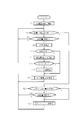
- FIG. 3 is a flowchart showing the function of the control unit 8 in the first embodiment of FIG.
- the flow starts when the battery 5 is attached to the electrophotographic frame 2, and thereafter the function is continued as long as the power supply from the battery 5 continues.
- the display of the common image that is, the clock 26 is started in step S2, and the display continues thereafter.
- step S4 it is checked whether the automatic rewriting mode during sleep is set.
- This automatic rewriting mode during sleeping is a mode in which rewriting of a photographic image is automatically performed once a day during a sleeping time period such as early morning. This is useful when electronic paper, especially color electronic paper, with insufficient rewriting speed performance is used, and there is no change in the photographic image before going to bed, and the next morning when the photographic image is touched by the human eye. In this mode, rewriting has been completed.
- step S4 If the automatic rewriting mode during sleep is set in step S4, the process proceeds to step S6, and it is checked whether or not the set rewriting time (for example, 2 am) has been reached. If it is detected that the rewriting time has come, the process proceeds to step S8. On the other hand, if arrival of the rewrite time is not detected in step S6, the process returns to step S4.
- step S4 the release of the setting of the automatic rewrite mode during sleep is detected, or the rewrite time is reached in step S6. Unless detected, step S4 and step S6 are repeated.
- step S8 the next image is read from the storage unit 6 or the storage medium in the storage medium slot 16. Then, in the next step S10, it is checked whether the image is a vertically long image from the header portion of the read image data file. If the image is a portrait image, the process proceeds to step S12, and a process of rotating the read image by 90 degrees is performed. This is for displaying a vertically long image vertically as shown in FIG. Next, in step S14, the presence / absence of an image comment is checked. If there is a comment, the process proceeds to step S16 to perform a process of dividing and arranging the image comment. This is for dividing line breaks in the image comment 38 as shown in FIG. After the above, the process proceeds to step S18.
- step S14 If there is no image comment in step S14, the process proceeds directly to step S18. On the other hand, if the image is not a portrait image in step S10, the process immediately proceeds to step S18. This means that the photographic images 22 are arranged horizontally as shown in FIG. 2A and the image comments 24 are arranged continuously in a line as shown in the image data.
- step S18 display screen rewriting processing is performed based on the above processing.
- This process includes a process of rewriting the electronic paper on the display screen 4 based on a predetermined operation with the image data whose layout has been determined in steps S8 to S16, and a process of monitoring whether this process is completed.
- the process returns to step S4. Thereafter, step S4 to step S18 are repeated unless the cancellation of the sleep-time automatic rewriting mode is detected in step S4.
- step S4 the slide show mode is set, so that the process proceeds to step S20 to check whether or not the slide show rewriting time has come. If it is not detected that the rewriting time has been reached, the process proceeds to step S22 to check whether there has been a manual operation (including remote control operation) of the operation unit 20. When an operation is detected, the process proceeds to a slide show process in step S24. If it is detected in step S20 that the slide show rewrite time has been reached, the process immediately proceeds automatically to the slide show process in step S24.
- step S22 when the manual rewriting operation is not detected in step S22, the process returns to step S4, and unless the mode change to the sleeping automatic rewriting mode is detected in step S4, the slide show is repeated by repeating step S4, step S20 and step S22. Wait for the rewrite time or manual operation.
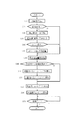
- FIG. 4 is a flowchart showing details of the slide show process in step S24 of FIG. This flow basically corresponds to steps S8 to S18 in FIG. 3, but since the image is being rewritten while a person is watching, more detailed processing is added so as not to feel uncomfortable.
- the next image is read from the storage medium in the storage unit 6 or the storage medium slot 16 in step S32.
- a check is made in the next step S34 as to whether or not the image is a vertically long image from the header portion of the read image data file. If the image is a portrait image, the process proceeds to step S36, and a process of rotating the read image by 90 degrees is performed. This is for displaying a vertically long image vertically as shown in FIG.
- step S38 corner alignment of the rotated portrait image is performed. This is to reduce the uncomfortable feeling of switching between the horizontally long image and the vertically long image, which is the process of matching the top left corner position of the vertically long image 32 with the top left corner position of the horizontally long image 28 in FIG.
- step S40 the presence / absence of an image comment is checked. If there is a comment, the process proceeds to step S42 to perform processing for dividing and arranging the image comment. This is for dividing line breaks in the image comment 38 as shown in FIG. After the above, the process proceeds to step S44. If there is no image comment in step S40, the process proceeds directly to step S44. On the other hand, if the image is not a portrait image in step S34, the process immediately proceeds to step S44. This means that the photographic images 22 are arranged horizontally as shown in FIG. 2A and the image comments 24 are arranged continuously in a line as shown in the image data.
- step S44 display screen rewriting is started based on the above processing.
- step S46 it is checked whether or not the image whose rewriting has started has been changed from the current image to the vertical and horizontal directions. This change includes both a change from the vertical position to the horizontal position and a change from the horizontal position to the vertical position. The case where there is no change means rewriting from a vertical position image to a vertical position image or from a horizontal position image to a horizontal position image.
- step S48 This means, for example, the start of an animation operation in which the horizontally long image 28 is sequentially erased from the right end to the left side as indicated by an arrow 34 in FIG.
- step S50 animation in of the next image is started. This means, for example, the start of an operation in which the lower end of the vertically long image 32 is not initially displayed as shown in FIG.
- step S52 fade-out of the current image is started, and fade-in of the next image is started in step S54.
- fade-in / out with animation is performed, and when there is no vertical / horizontal change, only fade-in / out is performed.
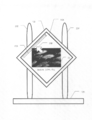
- FIG. 5 is an external front view showing a second example of the electrophotographic frame according to the embodiment of the present invention.
- the electrophotographic frame 102 has a display screen 104 made of square electronic paper inclined by 45 degrees, and is fixedly instructed to the holding pedestal portion 120 by the support columns 202 and 204. Accordingly, even in the second embodiment, the orientation of the display screen 104 cannot be changed vertically and horizontally.
- the internal configuration blocks are the same as those of the first embodiment of FIG.
- the horizontal arrangement direction of the display elements as the display device is the direction of the arrow 208.
- the horizontally long screen 22 is displayed by being rotated by 45 degrees with respect to the display screen 104 as a display device, whereby the long side is displayed in the horizontal direction.
- the display screen 104 that is isotropic in the vertical and horizontal directions and the edge that opposes the side of the photographic image is not parallel to the side of the photographic image, the photographic image is laid out at the center, thereby the short side.
- the image can be displayed on the display screen 104 only by rotating the image relatively 90 degrees without trimming and trimming.
- FIG. 6 is a front view of the screen showing the display content of the display screen 104 of FIG. 5 as described above. Regardless of whether it is a horizontally long image or a vertically long image, there is no sense of incongruity in the presence of empty space. This is specifically shown.
- the landscape image 28 is displayed on the display screen 104, and triangular empty spaces 210 and 212 are generated above and below the long side of the landscape image 28, respectively.
- triangular empty spaces 214 and 216 that are approximated to the left and right of the short side of the horizontally long image 28 are also generated.
- a row of image comments 30 is laid out in the empty space 212.
- FIG. 6B shows a case where the vertically long image 32 is displayed on the display screen 104.
- triangular empty spaces 214 and 216 are generated on the left and right sides of the long side of the vertically long image 32, respectively.
- triangular open spaces 210 and 212 that are also approximated above and below the short side of the vertically long image 32 are generated.
- the image comments in FIG. 6B are divided and distributed to both sides of the vertically long image 32 as the date 218 and the title 220, respectively. As a result, the empty space can be used naturally while maintaining the horizontally written image comment.
- the layout is adjusted so that the center of the image is the center of the display screen 104. Is no longer necessary.
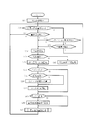
- FIG. 7 is a flowchart showing functions of the control unit 8 (the hardware configuration of the block diagram is the same as that of the first embodiment of FIG. 1) in the second embodiment of FIG.
- the flow starts when the battery 5 is attached to the electrophotographic frame 102, and the function continues thereafter as long as the power supply from the battery 5 continues.
- display of a common image such as wallpaper is started in step S62, and the display continues thereafter.
- step S64 it is checked whether the automatic rewriting mode during sleep is set. If applicable, the process proceeds to step S66, and it is checked whether or not the set rewriting time has come. If it is detected that the rewriting time has come, the process proceeds to step S68.
- step S64 if arrival of the rewriting time is not detected in step S66, the process returns to step S64.
- step S64 it is detected in step S64 that the setting of the automatic rewriting mode during sleep is detected or the rewriting time is reached in step S66. Unless detected, step S64 and step S66 are repeated.
- step S64 determines whether the mode is the automatic rewriting mode while sleeping. If it is not detected in step S64 that the mode is the automatic rewriting mode while sleeping, the mode is the slide show mode, and the process proceeds to step S70 to check whether the slide show rewriting time is reached. If applicable, the process proceeds to step S68. On the other hand, if it is not detected in step S70 that the slide show rewriting time is reached, the process proceeds to step S72 to check whether a manual rewriting operation has been performed. If an operation is detected, the process proceeds to step S68. On the other hand, if an operation is not detected, the process returns to step S64. Thereafter, unless a setting change to the automatic rewriting mode during sleep is detected in step S64, step S64, step S70, and step S72 are repeated, and the slide show rewriting time comes or is manually Wait for operation.
- step S68 the next image is read from the storage unit 6 or the storage medium in the storage medium slot 16. Then, in the next step S74, it is checked whether or not the image is a vertically long image from the header portion of the read image data file. If it is a vertically long image, the process proceeds to step S76, a process of rotating the read image by 135 degrees is performed, and the process proceeds to step S78. This is for displaying the short side of the vertically long image horizontally as shown in FIG. On the other hand, if it is not detected that the image is a portrait image in step S74, it means that the image is a landscape image. Therefore, the process proceeds to step S80, the read image is rotated 45 degrees, and the process proceeds to step S78. This is for displaying the long side of the horizontally long image horizontally as shown in FIG.
- step S78 the presence / absence of an image comment is checked. If there is a comment, the process proceeds to step S82 to check whether the image is a portrait image. If the image is a vertically long image, a process of dividing and arranging the image comments is performed in step S84. For example, as shown in FIG. 6B, the image comment is divided, and the date 218 and the title 220 are divided and laid out to the left and right of the vertically long image. After the above, the process proceeds to step S86. On the other hand, if it is not detected in step S82 that the image is a vertically long image, the image is a horizontally long image, and the process directly proceeds to step S86. This means that the image comments 30 of the photographic image 28 are continuously arranged in one line without being divided as shown in FIG.
- step S84 the image comment data subjected to the above processing is rotated by 45 degrees, and the process proceeds to step S88.
- This process is performed regardless of whether or not the comment split distribution process of step S84 is performed.
- the image comments are unified horizontally regardless of whether the image is a horizontally long image or a vertically long image. This is to reduce the sense of incongruity. If the presence of an image comment is not detected in step S78, the process proceeds directly to step S88.
- step S88 it is checked whether or not the image is monochrome. If applicable, in step S90, a setting is made to add a delay to the rewriting speed of the display image, and the process proceeds to step S92. This is because a monochrome image on electronic paper can be rewritten more quickly than a color image with a larger amount of information. However, an intentional delay is added to the monochrome image rewriting speed, and the rewriting speed is increased. This is to match the rewriting speed of the color image. As a result, it is possible to prevent a sense of incongruity from occurring due to a difference in the image switching speed of the slide show when a color image and a monochrome image are mixed. If it is not detected in step S88 that the image is a monochrome image, since the image is a color image, the process directly proceeds to step S92.
- step S92 a display screen rewriting process is performed.
- This process is a process of rewriting the electronic paper on the display screen 104 with the image data whose layout has been determined in steps S68 to S80 based on a predetermined operation including the setting information in step S90, and this process is completed. Including the process of monitoring whether or not When the image is rewritten and step S92 is completed, the process returns to step S64. Thereafter, steps S64 to S92 are repeated.
- FIG. 8 is an external front view showing a third example of the electrophotographic frame according to the embodiment of the present invention.
- This third embodiment is similar to the second embodiment in that the other is an electrophotographic frame having a display screen that is isotropic in the vertical and horizontal directions and has a display screen in which the edge opposite to the side of the photographic image is not parallel to the side of the photographic image.
- the display screen 304 of the electronic photo frame 302 is circular, isotropic in both vertical and horizontal directions, and has edges that are opposite to the sides of the photographic image in an arc shape that is not parallel to the sides of the photographic image. Absent.
- the image can be displayed on the display screen 304 only by rotating the image relatively 90 degrees without cropping. It becomes possible.
- FIG. 8A shows the horizontally long image 22 displayed at the center of the display screen 304 and the image comment 24 displayed below it.
- FIG. 8 illustrates an example of the background wallpaper 306 that is provided in an empty space on the display screen 304 and produces the entire display screen 304 so as to maintain a sense of unity without waste.
- FIG. 8B shows the vertically long image 40 displayed at the center of the display screen 304, and the image comments are separated into a date 308 and a title 310, and are displayed separately on the left and right of the vertically long image 40.
- the installation direction of the electrophotographic frame 302 of the third embodiment is also determined by the bottom surface 312, and the display screen 304 cannot be changed vertically and horizontally.
- the internal configuration blocks are the same as those in the first embodiment shown in FIG.
- the function of the control unit of the third embodiment is the same as that of the second embodiment, and can be understood according to the flowchart of FIG. It is a flowchart which shows. However, in the third embodiment, it is assumed that “135 degrees” in step S76 in FIG. 7 is replaced with “90 degrees” and that steps S80 and S86 are removed for understanding.
- the various features of the present invention can be implemented without being limited to the above embodiments. For example, even in the case where a photographic image is laid out in the center of the display screen as in the second embodiment or the third embodiment, it is possible to display either a horizontally long image or a vertically long image as in the first embodiment. You may make it always display a common image in the empty space which is not covered with. Also in the second and third embodiments, as in the first embodiment, the image is switched between when the landscape image and the portrait image are switched and when the landscape image or between the portrait images is switched. You may comprise so that an aspect may differ.
- the detection of the rewriting timing depends on whether or not the rewriting time set unclear has arrived, but the implementation of the present invention is not limited to this.
- a brightness detection unit is provided, and when this brightness detection unit detects that the brightness of the room is below a predetermined level, it is considered that the room light has been turned off and the householder has gone to bed, and the rewriting is executed. You may comprise so that it may perform.
- step S6 in FIG. 3 and step S66 in FIG. 7 are each read as “detection of darkness below predetermined value?”.
- the electrophotographic frame 2 may be configured to acquire on / off information of the lighting switch in the room, and the sleeping of the householder may be detected based on this information.
- step S6 in FIG. 3 and step S66 in FIG. 7 are each read as “illumination switch off?”.
- the display screen of the above embodiment is made of electronic paper in consideration of power saving and cordless use.
- some of the various features of the present invention are based on other display devices such as a liquid crystal display. It is also useful when practicing the invention.
- the power source is not limited to battery driving, and can be driven by a commercial power source.
- a display screen that can display both a horizontally long image and a vertically long image, and one of the horizontally long image and the vertically long image is displayed on the display screen.
- an electronic image viewing apparatus having a display control unit that always displays a common image in an empty space that is not covered by either a horizontally long image or a vertically long image. This alleviates the uncomfortable feeling of switching between a horizontally long image and a vertically long image.
- a suitable example of such a common image is a time information display such as a clock.
- the technical features disclosed in the present specification are such that the display screen itself cannot be rotated vertically and horizontally, and is accompanied by image size change and trimming when the control unit displays a vertically long image. This is particularly useful when an image is relatively rotated 90 degrees and displayed.
- the display control unit controls so that the position where one of the corners of the horizontally long image and the vertically long image is displayed matches.
- the common part of a landscape image and a portrait image increases, and the discomfort of the switching between both is further eased.
- the display control unit is configured to switch between a landscape image and a portrait image and to switch between landscape images or between portrait images. To change the image switching mode. This also reduces the uncomfortable feeling of switching between the horizontally long image and the vertically long image.
- the display control unit further displays an image comment such as a shooting date and a title on the display screen and also displays a vertically long image.
- the display of the image comment is divided. This can reduce the sense of discomfort due to the existence of an empty space.
- an electronic image viewing apparatus having a display screen whose opposing edges are not parallel to the sides of the image, and a display control unit that displays one of the horizontally long image and the vertically long image at the center of the display screen. . This facilitates display of a horizontally long image and a vertically long image.
- the technical features disclosed in the present specification are such that the display screen itself cannot be rotated vertically and horizontally, and is accompanied by image size change and trimming when the control unit displays a vertically long image. This is particularly useful when an image is relatively rotated 90 degrees and displayed.
- the display control unit further displays an image comment on the display screen, and displays an image comment when displaying a vertically long image.
- the display of the divided image comments is divided and displayed on the left and right of the vertically long image. As a result, it can be actively used as a design for an empty space.
- a display screen having a display device arranged to be inclined with respect to the horizontal direction, and either a horizontally long image or a vertically long image is displayed on the display screen.
- an electronic image viewing apparatus having a display control unit for rotating and displaying images at different angles.
- the display device is disposed with an inclination of 45 degrees with respect to the horizontal direction, and the display control unit displays either a horizontally long image or a vertically long image by rotating it at a different angle so that the vertical direction is upright. It is suitable to make it make it do.
- a display screen having electronic paper, an image rewriting unit displayed on the display screen, and execution of rewriting by the rewriting unit are displayed.
- an electronic image viewing apparatus having a display control unit for controlling the screen to be performed at a timing when the screen is not viewed. Specifically, such control can be performed by detecting an unlit time zone or by detecting that the room is turned off and darkened. By rewriting the image at a timing when the display screen is not viewed in this way, it is possible to employ electronic paper with a slow rewriting speed.
- a display screen having electronic paper a detection unit that detects whether the image displayed on the display screen is color or monochrome, and a detection unit
- an electronic image viewing apparatus includes a display control unit that controls the rewriting speed to match the rewriting speed of the color image.
- the present invention can be suitably used for an electronic photo frame for viewing digital images.
Landscapes
- Engineering & Computer Science (AREA)
- Multimedia (AREA)
- Signal Processing (AREA)
- Physics & Mathematics (AREA)
- Computer Hardware Design (AREA)
- General Physics & Mathematics (AREA)
- Theoretical Computer Science (AREA)
- General Engineering & Computer Science (AREA)
- Controls And Circuits For Display Device (AREA)
- Control Of Indicators Other Than Cathode Ray Tubes (AREA)
- Devices For Indicating Variable Information By Combining Individual Elements (AREA)
- Mirrors, Picture Frames, Photograph Stands, And Related Fastening Devices (AREA)
- Facsimiles In General (AREA)
- Editing Of Facsimile Originals (AREA)
Abstract
Description
22、28 横長画像
32、40 縦長画像
26 共通画像
8 表示制御部
104 傾けた配置した表示デバイス
4、104、304 電子ペーパー
8、18 検知部
10 書換部
Claims (20)
- 横長画像および縦長画像のいずれをも表示可能な表示画面と、前記表示画面に横長画像または縦長画像のいずれか一方を一つ表示させるとともに横長画像および縦長画像のいずれを表示する際にもこれに覆われない空きスペースに共通画像を常時表示させる表示制御部とを有することを特徴とする電子画像観賞装置。
- 前記表示画面自体は縦横の回転ができないよう保持されるとともに、前記制御部は縦長画像を表示する際、画像の大きさ変更およびトリミングを伴わずに画像を相対的に90度回転させて表示することを特徴とする請求項1記載の電子画像観賞装置。
- 前記表示制御部は、横長画像および縦長画像の隅の一つが表示される位置が一致するよう制御することを特徴とする請求項1記載の電子画像鑑賞装置。
- 前記表示制御部は、前記共通画像が表示される位置と対角線上反対側にある画像の隅の位置を一致させることを特徴とする請求項3記載の電子画像鑑賞装置。
- 前記表示制御部は、横長画像と縦長画像が切換わる場合と横長画像同士または縦長画像同士が切換わる場合とで画像の切換わり態様を異ならしめることを特徴とする請求項1記載の電子画像観賞装置。
- 前記共通画像は、時間情報であることを特徴とする請求項1記載の電子画像鑑賞装置。
- 前記表示制御部は、さらに画像コメントを前記表示画面に表示するとともに、縦長画像を表示する際には画像コメントの表示を分割することを特徴とする請求項1記載の電子画像鑑賞装置。
- 横長画像および縦長画像のいずれをも表示可能であるとともに縦横に等方性を持ち、表示される画像の辺と対向する縁が画像の辺と平行でない表示画面と、前記表示画面の中央に横長画像または縦長画像のいずれか一方を一つ表示させる表示制御部とを有することを特徴とする電子画像観賞装置。
- 前記表示画面自体は縦横の回転ができないよう保持されるとともに、前記制御部は縦長画像を表示する際、画像の大きさ変更およびトリミングを伴わずに画像を相対的に90度回転させて表示することを特徴とする請求項8記載の電子画像観賞装置。
- 前記表示制御部は、さらに画像コメントを前記表示画面に表示するとともに、縦長画像を表示する際には画像コメントの表示を分割することを特徴とする請求項8記載の電子画像鑑賞装置。
- 前記表示制御部は、分割された画像コメントの表示を縦長画像左右に振り分けて表示することを特徴とする請求項10記載の電子画像鑑賞装置。
- 前記表示画面は、水平方向に対し45度傾いたほぼ正方形状であることを特徴とする請求項8記載の電子画像鑑賞装置。
- 前記表示画面は水平方向に対し傾けて配置した表示デバイスを有し、前記表示制御部は、前記表示デバイスに横長画像または縦長画像のいずれか一方をそれぞれ異なった角度回転させて表示させることを特徴とする請求項8記載の電子画像観賞装置。
- 前記表示デバイスは水平方向に対し45度傾けて配置されるとともに、前記表示制御部は、横長画像または縦長画像のいずれか一方をそれぞれ上下方向が正立するよう異なった角度回転させて表示させることを特徴とする請求項13記載の電子画像鑑賞装置。
- 前記表示画面は電子ペーパーを有するとともに、前記表示画面に表示される画像の書換部と、所定の条件に基づき前記書換部による書換の実行を制御する表示制御部とを有することを特徴とする請求項8記載の電子画像観賞装置。
- 電子ペーパーを有する表示画面と、前記表示画面に表示される画像の書換部と、所定の条件に基づき前記書換部による書換の実行を制御する表示制御部とを有することを特徴とする電子画像観賞装置。
- 前記表示制御部は、前記表示画面が観賞されないタイミングを検知し、これを条件として書換の実行を行うことを特徴とする請求項16記載の電子画像鑑賞装置。
- 前記表示制御部は未明の時間帯を検知することを特徴とする請求項17記載の電子画像鑑賞装置。
- 前記表示画面に表示される画像がカラーかモノクロを検知する検知部を有し、前記表示制御部は前記検知部の検知結果を条件として書換の実行を行うことを特徴とする請求項16記載の電子画像観賞装置。
- 前記表示制御部は前記検知部によって画像がモノクロであることが検知されたときその書換速度をカラー画像の書き換え速度に合わせるよう制御することを特徴とする請求項19記載の電子画像観賞装置。
Priority Applications (2)
| Application Number | Priority Date | Filing Date | Title |
|---|---|---|---|
| CN200980152578.6A CN102265331B (zh) | 2008-12-26 | 2009-12-24 | 电子图像鉴赏装置 |
| US13/142,130 US20110261075A1 (en) | 2008-12-26 | 2009-12-24 | Electronic image viewing device |
Applications Claiming Priority (2)
| Application Number | Priority Date | Filing Date | Title |
|---|---|---|---|
| JP2008332260A JP2010152218A (ja) | 2008-12-26 | 2008-12-26 | 電子画像鑑賞装置 |
| JP2008-332260 | 2008-12-26 |
Publications (1)
| Publication Number | Publication Date |
|---|---|
| WO2010074133A1 true WO2010074133A1 (ja) | 2010-07-01 |
Family
ID=42287740
Family Applications (1)
| Application Number | Title | Priority Date | Filing Date |
|---|---|---|---|
| PCT/JP2009/071411 Ceased WO2010074133A1 (ja) | 2008-12-26 | 2009-12-24 | 電子画像鑑賞装置 |
Country Status (4)
| Country | Link |
|---|---|
| US (1) | US20110261075A1 (ja) |
| JP (1) | JP2010152218A (ja) |
| CN (1) | CN102265331B (ja) |
| WO (1) | WO2010074133A1 (ja) |
Families Citing this family (17)
| Publication number | Priority date | Publication date | Assignee | Title |
|---|---|---|---|---|
| US8726190B2 (en) * | 2007-09-28 | 2014-05-13 | Adobe Systems Incorporated | Automatically transformed graphical user interface |
| US8803908B2 (en) * | 2010-01-15 | 2014-08-12 | Apple Inc. | Digital image transitions |
| JP2012034126A (ja) * | 2010-07-29 | 2012-02-16 | Casio Comput Co Ltd | デジタルフォトフレーム、画像表示方法及びプログラム |
| KR101832406B1 (ko) * | 2011-03-30 | 2018-02-27 | 삼성전자주식회사 | 임의 형태의 스크린에 사진을 표시하기 위한 방법 및 장치 |
| US9741150B2 (en) | 2013-07-25 | 2017-08-22 | Duelight Llc | Systems and methods for displaying representative images |
| CN103366705B (zh) * | 2013-07-16 | 2015-07-08 | 苏州佳世达电通有限公司 | 一种液晶显示屏的画面调整方法及系统 |
| US10712918B2 (en) | 2014-02-13 | 2020-07-14 | Samsung Electronics Co., Ltd. | User terminal device and displaying method thereof |
| US10747416B2 (en) | 2014-02-13 | 2020-08-18 | Samsung Electronics Co., Ltd. | User terminal device and method for displaying thereof |
| US10866714B2 (en) * | 2014-02-13 | 2020-12-15 | Samsung Electronics Co., Ltd. | User terminal device and method for displaying thereof |
| US12401911B2 (en) | 2014-11-07 | 2025-08-26 | Duelight Llc | Systems and methods for generating a high-dynamic range (HDR) pixel stream |
| US12401912B2 (en) | 2014-11-17 | 2025-08-26 | Duelight Llc | System and method for generating a digital image |
| US9836814B2 (en) * | 2015-01-09 | 2017-12-05 | Panasonic Intellectual Property Management Co., Ltd. | Display control apparatus and method for stepwise deforming of presentation image radially by increasing display ratio |
| US12445736B2 (en) | 2015-05-01 | 2025-10-14 | Duelight Llc | Systems and methods for generating a digital image |
| JP2017049113A (ja) * | 2015-09-02 | 2017-03-09 | 矢継 正信 | 磁気誘動時計ムーブメント |
| JP2019074559A (ja) * | 2017-10-12 | 2019-05-16 | シャープ株式会社 | 画像表示システム |
| US11392239B1 (en) * | 2020-05-05 | 2022-07-19 | John Grillis | Remote interface for hand-held smart devices |
| DE102024129130B4 (de) * | 2024-10-09 | 2026-04-30 | Diehl Aerospace Gmbh | Anzeigewechsel bei elektronischem Papier ohne Erholungsvorgang |
Citations (9)
| Publication number | Priority date | Publication date | Assignee | Title |
|---|---|---|---|---|
| JPS63214071A (ja) * | 1987-03-03 | 1988-09-06 | Minolta Camera Co Ltd | 画面表示方式 |
| JPH0944143A (ja) * | 1995-08-01 | 1997-02-14 | Toshiba Corp | 携帯情報通信端末装置 |
| JP2000184263A (ja) * | 1998-12-11 | 2000-06-30 | Olympus Optical Co Ltd | カメラ |
| JP2005017559A (ja) * | 2003-06-25 | 2005-01-20 | Sony Corp | 画像表示装置 |
| JP2005151108A (ja) * | 2003-11-14 | 2005-06-09 | Casio Comput Co Ltd | 携帯型電子機器、および、携帯型電話機 |
| JP2005311851A (ja) * | 2004-04-23 | 2005-11-04 | Nec Corp | カメラ付き携帯電話機および画像保存方法 |
| JP2005328414A (ja) * | 2004-05-17 | 2005-11-24 | Fuji Xerox Co Ltd | 画像処理装置 |
| JP2006203732A (ja) * | 2005-01-24 | 2006-08-03 | Casio Comput Co Ltd | デジタルカメラ、縦横撮影切替え方法、及びプログラム |
| JP2007078808A (ja) * | 2005-09-12 | 2007-03-29 | Nikon Corp | 投影装置 |
Family Cites Families (8)
| Publication number | Priority date | Publication date | Assignee | Title |
|---|---|---|---|---|
| US7549254B2 (en) * | 2001-12-07 | 2009-06-23 | Karen Pamela Winton | Method of allocating advertising space and system therefor |
| US7443404B2 (en) * | 2003-10-17 | 2008-10-28 | Casio Computer Co., Ltd. | Image display apparatus, image display controlling method, and image display program |
| JP2007028408A (ja) * | 2005-07-20 | 2007-02-01 | Fuji Xerox Co Ltd | 画像処理装置 |
| US7693500B2 (en) * | 2006-06-05 | 2010-04-06 | Palm, Inc. | Panoramic display for a wireless device |
| US8081252B2 (en) * | 2006-06-13 | 2011-12-20 | Panasonic Corporation | Image displaying apparatus |
| US8068121B2 (en) * | 2007-06-29 | 2011-11-29 | Microsoft Corporation | Manipulation of graphical objects on a display or a proxy device |
| JP4958807B2 (ja) * | 2008-01-24 | 2012-06-20 | 株式会社キーエンス | 画像処理装置 |
| US20100087230A1 (en) * | 2008-09-25 | 2010-04-08 | Garmin Ltd. | Mobile communication device user interface |
-
2008
- 2008-12-26 JP JP2008332260A patent/JP2010152218A/ja active Pending
-
2009
- 2009-12-24 WO PCT/JP2009/071411 patent/WO2010074133A1/ja not_active Ceased
- 2009-12-24 CN CN200980152578.6A patent/CN102265331B/zh not_active Expired - Fee Related
- 2009-12-24 US US13/142,130 patent/US20110261075A1/en not_active Abandoned
Patent Citations (9)
| Publication number | Priority date | Publication date | Assignee | Title |
|---|---|---|---|---|
| JPS63214071A (ja) * | 1987-03-03 | 1988-09-06 | Minolta Camera Co Ltd | 画面表示方式 |
| JPH0944143A (ja) * | 1995-08-01 | 1997-02-14 | Toshiba Corp | 携帯情報通信端末装置 |
| JP2000184263A (ja) * | 1998-12-11 | 2000-06-30 | Olympus Optical Co Ltd | カメラ |
| JP2005017559A (ja) * | 2003-06-25 | 2005-01-20 | Sony Corp | 画像表示装置 |
| JP2005151108A (ja) * | 2003-11-14 | 2005-06-09 | Casio Comput Co Ltd | 携帯型電子機器、および、携帯型電話機 |
| JP2005311851A (ja) * | 2004-04-23 | 2005-11-04 | Nec Corp | カメラ付き携帯電話機および画像保存方法 |
| JP2005328414A (ja) * | 2004-05-17 | 2005-11-24 | Fuji Xerox Co Ltd | 画像処理装置 |
| JP2006203732A (ja) * | 2005-01-24 | 2006-08-03 | Casio Comput Co Ltd | デジタルカメラ、縦横撮影切替え方法、及びプログラム |
| JP2007078808A (ja) * | 2005-09-12 | 2007-03-29 | Nikon Corp | 投影装置 |
Also Published As
| Publication number | Publication date |
|---|---|
| CN102265331A (zh) | 2011-11-30 |
| US20110261075A1 (en) | 2011-10-27 |
| CN102265331B (zh) | 2014-09-03 |
| JP2010152218A (ja) | 2010-07-08 |
Similar Documents
| Publication | Publication Date | Title |
|---|---|---|
| WO2010074133A1 (ja) | 電子画像鑑賞装置 | |
| US6975308B1 (en) | Digital picture display frame | |
| CN103442170A (zh) | 一种拍摄方法及移动终端 | |
| TW201250579A (en) | Dual-screen display device and control method thereof | |
| CN101321215A (zh) | 具相应时间图片显示功能的电子相框 | |
| JP2006227409A (ja) | 表示装置 | |
| JP6160750B2 (ja) | 制御装置、制御方法およびプログラム | |
| TWI220750B (en) | Method for automatically adjusting screen display | |
| JP2005006260A (ja) | 携帯端末,バックライトの制御方法およびプログラム | |
| WO2018077203A1 (zh) | 一种视频拍摄、播放和处理方法以及拍照终端 | |
| JP2011197463A (ja) | 電子カレンダー | |
| TW201138457A (en) | Display device and method of controlling the same | |
| WO2026081642A1 (zh) | 显示屏幕的控制方法和装置、计算机可读存储介质、车辆 | |
| JP2010243654A (ja) | 表示装置、表示装置枠、表示制御方法及び表示プログラム | |
| TWI430249B (zh) | 顯示方法及其應用的可攜式電子裝置 | |
| JP2006065031A (ja) | 画像表示フレーム | |
| JP2010107805A (ja) | 表示画面付き電子装置 | |
| US12347360B2 (en) | Display apparatus and display method for display apparatus with rotatable display | |
| US8287339B2 (en) | Game device, game device control method, and information storage medium | |
| JP2011248152A (ja) | 表示装置、および、プログラム | |
| KR20150026773A (ko) | 사용자 단말 장치, 사용자 단말 장치 제어 방법 및 확장 디스플레이 시스템 | |
| JP2012123285A (ja) | 画像表示装置及び画像表示方法 | |
| US20120166790A1 (en) | Information processing apparatus, storage medium and information processing method | |
| TW200830272A (en) | Electronic album with function of optimizing background thereof and method therefor | |
| CN102411904B (zh) | 显示方法及应用该显示方法的便携式电子装置 |
Legal Events
| Date | Code | Title | Description |
|---|---|---|---|
| WWE | Wipo information: entry into national phase |
Ref document number: 200980152578.6 Country of ref document: CN |
|
| 121 | Ep: the epo has been informed by wipo that ep was designated in this application |
Ref document number: 09834931 Country of ref document: EP Kind code of ref document: A1 |
|
| WWE | Wipo information: entry into national phase |
Ref document number: 13142130 Country of ref document: US |
|
| NENP | Non-entry into the national phase |
Ref country code: DE |
|
| 122 | Ep: pct application non-entry in european phase |
Ref document number: 09834931 Country of ref document: EP Kind code of ref document: A1 |