US7856473B2 - Teleconference system, teleconference support method, and computer program - Google Patents
Teleconference system, teleconference support method, and computer program Download PDFInfo
- Publication number
- US7856473B2 US7856473B2 US10/694,213 US69421303A US7856473B2 US 7856473 B2 US7856473 B2 US 7856473B2 US 69421303 A US69421303 A US 69421303A US 7856473 B2 US7856473 B2 US 7856473B2
- Authority
- US
- United States
- Prior art keywords
- workspace
- site
- conference
- file
- server
- Prior art date
- Legal status (The legal status is an assumption and is not a legal conclusion. Google has not performed a legal analysis and makes no representation as to the accuracy of the status listed.)
- Expired - Lifetime, expires
Links
Images





















Classifications
-
- H—ELECTRICITY
- H04—ELECTRIC COMMUNICATION TECHNIQUE
- H04L—TRANSMISSION OF DIGITAL INFORMATION, e.g. TELEGRAPHIC COMMUNICATION
- H04L65/00—Network arrangements, protocols or services for supporting real-time applications in data packet communication
- H04L65/40—Support for services or applications
- H04L65/403—Arrangements for multi-party communication, e.g. for conferences
- H04L65/4038—Arrangements for multi-party communication, e.g. for conferences with floor control
-
- H—ELECTRICITY
- H04—ELECTRIC COMMUNICATION TECHNIQUE
- H04L—TRANSMISSION OF DIGITAL INFORMATION, e.g. TELEGRAPHIC COMMUNICATION
- H04L65/00—Network arrangements, protocols or services for supporting real-time applications in data packet communication
- H04L65/1066—Session management
- H04L65/1101—Session protocols
-
- H—ELECTRICITY
- H04—ELECTRIC COMMUNICATION TECHNIQUE
- H04N—PICTORIAL COMMUNICATION, e.g. TELEVISION
- H04N7/00—Television systems
- H04N7/14—Systems for two-way working
- H04N7/15—Conference systems
-
- H—ELECTRICITY
- H04—ELECTRIC COMMUNICATION TECHNIQUE
- H04N—PICTORIAL COMMUNICATION, e.g. TELEVISION
- H04N7/00—Television systems
- H04N7/14—Systems for two-way working
- H04N7/15—Conference systems
- H04N7/152—Multipoint control units therefor
Definitions
- the present invention relates to a teleconference system, a teleconference support method, and a computer program for realizing cooperative work of two or more persons through a network and in particular to a teleconference system, a teleconference support method, and a computer program for connecting a plurality of sites and realizing remote cooperative work.
- the present invention relates to a teleconference system, a teleconference support method, and a computer program for providing a shared workspace for one conference participant to easily connect conference systems with any other conference participant and sharing information among them and in particular to a teleconference system, a teleconference support method, and a computer program for enabling conference participants to smoothly share information of files such as a presentation data file in a plurality of conference systems using multimedia.
- a videoconference system can be named as a system for realizing cooperative work of two or more persons through a network.
- an image and voice are transferred between conference rooms at distant points and while the participants can see their faces each other displayed on television screens, a conference can be operated.
- Proceedings can be progressed as if the participants actually existing at remote sites existed in the same conference rooms. Since the participants do not actually move, good use of time can be made and costs of travel expenses can be reduced.
- the videoconference system is generally made up of image and voice input and output units such as cameras, microphones, monitors, and loudspeakers, image and voice coders and decoders, and communication units and lines for connecting the sites.
- image and voice input and output units such as cameras, microphones, monitors, and loudspeakers, image and voice coders and decoders, and communication units and lines for connecting the sites.
- image and voice coders and decoders To share data between remote conference rooms, electronic whiteboards are provided for writing each other and application software is shared and operated.
- connection destination In point-to-point connection, the name and address of the connection destination are input to the apparatus installed at the site and the connection destination is called and connected.
- the systems are connected by communication lines of a line switching system such as telephone lines and therefore the systems basically are connected in a point-to-point connection manner.
- the multipoint connection apparatus is designed for connecting such three or more systems; the multipoint connection apparatus and the site apparatus installed at the sites are connected, whereby star connection is formed.
- the multipoint connection apparatus provides functions of manually selecting video of one site distributed to each site and selecting video distributed as audio is input.
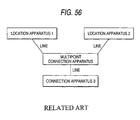
- the multipoint connection apparatus in the related art is mainly used when three or more sites are connected for holding a teleconference, and is positioned as a hub of star connection for realizing connection of all sites by line switching. (See FIG. 56 .)
- some teleconference systems using multimedia provide a graphical user interface having icons such of a conference table, a conference seat and a telephone, imitating an actual conference room so that even participants unskilled in the conference system procedure can easily use the system, and enable any other conference participant to set a call using multimedia by using the telephone icon.
- icons such of a conference table, a conference seat and a telephone
- ubiquitous or “ubiquitous computing” was proposed by Mark Weiser in Xerox PARC Laboratory and refers to “environment in which the user can use the capability of a computer having similar performance if the user moves anywhere.”
- Computers are introduced as joined together with routine workspace regardless of whether or not the user possesses a computer machine such as a PC (Personal Computer) or a PDA (Personal Digital Assistance) devices when accessing information, and the computer capabilities of information collection, management, analysis, any other computation processing, information display, information distribution, are provided for the user without being aware of the user.
- PC Personal Computer
- PDA Personal Digital Assistance
- the ubiquitous technology is applied to the teleconference system, whereby not only formatted information such as information in a computer file, but also individual implicit information, namely, the flexibility of workspace is enhanced, collaboration exceeding the frames of offices, enterprises, nationalities, etc., is realized, and the possibility of business is widened.
- a network system is proposed wherein files held by mobile computers can be shared among the computers on a temporarily configured network.
- message communications between the mobile computers are conducted with the transmission source and destination addresses specified and address translation of the fixed addresses on the network and the addresses of the mobile computers connected to the network is performed.
- the conscious preliminary steps for file sharing need to be taken and unformatted information cannot be shared.
- a conference system wherein shared materials used for a conference can be easily provided and stored is proposed.
- videophone conference service is provided through an Internet portal site and the conference participants use communication terminals to participate in a conference in real time with shared materials through the Internet portal site.
- application software needs to be previously downloaded into the terminals of the conference participants.
- a teleconference system for supporting realization of cooperative work among a plurality of conference systems, the teleconference system including: site systems each being installed at a plurality of sites respectively, and each configured to operate the corresponding conference system; and a shared workspace server configured to connect the site systems to each other and to share a workspace of an object for managing and using a task as a cooperation unit among the sites.
- a teleconference support method for supporting realization of cooperative work among a plurality of conference systems, the method including: providing a workspace including one or more sessions; opening the workspace in response to workspace selection of a user; adding the opened workspace to an active workspace; and managing use of the workspace.
- a computer program described in a computer-readable format so as to execute processing for supporting realization of cooperative work among a plurality of conference systems in a computer system
- the computer program including: means for providing a workspace including one or more sessions; means for opening the workspace in response to workspace selection of a user; means for adding the opened workspace to an active workspace; and means for managing use of the workspace.
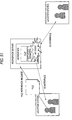
- FIG. 1 is a drawing to schematically show a configuration of a teleconference system according to an embodiment of the invention
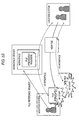
- FIG. 2 is a drawing to schematically show a functional configuration of a site server for operating a conference (such as a videoconference) in a site system;
- FIG. 3 is a drawing to schematically show a functional configuration of a shared workspace server
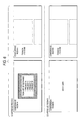
- FIG. 4 is a drawing to schematically show how a plurality of shared workspaces are joined by hyperlink
- FIG. 5 is a drawing to show a screen display example of prompting the user to log in to the system using IC card;
- FIG. 6 is a drawing to show an example of listing a set of workspaces transmitted from the shared workspace server
- FIG. 7 is a drawing to show an example of connecting the IC card to the site server for entering a command to end the use of the system
- FIG. 8 is a drawing to show an example of listing a set of workspaces transmitted from the shared workspace server in the site server;
- FIG. 9 is a drawing to show a screen example of listing a set of shared workspaces relevant to two users.
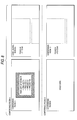
- FIG. 10 is a drawing to show a screen display example of a file reference list retained in a shared workspace
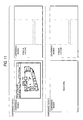
- FIG. 11 is a drawing to show an example wherein an application associated with a selected file is started at a site and the file is displayed on an electronic whiteboard at the site;
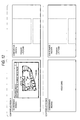
- FIG. 12 is a drawing to show how a user performs screen input using a user input unit such as a pointing device or a keyboard on the electronic whiteboard (or the client terminal);
- a user input unit such as a pointing device or a keyboard on the electronic whiteboard (or the client terminal);
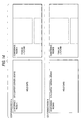
- FIG. 13 is a drawing to show a display example of the electronic whiteboard as a result of terminating the operation of application in response to a user command;
- FIG. 14 is a drawing to show a screen display example of the electronic whiteboard when the user terminates the use of the system by connecting the IC card to the site server;
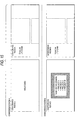
- FIG. 15 is a drawing to show an example wherein the user connects the IC card to a site server, authentication processing is performed, and relevant shared workspaces (projects) are listed on an electronic whiteboard in conference room B corresponding to a site system;
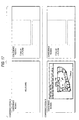
- FIG. 16 is a drawing to show an example wherein references to files contained in project Y are listed as a result of the user selecting project Y on the electronic whiteboard in conference room B;
- FIG. 17 is a drawing to show an example wherein the application associated with file K is started in the shared workspace server and performs graphic output on the electronic whiteboard as a result of the user selecting file K on the electronic whiteboard in conference room B;
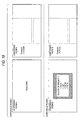
- FIG. 18 is a drawing to show an example wherein the display is returned to listing of references to files contained in the project as a result of the user giving an application end command on the electronic whiteboard in conference room B;
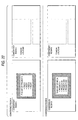
- FIG. 19 is a drawing to show how the user connects the IC card in conference room B for terminating the use of the workspace;
- FIG. 20 is a drawing to show how as the user connects IC card to the site server in the site system, the shared workspaces relevant to the user are listed on the display in the site system;
- FIG. 21 is a drawing to show how a list of references to files contained in project X is displayed on the electronic whiteboard;
- FIG. 22 is a drawing to show how as a different user connects IC card to the site server in the site system, the shared workspaces relevant to the user are listed on the display in the site system;
- FIG. 23 is a drawing to show how the video and audio data received from the associated video and audio server is displayed on the electronic whiteboards;
- FIG. 24 is a drawing to show how information of screen display received from the shared workspace server is displayed on the electronic whiteboards in the site systems;
- FIG. 25 is a drawing to show how the users at the sites make entries through the electronic whiteboards and exchange multimedia information using the video and audio servers for advancing the conference;
- FIG. 26 is a drawing to show how the users at the sites make entries through the electronic whiteboards and exchange multimedia information using the video and audio servers for advancing the conference;
- FIG. 27 is a drawing to show how the users at the sites make entries through the electronic whiteboards and exchange multimedia information using the video and audio servers for advancing the conference;
- FIG. 28 is a drawing to show how the users at the sites make entries through the electronic whiteboards and exchange multimedia information using the video and audio servers for advancing the conference;
- FIG. 29 is a drawing to show how the display on the electronic whiteboard in conference room A is returned to the project file list as the user enters an application end command;
- FIG. 30 is a drawing to show how the site server terminates the session as the user enters an end command
- FIG. 31 is a drawing to show how the site server terminates the session as the user enters an end command
- FIG. 32 is a drawing to schematically show a general shared workspace flow
- FIG. 33 is a flowchart to show a processing procedure for use of workspace
- FIG. 34 is a flowchart to show the workspace termination processing procedure in the flowchart of FIG. 33 in more detail;
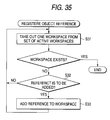
- FIG. 35 is a flowchart to show the object reference registration processing procedure in the flowchart of FIG. 33 in more detail;
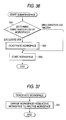
- FIG. 36 is a flowchart to show the subworkspace starting processing procedure at step S 15 in the flowchart of FIG. 33 in more detail;
- FIG. 37 is a flowchart to show the workspace deactivating processing procedure at step S 42 in the flowchart of FIG. 36 in more detail;
- FIG. 38 is a flowchart to show the workspace switching processing procedure at step S 14 in the flowchart of FIG. 33 in more detail;
- FIG. 39 is a flowchart to show the unregistered history save processing procedure at step S 21 in the flowchart of FIG. 34 in more detail;
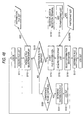
- FIG. 40 is a flowchart to show a workspace reference processing procedure
- FIG. 41 is a flowchart to show a session start processing procedure
- FIG. 42 is a drawing to show an implementation example of the site system
- FIG. 43 is a drawing to show disposing of application operation buttons such as print, display, and listing of shared documents on a wall;
- FIG. 44 is a general view of a conference room according to the embodiment of the invention.
- FIG. 45 is a drawing to show a configuration example of an extended user interface screen in a conference room according to the embodiment of the invention.
- FIG. 46 is a drawing to show how two users hold their IC cards over the read face of an IC card authentication section installed on a table
- FIG. 47 is a flowchart to show a file distribution processing procedure applied when one user displays a plurality of files
- FIG. 48 is a flowchart to show a file distribution processing procedure applied when a plurality of users display a plurality of files
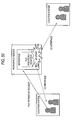
- FIG. 49 is a drawing to describe a procedure to establish a session between remote site systems
- FIG. 50 is a drawing to show the operation to reference a file in a session
- FIG. 51 is a drawing to show the operation to reference a file in a session
- FIG. 52 is a drawing to show the operation to reference a file in a session
- FIG. 53 is a drawing to show the operation to reference a file in a session
- FIG. 54 is a drawing to show the operation to reference a file in a session
- FIG. 55 is a drawing to schematically show the configuration of a metadata schema managed in a metadata manager.
- FIG. 56 is a drawing to schematically show the configuration of a system using a multipoint connection apparatus for realizing connection of three or more sites (related art).
- FIG. 1 schematically shows the configuration of a teleconference system 1 according to an embodiment of the invention.
- the teleconference system 1 has two site systems 10 and 20 connected by a shared workspace server 30 .
- the shared workspace server 30 connects the two sites (namely, conference systems) for simplicity of the drawing, but it is to be understood that the shared workspace server 30 is not limited to point-to-point connection and can connect three or more sites.
- the shared workspace server 30 differs from a multipoint connection apparatus positioned as a hub of star connection of systems using communication lines of a line switching system such as telephone lines.
- the shared workspace server 30 manages sessions for managing connection of the conference systems, files used in conferences and created as records of the conferences, reference information to resources relevant to conferences, and history information of file access made by conference participants which will be described later.
- the site systems 10 and 20 correspond to separately operating conference systems and a conference is operated for each site.
- Each of the site systems can be configured based on a videoconference system in a related art.
- video and audio servers 11 and 21 are provided and images and voice are input and output using cameras, microphones, monitors and loudspeakers and are coded and decoded and then are transmitted to and received from any other site system for sharing motion and behavior of the participants at the sites.
- Electronic whiteboards 12 and 22 are also provided for writing at the sites.
- Application software is shared between the site systems and is operated.
- a graphical user interface (GUI) provided by a shared workspace is presented on each of the electronic whiteboards 12 and 22 , and enables the conference participant to connect to a multimedia communication conference system and access information in files relevant to the conference and the like (described later).
- Each conference participant at each site becomes the user of the teleconference system 1 .
- the conference participant can operate the graphical user interface provided by the shared workspace, thereby connecting to the multimedia communication conference system without being aware of the call address of each multimedia communication conference system and easily accessing information in the files relevant to the conference and the like from the conference system.
- An authentication unit for authenticating identification of the conference participants is installed in each of the site systems 10 and 20 .
- each participant carries an IC card as personal identification medium and the site systems 10 and 20 are provided with card readers 13 and 23 for reading IC cards and can perform authentication processing and checking authorization.
- the teleconference system 1 provides modality and a combination of modalities required for cooperative work for each site.
- presentation materials such as voice and files, electric whiteboard, face video distribution, and remote cooperative edit can be put into a package for use.
- real-time cooperative work and non-real-time cooperative work are associated with each other. That is, real-time cooperative work is recorded (for example, presentation materials using the electronic whiteboard are saved) and is associated with non-real-time cooperative work, and a document is related to real-time cooperative work to associate non-real-time cooperative work with real-time cooperative work.
- the schematic operation procedure of the teleconference system 1 of shared workspace type according to the embodiment is as follows:
- the user selects the shared workspace (logs in to the workspace or accesses with authentication).
- the user inputs his or her ID to the system using the IC card corresponding to the shared workspace.
- the user personally logs in to the system and selects the workspace by performing GUI operation.
- the user can participate in a teleconference from the site (a plurality of conferences such as a general conference and a conference in which specific persons participate may be open in the shared workspace).
- a teleconference from the site (a plurality of conferences such as a general conference and a conference in which specific persons participate may be open in the shared workspace).
- a document can also be placed in the shared workspace.
- the document is referenced during the conference and the image on the electronic whiteboard in the conference is saved.
- the user can reference subworkspace while participating in shared workspace.
- the user can hold the IC card to the site system 10 to which the user belongs, thereby logging in to the system through predetermined authentication processing.
- the workspaces relevant to (authorized for) the user are listed in the site system 10 .
- the workspace mentioned here corresponds to one conference. If another user subsequently holds the IC card to the site system 10 for logging in to the system, when the user is permitted to log in to the system through similar authentication processing, the workspaces common to those for the user previously logging in to the system are listed. If the user selects a specific workspace, shared documents (files) linked with the workspace are listed. On the other hand, if the same workspace is selected in a remote site system, workspace connection is established between the site systems and similar operation to that in the local site system is performed. A history of operation such as file open and edit of the shared documents in the workspace is held for the later use as a search key. Local and remote are not distinguished from each other in activities in the workspace.
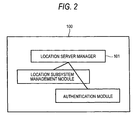
- FIG. 2 schematically shows the functional configuration of a site server 100 for operating a conference (such as a videoconference) in the site system 10 . It is to be understood that a site server 200 in the site system 20 has a similar configuration although not shown.
- the site server 100 includes an authentication module for executing a part of an authentication step at the site, a subsystem management module for managing the network addresses of subsystems making up the site system such as the electronic whiteboard and the video and audio server installed at the site, and a site server manager for managing the modules.
- the site server 100 communicates with the shared workspace server 30 for enabling use of workspace based on authentication information and authorization information read from the IC card of the conference participant using the connected card reader 13 .
- sessions for managing connection of the sites namely, the conference systems, files used in conferences and created as records of conferences, reference information to resources relevant to conferences, and history information of file access, resource access made by the conference participants are managed.
- the graphical user interface is provided and the conference participants can use the user interface to specify the same session provided in the session, thereby setting a call of cooperative work and sharing information.
- the resources relevant to each conference may exist in the site system 10 or may be stored in another storage area in the site or a server outside the site and, for example, are described in URL (Uniform Resource Locator) format.
- the access history is information such as access occurrence places, access users and access times.
- An access control list (ACL) is assigned to the session, file, reference information, and access history information in the workspace.
- a workspace manager 31 not only can manage or limit use in workspace units, but also can perform access control finely in session units, file units, reference information units, or access history information units in the workspace (which will be described later).
- the site server 100 is implemented as predetermined server application is started in a general computer system such as a personal computer (PC) and a workstation (WS) connected through the network.
- PC personal computer
- WS workstation
- FIG. 42 shows an implementation example of the site system 10 .
- the site system 10 shown in the figure is made up of a web interface 1001 for the user such as a conference participant to access via a user interface (not shown) of an information terminal, a directory service 1002 for managing personal data, an IC card authentication section 1003 for performing authentication processing when the user logs in to the system or a shared document is distributed, a document archive 1004 for storing shared documents in the site, a metadata manager 1005 for acquiring and managing an access history to the shared documents and a miscellaneous activity history of the users logging in to the system as metadata, and a presentation controller 1006 .
- a web interface 1001 for the user such as a conference participant to access via a user interface (not shown) of an information terminal
- a directory service 1002 for managing personal data
- an IC card authentication section 1003 for performing authentication processing when the user logs in to the system or a shared document is distributed
- a document archive 1004 for storing shared documents in the site
- the web interface 1001 provides an entry for the user such as a conference participant to access via a user interface (not shown) of an information terminal.
- the directory service 1002 manages the personal data about the users (conference participants) in the site.
- the IC card authentication section 1003 performs authentication processing when the user logs in to the system or a shared document is distributed using the very short range communication technology of IC cards and tamper-proof authentication technology, which is conventionally well known.
- the document archive 1004 stores the shared documents in the site, such as presentation files used in conferences.
- the metadata manager 1005 acquires information of an access history to the shared documents, a miscellaneous activity history of the users logging in to the system in the site, distribution (taking back) of the shared documents on the background of the workspace and manages the information as metadata.
- the presentation controller 1006 provides an interface for enabling the users (namely, conference participants) to collaborate in the workspace of a conference.
- the presentation controller 1006 is implemented in various manners.
- user interfaces of a general computer such as a display, a keyboard, a mouse, and a tablet may be installed in a conference room as they are.
- a projection screen onto a wall through a projector, a camera for capturing user operation on the projection screen, and a whiteboard are used in combination to make up a user interface.
- Application operation buttons such as print, display, and listing of shared documents are disposed on the wall (see FIG. 43 ).
- a probe for detecting a user command without user's consciousness may be disposed in the conference room.
- FIG. 44 is a general view of a conference room according to the embodiment of the invention.
- Computers are introduced as joined together with the workspace shown in the figure, and the computer capabilities of information collection, management, analysis, any other computation processing, information display and information distribution are provided for the user who is unaware of them. That is, not only formatted information such as information in a computer file, but also individual implicit information, namely, the flexibility of workspace is enhanced, collaboration exceeding the frames of offices, enterprises, nationalities, etc., is realized, and the possibility of business is widened.
- FIG. 55 schematically shows the configuration of a metadata schema managed in the metadata manager 1005 .
- the metadata manager 1005 executes log-in management to a user conference (session) according to the following procedure:
- the user logs in to the system by connecting the IC card or any other portable authentication medium storing the user ID to a connection terminal such as a card reader installed in the conference room.
- the presentation controller 1006 transmits the presented user ID information to the directory server 1002 storing the user attributes and acquires site information of the object retaining the user information (a pair of the server ID and the information object ID).
- the metadata manager 1005 uses terminal information transmitted from the presentation controller 1006 and records “terminal ID, user ID, use start time.”
- the presentation controller 1006 transmits a request to the server through the network based on the server ID and requests the server to send the session information associated with the user.
- the presentation controller 1006 displays a set of information based on the session information transmitted from the server.
- the presenter selects the session out of the set of information for connecting the room to the session.
- the presentation controller 1006 transmits a request to the server through the network based on the server ID and requests the server to send the set of information (as a hypertext) associated with the user.
- the presentation controller 1006 displays the set of information based on the hypertext transmitted from the server.
- the user selects the file out of the set of information to invoke the corresponding application for displaying a screen.
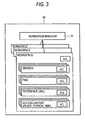
- FIG. 3 schematically shows the functional configuration of the shared workspace server 30 .
- the shared workspace server 30 is placed for sharing the workspace of the object for managing and using tasks (cooperation units) among the sites.
- the workspace manager 31 manages the workspaces generated at the sites in the teleconference system 1 .
- An access control list (ACL) is provided for each workspace.
- the workspace manager 31 manages or limits use of workspace across a plurality of sites based on authentication information and authorization information read from the IC card held by each conference participant.
- sessions for managing connection of the sites namely, the conference systems, files used in conferences and created as records of conferences, reference information to resources relevant to conferences, and history information of file access and resource access made by the conference participants are managed.
- An access control list (ACL) is assigned to the session, file, reference information, and access history information in the workspace. Therefore, the workspace manager 31 not only can manage or limit use in workspace units, but also can perform access control finely across the sites in session units, file units, reference information units, or access history information units in the workspace (described later).
- the shared workspace server 30 is implemented as predetermined server application is started in a general computer system such as a personal computer (PC) and a workstation (WS) connected through the network.
- PC personal computer
- WS workstation
- the “site” refers to physical site.
- the “workspace” is a virtual information sharing space.
- the session is a synchronous work unit.
- a plurality of workspaces can be placed in one site system.
- a plurality of sessions are managed in one workspace (see FIG. 3 ).
- the specification assumes that one workspace exists in the site system for simplicity of the description. If only one session is established in the workspace, teleconference, session, and workspace are synonymous with each other.
- the sessions in which the user is authorized to participate are listed on the electronic whiteboard or any other display.
- the shared workspace server establishes synchronization between the sites. Consequently, file sharing among the users is realized not only in each site, but also between the sites, enabling the users to perform synchronous work of opening and editing each file.
- a session can also be established for holding a teleconference outside the workspace.
- each user previously registers (archives) the shared file in the workspace.
- the shared workspace server 30 manages the previously registered file based on the access control list (ACL) (see FIG. 3 ).
- FIG. 50 shows the operation to reference the file in the session.
- the user authorized to operate the file sends a file reference request to the shared workspace server 30 through the site server 100 at the site where the user exists.
- the shared workspace server 30 responds to the file reference request, takes out the file previously registered in the workspace, and starts application software to open the file.
- the shared workspace server 30 provides an input/output interface with the started application for the site server of the file reference requester and another site server with the session established with the site server of the file reference requester. Consequently, file operation of opening and editing the file is shared between the site servers, enabling the users to perform cooperative work between the remote sites.
- FIG. 51 illustrates a file reference method applied in this case.
- the user authorized to operate the file transfers the file and also sends a request for referencing the file to the shared workspace server 30 through the site server 100 at the site where the user exists.
- the shared workspace server 30 responds to the file reference request, temporarily registers the transferred file in the workspace as a temporary file, and starts application software to open the file.
- the shared workspace server 30 provides an input/output interface with the started application for the site server of the file reference requester and another site server with the session established with the site server of the file reference requester. Consequently, file operation of opening and editing the file is shared between the site servers, enabling the users to perform cooperative work between the remote sites.
- the shared workspace server 30 erases the file from the workspace.
- FIGS. 50 and 51 file sharing is realized through the shared workspace server 30 and thus if the number of sessions established between the site systems and the number of cooperative works (namely, the number of started applications) grow, the processing load on the shared workspace server 30 becomes excessive. Then, the application may be started at the site server of the file reference requester for distributing the load over the whole system.
- FIG. 52 illustrates a file reference method applied in this case.
- the user authorized to operate the file sends a request for referencing the file to the shared workspace server 30 through the site server 100 at the site where the user exists.
- the file may be or may not be previously registered in the workspace. In the former case, the previously registered file is taken out from the workspace; in the latter case, the file is taken out from the user's local disk.
- the site server 100 of the file reference requester takes out the file from the workspace and starts application software to open the file.
- the site server 100 may temporarily register the file as a temporary file.
- the site server 100 provides an input/output interface with the started application for another site server with the session established via the shared workspace server 30 . Consequently, file operation of opening and editing the file is shared between the site servers, enabling the users to perform cooperative work between the remote sites.
- a request for referencing another file in the session may also occur in the remote cooperative work environment as shown in FIG. 52 .
- another application can be started as one method to reference the file.
- FIG. 53 illustrates a file reference method applied in this case.
- the user authorized to operate the file transfers the file and also sends a request for referencing the file to the shared workspace server 30 through the site server 100 at the site where the user exists.
- the file may be or may not be previously registered in the workspace. In the former case, the previously registered file is taken out from the workspace; in the latter case, the file is taken out from the user's local disk.
- the shared workspace server 30 responds to the file reference request and transfers the transferred file to the site server wherein the application is started. Alternatively, if the request is a request for referencing the file not previously registered, the shared workspace server 30 may temporarily register the file as a temporary file.
- the site server receiving the file further starts the application for the received file in addition to the current application being started and provides an input/output interface with the started application for another site server with the session established. Consequently, file operation of opening and editing the new file is shared between the site servers, enabling the users to perform cooperative work between the remote sites.
- FIG. 54 illustrates a file reference method applied in this case.
- a request for referencing the file is sent to the shared workspace server 30 through the site server at the site where the user exists.
- the file may be or may not be previously registered in the workspace. In the former case, the previously registered file is taken out from the workspace; in the latter case, the file is taken out from the user's local disk.
- the site server 100 of the file reference requester takes out the file from the workspace and starts application software to open the file.
- the shared workspace server 30 may temporarily register the file as a temporary file.
- the site server 100 provides an input/output interface with the started application for another site server with the session established via the shared workspace server 30 . Consequently, file operation of opening and editing the new file is shared between the site servers, enabling the users to perform cooperative work using the plurality of files between the remote sites.
- the user holds the IC card to the card reader provided in the site system 10 for connecting to the site server 100 for starting user authentication.
- the IC card holds reference to the shared workspace server 30 used by the user.
- the site server 100 connects to the shared workspace server 30 based on the reference.
- a global directory server (not shown) is installed for managing information concerning each user.
- the directory server may retain reference to the shared workspace server corresponding to the user.
- the site server 100 performs authentication of the user using the IC card for the shared workspace server 30 and logs in. To do this, the information recorded on the IC card may be read for performing authentication of the user for the shared workspace server 30 or the IC card may calculate a part of the authentication protocol message based on the public key cryptography for the shared workspace server 30 .
- the shared workspace server 30 returns predetermined shared workspace as a response based on the authenticated user information.
- the shared workspace server 30 extracts necessary information for forming the GUI of the shared workspace based on the information on the specified shared workspace and transfers the extracted information to the site system 10 .
- the shared workspace server 30 may assign priority using some or all of the following information to select initial shared workspace fitted for the user in addition to the user information:
- FIG. 4 schematically shows how a plurality of shared workspaces are joined by hyperlink.
- the shared workspace server 30 may assign priority to all shared workspaces or may assign priority only to a subset of the shared workspaces previously specified with a bookmark by the user.
- any, some, or all of the following may be used:
- the user selects a node as required along the graph structure formed by a plurality of workspaces provided by the shared workspace server 30 , thereby moving and selecting any desired shared workspace.
- color, size, shape, position, or their combination may be changed in response to the priority as described above for aiding in selecting any shared workspace by the user. This selection step may be skipped if the default shared workspace is the user-desired shared workspace.
- a first user in the site system 10 selects a first session among a plurality of sessions in the displayed shared workspace. Of course, only one session may exist in the shared workspace. According to this step, information concerning the site system 10 is registered in the first session.
- a second user in the site system 20 performs similar operation to that described above. According to this step, information concerning the site system 20 is registered in the first session.
- the shared workspace server 30 Upon detection of adding of the site system specifying the same session, the shared workspace server 30 requests all registered site systems to connect to any another site system. Consequently, immediate connection can be made with the associated person of cooperative work.
- any of the following may be used as the connection form of the site systems:
- a mechanism for responding to input requests from a plurality of sites with changing the character or line color depending on which site the request is input from may be provided.
- the user connects the IC card storing the user ID and any other authentication information to the IC card authentication section 1003 connected to the conference room, whereby the user can log in to the system, as described above.
- the presentation controller 1006 transmits the user ID information presented via the IC card to the directory service 1002 storing the user attributes and acquires the site information of the object retaining the user information (a pair of the server ID and the information object ID).
- the metadata manager 1005 uses terminal information transmitted from the presentation controller 1006 and records the terminal ID, the user ID, and the use start time in association with each other.
- the presentation controller 1006 transmits a request to the server through the network based on the server ID and requests the server to send the information (hypertext) associated with the user.
- the presentation controller 1006 displays the information based on the hypertext of the information returned from the server.
- the user selects the file out of the information for starting the corresponding application for displaying a screen.
- a history of the activities of the user in the session such as creation of and reference to a file and reference to the resources through the electronic whiteboard, whereby the history can be later referenced for immediately passing the result of the cooperative work to the following step. That is, real-time cooperative work and non-real-time cooperative work can be associated with each other.
- screens for prompting the user to log in to the system using the IC card are displayed as initial screens on the electronic whiteboards 12 and 22 (or the client terminals of the users) (see FIG. 5 ).
- the user in the site system 10 connects the IC card to the card reader 13 connected to the site server 100 for starting user authentication.
- the IC card holds reference to the shared workspace server 30 used by the user.
- the site server 100 connects to the shared workspace server 30 based on the reference.
- a global directory server (not shown) may be installed for managing information concerning each user. In this case, the directory server retains reference to the shared workspace server corresponding to the user.
- the site server 100 performs authentication of the user using the IC card for the shared workspace server 30 specified by the IC card and logs in to the workspace. To do this, the information recorded on the IC card may be read for performing authentication of the user for the shared workspace server 30 or the IC card may calculate a part of the authentication protocol message based on the public key cryptography for the shared workspace server 30 .
- the shared workspace server 30 retrieves a set of the shared workspaces relevant to the user based on the user information authenticated using the IC card, and transmits a list of the retrieval result to the site server 100 .
- FIG. 6 shows an example of listing of the workspace set transmitted from the shared workspace server 30 .
- a plurality of projects (workspaces) provided for Watanabe, one of the users, as a result of user authentication using the IC card are listed.
- the user can enter an end command using the GUI provided on the electronic whiteboard or the client terminal or can connect the IC card to the site system to enter an end command.
- FIG. 7 shows an example of connecting the IC card to the site server for entering a command to end the use of the system.
- a plurality of IC cards are connected to the same site system, shared workspaces relevant to a plurality of users are displayed, and a file retained in the shared workspace or reference to a file is specified for starting application.
- screens for prompting the user to log in to the system using the IC card are displayed as initial screens on the electronic whiteboards 12 and 22 (or the client terminals of the users) (see FIG. 5 ).
- the user connects a second IC card to the site server 100 in the site system 10 for starting user authentication.
- the second IC card holds reference to the shared workspace server 30 used by the user.
- the site server 100 connects to the shared workspace server 30 based on the reference.
- only the user name may be held on the second IC card and a global directory server (not shown) may be installed for managing information concerning each user.
- the directory server retains reference to the shared workspace server corresponding to the user.
- the site server 100 performs authentication of the user using the second IC card for the shared workspace server 30 and logs in to the workspace. To do this, the information recorded on the second IC card may be read for performing authentication of the user for the shared workspace server 30 or the second IC card may calculate a part of the authentication protocol message based on the public key cryptography for the shared workspace server 30 .
- the shared workspace server 30 retrieves a set of the shared workspaces relevant to the user based on the user information authenticated, and transmits a list of the retrieval result to the site server 100 .
- the site server 100 displays the set of the workspaces transmitted from the shared workspace server 30 on the electronic whiteboard 12 (or the client terminal of the user).
- FIG. 8 a plurality of projects (workspaces) provided for Mr. Horikiri, one of the users, as a result of user authentication using the IC card are listed.
- a different user connects a first IC card to the site server 100 in the site system 10 for starting user authentication.
- the first IC card holds reference to the shared workspace server 30 used by the user.
- the site server 100 connects to the shared workspace server 30 based on the reference.
- only the user name may be held on the first IC card and a global directory server (not shown) may be installed for managing information concerning each user.
- the site server 100 performs authentication of the user using the first IC card for the shared workspace server 30 and logs in.
- the shared workspace server 30 retrieves a set of the shared workspaces relevant to the user based on the user information authenticated, and performs operation on the set and the set retained for the site server 100 at present.
- the operation may contain a sum set, a product set, a difference set, a complementary set, and any combination thereof.
- the shared workspaces relevant to the user authenticated by the first IC card is:
- a product set of the above two product sets is retrieved, and the workspace set information as listed below is transmitted from the shared workspace server 30 .
- the site server 100 lists the received workspace set information on the electronic whiteboard 12 or the client terminal of the user.
- FIG. 9 shows a screen example of listing the set of the shared workspaces relevant to the two users.
- the set of the workspaces provided by the product set of the shared workspaces relevant to the users Mr. Watanabe and Mr. Horikiri
- the user selects any desired shared workspace out of the listing produced by the site server 100 .
- the site server 100 responds to the selection and requests the shared workspace server 30 to transmit information of selected shared workspace 1 .
- the shared workspace server 30 transmits the information of selected shared workspace 1 .
- the shared workspace may retain sessions, references to any other shared workspace, and the like in addition to files and references to files (see FIG. 3 ).
- FIG. 10 shows a screen display example of the file reference list (K to N) retained in the shared workspace (project Y).
- the user can select any desired file through the file reference list displayed the electronic whiteboard 12 or his or her client terminal.
- the site server 100 transmits a message indicating that the user selects file K to the shared workspace server 30 .
- the shared workspace server 30 Upon reception of the message containing the reference to the file K transmitted from the site server 100 , the shared workspace server 30 starts the application program associated with the file K.
- the shared workspace server 30 captures output of graphics performed by the started application program and transmits the output to the site server 100 as a message.
- the site server 100 performs graphic output on the electronic whiteboard 12 managed by the site server 100 , thereby realizing application sharing in the site system 10 .
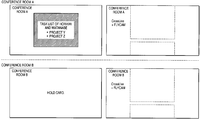
- FIG. 11 shows an example wherein the application associated with the selected file at the site is started and the file is displayed on the electronic whiteboard at the site. In the example shown in the figure, the screen of the selected file K is displayed in conference room A.
- the user can perform screen input using a user input unit such as a pointing device or a keyboard on the electronic whiteboard 12 (or the client terminal) (or extended user interface in the workspace of the conference room).
- the input performed by the user is transmitted from the site server 100 to the shared workspace server 30 as an input message, and is passed to the application operating in the shared workspace server 30 .
- FIG. 12 shows how the user performs screen input using the user input unit such as the pointing device or the keyboard on the electronic whiteboard 12 (or the client terminal).
- an annotation is made on the display screen of the file K in conference room A.
- FIG. 13 shows a display example of the electronic whiteboard 12 as a result of terminating the operation of the application in response to the user command.
- the screen is returned to the screen displaying the file reference list retained in the shared workspace (project Y) as a result of giving the end command of the application associated with the file K.
- the user may enter an end command through the GUI provided on the electronic whiteboard 12 (or the client terminal) or may enter an end command by connecting the IC card to the site system.
- FIG. 14 shows a screen display example of the electronic whiteboard 12 when the user terminates the use of the system by connecting the IC card to the site server 100 .
- FIG. 15 shows an example wherein the user connects the IC card to the site server 200 , authentication processing is performed, and relevant shared workspaces (projects) are listed on the electronic whiteboard 22 in conference room B corresponding to the site system 20 .
- FIG. 16 shows an example wherein references to files contained in project Y are listed as a result of the user selecting project Y on the electronic whiteboard 22 in conference room B.
- FIG. 17 shows an example wherein the application associated with file K is started in the shared workspace server 30 and performs graphic output on the electronic whiteboard 22 as a result of the user selecting file K on the electronic whiteboard 22 in conference room B.
- FIG. 18 shows an example wherein the display is returned to listing of references to files contained in the project as a result of the user giving an application end command on the electronic whiteboard 22 in conference room B.
- FIG. 19 shows how the user connects the IC card in conference room B for terminating the use of the workspace.
- a scheme in which the same shared workspace is specified and then a session start command is given, whereby the site systems are connected and the session is started may be used rather than the scheme in which at the same time as the same shared workspace is selected, the site systems are connected and the session is started.
- the site system 10 transmits the reference to the shared workspace 1 selected by the user to the shared workspace server 30 .
- the shared workspace server 30 transmits a list of the references to the files retained in the shared workspace 1 to the site server 100 .
- the shared workspace server 30 retains the network address of the site server 100 to make it possible to connect the site systems selecting project X of the shared workspace 1 .
- the site server 100 displays the received file reference list on the electronic whiteboard 12 (see FIG. 21 ).
- the shared workspace server 30 transmits a list of the references to the files retained in the shared workspace 1 to the site server 200 in response to the selection operation.
- the shared workspace server 30 retains the network address of the site server 200 to make it possible to connect the site systems selecting project X of the shared workspace 1 .
- the number of the site servers selecting the same shared workspace becomes two or more.
- the shared workspace server 30 requests every registered site server to connect to any other site server. More particularly, the shared workspace server 30 requests the site server 100 to connect to the site server 200 and requests the site server 200 to connect to the site server 100 .
- the site server 100 and the site server 200 issue requests for connecting the video and audio servers to each other and connect the electronic whiteboards 12 and 22 to the shared workspace server 30 to start sharing input/output to/from application.
- the site systems 10 and 20 hold the video and audio servers 11 and 21 respectively.
- the site server 100 requests the video and audio server 11 to receive video and audio from the video and audio server 21 .
- the site server 200 requests the video and audio server 21 to receive video and audio from the video and audio server 11 .
- the video and audio server 11 starts to receive video and audio from the video and audio server 21
- the video and audio server 21 starts to receive video and audio from the video and audio server 11
- FIG. 23 shows how the video and audio data received from the associated video and audio server is displayed on the electronic whiteboards 12 and 22 .
- the shared workspace server 30 transfers screen display performed by the application to the electronic whiteboards 12 and 22 in the site systems 10 and 20 .
- the application screen is displayed on the electronic whiteboards 12 and 22 based on the information of the screen display transmitted from the shared workspace server 30 .
- FIG. 24 shows how the information of the screen display received from the shared workspace server 30 is displayed on the electronic whiteboards 12 and 22 in the site systems 10 and 20 .
- the users in the site systems 10 and 20 make entries using the user input units such as the keyboard or the pointing device on the electronic whiteboards 12 and 22 and exchange information using the video and audio servers 11 and 21 for advancing the conference.
- the user input units such as the keyboard or the pointing device on the electronic whiteboards 12 and 22
- exchange information using the video and audio servers 11 and 21 for advancing the conference.
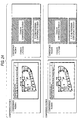
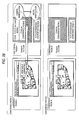
- FIGS. 25 through 28 show how the users at the sites make entries through the electronic whiteboards and exchange multimedia information using the video and audio servers for advancing the conference.
- the users at the sites share the same conference environment using the application start screens displayed on the electronic whiteboards and camera images.
- the user in conference room A indicates specific content of the file through the application screen on the electronic whiteboard and makes an inquiry of the user in conference room B by voice.
- the user in conference room A receives an answer from the user in conference room B on a voice (audio) basis.
- the user in conference room A corrects the file content using the graphical user interface on the application screen output onto the electronic whiteboard.
- the correction content is sent to the site server 200 corresponding to conference room B and is reflected on the screen display on the electronic whiteboard 22 and a history is registered in the shared workspace server 30 .
- the user operating the electronic whiteboard 12 enters an application end command (see FIG. 29 ), the file used in the application is stored in a file server (not shown) specified by the reference in the shared workspace 1 or 2 .
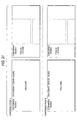
- the site server 200 In the site server 200 , the user connects the second IC card, thereby entering a command for logging out from the site server 200 and terminating the use of the system. Accordingly, the site server 200 terminates the session (see FIG. 30 ).
- the user connects the first IC card, thereby entering a command for logging out from the site server 100 and terminating the use of the system (see FIG. 31 ).
- the user as the presenter distributes a shared document as presentation material to other users as conference participants.
- an extended user interface such as a projection screen
- FIG. 45 shows a configuration example of the user interface screen.
- icons are displayed in a one-to-one correspondence with the users participating in the conference (logging in to the system). For example, the icon of the current presenter is highlighted.
- Buttons for “selectively distributing” or “distributing to all participants” the shared document used in the presentation are also provided on the screen. An operation procedure applied when “selectively distributing” is selected will be discussed below:
- FIG. 46 shows how two users hold their IC cards over the read face of the IC card authentication section 1003 installed on a table.
- the metadata manager 1005 manages the object for managing conference participation members. As the participant holds the IC card, the user ID is added to the conference member list.
- the presenter can check the users registered as the participants at present on the screen (see FIG. 45 ).
- the information concerning each registered user is acquired and a file is uploaded into the server ID and the object ID of the object retaining the information on the user from the user information.
- the metadata manager 1005 records the file ID, transmitter, receiver list, and time in a database.
- FIG. 47 is a flowchart to show a file distribution processing procedure applied when one user displays a plurality of files.
- step S 101 when a file list is acquired (step S 101 ) file selection display is produced based on the set of the distribution files (step S 102 ). File distribution is started (step S 103 ).
- a participant list is acquired from the set of the conference participants (step S 104 ).
- the participant is additionally registered in the participant set (step S 108 ).
- Distribution destinations are selected out of the participant list (step S 105 ) and the file is distributed (step S 106 ).
- FIG. 48 is a flowchart to show a file distribution processing procedure applied when a plurality of users display a plurality of files.
- step S 111 file selection display is produced based on the set of the distribution files (step S 112 ). Whether or not file distribution is to be executed is determined (step S 113 ).
- file distribution is started (step S 114 ).
- a participant list is acquired from the set of the conference participants (step S 115 ).
- the participant is additionally registered in the participant set (step S 119 ).
- Distribution destinations are selected out of the participant list (step S 116 ) and the file is distributed (step S 117 ).
- step S 113 if it is determined that file distribution is not started (step S 113 ), whether or not the conference is to be continued is further determined (step S 120 ). To continue the conference, the distribution file is determined (step S 121 ) and log-out is conducted.
- the files to be distributed include not only the files previously registered in the workspace, but also the temporary files brought into the conference by the user and temporarily registered in the workspace.
- the file distribution processing is performed as shown in FIGS. 47 and 48 , whereby a document can be presented for each participant in the conference without the need for each user to possess a machine storing the document file required as reference information in the process of the conference. Likewise, each participant receiving disclosure of the document can also take the document home without the need for possessing a machine storing the document file. Further, the server records the fact that the document is passed, whereby information retrieval with the conference situation or context as a key can be conducted.
- the conference system is operated at a plurality of sites and the shared workspace server 30 connects the sites to each other.
- the shared workspace server 30 is placed for sharing the workspace of the object for managing and using tasks (cooperation units) among the sites, and manages sessions for managing connection of the conference systems, files used in conferences and created as records of conferences, reference information to resources relevant to conferences, and history information of file access, etc., made by conference participants.
- the conference participant can operate the graphical user interface provided by the shared workspace, thereby connecting to the multimedia communication conference system without being aware of the call address of each multimedia communication conference system and easily accessing information in the files relevant to the conference and the like from the conference system.
- FIG. 32 schematically shows a general shared workspace flow.
- the user selects any desired workspace through the workspace candidate display (step S 2 ).
- the shared workspace server 30 opens the selected workspace (step S 3 ) in response to the selection operation and adds the workspace as an active workspace for use of the workspace (step S 5 ).
- FIG. 33 is a flowchart to show a processing procedure for use of the workspace.
- the workspace selected by the user is opened and the files and HTTP objects contained therein are referenced through the electronic whiteboard (step S 11 ).
- object reference registration processing is performed (step S 12 ).
- workspace termination processing is performed (step S 13 ).
- workspace switching processing is performed (step S 14 ).
- a subworkspace is started (step S 15 ).
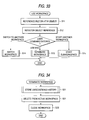
- FIG. 34 shows the workspace termination processing procedure in the flowchart of FIG. 33 in more detail.
- processing of saving (storing) unregistered history is performed (step S 21 ).
- step S 22 the workspace being used is deleted from the active workspaces (step S 22 ) and processing of closing workspace is performed (step S 23 ).
- FIG. 35 shows the object reference registration processing procedure in the flowchart of FIG. 33 in more detail.
- step S 31 only one workspace is taken out from the set of the active workspaces. At this time, if no workspaces exist, the processing routine is terminated.
- step S 32 whether or not reference is to be added is determined.
- step S 31 If there is no reference to be added, the process returns to step S 31 and another workspace in the active workspace set is processed.
- step S 33 the reference is added to the workspace (step S 33 ) and then the process returns to step S 31 and another workspace in the active workspace set is processed.
- FIG. 36 shows the subworkspace starting processing procedure at step S 15 in the flowchart of FIG. 33 in more detail.
- step S 41 whether or not simultaneous use of workspace is made is determined.
- workspace deactivation processing is performed (step S 42 ) and then workspace start processing is performed (step S 43 ).
- step S 42 is skipped and workspace start processing is performed (step S 43 ).
- FIG. 37 shows the workspace deactivating processing procedure at step S 42 in the flowchart of FIG. 36 in more detail.
- the workspace is changed from active workspace to inactive workspace (step S 51 ) and then the workspace is deactivated.
- FIG. 38 shows the workspace switching processing procedure at step S 14 in the flowchart of FIG. 33 in more detail.
- the current workspace is deactivated (step S 61 ).
- the workspace is deactivated according to the procedure shown in FIG. 37 .
- workspace candidates are displayed on the electronic whiteboard or any other display (step S 62 ) and the user uses the graphical user interface on the display screen to select the workspace to switch to (step S 63 ).
- step S 64 the process is returned to the deactivated workspace.
- FIG. 39 shows the unregistered history save processing procedure at step S 21 in the flowchart of FIG. 34 in more detail.
- step S 71 one object is taken out from the unregistered history.
- step S 72 the processing routine is terminated.
- step S 72 determines whether or not object is to be added (step S 73 ). If no object is to be added, the process returns to step S 71 and another unregistered history processing is performed.
- step S 74 If object is to be added, the reference is added to the workspace (step S 74 ). Then, the process returns to step S 71 and another unregistered history processing is performed.
- FIG. 40 is a flowchart to show a workspace reference processing procedure.
- the reference mode of a plurality of workspaces is specified (step S 81 ).
- a common object to all active workspaces is displayed (step S 82 ) or the objects of all active workspaces are displayed (step S 83 ) in response to the specified reference mode.
- FIG. 41 is a flowchart to show a session start processing procedure.
- the clients already starting the specified session are extracted (step S 91 ).
- a request for connecting to a new client is transmitted to all clients already starting the session (step S 92 ).
- the shared workspace server manages a session for managing connection of the site systems, a file used in a conference and created as a record of the conference, reference information to a resource relevant to the conference, and history information of file access made by conference participants.
- the conference participant can operate the graphical user interface provided by the shared workspace, thereby connecting to the multimedia communication conference system without being aware of the call address of each multimedia communication conference system and easily accessing information in the files relevant to the conference and the like from the conference system.
- the shared workspace server provides a user interface for connecting a session and making reference to a file and/or a resource.
- the shared workspace server instructs all other clients already starting the session to connect to the client.
- the site systems correspond to separately operating conference systems and a conference is operated for each site.
- Each of the site systems includes an electronic whiteboard for providing a graphical user interface provided by a shared workspace, a video and audio server for coding and decoding video and audio and then transmitting and receiving video and audio to and from any other site system for sharing motion and behavior of the participants at the sites, an authentication unit for authenticating identification of the conference participants, and a site server for managing a session in the site system, a file used in a conference and created as a record of the conference, reference information to a resource relevant to the conference, and history information of file access made by the conference participants.
- the site system provides an interface for enabling the conference participating users to collaborate, and controls presentation.
- the presentation control is implemented in various manners.
- user interfaces of a general computer such as a display, a keyboard, a mouse, and a tablet may be installed in a conference room as they are.
- a projection screen onto a wall through a projector, a camera for capturing user operation on the projection screen, and a whiteboard are used in combination to make up a user interface.
- Application operation buttons such as print, display, and listing of shared documents are disposed on the wall.
- a probe for detecting a user command without user's consciousness may be disposed in the conference room.
- Information can be accessed irrespective of whether or not the conference participating user possesses a computer machine such as a PC or a PDA device depending on how the presentation control is implemented. That is, computers can be introduced as joined together with the workspace, and the computer capabilities of information collection, management, analysis, any other computation processing, information display, information distribution, etc., can be provided for the user who is unaware of them. Not only formatted information such as information in a computer file, but also individual implicit information, namely, the flexibility of workspace is enhanced, collaboration exceeding the frames of offices, enterprises and nationalities is realized, and the possibility of business is widened.
- the conference participant can operate the graphical user interface provided by the shared workspace, thereby connecting to the multimedia communication conference system without being aware of the call address of each multimedia communication conference system and easily accessing information in the files relevant to the conference and the like from the conference system.
- the teleconference support method according to the invention may further include the step of providing a user interface for displaying workspace candidates required for the user to select a workspace.
- the step of managing use of the workspace may include the step of providing a user interface for making reference to a file and/or a resource.
- the step of managing use of the workspace may include the step of registering reference to a file and/or a resource.
- the step of managing use of the workspace may include the steps of switching a workspace, starting a subworkspace, and terminating the workspace.
- the original workspace may be deactivated in the step of switching a workspace and/or the step of starting a subworkspace.
- the computer program according to the invention is a computer program described in a computer-readable format so as to realize predetermined processing in a computer system.
- the computer program according to the invention is installed in a computer system, whereby the cooperative effect is demonstrated in the computer system and similar advantages to those of the teleconference support method according to the invention can be provided.
- the advantageous teleconference system and the advantageous teleconference support method for making it possible to connect a plurality of sites and realize remote cooperative work can be provided.
- the advantageous teleconference system the advantageous teleconference support method, and the advantageous computer program for making it possible to provide a shared workspace for one conference participant to easily connect conference systems with any other conference participant and share information among them.
- the advantageous teleconference system the advantageous teleconference support method, and the advantageous computer program for making it possible to realize cooperation call setting and information sharing from a plurality of conference systems using multimedia.
- the advantageous teleconference system the advantageous teleconference support method, and the advantageous computer program for making it possible to smoothly collect, manage, analyze, display and distribute information used in a conference based on easy user operation.
- a document can be presented for each participant in the conference without the need for each user to possess a machine storing the document file required as reference information in the process of the conference.
- each participant receiving disclosure of the document can also take the document home without the need for possessing a machine storing the document file.
- the server records the fact that the document is passed, whereby information retrieval with the conference situation or context as a key can be conducted.
Landscapes
- Engineering & Computer Science (AREA)
- Multimedia (AREA)
- Signal Processing (AREA)
- Computer Networks & Wireless Communication (AREA)
- Business, Economics & Management (AREA)
- General Business, Economics & Management (AREA)
- Information Transfer Between Computers (AREA)
- Two-Way Televisions, Distribution Of Moving Picture Or The Like (AREA)
- Information Retrieval, Db Structures And Fs Structures Therefor (AREA)
- Data Exchanges In Wide-Area Networks (AREA)
- Computer And Data Communications (AREA)
Applications Claiming Priority (4)
| Application Number | Priority Date | Filing Date | Title |
|---|---|---|---|
| JP2002314913 | 2002-10-29 | ||
| JP2002-314913 | 2002-10-29 | ||
| JP2003-349114 | 2003-10-08 | ||
| JP2003349114A JP4321203B2 (ja) | 2002-10-29 | 2003-10-08 | 遠隔会議システム及び遠隔会議支援方法、並びにコンピュータ・プログラム |
Publications (2)
| Publication Number | Publication Date |
|---|---|
| US20040128354A1 US20040128354A1 (en) | 2004-07-01 |
| US7856473B2 true US7856473B2 (en) | 2010-12-21 |
Family
ID=32658553
Family Applications (1)
| Application Number | Title | Priority Date | Filing Date |
|---|---|---|---|
| US10/694,213 Expired - Lifetime US7856473B2 (en) | 2002-10-29 | 2003-10-28 | Teleconference system, teleconference support method, and computer program |
Country Status (3)
| Country | Link |
|---|---|
| US (1) | US7856473B2 (https=) |
| JP (1) | JP4321203B2 (https=) |
| CN (1) | CN1263302C (https=) |
Cited By (22)
| Publication number | Priority date | Publication date | Assignee | Title |
|---|---|---|---|---|
| US20060282548A1 (en) * | 2005-05-30 | 2006-12-14 | Canon Kabushiki Kaisha | Collaboration support system and control method thereof |
| US20100106748A1 (en) * | 2008-10-23 | 2010-04-29 | Verizon Business Network Services Inc. | Method and system for logging and storing heterogeneous communication sessions |
| US20100257456A1 (en) * | 2009-04-07 | 2010-10-07 | Clearside, Inc. | Presentation access tracking system |
| US20100287242A1 (en) * | 2009-05-07 | 2010-11-11 | Gopesh Kumar | Method for Providing a Conference System Allowing Advisors to Offer Conference Sessions to Clients |
| US20120036188A1 (en) * | 2010-08-06 | 2012-02-09 | Nokia Corporation | Method and Apparatus for Aggregating Document Information |
| US20130185651A1 (en) * | 2012-01-18 | 2013-07-18 | Microsoft Corporation | People presence detection in a multidocument knowledge base |
| US8610641B2 (en) | 2004-04-01 | 2013-12-17 | Steelcase Inc. | Portable presentation system and methods for use therewith |
| US20140165152A1 (en) * | 2012-12-11 | 2014-06-12 | Microsoft Corporation | Whiteboard records accessibility |
| US20140168350A1 (en) * | 2003-07-15 | 2014-06-19 | Broadcom Corporation | Audio/Video Conferencing System |
| WO2014100223A1 (en) * | 2012-12-21 | 2014-06-26 | International Business Machines Corporation | Quantifying risk based on relationships and applying protections based on business rules |
| US9122444B2 (en) | 2012-02-08 | 2015-09-01 | Ricoh Company, Ltd. | Network accessible projectors that display multiple client screens at once |
| US20150268835A1 (en) * | 2014-03-19 | 2015-09-24 | Toshiba Tec Kabushiki Kaisha | Desktop information processing apparatus and display method for the same |
| US9170123B2 (en) | 2010-08-06 | 2015-10-27 | Nokia Technologies Oy | Method and apparatus for generating information |
| US9356938B2 (en) | 2005-02-04 | 2016-05-31 | Koninklijke Philips N.V. | Method, device, system, token creating authorized domains |
| US20160156570A1 (en) * | 2014-12-01 | 2016-06-02 | Brother Kogyo Kabushiki Kaisha | Method, Storage Medium Storing Management Program, and Storage Medium Storing Terminal Program |
| US9980008B2 (en) | 2011-10-04 | 2018-05-22 | Ricoh Company, Ltd. | Meeting system that interconnects group and personal devices across a network |
| US10264213B1 (en) | 2016-12-15 | 2019-04-16 | Steelcase Inc. | Content amplification system and method |
| US20190387033A1 (en) * | 2018-06-19 | 2019-12-19 | Ricoh Company, Ltd. | Information processing apparatus, information processing system, and method of remote information sharing |
| US10721085B2 (en) | 2017-11-27 | 2020-07-21 | Sharp Kabushiki Kaisha | Terminal device, conference management system, storage medium and conference management method |
| US11019153B2 (en) * | 2017-01-27 | 2021-05-25 | International Business Machines Corporation | Dynamically managing data sharing |
| US11157160B1 (en) * | 2020-11-09 | 2021-10-26 | Dell Products, L.P. | Graphical user interface (GUI) for controlling virtual workspaces produced across information handling systems (IHSs) |
| US11425222B2 (en) | 2017-01-27 | 2022-08-23 | International Business Machines Corporation | Dynamically managing data sharing |
Families Citing this family (75)
| Publication number | Priority date | Publication date | Assignee | Title |
|---|---|---|---|---|
| US8909701B2 (en) * | 2003-05-02 | 2014-12-09 | Nokia Corporation | IMS conferencing policy logic |
| US7834819B2 (en) | 2004-04-01 | 2010-11-16 | Polyvision Corporation | Virtual flip chart method and apparatus |
| US7634533B2 (en) * | 2004-04-30 | 2009-12-15 | Microsoft Corporation | Systems and methods for real-time audio-visual communication and data collaboration in a network conference environment |
| CN100444588C (zh) * | 2004-06-18 | 2008-12-17 | 腾讯科技(深圳)有限公司 | 即时通讯中文件讨论组的实现及其系统 |
| US20060010197A1 (en) * | 2004-07-06 | 2006-01-12 | Francis Ovenden | Multimedia collaboration and communications |
| FR2873884A1 (fr) * | 2004-07-29 | 2006-02-03 | France Telecom | Systeme et procede d'echange de donnees multimedia, installation, serveur et terminal comprenant un tel systeme |
| US7634539B2 (en) * | 2004-08-02 | 2009-12-15 | Sap Ag | Relations between collaboration workspaces |
| US20060083244A1 (en) * | 2004-10-15 | 2006-04-20 | Balakumar Jagadesan | Method for sessions including multiple resources |
| US11568365B2 (en) * | 2004-11-08 | 2023-01-31 | Open Text Corporation | Systems and methods for management of networked collaboration |
| US7849512B2 (en) * | 2005-03-21 | 2010-12-07 | Fortressware, Inc. | Method and system to create secure virtual project room |
| US7616967B2 (en) | 2005-07-25 | 2009-11-10 | Motorola, Inc. | Media-specific floor control for push-to-X communication |
| JP2007072605A (ja) * | 2005-09-05 | 2007-03-22 | Canon Inc | 情報処理装置および情報処理方法 |
| KR100746251B1 (ko) * | 2006-03-14 | 2007-08-03 | 후지제롯쿠스 가부시끼가이샤 | 문서 스캔 시스템, 문서 전송 시스템, 문서 전송 방법, 및컴퓨터로 읽기 가능한 기록 매체 |
| US20080065999A1 (en) * | 2006-09-13 | 2008-03-13 | Majors Kenneth D | Conferencing system with document access |
| US20080120371A1 (en) | 2006-11-16 | 2008-05-22 | Rajat Gopal | Relational framework for non-real-time audio/video collaboration |
| US8769006B2 (en) * | 2006-11-28 | 2014-07-01 | International Business Machines Corporation | Role-based display of document renditions for web conferencing |
| US8325217B2 (en) * | 2007-04-30 | 2012-12-04 | Hewlett-Packard Development Company, L.P. | Sending video data over a network |
| US20090006568A1 (en) * | 2007-06-28 | 2009-01-01 | Microsoft Corporation | Network-based collaboration record |
| US7886048B1 (en) | 2007-07-31 | 2011-02-08 | Sutus, Inc. | Systems and methods for managing integrated systems with use cases |
| JP4692529B2 (ja) * | 2007-08-07 | 2011-06-01 | セイコーエプソン株式会社 | グラフィカルユーザインタフェース装置 |
| JP5169384B2 (ja) * | 2008-03-31 | 2013-03-27 | 富士ゼロックス株式会社 | 会議システム、端末装置、会議支援装置及びプログラム |
| JP4582202B2 (ja) | 2008-06-06 | 2010-11-17 | コニカミノルタビジネステクノロジーズ株式会社 | データ処理装置、表示制御方法および表示制御プログラム |
| US8010487B2 (en) | 2008-06-27 | 2011-08-30 | Microsoft Corporation | Synchronization and collaboration within peer-to-peer and client/server environments |
| JP5055215B2 (ja) * | 2008-07-22 | 2012-10-24 | キヤノン株式会社 | 表示システム及びその表示方法 |
| JP5099232B2 (ja) * | 2008-11-12 | 2012-12-19 | コニカミノルタビジネステクノロジーズ株式会社 | 情報共有化システム |
| CA2742779C (en) | 2008-11-26 | 2017-07-18 | Calgary Scientific Inc. | Method and system for providing remote access to a state of an application program |
| US20100318921A1 (en) * | 2009-06-16 | 2010-12-16 | Marc Trachtenberg | Digital easel collaboration system and method |
| EP2526653B1 (en) * | 2010-01-22 | 2019-09-25 | NXP USA, Inc. | A network element, telecommunication system, integrated circuit and a method for providing a telephony connection |
| US20110231773A1 (en) | 2010-03-19 | 2011-09-22 | Avaya Inc. | System and method for providing just-in-time resources based on context |
| US9741084B2 (en) | 2011-01-04 | 2017-08-22 | Calgary Scientific Inc. | Method and system for providing remote access to data for display on a mobile device |
| RU2625525C2 (ru) | 2011-08-15 | 2017-07-14 | Калгари Сайентифик Инк. | Бесконтактный удаленный доступ к программному приложению |
| WO2013026457A1 (en) * | 2011-08-19 | 2013-02-28 | Telefonaktiebolaget L M Ericsson (Publ) | Technique for video conferencing |
| US8756348B2 (en) | 2011-09-14 | 2014-06-17 | Barco N.V. | Electronic tool and methods for meetings |
| US11258676B2 (en) | 2011-09-14 | 2022-02-22 | Barco N.V. | Electronic tool and methods for meetings |
| US10965480B2 (en) | 2011-09-14 | 2021-03-30 | Barco N.V. | Electronic tool and methods for recording a meeting |
| US9083769B2 (en) | 2011-09-14 | 2015-07-14 | Barco N.V. | Electronic tool and methods for meetings |
| CN108337099B (zh) | 2011-09-14 | 2022-08-23 | 巴科股份有限公司 | 用于会议音频的电子工具和方法 |
| US10050800B2 (en) | 2011-09-14 | 2018-08-14 | Barco N.V. | Electronic tool and methods for meetings for providing connection to a communications network |
| EP2761808A4 (en) | 2011-09-30 | 2015-05-20 | Calgary Scient Inc | DECOUPLED APPLICATION WITH EXTENSIONS INTERACTIVE DIGITAL SURFACE LAYER FOR COLLABORATIVE REMOTE COMMON USE OF APPLICATIONS AND ANNOTATION |
| US9648057B2 (en) | 2011-11-23 | 2017-05-09 | Calgary Scientific Inc. | Methods and systems for collaborative remote application sharing and conferencing |
| JP6051549B2 (ja) * | 2012-03-16 | 2016-12-27 | 株式会社リコー | 通信制御システム、制御装置、プログラムおよび電子情報ボード |
| EP2834967B1 (de) | 2012-04-04 | 2019-03-20 | Unify GmbH & Co. KG | Verfahren zur übertragung einer steuerung eines bestehenden mehrfachgesprächs auf eine applikation zur steuerung einer konferenz und computerprogrammprodukt zur ausführung des verfahrens |
| GB2501471A (en) | 2012-04-18 | 2013-10-30 | Barco Nv | Electronic conference arrangement |
| CN103685362B (zh) * | 2012-09-06 | 2017-05-24 | 株式会社日立制作所 | 信息共享处理装置及信息共享处理方法 |
| JP6229360B2 (ja) * | 2012-09-12 | 2017-11-15 | 株式会社リコー | 通信サーバ、通信システム、プログラム及び通信方法 |
| JP6268824B2 (ja) * | 2012-09-14 | 2018-01-31 | 株式会社リコー | 通信システム、通信方法及び情報処理装置 |
| US20150304725A1 (en) * | 2012-11-26 | 2015-10-22 | Hitachi Maxell, Ltd. | Network terminal system, display device, terminal device, information processing method in display device, and program |
| US10225352B2 (en) * | 2013-12-20 | 2019-03-05 | Sony Corporation | Work sessions |
| US9552473B2 (en) | 2014-05-14 | 2017-01-24 | Microsoft Technology Licensing, Llc | Claiming data from a virtual whiteboard |
| US10270819B2 (en) | 2014-05-14 | 2019-04-23 | Microsoft Technology Licensing, Llc | System and method providing collaborative interaction |
| US20160021254A1 (en) * | 2014-07-15 | 2016-01-21 | Kenny Red | Methods, systems, and apparatus for conducting a conference session |
| JP2016152505A (ja) * | 2015-02-17 | 2016-08-22 | 株式会社リコー | 画像管理システム、通信端末、通信システム、画像管理方法、及びプログラム |
| EP3293955A4 (en) * | 2015-05-07 | 2018-03-21 | Ricoh Company, Ltd. | Information processing device, information processing method and information processing program |
| JP6522235B2 (ja) * | 2015-05-25 | 2019-05-29 | 抒一 程 | マルチユーザー会議システム |
| JP2017011644A (ja) | 2015-06-26 | 2017-01-12 | 株式会社リコー | 管理システム、通信システム、データ管理方法、及びプログラム |
| EP3200066A1 (en) | 2016-01-29 | 2017-08-02 | Ricoh Company, Ltd. | Communication terminal, communication system, display control method, and carrier means |
| US10771549B2 (en) * | 2016-06-15 | 2020-09-08 | Microsoft Technology Licensing, Llc | Correlating a file hosted at a file hosting server with a meeting object |
| EP3293665B1 (en) | 2016-09-08 | 2019-03-06 | Ricoh Company, Ltd. | Shared terminal, communication system, display control method, and carrier medium |
| JP6776778B2 (ja) * | 2016-09-30 | 2020-10-28 | 株式会社リコー | 共有端末、通信システム、通信方法、及びプログラム |
| CN106779633A (zh) * | 2016-11-18 | 2017-05-31 | 成都柚子加科技有限公司 | 一种电子收条的管理方法 |
| CN106778302A (zh) * | 2016-12-06 | 2017-05-31 | 金航数码科技有限责任公司 | 一种跨系统的电子文档的安全交换和共享方法 |
| EP3376710B1 (en) * | 2017-02-28 | 2019-07-31 | Ricoh Company, Ltd. | Communication terminal, communication system, communication method, and carrier means |
| CN107798408B (zh) * | 2017-11-03 | 2021-12-14 | 广州视源电子科技股份有限公司 | 会议管理方法、装置、终端及计算机可读存储介质 |
| CN107844953B (zh) * | 2017-11-03 | 2021-11-16 | 广州视源电子科技股份有限公司 | 会议文件的管理方法、装置、终端和计算机可读存储介质 |
| CN108449570B (zh) * | 2018-03-26 | 2020-06-23 | 苏州科达科技股份有限公司 | 跨用户域视频会议的实现方法、系统、设备及存储介质 |
| JP7047626B2 (ja) * | 2018-06-22 | 2022-04-05 | コニカミノルタ株式会社 | 会議システム、会議サーバ及びプログラム |
| EP3757918B1 (en) * | 2019-06-25 | 2026-01-14 | Ricoh Company, Ltd. | Information processing apparatus, information processing system, information processing method, and carrier means |
| EP3757917A1 (en) * | 2019-06-25 | 2020-12-30 | Ricoh Company, Ltd. | Information processing apparatus, information processing system, information processing method, and carrier means |
| CN110446002A (zh) * | 2019-07-30 | 2019-11-12 | 视联动力信息技术股份有限公司 | 一种视频会议的处理方法、系统及装置和存储介质 |
| US20210247947A1 (en) * | 2020-02-08 | 2021-08-12 | Mersive Technologies, Inc. | Video Routing and Screen Sharing in Multi-Tiered Display Environment |
| JP7443164B2 (ja) | 2020-06-03 | 2024-03-05 | シャープ株式会社 | 情報処理システム、情報処理方法、及び情報処理プログラム |
| CN112202580B (zh) * | 2020-09-21 | 2022-09-23 | 北京字跳网络技术有限公司 | 远程会议的控制方法、装置、设备和存储介质 |
| CN112235530B (zh) * | 2020-10-13 | 2021-07-30 | 网易(杭州)网络有限公司 | 远程会议的实现方法及装置、电子设备、存储介质 |
| US11575526B2 (en) * | 2021-03-23 | 2023-02-07 | Box, Inc. | Web conference asset management |
| CN119854273A (zh) * | 2024-12-30 | 2025-04-18 | 联想(北京)有限公司 | 一种数据处理方法、装置及设备 |
Citations (38)
| Publication number | Priority date | Publication date | Assignee | Title |
|---|---|---|---|---|
| JPH07306875A (ja) | 1994-05-02 | 1995-11-21 | Ubique Ltd | 共存データ検索システム |
| JPH0870300A (ja) | 1994-08-30 | 1996-03-12 | Toshiba Corp | ネットワークシステム及びファイル共有方法 |
| JPH0888843A (ja) | 1994-09-20 | 1996-04-02 | Oki Electric Ind Co Ltd | 電子会議支援システム |
| JPH08251568A (ja) | 1994-12-16 | 1996-09-27 | At & T Corp | マルティメディア仮想会議の開催方法 |
| JPH0954741A (ja) | 1995-08-11 | 1997-02-25 | Toshiba Corp | ネットワークシステム及びそのセッション管理方法 |
| US5825360A (en) * | 1995-04-07 | 1998-10-20 | Apple Computer, Inc. | Method for arranging windows in a computer workspace |
| US5864874A (en) | 1994-05-02 | 1999-01-26 | Ubique Ltd. | Community co-presence system |
| US5951642A (en) * | 1997-08-06 | 1999-09-14 | Hypertak, Inc. | System for collecting detailed internet information on the basis of the condition of activities of information viewers viewing information of service providers |
| JP2000076171A (ja) | 1998-08-28 | 2000-03-14 | Fujitsu Ltd | 情報管理方法及び情報管理システム |
| US6144991A (en) * | 1998-02-19 | 2000-11-07 | Telcordia Technologies, Inc. | System and method for managing interactions between users in a browser-based telecommunications network |
| US20010034646A1 (en) * | 2000-01-25 | 2001-10-25 | Hoyt Edward G. | System and method for creating a web page return link |
| WO2001089149A2 (en) | 2000-05-19 | 2001-11-22 | Sony Corporation | Network conferencing system |
| JP2002041429A (ja) | 2000-07-26 | 2002-02-08 | Nec Corp | インターネットにおける共有資料を用いて会議を行う方法、会議システム、情報処理装置及び記録媒体 |
| US20020019853A1 (en) * | 2000-04-17 | 2002-02-14 | Mark Vange | Conductor gateway prioritization parameters |
| US20020049738A1 (en) * | 2000-08-03 | 2002-04-25 | Epstein Bruce A. | Information collaboration and reliability assessment |
| JP2002132618A (ja) | 2000-10-27 | 2002-05-10 | Sony Corp | 情報処理装置、情報提供媒体、情報処理方法及び情報処理システム |
| US6421733B1 (en) * | 1997-03-25 | 2002-07-16 | Intel Corporation | System for dynamically transcoding data transmitted between computers |
| US20020128907A1 (en) * | 2000-06-07 | 2002-09-12 | Motoi Sato | Information delivery scheme and advertisement providing scheme using social filtering technique |
| US6493635B1 (en) * | 1999-11-01 | 2002-12-10 | 3Dgeo Development, Inc. | Remote access and automated dialog building for seismic processing |
| US20030014488A1 (en) * | 2001-06-13 | 2003-01-16 | Siddhartha Dalal | System and method for enabling multimedia conferencing services on a real-time communications platform |
| US20030030670A1 (en) * | 2001-08-10 | 2003-02-13 | Duarte Matias G. | System and method of displaying multiple pending notifications in a single window |
| US20030101343A1 (en) * | 2001-11-27 | 2003-05-29 | Eaton Eric Thomas | System for providing continuity between messaging clients and method therefor |
| US20030101443A1 (en) * | 2001-11-28 | 2003-05-29 | Sun Microsystems, Inc. | Technique for associating execution characteristics with instructions or operations of program code |
| US20030158745A1 (en) * | 2001-09-04 | 2003-08-21 | David Katz | System and method of documenting, tracking and facilitating the development of intellectual property |
| US20030174826A1 (en) * | 2002-02-15 | 2003-09-18 | Multimedia Telesys, Inc. | Video conference system and methods for use at multi-station sites |
| US6624827B1 (en) * | 1999-10-19 | 2003-09-23 | Dae-Joon Hwang | Apparatus and method for locking or prohibiting access to designated object displayed on shared electronic whiteboard |
| US20030220973A1 (en) * | 2002-03-28 | 2003-11-27 | Min Zhu | Conference recording system |
| US20040003371A1 (en) * | 2002-06-26 | 2004-01-01 | International Business Machines Corporation | Framework to access a remote system from an integrated development environment |
| US20040107256A1 (en) * | 2002-12-02 | 2004-06-03 | Thomas Odenwald | Collaboration integration |
| US20040117445A9 (en) * | 2000-05-19 | 2004-06-17 | Sony Corporation | Network conferencing system and proceedings preparation method, and conference management server and proceedings preparation method |
| US20050178833A1 (en) * | 2001-12-20 | 2005-08-18 | Canon Information Systems Research Australia Pty | Microprocessor card defining a custom user interface |
| US6950101B2 (en) * | 1996-03-25 | 2005-09-27 | Research Investment Network, Inc. | Computer implemented method and system for transmitting graphical images from server to client at user selectable resolution |
| US7020697B1 (en) * | 1999-10-01 | 2006-03-28 | Accenture Llp | Architectures for netcentric computing systems |
| US7146415B1 (en) * | 1999-08-06 | 2006-12-05 | Sharp Kabushiki Kaisha | Information source monitor device for network information, monitoring and display method for the same, storage medium storing the method as a program, and a computer for executing the program |
| US7213050B1 (en) * | 2001-07-11 | 2007-05-01 | Cisco Technology, Inc. | System and method for reserving conference resources for a multipoint conference using a priority scheme |
| US7228507B2 (en) * | 2002-02-21 | 2007-06-05 | Xerox Corporation | Methods and systems for navigating a workspace |
| US7298834B1 (en) * | 2002-11-22 | 2007-11-20 | 3Com Corporation | System and method for large capacity conference calls |
| US7330541B1 (en) * | 2003-05-22 | 2008-02-12 | Cisco Technology, Inc. | Automated conference moderation |
-
2003
- 2003-10-08 JP JP2003349114A patent/JP4321203B2/ja not_active Expired - Fee Related
- 2003-10-28 US US10/694,213 patent/US7856473B2/en not_active Expired - Lifetime
- 2003-10-29 CN CNB2003101030580A patent/CN1263302C/zh not_active Expired - Lifetime
Patent Citations (40)
| Publication number | Priority date | Publication date | Assignee | Title |
|---|---|---|---|---|
| US5864874A (en) | 1994-05-02 | 1999-01-26 | Ubique Ltd. | Community co-presence system |
| JPH07306875A (ja) | 1994-05-02 | 1995-11-21 | Ubique Ltd | 共存データ検索システム |
| US5819084A (en) | 1994-05-02 | 1998-10-06 | Ubique Ltd. | Co-presence data retrieval system |
| JPH0870300A (ja) | 1994-08-30 | 1996-03-12 | Toshiba Corp | ネットワークシステム及びファイル共有方法 |
| JPH0888843A (ja) | 1994-09-20 | 1996-04-02 | Oki Electric Ind Co Ltd | 電子会議支援システム |
| JPH08251568A (ja) | 1994-12-16 | 1996-09-27 | At & T Corp | マルティメディア仮想会議の開催方法 |
| US5627978A (en) * | 1994-12-16 | 1997-05-06 | Lucent Technologies Inc. | Graphical user interface for multimedia call set-up and call handling in a virtual conference on a desktop computer conferencing system |
| US5825360A (en) * | 1995-04-07 | 1998-10-20 | Apple Computer, Inc. | Method for arranging windows in a computer workspace |
| JPH0954741A (ja) | 1995-08-11 | 1997-02-25 | Toshiba Corp | ネットワークシステム及びそのセッション管理方法 |
| US6950101B2 (en) * | 1996-03-25 | 2005-09-27 | Research Investment Network, Inc. | Computer implemented method and system for transmitting graphical images from server to client at user selectable resolution |
| US6421733B1 (en) * | 1997-03-25 | 2002-07-16 | Intel Corporation | System for dynamically transcoding data transmitted between computers |
| US5951642A (en) * | 1997-08-06 | 1999-09-14 | Hypertak, Inc. | System for collecting detailed internet information on the basis of the condition of activities of information viewers viewing information of service providers |
| US6144991A (en) * | 1998-02-19 | 2000-11-07 | Telcordia Technologies, Inc. | System and method for managing interactions between users in a browser-based telecommunications network |
| JP2000076171A (ja) | 1998-08-28 | 2000-03-14 | Fujitsu Ltd | 情報管理方法及び情報管理システム |
| US7146415B1 (en) * | 1999-08-06 | 2006-12-05 | Sharp Kabushiki Kaisha | Information source monitor device for network information, monitoring and display method for the same, storage medium storing the method as a program, and a computer for executing the program |
| US7020697B1 (en) * | 1999-10-01 | 2006-03-28 | Accenture Llp | Architectures for netcentric computing systems |
| US6624827B1 (en) * | 1999-10-19 | 2003-09-23 | Dae-Joon Hwang | Apparatus and method for locking or prohibiting access to designated object displayed on shared electronic whiteboard |
| US6493635B1 (en) * | 1999-11-01 | 2002-12-10 | 3Dgeo Development, Inc. | Remote access and automated dialog building for seismic processing |
| US20010034646A1 (en) * | 2000-01-25 | 2001-10-25 | Hoyt Edward G. | System and method for creating a web page return link |
| US20020019853A1 (en) * | 2000-04-17 | 2002-02-14 | Mark Vange | Conductor gateway prioritization parameters |
| US20040117445A9 (en) * | 2000-05-19 | 2004-06-17 | Sony Corporation | Network conferencing system and proceedings preparation method, and conference management server and proceedings preparation method |
| WO2001089149A2 (en) | 2000-05-19 | 2001-11-22 | Sony Corporation | Network conferencing system |
| US20020128907A1 (en) * | 2000-06-07 | 2002-09-12 | Motoi Sato | Information delivery scheme and advertisement providing scheme using social filtering technique |
| JP2002041429A (ja) | 2000-07-26 | 2002-02-08 | Nec Corp | インターネットにおける共有資料を用いて会議を行う方法、会議システム、情報処理装置及び記録媒体 |
| US20020049738A1 (en) * | 2000-08-03 | 2002-04-25 | Epstein Bruce A. | Information collaboration and reliability assessment |
| JP2002132618A (ja) | 2000-10-27 | 2002-05-10 | Sony Corp | 情報処理装置、情報提供媒体、情報処理方法及び情報処理システム |
| US20030014488A1 (en) * | 2001-06-13 | 2003-01-16 | Siddhartha Dalal | System and method for enabling multimedia conferencing services on a real-time communications platform |
| US7213050B1 (en) * | 2001-07-11 | 2007-05-01 | Cisco Technology, Inc. | System and method for reserving conference resources for a multipoint conference using a priority scheme |
| US20030030670A1 (en) * | 2001-08-10 | 2003-02-13 | Duarte Matias G. | System and method of displaying multiple pending notifications in a single window |
| US20030158745A1 (en) * | 2001-09-04 | 2003-08-21 | David Katz | System and method of documenting, tracking and facilitating the development of intellectual property |
| US20030101343A1 (en) * | 2001-11-27 | 2003-05-29 | Eaton Eric Thomas | System for providing continuity between messaging clients and method therefor |
| US20030101443A1 (en) * | 2001-11-28 | 2003-05-29 | Sun Microsystems, Inc. | Technique for associating execution characteristics with instructions or operations of program code |
| US20050178833A1 (en) * | 2001-12-20 | 2005-08-18 | Canon Information Systems Research Australia Pty | Microprocessor card defining a custom user interface |
| US20030174826A1 (en) * | 2002-02-15 | 2003-09-18 | Multimedia Telesys, Inc. | Video conference system and methods for use at multi-station sites |
| US7228507B2 (en) * | 2002-02-21 | 2007-06-05 | Xerox Corporation | Methods and systems for navigating a workspace |
| US20030220973A1 (en) * | 2002-03-28 | 2003-11-27 | Min Zhu | Conference recording system |
| US20040003371A1 (en) * | 2002-06-26 | 2004-01-01 | International Business Machines Corporation | Framework to access a remote system from an integrated development environment |
| US7298834B1 (en) * | 2002-11-22 | 2007-11-20 | 3Com Corporation | System and method for large capacity conference calls |
| US20040107256A1 (en) * | 2002-12-02 | 2004-06-03 | Thomas Odenwald | Collaboration integration |
| US7330541B1 (en) * | 2003-05-22 | 2008-02-12 | Cisco Technology, Inc. | Automated conference moderation |
Non-Patent Citations (2)
| Title |
|---|
| K. Watanabe, et al., "Multimedia Dispersion Attendance Conference System MERMAID", Transactions of Information Processing Society of Japan, Information Processing Society of Japan, vol. 32, No. 9, p. 1200-1209, Sep. 15, 1991. |
| N. Ohsuga et al., "A Shared Projector System in Collaboration Work", IPSJ SIG Notes, vol. 2002, No. 97, pp. 119 to 125, Oct. 24-25, 2002. |
Cited By (53)
| Publication number | Priority date | Publication date | Assignee | Title |
|---|---|---|---|---|
| US20140168350A1 (en) * | 2003-07-15 | 2014-06-19 | Broadcom Corporation | Audio/Video Conferencing System |
| US9641804B2 (en) | 2003-07-15 | 2017-05-02 | Avago Technologies General Ip (Singapore) Pte. Ltd. | Audio/video conferencing system |
| US9250777B2 (en) * | 2003-07-15 | 2016-02-02 | Broadcom Corporation | Audio/video conferencing system |
| US10051236B2 (en) | 2004-04-01 | 2018-08-14 | Steelcase Inc. | Portable presentation system and methods for use therewith |
| US9471269B2 (en) | 2004-04-01 | 2016-10-18 | Steelcase Inc. | Portable presentation system and methods for use therewith |
| US9465573B2 (en) | 2004-04-01 | 2016-10-11 | Steelcase Inc. | Portable presentation system and methods for use therewith |
| US10958873B2 (en) | 2004-04-01 | 2021-03-23 | Steelcase Inc. | Portable presentation system and methods for use therewith |
| US9448759B2 (en) | 2004-04-01 | 2016-09-20 | Steelcase Inc. | Portable presentation system and methods for use therewith |
| US9870195B2 (en) | 2004-04-01 | 2018-01-16 | Steelcase Inc. | Portable presentation system and methods for use therewith |
| US9727207B2 (en) | 2004-04-01 | 2017-08-08 | Steelcase Inc. | Portable presentation system and methods for use therewith |
| US10455193B2 (en) | 2004-04-01 | 2019-10-22 | Steelcase Inc. | Portable presentation system and methods for use therewith |
| US9430181B2 (en) | 2004-04-01 | 2016-08-30 | Steelcase Inc. | Portable presentation system and methods for use therewith |
| US8610641B2 (en) | 2004-04-01 | 2013-12-17 | Steelcase Inc. | Portable presentation system and methods for use therewith |
| US9116656B2 (en) | 2004-04-01 | 2015-08-25 | Steelcase Inc. | Portable presentation system and methods for use therewith |
| US9356938B2 (en) | 2005-02-04 | 2016-05-31 | Koninklijke Philips N.V. | Method, device, system, token creating authorized domains |
| US9866794B2 (en) | 2005-04-01 | 2018-01-09 | Steelcase Inc. | Portable presentation system and methods for use therewith |
| US8019817B2 (en) * | 2005-05-30 | 2011-09-13 | Canon Kabushiki Kaisha | Collaboration support system and control method thereof |
| US20060282548A1 (en) * | 2005-05-30 | 2006-12-14 | Canon Kabushiki Kaisha | Collaboration support system and control method thereof |
| US9904462B2 (en) | 2005-06-02 | 2018-02-27 | Steelcase Inc. | Portable presentation system and methods for use therewith |
| US9858033B2 (en) | 2006-02-09 | 2018-01-02 | Steelcase Inc. | Portable presentation system and methods for use therewith |
| US20100106748A1 (en) * | 2008-10-23 | 2010-04-29 | Verizon Business Network Services Inc. | Method and system for logging and storing heterogeneous communication sessions |
| US20100257456A1 (en) * | 2009-04-07 | 2010-10-07 | Clearside, Inc. | Presentation access tracking system |
| US9342814B2 (en) * | 2009-04-07 | 2016-05-17 | Clearslide, Inc. | Presentation access tracking system |
| US20100287242A1 (en) * | 2009-05-07 | 2010-11-11 | Gopesh Kumar | Method for Providing a Conference System Allowing Advisors to Offer Conference Sessions to Clients |
| US9218603B2 (en) * | 2009-05-07 | 2015-12-22 | Gopesh Kumar | Method for providing a conference system allowing advisors to offer conference sessions to clients |
| US9218604B2 (en) * | 2009-05-07 | 2015-12-22 | Gopesh Kumar | Method for expert Advisors to provide one on one phone call or chat advice services through unique empowered independent agents to consumers using mobile devices |
| US20120036188A1 (en) * | 2010-08-06 | 2012-02-09 | Nokia Corporation | Method and Apparatus for Aggregating Document Information |
| US9170123B2 (en) | 2010-08-06 | 2015-10-27 | Nokia Technologies Oy | Method and apparatus for generating information |
| US10250947B2 (en) | 2011-10-04 | 2019-04-02 | Ricoh Company, Ltd. | Meeting system that interconnects group and personal devices across a network |
| US9980008B2 (en) | 2011-10-04 | 2018-05-22 | Ricoh Company, Ltd. | Meeting system that interconnects group and personal devices across a network |
| US20130185651A1 (en) * | 2012-01-18 | 2013-07-18 | Microsoft Corporation | People presence detection in a multidocument knowledge base |
| US9122444B2 (en) | 2012-02-08 | 2015-09-01 | Ricoh Company, Ltd. | Network accessible projectors that display multiple client screens at once |
| USRE48494E1 (en) | 2012-02-08 | 2021-03-30 | Ricoh Company, Ltd. | Network accessible projectors that display multiple client screens at once |
| WO2014093508A3 (en) * | 2012-12-11 | 2014-09-04 | Microsoft Corporation | Whiteboard records accessibility |
| US20140165152A1 (en) * | 2012-12-11 | 2014-06-12 | Microsoft Corporation | Whiteboard records accessibility |
| US8990884B2 (en) | 2012-12-21 | 2015-03-24 | International Business Machines Corporation | Quantifying risk based on relationships and applying protections based on business rules |
| WO2014100223A1 (en) * | 2012-12-21 | 2014-06-26 | International Business Machines Corporation | Quantifying risk based on relationships and applying protections based on business rules |
| US9836194B2 (en) * | 2014-03-19 | 2017-12-05 | Toshiba Tec Kabushiki Kaisha | Desktop information processing apparatus and display method for the same |
| US20150268835A1 (en) * | 2014-03-19 | 2015-09-24 | Toshiba Tec Kabushiki Kaisha | Desktop information processing apparatus and display method for the same |
| US20160156570A1 (en) * | 2014-12-01 | 2016-06-02 | Brother Kogyo Kabushiki Kaisha | Method, Storage Medium Storing Management Program, and Storage Medium Storing Terminal Program |
| US10897598B1 (en) | 2016-12-15 | 2021-01-19 | Steelcase Inc. | Content amplification system and method |
| US10638090B1 (en) | 2016-12-15 | 2020-04-28 | Steelcase Inc. | Content amplification system and method |
| US10264213B1 (en) | 2016-12-15 | 2019-04-16 | Steelcase Inc. | Content amplification system and method |
| US11190731B1 (en) | 2016-12-15 | 2021-11-30 | Steelcase Inc. | Content amplification system and method |
| US11652957B1 (en) | 2016-12-15 | 2023-05-16 | Steelcase Inc. | Content amplification system and method |
| US12231810B1 (en) | 2016-12-15 | 2025-02-18 | Steelcase Inc. | Content amplification system and method |
| US11019153B2 (en) * | 2017-01-27 | 2021-05-25 | International Business Machines Corporation | Dynamically managing data sharing |
| US11425222B2 (en) | 2017-01-27 | 2022-08-23 | International Business Machines Corporation | Dynamically managing data sharing |
| US10721085B2 (en) | 2017-11-27 | 2020-07-21 | Sharp Kabushiki Kaisha | Terminal device, conference management system, storage medium and conference management method |
| US20190387033A1 (en) * | 2018-06-19 | 2019-12-19 | Ricoh Company, Ltd. | Information processing apparatus, information processing system, and method of remote information sharing |
| US11245733B2 (en) * | 2018-06-19 | 2022-02-08 | Ricoh Company, Ltd. | Information processing apparatus, information processing system, and method of remote information sharing |
| US11157160B1 (en) * | 2020-11-09 | 2021-10-26 | Dell Products, L.P. | Graphical user interface (GUI) for controlling virtual workspaces produced across information handling systems (IHSs) |
| US11733857B2 (en) | 2020-11-09 | 2023-08-22 | Dell Products, L.P. | Graphical user interface (GUI) for controlling virtual workspaces produced across information handling systems (IHSs) |
Also Published As
| Publication number | Publication date |
|---|---|
| JP2004171526A (ja) | 2004-06-17 |
| CN1499841A (zh) | 2004-05-26 |
| CN1263302C (zh) | 2006-07-05 |
| JP4321203B2 (ja) | 2009-08-26 |
| US20040128354A1 (en) | 2004-07-01 |
Similar Documents
| Publication | Publication Date | Title |
|---|---|---|
| US7856473B2 (en) | Teleconference system, teleconference support method, and computer program | |
| US7814559B2 (en) | Teleconference system, on-site server, management server, teleconference management method and progam | |
| JP4696481B2 (ja) | 遠隔会議システム、共有ワークスペース・サーバ及びプログラム | |
| US8250141B2 (en) | Real-time event notification for collaborative computing sessions | |
| US9449305B2 (en) | Method of organizing a database according to an event for a web-based conference collaboration tool with dynamic content and roles | |
| US20120179502A1 (en) | Method for coordinating resources for events and system employing same | |
| US20110173270A1 (en) | Conferencing Apparatus And Method | |
| JP2006005590A5 (https=) | ||
| JP7543029B2 (ja) | サーバーシステム及びサーバーシステムの制御方法 | |
| WO2015079818A1 (en) | Terminal device, screen sharing method, and screen sharing system | |
| US12301642B2 (en) | Digital workspace sharing over one or more display clients using display identification codes and in proximity of a main client | |
| US20200177645A1 (en) | Content management server, information sharing system, and communication control method | |
| JPH11506595A (ja) | マルチメディア文書の会議参加システム | |
| JP4696480B2 (ja) | 遠隔会議システム、拠点サーバ及びプログラム | |
| CN118200273A (zh) | 一种在即时通信应用中建立同屏交流分享的方法、系统 | |
| JP7039903B2 (ja) | 情報処理システム、情報処理装置、プログラム及び画面共有端末制御方法 | |
| US20240427546A1 (en) | Systems and methods for screen sharing | |
| JP2006005589A5 (https=) | ||
| CN116149583A (zh) | 基于投屏的内容标记方法、装置、计算机设备和存储介质 | |
| JP2005084969A (ja) | 会議支援システム及び会議支援方法、並びにコンピュータ・プログラム | |
| US20250247347A1 (en) | Systems and method for encoding video contents | |
| JP7778531B2 (ja) | サーバシステム、サーバシステムの制御方法ならびにプログラム | |
| CN120201153B (zh) | 在线会议协同方法、装置、存储介质以及电子设备 | |
| JP2006092371A (ja) | 共同作業空間形成装置、共同作業空間形成方法およびプログラム | |
| JP2005310096A (ja) | 情報処理システム及び情報処理方法、並びにコンピュータ・プログラム |
Legal Events
| Date | Code | Title | Description |
|---|---|---|---|
| AS | Assignment |
Owner name: FUJI XEROX CO., LTD., JAPAN Free format text: ASSIGNMENT OF ASSIGNORS INTEREST;ASSIGNORS:HORIKIRI, KAZUNORI;WATANABE, YOSHIKI;YAMAZAKI, MAKOTO;AND OTHERS;REEL/FRAME:014381/0317 Effective date: 20040210 |
|
| STCF | Information on status: patent grant |
Free format text: PATENTED CASE |
|
| FPAY | Fee payment |
Year of fee payment: 4 |
|
| MAFP | Maintenance fee payment |
Free format text: PAYMENT OF MAINTENANCE FEE, 8TH YEAR, LARGE ENTITY (ORIGINAL EVENT CODE: M1552) Year of fee payment: 8 |
|
| AS | Assignment |
Owner name: FUJIFILM BUSINESS INNOVATION CORP., JAPAN Free format text: CHANGE OF NAME;ASSIGNOR:FUJI XEROX CO., LTD.;REEL/FRAME:058287/0056 Effective date: 20210401 |
|
| MAFP | Maintenance fee payment |
Free format text: PAYMENT OF MAINTENANCE FEE, 12TH YEAR, LARGE ENTITY (ORIGINAL EVENT CODE: M1553); ENTITY STATUS OF PATENT OWNER: LARGE ENTITY Year of fee payment: 12 |