EP4057121B1 - Elektronische vorrichtung mit rollfähiger anzeige und verfahren zur steuerung davon - Google Patents
Elektronische vorrichtung mit rollfähiger anzeige und verfahren zur steuerung davon Download PDFInfo
- Publication number
- EP4057121B1 EP4057121B1 EP22169395.5A EP22169395A EP4057121B1 EP 4057121 B1 EP4057121 B1 EP 4057121B1 EP 22169395 A EP22169395 A EP 22169395A EP 4057121 B1 EP4057121 B1 EP 4057121B1
- Authority
- EP
- European Patent Office
- Prior art keywords
- display
- size
- elements
- screen
- layout
- Prior art date
- Legal status (The legal status is an assumption and is not a legal conclusion. Google has not performed a legal analysis and makes no representation as to the accuracy of the status listed.)
- Active
Links
Images





Classifications
-
- G—PHYSICS
- G06—COMPUTING OR CALCULATING; COUNTING
- G06T—IMAGE DATA PROCESSING OR GENERATION, IN GENERAL
- G06T3/00—Geometric image transformations in the plane of the image
- G06T3/40—Scaling of whole images or parts thereof, e.g. expanding or contracting
-
- G—PHYSICS
- G06—COMPUTING OR CALCULATING; COUNTING
- G06F—ELECTRIC DIGITAL DATA PROCESSING
- G06F3/00—Input arrangements for transferring data to be processed into a form capable of being handled by the computer; Output arrangements for transferring data from processing unit to output unit, e.g. interface arrangements
- G06F3/01—Input arrangements or combined input and output arrangements for interaction between user and computer
- G06F3/048—Interaction techniques based on graphical user interfaces [GUI]
- G06F3/0484—Interaction techniques based on graphical user interfaces [GUI] for the control of specific functions or operations, e.g. selecting or manipulating an object, an image or a displayed text element, setting a parameter value or selecting a range
-
- G—PHYSICS
- G06—COMPUTING OR CALCULATING; COUNTING
- G06F—ELECTRIC DIGITAL DATA PROCESSING
- G06F1/00—Details not covered by groups G06F3/00 - G06F13/00 and G06F21/00
- G06F1/16—Constructional details or arrangements
- G06F1/1613—Constructional details or arrangements for portable computers
- G06F1/1615—Constructional details or arrangements for portable computers with several enclosures having relative motions, each enclosure supporting at least one I/O or computing function
- G06F1/1624—Constructional details or arrangements for portable computers with several enclosures having relative motions, each enclosure supporting at least one I/O or computing function with sliding enclosures, e.g. sliding keyboard or display
-
- G—PHYSICS
- G06—COMPUTING OR CALCULATING; COUNTING
- G06F—ELECTRIC DIGITAL DATA PROCESSING
- G06F1/00—Details not covered by groups G06F3/00 - G06F13/00 and G06F21/00
- G06F1/16—Constructional details or arrangements
- G06F1/1613—Constructional details or arrangements for portable computers
- G06F1/1633—Constructional details or arrangements of portable computers not specific to the type of enclosures covered by groups G06F1/1615 - G06F1/1626
- G06F1/1637—Details related to the display arrangement, including those related to the mounting of the display in the housing
- G06F1/1652—Details related to the display arrangement, including those related to the mounting of the display in the housing the display being flexible, e.g. mimicking a sheet of paper, or rollable
-
- G—PHYSICS
- G06—COMPUTING OR CALCULATING; COUNTING
- G06F—ELECTRIC DIGITAL DATA PROCESSING
- G06F1/00—Details not covered by groups G06F3/00 - G06F13/00 and G06F21/00
- G06F1/16—Constructional details or arrangements
- G06F1/1613—Constructional details or arrangements for portable computers
- G06F1/1633—Constructional details or arrangements of portable computers not specific to the type of enclosures covered by groups G06F1/1615 - G06F1/1626
- G06F1/1675—Miscellaneous details related to the relative movement between the different enclosures or enclosure parts
- G06F1/1677—Miscellaneous details related to the relative movement between the different enclosures or enclosure parts for detecting open or closed state or particular intermediate positions assumed by movable parts of the enclosure, e.g. detection of display lid position with respect to main body in a laptop, detection of opening of the cover of battery compartment
-
- G—PHYSICS
- G06—COMPUTING OR CALCULATING; COUNTING
- G06F—ELECTRIC DIGITAL DATA PROCESSING
- G06F3/00—Input arrangements for transferring data to be processed into a form capable of being handled by the computer; Output arrangements for transferring data from processing unit to output unit, e.g. interface arrangements
- G06F3/01—Input arrangements or combined input and output arrangements for interaction between user and computer
- G06F3/048—Interaction techniques based on graphical user interfaces [GUI]
- G06F3/0481—Interaction techniques based on graphical user interfaces [GUI] based on specific properties of the displayed interaction object or a metaphor-based environment, e.g. interaction with desktop elements like windows or icons, or assisted by a cursor's changing behaviour or appearance
-
- G—PHYSICS
- G06—COMPUTING OR CALCULATING; COUNTING
- G06F—ELECTRIC DIGITAL DATA PROCESSING
- G06F3/00—Input arrangements for transferring data to be processed into a form capable of being handled by the computer; Output arrangements for transferring data from processing unit to output unit, e.g. interface arrangements
- G06F3/01—Input arrangements or combined input and output arrangements for interaction between user and computer
- G06F3/048—Interaction techniques based on graphical user interfaces [GUI]
- G06F3/0487—Interaction techniques based on graphical user interfaces [GUI] using specific features provided by the input device, e.g. functions controlled by the rotation of a mouse with dual sensing arrangements, or of the nature of the input device, e.g. tap gestures based on pressure sensed by a digitiser
-
- G—PHYSICS
- G06—COMPUTING OR CALCULATING; COUNTING
- G06F—ELECTRIC DIGITAL DATA PROCESSING
- G06F3/00—Input arrangements for transferring data to be processed into a form capable of being handled by the computer; Output arrangements for transferring data from processing unit to output unit, e.g. interface arrangements
- G06F3/01—Input arrangements or combined input and output arrangements for interaction between user and computer
- G06F3/048—Interaction techniques based on graphical user interfaces [GUI]
- G06F3/0487—Interaction techniques based on graphical user interfaces [GUI] using specific features provided by the input device, e.g. functions controlled by the rotation of a mouse with dual sensing arrangements, or of the nature of the input device, e.g. tap gestures based on pressure sensed by a digitiser
- G06F3/0488—Interaction techniques based on graphical user interfaces [GUI] using specific features provided by the input device, e.g. functions controlled by the rotation of a mouse with dual sensing arrangements, or of the nature of the input device, e.g. tap gestures based on pressure sensed by a digitiser using a touch-screen or digitiser, e.g. input of commands through traced gestures
- G06F3/04883—Interaction techniques based on graphical user interfaces [GUI] using specific features provided by the input device, e.g. functions controlled by the rotation of a mouse with dual sensing arrangements, or of the nature of the input device, e.g. tap gestures based on pressure sensed by a digitiser using a touch-screen or digitiser, e.g. input of commands through traced gestures for inputting data by handwriting, e.g. gesture or text
-
- G—PHYSICS
- G06—COMPUTING OR CALCULATING; COUNTING
- G06F—ELECTRIC DIGITAL DATA PROCESSING
- G06F3/00—Input arrangements for transferring data to be processed into a form capable of being handled by the computer; Output arrangements for transferring data from processing unit to output unit, e.g. interface arrangements
- G06F3/01—Input arrangements or combined input and output arrangements for interaction between user and computer
- G06F3/048—Interaction techniques based on graphical user interfaces [GUI]
- G06F3/0487—Interaction techniques based on graphical user interfaces [GUI] using specific features provided by the input device, e.g. functions controlled by the rotation of a mouse with dual sensing arrangements, or of the nature of the input device, e.g. tap gestures based on pressure sensed by a digitiser
- G06F3/0488—Interaction techniques based on graphical user interfaces [GUI] using specific features provided by the input device, e.g. functions controlled by the rotation of a mouse with dual sensing arrangements, or of the nature of the input device, e.g. tap gestures based on pressure sensed by a digitiser using a touch-screen or digitiser, e.g. input of commands through traced gestures
- G06F3/04886—Interaction techniques based on graphical user interfaces [GUI] using specific features provided by the input device, e.g. functions controlled by the rotation of a mouse with dual sensing arrangements, or of the nature of the input device, e.g. tap gestures based on pressure sensed by a digitiser using a touch-screen or digitiser, e.g. input of commands through traced gestures by partitioning the display area of the touch-screen or the surface of the digitising tablet into independently controllable areas, e.g. virtual keyboards or menus
-
- G—PHYSICS
- G06—COMPUTING OR CALCULATING; COUNTING
- G06F—ELECTRIC DIGITAL DATA PROCESSING
- G06F3/00—Input arrangements for transferring data to be processed into a form capable of being handled by the computer; Output arrangements for transferring data from processing unit to output unit, e.g. interface arrangements
- G06F3/14—Digital output to display device ; Cooperation and interconnection of the display device with other functional units
- G06F3/147—Digital output to display device ; Cooperation and interconnection of the display device with other functional units using display panels
-
- G—PHYSICS
- G09—EDUCATION; CRYPTOGRAPHY; DISPLAY; ADVERTISING; SEALS
- G09F—DISPLAYING; ADVERTISING; SIGNS; LABELS OR NAME-PLATES; SEALS
- G09F9/00—Indicating arrangements for variable information in which the information is built-up on a support by selection or combination of individual elements
- G09F9/30—Indicating arrangements for variable information in which the information is built-up on a support by selection or combination of individual elements in which the desired character or characters are formed by combining individual elements
- G09F9/301—Indicating arrangements for variable information in which the information is built-up on a support by selection or combination of individual elements in which the desired character or characters are formed by combining individual elements flexible foldable or roll-able electronic displays, e.g. thin LCD, OLED
-
- G—PHYSICS
- G06—COMPUTING OR CALCULATING; COUNTING
- G06F—ELECTRIC DIGITAL DATA PROCESSING
- G06F2203/00—Indexing scheme relating to G06F3/00 - G06F3/048
- G06F2203/048—Indexing scheme relating to G06F3/048
- G06F2203/04803—Split screen, i.e. subdividing the display area or the window area into separate subareas
-
- G—PHYSICS
- G06—COMPUTING OR CALCULATING; COUNTING
- G06F—ELECTRIC DIGITAL DATA PROCESSING
- G06F2203/00—Indexing scheme relating to G06F3/00 - G06F3/048
- G06F2203/048—Indexing scheme relating to G06F3/048
- G06F2203/04806—Zoom, i.e. interaction techniques or interactors for controlling the zooming operation
-
- G—PHYSICS
- G06—COMPUTING OR CALCULATING; COUNTING
- G06T—IMAGE DATA PROCESSING OR GENERATION, IN GENERAL
- G06T11/00—2D [Two Dimensional] image generation
- G06T11/60—Editing figures and text; Combining figures or text
-
- G—PHYSICS
- G09—EDUCATION; CRYPTOGRAPHY; DISPLAY; ADVERTISING; SEALS
- G09G—ARRANGEMENTS OR CIRCUITS FOR CONTROL OF INDICATING DEVICES USING STATIC MEANS TO PRESENT VARIABLE INFORMATION
- G09G2340/00—Aspects of display data processing
- G09G2340/04—Changes in size, position or resolution of an image
-
- G—PHYSICS
- G09—EDUCATION; CRYPTOGRAPHY; DISPLAY; ADVERTISING; SEALS
- G09G—ARRANGEMENTS OR CIRCUITS FOR CONTROL OF INDICATING DEVICES USING STATIC MEANS TO PRESENT VARIABLE INFORMATION
- G09G2380/00—Specific applications
- G09G2380/02—Flexible displays
Definitions
- Apparatuses and methods consistent with the exemplary embodiments relate to an electronic device and a method of controlling the electronic device, and more particularly, to an electronic device including a display that is rolled by a roll and includes a display area having a size that changes according to a rotation of the roll, and a method of controlling the electronic device.
- Display apparatuses are among the most important electronic products. In recent years, the size of electronic devices, including display apparatuses, has been reduced. However, many consumers demand large screens. Therefore, flexible displays that may be rolled into electronic devices or that have foldable screens have been actively researched and developed.
- rollable displays that may be rolled into rolls have been actively researched, and electronic devices including rollable displays are expected to be commercialized soon.
- WO 2014/137019 A1 discloses a method of controlling a portable device including the steps of: ifthe portable device is a first mode to lock the portable device, detecting an unlocking triggering signal; if the unlocking triggering signal is detected, converting the portable device to a second mode to display an unlocking interface in the expandable display; if a touch input signal for the unlocking interface is detected when the portable device is the second mode, recognizing a touch input pattern from the detected touch input, displaying the unlocking interface by reflecting to the touch input pattern and if the touch input pattern is matched with a pre-set pattern, converting the portable device to a third mode to unlock the portable device; and if the expandable display expands when the portable device is the second mode, displaying the unlocking interface by reflecting to an expansion of the expandable display and if a degree of expansion of the expandable display is greater than a threshold, converting the portable device to the third mode.
- US 2015/029229 A1 discloses a rollable display equipped with a rotation sensor for measuring the display size and adapting the displayed content according to the display size.
- Exemplary embodiments overcome the above disadvantages and other disadvantages not described above. Also, exemplary embodiments are not required to overcome the disadvantages described above, and an exemplary embodiment may not overcome any of the problems described above.
- Exemplary embodiments provide an electronic device that, if a size of a display area of a display is changed by a rolling interaction or an unrolling interaction, changes one of a size and a layout of an element included in a screen according to a changed size of the screen, and a method of controlling the electronic device.
- an electronic device is provided as defined in the appended claims.
- the priority order of the at least one element is determined according to types of the plurality of contents.
- the term “and/or” includes any and all combinations of one or more of the associated listed items.
- the term “and/or” may include “A and/or B", “A", “B”, or both of "A” and “B”.
- first, second, etc. used herein may modify various exemplary embodiments but do not restrict corresponding elements.
- the expressions do not restrict orders and/or importances, etc. of corresponding elements.
- the expressions may be used to distinguish one element from another element.
- a first user device and a second user device are all user devices and indicate different user devices.
- a first element may be termed a second element, and, similarly, a second element may be termed a first element, without departing from the scope of example embodiments.
- a user interaction may include at least one selected from a touch interaction, a rolling interaction, an unrolling interaction, a bending interaction, a voice interaction, a button interaction, a motion interaction, and a multimodal interaction, but is not limited thereto.
- the "rolling interaction” used herein may be an interaction of rolling a flexible display to decrease a display area of the flexible display, i.e., an interaction of inserting the flexible display into a housing of an electronic device by a rotation of a roll.
- the "unrolling interaction” used herein may be an interaction of unrolling the flexible display to increase the display area of the flexible display, i.e., an interaction of taking the flexible display out of the housing of the electronic device by a rotation of the roll.
- the "application” used herein refers to a series of computer program sets designed to perform a particular job.
- the application may be one or more of various types of applications.
- the application may be a game application, a moving image play application, a map application, a memo application, a schedule application, a phonebook application, a broadcast application, an exercise support application, a payment application, a photo folder application, a medical device control application, an application providing user interfaces of a plurality of medical devices, or the like but is not limited thereto.
- the "layout" used herein may refer to a method of displaying the number of elements configuring a screen, locations of the elements, and display items of the elements.
- a change in the layout of the screen may mean that the number of elements configuring the screen is changed, the locations of the elements are changed, or a display method of the display items of the elements is changed (e. g., a moving image content is changed into an icon).
- the locations of the elements may be relative locations between the elements.
- FIG. 1 illustrates the providing of an execution screen of an application according to a size of a display area of an electronic device 100, according to an aspect of an unclaimed, exemplary embodiment.
- the electronic device 100 may be a portable terminal such as a smartphone.
- the electronic device 100 may be realized as various types of electronic devices such as a tablet personal computer (PC), a notebook PC, a desktop PC, a digital TV, etc.
- the electronic device 100 may display a screen including at least one element.
- the screen may be one of various types of screens such as an application execution screen, a menu screen, an unlock screen, etc.
- the at least one element may include various types of elements such as a content, an icon, a text, a widget, a graphic item (e.g., a progress bar or the like), etc.
- the electronic device 100 may display a menu screen including a plurality of widgets and a plurality of icons, an execution screen of an application including a plurality of image contents, and an unlock screen including current time information and a graphic item for unlocking.
- the electronic device 100 includes a left housing 110-1, a right housing 110-2, and a rollable display 120.
- the left housing 110-1 may include a roll 115 on which the rollable display 120 may be rolled and an opening 117 through which the rollable display 120 may be inserted into and/or taken out of the electronic device 100.
- the roll 115 may take the form of a dowel, pin, rod, shaft, spindle, axle, or the like.
- the right housing 110-2 may be combined with the rollable display 120 to form a single body.
- the rollable display 120 may be inserted into and/or taken out of the electronic device 100 through the opening 117 according to a rotation of the roll 115. If the rollable display 120 is inserted into the electronic device 100 through the opening 117, the size of a display area of the rollable display 120 may decrease. If the rollable display 120 is taken out of the electronic device 100 through the opening 117, the size of the display area of the rollable display 120 may increase.
- the rotation of the roll 115 may be performed by a user interaction of gripping the right housing 110-2 to pull or push the right housing 110-2, but this is merely an exemplary embodiment. Therefore, the rotation of the roll 115 may be automatically performed by a driver that drives the roll 115.
- the rotation of the roll 115 has been described as being performed through an interaction of gripping the right housing 110-2 only to pull or push the right housing 110-2.
- the electronic device 100 may include an element that may fix a rolling state and an unrolling state of the rollable display 120.
- the electronic device 100 may take the display 120 out of the housing of the electronic device 100 according to a rotation of the roll 115 that is performed by the unrolling interaction.
- the electronic device 100 may insert the display 120 into the housing of the electronic device 100 according to a rotation of the roll 115 that is performed by the rolling interaction.
- the electronic device 100 may change one of a size and a layout of an element of a screen according to the size of the display area.
- the electronic device 100 may increase a size of at least one element included in the screen when the size of the display area is a preset first size.
- sizes of elements increase, relative locations between the elements, the number of elements, and display forms of the elements may be kept the same.
- the increases in the sizes of the elements may mean increases in display areas occupied by the elements and increases in various types of contents (e.g., a text, an image, a moving image, a hyperlink, etc.) included in the display areas occupied by the elements.
- an increase in a size of the element may mean an increase in a size of the text and an increase in an amount of the text.
- the increase in the size of the element may mean an increase in a size of the image or the moving image.
- the increase in the size of the element may mean an increase in a display amount of the text indicating the hyperlink.
- the electronic device 100 may change a layout of the screen from a first layout into a second layout.
- the change in the layout may mean a change in relative dispositions of elements, a change in the number of elements, or a change in display areas of the elements on the screen. For example, if first and second elements included in the layout are disposed to the left and right and then disposed up and down, this may mean a change in the layout. Also, if the elements included in the layout are removed or a new element is added, this may mean a change in the layout. If display forms of the elements included in the layout are changed (e.g., if a moving image is changed into an icon), this may mean a change in the layout. If the layout is changed, the electronic device 100 may selectively increase or decrease sizes of the elements.
- a size of a display area of a display 120 is a first size (e.g., 40% of a maximum size of the display), the electronic device 100 may display a screen on the display 120 including a plurality of elements in a first layout.
- the electronic device 100 may increase a display area of a display according to a rotation of a roll.
- the electronic device 100 may maintain the first layout and increase sizes of a plurality of elements included in a screen when the size of the display is a preset first size (e.g., 60% of a whole size).
- the electronic device 100 may increase the sizes of the plurality of elements in proportion to the size of the display area.
- the electronic device 100 may change a layout of the screen from the first layout to a second layout as shown in drawing (c) of FIG. 1 .
- the second layout may be a layout including a new element besides an element included in the first layout.
- the electronic device 100 may decrease a size of at least one element included in the screen when the size of the display is a preset second size.
- the size of the element decreases, relative locations of elements, the number of elements, and display forms of the elements may be kept the same.
- the decrease in the size of the element may mean a decrease in a display area occupied by the element and a decrease in various types of contents (e.g., a text, an image, a moving image, a hyperlink, etc.) included in the display area occupied by the element.
- the decrease in the size of the element may mean a decrease in a size of the text and a decrease in an amount of the text.
- the decrease in the size of the element may mean a decrease in a size of the image or the moving image or may mean that a part of the image or the moving image is cropped.
- the decrease in the size of the element may mean a decrease in a display amount of the text indicating the hyperlink or a change of the hyperlink into a replacement hyperlink.
- the electronic device 100 may change the layout of the screen from the second layout into the first layout.
- the change in the layout may mean a change in a relative disposition of elements included in the screen, a change in the number of elements, or a change in display forms of the elements.
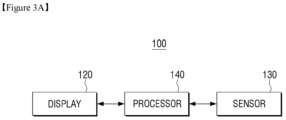
- FIG. 3A is a block diagram of a simple configuration of the electronic device 100, according to an aspect of an exemplary embodiment.
- the electronic device 100 includes a display 120, a sensor 130, and a processor 140.
- the display 120 displays image data.
- the display 120 may be realized as a flexible display.
- the display 120 may also be inserted into or taken out of a housing 110 of the electronic device 100 according to a rotation of a roll included in the housing 110 of the electronic device 100.
- a display area of the display 120 may be changed according to the rotation of the roll. In detail, if the display 120 is inserted into the housing 110 according to a rotation of the roll, the display area of the display 120 may decrease. If the display 120 is taken out of the housing 110 according to a rotation of the roll, the display area of the display 120 may increase.
- the display 120 may display a screen including at least one element under control of the processor 140.
- the display 120 may display an execution screen of an application (e.g., a web application, a camera application, a gallery application, a message application, or the like) including a plurality of contents and an icon.
- the display 120 may also display an idle screen including a plurality of widgets and a plurality of icons.
- the display 120 may display an unlock screen including a plurality of widgets and an unlock icon.
- the sensor 130 may include various types of sensors and transmit information collected respectively from the sensors to the processor 140.
- the sensor 130 may include a sensor that senses an amount of the display 120 that is acquired according to a rotation of the roll 115.
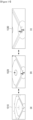
- the left housing 110-1, the display 120, and the sensor 130 are illustrated.
- the display 120 may be rolled into the left housing 110-1 or may be taken out of the left housing 110-1 .
- a taken direction of the display 120 may be a lower direction 200.
- the sensor 130 may be a light sensor and may sense a pattern 131 printed on the display 120.
- the pattern 131 may be a Quick Response (QR) code, a bar code, a black and white pattern, or a color pattern corresponding to a pixel line of the display 120.
- QR Quick Response
- a value of the pattern 131 printed on the display 120 may be changed, and the processor 140 may sense a taken amount of the display 120 according to the changed value of the pattern 131.
- the taken amount of the display 120 may be determined according to various methods.
- the taken amount of the display 120 may be determined through a motion sensor such as a gyro sensor or the like or through a rotation sensor that senses a rotation of the roll.
- the processor 140 is electrically connected to the display 120 and the sensor 130 and controls an overall operation of the electronic device 100. In detail, if a size of a display area is changed according to a rotation of the roll sensed through the sensor 130, the processor 140 may control the display 120 to change one of a size and a layout of an element included in a screen according to a size of a display area.
- the processor 140 may control the display 120 to maintain a layout to a preset threshold size and change a size of an element if the size of the display area is changed according to a rotation of the roll 115 and may change the layout if the size of the display area exceeds the preset threshold size.
- the processor 140 may control the display 120 to increase a size of at least one element included in the screen when the size of the display is smaller than or equal to a preset first size. Also, if the size of the display area exceeds the preset first size by a rotation of the roll 115, the processor 140 may control the display 120 to change the layout of the screen from a first layout to a second layout.
- the second layout may be a layout where the first layout further includes additional information, i.e., wherein the first layout is a subcomponent of the second layout.
- the processor 140 may control the display 120 to increase the sizes of the text and the photo content included in the web application screen when the size of the display area is up to a preset first size (e.g., 65 % of a maximum size). Also, if the size of the display area exceeds the preset first size by a rotation of the roll 115, the processor 140 may control the display 120 to change the layout by adding a moving image to the web application screen.
- a preset first size e.g. 65 % of a maximum size.
- the processor 140 may maintain the layout of the screen in the second layout and increase a size of at least one element included in the screen when the size of the display area is up to a preset second size (e.g., 95 % of the maximum size). Also, if the size of the display area exceeds the preset second size by a rotation of the roll 115, the processor 140 may control the display 120 to change the layout of the screen from the second layout into a third layout.
- the third layout may further include additional information in comparison with the first layout and the second layout.
- the second layout may be a subcomponent of the third layout.
- the processor 140 may control the display 120 to maintain the layout of the screen in the second layout and decrease a size of at least one element included in the screen when the size of the display area is the preset first size. Also, if the size of the display area becomes smaller than the preset first size, the processor 120 may control the display 120 to change the layout of the screen from the second layout into the first layout.
- the processor 140 may control the display 120 to change the layout or further display an existing element on the screen according to an increase in the display area based on an orientation of the electronic 100 sensed by the sensor 130.
- the processor 140 may control the display 120 to change the layout by adding a new element.
- the processor 140 may control the display 120 to further display an existing element in the increased display area.
- a layout displayed when the display area increases in the vertical direction may be different from a layout displayed when the display area increases in the horizontal direction.
- the processor 140 may control the display 120 to change the layout or further display an existing element on the screen according to an increase in the display area based on a type of application that is executed.
- a type of application that is executed.
- the processor 140 may control the display 120 to change the layout.
- a second application e.g., an e-book application or the like
- the processor 140 may control the display 120 to further display an existing element on the screen.
- the processor 140 may control the display 120 to change the layout by adding or deleting an element or by changing a location of an element based on a priority order of an element included in the screen. For example, the processor 140 may control the display 120 not to change a display location of an element having a first priority order among elements included in the screen, to change a display location of an element having a second priority order among the elements included in the screen according to a change in the size of the display area, and to add or delete an element having a third priority order among the elements included in the screen according to a change in the size of the display area.
- a priority order of the element may be determined according to types of the plurality of contents.
- a content having a first priority order may be a text content
- a content having a second priority order may be a photo content
- a content having a third priority order may be a moving image content.
- FIG. 3B is a block diagram of a detailed configuration of the electronic device 100, according to an aspect of an exemplary embodiment.
- the electronic device 100 includes a sensor 130, a processor 140, a memory 150, a driving module 160, a user input module 170, a display 120, a communication module 180, and a bus 190.
- Elements of FIG. 3B are merely an exemplary embodiment, and thus a new element may be added, and at least one element may be deleted according to exemplary embodiments.
- the processor 140 may receive instructions from other elements (e.g., the memory 150, the driving module 160, the user input module 170, the display 120, the communication module 160, etc.) through the bus 190, decipher the received instructions, and perform an operation or data processing according to the deciphered instructions.
- elements e.g., the memory 150, the driving module 160, the user input module 170, the display 120, the communication module 160, etc.
- the processor 140 may also control an overall operation of the electronic device 100.
- the processor 140 may change one of a size and a layout of an element according to a change in a display area sensed by the sensor 130.
- the processor 140 may be realized as at least one selected from a Graphic Processing Unit (GPU), a Central Processing Unit (CPU), and an application processor (AP) or as one chip.
- GPU Graphic Processing Unit
- CPU Central Processing Unit
- AP application processor
- the memory 150 may store instructions or data received from or generated by the processor 140 or other elements (e.g., the driving module 160, the user input module 170, the display 120, the communication 180, etc.).
- the memory 150 may include programming modules such as a kernel 151, middleware 152, an application programming interface (API) 153, an application 154, etc.
- API application programming interface
- Each of the above-mentioned programming modules may include software, firmware, hardware, or a combination of at least two or more of them.
- the memory 150 may be realized as various types of memories.
- the memory 150 may be realized as an internal memory or an external memory.
- the driving module 160 is a module capable of driving a rotation of the roll 115 for rolling or unrolling a display.
- the driving module 160 may automatically rotate the roll 115 according to a user instruction input through the user input module 170 or may semi-automatically rotate the roll 115 according to an external force (e.g., a pushing and pulling force) of a user input into a housing.
- the driving module 160 may also roll or unroll the display through another driving method not through a rotation of the roll 115.
- the driving module 160 may be realized as a motor or a circuit for controlling the motor, but this is merely an exemplary embodiment. Therefore, the driving module 160 may be realized as another element.
- the user input module 170 may receive an instruction or data from the user and transmit the instruction or data to the processor 140 or the memory 150 through the bus 190.
- the user input module 170 may include various types of user input units such as a touch panel, a (digital) pen sensor, a key, an ultrasonic input unit, etc.
- the display 120 may display a picture, an image, data, or the like to the user.
- the display 120 may be realized as a liquid crystal display (LCD), an active-matrix organic light-emitting diode (AM-OLED), or the like or may be realized to be flexible, transparent, or wearable.
- LCD liquid crystal display
- AM-OLED active-matrix organic light-emitting diode
- the communication module 180 may transmit a communication between another electronic device 192 and the electronic device 100 and perform communications with another electronic device 193 and a sever 194 through a network 191.
- the communication module 180 may support a preset short-range communication protocol (e.g., wireless fidelity (WiFi), Bluetooth (BT), or near field communication (NFC)), a preset network communication (e.g., Internet, a local area network (LAN), a wire area network (WAN), a telecommunication network, a cellular network, a satellite network, or a plain old telephone service (POTS), or the like).
- the electronic devices 192 and 193 may be the same as (e.g., the same type of electronic devices as) or different from (e.g., different types of electronic devices from) the electronic device 100.
- the communication module 180 may receive data about a web application by performing a communication connection to the server 194 through the network 191.
- the sensor 130 may include various types of sensors such as a gyro sensor, a gesture sensor, a grip sensor, an acceleration sensor, etc. and provide the processor 140 with information collected respectively from the gyro sensor, the gesture sensor, the grip sensor, the acceleration sensor, etc. in preset time units.
- sensors such as a gyro sensor, a gesture sensor, a grip sensor, an acceleration sensor, etc. and provide the processor 140 with information collected respectively from the gyro sensor, the gesture sensor, the grip sensor, the acceleration sensor, etc. in preset time units.
- the senor 130 may include at least one selected from a gesture sensor, a gyro sensor, a pressure sensor, a magnetic sensor, an acceleration sensor, a grip sensor, a proximity sensor, a red, green, blue (RGB) sensor, a biometric sensor, a temperature/humidity sensor, an illumination sensor, and an ultraviolet (UV) sensor.
- the sensor 130 may measure a physical quantity or sense an operation status of the electronic device 100 and convert measured or sensed information into an electric signal.
- the sensor 130 may further include a control circuit for controlling at least one or more sensors belonging to the sensor 130.
- the sensor 130 may also include various types of sensors for sensing a rotation of the roll 115.
- the bus 190 may be a circuit that connects the above-described elements to one another and transmits communication signals (e.g., control messages) between the above-described elements.
- part or module used herein may refer to a unit including one of hardware, software, and firmware or a combination of two or more of them.
- the “part” or “module” may be interchanged with the term such as a logic, a logical block, a component, a circuit, or the like.
- the “part” or “module” may be a minimum unit of components that are integrated into one body or a part of the minimum unit.
- the “module” may be a minimum unit that performs one or more functions or a part of the minimum unit.
- the “module” may be mechanically or electronically realized.
- the "module” used herein may include at least one selected from an application-specific integrated circuit (ASIC) chip, a field-programmable gate arrays (FPGAs), and a programmable-logic device that are known or will be developed and perform operations.
- ASIC application-specific integrated circuit
- FPGAs field-programmable gate arrays
- programmable-logic device that are known or will be developed and perform operations.
- FIG. 4 is a block diagram of a configuration of a programming module 310 of an electronic device, according to an aspect of an exemplary embodiment.
- the kernel 320 may include a system resource manager 321 and a device driver 323.
- the system resource manager 321 may control, allocate, or collect system resources.
- the device driver 323 may, for example, include a display driver, a camera driver, a BT driver, a shared memory driver, a universal serial bus (USB) driver, a keypad driver, a WiFi driver, or an audio driver.
- the middleware 330 may include a plurality of modules that are realized in advance to provide functions commonly required by the application 370. Also, the middleware 330 may provide a function through the API 360 so as to enable the application 370 to efficiently use limited system resources of the electronic device 100.
- a runtime library 335 may, for example, include a library module that is used by a compiler to add a new function through a programming language while the application 370 is executed.
- An application manager 341 may, for example, manage a life cycle of at least one application of the application 370.
- a window manager 342 may manage GUI resources used on a screen.
- a multimedia manager 343 may check a format required for playing various types of media files and encode or decode the media files by using a codec appropriate for the corresponding format.
- a resource manager 344 may manage resources of a source code, a memory, a storage space, or the like of at least one application of the application 370. Here, the resource manager 344 may manage sizes and layouts of elements configuring the screen.
- a power manager 345 may operate along with a basic input/output system (BIOS) or the like to manage a battery or a power source and provide power information, etc. necessary for an operation.
- BIOS basic input/output system
- a security manager 352 may provide all security functions necessary for a system security, a user authentication, or the like.
- the middleware 330 may further include a telephone manager (not shown) that manages a voice or video call function of the electronic device.
- a user interface (UI) conversion manager 353 converts a UI according to a particular event.
- the UI conversion manager 353 may change a layout of the UI according to a change in a size of a display.
- the UI conversion manager 353 may change the layout in an application that is executed, change the layout by converting the application (e.g., a mobile application), which is executed, into another application (e.g., a tablet application), and change the layout by changing an OS. If the electronic device 100 executes a web application through the sever 194, the UI conversion manager 353 may operate along with the server 194 to change a layout of the web application.
- the application e.g., a mobile application
- another application e.g., a tablet application
- the middleware 330 may dynamically delete existing elements or add new elements. Therefore, some of elements described herein may be omitted, other elements may further included, or the elements may be replaced with elements having different names and performing similar functions.
- the API 360 may be provided as a set of API programming functions, i.e., as different elements according to OSs. For example, if Android or iOS is used, one API set may be provided according to each platform. If Tizen is used, two or more API sets may be provided.
- the application 370 may, for example, include a preloaded application or a third party application.
- the application 370 may include one or more application modules including a home module 371 for providing a home screen or home function, a dialer module 372 for providing voice telephone calls, an SMS/MMS module 373 for provided SMS/MMS messaging capability, an IM module 374 for providing instant or direct messaging, a browser module 375 for providing internet browsing capability, a camera module 376 for providing picture photography capabilities, an alarm module 377 for providing an alarm clock or other alarm functions, a contact module 378 for providing a contact list or database of contacts, a voice dial module 379 for providing the ability to utilize the telephone functionality of the dialer module 372 using voice commands or the like, an email module 380 for providing email functionality, a calendar module 381 for providing a user-friendly calendar listing appointments and events corresponding to particular dates, a media player module 382 for playback of various file types, an album module 383 for storing and organizing photograph pictures and the like, and a clock module 384 for
- At least a part of the programming module 310 may be realized as an instruction that is stored on a computer-readable storage medium. If the instruction is executed by one or more processors (e.g., the processor 140), the one or more processors may perform a function corresponding to the instruction.
- the computer-readable storage medium may, for example, be the memory 150.
- At least a part of the programming module 310 may, for example, be implemented (e.g., executed) by the processor 140.
- At least the part of the programming module 310 may include modules, programs, routines, sets of instructions, and/or processes for performing at least one function.
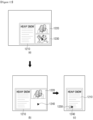
- FIG. 5 illustrates a method of providing a screen by using the electronic device 100 if a display area increases according to a rotation of the roll 115, according to an aspect of an unclaimed, exemplary embodiment
- the screen shown in drawing (a) of FIG. 5 may have an area of 40 % of a whole screen size.
- the processor 140 may control the display 120 to display the photo content 510 on an upper left side of the screen, the hyperlink list 520 on an upper right side of the screen, and the text 530 on a lower part of the screen.
- a layout where the photo content 510 is displayed on the upper left side of the screen, the hyperlink list 520 is displayed on the upper right side of the screen, and the text 530 is displayed on the lower part of the screen may be a first layout of the web application.
- the processor 140 may control the display 120 to maintain the first layout and increase sizes of the plurality of elements 510, 520, and 530 as shown in drawing (b) of FIG. 5 .
- the processor 140 may control the display 120 to increase the sizes of the plurality of elements 510, 520, and 530 in proportion to the display area that increases according to the rotation of the roll 115. For example, if a size of the display area increases from 40 % of a maximum size screen to 50 % of the maximum size screen, the processor 140 may control the display 120 to increase the sizes of the elements 510, 520, and 530 by a factor of 1.2.
- the processor 140 may also control the display 120 to display the screen in a whole area of the display area without maintaining a picture ratio. In other words, if a vertical length of the display area is kept, and a horizontal length of the display area increases, the processor 140 may change the picture ratio into a ratio of the increased horizontal length and increase the sizes of the elements 510, 520, and 530.
- the processor 140 may control the display 120 to increase the sizes of some elements without increasing the sizes of all of elements displayed in the display area. For example, when the display area increases, the processor 140 may control the display 120 to maintain the sizes of the menus displayed on a side of the screen and to increase the sizes of the contents displayed in a center of the screen.
- the processor 140 may control the display 120 to change and display the layout of the web application as shown in drawing (c) of FIG. 5 .
- the processor 140 may control the display 120 to display the photo content 510 on the upper left side of the screen, display the hyperlink list 520 on an upper center of the screen, and move and display the text 530 displayed on the lower part of the screen to an upper right side of the screen.
- the processor 140 may also control the display 120 to display a content list 540 as a new element in a middle part of the screen and to display a system control box 550 as a new element on a lower part of the screen.
- the processor 140 may control the display 120 to maintain the layout of the screen in the second layout and to increase the sizes of at least one of elements 510, 520, 530, 540, and 550 included in the screen when the size of the display area is a preset second size.
- the processor 140 may control the display 120 to increase the sizes of the plurality of elements 510, 520, 530, 540, and 550 in proportion to the display area that increases according to a rotation of the roll 115. For example, if the size of the display area increases from 60 % of the maximum size screen to 90 % of the maximum size screen, the processor 140 may control the display 120 to increase the sizes of the elements 510, 520, 530, 540, and 550 by a factor of 1.5. The processor 140 may also control the display 120 to display the screen in a whole area of the display area without maintaining the picture ratio.
- FIG. 6 illustrates a method of providing a screen by using the electronic device 100 if a display area decreases according to a rotation of the roll 115, according to an aspect of an exemplary embodiment.
- the processor 140 controls the display 120 to display a screen including a plurality of elements 610, 620, 630, 640, and 650.
- the processor 140 may control the display 120 to display an execution screen of a web application including a photo content 610, a hyperlink list 620, a text 630, a content list 640, and a system control box 650.
- the screen shown in drawing (a) of FIG. 6 may have an area of 80 % of a whole screen size.
- the processor 140 may control the display 120 to display the photo content 610 on an upper left side, the hyperlink list 620 on an upper center, the text 630 on an upper right side, the content list 640 in a middle part, and the system control box 550 on a lower part.
- a layout of the web application shown in drawing (a) of FIG. 6 may be a second layout of the web application.
- the processor 140 controls the display 120 to maintain the second layout and decrease the sizes of the plurality of elements 610, 620, 630, 640, and 650 as shown in drawing (b) of FIG. 6 .
- the processor 140 may control the display 120 to decrease the sizes of the plurality of elements 610, 620, 630, 640, and 650 in proportion to the display area that decreases according to the rotation of the roll 115. For example, if the size of the display area decreases from 80 % of the maximum size screen to 60 % of the maximum size screen, the processor 140 may control the display 120 to decrease the sizes of the elements 610, 620, 630, 640, and 650 by 25 %.
- the processor 140 may also control the display 120 to display the screen in a whole area of the display area without maintaining a picture ratio. In other words, a vertical length of the display area is kept, and a horizontal length of the display area decreases, the processor 140 may change the picture ratio into a ratio of the decreased horizontal length and decrease the sizes of the elements 610, 620, 630, 640, and 650.
- the processor 140 may also control the display 120 to decrease the sizes of some elements without decreasing all of elements displayed in the display area. For example, when the display area decreases, the processor 140 may control the display 120 to maintain sizes of contents displayed in a center of the screen and decrease sizes of menus displayed on a side of the screen.
- the processor 140 controls the display 120 to change a layout.
- the processor 140 may control the display 120 to display the photo content 610 on the upper left side of the screen, display the hyperlink list 620 on the upper right side of the screen, and move the text 630 displayed on the upper right side of the screen to the lower part of the screen.
- the processor 140 may also control the display 120 to remove the content list 640 and the system control box 650 from the screen.
- the processor 140 changes the layout by, according to an unclaimed embodiment, changing a location of an existing element or , according to the claimed embodiments, deleting the existing element.
- a priority order of the existing element determines a location of the existing element and whether the existing element is changed.
- a change in a layout has been described as a change in a location of an existing element or a deletion of the existing element.
- this is merely an exemplary embodiment, and, according to unclaimed embodiments, the layout may be changed by adding a new element.
- the added new element may include some of contents of the existing element.
- the electronic device 100 may display a screen in a first layout when a size of a display area is a preset first size (e.g., 60 % of a maximum screen size), display the screen in a second layout when the size of the display area is between the preset first size and a preset second size (e.g., 95 % of the maximum screen size), and display the screen in a third layout if the size of the display area exceeds the preset second size.
- a preset first size e.g. 60 % of a maximum screen size
- a preset second size e.g., 95 % of the maximum screen size
- the electronic device 100 may operate in a first mode (e.g., a phone mode). Also, if the electronic device 100 displays the screen in the second layout, the electronic device 100 may operate in a second mode (e.g., a note mode). If the electronic device 100 displays the screen in the third layout, the electronic device 100 may operate in a third mode (e.g., a tablet mode).
- a first mode e.g., a phone mode
- a second mode e.g., a note mode
- a third mode e.g., a tablet mode
- a display area increases or decreases according to a rolling interaction or an unrolling interaction
- sizes of elements included in the display area may be changed without changing a layout.
- an electronic device has been described as operating in three types of modes. However, this is merely an exemplary embodiment, and the electronic device may operate in a plurality of modes besides the three types of modes. For example, the electronic device 100 may operate in first through third modes and in a fourth mode (e.g., in a TV mode).
- the processor 140 may control the driving module 160 to fix the size of the display area to one of the preset first size and the preset second size.
- the processor 140 may control the driving module 160 so as to enable the size of the display area to return to the preset first size without fixing the size of the display area to a size of the display area at a moment when the user releases the right housing.
- the processor 140 may adjust the size of the display area so as to maintain an optimum picture ratio in each mode.
- the processor 140 may control the display 120 to further display an existing element while maintaining the layout and a size of an element. For example, if the display area increases while an e-book application is executed, the processor 140 may control the display 120 to display a text having 10 lines on 15 lines with maintaining the layout and the size of the element to the size before the preset size.
- a layout of an application or a size of an element of the application has been described as being changed according to a change in a display area while a web application is executed.
- this is merely an exemplary embodiment, and a layout of another application or a size of an element of the another application may be changed according to a change in the display area.
- the processor 140 may control the display 120 to display information (e.g., a name, a phone number, etc.) about the party requesting the phone call and a phone call acceptance and/or rejection icon in the display area.
- information e.g., a name, a phone number, etc.
- the processor 140 may control the display 120 to further display the information about the party requesting the phone call, the phone call acceptance and/or rejection icon, and a phone call setting icon (e.g., a video call change icon, a record icon, a speaker icon, etc.) in the display area.
- a phone call setting icon e.g., a video call change icon, a record icon, a speaker icon, etc.
- the processor 140 may control the display 120 to further display the information about the party requesting the phone call, the phone call acceptance and/or rejection icon, the phone call setting icon (e.g., the video call change icon, the record icon, the speaker icon, etc.), and an address book list in the display area.
- the phone call setting icon e.g., the video call change icon, the record icon, the speaker icon, etc.
- the processor 140 may control the display 120 to display a live-view image and a capture icon in the display area. Also, if the size of the element increases and then the mode of the electronic device 100 is changed into a second mode according to the increase in the display area caused by the rotation of the roll 115, the processor 140 may control the display 120 to further display the live-view image, the capture icon, and a capture setting icon (e.g., a brightness control icon, a flash operate icon, a background setting icon, etc.) in the display area.
- a capture setting icon e.g., a brightness control icon, a flash operate icon, a background setting icon, etc.
- the processor 140 may control the display 120 to further display the live-view image, the capture icon, the capture setting icon, and a list including previously captured images in the display area.
- the processor 140 may control the display 120 to add and display various types of elements as the display area increases while various types of applications are executed.
- FIG. 7 illustrates removing of an element from a screen if a display area decreases, according to another aspect of an exemplary embodiment.
- the processor 140 controls the display 120 to display a screen including a plurality of elements 510, 520, 530, 540, and 550.
- the processor 140 may control the display 120 to display an execution screen of a web application including a photo content 510, a hyperlink list 520, a text 530, a content list 540, and a system control box 550.
- the screen shown in drawing (a) of FIG. 7 may have an area of 80 % of a whole screen size.
- the processor 140 may control the display 120 to display the photo content 510 on an upper left side of the screen, the hyperlink list 520 on an upper center of the screen, the content list 540 on a middle part of the screen, and the system control box 550 on a lower part of the screen.
- a layout of a web application shown in drawing (a) of FIG. 7 may be a second layout of the web application.
- a removed element is determined according a priority order or , according to unclaimed embodiments, a location thereof.
- the removed element may be an element having a low priority order or may be an element located on a side of the screen.
- the processor 140 may also control the display 120 so as to enable the removed element to gradually disappear according to the display area that decreases.
- the processor 140 may control the display 120 to maintain sizes of the elements 510, 520, 540, and 550 although the display area decreases. For example, when the size of the display area decreases from 80 % of a maximum size screen to 60 % of the maximum size screen, the processor 140 may control the display 120 to maintain the sizes of the other elements 510, 520, 540, and 550.
- the processor 140 may control the display 120 to decrease the sizes of some elements without maintaining the sizes of all of the other elements displayed in the display area. For example, when the display area decreases, the processor 140 may control the display 120 to maintain the sizes of contents displayed in a center of the screen and to decrease the sizes of menus displayed on a side of the screen.
- the processor 140 may also control the display 120 to maintain locations of other elements displayed in the display area.
- the processor 140 may control the display 120 to change and display a layout by changing the locations of the other elements. As shown in drawing (b) of FIG. 7 , the processor 140 may control the display 120 to display the photo content 510 on the upper left side of the screen, display the hyperlink list 520 on the upper right side of the screen, and re-display the text 530, which is removed, on the lower part of the screen. Also, the processor 140 may control the display 120 to remove the content list 540 and the system control box 550, which are displayed, from the screen.
- a preset first size e.g. 60 % of the maximum screen size
- the processor 140 decreases the sizes of elements included in the screen to the preset first size.
- the processor 140 may control the display 120 to remove at least one from a plurality of elements included in the screen and display the other elements.
- FIG. 8 illustrates a method of displaying a screen according to a change in a display area when an unrolling interaction is continuously input, according to an aspect of an exemplary embodiment.
- the processor 140 may control the display 120 to display a screen including a plurality of elements 810 and 820.
- the processor 140 may control the display 120 to display an execution screen of a web application including a photo content 810 and a text 820.
- the screen shown in drawing (a) of FIG. 8 may have an area of 40 % of a whole screen size.
- the processor 140 may control the display 120 to display the photo content 810 on an upper part of the screen and the text 820 on a lower part of the screen.
- a layout where the photo content 810 is displayed on the upper part of the screen, and the text 820 is displayed on the lower part of the screen may be a first layout of the web application.
- the processor 140 may control the display 120 to maintain the first layout and increase sizes of the plurality of elements 810 and 820 as shown in drawing (b) of FIG. 8 .
- the processor 140 may control the display 120 to increase the sizes of the plurality of elements 810 and 820 in proportion to the display area that increases according to the rotation of the roll 115. For example, if a size of the display area increases from 40 % of a maximum size screen to 50 % of the maximum size screen, the processor 140 may control the display 120 to increase the sizes of the elements 810 and 820 by a factor of 1.2.
- the processor 140 may control the display 120 to display the screen in a whole area of the display area without maintaining a picture ratio. In other words, if a vertical length of the display area is kept, and only a horizontal length of the display area increases, the processor 140 may change the picture ratio into a ratio of the increased horizontal length and increase the sizes of the elements 810 and 820.
- the processor 140 may control the display 120 to change and display the layout of the web application as shown in drawing (c) of FIG. 8 .
- the processor 140 may control the display 120 to display the photo content 810 on an upper left side of the screen, and move the text 820, which is displayed on the lower part of the screen, to an upper right side of the screen and display the text 820 on the upper right side of the screen.
- the processor 140 may control the display 120 to display a content list 830 as a new element in a middle part of the screen and a system control box 840 as a new element on the lower part of the screen.
- the processor 140 may change the layout by changing a location of an existing element or adding a new element. Also, if the display area continuously increases by a rotation of the roll 115 after the layout of the screen is changed into a second layout, the processor 140 may control the display 120 to maintain the layout of the screen in the second layout and increase sizes of at least one elements 810, 820, 830, and 840 included in the screen.
- a size into which an image is changed may be additionally preset between particular sizes, and when the image has a predefined size, a layout of the image may be changed.
- FIG. 9 illustrates determining whether a layout of an execution screen of an application is changed according to an orientation of the electronic device 100, according to an aspect of an exemplary embodiment.
- the processor 140 may control the display 120 to display a screen including a plurality of elements 910 and 920.
- the processor 140 may control the display 120 to display an execution screen of a web application including a photo content 910 and a text 920.
- the screen shown in drawing (a) of FIG. 9 may have an area of 40 % of a whole screen size.
- the processor 140 may control the display 120 to display the photo content 910 on an upper part of the screen and the text 920 on a lower part of the screen.
- a layout where the photo content 910 is displayed on the upper part of the screen, and the text 920 is displayed on the lower part of the screen may be a first layout of the web application.
- the processor 140 may sense an orientation of the electronic device 100 through the sensor 130.
- the processor 140 may determine a mode of the electronic device 100 as a horizontal mode (e.g., a landscape mode) or a vertical mode (e.g., a portrait mode) according to the orientation of the electronic device 100.
- the processor 140 may control the display 120 to change the layout into a new layout by adding a content list 930 as a new element as shown in drawing (b) of FIG. 9 .
- the processor 140 may change the layout of the web application from the first layout into a second layout.
- the processor 140 may control the display 120 to maintain the layout of the screen and display more contents of the text 920 that is an existing element. In other words, if the text 920 is displayed on 7 lines as shown in drawing (a) of FIG. 9 , the processor 140 may control the display 120 to display the text 920 on 12 lines as shown in drawing (c) of FIG. 9 .
- the processor 140 may determine whether the layout is changed according to the orientation of the electronic device 100.
- the change in the layout is determined according to the orientation of the electronic device 100.
- this is merely an exemplary embodiment, and a method of changing the layout may be changed according to the orientation of the electronic device 100.
- the processor 140 may control the display 120 to change the layout of the screen from the first layout into the second layout. Also, if the size of the display area exceeds the preset first size by the rotation of the roll 115 that is performed according to the unrolling interaction of the user while maintaining the vertical mode, the processor 140 may control the display 120 to change the layout of the screen from the first layout into a third layout.
- FIG. 10 illustrates determining whether a layout of an execution screen of an application is changed according to a type of executed content, according to an aspect of an exemplary embodiment.
- the processor 140 may control the display 120 to display a screen including one element 1010.
- the processor 140 may control the display 120 to display an execution screen of an e-book application including a text 1010.
- the processor 140 may control the display 120 to display more contents of the text 1010, which is an existing element, than existing contents of the text 1010 as shown in drawing (b) of FIG. 10 .
- the processor 140 may control the display 120 to maintain the layout and display more contents of an existing element.
- the processor 140 may control the display 120 to display a screen including a plurality of elements 1020 and 1030.
- the processor 140 may control the display 120 to display an execution screen of a web application including a photo content 1020 and a text 1030.
- the processor 140 may control the display 120 to change a location of the text 1030 as an existing element, and to add and display a content list 1040 as a new element as shown in drawing (d) of FIG. 10 .
- the processor 120 may determine whether the layout is changed according to a type of an application that is currently being executed.
- an e-book application is described as an application of which layout is not changed.
- a layout of another application e.g., a moving image application, a gallery application, or the like
- providing one content may also not be changed.
- a web application is described as an application of which layout is changed.
- a layout of another application e.g., a camera application, a phone application, or the like
- a change in a layout is determined according to a type of an application that is currently being executed.
- this is merely an exemplary embodiment, and a method of changing the layout may be changed according to a type of an executed application.
- a change in a layout and a method of changing the layout are changed according to a type of an application that is currently executed.
- this is merely an exemplary embodiment, and the change in the layout and the method of changing the layout may be changed according to a currently displayed content type.
- FIG. 11 illustrates a method of changing a layout according to priority orders of elements, according to an aspect of an exemplary embodiment.
- the processor 140 may control the display 120 to display a screen including a plurality of elements 1110, 1120, 1130, and 1140.
- the processor 140 may control the display 120 to display an application execution screen including a system bar 1110, an application bar 1120, a content area 1130, and a side navigation area 1140.
- the screen shown in drawing (a) of FIG. 11 may have an area of 90 % of a whole screen size.
- the processor 140 may control the display 120 to display the system bar 1110 and the application bar 1120 on an upper part of the screen, the content area 1130 on a lower right side of the screen, and the side navigation area 1140 on a lower left side.
- a layout shown in drawing (a) of FIG. 11 may be referred to as a first layout of a web application.
- the processor 140 may control the display 120 to maintain the first layout and decrease sizes of the plurality of elements 1110, 1120, 1130, and 1140 as shown in drawing (b) of FIG. 11 .
- the processor 140 may control the display 120 to decrease the sizes of the plurality of elements 1110, 1120, 1130, and 1140 in proportion to the display area that decreases according to the rotation of the roll 115. For example, if a size of the display area decreases from 90 % of a maximum size screen to 70 % of the maximum size screen, the processor 140 may control the display 120 to decrease the sizes of the elements 1110, 1120, 1130, and 1140 by 22.2 %.
- the processor 140 may also control the display 120 to display the screen in a whole area of the display area without maintaining a picture ratio. In other words, if a vertical length of the display area is kept, and a horizontal length of the display area decreases, the processor 140 may change the picture ratio into a ratio of the decreased horizontal length and increase the sizes of the elements 1110, 1120, 1130, and 1140.
- the processor 140 may adjust a method of decreasing the size of an element displayed in the display area according to a priority order thereof.
- the system bar 1110 or the application bar 1120 having a high priority order may decrease so as to decrease display intervals between icons displayed in the system bar 1110 or the application bar 1120.
- the side navigation area 1140 having a low priority order may decrease so as to decrease the number of icons included in the side navigation area 1140.
- the processor 140 may control the display 120 to change and display the layout.
- the processor 140 may control the display 120 to maintain locations of the system bar 1110, the application bar 1120, and the content area 1130 or decrease the sizes of the system bar 1110, the application bar 1120, and the content area 1130 and to make the side navigation area 1140 displayed on the lower left side of the screen into an icon and to display the side navigation area 1140 in the application bar 1120.
- the processor 140 may change the layout according to the priority orders of the elements on the screen.
- a display location of the system bar 1110 having a first priority order may be kept all the time. Also, when a size of the system bar 1110 decreases, display intervals of icons included in the system bar 1110 may decrease.
- a display location of the application bar 1120 having a second priority order may be kept all the time, but an amount of contents included in the application bar 1120 may be changed according to a size of the application bar 1120.
- content title information may be included in the application bar 1120 in the first layout, but content titles and content detailed information may be included in the application bar 1120 in the second layout.
- more icons may be included in the application bar 1120 having the second layout than the application bar 1120 having the first layout.
- the application bar 1120 having the first layout may provide one depth menu, where the application bar 1120 having the second layout may simultaneously provide several depth menus.
- the content area 1130 having a third priority order may be enlarged or reduced contents according to a change in the display area. If a content includes a plurality of pages, several pages may be displayed on one screen with an increase in the size of the screen, where only some of the pages may be displayed on the screen with a decrease in the size of the screen. Also, if the content area 1130 includes a content list including thumbnails of a plurality of contents, the number of thumbnails included in the content list may be adjusted according to a size of the screen. A location of the content area 1130 may be changed according to the size of the display area.
- the side navigation area 1140 having a fourth priority order may not be displayed on the screen according to a layout.
- the side navigation area 1140 may not be displayed on the screen but may be displayed as an additional icon form on the screen. In other words, if an icon is selected, the side navigation area 1140 may be displayed. If the display area is large, the side navigation area 1140 may be displayed on a side of the screen.
- a screen includes a main content, a sub content, and icons
- the main content may be an element having a first priority order
- the sub content may be an element having a second priority order
- the icons may be elements having a third priority order.
- a layout decreases, a size of the main content that is the element having the first priority order may decrease but a location of the main content may be kept all the time.
- the sub content that is the element having the second priority order may be displayed in a particular area in a layout including a large display area but may be displayed according to a user selection in a layout including a small display area.
- the number and locations of icons that are the element having the third priority order may be changed according to the layout.
- FIG. 12 illustrates a method of changing a layout according to priority orders of elements, according to another aspect of an exemplary embodiment.
- the elements may include a plurality of contents.
- the processor 140 may control the display 120 to display a screen including a plurality of elements 1210, 1220, and 1230.
- the processor 140 may control the display 120 to display an application execution screen including an article content 1210 having a text form, an image content 1220, and a moving image content 1230.
- a layout of drawings (a)-(c) of FIG. 12 may be referred to as a first layout of an application screen.
- the processor 140 may control the display 120 to decrease sizes of the article 1210 and the image content 1220, to change the moving image content 1230 into a moving image icon 1240, and to display the moving image icon 1240 as shown in drawing (b) of FIG. 12 .
- the processor 140 may control the display 120 to decrease the size of the article content 1210, and to move and display an image icon 1250 corresponding to the image content 1220 and the moving image icon 1240 corresponding to the moving image content 1230 into the article content 1210 as shown in drawing (c) of FIG. 12 .
- the processor 140 may not change a display location of the article content 1210 having a first priority order among elements included in the screen, reduce and provide the image content 1220 having a second priority order among the elements included in the screen to an icon merely in the third layout, reduce and provide the moving image content 1230 having a third priority order to an icon from the second layout, and may omit the moving image content 1230.
- FIG. 13 illustrates a method of changing a layout according to priority orders of elements, according to an aspect of an exemplary embodiment.
- the processor 140 may control the display 120 to display a screen including a plurality of elements 1310, 1320, 1330, 1340, and 1350.
- the processor 140 may control the display 120 to display an application execution screen including a system bar 1310, an application bar 1320, a content area 1340, a first side navigation area 1330, and a second side navigation area 1350.
- system bar 1310, the application bar 1320, and the content area 1340 may be elements having first priority orders
- first side navigation area 1330 may be an element having a second priority order
- second side navigation area 1350 may be an element having a third priority order.
- the processor 140 may control the display 120 to change and display a layout of an application screen as shown in drawing (b) of FIG. 13 .
- display locations of the system bar 1310, the application bar 1320, and the content area 1340 having the first priority orders among the elements included in the screen may not be changed.
- a display area of the first side navigation area 1330 having the second priority order among the elements included in the screen may be changed according to a change in the size of the display area.
- the second side navigation area 1350 having the third priority order among the elements included in the screen may be deleted according to the change in the size of the display area.
- locations, sizes, and existences of elements included in a screen may be determined by using different methods when changing a layout according to priority orders of the elements.
- FIG. 14 is a flowchart of a method of controlling an electronic device, according to an aspect of ar unclaimed, exemplary embodiment.
- the electronic device 100 may include a rollable display as described with reference to FIGS. 1 through 4 .
- the electronic device 100 senses a change in a size of a display area according to a rotation of the roll 115.
- the electronic device 100 may change one of a size and a layout of an element included in a screen according to the changed size.
- the electronic device 100 may increase a size of at least one element included in the screen when the size of the display area is a preset first size. If the size of the display area exceeds the preset first size, the electronic device 100 may change a layout of the screen from a first layout into a second layout. Also, if the display area decreases by the rotation of the roll 115 after the layout of the screen is changed into the second layout, the electronic device 100 may maintain the layout of the screen in the second layout and decrease a size of at least one element included in the screen when the size of the display area is the preset first size.
- the electronic device 100 may change the layout of the screen from the second layout to a first layout.
- the second layout may be a layout where an element is added to the first layout, i.e., wherein the first layout is a subcomponent of the second layout.
- an electronic device including a rollable display may adjust or change a size of an element according to a change in a display area so as to enable a user to view an optimum screen according to the changed size of the display area.
- FIG. 15 illustrates providing zoom-in and/or zoom-out functions according to an extension of a display area, according to another aspect of an unclaimed, exemplary embodiment
- the processor 140 may provide zoom-in and/or zoom-out functions according to a change in the display area. In detail, if the display area increases according to an unrolling interaction, the processor 140 may provide the zoom-in function of zooming in an image displayed in the display area. Also, if the display area decreases according to a rolling interaction, the processor 140 may provide the zoom-out function of zooming out the image displayed in the display area.
- the processor 140 may control the display 120 to display a first image 1510.
- the processor 140 may control the display 120 to display a second image 1520 of which magnification is enlarged more than the first image 1510.
- the processor 140 may control the display 120 to display a third image 1530 of which magnification is enlarged more than the second image 1520.
- the second image 1520 may be an image that is formed by cropping, enlarging, and zooming in an area of the first image 1510
- the third image 1530 may be an image that is formed by cropping, enlarging, and zooming in an area of the second image 1520.
- the processor 140 may crop an original image at the picture ratio of 16:9 and provide the cropped image. Also, the processor 140 may determine an area, which is to be cropped, based on at least one selected from a center of the image, a location selected by a user, and an important area determined through an image analysis.
- the processor 140 may provide a guide user interface (UI) that displays which part of the enlarged image the original image corresponds to.
- UI guide user interface
- the processor 140 may change an area of the original image that is enlarged and provided according to an input user instruction by using the guide UI. In other words, if the processor 140 drags and move the guide UI into a new area, the processor 140 may perform the zoom-in function of enlarging the new area.
- the processor 140 may operate along with a change in the displayed display area to provide an optical zoom function of controlling a barrel of a camera to move.
- the optical zoom function may be provided.
- An apparatus e.g., modules or the electronic device 100
- a method e.g., operations
- at least one computer e.g., the processor 140
- the at least one computer may perform functions corresponding to the instructions.
- the computer-readable medium may, for example, be the memory 150.
- the storage medium may be included in an external device (e.g., a cloud, a server, or another electronic device) located outside the electronic device 100.
- the program may be divided and then stored on a plurality of storage media.
- at least some of the plurality of storage medium may be located outside the electronic device 100.
- the instructions may include machine language codes that are made by a compiler and high-level language codes that may be executed by a computer by using an interpreter or the like.
- the above-described hardware device may be configured to operate as one or more software modules so as to perform operations of various exemplary embodiments, and an opposite case is the same.
Landscapes
- Engineering & Computer Science (AREA)
- Theoretical Computer Science (AREA)
- General Engineering & Computer Science (AREA)
- Physics & Mathematics (AREA)
- General Physics & Mathematics (AREA)
- Human Computer Interaction (AREA)
- Computer Hardware Design (AREA)
- Mathematical Physics (AREA)
- User Interface Of Digital Computer (AREA)
- Controls And Circuits For Display Device (AREA)
Claims (8)
- Elektronische Vorrichtung (110), umfassend:ein Gehäuse (110);eine Rolle (115), die zumindest teilweise in dem Gehäuse (110) enthalten ist;eine Anzeige (120), die konfiguriert ist, um auf der Rolle (115) aufgerollt zu werden, wobei die Anzeige (120) einen Anzeigebereich mit einer Größe umfasst, die sich entsprechend einer Drehung der Rolle (115) ändert;einen Sensor (130), der so konfiguriert ist, dass er die Größe des Anzeigebereichs erfasst; undeinen Prozessor (140), der elektrisch mit der Anzeige (120) und dem Sensor (130) verbunden ist,wobei der Prozessor (140) ferner konfiguriert ist zumSteuern der Anzeige (120), um eine Vielzahl von Elementen (810, 820) auf einem Bildschirm anzuzeigen, wobei jedes der Vielzahl von Elementen (810, 820) einen oder mehrere Inhalte unterschiedlicher Typen beinhaltet und eine Prioritätsreihenfolge aufweist, die basierend auf den Typen des enthaltenen einen oder der enthaltenen mehreren Inhalte unterschiedlicher Typen bestimmt wird;basierend darauf, dass sich die Größe des Anzeigebereichs durch die Drehung der Rolle (115) verringert, wenn die Größe des Anzeigebereichs gleich oder größer als eine voreingestellte Größe ist, Steuern der Anzeige (120), um eine Größe der Vielzahl von Elementen (810, 820) auf dem Bildschirm basierend auf der Größe des Anzeigebereichs zu verringern, undbasierend darauf, dass die Größe des Anzeigebereichs kleiner als die voreingestellte Größe ist, Steuern der Anzeige (120), um eine Teilmenge der Vielzahl von Elementen (810, 820) basierend auf der Prioritätsreihenfolge zu entfernen.
- Vorrichtung nach Anspruch 1, wobei der Prozessor (140) konfiguriert ist, um basierend darauf, dass sich die Größe des Anzeigebereichs durch die Drehung der Rolle (115) verringert, wenn die Größe des Anzeigebereichs gleich oder größer als eine voreingestellte Größe ist, die Anzeige (120) zu steuern, um die Vielzahl von Elementen (810, 820) nach dem Ändern der Größe der Vielzahl von Elementen (810, 820) anzuzeigen, während relative Positionen und die Anzahl der Vielzahl von Elementen (810, 820) beibehalten werden.
- Vorrichtung nach Anspruch 1, wobei der Prozessor (140) konfiguriert ist, um basierend darauf, dass die Größe des Anzeigebereichs kleiner als die voreingestellte Größe ist, die Anzeige (120) zu steuern, um mindestens eines der Vielzahl von Elementen (810, 820) zu entfernen, während die Größe der anderen der Vielzahl von Elementen (810, 820) beibehalten wird.
- Vorrichtung nach Anspruch 1, wobei der Prozessor (140) konfiguriert ist, um basierend darauf, dass die Größe des Anzeigebereichs kleiner als die voreingestellte Größe ist, die Anzeige (120) zu steuern, um die anderen der Vielzahl von Elementen (810, 820) anzuzeigen, nachdem mindestens eines der Vielzahl von Elementen (810, 820) entfernt wurde und Positionen der verbleibenden Elemente aus der Vielzahl von Elementen (810, 820) geändert wurden.
- Verfahren zum Steuern einer elektronischen Vorrichtung (110), die ein Gehäuse (110), eine Rolle (115), die zumindest teilweise in dem Gehäuse (110) enthalten ist, und eine Anzeige (120) umfasst, die konfiguriert ist, um auf der Rolle (115) aufgerollt zu werden, wobei die Anzeige (120) einen Anzeigebereich mit einer Größe umfasst, die sich entsprechend einer Drehung der Rolle (115) ändert, wobei das Verfahren Folgendes umfasst:Erfassen der Änderung der Größe des Anzeigebereichs entsprechend der Drehung der Rolle (115);Anzeigen einer Vielzahl von Elementen (810, 820) auf einem Bildschirm, wobei jedes der Vielzahl von Elementen (810, 820) einen oder mehrere Inhalte unterschiedlicher Typen beinhaltet und eine Prioritätsreihenfolge aufweist, die basierend auf den Typen des enthaltenen einen oder der enthaltenen mehreren Inhalte unterschiedlicher Typen bestimmt wird;basierend darauf, dass sich die Größe des Anzeigebereichs durch die Drehung der Rolle (115) verringert, wenn die Größe des Anzeigebereichs gleich oder größer als eine voreingestellte Größe ist, Verringern einer Größe der Vielzahl von Elementen (810, 820) auf dem Bildschirm basierend auf der Größe des Anzeigebereichs; undbasierend darauf, dass die Größe des Anzeigebereichs kleiner als die voreingestellte Größe ist, Entfernen einer Teilmenge der Vielzahl von Elementen (810, 820) basierend auf der Prioritätsreihenfolge.
- Verfahren nach Anspruch 5, wobei das Verringern basierend darauf, dass sich die Größe des Anzeigebereichs durch die Drehung der Rolle (115) verringert, wenn die Größe des Anzeigebereichs gleich oder größer als eine voreingestellte Größe ist, Steuern der Anzeige (120) umfasst, um die Vielzahl von Elementen (810, 820) nach dem Ändern der Größe der Vielzahl von Elementen (810, 820) anzuzeigen, während relative Positionen und die Anzahl der Vielzahl von Elementen (810, 820) beibehalten werden.
- Verfahren nach Anspruch 5, wobei das Entfernen basierend darauf, dass die Größe des Anzeigebereichs kleiner als die voreingestellte Größe ist, Steuern der Anzeige (120) umfasst, um mindestens eines der Vielzahl von Elementen (810, 820) zu entfernen, während die Größe der anderen der Vielzahl von Elementen (810, 820) beibehalten wird.
- Verfahren nach Anspruch 5, wobei das Entfernen basierend darauf, dass die Größe des Anzeigebereichs kleiner als die voreingestellte Größe ist, Steuern der Anzeige (120) umfasst, um die Vielzahl von Elementen (810, 820) anzuzeigen, nachdem mindestens eines der Vielzahl von Elementen (810, 820) entfernt wurde und Positionen der verbleibenden Elemente aus der Vielzahl von Elementen (810, 820) geändert wurden.
Applications Claiming Priority (4)
| Application Number | Priority Date | Filing Date | Title |
|---|---|---|---|
| US201562256889P | 2015-11-18 | 2015-11-18 | |
| KR1020160011446A KR102387115B1 (ko) | 2015-11-18 | 2016-01-29 | 전자 장치 및 이의 제어 방법 |
| EP16866604.8A EP3350673B1 (de) | 2015-11-18 | 2016-11-09 | Elektronische vorrichtung mit rollfähiger anzeige und verfahren zur steuerung davon |
| PCT/KR2016/012854 WO2017086652A1 (en) | 2015-11-18 | 2016-11-09 | Electronic device having rollable display and method of controlling the same |
Related Parent Applications (1)
| Application Number | Title | Priority Date | Filing Date |
|---|---|---|---|
| EP16866604.8A Division EP3350673B1 (de) | 2015-11-18 | 2016-11-09 | Elektronische vorrichtung mit rollfähiger anzeige und verfahren zur steuerung davon |
Publications (3)
| Publication Number | Publication Date |
|---|---|
| EP4057121A1 EP4057121A1 (de) | 2022-09-14 |
| EP4057121B1 true EP4057121B1 (de) | 2025-01-29 |
| EP4057121C0 EP4057121C0 (de) | 2025-01-29 |
Family
ID=58690283
Family Applications (2)
| Application Number | Title | Priority Date | Filing Date |
|---|---|---|---|
| EP22169395.5A Active EP4057121B1 (de) | 2015-11-18 | 2016-11-09 | Elektronische vorrichtung mit rollfähiger anzeige und verfahren zur steuerung davon |
| EP16866604.8A Active EP3350673B1 (de) | 2015-11-18 | 2016-11-09 | Elektronische vorrichtung mit rollfähiger anzeige und verfahren zur steuerung davon |
Family Applications After (1)
| Application Number | Title | Priority Date | Filing Date |
|---|---|---|---|
| EP16866604.8A Active EP3350673B1 (de) | 2015-11-18 | 2016-11-09 | Elektronische vorrichtung mit rollfähiger anzeige und verfahren zur steuerung davon |
Country Status (4)
| Country | Link |
|---|---|
| US (2) | US10977771B2 (de) |
| EP (2) | EP4057121B1 (de) |
| KR (2) | KR102387115B1 (de) |
| WO (1) | WO2017086652A1 (de) |
Families Citing this family (88)
| Publication number | Priority date | Publication date | Assignee | Title |
|---|---|---|---|---|
| USD825514S1 (en) * | 2016-02-19 | 2018-08-14 | Lg Electronics Inc. | Mobile phone |
| US9699406B1 (en) | 2016-04-14 | 2017-07-04 | Alexander Mackenzie & Pranger | Methods and systems for multi-pane video communications |
| US10218939B2 (en) | 2016-04-14 | 2019-02-26 | Popio Ip Holdings, Llc | Methods and systems for employing virtual support representatives in connection with mutli-pane video communications |
| US10218938B2 (en) | 2016-04-14 | 2019-02-26 | Popio Ip Holdings, Llc | Methods and systems for multi-pane video communications with photo-based signature verification |
| US10827149B2 (en) | 2016-04-14 | 2020-11-03 | Popio Ip Holdings, Llc | Methods and systems for utilizing multi-pane video communications in connection with check depositing |
| USD845972S1 (en) | 2016-04-14 | 2019-04-16 | Popio Ip Holdings, Llc | Display screen with graphical user interface |
| US11523087B2 (en) | 2016-04-14 | 2022-12-06 | Popio Mobile Video Cloud, Llc | Methods and systems for utilizing multi-pane video communications in connection with notarizing digital documents |
| US10511805B2 (en) | 2016-04-14 | 2019-12-17 | Popio Ip Holdings, Llc | Methods and systems for multi-pane video communications to execute user workflows |
| KR102536791B1 (ko) * | 2016-07-29 | 2023-05-26 | 엘지디스플레이 주식회사 | 두루마리형 연성표시장치 |
| KR102328176B1 (ko) * | 2017-08-14 | 2021-11-19 | 삼성디스플레이 주식회사 | 표시 장치 및 이의 구동 방법 |
| JP7013786B2 (ja) * | 2017-10-16 | 2022-02-01 | 富士フイルムビジネスイノベーション株式会社 | 情報処理装置、プログラム及び制御方法 |
| KR102389189B1 (ko) | 2017-11-29 | 2022-04-22 | 삼성전자주식회사 | 확장가능한 디스플레이 영역을 갖는 플렉시블 디스플레이를 구비한 전자 장치 |
| KR102408112B1 (ko) | 2018-01-12 | 2022-06-13 | 삼성전자주식회사 | 플렉서블 디스플레이를 포함하는 전자 장치 및 그것에 적용되는 전자 부품 배치 구조 |
| KR102391961B1 (ko) * | 2018-01-29 | 2022-04-28 | 삼성전자주식회사 | 플렉서블 디스플레이를 포함하는 전자 장치 |
| KR102269604B1 (ko) * | 2018-02-23 | 2021-06-28 | 삼성전자주식회사 | 이동 가능한 플렉서블 디스플레이를 포함하는 전자 장치 |
| KR102451750B1 (ko) | 2018-03-26 | 2022-10-06 | 삼성전자 주식회사 | 플렉서블 디스플레이를 형성하는 방법 및 전자장치 |
| KR102257703B1 (ko) | 2018-04-09 | 2021-05-31 | 삼성전자주식회사 | 플렉서블 디스플레이를 포함하는 전자 장치 |
| US10593302B2 (en) * | 2018-05-18 | 2020-03-17 | Lg Electronics Inc. | Flexible television and method thereof |
| KR102052033B1 (ko) * | 2018-06-11 | 2020-01-08 | 김병진 | 다양한 구조화 방식들로 인스턴트 메시지들을 조직화하고 표시하기 위한 장치 및 방법 |
| KR102255793B1 (ko) * | 2018-06-14 | 2021-05-25 | 삼성전자주식회사 | 디스플레이 영역의 크기 변경이 가능한 플렉시블 디스플레이를 포함하는 전자 장치 및 그 제어 방법 |
| KR102577249B1 (ko) | 2019-01-21 | 2023-09-12 | 삼성전자주식회사 | 자석 및 자석 차폐 부재를 포함하는 전자 장치 |
| KR102759400B1 (ko) * | 2019-01-31 | 2025-01-23 | 삼성전자주식회사 | 전환가능한 사용자 인터페이스의 바 영역을 위한 전자 장치, 방법, 및 컴퓨터 판독가능 매체 |
| US10769755B1 (en) * | 2019-04-03 | 2020-09-08 | International Business Machines Corporation | Dynamic contextual display of key images |
| JP1646030S (de) * | 2019-04-10 | 2021-11-08 | ||
| JP1654433S (ja) * | 2019-04-10 | 2020-03-09 | 携帯電話機 | |
| CN111821686A (zh) * | 2019-04-22 | 2020-10-27 | 北京小米移动软件有限公司 | 电子设备及控制方法 |
| EP4002063A4 (de) * | 2019-07-19 | 2023-11-01 | LG Electronics Inc. | Bildanzeigevorrichtung und verfahren zur bewegungsdetektion einer bildanzeigevorrichtung |
| WO2021015330A1 (ko) * | 2019-07-23 | 2021-01-28 | 엘지전자 주식회사 | 플렉서블 디스플레이 장치 및 이의 제어 방법 |
| CN110554816B (zh) * | 2019-07-25 | 2024-05-07 | 华为技术有限公司 | 一种界面生成方法及设备 |
| CN110491289B (zh) * | 2019-07-29 | 2024-03-15 | 武汉华星光电半导体显示技术有限公司 | 显示装置 |
| CN110475001A (zh) * | 2019-08-12 | 2019-11-19 | 惠州Tcl移动通信有限公司 | 一种电子设备 |
| US12136219B2 (en) | 2019-09-09 | 2024-11-05 | Lg Electronics Inc. | Mobile terminal |
| US11910549B2 (en) * | 2019-09-11 | 2024-02-20 | Samsung Electronics Co., Ltd. | Electronic device for supporting sliding |
| KR102740849B1 (ko) | 2019-10-07 | 2024-12-13 | 삼성전자주식회사 | 슬라이딩 타입의 전자 장치 |
| KR102819235B1 (ko) * | 2019-11-11 | 2025-06-11 | 삼성전자주식회사 | 디스플레이 장치 및 그 제어 방법 |
| EP4075258A4 (de) * | 2019-12-13 | 2023-08-23 | LG Electronics Inc. | Anzeigevorrichtung |
| EP4078353B1 (de) * | 2019-12-18 | 2026-02-18 | Faurecia Clarion Electronics Co., Ltd. | Anzeigesteuerungsvorrichtung und anzeigesteuerungsverfahren |
| WO2021125391A1 (ko) * | 2019-12-19 | 2021-06-24 | 엘지전자 주식회사 | 롤-슬라이드 이동 단말기 |
| KR102700793B1 (ko) * | 2019-12-26 | 2024-08-30 | 엘지전자 주식회사 | 디스플레이 장치 |
| EP4004898A4 (de) | 2019-12-30 | 2022-09-21 | Samsung Electronics Co., Ltd. | Anzeigevorrichtung |
| KR102671119B1 (ko) * | 2019-12-31 | 2024-05-31 | 엘지전자 주식회사 | 이동 단말기 및 그 제어 방법 |
| EP4086742A4 (de) | 2019-12-31 | 2023-09-27 | LG Electronics Inc. | Elektronische vorrichtung zur anzeige von anwendungsbezogenen inhalten und steuerverfahren dafür |
| US12130664B2 (en) | 2020-01-07 | 2024-10-29 | Lg Electronics Inc. | Mobile terminal and control method therefor |
| TWI744775B (zh) * | 2020-01-17 | 2021-11-01 | 張櫸馨 | 佈局圖像調整方法、裝置與使用其的平台系統 |
| US12165548B2 (en) * | 2020-04-13 | 2024-12-10 | Lg Electronics Inc. | Display device |
| KR102324562B1 (ko) | 2020-05-07 | 2021-11-11 | 삼성전자주식회사 | 플렉서블 디스플레이를 포함하는 전자 장치 |
| KR20220003863A (ko) * | 2020-07-02 | 2022-01-11 | 삼성전자주식회사 | 지자기 데이터를 보정하는 전자 장치 및 방법 |
| JP2022015774A (ja) * | 2020-07-10 | 2022-01-21 | コニカミノルタ株式会社 | 表示装置、画像形成装置及びプログラム |
| EP4167046B1 (de) | 2020-07-14 | 2024-10-09 | Samsung Electronics Co., Ltd. | Elektronische vorrichtung mit messstruktur |
| KR102801272B1 (ko) * | 2020-10-12 | 2025-05-02 | 삼성전자주식회사 | 전자 장치 및 그의 화면 제어 방법 |
| EP4181115A4 (de) | 2020-10-12 | 2023-08-23 | Samsung Electronics Co., Ltd. | Elektronische vorrichtung und bildschirmsteuerungsverfahren dafür |
| KR102795391B1 (ko) * | 2020-10-19 | 2025-04-16 | 삼성전자주식회사 | 전자 장치 및 전자 장치의 동작 방법 |
| KR102256681B1 (ko) * | 2020-10-19 | 2021-05-26 | 삼성전자 주식회사 | 화면 제어 방법 및 그 전자 장치 |
| CN114442829B (zh) * | 2020-10-30 | 2025-01-24 | 群创光电股份有限公司 | 触控面板及其触控面板操作方法 |
| KR102289412B1 (ko) * | 2020-11-05 | 2021-08-12 | 삼성전자 주식회사 | 디스플레이 영역이 확장 가능한 전자 장치 및 그의 화면을 제어하는 방법 |
| KR20220061418A (ko) * | 2020-11-06 | 2022-05-13 | 삼성전자주식회사 | 플렉서블 디스플레이를 갖는 전자 장치 및 그의 카메라 모듈 제어 방법 |
| WO2022098125A1 (en) * | 2020-11-06 | 2022-05-12 | Samsung Electronics Co., Ltd. | Electronic device and screen control method thereof |
| WO2022097981A1 (ko) | 2020-11-06 | 2022-05-12 | 삼성전자 주식회사 | 카메라 모듈을 포함하는 전자 장치 및 그 전자 장치의 동작 방법 |
| KR102876745B1 (ko) * | 2020-11-11 | 2025-10-28 | 삼성전자 주식회사 | 플렉서블 디스플레이를 포함하는 전자 장치 및 이를 이용하는 방법 |
| EP4195629A4 (de) * | 2020-11-11 | 2024-01-10 | Samsung Electronics Co., Ltd. | Elektronische vorrichtung mit flexibler anzeige und verfahren zur verwendung davon |
| US11720147B2 (en) * | 2020-12-01 | 2023-08-08 | Samsung Electronics Co., Ltd. | Electronic device including flexible display |
| WO2022119053A1 (ko) * | 2020-12-02 | 2022-06-09 | 삼성전자 주식회사 | 어플리케이션을 프리로드하는 방법 및 이를 지원하는 전자 장치 |
| WO2022119227A1 (ko) * | 2020-12-02 | 2022-06-09 | 삼성전자 주식회사 | 전자 장치 및 이의 동작 방법 |
| CN116547630A (zh) * | 2020-12-04 | 2023-08-04 | 三星电子株式会社 | 电子装置和电子装置操作方法 |
| WO2022119346A1 (ko) * | 2020-12-04 | 2022-06-09 | 삼성전자 주식회사 | 플렉서블 디스플레이를 포함하는 전자 장치 |
| WO2022119143A1 (ko) * | 2020-12-04 | 2022-06-09 | 삼성전자 주식회사 | 전자 장치 및 전자 장치의 디스플레이 확장 방법 |
| WO2022119339A1 (ko) * | 2020-12-04 | 2022-06-09 | 삼성전자 주식회사 | 플렉서블 디스플레이를 포함하는 전자 장치 및 전자 장치의 동작 방법 |
| CN114690991A (zh) * | 2020-12-28 | 2022-07-01 | Oppo广东移动通信有限公司 | 内容显示方法、装置以及电子设备 |
| JP2023007696A (ja) * | 2021-07-02 | 2023-01-19 | セイコーエプソン株式会社 | 画像処理方法および画像処理装置 |
| US11893215B2 (en) * | 2021-07-21 | 2024-02-06 | Samsung Electronics Co., Ltd. | Electronic device including flexible display and operation method thereof |
| US11816318B2 (en) * | 2021-07-28 | 2023-11-14 | Google Llc | Application compatibility on a computing device |
| KR102880888B1 (ko) * | 2021-08-03 | 2025-11-05 | 삼성전자주식회사 | 탐색 서비스 제공 방법 및 이를 지원하는 전자 장치 |
| WO2023027463A1 (ko) * | 2021-08-26 | 2023-03-02 | 삼성전자주식회사 | 이미지를 제공하는 방법 및 이를 지원하는 전자 장치 |
| EP4145395A1 (de) * | 2021-09-07 | 2023-03-08 | grow.photos GmbH | Verfahren zur anordnung von digitalen bildern auf einer digitalen seite |
| KR20230050768A (ko) * | 2021-10-08 | 2023-04-17 | 삼성전자주식회사 | 플렉서블 전자 장치 및 어플리케이션 실행 화면의 표시를 제어하는 방법 |
| CN114173029B (zh) * | 2021-11-01 | 2023-09-22 | 维沃移动通信有限公司 | 拍摄方法、装置及电子设备 |
| EP4373074A4 (de) * | 2021-12-03 | 2025-01-15 | Samsung Electronics Co., Ltd. | Elektronische vorrichtung mit flexibler anzeige und betriebsverfahren dafür |
| EP4361783A4 (de) * | 2022-01-25 | 2025-01-15 | Samsung Electronics Co., Ltd. | Elektronische vorrichtung mit flexibler anzeige |
| WO2023195827A1 (ko) * | 2022-04-07 | 2023-10-12 | 삼성전자 주식회사 | 플렉서블 디스플레이를 포함하는 전자 장치 및 전자 장치의 동작 방법 |
| WO2023200084A1 (ko) * | 2022-04-14 | 2023-10-19 | 삼성전자 주식회사 | 디스플레이의 변형에 기반하여 화면을 표시하기 위한 전자 장치 및 그 방법 |
| CN116954598A (zh) * | 2022-04-15 | 2023-10-27 | 华为技术有限公司 | 显示方法及电子设备 |
| US11907516B2 (en) | 2022-04-16 | 2024-02-20 | Samsung Electronics Co., Ltd. | Electronic device, method, and non-transitory computer readable storage medium for identifying set of information according to change in size of display area of flexible display |
| CN116954774A (zh) * | 2022-04-20 | 2023-10-27 | 华为技术有限公司 | 界面显示方法及电子设备 |
| KR20240018301A (ko) * | 2022-08-02 | 2024-02-13 | 현대모비스 주식회사 | 차량용 플렉서블 디스플레이 장치 |
| EP4546766A4 (de) * | 2022-09-19 | 2025-10-15 | Samsung Electronics Co Ltd | Verfahren zur anzeige von inhalten unter verwendung einer anzeige und elektronische vorrichtung zur unterstützung davon |
| WO2024063376A1 (ko) * | 2022-09-19 | 2024-03-28 | 삼성전자 주식회사 | 디스플레이를 이용하여 컨텐츠를 표시하는 방법 및 이를 지원하는 전자 장치 |
| CN119923852A (zh) * | 2022-10-04 | 2025-05-02 | 三星电子株式会社 | 提供画面的方法以及支持该方法的电子装置 |
| US12541289B2 (en) | 2023-01-30 | 2026-02-03 | Samsung Electronics Co., Ltd. | Electronic device displaying image and method for operating the same |
Family Cites Families (47)
| Publication number | Priority date | Publication date | Assignee | Title |
|---|---|---|---|---|
| KR100609208B1 (ko) | 2004-07-20 | 2006-08-02 | 주식회사 팬택앤큐리텔 | 슬라이딩에 의해 접사모드로 전환 가능한 슬라이드형이동통신단말기 |
| KR100593177B1 (ko) | 2004-07-26 | 2006-06-26 | 삼성전자주식회사 | 광학 줌 기능이 가능한 휴대용 단말기 카메라 모듈 |
| JP4640641B2 (ja) | 2005-09-09 | 2011-03-02 | 富士フイルム株式会社 | 撮像装置 |
| JP4607192B2 (ja) | 2006-01-06 | 2011-01-05 | シャープ株式会社 | 携帯端末装置、表示プログラム、および記録媒体 |
| JP2008041003A (ja) * | 2006-08-10 | 2008-02-21 | Fuji Xerox Co Ltd | 文書表示処理装置および文書表示処理プログラム |
| US9823833B2 (en) | 2007-06-05 | 2017-11-21 | Immersion Corporation | Method and apparatus for haptic enabled flexible touch sensitive surface |
| US7949954B1 (en) * | 2007-08-17 | 2011-05-24 | Trading Technologies International, Inc. | Dynamic functionality based on window characteristics |
| KR101406235B1 (ko) * | 2007-09-19 | 2014-06-12 | 삼성전자주식회사 | 멀티미디어 컨텐츠를 출력하는 장치 및 방법 |
| KR101499546B1 (ko) | 2008-01-17 | 2015-03-09 | 삼성전자주식회사 | 터치 스크린 장치의 디스플레이 영역 제어 방법, 장치, 및기록매체 |
| KR101463837B1 (ko) | 2008-06-12 | 2014-11-20 | 엘지전자 주식회사 | 투명 디스플레이 장치와 그 운용방법 |
| KR101522882B1 (ko) | 2008-07-17 | 2015-05-26 | 엘지전자 주식회사 | 플랙시블 디스플레이부를 구비한 휴대 단말기 및 그제어방법 |
| KR101472021B1 (ko) | 2008-09-02 | 2014-12-24 | 엘지전자 주식회사 | 플렉서블 디스플레이부를 구비한 휴대 단말기 및 그 제어방법 |
| KR101562582B1 (ko) | 2008-12-30 | 2015-10-22 | 엘지전자 주식회사 | 플렉시블 디스플레이를 적용한 이동 단말기 및 그의 화면확장방법 |
| EP3734404A1 (de) | 2011-02-10 | 2020-11-04 | Samsung Electronics Co., Ltd. | Tragbare vorrichtung mit einer berührungsbildschirmanzeige und verfahren zur steuerung davon |
| WO2012138737A1 (en) | 2011-04-04 | 2012-10-11 | Roger De La Torre | Apparatus and method for creating a lumen of a desired shape and size in a hollow viscus organ from tissue of the organ |
| US9927839B2 (en) | 2011-05-03 | 2018-03-27 | DISH Technologies L.L.C. | Communications device with extendable screen |
| KR101789625B1 (ko) | 2011-06-23 | 2017-10-25 | 엘지전자 주식회사 | 플렉서블 디스플레이를 구비하는 영상 표시 장치 및 그 제어방법 |
| US8711566B2 (en) | 2011-09-02 | 2014-04-29 | Microsoft Corporation | Expandable mobile device |
| KR101968131B1 (ko) | 2011-11-16 | 2019-04-11 | 삼성전자주식회사 | 다중 어플리케이션을 실행하는 모바일 장치 및 그 방법 |
| KR101860880B1 (ko) | 2011-11-18 | 2018-05-25 | 삼성디스플레이 주식회사 | 표시 장치 |
| KR20130056674A (ko) | 2011-11-22 | 2013-05-30 | 삼성전자주식회사 | 플렉시블 디스플레이 장치 및 이를 이용한 유저 인터페이스 표시 방법 |
| US9383775B2 (en) | 2012-02-07 | 2016-07-05 | Lg Electronics Inc. | Icon display method for a pull-out display device |
| WO2013147333A1 (en) * | 2012-03-27 | 2013-10-03 | Lg Electronics Inc. | Optimization of application execution based on length of pulled out flexible display screen |
| US9116567B2 (en) | 2012-04-25 | 2015-08-25 | Google Technology Holdings LLC | Systems and methods for managing the display of content on an electronic device |
| US9940903B2 (en) * | 2012-06-07 | 2018-04-10 | Nbcuniversal Media, Llc | System and method for managing, publishing and manipulating data objects |
| KR20140000749A (ko) | 2012-06-25 | 2014-01-06 | 엘지전자 주식회사 | 단말기의 제어방법 |
| KR102079348B1 (ko) * | 2012-07-30 | 2020-04-07 | 삼성전자주식회사 | 플렉서블 장치 및 그 동작 제어 방법 |
| KR102070244B1 (ko) | 2012-08-01 | 2020-01-28 | 삼성전자주식회사 | 플렉서블 디스플레이 장치 및 그 제어 방법 |
| KR20140021893A (ko) | 2012-08-13 | 2014-02-21 | 삼성전자주식회사 | 터치 영역을 볼 수 있도록 디스플레이하는 전자 장치 및 방법 |
| KR101892959B1 (ko) | 2012-08-22 | 2018-08-29 | 삼성전자주식회사 | 플렉서블 디스플레이 장치 및 플렉서블 디스플레이 장치의 제어 방법 |
| KR20140044237A (ko) | 2012-10-04 | 2014-04-14 | 삼성전자주식회사 | 플렉서블 장치 및 그의 제어 방법 |
| KR20140051013A (ko) * | 2012-10-22 | 2014-04-30 | 삼성전자주식회사 | 플렉서블 디스플레이 장치, 이를 이용한 이미지 촬상 장치 및 이미지 편집 방법 |
| KR102086715B1 (ko) | 2012-11-01 | 2020-03-09 | 삼성전자주식회사 | 가요성 표시부의 화면 출력 제어 방법 및 이를 지원하는 단말기 |
| US10025494B2 (en) | 2013-01-16 | 2018-07-17 | Samsung Electronics Co., Ltd. | Apparatus and method for an adaptive edge-to-edge display system for multi-touch devices |
| KR102105958B1 (ko) | 2013-03-04 | 2020-04-29 | 엘지전자 주식회사 | 익스펜더블 디스플레이를 탑재한 포터블 디바이스의 2중 잠금 해제 장치 및 그 방법 |
| KR20140135404A (ko) * | 2013-05-16 | 2014-11-26 | 엘지전자 주식회사 | 포터블 디바이스 및 그 제어 방법 |
| KR102091602B1 (ko) * | 2013-06-10 | 2020-03-20 | 엘지전자 주식회사 | 플렉시블 디스플레이를 포함하는 멀티미디어 디바이스 및 그 제어 방법 |
| KR102066716B1 (ko) | 2013-06-20 | 2020-01-15 | 삼성전자주식회사 | 동작 방법 및 그 전자 장치 |
| US20150029229A1 (en) * | 2013-07-27 | 2015-01-29 | Sharp Laboratories Of America, Inc. | Adjustable Size Scrollable Display |
| CN104424318A (zh) | 2013-09-09 | 2015-03-18 | 阿里巴巴集团控股有限公司 | 页面元素的控制方法及装置 |
| KR101540864B1 (ko) | 2013-12-19 | 2015-07-31 | 전자부품연구원 | 전자기기 및 전자기기의 제어방법 |
| TWI543129B (zh) | 2014-07-22 | 2016-07-21 | Lg顯示器股份有限公司 | 捲軸式顯示裝置 |
| KR101564267B1 (ko) | 2014-12-30 | 2015-10-30 | 엘지전자 주식회사 | 단말기 및 그 제어 방법 |
| KR20160139320A (ko) | 2015-05-27 | 2016-12-07 | 엘지전자 주식회사 | 변형 가능한 디스플레이 장치 및 그의 동작 방법 |
| KR102485147B1 (ko) | 2015-07-06 | 2023-01-06 | 엘지전자 주식회사 | 변형 가능한 디스플레이 장치 및 그의 동작 방법 |
| US10169842B2 (en) | 2015-07-06 | 2019-01-01 | International Business Machines Corporation | Dynamic content adjustment on a bendable transparent display |
| KR102370169B1 (ko) | 2015-10-13 | 2022-03-04 | 엘지전자 주식회사 | 플렉서블 디스플레이 장치 및 그의 동작 방법 |
-
2016
- 2016-01-29 KR KR1020160011446A patent/KR102387115B1/ko active Active
- 2016-09-27 US US15/276,991 patent/US10977771B2/en active Active
- 2016-11-09 EP EP22169395.5A patent/EP4057121B1/de active Active
- 2016-11-09 EP EP16866604.8A patent/EP3350673B1/de active Active
- 2016-11-09 WO PCT/KR2016/012854 patent/WO2017086652A1/en not_active Ceased
-
2021
- 2021-03-29 US US17/215,454 patent/US11348201B2/en active Active
-
2022
- 2022-04-12 KR KR1020220044949A patent/KR102476235B1/ko active Active
Also Published As
| Publication number | Publication date |
|---|---|
| US10977771B2 (en) | 2021-04-13 |
| KR102476235B1 (ko) | 2022-12-12 |
| KR20220047962A (ko) | 2022-04-19 |
| KR102387115B1 (ko) | 2022-04-18 |
| EP3350673A1 (de) | 2018-07-25 |
| WO2017086652A1 (en) | 2017-05-26 |
| US20210217133A1 (en) | 2021-07-15 |
| EP4057121A1 (de) | 2022-09-14 |
| EP4057121C0 (de) | 2025-01-29 |
| US11348201B2 (en) | 2022-05-31 |
| KR20170058816A (ko) | 2017-05-29 |
| US20170140504A1 (en) | 2017-05-18 |
| EP3350673A4 (de) | 2018-08-15 |
| EP3350673B1 (de) | 2022-05-11 |
Similar Documents
| Publication | Publication Date | Title |
|---|---|---|
| US11348201B2 (en) | Electronic device having rollable display and method of controlling the same | |
| CN108351706A (zh) | 具有可卷动的显示器的电子设备及其控制方法 | |
| US9871903B2 (en) | Mobile computing terminal with more than one lock screen and method of using the same | |
| US10031656B1 (en) | Zoom-region indicator for zooming in an electronic interface | |
| CN101996047B (zh) | 用户界面方法和电子设备 | |
| KR102480462B1 (ko) | 복수의 디스플레이들을 포함하는 전자 장치 및 그 동작 방법 | |
| KR101515623B1 (ko) | 벤디드 디스플레이를 갖는 휴대단말의 기능 운용 방법 및 장치 | |
| KR20230002226A (ko) | 복수의 디스플레이들을 포함하는 전자 장치 및 그 동작 방법 | |
| US20170205894A1 (en) | Method and device for switching tasks | |
| ES2753878T3 (es) | Aparato electrónico de visualización de información representativa y procedimiento de control del mismo | |
| KR102343361B1 (ko) | 전자 기기 및 이의 웹 페이지 디스플레이 방법 | |
| US20200257411A1 (en) | Method for providing user interface related to note and electronic device for the same | |
| CN108463799A (zh) | 电子设备的柔性显示器及其操作方法 | |
| KR101624161B1 (ko) | 투과 영역을 포함하는 커버를 가지는 휴대 단말기의 디스플레이 방법 및 장치 | |
| CN116048327A (zh) | 任务显示区的显示方法、窗口的显示方法及电子设备 | |
| CN116033062A (zh) | 应用程序的界面显示方法、电子设备及可读存储介质 | |
| KR101971514B1 (ko) | 벤디드 디스플레이를 갖는 휴대단말의 기능 운용 방법 및 장치 | |
| KR102742771B1 (ko) | 전자 장치에서 리스트를 제공하는 방법 및 장치 | |
| CN118363513A (zh) | 一种显示方法、电子设备及存储介质 |
Legal Events
| Date | Code | Title | Description |
|---|---|---|---|
| PUAI | Public reference made under article 153(3) epc to a published international application that has entered the european phase |
Free format text: ORIGINAL CODE: 0009012 |
|
| STAA | Information on the status of an ep patent application or granted ep patent |
Free format text: STATUS: THE APPLICATION HAS BEEN PUBLISHED |
|
| AC | Divisional application: reference to earlier application |
Ref document number: 3350673 Country of ref document: EP Kind code of ref document: P |
|
| AK | Designated contracting states |
Kind code of ref document: A1 Designated state(s): AL AT BE BG CH CY CZ DE DK EE ES FI FR GB GR HR HU IE IS IT LI LT LU LV MC MK MT NL NO PL PT RO RS SE SI SK SM TR |
|
| STAA | Information on the status of an ep patent application or granted ep patent |
Free format text: STATUS: REQUEST FOR EXAMINATION WAS MADE |
|
| 17P | Request for examination filed |
Effective date: 20221109 |
|
| RBV | Designated contracting states (corrected) |
Designated state(s): AL AT BE BG CH CY CZ DE DK EE ES FI FR GB GR HR HU IE IS IT LI LT LU LV MC MK MT NL NO PL PT RO RS SE SI SK SM TR |
|
| GRAP | Despatch of communication of intention to grant a patent |
Free format text: ORIGINAL CODE: EPIDOSNIGR1 |
|
| STAA | Information on the status of an ep patent application or granted ep patent |
Free format text: STATUS: GRANT OF PATENT IS INTENDED |
|
| INTG | Intention to grant announced |
Effective date: 20240923 |
|
| GRAS | Grant fee paid |
Free format text: ORIGINAL CODE: EPIDOSNIGR3 |
|
| GRAA | (expected) grant |
Free format text: ORIGINAL CODE: 0009210 |
|
| STAA | Information on the status of an ep patent application or granted ep patent |
Free format text: STATUS: THE PATENT HAS BEEN GRANTED |
|
| AC | Divisional application: reference to earlier application |
Ref document number: 3350673 Country of ref document: EP Kind code of ref document: P |
|
| AK | Designated contracting states |
Kind code of ref document: B1 Designated state(s): AL AT BE BG CH CY CZ DE DK EE ES FI FR GB GR HR HU IE IS IT LI LT LU LV MC MK MT NL NO PL PT RO RS SE SI SK SM TR |
|
| REG | Reference to a national code |
Ref country code: GB Ref legal event code: FG4D |
|
| REG | Reference to a national code |
Ref country code: CH Ref legal event code: EP |
|
| REG | Reference to a national code |
Ref country code: DE Ref legal event code: R096 Ref document number: 602016091128 Country of ref document: DE |
|
| REG | Reference to a national code |
Ref country code: IE Ref legal event code: FG4D |
|
| U01 | Request for unitary effect filed |
Effective date: 20250220 |
|
| U07 | Unitary effect registered |
Designated state(s): AT BE BG DE DK EE FI FR IT LT LU LV MT NL PT RO SE SI Effective date: 20250228 |
|
| PG25 | Lapsed in a contracting state [announced via postgrant information from national office to epo] |
Ref country code: RS Free format text: LAPSE BECAUSE OF FAILURE TO SUBMIT A TRANSLATION OF THE DESCRIPTION OR TO PAY THE FEE WITHIN THE PRESCRIBED TIME-LIMIT Effective date: 20250429 |
|
| PG25 | Lapsed in a contracting state [announced via postgrant information from national office to epo] |
Ref country code: PL Free format text: LAPSE BECAUSE OF FAILURE TO SUBMIT A TRANSLATION OF THE DESCRIPTION OR TO PAY THE FEE WITHIN THE PRESCRIBED TIME-LIMIT Effective date: 20250129 |
|
| PG25 | Lapsed in a contracting state [announced via postgrant information from national office to epo] |
Ref country code: ES Free format text: LAPSE BECAUSE OF FAILURE TO SUBMIT A TRANSLATION OF THE DESCRIPTION OR TO PAY THE FEE WITHIN THE PRESCRIBED TIME-LIMIT Effective date: 20250129 |
|
| PG25 | Lapsed in a contracting state [announced via postgrant information from national office to epo] |
Ref country code: NO Free format text: LAPSE BECAUSE OF FAILURE TO SUBMIT A TRANSLATION OF THE DESCRIPTION OR TO PAY THE FEE WITHIN THE PRESCRIBED TIME-LIMIT Effective date: 20250429 Ref country code: IS Free format text: LAPSE BECAUSE OF FAILURE TO SUBMIT A TRANSLATION OF THE DESCRIPTION OR TO PAY THE FEE WITHIN THE PRESCRIBED TIME-LIMIT Effective date: 20250529 |
|
| PG25 | Lapsed in a contracting state [announced via postgrant information from national office to epo] |
Ref country code: HR Free format text: LAPSE BECAUSE OF FAILURE TO SUBMIT A TRANSLATION OF THE DESCRIPTION OR TO PAY THE FEE WITHIN THE PRESCRIBED TIME-LIMIT Effective date: 20250129 |
|
| PG25 | Lapsed in a contracting state [announced via postgrant information from national office to epo] |
Ref country code: GR Free format text: LAPSE BECAUSE OF FAILURE TO SUBMIT A TRANSLATION OF THE DESCRIPTION OR TO PAY THE FEE WITHIN THE PRESCRIBED TIME-LIMIT Effective date: 20250430 |
|
| PG25 | Lapsed in a contracting state [announced via postgrant information from national office to epo] |
Ref country code: SM Free format text: LAPSE BECAUSE OF FAILURE TO SUBMIT A TRANSLATION OF THE DESCRIPTION OR TO PAY THE FEE WITHIN THE PRESCRIBED TIME-LIMIT Effective date: 20250129 |
|
| PG25 | Lapsed in a contracting state [announced via postgrant information from national office to epo] |
Ref country code: CZ Free format text: LAPSE BECAUSE OF FAILURE TO SUBMIT A TRANSLATION OF THE DESCRIPTION OR TO PAY THE FEE WITHIN THE PRESCRIBED TIME-LIMIT Effective date: 20250129 |
|
| PG25 | Lapsed in a contracting state [announced via postgrant information from national office to epo] |
Ref country code: SK Free format text: LAPSE BECAUSE OF FAILURE TO SUBMIT A TRANSLATION OF THE DESCRIPTION OR TO PAY THE FEE WITHIN THE PRESCRIBED TIME-LIMIT Effective date: 20250129 |
|
| PLBE | No opposition filed within time limit |
Free format text: ORIGINAL CODE: 0009261 |
|
| STAA | Information on the status of an ep patent application or granted ep patent |
Free format text: STATUS: NO OPPOSITION FILED WITHIN TIME LIMIT |
|
| U20 | Renewal fee for the european patent with unitary effect paid |
Year of fee payment: 10 Effective date: 20251124 |
|
| 26N | No opposition filed |
Effective date: 20251030 |
|
| PGFP | Annual fee paid to national office [announced via postgrant information from national office to epo] |
Ref country code: GB Payment date: 20251001 Year of fee payment: 10 |