EP3863291A1 - Vorrichtung und verfahren zur anzeige von mehrtiefenbildern - Google Patents
Vorrichtung und verfahren zur anzeige von mehrtiefenbildern Download PDFInfo
- Publication number
- EP3863291A1 EP3863291A1 EP19869163.6A EP19869163A EP3863291A1 EP 3863291 A1 EP3863291 A1 EP 3863291A1 EP 19869163 A EP19869163 A EP 19869163A EP 3863291 A1 EP3863291 A1 EP 3863291A1
- Authority
- EP
- European Patent Office
- Prior art keywords
- content
- image
- tree
- area
- trees
- Prior art date
- Legal status (The legal status is an assumption and is not a legal conclusion. Google has not performed a legal analysis and makes no representation as to the accuracy of the status listed.)
- Withdrawn
Links
Images



Classifications
-
- H—ELECTRICITY
- H04—ELECTRIC COMMUNICATION TECHNIQUE
- H04N—PICTORIAL COMMUNICATION, e.g. TELEVISION
- H04N21/00—Selective content distribution, e.g. interactive television or video on demand [VOD]
- H04N21/40—Client devices specifically adapted for the reception of or interaction with content, e.g. set-top-box [STB]; Operations thereof
- H04N21/43—Processing of content or additional data, e.g. demultiplexing additional data from a digital video stream; Elementary client operations, e.g. monitoring of home network or synchronising decoder's clock; Client middleware
- H04N21/431—Generation of visual interfaces for content selection or interaction; Content or additional data rendering
-
- H—ELECTRICITY
- H04—ELECTRIC COMMUNICATION TECHNIQUE
- H04N—PICTORIAL COMMUNICATION, e.g. TELEVISION
- H04N21/00—Selective content distribution, e.g. interactive television or video on demand [VOD]
- H04N21/40—Client devices specifically adapted for the reception of or interaction with content, e.g. set-top-box [STB]; Operations thereof
- H04N21/47—End-user applications
- H04N21/472—End-user interface for requesting content, additional data or services; End-user interface for interacting with content, e.g. for content reservation or setting reminders, for requesting event notification, for manipulating displayed content
- H04N21/4728—End-user interface for requesting content, additional data or services; End-user interface for interacting with content, e.g. for content reservation or setting reminders, for requesting event notification, for manipulating displayed content for selecting a Region Of Interest [ROI], e.g. for requesting a higher resolution version of a selected region
-
- H—ELECTRICITY
- H04—ELECTRIC COMMUNICATION TECHNIQUE
- H04N—PICTORIAL COMMUNICATION, e.g. TELEVISION
- H04N13/00—Stereoscopic video systems; Multi-view video systems; Details thereof
- H04N13/30—Image reproducers
- H04N13/349—Multi-view displays for displaying three or more geometrical viewpoints without viewer tracking
- H04N13/351—Multi-view displays for displaying three or more geometrical viewpoints without viewer tracking for displaying simultaneously
-
- G—PHYSICS
- G06—COMPUTING OR CALCULATING; COUNTING
- G06F—ELECTRIC DIGITAL DATA PROCESSING
- G06F16/00—Information retrieval; Database structures therefor; File system structures therefor
- G06F16/50—Information retrieval; Database structures therefor; File system structures therefor of still image data
- G06F16/51—Indexing; Data structures therefor; Storage structures
-
- G—PHYSICS
- G06—COMPUTING OR CALCULATING; COUNTING
- G06F—ELECTRIC DIGITAL DATA PROCESSING
- G06F16/00—Information retrieval; Database structures therefor; File system structures therefor
- G06F16/50—Information retrieval; Database structures therefor; File system structures therefor of still image data
- G06F16/53—Querying
-
- H—ELECTRICITY
- H04—ELECTRIC COMMUNICATION TECHNIQUE
- H04N—PICTORIAL COMMUNICATION, e.g. TELEVISION
- H04N13/00—Stereoscopic video systems; Multi-view video systems; Details thereof
- H04N13/10—Processing, recording or transmission of stereoscopic or multi-view image signals
- H04N13/106—Processing image signals
- H04N13/122—Improving the 3D impression of stereoscopic images by modifying image signal contents, e.g. by filtering or adding monoscopic depth cues
-
- H—ELECTRICITY
- H04—ELECTRIC COMMUNICATION TECHNIQUE
- H04N—PICTORIAL COMMUNICATION, e.g. TELEVISION
- H04N13/00—Stereoscopic video systems; Multi-view video systems; Details thereof
- H04N13/10—Processing, recording or transmission of stereoscopic or multi-view image signals
- H04N13/106—Processing image signals
- H04N13/172—Processing image signals image signals comprising non-image signal components, e.g. headers or format information
- H04N13/183—On-screen display [OSD] information, e.g. subtitles or menus
-
- H—ELECTRICITY
- H04—ELECTRIC COMMUNICATION TECHNIQUE
- H04N—PICTORIAL COMMUNICATION, e.g. TELEVISION
- H04N21/00—Selective content distribution, e.g. interactive television or video on demand [VOD]
- H04N21/40—Client devices specifically adapted for the reception of or interaction with content, e.g. set-top-box [STB]; Operations thereof
- H04N21/43—Processing of content or additional data, e.g. demultiplexing additional data from a digital video stream; Elementary client operations, e.g. monitoring of home network or synchronising decoder's clock; Client middleware
- H04N21/4302—Content synchronisation processes, e.g. decoder synchronisation
-
- H—ELECTRICITY
- H04—ELECTRIC COMMUNICATION TECHNIQUE
- H04N—PICTORIAL COMMUNICATION, e.g. TELEVISION
- H04N21/00—Selective content distribution, e.g. interactive television or video on demand [VOD]
- H04N21/40—Client devices specifically adapted for the reception of or interaction with content, e.g. set-top-box [STB]; Operations thereof
- H04N21/43—Processing of content or additional data, e.g. demultiplexing additional data from a digital video stream; Elementary client operations, e.g. monitoring of home network or synchronising decoder's clock; Client middleware
- H04N21/431—Generation of visual interfaces for content selection or interaction; Content or additional data rendering
- H04N21/4312—Generation of visual interfaces for content selection or interaction; Content or additional data rendering involving specific graphical features, e.g. screen layout, special fonts or colors, blinking icons, highlights or animations
-
- H—ELECTRICITY
- H04—ELECTRIC COMMUNICATION TECHNIQUE
- H04N—PICTORIAL COMMUNICATION, e.g. TELEVISION
- H04N21/00—Selective content distribution, e.g. interactive television or video on demand [VOD]
- H04N21/40—Client devices specifically adapted for the reception of or interaction with content, e.g. set-top-box [STB]; Operations thereof
- H04N21/43—Processing of content or additional data, e.g. demultiplexing additional data from a digital video stream; Elementary client operations, e.g. monitoring of home network or synchronising decoder's clock; Client middleware
- H04N21/431—Generation of visual interfaces for content selection or interaction; Content or additional data rendering
- H04N21/4312—Generation of visual interfaces for content selection or interaction; Content or additional data rendering involving specific graphical features, e.g. screen layout, special fonts or colors, blinking icons, highlights or animations
- H04N21/4316—Generation of visual interfaces for content selection or interaction; Content or additional data rendering involving specific graphical features, e.g. screen layout, special fonts or colors, blinking icons, highlights or animations for displaying supplemental content in a region of the screen, e.g. an advertisement in a separate window
-
- H—ELECTRICITY
- H04—ELECTRIC COMMUNICATION TECHNIQUE
- H04N—PICTORIAL COMMUNICATION, e.g. TELEVISION
- H04N21/00—Selective content distribution, e.g. interactive television or video on demand [VOD]
- H04N21/40—Client devices specifically adapted for the reception of or interaction with content, e.g. set-top-box [STB]; Operations thereof
- H04N21/47—End-user applications
- H04N21/472—End-user interface for requesting content, additional data or services; End-user interface for interacting with content, e.g. for content reservation or setting reminders, for requesting event notification, for manipulating displayed content
- H04N21/47202—End-user interface for requesting content, additional data or services; End-user interface for interacting with content, e.g. for content reservation or setting reminders, for requesting event notification, for manipulating displayed content for requesting content on demand, e.g. video on demand
-
- H—ELECTRICITY
- H04—ELECTRIC COMMUNICATION TECHNIQUE
- H04N—PICTORIAL COMMUNICATION, e.g. TELEVISION
- H04N21/00—Selective content distribution, e.g. interactive television or video on demand [VOD]
- H04N21/40—Client devices specifically adapted for the reception of or interaction with content, e.g. set-top-box [STB]; Operations thereof
- H04N21/47—End-user applications
- H04N21/472—End-user interface for requesting content, additional data or services; End-user interface for interacting with content, e.g. for content reservation or setting reminders, for requesting event notification, for manipulating displayed content
- H04N21/4722—End-user interface for requesting content, additional data or services; End-user interface for interacting with content, e.g. for content reservation or setting reminders, for requesting event notification, for manipulating displayed content for requesting additional data associated with the content
Definitions
- the present invention relates to a multi-depth image display device and method, and more particularly, to a multi-depth image display device and method capable of selectively displaying a multi-depth image in one of a microblog format and a feed format.
- a multi-depth image refers to an image of a new format in which one or more other images (hereinafter referred to as 'sub images') that provide additional information are inserted into one basic image (hereinafter referred to as a 'main image').
- the multi-depth image helps a user to easily obtain a detailed image in a small screen portable electronic device such as a smart phone.
- the user's interest rank or degree of interest on a specific subject may be different for each user, it is necessary to modify the display order of the multi-depth images to suit the user's preference.
- the present embodiment provides a multi-depth image display device and method capable of enhancing user convenience by displaying a multi-depth image on a display screen in a microblog format or a feed format according to a user's selection.
- a method for displaying a multi-depth image in which one or more images are inserted into a main image in a tree structure and one or more objects are mapped to at least some of the one or more images.
- the method comprises generating at least one content tree from the tree structure of the multi-depth image; and configuring a display area corresponding to each of the at least one content tree.
- the display area includes a first area for displaying an image corresponding to each node of the content tree, and a second area for displaying an object corresponding to each node of the content tree or a playback user interface (UI) of the object.
- the first area and the second area respectively display the image and the object mapped thereto or the playback UI in synchronization with each other.
- a multi-depth image display device comprising a tree structure configuration unit configured to generate a multi-depth image by inserting one or more images into a main image in a tree structure and map one or more objects to at least some of the one or more images; a display area setting unit configured to generate at least one content tree from the tree structure of the multi-depth image and constitute a display area corresponding to each of said the at least one content tree; and a display unit configured to display the multi-depth image in the display area.
- the display area comprises a first area for displaying an image corresponding to each node of the content tree, and a second area for displaying an object corresponding to each node of the content tree or a playback user interface (UI) of the corresponding object in synchronization with the image being displayed in the first area.
- the display unit displays the image and the object mapped thereto or the playback UI of the object on the first area and the second area, respectively.
- the device and method for displaying a multi-depth image according to the present embodiment displays a multi-depth image in a microblog format or a feed format according to a user's selection, so that there is an effect that may improve user convenience and information delivery power.
- the multi-depth image display device and method according to the present embodiment allows a user to arbitrarily change the layer order of a preset multi-depth image, so that it has the effect of enabling user-customized information delivery.
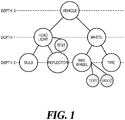
- FIG 1 is an exemplary diagram showing a tree structure of a multi-depth image.
- a multi-depth image may be configured as one main image and a plurality of sub images.
- a plurality of images of a multi-depth image may be hierarchized considering a specific subject or context, and then configure nodes to form a single tree structure.
- the main image may be inserted into the root node of the tree structure, and the sub images may be inserted into the lower-level nodes, respectively.
- FIG 1 shows an exemplary tree structure of a multi-depth image based on a vehicle. Specifically, an image representing the entire exterior of the vehicle is inserted into the root node as the main image. Images of headlights and wheels, which are components of the vehicle, are inserted as sub images into nodes of level 1, which are child nodes of the root node. In this case, images of bulbs and reflectors, which are components of the headlight, are inserted as sub images into nodes of level 2, which are child nodes of the headlight node. In addition, images of tires and tire wheels, which are components of the wheel, are inserted as sub images into nodes of level 2, which are child nodes of the wheel node.
- the headlight node and the wheel node are located under the vehicle node
- the bulb node and the reflector node are located under the headlight node
- the tire node and the tire wheel node are located under the wheel node.
- the multi-depth image is an image format in which an object of a child node is inserted into an object of a parent node in the tree structure illustrated in FIG. 1 .
- the inserted object is generally an image.
- video, text, audio, links to other files, Internet address links, bookmarks, 360 images, and various objects such as 3D objects may be inserted into the object of the parent node as the object of the child node.
- all objects inserted into each node of the multi-depth image are images. However, it should be noted that this is for convenience of description and does not limit the present embodiment.
- 'child image' the image of the child node
- 'parent image' the appropriate position of the image of the parent node
- a method of inserting a child image in the proper position of the parent image a method of inserting the child image in the position where the features of the child image are found in the parent image after comparing the parent image and the child image may be used.
- multimedia content may be additionally mapped to each node.
- the multimedia content is digital content related to an image inserted in each node, and may include various types of objects such as text, video, and audio.
- text indicating specification information such as manufacturer, luminance, and lifetime may be mapped to a headlight node.
- Text representing specification information such as material and manufacturing method may be mapped to the tire wheel node.
- video indicating the shape of the tire wheel during vehicle driving may be additionally mapped to the tire wheel node.
- the image inserted in each node and the multimedia content mapped thereto may be synchronized with each other and displayed in different areas, and this will be described in detail later.
- each component image and related multimedia content may be inserted or mapped to each node using various methods such as a drag-and-drop method or an input method using a file explorer.
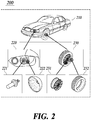
- FIG 2 is an exemplary view showing actual images constituting a multi-depth image.
- the multi-depth image 200 for the vehicle may include an entire vehicle image 210, a headlight image 220, a bulb image 221, a reflector image 222, a wheel image 230, a tire wheel image, and a tire image 232.
- the inserted image When clicking or touching an icon indicating that another image is inserted in each image (a ' ⁇ '-shaped icon in FIG. 2 ), the inserted image may be displayed.
- the headlight image 220 is inserted at the position where a feature similar to that of the headlight image 220 is found in the entire vehicle image 210, and the wheel image 230 is inserted at a position where a feature similar to that of the wheel image 230 is found in the entire vehicle image 210.
- the bulb image 221 is inserted at the position where a feature similar to that of the bulb image 221 is found in the headlight image 220, and the reflector image 222 is inserted at the position where a feature similar to that of the reflector image 222 is found in the headlight image 220.
- the tire wheel image 231 is inserted at the position where a feature similar to that of the tire wheel image 231 is found in the wheel image 230, and the tire image 232 is inserted at the position where a feature similar to that of the tire image 232 is found in the wheel image 230.
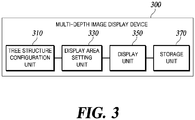
- FIG 3 is a block diagram showing the configuration of a multi-depth image display device according to the present embodiment.
- the multi-depth image display device 300 may include a tree structure configuration unit 310, a display area setting unit 330, and a display unit 350.
- the multi-depth image display device 300 may further include a storage unit 370.
- the tree structure configuration unit 310, the display area setting unit 330, and the display unit 350 may each constitute a separate module or constitute a plurality of modules in which each function is merged, and may be implemented as hardware or software, or may be implemented as a combination of both.
- the tree structure configuration unit 310 may configure a tree structure using a plurality of images constituting a multi-depth image and multimedia content corresponding to each image. Specifically, the tree structure configuration unit 310 may insert the main image of the multi-depth image into a root node, and hierarchically insert the sub images of the multi-depth image into the lower-level nodes of the root node, respectively. In addition, the tree structure configuration unit 310 may map multimedia content input from a user to each node into which component images of a multi-depth image are inserted.
- the multimedia content is digital content related to images inserted in each node, and may include various types of objects such as text and audio/video.
- An example of a tree structure for a multi-depth image configured by the tree structure configuration unit 310 is as described above with reference to FIGS. 1 and 2 .
- the display area setting unit 330 may set one or more display areas based on the generated content tree.
- the display area setting unit 330 may configure one or more content trees from a tree structure of multi-depth images. For example, the display area setting unit 330 may configure one content tree including all nodes and connection relationships in a tree structure related to a multi-depth image as it is. Alternatively, after dividing the basic tree structure for a multi-depth image into a plurality of subtrees, the display area setting unit 330 may configure a plurality of content trees from each subtree generated by division.
- the display area setting unit 330 may set a display area for displaying a multi-depth image and related multimedia content by using the configured content tree.
- a display area for displaying a multi-depth image and related multimedia content is as shown in FIG. 4 .
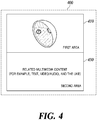
- FIG 4 is a diagram illustrating a display area of a multi-depth image.
- a display area 400 of a multi-depth image may include a first area 410 for displaying an image and a second area 430 for displaying multimedia content mapped to the image.
- a plurality of images constituting a multi-depth image may be displayed in the first area 410.
- a main image inserted into a root node of a multi-depth image may be displayed in the first area 410.
- the selected sub image may be displayed in the first area 410.
- the component image of the multi-depth image displayed in the first area 410 may be enlarged or reduced through a user's clicking a detail icon or a mouse wheel operation.
- the'OT' icon of the image displayed in the first area 410 indicates a detail icon for expanding or reducing the image.
- multimedia content corresponding to the image displayed in the first area 410 may be displayed in synchronization with the corresponding image.
- the multimedia content may include various objects such as text and video mapped to an image node, as described above with reference to FIG. 1 .
- the text may be synchronized with the image of the first area 410 and displayed using a scroll method or the like in the second area 430.
- a playback user interface such as a player or controller for playing the video/audio may be displayed in synchronization with the image of the first area 410 in the second area 430.
- the video may be overlaid on the display area 400 at an arbitrary position among the entire display screen of the multi-depth image and played, and the corresponding audio may be played in the background.
- the user may control (e.g., pause, stop, etc.) the playback of the corresponding video or audio using the playback UI displayed on the second area 430.
- the display area setting unit 330 may set a display area for displaying multi-depth images and related multimedia contents as many as the number of configurations of the content tree. That is, when n content trees are configured from a tree structure related to a multi-depth image, the display area setting unit 330 may set n display areas. Each of the n display areas includes a first area and a second area. Here, n is an integer of 1 or more. An example of setting a display area according to whether a tree structure for a multi-depth image is divided is as shown in FIG. 5 .
- FIG 5a is a diagram illustrating a display area when a tree structure of a multi-depth image is not divided
- FIG. 5b is a diagram illustrating a display area when a tree structure of a multi-depth image is divided.
- the display area 510 of the multi-depth image may be configured as one area including the first area 511 and the second area 513.
- the first area 511 all images constituting the multi-depth image may be displayed in the order of specific sub images according to a user's selection starting from the main image.
- multimedia content e.g., text, video, etc.
- synchronized with the image of the first area 511 may be displayed in the second area 513.
- a backward menu (not shown), for example, a backward icon, for returning to an higher-level topic (i.e., a root node or a branch node of a tree structure) in the multi-depth image may be displayed.
- the display areas 530 and 550 of the corresponding multi-depth image may include first areas 531 and 551 and second areas 533 and 553, respectively.
- component images inserted into nodes of each subtree generated by tree division are displayed in the first areas 531 and 551, and multimedia contents corresponding to the images displayed in the first areas 531 and 551 may be displayed in the second areas 533 and 553 in synchronization with the images of the first areas 531 and 551.
- a backward icon for returning to an higher-level topic (i.e., a root node or a branch node of a corresponding subtree) in the corresponding subtree may be displayed.
- Each of the display areas 530 and 550 is sequentially displayed. When all of the display areas 530 and 550 are not displayed on one screen, the user may sequentially check the respective display areas through screen scrolling.
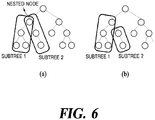
- a method of dividing the tree structure of a multi-depth image is as shown in FIG 6 .
- FIG 6 is an exemplary diagram showing a division form of a tree structure for a multi-depth image.
- a tree structure of a multi-depth image may be divided into a plurality of sub-trees based on a branch node.
- the tree structure may be divided into overlapping subtrees that share branch nodes as shown in (a) of FIG. 6 , or divided based on branch nodes so that they do not overlap with each other as shown in (b) of 6.
- the tree structure of the multi-depth image may be divided by the user.
- a tree structure of a multi-depth image may be divided in a manner desired by a user, not a branch node.
- a plurality of subtrees divided based on a branch node may be integrated with each other or further divided according to a user's selection.
- the division information is mapped with the corresponding multi-depth image information and stored in the storage unit 370, for example, a nonvolatile memory, so that the division information may be used when displaying the same image again in the future.
- the display unit 350 may display a component image of a multi-depth image and related multimedia content in a display area set by the display area setting unit 330. Specifically, the display unit 350 may sequentially display component images corresponding to each node of the content tree, that is, from the main image to the sub image, in the first area of the display area.
- the display unit 350 may display component images of a content tree in a first area of the display area in a depth first search method.
- multi-depth images have a story and are generated in a tree structure.
- a causal relationship exists between the higher-level node and the lower-level node.
- nodes that exist at the same depth in the tree structure have a story of an equal relationship rather than a story of a causal relationship. Therefore, when displaying component images of the content tree in the first area by breadth first search, the texts in the second area displayed in synchronization with the first area do not have a causal relationship, resulting in unnatural story development. Therefore, this embodiment uses a depth first search method.
- the display unit 350 may determine the display order of the component branches of the corresponding content tree based on at least one of the number of depths of each branch of the content tree, the generation time of the image or text included in each branch, and the number of related keywords searched from the text included in each branch. For example, when a specific content tree is configured as two branches, the display unit 350 may display images inserted into nodes of a branch having a large depth number among the corresponding branches in the first area before other branches. Also, when a specific content tree is configured as two branches, the display unit 350 may display images inserted into nodes of a branch having a large number of related keywords of texts included in the corresponding branches in the first area before other branches.
- the display unit 350 may display images inserted into nodes of a branch having a small number of related keywords among the constituent branches of a specific content tree in the first area before other branches.
- the order of displaying images in the first area set by the display area setting unit 330 may be arbitrarily changed according to a user's selection.
- the user may change the display order of a plurality of branches constituting the content tree or the order of nodes included in each branch, so that the order of image display in the first area may be arbitrarily changed.
- the display unit 350 may display multimedia content (e.g., text, video, etc.) related to a component image displayed in the first area in a second area of the display area in synchronization with a corresponding component image.
- multimedia content e.g., text, video, etc.
- the text may be displayed in a scrolling method in the second area of the display area, and a specific example thereof is as shown in FIG. 7a .
- a component image of a multi-depth image may be displayed in the first area 711 of the display area 710.
- the text mapped to the image displayed in the first area 711 may be synchronized with the image in the first area 711 and displayed using a scroll method.
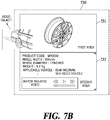
- a playback user interface such as a player or controller for playing the video/audio may be displayed in the second area of the display area, and a specific example thereof is as shown in FIG. 7b .
- UI playback user interface
- a component image of a multi-depth image may be displayed in the first area 731 of the display area 730.
- a player used to play a video mapped to an image displayed in the first area 731 may be displayed in the second area 733.
- the video may be overlaid on the display area 733 at an arbitrary position among the entire display screen of the multi-depth image and played.
- the storage unit 370 is a component necessary to map division information of a multi-depth image with corresponding image information and store the information, and may include a non-volatile memory (e.g., NAND flash memory) or a volatile memory (e.g., DRAM).
- a non-volatile memory e.g., NAND flash memory
- a volatile memory e.g., DRAM
- Division information such as whether a tree structure for a multi-depth image is divided and the number of divisions, may be mapped to the corresponding multi-depth image information and stored in the storage unit 370 and then used for the next image display.
- the display order of content trees is determined based on the depth (level) occupied by the tree structure of the multi-depth image.
- the display area of the content tree occupying the higher-level depth is displayed first.
- content trees having the same depth may exist.
- content trees branching from the same branch node to the lower-level may be classified as the same depth because the depth of the parent node is the same.
- the display order of the display areas of the content trees branching from the same branch node to the lower-level may be determined based on one or more of the following
- the display order of the display areas of each content tree may be changed according to the user's selection.
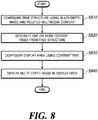
- FIG 8 is a flowchart illustrating a method of displaying a multi-depth image according to the present embodiment.
- the tree structure configuration unit 310 may configure a tree structure using a plurality of images constituting a multi-depth image and multimedia content corresponding to each image.
- the main image and sub image of the multi-depth image are hierarchically inserted in each node of the tree structure, and multimedia content related to the image, for example, various types of objects such as text and audio/video may be mapped to each node into which an image is inserted.
- the display area setting unit 330 may generate one or more content trees from a tree structure of a multi-depth image.
- the tree structure of the multi-depth image When the tree structure of the multi-depth image is divided into n subtrees (where n is an integer greater than or equal to 1), and thus a plurality of content trees are generated, two or more content trees may share one branch node. That is, the tree structure may be divided into nested subtrees that share a branch node, and may be divided into non-nested subtrees that do not share a branch node.
- the tree structure of the multi-depth image may be pre-divided by the user before the image is shown in the display area and the division information is mapped with the corresponding multi-depth image information and stored in the storage unit 370, for example, a nonvolatile memory, so that it may be used again when displaying the same image in the future.
- the display area setting unit 330 may configure one or more display areas by using the content tree generated in operation S820.
- each display area may include a first area for displaying an image and a second area for displaying multimedia content related to the image.
- the display area setting unit 330 may configure one content tree including all nodes and connection relationships in a tree structure related to a multi-depth image as it is. In this case, the display area setting unit 330 may set one display area for displaying a multi-depth image.
- the display area setting unit 330 may configure each subtree generated by division as a separate content tree. In this case, the display area setting unit 330 may set n number of display areas for displaying a multi-depth image.
- the display unit 350 may display a multi-depth image in the display area set in operation S830. Specifically, the display unit 350 may display a component image of a multi-depth image in a first area of each display area, and display in the second area of each display area the multimedia content mapped to the image displayed in the first area in synchronization with the first area.
- the text may be synchronized with the image of the first area 410 and displayed using a scroll method or the like in the second area 430.
- a playback user interface such as a player or controller for playing the video/audio may be displayed in synchronization with the image of the first area 410 in the second area 430.
- the video may be overlaid on the display area 400 at an arbitrary position among the entire display screen of the multi-depth image and played, and the corresponding audio may be played in the background.
- the user may control (e.g., pause, stop, etc.) the playback of the corresponding video or audio using the playback UI displayed on the second area 430.
- FIG. 8 although it is described that a plurality of processes are sequentially performed, this is merely illustrative of the technical idea of the present embodiment. In other words, for those of ordinary skill in the technical field to which this embodiment belongs, without departing from the essential characteristics of this embodiment, by changing the order shown in FIG. 8 or performing some of the plurality of processes in parallel, it will be possible to apply various modifications and changes, so that FIG 8 is not limited to a time series order.
- the processes shown in FIG. 8 may be implemented as computer-readable codes on a computer-readable recording medium.
- the computer-readable recording medium includes all types of recording devices that store data that may be read by a computer system. That is, the computer-readable recording medium includes a storage medium such as a magnetic storage medium (e.g., ROM, floppy disk, hard disk, etc.), and an optical reading medium (e.g., CD-ROM, DVD, etc.).
- the computer-readable recording medium may be distributed over a computer system connected through a network to store and execute computer-readable codes in a distributed manner.
Landscapes
- Engineering & Computer Science (AREA)
- Multimedia (AREA)
- Signal Processing (AREA)
- Databases & Information Systems (AREA)
- Human Computer Interaction (AREA)
- Theoretical Computer Science (AREA)
- General Physics & Mathematics (AREA)
- General Engineering & Computer Science (AREA)
- Physics & Mathematics (AREA)
- Data Mining & Analysis (AREA)
- Business, Economics & Management (AREA)
- Marketing (AREA)
- Software Systems (AREA)
- User Interface Of Digital Computer (AREA)
- Controls And Circuits For Display Device (AREA)
- Digital Computer Display Output (AREA)
- Information Retrieval, Db Structures And Fs Structures Therefor (AREA)
Applications Claiming Priority (2)
| Application Number | Priority Date | Filing Date | Title |
|---|---|---|---|
| KR1020180118728A KR20200039169A (ko) | 2018-10-05 | 2018-10-05 | 멀티 뎁스 이미지 표시 장치 및 방법 |
| PCT/KR2019/012492 WO2020071684A1 (ko) | 2018-10-05 | 2019-09-26 | 멀티 뎁스 이미지 표시 장치 및 방법 |
Publications (2)
| Publication Number | Publication Date |
|---|---|
| EP3863291A1 true EP3863291A1 (de) | 2021-08-11 |
| EP3863291A4 EP3863291A4 (de) | 2022-08-10 |
Family
ID=70055598
Family Applications (1)
| Application Number | Title | Priority Date | Filing Date |
|---|---|---|---|
| EP19869163.6A Withdrawn EP3863291A4 (de) | 2018-10-05 | 2019-09-26 | Vorrichtung und verfahren zur anzeige von mehrtiefenbildern |
Country Status (5)
| Country | Link |
|---|---|
| US (1) | US11677929B2 (de) |
| EP (1) | EP3863291A4 (de) |
| JP (1) | JP7278645B2 (de) |
| KR (1) | KR20200039169A (de) |
| WO (1) | WO2020071684A1 (de) |
Families Citing this family (2)
| Publication number | Priority date | Publication date | Assignee | Title |
|---|---|---|---|---|
| KR102729714B1 (ko) * | 2018-12-26 | 2024-11-13 | 주식회사 피제이팩토리 | 멀티 뎁스(multi-depth) 이미지 생성 및 뷰잉 |
| CN120344733A (zh) | 2022-12-20 | 2025-07-18 | 株式会社可乐丽 | 表面改性纤维、其制造方法、以及使用了表面改性纤维的成型体 |
Family Cites Families (16)
| Publication number | Priority date | Publication date | Assignee | Title |
|---|---|---|---|---|
| JP2001060202A (ja) | 1999-08-23 | 2001-03-06 | Fujitsu Ltd | 文書閲覧システム及びそのシステムでの処理をコンピュータに行わせるためのプログラムを格納した記憶媒体 |
| JP4812207B2 (ja) | 2001-07-31 | 2011-11-09 | 東芝エレベータ株式会社 | エレベータのメインテナンス仕様設定支援システム |
| JP3784695B2 (ja) | 2001-11-06 | 2006-06-14 | 株式会社テクノツリー | 商品カタログ表示装置および商品カタログ表示プログラム、並びに記録媒体 |
| US8387037B2 (en) * | 2005-01-28 | 2013-02-26 | Ca, Inc. | Updating software images associated with a distributed computing system |
| US20060242126A1 (en) * | 2005-03-25 | 2006-10-26 | Andrew Fitzhugh | System and method for a context-sensitive extensible plug-in architecture |
| US7734622B1 (en) * | 2005-03-25 | 2010-06-08 | Hewlett-Packard Development Company, L.P. | Media-driven browsing |
| JP5035596B2 (ja) | 2006-09-19 | 2012-09-26 | ソニー株式会社 | 情報処理装置および方法、並びにプログラム |
| US20080270444A1 (en) | 2007-04-24 | 2008-10-30 | International Business Machines Corporation | System, method and tool for web-based interactive graphical visualization and authoring of relationships |
| US20110179390A1 (en) * | 2010-01-18 | 2011-07-21 | Robert Paul Morris | Methods, systems, and computer program products for traversing nodes in path on a display device |
| JP2011254240A (ja) * | 2010-06-01 | 2011-12-15 | Sony Corp | 画像処理装置、画像処理方法およびプログラム |
| JP5477176B2 (ja) | 2010-06-07 | 2014-04-23 | 株式会社リコー | 部品情報閲覧プログラム、部品情報閲覧装置及び部品情報閲覧システム |
| JP5309187B2 (ja) | 2011-05-26 | 2013-10-09 | 富士フイルム株式会社 | 医用情報表示装置およびその動作方法、並びに医用情報表示プログラム |
| EP2985708B1 (de) | 2014-08-15 | 2025-03-26 | Dassault Systèmes | Navigation durch die hierarchische Struktur eines dreidimensionalen Modells einer Baugruppe von Teilen |
| JP6680085B2 (ja) | 2016-05-31 | 2020-04-15 | 富士通株式会社 | 表示制御方法、表示制御装置および表示制御プログラム |
| KR102644105B1 (ko) * | 2017-12-29 | 2024-03-06 | 주식회사 피제이팩토리 | 멀티 심도 이미지의 자동 생성 방법 |
| KR102729714B1 (ko) * | 2018-12-26 | 2024-11-13 | 주식회사 피제이팩토리 | 멀티 뎁스(multi-depth) 이미지 생성 및 뷰잉 |
-
2018
- 2018-10-05 KR KR1020180118728A patent/KR20200039169A/ko not_active Withdrawn
-
2019
- 2019-09-26 WO PCT/KR2019/012492 patent/WO2020071684A1/ko not_active Ceased
- 2019-09-26 EP EP19869163.6A patent/EP3863291A4/de not_active Withdrawn
- 2019-09-26 US US17/282,892 patent/US11677929B2/en active Active
- 2019-09-26 JP JP2021518524A patent/JP7278645B2/ja active Active
Also Published As
| Publication number | Publication date |
|---|---|
| US20210352268A1 (en) | 2021-11-11 |
| JP7278645B2 (ja) | 2023-05-22 |
| JP2022511602A (ja) | 2022-02-01 |
| US11677929B2 (en) | 2023-06-13 |
| EP3863291A4 (de) | 2022-08-10 |
| KR20200039169A (ko) | 2020-04-16 |
| WO2020071684A1 (ko) | 2020-04-09 |
Similar Documents
| Publication | Publication Date | Title |
|---|---|---|
| CN110489116B (zh) | 一种页面的渲染方法、装置及计算机存储介质 | |
| RU2506629C2 (ru) | Создание презентации на бесконечном полотне и навигация по ней | |
| US20130097552A1 (en) | Constructing an animation timeline via direct manipulation | |
| JP2021007736A (ja) | 音声スキルゲームの編集方法、装置、機器及び読み取り可能な記憶媒体 | |
| US20160358367A1 (en) | Animation based on Content Presentation Structures | |
| CN111803951A (zh) | 游戏编辑方法、装置、电子设备及计算机可读介质 | |
| CN107562777B (zh) | 数据处理方法及其设备 | |
| US9323737B2 (en) | Generating an interactive page template based on setting a material type and a plurality of input and output signals for a mobile device | |
| US20070101355A1 (en) | Device, method, and medium for expressing content dynamically | |
| CN115442639B (zh) | 一种特效配置文件的生成方法、装置、设备及介质 | |
| CN110784753B (zh) | 互动视频播放方法及装置、存储介质、电子设备 | |
| CN106648666A (zh) | 一种用户界面生成方法及系统 | |
| JP6157758B2 (ja) | 情報処理装置及び動画再生方法及び動画再生プログラム | |
| US11677929B2 (en) | Apparatus and method for displaying multi-depth image | |
| WO2025036351A1 (zh) | 媒体内容生成方法、设备、存储介质及程序产品 | |
| KR101720635B1 (ko) | 웹 기반의 3d 영상 컨텐츠 제작 방법 및 이를 운영하는 서버 | |
| KR20160142184A (ko) | 디스플레이 장치 및 이의 제어 방법. | |
| CN105100916A (zh) | 一种视频播放器的制作方法和装置 | |
| US11354028B2 (en) | Multi-depth image generation and viewing | |
| US8615163B2 (en) | Framework, system and method for rapid deployment of interactive applications | |
| KR20230167494A (ko) | 홍보 영상 켄텐츠 제작 방법 및 3d 영상 컨텐츠 제작 시스템 | |
| US20230252701A1 (en) | Method for generating multi-depth image | |
| CN113633990A (zh) | 剧情编辑方法、装置、计算机设备和存储介质 | |
| CN119607534B (zh) | 一种游戏操作方法、装置、介质及设备 | |
| JP4674726B2 (ja) | ファイルの管理方法および情報処理装置 |
Legal Events
| Date | Code | Title | Description |
|---|---|---|---|
| STAA | Information on the status of an ep patent application or granted ep patent |
Free format text: STATUS: THE INTERNATIONAL PUBLICATION HAS BEEN MADE |
|
| PUAI | Public reference made under article 153(3) epc to a published international application that has entered the european phase |
Free format text: ORIGINAL CODE: 0009012 |
|
| STAA | Information on the status of an ep patent application or granted ep patent |
Free format text: STATUS: REQUEST FOR EXAMINATION WAS MADE |
|
| 17P | Request for examination filed |
Effective date: 20210407 |
|
| AK | Designated contracting states |
Kind code of ref document: A1 Designated state(s): AL AT BE BG CH CY CZ DE DK EE ES FI FR GB GR HR HU IE IS IT LI LT LU LV MC MK MT NL NO PL PT RO RS SE SI SK SM TR |
|
| DAV | Request for validation of the european patent (deleted) | ||
| DAX | Request for extension of the european patent (deleted) | ||
| REG | Reference to a national code |
Ref country code: DE Ref legal event code: R079 Free format text: PREVIOUS MAIN CLASS: H04N0021431000 Ipc: G06F0016510000 |
|
| A4 | Supplementary search report drawn up and despatched |
Effective date: 20220711 |
|
| RIC1 | Information provided on ipc code assigned before grant |
Ipc: H04N 21/4728 20110101ALI20220705BHEP Ipc: H04N 21/4722 20110101ALI20220705BHEP Ipc: H04N 21/431 20110101ALI20220705BHEP Ipc: G06F 16/53 20190101ALI20220705BHEP Ipc: G06F 16/51 20190101AFI20220705BHEP |
|
| STAA | Information on the status of an ep patent application or granted ep patent |
Free format text: STATUS: THE APPLICATION IS DEEMED TO BE WITHDRAWN |
|
| 18D | Application deemed to be withdrawn |
Effective date: 20250401 |