EP2472846B1 - Bilderzeugungsvorrichtung - Google Patents
Bilderzeugungsvorrichtung Download PDFInfo
- Publication number
- EP2472846B1 EP2472846B1 EP11010257.1A EP11010257A EP2472846B1 EP 2472846 B1 EP2472846 B1 EP 2472846B1 EP 11010257 A EP11010257 A EP 11010257A EP 2472846 B1 EP2472846 B1 EP 2472846B1
- Authority
- EP
- European Patent Office
- Prior art keywords
- setting information
- print setting
- print data
- unit
- Prior art date
- Legal status (The legal status is an assumption and is not a legal conclusion. Google has not performed a legal analysis and makes no representation as to the accuracy of the status listed.)
- Not-in-force
Links
- 230000000717 retained effect Effects 0.000 claims description 64
- 230000008859 change Effects 0.000 description 22
- 238000010586 diagram Methods 0.000 description 22
- 230000006870 function Effects 0.000 description 17
- 238000000034 method Methods 0.000 description 15
- 230000008569 process Effects 0.000 description 12
- 238000004891 communication Methods 0.000 description 10
- 238000012546 transfer Methods 0.000 description 10
- 238000001514 detection method Methods 0.000 description 7
- 238000012545 processing Methods 0.000 description 7
- 230000015572 biosynthetic process Effects 0.000 description 5
- 238000012805 post-processing Methods 0.000 description 5
- 239000003086 colorant Substances 0.000 description 3
- 238000012986 modification Methods 0.000 description 2
- 230000004048 modification Effects 0.000 description 2
- 230000011218 segmentation Effects 0.000 description 2
- 230000000007 visual effect Effects 0.000 description 2
- 238000010438 heat treatment Methods 0.000 description 1
- 239000004973 liquid crystal related substance Substances 0.000 description 1
- 230000004044 response Effects 0.000 description 1
Images




Classifications
-
- G—PHYSICS
- G03—PHOTOGRAPHY; CINEMATOGRAPHY; ANALOGOUS TECHNIQUES USING WAVES OTHER THAN OPTICAL WAVES; ELECTROGRAPHY; HOLOGRAPHY
- G03G—ELECTROGRAPHY; ELECTROPHOTOGRAPHY; MAGNETOGRAPHY
- G03G15/00—Apparatus for electrographic processes using a charge pattern
-
- H—ELECTRICITY
- H04—ELECTRIC COMMUNICATION TECHNIQUE
- H04N—PICTORIAL COMMUNICATION, e.g. TELEVISION
- H04N1/00—Scanning, transmission or reproduction of documents or the like, e.g. facsimile transmission; Details thereof
- H04N1/32—Circuits or arrangements for control or supervision between transmitter and receiver or between image input and image output device, e.g. between a still-image camera and its memory or between a still-image camera and a printer device
- H04N1/32101—Display, printing, storage or transmission of additional information, e.g. ID code, date and time or title
- H04N1/32128—Display, printing, storage or transmission of additional information, e.g. ID code, date and time or title attached to the image data, e.g. file header, transmitted message header, information on the same page or in the same computer file as the image
-
- H—ELECTRICITY
- H04—ELECTRIC COMMUNICATION TECHNIQUE
- H04N—PICTORIAL COMMUNICATION, e.g. TELEVISION
- H04N1/00—Scanning, transmission or reproduction of documents or the like, e.g. facsimile transmission; Details thereof
-
- H—ELECTRICITY
- H04—ELECTRIC COMMUNICATION TECHNIQUE
- H04N—PICTORIAL COMMUNICATION, e.g. TELEVISION
- H04N1/00—Scanning, transmission or reproduction of documents or the like, e.g. facsimile transmission; Details thereof
- H04N1/0035—User-machine interface; Control console
- H04N1/00405—Output means
- H04N1/00408—Display of information to the user, e.g. menus
- H04N1/00411—Display of information to the user, e.g. menus the display also being used for user input, e.g. touch screen
-
- H—ELECTRICITY
- H04—ELECTRIC COMMUNICATION TECHNIQUE
- H04N—PICTORIAL COMMUNICATION, e.g. TELEVISION
- H04N1/00—Scanning, transmission or reproduction of documents or the like, e.g. facsimile transmission; Details thereof
- H04N1/0035—User-machine interface; Control console
- H04N1/00405—Output means
- H04N1/00482—Output means outputting a plurality of job set-up options, e.g. number of copies, paper size or resolution
-
- H—ELECTRICITY
- H04—ELECTRIC COMMUNICATION TECHNIQUE
- H04N—PICTORIAL COMMUNICATION, e.g. TELEVISION
- H04N1/00—Scanning, transmission or reproduction of documents or the like, e.g. facsimile transmission; Details thereof
- H04N1/00912—Arrangements for controlling a still picture apparatus or components thereof not otherwise provided for
- H04N1/00957—Compiling jobs, e.g. for batch processing
-
- H—ELECTRICITY
- H04—ELECTRIC COMMUNICATION TECHNIQUE
- H04N—PICTORIAL COMMUNICATION, e.g. TELEVISION
- H04N1/00—Scanning, transmission or reproduction of documents or the like, e.g. facsimile transmission; Details thereof
- H04N1/0035—User-machine interface; Control console
- H04N1/00405—Output means
- H04N1/00408—Display of information to the user, e.g. menus
-
- H—ELECTRICITY
- H04—ELECTRIC COMMUNICATION TECHNIQUE
- H04N—PICTORIAL COMMUNICATION, e.g. TELEVISION
- H04N2201/00—Indexing scheme relating to scanning, transmission or reproduction of documents or the like, and to details thereof
- H04N2201/0077—Types of the still picture apparatus
- H04N2201/0094—Multifunctional device, i.e. a device capable of all of reading, reproducing, copying, facsimile transception, file transception
-
- H—ELECTRICITY
- H04—ELECTRIC COMMUNICATION TECHNIQUE
- H04N—PICTORIAL COMMUNICATION, e.g. TELEVISION
- H04N2201/00—Indexing scheme relating to scanning, transmission or reproduction of documents or the like, and to details thereof
- H04N2201/32—Circuits or arrangements for control or supervision between transmitter and receiver or between image input and image output device, e.g. between a still-image camera and its memory or between a still-image camera and a printer device
- H04N2201/3201—Display, printing, storage or transmission of additional information, e.g. ID code, date and time or title
- H04N2201/3212—Display, printing, storage or transmission of additional information, e.g. ID code, date and time or title of data relating to a job, e.g. communication, capture or filing of an image
- H04N2201/3222—Display, printing, storage or transmission of additional information, e.g. ID code, date and time or title of data relating to a job, e.g. communication, capture or filing of an image of processing required or performed, e.g. forwarding, urgent or confidential handling
-
- H—ELECTRICITY
- H04—ELECTRIC COMMUNICATION TECHNIQUE
- H04N—PICTORIAL COMMUNICATION, e.g. TELEVISION
- H04N2201/00—Indexing scheme relating to scanning, transmission or reproduction of documents or the like, and to details thereof
- H04N2201/32—Circuits or arrangements for control or supervision between transmitter and receiver or between image input and image output device, e.g. between a still-image camera and its memory or between a still-image camera and a printer device
- H04N2201/3201—Display, printing, storage or transmission of additional information, e.g. ID code, date and time or title
- H04N2201/3225—Display, printing, storage or transmission of additional information, e.g. ID code, date and time or title of data relating to an image, a page or a document
- H04N2201/3226—Display, printing, storage or transmission of additional information, e.g. ID code, date and time or title of data relating to an image, a page or a document of identification information or the like, e.g. ID code, index, title, part of an image, reduced-size image
-
- H—ELECTRICITY
- H04—ELECTRIC COMMUNICATION TECHNIQUE
- H04N—PICTORIAL COMMUNICATION, e.g. TELEVISION
- H04N2201/00—Indexing scheme relating to scanning, transmission or reproduction of documents or the like, and to details thereof
- H04N2201/32—Circuits or arrangements for control or supervision between transmitter and receiver or between image input and image output device, e.g. between a still-image camera and its memory or between a still-image camera and a printer device
- H04N2201/3201—Display, printing, storage or transmission of additional information, e.g. ID code, date and time or title
- H04N2201/3225—Display, printing, storage or transmission of additional information, e.g. ID code, date and time or title of data relating to an image, a page or a document
- H04N2201/3242—Display, printing, storage or transmission of additional information, e.g. ID code, date and time or title of data relating to an image, a page or a document of processing required or performed, e.g. for reproduction or before recording
-
- H—ELECTRICITY
- H04—ELECTRIC COMMUNICATION TECHNIQUE
- H04N—PICTORIAL COMMUNICATION, e.g. TELEVISION
- H04N2201/00—Indexing scheme relating to scanning, transmission or reproduction of documents or the like, and to details thereof
- H04N2201/32—Circuits or arrangements for control or supervision between transmitter and receiver or between image input and image output device, e.g. between a still-image camera and its memory or between a still-image camera and a printer device
- H04N2201/3201—Display, printing, storage or transmission of additional information, e.g. ID code, date and time or title
- H04N2201/3273—Display
-
- H—ELECTRICITY
- H04—ELECTRIC COMMUNICATION TECHNIQUE
- H04N—PICTORIAL COMMUNICATION, e.g. TELEVISION
- H04N2201/00—Indexing scheme relating to scanning, transmission or reproduction of documents or the like, and to details thereof
- H04N2201/32—Circuits or arrangements for control or supervision between transmitter and receiver or between image input and image output device, e.g. between a still-image camera and its memory or between a still-image camera and a printer device
- H04N2201/3201—Display, printing, storage or transmission of additional information, e.g. ID code, date and time or title
- H04N2201/3274—Storage or retrieval of prestored additional information
Definitions
- the present disclosure relates to an image forming apparatus that has a function to accumulate and save print data.
- An embodiment of the former is an image processing apparatus comprising an input control unit, a condition setting unit, an image output unit, a determining unit, a display control unit, a correction-possibility determining unit, a correcting unit, and a hard disk drive.
- the apparatus is connected to an operation display unit.
- the hard disk drive stores a plurality of document data, an output condition, a reoutput condition, attributes of the document data, and a restrictive condition rule.
- the latter discloses an image processing device in which plural jobs are selected from a box range in an image memory by an operation part.
- a control part clears processing modes for the plural jobs selected, and newly sets a processing mode for totally processing the plural jobs selected.
- the plural jobs selected and the processing mode newly set are stored as a new job in the box range in the image memory.
- European patent application EP 1 768 373 discloses an image forming apparatus allowing a user to store image files in selected ones of a plurality of folders. Each file is stored together with post-processing conditions in the case of outputting the image data. A plurality of files can be selected to be processed together, and the user can select whether the individual post-processing conditions of each file or common post-processing conditions for all files of the combination shall be used. In the latter case, post-processing conditions of each selected file are invalidated and an output setting image area is displayed to set new post-processing conditions.
- the document data that are transmitted from the personal computers and saved in the document boxes are accompanied by print setting information on print settings such as double-side printing or staple printing.
- the image data obtained through the scanner are saved in the document boxes without the print setting information. Therefore, when simultaneously printing the document data transmitted from the personal computers and the image data obtained through the scanner, a user cannot find out which data's print setting information are used for printing the data. Even when the user performs a print setting prior to the printing of the data, the user cannot find out what kind of printed matter is obtained, because a complicated prohibited relationship occurs between the print setting done by the user and the data that already carry the print setting information.
- An object of the present disclosure is to provide an image forming apparatus that has an improved operability in a print setting for selecting and printing accumulated print data retaining print setting information.
- An image forming apparatus includes an image reader, a storage unit, a storage control unit, a print accepting unit, an image forming unit, a determination unit, a display control unit, an agreement accepting unit, a print setting accepting unit and a print control unit.
- the image reader reads an original document to generate image data.
- the storage unit accumulates and stores print data.
- the storage control unit when print data having a print setting set by an information processor are transmitted to the image forming apparatus, causes the storage unit to store the print setting information about the print setting and the print data transmitted from the information processor, and when the image data is generated by the image reader, causes the storage unit to store the generated image data as the print data not retaining any print setting information.
- the print accepting unit accepts a selected input of the print data stored in the storage unit.
- the image formation unit prints out an image onto a sheet.
- the determination unit determines, when the print accepting unit accepts a selected input of a plurality of print data, whether or not the plurality of print data include both print data retaining print setting information and print data not retaining any print setting information.
- the display control unit causes a display unit to display a message about invalidation of the print setting information retained in the print data, when the determination unit determines that the print data accepted by the print accepting unit include both the print data retaining the print setting information and the print data not retaining any print setting information.
- the agreement accepting unit accepts a selected input about whether to agree to the message about invalidation of the print setting information.
- the print setting accepting unit accepts a setting input of same print setting for the plurality of print data when the agreement accepting unit accepts the selected input about agreement.
- the print control unit invalidates the print setting information retained in the print data accepted by the print accepting unit and causes the image formation unit to execute printing based on the print data, after the message is displayed by the display control unit.
- the display unit further causes the display unit not to display the message when the determination unit determines that the print data accepted by the print accepting unit does not include both the print data retaining the print setting information and the print data not retaining any print setting information.
- the print control unit further stops the printing when the agreement accepting unit accepts a select input about disagreement.
- An image forming apparatus includes a storage unit, a print accepting unit, an image forming unit, a change selection accepting unit, a display control unit, a print setting accepting unit and a print control unit.
- the storage unit accumulates and stores print data.
- the print accepting unit accepts a selected input of the print data stored in the storage unit.
- the image forming unit prints out an image onto a sheet.
- the change selection accepting unit when the print accepting unit accepts a selected input of a plurality of print data retaining print setting information, accepts a selected input about whether to print each of the print data by directly using the print setting information retained in each of the print data or to change all of the print setting information retained in each of the print data.
- the display control unit causes a display unit to display a print setting screen, when the change selection accepting unit accepts the selected input to change all of the print setting information retained in each of the print data.
- the print setting accepting unit accepts a setting input of a print setting via the print setting screen.
- the print control unit causes the image forming unit to print each of the print data by using the print setting information when the change selection accepting unit accepts the selected input to print each of the print data by directly using the print setting information retained in each of the print data, and invalidates all of the print setting information retained in each of the print data and causes the image formation unit to print each of the print data by using a print setting accepted by the print setting accepting unit when the change selection accepting unit accepts the selected input to change all of the print setting information retained in each of the print data.
- An image forming apparatus includes a storage unit, a print accepting unit, an image forming unit, a setting change accepting unit, an initial value storage unit, a determination unit, a display control unit, a print setting accepting unit and a print control unit.
- the storage unit accumulates and stores print data.
- the print accepting unit accepts a selected input of the print data stored in the storage unit.
- the image forming unit prints out an image onto a sheet.
- the setting change accepting unit when the print accepting unit accepts a selected input of one print datum retaining print setting information, accepts a selected input about whether to print the print datum by directly using the print setting information or to print the print datum by changing the print setting information.
- the initial value storage unit stores an initial value of print setting information of an apparatus main body.
- the determination unit when the setting change accepting unit accepts the selected input to print the print datum by changing the print setting information retained in the print datum, determines whether the print setting information is different from the print setting information stored in the initial value storage unit.
- the display control unit when the setting change accepting unit accepts the selected input to print the print datum by changing the print setting information retained in the print datum, causes a display unit to display a print setting screen, and when the determination unit determines that the print setting information retained in the print datum is different from the print setting information stored in the initial value storage unit, causes a setting content of the print setting information retained in the print datum to be displayed on the print setting screen about a print setting information item being different between the print datum and the initial value storage unit.
- the print setting accepting unit accepts a setting input of a print setting via the print setting screen.
- the print control unit when the setting change accepting unit accepts the selected input to print the print datum by directly using the print setting information retained in the print datum, causes the image formation unit to print the print datum by using the print setting information, and when the setting change accepting unit accepts the selected input to print the print datum by changing the print setting information retained in the print datum, causes the image formation unit to print the print datum by using the print setting accepted by the print setting accepting unit.
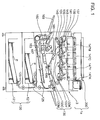
- FIG. 1 is a diagram schematically showing an internal structure of an image forming apparatus 1a according to the embodiment of the present disclosure.
- the image forming apparatus 1a can be applied to, for example, a digital complex machine with copying, printing and fax functions.
- the image forming apparatus 1a is of a tandem type and has an apparatus main body 3 and an image reader 200 disposed over the apparatus main body 3.
- the image reader 200 reads an image (characters, diagrams, photographs, etc.) using a CCD (Charge Coupled Device) or the like and outputs the read image as image data.
- the image reader 200 has a function to read a color image. This enables copying and faxing of the color image.
- the apparatus main body 3 has a sheet storing unit 120, an image forming unit 130, and a fixing unit 160.
- the sheet storing unit 120 is disposed in a lowest part of the apparatus main body 3 and has a sheet tray 121 capable of storing a stack of sheets P.
- the sheet tray 121 is inserted into the apparatus main body 3.
- the sheet tray 121 is pulled out of the apparatus main body 3 to replenish the sheet tray 121 with the sheets P.
- the top sheet P out of the stack of sheets P stored in the sheet tray 121 is fed out toward a sheet conveying path 125 as a result of driving a pickup roller 123.
- the sheet P is conveyed to the image forming unit 130 via the sheet conveying path 125.
- the image forming unit 130 forms toner images on the conveyed sheet P.
- the image forming unit 130 has a magenta unit 133M, a cyan unit 133C, a yellow unit 133Y, and a black unit 133K, which are disposed in order of transferring the toner images to a transfer belt 131. These units have the same configuration; therefore, the magenta unit 133M is taken herein as an example.
- the magenta unit 133M has a photosensitive drum 135 and an exposure device 137.
- a charger 139, a developing device 141 and a cleaner 143 are disposed around the photosensitive drum 135.
- the charger 139 evenly charges a circumferential surface of the photosensitive drum 135.
- the exposure device 137 generates light that corresponds to magenta data contained in the image data (the image data output from the image reader 200, image data transmitted from a personal computer, image data received by a fax machine, etc.), and irradiates the uniformly charged circumferential surface of the photosensitive drum 135.
- an electrostatic image with a magenta pattern is formed on the circumferential surface of the photosensitive drum 135.
- magenta toner is supplied from the developing device 141 to the circumferential surface of the photosensitive drum 135, forming a magenta-patterned toner image on the circumferential surface.
- the transfer belt 131 can move clockwise while being sandwiched between the photosensitive drum 135 and a primary transfer roller 145.
- the magenta-patterned toner image is transferred from the photosensitive drum 135 to the transfer belt 131.
- Magenta toner remaining on the circumferential surface of the photosensitive drum 135 is removed by the cleaner 143.
- the above is the description of the magenta unit 133M.
- a magenta toner container 147M, a cyan toner container 147C, a yellow toner container 147Y, and a black toner container 147K which are containers that contain toners of corresponding colors, are disposed above the magenta unit 133M, the cyan unit 133C, the yellow unit 133Y, the black unit 133K, respectively.
- the developing devices 141 of the respective colors are replenished with the toners from the containers.
- the magenta-patterned toner image is transferred to the transfer belt 131.
- a cyan-patterned toner image is transferred onto the magenta-patterned toner image, and similarly a yellow-patterned toner image and a black-patterned toner image are transferred thereon.
- a color toner image is formed on the transfer belt 131. Transferring the layers of the toner images of these colors onto the transfer belt 131 can form a color toner image on the transfer belt 131.
- a secondary transfer roller 149 transfers this color toner image to the sheet P that is conveyed from the sheet storing unit 120 described above.
- the sheet P with the color toner image thereon is sent to the fixing unit 160.
- the fixing unit 160 has a structure in which a fixing belt 165 is wrapped around a heating roller 161 and a fixing roller 163.
- the fixing belt 165 is sandwiched between the fixing roller 163 and a pressure roller 167.
- the sheet P with the color toner image thereon is sandwiched by these rollers. Therefore, heat and pressure are applied to the color toner image and the sheet P, fixing the color toner image to the sheet P.
- the sheet P is discharged to a catch tray 169.
- FIG. 2 is a block diagram showing an electrical configuration of the image forming apparatus 1a shown in FIG. 1 .
- the image forming apparatus 1a has a configuration in which a storage unit 100, the image reader 200, the image forming unit 130, a controller 300, an operation display unit 400, and a communication unit 500 are mutually connected by buses. Since FIG. 1 illustrates the image forming unit 130 and the image reader 200, the descriptions thereof are omitted.
- the storage unit 100 is a nonvolatile storage device.
- the storage unit 100 configured by a storage medium such as a hard disk or flash memory, has a document box group 110 in which are stored boxes 111 for accumulating and saving print data that are obtained as the image data read by the image reader 200 or document data received from the personal computer or the like by the communication unit 500.
- the data saved in the boxes 111 can be printed any time and handled in a variety of functions, including a batch printing function for printing a plurality of data at once, a print job management function, and a preview function.
- the boxes 111 can be used by users, groups, departments, and the like.
- FIG. 3 is a diagram for illustrating a data configuration of one of the boxes 111.
- the print data saved in the box 111 include data retaining print setting information and data not retaining the print setting information.
- the document data are transmitted from the personal computer or other information processor, along with the print setting information such as information items on a sheet size, double-side printing, staple designation and the like that are set on the personal computer by the user. Therefore, the document data, accompanied by the print setting information, are saved in the box 111.
- the image data read by the image reader 200 are saved without the print setting information.
- a file aaa and a file bbb retain the print setting information, but a file ccc and a file ddd do not retain any print setting information.
- FIG. 4 is a diagram showing an example of the operation display unit 400.
- the operation display unit 400 is provided with operation keys configured by hard keys. Specifically, the operation display unit 400 is provided with a start key 401, a numerical keypad 402, a stop key 403, a reset key 404, and a function switch keypad 405 for switching between copying, printing, scanning and fax functions.
- a document box key 407 is a key used when performing an operation related to the document boxes, as described hereinafter.
- the operation display unit 400 is also provided with a display panel 406 with a touch panel function.
- the display panel 406 is configured by an LDC (Liquid Crystal Display), an ELD (Electronic Luminescent Display) and the like, on which are displayed various operations, contents of operations, and operation keys configured by soft keys. Once the user performs a touch operation on the display panel 406, the display panel 406 detects a touched position and outputs a resultant detection signal to the controller 300.
- LDC Liquid Crystal Display
- ELD Electronic Luminescent Display
- the communication unit 500 has a facsimile communication unit 501 and a network I/F unit 503.
- the facsimile communication unit 501 has an NCU (Network Control Unit) for controlling the connection between a destination fax machine and a telephone line and a modulation/demodulation circuit for modulating/demodulating a facsimile communication signal.
- the facsimile communication unit 501 is connected to a telephone line 505.
- the network I/F unit 503 is a communication interface circuit for executing communication between a LAN (Local Area Network) 507 and the personal computer or other terminal device, and is connected to the LAN 507.
- LAN Local Area Network
- the controller 300 is configured by a CPU (Central Processing Unit), a ROM (Read Only Memory), a RAM (Random Access Memory), an image memory, and the like.
- the CPU executes control, which is required in operating the image forming apparatus 1a, on the abovementioned hardware configuring the image forming apparatus 1a.
- the ROM stores software required in controlling operation of the image forming apparatus 1a.
- the RAM is used for temporarily storing data generated at the time of the execution of the software and for storing application software.
- the image memory temporarily stores the image data (the image data output from the image reader 200, the document data received by the communication unit 500, etc.).
- the controller 300 also has a display controller 301a, a print controller 302a, and a storage controller 304.
- the display controller 301a controls the display panel 406 to display messages about the various operations and the contents of operations, as well as the operation keys.
- the print controller 302a performs print control on the image forming unit 130 to print the print data saved in the box 111. More specifically, when printing at once a plurality of print data out of the print data stored in the box 111, and when the plurality of print data include both the print data retaining the print setting information and the print data not retaining the print setting information, it is difficult for the user to understand whether the print data are printed using the print setting information or not. Furthermore, when simultaneously printing a plurality of print data that retain print setting information different from one another, it is difficult for the user to understand which data's print setting information are used for printing the print data. In addition, even when the user performs print setting prior to the execution of printing, a complicated prohibition relationship is generated between the print setting of the user and the data carrying the print setting information. This makes it difficult for the user to understand what kind of printed matter is obtained.
- the print controller 302a invalidates the print setting information retained in the print data (defaults the print setting information) and issues a print instruction to the image forming unit 130. This allows the user to easily understand how the selected data are output.
- the storage controller 304 causes the storage unit 100 to store the print data transmitted from the information processor, along with the print setting information about the print setting.
- the storage controller 304 also causes the storage unit 100 to store the image data obtained by reading an original document by means of the image reader 200, and the print data not retaining the print setting information.
- FIGS. 5 and 6 are flowcharts showing flows of printing processes for printing the print data saved in the box 111 according to the embodiment.
- the display controller 301a displays a screen 600 on the display panel 406 (step S12).
- FIG. 7 shows the list screen 600 of boxes stored in the document box group 110. The user uses the touch panel function to select a desired box from the boxes displayed on the screen 600.
- the display controller 301a displays a screen 610 shown in FIG. 8 (step S14).
- the display controller 301a causes the display panel 406 to display a screen that allows the controller 300 (print accepting unit) to accept a selected input of the print data stored in the storage unit 100.
- FIG. 8 shows the list screen 610 of the print data that are saved in the box selected on the screen 600 shown in FIG. 7 .
- the user can select data to be printed, from the print data displayed on the screen 610.
- the user can select one print datum or a plurality of print data.
- the display controller 301a displays check marks on check boxes 611 corresponding to the selected print data.
- the print controller 302a reads the selected print data from the box 111 and temporarily stores the selected print data in the RAM or the like of the controller 300.
- the controller 300 determines whether or not the print data stored in the RAM include both the print data retaining the print setting information and the print data not retaining the print setting information (step S16).
- the controller 300 shifts to step S19.
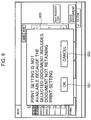
- step S16 When both of the print data retaining/not retaining the print setting information are included (step S16; YES), the display controller 301a causes the display panel 406 to display a warning message explaining that the print setting information of the print data are invalidated (step S17).
- FIG. 9 shows a screen that is obtained when a warning message window 620 is displayed.
- the controller 300 (agreement accepting unit) accepts a selected input on whether the user agrees to the warning message or not.
- the print controller 302a discards the print setting information of the print data stored temporarily in the RAM. At this moment, therefore, each of the print setting information is in a default state (initial state).
- the print controller 302a assigns initial values of the print settings set in the apparatus main body 3 of the image forming apparatus 1a, the print settings being done with respect to both of the print data retaining/not retaining the print setting information, which are accepted by the controller 300 (print accepting unit). Then, the display controller 301a displays a print setting screen 630 shown in FIG.
- the user uses this print setting screen 630 to select a sheet and perform a desired print setting, i.e., double-side printing or staple copying.
- the controller 300 print setting accepting unit accepts a print setting input.
- Allowing the user to perform the print setting with the print data retaining the print setting information generates a complicated prohibition relationship between the print setting done by the user and the print setting information retained in the print data. This makes it difficult for the user to understand what kind of printed matter is obtained.
- the user can easily get the picture of a printed matter to be output, by invalidating the print setting information retained in the print data and printing the print data by using the contents of a new print setting.
- the display panel 406 with the touch panel function detects a touched position and outputs a resultant detection signal to the controller 300.
- the print controller 302a sets or changes the print setting information of the print data stored temporarily in the RAM (step S19).
- setting the print setting information means that the print controller 302a adds the print setting information, set in step S19, to the print data not retaining the print setting information, the print data being included in the print data stored temporarily in the RAM.
- changing the print setting information means that the print controller 302a changes the print setting information of the print data to the print setting information in step S19, the print data being included in the print data stored temporarily in the RAM.
- the print controller 302a When the user presses the star key 401 (step S20; YES), the print controller 302a outputs the print data stored temporarily in the RAM, to the image forming unit 130, and causes the image forming unit 130 to execute printing of the print data. Consequently, the image forming unit 130 prints the print data by using the print setting information retained in the print data (step S21). Note that when the OK key 621 is not selected in step S18 (step S18; NO), it means that the user does not wish to invalidate the print setting information retained in the selected print data. Therefore, the controller 300 ends the printing process. Thus, when the user wishes to perform printing based on the print setting information of the print data without invalidating these print setting information, the user can easily stop the printing by choosing to disagree via the agreement accepting unit.
- step S16 When it is determined in step S16 that only either the print data retaining the print setting information or the print data not retaining the print setting information are included (step S16; NO), the controller 300 shifts to step S19 and discards the print setting. However, when only the print data retaining the print setting information are included, each of the print data may be printed using the corresponding print setting information.
- the print controller 302a invalidates the print setting information retained in the print data, and thereafter causes the image forming unit 130 to print the print data.
- the print data can be printed using the print setting done by the user.
- the user can easily understand how the selected data are output when printing at once the print data retaining the print setting information and the print data not retaining the print setting information.
- the user can easily know that printing is executed based on the default print setting, via the display panel 406 displaying a message about the invalidation of the print setting information.
- the image forming apparatus 1a has the following aspects.
- the print controller 302a assigns the initial value of the print settings set in the apparatus main body 3 of the image forming apparatus 1a, the print settings being done with respect to both the print data retaining/not retaining the print setting information, which are accepted by the print accepting unit.
- the print settings can be collectively set to the initial values of the print settings set in the apparatus main body.
- the first related example provides an image forming apparatus in which the contents of the print setting information can be changed easily when printing at once the plurality of print data retaining print setting information different from one another, and which thereby provides understandable print results. According to this image forming apparatus, it is possible to improve an operability in a print setting for selecting and printing the print data accumulated in the document boxes and retaining the print setting information.
- FIG. 11 is block diagram showing an electrical configuration of the image forming apparatus 1b according to the first related example.
- the same reference numerals as those of the image forming apparatus 1a of the embodiment shown in FIG. 2 are applied to the components of the image forming apparatus 1b; therefore, the description of the component.
- the controller 300 has a display controller 301b, a print controller 302b, and the storage controller 304.
- the display controller 301b controls the display panel 406 to display messages about various operations and contents of operations, as well as the operation keys.
- the display controller 301b also causes the display panel 406 to display a screen that allows the controller 300 (print accepting unit) to accept a selected input of the print data stored in the storage unit 100.
- the print controller 302b performs print control on the image forming unit 130 to print the print data saved in the box 111. More specifically, as shown in the file aaa of FIG. 3 , the document data transmitted from the personal computer are accompanied by the print setting information, such as information on double-side printing or staple printing, and saved as the print data in the box 111.
- the print setting information such as information on double-side printing or staple printing
- the print setting information such as information on double-side printing or staple printing
- the print controller 302b When printing, in accordance with the common print setting, the plurality of print data that retain print setting information different from one another, the print controller 302b invalidates all of the print setting information, and causes the image forming unit 130 to execute the printing using new print setting.
- the controller 300 change selection accepting unit
- the print controller 302b causes the image forming unit 130 to print the print data in accordance with the print setting that is accepted by the controller 300 (print setting accepting unit) as the common print setting.
- FIG. 12 is a flowchart showing a flow of a printing process for printing the print data stored in the box 111 according to the first related example.
- FIG. 12 shows a second half of the flowchart. A first half of the flowchart is same as the flowchart shown in FIG. 5 ; therefore, the description thereof is omitted.
- the print controller 302b reads the selected print data from the box 111 and temporarily stores the selected print data in the RAM or the like of the controller 300.
- the controller 300 ends the printing process in order to perform a different process. An example of the different process is now described briefly.
- the display controller 301b displays the print setting screen, and the print controller 302b executes printing using the set printing setting.
- the print controller 302b invalidates the print setting information and executes printing using new print setting information.
- step S26 the controller 300 shifts to step S26.
- step S26 the print controller 302b outputs the print data stored temporarily in the RAM, to the image forming unit 130, and causes the image forming unit 130 to print the print data. Consequently, the image forming unit 130 executes the printing using the print setting information retained in the print data (step S27).
- the display controller 301b causes the display panel 406 to display a screen 640 shown in FIG. 13 .
- the display controller 301b causes the display panel 406 to display a screen that allows the controller 300 (change selection accepting unit) to accept a selected input about whether the print setting information retained in the print data are used directly for printing the print data or whether all of the print setting information retained in each of the print data are changed or not.
- FIG. 13 shows the screen 640 that accepts the selected input about whether the print setting information retained in print data are used or not.
- a key 641 is a key that is selected when printing is executed by directly using the print setting information retained in the print data.
- a key 642 is a key that is selected when printing is executed after changing the contents of the print setting information retained in the print data.
- the print controller 302b When the user selects the key 641 (step S24; NO) and the start key 401 is pressed (step S26; YES), the print controller 302b outputs the print data stored temporarily in the RAM, to the image forming unit 130, and causes the image forming unit 130 to execute printing of the print data. Consequently, the image forming unit 130 prints the print data by using the print setting information retained in the print data (step S27).
- the print controller 302b discards all of the print setting information that are carried by the print data stored temporarily in the RAM. Therefore, the print setting information enter the default state (initial state) at this point. Then, the display controller 301b causes the display panel 406 to display the print setting screen 630 shown in FIG. 10 .
- the controller 300 (print setting accepting unit) accepts the print setting via the print setting screen 630. The user uses this print setting screen 630 to select a sheet and perform a desired print setting, i.e., double-side printing or staple copying.
- the display panel 406 with the touch panel function detects a touched position and outputs a resultant detection signal to the controller 300.
- the print controller 302b sets or changes the print setting information of the print data stored temporarily in the RAM (step S25).
- changing the print setting information means that the print controller 302b changes the print setting information of the print data stored temporarily in the RAM, to the print setting information set in step S25.
- the plurality of selected print data i.e., the print data stored temporarily in the RAM
- step S26 when the user presses the start key 401 (step S26; YES), the print controller 302b outputs the print data stored temporarily in the RAM, to the image forming unit 130, and causes the image forming unit 130 to execute printing of the print data. Consequently, the image forming unit 130 prints the print data by using the print setting information retained in the print data. In other words, all of the print data are printed in accordance with the common print setting (step S27).
- step S24 When, on the other hand, the user selects the key 641 (step S24; NO), the print controller 302b does not change the print setting information of the print data stored temporarily in the RAM. Subsequently, when the start key 401 is pressed (step S26; YES), the print controller 302b outputs the print data stored temporarily in the RAM, to the image forming unit 130, and causes the image forming unit 130 to execute printing of the print data. Consequently, the image forming unit 130 prints the print data by using the print setting information retained in the print data. In other words, the printing of the print data is executed by directly using the print setting information retained in the print data (step S27).
- the plurality of print data when printing the plurality of print data in accordance with the common print setting, the plurality of print data retaining print setting information different from one another, all of the print setting information retained in the print data are invalidated, and the image forming unit 130 is caused to print the print data by using a new print setting. Therefore, the user does not have to rest each of the print setting information, enabling the execution of printing by a simple operation.
- the print controller 302b can invalidate all of the print setting information retained in the print data and execute the printing based on the new print setting information that are set via the print setting screen as the print setting information common to all print data. This can eliminate the prohibition relationship and provide clear printed results.
- the second related example can provide an image forming apparatus that allows the user to easily see the contents of the print setting information retained in the print data. According to this image forming apparatus, it is possible to improve an operability in a print setting for selecting and printing the print data accumulated in the document boxes and retaining the print setting information.
- FIG. 14 is a block diagram showing an electrical configuration of the image forming apparatus 1c according to the second related example.
- the same reference numerals as those of the image forming apparatus 1a of the embodiment shown in FIG. 2 are applied to the components of the image forming apparatus 1c; therefore, the description thereof is omitted.
- the controller 300 has a display controller 301c, a print controller 302c, an initial setting storage unit 303, and the storage controller 304.
- the display controller 301c controls the display panel 406 to display messages about various operations and contents of operations, as well as the operation keys.
- the print controller 302c controls the image forming unit 130 to print the print data saved in the box 111.
- the display controller 301c also causes the display panel 406 to display a screen that allows the controller 300 (print accepting unit) to accept a selected input of the print data stored in the storage unit 100.
- the initial setting storage unit 303 stores default values (initial values) of print settings set in the image forming apparatus 1c.
- FIG. 15 is a diagram for illustrating contents stored in the initial setting storage unit 303. For example, values that indicate sheet selection, zooming, density, double-side/segmentation printing, bundling pages, staple/punched printing, and other types of frequently used print settings, are stored as the default values in the initial setting storage unit 303.
- the default values stored in the initial setting storage unit 303 are previously stored prior to, for example, factory shipment.
- FIG. 16 is a flowchart showing a flow of a printing process for printing a print datum saved in the box 111 according to the second related example.
- FIG. 16 shows a second half of the flowchart. A first half of the flowchart is same as the flowchart shown in FIG. 5 ; therefore, the description thereof is omitted.
- the print controller 302c reads the selected print data from the box 111 and temporarily stores the selected print data in the RAM or the like of the controller 300.
- the controller 300 determines the number of the selected print data (step S28).
- the controller 300 temporarily stores the plurality of selected print data in the RAM, and prints the print data in accordance with the print setting information retained in each of the print data.
- the display controller 301c causes the display panel 406 to display the screen 640 shown in FIG. 13 .
- the display controller 301c causes the display panel 406 to display the screen that allows the controller 300 (setting change accepting unit) to accept a selected input about whether the print setting information are used directly or whether the printing is performed in accordance with changed print setting information.
- FIG. 13 shows the screen 640 that accepts the selected input about whether the print setting information retained in print data are used or not.
- the key 641 is a key that is selected when printing is executed by directly using the print setting information retained in the print data.
- the key 642 is a key that is selected when printing is executed after changing the contents of the print setting information retained in the print data.
- step S29; NO When the user selects the key 641 (step S29; NO), the print controller 302c does not change the print setting information of the print data stored temporarily in the RAM. Subsequently, when the start key 401 is pressed (step S31; YES), the print controller 302c outputs the print data stored temporarily in the RAM, to the image forming unit 130, and causes the image forming unit 130 to execute printing of the print data. Consequently, the image forming unit 130 prints the print data by using the print setting information retained in the print data. In other words, the printing of the print data is executed by directly using the print setting information retained in the print data (step S32).
- the display controller 301c causes the display panel 406 to display a print setting screen 650 shown in FIG. 17.
- FIG. 17 shows the print setting screen 650 that is displayed when printing is executed in accordance with changed print setting information.
- the controller 300 (print setting accepting unit) accepts the print settings via the print setting screen 650.
- a print setting screen 660 shown in FIG. 18 is displayed when printing the print data in accordance with changed print setting information, which requires a predetermined key operation to see the contents of the print setting information retained in the print data. For instance, in order to see "sheet size" from the print setting information of the file aaa shown in FIG. 3 , the user has to select a sheet selection icon from a setting icon 661 to finally see the setting contents on a sheet selection screen that is displayed subsequently. This means that the user cannot see the print setting information of the file aaa immediately.
- the controller 300 determines whether the setting contents of both sides are different from each other or not.
- the display controller 301c reflects and displays the contents of the print setting information of the file aaa in icon sections corresponding to the different items, without displaying icons.
- the display controller 301c displays the contents of the print setting information, such that the sheet selection icon shows “A4 horizontal,” that a double-side/segmentation printing icon shows “double-side printing,” and that a staple/punched printing icon shows "staple printing,” in a setting icon 651 of the print setting screen 650.
- the display controller 301c also displays marks corresponding to these contents. Icons of the items, which indicate that the print setting information of the file aaa are the same as the default values, are displayed as a zooming icon 651a, a density icon 651b, and a page bundling icon 651c.
- the contents of the print setting information of the print data are displayed, without displaying the icons for the different items.
- the controller 300 determines that the print setting information retained in the print data are different from the print setting information stored in the initial setting storage unit 303
- the display controller 301c displays print setting items for which the print setting information are different between the print data and the initial setting storage unit 303, distinctively from print setting items for which the print setting information are identical.
- the display controller 301c displays a density setting screen (not shown). The user adjusts the density by using the density setting screen.
- the user wishes to change the contents of the print setting information of the file aaa
- the user selects a function tab 652 in accordance with the contents that the user wishes to change.
- the display controller 301c displays a setting screen corresponding to the type of a selected tab. For example, when the user wishes to select "A4 vertical" in place of "A4 horizontal,” the user selects a "original document/sheet/finish" tab of the function tab 652.
- the display controller 301c displays the sheet selection screen (not shown). The user can change the sheet settings by using this sheet selection screen.
- the display panel 406 with the touch panel function detects a touched position and outputs a resultant detection signal to the controller 300.
- the print controller 302c changes the print setting information of the print data stored temporarily in the RAM (step S30).
- the expression "changing the print setting information” means that the print controller 302c changes the print setting information of the print data stored temporarily in the RAM, to the print setting information set in step S31.
- the print controller 302c When the user presses the start key 401 (step S31; YES), the print controller 302c outputs the print data stored temporarily in the RAM, to the image forming unit 130, and causes the image forming unit 130 to execute printing of the print data. Consequently, the image forming unit 130 prints the print data by using the print setting information retained in the print data. In other words, the print data are printed in accordance with the print setting that is changed in step S30 (step S32).
- the controller 300 compares the contents of the print setting information retained in the print data with the initial settings stored in the initial setting storage unit 303.
- the same items as initial settings are displayed in the form of icons.
- the display controller 301c reflects and displays the contents of the print setting information, without displaying icons. This allows the user to have an easy visual understanding of the contents of the print setting information retained in the print data, and improves the convenience of changing the print setting information.
- the display panel 406 displays the items different from the initial values of the print setting information (different from the default values), out of the contents of the print setting information retained in the print data. Therefore, the user can promptly see the contents of the print setting information retained in the print data, through the display panel 406 (screen), whereby the convenience of changing the print setting information can be improved.
- the image forming apparatus 1c has the following aspects.
- the controller 300 determines that the print setting information retained in the print data are different from the print setting information stored in the initial setting storage unit 303
- the display controller 301c displays the print setting items about the print setting information being different between the print data and the initial setting storage unit 303, distinctively from the print setting items about the print setting information being identical.
- This aspect allows the user to recognize, by looking, the print setting items in which the print setting information of the print data are identical to or different from the initial values of the print settings set in the apparatus main body 3 of the image forming apparatus 1c.
Landscapes
- Engineering & Computer Science (AREA)
- Multimedia (AREA)
- Signal Processing (AREA)
- General Engineering & Computer Science (AREA)
- Human Computer Interaction (AREA)
- Physics & Mathematics (AREA)
- General Physics & Mathematics (AREA)
- Facsimiles In General (AREA)
- Accessory Devices And Overall Control Thereof (AREA)
- Control Or Security For Electrophotography (AREA)
- Record Information Processing For Printing (AREA)
Claims (3)
- Eine Bilderzeugungsvorrichtung (1a), die Folgendes umfasst:einen Bildleser (200), der ein Originaldokument liest, um Bilddaten zu erzeugen;eine Speichereinheit (100) die Druckdaten akkumuliert und speichert;eine Speichersteuereinheit (304), die, (a) wenn Druckdaten, bei denen eine Druckeinstellung von einem Informationsprozessor gesetzt wird, zur Bilderzeugungsvorrichtung (1a) übertragen werden, die Speichereinheit (100) dazu bringen, die Druckeinstellungsinformationen über die Druckeinstellung und die Druckdaten, die vom Informationsprozessor übertragen werden, zu speichern, (b) wenn die Bilddaten durch den Bildleser (200) erzeugt werden, die Speichereinheit (100) dazu bringen, die erzeugten Bilddaten zu speichern, wobei die Druckdaten keinerlei Druckeinstellungsinformationen beibehalten;eine druckannehmende Einheit, die einen ausgewählten Input der in der Speichereinheit (100) gespeicherten Druckdaten annimmt;eine Bilderzeugungseinheit (130), die ein Bild auf ein Blatt ausdruckt;eine Bestimmungseinheit (300), die, wenn die druckannehmende Einheit einen ausgewählten Input aus der Vielzahl an Druckdaten annimmt, bestimmt, ob die Vielzahl an Druckdaten sowohl Druckdaten beinhaltet, die Druckeinstellungsinformationen beibehalten, als auch Druckdaten beinhaltet, die keinerlei Druckeinstellungsinformationen beibehalten;eine Anzeigesteuerungseinheit (301 a), die eine Anzeigeeinheit (400) dazu bringt, eine Nachricht über die Entwertung (invalidation) der in den Druckdaten beibehaltenen Druckeinstellungsinformationen anzuzeigen, wenn die Bestimmungseinheit (300) bestimmt, dass die von der druckannehmenden Einheit (300) angenommenen Druckdaten sowohl Druckdaten einschließen, die Druckeinstellungsinformationen beibehalten, als auch Druckdaten einschließen, die keinerlei Druckeinstellungsinformationen beibehalten;eine Zustimmung annehmende Einheit (300), die einen ausgewählten Input dazu annimmt, ob der Nachricht über die Entwertung der Druckeinstellungsinformationen zugestimmt wird;eine Druckeinstellungen annehmende Einheit (300), die einen Einstell-Input gleicher Druckeinstellung für die Vielzahl an Druckdaten annimmt, wenn die Zustimmung annehmende Einheit den ausgewählten Input über die Zustimmung annimmt; undeine Drucksteuerungseinheit (302a), die, wenn die Zustimmung annehmende Einheit (300) den ausgewählten Input über Zustimmung annimmt, die in den von der Druckeinstellungen annehmende Einheit (300) akzeptierten Druckdaten beibehaltenen Druckeinstellungsinformationen entwertet, die Bilderzeugungseinheit (103) dazu bringt, auf der Grundlage der Vielzahl an Druckdaten einen Druck auszuführen, indem die Druckeinstellung verwendet wird, die von der Druckeinstellungen annehmenden Einheit akzeptiert wird, wobeidie Anzeigesteuerungseinheit (301a) die Anzeigeeinheit (400) dazu bringt, die Nachricht nicht anzuzeigen, wenn die Bestimmungseinheit (300) bestimmt, dass die von der druckannehmende Einheit (300) akzeptierten Druckdaten weder die Druckdaten einschließen, die Druckeinstellungsinformationen beibehalten, noch die Druckdaten einschließen, die keinerlei Druckeinstellungsinformationen beibehalten,die Drucksteuerungseinheit (302a) hält den Druck an, wenn die Zustimmung annehmende Einheit (300) einen ausgewählten Input über Nicht-Zustimmung annimmt.
- Die Bilderzeugungsvorrichtung (1a) nach Anspruch 1, die des Weiteren Folgendes umfasst:die Anzeigeeinheit (400),wobei die Anzeigesteuerungseinheit (301a) die Anzeigeeinheit (400) dazu bringt, eine Darstellung anzuzeigen, die der druckannehmenden Einheit erlaubt den ausgewählten Input der in der Speichereinheit gespeicherten Druckdaten zu akzeptieren.
- Die Bilderzeugungsvorrichtung nach Anspruch 1 oder Anspruch 2, wobei, bei der Entwertung der in den Druckdaten beibehaltenen Druckeinstellungsinformationen, die von der druckannehmenden Einheit (300) akzeptiert worden sind, die Drucksteuerungseinheit (302a) einen Anfangswert einer Druckeinstellung zuweist, der in einem Vorrichtungshauptkörper der Bilderzeugungsvorrichtung als Druckeinstellung für die Druckdaten gesetzt wird, die Druckeinstellungsinformationen beibehalten und für die Druckdaten, die keinerlei Druckeinstellungsinformationen beibehalten, wobei die Druckdaten von der druckannehmenden Einheit (300) angenommen werden.
Applications Claiming Priority (3)
| Application Number | Priority Date | Filing Date | Title |
|---|---|---|---|
| JP2010291616A JP5340257B2 (ja) | 2010-12-28 | 2010-12-28 | 画像形成装置 |
| JP2010291617A JP2012136002A (ja) | 2010-12-28 | 2010-12-28 | 画像形成装置 |
| JP2010291618A JP2012138869A (ja) | 2010-12-28 | 2010-12-28 | 画像形成装置 |
Publications (3)
| Publication Number | Publication Date |
|---|---|
| EP2472846A2 EP2472846A2 (de) | 2012-07-04 |
| EP2472846A3 EP2472846A3 (de) | 2012-08-01 |
| EP2472846B1 true EP2472846B1 (de) | 2016-03-02 |
Family
ID=45524222
Family Applications (1)
| Application Number | Title | Priority Date | Filing Date |
|---|---|---|---|
| EP11010257.1A Not-in-force EP2472846B1 (de) | 2010-12-28 | 2011-12-28 | Bilderzeugungsvorrichtung |
Country Status (4)
| Country | Link |
|---|---|
| US (1) | US20120162691A1 (de) |
| EP (1) | EP2472846B1 (de) |
| KR (1) | KR101348656B1 (de) |
| CN (1) | CN102595015B (de) |
Families Citing this family (4)
| Publication number | Priority date | Publication date | Assignee | Title |
|---|---|---|---|---|
| JP6007494B2 (ja) * | 2011-03-02 | 2016-10-12 | 株式会社リコー | 印刷ジョブ編集プログラム、印刷ジョブ編集装置、印刷ジョブ編集方法及び印刷システム |
| DE102016208123B4 (de) | 2016-05-11 | 2020-03-19 | Siemens Healthcare Gmbh | Verfahren und System zum Ausführen einer Scanbewegung einer Bildgebungsdaten-Akquisitionseinheit |
| JP6756218B2 (ja) * | 2016-09-29 | 2020-09-16 | セイコーエプソン株式会社 | 印刷装置、及び印刷装置の制御方法 |
| JP7166799B2 (ja) * | 2018-06-19 | 2022-11-08 | キヤノン株式会社 | 画像処理装置及びその制御方法、並びにプログラム |
Family Cites Families (16)
| Publication number | Priority date | Publication date | Assignee | Title |
|---|---|---|---|---|
| JP3016505B2 (ja) * | 1995-05-11 | 2000-03-06 | 富士ゼロックス株式会社 | 画像形成装置 |
| JP3631068B2 (ja) | 1999-11-02 | 2005-03-23 | キヤノン株式会社 | 情報処理装置、情報処理方法およびコンピュータ読み取り可能なプログラムを格納した記憶媒体 |
| JP3958006B2 (ja) * | 2001-09-14 | 2007-08-15 | キヤノン株式会社 | 画像処理装置および画像処理装置の制御方法およびプログラムおよび記憶媒体 |
| JP2003216362A (ja) | 2002-01-18 | 2003-07-31 | Matsushita Electric Ind Co Ltd | プリンタドライバ |
| JP3970100B2 (ja) * | 2002-06-13 | 2007-09-05 | キヤノン株式会社 | 画像処理装置および画像処理装置の制御方法およびプログラムおよび記憶媒体 |
| US7528990B2 (en) * | 2004-06-16 | 2009-05-05 | Ricoh Company, Ltd. | Image-forming system with improved workability by displaying image finish and setting items in course of processing |
| JP4366341B2 (ja) * | 2004-07-26 | 2009-11-18 | キヤノン株式会社 | データ処理方法、データ処理システム及びコンピュータプログラム、並びに記憶媒体 |
| JP2007062269A (ja) * | 2005-09-01 | 2007-03-15 | Konica Minolta Business Technologies Inc | 画像形成装置、制御方法及びプログラム |
| JP2007283717A (ja) * | 2006-04-19 | 2007-11-01 | Konica Minolta Business Technologies Inc | 画像形成装置、ジョブ設定支援方法、ジョブ設定支援プログラム |
| KR20080052381A (ko) * | 2006-12-07 | 2008-06-11 | 삼성전자주식회사 | 화상형성장치 및 그 제어방법 |
| JP4305520B2 (ja) * | 2007-02-09 | 2009-07-29 | コニカミノルタビジネステクノロジーズ株式会社 | データ管理装置、データ管理方法およびデータ管理プログラム |
| JP2009017059A (ja) * | 2007-07-02 | 2009-01-22 | Canon Inc | 画像処理装置及び画像処理方法 |
| JP5038055B2 (ja) * | 2007-08-08 | 2012-10-03 | キヤノン株式会社 | 印刷装置及びその制御方法、並びにコンピュータプログラム |
| JP2010220132A (ja) * | 2009-03-18 | 2010-09-30 | Ricoh Co Ltd | 画像処理装置、画像処理方法およびプログラム |
| JP2010268346A (ja) * | 2009-05-18 | 2010-11-25 | Sharp Corp | 一の機能に組合せられる機能についての情報を表示する画像形成装置 |
| JP4940270B2 (ja) | 2009-07-06 | 2012-05-30 | シャープ株式会社 | 画像形成装置 |
-
2011
- 2011-12-23 KR KR1020110140797A patent/KR101348656B1/ko not_active Expired - Fee Related
- 2011-12-23 US US13/336,405 patent/US20120162691A1/en not_active Abandoned
- 2011-12-26 CN CN201110442026.8A patent/CN102595015B/zh not_active Expired - Fee Related
- 2011-12-28 EP EP11010257.1A patent/EP2472846B1/de not_active Not-in-force
Also Published As
| Publication number | Publication date |
|---|---|
| KR101348656B1 (ko) | 2014-01-08 |
| US20120162691A1 (en) | 2012-06-28 |
| EP2472846A3 (de) | 2012-08-01 |
| CN102595015B (zh) | 2015-05-06 |
| CN102595015A (zh) | 2012-07-18 |
| KR20120075385A (ko) | 2012-07-06 |
| EP2472846A2 (de) | 2012-07-04 |
Similar Documents
| Publication | Publication Date | Title |
|---|---|---|
| US10412240B2 (en) | Image forming apparatus | |
| US20040126122A1 (en) | Image processing apparatus, image processing method, job processing method, program, and storage medium | |
| US20150288836A1 (en) | Operation console receiving user operation and electronic device and image forming apparatus provided with the operation console | |
| EP2843584B1 (de) | Informationsverarbeitungsvorrichtung und Auftragseinstellverfahren | |
| US9111210B2 (en) | Information processing apparatus and job setting method | |
| EP2472846B1 (de) | Bilderzeugungsvorrichtung | |
| JP4796272B2 (ja) | 画像形成装置 | |
| JP6414534B2 (ja) | 端末装置、画像形成システム、及びプリンタードライバー | |
| JP2006087058A (ja) | 画像処理装置およびその状態情報通知方法と画像処理システム並びにプログラム | |
| JP5340257B2 (ja) | 画像形成装置 | |
| JP2004229236A (ja) | 画像形成装置及び画像形成方法 | |
| JP2018045556A (ja) | 処理装置および画像形成装置 | |
| JP2012138869A (ja) | 画像形成装置 | |
| JP5427875B2 (ja) | 画像形成装置及び画像情報の表示方法 | |
| JP6274138B2 (ja) | 画像形成装置 | |
| JP2007249089A (ja) | 画像形成装置及びその制御方法 | |
| JP7010302B2 (ja) | 情報処理装置、ジョブの設定方法 | |
| JP4755440B2 (ja) | 画像形成装置,制御方法,プログラム,および記録媒体 | |
| JP5667898B2 (ja) | 設定装置及び画像形成装置 | |
| JP2006284772A (ja) | 画像形成装置、画像印刷時の給排紙方法およびプログラム | |
| JP2012136002A (ja) | 画像形成装置 | |
| JP2010197970A (ja) | 画像形成装置 | |
| JP2021088073A (ja) | 画像形成システム、画像形成方法 | |
| JP2006217333A (ja) | 画像形成装置および画像形成装置の画像処理方法 |
Legal Events
| Date | Code | Title | Description |
|---|---|---|---|
| PUAL | Search report despatched |
Free format text: ORIGINAL CODE: 0009013 |
|
| AK | Designated contracting states |
Kind code of ref document: A2 Designated state(s): AL AT BE BG CH CY CZ DE DK EE ES FI FR GB GR HR HU IE IS IT LI LT LU LV MC MK MT NL NO PL PT RO RS SE SI SK SM TR |
|
| AX | Request for extension of the european patent |
Extension state: BA ME |
|
| PUAI | Public reference made under article 153(3) epc to a published international application that has entered the european phase |
Free format text: ORIGINAL CODE: 0009012 |
|
| AK | Designated contracting states |
Kind code of ref document: A3 Designated state(s): AL AT BE BG CH CY CZ DE DK EE ES FI FR GB GR HR HU IE IS IT LI LT LU LV MC MK MT NL NO PL PT RO RS SE SI SK SM TR |
|
| AX | Request for extension of the european patent |
Extension state: BA ME |
|
| RIC1 | Information provided on ipc code assigned before grant |
Ipc: H04N 1/00 20060101ALI20120626BHEP Ipc: H04N 1/32 20060101AFI20120626BHEP |
|
| 17P | Request for examination filed |
Effective date: 20130131 |
|
| 17Q | First examination report despatched |
Effective date: 20130508 |
|
| GRAP | Despatch of communication of intention to grant a patent |
Free format text: ORIGINAL CODE: EPIDOSNIGR1 |
|
| INTG | Intention to grant announced |
Effective date: 20150825 |
|
| GRAS | Grant fee paid |
Free format text: ORIGINAL CODE: EPIDOSNIGR3 |
|
| GRAA | (expected) grant |
Free format text: ORIGINAL CODE: 0009210 |
|
| AK | Designated contracting states |
Kind code of ref document: B1 Designated state(s): AL AT BE BG CH CY CZ DE DK EE ES FI FR GB GR HR HU IE IS IT LI LT LU LV MC MK MT NL NO PL PT RO RS SE SI SK SM TR |
|
| REG | Reference to a national code |
Ref country code: GB Ref legal event code: FG4D |
|
| REG | Reference to a national code |
Ref country code: AT Ref legal event code: REF Ref document number: 778685 Country of ref document: AT Kind code of ref document: T Effective date: 20160315 Ref country code: CH Ref legal event code: EP |
|
| REG | Reference to a national code |
Ref country code: IE Ref legal event code: FG4D |
|
| REG | Reference to a national code |
Ref country code: DE Ref legal event code: R096 Ref document number: 602011023542 Country of ref document: DE |
|
| REG | Reference to a national code |
Ref country code: NL Ref legal event code: MP Effective date: 20160302 |
|
| REG | Reference to a national code |
Ref country code: LT Ref legal event code: MG4D |
|
| REG | Reference to a national code |
Ref country code: AT Ref legal event code: MK05 Ref document number: 778685 Country of ref document: AT Kind code of ref document: T Effective date: 20160302 |
|
| PG25 | Lapsed in a contracting state [announced via postgrant information from national office to epo] |
Ref country code: FI Free format text: LAPSE BECAUSE OF FAILURE TO SUBMIT A TRANSLATION OF THE DESCRIPTION OR TO PAY THE FEE WITHIN THE PRESCRIBED TIME-LIMIT Effective date: 20160302 Ref country code: GR Free format text: LAPSE BECAUSE OF FAILURE TO SUBMIT A TRANSLATION OF THE DESCRIPTION OR TO PAY THE FEE WITHIN THE PRESCRIBED TIME-LIMIT Effective date: 20160603 Ref country code: HR Free format text: LAPSE BECAUSE OF FAILURE TO SUBMIT A TRANSLATION OF THE DESCRIPTION OR TO PAY THE FEE WITHIN THE PRESCRIBED TIME-LIMIT Effective date: 20160302 Ref country code: ES Free format text: LAPSE BECAUSE OF FAILURE TO SUBMIT A TRANSLATION OF THE DESCRIPTION OR TO PAY THE FEE WITHIN THE PRESCRIBED TIME-LIMIT Effective date: 20160302 Ref country code: NO Free format text: LAPSE BECAUSE OF FAILURE TO SUBMIT A TRANSLATION OF THE DESCRIPTION OR TO PAY THE FEE WITHIN THE PRESCRIBED TIME-LIMIT Effective date: 20160602 |
|
| PG25 | Lapsed in a contracting state [announced via postgrant information from national office to epo] |
Ref country code: LT Free format text: LAPSE BECAUSE OF FAILURE TO SUBMIT A TRANSLATION OF THE DESCRIPTION OR TO PAY THE FEE WITHIN THE PRESCRIBED TIME-LIMIT Effective date: 20160302 Ref country code: AT Free format text: LAPSE BECAUSE OF FAILURE TO SUBMIT A TRANSLATION OF THE DESCRIPTION OR TO PAY THE FEE WITHIN THE PRESCRIBED TIME-LIMIT Effective date: 20160302 Ref country code: NL Free format text: LAPSE BECAUSE OF FAILURE TO SUBMIT A TRANSLATION OF THE DESCRIPTION OR TO PAY THE FEE WITHIN THE PRESCRIBED TIME-LIMIT Effective date: 20160302 Ref country code: RS Free format text: LAPSE BECAUSE OF FAILURE TO SUBMIT A TRANSLATION OF THE DESCRIPTION OR TO PAY THE FEE WITHIN THE PRESCRIBED TIME-LIMIT Effective date: 20160302 Ref country code: SE Free format text: LAPSE BECAUSE OF FAILURE TO SUBMIT A TRANSLATION OF THE DESCRIPTION OR TO PAY THE FEE WITHIN THE PRESCRIBED TIME-LIMIT Effective date: 20160302 Ref country code: LV Free format text: LAPSE BECAUSE OF FAILURE TO SUBMIT A TRANSLATION OF THE DESCRIPTION OR TO PAY THE FEE WITHIN THE PRESCRIBED TIME-LIMIT Effective date: 20160302 Ref country code: PL Free format text: LAPSE BECAUSE OF FAILURE TO SUBMIT A TRANSLATION OF THE DESCRIPTION OR TO PAY THE FEE WITHIN THE PRESCRIBED TIME-LIMIT Effective date: 20160302 |
|
| PG25 | Lapsed in a contracting state [announced via postgrant information from national office to epo] |
Ref country code: IS Free format text: LAPSE BECAUSE OF FAILURE TO SUBMIT A TRANSLATION OF THE DESCRIPTION OR TO PAY THE FEE WITHIN THE PRESCRIBED TIME-LIMIT Effective date: 20160702 Ref country code: EE Free format text: LAPSE BECAUSE OF FAILURE TO SUBMIT A TRANSLATION OF THE DESCRIPTION OR TO PAY THE FEE WITHIN THE PRESCRIBED TIME-LIMIT Effective date: 20160302 |
|
| REG | Reference to a national code |
Ref country code: FR Ref legal event code: PLFP Year of fee payment: 6 |
|
| PG25 | Lapsed in a contracting state [announced via postgrant information from national office to epo] |
Ref country code: RO Free format text: LAPSE BECAUSE OF FAILURE TO SUBMIT A TRANSLATION OF THE DESCRIPTION OR TO PAY THE FEE WITHIN THE PRESCRIBED TIME-LIMIT Effective date: 20160302 Ref country code: SK Free format text: LAPSE BECAUSE OF FAILURE TO SUBMIT A TRANSLATION OF THE DESCRIPTION OR TO PAY THE FEE WITHIN THE PRESCRIBED TIME-LIMIT Effective date: 20160302 Ref country code: SM Free format text: LAPSE BECAUSE OF FAILURE TO SUBMIT A TRANSLATION OF THE DESCRIPTION OR TO PAY THE FEE WITHIN THE PRESCRIBED TIME-LIMIT Effective date: 20160302 Ref country code: PT Free format text: LAPSE BECAUSE OF FAILURE TO SUBMIT A TRANSLATION OF THE DESCRIPTION OR TO PAY THE FEE WITHIN THE PRESCRIBED TIME-LIMIT Effective date: 20160704 Ref country code: CZ Free format text: LAPSE BECAUSE OF FAILURE TO SUBMIT A TRANSLATION OF THE DESCRIPTION OR TO PAY THE FEE WITHIN THE PRESCRIBED TIME-LIMIT Effective date: 20160302 |
|
| REG | Reference to a national code |
Ref country code: DE Ref legal event code: R097 Ref document number: 602011023542 Country of ref document: DE |
|
| PG25 | Lapsed in a contracting state [announced via postgrant information from national office to epo] |
Ref country code: IT Free format text: LAPSE BECAUSE OF FAILURE TO SUBMIT A TRANSLATION OF THE DESCRIPTION OR TO PAY THE FEE WITHIN THE PRESCRIBED TIME-LIMIT Effective date: 20160302 Ref country code: BE Free format text: LAPSE BECAUSE OF FAILURE TO SUBMIT A TRANSLATION OF THE DESCRIPTION OR TO PAY THE FEE WITHIN THE PRESCRIBED TIME-LIMIT Effective date: 20160302 |
|
| PLBE | No opposition filed within time limit |
Free format text: ORIGINAL CODE: 0009261 |
|
| STAA | Information on the status of an ep patent application or granted ep patent |
Free format text: STATUS: NO OPPOSITION FILED WITHIN TIME LIMIT |
|
| PG25 | Lapsed in a contracting state [announced via postgrant information from national office to epo] |
Ref country code: DK Free format text: LAPSE BECAUSE OF FAILURE TO SUBMIT A TRANSLATION OF THE DESCRIPTION OR TO PAY THE FEE WITHIN THE PRESCRIBED TIME-LIMIT Effective date: 20160302 |
|
| 26N | No opposition filed |
Effective date: 20161205 |
|
| PG25 | Lapsed in a contracting state [announced via postgrant information from national office to epo] |
Ref country code: SI Free format text: LAPSE BECAUSE OF FAILURE TO SUBMIT A TRANSLATION OF THE DESCRIPTION OR TO PAY THE FEE WITHIN THE PRESCRIBED TIME-LIMIT Effective date: 20160302 Ref country code: BG Free format text: LAPSE BECAUSE OF FAILURE TO SUBMIT A TRANSLATION OF THE DESCRIPTION OR TO PAY THE FEE WITHIN THE PRESCRIBED TIME-LIMIT Effective date: 20160602 |
|
| REG | Reference to a national code |
Ref country code: CH Ref legal event code: PL |
|
| PG25 | Lapsed in a contracting state [announced via postgrant information from national office to epo] |
Ref country code: MC Free format text: LAPSE BECAUSE OF FAILURE TO SUBMIT A TRANSLATION OF THE DESCRIPTION OR TO PAY THE FEE WITHIN THE PRESCRIBED TIME-LIMIT Effective date: 20160302 |
|
| REG | Reference to a national code |
Ref country code: IE Ref legal event code: MM4A |
|
| PG25 | Lapsed in a contracting state [announced via postgrant information from national office to epo] |
Ref country code: LI Free format text: LAPSE BECAUSE OF NON-PAYMENT OF DUE FEES Effective date: 20161231 Ref country code: CH Free format text: LAPSE BECAUSE OF NON-PAYMENT OF DUE FEES Effective date: 20161231 Ref country code: LU Free format text: LAPSE BECAUSE OF NON-PAYMENT OF DUE FEES Effective date: 20161228 |
|
| REG | Reference to a national code |
Ref country code: FR Ref legal event code: PLFP Year of fee payment: 7 |
|
| PG25 | Lapsed in a contracting state [announced via postgrant information from national office to epo] |
Ref country code: IE Free format text: LAPSE BECAUSE OF NON-PAYMENT OF DUE FEES Effective date: 20161228 |
|
| PG25 | Lapsed in a contracting state [announced via postgrant information from national office to epo] |
Ref country code: CY Free format text: LAPSE BECAUSE OF FAILURE TO SUBMIT A TRANSLATION OF THE DESCRIPTION OR TO PAY THE FEE WITHIN THE PRESCRIBED TIME-LIMIT Effective date: 20160302 Ref country code: HU Free format text: LAPSE BECAUSE OF FAILURE TO SUBMIT A TRANSLATION OF THE DESCRIPTION OR TO PAY THE FEE WITHIN THE PRESCRIBED TIME-LIMIT; INVALID AB INITIO Effective date: 20111228 |
|
| PG25 | Lapsed in a contracting state [announced via postgrant information from national office to epo] |
Ref country code: TR Free format text: LAPSE BECAUSE OF FAILURE TO SUBMIT A TRANSLATION OF THE DESCRIPTION OR TO PAY THE FEE WITHIN THE PRESCRIBED TIME-LIMIT Effective date: 20160302 Ref country code: MK Free format text: LAPSE BECAUSE OF FAILURE TO SUBMIT A TRANSLATION OF THE DESCRIPTION OR TO PAY THE FEE WITHIN THE PRESCRIBED TIME-LIMIT Effective date: 20160302 |
|
| PG25 | Lapsed in a contracting state [announced via postgrant information from national office to epo] |
Ref country code: MT Free format text: LAPSE BECAUSE OF NON-PAYMENT OF DUE FEES Effective date: 20161228 |
|
| PG25 | Lapsed in a contracting state [announced via postgrant information from national office to epo] |
Ref country code: AL Free format text: LAPSE BECAUSE OF FAILURE TO SUBMIT A TRANSLATION OF THE DESCRIPTION OR TO PAY THE FEE WITHIN THE PRESCRIBED TIME-LIMIT Effective date: 20160302 |
|
| PGFP | Annual fee paid to national office [announced via postgrant information from national office to epo] |
Ref country code: GB Payment date: 20201216 Year of fee payment: 10 Ref country code: FR Payment date: 20201112 Year of fee payment: 10 Ref country code: DE Payment date: 20201216 Year of fee payment: 10 |
|
| REG | Reference to a national code |
Ref country code: DE Ref legal event code: R119 Ref document number: 602011023542 Country of ref document: DE |
|
| GBPC | Gb: european patent ceased through non-payment of renewal fee |
Effective date: 20211228 |
|
| PG25 | Lapsed in a contracting state [announced via postgrant information from national office to epo] |
Ref country code: GB Free format text: LAPSE BECAUSE OF NON-PAYMENT OF DUE FEES Effective date: 20211228 Ref country code: DE Free format text: LAPSE BECAUSE OF NON-PAYMENT OF DUE FEES Effective date: 20220701 |
|
| PG25 | Lapsed in a contracting state [announced via postgrant information from national office to epo] |
Ref country code: FR Free format text: LAPSE BECAUSE OF NON-PAYMENT OF DUE FEES Effective date: 20211231 |