EP2226709A2 - Appareil de contrôle, procédé de contrôle et programme de traitement de contrôle - Google Patents
Appareil de contrôle, procédé de contrôle et programme de traitement de contrôle Download PDFInfo
- Publication number
- EP2226709A2 EP2226709A2 EP10250332A EP10250332A EP2226709A2 EP 2226709 A2 EP2226709 A2 EP 2226709A2 EP 10250332 A EP10250332 A EP 10250332A EP 10250332 A EP10250332 A EP 10250332A EP 2226709 A2 EP2226709 A2 EP 2226709A2
- Authority
- EP
- European Patent Office
- Prior art keywords
- color
- screen
- cleaning
- mode
- contact position
- Prior art date
- Legal status (The legal status is an assumption and is not a legal conclusion. Google has not performed a legal analysis and makes no representation as to the accuracy of the status listed.)
- Withdrawn
Links
Images


Classifications
-
- G—PHYSICS
- G06—COMPUTING OR CALCULATING; COUNTING
- G06F—ELECTRIC DIGITAL DATA PROCESSING
- G06F3/00—Input arrangements for transferring data to be processed into a form capable of being handled by the computer; Output arrangements for transferring data from processing unit to output unit, e.g. interface arrangements
- G06F3/01—Input arrangements or combined input and output arrangements for interaction between user and computer
- G06F3/03—Arrangements for converting the position or the displacement of a member into a coded form
- G06F3/041—Digitisers, e.g. for touch screens or touch pads, characterised by the transducing means
- G06F3/0416—Control or interface arrangements specially adapted for digitisers
-
- G—PHYSICS
- G06—COMPUTING OR CALCULATING; COUNTING
- G06F—ELECTRIC DIGITAL DATA PROCESSING
- G06F3/00—Input arrangements for transferring data to be processed into a form capable of being handled by the computer; Output arrangements for transferring data from processing unit to output unit, e.g. interface arrangements
- G06F3/01—Input arrangements or combined input and output arrangements for interaction between user and computer
- G06F3/048—Interaction techniques based on graphical user interfaces [GUI]
- G06F3/0487—Interaction techniques based on graphical user interfaces [GUI] using specific features provided by the input device, e.g. functions controlled by the rotation of a mouse with dual sensing arrangements, or of the nature of the input device, e.g. tap gestures based on pressure sensed by a digitiser
- G06F3/0488—Interaction techniques based on graphical user interfaces [GUI] using specific features provided by the input device, e.g. functions controlled by the rotation of a mouse with dual sensing arrangements, or of the nature of the input device, e.g. tap gestures based on pressure sensed by a digitiser using a touch-screen or digitiser, e.g. input of commands through traced gestures
Definitions
- the present invention relates to the technical field of a control apparatus, a control method, and a control processing program for controlling an operation of a display device having input device such as a touch panel for entering the position on a screen by touching the screen.
- an image and information obtained from the web can be displayed on a display screen.
- the user can instruct an operation with the touch panel.
- JP-A Japanese Patent Application Laid-Open
- the present invention has been achieved in consideration of the above, and an object of the invention is to provide a control apparatus, a control method, and a control process program enabling the user to efficiently clean a screen of a display device having an input device for entering a position on the screen by touching the screen.
- one aspect of the present invention relates to a control apparatus for controlling an operation of a display device having an input device for inputting a touched position in a screen as a contact position, comprising:
- the cleaning corresponding mode is started, when the user wipes the screen with a cleaning tool such as cloth, the color of the screen in the wiped part is changed to a predetermined color. It is consequently easy to visually recognize the wiped place. When an area of a certain size is wiped, the cleaning corresponding mode is finished. Thus, the user can clean the screen efficiently.
- the color changing device changes the color of the pixel corresponding to the contact position to the predetermined color.
- the above control apparatus further comprises:
- the cleaning tool such as cloth is pressed against the screen with a pressure of a certain degree or more
- the color of the screen in the part changes to a predetermined color. Consequently, the user can recognize the part in which the cleaning tool is strongly pressed against the screen.
- the color changing device changes the color of the pixel corresponding to the range to the predetermined color.
- the cleaning tool touches the screen with an area of a certain size or more, the color of the screen in the part changes to a predetermined color. Consequently, the user can recognize the part in which the cleaning tool such as cloth having an area of a certain size and coming into contact with the surface to be cleaned is pressed against the screen.
- the above control apparatus further comprises:
- the color changing device changes the color of the pixel corresponding to the contact position to a color corresponding to the contact position in a predetermined image in place of the predetermined color.
- the cleaning-corresponding-mode starting device starts the cleaning corresponding mode, and sets the color of the screen to a color different from the predetermined color, and the color changing device changes the color of the pixel corresponding to the contact position from the different color to the predetermined color.
- the user can certainly distinguish between a wiped part and a part which is not wiped.
- the above control apparatus further comprises:
- control apparatus is an apparatus for executing a process according to an operation using the input device, when the user touches the screen with cloth or the like for cleaning in the cleaning corresponding mode, an unintended process can be prevented from being executed.
- another aspect of the present invention relates to a control method of controlling an operation of a display device having an input device for inputting a touched position in a screen as a contact position, comprising:
- Still another aspect of the present invention relates to a control processing program for making a computer included in a control apparatus for controlling an operation of a display device having an input device for inputting a touched position in a screen as a contact position, function as:
- the user wipes the screen with a cleaning tool such as cloth, the color of the screen of the wiped part changes to a predetermined color. Therefore, it is easy to visually recognize the wiped part.
- the cleaning corresponding mode is finished, so that the user can clean the screen efficiently.
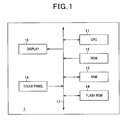
- the information display terminal 1 has a Central Processing Unit (CPU) 11 that controlling the entire information display terminal 1 in a centralized manner, a Read Only Memory (ROM) 12 storing firmware or the like, a Random Access Memory (RAM) 13 temporarily storing data necessary for control process of the CPU 11, a flash ROM 14 storing various control programs, data, and the like, a display 15 such as a liquid crystal display, and a touch panel 16 (an example of input device) employing, for example, pressure-sensitive type or capacitance type.
- the CPU 11 and the components are connected to each other via a bus 17.
- the information display terminal 1 having such a configuration is a terminal device that displays data of an image or the like stored in the flash ROM 14 onto the screen of the display 15, and can be used as a digital photo frame.
- normal mode button, icon, menu, or the like (an example of an object to be displayed) for entering an operation and information such as an image and document are displayed on the display 15.
- cleaning mode an example of a mode corresponding cleaning
- the "cleaning mode” is a mode for the user to clean the touch panel 16.
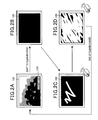
- the "cleaning mode” will be concretely described with reference to FIGS. 2A to 2D .
- the "normal mode” for example, as shown in FIG. 2A , an image selected by the user is displayed on the screen.
- reference numeral 100 denotes screen display of the display 15.
- a "cleaning mode” button expressed by reference numeral 101 is displayed on the screen.
- the mode shifts to the "cleaning mode".
- the entire screen changes to a color in which dirt such as a fingerprint is easily visibly recognized (in the following, called “initial color”).
- the cleaning mode the user cannot perform normal operation using the touch panel 16.
- a color whose brightness is sufficiently low for example, black or the like
- dirt becomes more conspicuous, so that it is effective.
- the color of the screen in the wiped part changes to a color different from the initial color (hereinbelow, called "cleaning completion color").
- cleaning completion color an example of a predetermined color
- a color such as white
- cloth is sufficient as cloth used for cleaning.
- cloth made of a material having conductivity has to be used.
- the color of the screen may change from the initial color to the cleaning completion color only after one wipe of the user, there is also a case that the color in a part changes after the part is wiped a plurality of times.
- the number of times required to change the initial color to the cleaning completion color (hereinbelow, called “the number of wiping times") depends on the operating time of the information display terminal 1 since cleaning of last time (since shift to the "cleaning mode" of last time) and the number of operating times of the information display terminal 1 (for example, the number of times the user touches the touch panel 16) since cleaning of last time. Concretely, the longer the operating time since cleaning of last time is, or the larger the number of operating times since cleaning of last time is, the more the dirt is adhered. Consequently, as the operating time becomes longer, the number of wiping times increases. As the number of operating times increases, the number of wiping times increases.
- the touch panel 16 is constructed by attaching a panel unit formed by stacking a shield, a resistance film, a substrate, and the like so as to cover the screen of the display 15.
- the touch panel 16 is obtained by, for example, forming a number of electrode patterns on a substrate, and a pressure applied to the panel by a touch of the user (in the case of a capacitance touch panel, a change in capacitance) is detected on the pixel unit basis of the screen of the display 15.
- the touch panel 16 outputs position information indicating a coordinate group in which pressure or a change in capacitance is detected to the CPU 11. In the following, the position in which pressure or a change in capacitance is detected will be called a "contact position".
- a table for determining the number of wiping times is stored.
- the number of wiping times is set in correspondence with a set of operating time of the information display terminal 1 and the number of operation times.
- the longer the operating time is, the larger number of wiping times is set.
- operating time information is information indicating operating time of the information display terminal 1 since the cleaning of last time.
- the information of the number of operation times is information indicating the number of operation times of the information display terminal 1 since the cleaning of last time.
- the CPU 11 reads and executes various programs (including the control process program of the invention) stored in the ROM 12, thereby controlling the operation of the information display terminal 1 in a centralized manner, and functions as contact position obtaining means, pressure information obtaining means, cleaning corresponding mode start means, color changing means, cleaning corresponding mode finishing means, and the like.
- the CPU 11 obtains the position information of the user operation output from the touch panel 16.
- the CPU 11 executes a process corresponding to the mode. More specifically, the CPU 11 displays image data, document data, and the like on the display 15 and displays a menu screen, a setting screen, and the like on the display 15. At this time, the CPU 11 displays the "cleaning mode” button as necessary.
- the CPU 11 executes a process according to the screen operation of the user. For example, when the user touches a display position such as a button, icon, menu, or the like, the CPU 11 executes a process corresponding to the button, icon, or the like.
- the CPU 11 displays, for example, a predetermined menu. Further, as needed, the CPU 11 updates the operating time information and the information of the number of operating times stored in the flash ROM 14.
- the CPU 11 When the user touches the "cleaning mode" displayed on the screen, the CPU 11 shifts to the "cleaning mode". At this time, the CPU 11 controls the display 15 to change the color of the entire screen to the initial color, thereby erasing the button, icon, menu, image, and the like displayed until then so that a regular operation with the touch panel 16 cannot be performed.
- the CPU 11 determines the number of wiping times on the basis of the operating time information and the information of the number of operation times stored in the flash ROM 14. Further, the CPU 11 assures the area of a work table in the RAM 12.
- the work table is a table for recording the number of times of actually wiping the screen (hereinbelow, called "the number of wiping passage times") on the pixel unit basis. As the initial value, zero is set.
- the CPU 11 recognizes coordinates of a wiped part in the screen on the basis of position information from the touch panel 16, and updates the number of wiping passage times corresponding to the coordinates. In the case where, while the position information from the touch panel 16 is successively obtained, the contact position indicated by the position information moves, the CPU 11 determines that the screen in the position is wiped. That is, since an action of making cloth or the like slid on the screen while being pressed against the screen is generally "wiping", the action is determined. When the cloth or the like is simply pressed against the screen, dirt on the screen is not easily removed. When the cloth or the like is moved on the screen, dirt is removed. Consequently, it is rational to determine the action as described above.
- the CPU 11 obtains the position information output from the touch panel 16 at predetermined intervals. Each time the position information is obtained from the touch panel 16, the CPU 11 determines whether or not a pixel in which contact is newly detected (hereinbelow, called "pixel 1") exists in pixels adjacent to a region in which contact was detected in acquisition of last time (usually, a region corresponding to a plurality of pixels) exists or not. The CPU 11 also determines whether or not a pixel in which contact is detected this time (hereinbelow, called "pixel 2”) exists in pixels in a region in which contact was detected in acquisition of last time.
- pixel 1 a pixel in which contact is newly detected
- pixel 2 pixel in which contact is detected this time
- the CPU 11 determines whether or not the contact position moves or not on the basis of the directions of the positions of the pixels 1 and 2 viewed from the center of gravity of the region in which contact is detected this time. On the other hand, when only the pixel 1 or 2 exists or when any of the pixels 1 and 2 does not exist, the CPU 11 determines that the contact position does not move.
- the touch panel 16 outputs information indicating a pressure (an example of pressure information) so as to be associated with coordinates at which contact is detected together with position information to the CPU 11. On the basis of the position information, the CPU 11 makes determination.
- a pressure an example of pressure information
- the CPU 11 makes determination.
- a change amount from a reference value of capacitance corresponds to pressure.
- a threshold of pressure to be used for determination may be preliminarily determined at the designing stage of the information display terminal 1, for example, on the basis of whether dirt on the screen can be removed or not.
- the CPU 11 calculates the number of pixels in which contact is detected on the basis of the position information from the touch panel 16.
- the CPU 11 determines that the pixels in which contact is detected are contacted.
- the threshold of an area used for determination may be preliminarily determined at a designing stage of the information display terminal 1 on the basis of average area of contact regions in the screen touched with a finger or the like and the minimum area of the contact region at the time of wiping the screen with cloth or the like.
- the first and second aspects are more effectively when combined and applied.
- the CPU 11 In the case where the CPU 11 updates the work table and, by the updating, a pixel in which the number of wiping passage times becomes the number of wiping times or larger determined at the time of shift to the "cleaning mode" exists, the CPU 11 controls the display 15 to change the color of the corresponding pixel from the initial color to the cleaning completion color, and calculates the number of all of pixels whose color is changed to the cleaning completion color.
- the CPU 11 makes the display mode shift from the "cleaning mode” to the "normal mode". At this time, the CPU 11 controls the display 15 to reset the display of the screen to display just before shift to the "cleaning mode". The CPU 11 initializes the operating time information and the information of the number of operation times stored in the flash ROM 14.
- the processes shown in FIG. 3 are started as the "normal mode", for example, after the power supply of the information display terminal 1 is turned on.
- the CPU 11 performs screen display in the "normal mode” ad displays the "cleaning mode” button on the screen (step S1).
- the screen display in the "normal mode” for example, a predetermined menu, a setting screen, or the like is displayed, or an image or the like is displayed.
- the CPU 11 determines whether any operation is performed on the touch panel 16 or not on the basis of the position information of the touch panel 16 (step S2). In the case where no operation is performed on the touch panel 16 (NO in step S2), the CPU 11 performs the same determination (step S2). In the case where an operation on the touch panel 16 is performed (YES in step S2), the CPU 11 moves to step S3. That is, the CPU 11 waits until some operation is performed.
- the CPU 11 determines whether the "cleaning mode” button is pressed or not (whether the display position of the "cleaning mode” is touched by a finger of the user or the like or not) (step S3).
- step S3 In the case where the "cleaning mode" button is not pressed (NO in step S3), it means that another operation is performed, so that the CPU 11 executes a process according to the operation (step S4). After completion of the process according to the operation, the CPU 11 shifts to step S1. At this time, a screen according to the process result in step S4 is displayed on the display 15.
- step S3 when the "cleaning mode” button is pressed (YES in step S3), the CPU 11 changes the display mode to the "cleaning mode” (step S5). At this time, the CPU 11 changes the color of the entire screen to the initial color.
- the CPU 11 executes a process of determining the number of wiping times (step S6).
- the CPU 11 obtains, as operating time since cleaning of last time, operating time information from the flash ROM 14 as shown in FIG 4 (step S21) and obtains, as the number of operation times since cleaning of last time, information of the number of operation times from the flash ROM 14 (step S22).
- the CPU 11 determines the number of wiping times on the basis of the operating time and the number of operation times with reference to the table for determining the number of wiping times (step S23).
- the CPU 11 finishes the process of determining the number of wiping times and determines whether wiping of the screen is performed or not on the basis of position information from the touch panel 16 (step S7). Concretely, the CPU 11 determines whether the contact position indicated by the position information is moved or not while successively obtaining the position information from the touch panel 16. In the case where wiping of the screen is not performed (NO in step S7), the CPU 11 performs the same determination (step S7). In the case where wiping of the screen is performed (YES in step S7), the CPU 11 shifts to step S8. That is, the CPU 11 waits until it detects that the wiping is performed.
- the CPU 11 updates the number of wiping passage times on the work table corresponding to the coordinates of a wiped position (step S8).
- the CPU 11 determines whether a part wiped by the number of wiping times determined by the process of determining the number of wiping times or larger has been increased by the updating of this time or not (step S9). In the case where the part wiped by the determined number of wiping times or larger has not been enlarged (NO in step S9), the CPU 11 shifts to step S8.
- step S9 the CPU 11 changes the color of the pixels in the part to the cleaning completion color (step S10). Subsequently, the CPU 11 determines whether the screen has been wiped by the predetermined area or larger or not (whether the number of pixels whose color was changed from the initial color to the cleaning completion color more than the number of pixels corresponding to the predetermined area or not) (step S11). At this time, in the case where the screen is not wiped more than the predetermined area (NO in step S11), the CPU 11 moves to step S8.
- step S11 when the screen is wiped more than the predetermined area (YES in step S11), the CPU 11 finishes the cleaning mode (step S 12) and shifts to step S1.
- the CPU 11 in the case where the CPU 11 obtains the position information output from the touch panel 16 and, on the basis of the position information, determines that the "cleaning mode” button is pressed, the CPU 11 changes the operation mode of the information display terminal 1 from the "normal mode” to the "cleaning mode".
- the CPU 11 changes the color of a pixel in the screen corresponding to the contact position indicated by the obtained position information to the cleaning completion color.
- the CPU 11 changes the operation mode of the information display terminal 1 from the "cleaning mode" to the "normal mode”.
- the color of the screen in the wiped part changes to the cleaning completion color. It is easy to visually recognize the wiped place. When an area of a certain size is wiped, the "cleaning mode" is finished. Thus, the user can clean the screen efficiently.
- the CPU 11 In the case where the CPU 11 successively obtains position information from the touch panel 16 and determines that the contact position indicated by the position information has moved on the screen, the CPU 11 changes the color of pixels corresponding to the contact position to the cleaning completion color. Therefore, only in the case where the action of "wiping" the screen is made, the color of the screen in the part where the action is performed is changed to a predetermined color, so that the user can recognize the wiped part in the screen.
- the CPU 11 sets the number of wiping times on the basis of the information of the number of operation times and the operating time information stored in the flash ROM 14, counts the number of times of passage on each pixel (the number of wiping passage times) on the basis of movement of the contact position indicated by the position information, and changes the color of the pixel in which the number of wiping passage times reaches the number of wiping numbers to the cleaning completion color. Therefore, the number of wiping times is properly set according to the degree of dirtiness of the screen proportional to the number of operation times and the operating time of the information display terminal 1, so that the dirt adhered to the screen can be removed with reliability.
- the CPU 11 changes the operation mode of the information display terminal 1 to the "cleaning mode” and changes the color of the entire screen to the initial color different from the cleaning completion color.
- the CPU 11 changes the color of a pixel corresponding to the contact position from the initial color to the cleaning completion color. Therefore, the user can certainly distinguish the cleaned part and the part which is not cleaned from each other.
- the CPU 11 executes a process according to an operation using the touch panel 16.
- the operation mode of the information display terminal 1 is the "cleaning mode”
- the CPU 16 invalidates an operation using the touch panel 16 except for a change of a color of a pixel to the cleaning completion color when the screen is touched. Therefore, in the "cleaning mode", when the user touches the screen with cloth or the like for cleaning, an unintended process can be prevented from being executed.
- the touch panel 16 is constructed so that when the screen is touched, information indicating a pressure applied to the screen is output together with position information to the CPU 11.
- the CPU 11 changes the color of pixels corresponding to the contact position to the cleaning completion color. As a result, the user can recognize the part against which cloth or the like is pressed in the screen.
- the CPU 11 changes the color of the pixels corresponding to the range to the cleaning completion color.
- the color of the screen in the part changes to a predetermined color. Therefore, the user can recognize the part in the cleaning face touched by the cleaning tool having an area of a certain size such as cloth.
- the initial color is set to a color by which dirt adhered to the screen becomes conspicuous is used.
- the cleaning completion color may be set to a color by which dirt becomes conspicuous (such as black). In this aspect, the user can easily recognize whether the dirt in the wiped part was removed or not.
- the CPU 11 converts coordinates of pixels in a wiped part to coordinates on the image and obtains color information of a position corresponding to the wiped part.
- the CPU 11 changes the color of the pixel in the wiped part to the color indicated by the obtained color information. In this aspect, the user can do the cleaning while enjoying an image which is appearing.
- the number of wiping times is determined on the basis of the operating time and the number of operation times of the information display terminal 1.
- the number of wiping times may be determined on the basis of one of them or may be determined in advance as a fixed value.
- a position of touch detected by the touch panel 16 may be simply determined as a wiped position.
- a process corresponding to an operation using a touch panel is executed by the information display terminal 1 itself (CPU 11) and, on the basis of a result of the process or the like, displaying operation of the display is performed.
- the invention can be also applied to a display with a touch panel dedicated to input/display, which is used for operating an information processing apparatus such as a personal computer and displays a video image output from the information processing apparatus.
- the CPU of the display controls the display panel so as to display a video image corresponding to a video signal output from the information processing apparatus, and the "cleaning mode” button is displayed (a button may be provided for the display body).
- the CPU outputs position information from the touch panel to the information processing apparatus.
- a general information processing apparatus can handle it.
- the CPU does not use a video signal output from an information processing apparatus for screen display, and does not output position information from the touch panel to the information processing apparatus.
- the CPU changes the color of the wiped part in the screen from the initial color to the cleaning completion color on the basis of the position information from the touch panel.
- the CPU of the information processing apparatus may control of switch between the "normal mode” and the "cleaning mode".
- the application program may be recorded on a recording medium such as a CD-ROM and loaded to the information processing apparatus by a drive device, or may be downloaded from a predetermined server apparatus via a network.
Landscapes
- Engineering & Computer Science (AREA)
- General Engineering & Computer Science (AREA)
- Theoretical Computer Science (AREA)
- Human Computer Interaction (AREA)
- Physics & Mathematics (AREA)
- General Physics & Mathematics (AREA)
- User Interface Of Digital Computer (AREA)
- Position Input By Displaying (AREA)
- Controls And Circuits For Display Device (AREA)
Applications Claiming Priority (1)
| Application Number | Priority Date | Filing Date | Title |
|---|---|---|---|
| JP2009050411A JP2010205012A (ja) | 2009-03-04 | 2009-03-04 | 制御装置、制御方法及び制御処理プログラム |
Publications (1)
| Publication Number | Publication Date |
|---|---|
| EP2226709A2 true EP2226709A2 (de) | 2010-09-08 |
Family
ID=42078975
Family Applications (1)
| Application Number | Title | Priority Date | Filing Date |
|---|---|---|---|
| EP10250332A Withdrawn EP2226709A2 (de) | 2009-03-04 | 2010-02-25 | Appareil de contrôle, procédé de contrôle et programme de traitement de contrôle |
Country Status (3)
| Country | Link |
|---|---|
| US (1) | US20100225662A1 (de) |
| EP (1) | EP2226709A2 (de) |
| JP (1) | JP2010205012A (de) |
Families Citing this family (18)
| Publication number | Priority date | Publication date | Assignee | Title |
|---|---|---|---|---|
| EP2463107B1 (de) * | 2010-12-09 | 2014-07-16 | Kabushiki Kaisha Toshiba | Farblöschvorrichtung und Steuerungsverfahren der Farblöschvorrichtung |
| EP3686719B1 (de) * | 2010-12-24 | 2024-08-14 | Graphene Square Inc. | Berührungssensor mit graphen zur simultanen detektion eines drucks und einer position |
| KR101851630B1 (ko) * | 2011-08-29 | 2018-06-11 | 엘지전자 주식회사 | 이동 단말기 및 그의 영상 변환 방법 |
| TWI471794B (zh) * | 2011-10-20 | 2015-02-01 | Wintek Corp | 觸控面板 |
| JP2014188333A (ja) * | 2013-03-28 | 2014-10-06 | Daiichi Shokai Co Ltd | 遊技機 |
| JP6252892B2 (ja) * | 2013-09-13 | 2017-12-27 | パナソニックIpマネジメント株式会社 | 共同玄関機 |
| US9542004B1 (en) * | 2013-09-24 | 2017-01-10 | Amazon Technologies, Inc. | Gesture-based flash |
| WO2017090081A1 (ja) * | 2015-11-24 | 2017-06-01 | Necディスプレイソリューションズ株式会社 | 表示方法、表示装置およびプログラム |
| JP2018038903A (ja) * | 2017-12-14 | 2018-03-15 | 株式会社大一商会 | 遊技機 |
| US20190244002A1 (en) * | 2018-02-06 | 2019-08-08 | Wuhan China Star Optoelectronics Semiconductor Display Technology Co., Ltd. | Display device |
| JP7281177B2 (ja) * | 2019-04-23 | 2023-05-25 | 学校法人幾徳学園 | 見守り対象者の心身状態を推定する学習モデルの教師データを生成する方法及びシステム |
| AU2021283451B2 (en) * | 2020-06-01 | 2026-04-02 | Meld CX Pty Ltd | Methods and systems for facilitating cleaning of a shared environment |
| JP2022017647A (ja) * | 2020-07-14 | 2022-01-26 | Necプラットフォームズ株式会社 | テーブル清掃管理システム、管理装置、テーブル清掃検知装置、テーブル清掃管理方法、及びプログラム |
| CN112799555A (zh) * | 2021-01-15 | 2021-05-14 | 厦门攸信信息技术有限公司 | 一种屏幕清理控制方法、触控显示设备及电子设备 |
| JP7679701B2 (ja) | 2021-05-28 | 2025-05-20 | セイコーエプソン株式会社 | 表示装置、表示装置の表示制御方法及び表示制御プログラム |
| JP7682046B2 (ja) * | 2021-07-07 | 2025-05-23 | シュナイダーエレクトリックホールディングス株式会社 | 表示装置 |
| US11599243B1 (en) | 2021-11-03 | 2023-03-07 | Caterpillar Inc. | System and method for activating screen cleaning mode for user interface |
| CN116494916A (zh) * | 2023-04-28 | 2023-07-28 | 零束科技有限公司 | 屏幕清洁装置及清洁方法 |
Citations (1)
| Publication number | Priority date | Publication date | Assignee | Title |
|---|---|---|---|---|
| JP2007026245A (ja) | 2005-07-20 | 2007-02-01 | Hitachi Kokusai Electric Inc | 画面表示装置 |
Family Cites Families (1)
| Publication number | Priority date | Publication date | Assignee | Title |
|---|---|---|---|---|
| US6208331B1 (en) * | 1998-07-01 | 2001-03-27 | Ericsson Inc. | Cleaning touchscreens |
-
2009
- 2009-03-04 JP JP2009050411A patent/JP2010205012A/ja not_active Withdrawn
-
2010
- 2010-02-25 EP EP10250332A patent/EP2226709A2/de not_active Withdrawn
- 2010-03-04 US US12/717,184 patent/US20100225662A1/en not_active Abandoned
Patent Citations (1)
| Publication number | Priority date | Publication date | Assignee | Title |
|---|---|---|---|---|
| JP2007026245A (ja) | 2005-07-20 | 2007-02-01 | Hitachi Kokusai Electric Inc | 画面表示装置 |
Also Published As
| Publication number | Publication date |
|---|---|
| JP2010205012A (ja) | 2010-09-16 |
| US20100225662A1 (en) | 2010-09-09 |
Similar Documents
| Publication | Publication Date | Title |
|---|---|---|
| US20100225662A1 (en) | Control apparatus, control method, and computer-readable recording medium in which control processing program is recorded | |
| JP3588201B2 (ja) | 座標入力装置およびその制御方法 | |
| US8553000B2 (en) | Input apparatus that accurately determines input operation, control method for input apparatus, and storage medium | |
| CN101893956B (zh) | 显示控制设备、显示控制方法和计算机程序 | |
| US20170257559A1 (en) | Movable User Interface Shutter Button for Camera | |
| JP2004213312A (ja) | 情報処理装置及びタッチパネル | |
| CN102385452A (zh) | 信息处理设备、参数设置方法以及程序 | |
| CN104182079B (zh) | 电子设备及位置指定方法 | |
| US11435870B2 (en) | Input/output controller and input/output control program | |
| JP5374564B2 (ja) | 描画装置、描画制御方法、及び描画制御プログラム | |
| JP6863324B2 (ja) | 表示入力装置およびそれを備えた画像形成装置 | |
| JP2005301668A (ja) | 情報処理装置および情報処理プログラム | |
| JP5024397B2 (ja) | 入力装置及び入力制御プログラム | |
| US20100245384A1 (en) | Display apparatus, display mode determination method and recording medium having a display processing program recorded therein | |
| US10216400B2 (en) | Display control apparatus, and method and computer-readable medium for scrolling operation | |
| CN105808129B (zh) | 一种利用手势快速开启软件功能的方法和装置 | |
| TWI452488B (zh) | 應用於感測系統的控制方法 | |
| JP5516128B2 (ja) | 入力装置および入力制御プログラム | |
| JP2021190927A (ja) | タッチパネル装置、画像形成装置及びモード制御プログラム | |
| JP2009037464A (ja) | 画像表示装置及びコンピュータプログラム | |
| JP5757118B2 (ja) | 情報処理装置、情報処理方法及びプログラム | |
| US20230168800A1 (en) | Display device, display method, recording medium recording display program | |
| JP2014235572A (ja) | 入出力装置およびguiコンポーネントの表示方法 | |
| JP6598316B2 (ja) | 表示方法、表示装置およびプログラム | |
| JP2013246482A (ja) | 操作入力装置 |
Legal Events
| Date | Code | Title | Description |
|---|---|---|---|
| PUAI | Public reference made under article 153(3) epc to a published international application that has entered the european phase |
Free format text: ORIGINAL CODE: 0009012 |
|
| AK | Designated contracting states |
Kind code of ref document: A2 Designated state(s): AT BE BG CH CY CZ DE DK EE ES FI FR GB GR HR HU IE IS IT LI LT LU LV MC MK MT NL NO PL PT RO SE SI SK SM TR |
|
| AX | Request for extension of the european patent |
Extension state: AL BA RS |
|
| RTI1 | Title (correction) |
Free format text: TOUCH SCREEN CONTROL APPARATUS, CONTROL METHOD, AND CONTROL PROCESSING PROGRAM |
|
| STAA | Information on the status of an ep patent application or granted ep patent |
Free format text: STATUS: THE APPLICATION HAS BEEN WITHDRAWN |
|
| 18W | Application withdrawn |
Effective date: 20121213 |